#virtual-reality
1 messages · Page 153 of 1
 uneven moon
It has no effect at all, I still spawn outside of the car from where my chair is relative to the center of the play space
Just as it did before this was executed
 tired tree
#1 SnapTo not keep relative
uneven moon
tried that, no difference
tired tree
also i would attach the pawn, not the origin
uneven moon
the pawn is attached on beginplay in the levelbp, so you're right Idk why I'm doing that twice
one sec
am I attaching the pawn to the scene component
or to the car itself
tired tree
the scene component
uneven moon
alright, it's set up now but
I still spawn far off
That in the levelBP
and then
In the pawn BP
let me revert back to add local offset
no change
tired tree
set up a visualization for the origin location, I don't know what special logic you run anywhere
uneven moon
I printed the HMD position
and it's at 0, 0, 0 even though I'm not in the center of my play space
that's why it isn't offsetting
but why would it be 0?
uneven moon
no, I removed it earlier
but
is it possible it reset it and kept it that way
even though I'm no longer executing it?
this is in-editor
tired tree
yea
uneven moon
ffs, did I just brick my project
uneven moon
kk 1 sec
tired tree
remember my whole issue with it was that it was a permanent change while the plugin was running?
editor keeps an instance, it likely retains that
uneven moon
yeah good call, I'm getting the correct numbers on the HMD now but
I don't think the offset is working
Now I spawn directly above the component I attached to
But the HMD isn't in the car, it's way above it
As if I'm standing on the car
 mighty carbon
@full junco It's gotta be a bug in 4.18, because if I create BP actor with ISMC and add my tree into it, I have LODs working and wind working. If I replace ISMC with HISMC - nothing works (I can see vertices on the trees wobble randomly and LODs don't switch at all).
interestingly enough, LOD switches on grass, but not on trees :/
(when using landscape grass system)
 wicked oak
have you looked at Pivot Painter stuff?
its from houdini and 3dsmax, and i think maya
it encodes the pivot on the vertex color, allowing you do to procedural animations by using that data in the material
to make the trees wave with the wind
mighty carbon
makes no sense - trees work just fine in UE4, except when used with grass/foliage system
plus I don't have either of those 3D apps
wicked oak
do you use "individual" parameters?
on the material
becouse i think you cant have individual material parameters on instanced meshes
mighty carbon
not sure what you mean
uneven moon
@tired tree p.s. problem was the tracking origin was set to floor level, setting it to eye level in a scenario where the HMD's location is overriden like this fixed the problem
mighty carbon
@wicked oak I have a static mesh with material that has wind node and the mesh has 3 LODs. If I place it on the level as an actor - all works. If I use it as ISMC - all works. If I use it as HISMC/foliage/grass - it doesn't work properly (no LODs, vertex anim is all wrong)
wicked oak
LODs i can understand, but its weird that HISM lods dont work yet ISMC does
normally its the reverse
and vertex anim wrong is also very weird
maybe its trying to get "object origin", and object origin is the HISM origin
but i havent heard of that happening, really
tired tree
@uneven moon shouldn't need to do that
but you likely had a vertical offset on Z
because that is how Epic says to do it
would just have to accout for that
@wicked oak the wind material he is using gets object position a few times and uses local coords
mighty carbon
is it a bad/wrong thing @tired tree ?
I wonder if I'd be better off using speedtree wind
 sturdy coral
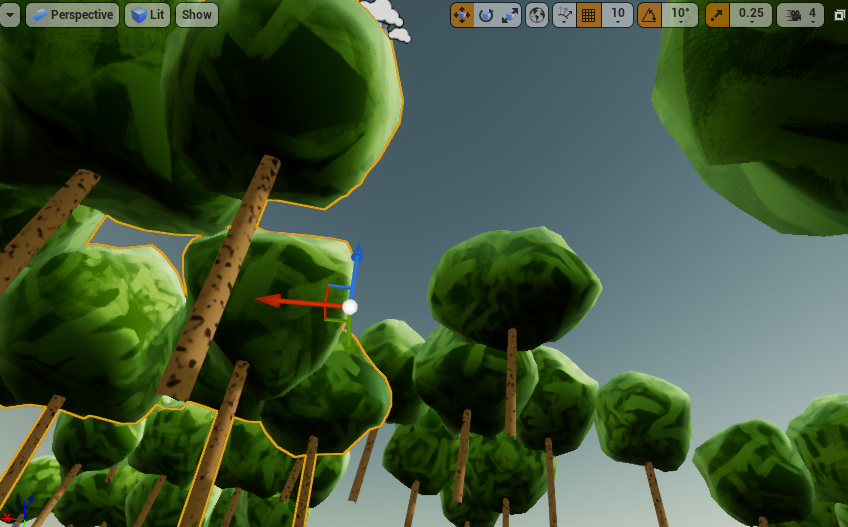
@mighty carbon @tired tree there is a node for that: it is called speed tree coords
tired tree
kind of curious how it is breaking for you though, been trying to re-create
sturdy coral
Or something like that
 sturdy coral
only available on foliage
 wintry escarp
do glowing materials work right in vr, or does the glow look overlaid and 2d?
sturdy coral
It looks fine, can be expensive for high quality bloom
tired tree
@sturdy coral yeah but the nodes I was remembering him showing methey were manually doing it, was a marketplace item I think
sturdy coral
Yeah, he probably just needs to change them to the speed tree node
And he needs to verify his existing setup actually works on 4.17 before claiming 4.18 broke it
mighty carbon
@tired tree that was ink outline 😛
wind is just that - full wind node plugged into WPO
after Gear VR project and back and forth with Epic about various issues, I figured I'd save a lot more time by working around issues than producing repro cases and having Epic to shelve it because they don't have a use for that functionality in the internal projects.
mighty carbon
I did, as I wanted to get some kind of feedback
sometimes someone already has more info than I do
tired tree
then ask a question, don't report it as a 4.18 bug
more so if you didn't test on a previous version
I have been trying but can't reproduce the shadowing or wind issue
(was bored on break)
there is a reason they ask for reproduction projects
sturdy coral
@mighty carbon ^ reproduce in 4.17 before reporting it as something new
mighty carbon
like I said, I did it before and ended up with no-fix or broken fix solutions that dragged on and on..
I'll try LOD issue with 4.16/4.17 since it would be the easiest to create with empty project and built-in tools.
 full junco
@wicked oak LOD with ISMC works if there is only 1 instance, it can change the LOD for all instances at once in an ISMC, and with 1 instance that gives a correct result
mighty carbon

Last month at OC4, we revealed Rift Core 2.0—our biggest Rift update yet. We’ve completely redesigned your Rift experience from the ground up to help you take full advantage of your PC and everything VR has to offer. Soon, you’ll be able to get hands-on with the beta release of Dash, Oculus Home, and the updated Oculus app.
@wicked oak have you ever chatted to Ali (DA) on Discord ? I think he is avail right now (but showing as offline) - might want to add him and bring up all those streaming issues you posted about here
uneven moon
@tired tree I think it was offsetting by the wearer's height given the tracking was set to floor level. If I placed the HMD on the floor, it would be 0, 0, 0 and 1-to-1 with the scene component in the car BP. Seems a bit unnecessary to calculate the offset each time based on the player's height from the ground just to counter it because setting the tracking level to Eye Level does that as well
The player never exits the car physically either, the entire level is spent in the vehicle
If there were a transition between the seated position and the standing, then the eye level tracking wouldn't be accurate, yeah
tired tree
as long as it works, who cares? :p, only said something about resetting since it technically works but also screws everything else up
mighty carbon
I wonder when 4.19 p1 is coming
wintry escarp
xmas
mighty carbon
It would be nice to get it in before xmas
I want to play games on xmas 😛
I guess maybe Nvidia Ampere SLI could render those in VR at 90 fps
mighty carbon
@full junco didn't you need something like this https://forums.unrealengine.com/community/work-in-progress/1392866-runtime-sound-occlusion ?
full junco
I don't think so, and I definitely wouldn't want to use any plugin from the marketplace or forums for anything like that
what you mean was probably me talking about steam audio
but thats not just a bunch of linear traces
mighty carbon
aye
 deep falcon
i tried steam audio and it really didn't feel like i got realistic sound directionality at all. was kinda disappointed :/
 glossy agate
did you have it setup with the right attenuation ect? Worked pretty good for me
full junco
@deep falcon you tried dynamic or static?
 sly elk

Ars Technica
Lower prices lead to increased interest as PlayStation Move dominates sales.
deep falcon
@full junco Hm, I don't know, I tried tweaking a bunch of parameters. Should I maybe go back and play with it more?
Whatever that algorithm is-- HRTF-- does it actually phase-shift sounds in a realistic way or is it just a better way of doing "it's louder in the right ear"?
Also does it matter what headphones I use?
sly elk
I wonder how many combined rift and vive are out there now? Over a million?
glossy agate
it phase shifts the sound to the closer ear, but but if you apply the materials, like physics materials it should provide accurate bounce ect too.
here is the doc on it. I think it includes the settings for common materials too. https://answers.unrealengine.com/storage/temp/200231-steamaudio_manual_unreal_2.0-beta.3.pdf
mighty carbon
@deep falcon got Gear VR by chance ?
mighty carbon
I mean, do you own one ?
mighty carbon
nah, I was just going to give you a key to my app on Gear VR - it has HRTF sound made with Oculus plugin + FMOD
and if that wouldn't have sounded HRTF enough for you, then I am not sure what kind of positional sound you are looking for 😃
deep falcon
oh haha
if i had the equipment i'd be very interested in trying it!
Okay, so ... i'm trying to start a vr project. I'm new to this. I want to do a thing where tilting the handset right or left causes an object on screen to move. I think I know how to proceed with making the object move if I can get a blueprint with access to the handset to receive the handset orientation from the "VR pawn". Problem: There is no "VR Pawn" [in the World Outliner]. The "VR Pawn" is something that magically springs into being [in the World Outliner] when I press Play. I think this has something to do with the Game Mode. There's an unreal document about motion controllers here, but it assumes the VR Pawn exists already and you can just blueprint plug into it: https://docs.unrealengine.com/latest/INT/Platforms/VR/UsingTouchControllers/index.html
Showing you how to pick up and drop objects using Motion Controllers.
I'm pretty sure i'm asking a super-newb question here, but how is it i actually connect the pawn to my "game" blueprint class in a blueprint?
mighty carbon

Wireless VR | TPCAST | Unleash the VR World
TPCAST is the world's first commercial tetherless VR solution. TPCAST Wireless VR solution enhances the VR experience and enables free movement.
it's going to be a paradox though - TPCAST for Rift will be available in China, but Rift isn't available in China. They can't pass FCC in USA, but Rift is available in USA. Sad sad sad...
glossy agate
@deep falcon Yes its in the game mode. The chosen pawn will spawn where your player start is.
deep falcon
So like... I figured out I can go into World Settings and pick "gamemode override", and it lets me make a new game mode there
what i'm not clear on is like... if i make a new game mode it's blank. Is there a way to "fork" the current game mode?
like it just says game mode: none. if i look in the ini file that's supposed to contain the default, it just says "GlobalDefaultGameMode=None".
glossy agate
Yeah you are probably going to want to follow a tutorial first to learn where everything is. They have a bunch on the unreal engine youtube channel. Endless runner tut is good and will show you how most of the major parts work together.
deep falcon
ok
i guess i should. i've been avoiding them becuase they're all like an hour long and spend the first 30 minutes going "and here's how you arrange the builtin parts to make a level" and i'm like arrrgh i wanna replace the builtin parts
sturdy coral
@deep falcon to fork a gamemode you can derive from it, either from AGameModeBase or AGameMode
deep falcon
Oh, OK
sturdy coral
AGameModeBase is the most basic one, AGameMode derives from it and implements extra stuff
like round logic
it is more shooter/competitive game oriented
deep falcon
Is agamemode the default if everything is set to None?
sturdy coral
I can't remember, it might be just for legacy reasons even though AGameModeBase is more generic
deep falcon
Ok
sturdy coral
AGameModeBase was added later on in the engine's life
deep falcon
And the default VR behavior, with the teleportation, that's in AGameMode?
sturdy coral
I don't think there is any VR specific stuff in there
deep falcon
Hm, ok
sturdy coral
you can add a blueprint node to get the current game mode and then print its class or inspect it in the debugger and see what you get by default when things are set to None
deep falcon
This template project somehow seems to know to spawn all this VR related stuff
Oh! That's really helpful
Thanks all and I'll try the endless runner video
sturdy coral
@deep falcon there are several things that can set the pawn: a project level override on the gamemode's default pawn, a level override on the game mode's default pawn (when you open a level it is in the world settings tab, which isn't visible by default, it is under the Window menu), custom code in the game mode itself
and then finally the way the vr template does it: they have a placed pawn inside the map and have auto possess player set to player 0
player 0/1/2/3/4 etc. refers to local players (like split screen or shared screen coop)
 trail shale
So I am browsing through my project settings and suddenly realize I do not have stereo instancing on. I have a very unoptimized scene, with too many draw calls, is there a general expected range of performance to expect? I'm getting about 22-25 m/s
mighty carbon
11ms
trail shale
@mighty carbon wait, is the performance literally doubled??? (I mean, stereo makes sense, but still)
mighty carbon
oh, I mean, you should aim for 11 ms with instanced stereo on
I haven't even tested my scene without instanced stereo
trail shale
I know, I'm wondering how much I should expert performance wise
mighty carbon
well, turn it on and see what you get
trail shale
I'm at about 25 m/s average but it is very unoptimized....many static meshes, few merged actors, excessive materials on certain actors/meshes...pretty much everything I can do to win the "most drawcalls in a single frame" award
 granite jacinth
FML
I finally got my email from Oculus about my hardware req
No go on the Go
Too much demand, OP
At least I'll be getting some more Rifts though
Anyway
Anyone getting their hands on one?
Just wondering the dev workflow for it
full junco
@deep falcon steam audio has HRTF, and that makes you hear stuff in the correct location, oculus audio has that too. thats not too special. it sounds awesome, but whats special about steam audio is the audio "bouncing" around corners and stuff, so like GI (lightmass) with light does
granite jacinth
Can't find anything official saying that UE4 supports it
sturdy coral
@tired tree looks like your plugin is raising some investment dollars from HTC 😃
https://www.reddit.com/r/Vive/comments/7g70c3/htc_invests_in_26_more_arvr_startups_in_vive_x/ https://venturebeat.com/2017/11/16/cloudgates-virtual-self-turns-vive-trackers-into-full-body-motion-capture-devices/

reddit
39 points and 11 comments so far on reddit

When game developer CloudGate Studio got its hands on HTC Vive Tracker peripherals earlier this year, it led to players kicking dinosaurs in virtual reality. It was a fun use case, but the company has much bigger plans for this tech. Its Virtual Self plugin enables developers to use one to three Trackers to provide full-body motion-capture in VR. It will be available to demo in CloudGate's dinosaur survival game Island 359 on December 1, and at a later date, the plugin will launch for Unreal Engine 4, with a Unity version plugin to come.
@trail shale don't measure perf in an editor build
it is much slower
full junco
and don't measure in meters per second
sturdy coral
that I have no opinion on 😛
@granite jacinth can't find anything official saying it supports what, Oculus Go?
I think they are shooting for binary compatibility with Gear VR
granite jacinth
Aye, Oculus Go
But I don't see how they can be the same
Any compatible Galaxy would rekt whatever Oculus Go is cooking up
People keep saying it's a comparable experience, I just can't see how it would be
I should have double checked when Go was announced for that signups for dev kits...grrr
sturdy coral
Oculus Go should be more powerful than any galaxy, since it can run at a higher clock with better cooling right?
I think they've announced which chips are in it
granite jacinth
I guess I'll look into the hardware now if it's available
 real needle
@sturdy coral Don't swap to 4.18 before they fix this issue: https://answers.unrealengine.com/questions/730320/using-the-oculus-rift-with-steamvr-plugin-instead.html
I've reproed in earlier versions and it works just fine
full junco
@granite jacinth read it again
real needle
Can you do my repro steps in 4.18.1 VB?
granite jacinth
I'll try to repro that
Strange if that's the case though, how'd that break and no one noticed until now
real needle
Because Oculus and SteamVR usually doesn't cause problems
sturdy coral
@real needle thanks, I probably won't move to it until nvidia's branch gets there, but I'll make sure to test that when I do, I do want steamvr support for Oculus
real needle
Everything "works"
granite jacinth
(I'm using Rift almost exclusively now)
real needle
And you turn off Oculus Plugin?
sturdy coral
maybe when Oculus releases their overlay API you will be able to have steam all the time in the headset though
full junco
@granite jacinth with steamvr in ue4?
granite jacinth
Yeah, and SteamVR
sturdy coral
if that ends up being the case I might just support OVR only
granite jacinth
I have 3x cameras
real needle
You turn off steamvr?
granite jacinth
But I doubt that matters
sturdy coral
(for rifit)
real needle
I have three as well
granite jacinth
No, I have both on
full junco
@granite jacinth the bug is about if you turn off the oculus sdk in UE4
granite jacinth
Let me check what you're talking about
granite jacinth
Yeah, but why turn it off if it's broken 😉
real needle
I don't want Oculus SDK for several reasons
real needle
No I have bugs with the SDK
granite jacinth
Ah
full junco
I also have the oculus sdk disabled in my game
real needle
For things that works just fine on vive
granite jacinth
Strange, I've never run into any issues with either SDK
real needle
I hate how the two sdks work with eachother
full junco
its a new issue in 4.18
real needle
And I don't need Oculus for anything
granite jacinth
Aye, I'm working on two VR games in 4.18 for clients now
That's why I am like wtf
One for both, one for just rift
real needle
I'm having random crash on Play in VR that only happens when playing with the rift, and disabling the Oculus plugin removes that issue but I then have the issue I reported
Also, having to click the preview window with my mouse to get window focus for keyboard input makes me want to scrap the entire sdk
it's extremely frustrating to just open console etc
sturdy coral
@real needle if I turn on stereo in gameinstance::init on Oculus I get a crash, I have to wait a few frames instead for some reason (4.16)
only with ovr
real needle
k I don't have any crashes w ovr
or wait
OVR you mean OculusVR?
Cuz we have OpenVR
Which is SteamVR in UE
sturdy coral
yeah I mean the oculus plugin
if I do oculus via steamvr I don't get that same crash
real needle
I've had more grievances using Oculus in editor than SteamVR/Vive
tired tree
@sturdy coral lol, I wish :p still really curious about them though
mighty carbon
magically, LOD works now with procedural foliage
I had my tree 60 meters high and I was scaling it down. I assume foliage was using original size and LOD was also calculated based on that.
Now that my tree is 12 meters high, LOD works as expected
wind issue remains 😦
sturdy coral
@mighty carbon see vanishing of milliseconds

Medium
Optimizing the UE4 renderer for Ethan Carter VR
At some point late in development, AMD’s Matthäus G. Chajdas was having a look at a build of the game and remarked that we are using way too highly tessellated trees in the aforementioned opening scene. He was right: looking up the asset in the editor had revealed that screen sizes of LODs 1+ were set to ridiculous amounts in the single-digit percentage region. In other words, the lower LODs would practically never kick in.
it became apparent that instanced foliage does not take instance scaling into account when computing the LOD factors
mighty carbon
I wish I knew that (per Epic's docs or if someone told me on Discord)
but hey, good to see I came to this conclusion using deductive thinking 😉
sturdy coral
he has code to average scale per cluster
I don't know why epic never merged all the changes they made
tired tree
that article was/is a godsend
sturdy coral
they also did combined frustum culling, which epic is only just now talking about adding
full junco
whats the difference to what ue4 is doing now?
I'm awake for 21 hours so can't think too much
sturdy coral
it culls per eye now even with instance stereo and takes twice as long
(for frustum culling, not occlusion culling)
it is supposed to cut ~1ms off of some part of the render thread with a big scene
I looked through his github link and never saw the commit for that though, I'm not sure it is there
I think most of the other stuff is though
mighty carbon
oh wow, wind works, but the values I have to use....
tired tree
yeah it does // currently, shared would be off of __/
ok..formatting broke
\ / \ / ----- \ /
there
sturdy coral
yeah, and over any significant distance I think they highly overlap
except on pimax, probably not worth it there 😛
tired tree
they were talking about porting monoscopic far field to PC and not just mobile anyway
so on the conversion points they would likely be within that anyway
sturdy coral
instanced stereo is going to have an overhead on pimax too since there will be lots of objects in one eye that aren't seen by the other
lots more than normal
full junco
all that tech should just be scrapped
sturdy coral
because vulkan? 😛
full junco
soon all hmd will be high FOV I mean
sturdy coral
dispatching the draws should be the same with LMS
tired tree
I really hope they tie that into their pixel density scalin they are adding in 4.19 eventually
full junco
so any tech that only works good if both eyes see roughly the same isn't worth persueing now
tired tree
would be a lot better than the full screen naive method
sturdy coral
everything won't move to high FOV for a while, but I do think it is going to be super compelling
mobile and standalone won't move for a real long time I don't think
I'm a little worried high FOV is going to trigger a lot more motion sickness
but you can always do FOV restriction and be the same as before during movement
mighty carbon
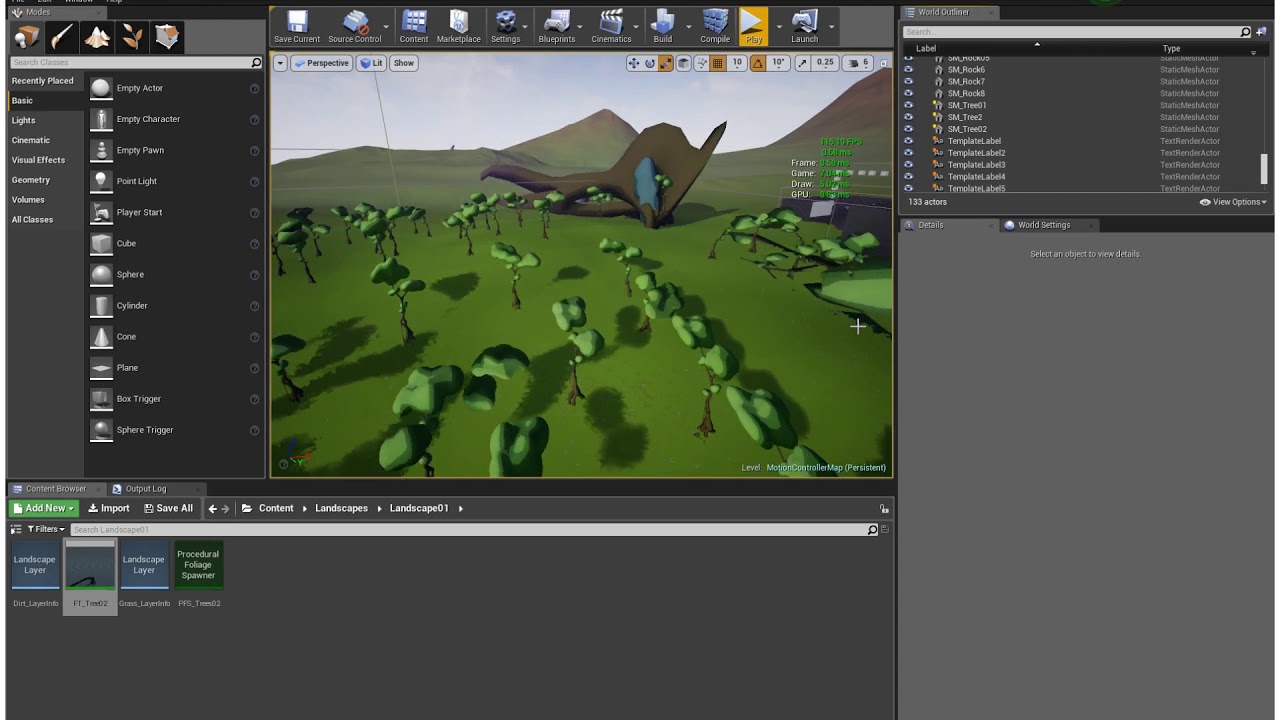
btw, on mobile monoscopic doesn't work with multi-view.. So it's either instanced stereo or monoscopic far fields, not both at the same time
sturdy coral
@mighty carbon I think you're done, ship it
mighty carbon
ha, I probably should.. I'll add IAP and content later
I am wondering why I have to use insanely high values for wind to work with instances :/
sturdy coral
try and debug from the simplest cast, just a quad wiggling around
I guess it is hard if you just have a blob from the marketplace
tired tree
@mighty carbon its because that node graph you linked for your wind to me
uses object radius
that doesn't work the same for isntances
obviously the marketplace creator never fully tested it in instances?
mighty carbon
most likely they didn't
mighty carbon
I guess I should contact the author
tired tree
its not appearing, so either unfixed and fell off, or....who knows
mighty carbon
or live with separate material instances for procedural foliage
sturdy coral
@mighty carbon you probably need the FoliageScaleFactor node
mighty carbon
I am not really too savvy in the materials 😦
glossy agate
LSD simulator VR
Had the same issue before where a change in the mesh scale would change the wind effect. Never fixed it though.
trail shale
I just recently discovered you can cut your rendering requirements IN HALF if you only target the pirate demographic
sturdy coral
target the one-eyed colorblind demographic and save even more
mighty carbon

@tired tree at 2:05 there is an interesting issue.. I am wondering what would be the best way to make sure there is no reticle on the ground and player can't navigate when arc doesn't "meet" the reticle
btw, performance is decent so far. Mostly 90 fps. Dips to 45 sometimes, but I blame Landscape for that.
real needle
@mighty carbon I made a max size landscape and wasn't able to hit performance
Which is a little sad
granite jacinth
Hmm strange
never knew these existed: https://www.amazon.com/Oculus-Rift-Earphones-pc/dp/B01LY3WOHF/ref=sr_1_fkmr1_3
How haven't I seen these anywhere, I assume not in trade shows due to the yuckiness of putting that into people's ears...
real needle
@granite jacinth nice if you don't like over ears, but they would be annoying to dev with
real needle
I want a quick on/off
glossy agate
Those would be nice if you are not sharing with anyone. I use the iPhone ear buds a lot for vive just cause it’s a little more convenient to put on and off
granite jacinth
I wish I could snag a pair of ossic x
glossy agate
Yeah those look cool. Wonder what the price is
granite jacinth
$400+
glossy agate
Damn haha. Little much for me. And I’m 50% hearing loss in one ear from the mil so probably a waste on me.
granite jacinth
Meh
If I can't get it for cheap (sub 200) or free. I'll just wait for the competition 😉
Or v2.0
But, getting them is the hard part anyway, they are always low in stock
glossy agate
Anyone here get in the “stand out VR” alpha? Can’t tell what engine they used but it looks pretty good for a pubg clone. Huge looking map with lots of players
Been trying to get a key but they run out fast
 glossy flame
A certain youtuber who uploaded a vid of it says it uses Unity (in the description). Didn't ask how he/she knows.
tired tree
pretty obvious that it is unity, the gun interactions and models are marketplace there
glossy flame
Damn, I should go the market more often. heh. Just looked at the company who made it. They're French, so Unity was the first that came to mind,.
@rvan You don't need a key to play it. That aforementioned youtuber upped the zip - first game I joined had at least 10 other people in it.
Here:
https://we.tl/qF8FrwHWKU

1.4 GB of files sent via WeTransfer, the simplest way to send your files around the world
Default unity shaders/lighting. Not pretty.

 willow trail
Hey, I've started a VR project from scratch a little while ago (used to use the template). Now I've copied the unreal settings from one project to the other be evidently it's not enough, I get weird glitches like some sort of local distortion on the screen (like local tearing, as if there were droplets on the screens), and I can tell some other effects are enabled which weren't (I'm not sure bloom was in for example).
Is there any place where I can see all settings I should enable for VR? crossreferencing with the template is hard when I'm not sure where to look :/
glossy flame
@willow trail not sure if it matters, but is the engine version of the project you started from scratch the same as the engine version of the the project you copied the settings over from?
willow trail
No I went from 4.17 to 4.18 actually
did they rename VR specific parameters?
I mean I didn't literally copy paste of course, I went through both and added all the options that mattered
wicked oak
they changed plenty of stuff in the VR side
glossy flame
I'd think it's best to use project settings from a vr template of the same engine version as that of your scratch project. You know you could also just reset your scratch one to default first. Then save/export the project settings from a fresh vr template of a 4.18 project. (there're buttons at the top for load/save settings)
willow trail
@wicked oak @glossy flame Alright thanks, I'll do that then
glossy flame
I'm a newb tho. vblanco knows what's up, so if he says do something different, do that.
willow trail
I can't seem to export all the settings though
You'd expect "All settings" to export everything, but it only exports the first option (Project / Description)
sturdy coral
@willow trail that sounds like asyncronous spacewarp, disable it in the Oculus debug tool and see if your game is running choppy
Doom min spec is apparently a 1070
Pretty nuts since it is also on PSVR right?
wicked oak
they are kind of bullshitting
unless its a heavy drawcall game
probably their "minimum" means 1.5 supersample 90 fps
full junco
do they use TAA or MSAA?
mighty carbon
well, VR is heading to Walmart: https://www.walmart.com/ideas/gamecenter/virtual-reality-gaming-stay/222211

Walmart.com
A new report shows that virtual reality gaming is unlikely to be some flash in the pan, with all three major headsets poised for a bright future.
sturdy coral
I know they support TAA, but they might support MSAA too
wicked oak
most likely TAA
works great on the desktop version, so i dont see why they wont reuse it
the doom engine can be put VR to good use like straight out of the box
just add stereo, basically
sturdy coral
I bet all their foggy/frosted glass effects look good
willow trail
@sturdy coral Might be an oculus feature but I don't remembering seeing that before I ported stuff to a new project
oh well
Anyone has an idea on how to export all settings at once?
sturdy coral
@willow trail can't you just copy the config folder?
willow trail
I have but there's ton of stuff that remain problematic
some settings must not be written to the config files?
sturdy coral
The saved folder can have some stuff sometimes
willow trail
I get TAA and HDR after copying the configs from the VR template for some reason
oh ok
sly elk
anyone here ever had issues with room scale games where collisions on objects you are holding aren't 100% reliable? I have a print screen for debugging right after event begin overlap and about 10% of the time it doesn't trigger
full junco
why do you say "with room scale games"?
uneven moon
@sly elk Overlaps aren't any different in VR,
Could be an issue with your settings, or a scale issue
sly elk
Yeah. Scale maybe. This has been annoying to track down because overlap events will fire correctly, just not 100% of the time
im using 1 uu = 1 cm
I can't find any cvars for collision accuracy. Any advice on what to look at?
Here's a video. I have tested different types of collision geometry, including just a single box for each object and it still happens. What you can't see on the VR preview window is that there is a debug print on every overlap event. When the collision fails its not reporting any overlap. https://www.youtube.com/watch?v=5rREm7YUUpc&feature=youtu.be
also how quickly i move the objects doesn't seem to matter
sturdy coral
Overlaps do have bugs in VR, I think only when overlapping an actors own components though
trail shale
@sly elk Are you able to start with getting every type of actor hit? Make your overlap fire on every single actor availble and see if you can find what it is hitting, as long as your channels are good you might have something you are colliding with that you aren't realizing
If that is the case, you can make an Is equal branch to the name of the object you want to collide with and just ignore everything else
That's the issue I had at least
tired tree
orrrrrrr....manage collision channels...
sly elk
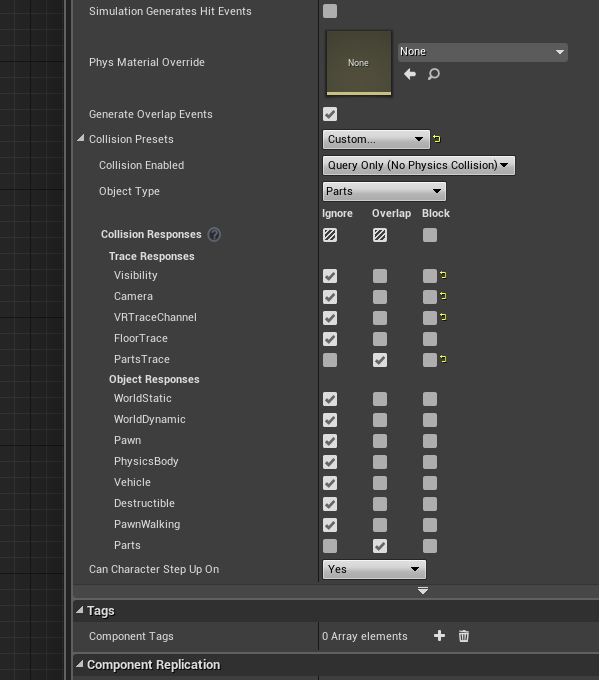
I have collision channels managed - single channel between parts, there are no collisions on the motion controllers or any of the motion controller sub objects
if I had unexpected other collisions occuring I would get an event overlap firing
*single custom channel
 trail shale
@sly elk , yeah, @tired tree may do it the right way. But if you want to do it the FUN way, the ZANY way, trust me, I don't know what I'm talking about.
glossy flame
<redacted>@Alecmoody I'm pretty sure that if the parent's got collision disabled it disables the collision of all its children.
glossy flame
@sly elk Might turning on CCD make a difference?
mighty carbon
alrighty, I figured out the issue with missing ambient - had to expand lightmass volume and re-bake lighting (even though I have stationary skylight)
glossy agate
you still have to bake with stationary always if you have static meshes set to static
glossy agate
thats what I meant. Non moveable will accept baked lighting
mighty carbon
?!
glossy agate
stationary lights provide both for the scene
mighty carbon
now that I rebaked lighting, my stationary trees have ambient on them
I am guessing it's the perk of volumetric lightmaps ?
mighty carbon
@tired tree so, I pinged tree assets author about the issue with wind. He recorded a video for me showing how to fix it. Guess what he advised - duplicate material, and use the original for standalone meshes (original sway values), and duplicate for instances (much higher sway values which I have to keep adjusting based on how many more instances I add)
stationary provides both baked and dynamic lighting, does it not?
glossy agate
Yeah but the nice AO is baked
glossy agate
unless you are using the distance field thing, which I am not sure how it looks cause I havnt tried it
mighty carbon
so if it does dynamic lighting, then stationary objects should receive it, correct?
(they do receive directional lighting and cast dynamic shadows)
glossy agate
yes, just the moveable lighting will show. If you bake, it gets overridden so it has baked and the little "lighting needs to be built" warning goes away
mighty carbon
I answered my own question @tired tree , marked it as "accepted". Not sure I need to remove it.
tired tree
thats fine
mighty carbon
@glossy agate my point is if I have stationary lighting and stationary objects, I don't need to be baking anything. However, it seems that if I have to have ambient, I have to bake it.
not ambient occlusions, ambient lighting (not real-time GI either)
note that I never got warning that lighting needs to be baked (when you add static mesh to the level, you get that in red letters)
glossy agate
Hmm, not sure why its not asking for a bake
glossy agate
Because this is how it should look when it hasn't built
mighty carbon
right, mine did not look like that
glossy agate
maybe your light settings are off? Like you turned off dynamic shadow or something?
mighty carbon
so, more bizarrness - ticked Dynamic Indirect Lighting on my directional light - shadows from the trees showed up again
nah, I didn't do such thing. I checked and double checked
again, that was the issue with procedural foliage instances and (H)ISMCs
standalone actors (like that table on your pic) worked just fine
glossy agate
I did procedural props before but it was completely baked. Maybe on those you have to pick full static or full moveable
mighty carbon
it has stationary option
I've had nothing but headache and bizarre behavior of the instances in 4.18.1 😦
lol, WTF.... I deleted one stationary mesh, added another mesh, switch that one to be stationary - got red warning I have 120 objects that needs lighting to be rebuilt o.O
meh, better play Wolf 2 before I go crazy
glossy agate
I just tried out a few rounds of stand out. Suuuper janky right now but it was lots of fun if you want to try that out. They are giving keys on their discord.
glossy flame
@rvan I played it last night w/o a key. What's the date of the alpha version u needed a key for?
glossy agate
I have a key. Got it today.
I just got the key before I had got home to download your link, but thanks for the hookup.
 glad shoal
I just got my hands on an HTC Vive, so I'm fumbling around with Unreal's VR stuff. Looks like I'm in for a lot of trial and error. I also am looking at purchasing a 360 camera, so wondering if that's an option to cut screen into a game and actual VR vid.
not and.. an actual VR vid
glossy flame
@glad shoal Hi. What do you mean by "an option to cut screen into a game an actual VR vid"?
glad shoal
If I use a 360 camera tied under a drone and take an actual 360 video in real space. Could I then insert that 360 into a VR game as a cutscreen
glossy flame
I've never heard of a cutsceen before. Maybe you mean cutscene? If so, yeah you can do that. There are a couple ways to do it I think. If I remember correctly, (in unity at least) I think you just apply the 360 video material to a sphere that's got its normals flipped (or maybe just set the material to double-sided) and then parent the sphere to the player (set it to only inherit the player's location), or better yet make the sphere gigantic so that even if the player moves they won't be able to cut through the screen. hehe.
Cool. Looks like I was kinda right. Check out this thread. That should at least get you started. https://forums.unrealengine.com/unreal-engine/feedback-for-epic/109574-vr-improving-4k-360-video-playback-in-game
glad shoal
yes cutscene, sorry it's late here
glossy flame
np. cutscreen sounds cooler.
glad shoal
lol
glossy flame
Just know that if you do the gigantic sphere, you're going to have to do some stuff about the world the player was in before the cutscene started. Like you might want to hide certain stuff. Depending on the setup I'd imagine it could be more or less of a pain to get the 360 vid to look nice and not clip into shit.
glad shoal
Wow, that' great info. Bookmarked into my VR bookmarks for later. Thanks
glossy flame
No problem!
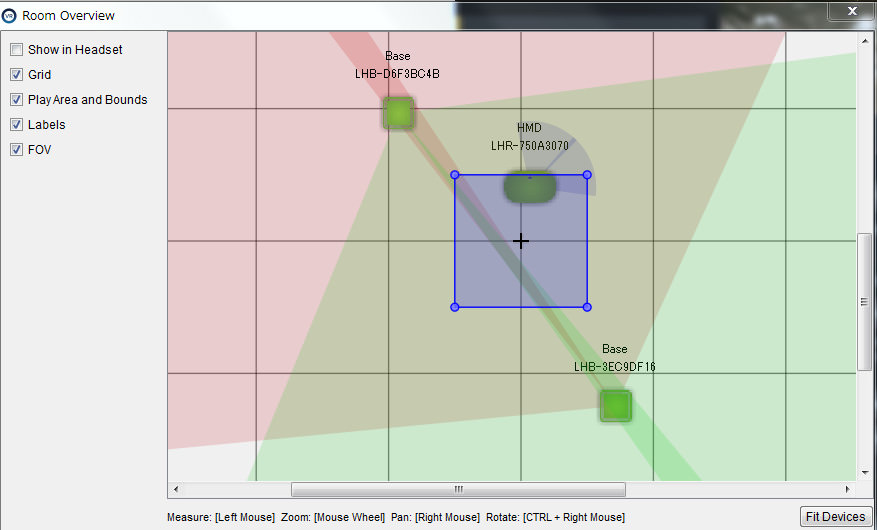
@anyone Could anyone tell me if this room overview looks normal?
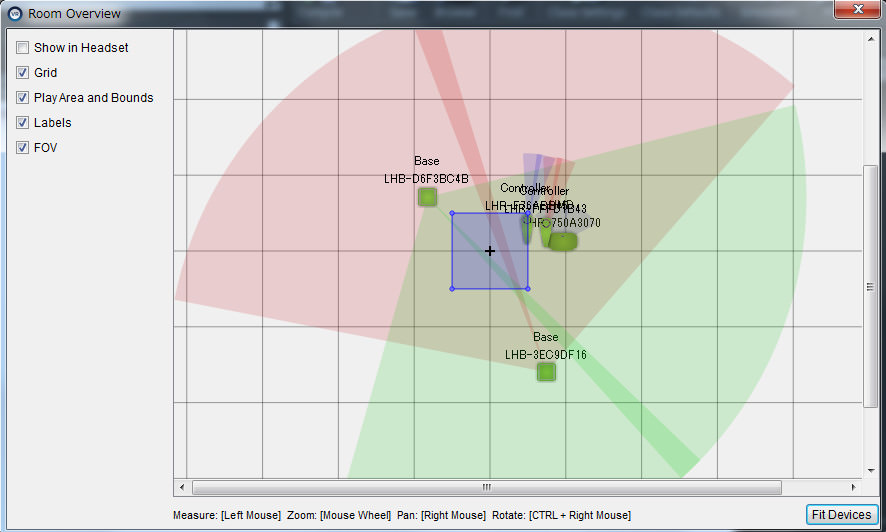
I calibrated it for standing only. And I placed the vive controllers and HMD off to the side of the center position. Was curious if the colors look correct.
 jaunty shell
@glossy flame are your lighthouses cabled or using wireless ?
glossy flame
wireless
jaunty shell
then its not normal 😄
see the small cones ?
these should be aligned
else your lighthouses wont be able to synchronise
glossy flame
Ah. The cones in the center?
jaunty shell
yeah the small cones in the center
glossy flame
Gotcha. Thanks!
jaunty shell
o7
glossy flame
A lot!
jaunty shell
you can eyeball it by looking up your lighthouses : if you see the other one through the mirror effect of the first one, and you do the same for the other, then its aligned enough !
glossy flame
Sweet trick. Thanks.
jaunty shell
the debug from steam vr is too slow to update anyways
glossy flame
Roger that. Shoot, I've followed their setup tutorials numerous times, and all the say is they should be facing each other. Never interpreted it as literally dead on facing each other.
jaunty shell
yeah small stuff can make a great difference 😃
glossy flame
Sorry to keep hitting this. Should this be OK? Or is red a problem? https://imgur.com/a/zY0Eu
 full junco
should be ok
why do you ask?
is anything not working?
the alignment of the lighthouses really doesn't matter much, they just always work.
wicked oak
Oculus Go devkits starting to appear
seems i didnt get one. but ill do a second request soon-ish
showing the Aquila prototype wich is a LOT more impressive
jaunty shell
@glossy flame red is just the color of the bottom lighthouse
you should be good now
got any tracking problem ? check for reflective surfaces such as glass, mirrors
glossy flame
@John Alcatraz & LifeForLife. Thanks for the feedback. Yeah, I'm still getting tracking probs. just wanted to know if this looked good before sending it in for repair. Aside from checking the innards of the lighthouses I looked around at all the steamvr reddits, and stuff but couldn't find much of any info on room overview. Thanks guys!
Not very intuitive that red and green scan area.
full junco
thats a view no one really ever looks at
so its not designed to be intuitive I think
what tracking problems to you have? was it that 1 lighthouse thats not working correctly?
glossy flame
Heh, that makes sense. I'm not sure if it's just one. They seem to have the same symptoms. Like as I was trying to align them, they changed colors. Move it a little bit, shutdown steamvr. Relaunch it, check it. Sometimes the previously red one was green and vice versa.
mighty carbon
@wicked oak Oculus contacted me and said that due to the high demand for Go, I am not going to get one this year.
wicked oak
they actually anwered to you?
first time i ever see them actually saying no to anyone
normally they dont even say yes
definitely they didnt tell me that they sent them when my oculus devkits arrived
glossy flame
They said no to me when I asked them to give mordentral a cv1 for the good of virtual humanity. Heh.
glossy flame

full junco
@glossy flame eh? the colors don't mean anything I think, one is always green and the other one is always red
its just to visually show you the 2 cones
glossy flame
Gotcha. Just kinda strange why they were flipping. It's good to know one red one green is as designed. Woulda made more sense to me if one was always the same color tho, like device 1 is green device 2 red.
I'm gonna try to hook it up to a different pc tomorrow.
full junco
it will just randomly pick a color when that thing opens
its only to make it easier to see the 2 cones, the color doesn't matter, so they had no reason to not make it random
glossy flame
Cool. Thanks. Where'd you find that info? Older steamvr reddits, or maybe steam threads when vibe first came out,?
full junco
I'm just guessing based on what I know
like I said, I also had a broken lighthouse
and the steamvr software can't know if a lighthouse works or not
you just have to put some cloth over 1 lighthouse and see if tracking works with only the other one
and repeat that for the other one too
glossy flame
Cool ill try that. I assume that's not the same as setting one to a and the other to c...
full junco
yeah that doesn't matter
glossy flame
Cool. Thanks. Sorry for bringing this issue to ue4 vr dev. My excuse is that I use the vive for ue4 dev 99% of the time.
wicked oak

new video of my prototype, after i essentially remade all enemies
difficulty is a tiny bit overtuned right now, far too many enemies at once
red enemies burst fire, green enemies get close to you and shotgun in the face (they are also on acid never stop moving), machinegunners stay on a place and spam
full junco
I dislike the mix of smooth locomotion and teleport
tired tree
for the FOV cones
wicked oak
teleport and jumping will have energy, they wont be truly spammable
tired tree
there is a lighthouse skin in Steam that adds the FOV as actual model elements
so you can load into the room and visually look at the overlap in VR
waaaaaay, more useful
wicked oak
@full junco it actually plays quite well, but the current smooth turning and jumping around can cause nausea for some people. Ill eventually add those FOV blinders, wich seem to work well
people are more acustomed to movement, the locomotion squad is more rabid than ever
look at them REEEEEEEEEEEEEEEEEEEEE-ing on every single skyrim or doomvr video that shows teleport
might be a interesting thing to make a game for the people that do have their "vr legs"
this is going to be PSVR after all, wich is even more rabid about smooth locomotion
wicked oak
i actually have stats on DWVR, lots of people bought it from the smooth locomotion and AIM support
and of course i will have a "just teleport" mode to play the game
probably i will nerf bullet speed by a ton for that mode
full junco
how do you know who bought it for smooth locomotion?
wicked oak
becouse i have stats
from google analytics
i get events depending on the config people use
and well, the comments on places
full junco
ah
wicked oak
its also a game with huge maps
due to the procedural generation
so teleport constantly will get really, really, really old
at least the teleport+smooth+jumping makes moving around the map a lot more fun
mighty carbon
Doom VFR unlocks today at 7pm EST on Steam
glossy flame
@tired tree those lighthouse skin's will help me. thx
mighty carbon

VRScout
A first look at Oculus' standalone VR headset. One of the biggest announcements that came out of Oculus Connect in October was the unveiling of a $199 standalone VR headset. Dubbed Oculus Go, the upcoming headset is basically an all-in-one mobile computer. The days of sliding in your mobile device or plugging into a PC may behind us. And with a price tag of $199, Oculus Go not only cuts the cord, but makes VR more accessible to the masses. There are large swaths of consumers sitting on the sidelines waiting to jump into VR. They’re just not ready to
 little nacelle
Hi there, Who uses the IKinema plugin here?
I'd need some help. When I put my controller on a table without touching it, my hand (Which is attached to the controller) Still moves when I move my head around. Any chance that somebody using the plugin could help me?
full junco
@mighty carbon go is boring
mighty carbon
@full junco how can you tell ?
full junco
nothing about mobilevr is awesome
mighty carbon
it should be better than Gear VR due to lenses and hopefully less drifty controller
wicked oak
you need to see it as a separate platform
of COURSE is not as good as pc vr
but can you bring pc vr with you?
it is impossible and will allways be
mobile vr standalone is the future
mighty carbon
where do you want to bring VR, @wicked oak ?
full junco
go isn't much better than a gearvr, and gearvr is shitty. go is cheaper than gearvr+phone, but still mobile is not a platform where you can have good VR games
wicked oak
@mighty carbon public transport, carrying it from place to place, be able to lie in a couch lazy as hell to watch a movie
gearvr is not that bad tho
for what it is
mighty carbon
public transport is something no one uses in the most of USA
wicked oak
im developing games for it at the moment, is nowhere near that bad
i think
having no cable is awesome
full junco
I agree that santa cruz is interesting, but go is lame
mighty carbon
true about cable and couch
wicked oak
Go is cheap
will bring many customers
the biggest barrier for VR is the gaming pc
by far
having a box that says VR and "just works" will sell well
full junco
I wouldn't advice anyone to buy a go. if someone wants cheap vr, safe some more money and buy a ps4 pro with a psvr
wicked oak
even if its not the absolute highest end
your argument is like "why would you get a 3ds, if its low res"
mighty carbon
my issue with Gear VR isn't the hardware.. It's the users with mindset of mobile gamers ($10 is too expensive, anything else is ok if the game has a ton of content; most of them want f2p though)
full junco
well mobile games in 2d work
because its not stuff to immerse you, its stuff you do when youre bored
mighty carbon
ps4pro + PSVR = PC + Rift
full junco
it won't
wicked oak
santacruz seems to work like pc vr, just with lower power
so you could do pc vr experiences, just with low/simple graphics
no cable
full junco
enough people already have a good phone, go will be significantly less users than gearvr and daydream
wicked oak
carry anywhere
i doubt it
i see it selling much more than daydream
like at least order of magnitude
mighty carbon
we'll see about Go.. I don't have my hopes up. Gear VR userbase numbers were artificially inflated and the mindset is so not gaming friendly.
wicked oak
becouse no one ever has daydream
only the Pixel and i think other phone supports it
and the headset is separate
GearVR was indeed artificially inflated
from the free headset with the phone
full junco
go will also be that "360 video" user base
wicked oak
but that isnt bad
it will be the best device to watch 360 video
and to act as a cinema to watch netflix or similar
mighty carbon
remember how Daydream was touted to be Gear VR killer and there was so much buzz about it?? Where is it all now?
wicked oak
you have heard about carmack himself saying that. Even with the whole (well no shit its his pet project)
full junco
but people that have go won't play much games with it, so its boring for game developers
wicked oak
i do think there will be gamers, but we will see about it
mighty carbon
nah
wicked oak
did you know that EVE game is the most sold VR game ever?
for gear
even if its kind of an special case tho
mighty carbon
well, Gear VR has a few games that propelled devs to stardom. I don't know if it was purely based on sales or if they were co-funded by oculus
wicked oak
they were
mighty carbon
Endspace and Anshar Wars
wicked oak
i personally know people who got sponsored by oculus
god tier tech btw
the insane guys recoded all the shaders in ue4
all of them
literally just running the whole game on opaque-unlit
becouse default shaders are overkill
ill probably end up doing that on my current game
mighty carbon
but why?! I don't have performance issues in my app on Gear VR with old S6 phone and I use full lighting (all baked though)
wicked oak
becouse they have a very high end game and they had the tech expertise to do it
by doing that, they have optimized shaders for the exact stuff they need
and literally nothing outside of that
for example they dont even have a postprocess, they do their fog/hdr calculations on the surface material itself
their lightmaps are custom
mighty carbon
tbh that's something Oculus/Epic should offer out of the box
lol
exponential fog is as cheap as fog in the materials
HDR on mobile is slow no matter how you do it
mighty carbon
unless you do image-based bloom only
wicked oak
what i mean with the hdr stuff is that they do it on the surface shader itself (color correction), so it doesnt need to go trough a single postprocess
not sure if they use bloom at all, i think they do not have a single postprocess in their game

Daedalus will make you Wow at the first sight with beautiful graphics, stunning architecture, texture and dynamics of light in differnet angle. Combined with...
this game
mighty carbon
If Go offers better visuals due to wider fov/better lenses and controller isn't drifty, I might make something for it
that's what @raven halo worked on @wicked oak
tired tree
epic can't offer literally everything out of the box....
wicked oak
i meet with him this afternoon, and other spanish devs
tired tree
engine already has some bloat issues
mighty carbon
and Carmack did critical review on it already
wicked oak
yup
he liked it
so the devs contacted him
and he made oculus put it on the frontpage XD
but you can see it looks quite good
with the metallic shaders and the light and stuff
mighty carbon
is anyone planning on getting Doom VFR on Steam ? (people here with Vive and Rift)
wicked oak
i plan to pirate it
and buy it on PS4
i want to play both versions but buying the same game twice is kind of stupid
mighty carbon
Can you please let us know if it works with Rift (it would be insta-buy for me)
wicked oak
depends if i can find the torrent for it
mighty carbon
heh
mighty carbon
I will, if it runs with Rift (I am sure it will run, but the controls.... )
wicked oak
nah, controls of rift vs vive are easy
the issue is the other way
as you need to emulate gestures and stuff
 raven halo
we have no post process for Daedalus, the tonemapper is happening in the material itself. That's how old mobile games used to do it
I did look into adding bloom at the very beginning, but I could not find a way to easily reduce the size of the bloom buffer
I think it could be possible
Oculus Go is as fast as the american S7
fun fact, the american S7 is slower if your game is running on openGL ES 3.1
compared to the international model
wicked oak
so you got your devkit @raven halo ?
raven halo
nop, not at all
wicked oak
i will try to port my current prototype to the gearvr i have right now, mostly to see how would it go
its rendering at like 1 ms on PC lol
raven halo
some devs got an email last week saying a dev kit would be sent to them. and some are getting the actual dev kit this week
I can't wait to have some time (and PS4 devkits) and see how Daedalus runs on it 😛
wicked oak
it will probably run at 200x resolution
raven halo
nice
wicked oak
so your game probably 120hz + very high res
but wasnt daedalus funded with oculus money? you can just put it on PSVR?
raven halo
nah, daedalus was done in the 2 months between Oculus seeing Red Matter's prototype and us signing the contract with them
Daedalus is already available on Daydream, we even managed to get it featured!
wicked oak
neat
raven halo
but as you all know... sales on Daydream are even worse than gearvr if that's possible
😛
wicked oak
btw, favourite debugger for gearvr?
im going to need to perform some graphics debugging on it
raven halo
this might sound crazy
but I have done no debugging for Daedalus at all
the main issue I found anyway was thermals
wicked oak
i mostly just want to run a GPU debugger to see the drawcalls
raven halo
the issue was never to maintain 60fps
wicked oak
Aquila is stupidly ambitious to put on a phone
raven halo
ahhh I see
wicked oak
so it aint going to be easy if i want to do it
https://youtu.be/PGywE_csVKU?t=1m13s this game
raven halo
in our case draw calls are strangly above 50
I would basically count them as I was doing the environments 😛
wow
that game could be really fun in gearvr
wicked oak
thats why im doing this prototype. The "milestone" for "first playable" ends this weekend
raven halo
add some awesome graphics like Daedalus and it's a winner 😛
raven halo
cool! 😄
locomotion system looks very promising for gearvr
I guess you use one button to teleport and the other to shoot
wicked oak
im playing it on 1 controller here XD
raven halo
that's about it, right?
wicked oak
yes
raven halo
clever
wicked oak
of course, for the PC/PSVR version you will have extra stuff
but a "cut down" gearvr version is something i want to do
as everything will be procedural, i could just tweak the stuff to spawn less enemies or LOD-d enemies on gear
raven halo
👌🏻
wicked oak
once i have it on gearvr, hopefully next week, ill send the prototype to oculus for begging
sly elk
Does anyone know how to read variables off of a child actor component? https://i.imgur.com/H7BJ1GH.png Each of the stud snapping locations on the hub is a child actor component - I'm doing this to allow wheel studs to snap to multiple locations. The BP_StudSnapLoc objects each have a bool I want to read but I haven't been able to figure out how to get at it. The best I can do is cast to the BP_StudSnapLoc class, which isn't helpful because I want to read each copy of the actor subobject individually.
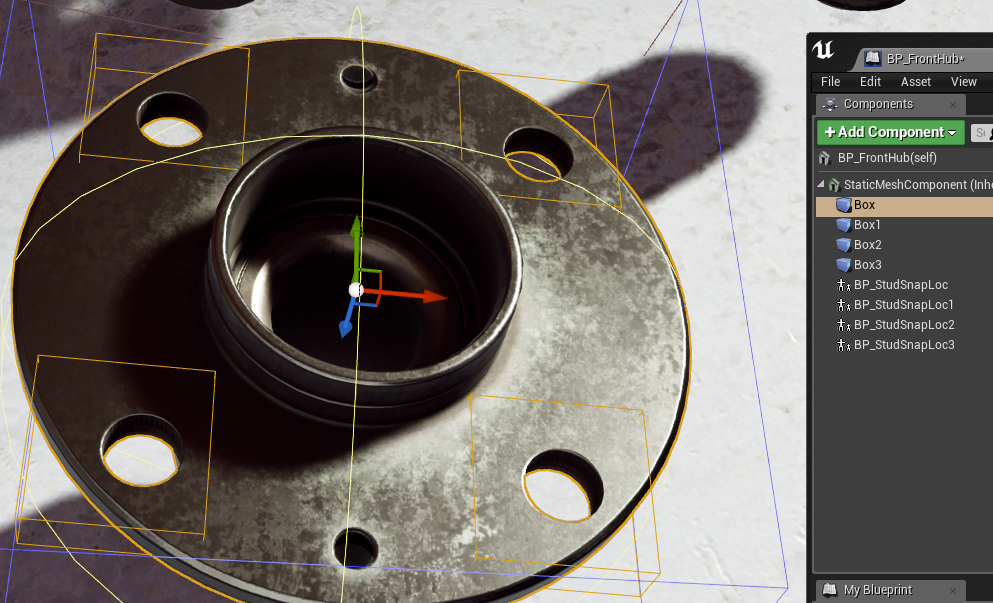
if I drag in a reference, then get the child actor, I can cast to the blueprint, but that isn't specific to each instance
mighty carbon
hmm.. Epic bleeds talent - now they are looking for a PR manager :/
(they used to have one)
sly elk
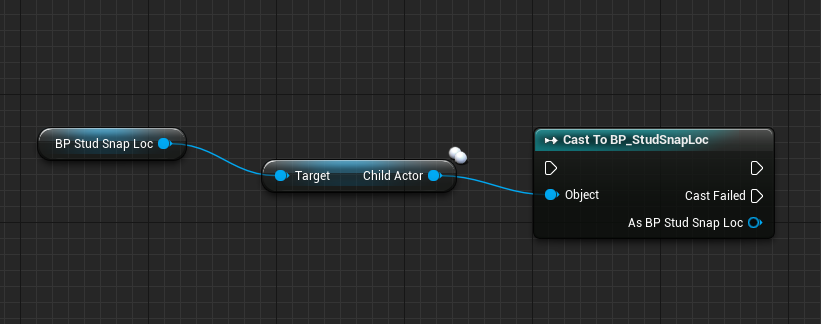 glossy agate
Hmm I am doing something similar with my inventory system. I think I was getting the bool ref right off the child actor ref.
raven halo
I think you can get bp child components by tag
wicked oak
@sly elk that photo is pretty much how it goes
sly elk
But how do I get the variable for that specific copy of the child class BP?
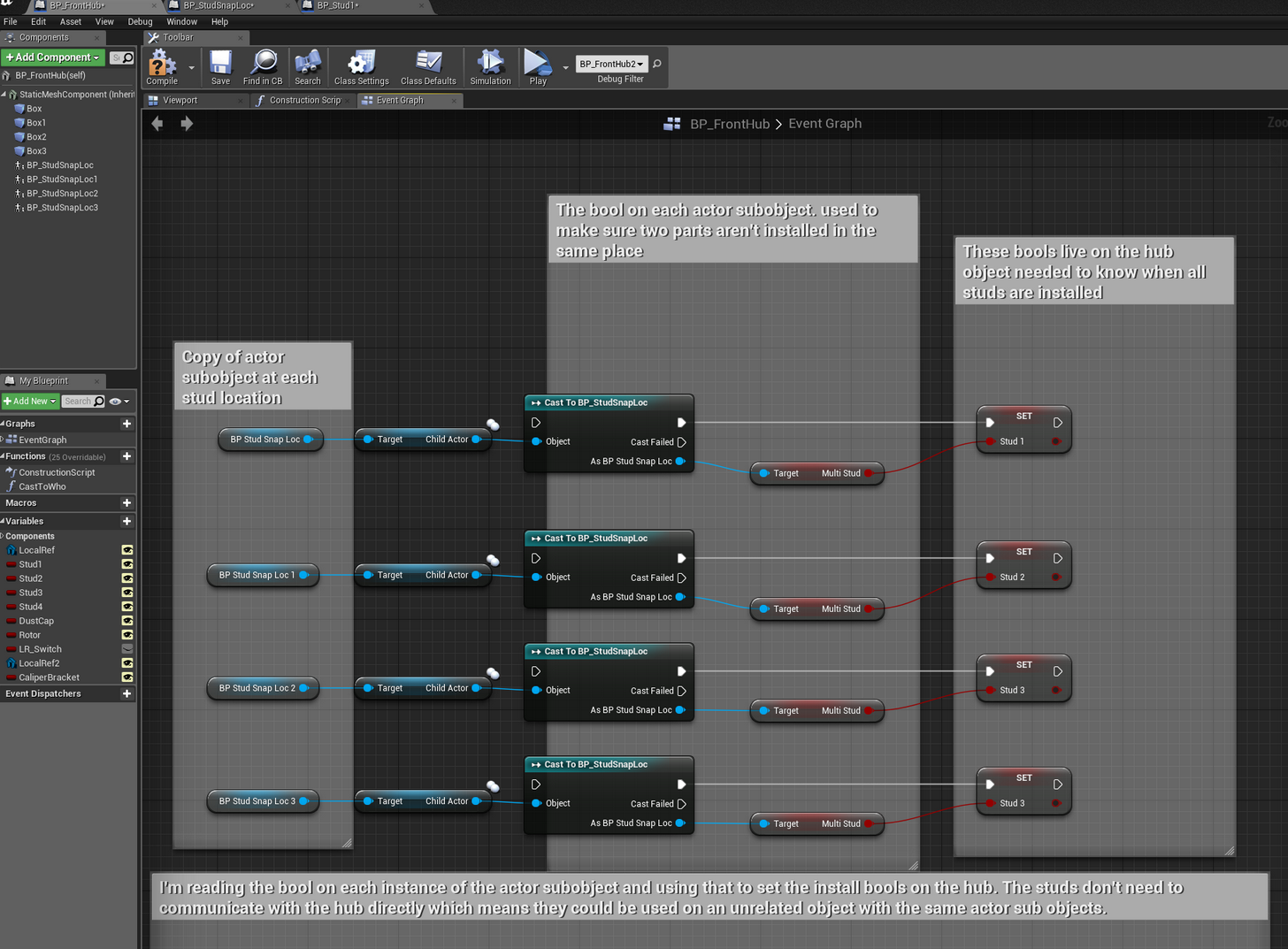
oh, nevermind, I am getting the specific one based on the initial reference I drag in- I had two copies of the hub and studs in the scene and when I did my debug testing I was printing the variables to the screen. The other hub was also printing the bools and that is what confused me
I'm curious if anyone has an opinion on the way I am doing this. It seems like a flexible solution to me but im open to someone saying this is a dumb way to do it: https://i.imgur.com/nORvRGt.png
 wicked oak
maybe you could use components instead of child actors
but it depends a lot on the use case
also components do weird shit dammit epic
if only it worked like unity...
tired tree
Child Actors do more weird shit than anything else
their initialization order is all screwed
causes tons of random problems
@sly elk if it is a set group of variables, make an interface you can uery with
Components or sockets would be better tbh, but I don't know what you are doing with your snaps
generally snap points wouldn't be an entire actor
more so with how child actors behave
sly elk
so i get how to handle the sockets for snapping to multiple locations (like we talked about with filtering an array by name) but that doesn't allow for tracking and setting bools for install status for each specific location. If I used a component the same way as I am using the child actor where (each snap location would get a component that held a socket) I think I would have issues with BP communication and making universal parts like fasteners truly universal.
and yeah, i have experienced how weird child actor components can be
i get a lot more unreal crashing
which is part of why I asked because this feels kind of unstable to be in the core mechanics
I realize this quickly turns into a more complicated problem than can easily be discussed in chat. If anyone wants to do some paid consulting and step through this with me in detail let me know.
tired tree
why would a component be more of an issue than an actor for you?
that is pretty much the perfect role for a scene component
you just have to define your socket types, make the component the socket and either subclass it or have it contain calibration variables
making them "universal" is more up to you correctly taking the time to think ahead of time about how to tag things for acceptance
mighty carbon

Experiences | Oculus
Home - A VR Spacewalk puts you at the center of the story, taking you on an emotional and personal journey while delivering beautiful, heart-stopping, and memorable moments.
it's on Steam too
BBC launched its VR division officially
sly elk
I see what you are saying- use a scene component not a component in the blueprint
glossy agate
Do you have to cast everytime you do that? Cant get the bool ref right off the comp ref? When I get home I will see how mine looks. On a item being socketed it fires an event on the shild actor slot that sets bool. Then every time it gets overlapped it checks the bool on the child actor to see if more can be attached. I have a local bool also that sets attachibility until a removal event is fired.
well that came out hella confusing. Ill try and PM you a screen shot when I get home haha
sly elk
Yeah, you can't get the bool without jumping through those hoops
sturdy coral
@vblanco in Carmack's talk at Connect he says they expect many less sales with Go than Gear and that they won't be putting the marketing dollars into it like Samsung has
mighty carbon
yeah
although, it's like me releasing on Gear VR without any PR - no sales at the end of the day
feels like no one besides Carmack believes in mobile VR 😛
so to keep him on board they let him develop and release his dream project - Oculus Go ... and then move on 😃
sturdy coral
At least the users will mostly be real users who sought it out and not random people that just got it free with their phone
I just got a Gear, I have note 4 and didn't know the newer gears would work with it but it fits ok
People had said you had to dremel the gear to make it fit and stuff but it seemed to fit without that, the lens distortion correction is a little bit wrong though
raven halo
Yeah exactly. I honestly fell for the numbers of gearvr owners. Thought there would be money to be made there. Turns out most gearvr owners either have it collecting dust or are just watching porn. Lol
mighty carbon
so, gotta make pr0n then 😛
mighty carbon

The Tech Report
"... with support for id Software's Doom VFR. The game is built for Oculus' Rift headset ... "
lol
has anyone tried Windows MR hands on with a backpack PC ?
 tawdry dragon
Anyone here had any troubles with Trigger events not working with Mixed Reality Headsets running SteamVR?
mighty carbon
There is AMA on Oculus forums.. Platform integration has no ETA. Vulkan has no ETA, but Rift support will come before Gear VR / Go support.

Synty Studios Presents - Polygon - Dungeon Pack. A Fantasy themed asset pack.
real needle
@sturdy coral I got a response from epic on my bug report, and they're stating that they don't "actively support the workflow" of not using the Oculus plugin w the rift: https://answers.unrealengine.com/questions/730320/using-the-oculus-rift-with-steamvr-plugin-instead.html
sturdy coral
@real needle doh, that sucks
full junco
@sturdy coral yeah, its a shitty response
steamvr is supposed to work with all hmds
and it always did in ue4
real needle
@sturdy coral would appreciate more comments on the thread
I don't feel like starting a new one, the issue is the same
Since his suggestion was to turn on the oculus plugin
I wrote to Nick Whiting
full junco
@sturdy coral yeah, we need to comment there and tell rudy that it has to work
but I'll wait a bit before I comment, it shouldn't look like we just comment there because @real needle asked us to, it looks more convincing if it appears as if we just found the thread ourself 😛
mighty carbon
Doom VFR doesn't work with Rift after all
mighty carbon
reportedly it works almost fine with Windows MR headsets
so like it was foretold, Beth locked Rift out
I'll wait couple of days and then get my refund
sturdy coral
they will probably do the same with FO4 and Skyrim then
glossy agate
ah burn that sucks. In a couple days maybe someone will write a mod for it to work on rift.
tired tree
@real needle Rudy's response there is entirely wrong, but I don't think they have much VR experience in the first place from some other times I have reported things that they did not understand. If you clarify well enough I don't see them not progressing with it.
hmmmmm.....curious why the DOOM VFR port uses Rift hand offsets if it locks out rift
almost like they devved on rifts
sturdy coral
you think the offset issue is it is using rift sdk offsets?
mighty carbon
I was actually able to get through all the splash screens to the loading screen and when the counter reached 96% the game quit
tired tree
the angle they are talking about is 30-40 degrees of pitch
which is pretty much where you set the rift offset at
dunno, was just wondering
because otherwise...who the hell would playtest on vive that long and accept that angle
sturdy coral
yeah, sounds crazy, the whole things sounds pretty bad
apparently the teleport is head look
or at least somehow head relative
they should have just ported all of Doom using the reduced switch assets and done smooth locomotion
glossy flame
@tired tree Is that project renamer C# script you made only to be used with VRExpPlugin projects? Or should any kind of project be ok?
tired tree
should work with anything
glossy flame
Sweet thanks! I won't hold you to it of course. Was just curious
tired tree
its quick and dirty, possible it has many edge cases where it fails
glossy flame
Yeah. I vividly remember you saying that. So far as I've used it on VR it's been perfect.
full junco
@tired tree you should also comment on what rudy wrote. if @real needle, @sturdy coral , @tired tree and @full junco all tell rudy that he's wrong, he might ctually believe it 😛
real needle
I just got a response from Nick
full junco
ah? that was quick
real needle
"The thread is somewhat right, in that it's not a case we test actively, and so not surprised it potentially regressed. However, since it works with the Vive still, that's somewhat surprising."
And then he asked me why I'm not using the oculus plugin
full junco
eh what? its surprising that steamvr works with the vive?
real needle
yeah nick usually never leaves us hanging if there actually is a problem
so hopefully he'll take a look at it when he gets back
they're all telling me to use oculus plugin "as well". But to me it seems dumb to battle two plugins and their code changes instead of using one
full junco
yeah
sturdy coral
plus there are other issues, users can't use the steam overlay
hopefully steam will eventually tap into the new rift overlay api when it is out
full junco
as a dev with limited amount of time, making sure that everything works with 1 sdk is a lot more convenient than making sure that everything works with 2 sdks
sturdy coral
I just wanted people to have the option to use either one
even though it is a bit more work
real needle
yeah like I answered nick, is that I'm having issues when running OculusSDK that I don't have when using SteamVR
full junco
just like if I would release on linux, I would like to use vulkan on both linux and PC
same API would mean there are likely no big differences, apart from gpu driver bugs
@real needle have you tried 4.18 with the newest steamvr beta?
real needle
no the steamvr beta (home) breaks testing OnlineSubsystemSteam when playing out of editor
Right click - launch game
Works without SteamVR Home, but if home is installed then it doesn't find any sessions
sturdy coral
weird, I need to look out for that
full junco
you should test it, just to see if the rendering is broken on rift with the beta too
real needle
@sturdy coral Yeah it caused me a lot of headaches before I solved it
full junco
a steamvr update could also magically fix the rendering issue with rift
so its definitely worth testing
real needle
@full junco yeah I will
 plain glade
Hello, I just wanna know. Is it possible to use Augmented Reality with HTC Vive?


 full junco
@mighty carbon maybe don't link something without even saying at all what it's about
sturdy coral
@mighty carbon @full junco the changelog has more details, they added a hidden area mesh for rift into the beta and it fixed the launch issues
Doom was just closing or crashing if it got no hidden area mesh
@real needle ^ that may be the ue4 issue too but unlikely
I've looked at that code in the past but not on 4.18
mighty carbon
@sturdy coral have you played VFR yet ?
I looked into .exe and there are bunch of cvars to adjust controllers (probably weapon angles too)
sturdy coral
Oh cool, I'm probably going to wait until it gets some more patches to pick it up
full junco
@sturdy coral interesting
tired tree
@sturdy coral they JUST changed code for the hidden area mesh and oculus
think it was in 4.19
might have been 4.18 though
shit runs together
mighty carbon
one of those most recent "VR is dead" articles https://www.economist.com/news/science-and-technology/21731726-unimpressed-consumers-embrace-relevance-augmented-reality-instead-game

The Economist
Unimpressed, consumers embrace the relevance of augmented reality instead
full junco
why do you even post that here
if you disagree with an article, its best to not give it clicks
clicking on that is supporting it
mighty carbon
never thought about it this way :/
wicked oak
archive.org my friend
 forest plover
VR Dizzy is my personal favorite website based around vr...
 marsh ermine
Is it currently possible to stop processing the HMD tilt/pitch/roll of a second pawn inside a VR game?
Like one player using VR - and the second using non-vr on the same PC.
real needle
@marsh ermine I'm guessing you're simulating several clients in editor?
That won't work
But if you want to play on the same computer, you can use the new spectator modes to display an image that isn't the HMD image on the preview monitor
I would wait until epic officially introduce "social play" features (like what exists on PS4) though, since you'll have to hack things quite a bit to get my previous option to work
@sturdy coral @full junco So I've emailed back and forth w nick for a bit and he also stated that using the rift with steamvr is not a priority
So making some noise on the answerhub post is probably our best bet
I did tell him we're a couple of devs wanting that feature but "a couple" isn't a strong argument xD
full junco
@real needle hm, so what exactly did he say?
real needle
"I can have our QA look to see if they can reproduce this, but to be quite honest, the Oculus-on-Steam path is low priority for us as a whole, so the fix might take quite a while to implement."
full junco
hm
well, maybe "quite a while" means "more than 2 days" and instead "1 week"?
not sure what you told him
the problem really is that it always worked perfectly, so people like I just designed their game to never use the oculus sdk
and thats not just something that people can change now
marsh ermine
@real needle yeah the actual problem was multiple clients using the same HMD
thanks for your answer - was just a Jam Idea anyway 😄
real needle
@full junco He asked my why I didn't want to use the OculusSDK and I told him that I'm having problems with it that doesn't occur when I'm using steamvr, and there is also some SteamVR related stuff I wan't (grab custom controller meshes, query which device is used etc)
And since oculus plugin gets picked, all of that breaks since it relies on steamVR
real needle
no I will tonight
rift is at home
With these settings I am not able to resize or minimize the window, which makes me confused
I think "start in vr" breaks that...
sturdy coral

Unreal Engine
Poly Toolkit for Unreal Engine allows apps to interact directly with Poly to search, download and import objects dynamically across desktop, mobile, virtual reality and augmented reality.
real needle
@sturdy coral Awesome!
glossy flame
@mighty carbon Tho I want to see their angle on it, I've mucked with Hololens at work - that abysmal fov and inability to remove light makes it a shitty choice for most game types imo. Until AR can display black (remove light), vr is here to stay.. or am I wrong?
sturdy coral
Maybe the new trend in the future will be people painting their walls black
mighty carbon
VR is here to stay .. It's just naysayers plant seeds of doubt into the minds of investors
IMO
glossy flame
Them seeds... any1 know of any developments on getting black to display? One stupid idea that just came to mind - make the visor 2-ply. One side's got like a tint material in it that can block light and the other ply projects it. Maybe magic leap's doing something about it, but all their demos are in low light rooms. Is there anyone in here doing AR stuff?
Hololens still can't easily be used in ue4 like it can in unity right?
tired tree
this google poly thing is neat, but the library is still very small
not to mention weird
guess pulling from tilt brush would do that
real needle
that looks like it's from Blocks though
tired tree
maybe, dunno
real needle
do you get access to the entire poly library through the app?
tired tree
yeah
real needle
that's what I thought
tired tree
bunch of filtering settings
real needle
right, and I know you can filter as creator as well
tired tree
added the thumbnails so i could see what was going on
yeah, that must be blocks, tiltbrush doesn't load mats
real needle
do they come in as atlased textures or is it 1 mat per color?
 tacit quest
hey guys, has anyone had experience with vive reporting worn state as unknown most of the time, trying to track the worn state, oculus works fine
tired tree
no, can have full textures
sturdy coral
@glossy flame the problem is displaying black at the right focus, the 2-ply thing would have it out of focus
magic leap supposedly had some moire pattern interference thing in a patent to do it but I never heard it explained well
glossy flame
@sturdy coral interesting. Cool thanks for the info. Shit I gotta study more.
glossy flame
Seems Magic Leap is supporting Unity first though. Poly toolkit API came out a day earlier on Unity.
real needle
@sturdy coral It was similar to noise cancelling technology at a high level, sounds great but we haven't seen anything like that yet
glossy flame
No transparent materials on poly meshes yet, it seems. Just simple rgb now. Transparency is definitely coming they said. I wonder if they got rigged (skeletal) meshes. Couldn't find any...
Nm, seeing as it only converts objs and blocks models I take it meshes with armatures are out of the picture.
wicked oak
@MordenTral#2571 gltf?
any chance of making it load those gltf from files instead of network?
reading in reddit people want Carmack to do a DoomVR review
 warped breach
Ahoy

wall/box weapon resting (for increased accuracy) should be fairly easy to make from here.
I need some help figuring out how to impliment this in VR . My weapon's position is entirely driven by motion controllers, no animations at all.
I don't have to use the same method used in the video, I just need the same result, a weapon that collides with other colliders.
I tried making my sword have physics, with a physics constraint, but the sword would start to leave the hand and spin in 0 gravity, instead of staying in my hand.
I know if the physics constraint is by itself, the sword collides with geometry fine, without going wacky.
but as soon as i try to attach this to the player's right hand, it stops behaving normal.
there is probably another step I need to do to get it work, but I'm not sure what that is, so any help is appreciated. Been trying to figure this out for weeks
tired tree
@glossy flame no, it came out at the same time, UE4 just didn't blog about it until last night.
@wicked oak it uses a small MIT licensed GLTF loader and converts to procedural mesh, no reason why you couldn't use it yourself
@warped breach use a physics handle, they aren't perfect, but they are intended for just that sort of use
warped breach
can a physics handle affect IK?
tired tree
?
you can run IK off of the location if that is what you mean
I think you might be thinking about that backwards
tired tree
if you ik to the weapon, yes?
though you should consider ghost hands as well or soemthing
warped breach
yeah, im gonna need ghosts
tired tree
I wouldn't want my only representation of my arms to bend away from me
warped breach
so the handle goes on the weapon BP or character BP?
warped breach
okay, im going to test that out
btw, you know any info about ghosting stuff off hand?
i can impliment that after i get this working
tired tree
just fade in a ghost mesh if the hand attached to the weapon gets outside of a set distance from the controller
warped breach
@tired tree Im having some confusion figuring out how to use this physics handle
im assuming i need to say something that says the weapon must use it
but idk how
I don't see an input like I did for physics constraint, and i cant make it a parent of the mesh