#virtual-reality
1 messages · Page 149 of 1
 glossy agate
 sturdy coral
I think that was all the same group, some uni in japan
they had a lot of really cool prototypes:

Some kinda neverending treadmill that also allows you to climb and descend virtual stairs. The direction isn't omnidirectional, and it looks rather scary. Th...
 mighty carbon
how can I see fps counter or any other stat outputs in VR ?
sturdy coral
@mighty carbon for oculus on 4.16 "hmd setint PerfHudMode 3"
mighty carbon
and on 4.18 ?
sturdy coral
I don't know it might have changed with the vr. commands
@mighty carbon search the Oculus plugin .cpp files for setint
mighty carbon
Interesting thing is happening, visually.. The outer edges on the view inside HMD tear when I turn head, while the entire view doesn't even stutter
trying to build static lighting, but my grass doesn't receive static shadows 😦
sturdy coral
@mighty carbon you can also pull up perf hud through the oculus debug tool; it is a pain to toggle it in game without a console command though
outer edges tearing sounds like possibly asyncronous space warp
mighty carbon
hmm.. I was hoping that one directional light and only a handful or shadows shouldn't kill performance in VR
(maybe it's just in PIE ?)
do I need to do something special to build standalone that runs in VR automatically ?
(I am using VRExpansion plugin/template)
mighty carbon
Run in VR ?
sturdy coral
yes
mighty carbon
well, that HMD cmd isn't working
not recognized
I used stat unit and fps and ... it was sad
~35 fps with not too detailed landscape, heavily LODed grass and all static lighting
still playing in PIE
surprisingly it didn't feel like that.. felt like 90 fps
looks like grass transparency is the fps killer
getting 45 fps stable with opaque grass
~75 fps without grass
I think landscape is a performance hog
I'll do some tests with mesh based terrain and see what's up
 plain glade
Hi. Do you have any suggestion for VR laptop as developer? When I tried my laptop with 1050 GPU I got some problem. I think I need 1060 or above graphic cards.
 cosmic shoal
1070 minimum
1060 does VR but you'll stress it easily.
We bought an Asus for the studio. https://www.notebookcheck.net/Asus-ROG-G752VS-7700HQ-GTX-1070-FHD-Laptop-Review.225084.0.html And it ran VR at a tradeshow 8hours a day for a week without a hitch. It did have a Base with a fan tho.

Notebookcheck
We review the Asus G752VS with 7700HQ CPU, GTX 1070 GPU and 120 Hz FHD panel. How does the 17.3-inch gaming notebook compare to the Skylake predecessor and the rivals?
 wintry escarp
grass is known to be broken now, last I heard
its why kite demo runs like crap on newer ue4
plain glade
@cosmic shoal do you use UE4 ? with editor mode ?
cosmic shoal
In the tradeshow it was running an exe, but it does run UE with editor mode. You do have to mind your scene and post complexity
Linus tech did a review of gaming laptops, and in the end he said (and I agree) that you are better off with a powerful desktop and a cheaper laptop combo.
But for tradeshows or VR on the go, they work fine.
mighty carbon
@wintry escarp grass runs at 120 fps for me in non-VR
 full junco
but non-vr is irrelevant for a vr game
mighty carbon
Just saying that it runs fine in non-VR as opposite to what others say
full junco
your grass is definitely not kite demo quality
 raven bone
Dann, Linus? Pfft
cosmic shoal
they are fun 😃
wintry escarp
kite demo wouldn't run at all for me last time I tried
full junco
why is there no way to actually let the steamvr compositor handle all the controller rendering so that the game doesn't have to care about late update stuff as long as only the controllers and no other meshes attached to them are rendered?
controllers could be rendered with constant 500 fps then and it would always feel great
@tired tree @sturdy coral
sturdy coral
You'd have to integrate with the depth buffer
Which could have aliasing if using taa and the controllers intersected with scene depth
And it wouldn't work with translucency in front of the controller
Neither may be a huge issue in practice
full junco
the scene depth intersection wouldn't need to be perfect, it would be fine if the controller would be always at least 30% visible
you don't often have translucent stuff between your eye and a controller
sturdy coral
Potentially a HUD or helmet or something
But that could be handled through the compositor too
full junco
and only very few games have something like that
full junco
yeah if its too bad those games would just disable that stuff then
sturdy coral
I think steam VR has the option to show the compositor controllers, I'm not sure though it may only be triggered with the menu
full junco
you could also send steamvr a mesh to render instead of the controller, so you could give steamvr a weapon mesh or something like that
mighty carbon
transparency is fps murderer. I made grass opaque and fps went up
however, it was 45 fps with some jumps to ~70+ fps (I am sure it's ASW). It felt smooth though, but I am sure there would be no room for more stuff on the screen
So I disabled grass entirely and I still couldn't get up to 90 fps with bare, simple and aggressively LODed landscape
sturdy coral
@full junco most or maybe all stuff in the steam vr overlay uses the public OpenVR apis so I think it is possible, just don't know the call
But yeah prob no depth integration except with other compositor objects
full junco
some depth interaction would be needed for it to be usable
sturdy coral
Lighting would look off if you used it for any random game object, plus no or disparate shader support
I wish there was some simple shader support for overlays, I'd like to do a parallax shader on an overlay for a scope
Then be able to run the game at lower res when the scope is up but still keep the scope sharp since it would be in the compositor
full junco
the compositor needs to become a bit more powerful, yeah
sturdy coral
@mighty carbon you need to find if you have a cpu or gpu bottleneck
mighty carbon
how ?
sturdy coral
Turn off asw in the debug tool
And either lower your screen res
And see if it fixes
Or use the perf HUD from the debug tool
perf HUD 3 breaks out cpu and gpu
 sly shoal
Hey, quick question. Is it possible to add UI to a VR Spectator screen? I've set it to use a render target so that's what makes me worried it's not possible
sturdy coral
No but apparently it will be in soon
sly shoal
That's kinda a letdown 😦
sturdy coral
I think in 4.19
mighty carbon
@sturdy coral that hmd cmd doesn't exist in 4.18 apparently
sturdy coral
@mighty carbon use the debug tool
full junco
@sly shoal talk to @trail shale about it, he wants to do the same
sturdy coral
Does the same thing
mighty carbon
ok, I'll try debug tool.. My point is that I need for the game to run comfortably on my system as it would be min. specs.
full junco
its annoying that PGO breaks the packaging from the editor, only works when build is started from visual studio
sturdy coral
@mighty carbon editor builds don't count when trying to see if it will work with min specs
mighty carbon
oh
 trail shale
@sly shoal So, I'm halfway there....I CAN get the interaction from a mouseclick so you can click on a button....the problem is the buttons aren't...visible....the problem is you need to a texture as buttons which means you'd have to manually create every single menu you'd want as a single texture
mighty carbon
@sturdy coral so how do I properly test VR project? Build shipping build, close UE4 and run the game standalone ?
sturdy coral
Yeah for performance testing
full junco
yes
mighty carbon
I see.. Alright, thanks
sly shoal
@trail shale Sounds like finding a fix (before epic comes out with one) is going to be hella complicated and tedious 😮
trail shale
no, it's possible and not TOO bad
I'm not very familiar with Scene Capture components but I think there might be a way to have some capture component of a Widget sitting off in space somewhere and make that a texture, then you'd coordinate your mouse movement (which I've done) to make the Events for your widget happen
sly shoal
Possible, sure, but elegant, no way 😄
trail shale
I just don't know how to use 2D render very well
sturdy coral
If you don't have a short term deadline I'd wait on epic to do it
trail shale
Nov 27, ITSEC in Orlando
sly shoal
What about just a 3d widget floating in front of your render target?
trail shale
That's what I mean
sly shoal
@trail shale Hmm I'll be finishing up soon for tonight but I'll tackle this again tomorrow, I'll make sure to tell you if I get something working 😃
trail shale
Awesome, I will do the same
Here is the UGLY blueprint for the mouse to work....it seems MousePlatform let's you get it...the only issue is that this will be different on each screen, (not a problem as I am doing a local demo and control the hardware) you could probably come up with some offset that let's people put in their screen resolution and aligns the coordinates
Also , don't forget to make an input for the Left Mouse Click event
mighty carbon
just found out that ink outlines pack I am using doesn't account for sharp edges and they don't have solution for that issue (yet). So I am f#cked unless the other guy makes his PP ink outlines work well in forward (or I'd have to go with deferred).
sadness all around
sturdy coral
this looks pretty good: https://www.reddit.com/r/oculus/comments/7bduye/kite_lighting_uses_iphone_x_to_create_vr_facial/

reddit
7 points and 0 comments so far on reddit
fairly cheap to do facial mocap now
it has a pretty easy interface too, just a bunch of blend space weights
 sharp swan
anyone got a suggestion for a decent FPS shooter template for Vive?
trail shale
I'm possessing an empty pawn upon play (to test for NON-VR mode) but I can't move...what simple thing am I forgetting?
sturdy coral
@sharp swan what is the scope of what you are making?
sharp swan
just a standing shooter experience really
I can add anything else, just wanna save some time
sturdy coral
ah ok
sharp swan
its prototype stage so it doesnt need to be production quality
sturdy coral
if you are making something as expansive as shootergame, I suggest basing it on shootergame, but not for something prototype
mordentral's stuff is good, his last update had two handed gun smoothing stuff
sharp swan
yeah I planned on getting his plugin on the go. I could always just write it from scratch but im in a rush
mighty carbon
cool, my bug report went to be official https://issues.unrealengine.com/issue/UE-52090
please upvote
full junco
@sturdy coral is shootergame really still relevant? that's sooooo old now
sturdy coral
they update it with every release, has switch support etc.
but yeah some of it is based on some outdated stuff
I wouldn't base it on it if the game wasn't multiplayer
full junco
why would you ever base a VR game on that, even if it's multiplayer?
sturdy coral
I'm pretty sure raw data is based on it
I think I saw some shootergame loading screen stuff
shootergame has tons of stuff and gets updated for you from epic every release
it is just a good stable tested baseline, replay support just works etc.
all the console platform certification stuff is handled for you if you ever release on PSVR or if MS adds VR support, though I'm sure there is some VR specific platform requirements stuff you'd have to do
but all their matchmaking, handling controllers that lose batteries, achievements, blah blah blah, it gives you a baseline for a lot of stuff
full junco
ok
trail shale
@sharp swan Have you played with the Showdown Project?
sturdy coral
if you need to package your assets on the same bluray layer it gives you an example of that too 😃
makes everything complicated I'm not always sure it is worth it
sharp swan
@trail shale nope. why is it for VR?
trail shale
yep

Unreal Engine
Today, we're releasing our flagship VR experience, Showdown, for free to all Unreal Engine developers! Debuting at Oculus Connect 2014 and often considered one of the best VR experiences available, Showdown demonstrates the great possibilities for building high-fidelity, immersive VR experiences in Unreal Engine 4.
sharp swan
Oh wait I remember it now. I did install it and have a look through the editor with it. I didn't do anything other than look tho
trail shale
also the Robo Recall is there too
I am pretty certain they used 2 separate hand controllers instead of inverting one of them
mighty carbon
If push comes to shove, I'll just go back to my snowy/desert environments where I don't need to have a ton of grass.
then I can use mesh-terrain and manually paint foliage
full junco
@mighty carbon there won't be grass support for static meshes, the grass is based on the heightmap, so its designed to only ever work with landscapes
mighty carbon
no it isnt' based on heightmap
full junco
why do you say that? I don't think you looked at the code?
mighty carbon
I don't know how you do it, but for me it's a HISMCs scattered over the landscape using image mask
I don't see where you have heightmap playing role there
it's entirely possible to do exactly the same with any mesh
full junco
because the heightmap defines the height of where the grass is spawned?
mighty carbon
in fact I did it already using importance sampling
and you can't trace down, get a hit and spawn instance there for meshes ?
full junco
that would be very expensive
mighty carbon
(and I am oversimplifying this)
then use heightmap on the mesh
it would be like Z-mask
mighty carbon
impose limitations
we aren't talking about fur
we are talking about grass on terrain without overhangs
full junco
no reason to support grass only on static meshes that can be represented as a heightmap
mighty carbon
except it's made of triangles
there is - performance

The Samsung Odyssey, the company’s first PC VR headset, is available starting today in several countries, sold via Samsung and Microsoft stores. The $500 VR headset and controllers, part of the ‘Windows Mixed Reality’ platform, is described as the “most immersive,” and leads on specs (and top price) compared to the other Windows VR headsets. …
full junco
the grass already has horrible performance for many many engine versions now and epic absolutely doesnt care
the kite demo stuff is all abandoned
mighty carbon
don't they have grass in Fortnite ?
full junco
without dynamic shadows
mighty carbon
masked - 30 fps (ASW) in VR, opaque - 45 fps (ASW)
ofc
UE4 and dynamic shadows don't mix
full junco
fortnite also has dynamic shadows
mighty carbon
I didn't need them, so I didn't even bother testing with grass shadows
I had AO on though
mighty carbon
well, whatever AO is in the Rendering project settings
(one is just AO, one is Ao for static lighting)
full junco
DFAO is in the skylight settings
mighty carbon
nah, i didn't use that
 wicked oak
masked shouldnt have too bad performance
unles you are using alpha to coverage
wich i dont know how its setup in unreal
basically masked is the same goddamn thing as opaque, but with the option of not rendering pixels
full junco
a pixel behind a masked pixel can't just be discarded, so it is more expensive
wicked oak
it can
masked does write to depth buffer
translucent doesnt
masked runs on the exact same code as opaque, but with holes due to masking
you can even see that it renders to all the GBuffers
and it renders alongside opaque geo
mighty carbon
it still renders those invisible pixels
what Gbuffer in forward render?
@wicked oak RyanB chimed in there in 2014
that still stands true
wicked oak
@mighty carbon forward does a depth prepass
opaque gets rendered there
i guess it does calculate for the mask
sturdy coral
masked materials will get ~70% faster soon
mighty carbon
how ?
sturdy coral
as I understand it they will write once in the early z pass and then use sort of inverse early z reject in the base pass so they don't have to read the alpha a second time there
mighty carbon
is it coming in 4.19 ?
sturdy coral
I think so
mighty carbon
sounds like 4.19 might turn out to be my favorite release 😛
 eternal inlet
hi, have anyone tried use sequencer to record hmd and hands movement?
sturdy coral
@eternal inlet no but have you read the answer hub post on it?
eternal inlet
the one that elisabeth posted?
eternal inlet
ah that one, yes i just thought it was "fixed"
so we didn't have to use intermediate boxes
sturdy coral
it may be, that one is pretty old
eternal inlet
but actually i tried recording movement of some boxes i was throwing around in the scene from the default template, and they don't get recorded either
so i was thinking maybe i do something wrong...
sturdy coral
can you get it working outside of vr?
eternal inlet
i haven't tried... will do some tests in non-vr
i have a feeling i missing a step somewhere
mighty carbon

UploadVR
Here’s what I encountered with Acer’s entry level consumer VR headset running on Microsoft’s Windows Mixed Reality platform.
full junco
@sturdy coral hm? where did you read anything about that masked materials will be faster in 4.19?
 supple lotus
Hey there!
Anyone knows the solution to this damn issue we are facing? A level is put together, being tested in HTC Vive, and only for the left eye, the objects and walls keep flickering/disappearing rapdily.
mighty carbon
damn Oculus - launched debug tool - broke USB drivers
also VRExpansion plugin's console doesn't work in Shipping builds 😦
ha, my landscape with opaque grass runs at 90 fps, 11.xx ms
in the standalone shipping build
going to see about masked grass and then dynamic lighting
nope, masked grass is a no-go
 tired tree
@mighty carbon there is no console in shipping
it uses the actual game console
so that all normal logs work
you can package to Development to keep console and debugging tools
mighty carbon
I see, same deal as on Gear VR then
@sturdy coral these are the lines I was talking about https://s1.postimg.org/4mfqjtsszj/ue4_landscape_static_lighting_lines.png

@tired tree do you happen to know what causes these lines after building static lighting ?
supple lotus
Also Little extra added: The problem does not exist when playing in simple FPS in editor, only in VR and it looks like it's happening when there is a translucent object visible on the scene. Hope someone can help out
mighty carbon

Linus from Linus Tech Tips is a popular YouTuber who reviews the latest tech and gadgets available on today's market. With his deep insightful knowledge about comput
it's funny how there are no V2 headsets from the leading VR companies on the horizon with 4k - 8k screens and wider FOV, even though it supposedly make a massive difference
 pearl tangle
@mighty carbon They are barely selling any of their current generation 1s and clearly price is a huge factor in people's decision to get into VR so I definitely dont see any of them coming out with another more expensive desktop based headset for consumers probably until 2019 sometime
mighty carbon
aye
@tired tree so, stationary Skylight and dynamic Directional light with landscape runs at 90 fps here.. But occasionally, without any reason fps dips to 45. Then suddenly goes back to 90 fps.
pearl tangle
thats because if you go below 90 it will go to 45. So even 89 frames will push you down to 45
mighty carbon
yeah, but nothing changes in the scene
pearl tangle
are you moving your head or have anything else running in the scene?
mighty carbon
I move across the terrain
I can stop in the spot fps dipped, just wait a few sec, look around, and fps goes back up
and then continue moving
I guess I can stick with static lighting if I will get no dips when testing.. But these lines just kill it 😦
pearl tangle
do a bit of profiling and see what gave you the spike. You are running on a 1060 or something though right?
mighty carbon
yeah, 1060 6Gb and i3-6100
sturdy coral
@mighty carbon turn off asw when performance testing
I don't know why you are getting lines, see if they line up with the component boundaries
Post a screenshot of lightmap density view down close near a line too
mighty carbon
why turn off ASW @sturdy coral ?
sturdy coral
Because when you miss frame rate with it it limits frame rate to 45
mighty carbon
well, I am sure there is a reason for it to lock into 45 fps - it feels butter smooth
(synced to the screen frequency maybe?)
btw, speaking of microtransactions http://comicbook.com/gaming/2017/11/07/microtransactions-selling-big-for-2k-games-grand-theft-auto-v/

WWG
It appears that Take-Two Interactive’s sales are continuing to thrive, based upon the success of [...]
I don't know if that's simply because it's GTA brand and loyal gamers, or despite the fact that people are vocally against IAP, they still spend money on it
sturdy coral

This is free, opensource, crossplatform 'hand presence' template for UE4 created by iNFINITE Production. More info: https://forums.unrealengine.com/developme...
Some good ideas in there, I like the hand thickness slider
pearl tangle
I wonder why they went with grab animations over doing some traces and dynamic animations. does look pretty cool though
sly shoal
I'm looking at the documentation for the VR Spectator Screen, and at the bottom they mention that "it's recommended to limit the Spectator Screen output to 30 fps"
How do you do something like that? I can't seem to google myself to an answer 😦
full junco
@sturdy coral you saw that I asked where you read about the masked stuff? 😄
full junco
I am reading through all the dev rendering commits and I didn't see anything like that
 analog topaz
hey guys. what if i want the 3dwidget to close when ever i click outside it?
full junco
full junco
mighty carbon
Cute little fix :)
mighty carbon
How come I don't get static shadows from stationary lights?
full junco
if I would be a stationary light I would tell you
mighty carbon
Ha :)
 gleaming river
Hey, Does anyone know why I am getting reflections from a HDR?
I have forward rendering enabled
skylight is stationary
I suppose my real question is should a skylight with a HDR cast reflections
sly shoal
Hey guys! I'm looking at the documentation for the VR Spectator Screen, and at the bottom they mention that "it's recommended to limit the Spectator Screen output to 30 fps"... I'm just wondering.. how do you do something like that?
My spectator screen is a scene capture 2D so the drop in performance is very noticable in VR
full junco
its a stupid suggestion because its not possible to do that in a good way
even if youre capturing every 3rd frame, you get a spike every 3rd frame which is really in no way better than constant slower fps
 rigid lion
hey guys I'm getting 90 fps and my gpu profile is sitting at around 8ms.. is this good or bad?
full junco
good
 uneven moon
I'm seeing a weird distortion that follows right behind moving objects when in VR
I saw it once before and fixed it because I caused it on the spot but I can't remember why it's happening
Something to do with the exponential fog, I think
Is there a setting that comes to mind?
sturdy coral
@uneven moon are you using temporal aa?
sturdy coral
that naturally tends to add some noise to moving objects because the velocity buffer runs at half resolution. Could also be from ASW if you are using a Rift.
wicked oak
@uneven moon even if you are running TAA, use the forward renderer in ps4
its a goddamn shame that MSAA doesnt work there, but forward is still 30% faster, at least in my game
ps4 crunches drawcalls like nothing, so doubling your drawcalls isnt as much of an issue as with pc
uneven moon
I assumed that Thumbstick Left as an action mapping would fire off once when the analog stick was pulled left
Yaw Input can't target my capsule (with the camera and everything else under it) so it rotates my play space which is really weird if I'm not in the center of it
Welp
I saw someone else ask about this a while ago, as well
Can't remember the solution
sturdy coral
you need special logic to rotate either around the camera or rotate around your best estimate of where the player's feet are
search answerhub for rotating one component around another or around a location
there is a BP node for it that does most of the work
uneven moon
Can this be done using an Axis mapping instead of an Action?
(for Analog sticks VS the Vive where it would be an action mapping)
sturdy coral
yes
uneven moon
Tried a few different methods, they all rotate my play space and not the capsule
sturdy coral
which methods did you try? you have to rotate the VR root around your capsule
which isn't just a rotation
@uneven moon
uneven moon
This looks like it would work as an action mapping @sturdy coral because both solutions rely on snap rotation
I'm assuming it wouldn't provide a smooth rotation? Or is it still being called every frame while the thumbstick is in use?
sturdy coral
a continuous rotation is no different
sturdy coral
just call it every time
sturdy coral
it is still a discrete change
do it on the axis event and it happens every frame
as long as the axis has input
 spring pond
Anyone know in 4.18 if you can do the equivalent of "Start in AR mode" in blueprints. Like i have a menu map that isn't using the AR stuff, then when they make a menu selection depending on the selection it kicks off AR mode?
uneven moon
How do I set the VR Origin?
 wintry tiger
I'm new to Unreal and I'm building an AR app (yeehaw)...does anyone know how to set up a workflow so you can play your level on desktop without having to build to your phone every time? Maybe you have a level with a table or something in it and you can test ARKit hits on that as a surface. That would be ideal.
sturdy coral
@uneven moon attach camera and hands to a scene component attached to the capsule, that scene component is VR origin
mighty carbon

UploadVR
Microsoft is planning to make a preview of its SteamVR integration available on Nov. 15.
full junco
thats soon
full junco
just watched linus "review" of the pimax 8k, its definitely a very nice video: https://www.youtube.com/watch?v=Ne0cmvl8GqM
Wait... you can get an 8K VR HEADSET!? Well... sorta... iFixit sponsor link: Get iFixit's Pro Tech Toolkit now for only $59.95 USD at http://ifixit.com/linus...
I like that even more than the review that tested did
cosmic shoal
A client wants to buy my Vive (I am renting it to him with content I made for him and he wants to keep it) I dunno what to buy now.. another vive? a rift? nah too first gen.. A Windows "mixed" reality headset? The Samsung looks interesting but they say it's heavy and a bit unconfortable, I'm leaning towards a Lenovo. Any thoughs?
I guess I could wait for the next gen.. like the primax or what ever comes up.
glossy agate
One of the MR headsets would be a downgrade from the main 2 first gens though. Have you tried one yet?
cosmic shoal
No, but spent a few hours reading reviews and watching vids about them. The screens and resolutions are nicer, it's also nice not to rely on outside tracking. But they do say tracking is not there yet, and if you move your arms out of view they stop tracking.
lenses are better too.
glossy agate
Im gonna swing by the best buy here this weekend if they have a demo set up for it to see how it works.
I thought there was no "official" windows MR support in UE4 yet too, but it will probably just work through steam
cosmic shoal
yeah it already does, with steamvr beta
I've managed to use steamVR with my Iphone and cardboard to look around Unreal editor in vr mode.. so windowsMR shouldn't be a problem 😃
wintry tiger
re. my question about workflow above - is there an Unreal equivalent for Unity ARKit Remote? or is it too early days? https://blogs.unity3d.com/2017/08/03/introducing-the-unity-arkit-remote/

Unity Technologies Blog
When Apple announced at WWDC that ARKit framework was going to be part of iOS11, there was great excitement in the development community, as most people sa...
sturdy coral
@cosmic shoal I'd wait on black friday and get whatever has the best sale
cosmic shoal
I will miss the Vive.. but they are overpriced in comparison.
full junco
I friend recently decided to buy a vr headset, and he was able to test both vive and rift here since I have both. I thought he would prefer to buy a rift due to the significantly cheaper price, but he decided to buy a vive
so that showed me that the vive is still pretty competitive even at a higher price than the rift
full junco
@mighty carbon no, absolutely not. I was more like "you could buy a rift now, its pretty cheap"
mighty carbon
well, depends how you said it and what body language you had when you said that 😉
j/k
good for him
so, I have an issue understanding how teleportation works using navmesh
I'd do tracing, so would Mitch - his books teaches tracing for teleportation
but to my understanding there is no tracing involved in VRExpansion plugin/template nor in Epic's VR template
I don't know... Looks like there are traces, but gee, why so complicated 😦
pearl tangle
how else are you going to do it if there is no form of tracing?
mighty carbon
no idea.. I might have misunderstood some replies I got
mighty carbon
 eternal inlet
guys, in 4.18, what is the equivallent to this?
uneven moon
I set my VR pawn's parent to 'Character' so that I could use the movement component but now it's added inherited components, a capsule that's causing me to be much taller in-game than I really am
Any ideas?
 dusk vigil
Do you need the second capsule at all now? Or make it height 0?
tired tree
@mighty carbon there is still tracing, it just checks for a valid navigation mesh to ensure that you "can" teleport there
and clamps the location onto the mesh
mighty carbon
Yeah, I figured it out. It was pretty self explanatory (I guess I didn't quite understand how it works with navmesh)
full junco
raja is leaving amd and going to intel, so in 4 years we might have 3 companies that produce high end gpus. good for vr
raven bone
Intel GPUs
 noble charm
@uneven moon use the root capsule and delete the one you added
raven bone
Interesting
 stiff nest
Hey there.
Does anyone know how to enable VR at the start of a level and disable VR at the end of a level? I tried using the console command -vr and also stereo on at "Event Begin Play" but had no luck.
 raven halo
Link!
 jaunty shell
@raven halo https://trello.com/b/TTAVI7Ny/ue4-roadmap
tired tree
none of the interesting things are on it yet
but they are already in the master branch
tired tree
mostly the movement system changes and fortnite merges
haven't checked last day or so for the rendering commit that is bound to happen
jaunty shell
@tired tree man, I wish Epic would push forward HISM stuff a bit more
it seems they started to write a doc on it recently, but there's so little informations
isn't HLOD just LODS from HISM though ?
wicked oak
nowhere even close to the same thing
HISM are just instanced meshes, but a smarter version
essentially they are instanced meshes with frustrum culling and LODs
normal instanced meshes cant LOD (separately) nor they can use frustrum culling
HLOD is actor level lods, they turn several different actors into 1 bigger one
so instead of having your house with all the modular pieces, at some distance it just turns into a house, only 1 mesh for all of it
jaunty shell
oooh
raven halo
I guess a new texture is generated for the HLOD right?
 steady spruce
Hi, anyone had any issues with skyboxes and VR? After updating to UE4.18 the skybox disappears but only in a specific headset. We have two oculus rift and in one it shows the skybox as expected, the other one doesn't show at all. If I open the same project in version 4.17 though the one that's not working actually works 😕
jaunty shell
@wicked oak thanks for explaining, this actually sounds pretty awesome
wicked oak
@raven halo yes
also new lightmaps
it can bloat your lightmaps really, really really hard
in dwvr it triplicated the game HDD use
TRIPLICATED
raven halo
Wtf
full junco
@tired tree I havent yet seen anything awesome in master added for 4.19. I didnt look for movement system changes since I don't care about those due to VR, but I saw no relevant fortnite merges
and yeah, soon there should be a dev rendering merge again
why do you think that it will happen within a day or so though? epic is often slow, they can also take a week
tired tree
they already merged in the fortnite movement / character changes
and networking efficiency changes
full junco
which isn't that awesome unless you actually have 100 players simultaniously in a game
tired tree
its awesome for VR?
you are at baseline doubling outbound traffic in VR
due to tracked objects
any net gain on efficiency is good
full junco
was networking actually slow enough to be any issue for a few tracked objects with <20 players?
tired tree
yes?
20 players with 3 tracked objects, even at 30htz is still near to 3x the per player cost
full junco
the tracking data for 20 players is still only a few bytes though and nothing compared to the VOIP for 20 players, so why is it relevant?
tired tree
because it is, any extra overhead is relevant
i'm not playing with small numbers for my stuff, I want support for as large a base as possible
I already did most of what epic did in the character months ago
and its roughly 12 bytes per send at full compression per object btw
that adds up
full junco
well I haven't ever done any networking in VR, so I have no clue about the specifics, but 12 bytes * 90 * 20 * 3 still looks like nothing to me
tired tree
the character movement is 25 bytes on base chars standing still, 49 at full movement in the engine
epic saved 7 BITS per RPC by moving them into the character instead of the movement component
every gain is good
full junco
sure every improvement is good, but the improvements epic did still don't make a major difference to most games
so its really not as awesome as some rendering optimizations that give everyone a 10% increase in performance
tired tree
its a global network efficiency improvement in the engine, and the IntPacked change is huge as well because everything defaults to replicating as an INT unless specifically supported, so the CPU overhead is less
 paper rock
Hello everyone! After migrating a project to 4.18, one of my rigs doesn't render the skybox in VR with Oculus Rift. It seems that I'm not the only one experiencing this. Has anyone found a fix, yet? https://answers.unrealengine.com/questions/721784/problem-with-oculus-and-418.html
tired tree
i'd rather the networking guys work on network improvements AT ALL than not, and its important to me and anyone else working with multiplayer
its not slowing down rendering improvements
full junco
yes, of course they should work on that. just saying it isn't really that awesome since most people won't even notice the difference due to their games not actually being big enough in terms of replicated stuff
for people that specifically want to make use of more capacity it certainly is very awesome
tired tree
VOIP in VR with the already high overhead is annoying considering the bandwidth limits you have to set to get it to work at all
new voip compression and handling in 4.18
and new multiplayer improvmenets in 4.19
mighty carbon
has anyone used this pack https://www.unrealengine.com/marketplace/realistic-trees-01 ? Do the trees look on the stylized side? How is performance in VR ?

45 high quality trees with customizable wind effects!
tired tree
makes that all much easier
full junco
@tired tree why bandwidth limits?
tired tree
because at default engine settings VOIP saturates the clients bandwidth limits
and doesn't work
voip data is counted towards total overall client outbound traffic
full junco
I have never used VOIP, but how can a 320 kbits stream saturate bandwidth limits?
tired tree
because the engine defaults to 10kbs max rate out
and in steam..its compression is terrible
it works better in NULL subsystem
full junco
ah that stupid limit, I remember how annoying I found that when I did multiplayer stuff
why is epic even doing that limit
tired tree
which explains them re-doing the voip compression
its a safe limiter so that clients won't get saturated
but the value is pretty oldschool
full junco
UE4 shouldn't use less bandwidth than netflix
tired tree
TBH, I stopped worrying about bandwidth limits a lot when I saw Battlefield and Destiny 2's numbers....
full junco
whats theirs?
full junco
I don't even see why bandwidth is really that relevant, everyone now has at least ~10 mbits internet conenction, so why shouldn't a game use that much
mighty carbon
id Software has never had good networking architecture 😦
full junco
destiny is weird, why do they upload more than they download
and fortnite and pubg are really modest with bandwidth, yeah
tired tree
iuts not the download
its the upload
its generally less consistant, far smaller, and more throttled
full junco
yes
tired tree
more so with say Sat connections
full junco
but you also should need to upload way less (only your own data) than you download (all the 100 other players)
tired tree
but its also for servers
I actually don't understand how Destiny even hits that number at 40htz
full junco
destiny is only 4vs4 and takes 140+120, yeah
tired tree
been some players that straight up can't play it due to bandwidth limits
full junco
but it shwos that theres really no issue with just using a lot of bandwidth, unless destiny had any problem with that
if they would exclude a financially relevant amount of people from playing the game due to bandwidth, they would reduce it
tired tree
like I said, I worried less after that chart
but still, no reason to NOT optimize, so I do
full junco
optimizing is fun
tired tree
obviously UE4 was hitting a break point at 100 players in the largest tier servers
full junco
I like optimizing existing stuff much more than adding new stuff for some reason 😄
tired tree
both PUBG and Fornite had issues originally, though how much of PUBG is their fault is up in the air
full junco
but why do you think the dev rendering merge to master will happen like in a day?
I don't see any pattern to them, sometimes they are 10 days apart, sometimes 50
last one was 27 days ago so it is likely that in the next week one is coming, but you seem to be more sure that its happening even quicker
tired tree
i meant soon
not a day
I said that I haven't checked in the last day or so
not that I expected it to happen in a day
full junco
well, that you found it relevant to say you haven't check in the last day means you think its not that unlikely that it actually happened in the last day
I actually don't expect there to be anything unusually awesome in there though
full junco
I'm mostly interested in seeing how much vulkan stuff rolando got done
tired tree
I really wish Vulkan was 100%
full junco
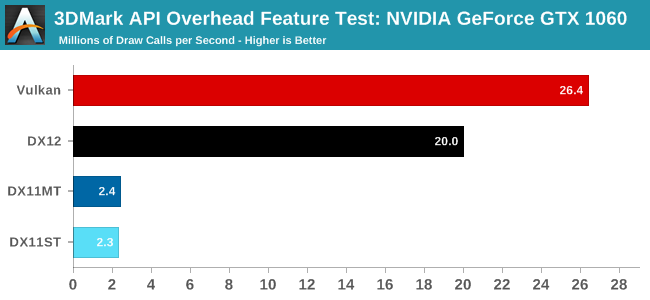
I really wish I could design my game around "draw calls don't matter". would be so much cleaner if I could just use 10000 draw calls
so I'm really waiting for them to enable multithreaded rendering for vulkan
tired tree
isn't that...kind of the point of vulkan?
full junco
yes
but it is still really hard to get to that point with vulkan I think
way harder than just getting vulkan to run at dx11 performance
so I'm not sure when UE4 will be at the point where they make so good use of vulkan that I can easily use 10000 draw calls
might also be that ue4 will never be at that point because they need such a major rewrite of their renderer that they will just call it ue5

thats 288000 draw calls per frame with 90 fps
though that can't really be used as any value with practical relevancy
their dx11 value would be 26000 draw calls per frame
so if 1000 is a realistic value to go for with dx11 currently, then 11000 would be a realistic value for vulkan according to that benchmark
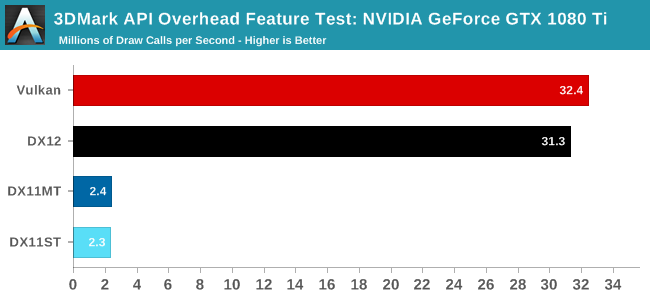
its interesting that possible draw calls with vulkan are still scaling with the gpu, while dx11 just stays same on a 1080 ti: https://images.anandtech.com/graphs/graph11223/86102.png
 full junco
with a 1080 ti you're also on a cpu bottleneck with vulkan though i think @wicked oak
the difference between draw calls on a 1060 and a 1080 ti doesn't equal the performance difference of the gpus
so on a 1060 you're just slightly below cpu bottleneck without vulkan
@wicked oak you should run a test on ps4 to see how many draw calls ue4 can do currently there. just spawn 10000 individual boxes and see if performance is same like with 10000 instances in a ISMC
I think ps4 also isn't that good with draw calls, it will slow down after 2000 or so I guess
wicked oak
@full junco im running 2000
on dwvr
1000 per eye
well, i need to check the exact number, but its a fuck ton
full junco
do a test with 10000 boxes
wicked oak
forward render too, wich means double the drawcalsl
full junco
with your 2000 real draw calls you can't really see how much time is spent on overhead because some of your 2000 draw calls are quite heavy due to being real meshes
wicked oak
the thing is that ps4 renderer in ue4 is HELLA optimized
full junco
so you really need a lot of draw calls of something extremely cheap to render
wicked oak
not only ps4 has a vulkan style low level api
it also has fully multithreaded rendering
full junco
it does not, quite sure. you are talking too good about it
do that test with 10000 boxes
full junco
do that test with 10000 boxes and tell me the results
wicked oak
ill do it later to check. But in PC, DWVR is 100% cpu bound
and thats on a strong I7
wich is 4 times more powerful than the ps4 cpu
i know its cpu bound becouse lowering resolution doesnt really improve the frames
full junco
gpu and cpu memory is shared on ps4, that alone eliminates all the time spent on PC to send buffers to the gpu I think.
wicked oak
you dont send buffers for meshes
its 100% pure drawcalls
my game has very very simple materials
basically no lights at all
and everything its static mesh
and due to LODs, i have the triangles under control
full junco
the thing is, if ue4 would have a "fully multithreaded" renderer then it would be way easier for them to make vulkan and dx12 use that one efficiently . but currently they really only have a very basic system with the render thread and rhi threads that still has too much work on the render thread for anything where you would want to have 10000 draw calls
wicked oak
but it does
and thats something ive confirmed
logically i cant show the pictures of the profiler
but in ps4 you have a very in-depth debugging toolset
one of them is a profiler with all the cores/threads/etc
one of my maps (the one with the cathedral) is special
becouse if you look at the cathedral it has a fuck ton of drawcalls
and if you look the opposite way its like 1/4th
you can see the ps4 cpu, ALL the cores, going from like 30% to 90%
just by turning 180
full junco
and if they are at 90% with just 2000 draw calls there's no way you can get 10000 smoothly
to get something like the 26 million draw calls per second like 3d mark does with vulkan on a gtx 1060, ue4 needs to be very different, and your 2000 draw calls per frame should really only cause 5% cpu usage
and I guess vulkan progress will be 0 now for the next 3 weeks 😄 https://twitter.com/RCalocaO/status/928670714642796546

On a 3 week vacation, here's my handy companion! Thanks to @fabynou

 Twitter
so the stuff in the next dev-rendering merge will be pretty much 4.19 because nothing new will be added between now and 4.19
mighty carbon
I think you've been bugging him too much about Vulkan, so he decided to slack off a bit 😉
wicked oak
john doesnt get much of a boost with vulkan
but me? oh god
if the vulkan implementation used multithread and was half as good as ps4 stuff, my game would suddenly have god tier performance
full junco
just to make it clear, I would hugely benefit from vulkan
supple lotus
Popping again, maybe someone can help:
We are developing a small scene for VR (HTC Vive) and there is a strange bug happening. If there is a translucent object visible in the scene, all the objects/walls/etc start flickering for the left eye. We've literally never encountered anything like this before. Anyone has an idea?
glossy agate
Is instanced stereo on?
mighty carbon
do you think we'll see 4.19 preview before Christmas ?
 rapid silo
Hi Ryan, I work with Clawsome on this project
i tried with and without instanced stereo, and it produced different results but either way it keeps flickering. Interestingly a lot more in packaged version. I just found out, that flicker happens in editor as well, but i have to look up almost 90 degrees in order to experience the flickering on walls.
Is it possible that is has to do something with transparent umg widgets?
glossy agate
Hmmm. Are you using forward rendering also?
glossy agate
ok. I had trouble with translucent mats on forward before so I thought I would ask
rapid silo
it is really frustrating and it seems nothing has effect on it
although packaged version seems to be a lot worse
glossy agate
Yeah I havn't really heard of that problem before besides bounding boxes being messed up so they were getting randomly culled. Odd that its only left eye though
rapid silo
i tried extending bounding boxes, did not make any difference
i managed to reproduce the issue in editor, when looking straight up, now it is messing up for both eyes but with different flicker frequency
 silent heron
Hello, I've just started fiddling around with an HTC Vive
We used the VR project template, but when we use the VR preview, it renders out in mono
I've looked in the project and editor settings, but I've only seen the stereo instance setting ticked off
Activating it doesnt resolve the issue either
Neither does running the command "stereo on"
Has anybody else had this issue? Thanks
spring pond
are you seeing steamVR start up when you start unreal?
silent heron
Yes I am
However, it shows the "Not Ready" red message
And below, the "not responsive UE4Editor.exe" message
Playing with the motion controllers does trigger the hands though
And the rotation input from the headset also works
spring pond
Sorry to be asking about basics, are you clicking "preview in vr" to start?
i have had some times where the oculus will come up in a mono window with a black imagine in the headset, but usually a close and re-run fixes it
silent heron
Yes, I'm playing in VR
rapid silo
I had weird results with using post process volume. Do you have one of this in your scene?
silent heron
Hm no
Im using now the blank project
Ive read about using commands
Hmd mirror mode 0
Through 4
It appears to work, for a while
Then it crashes
mighty carbon
looking at this https://uploadvr.com/croteams-serious-sam-3-vr-releases-tomorrow-says-steam-listing/ I am thinking it's no longer fun.. At least doesn't look like fun in the video. Looks more like an impossible speedrun

UploadVR
Croteam's Serious Sam 3 VR will be releasing tomorrow, if a recent Steam listing is to be believed, porting the entire original game to Rift and Vive.
glossy agate
First 2 were really fun to play with friends
Looks like they gave the enemies a bit nicer textures too
mighty carbon
it's SSam 3 - new engine and everything..
I am just saying that video makes it look sooo boring
glossy agate
Yeah that trailer is pretty weak haha. At least show one of the bosses or something
Now I’m not sure if I should get ss3 or assasins creed this weekend
mighty carbon
Wolf2 ?
glossy agate
Already beat it
mighty carbon
ah
glossy agate
I just rent ps4 games and beat them in a day then return. Gotta try all the new ones
mighty carbon
heh
glossy agate
Played shadow of war, cod ww2, South Park also so far. Almost through the fall releases now. Ac, and battlefront left I think?
And evil within 2 was pretty fun
mighty carbon
Doom 2016 was released on Switch o.O
 scenic tundra
Hey guys!
Any advice on what plugin to use for Full Body IK in VR?
Is this the best option for Unreal Engine 4.16? https://ikinema.com/full-body-ik-for-vr
glossy agate
I use BIK, its alright.
scenic tundra
Can you send me a link? @glossy agate
glossy agate
glossy agate
you gotta email them for pricing, but its just slightly cheaper than Ikinema
glossy agate
For sure, it has support up the 4.18
full junco
development of that plugin is so slooooow
after he did this I will probably use it: https://trello.com/c/Fyu7m2qZ/33-integration-source-code
Source code for the glue plugin between the biksolver library and UE4.
Elegantt data. What's this?
[](Elegantt_data:dont_delete{"ignored":false,"autoPlanned":false,"ownerId":false,"dependencies...
Labels
In queue, v0.9
as IK for AI, not for the player
glossy agate
Yeah that’s the problem with it. Have to wait weeks after engine version release before getting the latest version
I just got 4.18 version yesterday so plan on waiting a bit
full junco
and he didn't reply to my question about more-than-4-legged characters and performance
 white fern
Anyone have insight into why the UE4 VR template keeps the MotionController actors separate from the Camera in the PlayerPawn? What issues are introduced by rolling them into a single pawn?
full junco
its just better to keep things modular
applies to all programming usually
controllers share functionality, so it makes makes sense to create an actor for that and then use the actor multiple times
white fern
Right, but isn't that the purpose of UMotionControllerComponent?
tired tree
they had a ton of teleport components attached t othem
mighty carbon

Electronic Arts (EA) has just announced in an agreement to acquire Respawn Entertainment, the creators of AAA shooter game Titantfall. Currently, Respawn is working
tired tree
for my case I broke those out to an actor and left the controllers in the character
white fern
Since the HMD and the controllers are BOTH controlled by the player (and therefore the player controller) wouldn't it make more sense for them to all be in the pawn? I guess it could boil down to preferences. I just want to know if there are problems attaching the motion controllers to a main pawn
full junco
I keep all the input stuff in one place (the character), but I do have actors for my controllers that manage the controllers in the world
white fern
@tired tree Yea, I guess you're right, for the VR template in BP. I'm trying to workup my own VR template in C++, just hoping to avoid any problems if there were any critical issues with putting motion controller components on the pawn.
tired tree
my setup is c++, my controllers handle the gripping themselves
they still act like the actors epic used basically, but as actor components
I did leave the teleport setup as its own actor jsut because of all of the extra components they had in it
messy to have that in the pawn, and mostly fine on its own
white fern
I guess I can try it and see... Yeah, the template itself I found rather messy. All the teleportation inside the pawn can be cumbersome, but I guess if you don't need it the thought is you'll just rip it out
I just didn't know if there was an important reason for the way the MotionControllers are separated or if it was just an arbitrary decision.
tired tree
you can use the same pawn for gearVR or no controller HMDs
only spawn as many motion controllers as is needed
but that can be done anyway
white fern
Didn't you say that you kept your motion controllers in the Character?
full junco
not everything epic is doing always makes perfect sense too
tired tree
I do a lot of multiplayer stuff and having the motion controller directly in the character allows for some shortcuts and less overhead
white fern
Right, that makes a ton more sense for replication. I get that. I'd argue it makes more sense in general too. But I guess Sam, Wes and whoever made the template had different ideas. Alright. Thanks for the input @tired tree and @full junco
tired tree
I mean, if you look at RR, their pawn is bloated enough as it is
and they had to tie the controller hand actors and pawn together in multiple places
its give and take, no clear choice really
depends on what you are doing
 tacit kernel
in my projects, I have them seperated, but mainly for when both controllers do the same thing, eg, both are guns
if one needs to do something different than the other, I put it in my controller/pawn BP
saves you from having to do the same code twice
tacit kernel
..maybe it was just the attachment portion?
tired tree
I hope so....
tacit kernel
I think the one project, you could choose the weapon from the thumbpad, and it attached the gun to the controller. But both controllers handled things the same way
full junco
@tired tree a huge merge from paragon to master: https://github.com/EpicGames/UnrealEngine/commit/ca24b4e26df010d84c4b6d379068234414693002
tired tree
oh god, paragon changes
full junco
it has some of everything
tired tree
gonna be a ll widgets and reflections and ability system
tired tree
oh thats nice at least
full junco
and this: https://puu.sh/yizMd/85333ceafe.png
 pearl tangle
just caught up with some of the Epic guys last night. Niagara is still a fair ways off it seems
tired tree
sigh.....these uber merges get real old
pearl tangle
well they are much smaller merges on their perforce compared to the public git so they just package them up once it's tested a bit more usually
full junco
@tired tree and this paragon merge is exceptionally ugly (the description formatting)
tired tree
yeah looks like its auto generated
 white fern
Even still @tacit kernel if you creat a custom MotionControllerComponent and put the functionality in there do you need to duplicate code/bp?
Can't you just put all the identical stuff in the MCComponent and then do individual tweaks in the pawn/character?
tacit kernel
oh, I dont make a component. Just a motion controller Actor, with the mesh and MotionController component. And collision spheres for interaction
mighty carbon
@pearl tangle do you happen to know if they have more VR related goodies coming in 4.19 - 4.20 ? (rendering features / performance optimization)
pearl tangle

Unreal Engine
Graphine creates texture streaming and texture compression technologies for the video game and 3D visualization industries. In the last 7 years, we’ve been dedicated to this one question: how can we remove the technical boundaries to using massive amounts of texture data in video games?
mighty carbon
native virtual texturing solution in UE4 ? (I know of Granite, but that's nothing new)
 fresh laurel
@mighty carbon - It is on the roadmap but I do not know when it is coming
mighty carbon
yeah, saw that on Trello
I am sure @pearl tangle just hinting on something but can't really spill the beans (which is understandable)
pearl tangle
yeah nothing particularly different from whats up on their trello roadmap
maybe vulkan when it comes along but don't think thats until the tail end of next year that you will be using it for desktop vr
pearl tangle
what changes do you need?
mighty carbon
not 100% sure at this moment, but existing stuff needs to be optimized for VR (landscapes, foliage/grass, volumetrics, distance field stuff, dynamic shadows, etc.)
lights/shadows culling too
tired tree
..........
based on what
do you specifically think those need VR specific optimization
aside from distance fields not working with it yet
mighty carbon
well, yeah, shadows are super slow
lights culling is bizarre (distance based instead of occlusion based)
mighty carbon
I haven't tested shadows outside of VR
glossy agate
Well they just came out with volumetric lighmass, Thats pretty good
Oh yeah, whoever was checking out BIK. They added 6 point solver thing now so if you have trackers for waist and feet you can probably record out some basic animations or something. I think ikinema already has that too
mighty carbon

Meta Company
Bridge the gap between the virtual and the real. The Meta 2 Development Kit offers the world’s most immersive AR experience.
now supports SteamVR
I assume that means UE4 is supported now
 uneven phoenix
anyone know how to recplicate the wavy line pointer from Unreal VR mode?
white fern
For a VR Controller in C++, should I put my MotionControllerComponents on the Player Controller or the Player Pawn? Any thoughts?
stiff nest
Hey there.
Does anyone know how to enable VR at the start of a level and disable VR at the end of a level? I tried using the console command -vr and also stereo on at "Event Begin Play" but had no luck.
Also tried the "Enable HMD" node along with the console command to enable VR headset and got nothing.
 little nacelle
Hello, play in Standalone mode doesn't work with VR?
scenic tundra
@glossy agate Does the BIK supports Unreal Engine 4.16.3 and multiplayer? Also, for implementing VR, you just parent the effectors to one motion ctrl and another?
tired tree
@scenic tundra IK doesn't really need to support multiplayer
as long as what you are tracking is replicated correctly it is done client side
scenic tundra
Okay, thanks!
mighty carbon
so I tried trees last night - no go. Same issue - masked materials. Going to have to go abstract route like I did with grass (tested, performance was good).
full junco
well I do use a lot of trees with masked materials
@pearl tangle not sure about your "end of next year" guess for vulkan. is that based on anything or just a guess? as far as I see, epic did work on features and ignored performance until after 4.18, and now they are working on performance and getting it to a dx11 level of performance shouldn't be that hard, that should happen in 4.19 or 4.20
and from that time on, it makes sense to use vulkan for a game and not dx11
mighty carbon
well, you are on i7 and 1080, aren't you ?
full junco
yes I am
wicked oak
well, if its only dx11 level, then its not worth it
becouse dx11 is better supported
less bugs
full junco
no
wicked oak
i will switch 100% once performance is slightly better than dx11
full junco
dx11 is dependent on drivers a lot more
wicked oak
but vulkan drivers are super new
tired tree
screw dx11, moment it is equal vulkan all the way
full junco
@tired tree exactly 😄
with vulkan a huge amount of what was done in driver before is now handled by UE4, that also means its automatically more reproducible between different gpus
tired tree
I will love the day when GPU patches aren't specifically geared around fixing GAME SPECIFIC bugs
"improved GAMENAME performance by 10%", by adding a new route to the driver for that specific game...ok
its such a mess, its rediculous
full junco
I think the performance increases in drivers are mostly done by nvidia and amd optimizing the games shaders for their architecture. not really with new drivers code
full junco
it's unfair because the AAA titles get free more performance that indie titles can't really get
tired tree
its also stupid
more control to the engine side of things can bring a lot more consistency in the end
at least then it is more likely to be a UE4 implementation bug
full junco
yes
wicked oak
Epic was 100% on top of mantle/dx12/vulkan
engine devs love it
becouse finally they dont need to go around the damn driver
full junco
epic never cared about dx12
tired tree
well, tbh, there is very little reason TO care about it assuming vulkan is up to snuff
you get vulkan running correctly and you cover all platforms
tired tree
you get DX12 running...and you still have to do vulkan
ah, yeah...xbox..
the dead console with the dead api
full junco
why dead console?
full junco
well now with the one x it might change
and the one x is the only console where vr really makes sense
tired tree
well they'll have to hit VR then, because as far as games they lost hard on exlusives
they moved 1/2 the consoles as playstation and PS got VR first
full junco
but it's far from dead and engine devs have to support it just like Playstation
I wish ps4 and Xbox would just switch to vulkan
they could do vulkan with some of their own extensions for specific console stuff
tired tree
not going to happen for xbox ever and playstation not this gen
microsoft built a brand on DX being the "best api" and pushed it hard
little too hard...
full junco
too hard?
why too hard? after dx11 they would never have done anything again if there wouldn't have been amd introducing mantle
Microsoft was happy with crappy dx11 to exist forever on desktop
tired tree
I meant pushing dx9 and the like
too hard
trying to bully out openGL from market
never been happy about how they handled things back in the day
tired tree
it was better in late dx9
but dx was de-facto
doesn't matter too much, just wish they let it ride instead of trying to initially hurt its perf in windows and file extension lawsuits and buy exclusives
wicked oak
opengl was allways better until DX8-9
mostly 9
for 9, directx got shaders first
while opengl was unsure/badly leaded
so basically, for DX9 microsoft actually improved over GL, and then used that to go waaaay ahead of GL
microsoft DX is a dictatorship. With nvidia and ATI as consultors
so they get shit done fast
opengl is a comitte of very different people, so by the time they reach consensus it takes a while
features get added as extensions in GL,, and if they are cool they eventually become part of "official" GL
tired tree
yeah they had to play catch up at 9
tired tree
they have more industry support now
wicked oak
i guess throwning off all those CAD supporters helped
tired tree
that helps
full junco
@wicked oak only reason why they have done vulkan so quickly is that it is essentially just AMD mantle
mighty carbon
has anyone tried this https://www.unrealengine.com/marketplace/fast-stylized-procedural-sky ?

Well optimized dynamic sky material and advanced weather system. Exclelent choice for stylized games.
looks promising
full junco
seems like a great choice for stylized games, yeah
sturdy coral
@tired tree I think destiny only looks so bad on that bandwidth comparison because it was the only one that was peer to peer and was probably looking at what they call the physics host
sturdy coral
yeah, I'm just saying engine wise
I think part of UE4's low default bandwidth limits is to accommodate peer to peer setups (client rates much lower than listen server rate if I remember)
tired tree
?
sturdy coral
but they are probably somewhat of a holdover from xbox 360 mandates, I think the host had to serve everyone on a really slow upload speed to get certified
tired tree
ue4 isn't p2p
sturdy coral
I mean client-hosted
sturdy coral
no, I mean the listen server user has higher limits than all the connected clients
tired tree
meh, this is client upload rate that is throttling
server has seperate total bandwidth limits
sturdy coral
yeah, but I think the client limit is so low
because they are assuming a listen server by default
tired tree
probably
sturdy coral
and the listen server on consumer internet could get overwhelmed by all the clients
but the limits are still probably pretty out of date at this point
tired tree
very out of date
when it can't even keep up with default voip settings
and even just the base 3rd person template run in multiplayer hits near the cap....
sturdy coral
ISPs used to give really shit tier upload speeds even if you had fast download, but so much has changed since xbox 360 era
tired tree
granted it scales, but still
sturdy coral
with people uploading to facebook and youtube and stuff and demanding faster
full junco
but is increasing the limit in ue4 just changing a variable or is it harder?
sturdy coral
it is several sections of the ini
full junco
so can I change it to 100 mbits or will ue4 have issues with that?
tired tree
I dislike how many basically throw huge numbers into them
best to profile and set sane limits
they are there for a reason, network saturation still happens
sturdy coral
yeah it is a pain that voice can't be separated out
for me I stream kinect depth info too so have to jack up the limits
tired tree
I saw someone that said "oh it works now with these numbers" as the accepted answer on answerhub....of 800000 limit
sturdy coral
but that ends up making other stuff with property replication less throttled
you can probably dynamically change it at runtime but I haven't tried yet, so many confusing variables
full junco
800000 bytes or kbytes?
tired tree
beleive that it is bytes per second
full junco
not per frame?
tired tree
no
full junco
800 kBytes per second is just 0.8 MB/s which is a 7000 kbits connection. so pretty fine
if thats for both upload and download
full junco
ah, well 7 MBits upload is a bit too much to assume
tired tree
technically its both
its shared
think he had to increase due to RPCing to the server every tick though, so the overhead was upload
sturdy coral
if you have a listen server on consumer internet that means he requires 25MB/s download for a 32 person game
full junco
well, 32 people on a listenn server is not ideal I think
sturdy coral
yeah, and stuff changes frequently, if someone starts streaming netflix while you are hosting
yeah, not much stuff does that anymore, most use dedicated beyond like 8-10 players
tired tree
like I said though, I'm not as worried about limits anymore
but still, setting numbers 80x the default limit and not profiling is silly
why ever allow it to hit that if you can get away with 2x with your game
full junco
how does a too high value hurt though?
if stuff gets dropped by ue4, isnt that same bad as if the connection is really saturated?
sturdy coral
it makes property replication and some other throttled things happen more frequently
sturdy coral
it might mess with reliable RPCs some too if they use the limits instead of having dynamic windows like TCP and stuff
tired tree
which is why that new console command for adpative net update frequency hit everyone hard when it became auto enabled
full junco
I wish I would work on multiplayer stuff, want to add it to my game so much. but first only singleplayer
tired tree
its fuuuuuuuun
just saying
used to get my kicks out of low level memory optimizations, now I just cut bits out of networked structs



 tired tree
didn't that get merged?
full junco
I'm still on 4.15
tired tree
ew, one version shy of the most stable one
full junco
why most stable one
tired tree
4.16 was the most stable for me
full junco
that greatly depends on what you're actually using of the engine I think
full junco
I will update at some point, I just have like 100 commits made to the engine that will give me a billion merge conflicts, and there wasn't anything in newer versions yet that I really needed and couldn't just port back myself
so my UE4 version is perfectly stable for me
sturdy coral
I'd like to modify the server code to be able to tick at 30hz, but still send motioncontroller/HMD updates at 90hz
full junco
never getting any crashes
sturdy coral
30 gives a little bit of a stop motion feel
tired tree
you run smoothing?
I rep controllers and hmd at 30 by default now with smoothing, though its configurable
sturdy coral
no, I guess I could do that too
tired tree
yeah just a naive last update to new lerp
it still hitches if you miss an update, but better than storing more history or projecting out for something that complex movement wise
and you can't tell the difference in normal operation
plus far less bandwidth as an upside
sturdy coral
@white fern I keep my motion controller components on the player controller now, but not many do it that way. There is some buggy stuff with OwnerNoSee/OwnerOnlySee you have to work around.
wicked oak
i have them in the pawn
allways had
but putting them in the player controller seems interesting. Why?
i have them in the pawn becouse the pawn is the physical representation of a player
sturdy coral
for me it was to simplify respawning stuff
wicked oak
and my Hands are attached to the motion controller directly
sturdy coral
like if you have a menu open when you die
white fern
@sturdy coral Thanks, for the input. I knew I had read something about that on the AnswerHub when I was looking
wicked oak
but that would still be the pawn
white fern
Just so I know, what workarounds have you done for OwnerNoSee/OwnerOnlySee?
@sturdy coral
Just delete/setHidden at runtime?
sturdy coral
@white fern I never got it fixed so I'm just managing visibility manually; the main issue is the player controllers live on the server too
white fern
Ahhh.
sturdy coral
so with OwnerOnlySee not working, the server player will still see it
not an issue with dedicated servers though
you can just hide the whole player controller actor on the server too
white fern
I guess it's not a huge problem if other players don't have avatars, but a huge problem if you want any kind of more substantial representation for other players.
Thanks for the info.
sturdy coral
@white fern also playercontroller has bHiddenEd set on it by default, you have to turn that off. took me forever to find that
white fern
Yea, same is true for camera's and the like correct? That can only be changed in C++ right?
sturdy coral
other little issues too, returning from ejecting into debug camera will rehide the player controller
probably only in C++ yeah
white fern
know if any of these issues are on the roadmap?
sturdy coral
I don't think so
white fern
Alright. Mind if I save this convo for later? Could be useful down the road.
sturdy coral
sure
white fern
@sturdy coral Thanks man, just screen capped it. Maybe that info will help in the future.
sturdy coral
if you do them as separate actors instead of components you can save yourself from all the visibility issues
white fern
Right, but of course then you have to manage the replication for each of them
Not too bad, but it's a tradeoff
 lament bay
Hey everyone - I just started seeing some super weird warping in Oculus and 4.18- whenever I move my head around things seem to warble and ripple- it kind of looks like when its really hot and you see the heat waves rising off the road, or like what your hand looks like on LSD or psilocybin- interestingly, when I package and build, this effect no longer appears- I've only been able to repro it in the editor. Has anyone else into thiss issue or know what may be causing it?
Just tested with a fresh VR template project too and the effect is still there, so it doesn't look like it's something specific to my app
full junco
like what your hand looks like on LSD or psilocybin lol. do you expect most people here to have any idea how that looks like? 😛
glossy agate
I partied hard in high school. Post a vid and Ill see if its similar looking haha
lament bay
hahah honestly yes 😃 In my experience the sacred medicine and VR communities overlap quite a bit!
I wish I could post a vid... the issue is it's happening in the HMD but not on the monitor
sturdy coral
@lament bay sounds like async spacewarp kicking in
packaged probably runs at higher framerate and doesn't have it
doesn't show on monitor because that is a mirror of what the game sends to the compositor, and ASW only happens once it is in the compositor
lament bay
that makes sense- thanks so muchcharles!
sturdy coral
@lament bay np, you can turn it off with the oculus debug tool when testing perf (it is under Oculus\Support\oculus-diagnostics wherever you installed)
lament bay
sweet
oh yeah- I turned it off and judder is reaily apparent, although no warblies- so looks like it is indeed ASW... so weird that all of the sudden my perf would be lower even with default project, I can't really think of what has changed in my system that would lead to the drop, but I'll meditate on it. Thanks again!
lament bay
So it looks like the issue is 4.18 specific for those interested- when I run on 4.17 it runs at 90. Interesting
sturdy coral
@tired tree the late update issue you mentioned in your last vid only happens if you adjust world to meters scale, right?
uneven moon
Anyone with PS4 engine access here?
full junco
the same guy as always. you should know by now 😄
lament bay
Ok this is super weird- now any vr project I run either in 4.17 or 4.18 in editor runs at < 10 fps- sometimes even 1 fps (including VR Template)... I am pretty baffled.. if anyone has any ideas I would be highly grateful
Packaged exe's still run at 90 fps consistently. It's like the editor is degrading in front of my eyes without having changed any settings
full junco
restart your pc?
lament bay
Yeah I've restarted multiple times and did a diagnostic scan and updated to latest graphics driver
full junco
well strange
did you do anything before that started?
its a pretty big difference if suddenly the editor only runs between 1-10 fps
so you have to know what you did that caused that to happen? @lament bay
mighty carbon
my project runs like shit in PIE (30fps) VR preview.. But when I package it, it runs 90fps.
 ebon scaffold
I noticed Robo Recall has some blueprints with replication, was their intentions for it to be coop or use dedicated servers before, or any benefit from replication in a singleplayer game for VR?
mighty carbon

VR Dizzy
VR Dizzy is a satirical website set in an alternate VR universe. It publishes spoof articles and makes fun of everyone working in the hyper-immersion industry.
wtf
full junco
@mighty carbon you dont like satire?
lament bay
@full junco I wish... I didn't install anything or change any system settings since last night, so pretty baffled
May try deleting all the engines and reinstalling
full junco
that shouldn't change anything, but I guess you have no better choice
sturdy coral
@lament bay see if it is gpu or cpu first