#virtual-reality
1 messages · Page 137 of 1
 sturdy coral
I'm not sure, I've only ever used scene captures in game where I want the scene's own tone mapping to apply over them
 mighty carbon

UploadVR
One of VR's most ambitious survival games so far is finally playable on PS4 today both with and without PSVR headsets. Good luck!
how though?! I've read people complaining about performance on PC
 tired tree
O explained this before
the mirror window is darker right?
but if applied to an object in game its fine?
you need to set your rendertarget to 2.0 gamma
if it is going to be used for the mirror window
 eternal inlet
but didn't i do that?
tired tree
and if you are going to apply it in world then you would have to half your values again, but thats not normally required
eternal inlet
see screenshot above
eternal inlet
i've done that 20 times
tired tree
mmm
eternal inlet
atleast
tired tree
thats all it took for me
eternal inlet
i made that change several days ago
tired tree
hasn't taken yet somehow
eternal inlet
ok odd
i'll try remove it and add it again, but doubt it will work
nope, same result
 wicked oak
@mighty carbon ps4 performance aint shabby for VR
its mayor issue is CPU, but solus is a walking simulator
sturdy coral
@uneven moon motion controller thumbstick left/right/up/down isn't implemented for Oculus at least of 4.16, I added it in myself but I think I saw it was added later in 4.17 or master
not sure about Vive
tired tree
@eternal inlet make a new render target and set the variables before tying it to a scene capture component
eternal inlet
that was also what i tried after, and it was the same result
i think i'll add it to answerhub as a bug
tired tree
the gamma is the correct fix, I had to play around a bit until it actually used the override with mine
eternal inlet
yeah, i agree, but you happen to recall what you did to get it to work?
tired tree
nope, I thought the field just straight up didn't work at first, took a peek at the code and saw it was actually hooked up
eternal inlet
im in the middle of some other stuff, but i will make a note to do a clean project test with it and see if i can reproduce
mighty carbon
@wicked oak it's choppy on 1080 and i7.. So I am not really sure if it was drivers, poor optimization or what.. It would be sad if it runs on PSVR with the same quality settings as on PC, but not choppy
wicked oak
drawcalls suck man
its highly probable thats the reason
drawcall wise, there is no difference beetween a overclocked i3 and an i7
and the gpu doesnt matter
it wont run choppy on ps4
they are serious about it
but it will run at 60 fps
but his game being big with dynamic light? drawcalls through the roof for sure
in his Solus videos he did have a TON of objects
he used fancy materials and object placement to make level editing super smooth
mighty carbon
@wicked oak "he used fancy materials and object placement to make level editing super smooth" what do you mean ?
wicked oak
have you seen the Solus videos?
they are 10/10
the guy does things like world aligned textures a lot, so stuff merges together even when they are multiple meshes
for example, to create the inside of a cave, he uses a few "planar" rock meshes, and puts them together
the material is world space, so it looks like its a continuous mesh
but its multiple
of course each mesh is one drawcall, wich in vr it aint good
Hourences made all his books and videos public
its a lot of reallly good material, everyone should have a look at it
this is the one i was talking about
3 and something hours of level editing in ue4
mighty carbon
thanks
wicked oak
that one might be too basic
but he has more
this ones are a bit higher level
they are great
 wild mauve

Anyone here able to see where it's breaking? I'm attempting to debug the VR Expansion stuff I migrated over.
Whenever I pickup an object itseems to just activate physics, it falls, and is extremely loosely influenced by my movement. If I let go it freezes in space.
Around the middle point it completes the entire event and because I don't grab it anymore (since I'm advancing frames and I'm not actually in the viewport grabbing it) it lets go. I don't believe that's relevant to the issue that's just debugging in a separate window haha
wild mauve
I seem to get physics working fine whenever it's just a physics enabled mesh (It seems to use the physicsy grab by default?) However whenever i try to grab a blank actor inheriting the Grippable Static Mesh actor it seems to just fall when I grab it regardless of settings.
 glossy agate
problem is most likely in the stuff you are trying to pick up, not the char. In your slot grip type you probably have it set to like the free hold one.
wild mauve
Interactive Hybdrid Collision With Physics @glossy agate

Here is an example


here's the regular blocks
glossy agate
hmm. Try the non hybrid one. Also in your tags you can set up the held at grip tag
wild mauve
Non hybrid is the same result.
My weapon doesn't have any grips so I don't think that gameplay tag would help much
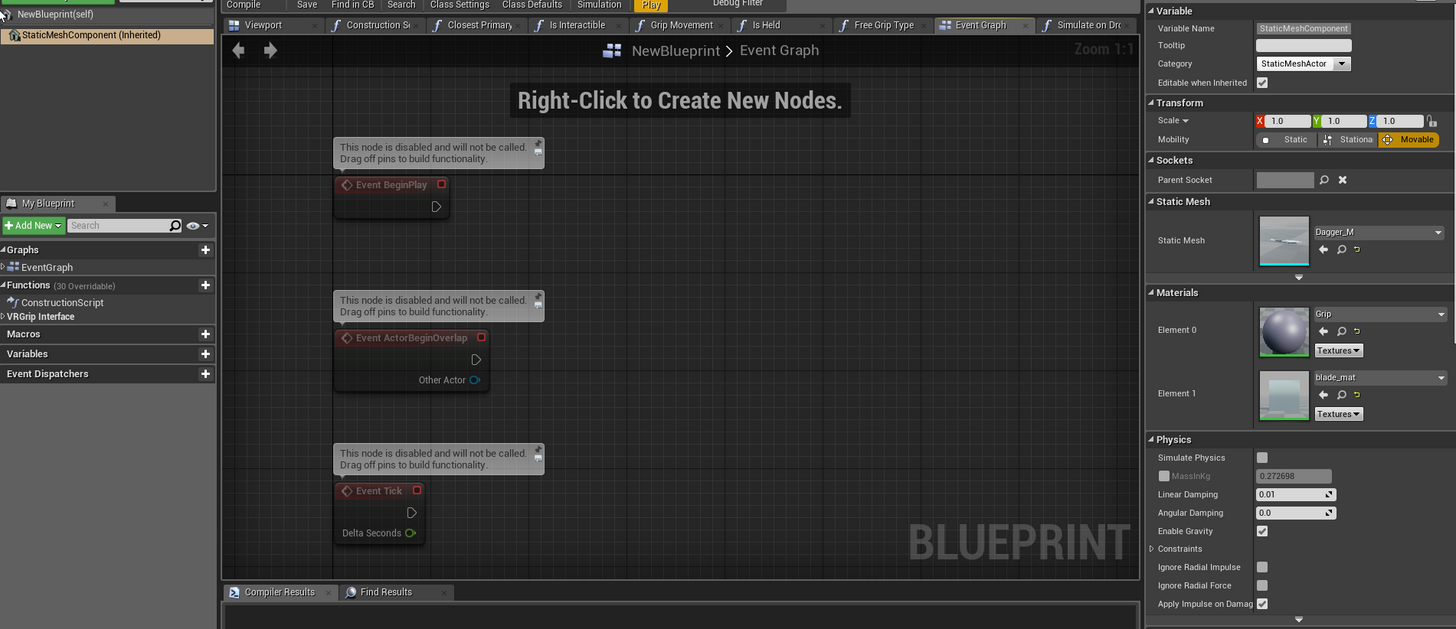
It's just a basic VR Grippable SM
Collision is set to generate overlap events however I get the same result regardles if it's enabled or not.
This is super confusing >_<
glossy agate
Well if you don't have a grip socket on your weapon meshes they will just be held however, and wont snap into the right position.
 uneven moon
@sturdy coral PM me when you get a chance
Side note: https://www.youtube.com/watch?v=_p_G6LD8Dac

Wraith is an intense, interactive virtual reality horror game for the Oculus Rift, HTC Vive and PlayStation VR platforms. Take on the Wraith with a variety o...
 pastel lintel
hey so the vr template does something and i cant find where it does it
basically the left hand is inverted
so that the same hand mesh is used for both controllers
however, when you want to use, say, the vive controller model, it inverts the left controller which is bad
i cant find where they invert it though for the life of me
nevermind, im just blind
i was staring right at it, lmao
sturdy coral
grr so the oculus controller via native OVR has a different orientation and alignment than via SteamVR
I guess valve had to do that since they had already chosen before the SDK was out
 digital marlin
Is there anything I should know about VR before packaging a game? Any specific engine settings I should include?
sturdy coral
@digital marlin You should probably set start in vr
but it probably won't make a huge difference if you just enable it yourself after launch
digital marlin
and that's done via command line right, -vr ? (or whatever it is)
sturdy coral
there is a start in vr project setting
I think it basically does the same as -vr, and you can use -nohmd to turn it off
digital marlin
Coolio
digital marlin
shit, anyway to avoid a build of a VR project from crashing for out of memory ?
wild mauve
lmao how much memory you using
sturdy coral
@digital marlin I believe there are some commandline tools to build and package without the editor running
digital marlin
that'd be good. Also I just found out the comp I'm doing it on is 16 gig
So I might have to find something with a bit more.
would unchecking .pak help?
er.. 8 gig, not 16
sturdy coral
@digital marlin you can uncheck full rebuild in packaging settings and then build shipping configuration in VS without the editor running
then when you package in editor it will skip the compile step
digital marlin
Ah unfortunately this is a BP-specific project.
...unless I can package a BP game via VS?
sturdy coral
have you tried opening a sparse/empty map before running packaging?
wild mauve
packaging in VS with blueprints should still package the blueprints.. no?
sturdy coral
digital marlin
@sturdy coral no I haven't.
digital marlin
Just to see if it'll work?
sturdy coral
it will use less memory
digital marlin
o rly?
sturdy coral
yeah, you may want to change it to your editor startup map too
and do a fresh restart
digital marlin
yeah, I'll give that a shot. Thanks @sturdy coral
sturdy coral
you may want a complete PC restart, kill chrome, etc.
digital marlin
I read that I should be doing regular builds after each night / update.
Which I haven't been doing.
sturdy coral
with a BP only project it isn't usually an issue unless you are using third party plugins
but yeah, packaging failures can be really hard to track down
usually C++ code referencing editor only stuff
and definitely do it any time you upgrade major engine versions
 brittle patrol
Hi all, I'm trying to use a ghost headset and controllers to appear at my teleport location (so when the player moves thier head and hands it replicates it where they are going to teleport).
The problem is the headset and hands are offset to where they should be and I can't work out why. Any ideas? 😃
uneven moon
@brittle patrol So basically, where you would end up is where you want the ghost to be right before you teleport?
brittle patrol
Yes, basically drop that GhostHMD right on top of the teleport target, but still have it follow the headsets movement and rotation.
uneven moon
Try plugging the teleport location directly into the New Location
brittle patrol
It moves where I want it to, and follows the rotation, yes. I have to break the pins to get the height from the HMD, and it works OK. But, when I do the same thing for the hands, they are stuck on the teleport target and dont move around
Say I lean left and right, when i just use the teleport location, the headset is stuck fast on there and doesn't lean with me, although it does follow the rotation.
Thats not a big deal really, but when I try the same thing with the controllers, they don't move around and are stuck fast in the teleport location rather than following where my actual hands are.
 tawdry dragon
Anyone here with access to the Microsoft Mixed Reality headsets that have 2 minutes to answer some questions?
 supple coyote
has anyone used Alembic's geometry cache in UE4 with mixed results?
 pearl tangle
@supple coyote used it back a year ago when it first came in under experimental. It worked fine but it wouldn't go in the packaged build for us
might have changed in a year though
supple coyote
jesus I certainly hope sp
I noticed it's no longer in experimental ;\
must be a positive sign
pearl tangle
have you tested it in a packaged 1? I don't recall ever seeing any updates on it in the release notes though, maybe hidden away in the unimportant 1s for some reason
you would expect it should package ok then
supple coyote
have not
ill be testing that tho
my issue with it tho
is that having two alembic cache going on in same scene is causing serious stutter in Oculus rift
but my fps seems stable ;\
so its almost like it's not a gpu issue
even weirder, when I move my pawn into a certain position, stutter goes away ;\
having a hard time nailing this isssue
wonder if it's a CPU or memory issue ;\
wicked oak
@supple coyote there are ways of doing alembic style stuff without alembic, but depends on the software you use
what software are you using to build those alembic things?
supple coyote
blender
wicked oak
its known that current version is slow as balls with alembic
supple coyote
i've got two things going on
wicked oak
i think they improved it a lot in 4.17
supple coyote
1 alembic skeletal mesh which simulates a wave/tsunami
and I would LIKE a second and third alembic cache which simulate an actual fluid
wild mauve
what does alembic mean
wicked oak
its a file format
wild mauve
I thought that was an eating disorder
wicked oak
essentially a animation
wild mauve
😄
wicked oak
but its not a skeletal mesh or anything. An alembic file is like a fuck ton of static meshes, one per frame
with some compresion shanenigans
supple coyote
vblanco what do you think?
supple coyote
ahhhhh
that would make sense
hm
so limiting the amount of alembic files going on at once
Is there a difference in performance between alembic skeletal and alembic cache?
wicked oak
dunno
mighty carbon
can alembic even be skeletal ?
supple coyote
@mighty carbon yea
 storm hare
is there a way to move the stat windows to a texture or to a 3d object that lives in the world? my goal would be to move the stat info to a controller, since it's quite hard to read the stats while on VR
wicked oak
alembic is used to export whole scenes to render engines
and specially for simulatiions
mighty carbon
yeah, as geometry cache
mighty carbon
not as weighted mesh
wicked oak
break it into pieces
and then export it back to blender to use it in an animation
i think the skeletal part is becouse destruction sims use mesh chunks. Those could be done with bones
and save massive amounts of bandwith in exchange for calculations
mighty carbon
as blend shapes, in Blender's terms
supple coyote
hey vblanco - think houdini alembic would be more performant than blender alembic > to UE
wicked oak
alembic is alembic
houdini just has different ways of exporting a simulation
for example it can export it into a texture
and just move vertices in the materials
but that has a size limit
mighty carbon
well, export rigged mesh into Alembic and re-import it.. You will not have any bones.
wicked oak
the texture size would ve trianglenumber*3 columns and nFrames rows
supple coyote
or rather vertex color
 mighty carbon
The official website says:" Alembic Would Not Be Used... ...A general rigging storage solution ...To transport complex procedural animation rigs between different applications"
supple coyote
i'm weighing my options right now
whew
I've decided there's got to be a performance diff between alembic skeletal and alembic cache
there's just got to be
so i've converted one to skeletal since there's a consistent vertex count
but for a fluid sim would have to be cache - maybe they play well together
ya looks like having 2 geometry cache is what is causing my problem vblanco
must be a CPU bound issue
supple coyote
I mean, two alembic geo cache in one scene? What was I, crazy?
sturdy coral
@mighty carbon it is baking to bones to use them as sort of a means of compression, it isn't bones you would want to use in a rig
geometry cache is like frame by frame update all the geometry with some compressed verts I think, the bones method is trying to get a similar effect by only capturing visually important low frequency data instead of per vert, and baking that to bones/bone transforms
@supple coyote don't know if it will help, but for the bones method have you tried checking "Support Compute Skincache"?
sturdy coral
@supple coyote it is a runtime option under renderer optimizations
it says caches the result of bone transforms so they can be used across multiple passes (depth, etc.)
supple coyote
Hm I don't see that in details :\
sturdy coral
it caches what the bones do to the geometry so it only has to be calculated once per frame
supple coyote
well that's clever, why isn't that on by default?
sturdy coral
I'm not sure
supple coyote
Hehe
my 'main' issue before was actually that I was seeing some major stutter while having geometry cache alembic
I realized the issue was when I had two geometry cache in the same scene
I was able to convert one of them to skeletal which fixed stuttering and in my case will do OK
so I guess the lesson was that geo cache is heavy on CPU, is that correct?
 sly elk
has anyone here done an unreal dev grant?
supple coyote
me 😄
sly elk
I sent in an application a few weeks ago. Do they ever reach out or do you just wait until they announce a batch of grants?
supple coyote
umm in my case I got an email - although I was specifically requesting the HTC Vive as part of their grant initiative
I imagine they send u an email
sly elk
Okay. I'll wait a bit longer then ping someone to see if they have any info for me
Also, has anyone ever had issues with the VR template where occasionally one hand won't do a pickup? About one in 100 times I attempt an object pickup one of the hands will refuse to grab but the other will.
glossy agate
Yes I have seen that problem myself, and I tested someone elses problem that I think had the same problem
sly elk
interesting. If it helps as a data point, I switched my pickup over to using a sphere trace instead of overlaps
next time I have it happen, I will try and get more info. Not sure if it does the 'can pickup' hand pose on those instances
tired tree
I use both for my implementation, I fall back to overlap if the trace fails to find something
this is because if your hand is inside of an object the trace fails
glossy agate
Are your animations firing still? In the other projects if I remember right (was way back in jan or feb) the gripping anim wouldnt fire either like the button didn't register
sly elk
yeah. the grab animation still fires
but no picku0p
in these cases there definately isn't something blocking the trace. Parts on the floor and nothing nearby. Doesn't matter how I move my hand around the object but the other hand always works
glossy agate
I have never had this problem using mordentrals plugin, so probably because he has a backup system.
sly elk
I could probably do an overlap fallback but it would be a little awkward with mine. I do a really narrow (1.5 unit wide) sphere trace because I need that dexterity for handling small parts in an assembly
glossy agate
Yeah for every little bolt it has to be accurate
sly elk
yeah. I need to figure out how to handle really small parts like piston rings or retaining clips
some amount of automation there I guess
glossy agate
When you debug the trace is still firing too?
sly elk
im 90% sure it is. I need to add a debug on the trace to print the trace outputs or a fail message if trace fails
sly elk
yeah
tired tree
might be hitting geometry near it
since its small
may need to add a larger collision volume around small parts
sly elk
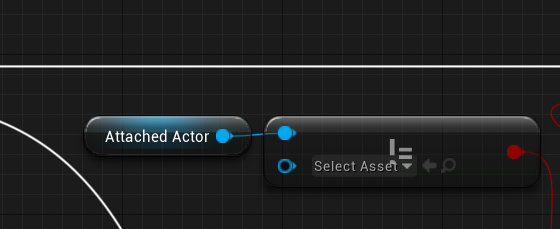
does this expression just test to see if attached actor is not null?
just the top leg of that bool
tired tree
think you missed something
sly elk
thats from the VR template
tired tree
no i mean there isn't an image
 tired tree
is valid is probably better
sly elk
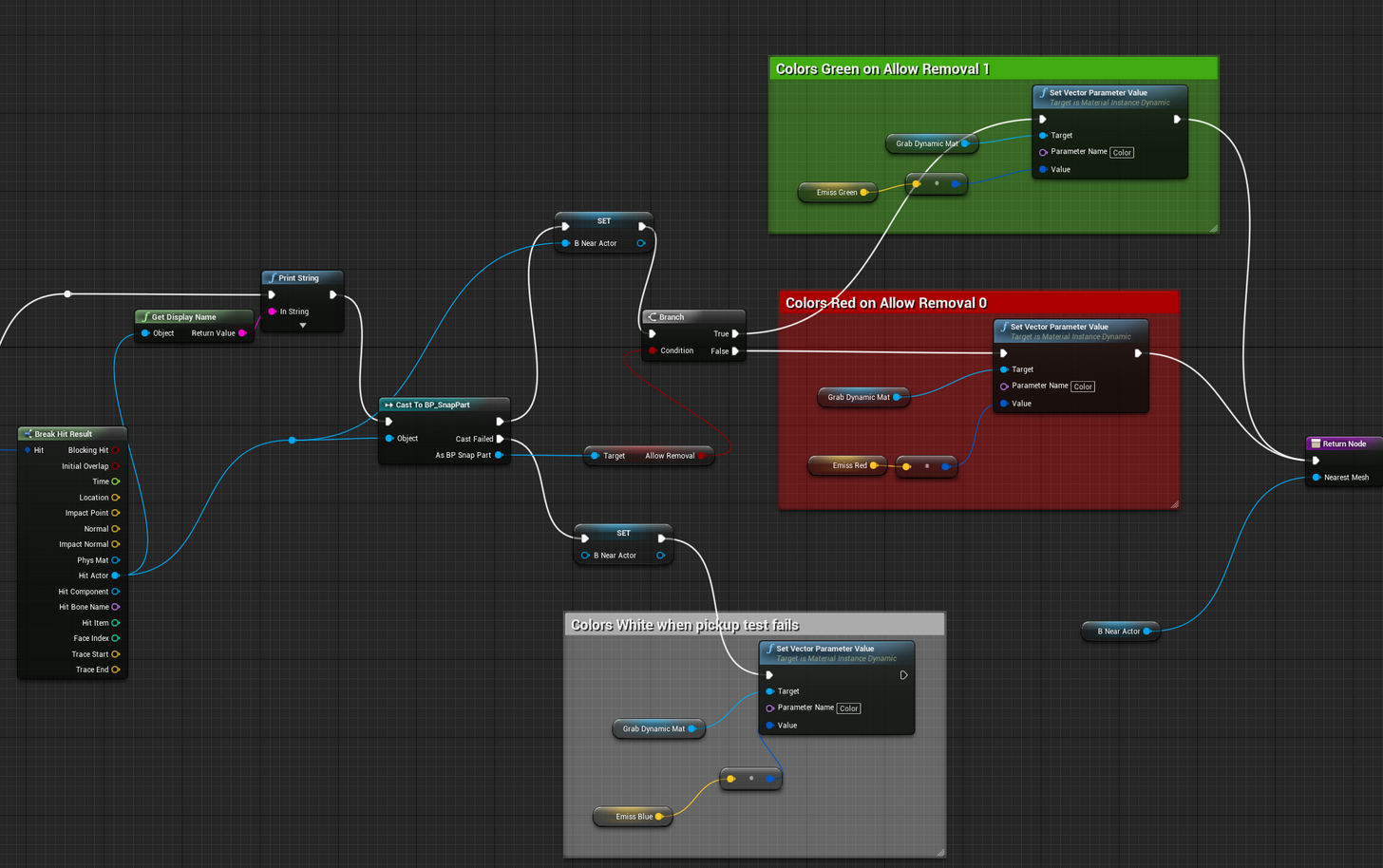
yeah, this is how the template is set up: https://i.imgur.com/1t98Lvd.png . I set a null reference in my version of GetActorNearHand but it won't fail the branch after get actor near hand and refuses to go back from CanGrab to Open
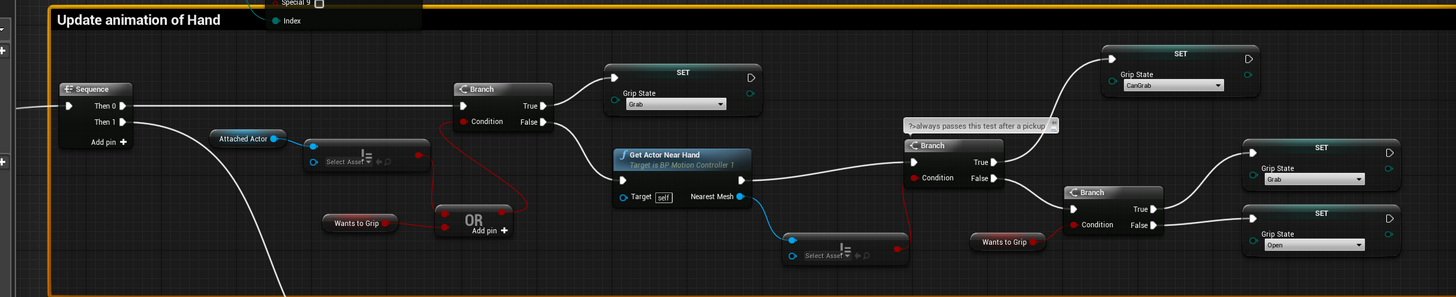
this is my GetActorNearHand
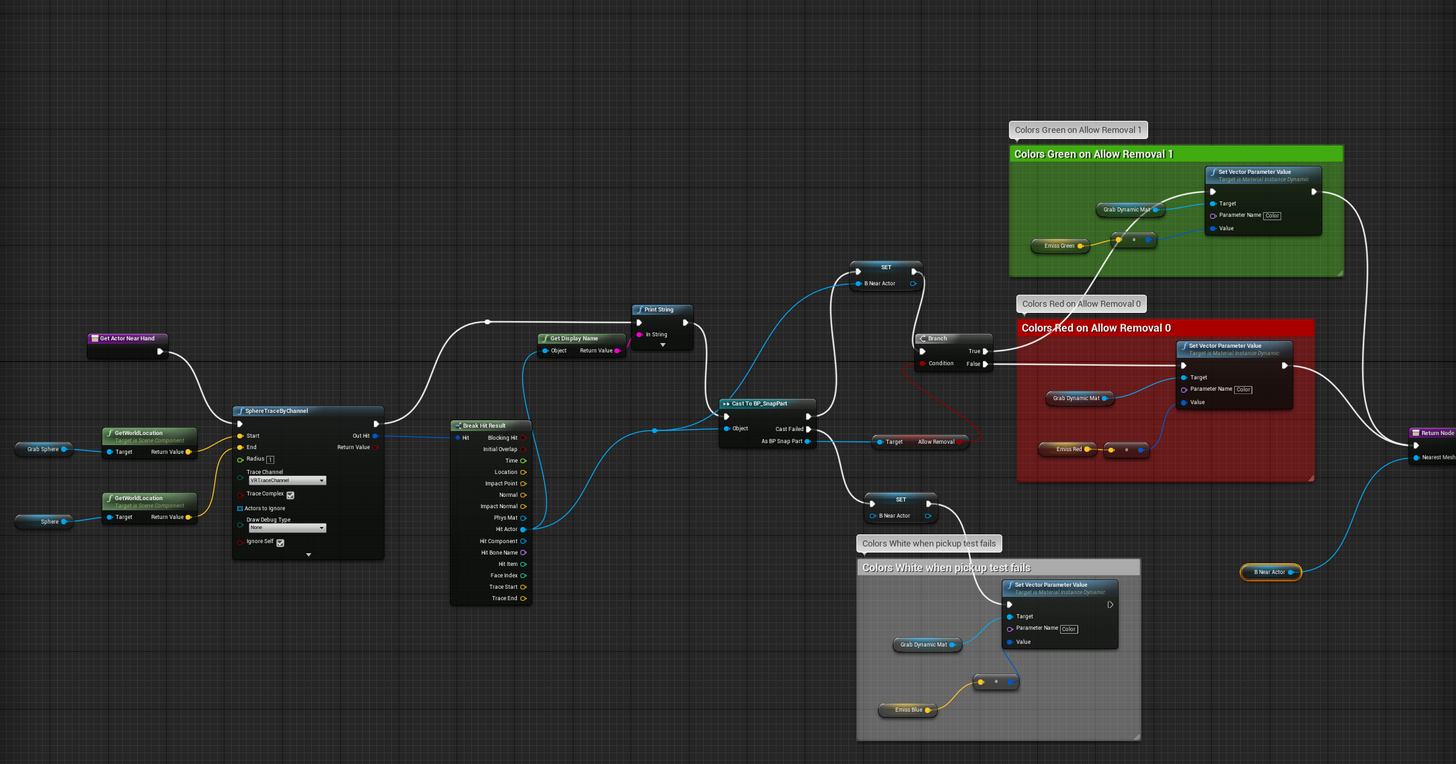
that should work, right? It correctly recolors back to white so I assume the reference is being set null, but the branch in the event graph doesn't work as I would expect
*this image should be more readable in slack: https://i.imgur.com/J97H3fO.png
 wild mauve

Two areas of improvement for today's virtual reality headsets are display resolution and field of view. Pimax, a VR company based out of Shanghai, are hoping...
Video is painful to watch, but might provide some insight on the Pimax "8K" headdset.
(even though it's just ultrawide 4k)
I think the reatio is 32:9 but I could be wrong
Two model options, one with 1 video input and a built in upscaler OR a version with 2 DP video inputs and no upscaler
Looks like they'll be selling prescription lenses as well as an add-on
Controllers and headset are compatible with Steam Trackers 2.0
mighty carbon
Definitely not $350 ballpark
wild mauve
lol no
They have "Not LCD" LCD screens
Basically new tech they have a third party working on (Samsung?) that is customized for VR
Not sure what any of that means.
mighty carbon
I'll stick with my Rift.. There is not enough content anyway, so 8k one will collect dust as well as Rift 😛
wild mauve
But it could be marketing mumbo jumbo
mighty carbon
not to mention it needs 1070 minimum and I have 1060 😦
wild mauve
Well the 8k isn't about the screen door effect
It's about FOV
It apparently has the ability to adapt regular SteamVR/Oculus games into high FOV
using a custom driver
mighty carbon
judging by gif they have, SDE isn't even there o.O
driver on top of driver on top of driver... I'd love to see latency
we'll see by Christmas
that's if they ship it by then as promised
wild mauve
I think passing judgement before it's out is kinda asinine. Lets see where the market settles and then talk about it.
wild mauve
Yeah it's a lot of pixels to push
I hope that the upscaler version is inherently cheaper
But that's unlikely
it sounds like the double input version would be cheaper
So it doesn't look like they're using Subpixel RGB
which is interesting
But the "review" after the demo these guys at tested had they had nothing but positive stuff to say
It seems to be better than the Vive / Rift, but they didn't talk about motion controllers yet
which honestly is all I care about
¯_(ツ)_/¯
I guess it's good it works with SteamVR trackers
sly elk
You should be able to mix and match controllers, right?
wild mauve
I mean there's no reason why you couldn't
sly elk
I want some of the new valve controllers
wild mauve
I guess the issue is the vive controllers work with that htc dock right?
you'd need that hooked up stil
I believe
I'm not sure however I'm not super familiar with the tech

Pimax 8K allows users to experience VR with Peripheral vision while solving the problem of screen door effect and motion sickness
How the hell is this 350 bucks?
I can't buy a 4k monitor for less than like 600 bucks
lmao
@sly elk looks like the controllers work with the Pimax headset.
The radio inside the Vive controllers are apparently compatible
If anything this might be a way to get a cheap set of Version 2.0 lighthouses
tired tree
I hate their overall design, controllers, HMD, all of it....but if the tech is good, and all of the extensions work as advertised...would be a killer headset
the base is 350 because everything is an "attachment" option
wild mauve
I hear the 5k variant is more akin to current HMD's as far as quality goes, give the FOV which is apparently really nice for immersion.
I mean I'd personally support the headset if it comes out and doesn't fade into obscruity with a couple hundred grand.


 tired tree
somethings weird with the cv1 image in general anyway
its all blurred out upper right, and bad quality
but CV1 screen door is slightly less than vive anyway, just not to that extent
mighty carbon
any idea when 4.17.2 is going to be released ?
oh, the roadmap for 4.18 has been updated
tired tree
4.18 should be in preview any day now
they already moved main to 4.19 and 4.18 has its own branch
mighty carbon
https://trello.com/c/RvmefowJ << nice
We have a new method for storing precomputed lighting at all points in space called the Volumetric Lightmap. This is the new engine default in WorldSettings -> Lightmass -> Volume Lighting Method.
The Volumetric Lightmap covers the entire Light...
Labels
Rendering
oh, I see.. I wonder if 4.17.2 will be out today-tomorrow
wicked oak
4.18 that fast?
 wheat dust
Hey guys, anyone here tried to use 4.18 with ARKit? can't find the ARKit Camera Texture and Apple ARKit Camera component...
tired tree
@wicked oak 4.18 is largely bugfix and consolidation so far, pretty easy upgrade aside from all HMDDevice references changing.
might have a nother 4.13 or 4.16 stable patch on our hands
wicked oak
turns out Epic PSVR tracking code is trash
it gets desync like 50 frames
and then it tries to track the things 50 frames in the future
you need to send a prediction time to the PSVR trackers, to get the predicted position
after turning on and off the game, it desyncs HARD
and ends up sending a prediction time of like 30 seconds in the future to the poor SDK
ive had to go and add a maximum upper limit
sly elk
I think the last client I had wrote a bunch of that code.. 😛
wicked oak
might be possible becouse another PSVR dev has told me that they also went to fix that
in fact, he has the same bug as me
but they got lucky enough that QA didnt find it
meanwhile im going insane
essentially the Ps4 kernel boots me
after the fixes, when you wake up the game from the ps4 being in sleep mode, the game works fine
for a couple seconds
then the kernel says there is an error and decides to close the game
lets pray my next QA tester doesnt get the bug as its rng
glossy agate
So I never got an answer in Lounge for this, so Ill ask here. If I put a plugin in the engine directory and have it working in a project, if I open the project in another editor without the engine plugin will it still open, or will the parts controlled by the plugin just be non editable?
wicked oak
they will give errors and get bugged
at best they will break your blueprints, at worst the project wont be able to open the level
glossy agate
Ah. Ill just try to install it on project directory
sturdy coral
I ordered the pimax 8K X.. total gamble 😛
sly elk
nice. tell us all about it
sturdy coral
sucks that that version won't come out until may, plus kickstarters always seem to slip their date
 granite jacinth
@sturdy coral hmm tempting me too
Pretty sure that was @spark stag in that video in the beginning also
Is the 8K 75hz and the 8K X 90hz?
Trying to figure out their marketing scheme here.
Anyway, so many new VR headsets coming, along with the newer Rift/Vives.
sturdy coral
I think the 8K never gets driven at 8K, only the 8K X
granite jacinth
Hmmm
I guess the only issue I would have is, how to dev for them.
Or rather, maybe not dev for them.
Dev for the lower specs, and just see all the eye candy at 8k
sturdy coral
yeah, it is probably going to require nvidia LMS to work well at all
granite jacinth
Hmm LMS
sturdy coral
we should see a new nvidia gen by then I would think too
granite jacinth
What about the other technique where they blur out the outer edge of your vision
I always forget what it's called
Since this does eye tracking as well right?
sturdy coral
they are doing something now where they stretch out the periphery
but leave the middle ok
doesn't sound great to me
granite jacinth
Hmm
sturdy coral
that's what they mentioned in the tested review of it
granite jacinth
You're talking about this 8K HMD?
sturdy coral
yeah, the pimax people have some thing that stretches out the periphery on existing titles to make it work
LMS or MRS though would let you render the edges at lower fidelity and still have everything at the correct FOV
granite jacinth
Right
sturdy coral
I got the early bird 8K X with no base stations or controllers
granite jacinth
As much as I am a sucker for new tech and KS, I don't think I'm going to buy into this.
sturdy coral
yeah, it is a major gamble
granite jacinth
I would like to test it beforehand
sturdy coral
if it turns out to be a turd I'll throw it on ebay
granite jacinth
Well, the thing is, as long as it's perfectly compatible with base stations
and wands
should be a pretty simple setup
sturdy coral
yeah, you can reflash steam controller dongles too even if they have a different wireless format or something
granite jacinth
It looked to me that they had special wands and trackers on display
sturdy coral
I think they said they would be supporting the original vive controllers though
granite jacinth
That's what they said, but didn't show sadly
And since Trackers2.0 aren't Vive compatible...
Vive1.0 anyway
It's hard to really trust anyone anymore lol
Since Valve said originally that Trackers2.0 were going to be backwards-compatible
mighty carbon

While we've seen incremental price drops on the HTC Vive
a game changer?
sucks for us, devs though
granite jacinth
Nah
Because it's just like any other cloud service
Barely anyone will use it
Also, depends on internet speeds
And every bit of latency counts
mighty carbon
aye
sturdy coral
@granite jacinth tracker 2.0 (the photodiodes/drivers) are compatible with lighthouse 1.0
but lighthouse 2.0 isn't compatible with 1.0 photodiodes
I'm fairly confident existing controllers will work with it
granite jacinth
Ah, I thought "tracker" and "lighthouse" meant the same thing?
sturdy coral
and will be getting knuckles anyway by then hopefully
sturdy coral
the way they said tracker in the tested interview
they meant the photodiodes/driver board
granite jacinth
Yeah, I am waiting on knuckles...
wicked oak
LOL VR in the cloud
it can not happen
literally impossible
and i mean actually physically impossible
light speed isnt fast enough
for VR to work in the "cloud", you would need ansimble streaming
current cloud gaming is laggy enough, and thats on 2d games
for vr is just impossible
sturdy coral
@wicked oak I don't know about the way they are doing it, but stuff like OTOY lightfield streaming seems totally possible
wicked oak
and it would be terabyte sized
and that would only work for "walking sim" at best
forget about using hand controllers there
streaming the lightfield would definitely work. But the power requirements and bandwith are absurd
sturdy coral
it doesn't stream or calculate the whole light field, only near the region of your current and predicted head pose
wicked oak
and it cant have interactivity
yes, but it still ridiculously high bandwith
might be possible on gigabit connections
but again, forget about interactivity
sturdy coral
I haven't demoed it but I know a guy who did and wrote and article on it
wicked oak
hand controllers at cloud gaming lag would be unbearable
we are shortcircuiting them through the render pipeline becouse 11 ms lag on them is too much
ping to a very close server is 50 ms
sturdy coral
but you are saying impossible. ping doesn't have to be 50ms
the lower bound ping on the other side of the world is around 64 ms
space x internet will get us close to that
wicked oak
lmao show me where you get 64 ms ping to the other side of the world
sturdy coral
if it is as popular as cellphones you won't go off to the cloud across the country, there will be local data centers
wicked oak
best ive seen is 200 ms ping
sturdy coral
vblanco circumference of the earth
speed of light in fiber is much slower than in vacuum
wicked oak
speed of light isnt all becouse it needs to go through all the hops
sturdy coral
that's part of it too
wicked oak
and even with elon musks satellite internet thing, you still get 30-40 ms ping from ligthspeed alone
sturdy coral
I shouldn't have said ping
half ping
around 120ms for full ping
but that's not something I'm suggesting for VR
wicked oak
if it was bandwith alone it could be done, but having anything more than 40 ms for such a thing would get unbearable
sturdy coral
I'm just saying that saying 60ms ping to very close server isn't really true
sturdy coral
my ping from SC to a server I have in new york is around 60ms
but that is because comcast routes everything through florida
wicked oak
SC?
granite jacinth
What
sturdy coral
south carolina
sturdy coral
charleston
sturdy coral
oh cool, yeah that is super close
granite jacinth
Anything Unreal, VR, Indie related going on in Charleston I don't know about?
sturdy coral
not that I know of, I haven't met anyone doing anything with it around here
I'm sure there may be some at college of charleston since they have a CS department and stuff
how about beaufort? that is mainly a big military base and stuff right? but close to savannah
granite jacinth
@sturdy coral Yeah, that's why I am here. After I got out of the Marines, I still had the house, and decided to go to SCAD for Game Dev.
I started an Unreal Meetup in Savannah, but barely anyone came, and then the ones that did, graduated or left Savannah 😭
sturdy coral
are you still at SCAD or graduated now?
granite jacinth
Graduated
sturdy coral
I'm jealous when I see the size of the VR meetups and stuff near epic in NC
granite jacinth
Well, TBH, if they didn't, it would say a lot about their PR/CM team 😃
Also, there's a ton of studios around there
sturdy coral
yeah, and three big universities
granite jacinth
yup yup. I mean, it would be nice to start up something in the low country.
everyone flocks up north or to ATL, or other states
SC isn't known for anything game related.
not yet anyway 😉
sturdy coral
yeah, what all studios are in atlanta? I think I've seen a few on job listings
@wicked oak just in display bandwidth alone "displayport next" already could drive a Vive with a something like 7ms latency reduction compared with the hmdi version it is built around
that's probably enough for remote hosting within a major metro area
probably state-wide if you used microwave relay

High-frequency trading -- the questionable practice of making thousands of algorithmic stock trades per minute -- is about to get a big boost in the USA. Anova, a company that specializes in deploying low-latency networks for stock trading, is completing an ultra-high-speed laser network between the New York Stock Exchange (NYSE) and the NASDAQ. The link will be just a few nanoseconds faster than the current microwave and fiber-optic links -- but in the world of high-frequency trading (HFT), those nanoseconds will result in billions of dollars in profits for the trading companies. Such is the insanity of the stock markets; such is the unbelievable capacity of HFT to create money out of almost nothing.
 sleek niche
Has anyone tried using the Acer headset in ue4?
sly elk
I was scad photography
granite jacinth
@sly elk I'm sorry
digital marlin
Anyone know of a way to fake iOS dev for ARKit in unreal, or should I just base everything off ArCore and make the switch once I'm on a mac?
 slim raft
Anyone know if there is a feature to only render a mesh in one eye?
digital marlin
hrmm looks like ARKit creates an error when building on windows 8(
 hardy cloak
Guys, what are the minimal specs for oculus? I feel like it's weaker than what they say on the website. We've been developing on pretty weak pc...can anyone suggest specs, please?
digital marlin
Surely 970 i5 8 gig of ram would be the minimal.
 cosmic shoal
Low FPS will make people nauseous. That is the minimal specs. When framerates drop you make people sick. If your graphics are very simple or optimized they will work on low end machines.
 golden snow
True, but min spec is at least a 970 or equivalent. You can get a way with a 960 or equivalent if you use asw
sly elk
@granite jacinth Scad's photo program was great. At least when I was there. This was before they transitioned everything to digital
wheat dust
@digital marlin: if you're using the latest xcode or ios 11 versions then you have to wait for UE 4.18 for ARKit, because Apple has changed some api and current ARKit plugin version is not working
there are already some fixes in the 4.18 branch, yesterday I have checked it and project is building, but I can't really find those ARKit things in the editor %)
digital marlin
@wheat dust okay, thanks for that. I was going fucking crazy tbh
wheat dust
@digital marlin in that case you should see an error about ARSessionConfiguration or something like that
digital marlin
Hrmm
No mine was more related to compiling via BP.
Basically it was similar to the issue related to using sourced plugins.
So I thought to move it to remote building off another mac but that was a whole set of issues. I'm pretty certain I did everything correct but it still wouldn't build.
wheat dust
BTW remote build for me works flawlessly, after I have installed proper provision profile & certificate (but it's more about #mobile than #virtual-reality)
digital marlin
Yeah I got mobile working fine, not an issue.
But ARKit was the variable
Unless you were also building with ARKit / Remote ?
wheat dust
yes, I have tried arkit with remote build. In 4.17 I've seen the ARSessionConfiguration error (because of ARKit Apple's api has changed), when in 4.18 all build is ok, but I can't find ARKit plugin things in the editore despite the plugin is enabled...
digital marlin
ugh. Maybe I'll just wait a bit
tired tree
4.18 they were changing stuff for ARKit as recently as last night
willing to bet it is why it isn't in preview yet
digital marlin
man a nice heads up would've just been great
'hey, don't use this just yet. okay see ya.'
 echo thorn
"Random interuption" i just think AR for unreal in any way is not worth the effort . Everybody knows AR is used for mobile platforms and everybody also knows that Unity is better with phones than unreal. Though i dont like unity much . So unreal should focus more on VR, instead of AR
tired tree
....
pretty sure it not being announced and not in preview means "don't expect stability yet"
preview releases aren't even supposed to be used for projects yet, its for porting and bug check
cosmic shoal
What are the hardware requirements for ARkit? Hopefully I don't need an X phone.
nevermind just looked it up. From a 6s up.
wheat dust
@cosmic shoal it's working on my iPhone SE, at least
@echo thorn still, in the Apple's presentation was The Machines game, afaik it's made in UE4, no?
cosmic shoal
I'm just one model below, I'm on a 6
wheat dust
according to "The Machines" game specs from the iTunes, it's working from iPhone 5s so you're ok
cosmic shoal
oh cool
I was going by what I read: "According to Apple, in order to use ARKit, iOS devices need to have an A9, A10 or A11 chip beating at their heart. While certainly not all iPhones or iPads in out there will meet that criteria, there should be plenty of people for which ARKit development will prove worthwhile.
The devices that use A9, A10 and A11 chips are:
iPhone 6s and 6s Plus
iPhone 7 and 7 Plus
iPhone SE
iPad Pro (9.7, 10.5 or 12.9) – both first-gen and 2nd-gen
iPad (2017)
iPhone 8 and 8 Plus
iPhone X"
wheat dust
well don't know. iPhone 5s and iPhone 6 are listed in the compatibility devices in the app store:
https://itunes.apple.com/us/app/the-machines/id1280682965?mt=8

App Store
Read reviews, compare customer ratings, see screenshots, and learn more about The Machines. Download The Machines and enjoy it on your iPhone, iPad, and iPod touch.
maybe they will just play in non-ar mode, I don't know, but they are positioning themselves as "100% ar game"
just tried this game and it seems it's not working good with models with a single camera. At least, it can't draw the game's field under my hand when I'm moving hand in front of cameram
sturdy coral
Maybe they don't use arkit on those phones but still do are by older means
wheat dust
they are using the arkit, the question is how the arkit is handling own stuff
the app is asking to "move your phone around while detecting a plane", so probably it's based on the image processing
and I believe with 2 cameras with different focal lengths it can be done much more efficient
cosmic shoal
Well I downloaded iOs 11 and none of the AR measuring apps work (most don't install, the one that does doesn't work). So I guess you do need a 6s for AR.
mighty carbon
how to make sure savegame files are always compatible with the game after updates/patches ? (I remember back in the days when a patch for a game would come out, all savegame files would become obsolete and progress would be lost)
sturdy coral
right I mean maybe they use AR kit everywhere else, but use something different and less robust on those phones
@mighty carbon you need to put the version into the save game and then make sure any changes you make to anything that can get serialized can get forward converted from old versions
 full ibex
anybody know how to undo in the UE VR Editor?
uneven moon
Why can't I rotate pawn B while controlling pawn A?
sturdy coral
@uneven moon if it is a character you need to set bRunPhysicsWithNoController
that won't fix it for multiplayer, due to a very complicated netowner chain
but that should get you most of the way for single player
full ibex
@cosmic shoal hmm can't seem to find it
mighty carbon
@sturdy coral "make sure any changes you make to anything that can get serialized can get forward converted from old versions" this is puzzling.. I have no ideas what you just said o.O
😦
cosmic shoal
I might have tried a very early beta, but there was a button. I'm not where my vive is so I can't check.
The Radial menu provides easy access to commonly used functions such as copy, paste, undo, etc., when in VR mode.
glossy agate
Anyone here getting Pimax? Does it have eye tracking for foviated rendering?
 wintry escarp
does it have full tracking and touch controllers?
glossy agate
Im tempted to pledge the $499 tier. ^Yes it does. Looks like it will also work with existing Vive accessories
wicked oak
dont
wait till they send it to people
and reviews are favorable
you win absolutely nothing by backing a kickstarter that can fail really easily
specially with so much money
glossy agate
Oh is the consumer price going to be the same? Thought it may be cheaper doing kickstarter
wintry escarp
the gpu requirements must be massive
glossy agate
They said 1070 equivalent or better for the best experience.
wintry escarp
hmmm looks like brainwarp is actually per eye interleaving
what am I missing? you can pledge $499 or $699 for the same thing
sturdy coral
@glossy agate @wicked oak I backed the X version, it is a gamble
as long as they deliver something you should be able to ebay it pretty quickly if it is crap
if it is good keep it
biggest risk is they don't deliver or they delay so long other better stuff is out there
tired tree
they submit one eye at a time and display it to one and then the other in the next update from what I read
sturdy coral
I've heard oculus tried that in the past and didn't like the results
I think on carmack's twitter
wintry escarp
interleaving that way can cause flicker for some people
tired tree
I don't remember why he had issues with it, but I can imagine plently of possible downsides
sturdy coral
yeah if that brings each eye to 45hz I don't see how you wouldn't have severe flicker on top of whatever other problems
wintry escarp
I think it brings each eye to 90hz, but you have equal image/black....instead of mostly image then black to clear it
tired tree
they weren't letting the frame linger in an eye either I don't think, literally shuttering it to black
thats still 45htz of image, 45 of black
tired tree
there is no way
wintry escarp
45 per eye is headache central
tired tree
thats still doubling the bandwidth
wintry escarp
I'm assuming it needs sli, one per eye
sturdy coral
they say " users perceive a complete 8K at 150/180 Hz with high frame rate."
sort of implying it is 75 or 90hz per eye
I don't know, I'm skeptical of the whole thing but I bought
wintry escarp
I don't see how 1 current card could feed 180hz at 4k
tired tree
even considering the current 8k version only upscales from 4k
its still unlikely at 90htz per eye
sturdy coral
I will ebay it quickly if it there are reports it is trash, unfortunately the X doesn't ship for several months later so the market might dry up
wintry escarp
would be good for social stuff and video but I cant think of any way to feed a busy game into it fast enough
sturdy coral
last concession will be if it is hackable into something usable with FPGA display drivers or something
@wintry escarp with nvidia SMP
tired tree
hell they are pushing boundries if even half of what they claim is true, so good on them anyway
but damn does it look ugly
sturdy coral
they have some pretty wild claims about being able to have knuckles style controllers in time
wintry escarp
id be happy with a rift with eye tracking and no lens glare
sturdy coral
apparently their leap motion a-like thing works really well from reports though
mighty carbon
I personally don't care how it looks - when in VR, you don't see it anyway 😉
it looks like it can be heavy though
wintry escarp
and wider FOV, rift is a like looking through goggles
sturdy coral
yeah weight is my biggest concern
tired tree
its supposed to be lighter than vive
sturdy coral
LCD tends to be lighter than OLED
tired tree
its supposed to be everything
mighty carbon
oh
sturdy coral
because most OLED processes are fused to glass I think
mighty carbon
LCD?! o.O
tired tree
it might as well turn virtual water in to wine
mighty carbon
I thought LCD was pretty bad for VR
sturdy coral
it is fine if it is strobed with low persistence
mighty carbon
why didn't HTC and Oculus use LCD screens ?
wintry escarp
Samsung or lg should start making VR panels
curve the panel, take some of the strain off the crappy lenses
sturdy coral
@mighty carbon all the microsoft ones so far are
it requires a display controller similar to lightboost monitors, but so does global update on rift and vive
I'm not sure why they went OLED, maybe the LCD panels that had high enough refresh rate at that point had poor viewing angles, or other things with color and contrast
sturdy coral
to do strobed backlight you have to be able to refresh much faster than the framerate or you add a lot of latency
tired tree
no that image is all screwed up
its worse, but not that worse
the colors are fused ,washed and blurred in that thing
but its cameras of ascreen
hard to get really good comparable footage
mmm
didn't notice they claim compatibility with oculus home before....
wintry escarp
probably revive
tired tree
probably, but seems a little...dishonest to directly display their logo like that then
glossy agate
I watched a video last night from tested I think. Guess instead of rendering a wider FOV in existing games just the edges are stretched. Probably will be better if you package specifically for that HMD.
mighty carbon
why would one want to save some data into MySQL db instead of savegame ? (and what data would be possible to save into MySQL db)
granite jacinth
There is no point of getting the Pimax
unless you get the 8K X
I'm still debating, but I don't know
Damm x
But still
Would need 1080ti SLI lol
to power it up
I mean, this would be good for Volta, but no point in getting it too early then
@mighty carbon anythign you want
And there are a million reasons, security being top of the list
sometimes, you want to poll global data
and the obvious reason, so players can't hack into db, like they can with sg
sturdy coral
@tired tree they don't seem to care about logos etc., in a kickstarter update they just mailed out they called their hand tracking thing "leap motion"
I don't think it is provided by leap motion...
mighty carbon
@granite jacinth I see, thanks
 lament bay
Anyone tried using volumetric fog with VR? Can't find online whether it's supported or not
 dawn cipher
Is anyone using streaming map loading while in VR?
What settings do I need to fiddle with to background load the maps without hitching
 alpine torrent
Windows Mixed Reality headsets PC guideline is for bluetooth connectivity (for motion controllers) is bluetooth 4.0
digital marlin
ok?
alpine torrent
yeah those controllers seems to use bluetooth perhaps for tracking as light
so cameras detect then easily the movement
dotnetconf one of the tracks show it and showed PC guide for it
 real needle
@lament bay Yeah it works, no difference between flat and vr
lament bay
sweet thnx!
real needle
@dawn cipher The best results I had was minimal hitching, but I wasn't able to stream flawlessly
When the loaded map doesn't contain much at all, it's instant, but the moment it's a considerable map (for which you'd want to stream) it would always cause a small hitch. You can design around it though, using a fade or similar
dawn cipher
@real needle We're having better luck enabling Async Threaded Loading
And doing it in shipping builds.
We're under very very strict requirements to have no cuts at all during a 10 minute on-rails experience :p
real needle
Wouldn't you be able to just have 1 map for that though?
dawn cipher
Far too much content for one map
I mean it's one World Composition map but it's broken up into chunks to load on the fly
real needle
I would try using just one map (always load on sublevels) making sure enough get's culled, but if it's very open then that doesn't work
If you have success though I'd love to know. And you're not the first one to ask/try. I just cut it out and designed around it.
dawn cipher
I guess we won't know until we get to the final content to see if it all fits in RAM/VRAM at the same time...
real needle
Yeah it should be easy to test afterwards though, using always load
mighty carbon
lol, wtf just happen - updated Oculus driver and all went to shit :/
mighty carbon
had to go through full setup all over again to fix the issues :/
interesting - I haven't played VR for a while now and today was like a very first time for me o.O
seems like VR legs went away and now I have to build up tolerance all over again 😦
 quaint loom
anyone found a fix to starting up VR preview with Vive after SteamVR is up and reliably having controllers show up in scene and blueprints being active? Seems like a dice flip whether the controllers are active or not despite SteamVR showing them active and properly tracking otherwise
dawn cipher
@quaint loom I open SteamVR and turn on the controllers before opening Unreal seems to make it detect them
 fleet prawn
^^^ what he said.
eternal inlet
possibly noob question... how can i have a player1 control a pawn while playing in vrmode, where player0 is controlling the hmd
i would like to use the spectator cam to show what player1 is seeing
but player1 don't seem to recieve input from keyboard for some reason
eternal inlet
i need to do some c++ trickery as explained in this tut?
or is it doable with bp only?
granite jacinth
no idea if it's possible now in UE4, wasn't before ¯_(ツ)_/¯
Unity has this option though 😃
I mean, assuming it's local mp, and vive is controller 0, and kb player is controller 1
I suppose it's just a matter of spawning the actors and possessing them correctly
I haven't used spectator cam though
So no idea how valid it is as a "camera" for the kb player
BUt if you get it working, let us know
mighty carbon
So, a person that wears VR HMD is controlled by another person ? Worst idea ever o.O
(From comfort point of view)
eternal inlet
@mighty carbon hahahahah nooooooo man
and agree! worst idea ever... how can you even think that idea 😄
it was as Victor mentioned... and when i get a bit more time, i'll test it out and let you know if it worked...
mighty carbon
I don't know... I just woke up 😅
tired tree
that is one method of doing it
eternal inlet
hm im either doing something wrong or something is not working
i added a player 0 to vrpawn
and added a thirdpersonchar as player1
and set the spectator cam to the rendertarget for player1's camera
camera shows fine the thirdpersonchar, but can't take input from keyboard for some reason
oh i see
only player 0 recieves input
so i have to catch it on the player 0 and send it to player 1
i'll do some more testing tonight and let u know how it goes
tired tree
@eternal inlet its a useful enough thing that i'll add to my plugin today, if you want to rip the classes out for your own use
its not likely to ever require changes for engine versions
mighty carbon
Pimax is close to $1M o.O
eternal inlet
Well, worked just fine delegating input from the pawn player0 to whatever i wanted to have as player1
Took me 10 mins to do, and is a bit hacky but works fine for coop gameplay
tired tree
its a bit of a mess, but yea it would work fine
eternal inlet
Yeah
mighty carbon
hmm.. 4.17.2 isn't going to be released this week
sounds like 4.17 was a one buggy release
eternal inlet
Anything particular interresting in .2?
eternal inlet
That sounds pretty good. I had lots of crashes lately
tired tree
@eternal inlet fyi the gameviewportclient override works fine if you ever get sick of manually moving inputs
eternal inlet
Oh nice one @tired tree im not home now, but u know if its overeidable in bp too?
supple coyote
Hey gang, anyone know why I get stutter using Geometry Cache - Alembic in VR?
despite that I maintain 90 fps
tired tree
ah there we go, took longer than expected
glossy agate
I feel like 17 just came out haha. Think I upgraded like 3 weeks ago
mighty carbon
@supple coyote sorry, no idea about the issue you are having 😦
I like lighting updates 😃
glossy agate
Yeah, the volumetric lightmass sounds cool. Will that just make movable objects match with baked better?
mighty carbon
I wonder what this is: "Cross-level Actor references are now better supported using Soft Object References"
yeah
also affects volumetric fog, particles, etc.

UploadVR
HTC boosting its Viveport VR app store offering developers all revenue from sales of their games starting Oct. 1 and continuing through the end of the year.
interesting move
supple coyote
@mighty carbon np
It appears the issue is probably due to the changing vertice count
cause a substantially bigger geometry cache file doesn't have any jitter
but a smaller geo cache file that has changing vertice count is making shit jitter
despite no loss in fps
very strange
granite jacinth
If they just focused on bug fixes this version, I wouldn't cry
supple coyote
every update i hope they solve MY problems
😄
Wow guys
^ pertaining to my problem
solved it with something completely new to me
I just became aware of these commands "vr.oculus..."
vr.oculus.bUpdateOnRenderThread
set that to 0 and my stutter went away completely
apparently others are having similar issue
been working with oculus since 2014 and just became aware of these new console commands :p
supple coyote
There's always a solution to everything ladies and gentlemen
 vagrant mantle
While using widget interaction component weired shadows are appearing in vr, any fix for that?
sturdy coral
I think this is the first time a preview has come out before nvidia has released their branch for the previous version
they are still on 4.16
I think it might have happened when the forward renderer was introduced too, but that was more understandable
mighty carbon
so, what is this "Cross-level Actor references are now better supported using Soft Object References" used for ?
tired tree
oh yayyyyyyyyy.....4.18 broke re-compiling again
thankfully its preview, can get it fixed before release
 dusky moon
Hey! I just uploaded the promo trailer of my VR project. recorded using sequencer:
https://www.youtube.com/watch?v=N6_IKEBxPEY

'Recept' is an Episodic VR Experience about exploring a Virtual Embodied mind. by blurring the boundaries between real & unreal. Aims to deliver a hyper virt...
sturdy coral
great job, that looks really nice
vagrant mantle
While using widget interaction component weired shadows are appearing in vr, any fix?
dusky moon
Cheers! 😇
sturdy coral
@vagrant mantle don't ask twice before your other one has even scrolled off the screen
vagrant mantle
@sturdy coral Yeah, i know, i thought no one noticed that
sturdy coral
you might want to make a video or take some screenshots or something to show what is happening
and show your set up
vagrant mantle
4.18 available?
tired tree
in preview right now
can use a scaled static mesh instead of their default debug draw
for a more flexible one without the issue
glossy agate
@dusky moon Looks really good man!
mighty carbon
yeah, looking good @dusky moon
dusky moon
@glossy agate @mighty carbon Thanks Guys 😃
 rich jackal
I'm trying to use the engine's Oculus Controller Mesh, but I can't get my right hand to work properly.
Nevermind I just saw what I did wrong.
sturdy coral
@tired tree what's the gameviewportclient override you were talking about for 2nd player input?
tired tree
added a blueprintable enum to a gameviewport client
if you set it to share mode then all controllers get mouse/keyboard input
if you set it to player2 only, then only player 2 gets it
otherwise it uses the default of only player 1 getting mouse/keyboard input
@sturdy coral
someone already had thebasic layout on the wiki, I just cleaned it up and extended it
sturdy coral
ah cool
tired tree
whoooeee, editor has crashed on my a ton in the 4.18 preview
kind of hard to test things currently
granite jacinth
@tired tree lol
My shit crashes so hard in 4.17.1
I don't even want to think about 4.18p1
But, I gotta try it out this week, so I can see if I am going to start the book on 4.17 or 4.18
mighty carbon
has anyone here with Rift experienced any issues after updating to 1.18 ? (including Oculus driver)
granite jacinth
@mighty carbon more details?
mighty carbon
like, it starts fine.. then in 5 min it reports that HMD isn't connected
then sensors aren't connected
then it finds them again and then it's a rinse repeat game until I reboot
mighty carbon
yeah, I didn't have any issues until it forced me to update
now I am like @full junco
slim raft
I noticed the FOV in VR was just returning 0 so I decided to take a look at the engine source
void FSteamVRHMD::GetFieldOfView(float& OutHFOVInDegrees, float& OutVFOVInDegrees) const
{
OutHFOVInDegrees = 0.0f;
OutVFOVInDegrees = 0.0f;
}
Wow. Stellar job Epic.
10/10 will Unreal Engine again
Anyone here know what the default FOV for the Vive is?
sturdy coral
does the same for IPD, just always returns 64 or 63
mighty carbon
had to update BIOS and chipset drivers.. Damn windows had USB driver issue :/
seems like it all works now 😅
slim raft
IPD is hard coded at 0.064f
At least that is the correct default value... in mm
Would be nice if it was in Unreal units but I'll take what I can get.
slim raft
Anyway, I need the exact horizontal and vertical FOV values in order to finish my stereoscopic portals
digital marlin
er not sure if this has been asked before but anyone know what the new setup for basic pass through camera is now for ARKit?
pearl tangle
in 4.18 @digital marlin ?
 alpine ore
sorry, nm - got it working
tired tree
@slim raft You can query OpenVR directly for FOV and Matrix transforms for the headset in use
They likely zero'd those out because openVR has several possible hmds soon/now and it needs to return a variable value and they haven't tied it to the SDK yet
tired tree
its pretty easy now that they updated to the newer steam binary finally and you can just load up the class instead of having to manually load the dll to query
 dusty dew
hey guys, I have a question about the motion controller (Oculus Rift):
I'm not able to get events from the buttons on the controller. The "Motion Controller (R) Trigger" is just ignored on my blueprint.
I'm able to get keyboard inputs working fine, but not events from the motion controller. Idea obvius stuff that I might be missing? (I'm in a new map, but using the blueprints from the VR Template)
 glad plank
So I am trying to finalize my bolt action logic and I am wondering if there is a better/less clunky way to do it. Currently I am using to motions, rotating first to "unlock" then allowing backwards movement. I am doing the rotation by using ATAN2 and clamping that before going into the roll float of the bolt.
It works but doesn't feel good at all. This feeling is mostly a disconect between hand position and rotation angle caused by the less than precise hand locations in VR (due to there not being a physical object to manipulate).
Any thoughts on how to make things "feel" better?
Right now my two ideas are to lower the "grab area" to force the player to get their hand closer to where it should be in the real world, and/or actually snapping a hand mesh to the handle so it looks like the hand doesn't float away
cosmic shoal
If I understood you correctly that is how most shooters use reload now (Onward, Pavlov, BAM)
glad plank
Yes, I am lead dev for Weapon Master and we do our non-rotation Slide manipulation by moving the slide along a position relative to the hand
the problem is doing rotation the same way doesn't feel as good
We are weapon nuts lol, I have a bolt action rifle right next to me as I work on this.
I know we cant ever get the physicality but I don't like hands floating away either
cosmic shoal
I used the Bolt rifle on BAM a lot in a large map and it is akward at first, but you get used to it.
glad plank
if you move your hand backwards or forwards how much does it effect the rotation of a bolt action (as in moving it away from the rotation plane
cosmic shoal
the rotation is handled by where your action center (finger clamp?) is in respect to the rotation axis
tired tree
you can try adding in some force feedback to give a feeling of when you are correctly manipulating it as well
cosmic shoal
so if you pull your hand back, it won't rotate, unless you also pull it up, then it does rotate
glad plank
I think part of my issue right now is that the "Grab area" is too large for the interaction so that it allows you to grab the handle way too far away. Making the motion feel awkward
cosmic shoal
should be easy enough to test 😃
In BAM it is akward, but it is also satisfying once you get the hang of it.
once the muscle memory is in, you feel like you learned something
glad plank
Yeah, thinking about throwing in an interaction sphere and placing more towards the finger tips (rather than the palm of the grab sphere) for detecting interaction points on the gun
sorta like H3
this issue is visualization and ease of use for the player
cosmic shoal
The bolt action rifle is an advanced gun, it is a one shot kill, so it is by design a bit harder to manipulate, or it would be over powered.
(gaming wise)
glad plank
which is odd since bolt actions are easy to use in the real world 😛
cosmic shoal
yeah hehe
glad plank
I think certain manipulations are always going to be akward in VR
cosmic shoal
that is what I was thinking
tired tree
you can do per finger collision zones
glad plank
interesting
you are talking about having collision spheres on the fingers and activating them with capacitance?
(or any collision object)
tired tree
since you can approximate the finger extension from a fist
you can have collision on the points of the fingers and have them interact with each other / the palm
Valve even did a video showing some of it off in a basic form
glad plank
I think in the meantime I am going to try putting a scene component near the fingers and getting the angle to the bolt using that instead of the motion controller location
might make the rotation feel more natural
cosmic shoal
IN BAM (my most played game in VR) many of the reload mechanisms are hard because the dev made the collision areas very small.
glad plank
Collision areas? Like where you grab?
glad plank
yeah, ours are small too but the hand is actually kinda big
cosmic shoal
tiny
glad plank
Btw, @tired tree once I get some time to do some hand animaitons I want to use Oculus capacitance to do hand gestures that activate collision on specific fingers so players can actually press things like the mag release with their pointer or thumb (for example). Is that similar to what you are talking about?
tired tree
mmm no
glad plank
ohh
tired tree
knuckles go beyond that
glad plank
lol
tired tree
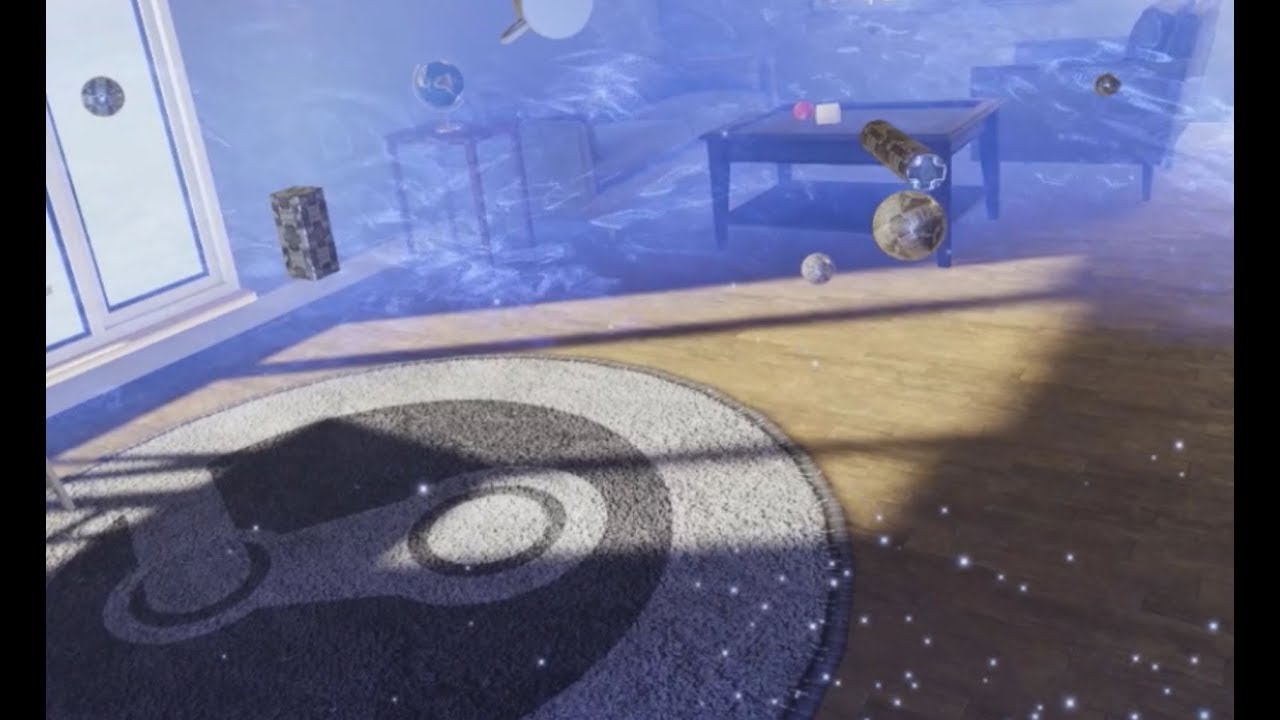
My demo scene for the new Knuckles SteamVR controllers. If you're a developer, you can download this demo and the source for the interaction system at https:...
that demo is a rough concept, there is a lot that could be improved...but it shows it off well
glad plank
So it is attaching to a point inbetween two fingers (or finger and palm) that enclose it?
tired tree
likely still parenting, but it uses the fingers to decide on collision
glad plank
if two fingers touch it it calls a grab like funciton?
glad plank
yeah, instead of snapping
I dig it
Would fix my current issue completely lol
because it would force the player to put the fingers in the right place
cosmic shoal
10 years ago I had a dream where I manipulated geometry on a 3d model with my fingers, the hardware is nearly hear for that now.
glad plank
technically you can do that in robo recall right?
as in you can pull the arms and stuff of the robots
cosmic shoal
yeah, but on a finger by finger basis
cosmic shoal
We are close
there is Kodor
and MakeVR
and the oculus one..
MasterPieceVR is also really cool
glad plank
Our artist would lose his mind if he could scuplt all of our game assets VR
cosmic shoal

A powerful new way to experience 3D content creation. MasterpieceVR is the only tool that allows you to sculpt and paint using intuitive and dynamic features that let you easily build tangible objects, colorful environments, and high quality mode...
Price
$29.99
I've played with it. it's cool, and tyring
glad plank
yeah looks like they are getting closer
I expect pixologic to do something soon though
cosmic shoal
The biggest beneficiaries from this, are not 3d modelers, but regular people. Zbrush is very alien, but in Kodor my GF was making horses in minutes
slim raft
@tired tree Got any snippet for how I would query OpenVR?
glad plank
Heh, yeah thats awesome for artists in the public. We are looking for something with the power of Zbrush for pipeline purposes though. So it can be alien lol
glad plank
HODOR?!?!
cosmic shoal

Kodon is a 3D sculpting program for roomscale VR. It allows you to freely shape objects in 1:1 roomscale, using both volumetric and surface-related sculpting techniques. We make Kodon first and foremost for ourselves, because it is a tool we need...
Price
$19.99
LOL
glad plank
Wow KODON is super close
cosmic shoal
yup
and very easy to use
what is great is the sense of scale, if you import stuff to VR you can clearly see if it was modeled too big or too small,
slim raft
I've been using Oculus Medium with Revive.
cosmic shoal
That also looks sweet
slim raft
Haven't used Kodon in a while, but it looks like they have been making real progress
The lack of surface type sculpting in Medium can be frustrating.
cosmic shoal
The otherone I bought is Gravity Sketch, it's great for spline patch type of models
(cars for example)
glad plank
I like the look of medium
looks like it has brushes similar to zbrush
clay brushes that is
slim raft
But it doesn't work like zbrush at all. Its voxel sculpting only.
The resolution limitations are pretty bad right now.
glad plank
yeah
its not there yet
need all the cool tools that zbrush comes with lol
which is why we will all be waiting for Pixologic to give us a professional tool
slim raft
no thanks
glad plank
featurewise at least
slim raft
I don't want to deal with a Pixologic UI
slim raft
In non-vr they could have made zbrush have a better UI, but they didn't
Its literally the worst UI I have ever seen in professional grade software
cosmic shoal
Back when it came out, I had mastered a lot of 3d apps, and Zbrush was the only app I could not figure out without looking at the manual or tutorials.
tired tree
@slim raft vr::HmdError HmdErr;
vr::IVRSystem * VRSystem = (vr::IVRSystem*)vr::VR_GetGenericInterface(vr::IVRSystem_Version, &HmdErr);
slim raft
10 years later, I still need to look up the manual just to export an obj when somebody turns in a model in .ztl format to me
 warm lion
Has anyone else noticed performance in VR drop between UE4.15 and 4.17?