#virtual-reality
1 messages · Page 136 of 1
 tired tree
 full junco
nice, thanks for posting
 sturdy coral
Re: impossible for indies to make story driven single player games
is apple opening up that face tracking stuff as an API?
full junco
you mean because that makes it easier to capture face animations for story driven games?
sturdy coral
Yeah, it looked pretty high quality
Much better looking than the Kinect v2 face capture api
tired tree
lots of good camera solutions coming out but price point is the wall
 willow trail
https://youtu.be/ZY7RYCsE9KQ?t=93 This is what it took for L.A. Noire, and the result wasn't really insane either, actors found it hard to act without moving whatsoever

Rockstar Games and Team Bondi give us an inside look into the technology that has gone into L.A. Noire For more information, go to http://www.RockstarNetwork...
maybe this works better though, I dunno.
I mean it was pretty insane, and that was in 2011 but it felt kind of weird in places
 wicked oak
its still insane
just the materials are shit this days
if you got that one and improved the materials/textures, it would look a LOT better
willow trail
yeah, and to be honest you could see the geometry limitations in the face in the final product
we can push a little more triangles than we could on PS3 now
tired tree
they are running it off of single / dual cameras now on a table in front
willow trail
For which project?
tired tree
research / software coming out
like I said though, its going to be expensive
but 2011 was a long time ago, and there has been a lot of research into facial capture
full junco
now you also have neural net stuff
willow trail
VRTemplate uses animation sequences for 3 hands gestures and a blendspace between them. Is that the right solution? How would you go about if you had a lot more hand gestures and wanter to interpolate arbitrarily between any one of them?
tired tree
hell disney is doing it off of one camera, and I've seen multiple other projects off of one recently

Link to publication page: http://www.disneyresearch.com/realtimeperformancecapture We present the first real-time high-fidelity facial capture method. The co...
sturdy coral
@willow trail not just increased geometry, there are lot of better techniques now of fading in wrinkle maps etc.
willow trail
If you think about it they put out Max Payne 3 only a year afterwards,
and that one had crazy wrinkle fading
 mighty carbon
animating face quickly won't help indie games - still need to model and texture faces to the point where facial anims are relevant
and that alone is a ton of work
mighty carbon
when I say indie devs, I mean garage indies, who do whatever work they do by day and do game dev after that
Epic / ID Software used to be indies too, technically
tired tree
even garage two - three man teams can have competant modelers / riggers
and a one person project likely doesn't need this
mighty carbon
sure.. I am pretty competent.. Except I only have so much time for game dev
makes no sense work for 1 year on 1 character
tired tree
one year for 1 character is not competent, no offense....
mighty carbon
eeh, okkk
try modeling, even low poly .. you'll see quickly that programming yields results much much quicker than content creation
tired tree
yes...I understand that, and I've done modeling and have many friends that do it
1 year is not a good time frame for a character regardless...
mighty carbon
just like with everything one needs to be in the mood for art when making it part time.. If I only have 1 hour a day and I need to make current gen character, there is no fucking way I can make it all textured and animated in a short period of time
not at that level of quality
lower poly and not AAA quality, yeah, probably can do it much quicker
tired tree
1 hour a day for gamedev just really isn't enough, if thats all the time you have, then AAA quality isn't even something you should consider....
mighty carbon
also, one needs levels, textures, props, weapons, etc.
tired tree
"garage" indies typically don't work 1 hour a day...
mighty carbon
also life is full of surprised (also day job is full of them too)
willow trail
don't today's tool mean making high poly and low poly stuff is basically the same in terms of time? It's not like if we build characters by extruding cube faces anymore right? Isn't it all sculpted in something like Zbrush and then exported in lower poly with normal maps and stuff?
mighty carbon
I am a garage indie.. It took me forever to build that Gear VR project between learning UE4, fighting UE4 and putting it all together..
tired tree
ok? i said typically
willow trail
Dude the timeline thing for animation in the editor is crazy, does anybody actually use that?
Such a mess
mighty carbon
Sequencer ?
willow trail
Yeah
Scrolling through the track is bad and it keeps creating keys everywhere for no reason
I'm just looking into making a simple hand gesture but it always ends up being animated with a picky flicking back and forth or something
that's why i'm wondering if I should even use animation sequences or if there's something else, but that's what the VRTemplate uses
Not the sequencer by the way, I mean this thing here https://puu.sh/xzD5X/24cfdcd189.png

The other animations don't have tracks, so I'm clearly doing something wrong, I just don't realize what
mighty carbon
I am not sure what that is.. I haven't use it yet :/
willow trail
I deleted all the tracks, the hand got back to the default position, I pressed undo and all the tracks are still gone but about half the hand is still in the position I set up before.... This doesn't make any sense but I guess it's working for now?
willow trail
oh, autosave just reset the animation
wow
I might, but I really just need to set up a couple gesture, don't even really need to animate anything
seems overkill to load in into blender and just export a skeletal pose (I don't even know how/if you can do that)
 glossy agate
You have your anim track broken down by finger joint. Just use the main track.
 cosmic shoal
@mighty carbon Has exporting to Gear VR gotten any easier since last year? There was a ton of settings and sdk stuff I had to implement to export to GearVR . I got it done, then I tried it again a few months later with another project and just kept failing and I just gave up (it was just a test)
willow trail
I don't want any track really
glossy agate
create new anim>set number of frames or time> Go to end and set final position of all bones> go back and blend through the transition.
willow trail
Alright, I guess it's kind of working now, I mean I deleted the tracks and started again, there doesn't seem to be any keyframe on the main track
glossy agate
But animating anything besides hard surface is a bad idea in UE4
Yeah have to set key. Its on the top near create new anim
But you can ask around on the anim channel for more tips. More qualified people than me over there
willow trail
channel isn't very active, i've tried, but I'll do what you guys precognize and use Blender
get a breath of fresh air out of UE editor for a while
cosmic shoal
I have also used animations from my 3d app, (camera and goal) just because I'm more familiar with the tools there.
glossy agate
@mighty carbon if you have a budget for your next game you can get a lot of art for cheap on marketplace then just re-texture everything to match. And a char should only take a few hours for a human, no more than 30-40 hours for a crazy custom char like a dark souls boss.
I have spent <$400 on art and have 85-90% of what I need.
Doing Fuze to Max to Zbrush (if needed) to Substance to create chars super fast.
willow trail
I might be stubborn, but why does this happen https://puu.sh/xzE34/0db5d61913.mp4 😦
other animations sequences don't seem to have keyframes either, they look exactly like this one
glossy agate
Yeah its just blend space between the 3 states
willow trail
yeah I'm just trying to define one new state
glossy agate
That thing at the very bottom of the anim list there
yeah you have to make a key for that sate in a new anim
willow trail
I've tried but it doesn't save the changes https://puu.sh/xzEmM/ecd560d0cb.webm
puush servers are struggling though
glossy agate
hit key and apply after you move stuff
mighty carbon
@glossy agate youhave a way too much free time on your hands 😛
glossy agate
Nah I work full time as a broker and just do 2-3 hours at night and 8 a day on the weekends. On top of freelance work
to fund the game so I don't have to use my own money
willow trail
@glossy agate thanks, starting to figure it out
mighty carbon

TechCrunch
“VR will be big, AR will be bigger and take longer.” What sounded revolutionary when we first said it two years ago has become accepted wisdom. But now..
willow trail
but why would I want to point the camera at the grapefruits (oranges? lemons?) to have some information pop up that I could just get on my phone (and have the possibility to use notifications) and have it tell me the exact same information since it already has geo data 😦
it's cool but inconvenient, surely the novelty will wear out fast
they talk about pokemon GO which has nothing to do with AR (the AR part of it sucks and everyone disables it very quickly) and magic leap which is... well it's magic leap, let's be real here
sorry AR rubs me all the wrong ways
mighty carbon
AR is overrated and overhyped
but because Apple is on board, it will be even more hyped
cosmic shoal
AR is not as fun as VR for me, but it will be very useful for us, it will save us lots of time when we get our hands on the measuring apps.
 normal thorn
when they have AR goggles and I can fix my own car by just getting the app that walks me through it step by step... it will be worth it and amazing. but for games? mayybe
cosmic shoal
There is a VR game now that has you assembling a car, it's really cool, since al the parts are realistic, not job simulator style.
 sly elk
that is my game
cosmic shoal
Oh nice, it looks awesome 😃
normal thorn
cool!
sly elk
the problem with AR is that a lot of the cool applications seem to hinge on machine vision that can recognize all kinds of complicated objects. Like as an interactive shop manual, it would need to be able to distinguish between a lot of parts that look very similar to a machine (two similar sized bolts for example)
normal thorn
if it had the whole engine modeled it needs to only tell you what it expects to be there and what order of operation to do to repair
it doesn't need to understand what it sees exactly
cosmic shoal
Cars are getting to the point where you can't do nothing to them if you don't have an electronics degree.
normal thorn
yeah its a bad example
haha
I changed my oil and it was such a pain the butt, that I now am just happier to take it in
cosmic shoal
Electric cars are simpler, mechanically, but they tend to be even more complex in electronics.
sly elk
And more dangerous to work on
glossy agate
Would be cool though if they tied it to the little plugable diagnostic units that goes to your phone anyway, then it could pull up instructions on repair replace with photos of what parts look like.
cosmic shoal
It will be like that no doubt
glossy agate
And the diagnostic units are only like $50 now
sly elk
Yeah
And for most types of cars you can get the dealership software off of the net and get full access to the computers
glossy agate
You ready to build it with me? My mechanic experience from the military may finally come in handy for something
cosmic shoal
you'd have to start with a manucaturer that has all of the service procedures well documented, I dunno if al of them do, I know Toyota does.
 wild mauve
Hey guys, this is my VRPawn character https://i.imgur.com/ux7U9FQ.png and I was wondering where my actual collision comes from so that I don't fall through the floor?
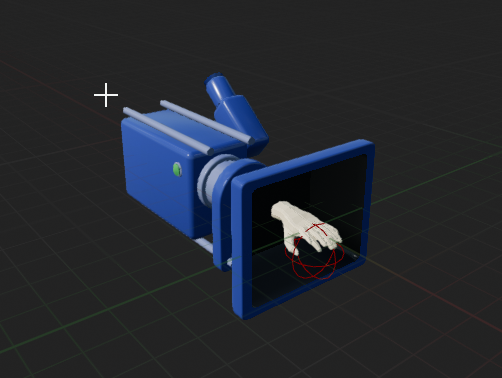
I don't actually define any collision manually so I was curious 😃
glossy agate
Well you would just start with some core repairs that can be done by an average person like thermostat, head gasket ect.
Not anything you have to buy special tools for or drop the engine.
mighty carbon

Magic Leap, the mysterious augmented reality startup with a multiple-billion dollar valuation, could soon be taking on more investments, bringing its total valuation close to $6 billion, Bloomberg reports. Citing sources familiar with the situation, the report contends that Temasek Holdings Pte., a Singaporean investment company, is considering taking part in a new financing round amounting to more than $500 million. …
6 more month
 granite eagle
Anyone here had any success or made any $$$ from their VR games?
mighty carbon
I made $14
granite eagle
Whats your game?
mighty carbon
Gear VR experience
granite eagle
Its for Samsung Gear and not Vive?
mighty carbon
right
cosmic shoal
I've made money with VR, but it's not a game, it's a kitchen planner for a local manufacturer and a another app for conference centers.
granite eagle
Interesting, I was contacted for something similar. Did the client reach out to you?
mighty carbon
how is VR audio in 4.17 ? Is it all working good, no quirks or some odd workflows ?
cosmic shoal
We've been working for the hotel industry and conference center industry for 12 years, and the kitchen guys saw what we did for conference centers and we offered the VR version
 dusk vigil
@granite eagle Almost every small VR indie without funding is currently doing b2b gigs on the side to survive, unless they are independently wealthy ( aka living with parents )
granite eagle
Yeah im shifting from my full time design job to part time. This gives me some spare cash but now I have more time on my hands
dusk vigil
Kumoon made about 10k but only a fraction of that was VR sales, and that was nearly two years ago
I find it a bit frustrating to try do things by halves... but I have a very distracting halftime job running a VR dev hub
granite eagle
Yeah but for the last two years ive been developing multiple games, websites and all sorts. My job sucks up 12hrs a day lol. Part time seems like a holiday for me
Once (if) I gain some traction I will full time indie
tired tree
@wild mauve that doesn't have any collision, or gravity, which is why you don't fall through the floor
wild mauve
Interesting.
For some reason when I use player start
i get a capsule component
I figured that was the reason why
tired tree
no
wild mauve
tired tree
that is the player start...
wild mauve
yeah indeed
wild mauve
No, I need it there so the headset spawns on the floor
and then when you put it on you're at head height
since the headset is in the middle of the capsule.
technically.
tired tree
i mean you added a capsule following epics setup guide anyway
but there isn't any world collision built into the base pawns
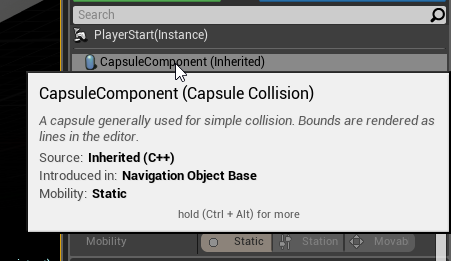 wild mauve
oh okay
So after my player spawns the collision is irrelevant to my player?
I just kinda want to stop the player from being able to put their head inside walls, you know what I mean?
 supple coyote
hey guys anyone having trouble getting AO to work in VR tempalte
I know it's disabled by default
dusk vigil
Seems to still be unimplemented https://answers.unrealengine.com/questions/510907/forward-renderer-and-ambient-occlusion-414-preview.html
supple coyote
<not using forward renderer
willow trail
@tired tree I'm cleaning up the pawn eventgraph to remove everything I don't need (and understanding it in the process), but everytime I delete that note : https://puu.sh/xzJUw/f9f84f7aeb.png I'm hit with a compile error https://puu.sh/xzJXR/c0e0014675.png even though it's not connected to anything and visibly nothing ever calls that event anymore. Any idea what's wrong?

 supple coyote
never personally felt hindered by the deferred renderer besides maybe performance reasons but am targeting gtx1080 anyway
willow trail
Here's where it fails by the way, I don't think it's particularly important but getting either handmeshes seem to return None
willow trail
I haven't deleted the getters, just the useless custom event entry point
tired tree
dunno, you broke something :p
willow trail
I guess so... But if I keep this event around it compiles and run fine
I've been trying to debug this weird thing for 20 minutes, makes no sense
tired tree
that event isn't even directly tied to the hand meshes
willow trail
yeah I know, there are no references whatsoever even in the rest of the BP chain
tired tree
deleted that event, and the calls to it with no issues
OH
FPS char is throwing the errors
it uses the teleport event
bound to 'T'
the warning about hand mesh is wrong, just a disconnected node in FPS when you delete the base classes event it uses
it goes away when you fix it there too
willow trail
wait where is the event call? "Find References" didn't yield anything
tired tree
in fps_VivePawnCharacter
in the main event graph
it calls ExecuteTeleportation
bound to the T key
the new disconnected node logic in 4.17 gets in the way it looks like
throwing out some random errors instead of what it actually is
anyway i have to go, easy to solve if you delete it in there, you can PM me if you have more questions
willow trail
Ohhh I see, thanks!!
wild mauve
@tired tree sorry for the bother again so just for clarification the playerstart collision is completely irrelevant to the VRPawn and I can do that all manually within the pawn itself correct?
 fair hearth
Correct @wild mauve though the player start will still maintain it's collision even after you spawn. So there will be a capsule there, but it will be independent of your vrpawn
wild mauve
Sweet
Do you happen to know if there are any guides that demonstrate how to attach collision to a HMD?
So I can't put my head inside the ground / walls?
dusk vigil
I personally hate it when games 'push' you away when your head collides with stuff... I find it nicer just to black out the view if head is inside stuff
sturdy coral
@supple coyote search the config folder for AO and ambientocclusion, I think it is turned off in the scalability groups
supple coyote
in this case, the console command : r.AmbientOcclusionLevels 1+ should activate it no?
sturdy coral
search the config folder for references and see
there are many related settings
quality to zero can turn it off etc.
not just levels
from what I remember
willow trail
what's the implementation for dynamic AO?
sturdy coral
screenspace, using HZB mip levels to optimize the tracing
there is also a distance field version
that isn't screenspace
willow trail
I've only heard that screenspace effects and in particular ssao sucked, never really tried it myself
but any game without AO these days looks like trash :/
for VR I mean
sturdy coral
you can turn off AO for staticlly lit stuff and just have it for details on characters, etc. by turning static fraction down
I haven't seen the screenspace/stereo problems with it but it may be there
supple coyote
hmm
sturdy coral
dfao at least in the past just didn't work with VR at all
supple coyote
ill take a look at the config thanks man
im still a little iffy on understanding the diff between diff AOs
ie. post process AO
ie. material AO slot
ie. baking AO through lightmass
ie. dfao
like, it's not quite clear to me which is turned off in VR
or even which does what
ive heard people say that the AO slot in material has a weak if nonexistant effect?
and what is that based on
oy
sturdy coral
I don't know exactly how material AO works and how it avoids it being applied twice (from material and from screenspace)
willow trail
ssao (post process) it crytek hacky AO that everyone uses, supposedly bad in VR, baked AO is raytraced and baked so "free", dfao I guess uses raymarching or something, which is expensive but actually works
sturdy coral
I've heard people say material ao is no different than modifying the diffuse to be darker (multiplying diffuse by ao map)
4.17 introduced some bent normal AO stuff that I think requires some amount of baking and maybe uses the material AO channel, I haven't checked it out yet
wild mauve
I don't really mind games pushing my head out of the wall haha I do like the blackout solution however.
I'm still not sure how to handle like the rest of the movement colliison, I was thinking of just making a cylinder and having it as a child to the rest
and whenever I move around I check if that collided with something
dusk vigil
Anything that causes artificial movement to user without user wanting it is bad...
willow trail
if the user headbutts a wall, he wants it
sturdy coral
lone echo physically restricts your head and causes artificial movement
supple coyote
hm hm hm
sturdy coral
not the greatest thing, but for the most part yeah you just naturally avoid doing it
dusk vigil
Depends a bit on the game. Claustrophobic small space like that ISS demo it was way too easy to have it happen
supple coyote
so does the material AO effect the bake from lightmass by calculating its effect and then baking into diffuse / lightmap? and does it also affect Screenspace SSAO or is SSAO using something else to calculate
i guess you just finished by saying youre not sure :p
dusk vigil
I guess people figure it is the easiest way to keep players from peeking behind the scenes
willow trail
but lone/echo/arena only really have your head collides, it pushes your entire body out of the way, I didn't really have any problem
sturdy coral
@supple coyote it affects lightmass
wild mauve
So how do you guys attach the HMD to a collision capsule?
sturdy coral
I'm not sure which lightmap it is baked into because you can exclude screenspace from affecting it by changing the static fraction
and you can read the baked AO from materials (I think only if a certain option is enabled)
wild mauve
I assume you use the collision capsule as your root but I'd rather avoid doing that since the players height will be dynamic.
sturdy coral
so it isn't just completely mixed into the baked light
wild mauve
Is there a way to size a capsule to the distance between the players floor / their HMD?
so it's dynamic?
sturdy coral
@wild mauve you can see the ACharacter crouch stuff for how to dynamically change the capsule, it is a pain
supple coyote
documentation on it is confusing
in Buffer Visualization mode > Material AO shows my shit as white
wild mauve
I just can't think of a way to attach the HMD to a capsule without ruining the automatic Steam VR height stuff
supple coyote
but AO shows as having information
willow trail
@wild mauve that's what MordenTral does with VRExpansion
wild mauve
I'd rather attach the capsule to the HMD
sturdy coral
@tidal pasture ao is probably lightmass ao, material ao is ao in the material slot
I don't know that for sure though
you can toggle ssao on and off and see if it affects the AO view
supple coyote
I think youre right
cause my scene appears to be baking a fine ass image - so I assume AO is being baked
wild mauve
@willow trail that video doesn't really help me understand much haha
supple coyote
ah good idea lol
willow trail
@wild mauve Yeah sorry, wrong link, ShareX is being problematic ha
wild mauve
what's he supposed to be showing
oh haha no worries
ShareX is great though
I use streamable as my upload source for videos
I heard gfycat is best but only 10 secds 😦 too small
dorpbox is normally fine too.
sturdy coral
@wild mauve the character has so much stuff dependent on the rooted capsule that you are pretty much stuck with it if you want a robust character with good multiplayer support, etc.
willow trail
I didn't know you could use something else than puush huh
wild mauve
I don't even have puush as an option for sharex
wild mauve
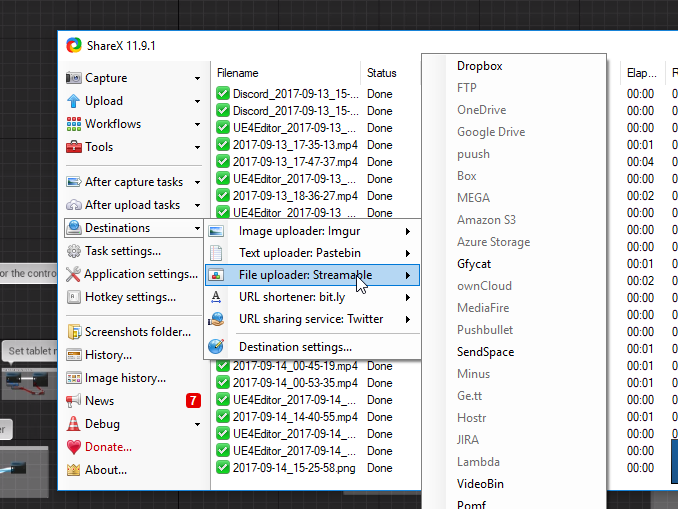 willow trail
you can't make a new puush account
blame Dean Herbert
too many people started using it, but I'm glad there are alternatives
I got it before it closed so I just kept using it I suppose
anyway here's your screenshot https://puu.sh/xzLJ9/ec2dcd5fa2.png
 wild mauve
hmm
What result does that yield? It just determines the HMD's height from the floor and assigns the capsule to it?
willow trail
Apparently yes, I'll be honest I don't know why the camera is placed at half the size of the capsule, but that's how he does it https://puu.sh/xzMCP/8f17afb081.png

oh right, it's just that capsule are defined using the distance between the center and the end of the cylinder (start of the hemisphere)
wild mauve
I see
What happens if you attach a collision mesh to the HMD and hit a wall? It acts like an unstoppable force right?
(In response to a deleted comment) See if there is any information on that thread
The issue is with the comparison in the blueprint. It's comparing FirstPersonCharacter string against "FirstPersonCharacter_C_1" this is because the character is instanced in the real game and isn't when you're running from within the editor.
There's a good chance it's not the same as your problem, but it might be a start.
Also is your character placed too low or something?
Nevermind then? I guess you deleted the comment.
willow trail
@wild mauve I don't know what happens if you attach a collision mesh to be honest, but the default template behavior (that uses a capsule for the collision) is to push you back. But he also implemented gradual black out when you're in a vehicle, so both methods are probably available
wild mauve
Oh, I see. I haven't looked at the template for anything so far haha so I wouldn't have caught that.
I'll have to take a look I guess. I hate having so many projects on the go at once haha
In the example, did you catch if he had the capsule as the root?
willow trail
VRExpansion's template is a gold mine 😃
@wild mauve yup
well the root is a VRRootComponent which inherits the capsule component
willow trail
I'm really new to UE API lol, but that's what the header file looks like https://puu.sh/xzO8M/d2f0d70037.png
 fair hearth
I've got an issue with casting to my vrpawn, it works fine editor, but doesn't work in packaged game, I don't know why any thoughts?
sturdy coral
blueprint or c++
wild mauve
@willow trail I'm looking at VR Expansion and is it royalty free?
Like can I use it to sell a game or do I have to license it?
tired tree
@wild mauve MIT licensed, meaning free to do whatever you want with it, granted you technically need to give credit somewhere with MIT
I don't pursue that, but its in your best interests to do it anyway
wild mauve
Oh, you're the dude who makes it?
tired tree
yes
wild mauve
Haha didn't put one and one together.
Is it possible to just grab your HMD collision stuff explicitly?
I'm not exactly familiar with UE4 enough to understand what a plugin is.
wild mauve
I assumed it was just a template
tired tree
its all tied into a character
wild mauve
Ah I see
tired tree
if you wanted something more simple you would be better off adding a capsule that follows XY with the hmd and manually tracing
the character is a total overhaul, gives the full power of the normal engine character]
wild mauve
Oh I see, yeah currently I'm just posessing a pawn and flinging my arms around
tired tree
vrrootcomponent is a special case, i override the physics location and rendering location of the root capsule so its offset
technically outside of normal engine workflow
wild mauve
As far as the simple suggestion you made there my goal was to create a HMD collision model that allows for the HMD to navigate around based on that collision volume so you can walk up stairs with locomotion
tired tree
lets me do some special things ,but requires a ton of re-writes to a base character
wild mauve
ah cool stuff
tired tree
well you basically have to re-make walking logic then]
and gravity, and collision
its totally doable
but will be difficult to pull off to the quality that the engine character does it
more so in multiplayer
wild mauve
Yeah I hear you there. I was thinking it might be possible to grab the OpenVR's information on where the floor is, and where the HMD is, and dynamically create a capsule based on that information
wild mauve
So basically the only thing stopping me from falling to my death in my game currently is the fact that my pawn has no physics being simulated. If I wanted collision I would need to add a capsule component and attach it to the Pawn's HMD location. I'd then want to make it so my HMD can't go below the top of that capsule, I assume.
And you say it's possible for me to dynamically size that capsule so I think I might be able to get some kind of collision that has step-up working
It might have even been you, but I saw recently a video where a guy was walking up a spiral staircase. by walking around his playspace. Was really neat.
tired tree
that was @sturdy coral but my stuff does it too
its not that easy though
you will have to manually trace for the floor
and move the capsule to avoid it
wild mauve
You mean trace for the floor from the HMD's current position
wild mauve
So HMD -> Floor, get the distance, if it decreases, we raise the collision capsule by the difference and adjust the HMD based on the new location of the top of the collision capsule?
wild mauve
Oh, yes, my bad.
tired tree
@full junco that skybox override works perfectly btw, you really need to use SuspendRendering alongside it to force the room when you want it and the texture needs to be uncompressed.
also ClearOverride, otherwise it stays
wild mauve
@tired tree if I end up using VR Expansion, is there anything I need to fundamentally change with how my game works? I Currently have a lot of interaction between my enemies, my players, and my weapons. They're all very intertwined.
And by very I mean, well, they reference each other for data values.
So not very, just are, I guess. Would it require a lot of reworking?
tired tree
i have no idea what you have working
entirely depends
you don't have to use my gripping at all if you don't want to
tired tree
its just there if you want it, has a ton of features though
wild mauve
Yeah, I saw some cool stuff.
I'll go try installing it. Is the 4.17.1 version you uploaded a while back in good condition or should I go for building a bleeding edge variant?
wild mauve
I can't seem to find 4.17.2 in my launcher I'm assuming that must be one of their bleeding edge builds as well haha. Will it break if I try using it on my 4.17.2 build I wonder
I'll give it a shot either way
cant hurt to try
wild mauve
No worries ^^
Sorry for being somewhat useless when it comes to these weird VR questions.
I've only been using UE4 for about a week haha
Only thing even marginally impressive that I've done is wrote my own alternative to their damage system.
That's about it.
tired tree
while fun i'd imagine, i'll note that generally you don't want to re-write their damage system :p
it ties into a lot of things and is useful
wild mauve
Yeah, I noticed that. It has a lot of functionality
I only rewrote the damage interactions between entities I specifically made though
so it shouldn't be too rough if I decide to branch out using theirs for certain things
and mine for specific things.
wild mauve
Can't seem to generate visual studio project f iles.
Gonna try downloading the SDK see if that fixes it
glossy agate
make sure you rename the folder to something not super long
wild mauve

This look good?
Ay, it worked after the SDK installed.
Hopefully it builds fast on my R7 1700 haha
Here's to hoping
mighty carbon
so my PC apparently doesn't doesn't meet requirements for Windows MR because Fall Creators update isn't installed (I guess it's not out yet) and something is up with USB port (it shows as yellow exclamation mark)
mighty carbon
oh, so it's not out yet officially ?
mighty carbon
also I have USB 3.1 Type-A and Type-C... I don't get what Microsoft needs ..
wild mauve

Win Key + "Insider" and click on the buttons that look like they need to be clicked on.
You'll get preview builds for their latest content, including the upcoming 32bit -> 64 bit legacy support upgrades
mighty carbon
meh, I'll wait for the release.. I am just curious if my system is 100% ready and apparently it's not
wild mauve
So you can have more than 4 gigs of ram on a 32bit software 😄
@tired tree Apologies for the bother, but do you know why this is coming up? https://i.imgur.com/HZNbN0v.png

I built it with 4.17.1 (it's all I have installed)
tired tree
yeah
wild mauve
and it's the build you made about 15 minutes ago
tired tree
you have to compile it
there is a getting started tutorial on the main thread
first post
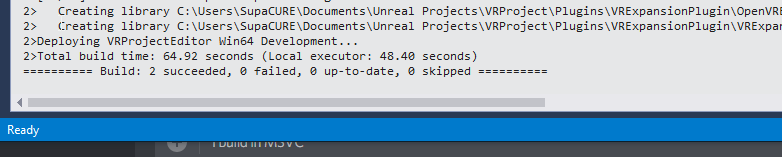 tired tree
did you compile it as dev editor?
wild mauve
yes
My folder is named "VRExpansionPlugin"
Not "OpenVRExpansionPlugin"
I'm assuming that could be why?
tired tree
no the file structure is correct
try pressing f5 in editor to run the editor from it, it should work as is
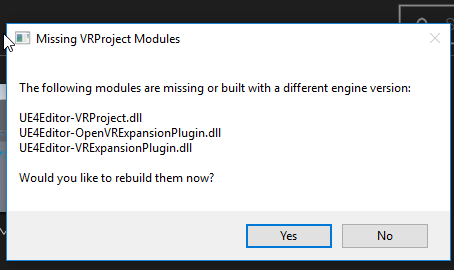 tired tree
are you SURE you built them for THAT project?
wild mauve
I am indeed.
tired tree
that messages means it not built
tired tree
its saying VRProject is also not built....
wild mauve
and the Missing VRProject Modules says the project name
I'll click yes
see what it does
tired tree
shouldn't work, it doesn't re-compile plugins well from the launcher
tired tree
weird
wild mauve
Indeed.
tired tree
pm me next time though, i hate spamming general channels
glossy agate
Anyone here shooting new players in the onward free weekend that started? Hit me up and we can play.
 uneven moon
Is moving the thumbstick on the CV1 MCs the same as touching/pressing the round keypad on the Vive?
 granite jacinth
full junco
granite jacinth
full junco
@uneven moon it is the same when you use steamvr
 wheat dust
Has anyone here managed to build an ARKit-plugin project for the latest iOS 11 Beta ?
 glad plank
@uneven moon did you rotate the skeletal mesh instead of the actor?
willow trail
A game where the guns is your hand, each hand gesture changes the way you shoot. For every different gesture the source(s) of the projectiles are gonna be placed differently on the mesh. What do you guys reckon is the best way to go about that without hardcoding the transform for each gesture?
tired tree
gesture recognition....
willow trail
I was thinking about something stupid like adding stray bones and animating them throughout the sequences, then get the world location of those bones but I think that's dumb
tired tree
just use the marketplace plugin for it
its pretty ok
some things could be improved, but its good enough that i haven't felt the need to make my own yet
willow trail
No sorry, I wasn't clear, basically since the guns are you hand, depending on which pose the hand is in the "gun" "barrel" is gonna be placed differently
can be palm, your index finger, or 4 of your five fingers
I just need to start the projectile where it matters
tired tree
oh, you are running touch only?
willow trail
not necessarily
tired tree
pretty much
willow trail
the actual finger location doesn't matter
willow trail
I'm not interested in having 1:1 hand gesture, it's all gonna be faked
you'll switch through gesture with something like a radial menu with the stick
tired tree
well if you are just looking for projectile spot, use a socket on the gun mesh
spawn the projectile from the sockets location and orientation
willow trail
ooooh of course
have a bunch of sockets for all possible locations and use the one I'm looking for
I suppose you can query for individual bone location too right?
tired tree
yes
willow trail
ok cool, I was thinking too complicated
uneven moon
@glad plank I changed the rotation value under the Spawn AI from Class node, but I also tried extending to a separate Set Actor Rotation node, he always moves sideways if I do this.
Also, any Canadian steam developers here?
mighty carbon
I am surprised by the lack of outlets reviewing Gear VR apps ... not 🙄 💩
 chilly thicket
Is there an easy way to test if someone is using a vive or rift?
willow trail
I feel sick... Is there no other way 😦 https://puu.sh/xAkYv/b0680bb234.png

this is just for the stick direction, surely there's a better way
chilly thicket
Yeah, it's way overly complex to get it.
tired tree
@chilly thicket there is an HMDType node, but for steamVR it will always return HMD_SteamVR, so you need to poll hardware data
chilly thicket
Oh.
tired tree
if you are using SteamVR like I said, even oculus returns "steamvr
chilly thicket
Oh.
tired tree
so if you intend seperate button mappings you either need an option that they choose, or to directly poll the hardware type from steamvr
chilly thicket
Ah, okay.
What would be the best way to have different bindings?
Can unreal load a set of bindings depending on what headset is used?
 royal ruin
@willow trail regarfing your gesture-shooting problem
unfortunatley, the best way is to animate it all while adding the required extra bones to the skeleton
anything else would be pretty complicated
tired tree
prettty sure thats still covered by a plugin currently Curcuit
willow trail
I was overlythinking it, I don't ever need to change a position on the fly, I added sockets to the skeletal mesh and I'll just get the location of the one I want. I haven't tried it yet but I expect it should work just fine 😃
chilly thicket
Okay.
royal ruin
yeah, unless you need specific animations for the the attached stuff, (i.e. projectile shooting location), you'll be fine with sockets
tired tree
but you can use bindings differently, and at least for cross plugin inputs since they are different events you can map them seperately to the same inputs
chilly thicket
Yeah, but the problem is that the names of the bindings overlap.
Like, Grip1 on a touch, is the useful grip button on the back.
While on a vive controller, it's the hard to use grip button on the side.
tired tree
"but you can use bindings differently"
chilly thicket
Yeah.
Oh, apperently joystick left and right is the same as swiping left and right on a vive controller.
So I don't even need to change that now 😄
chilly thicket
Question 2, what is the best way to handle rotating the character?
The way I do it right now seems kind of strange, and instead of just rotating it often seems to teleport you to the side as well.
I think it has to do with roomscale stuff.
This is how I do it right now.
tired tree
you need to rotate off of a pivot, which is the HMD location
chilly thicket
Yeah.
tired tree
your actors location != your HMD location, its offset in relative space
chilly thicket
How do I set the pivot point once I have that offset?
chilly thicket
Lol.
tired tree
cheating is rotating off of 0, then moving the actor backwards by the offset with the new rotation
you will be moving the actor regardless
tired tree
it not
chilly thicket
Lol.
tired tree
// Compute new rotation
const FQuat OldRotation = UpdatedComponent->GetComponentQuat();
const FQuat DeltaRotation = (RotationRate * DeltaTime).Quaternion();
const FQuat NewRotation = bRotationInLocalSpace ? (OldRotation * DeltaRotation) : (DeltaRotation * OldRotation);
// Compute new location
FVector DeltaLocation = FVector::ZeroVector;
if (!PivotTranslation.IsZero())
{
    const FVector OldPivot = OldRotation.RotateVector(PivotTranslation);
    const FVector NewPivot = NewRotation.RotateVector(PivotTranslation);
    DeltaLocation = (OldPivot - NewPivot); // ConstrainDirectionToPlane() not necessary because it's done by MoveUpdatedComponent() below.
}
this is how they do it with the rotating component, there are other methods but this is easy to understand
just subtracting the pivot location difference between the two rotations and applying it to the actor
chilly thicket
Okay.
sturdy coral
@chilly thicket I think there is something like a rotate around axis blueprint node too
chilly thicket
Oh, okay.
sturdy coral
mighty carbon
how do you guys usually handle weapon models for player ? Are they part of the player's BP actor or somehow else ?
sturdy coral
shooter game makes them their own actor
main thing to consider if you are doing multiplayer is actor channels
chilly thicket
Actually, I have the same question as him, lol.
glossy agate
All in the weapon
sturdy coral
reliable events only arrive in order within an actor channel, there are no order guarantees between two actors
ah sorry I see you are just talking about the model, not the actual weapon class
mighty carbon
yeah, models
weapon class would be a separate BP from player's BP
if all weapons are individual actors and aren't tied to player's BP actor in any way, how do I attach them to player when he picks up or switches a weapon ?
sturdy coral
you can attach actors
mighty carbon
(I was thinking having child actor in the player BP and just setting weapon actor appropriately toggling visibility of it)
sturdy coral
there is a weird issue with attached actors, the attachment will be replicated if both are replicated actors, but if the main actor goes out of net relevancy, when it comes back in the attachment won't be re-established
mighty carbon
so it's better to keep weapon already in the player BP (in one way or another) for networking purposes and avoid using attachment ?
sturdy coral
not necessarily, just don't rely on attachment replication if you use net relevancy
tired tree
don't use child actors
sturdy coral
replicate it yourself
tired tree
they are borked in so many ways currently....
mighty carbon
I don't even know what you are saying @sturdy coral 😛 I don't know anything about networking 😛
sturdy coral
@mighty carbon one of the reasons it is better to do networking from the start instead of planning on adding it later
all kinds of things can have to get redone
mighty carbon
@tired tree borked in MP or in general? I use child actor a lot in my Gear VR game and had no issues
sturdy coral
and there are so many weird bugs and caveats you won't choose the right thing unless testing it constantly from the start lots of times
mighty carbon
@sturdy coral agree, but as it is a lot of stuff is over my head.. So I'd rather structure my SP in a way it's easy to add MP without completely redoing systems.
tired tree
in general
mighty carbon
hmm.. never had any issues with child actor being a part of player BP
tired tree
have had them assume random transforms on client side for no reason, cause forced re-saving of its parent actor on every editor load, crash randomally
its a fairly newish thing and isn't anywhere near perfect yet
that being said I do use them for my door
they work correctly most of the time
"most"
mighty carbon
I see
since child actors would be children of hands, I assume issues will pop up there
actually, I don't think I need to worry about it - your template already has weapon pickup
😄
willow trail
Is there a way to automatically set the debug filter to an object that's spawned after start?
again the repetition of VR preview, exit focus, move window, go to blueprint, set debug filter, switch to vr preview, exit mouse focus but not window focus and then hover the different values is kind of a pain :/
or regular non VR preview for that matter
uneven moon
been struggling with debugging during VR preview as well, I have multiple monitors so I usually leave the debug on the left but hit preview on the middle so that when I tab back into UE4, it's not obscured by the VR preview window
it makes it a little easier but still very tedious
tired tree
meh, I run most of my debugging through log events and have a special in game console that displays the full log to me
then i can debug with the hmd on
at least for blueprint stuff and things i'm not breaking code at
willow trail
by log event do you mean the text you've attached to the motion controllers? That's the only thing I see as referred to as log in the template. Is there a simple/default way to log values?
In my case I tend to log axis and vector and stuff which are constantly changing, if there's no other way I'll set up a piece of text attached to the camera, just wondering
mighty carbon
that doesn't sound good :/
"the marketplace team is having some issues such as restructuring and lay offs which is delaying a lot of products"
tired tree
@willow trail no, that screen with the keyboard in the template
uses a VRLogComponent
willow trail
@uneven moon Oh didn't see your comment. Yeah my biggest issue is that the VR preview window (in particular) ignores the editor settings that allows you to place the window where you want/remember position. I've complained about it on the answerhub
tired tree
also could just render the texture it makes into a stereo layer and have a terminator like console hud which would be fun
@mighty carbon a lot of it is likely the restructuring as they said they are attempting to automate parts of the update process
@willow trail this: https://youtu.be/1LdePDnCOUY?t=12s

Console output now include output log capability as well. Added an example cabinet
though I think its been improved since then
willow trail
@tired tree Thanks, I'll use that when I'm debugging in VR
sturdy coral
@willow trail @tired tree re: debugging, does gameplay debugger work in VR or are all the overlays done in 2d screenspace?
Tool that enables analyzing realtime gameplay data at runtime.
tired tree
it has a procedural keyboard now and better functionality
all the overlays are 2d I believe
they are working on fixing up the graphs in VR for 4.18
dunno about that
willow trail
a procedural keyboard? Like built procedurally or do you actually query the default windows layout?
I expect the first one but as a fellow AZERTY user I can always be hopeful 😃
tired tree
its generated off of a data table: Ie: one datatable is a keypad, one is a full keyboard
so it can be used for things besides keyboards
tired tree
the c++ ones yes, but different meshes
the std setting is UMG though
but there is a hidden button that switches it to 3D with wands
auto complete works too since I am emulating input into the console
willow trail
that's gonna be really nice when I get there 😃
tired tree

Some more updates to the plugin, mostly back end stuff. Don't mind all of the black lines, 4.16.1 is still broken with instanced rendering and debug drawing....
man, i really should make short clips with features
linking to timestamps of full videos is annoying
tired tree
mmmm
4.18 preview 1 should be out soon
they switched over to 4.19 in main and localized master
mighty carbon
interesting
is 4.18 more of a maintenance release ? (roadmap has very few items on it)
 feral maple
Want to make a Zero-G VR game? If anyone's interested, I posted a template for people to use, that recreates the Zero-G hand movement from Lone Echo/Echo Arena!
https://forums.unrealengine.com/development-discussion/vr-ar-development/1354452-template-zero-g-hand-movement-like-from-echo-arena-lone-echo
 eternal inlet
anyone know how to check for an actors mobility? in bp it doesn't seem available, so im asking how to expose it to bp in c++
eternal inlet
oh sorry i didn't starte the question clearly
if i want to set an actors transform, and it's mobility is static
 forest plover
no he's talking about if its set to static mobile or stationary
eternal inlet
then it will throw a warning
so im looking for a way to check it's mobility flag
before i try to set it
or rather check it's mobility flag if i need to save it's trransform
forest plover
try getting the root component and see if you can get the mobility from there?
glossy agate
What are you using it for? I didn't even know it was possible to change at runtime. Really cool
Also what happens to your lightmaps when you do this?
tired tree
the editor will throw warnings but it lets you do it
I bypassed some silly checks a long time ago with my voxel volumes by doing that
but those never had lightmaps to begin with so no wasted memory - also they had live generated collision so I was changing channels too
uneven moon
some1 hmu on teamview I'm dying on this basic problem I can't lmao
glossy agate
If they made a simcity game like this my wife would probably play it non stop. Will to cool when it can map more than a single plane https://youtu.be/KBfEgFI90YA

Directive Games shows their Unreal Engine 4-powered augmented reality multiplayer game, The Machines, at the Apple Special Event on September 12, 2017. The M...
mighty carbon
cool ... when watching presentation
heh, a little too late, but Wwise is available for Gear VR now 🙄
eternal inlet
shiiit that's cool
@glossy agate im making up my own save level state, since i can't get things to persist or behave as i want otherwise
when i switch in and out of streaming levels
glossy agate
Nice!
eternal inlet
now im trying to find the best way to handle things that are spawned dynamically and make sure they persist between save and loads
it's kinda workin,g but needs me to set things up for each type of classes i have, since i don't have an easy way to tell what info i want to save or not
so for ie. a weapon i want to save count in mag as an example
glossy agate
Cool. I have a count in mag in my project if you want me to pm you a pic later
eternal inlet
which you save also between restarts of the game?
glossy agate
Ah no. Just a forloop in the construction script to fill it, then just subtract as I shoot so you would just have to save the sunbraction int var somewhere.
eternal inlet
jup that's what im doing now
so problem trying to find the best possible solution for, is instances where a weapon was dropped by a npc
in that case, i spawn a weapon from it, and hide the one he's holding since it's just a static mesh
so i spawn a pickupable weapon
when game is saved, that state is saved too
but when i try to reload it, i will have to respawn it also, since it doesn't exist when game starts
in theory it's not so hard at all, but just trying to find the best way to administer the different arrays i have so i don't save too much and make too many checks and such
glossy agate
Oh so you track the npc shots so it only spawns a weapon with the remaining ammo amount right?
eternal inlet
not excactly
they always spawn with a certain amount of ammo
but if i pick it up, fire 5 shots from a mag with 30 shots, and drop it on the ground, it has 25 left
and thus when loaded should load with 25 ammo again
i could track ammo on the npc too, but didn't bother to do it
glossy agate
I get it. You are making a full on campaign game now, or still the film project?
eternal inlet
full on campaign game
 quaint loom
@eternal inlet can you not just have it spawn a gun controller actor to hold that info? Then respawn with a variable saying X ammo remaining?
then you can toggle visibility/anchor at will if you need to
as a bonus
non-rendered actors can hold data too
sturdy coral
@mighty carbon were you the one looking for oculus hand assts recently? this might have something: https://developer.oculus.com/blog/implementing-quality-hands-with-oculus-touch/

We’ve put together a collection of assets, samples, and SDKs to make it easy to add high-quality hands to your app.
says there are sample hands on the oculus UE4 branch
uneven moon
Anyone successfully release on Oculus here?
 analog topaz
can i test teleporation with oculus ? will it be same with htc vive? cuz my client has htc vive
@uneven moon btw the vr green cyrcles were fixed by making directional light and sky light static instead of stationary ! ty
mighty carbon
Thanks @sturdy coral
analog topaz
@uneven moon thanks! 😄
 noble charm
@uneven moon currently undergoing review. Just passed the second stage
uneven moon
@noble charm I have a few questions, can we PM?
noble charm
Yeah sure
uneven moon
Having problems with pausing the game when the user takes the HMD off, anyone achieve this?
This loop is the only way I can think of to consistently be aware of the HMD's activity (on head / not on head)
But it doesn't work.
uneven moon
@tired tree Can't find the IsWorn node, I'm using 4.16
Is it a new feature in 4.17?
Or perhaps these?
tired tree
if isWorn isn't there I dont' think those delegates work yet
they fixed them and added isworn at the same time
it might be 4.17
uneven moon
How did people achieve the pause/unpause based on HMD worn state before 4.17?
And yes, the delegates don't work in 4.16
tired tree
they didn't unless they manually did it in code
think the oculus ones work in 4.16
but not the steamVR
sturdy coral
is worn is seriously broken in 4.16, I just made an answerhub yesterday and described a fix
also just added proximity stuff to make the transition to NotWorn much faster, but apparently steamvr will report Oculus has a proximity sensor, but then won't update the proximity sensor status
I'm testing out that part now, will probably have to special case oculus via steamvr
sturdy coral
@tired tree I didn't test 4.17 but I looked over the code
uneven moon
Was hoping for an easy solution that works across the rift/vive and psvr but it looks like I'll have to drop the functionality altogether for this one
sturdy coral
this was the issue I ran into, it shouldn't cause an issue for pausing:
well it might, depends on how you handle it
sturdy coral
what's the commandline thing to force oculus to use steamvr without disabling the oculus plugin? -hmd=SteamVR or something?
(tried that without luck)
hmm 4.14 release notes say no dash:
'New: Added the ability to select which HMD module to use on startup by passing "hmd=<name>" on the command line. '
I tried hmd=SteamVR with no luck
uneven moon
Why does EG want us to put this in our credits:
They don't own all the rights to the products we develop, just the engine and the license we're issued to use it
sturdy coral
it says the engine is copyright, not the game
uneven moon
Ah, fair enough
sturdy coral
hmm yeah with hmd=SteamVR it tracks the head and stuff but just never shows anything in the headset except "Please Wait"
steamvr works with Rift if I disable the Oculus plugin though
sturdy coral
Seems to possibly be because Oculus creates a session inside the plugin's PreInit even if the plugin doesn't get used
Possibly same root cause as Oculus hijacking your audio even if you set -nohmd on the commandline
sturdy coral
jesus well that was a pain in the ass
the OculusInput plugin ignores hmd=SteamVR and calls ovr_Initialize in a way that breaks steamvr (looks like it passes a different minor version)
mighty carbon
because it's designed to work with Oculus Home / software ?
sturdy coral
here is the fix if anyone needs it: https://answers.unrealengine.com/questions/707211/the-oculusinput-plugin-breaks-steamvr-when-ue4-is.html
4.17 probably doesn't need it because I think they merged OculusHMD and OculusInput
mighty carbon
not VR related, but wow: https://twitter.com/devolverdigital/status/908864267625021440





 wild mauve
Anyone here ever successfuly grab some content from the VR Expansion plugin and drag it into their project?
I was trying to copy over the Vive Character and everything pretty much breaks
I have the VR expansion plugin installed properly and it's parented to the "VR Character" properly.
glossy agate
Nah haha. Right click and migrate
Also you want to export then import your input settings
Save you like 3 min of time
And you may need to add vrtrace channel back in unless the plugin does it for you
wild mauve
I'll be sure to add VR Trace back, I don't think it does haha
Thanks by the way!
I was copy pasta'ing all the code over and trying to replicate it hehe
tired tree
Heads up btw anyone that cares, if you have a fast moving game and had to turn late updates off for it due to them breaking at high speeds, 4.18 changed how late updates are done to get rid of race conditions between the game and rendering threads
not only does this fix the high speed massive issues, but in general late updates are higher quality and more stable
its likely worth either updating or backporting the changes they made
cosmic shoal
MIgration gave me headaches at first too. Coming from unity I was set on finding a way to make prefabs to export..
wild mauve
What's a prefab?
cosmic shoal
In unity you group things in a prefab and export them out, load a new project and load them in
sturdy coral
@tired tree thx, that's good to know. I thought they had already done something similar, putting it behind a lock?
cosmic shoal
well Technically it's a "package" not a prefab, prefabs are designed to be called at runtime from within your scene
sturdy coral
also, back on the topic of detecting headset worn state, beware if you do enable/disable stereo based on worn state that if the app is exiting and you enable stereo it will cancel the exit and make steam VR appear to fail to exit your app or possibly cause a force quit
quitting disables stereo, waits 4 seconds for it to apply, then quits, and if you reenable in the meantime the app abandons quitting
cosmic shoal
speaking of SteamVR I found a thinggie called iVRy that lets you use SteamVR on an iPhone 😄
wild mauve
haha that's pretty cool
cosmic shoal
you can use it with a cable or wifi
wild mauve
you mean like, with one of those headsets?
sturdy coral
is it using ar kit?
wild mauve
I wish the vive trackers weren't 150 bucks
I'd be better off just making one
ffs
with an arduino
I even already have the arduinos and a 3d printer lmao
sturdy coral
the photodiodes with micro driver board are pretty expensive I think
$2 a pop or something
cosmic shoal
I think inside out tracking like in Arkit and ArCore (android version) is the future for head tracking, controllers are a different matter
sturdy coral
I think they said the trackers have even more than the controllers
because they aren't able to have them on the bottom where you mount so they needed more to make up for it
yeah I don't think bulk pricing has been revealed
cosmic shoal
78u78u78u78u78u78u78u78u78u78u78u78u78u78u78u78u78u78u78u78u78u78u78u78u78u78u78u78u78u78u78u78u78u78u78u78u78u78u78u78u78u78u78u78u78u78u78u78u78u78u78u78u78u78u78u78u78u78u78u78u78u78u78u78u78u78u78u78u78u78u7878787878787878787878787878787878787878787878787878787878787878787878787878787
sturdy coral
the newer design is supposed to get cheaper
cosmic shoal
sorry that was my cat
wild mauve
But does steam vr NEED that many tracking points?
or can you make custom trackers
with custom amounts of tracking points
because it's supposed to be open source right? Should be able to emulate it
sturdy coral
it doesn't need that many, but helps with occlusion and stuff
wild mauve
I wonder what happens if a diode "breaks" inside the controller
cosmic shoal
it probably just gets ignored
sturdy coral
it isn't really open source, but is free
cosmic shoal
I've heard about a bunch of controller failures, but not from the diodes, (usually the trackpad stops responding)
wild mauve
apparently an easy fix though
cosmic shoal
yeah, depends on how bad it is
wild mauve
I don't know if i'd risk my luck trying to fix it on my own
or sending it to htc vive
both are a gamble apparently
cosmic shoal
the easy fix is actually just to "pop" it in to place without opening the controllers. It seems after a good whack the seams get misaligned and pop out of position
I would open it, I find it fun to do stuff like that. My parents didn't find it funny when I took apart the phone when I was 8 tho.
wild mauve
Do you guys know what preset VRTrace is set to?
Block All or ignore all?
It wont import for some reason 😛
Actually nevermind it worked.
Oddly enough it ate up all my own pre-made channels.
Darn.
sturdy coral
use source control 😮
mighty carbon
@raven halo what press outlets did you use to promo your Gear VR game ?
 raven halo
hey man, sorry, just came back from a crazy weekend. Remind me tomorrow and I'll try to send you a list!
I'm going to bed now, just logged in to check work stuff before bed
😛
mighty carbon
k, thanks 😃
tired tree
@sturdy coral they put the transform behind a lock, but they still access the scene references from an array that is built on the game thread, so the render thread and game thread could be reading/writing it at the same time. Now they have 2 of the transform and array and flip flop between them for each frame so the write and read is staggered
uneven moon
Any PSVR developers here?
glossy agate
Vblanco is the only one I have seen here
mighty carbon

Oculus
Join the Official Oculus Discussion Forums and talk about Oculus Rift, Oculus Touch, Samsung Gear VR, and virtual reality.
The SDK itself though also has this:
"PC SDK 1.18 adds two Vulkan-specific functions that must be used by an application using the Vulkan API. Note that both NVIDIA and AMD released drivers very recently which address Vulkan issues. See API Changes below for more information.."
uneven moon
Trying to rotate my VR pawn when the thumbstick is moved left (DoOnce, offset rot 90 degrees in that direction)
Should it be under Axis Mappings? It doesn't work the way I set it up under Action Mappings
No prints either
wild mauve

Anyone happen to know what's going on here?
Everything seems to compile fine but when I try to use the Grippable object it doesn't respond
and when I try to use my old interactables they just act like physics objects.
uneven moon
Woah that's weird, it's almost like you're spawning duplicates because the originals never move
The knives, at least
How are you previewing this?
wild mauve
I just have a bunch of those daggers spawned lolo
what do you mean previewing?
I'm using VR Expansion's (Mordentral's) FPS Vive character
It's for quick testing without using the HMD
uneven moon
Does this still happen when you use the HMD?
uneven moon
When did this start occuring
wild mauve
I figured someone here might have experience with the VR Expansion stuff
wild mauve
I implemented the VR expansion stuff into my project... 😛
uneven moon
Ah fair, that's an issue directly related to that, not the actual set-up of your game haha
So hopefully someone does have experience with it
wild mauve
Yeah for sure
tired tree
looks like you have it defaulted to manipulation grip on the swords
dunno how you have the daggers set up
them not picking up could be a ton of different things, since you just migrated files instead of building it yourself I don't know if you missed things or not
mighty carbon
@raven halo PM
mighty carbon
@tired tree do you happen to know if animation with root motion will have any issues in MP ?
tired tree
yea, i would suggest you not do it
while its all technically implemented
root motion movement is a pain in the first place
let alone in multiplayer
depends on if its a bot or a character though
mighty carbon
what's the difference between a bot and a character in this context ?
I wouldn't use it for player per se, but it just looks so much better when AI uses root motion - it keeps them grounded and feet never slip (unless they do because of animation itself)
tired tree
characters have to have root motion built into the character control
its a huge PITA
bots, are bots, so if you treat the root motion as part of it then it works easier
but its still going to be more work
i'm not an animation guy, but there are a ton of complaints about root motion floating around and my brief experience with it was not fun
also the character source dealing with it is...interesting
root motion is applied outside of standard control
 real needle
How do you participate in Steam Sales? I'm wondering about their upcoming Halloween sale, I don't see a way to opt-in. Has anyone had experience with participating before? Is it invite-only?
mighty carbon
got it.. I guess I'll stay way from it
they'll send you an e-mail @real needle
then you follow the instructions in that e-mail
at least that's how it used to be up to the last sale
real needle
that email goes out to all devs, then?
mighty carbon
that I don't know
real needle
okay, thanks for the info
mighty carbon
np
mighty carbon
@raven halo still asleep? 😃
mighty carbon
I am wondering if @raven halo gets notifications when he gets highlighted 😉
mighty carbon
mm..k
real needle
Anybody tested Virtual Reality Spectator Screen? My render is sparkle, a kind of aliasing ... I tested many things in the parameters (canvas render target & SceneCaptureComponent2D) but it does not change anything.
sturdy coral
@real needle scene captures don't support TAA, so you get aliasing
I think you can use msaa and try some of the shader/specular aliasing workarounds
real needle
@sturdy coral But in this video capture, there are not really aliasing ? : https://www.youtube.com/watch?v=KHqXef1VK9o

For all the best in AR and VR News: http://www.uploadvr.com Follow us for up-to-the-minute updates: 📘 Facebook: https://www.facebook.com/uploadvr/ 🐦 Twitter:...
sturdy coral
@real needle seems hard to tell, max res is 720p
they could be running it at 4k and downscaling or something
wild mauve
compression alone will kinda stop it from really being visible on youtube 😦
sturdy coral
I can see undersampling on the UI text
actually I can see lots of flickering that wouldn't be there with TAA, like the stain/or vegetation that is over the blue part of the fence
real needle
yes, ui text seem sparkle
sturdy coral
the wall itself isn't going to have aliasing because it is just a quad with a properly sampled texture
specular aliasing doesn't really happen with flat diffuse
real needle
Yes, you are right
sturdy coral
it could possibly be visible on the specular reflections of the black paint, but I don't see it
real needle
I would make good vr screen capture video ... is not easy !
I'll make some tests with msaa
sturdy coral
you will have to switch everything to the forward renderer
you can still use TAA with forward if you want, you may find a way to turn on TAA only on the headset and turn on MSAA on the capture
it may require some source changes
or at least C++, all the scene capture options aren't exposed to blueprint
sturdy coral
the "ShowFlags" are what aren't all available in blueprint, it is pretty easy in C++
I needed it for rifle scopes, this was the whole of my class:
#include "Components/SceneCaptureComponent2D.h"
#include "SceneCaptureComponentNoShadows.generated.h"

/**
 *
 */
UCLASS(ClassGroup = (Custom), meta = (BlueprintSpawnableComponent))
class SHOOTERGAME_API USceneCaptureComponentNoShadows : public USceneCaptureComponent2D
{
    GENERATED_BODY()
    USceneCaptureComponentNoShadows(const FObjectInitializer& ObjectInitializer);


};```my knowledges is limited ^^
sturdy coral
#include "SceneCaptureComponentNoShadows.h"


USceneCaptureComponentNoShadows::USceneCaptureComponentNoShadows(const FObjectInitializer& ObjectInitializer)
{
    ShowFlags.SetDynamicShadows(false);
}```there might be a similar showflag for MSAA
(would still require forward everywhere)
real needle
Ok thank you. I work with @eternal inlet , maybe he will understand better than me 😃
eternal inlet
@real needle and @muchcharles#2724 sadly i don't do much c++ either 😐
real needle
I spoke too fast
eternal inlet
could be that someone on answerhub knows it?
it is indeed very strange that the scenecapturecomponent makes colors look grainy
eternal inlet
well the aliasing i don't think we can do much about
real needle
eternal inlet
i was more worried about the loss of colors
yeah, it's quite visible on the clouds
sturdy coral
hard to tell without a comparison
I think there are some options on whether to do tonemapping or not
because a scene capture could get tone mapping from the main tonemapping pass if it is displayed in game
but if it is the whole mirror window, it needs its own tonemapping
sturdy coral
looks like LDR to a HDR target
glossy agate
Will the camera post processing bring the color back? Like if you are losing saturation
sturdy coral
not sure if that is the only problem
eternal inlet
oh right, but i tried HDR settings, and then everything gets dark
like the gamma is toned way too much down
sturdy coral
does your render target have the right srgb settings?
eternal inlet
it looks like this
this vs
don't mind the vignette
the middle of the top picture is how the colors are normally
as you can see... much too dark
sturdy coral
middle of the top?
sturdy coral
if top is supposed to be how it looks normally, the middle of it looks darker than the middle of the bottom
k
sturdy coral
oh, but you said top was how it was normally, you mean the top was the spectator and the bottom was normal?
real needle
if i change gamma ?
sturdy coral
one answerhub says to use a gamma of 2.2
there are lots of topics on it
you will probably want to look for someone rendering a scenecapture to a slate widget or something, since post processing wouldn't affect that and it would be similar to the mirror view
eternal inlet
real needle
2.2 is same thing
sturdy coral
I think you might have something wrong overall in your setup though but it would take experimentation to find out what
eternal inlet
here it's easier to see the levels of tones
i set it to 2
even with 3 doesnt make much difference
this is the setup
not much i can see how i can do different
sturdy coral
rendering ldr 8 bit probably has srgb, and then putting it into 16 bit linear probably isn't getting converted right