#virtual-reality
1 messages · Page 133 of 1
 wicked oak
to run 4k, wich is 4 times 1080p, you need a bit more than 4 times the rawpower
with foveated, you dont need it
Nvidia already has prototypes with "invisible" foveated renderign
and if you follow oculus talks and tech, they are going serious at it
they already have like 99% availability
the issue is that last 1%
they dont want to make the people that have weird eyes unable to use it
 alpine torrent
would you think Oculus provide AR device?
wicked oak
oh they will for sure
but AR i see it more coming from facebook side
Oculus seems more focused on VR
of course a lot of the tech bleeds together
oculus inside out tracking can be put on an AR device
and have you seen facebook AR presentations?
they have absolutely insane AR tech
becouse they are training their computer vision AIs with the insane amount of data Facebook has
 dusk vigil
Trust in Cyberpunk ; )
wicked oak
i think facebook has the most advanced AI related computer vision stuff. Oculus has the most advanced VR stuff, Google and microsoft both have insane amounts of tech in "practical" AR
alpine torrent
I saw and they even have those drone planes to map and do other stuff
wicked oak
SteamVR has lighthouse tech and basically thatsit
they leave the details to the manufacturers
alpine torrent
Microsoft have build they AI chip with Bing services as it made them able to do it to now as azure have ability build AI there if you want. Google should have done the some with they Google Search as well
they might have done it too
wicked oak
we are starting to get actual AI chips
made for neural nets
google has a few really cool ones
those will be greaton AR devices, as AR relies a lot on AI
those are much more energy efficient for that purpose
so the thing will end with a CPU, a GPU, and a neural net accelerator
or maybe they just add matrix operations to the gpu "cuda" cores
like nvidia is doing for their Tesla gpus
 tired tree
Wonder if Epic will have that Mixed Reality Framework plugin finished or at least useable by 4.18
its implemented nicely
alpine torrent
could it be out by October 17th?
 mighty carbon
where did you get that date @alpine torrent ?
alpine torrent
It was announced in IFA that date when new VR headset comes to store
as Windows 10 Fall Creators Update
 full junco
@alpine torrent why are you always talking about microsoft as if they are super relevant
mighty carbon
I think he gets paid promoting MR - guerrilla marketing 🙀
alpine torrent
only good vr experience was with Nokia Ozo vr camera live testing and watching some footage with GearVr so far so i hope those new ones to give me better VR experience and I dont have room for outside in setup
@mighty carbon I am a Windows Insider so i guess it's come from that
tired tree
oh, so you've only tested "meh" vr so far?
alpine torrent
DK1 DK2 and zoom in experience as i felt too close to screen and rift in that vr camera demo what was so cool but gear vr was some video middle of it in last Slush I wasnt feeling good as i had to take of gear vr from my head
mighty carbon

We’re thrilled to announce that SteamVR, one of the leading VR platforms, is now supported by the Meta 2’s latest 2.3 SDK release!
full junco
@alpine torrent if you dont have enough "room" for a rift you also dont have enough "room" for a windows headset
alpine torrent
"the room" of setting those tracker cameras in vive and rift, as inside out you can set it up more easy and faster and show stuff
hmm yeah i stumble to this in Unreal Engine forums before after forums update https://channel9.msdn.com/coding4fun/kinect/HoloLens-UE4-Template-10

Channel 9
Today's project from Proteus is a community created Template for creating HoloLens applications with UE4... HoloLens Template 1.0So here I propose a template to easily develop for the HoloLens on UE4
mighty carbon
woohoo!, My Gear VR app passed both Technical and Content reviews.. Final review is Distribution review. I will keep keeping my fingers crossed 😊
mighty carbon
has anyone used Epic's plugin to capture 360 deg. stereo panorama ? (or maybe Nvidia Ansel?)
 iron talon
heya everyone, sorry for a noobish question but im having trouble getting a widget working in vr. its a health / mana /exp with each one being different colors (based of off a single stat bar sub widget) when i test in in fps style it works well (can increase and decrease hp / mana etc) but in vr the colors change but the text signifying its number ( ie 500/500 or something) doesnt work and it wont increment. im putting it into a seperate bp actor for vr but it doesnt seem to wana respond x.X any ideas >.<
 silk lodge
are you talking to it properly?
iron talon
i thought that might be an issue but everything seems to be solid
silk lodge
are you able to run any tests that make it work?
iron talon
not sure if it counts but been shoving print string everywhere to see if stuff responds or not x.X
if i use a fps vr oriented char it works (it appears on top left screen) other than that with a standard vr char doesnt seem to work
i feel like im missing something obvious but yea x.X
silk lodge
keep doing the print strings 😃
iron talon
lol x.X
 glossy agate
@mighty carbon I have. It takes a while, like I ran it for 4 days when I was out of town to capture 1.5 min vid at 30fps
There is a thread on the forums for setup. Basically lock stepping your frames and all the console command settings you can use on key press through the level BP
mighty carbon
nah, I need a single shot
dusk vigil
@iron talon sounds rather strange that. I've done some widgets and they work fine in both normal and vr mode
iron talon
yea, what i dont get is ive done it for another project and it worked fine
dusk vigil
There must indeed be something funky there
iron talon
im cursed i tell you >.<
dusk vigil
There's always a reason...
iron talon
its usually the last one ya try x.X
so i try going in reverse... and itll end up being the first >.<
dusk vigil
Try migrating the widget from the previous project to sanity check?
iron talon
sounds like a decent idea lol, now if i can find it x.X
dusk vigil
I'm a big fan of sanity checking
iron talon
lol, i might follow on your bandwagon with that soon
iron talon
found half of 3 bars off to the side after moving some stuff around o.0
glossy agate
Not through Paypal anymore?
 uneven moon
Using a spotlight for a flashlight (movable) cuts FPS in half from 90 to 45 when casting shadows and pointing at anything. How do I get around this? I need it to cast shadows otherwise pointing it at my other hand causes the light to go through as if I were hollow
glossy agate
What GPU are you on? Dynamic shadows for VR are just not a good idea in general
If you are at 90 to begin with you may have some other issues if no actual gameplay elements are built yet
and you are using instanced stereo right?
uneven moon
I'm getting around 90 FPS and the game is nearly complete, so a lot is happening
I'm not using instanced stereo
I have the forward renderer enabled, though
Should I enable instanced stereo?
The game will be playable on the Rift, Vive and PSVR
Will instanced stereo work for all 3?
My project loads to 45% and gets stuck when some project settings are changed. Right now with instanced stereo, it's hanging at 45%
If I go and disable it manually from the ini file, it loads up.
e_e
I found that deleting the DerivedDataCache folder fixes issues like this, but once I did that, the folder disappeared forever. Nothing I do will rebuild it
glossy agate
Ah okay didnt realize the game was almost done, thought you just started it haha
Instanced stereo should save you a lot of performance.
Im still on deffered rendering. Was having issues with forward
And yes instanced will work for all 3
 vocal maple
What could be the reason that meshes attached to motion controllers only generate hit events when colliding with physics objects?
tired tree
because attached actors don't sweep movements so the only collision events they will get is from the physics thread.
its a known thing in the engine
vocal maple
Hmm. Is there a way to work around that? Maybe by manually setting the position every tick?
tired tree
manually setting the position every tick would do it
as would just running a shape sweep to detect hits
vocal maple
what is a shape sweep?
tired tree
you could also go with a prefab system like Ramas on the marketplace
which already handles all of the tracing for you
vocal maple
what is the system called?
Ah I found it
Would Rama's system be able to detect hits out of the box? Even if the mesh was attached?
full junco
@uneven moon hanging at 45 % is normal, it's recompiling shaders. can take 10 minutes or so if your cpu isn't the best
glossy agate
Sounded like he said he deleted chached app data, so it may be all his shaders
full junco
its always recompiling all shaders when switching instanced stereo on or off
its easy to see when looking at the task manager
I don't really know how people don't even look at if their cpu is doing something when something "hangs"
when the cpu is at 100% that just means you have to wait obviously
vocal maple
Its kind of frustrating that the cpu can be loaded to 100% like that. I mean the processing power needed to make a window respond and show progress or some indication of work isnt that large.
vocal maple
Oh ok. I have experienced times when the CPU was at 100% and there was absolutely no way to tell whether unreal was dead or alive
full junco
what was it doing there?
can't really remember ever seeing that
UE4 is always quite responsive or showing progress bars
vocal maple
building lighting
the computer just froze completely. But maybe that was due to low ram
full junco
ah, I dont use static lighting so I can't really say much about that
 sturdy coral
@vocal maple I believe it is due to this: https://randomascii.wordpress.com/2017/07/27/what-is-windows-doing-while-hogging-that-lock/
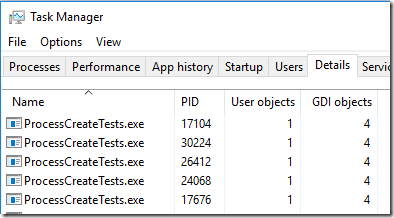
Earlier this month I wrote about how Windows 10 holds a lock during too much of process destruction, which both serializes this task and causes mouse-cursor hitches and UI hangs (because the same l…
I had it real bad when I had turned off hyperthreading for some reason in the past and forgot to turn it back on
(I don't think the frozen percentage is due to it, but the system unresponsiveness)
I would get it with UE4 builds and shader compiles
uneven moon
@full junco I have an i7700K
But I'll let it run and see if it loads or crashes
In the past, hanging at 45% = crash after a minute or so
Yeah, crashed
It works again if I go into the ini file and change this:
Back to false.
My engine install folder doesn't have the derived data cache folder anymore:
Could that be the cause?
full junco
@uneven moon hm, that's very strange then
delete the intermediate folder for both the engine and the project
that might help
uneven moon
It's not just instanced stereo
Any setting I change in project settings will crash the project load
until I revert it
I'll try deleting all the derived cache folders and see if UE4 rebuilds properly
I'm re-installing the engine now
wicked oak
the one i know that is crashtastic in 4.16 is the StartInVR one
the StartInVr changes the HMD plugin load order, and it tries to load the headset plugin before the editor module is loaded
wich ends up causing a fail becouse the hmd plugin tries to load the editor module (to hook into it), but the editor is not loaded yet, so it fails
 slender gorge
Hey guys ! I'm currently working on a VR scene using UE4, our client has a low budget so we decided to render a 360° video in Unreal and to run it on low configurations PC's. The problem is that the render time for a single frame is huuuuuge (4K stereo render, lot of foliage ...) and we would like to use a .exe in order to launch different sequencers on diffrerent PC's. However, when we build the package, the plugin "Stereo Panoramic movie capture" seems to make the build fail (everything is fine without it, we tyied on an empty scene) even with a dev build. Any clue ? Or alternatives ?
uneven moon
Game drops from 90+ fps to 45 fps when I put the HMD on my head
Any thoughts?
Running at 22ms when the FPS drops
GPU vis doesn't show anything
 wild mauve
@uneven moon sounds like it's reprojecting
 echo thorn
is there a way i could use sequencer fro my motion controller button rather than enabling VR mode in 4.17
from*
tired tree
@uneven moon yeah like Supa said, when it can't hit 90 fps it drops it down to 45 and a stable 22ms so that it can double up frames. You can turn off reprojection in the steamVR settings if you want real indicators of where you are sitting
mighty carbon
btw, this is a game for Gear VR https://www.youtube.com/watch?v=CqWGkPQ2IMU

http://www.deathhorizon.com/ In the secret Horizon laboratory, a horrific virus has broken free, and now all the employees have turned to zombies. Only the g...
pretty crazy quality visuals
Google Developers
that would be a game changer for Gear VR development
uneven moon
@tired tree I see that it'll only use reprojection if I'm below the required FPS (I need it to be 90 anyways)
Problem is, this also happens with a blank VR template project when I notice it happening in my project
Sometimes it doesn't happen, other times it does. Same game, same scene, no changes made.
What might be causing this?
tired tree
are you starting the vr preview from the blueprint graph or the level designer
because fps takes a massive hit since 4.16 starting preview from a node graph
uneven moon
I just click VR preview in the editor, at the top
Before I put the HMD on ^
Once it's on ^
Taking it off makes no difference, it stays at 44-46
Even when I tweak settings and get a default 145-150 FPS, it still drops to 45 when I put the HMD on.
I tried changing scalability settings to the lowest possible, it makes 0 difference.
GTX 1080, i7700K
tired tree
you said you were running dynamic lighting? and you are running heavy fog?
you need to d osome rendering profiling...
uneven moon
But why is it that sometimes the same scene will run at 90 FPS and other times at 45?
I don't add or take anything away to cause the drop from when it runs smooth
tired tree
thats why you are going to have to profile....also check your level for hotspots
wicked oak
@uneven moon one eye vs 2 eyes
1080p resolution vs 1440p equivalent resolution
those already would drop your fps to around 70 or so
and then vsync kicks in
and goes to 45
personally i try to keep the editor at locked 120 fps
and STILL get performance issues
uneven moon
Hmm
Can you direct me to a resource on profiling? I'm not 100% sure what you mean or how to do this
uneven moon
I switched MSAA to "none" and I get 90 fps now
wicked oak
that one gives you fairly accurate gpu markers
of what parts take more/less
for proper profiling, its a lot more complicated
the wiki explains
uneven moon
This will definitely be useful, thank you
Do you guys know if there's a way to alter the mirror preview and not the game itself?
I want to increase the gamma or something so that the PC monitor sees brighter than the player in VR
I think Robo Recall managed to alter the preview by adding the leaderboard that only the monitor preview could see, not the player in VR
So there must be a way
tired tree
robo recall used what is essentially the new feature of 4.17 with spectator screens
oh wait...you were saying you were only getting 98fps with HMD turned off? Jesus I just saw 90 and didn't look closely. If you can barely hit above 90 fps just in 2D there is no way you are going to hit it in VR
I thought you were saying you went between 90-45 while in VR
 granite jacinth
@uneven moon Watch this series... you will learn so much, I learned quite a bit, some of it I already knew, but it's good that someone went more in depth on areas I hadn't touched or even bother with: https://www.youtube.com/playlist?list=PLF8ktr3i-U4A7vuQ6TXPr3f-bhmy6xM3S

Anyone doing VR dev should watch this
But really it applies to any game.
 wintry escarp
AR isn't currently smart enough to put CG between live elements is it
 fossil stratus
when working with an Oculus could installing the motion controllers interfere with an app set up to use the remote?
is it possible updating the oculus firmware could messed up something?
wintry escarp
I don't think so, but ive never used the remote
wintry escarp
heh I never even unpacked the gamepad or the remote
fossil stratus
now its working.. i restarted unreal
that seems to be the fix for everything on a computer... close & restart program or computer 😃
dusk vigil
Yeah, just an unreal restart is a wise thing to do if something is irrational. Annoying but much the same on all engines at times
 normal thorn
has anyone implemented the 4.17 camera for the vive? so you don't have the black bars?
the spectator camera
normal thorn
oh! I'm dl'ing 4.17 now
wicked oak

houdini for ue4 is hella cool
look at that fully 3d smoke FX with animation
the shader is mine, it does some fancy shit by rendering twice and using the custom depth stuffs
glossy agate
Do you run it real time, or will you bake out the textures?
wicked oak
it works by using a texture with all the vertex positions
each of the triangles in the mesh is on 1 row of the UV
and then each row is a frame of the animation
the material scrolls the UVs, getting the "new" position
its damn good tech XD
of course, its only bottleneck is the size of said texture
if you want a 2k mesh, then your texture needs to be 2k width, and its number of rows is how many frames the animation has
a 2kx2k texture can animate a 2000 vertices mesh over a 2000 frame period
like Alembic, but faster
a LOT faster
wicked oak
they use alembic there
i did, but i dont know how it works
that would be exactly what i need
sturdy coral
it is real time computed
wicked oak
becouse i want a volumetric cloud
for a 3d explosion FX
this one is fake as shit XD
sturdy coral
they use 4 or 5 scene captures around the actor capturing his depth only
wicked oak
i render custom depth on the backfaces , then render again and compare the distance
sturdy coral

Sequencer Scrubbing a realtime fluid sim in UE4. This was lookdev for husk death simulations in the fortnite cinematic trailer. (The strobing in the velocity...
wicked oak
i know they have some raymarched smoke FX that looks incredible
the issue is that that one is SUPER expensive
sturdy coral
yeah I'm sure it is expensive as hell
sturdy coral
that scrubbing is in realtime
wicked oak
sure, but i have like 0,5 ms budget
sturdy coral
I'm not sure if the whole fortnite trailer was, though it was all in engine
wicked oak
actually, less than that XD
sturdy coral
yeah I don't think it will work for VR right now
but his volumetric cloud stuff does work
wicked oak
the issue with that one is all the scene captures, the compute shader, and worst of all, the raymarch shader
sturdy coral
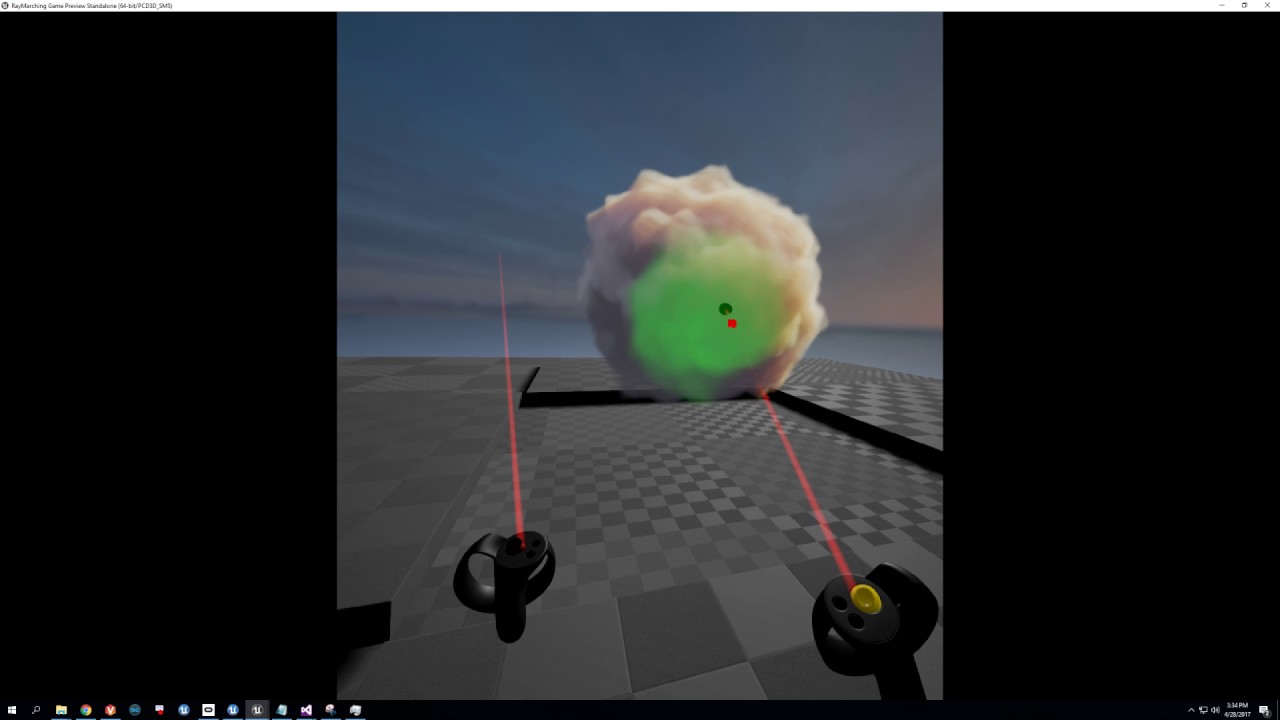
1st wip version downloadable here: https://www.dropbox.com/home?preview=VolumeFunctions.7z Painting velocity in 3d and using it as flowmap data. Also added s...
I don't know how bad the ray march shader actually is
have you checked out alumette yet?
sturdy coral
all the clouds in that use something similar
wicked oak
allumette is a simplified version of that i think
sturdy coral
but they aren't animated
wicked oak
its a raymarched 3d texture
sturdy coral
they also do some sort of form fitting of the geometry over the cloud
I think all his are a cube
they posted some of their stuff in his thread
wicked oak
it is a voxel grid
just checked
its more or less the same technique the guy is painting above
and they were a huge chunk of their render time
i aint running that on a ps4 XD
thats why ive been looking at more optimized stuff. Maybe i can raymarch a distorted noise sphere, parametrically
sturdy coral
at some point I'm sure sony is going to allow ps4 pro-only VR titles even though I think they assured people they wouldn't
though I guess you would deal with a much smaller market
I think alumette also gets by with keeping the clouds in known locations that don't have a lot of overlap with each other and stuff and they can kind of control the screen size of them
cause you aren't just totally flying around on your own or anything
wicked oak
i already added dualshock support to get more possible players XD
wicked oak
you can aim with the normal ps4 gamepad tracking
970, the thing was on the absolute edge
and that was on a DK2, wich was lower res and lower framerate
sturdy coral
does dynamic res work on ps4?
wicked oak
nope
it only works on oculus becouse its a feature they implemented
doesnt mean you couldnt "port" it
its just that i wont do it for DWVR, given that im releasing NOW
sturdy coral
yeah, john alcatraz ported it to vive, it works well
wicked oak
i saw the patch
and thought of implementing it on the PSVR plugin
same exact changes, but on the psvr plugin
full junco
with 4.17 supporting the spectator screen, do scene capture components now also support temporal AA or other AA?
or are you forced to no AA in the spectator screen?
full junco
@wicked oak I think you tested it?
full junco
well yeah I know about the performance
wicked oak
no, i did not have AA or anything, i tried to disable everything i could
full junco
the thing is, I currently need to run the scene capture at 4K resolution to have an acceptable result due to no AA
full hd with TAA would be way, way cheaper
wicked oak
is it for a trailer? becouse having that ingame is too expensive
full junco
yeah its only for capturing stuff for the trailer
wicked oak
i guess youtubers can deal with it with raw power, but im not sure
Oculus has a special capture system in their ue4 branch
full junco
no you cant deal with it with raw power, I get something like 20 fps in the game
and I already set the screen percentage in the headset to 20 😄
wicked oak
that lets people sync their cameras there in a general way
lol
the performance problem might be due to having to render that texture, its absurd how it has absolutely insane base performance cost
even if it renders basically nothing
full junco
scene captures have a high performance impact no matter what you render, yeah
so you dont know if AA works on scene captures in 4.17?
in 4.15 scene captures just have no AA at all
there are many threads about it: https://answers.unrealengine.com/questions/163968/can-ues-render-target-support-temporal-aa.html
full junco
none of those mentions that it would be different in 4.17, but I dont see how they would add spectator screens with no AA
ah?
the 4.17 patch notes?
ah, you are right!

thanks
now I just need to find the commit...
full junco
capturing stuff for the trailer that isn't first-person, yeah

 chilly thicket
Anyone have any idea what that annyoing black box is?
I'm casting a line then drawing a debug circle, and I have no idea where that black box is coming from.
And it seems to draw itself in different places on each eye.
wicked oak
stereo rendering makes debugdraw broken
wicked oak
yeah
chilly thicket
Okay.
Complete noob question, how do I go about doing that?
I made another actor, but I don't know how to target it from this function in another blueprint.
sturdy coral
@chilly thicket If I remember, you can turn off instanced stereo too and it works ok
chilly thicket
Oh, okay, that would explain why it worked earlier.
sturdy coral
that makes you recompile all shaders though
chilly thicket
But I'll probably be using a custom texture for the circle anyways.
So I'd rather figure out how to do this.
sturdy coral
yeah, draw debug is turned off in shipping builds too I think
chilly thicket
So, sorry for the many questions, I'm still learning this, but I have a TeleportCube cube as a component on my VRPawn.
How do I telelport it to a vector location?
sturdy coral
@chilly thicket set world transform blueprint node, uncheck sweep and check teleport
chilly thicket
Sorry, I'm not quite understanding where to put that.
sturdy coral
whereever you are doing the teleport
you drag out the teleportcube onto your blueprint graph
chilly thicket
Yeah.
sturdy coral
and then call that on it
it might have some slightly different name can't remember off hand
but it should have a checkbox for teleport and sweep
chilly thicket
Sec.
sturdy coral
teleport means to not recaculate physics based on the movement, unchecked sweep means not to sweep for collisions
chilly thicket
Ah, I got it working now, thank you.
And now to figure out how to make it an arc instead of a line trace.
 eternal inlet
im making a gun-reload mechanism where the player should shoot the gun outside the "view" area... any good ideas how to accomplish that? im thinking about just adding a collider on the camera, but besides that approach what other options do i have?
eternal inlet
think im just gonna experiment with good old dot product
tired tree
ah, like old school arcade shooters? yeah dot product from the camera forward would work
also a good idea
glossy agate
May want to specify a certain area to reload instead of just anywhere though, or it will be easy to game it.
I.e. People will end up snapping their head to the side for reloading once they figure it out.
Like how you can cover the gun nozzle on the house of the dead arcade game for reloads
glossy agate
Haha. Or you could do hips or next to head. While out of camera just to force players to take gun off target. Unless it's a super challenging game anyway then head snap would be good
chilly thicket
Could anyone direct me to a good place to learn about implemnting multiplayer for VR?
From what I've heard, it sounded like it was different than just normal multiplayer, but I can't find any guides about how to do it.
tired tree
snapping head to the side is kind of worse than moving your hands to the side like in the arcade
doubt anyone would d othat
glossy agate
Well yeah to the side would be bad with HMD haha. Looking up real quick to reload would be more comfortable.
@chilly thicket there is a epic livestream video on it, and an example project for it on the asset sharing forum thread
chilly thicket
Oh, okay.
glossy agate
Not the one I was talking about but that one looks good too! First time I've seen it. MordenTrals vr expansion plugin also has VR multiplayer in it
That's what I'm using. I have the epic livestream one too but haven't really messed with it much
chilly thicket
Oh, okay.
I just tried this one and I'm not too impressed.
I'll try that other one.
Do you happen to have a link to the epic livestream's one?
glossy agate
I'm just on my phone so no. Go to asset sharing thread (must be logged in). Should be right there towards the top cause it's popular. If you find the video on ue4 YouTube they may have a direct link too.
chilly thicket
Okay.
chilly thicket
Nice.
The template I tried was very unintuitive to me.
So I'm thinking maybe I should just develop my game, and impliment multiplayer later.
tired tree
the proteus one?
yeah he has always had his own style
but planning multiplayer "at some point" is generally a bad idea
I know that Ryan mentioned my template/plugin but you are brand new to vr dev if I remember and its likely too much to just step into
if you only need hmd / controllers replicating than epics tutorial would function
chilly thicket
Well, besides hmd/controllers, there would be the thing the person is holding + a thing they might be doing with that said thing.
Also, I couldn't find the epic template one, because apperently I'm terrible at searching the internet.
 dusky moon
What's the best way to attach a body to User's chest ?! like when user looks down in VR can see it ... problem is when I attach it to the VR Pawn's camera the child object gets the orientation (rotation) as well . how can I just attach it to VR camera's location and not rotation ?
eternal inlet
@dusky moon you want the yaw part of the rotation still, right?
dusky moon
@eternal inlet yes right
eternal inlet
other than that, i'd suggest you set the location and rotation on tick manually
i mean, based on the camera transform
dusky moon
ahh I that's what I also was assuming... just thought it might be a bit dirty to set that in tick I donnow 😃
eternal inlet
yeah i know what you mean
and im sure someone is gonna say something about missing late update 😉
but it should work fine
dusky moon
Thanks man! will give it a go
eternal inlet
np
dusky moon
haven't heard stuff from you lately ... looking forward man
eternal inlet
no im working full time regular job
and a film project too
and my own vr game ...
no more time sadly
i've meant to update it on my channel too
but hope i can grab a brief moment soon to make a little video about recent work and maybe throw out a few tips/ideas
how's your projects running?
dusky moon
cool ... yeah I'm hardly workin on it. going to record a trailer in sequencer this week
it's in mid-production and hoping to get fundings
but the VR body is getting real rad and excited with it
it's still not functional in VR but still
eternal inlet
uuuh sounds really good man
dusky moon
Cheers!
eternal inlet
personally i went for ikinema for fullbody solving
though i don't use the feet in most recent tests i've done
so it's just chest and arms/hands
it lags a bit behind, but seem ok
dusky moon
ah cool! because my body also lacks feet
I'll need some suggestions from you in the future 😃
eternal inlet
sure thing, just say it
dusky moon
got to go dude, keep posting 😉 cya
eternal inlet
laters man and gl
 vagrant mantle
I want to make a vr application where the objects in the scene can be moved with HTC vive motion controller with a laser like the unity editor does, any reference for that?
uneven moon
I think the correct way would be to create a consistent line trace and attach certain components to it but I'm not sure how you would do that (look into it). Another way that might work is if you created a cylinder, applied a moving laser material and then attached those certain components to it upon begin overlap > bool true > input (e.g. trigger) hold . release = drop.
 real needle
Hi. I need to make FHD or better 2K screen capture. Is it possible with VR Spectator Screen ? Anyone ever tested it? I have read documentation, but I don't understand very well how it works
full junco
@real needle you can use a 2K scene capture for the spectator screen
obviously you won't be able to have good fps with that, but I guess you don't care about that
real needle
sorry but how I can do that ? No necessary to have good fps
full junco
I havent used the spectator screen in 4.17, but it shouldnt be hard
real needle
yes I think so but I don't undestand how it works
eternal inlet
I tried "t.MaxFPS 30"
how come it doesn't throttle down fps?
im doing this with a Vive btw, if that has any relevance?
eternal inlet
is there a way to tell it to capture at a different fixed framerate? like 25 or 30?
 pearl tangle
@eternal inlet rig it up in a blueprint with a delay or an adjusted ticker on there to capture
eternal inlet
oh right... could try that yes
im thinking of using the sequencer instead if that's possible
tired tree
no don't do that
the node re-initializes everything and will be really slow
you could toggle the Capture every frame boolean but it likely would also have perf issues
i've been thinking about overriding a scenecapture to allow for set update htz
eternal inlet
@tired tree i had a feeling doing this manually could be an issue
right now im trying to do this via the sequencer, but for some reason i don't get anything in the sequence... so i saw somewhere that u needed to add ie. a static mesh that had it's transform driven by the camera
however, i don't know how to make sure that the recorded sequence gets recorded from that transform
full junco
you update a scene capture with updating its location
so just set the same location 30 times per second
you don't really benefit from that though
it's easier to just let it capture every frame
if every third frame is below 90 fps that doesn't really feel better than if all frames are below 90 fps
full junco
well but for that you wouldn't have to care about the scene capture update frequency?
eternal inlet
optimally i would like to use the sequencer, but not sure that's possible
full junco
"the" sequencer?
eternal inlet
yes, the sequencer in ue4
full junco
sequencer is a name so when you say "the" it sounds weird
eternal inlet
kk
full junco
what's the issue with just letting it run at 90 fps?
full junco
capturing at 30 fps will feel same laggy
eternal inlet
it's that project that Caravella mentioned a bit earlier
full junco
you work on it together?
eternal inlet
yeah
full junco
ah nice
eternal inlet
anyway ue4 crashed now on me 4 times in a row... im gonna ragequit and take a break for a few hours
lol
eternal inlet
Yah
eternal inlet
seems setting Sequence Length = 0 crashes editor when exiting
but also i can't for the love of god get sequencer to record from the viewpoint of my hmd
when i play it back, it shows view from the hmd, but when i record movie, it just shows a stationary view
also the controllers don't move, so im guessing i need to add them manually somehow which may be an issue in itself since i use ikinema to drive the fullbody movement which currently is not captured in sequencer at all
glossy agate
I didn't even realize sequencer could do live recording like that besides anim recording.
 rigid quiver
Anyone know how to make the rumble of controllers for a shorter time? Here's the rumble from the template and it works, i'd just like it to be a shorter period of time.
granite jacinth
@rigid quiver make the curve smaller
rigid quiver
aha! got it thanks!
eternal inlet
speaking of rumble... anyone noticed that only one controller will rumble at a time? or is it just me?
uneven moon
@eternal inlet You have control over which controller rumbles and when
If you're holding a gun in your right hand and it's fired, you wouldn't also want your left hand (without a gun) to rumble
eternal inlet
that's not what i mean
if i trigger rumble on both controllers, usally only one of them will actually rumble
 noble charm
@eternal inlet how are you setting them to rumble. I've seen that happen when I tried to rumble them separately.
It only plays one of the feedbacks
You'd have to have one defined to rumble both controllers
eternal inlet
@noble charm i use this method
and call this obv for the montioncontroller in question (which has the Variable "Hand" set to either Left or Right)
noble charm
Yeah so that's why it's not working
Because you are setting it to not affect the other hand
eternal inlet
i don't quite see the bug
noble charm
It doesn't combine the two forcefeedbacks
noble charm
Yep
noble charm
That would be cool
eternal inlet
so does there exist a method that only rumbles one controller?
eternal inlet
ok, so i suppose if two controllerrs should rumble but duration overlaps, how do you handle that?
sturdy coral
@eternal inlet I don't think you can without writing your own extension
things should just be able to superimpose over each other but I don't think there is a way
sturdy coral
@eternal inlet they do implement IHapticDevice now, maybe the haptic feedback nodes are working now
I haven't tried them in a long time. I'm not sure if they have a way to do overlapping effects
eternal inlet
thx @sturdy coral i'll have a look at it
fossil stratus
is there way to record 360 video of my vr project while playing it?
in unreal?
What i'm thinking of doing with the video is make a prerendered interactive 360 video that could run on mobile
Anyone try something like this before?
glossy agate
You can't record 360 real time yet. The built in plugin takes like 2min per frame.
Although earlier this year a guy on Reddit sent me a vid of real time 360 recording of VR gameplay in unity. Said he was trying to make a UE4 version too so we may be able to do it one day.
uneven moon
I can set up a camera to record my character in-game while I possess it and play as him, right?
dusky moon
@uneven moon@uneven moon yes, you should setup Scene capture camera . and record that.
check out the new feature in 4.17 ... VR Mirror window
there's a documentation for it
 pastel lintel
hey sorry for the dumb question, but why do most vr games look bad?
i mean, lots are based in small areas, and i've seen beautiful arch viz scenes with ue4.
why not use archviz scenes with vr for something cool? is it just because vr is new so all the new games are just rushed ones?
 gilded oyster
its harder to render any scene in VR
pastel lintel
for the computer? like it takes more power?
gilded oyster
Yeah
Not saying that's a valid excuse for every game
But could explain some of that
pastel lintel
i wonder why it's harder, i imagine the vive just boils down to a second monitor
gilded oyster
plus VR has to hit a higher framerate
gilded oyster
nope
pastel lintel
oh
gilded oyster
Realistically you can reliably distingush individual frames only below 24 fps - but that doesn't mean higher FPS is wasted
pastel lintel
yeah i can feel a difference between 40 and 60
gilded oyster
pastel lintel
interesting
gilded oyster
Anyway IIRC vr "minimums" are 90fps
pastel lintel
alright cool, thanks 😄
gilded oyster

The HTC Vive is a virtual reality headset developed by HTC and Valve Corporation. The headset uses "room scale" tracking technology, allowing the user to move in 3D space and use motion-tracked handheld controllers to interact with the environmen...
slender gorge
Hey guys, do you know if there is a way to force the viewer camera rotation in a 360 video captured in UE4 and displayed on a Vive ?
 short mural
Hello guys. I have a question regarding media player not saving the video file when closed in editor. So I am trying to make a working projector in VR, and so far everything is working except when I close the Media Player (opened in editor) the video files linked to it go black. I did hit save, all my video files are in the Movie folder and have been relinked to their paths. I really don't know how to approach this further, I've been googling for days... Plz help 😄
chilly thicket
How resource intensive would adding a wind effect to my trees be?
sturdy coral
@chilly thicket depends, it adds geometry shader work and potentially some draw calls for drawing to the velocity buffer unless you are using msaa
chilly thicket
Hm, okay.
I'm trying to decide if i want to do that for my vr game.
I guess I could always easily add it later if wanted.
sturdy coral
yeah, you can always test it out
kite demo trees have wind and you can run them at a lower LOD to test in VR
full junco
I use speedtree trees with wind @chilly thicket
chilly thicket
Sorry, I don't know what speedtree is.
full junco
well, its not that expensive
full junco
in those packages you get 9 different trees though, so per tree its cheap and you dont need any more trees for your whole game probably
full junco
I wouldn't call it speedtree quality, but I can see that its a tree
chilly thicket
Yeah, that was the second tree I ever made.
So I"m still pretty new to modeling them.
 vocal whale
hello guys, is anyone know that issue; widgets "on hovered" event keep firing therefore hovered sound keep looping ? any idea ?
 willow trail
Is anybody else getting weird artifacts (the black lines) when drawing debug lines in VR? This isn't some residual call to draw debug line, the artifact is completely different on the left and right eye. https://puu.sh/xxcOs/80991c9117.png
 chilly thicket
Drawing debug lines isn't supported for VR if you have instanced stereo on.
At least I think that's what's going on.
You can either turn off instanced stereo in your project settings, or use another method of drawing lines.
@willow trail ^
willow trail
Hmm ok, too bad, guess I'll use cylinders then, thanks 😃
chilly thicket
No problemo.
willow trail
Oh alright I forgot what instanced stereo rendering was, I suppose I can also just disable that for debugging, I thought you were talking about disabling stereo rendering altogether
chilly thicket
Ah, okay.
Just a warning, it'll make you rebuild all shaders whenever you turn it on or off.
willow trail
Oh right, good to know, won't be an issue for the VR template I reckon
chilly thicket
Yeah, but I've heard the VR Template isn't exactly optimized.
But I'm not entirely sure if it still is like that or not.
tired tree
The black lines are a bug introduced in 4.16
they had the exact same issue back in 4.13 and fixed it, no idea why it has been persistent this long this time.
you can use a scaled mesh instead of a debug line for pointer lines too
 robust orbit
@short mural the media source is not stored in the MediaPlayer. you have to open it via Blueprint.
there are various BP functions to open media, i.e. OpenUrl, OpenSource, OpenPlaylistIndex
eternal inlet
if i have an actor that is living in a persistent level, and it spawns another actor, which sublevel will that new actor be spawned into?
i would have thought that it would land in the persistent level too, but doesnt seem to be the case
sturdy coral
@eternal inlet not sure but:
class ULevel* OverrideLevel;```that's in struct ENGINE_API FActorSpawnParameters
eternal inlet
aha..
so the outer of the actor, that means excactly?
i continued a bit experimenting, and since im doing my stuff in bp, and so far don't venture too much into c++, i hope to find a way there
but...
it actually seems to spawn now in the persistentlevel, or i did something different
sturdy coral
I think even uobjects have an outer, pretty sure it is who owns it for garbage collection
eternal inlet
makes sense
the reason i didnt think it was spawning in the pl, may have been a mistake from my side then
i moved my "loading level" outside the grid in the world
then funny stuff started to happen
eternal inlet
yes, but also i got a bunch of null errors
willow trail
I've got my headset sitting next to me for convenience, I'm just trying motion control stuff, but the input don't trigger when the headset is not worn. Anyone knows if it's the Oculus API not sending inputs in this state, or if it's on UE side/the VR template?
oh and to piggy back on my own question, can I actually just use the mirrored render with a fixed camera to test for that?
I realize I can just use a piece of tape, just wondering if there's a better way to do it 😃
mighty carbon
so, I passed all reviews for my Gear VR app, but despite passing tech and content review with flying colors it was still slated for Gallery 😦
I guess it was too basic, but then again, there are a ton of basic apps in the store store
 hybrid plume
Hi @willow trail why don't you hit play with the vr checked?
willow trail
@hybrid plume Hey, what do you mean? I use VR preview to start it
It's just that I'd like to see my motion controllers in game without having to put my headset on, it's a hassle when debugging stuff
hybrid plume
do you click play?
willow trail
yes of course https://puu.sh/xxo1o/d90f896fa5.png
 hybrid plume
please send me the whole screenshot
willow trail
Well that's just a window before starting it https://puu.sh/xxo6L/8519ac94f2.png

It behave as expected when I'm wearing the HMD, but I got no feedback (except position) on both oculus touch if the proximity sensor isn't triggered
hybrid plume
its a settings issue
willow trail
Alright, I'm hoping it is, do you know what I should change? This is the default behavior for the VR template and I couldn't find any ressource online regarding this
I've been looking through my project settings, nothing seems to come close, kind of lost to be honest, I'm starting to doubt that this might be on Oculus's side
hybrid plume
type "is head mounted display enabled"
wintry escarp
whats the gearvr gallery?
willow trail
@hybrid plume Right, I can check if it's enabled, but I'm not using that, I'm reading from inputAction *, but nothing comes through when the HMD is not enabled. No option in the project settings that I could see change that behavior, I'd expect a bool to be set under the Engine - Input, but there is no such thing
In addition to that, I don't get any input either if the window is not focused, which makes it really hard to debug blueprint
Been bashing my head on this for an hour, this sounds so basic, it's a bit disheartening
 lime dagger
wait what?
oh don't do it that way
in the project settings just create an action that maps to the motion controller button or axis or etc
willow trail
Yes that's what I did, I didn't know there was any other way
willow trail
oh if you mean using "Get MC Thumbstick X" instead of getting the axis value from the inputAction, then this doesn't work on my end, axis seems to always stay at 0
Yeah sorry that was mostly unrelated, that's the sort of thing I'm doing right now : https://puu.sh/xxpAf/075889bd3d.png
 willow trail
yes the but the action have an axis value
lime dagger
... No make it an axis
willow trail
it already is an axis
lime dagger
no make it an axis input

In Unreal Engine 4 we wanted to make binding input events as easy as possible. To that end, we created Input Action and Axis Mappings. While it is certainly valid to bind keys directly to events, I hope I can convince you that using mappings will be the most flexible and convenient way to set up your input.
willow trail
I believe it is https://puu.sh/xxpCW/24799237e4.png
 lime dagger
input actions are different than axis mappings
willow trail
yes that's what I'm using I think
willow trail
it works fine when the window is in focus AND the hmd is on my head
lime dagger
window always has to have focus
willow trail
I'm pretty sure this behavior is not enforced by the Oculus API though
lime dagger
are using the vive/rift/etc? Are you sure the hardware doesn't require the HMD to use the motion controller?
willow trail
I'm using an Oculus with touch
it's possible that it does yes, that was my initial question
lime dagger
Pretty sure with the vive the HMD connects with the controllers
they may have standardized it
willow trail
as far as I know even early Oculus demo would play fine without the window in focus, but I have noticed that most Unreal project do need focus :/
lime dagger
If the window doesn't have focus it will not render as fast as you want it
and the input is tied to the frame rate
willow trail
Perhaps, but if that's the case I put the blame on UE then, I haven't seen a drop in framerate in other games when being out of focus
lime dagger
Perhaps but if you find that then dig into the engine code
find out why
and perhaps then create a solution around it and make a pull request back to epic 😄
willow trail
But anyway, my biggest problem right now is that everytime I want to debug my BP (and that's often since I'm new to it), I have to press "Play VR", then move the window out of the way, alt-tab to the UE window that for some reason got minized/hidden, look at the part of the BP I want to debug, switch back to the window, put my headset on half-way, hold the controller, and still maneuver my mouse over the value I want to watch
this takes half the time of debugging, really irritating
glossy agate
@willow trail The oculus HMD checks if its worn, and I think it just doest work when not worn.
willow trail
a piece of paper fixed that problem, but all the rest of my problems remain unfortunately
glossy agate
May be able to override the bisworn and make it always true? Not sure though cause Im on Vive
lime dagger
anyways, it was fixed with a hardware override it sounds like.
So honestly for VR development
what I do is build it in editor without VR then build the VR bits in and test it in VR miniumally because coding with VR is, yes, a bit of a pain
I typically keep one controller or maybe two next to me and the HMD on my lap
willow trail
I get you but right now I'm trying to figure out motion controls and the API with that, none-VR is not an option :/
lime dagger
ah then enjoy. I created my own motion controller component on top of theirs
and I did it using the vive
willow trail
I've got the headset on my right, looking at me, a piece of paper triggering the proximity sensor, as much of a hack as it is, I'm fine with that. The whole minimized window and focus thingy are still a pain
lime dagger
and was fairly easy to do as long as the vive head headset was tracking
I also have the oculus rift with touch controllers
am using those primarly now
with the vive that stuff was easier tbh
glossy agate
Go to editor setting>Play>Try that box that says start preview window on top or whatever it says
willow trail
This option? When I tick it and press play everything gets minimized for some reason, I have to press alt-tab to even see the preview
Is there any option to start that window on my second screen (UE doesn't remember window placement or screen), and ALSO not minize the editor?
that would already be a huge time saver tbh

I also tried "disable centering window on screen" or something, but it still centers it
https://forums.unrealengine.com/development-discussion/vr-ar-development/49376-epic-please-don-t-minimize-editor-during-vr-preview?78048-EPIC-Please-don-t-minimize-editor-during-VR-preview Alright so people mention using "Viewport Gets HMDControl", which doesn't work because the motion controllers don't work in the viewport.
I'm just using windows right now, I don't have a toolchain set up, I've never compiled jack on windows, the only solution seems to recompile the whole engine...
mighty carbon
@wintry escarp well, fire up Gear VR and see for yourself 😉
chilly thicket
So, does anyone know where I can get like a guide on how to do multiplayer completely?
For vr.
Because I can't seem to find any info I can understand on the topic.
granite jacinth
@chilly thicket hmm
mighty carbon
it's a complex topic, @chilly thicket
chilly thicket
Yeah.
mighty carbon
unless you are quite seasoned in making single player for VR, I wouldn't touch MP with a long stick
mighty carbon
(unless you can partner up with someone who is experienced in MP or hire someone to implement it)
I would first read eXi's compendium on UE4 networking
just to get acquainted with networking
chilly thicket
Okay.
mighty carbon
 chilly thicket
Yeah, I googled it 😄
mighty carbon
100+ pages is no joke o.O
chilly thicket
Well, thanks for pointing me in the right direction.
mighty carbon
sure thing, np
sturdy coral
@lime dagger still doesn't seem safe in constructor, spawnactor runs first which constructs, IsLocalPlayerController will return false if called in constructor on server for a local player, then SetLocalController is called and it will start returning true
lime dagger
also it should be is locally controlled
{
    return ( Controller && Controller->IsLocalController() );
} ```also on the non-authority because local controllers exist on the server and the client
gah nvm IsLocalController is all you need
and controller of course
sturdy coral
yeah I don't necessarily have a pawn for what I'm doing (during death camera)
lime dagger
(thats fine cause you don't need to use that exact function)
you can use islocalcontroller
fossil stratus
anyone here developing on oculus?
granite jacinth
@fossil stratus yup
full junco
sometimes I do, but I prefer the vive
fossil stratus
do recommend any good tutorial to get set up with oculus?
in unreal
it doesnt seem to work right with the unreal vr template
granite jacinth
@fossil stratus there is a mistake unless it got fixed
change the name on switch
to OculusHMD
from whatever it is now
fossil stratus
in HMDLocomotion Pawn?
granite jacinth
@fossil stratus Hmm, no idea. Let me check. What's your exacty issue? I mean "it doesnt seem to work right with the unreal vr template" doesn't help me troubleshoot.
fossil stratus
actyu
actually i should just go to bed and look into this in the morning.. im too tired to think straight right now
willow trail
Anyone uses the VRExpansion plugin by sweet sweet Mr Mordentral? I'm trying to use blueprint with it, followed the BP setup through from his bitbucket wiki, but I literally have no idea where to go after just plopping a VRCharacter in my scene. I don't know exactly how I'm suppose to use the plugin, how to get movement and motion controllers to work. I know this is super vague, I swear I'm not trying to be lazy, just a bit overwhelming. I'd rather use BP because it makes it much easier to screw around and test stuff ofc.
To try and refine my question as much as I can I suppose, what kind of BP am I supposed to create? Are there settings that are exposed from the VRCharacter class to the Editor or something? What are a couple of nodes that I'll have to put down to get started and act on?
tired tree
there is a template you can use as references
it has a ton of stuff implemented (it is the base of the packaged demo)
willow trail
Yes sorry, I missed your template, been at 45% init for a while now (think it's the shaders building?), I'll look into it as soon as it's loaded, thanks 😃
Is the template supposed to work on 4.17.1 ? It complains that every plugins won't work with this engine version, I ignored the warnings.
 sly elk
so I licensed stock music for my video. I don't want ads playing before it because that is counterproductive
today I find out there have been ads (which haven't been playing for me since itis my YT channel)
check the video
the company I licensed the music from files a copyright claim
and is monetizing it
wild mauve
You have the contract?
sly elk
yeah
sly elk
I filed a dispute and I also contacted them
tired tree
@willow trail requires compilation
sly elk
but its infuriating. If your company sells stock music. DONT FILE COPYRIGHT CLAIMS ON YOUR CUSTOMERS
wild mauve
They might not have known you were a customer.
You have to realize that this is normal practice.
willow trail
@tired tree Alright, all should be well then
tired tree
I don't package in the binaries to the repository as the history is too large
wild mauve
You provide your video or youtube channel and they basically ignore any videos uploaded by you.
sly elk
Yeah. But there is no mechanism to tell them you are a customer when you upload the video
wild mauve
You tell them that before you upload the video
Obviously this should have been in the contract
sly elk
they have no system for that
wild mauve
I used to license through Monstercat.
Decent company.
They used to do it for free
and had a generic free license
but now they charge like 20$ a month
or something stupid
Needless to say NCS (No Copyright Sounds) is the best there is atm.
willow trail
@tired tree Gotcha, I've been struggling in the past to exclude history on binaries but still provide them, as far as I recall it's nigh impossible on git, but maybe I just suck at versioning
sly elk
It seems to me that if your business is licensing stock music for youtube videos either have a system to prevent this from happening or assume when you see your song on YT it is one of your customers. This approach just assumes every customer is a violator
willow trail
@sly elk Every content creator's bane unfortunately, youtube doesn't sanction overaggressive copyright claims so that's just how everyone does it
sly elk
Like why on earth would I license music from these people again? This is not how you get repeat business
Yeah, I get that YT is an unmoderated system that is easily abused. I just don't understand the business side for them here. Either they intend to make most of their money off of copyright claims and don't actually care about the licensing I paid for or they have put together a system to ensure no repeat business.
wild mauve
Or you know, it's a mistake.
And now that they know you r channel is licensed they likely wont file claims against it again?
Who is the company?
willow trail
Heh, I'd say the latter, how hard is it to filter youtube's email to licensees email first, and then send a mail a couple days before actually pulling the trigger
couple days worth of sweet ad bucks lost tho
actually not, since I'm pretty sure they retroactively get all the money if the video was monetized.
wild mauve
No
if you copyright claim someone's video
you get all monetization until they fight the claim
They can sue you for damages but youtube does not step in
There have been several court cases rewarding in favor of the copyright claimant so no one sues them
willow trail
I wonder if those were just case where it was on the fence, like partial use of some work. If you sue them for damage with the contract saying that you're legally entitled to use the music anywhere you want and monetize for it, I don't know how you could possibly lose
would set a better precedent
willow trail
I suppose, I really don't know jack about the US legal system
willow trail
Man I swear this editor is driving me nuts with VR... I don't know if it's only on oculus but I've got problem everywhere
loss of focus when I put my headset on, which means there's no input
 glad plank
You have to click the window sometimes
willow trail
debugging anything is a huge pain, I don't get how anybody does this
willow trail
I do, specifically whenever I put the headset on
gilded oyster
I do not miss debugging VR projects, and I didn't even have a serious one
willow trail
yeah why does it disappear and why can't the VR mirrored window remember it's previous position
wild mauve
whats your question
willow trail
I don't mean that to be disparaging to the EU Editor, I legitimately don't understand how that's possible.
wild mauve
issue*
willow trail
Like how do they build a mostly full fledged VR editor but still don't allow to change the most basic of behavior, I don't know
wild mauve
?
glad plank
We likely wont get an editor that plays nice with VR until UE5
wild mauve
Oh, I thought you were talking about that weird VR Halo Forge rip off.
glad plank
no lol
willow trail
My issues are numerous I've already gone at length on them yesterday, and apparently there's no solution? Like Redfox said, the editor disappear, the window needs focus for input, can't set the VR window to appear on the second screen. But yes, debugging BP is atrocious, the loops I have to jump through just to see a value while having the VR preview is ridiculous
wild mauve
when you launch a VR title
glad plank
when you have a blueprint open and are watching it for debugging
glad plank
the performance in VR gets murdered
wild mauve
and click back on the game
glad plank
like 50% fps drop
wild mauve
yeah mine runs awful when monitoring BP
glad plank
why does blueprint take up so much gpu resources?
wild mauve
Honestly
I'd love to set up the VR controller
finish it
done
yada yada
and then just put in a regular 3D character
for the rest of design until I need to playtest in VR
glad plank
I would love to be able to open blueprint in a window IN VR whilst testing gameplay
wild mauve
That would be cool.
glad plank
That would be intuitive and fast
willow trail
@wild mauve I feel like this is not viable for any meaningful motion controller interaction. So much of the cool games that already exist couldn't have regular pancake+controller equivalent for testing
at least any idea that I want to work on wouldn't really work
willow trail
pancake gaming
it's what they did before the VR age
when screens were somehow dissociated from your face, it was a weird and uncanny period of video games
gilded oyster
You know, that's actually a really good point. Why couldn't you basically develop the entire game in VR - BP and all? Seems like they'd be able to make BP display/edit widgets like they did for the level editor.
glad plank
I think they are or have developed them
gilded oyster
very gimmicky, but hey
glad plank
you can blueprint in vr right?
the vr editor that is
I remember them showing it off
willow trail
Haven't seen anything like that in the 20 seconds I spent looking 2 minutes ago
glad plank
what I want is during VR Preview to be able to have a window open floating somewhere in your view that shows the blueprint you are working on so you can debug
wild mauve
Like drawing it on a sphere around the players face.
But on one section of the sphere. Perhaps you cast the widget / UI to a material?
glad plank
Couldn't you do a static mesh?
wild mauve
redfox you can do that through steamvr
you c an have more than one display active
in VR
at any given time
Not sure about occulus
They do it for Star-Citizen as their VR-Setup.
glad plank
SO while I am testing my level in VR I can have a blueprint visible?
I don't think we are talking about the same thing
wild mauve
Well, I don't know if it'll work with UE4 since UE4 is very controlling over window hierarchy
BUT
I know it works for like youtube
or twitch
so if it works for those I assume it'll work in VR
glad plank
I need it to work in UE4 😛
wild mauve
Yeah, but I never used it before so I wouldn't know.
I'm not sure of any reason why it wouldn't work.
The only one I can think of is how fucky UE4 handles windows
feels so clunky compared to like every other program
well
I can't click behind a BP
to pull the main editor forward
and alt-tab to a bp
I either need to move the BP to another window or close it
super annoying

GitHub
OpenVRDesktopDisplayPortal - Put your favorite Desktop Window directly into any OpenVR game!
glad plank
for your UI could you attach a UI to the surface of a curved static mesh?
glad plank
You could do it with a dynamic material
wild mauve
I'm, admittedly, still very confused on how to spawn text that faces the player constantly but is also in 3D space
glad plank
Thats how I do it
I think there is an option to treat them as sprites?
or at least the UI that is being rendered bythe widget
willow trail
There's three things which would be huge time savers and would pull me right back around, maybe you can tell me if that's possible if one of you is familiar with the deep inner workings of the Editor/UE.
- Keep editor open when previewer VR. I expect that's possible
- Change default VR preview window position. I expect that's very much possible, there a setting that sounds like it'd do that, but it doesn't.
- The editor already captures all input from the motion controller, so why not feed them to the game when it's out of focus. Also that's a problem outside of the editor, many unreal games seem to have that problem. I have no idea if that's feasible but that's the big one for me
wild mauve
Keep editor open?
That's just a generic option in settings
oh btw turn off those noises too if you don't like hearing "WHOOOMP" when you spawn in.
That's like a default for me at this point.
wild mauve
glad plank
windows doesn't like multiple...windows 😛
willow trail
But Oculus game work just fine out of focus
So this can't be a win API or Oculus API issue
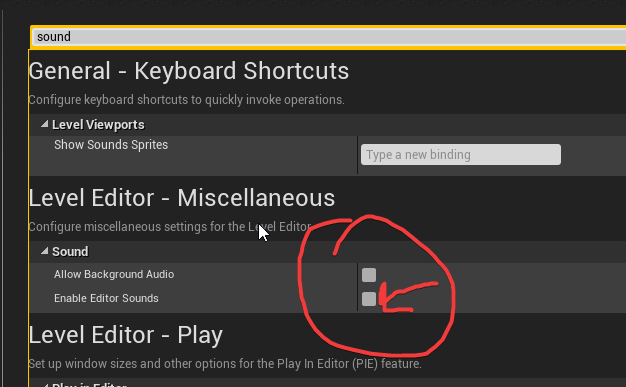 glad plank
cool thanks supa
wild mauve
no prob haha
glad plank
btw, if you are crashing a lot in 4.17 turn off the auto compilation thingy in the blueprint options
I couldn't get anything done in Weapon Master until I did that
glad plank
Yeah, its our asset on the MP
wild mauve
I'll take a look.
glad plank
nice!
We are both gun nuts so we do our best to recreate accurate weapon manipulation
willow trail
@near spruce Can you put me to those settings (keeping editor open and changing default VR window position)? I couldn't find either of those yesterday
wild mauve
Decent. I have mostly swords in my game haha!
Only because swords are easy to model 😛
glad plank
I am currently trying to figure out how best to use splines to create magazines with moving ammo 😛
willow trail
@glad plank btw,
wild mauve
You can search them @willow trail
willow trail
Oh I did
wild mauve
4.17?
willow trail
yy
wild mauve
O_o
haha
you're in Project Settings
not editor preferences
any money


haha
netflix in tiltbrush
with that overlay VR thing
Looks awesome I need to download it
willow trail
@wild mauve Nah i'm indeed in editor preferences
I'm not talking about the sound thing though
wild mauve
¯_(ツ)_/¯
glad plank
Haha could do twitch to, 24 hours of bob ross