#virtual-reality
1 messages · Page 132 of 1
 chilly thicket
But I'm going to recreate my character system as my own anyways.
So that it won't matter what height you are.
And the character will scale with your height.
This is what I have right now, if you're curious:
 glossy agate
@chilly thicket can you crouch with that one? That's what I was stuck on so I started using BIK plugin today to solve it for me.
chilly thicket
When I crouch right now, my head just goes into my chest.
I can lean forward and that works, but not straight down.
glossy agate
Yeah that's where I got stuck too haha
 wild mauve
Sup
 twin pulsar
hi does anyone know if it is possible to export to webgl AND vr / cardboard? I mean basically having a webgl window in a webpage with for instance a button to enter vr mode when loading the page from a mobile phone.
 uneven moon
Is there a node that checks whether the user is wearing the HMD or not? For example, Oculus inputs don't work when the HMD is not being worn so I'm wondering if I can pause my game when the HMD is taken off etc.

 full junco
@uneven moon I think I heard about such a node existing, but I dont know how its called
uneven moon
@full junco any chance you know how to disable receiving damage on a capsule?
I keep killing myself with my line trace haha
full junco
you can't kill anything with a line trace
uneven moon
I apply damage on hit
full junco
well you can tell your trace to not trace against whatever your capsule is
but just check if you hit the player and if yes, ignore it
full junco
doesnt matter how, that array there works
uneven moon
well I need the line to pass through the capsule, I don't want it blocking bullets either so I guess the ignore array should be it
I'm not sure how to use it, though
I tried creating an actor array of my pawns
But it wouldn't let me insert anything
It stayed at 'None' no matter which pawn I selected
full junco
it should work
uneven moon
this:
Nothing happens when I select a pawn
Did I pick the wrong var type?
Right now it's set to my parent pawn class
It governs all the pawns
 eternal inlet
anyone know how to calculate the recoil angle?
since the recoil angle should be applied in hand space, i need to convert that back to worldspace or componentspace after, but all my attempts give varying angles when i turn around
this is what i currently do (which doesn't work)
actually im not after the angle, but the resulting world rotation of the hand
 slim raft
I can't tell at all what you are trying to do from that spaghetti.
Maybe try to make a rotator from the right axis of the hand and your recoil angle, then combine that with the current rotation?
 frank plaza
My Event Drop (From the VR template) isn't working, I duplicated the cube that you can pickup and the picking up part is working fine but this doesn't activate (it doens't destroy the cube which I use as debug) I can't figure out why, and yes I added the "IsLeft" myself
nvm figured it out
eternal inlet
@slim raft hehe i realize it's kinda messed up sry about that
anyway, adding a rotation to axis of hand, was excactly what i tried to do (and failed at)
problem is getting the hand space.. i thought i could get it in worldspace then convert it into localspace by using an invert transform
then add my rotation there
and convert it back
but i think that it won't work so easily that way since the local space is hand space, and the mesh (component) also has a "space"
so im thinking that i need to add rotation in hand-space, then convert to componentspace...
hmm
my head hurts
 spiral zephyr
maybe add a wrist-space
 real needle
@frank plaza You're destroying the actor before your bools are being set
slim raft
You don't need to be doing any space conversions at all
Get the right vector of the hand, make rot from axis and angle, use that vector as the axis
slim raft
world space
slim raft
Do your calculations in world space then convert when you are finished
slim raft
Why does the calculation need to be done in bone space?
eternal inlet
because the recoil happens up wards
and depending on what direction hand is pointing it has to be up relative to that
slim raft
Get the right vector of the hand, make rot from axis and angle, use that vector as the axis
eternal inlet
maybe im just thickheaded... or not good with math
slim raft
I think you will need to learn more about coordinate spaces and describing an object's transform before you will be able to do this.
eternal inlet
yeah, thanks anyway
 fossil stratus
Is there a way to put the vive in sleep mode while working on a VR project? I dont want to keep it on and plugged in all the time but then I also need to be able to test the changes I make as I'm working. Any suggestions?
glossy agate
Got the full body working with BIK and VRexpansion plugins, with the help of another developer. Room-scale support, and size calibration for player size too. https://youtu.be/MWrOO_ZdyJg
 glossy agate
Thanks for the help @limber rose didn't realize you were on this channel too
 limber rose
I am everywhere, I just mostly lurk, I try not to add noise to comms 😛
everyone on here is insanely helpful, met a lot of them at Steam Dev Days last November
also, I was just on Weapon Master VR's twitch stream
he said he'll join here and say hi
 glad plank
Hey everyone Brad from Heavy Diesel Softworks here (makers of Weapon Master VR). Just wanted to pop in an say hi! Also, Ill be around from time to time so if you have any vr related dev questions please feel free to ask!
For those wondering about recoil
I am currently working on a new method which I hope will make me happy :P, Ill share it when I get it done
limber rose
swweett
glad plank
One thing to think about is that in the real world (which VR is closest to) recoil != rotation.
rotation works in traditional games because the camera rotates with the gun. Rotating the gun in VR has to be done a bit differently
for one, a gun doesn't really rotate much when you fire it. You percieve rotation because your wrist rotates (with pistols)
but that is just a reaction and not what the gun is actually wanting to do
When you fire a gun it actually wants to move backwards (equal and opposite force) and sometimes a little up. This is most noticible with a rifle where you should see very little "Rotation" and more "Push"
So how to fix this in vr. Well I think using rotation for pistols works pretty good, but you need to add random movement backwards as well (slight movement).
When it comes to rifles there should be a lot more movement and less rotation.
Watch a lot of videos of people firing AR15s and other long rifles for examples
So yeah, that was just a long winded way of saying recoil should not just be rotation in VR.

Shotgun flies out of woman's hands : Don't stand behind her Don't stand behind her! Shotgun flies out of woman's hands as she practices at a shooting range A...
that video shows what I am talking about :P. Its also hilarious
 wintry escarp
a properly held rifle should hardly move when fired
glad plank
it will move slightly as it pushes against your body
esspecially if it is a large caliber
wintry escarp
ive only fired as high as 7.62mm
glad plank
lol, true, but i was emphasising a point
if you weapon is held with two hands
it should barely move
but if in your game someone is holding a rifle with 1 hand (and your game is a sim) it should move back a lot
uneven moon
Who here has released on Oculus/SteamVR or PSVR?
glossy agate
Winchester 300. Can shoot that laying down and your whole body will move back haha. Feel like your collar bone is broken too.
wintry escarp
ive fired a light machine lying down, it turns you round as you fire it
glad plank
Yup, thats because the force is consistantly applied to one side of your body
 prisma marten
is it possibru to have a meeting in VR
and draw concepts in the VR world
like you meet online and everyone is an avatar
 dusk vigil
Oculus has "Rooms". There's a couple of others on Steam but I forget their names
wintry escarp
bigscreen does that
dusk vigil

ENGAGE is a new free to use education and presentation platform that seeks to transform how people share ideas and teach lessons to each other globally by harnessing the power of virtual reality technologies such as the Oculus Rift & HTC Vive.
There's at least 2 or 3 more
 sturdy coral
steamvr has it built in to steam home (there is a tool for drawing in the air), rec room has a whiteboard (but maybe not in any of the public spaces, can't remember)
glossy agate
Yeah white board is in the lounge in rec room. Was just messing with it last night. Wanted to test out their new sandbox feature they had for making user generated games.
uneven moon
My grass foliage looks strange in VR
Almost pixelated, or its flickering or something
Possibly because the lines are very fine/thin
How can I get around this?
Tbh I've noticed some flickering in various parts of my game when in VR
Edges, usually
 pearl tangle
You need fatter grass. @uneven moon It's the same issue that you have trying to run a single pixel line on interlaced TV's. Antialising with the resolution makes it flicker as it jumps between pixels
uneven moon
@pearl tangle The grass is material-based so I'm not sure how I'd increase its thickness ? It was a purchased asset
I also see very strange things happening with my spotlight (being used as a flashlight)
When I move it left and right, it almost flickers across it's not smooth at all
It seems all weird and distorted
But when I look at my mirror/preview on my monitor while in VR
It looks fine.
Same with the grass and some other edges
AA issue?
real needle
Has anyone had trouble with Oculus Touch in editor?
I have literally tried everything and it is randomly crapping out on me
Like literally I think I have tried everything
Even formatted PC, reinstalled oculus and UE4
 granite jacinth
@real needle be a bit more specific
real needle
It just will accept movement just none of the button presses
granite jacinth
Have you added input correctly?
real needle
Yes, lol.
granite jacinth
You lol, but you never know
real needle
Indeed. Anyway, I even moved my inputs to their own BP, their own PC, a blank project
But not even the motioncontroller demo in the Virtual Reality template works with the buttons
like I can't grip
and it started happening randomly
and I'm so confused
and want to die
granite jacinth
@real needle you print sting the inputs?
to see if it's actually firing?
are you consuming input elsewhere?
real needle
Yup, they remain at 0.0 on the axis and button inputs aren't firing
No, I just said "through the whole blocking input fun, it's not that" 😉
granite jacinth
are they moving in editor in VR Preview?
real needle
Good shout, let me check
granite jacinth
what...
real needle
Checking the VR editor mode
granite jacinth
Why haven't you already?
Nani
I'm confused as to how you've been testing this without being in VR preview?
real needle
READ victor 😛
omae wa mou shindeiru
Fuckin'
I tested VR preview
but didn't think to test the VR Editor
as in the one where you can use the editor IN vr
Ya dig?!
😉
granite jacinth
Yeah, but I asked about Preview, not VR Editor Mode, which is shit
Anyway, do they move or not
real needle
Yeah but I got inspired by your answer, or are you trying to not help? 😉
So they move but buttons don't work, same for VR Editor mode
so it's something going wrong on the engine level
Has nobody else with an Oculus touch experienced this? It's so strange
Just tested built off standalone and that seems to work
uneven moon
What's causing this difference in my ground? It's tinting it blue and it's emissive, even
Not sure if its related to the error
real needle
That error means you have too many shadowed movable / stationary lights lol
Most probably yes.
uneven moon
But I changed them all to static except my flashlight
And I re-built
Problem persists
real needle
Did you catch them all?
uneven moon
Oh, right now my flashlight + one other point light are movable. Everything else, including the directional light the error mentioned are all static.
Apparently it can handle up to 4 movable
I re-opened the project and the error is gone
Floor is still behaving this way.
wild mauve
@uneven moon so I managed to get my sword and controller aligned. I guess now what I need to do is try to mimick the pose of the hand in real life

Haha I might need a better hand model for this 😛
 frozen egret
Is it possible with the ARKit to catch a touch moment on an object?
 sand mauve
Hey there folks, hope your all well, i was wondering if there is a way to, unlock the camera threw holding down a key and have it so when you move your head/ headset in that direction it then after you release it, sets that position as your foward motion ?
dusk vigil
@real needle I often get the situation where controllers are stuck at 0,0 but editor reboot fixes that ( both vive and oculus ). Have not seen this issue of buttons not working in a clean VR Template...
dusk vigil
What's the situation with VR toolkits - Mordentral's VR Expansion still the one to look at?
frozen egret
How can you record an iPad screen WITH camera enabled? It just defaults to the splash screen when I try 😕
full junco
@frozen egret iPad VR? I missed that
frozen egret
iPad AR
 alpine torrent
iPadi AR
 tired tree
@dusk vigil Depends on what you want, if you want a simple basic start than RuneBergs marketplace pack is free and easy to install since its on the marketplace. If you want a blueprint only (mostly) setup than Proteus has a new template on the forums. If you want just about everything but some definite entry learning than my plugin is there.
dusk vigil
Yeah, I got a bit daunted by the amount of setup with your thing, trying out Runeberg to start with. Thanks though, I will delve into yours as well as time goes by : ) Ah yes there is Proteus as well...
tired tree
@simrak#0804 there is a template for it now btw, not sure when you last looked into it
wild mauve
Hey guys so I'm new to modeling
I just finished up this one here
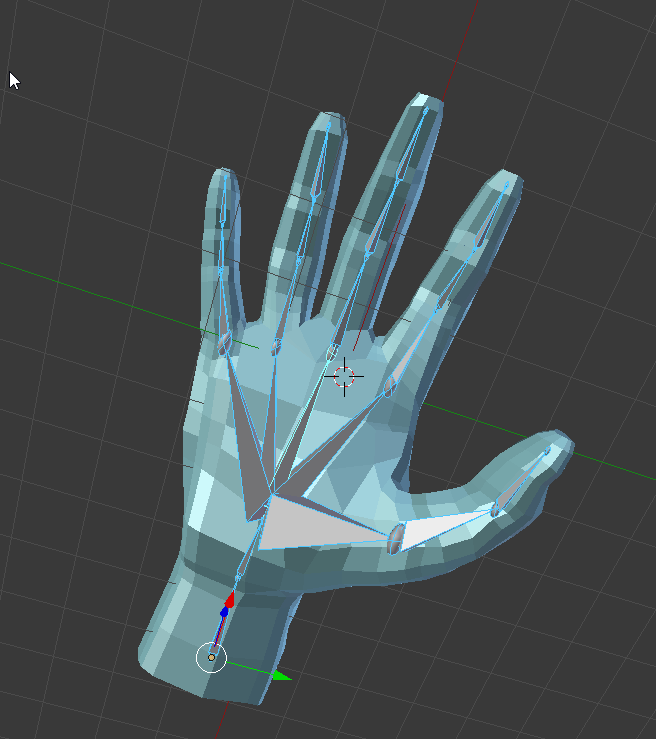
And I was curious: How would you guys go about animating this around a handle?
I tried it previously with my older model but I couldn't get it working and it ended up just rotating the hands weird
Are there any VR hand animating guides :P?
 mighty carbon
hi @wild mauve
real needle
@dusk vigil I mean they move find it just ignores all input in the editor :/
sand mauve
@tired tree did you sy there was a template for your VR character? ive just got the latest one installed?
tired tree
the Packaged demo is a packaged template, the template link is right below the repository one in the forum thread
it implements most things for reference or direct migration
sand mauve
Beautiful cheers
 tough bone
Hi any AR core chanel for Unreal?
frozen egret
Not really, you can try here?
 sly elk
Yeah, here would probably be the place for AR but I don't think many people have dived into it yet
spiral zephyr
@tough bone i've dived into it. We probably need a channel, agreed, but VR/Mobile channels covers a lot.
there is a single thread on unreal vr/ar forum too
 wicked oak
@tired tree are you going to put it on github?
dealing with bitbucket is annoying when you dont have an account there
cant just download the code .zip like in github
gotta make an account and sync
tired tree
its something i want to do....but migration breaks all 60+ branches
also yuo can download zips
from the downloads sidebar
wicked oak
wait what 60 branches?
wicked oak
ah
tired tree
I checked out the auto migration to keep the history intact and it re-opened all branches again too........
tired tree
so would likely have to be a clean migration
Its something I want to do, would probably start pushing to both, and set a cutoff date
sly elk
Is anyone here working on an AR project? I'm curious to hear about it. So far I have been a little skeptical on AR but I think I probably haven't seen the right application yet
Also AR seems to still be a kind of nebulous term. Phone AR and hololens are pretty different.
full junco
I'm also very sceptical about any AR stuff that currently exists
wicked oak
i want to start doing AR stuff
but i dont have the hardware needed
i should have sold my iphone 6 and bought a galaxy 8 as i planned
but at the end i decided it was not worth it
and now galaxy 8 can do cool AR
full junco
for me AR makes sense once people actually walk around with hololenses or google glass, but currently no one has that and prices are way too high, so AR is not worth looking into
alpine torrent
i use my Surface Pro with some AR work
spiral zephyr
got access to a pixel xl on friday, been busy since
AR is cool with audio, but coming from vive, and seeing how good the apartment-wide ar-tracking is(As long as i keep floor kinda in vision), i really want it in goggle-form!
Looking forward to when ARcore meshes with gmaps/earth, as an always on MMO.
The acceptable tracking, plus new android compatible unreal audio engine(with spatialization!!!), is really a powerful combo 😃
mighty carbon
AR today is what VR was before Rift - a gimmick - when it comes to gaming
I can see AR in business / enterprise, but I definitely don't see any good gaming done with AR in the nearest future
Pokemon Go is not AR, it's crap 😃
 normal thorn
AR headsets yes, AR mobile games like pokemon? I think that works 😄
I had to hit enter even tho I saw your pre-responce
mighty carbon
the only reason Pokemon Go blew up is simply because it's Pokemon franchise
it has massive following
(as you can probably guess I don't play mobile game and don't really like them 😉 )
normal thorn
no b/c the game before that worked too
what was the name? I played it for a while, Ingress
ingress was fun for a time. I have a friend who played it for years
but did it "blow up" like pokemon go? no
you're right there
VR has a ways to go. The market needs to get bigger so bigger projects can be logically funded
mighty carbon
I think if AR for phones (ARCOre / ARKit) would be able to remember location and maybe use depth cam to reconstruct surroundings, then house AI can blow up big time..
especially if it can connect with smart devices in the house
I doubt UE4 will be the engine to provide such functionality 😦
spiral zephyr
If i lose my planes in ARCore, I can scan the floor where I was and it'll find it again(as long as i didnt restart app or otherwise delete plane data). I was pretty impressed.
Have not looked into how its stored
And since it can use gps as well, soon everybody will scan the world. combined with google map data etc and the internet.
alpine torrent
waiting Mixed reality support to UE4 landing soon
alpine torrent
Real Reality, Mixed Reality, Virtual Reality, Augmented Reality
sly elk
mixed reality is just what MS is calling VR, right?
Also, has anyone used one of hte MS headsets yet? They look like a nice 1.5 generation VR option. Curious about the tracking quality
mighty carbon
several devs who port their games to MR said controllers tracking is shit
(because it's not 360 deg. tracking)
oh and MR won't support Steam on launch
so, you get samey price as for Rift, but the only thing that is going for MR is easy to install part..
if it was $100 cheaper than Rift, I can see MR getting wide adoption
alpine torrent
@sly elk the tracking is genius actually as it have led lights so what you can turn on so it's able to track by light movement
sly elk
prices look like they are comparable to rift summer sale. Rift is going back up $100 to match vive soon, right?
tired tree
thats not genius....that is pretty normal camera based positional correction
mighty carbon

UploadVR
From Other Suns was one of the best new game surprises we saw at GDC this year from Oculus and are excited to return for a free Open Beta weekend.
sly elk
in theory, putting tracking cameras on the headset should work well in single player games, right? Like if hte headset can't see your hands, neither can you?
glossy agate
Well if you you need to reach behind your head for arrows for example, you will need to rethink that on MS headsets that lose tracking. Pretty much anything out of FOV will need to be redone for ports from Vive/rift to MS.
frozen egret
At the moment I don't got the feeling that Arkit can really anchor correctly
All my actors still stutter around
glossy agate
I finally got Gunheart last weekend too, made in UE4. Was actually pretty good now that they fixed a lot of the issues. PVP was kinda lame, but the coop missions ran pretty good multiplayer even on high settings with a bunch of anemies on screen.
PVP had some de synch or something, so I don't know what the problem is. Might be trying to run actual projectiles over the server instead of using trace.
normal thorn
why is it that oculus can show 16:9 on the computer monitor while in play and vive cannot (out of the box)?
 lusty ledge
i think the idea is to leave that mirroring up to game developers?
the vive's "Display Mirror" feature I think is primarily for debugging
FWIW default 4.17 finally fixed UE4's default "camera phone" VR preview mode so that makes it look a lot better but that's independent of headset
normal thorn
yeah I'd like to update to 4.17 but I launch this week. Kiiinda a bad time hah
mighty carbon

Gaming boss Tim Sweeney says indie titles could be changing how major releases are made in the future.
So, my question to TimS is if I can use RR assets to make a new VR game.. Sounds like that wasn't the idea initially
kinda same talk as with 30% being too much for Steam/Apple to take, yet Marketplace takes as much and offers less in return 🙄
wicked oak
@mighty carbon you cant
but there is absolutely nothing saying you cant rewrite how their materials or stuff works
wich is exactly what i did for my bullet trails
they kind of said that robo recall modkit being fully open source was also so people learn how their cool mechanics are coded and made
lusty ledge
what's the license?
mighty carbon
RR code is a mess
@wicked oak I could, if Epic allowed that.. If I had time (or maybe I'll do that anyway), I could have built something using their assets and showed it to them privately.. There are always deals to be made.
wicked oak
they themselves said so
mighty carbon
if they want to, they can license those assets to a 3rd party
wicked oak
that you can use robo recall to check how it works
sly elk
it makes sense epic wants to own the assets. What if they decide to do a robo recall 2 and there are lots of robots from similar concept art or some re-used? They don't want a bunch of third party games with the same art in them as a commercial release.
wicked oak
thats why im saying no by default
mighty carbon
lol
wicked oak
of course, if you strike a deal with epic to buy the stuff...
mighty carbon
that's the whole point showing it privately
if Epic is on board, one will be paying royalties
sly elk
Sure. But they aren't going to write into licensing anything about private showing. thats complicates things and makes it ahrder to police
if they are goingto allow that it would be on a case by case basis
mighty carbon
so I am guessing PUBG was dealt with the same way - privately, as unique case ?
I know Valve does it and it's no secret
with other companies it's unclear
wicked oak
i highly doubt PUBG did any kind of secret deal with epic
i mean look at it, they did not expect it to get this fucking huge
its a low budget game
mighty carbon
wasn't PUBG based on Arma 2 ?
mighty carbon
oh, I see
wicked oak
the origins of it is indeed an ArmA mod
mighty carbon
it doesn't look like a budget game to me
mighty carbon
it looks like AAA game
wicked oak
and lots of marketplace assets
mighty carbon
what about characters models/anims ? Vegetation ?
 wicked oak
beetween that level of reuse and some help from marketplace, a small team can get fairly close in no time
mighty carbon
from far away 😃
wicked oak
vegetation is market i think
granite jacinth
Of course, now with more money
wicked oak
anims are done by them
granite jacinth
They can up the value
granite jacinth
The game looked like total poop
I mean, still looks like poop
But that's not the point of the game
mighty carbon
I didn't look at the game back when it just started
granite jacinth
It's the gameplay
wicked oak
thats it. The gameplay is clunky, but well designed
its clear the guy knew what he was doing
granite jacinth
But, give it another 6 months, that shit will be on Star Citizen level if the devs don't fuck it up
wicked oak
and the game flow is great
lol no, you cant grow a team like that
we will get higher quality maps
and probably retouches around
mighty carbon
how many players in MP at once on the same server ?
granite jacinth
I wasn't talking teamwise
wicked oak
they have been teasing improved animations for a while
wicked oak
feels larger due to low walking speed
glossy agate
Bluehole or whatever is still a decent size studio though for making PUBG. Could have just paid the UE4 licensing fee upfront. They got like $32Mil in venture capital
wicked oak
yes
granite jacinth
Are you sure?
granite jacinth
Man, I remember thinking about doing something Planetside-ish
granite jacinth
Just a thought, did some research, and found a limit
wicked oak
and in general those are dedicated, depending on the studio
granite jacinth
Hmm interesting
mighty carbon
100 players in MP?! That's not a small thing to accomplish
wicked oak
only the AAA tier fully removes the %, i think
and that one might be really fucking expensive
the cheapest ive heard about ue4 enterprise license is 50k dollars
probably that still has a% on it
granite jacinth
Well, you can be sure that they've applied for it by now
wicked oak
but people like square enix probably got up to half million dollars, or 1 million dollars even
yeah, thats for sure
10 million sales
at 30 dollars
assume typical russian cheaper price + steam, maybe they get 10 dollars on average
thats still a hundred million dollars
the epic % would be more than several million dollars
mighty carbon
@wicked oak how long did it take to hear from Oculus after submitting to the Home ?
wicked oak
assuming a 20 dollar average sale (due to lower priced russian versions lowering the average)
steam takes 30%, so something around 14 dollars
glossy agate
I figured the licensing fee would be $250k-$300k. 1mil doesnt seem realistic.
wicked oak
nvm that doesnt matter. Its 200 million dollars
5% of 200 million dollars is 10 million dollars to Epic Games
@glossy agate dude square enix is using ue4 for a lot of stuff
multiple games, on many platforms, all of them AAA tier
as i said, there is not one direct license
glossy agate
Yeah I know they are, but I doubt it costs even $500k for licensing UE4
wicked oak
becouse it varies depending on the scale
they do the haggling in private, depending on how many games, or for how long the support, what types of support, etc
UE3 costed a million dollars
full source edition was a million dollars
then half
and look at all the games released using UE3
glossy agate
ah, didn't realize UE3 was even that much. Anyway Bluehole got $32 Mil in 2014, so they still could have gotten the full source.
wicked oak
maybe they had one of the cheaper licenses
those are much more common in medium sized studios
no one but indies really goes for the 5%
glossy agate
Yeah, unless they thought PUBG was gonna be a flop and they just patched it together using 5% royalty and are now kicking themselves ahaha
granite jacinth
No one really goes for the 30% either
granite jacinth
I mean realistically, most don't have the choice
wicked oak
keep in mind they know you dont have another choice
unless you are EA or Blizzard
and even them release stuff on Steam
granite jacinth
The big winner here is Steam not Epic anyway
wicked oak
yeah
Steam gets mad money without doing anything
you can be 100% sure UE4 is much more costly to develop than Steam
wicked oak
Steam costs are hosting that are just automated costs
granite jacinth
probably more
wicked oak
the actual people working on Steam code are just a few
granite jacinth
Yet we fucking devs
wicked oak
the rest is automatic
granite jacinth
still don't do shit about it
We are still locked in
Bent over
Ready to take it
wicked oak
that why steam has like the highest per dev profit of anything
not even apple gets this level of profit with so little cost
glossy agate
Wonder how much Steam made of just the first week GTA V at 30% would be a huge number
wicked oak
steam gets absolutely insane amounts of money
granite jacinth
Oh, they didn't get 30%
wicked oak
and its just server costs
granite jacinth
No way rockstar would allow that
wicked oak
plus a few extra things
granite jacinth
If they did, they are worse than us
They definitely had some wiggle room to negotiate
wicked oak
Rockstar does have their own launcher, so they probably did get less
sturdy coral
rockstar has enough clout that if they moved to another platform it would move away many steam users with them, they are big enough to affect the network-effect dynamics of the store
at the same time, they would still lose out on many sales by moving, so they couldn't completely bank on that to negotiate
granite jacinth
wtf..
is this shit
I thought it was my project that I converted to 4.17 from 4.15

But just tried it out in blank VR project
My GoogleFu isn't getting me anywhere sadly
Since I've tried everystep
And it still occurs, (and this is a blank project now)
granite jacinth
good catch
Need to test if this is only vr
If anyone has a Vive or Rift and can quickly just create a new VR Template project in 4.17 and jump into the Motion Controller Map and out, then see if you all get that red text of death, I'd appreciate it.
glossy agate
This just the output log in editor? I have an upgrade project from 16-17 and I do not have this issue
chilly thicket
Quick question, this guide I"m following uses a block called Break Hit Result, but I can't seem to find it.
Was there a name change on it or something in the later versions?
glossy agate
vive
glossy agate
I didn't build editor from source though, just used the launcher version. You customized source right?
granite jacinth
@chilly thicket it's called exactly that
drag from the HitResult struct
and break it like a champ
chilly thicket
I was dragging from Out Hits.
glossy agate
Or right click and break I think
granite jacinth
well, that'll do it on that node
you can split it
but then you'll have these crappy names
chilly thicket
Yeah.
chilly thicket
The guy in the guide I'm following doesn't get an output of an array.
glossy agate
maybe a forloop
granite jacinth
And use regular Line Trace
granite jacinth
;0
granite jacinth
@chilly thicket How long have you been using UE4?
What's the hardest part of using Blueprints for you? What's the easiest? What do you think can be improved?
chilly thicket
Well, I just started with VR development in it like on Friday.
granite jacinth
@chilly thicket Let's say someone awesome was writing a book for Blueprints, what would you like to see written in it to make things easier for you and other newbies?
chilly thicket
I think the blueprints are pretty cool, but it kind of feels like some parts can be innefficent, compared to normal coding.
Although I have no idea how they would be much better than they are now.
And, just knowing how they work is important
I didn't realize that the white arrow line on the top of them was like a flow order for blueprints.
It took me a while to figure that out.
mighty carbon
folks, what's the cheapest way to draw teleportation arc ?
chilly thicket
But they're becoming more and more useful to me, now that I'm understanding more about them.
mighty carbon
anyone?!
granite jacinth
@mighty carbon Draw it
However you want
I mean, pretty sure the way they do it in VR Template is pretty cheap
slim raft
I would use a procedural mesh with no translucency
tired tree
vrtemplate needs optimizations
but other than that its ok
it generates each mesh section every frame in older versions, they may have fixed it by now
mighty carbon
Hmm.. are there any decent tutorials about drawing procedural mesh?
Also wondering how they calculate arc
tired tree
they have a built in node for it
projectile arc
also don't bother with procedural mesh, the spline is fine
glossy agate
Or just don't draw the arch, just the destination after calculating the arch.
More popular in newer games
 vocal maple
Why do hit events only work if both of the actors colliding have physics enabled? Is there a way to make them work without physics?
glossy agate
In the collision section you should have query and physics, but you should not have to have actual physics enabled to do it.
vocal maple
I have both query and physics but I still need to check "simulate physics" on both actors for the event to fire. Its strange
tired tree
are you sweeping their movement?
vocal maple
I attached a sword to the motion controller
I disabled physics on the sword now and it generates hit events when colliding with physics objects, but not other objects
sturdy coral
@mighty carbon @granite jacinth VR template teleport parabola isn't necessarily cheap, spline mesh scales draw calls per segment though I'm not sure how many segments they use
the one in mitch's VR template uses instanced static meshes along the parabola and should be cheaper (unless the epic one just uses a couple segments)
(probably not worth caring about in a single player thing, but if you have a multiplayer thing with visualization of pending teleports of other players like rec room it could potentially save hundreds of draw calls)
uneven moon
Has anyone here built a flashlight into their VR project ?
wild mauve
@uneven moon whats the issue
Also, check out my new anims 😄

did a whole new model today
uneven moon
Hand pos looks great, does it feel right now?
I'm not a modeler, I have to hire others or buy assets from the marketplace haha
wild mauve
@uneven moon feels great now!
mighty carbon
@sturdy coral I personally don't think arc is important at all, especially with Gear VR when user has no motion controller. It's just plan B in case Oculus testers still find my UI/UX for navigation difficult (which somehow wasn't the case with folks who tested it prior me sending final build to Oculus)
chilly thicket
Personally, I just use a circle where they will teleport to, but I was thinking of adding a arc.
mighty carbon
reticle == circle (+ 3D arrow spinning and pointing down)
do you have Gear VR @chilly thicket ?
mighty carbon
This is what I have: https://www.youtube.com/watch?v=StPGmm0-KbE

and it's pretty self-explanatory, especially that VR has been around for a few years now
chilly thicket
Nice.
mighty carbon
thanks 😊
 odd rapids
Has anyone used the Gear vr motion controller in 4.17?
mighty carbon
not me, I am sticking with 4.16.2 for Gear VR
there isn't anything useful for that platform in 4.17
nice one.. Too bad devs decided that it's too much hassle to release on the Marketplace for UE4 😦
(they told me last pack they submitted 6 month ago hasn't been looked at yet)
odd rapids
Yeah, I know they deprecated the gear vr controller component and I can't for the life of me get the motion controller component to work, I may step back to 4.16
tired tree
set the motion controller component's hand to "any"
that enum was specifically made for gear controllers afaik
glossy agate
@mighty carbon you know if Synty has gotten any packs on the UE4 market? They are all really good, but so big they will take some time to prepare for UE4 use.
Just looked it up They have a few up, including that really big post appoc zombie pack
 vast spire
Hey does anybody know how to implement the VR spectator camera?
The feature that came with 4.17? Can't seem to get it to function
tired tree
What are you having trouble with? Its generally just setting the mode you want and drawing the texture out.
vast spire
I guess I'm confused by how to set it up. Do you have to setup a camera for it to target from?
wicked oak
@vast spire its ez mode
you need to setup the stereo mode to "single eye + texture"
and have it configured
and then you create a render capture
that acts as the second camera
then you link a render target texture into that Scene Capture component, and put that render target texture as the texture to show for the mode

looks like this
of course the texture is as big as you make it
btw this utterly MURDERED performance
tired tree
blanco, something I noticed about yours is that it suffers from the gamma drop the scene component does
if you set the render target to 2.0 gamma it re-exposes it more or less correctly
vast spire
do you happen to have a screencap of the blueprint that I could take a look at?
wicked oak
@tired tree thats becouse i tried to disable all i could
so probably disabled tonemapper on it too
still lags really hard
glossy agate
What are your rig specs?
wicked oak
970
tired tree
nah, it happens with all of them, it uses a different color format so when drawn directly to screen is underexposed
wicked oak
and 2600k i7 overclocked
tired tree
when drawn in game its correct
wicked oak
nice to know
glossy agate
Ill see how it performs on mine soon. Sucks if it costs a lot, but hopefully we can set FPS we want to render to a spectator screen.
wicked oak
it doesnt matter, becouse even if you set it to 30 fps, that means one out of 3 frames its going to be slow
causing stuttering
tired tree
its actually significantly slower to manually capture with scene captures than to just let it run
I haven't looked into what it initializes when called but its heavy as shit
tired tree
?
wicked oak
absolutely horrid
tired tree
are you letting it run every frame?
wicked oak
yes
tired tree
not manually calling capture frame?
wicked oak
it was increasing my frames quite a bit
tired tree
because I can get better perf than that on a 1070 running two at once for mixed in a more complicated scene
wicked oak
i should upgrade
but having my pc being minspec means im sure the stuff will work
doublechecked
tired tree
yeah I was mostly checking if you were manually calling the blueprint node though
lots of guys were trying to run CaptureFrame on a timer and the overhead of initialization was far worse than just letting it run...assume it hard locks the buffer every time.
wicked oak
wat the fuck intensifies
specially becouse the scenecapture has nearly everything disabled
and still, 7.3 ms for a empty map?
somehow lately im getting horrid performance
glossy agate
Is it getting a perf boost when you package at least? If you have tried it.
wicked oak
of course it does, but this is on editor
still wtf 7.3 ms on a scene that is literally empty
with some random boxes as buildings
i can understand DWVR having performance problems due to the sheer amount of drawcalls it has
running non optimized code of course bottlenecks
but there is literally nothing at all here
glossy agate
Dang I wanted spectator security cams in my game like rainbow 6 siege. Seems like most people I'm playing with online are running 1060 or 1070 too. I'm on 1070
tired tree
its also cheaper with a smaller render target
glossy agate
Yeah mine were going to just be on a TV screen in the spectator room you can toggle through, and one projecting to the users computer screen for streaming/recording
granite jacinth
The issue is
Your hope is that most VR users are using 1070+
I'm still on my 980 no my desktop
Only because I have a 1070 on my laptop
I was going to get a 1080, but then 1080ti news was abound. Now, I think I can pretty much just wait for Volta next year.
Unless there's some super deals going on Black Friday.
But all this stupid gpu mining shit is driving up prices
frozen egret
80% of players certainly do not have stronger than 970 (http://store.steampowered.com/hwsurvey/)
glossy agate
I gotta find those steam stats. Have seen them before but I don't think they specifically show what VR users have, just what all gamers have.
granite jacinth
Right
wicked oak
talking about VR users, not general steam
wicked oak
VR users are all on 1060+ gpus
granite jacinth
Are there such stats?
wicked oak
yes
granite jacinth
Okay, so no
wicked oak
he got his stats from asking Climbey dev
granite jacinth
You are probably basing it on Dev
wicked oak
to see what his players have
frozen egret
@granite jacinth http://store.steampowered.com/hwsurvey/ but you can't filter on VR sets
wicked oak
and they are the same as my players
granite jacinth
Climbey is awesome, I was one of the first to play 😃
wicked oak
developers get the stats of the people playing their game
so you just need to ask the stats for a VR dev
granite jacinth
I know SteamHardwareSurvey
wicked oak
wich is what i was saying XD
granite jacinth
I always do mine
They need to fix the internet speeds
anyway
GPUs are all over the place
mighty carbon

Scorn is an atmospheric first-person horror adventure currently in development by Ebb Software studio.
http://store.steampowered.com/app/698670
Tweets
208
Followers
3509
 Twitter
this would be pretty bad ass in VR
glossy agate
Would be cool if rec room released hardware survey to see GPUs. Would be huge sample size. Climbey has about 4% based on steamspy IF 700000 hmd are out in the market.
wicked oak
yeah, those kind of games just are a perfect fit for VR
glossy agate
Seems like they have been developing that game forever.
mighty carbon

o.O
played Deus Ex MD yesterday (I haven't played non-VR games for like ever) - it would look sooo awesome in VR. Too bad Eidos screwed up on the VR experience they made for it 😦
wintry escarp
I was going to get that virtual arcade neon but you cant watch people play games or play against them, I get the problem with playing against them but you should be able to watch others play
odd rapids
@tired tree the "any" hand option was the ticket. Thanks
mighty carbon
what if you hold controller in either right or left hand ? How do you determine that now on Gear VR ?
(in case one needs to remap buttons?)
wintry escarp
why would you need to remap buttons?
full junco
@sturdy coral @tired tree a simple thing I thought about, shouldn't it be possible to use the rendered game before downsampling for the steamvr mirror window? Due to the 16:9 area of one eye being relatively small the mirror window always looks quite low-res, but at a screen percentage of 180 (which is quite normal on a 1070 or 1080) the 16:9 area of one eye already has roughly 1920x1080 resolution, so it would look way better to use the texture before its downsampled to the vive resolution
by default the 16:9 area of one eye has roughly 900x600 resolution
tired tree
isn't it already? you are just blting part of the render target to the screen and its the full sample size, if you increase the screen percentage it also increases the quality of the preview window significantly
the main issue right now is Epic is specifically using a very small section of it because it is unwarped.....much smaller than the manual config was
full junco
@tired tree I just looked at it with render doc. I think it does in fact copy the texture from the full res buffer, but the mirror window texture is set to a fixed 1280x720
I'm still on 4.15, did it maybe change in later versions?
tired tree
pretty sure mirror window was hard set before because it was tied in, don't think it is anymore
full junco
the mirror window looks better with higher screen percentages here too, but a regular full HD game looks better with 200% downsampling too, so its normal that it looks better
so you say in 4.17 the mirror window looks like full res 1920x1080 if you run your VR game with 200% SP?
tired tree
hell no it doesn't, they sample like 0.2x0.2 of the eye view
but it looks perfect with a scene capture component rendering to it
and the spectator screen mirror mode code for steamVR draws at window rect
dunno would have to dig farther in, i haven't been messing with it much since 4.17
full junco
@tired tree well, does it look perfect at SP 300?
if you just use a super high SP you easily see if the mirror window has a limit or not
full junco

the backbuffer is sized 1280x720
actually, a simple r.SetRes 1920x1080f is all it needs I think, then the mirror window looks perfect 😄
uneven moon
John is right, that worked for me
I also set the mirror mode to mode 4
Which is a single eye, non-stretched
Looks good on my end.
full junco
@uneven moon do you mean you just tested it and it works, or did you already use it before?
uneven moon
I have it implemented into my game on the first level that loads up and the entire game has a fullscreen HD preview throughout, great quality
full junco
well I mean, do you already do that for months or did you just implement it?
uneven moon
Oh, I just did today
full junco
I mean, 5 minutes ago or a few hours ago? 😛
tired tree
john...I had assumed you had already set the mirror res....
uneven moon
I think I glanced at this chat and saw you guys talking about the preview and I looked around at some of the console commands
So if that's what you were saying earlier, then you're right! Haha
full junco
@tired tree well I didnt assume I should set the res, I always thought that would affect the vive res then
full junco
but it seems it only affects the mirror window res
tired tree
the scaling was tied together
full junco
@uneven moon you have to keep in mind though that, as far as I know, this doesnt work when someone has a monitor with less than 1920x1080 resolution
uneven moon
That's probably very rare and if it's the case, what would they see?
full junco
so the clean way is to check what resolutions are available and then use the highest of those
they would see black I think
uneven moon
damn
Can you show me your set-up for checking res?
Is this only going to work for Oculus or for Vive as well?
full junco
or the console command would fail and it wouldnt do anything
I didnt yet set anything up
since I only had the idea of setting the res a few minutes ago I only tested it as a console command that I manually type in
still have to add the code for it 😄
uneven moon
Are you using a vive or a rift?
tired tree
rama has some res nodes in his blueprint library sinn
full junco
you dont need ramas nodes any more
epic added such nodes a long while ago

@uneven moon I'm using a vive currently
uneven moon
how would you drive the console command node with the resolutions array?
it requires a manual input, no?
uneven moon
Yeah that would be great haha
I'm glad to hear the commands also work for Vive
What about PSVR?
Would it default to full-res?


 tired tree
nice, didn't know they ended up adding that in
full junco
should work
glossy agate
Nice I got no more back bars!
uneven moon
Perfect, I'll test
glossy agate
Still have to manually resize the window full screen though. Never had the issue till .16 then in .17. Could it be a setting Im missing under editor preferences?
glossy agate
I don't know but it did. Also I was missing a box in editor preferences. Now opens at full screen
How Vive had the bars on left and right. Its gone now, not really warped looking either
full junco
@glossy agate are you talking about the setres stuff or something else?
glossy agate
Oh yeah, I just popped in that BP you posted. Works great
glossy agate
Yeah that what I thought haha. 1920*1080
full junco
hm
makes no sense
can you disconnect the function and see if you get black bars again?
glossy agate
must be warping. Yeah Ill try
full junco
@uneven moon have you tested in packaged or only in editor?
r.setres is buggy in the editor, its only supposed to work in packaged
glossy agate
Bars did not come back. really strange
full junco
@glossy agate well makes sense though, r.setres shouldnt affect bars in any way
you probably checked something else
@uneven moon whats your screen res?
uneven moon
1920x1080
full junco
do you have the nvidia supersampling stuff enabled?
glossy agate
I didnt though. Was working on grenades, and just saw your BP so I tried it
uneven moon
the setres command worked before we created this function to check for available resolutions, so the issue should be in the function, no?
full junco
for me it doesnt work in the editor because it picks 4K resolution while my screen can only do full hd
glossy agate
Ill disconnect then restart editor
uneven moon
why does it pick 4k if you can't do 4k?
full junco
because I have enabled in the nvidia driver that downsampling stuff, so games think I have a 4K monitor and allow me to pick 4K resolution
DSR
Dynamic Super Resolution
@uneven moon it works fine for me in packaged
glossy agate
Guess its a christmas miracle. Bars never came back
full junco
engine version?
you shouldnt have black bars in 4.17 anyways if you use that


I guess it wastes a tiny bit of performance to pick the DSR resolution
but game can't know if its DSR or real
glossy agate
I'm on 4.17. Had the bars till today though.
full junco
well, that was wrong then though
unless you didnt set the correct mirror mode
not sure what the default in 4.17 is
glossy agate
Didn't set any mirror mode. Upgraded from .16 like 2 weeks ago.
full junco
then you somehow did set one now
glossy agate
Guess so haha. Didn't realize .17 came full screen by default.
full junco
one issue with the mirror mode is (unless they fixed that in 4.17) that it always assumes the monitor is 16:9
so its stretched on 21:9 monitors
full junco
@uneven moon did you get it to work?
vocal maple
Does anyone experience problems with meshes attached to motion controllers not generating hit events without physics? I added a sword to my motion controller and it only generates hit events if it collides with physics objects.
uneven moon
@full junco Not sure yet, I've not tested a packaged version I'm working on other functionality. I'll definitely test it when it comes down to it and let you know
granite jacinth
@uneven moon Check your player controller
Or just do a search to ensure you don't have something else setting the res somewhere
full junco
onw super annoying thing with real fullscreen on the mirror window is that when I hit a breakpoint in C++ and the game stops, the game window stays "in focus" forever, so I cant look at anything else on the screen
but behind the game window is where visual studio is, so I cant even stop the game
I have to kill the visual studio process
@tired tree you said you thought I would do the setres stuff, so are you using it too? how do you prevent this?
full junco
ah
wf exists?
thats nice I guess
@tired tree why do you not run full screen?
any reason to not use it?
tired tree
i prefer to have access to tab, and it doesn't help FPS in ue4
full junco
well yeah for developing, but if you would ship a game?
tired tree
dunno man...supposedly input lag is worse but FPS is a lot more stable in borderless, I noticed it a long time ago too
all UE4 games I play outside of dev I run in borderless with higher frames
full junco
borderless windowed higher fps than regular windowed or than regular fullscreen?
tired tree
fullscreen
tired tree
tradionally it did and in UE3 it did, but ever since UE4 I have noticed the exact reverse
full junco
because with real fullscreen the GPU can completely focus on just that one application, thats why its so slow to switch back and to a fullscreen application I thought
monitor is always black for a few seconds when moving in or out a fullscreen application
tired tree
yes
full junco
so borderless windowed is definitely more convenient
seems to work fine with high resolutions too I think
but not fully sure yet
tired tree
I don't know the exact reason why borderless is outperforming btw, logically exclusive mode should still be the best and it definatly is better for input lag. But even the UT4 players talk about the better frames in borderless - It might just be my hardware and a select few others, but I prefere borderless when possible anyway for convienance.
vocal maple
What could be the reason that meshes attached to motion controllers only generate hit events when colliding with physics objects?
full junco
I see the borderless window being a bit buggy, it doesnt update correctly. so when I do r.SetRes 1280x720w the I'm in 1280x720 windowed, if I then do r.SetRes 1920x1080wf then I'm in 1280x720 borderless windowed
so it doesnt update the resolution, it only switched to windowed fullscreen
I'm first calling r.SetRes 1920x1080w now and then a bit later r.SetRes 1920x1080wf, that works
 stable shadow
Hello guys, I'm between Zen Phone AR + Google Daydream VR + Tango and on the other side Galaxy S8 + Gear VR ... anyone can help me ? if i write apps and game using ue4 for daydream other users can run and use it with gear vr (controller is important for me) ?
full junco
I dont do any mobile VR, but I'm quite sure the answer is no
stable shadow
thank you john, i've vive for a year and i want to expand my works to mobile vr too it seems for Galaxy and Gear VR i should pay much more than zen phone and daydream
full junco
@mighty carbon is the one to ask about mobile vr, he will tell you gearvr is much nicer than daydream I think
stable shadow
ok thanks
mighty carbon
@stable shadow Gear VR + S8 is the choice
since it also supports Daydream, and ARCore, you get best of all worlds
I am not sure Tango has any future - ARCore will most likely replace Tango
Also S8 is a way much more powerful than Zen Phone AR and has slick design too
hasta mañana, amigos !
stable shadow
@mighty carbon thank you man , you're right, after reading and watching some reviews i decide GearVR + S8
uneven moon
Anyone know why text in-game jitters and is wavy when I strafe?
I tried adjusting the AA method, none of them fix this
I'm using the forward renderer
MSAA
I noticed this can also happen on distant details (like detailed shadows far away) when the scene is bright enough
It only happens in VR
full junco
@uneven moon is it fixed by high screen percentages like 200?
uneven moon
Not sure what that means
uneven moon
how big of a performance hit will this have haha
full junco
roughly give you half the fps
uneven moon
do most games increase that sp?
full junco
I think most VR games use more than the default, yeah
also depends on forward vs deferred
uneven moon
using forward
full junco
but I just wanted to know if your issue depends on the resolution
uneven moon
hmm
well,
I increased it to 200 and the text looks fine now
but the FPS is not good
granite jacinth
Robo Recall = 300 
uneven moon
hmm, 150 is okay but the text moves a little
it's wavy
this isn't an AA issue for sure? It's just some text, the rest of my game is clean so why would the text jitter like that
full junco
well you can disable the AA and see if that fixes it
granite jacinth
Did you really try that?
uneven moon
yeah lmaooo
I know robo recall doesn't use 300 but I was curious to see what would happen
also, disabling AA only made a minor difference
granite jacinth
Try 400
uneven moon
It works
It's really sharp and clean
But I had a loading screen between each frame
Lmfao
uneven moon
That'll prob crash mine
granite jacinth
Or blow up your GPU
uneven moon
Oh man, this is worse than I thought
When I wave my hand around, I can see a trail behind it
But it looks like a heat wave
Looks like using volumetric fog was causing it
dusk vigil
Varjo
Testing Varjo prototype. This shit is real
20/20 vision with eyefollowing little screen ( this prototype did not have the motors yet )
 wicked oak
doubt it works. Having moving parts like that and having them being fast enough is a insane engineering problem
moving parts at that speed will probably cause vibration couse inertia, and well, hight speed highly accurate moving parts arent easy to create
dusk vigil
We live in an age of wonders : ) I am optimistic, they already have working prototypes with moving little screens... Apparently the first prototypes were making some really nasty noise but they've got that sorted out.
The little screens are each a small FullHD screen, so two of those plus the normal screens adds up to about 4K of pixels, still doable on standard HDMI cable
But yeah, combo of eyetracking + mechanical movement of screens + syncing everything up is certainly challenging
alpine torrent
moving parts at light speed is a pain
wicked oak
its just investor bait
they want to get a few millions from investors and then spend it on themselves. It is increasinly common to see
you would be amazed the levels of funding vr startups have been getting (its slowing)
slowing becouse half of them were just a new cardboard headset but plastic and with some gimmick
wich of course its trash
alpine torrent
you remember castAR?
wicked oak
of course, the first investors know that is bullshit
but they invest, and then they sell their shares to other investors
the last investors in the chain are the ones who get shafted
this first/middle investors hype the shit out of the product
dusk vigil
Haters gonna hate... These guys have a team built of most of Finlands sharpest minds
wicked oak
to then sell their shares to other investors
sure, when they have fully working demos we will see
dusk vigil
I'll eat a hat if they dont get it running : )
wicked oak
but red flags galore
biggest of all is all that 20k HEADSET!!!! marketing
i feel the same way with all those chinese random headsets
either wireless, or 4k, or super high fov...
alpine torrent
castAR i get more knews in it's first time as i even get time to her in twit t show castAR and it get lift in start but the news stopped and it was matter of time then when project go to end
wicked oak
yet they never get steamvr support and dont work at all
becouse castAR was allways shit
it never had any kind of possibility of going anywhere
alpine torrent
it needed reflective surface to do anything
wicked oak
thats why its allways been kind of stupid
hololens and other AR things do it without even needed the reflective surfaces
so castAR has absolutely no chance at all
dusk vigil
I'm sad for castAR, they had their own little vision... I think it could have been a cool niche thing, like for very specific stuff , fog-of-war tabletop games and such
simulator cockpits
wicked oak
but it was dead end tech
it couldnt go forward, and it became obsolete in 1 year
the moment hololens released and showed you can do the same thing (glasses AR), but without the reflective setup or anything
dusk vigil
In any case, I would predict basic foveated rendering should be a feature in all high end HMDs within 3-5 years
wicked oak
when investing on a startup, you need to check if its dead end or not
what is important is growth
can the product keep being developed vresion 2,3 etc?
dusk vigil
And if they can get those motors running, having 20/20 vision will be damn nice
wicked oak
castAR was truly dead end
the fact that it has motors means it wont ever work well
at least i do not know of any way of making it work
even with expensive tech
becouse physics
alpine torrent
can the product be scaled up or not