#virtual-reality
1 messages · Page 131 of 1
 glossy agate
Yeah, that's the way to do it. Also not sure if it's true, but I have heard other players complain that UE4 games don't respect the advanced settings SS, so it needs to be in game option. This was a while ago though, and I never tested it.
 sturdy coral
there was an old bug I think it is fixed now
 mighty carbon
I forgot how much of a chore is making art for the storefront 😦
sturdy coral
it actually was dependent on mirror window resolution
I think it was a throwback from the days of extended mode and they just kept some of the calculation in place
glossy agate
Ah nice. So it's fixed now?
 tired tree
been fixed since like 4.12 or 4.13
sturdy coral
yeah it is fixed, it was definitely a problem with raw data and I think pool nation back when they launched
glossy agate
Yeah, really old then haha.
 wet jasper
oh hi
I'm trying to set up a stereo scenecapturecomponent2d
but I'm having a hard time displaying the captured textures
do you have any ideas on how to deal with thi?
wet jasper
I have 2 scenecaptures in a different part of the scene, and I want to display that result in a portal in the game
I'm pretty much trying to replicate portal, but in VR
I have a mesh in the middle of my scene whose material displays those render targets
in standard, non-vr mode it works perfectly, I just get the screenposition node, divide by the aspect ratio and use that as my UVs
but for some reason I can't get that to work in VR
sturdy coral
what does it look like instead? you think it has the wrong aspect ratio or something?
wet jasper
if I just use the mesh UVs straight up instead of the screenposition one, it looks squashed and badly cropped
the perspective on the purple room was supposed to match the one in the blue room
sturdy coral
yeah but that's expected with the mesh UVs right? it should look like that in 2d too
wet jasper
yup, yup
with the screen UVs it looks like this in 2d:
see that the perspective matches perfectly
sturdy coral
yeah
wet jasper
in vr:
that's one eye, the other one has a similar weirdness and the object positions don't match up
this is how I create my uvs
wet jasper
it's off
 sly elk
hey bruno
wet jasper
oh hi alec! how is it going?
sly elk
Doing well. Haven't seen you in the VR discord before. Welcome 😃
Scencapture2d does weird things in VR with r.screenpercentage
at least on oculus
might be related to a bug I posted, let me find the link
wet jasper
thanks! I'm new here
sly elk
what are you working on bruno? You were at gameloft before, right?
wet jasper
I was, now I'm at minority, working on vr stuff
that black bar bug is really weird, I haven't seen that yet
sturdy coral
@wet jasper if it isn't an issue with the scenecapture itself, I would write a debug shader to display the calculated UVs as a grid and just look for oddities
sly elk
i only see it at higher resolutions
like doing 1920x1080 capture for a full screen camera
but you might test and see if changing the screen percentage has an effect on how wrong the perspective is
sturdy coral
once you fix this you are probably going to run into the issue that the scene capture lags behind the HMD a bit; it used to happen with planar reflections too and they fixed it there, you may be able to find the changes they had to make there and port them to your own scene capture
 spiral zephyr
seems like microsoft controllar rotation is almost 100% preserved when out of sight, so can at least be used as a laser-pointer when hands are by the side
wet jasper
it does lag behind yeah 😦
 chilly thicket
Okay, I had a question about the unreal vr editor.
I've been told I need to enable it from the settings, but it isn't an option.
I'm running UE 4.17.1.
sturdy coral
@chilly thicket it should just be a button that is enabled by default on 4.16 and 4.17
chilly thicket
Oh, then how do I use it?
chilly thicket
Wow, I feel so dumb now 😄
sturdy coral
alt-` to exit
chilly thicket
I had figured out how to do the vr preview thing.
But for some reason I completely missed the "VR Mode" button.
sturdy coral
on 4.16 you can set it to auto launch when you put on the headset in the editor preferences
chilly thicket
Yeah, I enabled that.
sturdy coral
np
mighty carbon

UploadVR
Magic Leap filed a patent for "virtual reality glasses."
mighty carbon
yeah, they look archaic too
 full junco
I hate the rift tracking https://puu.sh/xnvFG/9a419c8492.png
 mighty carbon
how on Earth do you manage to have these issues o.O
full junco
sometimes it works, and then suddenly it stops working and complains about poor tracking quality
and when it complains, everything is super laggy
its same with sensor: https://puu.sh/xnvKP/8097802ba5.png
 mighty carbon
get yourself a dedicated PCIe USB 3.0 card with 2 controllers on it.. And plug sensors into the card, leaving the rest on mobo
do you have Vive stuff plugged into your PC too at the same time as you are using Rift ?
full junco
if I get a PCIe USB 3.0 card then I can't fit 2 GPUs into my PC, 2 GPUs cover up all available PCIe slots
no, I dont have the vive connected
mighty carbon

Stay tuned to our blog this week for deep dives on everything you need to know to configure a full roomscale setup, including USB sensors, host controllers, and extra equipment.
Welcome to the second installment of our Oculus Roomscale* series, running all this week! In yesterday’s post, we took a deep dive on sensor placement. Today, we’ll cover balancing bandwidth across USB 3.0 and USB 2.0.
Welcome back for the third installment of our Oculus Roomscale* series! Today, we answer the question: “How do I know how many host controllers my computer has and how many sensors are connected to each?”

Today’s the final installment of our Oculus Roomscale* series. We’ve covered most of the really technical stuff, like sensors, USB bandwidth, and host controllers, so now we want share a few items** that can take your configuration up a notch!
full junco
the primary issue is the rift itself
and after restarting the PC the tracking issues are always fixed
for a while, until they start again
 alpine torrent
@full junco seems like you could mod your pc rig
full junco
@alpine torrent ?
alpine torrent
PCIe extension so those other PCIe slots arent covered by GPUs
full junco
I think GPUs are very close to the mainboard, so not even an extension would fit in there
 fresh laurel

UploadVR
Asus revealed details of its Windows-based VR headset, which will be launching later this year alongside the others already seen.
alpine torrent
so you dont think moving GPUs to other place with extension cable to get more space?
full junco
ah well, moving GPUs to another place with extension cable would work, but where do you want to put a GPU then
they are heavy
a PCIe USB card you can just losely put in the case, a GPU definitely not
I also have one SSD just losely floating around in my case, those arent heavy
alpine torrent
well ther is a options but it's up to you
yeah gpu totally need to be installed where it hold and not float
some PC cases are easily moddable
mighty carbon
no @full junco , the issue is with your PC, not with Rift
full junco
part of the issue is likely something with my PC, but the rift is one of the most picky things you can imagine when it comes to USB
mighty carbon
my PC isn't even VR-ready.. It's just a PC I built in mind with Rift. And it works like a clock, out of the box.
I had issues when I put all sensors and HMD onto one USB 3.0 controller
full junco
I tried all USB 3, all USB 2, and a mix of everything
mighty carbon
once I spread it around, I had no issues
doesn't matter.. if you have 1 USB 3.0 controller on the mobo or bandwidth insufficient, you'll have issues
one of my controllers has 8 USB ports on it
another one has only 2
 mighty carbon
well, put 2 sensors on Intel and 1 on ASMedia and HMD on VIA
full junco
I only have 2 sensors, and as I said I tried all combinations that made sense but it doesnt matter, after a few hours it breaks and I have to restart the PC
mighty carbon
update drivers maybe too ?
full junco
everything is up to date
sly elk
I have random USB issues with my 3 camera setup even with the PCIe USB card that r/oculus suggests
usually a system restart fixes it
I wish oculus would ditch their tracking for something like vive. It seems like a better solution
wet jasper
seriously. I've given up on oculus tracking
I have those tracking issues daily
on my work pc, we've tried installing more usb3 ports, spreading things around
still works like crap and I stopped caring really
full junco
@wet jasper you also have issues where you have to restart the PC for being able to use it again?
full junco
in my case the image on the rift rougly freezes for 0.2 seconds every 0.2 seconds
oculus software complains then
restart fixes it
mighty carbon
btw, have any of you tried reporting issues to Oculus ?
wet jasper
I just live with it when it starts to behave badly, sometimes I get a bit dizzy and take a break
I do ask the IT guys for help and they've returned a couple headsets already due to problems
mighty carbon
how do you expect Oculus to fix it if you aren't willing to provide feedback ?! o.O
sturdy coral
I've had it crash the whole PC with a bluescreen
full junco
@mighty carbon where should I report it? I dont think they care about issues I have
any issue I have they are likely already aware of and its just not reproducible for them so they didnt fix it
chilly thicket
Is there a good tutorial for how to use the VR editor out there?
Or are the website docs the main thing?
 winter venture
pretty much just the docs I think, and a lot of that is outdated and sparse
chilly thicket
Yeah.
winter venture
i've had a hard time trying to use it... i wanted to do some sclupting with it at least but couldn't figure out how to scroll this window
chilly thicket
I beileve you use up and down on the joystick.
winter venture
that scrolls the main window but not that tool selection menu (at least using the touchpad on vive..)
 digital marlin
Once you get use to the VR editor is it worth it?
chilly thicket
It looks like it has potential.
But there's no guides on how to use the latest version of it.
winter venture
if these little control issues were fixed or better documented i think it would be worth it for some things
chilly thicket
Also, the UI isn't exactly intuative.
I spent a minute trying to figure out how to select things on the menu.
I guess the best way right now is trial and error.
winter venture
took me a long time to figure out how to undo/redo, the docs say press right/left on the touchpad but you have to swipe and it seems really inconsistent
winter venture
yeah I wish someone would 😆 I haven't spent much time in it because of all these problems
sturdy coral
Is there a good way to attach something by a socket instead of to a socket?
sturdy coral
Yeah
For example with motion controllers, I want to attach the hand to them by a socket on the hand
And then I have the same socket on the third person mesh, where the motion controller is instead attached to the socket
digital marlin
Well you can reference a socket on a mesh and get its location.
not sure if that helps
sturdy coral
Yeah I can do an inverse transform or something
Was just wondering if there was a built-in way
glossy agate
Like having the hand for first person and 3rd person char attach to to same location on a weapon?
sturdy coral
yeah
like for 2D first person arms you just make the same socket and attach the gun to the socket in both places, so there isn't really a difference
but for vr hands holding a controller the attachment order is sort of reversed
mighty carbon
where do you folks get EULAs for your projects ?
glossy agate
@sturdy coral Im working on something similar right now with full body IK. Want to work on it together?
Im overriding the hand bone to match a scene component childed to my hand meshes base so it matches perfect (third person hands will be wrong if matching to controller), so if FP hand snaps to socket, third person should follow is my thinking
Just have to give the TP hand a holding anim, and you will 1 up the other MP shooters
sturdy coral
@glossy agate yeah, I've had it with IK and stuff with just manual close-enough alignment, and then still attaching the gun to a replicated motion controller object and not a socket on the actual mesh
but now I'm looking at doing more stuff with animation like that where the hand might detach from where the motion controller is to do a reload animation
glossy agate
How do you get crouching? Thats what Im really having trouble with. Blend space? Been trying with overiding based on HMD height but its not going anywhere fast
sturdy coral
yeah I'm working that out now too
a blendspace like thing is what I'm leaning towards, with the walk phase (time the foot makes contact) synced up between the two
glossy agate
I have just never worked in anim programming so this all cold start for me haha. Gonna try again tomorrow
sturdy coral
yeah I have done very little with it either
mighty carbon
submitting app to a store is one of the least favorite moments in game dev :/
digital marlin
guys, some advice here. I'm trying to attach a camera and make it move in relation to a boat that's it on. It's just transform vectors that are changing.
ugh, I've explained that horribly.
full junco
@mighty carbon why?
 uneven moon
I'm trying to check the speed of my MC as part of a condition but it doesn't seem to be working
If I set the value to 0, it works. So it's as if the MC doesn't move even when it does
I tried setting the target to the MC itself, the mesh under it, etc. but no luck
Anyone do this before?
full junco
@uneven moon I think I tried that and you cant do that
dont get the velocity, the function doesnt work for motion controllers
uneven moon
@full junco Did you figure it out?
full junco
you have to just manually calculate the velocity
uneven moon
Not sure how I'd do that
full junco
well, just compare the current location with the location from the frame before
uneven moon
so instead of >= a speed value, I check to see if it travels X distance within X time?
then maybe set a bool to 'Punch' and use that in the condition
not sure if this would work, just a theory
full junco
currentframe - oldframe = velocity
full junco
get world location on the motion controller
uneven moon
if I'm using an event tick, how exactly do I differentiate between last frame / current frame?
here's what I started so far
full junco
you store the location in a variable every tick
and next tick you can look at what the variable was last tick before you update it again
full junco
why do you break and create the same vector?
uneven moon
sorry, ignore the question, I think I found a solution
will post back if it works
If you check velocity on a component attached to the MC instead of the MC through angular velocity, it works
full junco
ok
 frozen egret
Does anyone have an explanation what the ARSample does? I have created my own AR (ARKIT apple) project but when I place objects on the field I can never get "behind them" while the ARSample lets you do this
 dusky moon
Guys why is there no documentation for adding Oculus Entitlement check in UE4 ?! I'm really confused ...
 granite jacinth
@uneven moon super late reply, but that should work
I've used that node for velocity on MoCons
@dusky moon I right clicked, Search On Google "Oculus Entitlement check in UE4" and got a shitton of hits
dusky moon
@granite jacinth those results are only answershub stuff. I still can't find a clear do this then that documentation for it:/
 eternal inlet
hi guys, long time no see... wanted to drop in and ask a quick question about 4.17 and packaged build and StereoLayers... seems that in PIE it works just fine, but once i package, the material gets all black... anyone got that behavior before and know how to work around it?
eternal inlet
nevermind... i reverted to using a regular plane with depthtest disabled on that mat
 vocal whale
@eternal inlet man nice to see you here, still waiting your awesome tutorials.. cheers
mighty carbon
is anyone here with Gear VR ? (besides smilertoo)
mighty carbon
is there an easy way to freeze the game and to snap 360 deg. shot while running in PIE ?
Would Nvidia Ansel work out of the box?
mighty carbon
lol, no one ?!
 normal thorn
well its not easy
I messed with a bunch of "solutions"
and all were a huge pain. Like the one from Kite& LIghtning that they use on the hellsomething photoreal girl blog
thats awful. I got it to work once. Then next time I tried it either wasn't compatable anymore or I did something wrong either way its not easy
mighty carbon
I thought UE4 supports Ansel out of the box
normal thorn
Then there's allars implementation thats a can of worms...
I don't know ansel so I didn't respond to that
@mighty carbon do you have a devblog or any of your project online? I'm curious what you've been up to
mighty carbon
nah, I don't have time for that.. Full time engineering work sucks out life out of me, so to speak.. So I only have a few hours of spare time for dev and for nothing else. I might write a postmortem, if I manage to get to Oculus Home and get any measurable sales.
mighty carbon

Thanks to Summer of Rift, a ton of new people have joined the VR community. While $399 for Rift + Touch takes a lot of the guesswork out of taking the plunge, finding the right PC to power your VR experience can still be a challenge. Today, we’re excited to share some pointers—whether you want an attractively affordable price point or the highest horsepower on the market, we’ve got you covered.

Otoy has announced the Render Token, a blockchain-based currency that underpins a distributed GPU rendering network. The company hopes to allow idle GPUs on consumer PCs to be tapped for rendering work, earning money for the owner in exchange for their computer’s work. The goal, Otoy says, is to make massive GPU rendering power available …
what have you been working on @normal thorn ?
normal thorn

Huge update and launch release coming soon!The Kaiser’s cakes are so good he’s going to take over the world! ...Unless you stop him! Play as a variety of animals in a “VR Angry Birds with Airplanes” game. As you fly around bombing destruc...
Price
$9.99
quit my job to go fulltime on that a year ago
you know, what "they" say never to do
hah, its ready for release, pretty much, with a launch date of Sept 7th
hooooping I can make enough to keep indie dev'ing
Altho my next proejct I'm going to make a demo and pitch it around to see if I can get it funded (for a team of like 5)
going solo is too hard
mighty carbon
I see, cool
well, good luck.. I've been there and indeed, indie dev is ueber-hard 😦
especially solo
normal thorn
yeah I dream about having even 1 more full time person on the team 200% the team size I have now
but thanks yeah here's hoping!
mighty carbon
I'd go for full time VR dev if I could get same kind of salary I am getting now 😛

UploadVR
This holiday season Star Wars fans can get their hands on this cutting-edge AR platform from Lenovo and Disney to wield their own lightsaber.
$200 + tax for just that?! I'd rather swing lightsaber in actual VR, where I could also play other goodies after I get tired of swinging lightsaber
glossy agate
Yeah that's pretty gimmicky for $200 haha.
uneven moon
Flashlight holding has got to be the most awkward thing I've had to deal with in developing for VR so far
With the Oculus MCs
full junco
why?
uneven moon
If properly positioned in-hand, the user has to twist their wrist to almost uncomfortable lengths just to face it forward. Maybe it's just the mesh I'm using for the hand, not a lot of control on twisting without looking weird.
glossy agate
Setting up an animation state for the hand when holding a flashlight should fix that
Flashlight mesh is lining up with your Real life controller right?
tired tree
Put the flashlight on the forearm,......
mighty carbon
or on the head, like in Lone Echo
 slim raft
Its uncomfortable in real life to point a flashlight straight forward
At least while holding with the same grip you would hold a motion controller
mighty carbon
hold it like cops do
uneven moon
I have a point light on the tip of my gun
Its visibility is set to on then off when the gun is fired
But if I fire it fast enough,
It inverts its active state and it stays on, turning off every time the gun fires then back on
Do I need to limit the player in how fast they can fire the gun or is there a solution to this?
 pastel lintel
my second controller is ridiculously small even though its the same as the first...
the top one if always super tiny, barely visible
mighty carbon
oh, just realized all those MR HMDs don't have Fresnel lenses.. Does it mean that FOV is a way lower than in Vive/Rift ?
full junco
@mighty carbon all reviews I read say that FOV is noticeable lower, yeah
 quaint loom
@pastel lintel The static mesh for the actors you are spawning in are identical in scale? Offhand I'd guess they aren't OR the mesh used for each aren't identical
pastel lintel
i figured it out, its a bug with ue4
when i use any scale other than 1 for the controller mesh, it doesnt translate to the second
quaint loom
recompile/restart of UE4 fixed it?
pastel lintel
so i had to reimport a properly scaled version
yes
its fixed now but it was a dumb bug
quaint loom
hmm, so you haven't instanced the actor then?
pastel lintel
no i was using SpawnActor and attaching it to the Vive hand
used the same ActorTranslation for both and everything
everything was identical
quaint loom
weird
glad it's working. Usually if I run into issues it's SteamVR went down, UE4 needs a restart or somehow 32GB of ram got filled from VMs
still haven't figured out a reliable way to get the motioncontrollers to appear ingame except starting SteamVR BEFORE the UE4 scene
other way around seems to fail most times
pastel lintel
same here, turning them on while ue4 is on and having them work is a 50/50 for me
quaint loom
yea, noticed the UE devstreams that the code used to instantiate the controllers got baked in. So wonder if their implementation is flakey. Will override it later but for now just fixed a teleportation issue I had with nav meshes
mighty carbon
@digital marlin I'd say it's always pain in the ass
quaint loom
@digital marlin create a node on the boat somewhere and attach the camera to it is the crude way. If you want the jitter to stop you'll have to dampen it. The best would be mimicing what chickens do for stabilization in 3D
 echo thorn
PLEASE HELP, Can anyone tell how to spawn my 3d widget bp on my VR hand MESH ,like a tablet..i am creating a GUI Pannel
it is spawning but above the rotation
vocal whale
@echo thorn look at that topic: https://forums.unrealengine.com/development-discussion/vr-ar-development/1346071-vr-interaction-tablet-pad im still working on it but you can get some idea there..
echo thorn
Thanks @vocal whale i'll take a look at it
eternal inlet
@Satoshi Nakamoto#1196 yeah im s bit too busy atm to do tutorials sorry, but im still here hehe
alpine torrent
in Android ARCore, in iOS ARKit, and in Windows 10 Mixed Reality
alpine torrent
ok Windows mixed reality controllers have transluted LED what Power up when you press Windows button on controllers
eternal inlet
anyone know how to get physics velocity of a physicbody of a skeletal mesh? Im catching the Hit events in ComponentHit, but don't see a way to derive which PhysicsBody that triggered that componentHit event, and what it's velocity is
PhysicsLinearVelocity and ComponentVelocity both report either sort of steady small numbers, or they freak out and "fall" fast on the z-axis
im trying to use those values to drive "hit" sounds btw
mighty carbon
finally submitted my Gear VR app for review.. Keeping my fingers crossed.
full junco
@mighty carbon good luck
mighty carbon
probably going to start looking for a "partner in crime" soon, for desktop VR project
mighty carbon
does anyone have time to collaborate ?
alpine torrent
@mighty carbon you know why Windows VR headset is part of Mixed reality marketing?
full junco
@alpine torrent because microsoft is stupid
sly elk
can the tracking cameras on the windows headsets pass through an image?
alpine torrent
it's not stupid at all
glossy agate
@alpine torrent They want to be cool like Google Glass and take the market by storm lol
alpine torrent
those headset use hololens tech and Hololens is mixed reality device even it's AR
Mixed reality hmd's are VR
mighty carbon
why are you asking me, @alpine torrent ?
alpine torrent
with mixed reality viewer you can watch your 2in1 device you can use it like ios or android device
mighty carbon
makes no sense
btw, what's with Epic? They seem to be super silent, I don't see same regular devs replying to folks on the forums, etc.
sly elk
I assume they are just busy
glossy agate
Forum is kinda broken lately. Don't know what happened
alpine torrent
lots of work i guess
sly elk
I wish there was a better way to report bugs. I have reported 3 on answer hub and im not sure anyone ever read them
mighty carbon
it just feels like 10 people work at Epic and all of them at GamesCom
mighty carbon
where in reality it's Epic.. Just kinda quiet.. I used to get a lot of tweets about Paragon, Fortnite and now it's just nothing...
 twin oxide
Any PSVR devs around?
 wicked oak
@twin oxide im the only one i think
twin oxide
@wicked oak glad I found ya! Got a probably silly question...how do you launch a packaged build in VR rather than the 2d theater mode? Is it a executable argument or something?
twin oxide
Huh that didn't work for me for some reason
Let me try again. Might hit ya up later
I haven't touched anything with Morpheus though, I was under the impression that was 4.6 and under?
Clearly new to this 😳
sturdy coral
@mighty carbon it is probably just that fortnite launched and they have tons of work supporting that
sturdy coral
@mighty carbon now that most of their known games have been released, they may also be having a lot of prototype/design/preproduction work on new stuff
alpine torrent
also work on forums rework
sturdy coral
the only unreleased stuff is UT and that new mobile thing I think
mighty carbon
I see
sturdy coral
@mighty carbon maybe we'll see some new VR features and or a new game at oculus connect 4
mighty carbon
@sturdy coral I sure hope so 😄
mighty carbon
wow, that was fast - got feedback on my submission to Oculus Home
(forgot to disable fps counter, which surprisingly only shows up on S7 Edge Marshmallow)
full junco
@wicked oak @alpine torrent it is stupid to call it MR when its just VR
alpine torrent
@full junco well terry said the headself is VR but why it's called MR because the device family is called windows mixed reality where those VR headsets belong as HoloLens what is AR
MR contains then VR and AR
so in those windows mixed reality headsets you can be in your virtual house what are mapped
full junco
it is stupid though. people know what VR is and people who wanna buy a VR headset will buy a rift or vive because they don't even know that microsofts "MR" is just VR
people don't know what "MR" is
alpine torrent
well MR HMD headsets are VR
like rift and vive are HMD
there is this mixed reality viewer what is a app what use camera like arkit use camera in ipads or ARcore in android use camera
full junco
everything with a display that you wear on your head is a HMD
uneven moon
I have a complex pawn with most of the code specific to the use of a single gun in my game but I want to be able to switch to a different gun with its own complex set-up, is it practical to just possess a new pawn in real-time when the player purchases the new weapon or would this disengage them?
Have not been able to test it yet
The two pawns would be in the same place and the player cannot teleport, only move in his/her room-scale set-up so in theory, when the new pawn is possessed it would take on the location of the HMD
full junco
I didnt use my vive since I got my rift (I only worked on adding rift support), now I connected my vive again and its just sooo nice to have good tracking again 😄
uneven moon
Needa get on that 3-sensor set-up
Oculus needs to extend the range of each sensor so we only need 2 like the Vive
alpine torrent
or wait to october 17th
uneven moon
What's happening then
alpine torrent
Windows Mixed Reality HMDs come to store
full junco
since I dont play games with my rift I didnt really want to spend money on a third sensor. I only need it for making sure my game works well
and how will windows VR stuff help me with rift compatibility? lol
uneven moon
Have any of you developed for Oculus/Vive but also PSVR?
alpine torrent
those headsets support SteamVR
full junco
vblanco has @uneven moon
uneven moon
@wicked oak Message me when you get a chance
alpine torrent
also that day is Windows 10 Fall Creators Update release date
full junco
@alpine torrent yeah, and thats nice, but I still need to use a rift when adding support for touch controllers
and if microsoft releases an update at that date, you better wait 3 months until they fixed all the issues. they usually fail to deliver working stuff
alpine torrent
those mixed reality headset as those are inside out ones use led light in the controllers
@full junco well if you are insider those issues are fixed
full junco
do the windows headsets actually work with windows 7?
alpine torrent
Windows 10
full junco
I would never use a windows insider build for productive work, I am actually using the windows 10 branch for business to make sure that I dont get all those bugs that microsoft always has in its new updates
alpine torrent
and work with no Discrete GPU laptops in 60FPS
well you could use windows insider for business if you like
full junco
@alpine torrent I'm not sure why, but reading your english is kinda hard for me
your sentences often just make no sense to me, like "those mixed reality headset as those are inside out ones use led light in the controllers"
and what do you mean with "could use windows insider for business"? the point of using the windows insider branch is getting new features and stuff earlier, while the point of using the branch for business is getting new features later when they are definitely working. so both at once obviously doesnt work
uneven moon
Have either of you guys experienced slightly annoying glare or flares on your HMD lenses when looking at bright, emissive objects in dark environments?
I have an almost black room-type environment with some text floating in front of the player (white, emissive) and when I turn my head slightly and look at it, there's a weird lens effect. I presume it's just how the lenses are when in a situation like this because most VR games don't have that kind of contrast
 wise thunder
God rays, definitely not a new problem 😃
full junco
@uneven moon yes, thats a general issue with current lenses
uneven moon
Damn, so having an exponential height fog will always cause this?
full junco
solution is to avoid bright objects in dark environments
uneven moon
The game almost relies on that haha
Dark environment, flashlight
Some candles
All of these create that contrast
I have some ideas to eliminate some of it, will let you know if it works.
full junco
ok
digital marlin
@uneven moon I think I read somewhere you should turn scattering to 0 to help with that
On your fog*
digital marlin
mmmmmmmm maybe, I was playing around with this stuff yesterday and came across a side note about VR and turning off scattering to help with some lighting issues.
It may help or it may not - maybe give it a bit of a google and see if there's any meat there.
glossy agate
@uneven moon that will cause massive smearing in vr. You notice it a lot in the steam room where it's dark purple with a white floor square
 vocal maple
How can I get the angle between my camera and my hand? Like between the forward vector of the camera and the position of my hand
full junco
when is the steamvr "missed frame" notification actually saying a frame is missed? I thought it would be any frame that took longer than 11.1 ms to render, but if I constantly have frames that take ~12ms to render I dont get any missed frame warning from steamvr
@tired tree maybe you know that?
ah, I have to disable async and interleaved reprojection, then any frame above 11 ms is missed
full junco
@sturdy coral thanks so much for finding that issue with the r.forward.lightgridpixelsize fix for the adaptive pixel density. I just noticed for the first time that I actually see the same issue you saw!
sturdy coral
@full junco I've got another slight fix to it
light grid requires power of two sizes
full junco
couldnt explain why everything felt laggy in my main menu, I use a lot of translucency there
sturdy coral
so I modified it to take non-power of twos so you can adapt the grid
full junco
do you know why a small light grid size creates performance issues with the APD (adaptive pixel density)?
sturdy coral
I think there is just some step where the grid data structure is getting reinitialized or something
full junco
the real solution would be to just fix that so that its not reinitialized
the issue is still in 4.17?
sturdy coral
yeah if you could just have a maximum grid instead and only use part of it
I'm not sure, I'm on 4.16
sturdy coral
I'm not 100% sure the grid being in pixel size makes a lot of sense anyway
full junco
epic did a few fixes for ADP stuff "recently", I saw some commits about it that fixed unnessassary buffer reallocations or stuff like that, I think those are in 4.16 or 4.17
was a few months ago
sturdy coral
the way I have it fixed right now requires a 1:1 aspect ratio because otherwise there are cases where things get rounded and a column or a row gets added
after a 1pixel increase in one dimension
but I think it wouldn't be too hard to hold it stable as long as you guaranteed you had roughly the same aspect ratio
and took that into account when picking the grid size
full junco
well the aspect ratio always stays same even with APD?
sturdy coral
@full junco yeah, but there is pixel rounding
full junco
I dont see a difference between 64 and 2048 in my level
sturdy coral
yeah just the shaders have to traverse through a longer list of lights
and reflection captures
full junco
I dont have any lights or reflection captures in this level
sturdy coral
but it is a linked list so if you don't have a lot of lights in the scene it isn't a huge issue, and there will still be a good bit of z slices doing culling
one other thing I changed was passing the prior frame percentage to the TAA thing as a two-component float for horizontal and vertical
just to avoid any rounding issues, I don't think I really saw it in practice
full junco
ok, sounds cleaner
can you show what exactly you changed there?
or just PR it to my APD branch
sturdy coral
yeah sure
full junco
thanks
sturdy coral
@full junco here's a pastebin of the diff for now: https://pastebin.com/peV7x37W

I made the changes as I pulled in your commit so I don't have them as two separate commits and trying to find a way to undo that and make it look like two
the stuff I changed in compute light grid is only guaranteed to hold it stable for square aspect right now, but it removes the power-of-two grid cell pixel size requirement
full junco
but who has a square aspect ratio in VR?
sturdy coral
yeah, no one I don't think, I've still got to add a bit of code to it to make it stable for rectangles in the face of something like a one pixel increase in the resolution in one dimension
it will be mostly stable ~99.9% of the time right now even for non-square aspect ratio
one other theory I was testing (not in that diff) was using a much larger horizontal than vertical resolution to see how much more stereo perception is improved from focusing on horizontal
it wasn't a clear win
full junco
ok
where do you actually see that stuff?
so where can you notice artifacts?
when looking at a light through a translucent object?
sturdy coral
the power of two grid artifacts I saw in shootergame sanctuary
if the grid wasn't power of two you would see these aliased grid things pop up everywhere where it looked like the wrong reflection capture was used
full junco
and if no reflection captures are used?
sturdy coral
you would probably see it with lights too but I didn't in that scene, it is mostly a directional light and bounce lighting
they passed grid size in as an int32 shift-width, then determined what cell they were in by shifting the screen cord by that amount
so instead I pass an inverse number in as a float32 and multiply screen coord by that instead
I was worried it would a lot more expensive since it is used in the base pass and the lighting passes, but floating multiply is faster than integer shift on gpus
but there is some extra int->float conversion so I think it is a tiny bit slower overall
but just a couple cycles
full junco
ok, I honestly dont really get how that light grid stuff works and what its actually doing, so I only understand half of what you say
but thats fine
sturdy coral
yeah, it is basically a 3d array with a linked list inside of all lights that affect that cell
and the shaders use screen position and depth to find which array index to check, then they only loop through the lights in that list instead of looping through every light in the scene
(and reflection captures)
full junco
ok, makes sense
sturdy coral
if you aren't really using tons of lights it probably just adds a little overhead
full junco
looking at your code, why does it actually matter to have PercentageOfMax be a FVector2D seperate for X/Y? if the percentage is at 80% then its 80% of X and 80% of Y, so X and Y is always the same in that vector?
sturdy coral
@full junco just cause X/Y are integers
so there are tiny rounding differences, but nothing very significant
like you increase percentage by a small amount and it is kind of random whether X goes up or Y goes up, depending on how close it was to rounding up
full junco
ah
if you checkout my code, then paste in the state of the repo with your code, you should have the difference as a commit, right?
sturdy coral
yeah I think something like that
I think I can just apply this diff I managed to get too
full junco
ah, I never used diffs
sturdy coral
@full junco sent you a pull request. I had to do a bit of merging to 4.15 and wasn't able to compile and test because my repo had trouble going back to 4.15 with permissions on the dependencies or something weird
so it might not build cleanly
full junco
thanks, looks nice!
@sturdy coral I dont like setting the res to 1200x1200 though, that wastes performance
sturdy coral
yeah that was just a hack while I was testing it out
needs to read in the real base res from steam
but is also wanted that square aspect for now to keep the grid from every rounding over
full junco
also doesnt really make sense to limit the multiplier to 2.0 and 0.4 there I think. that EnableAQS code is too specific, thats code better to have in the game source and not in the engine source I think
thats why I didnt add such stuff in that branch
sturdy coral
yeah you can just take that whole function library stuff out
I just stuck that in while I was testing it at first to drive it from blueprint
full junco
its maybe nice as an example, so maybe it should be called EnableAQS_Example
sturdy coral
ultimately everything should probably use the the hmd pd interface oculus uses, I guess "vr pd" or whatever it would be under the new unified commands
full junco
I didnt look at that new unified stuff yet
the APD is still oculus only though, right?
sturdy coral
yeah pretty sure
Under the new unified thing I think it is something like vr.oculus.pd or something like that
full junco
ok
@sturdy coral I can't really "edit" your PR, I need to merge it locally and then edit it and commit it myself, right?
digital marlin
does ProjectileComponent velocity impacted at the rotation of the object at all?
Specifically the pitch. Trying to get an object to shoot up into the air.
full junco
isn't that more of a #cpp or #blueprint or #legacy-physics question?
digital marlin
oh, oops wrong channel
full junco
😄
sturdy coral
@full junco yeah, you can add my repo as a remote, then do git cherry-pick -n [commit-id]
-n will tell it not to commit right away, so you can edit it before commit, merge probably has the same option
full junco
yeah
uneven moon
Anyone know why I can't cast to VR_PawnMagnum but I can cast to VR_Pawn?
Same set-up both ways, one works, other doesn't.
glossy agate
Put the logic in your weapons man. Can't really tell what you are trying to do, but it looks backwards giving the m9 to the magnum pawn.
uneven moon
@glossy agate This is happening inside the Level BP. The 'Buy_M9' event is inside the Magnum pawn and the 'Buy_Magnum' is inside the M9 pawn. When the player tries to buy the Magnum, it possesses the Magnum pawn and vice versa.
The 'Equip' functions just handle the possessions
I can possess the magnum pawn upon purchase just fine
The logic is replicated for the M9 purchase but fails to cast
It casts to the Magnum pawn because the ability to purchase the M9 is inside of it.
Just as the ability to purchase the Magnum is inside the M9
glossy agate
In my opinion that is poor methodology for this. Using level BP is a really bad idea to set char weapons. Put the weapon logic into a weapon actor then just spawn it for your pawn to hold.
digital marlin
yeah I'd avoid Level BP
glossy agate
This is going to cause you a lot of problems.
uneven moon
I'm in too deep haha
digital marlin
Even a simplistic in-world BP that contains your stuff is better
lol
I know the feeling.
uneven moon
I've got each pawn set up to work for one gun in particular
Too much code to break down and put inside of weapon BPs
Yeah it's similar
If I can get it to work, I'll settle - it took like a week to set everything up, it's a little late to rebuild
Why is the cast failing, though?
I cast to the M9 and get the binded event Buy_Magnum and it possesses the Magnum pawn. Then I do it vice versa and the Magnum cast fails to check for its M9 event
They're identical in the way they're set up
 real needle
has anyone here received their $100 US application posting fee refund from Steamworks?
eternal inlet
anyone know how to work around vr hands that are scaled -1 (left hand), where textures and some other things like textrenderer, will also flip, when item are attached to them?
 noble charm
Don't attach items to the mesh component
Attach them to the parent of the mesh
@eternal inlet
eternal inlet
well, i kinda need to, since i need to attach a mesh to a socket on the hand
@noble charm
but i found a workaround
i check if the scale is -1 and then i reset the attached mesh and rotate it back in place
then it works as it should
eternal inlet
yah, but that require two different animbp's then, right?
noble charm
Hmm not sure if reusing it would work
eternal inlet
me neither, just assumed i needed two anim_bp's
because each hand would have it's own skeleton
glossy agate
@eternal inlet I'll check my project shortly. Have 2 hand meshes in mine, I'll see how it's set up.
eternal inlet
ah cool thx @glossy agate
glossy agate
Like the template but the hand is in the pawn BP twice so they can be referenced easily I guess
eternal inlet
yeah
sturdy coral
@eternal inlet are you using ignore scale when attaching?
like (C++): UseWeaponMesh->AttachToComponent(UsePawnMesh, FAttachmentTransformRules::SnapToTargetNotIncludingScale, AttachPoint);
sturdy coral
@eternal inlet set scale to keep world be right in most cases, unless you get into making a game where you grow/shrink and stuff
eternal inlet
hmm, i'll try it
chilly thicket
I'm trying to animate a character so that the arms on it stay attached to the body, but the hands follow around with motion controller movement.
What would be the best way to do this?
sturdy coral
@chilly thicket see mitch's vr content examples on the forums
chilly thicket
Keep in mind I'm still new to ue4 😄
sturdy coral
there is an IK example map
chilly thicket
Okay.
sturdy coral
(inverse kinematics)
eternal inlet
oh, mitch has a good ik arms setup?
chilly thicket
Could I get a link?
eternal inlet
thought it was suffering from elbows that would flip backwards and stuff
sturdy coral
it might, but it is a good start for seeing how it works
chilly thicket
Wait, I think I found it.
sturdy coral
it doesn't move shoulders or anything either
eternal inlet
keep world, flips the mesh upside down
keep relative, mirrors some things
and snap the same as relative
sturdy coral
@eternal inlet yeah you might have to rotate to fix, I think the hand meshes are mirrored in Z right?
sturdy coral
I would just add something like a a grip_left and grip_right socket
and rotate the socket
winter venture
i ended up using two meshes myself, couldn't get physics assets to work with the mirrored hand
sturdy coral
you should be able to mirror the socket too
chilly thicket
I can only find his head IK, not for arms.
sturdy coral
@chilly thicket the one with arms might just be on his book's github and not on the content examples, I can't remember
chilly thicket
Oh okay.
sturdy coral

GitHub
UE4VRCookbook - Source files for the Unreal Engine VR Cookbook: Developing Virtual Reality with UE4
chilly thicket
Oh, thanks.
sturdy coral
@winter venture ah that sucks that physics don't work on mirrored
I don't really need physics assets on hands but I was planning on mirroring character mesh to get mirrored rifle animations based on dominate hand
but I need ragdolls
winter venture
yeah, kind of a PIA two use two, I guess most people don't do much hand collision though
sturdy coral
if your mirror your animations in your 3d package I guess at least for full characters you could use the slot system to chose between the two sets of animations
I don't know if that is the right approach though, more memory use, and probably complicates a lot of other things, sync groups and stuff
 wild mauve
Anyone here know why the mobile platform is the recommended target on the wiki?
I assume its settings or something
full junco
recommended target for what?
sturdy coral
@wild mauve pc settings and you can pull in configs from the default vr template too for an ok baseline
wild mauve
ah okay
@glossy agate @sturdy coral thanks.
What's the easiest way to wipe the pre-existing VR template?
I'd like to start from scratch 100%
full stop haha
forces me to learn each component
sturdy coral
I don't know about wipe but just make a new empty map, you can make your own controller, pawn, etc. too
sturdy coral
maximum is fine
wild mauve
What's the difference?
sturdy coral
I think it is just scalability groups that enable/disable some settings
the VR template configs have those anyway
and more tuned to VR, turning off screenspace reflections by default, etc.
you can make a new empty project and just bring over the settings folder stuff if you want
some of it may complain because you will have things like default editor map set to something that doesn't exist
wild mauve
ah I see
sturdy coral
but I think it will still open and let you fix it
wild mauve
Indeed, I made a skeletal mesh today
and wanted to try setting them as my hands
using motion controllers
Nothing impressive haha, just picked up blender last week there
sturdy coral
yeah, you may try the VR template because it has a map with hands
you could just replace them with your mesh
wild mauve
I wanted to implement the whole system myself, to learn. 😛
I understand it's a bit of an umbrella system when it comes to VR
you have the VR Pawn which is parent to the controllers and whatnot
sturdy coral
there are many ways to do it
the hands can be attached actors instead of components, the motion controller components can be in the player controller instead of the pawn (so still available when nothing is possessed or as a spectator class etc.)
the template is a decent baseline to learn from, then there are a few others on the forums, mordentral's is the most popular
@wild mauve you can also look at the roborecall mod kit, but you aren't allowed to copy their code
but you can modify it and stuff just to learn with
full junco
if you want to start from "from scratch", just create a new project and dont use the VR template
full junco
I didnt use the VR template as a base for my project, though that was because it didnt exist back then
wild mauve
When I import my hand that I designed
What's the physics asset used for?
I managed to import the animations fine anywho, and targeted the correct mesh

@full junco it wont let me delete "VirtualRealityBP" folder.
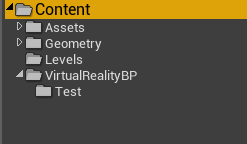
Any ideas why?
full junco
its buggy
stuff is still referenced there
you can delete it in the windows explorer
wild mauve
Alright haha
Any suggestions for things to spend on UE4's market place?
I still have 30 buckaroos from when it went free
full junco
lol that was a long time ago 😄
wild mauve
@full junco hey would you happen to know a good tutorial for the VR Pawn / HMD setup?
wild mauve
haha no worries
full junco
I like to do things myself without looking at tutorials. I find it easier than trying to understand how someone else is doing something
wild mauve
Normally me too, that's how I ended up doing my own server database for FiveM (a GTA:V mod) 😛
Was working on an MMO-style modification but honestly it's just a lot of work
And the project isn't popular enough to have people to work with so I moved on to actual game dev
which I've been blowing off until this point
full junco
ah nice
wild mauve
That being said UE4 has a fairly in-depth blueprint system so I'm lost on some parts
digital marlin
@wild mauve what's the issue?
wild mauve
@digital marlin I'm just trying to setup a basic generic HMD setup
And then of course add in controllers afterwords
So far I have a blank player pawn
that I assigned to my game mode
I'm not sure I understand how going directly into VR Preview at this point
allows the pawn to have HMD control
digital marlin
Well it's just a camera
The pawn is just the pawn - it either is getting spawned or you're possessing it on start up.
wild mauve
well when I go standalone the controls are the default pawn
but in the preview play it's the VRPawn I made
digital marlin
What's your player start & gamemode setup like?
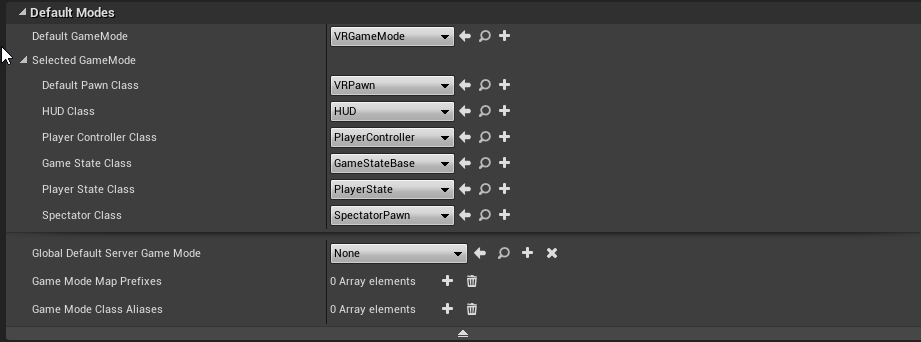
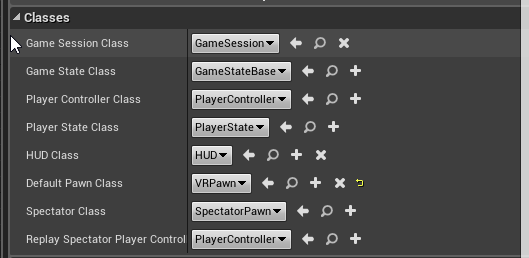 digital marlin
okay, all good there. Are you specifying on your preview that you're spawning on playerstart and not camera ?
wild mauve
looks like player start is grayed out
digital marlin
Do you have a player start in the level?
wild mauve
You mean the VRPawn?
digital marlin
No I mean player start
wild mauve
I think that worked
(I have no controls in viewport now and standalone
actually nevermind
nope I have controls in standalone still
digital marlin
but if you move your VR set, do you get anything?
as in is it following your HMD?
wild mauve
Indeed 😛
digital marlin
A few versions ago, setting up VR required a few additional steps but now it's just a camera.
wild mauve
That's good to hear.
digital marlin
Yeah a bit easier these days
wild mauve
I reformatted recently
since my windows install was corrupt
and now SteamVR wont launch haha
oh perhaps it's the HDMI woops
digital marlin
Yeah probably the HDMI
wild mauve
@digital marlin Doesn't the HTC Vive do standalone now?
Or do you need Viveport still
She's all plugged in and still refuses to launch steam vr haha
I'll just go down load Vive
wild mauve
they auto charged me 10 bucks so I uninstalled them last time
digital marlin
ugh yeah sounds like em
digital marlin
god damn bloatware
wild mauve
hmm
full junco
how does that actually work? the vive needs steamvr, so steam has to be installed. does the vive work when viveport is installed but no steam?
wild mauve
Not sure, I honestly just can't launch steam vr haha
full junco
or is steamvr shipping standalone with viveport?
wild mauve
it wont work when I hit the button
I'll try getting it all working
and then removing viveport from launch options in steam vr
and just get open vr
also apparently vive triggered a steamvr download on steam's end
full junco
well I never used those either
wild mauve

GitHub
OpenVR-AdvancedSettings - OpenVR Advanced Settings Dashboard Overlay
Oh, it's awesome
It has tons of options
full junco
but you shouldnt call those openvr because openvr is just the name for the steamvr api
wild mauve
Set supersampling values.
Enable/disable asynchronous and interleaved reprojection.
Save supersampling and reprojection settings into profiles.
Change several chaperone settings not accessible via SteamVR settings (to e.g. make it completely invisible).
Chaperone Proximity Warning: Several warning methods can be configured.
Chaperone Profiles: Allows to quickly switch chaperone geometry and settings while in VR.
Temporarily move and rotate the playspace.
Floor height fix.
Displays several performance statistics and other statistics (e.g. headset rotations).
Select the playback/mirror/recording audio device
Mute/unmute and set volume of audio mirror device.
Mute/unmute and set volume of microphone device.
Implements push-to-talk and allows to configure push-to-talk profiles.
Desktop mode shows a window on the desktop instead of a vr overlay.
Revive settings support (Requires Revive 1.0.4+ for full functionality).
VR Keyboard Input Utilities
Simple Alarm Clock
Player height adjust toggle (Credits to mklim)```also isn't the idea of headset rotations as an overlay great? Lets you unravel your headset without taking it off
full junco
well theres nothing in there that I would need that isnt in the regular steamvr settings
wild mauve
@full junco regular steamvr has one supersampling option
openvr has profiles per game
full junco
dont call it openvr
please
its advanced settings for openvr, openvr is just the name for the API
openvr does not have profiles per game, those advanced settings have profiles per game
wild mauve
Alright.. I know what it is now dude I just referred to it as OpenVR because that's what it had in the name
relax
;p
nobody was hurt in the making of my comment
full junco
well, yeah, I just like it to be used correctly 😄
wild mauve
Is the DAS worth getting for developing purposes exclusively?
I'm not exactly torn about the current one for playing
but I like the idea of being able to pop it up while not using it
and going back in on a whim
instead of restrapping
full junco
"pop it up"?
wild mauve
Yeah doesn't the DAS allow you to rotate the HMD up
full junco
no?
wild mauve
like the oculus rift?
digital marlin
?
full junco
you cant rotate the rift up
digital marlin
What do you mean? Like physically lift the visor?
wild mauve
yeah
full junco
the LG headset you can rotate up
wild mauve
hmm
digital marlin
^
wild mauve
I seen someone with oculus doing the welders mask sorta thing and thought that was the point of the DAS
digital marlin
It'd make deving much easier.
full junco
it feels better
wild mauve
I see
full junco
less weight on your face
full junco
I havent used the DAS, but if its same like the rift strap then it would be very annoying for devving. the vive you can hold in one hand and look through it, the rift you have to fully put on your head for being able to look through it
wild mauve
I get what you mean
yeah that's pretty useful just putting it up to my forrehead to peer through the goggles
full junco
and I much prefer just holding the headset in front of my eyes for a few seconds to see if something looks correctly without having to take off my headphones and stuff
wild mauve
I need to craft up a little desk mount for my HMD
currently it rests on my wall which is about 2 meters from my desk while not in use
I feel like if it were closer I'd be using it more often
I need more desk space haha
full junco
no lighthouse can see my desk
full junco
I can turn left in my chair and then I can use my vive or rift
so I usually test stuff while still sitting
wild mauve
makes sense though
full junco
only 1 lighthouse/camera sees me there, but its fine
wild mauve
My favorite part about what I'm working on, or rather, hoping to work on, I wont get people complaining about teleporting vs locomotion
because my game wont have either muhahah
full junco
vive tracking is still perfect with 1 lighthouse 3 meters away, rift tracking with 1 camera 3 meters away is shitty though
wild mauve
sword fighting at room scale
I'm trying to setup a few Xbox 360 Kinects to do motion capture
albeit choppy it would be nice to see how well it works
Even if most is fixed up in post production
full junco
ok
wild mauve
@digital marlin I have tracking but I also have regular WASD / Mouse movement
Any ideas?
digital marlin
having tracking doesn't negate your WASD keys
Are your controllers working as usual ?
wild mauve
I only have 1 controller hooked up but I don't think UE4 is setup for controllers I at least didnt set it up
wild mauve
yeah
@digital marlin indeed I can.
😃
So how does my game still have wasd movement?
If you don't mind my asking I have no blueprint that defines that behaviour
and I removed all input
digital marlin
Ah, what's your inputs?
inside your project settings. Are you using the VR template?
wild mauve
Yeah but I removed everything
to have as much of a blank start as possible @digital marlin
I added in the skeletal mesh and paired it to the left hand
still doesnt seem to show up in-game.
same for the right

HMD still works fine but no hands 😛

my hand was out in front of me
as hard as that is to believe due to the fact that's so basic haha
Collision is disabled so it shouldn't be that 🤔
Hmm, apparently there's an issue in previous version where if you nested them from your camera you would inherit the rotation of the base class twice
maybe now that it uses the pawn without a camera
I need to not use the root?
not sure haha
@digital marlin any ideas?
Apologies for the bother.
digital marlin
hrmm
wild mauve
mkay
digital marlin
So, your setup is what? HMD and then you have two components of hands?
wild mauve
so dragging the pawn into the scene manually
lets me control the hands
but they aren't attached to my HMD
digital marlin
They shouldn't be
wild mauve
Indeed..
digital marlin
well, I mean they should be components but shouldn't be attached like in a heirarchy
wild mauve
Yeah
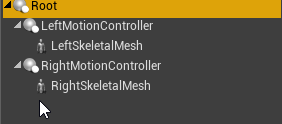
That's my whole hierarchy
and when I drag this pawn into the scene those hands are controllable
digital marlin
Separate them
digital marlin
okay,
wild mauve
Root is their parent
digital marlin
Do yourself a favour and see how Unreal do it.
It's pretty simple and it'll explain it better. Basically it's a HMD and the HMD spawns a hand component for each hand.
wild mauve
indeed
digital marlin
So you've got 1 HMD + 1 hand controller for the left hand and inverted, 1 other hand controller for the right.
digital marlin
yeah sorry mate I'm tapped out
I'd just advise check out what the unreal guys do with the setup. It's fairly basic but there's probably one or two things there worth seeing.


 wild mauve
@digital marlin any reason my hands are on the back of my rig instead of the front?
It's like ue4 thinks my headset is backwards
I've tried r estarting steam VR (which shows the controllers working fine)
sly elk
I had that happen once. Dropped a new copy of the pawn in and it was fixed
tired tree
player start probably had some rotation to it
granite jacinth
Hmmm, so can't really debug this properly just yet, but has anyone noticed anything strange with physics or "time dilation being set" while in VR Preview?
Also @tired tree , just out of curiousity, has anyone complained about grip functions "going bad" in 4.17 ?
 forest plover
Not from what I've noticed, time dilation doesn't seem to cause any problems or weird artifacts when I use VR Preview on my end... depends on what your doing though
granite jacinth
hmm, well, it's just acting strange. Converted project from 4.15 to 4.17
And now everything just seems to be globally set to something stupid small
But, when I force Global Time Dilation while in game, nothing changes
So, I don't think it's that really, something else
But, what's strange, is it only happen in VR preview
Everything works fine in any other mode
forest plover
Is substepping on?
granite jacinth
nope
forest plover
so when you converted, the actual value for all of your object's time dilation was set to some small value?
granite jacinth
No
That's the thing, there only one change in time dilation
and that's when the player dies
(but that function never gets called, so that's not it)
But anyway, since it's not a known problem, could just be something stupid in my project.
forest plover
yeah more than likely...
tired tree
@granite jacinth no? what do you mean going bad
granite jacinth
I did finally figure out the issue, but I wish I knew why it occured.
@tired tree Umm
Event On Grip
Kept giving me compile errors
I would delete the node, put it back in, and compile, then it was good. Then later on, it would go bad again
But, if no one else has complained, again, could just be something stupid with my migration to 4.17, so no worries. ¯_(ツ)_/¯
tired tree
wut
thats weird, sounds like possible a problem with their new broken pin implementation
granite jacinth
yeah, could just be due to this migration
chilly thicket
So, I'm trying to pass the rotational data of one of my variables into a block, but I don't know how to get the one this guide is using.
wise thunder
That looks like a transform that was split
(right click the output pin, click split)
eternal inlet
in BP, if i want to add something to location in Hand bonespace, and then convert that into componentspace, how the heck do i do that?
uneven moon
Is there a way to adjust the post-process settings ONLY on the preview window on the monitor while ignoring the post process in-game within the HMD? My game is dark on a monitor but looks fine in VR and I want to be able to record gameplay whilst letting the viewer experience it as intended simultaneously
chilly thicket
How do I get this block?
full junco
@uneven moon good question, but I think its not easily possible without rerendering the whole scene
it should be possible to add a custom PP pass just on the preview texture maybe and adjust the gamme a bit, but thats already quite a lot of work I guess
eternal inlet
@digital marlin My character's hand is pointing in a direction with the VR Motioncontroller, and i want to add a recoil effect to it, so it moves back relative to the hand's orientation, and also add a random rotation
i used to use the ModifyBone node, which allow us to add Translation/Rotation to a bone in BoneSpace
but now since i use IKinema for this, and they drive IK-tasks from ComponentSpace, i have to add that Translation/Rotation in ComponentSpace, but translated from BoneSpace... sry for th shitty explanation
im tired
i'll revisit it tomorrow i think
chilly thicket
I guess, to refine my question, I'm trying to reference components in my pawn from a blueprint.
And I'm not sure how.
full junco
@chilly thicket #blueprint is the place where that fits better
chilly thicket
Okay.
glossy agate
@eternal inlet does the local to component node work? I know there is a default node to convert between those two.
Or you could just lerp the hand mesh to match relative transform of the gun if they all have different recoil, although that can be a little immersion breaking. Pavlov does some of that like if you 1 hand an Ak long enough it twists back till it eventually pops out of your hand.
chilly thicket
And now, my one final problem I can't seem to find a solution to, I need a way to reset height.
Is there a certian block that can do this, because I can't find one.
glossy agate
@chilly thicket reset orientation and position node
glossy agate
Is your steam cage under the ground?
chilly thicket
Well, I don't use steam.
But I can reach down under the ground with my controller.
Slightly.
glossy agate
Yeah it's tracking origin you need to set. It's a node, but you may have other problems too.
chilly thicket
I think I already do that when the game starts.
Which makes me think maybe the problem is related to my acutal Rift config.
glossy agate
Probably need to do it spawning your pawn
Your other problems I think you have is improper character setup if that doesn't work.
Are you using the provided epic template? Or is this a new problem?
chilly thicket
Technically I'm using a slightly customized template from this book:
GitHub
UE4VRCookbook - Source files for the Unreal Engine VR Cookbook: Developing Virtual Reality with UE4
The CH7_CharacterIK one.
glossy agate
Oh cool. You are on the right track then. Still may be tracking origin though because it may be different for rift.
chilly thicket
Yeah.
glossy agate
Think his project is vive, and the node gives option for floor or eye height
Just try the other option and see what it does
chilly thicket
Eye height puts me on the floor.
Floor height is the one that's almost right, but a little too short.
glossy agate
Was it wrong when you first opened the template?
chilly thicket
Yeah.
glossy agate
Probably check your oculus Room setup settings, and if that doesn't work I'm pretty sure I saw an answer hub for a fix moving the camera down for a new floor setting.