#virtual-reality
1 messages · Page 130 of 1
 alpine torrent
MR/AR apps
 full junco
@mighty carbon I hope soon 😄
 mighty carbon
when do you start your PR campaign ?
full junco
was busy with adding rift support the last few days, after thats done I can get back to working on the trailer
full junco
not really, probably something like 14,99 or similar
mighty carbon
aye
full junco
the rift tracking is really annoying. I constantly see stuff like this: https://puu.sh/xgO4n/102fdc3fd8.png

and I already tested every USB port I have
 sturdy coral
That's a.. very specific error message for a consumer to deal with lol
full junco
@sturdy coral yeah, did you see I got the controller side issue fixed?
sturdy coral
yeah
as long as that doesn't lock up the game thread because it never comes back valid or something, but then you would have ended up with a non-functioning controller anyway right?
full junco
it doesnt lock the game thread, UE4 is just checking all the tracked devices every tick and assigns stuff correctly when something changed
sturdy coral
ah ok I thought it was in a while loop or something
for some reason
but I guess it was looping over all controllers and not looping until that was valid
full junco
yeah its looping over all the steamvr devices every tick
sturdy coral
were you able to reproduce it pretty reliably before the fix?
full junco
yes, 100% reliably
full junco
does the vibration on touch controllers always feel quite different to the vibration on the vive controllers when you use the same values?
sturdy coral
I haven't done a lot with haptics, just had vive picking them up from existing gamepad rumble stuff and oculus not getting anything when using the oculus plugin because it had a different api
mighty carbon
you get that message when you use USB2 and all sensors are on one USB controller
I have 2 USB 3.0 controllers on my mobo. 2 sensors on one and 1 sensor + HMD on another
never had that error message
full junco
@mighty carbon I am using different USB controllers. now I actually see this: https://puu.sh/xgXuV/1e15c71512.png

the error message for the sensors is also great: https://puu.sh/xgXwe/47281c6327.png
 mighty carbon
Obviously you do not
The whole issue with Rift sensors comes from insufficient bandwidth on USB
mighty carbon
If I put all 3 sensors on the same controller, I get errors
Vive doesn't need a lot of bandwidth
full junco
theres no reason why the vive headset would need more bandwidth than the rift
mighty carbon
They pump frames at 60 fps
full junco
I said headset

 misty hull
Hey guys, I am an unreal newbie. Where can I look for a guide on how to create a blueprint for VR for this particular type of function: 1. Aim controller at object. 2. get a popup menu 3. change mesh material and/or color from a selection of objects in another menu
 dawn cipher
@misty hull Welcome! I don't think you're going to find a tutorial that is that specific 😉
For 2, you might be able to find a tutorial on using UMG in VR using Widget Interaction Components which lets you build a UI in 2D that you can use the controller like a mouse to interact with
sturdy coral
@misty hull you should be able to get all that from here, all the pieces, but not that exact scenario:

YouTube
dawn cipher
And you can look up tutorials on how to change a mesh material or colors within a material
mighty carbon

Mark Van Haitsma from Epic Games released an outstanding set of 380+ panels, vents, hinges and latches.
if anyone needs something like that
dawn cipher
Is anyone using Widget Interaction Component for UMG?
I can't get it to send OnClick events, just OnPress 😒
 pearl tangle
in VR or on a touch screen?
 noble crater
stat scenerendering is way off screen in VR mode.. is there a workaround?
dawn cipher
@pearl tangle in VR. When I pull trigger I send Press Pointer Key with Left Mouse Button, and when I release trigger I send Release Pointer Key. I have the WidgetInteractionComponent set to "World" - it responds correctly and sends "OnPress" events through the UI
But OnClick never fires, so if I have a button and subscribe to both, only OnPress fires when I point at the button, pull trigger (ui animates down) and release
 white fern
So followup on my overlapping problem from last night. None of the suggestions made actually helped. For whatever reason the IsOverlappingComponent node is constantly returning false, even when I know that the motion controller component is colliding with my capsule component :/
Both components are set to overlap all
dawn cipher
I didn't see the messages last night, but do you have "Generate Overlap Events" checked (I don't think this is necessary but worth a shot?) What arguments does IsOverlappingComponents take?
white fern
Yep. both are checked on both components
Is overlapping components is a component method (run on one component) that detects if that component overlaps with another component fed into the UPrimitiveComponent argument
IsOverlappingComponent I mean
and it seems as if its supposed to return true if there is overlap or false if no overlap of the components
dawn cipher
My random thought is that one of the components has no volume so it can't overlap beause it doesn't have aphysical presence
white fern
I thought that too.
So I added a collider to the motioncontroller
Still doesn't work
dawn cipher
Right but that's a different component
white fern
the collider I added also has the appropriate checkboxes and collision settings
Generated Overlap Events and OverlapAll
dawn cipher
Those probably only apply for when moving objects
white fern
Simulating Physics isn't required for overlap events correct?
dawn cipher
No but those events come back from the physics system. You should look at the source code of what the IsOverlappingComponent function does
white fern
Yeah, I know. Just hoping someone already knew
Guess its time to open VS
Hmm... It looks like it literally just iterated through all of the overlapping components and checsk
checks
Just like I would instinctively do in BP; except more efficient because it's native C++
So for whatever reason it's saying that the components are not overlapping -- which means they're not. But I have no idea how that could be possible
mighty carbon
apparently Oculus has pretty advanced analytics for its apps (in the dashboard), so I might not even need that Google Analytics plugin after all (plus it doesn't work for me anyway)
noble crater
any tips on monitoring draw calls in VR given that the stat command doesn't work in VR?
mighty carbon
it does for me
noble crater
doesn't the table go off screen? @mighty carbon
mighty carbon
I am with Gear VR
and I take screenshot from the device, so I can see all values just fine
 glossy agate
@white fern the overlap component works for me, and I know it works for others. How are you checking? You have a BP you can post?
Am using that node for an inventory system.
 weary flame
Is It possibile to have the VR preview widescreen as other PIE and not regular sliced view of a single eye?
pearl tangle
@weary flame the new mixed reality stuff in 4.17 handles that now
or there is a modified steamvr plugin which does it too
 wintry escarp
is there a way to stop the oculus app running when I close ue4?
mighty carbon
Reboot
wintry escarp
easier to just close the oculus app, its just annoying
mighty carbon
Yep, but it is what it is
@wicked oak did you know that Oculus dev dashboard has extensive analytics ?
 wicked oak
yes
i take it quite seriously
but my player numbers are low, so its not very accurate
mighty carbon
aye.. I just figured Google Analytics plugin was a waste of money
wicked oak
uhm, its not expensive
and you can do all the stuff you feel lik
the oculus dashboard is for tech related stuff
it tracks FPS
and GPU usage
and thats it
im tracking average kills, player deaths, what devices my players, use, etc
i can even track PS4
mighty carbon
Oculus tracks country, language, session time, controller usage, etc.
everything you need to determine your demographics and how much time people spend in the game
mighty carbon
Google Analytics for once doesn't build when I build my project for Gear VR.. Support for that plugin is not good (some people might think otherwise, but in my book it's not good).
wicked oak
for example i track the average scores
well, i can compile it even on ps4, i dunno how the hell it fails on your end
i also track the map flow
mighty carbon
well, I don't need anything but basic data.. And not only the dev can't tell me how to get it up and running, but none of the people who bought the plugin (which isn't their job of course, but it would be nice to hear from other users how they got it up and running)
wicked oak
if you only need basic data, then you dont need it
both Steam and Oculus have basic analytics
oculus much better than steam
mighty carbon
well, when I purchased the plugin, Oculus didn't have anything 😃
and I wasn't at the point where I needed to integrate analytics
wicked oak
you sure about that? i had oculus stuff from the very beggining
white fern
@Ryan I can't post a blueprint at the moment because I'm not at my workstation, but I'm using the Epic VR template motion controller in conjunction with another actor that implements the VR template's PickupActor Interface and has a capsule collider component. Trying to tell, from the 2nd actor, if the motion controller component passed through the pickup event is overlapping with the collider component.
The problem I'm actually experiencing is that the IsComponentOverlapping node extended from the collider is always returning false even when I know the scene component is inside the collider.
glossy agate
Hmm. So you are running the check during pickup actor sequence? Maybe make it check on tick with a print string to see if you can ever get it to overlap anything
mighty carbon
well, Gear VR for Note 8 was announced and it's just that - same old Gear VR
wintry escarp
well they have a lot of stock from last time, even with the give aways
white fern
@glossy agate will do. I'll try it later
full junco
are the vive controller in general capable of vibrating much more intense than the touch controllers?
 restive blade
ugh.. so over VR 😦
mighty carbon
?
pearl tangle
@full junco I don't think the vibration is that much different but the motors are likely a bit larger and you have a different grip so may feel different. I haven't noticed too much of a difference between them
glossy agate
Can anyones mother vouch for this? We need testimonials on the vibration levels vive vs touch
pearl tangle
@glossy agate why? Just pick up the controller and test it is probably the best bet
glossy agate
Was a joke. Mother...Vibrating controllers...☺
pearl tangle
despite the name, I don't think the Touch controller is going to be so helpful on that side of things. The vive controller is shaped much more appropriately...
- also, better tracking so theres that.....
 digital marlin
@pearl tangle you played with the new controllers yet?
For the vive, I mean. The knuckles.
pearl tangle
nah haven't had an opportunity unfortunately. Would love to for personal stuff, but they don't particularly suit the applications I do for events or enterprise stuff. Gloves and tracked props are where I am targetting
digital marlin
fair enough
pearl tangle
would be great for playing robo recall with though
digital marlin
I figure it's gonna make a few changes to how people interact.
full junco
@pearl tangle ok then the huge difference I see has to be due to openvr
 twin pulsar
hey does anyone know of a good solution to have both the vive lighthouses and the oculus cameras attached to the same stand? I currently use this for the vive lighthouses
https://www.amazon.com/PBL-Stands-Cushioned-Locking-Collars/dp/B003D8KV0K
https://www.amazon.com/VONOTO-Tripod-Camera-Camcorder-Bracket/dp/B00X5QO3B8
But now I want to add the oculus cameras to the same stands. Not quite sure what to look for... a cross bar? a t bar? a boom stand?
pearl tangle
@twin pulsar You can get right angle arms with extra joints on them that come in handy. You can then connect the lighthouse to the tripod at the bottom connector, then have the arm come off the back of the tripod to go to the rift 1
http://store.dji.com/product/osmo-articulating-locking-arm?site=brandsite i use 1 of these sort of things and then a male - male tripod piece
 west moss
hi guys, anyone here have a good benchmark values for GPU Profiling on VR?
wintry escarp
superposition will benchmark vr
twin pulsar
@pearl tangle nice thanks!
 frank plaza
Yo! So, in the VR template, in the MotionControllerPawn, ther is a Event Tick, however, when I use this event tick to update the rotation of a object, it only does it whilst I'm trying to teleport...? (wtf)
help plz
Oh sry wrong rotation values was the problem 😄
But then Imma ask, dows anyone here know any good UE4 VR tutorials? All that I find... kinda suck
 fair hearth
Mitch's vr lab videos are pretty good
 lyric spoke
Anyone here familiar with how Robo Recall interps their weapons when the player throws them at a target? If there's anything online already looking at it - I'll have to download the project and check it out later today reguardless, but I'm just curious
 turbid scroll
Anyone using the deferred renderer for VR? Looking for some feedback on Temporal AA.
 gentle grove
What kind of feedback? it looks soft, but solves both geometry and temporal aliasing. Causes problems with small, fast moving VFX. MSAA looks crisp, can be expensive especially in VR , and you get alpha-to-coverage
turbid scroll
This is the thing I'm talking about. (I'm the author) https://forums.unrealengine.com/development-discussion/rendering/125798-dynamic-temporal-aa-sharpening
Does it help your project, what settings work for you, etc.
gentle grove
@lyric spoke Robo Recall uses "throw target components" to assist throws. For straight line bullets the closer you are to hitting, the more it assists (creates positive feedback loop). People generally miss high to low so the XY is calculated separately from Z. For thrown ballistic stuff, it calculates against two planes, one on the horizontal, one aligned to the direction of the throw. That covers both a hard throw case, and a "lob" case.
mighty carbon
a rumor has it that HTC is putting up Vive department for sale
alpine torrent
fear of Mixed reality HMDs?
mighty carbon
@alpine torrent no, simply not being profitable
 normal thorn

Engadget
HTC's years of struggles may finally be catching up to it.
if thats what you're refering too, looks like its not from the vive sales as much as the company as a whole.
digital marlin
Sounds weak tbh.
mighty carbon
@pearl tangle might have an in-depth info about it
digital marlin
I wonder if valve would consider buying them?
digital marlin
Yeah it does go against their business methods I suppose
dawn cipher
Right now Valve is in a really low-risk position
They make the software, and get money for people buying things that use their software
 uneven moon
I just did a re-install of Windows and the editor, created a copy of my project with the latest version of UE4 and set up the Oculus runtime, etc. but when I try to play the game in VR through the editor I'm located below the ground
sturdy coral
@uneven moon add a call to 'set tracking origin' floor
uneven moon
I didn't have to do that before the re-install though
Why did it work fine before and not now?
sturdy coral
@uneven moon I don't know, but you always have to call set tracking origin floor on the oculus sdk if you want it to work the same as vive and not be head-origined
maybe you were using steamvr instead of the oculus sdk plugin before
uneven moon
Interesting
So if I set it, it'll work on both platforms?
@sturdy coral
That's what I have set up (initially) ^
In theory that should check if it's SteamVR or Oculus and set it based on how the person did it on their end
sturdy coral
should be fine, I don't remember if it is part of the oculus function library or not
if it is, it won't have any affect on SteamVR/Vive but it won't matter because steamvr defaults to it
uneven moon
Is there a way to revert back one version?
I feel like upgrading the project may have caused issues
Figured it out actually
sturdy coral
no, you can't move backwards without a backup or version control
at least in general
uneven moon
My project was originally started in 4.16.3
So if I install that version and open it up
It should be fine, right?
The 4.17.1 was a 'copy' of it
sturdy coral
yeah there shouldn't be a problem if you never opened it in 4.17 outside of the copy
glossy agate
@uneven moon levels I don't think will go backwards, not for me at least. Everything else has been fine for me though.
uneven moon
It worked out, the project was for 4.16.3 anyway and all problems resolved
Thanks, guys
digital marlin
Sorry if this is a repost.

Eurogamer.net
UPDATE 24/08/2017 10.26pm: The KFC VR game now has an official name: The Hard Way - a KFC Virtual Training Escape Room.The fast food chain described this mo…
It looks exceptionally well done, all things being equal especially the VO.
pearl tangle
Not sure who built the KFC thing but Wieden + Kenedy was the agency that came up with it
 tawdry dragon
Has anyone tried using the Microsoft Dev headset with UE4 yet?
I faintly remember somebody saying that they might not work together
pearl tangle
its all tied in with Unity most likely since it's the same with the hololens. It's heavily relient on UWP which Unreal is not a fan of. Microsoft does keep an up to date fork of UE4 with UWP support though @tawdry dragon
tawdry dragon
Do you know if they use the standard VR nodes etc. inside BP or is it all custom?
Looking a bit around the forums, there is practically zero information available
alpine torrent
there is Hololens template
 stoic bloom
anyone have any experience making separate builds for Steam and Oculus? Did you manually enable/disable the appropriate subsystem or is there an automated way via Build/Target.cs that it can be handled?
uneven moon
Do I even need this if my player has no moving capabilities aside from room-scale real-time movement?
 granite jacinth
@uneven moon Why do you even have that?
uneven moon
Not sure, was following a basic VR pawn set-up tutorial a while back
granite jacinth
The answer is no btw, but hod did you even get that
uneven moon
Never got to the part where he used that
uneven moon
Lmfaoo
granite jacinth
¯_(ツ)_/¯
 cloud pine
Yea, @uneven moon FloatingMovementComponent isn't necessary.
Can anyone in here help me with this problem I've been having? (X-post from Blueprint):
Hey, so I've been having a really tough time with getting IsOverlappingComponent to work properly in VR. I've been stuck for a few days now and can't seem to figure out why my node keeps returning false. I'm actually at my workstation now and I'll try to provide screenshots to help. Anyone have any idea why I'm not getting any overlap events between the motion controller component and the capsule collder I'm using??
This is from Event Pickup on an actor Implementing PickupActorInterface in the Epic VR template: https://cdn.discordapp.com/attachments/221798862938046464/350458784038256640/unknown.png

The Motion Controller BP function that triggers the pickup event.: https://cdn.discordapp.com/attachments/221798862938046464/350459007271698433/unknown.png

Collision of the passed in VD_MotionControllerComponent (derived from the native MotionControllerComponent): https://cdn.discordapp.com/attachments/221798862938046464/350459340425003008/unknown.png

Collision settings for the capsule collider component that I am trying to check for overlap with. (Below): https://cdn.discordapp.com/attachments/221798862938046464/350459621485445122/unknown.png
 cloud pine
None of them. The IsOverlappingComponent consistently fails
By fails; I mean it returns false
uneven moon
Hard to tell, is your hit collider variable set up properly?
cloud pine
even when there is a clear overlap of the components. Despite both components having the appropriate collision settings and bGenerateOverlapEvents set to true
uneven moon
I'm trying to turn the player's vision red the more health he loses
Can I create a scalar parameter for a post process tint effect somehow?
 raw portal
Anyone run into issues with (Hierarchical) Instanced Static Meshes? They seem to ramp up the draw time by a lot.
raw portal
And an extra question - What's up with the VR Preview in UE4.17? It's way more zoomed in now
white fern
@noble charm Neither. It's derived from the template MotionControllerComponent which is native to the engine now. It's a scene component with some additional data
 noble charm
so it doesn't have collision correct?
white fern
It doesn't have it's own collision volume (i.e. collider) no.
 slim raft
Have you tried changing from query only to collision enabled??
white fern
I tried to add one to the component, but am not sure how to do that
noble charm
so isoverlappingcomponent will fail always against it
because that component can't collide with anything
white fern
So what you're saying is I need to somehow add collision to my custom MotionControllerComponent.
How can I do that
?
slim raft
Also, yeah, motion controller components can't collide due to not having any collision geometry
noble charm
you could add a collider to the actor that the component is part of
slim raft
Use a sphere, and set the collision to enabled on both
noble charm
^
white fern
Right, but that's at the actor level
for what I'm trying to do I KNOW that the motion controller should be "physically" in the level and will overlap and collide
white fern
it's kind of critical to the whole system so I want to do it at the component level.
I know that MotionControllerComponent isn't. But since it's not then I'll need to write my own parent.
slim raft
Why?
white fern
I need to know, at all times, exactly where my motion controller root is and it needs to be able to overlap other environment pieces.
slim raft
Change your design
Its wrong
What do you need collision for to ask where the "root" is?
white fern
OK. Let me put it to your this way.
slim raft
Why does the motion controller component "need" to overlap anything instead of just using a sphere parented to it?
white fern
Because I'm trying to maintain the VR template structure
and it uses the motion controller component in GrabActor on the MotionController BP
white fern
No.
It uses PickupActorInterface
An interface implemented by BP's that you want to be able to pickup
slim raft
In what way does that contradict what I said?
white fern
It doesn't use custom actors
slim raft
wrong
white fern
you can make any BP implement the interface
white fern
Yes. It uses A Blueprint
slim raft
Has a sphere component parented to a motion controller component
Just like I said to do
white fern
Yes, the problem is that on GrabActor it doesn't pass any way to check the position of the controller on the PickupActor.
slim raft
It calls "Pickup" in the interface
white fern
My real question is this: why can't I detect whether or not a scene component is within a collider
slim raft
Which takes the motion controller component as a parameter
white fern
that's all I need to do.
white fern
A collider has a volume. I just need to check that the motion controller scene component is within that volume
slim raft
Depending on the collision geometry, thats pretty complicated math
white fern
But it's a standard collider
they really should have accessible methods for simply checking whether that is the case for simple Shape colliders
slim raft
What do you mean by "standard collider"?
white fern
Shape Colliders
slim raft
What shape?
white fern
Box, Sphere, Capsule
slim raft
All of those you should know how to do the check
white fern
Overview of the different types of Shape Components that can be added.
slim raft
Assuming you are talking about checking if the origin of the scene component is inside the collision geometry.
For a sphere you simply check that the length of the delta between the scene component origin and the sphere origin is less than the scaled sphere radius.
white fern
I know how to do it. I'm just saying that with as common as it is there is likely already methods to do it that are not exposed. (Though I could be wrong)
slim raft
So does this solve your problem?
white fern
I believe so, basically what you've told me is what I wasn't expecting which is that I'm going to need to modify this template structure to do what I'm trying to do, which I was trying to avoid.
slim raft
Its a pretty shitty template tbh
Making the hands separate actors is needlessly complicated
I would recommend you start from a blank project
white fern
Yea, that would make more sense to me, honestly, I'm just looking for quick turnaround on this project and was hoping the template would help; but I guess It'd be better to make some real changes.
Thanks
slim raft
no problem
white fern
Basically though what I learned is that "IsOverlappingComponent" doesn't do what you'd expect for scene components, since they lack any form of collision geo
Which is pretty obvious in retrospect, but...
noble charm
scenecomponents cant overlap
slim raft
Primitive components can, but every once in a while you might run into a component that inherits from primitive component without making use of collision
white fern
Yea, but I feel like they should considering SceneComponents have Collision settings that can be set
Feel like it'd be useful, but understand that it may be a lower priority
aaand... back to Unity for contract work 😥.
white fern
I thought it did. Regardless I know the MotionControllerComponent does, and it looks like it is a decendent in some form. I'll check again
So Scene component doesn't, but the MotionControllerComponent does, even though it too has no collision geo
 wise thunder
Well, there's the thing: it's a descendent in some form.
It inherits form UPrimitiveComponent, which introduces collision
UPrimitiveComponent inherits from USceneComponent, which is why scene components don't have collision—primitives are the first components in the chain to have it
white fern
Yea, I'm looking at the heirarchy again. Makes sense.
So really, it'd be good if someone ripped out the collision settings for the MotionControllerComponent or otherwise allowed you to enable collision on the component (i.e. add collision geo.) All makes sense, just a bit wierd.
slim raft
I'm not sure why they inherited from primitive instead of scene
All it does is update its transform from the motion data, which seems like you could do to a scene component without anything introduced in primitive
At one time they may have planned on having geo for it then ditched the idea
noble charm
im sure they did it for collision no?
slim raft
Well, they never added any collision for it
Probably realized it was best to keep it minimal and modular
white fern
Yea, maybe inheriting from Scene or adding collision to the component would help avoid confusion
uneven moon
I have a gun and a flashlight attached to my motion controllers but when I run my game, something really weird happens and they aren't attached to my motion controllers.. I can sometimes see the gun flying in and out of the ground far away from me, as if my hand movements are creating a very intense rotation for it around a center point that is somewhere far away
Difficult to explain
This is the set-up (it was working a couple days ago)
fair hearth
do you change their visibilty at all? I've had that do similar things
uneven moon
No @fair hearth
 real needle
@uneven moon Make sure that the children meshes don't have collision on
Or if so, make sure they have working collision settings
uneven moon
@real needle All collisions are off on MC meshes
The weird thing is
I have a muzzleflash on the pistol
When I fire the gun
It comes out where its supposed to... at my motion controller
But the gun itself isn't there until I move my hands around and see it in the distance
I'll see if I can screenshot that
real needle
Have you restarted editor and steamvr?
uneven moon
real needle
Did you accidently change players to 2?
uneven moon
I don't have SteamVR on, just Oculus
Change players to 2 how exactly?
I possess the pawn at level start
uneven moon
of players set to 1
real needle
Just checking
That are all the obvious things I can think of
Go deep dive bru
Still, restart.
Or revert to the last thing you did
Try fresh project
uneven moon
Too deep into the project to restart, done too many things (mostly just health, damage and level BP stuff for textrenders)
It should be fine without SteamVR if Oculus is on, right?
real needle
Not restart, revert
If you're using a rift yes
I want to make HL3 Fan Game now that it all seems to be up in the air
I almost have the platform for it done... I'm gonna go ahead and think about this.
uneven moon
HL3 in VR
real needle
Yessir
uneven moon
wait
real needle
There's no reality without v... or something
uneven moon
what's happening with HL3??
real needle

reddit
106333 points and 11074 comments so far on reddit
real needle
Well, there's no official
But since most of the core team aint working at valve anymore
Take your pick
Also, I'm not going to link what luckey is asking the internet
uneven moon
I feel a little empty reading that reddit post
p.s. I fixed the MC issue, I think my pawn was slightly below floor-level, I re-placed it and they work fine
 lapis dawn
"Also, I'm not going to link what luckey is asking the internet"
What does that mean @real needle
 tired tree
hes trolling reddit by saying he will buy Vive
mighty carbon
Can he buy it out? I don't think he has that much money.
Plus if it's already not profitable, why even bother
sturdy coral
yeah he's just trolling, but he would have the money to do it
HTC overall is valued at $1.7 billion and doesn't have a ton of debt
the vive part would be worth less than that and he probably has enough
sturdy coral
you have to convert taiwanese dollars to USD when you look at their market cap on most sites
tired tree
so they claim their only value is their banked cash?
sturdy coral
market cap is just their share price * number of shares, so it isn't their claim
I don't know how much cash they have on hand now, for a while they traded below the amount of cash on hand
under the expectation at the time that they would keep burning it on employees and not make much headway in the phone market
looks like they have 38.35 TWD per share in cash now
about $1billion USD
palmer probably has over a billion, they were bought primarily in facebook stock instead of cash and probably had a lockup period
and facebook went way up in the next couple of years
granite jacinth
HTC needs to just sell me Vive Business for $1 USD. I'll make it great again.
 pastel lintel
hey i'm using an htc vive with ue4 but the vr template is glowing green
anyone else have that issue?
glossy agate
@Tyler#3861 it's probably your skylight using an hdri image
wicked oak
he does have the money
but he is trolling
like when he said he would fund that extra chapter of re:zero
pastel lintel
alright another issue, why is there no bloom in the vr template?
i crank it up in post processing and it barely exists
sturdy coral
@pastel lintel probably an r. setting in the console, r.bloomquality or something (just made that up)
search the inis in the config folder case insensitive for "bloom"
pastel lintel
ill try, thanks
noble crater
anyone found a nice workaround for this old bug https://issues.unrealengine.com/issue/UE-36103 ? I'm planning to move colliders to world Actors (not children of controllers), it's ugly 😦
 quaint loom
@noble crater that sounds like a CPU logic strain. However, you can just use a logic flip and store the overlap detection and deal with it once per object. Like in other languages overlapped=false; if(BeginOverlap && !overlapped) overlapped=true;
pseudocode mind you
sturdy coral
@noble crater I wonder how roborecall works around it
quaint loom
cause in reality the engine would be detecing the overlap EVERY tick anyway just is filtering it. So it's just the toggle that is borked according to the bug
glossy agate
@noble crater isn't that just a leap motion bug? Or is that what you are using
sturdy coral
it affects vive and rift too, it just was originally entered as a leap motion bug
digital marlin
do you guys tend to manually set your pawn's location after playerstart?
I can't get the rotation 100% via playerstart.
 tepid talon
Hola Peeps. Good morning! Anyone know where I can find documentation on the Haptic Feedback system? Apparently Force Feedback Effects don't work on Oculus Touch.
 frozen egret

The recently-released experimental ARKit support within Unreal Engine 4.17 unlocks a whole new world of possibilities. Here’s how you can get started.
digital marlin
@frozen egret there's a few videos getting about with setting up ARKit.
It's not overly hard, though you do need a Mac
frozen egret
You can also do it on Windows (I am doing it on Windows), the plugin is also enabled
it was just that the videos are purely that tex
text*
And I just prefer text > video
ah it is back
tired tree
@digital marlin if you are using the standard setup you need to set rotation around a pivot since the HMD isn't at the pawns 0,0,0 point, the HMD being the pivot
alpine torrent

Windows Mixed Reality is an amazing new experience combining the thrill of virtual reality with a phenomenal sense of presence. Now, you can travel the world...
wicked oak
new plataform to port DWVR to?
mighty carbon
I wonder when UE4 will get support for it.. Oh wait, never.. Because it's for Windows Store...
now we just need for XBox One X to support it
btw, any idea if any of those HMDs from MS partners offer AR ?
mighty carbon
😦
alpine torrent
for developing you could think simplygon as your 3D assets look good in Hololens too
mighty carbon
Hololens is expensive and underpowered piece of hardware
mighty carbon
Qualcomm's AR HMD is mobile too, yet more powerful and less expensive
wicked oak
hololens is really impressive
remember it has kinect+cameras and shit to do the tracking, plus whatever the hell is that runs the screens
what qualcomm ar kit you mean? @mighty carbon
mighty carbon

Qualcomm Developer Network
hmm.. I was certain it did AR too, but there is no mention of it on the page :/
alpine torrent
see VR development kit
sturdy coral
gearvr isn't 6-dof yet
mighty carbon
I don't think it will ever be, considering both Samsung and Oculus are working on standalone mobile HMD
sturdy coral
that doesn't mean they will stop working on gear
note 8 for instance has stereo cameras. (probably still not good enough for 6-dof, but note 8 isn't their last phone)
mighty carbon
what's the best affordable Android tablet for AR (using UE4) ?
glossy agate
@frozen egret Can you package & deploy it off windows? Thought you had to have Xcode for ARkit specifically. I know regular apps deploy fine from windows because I have done it.
alpine torrent

Microsoft and partners, including Steam, prepare to democratize virtual reality this holiday.
noble crater
@quaint loom thx I'll give that a go. EndOverlap is also being called every tick (not mentioned in the original issue).. but I'll try working around using your suggestion
@glossy agate rift & vive too unfortunately
alpine torrent
Steam in Windows Mixed Reality HMD
alpine torrent
now totally looking SteamVR games more
mighty carbon
UE4 needs to get official support for it... Otherwise it's useless.
alpine torrent
did you heard that Tim Sweeney love Windows Mixed reality
alpine torrent
that steam support is one what came with Gamescom announce cross-network play with steam and windows 10 games
mighty carbon
it's useless for us, UE4 devs.. If MR HMDs have some unique features only available on MS Store
I wonder if MS sends out free devkits 😛
alpine torrent
with devgrant you can get devkits
think your low-end laptop can use with VR

Windows Central
Microsoft is bringing SteamVR, Minecraft and more to Windows Mixed Reality this holiday season. Even better, you won't need a $2,000 PC to make it all happen.
mighty carbon
hmm.. I have Dell Inspiron with i5 and Intel GPU.. It's hard to believe VR will run on it at 60 fps
alpine torrent

@Janisku7 @UnrealEngine If it supports SteamVR, then it should "just work".
 Twitter
@mighty carbon what you was saying?
granite jacinth
Who cares about VR Editor though
What people want is direct dev support for the new platforms
alpine torrent
@granite jacinth this could make UE4 devs to direct dev to it and even hololens
mighty carbon
So, will it run on integrated Intel GPUs ? (i5 Skylake)
alpine torrent
it should just work
mighty carbon
I hope so.. I'd rather utilize my laptop for VR than get whole new laptop and another Rift. Good for the wallet and for development 😃
alpine torrent
yeah and get more people to VR as well
@mighty carbon and there is those backpacks PCs now too
some what i see have a dock with charger as the PC have battery in it so you can move it and in backpack have extra battery
omg AR glasses what looks like from old driver days https://venturebeat.com/2017/08/27/ar-smart-glasses-will-become-standard-issue-with-self-driving-cars/

Imagine flying into a new city. The rental car company hands you a pair of smart glasses at the airport. As you step outside the terminal amid the airport traffic chaos, your AR glasses identify the autonomous car driving up to get you with a digital "Your car" sign hovering above it. It knows where you are and vice versa.
mighty carbon
backpack PC costs an arm and a leg
alpine torrent
as you have Dell Laptop https://arstechnica.com/gadgets/2017/08/now-dell-has-a-mixed-reality-headset-and-the-xps-13-has-8th-gen-intel-cpus/

Ars Technica
Look to Dell's newest notebooks for the latest Intel processors.
real needle
Does Shader Complexity viewmode work as intended in the Forward Renderer now?
It looks like it
mighty carbon
~$450 for that Dell Visor with controllers
mighty carbon
folks, what's the difference between Apple's ARkit and that AR plugin for UE4 ?
this one http://www.unreal4ar.com/
glossy agate
I think ARkit has deapth tracking off the camera or something. The other AR plugin, I think only works with markers. Like those paper coasters you have to print out.
mighty carbon
I see
so ARKit is more like Tango ?
also, I wonder how it can be depth sensing with iPhones/iPads having no depth camera
glossy agate
Not sure, I know nothing about Tango
Not sure on that either, Im thinking they do some kind of point cloud maybe cause I have seen demos of it working on a random table or pool
This video here kind of shows points spawing, so I guess those are the markers https://youtu.be/72N3or0ZgMU

Arkit Top 10 Compilation - Apple Augmented Reality - ios 11 xcode wwdc 2017 SANEM AVCIL Social Channels: Twitter: www.twitter.com/sanemavcil Youtube: https:/...
mighty carbon
that is interesting.. it looks like decent tracking with only one camera
I am puzzled about why Android devices have no such system 😦
glossy agate
Yeah, seems like they would have had one faster being a more open system. Actually just saw a comment from chance Ivey today hinting it may work on Windows PC in the future for BP only projects you want to put on an iOS device.
The recently-released experimental ARKit support within Unreal Engine 4.17 unlocks a whole new world of possibilities. Here’s how you can get started.
Very last comment at the bottom
mighty carbon
still, iOS device is required and I don't think I want to buy one
glossy agate
Yeah, I have iphone, Ill probably try it when I upgrade to the 7, and can be deployed off windows
normal thorn
Anyone want a steam key for my VR game? Message me!
I'm a little less than 2 weeks from leaving EA
looking for some feedback, or just to get the word out in some small way

Huge update and launch release coming soon!The Kaiser’s cakes are so good he’s going to take over the world! ...Unless you stop him! Play as a variety of animals in a “VR Angry Birds with Airplanes” game. As you fly around bombing destruc...
Price
$9.99
Vive/Oculus with motion/touch controllers only
 stuck hamlet
hah, just got my gesture recognition working with splines. just add a spline component to my gesturemanager and it figures out what shape you draw
sure theres a plugin or somethin for that but it was cool to write my own
works pretty much flawlessly
sturdy coral
cool, is it 2d based or can it recognize 3d shapes too?
stuck hamlet
3D!
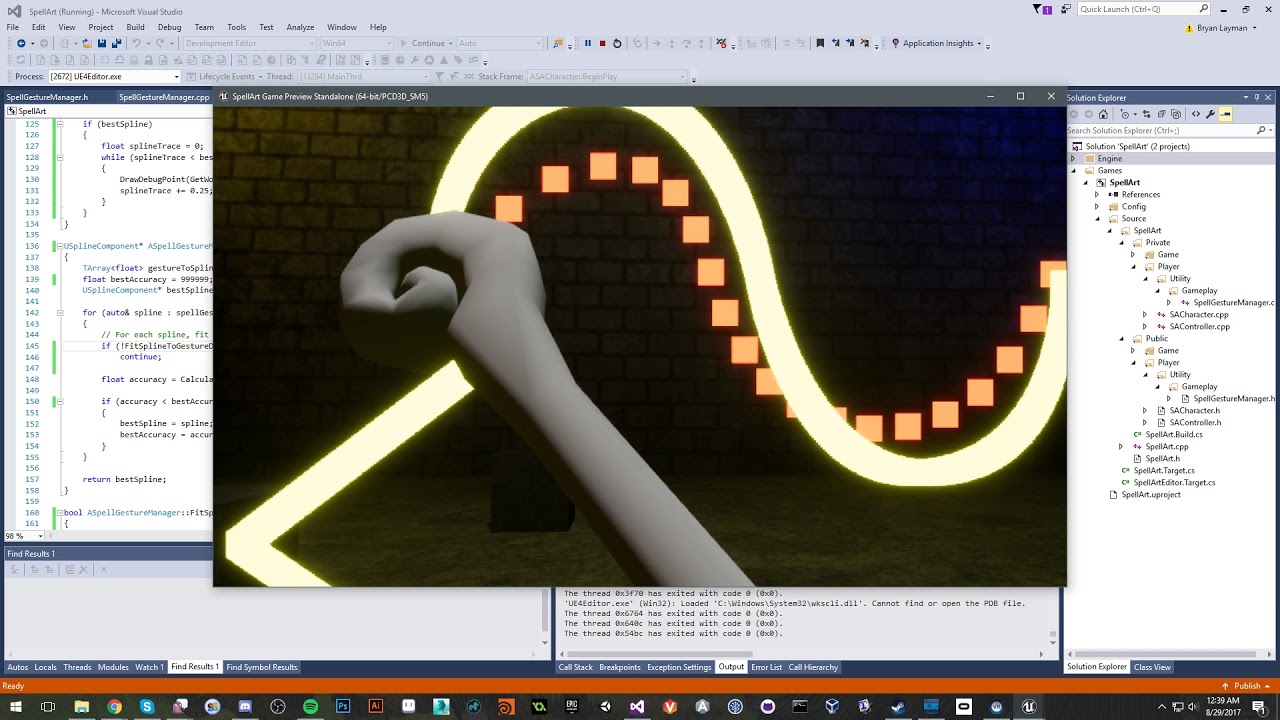
Improved the gesture recognition, its pretty much exactly how I want it. B) Also spruced up the scene a little with some generic materials.
it uses the 3D splines, so any shape you make with a spline it will recognize
pearl tangle
@normal thorn nice style that you have with that
 echo thorn
Does anyone knows why my AR Toolkit and sample project not working with Visual studios 2017??
Does it only support VS2015 to build?
 spiral zephyr
I think I read something about exactly that, yes, but dont really know sorry.
lyric spoke
Anybody figure out how to teleport and change elevation? Using the VR startup project, it seems as if the pawn is restricted to Z 0
We have rooms with completely different elevations, and the teleportation widget appears, showing it recognizes there is a NavMesh up there, but when I confirm the teleport, I believe the pawn is searching for the navmesh at 0, and does not recognize the navmesh
normal thorn
I don't have any issue changing elevation, let me check
ah you're using the start up project
I'd have to load that up to see, probably in the setup yeah
 manic ledge
Hi all, I'm currently working on a VR prototype where the user holds an object (using the example VR template) and said object is used at high speed to hit another object. However, due to the high speed, even CCD doesn't detect the hit and object A passes through Object B without any overlap event
normal thorn
Agent you need to do a line trace
manic ledge
I know that the way the template sets it up is that Object A becomes a child of the controller actor. Is it possible to force some sort of sweep each frame
normal thorn
then have the line trace call the collision
manic ledge
Yeah between old and new pos?
I'll give that a try, due to the size of object B, it could be fiddly
Might have to do some sort of curve projectile trace between old and new position (due to a users 'swing' generally being curved) as it might miss the object with a straight line trace
normal thorn
I don't know if any game using high speed collision calculations, I think its always a trace
yeah
curve for bullet drop
manic ledge
It's not a bullet drop, it's basically a golf club swing into a ball
Cheers Dave, I'll give it a try and then fire off a manual "on collision" style event
lyric spoke
@normal thorn I'm trying to figure out if there is some hidden checkbox or function that is setting the pawn down to 0, as I have a function teleporting the entire actor up to a different height, and the print string is confirming that location as not Z 0, but it always ends up clipped through geo and standing at what I assume to be Z 0
 tawny salmon
Hi everyone!
normal thorn
axsolus I think it might be you can't go up, b/c its looking for the normal
ah cool
lyric spoke
@normal thorn What do you mean by that?
normal thorn
I miss read your comment then was like ah do I fix my commment or respond why I meant...
hah
checking
on the teleportation
it works out of the box for me, I did have to adjust the navmesh bounds
it can only teleport where the navmesh is, in the template its almost flat, if you make it big, it works
tawny salmon
Hi everyone i'm looking for to learn VR with UE4
mighty carbon
@wintry escarp PM
lyric spoke
@normal thorn
So this is currently happening with my project
I can see the widget appear up on top before I confirm the teleport
But when I do, I clip through the floor
Also, if I eject myself from the pawn and move around in editor, the pawn always snaps to 0
I disabled the event tick, but it still always snaps to 0
normal thorn
let me check another map, I was testing with the head targeting system
are you using the controller teleportation?
@lyric spoke no still worked for me with both
I don't fall through the floor
it just works
try it yourself. new VR template project > make nav mesh taller > play then teleport up to higher area
I'm in 4.16
lyric spoke
@normal thorn Gotcha - I believe I figured out the problem area
We used the motionController and then added some extra bits of code onto it
After stepping through the code we realized our extra code might be the culprit!
Thanks for trying to replicate it on your end
normal thorn
np!
mighty carbon

UploadVR
Apple made headlines earlier this year with the release of ARKit for developers to start experimenting and now Google's responding with ARCore.
Ha, and we just talked about lack of ARKit-like thing on Android

Google
Today, we’re releasing a preview of a new SDK called ARCore. It brings augmented reality capabilities to existing and future Android phones. Developers can start experimenting with it right now.
spiral zephyr
yeah this is great
Anyone seen any info on what the minimum "standards" are on arcore-devices? I'm especially interested in audio channel roofs etc.
llike audio minimum requrements. What I hear is that audio capabilites on android varies wildly. Arcore is current phones and onward, so did they set down some rules?
spiral zephyr
Google Developers
allright, those are new meaty devices at least. hope the audio parts are powerful too..
mighty carbon
what does audio have to do with AR ?
spiral zephyr
nothing more than anything else, its just that i do/plan to do audio/music vr/ar stuff
mighty carbon
AR with ARCore is on the flat screen, not in HMD.. So spatial audio is useless and a no-go.
spiral zephyr
interactive symphonies/sytnthesizers
etc
android has been shit(i heard. anecdotal..) for audio
apple ok
hope this is turning point
glossy agate
@mighty carbon Yeah we were just talking about that yesterday haha. Need to think of a AR real estate app to make now for both platforms.
spiral zephyr
eh, we can decide where the listener is, and we can implore users to listen with headphones. Even without headphones we have powerful tools for sure
lets say the phone is a virtual l/r mic, we hold it up to virtual instruments on the coffee table, listening in sweet stereo on headphones.
mighty carbon
@glossy agate IMO AR is a gimmick at this point, until there are affordable HMDs. Hololens doesn't count.
glossy agate
Yeah, a gimmick you could probably make a few bucks off though. Just super accessible so everyone can use it. Just need the fidget spinner of AR
spiral zephyr
lol. a figurative one then!
very glad arcore came now. Was so jealous of apparent ease of use with appleAR, but unable and unwilling to buy a device or develop for apple..
 polar mountain
Hey there fam! I know this is a question probably answered a million times but I cant find it anywhere. Does UE4 support both oculus and vive? Are there significant advantages (development wise) to one or the other?
 slim raft
it does support both, I like Vive more, but everyone has their own favorite, most people I know like Vive
polar mountain
Thank you for the response! follow up- are peripherals currently headset locked or might they be in the future?
spiral zephyr
vive: perfect tracking, oculus: more comfortable
you need to set up what you make for different controllers, touch, vive, gloves etc. no biggie if you have access to test with hw
start reading everything
polar mountain
awesome. thank you both so much!
mighty carbon
Oculus tracks quite accurately
Oculus has better controllers and more content to play with.
 lusty ledge
oculus' tracking is good enough for what I call "arcade-cabinet scale"
mighty carbon
room scale
not everyone has massive empty rooms (most people don't even have room for Oculus room scale)
mighty carbon
oh, and don't forget the price $399 vs $599
lusty ledge
than the velocity you can move the controllers
you'll notice lag on the hands (and head!) if you turn quickly
mighty carbon
I don't
spiral zephyr
yea i would choose oculus if its sitting experiences. Vive has perfect tracking from small to big scale out of the box though, hard to beat.
lusty ledge
it's only a couple frames so it's really subtle
mighty carbon
have you played Echo Arena ? A lot of people are into it and I haven't seen anyone complaining
lusty ledge
i only got to try the touch out once or twice
mighty carbon
and from personal experience - haven't noticed any such lag in Robo Recall
lusty ledge
that's exactly where i noticed it
got to try it out at GDC
but TBF i think i'm a lot more perceptive than your average person? so it might be a non-issue
i tried out The Unspoken at GDC and that was where i really noticed the workarounds
they give you fireballs to chuck except you throw them like darts
and it's not very satisfying
mighty carbon
it is a non-issue.. It's like those folks who used to claim 60 fps in non-VR is not enough.. Some even claimed that can see issues at 120 fps..
lusty ledge
i mean some people have sea legs
some people have also abandoned VR entirely because of the nausea issues
you don't hear much from either of them
just the people on the way out
spiral zephyr
lol i have a friend who claims any screen below 144hz is torture. hmmm
lusty ledge
^ is something i notice when playing FPS's lol
idk if i'd call it torture but it messes with me
mighty carbon
I have no sea legs - I get sick instantly in VR if VR app isn't made up to standards (although lower than 90 fps doesn't count for me somehow) and yet the lag you are talking about doesn't cause any discomfort for me (and I don't even notice such lag)
lusty ledge
for the robo recall demo
it was like 15 minutes
i tried playing it like space pirate trainer
lusty ledge
i didn't get any nausea while i was playing
mighty carbon
lol, I played Crysis at 20 fps and was a happy camper
mighty carbon
@granite jacinth Epic said stay tuned for 4.18
lusty ledge
so that probably hurt it a lot
mighty carbon
but Google has fork with support already



 granite jacinth
But could be cool to play with
mighty carbon
S8 has no AR cameras either
mighty carbon
ARKit for iOS works with a single camera, so maybe ARCore does too ?
granite jacinth
I guess
spiral zephyr
not getting compound 3d structures yet, but can find som planes and track them reasonably
granite jacinth
I will have to give it a shot this week if it's easy to integrate
glossy agate
Anyone know a way to map touch controller joystick positions in inputs. Using the Vive face buttons 1,3, and 4, and I want to make it similar on Touch using joystick
normal thorn
motioncontroller X & Y
has axis value as the out
MotionController_Left_Thumbstick_X
MotionController_Left_Thumbstick_Y
normal thorn
the face buttons are separate I believe
there is the thumbstick which is where you touch the pad, and pressing clicks facebuttons
wait I was reading that in reverse
but I guess you could script it together based on yes the negative values
so you want the oculus to presss 4 buttons
glossy agate
Yeah I havn't used touch so Im setting it up for someone else to test. From what I found, Ill probably save the axis mapping and just use the 3 buttons available
normal thorn
yeah
glossy agate
seems like right MC would be better to use the joystick for snapturns for right handed players
mighty carbon
what's the best way to take screenshots for storefront ?
normal thorn
you mean in game screenshots for the store page?
 vocal whale
hey there dear people, i`m struggling nowadays with 3dwidget button for vr, if its possible can you pls give me an idea, how can i touch to a single button via vr hand mesh with sphere collider on the finger ? thnx
normal thorn
I dissconnect a motion controller button and connect it to a commandline HighResShot 2560x1440
mighty carbon
ah, I see
normal thorn
ah, keybind to the exec console command?
mighty carbon
what if I need to fly around to take shots from various angles ? I don't really want to implement flying mechanics just for screenshots
normal thorn
ah for that I just take stills in editor, even tho there is no gameplay taking place
but I know what you're asking now and its not easy
I suppose you could also make a camera put it in place and call that to screenshot?
tired tree
its easy in 4.17
spectator mirror a camera or scene capture component
also can just directly store the texture from one of those now
they added a save as image function recently in blueprint
normal thorn
there's also "take automated screenshot at camera"
which I'm not sure how it works exactly but I think I was taking screenshots with another camera
tired tree
that too
mighty carbon
I am still on 4.16.2 for Gear VR
I recall there was a button "Eject" in the Editor, which did something like that taking me out of the player characters and allowed me to navigate freely while the game was running
I wonder if key binding will work when doing such a thing
glossy agate
I think f8 ejects you. Could try that. Can you just do simulate then take high res screenshots, or are they all action sequences
 severe river
does anyone know if UE 4.17 will automatically package VR in fullscreen, instead of the thin strip with the black bars? I know theres a manual way of fixing it in VS but im asking if its implemented into the release build
tired tree
it is
but its a setting you set
and its not as good as the source edit currently
due to a very small section of one eye that they are using, they really wanted to avoid the edge warping but it makes the preview worse overall than the manual edit
severe river
gotcha so ill just do a source build of 4.17
jc how bad is the small section? like 10x worse or just a lil worse
granite jacinth
I do t get why they didn't just do the PR for the source edit
Instead of the zoomed in
severe river
i wish i knew why, its really a hassle to DL and compile a source build just for something that could be a simple checkbox
tired tree
tbh they should have had it adjustable through a box2d variable
glossy agate
What about a spectator cam as a child to player cam? Can project it to screen, or for other players to watch in game
real needle
Halo coming to Windows mixed reality
http://msft.social/MPFOdN
mighty carbon
MS will make 💩
full junco
I absolutely don't believe in inside-out tracking
mighty carbon
where does UE4 save screenshots made in PIE ?
full junco
saved /Screenshots
full junco
yes
mighty carbon
oh, I had to specify resolution... got it now, thanks
pearl tangle
doesn't it pop up with a thing in the bottom right when you take 1 as well that shows where it saves?
mighty carbon
it didn't because I didn't specify resolution
alpine torrent
perhaps it's the new feature
 dense jungle
how do I stop light from affecting it
how do other games eliminate this
vr specific ofc
pearl tangle
there is likely a toggle on there to not have shadows etc affect it and you can also have unlit materials on there as well
mighty carbon
@pearl tangle what do you think of Windows MR HMDs and controllers ?
wintry escarp
have they shown it working with controllers held at sides? or always way out in front so they can be seen
mighty carbon
they don't track position, but track rotations
tired tree

In this video, I review the Motion Controllers for Windows Mixed Reality. Some call them the Crystal Keys! I demonstrate their tracking stability, describe a...
like there
at that time point
wicked oak
seems fairly good
given its limitation
it has MAYOR lag, tho
but that might also be due to the recording
tired tree
except the rotation point is the thumb point
since it doesn't have correction
so when it loses positional the rotational is also offset incorrectly
mighty carbon
lag is only due to monitor
wicked oak
they do look incredibly cheap
like really, really, really cheap
dollar store chinese rift ripoff
wicked oak
if it ends up having better tracking than PSVR it will be fucking hilarious
and it seems it can be
mighty carbon
more expensive than rift
alpine torrent

Today at IFA, ASUS announced the new ASUS Windows Mixed Reality Headset, unveiled the brand-new Republic of Gamers (ROG) Chimera gaming laptop and ROG curved monitor, and introduced the latest thin and light ZenBook and VivoBook laptops, all powered by Windows 10.
wintry escarp
you don't all the leds just for rotation, the controllers can do that themselves
+need
wicked oak
just the way microsoft does marketing talk
wintry escarp
I'm assuming theyre all AR if theyre billed as 'mixed reality'
tired tree
they aren't
wicked oak
to separate from virtual reality and not look directly into Oculus and Vive tier
and probably becouse they want to put AR there too
wintry escarp
hmmm
tired tree
maybe some day they will get AR on board
but from what people have said, its not currently involved at all
alpine torrent
@tired tree have you done SteamVR games?
those work in Mixed reality HMDs as well
tired tree
what is your point? I didn't say they couldn't
that was even announced too that they will be supported with openVR
wintry escarp
I think the point is mixed reality makes people think its AR, whenit's just VR
alpine torrent
@wintry escarp well VR make you think it have those boxes to track headset and controllers
tired tree
no it doesn't
most peoples introduction to "vr" is Gear and mobile
they hardly associate VR with tracking devices
alpine torrent
where they dont move
tired tree
and?
mixed reality is a different thing than virtual reality, they are trying to make their headsets appear not in direct competition with Vive / Rift..which without additional features they pretty much are
when they get AR packed in sure....they will be a different class, but right now its just a worse but more convenient version
alpine torrent
those cameras in headset make you free from the space you put those on
full junco
the front of that ASUS headset looks awesome
better than rift or vive, I like that triangle look
alpine torrent
cameras in it also have put nicely to triangle center
full junco

Explore exciting new virtual worlds with the ASUS Windows Mixed Reality Headset! It features a unique and beautiful 3D-pattern aesthetic and a comfy weight-b...

The Verge
Asus is officially launching its Windows Mixed Reality headset at IFA this week. It looks like the most unique headset design we’ve seen so far from the many Mixed Reality headsets that Windows...
"Asus’ headset weighs less than a pound, making it one of the more lighter headsets available, and it has a 3K resolution."
at same price like the rift I dont see why anyone should buy it though. even the rift tracking will be better than inside out tracking
and calling 1440x1440 per eye "3K" is a bit strange
2880x1440 is not 3K
it is 1.6 times as much as rift or vive have though, so that should be significantly better
techcrunch wrote about the tracking: "It’s lacking in quality at times, but it seems to remain about as reliable as the outside-in tracking on the PlayStation VR from my brief experience."
its LCD and not OLED though, so not sure how they want to make LCD look as good as OLED regarding low persistence stuff
LCD probably means that its regular RGB matrix though and not pentile matrix like in vive and rift. That would mean significantly more subpixels.
tired tree
reviews were saying the SDE was worse than both vive and rift
but it probably doesn't have the lens artifacts of either
regardless, it would be better targeted towards architecture firms and business than gamers anyway. Not only is it where microsoft tends to focus anyway, but inside out is ideal for that kind of thing
though I don't know if the lights on the controllers use a different PWM per headset or if there would be conflict issues with multiple sets in a space
glossy agate
Anyone here going to fall VRDC in SF? seems kinda pricey for 2 days though
uneven moon
Can I render out a 16:9, 1920x1080 clip through a VR camera in matinee? I'm trying to record gameplay to use in a video
mighty carbon
So, technically any laptop (that can run MR HMDs at 60 fps) could be put in a backpack with Windows MR headsets attached and have any warehouse transformed into arena for archviz presentation ?
sturdy coral
@mighty carbon I think so, as long as it uses the same sort of tracking that hololens uses and isn't artificially limited
reasons they might limit it: safety concerns of people walking up and down stairs, etc.
@full junco LCD can be low-persistence by strobing the backlight
it takes some other changes too, usually monitors scan out one row at a time as it comes in from DVI/HDMI
so you have to queue them all up and then feed them all to a modified display controller at once
(lightboost monitors do it: https://www.blurbusters.com/zero-motion-blur/lightboost/)
full junco
@sturdy coral what about black values?
VR without perfect blacks would look way too much like looking at a monitor, how do you get real black with LCD?
sturdy coral
@full junco you don't, but rift and vive turn off real black anyway to avoid black smear
the fresnel glare ends up killing contrast to about the level of an LCD or worse too on rift/vive, but it might be even worse on LCD since it is sort of stacking on top of its already poor contrast
normal thorn
@mighty carbon hows it working in VR for mobile? How hard is it to stay performant? What is your minspec?
is over heating an issue with longer play?
how reduced is your feature set?
meaning how much do you have to limit yourself, can you have simple biped skeletons with animation? or does that already get to be too costly
full junco
@sturdy coral on vive it always felt like perfect black to me
havent tested full black on rift yet
in my game you relatively often can see full black
sturdy coral
@full junco vive doesn't go full black, but you can't really see a noisy pattern because if there is any light on the screen the lenses catch enough of it and spread it out everywhere that it masks it
mighty carbon
@normal thorn It's cool and sucks at the same time 😃 The worst part is that you have to deploy to the device for testing (testing in PIE works for gameplay, but the rest has to be tested on the device) and that UE4 always has something broken / lagging behind Oculus. I have S6, so overheating is the issue. S7/8 don't have such problem. Not sure what you mean by "min spec". S6 is the bottom line and once S9 is out, I am sure S7 can be bottom line.
sturdy coral
the abbott's book demo is the best one to see it
full junco
@sturdy coral well when I am in a fully dark environment in my game it always felt like 100% black
sturdy coral
@full junco I'll have to look more, but I think when it goes fully black it may actually fully turn off
in abbot's book you could see the low level noise everywhere, but as soon as this torch you are holding is in any part of your fov you can see all the noise disappear, and all that is really happening is the glare from it is spreading over the whole lens
but it wasn't just the noise of low brightness values, you could also see in that demo that it never seemed to go truely black anywhere
normal thorn
@mighty carbon minspec is yeah the S6 right now? I have an S7. I'm wondering what kind of quality can be achived. I head that head tracking is around the courner/almost possible already. But I'm wondering... to be frank, is it too hard to work with right now? Making a game is hard, making a game in VR is extra hard making a game in VR for mobile is additionally hard.
full junco
I think like half a year ago or so I read about a difference with nvidia and AMD cards regarding black levels @sturdy coral
something like that full black levels were disabled for nvidia but enabled for AMD on vive
I think I never actually tested full black with nvidia, only with my old AMD GPU
sturdy coral
@full junco yeah it wasn't that issue, that was a thing on DK2 too
I made a post about that almost 3 years ago 😃

reddit
So, trying out Elite: Dangerous I was disappointed in some weird color glitches, there would be true black areas, but any transition to a very...
sturdy coral
ah ok, yeah if it is from mismatched HDMI/TV to full 0-255 range it is very noticeable, like unplayably bad
full junco
the 0-255 issue I even saw on my regular monitor after switching to my Nvidia GPU. I was really annoyed by how bright dark colors suddenly were compared to my AMD GPU
mighty carbon
@normal thorn no tracking is coming to Gear VR or even to standalone from Oculus/Fb.. I wouldn't hold my breath for that. I don't find making games for VR hard. It's not much harder than making conventional games. Art-wise I'd say it's possible to deliver Doom 3 quality for Gear VR and S8, but since I don't have free access to S8 (and I don't have Gear VR for S8), I can't really do performance testing. For S6 I'd say Quake 3 level of quality, maybe better..
full junco
after setting it correctly in the driver it was fixed of course
normal thorn
@mighty carbon hmm. I heard that the snapdragon chip is already capable of head tracking... but yeah I wasn't counting on that. I'm just wondering if I should design my next game to be for both Oculus/Vive and Mobile? Or go full mobile? My issue with mobile is that it feels more gimmicky until head tracking works. I'm not that excited about VR with only head rotation. But the market is clearly larger for mobile, or at least potential market. I guess I wonder what a nother year in the VR world will bring. Do I target mobile or push forward with the Vive/Oculus? Haaaard to say
thanks tho
gives me something to think on
sturdy coral
@full junco I tried setting min and max brightness on the post process volume to 10.0 and it isn't true black
I might have to look at that driver issue and see if it affects me
but like if the chaperone bounds pop up or anything bright it will look like it is and all the noisiness in the black disappears
but it is really still there
I'm also on Vive Pre so that might be a factor
full junco
I also have the Pre
sturdy coral
it had black level improvements over the original vive dev kit
full junco
I currently only have the rift connected since I still work on good rift support for my game
I should test the black levels there
sturdy coral
it is very subtle though compared to rift, like if any light is even coming through the nose gap it almost goes away because the noise is so dim
full junco
ok, black levels on rift are in fact very bad
just tested it
once anything bright is on the screen it looks fine
mighty carbon
@normal thorn There aren't too many actual games on Gear VR.. Most of it is quite shallow. So some decent single player game could do well on Gear VR. While positional tracking and 6DoF controllers add a ton to VR, mobile VR can be cool too. Just gotta design your app for it and optimize art well.
In a sense, it's just easier to make games/experiences on a limited platform vs Rift/Vive IMO
you only have to worry about certain things on Gear VR vs Rift/Vive, where you have to worry about a lot more variables
with Rift being affordable now and Windows MR HMDs popping around, I have a feeling that mobile VR will become even bigger niche than it is now
full junco
@sturdy coral saw this? https://github.com/EpicGames/UnrealEngine/commit/e6abe348eacec07c38b9dc1a6774975839b57133
mighty carbon
maybe experiences and movies will be the major content for mobile VR and anything else will drop off the radar
sturdy coral
@full junco ah nice
 sly elk
@full junco are the black levels better on the vive?
my understanding is they force the black levels up in the rift for the black smear issue
manic ledge
@normal thorn Thanks for the tip yesterday/day before, got it working in the end!
sturdy coral
@full junco I guess even if steam hadn't changed the mesh/CRC for vive epic would have still needed it for these MS headsets now that they are supporting steamvr
alpine torrent
seems like unified SteamVR code as VR HMD specific code off
normal thorn
@manic ledge awesome!
full junco
@sly elk I think they are significantly better on vive, yeah
@sturdy coral probably, yeah
normal thorn
@mighty carbon yeah I agree. Mobile will grow and will probably explode if head tracking gets figured out... but yeah thinking about whats next and there are some big questions and choices to make
sturdy coral
@full junco oh nice, its in 4.17 too so it looks like it was approved for a hotfix
full junco
@sturdy coral yeah, will be part of 4.17.2
sturdy coral
I need to ask them to open up that jira ticket
for the one where they changed temporal aa and stuff
to not use the visible area mask
mighty carbon
when is 4.17.2 coming ?
mighty carbon
lol
full junco
if theres anything you need super quickly, you can always merge it yourself
sturdy coral
just pull the commit if you need it
mighty carbon
I am actually really waiting for 4.18 now, since it will have ARCore in it 😃
spiral zephyr
AR should take over the snapchat crowd
mighty carbon
so it feels like if they finish 4.17.x releases, they'll deliver 4.18 sooner 😉
full junco
no
sturdy coral
is ARCore any better than ARKit? neither seemed close to what facebook demoed
full junco
the more they work on fixing things in 4.17, the slower 4.18 will come @mighty carbon
mighty carbon
ARCore is for Android
sturdy coral
but facebook hasn't actually released anything I don't think
spiral zephyr
I built arcore example templlate yesterday. working on access to a pixel phone now
tired tree
@full junco they approved the fix for the hardcoded mask for 4.17.2?
full junco
@tired tree not approved, they did their own
sturdy coral
yeah looks a little different than the pull request
tired tree
first
sturdy coral
yeah that's the fastest anything I've reported has been fixed..
probably the only time something made it into a hotfix
full junco
they already fixed it internally in the dev-vr branch before the issue was reported @sturdy coral @tired tree
tired tree
ah
full junco
not 100% sure if it was before you reported it
I just know this: https://github.com/EpicGames/UnrealEngine/pull/3868
they rejected the PR because it was already fixed internally
so maybe someone saw your bug report and then fixed it internally
sturdy coral
yeah, and that dev-vr is an opaque thing, internal perforce right?
full junco
yeah
tired tree
ah they left it hardcoded as a fallback?
full junco
yeah, but by default its good
sturdy coral
now need to get them to add the same hardcoded masks they use for oculus
as a fallback when steamvr doesn't give any for oculus
full junco
it currently doesnt give any for oculus?
sturdy coral
nope =/
full junco
still strange
sturdy coral
I need to look at them but I think the hardcoded oculus masks they use are much less aggressive
because you can see more of the screen than in vive
full junco
yeah
sturdy coral
so it might not be a huge perf difference but still probably close to 10%
sturdy coral
yeah
but not just PP
because they don't get the hidden area mask either
so some of the base and lighting pass too
full junco
ah yeah
sturdy coral
but yeah, doesn't affect geometry and stuff
full junco
it will me more relevant on the windows VR headsets
due to significantly more pixels
or, not really, because the resolution you render in doesnt really change
full junco
yeah
when the headsets have different resolutions then the adaptive stuff actually gets way more important
since 100% screen percentage is very different regarding performance cost on the headsets then
sturdy coral
@full junco yeah, one thing to keep in mind is the memory usage. you may not want to scale all the way to 2.0 by default on these 1440p HMDs
full junco
@sturdy coral yeah I actually dont do that currently too
sturdy coral
in those valve slides they mention when people are using a 970 or other 4gb card they have it detect that and not go as high
full junco
I am looking at what GPU the player has and only if he has a 1070, 1080, 1080ti or Titan X I set the maximum res to 2.0
on all other GPUs the maximum is 1.4
sly elk
you aren't worried about having to maintain that list in the future?
mighty carbon
not VR, but cool nevertheless https://www.kickstarter.com/projects/1681420957/gameumentary-short-docs-about-the-games-you-play

Documentaries on Darksiders, Kingdom Come: Deliverance, Battle Chasers: Nightwar & more by a team of volunteers!
full junco
@sly elk well I know its not ideal to hardcode it like that, but it really isnt that much work to maintain that list I think
and I plan to work on my game for a long time anyways
its not like I would have to maintain it on a finished game
full junco
a finished game wouldnt really need any maintenance ideally
mighty carbon
on PC? What era do you live in ?! o.O
only AAA companies can afford to release and forget
sturdy coral
"ideally"
glossy agate
Why not leave it with user control. A lot of gamers use advanced settings for SS or you could put it in game. People change them for play type too like streaming vs non streaming play.
sturdy coral
still need to chose the right default