#virtual-reality
1 messages · Page 128 of 1
 uneven moon
In the FPS template, it works even when I play it in VR but it still treats the player as an FPS character
 fair hearth
Get player character is looking for a character actor,
Try using get player controller
fair hearth
uneven moon
Wait, I just realized I forgot to create a nav mesh bounds volume in my new project
That would 100% cause this break'
fair hearth
thatll do it
 glossy agate
I'm tempted to get one too at that price. Anyone know how long the sales goes for?
uneven moon
Not sure, I got it as soon as I saw the sale on Amazon (my local retailers were all sold out)
uneven moon
Even with a nav volume this still doesn't get my enemy AI to follow me in VR. (This is inside the enemy BP)
 mighty carbon
what's the largest level can be made in UE4 without running into issues with collisions and physics ?
 deft badge
Is it just the bounds of a float value in UE4 units?
But I don't know what that means in actuality
 tired tree
its about 20km x 20km if i remember
uneven moon
Anyone got ideas on my MoveTo above?
fair hearth
try plugging the vrpawn location into the destination input
uneven moon
@fair hearth Will that stop the AI once he reaches the destination? I suspect the player will try to back away, giving the enemy a slightly altered destination that he'll need to move to.
fair hearth
if you're getting the desination from the vrpawn, it should update since you have your function looping into itself.
uneven moon
Looping into itself? I don't understand
fair hearth
glossy agate
Do a set timer by function or use tick the tell the ai to follow the player.
fair hearth
ignore the circle on pawn
glossy agate
No out the time after your move too instead of the way you loop it. Then get world location of player char and plug it into location.
And in the function area type in seek player
*destination
fair hearth
so what I'm seeing happen, is that it's printing fail due to it not being able to find the object you want to track.
What you'll want to do is replace the get player character with get player controller (this is because you're using a pawn and not a character), and then get the location of the player controller and plug the location into destination
Do the ai do anything when you test?
uneven moon
The AI just stays in one place and his 'Idle' animation plays because it's hooked up to a BlendSpace
And @glossy agate , SeekPlayer is not a function, it's just a custom event.
fair hearth
what would also help, is if you create a variable for your vrpawn, and then plug that in directly rather than using player controller/character
uneven moon
That's what I'm thinking too, I tried creating a variable with 'Player Controller' as the type
But it won't work
fair hearth
won't work as in it's doing the same thing or won't accept the pin?
uneven moon
Won't accept the pin
fair hearth
can you hop on voice? might be able to help better that way 😃
uneven moon
Sure
mighty carbon
@tired tree someone just replied to my forum post with 5km x 5km x 5km .. That's pretty small.
mighty carbon
tired tree
Also orign rebasing makes it just about as large as you want
#define WORLD_MAX 2097152.0 /* Maximum size of the world */
is the current value
mighty carbon
which means 2097152 centimeters ?
mighty carbon
so, is it +/-20km or +/-10km ?
tired tree
that thread is way out fo date
+/- 20km I beleive
yeah
LevelBounds.Min.Z = -WORLD_MAX;
LevelBounds.Max.Z = +WORLD_MAX;
its +/-
glossy agate
I thought they said kite demo was 40km. Maybe see if you can check the actual size they used.
tired tree
+/- 20 would be 40km overall
mighty carbon
does anyone know / remember size of maps in RAGE and ETQW ?
mighty carbon
does anyone know if video is something Oculus Store requires? Seems pointless since video doesn't reflect the actual product
 full junco
@mighty carbon you will get into issues at 20km away from center though I think
remember people talked about animation jittering starting when you are too far away from the origin
@glossy agate I think oculus said the rift sale will last until August 21 and then they extended it by 2 or 3 more weeks
 jade saffron
hi there! regarding widgets components, if I set to "screen space" instead of "world space", the widget is never displayed on the hmd... do I need to set something more?
full junco
@keen breach I think you can't use screen space widgets in VR
 keen breach
huh? accidentally @'d me
 wicked oak
by basically having it look at the camera, and use a simple scaling formula to scale

its how i got the scoring here
thats ps4 btw
jade saffron
@full junco @wicked oak thank you, been trying to put that to work without success...
@wicked oak that's great, thank you for the tip 😄
full junco
@keen breach oops, sorry 😄
 manic ledge
Hey all, I also posted this in the graphics channel, but thought this could be a good place for it too -
I'm currently working on several upcoming projects that require 360 rendering (pre-rendered frames, monoscopic). In test projects, I created a modified version of the kite and lightning plugin to only render monoscopic, and remove the warping at the top and bottom of the image (something that occurs due to a method during the stereoscopic process).
To cut to the chase: The rendering process takes quite a long time, and we are currently investigating for other methods of rendering that might be quicker. We have tried out the panoramic exporter plugin from the UE4 marketplace, but it uses capture cubes which (Without engine modifications) cannot render post process effects.
Does anyone know of any methods for 360 rendering of monoscopic videos that have a quicker processing time, without sacrificing quality?
 sly elk
This is a little embarrassing but- I have worked on unreal games for years but always as an artist on a large team. I haven't ever had to build a game executable or set up game modes. To build my VR game to an .exe I can run in fullscreen mode, I need to set start in VR. Anything else? Do I need to make some kind of map selection system?
Do I need to make a game mode?
manic ledge
Yes, if you require the player to load different maps, you will require some logic to allow them to load the various levels, many different ways to represent this (interactive models, UMG, etc) but all goes back to the same loading logic which you can easily Google. Whether you require a game mode might be optional, but it totally depends on the game
mighty carbon
here is a good example of use for those super low poly assets https://uploadvr.com/out-of-ammo-death-drive/

UploadVR
RocketWerkz is making a sequel to Out of Ammo called Death Drive, and it's out later this month. We have the first trailer.
fair hearth
@sly elk you can set up a starting level (think main menu) and have that check to see if an hmd is enabled, if it is load the vr map, if not load the non vr map
glossy agate
Dean hall keeps saying there is no money in vr and they won't work in it anymore, then he comes out with another vr game right after haha.
sly elk
I fixed a whole bunch of errors with filenames and old references to get a build to package. Now all but a few of my objects fall through the floor. I can't figure this one out.. The collision settings are identical, the castle nut acts as I would expect, falls and lands on the floor, the brake caliper bracket is what every other object is doing, falling through the floor. I confirmed both have collision volumes: http://i.imgur.com/tykgKbK.jpg

message log doesn't show any errors on scene preview
fair hearth
your image resolution kind of got wrecked by imgur, can you upload a higher quality image,
also view collision to see if the ground mesh has it.
sly elk
ground mesh does have collision, and a few objects are landing on it correctly
i guess im just going to revert to the project backup from this morning and do the reference cleanup more carefully
and try not to blow away the intermediate, config, and saved folders unless I need to
mighty carbon
@wicked oak does UE4 have animated hands from Oculus Home ? (the blue ones, with fancy texture)
wicked oak
no
mighty carbon
any idea how to get those ?
mighty carbon
aye, but how to get it to show in UE4 ? SDK is integrated into UE4, so I assume the hands are there..
tired tree
the avatar system isn't "bp integrated" as far as I know
full junco
how do I ask openvr whether vive or rift is used?
sly elk
@tired tree <I had your VR plugin installed in an earlier version of the project but I removed it along with all the related content. Im getting a few wanrings on packaging and one of them appears to be related: http://i.imgur.com/vNFJlTD.png There must be something left in my game that still references some of your content. any suggestions where to look?

ahh, tiny text
actually the direct link for the filename works there, just not the discord image
tired tree
you are missing the game instance
do you have it set to the plugin ones? or are referring to it somewhere?
@full junco You can get device property string manufacturer and model number / id
also if you just care about current gen, tracking system name would be easy on/off oculus or vive
full junco
@tired tree thanks!
sly elk
I don't have your plugin or any of the content installed anymore.. where is unreal referencing the game instance?
the project says 'game instance class: none'
tired tree
@full junco some people have said that SteamVR string props don't work in packaged builds with oculus, I think it may be the oculus plugin conflicting, but I can't check since I don't have a rift. In editor builds its all fine....
@sly elk set game instance to default one
it prob says none because you deleted the example templates one
sly elk
yep, okay. I still get a warning about it mid build but not in the summary at the end
tired tree
you must have set it to that at some point
full junco
@tired tree well the oculus plugin can just be disabled when steamvr is used?
tired tree
yeah, best to do that, I just can't confirm that it is the wrong plugin being used
its my assumption
full junco
my rift isnt here yet, should be in the next 2 days, so I'll definitely test then
need to show the correct controller mesh
I know I could get the mesh from steamvr, but I still wanna be able to edit it a bit, so I prefer showing my own mesh
 sturdy coral
@mighty carbon are you registered with them? check their dev forums for details on hands
mighty carbon
@sturdy coral yep, but I can't seem to find anything about hands on their forum.. I know they released some Maya assets, but I got no Maya :/
fair hearth
You might be able to use autodesk's fbx convertor not sure though
glossy agate
So I got a full body IK kind of working yesterday. Anyone know of a good way to disable the spine up anims? I have seen people simulate physics on them, but that seems a bit more expensive than it needs to be.
Or maybe I need to run a blend space somehow based on the head height to make the character blend into crouch before changing state.
The problem I have is the "breathing" portion of the idle anim is really throwing off the accuracy of hand to controller
mighty carbon
so, has anyone tested LPVs in VR ?
 winter venture
@mighty carbon i tried, couldn't get them working with the forward renderer
wicked oak
@glossy agate what did you do at the end?
how did you find the torso transform? ive done approximations but never found a perfect formula
to disable/enable anims on parts of the body, you just use Layered blend per bone
glossy agate
As far as I know its too expensive from another dev that tested it. This was a few versions though where you had to put in that line code in the ini or config file whatever
full junco
@mighty carbon LPV in VR? you need two 1080 ti for that
glossy agate
I didn't do anything on torso transform yet, just head and hands. Was looking at those layer blend per bone though, Ill try that tonight. You have to do that Cache pose for it right?
wicked oak
i had a shitty version where i just kind of averaged + some more math for the torso location, and then i had shoulder to hand IK
no legs
glossy agate
Maybe Ill try it at the hip, to se if I can get an easy crouch blend
wicked oak
becouse legs are kind of problematic to be real. Having to blend beetween the anims depending on distance and stuff
but most importantly @glossy agate
wtf are you doing about the proportions of the player?
glossy agate
Probably have to calibrate size like AZ sunshine and Onward to set the size. Body just sticks with the capsule I guess and the leg anims run when you do your movement inputs. Still super rough cause I only have a few hours into it.
probably more similar to onward would be better where you just put height in once and the game saves it. Just lock the ranges so nobody has a tiny player.
mighty carbon
@full junco well, I don't mind testing it on 1060, if it works at all in VR
full junco
it will be a long time before you can think about dynamic GI in VR in UE4
glossy agate
I think it runs, just not well for most rigs for the cost. Maybe in a small map walking simulator. For me at least I lose 10 FPS just changing a directional light to dynamic.
mighty carbon
LPV is old and fast
I see
well, I need it for one room
the whole level is one room
glossy agate
Im on 1070
full junco
VXGI
mighty carbon
ha, now that's a performance hog
full junco
its the only thing you have, no alternative
glossy agate
Actually has anyone else tried skylight with the cube map attached to it? Every time I tried it turns everything green in the HMD view
mighty carbon

Earlier this week I tweeted about hit-masking characters to show dynamic blood and wounds. Today I’d like to talk a little about the effect and how it came to be. I’ll talk a little bit about the technical details and some alternatives. The effect is a proof of concept to try and find a cheaper …
full junco
wasnt something recently added in 4.17 or so that helped with adding stuff on top of a skeletal mesh?
mighty carbon
not sure.. he said, on Twitter, it's unofficial stuff
wicked oak
the sphere mask is kind of how L4D2 gore works
glossy agate
I remember they had the render target stuff for skeletal meshes. Its mentioned in this tutorial but it was just too expensive
wicked oak
in L4D2, they have an internal mesh and the normal skin. When you do a hole in an enemy, it does a distance check from the gore sphere, and it culls the pixels on it
basically the same thing he is doing, but instead of painting red, it paints the mask for a masked material, leaving a hole
mighty carbon
I'd be happy with just splats, not geometric holes
even Doom 3 did that in 2004 on a primitive, by today's standards, hardware.
wicked oak
doom 4 was decals
wicked oak
basically decals parented to the bones
you can still do that in ue4, but with fancier meshes there is a swim
 alpine torrent
Doom UE4
glossy agate
This one here was done with the 2 mesh method I think. Looks super cool https://youtu.be/8D_XIhGAfXs

WIP Terminator shader made in ue4. Full character damage revealing the endoskeleton of a T-800 model.
mighty carbon
Doom 3 had plain meshes, nothing fancy
wicked oak
@glossy agate that one is 2 meshes + render target
the issue with it is that its really REALLY epensive
not for the 2 meshes
but from the render target
glossy agate
Yeah. Im just sticking with decals in my game for now. Maybe a dismember system if I can figure out a cheap way to do it.
mighty carbon
@glossy agate how do you do decals on skeletal meshes ?
glossy agate
Spawn decal attached should work. It's mentioned in that tut you posted. Problem is it slides some so I'm using little ones. He made that system cause he noticed sliding in PUBG
tired tree
isn't everything he does in BP?
why would it need a plugin
bp and materials that is
mighty carbon
I was under impression it was C++
Looks like his post is just a general description of the technique
no material setup, no BP graph
😦
tired tree
he has been doing all of this stuff in the material editor and blueprints
he is a technical artist
mighty carbon
that figures
but his blog post has none of the setups, unless I am missing something
uneven moon
Anyone know why my acceptance radius isn't working at any value? The AI comes up to me and is inside me.
It must not be registering any radius because I'm using the player camera as the target actor but I need to considering it's VR and the player can be anywhere in his/her space.
I tried creating a collision box around the player to stop the enemy at a certain distance but he ends up climbing on top of the box and/or tries to run around it so it's not natural at all.
sturdy coral
@mighty carbon here's one technique:

All blueprint and material based. Using a render target to accumulate damage from line traces (no 'get UV from hit' here) using an unwrapped position texture...
mighty carbon
@sturdy coral that one is performance taxing.. That's why Tom Looman invented his low performance cost technique 😃
sturdy coral
ah ok, sphere masks sounds somewhat similar to the left4dead technique
 real needle
@glossy agate You can easily dismember by unchecking the box that keeps rigid bodies attached to eachother in PHAT
And whenever you tell that bone (body) to simulate it'll fall off
sly elk
Sped up recordings of VR are not nice to watch...
sturdy coral
demo recordings or sequencer?
sturdy coral
oh, by demo recording I meant through the net demodriver, network replays
mighty carbon
@sturdy coral do you happen to have a link to the Rift hands ?
I can't seem to find anything official, besides that Maya release (I don't have Maya)
glossy agate
@real needle dont I need to destroy then spawn new new bits right then for my cut up main mesh? Like to show the bone and stuff inside.
sturdy coral
@mighty carbon I can't link, if you are in the dev forum it should be the second or third post
real needle
I would probably go the two mesh route then, but yes you would have, and you can't easily change the mesh for each rigid body
So the detail you want is hard
sturdy coral
I don't know if it is just maya
glossy agate
Yeah, was thinking I could try a pieced together mesh and hope the gibs and seems dont show, or just replace the mesh as it happens. Its all via skeletal mesh.
@real needle Found this kit, but Im not sure on performance, and others have said its a pain in the ass to get replicated. Think he does the spawning new mesh method https://youtu.be/1WSSngyMnvY

https://www.unrealengine.com/marketplace/generated-gore-dismemberment-kit Music: Joshua Empyre - 'Emotional Orchestra with Piano' https://creativecommons.org...
 wintry escarp
is there any degredation if you use a displayport to hdmi adaptor with the rift?
sturdy coral
I haven't noticed any, I use the vive breakout box with displayport to hook up rift
mighty carbon
@sturdy coral I recall there is secret dev forum but Oculus said it's going to be retired soon and they no longer add devs to that forum. Are you talking about that forum?
sturdy coral
probably? it isn't a public forum
wintry escarp
can you write a game that will run normal on a pc with no hmd, but will detect a rift and switch to VR mode? I mean in one exe
mighty carbon
@sturdy coral I guess I am out of luck - I am not on that forum
wintry escarp
infiltrator demo isn't good in vr
mighty carbon
apparently hands are available through Avatar SDK... Not sure if it's in UE4 and if it's exposed in BPs
real needle
@wintry escarp Yeah I do that for debugging
@mighty carbon I believe Oculus has a plugin for that
For the entire SDK, with avatars etc
@mighty carbon I think the community vr template with multiplayer support (not vrexpansion) has the touch hands
Proteus or something is the OP
sturdy coral
@jade elm yes, one way is to set your project to vr enabled and then run with -nohmd when you don't want VR (but that won't allow dynamic switching)
that's a decent approach for steam though, because steam lets you set up a list of different launch methods that can pass different command line parameters
there is a bug in the oculus plugin though that makes it always steal your audio even if you launch it in 2d, I have an easy fix for it that I should probably put up as a pull request if it hasn't already been fixed in 4.17
has anyone heard back on oculus connect applications yet?
mighty carbon
@sturdy coral registration has been open
sturdy coral
yeah I'm wondering if anyone has heard back on their application
mighty carbon
back to hands.. so if I use hands from SDK, then my app would be Rift-bound ?

hey guys!! i want to share with you my realistic 3D hand model, inside the blend you will find 3 different lighting layers also you can watch the timelapse to see all the process =D https://www.youtube.com/watch?v=AGdTnapvnko
@sturdy coral btw, is this it ? https://forums.oculus.com/developer/discussion/45080/oculus-touch-quick-start-guide-plus-free-skinned-hand-models

Oculus
Join the Official Oculus Discussion Forums and talk about Oculus Rift, Oculus Touch, Samsung Gear VR, and virtual reality.
mighty carbon
lol, can't even import it to Blender
even Autodesk FBX converter reports those files as corrupted
mighty carbon
everything is a way more complicated than it should be 😦
sturdy coral
are you giving up on the GearVR game, or using these with the gear controller?
(or targeting both platforms?)
mighty carbon
nah, I am already done with Gear VR project.. Just polishing it as much as I can before submitting.
I am brainstorming Rift project now and gathering info/assets/etc. for it, so when I release (hopefully) Gear VR app, I will hit the ground running with Rift project
(or rather, desktop VR project)
also, Gear VR controller has no hand and even if it did, there are no anims supported anyway
sturdy coral
you could animate the thumb on the touchpad I guess
mighty carbon
not really
in 4.16 there is an issue with touchpad/dpad
if you press it, it returns press + touch + whatever direction closest to you pressed on (up/down/left/right), all at once
swiping it doesn't work either
basically instead of duplicating HMD's touchpad, they messed it up badly
(they == Oculus/Epic)
I don't know how things are in 4.17.. I've read it's been dropped and now one has to use Motion Controller component.. I don't know how that works with Gear VR controller and I don't really want to find out 😛
sturdy coral
@full junco I've started looking into whether capsule shadows can be sped up with the normal hidden-area mesh. At first glance the shader seems to have a max depth to exclude processing for the skybox, but doesn't seem to use a min depth to exclude the hidden area mesh portions of the screen
it is cutting the screen up into tiles though in at least one part of and calculating a min and max depth for the tile, so I'm not sure if it is only optimized when the whole tile is skybox and if so if the tiles are small enough to fit within some of the hidden-area mesh or they would always span over it anyway
full junco
@sturdy coral ok
uneven moon
Anyone here use decals?
 pearl tangle
@uneven moon I assume everybody uses decals. Whats your problem with them?
uneven moon
I followed a tutorial and ended up with this
I spawn the decal at location and it spawns but
It looks messed up.
Tried without the opacity as well
@pearl tangle
pearl tangle
bit hard to tell what "looks messed up" actually translates to. have a picture of the end result?
I normally do masked rather than translucent on decals from memory
uneven moon
On masked:
I'll get a screenshot of the spawn
@pearl tangle They're just black squares
With this set up. (Masked gives me an error as shown above)
pearl tangle
ah yeah thats right has to do translucent and then mask from that. Try giving it an emmissive value
full junco
did anyone ever get the "Show Loading Movie" to work with the steamvr splash screen? https://puu.sh/xazh5/229ad3e980.png
 full junco
on steamvr?
wicked oak
honestly that thing is a fucking disaster
thats why i ended up implementing a different thing
i do manual layers
i add 4 layers in a tetrahedron way, to do a "grey" background, and then add another layer with LOADING text
mimicking what robo recall does
once loading is over, i remove those layers
i handle that directly from the game instance
full junco
but do you play a video on those?
wicked oak
thats what robo recall does on loading screens. They just add an actor with stereo layers
no
full junco
regular texture works completely fine for me
I want video though
thats why I asked if anyone ever got the "show loading movie" option to work
wicked oak
no idea then
full junco
that loading movie is using the movie player thats also used for the startup movie you can set in the project settings (for non vr stuff)
and that movie player is really bad
for example it just ignores anything thats 1080p, you have to use 1088p
pearl tangle
can't you just use the regular media player or does it lock up during the loading?
full junco
@pearl tangle the media player uses uobjects so they are all garbage collected when the level is unloaded
so it's impossible to get a smooth video with that
pearl tangle
ive done similar before with level streaming stuff so you have the loading in a persistent level, that was a fair while back though so don't even remember if it was with the vive or back on dk2
full junco
I don't really want to use level streaming for this, much prefer to load a clean level
pearl tangle
there is the other method of level steaming that can clean up everything. i think it was world streaming or something?
world composition
full junco
world composition uses regular level streaming and is designed to keep all the important stuff
pearl tangle
yep but lets you get rid of the things from memory compared to level streaming
full junco
world composition is just the stuff that allows you to easily have very big worlds
the level streaming stuff is just part of that
and it's very ugly to use any of that stuff just to smoothly play a video in a loading screen
pearl tangle
hows the pyro codec 1 go compared to the inbuilt media player? The new media framework definitely does things a lot better, but it still struggles with a lot of stuff. can't handle 4k video at all either annoyingly
full junco
I'm on 4.15, haven't ever used the new media framework I think
pearl tangle
its in 4.15
full junco
does 4.15 still have the "old" one?
pearl tangle
pretty sure it was in there before 4.16
full junco
which one is UMediaPlayer?
pearl tangle
pretty sure it was a destructive update so it just changed over completely and the old 1 is gone
full junco
ah
well, then I didn't really ever notice anything better about the new one
the Media Player always worked quite well
it's just only designed to be used within one level
pearl tangle
it didn't handle a lot of formats or other stuff so well. new version does better with it but still struggles with high quality content or multiple video content being used at the same time
full junco
the movie player is the one that's super bad
but that's the one designed to be used in situations like level transitions
pearl tangle
yeah never used that
full junco
it's not even exposed to BP
pearl tangle
you just set the stuff in the project settings for some parts of that i think
full junco
yeah
for the startup movie
if you want a regular 2d loading screen video you have to use c++, Nick Darnell created a plugin for that though
and that works, but the steamvr splash screen doesn't seem to like it at all
wicked oak
@full junco you can parent an uobject to the Game Instance
that way it will stay there beetween levels
sauce: im doing exactly that for my mission/weapon stats managers
full junco
@wicked oak will it tick without levels existing?
wicked oak
uobjects dont tick
you need to register them with the tick manager
i think the game instance does tick
so you can just put it on that
but loading normally freezes the shit out of everything, so im not sure that would work
full junco
yeah I think during load the game instance will also freeze ticking
its just not what the media player is designed for, it relies on a smooth tick for playing video
this stuff is just so annoying because the steamvr splash screen is super picky with that it accepts (like you said, its quite buggy) and then the movie player is even way way more buggy with what it does, so letting the movie player output something for the steamvr splashscreen is, well, not working well
wicked oak
dont bother with it
full junco
its probably possible to get it to work, just with how 1080p doesn't work with the movie player and 1088p works
full junco
but finding out that 1088p works, well, no idea how anyone did that
wicked oak
you should see what i do for PS4 XD
for PS4, i go to "2d" mode
PSVR goes into a "cinema" mode, wich the screen as a huge LOADING banner
when stuff is loaded, i return to stereo mode
full junco
well that sounds nice
wicked oak
i had my stereo layer stuff, but that wouldnt work on psvr
the whole rendering would get frozen, so you would get reprojection artifacts
PSVR doesnt have stereo layers
you do them yourself
so UE4 just uses the "default" stereo layers wich are implemented in-engine
sly elk
Hey all, im seeing a weird bug after adding a scenecapture2d to my motion controller pawn (which I have since removed). My head tracking is facing the wrong way and is about a meter higher than my motion controllers. I copied over backups of my motioncontrollers and pawn that I know worked but its still broken. Is it possible there is a console command or some other object affecting this?
If I change the rotation of my motioncontroller pawn in the world it changes the orientation of the pawn compared ot the hands, which doesn't happen in my backups and shouldn't happen. Its as if the hands aren't getting the transform from the pawn on load and are doing their own thing
restart fixed it. weird
mighty carbon
@pearl tangle do you think Gear VR will remain relevant when Facebook releases its inexpensive standalone HMD next year ? (the rumor has it it would be more powerful than Gear VR + S8)
pearl tangle
pretty sure any standalone headset will be more powerful than mobile vr stuff, even just due to thermals
mighty carbon
well, the question is if it will take over Gear VR ... I am hoping it will be a bit easier to develop for.
tired tree
doubt anything is going to "take over" mobile VR
pearl tangle
majority of people with gear vr got it just because they wanted the phone. low % will change to a standalone headset but probably the majority dont use their gear vr anyway
tired tree
too easy to slot youyr phone you already have
sly elk
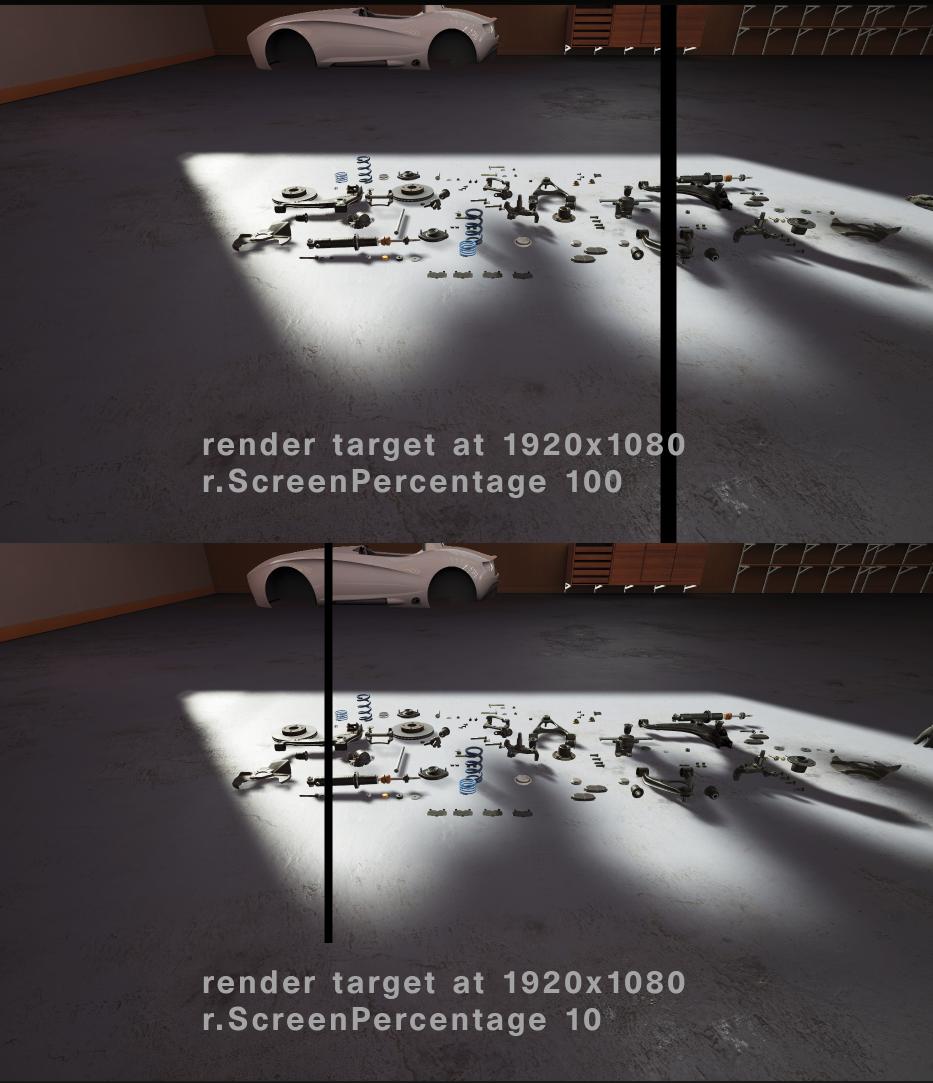
So has anyone successfully used the spectator screen stuff yet? Im getting a black bar in the middle of the screen that is somehow related to ration of the r.screenpercentage number and the resolution of the render target
tired tree
so many people tell me "I got the VR, its fun! I played vrappy bird on it!" and its some chinese gearvr knockoff
sly elk
*ratio of
tired tree
Alec, if you are manually defining the rect of the eye view, you are running into the masking
mighty carbon
maybe it's easy, but not whole a lot of people do it.. Plus there are always issues with Google/Samsung breaking things for Oculus, especially when it comes down to UE4.. Also, people who get phones, get phones.. They might not necessarily be passionate or interested in VR. People who will buy standalone mobile VR will do so for VR. Which means they are less likely to complain about paid products.
sly elk
ah, is there a way to turn off the masking? Im seeing this: http://i.imgur.com/I046Wz9.jpg
 tired tree
the end consumer doesn't care the slightest about engines getting broken by updates motorsep
tired tree
oh...Alec....what are your settings?
mighty carbon
like right now my UE4 app is a no-go for the store because when exiting to Global menu and going back, Oculus restarts the app.
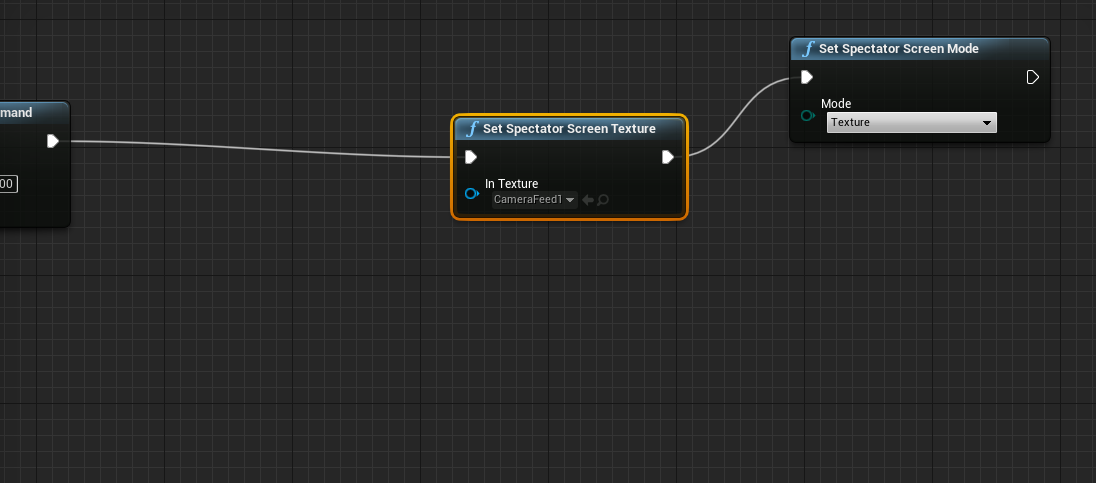 tired tree
mm, then it shouldn't be doing that if set to texture only
sly elk
its getting baked into the actual texture: http://i.imgur.com/0ntjITu.jpg

it looks like it has nothing to do with spectator mode.. switching back to mode4 and the my texture gets black bars on simulate
I posted in graphics. This happens in VR mode only, no black bars in a regular preview
 sly elk
What was your render target res and your r.screenpercentage?
as I make the render target smaller the bars move off of the screen
similarly, as scale up the r.screenpercentage they move to the right
at 1920x1080 and r.screenpercentage 150 its just off of the screen
sly elk
yeah, mine works small as well
sly elk
im just trying to use it to record alternate camera angles for gameplay footage
@tired tree when you mentioned masking, did you mean the black pixels that surround the warped image in VR?
tired tree
yeah, but thats not is
I thought you might be using eye mirror mode
the scene capture won't pick that up
sly elk
hmm. because it only adds the black bars in VR preview. If I do a regular preview it does not
mighty carbon
any idea when hotfixes start coming to 4.17 ?
sly elk
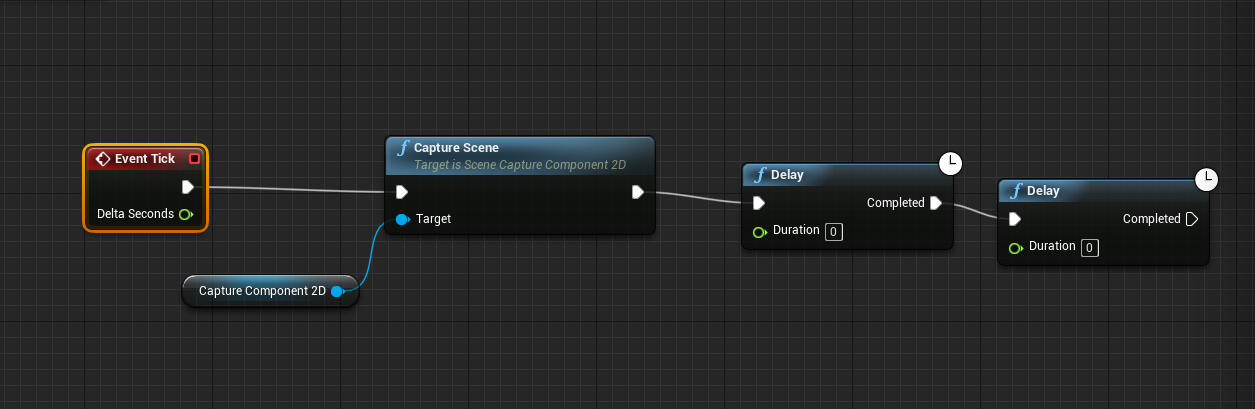
is this the right way to get 30fps scene capture during VR? http://i.imgur.com/KQjeNzZ.png
 wicked oak
lol wtf man
tick is going to tick anyway
you could have the camera as a different actor
tired tree
hotfixes better be out soon, since they screwed the pooch in the UBT in initial release
wicked oak
and have that actor tick at a different rate
the issue is that now you get 2 thin frames and 3 fat frame
its not really amortized
sly elk
Oh, i see, you are saying the tick is firing regardless of the 2 frame delay
sly elk
I only see a capture every frame checkbox
tired tree
ah, then I did it manually
w/e
seperate actor, or accumulating delta times, or using a timer
all would get you a rough 30fps
sly elk
I don't use tick events for anything so far so I ahven't had to do anything with delta time
I'll just do a timer then
mighty carbon
@wintry escarp sent you a PM
real needle
man, steam refunds for vr experiences is a bit of an oversight on valve's part
wicked oak
and i say that having a 10% refund rate
mighty carbon
refunds is a BS in general
wicked oak
no they arent
real needle
yeah I'm at 9%
wicked oak
people wouldnt buy your game from the start
specially in steam, where there is no control at all
mighty carbon
used to buy everything just fine before refunds were introduced
real needle
they are too easily used for one-time 15 minute experiences
wicked oak
having refunds means that people can take risks
real needle
the refunds make total sense. because why keep it?
wicked oak
@real needle no, they arent abused that much
real needle
but it hurts lol
mighty carbon
lol, @wicked oak , refunds don't get you more sales
real needle
hmmm, I see what you mean
mighty carbon
refunds are one sided deal
real needle
it lowers their stress
wicked oak
do you REALLY think steam would have added them if they werent a net profit?
wicked oak
Steam, the same guys that removed greenlight becouse they didnt want to put moderators?
mighty carbon
Steam added them because it's easier to just add them than deal with vocal minority
real needle
I'm glad to hear your 10% number (not really - wish it was lower)
but it is nice to know the ballpark
wicked oak
@real needle its common
you should only worry if you are like 30%
then something its REALLY fucked with your game
it also gets you better reviews
becouse if someone sees the game doesnt work in his pc, he refunds and leaves
if that guy cant refund, and the game doesnt work on his pc
he will get extremelly triggered
and there you have a super negative review
real needle
that's a good point
wicked oak
there is also the fact that its a known thing that refunds increase sales
why do you think amazon has such a generous refund policy?
becouse consumers fell much, much safer
real needle
do you ask people to leave reviews? or just trust that people will do it
wicked oak
if a consumer cant refund, he will think twice before buying that unknown indie game
if they can refund
they go "uhm, it seems cool, lets check"
and buys it
refunds help the devs allways, unless you are a 100% clear scammer
real needle
what do you say about the "loophole" for short experiences with little replay value
one and done, below the time limit for refunds
wicked oak
its not a thing
mighty carbon
lol, @wicked oak where do you get all this nonsense... I saw many reviews, thumbs down, that say "played.. the game sucks..refunded"
mighty carbon
so not only they get money back, they also manage to shit on the developer with bad reviews
wicked oak
@mighty carbon there was a couple days where i botched an update
no one could play
didnt get a bad review
just like 40% refund ratio those couple days
mighty carbon
depends on the community.. I didn't see much of that in VR section, but in conventional games it's common
real needle
@wicked oak - what is your experience with wishlist conversion?
wicked oak
low
real needle
is it right ot think of those people as "waiting for a large sale"
real needle
like if you were to throw a 50% sale
they'll receive "item on your wishlist is on sale"
you don't seem much conversion on that?
*see
wicked oak
nope
mighty carbon

Did a quick look at the perf tonight for #vkDOOM3. Specifically note the RB values (μs) as that is the API specific portion. #Vulkan

 Twitter
I am sure UE4 would benefit from Vulkan in VR greatly
wicked oak
without a doubt
UE4 is fast as hell in my game in ps4
when ps4 performance is many times lower than my pc
all becouse ps4 graphics api is much thinner
wintry escarp
when will ue4 support windows vulkan
wicked oak
it already does
but not well optimized yet
i watched some presentations from Epic
from the beggining with vulkan
they are having MASSIVE issues with it
that galaxy vulkan demo barely ran
they now have vulkan running, but they arent taking advantage of what it allows
wich is multithread rendering
and all the async shader/passes stuff
wicked oak
essentially, in vulkan you can put the WHOLE frame into 1 queue submission
and in that 1 queue you explain the whole thing, from shadow passes dependencies to the gbuffers and all that crap. the gpu then goes instantly to 100% trying to do all that
full junco
thats the place to say you wanna have more vulkan @wintry escarp : https://forums.unrealengine.com/showthread.php?112863-Vulkan-status
wicked oak
how s vr performance right now @full junco
at least for your game
i see you did tests 1 month ago, did you try a new test for 4.17?
full junco
@wicked oak that recent stuff I talked about there was 4.17
I never tried my game in vulkan
wicked oak
ima port my game, see what happens
but not the full vresion, just for test
i have a bunch of engine edits im lazy to remake
full junco
the most recent test was the first where I actually did test SM5
so before SM5 runs good in some test projects theres no reason to test it with my game
sturdy coral
@full junco one thing about the new media player is it is supposed to use a more efficient way of getting the texture to the GPU https://answers.unrealengine.com/questions/141633/asynchronous-media-texture-update.html
oh it says they only use that method on mac at the moment (but that was sept '16)
full junco
@sturdy coral does that help me in any way related to what I do?
sturdy coral
I'm not sure, I just saw one of you guys talking about the performance with it, think it was zoltanjr actually about 4k
full junco
I never saw performance issues with it, but I never tried 4k
 granite jacinth
I was about to get a 4k IPS monitor, but decided that I wanted to try out Ultrawide again and they don't have 4k ultrawides yet.
So 1440p Ultrawide it was.
sturdy coral
I'm just on a big 4k TV, but end up using it like an ultrawide by keeping most stuff in the bottom third or so
I want to try the engine on an HDR TV, haven't really seen that yet
just in stores with content that probably isn't even HDR
@full junco I'm off the nvidia branch for now and I'm trying out your adaptive resolution commit
do I need to manually initialize AdaptiveQualitySettingsGT to the values I want? didn't see anywhere that sets it
sturdy coral
ok cool
full junco
does the adaptive resolution stuff not work with the nvidia branch?
sturdy coral
I think there were just a couple conflicts that probably wouldn't be too hard to fix
if I go back to it I'll try and merge and let you know what needed changing
full junco
ok
sturdy coral
@full junco oh one thing they do is their branch adds:
    {
        SceneTargetsSizingMethod = RequestedSize;
}```which is supposed to be slower
it is normally set through r.ScenRenderTargetResizeMethod and I think they always ignore it and use requested size
sturdy coral
4.16 right now
sturdy coral
I'll have to look, but there is a setting to tell it to bring in the normal map, etc.
glossy agate
You have no opacity mask
uneven moon
@sturdy coral @glossy agate Can you guys be a little more specific, I'm still fairly new to UE4. For the opacity mask, can I link one of my existing texture samples?
I only got the diffuse, normal and spec for the decals
sturdy coral
check the texture to see if it has an alpha channel and hook that up
glossy agate
You would use the alpha channel from whichever texture you have it setup on
uneven moon
It does. How do I hook the alpha channel to the opacity?
Is it one of the output nodes on the diffuse?
The bottom?
Not sure if this is correct.
sturdy coral
you should be able to just hook it straight in
uneven moon
That bottom pin?
fair hearth
what file format is your texture?
uneven moon
TGA
I brought it into AFX and confirmed it has an alpha channel
Background is transparent
sturdy coral
the thing I was thinking of is in decal blend mode, you can set it to dbuffer translucent color normal, but you have to have dbuffer decals enabled in your project
uneven moon
What is the difference? Will there be a performance hit? I can handle it on my PC, just worried about the end-user
sturdy coral
there is some overhead to dbuffer decals
whether you want them depends on a lot of stuff, whether you are doing baked lighting, etc.
real needle
@wicked oak have you done anything to encourage reviews from your players? or do you just let that happen as it happens?
wicked oak
nope
thats why i also have low reviews
the issue is that as the last review was a while ago, the game appears as "no reviews" if you search for it
as it has no recent reviews
glossy agate
Why is your blend mode translucent @uneven moon change that back to default and see how it looks
uneven moon
@glossy agate I get this error when it's at its default Opaque
And if I go through with it anyway, the texture is completely invisible.
I think in the newer versions, UE4 forces you to use Translucent for deferred decals
I noticed in tutorials, etc. they're always at their default Opaque but without a choice (it's greyed out)
glossy agate
I'll look at what mine are set at when I get home.
glossy agate
On a scene with with actual light is it showing up?
uneven moon
I have a spotlight attached to my flashlight so that should work regardless, no?
glossy agate
One you posted is super dark
sly elk
Video of my prototype build: https://www.youtube.com/watch?v=YlsobMyM8rQ
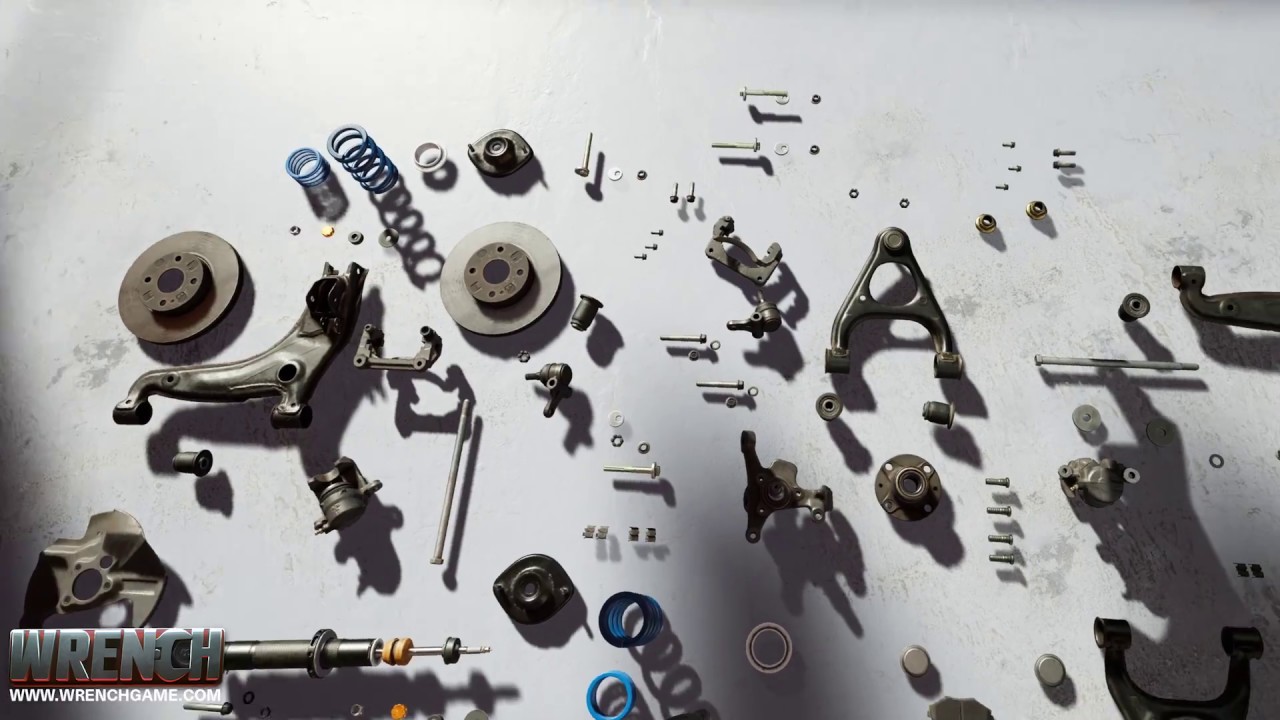
Wrench is an indie game about preparing cars for motorsports. More information about the game at www.wrenchgame.com I am developing Wrench for both VR and sc...
mighty carbon
cool
real needle
GREAT idea
real needle
I was hoping someone would make a mechanic simulator
is it a puzzle game in the sense that we aren't following directions?
i'd love that
sly elk
Right now it is only core mechanics
but I want the focus to be on diagnosis and problem solving
mighty carbon
so is this an enterprise project or gaming sim ?
wicked oak
r/oculus and r/vive
sly elk
Lol, is the title "I quit job as a video game artist and started building this VR game about working on cars." too click baity?
wicked oak
remove the quit job part
something like "ive been building this VR game about being a car mechanic"
doesnt really matter, but make sure that you post the link
not a text post with the link inside or similar
 spiral zephyr
maybe more "currently working on a VR mechanical jibbyjab, here is where it's at"
 wicked oak
like "what do you think?" or similar
wintry escarp
make parts for an actual popular engine, bike or car
wicked oak
uhm, you might have gone a bit too "dry"
but who cares, really. The thumbnail is perfectly placed
sly elk
I also posted it to r/cars
sly elk
the advantage of being an indie developer as an artist and not a programmer is that your games look nice and nobody knows what horrible things are under the hood 😃
uneven moon
Alec, since you have a working prototype, another thing you should definitely consider is putting this up as a Kickstarter. I have no doubt at all you could raise a lot of money to push this out as a consumer product at some point in the future considering no one that we know of is working on anything like this.
wicked oak
kickstarter is down and down
he has a 1% chance of succeeded unless its a very low amount of money
people are tired of kickstarter, and doing a kickstarter campaign is nowhere near easy
sturdy coral
@full junco this might get you close to what you want for video on a stereo layer: https://www.youtube.com/watch?v=lxFqUDW5-fE&t=6m24s

Description: How to render UMG widgets into the resolution independent stereo layers while keeping the benefits of UMG such as interaction. Epic Documentatio...
you can set a widgetcomponent to be based off of a slate component in C++, if that is what media player is using, then get the texture from that
that might not get you all the way there though since you aren't doing seamless travel and the widget component lifetime can't cross through the level load
(I linked to the timestamp where it hooks up the texture to the stereo layer)
sly elk
I have some cash to keep on this for another 9 months or so
just have to be frugal and try and stretch it out
wicked oak
stero layers do not depth test
unless its an oculus
this means that if you do a HUD panel with a stereo layer, it will render above your own hand
and they are fukd on SteamVR
at least for 4.17 they are now logical
you need to do a photoscan tutorial @sly elk or an article to explain the workflow
such an article would get very popular in places like 80.lv, wich would increase your game exposure
real needle
early access once you have a bit more is another option
these "sim" types of things can stay in early access for a long time, it wouldn't be unusual for the audience
sly elk
actually I have done a tutorial, i'm working on a second one for going from scan data to game art

Digital Mistake
I wrote this tutorial for my personal website earlier this year but I am moving it to this blog for it’s faster servers and because writing a follow up guide covering what I have learned buil…
sturdy coral
@wicked oak I think he is only wanting it for an interstitial loading screen video
uneven moon
Someone experienced with decals please PM me, this is Day #2 of me trying to get a simple bullet hole to work it's driving me nuts haha
sly elk
what is it doing?
real needle
@uneven moon Are you using the forward renderer?
sturdy coral
@uneven moon have you checked shooter game?
sly elk
anyone here a forum mod on the unreal forums? I want to change my wip thread title now that my game has a name and It doesn't look like I have permission
mighty carbon
vblanco is
glossy agate
He has a green name so you know it's official
 plain glade
hi there
Is there anyway to fps optimization for hair shader?
in vr I got 30-45 fps
there are around 45 character
real needle
@wicked oak Is one of the problems with stereo layers on steam a "ghost image" of the widget rendered behind wout late update? Because that's what I'm seeing in shipping builds
 jaunty shell
@plain glade don't use transparent materials
overdraw is killing frametime in VR
seems like your trees are a problem too
plain glade
I'^ve changed before your answer . its looking ok but not exactly 😄
wicked oak
@AlecMoody#7918 damn the reddit post was a massive success
and i can change the thread name for you
full junco
my rift arrived
I never used a CV1 before
it is definitely lighter than my vive pre
and it feels like image quality is a bit better
the sensors are a nightmare though. tracking is fine, but the setup is horrible
I really like that flying wall-e demo that launches after the setup
touch controllers are great
the image kinda gets warped at the edges though, that doesn't feel good
wicked oak
the robot demo is great
@full junco try robo recall now that you have touch
and see if your game "just works(tm)" on the rift
btw @full junco see how the video of alec went in reddit. If he does a couple other more up to release, thats a LOT of traffic and people seeing how it goes
full junco
@wicked oak I dont really wanna play stuff, I wanna make my game compatible. so no robo recall for now
and I know that my game doesn't work on the rift at all, it crashes
wicked oak
well. fuck XD
shouldnt take more than a day to get working
you just bought it retail. no?
full junco
I bought it online
fixing crashes is a lot of fun, so I guess I kinda bought my rift because I really wanted to fix that crash
after someone with a rift told me it would crash
wicked oak
its odd that you are just crashing like that. Did you enable the oculus plugin?
wicked oak
the annoying thing with touch is that one should add 3d hands
in fact, 3d hands are obligatory to get into the higher tier Oculus store Games category
i think
full junco
and is there some simple way to add those hands with correct skinning and stuff to the game?
wicked oak
i think there is a marketplace pack you can just pop
full junco
ok
and yeah, I saw that reddit post went well. I kinda wonder if people are more likely to upvote stuff when it was "I've been building a VR game" opposed to "We've been building a VR game"?
I would always try to make it appear that I am not 1 person, I kinda think thats more professional, but maybe people like when someone does something alone
wicked oak
a typical one is "my friend is doing X"
comon in r/gaming
it depends on the game, really. Or what are you showing
his video is very "profesional"
there is the minimum requirements for release
also, needs to be UE4.14 minimum
90 fps whatever happens
full junco
well I won't release on oculus store anyways for now
wicked oak
its still a good guide tho
full junco
my game likely has 16GB min ram requirement
full junco
yeah
full junco
for a while I actually thought I would need 32GB but I got it down
wicked oak
not many players have 16 gb ram
full junco
I think almost everyone (with VR stuff) has 16GB
wicked oak
you should really try to get a low distance more or similar for 8
not really
very, very, very few games use more than 8 gb of ram
people that go for the gaming rig go with 8
and leave the slot to upgrade later
full junco
then they finally have a reason to upgrade (my game)
wicked oak
you could detect how many memory the system has, and set the view distance from that
i think ue4 lets you do that
wicked oak
they are a huge chunk of your possible players
one thing, have you tried to run your game with 8 gb of ram?
windows bloats the RAM if you have tons
full junco
my game doesn't really need more than 4GB, but usually chrome alone eats 12GB already so then you are at 16
so I just say 16
wicked oak
i think i can access the hardware survey of my VR games
let me give you some stats
man steamworks is slooooooooooooooooooow
did you do the whole steamworks setup already? @full junco ?
full junco
I think so
wicked oak
to be able to distribute "beta" builds on steam
better getting that done sooner
its very useful to just give a key to someone for betatesting. Thats why i got 2 extra App Ids back when they were giving them for free
full junco
yeah I have all that setup
wicked oak
that way if i want testers, i just give them an app id. and then use the steamworks matchmaking stuff wich is very neat
full junco
"give them an app id"? 😄
full junco
ok
wicked oak
btw check how laptop users are the same as the 8 gb users
but this one doesnt have much people
only 40 surveys
so dont take it too seriously
let me check VRMultigames
full junco
the people wuith 4 CPU cores are my problem
wicked oak
wich is free and VASTLY more popular
full junco
I think the issue is that my game actually runs through the oculus SDK when I run it
wicked oak
but why would it crash then?
full junco
I have a lot of hardcoded openvr API calls
full junco
because I like it
wicked oak
what do you use them for?
i had no need of do anything of the sort, except a couple calls for PSVR becouse morpheus is its own thing
full junco
well stuff like setsplashscreen
I just hardcode that to the openvr one because I know I dont support the rift sdk
wicked oak
easy to fix then, just abstract it
full junco
I dont want to abstract it
its good that it crashes on rift sdk
I only want to support openvr
wicked oak
even if you dont use oculus store, oculus sdk just works better on oculus
as its native
full junco
I want to keep it nice and simple in my code, so only openvr. can a steam game actually use the rift sdk? if I sell the game on steam, wont it use steamvr?
wicked oak
no
you will end up with 2 launch options
one that launches steam sdk, and one that doesnt
but only becouse steam sked me to
in reality, i do nothing
unreal engine opens the correct sdk depending on what is selected
full junco
why does steamvr support the rift at all then if steam games can just use the rift sdk?
wicked oak
so oculus users can play vive only games
becouse unity doesnt have an abstraction like ue4 does
full junco
ah
wicked oak
ue4 just abstracts everything for you, but unity doesnt
i think the new versions do. But people were using the steamVR plugin
and if they wnated oculus support, they would need to add the oculus sdk plugin too
and then somehow switch
basically a clusterfuck
many devs that used the steamvr plugin from the start and use unity dont support oculus sdk natively
and their games are off
the pause menu has issues and it runs at a lower performance
my launch options in steam
both of them do the same, i just added them becouse the steam review told me to
full junco
well I want to keep it simple though so I only use openvr. I want to be able to test with rift and see same bugs I see with vive.
wicked oak
but stuff like the splash screen just works completely different
full junco
for example when I run my game the height is off, the floor is where my eyes are
thats because of rift sdk I guess
wicked oak
thats due to the openvr stuff
and that is just a function you have to call on beginplay
set tracking origin
due to the oculus and steam sdks not being 100% exact, steam defaults to one, and oculus to other
if in your begin play you set the tracking origin to the same one on both, then it will look the same on both
also, you cant use oculus touch capacitative buttons (for hand animations) without the oculus sdk
full junco
why no way to get the info from openvr?
wicked oak
becouse openvr is designed for vive
and vive doesnt have capacitative buttons
they now added support for the knuckles finger stuff, but, again, they havent done anything about the oculus input
becouse OpenVR is not Open
its Vive sdk
that just allows other platforms to implement support so Vive games work on other headsets
full junco
I know its not open, but they still seem to work a lot on oculus stuff
wicked oak
not that much tho. They focus on Vive features
full junco
if you look at recent changelogs of steamvr its mostly oculus stuff
wicked oak
where? i would like to read that
full junco
well I didnt look at it for a few weeks, so when I say recent I meant "when I last looked" 😄
wicked oak
in general, i think you should aim for "native" oculus support, with oculus SDK
that way Vive users get their native support, and Oculus users gt their native support too
given UE4 abstraction, is not really "that" hard
personally i just have a function that returns an enum depending on the headset connected, and i switch on that
on the few cases where i need it
full junco
I dont want to work on oculus sdk stuff, I call openvr stuff manually and built everything around that and dont wanna change it now
I wouldnt add rift support at all if I would have to care about their sdk
wicked oak
the only thing you really need to do is to have those openvr calls omitted if you dont use a vive
oculus sdk works really well by default after all
usually thats what i have in my code
Oculus: nothing, just defaults
Vive: something mildly weird
Morpheus: extra stuff
what kind of stuff do you use the openvr sdk?
apart for the loading screen
chaperone stuff?
that one would definitely be hard to abstract well
as ue4 doesnt abstract play area systems at all
full junco
I dont really want to think about all the stuff I used, but its a bit
I like to know "let me look at the openvr api and find something thats useful". I dont always want to look then if something similar exists in the oculus API
wicked oak
anyway, if you really dont want touse oculus sdk, you will need to remove the plugin enterely
and still work on oculus bugs anyway
full junco
I just removed it, yeah
wicked oak
you will get complains about that day 1 tho
full junco
about?
wicked oak
about oculus support being spotty
full junco
why would it be spotty
wicked oak
becouse you are not using the native sdk, but openvr sdk wich abstracts stuff and doesnt work as well
full junco
obviously there is no ASW
wicked oak
and thats absolutely huge
full junco
but people who need that should just buy on the oculus store
wicked oak
there is also the part of having to sync steamvr chaperone and oculus playspace too
not really, a considerable amount of people buy on steam even with oculus
my stats say somewhere beetween a third and a half of my buyers in steam are oculus
full junco
if I sell on steam I use steamvr, if people dont understand that they shouldnt buy my game
wicked oak
all ue4 games in steam just use the oculus sdk stuff to work well
oculus players do get quite mad when a game doesnt use oculus sdk, even more if its ue4 as there is pretty much no excuse
full junco
I'll tell them its good for them so that theres no facebook code in my game that would spy on them lol
wicked oak
well, ok then. But you will end up adding an oculus patch like first week after complains XD
wicked oak
uhm, true
the issue is that if you dont support oculus SDK, you cant put the "supports oculus" stuff on the steam store
full junco
why?
full junco
I would think steam is happy if I only use their SDK
wicked oak
they dont care
yup, this part
but if you say that you support Oculus Touch, they will add the oculus icon
personally, i worry on having my game be native on all of the 3 platforms
for that, i even have 3 different "hand" classes
with completely different input controls and shape
full junco
3 native platforms is a nightmare
wicked oak
often, vive support is a bit more spotty
becouse i develop with oculus, where everything "just works" by default
so i need to do tests with vive to see it still works
but morpheus is the true nightmare XD
wicked oak
did you know i support 3 different input modes on ps4?
it makes it a total of 5 input systems, all different
Oculus with hand controllers, + configuration stuff
Vive with hand controller + configuration, similar to Oculus, but different input becouse different buttons
PSVR with Dualshock 4 tracking + config(but less). Has smooth locomotion with the joysticks
and 1 gun instead of 2
full junco
is there a way to force steamvr without disabling the oculus plugin?
wicked oak
yes
commandline option -steamvr i think
not completely sure
but i dont know how to know what headset you have on
becouse the "get headset name" will return SteamVR
not vive
wich makes it harder to switch input modes
full junco
I asked yesterday about this and it seems that isnt really hard
openvr can tell you that

seems like thats the easiest way
and yeah, 5 input systems is definitely horrible to support
and with knuckles you'll be at 6
wicked oak
and then all the config stuff
ive had to rewrite my handling quite a few times
right now i have 3 pieces
the Hand takes care of the input itself
and sends "events" to the controller
for example, a Teleport event
with what hand to use
or a Rotate event
the controller takes care of the different configurations, for example rotating more/less angle/ or using smooth rotation
and then affects the pawn
so basically its:
Hand has the input, Controller has the logic, Pawn has the result
originally, i didnt use the controller much. Just input into pawn directly
but having multiple hands i had to move input logic to the hand
but then configuration options meant that i had to implement config options on all the hands
what a clusterfuck
full junco
oh yeah
wicked oak
at least now with all that crap i could add knuckles support in a few minutes
full junco
I'm also not looking forward to having vive controller, touch controller and knuckle controller support in my game
and it'll only get worse over time as new controllers will get released
wicked oak
no way around that, really
full junco
at some point you need to support 20 controllers
wicked oak
you could try to prepare an architecture like the one i have
not really
you can use inheritance for controllers that are similar
and really, you only bother about the important ones
full junco
well, yeah
my game doesn't show up inside the rift when its running through steamvr
mirror window works fine and headset and controllers are tracked correctly
wicked oak
are you doing stereo on and similar stuff?
full junco
I can "play" the game through the mirror window, but in the headset I just see "yourgame.exe needs too long too load. please take off your headset and see whats wrong" or something like that
well I have play in vr checked in the options
the rift really gets warm at the front
never noticed that on the vive
wicked oak
play in vr crashes my editor on load
4.16
thats why i launch with -vr in steam
another thing i do that might be useful for you
my start map is the same whatever happens
on all platforms
full junco
I always get an ensure thats triggered when I use the rift: https://puu.sh/xbrIA/7163a8288f.png
 wicked oak
but that start map is empty, has absolutely nothing but a check
if it checks we are launching with the -demo parameter, it then goes into the DemoEntry map
if it checks we are on ps4, goes to Ps4Entry map
etc
and then those do platform specific config/setup
for example the ps4 one calls stereo on, and waits for you to connect the devices, while giving a warning screen
the pc ones just load you instantly into the main menu
full junco
I guess you need that on PSVR then


