#virtual-reality
1 messages · Page 124 of 1
 glossy agate
 pearl tangle
probably. im not sure, can't remember
glossy agate
I just emailed them about it. Looks like a few big projects are using it. Cool that I don't need to run extra software for it to work.
 full junco
@sly elk I wish it would. I always asked about SSAO support in the forward renderer and at one point Daniel from Epic actually said he would do it in a month "just for me" but then he didn't have time for it. I think if more people would ask about it, he would more easily spend some time with it. it feels like I'm the only one caring about it.
 mighty carbon
RR gives me a good and needed workout 😛
hit the ceiling again when I decided I need to jump and grab incoming missile
bizarre.. Outside of VR it seems like one wouldn't do such a thing 😉
 sturdy coral
@mighty carbon the two bone ik node for snapping partial mesh to full body skel?
I'm not sure I understand what you mean
the two bone IK node just solves a joint angle to make then ends of two bones fall into desired locations, and then lets you specify the angle the "elbow" of the bones faces, since that is ambiguous
mighty carbon
I am guessing we are talking about different features @sturdy coral 😊
I am thinking of "The ‘Additional Meshes’ feature for previewing modular meshes now uses the ‘Copy Pose’ node instead of ‘MasterPose’. This means it can support meshes that do not share a Skeleton, and bones are copied by name."
mighty carbon
well, my question is if that feature would allow easy way to have modular characters and dismemberment
@sturdy coral ^^ any idea by chance ?
sturdy coral
No clue, but you can check out how robo rec does it
Robo recall
Separate skeletal meshes
mighty carbon
RR is pre-4.16
and it's a mess (I looked into BPs)
I am talking about 4.17 and if that new feature would make life easier
anyhow, I am out
pearl tangle
anybody tested out the implementation of it yet?
 tired tree
its simple
and blueprint controlled as well
but something probably more interesting is: Binding mechanism between a Player Controller and a Texture Render Target 2D to replace the engine default’s video game rendering pipeline by the project specific C++ or Blueprint
mighty carbon
@wintry escarp so, have you gotten your Rift yet ?
 sly elk
@full junco who do I send an email to or message to add myself to the the list of interested people?
 wintry escarp
it hasn't arrived yet, should be within the hour
then I can plug it all in and go "this is shit", cos I still have a gtx780
tired tree
nah 780 should be "ok" with a rift
I started with old terrible perf vive on a 780
long before they added optimizations to the pipeline
 keen iron
is foliage just not possible in vr right now or am i missing something? I'm using the kite open world demo foliage but i disabled all the wind effects and changed the grass to two sided instead of subsurface shading, is that cheaper? Is low poly the only way that an organic environment can be done in vr?
or are those assets in particular just extremely expensive?
wintry escarp
ok rift is here, I didn't know the MS gamepad was wireless
glossy agate
Those assets are just super expensive. Kite demo was meant to be cinematic
I'm able to do foliage fine.
wintry escarp
hmmm, much tighter than gearvr, glasses might be a problem
mighty carbon
it's adjustable @wintry escarp
so, interesting news:

UploadVR
inXile Entertainment, the developers of The Mage's Tale on Oculus Rift with Touch, have secured a major investment and are working on a big new VR RPG.

UploadVR
Jason Rubin told us that Oculus would be announcing a big new VR game within the next week that's fully-funded. What could it be?
wintry escarp
is it meant to be very slow to install?
keen iron
yeah thats what i was thinking is the kite assets are overkill b/c they were for a cinematic, @glossy agate what foliage packs are you using in VR?
glossy agate
I have a handful of them. Latest heavy one is poly pixels tropical island pack. Needs more optimizing but it runs, and looks pretty good
Just don't try anything too fancy with the forward shader
glossy agate
@mighty carbon I am really curious to see how people receive games that need you in them for hours at a time. Wondering if some people will get tired of standing for a long time
mighty carbon
@glossy agate I played RR for 1.5 hrs last night 😃
glossy agate
Yeah but like Xile you posted, and fallout 4 are like really a lot of hours
mighty carbon
it comes with practice.. I am sure if I do several weekly sessions in RR for 1.5 hrs, in a month I'll be able to do longer sessions.
I don't even play much longer sessions in non-VR games
glossy agate
I was tired after just how long I lasted in the onward tourney sat. 9AM-2PM. Finalists went to 5PM. I was really tired, and grumpy about 3/4 of the way through haha
mighty carbon
plus side is that I get a way more exercise out of VR gaming 😄
glossy agate
We even had breaks between matches too
keen iron
i played echo arena for 6 hour stretches no problem when the beta came out, was super sore from it though lol
mighty carbon
My legs are sore right now, but it's a positive thing IMO
glossy agate
Yeah, it is exercise. I go to the gym a few times a week but still sometimes get sore have to do unusual stuff in VR like Burpees almost diving for cover haha
mighty carbon
hehe
glossy agate
@keen iron 6 hours is a really long time haha. I gotta check that one out still if it works on revive
keen iron
duuude what you haven't played echo arena yet?
it does, and the discord has a revive specific section if you run into any problems
it seemed like half the ppl were playing on revive
i think im about to stream some echo arena actually before doing dev stuff
glossy agate
Can you DM me a link to the discord? Ill probably set it up this week
wintry escarp
2
mighty carbon
that's what I got and screwed it to the ceiling
then unscrewed sensors from their stands and put them on those mounts
mighty carbon
IR
wintry escarp
so it cant be behind me, ill block it
mighty carbon
why would they be RF?!
lol, wut?! Did you even read instructions for Rift?! (or followed setup screens - it's all clear how to set it up)
wintry escarp
I'm doing setup now, it keeps saying I'm too close
rooms too small, i cant physically go back any further
mighty carbon
and here I thought I had small room..
I have to move our bed every time I do VR 😛 Royal pita, but there is no other way I can have enough VR space
tired tree
arrgggg...another addition to the ever growing list of compiler warnings to suppress when linking to Steam_API.h
wintry escarp
is one side supposed to be more springy than the other?
mighty carbon
on the HMD? It is for me
@tired tree building your plugin for 4.17 ?
or got VRWorks ?
tired tree
nah it was for 4.17
everythings fine on it, time to explore the new features that epic added
wintry escarp
got it going
mighty carbon
enjoy @wintry escarp
mighty carbon
mine didn't even have them at all
mighty carbon
try First Contact, if you haven't tried it already.. Beats Google Earth for sure..
wintry escarp
free?
mighty carbon
yeah.. Have you setup Touch already? Cuz it launches automatically once you done setting up Touch.
 wicked oak
oh hell yes
tired tree
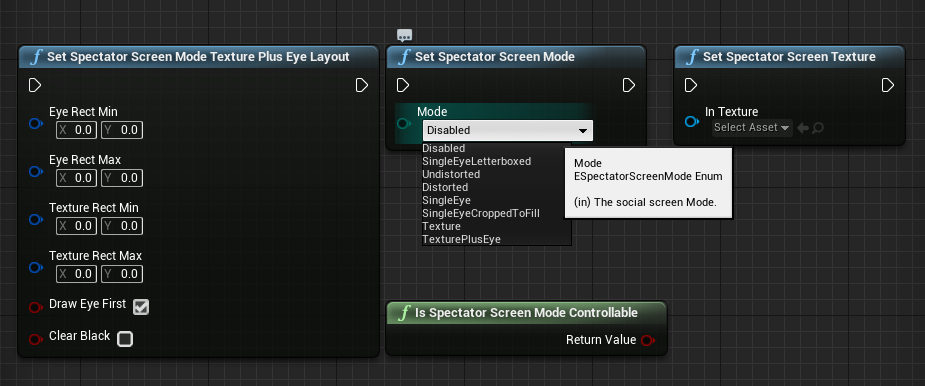
"texture" only mode is what lets us do whatever the hell we want
turn off splitscreen, render second player view to that....
tired tree
yeah they added it to all HMD pipelines
wicked oak
but i dont have that "screen mode plus eye"
the one i have in ps4 is for the social screen. Its direct passthrough or texture
no half-half
wintry escarp
ffs, my space is so small i cant do first contact, things at side are out of read area
i will need to see how re calibrate
mighty carbon
do you like it better than Gear VR @wintry escarp ?
wintry escarp
its much higher quality, hands are good. but its very tight
i have the Velcro at max size
mighty carbon
🙄
wintry escarp
how do i rerun the setup?
mighty carbon
btw, interesting insight https://80.lv/articles/making-vfx-for-vr-first-person-shooter/

Nikita Shilkin did a wonderful talk about his work on visual effects for VR game ARKTIKA.1.
@wintry escarp from your desktop app - click gear icon, then go to Devices and then .. I forgot, but it's pretty straight forward
mighty carbon
yep
wicked oak
really high quality one
i even use it when i play counter strike
i have the rift somewhere on my desk, and it picks up the voice
wintry escarp
google earth is pretty cool, like and endless railway model
 alpine torrent
Planet earth II is pretty cool
mighty carbon
Planet Moon 5 is even better !

Last month, we announced the VR Challenger League—the biggest VR esports event yet. Today, we’re excited to announce that our first brackets are now open online!
now we are talking
$200k prize
wintry escarp
the level of movement accuracy is much better, no controller drift
mighty carbon
bah, 4.18...
If not using Steam Audio, how can one use HRTF/reflections on Windows for Rift/Vive using Oculus spatializer (no Wwise, no FMOD) ?
tired tree
he said 4.18 for platform and stability work....
not that it isn't useable until 4.18
mighty carbon
yo
No idea.. I use FMOD for Gear VR but would love to use native Oculus Audio (or Steam Audio, if performant and stable) for desktop VR..
@tired tree well, when they say stuff like that it makes me feel that it's not going to be stable/performant
wintry escarp
did the 3rd party rift face pads ever get released? saw some on kickstarter
tired tree
@mighty carbon gotta try it.....its a new release and integration, they can't claim its perfect yet
you aren't going to put out a game anyway before its stable unless you intend to make one in less than 3 months
mighty carbon
true..
wintry escarp
can you use steam audio if you don't release on steam?
tired tree
yeah steam audio is not tied to anything specific
mighty carbon
ok, I am lost here.. Where do you get that Oculus plugin?
glossy agate
I thought oculus hrtf was built in already? Pretty sure I saw it
wintry escarp
anyway to disable the "your hardware doesn't meet min requirements" msg?
tired tree
oculus HRTF is still just an approximated box model though isn't it?
glossy agate
Yeah, from what I saw on it. I think Pavlov uses it. Steam audio is supposed to be super legit from what I have heard. Probably try it this weekend.
tired tree
oops, sorry meant the enviroment modeling
 granite jacinth
@mighty carbon just enable in plugins
tired tree
but I think that recent oculus audio update mentioned something about better enviroment modeling
mighty carbon
well, even though it is, it sounds good and it's fast
tired tree
it still doesn't allow for occlusion though...
granite jacinth
Snoobs
mighty carbon
@granite jacinth oh, I see. And how to make sound source to be HRTF in the scene ?
granite jacinth
Whatever
@mighty carbon change input
In audio cue
Details
Spatialziation
Whatever it's called
Change it to HRTF
Done deal
Simple as that
full junco
oculus HRTF sounds perfect
granite jacinth
Plus setting the right settings of course ;)
tired tree
the whole point of steam audio is baked occlusion and refraction modeling, if you don't care about that then yeah...stay oculus
glossy agate
I know it works good haha, but if another free built in plugin works better, everyone will use that instead.
granite jacinth
Now that takes time
full junco
@tired tree baked occlusion is lame, no one wants baked stuff
granite jacinth
Yeah, who knows which will really be better though.
tired tree
steam audio looks like a significant extra workload too
they have dynamic as well do they not?
full junco
yeah
granite jacinth
I want everything dynamic
tired tree
the baking is to make static objects faster for processing
there is no reason to not want both
full junco
sure, I dont have static objects 😛
tired tree
yeah sure..you have no walls...
in that case you are in flight and none of those features matter to you
full junco
I dont have static stuff. I have walls
glossy agate
I think onward is steam audio. Between the games, you can tell the difference a little but not much.
tired tree
yeah
glossy agate
Pretty sure. It's unity
granite jacinth
Ah, did Unity have it before us?
tired tree
they upgraded to it awhile ago, think they had a blog post
granite jacinth
Probably
tired tree
post onward dev being at valve HQ
granite jacinth
Unity 2017... I won't lie...
Almost converted me
Sad we won't get some of the features ever in UE4
glossy agate
Yeah, when they updated, I heard a dog bark in an ally and pulled off my headset thinking it was real life. Super accurate.
tired tree
same complaints
granite jacinth
Unless community does something
tired tree
grass is always greener
granite jacinth
Nah, I have done both sides.
tired tree
both engines have merits, and both have feature lists the other doesn't
tired tree
like?
tired tree
i asked what it was behind / missing
full junco
VR editor isn't relevant
tired tree
not what you didn't care about
full junco
and until Unity makes it source code public, theres no way I and many other people would ever use it
full junco
the only big thing where I think unity is ahead is 2D stuff
glossy agate
With unity you have to use a bunch of addons
Yeah, mobile dev unity is better for sure. Ue4 if bloated with big file sizes it seems like.
tired tree
unity has areas where it is far more flexible just due to its c# integration
Epic wrangles c++ into all sorts of knots to get what it does out of it
mighty carbon
just got confirmation from Oculus that only HRTF is exposed to UE4 integration. Not even early reflections are exposed. No reverb either to my understanding.
wintry escarp
unity deploys much faster for me so far, seems no matter what i do in ue4 it wants to cook 1000s of shaders 😦
mighty carbon
you are doing something wrong for sure
it doesn't do this to me for Android and for desktop preview is instant. So iteration time is basically zero.
wintry escarp
how did you attach the sensors to those brackets you used?
glossy agate
@wintry escarp should only compile once haha. Are you deleting the cache in app data or something?
Even when you copy content folders into other projects, it shouldn't require shader compilation.
mighty carbon
@wintry escarp do you mean those ceiling brackets from Amazon I linked earlier ?
 placid sparrow
Hello, are there any games suites ready for VR ? im looking for games that i could customize for brands
wintry escarp
yes
placid sparrow
i found some with google but im looking something more than just a 360 pano , more like Ue4 like games
keen iron
so im using the VRExpansion player controller rn and im trying to figure out what is grabable, it looks like its anything that can generate overlap events?
mighty carbon
@wintry escarp just unscrew sensor from the stand. It's a bit snug, but it won't break.
you can see there is a seam, maybe 5 cm down from the sensor
wintry escarp
its screwes right into the bracket?
mighty carbon
sensor has a short, ~5cm stem with a female thread in it. That's how it's attached to its original stand.
you unscrew it from the original stand and screw it onto the stand from Amazon
so I have that first stand that mounts to the ceiling (or wall), then telescopic selfie stick and then sensor screwed to the selfie stick.
that contraption allows me easily adjust sensors' locations/orientations
it was very handy when I got 3rd sensor
wintry escarp
3rd one behind you?
mighty carbon
yep
if you plan of getting 3rd sensor, you might as well use same setup I did (with telescopic selfie-stick). Otherwise you'd have to drill your ceiling/walls many times to get proper location for the sensors 😛
wintry escarp
they need to let people turn off that annoying msg, i get it, my gpu sucks
wintry escarp
theres a hack but only if its the cpu doing it
weird theres no way to move the screen back/forward like on gearvr
that would remove my glasses problem
glossy agate
Really no focal distance knob thing on rift? Seems like it would have to be standard until prescription lenses could be used. Maybe they count on people using contacts.
full junco
focal distance? you also cant adjust that on vive
mighty carbon
@wintry escarp get prescription lenses for Rift
then you won't have to wear glasses
glossy agate
@full junco I meant this. lense distance, not focal https://youtu.be/P2-F8-82J1A

Learn how to move the lens distance further from or closer to your face.
full junco
@glossy agate I have my vive for more than a year now but never knew that's possible lol
does that work on a vive pre?
I can't really move those things on the side
glossy agate
Haha, yeah, I have pre. I thought it was for focus, but it turns out its more for glasses.
wintry escarp
too expensive
my budget is gone getting the rift
have to admit the vive wins there
robo recall was quite playable
full junco
@glossy agate how does it work on a pre?
wintry escarp
the display does seem better than gearvr
full junco
I cant pull the things on the side out
glossy agate
Same way I think. I did it by accident when I first had it
try just turning. They may already be out
full junco
I cant turn them
glossy agate
Mine were out right out of the box. Hmm, not sure then. Mine is a pre and they turned. Ill google and see if all pre's have it
Yeah, they should all have it
full junco
I think it works
with a screwdriver and a lot of force
impossible by hand only
probably because I didnt move it for more than a year
glossy agate
Yeah could be it. Was gonna say, the internet said the super early versions had a hidden knob inside the face gasket to do it.
wintry escarp
i wear glasses so i'd be moving it back
glossy agate
@wintry escarp For rift, you can get a thicker face gasket to make up for this feature. May want to look on amazon.
full junco
I dont wear glasses and I want the FOV to be as high as possible
wintry escarp
to amazon....
glossy agate
Yeah, Im gonna double check mine tonight and make sure its close all the way
full junco
btw, Rolando said they will focus on Vulkan performance with 4.18
@wicked oak @sturdy coral
wintry escarp
americans got small heads?
glossy agate
Naw, you may be a mii
glossy agate
If you find a good company let me know. Now that it's hot out I'm super tired of the stock vive gasket.
It just soaks up sweat like a towel
wintry escarp
my glasses are the problem, very tight fit is making them steam up
glossy agate
I have heard of a company I think it's called vrcover that has good products I have heard. Maybe they have what we need
granite jacinth
@glossy agate you bought a rift?
wintry escarp
heh its certaintly different
glossy agate
Nah, I have only vive still. Regret not getting one yesterday now.
granite jacinth
And I don't know about Americans having smaller heads.
Bigger brain power for sure
Brain density?
Brain Density Per Inch?
glossy agate
Hahaha
wintry escarp
if i had the money id probably have gone vive for the extra size but its nearly 2x rift price now
looks like $50
wintry escarp
heh according to videos i put on the rift wrong, i put it on like a respirator
those videos are dumb
tired tree
@keen iron by default in the template anything that implements the interface or is simulating is grippable.
keen iron
yeah in the template
i was trying to do it in another project and
realized i had to add trace channels and all this other shit and couldn't get it to work still so im just going to make a copy of the template and work from there lol i give up
theres so many other little things that went into getting the plugin to work in the template that are hidden apparently
wintry escarp
luckys tail is quite a nice looking little game
full junco
you can still play luckeys tale even though he doesn't work at oculus any more? 🙃
wintry escarp
so far the only thing that's been jerky was the quill art program
demo pictures didn't move well
nn
tired tree
@keen iron you don't have to do any of that stuff, the template just shows how to set up everything so that you don't have to change any nodes for new objects
you can throw 90% of it out if you just want basic gripping
keen iron
man i had another project and i just
took a static mesh of like a key
and put the interface on and that didn't work
so then i looked at the cube and put in events for on grip and stuff and added the exact same variables
tired tree
well, I don't handle when/how you grip in the plugin.......that would be really inflexible
its up to you to call "gripobject"
the interface makes it easier, "gripobjectbyinterface" just fills out pretty much everything
keen iron
and it still didn't work at all, idk i just made a copy of the template project to start over fresh with anyways
the only thing i really think im going to have trouble with is
tired tree
its not compatible with epics grip interface at all is why, you have to put a little work into it since the options are so much more advanced
keen iron
how can i stop the grip from happening on every solid surface? like i can just climb right up every static mesh and wall i make even without climb activated
tired tree
yeah it allows for anything in the template for demo's sake, there is a function you can override called "isobjectclimbable" or something of the sort
and you can return false for everything that you don't want to be climbed
the default implementation of that function allows all static mesh to be climbable
keen iron
awesome man ty
tired tree
also if using the template, look into the "grippable" prefixed objects
all of the interface is already implemented and the settings are in a struct you can just edit for those
they are c++ but the template is set up mostly for using the interface and gameplay tags for grip control
keen iron
and ty a ton for making this plugin, after trying to add a capsule collider to the camera yesterday and realizing it doesn't even work for walking up sloped landscape i thought i was doomed hahaha
tired tree
its possible in blueprint, just really convoluted
keen iron
where is the "isObjectClimbable" function? im digging through everything trying to find it right now
checked for the word climb in the code for VR character, base character, character move and grip interface and didn't see anything
is it a new property that you added to the static mesh class?
@tired tree
tired tree
you just download th etemplate?
tired tree
in the VRcharacter undert climbing category "CanObjectBeClimbed"
in a derived class can override that function
keen iron
i am streaming btw if you wanna help me out there, so I should be able to do that from the Vive_PawnCharacter bp since its parent is VRCharacter right?
tired tree
the function is in the Vive_PawnCharacter
not the code
I try not to implement gameplay mechanics in the plugin itself
tired tree
i'm going to send you a pm to continue in there though, we already filled this channel uo
keen iron
allright
mighty carbon

For VR to succeed in the consumer space, an ecosystem of developers making content that users want to buy is an absolute must. Oculus for its part has attempted to kickstart that ecosystem by investing hefty sums in content developers, and now the company says it’s starting to pay off. With the backing of Facebook, …
sturdy coral
hopefully with this price drop a lot more will
 dawn cipher
Do I need to disable the Motion Controller components on pawns that are not locally controlled?
mighty carbon
one thing I dread to deal with is audio 😦 (finding / tweaking sfx for the project)
dawn cipher
What's the trick for setting WorldToMetersScale at runtime? It causes a noticeable flicker in the controllers, where it looks like they get a latent frame update right before rendering and it doesn't respect the new WorldToMeters scale
pearl tangle
you need to adjust the size of the controllers as well
wintry escarp
motorsep the sensors work fine with usb extender cables?
mighty carbon
@wintry escarp CableCreation Gold (Long 16FT) Super Speed USB 3.0 Active Extension Cable, USB 3.0 Extender USB A-Male to A-Female Cable, 5Meter/16ft, Black https://www.amazon.com/dp/B0179MXKU8/
That's what I got and it works wonderfully
Btw, when I ordered 3rd sensor, Oculus sent it with extension cable (free bonus)
I ordered 3rd sensor from Amazon too
wintry escarp
amazon uk don't seem to sell just a sensor
mighty carbon
Odd
wintry escarp
robo recall was fun
wintry escarp
free?
heh, steam saw I now have vr
oculus have them for £59 but they seem to have problems authorising my cc
mighty carbon
Yeah, The Lab is free
pearl tangle
blocks from google is their new 1 too. haven't tried that yet but seems like it will be quite an effective modelling program even
wicked oak
it is
of course, it is only the absolute basics
but it shows how could a poly modeler work in VR
wintry escarp
I tried robo recall in high settings and it seemed ok
wintry escarp
780 is old but it had a massive fill rate
the lab is nearly downloaded
gearvr must be doing a lot of scaling, in theory its higher res but rift is clearly much better
sturdy coral
most stuff runs at 1024x1024 on gear
alpine torrent
@wintry escarp it's connected?
wintry escarp
ok the lab runs but it doesn't see the touch joysticks
the controllers are there but it says please use wand to move forward, I cvant move
mighty carbon
eeh?
I never had such issues with SteamVR
maybe because I went through initial setup, just like on Oculus Home
wintry escarp
meh it wanted me to click the joysticks
sturdy coral
now how long before performant vulkan + VRWorks at the same time
wicked oak
doubt it will come soon. VRWorks si basically a set of directx extensions
its current ue4 version
there is VRworks for vulkan btw
tired tree
mobile already doesn't use that many draw calls and isn't as core capable....
mighty carbon

UploadVR
A new report suggests that Oculus will have a standalone VR headset to release later this year, but it won't be the Santa Cruz prototype.
lol, just noticed bunch of corrections to the story ... Damn you, UploadVR
sturdy coral
so they are making a 3-dof standalone too?
mighty carbon
6-DoF
inside out positional tracking
they already showed it works, so most likely refining it
unless it's something else entirely
why would we need 3-DoF standalone when there is Gear VR, Daydream and bunch of Chinese knock-offs ?! But then again, it's UploadVR...
 dire dagger
anyone have experience deploying on oculus store? It rejects my build due to the presence of the openvr_api.dll
wondering what's likely to break if i just remove the dll from the archive
mighty carbon
hmm... that's bad news.. @tired tree 's plugin can't be used for Oculus Store submissions :/
@dire dagger you know you can ask Oculus Support, right ?
tired tree
yes it can?
steamAPI is in a seperate module that can be disabled
just for that reason
mighty carbon
ohh, how?
tired tree
under plugins "OpenVRExpansion" module
its what is detecting the correct controller in steamVR though, so you would throw out those features or keep it in for steam builds
wintry escarp
are vive games a bit crashy on rift?
archery could be good but I don't have room to pull the bow
hold bow out and its past my VR boundary
😦
dire dagger
ah yeah, disabled the SteamVR plugin and now openvr_api.dll no longer is contained in my binaries folder, thanks for the info @tired tree
tired tree
yeah thats the engines module that adds it in
mighty carbon
@tired tree so, SteamVR that is supplied by Epic needs to be disabled, not your plugin?
tired tree
steamvr from epic, and my steamvr specific module
mighty carbon

UploadVR
With the Rift plus Touch bundle now cheaper than ever before, the VR market is building up to its next big push and Jason Rubin talks about the future.
wintry escarp
anyone know why my ue4 rift view is facing the wrong way?
ah camera touching a wall
glossy agate
Anyone else notice on 4.16 when you go to editor settings>play> and change the window size that pops up, it doesn't actually show the right size? I keep having to try a click the maximize button really quick to get full screen.
 normal thorn
yeah
I alt tab then grab the PIE view top bar like I'm going to move it, then I can maximize
glossy agate
Yeah, but my mouse keeps dissapearing unless I do it super fast. Used to size to the size I requested in older versions haha
normal thorn
yeah it still works on vive, but not on oculus as far as I'm expereincing
oculus stays at something smaller than 1280
glossy agate
Hmm, Im on Vive
Really strange haha. Maybe Ill look for a console command to force it or something
glossy agate
It does, but I have to grab and click it real fast, instead of just posting resolution requested when I begin play
Im currently doing it through editor settings. Just annoying when Im trying to record content
normal thorn
I'm doing exactly that right now. Still annoying and very hard to get true 1920x1080
scaline up the PIE view doesn't render higher rez it looks like
at least not on oculus which is the only one that has mirror mode 4
glossy agate
Yeah, I am trying to use that same size. Worked in .13 and 14 just fine for sure.
mighty carbon

Oculus is still investing in smaller/indy projects thru Publishing grants. Was referring in recent interview to fully-funded Studios titles.
 Twitter
pearl tangle
Twitter
pearl tangle
im sure if something looks amazing they will throw some cash at it. but little indie games doesn't bring in large new markets of people. Robo Recall and whatnot will
mighty carbon
😦
pearl tangle
you have to be doing something pretty impressive for people to just throw free money at you
dawn cipher
What's Vive's Thumbpadd touch bound to, or is it just having an X/Y value that isn't zero for the Thumbstick?
pearl tangle
it's an x y value output
 rare violet
im noticing that DOF doesnt work in the VR Template...is there a way to enable it (not necessarily using VR anymore, but need some DOF screenshots)
sturdy coral
@rare violet /mnt/f/Unreal Projects/VRTemplate/Config$ ack -i 'dof|depth'
DefaultScalability.ini
21:r.DepthOfFieldQuality=0
30:r.DepthOfFieldQuality=0
39:r.DepthOfFieldQuality=0
48:r.DepthOfFieldQuality=0
comment those lines out of DefaultScalability
(or manually set it by console when in 2d, to something non-zero)
 odd garnet
pearl tangle
odd garnet
pearl tangle
@rare violet you can just enable it in the project settings too
mighty carbon

The Verge
You can get an Oculus Rift with Touch controllers for $399 right now, a major saving of around $200. But Oculus just made an announcement that makes this summer sale look less dramatic — after it...
wintry escarp
$100 is $100.
granite jacinth
Yo. Who has more than one Rift? And has used or knows that's you can use same set of cameras for Vive.
My question, can we do the same thing for Rifts for Touch.
I still have my Rifts in boxes. But before I unpackage, I need to relayout my second floor.
 fair hearth
Would you have the rifts hooked up to the same pc?
tired tree
vive uses laser beams that sync, it only depends on room setup
rift cameras have to directly be connected to the computer
it won't work
tired tree
eh? i didn't have any problems
there are safety setups
or are you using the "official" (terrible) one
the community vivecraft is way better than the windows 10 official VR version
wintry escarp
looking at getting vivecraft
vivecraft much better but I think I will stick to 2d for minecraft
will try again when eye tracking headsets come out
should let you lock the view while moving, like in real life
mighty carbon
@tired tree is there teleportation and motion controllers support for vivecraft ?
wicked oak
yes
mighty carbon
ooh
btw, how to play Steam non-VR games on a big ass virtual screen?
(I don't know if it's possible to do the same for Origin games too)
wicked oak
launch the game from steamvr
steamvr will open a huge fucking theater
its a bit buggy, i had some framerate issues with it. Maybe you are more lucky
mighty carbon
I doubt it - I have i3
wicked oak
played dark souls a bit on that huge screen just to see how it oes
mighty carbon
cool 😃
wicked oak
man i want one of those new boxes
im going to mail oculus to ask if they have some leftover empty box
becouse its REALLY fucking annoying to go around caarrying the 2 boxes
having only one will be much better
wicked oak

We’re permanently bundling Rift + Touch in the same package for $499, and available now for just $399 during our Summer of Rift sale—limited time only!
wintry escarp
sale must be going well, they ran out of normal stock within a week
wintry escarp
ISS space station an old app as far as VR goes?
alpine torrent
Vive Deluxe Strap need 3 to 1 cable if you have old vive
tired tree
not if you buy the new cable too
sturdy coral
@alpine torrent I have the old cable and DAS is fine with it
alpine torrent
@sturdy coral it looked that it would be fine with it as the cable channel had space when new cable goes there in DAS

A 4 minute review of the HTC Vive Deluxe Audio Strap
wintry escarp
hmm I thought my rift was ok but the tray tool says otherwise, under 60fps most of the time
pearl tangle
what gpu are you running on/
sturdy coral
I think he said a 700 series, so no ASW
probably getting ATW/reprojection, @jade elm if you wave the motion controller in front of your face in an app like that does it have some double vision/ghosting to it?
 silk lodge
 pearl tangle
well then yeah of course thats going to be low fps most of the time
if not all of the time
wicked oak

Oculus Connect 3 is Oculus’ third annual virtual reality developer conference. It’s designed to bring together VR developers from around the world with exper...
Carmack about standalone headsets
complaining that even gearVR has lots of overhead from the phone OS and stuff
that he would like to do it like consoles
literally says "consoles get twice the power for the equivalent hardware"
wich is correct
my game runs really good on PSVR compared to PC. And the bruteforce power is not even close to comparable
he also says that phones are throttled by thermals
so if you combined dedicated hardware + console style "we have ALL the power for the app", you can get to quite high performance for a standalone headset
mighty carbon
Sure @wicked oak but it's still going to suck without positional tracking and motion controllers.
mighty carbon
The new rumor has it that Fb us working on a line of standalone HMDs, with Santa Cruz being top of the line
wicked oak
yeah, that
mighty carbon
I just don't see who will be buying $200 standalone
mighty carbon
@pearl tangle what do you think?
pearl tangle
it will have inside out tracking like all of the other standalone headsets that are coming out. windows headsets are already doing tracked controllers along with that too. They will sell a shitload more standalone headsets than desktop 1s. There are a shitload of use cases for standalone 1s outside of gaming that the gaming 1s dont fullfil very well
why do you think every manufacturer is getting in on it? Lenovo, Asus, LG, HTC, Google, Apple, Facebook. Pretty clear it's got a lot of potential
mighty carbon
MS ones aren't standalone. They are tethered to PC.
wintry escarp
isn't it time for connect 4?
mighty carbon
October
In my realm we are still in July 😜
@wicked oak port it to Gear VR, it has one controller
wicked oak
gearvr alone is not worth it, and with one controller isnt enough
 quaint loom
did the recent Unreal Engine patch fix the non-tracking or tracking break on 1|2 vive controllers on preview/launch? Still thinking a workaround to force re-initialize them again may be needed. Recall a devstream where they merged the instantiation of controllers into the base but don't think it was solid
wicked oak
i dont see much profit on doing it, give how stupid difficult it would be to remake the game like that
quaint loom
is there much different from gearVR and others really? aside from instantiating it at beginning versis say ios, samsung devices? Like Oculus vs Vive one difference is spawning actor at x,y,z=6 feet up or 0)
mighty carbon
@wicked oak so I am guessing you were joking about mobile port? 😂
wicked oak
a standalone headset would have a lot more power
and most likely i could prepare it as a launch title, giving me a lot of exposure
wintry escarp
gearvr is a travesty of poor decisions
wicked oak
gearVR is damn awesome by what it is
i mean, its just a shitty plastic mount on a PHONE
that has to run all android cruft and everything
just compare it with daydream
see how far ahead GearVR is from it
wintry escarp
daydream should be better since it has higher requirements
wicked oak
its nowhere even near as good
wintry escarp
usb3 can do video so why doesn't the s8 have the option to use it asa dumb display for pc powered vr in the gearvr
wicked oak
drivers and latency
its possible the phone is not wired to allow USB video IN
or it has to route in a weird way, wich causes latency issues
wintry escarp
ok, add a hdmi port to the s8+ and push that as the vr option
alli can think of is they have an greement with oculus not to
wicked oak
you wouldnt need to. Just make sure that usb3 port allows video in
wintry escarp
dumbest is cutting the data line from the new gearvr headset usb port
its like...here is a usb port on the gearvr so you can deploy without removing the phone....only joking, remove that phone you peasants
alpine torrent
should standalone work like gearVR one or insideout HMD?
wintry escarp
cheap ones will be gearvr
wicked oak
if the cheap one doesnt have inside-out, it will be a better gearvr, but one that cant act as a phone
mighty carbon
I am betting it won't be that much better than Gear VR
Maybe cooler and with more RAM/storage. Unless they go with NVIDIA SoC and external battery
wicked oak
GearVR is thermally throtted a lot
and gearVR has to let android run a lot of background processes
a standalone with the same chip as a gearvr could get up to 3 times the performance
just from better thermals and better OS
carmack himself saying that the chips in the gearvr could perform at twice the power if they had better thermals
wintry escarp
android that sloppy? it uses most power just to run itself?
wicked oak
yes
hear carmack talk, he complains a lot about all the background software getting in the way
android is like windows. its a fat OS and has a shit ton of background shit running
from background aplication refresh and things like that
on console, you get 6 of the 8 cores 100% for you
the OS will not try to run any background process
those 6 cores are completely yours, no matter what is installed on the console
there are no background processes that might eat power
alpine torrent
even your background processes?
wicked oak
you cant have background process on those 6 cores if another game is running. I dont think you can have background processes on a console at all
unless you mean just other threads that you do background stuff on
mighty carbon
@wicked oak yes, but Nvidia SoC would allow for full OpenGL/DX/Vulkan, while Qualcomm would only allow for ES2 (UE4's ES3.1 doesn't work with mobile VR)
wicked oak
cant do DX if its not windows
OpenglES is not really that much different from pc opengl
and vulkan is vulkan
nvidia SoC is still a mobile chip. Those run opengl
like the Switch
but for the switch they created their own low level api
like Vulkan but specific for the exact hardware of the switch
but it also runs Vulkan and opengl
mighty carbon
you need OS to run standalone HMD. Preferably the one Unity/UE4 support. So it's either Windows or Linux. You don't want yet again that Android crap.
also Carmack said there are no significant performance yields using Vulkan on mobile
mighty carbon
(when using it with UE4 / Unity)
wicked oak
a distro that leaves your cores alone
i wouldnt be surprised if they base the OS on android
just lock the shit out of it like the android store
it would be essentially creating a new console
but that would be going too far i think. It could definitely be like a console, but not exactly like a console. I wonder what devs will think about "holy fuck now its a console and locked down like one"
honestly the best way for the standalone headset would be to go the console route
but let everyone make software for it, not as locked down as consoles where you need a devkit and shit
wintry escarp
I wonder how much speedup you would get if windows had an amiga like game hardware mode
you could basically shut down the OS then restart it when you were done
mighty carbon
having Windows on standalone isn't an option really
wicked oak
thats kind of what windows Game Mode is supposed to do
basically it throttles the background processes
but it cant throttle them completely
mighty carbon

Forbes
Apple, Facebook, HTC and Microsoft VR systems can all be disrupted with ultrasonic soundwaves.
WTF
note how Vive wasn't tested ?
wicked oak
what the fuck are they doing aiming sonic guns at people for the lulz?
tired tree
"Apple, Facebook, HTC and Microsoft VR systems can all be "
they didn't test Vive but the article mentions htc?
even though it will work regardless
 frigid kite
"The vomit-inducing experience of virtual reality could be about to get a whole lot more nauseating. ' What an unbiased way to start an article 😐
wintry escarp
most people play in their house, how they going to shoot sonic guns at you there?
anyone tried these?
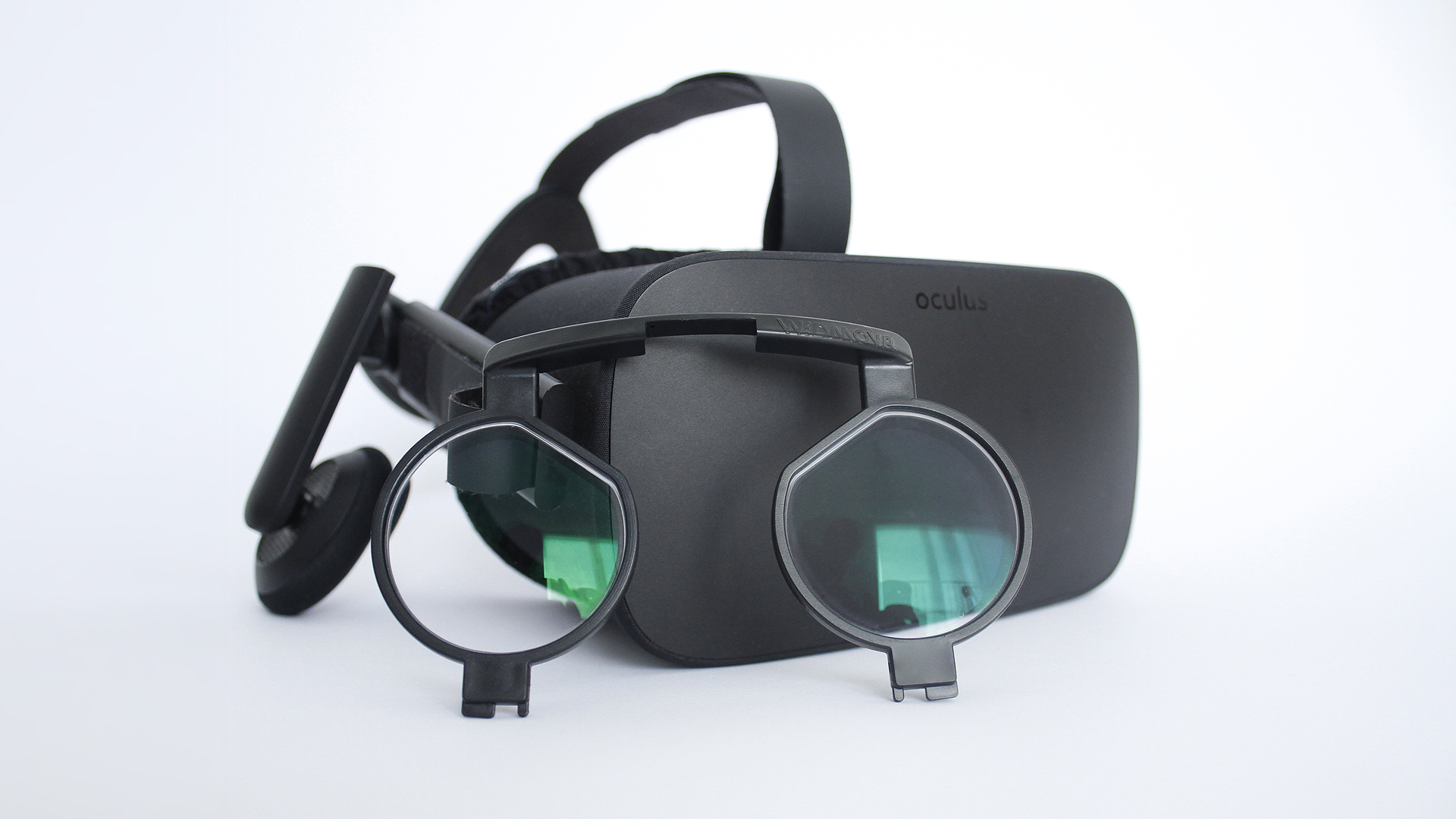
$65 including the lenses seems reasonable
wicked oak
getting some corruption in PSVR
DAMMIT
rip forward rendering :/
might have a look to the project in 4.17 preview, maybe it is fixed there
wintry escarp
I got bigscreen for rift but it doesn't seem to work right
my sbs 3d film is all squashed, it isnt being corrected
keen iron
whats the best way to setup an ik rig? I found a year old thread this morning suggesting IKinema
wintry escarp
get an animator
sad but true
blender could do it, learning curve involved though
wicked oak
the IK rigs have to be done in ue4
on the animation tree
if you want runtime AI in your game
wintry escarp
if you have a rigged maya character you need to re-rig it in ue4?
keen iron
this is for controlling the ik in realtime like echo arena, i saw the two bone ik node in the animator but was wondering if thats enough or if ikinema is necessary
glossy agate
ANother one to look at is BIK. UE4 plugin that should do it. Pretty affordable too when I asked the dev
wicked oak
BIK is cheaper than ikinema
its pretty good
but i didnt buy it, becouse they dont offer source code with the plugin, wich means i cant compile it with a custom version, and im completely dependent on them
and it doesnt work on ps4 at all (yet)
ikinema is quite bad in that part too, also very closed
and their ps4 version is 5 figures (on the low side)
keen iron
wtf lol, well im devving for oculus / steam so im not worried about ps4 at all
ty for the info thats exactly what i was wondering
oh whoah thats expensive, how hard is it to just make a really simple crude solution for just arms?
mighty carbon
@tired tree so if someone wearing Vive gets whacked into the head with sonic cannon blast, nothing will happen ?
dawn cipher
If I want to implement scaling-the-world-around-you in VR, how do I adjust my actor's location each frame so that your head appears to be in the same spot?
If you just adjust the WorldToMeters scale, when you scale up you get taller in the world (as it's increasing the positional factor of your relative values from the HMD). I tried taking (NewWorldScale-OldWorldScale) * Head->RelativeLocation.GetSafeNormal() and adding or subtracting that from your position but my head still appears to move in the world. Do I need to multiply that by a factor or something?
sturdy coral
@dawn cipher get safe normal doesn't seem right, that gives you a unit vector
if you are 5 feet in the air from VR origin and scale the world X2 you are going to end up with the same offset as if you are 2ft in the air and scale X2
dawn cipher
@sturdy coral I was thinking I could figure out the amount it was going to move and then the direction would be the negative of it's direction from the origin
But now that I think about it, I need to just store the old position, calculate the new position after changing the world scale (understanding that the actual component isn't updated until the next frame)
And then subtract those two positions to get an actual delta.
sturdy coral
yeah, in your old way you've got the scaling amount and the direction, but not the magnitude from origin
dawn cipher
Hmmn, not convinced this is the right solution either.
FVector OldLocation = Head->RelativeLocation;
float OldScale = GetWorld()->GetSettings()->WorldToMeters;
GetWorld()->GetSettings()->WorldToMeters = NewDesiredScale; // Update scale
FVector NewLocation = Head->RelativeLocation * (NewDesiredScale/OldScale);
AddActorWorldOffset(OldLocation-NewLocation)``` doesn't seem to actually keep me in one place eitherThat should give me the delta of the heads positions from before and after the scale change, which should be how much I have to move counter to keep it in the same position right
sturdy coral
@dawn cipher I'm not sure if world to meters immediately updates all the component transforms or if it happens on next tick; since it looks like a plain variable and not a method I would assume it doesn't happen until the next tick
I think you need to do:
AddActorWorldOffset(Head->RelativeLocation - Head->RelativeLocation * (NewDesiredScale/OldScale)); // may have gotten the subtraction backwards
GetWorld()->GetSettings()->WorldToMeters = NewDesiredScale;```@sturdy coral Correct it waits until next frame. That's why I figure ou the conversion factor to tell how much it's going to change. I'll have that version a go in a minute, going to finish porting to C++ (instead of showing you guys the spaghetti-prints)
dawn cipher
@sturdy coral OldScale: 419.350891 NewScale: 419.986816 OldLoc: X=78.240 Y=52.117 Z=88.657 NewLoc: X=78.359 Y=52.196 Z=88.792
So the scale is increasing (by fractions of a cm) and the new location is also bigger - but if I flip the order of the subtractions around, it's even worse!
There's gotta be something else involved in this calculation
sturdy coral
@dawn cipher try it with simple numbers and vectors and simulate the effect you think worldtometers will have
so like [100,0,0] as your position, and a world to meters change from 100 unreal units (cm) per meter to 200
dawn cipher
Puts your new calculated position at 200, which means you need to subtract 100 from your position
sturdy coral
yeah, from my snippit it would be [100,0,0] - [100,0,0]*2 = [-100,0,0]
dawn cipher
[100,0,0] from 100 cm to 500cm means a new position of [500,0,0] meaning you need to move to -400 to stay at 100
sturdy coral
oh
wait
yeah you can
can't add to actor like that without converting relative into world
change it to AddActorWorldOffset(RelativeToWorld(Head->RelativeLocation - Head->RelativeLocation * (NewDesiredScale/OldScale)))
dawn cipher
AddActorWorldOffset already takes additive deltas and not worldspace deltas though
mighty carbon
does world composition work in VR? (or does it even work at all properly)
sturdy coral
@dawn cipher ok, and your actor root component is your VR Root too?
dawn cipher
Yes
sturdy coral
@dawn cipher are you sure about this?
it says "Adds a delta to the location of this actor in world space."
dawn cipher
@sturdy coral yes it's in worldspace, but I'm saying if you pass it "0, 0, 50" you go up 50cm and not you go to 0,0, 50
sturdy coral
but that still isn't right
dawn cipher
Right now there's no rotations involved and the pawn itself doesn't get scaled so I'm not sure what RelativeToWorld would do.
sturdy coral
what if your actor is facing backwards
dawn cipher
No rotations yet.
sturdy coral
I'd recommend don't mix relative and world even if you think you will fix it up later
dawn cipher
[100,0,0] from 100cm to 500cm is new position of [500, 0, 0] which means you need to move to [-400, 0, 0] to stay at [100,0,0]
Maybe our math should be ((OldScale-NewScale)/100) *OldLocation as [100-500] = (-400/100) = -4, multiply old location (100,0,0) by -4 (-400, 0, 0)
[50,0,0] from 100cm to 400cm gives you a new position of [200,0,0] meaning you need a value of -150 to stay in the same place...
(100-400) = -300/100 = -3, old location (50, 0, 0) * -3 = (-150, 0, 0)
Worth a shot though it seems really weird
It gives weird results. It makes it look like the world isn't even scaling until you move your head
Maybe this is the wrong thing to try and do, I should study Google Blocks
sturdy coral
@dawn cipher the VR editor should have the code for it already
dawn cipher
So I had a poke though that, and the EditorAutoScaler class has this comment on it "Automatically scales the user when dragging the world and pressing the touchpad"
Tucked away in the UViewportWorldInteraction (of all places) is a uh... complicated math block.
// Because the tracking space size has changed, but our head position within that space relative to the origin
    // of the room is the same (before scaling), we need to offset our location within the tracking space to compensate.
    // This makes the user feel like their head and hands remain in the same location.
    const FVector WorldSpacePivotLocation = InOutRoomTransform.TransformPosition(InRoomPivotLocation);
    const FVector NewRoomSpacePivotLocation = (InRoomPivotLocation / OldWorldToMetersScale) * InNewWorldToMetersScale;
    const FVector NewWorldSpacePivotLocation = InOutRoomTransform.TransformPosition(NewRoomSpacePivotLocation);
    const FVector WorldSpacePivotDelta = (NewWorldSpacePivotLocation - WorldSpacePivotLocation);
    const FVector NewWorldSpaceRoomLocation = InOutRoomTransform.GetLocation() - WorldSpacePivotDelta;
looks pretty close to what we were saying, plus a relative to world conversion
dawn cipher
Ah interesting, they build an FTransform for the head called "GetRoomSpaceHeadTransform" which is just the local rotation/position, and the room transform which er... "DefaultOptionalViewportClient->GetViewRotation"
Which I assume is the viewports way of saying where the viewport actor is.
sturdy coral
(InRoomPivotLocation / OldWorldToMetersScale) * InNewWorldToMetersScale; is I think the same things as Head->RelativeLocation * (NewDesiredScale/OldScale)
dawn cipher
Oh, I should definitely start the VR editor on my current map and resize the world and see what it feels like hah
Oh. Apparently we're right @sturdy coral
It feels the same in their VR editor, which feels wrong, but is apparently right.
sturdy coral
yeah the whole world scaling up and down isn't something you really have a reference for
in real life
dawn cipher
I wonder if it'd make more sense to scale underneath feet
Instead of at head
I'll steal Epic's code when I'm done with OW and try that
pearl tangle
@sturdy coral you were the guy doing all the stuff with the kinect right?
sturdy coral
@pearl tangle yeah a bunch of kinect stuff
pearl tangle
@sturdy coral sent you a PM mate. Not really game related but thought you might be able to help, considering how useless the kinect forums are
dawn cipher
@sturdy coral hmmn, no real luck on borrowing from Epic's code. If I plug in their calculation instead of the one we came up with it doesn't seem to have much of an effect on your position at all.
glossy agate
@motorsep#8292 world comp should work fine for VR. I have seen some other games using it, you probably want to keep the sun dynamic if it's a huge world.
mighty carbon
@glossy agate ah, cool
alpine torrent
VR with Oculus amd Marvel http://ocul.us/Marvel-Powers-United-VR

Amazing news, True Believers! Today at D23 Expo, we announced MARVEL Powers United VR, an action-packed, multiplayer co-op title from Marvel, Sanzaru, and Oculus Studios.
 upbeat kestrel

Facebook is planning to unveil a $200 (£150-odd) wireless Oculus VR headset later this year that you can use without connecting to either a PC or a phone, according to a Bloomberg report. The new headset, codename “Pacific”, will be a fully standalone product. So you’ll be able to take it out of the box, […]
 sharp swan
I am very dubious about that. I mean at some point we will have self-contained that are the quality of current HMDs but right now I can only see it being somewhere in between Cardboard and PSVR, both of which are utterly terrible experiences.
sharp swan
stabbing myself in the eyes is better than a PSVR
wicked oak
carmack has some talks, i linked above
they say that if they use the same chips as a gearvr, but not constrained to the thermals of a phone, they can get twice the performance easily
and then having the OS be much more controlled, without android background processes doing shit, they can improve CPU performance further
sharp swan
well maybe im just cynical but I wouldn't doubt Carmack for a moment. He is the boss I guess.
wicked oak
i still worry about the gaming device
hand controllers are just best
but inside out hand controllers are problematic
gamepad VR is shitty
sharp swan
I want gloves that track. I dont see why any hand tracking needs to be either controller simulated or mapped from a scan based system such as leap motion/realsense. It's about time we got a 50/50 system where the gloves track themselves in relation to the HMD location. Not like Nintendo Powerglove or anything. Something with finesse.
granite jacinth
Man
There have been gloves for VR for awhile now
But nothing sticks since they aren't bundled with HMDs
Or games
sharp swan
I mean standardized ones really. Something developers will work with as standard rather than being a niche thing within a niche thing.
granite jacinth
I doubt we'll see gloves being mainstream ever, unless they come with the HMDs
Ah, I guess a "VR Glove Controller" standard would be nice
wicked oak
honestly i do not want gloves
i want a hand controller
with buttons
and joysticks
granite jacinth
I want a full body optical scanner
Actually, I lied.
I want to just jack in
done
sharp swan
Dimethyltryptamines. In various forms. That's the real VR.
VR shoes. Im calling it now. They are like those "wheelie shoes" but you can walk on the spot with them ¬.¬
sharp swan
as long as the penis area extends when I do, im good with that.
alpine torrent
Extender or make a hole in it with other automated system in that area usable for other things 😄
 real needle
Has anyone experienced this: if I start my game on Steam (without SteamVR already being opened), the HMD works, the hands track properly, but the buttons on the vive controller don't work. The only button that works its the System button at the bottom. If I open my game after SteamVR is already opened, I don't have this problem.
real needle
very bizarre, but forcing -fullscreen and -vr on the executable fixed it
 minor dagger
anyone run into issue with camera jitter caused by "lock to hmd" and actor component attachment?
keen iron
how can i have something that is always floating at the midpoint between the motion controllers?
i tried getting the distance between their world locations then dividing that distance by 2 then adding that value to the world location of one of the controllers but something is off
i think the angle between the two controllers needs to be multiplied in there at some point?
oh duh add them and divide by 2, im stupid lol
wintry escarp
hmmm, the vr template pretty old and never updated?
 winter venture
undo not working in the vr editor on a vive for anyone else?
pearl tangle
@wicked oak good gloves along with tracked props with the vive trackers is pretty awesome
but using gloves on their own without holding anything feels weird
the noitom hi5 gloves got delayed by another month annoyingly
minor dagger
anyone know how to run only one window in vr mode? Like if I runings 2 PIE windows and I want to display only second one in vr?
pearl tangle
check out 4.17 maybe
full junco
theres no way how your GPU could handle rendering two PIE windows with one being VR
 jaunty shell
@full junco I do it with our PaintVR tool 🤔
works alright (although) the second window sometimes flashes in the VR view
full junco
but whats your GPU?
jaunty shell
1080 laptop

two separate windows
the right one is an ortho camera with very little render distance
just enough to display the painted rendertexture
jaunty shell
@wicked oak I need to give 4.17 a whirl
 manic ledge
Nice work on the PaintVR test, I did a similar tutorial for some uni student during a workshop - I assume this works with a similar method, using a raycast to get the UV coords at the intersection
jaunty shell
yup
jaunty shell
@wicked oak so I just migrated PaintVR to 4.17, where is that eye + rt feature you mentioned ?
wicked oak
on the hmd display modes
tired tree
it solves all of your problem
jaunty shell
oh man I smell Oculus only
wicked oak
to actually having a function
tired tree
you can't set oculus's mirrors
but regardless mirror modes are converged now
all of those in the image work
mighty carbon

@Joshlong131 @dillzilla11 @Xbox @CDPROJEKTRED Xbox one / PS4 are not twice the perf of similar spec PCs now that the APIs are common. The win was larger years ago.
Twitter
mighty carbon
folks, what are the best voice input plugins do you know of?
mighty carbon

UploadVR
Geronimo Interactive and Winking Entertainment today announced Reborn: A Samurai Awakens, a new sci-fi action game for PlayStation VR (PSVR).
wicked oak
wtf man
they got sairento straigth
i really should have stopped trying to improve the game and just release it around february
mighty carbon
and probably add some "napkin" story and change name from DWVR into something really cool 😃
the gameplay in that samurai game doesn't look impressive at all. But the name sounds cool 😃

reddit
Stated by TPCast themselves in this interview: http://www.revvrstudios.com/rev-vr-podcast-ep-146-evening-tpcast And I don't have time to relisten...
wintry escarp
nice to have but £300 is fair whack
wicked oak
right now im stressed as fuck becouse im just too late
literally every day that passes is money im losing, and hard
more competitors appear constntly
and i cant compete against them due to low budget
granite jacinth
@wicked oak Story of our lives
glossy agate
What kind of budgets do you think Sariento, and reborn are using?
mighty carbon
$1M+ ?
wicked oak
nah, nowhere even close
reborn somewhere in the middle of sairento and my game
sairento doesnt have much more budget than i do
at least at release
but they were much more popular at the start, and they are using that money to improve the game
 lavish violet
anyone here have experience with VFX?
and if not, what kind of information would be helpful to you?
common practices, special techniques, ways to approach?
glossy agate
Yeah I was thinking like 10k on those games. Creators of reborn are a tiny company. They did release 1 other game I could see, but it only had 3 reviews
mighty carbon
I don't see how art as seen in those games can be on 10k budget
glossy agate
Character art is probably expensive, but isn't art usually cheaper than programming?
mighty carbon
depends
wicked oak
its all marketplace
both sairento, my game, and that other game use similar percentage of markeplace assets
wich means
literally anything that is not a character model or a "hero asset"
Top Down Scifi can be spot
on the 3 games
glossy agate
And chars probably cost $500-$1000 each
Unless one the team members did them so they didn't need a contractor
wicked oak
those are made in-house
but i can tell you sairento uses almost a bigger marketplace percentage than me
all the environment meshes and animations are marketplace
glossy agate
Yeah, thats the way to go. Waaaay faster and way cheaper, unless you just have to have a really unique art style.
wicked oak
DWVR wont be the only game i put on PSVR
maybe i do VRMultigames "ultimate" edition
with more minigames and stuff
mostly becouse something like that would be easy to do
i need to find something i can get done in 2-3 months and do several of them
winter venture
vr editor feels a bit rough on a vive, undo/redo is really awkward (and docs are wrong/sparse on controls).... and how can i scroll this menu? http://i.imgur.com/716a9CZ.jpg
 sly elk
"And chars probably cost $500-$1000 each" Only if you are using bottom of the barrel outsourcing
granite jacinth
@winter venture best solution I found... Not to use VR Editor
sly elk
budgets
glossy agate
Yeah for sure. Reborn is from a Chinese company. Probably cheaper to get it there
sly elk
I'm planning to release my game on screen and VR. I don't think there are enough VR headsets out there yet. It will be interesting to see if this latest oculus sale pushes big numbers
winter venture
😆 yeah i haven't been using it, but i tried some landscape sculpting with it recently and i think it could be okay for that if not for a bunch of simple issues with the controls
glossy agate
Editor may just be fun for showing off VR to friends. Like a super high end Google blocks.
sly elk
I can see wanting to use it for a block out pass for some types of games
winter venture
it definitely feels cool even if it isn't that useful
mighty carbon

This is Fan made DarkTower VR experience. It does not reflect a final product.
ha, someone beat me to it
although reloading isn't as cool as it was in the movie trailer
lavish violet
add targets to shoot and you might think otherwise
sly elk
I want a 3d overlay of blueprint windows in VR. Debugging blueprint graphs in vr preview is a pain in the butt
pearl tangle
you just have to alt tab around a bit @sly elk
sly elk
its a pain in the butt with a rift. have to cover teh sensor (or tape it) and then operate the game to test things while looking at the VR preview
tired tree
make yourself a logger
mighty carbon
@sly elk clearly you haven't developed for Gear VR 😭 🙀
Working with desktop VR seems to be a breeze after that 😉
silk lodge
@sly elk totally agree; If something is dumb, I'll grab a coworker and debug together
rare violet
Spectator screens are now supported on the Oculus and HTC Vive.
This was from the 4.17p1 release list...does anyone know where we can mess with that?
jaunty shell
@Microdose#1690 check out yesterday's conversation about it
oh wow
HTC is recruiting VR Evangelists in the US
wintry escarp
motorsep you doing your game dev on the rift now?
mighty carbon
@wintry escarp nah, finishing it for Gear VR.. Started adding sounds yesterday. Might push out an update this week 😉
folks, seen this? https://www.mirareality.com/
Unfortunately it's iOS/Unity only
tired tree
jesus, that is ancient tech there
mighty carbon
does anyone know of a good weapon/projectiles BP systems on the Marketplace that can be used in VR ?
and btw, 4.17p2 just landed
sly elk
what kinds of weapons? Hit scan? Projectile?
mighty carbon
hitscan, projectile, melee
sly elk
any weapon system ought to be VR compatible with minor changes, right? Like just attach the weapons to a socket on the motion controller and rebind the fire button?
mighty carbon
I am using MordenTral's VR plugin + template. So, weapons would attach to hands same way they do in his template
ideally I'd rather partner up with some BP guru for this project 😉
(I'd rather work on art/anims/level design)
sly elk
I know that feeling.. I'm doing my game as a team one 1 and having been an artist for so long, doing gameplay stuff is a new kind of exhausting 😃
*of one
mighty carbon
yep.. It's fun and all, but doesn't quite work in a business sense 😦
glossy agate
@mighty carbon Im building a weapon system now that uses the plugin. Taking a bunch of logic from the VR weapon toolkit on the marketplace.
It needs a lot of changes though, cause its not MP ready, and it uses projectile meshes instead of trace so you gotta modify it a lot. Good starting point for me though
mighty carbon
I see.. It's not about making it really. I am sure I can make it (for SP at least). It's just the time it takes to make BP stuff and art.
I'd rather split profit with someone and make game faster than do it all by myself and get it out in several years just in time to be late and obsolete :/
glossy agate
Yeah, is good if your looking for a reaistic setup if thats what you want. But writing it from scratch or spending $40, Ill save the time haha
A fair amount of work is needed, but tiny compared to doing it all
Yeah, Im partnered with one other guy on my new game, and got a sound guy. Would be nice to have a programmer better than me on it too, cause Im not great. I subbed to Mordentrals Patreon to get a little help on his discord
mighty carbon
that's what I mean - modifying something sometimes take too much time and it's just easier to make it from scratch. It doesn't have to be pretty. It just needs to work and be stable.
Generic solutions are good for large scale projects, for Marketplace assets.
But when it comes down to get it done and shipped, I am all down for cheating 😄
especially if the game will have 3 unique weapons.
glossy agate
With this kit modifying is faster than scratch though. I can create 1 base weapon, 1 mag and 1 ammo with exposed variables. Then I can just swap out meshes and and change setting on a child BP so every other weapon will take 45 min to make each
Got like ammo count, kick amount, full auto? bool, damage amount, and a bunch more like sound settings, emitters ect, all pub variables
mighty carbon
does it have reloading ?
glossy agate
Yep. Push a clip in and pull the slider for the weapon
slide locks after last round fires too
And al the weapon packs I wanted are 50% off with the summer sale today!!
https://www.unrealengine.com/marketplace/vr-gun-toolkit this is the one Im working off of.
https://www.unrealengine.com/marketplace/weapon-master-vr this one is really good, probably better than the last but it doesn't work the way I want.
tired tree
ryan were you doing physics based clips or non colliding?
glossy agate
Currently they are physics assets, but that will probably have to change for cost
Set them to physics last night, but will switch back, or somehow keep it all client side once a player takes possession of one.
I don't know much about MP, so I gotta learn whats best, or how to work it
tired tree
the plugin handles all of that for you
there is a Client_Authoritive rep mode for grippables
glossy agate
Oh sweet, will replicated physics clips slow everyone down. I heard to not simulate physics over a network. Just replicate position at like like 30 hrtz or something
tired tree
it doesn't replicate over unless ServerSide authoritive mode is on
when a character holds it each client tracks it to where it should be relative to the hand
the grip itself is replicated, not the movement, for most modes
glossy agate
Ah okay. Cause the ammo will be available to everyone in a level from loot boxes, but a player can take it and add it to personal inventory over a handful of slots.
Unless I make a loot box specific to a player that opens it, like last of us, so everyone can open the same box.
tired tree
should prob move this to the other discord ;P
glossy agate
Got it
mighty carbon
2 more days for Lone Echo..
sly elk
If anyone here needs a slim/cheap oculus tracking camera mount I posted the models for download (and on shapeways they are priced at cost): https://www.reddit.com/r/oculus/comments/6o3gsv/download_and_print_your_own_tracking_camera/

reddit
3 points and 1 comments so far on reddit
mighty carbon

UploadVR
San Diego Comic-Con is this week and VR is poised to have its strongest presence ever.
 dusky moon
I have a seriuos issue with triggering Level Sequencer Playback from Blueprints ... It plays sequences in editor but not in the Packaged build.
this issue :
https://answers.unrealengine.com/questions/586630/level-sequencer-not-playing-in-packaged-game.html
I remember having this problem from day1 that sequencer has been added to UE , but it's weird that the bug still exists in 4.16
 keen prawn
@dusky moon
this worked in packaged last time i tested
u might not need all of it
dusky moon
ahh I see, Does that "Create Level Sequence Player" do the trick ?
keen prawn
yea
dusky moon
because I just get the reference of Sequence in my level blueprint and play it there
keen prawn
u dont need any of the nodes connected to the camera actor
thats super custom stuff 😛
dusky moon
Yeah! I'll give it a try... Thanks in advice 😉
keen prawn
np
cant believe they just closed that thread w/o givin an answer...
hmm he did use create sequence, so not quite sure whats goin on there, havent tried to package a sequence since it was in preview 😛
dusky moon
oops! I just tried in mine and didn't work
but yeah, It's strange because triggering seuqence is something that you expect to work and the fix shouldn't be hard for epic I guess
like the Vive's 4:3 Hmd mirror mode
keen prawn
I think that should work
mighty carbon
Nate Mitchell tweeted: "Plenty more massive 2018 and 2019 Rift titles already in production. New Rift users have a ton to look forward to in years ahead!"
 echo thorn
Hello guys ! does anybody knows how to use open cv with ue4
jaunty shell
@echo thorn opencv ? Is it for something related to vr ?
echo thorn
@jaunty shell it is not completely related but can be worked out in vr
 plain glade

