#virtual-reality
1 messages · Page 121 of 1
 sturdy coral
 frigid kite
Yeah, the straps are just generally not a good way of holding an HMD in place
 real needle
@wicked oak - any tips for using motioncontroller when developing in vive - ensuring compatibility with rift?
i recall a while ago there was a difference between the headsets re: origin at floor level?
or is that not a problem - just use motioncontroller and it will theoreticalyl work on both headsets? (i've only got vive)
 wicked oak
its automagic
 granite jacinth
The only issue is optimal button mapping
Luckily I have some peeps with Rifts for input
wicked oak
mapping is easy, its almost direct
its the shape of the controllers what changes the most
with vive you need a different orientation than with oculus
real needle
hmm, what do you mean by that?
lets say you are using a mesh of a hand
arranged with the vive controller. but not really mapped any realistic way, just like a rough representation
do you have to detect the hmd and apply some sort of rotation, etc? i'm talking very basic hand representation
wicked oak
yes, you need to apply rotation
lets take the case of a sword/gun
in the vive, the handle is 100% horizontal
while in the oculus, the handle is around 30-40% degrees
its the "face" wich is horizontal
wicked oak
for that reason, if you have a sword on the oculus, then you will have to make sure to rotate it on the vive
real needle
where the hand doesnt really map to the real hand. the user just accepts the hand location
sturdy coral
@real needle you do need to call set tracking origin: floor level
real needle
@sturdy coral - that is the same setting i am using for vive
real needle
ahhh
okay so that handles the HMD properly
but this hand thing - how would you detect the hmd and then apply the rotation?
and what do people use for "in game menu" on touch?
in vive i use "Shoulder", which is that little button above the trackpad. what is the rift equivalent?
wicked oak
Gamepad Special Right
sturdy coral
there are lots of ways to handle the hand differences
sturdy coral
sockets, storing a delta transform, etc.
wicked oak
on the other hand you have 2 extra face buttons. You can also put that
they are Facebutton 1 and 2
real needle
what do most people expect with touch?
real needle
"Gamepad Special Right" sufficient?
sturdy coral
in the pinned posts there is a gif here
real needle
what is Touch equivalent to the triggeraxis?
sturdy coral
but there is a better one online somewhere that has the actual UE4 names
real needle
sure thing, thx
wicked oak
its actually Gamepad Special Right
 real needle
that is fantastic, thanks!
so it looks like they both use TriggerAxis
i imagine a touch person would pickup with Trigger
real needle
ah, hmm
sturdy coral
it depends though
real needle
which one is that
i have the hand pickup animation mapped to Tigger on Vive
because there are degrees of open and close
what would a Touch person expect that to happen for?
sturdy coral
grip axis
frigid kite
Grip
real needle
got it, thanks
frigid kite
A vive person also picks stuff up with the grip button
sturdy coral
but there are exceptions, I think rec room still uses trigger
real needle
true, but an analog pickup
sturdy coral
you might want some other gameplay thing on grip, etc.
real needle
with degrees of closed hand
so i think for the analog case, grip axis is what i want
wicked oak
nope, vive uses the trigger in a lot of cases
becouse grip button in vive is dogshit
its really hard to press, not an axis, and you cant really keep it pressed
sturdy coral
grip on vive is better as a toggle grip in most cases
frigid kite
In the beginning I got massive cramps
sturdy coral
raw data has like 3 preferences around it because people disagree so much
frigid kite
but now I use it as real grip, so throwing is more natural
sturdy coral
the grips were even worse on the vive dk1 controllers..
frigid kite
especially for games like robo recall
sturdy coral
which is hard to believe
frigid kite
But I agree, all in all the vive controller is very poorly designed, with the grip buttons being the worst of it
the touch is far nicer, though it took them too long to release
creating this whole group of people with gamepad pc vr
sturdy coral
yeah, I don't mind the rest of the vive controller, I like the touchpad flexibility
wicked oak
that costed them the PC vr market
sturdy coral
just needs a better grip
wicked oak
Vive being first to release stomped oculus REALLY hard
wicked oak
becouse it created all this feeling of "rift cant roomscale" and all that trash
sturdy coral
@frigid kite yeah, but touch is a little too small
frigid kite
it's also finicky when you get right on the edge
which is where you wanna go a lot of the time
sturdy coral
having to hold it with pinky and ring finger to avoid making a fist gesture at people took some getting used to
sturdy coral
I wish the body of touch was like an inch or so longer and didn't taper as much at the bottom
sturdy coral
maybe it is different on the consumer one too, I have the dev kits
frigid kite
could be, they went through myriad design changes
sturdy coral
feels like it needs some rubber grippyness or to be a little longer
 glossy agate
Onward for example toggles grip for grabbing and releasing gun, and trigger for throwables/interactables like grenage, and walkie talkie. Probably my favorite setup
will transfer to Knuckles well too
sturdy coral
they put out a knuckles porting guide
with a list of games that work better switching their grip to the trigger or leaving it
or something like that
probably things that had a toggle grip don't work with knuckles without changing that
at dev days they said they were going to eventually do a more global configuration thing like the steam controller
frigid kite
Unrelated, is there a common way of doing screen space overlays in vr in unreal?
I wanna play around with blinders, like in eagle flight
UMG is definitely out
wicked oak
face locked stereo layers
rendered by a UMG thing
you can use a 3d widget and then set the texture to the stereo layer
thus rendering the stereo layer with the umg
sturdy coral
@frigid kite for really quick and dirty face locked blinders you might want to try just overdriving post process vignette to a high level
I'm not sure you can ever get enough of a hard cut off with it without tweaking the shader for it
you can also do a post process material and write your own through the material editor
frigid kite
Yeah, post process was next on my list
I've not heard of the stereo layer before - I'll do some reading
sturdy coral
tried echo arena, it's really fun
it uses multires (back to the 780 vs 970 discussion)
yeah that game is going to be big, it is really polished and fun
 wintry escarp
no multires on 780?
sturdy coral
nope, you need 900 series for multires and 1000 series for lens-matched shading
wintry escarp
games must have the usual options to lower settings though
bleh, safest to wait for next gen then
wintry escarp
looks a bit like enders game war game arena
glossy agate
@sturdy coral I meant for converting grip to knuckles it would be the same motion people expect, but you wouldn't need a toggle because knuckles has touch so you would do "is touched/is released" for grabbing and letting go of stuff. More natural
real needle
How do you guys capture video footage and screenshots for your game? (putting together trailer, screenshot gallery, etc)
glossy agate
Problem with trigger grabbing sometimes (like with Pavlov) is when grabbing a gun you can accidentally start shooting right when it snaps to socket
 odd garnet
2 weeks to release
;-;
Still so many bugs and half baked features
We keep thinking "oh yeah that would be cool" to about 10 things
and end up finishing 8 of them lol
glossy agate
What game? You got a trailer?
real needle
@real needle I use nvidia shadowplay... when the current patch is stable
Screenshots are better to capture in regular flat preview, but you can also attach a scenecapture component to the HMD camera and write capture to texture on disk
real needle
@real needle thanks for the suggestions. any alternatives to nvidia shadowplay that you are aware of?
OBS. Good job auto correct
what is that? google not cooperating for that term...
glossy agate
@disraeligears#4624 OBS is good for capture too. I had trouble with shadowplay flashing me to the steam screen for some reason.
 jaunty shell
interesting presentation from NVIDIA + HTC regarding collaborative/multiuser experiences
sturdy coral
I wonder what kind of TAA echo arena is using, it didn't look blurry
wicked oak
@sturdy coral Forward Renderer?
 mighty carbon
I don't think they use UE4
wicked oak
TAA looks blurry on dynamic objects no matter what you do
MSAA doesnt
they do
pretty sure, but not 100% sure
mighty carbon
there was not a single mention of Echo using UE4, nor Epic ever tweeted about it
jaunty shell
it looks like UE4 based on materials and light reflexions
but then Unity had quite an epiphany recently with visual overhauls
 jaunty shell
aah yeah that's from Ready at Dawn
sturdy coral
The options screen mentioned temporal aa
But also had a 2x aa option separately
So I think it is forward with msaa and taa
mighty carbon
New Doom has TAA and it's not blurry as UE4's
sturdy coral
There was a sharpening option in the settings that defaulted on
So it may have had some blur masked from that
(in lone echo, not doom)
It definitely didn't seem to use screenspace reflections
mighty carbon
I wonder if 2 controllers can be used with Gear VR
wintry escarp
all that procrastinating about the rift and the only shop in Glasgow that had to demo doesn't have it anymore, they say oculus took it back
so theres now nowhere in this whole country to test out a rift, its as if oculus don't want to sell any
mighty carbon
they do, but I think their target market is North America
plus by now VR enthusiasts already know Rift's and Vive's pros and cons and that in general desktop VR is super-awesome
wintry escarp
balls to paying out £598 blind without even being able to test it
mighty carbon
eeh, I paid $800 for my S6 and Gear VR, blindly
because I tested Cardboard and I've read that Gear VR is a ton better
wintry escarp
I paid £500 for my phone, I needed a phone, winphone is dead. I made sure the gearvr was free
mighty carbon
so, you tested Gear VR and Rift is a ton better. It's pretty no-brainer decision if you have money to spend
wintry escarp
it wasn't a total bust, I got a new pair of cords and a cap
mighty carbon
I am pretty sure I'll get Vive v2.0 next time around, unless Oculus offers a better deal
but at this point Rift beats Vive for me
wintry escarp
vive is £170 more here
mighty carbon
(plus I got it for free from Oculus anyway)
wintry escarp
woo how'd you manage that
mighty carbon
showed them my past works in non-VR, explained what I am going to develop in VR and showed my Gear VR prototype
took a loooong ass time to get response, but I got it
you can't just come out of the woods and expect to get $600 of hardware from them
wicked oak
they sent me 4 oculus lmao
but they had an error
and sent me 2 oculus with touch
twice
 sharp swan
Oculus can eat my ass with a spoon. 😄
 subtle island
@sharp swan Really? They don't advertise that on any of the promo material for the rift
sharp swan
Yeah they dont like to talk about it.
Just like their Home Store service when they deny you access and give you no reason and wont talk to you about it again.
Even though they sponsored you for almost 2 years on the project 😄
maybe things will get better who knows
sharp swan
still love them damn controllers tho ¬_¬
When I get fleeced for a new pair of Vive controllers, I shall be happy with the vive entirely
subtle island
What do you think of the knuckles controllers?
wintry escarp
cant you distribute on your own and let people sideload?
sharp swan
@subtle island they look pretty good but I will have to try them. They look like a step in the right direction. Vive controllers need more buttons as it is. These grip button systems can be a bit odd for people with large hands though.
mighty carbon
@sharp swan it's been my experience that business only do that to devs if devs talk trash about business and generally being dicks toward the business (publicly and in private)
sharp swan
I never said a bad word about Oculus before that. I praised them in fact for giving us hardware right from the DK1 era
mighty carbon
well, like I said, shit doesn't just happen out of the blue.. Gotta be a reason
sharp swan
im sure and if they told us, I wouldn't complain
how can you fix what is broken when you are not informed of what is broken though?
mighty carbon
was it you who made a game that directly competes with some other similar AAA game ?
sharp swan
that depends on your point of view. Some people wanted to compere it to Eve Valkyrie but it wasn't the same game and no-where near the quality
mighty carbon
that could be the reason why
sharp swan
it crossed my mind but I guess even telling us that as an indicator would have been something. Even if to say they were holding out on giving us a possible release date to get the initial sales. I feel it was more due to something else. Possibly the code being crap or something
 little nacelle
Hi guys, just wanted to know, on the HTC vive controller, the face button 1,2,3,4 are on te left or the right controller?
sturdy coral
@mighty carbon @sharp swan there doesn't have to be a good reason. I met someone whose company name had an ampersand in it, Oculus's database couldn't handle special characters so they just totally put his game in limbo for months
sharp swan
that must have been pre-facebook. I can't imagine the web devs didn't sort that out immediately 😄
 full junco
@little nacelle on both
@sharp swan "the code being crap"? how did they see the code?
little nacelle
@full junco but there are also button 5,6,7,8; so I thought the 4 first ones were on one hand and the others on the others? I don't really get how UE4 maps them
wicked oak
left and right hand
sharp swan
performance testing, apps that deal with that kind of thing really.
sturdy coral
 sturdy coral
they just have it on both
wicked oak
and they approved it enough to be on Gallery (shit tier) 😦
sturdy coral
symmetric with L and R in the name
wicked oak
there are 3 rankings. "normal" games are the ones that are flawless
Early Access are the games that are flawless, but short on content or still in-development
gallery is the games that arent flawless and can have a few rough spots
then there is a 4th. Keys only
for games that have SERIOUS issues
sharp swan
that was another thing. They first rejected in early access. Then again when it was resubmit on final release.
full junco
why didnt you fix it to get to "early access" at least? @wicked oak
wicked oak
oh i did
but i dont know how to tell them to re-review it
the game doesnt have much sales, usually they only get stuff out of gallery if it sells well
i did tell them if i could exit gallry
little nacelle
Thanks for the scheme, but I dont see face button 5,6,7,8 on it 😟
sturdy coral
@atomic pumice I don't know which controller uses those but it isn't vive
wicked oak
Face Button (R/L) 1
granite jacinth
I can't wait to get back to VR Dev when I get back from vacation
little nacelle
Oh okay, I see, it's been anticipated for those kind of motion controller that has a lot of button on it I guess? Okay, I'll use the 4 first ones, thanks!
sturdy coral
@atomic pumice grepped through plugins, nothing uses beyond FaceButton4 so much just be for future use
wicked oak
lol how is ue4 going to support steam knuckles XD
it doesnt have enough axis
i guess it will end up as knucles axis 1,2,3
like it is with oculus capacitative axis
sturdy coral
the oculus cap touch stuff each has an axis
sharp swan
you can have as many axis as you like in ue4 with a bit of a mod
sturdy coral
but through some other interface I think
I think 4.15 added wheel and joystick support, so they must have some generic axis mapping now right?
sharp swan
they did add a new raw input thing for non-xinput controllers, allowing HOTAS to work and such. Whether that was limited I dunno as I used a custom setup when it wasn't supported
wicked oak
i was thinking of that hero prototype thing that was discussed in lounge this morning
ima build the prototype a bit now
i want to see how it goes with rocket hands flying around a city at high speed
and its quite simple
wicked oak
uhm it works to fly around a RNG city like that
but i havent seen a single game doing that properly
it could be a flashy action game vs aliens or similar
frigid kite
It's Morden, in the flesh! 😮
Been doing some prototyping with your plugin, thanks for putting so much time into it
wicked oak
he should get paid for it
frigid kite
I was just thinking that the VivePawn is a bit of a mess though, I'm planning on separating different bits of VR interaction into components/child actors so I can keep a clear head
But having all the character collision, physics enabled gripping and climbing ready is an absolute blessing
glossy agate
@wicked oak have you tried blueshift? Similar to what you described. It's free on steam
wicked oak
i saw that one
glossy agate
From the same dev that made vertigo
wicked oak
no i havent tried it
maybe i do that as i could get a finished product in 1 month
but DWVR comes first
doing it as a score attack game against aliens that are trying to destroy the city would probably work
glossy agate
Would be really cool
wicked oak
ill think about it. A project like that could be done REALLY fast
the city can be procgen-d with a few procedural buildings, and the aliens use AI to fly around and attack you
glossy agate
With Coop would be fun too. But yeah really fast to make.
wicked oak
coop blows the hell out of the complexity for it
but it can be done, interactions arent that complicated
glossy agate
Master Indy is making Jet Island that is similar also. Has grapple hooks instead of flying though
not released yet
 tired tree
@frigid kite 75% of whats in that template pawn can be thrown out for the average user. Its there to show how to do everything, but most people won't need everything.
i'll agree that its a "bit" bloated by now :p
but the workflow is normal, hell look at Robo Recall, they put MORE of their logic into the character than I do
the only real paridgm shift I took is that I don't run gripping in the gripped actors, I run it on the motion controller. And that is simply because of replication efficiency and the late updates control.
 digital marlin
@digital marlin .
mighty carbon
so, finally getting to rendering UMG widgets in Stereo layers.. Following this https://forums.oculus.com/developer/discussion/comment/456990/#Comment_456990, but Oculus dev is making it weird :/

Oculus
Join the Official Oculus Discussion Forums and talk about Oculus Rift, Oculus Touch, Samsung Gear VR, and virtual reality.
Is there a better way ?
mighty carbon
Hmm.. that method doesn't work for me since I got no material in my widget - it's just a text that gets updated every now and then.
😕
 pearl tangle
text still has a material applied to it
 fresh laurel
Yeah it was with Jeri
pearl tangle
thats a shame. I backed their kickstarter 1 and they gave everybody a refund when they got properly funded. I didn't see much opportunity for them though after all the new stuff came out
 velvet mango
Basic question. If I want to make the player move up (think of an elevator), do I only need to move the VRPawn. Also, is the NavMesh only for teleportation, can I just remove it if I don't need it?
Sadly, no Vive here, so I can't test it this week :3
jaunty shell
CastAR people were so nice, tech had a lot of promises too 😦
fresh laurel
Yeah agreed @jaunty shell
jaunty shell
on a more positive note
I just received my new workstation 😄
120hz is such a bliss 🤓
pearl tangle
this is your little alienware laptop right?
fresh laurel
I am looking at making at VR Headset for project using a Samsung Galaxy Tab, A Durovis Dive 7 and a Nolo VR Setup. Should I wait for more standalone VR solutions to come out or no?
Just curious really
fresh laurel
Ah ok
jaunty shell
HTC is going to release a standalone HMD in a few months
jaunty shell
I wonder if OpenVR has something you can work with
fresh laurel
I just want to make sure that I am making the right choice before I do so
wicked oak
motorsep, there is a ez mode
that dev is doing it in the wrong way
@motorsep#8292
all you need @motorsep#8292
make sure of 2 things
the stereo layer must have live texture
and the widget has to render even if not in view
i usually attach them to the back of the head at a small scale
that way you wont see the umg thing, but it will still render for the stereo layer
wintry escarp
i don't think standalone HMD will be very good for a few years yet
cutting the wires but using the PC power is a better idea
jaunty shell
could be a hybrid headset
Use SteamVR tracking (lighthouses, wands or knuckles), use the headset to process tracking data, and stream content from pc in wireless
pearl tangle
yeah thats already pretty easy to do but you need to have the vive headset for the trackers to work
actually maybe not, i haven't tried running steam vr with the headset disconnected and just using the usb trackers
 clever sky
wicked oak
clever sky
wicked oak
as logical, the "get render target" thing is useful for more things
for example if you have a TV, you could use that render target as a texture in the TV material
and have it be on whatever shape you want
instead of being locked to planar or cylinder
btw you dont need to do so on Tick
this is done once
i do it on beginplay
im adding smooth locomotion to Vive, finally got an idea on how to map its controls
sharp swan
good luck. I need it
mighty carbon
Thanks @wicked oak
jaunty shell
anyone using GTX 10x based laptops around ?
granite jacinth
@jaunty shell aye
jaunty shell
@granite jacinth did you have any troubles setting up your vive ? I can't have it detected in direct nor extended
granite jacinth
@wicked oak yo what's the purpose of that image. Maybe I didn't get what motorswp was asking.
@jaunty shell uh, no issues that I can see. It runs better than my desktop sadly.
jaunty shell
welp, that's weird
steamvr recognises every device of the vive, but still gives me an error 208
granite jacinth
That's the one I got. They are way cheaper nowadays. Good buy though. Worth it.
You should try a manual reboot a few times.
Also check to see what power settings are recommended
Gt73vr titan-017 with 1070
jaunty shell
Aye
I have an alienware 17r4 with a 1080
plugged into the hdmi port
gonna try rebooting a few times
and reinstalling the drivers
need to get the latest drivers too (although the current ones are not that old)
pearl tangle
i have found some devices like displayport and others like hdmi
jaunty shell
@pearl tangle hmm I'm not sure we have mini DP to mini DP at work :/
I'm updating the GPU drivers and reinstalling steamvr, to see if it changes anything
pearl tangle
you can try installing the vive software as well, i have found that made a bit of a difference on 1 or 2 machines previously
pearl tangle
yep
jaunty shell
hmm
done anything special ?
still getting error 208
trying to disable gsync and see if it changes anything
wicked oak
@jaunty shell laptops have massive problems if they arent "vr ready" laptops
pearl tangle
never had any issues with gsync on it. Id say try the vive software, failing that, throw on a displayport cable. it's solved my problems
wicked oak
becouse usually, the hdmi is connected to the internal GPU
jaunty shell
this one is vr ready
jaunty shell
AH
gsync was the culprit
works now
good to know 🤔
wait
weird
still works after reactivating Gsync

oh well
now I just need to move the 50gigs of engine source to that laptop 😱
mighty carbon

We’re thrilled to kick off a new partner program with NVIDIA to award top-notch Unreal Engine projects with high-end GPUs. Find out how to get your project on our radar here.
sharp swan
awesome. I work in code so 1080 or not, that is upto the artist :p
wicked oak
pff 3 per month and goes via twitter
i have no chance for that
and im doing very neat graphics on VR
mighty carbon
@wicked oak https://uploadvr.com/arizona-sunshine-hits-psvr-today-good-luck-finding-aim-controllers/

UploadVR
Vertigo Games' Arizona Sunshine is hitting PlayStation VR (PSVR) today, but PlayStation Aim Controllers are still impossible to find.
wicked oak
im aware of it, i monitor my competition
mighty carbon
so, when is the release ?

I think Valve needs to hire an industrial designer or something..
sturdy coral
@mighty carbon tutorial: https://www.youtube.com/watch?v=lxFqUDW5-fE

Description: How to render UMG widgets into the resolution independent stereo layers while keeping the benefits of UMG such as interaction. Epic Documentatio...
mighty carbon
thanks @sturdy coral
mighty carbon

reddit
Arizona Sunshine was released today for PSVR so I was excited to check that subreddit to see how they were liking it. Apparently the tracking is...
lol
mighty carbon

UploadVR
Canada finally gets its own VOID VR experience center in Toronto and starts to lay the foundation for their plans to build the future of hyper realty.
real needle
@mighty carbon Those are not yours are they?
Saw post on Cloudhead Games twitter, no not yours :b
I've tried them but the demo didn't utilize the touchpad at all, so I still don't know if it's only capacitive or if you can click the touchpad as you can with the vive controllers
@sturdy coral Do you know if stereo layers are more/less performant than regular 3dwidgets?
wintry escarp
that NVidia thing makes no sense
if you do a great looking thing on a 1080...they'll give you a 1080
 fair hearth
hey guys,
about a week ago I posted regarding loading levels on an htc vive without having it kick back out to the steamvr compositor while the game loads the level.
After some discussion I attempted to set up a level streaming scenario which would always have a persistent level loaded to avoid having the engine hang while I load in the other level. Unfortunately even with a small level the engine still cuts out to steamvr when I'm initially loading the levels. Any ideas on how I can solve this?
mighty carbon
@real needle what are you talking about? What's not mine? I am just posting interesting (from my perspective) links 😃
@wintry escarp no, if you work on great looking thing and you need 1080, they give you 1080
real needle
Knuckles is what I meant. I would be surprised if someone who develops for rift got a pair of knuckles ^^
@fair hearth The only thing you can do is to put a different "splash screen" in that little square texture that comes up when the compositor is shown
Or have so little to load that it loads instantly...
I haven't been able to get around it, and when I do a server travel, the clients doesn't even kick back out to steamvr, the last rendered frame gets frozen in the hmd
fair hearth
yeah, I really wanted to set up something similar to the level loading scenarios that are in the portal games, but it doesn't look like that is going to be possible in the current version of the engine
mighty carbon
nah, I don't have Vive's "knuckles".. Just saw it on tweeter and was like: "What an ugly design..."
fair hearth
@real needle do you know of anyone who has succesfully set up the splashscreens? I've tried it before but it hasn't worked properly
 wraith sky

Polygon
About 70 employees laid off, Eat Sleep Play shuttered
odd garnet
https://www.youtube.com/watch?v=R2Ru2GugACs
waiting to be able to do this in VR

YouTube
Watch us and some friends play a whole bunch of VR games! ___________________________________ Watch us Stream at Twitch: https://www.twitch.tv/potatofacegame...
were working on a plugin for mixed reality that could be adapted for many ue4 games
subtle island
Would it be possible to delay the loading? or do it in chunks? I haven't tried in VR but if it's kicking to a loading screen when too much is being loaded maybe you could force load over a longer period of time?
odd garnet
@subtle island I would use level streaming. You can google that and find some good videos
subtle island
Yeah I should have @fair hearth there, it's not my personal problem
Just suggesting possible solutions
I only recently tried out level streaming, lets you do some cool stuff
odd garnet
Yeah
its that whole loading in chunks thing you were talking about
the chunks can be as small as you want if you want to load smoother
wintry escarp
i'm torn between getting a 1080 or a rift, cant have both
sturdy coral
@real needle I would imagine less performant, because you still end up drawing the scene behind them, where if you use a solid material in engine you wouldn't
you could draw a black quad with an unlit material or something behind them and maybe save most of the perf
glossy agate
@Wiltshire#6351 I just load persistent, delay .1 and start loading in chunks starting with what the player can see first. Have about 5 per level. Went from an 8 sec load time to <2. Gets a frame jitter but not bad.
mighty carbon
@smilertoo#8988 why 1080? Get 1060 6Gb
mighty carbon
folks, any idea why stereo layer doesn't render in PIE ? In Mitch's youtube video it does, but on my PC it doesn't
pearl tangle
@wintry escarp unless you are running 4k displays then the 1080 is pretty unecessary
sturdy coral
@mighty carbon I believe he is rendering to an in game UMG widget and the layer
to make the default widget interactor work
I don't know any reason why it would't work in PIE though
mighty carbon
yeah and I am simply having Stereo Layer with plain texture, for testing purposes.. Doesn't show up in PIE :/
which is a known thing since I began devving for Gear VR.. But I also ran Play VR Preview and it still wouldn't show
mighty carbon
I see
mighty carbon
so followed Mitch's tutorial and vblanco's advise to put UMG behind camera - it doesn't render to Stereo Layer. My guess is it never renders behind the camera as it's being culled.
mighty carbon
yep, can't put it behind the cam
fun fact - stereo layer being over near geometry f#cks depth perception and is virtually unreadable 😦
going to have to have stereo layer placed in the world and scale it up/down based on the distance from the cam..
damn VR
mighty carbon
how did you folks get around that kind of issue ?
hmm.. it seems that stereo layer (only 1 !!!) kills performance on Gear VR 😦
oh well, back to 3D widgets
jaunty shell
@pearl tangle the plot thickens, my vive works in direct mode when you freshly install steamvr, then throws an error 400
extended works as intended tho
but that means no UE4 pie vr preview, and that's going to be a problem :/
wicked oak
@motorsep#8292 there is a tickbox that say "update even when not rendered" or similar
stereo layer shouldnt harm performance in gearvr, they recomend it constantly
maybe your umg is too high resolution or updates too often?
jaunty shell
I give up on trying to understand why the vive does/doesn't work on that Alienware laptop
After pluging, unplugging the breakerbox through minidp adaptaters, it now works in direct with HDMI only
¯_(ツ)_/¯
which was not working earlier this morning and yesterday
pearl tangle
haha yeah steam vr is still fiddly as fuck thats for sure
also as a note @jaunty shell sometimes issues can come with the cables, if you just run the HDMI and USB cable straight to the machine instead of through the breakout box you can find out if there is any other issues there too
pearl tangle
yeah it works fine.
it is just an extension cord and also for safety so that if you trip on the cord it pulls it ouf ot there instead of pulling a computer off the desk
pearl tangle
also of a side note if you have a spare vive cable around you can use that as the extension from the PC to the breakout box instead if you need a really long lead
wicked oak
better to jank a cable from it that from the gpu
jaunty shell
hmm that's interesting, I haven't thought it was only an active repeater
@pearl tangle we have an extension kit from htc 😃
right, I'll try plugging it directly then and see if it changes anything
eh, can't, cables are too short to wrap around the laptop
pearl tangle
actually if you get it working you can give our most recent project a try out if you like. Keen to see what performance is like on that. Although this packaged version is set to lowest settings so our other office can run on their crappy 970's
jaunty shell
sure thing, pm me a link 😃
pearl tangle
it's a sales tool for Royal Caribbean. Has a few interactive games, 360 videos and 360 photos. Annoyingly unreal still struggles like crazy with high quality videos though so can't run them at 4k
jaunty shell
right, I'll try it out and report on performance
pearl tangle
actually il drop the file on google drive instead. should go better
jaunty shell
30mn download time so far
30/1H
I have to download through cellular since our workplace's firewall doesn't allow .exe dl
on another note, I restarted steamvr and it doesn't work anymore (error 400)
pearl tangle
cable swap to displayport and see what happens
jaunty shell
don't have mini dp to mini dp 😦
we only have mini dp to hdmi
we're not even sure it'll work
with dual minidp

reddit
Hello all, After about 4 months back and forth with the HTC Vive support about my HMD not displaying anything they finally sent me a replacement...
it worked for this guy though
pearl tangle
yeah mini dp to hdmi doesn't go well but displayport works fine
jaunty shell
I'll go grab one during launch break then
wait
fml its working again with HDMI
goddamn hit and miss situation, I just unplugged and replugged every cable
Ill try downloading the gdrive link in parallel
but I'm afraid the firewall will block the download as soon as it finds the exe in the archive
pearl tangle
its in a zip file so would have to be your antivirus that would remove it
anybody else feel like giving it a try out? Keen to dig out some final bugs. Should work on rift and Vive but only through steam vr
jaunty shell
nah the firewall is an idiot and only checks downloads :p
full junco

 wicked oak
FINALLY mixed reality
ue4 games have a massive issue with it
becouse all unity games do their cool trailers with MR and do it for the youtubers
unreal games dont, and youtubers dont like to play the game if it doesnt have MR
and worse trailers
full junco
what issue had UE4 with it? I mean, just take a scene capture and done?
wicked oak
2 windows
a scene capture isnt enough
you need to display it on a second window or similar, while still keeping the focus on the VR headset
full junco
why a second window?
you take the RT from the scene capture and render that on the one window you have
wicked oak
completely nuking the normal preview window?
full junco
yes, why would you need the normal preview window?
wicked oak
thats kind of what the PSVR version does
for MR
it just lets you draw a render target instead of the preview image
full junco
why do you need the normal window though? whats the issue with only rendering the image from the RT in the window?
wicked oak
you need source edits for that, can be annoying as fuck
full junco
well yeah of course you need to edit the source, but it isnt hard
and I'm happy when stuff like that is hard to do so that your game can still have something "special" that not every game has 😛
wicked oak
that could be a thing. Maybe ill have another look at it for "final" version
full junco
 wicked oak
that one was easy, unreal had already all the extra stuff for the trackers
just need to add the support for it on the steamvr plugin
 wicked oak
classic
they changed development into a very branchy way
now on the github version they merge stuff from time to time
 mighty carbon
@wicked oak I didn't see that option on stereo layer. Also since it has live update turned on, render to texture happens every frame, and it's not cheap on mobile.
wicked oak
no, live update is that the texture has to be updated each frame
the texture is rendered on the widget
give it a time limit or similar, or dont have live update and update the texture "manually" every some time
what is your use case?
mighty carbon
Widget itself is updated on event, not every frame.
wicked oak
in that case dont use live update
just call the "SetTexture" when you render the widget
mighty carbon
Oh
I see
I'll try, but I still think it's too expensive for mobile :(
Also doesn't quite work properly with depth perception
(Eyes try refocusing on the layer and geometry behind it at the same time)
jaunty shell
@pearl tangle minidp cable will arrive through amazon tomorrow, could not find it in any local brick and mortar stores 😦
tired tree
@full junco not sure if there was a commit for it, but they also added the built in spectator screen support
looks like a unified mirror window implementation with better options
case ESpectatorScreenMode::Disabled:
case ESpectatorScreenMode::SingleEyeLetterboxed:
case ESpectatorScreenMode::Undistorted:
case ESpectatorScreenMode::Distorted:
case ESpectatorScreenMode::SingleEye:
case ESpectatorScreenMode::Texture:
case ESpectatorScreenMode::TexturePlusEye:
wintry escarp
still trying to fix the text status box?
tired tree
about damn time they pulled all of the mirror window stuff out of each headset and into a unified class
full junco
wonder what those options do
tired tree
likely works like robo recalls mirror
texture would be full screen custom texture (second camera)
texture plus eye would be a score overlay type of thing
plus the eye still rendered
mighty carbon
@wintry escarp not fix it. It works as expected. I am trying to make it eyes friendly.
tired tree
hnnnnnnnnggggg virtual void RenderSpectatorModeSingleEyeLetterboxed
they are virtual functions
full override!, thank god
not only that, even without overriding it, they give new functions in the HMDisplayLibrary to directly set parameters
static void SetSpectatorScreenModeTexturePlusEyeLayout(FVector2D EyeRectMin, FVector2D EyeRectMax, FVector2D TextureRectMin, FVector2D TextureRectMax, bool bDrawEyeFirst = true, bool bClearBlack = false);
static void SetSpectatorScreenTexture(UTexture* InTexture);
its....done correctly...
tired tree
They also implemented the steam Models loading, looks like I can safely throw out my code for that after 4.17
wicked oak
wait, loading steam models?
damn 4.17 is definitely going to be stacked if it has this stuff
tired tree
yeah
and they are fully implementing it as well, sub model version, not the full unified one
not to mention they added input bindings that are more generic so they should support the knuckles controllers
I can finally start unbloating my plugin instead of further bloating it 😃
 alpine torrent
who want to build racing game in VR? https://www.facebook.com/virtuality/videos/vb.247817072005099/1355887567864705/?type=3&theater

This epic racing helmet will up your game in VR. But it comes at a price.
tired tree
not just proper
fully customizable
async gameplay should be easily possible now
without source edits
full junco
its getting boring when UE4 can do everything by default 😃
tired tree
pretty sure they fixed the right/left hand defaults in SteamVR too
appears to take the prefered role when possible now
jaunty shell
@alpine torrent is that Live For Speed ?
alpine torrent
@jaunty shell I saw it say it in the video
jaunty shell
wot
I mean the game they are using looks like LFS
FormulaVR is selling the motionsim, not the apps imo
alpine torrent
this site have titles and LFS wasnt one of them http://www.formulavr.com/
jaunty shell
ah it could be rfactor then
wicked oak
finally addedsmooth locomotion to vive
steamvr just ignores ALL my stereo layers
fucking hell
have to use the lower quality 3d widgets
alpine torrent
@jaunty shell pretty cool right?
jaunty shell
yeah, pretty awesome for VRcades and Training 😃
tired tree
stereo layers work for me on steamVR blanco. Are you trying to use some of the oculus specific features?
jaunty shell
any of you got some experience with the swarm agent and using multiple machines to bake lightmaps ?
alpine torrent
Windows Mixed Reality HMD are "inside out" as Rift and Vive are outside in as what goes to tracking so outside in need external beacon system and inside out dont
wicked oak
they dont have to be inside out
they are inside out becouse its easier for the casuals
they take the headsets and plug it in
and done
no need to put the cameras or do the whole chaperone thing
alpine torrent
faster setup and they scan area where they are so you can have those VR Backpacks and just walk around
tired tree
yeah and also have a limited motion controller setup and less full precision......
mighty carbon
how do you set quality of 3D widgets @wicked oak ?
wicked oak
they have talked about their new C# job system in Unity
they can do game logic on multiple threads with it
https://blogs.unity3d.com/es/2017/06/27/unite-europe-2017-keynote-recap-connecting-creating-and-the-future-of-unity/ 1 hour 5 mins or so

Unite Europe 2017, taking place in the beautiful city of Amsterdam, has just kicked off! Over the next two days, artists, developers, teachers, filmmakers,...
they have a custom compiler for them and everything
with autovectorization and shit
fair hearth
That sounds awesome, hopefully ue4 adds something similar, having steamvr kick out to the compositor on level load or loading a level via level streaming is really killing the immersion
wicked oak
it does sound awesome, ue4 cant do that
you can multithread stuff, but you cant move anything from threads
jaunty shell
Figured out how to configure the swarm network, /me is now the master of the slaves !
alpine torrent
your swarm neurons
sturdy coral
why did unity need a custom C# compiler to do game logic from multiple threads?
wicked oak
becouse i guess it compiles into more optimized code
they might have some kind of weird shit for their "job" code, and the system grabs that job code and turns it into more optimized
they say it vectorizes stuff, but i dunno wtf it does exactly
sturdy coral
oh, they mean they can add threading to users' existing non-threaded code?
wicked oak
no
they are talking about a specific "job" stuff
that for what it seems it might be some kind of multithreaded Tick
but that lets them move stuff
unreal can do multithread tick
and it respects all the execution dependencies
but if you try to move anything
rip in pieces
sturdy coral
didn't realize that
I was told uobjects just aren't threadsafe except in very limited cases (mostly for asyncronous asset loading)
wicked oak
in general, creation/destruction is highly unsafe
and moving stuff too
becouse moving ends up calling all the transform functions and some overlap checks
and those are gamethread only
sturdy coral
ah
mighty carbon
Doom 3 BFG has "jobs" and it's pretty robust system.. Since it's an open source code, someone could study it and then make something similar for UE4
sturdy coral
you also need to lock when modifying transform data (quaternions and locations)
which they apparently weren't doing for the motion controller late update stuff until recently
I think this system has it best, as long as you get good debugger support for fibers:

This talk is a detailed walkthrough of the game engine modifications needed to make The Last of Us Remastered run at 60 fps on PlayStation 4. Topics covered will include the fiber-based job system Naughty Dog adopted for the game, the overall...
but it also adds a frame of latency
tired tree
late updates don't modify the transform
their problem was they were getting the current transform on the rendering thread directly
now they set it prior to the frame being processed
which actually lowers the late update quality a little bit....but can't really be helped
late update just changes the objects scene rep on the rendering thread, not the game thread
wicked oak
it breaks a lot of physics
sturdy coral
is the SteamVR call threadsafe?
wicked oak
i found that overlaps wont get called, or hit events
sturdy coral
why don't they just call into steamvr on the rendering thread
tired tree
huh?
they change their rendering position, prior to rendering the frame and sending the result to openvr
sturdy coral
I mean the call to get the current position from openvr
tired tree
they do
they have to know the old position
to update the rendering thread location
relative to it
they cache its last location in the game thread
and the rendering thread uses that
before they were directly getting the current gamethread transform from the UObject in the rendering thread, causing race conditions
sturdy coral
and now they store a copy that is locked or tied to the frame number or something?
tired tree
prior to frame submission a function gets called that stores the positions
on the game thread
i'll note that i'm still not entirely sure where in the pipeline the late update breaks down at high velocity.
mighty carbon

PCWorld
New graphics cards from AMD and Nvidia are tailored for cryptocurrency mining, while gamers struggle to find affordable hardware.
I think you are going to regret not buying new GPU earlier
wintry escarp
prices have been through roof for last couple of weeks
only cards that havnt gone up are 1080/1080ti
can get a founders edition 1080 for £490, a 1070 is £440. Problem is I don't think the FE cards have quiet cooling
 lean widget
Hi everyone, if I can get a hand with understanding certain things that make VR fun. Writing up some notes for a pitch for my end of year game. I'd like to know understand why the player would want to not take the headset off and what are the reason of being there. Define fun.
Thanks guys.
real needle
Hey folks. I really want to try out the NVidia VR Works in UE4 for multi-res. Is the only way to build the engine myself? Also, anyone know if there's an ETA for it being 4.16 compatibile?
wintry escarp
I thought it was, but I don't have desktop vr
real needle
NVIDIA Developer
NVIDIA has made it easier than ever for game developers to add leading-edge Virtual Reality technology to their Unreal Engine 4 (UE4) games by providing custom UE4 branches for NVIDIA VRWorks technologies on GitHub. VRWorks is a comprehensive suite of APIs, libraries, and engines that enable application and headset developers to create amazing virtual reality experiences. Learn more about NVIDIA VRWorks.
looks like 4.15 is the latest
wintry escarp
anyone know if oculus are fussy about repairs, or is buying 2nd hand not a problem
mighty carbon
what repairs, @wintry escarp ?
there are no repairs
there is RMA, if the HMD is still under warranty and came in f#cked up.. But if you get 2nd hand HMD, you are out of luck
wintry escarp
in the EU if you have the receipt they should fix something, but I know some US companies like to pretend that law doesn't exist
they'll only honour it with original buyer
wintry escarp
that's one reason why we pay more, we get better buyers rights
I was going to offer someone on gumtree £400 for a cv1, but not if I'm screwed if it goes wrong
mighty carbon
get GPU first
right now prices are crazy.. But that was the same kind of deal when I was trying to get 1060
it was $400+... Few month later prices went back to where they were before and I got it
wintry escarp
so you paid $400 or you waited?
wintry escarp
i'll wait then
sturdy coral
I wouldn't have though 1060 was ever $400, isn't it pretty close to a 970?
it was just a brief thing with low stocks?
@lean widget that's kind of broad. maybe read something like https://www.amazon.com/Theory-Game-Design-Raph-Koster/dp/1449363210
wicked oak
just miners doing mining things
if you have a modern ATI , its going to be worth to sell it
480s flip for a considerable amount of money, more than what they costed
 merry lichen
@sturdy coral its pretty much close to a 980 lol
mighty carbon
why all of a sudden miners began buying GPUs like crazy ?
mighty carbon
9xx series couldn't mine ?
merry lichen
pascal architecture is much more powerful
they bought up all the cheap cards, so they got way better bang for thier buck lol
mighty carbon
should I start mining using my 1060? Maybe I can quit my day job and get back into full time game dev 😛
mighty carbon
well, from $200 it went to $600.. I am guessing it's powerful enough
merry lichen
lmao not powerful enuf to pay for the power they take up , mining is all luck to so
wicked oak
not etherreum
the whole ecosystem
all of it
its through the goddamn roof
there is even stuff like nicehash
that switchs automatically
to the most profitable coin
you can get a few dollars every day with 24/7 gpu-ing
the exact profit depends on your electricty bill
if you live in a place where its cheap
you can expect 5 dollars a day on mined money no problem
its literally printing digital money
wintry escarp
if its like the others it will rapidly become to difficult to create new coins using gpus
wintry escarp
too
mighty carbon
so, do you think prices will come down soon ?
real needle
how do i find a certain commit on the epic ue4 github?
i'm looking for this fix commit 3145530
can only get to the main commit which is here: 3154728
this is the relevant issue page
glossy agate
I need to build and flip some mining computers. See them online, super basic but with 5 GPUs lined up. My buddy is into crypto currency. Maybe I'll see if he wants to advertise then just build to order
granite jacinth
Vega come faster
Threadripper
Faster yet
5820k here
Not terrible but could always be better
pearl tangle
dont know why anybody would stil be bothering to try and mine currency on a gpu rig. useless compared to an asic box
jaunty shell
@pearl tangle you bloody basterd, the DP cable works on the first try
pearl tangle
haha good to hear. I don't know why the vive is such a nightmare with that stuff sometimes. I always make sure to carry multiple hdmi and multiple displayport cables in our gear bag just incase it throws a hissy fit 1 day and changes its find
i remember on 1 of my laptops it used to only like displayport, then after an update it only liked hdmi
jaunty shell
😐
pearl tangle
yeah they dont make it easy
wintry escarp
new currencies cant be asic mined yet
pearl tangle
anything can be. You just need to make 1 for it. Still much better off just buying and selling them. there was only 1 cryptocurrency that was actually doing something useful and doing protein string breakdowns from the calculations instead of wasting electricity
full junco
reddit
435 points and 155 comments so far on reddit
haha
I think it's super clear now that palmer luckey was always against how Facebook wanted to make the rift a super closed platform

UploadVR
The plot thickens in the ongoing tale of Palmer Luckey as he has reportedly donated $2K to the Patreon campaign funding the ReVive hack.
wintry escarp
what does revive do
full junco
were you in some kind of deep sleep during the last year or so?
wintry escarp
I don't have desktop vr
wicked oak
revive is a hack that makes oculus exclusive games work on vive
works as an injector that translates oculus sdk calls into steamvr sdk calls
wintry escarp
oh I thought vive just supported both anyway
full junco
and palmer supporting it with money means that he likely always disagreed with the decisions oculus made. that means if palmer could have decided more, the rift would be way more popular now
pearl tangle
vive works fine. It's oculus that blocks it
pearl tangle
yeah. how have you not heard this before?
full junco
@wintry escarp you never wondered why there's all the hate for oculus on reddit and other places?
wicked oak
its not like they actively block it
its that oculus is for oculus, and they dont add vive support in any way
the oculus hate comes from facebook
the exclusives can all be played with revive just fine
and well, valve is a saint whatever it does
even with how bad steam is
people dont realize that oculus is on the right here
steam needs competitiion
they take 30%, they borrow you, and they dont have support even for devs that make them thousands of dollars
ive made them around 2k dollars, at least they could bother to fucking answer the emails
full junco
well competition is gog though, not oculus store
wicked oak
no, oculus is competition for vr
steam for vr is just an extension of normal steam, its dogshit, and it has no standards
full junco
if the oculus store doesn't officially support vive, it's no competition to steam
wicked oak
Oculus at least reviews the game
and check if it runs fine
steam doesnt
as a consumer, steam is a FAR inferior store
but oculus store has different absolutely massive issues
its designed as a mobile store
you cant search categories, or order, or check "games below 5 dollars"
valve just leaves steam in autopilot
thats why they removed greenlight, that way they dont even need to try to "review" games
they dont review shit. If the game opens when you click play, you are gold
and ive seen cases where they didnt even check that
valve needs competition, they really do need it
the competition is:
Origin (EA ONLY)
uplay(ubisoft only, dogshit)
Oculus (VR oculus only)
GOG( drm-free only)
full junco
it's a "free market" approach that valve does, just let the market decide what games are good and what aren't
full junco
that's why I said gog is the competition
wicked oak
that 30% was justified when they gave you tons of traffic
yeah, gog is the most direct competition
full junco
gog is the only relevant competition currently
wicked oak
but they are DRM-free and dont have any vr stuff
full junco
well drm free is something good
wicked oak
drm-free really goes against bigger devs
becouse it means the game gets instantly pirated
and the pirated version is perfect
full junco
I think gog should take less than 30% though to get market share from steam
wicked oak
no dodgy crack or anything
definitely
gog is great becouse they release "manually". They do review the games
and make sure they run fine
if you go to gog.com you will see stuff is all consistent quality
full junco
do they correctly review vr stuff too?
wicked oak
they dont have vr stuff
full junco
it's just a game
full junco
well they can just use steamvr?
wicked oak
and oculus games need toopen Oculus store to launch the SDK
that i dont know
i guess they dont want to rely on a third party thing
i would put dwvr in gog in a heartbeat
i dont even drm my game
full junco
just like ue4 opens steamvr when you launch it, gog could too
sharp swan
Vive games always open the viveport page for me
wicked oak
my game in steam is drm-free
full junco
I also wouldn't drm it. drm killed my windows
wicked oak
its unprotected, you can grab the files and move them somewhere
even play it portable
full junco
I like piracy
wicked oak
its only drm-d with Oculus, becouse they make you do a SDK check
i do it on the BeginPlay of the pawn
they have a blueprint node called "veryfy entitlement"
it returns valid or failed
full junco
if someone wants to copy my game from somewhere, he sure should he able to do so. he won't receive updates, and if he likes the game he wants updates after a while, so he will buy it
wicked oak
on failed i close the game
and thats about it
yeah, same thing in my case
i do updates constantly
and anyway
its not popular enough to get pirated
and i have some stats about that becouse i added google analytics recently
the play stats are similar to the steam stats, so its not popular enough to get pirated anyway
full junco
openxr will still need the steamvr software running I think, right?
full junco
doesn't make sense to me that gog doesn't just open steamvr when a VR game is launched
wicked oak
they could implement the 2 layers "directly", or they could implement them "on top" of steamVR
full junco
without steamvr, openxr would need to do all the room measurement and that stuff
I don't think that's possible
wicked oak
openxr doesnt implement room stuff i think
details arent public
but its a high level layer and a low levle layer
the low level layer is all the "display" stuff
to talk with the low level syncs with the display and stuff
the high level is the one that devs talk to
it gives devs the input information and similar details

The Khronos Group
basically as devs we would only really care about the application layer
the device layer is SDK stuff, to allow different headsets to work in one sdk
literally everyone but microsoft is on openXR comitee
microsoft is now adding DirectVR
goddamit microsoft
alpine torrent
that OpenXR looks very complex
full junco
how good we can soon all support Linux im vr games
wicked oak
its becouse the players want to keep their SDKs
full junco
and then break the Microsoft monopoly! dreaming
wicked oak
Oculus wants to keep its SDK, valve wants to keep its sdk, etc
they do the application interface so devs have it easier
aplication interface is like the HMDInterface in ue4
where stuff "just works" by default
device layer is to allow devices in different sdks
for example a Vive working both under Oculus SDK and Steam SDK
alpine torrent
does anyone map they room space around player? what are on OpenXR?
wicked oak
honestly i dont know
most likely they will add a unified chaperone/guardian system
but you still configure your stuff with steam or oculus
alpine torrent
feel like those who are in have unified outside in approach
wicked oak
its absurd how fast this tech is growing
all this AI stuff around image stuff
lately neural networks have become super incredibly popular, creating super cool stuff
alpine torrent
yeah
in mixed reality headsets what are coming this holiday map the room space as it's inside out approach to vr
pearl tangle
nvidias neural net that can generate textures is pretty impressive
mighty carbon
Vive needs Revive to run Oculus exclusives and Steam VR does not work well with Rift. So it goes both ways.
No need to paint Oculus/Facebook evil
pearl tangle
i have found performance on the rift to actually go much better when its running through steam vr with ue4 oddly enough
alpine torrent
would you guys think with categories there is going to be #mr and #ar channels?
wicked oak
weird, i find oculus rift having way better performance than vive
tired tree
@mighty carbon rift still has its sdk used on SteamVR now, the only real difference is the home injection and people not knowing how to map specifically for rift on OpenVR
also, why are all of the discord channels re-arranging...damn it, VR in last place was great
mighty carbon
Hmm... yesterday #virtual-reality was next to the last and the last one was # lounge
 shell karma
has anyone ever encountered this when using front end profilier for vr project ?
glossy agate
https://i.imgur.com/nrXCjo4.png booo. This is why the order of everything changed I guess.
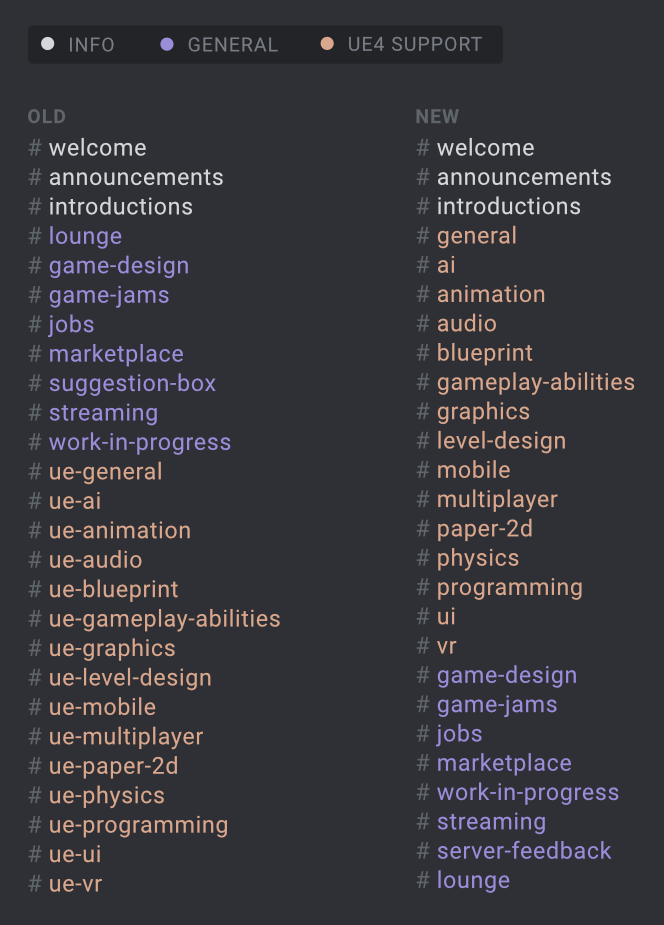


Lame
glossy agate
It's from the lounge channel when other people were asking about it.
I never knew the channels were broken into categories.
mighty carbon
well, if this is support channel, there gotta be official UE4 devs lurking around and I don't recall seeing any official activity here
full junco
yeah I would definitely not call it support
@tired tree look at the announcement channel
I also thought it was great to have vr be the last channel
full junco
master is 4.18 now
granite jacinth
@full junco Anything good?
full junco
@granite jacinth a different number
granite jacinth
lol
full junco

 full junco
I wonder what happens if I just set the ENGINE_MAJOR_VERSION to 5 in the source and then compile 😛
full junco
I wonder if anything would break
pearl tangle
the internet
full junco
would be funny to get the startup splash screen to say "Unreal Engine 5.0"
mighty carbon
are we getting Vulkan VR in 4.17 ?

Although it’s just an idea at this stage, Google’s test concept for VR ads already looks annoying and is eerily reminiscent of that Black Mirror episode.
full junco
@mighty carbon steamvr, yes
full junco
I think they did
not super relevant though, performance will still not be good I think
so it will only be relevant for linux
mighty carbon
Steam VR only? No Oculus ? 😦
full junco
steamvr supported vulkan first
full junco
and does the rift even support Linux?
glossy agate
@full junco is your game out yet?
full junco
@glossy agate no
wintry escarp
why is there no meme poster yet for "do you even rift"
mighty carbon
@wintry escarp I figured out the HUD message readability in my app 😃
does anyone know if collision primitives are responsible for occlusion culling or mesh itself ?
(I think it's collision primitives)
tired tree
its bounding boxes
which is why you can set bound box scaling and it effects the culling
mighty carbon
I see
tired tree
well thats bad timing..ug
mighty carbon
how come?
tired tree
not going to be able to update the plugins and release files for a few hours
also I don't see my bug report in it...they might be skipping the debug draw issue until 4.17...thats sad
wintry escarp
what was the fix? move it further away?
mighty carbon
my bug report about failed collision between capsule trace and mesh from 4.14 was suppose to be fixed in 4.16. It was not and so it's now primed for 4.17