#virtual-reality
1 messages · Page 114 of 1
 midnight tree
 real needle
you should definitely read up on that though
real needle
but add a lightmass importance volume around the area that the player (or any moving object) can move around in (the smaller the volume is the better), and click the arrow next to "Build" and click "build lighting only"
The importance volume is important
😉
midnight tree
ok
so my scene itself is a flat open area with trenches (ww1 shooter)
the player will be restricted to the trenches
while the ai will move across no mans land
should i only havce that importance volume on the trenches?
one major issue right now are my draw calls
i wasnt aware of static mesh instancing until about 24 hours ago
i have 700 static mesh sandbags placed by hand...
trying to figure out how to instance that as much as possible
real needle
@midnight tree could you send a screenshot of how the sandbags are placed?
midnight tree
i just picked up the instance tool off the marketplace... this is the most amazing and easy to use thing ever XD
best 15 dollars spent
http://i.imgur.com/O9jfiFn.png @real needle
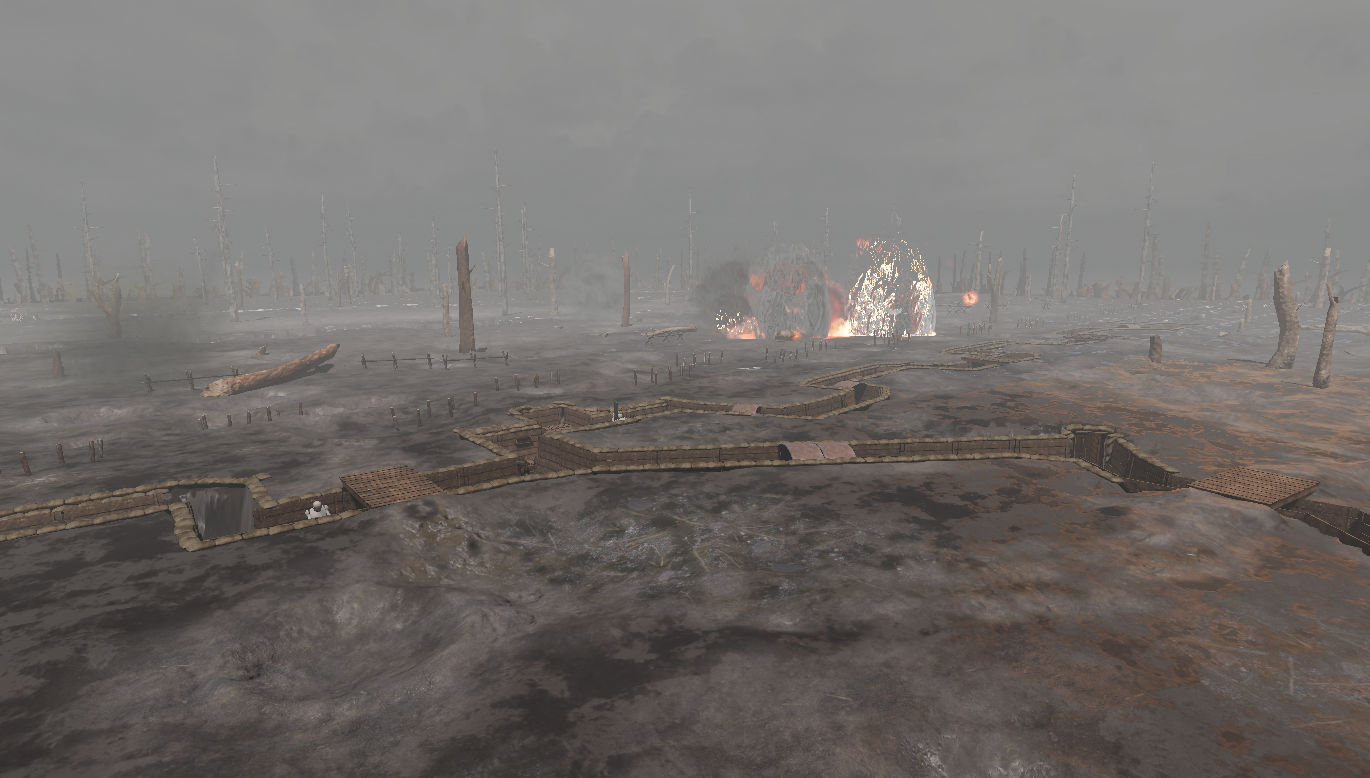
here is a decent overhead shot
each sandbag is an individual static mesh
and placed by hand
but i just reduced it from 700 static meshes, to 6 instance actors
with that tool
need to tweak it a bit more but its looking promising
i just reduced my draw calls by 50%
i still need to instance all the walls and tree's
 glossy agate
Is that the pooling plugin? Link please, that's awesome.
midnight tree
@glossy agate https://www.unrealengine.com/marketplace/instance-tool
i'm still tweaking but i went from 1100+ down to 400's
glossy agate
Thanks!
midnight tree
thats by instancing most of my scene
needless to say things are running better, but i still need to optimize quite a bit
 clever sky
Hey guys, do you know if there's an easy way to turn off stereo rendering in VR?
Apparently there is
Stereo On/Off
in console command.
Cool, thanks for the quick assist guys!
 neon egret
No problem!
 wintry escarp
NVidia cards do audio?
 tired tree
its gpu computation based
so again...like all of their SDK's, whether it works nicely with other hardware is hit and miss
its also still worse over all that steam audio
 mighty carbon
i see
tired tree
but has the upside of less work to get going and maintain and is more realtime
mighty carbon
oh
mighty carbon
FMOD has no clue how to write docs and setup source code for easy building 🙄
tired tree
how long is your gear project?
mighty carbon
long? dev time or play time ?
clever sky
Play time
mighty carbon
I aim for maybe 15 min or so
"consumable" at this point
might expand it later, if people find it entertaining
I am itching to delve into PC VR dev though... It's just a way cooler than mobile 😛
wintry escarp
i thought you had a rift now
 eternal inlet
anyone know why stuff lags behind if attached to a motioncontroller, whenever it's getting updated on tick?
example: set a material on tick and the mesh attached to the MC will lag behind one frame
example: set a text of a textrenderer on tick, and the textrenderer will lag behind one frame
lemme rephrase that question: is there a way to work around this? other than disabling late update on the MC? which btw doesn't entirely remove it, but makes it almost unnoticable

 full junco
anything you do on tick is 1 frame behind the late update obviously
mighty carbon
@wintry escarp I do, but I am not going to just drop what I was working on
 supple coyote
have any of you guys figured out the damn oculus remote issue
ie. it being off by default - having to go into defaultengine.ini
works for packaged game but not currentlly in my project
tired tree
@eternal inlet anything that makes a component have to re-create its scene info will break late updates for it. The late update directly compares structures when it goes to actually perform the update.
eternal inlet
makes good sense... thx for clarification M
 thorny niche
Guys! I've just ran into weirdest GearVR issue. On an empty scene whenever my view completely covered by single huge plane with DefaultLit material frame rendering time jumps up. If I look parallel to the plane (just to be sure it's rendering) everything ok. With Unlit material there's no jump as well. The only stat I've found to be responsible for it is SlateDrawWindowsCommand, couldn't find anything deeper yet. Is there some kind of Fill rate cost issues or something?
wintry escarp
fill rate is important on mobile, got to reduce over draw
thorny niche
@wintry escarp is it a way to check fill rate? stat command or something?
And why it is a thing with Default Lit material but not with Unlit
mighty carbon
because it could be a bug ?
wintry escarp
theres an over draw complexity viewer in the editor isn't there
mighty carbon
what overdraw are you talking about if it's default lit material ?!
if you have an actor with Default Lit material and it takes up whole screen, anything behind it will be culled
wintry escarp
no idea, but ive seen bugs mentioned in streams where things bump it for no apparent reason
thorny niche
Thanks guys. I'll dig it up.
 subtle reef
is there something similar to this for UE4?

Volume Viewer is a shader based asset from the Unity Asset Store. It enables the customer to visualize volumetric data in real time using volume ray casting ...
i also have a similar issue as the guy in this post, but unsure how to approach if i wanted to write my own converter https://forums.unrealengine.com/showthread.php?119267-Your-thoughts-on-and-comments-to-Volume-Rendering-in-Unreal-Engine-4&highlight=mri
mighty carbon
https://www.reddit.com/r/oculus/comments/6dqzw7/after_5_excruciating_months_yore_vrs_overhaul_is/ << UE4 ?

reddit
I can honestly not remember a more painful and drawn out period of game development, a massive thanks to our players who have been patiently...
OMG, player gets stuck on my new terrain for no reason :/
mighty carbon
hmm... looks like a hidden bug
the area where I was getting stuck is in the negative Z
I moved my entire terrain into positive Z and rebuilt - not getting stuck now
mighty carbon
nope, not a bug
it's a representation of Kill Z plane
red line in the side view that is
 primal sky
Solved! :)
 lime dagger
😄
midnight tree
anybody have a experience with character lods. trying to figure out the best screen size ratio for a human character per lod.
mighty carbon
that's something you should experiment with and pick whatever you feel is right @midnight tree
 sturdy coral
@subtle reef there are some threads in the forum on volumetric visualization, but I dont think there are any marketplace solutions
midnight tree
@mighty carbon just wanted to see if anybody has had any previous experience. will go through trial and error 😛 thanks though 😃
full junco
 sturdy coral
what I want is a reprojected mirror mode that adds smoothing
full junco
smoothing?
sturdy coral
yeah, like a steady cam, basically just interpolate the rotations
and do the same kind of reprojection as timewarp to apply them
just so it is more comfortable to watch
sturdy coral
yeah, but the reprojection could be really fast, it is just a linear transform
 frosty geode
Hey! the new 4.16 vr editor is flipping amazing
anyone know how to exit it though and get back to the flat editor?
sturdy coral
haven't tried the new one yet, but I think it should be possible by taking off the headset
frosty geode
doesn't work
sturdy coral
I saw in the 4.16 forum thread there is also a new hot key maybe for something like that
frosty geode
i built from source though
sturdy coral
ctrl tilde or something, look through that 4.16 preview thread
@frosty geode Originally Posted by Lauren Ridge View Post
When we got Simulate and Play in Editor working for 4.16, we had to switch Escape back to its intended purpose of getting out of those, to match Desktop Mode. To leave VR Mode, you can now press Alt+` - to remap this key combo, just search for "Toggle VR" in Editor Preferences.
frosty geode
ahh, thanks!
Even after changing the shortcut, mine still wouldn't exit VR. To get around this, i just use the kill oculus server bat file that went around, and then the start oculus command
sturdy coral
ah, weird
tired tree
charles that would still re-quire a re-render for the mirror
currently mirror mode uses the same output as the HMD so it can just crop without rendering again
full junco
if GPUs would be 20x more powerful, things would be nicer
then rendering a full hd mirror seperately wouldnt hurt at all
tired tree
I mean, there are already games that do that
like job sim, rick and morty, all of the simul games
anything with 3rd person spectate
but it really kills how far you can take the base game graphically
full junco
is there an easy way to avoid the mirror window being stretched on different aspect ratios?
sturdy coral
@tired tree I think right now it renders it by drawing a quad textured with the eye buffer to the mirror, so it wouldn't really change much, to reproject you just change the dimensions of the quad
so it would still use the same output as the HMD, just warp it
yeah fantastic contraption does it by fully rerendering, but shouldn't need to
an image stabilization algorithm does the same thing, but in this case you don't need to do any of the processing to figure out the right desired rotations since you can know the HMD orientation parameters
tired tree
its sampling from the finished cropped frame...thats why you get the eye circles from the masking verts if you run it dual eye view
sturdy coral
yeah, but you can do a tighter crop and reproject from that same frame, it isn't lens warped at all, the eye circles are from the stencil masking
tired tree
there isn't much to work with there though
sturdy coral
yeah, you make have the circles be a little bit visible at times when there is a large warp going on
tired tree
the current widescreen crops are barely off of touching the masking, i can't believe that the effect would be worth it
sturdy coral
but if you used rinterpt to to do the smoothing, the farther away it gets the more it speeds up
it would get more expensive, but you could use stale data and blur it instead of rendering in the black
full junco
I dont even see why you want to have it smoothed. if you watch a video from a helmet mounted gopro, do you want it smoothed? no, obviously not, that would destroy the authenticity of the footage. and VR footage should look like footage from a helmet camera I think
sturdy coral
or use data from the other eye where it overlaps the lens masking somewhat
gopro has a gimble doing smoothing a lot of times
you could also turn off the lens masking, and it would still be cheaper than rendering a second view like fantastic contraption, etc. do
tired tree
barely at that point...
you don't have to render a mirror window 3rd person at full fidelity
full junco
I implemented a mirror mode that disables the lens masking for the eye where it takes the image from to get a less cropped image
but it costs performance, so I will only use that for capturing stuff for a trailer
tired tree
and you are talking abotu turning off masking on something that is likely 150-200% of the actual screen size for downsampling
sturdy coral
(also on go pro, youtube automatically stabilizes lots of videos)
masking adds around 15% of pixels, about the amount of pixels a 720p rerendering at 30fps would cost
full junco
no one who's sane would ever use the youtube stabilization
sturdy coral
but that rerendering would have a lot of other overhead, and you can't split the 30fps work over multiple of the 90hz frames easily
I wonder what the FOV is of the area that fits within the lens masking
mighty carbon

UploadVR
The virtual reality industry, such as it is, continues to have a hard time selling itself to much of the world.
sturdy coral
more disposable income
tired tree
thats debatable, considering the population and new propensity for cars and the like
sturdy coral
yeah, I guess their market for that stuff has gotten close to ours, just not proportionately
@mighty carbon wait til this thing comes online (China is building a physical city for VR): https://www.youtube.com/watch?v=__f8VcbiTXw
 mighty carbon
we'll see
sturdy coral
this looks fun: https://www.youtube.com/watch?v=jnUN8KBqTYA

Download on Itch.io: https://dibeltran.itch.io/throttlepowah Vote for us on Steam Greenlight: http://steamcommunity.com/sharedfiles/filedetails/?id=923684763...
mighty carbon
Chinese like to build and abandon stuff
sturdy coral
but also sickening
yeah, I bet that VR city is more of a construction contracting scheme
mighty carbon
ha, just one stationary shadowless light halves fps on Gear VR 😦
clever sky
Interesting.
UploadVR
The virtual reality industry, such as it is, continues to have a hard time selling itself to much of the world.
Gotta access chinese consumers through VR arcades D:
Otherwise don't bother it seems
 pearl tangle
yeah don't trust that so much
china is always a black box with these sort of information
its also only talking about q1 2017 with that data. find something that covers q1 2016-q2 2017 would be interesting
i think arcades are still the best bet for a lot of stuff anyways though
 wicked oak
all my games are 40%+ USA
DWVR is nearly 50% murica, VRmultigames a bit less, it has more asians playing it
to be fair, the type of game DWVR is appeals to americans a bit more than to euros and specially to chinese
pearl tangle
is that on steam vr on viveport?
 native cedar
anyone having issues with LMS and dynamic point lights (no shadows) on forward?
 jaunty shell
@native cedar tis tied to LMS
I also have this problem (shadows disappearing on the edge of the view)
you'll probably have to fiddle around in Nvidia's code
pearl tangle
@wicked oak thats where most of the chinese 1s would be coming from
wicked oak
the thing is that my game is not very good for the chinese to begin with
dont they dislike skeletons and stuff? the basic enemy type is a skeleton
and elite enemies are witches and things
native cedar
Ah, too bad, will revert to multires
Thanks legende
Sadly I can't remove those un shadowed dynamic point lights
wicked oak
weird that LMS breaks stuff
but LMS is a bit more complex than multires
for the shaders
pearl tangle
haven't really seen anything about issues with skeletons and whatnot. I suppose you could localize and tweak things if that was an issue, but I would definitely say that a lot of software sales go through viveport rather than steam in china
jaunty shell

In a curious move, HTC has revealed a new mobile VR headset called Link that is not part of the company’s Vive brand. The move comes just a week after the company announced a mobile standalone Vive headset in partnership with Google. HTC is by now one of the world’s leaders in the virtual reality …
hmm
What defines a Vive device then ?
wintry escarp
probably the expesive desktop one
jaunty shell
yeah, but it seems Vive is now a brand, not just a single product. Looks like Link is HTC branded, not Vive branded, which is a bit surprising since HTC separated its VR branch to the Vive brand
dunno if that makes sense 🤔
pearl tangle
yeah i can't imagine that they will be competing with each other. just sounds like some messed up marketing somewhere
full junco
I just understand it as "vive is good product"
sturdy coral
could be something like "highers up's cousin started this Ximmerse company so now we have to integrate it into something, but we don't have to call it Vive"
home
mighty carbon
does it even work ?
I don't see price and if UE4 SDK is available
also wondering how is this any better than ... another similar thing (lol, I already forgot the name of it)
tired tree
if its steamvr compatible which is says it is, won't need a ue4 SDK
steamvr is a compatibility layer
mighty carbon
I see
mighty carbon
UE4 + Gear VR = bunch of horse shit
~30 drawcalls, ~12k tris, yet horrible fps
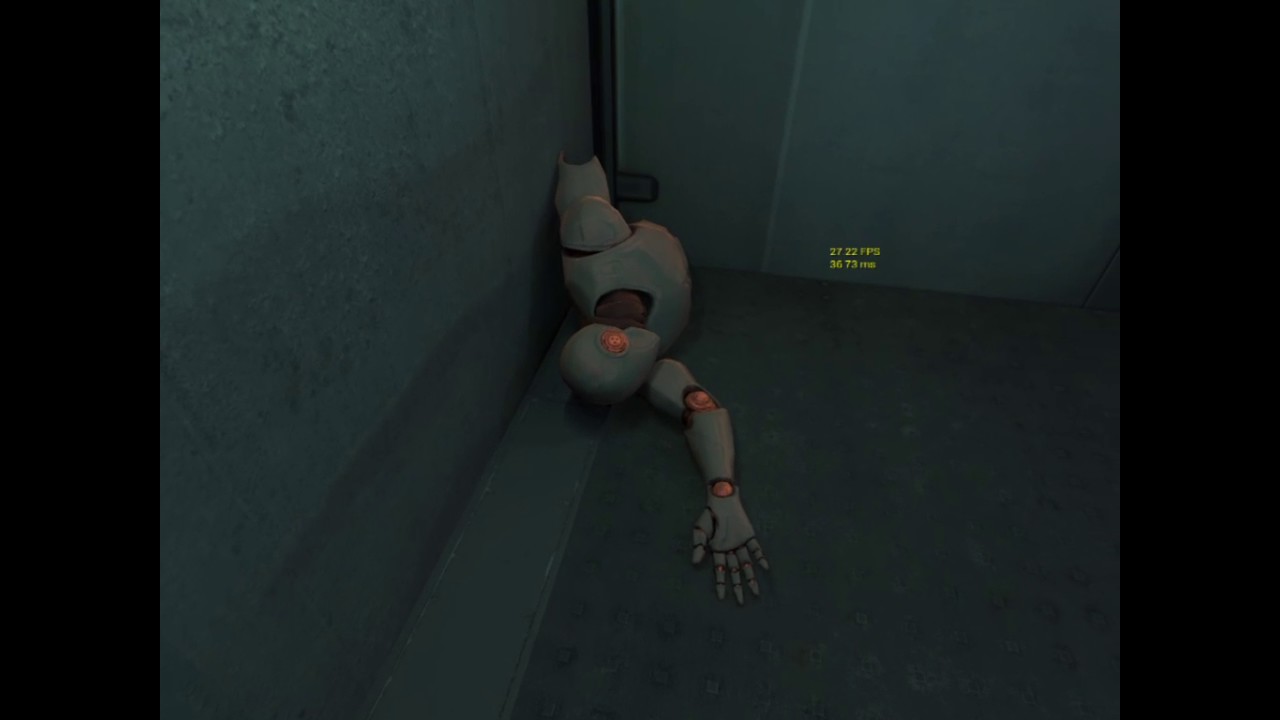


this scene is no more complex than Quake 1/2/3 😦
pearl tangle
do some profiling to see why. Plenty more complex stuff than that which works fine on gear vr
mighty carbon
@pearl tangle eeh, what complex stuff (and that was made with UE4) ?
pearl tangle
i converted 1 of my cardboard projects to gear vr and it ran stable 30fps
mighty carbon
it needs to run at stable 60 fps
pearl tangle
and there are a lot of good looking projects on gear vr as well, regardless of engine
mighty carbon
mine runs at 39 fps right now
mighty carbon
where can I download and test?
pearl tangle
you can't, not public release since you can't do external things for gear vr annoyingly, thats why we do daydream now instead
mighty carbon
cuz I am kinda tired of hearing blah blah about other projects and I know there are only a small amount of UE4 apps on Gear VR
so, no apps to test, no way I am taking your word for it
pearl tangle
there only is a few. because the gear vr is shit
mighty carbon
sorry
pearl tangle
you dont have to, doesn't really affect me. but i know performant stuff can be made on there and lots of other projects can prove that as well
mighty carbon
also, last few times I did profiling all I got is CPU stalls. Nothing useful to go by for optimization.
pearl tangle
you have run the gpu visualizer to see whats happening? Or run the android debugger through android studio to see whats going on?
sturdy coral
@mighty carbon are you cpu or gpu bound?
mighty carbon
@sturdy coral I am not sure.. How can I tell ?
(I assume GPU, since I don't really do anything special in game logic)
full junco
have you never even profiled it?
 deft badge
Information on how to debug applications for the Gear VR headset.
You'll wanna run 'Stat unit' in the console on the phone as a first step
deft badge
Run 'Stat unit' to tell if you're CPU or GPU bound
Thats normally the first step in profiling performance issues
mighty carbon
aye
deft badge
aye <- frustration?
full junco
yeah stat unit is the first thing to do
then you know if you need to look at the cpu profiler or the gpu one
 twin pulsar
@here Hi, I have a question: is the playercontroller pattern still valid when it comes to vr? I've been using unreal with the vive for several months now and never used a custom player controller. You know how the classic ue documentation says the playercontroller posses the pawn, etc. But in reality, half the epic samples don't even use a playercontroller (sure there is always at least the default one hooked up, but it does nothing) and instead put all input bindings in the pawn. I ask because I recently started working on a vr multiplayer and this is the time where driving thru a playercontroller or not could make some diff, since playercontrollers only exists in the server and owning client, but pawns will exist for all players in all clients. Thing is I'm not even sure how I'd do a vr playercontroller... the motion controller component already does binding to movement automatically; same for the camera. Forcing the camera and controller meshes to follow an external object instead of just letting the camera track by itself as well as the motion controller components seems like an extra level of indirection and potential overhead.
sturdy coral
@mighty carbon if stat unit isn't working for you, one way to tell usually is see if things run fine if you lower the resolution (unless you have a ton of geometry)
mighty carbon
can't do that I am afraid. On Gear VR resolution is fixed and maxed out
full junco
you can reduce the screen percentage to something like 40
sturdy coral
weird I never heard that
full junco
if performance improves, you are gpu limited
sturdy coral
you sure it is fixed?
full junco
well resolution is fixed on vive too I think
but you can always change the screen percentage
sturdy coral
yeah
anyone know how to get the playspace bounds from oculus guardian?
ah found it Source/OculusRift/Public/OculusRiftBoundaryComponent.h
supple coyote
hm anyone know why my oculus remote aint working
I tried to edit the DefaultEngine.ini but it's not working
full junco
@.Data is it working in other games?
supple coyote
like, me profile pic data
well ive had it work just fine in packaged games
but in engine - no
 lapis glen
https://forums.unrealengine.com/showthread.php?146267-There-is-real-interest-in-VR-within-the-academia&p=716371#post716371 A summary of my findings when researching VR for education and research.
It contains some thoughts, hints and tips that should get you going.
supple coyote
no idea fellas? oculus remotesies
pearl tangle
mentioned what?
full junco
oculus remote
twin pulsar
@all no-one has any thoughts or opinion on my earlier question? thanks 😃
supple coyote
@pearl tangle do you know whats up via oculus remote?
pearl tangle
nope not me, never touch that
full junco
@twin pulsar I do everything in the pawn, I dont even have a custom player controller I think. no idea if thats "correct" though. I think just do whatever you like more. if you find issues with it, you can always switch
supple coyote
dang
in fact, I just packaged my project and I can't find my defaultengine.ini in the package
twin pulsar
@full junco hey thanks for the reply. Yeah so.. the only thing is that then why did they even introduce the whole concept of the controller, right? I guess you can just do everything in the pawn and wrap every call with a check for authority to prevent clients from calling methods in their local copies of other pawns. But do you agree that in VR it would just not make too much sense to create the indirection of the playercontroller? like.. the motion controller would send orientation changes and then what, you'd have to constantly poll these changes in the pawn?
full junco
@twin pulsar I haven't done multiplayer vr stuff
twin pulsar
ah
well still, even in non multiplayer... their docs give you the whole "the player controller is the one who gets input" but in reality any actor whom you bind to the input gets input. It's just confusing
full junco
just don't think about it
twin pulsar
lol. yeah. I think I'll just get rid of the playercontroller.It just annoys me cause the whole multiplayer architecture of the engine relies on it. Like everything is about the owning playercontroller
full junco
do whatever, and if whatever breaks, do a different whatever. that's how I do all my programming.
works very well
twin pulsar
as in, there is no "getting rid of it". there is not doing anything about it and just having the engine anyway spawn the standard one which does nothing other than binding to the input component
hahah, yeah but see that's the thing.. the one thing about unreal that makes me uneasy a lot of times: not knowing exactly if I am doing the right thing
full junco
ue4 often lets you do things in many different ways
and often no single one is "correct"
twin pulsar
for example, another vr quirk. I filed a bug on this one though I'm not even sure if it is a bug in unreal, in steamvr or if it's intended behavior only that not documented anywhere: have you tried isHeadMountedDisplayEnabled and enableHMD? in editor they they return true, in standalone they always return false even if the HMD is already on cause of "Start in VR" in project settings or cause you in deed turn it on by calling enableHMD
so you can't reliably tell if you are running in vr mode. At least not with the c++ provided methods nor the bp nodes.
full junco
well, you can try to get the steamvr hmd in C++ and if its nullptr, you don't run in VR 😄
twin pulsar
in my case I am doing a multiplayer thing for vr and non vr. And all I can do is make 2 separate builds: one with the steam plugin on and one without.
but the pointer will not be null
cause steam tells the engine that it is there and connected
so the pointer test is not enough :/
full junco
well, then disconnect the vive
twin pulsar
right but I am doing something where I have 2 instances of my game running on the same machine. One needs to use VR the other one not
and like I said
the only way I was able to pull it off was by compiling one version with the plugin and one without
full junco
hm? can't you just only call stereo on in one instance?
like, put stereo on on key 1 or whatever and only press the key in one instance
supple coyote
stereo on rules
twin pulsar
there are 2 issues: 1- getting two instances running on the same machine, one with vr and one without. 2- telling if the headset is enabled (not connected). for 1, unfortunately steamvr does not let you have more than one instance of a vr thing running at once. So if you try starting up two instances of your vr game, the second will kill the first instance. So my solution to that was compiling twice: once with the plugin enabled and once without. Cause otherwise just the fact that the plugin is linked tells SteamVR that your app is VR and so there can only be one running at a time. This works, but it's annoying cause it means every time I want to test I have to make two builds, which takes minutes. For 2- there is a method called IsHeadMountedDisplayEnabled, which I would expect to return if the headset is "online". This one, in editor returns true if you do VR preview and false if you do regular PIE. Makes sense. But when you make a build it will always return false, even when you are in VR. So that is the one I think is a bug.
2- telling if the headset is enabled (not connected). -> I meant "enabled, which is different than connected"
The whole point of this is that in my project, only the server can be VR. So my logic at the begining of the program is that if there is VR enabled you are the server, otherwise you are a client. And I need to test this iteratively so I am looking for a fast way to test, equivalent to when one tests in-editor multiplayer. Cause like I said, having to compile 2 versions each time I need to fully test sucks.
One thing I managed to do is get half way there: if I set the in editor multiplayer stuff to not use the same process for the instances (in advanced settings), then I can stat one VR and one non vr instance. But the non vr client cannot connect to the server. I am now researching that.
but back to the original question: yeah I guess no playercontroller. Like I said it just pisses me off that the docs encourage using one but in vr I don't see it making sense and makes me wonder if there is a "right way" to do it. Especially since the multiplayer framework relies a lot on player controllers.
sturdy coral
@twin pulsar to support both in and out of VR, set start in VR the engine settings windows, and then in steam you add a launcher option -nohmd to launch in 2D
there is a bug where oculus will steal audio even if you launch with -nohmd, I have a fix for if you need it.
twin pulsar
but does the flag change the result the engine functions return? otherwise it's not what I need
actually, before I go any further, are you an engine contributor or an epic engine dev?
sturdy coral
yeah, is hmd enabled won't return true if you launch with -nohmd
no, not an epic dev
twin pulsar
cause otherwise I was gonna drill you! :p cause I have so many doubts
sturdy coral
there is one other thing you need, patching out vr preview to tell the game instance whether it is a vr preview or not
because 'is head mounted display enabled' will return true for the 2d instance in preview
sturdy coral
it does for you you just don't realize it
it is only when you launch both instances at once
a vr and a 2d
unless they fixed it in 4.16
twin pulsar
well I checked in c++ and bp and I log the vars and it works in editor.
in 4.15.3
but not in build
maybe let's back track a bit. btw, should I keep typing here or you'd rather have me send you private message?
and thanks for the help btw 😃
sturdy coral
keep it here because I will probably get stuff wrong and other people will correct
sturdy coral
you are saying if you launch VR preview from inside the editor, with number of players set to 2
so that it launches a VR window and a 2d one
is head mounted display enabled will return true on the VR instance, and not the 2d one?
from what I've seen it doesn't refer to the UWorld or anything and just directly asks the engine if the hmd is currently on, so the 2d preview instance thinks it is
 granite jacinth
https://vimeo.com/219461924 Not quite the final trailer, but let me know what you guys think, does it show off VR gaming enough?
sturdy coral
@twin pulsar (if you aren't needing multiplayer it won't affect you)
twin pulsar
I do
I am just writing the full explanation one sec
so let's start with what I'm trying to do: I am trying to do a game where the server will run on desktop and be vr. Clients will be instances of the same game codebase but in non VR. And they could be in the same machine or different machines. Or even mobile. The only requirement is "if vr is supported, you get to be the server. If vr is supported but it is already in use, you get to be a client. Else, if you do not have vr, you are a client." That would be the logic. The first problem is that there is no "if vr headset is in use." there is if it is connected and enabled. Ok... so if I make 2 builds: one with the steam plugin included and one without, the one without will effectively say that the headset is not connected. So that takes care of VR vs non VR. But while it would work for the final release, it's not very viable for testing. Because every time I want to test I need to make a build, disable the plugin, make another build. That takes minutes.
So then I start thinking: it would be great if same as you can do a pie 2 player session from within the editor you could do the same with one vr and one without. But if you set players to 2 and start vr preview, both instances are driven in vr. No good. Then I tried starting both instances in PIE as opposed to VR preview. In this case neither instance can switch to VR. So no good either.
Then I tried 2 players and unchecking the "run on single process option". This is the only one that gives me one window in vr and another not in vr. But with this option if the vr window loses focus it starts stuttering and also the client window which is not vr cannot connect to the server (map load failure error--- whatever).
So as far as testing and fast iteration looks like I am screwed. Now moving on to the fact that apparently the only way I can test is by making a build. I was seeing if at least I could do a single build (saving the time of disabling the plugin and rebuilding for the second 'client' build). So I started looking into isheadmounteddisplayenabled and enablehmd. And found out that in editor, if you start a single instance in vr preview, both return true, if you start a single pie, both return no and if you make a build with the steam plugin, the build starts in vr if you have "Start in VR" or if you don't have it but you say enablehmd(true), but still, both enablehmd and isheadmounteddisplayenabled return false!
and also, if you make a build with the steam plugin enabled, steam will kill any second instance
sturdy coral
I have a game that lets you play 2d and VR
what I do set start in vr in the engine
and for 2d launch with -nohmd
in steam you can add multiple launch options, and for the 2d one just give it the -nohmd parameter
granite jacinth
@sturdy coral You've done same PC VRANDNon-VR gaming?
twin pulsar
but when you say steam, you mean once you distributed it? Otherwise why do you need steam if running the builds that unreal made? maybe I am missunderstanding? Also, probably in your case too, but in mine, it is not just first person vr vs not vr. The pawn and mechanics change depending on vr or not. So how do you get feedback in-game in code that -nohmd flag was used? what state does it change that you can query?
sturdy coral
that's for distributing
twin pulsar
ah right
sturdy coral
for your own just add a shortcut with the -nohmd parameter
twin pulsar
but what about while developing
sturdy coral
and to do it while developing
to be able to debug blueprints on both at once in editor
you need a patch
twin pulsar
before we get to the patch
so let's talk builds
you say to use that flag
so you are saying that if I have a build linked against the steam plugin, if I tell it to start with -nohmd steam won't kill it?
cause I tried without the flag but without enabling vr and it still killed it
cause it detected that it linked against code asking about the hmd
sturdy coral
what do you mean killed it
sturdy coral
so I thought you mean steam, the store, came in and killed your process
and not steam the plugin
twin pulsar
steamvr runtime 😃
sturdy coral
so you launched it from steamvr?
twin pulsar
it goes like this 1- you compile your game with steamvr plugin. 2- you start it. 3- steamvr runtime gets started as a result. 4- you attempt to start a second instance of the same exe. 5- steamvr runtime detects it and kills the first instance and gives focus to the second one you started
not launching form steam
just double clicking the exe in WindowsNoEditorFolder after building in unreal
sturdy coral
try with -nohmd it shouldn't have that problem
twin pulsar
ok I did not know about that flag
so let's say that works and steamvr then doesn't kill the first nstance when you start a second one with the flag
cool
(I'll try in about 20min probably)
but let's say it does
now back to game code / bp. How do I know that flag was used? so that I can switch pawns, etc.
twin pulsar
ah ok so you literally parse the args
sturdy coral
and also check a boolean
twin pulsar
I thought maybe there was some object whose state would change and could be queried
sturdy coral
that I set in the patched version for VR preview
you could query something but at least for me it will break in VR preview when running with an extra 2d client
twin pulsar
ok so now let's go to the in editor preview stuff
obviously it would be great for iterating to be able to just start up 2 instances in PIE as you'd do with a regular multiplayer and test with one vr and one non vr
I tried a bunch of things but it doesn't work and of course there is no documentation on it. But you are saying you know of a way of doing it right?
sturdy coral
yes
modify virtual FGameInstancePIEResult InitializeForPlayInEditor(int32 PIEInstanceIndex, const FGameInstancePIEParameters& Params);
and add something like bIsVRPreview to FGameInstancePIEParameters
then in your game instance override InitializeForPlayInEditor and check for that
the only other change you should need is
FString FOculusRiftPlugin::GetAudioInputDevice()
{
-
if (FParse::Param(FCommandLine::Get(), TEXT("nohmd"))) -
{ -
return FString(); -
} -
  FString AudioInputDevice;
  GConfig->GetString(TEXT("Oculus.Settings"), TEXT("AudioInputDevice"), AudioInputDevice, GEngineIni);
  return AudioInputDevice;
@@ -241,6 +246,11 @@ FString FOculusRiftPlugin::GetAudioInputDevice()
FString FOculusRiftPlugin::GetAudioOutputDevice()
{
-
if (FParse::Param(FCommandLine::Get(), TEXT("nohmd"))) -
{ -
return FString(); -
}
to keep Oculus from stealing your audio when it is plugged in but you launch with -nohmd
twin pulsar
btw, I am using the Vive, not oculus. which is why maybe the confusion: steamvr is the vive runtime, not steam the game / marketplace patform
sturdy coral
ok
twin pulsar
so the audio stuff might or might not be an issue for me
twin pulsar
right I have it disabled actually
but about the vr mode
so you are saying to modify it to have my own flag right?
and what do I do based off that flag?
sturdy coral
I just set a boolean in my game instance
twin pulsar
cause I already tried doing setHMDEnabled and it doesn't do anything once in pie
sturdy coral
I have one boolean: bWasStartedInVR
I set it false if the commandline had -nohmd, and I set it true if it is a play-in-editor VR preview
twin pulsar
I don't follow. When you start a pie, wether on separate window or viewport, it will start as many as you tell it in number of players but all with the same configuration
twin pulsar
but where are pie parameters set per instance of pie?
if I say new editor window (pie) under the play menu and I had set players to 2
2 windows show up
neither is vr
sturdy coral
neither is VR then neither get the parameter in FGameInstancePIEParameters with the patch
there might be a way to do it based on querying viewport as well
I saw some stuff the other day that looked like it could work without a patch
but haven't tried it
twin pulsar
I'm still not sure I get it sorry. I want to do is click "new editor window (pie)" with 2 players set and have one of the windows be vr and the other one not
sturdy coral
what you do is instead
click vr preview
with 2 players set
and it puts the param on the vr preview
and doesn't put the param on the 2d preview
twin pulsar
how do you select which one gets the param? if both instances start with the same game instance code?
sturdy coral
they don't
they have different game instances and different FGameInstancePIEParameters
you just to modify the code to put the parameter in FGameInstancePIEParameters for the vr preview launched window and not the other
twin pulsar
there is a problem with the wording cause the class itself is called "instance".
I still don't understand. Let's say you start a fresh project and you create a custom game instance class called mySingleton, to avoid confusion with the concept of "instantiating"
now I set 2 players
now I start vr preview
I get 2 windows corresponding to two instances of my game, each with an exact instance of mysingleton
so if in my singleton I print "hello", both instances of mysingleton print hello
you'll see two hellos on each window (one for each instance, but the print in editor prints everything to all windows)
so given that
sturdy coral
game instance isn't a singleton though
twin pulsar
it is
twin pulsar
what do you mean? a single one Is created per process and survives the whole lifetime. In the editor there is an extra one too at all times sure
sturdy coral
in editor there is a game instance for each player you add when you launch a preview
twin pulsar
which makes sense
sturdy coral
even though it is all in one process
twin pulsar
one per "instance of the game"
sturdy coral
so it isn't a singleton
twin pulsar
singleton doesn't have anything to do with process
supple coyote
you guys ever tinker with DefaultEngine.ini?
twin pulsar
do you agree that the game instance survives the whole lifespan of one "run of the game"?
and that there is "only one per run of the game"?
a run of the game being one instance of the game?
as in, if I do 2 players I have 2 instances of the game
twin pulsar
yep. And btw I'm not trying to be annoying just making sure we are talking about the same stuff with the same understanding 😃
ok so, if we start 2 players we get 2 game instance instances right?
sturdy coral
yes
twin pulsar
instance instance.... that's why I wanted to change the name, but anyway
ok so, those 2 game instances are from the same class
because the class got set in the project as "the game instance class for this project"
right?
sturdy coral
@granite jacinth just for testing, but for actually controlling both at once it breaks and VR UMG widgets to lose window focus
yes
the two instances are constructed from the same class
twin pulsar
yes
so how do you make it where one has one set of params and the other has another set?
cause anything you override on the game instance class will apply to both instances
since they are all constructed from the same class
sturdy coral
you just add a bIsVRPreview parameter to FGameInstancePIEParameters
and then set it when launching the vr preview window
I think it is in Engine/Source/Editor/UnrealEd/Private/PlayLevel.cpp
once you have it patched into the engine, in your derived game instance
twin pulsar
but that is where I get lost. If I have a class called MyGameInstance and I add a variable name. And then set the variable to "a game". when I start the 2 players each of them will have an instance of MyGameInstance with name set to "a game"
sturdy coral
you just override virtual FGameInstancePIEResult InitializeForPlayInEditor(int32 PIEInstanceIndex, const FGameInstancePIEParameters& Params);
and read Params for the value
twin pulsar
is InitializeForPlayInEditor from gameintance?
sturdy coral
yes, you need to wrap it in a WITH_EDITOR macro to derive it
because it won't exist in non-editor builds
twin pulsar
ok so if InitializeForPlayInEditor is a game instance method, you can only act based on the parameters there. You cannot set that bool you are talking about. So there has to be another place where you actually selectively choose to send that bool true or false to one game instance or another
that is the part I don't think you mentioned
sturdy coral
I mentioned you need to set it in here Engine/Source/Editor/UnrealEd/Private/PlayLevel.cpp
twin pulsar
ahhh
ok
so in playlevel.cpp you set the bool
and you are saying in the game instance InitializeForPlayInEditor you do something based on the bool
right?
sturdy coral
yes
I set a different bool
based on either having the -nohmd command line present
or the play in editor parameters bool that I added to the engine
I can put up a pull request for it but I'm not sure it is clean enough and I there might be a way to do it by querying the viewport that wouldn't need a patch
twin pulsar
ok, makes sense... but for one thing haha. What do you do about the bool? my guess would be that if the bool is set you say enableHMD for example. But I tried that without the bool and it doesn't work in editor
twin pulsar
no but for the in editor
if I start in vr preview both windows will be vr
if I start in PIE both windows will NOT be vr
sturdy coral
never seen that
twin pulsar
so how do you enable it only one, based off the bool
twin pulsar
but because of your changes to the code? or always?
twin pulsar
I thought you were giving me the solution to how to force the vr preview to not go vr on all windows 😦
you mean in the camera?
you said hmd follow
sturdy coral
no, it is somewhere in the preview settings
let me see what it is called
click the play in editor drop down
advanced
and then look for Viewport Gets HMD Control
and make sure that isn't on
twin pulsar
let me see
sturdy coral
that gives 2d viewports HMD motion
twin pulsar
I have it unchecked
sturdy coral
and then you set players to 2
twin pulsar
so it's gotta be a sucky thing about steamvr... agggg
sturdy coral
no I use steamvr too and have never seen it get two vr windows at once
I didn't even think that was possible
twin pulsar
let me show you my settings one sec
sturdy coral
and one 2d preview for the client
well if yours is acting differently there you can still do most of what you need with the -nohmd parameter
twin pulsar
yeah but it requires building each time
sturdy coral
what do you mean
the only thing you should lose is the ability to debug blueprints in the standalone instance
twin pulsar
to start 2 instances of the game, one with -nohmd
sturdy coral
to launch 2 instances doesn't require rebuilding for me
twin pulsar
but how do you tell "this instance gets the -nohmd flag"
twin pulsar
but how do you launch 2 standalones and specify that one of them gets -nohmd?
btw look these are my settings
sturdy coral
E:\git\UnrealEngine\Engine\Binaries\Win64\UE4Editor.exe "E:\Unreal Projects\YourGame\YourGame.uproject" MapName?listen -game -ResX=1440 -ResY=800 -nohmd
that doesn't look like 2 VR instances to me
but the HMD controls both?
sturdy coral
for me the controllers will control both so you need some logic there
but I've never seen the HMD control both I don't think unless that ViewportGetsHMDControl is enabled
it might be a camera setting or something
maybe if you have something left over from the camera refactor that happened around that time I don't know
twin pulsar
I could try deleting all version of the engine
I will need the source anyway if I do any changes to the source like whatyou mentioned before
I am using the launcher version right now
sturdy coral
shouldn't be in the engine I just mean the way cameras used to be setup
twin pulsar
but I think it's always been like that :/
sturdy coral
you had to do some stuff and there were some weird things about following yaw and stuff in old versions I can't remember exactly what it was
twin pulsar
my camera is simply: a pawn, with a camera component and the camera has lock to hmd on
yeah but I don't do any of that cause the camera just works now a days
twin pulsar
let me try
sturdy coral
I don't remember seeing the headset control both, but maybe it does by default
there is an issue where the controllers will be controlled on both instances
but you just need to set their player controller index to -1 on the 2d instance
twin pulsar
that I had read about
sturdy coral
you actually need to set it to -1 on all players
and only set it to 0 on your own pawn upon possession
actually I think they fixed that one
you used to control players on remote machines too
now I think it only happens for local instances
but that -1 thing will fix it
twin pulsar
ok so, if I change the lock to hmd setting in the camera component of the pawn, one window still works as usual, the other one appears to have still loaded my vr pawn but does not move tracking the hmd. And the hmd.... if I put it on I just see a mix of both viewports
so I think that is halfway right
sturdy coral
yeah you probably just need the setting in one and not the other
twin pulsar
so I think with lock to hmd, both instances were following the headset. Makes sense. Without that, only one instance got the tracking from the headset, and the other one incorrectly loads anyway the vr pawn even though that vr pawn is not tracking the headset . For that I would need the bool approach you were talking about. But one thing remains: why does the headset see both windows?
sturdy coral
I don't know, I've never seen that but it might be related to that setting
twin pulsar
man... like why is none of this stuff properly documented
twin pulsar
it kills me that it takes so long to fish for these things. Like if there was proper docs I would just follow them. But there aren't so I have no idea why you get proper vr + 2d view and I don't
like, I don't think I am doing anything weird
extended mode in what sense? you mean how the oculus used to have extended desltop mode?
I don't even think the vive ever had that
sturdy coral
that's the only thing I can think of that would cause double vision, but it might be some other problem
try getting lock to hmd on one and not the other
you can just add a keyboard shortcut to toggle it to test
twin pulsar
true I'll try that now in a sec
other than that, do you have an opinion at all on the whole playercontroller thing in vr? for instance, you know how the cookie cutter explanation is "the playercontroller 'posseses' a pawn and blah". And they tell you that you should have a playercontroller that basically tells the pawn "move forward" and the pawn has an event / method that actually does the movement. It's all great until you think: how and why would I do a playercontroller in vr? the motion controller component is already automatically tracking the controllers and all you need is to attach a mesh to them; the camera also tracks by default.... so why would you add an extra layer of indirection and, what would you end up with? a controller than on tick tells the pawn to adjust it's static meshees to the orientation of itself?
the only thing is that the multiplayer architecture in the engine does rely on playercontrollers all the time for ownwership / authority
sturdy coral
they moved some of the player controller stuff to be more easily used from the pawn
it still checks possession from the controller and there is a whole input stack thing
so some unrelated pawn won't get your input events
twin pulsar
right but do you think it makes sense to make a custom playercontroller for vr? or just keep the default one which will get created anyway by the engine and will possess the vr pawn nyway?
sturdy coral
and your input should only authoritatively go to the server if it goes through the ownership chain
you used to need one just for some camera manager setting or whatever
I don't think there is a need now
I still use one for handling some keyboard input just for debugging stuff that is independent of my pawn
twin pulsar
I have in my thing one for the non vr player but I feel bad that I don't have one for the vr player
sturdy coral
VR controllers break down the normal pattern because of that bug
where your controller will control multiple local instances
twin pulsar
but besides the bug. If you just put a motion controller comp in the pawn then all you need is a mesh as a child of that comp and you get automatic following of your controllers. But if you had it in a controller class, you'd have to add code to the tick of the controller saying "pawn->leftHand.transform = my motioncontroller.transform"
sturdy coral
mostly only very old tutorials will tell you to handle input through the controller and dispatch to the pawn, but there are some cases where you still will want to
spectator classes do some ugly stuff of registering their own hardcoded input
but you might want your controller to have similar stuff for a player pawn and for a spectator pawn
and even move your motion controller components out to a separate actor managed by the player controller
separate from your pawn
twin pulsar
but if you have the motion controller comp in a controller class
how do you update the pawn mesh of the hand to follow?
literally on tick?
twin pulsar
at least, keeping in mind I had been using Unity for a few years before switching to unreal a few months ago.
sturdy coral
if your motion controller is pointing to a UI
and your pawn dies
you might not want the motion controller to go away
if you were in the middle of changing your graphics setting or something
twin pulsar
hmm that is true I guess
ok but then
say we want separtecontroller and pawn
for vr
sturdy coral
pretty edge case stuff, I haven't done it yet
twin pulsar
you'd have the controller class with the motion controller components right?
sturdy coral
I might when I get to making my spectators more uniform and seamless
twin pulsar
and then how would you update the pawn based off the controller's motion controller components? attachment? polling on tick?
polling on tick seems terrible
sturdy coral
you have to do it by attachment to get low latency updates
twin pulsar
right
sturdy coral
tick is fine otherwise
twin pulsar
and same for the camera right?
twin pulsar
so really your controller kind of has no code as far as movement
sturdy coral
at least with actor attachment
it plays into all kinds of multiplayer stuff
as far as ownership and replication and stuff
so just be aware of that if you get weird results
twin pulsar
but I think it would still be ok right? cause the pawn is owned by the controller. So at the end of the day, the pawn's hand mesh is still owbned by the controller regardless of being attached or not to the controller
sturdy coral
my stuff is all based on ShooterGame so there is some controller stuff for certain weird things like setting up the death camera
twin pulsar
yeah that makes sense
I was just saying that for "basic movement" you need nothing but attachment
seems to me at least
sturdy coral
it depends on your game but there is stuff like
if you have a UI on your wrist
and you seamlessly load to another level
you can bring along actors in the seamless travel list
but your pawn will probably go away
especially if you have a multiplayer game with classes and stuff using different pawns
and before a match starts you might be stuck as a spectator pawn
so there is some benefit to pulling the controllers out of the pawns themselves
the motion controllers
you can make them child actors that just get attached to the new pawns as you possess them
and still leave umotioncontrollercomponents on the pawns
lots of different wayss
twin pulsar
speaking of joining, I noticed that when the gamemode creates the player controller, the controller's beginplay gets called before it has a pawn. Have you seen that? I
sturdy coral
just something to consider, depends on your game
twin pulsar
I saw this because I didnt' want to try casting every time I get an inpu axis event
so on begin play, I had my controller cast once the owned pawn to the right class and keep a ref
and the ref was null
sturdy coral
yeah I wouldn't do axis stuff on your controller
sturdy coral
well it depends I guess
if your pawns are like totally different things
like vehicles and stuff
I would just do it on each pawn
twin pulsar
I mean this: (I use bp a lot for prototyping before writing code)
sturdy coral
it still goes through an authority chain through the controller
twin pulsar
classsic playercontroller
so the classic example is to cast to the right type of pawn to call the method of the pawn
I didn;t want this since it is a dynamic cast
sturdy coral
yeah they had that in the older tutorials
sturdy coral
but they don't always recommend that style now
I think older versions didn't have the authority chain stuff in the pawn
so you couldn't send certain RPCs to the server and stuff
but it all can work through the pawn now
if I had something like a detecting a double button press and sending an event
I would do that in the controller and send to the pawn
like input specific logic like that
twin pulsar
ah wait speaking of RPC and replication... last question and I won't nag you anymore, sorry. So this pawn has an action method. So the controller calls it like this
same controller I just showed you
see the rpc for the interaction?
sturdy coral
that doesn't need to go through the controller any more
you can do owning client calls on the pawn
and it will use possession or ownership chain through attachment
(or you can manually call set owner)
twin pulsar
so how would that work?
that is not a vr pawn btw
so this is the non vr controller
so you re saying I don't need to tell it to execute "interaction" on the server?
sturdy coral
I'm saying you don't need to do it in the player controller
twin pulsar
so where in the pawn? but still with the rpc? that means only moving that logic one level down
sturdy coral
for something generic like on interact you might still want it there
just so lots of types of pawns could use it
I think in really old versions it had to be there to call that type of RPC
twin pulsar
ah I see what you mean
sturdy coral
but now it can use the ownership chain
twin pulsar
ok well, I think it works both on the pawn and controller but anything else not
sturdy coral
as long as the player controller owns it you can move that logic down to more specific pawns
twin pulsar
cause it is not "the owning client"
sturdy coral
basically you probably don't want all this logic for how to control a tank and how to walk around a character
to be in a single controller
twin pulsar
yeah I know what you are talking about
yeah that makes sense
but the question was this
actually two questions
1 you notice how I have 3 bindings but only one set to rpc?
sturdy coral
oh real quick in case you aren't aware of this
I believe reliable RPCs only arrive in order for a single actor channel
so there are cases where you might want to do everything in your controller
just to keep all reliable messages arriving in order
I'm not 100% on that, there may be some stuff with the ownership chain that ties into that
twin pulsar
interesting yeah I did not know
I made it realiable cause it is a game critical action
as in... if it gets losts we are kind of screwed
sturdy coral
yeah, like if you had pressed called on your controller and released called on your pawn
I think released might arrive before pressed
twin pulsar
interesting
sturdy coral
and if a server sends an rpc from two actors, they might arrive to clients in different orders so be careful if you have dependent actions and stuff
but if it is all from one actor reliable calls should arrive in order, even if they are calls to different things
twin pulsar
right
sturdy coral
I'm not 100% on if requires owning client calls can have that happen
twin pulsar
yeah I'll keep it in mind
my 2 questions were: you see how my movement bindings are not rpc but only the interaction one? The idea is that I should just dogmatically accept that cause this is a playercontroller with a pawn, somehow the framework already takes care of making sure the server does send the right position of the pawn to the clients? cause otherwise, same as I am doing "interact" an rpc I should be doing "moveForward" an rpc too. Otherwise the client is moving the pawn and the server just gets the replicated movement and accepts it without checking if it is valid
that is the first question
like if I took out the rpc from interact, the client would interact and it could replicate that to the server but the server would have no final authority on whether the interaction took place.
sturdy coral
there is still an rpc underneath on the movement component that sends movement input
and it will check the ownership chain
twin pulsar
ah ok so as I have it here is fine, cause there really is an rpc burried somewhere
sturdy coral
yeah, pawns don't do it by default though, just character movement
so just characters and not pawns
the player controller will replicate your camera position all the time though
twin pulsar
so if the controller's pawn was not a character but a pawn made from scratch by me I should have rpcs on those 2 other moveforward and movesideways bindings?
sturdy coral
so if you are a spectator that doesn't otherwise have its movement replicated
you will still get net culling distance and stuff from the appropriate place
yeah but don't do it because it is really hard to implement yourself
use character if at all possible
twin pulsar
I am using character on this one. So it;s fine. But if I wasn't, would I have to add rpcs to the two other bindings in that image I showed you?
sturdy coral
character does all kinds of cheat prevention and state rewind/replay on packet loss and stuff
yeah I think you would, I don't think the controller itself will replicate the movement input vector
pretty sure that happens inside ucharactermovementcomponent
twin pulsar
so regardless of the pawn's replicate movement option, I would have to add rpcs
sturdy coral
yeah replicate movement will just replicate position from the server to clients
not the other way around
twin pulsar
actually the question is, should I add the rpcs for cheat prevention or only for replication purposes?
ok I see
sturdy coral
the only cheat prevention the ownership chain gives you is you can't send an RPC for someone else's actor
only for things in your ownership chain
you still have to sanity check the inputs and put in thresholds and stuff
twin pulsar
cool gotcha
sturdy coral
I think in the distant past in UE4 or maybe only in UE3 or something you didn't have all the ownership chain stuff so you had to do it all directly through the player controller
I'm not sure though, I just know some really old tutorials told you to do it that way and updated one's are more limited in what they suggest you use the controller for
twin pulsar
I see
yeah for isntance I think from the templates only the top down even uses a controller
a custom one that is
all the other ones put everything in the pawn
the second question was about replication. if I add a repnotify bool var, let's call it var1 to the pawn and I make it where the interaction binding I showed you there actually just calls var1 = true on the pawn, what happens is: the client presses the 'interaction' key, the clients' controlelr sends the rpc to the server. the servers' version of the controller sends the interact message to the server's version of the pawn and the setting of the var1 = true in the server version of the pawn triggers the onrepnotify method on both the server as well as any client's version of the pawn. Do you agree?
that is the behavior I see at least. I want to see if you agree before I Show you the problem 😃
sturdy coral
I haven't used blueprint replication in a while mostly c++ lately
sturdy coral
yeah
twin pulsar
Ok. If I change the var type from bool to a userwidget ref, so that the 'interaction' is setting var1 = some user widget that was created by the pawn in beginplay (so remember both server and client have their own version of the pawn and therefore of this widget). The rep notify is only called on the server and not on the client.
the question is: wtf?
sturdy coral
I don't think you can have synchronized widgets like that
twin pulsar
but isn't it about the variable?
regardless of the type?
it's a pointer that changed value and should call the notify
or not?
sturdy coral
widgets exist outside of UWorld
so I think a lot of the way replicated references work doesn't apply
twin pulsar
ok yeah I thought that too, cause I read that widgets "do not replicate" even though they have the checkbox
but I was just wondering
sturdy coral
replication goes through actor channels and stuff and I think widgets just exist outside of all of that
actors all have a reference to a UWorld
to replicate UI I'm pretty sure you have to just replicate all the underlying state and manually keep it in sync
I haven't tried any of that, you should ask about that on #multiplayer or #umg
twin pulsar
yeah that is what I am doing now
but I was hoping I could just trigger the notification to do the variable assignment
I wasn't even trying to replicate a widget being in sync
in terms of the ui not
sturdy coral
yeah I think all the replicated references ultimately have a chain to bein a uproperty on an actor or component of an actor
sturdy coral
widget references can be a uproperty but they are kind of created outside of all that as part of the slate stuff
I gues
twin pulsar
right, the slate heritage... might have something to do with it
btw how do you get by writing c++ in the context of unreal? Don't get me wrong, I love c++. I even started making my own rendering framework and such http://0xfede.io/2016/11/06/GPUKit.html but when I do C++ in unreal I have a few issues: 1- the intellisense in VS just breaks half the time or takes like 30sec to react.
2- one out of 5 times hot reload crashes the editor.
Like I normally just love coding. But with UE I find myself doing more than half of it in BP
and then maybe rewrite it in c++
sturdy coral
on hot reload crashing editor main times I've seen that were went had an editor plugin being hot reloaded or something
BP is nicer for lot of stuff and now with that nativization stuff it is probably the right choice most of the time
there used to be a lot of networking stuff that wasn't exposed to blueprint but I think most of it is now
things like replicating a property to everyone but the owner
twin pulsar
yeah in general, I would love to code a lot more in unreal. But I find myself doing more and more bp and only going into c++ 1- for fun 2-if there is something not exposed to blueprints (then I go an expose it myself if possible) 3- after I am done fleshing something out in bp just to have it in code.
sturdy coral
if you want to have all the platform features to e.g. have a chance of passing certification for PS4, you are probably going to need some C++
and probably just need to base it on ShooterGame, because there is tons of subtle stuff they have in there to meet platform holder certification requirements on like disconnecting gamepads and all kinds of stuff
I don't know that I'll ever get anything on a console, but that's part of why I based things off of ShooterGame
twin pulsar
shootergame you mean not the teamplates and not the cowboy one but the mostly c++ one that is very unreal tournament like right?
that is pretty old by now
sturdy coral
what sucks is it is still seemingly broken as hell for the platforms that don't have certification processes (steam), which is probably the only place I'll ever ber
yeah that one
they update it pretty well with each release
sturdy coral
like they added all the stuff to certify for nintendo switch
twin pulsar
interesting. Yeah I've been working for several years but as a software engineer mostly on iOS and that kind of stuff, so I don't know anything about certification and consoles. The companies I worked for were just "submit. done."
Gaming wise, I worked at a couple places (Anki for instance, the robotics game company -- kind of known here in San Francisco), but it still didn't require any certification stuff.
so I don't know crap about that 😃
sturdy coral
it is definitely getting close to where you can do everything in blueprint now though
you can look at the robo recall modkit for an example of how to structure things to still allow some C++
they developed blueprint nativization mostly for that I think
twin pulsar
I've only been using Unreal for... 5 months. 2 of which was on and off really. I also used Unity for 2.5 years and honestly I think UE blows the crap out of Unity. But the most frustrating thing is the lack of documentation, or incomplete documentation that skims or omits important stuff.
sturdy coral
but robo recall has 0 multiplayer
twin pulsar
robo is only oculus though right?
twin pulsar
I had a dk2 but no longer have it. Just have the vive now. yeah I guess revive right
sturdy coral
it has all the source of the full thing, c++ too
twin pulsar
nice
sturdy coral
but you can't use it like you can with shootergame etc.
twin pulsar
btw I just did a quick test and I tihnk you were right: my issue might have been having lock to hmd on my cameras
sturdy coral
only mod it
twin pulsar
I have to check some more now in a few min but I think it's that
about the 2 player vr preview
sturdy coral
yeah
oh the other thing I do
is I use that boolean in my game instance
to add a URL parameter everywhere clients join servers
to tell whether they are VR or not
probably not an issue for you
if only the VR player can be the server
twin pulsar
right
one thing, you know how you can set to auto connect to the server when you launch 2 player for instance?
twin pulsar
I normally don't want auto connect since I want to test my own session creation and such
but if I do set that checkbox
sturdy coral
you just add the ip address as a command line argument
twin pulsar
the client starts in some black space
I don't get that... why does it no start on my first map anyway
like, if i check auto connect to server, the client starts in black limbo, and not where my gameinstance tells it to start normally
sturdy coral
I'm not sure on that
making it run well with auto connect to server when you don't have a server probably isn't a use case they thought of 😛
twin pulsar
haha probably
speaking of, I just made a change to my game instance in c++ and when I hit recompile in bp it crashed 😄
meaing, I did a compile / hot reload, then modified a bp and hit compile on the bp, then it crashed... oh the crashes.
sturdy coral
what is dumb to me is blueprints is almost a completely dynamic scripting system with full reflection and stuff
and you can't hot reload them
you can tweak a value in C++ while running a server or playing the game
but you can't really with blueprint
twin pulsar
how do you do it with c++? it would require a recompile and hot reload or do you mean in the sense that you can change values thru the debugger if you are attached while running?
sturdy coral
yeah a recompile and hot reload
you could do it through the debugger too
if you are trying to reproduce a bug or something it might take a good bit of setup to get your pawn into the right place and right state
and once you have gotten him there in C++ you can tweak values and make some small code changes
but in blueprint you pretty much have to restart every time
twin pulsar
but in c++ can you recompile and hot reload while running? I never tried that or thought it would work
sturdy coral
yeah
sturdy coral
yeah it has helped a lot with some custom movement component stuff I've done
twin pulsar
that's very cool
I just assumed since it sometimes even crash while not running just by hot reloading... I would not even try while running lol
sturdy coral
if you are modifying too big of a function with a lot of side effects you might get inconsistent state and stuff
I don't know if they hold off hot reloads until the end of tick or anything like that
twin pulsar
btw I got closer with the 2 plyer thing but still not quite right. I basically did this
class TT1_API UTTGameInstance : public UGameInstance {
    GENERATED_BODY()

public:
    UPROPERTY(EditAnywhere, BlueprintReadWrite, Category = "TT|Game")
        int idx;

    UTTGameInstance();

private:
    static int globalIdx;
};```and in the cpp
UTTGameInstance::UTTGameInstance() {
    if (globalIdx > 1) {
        globalIdx = 0;
    }

    idx = globalIdx;
    globalIdx++;
}```so then in my bp derived from this game instance I did
to arbitrarily decide that one instance will be the server/vr
however what I get with this is
the 2 windows show up. One is vr, the other one is just 3d, which is what I want
the vr window also shows the right output if I move around the headset
but the headset itself does not show any image
:/
sturdy coral
weird
sturdy coral
I think I found some code to do it more simply for preview:
twin pulsar
or maybe not...
sturdy coral
if (GEngine->HMDDevice.IsValid() && GEngine->IsStereoscopic3D(InViewport))
twin pulsar
but that would eval true on both instances
the idea here was to tell it yes to one no to the other. And it seems to work as far as choosing pawns and camera setups
what I think is happening is this
it spawns 2 instances / windows
one gets a black slate themed border
the other one gets a plain windows theme
I think the first one to spawn is the windows one
the second one is the slate one which somehow should be the one that gets all the atention from the engine and the hmd
in my code I am making 0 the vr one
which works in my monitor but the hmd gets no input
sturdy coral
each instance has a different viewport
so I don't think that would evaluate true on both
GEngine->HMDDevice.IsValid() would
twin pulsar
cause the HMD stuff is global
sturdy coral
but not GEngine->IsStereoscopic3D(InViewport)
sturdy coral
the only thing you couldn't do is VR and 3d TV at the same time I guess
twin pulsar
not planning on doing that
sturdy coral
I think it might take some C++ to use it still but not an engine change
the FViewport is a public member of GameViewportClient
but it isn't exposed to blueprint
twin pulsar
but I still think thjis is interesting: window 0 is the plain windows one. 1 is the slate one. And if I tell 0 to be vr it goes vr on the monitor but the headset gets no video input. If instead I tell 1 (the slate window) to be vr, the headset does get input and the slate window also shows the right image for the headset, but window 0 (the windows one) also goes into vr mode.
check it out
this is with the condition based off idx == 0 as I showed inthe bluepinrt image
and this is with idx == 1 instead
in both cases the window I tell to go vr goes vr. But in the case of telling 0 (left window, plain border), the headset shows no image. In the case of telling window 1 (right window, slate border) it goes vr, but the headset shows both that window and the left one too and the left window seems to have gone into vr mode too but doesn't track the movement
it's a shitshow
twin pulsar
@sturdy coral hey if at some point you have time, would you mind creating in your version of the engine just a blank c++ project and setting it to 2 player and starting VR PReview and letting me know if you get a vr window and a non vr one? For me, using 4.15.3 from the epic launcher, I get 2 vr windows tracking the headset and the headset image is the superposition of both viewports. This is out of the box vanilla project. Viewport gets HMD control makes no difference for me. I then created a game mode and a pawn consisting of a single camera and also tried setting that gamemode + pawn on the standard startup level in the project (that has the floor, playerstart and sky). And neither did it make a difference. Then tried playing with lock to HMD in the pawn camera as well as auto possess and auto receive input and still always the same: both windows when I hit VR Preview track the one HDM. I'm thinking if you can create a blank project and out of the box get one vr window + one non vr, there is something wrong with my version of the engine or with my steamvr drivers or something.
in the meantime... 4.16 final is out apparently. So I'll just delete my current version and start from scratch with 4.16
twin pulsar
for anyone interested: I installed 4.16 and the new behavior is: when doing 2 player VR Preview, first time around the windows are both detected as non vr. So I quit the sessions. Immediately I again go into VR Preview and this time around one of the windows is detected as VR, at which point I end up with two windows: 1 VR and 1 non VR, as I wanted. But... since they are windows, they only have full input when in focus. This means I can't really have someone test with me because if I want to be able to receive motion controller button presses the mouse pointer needs to be inside the VR window. If the other person wants to control their character with the keyboard on the other window, then they need to switch focus to their window which causes the VR one to lose focus :(. Another thing is that when I switch focus to the non VR window, the movement of the pawn is wrong. My key bindings are wasd but the pawn moves diagonally... super weird. To solve the focus issue I would have to somehow be able to enable fullscreen in the VR window, but I don't know how to do this for the VR Preview mode. (on standalone builds this works: I start the VR build which goes into full screen automatically and then start as many windowed non vr clients and they all work at the same time). For the weird pawn diagonal movement I have no idea what to do. It only happens on VR Preview, not on standalone builds. And for the fact that I have to double start the VR PReview (cause first time it does not detect VR supported) I also don't know what to do :(.
and just in case, this is the code I use to detect "VR supported", thanks to @sturdy coral advice:
    auto vp = GEngine->GameViewport->Viewport;
    return GEngine->IsStereoscopic3D(vp);
}
They changed how VR preview works in 4.16, but its unstable and tends to crash SteamVR with two instances
twin pulsar
oh my... of course :/
tired tree
like...bad crash, computer restart crash due to program corruption
twin pulsar
are we ever gonna get a straight forward way of testing this stuff....
😦
I didn't have any crashes so far
but yeah it's still a shitshow
tired tree
there isn't astraight forward way of testing NORMAL multiplayer, you still have to package from time to time because packaged networking is different that PIE networking
twin pulsar
lol
yeah I guess
yeah I don't even know... at this point I'll keep trying to get this working from time to time but I am also just testing multiplayer with 2 non vr players just to make sure I get the general mechanics ok and then do a build, test in vr, go back, etc...
it's a pain
but @sturdy coral told me a few times it works just fine for him... so it just makes me wonder wtf is up with my configuration or my engine or my drivers or my who knows
I'm using stock ue, from the launcher. Maybe I should clone the repo and build it. I just was hoping to not have to since last time I compiled the source it would take like 40min.
I'll actually re download 4.15 just to see if it is any better. Since the fact that now I can sort of do one vr and one non vr inside the editor might not be related to having 4.16 but just to have reinstalled.
 midnight carbon
hello all! not sure if its the right forum to ask this question but i am really stuck. I need to render a stereoscopic video (not 360) inside unreal.. not finding anything on this
pearl tangle
if its not 360 just place 2 cameras 65mm or so away from each other and attach them together and record it both with sequencer
pearl tangle
oh you mean you are trying to play a stereo movie file inside unreal
midnight carbon
yes
pearl tangle
that you can do with the media player and you just need to setup the material to do the different view for each eye
pearl tangle
creating an advert?
midnight carbon
yep
i have created 3 stereoscopic videos using a custom rig. Planning to place them within unreal env with alpha channel
in short, i am trying to replace the green screen vfx with unreal engine
pearl tangle
to run in real time at an event or something or to then render out to other stereo video?
midnight carbon
yes.. to create an effect similar to dreams of o
pearl tangle
you will still have problems trying to render out with a media player 1 in there, it doesn't alter it's play rate properly so you will need to convert to flipbooks or something to be able to render it. was meant to be an update in 4.16 that would fix that but seems like it's been pushed to 4.17
or you could just put an actual green screen inside your in game screens to then replace later
midnight carbon
i have tried the latter method.. also i was thinking to render the environment in unreal as a seperate video and then merge the others into it using prmere pro
do you think unity has a solution to this?
i have been searching since long that how cirque du solail did the dreams of o, but most info suggesteed custom software and rigs
pearl tangle
there are some other plugins for unity to export the cameras to syphon and other applications. I do remember there being a plugin for that somebody made back like 2 years ago or so but i haven't touched it in a long time