#virtual-reality
1 messages · Page 113 of 1
 jaunty shell
 pearl tangle
yeah the sli 1s are crazy if the software is optimized for sli that is
we tend to just scale down the graphics a bit on ours, build in graphics settings in all the programs we do so we can adjust per machine
jaunty shell
I'd dig it, since we use the vrworks branch of UE4 there should be vrSLI integrated into it
what kind of settings ? screenpercentage ?
pearl tangle
we just expose all the graphics settings. texture,shadow,scaling,aa etc into an in game control panel so we can tweak it and see the fps
jaunty shell
good call
Forgot I added this last week to our template 😄
although effects quality and material quality doesn't do much
pearl tangle
yeah thats pretty much the same as what we did too but we show FPS on there as well
jaunty shell
what kind of function do you use to show fps ? deltatime based ?
pearl tangle
i dont remember to be honest. 1 of my other devs put it together
jaunty shell
alright :p
I'm just mirroring the stats from steamvr to check if performance is good
holy hell 300€ for 2*16go of ram
alienware is still as expensive as ever
pearl tangle
yeah go for Asus or MSI
jaunty shell
we have a partnership with dell at work :/
much easier to buy with them for our IT than buying from a reseller
I'd go directly for an MSI laptop if I could for sure. Or even a clevo or some other custom laptop reseller
pearl tangle
yeah thats why i always bypass finance and IT and just buy the stuff then expense it 😉 I just purchased a microsoft surface hub today too hah
jaunty shell
hehe that's a solution :p
but I doubt 3k€ in expense is gonna be an easy pill to swallow from someone that started working 7 months ago :p
hmm almost 5k for a solid 1080 sli laptop... no way 😂
pearl tangle
this was $15k USD 😉
jaunty shell
holy hell
pearl tangle
I wanted to go for the 84" version but thats $20k USD just for that. I got an extra 55" and touch panel overlay in the $15k. so 2 55" touch panel computeres
jaunty shell
wait an 84" screen ?
how the damn would it fit on a desk xD
need to stop looking at sli laptops, these are way over budget I think
and I'm not even sure vrsli would work with just a console command (could be tho)
pearl tangle
hah its on a big ass stand. haven't you seen the microsoft surface hub stuff?
its 84" 4k with quaddro card inside. dual cameras, multi microphones and a bunch of other fancy stuff
 clever sky
Is surface hub the table or the touch screen TV?
pearl tangle
I want them in all our offices for better collaboration but they are slightly overpriced so i managed to get the 55"
its the new TV sort of 1
it's essentially a big ass video conferencing type 1 with whiteboard on it
clever sky
Ah ok.
I was going to say... are you going to play some D&D on it? 😛 but it's not a table anymore.
pearl tangle

Meet Microsoft Surface Hub, the powerful team collaboration device designed to advance the way people naturally work together. Watch as Microsoft Surface Hub...
yeah their naming convention is almost as bad as samsung
the 84" panel weighs 127kg and the stand weighs 170kg
jaunty shell
damn
pearl tangle
@clever sky thats what she said
jaunty shell
we use similar screens at work, but these are dummies, you still need a computer plugged in
pearl tangle
yeah thats what im doing with this other 55" panel that I got. hooking up a gigabyte box pc to the back and a kinect on top. Testing between the 2 panels and hopefully can get a good enough result from the tv panel + PC because its a quarter of the cost and I have to buy 3 more setups for an event so would save me shitloads going with the other panels. but I figured I would just buy both because I will never get another chance to hide a surface hub in a client expense for a project hah
jaunty shell
ah yes, the little gigabyte/zotac mini pcs are handy af
pearl tangle
yeah it seems like it should be good enough to handle the kinect v2 and fit inside the screen housing easily enough
jaunty shell
I've covered two brands of laptops in my custom sheet for now, and my god some laptops have weird specs
a 1080sli with an 18" 1080p 60hz NON gsync screen ?
what a waste of power 🤔
I mean I know these are mainly for VR, but still
pearl tangle
yeah the new asus 1 has 1080 sli and 4 m2 drives in raid 0 and the water cooling dock
that thing is insane
they have another 1080 sli machine too thats $4k
jaunty shell
and the sli only works when docked too
found a 21" acer laptop with sli'd 1080
10k€ 😂
pearl tangle
hah yeah you can never move the damn thing. I have the asus gx700 watercooled 1 which had the full desktop 980 in it. dock barely got used but was handy to have for rendering stuff and demoing when we first got it
1070 laptop though outperforms it by a lot
jaunty shell
😃

A new tool called Seurat – named after the great French painter – makes it possible to render high-fidelity scenes on mobile VR headsets in real time. Seurat...
so, how ?
pearl tangle
its a plugin for unreal engine. Takes a bunch of screenshots pretty much but it's like taking a screenshot from a bunch of locations 10cm apart within a 1m cube
jaunty shell
lightfield then ? kinda 🤔
pearl tangle
yeah thats the idea. they just figured out a better way to package it essentially
jaunty shell
oh well, nothing to get hyper hyped about then
pearl tangle
well it's a good way to run way higher detail stuff on mobile VR at least. will tie back in with the new daydream with the tango stuff in it
 wicked oak
lightfield
it could be awesome for a static wave shooter
you then composite the dynamic objects on top
pearl tangle
yeah could work well for the standing only VR type stuff actually
 wintry escarp
its not realtime conversion is it, I thought it baked out a low poly version of the scene
pearl tangle
yeah. bakes it out low poly but high detail
so you can run much higher quality looking stuff with bits of head tracking and interactivity as opposed to 360 video which cant have head tracking or interactivity
clever sky
Well, if it works it works.
Promising stuff for VR.
Will make for some sick arch viz demos too.
pearl tangle
i wouldn't say it suits that so much since its standing only
clever sky
Should support node based teleportation too.
pearl tangle
well you could do some different areas i suppose
clever sky
Or a tightly restricted nav mesh.
pearl tangle
yeah depends on what you are trying to achieve
clever sky
So it's a poly set that they generate.
But then render light field textures on top of it?
pearl tangle
you know the output you get from a kinect depth scan where you can see the 3D object from that fixed perspective then everything else gets shadows from the front of it?
clever sky
Yeah.
pearl tangle
Thats pretty much how that works, it does a depth scan of the scene and puts the stuff onto flat planes in different spots around the scene
clever sky
But then you can have some accurate positional tracking within a limited space?
Or am I misunderstanding that?
pearl tangle
like that
then i move the camera around a bit and capture a slightly different angle and then you piece the 2 together
clever sky
Ah
pearl tangle
do that every 10cm apart across 1m and you get a fair amount of the shadow filled in
clever sky
Clever.
Wonder how much a real camera array like that would cost 😛
Is that a 1m x 1m plane?
Or just a 1m line with 10 cameras?
pearl tangle
the facebook 1 with 24 cameras does exactly that
the 1m thing is how the lytro 1 was physically setup
1mx1m
pearl tangle
clever sky
Could potentially make an old school VR adventure game for mobile with that 😛
 tired tree
Old school adventure room exploration games have a lot of potential in vr
haven't really seen a dedicated one in the works yet though sadly
jaunty shell
Call of the starseed ? Kinda
pearl tangle
it was part way there
tired tree
I actually want to see some VR adventure games using pixel art style assets in VR
i love alternative artstyles in VR, its more otherwordly
clever sky
@tired tree do you mean like Compound or do you mean like Out of Ammo? Or perhaps some weird billboard based pixel sprites?
Like Quell 4D
Only with pixel art instead of vector art.
tired tree
closer to compound but with more arty graphics
imagine the old color index water flow effect in VR...
tired tree
why? can be done with any new age engine too
 mighty carbon
no, I mean the look
"imagine the old color index water flow effect in VR" << Quake or even Doom/Heretic/Hexen come to mind
clever sky
Some MotoGP star died.
In a bike accident.
In a bicycling accident.
Damn that's irony.
mighty carbon

Multiplayer virtual reality is still a very small niche inside the slightly larger niche that is consumer VR, but with the release of games like
pearl tangle
I wonder why it doesn't perform very well with the 2 cameras to be honest. technically it should be possible with it, guess their algorithm really needs the 2 cameras to see the object at the same time to calculate the position
did you end up getting a third camera with yours @mighty carbon ?
mighty carbon
nah, I decided to wait
(plus I don't really have enough physical space for room-scale setup)
pearl tangle
even for standing stuff it's much more comfortably having 360 capability. I have been playing all robo recall with my vive instead of rift just because of that. although it works much better with the touch controllers
clever sky
Robo Recall really makes that 360 teleportation work.
It works so well it makes fixed direction teleportation feel archaic.
It works so well I've adopted the mechanic in my own system
Well... really I've just kept their rotation mechanic from the template
But made it work 😛
pearl tangle
yeah i couldn't handle the wasting time screwing around with the joystick to get the direction right and then having to teleport for every single thing since I can't even turn around and shoot the robot who is punching me in the back
even the dev's at Epic prefered playing it with the vive hah
clever sky
But it's in a good place now 😛
You can turn physically and you can teleport turn
Just like it should be!
pearl tangle
if you have 3 cameras
clever sky
Yes. Well, 2 camera people don't matter to me 😛
mighty carbon
you'd be surprised to find out that a lot of Rift owners have 2 cameras
clever sky
He says defensively 😃
Nah, my stuff caters perfectly well to 2 camera users.
Front facing users I call them
 primal sky
i still dont understand such a huge limitation on the device.. our vives at our studio work great.. have no issues.. i dont get it!
clever sky
@primal sky don't get what?
primal sky
That occulous was planned that way. Honestly I was a bit stunned when I realized.. it seems so counter to VR premise
Not having 360
mighty carbon
one step at a time @primal sky
clever sky
@primal sky Yeah... they really ballsed their early pre-launch interest through their feet dragging on the controllers
and the camera tech
 deft badge
Howdy all
Question: I'm doing Motion controller recording and playback to capture a players experience in VR
All that works, cept
Is there any way to call (simulate) a motion controller trigger pressed event?
In one early project, we have a bunch of these event handlers sprinkled around
primal sky
@mighty carbon thats fair. just seems a very obvious gaffe
 fresh laurel
The rift will be replaced in 2 years
I expect numerous price drops
over that time period
The tech is already outdated
 real needle
@deft badge I would just add a custom event that triggers the same logic, and instead of calling "simulate motion controller input-event" just call the custom one
real needle
They're busy I took a weekend job to make the bills happen but I'm planning to release the multiplayer by the steam summer sale next month 😃
I'm doing daily playtests and you're more than welcome to join, anyone here is
deft badge
Congrats on the upcoming release (not the weekend job)
I'd be happy to play test mate
real needle
Where are you located?
deft badge
Sydney Aus
real needle
We have another aussie playing with us
real needle
xD
deft badge
Is it the Zap meister?
real needle
He's having some latency issues depending on who's hosting over here
Nope, he can't join for shit!
His connection just drops out immediately
We tried a long time ago
deft badge
yeah, we barely have running water here
real needle
Our guy in Brisbane can play well though
deft badge
1st world country my ass
real needle
Even VOIP stays stable up to a certain amount of players
deft badge
Well, if you need another tester, just say the word
real needle
That'd be cool you're in a timezone that fits well with me lol
I'm about to head home for the day but by the end of this week + the weekend we'll be playing quite a bit
deft badge
I'll be around
real needle
I might throw up a bunch of keys on the forums, we've scheduled daily playtests at 8pm pacific time and would be fun to get some feedback when several ppl + servers are playing
pearl tangle
which 1 is that for @real needle the nest?
real needle
Yeh 😃
pearl tangle
hows that 1 going, still getting any ongoing sales?
real needle
Yes but not many, which I don't mind because I haven't been able to patch small pieces of content because of the major overhaul for multiplayer/co-op
pearl tangle
I think people expect too much from developers in the way of updates and patches and whatnot. I still assume that whatever I bought at the time is what it is going to be unless its early access
real needle
I also don't think most of them know that I'm the only dev on the project :b
I did get sad from some of the reviews saying "they took the money and abandoned the project"
It's hard to communicate, and to stay on top of it
Time to grab some grub, it's 2am here after all
Has anyone used lens matched shading in combination with temporal anti aliasing?
Just doing vr.LensMatchedShadingRendering 1 results in a lot of artifacts unless I disable TAA.
wicked oak
uhm, i think it worked.. Anyay, its possible the TAA doesnt work well due to how it does it
what about forward + msaa?
does it work with LMS?
given the way LMS improved, i just bruteforced resolution
real needle
disable taa and up the resolution?
jaunty shell
@real needle I can run a quick test if you want
are you using forward or deferred ?
real needle
deferred
I guess I should try forward, but right now I would just like to get my current project a bit faster 😃
jaunty shell
forward + msaa looks really good
real needle
with lms?
jaunty shell
LMS doesn't change much visually
unless you really stretch your eyes out
it fucks up some shaders and post processes though
real needle
The nvidia blogpost at https://developer.nvidia.com/lens-matched-shading-and-unreal-engine-4-integration-part-2 seem so indicate that not all post processing passes have been updated to support LMS.

NVIDIA Developer
This section of the post will focus on integrating Lens Matched Shading into Unreal Engine 4.
real needle
is that forward?
jaunty shell
forward + raytraced shadows
But I noticed shadows being cut (not garbled like the previous screenshot) in the highest levels of LMS with classic shadows
also, debug lines aren't rendering properly
have you tried MultiRes ?
real needle
i get the same artifacts with multires
wicked oak
the issue is that LMS renders a distorted view
so postprocessing needs to hav that in mind
jaunty shell
TXAA doesn't really look sharp with VR anyways :p
wicked oak
it does if you use it alongside moar resolution
wich LMS lets you do
due to 30-40% performance improvement
so you just go to 150 screen percentage and add TAA
and now it looks super smooth
jaunty shell
hmm, still looks blurry with bumped up screenpercentage
real needle
if I enable TAA with LMS I can see the temporal jittering
@wicked oak didn't you see any of that with lms and taa?
jaunty shell
Only problem I have with MSAA is this shimmering around objects close to transparent surfaces
real needle
I guess I should try forward and see if it solves my problems
jaunty shell
yeah worth a shot 😃
btw that new slider for SS in the steamVR settings is neatsauce
real needle
better than r.screenpercentage?
real needle
jaunty shell
getting a warning while compiling
is LMS/MultiRes 32 bits only ?
UATHelper: Packaging (Windows (64-bit)): UE4Editor-Cmd: [2017.05.23-09.31.29:250][ 0]LogShaderCompilers:Warning: SinglePassStereo is not supported on this platform.
UATHelper: Packaging (Windows (64-bit)): UE4Editor-Cmd: [2017.05.23-09.31.29:251][ 0]LogShaderCompilers:Warning: MultiRes rendering is not supported on this platform.
getting that a lot
not as errors tho
right I have a packaged build ready, gonna run a few tests now
do you guys have any SS values requests ?
real needle
i'm running lms/multires on 64 bit
doesn't lms have its own screenpercentage thing going
wintry escarp
isn't all win10 64bit and all new cpus?
real needle
are you compiling for SM4 support?
real needle
needs to be SM5 for multires I think
jaunty shell
hmm
I'll get the build log and check
nah its SM5
multires is working well
all's good
 granite eagle
Hey, has anyone released a VR game or raised money on Kickstarter?
wicked oak
yes/no
forget about kickstarter this days
the time where lots of things got funded is over
only true nostalgia or massive hype can fund anything
granite eagle
I guess I need to create massive hype then 😓
wicked oak
if you need to ask you cant do it
jaunty shell
right, sooo the supersampling in steamVR settings does nothing at all in UE4
be it at 0.6x or 5x, same visually, same performance
I restarted steamVR each time to be sure
pearl tangle
so it doesn't override it?
jaunty shell
not for UE4 at least
works as intended in the SteamVR Home
the color picker from SteamVR Home works pretty well btw, I'm stea... borrowing that idea for sure :p
pearl tangle
on the little spray can thing?
I don't know why you can't place launchers for apps around inside the home or use the big ass screen to view your stuff though. rather silly to still need to jump back into the pop up
jaunty shell
nah the color picker you use when spawning stuff

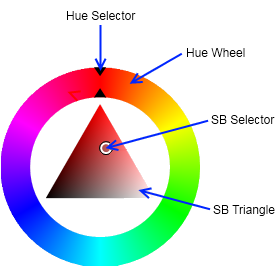
looks exactly like this
inner area of the trackpad is for SB, outer area for Hue
simple but efficient
need to find a way to get radial angle instead of XY finger position
oh wow, rama made a widget out of the editor color picker
real needle
tested nvidias vr funhouse which seems to use deferred and multires. and that works. but that is ue 4.11
perhaps multires and taa has stopped working between 4.11 and 4.15
 wicked oak
we already shittalked that one to death in #lounge
it looks like a scam
you get real money back from referrals
and that team cant make an mmo like they want to.
and the owner has been involved on SEVERAL pyramidal schemes
and their footage is half marketplace assets
mashed together in a sloppy way
mighty carbon
I meant the visuals
I didn't even look into the details about the game itself
I am not really big on MMO
but in VR it could be a way different
mighty carbon
new AI system
I wonder if it's any better than the other one
Mario Kart meets Micro Machines on the explosive tracks of BlazeRush—and now’s the perfect time to put the pedal to the metal. Mark your calendars for the BlazeRush Free Weekend, running May 26 – 29 on the Oculus Store!

Summary In this project, we explore how digital holography can be used to build novel near-eye displays for virtual and mixed (or augmented) reality. We experiment with true, phase-only holograms in which the image is formed by the interference of laser light. We address some of the known limitations of digital holograms and demonstrate how holography can add powerful, …
mighty carbon

UploadVR
Reports are suggesting Samsung is prepping to reveal a new UHD display at an even today that will be designed for VR headsets.
 waxen flare
How do I go about placing a VR pawn on a moving platform? I'd like to maintain walking / motion controller abilities
wicked oak
if youuse a Character with character movement component (needs workarounds) you can use the built in stuff for that
waxen flare
That sounds like overkill and also like it could lead to things breaking.
I was hoping for something simpler like attaching the pawn to the platform. But it seems to produce an error.
wicked oak
you can do that
just fine
do a downward trace, parent yourself to that
or just store the object AND its transform
if you find that is the same object as last frame, but the transform is different, then offset the pawn
waxen flare
That technique sounds perfect thank you :)
tired tree
thats how the character movement components do it in the first place
waxen flare
And works perfectly btw!
granite eagle
guys I need some help. I'm working on a FPS for VR.I have pawn control rot (enabled) and lock to HMD (disabled).
It works well except when I arm moving the headset moves the aim. I want to be able to aim and use a controller while the HMD moves free of the aim controls.
 glossy agate
@granite eagle sounds like you would need to do something like use an extra component that the right thumb stick rotates and you would fire off that. Problem I see though is you would lose yaw turning unless you were using an Xbox controller and a 360 setup. If it's a flying game though you could set it up like eve Valkyrie which is similar to what I described.
 real badge
Just use the forward vector from the controller rather than the camera
glossy agate
Sounds like he's not using motion controllers though
clever sky
@pearl tangle what's the gist? they're using 2 LCD layers and using an interference pattern that combines to form a variable focus image?
That's a big headset!
pearl tangle
haven't had a chance to go through the whole thing yet to figure it out but looked cool
i have the gx700, previous version of this. They have definitely beefed it up quite a bit
glossy agate
Anyone here willing to look at my log files on a failed 4.15 build? I have been trying to make work for about 6.5 hours and I'm at a loss.
It's for my project I'm supposed to release Thursday haha
jaunty shell
@glossy agate not much knowledgeable with builds but I'll do my best, can you paste it somewhere ?
glossy agate
Awesome, I'll dm it to you. Thanks!
jaunty shell
👌
deft badge
Send it over @glossy agate I'll take a look
jaunty shell
@deft badge he went to bed :p
deft badge
K. Did he send you the logs? Did you guys figure it out?
jaunty shell
there was an "error C2001 :
newline in constant" problem in his log
deft badge
Solved or no?
jaunty shell
no idea, he went to bed without reporting back
he also used a onedrive folder for his project
could be nothing, but I suggested him to move it to a normal folder
deft badge
C++ project I assume.
Was there a line number?
That error happens when there is something like '' in code, or ""
oops, discord reformatted that
'\' or "\"
He'll most likely need to do '\\' or "\\"
granite eagle
@glossy agate @Shirk#7842 Yeah I'm just using a controller/keyboard setup. I'll give your suggestion a go.
jaunty shell
@deft badge apparently the header that caused the error was empty, just a class declaration
most likely not the cause of the error :/
mighty carbon
Cool, but 1. It's not stereo, 2. 30 fps only, 3. What about ambisonic sound?!
Also wonder if it stitches correctly
granite eagle
Can I get some VR dev opinions on my VR marketplace site ( http://xaxisvr.com/ )? Originally my intention was to start a free marketplace for devs to list there games/demos. I'm not sure if there's really a demand for this platform at the moment. Do you think dev's would use it?
 dusk vigil
@granite eagle It's really hard to get solid ground as a distribution site. WearVR, Itch, GreenmanGaming already cater to indies. Playfield tried to position themselves as a new marketplace, spent millions on it and bombed... It's pretty tough
The extra hassle for a developer to spread out to other sites, update builds and so forth is not really worth it I think.
Itch is great for works in progress, getting your stuff out there before hitting Steam
Plus the fact Steam still has an open door for even the crummiest VR games
granite eagle
Yeah I just had a look at Itch and it's got a lot of projects which is a big headstart. To bad because I prefer my sites look and feel. I assumed Steam had a high barrier to entry, if that's not the case I might aswell change plans for XAXISvr
mighty carbon

Last week, we shared Oculus Research’s recent work on focal surface displays, which will be presented at SIGGRAPH 2017. Today, we’ll take you behind the scenes with the team who made it possible.
mighty carbon
"New: Distance Field Lighting Optimizations" << can we use it in desktop VR now?
tired tree
you mean mobile?
 vagrant mantle
Handle ropes,in vr, is it possible?
dusk vigil
Sure it's possible. The default PhysX ropes can be a bit janky at times though
mighty carbon
@tired tree nah, I mean desktop
mighty carbon
"Direct multiview is now supported for Samsung Gear VR, removing an extra render target and full screen copy when using mobile multiview which improves overall performance and reduces memory usage.
Monoscopic far field can now be used with multiview enabled on Gear VR ensuring the stereo rendering portion of your scene is rendered optimally."
lovely !
except last time I tested it didn't work in my project 😦
https://uploadvr.com/unity-gets-400-million-investment-silver-lake/ << I wonder if Epic would get such investment.. Would we have DLC for Robo Recall coming ?

UploadVR
Unity is getting a $400 million investment from Silver Lake, which should allow the company to push even further into its work with VR and AR.
dusk vigil
I don't think Unreal has any money problems, being owned by TenCent
tired tree
why would an investment have any thing to do with DLC for RR...
Also did you test monoscopic on 4.16?
that line literally says it didn't work until 4.16
wicked oak
epic games doesnt need that knd of investment, tencent already supports them i think
and people still buy unreal engine pro license
mighty carbon
@tired tree $$ to hire more people to work on non-engine projects. Yeah, I tested mono in 4.15.. Now I have to wait for FMOD to release (at least on their github) 4.16-compatible plugin so I can move to 4.16
glossy agate
Have you tried the new steam audio integration, is it pretty good?
Compared to FMOD
mighty carbon
it's not ready yet
Valve said 4.17 is when it will be production ready
plus I haven't started on my desktop VR port, so I don't really want to delve into uncharted territory yet

Mashable
This just might the next phase of esports you didn't see coming, because it's virtual.
 full junco
strange feeling that a new engine version is released and I don't even care about it because I will stay on 4.15
pearl tangle
anybody tried implementing fullbody tracking on the spline IK solver?
mighty carbon

UploadVR
Antilatency raised $2.1 million for its positional tracking solution and the startup is opening an office in the United States.
full junco
@deft badge just that I have a lot of engine changes I did in 4.15 where porting them to 4.16 would be a lot of work, and I don't want to spend a lot of time with that since I want to release my game soon
 sturdy coral
@full junco didn't you need this one:
- The left eye is used when selecting LODs to avoid selecting two separate LOD levels when rendering in stereo.
full junco
@mighty carbon like you often said now, the steam audio stuff from 4.16 is experimental and not production ready, so I don't need that. oculus HRTF sounds perfect
mighty carbon
how do you do Oculus HRTF on Vive ?
sturdy coral
this one is probably worth merging too, I never understood their explanation for why low-latency mode on the controllers caused jitter, and I couldn't reliably reproduce it.. must have been this bug:
- Bugfix: Fixed threading issue with motion controller tracking that caused controller motion pops. This problem manifested intermittently.
full junco
@sturdy coral I applied that LOD eye issue immedietaly when it hit master, and it didn't fix HISMCs, so I also fixed that myself
sturdy coral
ah
full junco
@mighty carbon the oculus HRTF is platform independent. well, might only work on windows, but HMD doesn't matter. it also works without VR
@sturdy coral hm, didn't see that motion controller one
when was it merged into master?
sturdy coral
not sure
mighty carbon
oh, nice @full junco I didn't know that
full junco
@mighty carbon I told you already quite a while ago
and you always insisted on that oculus HRTF doesn't even exist 😛
sturdy coral
this change looked nice too: New: Added LOD Distance Factor to Scene Capture Component, which can be used to make scene captures and planar reflections much cheaper to render if the scene has good LODs setup.
if it works with HLOD could let scene captures render with a lot less draw calls
mighty carbon
@full junco it doesn't. It's called Oculus Audio SDK 😉 I assume it's built into UE4 (for desktop VR).
full junco
I never said the real name is exactly "oculus hrtf"
pearl tangle
its part of their plugin
full junco
but its the best way to describe it
deft badge
"it also works without VR" ?
How does it know your ear position?
oh
Of course
The camera
is smart
sturdy coral
@deft badge yeah, there is also a way in the player controller
to override listener position
useful in 2d if you have a game with a camera that is far away
full junco
@mighty carbon its just called HRTF in UE4, and its from the oculus plugin, so its easiest to just call it "oculus hrtf":
deft badge
I use the HTRF Spatialization in our VR project
It wook a lil bit of getting used to, but now I have it working quite well
I did the test where you ask a user to face the direction of a particular noise
full junco
@sturdy coral I don't have scene captures, so I don't need that change you mentioned
sturdy coral
@mighty carbon even if oculus hrtf isn't the right thing to call it, it isn't like oculus hrtf ambiguous, there isn't some other hrtf made by oculus
glossy agate
John is your game coming out this month still?
sturdy coral
(unless there is something different for gear)
pearl tangle
it works fairly well though regardless
full junco
@glossy agate well, I don't like to think so far into the future, but based on the past I would say its unlikely that I get it released this month. would be nice though
pearl tangle
very keen to spend some more time playing with the steam audio stuff though
glossy agate
Yeah the steam audio is gonna be dope
pearl tangle
yeah it handles all the sound bouncing and whatnot that the other stuff doesn't
nvidia has the same stuff that you can utilize too
glossy agate
It's supposed to be way better. I guess the oculus one kind of fakes it using tricks.
sturdy coral
in the preview thread they said there was some packaging error with steamvr audio that might not get fixed until 4.17
but they may have updated since I read that
glossy agate
Pavlov seems like it has a pretty good system. It's ue4 but I don't know what he used.
pearl tangle
the oculus 1 doesn't attempt to do occlusion and sound propogation, it just uses the time of flight stuff im pretty sure
sturdy coral
pavlov seems to just be unreals built in occlusion with oculus hrtf too
glossy agate
Yeah that's what I heard, like a hit box on your head for the stereo sound
sturdy coral
if a sound gets blocked it just does some attenuation and can be set to more strongly attenuate higher frequencies, so it sounds muffled
glossy agate
Yeah that sounds like Pavlov then
pearl tangle
so it is doing a trace from the sound source to the users head?
sturdy coral
yeah the voices sound muffled even if you are through a thick concrete wall where you shouldn't hear them at all
yeah I think it is just a single trace and doesn't look at physical materials or anything
steam audio is supposed to do bounces and be based on some material tagging
and then the other main thing it has is supposed to be baking
if a sound is in one stationary place
tired tree
The motion controller thread access blocking isn't really the main issue with the late updates, the main issue is that it breaks down at high actor velocities
glossy agate
If we can get what onward has that would be perfect. Not sure if it's fmod or what
sturdy coral
all the bounces and occlusion info can be baked and be cheaper
tired tree
its a nice fix of course, was implemented kind of silly before
sturdy coral
I heard steam audio was in onward now but I haven't played in a while
tired tree
I went back to onward recently to check out their progress...was really disapointed, 90% of the interaction failures I remembered are still there
assumed it would have been cleaned up by now
sturdy coral
I had heard pavlov was much more streamlined but it seemed very similar
only main difference was the respawn rate
mighty carbon
oh, you won't get any "Oculus HRTF" without enabling Oculus Rift plugin on UE4: https://developer.oculus.com/documentation/unreal/latest/concepts/unreal-audio/
glossy agate
It's like an old car, you gotta learn her quirks to get gud haha
sturdy coral
@mighty carbon not true, the oculus hrtf is part of the oculus audio plugin
tired tree
i played it a decent amount, the game is still ok, its just the clunkyness that doesn't have to be there should be fixed
sturdy coral
you can use it without the oculus rift plugin
glossy agate
Similar game but way different gameplay style
sturdy coral
yeah, just I thought they would have some more arcady reloading mechanics and stuff from what I heard about it
and that it would be more like CoD compared to arma
there are some time to kill differences and stuff but overall just the character movement and gun feeling seemed very very similar
tired tree
you missed the big one though charles "Steam SDK updated to 1.39"
sturdy coral
ah yeah, I saw that, I didn't know what all is new
it mentioned steam controller stuff
glossy agate
It's usually a free for all mess. But they do have the rust COD map now. Someone built it in workshop.
tired tree
Can finally stop manually loading the OpenVR dlls and actually just call the functions directly now....finally
sturdy coral
awesome
full junco
@tired tree is the controller fix worth merging? I dont think I ever noticed controller issues
do you know in which commit it was added to master?
tired tree
the controller fix is a race condition
it only caused issues when the threads accessed it at the same time
but its a 3 line fix
full junco
which threads? GT and RT?
tired tree
yeah
sturdy coral
was it just getting like only part of the vectors at once?
since they are bigger than a word
full junco
since you know its 3 lines you probably know which lines?
tired tree
yup
sec
.h
protected:
//~ Begin UActorComponent Interface.
virtual void SendRenderTransform_Concurrent() override;
//~ End UActorComponent Interface.
FTransform RenderThreadRelativeTransform;
FVector RenderThreadComponentScale;
.cpp
void UGripMotionControllerComponent::SendRenderTransform_Concurrent()
{
RenderThreadRelativeTransform = GetRelativeTransform();
RenderThreadComponentScale = GetComponentScale();
Super::SendRenderTransform_Concurrent();
}
then in prerender
    FTransform OldLocalToWorldTransform = MotionControllerComponent->CalcNewComponentToWorld(MotionControllerComponent->RenderThreadRelativeTransform/*MotionControllerComponent->GetRelativeTransform()*/);
    FTransform NewLocalToWorldTransform = MotionControllerComponent->CalcNewComponentToWorld(FTransform(Orientation, Position, MotionControllerComponent->RenderThreadComponentScale));
you use the new ones
full junco
I don't have any UGripMotionControllerComponent::SendRenderTransform_Concurrent in my code
full junco
can't you link the commit?
tired tree
ummmmmm
full junco
copying from discord isn't really what I consider nice 😄
sturdy coral
do a blame on github
tired tree
pretty sure it was part of a large merge
I tracked it down during a bunch of other comparisons
sturdy coral
looks like it is in here https://github.com/EpicGames/UnrealEngine/commit/8044633af9d3b871345dba9654af0c88289d773f
tired tree
yeah
think that one also contains some of their interface changes too
you'll have to ignore those
it got changed in 4.16
sturdy coral
hah guess it was the robo recall merge?
full junco
@tired tree which file is the stuff in?
tired tree
motioncontrollercomponent.h
and .cpp
only the lines in pre-render and that new function /two variables
ignore all of the world scale stuff
OHFFS
full junco
thanks
tired tree
the debug rendering issue i reported didn't get fixed before release
they accepted that shit a week ago.....
sturdy coral
accepted the answer or a pull request?
tired tree
assuming that means that the physics replication is borked still too
they reproduced it on their end
sturdy coral
is it all debug rendering? I think I heard you mention it one of your youtube videos but can't remember the details
sturdy coral
that sucks since 4.16 was all about testing shit in VR with adding simulate and stuff
glossy agate
getting forced now. Like a windows update
full junco
theres actually 1 really annoying bug in 4.15, but it isn't fixed in 4.16 either. navmesh is broken with world origin shifting
pearl tangle
Even when you recalculate?
mighty carbon
When I load LODs, they don't render, unless I force reduction using settings
which I fine if I am generating LODs from Base LOD, but I am not - I already have pre-generated LOD meshes
and then if I put triangles count to 0 in LOD1, for example, the LOD gets removed automatically. Then if I load my LOD again - it renders! But, doing the same trick to the next LOD crashes UE4
full junco
hm, ok
mighty carbon
so, essentially, I can't make Gear VR project without my pre-built LODs
full junco
then you should move back to 4.15.2
mighty carbon
the same issue
I worked in 4.13 or 4.12
and I didn't need to update the terrain mesh
now I do, and now the issue popped up
and if Epic acknowledges it, it won't be fixed until 4.17 or even later
 sharp flame
hi guys, is there a way of getting a screenspace rendertarget to work in vr? It currently seems to render 2 different images displayed on each eye, but they are in a way not configured right and overlap eachother when applied to an object. This would be for a portal btw.
sharp flame
never mind, I found a stream that seems to deal with this https://www.youtube.com/watch?v=jVdFpuicptQ&feature=youtu.be&t=25m39s

Announce Post: https://forums.unrealengine.com/showthread.php?99586 This week is a grab bag of VR Tips and tricks, with special guest Tom Looman, Epic Games'...
real needle
Does someone know or work with the Path Follow Plugin ?
wintry escarp
if they've broken it then it should be easy to spot where the problem is, hotfix might do it
 cold siren
Hey Guys, any one here can lend a hand with profiling my simple scene?
for some reason my dynamic basepass is taking many ms but I have no dynamic lights in my scene\
mighty carbon
Alright, the issue was with Intermediate/Saved folders in the project. I deleted those and now LODs can be loaded properly.
However, now that screen size values for LOD distance are from 0 to 1, it doesn't quite work as efficiently as the old system :(
 native cedar
anyone had any luck with leap gesture events?
I have a vive + leap setup and working and trying to get when the player does the circle gesture
but I don't know what is responsible of that event and where it is called
mighty carbon

Oculus PC 1.15 is out - official 3 sensor roomscale, toggle H&S warning, (alpha) MxR chroma keying w/ 3rd Touch https://t.co/V8rNaSGBDs
 Twitter
http://www.moguravr.com/htc-link/ << going to be phone-powered apparently

MoguraVR
HTC NIPPON株式会社は25日、スマートフォン接続して使用する新型モバイル向けVRデバイス「LINK」を発表しました。同社のハイエンドVRデバイス「HTC Vive」と同じく、VR内で動き回れる性能(6DoF)を楽しめる端末となっているとのこと。 使用方式としてはサムスンの「Gear VR」などと同じく、スマートフォンをVRデバイスに接続するもの。5月16日に発表したHTC社のスマートフォン「HTC U11」に USB Type-Cで接続することで使用できます。同梱のコントローラで操作します。トラッキング方式に関する記載などは現在見受けられず、HTC社のトラッキング機構であるLighthouseの対応なども記載されていません。 コンテンツとしては、これまでのHTC Viveのラインナップを順次「LINK」に向けて展開予定。HTC U11と同様に通信キャリアを通じての販売(価格未定)を予定しています。 『攻殻機動隊 ARISE』とのタイアップも 今回の発表に合わせ、『攻殻機動隊 ARISE』とのタイアップも発表。新規に描き下ろした「攻殻機動隊 ARISE」のメインキャラクター草薙素子(くさなぎ もとこ)、荒巻大輔(あらまき だいすけ)、バトー、トグサのイラストを用いたキービジュアルを作成し、「HTC U11」 ならびに「LINK」の製品特徴を伝える内容となっています。 上記のほか、「攻殻機動隊 ARISE」とコラボレーションした「HTC U11」特設ウェブページを5月25日21 時より設置し、 コンテンツを順次公開。またコンテンツの1つである「HTC U11×攻殻機動隊 ARISE」ティザー動画を、6 月から公開する予定。特設ウェブページの URL はこちらとなっています。 スペック ヘッドマウンドディスプレイサイズ 約 197.69mm(幅) x 116.61mm(高さ) x 167.33 mm(奥行) ヘッドマウントディスプレイ重量 554g(暫定値)*USB(Type-C)Y ケーブル含む 視野角 約 110 度 ヘッドマウントディスプレイ搭載バッテリー 約 2,800mAh ディスプレイ 約 3.6 インチ アモレット液晶 X 2 (各 1080 x 1200 ピクセル、 90Hz リフレッシュレート) 外部接続
wintry escarp
its all gibberish
someone with money should do a phone with displayport or usbc video, so a phone can be used as desktop vr as well as mobile
sturdy coral
@mighty carbon "toggle H&S warning" is big
that has been the biggest pain in the ass with devving on rift
pearl tangle
that came out a couple weeks ago on there right?
The thing I am trying to do with the rift at the moment is disable the damn menu button
sturdy coral
I think they started doing a beta branch and it came out in that
the oculus menu button?
pearl tangle
yeah
sturdy coral
for kiosk type use?
pearl tangle
running an event 1 on the rift. with steam we can just enable arcade mode and it turns it off
sturdy coral
yeah, I don't think they even license for arcades on rift yet
my sister's real estate company just bought a shopping mall with some investors and I've been looking into Vr arcades 😃
pearl tangle
it's not for an arcade per se. it's just in steam vr it gives you that option so you can remove the ability for people to accidentily press it, and you can do the playlist stuff and whatnot with it too
im going to be running 1 of the things we built for a client with the vive tracker in a vr arcade here too but keen to setup 1 later on
sturdy coral
you may have to epoxy a little emergency button flip cover over it
pearl tangle
more of the warehouse scale type stuff. custom software, custom hardware type arcade rather than just playing steam games
yeah considered that too. I don't need anybody to touch the joystick or top buttons at all on ours
was looking at running with steam vr instead of the oculus stuff and that might do it better
sturdy coral
yeah
you could get some matching black gaffer tape and tape a thin peice of plastic or wood over it, but I bet someone would peel it off
pearl tangle
hah yeah not so great for dozens of people to go through thats for sure
sturdy coral
ooo this is cool:
Exposed PhysX enhanced determinism mode using the compiler flag PHYSX_ENABLE_ENHANCED_DETERMINISM. This allows local subsets of the PhysX simulation to behave deterministically independent of what is going on elsewhere in the Physics world.
I wonder what that means exactly, and if you could achieve a lockstep network model now
another from the 4.16 changelog I see:
Whitelisted SteamVR plugin for Linux so SteamVR Blueprint functions are always available, even if stubbed.
is it possible to do that on windows? I heard Oculus will reject you if you have any trace of the steamvr plugin and didn't know there was a way to automatically stub blueprint functions when a plugin wasn't loaded
tired tree
hoooo boy....them enabling adaptive net update frequency by default in 4.16 is going to cause a ton of headaches
sturdy coral
@tired tree hmm, I haven't used it before, doc on it says "If enabled, update frequency is allowed to ramp down to MinNetUpdateFrequency for an actor when no replicated properties have changed. This is currently controlled by the CVar "net.UseAdaptiveNetUpdateFrequency""
I thought if no replicated properties changed there wouldn't be an update anyway
and that update frequency only applied to changed things
tired tree
it sets the NEXT update to 70% of how long the last took to actually replicate...that or the min frequency
so the first replication after a change of something dormant will be slooow, unless you set minnetupdate on every actor or forcenetupdate()
guess its time to start actually setting min net updates on everything
because the default of 2 times a second.....
sturdy coral
@tired tree does that 70% stack over time, so it is an exponential decay?
until the min frequency
tired tree
it decays over the last time it took to update, but thats "actually update" as in something was good to send
70% is there so that it can get qucker when things start changing more often
sturdy coral
oh ok, so it would be an expoential increase when things are changing, not exponential decay when they aren't
tired tree
the problem is that with say the default 2 times a second, a bReplicateMovement object that is thrown will have the same velocity through-out its air time, and since no relevent variables are changing, it increases its time until next update over and over
then when it hits something, there is a large delay before the next net update
so unless you change that minimum 500ms to something like 100ms or less, objects warp around like mad with movement replication and uproperties can get up to a half second delay before they actually replicate a change over
without the console command the game checks at a constant rate, default 100 times a second. so there is obviously a lot of extra overhead on checking for changed variables, that would be every actor every frame for 90FPS VR
wicked oak
in case you need it. I managed to add launch options to the game. In my case for a "demo/showroom" mode
its super easy, you can read the console arguments from anywhere
i created an empty Entry map, that just loads you into the next map depending on the option
literally just this:
        return FName("DemoEntry");
} ```(from a function that returns the name of the level to load next)
and this on Steam side
sturdy coral
I would think they would just have a big array of bitfields somewhere where every replicated property &'s its "changed" bit when it gets changed, but maybe that isn't workable
they do the check for changes all in only a single thread too right?
I guess some properties get changed and then changed again back to the original value all within the same tick too
tired tree
they check against a memcpy of the last state with the default DeltaRep
last repped state that is
but this is just slowing down how often the checks happen
wicked oak
that makes complete sense
you can XOR both of them, and if its not 0 then something changed
and xor can be a vector instruction and do fat chunks at once, so no performance issue there
tired tree
You can also figure out which variable changed via is offset in memory
sturdy coral
for a replicated array are they scanning the whole array if it is still the same size as before?
tired tree
each element yea
there is a FastArrayRep option
where you manually dirty elements
but that isn;t that useful unless you are repping a large array
sturdy coral
ah ok
tired tree
I went through all of the replication code recently when I realized that overriding NetSerialize also causes NetDeltaSerialize default to never be called
they really do a great job overall
sturdy coral
I was considering arrays for replicating kinect depth data but then learned there is no compression by default
and arrays have a really small size limit
I'm instead just packing it into the voice packet structure
with some compression
tired tree
it compressess deltas, you can also just make a struct with a custom net serialize, but yeah that kind of data is better manually compressed
it only sends 1 bit for bools by default
and shorts for rotators
sturdy coral
how does the delta compression work with packet loss? keeping track of the last acknowledged update and delta-ing from that?
for kinect depth stuff I ended up doing delta compression from just the previous pixel for each pixel in the frame, but I'm not from previous frames, which could probably improve things a good bit
tired tree
for reliable or unreliable
sturdy coral
for a property it is always just best effort isn't it? some updates don't make it through
tired tree
yeah
sturdy coral
the gaffer on games networking guy has some replication stuff that keeps track of the last acknowledged update and deltas from that http://gafferongames.com/networked-physics/snapshot-compression/ , didn't know if UE4 did something like that too if it does delta compression
tired tree
i'd have to check again to see if it Acks it
come to think of it, it must Ack uproperties
sturdy coral
yeah, I was thinking maybe that min update rate though might be in place instead of acks
just keeps sending it, but really slow
err n/m if that is actually just for how frequent to check for updates
tired tree
that would be problematic with past state checks
Actor property replication is reliable
in the docs
but it will skip in betweens if it changes before a good Ack
 dusky moon
Volumetric Fog looks rad in 4.16 inside VR, Only wish it could support Forward Rendering
wintry escarp
turns on every new feature full blast on his gtx780
mighty carbon
Oh, sounds like advancements in forward renderer stopped with RR shipment
full junco
@dusky moon it doesnt work with forward?
wintry escarp
is the new sound system a full fm synthesis module?
primal sky

we released a free soundtrack if someone could test download it that would be very awesome.
mighty carbon
Afk right now
@wintry escarp https://www.reddit.com/r/oculus/comments/6dbamx/latest_nvidia_driver_potentially_breaks_gtx_780/

reddit
In the event anyone else upgrades their driver and has a non-functioning Rift, rolling back to the previous driver fixes the problem. Wearing...
get yourself 1060 😃
also
dusky moon
@full junco I get double vision from the volumetric fog in Forward
full junco
@dusky moon double vision? well I guess its better than float vision
dusky moon
whats float vision ?! 😄
full junco
probably looks similar to double vision, just less accurate
I have no idea what you mean with "double vision" 😛
dusky moon
ah I mean , the light rays are a bit off in VR.. it's like the stereoscopic render doesnt properly overlap
full junco
ah
dusky moon
Doesn't it look a bit weird in Forward ?! just try it the you know what i mean 😄
dusky moon
y ?
full junco
because I need SSAO
full junco
well I would also want that, but SSAO is even more important
dusky moon
depends on the content ... I stick to deferred in my last project because it's full of foliaged landscape and UI is so minimal.
in that case deferred looks way better
full junco
why does deferred look better there?
dusky moon
because in Nature based environments you want to avoid sharpness and the bluriness of deffered help you to somehow avoid and dissolve the dull foliage in the scene
take Tree as an example, you really don't need to see it's details and edges accurately
full junco
I dont really see why less sharp would look better with foliage?
dusky moon
Well my point refers to AA in this case
as the edges in foliage like tree / grass / flowers / etc are not needed to be accurately rendered
And for me , the nature based scenes in VR looks pretty un-natural and dull and I'd rather not to see them sharpley
full junco
ok
wintry escarp
motorsep I don't play Japanese games, but breaking the gtx780 is a pain
that's a definite no rift for me now, I cant afford rift and gpu
unless older nvidia driver doesn't affect anything else in vr
mighty carbon

In a curious move, HTC has revealed a new mobile VR headset called Link that is not part of the company’s Vive brand. The move comes just a week after the company announced a mobile standalone Vive headset in partnership with Google. HTC is by now one of the world’s leaders in the virtual reality …
I think it's safe to say they already failed
http://store.steampowered.com/app/396750/EVERSPACE/ << any good ?

EVERSPACE™ is an action-focused single-player space shooter, combining roguelike elements with top-notch visuals and a captivating story. It takes you on a challenging journey through an ever-changing, beautifully crafted universe full of surpri...
Price
$29.99
Recommendations
1445
 odd garnet
Anyway I can use the botton on the left side of the actual HMD as a in game input button
@mighty carbon DUDE get elite dangerous instead of Everspace
it's SO much better
mighty carbon
aye, thanks
 devout fox
When a widget interaction component hits a HitTestInvisible / SelfHitTestInvisible section of a widget, should it still return a hit? I feel like that's wrong, but wanted to make sure it's not intended use before reporting it.
mighty carbon

In our second post of the new Social Platform series, we’ll look at Events, a way for people to discover and engage with scheduled social experiences.
 quartz bay
My test suggests that there is no difference in performance between a debug PIE build and a shipping build.
tired tree
there is
full junco
you probably tested the "wrong" stuff
tired tree
least of all the slate rendering for the editor
and all inline debuggables and STAT sections
full junco
the source is full of things that are removed in a shipping build, so the CPU has to do a lot less things in shipping
if you tested in a super GPU limited scenario, you won't see the difference
quartz bay
yeah, my CPU load is very light, but my GPU is not
I was hoping I'd get at least an extra millisecond on the GPU by having a shipping build, but it looks like there is no noticeable difference
do you guys develop for the GearVR and try to get a VR app to not overheat a samsung galaxy S6?
pearl tangle
the vive link actually looks quite interesting. a mobile headset with proper controllers is a good start
tired tree
oh gooooooody...steamvr update tanked UE4 vr preview compatibility today
pearl tangle
anything on gear vr will make it heat up. make sure you have thermal throttling enabled and benchmark against that
 thorny niche
S6 can be NOT overheated lol?
full junco
@tired tree what?
thorny niche
It's a pain, really, best tool we've found is GearVR specific nodes for CPU and GPU
But even them are not a silver bullet
tired tree
the beta build for steamVR, my vr preview doesn't work with it. Had to rollback
tired tree
most devs are on the beta
full junco
why?
tired tree
its has what is coming out next and is early access to new features
its rarely unstable
its post alpha
pearl tangle
actually seems like a lot of misinformatin on the vive link
the new beta is a pretty big change though
tired tree
its also what the SteamVR Home is currently on, so will be FAR more people than normal on the beta
full junco
@tired tree well it feels like the only feature that was ever added was the async reprojection, I cant remember any other new feature in in the last year
tired tree
vive trackers...were beta access early
full junco
and that doesn't even work on my GPU
tired tree
and switched to new designation on beta as well
full junco
most people dont have trackers though
pearl tangle
do the trackers show up properly in the new steamvr? They were always just the base mesh before without texture
tired tree
i'm mainly talking about devs though, and a lot of devsat least want access to the latest openvr code drivers PRIOR to releas
its how I knew the trackers switched ids and had it patched before it went live after all....
mighty carbon
solution for Gear VR - make small, short experiences
leave games for Rift/Vive
maybe S8 doesn't get as hot as S6/7 ?
also, they already started working on S9
So I am guessing by the time I get done with actual game for Rift, I wouldn't have to chop down art assets to get it working on S10/S11 😂
lol, I did some voodoo on my terrain and now I have to retrace my steps in order to get improved version into UE4 and have it look identical to original one (plus improvements).. Gee, makes me remember about importance of documenting procedures.
pearl tangle
they started working on the s9 2 years ago
the s8 still gets very hot, same as daydream stuff. there is no ventilation on the things so anything that runs them at 100% for more than a couple of seconds at a time is going to cook them
thorny niche
As far as S6 is still a requirement, performance will be an issue.
The biggest throw down recently was Android 7, it literally ruined performance budgets on S6
- vertical tearing appeared, which isn't fixed yet
mighty carbon
I am sure it will be fixed when all S6s get Android 7
performance isn't going to be fixed though
thorny niche
@mighty carbon what tools do you use for performance tests on GearVR?
pearl tangle
s6 got android 7 ages ago
mighty carbon
@pearl tangle not in USA on T-Mobile... I still have 6.0.1 and T-Mobile shows N is still in development for S6
pearl tangle
wow thats some slow updates. seems like T-Mobile being the holdup there
mighty carbon
@thorny niche I use fps counters and start/stop file. And my personal sensation when testing in VR 😃
thorny niche
Have you shipped something already?
mighty carbon
nope
still working on it
also have load of issues building project for release
no problem building dev builds, but some weird errors when building for distribution
thorny niche
I see
mighty carbon
4.16 might solve all the issues
 granite jacinth
And introduce new ones
mighty carbon
well that too
thorny niche
I've seen they mentioned mobile Slate performance increase in 4.16, really looking forward to it
granite jacinth
I would be very careful about updating projects from here on out. The QA is getting worse and worse each release since 4.10
mighty carbon
but Oculus supposedly is fixing issues I reported when trying to package with their branch. So maybe the'll fix 4.15.3 and I can ship my thing with that.
I wonder why QA went downhill
thorny niche
Can you guys shed some light on your performance budgets? Drawcalls, tris, shader complexity etc.
mighty carbon
for ?
thorny niche
GearVR
mighty carbon
It's all well outlined on Oculus dev portal
well documented
(sometimes a bit dated)
full junco
@thorny niche creating widgets got faster in 4.16. rendering them didn't I think. so only if you often call CreateWidget() in your code you will see improvements
mighty carbon
I think I had fps drop on widget creation in 4.14/4.15
thorny niche
Is 2k texture atlas ok for GearVR?
mighty carbon
why atlas?
quartz bay
The problem is that you have to pass on S6 in order to get published on the oculus store
thorny niche
to minimize amount of textures and material IDs
quartz bay
I had a system where I measure the S6 battery temperature and start turning off scene elements as the temperature increases
my game runs fine on my S6 for 15 minutes without overheating, but when oculus goes and tests it, their phone overheats in 5 minutes
they claim that they are testing on a brand new phone, and so am I
mighty carbon
if you have tiling textures, you can't have atlas
for non-tiling textures, yes, you want to have an atlas
thorny niche
I understand, non-tiling it is
@quartz bay my S6 overheats in 15-20 mins of gameplay on approved games from the store, so I believe it varies from device to device
which complicates development even more
quartz bay
yeah 😦 the hardest part here is that I can't reproduce the results they're getting so I don't know if anything I do fixes the problem they're getting
thorny niche
are they kind with feedbacks? I haven't sent them a thing yet.
quartz bay
from what I can tell, the feedback appears to be templated or copy/paste responses
quartz bay
gnight
pearl tangle
you can do tiling textures with texture atlas, it just requires a bit more work to get it to happen properly
real needle
Is anyone else experiencing frame freeze/steamVR crash/crash log with 3d3 errors since the last steamvr-patch?
I also updated nvidia drivers
"Unreal Engine is exiting due to D3D device being lost. (Error: 0x887A0006 - 'HUNG')"
mighty carbon
@pearl tangle material will be more expensive than drawcalls for individual textures
pearl tangle
apparently a bug on the new beta
tired tree
yeah the new beta broke ue4
real needle
SteamVR or Nvidia? I'm not on the beta branch of SteamVR
tired tree
latest nvidia driver also has issues with the engine
i had to rollback it last week
oh good
if you turn off SteamVR Home it will function again for now
real needle
Home doesn't exist in the "stable" version of SteamVR yet right? I don't see the option for it anyway... I only tried it once
tired tree
no it doesn't
real needle
So Nvidia it is then, thanks
 lusty ledge
anyone having issues with steam audio in 4.16?
i can't find half of the settings the documentation refers to
notably i've turned on the plugins and added the -audiomixer flag... but i don't see "occlusion plugin" or "reverb plugin" within Attenuation Settings anywhere
pearl tangle
did you enable those plugins in the plugin browser?
lusty ledge
i figured it out - i was setting -audiomixer in the wrong place
i've got a more interesting problem now
namely, i wanna attach a single phonon probe to a bunch of actors in my level
lusty ledge
oof, now i'm salty. it looks like internally there's a PhononProbeComponent, but it's not blueprint spawnable
i think it's only ever added through phonon probe volumes
wintry escarp
s6 is known to overheat on vr isn't it
thorny niche
It is but it's fair to say everything can overheat easily
wintry escarp
I heard last night the new NVidia drivers totally breaks vr on gtx780
pearl tangle
vr should always have been pretty broken on a 780 anyway
granite eagle
Has anyone got any tips for drag/dropping an actor into a level from UI using Vive motion controllers
I'm interested in a setup similar to the VR version of the editor making is possible to build stuff but in game
 safe herald
@granite eagle Any specific part of that you're facing trouble with?
Seems quite straightforward, you'd record the UI element triggered, register a drag event, maybe spawn a little version of the model on the controller as an indication and then spawn the actor in the world at the coordinates where the user lets go of the drag.
sturdy coral
you can look at the VR editor code too to see exactly what they do
granite eagle
@safe herald I have done any drag and drop and wasn't aware of a dedicated event for it, I'll give it a go.
@sturdy coral Yeah earlier in awnserhub I asked if the VR version of the editor could also be used as an ingame mechanic. Will look into it over the weekend. 😄
mighty carbon

UploadVR
HTC has revealed a new six degrees of freedom VR headset, the HTC Link, for its HTC U11 phone, though it's only releasing in Japan.
wintry escarp
I wonder why its japan only, that's a tiny market
 alpine kiln
Maybe to test the idea out.
wintry escarp
MS one is north america only
wicked oak
damn, the forward renderer gets a massive speedup in ps4
and i mean massive
i got no AA tho
trying to see if ican tell it to use FXAA or temporal
wintry escarp
working on psvr?
mighty carbon
@wicked oak with 4.16 ?
wicked oak
yes
mighty carbon
what about PC ?
wicked oak
too many drawcalls
forward increases quality a lot in my game for msaa, but it increases CPU time a fuckton
drawcalls in ps4 basically dont have overhead
they have very small overhead
so no issue there
mighty carbon
well, drawcall depend on content
PS4 just happens to power through your content
there is no magic here, just raw power
wicked oak
it would be similar on pc if i could use Vulkan for VR
its just that DX11 is slow as balls for drawcalls
and i have a lot of drawcalls
tired tree
can use vulkan for VR in linux, its in early testing
could try using the bridge for windows with some tweaks instead
though likely buggy
mighty carbon
what stops Epic from going full Vulkan in VR ?
tired tree
vulkan is still wip?
mighty carbon
i see
 undone kite
Hey Everyone, Is there a way to have a TFP character and in VR the location of the players head allows the person to move behind the character. Is there documentation or something that goes over how to account for that?
tired tree
what do you mean move behind? As in re-orient the character to the same facing or as in freewalk behind the character?
undone kite
The HMD is positioned where che characters eyes would be but if the player sits back in their chair, they would float to behind where the characters head would be making things look weird.
tired tree
Then you'll have to run some IK with the head if you want a visible body to the owning client
wicked oak
you can do what Farpoint does
it has a fullbody IK
but that body has no hands and no head
the hands arent IK
that way they are more responsive
wicked oak
they dont have to lag until the animation system catches up
and just be attached directly to the controllers
farpoint does it for inmersion, that way players are more grounded in the world
they look down and they see their spacesuit
tired tree
thats how farpoint handles that?
tired tree
feels like the hands would be presence breaking
undone kite
But if you look down would you not see a neck hole?
wicked oak
they use that unreal IK plugin
i talked with the guys but the console license is hella expensive 😦
few thousand dollars
tired tree
for a spine chain he could just use the new solver with 4.16
wicked oak
not in my budget range
tired tree
because of vulkan?
wicked oak
ps4 has its own api
as its for ps4 gpu only, the driver is super super super thin
so all driver functions are very fast compared to a PC
tired tree
ah, so their own metal
wicked oak
lol testing with 180 screen percentage
undone kite
I'll probably use the spline solver when we migrate to 4.16 then. (Currently on 4.15)
tired tree
does it have a seperate command? if its using their custom drivers it might have built in AA right?
wicked oak
becouse its a fucking massive improvement
im getting 5-6 ms gpu time on my most complex level
down from 8-9
i theorized a while ago that forward on ps4 could run hella fast in my game due to the drawcall crunching
i was right
thorny niche
Is anyone familiar with frame 'prediction time' stuff? Performance wise.
wicked oak
update on the ps4 forward. FXAA works, temporal doesnt
prediction time of what @thorny niche
thorny niche
of a rendered frame I suppose
quartz bay
Is there a way to see a breakdown of what everything costs in the basepass of the GPU visualizer?
sturdy coral
anyone know how to pull up the oculus performance hud from the console? I wrote it down somewhere but can't find it
it was something like "hmd setint perfhud 1"
ahh, think I found it, hmd setint PerfHudMode 1
quartz bay
Is it possible to turn off all post processing completely?
or at least the BokehDOFRecombine, whatever that is?
also, does anyone know the GPU performance cost of the volumetric fog in 4.16?
is it cheaper or more expensive than exponential height fog?
glossy agate
Isnt volumetric fog just a setting in exponential height fog? Im guessing it would cost a bit more for lights.
quartz bay
I don't know, I'm still in 4.15.2 and debating whether to upgrade to 4.16
if there's a performance boost to framerate, I'll do it
tired tree
@wicked oak Nice, FXAA is better than TAA for VR anyway, you are golden then
full junco
@tired tree https://puu.sh/w28RY/c40c1d1fef.png



 mighty carbon
what does it even mean?!
I've heard that post 4.17 Epic is going to allow rendering plugins, so it will be like Unity
tired tree
what?
no
shader plugins != rendering plugins
though its a damn sight better than it was
mighty carbon
I see
quartz bay
is anyone doing adaptive quality for their graphical settings?
 midnight tree
question gents, i setup lods for my characters yesterday but it seems that i'm either getting no fps increase or in some cases its even worse. does anybody have an idea what the reason could be? is there any specific guidelines to follow with VR and lods for skeletal meshes? anyhting i might be missing?
real needle
@midnight tree Are you sure the meshes are the problem?
midnight tree
im working on optimizing the scene a bunch more
just learned about static mesh instancing
but i tested it on a fairly blank map
spawned in 50 enemies without lods
then added in lods and did the same test
real needle
run "stat scenerendering" in your console
real needle
and "stat unit" it might not even be the GPU
midnight tree
still trying to fully understand all that too
real needle
mainly look at translucency, shadows and draw calls
draw calls is at the bottom
of the stat scenerendering list
are you on forward or defferred?
midnight tree
forward
and speaking of shadows, i disabled them in lod 2
so theoretically that alone should improve things right?
real needle
do you have static or stationary lights?
real needle
have you baked?
real needle
it's ok! we're here to help