#virtual-reality
1 messages · Page 111 of 1
 alpine torrent
you know autodesk stingray?
 wicked oak

https://www.playstation.com/en-us/games/farpoint-ps4/ Discover how the PlayStation®VR Aim Controller, combined with Farpoint, will transport you into a new w...
cool shit
lookin up, seems ill have to make another DWVR port 😃 if the microsoft headsets work for xbox
 mighty carbon
hah
are they going to sell that gun separately?

High PC hardware requirements are one reason why VR’s initial buy-in cost is often cited around $1,500, but as GPUs get more powerful and cheaper over time, more people are ending up with ‘VR Ready’ hardware, perhaps without even meaning to. Today an estimated 25 million Steam users already have one of the most expensive …
wicked oak
and 50 million have a ps4
still, damn, 25 million vr tier pcs in steam?
does it count "min spec" 960 gpus?
mighty carbon
maybe it does
is 960 significantly weaker than 1060 ?
the barrier on entry is too high on PS4
 tired tree
its a lot weaker
mighty carbon
I see.. Then I'd probably cut down that estimate
wicked oak
like 30% weaker or so
mighty carbon
one can probably make 2 games for Steam/Home before ever getting to release on PS4
wicked oak
1060 i think its around the power of a 970 but a bit better in some cases
mighty carbon
2 games vs 1 beats it
wicked oak
yeah, ps4 release is haaaaard
mighty carbon
I can't complain about my 1060
mighty carbon
what I am saying is that you can make more money faster on PC, than on PSVR
you still need PR on any platform
but the ability to make and release faster on PC trumps the audience numbers on PSVR, especially if Sony keep pushing release away due to AAA release schedule and technical issues
for devs like myself, PSVR release is next to impossible
wicked oak
lets see once i get the data
right now my game wont sell in PC
even after i launch "final" version
alpine torrent
does this look like rift controlelrs?
mighty carbon
you don't do any PR @wicked oak
mighty carbon
I've never seen your game mentioned in the press, anywhere
mighty carbon
any of the youtubers I watch never even mentioned it
wicked oak
and sent trailers to reddit and twitter and all that kind of thing
i also send mails to youtubers
a lot of them
they dont open it
i send them the key directly. Those keys arent even used
mighty carbon
and I see some obscure weird games popping up here and there in the press/youtube/twitter
mighty carbon
dunno... I chatted with Boogie on youtube and twitter..
alpine torrent
 mighty carbon
@alpine torrent already posted those links earlier today 😉
wicked oak
in december
alpine torrent
well i was wanted to share pic of that
mighty carbon
someone said it's like Vive and Touch had a baby 😛
wicked oak
both a joystick and a trackpad
no face buttons
are they retarded?
what is the point of both a joystick and a trackpad?
they both do the same
wicked oak
being analog Y/X with posibility to click
mighty carbon
basically if it has good tracking, decent resolution and response time, MS has all chances to become a leading platform (and then top it up with Scorpio supporting MR HMDs)
tired tree
yeah,...good luck with those controllers out of line of sight of the headset
alpine torrent
well not need to have camera tracking in the room
alpine torrent
@mighty carbon need to test to make sure how they work right?
tired tree
no, we already know
they are fov from headset
the headsets are inside out
depending on that fov you are going to be limited to the cone in front of the headset
granted i don't think MS is after games with these, so its likely not as big of an issue to them
mighty carbon
games is everything
don't believe those who say otherwise
PCs were not made for games, but games is what made them mainstream

Motion controllers are key to your Windows Mixed Reality experience. Directly tracked by the sensors in your headset, these controllers know where you’re loo...
 tawdry dragon
Those wands and headset have huge potential for our client base
They hate the current Vive/Oculus setup requirements
A proper inside out headset really have the potential for us to convince more to develop a VR platform with us
tired tree
it would be far better for corporations
which is where microsoft tends to focus anyway
alpine torrent
@tired tree windows is after games
Microsoft Mission is to Empower every person and corporation to do more
 clever sky
As long as the FOV is large enough to capture the controllers from a reasonably ergonomic position, it should be ok.
But fuck, I wouldn't want that to be the standard of VR future.
So many actions where you move your hands out of direct LOS from the headset.
Grabbing stuff off your back, shooting bow and arrow, even walking with hands by your side.
alpine torrent
@clever sky well I think VR future is somewhere between of those 2 from rift/vive to mixed reality headset controllers right?
clever sky
They need robust solutions to track controllers continously.
Maybe even something like the STEM style magnetic tracking tech
whose weaknesses are minimized in the inside out configuration
(weaknesses are mainly loss of accuracy as tracked units get further from tracking device - if that's in the headset, then the controllers never go too far).
Putting that aside... interesting configuration with the touchpad and analog sticks.
Kinda like it. But I still prefer tactile buttons.
alpine torrent
Hololens what holograms you place rely on the WLAN space in the house so could that be used in controller location mapping?
 alpine torrent
indoor navication but simple solution as wifi device inside VR controller?
or Bluetooth beacon kind of solution?
tired tree
most of what you are suggesting doesn't have the submm precision that is becoming the norm...
wicked oak
PSVR move are fucking terrible yet people are ok with them
its kind of hard to be worse than those
tawdry dragon
Anyone know what kind of SDK they are gonna run on?
Hopefully UE will get some quick support for it
tired tree
the headsets are UWP only right?
tawdry dragon
UWP?
tired tree
Universal WIndows Platform
tawdry dragon
Arhh
tired tree
You know....a sore point for UE4 currently...
tawdry dragon
Didnt know that. But I would guess that if Microsoft is starting up a new platform for VR - Epic wants to get in on it
tawdry dragon
probably not the right place to ask, but you guys seems to very consisten and knowledgeable.. If I were to dwelve into UE4 c++, with experience writing python, c# and web applications, are there any good guides/courses that could get me up to speed?
 plain badger
https://www.udemy.com/unrealcourse/ is probably decent, just 10 EUR atm so whatever..=)

Udemy
Learn C++ from scratch. How to make your first video game in Unreal engine. Gain confidence in programming.
 sturdy coral
I wonder how well throwing will work with those controllers
tawdry dragon
@plain badger well thats an offer too good to pass up on. Have bought it and will check it out 😛
Worst case, I'm 10 euros down
 wintry escarp
why would MS make the headset UWP, isn't that crippled speed wise?
 raven halo
@mighty carbon I finally released the game!!

Daedalus is a platformer and an exploration game set in a spectacular oneiric and surrealist world. Daedalus, architect and creator of fantastic mechanical a...
2 months of development and 2 months of getting through Oculus submission lol
wintry escarp
why so slow? lots of small changes needed or theyre just very slow to check apps
raven halo
If a game crashes or has any issue on launch don't expect much info basically
It tooks us 3 weeks to get a log file of a build that crashed
And we fixed it immediately
There were also problems were they mixed up the test results and they were claiming one specific phone model was crashing on launch when in fact it was an entire different model
A lot of stuff like that
wintry escarp
so this is mobile?
mighty carbon
Congrats @Norman3D
Keep us updated about sales number por favor
Btw, did you use FMOD?
raven halo
Will do! I didn't in the end, I had no time to look into it. :/
mighty carbon
so, how do you do HRTF sound @raven halo ?
 lament bay
I'm getting an "unkown cook failure" when I try to package my GearVR game and when I check out my cook log I see...
I tried cleaning solution, rebuilding, recompiling BP,andclearing out intermediate and binary folders, but I keep seing this error... anyone else run into this?
raven halo
Hehe thanks!
I used OpenGL ES 3.1 so I could play around with the blurriness of cubemaps 😄
@mighty carbon I have a super long and boring paper where I talk about the liquid stuff
Cool thing is it's now built into Houdini 😄
mighty carbon
so basically, just Alembic ?
btw, Oculus has only (1) UE tech and everyone else is on Unity
 raven halo
Thanks! 😃
sturdy coral
@raven halo congrats, game looks great
@raven halo do you cull the invalid triangles somehow? (the ones in the paper that are black in the texture and say no data = no triangle)
raven halo
Those are collapsed to the local 0/0/0
And become invisible to the eye
I am not sure if the fragment is still run on those though
Haven't been able to find a graphics programmer who could answer that for me :p
sturdy coral
ah ok yeah I'm doing something like that with kinect data, but there can be a lot of screen space where the welded triangles along the silhouette of a player stretch to that origin point
gets masked out in the material, but still causes some overdraw
raven halo
Ah, I see what you mean
I guess to avoid that you would have to be able to move entire triangles, as opposed to individual verts
To avoid the stretching and the overdraw
I've used that technique in the past as well... can't really remember what for at the moment
But depending on the case it might be better than leaving your masked out mesh completely there
sturdy coral
yeah I may just have to make it an unconnected mesh even though that will raise the vert count
lament bay
@raven halo That looks incredible!! I love the liquid effect and just read your paper... I really want to get to that level of knowledge and skill in my graphics programming journey... I'm really curious about yours and how you got to where you are today...
raven halo
Well, my background isn't really technical at all
I consider myself more of an 3D artist than anything else
I've just picked up some technical knowledge along the way!
Started 3D modeling and did that for a while, and then because I needed to speed up my workflow between 3dsmax and Zbrush I started to look into scripting, and that lead me to shaders later on.
But nowadays I do a lot of everything, depends on what the project needs at any given time. I also like designing game mechanics and getting the user experience right.
I'm not sure if I'm being helpful
mighty carbon
I fucking hate UE4 right now 😦
raven halo
Lol
lament bay
Thats really helpfull... its cool to know you were able to pick up that stuff as you went...sometimes I seer stuff like that and I think I need to go get a special degree just in graphics
mighty carbon
so I disabled OOS - still can't build distribution release
lament bay
But really its just you learn by solving a problem
mighty carbon
Follow Epic's advise (!) I disabled Rift plugin - now UE4 hangs when loading my project with the following error:
 raven halo
Yes that's exactly right. Make sure you put yourself in a position where you need to solve problems. Don't get too comfortable is my advice I guess. 😛
@mighty carbon jeez... you are still unable to build?
Do you have a thread in the forums where I can follow the problems you are having? In curious to find out what is causing all of this
mighty carbon
only dev builds

Oculus
Join the Official Oculus Discussion Forums and talk about Oculus Rift, Oculus Touch, Samsung Gear VR, and virtual reality.
mighty carbon
nope
raven halo
Maybe fmod can provide you with a working version?
mighty carbon
apparently neither Oculus nor FMOD aware of this :/
raven halo
O_O
mighty carbon
so I am about to record video showing what happens when I try loading project to Oculus branch
raven halo
I admire your patience!
mighty carbon
I am running out of it 😦
mighty carbon
it feels like both Epic and Oculus abandon UE4 development for Oculus VR (both desktop and mobile)
@raven halo this is what I am getting https://www.youtube.com/watch?v=MLi5-A00ubY
 mighty carbon
hmm.. Apparently "unified" branch has different plugins. I was able to resolve everything except of stupid FMOD...
going to try building non-unified branch
mighty carbon
lol
 pearl tangle
anybody pre order either of the microsoft VR headsets already?
clever sky
Nah. Just gonna wait for reviews.
I'm not even sure what the benefits of one will be right now.
And can't really take advantage of it as a developer right now without UE integration.
 pearl tangle
sounds like you spend more time screwing around trying to get stuff to work how you want rather than creating the content @mighty carbon
mighty carbon
nothing but the truth 😦
pearl tangle
why don't you just use the inbuilt audio stuff and focus on creating everything first then probably by the time you get more stuff done then these problems will be solved already?
clever sky
Because then he'd have to do his second favourite thing.
mighty carbon
I mean, I could have continued making content for dev builds, but then I wouldn't be able to find all those issues
there is no inbuilt audio for Gear VR
well, there is, but it's mono
pearl tangle
yeah but seems like you are probably 6+ months away from releasing anything. so if you spent 5 months of that creating all the content then you have a higher likelyhood of those problems being solved by Oculus or Epic. nobody will notice all that extra effort you have put in except for your wallet
mighty carbon
I can wait till 4.17, but it's not guaranteed they will have support for Android/mobile VR HRTF
they aren't going to be solved
pearl tangle
and your wallet wont be liking that direction of it
mighty carbon
Oculus has only (1) tech on UE4 for Gear VR
I have day job 😃
which is now more fun than my previous position
pearl tangle
hah but then spend majority of your other time trying to get audio to work instead of making the other 99% of the game :p
pearl tangle
yeah audio is important. every other developer has managed to get by with the current audio though. you put in 90% more effort for 5% benefit
mighty carbon
every other developer is on Rift, not Gear VR
and most of Gear VR apps on Home have shitty audio
non-HRTF audio is a major turn off for me in VR
it helps a lot with immersion
and just like on desktop non-VR, people think they can get away with half-ass job on audio
and then they wonder why dev's X game sells better than theirs
pearl tangle
yeah it makes a big difference. but it's that extra polish over the top of things. If you have no product out there as opposed to a product which is good but needs polish you are getting some money and feedback from it. I wouldn't delay a product by so long to get that polish on it without knowing what people think of the not quite so good version that gets out in half the time
mighty carbon
"Copy the plugin into YourGame/Plugins/FMODStudio"
"Regenerate the game's solution or xcode project" << how would I do that ?
pearl tangle
click the rebuild button
sturdy coral
@mighty carbon to regenerate the VS solution, right click the .uproject and click generate visual studio build files
mighty carbon
yep, did that
no-go
I think FMOD docs are outdated
bunch of bullshit 😦
nm, got it working
rather, got FMOD source to show up in the source tree in VC
wintry escarp
good moaning
 native cedar
guys I am missing a VR blog post
there was this guy who made some changes to txaa via console
like frame weight or something and claimed it delivered better images
does anyone recall what that was?
pearl tangle
 jaunty shell
your link ain't working
that's what I had in mind too, is it that thread @native cedar ?
wicked oak
their variables are configurable with console commands
no need to edit source
i think
ill try those for the ps4 version of my game
becouse im using TAA
but TAA for the base ps4 was looking terrible at 60 fps low res
TAA at 90 looked much better on the Pro
wintry escarp
I hear psvr can do 120fps
wicked oak
it can
good luck ue4 at 120 fps on a ps4 tho
even on a basically empty scene
just the overhead of having to do a 1200p render, stereo, will give you issues on ps4
wintry escarp
only one I know of is Polybius but that's hand coded
wicked oak
yeah, if its a custom engine, forward engine with simple shaders, then for sure
maybe unity if you are doing REALLY simple scenes
but deferred ue4 just is too fat probably
i could still push 120 fps on my "main menu" scene, but i would have to lower resolution
and that main menu has 0 dynamic lights, and only like 30 different meshes total
native cedar
whoa sorry guys I almost passed out
@jaunty shell yes it's that one
thanks a lot
it's so great to have you here
jaunty shell
thanks to @pearl tangle :p
mighty carbon
Speaking of PSVR, my coworker got it and hated it. Now saving to buy either Rift or Vive
wintry escarp
i heard the psvr diffuser gives it the best image of any current hmd
mighty carbon
Lol no
wintry escarp
anyone got a MSVR devkit?
mighty carbon
Two things he hated - visual quality and lack of games
wintry escarp
reviews keep suggesting it will need less hardware than rift/vive but i don't see why
same res and 90fps should mean it needs the same hardware
wintry escarp
the msvr
wintry escarp
yeah that's no good unless they have sensors looking down. holding arms up all day will be crappy
mighty carbon
Also, it's locked to Windows Store, which isn't that bad, except that UE4 doesn't support Windows Store.
So, you can't make apps for MSVR using UE4
wicked oak
it does have the least screendor
due to the diffuser
but the screen is a bit lower resolution than rift or vive
and, most importantly. Lens are much worse
they are DK2 style lenses
PSVR on a ps4pro is better. Some games up the resolution and it increases quality
supersampled PSVR looks great
mighty carbon
Apparently no one supersamples their games, since a lot of gamers say it looks horrible
So, your game maybe the first one to look better than the rest? 😀
wintry escarp
that Polybius does 120fps at 4k
wintry escarp
but they did go for a minimalist gfx look
wicked oak
just with lower res so a bit blurrier
wintry escarp
pffft, only usa/Canada can preorder
mighty carbon
So, back to my "adventures" with building for Gear VR distribution - finally got everything sorted out for Oculus branch and ... build fails with different errors (unrelated to Android and Online System)
😂
Bizarre
 forest plover
So I'm setting up my Oculus Rift for the first time.. I don't have a facebook account, except to verify an oculus account it keeps sending me there. Do I have to have a facebook, if not how do I work around this?
It keeps sending me to facebook to login, that's why I'm asking
Tried it on my phone, and it sent me to the oculus page instead WHAT!?
mighty carbon
Can someone please tell me what's wrong with this picture: https://drive.google.com/file/d/0BwE6dxM0O2PscHZVdE02R01SNWs/view ?

Google Docs
@forest plover go to oculus website, register without Facebook account and you should be good to go
although you could just get Facebook account
forest plover
Well no, I was able to verify my account through my phone the link it sent me to on my computer was to facebook and not the oculus website saying "Account verified ect." it was really weird.
Like I opened the same email on my PC, sent me to facebook. Opened the email on my phone, sent me to Oculus verified account site.
mighty carbon
@wicked oak have you tried building UE4 from Oculus branch ?
wicked oak
i have no need for it
they dont seem to do the oculus forward branch anymore
wich is what i would have interest
mighty carbon
well, they do have newer SDKs and features in their branches
mighty carbon
yeah, agree
mighty carbon

We go hands-on with Arktika.1, a VR-exclusive from the 4A Games--the makers of the Metro series of shooters. Jeremy and Norm share their impressions and disc...
mighty carbon

WIRED UK
Improbable just became the UK's latest $1billion tech startup. The inside story of its insanely ambitious plan to built virtual worlds, change the way we make decisions, and maybe one day build the Matrix.
wicked oak
1 billion
for impossible promises
that have a 99.999% of never getting that money back
SpatialOS seems really really interesting, but im not sure if its worth that much
basically a next gen MMO networking engine
they offer Unity plugin
and will have ue4 support
mighty carbon
Well, Star Citizen manages to get away with their promisses.. 😂
@raven halo how can I change Android permissions in Oculus fork so that only the necessary ones required by Epic are in place?
(So that my app doesn't ask for access to contacts, pictures, etc.)
raven halo
I don't have the details! Our programmer finally fixed that through code and recompiling the gearvr plugin if I'm not mistaken
mighty carbon
O.o
raven halo
he is currently unavailable, its 10PM here already
mighty carbon
Can you please PM me the details when he becomes available?
raven halo
yes, probably on Monday!
mighty carbon
Thanks
 real needle
@wicked oak There is a beta plugin for UE4, but it doesn't support events called in schema yet
 oak hollow
does the robo recall modkit work with the Vive?
 graceful junco
Not by default, but you can use revive to run it.
oak hollow
and that works in the editor?
graceful junco
Hmm, good question. I don't know. By default you can open the modkit in the editor without any VR software or hardware present, you just can't start the VR preview without oculus. I've used revive to start the game in stand-alone mode, but I didn't check if the VR preview in the editor works with revive.
clever sky
Hoo boy.
I want to like Battlezone.
but damn, the main movement mechanic is puke city.
slidey yaw.
I mean I know it's a 'cockpit game', but it's still mostly sliding and yawing.
 wind ember
any sort of help will be appereciated
thanks
@graceful junco , I tried using Roboreall modkit with Vive, it didnt work.. they some how locked the SteamVR Vive plugin for this mod. there was only Oculus plugin ...
let know if there is any work around.
 zinc rose
@wind ember I'm curious too. Ive been meaning to implement something like that in one of my projects.. more so to only allow the blade to "hurt" when swining as opposed to always. The only way i can think of would be to get velocity of the hand but since you cant unless its simulating physics you'd have to fake it.. which is annoying and tedious.
youd have to check current position and compare it to current position each tick and then some math happens and etc
wind ember
youd have to check current position and compare it to current position each tick and then some math happens and etc
^ that will be quite hectic .. mathematical computation aren't good for game thread .. especially in BP 😛
@zinc rose , I was thinking of colliders, two colliders on position A & B where player have to swipe..
and collider on sword, to check if your sword overlapped with Col 'A' and then 'B' within 'eg: 0.15 sec' , that means , its a right swing , else false ...
but I'm not satisfied with this approach, still looking for options
zinc rose
I considered that too... then thought.. well... what if they stab and dont swipe?
can they miss the collision? is it 360? do the collision boxes have to travel with the view of the player? what if they swipe off to the side while looking straight ahead
wind ember
i think , colliders can work that way too !
zinc rose
are you referring to just collision boxes? or something else?
wind ember
yeah , just collision box
zinc rose
yeah they work any way they're collided against.. but its not easy to ensure the collision box is overlapped by the sword in all "swing attempts"
the best option i can think of is get velocity on the sword. if its greater than x .. its most likely a swing. but i still donno why we can't natively track this in the engine even if the item isn't simulating physics. if its moving through space at x speed. we should be able to get that speed at anytime
wind ember
agreed !
zinc rose
anyway im AFK for a bit.. if you think of something that works. let me know . lol. or update your thread. i will too if i get back to that
wind ember
sure !
 dusky moon
Guys, I want to attach something to my Pawn's Chest, haven't tried it yet but seems like it's gonna feel weird as our chests are not being tracked ... Is there a Workaround to reduce this weirdness ?
 full junco
anyone here knows how I can specify optimization flags per .cpp file with UE4? the regular File Properties -> C/C++ -> Code Generation -> Enable Enhanced Instruction Set way of doing it doesn't work obviously since its handled by the UBT
there has to be some way though how to do the same with UE4
wicked oak
#pragmas
visual studio lets you add new optimization flags or compiler stuff with pragmas
but im not sure wich ones would you use
full junco
@wicked oak I don't think there are pragmas for adding optimization flags?
I know it's possible to disable optimization for a file with a pragma
full junco
thats something different, it can't set things like what I need to set
I need to enable AVX for a single file
wicked oak
isnt it enabled for everything?
maybe check the build files for your module
build.cs
full junco
by default it's disabled for everything
wicked oak
ive done stuff like adding #defines there, so it might be probable to add compiler flags
full junco
you can enable it for everything quite easily
it always worked great, but now after I reinstalled windows suddenly I get a crash in UE4 code, "illegal instruction" when it calls some AVX instruction
so it seems I can no longer enable it globally
I definitely need it in 1 file though

thats in the VCToolChain.cs
and that affects everything
wicked oak
you could add that on the build.cs of your game module
or similar
that Config.bUseAVX
wicked oak
yes
thats what the build.cs file is
check ModuleRules.cs
and the stuff you can edit
this should work
full junco
hm, ok, didn't think it would be possible like that
if that works then that's very nice
wicked oak
there are lots of stuff in modulerules.cs
wicked oak
no
you just put that on your build.CS and it should work
but of course, test it
i havent
full junco
that CPPEnvironment comment says Encapsulates the environment that a C++ file is compiled in.
so it sounds like it should be settable per file
full junco
there is a ModuleRules.bUseAVX but the one the VCToolChain is checking is the CPPEnvironmentConfiguration.bUseAVX
full junco
all those config bools seem to exist once in the ModuleRules and once in the CPPEnvironmentConfiguration
full junco
ok, I'm not sure how good it is to have the whole game module use AVX and the engine module not
full junco
I think switching between AVX and non AVX is very slow: http://stackoverflow.com/questions/7839925/using-avx-cpu-instructions-poor-performance-without-archavx

My C++ code uses SSE and now I want to improve it to support AVX when it is available. So I detect when AVX is available and call a function that uses AVX commands. I use Win7 SP1 + VS2010 SP1 and ...
so if the AVX game module code all the time calls SSE engine module stuff, that might be very bad
wicked oak
try it
full junco
it should also be possible to enable it globally and only disable it in the build.cs for that engine module where I see the crash in, right?
wicked oak
yes
full junco
thats likely the best solution then
and "try it" is a bit hard since something like a 70 cycle penalty of switching between AVX and SSE might not be that easily noticeable
wicked oak
70 cycles isnt that big unless its constant change
full junco
and turning AVX on/off globally obviously triggers a full engine recompile, so I have to wait forever
wicked oak
a cache miss is much more
full junco
well 70 cycles every time you call FVector+FVector or something like that would hurt
wicked oak
oh
full junco
well how does it actually handle that? if the engine has AVX disabled, but my game module is calling code from the engine that will be inlined to my game code, it will have AVX enabled, right?
so if it works like that, it would still be AVX all the time and not have any problem due to switching to SSE
then it would only be relevant for bigger things that aren't inlined
wicked oak
so i have a bug on my latest PS4 version of the game
with 416
after playing for a couple minutes, it freezes
no logs, no crash, no anything
it just stops doing anything
all GPU and CPU graphs go to 1%
getting funny shit like this GPU graph
or CPU graph
the one that isnt sub 5% is the OS thread that is allways calculating something
 wicked oak
that is going to do nothing
CompileEnvironment its outside the for
you are just flipping it true and false randomly, only the last one will stick
full junco
@wicked oak that is inside of the loop thats looping over all the .cpp files
wicked oak
but CompileEnvironment its outside the loop
so its worthless
you are just flipping it back and forth
if you could set it in SourceFile then yes
but you arent
 wicked oak
ah
full junco
I also disabled unity build for the engine module so that it has to loop over the individual cpp files
full junco
@wicked oak well it didn't work that way I did it because it appends the global arguments first and then only adds some few arguments per cpp file, it didnt check for the bUseAVX in that AppendCLArguments_CPP function
I modified that too now, so I think it should work
there are 720 .cpp files alone in the engine module though, so disabling unity build there makes the compile quite a bit slower
wicked oak
debugging the crash
its a common crash on PC and PS4
happens somewhere in the render code
full junco
a common crash should have a fix
I'm seeing the compiler complain that the precompiled header has a different AVX setting than the .cpp file
it does not crash any more though! 😃
so the file seems to have AVX disabled correctly
 real badge
Could anyone give me any sort of explanation of why my VR camera is always at the wrong height?
if I duck low enough my camera clips through the floor
Ive set up my room calibration correctly
If I set my tracking origin to Floor level, then it makes my character become super tall
setting it to eye level is where the clipping occurs
 glossy agate
@real badge rift or vive? Is your default eye level set to 0, and are you using a char, or template pawn? Is your chaperone cage floating at start? And what happens when you reset position and orientation?
real badge
Im using a vive
Im also using a character, and reseting postion and orientation doesnt do anthing
glossy agate
If you are using a char, you probably need scene component as the root, at least just below the capsule. If the cage floats set the Y position to like -50 or until it matches up correctly.
real badge
There is no cage
glossy agate
Hmmm. Chaperone cage should be there unless you turned it off or something
real badge
VR is so difficult to work with
All Im trying to do right now is adjust the collision capsule size to match the height of the player

That way I can duck under objects and such
glossy agate
That won't work though unless the capsule changes size based on camera vertical offset. If it stays the same size it will still block even when ducking.
real badge
It does change size
glossy agate
Oh sweet, you got it then
real badge
I chage the capsule half height based on the height of the camera divided by two
But it doesnt work
The player height always breaks, and then so does the capsule size
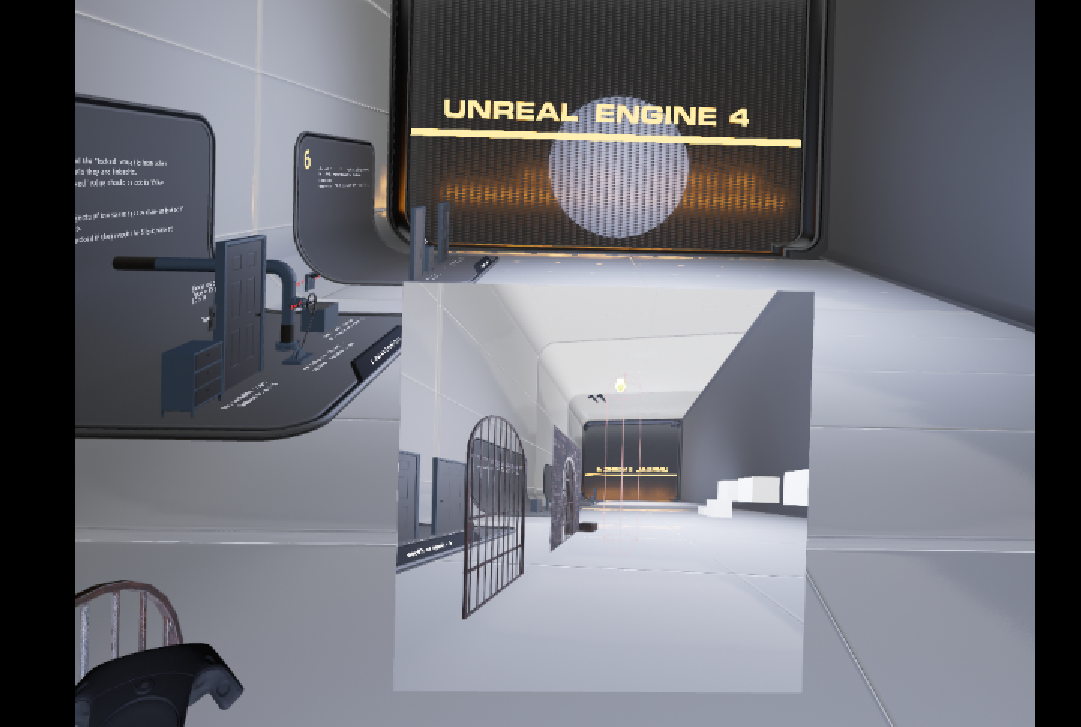
You can see in the scene capture that the cameras height is obviously broken
glossy agate
Maybe show us your components list for the char, and let us know if the chaperone floats.
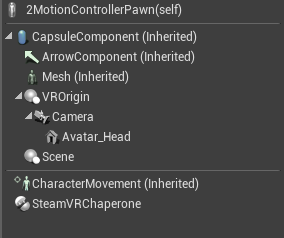
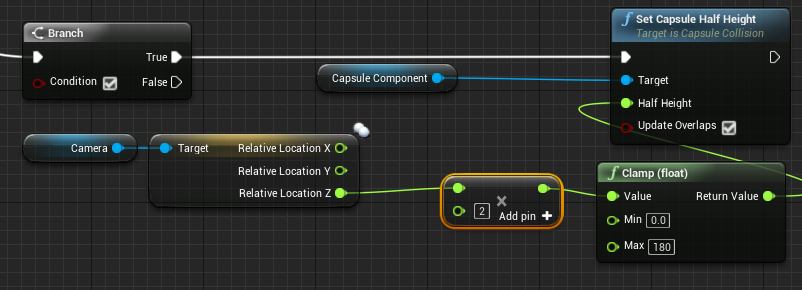 glossy agate
Try making everything child of the scene.
real badge
I cant because the capsule component is inherited
glossy agate
Everything but the capsule. There was an answerhub thing about this problem for floating VR characters. They child it to the scene, and set the scene to a -Y value to get the height correct.
Your capsule half height running on tick or anything like that? Can't tell
real badge
Yeah its on tick
glossy agate
I meant -Z not Y also.
real badge
This is incredibly annoying
glossy agate
Yeah, its floating way up there. I think your Chaperone is off still. Is it working without the half height setup though?
real badge
Ive got that sorted out
but the issue of the camera not being at the correct height still remains
If I put my headset low enough I clip through the floor
yet if I lift my headset up to 2m, it registers correctly as being 2m tall in engine
Wait, its not correct
Its correct at 2m
but not at 1m
its showing that at 1m high, the camera is 135cm
glossy agate
Oh, I have never seen that problem before.
real badge
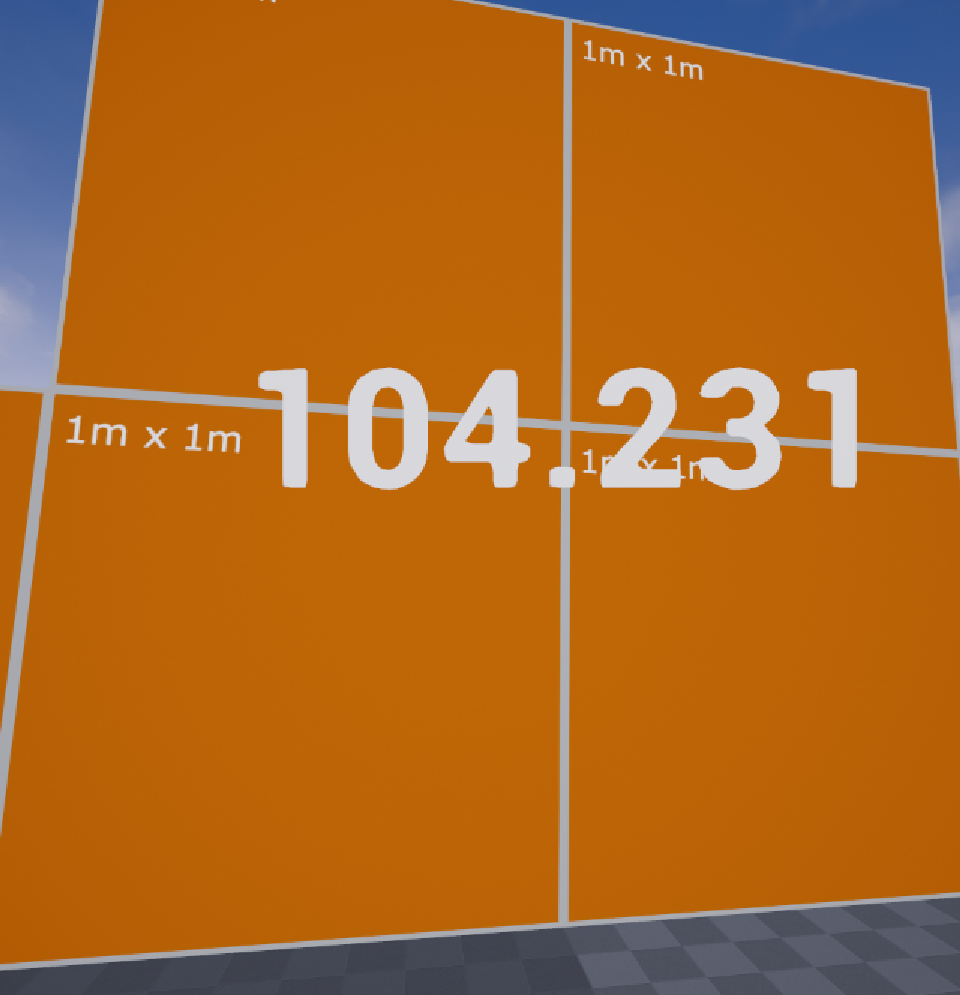
The headset is sitting on a table thats 78cm tall
yet its registering at 104cm in engine
But its obviously not 104cm tall in engine compared to the 1m box
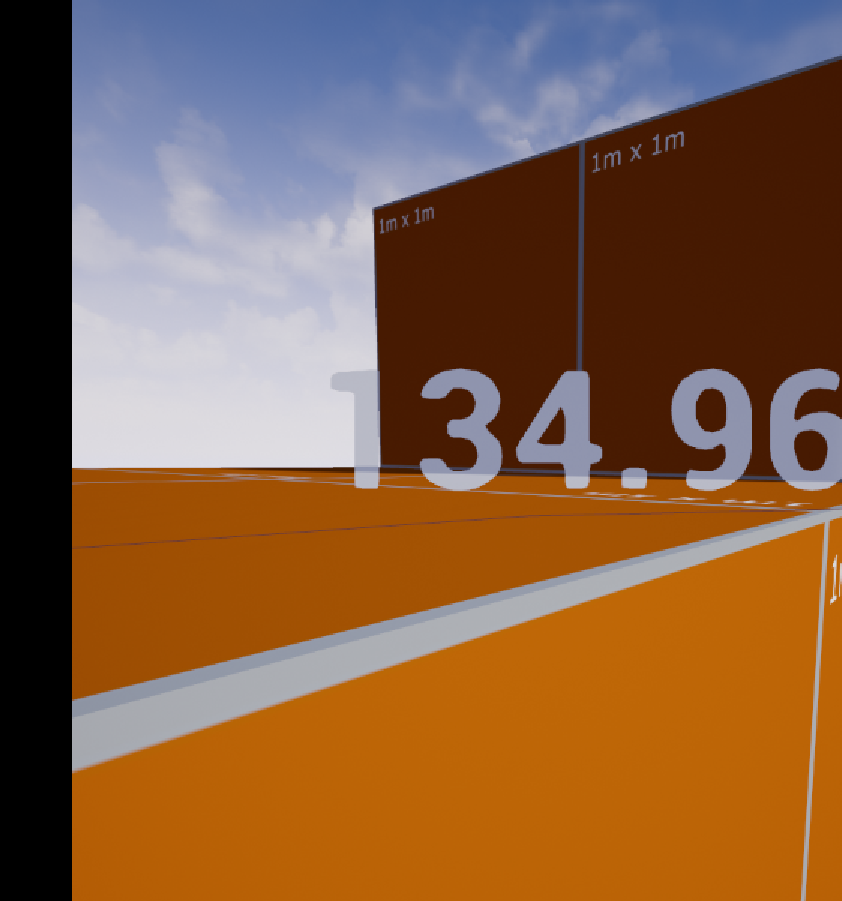
All these measurements are off
Its like there is some multiplier on the height
Because at 2m it is the correct height
Fantastic, now I have a random box spawning on my character
And I literally have not touched a single thing
mighty carbon
Apparently I discovered a bug in Oculus branch 😒
So, I am f#@ked either way
(Although Oculus said they are fixing it)
real badge
The bug is never being able to say what the bug is
mighty carbon
Google Docs
oak hollow
anyone know how to take a screenshot of a game in vr mode?
full junco
@oak hollow HighResShot works fine I think
mighty carbon
Used to not work at all in VR
full junco
well you always say that stuff that works doesn't work
mighty carbon
When I tested it in 4.9 it didn't work
😒 😂
Never tried after that
I even had to buy bluetooth keyboard to be able to snap screenshots when inside of Gear VR apps
(Using PrintSceen key)
full junco
4.9 was august 2015
real needle
I am trying to impliment a two handed weapon does anything know of a solution or a tutorial for doing this in blueprints
 silk lodge
@real badge hey did you solve your error, there's a thing where you have to set eye height or camera height
real badge
Im not sure if I entirely solved it, but I found that making sure the player start is centered on the floor, as well as making sure the VRComponent is at the base of the collision capsule (if you have one)
silk lodge
yeah, you gotta have player start 0 height offset
real badge
I was also adjusting the capsule size based on the camera height from the floor, so you could crouch under objects and such
jaunty shell
@oak hollow @full junco @mighty carbon "HighResShot" works pretty well as of 4.15 https://docs.unrealengine.com/latest/INT/Engine/Basics/Screenshots/
Guide to taking in-game screenshots of environments and gameplay.
the user will have a very brief freeze during the screenshot though
oak hollow
@jaunty shell thanks, got it
mighty carbon
@jaunty shell so, how does screenshot look when taken in VR ?
jaunty shell
Almost the same as a classic screenshot
mighty carbon
I gotta test it on Gear VR
real needle
Hi, I noticed this Git Repo here for 3D VR Menu interaction with motion controllers: https://github.com/mitchemmc/VRUMGPlugin
Is this recent? Is there a more integrated way to do this in 4.15.1?
I am pretty new to VR programming in general and I was wondering if there is some template menu blueprint or something available where I could copy paste from. All I wanna do is making a simple menu with some buttons to change objects colors.

 humble anchor
Hey guys quick question, is there a way to switch from regular screen to VR mode in the same level? I want to see if its possible to give the player the option to use VR or ont
without having to have two seperate levels
jaunty shell
@humble anchor "stereo on" console command ?
humble anchor
i can call that within blueprint in the same game mode and switch everything?
jaunty shell
with an execute console command node
humble anchor
oooh thats cool
then i can have a boolean saying if one is in VR mode or not right?
and use that to adjust gameplay etc
jaunty shell
should be doable yeah
humble anchor
awesome thank you, hope it works well with HTC and oculus \
jaunty shell
there is some slight differences between the Vive and Oculus though
can't get stereo on to work on editor standalone though, weird
humble anchor
huh weird
hope i can get it to work with both
trying to master 3D widgets atm
cant get the widget to show as a component, its invisible for osme reason. Cant add it to viewport either in blueprint
jaunty shell
@humble anchor something like that ?
humble anchor
sorry the image didnt load O_o
jaunty shell
yeah took a while, should be loaded now
can you screenshot your viewport with the widget component ?
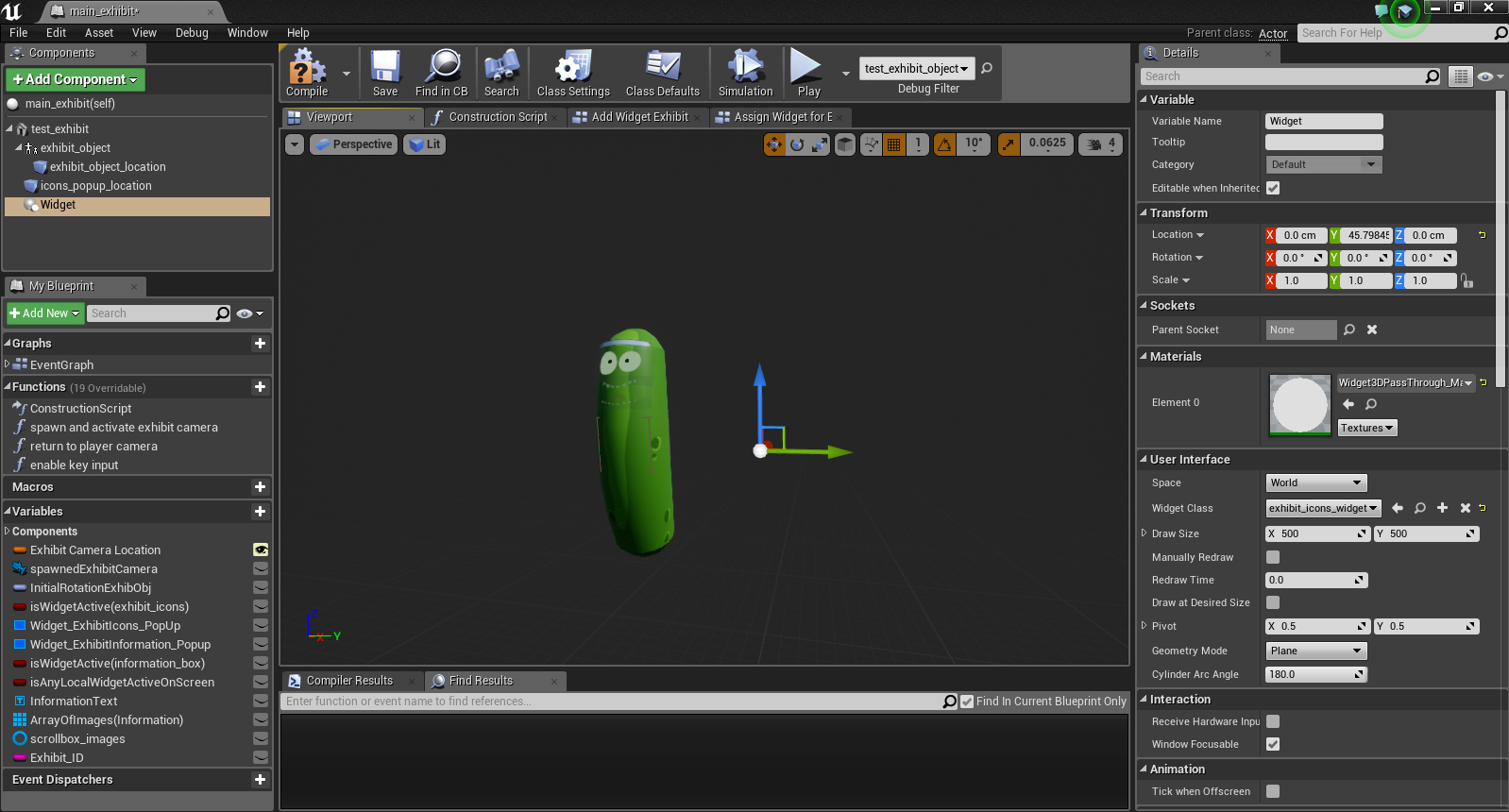 jaunty shell
have you looked behind ? (its one sided by default)
also, try to scale the widget down a bit, I had to get it much smaller to fit
mighty carbon
HL2 VR was greenlit
jaunty shell
@humble anchor when you focus on it there's nothing at all ?
is your widget collapsed by default ?
humble anchor
by default the animation has it set to zero scale but
i tried aother widget with no animation set and it still did not work
oh wait
the other widget worked
need tog et the other one working though
jaunty shell
can you show your widget viewport ?
sturdy coral
@real needle that was a plugin from 4.12, something similar is integrated in engine since 4.13, look for uwidgetinteractioncomponent
humble anchor
@jaunty shell https://i.gyazo.com/b3f22400cd3213f94bf10bf9745a9157.png
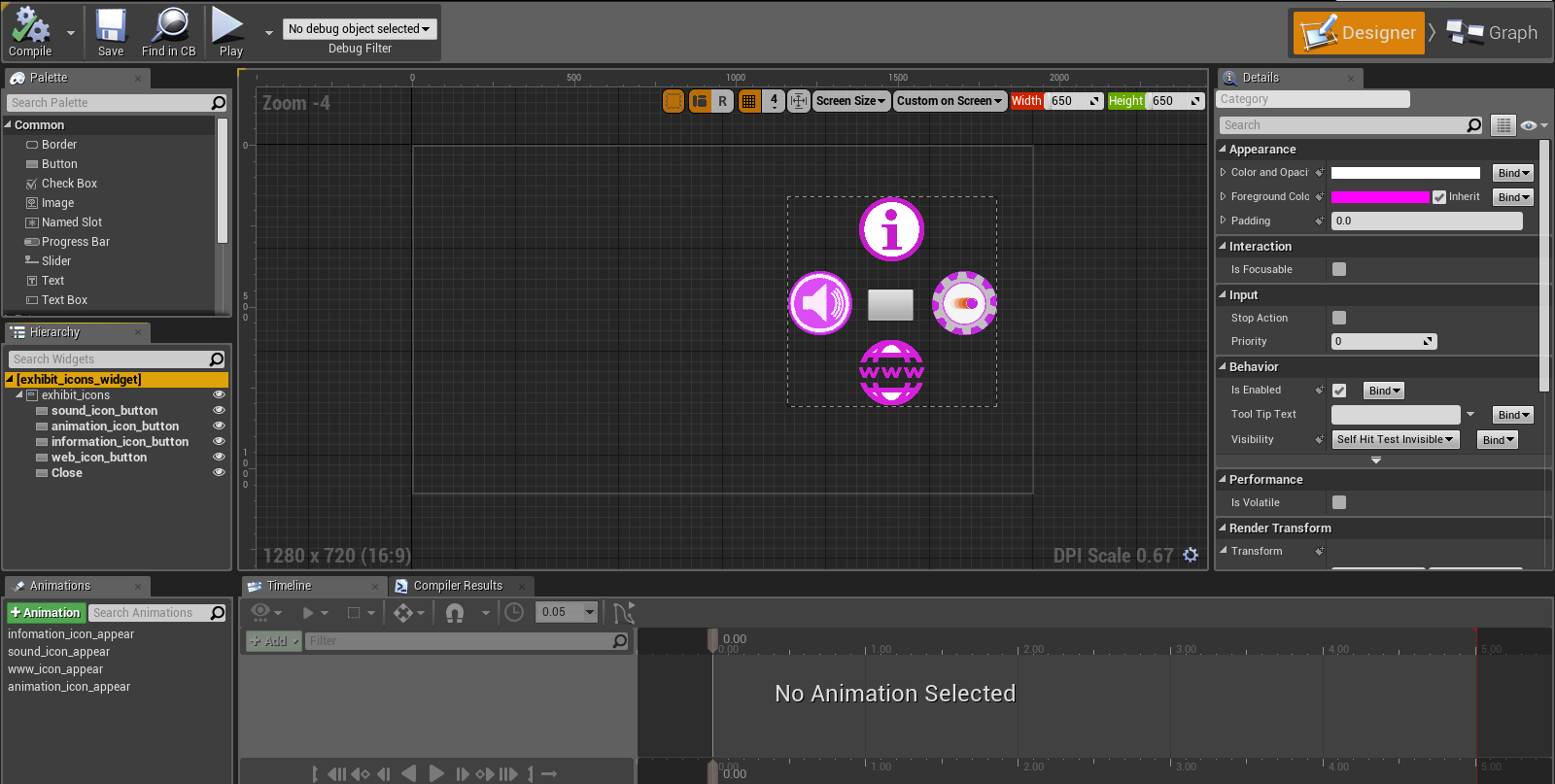 real needle
@sturdy coral Thanks got it 😃
jaunty shell
@humble anchor is the offset needed ?
other than that it should show in the 3d viewport the same as the widget viewport ¯_(ツ)_/¯
humble anchor
the offest?
ZOH
that was when i wanted to use the HUD to display it instead of a 3D widget
real needle
Is it true that communicating between Widgets and Actor Blueprints doesnt work with Blueprint interfaces but with event dispatchers?
jaunty shell
@real needle hmm you should be able to do both, I'm calling functions on a widget from a blueprint
real needle
Im not so proficient mine looks like this:
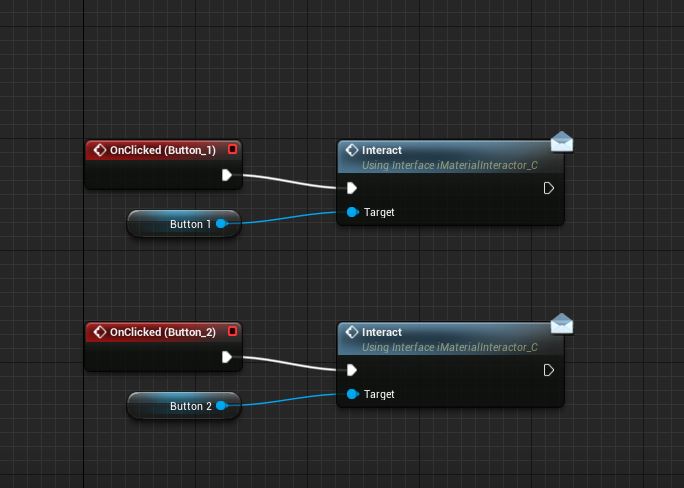
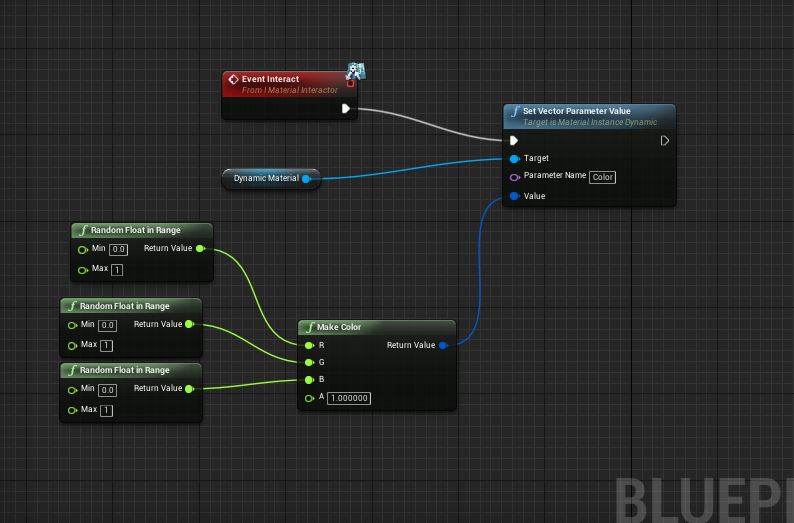
Shouldn't that work?
If i use just a key press instead of my event "Interact" it works
I feel very noobish 😛 Since I am, sorry if this is a dumb question
jaunty shell
haven't used event dispatchers yet, am noob too 😃
real needle
I am happy that I got the VR interaction stuff working with my UI, just my Interaction event doiesnt seem to get called.
humble anchor
i neeed to pratice making widgets more properly lol
the thign with the ray cast @real needle
?
humble anchor
the red laser thing to interact
real needle
Yeah whats with that?
real needle
It is a debug show only yeah
humble anchor
ah yeah
real needle
I used this player controller from the dude that made the VR World interaction examples
humble anchor
oh
mighty carbon
This post is intended to help developers understand how to properly detect and respond to the Reset View event with Unreal Engine 4.
interesting
jaunty shell
@mighty carbon forgot to show what a screenshot in VR looked like
that's with HighRes 1
mighty carbon
nice
jaunty shell
should be able to get better resolution by upping to 2
I think its basically take your camera transform and taking a 16/9 screenshot by default
you can tweak that if needed
humble anchor
cant wait for the day where that kind of graphics in a game is playable in flawless fps
jaunty shell
@humble anchor what kind of graphics ?
humble anchor
realisitc
jaunty shell
well, baked realistic graphics is totally possible in VR
now Realtime lighting visuals in vr is another story
(and by realtime I mean Global Illumination in realtime)
mighty carbon
realistic is overrated
real needle
It really seems using mBPIs together with UMG is problematic. THeres loads of question from peole online...
jaunty shell
@mighty carbon weird, that's what most of our clients want 😉
humble anchor
is there a way to interact with a 3d widget without the 3d widget interaciton compoent?
ie i want to click on an icon with the mouse or a press on the controller with moving the camera to look at the button
wihtout*
jaunty shell
can't you raycast from the center of the camera if a controller is used, and from the pointer if a mouse is used ?
mighty carbon
@jaunty shell for enterprise, maybe.. For games, not really
jaunty shell
truedat
I love me some photorealistic exploring games though, if done right (ie Ethan Carter)
jaunty shell
just raycast from the camera
jaunty shell
😃
real needle
This inability of mine to create effin simple working interaction between a UI Widget and a dynamic material instance on another object is driving me nuts...
And all the resource sonline use Level BPs, I dont wanna use that
clever sky
What's wrong with BPs?
You're just making UE4 hard for yourself if you stick only with C++
real needle
I AM using BPs. But I am not very experienced in UE programming. I do some scritping in 3ds max but even BPs are more advanced
I just cannot get an interface call from UMG to work
ANd I know I am missing some tiny tiny thing
^^
clever sky
Fair enough 😛
real needle
I mean it couldn't possibly get any simpler than that man
clever sky
So what's the situation? You have a UI that spawns that lets you change the material of the object?
real needle
Exactly. Thats my current setup:
First one is obviously on the UI Widget
second one is on the object that I wanna change the color on
But the Interface doesnt get called
I dont know if the "Target" has to be something else? I mean arent interfaces exactly for that? sending out a message and only the objects that implement the interface do something then?
It should be so friggin easy but Im missing something in my noob brain here
clever sky
Button 2 implements the interface right?
Button 1 works but button 2 doesn't? Aren't they part of the same widget?
real needle
Uhm wait a sec
I think I may misunderstand something here.
Object X implements the interface.
clever sky
Yep
clever sky
It shouldn't.
 short moat
Hi all. I'm having an issue whilst using MordenTrals VR plugin. When a networked player grips something it looks (to other players) as if it is attached to their HMD not their hand. It all looks correct to the local player. Can anyone offer any pointers?
mighty carbon

UploadVR
Gearbox Software, the developer of Borderlands, is working on a new VR game, and has recruited students from SMU Guildhall to work on it.
@raven halo around by chance ?
tired tree
@short moat PM me about that, you likely aren't gripping correctly
raven halo
yes, sort of
still on a skype call
but what's up
oh shit
just realized you sent that message half an hour ago 😛
mighty carbon

UploadVR
We've got over six minutes of fresh gameplay of upcoming VR role-playing game, Seeking Dawn, coming to Rift and Vive this summer.
@raven halo PM'ed you again 😃
mighty carbon

Oculus Research will present a paper on focal surface displays at the annual SIGGRAPH Conference in Los Angeles July 30 – August 3. This groundbreaking work demonstrates the potential ability to improve image clarity and depth of focus in VR for a better, more natural visual experience.
wintry escarp
focal surface, is that same as eye tracked fov rendering?
glossy agate
Well there it is. You can now experience the miracle of childbirth in 360 video right on steam! Its free so Im downloading tonight haha. http://store.steampowered.com/app/627320/

ALIEN: COVENANT In Utero is a 360-degree virtual reality journey into a living nightmare that offers a terrifyingly close and personal encounter as an alien neomorph at the time of its birth.
pearl tangle
@mighty carbon I just met with some guys 2 weeks ago that have developed that tech and are/were looking for funding to roll it out. already going to be in a headset before end of this year
mighty carbon
@pearl tangle are you talking about Oculus ?
pearl tangle
the "focal surface display"
mighty carbon
how would they put it into CV1 ?
pearl tangle
they didn't. they put it into a gear vr
pearl tangle
No these guys are external hardware and software engineers that just created a startup around this tech and already have a working prototype of it just inside a gear vr
mighty carbon
ah, ok
pearl tangle
I don't imagine another gear VR until the note 8
mighty carbon
so, how is it all connected to Oculus?
pearl tangle
It's not. It's the same technology oculus is trying to develop and these guys have already done it and proven it and gotten funded
mighty carbon
aye
hopefully no new lawsuit comes out of it :/
aha, just saw S8 + Gear VR ad on weather.com 😃
(but I am sure it's targeted ad since I read all VR news and stuff)
pearl tangle
well they already have 1 patent pending and 3 other patent applications in so who knows
im definitely not impressed with the new gear vr at all. The controller I do find quite nice with the trigger on it compared to the daydream 1, but they didn't make any changes to the headset itself
mighty carbon
what kind of changes did you want to see?

UploadVR
ZeniMax Media has officially filed a new complaint with a demand for a jury trial against Gear VR manufacturer Samsung following the Oculus trial.
fucking Zeni, lol

UploadVR
According to NVIDIA, one of the world's leading manufacturers of graphics processors, VR may be within two decades of a massive performance leap.
pearl tangle
Some software updates to be able to disable the proximity sensor and the touch panel on the headset would be great for demoing things. Some ergonomic changes would also be great. The daydream is a hell of a lot more comfortable and easier to travel with too. Better storage for the remote would also be good
mighty carbon
and Daydream has a lot of light leaks + smaller FOV
and no focus wheel
and no touchpad
pearl tangle
yep. doesn't mean its not more comfortable, more portable and easier to get people to use though which are the things I said
mighty carbon
how is it easier? my mother in law had no issue using Gear VR and she isn't tech savvy at all
pearl tangle
the touchpad isn't necessary when you have the remote. works much better. The touchpad to me is more of a hindrance since people accidentily touch it all the time when you hand it to them
mighty carbon
when your batteries die, you would wish you had touchpad 😉
pearl tangle
so? Doesn't mean the remote isn't easier just because she can use it? I have had hundreds of people use the gear vr and a lot of them struggle with it
mighty carbon
as for accidental touching touchpad - agree
pearl tangle
you can quickly charge the daydream remote from the phone itself in a few minutes. the gear vr 1 uses triple A batteries as well so should last a pretty long time but also quick to change out, tougher if you dont have spare batteries with you though. personally i prefer USB chargable. would be great if the oculus touch controllers had some wireless charging and a dock
mighty carbon
either way, numbers don't lie - Gear VR is a way ahead of Daydream and Daydream isn't even ramping up
pearl tangle
so? im talking about features not how many they sell?
i want product improvements on both, and they both have their pros and cons
zinc rose
@pearl tangle I actually used to prefer usb chargeable myself. but im wondering lately if rechargeable double or triple a's are best. One of my vive controllers lasts like 20 mins (no use) before its red and flashing .. the toher lasts a few hours.. so the battery in the one is obviously not running as well as it should. And I can't swap the battery out for a new one so easily
pearl tangle
oh yeah that does sound like a problem with the battery in there. I still get a few hours out of my controllers. Both have pros and cons as well. For me I would love to just have wireless chargers built into both of the things so that it's easy to just put them down in the dock for 15 minutes or something and they charge up a bit. especially when we are doing event stuff or arcade things, plugging stuff in and out all the time is really annoying.
mighty carbon
Rift still beats Gear VR 😛
pearl tangle
yeah thats what everybody kept telling you for ages :p
clever sky
You can work around the crappy battery issue by putting a battery bank in your pocket
and charging the controller from that 😛
pearl tangle
hah back to wired controllers :p
actually maybe I will make a wireless charger for the tracking pucks
pearl tangle
water cooled gtx 1080ti and virzoom bike on their way! might finally get some more exercise playing vr hah
jaunty shell
@pearl tangle what brand for the 1080 ? 😃
zinc rose
i just recently got a 1070... moved up from a 960... you guys must be rolling in the dough to have all the nice hardware 😛
pearl tangle
the evga water cooled 1 AIO
jaunty shell
noice
I've been using a strix 1080 oc for my personnal rig, I'm impressed how cool it is even on full load
tops at 60°c, not too shabby for an air cooling
pearl tangle
yeah have a water cooled 1080 the MSI 1 in a machine here at the office and a regular strix 1080 and then 1 of the MSI 1080's haven't really tested the difference between them
decided with the TI out though it was time to update from my 980 at home which i did a custom AIO water cooling on
 eternal inlet
anyone know of some good example games that implement inventory management in a good way?
im thinking an inventory system where you can put things into, stack things, grab things from easily
and by good way i mean in terms of how to activate inventory, how to present it, how to get things from it, and such
most games i've seen either use a toolbelt kinda (vanishing realms)
where others has an actual backpack which is quite cool (The Gallery Call of Starseed)
so anyone know of other games to peek to for inspiration?
clever sky
Solus project doesn't use a backpack
That's The Gallery Call of Starseed... that you're probably thinking about.
Solus uses an inventory wheel.
eternal inlet
hehe corrected
wintry escarp
new gearvr controller is nice but grossly overpriced, £50 in the uk
pearl tangle
robo recall 1 is pretty lightweight but works effectively enough for the items it has and feels natural to have a shotgun or rifle on your back and pistols on your hip
eternal inlet
yeah, i like that mechanic with holsters at different locations on your body
but an actual inventory management system where you can actually move things back and forth, i still haven't seen a good implementation of
Vanishing Realms does it by having a toolbelt, which works ok, but still a bit anoying to have to look down all the time when managing stuff in your inventory
pearl tangle
yeah I have been looking at ways with vive tracker stuff and an actual toolbelt for safety training stuff which should help with the not looking stuff but without any haptic feedback or anything to know what you are grabbing if there is multiple items in a close range in VR you have to be looking
call of starseed was certainly an interesting implementation but I wasn't a huge fan of it after the first couple dozen times using the backpack
eternal inlet
yeah me neither
but interresting
im considering something along that
grab a bag from behind your back, it show up as a bag in your hand
once released, it unfolds in 3d space within a grid of a kind
leaves a handle to put things back
another idea:
have two handles infront of you
grab both handles and pull out infront of you to the sides
pearl tangle
yeah like a picnic blanket
eternal inlet
to expand inventory in 3d space
grab both handles and put back at waist to collapse it
yeah picnic blanket sort of... kinda like the forrest does inventory, though it's not vr
pearl tangle
i guess it depends on how many different items you will need to have on you at once
eternal inlet
yeah, im also just thinking about this from a game mechanic perspective
just interrested
i was doing some experiments with slotting mechanic besides the obvious usecases like putting things into a predefined place, bottles with a lid, and such, i thought of inventories as a usecase for something like that
pearl tangle
yeah can definitely work. 1 of the main things is "imprecise movement to precise action" which is something a lot of dev's forget. You want to easily be able to grab and sort things and have it snap in the ways you would expect a desktop application moreso than reality since we can't do things as well in VR yet as we can in real life so have to tweak things slightly as opposed to perfect movement
eternal inlet
agree, it's super important, and very overlooked
i peeked a lot at Ricky and Morty / Job Simulator how they provide visual feedback to where things can snap to
pearl tangle
yeah it works relatively well for a lot of the stuff. the holographic bit to make it snap in place works fairly well. Robo recall does it with their yellow circle for it as well so that you can grab stuff from far away if you are focussing and holding your hand towards it but cant quite reach. works well for the touch where people can't move very much and you dont want to teleport that extra 10cm
eternal inlet
oh i should play RR again... didn't notice you could pull in things like that
got pissed at it because i only own a vive and the controls was odd
pearl tangle
robo revive works well now and it has 360 mode working properly in it so you can disable the teleport rotation changes
pearl tangle
the only bit thats slightly annoying is the gripping guns or bullets but it's setup with robo revive to either toggle if you press it or it holds down and releases when you release if you hold for longer than 3 seconds
touch controllers are still more comfortable for the game itself but I have played through the entire game on my vive instead of the rift because the vive works a lot better and it's more fun with the room scale
 vagrant mantle
Why this happens when playing a 360 video
eternal inlet
@pearl tangle i'll finish up the slotting logic hopefully today and start to experiment with a sort of slotting setup and let u know if i come up with something i feel is good
pearl tangle
snapping range on stuff and visualization of that I think will be your key. giving some haptics to it so you know when it's snapping would help too
eternal inlet
agree
generally a hover event setup will be usefull for that kind of stuff
i added to some Slider/Rotator handles i did last week, but afterwards thought that it might be a general base functionality that should be available to anything you can "touch"
pearl tangle
would love to see what you did with that actually. Doing some ourselves for a project at the moment and playing with the snaps
eternal inlet
sure thing, i actually got it covered on some videos on my channel
should probably do a short version of them, to demonstrate what it does, because it spent quite a lot of time thinking and talking during those videos
pearl tangle
i watch videos at 4x speed anyways so should be alright 😉 send us a link to your channel will check it out
eternal inlet
hehe 😄

YouTube
My name is Jonas and i live in Copenhagen/Denmark. This channel is dedicated to bringing practical tutorials on various 3d gaming/artist related stuff. I wil...
this is actually the short version of what i built during the last series

Link to the whole series: https://www.youtube.com/playlist?list=PLT4SeajOa6mavQ09VO3mmPi5vinawYZoM Note: This series only focuses on the Physics implementati...
oh except i just notice the hover visuals are broken in that video lol 😐
pearl tangle
Ah did you do the interaction examples stuff that was up a while ago with the levers and drawers and whatnot?
dusky moon
@eternal inlet that's so great! could you also make a Plug mechanism ... like when you attach a USB cable into the Port ?!
eternal inlet
@pearl tangle no i think that's @silver pulsar you think of
my work is inspired by his though
but i chose a somewhat different implementation but still similar
@dusky moon that's what im doing with the slotting mechanic im working on now
unfortunately i ran into some issues with mesh collisions not getting updated correctly which has been bugging me for a while.... appears @graceful junco was fighting that issue too and found a workaround for
so im gonna see if i can do that too 😃
dusky moon
Cool! looking forward to that one
vagrant mantle
Hey guys can u help me out
dusky moon
@eternal inlet Also, Is your VRInteractables built on basis of VR Template of UE4 ? or is it based on your own custom VR Pawn/etc setup ?!
eternal inlet
it can be followed along with the default VRTemplate
the movement mechanic i implemented for my VRPawn is not related to that, but i used it in the videos though
oh, but in a remade version where i use a Character as a capsule, and a Pawn as the camera holder and counter move the positions to get the roomscale collision stuff
tired tree
jonas, one of the mechanics i always wanted to implement but never got around to so far is a "Bag of holding" inventory
items are small and arranged within it, and expand to full size when removed
eternal inlet
quite similar to the other tutorial i did with a PhysicsCapsule, but this time with a Character
aye @tired tree excactly as i thought too
it would be so awsome to do
dusky moon
hmm I see, Thats good to hear... so I can follow as I'm starting to accomodate my project with VR template
tired tree
its not hard to make, I just don't have "items" to store in one in the template so its not a big priority :p
eternal inlet
understand that
dusky moon
One other mechanism that I'm dreaming of ... is Touch interaction with UMG screen !
eternal inlet
@dusky moon just take whatever i say with a grain of salt, it's all recorded as part of my own learning process, so i may be saying some gibberish a few times hehe
dusky moon
haha thats fine man! 😄
eternal inlet
👍
jaunty shell
@dusky moon as in dataglove touch ?
dusky moon
@jaunty shell I guess so ... Just basically being able to interact with UMGs by contacting them with motion controller hands
jaunty shell
should be possible right now with a very short Widget interactor attached to each fingertip 😂
dusky moon
hmmm yep! and with some haptic on each trigger it could be rad!
jaunty shell
triggers on datagloves ? :v
I'm using a slight vibration on the controller right now when the user presses a button (but its a laser pointer, not the controller directly)
dusky moon
the thing is that haptic makes the interaction with the screen more pleasant , because your hands wont collide with the screen you need to somehow feel it's presense
jaunty shell
yeah
eternal inlet
@tired tree your white waist ball inventory works supprisingly well btw... only thing i miss is a snapping logic, and yeah, maybe making things somewhat smaller when inside the inventory, hover feedback when getting things from them, and ability to have stacks of items
tired tree
lol, thats not actually an inventory
I literally just gave it a disk and made one object check for it
to show people how easy it is
i haven't done any actual inventory setup because..its not really plugin related to be honest
attaching to sockets and locations on grip release is game side
eternal inlet
I know it was just a demo, but a good one too 👍🏼
mighty carbon
what's new people?
for vblanco - https://uploadvr.com/farpoint-shooter-review/

UploadVR
Farpoint is full of great AAA-quality shooter moments, but is the entire game a homerun hit for PSVR? Read our review to find out!
clever sky
@eternal inlet have you done a tractor beam for objects into your hand yet?
Once you do, you can combine it with an icon or list based inventory menu
Click on the item and continue holding and it lerps into your hand.
Let go before it hits your hand and it pops back into inventory.
Then you can just use your standard UI pointer based inventory management.
UploadVR. Whoo boy. Those accusations sure are something.
jaunty shell
@clever sky do you think there's some truth to it or its the venom of a grumpy employee who's been ejected ?
clever sky
I don't know to be honest.
I don't know the character of the people working in Upload VR. But at the same time, this isn't the first time something like this has happened among tech startups...
Uber, Magic Leap, now UploadVR. Very different sizes... but all with that fratboy culture writ large.
On the other hand... if you make these sort of accusations, boy do they land hand. Good incentive to fuck with people by tapping the internet outrage machine.
jaunty shell
pretty "fucked up" indeed
clever sky
But yeah... those accusations are like... comically absurdly wrong.
But then, Trump is president, so... you know what they say about reality been stranger than fiction.
mighty carbon
well, if what they are being accused of is all true, then it's really sad
it's probably worse than high school level of behavior
I can't imagine grown up men acting like that at work


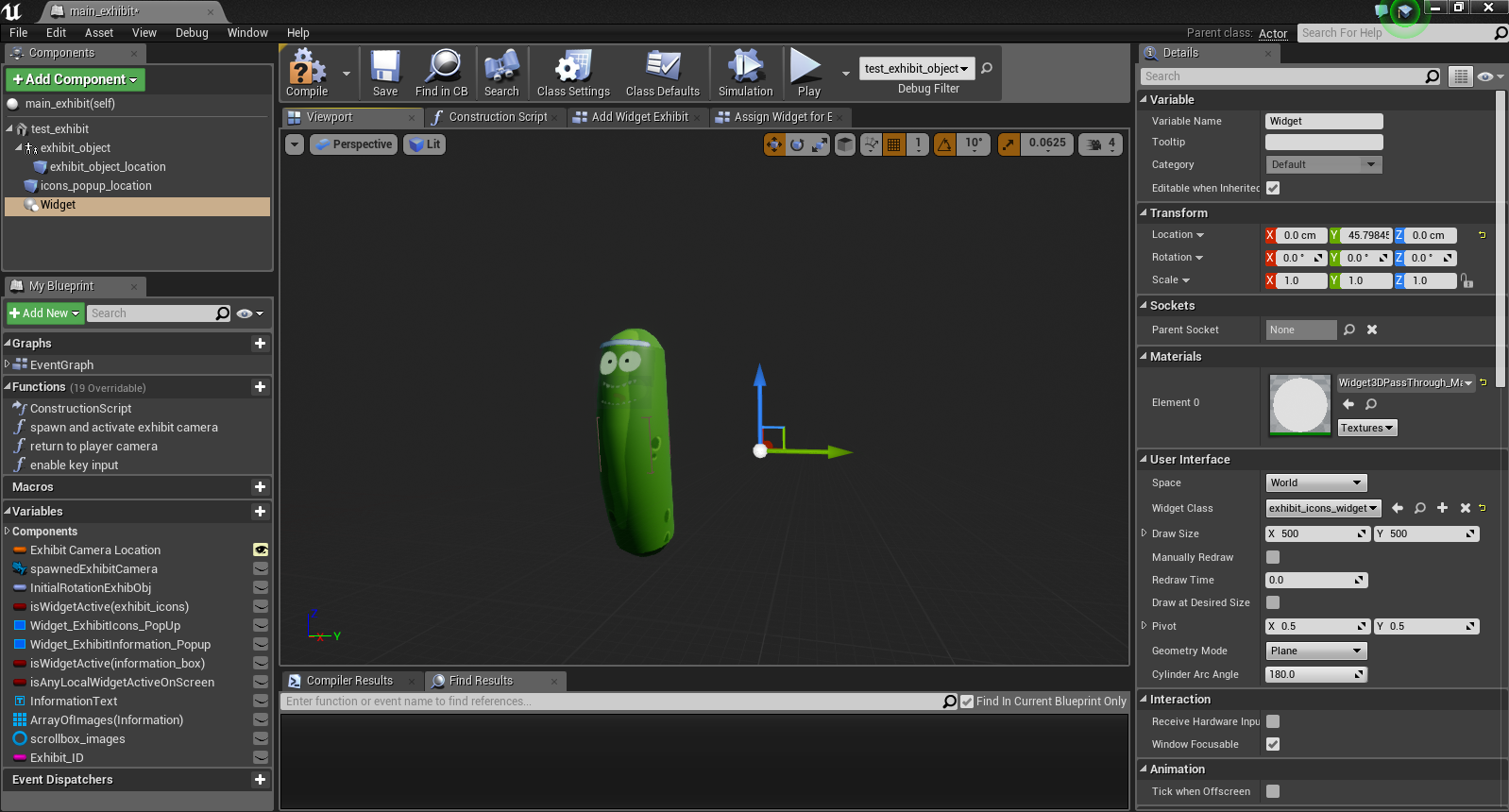
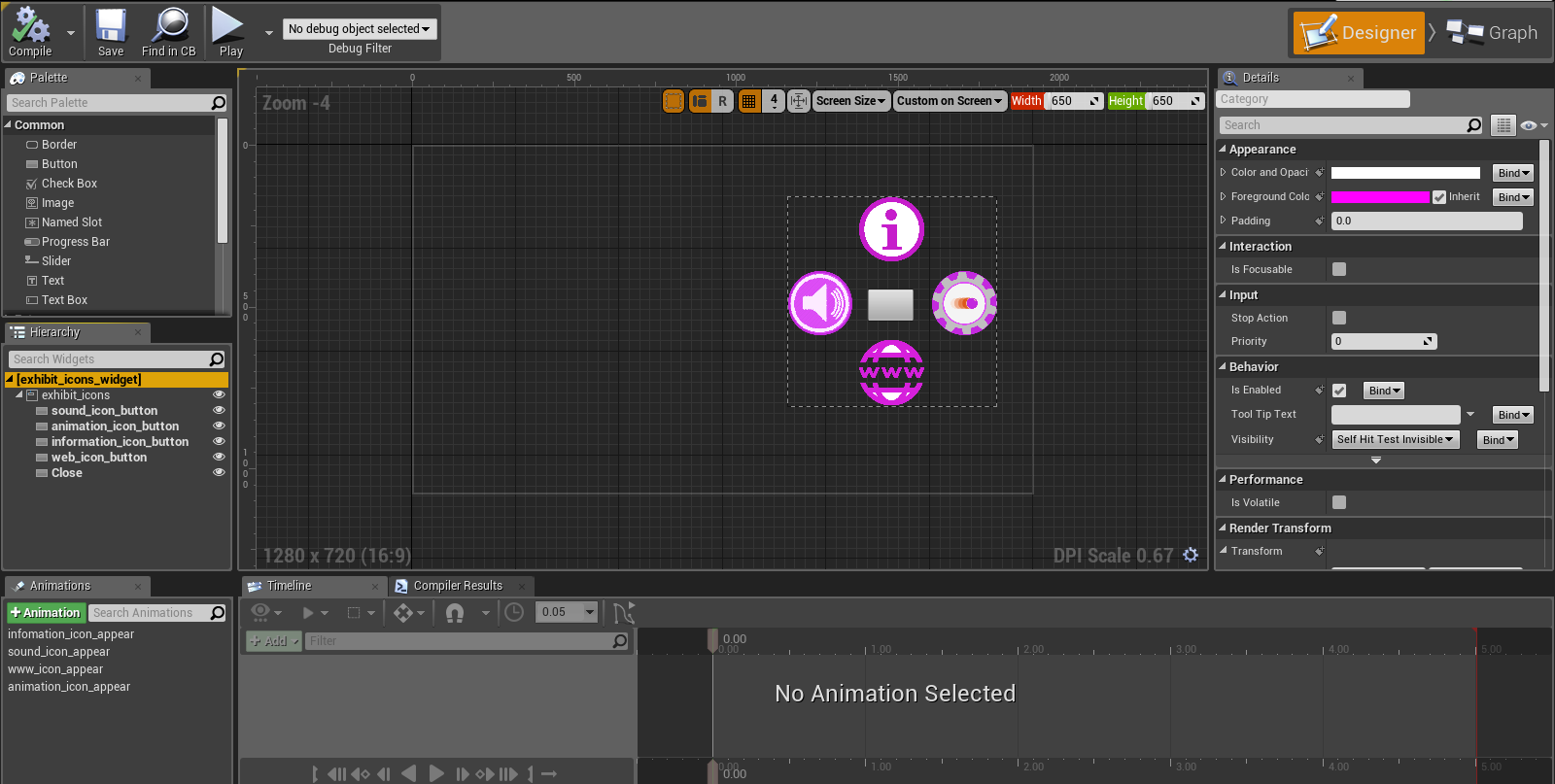
We're preparing and editing the 4.16 release notes right now.
I'm reading these features, upgrades and fixes like https://t.co/OCj6rmp4NU
 Twitter
eternal inlet
Twitter
eternal inlet
@clever sky u have an example running that show that mechanic?
real needle
hi everyone. I have a question. How can I change something like a game mode (Mode A at table 1 and Mode B at table 2), when my vr pawn enters a specific area? A overlapping event does not seem to trigger because I teleport with my locomotion pawn and therefore "skipping" the boundary, I guess. How would you do such a game mode change?
glossy agate
@clever sky was playing the new freedom loco update last night. Really cool stuff with the hand outlines for climbing! How do I get to the mountain level though?
clever sky
Go through the simple town - up the ramp through the orange door to the enxt level, across the roof top to the other building and open the blue door
eternal inlet
@clever sky generally just a good inventory management system
glossy agate
Ahh ok
clever sky
Cheers tho.
eternal inlet
I mean i look for a good example of one
clever sky
@eternal inlet There are plenty of inventory systems to draw inspiration upon from gaming. A lot of people like Diablo style tetris management.
Some people prefer straight up lists.
Grid and icons are pretty typical.
eternal inlet
Yeah something along diablo type would be nice but not sure how it would feel in vr
clever sky
If you have a competent interaction system, shouldn't be too bad.
Most of it comes down to UI design work.
The VR part just amounts to showing the inventory widget and figuring out how to get it in and out of the widget.
eternal inlet
Thats what i hope to build, but its not as straight forward as it sounds
clever sky
It never is! 😛
glossy agate
Jonas for the inventory you could have it like a pocket satchel on the hip. Drop items directly in it to add to inventory, and you can holster main items on your body like guns/grenades. Then you can pull off the hip satchel and drag it open to reveal slots and swap out items. Was thinking just making it like umg and using sprite icons for the items.
eternal inlet
I'll fiddle around with things and see what i can come up with
glossy agate
That was the system I was thinking of doing anyway
eternal inlet
I agree weapons would be good to have handy at a holster position
For quick access
 granite jacinth
UploadVR in some deep poop
eternal inlet
I prefer things to be actual 3d objects, but for inventory they should be smaller
But not too small, otherwise it will be hard to pick them up again
glossy agate
Yep. To swap them out you just click the umg sprite and it can just switch a catagory item. I.e. One rifle, one pistol, 3 grenades, couple potion slots ect. So when you click a rifle in inventory it just swaps the ride you have holstered
Super basic and easy to learn but versatile enough for a inventory system you can plan.
glossy agate
Yeah, you can probably come up with something better. I was thinking simple cause I'm not that good at programming haha
eternal inlet
Me neither, so i practice using this as a usecase
glossy agate
Can't wait to check it out. If you make a 3D version of the day z inventory that would be dope!
eternal inlet
Will have to get dayz or find a video showing the inventory system they have
real needle
hi everyone. I have a question: How can I change something like a Enum (Enum A at table 1 and Enum B at table 2), when my vr pawn enters a specific area? A overlapping event does not seem to trigger because I teleport with my locomotion pawn and therefore "skipping" the boundary, I guess. How would you do such an enum change?
eternal inlet
Might do that
jaunty shell
T_T dayz, so much potential wasted
@real needle are you setting the location of your pawn ? I think there's a bool you can check for that
glossy agate
It's just a slot system based on object size if you google it. Forces users to plan out what they really need
jaunty shell
"sweep" I think
real needle
@jaunty shell The "Teleport"-Node is currently used, so no. But using the set location with this "sweep" will fire any overlap events?
jaunty shell
that's what the doc says
real needle
Hmm interessting, I will test that then
jaunty shell
I'm using the set location node to teleport my pawn around and it works flawlessely
shouldn't be that different from the teleport node
real needle
@jaunty shell https://i.gyazo.com/4ffb37913691f6e88b7d8f5dc326cb8a.png I now set the location and rotation which works with, including the "sweep" checkbox. But the overlaps do not fire. Are my checks wrong?
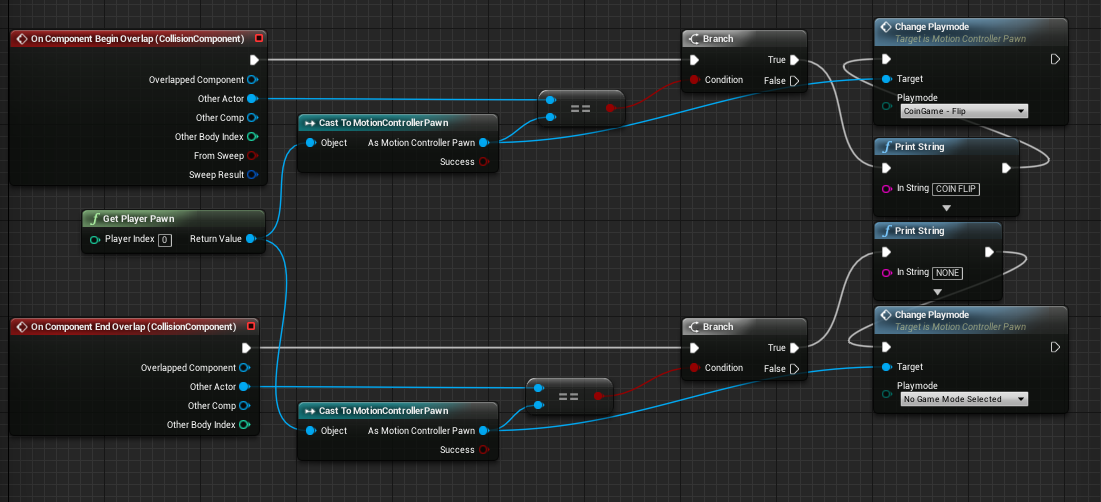
 real needle
yeah, had no collision on my camera/head
jaunty shell
@real needle so is it working now ? :p
eternal inlet
@ryan#9503 dayz inventory management looks confusing as fuck lol
i watched two videos now, and i still dont quite get it
real needle
@jaunty shell yes it works ^^ thank you. Now I only have to determine what those playmodes /enums actually change for the players 😄
glossy agate
@eternal inlet I meant just the space allocation haha. Not the dragging stuff around portion. If you have a grid you can do like 2 slots rifle, one slot pistol ect so you can plan a load out better than then point system onward uses.
eternal inlet
ah ok yes then i understand
i also realize i should investigate a bit into other inventory systems a bit more hehe
i should look at how onward does it
glossy agate
There newer update just gives you 8 points to use on items like guns grenades and weapon attachments armor ect. Thought a slot system makes more sense though especially if it's a rpg type game where you can have a couple loadouts at once.
eternal inlet
yeah slot system sounds more appealing to me too, but also sounds interresting with a point system... guess it's something like a weight system?
weight/size
jaunty shell
@real needle nice, good luck with the enums :p
eternal inlet
and/or based on a strength attribute
 quaint jay
Hi guys. Does anyone know when and if they will fix the mirror modes for vive?
jaunty shell
@quaint jay what's the problem ?
quaint jay
I want to get the preview as 16:9
jaunty shell

reddit
One of the most annoying things when you try to get a screen recording of your game is the huge black borders on either side of the screen that...
check this thread then
quaint jay
i know you can compile it yourself but then i need to share engine and project with the guys im working with right?
quaint jay
ok. then i guess i will just bake it in that ediror for builds
thanks anyway. strange that its not implemented for the vive same as the rift
jaunty shell
yeah its been on the backburner for quite a while in the old UE4 trello
pearl tangle
You can just make your own fork of the engine and then your other developers grab your branch of it instead
quaint jay
@pearl tangle Its not that critical right now. But yes thats an option. Still just hope it can get fixed 😃
pearl tangle
pretty much you are stuck with a customization to the engine at the moment as Epic is doing a different version of mirroring and mixed reality stuff but doesn't seem like it will be out for a while still
there are some other alternatives that give you some tweaks and then just add a new mirror mode which are a bit better but still require an engine build
quaint jay
I only need if to be able to capture videos from or for final builds so i'm ok with just making a copy for that right now
pearl tangle
oh, then I would just do that in sequencer recording instead then
quaint jay
have no experience with it.. sounds like i need to look into that.
pearl tangle
pretty much you just press record and start playing and you can record whatever you want from any angle with the proper cinema camera rather than recording the screen output. works well for third person capture as well if you have a head model for your character too
mighty carbon
what are good reasons for upgrading to 4.16 from 4.15 ? (VR related good reasons)
quaint jay
@pearl tangle OK. Thanks 😃
mighty carbon
@pearl tangle and is that all? 😦 I don't use VR Editor and Steam Audio is still raw in 4.16 (Valve's words)
do you know if there is anything good for Gear VR ?
pearl tangle
the new cloth physics stuff should be very helpful too
you can do runtime permissions for android
VR Updates:
Unified Console Commands across VR platforms. The previous code base did not share common interfaces across HDMs; now there is a shared layer that developers can work from rather than maintaining each platform individually. This provides several benefits such as easier bootstrapping of new platforms, consistent interfaces, and less redundancies in HMD implementations.
The mobile multiview path now supports GearVR. Mobile multiview is similar to instanced stereo on the desktop, and provides an optimized path for stereo rendering on the CPU. Enable this in your Project Settings under VR, and restart the editor to take effect.