#virtual-reality
1 messages · Page 110 of 1
 mighty carbon
ha, I guess I'd need to get i7 for that 😦
 wintry escarp
just leave it going when you goto bed
 glossy agate
Yeah, or start it in the morning before you go to work so it's done when you get home.
I experimented trying to setup a build machine on AWS. Never got it to work right though.
 deft badge
Gday all, hope all is well.
mighty carbon
sup
@glossy agate I got i3 Skylake.. While it's good for VR gaming and devving, it's not good for baking super high quality lighting in UE4
glossy agate
Yeah that's why I mentioned the AWS build machine. Maybe you can get it to work if needed. I haven't tried since like March of last year. It was running but suuuuper laggy
mighty carbon
 full junco
@mighty carbon those are regular FPV goggles
quite good FPV goggles
isn't related to VR though
mighty carbon
so, it's not 360 deg, look-around deal ?
full junco
not sure what you mean?
FPV goggles don't work like VR, they are more like "you have a screen in front of you", quite small FOV
mighty carbon
I see
I thought it's like Gear VR - as if you sit inside the drone and can look around
full junco
well maybe you can somehow connect it to cameras on your copter
this is one of the most known FPV goggles I think: http://cinemizeroled.com/
Cinemizer OLED Best-in-class 3D video glasses for Drone First Person View (FPV), Private Cinema and much more ! #emotionMatters
also looks better than the DJI one. lower res though, the DJI one might be the first able to display full hd
mighty carbon
resolution doesn't really matter since it's used for flying out of line of sight
full junco
flying out of line of right is illegal in many places, so even with FPV you have to stay in line of sight. not sure about how its regulated in the USA
but its still not related to VR
FPV goggles existed long before the oculus rift was announced
full junco
it always felt like you are pretty much the only one here 😄 can only remember Norman3D also did gearvr stuff I think
 real needle
How would one go about deliberately dropping framerate to the point where steamvr grayspace pops in in a good manner?
Whenever I servertravel the image gets locked to the HMD for all clients and it's extremely nauseating
real needle
Even if I use "CameraFade" it still does it...
full junco
isnt greyspace only happening when you lose tracking?
real needle
no it also happens if you drop way below reprojection
if it can't do 45 it'll drop into grayspace
mighty carbon
I gotta tell you - pr0n companies do a way better job interacting with users than any other VR company, including Epic and platform holders
 pearl tangle
how are they interacting with you?
@real needle why don't you just create a complex loop that locks things up? Or try and spawn in a shit tonne of objects at once to kill the fps?
mighty carbon
@pearl tangle on Reddit.. They released an app, like Oculus Home sort of thing, and I asked questions, they answered. I proposed a search option - they said they are on it.
they either banking already, or extremely desperate
😛
pearl tangle
difference with a small startup company I suppose.
 clever sky
@real needle Can't you just blanket the HMD with a locked black or grey screen before transition?
mighty carbon
https://uploadvr.com/ihs-estimates-4-million-gear-vr-2017/ << now I wish it was Rift 😃

UploadVR
IHS Markit is forecasting sales for both Daydream from Google and Gear VR from Samsung, the latter of which is powered by software from Facebook's Oculus.
full junco
@mighty carbon any smaller company that's intelligent will have time to talk to potential customers
glossy agate
Any smart company of any size should connect with consumers.
mighty carbon
yeh
glossy agate
That's who buys product haha
full junco
@glossy agate well a Microsoft doesn't need to answer any question about windows on reddit
mighty carbon
it does - login image on my Win 10 at home hasn't been updating, yet at work on my Win 10 Pro workstation it updates several times a day.. I have to be heard!!! 😃
glossy agate
That's bad on their part. Unless all the cash is shareholder money, consumers and employees should be number 1
pearl tangle
they do have their own support channel stuff
definitely I have not been impressed with Oculus support at any part of the process though thats for sure
ooh looks like facebook has crashed over here as well
mighty carbon
I got Oculus hardware and I was answered a ton of questions on the forums. It's just spotty. Sometimes I get several replies during the day, something I hear nothing for weeks :/
pearl tangle
yeah you are in the US so probably all of their support is over there, they don't do anything to support other timezones
mighty carbon
have you tried their submission form in your dev console ?
(that reminds me to try asking UE4 questions through that console instead of the forums 😛 )
glossy agate
At least Steam is super responsive. Viveport has like a 72 hour response time.
mighty carbon
sent my question directly to Oculus.. Timer is set! We'll what happens
glossy agate
I also have to note that the viveport response was unrelated to my question haha.
mighty carbon
ha
real needle
@clever sky Yeah that's what I'm trying to do, good ol' primitives
It's just a pain in the ass to test because servertravel only works when you play out of editor
 winter venture
you guys use two separate hand meshes? i guess physics assests get messed up if you mirror one with -1 scale? 😦
mighty carbon
why would you not use two individual meshes ?
winter venture
i mean it's two meshes attached to your character just it's simpler to have one skeletal mesh and scale it instead of duplicates of all nimations and whatnot
mighty carbon
eeh, when you animate in 3D app, you mirror anims.
winter venture
fair enough... for simple hand animations i've just been animating in the editor, can't mirror :\ not a huge deal just wondered if that's what everyone did
mighty carbon
https://www.unrealengine.com/marketplace/hands-for-vr-scifi << get this and don't struggle 😉

"Hands for VR: SciFi" brings three science fiction hand models (Futuristic Gloves, Alien Hands, Mechanized Gloves) to Virtual Reality developers.
(not mine)
winter venture
yeah nice hands, i already made some that work well enough for me though I think, just had this little problem with physics assets but it won't be that bad to mirror it in blender and duplicate animations

 odd garnet
Capital Factory in Austin is doing a lot of VR stuff
If you're ever in town check em out
pearl tangle
Samsung upgrade day
deft badge
@pearl tangle Just tried one out in the office today. Not bad. It's just a virtual laser pointer really.
Pretty easy to use
Much better than using your head as an index finger
pearl tangle
oh yeah i already have some of the daydreams, the controller is a direct knockoff of the daydream 1
deft badge
I didn't see any drift. wasn't that a problem with the day dream controller?
pearl tangle
although i do like the trigger on the gear vr 1 a bit more than the daydream remote. it's like the stole from HTC and Google and mixed the 2 together
nope never really had any drift problems much with the remote
deft badge
I never used one, that was just word of mouth
pearl tangle
it's more that it depends how its tracked you either lock it to the headset for position or you detach it and then it can get out of whack. the samsung 1 has the same issue since neither has positional information
deft badge
Yeah
It rotates around a given location. So if you have T-Rex arms, and just rotate from there it seemed fine
pearl tangle
yep that depends on the software and how you set it up
i got more daydreams than gear vr's :p
deft badge
I haven't used ue4 for gear vr, but will need to shortly
pearl tangle
google 1 comes with the proper "arm model" setup. idno how gear vr has done their updates for it
deft badge
Any advice (besides the performance aspects)?
pearl tangle
the remote should make interaction a bit better for you but i guess with gear vr you now need to account for people having the remote and people not having it. daydream you have to have the remote
deft badge
"Below you will find a list of all the Post Process features that will work with the Gear VR Headset"
"1) Auto Exposure"
the end
pearl tangle
yeah things have improved a bit
but assume you aren't doing anything with post process stuff too much
mobile hdri stuff i think still has issues
so if you want to do a fade to black you have to do it with a black sphere around the head but that could have been resolved recently im not sure
deft badge
Roger that.
full junco
@pearl tangle fade to black can also easily be done with a UMG widget
deft badge
Did you guys see this?

Framestore VR Studio
"This was the first time the Framestore VR Studio had combined real-time interactive elements with high quality prerendered environments—pushing both the interactivity and the quality in mobile VR"
The results are super nice for mobile
 eternal inlet
@winter venture so far i've only used the defaults with the vrtemplate, which use -1 scale. I vaguely recall having some phys asset issues back a while too though, but don't recall if i found a way around it
i also recall i started to do seperate animations for each hand, and seperate animbp's for each hand and midway through that process abandoned it, because it felt wrong to have the same logic two places.
can you explain what issue u have with the phat asset? maybe i can recall if that was the same i had trouble with
pearl tangle
@full junco on gear vr?
pearl tangle
there had been issues with a lot of it when i was doing the stuff yeah
but how are you doing the 360 screen fade to black on UMG anyways? never tried that
full junco
just show a fullscreen UMG widget
just directly added to the viewport
and just fade a border color in the widget
pearl tangle
yeah could potentially work now, but there was previously issues with them only showing up on the right eye if you did that before
full junco
well how long ago was that?
pearl tangle
4.13
winter venture
@jonas_molgaard appears to be a known bug https://answers.unrealengine.com/questions/336826/ragdoll-physics-dont-work-with-mirrored-skeletal-m.html so I just made a separate hand and duplicated everything
wintry escarp
does the new forward renderer help gearvr, or did that always use its own path?
full junco
@wintry escarp mobile always used forward, its own
so the new one doesnt have to do anything with gearvr
pearl tangle
4.16 has some improvements with monoscopic far field rendering for performance but thats the only new stuff on there
 wicked oak
i would love to use the mobile renderer in my game
honestly, it would improve performance massively
if i could use the gearVR "simple forward" render path
all my game is baked after all, and no fancy effects
and monoscopic stereo would help my worst map massively
do you know if there is a way to "force" the mobile renderer for pc games?
pearl tangle
there is always a way to do anything
as far as how you would go about doing it though I wouldn't have a clue. completely rewriting the rendering stuff probably
wicked oak
im going to try to force the "simple forward" path
lets see what happens
forced it, its recompiling all shaders
lets see what happens
pearl tangle
be keen to see how it comes out in the vive then
wicked oak
New: Simple forward shading path for scaling down to low end PC.#
this is what im trying to force
pearl tangle
shaders recompile?
full junco
well I would expect that the simple forward path does not use DX11
and you need DX11 to talk to the HMD
I guess simple forward is DX10
wicked oak
full junco
because due to its purpose of running on old GPUs, those GPUs might not support DX11
wicked oak
lulz
see ya in a couple hours
yes, i think simple forward is dx10
but honestly, the gearVR renderer would be perfect in my game
its EXACTLY what i need
full junco
there is no DX10 bridge for desktop VR HMDs
wicked oak
i dont have dynamic lights at all, its all baked on incredibly simple materials. The depth prepass of the big forward renderer fucks my game a lot
full junco
openvr also doesn't support DX10
wicked oak
becouse i have a map with a fuckton of drawcalls
and drawcalls are slow
if i had instanced stereo off, this map on VR would be up to 5000 drawcalls
its 2000something on instanced stereo due to the depth prepass
full junco
simple forward likely doesn't support instanced stereo 😛
wicked oak
no, but it would lower my drawcalls a lot
full junco
not the desktop one
wicked oak
due to no prepass
full junco
how does it work without prepass?
wicked oak
it just renders the mesh directly
with a forward shader
ue4 "fancy" forward renderer works like this:
first, it renders the whole scene as depth only, without a pixel shader (i think)
then, it calculates the tiled light, using this depth for it
then, it renders the whole map, again, using depth test as equal
then it postprocess
full junco
I think you need the depth for occlusion culling though, how does that work with simple forward?
wicked oak
forward shaders are quite expensive as they have to do their light calculations on "occluded" parts. so a pixel might be shaded more than once
this is one of the reasons for the prepass
the deferred renderer can do a prepass too
this way, if you have complex materials, you will have 0 overdraw
but its optional there
i have it forced to disable becouse my game has very simple shaders
for something like Paragon, with fancy shaders but not that many drawcalls, you really really want that depth prepass as it saves you time
full junco
you dont have 0 overdraw, the overdraw issue stays same for transparent materials
wicked oak
well, 0 overdraw for solid and masked
the Oculus forward renderer also doesnt use a prepass, or its optional
they allocate the lights from the camera tiles
it has less features of course
and is worse with many lights
i wonder if i could cheat by skipping that depth prepass in the engine, and then make it use "normal" depth testing for the basepass
full junco
whats ""normal" depth testing"?
pearl tangle
I have all of the base materials for paragon on me actually. they do transparency quite a different way with masking
wicked oak
Simple Forward makes my game run 1 ms faster
but it still is doing a depth prepass that takes nearly 2 ms. im going to see if ican cancel it, as it happens on deferred too for some reason
 lucid pecan
@wicked oak out of curiosity - is there a reason you don't try to optimize the draw call count? Unless your map is runtime generated, surelly you could find some ways to lower the number.
nevertheless interesting experiment. I was woundering about using the mobile forward pass on desktop vr too.
wicked oak
i already try
its just that HLOD doesnt do enough while destroying quality
im trying to merge meshes, but still....
wintry escarp
I thought you were doing desktop
wicked oak
nah, simpleforward is just 1-0.5 improvement on ms but it lowers quality and has some issues
mighty carbon
How do VR games do HUDs? I don't recall seeing any in RR or Dead and Buried.
Currently I use opaque planes with UMG and material hack to draw them over the scene, but depth sorting hack can get it only so far. I am thinking of switching to UMG rendered to stereo layer, but that will look 2D.
 jaunty shell
there's an option to render your UMG widgets in a curved manner
adds a bit of depth to your UI
clever sky
@mighty carbon that's my current approach. What's the limits to it?
Seems fairly robust!
And I can have other UI elements that I can control the relative depths of as well.
@jaunty shell how do you do the curved stuff? Might test it out
jaunty shell
@clever sky in your widget component, search for the "geometry mode" parameter
change plane to cylinder and bam 😃
 tawdry dragon
@mighty carbon any reason you're not using stereo layers? they would solve those problems 😃
clever sky
Sweet. Good to know.
mighty carbon
UMG has to be transparent in order to be drawn without depth test
Not only it adds overhead to mobile rendering, it doesn't look too good since I have to use Additive transparency.
That's why I can't just use UMG, curved or not.
@tawdry dragon I can, but I haven't gotten to render-UMG-to-stereolayer part yet ;) I was hoping to avoid it as it supposedly a way more performance taxing than simple stereo layers with textures and somewhat more taxing than plain transparent UMG .
tawdry dragon
https://www.youtube.com/watch?v=lxFqUDW5-fE I have used this one with some sucess

Description: How to render UMG widgets into the resolution independent stereo layers while keeping the benefits of UMG such as interaction. Epic Documentatio...
not on mobile, however.
mighty carbon
Right, that's my point
And mobile is limited to 3 stereo layers max.
Oh, and I think I could use masked transparency for UMG, but on some phones masked transparency causes crash and Samsung/Qualcomm haven't fixed the driver. So I'd rather not use that.
(And it's more expensive than additive transparency)
mighty carbon
It is and always has been.
wicked oak
masked translucency doesnt blend
thats the cool of it. It renders the exact same way as a solid object, but it has holes
 alpine torrent
Frost effect what blends
mighty carbon
I used masked transparency first and performance was horrible. Changed that to additive and performance went back to normal
Maybe on desktop it's not an issue. On mobile it is.
wicked oak
how weird
 tired tree
The problem with the "BP hack" UMG to Stereo layer that mitch is doing is that its still sending everything to render normally for UMG, he is just hiding it with a material
when I made my Stereo layer widget component if stereo layers are on I just retarget the stereo layer source to the UMG render target and totally turn off rendering for the component itself
wicked oak
im doing that hack myself
tired tree
lol
someone just asked me about mixed reality
and i realized there might be a simple hack to make it work without much effort.......
wicked oak
local multiplayer? other window? how?
im going to try mixed reality on ps4
becouse we can do a render target to the screen
so i just have to render a render target as a 3rd person camera
jaunty shell
@tired tree any pointers for ez MR ?
tired tree
Edit Needs plugin work still
 plain badger
@tired tree The most recent(5bc8d73e749e) example template doesn't seem to build for me. Download is only 54MB though the "link" says 176MB...
tired tree
its 4.16, and the download always shows larger because it says the full repository size fo rsome stupid reason
plain badger
Aha, I see.
I read something about the simple vive char I think, so I was curious. 😃
tired tree
I initially like the simplechar more when i first made it, due to being less code and less overridden from default, but the list of features that the primary supports and the simple doesn't keeps growing
plain badger
Yeah, I have been trying to make my own character based on that since I don't need multiplayer or climbing etc. Less code is nicer later on.
tired tree
simple supports both multiplayer and climbing
it just doesn't support neck offset and the walking override
plain badger
Yeah, that's what I'm stripping out... 😃
tired tree
ah
mighty carbon

Oculus
Join the Official Oculus Discussion Forums and talk about Oculus Rift, Oculus Touch, Samsung Gear VR, and virtual reality.
tired tree
nice they fixed one of my bug reports
hopefully they get to the other before it releases
wintry escarp
my gearvr controller didn't arrive, Samsung are lying scumbags
next day delivery my arse
mighty carbon
next day meaning the day after
 sleek niche
Hey everyone. Have a strange thing going on. I'm spawning both my controllers but they seem to be spawning only on one controller. Am I missing something simple?
 zinc rose
@sleek niche so one controller moves them both?
zinc rose
@sleek niche i started my VR project long before the template was out so I don't do it that way.. but if the left and right channels are chosen.. i dont see why it wouldn't work. is it spawning a left and right hand or two lefts? or two rights?
also trying adjusting the collision to always spawn and ignor collisions
oh i see the other screen is a left and a right overlapping
sleek niche
Yeah it's kinda strange. I don't have a game mode setup. Would that have something to do with it?
zinc rose
save and close your project... open a fresh project.. start a new VR template.. open the motion controller map and launch it as is.. see if the same problem occurs.
 woven folio
Is there no way to get motion controller tracking that has no noticeable latency from the controllers you see when you open up the Steam menu?
If I setup motion controller meshes in my project, and then open up the Steam menu, the UE4-tracked controllers lag behind in position by I'd guess 0.1-0.2 seconds
The VR template and all of what I have looked at have the same latency
sleek niche
@zinc rose Works fine when I open the template but when I build it myself both controllers only spawn to the left hand.
I must be missing something simple
zinc rose
what does the motion controller blueprint look like?
zinc rose
@sleek niche hmm. i donno. what does instanced editable mean? should that just be editable?
sleek niche
not sure
tired tree
@woven folio you should keep stat fps active when you open up the overlay and look at what the game does :p
zinc rose
@sleek niche are they spawning on the left or right controller?
sleek niche
left
zinc rose
set the default ovalue of the hand to right and see if it spawns on the right. if it does than means setting it on spawn isn't setting it?
you can go into the motion controller actor during play and from the drop down check both instances of the actor and hover over the variable or print it to log and see if they both say left
zinc rose
excellent
woven folio
@tired tree Performance is the same
There is also a slight jitter
Same results in shipping packaged game, 90 fps steady
zinc rose
@sleek niche in your spawning of the hands.. change collision to always spawn and change the loc and rot rule to "snap to target"
and keep world for scale
zinc rose
try again? maybe it needed time to think
where is your "vrorigin" in the component tree?
tired tree
@woven folio sorry i assumed that it was limiting frames on overlay, but when the steam overlay is active the late updates don't work perfectly, you can verify by using a frame of reference by staring at it and rotating your body and then doing it with overlay off. You can notice the delay with the overlay on but with it off there is none.
is your problem that you just want it to look the same with the overlay? or that you think they are delayed in game?
woven folio
Well there is already a jitter in the game, which leads me to believe they may be delayed as well
It is perfectly smooth with the overlay, that is what I am aiming for. A slight delay is unnoticeable in the game alone
tired tree
whats the jitter in the game? i don't get one
also the late update isn't executed as late as the steam overlay does it, but its still pretty good
shouldn't be noticable
unless something is wrong
zinc rose
@sleek niche if you switched the default to the right hand. did they both spawn on the right?
sleek niche
when defult is right they both spawn right
zinc rose
then even tho its saying its set after you start the game.. its not actually setting it on spawn.
recreate that motion controller actor. not sure why your hand enum is instance editable and not just editable.. only thing i can really see as being it. since default is working so its just cant be getting set i guess
sleek niche
yeah thats what i thought. when i checked the template it also says instance editable.
maybe something crazy is happening
zinc rose
i checked the template real quick in mine.. just says editable
sleek niche
when i dup my controller BP and spawn both of them it works
zinc rose
weird
sleek niche
I'll come back to it. Thanks for helping @zinc rose
mighty carbon
lol, what an evening - nativization fails, building release build for distributions fails too (without nativization)
bizarre
mighty carbon
I see
full junco
in 4.16 its likely quite a bit better
zinc rose
it should. i moved to 4.15 because i saw a note saying it was supported. Failed within seconds of trying to build with it. Several projects. one kept saying that the class folder was too deep. it was one folder from root :/
 graceful junco
lol, has anyone been able to successfully build with nativization? Failed for me too.
woven folio
@zinc rose Probably the entire file path depth
zinc rose
@woven folio hmm P:\GameDev\ProjectName \ is it expecting everything to be on the root of the drive? i wonder what the real limit is...
zinc rose
i do like my folders.. and sorting
mighty carbon
If anyone wants to chime in: https://answers.unrealengine.com/questions/598529/building-with-exclusive-nativization-fails.html
Here is my forecast - Epic will ask if I can reproduce it with clean template project and if I can't, they will tell me it's my project's issue and not engine's issue.
(it happened before)
zinc rose
@mighty carbon happens often.. even if you show 3-4 threads and 50 replies of people having the same issues since 4.8 and every version up to 4.15 😃
mighty carbon
I wonder how much it really costs to be on UDN and have your bug reports prioritized 🙄
full junco
epic cant fix stuff that they cant reproduce
so if you cant reproduce it, epic also cant
mighty carbon
they could - I offered them my project
full junco
yeah, they usually take that
mighty carbon
nope, now they don't
full junco
they do
mighty carbon
last time they took it in 4.13 and it was a royal pita to get them to do that
and maybe they do get C++ projects as it's much easier to debug
tired tree
they took two projects from me for bugs on 4.16 already
mighty carbon
maybe they just don't really support Gear VR and thus they don't want to mess with it
good for you too @tired tree
full junco
yeah, I dont think they have many gearvr lying around for support staff
but regular bugs where you dont need any special hardware, they always like to just take the project
mighty carbon
maybe.. it would be really sad if they don't take my project because it's Gear VR project 😦
tired tree
whats the nativization errors its displaying?
full junco
reduce it to a minimum
mighty carbon
it's directly related to Gear VR - some Oculus lib is missing (and I've never heard of it before)
nah, I am talking about "building release build for distributions fails"
as for nativization, I just posted a link a page above
there is full log of the build
mighty carbon
inclusive means all BPs will be nativized
exclusive is there to only nativize specified BPs
(shorter build times)
either way there is no point since I can't build for distribution :/
so even if I could build fully nativized dev build, it won't do me any good since I can't build distribution release build
tired tree
sorry meant exclusive
what exactly isn't nativizing, because sometimes you have to nativize support structures too
mighty carbon
well, exclusive fails - as stated in my bug report
tired tree
ie: use a structin that blueprint, going to have to nativize that too
mighty carbon
hmm.. I specified FirtPersonCharacter to be nativized
Engine should pick up dependencies along the way too.. It's hard to keep track of them manually
tired tree
it doesn't keep track of all things that you add
interfaces for one
you have to nativize them too
if it uses them
mighty carbon
then it's retarded to offer such option if user have to scavenge the project and make sure related BPs are also added into exclusive list
tired tree
its a newer feature...and technical to boot
mighty carbon
that's a good example of anti-UX practices of software development
once dist build issue is resolved I'll just use Inclusive nativization
waiting on that build is probably less time than figuring out what I need to nativize exclusively :/
tired tree
the log literally tells you what it can't find...
mighty carbon
aye
zinc rose
wil be cool when it works with a click. while its new and neat... they have the ability to find all references and dependancies now. Not sure why it cant do that when you include a class
though i noticed recently that find all references of a variable isn't reliable so might not be trustrworthy and thats why automation is taken out for now
tired tree
its telling you what all it needs, if it automatically did it, it could go ahead and nativize half your project when you intended one file
pearl tangle
hey figured some of you may be interested in this. For the little mobile game I built for a client a few weeks ago I put together a data studio dashboard for all the tracking information. Pretty handy to have if you are doing proper tracking on all your events and everything in your games. I will put another 1 together for the rugby game when I put it up in the arcade in a couple weeks as well https://datastudio.google.com/u/3/org//reporting/0Byomxy74OysYVzVTaTB2aUYwNnM/page/umYE
zinc rose
@tired tree well if it only requires dependancies... and i choose to nativize something and half the project is its depenancies than thats my intention
tired tree
it may not be
if you intend a small exe size
and don't realize how much it requires
zinc rose
then i shouldnt and couldnt be using it
also a simple check mark that says "Auto add dependancies?" would resolve that pretty quick
tired tree
and they may add that in the future
its early
it just now is stable with my plugins
after 3 engine versions
zinc rose
well ive seen it referenced for awhile now... i figured when they say its supported... I thought it would be a bit more fleshed out. Should move it from experimental to beta maybe. but I wouldn't say its supported yet. But maybe theres documentation that details all the things that need to be proper before it works and i just missed them all
or the first one
tired tree
honestly you both expect far to much of it
its honestly not an easy system to get working correctly
its going to take awhile
zinc rose
i dont think anyone is saying it is easy. at least I havent. and I'm not "expecting" anything tbh. but it said it was supported in the release notes and I'd seen it for awhile and thought it would be cool to test out. wasn't waiting on it.
tired tree
i would consider it supported, supported isn't "finished"
zinc rose
in the release notes I remember just seeing it said supported. I dont remember if there were a lot of cavaets or documenation around it. if so, my bad for not reading. If there wasn't though.. their bad for releasing it as supported with unknowns?
zinc rose
if it does. thats good.. I havent been able to get it to work
tired tree
roborecall was full nativized on release...
zinc rose
i have a massive project from 4.10 that wouldnt work and i expected taht not too. its too big . but i started a new non vr project and tried it out and it didnt work. failed in like 5 seconds due to folder structue being too deep
but it wasnt..
so. i just gave up on it.
tired tree
what engine version was that on?
zinc rose
i only tried it on 4.15.0 i upgraded my projects to it and created a fresh one on 4.15.0
full junco
I did any expensive stuff in c++, so I'm fine with the nativization not working
would be nice to have, but not necessary
tired tree
the point is that it does work, just takes some management
zinc rose
@full junco I took a simialr approach for my large project, hence I'm not really waiting on it. I just went through a lotta work upgrading my large project to 4.15 to try it out... and failed immediately. kinda urked me
full junco
it doesn't work in many cases @tired tree
tired tree
which ones
full junco
like mine and all the other ones
zinc rose
lol
tired tree
whats your log throwing
full junco
letters
tired tree
too bad its not words
zinc rose
words hurt
full junco
well that you only notice if it compiled fine
I'm always running the editor with BP break on error active
tired tree
which is good, but i've seen marketplace packs with null warnings
full junco
so I don't have any BPs that access any stuff that would crash in c++
tired tree
i can't imagine the problems people are going to havewith nati because of that
full junco
@tired tree I'm running inclusive nativization again now so that I can tell you where it fails
so that you see its definitely a real error
@tired tree https://pastebin.com/raw/7rgGuuzf
mighty carbon
any kinks like I have for Gear VR when building for Rift ?
pearl tangle
just do the default template on mobile, scalable 2D and things are pretty straightforward for a lot of things
mighty carbon
nah
pearl tangle
you don't have the same issues with triangle count as much though
mighty carbon
you missed my posts a few pages above
I can't build release for distribution for Gear VR now
in 4.13 I had no issues with that
pearl tangle
oh gotcha
real needle
Is there a way to add commit notes before deciding to commit?
I sometimes work in a couple of classes and don't want to check all of them in but I'd still like to write down what I've done for them, without keeping it in another document
pearl tangle
did they change the location requirement on the license file? I noticed the documentation hadn't updated on the android stuff when i did the recent 1
You can do a commit just on 1 file, you don't have to commit everything
tired tree
@full junco are you linking to parts of core in that project?
pearl tangle
or are you using perforce?
full junco
@tired tree what?
full junco
its my main project
real needle
@pearl tangle Yeah but I want to write down some commit notes without actually committing. I can see how this could be dangerous if you take a note and then change it again withou doing a note... I'll just keep another document up.
tired tree
i've seen most of that thrown when missing a member class like the
Unknown member class in /Temp/TEMP_BP/Game/FirstPersonBP/Blueprints/Bcas.Bcas:EventGraph.K2Node_CallFunction_268
line
pearl tangle
with git I just commit the individual file locally but not commit it to the online 1, then you can do a bunch of local commits so you can easily roll back and have all your specific notes on there then you just push it to everybody else when you are happy
i don't think perforce works like that from memory
real needle
I'm not well known with how I can keep a local repo that easily merges into the main using P4V
I tried to branch off of main to have a stream that I could use just for packaging, but that was a complete mess and the merge/integration doesn't work
pearl tangle
yeah thats the main reason i like git over perforce or svn. it tracks everything locally and not just against a single repo. Im not sure how p4v might handle something like that but im sure there is a way with branching
full junco
@tired tree what member class should be missing?
pearl tangle
yeah it's never quite caught up on the branching front, svn didn't do it so well either
real needle
Yeah I'm sure there is a way, there's just so little docs/tuts on how to use it
Even their documents on how to connect to a remote server IS FAULTY
tired tree
dunno, its somewhere in that temp folder Bcas BP of yours
but thats the only full Error in that log
real needle
And we've told them about it
pearl tangle
i know epic runs a bunch of perforce branches for their stuff and then they do git to put the stuff on github
full junco
@tired tree I dont have any temp folder, thats a folder by the nativization. my directory starts at Game/
tired tree
every one of those errors is the callstack leading up to an ensure failing in that blueprint
full junco
I always have a lot of cyclical dependency in my widgets
took a long time before BP didnt freak out when you do that
tired tree
i "think" that you have a blueprint function being called with no class defined?
full junco
how can I call a function with no class defined?
tired tree
its checking for self reference or a class and running into the class being null
K2Node_CallFunction_268
is the function though
full junco
the BP is pretty much empty
its just a holder for the widget component
also has an audio component and 2 static meshes
ah wait
I do have a node that doesnt exist, yeah
its not connected to anything, so BP doesnt complain
it was a function in a c++ function library I once had
then I deleted the function, but had no reason to delete the node from BPs
full junco
well its not connected to anything
it should just discard it
like the BP compiler does
tired tree
those remenants bug me, i always delete them :p
full junco
I dont like to delete anything
I also dont really delete code, I only comment it out
so most of my .cpp and .h files are filled with commented out code
mighty carbon
well, dev build with inclusive nativization doesn't build either
full junco
I just like looking at code or at a BPs and knowing "ah, this is what I did earlier here"
full junco
well, I always feel like I might revert anything I do 😄
is there a way to say "nativize everything, excluding these BPs:"?
I have many old BPs that are filled with references to things that don't exist, and now it complains about those
full junco
well, I won't delete my old BPs, so then I can't use the nativization
shouldnt be that hard to make it discard anything that isnt connected to anything
so if I would have slow BPs I would probably try to make it do that
but since all my BPs are super fast, I have no need to do it
tired tree
curious as to if there is a bug report for it already
it may be listed as "won't fix" to ensure that classes nodes aren't left
classless
full junco
maybe its already fixed in 4.16

 upbeat smelt
hi guys
been working with panoramic plugin from k&l for a while, but in 4.15 I can't get it to work
is there any workaround, or is it just me?
wicked oak
im incresing the price of DWVR to 15 dollars
as its now a lot better and closer to release
also so i can then put it on sale on the summer sale
upbeat smelt
no!? seemed like the suitable place to ask...
basically i enabled the plugin by k&l and tested it...
didn't work
disabled instanced stereo...
didn't work
disabled all HMD...
wait for it...
didn't work
clever sky
K&L is Kite and Lighting?
I assume it's a plugin that they shared with the community a while back but haven't kept it up to date?
This is one of those instances where the larger audience capture of the forum would be more beneficial than the smaller faster response times of discord 😛
I'm guessing anyway. Maybe if you're lucky someone with specific experience doing that might chance across your question in a timely manner!
tawdry dragon
Anyone here knows how to get access to the hand mesh(with rig if possible) that nearly all oculus touch apps use?
or do people just custom make them
jaunty shell
second is the answer
tawdry dragon
too bad :\ Seems like a lot of work, where a standardization would have been excellent
tawdry dragon
I am downloading @tired tree VR expansion template, if I recall correctly he also has one
or was it the proteus?
hmm..
mighty carbon
Check Oculus forums
Find "imperativity" dude. He has FBX package.
(Oculus official)
wicked oak
the hand meshes are on the forums
private dev forums
and they are pretty easy to get.
also, oculus themselves do not like you using the default hands
they have said that they prefer if devs implement their own hands depending on the game
instead of the example holographic hands
upbeat smelt
thx @clever sky
tawdry dragon
Got the rigged hand from proteus and made it fit the controller my self 😃
upbeat smelt
I'll see what I can get out of it
tawdry dragon
 vagrant mantle
How to fix the camera at a location in Vr, i have a lift which has a camera, i want it to attach to a location in it?
jaunty shell
Attach your pawn to the moving object ?
vagrant mantle
@jaunty shell only the camera, i have attached the camera at a position in the lift, while play it is not in that location
jaunty shell
what platform are you using ? GearVR or HTCVive/Oculus Rift ?
vagrant mantle
HTC vive
jaunty shell
you need to attach the pawn then , the camera is tied to your headset
pearl tangle
@upbeat smelt They stopped updating it quite a while ago but try it on a blank project and see. I always had lots of problems with it. Allar's monoscopic panorama renderer works much easier
you shouldn't ever be attaching the camera to something, as @jaunty shell suggested you want to attach the entire pawn to the lift and let them handle control of the camera themselves @vagrant mantle
jaunty shell
I haven't suggested to attach the camera to something O_o
jaunty shell
needs moar comma 😄
vagrant mantle
@jaunty shell @pearl tangle I'll try that.
mighty carbon
@raven halo have you had this kind of issue https://forums.oculus.com/developer/discussion/52603/gear-vr-release-for-distribution-build-fails#latest ?
Oculus
Join the Official Oculus Discussion Forums and talk about Oculus Rift, Oculus Touch, Samsung Gear VR, and virtual reality.
@wicked oak Oculus has private dev forums already? (I was told I will get invite from Oculus when they are ready, but never got one)
wicked oak
i was in those since august
 raven halo
@mighty carbon sorry I haven't been around much
I've been suuuuper busy with Oculus GearVR submission process
which is hell on earth let me tell you
I think in order to build you need the updated Android SDK, dont you?
maybe that's what the errors are?
mighty carbon
it's up-to-date
vagrant mantle
I have tried attaching the pawn, one thing I forgot to mention the lift has a character which head was removed at that point the camera has to be fixed
mighty carbon
@raven halo how can you do submission process without building distribution build, which requires entitlement check and UE4 (from Epic) fails to build it because of missing Java classes ?
raven halo
we have not had that problem
mighty carbon
what UE4 version do you use?
Also, do you use Epic's or Oculus version ?
@raven halo ^^
raven halo
Oculus version yes
we have had to
it's a super long story
but basically
we have had to drop support for Android 5
mighty carbon
yeah, that's it.. Epic's version always misses a lot of small things that are critical 😦
raven halo
which means we have to use a higher sdk version. The one that manages permissions through pop ups
so you no longer accept by just installing the app
mighty carbon
API 22 ?
raven halo
but you actually have to prompt the user during the app's execution
(Epic only implemented this in 4.16)
API 23
we have had other problems which I can't even think about anymore regarding gearvr's motion controller
which were also fixed with Oculus branch
mighty carbon
oh, I am not planning on using controller at this point
I just want to get my small app out and then improve it
ha, no Ouclus and no HTC among supported HMDs manufacturers https://uploadvr.com/microsoft-mixed-reality-will-revolutionize-work-away-desk/

UploadVR
Just ahead of its Build developer conference Microsoft has spoken up about its work in mixed reality, talking about how it can revolutionize work.
tired tree
I mean..how would they be supported? They don't exactly have the right hardware for mixed reality
wintry escarp
wtf, I reinstalled oculus geavr app and now it insists on a facebook account
just like they said they wouldn't do
wicked oak
@tired tree they kind of do if they do it as it seems
wich is very, very low fidelity vr
no fancy grapix
tired tree
Mirosoft is talking about inside out for spacial recognition and mixed reality
not really that compatible with current headsets that they aren't partnering with
wicked oak
arent the headsets all inside-out tracking?
wintry escarp
anyone know how you reorient the gearvr controller?
tired tree
talking about htc and oculus
tired tree
being my point why they wouldn't have presented them at the conference, which Motorsep was pointing out for some reason
wicked oak
good lord
nvidia tesla V100
what a true goddamn monster of a chip holy shit
15 teraflops
815mm2 of die size
5120 CUDA cores
its huuuuuuuuuuuuuuuuuuuuuuuuuuuuuge
Independent Thread Scheduling
The Volta architecture is designed to be significantly easier to program than prior GPUs, enabling users to work productively on more complex and diverse applications. Volta GV100 is the first GPU to support independent thread scheduling, which enables finer-grain synchronization and cooperation between parallel threads in a program. One of the major design goals for Volta was to reduce the effort required to get programs running on the GPU, and to enable greater flexibility in thread cooperation, leading to higher efficiency for fine-grained parallel algorithms.
and they now have "Tensor" cores that are specific for machine learning
nvidia shares jumped considerably today
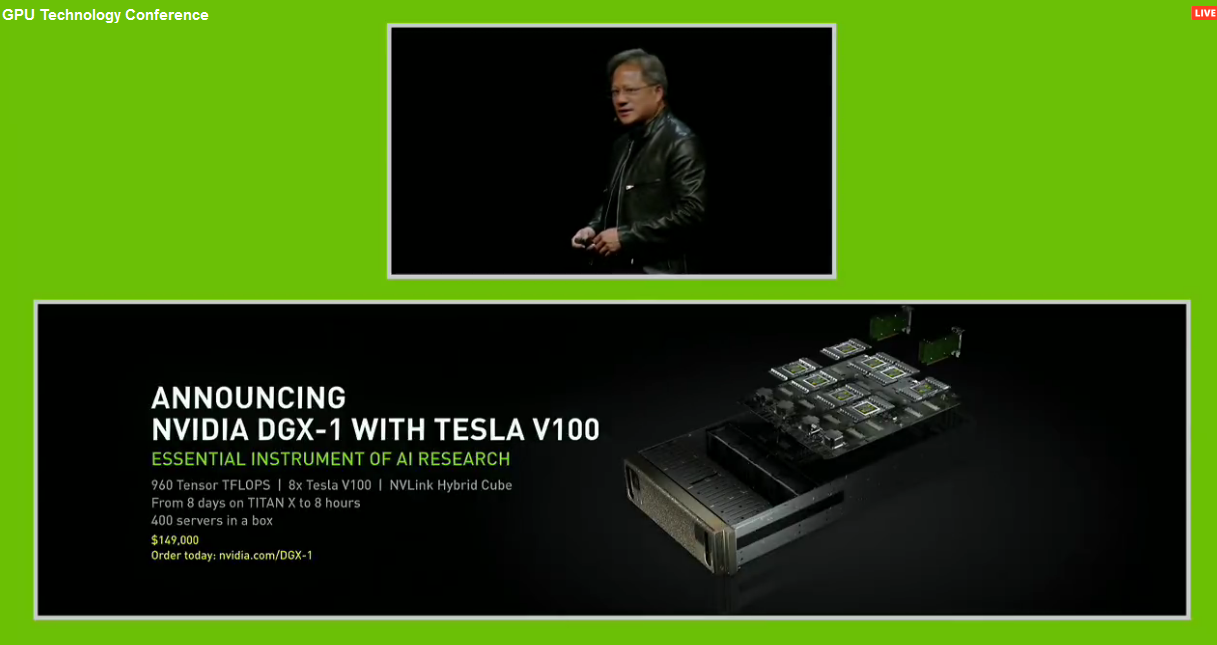
only 150k dollas
i think its the biggest modern chip around
wintry escarp
ok, its very expensive but the gearvr controller is pretty good
mighty carbon
well, hopefully next desktop chip will be VR oriented and offer massive performance gains at reasonable price.
wicked oak
they are using the AI money to improve ALL the chips
gaming chips is the low tier
nvidia is rolling the money
REALLY rolling it
and amd cant compete
becouse AMD cant run CUDA or Nvidia hardware specific AI/math libraries
 silk lodge
8 days on WHAT TITAN X??? Pray tell which magic titan X this is so much faster than.
$150k for 8 of ' em, not just a single card
wintry escarp
next amd gpu is supposed to match NVidia, all they have to do is be cheaper
if they come in at same price people will stick with the one that's got mature drivers etc, nvidia
vagrant mantle
Hi guys, help me in fixing camera at a location for vr
mighty carbon
decided to build engine from source
got this:
D:\projects\UnrealEngine-oculus-4.15.2-release-1.14.0-unified>GenerateProjectFiles.bat
Setting up Unreal Engine 4 project files...
GenerateProjectFiles ERROR: It looks like you're missing some files that are required in order to generate projects. Please check that you've downloaded and unpacked the engine source code, binaries, content and third-party dependencies before running this script.
Press any key to continue . . .
WTF?!
has anyone had such issue ?
never mind - UE4 docs are outdated
tired tree
ue4 docs really didn't say to generate dependancies beforehand?
pretty sure they always said that
pearl tangle
did you run the setup before running generate project?
there are 2 different files you need to run
mighty carbon
docs don't say that
but I am already building it
do you use Developer Engine and win64 options ?
========== Build: 43 succeeded, 1 failed, 0 up-to-date, 5 skipped ==========
pearl tangle
it says in the instructions on github.
run the setup.bat and then run the generateprojectfiles.bat
yeah thats the correct setup you want
mighty carbon
I was looking into UE4 official docs 😉
pearl tangle
try building it a second time as sometimes it can just do the trick
also what branch are you building because master branch might not actually compile at all sometimes
pearl tangle
ah then not sure on the Oculus branch what may or may not work in there
mighty carbon
trying again
I guess I should report it to Oculus

1st zombie shooter EVER where you must physically move your hands in a natural walking motion to run in the game!! Get creative with killing, using various weapons, explosives, traps and tools hidden all over the dark and twisted environments. Pi...
Price
$19.99
has anyone tried it ? It uses that Apocalypse pack from Marketplace (or UNity Store)
pearl tangle
id imagine it's not so great just based on that
https://www.youtube.com/watch?v=6h9-zkv-Yeo this is an interesting 1. does some very stupid things with the gameplay though with holding your hand over the object for x number of seconds

For all the best in AR and VR News: http://www.uploadvr.com Follow us for up-to-the-minute updates: 📘 Facebook: https://www.facebook.com/uploadvr/ 🐦 Twitter:...
mighty carbon
ha, apparently folder name was too long
I renamed it to make it short and all dependencies got installed.
so, after I build it (and assuming the build would be successful), how do I run it without having MSVC open ?
full junco
click the left mouse button twice while hovering above the exe file
pearl tangle
inside binaries/win64/ue4-editor.exe from memory


 wise thunder
That seems to be all you post about :p
But have you seen Whirligig, Virtual Desktop, etc.? 3D video has been here for a while
mighty carbon
I am Oculus user 😉
and I haven't really gotten to videos yet.. That's all I saw on Gear VR - videos (corrupted, constantly buffering)
zinc rose
i used to just assume you worked for oculus actually from the amount of "positive" oculus posts. lol
mighty carbon
lol, I wouldn't be asking dev questions if I worked at Oculus 😃
zinc rose
could just be a PR man
zinc rose
i didnt even see that or look at the post.. was responding to Lethal's comment 😛
wise thunder
I didn't mean it as in Vive vs Rift
 formal totem
Anyone know if I wanted to make the pawn move 1.5x faster in virtual space than the player is moving in real space on the x/y axis how I'd set that up? (I know its generally a nono but i'd like to try something out)
wise thunder
I meant it seems his biggest focus is xxx :p
mighty carbon
lol
zinc rose
@formal totem that would be weird since they would be mentally controlling where they go instead of using an input. So predicting the direction and change would be kinda tough since they can move back while facing forward and you have no real input to determine that. You could try and use velocity maybe. but getting forward vector wont really work. if you can determine what way they move you could get that and then determine IF they are moving and if so.. just add a local offset on tick? current + whatever rate you want to move it at maybe. (never tried this. but it could work)
 sturdy coral
@formal totem to do it only in X/Y you would need to turn off low latency update or modify the low latency update code, even then always on positional timewarp on oculus may keep it from being smooth
 lament bay
Does anyone know why oculus reccomends ASTC texture compression for gear but unreal reccomends etc2? I haven't found a satisfactory answer out there
mighty carbon
because ASTC is much higher quality compression
but UE4's ES3.1 renderer doesn't support Gear VR (it's deferred renderer afaik) well
ES2.0 is forward and optimized for Gear VR
and ES2.0 doesn't support ASTC afaik
good Lord, I miss compiling id Tech 4 - so much faster than UE4 🙄
tired tree
You could also just move the actor when the headset moves charles
but i've tried it
pretty anoyying
VRTK in unity has amplified step as a movement mode, pretty sure no-one actually uses it
lament bay
ah ok- thanls motorsep
mighty carbon
np
@wise thunder see, it's not all about xxx 😛
geez, 1 hr + of building and no end in sight
bizarre
has anyone tried this https://forums.unrealengine.com/showthread.php?70150-Toon-shading-model ?
does it work in forward renderer ?
tired tree
ue4 has a shitload of built in features
mighty carbon
i know.. ranting
tired tree
mm he is technically wrong about plugins not able to host shader file
my voxel plugin has some custom shaders in it
used a trick some guy came up with for auto loading them into the engine when the module is initialized in editor
then it unloads them on shutdown
to not pollute the shader pool
although if he is re-writing base shaders that is a different thing
mighty carbon
I just wonder if it would work on Gear VR and desktop VR
btw, how hard would it be to implement dismemberment system ? (something like Gears of War 2 had)
tired tree
gore caps and bone break node / function
pretty easy now that they have bone break built in
remember having to manually do it back in 4.8
mighty carbon
hmm.. sounds like some advanced shit :/
I guess RR has sort of dismemberment
might have to look it up
tired tree
bone break is a literal blueprint node now
mighty carbon
but how to hide part of character's mesh ?
I am getting ahead of myself.. Better finish my project first 😛
zinc rose
@mighty carbon 947 warnings ? 😛
mighty carbon
didn't see any report about warnings
warnings is a usual deal in many engines
in any massive project for that matter
OMG.. .What the F with Epic and Oculus ?!
So, 4.15.2 from Oculus apparently incompatible with plugins and projects made for/in vanilla 4.15.2
I am really tired of this bullshit
full junco
@mighty carbon plugins without source code do only work with the launcher version of UE4
thats why is really bad to use such plugins
plugins with source code can be compiled for any custom engine version
full junco
then you have to decide whats more important, FMOD or oculus branch
mighty carbon
Well, it's a catch-22
FMOD provides HRTF sound
Oculus branch allows me to build for distribution
Have to have both things
Gotta sleep
Cya all
real needle
Oculus' HRTF is good
full junco
@real needle motorsep needs it on gearvr
real needle
And Oculus' HRFT doesn't work on gear?
full junco
yeah, due to how ue4 handles audio on mobile
real needle
Ah
That's too bad
Mobile is a mess :(
Although I was able to make a Cyclops demo in two hours and show it to 100 ppl the same night just bringing my phone
Convenient, but not great. I also remember custom collision channels not working... weird stuff that was hard to debug
wicked oak
@motorsep#8292 oculus has oculus audio
try to NEVER rely on closed source runtime plugins
they can mess you up badly
becouse you cant control what happens with them, if they install something on the user pc, if they just plain dont work and you cant fix it
its a spectacular disaster to use runtime plugins, very very dangerous
editor plugins are fine
mighty carbon
@wicked oak Oculus has Audio plugins that rely on 3rd party closed source plugins.
So, you have to use FMOD + Audio SDK plugins for both Rift and Gear VR
For Rift you have either Wwise or FMOD, but for Gear VR you only have FMOD
wicked oak
isnt the FMOD plugin open source with a FMOD DLL?
mighty carbon
I don't know
Plugin itself is closed
FMOD maybe has source integration, but then I'd have to diff FMOD branch with Oculus branch
Screw that
full junco
@mighty carbon why do you need FMOD or Wwise for Rift? doesn't make sense to me what you said
the oculus HRTF is included in ue4, you don't need any other stuff
mighty carbon
It isn't
Ask Oculus and they will confirm
Ue4 does not do HRTF and Audio SDK plugins are made for 3rd party tools.
I didn't pull that out of my ass
full junco
@mighty carbon well I use the oculus HRTF that ships with ue4
almost everyone here is using it
it works great on both rift and vive
mighty carbon
Lol
Please show me release logs that tell us that UE4 has HRTF
4.16 does
Anything before that doesn't
full junco
as usual, you are wrong
mighty carbon
Prove me wrong
full junco
not worth the time
mighty carbon
Ue4 never had positional audio
full junco
well why dont you just enable it and then tell me what you hear
I have no idea how you as the greatest oculus fan here doesn't know about the one great thing that oculus did 😛
pearl tangle
@full junco have you tried doing anything with the steam vr audio stuff yet?
or anybody else for that matter
full junco
@pearl tangle I haven't, I will stay on 4.15 for quite a while likely, so I'm not playing around too much with 4.16
and the oculus HRTF sounds perfect, I don't believe the steam audio one can be better. the steam audio occlusion is very interesting though
full junco
yeah, enough for regular games
pearl tangle
yeah the occlusion and proper audio reflection stuff is very interesting
mighty carbon
It had surround audio, which isn't HRTF
Ue4 never had true positional audio
It doesn't sound the same in VR as HRTF audio
Some people even went as far as having 8 speakers set around player and pan sound across manually
Technically it's a 3D sound. Except it's nowhere near as good as what FMOD + Oculus Audio offers
And that basic surround sound UE4 has doesn't work on mobile
So, I am in the same predicament no matter how you look at it
Any idea when they release 4.16?
I saw pre3 popped up the other day
full junco
I guess a week or two. or maybe today.
mighty carbon
Aye

While virtual reality surely has high performance requirements to maintain a comfortable experience, immersive AR may ultimately require a greater level of performance if we’re to achieve the theoretical ideal. While virtual reality can get away with comfortable and immersive performance at latency under 20ms, augmented reality has the backdrop of the instantaneous-latency real life …
And Battlezone is out on Rift
tired tree
Nvidia actually released a VRWorks audio solution a few days ago with a UE4 plugin to boot
Pretty sure that the Steam Audio is where i'm going to be sticking my chips after 4.17 though
Nvidia's experimental libraries are awesome, but pretty shoddy when it comes to maintaining them.
Also having Steam Audio default in an engine module ensures future compatibility
mighty carbon
So, another 4 month before I wouldn't need to rely on FMOD /sigh
jaunty shell
@tired tree oh there is a UE4 plugin ? Is it on a repo somewhere ?
jaunty shell
ah yes
tired tree
its honestly far less feature complete than steam audio
full junco
is the nvidia stuff running on the GPU?
jaunty shell
yup
tired tree
yeah
jaunty shell
"Compatible with: Maxwell and Pascal based GPUs. (GeForce GTX 900 series and higher, Quadro M5000 and higher)"
tired tree
realtime gpu is the upside
full junco
audio propagation on the GPU should be much better than on the CPU
tired tree
steamaudio can bake levels though if realtime isn't wanted
and isn't hardware limited
Are there seriously no physical material references for this engine? Not looking forward to booting up an engineering material properties database and slogging through conversions...
tired tree
whew....the engines default Metal physical material density is the equivalent of Magnesium? No wonder.....
full junco
@tired tree well, magnesium is a metal
tired tree
sure is, at 1.67 g/cm3 though it doesn't really stand in for normal metals like Alum at 2.7 g/cm3 or Iron at 7.8 g/cm3
mighty carbon

Praised as one of the greatest games ever made, the 13 year old Half-Life 2 is a lauded piece of gaming history. But soon you’ll be able to revisit the perils of City 17 using the latest and greatest VR hardware around. A reborn mod project is bringing compatibility for the Oculus Rift and HTC Vive with full …
no freaking way
I hope they have teleport locomotion
me wants !
plain badger
Oh my!
HL3 VR confirmed?=)
tired tree
mmm, the original mod was one of the first locomotion games for vr
caused terrible sickness, think it even left headbob in....
probably cleaned up now, but I would expect it to still be locomotion
 dusk vigil
Odd, getting 90 fps with Oculus but 45 with vive, packaged build.. hmm hmm
tired tree
though they state multiple locomotions
mighty carbon
yeah, just saw that... Voted on Greenlight for this project 😃
(never did that before)
tired tree
the reloading in the original mod was ahead of its time, hell a lot of what it did was ahead of its time
jaunty shell
That's some serious modding magic when you think about it
mighty carbon
I can only imagine how awesome it would be to dive into HL2 world in VR
jaunty shell
manhacks are scary AF
mighty carbon

UploadVR
Nielsen has conducted new research into the way Americans view and consume gaming. This year, that includes VR with PSVR growing in popularity.
mighty carbon
well, they plan on buying it
it's like saying "VR industry will be multi-billion industry by 2017" or something like that is what they said not too long ago
tired tree
blanco you are entering into probably the largest VR market, as long as they have access to your game you should see good results
does ps store even offer reviews btw?
wicked oak
yes
thats why im taking it so seriously
with my game
creating the "final" version
instead of just dropping it "as is"
i know this is my second launch, opportunity to get a considerable amount of money
 hazy yarrow
what are you making @wicked oak
jaunty shell
anyone knows how to overcome shadow cascade discrepancies between 2D and VR modes ?
In editor
In VR
weird, its also much more pronounced in the headset than the mirror
hazy yarrow
It looks like your wall may be off a pixel
hazy yarrow
hmmmmm, is your light partially inside of the roof?
It looks like a directional light seeping in
jaunty shell
the light leak is the directional from my skydome
the editor freaks out when I'm using more than 1 cascade somehow
forced max resolution to 8192, looks a bit better
hazy yarrow
What are recommended max resoulutions for VR?
jaunty shell
still getting directional leaks
hazy yarrow
that seems really high
mighty carbon
bake it in production quality
jaunty shell
I'd love to :/
But its a movable light, for our day/night system
skylight is stationary baked
hazy yarrow
Is it possible that the baked shadowmap is causing the bright spots?
sorry if my questions are off point, I'm trying to learn about cascaded shadows from your question lol
jaunty shell
but what about intermediate hours then ? :/
it seems like the engine is switching on/off some of my stationary spotlights depending on the sun direction
could it be a problem with limited memory allowed to realtime shadowing ?
jaunty shell
overlapped stationary debug show my whole scene in red
could it be because of the stationary skylight ? Means its overlapping with basically every other stat light in the scene
bah f**k it, switching to all static
keeping only the sun to movable and skylight to stat
@hazy yarrow removing almost every stationary light seems to have resolved the leaking problem
And I can use cascades again on the directional sunlight
hazy yarrow
Sounds like you had too many shadowmaps going on.
But this is not my wheelhouse, so I'm just spitballing.
jaunty shell
I tried to restrict light radiuses to the max
same for overlapping, had no X marked lights
glossy agate
Do you have the vr version set scalable for mobile in target platform? Try setting it to work on pc instead. Light leaks have always been a problem though. Messing with the shadow settings in world settings helped me some.
 real badge
So Im having an issue right now, Im trying to edit Epics VR template to allow movement with the track pad on the Vive rather than teleporting, and so far thats working, but Im having an issue where the player can now pick themselves up
glossy agate
They just say best practice is to set it for mobile. I always got better results setting for pc, but you are already doing that.
I haven't tried doing any day night cycles though like you have. Just messed with shadow settings to tighten up those leaks.
jaunty shell
well as @wicked oak said earlier, the leaking problem probably was because I had too many shadowed lights
engine had to restrict quality on each of em
glossy agate
Yeah that could be it. Try dropping extra geometry behind the leak to see if that stops it to test maybe.
jaunty shell
ah good thinking
real badge
Actually, anyone know how to get Onward like movement in UE4?
Ive changed my player blueprint from pawn to character, so I can use character movement
But then I get issues where I can pick myself up when trying to grab objects, and I honestly have no idea why
The movement works fine when I do that, but the interacting with objects does not work correctly most of the time
and so Im seeking a different way to get it to work
tired tree
Lots of people doing Characters for movment in VR currently
mighty carbon

UploadVR
In a keynote today Microsoft is revealing a long-awaited missing piece of its Windows mixed reality platform - motion controllers.
game changer ?
real badge
Not with that big of a profile
tired tree
but you'll have to manage the fact that your headset is not at the collision location for the character
real badge
Yeah thats one of the issues I was facing
the biggest issue was the problem with grabbing objects
I would at times end up grabbing myself and flinging myself around
tired tree
grabbing shouldn't be effected, you just have something set up wrong
real badge
Its literally just the default VR template
aside from me changing the player from a pawn to a character
tired tree
and your overlap is detecting your character now
or more likely
you are colliding with your body physics wise
real badge
I had disabled the hands from being able to pick up objects that arent physicsbodies
tired tree
deny your character on the overlap
real badge
To be honest, nothing Ive tried works
Ive tried not allowing overlap on character, doesnt work
Ive tried checking to see if the grabbed actor is of class character, doesnt work
I dont know how you guys develop for VR and dont go crazy
tired tree
you are running into a basic system of the engine
real badge
Im constantly hitting my desk, losing connection to my controllers, having issues with camera height and such
tired tree
its entirely solvable
real badge
just dont have a desk It seems