#virtual-reality
1 messages · Page 86 of 1
 wicked oak
you sure?
 mighty carbon
I already have LG1151
wicked oak
you need a new motherboard pretyy much every generation
 tired tree
thats fine, but still, whats with the comparing 8 core to 4 core pretending that the price should be lower for the Ryzen
mighty carbon
no, Kaby Lake goes into same socket and Z170 works with Kaby lake
tired tree
top tier ryzen vs top tier intel is like 400 cheaper
wicked oak
more
tired tree
lol sec
wicked oak
8 core i7 is 1100 dolllas
mighty carbon
from what I recall reading the whole idea is that Ryzen should cost less or same with more cores
wicked oak
the 1700X competes with it
and 1700X is 400 dollas
then you have the 1800X that is basically the better binned 1700X
and costs more for no reason
tired tree

found that amusing
Intel has great chips, lets hope that now there is actual competition probably that they will drop prices
mighty carbon
why is older CPU cost a ton more than newer CPU? (Intel)
Broadwell is older than Kaby Lake
tired tree
thats an 8 core
 lucid elm
I think I want two of the ryzens and Ill stop complaining about compile times. I have been a bit annoyed that intel hasn't increased cores in their mainstream cpus, finally AMD is giving them a kick in the butt
mighty carbon
well, if you get (3) Kaby Lakes it will still be cheaper than (1) Broadwell 😛
tired tree
intels prices are stupid is the point
and lower core counts can clock higher sometimes due to less heat on chip
mighty carbon

At #GDC2017 we've teamed up with @Oculus & @EpicGames to find the top Recaller in Robo Recall - winners take home an ultimate VR bundle. https://t.co/aoezLNqB8S
tired tree
talking about stop
wicked oak
if only i was there
tired tree
stock
wicked oak
i have tons of experience on gitting gud due to the time spent on my own game
i dont even have to aim in VR games, most of the time i can aim by hand
without looking at the sights
 prime iris
@mighty carbon why didn't epic target the lowest common denominator?
wicked oak
epic games robo recall is PAID by oculus
as an exclusive title
Vive users will be able to play it, with ReVive
but its a Oculus game designed around Oculus strenghts and weakneses
prime iris
i'm being facetious ;D
but meh. i'm not going to buy a rift to play roborecall and i'm not going to give them money to make more exclusives by using revive
prime iris
and by the time the exclusivity expires it will probably have been emulated a bunch by other wave shooters
wicked oak
like Bullet Train, most likely
wicked oak
well, look at the Vive market
all small indie games
Oculus is going to start publishing high profile games wich will probably never turn a profit
and vive users can just use Revive
 spiral zephyr
is games really the main thing driving it? So much good creative stuff on vive at least, very promising..
mighty carbon
exclusives suck? Seems like the opposite since Sony, MS and N doing really well in their console business.
spiral zephyr
games is all i read about but its like a tiny part of it
wicked oak
people dont understand that those games would have never been made without oculus paying the devs
prime iris
i understand that
wicked oak
Robo recall definitely wouldnt exist
mighty carbon
@spiral zephyr what kind of creative stuff?
wicked oak
and without robo recall
no forward renderer
no instanced stereo
no vr msaa
the Oculus paid unreal engine features also are good for Vive games
spiral zephyr
soundstage vr, tilt brush(people talk about it like its a game tho), the grafitti sims, kodon and other 3d modellers
mighty carbon
Rockband VR on Oculus 😃
prime iris
i liked how arizona sunshine had content that only worked on intel cpus
spiral zephyr
also know people at 3 architecture offices in town, they all confirm that everyone is looking at cad stuff etc in vr, and the tracking is recognized as essential
prime iris
i mean intel helped fund the game so it's only right that they could lock it down to hardware
and i'm certainly looking forward to all the nvidia gpu only games coming in the future!
spiral zephyr
thats a philosophical debate bushido 😉
wicked oak
if the game only exists due to razer....
and also, not the same thing
the arizona sunshine was in fact quite bullshit
but i understand them
prime iris
i think the not existing without funding aspect of some titles is greatly exagerated
wicked oak
sure as hell robo recall wouldnt exist
mighty carbon
Well, we had 3Dfx Voodoo games back in the days... Then Riva TNT games.. And we still have games that run well only on one or another GPU.
wicked oak
ive released VR stuff, and its a bleak market. You need as much help as possible
thats why im jumping ship to PSVR
my next game is in fact probably going to be psvr exclusive
i might port it to PC, but as an afterthought
spiral zephyr
easier than to port it the other way
mighty carbon
Google paid for bunch of exclusives for Daydream.. But Oculus is the evil one 😒 🙄
wicked oak
probably even 5k if there is a marketing push
wicked oak
as if the Vive starting games werent funded a bit by Valve
spiral zephyr
@mighty carbon soundstage vr is getting midi support, so it'll be essentially a midi interface for any DAW. Stuff like that is what makes "everyday life" +"work" really pleasurable in vr. games is something else, for many its a "waste"
wicked oak
keep in mind Steam gives no fucks about VR
prime iris
@wicked oak and they've all had some official support through steamvr being crossplatform
wicked oak
they want the STORE
becouse they dont care about hardware
they want to have control over the store
well, in fact, they want to keep their monopoly
Oculus wants to be THE Vr storefront
thats why its a simplified store that works great inside vr
becouse its designed for vr
and thats why they actually have a review team
steam gives no fucks
Vive wouldnt exist if oculus didnt want to make their own store
mighty carbon
All Valve cares about is as many games on Steam as possible. It doesn't benefit us devs, but it sure benefits Valve.
wicked oak
Vive exists only to compete against oculus store, not against oculus headset
valve wants as many games in steam as possible, with as little effort as possible
what they did with greenlight is disgusting, and the completely free VR market is also incredibly bad
at least they could check the games run
spiral zephyr
i'm fine with absolutely everything being available on steam, instead of weird rules. Never browse steam anyway, get all my inf elsewhere online. I love that its getting more and more open for non-game stuff too.
mighty carbon
are you not a developer ?
wicked oak
its really fucking bad for indie developers
and steam has shown they dont give a crap about us
they changed their store so it would push the highest selling games even more
while not showing any indie game
mighty carbon
sometimes I wonder how many "devs" are actually devs and not someone who doesn't care whether their product sells at all
 fresh laurel

Engadget
LG is the first company besides HTC to use Valve's SteamVR tracking technology.
prime iris
it sounds like you don't care about if your product sells! you expect steam to do all your marketing for you ;P
mighty carbon
lol, @fresh laurel is late to the party 😃
spiral zephyr
im not sure, old model turned every devs life into a marketing bonanza. I understand that is still and will always be the case, but I'd rather focus on making something truly cool and unique, and spread info elsewhere. Dont like the fee on steam tho. Its a bunch of unavoidable issues with most solutions
mighty carbon
back when I started, you didn't need any marketing
spiral zephyr
i only expect steam to be a place people can download/pay for my shit, and also a way to deliver patches+handle parties etc.
mighty carbon
all you had to do was to make a decent game and shoot a few e-mails to the media
that was in 2008
spiral zephyr
now the game has to be really good, OR you market the shit out of it
spiral zephyr
game/thing. Im not making games but im doing vr in urneal
mighty carbon
game can be as crappy as hell as long as you do clever PR and know the right people
spiral zephyr
I guess my viewpoint is weird, Im catering to niches, not the masses, and people in niches will market for you if its good. They try it because what I offer is rare and fresh. if its good it spreads fast
prime iris
you should make friends at oculus and get them to pay for you game! that way you don't have to worry about the competition because you'll have made bank already
mighty carbon

UploadVR
At GDC 2017, UploadVR had the chance to speak with HTC's president of Viveport and SVP of virtual reality, Rikard Steiber about Viveport.
wow, this is a massive disrespect to game devs 😦
I would not want to have my game in that pool
We’re excited to announce Battle Breakers, a brand new role-playing game for mobile and PC, powered by Unreal Engine 4.
alright, looks like Mobile renderer will improve (hopefully for VR too)
prime iris
ccg strategy game?
 sturdy coral
what is disrespectful, the price?
mighty carbon
subscription service
it's a bundle basically
I hate bundles
(as a developer and as a consumer)
sturdy coral
but for the most part it looks like you can still individually buy all that stuff
 raven halo
Lol, bundles is what will pay the bills for most indie devs
I think it's a great idea
sturdy coral
I wonder if compensation is based on usage data, similar to netflix
raven halo
It's a shame I can't talk about figures and contracts due to NDAs
All I'll say is that @wicked oak is right
And boundles are a good thing, for 99% of indie devs who's games would not get bought otherwise
I get the feeling a lot of people here haven't publisher a VR game or haven't even tried to look for funding.
Get any money and having to give exclusivity in return is freaking awesome
And I absolutely stand behind it.
It's the early days
And it's totally necessary
Valves stance that they are willing to, and I quote: "talk to developers to help them make the right decisions and figure out how to manage their cashflow so that they can manage without exclusivity" I personally find ridiculous
I don't even know what that means
It's a tough situation out here, and projects need the funding to exist.
sturdy coral
managing cash flow supposedly means giving them advanced payments on future revenues
like a publisher's advance
raven halo
Well, I can only speak for myself, but it's been extremely hard to get any replies from Valve.
So I'm not sure who we devs are supposed to email to get help with "managing cashflow"
sturdy coral
all "managing cashflow" means is that without a publisher or anything you are paying out for development, then after release you are receiving money from consumers
managing cashflow just means balancing the two out over time
raven halo
I understand the term. I don't understand how that helps me fund a project. Money does not appear out of thin air
It's simple. I can make a tiny game with my own money. Or I can ask a publisher for more, and make a bigger and more compelling one
I don't understand how "managing cashflow" will help me so that I don't need funding
sturdy coral
If you don't think the game will ever make enough money to pay for its development, managing cash flow won't help you
unless you convince Valve that it will even though you personally don't believe it
raven halo
It's te chicken and egg argument then.
I think we can all agree that VR needs great games
To sell devices
That's what valve says atlesdt
sturdy coral
I think they obviously don't expect 100% of funded projects to pay back the advance
so it still acts as a subsidy, and they are of course expecting to get value in other areas than direct game sales, like building stronger network lockin effects for their platform
wicked oak
and valve does nothing
they say they subsidy devs, but i have never heard of one who got money
oculus pays the dev more than whatever they would get by themselves
look at it, Oculus paid 4 million dollars for Robo Recall
the biggest game in VR is Raw Data and that one has around 1 million dollars
sturdy coral
assuming Valve is paying out these advances, then sometimes they pay devs more than they would get themselves too
sturdy coral
unless they have a 100% success rate in funding
wicked oak
Oculus funds them
valve doesnt
look at SteamVR
there are a few big games, but the rest is all indie prototypes
and those few games are basically the launch games
or indie projects that got big like Onward
raven halo
I have not heard of valve giving out money to anyone
sturdy coral
Oculus blew perhaps 250 million on gamepad games; I'm glad Valve focused first on getting the right tech for what makes VR unique
raven halo
all I have been offered was to have questions answered , meaning sales figures, what to expect, etc
wicked oak
nope, the 250 million is also for the Touch games
sturdy coral
Oculus is playing with Facebook funny money, throwing conferences at the place where they do the Oscars ceremony, etc.
wicked oak
Chronos and Eve and others werent that expensive
sturdy coral
yeah, some portion of that $250 million included the Touch launch titles, I don't think any of the third party ones were in development for more than a year
Eve, Chronos. Edge of Nowhere, and many others, that face shooter thing
I bet they spent the bigger portion of that $250 million on gamepad
and that number included Gear stuff
meet Oprah in 360 video, etc.
raven halo
I don't know what you are saying?
are you saying they are not funding the right projects?
they are funding all sorts of things imo
those 4 millon on robo recall have been the best investment they could have made for Oculus and VR in general
sturdy coral
Yes, I think they funded the wrong stuff, lots of stuff that could have worked in 2D and didn't need to be VR exclusive
raven halo
@sturdy coral I give you that, but it was to be expected with the first titles.
wicked oak
the community still makes it work tho
sturdy coral
I think they are funding better stuff now, but they blew a lot of that money on the wrong stuff
raven halo
I think devs are maturing also
at least I can speak for myself, it has taken some time to think outside the box and to unlearn a lot of stuff
and I think I'm doing awesome stuff now
If I were to develop a Oculus game 1 year ago, or 2 years ago. It would have been probably not very suitable to VR
or really it wouldn't have taken much advantage from it
sturdy coral
yeah Valve's approach allowed a lot of that discovery to happen IMO
raven halo
agreed
sturdy coral
Backing AAA stuff before knowing what works has just burned a lot of cash that could have better been spent on tracking, subsidizing the hardware, etc.
raven halo
just for the record, I'm not shitting all over valve. They are doing great things, pushing for motion controllers has been huge. And to me, it's been the biggest deal. It has opened up the doors to so many possibilities.
In hindsight, you are right.
I think at the time, Oculus was not expecting any competition
and was focusing on building a catalog that focused on Rift + xbox controller
I think they are in the right direction now
wicked oak
they need a better tracking system. the cameras are a disaster
wicked oak
Lighthouse is so much better, the only reason Vive has an use
raven halo
agreed
wicked oak
becouse oculus wins in everything BUT the tracking
raven halo
yup
mighty carbon
paying bills with bundles? well, if you live in parents' basement or in India, maybe yeah
wicked oak
source: got 600 dollars out of Deathwave bundling
and it was a big-ish bundle
of course, humble bundle is on a whole other level
sturdy coral
it is enough lighter that it wins for me in everything but tracking.. price is pretty crazy after you buy all the extra cameras and USB stuff
raven halo
I'm specifically talking about gearvr bundles
mighty carbon
my rent is $1000 and I don't even live in huge and expensive city in US
sturdy coral
hopefully this patch fixes things so I can try my 4th camera
mighty carbon
my car insurance is $200 and my light bill is $200
so, in no way one can pay bills through bundles in USA
(well, maybe when all your bills is Internet and cell phone)
sturdy coral
if you look at that vive bundle they say a big portion is made up of stuff they funded through Vive Studios
raven halo
what has been funded by vive studios btw?
it's been the only guys I have not been able to get through
 glossy agate
New talk from GDC talking about the latest VR insights https://youtu.be/CYVkt7KfuWY
 sturdy coral
that's from last year
prime iris
releasing last years videos today?
glossy agate
Its from last year, but its the latest I could find on markets at least
raven halo
that's pretty lame
prime iris
specifically one on the nature of the VR market? lol
sturdy coral
yeah problem is it was before any of the headsets had really launched
raven halo
I think there has been a lot of data released for the VR market since then LOL
prime iris
how relevant is that any more? i'm guessing there were quite a lot of unknowns when this was recorded
glossy agate
Its from the Nov talk so almost 4 months old
sturdy coral
oh ok
I thought it was from feb or march
that actually may have some good stuff then
glossy agate
Yeah, they didnt have consumer versions for sale last feb, so no real info would be available haha
raven halo
interesting!
glossy agate
I thought it was pretty decent
prime iris
oh cool, they have a video by double fine on broken ages art
sturdy coral
it really sucks that that Vive audio strap isn't out until June
I don't care about the audio part of it, just the comfort
prime iris
i'm probably going to pick one up but yeah, i thought the preorders were opening up next month
i'd have thought they'd be fulfilling them much sooner than that
glossy agate
Yeah, and a cheap wireless would be cool. Im almost thinking of doing the ceiling hook set up to keep from getting wrapped up
prime iris
i mean it's got to be crazy cheap to make. they must be doing a production run between their phones or something
as cool as wireless is i'm gunna wait for it to be a completely integrated solution. the battery life and head mounting seems pretty janky
i mean i guess you can just got cabled when the juice runs out, but that's how my wireless controllers end up being wired as well! 😄
sturdy coral
if it can also use a generic USB power pack that would be great
 near steppe
how would i get the AI to attack Vr Pawn (motion controler )
glossy agate
Seems like it works the same way as non vr games. My enemies follow/attack/shoot at the same way
mighty carbon

Oculus
Join the Official Oculus Discussion Forums and talk about Oculus Rift, Oculus Touch, Samsung Gear VR, and virtual reality.
sturdy coral
that's good.. fucking height bug
mighty carbon
hopefully by the time I get Rift I won't have to deal with these issues 😛
sturdy coral
You don't have one?
sturdy coral
have you tried their dev relations people?
mighty carbon
still need to upgrade GPU before I get Rift
sturdy coral
oh
mighty carbon
I think I should finish my Gear VR project first, so I have some VR stuff to show for
on top of that, desktop VR is more complex, longer dev time and have to compete with AAA projects
sturdy coral
I would have thought you would want desktop VR just do develop for Gear though
do builds launch to the phone pretty fast?
mighty carbon
yeah, why wouldn't they?
Build project into apk, copy it to the phone, install, launch
same as for non-VR mobile
not as instant as desktop though 😃
but gameplay wise I do it all in PIE
there is literally no reason to test on the device all the time
sturdy coral
yeah I guess that is easy on gear since there aren't a lot of VR specific controls
just to do PIE
mighty carbon
there are touch and swipe and regular gamepad for now
with Gear VR 2017 there will be 3DoF motion controller
Is this a new Vive controller? https://youtu.be/pO2vMQP09Ys?t=16s

or is it just shadows that make it look slimmer and sexier ?
sturdy coral
It is probably taken at a far distance through a zoom
so lack of perspective distortion doesn't make it look as big
anyone think eye tracking will be big for actual gameplay (I don't at this point from what I've seen but I'm sure some innovative stuff will make me reconsider that)
prime iris
@mighty carbon nope, that's original vive controllers and touch controllers


are the prototypes for the new style controller
sturdy coral
1.12 patch notes had a couple UE4 things:
Improved support for Unreal Engine UE4 content.
Fixed flickering issue when Asynchronous SpaceWarp is active on lower-spec systems.
Fixed rendering efficiency issue with intermediate render targets.
mighty carbon
oh, that reminds me - ran Oculus tool last night on my rig. i3 CPU passed. Sames as for Vive. So apparently i3 is the min, not i5.
near steppe
Does anyone know how to get the AI to see the VR pawn and get it to to attack the pawn
mighty carbon
folks, can someone explain the difference between the two video cards here:

Buy EVGA GeForce GTX 1060 SC GAMING, ACX 2.0 (Single Fan), 06G-P4-6163-KR, 6GB GDDR5, DX12 OSD Support (PXOC), Only 6.8 Inches with fast shipping and top-rated customer service.Once you know, you Newegg!
Buy EVGA GeForce GTX 1060 6GB SSC GAMING ACX 3.0, 6GB GDDR5, LED, DX12 OSD Support (PXOC), 06G-P4-6267-KR with fast shipping and top-rated customer service.Once you know, you Newegg!
besides the physical size
mighty carbon
something about ACX 2.0 VGA cooling vs ACX 3.0 VGA cooling
ACX 3.0 seems to be better cooling
glossy agate
Only $10 for that extra fan
mighty carbon
they are different fans actually
3-phase
alright, ordered ACX 3.0 card
another step closer to desktop VR 😊
mighty carbon
I am on 670
tired tree
I started with the vive on a 780
it worked ok
"ok"
for devving that 1060 will be fine
 pearl tangle
1060 is like the minimum you should go for but it will get you by, especially if you are mostly devving for mobile vr
 digital marlin
I have no real issues with the 970, but I know there's a big performance boost.
mighty carbon
well, developing for bottom line will cover wider userbase
 real needle
"if you want a fast program, use a slow computer"
truer than ever with VR these days lol
prime iris
if you're a developer you want a 970 because that's your minspec for this generation of VR
aiming lower is fine but you should probably have an actual 970 for testing 😄
mighty carbon
well, I want to play VR games too 😛
I think 1060 should be fine
I bet they will do some magic with drivers and stuff and 1060 will be just fine
pearl tangle
thats why i put my other developer on a 1070 so that he could build until breaking point and then we run the builds on a 1080 and it should be stable
mighty carbon
that is not a sound plan for gaming.. For enterprise it's fine perhaps
real needle
underclock that sucker
pearl tangle
yeah thats what im doing, i don't care about low powered machines. we run the event stuff on water cooled 1080s so just want it to work on that
pearl tangle
yeah makes things much easier. then we have a range of mobile devices for other testing. but trying to avoid having to do anything for mobile because you waste more time on optimization than content creation
 clever sky
Is the 1060 equivalent to a 970?
mighty carbon
better
clever sky
significantly?
pearl tangle
nah they are pretty similar, the 1060 just uses a bit less power
lab results show it being a bit better but in practice it's about on par
clever sky
Fair enough 😃
mighty carbon
it's better, in a better different way
😛
I am still n00b when it comes to anims, but if I want to blend anim of my actor (non-player, non-AI) into another anim, keep it in that second anim for some time, and then blend it back into original anim (or into another), what do I need to use? (I am moving my actor along a spline in BP)
pearl tangle
you need to setup a blend space for it
have a look in the third person pawn and see how they do theirs to animate between walk and run
digital marlin
I'm probably thinking the 1080
fresh laurel
RX 500 soon!

reddit
Normally we would have a lot more leaks by now, but it seems that everyone's hung up on Ryzen. I personally think it's just as important for AMD...
mighty carbon
check it out folks https://www.youtube.com/watch?v=LE-zmWqccss
 fresh laurel
@mighty carbon You won me over with the Star Wars Music 😄
mighty carbon
hehe.. as soon as I uploaded the video I got slammed with copyright thingie
fresh laurel
LOL
mighty carbon
(the music was playing on Pandora when I was recording video)
fresh laurel
hehe
mighty carbon
now I just need to blend anim into banking
@pearl tangle yeah, but how do I trigger anim blending from actor's BP ?
 full junco
@raven halo you dont need AA for widget components, you can downscale them
@mighty carbon I wouldnt want to use an i3 for desktop VR
just because oculus or valve might say that its min spec that doesn't mean that games will run on it. every game can specify its own min spec
I can tell you that my game definitely won't run on a i3 😛
mighty carbon
then your game will sell 100 copies and that's all
I don't know what makes you think core audience spends ton of cash on top of the line VR PC
full junco
majority of people who have a rift or vive surely have at least i5 or i7
mighty carbon
you got stats for that? I don't
making a product to run on i3 guarantees that when VR will begin penetrating into masses, the product can be played on i3 and lowest acceptable GPU
full junco
if someone pays $900 for a vr headset then he also had a good pc, its simple. people who can't afford a good PC also can't afford a desktop vr headset
mighty carbon
it's always easy to add extra as option, than chop down an extremely demanding game
I can't afford to throw money on VR
that's what it's taking me forever to even build VR rig
and what I have now is plenty enough to play any non-VR game on the market for years to come
full junco
well as a dev when using c++ you really need a good CPU to not become completely crazy due to compile times, so I had to buy a good CPU. my GPU is VR min spec though
mighty carbon
VR offers nothing right now for average consumer
so, if I wasn't a dev, I wouldn't go out of my way to get VR HMD
I don't use C++ 😃
4.15 cut compiling times down dramatically
mighty carbon
I am sure Robo Recall will run fine on i3 and 1060
full junco
and making a VR game without c++ is quite hard when you really want to do it the best way possible
pearl tangle
i3??
mighty carbon
I am making VR game for Gear VR in BP... Doing pretty good with performance.
Skylake i3-6100 3.7Ghz
you guys sound like Valve and Oculus have no clue what they were doing when they were making test apps.
If i3 was not good enough, it would rate it so
full junco
they want as many people as possible to buy their hardware
mighty carbon
sure, but if they misrepresent requirements, it sounds like a lawsuit
so I am certain they do not
full junco
and many games will surely run fine on a i3, especially games that just use BP in UE4 since there you really don't need many cores, render thread and game thread are just two cores and the rest from windows in the background will surely work fine on the other two threads from hyperthreading
mighty carbon
you really have to do something bizarre in the game code and have 100s of AIs thinking at the same time to bog down CPU time
Skylake i3 should be plenty of a game without massive amount of CPU particles and some crazy AI crowds
full junco
well your AI will run on the gamethread anyways 😛
just the animations will get their own thread when possible
mighty carbon
i3 is 4 threads CPU
mighty carbon
multithreading runs on threads, not cores.. At least Doom 3 BFG / RAGE / DOOM do
(idTech 5 / 6)
full junco
still there are only 2 real cores
mighty carbon
so?
full junco
2 core CPus will probably (hopefully) die soon. Now AMD made 8 core the new standard
8 core 16 thread, thats how it should be
mighty carbon
they won't die
full junco
they will
mighty carbon
lol, man, you live in a parallel world
full junco
well I surely live in a different world than you do it seems, but I think it's due to you being in a strange world 😛
full junco
intel only continued with the 2 core because they had no real competition and it was cheap
but now AMD is back, and intel has to do something. they started with giving their pentium 2 core hyperthreading now
soon i3 might have 4 cores
mighty carbon
also that ratio hasn't really changed since 2010
full junco
that survey is irrelevant for VR
mighty carbon
yeah... because people who use VR throw away they 2-core rigs and buy whole new ones
or because they never open Steam and don't get they data collected
full junco
no, people who have 2 cores are poor and can't afford VR
or have laptops
where you can't add a VR capable GPU
mighty carbon
there are different priorities in life
can I get a loan to get i7 and RIft? Yeah.. Am I going to do that? No
but I did get i3 and 1060
good amount of people on this planet are poor for VR, because VR is not a necessity
but smartphone is
and PSVR is a way cheaper too
full junco
smartphone is not a "necessity"
mighty carbon
oh but it is
full junco
I still know dozens of people personally who don't have a smartphone, usually older people
mighty carbon
a lot of folks don't even have PC/laptop and they do quite a lot through smartphones
those people are definitely outside of target audience 😃
full junco
yes, sure they are
just like people with an i3 are outside your target audience when doing a high end desktop VR game
but you shouldnt buy a different CPU, for developing a game its great to be on the lowest possible one, then at least you know that everyone can play it. as long as you don't need extra power for stuff like compiling
I'm waiting since almost an hour for ue4 to compile (multiple times), so I would hate having to wait 2 or 3 times as long as I already do now. but since I'm used to my good CPU, my game will probably only run good on a i7 and not on an i5
my game will also run horrible on CPUs that can't do AVX
pearl tangle
im compiling it on a laptop at the moment actually
mighty carbon
@full junco people with i3 is my target audience
full junco
well then its very good if you have the same hardware like your target audience
in the long term I hope I can move the heavy CPU work to a server once I implement multiplayer
and there are different i3. a skylake i3 is really good compared to i3 that are 4 years old
pearl tangle
I wonder what the % of current VR users have i3 vs i7
full junco
@pearl tangle if I would guess I would say 5% i3, 50% i5 and rest i7
I don't get why the prepass and basepass time in the gpu profiler is getting more when I add stuff outside of the players view
is there some way to check what its actually doing there, so where it spends the time in the prepass and basepass?
pearl tangle
dont think the gpu profiler goes that in depth on it
full junco
yeah the gpu profiler doesn't have any more info than the overall time of the prepass and basepass
I heard some people here mentioned renderdoc, would that tell me more?
raven halo
Yes it would
It gives you a breakdown of how long everything takes to get drawn
And you can follow the steps from start to finish of a frame
It's also very cool because you can see what textures are loaded in memory
full junco
I only have very few textures, so those arent too relevant
but if I see what takes the time in the basepass and prepass then thats what I need
especially since the prepass takes twice as long when the camera just points at the ground instead of looking in the distance where much more stuff is rendered
@raven halo is using renderdoc trivial or is there some doc about how to use it correctly with ue4?
raven halo
It's pretty simple
You launch it
Select the exe of your development build (or even Ueditor.exe) and launch it
Make sure to check "hook into children"
And then at any given time press F12
It will save a captured frame to a folder
You can specify the folder somewhere in the settings, do that first
And once is captured open the captured file with the program
full junco
ok, that sounds great, thanks very much! development build works, it doesn't need to be debug?
full junco
ok
and then once I look at the captured frame, is it relatively easy to find the specific thing I'm looking for, in my case for example the prepass?
raven halo
It should be, might take a bit getting used to
But you should have a window with a list, which is essentially a breakdown of your frame
There is a little clock icon above of that panel, if you click it it will show you te timings in micro seconds that each call took
raven halo
It shouldn't... it's strange now that you mention it. I have had it slow down the Vive versión, but not the oculus version. Like, at all.
full junco
I'm using it with vive
and fps are horrible when launched through renderdoc
so where I would usually see 11 ms I now see 30 ms
raven halo
I can't help you there. I have had the same problem with Vive, but because I'm mostly working with the Rift these last couple of weeks I haven't bothered to look into it :S
full junco
well I guess I should just do it without VR then
but I see how it works now, it basically shows the same thing like profilegpu but in the basepass it also shows per material how long the rendering took
I see that for static meshes it shows the name of the material and then the name of the static mesh
thats very nice
I wonder why profilegpu can't show the same info
full junco
without VR the fps stay fine with renderdoc attached
@raven halo every time I click on the clock icon it displays different durations, isn't that a bit strange?
raven halo
I'm not sure exactly of the reason, but my understanding is that it's an estimate
so it might fluctuate a bit
full junco
but how can the estimate be different every time on the same captured frame?
raven halo
¯_(ツ)_/¯
it's not like they are radically different
they are within the ball park
but, still, yeah
it's a bit strange
raven halo
I haven't seen those types of fluctuations in my experience
it's still micro seconds what we are talking about
wicked oak
profile gpu is a rough value
renderdoc is every single drawcall
thats why it slows stuff
i used it to check wtf happens beetween the 4 render combinations. Instanced Stereo/Normal and Forward/Deferred
full junco
but I mean on the same frame
wicked oak
its interesting that ue4 has official renderdoc support. so renderdoc says the name of the meshes and the different passes
full junco
just looked at another thing, the duration is between 8 and 32
so every time I click on the click icon a different duration between ~8 and ~32 is shown
wicked oak
odd

 full junco
what different drawcalls?
wicked oak
sorry, mistook the number. THat is the nanoseconds, no?
its possible that the actors are ordered in different ways from frame to frame
and that affects gpu times
but dunno
full junco
its the μs
raven halo
it's micro seconds
full junco
and you see its not just the individual meshes that have different times, the general time is also different
raven halo
I don't think they are something to obsess about.
it's to give you a rough estimate
like
this one draw call takes on average 4 times longer than this other one
wicked oak
yup, there is variation. a bit at least
full junco
but if the same draw call sometimes takes 4 times longer (32 instead of 8) then it doesnt help much
wicked oak
too many reasons for that to happen
maybe the texture has loaded higher res
maybe its rendered before a mesh that was near it so it renders more pixels
maybe its "cache misses"
full junco
I'm talking about the same captured frame, I'm not sure you get that?
wicked oak
do not stress about idividual drawcalls unless its ridiculously extreme
full junco
the game is closed, I'm only having that captured frame here in renderdoc
so I started the game with renderdoc, captured a frame with F12 and then closed the game and now I'm looking at that frame
full junco
not between loads, just every time I hit the clock icon
wicked oak
wtf
full junco
it calculates different durations every time I hit the button
wicked oak
thats ridiculous
i thought it was beetween 2 similar frames
i guess it is becouse renderdocs works on a not very exact timing, but wtf
even the count of drawcalls changes?
full junco
no, the amount of materials/meshes I see there stays the same
wicked oak
how much does the overall timing changes?
full junco
sometimes it also shows this: http://puu.sh/untEq/039f79c6fb.png

and then when I hit the clock button again its this: http://puu.sh/untGh/bc494f578e.png

the frame time fluctuates between ~6000 and ~7000
raven halo
1ms fluctuation insane
all I can say I've never had that happen
I have experienced fluctuations but in the range of 20 micro seconds tops
full junco
well but theres no reason why I see fluctuations and you don't lol
have you ever hit the clock icon 50 times and looked at the fluctuation?
raven halo
yes
I have seen them, but not as big as the ones you are getting
for whatever reason
full junco
where does it get the time values from? could it be gpu driver related?
well but even if it gets inaccurate results somewhere, it should display the same inaccurate results every time...
this looks like floating point fluctuations
I think theres no other reason why the durations would seem to be different every time they are calculates, its perfect randomness I think
it shouldnt be too important though, I dont really need the timings too much I think
 cobalt relic
1ms is hardly surprising in a threaded program
I also get that kind of difference between random frames
full junco
ok
cobalt relic
Focus on the high values
full junco
well yeah I'm seeing what the issue is, render doc is awesome
isn't the reason for a prepass to look at the depth values for all pixels and see if its actually visible?
I'm wondering why in the basepass its going over meshes where it should have been clear in the prepass that they are invisible because they are hidden behind other opaque meshes... 2/3 of my basepass is spent on meshes that are 100% invisible
is there a reason why the basepass renders the exact same meshes like the prepass, even though most of them are not visible?
raven halo
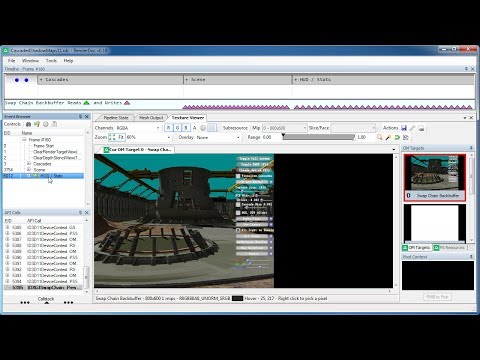
if you leave the main buffer open and click through the different draw calls you can actually see them being drawn
in the prepass and in the basepass
full junco
yes I see that
its great
thats why I'm wondering why its going over the same invisible meshes in both the prepass and the basepass
raven halo
what is it drawing when it draws the invisible mesh in the base pass?
like... can you see the wireframe of the staticmesh?
full junco
when I select the "highlight drawcall" overlay I can see it, yes
but its not drawing anything into any buffer in the basepass with that drawcall
so after that draw call the buffers all are the same, which makes sense for an invisible mesh I think?
raven halo
An invisible mesh; meaning a culled one simply shouldn't be drawn in the base pass o_O
full junco
well its not culled by UE4s culling due to its bounding box being quite big
meshes have multiple sections (static meshes one per material) but one bounding box for the whole mesh, so a section might be 100% invisible but only a full mesh can be culled by UE4s culling
but now that I think about it, in my case the mesh is actually completely hidden behind other meshes...
so it really shouldnt be rendered ideally
well I'm not sure
raven halo
I think you can see the meshes's bounding box in the pre pass
maybe it's too big
or maybe it's peeking enough to be considered "visible"
full junco
how would UE4 know if a mesh is completely hidden behind another opaque mesh?
raven halo
that's the culling. If one bounding box is completely covered by others it's considered as not visible
full junco
but a bounding box is, well, a box, right?
raven halo
yep
full junco
so lets say you have a single triangle, it would have a bounding box that would be a box?
raven halo
yep
full junco
you can't just remove everything behind that box, since the triangle doesnt cover the whole box
raven halo
I see what you mean
but in order for that to be noticeable, whatever is behind the triangle should be small enough so that its bounding box would not be bigger than the triangle's bounding box on screen.
I see the reasoning
maybe it doesn't work as simply as I thought it did
I know for a fact that if you want more sofisticated per-triangle culling then you need to use something like Umbra
full junco
well if there is none then its no surprise that the mesh still appears in the prepass
full junco
ok I'm getting how the culling works now, if every single edge point (all 8) of a mesh bounding box is "inside" (when looking at it in 2D) the bounding box of another mesh, its culled
no, I'm not understanding it xD
I'm testing with this test case: http://puu.sh/unA6h/9cfcebd074.png

the blue box is the bounding box, and the yellow sphere seems to be the bounding sphere
prime iris
yup
it's why level designers tend to use modular assets (other than it makes them reusable)
wicked oak
problem with modular assets its that they blow drawcalls like mad
i had to abuse HLOD brutally, becouse my map was going into the 6000 drawcalls due to modular meshes
full junco
there is the console command "FreezeRendering". it will freeze the culling, so you can then move your camera and see what meshes are invisible (those are culled)
I have no idea how the culling can see the difference between this: http://puu.sh/unAkS/e7351de85b.png

and this: http://puu.sh/unAm1/5bb6beb2be.png

in the 1st case the box can't be culled, but its still completely inside the cones bounding box
in the second case its also completely inside the bounding box, but it should be culled
and it actually works
in the second case the cube will not be rendered

when you see the cursor for a second I entered the "FreezeRendering" command
and you see the cube disappears
@raven halo any idea how it finds out that the cube is behind the cone? its definitely not with the bounding box, that is useless here...
raven halo
no idea :S
full junco
ok
raven halo
now that I recall, I've had this strange issue with culling as well recently
specifically with a particle system
a made sure that the bounds were correct
and even so, through renderdoc I can see that it's not being culled at all
I never found the solution has I had no time left to figure out why that was
full junco
hm, ok
well the "being 100% inside the other mesh bounds in the current view" is probably one requirement for being culled, just that something else also has to be true
I asked in #graphics about this, and there 0lento said its probably the collision of the mesh thats used
 candid viper
@full junco it's dynamic occlusion culling. There is a good writeup with commands etc, here: http://timhobsonue4.snappages.com/culling-visibilityculling.htm
full junco
@candid viper oh, thanks!
@candid viper is there... something missing in that sentence? http://puu.sh/unBMI/919d06ac19.png

I'm not sure, but it feels like text is just... missing on that page: http://puu.sh/unBTG/81da8d2649.png

@candid viper unfortunately that site only mentions this:
Hardware Occlusion Queries (Default)
This occlusion querying is handled by using the Camera View Frustum and the bounds of a mesh to determine if it should be rendered or not in the scene.
but in my test case I have shown that the bounds of the mesh can't be the only thing that is used for the culling
if only the bounds would be used, then here the cube would be culled: https://puu.sh/unAkS/e7351de85b.png

but it isn't, the cube is only culled if its really not visible due to the cone being in front of it
so something else has to be considered for culling
full junco
wicked oak
@full junco the queries are 1 frame behind
they render the bounding box, and they compare it with the Z-depth of the previous frame
if any pixel of that box gets rendered, the query succeeds
and later, when it syncronizes, the CPU grabs the data and renders the whole cube
i still dont know why they dont do that for lights...
lights arent culled AT ALL
full junco
@wicked oak so how is the bounding box used for it if its determined by the depth buffer?
wicked oak
it renders a bounding box
a cube
and if it actually gets rendered, the query is successful
you try to render the cube against the fully rendered scene depth
full junco
ok, and if isn't rendered due to being behind the other mesh, its culled
and then it won't appear in the prepass and basepass, right?
wicked oak
yup
full junco
@wicked oak but then I wouldn't see all that stuff in renderdoc happening in the prepass and basepass... the bounding box of that stuff is absolutely "behind" the scene buffer from last frame
raven halo
I think the cube is still drawn in the prepass
but not in the basepass
technically they are still draw calls
even though they are not drawn in the basepass
they need to be called first, then culled
and then drawn (or not)
full junco
well I saw that prepass actually equals basepass regarding what is drawn
mighty carbon
We need an article about anatomy of the render frame in UE4 (similar to article about DOOM)
full junco
but why do you think that culled meshes would appear in the prepass?
and just to be sure, the culling happens per component, not per actor, right?
so multiple static mesh components in one actor are still culled individually
raven halo
Uhhh that is a good question
One mesh having different materials... I think it still culls based on the staticmesh bounding box
Not based on each component's own bounding boxes
full junco
now you mean sections, not components I think?
full junco
so it happens per component, right?
mighty carbon

CNET
Here's how Samsung's mobile VR controller looks and feels.
Sounds like Gear VR controller better than Daydream one 😉
tired tree
Its per component
occlusion culling that is
my voxel terrain was all under one actor, and components have seperate bounds
mighty carbon
ugghhh, #animation is no use 😦
if I want to blend anim of my actor (non-player, non-AI) into another anim, keep it in that second anim for some time, and then blend it back into original anim (or into another), what do I need to use? (I am moving my actor along a spline in BP)
I assume I need to call BPI in my BP code and have BPI event in anim graph. Is that correct ? Or is there a better way of doing it ?
can someone please advise ?
PCGamesN
My biggest issues with VR right now are the restrictive Cthulu-like tenctacles of VR cabling. Wireless tech might well solve that, but for Oculus it’s way down on their list - getting more people into the VR ecosystem is the number one priority for them and the best way to do that is to cut the price. You still need a pretty beefy GPU for VR so here’s our pick of the best graphics cards to buy today.
tired tree
Dunno about that, according to TPCast testers it isn't really distinguishable from non wireless.
that is also something they would say right as a wireless solution for their competitor is coming out....
 uneven moon
When I preview as a simulation, I can see animations playing out in my scene but when I do a VR preview, they never move. Why is this?
mighty carbon
@tired tree they said wireless is no good even before Vive got one.
tired tree
good for them
it also doesn't work with their headset
vive has multiple wireless solutions coming out, another one was announced today
if they were so concerned about perfection they wouldn't have released a patch that broke their tracking
not exactly standing on the most solid ground here...
innovation is good for the industry
mighty carbon
lol, haters are gonna hate
tired tree
not hating on them, saying that is a ridiculous thing to say right as workable solutions are coming out.
as an add on option, not even a base part of the headset
mighty carbon
it all goes back to our last night talk here about i3 CPU
for consumer market you need lower price solution
and like they said in the article, if they go with higher res screens, wireless won't be able to power through all that data and keep the quality
and it's $200 + taxes + shipping on top of already expensive VR system
tired tree
wireless tech for what they are doing is technically easily capable of higher quality
res
its a direct beam and has a ton of data throughput
mighty carbon
so for enterprise I am all for it (I'll probably get Vive if I ever get some enterprise business)
so, can someone please explain to me about BP + anims ?
uneven moon
Does anyone know?
"When I preview as a simulation, I can see animations playing out in my scene but when I do a VR preview, they never move. Why is this?"
mighty carbon

UploadVR
Killing Floor: Incursion from Tripwire Interactive takes the survival horror elements from the core franchise and throws you into a VR nightmare.

UploadVR
New Oculus games are here! The company has announced a host of new titles at the 2017 Game Developers Conference. Here's what's on offer.
 sharp swan
bet they didn't announce our game for Oculus that we spent 2 years making for Oculus who then decided not to allow us on the Oculus store with no reason and no further contact. Oculus. A company of dicks.
mighty carbon
what's your game ?
sharp swan
CDF Starfighter VR
happened to go early access around the same time as Eve Valkyrie for 25% of the price. Not saying it's a conspiracy but .... it's a conspiracy.
wicked oak
looks quite good
have you thought of porting it to PSVR?
they want those kind of games, specially if your game is sold for 20 dollars or similar
Sony has been nice to me for now, with your game that looks fairly good, you could actually get one of the loaned devkits
you, like me, seem to suffer of bad marketing. Your trailer looks meh, and the steam image is terrible
the game looks very nice on the videos
but who the fuck thought it was a good idea to have the font like that
what role did you have on it @sharp swan ? Programing?
mighty carbon
@sharp swan it's how it is... If you had a bigger partner and then some smaller dev comes along and pitches the same kind of game as big partner has been working on, would you screw over big partner for a smaller dev you don't have any prior relationship with ?

niiiiiceee
not sure if that will run on i3 / 1060 :/
clever sky

Valve’s Joe Ludwig talks about the latest updates on the Khronos Group’s VR standardization process that is now being called “OpenXR.” Ludwig says that OpenXR is still primarily creating an open and royalty-free open standard for virtual reality, but that they wanted to plan for the future and eventually accommodate augmented reality as well. In …
Sweet googlies.
 zinc violet
@wicked oak he probably did that image 😄
wicked oak
yeah, but it does look incredibly cheap
just removing that 3d filter on the text will do wonders
sharp swan
@mighty carbon : We are a different type of shooter. First and foremost, because I have morals, I would give anyone the same chance on my platform and if I was scared an indie game made by one guy with some outsourcing was going to ruin that deal, I would question the deal, not the indie guy.
wicked oak
did you meet the performance requirements?
you could make a new developer account and resubmit it, or email them again now
sharp swan
im not sure, they wouldn't tell us
wicked oak
off, if you fail, they tell you exactly why and where you failed
on the review
if you fail many times they just slap you with "keys only"
sharp swan
I would guess so but it was early access.
wicked oak
are you sure it wasnt becouse they were overworked to hell due to launch?
and couldnt answer your email
becouse that kind of thing happens
sharp swan
they answered with something along the lines of "we are not accepting it. We will not have any further communication on the issue"
sharp swan
indeed. I could have accepted it under grounds of performance if it was a full release though
wicked oak
it looks good, they will probably even give you a free devkit
no, the performance doesnt matter if full or not
they wont publish anything that doesnt met their performance needed
even in the Gallery section
sharp swan
well its going on xbox one/scorpio as a an exclusive non-VR version but we have had no discussion about PS4 yet
wicked oak
its becouse your game is perfect for PSVR
sharp swan
we goto release in about 4 weeks and will probably be bug fixing any issues and improving some things I complain about, but after that the boss talked about making a PS4 VR game
same IP, different game though. More a teleport shooter. I dont think it's the best idea so I probably wont be working on it
wicked oak
well, you would be competing directly against me
its not easy to do a teleport shooter there,you have no joysticks
sharp swan
yeah thats why I think it's a bad idea. the saturation for teleport shooters is going to be thick by next year
mighty carbon
@sharp swan eeeh, what? You can't be serious. If Oculus were to accept you and had you lined up for release, and then pulled the plug, I'd understand that and probably would sue them. However, if they didn't commit and chose another game to back up, well, that's business.
sharp swan
sueing them wasn't really possible money wise. We just took the punch in the gut and focused on getting it done anyway. The oculus support is there if they ever accept it upon resubmission but we missed the boat I think. Everything was timed with the launch of Oculus store.
at which point we had done just over a years work iirc
mighty carbon
what I am saying is if you didn't have any contractual obligation with set release date signed with Oculus, what's there to complain about ?
tired tree
he is complaining that they won't allow it on their store at all....
with no resolution given
and no explanation of why
mighty carbon
I was in a similar boat back in the days and I was so pissed off at the other party (not Oculus), but they hey - I didn't have it in writing.
sharp swan
it's business as motorsep says really
mighty carbon
well, we don't know the whole story, do we @tired tree ?
sharp swan
they had a product they needed to protect
wicked oak
you can still publish now i thnk
if your game is good you can go into the full section
or early access section
those get good money
tired tree
reagular little Heanny555 here is Motorsep
mighty carbon
yeah, I am sure right now Oculus will accept any space game since it's been a while since EVE launched.. Unless you called them dicks in public and they heard it 😛
sharp swan
@mighty carbon that is the whole story. We worked with oculus since dk1 days and they were always aware of our product and supported us via a personal manager. Then when it launched and we submitted, we get the reply I stated and the personal manager (who had previously been on holiday for 3 weeks) won't get back to us.
maybe they saw the spaghetti blueprints and said "nope" :p
wicked oak
most likely
mighty carbon
there is a PS4 game made entirely in BP and it was released on PS4
wicked oak
they didnt want to split on the 2 spaceship games
but you should have tried 1 month later or things like that
or for Touch launch
instead of being on the gamepad, using the touch controllers as some kind of space split gamepad?
sharp swan
I perosnally would have but im not the boss so I just do my job 😃
wicked oak
how many are you?
sharp swan
well the boss is the one guy running the show/company. He outsources what he needs. Voice actors, coders, etc. Low budget, like really low. I would say maybe 20 people have worked on it all together
wicked oak
lots of peopl
sharp swan
mostly different voice actors
I know there is one other coder than me but he does AI exclusively. The boss does blueprints and all the art. I do the code and implementation stuff.
mighty carbon
Live at the Oculus Game Day Community Event at #GDC17 with @siefe https://t.co/2NiY3bN8Ah
some Robo Recall gameplay is shown there
mighty carbon
 raven halo
hold on
has amd helped Epic make the forward renderer? o_O
or is there new improvements from them coming soon?
mighty carbon
I don't think the author has any idea what they write about
Oculus were the ones who created forward rendering path for UE4
Epic then made their own implementation
I don't know if they did it from scratch or borrowed from Oculus fork or if AMD was behind it all the time (highly doubt that)
raven halo
yeah, I thought so too. Epic maybe took some stuff from Oculus, but I was under the impression it was mostly their doing
now all of a sudden AMD is involved?
mighty carbon
AMD fanboys gotta make noise 😃
raven halo

somebody explain this to me
xD
at 1:07:05
are they saying that Forward with MSAA is 30% faster than deferred with no AA at all?
o_O
mighty carbon
@wicked oak can explain 😃
wicked oak
forward IS faster
as long as your scene is of not that big complexity
once your scene has too many drawcalls, it becomes slower due to the double pass it does
raven halo
well, switching from deferred to forward in Unreal, gains you about 25 to 30%. Switching MSAA leaves you right were you were before though.
i don't see how they can claim "forward + msaa" is 30% faster than "deferred no AA"
unless Vega does some crazy awesome shit




 full junco
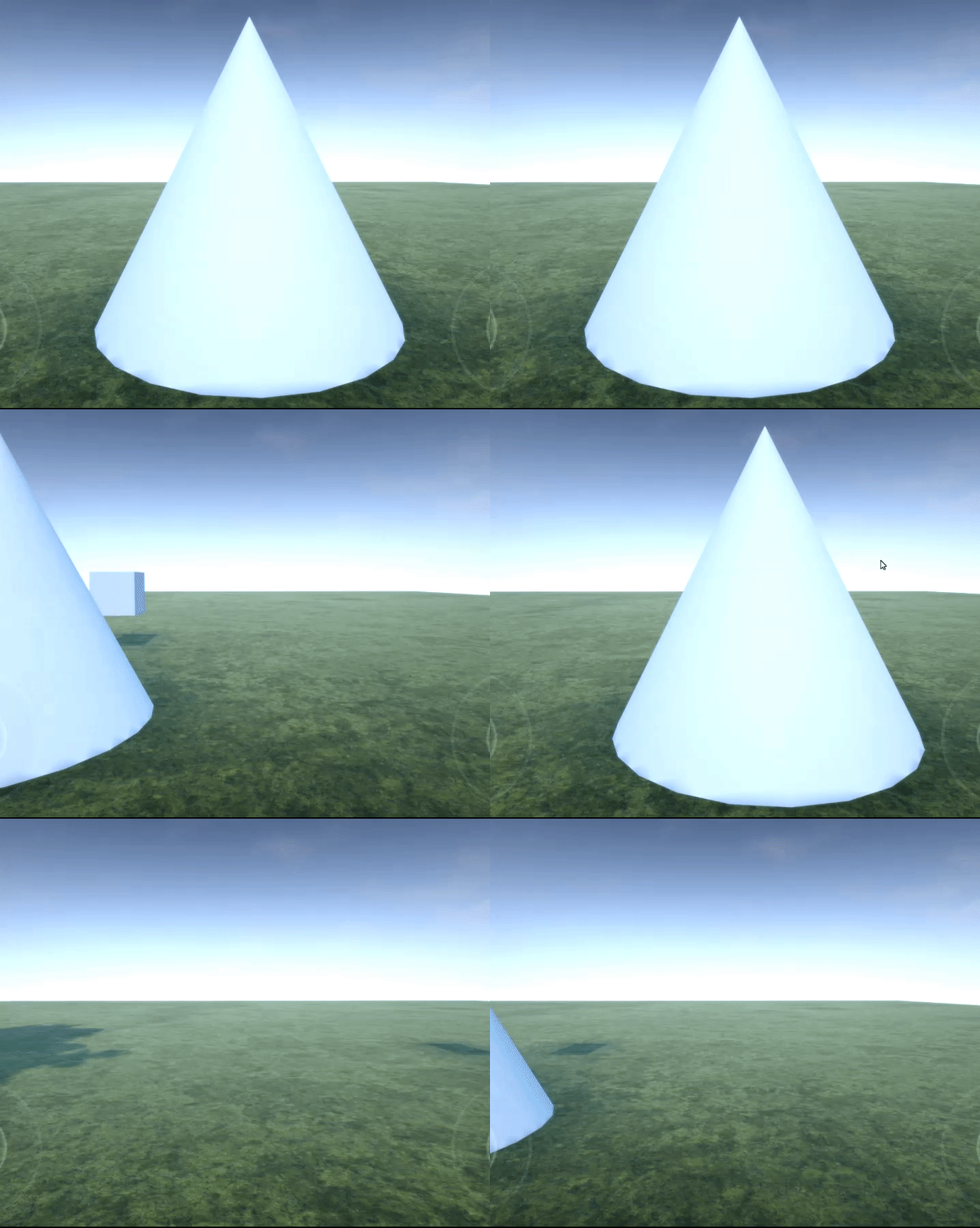
@wicked oak my game is always doing a full prepass even though I'm using deferred, so I wouldnt call it a disadvantage of using the forward renderer
full junco
but there is probably some reason why its enabled
wicked oak
complex materials
it does that to save pixel performance on complex materials
that way the complex materials are just rendered once per pixel
no overdraw
i have simple shaders, so i dont care
full junco
wel I have a lot of foliage, so overdraw is an issue
wicked oak
my shader complexity is fully green
and that foliage is rendered in the depth prepass?
full junco
I would think so?
wicked oak
if its transparent it doesnt
full junco
foliage is masked
full junco
prepass takes between 1 and 2 ms, so I guess I should disable it
and see if the basepass takes a lot longer then
but first I want to understand the stupid culling lol
because its not working
wicked oak
im not sure culling works well with masked
raven halo
@wicked oak quick question. Imagine you had basically the same level of complexity for every shader on screen. Would it make sense to turn off prepass?
full junco
@wicked oak I'm not having issues with culling + masked, I'm having issues with opaque + culling
here, this is my test case now: http://puu.sh/uokDO/e05566f0a5.png


the ground is a cube, the cone is a cone and the white thing is a big stretched cube
now look at this gif: https://puu.sh/uokzF/1cf28e5191.gif


I'm looking at the stretched cube (the wall), then I'm looking straight down at the ground and call "freezerendering". and you see that the wall is not occluded by the ground, its still rendered
even though its bounding box would be completely invisible in that occlusion query thing because its either off screen of "behind" the ground
pearl tangle
@mighty carbon just FYI I managed to get some early preview code from Google on their Tango integration. They are expecting to have it finished by around June
mighty carbon
For UE4, officially ?
pearl tangle
yep
the stuff that I have is still pretty/ very work in progress. I had to make changes to get it to compile, but I was sitting with the guy in charge of it all so at least was working through the bugs with him hah
but yeah June you should expect it to be released
mighty carbon
will it save reconstructed environments and all that? (in other words, 100% features of Tango supported)
lol, typos time
 prime tulip
just downloaded 4.15 – does anyone know where the vr templates are for 4.15 mac?
full junco
@wicked oak how can the prepass be disabled? I tried r.EarlyZPass 0, but it still runs. I also set the early z pass to "none" in the project settings, but it still runs
pearl tangle
yeah by june. and the environment stuff is part of ADF which is the Tango core. It wont actually construct the environments for you, you will need to do that yourself based on the ADF file @mighty carbon
mighty carbon
eh, ouch 😦
pearl tangle
hah you do have to do some work yourself. Have a look at what ADF is. thats how it remembers environments and stuff. They will probably have a demo in their plugin release that shows how to do the procedural mesh creation based off an ADF file
I have all their current code on me but it wouldn't be much use to you in it's current state
mighty carbon
what about object tracking?
is it going to be supported, @pearl tangle ?
(like on the video I posed about object tracking in Blender)
pearl tangle
object tracking was never part of tango
mighty carbon
oh, I see
oh well, then I have no use for it
(probably can still mess with it, but object tracking is what I really needed)
sturdy coral
@full junco certain features force the prepass on, like deferred decals
full junco
@sturdy coral oh, I recently added a few of those...
mighty carbon

NVIDIA announces an official price drop for the GeForce GTX 1080 GPU.
sturdy coral
I wonder what the 1080ti pricing will be
mighty carbon
~$1000
sturdy coral
no way
I thought usually they drop the non-ti version price and then the ti fills in at a little more than the old non-ti price
mighty carbon
they said it will be below Titan X
full junco
I don't get why nvidia drops the price for the 1080 now, they could have waited till Vega release since they have no competition currently
sturdy coral
with the founders edition stuff they started doing it might be near $1000 for a while I guess
pearl tangle
for object tracking just integrate in open cv library @mighty carbon , or use a realsense
tango is designed for environment awareness and location based things, it doesn't handle people or object tracking
sturdy coral
has any game done anything cool with the vive camera?
pearl tangle
dont think anybody has
sturdy coral
only thing I've seen is that vive paper thing
and I don't want to read magazines in low res VR at the wrong focus distance
but that fiducial marker stuff they used could be cool for keeping track of where your keyboard or steering wheel is
pearl tangle
yeah generic AR stuff from it could be handy for that type of thing
but still the better bet is integrating the vive tracking stuff and I think thats the way they will want to go
mighty carbon
@pearl tangle is there a hardware with Realsense and UE4 plugin?
sturdy coral
yeah, seems too expensive for keyboards right now though, they only showed the volume pricing up to around 500 units, but it was like $100 for the full package
of sensors and the board
pearl tangle
you mean the realsense camera?
pearl tangle
you can just plug it into 1
i have an AIO dell machine that has it in there
im pretty sure there was a couple of laptops with it in too
full junco
@sturdy coral thanks for mentioning the deferred decals, is there anything I can do to use decals without a prepass?
pearl tangle
Isn't that exactly what the deferred decal does?
full junco
@pearl tangle what?
fresh laurel
GTX 1080 price is also dropped to $499
full junco
@fresh laurel "also"? we only talked about the 1080 price drop here I think
sturdy coral
@digital marlin yeah it is pretty low
@full junco I think if you put them only in directly lit areas by movable or stationary lights they will show up without the dbuffer and without the prepass
full junco
@sturdy coral well I only have one movable light, nothing more
but how can I disable the prepass?
sturdy coral
I think you can just disable dbuffer decals
and then disable the prepass through project renderer settings
and the decals will still work as long as directly lit
decals won't show up in any shadowed areas
without it
full junco
dbuffer decals are already disabled
I never enabled them, and by default they are disabled
prepass is also disabled in the project settings
but the prepass still runs
sturdy coral
weird, I don't know any other options that force it other than dbuffer decals
mighty carbon
UE4 anim system is complicated 😦
full junco
@sturdy coral hm, would have made so much sense since I only recently added decals and never before saw the prepass in the profiler...
sturdy coral
@full junco you can try removing them and see if it goes away; it may be that the dbuffer decals setting just adds in the shader permutations for them (it makes you restart and recompile shaders), but the prepass enforcement may happen either way
full junco
ok
I just looked at a new project, and there it actually says this: http://puu.sh/uoKtS/83efb55e69.png


so dbuffer decals seem to be enabled by default in new projects, and it also says in the profiler that the prepass is forced because of those
sturdy coral
while you are looking at all this remember that depending on your scene the prepass can save you time even if it is showing up in the profiler as a significant portion, it may be offsetting other overdraw enough to make up for it. but if total frame time has gone up you probably will still want to get rid of it
dbuffer unfortunately forces the heaviest prepass available though, with masked materials etc. in it
full junco
I know the prepass might actually help, but I definitely want to compare with and without prepass and then decide what to use
sturdy coral
yeah
another similar thing to this is screen space reflections and ambient occlusion will force HZB occlusion culling even if you have it off in project settings; precomputed visibility can be a good bit faster than HZB
screenspace reflection and ambient occlusion tracing relies on the HZB buffers to speed themselves up and so they force it on
full junco
oh, but I compared r.HZBOcclusion 1 and 0 yesterday and I definitely thought I saw a difference
I'm using SSAO, so you say no matter what I set r.HZBOcclusion to, it will always be true?
sturdy coral
yeah
full junco
well I'm seeing it in the profiler, so its probably enabled... but still strange because I thought less stuff is culled when I manually enabled it
sturdy coral
another thing to watch out is hzb shows up with the wrong time in the profiler a lot, due to this issue: https://answers.unrealengine.com/questions/431377/gpu-performance-tuning-of-hzb-setupmips-as-seen-in.html
full junco
I never saw it taking long in the profiler
sturdy coral
yeah it is a weird glitch only in some scenes
may depend on your gpu drivers and stuff too from the jira ticket the entered for it
full junco
the prepass takes between 1 and 2 ms here, so I definitely dont want to have that if it just eats up time
but its really annoying that it doesnt say why its enabled
sturdy coral
are you using the forward renderer?
pearl tangle
anybody here have any experience with ghosting on temporal AA? Can't seem to find any solutions that solve it. using the cinema camera and the blur on it looks rubbish with FXAA or no anti aliasing but txaa just ghosts the objects which have out of focus objects behind them
only thing I have seen is around SSR but I have it disabled and still get it
sturdy coral
you can lower the temporal samples but you will get more aliasing
pearl tangle
FXAA noise
fresh laurel
Pretty
pearl tangle
TXAA ghosting
full junco
@sturdy coral well thanks very much for you help, I guess I have to post on the AH or the forums and hope that someone knows what else enables the prepass...
sturdy coral
I don't see the FXAA noise unless you mean on the rocks to the left that are supposed to be blurred
pearl tangle
the background of it
sturdy coral
oh yeah I see it now zoomed