#virtual-reality
1 messages · Page 23 of 1
 slim raft
 granite jacinth

reddit
9 points and 5 comments so far on reddit
 tender notch
is there some way to make a round 3D widget? I want a kind of curvy menu.
 dry fjord
Yes, use round polygons
tender notch
can I changethis in properties or blueprint? I can't see a option here to change the widget "plate" to another mesh
@dry fjord
dry fjord
Not sure sorry, I'm on the train
tender notch
Ok
 fresh laurel

Mozilla VR Blog
Want to get right to it? Grab a WebVR-enabled browser and head to https://aframe.io/a-painter to start painting! Don't have a headset? No problem, you can still view paintings from any device! We're hardcore fans of Tilt Brush at Mozilla VR, it's a wonderful example on the power
Really cool
 wintry escarp
suntemple demo runs like crap on my edge7 in cardboard vr mode
wintry escarp
this cant be normal, performance is terrible
dry fjord
can we access the vive camera in UE?
I think I asked this but I never hang around to see the response
wintry escarp
I think this phone is going back tomorrow
hmmm, the shit tracking seems to be a ue4 issue
unity is fine
 balmy creek
Thought this would be worth sharing if it hasn't been already.

UploadVR
Treehouse is a company that provides 12 month, intensive courses for those aspiring to join the technology sector. Its current programs include JavaScript, Python, iOS, and Android development. Now, the organization has announced that it will be providing a course in virtual reality development. According to Treehouse: “Treehouse, the online coding school, is today introducing VR Techdegree, a first of its kind online certification aimed at aspiring virtual reality developers…The VR Techdegree will be avail...
dry fjord
that looks awesome
wintry escarp
I wonder if epic know their cardboard plugin is broken on Samsung s7
dry fjord
we sure do
maybe head to answerhub and see if it's a problem or if it's misconfiguration
cardboard is sort of defunct now isn't it? does daydream replace it?
wintry escarp
daydream still isn't out and will only work on top end phones
most of the current top end might not work at all
dry fjord
ok
 midnight tree
oi gents, hows it going. just found this discord. hope to learn some things from you guys. got my vive and am working on a project with a group but in unity. want to start a personal project in ue4 soon. anyways glad to have found this.
has anybody here done any locomotion tests they would be willing to share? i'm trying to figure what is the best way and really dont like teleport. would be cool to see what ideas are floating around
 fleet veldt
hi @midnight tree , welcome 😃 I experimented with some "point and click" VR locomotion. I'm goign to include it as one of three locomotion options in my game. https://www.youtube.com/watch?v=ggfyIod7wy0
 midnight tree
nice let me take a look
so you point where you wanna go and it moves there?
neat system
fleet veldt
yeah, kind of like how you would control a unit in Dota2 or Starcraft.
midnight tree
no motion sickness i'm assuming?
fleet veldt
but in first person
midnight tree
nice
yeah
i haven't used that system yet personally but i'm seeing a few projects use this. def gonna give it a try at some point
fleet veldt
for some people for sure. that's why i'm offering three modes, includeing teleportation
midnight tree
i'm trying to combine the fps templates locomotion with the vr templates hands right now but no luck so far...
will try again throghout the week
i played with it for a bit, the fps templates locomotion, and didnt get sick at all. even had wifey try it and she was fine
 ancient chasm
Hi guy. Today i try to build my game. When i launch the game on my computer display, i haven't any problem but in my headset i stay in HTC show room. Do you already have this error ?
 sharp swan
have you tried clicking the window to make sure it's active? I have had trouble with running the game and it not being focused. That would cause it to goto the show room I think.
 graceful junco
Elencrak, in packed builds you need to run the console command "stereo on".
 neon egret
Question: I only have one Adapter/Slot for HDMI atm.
I normally use that for my TV + Sound, but my Vive needs it.
Always changing that at the GPU itself is annoying.
Can I actually put the TV HDMI into the Vive control thing or is that only
usable with the Vive?
And yes, I could simply test it ,but better save than sorry
ancient chasm
@sharp swan Yes i have the focus i wil check the stereo mode.
 sullen stirrup
there's a run in VR option/setting
ancient chasm
@graceful junco Ok it was stereo activation problem. I use the command and it's work perfectly thanks 😃
neon egret
@sullen stirrup How are you refering to
sullen stirrup
ancient chasm
Thanks adam. Options are in world setting or editor settings ?
ancient chasm
Ok i build the game i will test it and i touch you inform
neon egret
Seems like I can't just hook my TV into the HDMI Vive Control Port. TV doesn't get the next port.
Guess I'm stuck to crawling under my table
Ok, TV finds it ,but unknown format. Fair enough, was worth a try
ancient chasm
It works perfectly
sullen stirrup
😛
ancient chasm
😗
neon egret
Did someone play around with the FunHouse Mod kit?
midnight tree
Hey @cedric_exi
Check that
Its a hdmi switch
I use it for my vive bevause i have a quad monitor setup
neon egret
Thanks, buddy (:
midnight tree
This allows me to switch to triple+vive
With just a button click
No unplugging or what not
 wicked oak
that is useful
midnight tree
Its great
Sometimes i do get an issue where i have to click the button twice for my monitors tk get detected
But otherwise no issue
 spiral zephyr
@neon egret you got yourself a vive..nice!! Had mine for a couple months now. Prototyping weird physics and everything is too fun! And beautiful. If you ever used a DAW, look into "Soundstage VR". PS PLEASE, for the love of the people and things, conjure up a 4.13 roomscale vr sound visualizer demomap<3
neon egret
You want me to combine VR with my SoundVis Plugin?
spiral zephyr
btw: has anyone thought up any non-shitty ways to handle falling off platforms, in roomscale?
 hard light
yeah, my solution is to not do games where you can fall off platforms 😉
spiral zephyr
I'd pay 20$ for something like it on marketplace;)
hard light
not helpful, I know
neon egret
I'm playing aroundw ith Flex atm
Haven't achieved anything great yet due to ue4 being ue4
 neon egret
Well
I would love to move my physics stuff with the fluid
but although it collides etc
it seems to not apply any mass
.>
spiral zephyr
fluids are just a bunch of balls anyway
spiral zephyr
it should just transfer to boundary balls
for sim effectivity treat as whole though
gotta bake or calculate
neon egret
i don't get it
Why does each particle have a mass factor
if it's not having any effect
spiral zephyr
i dont know anytrhing about flex, I'm talking generally about particle simulating
neon egret
Alright. guess that's totally undocumented
neon egret
The moment you create your own TiltBrush http://puu.sh/riVcT/2bbd263931.jpg

 spring pond
Or you know this: https://blog.mozvr.com/a-painter/
Mozilla VR Blog
Want to start painting now? Grab a WebVR-enabled browser, and head to https://aframe.io/a-painter! (Don’t have a headset? No problem – you can still view paintings from any device!) We on the Mozilla VR team are hardcore fans of Tilt Brush. It’s a wonderful example of
 neat cape
oh my god, looking at the shading.... we need toystory VR
neon egret
Well, seems to not work. I don't know if that's even possible
Can't get the Flex stuff to apply mass to physic objects, aka filling something with flex fluid and making it heavier
 full junco
any idea when oculus and valve will support vulkan in their vr sdks?
hard light
mass for the fluids is used to do calculations on the fluid; it's not imparted on anything else
there should be a setting that allows fluids to impart forces onto other physics actors
however the fluids won't necessarily have weight
spring pond
@full junco No idea for oculus, given that they are really windows focused, but I can see Valve supporting it soon, they are a big part of vulkan and have already shipped vulkan stuff (DOTA2, not in VR mode tho)
at least when i tried running DOTA2 VR in vulkan it didn't start
I'll ask at Connect and Dev days
which reminds me I need to book some flights
neon egret
@hard light Hmpf. Would've been cool
hard light
it's not like it works that way for rigid bodies either
if you fill a bucket with spheres, it makes no difference
neon egret
If I take a normal physics actor, it applies mass
hard light
it has a mass, it does not strictly have weight
neon egret
It does though
hard light
picking up that bucket with a physics handle will be the same either way around
neon egret

Putting physics actors in one of the sides makes it tilt
Putting more weight into the other side lets it tilt back
So that is in fact working out of the box
hard light
that's an example where it works, but it isn't consistent across the physics engine
neon egret
Though i want to fill a side with fluid and make it tilt
And that doesn't work i guess
So /shrug
Back to the idea board
(could fake it but not worth the time)
 real needle
Hi there
do you know which things are most likely to save ms/frames in VR? I would guess that it's dynamic lighting/shadows for example, but I don't know
neat cape
@real needle LODs, material complexity, entity count, and mostly blueprint logic that loops
particles, alpha overlap and lightning are very important too
real needle
@neat cape thanks. I will have a look on those topics to optimize my project 😃
neat cape
looking at the optimization viewmodes is a good start https://a.rokket.space/raifkc.png

you can see in that screenshot that the sky is complex, but alpha test even more
I'm not sure if you're using lightmaps, but those should be blue whenever possible
real needle
According to shaders the fire effects are pretty heavy and bright/red.... the same as the glass I use. My lightmaps are mostly blue, but what does it mean when it's green? Okay, but not well?
real needle
@spring pond I know, the shader complexity tells me that, but there is no color explanation about the lightmap colors
spring pond
oh its probably lightmap res or efficiency
I'd guess efficiency
checks his lightmaps
Which one are you looking at? Lightmap complexity? Green is bad
I mean "Light complexity"
it shows how many overlapping lights are one a surface dark blue (best) -> blue ->green (bad) -> white(?) really bad
I have a little green patch in my level 😦 Time to call an artist!
real needle
Light complexity is mostly (dark) blue. My level has only one spot which is green
of fuck xD Now I know why my framerate drops so hard when I use a specific chandelier xD Light complexity turns to orange, red and violet 😯
neat cape
 real needle
Aaaaand since I asked here: Why are there different colors in the wireframe perspective? Do they also tell you if something is heavy on polygons and stuff?
neat cape
keep in mind lightmap density also dictates how detailed static lightning is, so if needed you can increase the lightmap of certain meshes, but general rule of thumb: keep it as low as possible
as for light complexity https://a.rokket.space/cyrpzg.png

stationary and movable lights should be kept sparse when possible.... e.g. that led strip does not need 200 movable lights
real needle
Currently I have to fix a specific chandelier I think ^^ https://gyazo.com/0f63721d3f7d27f7609d90a66f94cdba And according to the lightmaps. My chairs, couches and logs of wood are very red, so I have to optimize these lightmaps
 neat cape
red and violet is really bad, changing the lights to static and decreasing the overall light count will help a lot.
if your chandelier has like 20 candles with a cluster of 5 each, make a single static light for each cluster.... stuff like that really improves framerate
real needle
@neat cape that's my problem 😄 my boss wants realistic lighting and dynamic shadows so stuff looks good xD And then there is this chandelier with 5 lights and their dynamic lighting besides the fireplaces/chimney ^^"
neat cape
a single dynamic light suffices most of the time
real needle
yeah, have to look into that and make a decision about the lighting. Maybe my boss gets mad because he doesn't get what he wants =/ well. Time to cut corners I guess
wintry escarp
anyone here got a gearvr? do you need to remove the phone from protective cases to put it in?
neat cape
your boss has to decide between nausea because of poor performance or slightly less visual fidelity.... which mostly doesn't matter in VR anyway since only nearfield is important... you can create ridicilous LODs for a lot of models.
 acoustic breach
@wintry escarp i don't have one. but as far as i know, yes you have to put it in bare.
i could be wrong
full junco
@spring pond ok 😃
 mighty carbon
@wintry escarp yes, no cases
wintry escarp
hmmm I might go for a wallet case then, better protection and they usuallu pop in and out
acoustic breach
I never had a protection case for my phones
Just a pouch
but the phone it self is bare. i hate the altered feeling when using a cover or case.
Also never dropped a phone in like 6 years now
mighty carbon
UE4 sucks for mobile VR
now I wish I never touched it with a long stick (for mobile VR that is)
 pallid echo
@mighty carbon Blasphemy!
mighty carbon
truth !
if basic stuff used - no problems. However none of the stuff like (H)ISMs and foliage work.
mighty carbon
Hierarchical Instanced Static Mesh Component / Instanced Static Mesh Component
 lucid pecan
yeah support for HISMs on mobile would be great. Especially if you would like to do runtime generation of level geometry..
mighty carbon
I'd be happy if ISM just worked and didn't bog down fps
at this point I am just gonna have to merge meshes
 still marsh
Should I be using the PC renderer if I'm on PC?
I've been using the mobile renderer and it's seriously limiting the look of my game (but the framerate is nice!)
mighty carbon
I don't believe you have a choice.
While you can preview in ES2, once you deploy, it will use PC renderer (DX or Vulkan, whatever you choose)
spring pond
@still marsh How long before you launch your game?
still marsh
@spring pond I dunno, it's sort of a VR side project right now to my main project (non-VR)
spring pond
The first version of the PC forward render is coming in 4.14
still marsh
@spring pond Neat, any ETA on that?
spring pond
(its already there in an extremely rough way in 4.13, but in 4.14 it's more complete and has nice AA)
spring pond
Whenever 4.14 is ready.... they release what, every 2 months? So sometime in Nov?
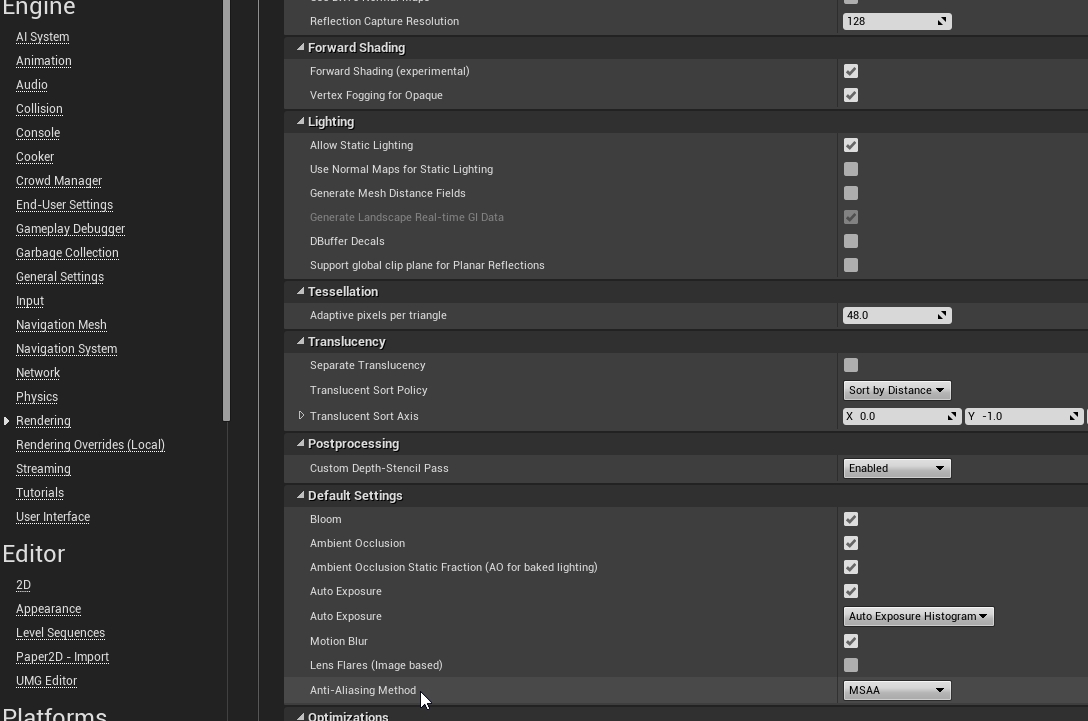
In your project settings -> rendering check "Forward render" under experimental settings. You will need to restart and recompile all shaders
a bunch of shit is broken in VR tho.
 empty sundial
Is FXAA confirmed for 4.14?
granite jacinth
Aliens are
still marsh
Oh, I have that on.
Which AA works with that mode?
Or is that only 4.14?
Because I'm so tired of jaggies
😄
spring pond
none
MSAA will work in 4.14
(it is in the master branch if you feel adventurous)
but get ready for material, esp specular, aliasing to return!
@empty sundial What do you mean? When did FXAA leave?
I've run our project tons with FXAA... just change the AA type in your post process volume and make it unbounded
empty sundial
Err, I think I am mixing up my AA
still marsh
@spring pond Great to hear, thanks for the info and stuff. 😃
wicked oak
i tried the master branch and couldnt find it
msaacompositingsamplecount did nothing
it was also flashing black
and lights were broken
pallid echo
How many of us here use headphones/earphones while playing a VR game?
 rigid quiver
/raises hand
still marsh
Not me, but I want to. Too much of a hassle to take on and off during dev.
If i'm 'playing a game' definitely.
mighty carbon
o/
wicked oak
not me becouse i have oculus
and they come integrated
if i dev for vive, i still use earphones
becouse sound its critically important in VR
granite jacinth
Headset ftw
midnight tree
noice canceling surround headset ftw^^ immersion x 1000
dry fjord
I want audio pass-through on the vive so I can stop yelling at people trying my headset out
earphones all the way though
 scenic mason
@midnight tree I combined my JBL Harmans to the Vive.. Yea its Amazing.
wintry escarp
huh, android calendar app is a pure suckfest compared to windows phone
midnight tree
@scenic mason nice man
scenic mason
Im posting the Code shortly for the Harmans JBL Everest Elite700 so you can control it from a Website, utilizing it right now in some Conferencing Software i`m developing with WebVR
i`ll send ya a C++ Build of it, should work perfectly in your unreal engine build if your running 4.13
midnight tree
Anybody able to share some locomotion projects? Would love to see how people go about it. Im a 3d artist trying to learn and locomotion is the key issue right now. Trying to get the movement from fps template but the grip mechanics from vr template.
dry fjord
HEAD BASH TELEPORTATION ACTIVATED
if only the HMD was lighter and afixed more firmly to faces
 wraith sky
https://www.packtpub.com/packt/offers/free-learning "Augmented Reality for Android Application Development" today
A new free programming tutorial book every day! Develop new tech skills and knowledge with Packt Publishing’s daily free learning giveaway.
granite jacinth
Too bad 90% of their books are trash
 mortal current
what's the ideal graphics card to get for vr development? a gtx 1080?
granite jacinth
I should write a book for them, people would be amazed
pallid echo
If you have money, just get a GTX 1080. @mortal current
pallid echo
However, Nvidia should be releasing the GTX 1080Ti in the coming months.
granite jacinth
Now, you can get anything else above that obviously
mortal current
hnng, I've got an idea I'm playing around with right now and I'm probably going to drop $1500 to test it out very soon
pallid echo
Like Victor said though, GTX 970 is minimum, anything above that (GTX 1060, 1070, or 1080) would be better.
granite jacinth
If you have two rigs
get one 970
and another 1070/1080ish
There is really no need to hold out for that 1080ti
if those rumors are true
But, we'll see when they officially release specs
I was holding out...
mortal current
If I have one rig, should I just get the 1080? I'm wondering what the longevity of the 970 will be for vr
granite jacinth
But now, I think I am just going to grab a 1070 on sale for Black Friday
Well, the thing about VR dev
you have to think about Min Spec
You need to think about what you're customers will have
Good chance they would have upgraded to 1070
But technically 970 is the min
And you'll never be wrong DEVing for a 970
mortal current
I have a gtx 780 right now, and the VR project I'll be working on won't be graphically intensive. I wonder if I could just deal with what I have.
dry fjord
I'd at least wait for the 1080Ti for the price drop on the old 1080
pallid echo
I used a 760 for a while and was getting about 60FPs on a well optimized map. I dealt with it but 90FPS is soooo much better.
granite jacinth
I need to fix that soon
I don't think the 1080 price will come down @dry fjord
they will just drop it between 1080 and TitanX price
So 750?
or 800
what's a 1080 run now
$650
TitanX 1000
So, yeah, about $800 for 1080ti
Maybe a bit more
dry fjord
yeah good point
I think that leak was bullshit though
or someone forgot to add the right ram type
granite jacinth
If it's 5 and not 5X, it's boned
granite jacinth
If it's 5X, then it's got a shot at creaming every card
Man, I remember buying my 980 at $550 when they came out
dry fjord
I have been hearing industry rumbles about the push for more vram though. they're trying to reach 128GB on consumer cards by the next gen.
mortal current
btw, are there any disadvantages for buying a Vive on amazon rather than steam?
dry fjord
I got mine from HTC Vive
direct
good customer service there
amazon are good for that too though
mortal current
I think it was added to amazon a few days ago
dry fjord
I have a machine here with a couple of the 24gb quadros in it and two gtx 1080s. I don't know why I'm too lazy to use it for rendering.
granite jacinth
Wait, why didn't I get one yet.... I can get GoW4
Ah that's right, now I remember, I was going to get a 1070 Alienware Laptop
I'm trying to give myself a reason to buy one for my desktop, someone give me one
granite jacinth
Yeah, probably going to just get a pelican
dry fjord
so expensive
but the best option
I've heard if you get plastidip spray and hit the foam with it after that it takes on this nice texture and holds its shape forever
never tried it though
wintry escarp
its nice , its overpriced
 zinc violet
isn't that where steam links too?
or do they allow buying the headset within steam nowadays?
when it launched, the steam page linked just to htc order site
sigh.....
this is second time today that I forgot to scroll down...
at this rate, I'll do my own discord client soon
I just have way too many annoying UX issues with the desktop client
zinc violet
also re: forward rendering on 4.14 and 4.13
4.13 has it, but it didn't package for me
FXAA might work as it's just screenspace thing
spring pond
its so crazy early in 4.13 i'm amazed they even put a checkbox for it
spring pond
you should, theoretically, be able to do MSAA + FXAA or TAA, but I'm not sure if the velocity stuff required for TAA is rendered out in fwd mode
yeah. I have MSAA in my master branch build
zinc violet
last time I checked though, there was still issues with 4.14 forward + translucency sorting and also if I put dynamic lights on, I didn't get any shadows
I did get dynamic shadows with stationary and static light settings but I didn't test that on packaged game
MSAA was amazing though
spring pond
last time i checked there were still visual issues between eyes. I know its also overdrawing like crazy
zinc violet
I got 300fps full screen on PIE with MSAA enabled on my medium spec computer 😄
on regular deferred setup, editor framerates never go past 120
spring pond
there are some settings at the material level for translucency in 4.14 like a new high quality mode and such
zinc violet
@fleet veldt has been using that 4.14 forward on VR for a while
spring pond
look for merges from //dev/rendering-ue4 into master and read the patch notes. Daniel.W is the person doing most of the work on that
zinc violet
there was some issues with point lights for another eye I think
spring pond
but yea 4.14 looks amazing
tho now we have to deail with material/specular aliasing again :/
zinc violet
yeah, I'm not really worried about the issues atm
spring pond
yah, we had a laser pointer that didn't work
spring pond
other than that, amazing. When we release on steam im going to make the "beta" version of our thing an early build of the 4.14 fwd render
zinc violet
I don't expect it to be even feature complete on 4.14
spring pond
me neither
zinc violet
also, I'm not using it for VR atm, but love the fact that I finally get working AA solution
and good framerates on lower spec hw
 leaden jackal
Anyone know if the mesh painting stuff added to VR Editor can be used at runtime? Trying to achieve something like Tom Looman did http://www.tomlooman.com/wp-content/uploads/2016/05/EpicBrush_PaintDemo.gif
 neat cape
I got told yesterday that vertex painting now works at runtime, so you can try that.
 neon zenith
It works in runtime, yep
 normal thorn
did anyone get a tutorial up for the VR menu/widget system? Or are there docs on that, I think its new in 4.13
I found the VR Keyboard widget docs but thats not really helpful by itself
sullen stirrup
what do you want to achieve exactly
normal thorn
well a menu that players can select a level
show high scores per level
think angry birds
lots of small levels
I started making it as a ver level with objects but thats getting silly
sullen stirrup
you need a widget component + an interaction component
normal thorn
thanks I'll look that up
leaden jackal
An example of how to create, display and remove UI elements from the screen during gameplay.
sullen stirrup
you were able to click world widgets directly before 4.13 but the entire thing changed with interaction components
leaden jackal
@neat cape @neon zenith Awesome, thanks. Do you know of any tutorials for it?
FYI if your click events arent firing after you set up the 3D widget interaction, try with OnPressed event instead. Seems to be related to interaction with nested widgets.
neon zenith
I only know where you wanna look in C++ code to do realtime vertex color manipulation 😛
wicked oak
@spring pond dude please tell me how, or please send me the code for that
becouse i did grab Master a few days ago and couldnt figure how to enable MSAA
wicked oak
in fact, last time i grabbed Master was an absolute disaster
fleet veldt
@wicked oak you have to enable forward rendering and select msaa as aa type in project setings. Then you can specify r.MSAACount=0,2 or 4
 wicked oak
i didnt have that
on the "master" build i had
yes, i did have forward, but not msaa
spring pond
i used the console
its like R.msaasamplecount or something. search through the master github for the actual name (I'm about to run to the bus)
 pearl tangle
hey guys. Running an activation in Singapore at the moment for Fiji Airways, if anybody is in Singapore come and check it out.
Running room scale setup with HTC Vive with physical space that exactly matches the virtual space so its pretty cool
https://www.youtube.com/watch?v=NScdX6XeL3Q&feature=youtu.be here is the content you can see

doing projection mapping on the outside of it so you see it 1:1 scale
dry fjord
mean!
 abstract gale
@pearl tangle cool as hell
-Whether it’s skiing down alpine slopes, surfing huge river waves, riding your stallion through a safari adventure or cruising through mountain roads, our Totalmotion system is taking virtual reality entertainment to the next level through simulated motion and fully body controls.
abstract gale
lmao
im sure out east atleast adventure club -xxx- is on its way in updated fashion
please use a disposable vpn sandbox onion if your sensing risk
dry fjord
haha
midnight tree
Hm finally got it. Got locomotion from fps template and grab mechanics from VR template. Babysteps
dry fjord
nice work
midnight tree
thanks, i know its probably a simple task for a lot of people here
still having a few issues though
whats a good way to deal with collision/ clipping. i'm currently able to use room scale to walk through walls
could i just attach a collider to the camera?
dry fjord
I've asked that, everyone says limit the distance players can get within solid objects
so they can't just walk through them
it means a very open level design though
I thought it'd be fun to hit their health pool if they go into a wall
alternately model the inside of the machines or walls or whatever and just be a ghost
give them something to look at while they break the experience at least
apparently blocking the camera from moving is the worst choice by far, it'll induce nausea
abstract gale
or print cracked glass decals all over the pov
dry fjord
that'd be a good indicator, yeah
pearl tangle
@abstract gale are you working on that futuretown stuff?
midnight tree
i was thinking doing it similar to onward. attach a collider and then black the screen if it goes through. would have to tinker with it though
dry fjord
yeah, that's not a bad idea
oh
I've had no problem with blocking movement
but this wasn't with a teleportation movement scheme
you just stop them moving forward
then do your black overlay for if they lean into it
midnight tree
Sounds good. Im gonna have to toy with it. Im fairly new to things.
Ill let ya know
abstract gale
@pearl tangle nah just thought it was cool, had some ideas like that - like im sure most of ya have
mortal current
hey, what's text legibility like in the vive?
I don't have a headset yet, but I'm wondering what text sizes work well given the resolution.
dry fjord
that's a good question
remember how Elite Dangerous was unusuable in the DK2?
like you couldn't see the menus from the default position?
that's better in the vive
so about that much
but there's some techniques for improving text readability in UE VR too
mortal current
I just ordered a headset, but haven't spent much time in vr personally to be familiar with many games
dry fjord
did you get a vive?
mortal current
of course 😉
dry fjord
good choice
expect the first week to consume your life
avoid Hot Dogs, Horseshoes and Hand Grenades, you may never return to the real world
mortal current
planning to spend that time developing an idea I have, but I'm sure I'll get too hyped, lol
those game prices tho
mortal current
oh shit, I forgot I need to figure out how i'm going to mount the lighthouses...
abstract gale
i would go with some cheap photography light stands for portability and ease of use
to mount
dry fjord
I got stands
but I ended up sticking them to the walls with 3m tape
on the mounts that they came with
was way more convenient
 golden snow
Vibrations will up their risk of falling though
I need to find them, but there are tension poles you can get pretty cheaply that go floor to ceiling that you can mount with and they're easy to set up.
dry fjord
that's why I put them on the walls, no vibrations
that seems like a good idea
tension poles eh
they wouldn't need three legs right? so they could really get into the corner?
golden snow
Walls are arguably the worst for vibrations
And no, they wouldn't. The have small plates at the top and the bottom of them for the floor and the ceiling
But pressure just holds them in place. I'm trying to find some good ones.
dry fjord
that sounds ideal
golden snow
 dry fjord
I've had far less problems with vibrations on the wall than say on the monitor or on the desk
golden snow
Yea, something like this is what people us for homes that they can't or don't want to drill into.
golden snow
Np
You'll need to buy some special clamps too
that have the screw you need
But they, again, are hella cheap
dry fjord
yeah I know the ones
I wonder how big those are, I can't find them locally. would have to ship to nz
golden snow
That you'll need to figure out
 short mountain
Hey guys, VR noob here. I have the Rift DK2 and it works with my game in editor but not in a packaged build. The game goes into my VR specific code (Is HMD Enabled) but nothing renders to the Rift. Any ideas?
graceful junco
For packaged builds you need to run the console command "stereo on".
short mountain
From the console from pressing ` or from blueprint "run console command"?
graceful junco
I would execute it on begin play of the main menu level.
But if you want to test your alrady packaged build you can also just enter it in the console
graceful junco
You're welcome. A common issue, everyone runs into 😃
short mountain
😛
golden snow
Or you can launch it from your gamemode - ensures it will always launch regardless of your map load.
sullen stirrup
there is a start in VR option
Project settings -> Description
@short mountain @graceful junco
can we get a pin on this or smth so that everyone knows @junior prism
sullen stirrup
looks like yea, given it appears as experimental here https://docs.unrealengine.com/latest/INT/Engine/Editor/VR/ActivateVRMode/
Learn how to enable VR mode in Unreal Editor
spring pond
It is new
I'm having a fucking hell of a time getting shipping packaged builds to run right now tho. Editor is flawless, developer packged is fine, shipping crashes on launch 😦
(in 4.13)
 junior prism
@sullen stirrup I would pin it if you condensed it all into one message and not 4 😛
Hang on I'll retype it to pin it
@sullen stirrup said:
there is a start in VR option
Project settings -> Description
https://cdn.discordapp.com/attachments/221799478364078081/228872647432339456/unknown.png

There you go
dies
sullen stirrup
rip
There is a start in VR option
@Project settings -> Description
there @junior prism
👀
graceful junco
Oh, that's really nice. Should have been there, when VR was introduced. Would have saved a lot of people alot of time.
hard light
there still isn't a blueprint node to toggle it, which is annoying
so console command node it is, lol
fleet veldt
@pearl tangle that's cool 😃 I bet users flip out when the floor disapears and their "in the clouds".
 pearl grove
how is the performance?
 hidden salmon
wait, we got msaa on desktop? ;o
fleet veldt
@hidden salmon Not in released versions of UE4, only in promoted/master source if you build it.
hidden salmon
that's really exciting xD
sharp swan
wait... is that Nvidia only?
hidden salmon
so it's in a specific github branch ? or in master branch? (and therefore will be in 4.14)
hidden salmon
awesome 😃
I'm curious, what are the main disadvantages in using the forward shading? like which features don't work in forward shading?
I'm assuming multiple lights would be bad for perfomance, but that's not an issue for outdoors with only 1 directional light
wicked oak
forward shading does a full depth prepass
so it renders twice
the geometry
if you have a shit ton of polygons and drawcalls it can perform worse
wintry escarp
are you allowed to see the player in a vR game? like tomb raider
hidden salmon
interesting..
are you aware of any important graphical feature that does not work well or is not supported in forward?
wicked oak
no, but probably fancy PostFX
seems you an still use the normal postfx, i guess it still renders to a Gbuffer
hidden salmon
can't wait to check it out, it will take a while to download and compile 😝
thanks for the info btw!
junior prism
@hard light If it's a console command
Can't you use the Blueprint node "Execute Console Command"?
mighty carbon
still having no luck getting instanced static meshes to get static lighting on Gear VR :/
wintry escarp
motorsep you got a US snapdragon820 Samsung phone?
spring pond
Forward rendering can do multiple lights alright with the style of forward rendering they are using, and the lighting works with transparency better. The biggest downside is probably that buy only using MSAA you are going to get material/specular aliasing
(maybe)
mighty carbon
@wintry escarp no, I have US Exynos phone (all S6 have Exynos)
mighty carbon
I hate Cardboard
it makes me sick immediately
so I don't bother running my phone with Gear VR
wintry escarp
with or without?
mighty carbon
I mean to say I don't bother running my phone with Cardboard 😛
Damn Gear VR is 24/7 on my mind as I can't get ISM to render
still marsh
@wicked oak Preview still not out though?
Oh I see, branch, yeah
Can't wait. It's so overdue
granite jacinth
Who's got the lowdown on actually packaging for Vive? Including optimization tips? (Other than what official docs have)
 fleet veldt
@kindred arrow Hmm, I wonder if they could improve the clarity by running it through chromatic aberration removal
 kindred arrow
possibly. I was thinking something foveated
though that would be way more expensive
 worn magnet
Anyone know how to modify the VR template pickup to make the picked up object parent to a set rotation in the players hand?
https://infusestudio.gyazo.com/ddc6bb06d3b9ff8c1e23a2373b487139 changing it to this just puts the attatched object to the parents rotation. Which doesnt work for me.
 still marsh
@worn magnet Try a socket that you rotate a specific way
@worn magnet Go to the hand mesh skeleton, add socket to the main hand bone, and position and rotate it however you want, then put the socket name in that pink "Socket Name" box
worn magnet
I added a localrotationoffset and that made it work
zinc violet
my initial test gave crazy high framerates on most bare bones setup on forward though
umghgh
some day.. I learn this doesn't autoscroll
granite jacinth
@zinc violet lol
aye, the auto scroll for new msgs would be a great feature
but, I get why it's not
So you can scroll through all the msgs you missed 😉
I just ordered myself a 1070 laptop
well, last night I did
zinc violet
I'd get it if it's used by just few users
granite jacinth
I can't wait to test out VR on it
But anyway, you are talking about the 4.14 forward rendering ?
fleet veldt
Gratz on new lappy.. sounds sweet
granite jacinth
We'll see
I was holding out for the new Alienwares
But, they screwed up their launch pickings
real needle
1070 is going to make a pretty great laptop card 😮
granite jacinth
I would have had to wait until late Oct/Nov for the config I wanted
But I needed it for Megajam
Aye @real needle I was about to grab one for my Desktop also
But, I want to see what's going to happen with the 1080ti
Or, I might just wait for the 1100 series
For the desktop
Who knows
But I'll at least have 3 VR rigs
real needle
yeah I'm also starting to get the point where its like "eh, my 980 is still pretty good, and don't want to spend the money..."
granite jacinth
with 3 very different configs
mighty carbon
are there any new GPUs coming soon or is 1070 plenty enough for a few years ahead ?
real needle
needs to be an even harsher upgrade
real needle
There are always new gpu's coming
real needle
if you get a 1080 now, you won't see a "neccesary" jump in power for awhile though, as victor said
fleet veldt
I only have 970 sniff
granite jacinth
I am on the 2-year refresh cycle myself
The 980 is due for retirement
I'd love to upgrade my CPu as well
mighty carbon
well, if new GPUs are coming every few month, then I guess I'll wait a bit for the prices to go down 😉
granite jacinth
But, 6core CPU configs are hard to come by
zinc violet
1k€ for gpu is bit steep though
granite jacinth
So I'll stick with my 5820k for now
real needle
prices won't drop that dramatically for 10x0 series cards for quite awhile
mighty carbon
I see
real needle
no sooner than early 2018 I would think
zinc violet
hmmm
zinc violet
cheapest 1080 with non stock cooler on local store is 788€
granite jacinth
If you can wait...
Wait for Black Friday
I am sure they'll be some good sales going on
mighty carbon
1070 is ~$500
mighty carbon
hmm.. I checked a few days on newegg
granite jacinth
But, no point in getting a 1070 for my desktop if I have one for my laptop
mighty carbon
it was $499 or something like that
 zinc violet
@granite jacinth they don't release that often
granite jacinth
Aye
real needle
laptop and desktop power on the 10x0 series cards is so similar, will be even closer on 11x0 series I bet
granite jacinth
I got one then
We'll see next year
I just can't believe they would only release the 1080ti next year
Makes no sense
Epsecially with Zen/whatever that shit's called from AMD
zinc violet
they've had 2 year before too
granite jacinth
Nah, this year is different
mighty carbon
Supposedly Zen is not as good as they hoped t would be
granite jacinth
With AMD up their asses
zinc violet
when I had 260 and 285, it took two years for 400 series to come out
mighty carbon
and with Kaby Lake coming soon I think it will fail .. again
real needle
well its possible they are purposesly holding back in order to spring something big post zen, but it would break their normal timings
zinc violet
(nobody counts 300 series)
granite jacinth
KabyLake sucks though
Too bad they don't do tick/tocks anymore
But, whatever is after KL should be nice
mighty carbon
why sucks?
granite jacinth
Literally no performance increase
mighty carbon
it's a small improvement from Skylake
mighty carbon
because their 10nm process didn't pan out as well as they hoped and they KL was suppose to be 10nm
granite jacinth
tbh
I think they need to stop thinking about smaller dies
I mean, I get it, benefits all over, cheaper for them too
zinc violet
and think bigger dies?
mighty carbon
so, KL out of the door and while folks who wants to get it, get it, Intel should get 10nm up and running
granite jacinth
No, not necesarily bigger
But, we've come to a crazy point
And they need to start to think more about using a certain die to its max
Maybe 3D
mighty carbon
didn't they (CPU makers in general) come up with some new material for CPUs ?
granite jacinth
Hmmm, no idea tbh, it's been awhile since I've done any hardcore research into the CPU/GPU manufactoring processes
I just catch stuff from Anandtech/Tom's
zinc violet
there's like one scientific research every year that's published about new better material for that kind of use
granite jacinth
BUt anyway
zinc violet
they usually don't mean anything it practice
mighty carbon
I just hope VR blossoms, regardless of the size of the CPU die 😛
granite jacinth
There's no reason why we can't have almost all CPUs at 4.0Ghz default
zinc violet
money
granite jacinth
Except for when it's specific for a thing, like heat
then you can have those T sets
mighty carbon
with that political crap and lawsuit around Oculus I am kinda concerned about Rift's future
zinc violet
tbh
I'm really surprized that politics mean that much to some, and the facebook spyware crap bolted on oculus doesn't
granite jacinth
Ha, I agree
Core i7-7700K 4/8 4.2 GHz 8 MB 95W LGA1151
I mean...can't we get some mainstream 6-8cores?
at a decent price
mighty carbon
I am not bothered by either as long as Palmer doesn't fund nazis or something of that nature
😃
dry fjord
hey who;s good with the VR motion controller BP?
can someone tell me, in tiny baby steps, what I do with it?
I've migrated it from the template to my project
placed it on the ground in the world
and I'm floating waaaay above my hands and my ground for some reason
this just doesn't work as expected, I must be missing steps
also, and this only happens in UE, the HMD is flickering black
I am not impressed so far
ok, I added a player start. I guess I thought I was replacing it. that helped. hands are still not going to where I'm standing
still flickering
how do I get the HMD view position?
alright, I got most of it working. I'm just slow. HMD is still flickering though and I can't find out how to get the HMD location, I need to do a lookat from something
dry fjord
so that's bizarre. the coordinate system you get from the HMD doesn't match UE
so it's Pawn.Position - HMDOrientation.Position * vector(1, 1, -1)
graceful junco
I'm pretty sure black flickering means you don't manage to get 45 fps.
dry fjord
ah, could be. thanks
using the vive seems to kill the UE editor a lot
like just about every time
wicked oak
if you close the steamVR stuff the editor gets nuked
dry fjord
I'm not closing it, but I've seen that too
its like the window redraw hangs
editor is still running, just can't do anything with it except force quit it
wintry escarp
rumour is next years intels will have 6core, for mainstream
wintry escarp
yes but AMD have a history of massively overhyping things
wraith sky
pwahahah...tell that to NVIDIA
wraith sky
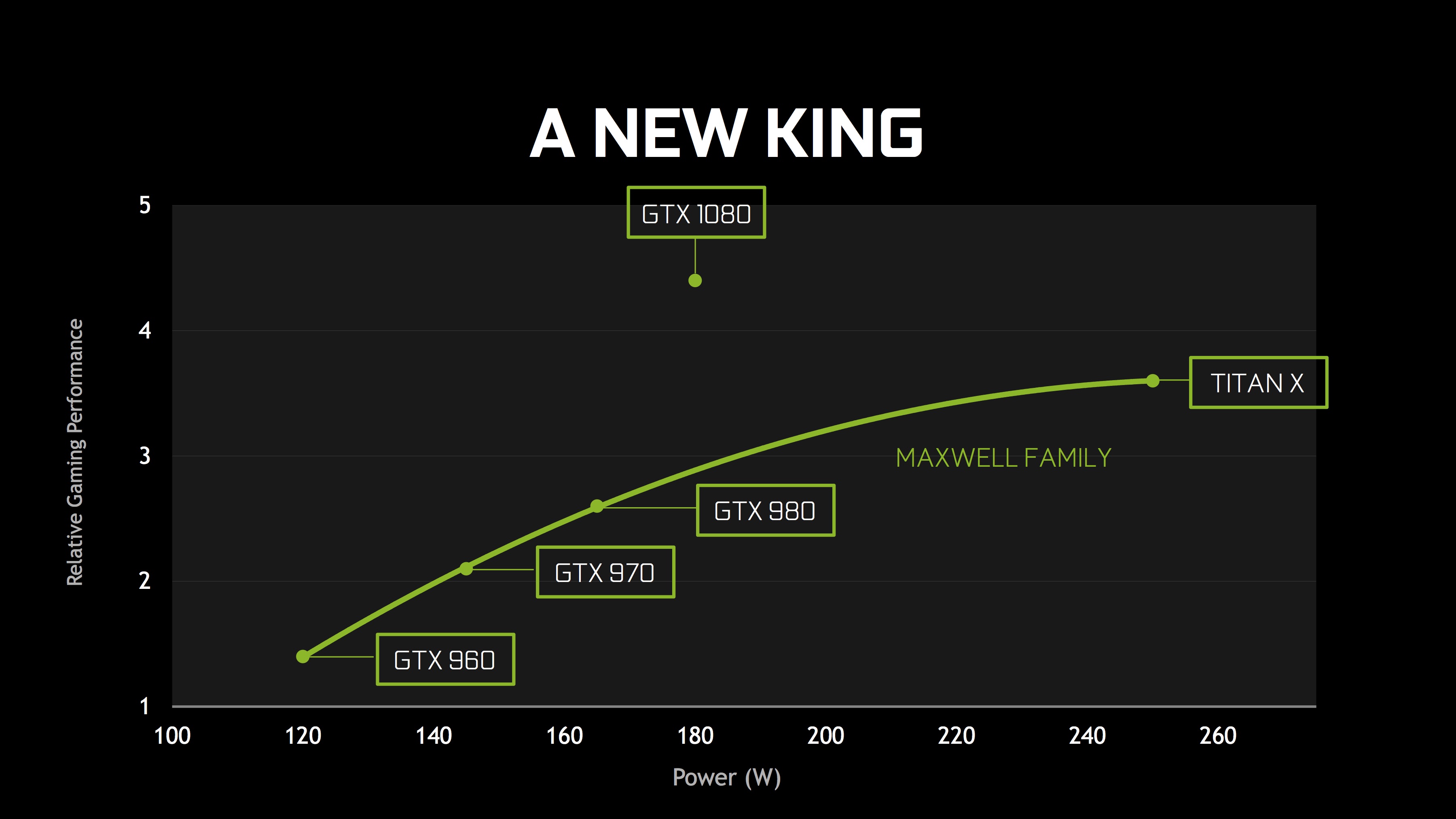
@wintry escarp I'm about their presentation charts... same as always http://images.anandtech.com/doci/10304/GTX1080King.jpg
 wicked oak
well, nvidia and their graphs
im specially fond of those "VR POWER" graphs where they claim like 4 times more performance than a TitanX becouse Pascal
becouse they are comparing a game with no nvidia vr optimizations like multires, to the same game with literally ALL the nvidia vr optimizations
wintry escarp
nvidia have always been liars, they have been claiming Pixar quality since the first GeForce card
mighty carbon
Nvidia rules
so does Intel
AMD might have superior GPU hardware, but drivers suck soooo baaadly
on CPU side, I don't think Zen will beat Intel's CPUs
wintry escarp
inbtel havnt released anything new worth buying in years
my 4770k is still almost as good as todays top mainstream cpu
mighty carbon
I need to buy whole new box 😦
debating whether to get i5 and maybe upgrade later (since all Intel Lakes will use same socket for several generations) or get i7
(currently I have AMD Phenom x3 2.2Ghz)
abstract gale
@mighty carbon if price is extremely important I would just build a minimum build for cheaper, even with an older i5/i7. In a build im using an older i7-950 and its plenty fine. easily a pc for $800 or less
mighty carbon
I don't want to go older, because at some point I'd have to make fundamental upgrade instead of just bumping up CPU, RAM and GPU
abstract gale
the main compatibility point is just gonna be the mobo, to determine what components you can'cant use. yea depends what u wanna do. but for a cheap option 3-4yr old components with an r290 or better gpu is fine
mighty carbon
but price for i5-6400 2.7Ghz Skylake definitely looks more attractive than i7
abstract gale
i dont see a need for an i7 right now
mighty carbon
I have 670GTX, so I don't really plan upgrading it until I decide to do desktop VR
so looking at getting case/PSU, mobo, CPU, RAM, SSD
abstract gale
yea u can still get newer stuff and not spend a ton too
abstract gale
getting a 500gb one?
mighty carbon
512, yeah
abstract gale
yea, that and gpu
mighty carbon
UE4 is hungry for disk space, plus Win 10 eats a lot too. So 1Tb would give me a peace of mind, but that's a way too expensive
I am keeping old GPU for now. It's not VR ready, but powerful enough to play most games and as UE4 developer RAM/CPU/fast and large HDD are more important
abstract gale
could use a secondary standard larger drive for primary storage
mighty carbon
well, UE4 uses user dir for DDC
and that would be on C: drive
so might as well just have bigger C: drive instead of messing with .ini and breaking something
wintry escarp
I planned on getting a 1070 until I saw the stupid prices
question: would VR really need a bump in res if they could keep 2560x1440 but make the pixels take up all the room...no visible gap between them?
 plucky seal
I'm having a weird issue; the boolean: "Is head mounted display enabled" for some reason stopped working u.u
wicked oak
of course they could spam more pixels on the VR screens @wintry escarp
but then you get into HDMI limits real quick
for this gen, they wanted it working on normal HDMI
if you use new displayport, you can do much more
its not like pcs are not ready, people with 1070/1080 are playing at 1.5 or 2x supersampling to get a clearer image
sharp swan
we ran our game at 300% screen percentage the other day on a 1080/skylake and it didn't even shift. 310 is the breakpoint for us when it starts affecting the scene
spring pond
I haven't even tried our game on a 1080
just trying to get it to 90fps all the time on a 970 still
and we are almost there
sharp swan
yeah 970 is good... but it's just short if you ask me. 980 though makes a big difference
wintry escarp
I'm thinking more of mobile
its much harder to just tell people to buy more hardware
spring pond
@sharp swan 970 is the "Oculus" spec and is most used on card on steam by like 8-9x every other card
you sort of have to target it
(if you don't account for intel)
sharp swan
yeah we did too. It does stuff ok for the most part. It's just when want that little bit extra, it starts to show it's limits
spring pond
wait i lied, its not that big a gulf, but still the card to support regardless
fuck this rendering thread bug is giong to be the death of me. I have no idea whats happening 😢
The cries
sharp swan
I get the feeling that the 1070 will be the base standard once the price comes down with the headsets and controllers.
spring pond
Only happens on shipping packaged builds; dev (packaged or VS), debug and editor all run 100% fine
wintry escarp
my 780 is fine, not gonna bin it and blow £400 just to use vr
mighty carbon
well, apparently there are money to be made in VR - look at Raw Data sales
So investing into VR hardware might pay off 😃
wintry escarp
I'm planning to get a vr capable phone
I might have got a rift if it wasn't locked down
ive no intrest in room scale vr, I have no space
wintry escarp
well theres nowhere for me to test one
normal thorn
ah yeah well thats not an easy fix
wintry escarp
ive tested a gearvr, and I expect daydream to at least match it
normal thorn
are you going to dev on that?
wintry escarp
that's the plan
wintry escarp
shouldn't be any more constrained than gearvr
normal thorn
if you go on the unreal vr forums there are very few devs attempting it
I'm talking about gear vr
any mobile
vr on mibile is the hardest imo
mobile
normal thorn
where do you live?
wintry escarp
scotland
normal thorn
hmm
yeah the market is super small which is why larger companies aren't making huge products
so far its hard to get enough consumers to fund these things
but gear vr is just meh for me. No head tracking sucks, phones over head very quickly
overheat leads to clock speed throttling leads to fps slow down...
so few features can be used when trying to get the fps needed
if you have an idea for it, go for it. I don't know anyone who has a gear vr who uses it much. They try it out and go huh, yeah kinda neat.
wintry escarp
that's VR all over, its still a gimmick until the technology to do it properly is affordable
normal thorn
so if you have a good idea go for it
yeah it is a gimmick of sorts. Its still more fun to play a game on a PC with a monitor than in VR for any amount of time
I have a headset and dev for it, but its not easy to wear for very long
still there is a uniqueness and something there to be explored so, its worth it for that
BTW how expensive is a 970 there?
I got one for under $300
wintry escarp
I would prefer to do it on iphone7 but apple has no vr system
theyre over priced and lcoked down but they run well when it comes to games
I doubt 1060 would be any faster other than the new VR acceleration features
mighty carbon
Yeah, UE4 is not cutout for mobile/mobile VR
I mean, it can be done (I am working with it), but I find myself fighting engine more than making my app/game
@normal thorn https://twitter.com/VRTracker positional tracking is coming to Gear VR
The latest Tweets from VR Tracker (@VrTracker). VR Tracker is an Open Source 3D position tracker to improve Virtual Reality experiences
Gear VR has more users than Rift/Vive put together
granted they aren't hardcore gamers
still marsh
Hey guys. Does anyone else have this issue in UE4, when you end a VR Preview (PIE) session, the Vive continues to render the frame and makes your PC lag a whole ton? Shutting down Steam VR instantly solves the issue
Is this a bug in UE4, SteamVR, or something else entirely? Any fixes?
granite jacinth
@still marsh what are your specs?
I've never run into that problem, but I have an alright rig
still marsh
@granite jacinth Crappier than I should have for VR, but this is specifically only when ending a session. In game it's fine.
granite jacinth
How are you able to discern this lag?
still marsh
@granite jacinth You mean the symptoms? Everything on my PC gets super laggy, mouse movements, editor interaction, really really slow. The second the SteamVR process is killed it goes away (but then I have to reboot the editor to reinitialize VR)
granite jacinth
Are you in direct modfe?
direct mode
Do you get any warnings above SteamVR widget?
I mean, what are your exact specs please?
still marsh
I'll have to check the mode in a minute. My specs are crap, I'm on a GTX 760, but like I said, this only happens after the PIE session ends, not during
@granite jacinth I am in direct mode
dry fjord
I think I have that problem
editor hangs
it's VR related
I've been saving constantly and needing to restart the editor after every second play or so
does anyone have a list of console settings they apply to all VR projects regardless, to improve performance?
fleet veldt
@dry fjord I usually turn off three main things. SSAO, SSR and HZB. if you turn those off you'll get a pretty big FPS increase
r.SSR.Quality=0
r.AmbientOcclusionLevels=0
r.HZBOcclusion=0
still marsh
@dry fjord Also, check the best practices guide. It has lots of really good tips
Information over developing for VR.
dry fjord
thanks!
 silk lodge
also, use the GPU profiler - control + shift + ,
mighty carbon
So, after whole month (at least it feels like that, maybe a bit less or a bit more) of battling UE4 I got reproducible test case for ISM and Gear VR issue: https://answers.unrealengine.com/questions/488041/gear-vr-instanced-static-meshes-are-broken-with-es.html
basically ISM doesn't render properly on Gear VR is placed in a steaming level. Only works when placed in the persistent level.
Same story most likely with HISMC, but I haven't tried yet (since HISMC isn't optimized for mobile)
silk lodge
Anybody here doing UE4 / VR in Minnesota?
wintry escarp
nop, all I have is cardboard
fresh laurel





 zinc violet
that video though...
bit creepy
when those cheaper headsets adopt proper tracking, VR will become affordable
that PiMax seems to be 350$ with earphones and 300$ without
and free shipping 😄
you'd think they could use OSVR tracking on those
mighty carbon
anyone from Texas ?
silk lodge
I'm from texas, but I'm not there anymore =/
dry fjord
4k is a bit useless if everything else regresses
the whole 4k thing is underwhelming anyway, it's like every industry everywhere is doing it out of necessity but they're looking forward to 8k
VR should be the same
wintry escarp
I think higher res is the wrong way to go at the moment
they need a better screen tech that removes the gaps between pixels.
mighty carbon
for mobile VR they need more RAM, faster SoC, positional tracking and hand input, and having whole thing run cooler. If we can get to Doom 3 level of complexity (although with baked lighting and maybe a few real-time lights) in mobile VR, I think it will be pretty awesome
mighty carbon
no, you can't get complex scenes in Gear VR
running into polycount limits and drawcalls limits
and most likely performance issues with having particles, having several skeletal characters in the view and AI (however dumb AI was in Doom 3) running
note that a lot of stuff isn't even optimized for mobile VR, such as foliage, HISMCs, multiview rendering, etc.
in UE4 at least
wintry escarp
well I can afford a rift, but oculus can shove their closed store up their bottoms
i cant afford vive
sharp swan
+1
wintry escarp
its a shame, cos i'd get VR just for good 3d even if it wasn't a true vr game
I'm sure i read you can sideload games onto rift but i don't know if that includes downloaded stuff, like from steam
or if you basically have to sell on oculus store or give it away
mighty carbon
lol
are you an open source fanatic of some sort, @wintry escarp
you sound just like those guys
MS, Sony and Nintendo all have closed (even tighter than Oculus) stores
sharp swan
He's right though. Oculus have been bastards about their store
mighty carbon
yet, people not only embraced these platforms, they aren't willing to switch to open pastures of PC gaming.
how @sharp swan ?
sharp swan
Well denying games a release on the store, with no reason, no further communication on the matter to resolve any issues. Then there was the whole "only runs on store" debaucle that they backtracked on when the hackers were gonna cost them millions in security.
sharp swan
Not quiet
mighty carbon
no, quite exactly like Oculus it was
sharp swan
this is a bit harsher on the developer sense
Well I have a steam account since its beta so I never saw any downside to the client end.
mighty carbon
I submitted my game to Valve and it took like 6 month to hear back
I got lucky and got accepted
sharp swan
except it's performance at first. It kind of drained systems when gaming
Hah Valve communication levels are notoriously bad. I will give you that
mighty carbon
A buddy of mine submitted their game and got rejected, with no clear explanation why
it's now, many many years later you have everything almost automated and there isn't any approval process
which also resulted with such a saturated market that it's virtually impossible to make a living making games for Steam without any PR
and I mean PR you pay a lot of money for
so if Oculus survives, many years down the road it will most likely be similar to Steam
(especially that many folks from Valve work at Oculus)
sharp swan
What irks me about Oculus is that they helped us to develop our game for Rift, even had a liason with Oculus for the task. Then were dumped like a hot potato with no reason and denied access for the game to go on the store, at a time when Rift worked with store games unless you hacked it. It was like pissing in our face from a great height. I have no love for them anymore. Their business sense is anti-development if you ask me. I see more and more developers turning their backs and rightly so.
mighty carbon
did they pay you during the course of development ?
also, got some videos from the game to see ?
sharp swan
why would they pay us? We weren't making the game for them. We were making it for the platform. They were just backing up the fact we bought their development kits and they were fishing around for launch titles. Which ended up being Eve Valkyrie and Elite Dangerous (in regards to our genre). Now we weren't competing with either of them.
sure one sec
Enjoy the videos and music you love, upload original content, and share it all with friends, family, and the world on YouTube.
bunch of trailers, reviews and gameplay stuff there
sharp swan
well elite is a complex sim. Eve is an on rails experience. This is more a wing commander affair
mighty carbon
I am just puzzled why wouldn't they let you on right now, after those other game were released at launch ?!
sharp swan
You aint the only one
Imagine how fun it was for us when we had developed to get early access out for Oculus launch and it ended up only being able to played on a Vive or a hacked rift.
Now flip that and look at Valve support via the Vive. It's been exceptional. Got the devkit in plenty of time, got the greenlight no problem. They have since expanded their open source levels to lighthouse stuff, which expands the VR capabilities in leaps and bounds. Oculus on the other hand over-charge a stupid amount on controllers that should have come with the damn HMD in the first place.
They wont even send them to us even though we had DK1, DK2, CV1
wintry escarp
consoles are different from desktop
wanting the freedom to sell something anywhere isn't open source
anyway, what was the answer?
can sideload games be distributed via steam etc or only systems without drm
mighty carbon
@wintry escarp you are free to sell anywhere, Rift or Vive or both.
wintry escarp
so once you enable run from anywhere thing, you can just click a game as normal to launch it on rift?
wicked oak
and valve autoaproves you if you tell its a vr game
they dont even look at it
"hey valve plz give steamworks access" "no problem mate here ya go"
wintry escarp
i need to find somewhere to test a vive
mobile is what i can afford but people here doing it don't rate it all
i could do rift and just not meet the spec, cant be a big difference between 780 and 970
mighty carbon
well, start with Cardboard
that's how I did it
I tried it, made some test app using Unity, then got Gear VR, got UE4 and still fighting to get what I need 😃
wintry escarp
thye need cardboard3 with rubber strips
patents rubber strips on VR viewers
what made you jump from unity to ue4? wouldn't unity be more lightweight?
spring pond
Anyone else get a shit ton of random friend requests on Oculus home?
mighty carbon
@wintry escarp Blueprint
I am not a programmer per se, and don't have time to learn C#. In all of my projects I had to depend on programmers (and their quirks/schedules) even for simple projects. Blueprint enabled me to work on stuff without having anyone on the team (although at some point I'd have to get someone on board, because it's not feasible to do everything alone; plus it's no fun to work alone anyway). I could probably prototype a vertical slice in UE4 by myself if I had to.
Community has been great
Ability to talk to devs is another major "selling" point
Plus UE4 has greatest tools
wintry escarp
cool, booked an appointment to test a rift on wednesday
fleet veldt
@spring pond yeah i get them too. I think it's just because there's not a lot of people on so people add random friends of friends to increase the chance that they might have someone to play a multiplayer VR experience with.
granite jacinth
So, any sound gurus for VR here?
I know we can enable the Oculus Rift plugin for Vive also...
But, what's up with WWise?
fleet veldt
hi @granite jacinth also take a look at http://www.fmod.org/
FMOD Studio is an audio middleware solution and engine for games. Use the DAW inspired interface to create interactive music and sound effects.
although I've just been using the built in UE4 stuff. set attenuation start to a very small radius and turn on some of the other features like low pass filtering, with occlusion checks and you can get some decent 3D sound
wintry escarp
might sell my turbo chameleon, put it towards a rift
spring pond
^^^ what he said