#multiplayer
1 messages · Page 586 of 1
 summer tide
 thin stratus
Yes and no. OpenLevel is a HardTravel that Clients and Servers use to perform the first travel.
ServerTravel is Server only to move between maps nd can be seamless (and should be).
Parties are done using Beacons
summer tide
I use streamable levels so I don't want to use OpenLevel all the sudden.
thin stratus
You can't
If you use normal networking for this, you have to open the level with ?listen
You could try to open the level when you start the game
with ?listen
And then only create the session
But the Party stuff, like Overwatch does it or Fortnite and what not, where you just sit in the MainMenu, is done with beacons
A lightweight connection that doesn't need a world/level to connect to
There is a Steam Party Plugin on the Marketplace that offers this
Otherwise it requires C++
Hint: Multiplayer without any sort of C++ is gonna show you the limits of BPs very fast.
summer tide
nice but expensive plugin
summer tide
I wonder if there's tutorials on youtube for SteamBeacons
thin stratus
But you will spend +1 week to add this
 empty axle
@austere needle yeah I might said it wrong. Of course you can have player controller as a owner of a weapon but don't expect that this owner will be replicated to every client.
thin stratus
Let's put it into perspective: I would need a full-time week probably to add all the stuff that the plugin has.
That would be 40 work hours. I won't tell you any rates but this would be a shit ton more expensive.
Now think about how long it would take for someone that never touched beacons and that still has to learn all the pitfalls of steam + beacons.
probably 2-3 weeks. And that only if you know your way around the engine and c++.
So if you don't want to spend a multiple days of learning and fighting with this shit, buy the plugin and learn from it.
summer tide
yea I might have to.
thin stratus
@empty axle Honestly, it doesn't need to. If Clients need access to any of that info, you can pass an Instigator.
E.g. Weapon->Owner = PlayerController; Weapon->Instigator = PlayerCharacter;
summer tide
What do you think about "Blueprintable Online Beacons" on UE4 market if you only need the Beacon Functions in BP?
empty axle
@thin stratus yes
 rose egret
UPROPERTY(ReplicatedUsing=OnRep_SomeArray)
int32[8] SomeArray;

void OnRep_SomeArray(int32* pre)
{

}
is 'pre' pointer to the first element of previous array or the changed element ?
 twin juniper
Has anyone have any idea of spectating players at the end of a level or match tag me please if anyone have idea about it
 sleek elk
Hello, I have sub level not "always load", but "BP loaded". When I load them on server with "Load level instance" on server only, Clients sees nothing. When I multicast the "Load level instance", then all clients see the level, but the actors in the level are not replicated.
I read several answerhub topic simlar, but their people complain more about how to change that actors are not replicated. Most topics sounds that doing "Load level instance" on server also replicate actors in it. Is there anything I need to do when using "Load level instance" to load a level with replicated actors so clients have them replicated?
 gloomy sedge
Hi guys, I'm trying to replicate the Squad spawning system. Theres a timer that counts down until the players can spawn again. When the click 'Deploy', they are added to an array of Players ready to spawn. Every X seconds the array of players are spawned. For some reason the players are spawned with 2 seconds left on the timer? Any reason this issue could be occurring?
sleek elk
I see a set timer by event, but what exacty do you mean with "2 seconds left on the timer"?
I see no timer made visible or print out or measured. So, what 2 seconds do you mean?
nor i see a ral countdown, the timer by event just executed in a loop every 10 seconds
gloomy sedge
The timer should fire the event 'SpawnCountDown' every 10 seconds right ?
sleek elk
right
gloomy sedge
But if seems to fire it with 2 seconds prior
sleek elk
How do you messure? Look at a clock?
It is only the very first or 2nd one which fired too early? Or is it also the 3rd, 4th, 5th?
gloomy sedge
The deploy button's text is binded to the timer's remaining time
sleek elk
Can you show that bind?
And this is important: -> It is only the very first or 2nd one which fired too early? Or is it also the 3rd, 4th, 5th?
sleek elk
I mean the iteration of the the set timer by event loop, not the number of clients with my question
gloomy sedge
i loaded up 4 clients, and clicked deploy on one client
and it spawned with 2 seconds left
and then clicked deploy on another client
and same happened
sleek elk
I see loop on, so I guess after one time click it does the spawn every 10 seconds without needed interaction
The timer should fire the event 'SpawnCountDown' every 10 seconds right ?
@gloomy sedge as yous aid here also
twin juniper
can anyone help me to spectate after I complete my level
sleek elk
So, my question is still after one click whats happen after 3rd., 4th etc. iteration, if eveytime in every loop executed after 8 seconds instead 10... or what do i miss?
gloomy sedge
The timer runs without interaction, it starts the when gamestate is loaded. So even if there aren't any players ready, it will still fire
sleek elk
I do not understand the goal. A timer is looping all the time, on every machine for its own. You do not check in GS for authority, so every client is running its own timer. Why? Then you put player into array only on server, but timer run everywehere. Perhaps you look at a timer on non-server and think that the timer of client shpuld show the timer remaining of server?
That can be one case
Or click the Arrow on the buttom of your set timer by event node, there are more details too set. Perhaps you have something setting wrong there.
gloomy sedge
Ahh yoy are right, the timer isn't on the server, I would need to move it to the gamemode ?
Or i check the gs for auth?
sleek elk
When the goal is, to show timer everywhere, then start it not at begin play but start it by some action and replicate per RPC so every client start a timer he can show in widgets
or replciate a count down by mesaure only on server and then replicate every second when the countdown show another number
or put it in a replicated variable, but I would not put the timer into, it would replicated every ms or per frame
Just put your numbder you want to show in widget in a rpelicated var when the timer arrives the countdown of intervall you want to refresh
There are different ways to achieve
I also do not understand why the timer is looping all the time
My intention would be the timer has to run only when action is done.
If it really has to tun all the time, run it only on server and replicate only the things.... numbers, events, actions ... what the clients need to know and exactly when that happens.
 quick flint
How do I use the network insights tool
The documentation doesn't really help me
ima watch this lol
gloomy sedge
AH!! So I Printed the Remaining Time and I've found this
The Game is started 0.999 Seconds early
 viscid escarp
Hi! I read that to make replication properties i've to do this method:
DOREPLIFETIME(ActorClassWithTheProperty, ReplicationProperty);
So everytime i add a property that has to be replicated i've to add a line with this method with a new ReplicationProperty in the param?
 bitter oriole
Yes
quick flint
why does FVector_NetQuantize always break my projects lol
i literally never can use it
gloomy sedge
Where should Widgets be created when working with multiplayer ?
 shrewd tinsel
can i access PlayerStates "Pawn Private" from client?
 kindred widget
@gloomy sedge You can create them from where ever. Just as long as you don't really do it with networking code. With a few exceptions, they should usually only ever display already replicated values from stuff the client itself has access to. I normally keep all of my important widgets in the HUD class, since there is only ever one per client and it's kind of meant for UI anyhow. I usually write functions that'll either open them and initialize them how I want with specific inputs. And that same function will create them if the pointer I store them in is invalid, then initialize them. There's always exceptions to the general rules, but I find that mostly following this keeps code easy to use, since anything on the client can access the HUD class via GetPlayerController at index 0 then GetHUD. Or if you're doing C++ it's GetWorld()->GetFirstPlayerController()->GetHUD() I think. I usually write small helper functions in Blueprint Libraries that'll return an already casted HUD for easy use in client only code in BP. And a Similar one in my C++ HUD class for easy referencing there.
 tranquil yoke
Hey Using a Application LifeCycle Component, need to notify server that applicaiton has been closed so we can remove from server instantly.
Just need to know where should i use this component ?
 rich ridge
does APlayerCameraManager exists at server?
I have a line trace logic using APlayerCameraManager.
 gloomy sedge
@kindred widget Thanks for the reply. When the User has joined the server, its PlayerController is spawned but the character is not, when the Controller is spawned, The Deploy UI is created. When the Character is spawned, the Deploy UI is destroyed
quick flint
@shrewd tinsel no one knows
tranquil yoke
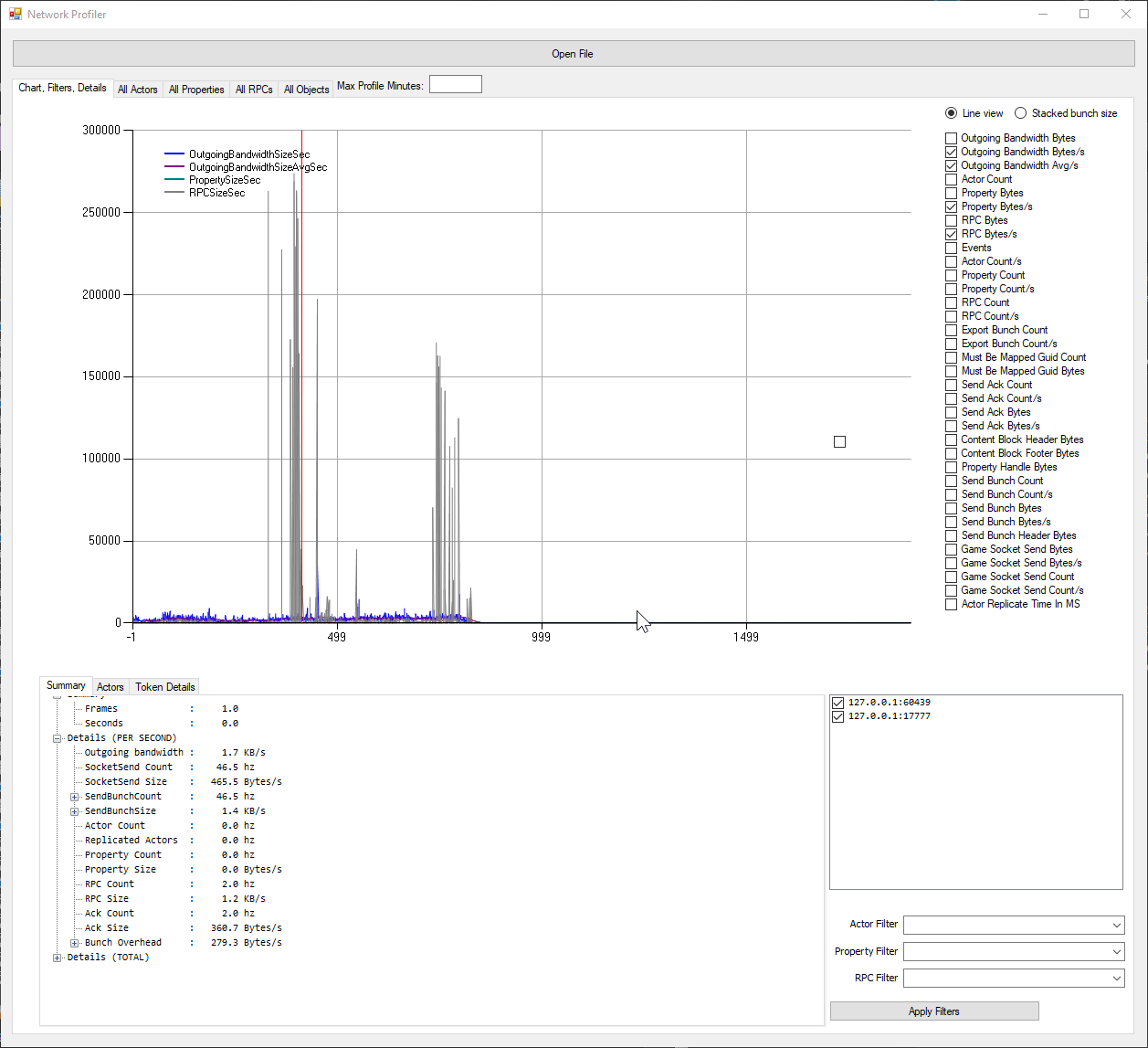
Click on Spike and see what is happening, it should be constant graph most of the time, like a heart beat, Spikes like these, needs to be optimized.
you need to check, which actor is taking the most bandwidth and then check your code with respect to that . and if you are running this session you always have an idea what you were doing at that time.
shrewd tinsel
thanks for the info
any idea how to optimize shooting? right now im rpc'ing to server and then multicasting every gunshot
its pretty brute force
ofc reliable
tranquil yoke
and you are also replicating the projectiles also ?
shrewd tinsel
no
shrewd tinsel
but i want people to hear all the the gunshots at least upclose
tranquil yoke
?
like reliable for each gun shot, so if it is automatic firing the keep doing reliable
kindred widget
You shouldn't really have to reliably replicate anything but the trigger being pulled and released. That should be reliable. You should also generally check out ShooterGame for that kind of stuff. It does this by replicating an increasing integer to let clients know to play shooting stuff.
tranquil yoke
yes
kindred widget
It is I believe. Learn tab in the launcher.
shrewd tinsel
thank you for the help guys
 gray scroll
in editor... game state beginplay gets called before player controllers begin play but in a packaged game its the other way around. Why is that?
 hollow eagle
 red musk
Hello everyone, I have a zero-G spaceship type multiplayer game. I want my ship to bounce off a wall when it hits it. I am using Character Movement Component for movement. To do this, I simply reflect its velocity vector when it hits a wall. This works, except there is a few frames of client/server fighting since the client is out ahead of the server, and just setting velocity doesn't seem to go through the fancy client prediction stuff it does to resolve this kind of thing. What's the best way to instantly set a new velocity on client and have it not fight with server when server is a bit behind?
twin juniper
When an actor (pawn) is destroyed, is their corresponding player state also destroyed?
Or does that remain?
 royal mica
@twin juniper To my knowledge, the playerstate shouldn't be destroyed
royal mica
Hey guys so I'm trying to get a reference to my player controller from my player character. I'm using the following function to ensure that the client will still be able to grab a reference even if it spawns in late. For whatever reason though the client is never able to successfully store their player controller.
twin juniper
Hmm
Try Get Player Controller instead of Get Controller
Might make a difference.. but not 100% sure
royal mica
The get controller node must be used because instances of a client's character on the server's side will grab the server's player controller & vice versa. If we set it up like that then each player will have all the characters grabbing their own controller when they shouldn't be.
twin juniper
oh I see whatt you mean
you want specific to that actor
not each client grabbing their own
Where are you calling this?
Inside yur pawn bp?
 vivid seal
A couple things:
- Why bother casting if the reference is ultimately stored in the same variable (that I assume they both inherit from?)
- There is an OnPossessed event that will run on the server, it will give you the controller that you can then cast. You can replicate the controller reference to owning client if need be.
To clarify, OnPossessed should be used instead of BeginPlay as the place to set your controller ref.
royal mica
@twin juniper Yes I am calling this within my character BP
@vivid seal I don't know why I didn't think of 1 earlier 🤦♂️ I'll look at what I can do
@vivid seal Actually I just remembered, I require the actual player controller reference, as 'Get Controller' gives you a Controller reference, not a PC reference.
I will look into your 2. suggestion though
vivid seal
BeginPlay order is totally random, ive kinda stopped using it for anything that requires grabbing references, at least for classes that spawn in at start like player controller, player character, game state, game mode, etc.
Most of those classes have other events you can hook into depending on what you need.
royal mica
The order in which it spawns isn't the exact issue here, it's more a question of why the client instance can't cast to its player controller
 meager spade
Controller only exists on Owning client and Server
BeginPlay on client is not guarenteed to have a controller.
vivid seal
Yeah, like I said, use OnPossessed (called on server, where the controller will exist) and then set that player controller ref variable you have to replicate
royal mica
Ah so I should use Saiyoran's event possessed node and pass that on to the client?
vivid seal
Then the owning client will get it
royal mica
Okay I understand now, thank you!
vivid seal
Yes
vivid seal
It’ll be null regardless on other clients I think
meager spade
yeah it will but its good practice to use rep conditions and understand them
most people don't use them/understand them
vivid seal
But might stop the server from attempting to replicate it when it never will be able to
I haven’t looked at how it works under the hood but you don’t lose anything making it owner only I think
royal mica
Okay so I have it set up as so, with the PC variable being replicated, owner only. The client still has the same issue of not getting a reference though
gray scroll
is there a way to check if the game is online (listen server or client) vs offline?
meager spade
why you casting like that?
royal mica
@gray scroll
vivid seal
Where are you checking if the client has the reference? If it’s BeginPlay, it still probably won’t
meager spade
seems really pointless
royal mica
I'm casting like that because I need a player controller reference, not a controller reference
meager spade
but you can just cast Controller on the owning client
vivid seal
Just cast it to PlayerController
gray scroll
@royal mica wow. Way better than this...
meager spade
you are double replicating for no reason
royal mica
Gotcha, I fixed it now
meager spade
btw, Controller on client is not guarenteed to be valid at begin play
royal mica
The issue remains though that the client still cannot grab a reference
meager spade
and BP sucks for that kinda stuff
in C++ land, we have a override OnRep_Controller
which we do stuff on the character when the controller comes in
vivid seal
You can make your own (I know it’s replicating controller twice)
By just setting that variable to RepNotify
That was the best way I found in BP to do it
meager spade
yeah was going to suggest that
meager spade
make your PlayerController property
RepNotify
then you get a generated function called OnRep_PlayerController in your BP
vivid seal
Have you used RepNotify before? It essentially calls a function every time that property is replicated
royal mica
I have used repnotify I'm just confused as to how you want me to implement this
vivid seal
And you can use that function to do your “BeginPlay” stuff with a valid controller
meager spade
hardest thing when new to UE4 networking, is Rep order, and race conditions 😄
vivid seal
So basically:
- Server calls OnPossessed, you set your PlayerController reference.
- It replicates to the client.
- Client will call automatically OnRep_PlayerController which you can use to set up your stuff on client, knowing that your controller is now valid.
meager spade
and the most common mistake people do, is set a replicated property, then do a RPC, which uses that replicated property.... Thing is RPC's can arrive way before a replicated prop does 🙂
gray scroll
@royal mica isloggedin returns true in editor when it shouldnt
royal mica
So like this for step 1?
vivid seal
Yup
Then in OnRep_PlayerController do a switch on Authority, because in blueprints, OnReps are also called on the server
royal mica
Would either of you be able to join the Support vc? I feel like I could explain the situation much better if I could share my screen. I don't actually need to set anything up on the client with a notify, I just need the reference so that I can grab the player's mouse position later on.
vivid seal
In that case, it should be valid any time after that variable replicates
If it’s not, then it might be another issue not related to multiplayer
royal mica
So the first is how I have my event possessed and the second is where I reference my player controller var later on to check its validity
vivid seal
That’s always coming up not valid?
vivid seal
Where are you calling Head Rot Get?
royal mica
Every tick, this is in a function that provides the AnimBP with information so that the head can be rotated towards the mouse cursor on screen
vivid seal
Okay, are you checking that you are the owning client before calling it? Otherwise it’s getting called on every client, and only owner has the reference
royal mica
Before calling what part?
vivid seal
Head Rot Get
royal mica
Well the issue is that I use a listen server so only allowing clients to call the function would prevent the server player from rotating
vivid seal
Nah, you can just check IsLocallyControlled instead of HasAuthority
royal mica
ahhh
vivid seal
That should make it work for listen servers
royal mica
Okay so it works for listen servers but the client still has an invalid reference
vivid seal
Weird
royal mica
Nope holdup
Okay never mind, so the client now has a valid reference it's just the function that isn't working... okay this is starting to make more sense
vivid seal
Also keep in mind, once you get client working, you probably want a way for other clients and the server to get this info too
The rotation info that is
If it’s feeding your anim BP
royal mica
So the rotation info is correctly replicated, I have that entire end working perfectly
vivid seal
Nice
royal mica
the server and client see each other's rotations, it's just the client that for some reason dislikes this function 😅
vivid seal
What do you mean lol
royal mica
Well we've established that both the client and the server player characters have their player controller references correctly set up... Now the only issue is the client for some reason not being able to rotate correctly and I'm assuming it's due to this function
vivid seal
The owning client?
royal mica
Yes
vivid seal
Lol well... good luck! I don’t have enough brain power left
royal mica
You're good man, thanks for all the help!
royal mica
Well you just delved even deeper into the rabbit hole...
When interp speed is 0 (snap to target), the server works as expected... But the client:
Well I guess you can't see it very well but it helicopters haha
Actually no I got that backwards... The server helicopters but the client is still broken
vivid seal
Why interp if you want it to snap, can’t you just set rotation? Im not great with this though so there’s probably a reason
royal mica
So I have it set to snap because it helicopters, but once I figure out why the client is unable to rotate properly I'm going to try to get it so there is slightly slower interpolation
But if I get rid of the RInterp node it functions the same, client doesn't work
vivid seal
Im confused about how it works on the server...
Oh listen server right?
Oh one thing
You check for locally controlled inside the function right
Which means if it’s not locally controlled, that function is just returning 0 every tick, and if it’s on the server (so not locally controlled, but with the ability to use that server RPC you have) then the server is just going to spam set your rotation to 0 unless you’re the player that is the server
Just take the “is locally controlled” check and put it in front of Get Head Rot instead of inside it
That way you don’t have anyone else trying to call the server RPC after it
vivid seal
Did it work???
royal mica
That was exactly it.
vivid seal
Nice!
royal mica
The server was overriding what the client believed its rotation should be
ughhhh that was so dumb haha
vivid seal
Dude I run into something every single day with replication, it’s so much trickier than it appears
At least it works now
royal mica
I decided to make my first multiplayer game for the challenge... well I guess I'm getting what I asked for lol
Thank you for all the help Saiyoran, I really appreciate it man 👍
vivid seal
No problem good luck with your game
royal mica
Thank you man, you too
 glad sedge
Anyone know why, on character rotation, my character is shaking?
Using CMC - rotation is set as 'SetRelativeActorRotation'
glad sedge
Ah, answer - cause I had 'controller orient' on the CMC
duh
So what's better - Replicated properties, or using RPCs to update properties ?
 mild agate
has anyone had trouble replicating an animation montage on server before? Im running into a glitch with it
 ocean geyser
@glad sedge depends on the situation. for something like firing projectiles, use RPC's, for something that has a state that needs to be known and correct for everybody, use replicated variables (such as a door being opened/closed)
glad sedge
Yeah that's consistent with what the UE docs are saying - if it's cosmetic or doesn't need to be overly accurate, use RPCs
But, just so I'm clear, you can't update a replicated property from a client, it can only be done on the server?
glad sedge
hmm another thing; Inputs don't run every frame, so if I have 8 players on the server, the inputs seem to run at a slightly lower rate.
twin juniper
IS it possible for a client to get a list of the connected pawns?
rich ridge
@tranquil yoke AplayerCamersManager is a class provided by engine, if Engine doesn't replication its own class when why I should replicate engine's class?
If APlayerCameraManager doesn't exist at server then I need to come up with different solution.
Can anyone confirm this that APlayerCameraManager exists at server or not. I browsed through the code and didn't come to any conclusion.
summer tide
When I apply skeleton meshes and materials before starting the session which parts need to be on server and owning clients?
So I've char selection, there you get to select male or female based on that I assign certain SM and mats to the default mesh.
empty axle
@twin juniper I believe there is something like PlayerArray in GameState
rich ridge
I searched in the source code and APlayerCameraManager do exists at server too.
vivid seal
https://gyazo.com/b885a38e3f57550b0a4b16d62fe66cde
in the docs it says explicitly not to do this kind of thing based on an object's state. however, if ReplicationNeeds is a variable that is set per-class and not changed per-instance, is this okay to do?
 empty axle
@vivid seal it should be okay. IIRC it shouldn't be used per instance as this method is only called once for certain class
 worldly raft
Hello, would someone be able to help me with saving variables to the player state, then retrieving them again for a scoreboard?
 stoic meadow
Sure! @worldly raft What part of that do you need help with?
worldly raft
I have been able to get a scoreboard to display when the players press the backspace down, and have setup a list widget that gets added to the scoreboard for each player. For some reason i can get each player's "PlayerID" from the player state but when i try to get the players to enter their name and i save that to the player state i can't get that displaying for each player correctly
stoic meadow
Is the variable for the name replicated?
 slender mortar
Hello all, any guide on how to replicate CharacterRotation?
I use ALS3, it already has that
When I tested it on AWS, it jitters like crazy rotation wise
(For movement I'm using a custom CMC to handle sprint, acceleration changes, etc)
Interestingly enough, when I test the game locally with Lag=500, it doesn't show such jitter rotation wise
What's happening is, Locally the player calculates TargetRotation and CharacterRotation
Which are both Replicated with SkipOwner (to try and resolve the autocorrection thing)
And all SetCharacterRotation() calls are done on Remotes
worldly raft
@stoic meadow yep the var is replicated
slender mortar
Using those replicated vals
stoic meadow
@stoic meadow yep the var is replicated
@worldly raft What is setting the var - server or just client?
worldly raft
Just client, through the widget
@stoic meadow could i pm you with some screen shots?
 molten jasper
I have a TCP server and client unreal projects, the idea is that the client can connect to server and send a message then receive a message back. I've created a LogmeInHamachi virtual LAN network, when i start the client and the server within the same PC while having the client connect to the IP address provided from LogMeInHamachi, the client connects to server and everything works fine, but when i open the client on a different computer thats part of the LAN network, the client does connect to the server, but any message i send to the server doesn't reach it. does anyone know why client cant send to server? if not, can anyone recommend me an alternative to LogMeInHamachi to test my networking across 2 computers?
 hollow oasis
why simulate physics not working
like everything (play animation, set physcis) dont work
what am i doing wrong
i am new here :/
kindred widget
Can't even see half of that.
hollow oasis
why?
stoic meadow
@stoic meadow could i pm you with some screen shots?
@worldly raft yeah of course.
why simulate physics not working
@hollow oasis wdym, nothing happens at all? mesh falls through floor?
stoic meadow
Well it is executing on owning client only
kindred widget
You also should not be unpossessing on a client, that's server side. In fact, there shouldn't really be too many RPCs here. This should all be driven off of Health being replicated and a repnotify. And why are you getting the playercharacter0 when you're already in the player character blueprint?
stoic meadow
triple redundancy
kindred widget
In short, what you should consider is just setting health to RepNotify. Then when the character is hurt, set the health ONLY on the server Also check here to see if health is zero or below and call unpossess here. On the client, keep a client cached health value, and compare that in the repnotify to see if their health went down. If it went down and it's not zero or below, play your anim montage. If it is zero or below, then that client can assume it's dead and do it's own local visuals for simulating physics etc.
kindred widget
Dunno. I just read docs and forums a lot. The actual implementation is pretty easy though.
 sand crescent
Hey I want to create a spectating system but I found no documentation on it or tutorials anyone have any idea on how to create one
 polar wing
Hello everyone, I have a zero-G spaceship type multiplayer game. I want my ship to bounce off a wall when it hits it. I am using Character Movement Component for movement. To do this, I simply reflect its velocity vector when it hits a wall. This works, except there is a few frames of client/server fighting since the client is out ahead of the server, and just setting velocity doesn't seem to go through the fancy client prediction stuff it does to resolve this kind of thing. What's the best way to instantly set a new velocity on client and have it not fight with server when server is a bit behind?
@red musk
I've been working on a zero-g game too! I had a similar issue with getting arbitrary gravity wall boosts/wall running working (still have to improve mid-air boosts that seem to conflict with phys_falling logic inside gravity zones). I think your issue has to do with the directional vector not being set appropriately on the server when it performs the move on its end. I'm still not sure what the absolute best approach is, but doing a server RPC to set that vector (as a variable) and then perform the velocity flip thereafter could work.
I really can't wait to get rid of the CMC's crap tho when the network prediction plugin matures.
Life would be so much easier 😩
red musk
@polar wing I got it working last night using the CMC client prediction so now it is silky smooth even at high latency 🎊
 echo snow
Is there any nice article/tutorial about cheat protection that you guys know of?
bitter oriole
Not exactly tutorial level stuff
Run on dedicated servers, buy one of the modern anticheat softwares out there, update it often, run a reporting service with replays
And of course ban the offenders once you're confirmed their cheating
echo snow
I mean like basic stuff
Instead of giving access to the player freely
What can I do to make it harder without an anticheat
bitter oriole
Depends which stuff
Wallhacks, triggerbots, auto aim aren't solvable without client side anticheat
Speedhacks and the like, sure, just use WithValidation extensively
quick flint
    UFUNCTION(unreliable, client)
    void ClientAdjustPosition(float TimeStamp, FVector NewLoc, FVector NewVel, UPrimitiveComponent* NewBase, FName NewBaseBoneName, bool bHasBase, bool bBaseRelativePosition, uint8 ServerMovementMode);
    void ClientAdjustPosition_Implementation(float TimeStamp, FVector NewLoc, FVector NewVel, UPrimitiveComponent* NewBase, FName NewBaseBoneName, bool bHasBase, bool bBaseRelativePosition, uint8 ServerMovementMode);

How do I stop this from being called
echo snow
@bitter oriole I'm currently using a function with validation (for gun fire) but I'm just returning true because Im not sure how I should validate it
How to I know the hacker can't change values in the validation part?
slender mortar
Hello all, any guide on how to replicate CharacterRotation?
I use ALS3, it already has that
When I tested it on AWS, it jitters like crazy rotation wise
(For movement I'm using a custom CMC to handle sprint, acceleration changes, etc)
Interestingly enough, when I test the game locally with Lag=500, it doesn't show such jitter rotation wise
What's happening is, Locally the player calculates TargetRotation and CharacterRotation
Which are both Replicated with SkipOwner (to try and resolve the autocorrection thing)
And all SetCharacterRotation() calls are done on Remotes
bitter oriole
@echo snow That function runs on the server so no one can change it
Just validate correctly the inputs
quick flint
virtual void ReplicateMoveToServer(float DeltaTime, const FVector& NewAcceleration);
what is a 'Acceleration'
is this similar to velocity?
 sweet atlas
when i just use createsession in blueprints, what exactly happens? if im testing on just my own computer, it seems to work. but it takes a long time to join the session from the second window. if i start my game directly in the editor with 2 player in 2 windows, they are both there instantly.
i can turn on LAN on the session. not clear wehat that means. if i turn it off, what does it use? i think normally, you have to use something like steam or epic's matchmaking service, or whatever, what what does it use by default?
quick flint
MAXPOSITIONERRORSQUARED=2048
ClientAuthorativePosition=true```This seems so hacky
lmao
 rotund sapphire
@slender mortar yes als is an incorrect design and janky implementation, but i think there is a cpp version written by someone else, maybe take a look perhaps it works better.
sweet atlas
@quick flint generally, velocity is change in position, acceleration is change in velocity
rotund sapphire
@quick flint afair, next to those ini setting you may have to enable CMC's (ignore corrections) boolean too, otherwise you get lots of correction packets (check with p.netshowcorrections 1)
quick flint
well
i mean i dont want to do that if i dont have to
im probably not doing it the right way
if its correcting stuff
 slender arch
Hi all, I have a question about using "ServerTravel" in blueprints and testing in editor - I'm finding conflicting information.
I'm following this somewhat dated tutorial, (https://www.youtube.com/playlist?list=PLZlv_N0_O1gYqSlbGQVKsRg6fpxWndZqZ) which for the most part is kept useful by helpful youtube comments!
Share your videos with friends, family, and the world
What it has me set up is a peer to peer multiplayer/lobby system running on steams servers
I know that when I test in editor - only LAN games work
and I have to run it on a different machine with a different steam account to test a network match.
ANYWAY
It seems like ServerTravel should just work with the map name? but that doesn't work in editor.
I've been told that I need to use to full map path (ServerTravel/Game/Maps/Testing/PlatformTesting) but that doesn't work in editor either
is this just something that only works in packaged builds? Is it impossible for me to test this without building the game to another machine?
kindred widget
@rustic spruce Because you're telling it to. You're telling the Gamestate to get it's owning client and have that client spawn a widget. GameState's Owner is the server.
 rustic spruce
oh so how can i fix this?
kindred widget
Depends. What's the use case? What's the widget for?
rustic spruce
i want all player to have the widget on their screen and the widget is for displaying ammo and all that stuff
kindred widget
I'd probably avoid using network code for that. If it's just something that's displaying stuff that is being replicated to the client anyway, let the client spawn it themselves somehow. Definitely avoid forcing the server to tell the client to do things like that. For the most part, server should simply do authorative checking and setting variables and then telling clients the updates. Clients should be programmed to react accordingly, but not by direct rpcs like that. You'll run into major bugs and issues with laggy or bad connections.
rustic spruce
oh
ye but i'm not really sure how to do this
like
i wanted to check from the client if the player length is > to 2 but because the GM is server - based i think i can't
kindred widget
How do you mean, Player Length? The number of players in the game?
 lusty badger
Somebody knows how to maintain custom variables in the player state? Everytime my server travels all get reseted, I only want to have a name for each player
kindred widget
All clients have access to this number via the length of the replicated Array of PlayerStates in the GameState.
kindred widget
It's already fully replicated by default, so any client can access that number.
rustic spruce
even if it's in game mode?
kindred widget
The Players Array is in the GameState.
tranquil yoke
Guys, All the items which is present on the server, Who would be the owner of those objects ?
empty axle
Depends to who you set the ownership
kindred widget
@tranquil yoke I do believe that by default, the Controller and the pawn possessed by a controller are the only default client owned actors(Maybe Playerstate? Haven't checked). Anything replicated and not explicitly set as a client owned actor is automatically server owned.
 round star
If I want to send a replicated variable to everyone a server..should I store the multitude of variables in the game state..and update anyone with event post login if they join mid game?
kindred widget
Replicated Variables are already automatically updated for new clients. That's why they're generally better for gameplay design and state than RPCs.
round star
ahhhh ok
 vital heron
May I ask a question about pawn replication?
summer tide
When you customize characters such as male or female, and apply materials, do they have to be only on server or both server and owning client?
stoic meadow
May I ask a question about pawn replication?
@vital heron Always ask questions :)
vital heron
Thank you!
So I have a pawn and I wanted to try out making multiplayer games. But since pawns don't have built in replication I have to do it myself. So I used a RPC to replicate SetActorLocation. It was very laggy and didn't look well. So I added a Floating Pawn Movement Component to use Add Movement Input but it didn't even replicate in the RPC. So when I was trying out things. I found the Physics replicates amazingly. Only problem is that it feels weird to control and gets very weird very fast.
I will provide code and some other things if people want to help.
stoic meadow
Pawns do have built in replication
It's alright for just messing around but if you want to take it further maybe look into client prediction etc.
vital heron
Don't tell me I just wasted a week of my life
stoic meadow
I mean there is a replicate movement.
vital heron
Yea there is a checkbox but it doesn't replicate the actual location of the pawn.
stoic meadow
Perhaps you are referring to a custom movement component as well?
Yeah it just replicates default movement components I believe
vital heron
What default movement components?
stoic meadow
Like the Character movement or floating pawn
and then adding movement input rather than just setting locations.
vital heron
Floating pawn doesn't actually have replication
I have tried it and used Add Movement Input and it didn't work
I even put it in a RPC but still
stoic meadow
Mind showing me what you've done?
vital heron
Just my code right now?
stoic meadow
Sure.
vital heron
Alright no problem. It's a bit messy but yea
stoic meadow
That's alright.
vital heron
cpp code
stoic meadow
Is the actor/pawn itself actually replicating?
vital heron
?
It does spawn and my code right here does replicate but the feel and movement doesn't feel that good
stoic meadow
No I mean
vital heron
It's physics based
vital heron
@stoic meadow Yea I don't think they replicate or at least don't replicate on their own
stoic meadow
Odd.
I'm not sure why but mine is
I'm trying to figure out why they wouldn't haha
stoic meadow
replicated actor, replicated movement, used floating pawn component
vital heron
Walk me through how you did this
stoic meadow
I did it on BP tho so not a clue if it cheated something in.
vital heron
Can you show me your pawn?
If you don't mind
Did you make a completely new pawn with nothing in it?
vital heron
Can you show me your Hierarchy?
vital heron
I got rotation replicating using a RPC so that's not a problem for me
My main concern is just how did you replicate using add movement input while it does nothing for me. Why does Unreal hate me lmao
stoic meadow
meh and probably better client prediction
it gets pretty jittery past a certain ping
vital heron
oh really
stoic meadow
Well in my past experience, idk if it's improved
vital heron
like past what ping
like 300-400 is understandable
Physics replicates really well instead of setting a location
It comes out really smooth
tranquil yoke
@vital heron one question about replicating movement,
stoic meadow
Yeah tbf it seems pretty good.
vital heron
Yea go ahead
tranquil yoke
how oftern do you update the RPC
vital heron
I thought about that too
stoic meadow
nah don't do that haha
vital heron
here is what I did
vital heron
Whenever I moved, I updated the RPC
I also did this for when I turned
Basically when something changes I call the RPC
stoic meadow
and the rpc is calling on server then multicasting
tranquil yoke
What if i want to replicate movement ?
stoic meadow
right?
tranquil yoke
do it on tick, and what should be the tick rate ?
stoic meadow
@vital heron
vital heron
I just made the RPC reliable and run on server
stoic meadow
And then multicasted?
vital heron
For replicating movement I am also in the midst of this
U can take a look at my poorly written code to get an idea
stoic meadow
either multicast the impulse or then multicast an update of the transform/location
tranquil yoke
@vital heron i tested reliable on a aws server, and client gets disconnected, because of the reliable buffer keeps filling up
vital heron
@vital heron i tested reliable on a aws server, and client gets disconnected, because of the reliable buffer keeps filling up
@tranquil yoke oh really
tranquil yoke
yes,
vital heron
I havent really tested it on an actual server
hmm
Yea RPC's can be tricky in the sense of when to update
stoic meadow
idk if i'm being an idiot
tranquil yoke
using a blueprint though, so I removed that, it does not look that, bad, because in my case, movements are more like teleportation.
so i can afford, losin some rpc
stoic meadow
but it does not look like those RPCs are running on a server or multicast...?
vital heron
No it is it's just I didn't include the header file
stoic meadow
Can I see it please?
vital heron
ok one sec
tranquil yoke
one more question about physics
vital heron
yea go ahead
tranquil yoke
you said, physics work well without, replicating movement, how do you replicate physics ?
vital heron
you said, physics work well without, replicating movement, how do you replicate physics ?
@tranquil yoke I just use a RPC as you can see in my CPP file
stoic meadow
yeah I mean, make an rpc with multicast function that sets transform using the new location set on server
tranquil yoke
you replicated the movement of the client physic simulation data ?
i mean Transformation ?
simulate physics locally and replicate movement via RPC ?
vital heron
yeah I mean, make an rpc with multicast function that sets transform using the new location set on server
@stoic meadow hmm, I tried this on the server but it did nothing mainly because on the client side it has the same location. My code was like SetActorLocation(GetActorLocation());
stoic meadow
Also why have you got a forward and back rpc seperated
vital heron
For the same reason I mentioned above
actually no I am being dumb nevermind I will fix those later
my bad
stoic meadow
haha yea i was gonna say it's a bit odd
only need to multiply forwardvector or rightvector by the axis value
tranquil yoke
make sense,
That makes movement, look very choppy, on other clients, because there is always a lag.
I hope your considering bandwidth also, the ping,
Because i am thinking to redo everything, because results are not that great in the end .
vital heron
Same @tranquil yoke
stoic meadow
@stoic meadow hmm, I tried this on the server but it did nothing mainly because on the client side it has the same location. My code was like SetActorLocation(GetActorLocation());
@vital heron idg what you mean by this.
Oh I see.
Well I mean did you call the get actor location after or before the addimpulse?
tranquil yoke
Event based replication is so easy, its just this load of data, how to send this effectively, is challange,
vital heron
after
stoic meadow
I'd set a variable to the new location then set actor location to the NewLocation
vital heron
Event based replication is so easy, its just this load of data, how to send this effectively, is challange,
@tranquil yoke ikr
stoic meadow
cause otherwise you're just setting it to the same location
vital heron
I'd set a variable to the new location then set actor location to the NewLocation
@stoic meadow I tried this out aswell. Again the problem is it is very janky looking and it looks very laggy
instead of that smooth replication that physics brings
stoic meadow
Well I guess interpolate from current position to new location.
vital heron
like FInterpConstant?
stoic meadow
ye i mean for now.
vital heron
Yea you take care, good night!
 primal peak
Heyy
I wanna make a multiplayer game on Unreal engine for android, but i do not know where to start
Can someone point me at the right direction?
And any idea on how much it would cost?
summer tide
Which parts of character customization needs to happen on server and owning client using blueprint? For example assigning skeleton meshes and mats to them.
quick flint

what is this
Every single thing I do when I build my dedicated server is different from the editor...
I literally cannot move, I jitter backwards, teleport
Nothing works lOl
polar wing
@polar wing I got it working last night using the CMC client prediction so now it is silky smooth even at high latency 🎊
@red musk great to hear! I'd love to hear your trick if you're willing to share!
quick flint
Is this bad
o
ya its bad
lmfao
is there a way to replicate the input axis
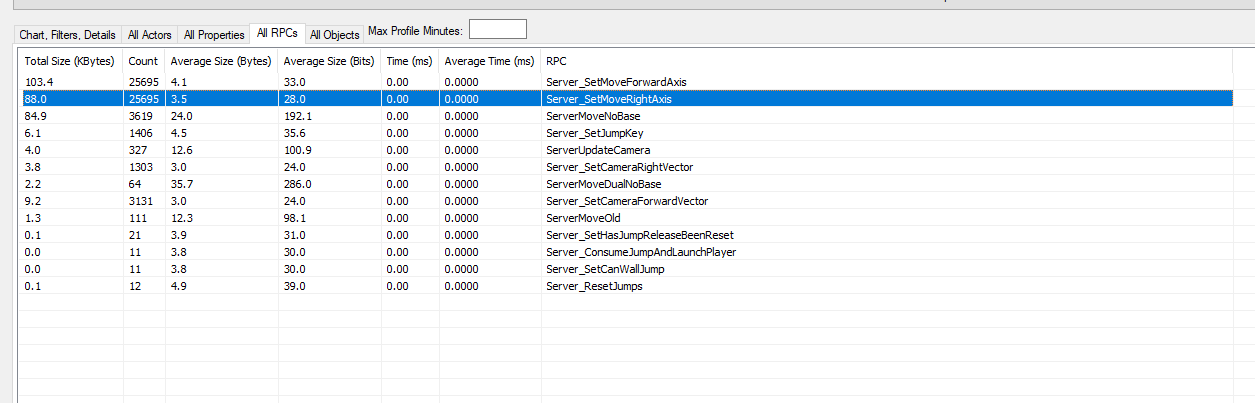
these two rpc's are needed for some calculations but idk how to get those float values to the server
{
    ForwardAxis = AxisValue; // AxisValue ranges from -1 to 1. Pressing "W" sets it to 1 and pressing "S" sets it to - 1.

    Server_SetMoveForwardAxis(AxisValue);
```This is how I'm doing it.
I'm going to bed, if anyone knows a better method, please @ me
vital heron
@unborn maple Axis functions are always called, no matter if you are pressing the button. I feel like you should add an if statement checking if the axis value is not 0, and then call Server_SetMoveForwardAxis(AxisValue)
You don't want your servers getting spammed with RPC's because those will lag the server out and also make you pay more depending if you host your server somewhere else
quick flint
i just did that basically, will try to do some other stuff as well possibly
One thing I was thinking was this:
When the server needs the input axis value, just simply do a client rpc, and from the client, pass that value back to the server
but idk if that will work either because i need this value on tick lol
 steel vault
If you are pressing W and changing it to 1 then you should only be RPCing it once for the change and then again when it changes away from it
That way the server gets one RPC and knows it's currently at 1, then when you press S and set it to -1 send one more RPC
Or if you let go and it goes to 0 send an RPC then. Just send it when it differs from the current value.
If it does not differ, then don't send the server a changed input command
vital heron
that is actually, amazing
quick flint
{
    if (ForwardAxis != AxisValue)
    {
        Server_SetMoveForwardAxis(AxisValue);
}```this is what i set it to basically
vital heron
@steel vault thank you so much you just gave me the best idea to optimize it
steel vault
Haha glad to help
vital heron
@quick flint How would you set Forward Axis?
vital heron
wait one sec let my brain process this
 golden ice
Hey guys, sorry if I'm interrupting a current convo, but have you guys had some issues with steam not recognizing a game session that's been created?
Like the session is created and people can join. But for disconnecting it poses some issues because it can't find the session?
This is the warning I get when I start hosting
LogOnlineSession: Warning: STEAM: No game present to leave for session (GameSession)
Here are some logs prior to the warning
 raw elm
@hot dome
round star
Eh. Suddenly have an issue where when a client joins the server and loads the level.. ..there's no landscape..seemingly out of nowhere. I haven't modified or done a thing that involves the landscape in anyway
Nevermind all good!
 finite patio
multiplayer it
its so hard
everything was going so easy
until i was doing multiplayer
 mild jungle
Is it better to replicate a component or an event usually?
eg: Light switching on/off, should I replicate the light component or should I replicate the event that's called to switch it on/off
empty axle
@mild jungle When managing object states it is advised to use property replication. In your case you could simply replicate bool which drives the light switching.
Events can sometimes not fire at all, because of relevancy distance and also if someone joins the game late he will also not get these events as they already fired.
 supple mural
Is there any reason why variables set at Input Axis events don't get replicated?
vivid seal
InputAxis happens on the client, so you need to RPC to the server to replicate anything
supple mural
even if the variable has a replication tag?
vivid seal
yes. that tag means that it will replicate to all clients when the server sets it. if you're just setting it on your local client, the server and other clients don't know anything about it
so basically you can set it on your client (if its something you dont want to wait for the server to receive) and then send it to the server for everyone else to get as well
think of it this way: there is no way for a client to tell another client anything. only the server has a way to send data to all clients.
so replicated variables always come from the server down to everyone else
supple mural
so you mean something like this?
Well either way, it looks like it's working
so many thanks 🙂
mild jungle
@empty axle Thankyou. How would the bool changing trigger the light switching? Wouldn't I need to run an event for this? Forgive my ignorance
empty axle
Depends on how you detect the light switching. If it can be detected server side then you just set the replicated bool value server side and then on the client side in the OnRep function for that bool you switch the light on or off. If you can't detect the switching server side then you need to call RPC to Server and then do the same as previously described.
 twilit sage
Guys - im making a 3rd person MP brawler game, and im at my wits end with one thing - the god damn character knockback. Nothing replicates nicely.. ive tried add impulse to character movement on server and update the world transform per tick of a timeline, ive tried launch character and same updating of position, and a few other things. Also all impulse and transform variables are set on the server and used in the Replicated to all events. Does anyone have a solid concrete solution for this? Im happy to take a DM if anyone wants to offer any help
Works great with all solutions in single player btw
tranquil yoke
Guys, How do you make sure that your movement data always gets replicated, and do we have to create logic for the actor movement + Component movement, is there already engine has done something.
Do you do reliable calls on tick ?
kindred widget
@tranquil yoke Not sure what you're doing, but reliable definitely doesn't go on tick.
thin stratus
Never do Reliable RPCs on Tick :P
Movement that is sent every frame doesn't need to be reliable
The CharacterMovementComponent (and partially the Projectile MovementComponent) have code for this stuff implemented
mild jungle
@empty axle Thanks again, just learnt about onrep functions. Very helpful!
tranquil yoke
@thin stratus how would i do custom movement ?
I am having an issue, where for one i update a RPC without reliable, position does not update all the time
thin stratus
2 - 3 ways:
- Accept that BPs can't do proper custom movement and live with whatever you can do to make it somewhat smooth.
- Extend the CharacterMovementComponent. (C++)
- Write your own MovementComponent. (C++)
tranquil yoke
Understood.
Custom it is , BPs cant do anything related to this.
Is there anything, which set how much bandwidth i can do for server, Is there any limit of bandwidths and how many data i can sent in one packet.
I just need to know are there any benchmarks for perfect looking world for a Multiplayer ?
 woeful ferry
What happens if you run a function on the server as the server is firing that event? Is there any overhead?
 winged badger
@tranquil yoke reliable RPC on Tick not only chokes your network/reliable buffer
but it also makes no sense, if you stop to think about it
say on Tick N, your reliable RPC fails
on tick N+1, another RPC is sent
on tick N+2 as well
and so on
one of those will get through and do an update before the client has any idea it needs to resend one from Tick N
and once client does that, that RPC will in (best case scenario) get ignored, and in worst case force an update to a state from a second or more ago
rose egret
how to reset the replication of an actor so that properties equal with CDO are not replicated to the clients ?
I want to restart my character which our respawning another actor
kindred widget
Not exactly sure what you're after. You have a character and you want to reset it without respawning it, or?
rose egret
yes. but the point is my character has lots of replicated properties and when I reset them to their default value they all will be replicated
red musk
@polar wing I made a custom movement component which inherits from CMC, then I override HandleImpact and add additional logic to it to calculate the bounce angle and set the new velocity and so forth, then I set the internal Teleported flag to true, this causes the movement component to accept the velocity override and correctly client predict/send to the server and uses the full nice power of the CMC
polar wing
@polar wing I made a custom movement component which inherits from CMC, then I override HandleImpact and add additional logic to it to calculate the bounce angle and set the new velocity and so forth, then I set the internal Teleported flag to true, this causes the movement component to accept the velocity override and correctly client predict/send to the server and uses the full nice power of the CMC
@red musk Perfect! I did the same thing with the CMC, but haven't played with the teleported flag to force it to accept velocity changes (it should help me with my momentum flips). Thanks for the tip! Seeing as we're both doing zero-g multiplayer stuff with the CMC (hot damn, that was difficult to get right), feel free to DM if you run into any issues you might want some help with! I might not have the answers, but I also may have run into something similar. Cheers!
red musk
Likewise!
twin juniper
I want to hide my actors using Net Cull Distance. And I can make it work amongst clients, but the listen server can still see the clients regardless of the net cull distance.
Is there a way to make them invisible to the listen server as well?
polar wing
Are you using an on_rep to hide them?
polar wing
the server never triggers onrep functions, so whenever you do onrep stuff, you need to explicitly call that function on the server
IsNetRelevantFor
@twin juniper Ahhh, then it's something different. I think clients are always relevant for the server, so you might need to do some other trickery.
empty axle
Net Cull Distance is actually destroying the actors not hiding. I suppose it can't destroy them on the listen server, because it might need to replicate them for someone else
twin juniper
Should I just not rely on IsNetRelevantFor and use my own tick based function.
Of getting actors location.
And hiding them to eachother?
etc.
or should I use a combination of both net cull distance then my own trickery on top of that for the listen server
empty axle
It actually makes sense that they are not destroyed on the listen server.
 autumn vine
Running into an interesting issue trying to replicate a USTRUCT that is in a child of AGameState.
header:
UPROPERTY(Transient, ReplicatedUsing=OnRepMyStruct)
FMyStruct MyStruct;
cpp GetLifetimeReplicatedProps:
DOREPLIFETIME(AMyGameState, MyStruct);
cpp UpdateStruct(FString Val:
if (HasAuthority())
{
MyStruct.MyString = Val;
OnRepMyStruct();
}
logic flow:
UpdateStruct(TEXT("A")) first call on authority
OnRepMyStruct() on authority
OnRepMyStruct() on client
UpdateStruct(TEXT("B")) call on authority
OnRepMyStruct() on authority
??? nothing ever happens on client after getting the replicated value the first time. I have tried breakpointing elsewhere in the client to check the value in the ustruct and it is never replicated after the first time.
Any ideas?
empty axle
you probably need to hide them manually, but I would try to reuse calculations already made in the networking layer.
twin juniper
@empty axle so should IsNetRelevantFor itself always return true but inside there use my own calculations and hide them from there.
Rather than returning false under certain conditions?
I just want to hide them from eachother if beyond a certain distance that's all.
polar wing
@twin juniper You could override the functionality there to do something on the server. Haven't had a proper look at the source code, though. My guess is their net relevancy is replicated down to clients that perform the destroy/hide logic on an onrep, so you'll just need to override that functionality where the relevancy is set to check for authority and then hide the actors if it's not a dedicated server (GetNetMode()!=NM_DedicatedServer, just confirm the exact syntax).
twin juniper
I should override OnRep ?
polar wing
(Just for clarity, you'll need to override the place where the relevancy is set, not the onrep)
twin juniper
oh I see
empty axle
@polar wing it isn't. The actor channel for replication is destroyed and actor alongside
polar wing
Yeah, have a read through that source code (sorry, I haven't looked myself, so I'm just suggesting stuff that I usually do).
twin juniper
I kind of don't like the idea of overriding the core net functions though.
Seems like it could get buggy very fast
polar wing
@polar wing it isn't. The actor channel for replication is destroyed and actor alongside
@empty axle That's interesting, I'll have to take another look at the code.
@twin juniper It's fine so long as you call Super:: within your overridden function
twin juniper
Hmm okay
polar wing
But yeah, just confirm that it's actually a virtual function you can override and make sure you read through the original code to ensure you're implementing it appropriately (like, where exactly you need to call Super::, or if you need to rewrite the entire function using the original code as reference).
twin juniper
Would a tick based function of getting actors locations then hiding /showing from there be too expensive?
 meager fable
I have always created listen servers like this, but what if I don't want to open a new level. Will create session already setup a listen server?
polar wing
@twin juniper Actually, seeing as the clients already behave as you'd like them to, you could run a special check on the listen server only that runs through the actors and checks their distances (not the absolute optimal function, but it will work). You don't need to do it every tick, though. Create a timer with a certain interval (this isn't a super time critical thing, so you can decide what time works best for you). If you're planning to run dedicated servers, make sure to disable this check if it's not a listen server. It's definitely hacky, but it can work.
You could also do a massive sphere trace with your desired radius that encapsulates everything around the server player, ignoring any actors you don't care about (which may be better than running through a massive list whenever you tick through it).
twin juniper
Yes so in that case would I RPC to the listen server as a Client RPC
And then hide it?
Because the other issue I'm thinking is, if the listen server hides the client
it would automatically hide for everyone
which might not be the result I want
polar wing
Nah, you can do this check locally on the listen server. Yeah, just make sure the way you're hiding them doesn't replicate down to clients (I don't think the hidden property is replicated, but I haven't checked in a while).
slender mortar
Hello world, I set IgnoreClientMovementErrorChecksAndCorrection to True, yet my character still come with jittery rotation
SetCharacterRotation is ALWAYS called on remote, never on server
Server multicasts a rotator variable that is calculated by the owner
So I'm super extra hyper confused
Literally correction is OFF
empty axle
bHidden is replicated
twin juniper
Hmm So there goes that idea.
I could try the Sphere Trace that Kyle suggested
Well actually no because even in the case of a sphere trace,
The listen server stil can't hide it
It would get replicated to everyone
polar wing
I'm sure there's a way to hide things on the server that isn't replicated (check through the different variables, like bIsHiddenInGame and whatnot).
Sorry, I'd be looking, but I'm making dinner 🤣
My process usually involves diving into engine code and checking all this stuff to see if there's anything that can be overridden or a handy function that can be called.
twin juniper
Oh it seems
USceneComponent::SetVisibility
Could do the trick
Non replicating
Since it uses rendering rather than actual actor properties
polar wing
niiiice, tell us if it works out!
twin juniper
sure!
gloomy sedge
Hey, I have a timeline that outputs the current prematch time and prints it out to a string. Now this timeline is in the Gamestate class. I only want the server the know about this time. When i play the game I get a Server print, and a client 0 print. Is this normal?
kindred widget
Considering you only started it on the authority, that's not normal I don't think. On a side note though, why not do that in GameMode if it's for server only?
gloomy sedge
The player views the prematch time in the lobby screen. but i couldn't cast to the gamemode inside of the widget
kindred widget
Ah. Just you said above that you only wanted the server to know about it. Gamestate makes sense then. And also, you're replicating the timeline. So your client is also probably firing that update call. If you want it server only and for the server to set the match time, don't replicate the timeline, just the set variable. On a curious note. Are you planning on showing nths of seconds? If not, you could easily make that a looping timer that only sets the replicated variable every second or only ten times a second rather than at framerate.
gloomy sedge
If not, you could easily make that a looping timer that only sets the replicated variable every second or only ten times a second rather than at framerate.
@kindred widget True, This would make more sense. How would I set the Default time to start at?
?
tranquil yoke
@winged badger Thanks for the answer yeah that makes sense. trying to update some code, for movement which had this, Dont have time to do it in C++ right now, so updating the blueprints to make it at least work for now.
Without reliable multicast, sometimes Components does not move, so was trying with these things, But using reliable has choked my server before. So i know what are the outcomes.
What about rep Notifies on tick, it is not actual a tick, just update only when position changed from last .
What is the guarantees that it will get updated eventually.
gloomy sedge
And then clear the timer if the PreMatchTime == 0?
 delicate zinc
Hi, I need help in bps. How should I end a match? When a team wins a win screen shows up then the scoreboard. I want it to go back to a main menu after 30 seconds but I don't want the clients to follow the server back into the main menu. How would that be done?
twin juniper
RPC to the clients
to go back to the main menu
Actually this might not be possible..
Worth a try I guess
 mellow geode
@delicate zinc clients travel with the server - they could disconnect, or they could have their own ability to travel with the server to main menu, but keep the scoreboard up
Kinda depends on why you want to move the server back to main menu but not clients
delicate zinc
I want everyone to go back to their own main menu and not stay on the listen server
how would be the best way to auto disconnect them to the menu or when they click a button.
mellow geode
the DestroySession node
 unkempt tiger
Quick question about networking actor references: what happens if I try and serialize a nullptr actor reference?
Does the engine pass in a bit to tell whether its null or not, thus saving bandwidth?
F12 isn't taking me anywhere when I look into the << serialization operator
The reason I want to know is to know whether or not I can just save bandwidth by nullifying certain actor references before sending stuff
 blissful gust
Hello guys, I have a multiplayer game with voice chat using Steam subsystem but the quality is really bad, sounds like a robot. Someone knows why? thanks! ❤️
mellow geode
@blissful gust likely a bandwidth issue, are you doing a lot of multicast events?
autumn vine
C++: I am replicating a somewhat large TArray of ustructs (~500 items) and other items in an actor. once part of the array gets replicated, none of the other items are replicated any more. Any ideas?
winged badger
whats in the array and how often does it change @autumn vine
blissful gust
@blissful gust likely a bandwidth issue, are you doing a lot of multicast events?
@mellow geode nope, while I'm talking there are not multicast events at all. Also there is bit of delay, do you know if this could be improved? or are there any alternatives?
mellow geode
have you looked at the network profiler?
blissful gust
have you looked at the network profiler?
@mellow geode `nope, I will give a look. Thanks 😄
autumn vine
@winged badger some ustructs with a few bools, strings, etc. For the test case, structs are added to it at the start until it gets around 500 and then it is not updated any more. prints stuff from client/server on tick, last run:
server: size 578 tick 38
server: size 582 tick 39
server: size 584 tick 40
server: size 584 tick 41
client: size 582 tick 39
... some time later
server: size 592 tick 7777
client: size 582 tick 39
I have a replicated int32 in the actor that is incremented on the server tick. So I can see that the last time the client received replicated data from the server was the server's tick 39
winged badger
there is a 40kB limit
to a bunch
if you go over it, and "few strings" is as bad as it gets
if will no longer replicate
use a fasstarray instead
autumn vine
@winged badger where the heck is that documented?
winged badger
its not
fastarray however is, in NEtSerialization.h header
extensively commented
autumn vine
the 40kb limit.. ouch. I was already looking at switching to fastarray for performance later. Looks like I get to now
@winged badger thank you for the input!
blissful gust
@mellow geode Would you say its using a lot of bandwidth?
empty axle
Does fastarray have an impact on the bandwith used? I though it is cpu only optimization
autumn vine
@empty axle here is what I had found about it: http://www.aclockworkberry.com/custom-struct-serialization-for-networking-in-unreal-engine/
Optimizations for how you replicate an array of ustructs
empty axle
thanks!
autumn vine
@empty axle like Zlo said, the documentation in NetSerialization.h is very thorough.
vital heron
is there a current convo going on?
 chrome bay
@unkempt tiger FNetBitWriter and FNetBitReader have overrides for the << operator for UObjects and FNames, which safely serializes them through the UPackageMapClient
@blissful gust if that's just the one actor, then yes that's a lot
Check the actors and all rpc's tabs
vital heron
May I ask a question or are you guys still talking?
chrome bay
go for it always
vital heron
ok thank you
So someone said a really good idea for optimizing the amount of RPC's you should send. His/her idea was that you just press W or any other key once and you only need to call the RPC once to send the change.
autumn vine
@winged badger I'm still getting no replication after the initial replication of my FFastArraySerializer. Size was 582 on first replication and then nothing gets replicated after.
winged badger
you sure you dond't do DOREPLIFETIME_CONDITION COND_InitialOnly?
autumn vine
DOREPLIFETIME(AMyGameState, ItemsArr);
unkempt tiger
continue asking @vital heron
vital heron
Oh ok
autumn vine
@winged badger it is preventing a replicated int in the game state from replicating anymore also
chrome bay
@vital heron certainly nothing wrong with that, you don't want to be sending them more than you need
vital heron
but everything went wrong here is my code
chrome bay
Well axis bindings are called every frame
So you're still sending that RPC every tick
autumn vine
@winged badger if I comment out the DOREPLIFETIME(AMyGameState, ItemsArr);, my int replicates perfectly.
chrome bay
Actually you're sending two each tick
vital heron
I know yea it was the same as before
chrome bay
If they're reliable, then you'll almost certainly flood the RPC buffer at some point
vital heron
oh yea I will fix that
but is it even possible to do the idea of how you only need to send 1 rpc for each change
chrome bay
it depends
There's a long and short answer to this really..
If it's input that has to be sent to the server continuously, then you should at the very least pack all the inputs together, and send them at a limited rate together via one (unreliable) RPC
vital heron
Yea my thought process was you only need to update one value, a float or bool, and in the tick function you keep checking for the changes and call the movement
unkempt tiger
I am fairly sure that if a client sends a lot of data, that's not nearly as bad as the server doing the same, in the sense that the server's outgoing buffer is separate from the server's incoming buffer (where the client RPCs arrive), so the worst that can happen is network saturation just for that specific client (I'd love to be corrected if I'm wrong)
chrome bay
Well the client can send reliables too
and if a reliable gets dropped, the client gets auto-kicked
vital heron
oh dam
chrome bay
but also, you don't want to be hammering the server with RPCs
Since on it's next tick it's then got to process them all
vital heron
exactly and with hosting servers sites like aws you want to save as much money as you can
chrome bay
You probably won't save anything measurable tbh
vital heron
really?
chrome bay
There's a fine line between the game being stable and just not running at all
winged badger
@vital heron about reliable RPCs on Tick https://discordapp.com/channels/187217643009212416/221799385611239424/775338646856663060
tranquil yoke
Guys, How about RepNotify on Tick ?
winged badger
there is no RepNotify on Tick
chrome bay
also never gonna happen in the real world 😄
tranquil yoke
I mean if i use Rep Notify on tick
vital heron
oh I just want to optimuize my RPC's as much as possible
chrome bay
@vital heron 1 sec
tranquil yoke
So it can go out of sync ?
unkempt tiger
there will always be small timing differences, define out of sync
tranquil yoke
i mean, see i have moved out from A to B and C, and everything updates via RepNotify to other user, Can this updated to other user Like A to C and B then C ?
What do you mean by timing ?
chrome bay
// Member var
FVector2D Accumulator;

// Input functions
void MoveForward(const float Value) { Accumulator.X += Value; }
void MoveRight(const float Value) { Accumulator.Y += Value; }

// Call this regularly
void SendInputToServer()
{
    FVector2D Consumed = Accumulator;
    Accumulator = FVector2D();

    Server_Input(Consumed);
}

UFUNCTION(Server, Unreliable)
Server_Input_Implementation(const FVector2D& Input) { // Do stuff }```@vital heron psuedo-code to give the idea
vital heron
hmm
chrome bay
The idea is you just accumulate the input into some data type, then "consume" it and send it to the server (and do that at a reasonable rate, but ideally not on "tick")
unkempt tiger
@tranquil yoke things can always go out of sync, this is why often with inputs or state changes you attach some sort of helper value to help each side with the timing, this can be done either as a float timestamp value, or as an integer index value, that takes less bandwidth
vital heron
The idea is you just accumulate the input into some data type, then "consume" it and send it to the server
@chrome bay the thing is that some types of movements are very laggy being replicated
unkempt tiger
@chrome bay why not on tick?
chrome bay
Well, to do movement properly over the network you need to do client-side prediction
vital heron
like for example if you used set actor location as your type of movement it would look like as if he was lagging
Well, to do movement properly over the network you need to do client-side prediction
@chrome bay How about if I used physics to move
chrome bay
@unkempt tiger Because then you're potentially sending hundreds of those to the server, all depending on the clients' current framerate
vital heron
what about delta time
unkempt tiger
Oh, right, what if I'm doing it on tick, but only in fixed time intervals?
chrome bay
@vital heron Physics should make it easy, since really you'll be using client authority anyway
Well that's fine I guess
unkempt tiger
good :)
chrome bay
Character movement does a lot to try and reduce the amount of RPC's it sends
packing similar moves together up to a maximum delta time
vital heron
yea but sadly that dumb capsule ruins everything
unkempt tiger
@vital heron I can suggest doing something to help with reducing input instance misses
vital heron
what is it?
unkempt tiger
I have a struct that sequences inputs, looks like this:
it stores up to like, 3 or 4 inputs
and in case they are identical to each other, the net serialization writes a single bit to indicate that, to save bandwidth
once the server receives this input, it immediately loads it into an input history buffer, and can iterate it worry free knowing it'll have the most inputs possible
vital heron
oh
chrome bay
which is fine providing you have a deterministic physics sim 😄
unkempt tiger
yes, that is an important remark, which I do
autumn vine
Physx is not deterministic btw
unkempt tiger
a deterministic state step really helps for interpolating simulated proxies as well
you can simulate inputs on them and that basically solves interpolation
tranquil yoke
@unkempt tiger Thanks
unkempt tiger
this entire solution though is very much unlike what UE4 tries to do built-in, which is extrapolation rather than interpolation
such that the latency is no bigger than the actual ping, where interpolation always adds a bit of latency
chrome bay
Server and local player can read ExactPing or ExactPingV2 from the player state
It's never perfectly accurate ofc
@vital heron It's still essentially the same as before
chrome bay
Bear in mind what you're doing there will be subject to input lag
In a non-editor/real-world environment it takes time for that input to reach the server, then more time for you to receive the change
If you want to use physics the simplest approach is to use client authority
vital heron
I don't want to use physics because it is very annoying to set up. I already have good movement it's just replicating it looks laggy on other people's screen
chrome bay
You really need all players to receive the input as well so that they can continue simulating
vital heron
aren't they?
unkempt tiger
on that note, it does make sense to have simulated proxies... actually simulate movement, right? rather than interpolate/extrapolate between server packets?
as in, actually run the same movement code as the server / predicting client does
chrome bay
@vital heron the clients will just be receiving replicated movement packets from the server at a pretty low/variable rate
But in between those updates the physics sim is still running
vital heron
oh
chrome bay
So really you want the clients to be trying their best to "fill in" the gaps by knowing what the last input was
vital heron
What if I did client prediction in the tick area so it finds out that axis and boom you can figure out the rest from there
That's what I tried doing initially but it failed
chrome bay
You can't do client prediction with physics unfortuantely
The two systems are at odds with each other
chrome bay
This is using physics and client-auth and interpolation/extrapolation. Hard to record a vid just now, but it can work
And that's with the "Bad" network emulation setting in editor
So it's pretty acceptable
vital heron
that's sick
chrome bay
the real problem is because physics objects are pretty much "always" moving the bandwidth usage is already much higher than a non-physics object
just because of all the replicated movement updates
vital heron
oh yea ik
chrome bay
but you can improve that ofc
I've done this both with and without physics
I would have stuck with non-physics
autumn vine
@vital heron have a read here: https://www.gafferongames.com/post/introduction_to_networked_physics/#:~:text=Networked physics get interesting when the player interacts,player interacts with a cube it turns red.
Networked "physics" is a very complex problem

Gaffer On Games
Introduction Hi, I’m Glenn Fiedler and welcome to the first article in Networked Physics.
In this article series we’re going to network a physics simulation three different ways: deterministic lockstep, snapshot interpolation and state synchronization.
But before we get to thi...
chrome bay
But trying to do decent (and fast) collision outside the physics engine is bloody hard
vital heron
This is using physics and client/auth and interpolation/extrapolation. Hard to record a vid just now, but it can work
@chrome bay YOU EVEN HAVE AUTHINCATION!
chrome bay
Only the most basic
unkempt tiger
what's authentication?
chrome bay
just really basic "make sure the client isn't taking the mick" anti-cheat 😄
vital heron
haha
chrome bay
To some extent you just have to trust the client with this approach
But I'll worry about that when I finish the damn game 50 years from now..
vital heron
haha
unkempt tiger
^
chrome bay
also - fortnite does this, so if they can do it, I'm fine with it
summer tide
What's equivalent to Switch Has Authority in C++?
chrome bay
if (HasAuthority()) ?
vital heron
one sec let me check out what vioxtar sent
unkempt tiger
its quite silly really, there should be nothing (on paper at least) that prevents the client from running the same physx simulation and predicting it
autumn vine
Physx is NOT deterministic. Also, if you are not running a lockstep, fixed deltatime physics simulation, floating point error is going to add up.
chrome bay
The other aspect is that the rest of the game has to be deterministic too
If things get inserted into the physics engine in different orders between clients etc, RIP determinism
Really everything has to be built around it
unkempt tiger
yeah, but the comfort that you get out of determinism... sooooo good :)
chrome bay
Not so great for an OffTheShelfTM engine
autumn vine
Yep every input has to to inserted on the same step of the physics simulation on every client
also, every client has to handle floating point numbers the exact same. You may have differences between processors and will for sure have differences between platforms
unkempt tiger
I believe the Valve networking model pulled off a lot of neat tricks in that regard
vital heron
i love how all of you are talking about advanced topics and all these big words (to me atleast) and I'm just sitting here doing nothing lol
chrome bay
I experienced this for years 😄 save yourself the pain
unkempt tiger
@vital heron you're now solving one of the bigger problems in networking there is to solve when building a multiplayer game
its perfectly legitimate to sit back and ponder, aimlessly staring at your screen for days
chrome bay
Epic have their own ideas on how to get around these problems too, some promising stuff coming
Just not quite ready yet (or tested at scale AFAIK)
vital heron
haha at least it's normal
Epic have their own ideas on how to get around these problems too, some promising stuff coming
@chrome bay is it coming in ue5?
chrome bay
Well the first versions of it you can get now from Master branch on Github
But it requires Chaos
vital heron
oh
unkempt tiger
i would say stay away from it, there are a lot of things that will screw with you down the production road Im sure
chrome bay
Well Chaos is going to shunt PhysX out of the engine by UE5, that much is certain
unkempt tiger
aye
chrome bay
So on the other hand, might wanna start getting used to it 😄
I think they're working on this for Fortnite
So hopefully they'll see it through and it really will turn out useable
unkempt tiger
what do they have planned for fortnite that needs physics prediction?
chrome bay
Just their vehicles and stuff I think
vital heron
on reddit there is this bot going around saying, wE doNT kNoW aNYtHiNg aBoUt uE5 yEt everytime someone just says ue5
unkempt tiger
its not completely wrong lol
vital heron
it is but a bit annoying lol
autumn vine
Any ideas on why replicating this (now FFastArraySerializer) makes replication basically die for the actor after it is replicated the first time? ~580 ustructs in the array
vital heron
should I just not focus on multiplayer for the time being and just focus on just learning how to do stuff
vital heron
alright becuase I have been stumped on this for almost 2 weeks
of pure doing nothing
meager spade
and those two weeks you could have done something
unkempt tiger
but also keep in mind, going too deep into development without planning for multiplayer is gonna bite you in the ass
vital heron
exactly
but also keep in mind, going too deep into development without planning for multiplayer is gonna bite you in the ass
@unkempt tiger
meager spade
very bad mindframe to get stuck on a single problem for weeks
you will never get anywhere
unkempt tiger
you just described my last 6 months @meager spade
chrome bay
yeh. kills your enthusiasm not seeing things progress
vital heron
yea I have this mindset that if I have been stuck on a problem for 2 weeks, and I'll spend another 2 weeks if I have to
unkempt tiger
but at least I did kind of progress, EVEN IF IT WAS 2 lines of code a day...
steel vault
Start small with multiplayer and just get some basic things replicated/working. Movement should be at the end of your multiplayer journey as you can tell it is possibly the hardest part of multiplayer.
meager spade
if i have a major issue i am stuck on, i take a break, focus on something else, then come back to it with a clean head (and sometimes some extra knowledge)
summer tide
How do I run on server the method with SetActorLocation? https://gyazo.com/5e788c3c47cd4c6e699772cc19bb4b7b


 vital heron
Start small with multiplayer and just get some basic things replicated/working. Movement should be at the end of your multiplayer journey as you can tell it is possibly the hardest part of multiplayer.
@steel vault that's just the problem. how can you do anything in multiplayer if you cant replicate basic movement
chrome bay
use character movement for now
unkempt tiger
that depends on the game you're going for, and yes^
steel vault
Jittering is not a failure of replication though. It's just a side effect of bad prediction. If the player is still moving, it's still moving.
But yea just use a built in character movement.
vital heron
use character movement for now
@chrome bay my problem with characters are just that dumb capsule component
chrome bay
yeah but you'd be surprised what you can do with it
steel vault
Use it for now and then swap it back out when you get to the final steps of movement.
unkempt tiger
why is the capsule component giving you trouble?
autumn vine
@chrome bay @meager spade For simplicity, right now, one string. On server, ustructs are added to the array on many component's beginplay. Once client connects, the array is replicated along with other replicated uprops and then replication dies.
chrome bay
I promise you any UE4 game with humanoids in it is using that component
meager spade
why BindFunction :/ and... What do you mean replicate it? If Replicate Movement is set on the actor, it will set its location automatically
if you are moving over time, then you need to do something different
ie if you need a smooth move from A to B
vital heron
why is the capsule component giving you trouble?
@unkempt tiger u can't add any collision except for that capsule. and the worst part is that it is built into the character class so I doubt epic would ever remove it
or give you the option to
chrome bay
the character movement system basically is "sweeping a capsule"
So the two things are tied together
vital heron
yea
chrome bay
but again, every UE4 game with characters in it is using that, you can be 99.9% sure of that
unkempt tiger
thats right, keep in mind that you can always dig into the code, add your own shape, and sweep that as well, but that can get rough because the movement component is messy I hear
vital heron
even the built in replication?
summer tide
When I set the actor's location I want that to happen in server side. The actor is a spawner which spawn AI. So when AI moves I move the spawner as well. So that' what happening. @meager spade
chrome bay
yep
vital heron
damm
chrome bay
but the character system is heavily linked into networking, it's pretty exhaustive
unkempt tiger
I actually rewrote my own capsule sweeping for my own movement, I completely stayed away from the built in character class
chrome bay
but that's also why it's so complicated and difficult to modify
unkempt tiger
my movement solution is separate from the networking
chrome bay
but again thankfully Epic are improving on that front
vital heron
I actually rewrote my own capsule sweeping for my own movement, I completely stayed away from the built in character class
@unkempt tiger it's just hard to understand the source code
unkempt tiger
it is, Epic guys were really involved when they coded it out, or they really loved spaghetti
a really good tip that super helped me
vital heron
I bought a c++ course so I better get back to that because I need to understand C++ more
it is, Epic guys were really involved when they coded it out, or they really loved spaghetti
@unkempt tiger i think both
chrome bay
yeah, if you aren't comfortable with C++ yet, avoid multiplayer
vital heron
and unreal lol
unkempt tiger
is to strongly distinguish inputs from state, advance the state per a current input, and that 'StateStep(deltatime)' function is where you do any of your custom movement logic
chrome bay
tbh UE is pretty good for teaching CPP imo
might be a bit "classic" in some places but combined with Blueprint, it makes life easy
vital heron
yea only problem is that because of how complex and how much tools Unreal has it is hard to understand all the types that Unreal has
unkempt tiger
Im finally at the stage where I can focus more on blueprint, THANK THE LORD cpp development was hell
chrome bay
yeah you only really pick that up with lots of time spent with it
autumn vine
UE with uproperties and garbage collection is in many ways quite different from regular c++