#multiplayer
1 messages · Page 584 of 1
 inner cove
 normal jacinth
@inner cove It's an AI character, I've tried many different ways
This was one. I've tried running just on server, same thing
 dark wyvern
Does anyone have tips for using the AnyDamage event? I can't seem to make Client 1 take damage.
Right now Client 1 takes no damage and Client 2 takes damage while also receiving the damage that Client 1 should be taking.
 plucky sigil
Is the WithValidation function called on server or client ? or local ?
 thin stratus
Pretty sure on server
 fossil spoke
Its called by the Server to allow you to verify the inputs into the RPC.
Returning true allows the RPC to be called, returning false closes the connection i think?
 vocal cargo
Hey guys, quick question - I know you can set up a dedicated server using UE4's source code to make a server build, but what if you have your own server? How would you go about it?
fossil spoke
What do you mean your own server?
Server can be a pretty broad term.
Its important to be specific.
inner cove
Learn how UDP works (I think that’s what ue4 uses) and learn socket programming, if I understood you question correctly.
 vivid seal
is it possible to use RPCs from a UObject that has been setup for replication? (i've got replicated uobjects with replicated properties, just need to know if they can do function calls)
plucky sigil
Pretty sure on server
@thin stratus What if its a client rpc ?
 summer tide
If I attach my character to a horse and use char controller to control it, would it replicate properly?
fossil spoke
@plucky sigil Client RPCs dont have validation?
inner cove
@summer tide do you know you to make this system in single player ? And do you know how ue4 networking/replication works?
summer tide
Yes i've done it in single player but i doubt it would work in multiplayer.
Since I've everything working in SP mode, trying to find out if the same system could be replicated. Otherwise I might have to find another solution. @inner cove
inner cove
@summer tide ok, so what have you done and what is the problem?
summer tide
My player gets attached to my horse not possession. My player is still in control. I use my player controller to pass axis info to horse. Then take the axis values and play root motion animation in animBP. The benefit is that I can use the player's upper body for equiping items.
summer tide
The replication doesn't work for horse and player movements.
inner cove
Can you be more specific? And maybe provide some screenshots of your blueprints?


 twin juniper
I'm getting some strange results in my map. When the host creates a session and travels to the map, the host has a character.
But when a client connects to the map.
The client has a spectator pawn..rather than a character..
And in my level, I explicitly assign it a game mode to use and the game mode defines the character/pawn to use.
inner cove
@summer tide you are doing many things on multicast that need to be done on server
ALL the checks needs to be done on server if they are functional and not cosmetic
summer tide
But would that prevent replication? I was just trying if it worked I was going to consolidate the code.
I could attach all that logic to server only. Then multicast only the animations.
inner cove
The client must not do any of these checks, only the server must do them and set the HorseMounted
Can I see the RegisterHorseMovement ?
summer tide

Then last part Horse Moves Notify is connected to multicast to play anim montages
The server can ride horse. But client can't.
With this setup
 tribal solstice
Is direct IP connection (open level: IP ADDRESS:PORT) the only option for a mobile multiplayer listen server?
inner cove
@summer tide so where do you actually add the movement input?
 inner cove
The PlayAnimMontages adds the movement on the horse?
summer tide
No it's driven by root motion. That's why I'm using anim montages.
inner cove
From the screenshots you have sent there are some issues. 1)Replicated variables should be set only on the server and not on multicast. 2) The checks (if they are functional and not cosmetic) should be done on the server and not on multicast.
And also, does the client own the horse?
summer tide
I removed thed multicast from logic. The only multicast is now is the last screenshot.
What do you mean if the client own the horse?
inner cove
Do you know anything about ownership?
summer tide
You are talking about Switch Has Authority or Run on Owning Client?
inner cove
No I mean this https://docs.unrealengine.com/en-US/Gameplay/Networking/Actors/OwningConnections/index.html
An overview of the role of the server in multiplayer.
You should really check this pdf http://cedric-neukirchen.net/Downloads/Compendium/UE4_Network_Compendium_by_Cedric_eXi_Neukirchen.pdf
summer tide
Ok Thanks for the resources. You have seen the screenshots. How would I fix what I have now? While I go over the docs
inner cove
A lot of things need to be refactored, read the pdf and you will understand, if not I can help tomorrow. I’m going to sleep now!
summer tide
My situation seems a little complicated what need to be refactored.
 echo snow
I spent an hour trying to spawn in some static meshes
I failed and checked if I could spawn actors
They spawned successfully and replicated
Is there a thing with static meshes?
twin juniper
My client logs are giving some strange error when trying to connect to the session. is anyone familliar with this [2020.11.02-02.52.30:984][212]LogNet: Warning: UNetConnection::Tick: Connection TIMED OUT. Closing connection.. Elapsed: 20.02, Real: 20.02, Good: 20.02, DriverTime: 20.15, Threshold: 20.00, [UNetConnection] RemoteAddr: 192.168.56.1:7777, Name: SteamNetConnection_0, Driver: PendingNetDriver SteamNetDriver_0, IsServer: NO, PC: NULL, Owner: NULL, UniqueId: INVALID [2020.11.02-02.52.30:987][212]LogNet: Error: UEngine::BroadcastNetworkFailure: FailureType = ConnectionTimeout, ErrorString = UNetConnection::Tick: Connection TIMED OUT. Closing connection.. Elapsed: 20.02, Real: 20.02, Good: 20.02, DriverTime: 20.15, Threshold: 20.00, [UNetConnection] RemoteAddr: 192.168.56.1:7777, Name: SteamNetConnection_0, Driver: PendingNetDriver SteamNetDriver_0, IsServer: NO, PC: NULL, Owner: NULL, UniqueId: INVALID, Driver = PendingNetDriver SteamNetDriver_0 [2020.11.02-02.52.30:988][212]LogNet: Warning: Network Failure: PendingNetDriver[ConnectionTimeout]: UNetConnection::Tick: Connection TIMED OUT. Closing connection.. Elapsed: 20.02, Real: 20.02, Good: 20.02, DriverTime: 20.15, Threshold: 20.00, [UNetConnection] RemoteAddr: 192.168.56.1:7777, Name: SteamNetConnection_0, Driver: PendingNetDriver SteamNetDriver_0, IsServer: NO, PC: NULL, Owner: NULL, UniqueId: INVALID
 supple mural
How would I go in theory replicating decals?
As of right now, I could only get decals to replicate from Server -> Clients but not Clients -> Server or Client -> Client
what confuses me is that printing strings replicates across everyone (from client to everyone else), but decals don't
plucky sigil
Does anyone know about this
LogNet: NetConnection::Close() [PendingNetDriver] [NoPC] [No Owner] from NMT_Failure Failed to validate player session
 hollow eagle
@supple mural print string doesn't replicate, PIE just puts debug information on all running instances of the game. If you launched in standalone (or packaged) it'd only appear on the client it was called on.
For decals, you can't create an actor on a client and have it be replicated, you need to call an RPC to tell the server to create it.
supple mural
@hollow eagle RPC? Like a multicast or something?
hollow eagle
if it's a client -> server call then it's a server rpc, not multicast
but yes, that's the idea
supple mural
oh, I tried that already. It doesn't seem to replicate anything. It appears for one client only but no one else.
In theory what I think I should do is have the client send the info to the server and the server should multicast that out, right?
hollow eagle
yes
so you need to call a server RPC from the client, server then does a multicast RPC to create actors that otherwise don't replicate (like decals)
supple mural
right right that makes sense. But how would I read this info as server?
hollow eagle
read what info?
If you need to pass some details to the server, just have that as arguments in your client -> server rpc call
hollow eagle
when you call the server rpc from the client, you pass some arguments. When the server executes that rpc, those arguments will be available
supple mural
Ohhh. So I can basically use this event like a function on the server side, like in the event tick or something?
hollow eagle
No. You create a server rpc ("Run on server" if using blueprint). That function can take whatever arguments you want.
The client calls that function. That function ends up executing on the server with whatever arguments were passed by the client. You can then, in the same function/event, call a multicast rpc which will get executed on all clients (and you can pass the same arguments into that if you want).
supple mural
I see, that's kind of sounds like what I have right now but doesn't work
Here's what I'm doing in my Replicated to Server
and then the Multicast on server side decal spawning
if I run this code on server side, it won't work. However if I replace SetDecal to have a Run On Owning client, the multicast will work as expected
hollow eagle
What blueprint is that for? The player controller?
if so, that won't work, the player controller only exists on the owning client and server
supple mural
I just fixed it
What we figured out was right, (by logic it is)
It was a problem out of scope, multicasted the wrong thing when it should've been client->server
Thanks a lot!
 meager fable
I have:
UPROPERTY()
    ABaseMissile* CurrentMissile;
and
if(CurrentMissile)
Destroy() is being called in ABaseMissile::OnHit and the if statement returns false on client and true on the server, the missile gets destroyed correctly on both. Explicitly calling Destroy on server didn't change anything
what could be the cause of this?
 kindred widget
Well. if(CurrentMissile) should only return true if it's somehow still around, even for garbage collection I believe. If you call if (IsValid(CurrentMissile)), that should return false after destroy is called, because calling Destroy will set a flag that the IsValid will pick up.
meager fable
Okay IsValid works now, strange cause it didn't when Destroy wasn't explicitly called on the server although the missile was destroyed correctly
 bitter oriole
If Destroy wasn't called at all, ever, on the server, then it was likely being garbage collected some time later
Explaining both the destruction, and IsValid() returning true for a long time
meager fable
it was called on tick and didn't work for at least 5 seconds
that's quite a long time
but I don't know how GC works exacly
bitter oriole
Once a minute
Depends on your own settings
But we're just guessing here, the point is, if you didn't call Destroy on the server and the actor still was destroyed on the server, GC is pretty much the only cause
kindred widget
Side question. Is a Destroy call replicated on replicating actors? Is the same flag set on clients for IsValid to pick up? I never tested that one.
bitter oriole
AFAIK it is replicated
(From server to clients)
If the actor replicates in the first place, of course
The flag likely isn't set at all on the client and the actor just gets nullptr, but I've never tried to confirm that
meager fable
Also with this:
ABaseCharacter::ABaseCharacter()
{
    Crosshair = CreateDefaultSubobject<UWidgetComponent>(TEXT("Crosshair"));
    Crosshair->SetWidgetSpace(EWidgetSpace::Screen);
    Crosshair->AttachToComponent(RootComponent, FAttachmentTransformRules::KeepRelativeTransform);
    Crosshair->SetVisibility(false);
}

// Called when the game starts or when spawned
void ABaseCharacter::BeginPlay()
{
    Super::BeginPlay();
    ClientShowCrosshairWidget();

}

void ABaseCharacter::ClientShowCrosshairWidget_Implementation()
{
    Crosshair->SetVisibility(true);
}
My widget is still visible on all pawns
not only on the owner's pawn
kindred widget
@meager fable Do you mean the crosshair?
meager fable
yes
kindred widget
It looks like you're just telling every instance to set it as true. You should wrap the call in Beginplay with if (IsLocallyControlled()) or something.
meager fable
I'll try that. But shouldn't UFUNCTION(Client, Reliable) only get called on the client that controlls the pawn?
kindred widget
Client RPCs only work when ran on the server alone. It'll tell the owning client to run that function. But since you're calling it in begin play, actually all clients will run it and then the server will also tell the owning client to run it again.
meager fable
oh okay, now with IsLocallyControlled it works fine except the server doesn't get the crosshair
only the clients
 chrome bay
It's a bit odd to have the Server managing a clients' UI
Client should just be able to manage all of that locally
Also depending on when that pawn is spawned, beginplay may be too early to call a Client function - it may not have been possessed nor had it's owner set yet
meager fable
where would it be safe to call that function then?
chrome bay
Well you can try overriding Possessed, but even then, Server shouldn't be managing a Clients' UI
All of that should be done locally
meager fable
yeah since it only works when locally controlled imma probably remove the RPC's cause they aren't necessary now
kindred widget
I'm too lazy with UI. I love event driven stuff, but for safety with UI, I tend to drive most of it off of a function that checks on tick if the actor using it is valid and possessed. Simple validity check for a single actor shouldn't hurt performance and it saves a lot of buggy headaches with UI being left on screen when it shouldn't be and such.
Then there's no need to update it when you kill off a character, or do something else, it handles itself.
meager fable
yeah im just setting it to visible every tick and it works
twin juniper
I'm having this weird issue where I create a PlayerState class , then all my clients start connecting as spectator pawns..
I tried calling SetIsSpectator(false) in PlayerState::BeginPlayer()
But that didn't seem to fix it.
inner cove
@twin juniper do you use the IsReadyToStart or something like this from the gamemode?
twin juniper
I don't believe so, no.
inner cove
Because if this return false then it gonna spawn as spectators
twin juniper
The odd thing is though, when I'm not using my custom PlayerState class, they spawn normally as clients.
But when I'm using it, they spawn as spectators.
What could be causing that?
I'm not seeing isreadytostart in gamemode
inner cove
Sorry, this is what I was referring to https://docs.unrealengine.com/en-US/API/Runtime/Engine/GameFramework/AGameMode/ReadyToStartMatch/index.html
Returns true if ready to Start Match. Games should override this
twin juniper
Okay thanks I'll look into this. I'm just not sure what effect this has on the playerstate.
inner cove
If you are using this, try making it return always true and see if they keep spawing as spectators
twin juniper
okay I'll try that
I'm using gamemodebase instead of gamemode
should that make a difference?
inner cove
ReadyToStartMatch is from GameMode not from GameModeBase so you shouldn’t have it
So that’s not the problem
twin juniper
Okay.
strangely, I ermoved the PlayerState class and it's still hapenning.
So I triggered something which is now causing clients to spawn as spectators.
Although the host still keeps his character
when he creates the session.
Yes I'm not sure what the issue could be.. client just keeps spawning as a spectator
echo snow
It somehow might be connected to the match state
When the match state is not in progress the default pawn is the spectator
twin juniper
But then shouldn't the host also be a spectator?
Maybe I should manually call StartPlay in the GameModeBase?
thin stratus
Reparent your GameModeBase to GameMode and your GameStateBase to GameState
If you do multiplayer stuff you want to use the non Base classes
twin juniper
Okay. do I just change their parent class in the GameMode.h?
thin stratus
I would probably always use the non Base ones anyway
No, in your own class that inherits from it
thin stratus
Yes
twin juniper
change the inherited class to GameMode instead of GameModeBase
thin stratus
And the include path of course
Yeah
Do the same to your GameState
Otherwise it will break
You can't mix them
twin juniper
Okay I'll change their inheritence.
twin juniper
Okay I found the issue
It was overriding the PostLogin method..
Apparently that does something to the player controller which spawns them into the game as characters instead of spectator pawns.
So maybe I just need to call Super::PostLogin first..
inner cove
If I remember correctly (since I have a long time to write c++) you have to call the super on every overrided function first
twin juniper
Yes
I just wans't thinking.
When Iw rote that method
I thought that could be it for a while but I set that as a last resort to check..
Dumb mistake of me.
It began to make sense after you guys mentioned the game state.
Which made me think PostLogin is doing something with the gamestate and the player controller.
 clever abyss
Hey there
If I want to synch a group of oculus Quest headsets together with one of the headsets controlled the others, what is the best way to do that? Anyone had an idea?
 slate merlin
Why is it so hard to add mySQL support? i cant find a plugin that works besides 1 which costs $60 on marketplace wtf is that
twin juniper
I'm trying to broadcast to a widget from my playerstate but the broadcast is only executed on the server and not on the client.
How can my client's playerstate pass info to it's widget
bitter oriole
@slate merlin It's rather easy to do for a C++ programmer, you can use the library template and prebuild yourself a mySQL library
Though I suspect there are free plugins that do work
Maybe with an update
Though to be fair, using mySQL in a game client is somewhat of a weird option
@twin juniper Generally speaking, widgets should not be networked
The server PlayerState should set the data, which is then replicated to clients, and the client-side widgets can read the state directly
No "broadcast" needed
twin juniper
Oh i was using the broadcast method to essentially call the widget.
DECLARE_DYNAMIC_MULTICAST_DELEGATE_OneParam(FDelegateToCall, bool, SomeVar);
Then calling FDelegateToCall::Broadcast
So in the widget I bind the and add a custom event.
Should I do it differently?
bitter oriole
Not necessarily, but then you need to check how that broadcast is called to understand why it's not called on client
twin juniper
It's called in BeginPlay
bitter oriole
Of which class ?
twin juniper
Of my PlayerState class.
And that BeginPlay is executed on both the server and the client.
bitter oriole
Fair chance that the widget isn't set up yet
twin juniper
Oh. That could be it..
Well I actually spawn the widget as part o fthe level blueprint.
Then I pass the data to it, from BeginPlay.
Using the broadcast
Which is just a bool variable.
Then that braodcast sets its text
Accordingly.
bitter oriole
You should spawn widgets, and all UI generally, from the player controller or HUD class, on client
And then my usual advice for PlayerState-driven UI is... Use the widget's tick to read the state and update itself.
twin juniper
Okay, I'll go back to your method of just updating the UI on a tickbased method.
That should work.
BEcause I think it's the Delegate::Broadcast
That's causing the problem.
Also I asked this question yesterday which kind of confused me.
What is the point of a player HUD class when widgets exist and can be added to the game level..
slate merlin
@bitter oriole can you recommend a different online database to use, preferably one that doesnt require alot of setup?
bitter oriole
@twin juniper If you use the level BP they you also have widgets on the server
@slate merlin mySQL is fine.
It's also likely the easiest to use imho
slate merlin
🙃
bitter oriole
Still, why a database on a game client ?
twin juniper
@bitter oriole That's fine for a listen server to have widgets on the server right? I can see it not really making sense on the dedicated server though.
bitter oriole
Yeah, it's fine
slate merlin
@twin juniper i was gkind of going to suggest the same. Rather than sending info between state - widget, I store all my data on a player/controller and just create a widget that references data from the player/controller, and yeah just use a tick/time event to refresh it
twin juniper
My only concern with that is.
Impacting performance.
By updating the widget every tick.
Would it be a big issue?
bitter oriole
Worry about performance when it's time to
slate merlin
@bitter oriole tbh all i want to store in the database is online servers and their IPs for a lobby menu
twin juniper
👌
twin juniper
got it.
slate merlin
@twin juniper I never use ticks, im sure they are usable but ive heard people worry about it. Instead I use timer events/functions and set them to loop. That way I can define the delay
bitter oriole
@slate merlin That database would not be used directly by servers. You need a custom made master server using Python or something
Clients should never connect to a DB directly
They'd send HTTP request or something to the master
twin juniper
@twin juniper I never use ticks, im sure they are usable but ive heard people worry about it. Instead I use timer events/functions and set them to loop. That way I can define the delay
@slate merlin What if I only need the UMG to update just once and that's at the start of the game.
slate merlin
@twin juniper onbeginplay i guess
twin juniper
That could work.
slate merlin
or you can use the time event still and just dont set it to loop
 winged badger
@twin juniper i use SetContext() function for that, (usually not actually called SetContext because it makes a mess of BP searches)
when i provide the widget with a pointer to the object its displaying
if its provided via ExposeOnSpawn then construct will call SetContext(Context)
makes it easy to get the widget to display another object if need be
twin juniper
The way I'm currently doing it is overriding ReadyToStartMatch and inside there I'm iterating the connected player's controllers, accessing their states and setting their individual values accordingly.
I'm wondering if using BeginPlay on Widget would have already executed before ReadyToStartMatch
It should have.
I'll look into SetContext.
winged badger
1 - Widgets don't have BeginPlay
2 - no BeginPlay runs before ReadyToStartMatch returns true
twin juniper
Yes that's what I'm thinking.
@winged badger Widgets have event construct but as mentioned it would already hav ebeen executed before ReadyToStartMatch returns true.
winged badger
that depends
twin juniper
Yes it depends on how the widget was spawned.
twin juniper
Correct. Instead, the way I'm doing it is spawning them in the level blueprint.
winged badger
yuck
twin juniper
yeah...
winged badger
burn it with fire
twin juniper
🤢
winged badger
only thing i found level blueprint good for (for runtime logic)
is telling GameInstance to show main menu on MainMenuLevel BeginPlay
(i use GI for Menus, HUD for everything else)
twin juniper
So I could essentially solve my issues by constructing the Widget through the HUD BeginPlay
Then checking the variable state in Construct
BUT
Seems like a lot of changes for something small..
twin juniper
@winged badger Is PlayerController/PlayerState::BeginPlay called after ReadyToStartMatch returns true?
twin juniper
Oh I'm not,
I'm using the inherited versions.
I was using Base but swapped them out.
summer tide
@inner cove Hey So I did some code consolidation. I moved most of the code into a component.
 deft plinth
Is it possible to connect other players over the internet with just a DNS server and without a VPN that port-forwards or a dedicated server?
Making it similar to how you would host a LAN game, but with also registering the address to a DNS server?
bitter oriole
Using Steam does that
deft plinth
do you know what systems does steam use to enable that? I don't want to require steam for my game since I'm probably not gonna sell it there
inner cove
If I’m not mistaken, this can be done with NAT punch through
twin juniper
Steam has STUN and ICE servers which do the hole punching IIRC
bitter oriole
Depends on the way you use it IIRC
twin juniper
@deft plinth you could implement your own hole punch servers..but it would need to remain online at all times
to route the NAT
summer tide
@inner cove Not multiplayer portion. Do you think you can help me?
deft plinth
@deft plinth you could implement your own hole punch servers..but it would need to remain online at all times
@twin juniper so it would basically be like what my VPN does with port forwarding?
twin juniper
yes....
deft plinth
but be a dedicated server for that
twin juniper
correct so it goes back to the problem you were originall yhaving
which requires port forwarding.
bitter oriole
Or you can use your platform's system
Whrevere you sell on might have something
Steam, EGS, GOG...
inner cove
@deft plinth if you want to know how this works you can check this article that explains it very nice https://keithjohnston.wordpress.com/2014/02/17/nat-punch-through-for-multiplayer-games/
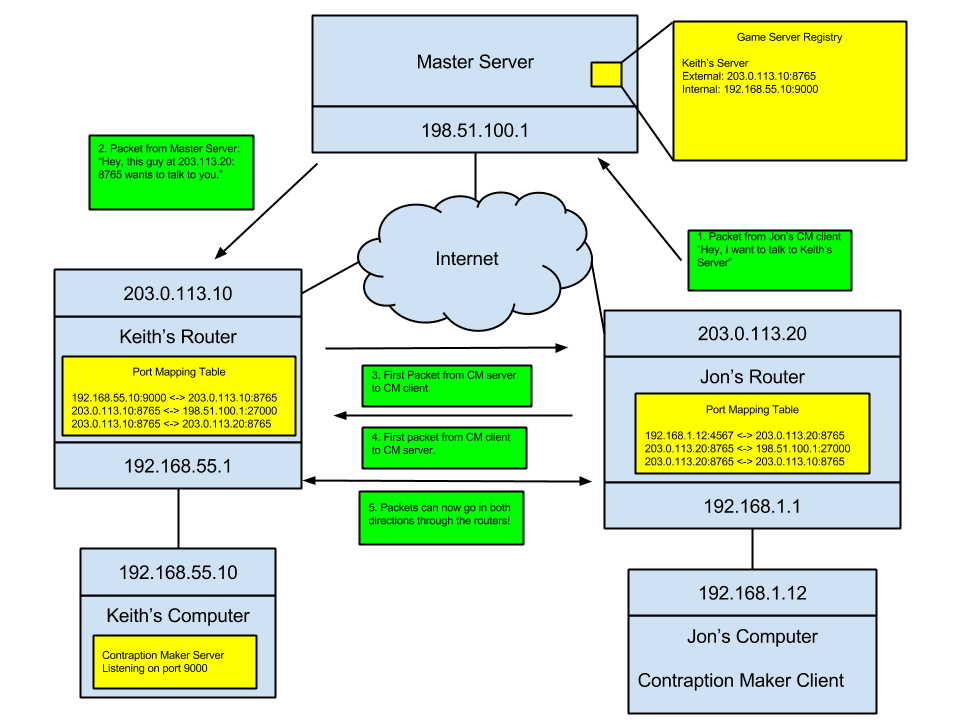
In Spotkin’s Game, Contraption Maker, we wanted to add multiplayer support so that people could build cool contraptions together online. Some indie games that have multiplayer support simply …
@summer tide did you check the ownership part on the pdf and how you can call an RPC to an actor that is not owned by the client?
summer tide
I do understand but don't know if I could get it to work. Maybe I have to move RPC part of the events to player controller.
Oh wait I moved everything into the component
This is the only thing that I have in my player class
https://gyazo.com/2869c70b3307eda6c2bb5590e74fe581
 inner cove
Player controller is owned by the client, the horse is owned by the server so the client cant call RunOnServer RPC from an unowned actor, there are 2 options 1) Make the client own the horse actor that belongs to him. 2) Move the RPC event from the horse to the player controller so the client will call the RPC RunOnServer and the server will then perform the actions on the horse actor.
What should i see with this screenshot?
summer tide
I understand the second option. About the first option, how do you make the client own the horse actor?
vocal cargo
Hi there -- Yesterday I asked this: "Hey guys, quick question - I know you can set up a dedicated server using UE4's source code to make a server build, but what if you have your own server? How would you go about it?", but didn't get a clear answer.
Someone said "Server is a broad term". I'm not sure what other info I should provide as I'm not the one working on the server, but I can ask if needed
inner cove
@vocal cargo If my answer is not what you asked then yes, you should ask for more info.
vocal cargo
I'm think my question is confusing
Basically, I have a server and want to have my game run on it using the project I have
Do I need a separate build for the server? No right?
vocal cargo
I need UE4's source code to make the dedicated server version?
 eternal canyon
yes
inner cove
Yes you will need to build a dedicated server for that, https://docs.unrealengine.com/en-US/Gameplay/Networking/HowTo/DedicatedServers/index.html
How to set up and package a dedicated server for your project.
vocal cargo
I went over that documentation already but still confused. How to I deploy that build on my server?
summer tide
I only need it for Steam multiplayer. By the way is component is server and clients right
vocal cargo
I just run the dedicated build on server (?)
inner cove
@vocal cargo does the server run a linux server distro?
vocal cargo
Yes
The development and testing has been done using a Kubernetes cluster provisioned with k3s on a separated Linux server.
The server guy knows his stuff on servers, I'm just the game dev guy
but I think I understand it
inner cove
Then you will need to build for LinuxServer
And to run the server it really depends on the project but the simplest way is to just type sudo ./ProjectNameServer
deft plinth
@vocal cargo you can think of the server as just a computer. When you have access to one it is with a terminal. Just put the build files in the server storage and run it according to the UE4 dedicated server documentation
vocal cargo
I'm sure the Networking engineer will know how to run it. He already has a great system 😁
I appreciate it @inner cove @eternal canyon @deft plinth
thanks!
inner cove
🙂
deft plinth
@inner cove @twin juniper thanks for the help
inner cove
🙂
deft plinth
😄
twin juniper
Oh I didn't do much but you're welcome
I think it was Pan who provided the hole punch references
summer tide
@inner cove Where the variable "Horse Was Mounted" should be in? Currently I've it in riding comp but it seems client can't access it.
inner cove
Is the component set as replicated and the owning actor of the component also set as replicated and the variable also set as replicated? @summer tide
twin juniper
Is there a way to enable/disable Actor relevance between clients? As in one client Client A is relevant to client B and replicated but not relevant to client C.
deft plinth
replication graph? 🤔
deft plinth
@twin juniper @inner cove Do you know of any NAT hole punch server implementation/library that is publicly available to use? I can't seem to find any decent ones or that have been updated in the last few years.
inner cove
@deft plinth Nah, I haven't really checked because i never needed one!
deft plinth
I think I might have found something in EOS
https://dev.epicgames.com/docs/services/en-US/Samples/P2P/index.html
Overview of the P2P NAT Sample
 merry viper
Hi guys! Was having a problem with multiplayer replication on my FPS game. I want to have the client that picked up the weapon to have the weapon attach to the first person mesh and for everyone else have it attached to the third person mesh. Would the best way to do this be to make a duplicate of the actor on pickup and then attach each weapon and set owner no see on the third person mesh weapon?
twin juniper
@meager spade Oh thank you! I'll look into that!
 pearl elbow
anyone here familiar enough with ue4 networking here that has like 5 minutes I can pm them some questions?
just how I should be using the base classes like playerstate,gamestate,gamemode,playercontroller,characters,pawns etc
I've been looking most of today and I've gotten conflicting information in the range of "do it this way" that is now outdated to "it doesn't matter... until it does" which isn't super helpful
and asking questions makes me understand stuff better 🙂
ill be back in like 15 minutes if anyone is able to help
inner cove
@pearl elbow if you already know the engine and how to make a single player game, check this pdf http://cedric-neukirchen.net/Downloads/Compendium/UE4_Network_Compendium_by_Cedric_eXi_Neukirchen.pdf its very helpful and it has examples and usages(in BP and c++) of every class that you asked. If you still got questions after reading this, you can ask them here! 🙂
twin juniper
@meager spade Is IsNetRelevantFor called every frame?
Or essentially whenever an update needs to occur?
 empty axle
@twin juniper it is called once a second IIRC
twin juniper
So every actor receives that call every second for every other client/actor connected?
Because I'm assuming if you're Actor A overriding that method and there's Actors B,C,D
Then A gets IsNetRelevantFor called every second for all B,C,D ?
empty axle
IsNetRelevantFor is called for every actor once a second and for let's say Actor A it will be called as many times as there are connections(clients)
twin juniper
Gotcha
!
Thanks
Should I use Dynamic_cast to check which kind of Actor AActor is?
empty axle
you can use more readable method like IsA<APawn>()
twin juniper
Ah okay.
empty axle
but for casting you should use Cast<APawn>
twin juniper
I think checking IsA<APawn> might be less expensive and if it is, then cast it.
Rather than casting it and failing the cast.
but not 100% sure..
empty axle
Cast also calls IsA internally
pearl elbow
@inner cove You are an absolute god thank you
pearl elbow
I do have one question, does UE4 handle replication intelligently? Like lets say for this scenario:
You have 2,500 zombies in an area, 1500 of those zombies pass into replication distance of a single player, does it pass ownership to the player of those zombies' animations, collisions, etc? or does it continue just running normally.
If it does, does it then calculate this data on the server knowing both clients have to sync up?
What if no players are around, does it bother replicating any of that data at all?
I guess I just wonder how much it accomplishes, or is it just a simple "If replication on, send it until its not"
 unkempt tiger
What's a good way to net serialize an enum so that if I expand it, I don't have to change the number of bits used for serialization manually?
 tawdry wing
Hey, i'm actually learning replication system. 😏
So, i'm really confuse about when to use MultiCast/Server/Repnotify.
if some one can explain me or give me an link where i can understand it really easily, it will be much appreciate. 
I do have some basic with blueprint :
Like i understand what is Switch has authority
it test between what is the player are server or client.
Remote = client
Authority = server
but what i do not really understand is
Between MultiCast/Server
i successfully done what i should have, like emmet some particule replicated but yeah i'm still confuse
This is what i do, on client side :
and then here on server-side.
i understand that all the info must be on the server to not allow cheat.
inner cove
@tawdry wing take a look here http://cedric-neukirchen.net/Downloads/Compendium/UE4_Network_Compendium_by_Cedric_eXi_Neukirchen.pdf
@pearl elbow https://docs.unrealengine.com/en-US/Engine/Networking/ReplicationGraph/index.html this might look helpful to what you asking
Overview of the Replication Graph feature and Replication Graph Nodes.
 neat seal
@tawdry wing This short tut in the unreal docs does a good job of explaining/showing examples of when to use multicast/repnotify etc, make sure to look at all of it from 2.1 to 2.4 as each section shows the same example with different setups and explains the exact effects caused by using each and why it happens etc. It wont give you everything but may clear up some of the initial confusion so rest is a little easier to figure out
https://docs.unrealengine.com/en-US/Resources/ContentExamples/Networking/2_1/index.html
An overview of the Network Features example level, example 2.1: Network Relevancy (Part 1 - Not Replicated At All).
 wind onyx
my character is constantly calling StopJumping (maybe in Tick?), only happens on clients, anyone have any clue about this?
pearl elbow
@inner cove thanks!!!!!!!!!!!!!!!!!!!!!!!!!!!!!!!!!!!!!!!!!!!!!!!!!!!!!!!!!!!!!!!!!!!!!!!
summer tide
@inner cove SO I have the horse mounted variable set to replicated in the riding component. When I get it from the player BP from the client, the server shows false for some reason.
merry viper
Hi guys! Was having a problem with multiplayer replication on my FPS game. I want to have the client that picked up the weapon to have the weapon attach to the first person mesh and for everyone else have it attached to the third person mesh. Would the best way to do this be to make a duplicate of the actor on pickup and then attach each weapon and set owner no see on the third person mesh weapon?
merry viper
Can anyone help?
 terse prawn
@merry viper when the player walks over it, execute an event that tells the server to execute an event to multicast it attaching.
Or if you're spawning an actor to attach to the mesh then have the actor replicate and then have the server spawn and attach it.
.
I have a question for the community. Does an EQS query running in a behavior tree only on the server only recognize the server's character if looking for the player's character's class?
merry viper
@terse prawn No I am doing that I just need it to attach to a different mesh on the first person character
terse prawn
if its replicated then if you have the server attach it then it should replicate
merry viper
No replicating isnt the issue
its that I want the other players to see it attached to the third person mesh and the client to see it attached to the first person mesh
terse prawn
ahh okay. then you might be able to run the attachment on the server as normal and then for the client's end use a "run on owning client" to make it do something different on the owning client's end
merry viper
Yeah thats what I was thinking I couldn't get it to work though
vivid seal
can i have repnotify variables inside a struct? in c++
 fleet raven
only on the entire struct
vivid seal
ah
terse prawn
i'm trying to get my enemies to move towards the closest player. What would be a good way to approach this?
I tried using an EQS query but for some reason cant update while moving. even with a parallel node in the tree as well.
how could I fix this or what might be better?
tawdry wing
Really appreciate thanks a lot guys for your time ! 😀
 lyric lagoon
Hello everyone,
I am trying to understand how ownership works in multiplayer.
I have a player, the server spawn a weapon and set its ownernship to the player.
When I try to execute a RPC (Client) call on my weapon from the server the server doesn't recognize the weapon as own by the player (and result to execute the call on server side only).
To start with, is it proper to call some RPCs from the weapon when own/attached by/to the player?
To set the owner I tried to use the following functions on server side (FActorSpawnParameters) SpawnInfo.Owner = this; and slot_1->SetOwner(this); (slot_1 is a pointer to my weapon base class).
I am a bit confused about what could prevent the server from recognozing my weapon as owned by the player.
winged badger
that doesn't sound right @lyric lagoon
do you have "No owning connection for..." log warning on the client when you try to send it?
lyric lagoon
I do not see any warning in the logs, it is just executed on the server side.
In the hierachy I can see the the weapon attached to the Player.
But it seems that the ownership isn't set correctly, when I play with the options "Owner no see" or "Only Owner See" on the weapon it doesn't change anything.
lyric lagoon
I traced the ownership and the server recognize the owner correctly.
I don't understand why the Client_RPC isn't called on the player then ...
Screenshot legend:
- Blue: Owner of the weapon after spawn (before setting the ownership)
- Red: Owner of the weapon right after setting the ownership
- Green: Owner of the weapon in the Client RPC call
winged badger
if you don't have "No owning connection" log
they either your ownership is set correctly and you're doing something else wrong
or you're calling the RPC on the wrong object/instance
either way, debugger always knows
if FActorSpawnParameters owner is set, there is no need for another explicit call to set it
@lyric lagoon
lyric lagoon
Thank you @winged badger I realise that I have a lot to learn, I opened a project done by Epic Games and I am calling way too many RPCs when I could have use the replication.
winged badger
if you set the owner server side (its replicated under the hood)
and catch a breakpoint in your weapon client side
you can see the Owner in your locals/autos
there is absolutely no need for guessing
 vestal cobalt
https://www.youtube.com/watch?v=abmzWUWxy1U&list=PLZlv_N0_O1gYqSlbGQVKsRg6fpxWndZqZ&ab_channel=UnrealEngine <---- is this tutorial series outdated or can i still follow this and use it?

In this video we take a look at the finished project and step through each of the features that will be covered in this series. We show our functional Main Menu and its options, a lobby where players can chat with one another and select their characters for the game, some serv...
kindred widget
The learning from it probably still applies. A lot of the groundwork is pretty much the same. Although a couple of us had a laugh about him setting variables to replicate in the GameInstance in episode three I think it was.
winged badger
isn't that one with replicated array of PCs in the GameMode?
the one Cedric likes to mention?
vestal cobalt
are there any other tutorials that are newer and better that you can recommend?
kindred widget
Honestly. If you're just looking to use blueprints. Learn the basics of replication vs RPCs and how they work, and if you know how to use Singleplayer stuff already, you know how to use Multiplayer in blueprint.
winged badger
problem with most epic tutorials is that they make shitty un-maintanable code for the sake of expediency
they are like rama tutorials, essentially, you can use them to figure out how something specific works
but should never be taken at face value
lyric lagoon
@vestal cobalt Thank you for the video, I am in C++, Browsing a finished project made by Epic is very useful to me, I found my way 🙂
vestal cobalt
the reason im asking for a multiplayer tutorial is cause when i set number of players to 2 and then click play! What im doing on gamestart is spawn the player in and then make the player possess an overview camera for 5 sec and then back to the player character and possess it! but when running with more then 1 client/server that doesn't work :S (all this possess stuff is in my GameMode BP)
clever abyss
https://www.youtube.com/watch?v=eGYwJ7aCi3E
YouTube
pally qle
Unreal Engine 4 - Virtual Server Machine
Hey!
Anyone try to do that on google cloud instead of AWS?

Download link:
https://drive.google.com/file/d/1Y2jfJOXoPJXaOTvw1gSBAiWkP3ZouU8j/view?usp=sharing
AWS link:
https://aws.amazon.com/
Other similiars:
https://www.clearvm.com/#clearvm-overview
https://cloud.google.com/
This process is the same for most virtual server machine ...
 limber gyro
is it possible to get a list of ONLY the connected players?
i want to make a game winning check if there are no players in either team
i assume game state doesnt work because it stores values even when players disconnect right?
bitter oriole
The list of player states will be that
Player states will be destroyed on disconnection
Alternatively on server you can simply get the player controllers
limber gyro
does logout need to be called?
bitter oriole
It will be
limber gyro
well from my understanding logout doesnt get called when stuff like power outages happen, is this incorrect?
bitter oriole
Ultimately it will be when the player times out
bitter oriole
PlayerState
 midnight karma
where can i find steam id of my steam game?
limber gyro
strange tho, i had the idea that the state was stored for players eventual recconection
bitter oriole
Nope
bitter oriole
@midnight karma On your Steam partner page
midnight karma
its numbers near the name of the game?
 flint star
hey for some reason we have cheat manager in PIE in MP
but on in development build in MP (but we do in SP)
is there a way to enable cheat manager in build MP?
meager fable
are there any other tutorials that are newer and better that you can recommend?
@vestal cobalt I highly recommend the content from this channel https://www.youtube.com/channel/UCNPKF7QemT3hA9bCfBfjZ_g explains the basics of programming for multiplayer in a clear and entertaining way

YouTube
vestal cobalt
@meager fable thank you sooo much for this xD im laughing and learning at the same time!! this dude is great!
limber gyro
when you use a "open level" node while connected to a server does that mean that you disconnect from that server?
bitter oriole
Yes
limber gyro
umm thats interesting
so if i want to open a new map and still be connected i gotta use server travel?
im not gonna need to open new maps for my game but i am just curious on how the architecture works
can we consider UE4 servers like maps? where we try to "open" them to connet?
bitter oriole
The server should use server travel, preferably with seamless travel enabled
All players will be moved of course
limber gyro
what if i want a loading screen?
if i use servertravel without seamless will the travel map be triggered?
bitter oriole
Should be
 molten jasper
i have a game made in unreal engine 4, but i want to make a server that multiple instances of the game i made can communicate with, and i was thinking of making it in unreal engine. is a connection between the game and server possible?
where each game instance would be playing the game on their own level but communicate with the server to perform calculations and return data
twin juniper
Whichever level/map the host/server is in, is where all the connected clients are.
@molten jasper it's possible to write your game client in unreal then have it connect to another server you wrote elsewhere to perform calculations sure.. Just look into tcp socket plugins.
molten jasper
@twin juniper thats my problem, i dont want a session based multiplayer but rather every player in their own level but communicate with server. but i'll take a look into tcp socket plugins, thanks alot.
vestal cobalt
why when in the editor i open (PIE window)
Number Of Players 2
Net Mode : Play As Listen Server
the Client 1 does not see the countdown Widget only the server...
twin juniper
Is the countdown widget replicated?
 rich ridge
@twin juniper And UI-visual component is not replicatable.
rich ridge
that you can do
vestal cobalt
@twin juniper is it this custom event that needs to be replicated?
twin juniper
I think just the variable can be fine.
Well you also need to make sure
the custom event is executed on clients and servers.
twin juniper
I don't know where these functions are being called from but if you want to test your widget reading the replicated value, you can try using the Tick node to grab the value and display it.
Then you just need to make sure the variable for the display is being replicated.
If that works, then try to RCP your function to see if it will update the display.
vestal cobalt
so i make the widget in the Game Instance BP named (GameInfoInstance) then i call Game Start Countdown inside the GamePlayGM (gamemode) like so
twin juniper
yes if it's in gamemode then you need to rpc
vestal cobalt
rpc? replicate?
twin juniper
You can use rpc to execute functions on the clients when called from the server.
And variables/actors can be replicated.
Designating function replication across the network
Oh wait this is cpp,
This could be useful.

Unreal Engine
Blueprint classes can replicate the same way as native C++ classes can. This is a crash course on getting started, though is not a full tutorial on networking gameplay code
inner cove
Clients do not have a game mode object, only server does so a multicast will not work
And also game instances are not replicated
@vestal cobalt better move that logic to a GameState
vestal cobalt
move all of it to GameState?
@inner cove
i've never used a GameState befor!
first time ever trying todo a Client - Server multiplayer replicating stuff type thingy 😛
inner cove
Yes, create your own blueprint and use GameState as a parent and don't forget to set that as the Game State Class on the game mode
vestal cobalt
and the "game" itself is SIMPLE, there is no shooting or health or anything so 🙂 it's just to get to learn some basic replicating and multiplayer stuff
@inner cove done, but do i move the creation and check of the WidgetBlueprint from GameInfoInstance aswell? or do i keep that there and only move the code from the GameMode blueprint to GameState BP?
inner cove
actually move the code from the GameInstance to the GameState, not from the GameMode to GameState
echo snow
Should destructable meshes be always relevant?
Will they update when player is relevant?
chrome bay
Destructibles don't replicate damage so no @echo snow
Also all destruction is client-side
twin juniper
I understand gamemode only runs on the server but gamemode can rpc to clients correct?
twin juniper
If a client wants to spawn an object with some input.
What are the steps it has to go through to make that object appear for every other client?
Does it first have to rpc to the server. Then the server has to rpc back to all the other clients?
 steel vault
The object must be set to replicate and then you spawn it on the server and it will replicate to all clients
twin juniper
The actor that is being spawned has replication, collision and physics enabled.
When you say spawned on the server you mean with a check like HasAuthority()
Yes?
When my listen server spawns the object, it's available to everyone. But strangely when the client spawns it.
It doesn't replicate.
The spawning is being done in the character class.
That's the replication settings for the actor that is being spawned
no
Where is Run On Server?
steel vault
The character needs to be sure it HasAuthority() when it spawns it otherwise you need to send a server RPC which notifies the server version to spawn it
limber gyro
are player controllers spawned by the server? if for example i call has authority in the PC from the client it should return negative right?
steel vault
If I’m not mistaken everyone has their own version of PlayerControllers so server has different ones than the client so you cant trust they will be the same between.
If you call has authority from a player controller it will return true for the server version and false for the client version of the PC
twin juniper
@steel vault what if it's spawning without HasAuthority() that's what I'm trying to do atm.
But yes I believe if I want to do it with HasAuhtoirty, I have to first RPC to the server.
Which then has to rpc to the clients.
Which is what I Was asking ealrier if that's how I should do it.
steel vault
If you spawn without has authority your server will spawn it and so will the client so you will have two actors on the client
twin juniper
Ah okay.
So the propper way is to rpc to the server.
Then check hasauthority.
perform the spawn.
Then rpc to clients?
Or essentially rpc to the clients to perform the spawn.
steel vault
You check has authority, if you do have authority just spawn it. If you dont then do a server rpc and it should spawn it
The server rpc should call spawn
steel vault
Yes
twin juniper
Assuming the actor has replication
steel vault
As long as it is checked replicates
twin juniper
Correct.
is there an example of an rpc from client to server? I know how to rpc from server to client.
I haven't done client to server.
steel vault
In BP or C++?
twin juniper
C++
Do you just set the RPC to Server instead of Multicast/Client?
So the client if it doesn't have authority, should do something like this
void PerformSpawnForAllClients();```Yes?
 marble gazelle
yep, not sure if this got changed, but I had to add WithValidation so UE didn't complain
twin juniper
Server,Reliable,WithValidation?
marble gazelle
yep
twin juniper
Do I have to provide a validation method as wlel with it?
twin juniper
if(HasAuthority())return true;return false)
Okay let me try it like this first, if it complains I'll add validation.
marble gazelle
na, the validation is more to check if its a cheat call or not, since if you return false the player gets kicked
steel vault
You don't need WithValidation right now for testing
If you want it as a placeholder just return true
But yes, Server, Reliable is how you call a reliable server RPC
And you are checking to make sure you don't have authority to call it
Like Frigerius said, you implement the function in the .m file with _Implementation() tacked onto the end
twin juniper
Okay so when the player provides the input to spawn, I should do it like this
if(HasAuthority()){
SpawnObject();
}else{
 ServerRpcToSpawnObject();
}
Yes
twin juniper
Got it
steel vault
I usually do Server_DoSomething() for naming conventions
twin juniper
Then I no longer need to do a HasAuthority check in my ServerRpcToSpawnObjects yes?
Or should I just in case.
Or is that what the validation is for?
steel vault
Correct. If you are in the RPC function and it is labeled as a server RPC you are now assured to be running on the server inside the implementation
twin juniper
Cool
winged badger
(unless you call the _Implementation directly, which you absolutely shouldn't)
twin juniper
Heyy that did it!
Thanks guys
@winged badger what do you mean by call the implementation directly?
twin juniper
Oh yes that's how I did it
    SpawnBeacon();
}
void AMyCharacter::SpawnBeaconAction() {
    if (HasAuthority()) {
        SpawnBeacon();
    }
    else {
        SpawnBeaconForAllClients();
    }
}```Perf
twin juniper
Yes and it worked.
Thank you!
So now if I wanted to do some form of validation if it was okay to spawn that object. I would do it inside the SpawnBeaconForAllClients_Implementation yes?
And if it HasAuthority, I would also do it there.
steel vault
Honestly, you should just call SpawnBeacon() in both places and then do your validation checks inside one function since it should behave the same for both places
steel vault
There isn't any difference in function calls, you're doing the same thing it's just where it's getting called from basically
So when you call SpawnBeaconForAllClients() the implementation should just be { SpawnBeacon(); }
And then inside SpawnBeacon you can see if it actually should or not
 red musk
For smaller indie projects, is there cheap (or free under some number of users) dedicated server hosting anyone would recommend?
twin juniper
Not any free I know of but AWS scales to your projects. And honestly, if it's a small indie project you might be albe to get away with just a VPS
inner cove
@red musk
Try Amazon GameLift for Free
As part of the AWS Free Tier, you can get started with Amazon GameLift for free. Upon sign-up, new AWS customers receive the following benefits each month for one year:
125 hours per month of Amazon GameLift c5.large On-Demand instance usage, plus 50 GB EBS General Purpose (SSD) storage
15 GB per month of bandwidth out, aggregated across all AWS services
twin juniper
When I override IsNetRelevantFor and check distance between two actor locations, then if the distance is too far return false, the client itself seems to freeze and stop reacting.
So I'm not exactly sure how IsNetRelevantFor works.
 quick flint
I'm setting the CharacterMovement components velocity on TickComponent for my player, but the player isn't moving.
Is there a different way of setting velocity when in muiltiplayer?
it works for my listen server, and single player, but not with a dedicated server
vestal cobalt
@inner cove so i moved this from (GameInfoInstace) to my (GS_GameState) and as you can see it the variable is Replicated! but still only the server sees the widget
inner cove
If it’s on the begin play of GameMode it probably gets executed before any client connects
vestal cobalt
quick flint
so I have a custom way of moving my character that basically just sets their velocity based on their inputs and is being called every frame. I'm having trouble figuring out how to put these calculations on the server side and just sending input to it. How exactly do I get the server to do something then send a result back to the player/all players? I'm thinking I have the client send inputs to the server, the server calculates it's next velocity or position, then sends this data to all clients, but I'm not sure how to get the server to do specific things
@vagrant saddle Did you ever figure this out?
inner cove
@vestal cobalt a quick and dirty fix is to add a delay node but that’s not the best way to go
vestal cobalt
i added a delay but still nothing :/
quick flint
@meager spade #multiplayer message
you said to not use Velocity to this guy
is there a proper alternative?
that is safe to use on tick?
No RPC's in my case
just tick running on server and client
twin juniper
@vestal cobalt Widgets are cosmetic and don't replicate
quick flint
@meager spade So I'm using CharacterMovement->Velocity and setting it to a direction multiplied by the players max speed using some math and other stuff. It works on listen servers, and on single player, but on dedicated servers it seems to just not move at all
I assume the server is correcting the velocity input?
quick flint
hmm
 meager spade
handled properly
meager spade
can show you an example
quick flint
Also, does what is happening to me sound like it's potentially the reason why it works? Everything works in offline mode and on listen servers.
So I kind of assume that the server is correcting it. Also, if you can provide an example I would love that.
meager spade
so this moves towards a target loc
over a set duration, but that is the thing you need the duration to be set, so for wall running this is likely not ideal. i mainly use it for things like dashes, ziplines, etc
    FRootMotionSource_MoveToForce* MoveToForce = new FRootMotionSource_MoveToForce();
    MoveToForce->Duration = Duration;
    MoveToForce->InstanceName = ForceName;
    MoveToForce->AccumulateMode = ERootMotionAccumulateMode::Override;
    MoveToForce->Settings.SetFlag(ERootMotionSourceSettingsFlags::UseSensitiveLiftoffCheck);
    MoveToForce->Priority = 1000;
    MoveToForce->TargetLocation = EndLocation;
    MoveToForce->StartLocation = StartLocation;
    MoveToForce->bRestrictSpeedToExpected = true;
    MoveToForce->FinishVelocityParams.Mode = ERootMotionFinishVelocityMode::SetVelocity;
    MoveToForce->FinishVelocityParams.SetVelocity = FVector::ZeroVector;
RootMotionSourceID = HeroMovement->ApplyRootMotionSource(MoveToForce);```yes
meager spade
wall running is a bit tricky
but ideally you would have logic in CharMovement
in its Simulated and Autonomous tick, that does wall checks
player just provides input, CMC detects the walls, and shoves player in wall run mode
quick flint
Well here's a question, could we take the velocity value that we have and simply pipe that into the character movement tick?
meager spade
ye
quick flint
what function would we need to override, also would it be better to use the root motion sources, or the tick override?
meager spade
just call Pawn->Internal_AddMovementInput
quick flint
We already have a custom character movmenet component
meager spade
{
    if (bForce || !IsMoveInputIgnored())
    {
        ControlInputVector += WorldAccel;
    }
}``` no scale here?that method is private
meager spade
ah shit it is lol
quick flint
yea lol
meager spade
then yeah scale would be 1
meager spade
as it takes your value * scale
so 1 will be your value, .5 scale will be half your value, etc
twin juniper
Can someone explain why returning false on IsNetRelevant override causes the client's character to become immobile, or freeze up? I don't see why it should effect the client itself. Shouldn't it only decide if two actors are replicated towards eachother?
twin juniper
It was checking distance between two actors, and if it was a large distance it owuld return false.
(
    const AActor* RealViewer,
    const AActor* ViewTarget,
    const FVector& SrcLocation
) const {
    float Distance = FVector::Distance(RealViewer->GetTargetLocation(), ViewTarget->GetTargetLocation());
    if (Distance > 100.0f) {
        return false;
    }
    return true;
}```And when it goes beyong 100, the client just freezes
meager spade
ofc, cause your not checking what is what
you will end up returning false for key stuff
twin juniper
But in this case it's only the listen server and the client connected.
So aren't those the only two things
being checked
meager spade
and client will loose control right?
twin juniper
Yes, but why.
quick flint
hmm, so that didn't seem to work @meager spade
meager spade
have you debugged to find out what actors are being passed into IsNetRelevantFor?
twin juniper
I'm pretty sure it's only replicated actors and the only two replicated actors in the game should be the listen server and the connected client.
But,
I can debug and check.
So should I just do a check for IsA
On both actors.
meager spade
put this at the top
        || IsBasedOnActor(ViewTarget) || (ViewTarget && ViewTarget->IsBasedOnActor(this)))
    {
        return true;
}```cause you are breaking key stuff
twin juniper
Then, beyond that, I do my distance check?
meager spade
yes
twin juniper
Alright I'll try it.
quick flint
btw in your example of the FRootMotionSource, what did you set for the start location, end location, duration, and stuff @meager spade
AddMovementInput() didnt work for me
for some reason it was exactly the same result
although
my tick is only called on the server
i want to do something where i can alter the velocity, and the client will just replicate whatever the server has
twin juniper
@meager spade So that stopped the replicating when they go beyond the distance and the client is controllabe. But there is an issue, when they come close again, they're still not replicating.
twin juniper
will do
quick flint
I think AddMovementInput can only be called on the client
meager spade
thats not true
meager spade
ofc
quick flint
but
that's no good for my situation
the server needs to tell the player where it's going along the line
not the other way around
quick flint
is there a way i could perhaps just
override the velocity
to stop the auto correction?
and to use my own in this specific case
meager spade
right but there are others
quick flint
the end location is simply when we hit another wall
ConstantForce applies a fixed force to the target
perhaps this would be the one
Uhm, do these need to be called on the client, like with AddMovementInput()
or could i call these server sided?
quick flint
what if i do it on both?
quick flint
mmm
meager spade
but
quick flint
but do they need to be called on both?
meager spade
yes
meager spade
client and server
quick flint
so if i call it on just the client
it wont work
it will just get corrected i assume?
meager spade
correct
quick flint
Wouldn't this be a memory leak if we dont call delete?
meager spade
no
quick flint
wait
meager spade
pass it to CMC, that makes it a shared point
quick flint
where are you calling this then?
meager spade
pointer*
quick flint
what function are u calling this in
meager spade
inside my ZiplineComponent
meager spade
yea
meager spade
yeah you pass in the temp pointer, it turned it into a shared
and is managed by the CMC
in 4.26 they changed it tho
so above might not work/throw deprecated warnings
quick flint
now i noticed
that the Duration is set to infinite if we don't set it manually
does that mean that we need to manually stop these somehow
somewhere else in my code?
meager spade
possibly if its infinite
btw if your on 4.26 TSharedPtr<FRootMotionSource_ConstantForce> ConstantForce = MakeShared<FRootMotionSource_ConstantForce>(); is how you do it now
meager spade
ah so yeah old style still applies
quick flint
the only reason why we might upgrade is for the ps5 support on ue5
but i feel like thats going to be a major undertaking
meager spade
i do tick check for the RMS
{
    const TSharedPtr<FRootMotionSource> RMS = (Hero ? Hero->GetCharacterMovement()->GetRootMotionSourceByID(RootMotionSourceID) : nullptr);
    if (!RMS.IsValid())
    {
        return true;
    }

    return RMS->Status.HasFlag(ERootMotionSourceStatusFlags::Finished);
}``` ```void UZiplineMovementComponent::TickComponent(float DeltaTime, ELevelTick TickType, FActorComponentTickFunction* ThisTickFunction)
{
    Super::TickComponent(DeltaTime, TickType, ThisTickFunction);

    if (Hero)
    {
        const bool bTimedOut = HasTimedOut();
        const float ReachedDestinationDistanceSqr = 100.f * 100.f;
        const bool bReachedDestination = FVector::DistSquared(TargetLocation, Hero->GetActorLocation()) < ReachedDestinationDistanceSqr;

        if (bTimedOut)
{``` but this is specific for my ziplinehmm
I'm going to try and just get it to work first
Then I'll worry about duration, hopefully it doesn't become a problem
                        FRootMotionSource_ConstantForce* MoveToForce = new FRootMotionSource_ConstantForce();
            MoveToForce->InstanceName = ForceName;
            MoveToForce->Duration = 1;
            MoveToForce->AccumulateMode = ERootMotionAccumulateMode::Override;
            MoveToForce->Settings.SetFlag(ERootMotionSourceSettingsFlags::UseSensitiveLiftoffCheck);
            MoveToForce->Priority = 1000;
            MoveToForce->FinishVelocityParams.Mode = ERootMotionFinishVelocityMode::SetVelocity;
            MoveToForce->FinishVelocityParams.SetVelocity = WallRunDirection * CharacterMovement->GetMaxSpeed();
            CharacterMovement->ApplyRootMotionSource(MoveToForce);
Does t his look logical
quick flint
hm this is weird
so it didn't actually move at all
and now, when i stop, my animations no longer work lol
and i just jitter while on the floor
meager spade
you use root motion animations for moving?
meager spade
RMS sources override root motion animations
if its jittering then your RMS is running
but not doing what it should
quick flint
hmm
FRootMotionSource_ConstantForce* MoveToForce = new FRootMotionSource_ConstantForce();
MoveToForce->InstanceName = ForceName;
MoveToForce->Duration = 1;
MoveToForce->AccumulateMode = ERootMotionAccumulateMode::Override;
MoveToForce->Settings.SetFlag(ERootMotionSourceSettingsFlags::UseSensitiveLiftoffCheck);
MoveToForce->Priority = 1000;
MoveToForce->FinishVelocityParams.Mode = ERootMotionFinishVelocityMode::SetVelocity;
MoveToForce->FinishVelocityParams.SetVelocity = WallRunDirection * CharacterMovement->GetMaxSpeed();
CharacterMovement->ApplyRootMotionSource(MoveToForce);
where i set
MoveToForce->SetVelocity
that is the right way of doing it right?
MoveToForce->Settings.SetFlag(ERootMotionSourceSettingsFlags::UseSensitiveLiftoffCheck);
not sure what this does
meager spade
`
quick flint
thats weird
quick flint
is that not correct?
quick flint
what should i be using then
meager spade
you need to set Force->Force
quick flint
i thought th at was where i set the location
oh
what is the difference?
oh
FinishVelocityParams
meager spade
ye
quick flint
so thats at the END of the rms?
meager spade
right
quick flint
ok
so i ideally want to keep the RMS running
until a button is released
is there a "StopRms" function LOL
meager spade
RemoveRootMotionSourceByID
where is is the uint16 id you get from ApplyRootMotionSource
quick flint
very weird though
meager spade
for wall running i would do it CMC level
UT4 has a crude wall running
and source is available to look at
quick flint
yea but i'm not sure what i should be overriding sadly
like, we already have the math, just need to replicate it in multiplayer
meager spade
yeah but you are doing it outside the cmc right?
quick flint
yea
we have a custom CMC but i'm not sure where i would put our custom velocity variable
we need to pass it into the CMC or something, but im not sure where
quick flint
ok
twin juniper
Questions about the net cull distance on actors.
If Client A is > cull distance to client B, then they are no longer replicated. That much I understand.
But if Client A spawned an ActorA on the map, and Client B > cull distance to client A but is < cull distance to Actor A
Is Client A receiving Client B's updates?
meager spade
if an actor is culled, they are destroyed from the client
re-created when they are relevant again
wait hgmm
twin juniper
So what if,
meager spade
ActorA is owned by ClientA, and use owners relevancy is set
twin juniper
Client A is close to Actor A but farther to Client B while Client B is close to Actor A
meager spade
then ActorA will not be replicated to other clients if ClientA is not relevant for them
twin juniper
But will ClientB be replicated to Client A since Actor A is close to Client B?
Or is it the same ?
meager spade
well client a and client b will not be relevant to each other, so anything they own (which uses owner relevancy) will also not be replicated
twin juniper
Ah.. okay.
meager spade
AlwaysRelevant overrides this
twin juniper
So if it's always relevant then if Client B is close to Actor A, does this make Client A and Client B relevant to eachother?
Assuming that Actor A spawned by Client A is AlwaysRelevant
meager spade
@quick flint i might take a look into some wallrunning at some point, but without seeing how your wall running stuff works, i can't really suggest much, all i know is they take the normal for the wall slide, and adjust FallAcceleration (as techiniically you are falling whilst in the air)
@twin juniper if it uses use OwnerRelevancy, then yes
else it will use its own relevancy
twin juniper
AWesome I'll test a few things
 slender mortar
Hello, I'm trying to Unpossess Possess my character in my game (to temporarily control other pawns like vehicles etc)
So, I have a custom movement component to handle attributes change like speed, acceleration, etc
The thing is, at 500ms, it shows no netcorrections when I move my character
When I now unpossess, and then re-possess my character
ANY movement becomes super jiterry
Even the slightest, it shows netcorrections no matter what
Which is driving me crazy, is it that maybe the server is left with some wrong transform in which it wants to correct the client with?
Any help is really appreciated, thanks

 flint star
@slender mortar are you possesing on server or locally?
slender mortar
Possession is an auth only method apparently
My test is like so
I press 'K' => Server_RPC => Save controller in a var => Unpossess => Delay => Repossess
So it all happens server side
I also tried calling Unpossessing (after calling the RPC so we can actually call an rpc cuz we need to be the owner still)
flint star
and after repossess the character is still autonomous proxy?
slender mortar
Client side
You mean if the movement is seen by others?
Lemme try that
I've been testing with a single window for this
flint star
no I mean check the NetRole directly
slender mortar
Lemme see
slender mortar
Grea! thank you I will try that
flint star
it should be AutonomousProxy on local to work properly
meager spade
@quick flint if you can modify the velocity properly, and have that on both client and server, iirc server sends the velocity off to simulated and simulated just run a simulated tick.
slender mortar
@flint star Weird enough, it starts as Role_None at first (when it works properly)
For both server and client
The moment it is unpossessed, it becomes Role_Auhority for server
Yet for client it stands Role_None
And the same values persist after possession
Meaning:
Before => Clinet (Role_None) | Server (Role_None)
After Unpossess (and during after-possession) => Client (Role_ None) | Server (Role_Authority)
But that's a step forward in debugging
slender mortar
Haha, how to know 😄
quick flint
@meager spade I'm wondering if CalcVelocity is the correct function though
slender mortar
What I know is the character is replicated, and the component shouldn't
flint star
TBH your best bet is to try it in some MP example, to know what it's supposed to do
and then check why your implementation is different
because locally owned possessed character should always be AutonomousProxy for clients
slender mortar
That is exactly what am doing just right now after I noticed the role issue
I hope on my example project it shows Authonomous
But thank you so much man!
I'll let you know how it works
flint star
btw if you need more info, read this
http://cedric-neukirchen.net/Downloads/Compendium/UE4_Network_Compendium_by_Cedric_eXi_Neukirchen.pdf
page 75 is about roles
twin juniper
I'm wondering if someone can help me set this up because what I've tried doesn't seem to work. I have a cull distance of 50.000 set to my characters. But I want my characters to be able to spawn an actor. And when another character walks up towards that actor they also become replicated for the client who spawned it.
I've set my Actor to Always replicate, net load on client, replicate movement and use owner's relevance
flint star
you are spawning on the server right?
twin juniper
Correct.
So what happens is, client sends a server RPC
The server then spawns the objects.
Wait..should I set the owner of the actor to the client rather than..this
SpawnParameters.Owner = this;```This happens on the server. So maybe if I change that to the client rather than the server.
It should work?
flint star
yeah try putting your player controller there
but that's just a guess, I have no exp with having other owned actors then the possessed character
twin juniper
Yes that didn't seem to solve it.
twin juniper
Does anyone know of any good multiplayer plugins from the market place? I'm making a simple multiplayer game and I am having some issues on getting it to be multiplayer.
quick flint
[2020.11.04-01.45.56:981][ 82]CMC Velocity: X=0.000 Y=0.000 Z=0.000 Netmode: 1```how can i override the velocity on the server
netmode 1 = server, netmode 3 = client
quick flint
looks like timeline's cannot run on the server
 halcyon totem
Im a litle confused, I packed my game and noticed my animations wont work if I host a game, but they play fine if I am a client on someones server, is there a check box I need to check to make the animations show if I am hosting a game?
if I host a game, I get no animations from my character its like in the T pose. Why would animations work on a client but not on server does anyone know?
summer tide
How do I make server to show a menu to all clients>
 graceful shard
@halcyon totem some things to try:
- Are you in C++ and are your animations being run from a NetMulticast? In C++, NetMulticast isn't run on the server automatically, you have to call YourFunction_Implementation manually in C++
- Are you perhaps branching based on local role being simulated proxy or autonomous proxy? I dont remember what listen server's local role is, maybe its Authority?
halcyon totem
well on a hyrbid c++ and blueprints project, using a VR plugin from the marketplace. the animations work fine when I play as a listen server in the editor
 signal lance
- Are you in C++ and are your animations being run from a NetMulticast? In C++, NetMulticast isn't run on the server automatically, you have to call YourFunction_Implementation manually in C++
@graceful shard
That's incorrect, you are mixing it with RepNotify which you have to manually call in C++ while BP calls it automatically
Net multicast runs on all connections including server
in both BP and C++
graceful shard
oh damn, you're right, thanks blue man I had those switched
vocal cargo
I asked this in the general chat but maybe I should have asked here
"hey, quick question! I'm doing a hook that should be sort of realistic for a multiplayer game. Should I handle all the math by myself or use a physics constraint actor
which one would you go for and why?"
graceful shard
Not really a multiplayer question, as this channel is meant for questions how to build multiplayer games. But from a networking/multiplayer perspective, I would say its likely easier to use something that is already built in since it will likely be easier than getting your homebrewed solution to behave with ue4's netcode
vocal cargo
But that means replicating physics? Isn't that expensive?