#multiplayer
1 messages · Page 583 of 1
 dark edge
 steel vault
Correct me if I'm wrong, but you're still calling InvitePlayerToParty on a clicked player
You need to call that on yourself. The player who is doing the clicking
dark edge
Ya that call will fail as is lol
 fallow shadow
oh, wait yea you are right
dark edge
@fallow shadow protip, do everything you can in one place so the system isn't all spread out.
fallow shadow
will do!
dark edge
I would put everything possible in Gamestate, including the data (array of party Structs l
fallow shadow
okay so i changed it and now the server event is called on the player who does the clicking
even the invite player logic?
It looks like this now
The new widget
steel vault
Send Player to Target lol
dark edge
Yes, then you can have the widget just call RequestInvitePlayer on the Gamestate, passing in which player you want to invite and who's doing the inviting, and it'll go from there
steel vault
Ok nvmd self is your player correct
dark edge
fallow shadow
like this?
dark edge
I'm not 100% sure if you can directly call that from a widget, but try it.
dark edge
Shouldn't be necessary.
Try a direct call ending in a print just to see if it makes it.
Printing the names of the players or characters or whatever you're passing.
steel vault
You're just ensuring that no replication calls happen directly from the widget because the widget isn't replicated. You are only making replication calls on replicated things
dark edge
Can you get the game state from the widget?
 vale ermine
Need to clarify again that actor rotation is not replicated when character movment component is disabled?
fallow shadow
This is how i did it
dark edge
Does logic after remove from parent even run?
I haven't done a whole ton of widgets so I'm not sure what their lifecycle looks like
steel vault
Yea for sanity's sake I'd do it before you remove it
dark edge
My first thought was a local call on Gamestate that then calls the server side.
vale ermine
yea it does run even after widget is removed
dark edge
But I'm not sure if widgets can directly reach into Gamestate, test it.
fallow shadow
so now it does work(Not through the game state but through the server event you guys told me a few minutes ago)
vale ermine
looking at my code the other day i relized that because I was removing the widget and setting code in that same widget after I removed it.
 inner cove
@dark edge yes they can, I get game state cast it to my game state and call the server rpc from there
fallow shadow
i don't think widgets can get to game state
No matter what i try i can't get a message to show
from the widget to the game state
dark edge
So what's at the end of the call in game state right now.
Also it'll only be running on server so you need to have a way to see the servers print log
vale ermine
you expose a variable for it on widget spawn? and pass it to the widget so that you can access it?
fallow shadow
So what's at the end of the call in game state right now.
@dark edge What do you mean? Show you how i call the event?
on the game state
dark edge
Yeah sure was at the end of that call. Where you say the call isn't working, how do you know it's not working.
steel vault
It should print out on the server, but if you don't have a client because it's dedicated, then I'm unsure. I haven't dealt with dedis yet
fallow shadow
the print is not showing but again as you said you need to see the server's print log
what if i have removed the dedicated just to test?
steel vault
If you do a listen server then yea its easy to see on the server side client
dark edge
Or just have to do something, you can even just have it close the game. Just some way to check if the calls making through
dark edge
All right, turn it from a server side event to just a regular vent, and see if it prints. If it does, then the widget can reach the game state but it can't call a server side event from there.
Then you would just have to go from widget, to client side event, to server side event. The widget and the player are not the owner of the game stage so they might not be able to directly call server side events
fallow shadow
All right, turn it from a server side event to just a regular vent, and see if it prints. If it does, then the widget can reach the game state but it can't call a server side event from there.
@dark edge Nothing was printed
but wait i didn't see that last sentence
wait
what i quote above worked
when i removed the server side on the node, the game closed
dark edge
Yes the widget can talk to the client-side version of the game state. So then just from there, have it call a run-on server event passing the same info along.
fallow shadow
well, that's what i did but it didn't work. Hold on let me screenshot it
steel vault
He's saying to call a function that is local in game state and then in the local game state function then do your server RPC to test it
dark edge
Just need the widget to Gamestate call and the Gamestate to Gamestate call.
dark edge
I'm about to be at my computer so I'll take a look, sec
vale ermine
yea that is what I thought. Looks like you are getting the game state of the client not the server. When the character is created seems like you will need to have the server set a game state variable that the server has ready to pass to players.
steel vault
Wait wait... i'm an idiot.. Gamestate is replicated but it's still server owned
I said before you need to call server RPCs from owned actors like your locally controlled player
You can't do a server RPC from Gamestate on a client
fallow shadow
wait so what does that mean?
steel vault
It means you should only be calling your RPC function from the player or player controller like I said earlier
Not from a widget, not from a gamestate
steel vault
Yes
vale ermine
sweet
fallow shadow
okay but now you got me thinking where it would be the best place to store the party's info
vale ermine
I store everything in the player controller.
fallow shadow
The players who make the party
 cunning relic
Is it a known issue that animation notifies do not get called on the listen server when the animation is inside of a linked animation graph?
fallow shadow
If i want to reduce the health, i should do it in a multicast node because every client needs to be notified of this change correct?
inner cove
@fallow shadow you could make the health variable replicated and when the server changes this variable it automatically replicates it to the clients
inner cove
yes
steel vault
Any reason why you're not using TakeDamage?
 rustic spruce
@dark edge how
fallow shadow
Any reason why you're not using TakeDamage?
You are correct, i didn't think of it actually
steel vault
That function safe guards doing anything unless you are the authority which is nice. You just have to check to make sure that Super::TakeDamage != 0.
dark edge
@fallow shadow I prefer doing stuff through the controller rather than character but either way can work.
fallow shadow
Yea i was told it's better, but why is it?
dark edge
Depends on how you implement your game, but if characters are transient, it can throw some stuff off.
if your character gets respawned when it dies etc, if you can change character etc
Is your character in the party or is the player in the party?
fallow shadow
Is your character in the party or is the player in the party?
@dark edge It should be the player, the whole blueprint
dark edge
I tend to prefer to use the PlayerController as the "Player" instead of the character. The character is who the "Player" is driving around, but is not the player.
It all depends on your game, but to use League of Legends as an example, is Nasus in the party or is xXx_420noscope69_xXx in the party? I'd say its the latter.
fallow shadow
oh, you are completely correct. Should i move everything into a controller?
dark edge
It really depends on your implementation. Either way, both the PlayerController and it's owned Pawn can bridge the client-server gap, so you put it either place. I prefer PlayerController for everything not Pawn specific.
fallow shadow
Alright, for the time being then i will keep everything as is. Now time to accept the invitation and spawn the proper widgets....
dark edge
If you haven't done it yet, I'd start with your data structure representing parties then go out from there, getting the joining/leaving working then the UI to trigger the joining/leaving.
fallow shadow
sry for the late response
waht do you mean data structure?
i would just put the players in an array and then spawn widgets for every single one of them
Where is the best place to create the party? The game state? Because i haven't yet understood how to use it properly
 peak star
Every time I think I have it working, it stops working when I put it into the store.
Oh wait that time it's because my wifi was down. Whew!
Thought I had reached that dead end AGAIN
inner cove
@fallow shadow btw i am curious what type of game are you making?
inner cove
ahh okay
fallow shadow
I want to learn how to replicate in a good level. Anyone has any sources?
 livid holly
what is the ideal way of dealing with projectile-based weapons and client-side prediction?
when the client press the shoot button, should it wait for the server to spawn the projectile and then replicate? This will make it seem laggy
should the client locally spawn a projectile and then, when the real server-projectile replicates, hide or destroy the local projectile?
vale ermine
how would I get the camera manager for a player in their character blueprint for client.
I understand that camera manager is from the player controller. How would I get the correct player controller?
vale ermine
Currently I am using get player camera manager and its input is an index. By using index 0 all clients are getting whatever player was assigned to index 0's camera manager
I need to avoid this
fallow shadow
yea, i didn't even know that thing existed. I don't think i can be of help.....
vale ermine
That is the thing I don't know much about it either other than I used it for single player testing and it works fine. Tested it in multiplayer and realized that they are getting the controller from the server at the wrong index for every player.
From what I understand is that I would need to use the game state and get all controllers and give them numbers?
I have to be able to tell what controler on the server goes to each client that way the client uses the correct index or find another way to get the camera manager from the player controller to the client.
fallow shadow
What are you trying to achieve?
vale ermine
This but for multiplayer each client needs to get its own camera manager that simple.
This gets the correct world rotation in single player and gets the wrong index for the wrong player on multiplayer.
fallow shadow
why not get the camera component instead?
 harsh lintel
is the object you get with GetWorld() replicated to clients?
vale ermine
yes it is replicated to clients
It is a component on each player character and they need access to their camera manager on their controller. The whole issue is I do not know whos index is whos on the server.
 empty axle
@livid holly if the local client requirements to shot are met you should definitely create local projectile and then destroy it if the server one arrives. You should also instantly spawn FX and play sounds
fallow shadow
Yea i can't help you with that , i am afraid...
vale ermine
ok I guess I am getting somewhere
so it must be working as intended because the index of 0 is working per client. So this must mean all clients are using their correct camera manager.
steel vault
I think there is still an issue with replicating projectiles and their movements. If you spawn a ton of projectiles into the air with long enough lifetimes you end up bogging things down until you are no longer able to see them replicating on the client. I still haven’t quite figured this one out.
vale ermine
There has always been an issue with machine gun mechanics and multiplayer. Mostly needs some type of voodoo.
You will need to fake some of it.
steel vault
If the projectiles are launched at a constant velocity you might be able to not replicate them and just shoot them on the client and server separately and get pretty close? I’m no expert on the matter and could use direction myself.
livid holly
@empty axle thanks. But wont that mak it "jittery"?
like if the round trip latency is 0.5s, the projectile flies 10m on the client, and then a new one appears in the client at position 0 after the latency time. It will appear jittery right?
@steel vault i didn't even consider that, it's true. I was thinking just one-bullet projectile, but your example is another thing to consider 😦
steel vault
I’m in the same situation as you basically. But yes, there is definitely jitter with most approaches. The projectile movement component gets rid of jitter by lagging the mesh behind and allowing it to lerp, but this doesnt resolve the issue of having a ton of projectiles in the air all at once.
livid holly
really? If you shoot on the client and the projectile has a projectile move comp it doesn't jitter? I didnt know that
steel vault
Im not at my computer but if you google projectile movement component smoothing you can set it up to smooth yes
livid holly
awesome! Thanks
vale ermine
Ok got rotation working correctly in multi player. The animation seemed off so I thought it was because it was getting the wrong information somewhere like a wrong player index. Come to find out it was just a little bug in the code because of the tick difference between a the server pawn and the client pawns. The server pawn rotated fine every time, Clients rotated fine every time it was just that when a client stopped moving the tick does not seem as fast as it is for the pawn that is hosting. I set it to just use the last known correct rotation and now clients do not snap to wrong rotation when they stop moving on multiplayer.
 winged badger
you typically want to replicate DesiredRotation and let clients interp themselves
vale ermine
Line traces are rotating correctly per client also. The only issue now is that my attack button on my umg is not replicating my attack animation when each client attacks
if you saw my use case you would think differently rotation of flipbooks in a 3D environment use world rotation not character rotation to show the correct facing per client viewing the flipbook
vale ermine

First Look at Paper3D working in a multi player environment.
vale ermine
so the issue I am running into is that when I host on my computer the tick rate is unreliable for the clients. When ran in a packaged environment the bug is gone under normal gameplay stress.
 novel bison
Anyone tried to make teams have different player blueprints?
Like team A is a TPP player and team B is FPP
 kindred widget
Doesn't seem that hard. Just specify a team in the player controller, and override the character spawn in the game mode based on that controller's value.
 fierce oriole
Hey everyone! Is it possible for multiple controllers to possess a pawn (ie like a vehicle with multiple passengers). Or would only the driver possess the vehicle and the others are simply attached?
vale ermine
So I am trying to understand this, if you look at the video above you can see idle and walking being replicated just fine. Why would the attack button not replicate? Idle and run are set automatically in the component. Attack sets a value in the component. I see that the value is getting set correctly on the client because it starts the attack animation. But on other clients there is not change the character is sitting there idle when it should be showing attacking.
From what I understand is I am just changing the client side component?
I see so this is how I do it? I call attack on server and server calls attack and replicates it to clients?
fierce oriole
@vale ermine yes youll need to run that on the server and then multicast it
vale ermine
That way the value the custom event attack sets will set the component on the server
Well I guess I can write it that way and it will still work on single player.
 civic vapor
anyone know how Fortnite to design projectile actor. use gameplayability's cue?
fierce oriole
@civic vapor Look Into EasyBallistics
civic vapor
spawn actor on server. then replicate to client?
fierce oriole
yes basically
novel bison
@kindred widget thanks for the pointer
 echo snow
I'm trying to get a server IP or ID that players can enter and join, I can't find anything related on the internet, can someone help or redirect me?
 thin stratus
@echo snow Like, Dedicated Server?
 dusky urchin
hi, the action destroyactor have to be multicasted ?
empty axle
@dusky urchin you are suppose to destroy replicated actors on the server only
 wind garden
I’m in the same situation as you basically. But yes, there is definitely jitter with most approaches. The projectile movement component gets rid of jitter by lagging the mesh behind and allowing it to lerp, but this doesnt resolve the issue of having a ton of projectiles in the air all at once.
@steel vault Yeah, the approach to solve that would be not replicating the movement. Replicate initial position and velocity and let the clients handle the movement on their own. That may produce minor desync of projectiles, but it's smooth and i guess the only way to have massiv amounts of projectiles.
 chrome bay
Once you get to a certain amount of projectiles it becomes neccessary to just have players create them locally
Or at least make them net temporary, so they only replicate the initial frame then are immediately torn off
"Bullets" in the traditional sense are so short-lived and so small using a complete actor for them is overkill
 elfin swan
I have been going at this for hours. Implemented Gameplay Abilty system and now for the life of me I can't control my player class
 soft relic
Is there a way to get a local server be more laggy? need to get a latency of more than 50ms to reproduce a bug
chrome bay
go into advanced settings and look at "network emulation options" or something it's called
soft relic
NetEmulation.PktLag seems to work, thanks
soft relic
Are anim notifies still not always called on servers?
kindred widget
What kind of server? Dedicated doesn't usually do animations, I'd assume that includes their notifies.
soft relic
Dedicated, some handle resetting states server side and there is an option for calling notify on dedicated as well, just seems like it's still very unreliable
Timers is prob the way to go
kindred widget
What's the use for?
soft relic
It's a project where they seem to have a bug with the client not getting the bool resetted back to true for bCanMove since it's handled from a notify server sided, either that or some other logic error in their code
kindred widget
So something like... UseAbility, which plays an animation and sets the character unable to move while it's playing and then sets it to movable again when the ability anim is done?
soft relic
Yeah
I'm thinking of just moving the notify client side and call the server reset state afterwards from client
kindred widget
I suppose it depends on how important it is. But a timer on the server definitely would end up being a bit more secure and a LOT cheaper than allowing animations on the server.
echo snow
@thin stratus No not dedicated servers. Players will be hosting it
wind garden
Are anim notifies still not always called on servers?
@soft relic we rely heavily on it and it works just fine, we didnt had an instance were the dedicated server would not get a anim notify
but thinking of it they are probably all branching points, we use, as we use the montage notifies, because we handle much stuff in our abilities rather than the animbp, stuff we handle in the animbp is pretty much all client side
soft relic
Okay thanks, I've heard many devs talking about how sometimes notifies don't get called properly from server but I guess that's for the queued notifies which are not synchronous
thin stratus
@echo snow The whole "Enter ID" stuff is not so usual in most games. IP can be entered and used via "open <ipaddress>" console command, but the host has to have ports open.
The other thing most people do is use Steam and their Sessions. These are usually displayed in a Server List.
What you could do is add some custom settings to your Session Info, like an ID (not sure how you'd make sure that the ID is unique though, might need additional backend),
and then have players enter the ID and you can then internally use the ID for query settings on the Find Sessions attempt and automatically join if one is found.
soft relic
@thin stratus Quick way to make sure the ID would be unique would be to go through all available sessions and compare IDs, might be a bit slow though.
thin stratus
Yeah doesn't sound like a nice idea
Pretty sure one can find articles about that
Basically what Phasmophobia does or so
soft relic
Yeah, will definitely need some more backend stuff if you need something better
wind garden
I suppose it depends on how important it is. But a timer on the server definitely would end up being a bit more secure and a LOT cheaper than allowing animations on the server.
@kindred widget the problem is if you use root motion you have to use the anims on the server anyway. Otherwise the characters would not move. I guess you could extract the root motion to a curve and drive the character movement with the curve. If you need to save on performance. Also would be interessted to investigate what the server is stripping away on default to save on performance, if anything. But i was under the impression it does strip away purely cosmetic stuff automatically.
steel vault
@chrome bay my projectiles are quite advanced and do a lot of things so they need to be actors. I have yet to test, but if I were to replicate the actor on server side spawn and then tear it off, will the client keep its own version still or will the projectile die as soon as it is torn off and I will need to spawn a replacement? In that case I feel like I should just create a client side projectile and deal with minor desync...
winged badger
@wind garden for one it strips anim notifies, montage notifies still work though
even listen server by default will optimize out all anim notifies that are nowhere near the host's camera
we found that our the hard way
inner cove
@steel vault I don’t know if it’s the best things but in my game how I do it it’s to not set the projectile actor as replicated and multicast an event to spawn the projectiles so it feels more responsive
winged badger
multicast doesn't really make things more responsive
only way to do that is prediction
 rich ridge
@inner cove if you do multicast your projectile, so how do they cause damage to hitting actors.
Again RPC?
inner cove
When the server’s projectile hit something it causes the TakeDamage
steel vault
The server projectile is going to do all of the simulation itself and deal damage on the server which should then be replicated down to clients regardless of RPC call.
But yea if you have a replicated property that tells all clients to spawn a projectile you could then have a server projectile and a client projectile. The issue would still be desynch in that case, but I wonder how often that would even be an issue.
steel vault
You are doing both, but the client side hit shouldn't do anything permanent besides destroy itself etc.
The damage is still only done on the server
So if your client projectile hits a wall and dies, so be it, it looks normal, but the server projectile if it's off even the slightest, might continue on and not die
So now you have a projectile that doesn't do what you think it should be doing on the client.
Or rather, it's not doing what the server says it should be doing because they aren't in complete sync
inner cove
Exactly @steel vault
rich ridge
If you don't simulate projectile on server this kind of things happen
https://www.youtube.com/watch?v=2degQm1dZP0

And these are easy hacks
inner cove
You don’t get the point @rich ridge
steel vault
That's just a lack of a validation check I believe. Doing hit detection on the client would allow for that hack because he can just teleport the character in front of himself and shoot it. There should be validation checks on the server to see if they are even in line of sight or match a minimum distance. Either way if the server is doing the hit checks I don't believe this hack would be possible.
This is most likely an early version of the game where they allowed the client to influence the hit detection and send that up to the server saying it was a valid hit
rich ridge
Right
steel vault
But anyway, I suppose I can try the "fake projectile" approach and just spawn one on the server and then an unreplicated one on all clients. Maybe when I shoot it I'll just replicate a speed and direction so that all clients can fire their fake ones in the same general direction. Will have to test how accurate it looks.
inner cove
@rich ridge in my approach even if the client cheats and makes his projectile move elsewhere or change the speed or whatever, the server still has its own projectile which is the one that’s gonna cause damage
 wild mantle
how would i make a certain player controller get destroyed or go invisible after another player clicks on them?
 quick flint
Is OnNetCleanup() called on the server, or the client?
or both?
(
    class UNetConnection * Connection
) ```Hey guys do you know how i can create a widgets for all clients including the server in the Gamemode or something else in blueprint
thin stratus
Multicast in the GameState
Or, if it's something peeps should see even if they join late, some RepNotify variable in the GameState
inner cove
@rustic spruce where have u stuck?
Or, if it's something peeps should see even if they join late, some RepNotify variable in the GameState
@thin stratus can you explain this a bit more?
thin stratus
Well a late joiner won't get that RPC :P
inner cove
Yes right, but what variable should be RepNotify ? can you give an example?
thin stratus
Not really, depends on your game. Maybe some Enum with a State. Idk what kind of Widget this is about anyway
rustic spruce
well the thing is
i want to create the widget in the Game mode
and that server-based
so i'm struggling
inner cove
^
rustic spruce
i've heard i can do it in Game State
but idrk how
btw Pan thx for the PDF yesterday
that rlly helped me
inner cove
@rustic spruce the pdf I sent you is written by @thin stratus you should thank him instead 🙂
rustic spruce
oh
thin stratus
i've heard i can do it in Game State
GameState is not GameMode
rustic spruce
oh thanks you so much :D
yes ik
and the problem is i have 2 character in the game one for the enemy one for the human so i that's why i wanna create a function to create a widget for both of them
inner cove
so what is this widget you want to create?
rustic spruce
a widget where you can execute actions , the actions are already replicated i'm just struggling with the widget creation
inner cove
@rustic spruce that's something very simple you can do, haven't tried it but i guess it works.
rustic spruce
where should i put this custom event
inner cove
at GameState as eXi suggested
rustic spruce
oh so that so simple i was researching things too complicated thanks you 🤩
srry for my grammar i'm french
 frigid gyro
how can i pass information from the player to the game mode?
inner cove
@frigid gyro the player is a client?
frigid gyro
yea, i want to create the player and character in game mode, right? So how do i click play/login, and have the game mode know its a specific player.
its more of a theory question, as i havnt actually done anything.
inner cove
Sorry, I didn't understand anything xD
frigid gyro
Say, i start the game on the login map, that creates a widget for the player, and asks him what his name is. before it creates or loads a 'custom' player character and changes to the playable level. how do i use the game mode to verify or choose the right character?
wind garden
You just spawn a actor with the class the player select it and possess it.
For the selection screen i use a invisible pawn with first person camera and no inputs. That way you can have a 3D scene on your selection.
frigid gyro
is this multiplayer?
wind garden
Yes
We have a character select sublevel on the server, since the server can only run one map at a time. We do this mainly because characters are saved on the server. But you can also have a client side map with the select and store the selected class in the game instance and rpc it to the server on after join.
rustic spruce
@inner cove where should i execute the server event from?
because i got the same issue
wind garden
I guess your problem is you just let the default pawn spawn? Start with overriding the game mode functions to take control over the Initial pawn spawn.
rustic spruce
ok no founded a solution
frigid gyro
Ive got a character to spawn onto any number of players that join, but i wanted to set the name of a character say before its spawned
or retrieve its data and load it onto the character
rustic spruce
Do you know guys what actors are client-based?
and can send a message to the server
character are
but like to make a random character selector
i need something else
frigid gyro
i feel were asking the same things @rustic spruce
rustic spruce
oh
wind garden
All client owned actor can. For example the player controller is a save place to call RPCs from the client.
frigid gyro
So the 'PlayerID' variable is on the server?
wind garden
@frigid gyro the thing is, you need a pawn for the player to possess. You can make a invisible pawn and even show a loading screen while the player possess it. Then you have all the time i the World to set up the actual character and spawn it. And make the player possess it.
rustic spruce
well because you custom event execute on the server yes and if you execute it on the GameMode it's on the server too
frigid gyro
ok
rustic spruce
well i've made this
frigid gyro
so soon as some one runs the game they need an actor?
rustic spruce
@frigid gyro you search a random character selector?
frigid gyro
rather a player controller i guess
when someone selects a character in your game, does the game mode spawn the character into the level?
wind garden
Also a pawn. I think its not a valid situation to have a player on the server without controlling a pawn. If i dont spawn one. It gives it a spectator pawn automatically. So better have one to have full control. Also you may want to show some scene on the character select. You need a camera as viewtarget for that. Easiest way just make a pawn with a camera.
Yes, i have a function on game mode i can call to spawn a character and possess it.
frigid gyro
how does the event of selecting a character tell the game mode to spawn and posses, an interface?
wind garden
The basic workflow is i Show a widget on the client. The server replicates available character names to the client so it can populate the widget. The client sends the Index of the selected character name to the server via rpc on Player controller. The player controller on the server calls my function on gamemode to spawn and possess the character. The function takes the characters class and player controller reference as input. So it can spawn the class and make the player controller possess it.
You have to implement that.
frigid gyro
yes
wind garden
I mean you have to implement the function on game mode. It does not magically do it. But the required functions are part of the game mode. For example the possess function or node in BP.
frigid gyro
" The client sends the Index of the selected character name to the server via rpc on Player controller. The player controller on the server calls my function on gamemode to spawn and possess the character." im confused about this part
can this be an interface, how is the function called in game mode?
wind garden
Its just a function i made.
Nothing special, no interface.
The index the client sends is the index of the array element of the array with available characters. Its not a good idea to send the class the player selected directly to the server. As this could be abused by hackers to select any character class existing in the game. Even if it should not be available to players.
frigid gyro
where is this variable, and how is it attached to the player controller?
wind garden
I made it.
You need to implement all that yourself. There is no build in character select in UE.
 turbid island
Can anyone point me to a tutorial/briefy explain this:
How do games like fortnite, pubg, fall guys, create a player party on their main menu without loading a level? Do you just force create a session as soon as the game starts or can you create it when you invite someone?
frigid gyro
its a custom player controller?
inner cove
of course it is @frigid gyro , if you want to implement your own logic you don't stick with the defaults
frigid gyro
im really just trying to figure out whats not done and what i have to do i guess. like how does the game mode know what the player controller is doing. i guess theres no function for that?
inner cove
what the player controller is doing
what do you mean?
btw this https://www.youtube.com/playlist?list=PLZlv_N0_O1gYqSlbGQVKsRg6fpxWndZqZ tutorial series is made from UnrealEngine and they show how to make a multiplayer game with Character Selection @frigid gyro

YouTube
Video Tutorial Series In this video series, Wes Bunn from Epic Games walks you through creating a networked game with Steam integration entirely through Blue...
frigid gyro
Oh thats convient ;]
thx, @inner cove
and thx @wind garden
inner cove
no problem @frigid gyro 👌
@rustic spruce maybe this will be useful to you too since you were asking something similar
rustic spruce
ok :)
 glad sedge
ugh, I'm so rusty on multi.
Is running a pawn input component action / axis to a server_ func impossible?
Do I need to declare that in PC first, then send it to the pawn?
i.E. PlayerInputComponent->BindAxis("MoveRight", this, &ADMPawn::Server_MoveRight);
 karmic briar
rustic spruce
karmic briar
rustic spruce
hey guys quick question : how can i store the player XP and Lvl without editable file? and save it
glad sedge
@alert info This is a legacy article imported from the old wiki. An updated version can be found here: [Not Created Yet] @endalert Overview A macro that adds the current net mode and color to loggi...
Anyone had any success getting this working?
 fossil spoke
@glad sedge The custom colors only work for -log windows, not inside the editor.
glad sedge
That's fine, I can't even get it to compile though
fossil spoke
Well describing your issue helps... Posting your code and the compiler error helps...
glad sedge
So, I can trace it back to this having a hissey
(GetWorld() == nullptr)) ? TEXT("") \
    : (GEngine->GetNetMode(GetWorld()) == NM_Client) ? TEXT("[Client] ") \
    : (GEngine->GetNetMode(GetWorld()) == NM_ListenServer) ? TEXT("[ListenServer] ") \
    : (GEngine->GetNetMode(GetWorld()) == NM_DedicatedServer) ? TEXT("[DedicatedServer] ") \
: TEXT("[Standalone] "))```term does not evaluate to a function taking 1 arguments\
I'm really not great at Macros, but I can't understand how ((GEngine == nullptr) \ (GetWorld() == nullptr)) is equivalent to GEngine == nullptr || GetWorld() == nullptr
But I'm guessing it's something like that?
fossil spoke
Its not, the page contains errors in the code.
glad sedge
Removing that GEngine == nullptr has sorted the issue out, but not sure why that was there to begin with.
fossil spoke
(((GEngine == nullptr) || (GetWorld() == nullptr)) ? TEXT("") \
The formatting on that website has caused your error.
glad sedge
also DECLARE_LOG_CATEGORY_EXTERN(LogYourCategory, Log, All); is missing on the CPP part too.
Hmm yeah that makes sense.
bah, silly stuff- thanks @fossil spoke
fossil spoke
👍
wild mantle
could someone explain why this isn't working? the diefromclient event isn't firing at all i hooked up a simple print string and it's not even firing that
 vivid seal
dude WHY does blueprint OnRep run on the server (and on clients when they set variables locally) but c++ doesn't
i just debugged basically nothing for like an hour thinking my code was all wrong and then it just turned out i forgot to check one RepNotify function in blueprint to make sure we aren't the server
i feel like RepNotify should just work the same in blueprint and c++, i don't care which way 😦
 severe widget
Because they oversold the whole "RepNotify happens when the value changes". So they just added it in the generated code for setting a RepNotify'd variable - it also calls the OnRep.
It actually can't be brought to C++
vivid seal
im just frustrated and want to bitch about it... but i do feel its weird that they didn't just make it work the same in blueprints as it does in c++. its confusing, even if the extra functionality is nice (though sometimes unwanted?)
severe widget
Best that could be done is maybe the NetDriver calls into the OnRep ... that's a bad idea for several reasons
It's confusing for those of us who often write both, but it's less confusing for the average user
wild mantle
why isn't this working?
the diefromclient event isn't firing at all i hooked up a simple print string and it's not even firing that
vivid seal
put a print string right after your branch, check if its even getting past whatever the condition is
severe widget
Speaking of RepNotify (heh)
If you pass that branch and the server function doesn't run, you're running code on a simulated proxy and the call to server will never work.
wild mantle
@vivid seal yh it's getting past the branch
its just as soon as the diefromclient event is called it just doesn't fire it
is it because i set it to run on server?
vivid seal
are you calling this from the owning client? run on server will only work from the server itself (where its redundant) or from something the player owns like player controlled, player pawn, etc.
wild mantle
its not from the owning client but the player controller should be in the same room?
not sure
vivid seal
what actor is this code inside of?
wild mantle
thirdperson
vivid seal
thirdperson character or thirdperson controller?
wild mantle
thirdperson it's parent class is character so third person character?
vivid seal
okay, and is this the player dieing, or the player killing another character
wild mantle
this is the player dying
i want the player to flop on the ground on all players screens
but it only works from the server
vivid seal
interesting. if this is the locally controlled player calling code for himself to die (though a server RPC then a Multicast) then it should work
last thing, maybe silly, did you make sure Replicated is checked in the ThirdPerson's class defaults?
wild mantle
yh
vivid seal
yeah tbh idk whats going on then i'd have to see more
or i just missed something who knows
wild mantle
i went back to the basic code
without the events
the character flops over
but only on the clients screen
but obv cos it's not replicating
is there no way to make it's ragdoll state replicate through the properties tab?
 eternal canyon
Reasons why I hate Listen Servers:
Can never use switch has authority for client side
Run on owning client is useless
Why tf does a server always have to be such a parent
like they want to take control of everything
Just leave the client alone for once
😂
vivid seal
lmao
wild mantle
i have this happening
but it's just not replicating from client to client
when i do it on server it replicates on server and all clients
i realize its nothing to do with on rep dead
since i used this same exact thing on another mechanic and it works fine
its something to do with event interact i think?
wild mantle
how do i do that
eternal canyon
literally a custom event Run on Multicast than put it into another one that is run on server than run the run on server event
wild mantle
don't i need to run on server before doing multicast?
eternal canyon
other way around
wild mantle
oh so server then multicast
eternal canyon
yes
eternal canyon
works for me but I use set simulate physics and set collision
eternal canyon
yup
wild mantle
nope it doesn't work :(
eternal canyon
add breakpoints
wild mantle
did u use a blueprint interface for tracing clicks?
eternal canyon
see if it is even running as i gotta go
wild mantle
yh the event interact is running and the branch
but everything after no
thank you anyway for taking time for this confusing issue
 swift kelp
UFUNCTION(Server, Reliable) void SendComment();
do I need Server in the ufunction if I am calling out to the GameState in SendComment?
 bitter oriole
Server means you can call this function on the server from an owning client instance of this class
swift kelp
I think the answer is no
I only would have UFUNCTION(Server) on the function on the game-mode
it isn't needed 2x (one on the object calling the game-state and the game-states server function)
bitter oriole
Server functions on GameMode make no sense at all, GameMode is server only
bitter oriole
GameState is replicated but never client owned, so it can't RPC from clients either
So Server is also useless / impossible
swift kelp
oh
so you never use
UFUNCTION(Server) on a game-state class function?
did I understand that correctly?
bitter oriole
UFUNCTION(Server) allows you to RPC from client to server
This is only possible on PlayerController, PlayerState, possessed pawn, and replicated actors owned by one of these
swift kelp
so this is a widget function
so does the widget-function need UFUNCTION(Server) that then calls a normal function on the GameState?
bitter oriole
Widgets should never be replicated, so clearly they shouldn't do server things either
swift kelp
my widget isn't replicated, it just needs to send comments (user interaction) to the game-state so others can grab those comments
would you design it differently? or is that right?
bitter oriole
If it's not replicated then it cannot call RPCs, and Server does nothing
swift kelp
oh, so if you say widgets should not be replicated and a user wants to use a widget to send comments to global chat, how would you start with user input into the widget and then where would you take that FText?
I figure it would be sent to the game mode in a list of comments
but that would mean the widget needs to be replicated (if I am understanding your right)
bitter oriole
From my previous comment, list of classes that CAN send things to server
This is only possible on PlayerController, PlayerState, possessed pawn, and replicated actors owned by one of these
swift kelp
so considering widget isn't on that list and it sounds like you don't advise a widget replicating, are you saying you would have the widget pass the FText to maybe the playerState and then have the playerState send the text to the gameState?
bitter oriole
Yes, though I'd use PlayerController myself
swift kelp
ok, I'll use the player controller
make sense in the idea that less replication means less overhead
so by not replicating the widget I think would make the fps go a little higher
bitter oriole
Probably not, but you can get rids of bugs introduced by not having clear separation between client stuff and server stuff
swift kelp
makes sense
swift kelp
so I am modifying the game state from the player controller on a UFUNCTION(Server, Reliable) call and I am not seeing any change in my game state back in my widget.
Any idea why?
bitter oriole
Sure the fubction is called at all ? Is the gamestate var replicated ?
swift kelp
no, figured that would have been done in the base class
guess I was wrong
so I added
    SetReplicates(true);
    bReplicates = true;
to the game-state constructor and I am still not seeing any changes in the widget when I call the game-state via
GameState = Cast<ATheGameState>(UGameplayStatics::GetGameState(GetWorld()));
bitter oriole
GameState has always been replicated
Are the things you change in it replicated, though ?
swift kelp
found out I still needed
void ATheGameState::GetLifetimeReplicatedProps(TArray<FLifetimeProperty>& OutLifetimeProps) const
{
    Super::GetLifetimeReplicatedProps(OutLifetimeProps);
    DOREPLIFETIME(ATheGameState, Comments);
}
which I removed
so even though there is no RPC I still need that code above
bitter oriole
This is unrelated to RPCs, yeah
swift kelp
thanks for setting me straight now
I have the widget make a call the the player controller which uses RPC to call the game-state to upload player comments
swift kelp
@bitter oriole I had some issues later but solved them
The issue was that I could not get values to stay on the GameState
The solution was to not have the values as TArray<UTextBlock*> but instead TArray<FText> and then create the UTextBlock on the client side
This makes sense as Epic probably wants users to decrease bandwith as much as possible.
thin stratus
That, and Widgets aren't meant to be replicated :D
 peak sentinel
Is it normal to have lag issues on Listen server? from USA to Russia. Client's ping is somewhere between 60-70, game is totally playable but sometimes collision and attaching events jittering too much
As far as I know 60 ping is good enough to play a co-op gamw w/o any problems
Just wondering if its my fault with replication or connection issues
In Europe, (England-Germany, Spain-Germany) works very well, but between continents its almost causing trouble everytime, at least collisions always fails to replicate (projectiles doesnt destroy on collision, attaching collision settings doesnt work etc.)
wind garden
No, thats not normal. Try to activate CCD on the important mesh component and See if it makes a difference. But i guess thats only for low FPS, not high latency.
peak sentinel
Framerate is never lower than 45 on that clients
But gonna try it, thanks
Btw not sure if it will help to clarify the problem but its only happening on client, server (host) sees collision working but on clients its failing
wind garden
But the clients should check for collision on their own. So getting jitter, when client and server disagree makes sense as the server corrects positions. But not having a collision at all is strange.
peak sentinel
Hmm.. I was using PktLag to test about it but on my PIEs it wasnt happening. But yeah you're its about server-correction. I have collisions actually, most likely they dont match on server-client
Gonna change my replication order about this. Thanks for giving me idea
But the clients should check for collision on their own.
Also jittering only happens about collision so you're %99 right about it
wind garden
Maybe its just a matter of allowing higher tolerances between server and client. We have only changed them on the character movement component, but we upped them quite a bit to better deal with high latency situation.
peak sentinel
Does Unreal allow us to control the tolerance between server and client?
Or are you talking about simulated/autonomous proxies?
wind garden
Yeah talking about the proxies
I am not sure how to change tolerances on actor movement replication, if there are even any.
peak sentinel
Understood, thanks for your guidance 🙂
 twin juniper
I have a question about RPCs, I have a component with an RPC on it that I am firing from a BP, in order to fire an event in BP I'm calling a broadcast from the implementation function. I'm then doing some logic down the chain from the event in BP. That said, I don't have any way of using BP logic for validation. Is there a way to expose a C++ RPC to BP that exposes these functions or do I have to find a way of passing my validation logic in C++?
 hybrid zodiac
@twin juniper Probably the easiest way is to create a function in C++ which is BlueprintCallable like so:
   if (HasAuthority()) {
      DoStuff();
   else {
      Server_MyFunction();
   }
Then your server function implementation is:
   MyFunction();
}
@hybrid zodiac Hmm, so I would just skip using the Validate function for anything. I think perhaps there is not much point I can see in creating RPCs in C++. Perhaps I will just use BP RPCs and then have a validation node after the RPC call is received.
rustic spruce
https://answers.unrealengine.com/questions/993151/view.html do you know how i can do that?
quick flint
@rustic spruce ur profile picture looks like onigiri
rustic spruce
well oof
rustic spruce
yes i do
quick flint
was that intentional?
rustic spruce
well no
quick flint
haha
inner cove
@rustic spruce You can use encryption, but still cheaters will find a way to cheat.
 normal jacinth
Hi, my AI character are stuttering when they rotate. They're rotating based on 'Orient Rotation to Movement'
works fine in singleplayer
inner cove
@rustic spruce and why to save data on the client side on a multiplayer game if care about cheating?
normal jacinth
movement is perfectly smooth otherwise. any thoughts?
actually it looks like it's the movement also, it's just less frequent. it's like the model glitches out, as if client and server aren't in sync
rustic spruce
i mean do i need a database or something like that
twin juniper
@rustic spruce If you want to prevent cheating, you have to host data on a server or be a literal god at encryption and even then, someone would probably crack it anyway. If you need scaling you could use something like DynamoDB from AWS.
Unreal's multiplayer is authoritative for that reason, anything on the client should be treated as though it can be compromised any time.
I also think Epic Online Services are offering some kind of storage so that might be a free option to look at but there are probably limitations to it.
If the data is a block or a single file, I think S3 from AWS is what you want.
rustic spruce
ok thanks
twin juniper
👌
How can I handle changing actor replication at runtime and only between visible players. For instance if the server casts a ray between two players and they hit, then the server can make them visible to eachother, otherwise they remain invisible
quick flint
AlwaysRelevant for updating UI on 'core actors' or should I just use RPC's to update the ui and keep it using proximity relevancy?
AlwaysRelevant so that OnRep functions are called, or multicast RPC's to all players
ima go with always relevant i think
it's only going to be 5 actors which will ever be always relevant
@twin juniper look into network relevancy
twin juniper
thanks dan
quick flint
np
inner cove
This doesn't work, any idea? I want to implement some check on the server that's why I don't call the AddMovementInput on client.
https://answers.unrealengine.com/questions/191187/add-movement-input-on-event.html It seems that someone had the same problem, so how does someone do some checks on the server side and then AddMovementInput if that's not the correct way?
thin stratus
Movement has to be added on the Client
Because otherwise you won't have any prediction
And yes, there is no nice way of intercepting this if you aren't touching C++ and extending the CMC.
twin juniper
How would I make a widget only available to the host? Would I just use if(HasAuthority()->SpawnWidget())?
thin stratus
Spawn it in the GameMode
thin stratus
Well, yeah. It's not gonna happen by magic :D
inner cove
Thanks @thin stratus that works.
 lucid flower
Hey, iam grabbing the hit location of my cursor with the world in my pc. From there i set the lookat rotation of my pawn. What would be the best way to have that happen in multiplayer?
Set & Replicate the Hit location and then work with a repnotify?
twin juniper
If you're rotating your own pawn, shouldn't it rotate for everyone connected since pawn replication should happen automatically?
wild mantle
why isn't this working?
lucid flower
Should
I grab the location in the PC:Tick
that certainly does just work on the local player controlled pc
wild mantle
@inner cove yh ik im new to blueprints my shit looks like spaghetti 😂
but i can't hear anything
lucid flower
I kind of want to avoid calling a RPC to the Server each tick
inner cove
@lucid flower That's how i do it, this event runs on Tick on PC
wild mantle
ur pawn should have replicated location tho?
are u using your own blueprint from scratch or is it derived from thirdpersoncharacter or firstpersoncharacter
lucid flower
okay so you're using the control rotation thingy
that should replicate out of the box if i tell the pawn to use that
twin juniper
But as long as the actor is set tp replicate.
Then it should replicate for everyone.
twin juniper
@lucid flower did you tick actor replication?
wild mantle
r u using playerstart's in ur map?
inner cove
@lucid flower yes, SetActorLocation didn't worked and i searched on the internet and found that you should rotate it with SetControlRotation
thin stratus
@inner cove The Server RPC into Client RPC is the worst you can do
if the player has 50ms ping you'll be at 100ms delay between input an actual movement.
inner cove
Ohh
quick flint
@twin juniper widgets dont spawn on the server tho
inner cove
@thin stratus so how would you suggest to do it with BP?
thin stratus
Check on the Client and hope they don't cheat.
Multiplayer without C++ is not gonna work properly anyway.
inner cove
Shitt, i have to return to the old bad habits 
thin stratus
but almost no one uses listen servers lol
What makes you think that?
quick flint
i dont know anyone who uses them outside of call of duty
every serious, competitive multiplayer game ive played uses dedi's. Overwatch, league of legends, dota, starcraft 2
palladins
thin stratus
You are naming games that have to use DedicatedServers
quick flint
fortnite
thin stratus
There are lots of games that don't need DedicatedServers
and they use ListenServers
inner cove
minecraft lan
thin stratus
Borderlands 3?
quick flint
never played borderlands sadly
thin stratus
Basically every game that allows Players to host
lucid flower
Okay @inner cove that works like charm
thin stratus
Outside of UE4 probably even more
inner cove
@lucid flower 🙂
@thin stratus since i will have to dive to c++, what should i look for?
thin stratus
The proper place to handle movement is the CharacterMovementComponent
wild mantle
does anyone know anything about voiptalker node?
thin stratus
But if you have no C++ knowledge you'll be lost
inner cove
I have
thin stratus
@wild mantle Not really, no.
wild mantle
theres not that much documentation on it
wild mantle
yh i found a website with a rly detailed tutorial and explanation but the blueprint isn't working still
thin stratus
What are they for anyway? Is that more or less the same as push to talk in game voice?
 molten jasper
im casting my gamemode to the current game mode from a client's playercontroller but its returning false?
wild mantle
it's location based proximity chat yh
thin stratus
Ah right. Does that not need the default implementation?
Also can you link that tutorial? Curious too
wild mantle
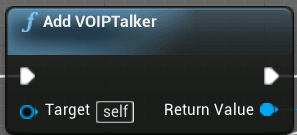
Voice Chat is a staple of modern multiplayer games. Many games include more open world aspects and the majority of players set their focus on having positional Voice Chat. As a result, this audio data is attenuated (lowered in volume) over distance. Contents hide 1 Is VOIPTalk...
it's pretty short
like just a couple of nodes
this is the whole blueprint for it
thin stratus
It's strange to me that this is on Beginplay
Without any check
Will the Server execute this for clients too?
Also is that in the Character or PlayerController?
wild mantle
apparently so, i mean it just attaches a voiptalker to the actual characters at the beginning of the game
it just adds it and sets the settings
the voiptalker does all the work and checking
wild mantle
oop
thin stratus
:D
 inner cove
@thin stratus is there a function i need to override in c++ to do the checks when a client calls AddMovementInput?
quick flint
I feel like running voice data over the game server is expensive
lucid flower
Is this beeing over cautionous?
thin stratus
@inner cove Movement goes through Tick. They go from there to "SendServerMove" or so.
There are lots of places you can do it, but I would assume it should happen somewhere AFTER the sending of the data happened.
And also a function that both server and client call.
I'm not away of which one that would be, cause the CMC is massive.
inner cove
Ahh, okay thank.
rustic spruce
do you know how we make a death montage when you get killed how i should do it? and it replicate to all clients
lucid flower
Send out a multicast call from the server when the character dies? That Multicast Event then play the montage
rustic spruce
yeah but do you know how to make the camera look at the face of the monster
i don't remember how to
inner cove
🙂
 soft girder
hey im having this strange issue with set timer by event
maybe im misunderstanding how it works
there is a half second window i want the timer running during
its not firing consistently
i get some where it fires two or three times
some where it only fires the delegate once
the event is a single keypress in the weapon that is called from the character
inner cove
is this related to #multiplayer @soft girder ?
soft girder
ya i found it
its a branch
var is not replicated. we were expecting it to be handled on the server except our weapons are not replicated actors
rustic spruce
@inner cove how can i access one of my camera to change the location Offset ? in BP
soft girder
just had to move a couple of things
wait
why does having a branch in between a server side event and the timer mess it up?
inner cove
@soft girder can you send a screenshot of the graph?
inner cove
@rustic spruce
soft girder
that var is true by default
even when i remove anything changing the value of can fire
rustic spruce
@inner cove i mean a cine camera like in a master sequence
soft girder
actually almost any branch with a default true screws this timer up
soft girder
how does it work tho
when would i call start timer
would it still be a problem if somethingToDo led to the start timer later in the script
inner cove
So what exactly are you trying to achieve?
soft girder
i want the server to deal damage by that timer so i can leave tick just doing the particle effect
i think ive got it now
inner cove
@soft girder https://docs.unrealengine.com/en-US/Gameplay/HowTo/UseTimers/Blueprints/index.html this might help you since it shows how you can deal damage with a timer
A How To Guide for using timers in Blueprints.
molten jasper
can anyone guide me to the best place to look if i want to make a server model similar to clash of clans type? everything i search about unreal multiplayer shows me session based server model, i want one where all players have their own levels but communicate with a server to provide them with information and perform calculations.
soft girder
thanks
rustic spruce
do you know how i can get a cine cam from a lvl sequence
 royal mica
Hey so I'm trying to test my game using the steam multiplayer subsystem. I know that my game works because I tested it last night on the exact same build, same computers, same steam accounts. But now for some reason the client computer can't find a session. Is this an issue that just happens every now and then or what is the deal?
inner cove
@rustic spruce u can ask at #cinematics since i don't see something related to #multiplayer in this question.
 limber gyro
does any 1 know how to make code in the game mode execute only in the client? #if !ue_server doesnt work
inner cove
if (!HasAuthority()) {
      DoSomething();
}```ty
royal mica
Does anyone know why my steam setup would suddenly be failing for no reason?
limber gyro
thats a pretty open ended question....
steam sometimes fails if you have an instace of your game already using it
could be issues with steam itself
normal jacinth
what movement type should I be using to move an AI character in multiplayer? I'm getting desynced movement
limber gyro
no idea, love your pic tho, gold old newgrounds
normal jacinth
Any reason this would screw up replication? I think it may be causing the jitters I'm seeing
 summer tide

This is what I have. Register Horse Movements is connected to a custom event that updates a variable about which anim montage to play. Register Horse Movements is also connect to a server event which executes the same custom event.
Is it correct? It doesn't work so I assume it was done wrong.
rustic spruce
@normal jacinth have you created custom event to replicate your rot
summer tide
No
So should I put all the logic in server custom event>
Then connect that to Register Horse Movements
Ive anothe I have another multicast event for montage only
So this is what I have.
Register Horse Movements -> Server Horse Movements
Server Horse MOvements -> Event Horse Movements -> Multicast Play Anim Montages
normal jacinth
no I guess rotation isn't replicated because it's coming from the player controller
what's the best way to rotate an AI? I've tried a few methods but failed
normal jacinth
I followed this answer but it didn't work for me
rustic spruce
do you know how can i make a replicated cone raytracing
normal jacinth
Gonna leave this here. I'm trying to rotate an AI without them jittering. It's quite subtle now but still there. TargetPos is set from a behaviour tree. Any idea why this would rotation would jitter?
twin juniper
Is PostLogin called upon every connecting player to the server? And does it also get called when the host creates a session?
inner cove
@twin juniper Called after a successful login. This is the first place it is safe to call replicated functions on the PlayerController
That’s on the docs ^
Yes, it’s called upon every connecting player if they get accepted from the PreLogin
twin juniper
Is it called on the server as well when it creates the session?
inner cove
I have no idea but I don’t think so.
twin juniper
Does gamemode have a method to know when the session is full?
vale ermine
Funny question. Would it be possible to use discord as a login/flat file database? Example, user logs into discord through game login. discord bot moves them to their channel. Discord bot communicates with server and clears logs and reset the flat file? So basically, user registers in game and it sends the request to join the discord. They are accepted and the bot create a section for that player. Each database variable would have its own channel say hp mana gold. Would any of that at all be possible not saying reliable lol.
vale ermine
Does it make sense though to be possible that way for auth api and saving user information?
You could then set up servers for separate user pools maybe and have the bots communicate this information back and forth??
glad sedge
@twin juniper function is 'ReadyToStartMatch_Implementation' in CPP but you have to define what that means.
i.e. "numplayers == max_players" or something
twin juniper
oh
thank you
that helps a lot
yes I'm doing mine in CPP
I'll implement the delegate
vale ermine
I am going to try it an I will let you know if it works out 😛
glad sedge
Hmm calling a server_ call on a pawn's tick is probably bad practice right?
 clever plinth
Hmm calling a server_ call on a pawn's tick is probably bad practice right?
@glad sedge Yeah
I would do some staggered thing
Or have some delegate
What is the function for
Is there a straightforward way to spawn a particle system on all clients?
I'm using a multicast currently but that isn't working
glad sedge
God damn, I cannot get this floating pawn movement to replicate
I can get it rotating, can't get it moving
 rotund sapphire
ACharacter's CMC does send servermoves rpc on almost every tick
glad sedge
yeah this isn't the CMC
rotund sapphire
Just refering to the question regarding whether it's a 'bad practice', but that depends.
CMC will apply several optimizations to avoid sending server rpc when not really needed. (eg char doesnt move)
glad sedge
oh right
yeah, I update a bunch of variables on tick and then apply that to my Movement Input
it's a racing game
I can get it working on Server itself, but it's not updating the clients. I've tried a NetMulti call but I'm not getting anywhere.
rotund sapphire
If it's a client authorative game, then i guess it's ok to just send those values to server
If you plan on impelementing server authority and client prediction, that can get a little messy (see cmc code)
glad sedge
yeah I'll need Server authority.
Right now I'd settle having the bloody thing move an inch
rotund sapphire
You can maybe design your racing movement around CMC, can save you some headache (but you may loose your hair, fair warning)
glad sedge
yeah, fuck it seems floating pawn doens't support networking movement out of the box
vale ermine
floating pawn movment is not replicated
glad sedge
shit
vale ermine
you need to use projectile movment
or you can use input velocity .
when the car turns you want to interpolate around the curve of the turn I guess
vale ermine
I would try both to see what preforms better
rotund sapphire
Mattxor these movement component (except cmc) are not support online games as well, and not support player controlling that well either. Tho you can probably setup a decent looking movement, but as soon you bring the game online, there will be issues with latency and other network malfunctions. CMC has the toolset to deal with these issues to a large extent.
Also, cmc's implementation hides the sluggish movement, because it allows client to make moves on it's own, and apply corrections only when client goes off path fsr.
glad sedge
I'm not using a bi-pedal person though
rotund sapphire
CMC is moving a capsule, not a person.
glad sedge
It's a little car, in my case - top down view.
Maybe I could expand the capsule. Hmmm
vale ermine
he is right the projectile movement lags the actor.
rotund sapphire
Just implement client authority, it's the easiest. Later, you can redesign the movement code with more care.
vale ermine
spawn the model of the actor on the client. Let the client have full control of it but like rob said you will the server move the actor and only correct position when needed.
rotund sapphire
:) It may be a bit complicted to pull that off, but yes that's the basics.
vale ermine
Only what the server is replicating is what the client will see so if they cheat and move around it wont display anything
rotund sapphire
That will feel sluggish and difficult to control. Owning client must move the actor like it's local.
vale ermine
that is the right way for sure.
glad sedge
hmm let me dig into it
vale ermine
it should be only when the actor reaches its destination or periodically during the movement the server should correct the client and if the client is only off by a little you may want to adjust the server to the client
glad sedge
Gonna try Character first, and see how I go
rotund sapphire
For the correction you will use timestamps to synchronize these coordinates in time, but timestamps can also be an attack vector for a cheater.
vale ermine
funny how ragnarok used the animation of a sptite for their cast delay. Users removed sprite instant cast 😛
rotund sapphire
smart workaround :)
in unreal you'd use gameplay abillity and with a nice setup that wouldnt happen
vale ermine
well that is the thing. There is always more than one way to skin a cat.
rotund sapphire
To be fair, for cheaters to show up a game must be relatively famous, because not many cheaters are actaully understand how to design a workaround for a certain game behavior.
vale ermine
it comes down to preventing memory hooks but even then your hook can get hooked so what is the point
rotund sapphire
So it's not a real threat until you reach great numbers.
vale ermine
depending on how competitive the game is it can ruin everything.
for instance potions
rotund sapphire
That's not a question. I just say, that only a few people can hack a movement code and figure out a script they later share. If they ever show up in the first place.
vale ermine
I wonder how a no clip or wall hack would work in an unreal game.
glad sedge
might be easier to just ban that user.
vale ermine
I guess you would need to figure out a way to break collision.
rotund sapphire
If it's a client authorative movement, then it's obviously simple to wall hack. With a CMC movement code, that's get a little tricky, but i guess anything is possible. A tiny bug someone discover can be exploited.
vale ermine
Example would be warframe. Warframe would spawn other players that join on the character that is hosting. If you take the host to a part of the map. You could spawn other into the wall and nothing could attack them. yet they could use their skills and kill everything.
glad sedge
sounds like some mild fun
vale ermine
was playing dead island the other week and there was a part were I could not take the vehicle. I ran into that wall at every angle I could. I got the truck on the beach 🙂
rotund sapphire
It just teleport you the other side of wall?
vale ermine
no the actor got tilted up and pushed over because a prop was blocking the front side
vale ermine
I had to drive backwards 😄
I think breaking games is the most fun part of playing them for me.
for instance you have lords mobile
rotund sapphire
Yes it's funny, just ruins the immersion for others. If played online ofc.
vale ermine
these people will attack you and then change their name. So I found a way to read their user id in memory so I can go search for them even after they name change
rotund sapphire
You are hunting them :) hehe
vale ermine
they started it
 austere needle
I'm working on interpolating simulated proxies and I have a bug I could use some help with. I'm seeing random jittering in simulated proxy locations, like its using bad data. I've traced the problem back to when I get the start-transform.
I'm doing SimProxStartTransform = GetOwner()->GetActorTransform(); from inside my component. But the Location inside that transform is sometimes set to wacko values. Even when I do GetOwner()->GetActorLocation() and print the result, I'm seeing Location values that are way off for seemingly no reason, and this in turn is flipping out my interpolation.
Can anyone give me any suggestions on why the Location is freaking out so badly for simulated proxies?
I've attached a screenshot of the wacko values and a gif of the behavior I'm seeing in-game where there is no user input.
glad sedge
@austere needle anything to do with values not initalising?
i.e. FVector YourLocation;
austere needle
I don't give the SimProxStartTransform a default value, so there is a very short period of time where it's empty. I'll see if setting it a value on play helps at all
No luck unfortunately. I'm still getting wacko values from GetOwner()->GetActorLocation()
kindred widget
@austere needle One thing is for certain is that the reason those are printing way off results, is because the owner of that component has been moved way off from where you expect. The root component of that actor has to be at that location for that to return that value. It'd be really hard to diagnose without knowing how you're moving your actor in the first place or knowing where you're printing those values off.
austere needle
I've made a little progress. It's definitely a problem with how I'm setting or calculating my interpolated positions.
I'm using FMath::CubicInterp(StartLocation, StartDerivative, TargetLocation, TargetDerivative, LerpRatio); for my interpolation and then using GetOwner()->SetActorLocation(NewLocation); to set the actor's location. If I comment out the GetOwner()->SetActorLocation(NewLocation); then as expected it stops setting the location and and I stop getting bad values. So I'm 90% sure it's me setting bad information or something
But, the math from FMath::CubicInterp(StartLocation, StartDerivative, TargetLocation, TargetDerivative, LerpRatio); seems to return correctly each time. I can't get wacko returns from it. I set a breakpoint and let it step by step interpolate for like 5 minutes of me-clicking-continue-time and it didn't break
in other words, I can't prove that I'm setting a bad position when I GetOwner()->SetActorLocation(NewLocation);
I've read in a couple places that these sort of problems can arise from using a listen server vs a dedicated server, so I'm gunna look at testing with a dedicated server now
glad sedge
woof, that's a pain.
lucid flower
Has anyone tried to implement with Agones?
 vernal light
bitter oriole
vernal light
bitter oriole
@vernal light ?
vernal light
My results after research in replication
bitter oriole
#work-in-progress when the link works
bitter oriole
Probably not the place to share random videos though
vernal light
Not Random
hybrid zodiac
@vernal light Its a nice thought, but the video - at least on my phone - is too small to make out any details. Most of the video is black space with a small postage stamp sized view of the actual screen
Try re-encoding the video in a free editor like Lightworks so you dont have all those limitations making the video unwatchable
vernal light
okay, Thanks @hybrid zodiac
 cedar lake
hey everyone, I'm making a PvE game with listen clients, so I'm thinking of going with a client-trusting or client-auth network setup. As I was brainstorming I had a question, in this type of network model, how is AI handled? Does only one copy exist (the one the server)?
hybrid zodiac
@cedar lake Depends on how deterministic the AI is. AI controllers only exist on the server, so AI is only run on the server and the pawn is replicated to clients as any other player would be
The problem with client-side AI that can move around and perform actions is how to keep them in sync across all clients, so you would need some deterministic way to guarantee their behaviour
cedar lake
@hybrid zodiac yeah that's exactly what I was wondering
I don't mind it only existing on the server but is there a way of applying damage locally without needing to predict? or would it just have to be a prediction.
kindred widget
If you don't care about cheating then you could make your own apply damage function. Just alter the AI's health locally for prediction and then make a reliable RPC to the server to apply the damage, which will set the replicated health again on the server, and then it'll update everyone.
royal mica
Hey so just a quick question: When a client attempts to connect to the server, do the two game versions get checked to see if they are compatible? Is this done by default or is this something I have to implement?
rich ridge
@royal mica you can check by yourself, join your server and server logs the handshake logs on the console. As far as i remember there is checksum validation but don't know whether server rejects the connection.
royal mica
That was gonna be my question whether it uses checksum or checks the project settings version
Okay thank you @rich ridge I think you're right that it does checksum and then disconnects if they don't match because there is a pre-existing ENetworkFailure type called "outdated client" and "outdated server"
hybrid zodiac
@cedar lake I think the fundamental problem you have is that UE4's networking system is a client-server model, while what you want is a peer to peer model
So even though you can still handle some stuff on the client side, you will still need to go through the server to ensure all clients are kept in sync
Therefore, while you can handle some stuff on the client such as hit detection, all you're really doing is moving a small bit of processing onto the client in exchange for increased network traffic (since the client still has to notify the server that something has happened)
Since clients cannot communicate with each other directly
In practice, your options are either to implement a custom p2p network model to replace the default client-server model, or embrace the default model and make the game server-authoritative
twin juniper
How can the game mode access each player's individual data, like their health or their position. I'm wondering if grabbing their player controller, then getting the posessed pawn to access the data is the right way to do it?
Or is there something better I can do?
Because if for instance it's in spectator mode, it might not be posessing the correct pawn.
limber gyro
I am trying to implement a steam callback for steam friends "PersonaStateChange_t" that is inside "isteamfriends.h"
i already included isteamfriends but it is still complaining about linker errors
hybrid zodiac
@twin juniper You could do it via the player state. The player state persists across the entire game session, regardless of whether the player is spectating or possessing a pawn
inner cove
@twin juniper GameState has an array that holds all the PlayerState of the connected players, and PlayerState has a property bIsSpectator (but i don't know if this variable gets set automatically or you have to do it manually)
twin juniper
So should any piece of information that a player has which is shared amongst all the clients, can that be stored in the playerstate?
Something like health?
@inner cove do I have to override the playerstate ?
To put my own data in there
hybrid zodiac
Well, health normally is tied to the pawn, but you could put some function in the player state to see if the player possesses a pawn and determine what to display based on that.
twin juniper
Yes health is part of the pawn but what if I wanted all the other players to see that health.
Then it would need ot be shared.
inner cove
@twin juniper you don't overide, you create a class/bp to inherit from PlayerState
inner cove
About the health, i have the health on the pawn and set it to be replicated
hybrid zodiac
In that situation you could make the health variable replicated in the pawn, and then in the player state have a function called GetPlayerHealth which runs logic like this:
twin juniper
@hybrid zodiac but then that player state would need a way to get the pawn or character right?
hybrid zodiac
If player is possessing a pawn and not spectating then return the pawn's health, otherwise return 0 or something
inner cove
@twin juniper
The class APlayerState is the most important class for a specific Player.It is meant to hold current information about the Player. Each Player has their ownPlayerState. The PlayerState is also replicated to everyone and can be usedto retrieve and display data on other Clients. An easy way to accessall PlayerStates, that are currently in the Game, is the PlayerArray insideof the GameState Class.Example information that you might want to store here:•PlayerName – Current Name of the connected Player•Score – Current Score of the connected Player•Ping – Current Ping of the connected Player•GuildID – A Guild's ID, in which the Player might be•Or other replicated information that other Players might need to know about
hybrid zodiac
Yes, so the player state is owned by the player controller
Or there might be a function in player state called get player controller or something, not sure off the top of my head
twin juniper
So if that's the case, where a player state is meant to hold replicated information.
Then shouldn't health just go in the player state?
instead of the pawn
hybrid zodiac
You could do that too, yes
twin juniper
And all data in the player state is automatically replicated? Or does it still have to manually be set to replicated?
hybrid zodiac
Still has to be set to replicate
hybrid zodiac
You still need to mark the variable as replicated, but UE4 will generate a player state for all players automatically and sync them
twin juniper
Cool thank you!
hybrid zodiac
You're welcome :-)
twin juniper
Hey, is there any common reason why DOREPLIFETIME will cause compilation failure. Identifier not found.
hybrid zodiac
For clients, if you want to display the health, you can obtain a reference to the player state from the pawn or from the game state
@twin juniper make sure you include the networking.h header
twin juniper
I read that you include in the project, but do you need to do it in each class?
maybe what I read was before the includes change
inner cove
Yes you need to include it in any file you need it.
twin juniper
@hybrid zodiac That fixed it, how silly, I've been including necessary headers for months now and for some reason I thought this time was different.
pattern-matching fail
rich ridge
@twin juniper the visual studio is pathetic. Your IDE should be smart enough to tell you appropriate header

JetBrains: Developer Tools for Professionals and Teams
Smart C++ and Blueprints support to craft the best games with Unreal Engine
twin juniper
@rich ridge I resonate deeply with these sentiments. Have you tried Rider? Been seeing some stuff about it around but not sure about it.
rich ridge
Use this
twin juniper
How is debugging?
inner cove
@rich ridge you have to fill this form to get it? https://www.jetbrains.com/rider/unreal/

JetBrains
rich ridge
Yes I did fill that form and I got download link on my mail
twin juniper
Intellisense, or dummysense as I like to call it is so slow it hurts, I find myself typing code in or copy-pasting manually because it hangs and I feel my life-force ebbing away as I wait. What is the experience with Rider?
rich ridge
Rider is damm fast..
inner cove
@rich ridge you got it instantly or you had to wait some days?
rich ridge
Instant
twin juniper
does it have an automated method to change the definition and declaration params at the same time? I find that irritating about VS.
rich ridge
Rider automatically gives option to override RPC functions with appropriate suffix
It can list the virtual functions which you can override
Like java
twin juniper
Hmm, well if you've been using it for 9 months with no issue, it can't hurt to try. What about when you need to rebuild your solution, I find myself doing that when I move classes around and things. I guess you can't use the context option from the UProject in the same way?
you know, Generate VS project files
rich ridge
Actually rider is integrated very deeply
twin juniper
Adding and removing classes with VS is a pain as well, does Rider handle this better?
rich ridge
Yes it does
If you have worked with java using jetbrains IDE, then rider offers exact same functionality
rich ridge
twin juniper
Hmm, but what if the project won't open due to compilation failure
Can you reset from Rider?
rich ridge
open in rider and fix and launch project from rider
twin juniper
With any luck Rider solutions are easier to maintain and don't need a hard refresh so much
rich ridge
this is code maintenance, which depends on nature of game and team
twin juniper
What does it mean by Blueprint support?
inner cove
Thats so weird, why is it Rider for Unreal engine and not CLion for unreal engine?
Rider is a .NET IDE, CLion is IDE for C and C++
twin juniper
I'm sure it makes use of CLion for the backend but I think they are marketing "Rider" as their gamedev offering (and charging a little more)
Still pretty good pricing though. Going to look into it.
Thanks @rich ridge
rich ridge
its free
Still pretty good pricing though. Going to look into it.
@twin juniper its free
@inner cove there are two variants for rider, one which is available directly, and other is in beta stage called Rider for Unreal Engine
twin juniper
@rich ridge Free for the preview period or free-free?
rich ridge
free till preview, 31st march
inner cove
I didn't say that, Rider is a .NET IDE, CLion is a C/C++ IDE and they chose the Rider to enhance it for the unreal engine instead of enhancing the CLion @rich ridge
rich ridge
the preview might get extended as they still didn't launch rider on Mac or Linux
I didn't say that, Rider is a .NET IDE, CLion is a C/C++ IDE and they chose the Rider to enhance it for the unreal engine instead of enhancing the CLion @rich ridge
@inner cove they might have cherrypicked C++ from Clion and .net from rider to bring Rider for unreal , who knows what is truth 😀
inner cove
Rider is already well known in the worlds of .NET and Unity game development for being a smart cross-platform Unity and .NET IDE. And we're now ready to bring it to the world of Unreal Engine development!
It looks like this is the reason ^
rich ridge
reasonable reason
twin juniper
Wow, it feels so brisk and snappy compared to VS
If an actor were to alter the state of a replciated variable would it alter for everyone or only if the server alters it?
I'm pretty sure it's only if the code is executed on the server then it would alter for everyone
just want to make sure
@twin juniper If the server owns it, then all clients should get the replicated variable, but if a client owns it, nothing happens I think.
Yes I imagined so
twin juniper
@rich ridge Do you know how to turn off automatic include wrapping?
rich ridge
can you explain what you mean exactly?
inner cove
@twin juniper this is what you mean?
rich ridge
ohk, this is one of the features of java based ide.
 charred crane
Is there any point in using an authority switch when I'm calling a server RPC? It's going to happen on the server regardless right?
normal jacinth
Has anyone had any luck replicating the rotation of actors?
summer tide
I have a concept. Rotate in client and server. Make the variable replicated.
 finite flower
Hey guys, I want to do a simple leaderboard for steam based on highscore in my game.
Player position / Player Name / Player Score
I have steam set up in my project and I added 2 achievements successfully but I can't find a tutorial to follow for the leaderboard implementation.
Is this possible with blueprints? Can someone who has done this help me out ? ❤️
inner cove
@charred crane yes, if the event is marked to Run on server, it will run only on server