#multiplayer
1 messages · Page 575 of 1
 fringe thistle
oh thanks for the info guys :v What about the "Reliable" property? In what case should we use it?
 chrome bay
If an RPC absolutely must reach the other end, mark it as reliable
But never use it for ticking, or input etc.
If it's unreliable, it might be dropped in times of high bandwidth use or in case of packet loss
 near bison
I am still confused about persisting data across levels.
Since neither PlayerState nor GameState do the job.
I know GameInstance does it, but I don't think it makes semantic sense to store variables pertinent to a player in GameInstance
 bitter oriole
Why not ?
GameInstance handles cross-level persistence
It's pretty much the point
near bison
Because from what I've gathered, GameInstance is more for storing things like player names, tokens, player ids
bitter oriole
That's GameState
near bison
doesn't the gameInstance stay after the game is over too? Like in my main menu screen
bitter oriole
Yes, it does
That's the point
It is cross-level
Anyway, feel free to create a new subsystem instead if you like
GameInstance is one
near bison
No so my question is, even after game is completed, does it persist?
near bison
Right now I'm really confused because I'm associating my lobby, where matchmaking happens, to have the GameInstance as well
Am I correct?
bitter oriole
Let me explain
GameInstance is created when you launch the executable
It is destroyed when the executable exits
That's it
near bison
That's precisely what we don't want though.
We want some variables in the gameInstance to reset/be deleted when one session is over
bitter oriole
So reset them
But you also want "persisting data across levels"
You need GameInstance, or another custom subsystem, for that
near bison
lol I mean yeah, taht's the approach we're taking right now. We will reset them
But it makes no semantic sense
Because I envision "GameInstance" variables to be isolated to one session, not when the executable is launched
bitter oriole
That's not what GameInstance is
near bison
I understand
bitter oriole
Feel free to imagine it's called ProgramInstance instead
near bison
So then we stick to the flow I had asked about earlier in the day then?
When transitioning between levels:
Get data from player state -> put it into game instance -> change level -> put data back into player state
chrome bay
Depends if you're doing Seamless vs non-seamless travel
near bison
we wanna do seamless
bitter oriole
Then you don't need to do any ofthat
chrome bay
kk, Player states have specific functionality for seamless travel
near bison
isn't player state erased when seamless traveling
chrome bay
no
bitter oriole
No
It's specifically kept
And then there is a handover
Where you can specify what to keep or not
chrome bay
Have a look at Reset(), OverrideWith() and CopyProperties()
bitter oriole
But of course, this only works for already connected players, during a ServerTravel
near bison
Hmm, I tried this morning to log some data in BP from player state after seamless traveling, didn't work
bitter oriole
Data will be lost if a player disconnects
chrome bay
AFAIK none of this is available in Blueprint
Oh actually, turns out it is
    void ReceiveOverrideWith(APlayerState* OldPlayerState);
    UFUNCTION(BlueprintImplementableEvent, Category = PlayerState, meta = (DisplayName = "CopyProperties"))
void ReceiveCopyProperties(APlayerState* NewPlayerState);```So just to clarify,
by default, player state doesn't persist across seamless travel, it's only if you make it through some option? (i.e copyproperties/overridewith)
chrome bay
The actor instance itself is actually replaced with a new one, but before that happens, you can transfer properties between them with those functions
But only in Seamless Travel, and only for players already in the session (i.e those travelling with the Server)
OverrideWith is for reconnecting players (i.e, a player who recently left rejoined and we want to copy properties from their player state)
CopyProperties is for travelling
Why they don't use the same function and pass in a flag IDK
near bison
What is copyproperties expecting as an argument? Which pin do I call it from
near bison
Override and do what?
Are we supposed to write something in the function definition?
Sorry, I'm not the most familiar with UE4's CPP APIs
chrome bay
Alright well here's an example:
{
    Super::CopyProperties(NewPlayerState);

    if (AMyPlayerState* NewPS = Cast<AMyPlayerState>(NewPlayerState))
    {
        NewPS->SomePropertyWeWantToRestore = SomePropertyWeWantToRestore;
    }
}```So it gives you a chance to copy data from this into NewPlayerState, before this is destroyed
near bison
What is CopyProperties doing exactly? (The parent class implementation)
chrome bay
IIRC it just copies some other base properties over
near bison
All my PlayerState variables right now are only in Blueprints, do I have to redo my entire PlayerState now
chrome bay
Shouldn't do, it looks as if there is a Blueprint function for it as well
So you just need to implement that node
near bison
which ue4 version is it available in BP? I don't have it on 4.25
chrome bay
I'm in 4.25 and it's there
In the player state, go to functions list, and in the override drop-down should be "CopyProperties"
near bison
Still confused on how to use it lol
Looks like it's callable only in my PlayerState BP
I won't know in my PlayerState when I'm transitioning, will I?
near bison
@chrome bay is copy properties mutating player state or just returning player state?
Because if it's returning, then I have to re-assign all my player state variables
chrome bay
neither
It's called on your old player state, the new player state is passed in
so just set everything on the new PS that you want to copy
 thin lion
I can't seem to get my second gamepad to work in the menu level. Or rather, it works sometimes. It works fine in gameplay, but for some reason not in this level.
Players and controllers are created correctly and I see them in the outliner
Any help would be appreciated.
and... now it's working again
I don't get it
It just randomly stops working exclusively in the game every now and then
It even works in the editor
chrome bay
@near bison I think it's the other way around, but not 100%
So you wanna call "Set Is Dead" on the casted player I mean
 trim gale
@near bison I think it's the other way around, but not 100%
@chrome bay lolllll, it is
should def be the other way round
 finite kettle
Hello,
Is here someone with AWS Gamelift production experiences?
I would like to ask some questions about Gamelift.
-
Let's say that I have game like Battlerite (https://store.steampowered.com/app/504370/Battlerite) - 6 players per game (3v3), all players always visible (most of the time everything would be relevant to everyone), length of one game approximately 10 minutes and implementation is not total garbage (is fairly optimized).
Consider one c5.2xlarge instance (8vCPU, 16GiB Memory). How many dedicated servers can be running simultaneously at that type of instance? (approximately) -
What is the reliability of spot instances, which means how often is the instance terminated by AWS? I know there are some statistics like <5%, but can I trust them? Is even worth to consider using spot instances in production for that type of game (like a Battlerite)?
-
I probably don't understand what exactly is "game session" in AWS terminology. Am I right, if i say, that I can have only one game session per UE4 dedicated server process? So if i would like to run multiple game sessions simultaneously per instance, I must run multiple dedicated server processes each on different port?
-
How scaling works? Is realtime or do I need to "prestarting" new instances like 30 minutes in advance?

Battlerite is a PvP arena brawler and the spiritual successor to the critically acclaimed Bloodline Champions. Experience the unique combination of a top-down shooter meeting a fast-paced fighting game and take part in highly...
Recommendations
21426
Metacritic
85
 twin juniper
If I spawn an actor from my client using a server function, is it valid?
bitter oriole
Well it's spawned from the server in that case
 tranquil yoke
#if !WITH_SERVER_CODE This means it will run for client ?
 native vector
someone can help me with synchronizing animacion bluprint, i'm just started with implementing multiplayer to my game
i have lag on horizontal and mouse
tranquil yoke
@native vector Ideally i would have only replicate the variable, and handle the AimOffset on clients.
you dont want to Multicast for Horizontal, just teach each Client, what would happen on that value.
native vector
@tranquil yoke if u have time i can share my screen, and you by seeing what is wrong and explain me how to do this stuff
twin juniper
I'm implementing the possibility to switch between first person camera and third person camera for my shooter game, I'm doing it by attaching two camera actors to my character, it's working fine, except for the trace by channel that gives me strange results on clients on first person camera(attached to a skeletal mesh bone), on third person camera I have no issues, and I can't understand why, idk what to do
native vector
@tranquil yoke i fix lag on owner and right now on other instance is shaking
@twin juniper u using wrong camera ?
twin juniper
No, it's the correct one, trace start is correct, but trace end is not
@tranquil yoke
 chrome quest
Why not just get forward vector from the camera itself not from the camera rotation. Although
... 🤔🤔 It should work as it is
native vector
this is only possible thing to do, u right @chrome quest
chrome quest
But it looks like it's the TP camera that is doing the line trace. Check which camera is doing the trace
As I can see, the traces seem to originate from a source floating around the mesh.
native vector
i see ony fp camera trace and tp camera trace
chrome quest
Do you have a first person mesh or are you using true fps
Oh, the camera is not centred it may produce weird results because of axis of rotation
twin juniper
Mmmh, tracing on server works, I get weird results only on client, and I can't understand why
chrome quest
Show implementation of the trace function, please
native vector
check if this is right camera or if is owned by player
or u not replicating camera change on server
chrome quest
When you directly call GetForwardVector from your "Camera" variable. It shows the target as a scene component. Why is the variable not the camera?
twin juniper
This is where I switch camera
What do you mean is scene component and not camera?
native vector
u sending back information to other clients ?
twin juniper
If I drag the pin and write GetForwardVector I get this component
@native vector no
native vector
try to send
twin juniper
Nothing change
chrome quest
As I can see, your camera variable is created in the weapon actor.
Check if the weapon actor is set to replicate.
Also, you method of choosing which camera is doing the trace is questionable to me anyways. I'd do it differently
native vector
Execute -> send to server -> replicate -> send back to client ignore owner 😄
twin juniper
@chrome quest How would you do it? I'm trying to learn but some things are difficult
chrome quest
I'm not with my computer right now. But lemme try to break it down.
twin juniper
Ok, I forgot to say that I have also tryed to just change the third person camera attaching it to skeletal mesh for first person and back to spring arm for third person
@chrome quest @native vector thank you for your help
chrome quest
I'll DM you when I check it out
twin juniper
ok thank you
I think I found what was the issue, I'm rotating camera using add pitch and roll input, but the fp camera won't rotate on pitch because it's attached to skeletal mesh, I was able to rotate it only because I have attached it to skeletal mesh head
 urban palm
Question: I am spawning 3 players from the GameMode (Listen Server + 2 Clients) using Find Player Start but 3 times out of 4 two of them spawn in the exact same location. I am spawning with Try to Adjust Location but Always Spawn.
What am I doing wrong?
twin juniper
@chrome quest Solved my issue when I've attached FPCamera to the spring arm where TPCamera is attached too
I never tought that gamedev could be that tricky...and I still can't understand why on server it was working with the camera attached to skeletal mesh but on client no
Thank you all
 solar stirrup
APlayerState::ExactPing is round trip time right?
 echo snow
@urban palm try calling parent function inside the child Find Player Start
The default system doesn't spawn in the same place if not necessary, you might be overwriting the parent function
 oblique inlet
what's a good way to check if a line trace from a client is legitimate?
Right now I'm doing
if (FVector::Distance(ServerResult.ImpactPoint, ClientResult.ImpactPoint) < 10)
but this seems to be faulty as the server vectors are slightly different from the client ones especially when it comes to collision with animated skeletal meshes where the server line trace will go right through it since it only collides with world geometry even though the end line point is the client end line point.
urban palm
@echo snow I am using the Find Player Start method from Game Mode Base. Like this:
Sometimes it works and all players are spawned in their own Player Start, sometimes two are spawned in the exact same one
echo snow
I've done kind of the same thing with spawn tags
I overwrote the find play start function (or something like that)
But I included the parent function as well, which fixed the problem of players spawning in the same spawn
urban palm
Ok got it. So I basically need to implement my own spawn points, pick a random one and then remove it from the list.
And so on.
Somehow I expected this to work out of the box.
Or I need to hop into the source code and find out what is going on in it...
echo snow
I tried to go in the source code to get how they do it
I couldn't even find where the function is written
If you see it let me know
urban palm
@echo snow I think I fixed it
I gave each Player Start a tag like Player1, Player2, Player3 etc. and then with a counter from the GameMode I am spawning each by passing the tag
That seems to work 100% reliably
twin juniper
hey anyone her can guide me with my multiplayer lobby I have done coding but still facing problems and have doubts so please anyone here to help
We can chat in dm
echo snow
Just post your question here
twin juniper
buddy its somewhat I need to explain and i am confused
echo snow
Can someone take a look here.
So I got this vector variable that holds the impact normal of the platform the player stands on. I plug that in to a "run on server" event and it works.
However short after I launch the event and the player jumps, he sort of vibrates in the air and falls back down.
 foggy idol
can this help with AI in multiplayer ?
@echo snow im not entirely sure but i would suggest launching locally and then ask the server to do it i
tranquil yoke
@urban palm Hey, i want to give each player tag too, how are you doing that ?
 normal jacinth
Hi, I'm stuck on replicating a 3D widget. I discovered that it won't work if you have Single Process on (weird), but it still doesn't work even when I run the data through game controllers and gamemode or gamestate. It works fine with 1 client, but with 2 clients suddenly neither works. Any help would be really appreciated!
 thin stratus
You can't replicate widgets
You can only replicate Actors and their Components and, via cpp, UObjects through Actors.
GameMode only exists on the Server, so there you can replicate data through either
GameState could work but doesn't support server or client RPC due to not being owned by a client.
I would put the replicated data into the actor that has the 3DWidgets.
And the handle interaction with it through Character or Controller, cause they support the RPCs. Unlike the 3D widget actor, which when replicated has the same limitations as the GameState.
@normal jacinth
@dull lance Step through the code and check where it fails?
@echo snow could be corrections. BP has no support for smoothed movement via input despite the natively implemented jump etc
There is a console command to show movement corrections
normal jacinth
thank you Cedric. do you know why clicking on a button in a 3d widget wouldn't work at all (even print screen for the client that clicks it) when there are 2 players connected?
thin stratus
Not without having a look at it. Might be that the interaction component you use to click the widget is not setup properly. I think they need different user indices or so
normal jacinth
oh interesting
thin stratus
First thing
BeginPlay is too earlier to call Server RPCs on Characters
Your player only owns the characters after posses
normal jacinth
@thin stratus Wow that worked, I set unique Virtual User Indexes for each player and it's working now. Thanks! I was stuck on that all night...
thin stratus
Then BeginPlay calls on every instance so your code there runs on everyone already
@normal jacinth 👍
Then your heal logic is weirdly setup
The server should do all of this
Not the client and then sending the result to the server
Invalidate the timer if you restart it anyway
Don't pause it
Use the initial time on the SetTimerNode instead of the delay
That should do the same if called multiple times
No your delay might also be a problem
If you start healing and you stop befote the delay ends, you will pause the timer but the delay will still finish and start a new timer
Use the initial delay or start a second timer that is 3 seconds long that you cancel in addition
BeginHeal calls the 3 Second, non-looping Timer. That one calls new event that starts the Looping timer. StopHealing invaliates both timers
Then should also work and give you more control
Put some print strings in place please
Print on Begin, when it heals etc.
Alright
What was it?
Which one
Ah right, yeah that makes more sense
But then you can remove that SetHealth RPC at the end of your heal function
Since you are already on the Server
I would argue there should be no ServerRPC to set health to begin with due to cheaters
That all said, try to debug your code a bit more, because you could notice such things by just Printing Strings
They would have printed on the Client only
You will have to do a Server RPC eventuall
Given you need to deal damage on the Server and not on the Client, there is a high chance that your Attack should already be the ServerRPC that goes to the Server.
The Server can then manage the Attacking and also the Healing stuff, which removes the need of having either of the 3 RPcs (Begin,Stop,SetHealth)
The Health Float you have is correctly set to Replicate (even RepNotify) so as long as the Server sets it it'll replicate fine
You can then think about, additionally, simulating the change so the client sees the health change directly, but that's more advanced and something you can think about later
@shut loom
 peak sentinel
Am I doing something wrong?
It detaches, but collision is not working and I cant attach it again
thin stratus
@peak sentinel Your code paths have two different settings for the Collision
Make sure you always code in a way that you don't have to duplicate code.
Make one event that is not an RPC that Detaches and sets Collision.
And then call that Event from your different code paths.
peak sentinel
yeah sorry, i fixed it and now it works... i am dead sleepless
thin stratus
Also Collision isn't replicated, so make sure you adjust it on everyone if needed
peak sentinel
understood
thin stratus
E.g. via a Replicated boolean with a RepNotify
bIsAttached
Then you an set the boolean and in the OnRep you change the Collision
Should make sure your HotJoiners aren't broken too
peak sentinel
Okay Exi, thanks a lot
 winged badger
first you need to verity your assumptions above @shut loom
could be a simple math bug, border condition which ends up in your projectiles firing from 0,0,0 instead of character, for example
as for engine configuration causing it, not really
you might had saturated your network though
if projectiles are normal Actors
you might have just too many replicated Actors around
(it starts being felt after you pass 1k or so)
and projectiles firing from 0,0,0 is just one example
they might also be hitting your own weapon while moving
and a hundred different things
and its not number of Actors, its number of replicated Actors that end up saturating the network
urban palm
@shut loom if you have your projectiles set to Destroy on Hit, they may simply be destroying themselves by colliding one with the other as soon as spawned
To check disable the Destroy on hit part of the code and give your projectiles a life time (say 3 seconds)
Does it still happen?
Does is still happen on a packaged game?
 rocky stag
is there a macro in ue4 that to know the build is for server or client ?
 upbeat nimbus
Should a controller and character have the same Net Update Frequency?
near bison
Does Set Skeletal Mesh replicate?
winged badger
how would it replicate?
near bison
I'm trying to get my character to transform
Want it to replicate across clients
Using multicast
winged badger
multicasts are not the way to go
near bison
Why?
winged badger
use OnRep_SkeletalMesh
 gleaming niche
staticmesh replicates, because it doesn't have dependencies
skeletal doesn't by default, because how do you handle the order
of setting animinstance, or animation
near bison
I'm setting animinstance after setting the skeletal mesh
gleaming niche
yeah so doing it with an rpc is the only way to do it, unless everything is always going to use the same animinstance and you're just swapping meshes that use the same skeleton, then you can just do it with an onrep, and let the onrep re-apply it
near bison
I have to change the animinstance in this case, so I guess OnRep won't work right?
And I am RPCing right now, it isn't working
All other effects are working. (particle effects etc) and are replicating via the multicast. The skeletal mesh setting isn't
 kindred widget
@rocky stag Are you running C++ or Blueprints?
normal jacinth
Is it possible to open your Steam Friends list so you can invite players to your game?
rocky stag
@kindred widget both
kindred widget
In Blueprint, you can use the UKismetSystemLibrary functions for IsServer or IsDedicatedServer. The same basic functions exist in C++ from the UKismetSystemLibrary, or you can bypass that to get the value more directly.
if (UKismetSystemLibrary::IsDedicatedServer)
    if (GetWorld()->GetNetMode() == NM_DedicatedServer)

// True if this is being ran on any sort of server machine
    if (UKismetSystemLibrary::IsServer(this))
    if (GetWorld()->GetNetMode() != NM_Client)
It's the same as these.
rocky stag
@kindred widget i mean a compiler if to include some variables just for server build not for client .
@kindred widget i founded this macro UE_SERVER to check the build is for dedicated server
kindred widget
Ah. My bad. Yeah.
rocky stag
you can use this in compiler to exclude some variables for clients (security and .... purpose)
it doesn't work for listen server
echo snow
Doesn't switch has authority kind of do the same thing?
kindred widget
Not really. He's talking about literally excluding code from the end user's game and having it only on the server's version of that class. SwitchHasAuthority is just an if statement asking the same if I did above with IfServer()
 slim matrix
Can I set a certain players level to be a steamed level it’s in so if another player unloads that level and loads another one it won’t see the player in the unloaded stream level
near bison
Is retrieving PlayerState in a Pawn or Controller a slow operation? Assuming I have to get it, then cast, and then use
tranquil yoke
Hey guys in blueprints, I need to generate a unique string, on the basis of which client is that ?
solar stirrup
Is retrieving
PlayerStatein a Pawn or Controller a slow operation? Assuming I have to get it, then cast, and then use
@near bison no premature optimization
if you realize it's an issue later, then you optimize
to answer your question: unless you're doing something wrong no
normal jacinth
servertravel has stopped working for me; the server travels to the new map but the client doesn't follow. I have a transition map set, and gamemode is set to use seamless travel. Any ideas?
 hoary sun
I'm working on a multiplayer game and I want to use the Competitive Shooter HUD by Piontek to display various HUD elements. In the documentation it says to use the Get Shooter Hud Manager from Controller/Player in a multiplayer situation - I'm not sure I'm doing this right (probably not since it generates an error...).
The crosshair shows up, however when I exit Play-mode the engine spits out an error message saying:
"Blueprint Runtime Error: "Accessed None trying to read property WB_Crosshair_Base". Blueprint: HUD_CompShooter Function: Execute Ubergraph HUD Comp Shooter Graph: AddCrosshairWidget Node: Branch"
What am I doing wrong? :)
This is what I use (The documentation is in the description in the Marketplace): https://www.unrealengine.com/marketplace/en-US/item/18397e06f19047e389f0c9860695308e

Unreal Engine
A versatile collection of highly designed gameplay HUD and UI features with a focus on First Person Shooter.
kindred widget
@hoary sun Can't speak for the plugin, but you need to find whatever WB_Crosshair_Base is and find out why it's invalid.
hoary sun
@kindred widget According to Piontek it shouldn’t be anything wrong with his Blueprints (I guess he has tested everything before the release) so I’m thinking I’m doing something wrong. When using the plugin in a single player game it doesn’t generate errors at all. I’m trying to get a hold of him so he could show me how it’s supposed to be used but so far no luck...
twin juniper
is your projectile replicates movement ? @shut loom
normal jacinth
I'm a bit confused; If I do 'servertravel' with two instances of standalone, both clients travel to the map correctly. But if I try to add them to the same session first, the client doesn't follow. What could be going on?
normal jacinth
yes
thin stratus
Are your ServerTravels set to be Seamless?
If not, Steam will break it when they try to reconnect
normal jacinth
the game mode has seamless ticked
is there another option somewhere?
I started a new level when I created a session and that fixed it
I guess it didn't like using the starting level as a lobby
 pallid ember
anybody know if Replication Graph in Unreal is like Photon PUN 2 with Interet Groups?
or is Unreal's version more advanced?
 summer jolt
Hey guys I want to know what is the best way to replication in blueprints I saw a project that uses this method to replicate visual :
1- run on owning client
2 run on server from owning client
And actually that works for anim montage and stuff like that
Or is it better to use the common way of
1- run on server
2- multicast from server
Beside is it bad to call run on server from server because I don't want use switch has authority without reason
winged badger
@pallid ember replication graph is basically there to reduce the time evaluating actors for replication, instead of mostly defaulting to distance-based relevancy you have replication buckets per connection to which you add actors
summer jolt
Is there a good tutorial about debugging network ?
summer jolt
Could you explain more @winged badger
winged badger
depends what you need to run and on which clients
summer jolt
For example I saw both methods on anim montage @winged badger
pallid ember
@obtuse robin doesn't it already support cull based distances? is PUN 2 more distance based relevancy? not sure what you mean there
basically im trying to determine what to use in a case where I have 100+ on the same large map
only in specific section it should get more kinetic
and of course when someone is far or behind a massive mountain not send his stuff
im trying to see if which applies to my scenario
do I use Rep Graph or a 3rd party
bitter oriole
Rep graph is not the UE4 networking
 wheat magnet
how to solve issue, when i move my character on client side, it's start lagging
bitter oriole
It's one of the features avaialble to optimize CPU cost
wheat magnet
i mean it's animation start lagging
bitter oriole
UE4 networking is just called replication
wheat magnet
here is the issue, the character animation starts lagging weird
but it never happen server side
pallid ember
@bitter oriole yes
wheat magnet
@bitter oriole can you help, or you know how to fix that
pallid ember
@remote venture basically it can help in building high number of CCU
but what I am trying to see if its sufficient to use Rep Graphs alone to achieve it
or am I better off using a 3rd party solution
bitter oriole
If your problem is "high number of CCU", replication graph is probably item #10 on your list of things to address
But yes, you can achieve 100 users with Unreal's builtin net stack
Fortnite does it, PUBG does it, etc
pallid ember
Im told 100 is not really set
its because of all the extra actors they have they are limited to that number
bitter oriole
100 is a nightmare to reach
pallid ember
@bitter oriole yes but they have 50,000 replicated actors....buildings, loot, everything
not only do they have to replicate movements but the stuff each player can build
im sure this is just the tip there is so much more happening
bitter oriole
The other stuff is a hell lot less heavy than characters
 signal lance
CMC is the slowest part of it all
bitter oriole
Loot doesn't replicate more than a handful of events, lifetime
signal lance
well jittering is usually a sign something movement related is not replicated properly
 rose egret
🤔
could someone tell me why this instant jump happens ? I compress my hit struct and send it so server for every hit but it still seems heavy so that there is not much bandwidth for character 🤔
I wanna increase fire rate 3x more for my future UZI 🙂
wheat magnet
@signal lance there is not issue with my character movement, i already set to default
 vale ermine
anyone know how to fix my getid or had this error before with cognito?
wheat magnet
question : should i need to set my character skeletal mesh component replicated and all other static meshes component
wheat magnet
this solved my problem for jitter
and should i replicate my character components?
@winged badger
winged badger
there is never a need to replicate a component on the Actor CDO unless the component itself contains replicated variables and/or RPC calls
 livid holly
should GetNetMode() return Standalone if you're PIE with more than 1 player, using "Listen Server" option?
 shut gyro
What is the difference between "StartSession" and "CreateSession"
wheat magnet
@shut gyro there are three steps to get a valid session, create session will create kind of session and instantiate session class, then you can join that session
livid holly
is it possible to get this number at runtime (while playing in editor ofc)
wheat magnet
@livid holly, event post login only exist in game mode, and game mode only exist on server, so you can easily add players to that array
livid holly
not exactly... what Im wanting is, OnPostLogin, compare the NumPlayers to the Number of players set in the editor options, and if it's the same number, do some setup and start the match
wheat magnet
the number of players you setup in editor, is exact added by event post login to that array, so if you select 2 players, ofc connected players array will return 2, this is what you've mentioned above question.
livid holly
I got it
#if WITH_EDITOR const ULevelEditorPlaySettings* PlayInSettings = GetDefault<ULevelEditorPlaySettings>(); if (PlayInSettings) { int32 Num = 0; if (PlayInSettings->GetPlayNumberOfClients(OUT Num)) { // Num is going to be the number of players in editor settings } } #endif
wheat magnet
that's neat
shut gyro
@livid holly I've been looking for something like that for a while, thanks for the sol!
 bitter swift
Hello.
I've successfully setup a dedicated server that can take in clients from different computers, but this only seems to work from the same router/network.
Is there a different IP I need to use, or a certain port I need to open if I want to access my dedicated server from different networks around the world?
bitter swift
is IPv4 Address the public one?
 fossil spoke
Type into Google "My IP"
 gleaming vector
well
27015 if you are using steam
but, 7777 if not
the server still technically listens on 7777 on steam, it just creates a virtual network
 supple mural
Noob question: How do I get player index for a split screen/LAN game?
get player controller id returns -1, which is stupid so I must be doing soemthing wrong
peak sentinel
the widget you see is conditioned for "is locally controlled" only
it returns false but still sets visibility
 plucky sigil
Should components be able to send rpc ?
chrome quest
I learned that you have to build UE4 from source to be able to create and use dedicated server. Is there a way to build launcher installed UE4 i.e installed from epic games launcher.
bitter oriole
No
bitter oriole
@chrome quest If compiling from source is an annoying step, you probably don't want your game to need dedicated servers
Wait until you need expensive anticheat software and hosting 😛
 digital yacht
Hey guys, I know how to do the basics of creating a server then the other players can search for a server and join it. However, how would you do the design shown in fortnite (or LOL or something similar) where you just have to search for a game to join and not make one yourself(so not give the users the option to create a server)?
Is there a asset on marketplace that already does this by any chance?
bitter oriole
You'd have your dedicated servers come online, create a session that users can then search.
rose egret
how do I perform a precise line trace from center of screen ? Iam using the following code but its not accurate. I can show show you vide if u want.
    FVector2D screenPosition(viewW / 2, viewH / 2);
    FVector worldOrigin;
    FVector worldDirection;
    if (!UGameplayStatics::DeprojectScreenToWorld(pPC, screenPosition, worldOrigin, worldDirection))
        return;

    FVector endPoint = worldOrigin + worldDirection * 20000.0;
    GetWorld()->LineTraceSingleByChannel(CenterScreenHit, worldOrigin, endPoint, rayChannel, CollisionQuery);
😿
the green point is Hit.Location
winged badger
use camera pos + forward
this seems like a rounding issue because you're doing integer division up there
for screen position
winged badger
you don't need to deproject
use the camera position to start the trace and its forward vector for direction
rose egret
u were right. I did this and it worked well.
    worldOrigin = pPC->PlayerCameraManager->GetCameraLocation();
    worldDirection = pPC->PlayerCameraManager->GetCameraRotation().Vector();
👍
I guess the problem was because of deprojection. it was not accurate . 🤔
 grizzled stirrup
If you only need a replicated actor to have a netupdatefrequency of 1.0f but need it to spawn responsively, is it common practice to have the frequency at say 30.0f in the constructor and then on begin play or after a short delay set it down to 1.0f?
If you leave it at 1.0f in the constructor I have noticed that it can take a second or more to show up on clients
normal jacinth
I asked this in 'Unreal Engine' but after further investigation it looks like a multiplayer issue. When running Standalone - Play as Client, when I close the window a process stays running, which prevents further work in the editor. If I run Standalone - Play Offline it shuts down normally. Could it be that the server doesn't shut down properly when I close the window? https://answers.unrealengine.com/questions/987824/standalone-does-not-shut-down-properly.html
winged badger
@grizzled stirrup see: ForceNetUpdate
grizzled stirrup
@winged badger Yep I use it all the time
But the initial spawn is still delayed
As in the time between the sever spawning the pickup and the client seeing it
Even if I call ForceNetupdate() on begin play
Unless there's a higher freq
winged badger
spawn delay is not related to frequency
as much as net priority
if network is under ;pad
grizzled stirrup
NetPriority is equal on all my replicated actors currently
winged badger
*load
grizzled stirrup
The only way I can get responsive spawning is increasing the freq currently
If I can't get it to work any other way would reducing the freq after spawn be a fine workaround?
This is just for pickup actors which aren't doing much past spawn, but all players need to see the right away
winged badger
with frequency increase you're just hammering a square peg into a round hole
grizzled stirrup
Do you have any suggestions? ForceNetUpdate on begin play still has the delay
grizzled stirrup
Basic replicated actor with 1 replicated property, sometimes none
Just needs to be visible on clients ASAP
A pickup in this case
But doesn't need the high freq ever
Just needs to be spawned responsively
winged badger
spawn them on clients separately, network them after the fact
grizzled stirrup
That sounds like a square peg to me
winged badger
in fact, they don't need to replicate at all
grizzled stirrup
Because the server knows the type of pickup
Only the server
So if the client picked it up locally
A: 2 clients could pick up the same pickup at the same time
B: they'd have to wait for the details of the pickup from the server
winged badger
they wouldn't
assuming this is randomly generated
so clients can do exact same spawn pattern with same types if they only get the seed
grizzled stirrup
Ok sure but what if two clients both pickup their local pickup at the same time
Only one should get it so the server would have to take it off one client
Which would seem broken
grizzled stirrup
No it's not
What I have now is the pickup gets a higher freq for a short period of time to replicate down
if a client picks it up, no other clients can pick it up
because it's validated on the server
winged badger
client A picks it up, client B picks it up before the action of client A is replicated
same deal
exact same situation
grizzled stirrup
Ok that's fair but still there's then the problem of client A opens the chest and sees the pickup pop out instantly, client B sees the chest open after 1 second (as freq is 1.0f) and never sees any pickup
With the higher freq both clients see the pickup at the same time
I don't really see it as a big deal to decrease the freq after a short period of time here
winged badger
because its near BeginPlay
when there is the greatest load on the network
then you push one thing more strongly
then you have to do another
and another
until your network chokes
grizzled stirrup
Begin play only for that specific pickup I mean
which happens during gameplay at random times
So at X time in the game, the pickup is spawned with a freq of 30.f
freq is reduced quickly
Should be a tiny spike if any
In bandwidth
winged badger
actors can be spawned on clients and networked after the fact too
or you can just have the names match, and do IsNameSupportedForNetworking
to keep them non replicated but net addressable
rose egret
I guess your delay is because its the first time you spawned such actor. so the class name will be sent as a full path instead of an NetGUI.
try to replicated all spawnable classes in your GS first 🙂
it may help a little
grizzled stirrup
Ok thanks I'll try that
winged badger
that won't help
grizzled stirrup
To me it feels like it just waits one full NetFrequencyUpdate period
Before replicating
30.0f is seen instantly on clients
1.0f is a second late
winged badger
server has a time cap on how much time it can spent evaluating actors for replication
grizzled stirrup
It happens even with nothing else happening on the level
Well below bandwith limits
1 character, 1 pickup
The pickup is as barebones of an actor as you can get really
collision and static mesh
winged badger
net frequency increases the amount of actors that need to be evaluated per frame
grizzled stirrup
one replicated bool
winged badger
which is more of a problem then taking extra bandwidth
chrome bay
The advantage of the low update freq is you can just call ForceNetUpdate when you want to push a change
It's like.. a budget push-model..
chrome bay
Oh rgr
grizzled stirrup
But it's a second late to replicate down initialy
So I was thinking to increase it to 30.0f in teh construtor
Then down to 1.0f on begin play
chrome bay
I know for rep graph that wouldn't work
winged badger
that also won't make a difference
winged badger
constructor to beginplay is sync exec
grizzled stirrup
Oh right
Yeah I'd have to do a timer
Like 0.5f at least
And set the freq down there
chrome bay
Also you'd have a problem with replication graph, which uses the frequency of the CDO only for actors
Can't change the frequency per-instance
grizzled stirrup
I don't use replication graph explicitly so not sure if that makes a difference
chrome bay
In which case you're fine yeah
grizzled stirrup
Since there's only one replicated bool that only ever changes once on these pickups, am I just losing some CPU time on teh server with the higher freq?
winged badger
more elegant way to go about it is delay BeingPlay
let shit replicate for a few secodns
you need to do that for MP game anyways
grizzled stirrup
A few seconds is too long though, the pickups have to be grabbable right away
30.0f is more than enough
But yeah wasteful
If not picked up
winged badger
can't have faster PCs start playing while others are loading
grizzled stirrup
Oh you mean spawn them all on begin play and not at runtime at various times during the match?
In this case- player opens chest
Server spawns pickup
Players see pickup right away if freq is 30
winged badger
thats also a possibility, but no i didn't mean that
i meant let players see anything 2 or 5 seconds later
grizzled stirrup
Even 1 second is too long really
As you are moving fast and need to grab stuff
Very responsively
grizzled stirrup
Oh yeah I have at least 10 - 20 seconds before the match starts
So you say I should spawn them all then?
And just keep them inactive
winged badger
so why are you having this problem?
grizzled stirrup
I don't want to spawn potentially 100s of pickups
winged badger
you have ages to spawn the pickups
grizzled stirrup
If I don't need them
I might just need 4
Player might only open 2 chests
And then there'd be loads of pickups that aren't needed spawned
Compared to having "spikes" of 30.0f
Only when needed
winged badger
our pickup appraoch
is spawn them separately on server/clients using same name
lie to engine to make it think they are static
turn on their replication and put them dormant until interacted with
grizzled stirrup
That definitely seems like a nice solution but in my case I want to keep the setup as simple as possible, no prespawning, the only issue is a slightly higher freq which AFAIK is just going to slightly increase the CPU cost on the server for 0.5f seconds right?
I feel like spawning them all, lying to the engine and making them dormant is a lot more complicated / error prone
winged badger
you're adding to the load when there is already a spike
grizzled stirrup
There shoudlnt' be spikes when they spawn
They only spawn during gameplay when a player opens a chest
winged badger
so you have chests
grizzled stirrup
Yes
grizzled stirrup
Yes, like you said could do it locally and then send an RPC from the client to say they picked it up
But I feel replicating down is the simpler route
winged badger
because if players see the pickups
grizzled stirrup
Players can see the pickups when the chest opens
winged badger
and don't see what the pickups are before they interact
your best way to go is prespawn 3-4 pickup actors
and once one is used spawn another to the pool
grizzled stirrup
I pool all enemies and other heavy classes but I've read that for simple barebones actors it's extremely fast and cheap to spawn at runtime
winged badger
yeah, its not the same recycle pool
grizzled stirrup
In this case players cannot spawn more than a few pickups at once so yes it's totally poolable
But would it really be worth the trouble?
winged badger
its just a pool of pickups you have ready to go
you don't reuse them
once one is used you spawn another and add it to the pool
simple
grizzled stirrup
Why not just spawn and not bother with a pool?
winged badger
but it makes them pre-exist
grizzled stirrup
Oh right
So you'd spawn say 4 at begin play
Pool them
Then when the chest needs a pickup, instead of spawnactor, fetch from pool
ForceNetUpdate
then player picks them up
May as well go back to the pool
And reuse
winged badger
doesn't really matter
if you reuse or not
simpler code is the main consideration here
as preformance difference is non-existent
grizzled stirrup
Simpler code is not pooling but pooling would be more elegant
winged badger
but yeah
instead of pre-spawning a 100
pre-spawn 4 and keep 4 ready at all times
doesn't matter which technique you use for keeping 4 ready
it will work fine
grizzled stirrup
Great thanks I'll give it a shot
Though the dynamic freq method while band-aidy is just like 3 extra lines of code
So it would be the simplest
To write
winged badger
it also allows for prediction, as long as client is aware which pickup is next
as you can show it without having to wait for server response
grizzled stirrup
That's true
Would have to wait for the server to confirm that the pickup was picked up but still would be instant to visually see it drop
which would feel GOOD
I think Realm Royale has clientside chest oepning
And it's so smooth feeling
And really quick, if I did NOTHING and left every pickup at 30.0f
What am I losing
CPU perf on the server?
If each has just 1 replicated bool that only changes once
grizzled stirrup
In my case it's listen servers so I don't need to try and minimize the footprint as much as you might with dedis
winged badger
oh you do
grizzled stirrup
But would it be a significant CPU cost over say 20 pickups?
winged badger
we have listen servers
they need to run client+server
on what might not be a high end gaming machine
grizzled stirrup
Would it not be doing this though 30 times a second?
{
ReplicateChanges();
}
i personally use network managers with fastarrays
grizzled stirrup
Or is a much more performance draining check
grizzled stirrup
Right but in the default setup, the CPU cost mentioned
Would it not be just checking a bool
Or is it doing way more performance heavy things?
grizzled stirrup
So keeping the pickups at 30.0f might be fine?
winged badger
Actor has to be evaluated all the same
grizzled stirrup
In this case
As in where is the cost for checking 30 times a second coming from on the server if there's only one replicated bool?
winged badger
because server needs to check 30 times a second if that actor needs to be replicated or not
grizzled stirrup
Right and is that check far less trivial than if(this replicated bool != previous replicated bool state) ?
winged badger
unreal doesn't have a proper push model
grizzled stirrup
I'll try running the numbers sometime and try to understand the exact costs
As maybe I'm widely overoptimizing worrying about the freq in this case
And it would run on the CPU more or less the same either way
Since the actor in question is so simple and its replicated bool changes a max of once after which it's torn off
kindred widget
What is the bandwidth usage of a netload replicated actor when a client connects?
winged badger
1-2 hunderd bytes + all its rreplicated variables
less if the class asset has assugned guid
kindred widget
Mostly just considering the best way to do paintable interactable foliage type objects. IE trees that can be cut down. I had good results with painting replicated actors from the foliage brush and creating a 'manager' that was only on the server which destroyed certain 'trees' on load of the server and kept track of their respawn timer etc and respawned them which led to them being spawned/despawned on the clients correctly just fine, but I didn't realize it was quite that much data.
winged badger
very minimum you can get (no replicated variables) is about 50 bytes
not on first replication for that class
but sheer number of replicated actors will choke your selrver
solution is don't replicate trees
use a fastarray with item for each tree
kindred widget
I might consider making my own foliage managers for each area level that use ISMs. At least then all I need is a replicated vector array and one replicated actor per area. Should be able to easily make that with a paintable brush for random locations same as the foliage painter.
I might not even need a full vector either. Can probably get close enough precision with two uint16s if I rely on a landscape specific trace to find Z. More client work, much less transmitted data.
 limber mortar
I have a dedicated server others can join when they download my game, I added a second level and am trying to transition between them. I have a transition map, is there a good tutorial for setting up a dedicated server to host multiple sessions?
or should I take a different approach, if the question makes sense? Self taught novice here
kindred widget
@limber mortar If I understood right, you can't actually do that with Unreal's server model, not by default without a backend anyhow. ARK does this via having multiple server applications loaded on the same machine in the same directory and using SaveGames to 'transfer' between servers.
limber mortar
oh ok, cool to know, I have a plan for that
Right now my server just runs a level, and uses a console command to send everyone to the next
do I need to be using the multiplayer session blueprints?
or is just sending to levels fine?
I had it rotating between 3 levels and constantly cycling last time
it would stay up for weeks
kindred widget
To be sure, you want multiple levels loaded at the same time and to allow players to travel back and forth between them?
limber mortar
well, no
I wanted them playing 1 level at a time together
and then I wanted to have like a 20 player game, and run multiple games off the same server
dedicated server
kindred widget
Ah, I misunderstood then. You should be able to just servertravel all connected players to the next map. That should work fine in default UE.
limber mortar
thanks!
I am close to alpha testing my game and trying to fine turn the server stuff
appreciate the feedback
well answers
slim matrix
i saw a video explaining that sprinting by using replication events and variables inset the best way to do sprinting replication so they made a c++ function to handle it but its really complicated so is their a better way to replicate sprinting in BP
 barren moth
Hey guys. A bit more of a simple question that I think anybody with a bit of networking experience could handle:
I have a ton of variables (arrays of structs) that I'm replicating, on replicated actors that I am spawning after game start.
How can I force the client to "download" all of the new variables before running a certain method?
winged badger
@barren moth all replicated variables set on the Actor at the time of its spawning are replicated before BeginPlay
 serene dock
its precedual though and taking its time on cost
slim matrix
I've noticed that with a ping of 50 my sprinting replication causes rubberbanding what it dose right now is runs on server then runs a multicast to set the players speed I've been able to reduce it by also setting speed locally at the same time as i tell the server to make the player sprint but is there a better way of doing this
barren moth
@serene dock is amazing, thanks for helping (still working it out tho!)
@slim matrix are you using character movement? there will be some movement prediction stuff on that
slim matrix
yeah I'm using character movement I'm sprinting by setting max walk speed
barren moth
is that replicated?
slim matrix
yeah
barren moth
@serene dock fixed it for me 😄
fuck yeah
Does the same thing happen on a local instance (no server)
slim matrix
I've seen this tutorial but its requires a lot of C++ code and is really complicated solation https://www.youtube.com/watch?v=RtQRMcupJs0

Many of you have requested a way to leave me a tip so I've created a PayPal and a Patreon.
PayPal: https://paypal.me/reidschannel?locale.x=en_US Patreon: https://www.patreon.com/reidtreharne
Discord: https://discord.gg/PdvudWx
You asked for it so here it is! This is my Network...
slim matrix
he basically makes his own character movement component to solve his sprinting rubberbanding issue
 lost inlet
well yes because prediction is part of the CMC
slim matrix
luckily it looks like for me setting the players max walk speed at the same time as setting it on the server seems to fix this if they ping is not extreme
i might make a option for servers to switch between movement being server authority or client authority so if its just you and your friends you could set the client to have movement authority for less jitter but for public servers be server authority to prevent cheating
@
i also generally avoid doing replication via BP
@lost inlet would making custom C++ BP functions for replication be better than just BP
lost inlet
i don't know what you're asking, though in BP i leave it to very simple stuff
slim matrix
Like if I want to do something more complex would it be any faster in a c++ BP function vs making it all in BP
bitter oriole
You shouldn't need your own movement component, or client-authoritative movement, just to solve rubberbanding while running
slim matrix
in the tutorial he did some big modifications to the character component but it seemed a bit overkill to me
It was able to prevent it at 500 ping but realistically you won’t be playing for long at 500 ping
winged badger
at this point you should not be worrying about how fast c++ code runs vs. BP @slim matrix
 timid moss
CMC is really the only way to solve those corrections
wheat magnet
question: can i test multiplayer on two computers using project (not game packaged build), does it works?
lost inlet
I’m not entirely sure what you’re asking but why would the expectation be that it doesn’t?
slim matrix
@wheat magnet i don’t think you can do multiplayer on 2 computers unless you do a packaged build
livid holly
what would be the best way to implement a match timer like chess in multiplayer (as in, both players have X time for all of their turns combined, and if a timer goes down to 0, that player loses the match)? Im doing the following way but there is a problem:
When each player's turn start, a timer decreases in tick, both in server and in client. However, the timer in client is only used for displaying in the UI; only the timer in the server counts to determine if the player loses
however, when the client finishes their turn, their timer countdown stops (since it's not their turn anymore) in the client, but there is a certain time until the server acknowledges that the turn is over and stop the timer in the server. So it means that, each time the client ends the turn, there is a small difference between what that player timer's is in the server and in the client. And over the entire match, that difference accumulates
like, the client's timer say that he/she has 3 minutes to play, while in the server that player only has 2 minutes, for example
I've also tried another approach, where the timer only ticks in the server and is replicated to the client, and on replication, it displays visually. But there are 2 problems with this approach: visually, in the client, the timer doesn't look correct (because of net packages being sent in lumps and not evenly spaced), and also, when the client ends the turn, he/she will still see the timer being counted (because in the server the turn doesn't end immediately)
any thoughts on how best to deal with this?
livid holly
like, when the client's turn begins, in the client, I mark the begin time, and every tick I reduce the timer as normal?
and when the turn is over I get the delta time and send it to the server?
hmm I think I dont get it... what I said could allow client cheating
livid holly
hmmm I think I got it now... instead of decreasing client time on client's tick, I make a timestamp starting when the client registers "turn begins" and on tick, decrease this number by server's world seconds, and display this delta... gonna try this approach
slim matrix
I'm having this same problem with sprinting but all these solutions I've found have dead links or don't work in current versions of UE https://www.youtube.com/watch?v=ItfAFXGnBhE dose anyone know of a fix i could use to fix this
In this video we discuss why you can't build a sprint ability in BP that will work in multiplayer. We also upgrade our project to 4.22 and the latest OWS plugin.
- Download and install UE 4.22 before following along with this video.
Download the Project: http://www.sabredar...
winged badger
@slim matrix nobody i know would even watch a "Let's make an MMO" tutorial in order to answer a question here
lost inlet
a tutorial maker embraced the meme
slim matrix
well what he is referring to is the problem with just replicating the max walkspeed in multiplayer because with just a bit of packet loss we start getting jitter
livid holly
tried using GetWorldServerTimeSeconds and time stamping but still got the same problem in regards to creeping differences between what client shows time and server time 😦
slim matrix
is it bad to temporarily disable server correction and instead set client as authority of movement for a bit when performing a certain action/movement
limber mortar
Is this saying the problem is with Spawn emitter at location, or the set draw distance?
trying to reference it
 cunning relic
@slim matrix that's my tutorial, if you have questions i can answer em
 eternal canyon
hola
peak sentinel
lol
 fervent spoke
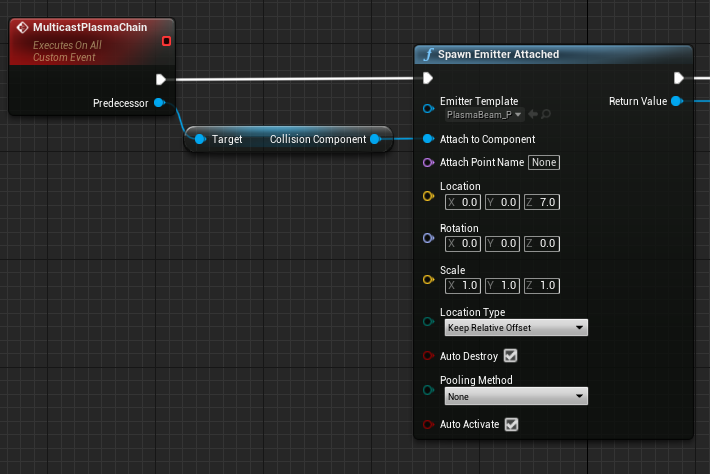
on net mode "play as client", this is correctly spawning an emitter for clients, but not for the server. if i put a print before the spawn node to check the component it's attaching to, both server and client give the expected result. but after the spawn node, only the client can print out the name of the emitter, and the server will print a blank (and subsequent nodes will "access none" if they reference the emitter)
https://i.imgur.com/6ihdMZu.png
 fervent spoke
i tried doing it outside of the multicast. on dedicated server it just refuses to spawn
idgi
vale ermine
@fervent spoke did you try net load client check box?
 vale ermine
yeaa
fervent spoke
it was already on
off/on gives the same result
again, the emitter spawns for clients but not server, and only when using dedicated server ("play as client")
and the server can print the component it's trying to attach to before and after it should spawn the emitter, so it's not failing due to that. also the actor isn't being immediately destroyed or anything like that
vale ermine
ah so your saying the net load on client is replicating to clients but server dont see it
fervent spoke
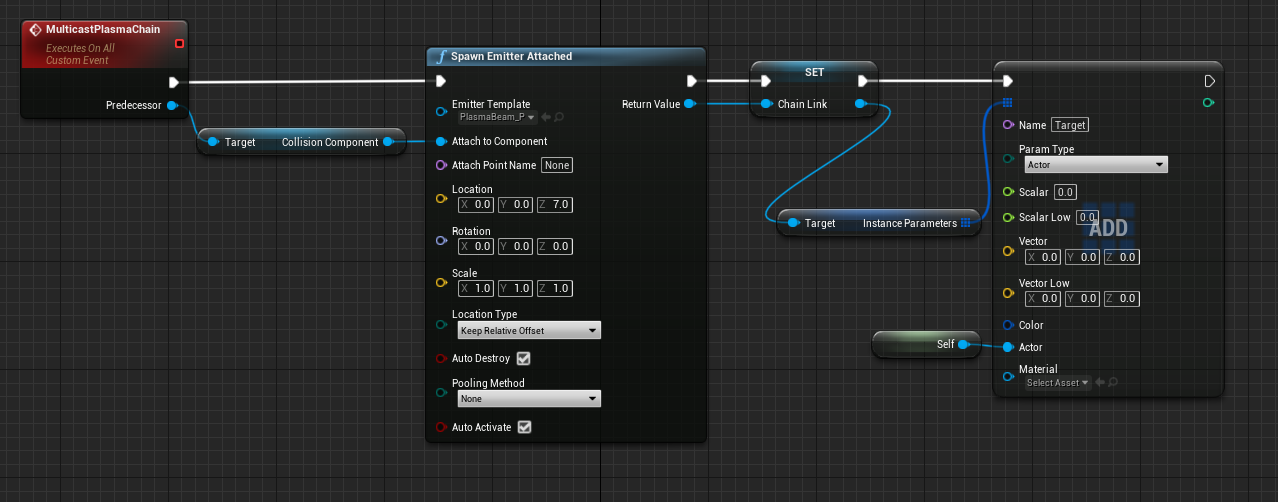
i'm getting "accessed none" on the "ADD" node, for the server but not for the clients
vale ermine
and thats the same with net load on client off
maybe run on server event and spawn it?
fervent spoke
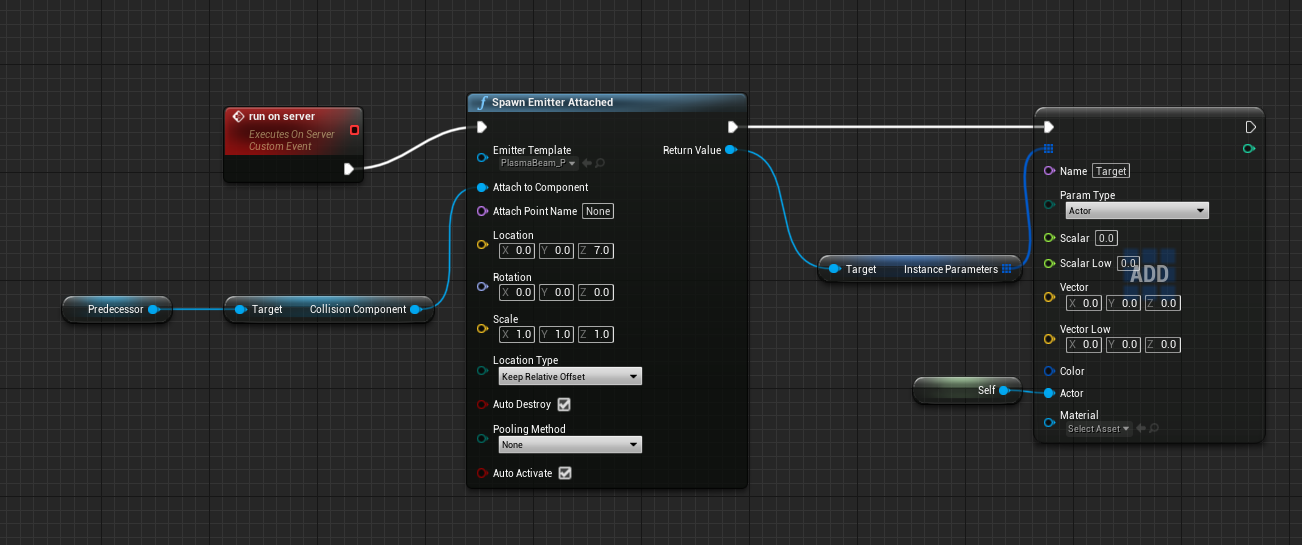


still doesn't work
same thing
Blueprint Runtime Error: "Accessed None trying to read property CallFunc_SpawnEmitterAttached_ReturnValue". Blueprint: Plasma Function: Execute Ubergraph Plasma Graph: EventGraph Node: Add
Blueprint Runtime Error: "Accessed None". Blueprint: Plasma Function: Execute Ubergraph Plasma Graph: EventGraph Node: Add
 random nymph
Any recommendations on what service to use to store data for analytic purposes? For example total player kills, win percentage per hero type, damage done by hero type, kill locations etc...
vale ermine
https://www.unrealengine.com/marketplace/en-US/product/aws-cognito-dynamodb-gamelift-lambda or you can try gamespark but that would cost a bit more.

Unreal Engine
The easiest way to make a multiplayer game. Save years of work by building your AAA quality multiplayer and matchmaking system with Blueprints.
random nymph
Hmm we already have most of our stuff in Playfab so gamesparks feels a bit overkill
Does anyone have experience of this? https://gameanalytics.com/

Measure, understand and control player experiences in a single free tool, trusted by 80,000+ game developers across the world.
lost inlet
yeah but remember, if it's free you are the product
 vivid seal
if i replicate an array of structs, do i get OnRep firing when one of the structs has a variable change, or only when the array itself is messed with (something added, removed, moved)
thin stratus
I usually only get them if the Array is edited directly. But you should just test it to be sure :D
chrome bay
OnRep works fine for arrays!
incl. when an internal non-pointer member changes
Might be different in Blueprint because BP on-reps suck
tranquil yoke
@chrome bay in C++ so i would get call on OnRep for Each Add, Remove, Update for an array ?
chrome bay
Not neccesarily
It gets called once when the array replicates
So if you make a lot of changes in one go, you get one on-rep
Arrays of pointers can sometimes behave differently, like the if the object being pointed to isn't available straight away.
tranquil yoke
okay, so if am updating the whole array, in loop, When will the on rep will be called, on the first index update or on the last ?
gleaming niche
on the next frame, or whenevr it schedules to update.
tranquil yoke
If my array update took more than 2 frames. so will i get 2 onRep Calls, as i am still updating ?
chrome bay
No
You get an onrep when it's replicated
But the server won't necessarily send out an update every frame
tranquil yoke
ah i see
chrome bay
Blueprint is stupid because it calls the OnReps on the Server, and they aren't even OnReps
gleaming niche
your update, if it's an actual loop, isn't going to take more than one frame either.
chrome bay
Yeah that too
tranquil yoke
that was just hypothetical, need to understand, when it is going to replicate, i just want to see if there would be any scenarios, where my onRep is called for my half updated array.
but on Rep is called when its replicated makes sense.
One more question, are there differences between blueprint replication and C++. it seems like blueprint is not meant to utilize the full potential of networking .\
chrome bay
It's not tbh
gleaming niche
the basics are the same, but no, b lueprint is mega lacking in what you can actually do.
and something that zlo i think informed me, i didn't even realize, that blueprint onrep's aren't even onrep's, they are just property changed events
chrome bay
Yeah that's right
So any change you make in BP, the onrep gets called server-side every time
It makes me irrationally annoyed that Epic decided to treat BP OnReps totally differently
gleaming niche
i had always thought that the generated code had just added it or something, i didn't relize it was just totally different
i only really use BP as "data" holders, like, to be able to customize settings etc, and really simple stuff, so i never really dug into it
chrome bay
yeah same here, I think it's the best way
If you know CPP ofc that is
That's the main barrier 😄
tranquil yoke
Code Everything in C++ and use blueprints to change the settings, that should be the ideal programming way to do it right ?
chrome bay
Totally, as much implementation as you can in CPP, expose as much as you can for designers in BP
tranquil yoke
understood, only problem that i had CPP is compile time is too slow
any solutions for this
I mean, i chose for blueprints over CPP, debugging in just awesome, and creating and updating stuff is awesome. i can develop things way faster in blueprints. in CPP i have to wait for 3 to 4 mins for each updates some time longer, if there is huge updates.
Would love to know how do you setup your working environment.
chrome bay
invest in a good machine 😄
And have a minimal level at startup time so everything isn't loaded everytime you open the editor
tranquil yoke
😶
gleaming niche
yeah those are the big ones.
1>Total execution time: 33.06 seconds```that's to build a plugin, and the main module after a header change that affected parts of both
chrome bay
tbh the time you make up by writing functions in CPP that take less than a few characters vs multiple click and drags in BP is worth it's weight in gold sometimes
gleaming niche
yeah, the click and drag, and reverse-logic of blueprint, drives me nuts.
chrome bay
at some stage you just get used to the compile time element
gleaming niche
i think the reverse-logic is what bugs me about it more than anything, but i guess if i hadn't been doing C/C++ since like 1994, and was just starting out, i can kind of see the appeal
gleaming niche
there's been a few times, where i've been like "okay, this should be simple enough to prototype in blueprint.. it's easy!" and then the amount of time it takes to drag, click, link pins, figure out the logic backwards
i get pissed and just do it in C++
and it ends up being like 10 lines in cpp, vs 60 bowls of spaghetti in bp.
tranquil yoke
well i found blueprints alot appealing as i have just strated out few years back and started with blueprints only, I usually expose what i cant do in blueprints, then write the main logic there.
peak sentinel
did some say replication in blueprints and why its not wise?
And OnRep is causing more lag than it has to be? yeah thats true lol
bitter oriole
Replication in Blueprints is fine
native vector
how to check if object is local or replicated
bitter oriole
GetIsReplicated()
native vector
in bp
bitter oriole
Just read the Replicates variable
 meager spade
you could check its NetMode and Role, NM_Client, Role_Authority == Local object 😄
bitter oriole
Yeah, that works too - and actually checks in more depth
Though arguably both should return the same thing ?
meager spade
well if its ROLE_Authority on NM Client then its def local to that client, bit harder on listen server
cause it might be local to server and not replicated
but the netmode won't be client
checking if its replicated is probably OK
 unkempt tiger
how can I disable tick throttling when testing several client instances in-editor?
I want to see how smooth something is on a non-focused client A while playing on client B, but I just cant because its doing like 3 ticks a second
bitter oriole
There's an editor option for that, search for "background" or "focus"
bitter oriole
That does a whole lot really, if you still have terrible performance it might simply be your machine
unkempt tiger

But
The focused window IS running at like 120 hz
its just that the non-focused one is running like trash
bitter oriole
Then maybe dial down the max fps to a more reasonable value
 dusk night
Hi, in my game I am spawning an actor from each PlayerController, and setting the Owner to that PlayerController in the SpawnActor function. The server sees the owners with GetOwner(), but on the client the owner is null, even for it's own PlayerController. Why?
livid holly
does the actor replicate?
chrome bay
The actor should be spawned by the Server and replicated.
dusk night
Yeah. Its weird. Its like the Owner isn't being replicated.
chrome bay
Sounds like you're spawning them locally on each connection
dusk night
Hmm, I can try that. I thought the PlayerController was allowed to spawn stuff
chrome bay
Only the Server is allowed to spawn stuff if it's network relevant
livid holly
if you spawn on the client it won't be the same actor as the one in the server, and if you assign owner in client, in the server owner is still null
 last ridge
Put this question in the general unreal channel but its probably more suited for here 😄
"Hi guys, just joined the server as im very new to unreal(50% through the udemy complete unreal course) I'm doing a game jam but it needs to be online on itch.io. 2 players, we are thinking like fall guy, 1 person needs to get through the level avoiding obstacles, and the second player can shoot the first to try knock him off. I'm a bit lost in how to start getting the multiplayer stuff setup. i think the best option is to use a listen server. I watched "Network Multiplayer Fundamentals" on UEs YouTube page along with a few other "unreal Multiplayer tutorials" but none realy match what i need to do. Any suggestions?"
im guessing i will need to make a lobby level and then one player hosts the game and connects, then the second player can input the users IP to connect to that session?
 knotty folio
How can I show on one player's screen other players' character/actor as ghosts?
kindred widget
If you mean something like making them into an ethereal outline, you could just set the material based on whether the character is locally owned.
 swift kelp
why does the 1st method work but not the 2nd method?
this is from the ue4 multiplayer course by Sam/GDTV
It looks like the only way you can have a remote simulated role is to be the authority, but I am missing something because the effects are not as expected.
livid holly
UpdatedServerState is being called twice for the authority actor whose remote role is simulated
is that intended?
grizzled stirrup
If you are passing the previous value of an OnRep property into the OnRep call and it's a struct, can you pass it by const & or should a copy be passed in?
OnRep_MyStruct(const FMyStruct& PreviousStruct); vs OnRep_MyStruct(FMyStruct PreviousStruct);
winged badger
const FMyStruct& seems more elegant
there is no point modifying it in any way
both should compile and work tho
vivid seal
is there a go-to guide for replicating uobjects somewhere? the official docs have some stuff on it in the actor component stuff (Generalized Subobject Replication) but doesn't go into what should be done with the functions it says to implement. I found something on the legacy wiki that seems helpful but doesn't implement the same functions as the docs said to. And i'm not sure if replicating the objects through an ActorComponent requires additional steps compared to replicating through an actor directly.
basically i've got my BuffComponent which handles creating/stacking/refreshing/destroying Buff UObjects, and now I need those buffs and the component's array containing them to replicate
winged badger
it doesn't need anything extra
but
replicated version of your UObject will have the Actor as the Outer, even if the Outer is the component on server
one of those unreal landmines
and yes, ninjaing and adapting the code replicating ActorComponents will make UObjects replicate
plucky sigil
How can i send RPC in ActorComponents
slim matrix
Is it bad for a multiplayer game to not do server correction and instead copy the clients movement or is it fine
 steel vault
Any time you consider your client as the source of truth you open yourself up to problems with hacking. Although, I suppose if you had stringent enough rules in your validation it might be ok? I've never tried it.
slim matrix
My games style won’t be the most competitive since it’s a sandbox open world also for sprinting and stuff like that it still runs a check on the server to make sure it’s within a certain range and will change it if not
vivid seal
@winged badger what issues does that cause? the outer being different on clients than it is on server
winged badger
if you instantiate your buffs with ActorOwner as Outer instead of the Component, none
but you have to access other objects relative to the buff differently
because of that
on server and clients
vivid seal
buffs store an interface pointer that references the component containing them, so i shouldn't have issues finding what i need to in terms of gameplay code, i think
winged badger
from buffs perspective on server, the Actor its on would be GetOuter()->GetOwner()
and on clients it would just be GetOuter()
which is just annoying
plucky sigil
@swift kelp
It looks like the only way you can have a remote simulated role is to be the authority, but I am missing something because the effects are not as expected.
How to be the "authority" or you need to have authority by default ?
swift kelp
I found out that when I was printing remote role I was getting it from the perspective of how others will see me but when I use get remote role on the owner of a component, it gets it from the perspective of how I see them. So the perspectives changed in the use case of when and where I was printing the role and then using it in logic.
vivid seal
is there anything called the first time an object is replicated, on the client side? i'm replicating a uobject and want to initialize it on the client side with all of the different cosmetic functionality its going to use (that doesn't exist on the server) when it is replicated
fossil spoke
@vivid seal You can use UObject::PostNetReceive() to do initialization when the UObject is created on the Client side.
Just make sure you obviously dont call your initialization code everytime PostNetReceive is called. Guard it with a Bool or something.
You only want it called the first time.
vivid seal
when is that function called?
fossil spoke
virtual void PostNetReceive();```ty
fossil spoke
Basically you will do your initialization after receiving the first bunch, which incidentally creates the UObject for the Client.
slim matrix
is setting Net PktLag basically setting the ping
slim matrix
I'm wondering if i can do delays that calculate the ping to try to make a function happen as close to the same time as when it fires on server and if the ping is to high kick the player
 loud jewel
Hey all!
I'm having an issue that plenty have seen here before, but I'm still having trouble piecing together all the random bits of wisdom I've found to arrive at the right solution for me.
The problem: Animations on autonomous proxies are slow/choppy when viewed from a listen server
The culprit: bOnlyAllowAutonomousTickPose is set to true on a character's mesh component upon possession of autonomous proxies. This leaves the CharacterMovementComponent to tick the pose instead, but it's ultimately done with less frequency.
I've seen a lot of people suggest changing bOnlyAllowAutonomousTickPose to false and modifying the CMC not to do any pose ticking, but this is often accompanied with disclaimers saying that this will break root motion. Is there a known solution/pattern for this? I absolutely want to utilize root motion, and while I'm not married to the idea of supporting listen servers, I don't want it to be off the table yet.
plucky sigil
I want to have 4 teams where only members of team can see each other even if they in the same playing field. And teams ignore collisions. How can I achieve this ?
vivid seal
ok so i've successfully made my buffs component replicate its array of UBuff objects as subobjects. however, the actor who cast the buff also needs to keep track of it, and as such i have an AppliedBuffs array on the actor who cast that contains pointers to all buffs he has active on any target. do i need to do anything special replicating that array of buff objects, if each buff is applied to another actor who is replicating it as a subobject? is there any way to guarantee that the buff will be replicated before the array (which is updated on the server) contains a pointer to it that is replicated?
 cedar finch
Does UE 4.25 limit bandwidth or something? I ask because my game runs flawless on 4.23 but on 4.25 my character movement begins stuttering and my enemies movement is laggy as well when I shoot my weapon. But when I check the netProfiler all looks good, no lag spikes in bandwidth. What have they done?
thin stratus
@loud jewel So, I have a local CL somewhere with exactly that change for a Client's Project (the one that breaks Root Motion based on some peoples reports).
We never implemented it and I'm not sure we ever will. No one, not even QA reported that "issue" of Clients looking non-smooth on the Server, yet.
So I'm not sure if it's that visible to the naked eye.
I only know about it due to having to deal with this crap :D
signal lance
Fortnite has jittery animations and no one gives a crap 😐
thin stratus
Well, your local bling looks nice. So €€€ $$$ who cares

But the Jittery animations in Fortnite are also unrelated
They use Dedicated Servers, so no one is a Listen Server
This is a bug based on a ListenServer seeing Client Movement.
 hoary lark
I didn't think that affected root motion... I thought it was to ensure that general animations and events would somehow stay in sync between client and server by keeping them on the same delta time scale or something like that
But IDK
thin stratus
Yeah I think you basically could break the sync between them
Because you remove one TickPose call and let it work through another execution path
If you don't remove that TickPose call it will tick twice
winged badger
void AActor::OnSubobjectCreatedFromReplication(UObject *NewSubobject)
{
    check(NewSubobject);
    if ( UActorComponent * Component = Cast<UActorComponent>(NewSubobject) )
    {
        Component->RegisterComponent();
        Component->SetIsReplicated(true);
    }
}

/** Called on the actor when a subobject is dynamically destroyed via replication */
void AActor::OnSubobjectDestroyFromReplication(UObject *Subobject)
{
    check(Subobject);
    if ( UActorComponent * Component = Cast<UActorComponent>(Subobject) )
    {
        Component->DestroyComponent();
    }
}
``` @vivid sealalthough, you should probably use a FFastArraySerializer there, its much more capable
winged badger
with FastArray callbacks, if the Item contains a pointer to buff, and Item replicates before the Buff does, PostReplicatedChange will fire when the Buff's NetGUID is resolved
i also wouldn't replicate the array of active Buffs the Caster has
i would put a APawn* Instigator; on the Buff itself, then have it register with its instigator after its replicated
 royal rampart
Hi,
So my problem is pretty simple. I have a player that runs around and can go up to a ball, click on it and hold it. The way the player is holding the ball is not by attaching it to the player's bones or anything, I just want to make it lerp to the players specified "ball handle location" which is defined by an arrow component that is attached to the player's root component. The first approach was to try and let the server handle the ball and move the ball to the appropriate client that is holding it. This all worked fine and gets replicated correctly but resulted in a very noticable jitter for the holding client. This happens because the client is waiting for the server to tell him where the ball is and then updates it accordingly, this approach becomes a mess when adding latency. So I bought a plugin called smooth sync which handles all the server latency for me, meaning it'll smooth out the ball movement by interpolating and extrapolating between the ball positions that the player receives from the server. This all works like a charm but now I encountered the worst problem of them all.
Let's say that the client has a horrible latency (200 ms) and is holding the ball. If the client moves, everything will look fine on his screen, but the truth is, on the server he only starts moving after 200 ms which means that the ball will also only start moving after 200 ms. This is no problem for the other clients since they are seeing what the server sees. But for that client with 200 ms latency, it looks like the ball is waiting 2 seconds before moving with him.
So my question is: "Is there a way to make the ball's position get decided by the client that is actually holding him and let the server have latency instead of the client?"
Much like when the player jumps it is executed instantly, the client doesnt wait for the server's response but shows everyone 200 ms later that he jumped.
Thanks in advance,
Scott
here is a little gif that will illustrate the problem pretty well.. (with extreme latency just for demonstration purposes) https://we.tl/t-8RIeigoulp (just a wetransfer link, file was too big for discord)

1 file sent via WeTransfer, the simplest way to send your files around the world
winged badger
you can't mix predicted movement (CMC) with non-predicted one (Ball) and expect good results
your client has to be able to move the ball predictively
royal rampart
Thanks for the fast reply 🙂 well how the hell do you do that xD
how do I make the ball join the movement the client is sending to the server?
if you have time, i could share my screen and show you
winged badger
i don't
attaching the ball to the socked on the skeleton seems like a most straightforward solution
royal rampart
yeah i've managed to do that but that seems so stupid 😦 i want to keep it a seperate object and not start attaching stuff
but thanks for your time! 🙂
winged badger
hint: it can be attached and detached as needed, but for this, it only needs to be attached while carried by a character
twin juniper
solved using get owner == get player pawn
 lucid socket
Hey guys, does anyone know if there is a way to get the actors last movement input vector rather than from the pawn? When using the pawn, I get a lot more network issues. Get actor forward vector is perfect but I need it in the last key press direction
oblique inlet
I'm trying to add a double jump to my game by using:
Character->LaunchCharacter(FVector(0.f, 0, 420.f), false, true);```
this works fine on the server but for the client, it goes up slightly and instantly gets teleported back to where it was. This code is run locally to make the double jump smoother, how can I have this work on the client?Yea i'm having issues with a similar problem, when I had this issue I used the actors movement vector with an add impulse instead of launch
oblique inlet
apparently calling it from the server will fix it
gleaming niche
if you're using character
thin stratus
It just adds a force that gets consumed
gleaming niche
character already has double jump ability
thin stratus
The Character CMC has the ability to allow double jumping iirc. Like Ohm says
@oblique inlet
gleaming niche
there's literally a property for it
thin stratus
even if it doesn't allow what you need, that's the worst way to implement it
gleaming niche
it even has floaty mario style jumping, where you can hold the key down and keep climbing up
 uneven cliff
Before I create a custom character movement and replication system, I'm having some real issues with player controlled characters jittering on the client side when using a listen server. Based on my research this is a known problem with listen servers and the standard character movement component, but there aren't any explicit fixes for it. Is there any standard way to fix this or should I go ahead with creating a custom character movement and replication system?
thin stratus
You mean jittery client movement when being the Listen Server?
uneven cliff
Yes, server movement is fine and the client doesn't see any jitter in a server-controlled character
thin stratus
Never found a good solution tbh
I have the same one everyone has in a CL but never shipped it
uneven cliff
Super. If I find some extra awesome fix I'll throw it on the wiki
 plush wave
For the SteamOSS, can you only get the display name of your friends??
shut gyro
@plush wave I asked Steam about it. You can only do so until you reached a certain "criteria" that they automatically determine before your game is launched
Once your game is live, you can get the display name of any person from the steams friend interface
if you wanted a way to work around that for now, you can access the steam web api and do a HTTP call there to get some info
shut gyro
probably to not have people spam request for random people if you have no filter on that
its the same thing with how you can't see what game titles the other people play until your game is out
for steam
unless you use the test app id
shut gyro
its really simple, you should be able to get it immediately
you just need to look at one form, and then you can get a "Steam web api key" that you can make the HTTP request on
swift kelp
should
    UPROPERTY(EditAnywhere, Category = Setup)
    ATargetPoint* Flop1;
    UPROPERTY(EditAnywhere, Category = Setup)
    ATargetPoint* Flop2;
    UPROPERTY(EditAnywhere, Category = Setup)
    ATargetPoint* Flop3;
    UPROPERTY(EditAnywhere, Category = Setup)
    ATargetPoint* Turn;
    UPROPERTY(EditAnywhere, Category = Setup)
    ATargetPoint* River;
That be added to the GameMode or the GameState?
for texas holdem
steel vault
Is this a multiplayer game?
If those properties change and other players need to know about them, then they will need to be replicated. I believe GameState will allow that where GameMode will not.