#multiplayer
1 messages · Page 563 of 1
 lilac bear
 chrome bay
Replicates Movement only works for the object you've checked it on. But either way attaching an actor to something shouldn't be done with RPC's, should be done via replicated vars.
Since it's stateful
If you want to ask the server to attach you need an RPC for that of course
lilac bear
in this case it is a request to server to equip() whereupon the end of it performs the attachToComponent()
chrome bay
My guess is you don't want weapons to replicate movement then
You probably just want them to attach themselves locally when they are "equipped", and detach when unequipped
You can drive all of that from just the equip state.
 limber gyro
@gaunt kestrel this one
Unreal Engine Forums
Hello there,
I am using Steam for multiplayer, so I can easily browse and connect to my dedicated servers using the Steam server browser or my in-game
anyways, guys does any 1 have any experience with connecting to dedicated servers BUT having steam enabled?
i cant connect with a rap IP/port
and pinging the server is not working atm
for some reason
lilac bear
@chrome bay hmm, makes sense (and that is where I was heading). So then that sounds like a case for continuing with the net_multicast approach so I can notify others that something was attached?
However, regarding my movement assumption... Perhaps all this effort to not enable "replicatesMovement" could be redundant too since I'm assuming that attached components would be sending redundant network traffic. I probably need to make sure that is the case and for that I think I need to take a dive in the UE4 source code rabbit hole (or finally learn how to properly monitor network traffic via logging/profile, which I still don't know how to do yet)
chrome bay
You can use a Rep Notify so that clients know when the item was attached
They'll call the RepNotify when the variable is received by them, and they can handle it accordingly.
E.g, "IsEquipped" being true attaches to the owner etc etc.
Replicating Movement isn't cheap - if it's a weapon that just attaches to the player, there's no need to replicate movement or attachment at all.
Since all of that can be determined by the client based on it being equipped or not.
Or, better yet, the pawn can do it based on it's replicated "current weapon" property or something
Better that than multiple weapons replicating their equipped state and fighting with each other / creating race conditions etc.
lilac bear
you're awesome my friend, that makes much more sense to me on approach now. Not sure why I didn't think that route already
limber gyro
still stuck on this: https://forums.unrealengine.com/development-discussion/c-gameplay-programming/1483622-connect-to-steam-dedicated-server-via-raw-ip
Unreal Engine Forums
Hello there,
I am using Steam for multiplayer, so I can easily browse and connect to my dedicated servers using the Steam server browser or my in-game
any 1 with experience with steam and dedicated servers can lend a hand?
 gaunt kestrel
do your dedicated server logged in to Steam?
i just tried to connect without problems, but not by ip, by sessions making
limber gyro
no, they are just servers in the playfab azure cloud
sessions is not the same thing
im not trying to use sessions because the servers are dynamicly spawned by playfab in a virtual machine
gaunt kestrel
i've started dedicated server in google cloud run
without login it is easy, in docker container
but login with SteamCMD is a pain in the ass
limber gyro
i have never even looked at steamCMD
gaunt kestrel
it is command line client for Steam
limber gyro
have you read the thread that i linked? have you used the ping method described there?
 barren warren
Hmm - still got a really weird issue: We have a level that procedurally streams in levels (i.e. procedural dungeon generation). Everything works perfectly in PIE, but as soon as you cook a server build: The navigation and AI movement just stops working completely.
Navigation is set to dynamic, have a large bounds volume surrounding the whole area of the dungeon. 🤷 starting to be at a loss as to what could be causing it
 distant talon
Im trying to allow one player to see way further when they switch to an "overhead view" mode but the default relevancy that makes sense for first person gameplay prevents that. Is there an easy way to extend relevancy on an individual basis?
Like if there's a way to just say that, for this one client their net cull distances are extended that'd work
 quartz shard
Is there any significant difference in designing a networking system for 2v2 vs 10v10?
 magic helm
Depends on the game, but you should always try to setup some of the basic architecture to scale....
quartz shard
Super new to multiplayer, thanks.
magic helm
So it it's 2v2 then you just change some values rather than building it up to support more people...
quartz shard
And does the same apply when considering a 60-100 person BR game?
Actually @magic helm did you play Tribes back in the day?
magic helm
Lol BR is a whole different monster... But that's the sort of "depends on the game"
Sadly no, but I've watched enough streamers play it
quartz shard
There's a mod in Tribes that allows you to make a "football" server.
I'm intending on recreating that.
So I need something that will work for up to like 20vs20.
magic helm
Oh cool! I assume with a handful of people playing and the rest are spectating?
quartz shard
Spectating was possible, but most people could just hop in and out at will.
It was a pretty casual thing.

I mentioned in a previous video that there was a Football game mode for Tribes.. and I found a server with a couple people playing! So I cut up some footage from my football match for you all to enjoy! I haven't played this game mode in forever, so I'm not very good anymore un...
Here's the only video I could find on youtube that shows it.
magic helm
But yeah it shouldn't be too bad... If it's drop in and out, you just gotta setup the persistent part right and make sure the sessions max player count feels good for what you want
quartz shard
Think I can get it done with the Network Compendium?
Trying to find a nice starting point that will more or less get me there.
 waxen socket
@chrome bay Regarding your advice to @lilac bear earlier, is it that the weapons are spawned on the server, replicated to each client, and attached on each client via a RepNotify boolean on the character? Do I have that right? And if the character is replicating movement, the weapon won't need to be since it's attached?
chrome bay
A RepNotify of "Current Weapon" probably. You would likely have a replicated array of inventory items, and one of those items would be "equipped" at a time.
You can drive everything client-side from that one var
And the weapon typically shared network relevancy with the owner, and doesn't replicate movement at all, since it doesn't need to.
This is the approach ShooterGame uses pretty much
Works well
waxen socket
So CurrentWeapon is an array of Actors?
chrome bay
current weapon is just one actor
but presumably you would have "inventory" which would be an array of actors
waxen socket
Ah... I never thought of OnRepping from an actor reference...
limber gyro
didnt fix my thing yet so ima try again, has any 1 worked with steam and dedicated servers hosted in a third party? im trying to connect to my playfab servers but im not having much luck
lilac bear
@waxen socket @chrome bay my current inventory system allows an array (equipmentSlots) which can have multiple weapons equipped (on a spaceship) and these weapons can be grouped and fired in any combination (Think Mechwarrior or ChromeHounds). However, Jambax's suggestion has given me a solid approach to achieve what I'm looking to do :)
@limber gyro I realy wish I could help on that one but I'm not quite there yet, I do have some Steam functionality but I've got to resolve some MP issues before I dive into that mess 😄
 halcyon totem
I got ripped off and a dev and they left me with some pawn with bugs, how come if I put 2 or more players in and pick offline I cant see the players replicated if I pick play as listen server or play as client I can see the players??
 winged badger
then your pawns are replicated just fine, just spawned on the owning client
 dire cradle
I have an inventory screen widget that shows the contents of the inventory.
It works perfectly fine in singleplayer but in multiplayer the clients' screen wasn't updating correctly.
Only solution I found was turning on substepping and adding a delay with a duration of 0
Why would that happen though? How does just a delay fix it magically
winged badger
timing is important, what calls that update?
the fact that delay till next tick fixes it
dire cradle
When anything gets added or removed to the inventory this also gets called
winged badger
suggests you don't have an optimal order of execution
rather then a replication problem
you'll need to be way more specific
dire cradle
This widget dont need to replicate, it just wasnt updating correctly on client side
dire cradle
BP
dire cradle
its the inventory widget itself
dire cradle
Nope
its called from the inventory component with an event that is "Run On Owning Client"
winged badger
RPCs don't wait for Actor to have its turn to replicate
they just fire immediately
so they arrive and/or are processed before the replicated variables are set
so it should be called from OnRep_Contents
dire cradle
hm, ok I'll try that
winged badger
it should also not call into the Widget directly, but rather call an event dispatcher
and send the contents as a payload
and your widget finds your inventory component when its initialized, binds to that event, and calls one UpdateInventoryScreen by hand for good measure
just in case the delegate fired before the widget was instantiated the first time
dire cradle
Yep, instead of calling the event right after "AddToInventory" I put it to OnRep_Contents
and now its working correctly
without the delay
Thanks!
winged badger
watch for cross wiring, its possible here
dire cradle
cross wiring?
winged badger
if you were to find the widget from the game code, and call the update directly
and the Contents was replicated to everyone, not just the owning client
then OnRep would cause Player1's inventory widgets to update when Player2 picks up a banana
dire cradle
Hmm, I'll just test that real quick
winged badger
its possible Player2's pawn would not be able to find Player1's widgets and it doesn't break because of that
but in general, you never want game code, with exception of single actor managing the widgets (Custom HUD class) to ever reference the widgets
dire cradle
Ah yes there is another problem now
The Client's inventory widget updates correctly but not the Server's inventory widget doesn't update at all
dire cradle
So what am I supposed to do
dire cradle
Ok just settled on the best solution I could think of.
I made an event dispatcher to the widget with the payload of contents like you said.
If the player is Remote that dispatcher is being called by the On_Rep.
If the player is Server the dispatcher is being called by an event with "Run On Server".
On_Rep only worked on clients for some reason
I'm sure there are way better ways to do it but it works lol
winged badger
its fine
if you did it in c++ you'd have to do it that way, since c++ won't call a replication callback on server
also
your Server RPC there called from a server is just a normal vanilla function
dire cradle
I made it in blueprints but On_Rep still didn't call on server.
And yes I forgot running a "Run On Server" on a server doesn't do anything special.
limber gyro
@winged badger hey man do you happen to know how to connect to a remote server when unreal is using steam? u seem to be one of the most knowledgeable people here so i thought i might ask
im trying to connect to a playfab server
winged badger
never worked with playfab
limber gyro
what about any remote server with steam?
a thread in the forums is telling me to use "pingServer()" so that steam recognizes the server and returns an ID, but the callback always says the server didnt respond
 gleaming niche
sounds like a port issue.
limber gyro
indeed it does, but i tried opening the ports specified by steam and the error still persisted
and yes i did try both udp and tcp
 worldly hollow
hi guys just been doing more research into MP and tryna get the ropes of it all. Been finding it quite tough but MP games are my jam so I must learn! : P
Um i had a question regarding Listen Servers since the player is the host (server), if you wanted to spawn an effect that is not gameplay critical/important and doesnt have to be perfectly replicated (identical) on every machine. Since its a Listen Server and you want ALL machines to see the fire effect including the host of the game, you'd still have to spawn it on the server and on client machines, right?
Whereas if it was a dedicated server you could just spawn the fire effect on all client machines only
I'm just trying to figure out how you'd go about spawning a screen effect that is applied when a player takes damage, on the player that is hosting the server
 nocturne berry
hey guys, i'm using the skeletal mesh merge found in here https://docs.unrealengine.com/en-US/Engine/Animation/WorkingwithModularCharacters/index.html
it's working perfectly fine in the editor, but in it crashes the server in a packaged build.
the image shows the error i'm getting: debugging it seems to be related to LOD models being 0 on the server
any idea why and how to fix it?
Describes the different methods you can use to create modular characters comprised of multiple Skeletal Meshes.
 midnight karma
How to spawn every player as a random character in multiplayer?
winged badger
override HandleStartingNewPlayer, do not call parent function, spawn a random character and possess it with the player controller thats in the event's input
 rich ridge
@midnight karma UClass* GetDefaultPawnClassForController_Implementation(AController* InController) override; override this function inside GameMode and write your logic to provide random pawn class to spawn
 random nymph
We are having bit of a strange problem. Our missile launching logic goes so that client calls server function giving the launch rotation and location as parameters to the server function. But as the server gets more stressed by more actors the missiles on the server start going into a bit different direction than what the client tells. The rotation parameter is Frotator and the start location is FVector_NetQuantize. Can the accuracy of server rpc function paremeters be automatically dropped the more the server is under load?
rich ridge
@winged badger your approach needs a lot of additional handling to be done.
winged badger
it doesn't, thats equivalent of calling RestartPlayer which default implementation does
additional handling is just put it on a PlayerStart
unless you're making UT, GameMode code won't do much for you out of the box
rich ridge
but with my approach I don't need to do addition posses, etc, and engine will take care of rest
additional handling is just put it on a PlayerStart
@winged badger ``` AActor* ChoosePlayerStart_Implementation(AController* Player) override;
it has a significant drawback in BP
    /** Return true if FindPlayerStart should use the StartSpot stored on Player instead of calling ChoosePlayerStart */
    virtual bool ShouldSpawnAtStartSpot(AController* Player);
I don't use BP, so can't comment much
winged badger
function that doesn't let you respawn player anywhere else but on the cached StartSpot in the controller
its best not to trust GameMode code to do what you need it to do
our GMs are almost entirely overriden without Super calls
as our game is nothing like UT 😄
rich ridge
I m working on my MOBA game 5 vs 5, so on every player's machine total of 10 Characters will be spawned. So on PLAYER A -> Will his owned Character will be spawned first and then remaining 9 SimulatedProxy Characters, or the spawning of 10 characters will be random???
winged badger
i mean sure, GetDefaultPawnClassForController could be plugged into SpawnActor node in HandleStartingNewPlayer override
which might even be convenient
rich ridge
yes
winged badger
but here, i much prefer to be explicit, as it is a very convenient place to construct your entire player-related object graph
then let GM just call RestartPlayer
random nymph
Are FVector_NetQuantize values compressed depending on server load/ping?
winged badger
and we have 2 controllers + PlayerPawn + ObserverPawn + PlayerState
no, they are always compressed
but only when NetSerialized
its a normal FVector with NetSerialize function overriden
random nymph
Yeah but can they be sometimes less compressed/less accurate depending on server load?
winged badger
no
rich ridge
@winged badger can you help me with my question , please??
random nymph
ok
rich ridge
I m working on my MOBA game 5 vs 5, so on every player's machine total of 10 Characters will be spawned. So on PLAYER A -> Will his owned Character will be spawned first and then remaining 9 SimulatedProxy Characters, or the spawning of 10 characters will be random???
winged badger
if you transitioned from a lobby, which is likely in this case, via seamless travel
players will spawn in order depending how fast their CPU is, pretty much
after it loads a level, PC sends ServerNotifyLoadedWorld RPC
rich ridge
ohh so its fair to assume the spawning in random order
winged badger
which then calls HandleSeamlessTravelPlayer then HandleStartingNewPlayer
which spawns its Pawn
yeah, but if the load times are more or less the same
then you have replication playing a role in which order the playerpawns show on client as well
as there is no guaranteed order in which 2 characters spawned at or nearly at same frame, will replicate over, if they have similar net priority
rich ridge
This is really good explanation which is not documented anywhere, Thanks a lot brother
winged badger
note that server won't start replicating stuff over until you finished loading, so if you're among the last one to load
all player pawns are free for all, all evaluated in the same frame with same net priority
 chilly tinsel
Is it possible to replicate location and rotation of a character smoothly on a moving object? Currently my character will grab a ledge and calls a function to update the ledge transforms and set the character location/rotation from the ledge transforms. This is all currently running on tick to allow for dynamic changes. However I need to replicate the character location and rotation and have no idea how I would achieve this smoothly without firing RPCs on tick which I know shouldn't be done. Thoughts?
gleaming niche
you can also use GenericPlayerInitialization() which is called both from seamless travel, and first time in
rich ridge
@gleaming niche is this for me??
gleaming niche
yeah just following up on the stuff zlo was saying
its called both fgrom postylogin (first time) and seamlesstravel, after player controller is created and before the pawn
 rain coral
I have a strange case where a certain enum value doesn't seem to be replicated, but other values do. E.g the value EGamePhase::Idle is not replicated while EGamePhase::Round is replicated. The value is changed on server and replicated to clients, along with a ForceNetUpdate();. I haven't been able to wrap my head around this..
winged badger
@chilly tinsel RPCs on TIck some of the time aren't the end of the worrld, as long as they are Unrealiable
but this ledge scenario sounds like something client should be able to simulate on its end
@rain coral is that a single variable?
@chilly tinsel doing some custom CMC work would allow you to have it handle everything, and it does send Unreliable RPCs on Tick
rain coral
@winged badger Yeah. After digging, the issue seemed to have to do with changing multiple times per frame without me realizing, so that part is solved.
rich ridge
@gleaming niche GenericPlayerInitialization() is called on server as it is in GameMode, originally my question was when server spawns the character on client including my team mates and enemies, so will server first spawn myself on the map and then remaining SimulatedProxy players or will it be in random order like FCFS.
gleaming niche
it will spawn pawns for player in whatever order they connect/finish loading as for creating additional pawns/actors, that depends on your own stuff.
will they come in order on the client side? It's not guaranteed
rich ridge
even I had the same thoughts , but I wanted to get it confirmed from experienced devs here.
gleaming niche
however, it shouldn't even matter, since as long as you have something so you know they belong to another playercontroller; even if they aren't possessed directly, you can check that.
rich ridge
yes
chilly tinsel
@winged badger Ahh I'm currently multicasting as I can't think how I would simulate this action on client side and tell other clients its happening without asking the server to multicast it (Forgive me my knowledge on replication its growing by the day) just to purely test I set up RPCs on tick and the client suffers with desync issues when hanging on a movable object and net corrects when I let go of the ledge however I think thats because I've made the events reliable, i'll try without them being reliable and see if that does any better. To edit the CMC that would require C++ knowledge right? I'm willing to try but would love to see some learning resources on the basics of extending the CMC. Just for reference here is the current hacky set up.
Also i'm aware I could probably clean up having two RPCs in exchange for a SetactorLocationAndRotation node and sending both the location and rotation through 1 RPC
winged badger
if client can deduce from its location that its hanging from a ledge
or have a replicated pointer to ledge actor/mesh
it can deduce its own rotation correctly
chilly tinsel
and if it can deduce its own rotation correctly the CMC should handle the replication?
I still don't follow "if client can deduce from its location that its hanging from a ledge or have a replicated pointer to ledge actor/mesh"
Appreciate you taking the time though!
winged badger
if you do you don't have to replicate it
editing the CMC is not possible from blueprint and without at least being comfortable with c++
its one of the ugliest classes in the engine, monolithic, 13000 lines of code, strongly coupled to character, playercontroller and assumption of what net roles are going to be
chilly tinsel
Yup thats me out then.. somehow simulating on client end or cutting out the dynamic ledge detection might be the way forward
Appreciate your help, if you or any others think of something just @ me. Thanks!
waxen socket
Good afternoon. I've learned before that objects such as dynamic material references do not replicate even if you set them to do so. It would seem that replicating references to spawned actors is quite common however. I'd like to ask if there's any caveats to this? Maybe it's very expensive or otherwise best avoided?
Cheers.
winged badger
Actors and ActorComponent can be replicated by default
UObjects can't
like UAnimInstance, or UMaterialnterface
you can also replicate asset pointers
for Actors and ActorComponent pointers to work, they need to be NetAddressable
without going into more complicated uncommon scenarios
- any Actor loaded from the Package (preplaced in level) is NetAddressable
- any replicated Actor is NetAddressable
- any ActorComponent on the CDO of a NetAddressable Actor is NetAddressable
- any dynamically spawned replicated ActorComponent on a replicated ACtor is NetAddressable
- any asset pointer is NetAddressable
and thats the end of the list @waxen socket
winged badger
to replicate changes in a dynamic material you generally want to have the client instantiate its own DMI, replicate the parameter and OnRep set the parameter on the DMI
waxen socket
Yes, that's what I do.
So if a character spawns another actor and stores a replicated reference to it, that character will have a reference to the spawned actor on the client as well. And calling functions of that reference on the client will run on the client's instance of that actor.
winged badger
with a caveat that the referenced Actor on the client might not have replicated yet
 faint dock
what happens if a client sends a invalid reference over the network does the server crash or does the engine check it for?
winged badger
the reference to it replicating doesn't mean the Actor did already
waxen socket
I've experienced that desync before, yes... 😕
winged badger
@faint dock depends, generally the server gets a nullptr
but if you send a RPC via an object that server doesn't have, it will disconnect you
waxen socket
Wow. Harsh.
faint dock
so the server can crash right?
winged badger
only if it recelves a nullptr and then attempts to dereference it
faint dock
okay good to know thanks
waxen socket
Zlo, if you don't mind, I think I need some clarification on projectile replication. To pick up on our previous discourse.
If I read it correctly, you spawn non-replicating projectiles on the server and all relevant clients?
 graceful abyss
Hello, I'm once more looking for some help.
Since a while ago, the delay until the movement of characters starts to replicate to remote client has become unbearably long. I sometimes wait up to 20-30 seconds before the movement is updated on the remote client. It takes longer in an actual network with several computers and less long if I have two clients on the same pc.
This used to be no issue at some point. My character class has gotten a few new replicated properties in the meantime but not as much as explaining this long delay. In between I also moved parts of of the character class to c++. The unreal version has been upgraded a number of times in the history of the project aswell.
I actually have a similar problem with a replicated struct variable which also only starts to replicate after a delay of 5-10 seconds. I think the same may be the case with many other replicated variables.
This chat has already provided me invaluable help with other issues I've had. So I hope you also know something this time.
winged badger
i don't spawn projectiles at all
just particle systems
and yes, every machine spawns its own
waxen socket
Oh. Do you not have any slow projectiles?
winged badger
i do
i don't instantly apply damage either, but use math rather then projectile collisions to figure out what to hit
its not a perfectly precise algorithm, but for the number of bullets flying around you can't really tell the difference
waxen socket
Would you recommend that approach for 100 or fewer projectiles at a time?
 clear sand
hey guys, i have question regarding TCP sockets and protobuf usage. I have it setup and working, however for TCP - im not sure if its good to keep same socket open for each message but implement some kind of delimiters for protobuf messages, so that on my server I could split stream in packages, or instead - for every TCP message - create new socket, send data and then close it?
Most likely there will be at least 1 TCP message every 2-3 seconds, most of network job happens via UDP, and only important stuff(that needs to be delivered for sure) is done via TCP
graceful abyss
This seems to help with my problem:
https://answers.unrealengine.com/questions/964067/really-slow-replication-even-when-playing-locally.html
 fierce grove
Quick question about mobile games and architecture. Lots of games have segmented userbase with servers... are these servers dedicated servers or just servers with scripts and databases?
rich ridge
@fierce grove servers with script and database are actually game backend service, so most of the people do end up using available options like Gamesparks, Epic Online services, etc.
fierce grove
I'm playing with playfab these days
rich ridge
Playfab is not worthy
I tried using it in past, and it was unable to parse my 2 level nested json object, so I quit playfab the instant.
fierce grove
I think they did some work here
rich ridge
You should try out epic online service
Now I have moved a lot and I can't switch back to playfab
@clear sand you are doing some interesting work here. Protobuff traditionally doesn't work with plain tcp . Are you using any wrapper of tcp
fierce grove
so for a tile based asynchronous multiplayer adventure game I can just work with Epic Online Services no need for dedidcated servs
rich ridge
For backend service you can rely on Epic Online services.
For dedicated server hosting it depends on your choice and your richness
fierce grove
not sure I need dedicated just good scripts to get players on adjacent tiles
rich ridge
Can your players interact with each other
Are you only interested in their location??
rich ridge
If they can interact with each other then it's multiplayer game.
fierce grove
yes of course
rich ridge
Just a suggestion to you, can you exploit this for need rather than to a script.

Firebase
Engage active app users with contextual messages
fierce grove
I was looking at it
rich ridge
This is the same technology which most of the early taxi based startups use to do realtime tracking
So what was your observations
clear sand
@clear sand you are doing some interesting work here. Protobuff traditionally doesn't work with plain tcp . Are you using any wrapper of tcp
@rich ridge Well, it works. After all its a stream of varints, but for me its not clear how to split messages if it works in stream mode(not sure how to call it) without actually closing socket after delivery is done. Im not big guru of TCP internals, so might miss some point here
I didnt use any wrapper, just regular ISocketSubsystem.CreateSocket()->Connect
Basically this is simple heart beat system for now, which connects game server, logic server and client itself and checks if its online
Later, I plan to reuse sockets for exchanging messages between servers(MMO)
And this is what confuses me - what is the cost of reopening sockets everytime I need to send something, as Im not sure how many data will I have to send at later stages of development
rich ridge
You can keep your socket open in background thread
And in this way your client is always connected to server and thus server knows that your client is online.
clear sand
Yes, thats not a problem - however I plan to reuse socket not just for heart beat but also for sending other data such as actions data(e.g. do that, calculate this)
Probably as an option - keep hearbeat socket open forever, while after data requests close sockets and create new for next ones
rich ridge
That's not a good idea, one socket connection can serve your all purpose
clear sand
That was initial idea
rich ridge
And if you open more number of connections, the load on server will increase
clear sand
but I dont know how to delimit messages on my server. I'm using golang for TCP listening
I mean - protobuf does not have delimiting, or I just didnt get how to do it
rich ridge
Ohh
clear sand
probably as an option - wrap protobuf message into wrapper which will consist of protobuf message itself + size of message, so that on server I could delimit stream by this info
rich ridge
Why don't you send message size to server first and wait for acknowledgement and then send the message
clear sand
simply because 2 requests > than 1 request. Im aiming for some good performance shit here. And also using TCP along with UDP makes UDP to loss packets sometimes, so less TCP better for UDP
Anyways thanks for convo, I think I got idea on how to keep 1 socket and get rest of data exactly when I need
rich ridge
👍
There are few protobuff protocols available, if you could build it for UE4 it will work great
clear sand
What you mean few protobuff protocols? I only know google's one, which I built and included into my ue4 project
clear sand
you mean QUIC ?
rich ridge
Yes my bad

GitHub
An implementation of the QUIC transport protocol. Contribute to facebookincubator/mvfst development by creating an account on GitHub.
rich ridge
Welcome
 quick flint
whats the best way to disable player input in a multiplayer game
DisableInput() and EnableInput() are client sided
would it be best to create a replicated variable
and use an OnRep to call Enable and Disable input
Is there a way too ensure that a Client RPC was called from the server?
i want to ensure that Client_EnableInput() is called ONLY from th e server
i dont want clients to be able to call this lol
 harsh lintel
I'm spawning an AI controlled character on the server but when it's spawned it doesn't fall to the ground, stays floating
winged badger
@quick flint Unpossess is the only path that you can't hack as a client
quick flint
@winged badger really?
winged badger
no game is unhackable, and trying to make one is... suicidal
you just need to make it difficult enough so its not worth it
quick flint
@winged badger but won't the timer stop running
lol
like if i unpossess()
my timer won't run anymore essentially
to possess
 meager spade
what is stopping the timer?
quick flint
pretty sure rpc's and similar thinghs like timers dont run
when not possessed by a controller
meager spade
who says timers dont run?
lilac bear
So I've got another question. If I have a repNotify function which requires some replicated values to be set ahead of the repnotify function being called (on clients), how do I go about insuring that happens? Do replicated variables update in order with rep_notify function executions? (re-reviewing network stuff to try and answer my own question now)
winged badger
got c++ handy, or BP only?
thing is with c++ the order is predictable
and you can override PostNetReceive to execute logic after all replication(callbacks) are done
BP is a bit of a mess tho
lilac bear
working to do all networking in c++ so that's some good news Zlo 🙂
I'm not spotting where eXi goes over this though in his awesome network Compendium doc sadly :S
http://cedric-neukirchen.net/Downloads/Compendium/UE4_Network_Compendium_by_Cedric_eXi_Neukirchen.pdf
winged badger
in c++ the replication order is the DOREPLIFETIME order
while some special cases (like fastarray) will call its own replication callbacks immediately during its replication
replication callbacks typically go after the entire replication is done
and then goes PostNetReceive
with blueprints, i really have no idea, and since i avoid networking in BP like a plague, never was all that interested to put in the research
the fact that OnReps in blueprints are not replication callbacks, but setter / property changed callbacks
as they fire on server, and even locally on clients if you change the variable locally
makes me think they don't really have the callbacks called after the variables are all set, and the order BP replicated the members in is probably the order in which those members were first added to the blueprint, and can't be changed
lilac bear
"... order in which those members were first added to the blueprint, and can't be changed" if so... yikes :S
winged badger
its the method that requires least effort to code in
and given other serialization failures BP can sometimes make, it would be consistent with the rest of the engine
well, it could be changed if you deleted and re-added a member
for it to end up on the bottom of the order
note that this is more of an... educated guess, not the result of actual research
you would also need to both compile and save the blueprint between deleting and re-adding the member
lilac bear
Makes sense, i appreciate the caveat, luckily I don't need to concern myself with BP stuff yet :)
so DOREPLIFETIME order makes sense to me, so then if I have some important repNotify functions that require various values to be set I just need to make sure the var for the repnotify comes after the important variables that must be replicated first?
winged badger
or override PostNetReceive
that one executes after all OnReps that came as a result of receiving a Bunch
so it is the simplest, most solid way to go about it
lilac bear
oooo... "PostNetReceive" and "Bunch" (don't know either). Sounds like I've got some reading to do 🤓
winged badger
PostNetReceive is a UObject function
that doesn't do anything by default iirc
Bunch is a... packet for that Actor on its ActorChannel
lilac bear
ah I see! That is an interesting method for PostNetReceive override. I'm definitely going to have to keep that trick in mind 🙂
I have been curious about changing dereplifetime conditions during runtime but I suspect that is frowned upon or not possible. Which is fine, I don't think I'll actually need to try something like that. Is it possible to change the order at runtime for that either? Seems like something you'd also want to avoid
winged badger
i prefer not to be dependent on the order
so never dived deep into that
generally, its a multiple states scenario where they depend on one another
but then i just stuff those into bitfields
lilac bear
thanks yet again Zlo, I'll dive into this some more and hopefully come out successful now 🙂
 mortal kernel
Hey there I've built a costum movement animation and it just stays at it's idle animation... for the other player... it means the animation is local only. replicate movement is ticked... also the needed variables are replicated... still can't seem to get it working correctly
mortal kernel
So the closest I've got is... the Clients can see their own animation but not the animations of other clients.
Server can see his own animations but not the animations of clients... and the clients can see the servers animation
 void nest
Setting the visibility of components is replicated? When I set the visbility of a component from a local controller and that controller is on the server host the visibility also changes on the clients?? Is that normal behavior?
That seems weird to me
 thin stratus
Visibility was replicated iirc, yeah
meager spade
i had the same issue with a widget component, host would set the visibility and it would propagate to all clients.
 fleet raven
you can make a subclass and un-replicate it if you want
there are a bunch of new macros to use in GetLifetimeReplicatedProps that will remove parent properties from the list again
quick flint
For some reason
Overriding OnPossess() and creating a variable to my pawn in the player controller does not work
it sets it
but then on APlayerController::PlayerTick() it says its nullptr
how is this possible lol
{
    Super::PlayerTick(DeltaTime);

    if (HasAuthority() && PlayerCharacter)
    {
        if (GetWorld()->GetTimerManager().TimerExists(PlayerCharacter->DeathTimerHandle))
        {
            float timeLeft = GetWorld()->GetTimerManager().GetTimerRemaining(PlayerCharacter->DeathTimerHandle);
            Client_UpdateRespawnTimer(timeLeft);
        }
    }

}

void AHVS_PlayerController::OnPossess(APawn* aPawn)
{
    AHVS_Character* MyCharacter = CastChecked<AHVS_Character>(aPawn);
    PlayerCharacter = MyCharacter;

    Super::OnPossess(aPawn);

}```how?!
lol
this is some bizarre shit lol
winged badger
yeah, when you do vanilla spawning
PC will not have a Pawn yet, before Super::OnPossess
it also won't run on clients
i recommend overriding SetPawn in the PC instead, which will
and really? sending a RPC to update a timer? On tick?
quick flint
So inside of PlayerController, I noticed there is Tick() and PlayerTick()
does PlayerTick() only run on the client?
winged badger
hint: time passes at exactly the same rate on clients
quick flint
its special to APlayerController too
winged badger
PlayerTick is part of the CMC abomination iirc
quick flint
i think i should just use tick
because when i tried it
it seems like its only calling on my client
HasAuthority() is always false lol
its always returning 0
winged badger
for that? you shouldn't use the tick
quick flint
what should i use then lol
winged badger
you need to start the timer once
on client
it doesn't need updating unless its paused/resumed
quick flint
well the death/respawn is on the server tho
the server holds the timer handle
for the death
and i pass the time left
winged badger
client can start their own timer
quick flint
to a client rpc
winged badger
for UI
winged badger
and count down without wasting a shitload of netweok traffic
winged badger
for custom Pawn work, override SetPawn, not Possess
quick flint
one on the client, one on the server?
winged badger
yes
quick flint
hm
winged badger
simulate everything you can get away with
quick flint
then where would i check
for the time
on the client?
in tick still?
but only on the client?
winged badger
depends where you need it
it doesn't even need a timer
just the time left
so if the client is aware of time it needs to respawn
it just needs to cache the current WorldTimeSeconds
and time to respawn would be CurrentWorldTImeSeconds - CachedWorldTimeSeconds + RespawnTimeSeconds
time left
accessing a timer to read the time left is somewhat inefficient
winged badger
nope
i mean
you would display some kind of widget
to show the time to respawn
it would need the time you died and the respawn duration
and then it can just tick it on its own adjusting its text
quick flint
hmm
wait so where are we caching it
every frame?
or how i mean
    UFUNCTION(BlueprintCallable, Category=GameState)
virtual float GetServerWorldTimeSeconds() const;```For example, this
if i were to use this lol
winged badger
doesn't matter
client can cache its own time when it dies
and since there are other things already replicated to let it know it died
it doesn't actually need any networking to display the tiem to respawn
quick flint
So let me think about this, let's say when my Die() function is called, we get the current time using the above function (just as an example)
we set it to a variable called "CachedTimeUponDeath"
and then we have a way to always get the current time, using the above method
right?
So where are we doing CurrentTime - DeathTime + RespawnTime
maybe im overly confused lol
winged badger
pretty much
and you send death time and respawn time to a widget
and let it handle the rest
remove itself when its down to 0
winged badger
to whatever displays the remaining timne to the player
so probably to the HUD which isntantiates the respawn widget and puts it on screen
quick flint
sorry, i didn't word that correctly. Time has to be updated at minimum once per second
SO where would we be updating "TimeLeft"
to use the new time
this would have to be on tick
mortal kernel
I need help please
I can see the running animation from the server owning character on the client but not the client animation on the server
quick flint
float TimeLeft = GetWorld()->GetTimeSeconds() - TimeDied + GetDeathTime(); @winged badger
like this?
and then i could just do this on tick?
void AHVS_Character::Tick(float DeltaSeconds)
{
    Super::Tick(DeltaSeconds);

    if (GetWorld()->GetTimerManager().TimerExists(DeathTimerHandle))
    {
        float TimeLeft = GetWorld()->GetTimeSeconds() - TimeDied + GetDeathTime();
    }
}```only problem is, AHVS_Character has no Controller when we are dead
meager spade
why do it in the character?
the controller should be the place for that stuff
and why you checking a timer
use one or the other
quick flint
eh
meager spade
a timer or a time check
quick flint
i can use my variable
but thats besides the point lol
the math is wrong
float TimeLeft = GetWorld()->GetTimeSeconds() - TimeDied + GetDeathTime();
is wrong i mean
getDeathTime() returns number of seconds until we respawn
time died is set to getTimeSeconds() upon dying
meager spade
GetWorld()->GetTimeSeconds() - (TimeDied + GetDeathTime());
quick flint
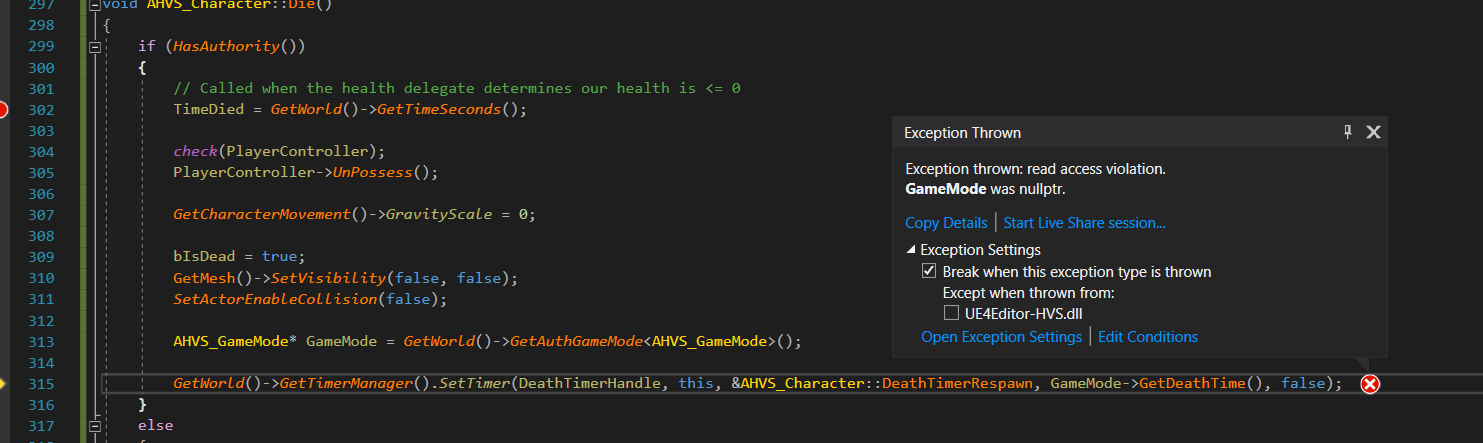
how is this nullptr if its inside of HasAuthority()
i guess authority != being on the server
halcyon totem
is anyone here, I have been robbed by a dev and they left with me with a C++ plugin thats un-finished but I only need to replicate it but for some reason the custom even loses its options to replicate when connected Bind/Unbind Event to and I cant figure it out, if someone can please help again the dev took my money and ran . I posted it on the paste bin for blueprints you can look at the code. https://blueprintue.com/blueprint/o5t04a9e/
BlueprintUE
harsh lintel
I have an AI controlled character spawned on the server but it doesn't fall to the ground when spawned, tried to spawn the controller of the character manually but it still doesn't work properly
 kindred widget
I think I'm missing something that blueprints implement automatically... Making my first fully C++ character, and I've managed to get far enough to repnotify a bool. Works perfectly. But after that I noticed that only my server character can move, and my client doesn't see the server moving. I'm used to just using AddMovementInput in blueprints and this works automatically. Am I missing something else that I need to do in C++?
 twin juniper
did you set bReplicates and bReplicatesMovement to true
(or something like that naming ....)
@kindred widget
kindred widget
Both show true by default in the blueprint child of that C++ class.
I'm just a bit confused because... If I create a new class based off of Character with just this and setting the camera component to UsePawnControlRotation true. This works perfectly.
Doing this in a C++ class inheritting from Character means movement only on server. Client won't even move and can't see the server move.
twin juniper
you bound it to the playerinputcomponent? (the actions/axis)
kindred widget
Server player can move.
 split siren
Is it even executing on client?
The C++ code looks good, maybe try to debug when/if it is being executed
kindred widget
Event is running on the client. This prints the correct Axis from the client's screen.
Are there any includes I need specifically for networking besides #include "Net/UnrealNetwork.h" in the cpp file?
split siren
Nope, otherwise it would not compile
kindred widget
Well this is odd then. Haha. Here I thought movement would be easy and the repnotify would give me trouble..
split siren
Yeah, it is... Is it not moving at all? Or is it rubber banding?
If the player is not moving at all, is is probably not networking issue.
kindred widget
Client isn't moving at all. Not even enough for a server correction jitter. Server moves around just fine, but client can't see server move. On the client the server is still standing still where it started.
But with the same setup, same settings for PIE, just a blueprint version with the same inputs basically, it all works perfectly fine.
twin juniper
if you remove the repnotify does it work
Do you have GetLifetimeReplicatedProps for the RepNotify
split siren
What are you repnotifying?
kindred widget
Right now just a simple crouch key. Doesn't do anything but print.
split siren
Would you mind showing us the declarations of MoveForward etc?
Might be something there
kindred widget
Sec, removing the RepNotify stuff to test that.
chrome bay
Is this a Character or just a regular Pawn?
Character Movement handles all of the network heavy lifting - the default pawn class has no such handling.
midnight karma
What blueprint i need to use to change character? Like set skeletal mesh but for character
chrome bay
Notably, the Server won't be moving the Pawn - hence it won't move there.
kindred widget
Character. And I suppose it has something to do with my RepNotify. Commented all of it out and it's working fine with the same movement controls.
split siren
Glad you found the cause
chrome bay
What RepNotify?
quick flint
Is it safe to run client RPC's on tick, or would it be better to set a replicated variable with a repnotify on tick
?
i want to set a "Match timer"
and have it show up in UI
chrome bay
Do neither
quick flint
then how do i do a match timer
chrome bay
Replicate an "end time"
quick flint
mmmm
chrome bay
AGameState::ServerWorldTimeSeconds should be good enough to compare to for a simple timer
quick flint
GetWorld()->GetGameState()->GetServerWorldTimeSeconds()
im pretty sure this is replicated
already lol
chrome bay
Yeah
chrome bay
Well, you can, but it won't be elapsed time
quick flint
and do no rpc's
chrome bay
It'll be the current world time on the Server
chrome bay
In that case yeah, you can use that
quick flint
btw
binding UI widgets to a function in UMG
is really poorly optimized
lol
no one should ever use it
quick flint
they need to fix that shit
quick flint
    UPROPERTY(Transient, ReplicatedUsing=OnRep_ReplicatedWorldTimeSeconds)
    float ReplicatedWorldTimeSeconds;
@chrome bay
i was right btw
it is replicated by default
this is in GameStateBase.h
chrome bay
yeah I know 😄
chrome bay
But for most games the "elapsed time" isn't neccesarily the time the server started up
quick flint
yeah
chrome bay
It's not a very accurate timer but it's good enough
quick flint
so here's what i realized
chrome bay
Make sure you don't use that directly though, use GetServerWorldTimeSeconds()
quick flint
ServerTime doesn't start until you call StartMatch()
in GameMode
i tested it
so if u use "bDelayedStart = true"
it wont start ticking until u call StartMatch()
it takes into account, pausing
chrome bay
Oh sorry yeah, I'm usually using RealTimeSeconds for timers and stuff
split siren
I also have a question, so please let me know once you figured it out, I do not want to hijack this conv. @quick flint
quick flint
@split siren wats up
split siren
I have a design question if I may. Long story short, I want a player to draw a card from a deck on server.
Deck - TArray<ACard*> and exists only on server
Hand - TArray<ACard*> is replicated to client
When I move card from deck to hand on server, client hand gets updated. But I would need to indicate action (draw/discard) and specific card. So client can run specific animations.
If I move card from deck to hand on server and then do "DrawOnClient(ACard* card)", "card" on client is null because Hand was not updated yet.
Going slightly mad over it, what would be the "proper" way to approach this?
midnight karma
how to change one character to another
split siren
I can check on client the difference between last hand state and new hand state, and guess what happened between these two states, but it feels hacky.
@midnight karma PlayerController has Possess function that should be able to do just that.
split siren
The server is the authority
I just need to inform the client what he/she drew.
But if it is a newly created card or a card player does not know about (aka, not in his hand), I can't simply send that card object player drew from server to client.
So the ultimate goal is to this
Server - "Hey client 1, you just drew ACard* card"
Client - "Ok, I will create new widget for this card and play a draw animation"
kindred widget
I can't seem to find anything that I've done wrong with the repnotify from before. From what I've looked up, it should be fine. It compiles fine, it works fine. But it also breaks my character's networking besides that repnotify.
 odd sundial
Hey all,
new to networking in Unreal... I've come across an issue that I'm sure is super common.
I have a couple players in my game. In the level, there are lasers attached to walls that act as an alarm. The players can shoot the lasers and deactivate them.
My authority player can shoot the laser, deactivates them, no worries. However when a client shoots them, I get this message:
No owning connection for actor BP_StationaryLaserTripWire2. Function Server_ReactToSpyShot will not be processed.
The "deactivation" is called using an RPC on the StationaryLaserTripWire.... how can I resolve this issue?
kindred widget
You can't call RPCs from a client, from an Actor that the client doesn't own.
odd sundial
The RPC is called from the actor, the laser, in the level.
The laser calls this RPC once it is shot
kindred widget
Right. But your client doesn't own that laser. So your client can't use that laser to call an RPC
odd sundial
Makes sense....
kindred widget
What kind of weapon are you using? Projectile or line trace?
odd sundial
Line trace
kindred widget
Your weapon is a separate actor from your pawn?
odd sundial
Yes
kindred widget
Set your weapon's ownership on the server, to be owned by either the server version of the client's player controller or pawn, probably pawn. Then you can use the weapon to call apply damage on the laser. This'll play on the server from a client owned actor. Then you can just use the damage interface to disable the laser when it takes damage.
odd sundial
Okay, thank you very much, I'll try to implement that. Appreciate it.
@kindred widget So the weapon is spawned at run-time in the BeginPlay of my Spy character. How could I get the server's version of the client's player controller? I've taken a look through some google searches and looked through some various C++ functions in VS without much luck
winged badger
you are assigning it
to the player
probably spawning it from the player pawn
or one of its components, no?
kindred widget
I don't remember exactly how I did it. Mine was in blueprint. If I recall right, my test was on begin play in the actor. I did a switch on authority, if authority, spawn weapon and set self as owner. Weapon class also has to be replicated.
meager spade
@split siren FastArraySerializer 😄
odd sundial
Yes, when it's being spawned, it's owner is set as the character that is calling to be spawned
winged badger
you don't need to set the owner as PC then
as PC owns the player pawn
just call SetOwner() on the weapon
and give it PlayerPawn as argument
split siren
@meager spade no clue what that is. Thanks for the pointer! Need to look it up
kindred widget
Did I do something wrong here?
meager spade
@split siren it does a client side call when an element is Updated/Added/Removed from the array
split siren
Epic
odd sundial
@winged badger
void ASpy::SpawnWeaponAndAttach()
{
//if there is a weapon selected, spawn it and attach it
if (WeaponToSpawn)
{
CurrentFirearm = GetWorld()->SpawnActor<AFirearm>(WeaponToSpawn, FVector::ZeroVector, FRotator::ZeroRotator);
//attach the firearm to the right thigh socket
CurrentFirearm->AttachToComponent(GetMesh(), FAttachmentTransformRules::SnapToTargetNotIncludingScale, "RightThighSocket");
    CurrentFirearm->SetOwner(this);
    CurrentFirearm->Instigator = this;
}
}
winged badger
@kindred widget you ran into one of epic's fails
odd sundial
So there I'm setting the character as the owner, no?
kindred widget
Another victim of ancient documentation?
winged badger
if you have only a single replicated variable in the class, and its RepNotify
it won't replicate
this is more of a bug
kindred widget
It is replicating. It's just breaking my movement.
kindred widget
In the GetLifetimeReplicatedProps ?
meager spade
@kindred widget what are you doing with crouch?
meager spade
you just call Crouch/UnCrouch on the client and server..
kindred widget
Nothing yet. Just testing. But simply adding this repnotify broke my movement.
meager spade
i don't see why you are trying to reinvent the wheel
meager spade
its just odd, you should also be sending this stuff in via the packed moves
but crouch is fully replicated
by default..
kindred widget
More of a learning experience. Never used C++ networking. But yeah! That fixed it. I missed that because the docs show you the specification from AActor.
winged badger
FActorSpawnParameters SpawnInfo;
SpawnInfo.Owner = this;
SpawnInfo.Instigator = this;

//spawn using SpawnINfo
Cool... so what I showed you was the code I have now, but it still generates that error where the laser's RPC isn't being called.
winged badger
there are some cases where the 2 are not exactly the same
when sublevels are in play
odd sundial
"No owning connection for actor BP_StationaryLaserTripWire2. Function Server_ReactToSpyShot will not be processed."
winged badger
yeah
you send RPC through the weapon
and then hit the laser with weapon's instance on the server
then it works
odd sundial
ahhh.... okay
meager spade
@kindred widget ``` PlayerInputComponent->BindAction("Crouch", IE_Pressed, this, &AKaosPlayerPawn::StartCrouch);
PlayerInputComponent->BindAction("Crouch", IE_Released, this, &AKaosPlayerPawn::StopCrouch);
}
void AKaosPlayerPawn::StartCrouch()
{
if (!HasAuthority())
{
ServerStartCrouch();
}
Crouch();
}
void AKaosPlayerPawn::StopCrouch()
{
if (!HasAuthority())
{
ServerStopCrouch();
}
UnCrouch();
}
void AKaosPlayerPawn::ServerStartCrouch_Implementation()
{
StartCrouch();
}
void AKaosPlayerPawn::ServerStopCrouch_Implementation()
{
StopCrouch();
}```
what is wrong with that?
split siren
@split siren it does a client side call when an element is Updated/Added/Removed from the array
@meager spade Is it possible to add extra bool to that call? Example for add, to indicate if it was added from deck or discard pile?
winged badger
@split siren its a custom struct
split siren
I see, thanks
winged badger
FFastArraySerializer replicates FFastArraySerializerItems
read the NetSerialization.h they even put an example of implementation in there
@odd sundial use 3 backticks ` before and after the code block please
meager spade
that struct will have have say your card suit, card value, and any state about the card
odd sundial
@winged badger So, the fire method RPC is being called on the weapon, and it implements a ISpyShootableInterface... does this change anything?
winged badger
not reading that 😄
odd sundial
Thanks, I didn't know how to format that
meager spade
what is ReactToSpyShot?
winged badger
2 backticks make a single line
its the key sharing a key with tilde on most keyboards
odd sundial
{
    FHitResult HitResult;
    ASpy* FirearmOwner = Cast<ASpy>(GetOwner());

    if (FirearmOwner)
    {
        if (TraceForwardFromCamera(FirearmOwner, FirearmOwner->ThirdPersonCameraComp, HitResult))
        {
            //debugs
            if (bShowDebugs) { DrawDebugSphere(GetWorld(), HitResult.Location, 20.f, 8.f, FColor::Green, true); }

            FString ShotActorName = HitResult.GetActor()->GetName();
            UE_LOG(LogTemp, Warning, TEXT("The spy shot: %s"), *ShotActorName);

            //if the actor was imlements the 'spy shootable' interface, have it react appropriately
            if (UKismetSystemLibrary::DoesImplementInterface(HitResult.GetActor(), USpyShootableInterface::StaticClass()))
            {
                ISpyShootableInterface* SpyShootableObject = Cast<ISpyShootableInterface>(HitResult.GetActor());
                if (SpyShootableObject != nullptr)
                {
                    SpyShootableObject->ReactToSpyShot();
                }
            }
        }
    }

    PlayFireCosmeticFX(HitResult.Location);
}```Therrree we go...
winged badger
better
meager spade
delete the old one then 😄
@kindred widget ^^
read my post, what is wrong with just doing that?
winged badger
so now you need ServerFire function which is Server, Reliable UFUNCTION
odd sundial
So I actually do have that...
winged badger
that sends the hit package to server
and server can then unpack that and reproduce the hit
 upbeat crystal
I have a question I setup a dedicated server last week with https://github.com/EpicGames/UnrealEngine with a static IP Address it was allowing me to connect to my game fine last week and not now if anyone could point me in the right direction do let me know thank you
winged badger
read the output logs from both the client and server @upbeat crystal
its the first step at being pointed in the right direction
upbeat crystal
ok thanks
kindred widget
Nothing really. This is just experimenting right now. Never touched networking in unreal. Learning how the repnotify and stuff works.
 chilly mist
So testing multiplayer in editor looks easy. But for testing multiplayer in a build,
Will I have to implement utilities like connecting to a game at an IP first?
upbeat crystal
you need a static IP Address on a separate PC @chilly mist and port forwarding on your router I just set up a PC with Windows server 2019 installed for my video game
winged badger
you can get by without port forwarding if all PCs in the test are on the same subnet
chilly mist
I'm mainly concerned with the build. I can test on a same computer, with multiple instances of the game, just like how it's done in editor.
Will I still need to implement connecting to an IP first?
I like how it's very convenient in editor, where I just set player number to 4 and hit play.
I don't know if it can be that easy, in build.
winged badger
it can't
and it gets even more fun when you're testing production steps
cooked the game 10x this morning and uploaded to steam 5 times in order to test with 2 PCs in real environment
chilly mist
Why do you have to do multiple times?
Anyway, that's good enough to know for me to decide what to do next. Thanks!
winged badger
because i was making alterations until it worked to my satisfaction
obviously, didn't get it right on the first try
odd sundial
Can anyone explain to me why the role of my spawned gun with my spy actor as it's owner will always have the Role_Authority, while the spy owner itself will actually be accurate? (Authority on server, AutonomousProxy when playing as client, etc)
    {
        FActorSpawnParameters SpawnParams;
        SpawnParams.Owner = this;
        SpawnParams.Instigator = this;

        CurrentFirearm = GetWorld()->SpawnActor<AFirearm>(WeaponToSpawn, FVector::ZeroVector, FRotator::ZeroRotator, SpawnParams);

        //attach the firearm to the right thigh socket
        CurrentFirearm->AttachToComponent(GetMesh(), FAttachmentTransformRules::SnapToTargetNotIncludingScale, "RightThighSocket");

        FString GunString = UEnum::GetValueAsString(CurrentFirearm->Role.GetValue());
        FString SpyString = UEnum::GetValueAsString(Role.GetValue());
        UE_LOG(LogTemp, Warning, TEXT("Gun Role: %s"), *GunString);
        UE_LOG(LogTemp, Warning, TEXT("Spy role: %s"), *SpyString);
}```Basically... my weapon is spawned from the character at BeginPlay... trying to implement fire / server_fire methods, but my gun thinks it's role is always authority
winged badger
because each instance of your pawn spawns its own weapon
odd sundial
Could it be... I need to test it's owner...
winged badger
when it runs beginplay
odd sundial
Agghhh
 wild frost
Quick question: So how does one make certain components show up in multiplayer but not on the characters own screen? I.E trying to make it so everyone else sees the full body of the character, but the player himself doesn't see that
Same with Vice Versa
odd sundial
@wild frost there are settings that are something like "owner only see"
or "Owner not see" or something, it's found in the blueprint and you can also set it in the ctor using C++
split siren
@meager spade Thanks for the pointer to NetSerialization.h. If you don't mind, I have one more question. The Fast TArray Replication is for Structs only, so would you recommend remaking the card system so Card (currently an Actor) would be a Struct or can I keep Card as an actor and inject Fast TArray Replication somewhere along the way?
wild frost
@odd sundial Sweet thanks!
upbeat crystal
what this mean on log i have no clue LogOnOnlineSession Warning OSS No Game Present to leave For Session it is running on my Server and running on my other pc and no warnings on my other PC
meager spade
@split siren you can store a pointer to the card
split siren
Oh, inside the struct
meager spade
or just have the card as a struct or a simple UObject, depending on how you want to do it
split siren
That's smart, thanks
 whole orbit
Hi! I'm trying to replicate shooting in my game, but there seems to be a problem. If I spam the LMB, the bullets keep spawning good for a moment of time and then some of them keep disappearing. I'm not receiving any errors from UE about any wrong variable or something like that. Sometimes when they don't spawn at all, after a time, some of the not-spawned ones get visible again and I don't think it's because of the camera because if I get closer to the bullets, they still don't spawn back in. If I play offline, everything seems to be fine, but if I play as 'Listen Server' or as 'Client', the problem is still there. Everything seems to be replicated and set as "replicated" as it should be, but I can't find a reason why some of the bullets keep disappearing or not spawning at all. I can see them not spawning because I've set the bullet speed to 500 and the bullet size is half the size of the Third Person Character so I can see what's happening
odd sundial
Gonna need to see your code or something to help @whole orbit
 gilded vapor
@whole orbit are you only spawning on the server or on the client as well?
(Ideally actors should only be spawned on the server)
 halcyon abyss
Hey guys! In a game with listen server using seamless travel to transition from one map to the other, I'm getting an unreliable behavior on the hosts BeginPlay, it seems that sometimes when it takes a while for the host to load the new level, Begin Play is not called, and all the initialization code I have fails to run
is there a more reliable event I could use?
meager spade
BeginPlay is ALWAYS called
halcyon totem
its going to be the main pawns people pick when joinin
halcyon abyss
alright if your player controller is owner of something that something is gonna be always relevant to him.
Ticking always relevant means that even outside of net relevancy distance, other players who are not owners of that pawn will still get replicated information regarding that pawn, which is a waste of bandwidth. On the other hand, dealing with actors coming in and out of networked relevancy can be tricky at times since their proxies on clients are completely destroyed and recreated upon exiting and entering the net relevancy distance
halcyon totem
interesting so it has to do with distance
 odd sundial
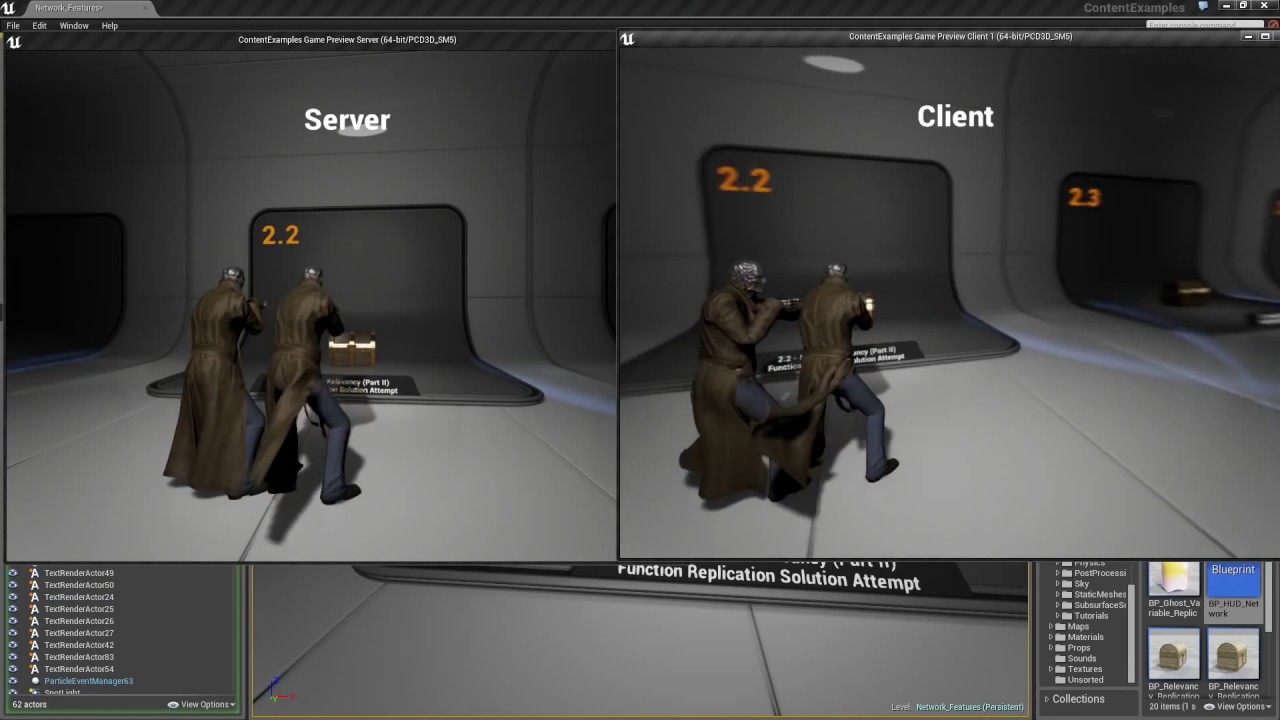
Alright all... I had this same issue before, and I've already sought help on here but I guess I don't understand how to rectify the issue, so I'm back again.
I have some characters in my game. In the level, there are lasers. If a player shoots the laser, it disables the laser.
When the listen-server player shoots the laser, the laser becomes disabled for the server only.
When the client player shoots the laser, the laser becomes disabled for the client only.
In both cases, I try to disable the laser with a server RPC without luck.
Also, when I shoot the laser with the client, it gives me the following error:
"LogNet: Warning: UNetDriver::ProcessRemoteFunction: No owning connection for actor BP_StationaryLaserTripWire2. Function Server_ReactToSpyShot will not be processed."
I understand this has something to do with the actor that ends up calling the 'disable' function on the laser (the character Spy has a separate gun that is instantiated at run time- it's the shooting from this gun that causes the laser to disable).
What am I missing here... how come the disable isn't being replicated to all when the server shoots, and how do I correct the error above when shooting with the client?
 floral crow
Can I configure my default pawn class to replicate to owner only?
chilly mist
I have to build UE from source, to be able to build a dedicated server??
Well looks like so...
Is it necessary to test the game with a dedicated server?
Or will testing with listen server suffice?
 jovial stream
im trying to build unreal from source, but when I try to run "setup.bat" it is giving me the error "'setup.bat' is not recognized as an internal or external command,
operable program or batch file."
has anyone else had this problem and know how to fix it?
nevermind the source code didnt install properly
it actually doesnt exist
chilly mist
@meager spade True but I've learned that things can go wrong in the final build.
Well I guess I'll have to do the extra work if I want to test dedicated server.
meager spade
you can launch dedicated server standalone also
without source engine
you only need it for making a exe
"X:\UnrealEngine_master\Engine\Binaries\Win64\UE4Editor.exe" "%CD%\Gaia.uproject" TestingLevel -server -log -nosteam
for example
chilly mist
I guess the standalone is still launched from editor, not from a final build, in this case?
meager spade
its ok for testing tho
limber gyro
hello again peeps, so im trying to connect to playfab servers with steam enabled but it always throws the error :"incompatible_unique_net_id", a forum post says i can modify the prelogin function to remove the check and allow the connection. My question is, if i do that what exactly can go wrong?
meager spade
early on its pointless making dedicated server binaries all the time
chilly mist
Ah do you mean it's okay for my own testing,
But if I'm distributing my game or plugin, I should get source build of engine, and test with a build of dedicated server?
But during development, is it not enough to just use what the editor provides, namely increasing player num then selecting to use dedicated server ("running as client" option)?
 vivid seal
had a discussion in here a few days ago about not using the actor class for things like buffs because of the concern of replicating that many actors, and someone brought up using uobject and just replicated a struct representing the object to clients instead.
in a situation like that, do you think creating a separate component specifically for controlling replicated buffs for player UI is the best way to go about doing that, or just having the buffs component try to automatically handle this (and somehow determine whether it is attached to a player or not before doing so)
this is in blueprints, which is why i'm not jsut replicating the UObjects
 dark edge
@vivid seal If you're talking BP only, it depends on how complex your buffs get. You can easily just have an ActorComponent that holds active buffs or other data about an actor (StatsComponent?) and just have buffs be data.
@vivid seal If you push this system to the logical conclusion you end up with GAS.
For something small and light, I'd just make a component which holds all the stats the buffs can touch and have it manage buffs.
Something like a DOT or HOT or armor buff is ez, but something more complex like "You spawn a dragon out your ass every time you take a prime number in damage while facing the opposite direction" would be a bit much for it.
vivid seal
i was kinda hoping to support that last one 🙂
it looks like i can pass object classes through RPCs so i might just have a struct sent on buff apply that includes the object class, stacks, duration, etc. and have the client basically maintain their own set of buffs
lilac bear
i had the same issue with a widget component, host would set the visibility and it would propagate to all clients.
@meager spade Sorry const, I know this was quite a long time ago but I'm going through catching up on chat and was confused about this comment. I thought UI/UMG/widgets were something you don't really replicate so why would you have an issue with visibility being propogated to all clients? :S Care to elaborate a bit to edify?
meager spade
Widget components
Its based on scene component. We run listen server so when host showed the widget it would replicate it to all players
lilac bear
hmm, guess I need to review what widgets are intended for, I always thought those were just for UI objects and didn't think it would be derived from scene component, but I guess that makes sense, just never dived in far enough to notice
dark edge
@vivid seal If you're gonna get really complicated with it, especially in a multiplayer setting, just bite the bullet and implement GAS.
limber gyro
i was following a thread and a user said " My solution was to remove the check in PreLogin and then yeah it created problems converting between FUniqueNetId types. So I Made a routine that could convert everything into a NULL online subsystem unique ID (which is basically just a string) and the server just keeps those around."
but i cant figure out how he turned those ids to null, any ideas?
gleaming niche
he's not saying to convert the actual id to "NULL"
they mean OnlineSubsystemNull
(if that is your interpretation as well, and you don't mean something else, then my bad ;))
limber gyro
how do u do that then? he made a routine so i am assuming he wrote code somewhere? i have no idea where to even start
 vital steeple
@vivid seal I used a component to keep the script separate
It’s all running server side so the client really only gets a struct with the buff data. I tried using the class like you said but I have stacking buffs so the struct worked better
kindred widget
I thought that pawn control rotation was replicated automatically? Am I thinking of something else?
Oh, that's for the controller. I swear there was a rotation property for pawns or characters that was replicated by default?
Ah. GetBaseAimRotation.
 gleaming bobcat
Hello, I need to apply something on let's say 40 actors by RPC-multicast. I guess is much better to send 1 RPC with array of 40 actors then 40 RPCs (multicasts) right ?
dark edge
What's the context? What are you trying to do?
split siren
@split siren it does a client side call when an element is Updated/Added/Removed from the array
@meager spade HI again, I have implemented the Fast Array Serialisation for the cards, but I am still hitting the same problem as with previous approach. As recommended, I have includedACard* card;in the ArrayItem, but this pointer is null in PostReplicatedAdd on Client. Other variables in the Item Struct are replicated correctly.
meager spade
is the Card Replicated?
split siren
Yes
meager spade
Always Relevant?
split siren
bReplicates = true;
bAlwaysRelevant = true;
meager spade
tho tbh i would have constructed the card locally
the struct would have held the card details, the card owner etc
then create the visual representation client only
split siren
Now I am totally inclined to do the same, though I would love to know how would one replicate an object.
split siren
Not in this instance, but I am sure sometimes it would be handy
meager spade
a UObject requires an actor or actorcomponent to replicate via
you override ReplicateSubObject function and pass in the UObject
UObject's can't replicate on there own
split siren
That is why I made Card to be an actor itself, it is dirty solution but I am still learning
Having the card as an object rather than struct would also make it slightly easier to do server calls. PlayCard(ACard* card) than managing structs with unique ID fields.
In any case, thank you for the help @meager spade, I really appreciate it.
gleaming bobcat
What is better ? Call 40 RPCs of one ACharacter or call 1 RPC with array of 40 ACharacters ? 1 RPC should be better right ?
meager spade
depends what you are doing?
split siren
Is server waiting for reply from client during a client, reliable call?
//On Server HelloWorld_Server(); HeavyCalc_Client(); //Reliable, Client Goodbye_Server();
According to my testing the answer is no.
gleaming bobcat
In my case in AOE attack when I will hit 40 enemies and I want to apply dmg to all of them and then play VFX blood effect on all of them on all machines then I am sending currently 40 RPCs but its does not seems to me correct. I should rather send one RPC with Array of 40 enemies
winged badger
you can simulate that
without using any RPCs
especially when there is 40 of them, odds of a simulation being slightly inaccurate and someone actually noticing is exactly zero
it literally tells you GetWorld() returned null
i have no idea where you called that from
but generally controllers are instantiated after the world is loaded
you also called that function on the CDO
which doesn't have a World
see below in Autos this is Default_...
so, don't call that function on the CDO
the fact you did raises some red flags on the whole approach you're doing
split siren
Is it just me or does networking in UE4 feels a bit loosy goosy? Nothing is guaranteed and order does not matter. Just managed to call a client function on an object before BeginPlay was executed. Not a complain or anything, just an feeling..
waxen socket
Good afternoon. I'm spawning a replicated actor on my server and then using it to fill a RepNotify reference on my character. However, the OnRep function is only called on the server no matter how long I wait. Does anyone know why this might be?
split siren
@waxen socket I assume the goal is to inform the client when actor is replicated and "ready"?
waxen socket
Yes indeed. I'm spawning a weapon and the OnRep function should attach the new weapon on each client.
split siren
I have no clue how to do it but I would also be interested in a proper approach.
 shut gyro
Is it possible to calculate ping for listen or peer 2 peer based servers?
If so, is that at the net driver level or is it subsystem based
whole orbit
Gonna need to see your code or something to help @whole orbit
@odd sundial
@whole orbit are you only spawning on the server or on the client as well?
@gilded vapor
Please see the following image:
Everything in the 'Bullet' blueprint is set to 'replicated'
split siren
@waxen socket Disclaimer, I am not sure how good of a practice this is, but you can call a client, replicated method after you spawn the weapon on the server to attach it.
AWeapon* myweapon = SpawnActor.... myweapon->AttachToClient(APawn* targetClient); //this runs on client only rest of the code
This kinda works for me, but it executes on client before Begin play, so it is a bit weird.
waxen socket
Yeah, OnReps can run before BeginPlay.
winged badger
OnReps do run before BeginPlay, always
after they are done, PostNetInitialize is called, which calls BeginPlay on clients
provided World started play
waxen socket
Zlo, do you know why an actor reference RepNotify would never run on a client?
winged badger
because the Actor is not replicated?
either one with the reference or one being referenced
waxen socket
I've set them to Replicates = true.
split siren
and always relevant = true?
winged badger
referenced Actor not being relevant
if this is start of the game, there is always blueprint shenanigans as an option
waxen socket
Naw, it's an event.
winged badger
c++ will call OnReo when NetGUID is resolved
waxen socket
And the OnRep is being called successfully on the server.
winged badger
i have no idea if the BP is smart enough for that
dark edge
When are you setting the reference in relation to when the actor with the reference and the actor you're referencing are created?
waxen socket
On overlap with a crate, I'm running a function in the game mode that loops through all the characters, spawns a weapon, and sets that weapon to be the value of CurrentWeapon on each character. CurrentWeapon is set to RepNotify.
winged badger
that is weird @waxen socket
waxen socket
Oh, what's weird is I just saw it work one time.
winged badger
so all your characters not only use the same weapon class, but same weapon instance
waxen socket
But it rarely seems to work...
Yeah. If you've ever played Pac-Man 256, my powerup system is just like that. If one character touches a pickup, everyone gets powered up for a limited time.
winged badger
i mean you do spawn a weapon per character?
winged badger
ok
you can try going the other way around
make sure weapon has the character as the Owner when you spawn it
gleaming bobcat
What you mean by simulate 40 RPCs
mortal kernel
Could anyone tell me how I'm supposed to create a fluent strafe movement without having to replicate the Movement Axis Value ?
winged badger
and then have it do Cast<AMyCharacter>(Owner)->CurrentWeapon = this; on BeginPlay
waxen socket
It's odd that it seems to work every once in a while... It's like the replication is delayed. Is it against the rules to replicate an actor reference?
winged badger
as then you only depend on replication via a single ActorChannel to setup your dependency, not two of them
its possible that if weapon replicates before the character does, it works, and it doesn't work if the weapon actor replicates second
i don't have a high opinion of BP networking, especially OnReps
in any case, weapon notifying the character its there instead of character replicating the weapon ref should get around any problems
@gleaming bobcat you don't simulate 40 RPCs, you simulate the attack on clients
waxen socket
Thanks, I'll try that approach if I can't figure out why the replication for the actor reference seems to take so long.
winged badger
you don't do any damage, but you let it play effects, sounds... etc
gleaming bobcat
but it can be quite off
winged badger
@quick flint if you need to do that, you're doing something wrong
quick flint
I want to get all Characters, and have their Widget component rotate towards my camera
so u can see health bars
if u have a better solution let me know
lol
winged badger
that doesn't have to do anything with networking
each widget component rotates towards local player's camera on tick independently
quick flint
it does though if u only want to get the relevant actors
winged badger
on each machine
winged badger
other players have their own instance of the widget
that will be in screen space for them
waxen socket
Playing with the NetPriority seems to make my actor references replicate more quickly. Thanks for your time today Zlo, have a good one.
winged badger
so they'll see it
@waxen socket that is not a foolproof solution though
packet loss can break the replication in order of priority
and putting too many priorities too high will cause additional problems if you have any network congestion
waxen socket
Oh, I don't intend to rely on it. It's just interesting that there seems to be something slowing down the replicating on my actor reference. I'm gonna try to the owner solution you detailed.
As a rule of thumb, do you often replicate actor references in your work?
winged badger
fairly often
but usually replicating a reference to the owner
in a new actor
not replicating new actor reference in the owner
as its just a more solid approach
and avoids replicating stuff i already replicated often
my abilities (skills, inventory) have aspects - range, damage, duration...
Ability (a replicated ActorComponent) knows them
and when it needs to spawn an Actor it spawns AbilityActorBaes derived Actor
which has a custom spawn function, and replicated pointer to AbilityOwner
so on client when that Actor replicates, it has valid AbilityOwner, always, then it loads the aspects from the AbilityOwner
(aspects are also never replicated, but AbilityComponents pull them from static data depending on what level they are at)
so as a result when i spawn a grenade, i get a grenade that knows its radius, damage, falloff, etc... by replicating only a single pointer to an actor component
and if i want to incread damage of a level 4 grenade by 100, i just increase its L4 damage in the datatable and everything autoacjusts
waxen socket
Lovely. Thank you.
meager spade
@quick flint i would not argue unless you understand
what Zlo said is correct
healthbars in our game above enemies are in Local Space
not world space.
meager spade
that is down to you to handle on the local side
we subclassed WidgetComponent
and have checks
which hide/show it when needed
all done locally
no replication at all
 upbeat nimbus
I have widgets that are always right on the host but, on map change my clients always have the widgets overlap (the previous ones aren't removed so there's 2 of the same widget) I put in remove from parent on map change but, still not working, any thoughts?
limber gyro
hello again every one, im still trying to fix a "incompatible_unique_net_id" issue, and some one on the answer hub suggested overriding the prelogin function and passing the ID as a connection option, im trying to do just that with the following code
  {
      const FString& SteamId = UGameplayStatics::ParseOption(Options, "SteamId");
      Super::PreLogin(Options, Address, SteamId, ErrorMessage);
}```the thing is SteamId is a fstring and it needs to be a FUniqueNetIdRepl
how do i convert that
?
 feral root
How do I use get base aim rotation to replicate the pitch of my character?
 grizzled stirrup
If you have an array of structs that is replicated, if you change a value in one of those structs, does it replicate the entire array down again?
fleet raven
it will replicate the changed element
keep in mind array replication is not atomic and OnRep may temporarily fire with invalid entries in the array (especially when resizing it)
grizzled stirrup
In this case the array size is constant with just values inside the structs changing
Would that still cause random OnRep calls?
fleet raven
no
you should fill the array to the correct length on the CDO so it will not start out with the wrong size and have to replicate all
grizzled stirrup
I am doing it on begin play currently but is it still fine to do something like MyArray.Add(FMyStruct(EMyUpgradeType::UpgradeType, 0)); in the constructor?
fleet raven
yes
grizzled stirrup
Cool didn't know that thanks!
fleet raven
the CDO is created by running the default constructor
any values you set in it will be considered default
grizzled stirrup
So it's as if you had the BP and clicked the plus sign X times on the array property if it was exposed as EditDefaultsOnly except you are doing it in C++?
fleet raven
yes
grizzled stirrup
Great ty!
limber gyro
Gonna try again, im trying to connect to a server with steam enabled but because of steam being enabled it complains of "incompatible_unique_net_id" so i am assuming the server is using the regular IP net driver and the client is using Steam's. i tried just commenting where it checks if the id is compatible but although i managed to connect the server crashed
what are my options here? i read in a thread that a guy just set everything to NULL but i have no idea where to go to do that. Can i do something else abou it?
floral crow
This may sound nonsense, but is there any way to create a replicated variable where the Client changes are reflected on the Server? So if the client changes it Server eventually gets latest value.
Usecase: Client camera. I want the client to be able to move its camera locally, but I want the server to keep track of its position. Maybe Unrealiable RPCs from Client to Server every 50ms or so is the way to go?
quick flint
@floral crow you could use a Server rpc and call it from the client to set the replicated variable, but replicated variables are essentially replicated from the server, to clients
also that would be essentially really bizarre to do it that way in my opinion
floral crow
How do you handle this normally? How can spectators know what you're looking at?
This is a "free camera" game, so I have no pawn to keep track of
quick flint
so you just want to replicate the position?
there is a value called bReplicateMovement on every actor @floral crow
and it replicates the position of the actor
floral crow
But I don't want server to have to do the movement. I want the client to move freely, and the server to passively observe its position with as much accuracy as possible. It doesn't matter if misses some data, hence eventual consistency
quick flint
you could set a variable on the server that is not replicated @floral crow
but then the variable will not be replicated to clients
but it will be set on the server
chilly mist
Will TMap replication ever be supported?
limber gyro
Does ue4 use onlineSubsystemNull by default?