#multiplayer
1 messages · Page 562 of 1
 gleaming niche
 viral harbor
Does anyone know of a simple method of checking whether you're connected to the internet? I could try to connect to a server as usual, but I don't want to even try if I'm not connected to the internet as the client would have to wait for a timeout
Is there a simple way to ping googles server, for example
 rich ridge
ready the people uses the right cmd console, what I'm looking for is to create a package that she can manage her own server in my game
@weak wind for this you need to create your own system.
@split siren you don't need to have 2 different server builds, basically what you want is to spin your server with different map. I m sure that you can specify the map to load via command line parameter
 weak wind
@rich ridge this system as I do because everything is black when I open the console
 split siren
@rich ridge Well, though true, it is useless for Lobby server to have gamplay knowledge. So I would like to exclude those modules from the build.
rich ridge
@weak wind why don't you use UE4 to make a simple application which loads and executes your server.
@split siren you can't exclude the module, you can only unload them.
@weak wind you can create a simple windows application using unreal engine which will have ui to list and run other applications -> your server
split siren
@rich ridge I might be wrong here, but would it be just a simple target.cs edit to not include certain modules?
rich ridge
You you specify a module in build , then you don't need to write extra code to load them.
If you haven't mentioned any module , then you need to write extra code to load the module, using FModuleManager
weak wind
@rich ridge but I can distribute it to people to create their own servers without it editing in the editor?
rich ridge
@weak wind to create server you need entire engine, so there is no short cut to this
But you can create a simple application uisng UE4 to manage
split siren
Thank a lot for the help @rich ridge. How would one specify a module "in build"?
rich ridge
You can specify the module in 2 places, build file and uProject file
weak wind
i understood is that I wanted to distribute server versions without the person having to mess with the engine and change dev files
split siren
My apologies, I think I should explain my goal. I have logic for Lobby and "actual game", both running on different servers, that means code (GameLogic) module should not be packaged in LobbyServer and vise versa.
rich ridge
i understood is that I wanted to distribute server versions without the person having to mess with the engine and change dev files
@weak wind It is doable but requires a lot of changes
@split siren not possible. You can only control when to load module.
weak wind
@rich ridge i'm willing to do it because I want to create public versions of servers so others can administer
but what I need to do to create because I don't know exactly what to do
split siren
@rich ridge thanks! I have searched for few hours but glad you confimed it! You rock!
rich ridge
@weak wind a simple question to you, you want to distribute your server but they can't modify it. So what is the usecase
What you want to achieve
 heavy comet
I have a question about replication: Take a given actor. it is spawned on the server and since its set to replicate, it will also spawn on all clients. so far so good. now this actor used the projectile movement comp. but neither it is set to replicate nor is 'replicate movement' set. But since velocity x=1 and both initial and max speed are set the actor will still move for all clients after being replicated there (its just not synced with the server ,but I don't care about that atm.). since I don't care about anything but the initial replication, I then call tearoff() on the server. This all works fine, except that the lifespan does not count down correctly for the torn off instance. Normally DestroyActor() is called once the actor hits something, which works fine both server side and client side, but if it does not hit anything the 'client side' actors (that are TornOff()) never are destroyed (until they leave world bounds), server side is destroyed once the value set from initial life span hits 0.
it seems to be that no matter what I do, GetLifespan() is always 0 on the 'client', although the initiallifespan value is correct on the client. It seems as though the 'TimerHandle_LifeSpanExpired' is reset or 'nulled' when the actor tears off, but I don't see where or for that matter why. So I guess my actual question is, am I missing something obvious here? (btw. I guess I could also spawn the projectiles on the clients via a rpc but I thought using 'initial actor replication' would also work..)
weak wind
@rich ridge let me see if I understand them, will be able to move type putting commands, change the day, status of characters, climate, and teleporting players that are stuck on the map
rich ridge
Ohhh now I understand your requirement, it's kind of config for the game which should be controlled by central admin not the dedicated server
weak wind
this is only that the central administrator if it is a want he can download a version and create his own so that he can administer
rich ridge
@heavy comet always spawn things in server. If you spawn projectile on server it will be replicated to to all clients and whatever happens to projectile blast, explode, die will automatically replicate to all clients.
Set the lifespan on server that's it
heavy comet
yes, that's ofc. correct @rich ridge . and also basically what I'm doing. the question is, why does TearOff() apparently break the Actor lifespan timer for the tornoff instance
weak wind
@rich ridge want to do just as I do in ark I download the server file so I can administer my server
rich ridge
@weak wind I haven't explored the ark game. So I can't comment how it works
weak wind
ok but it would be more or less as you commented above just want that so people can build their own servers and administer
rich ridge
What I can suggest you is that your dedicated server should dump the data including the players on map or whatever you want to read from current game session.
And then you need to parse that dumped data
You also need to have set-up your dedicated server to accept commands from third party link to do actions like move player etc
If you want to allow people to build the server then you need to ship your code in form of DLL, and let other people to choose the engine they want to build against
weak wind
I understood that if I make a server package as I did in this could do without using the engine for this
 waxen socket
Good afternoon. I have a question about attachment and replication of object references.
I spawn an actor that on BeginPlay spawns an array of four actors and attaches each one to a different scene component on itself.
I'd like this to work on clients as well. I've read that the AttachTo function must be called on each client. When I try to attach on each client however, I'm finding it difficult to get a reference to the parent actor.
So my question is: What's a reliable method I could use to get a reference to the intended parent actor on each client?
Cheers.
weak wind
I think I don't know the definition well but I think it's this client server
 young yoke
Hey all, I've been at this for a month, and have got to the point where I need your help in getting MP widgets to work. It seems that PIE using single process is messing with the widget input, but I'm not sure. When I restart UE, the hand beams for the VR character work on spawn widget actors. It does not work the subsequent PIEs, though. This is non-dedicated server. I'm trying to get widgets to spawn and only be visible/interactable from the owning client. Using 4.22.
Here is the BP code for the hand-hovering interaction, called from event tick on the motion controller actor, as well as the spawned widget and spawned gameplay item (which includes a widget in its component list). Those are called from the player state (because I want to wait and spawn one gameplay item per logged in player). Please @ me, as I may not be able to check so frequently throughout the day.
*Some of these graphs may need to be zoomed way-out, as they include multiple RPCs in one graph so I didn't have to create multiple paste bins
Hand beams: https://blueprintue.com/blueprint/kb6bz3or/
Spawn widget: https://blueprintue.com/blueprint/h1zzy1iu/
Spawn gameplay item: https://blueprintue.com/blueprint/vy1qz_sf
BlueprintUE
BlueprintUE
BlueprintUE
 lilac bear
@waxen socket I’m so close to being able to answer that question myself as I’m dealing with this sort of thing, current bugs are preventing me from answering reliably though :(
However, in my case I have used the actor class’ owner as well as stored hierarchy in replicated vars but this may not be best practice
young yoke
@waxen socket You can do an external call to the owner from begin play, or any other event, on the spawned actor. You could also get a reference to the owner on the graph which is doing the spawning, then plug it into an exposed variable on the "spawn actor of class." Exposed variables are input variables on that node. You have to rmb>refresh nodes for it to display, after you've compiled your code on the actor which is being spawned (which now has the newly-added exposed variable)
I.e.: The "screenReference" here is an exposed variable, from the BP_ScreenInput actor's graph:
weak wind
what I'm wanting is that if the person wants to make a server she can host and administer only with the package version for windowsserver
waxen socket
@young yoke Thanks. That's the method I tried first but it would appear that at least objects don't immediately become available on clients when passed in that fashion.
@lilac bear I'd be very interested to see your completed solution.
For now, I've resolved to check the validity of the owner on a looping timer. 🤷♂️
rich ridge
@weak wind @Zeev you ship your final server build, and whatever values your admin can tweak expose it via some kind of API or config file.
 grizzled stirrup
I increase an int in the GM to 2 before seamless travel but when the next map is loaded up after seamless travel (same GM), the int is back to 1 (default value)
I had thought that properties persist during seamless travel in the GM
Do some properties be passed by options string to persist or am I just messing up somewhere?
weak wind
@rich ridge ok i will do thank you
 twilit oak
what is the header you need to include to use DOREPLIFETIME_ACTIVE_OVERRIDE? getting a Use of undeclared identifier 'ChangedPropertyTracker but DOREPLIFETIME and DOREPLIFETIME_CONDITION works
rich ridge
@grizzled stirrup you need to mark the properties to get persisted after travel.
 round mesa
hey guys, where are you supposed to add the UI/HUD widgets to the player in a muliplayer game
rich ridge
From PlayerController
round mesa
if i do it on event beginPlay, then every time a new player joins, the UI is duplicated
rich ridge
How?
twilit oak
im pretty sure youre supposed to do it from the HUD class accualy, the playercontroller has an instance on both clien tand server but HUD only on client
round mesa
where would i find the associated HUD class for my PlayerController
this is running in my thirdPersonCharacter, and for some reason causes duplicates when a new player loads in
i think its because it is called server side on the new joining player
twilit oak
you do it in your hud class
round mesa
i don't have one?
twilit oak
create one?
round mesa
okay
grizzled stirrup
@rich ridge How can I do that? I don't see any CopyProperties function in the GM like the PS has? I can only see an ActorList array but that doesn't take into account GM variables
 left flume
Hey guys I’m trying to get some info about servers for my game. It’s a 6 player match based game and we are trying to figure out if we should stay peer to peer or if there is some work around using dedicated servers that won’t cost us a fortune. Or if another solution may be on the table. For@some@clarity of the style of game and what you might expect going on in any given match. a fair comparison might be something along the lines of Friday the 13th just with the killer being AI. We are trying to find a solution that makes sense for our game but we know peer to peer can be a pain. Also if you know general cost of these things let me know thanks. Sorry if this is the wrong channel.
grizzled stirrup
P2P works great if cheating isn't a problem
And it scales infinitely since players host their own matches
So it's a lot simpler to setup and maintain than servers
rich ridge
An overview of how travelling works in multiplayer.
GameMode is not persistent in nature
grizzled stirrup
Yes it just mentions persisting actors and not properties on the GM but does say that the GM is persistent By default, these actors will persist automatically: * The `GameMode` actor (server only)
So while the GameMode actors persists, it's properties won't?
rich ridge
I guess you need to wrap them in actor
rich ridge
That will also do
grizzled stirrup
Just thought it might persist automatically as it says in the docs
Cool thank you
 meager spade
Gamemode can change
grizzled stirrup
Yes but if it doesn't change it can't persist properties right?
Other than the ActorList
Even though the docs says it persists automatically
left flume
@grim remnant up
 quick flint
Does anyone know exactly how expensive bReplicateMovement really is in terms of it's run time?
Because I'm questioning whether or not to do one of the following:
Have a USceneComponent on an actor that has the actor replicated movement, and use this scene component to determine the firing point of a projectile
My second option is:
Have the client send a location from a USkeletalMesh socket from the client, to the server, and have the server validate it in some way. I'm not sure how this could be done safely though.
How expensive is it to replicate movement of a gun, and of projectiles
In my first scenario, the weapon will be socketed to the players hand socket on their mesh, thus replicating the movement when the player moves.
 dire cradle
Hi, I'm having some problems about object classes here, it prints the class of the added object to the screen correctly but in the editor it registers as "none"
I can't pull any data from the added object, it returns nothing
What might be causing this I couldn't figure out
This does not happen in singleplayer
And it happens to both the server and the client
dire cradle
I found that server can read the value but clients can't
young yoke
Hi, I'm having some problems about object classes here, it prints the class of the added object to the screen correctly but in the editor it registers as "none"
@dire cradle Try setting that InventoryComponent to "Component Replicates" = true
Does anyone have a answer to my previous question (about widget interaction not working for spawned widgets)? 🙂 Where would be the best place to spawn a widget and have it be only accessible/visible to a specific player?
dire cradle
I tried that before it still doesn't work
Clients can read the length of the array correctly but can't read it's contents
gleaming niche
what is your datatype for your inventory items?
dire cradle
It was custom objects with data inside them, then I changed it to class references from object references and it still fails on the client. I didn't use datatables because I had to have different scripts inside the items.
Then I tried with some random arrays and clients still couldn't read any content out of them even though the array is updating correctly.
gleaming niche
if you want to use UObject you have to make them replicatable.
ie: something like FastArraySerializer
dire cradle
What is FastArraySerializer
And how do I make UObjects replicatable
I'm not using C++
But even if objects failed to replicate, it's not the only array that can't be read on clients
I will probably switch to datatables to see if that will work
gleaming niche
you'd need c++, or to do it a different way.
 jovial stream
Hi, im using the smooth sync plugin, but currently it doesnt replicate animation, has anyone figured out a way around that?
 gleaming vector
you need to use C++ for fast array serializer
there are certain parts of the replication pipeline that require the use of C++
custom netserializers, fast array serializer, and fast delta serializers all require C++
dire cradle
Is it impossible to make a functioning multiplayer game with blueprints?
lilac bear
For now, I've resolved to check the validity of the owner on a looping timer. 🤷♂️
@waxen socket
@waxen socket looping timer? 😮
sorry all, this comment appears random and cluttery, just wanted to make sure to get Flynn's attention later. I'll try PM next time
round mesa
hey guys, how do you respawn a character when they hit a kill z (either world or volume)
i tried this
in my game mode base and called it from my character onDestroy
young yoke
Hi, im using the smooth sync plugin, but currently it doesnt replicate animation, has anyone figured out a way around that?
@jovial stream This is a good video: https://www.youtube.com/watch?v=WFAy5nYWCRE

In this tutorial I'm going to show you, how to fix pawn replication. This technique is very usefull on other replication problems.
 ebon hearth
What's the current maximum landscape size supported out of the box in 4.25.3 without having to implement custom network code? (Hosting, not dedicated server). I'm seeing conflicting reports on this one
 bitter oriole
Depends on the game
Depends on the machine, too, on some level
Usually the answer is something like 2km away from zero
ebon hearth
Just looking for a ballpark figure, I'm hearing 5kmx5km, 20kmx20km and some even saying in newer UE versions even higher. Guess we still need to wait for World Comp to work in multiplayer
bitter oriole
It's a float issue so the UE version is unrelated
It's a processor architecture and international standards issue
And it's not really an issue but a compromise for performance
As to world composition in MP, it's likely impossible
Especially for player hosted
ebon hearth
Dedicated works pretty well with World Composition then?
bitter oriole
Nope
By the way you're thinking origin shifting, not composition
Composition itself works, the error-mitigation shifting does not
And the reason shifting can't work in MP is that it simply moves the zero closer yo your character - that's not possible on a server that has multiple characters
The answer there is to move the engine to 64b floats, and that's not happening soon
ebon hearth
Sorry, I thought they were coupled together. Thanks for the explanation.
bitter oriole
They kind of are, but the composition aspect should work in MP, though it's probably pointless since your level size is constrained anyway
ebon hearth
I guess the guys going for huge MP landscapes are doing the origin shifting by themselves them
bitter oriole
Define huge, really, Fortnite is like incredibly fricking huge without origin shifting
ebon hearth
Isn't that way more than 2km though?
ebon hearth
Never actually played the battle royal version 😉 just the first campaign season
bitter oriole
And that's quite an incredibly large level already, that only works gameplay-wise because of the shrinking radius mechanism
Without that games would go on for days
If you're not doing a fighter plane simulation, you likely don't really need more than that in your MP title
... Not to mention the absurd cost of populating such a level
ebon hearth
Thanks for the explanation, 2km is really more than enough for a long time 🙂 now to work out the components/quads/sections/scale . I'm probably looking at one of these 2 options if my maths is right.
 gusty raptor
Hi, anyone knows attaching / detaching replicated actors is any issue?
 shrewd tinsel
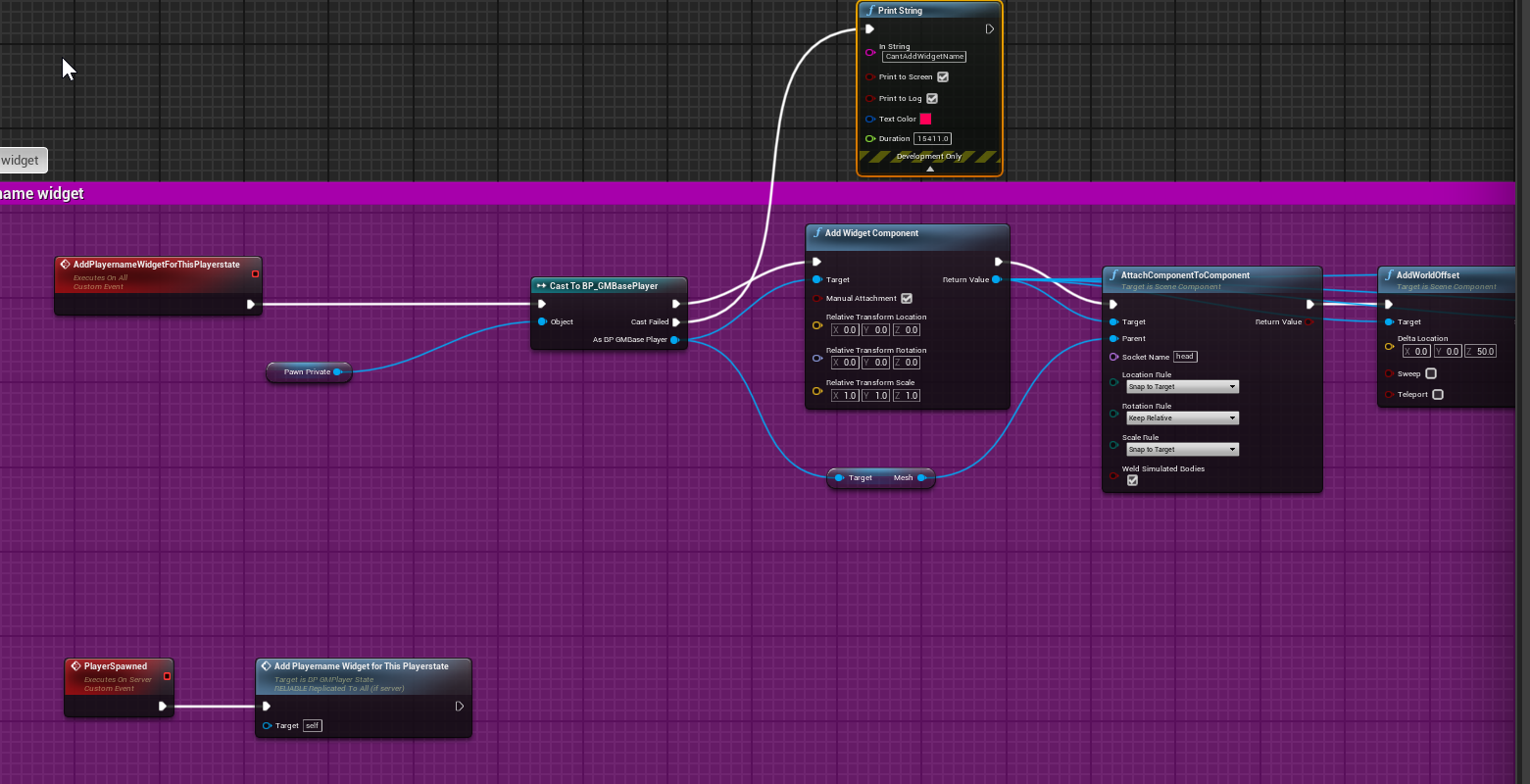

how the fuck do i do shit on begin play?
i want to add a widget above a head of a player but client can't do that
cuz the pawn hasnt replicated for him i guess
whats the solution here?
waxen socket
@gusty raptor I'm having issues with it so from my perspective, yes. 😄
gusty raptor
so what about detach a replicated actor on server, and then set its position
here, the client is detaching the actor to late, and not gets the location set at all
using replicate movement *
waxen socket
Most advice I've read says you have to run the attachment individually on each client. It's probably the same with detachment.
I just surprised myself. I set a reference to an actor to replicate, and it actually did. I was under the impression that objects couldn't replicate?
 glass escarp
could anybody help my weak brain understand when i should be using the player controller vs the pawn event graphs?
I think I understand, but when it comes to performance, wouldn't putting as much as you can in a player controller help? as it only exists for the individual players? Or am i missing a fundamental part of how scripting affects performance
shrewd tinsel
it doesnt really affect performance where u put ur info
are you doing multiplayer?
glass escarp
i am, i was thinking in terms of just a host server
honestly i think my brain is just burnt out and i'm missing something
shrewd tinsel
yeah dude networking is fucking bonkers
glass escarp
for sure looool
waxen socket
I think your classes can be as large as you like and it won't affect your networking. It's your RPCs, replicated variables and etc. that will slow it down.
glass escarp
okay, that at least makes me feel confident
shrewd tinsel
u must know what goes where tho
u gotta use playerstate/gamestate/gamemode/pawn/playercontroller in conjunction
bcoz of how each class replicates and where it exists
waxen socket
And you have to know when to use what and if you get it wrong you'll never be able to forgive yourself and as the days turn into years you'll tell your grandchildren that if only you had done health logic in a component if might have been you instead of the football captain that found success and true love.
shrewd tinsel
basicly
glass escarp
sounds like you guys are havin' a tough time
waxen socket
Oh, you know.
glass escarp
foooor sure.
waxen socket
Bud.
It's not so bad. You just have to be willing to suffer a lot.
The little epiphanies along the way make it worthwhile for some.
glass escarp
oh yeah, i'm like year 3 just forcing myself to repeat tutorials to just make me understand. I have tried so many things that were way too complicated for me, i've done everything so wrong so many times
i definitely know pain
the epiphanies are so worth it though
waxen socket
I mean, they a'ight.
Does anyone here have an opinion on the Smooth Sync plugin? It looks like a miracle cure for replicated movement but that's what makes it so suspicious.
waxen socket
Hmm...
I'm hesitant to rely on a plugin but it seems that it has excellent support.
 kindred widget
What's wrong with your original replicated movement? Don't think I've ever had problems with that in my multiplayer projects.
waxen socket
Hey, Authaer. The problem is choppy movement. If I can avoid having to write prediction and interpolation, it would be nice.
kindred widget
Are you using custom movement components? Both floating pawn and character movement should work very well by default.
waxen socket
My character movement is okay. It's the movement of plain actors that's choppy.
As well, Smooth Sync claims to replicate physics movement well.
jovial stream
@waxen socket my player's movment is also very laggy as well
I tried using smooth sync but it doesnt support animation replication, which is a problem for my uses
waxen socket
I read that they added animation support, no?
jovial stream
wait they did?
ill look
where did you see that?
I dont see anything that says it supports it
waxen socket
Here's what I saw: https://forums.unrealengine.com/unreal-engine/marketplace/1492482-smooth-sync-sync-your-transforms-smoothly-across-the-network/page11
Version 1.15 has been submitted to the Marketplace.
Change Log:
New Feature! Added syncing of Movement Mode (animations).
New Feature! Added automatic syncing for velocity of Movement Controllers for animations like walking / running in Third Person Template.
Fix for owner time becoming off after some length of time which caused syncing to become erratic.
I know a lot of people have been waiting for the new feature of animation syncing and for a fix for time becoming off. I'll message each of you after it becomes accepted. It's usually about a day or two for them to accept it.
Unreal Engine Forums
forumtitle.png
Link to Marketplace (https://www.unrealengine.com/marketplace/smooth-sync)
Hey! I didn't see any way to sync from client owned objects
waxen socket
The creator seems to have a really good response time so you could ask them on the store page, through their email, or on their discord.
jovial stream
can you send the link to the discord?
waxen socket
It's here: https://discord.com/invite/6VpgNQg
jovial stream
thanks!
waxen socket
Good luck!
shrewd tinsel
@waxen socket have u tried smooth sync already?
im wondering how does one sych anims
using that plugin
waxen socket
No, I don't own it. I'm trying to gather some expert opinions on it but... it would seem that networking experts don't use it.
shrewd tinsel
what is ur assumption based on
waxen socket
Limited research.
Searching this channel reveals to me that most of the regulars here whose opinions I respect don't see the need for it or haven't used it.
shrewd tinsel
i see
are you familiar with replicated movement?
is it like, you send walk impulse to server, server says ok, you move on server and then you move in your pc after some milisecond delay?
waxen socket
That's the approach I've seen the most of, yeah.
waxen socket
Client sends requests to server, server updates character on each client.
shrewd tinsel
what are you trying to accomplish?
waxen socket
Well, if you don't delay then you either have to predict the movement and correct it if need be afterwards or trust your client and that's prone to cheating.
shrewd tinsel
here comes in cheating
waxen socket
I'm making a side-scrolling space shooter with four-player co-op.
shrewd tinsel
my philosophy is- if the player wanna cheat they cheat, why overcomplicate ur indie game because of cheaters who will find a way to cheat no matter what?
thats how all main multiplayers games go
check fps shooters, csgo, pubg, planetside
waxen socket
Yeah, I'm not worried about cheating, I'm just telling you what I know. 😄
 soft shell
I've been using "ServerTravel <mapname>" to move my players from a MP lobby (where they can play minigames, chat, etc.) to the actual real level.. unfortunately now this is causing issues due to actors spawned in the lobby not being killed when the real level loads.. Is there any way to have the server change level, clients to follow but anything spawned in the previous level destroyed automatically?
waxen socket
Player movement replicates well for me using the built-in systems. It's my nonpawn actors that lag. I think Smooth Sync might be the ticket for me here.
waxen socket
Have you used Smooth Sync with physics actors?
 dark edge
@waxen socket There is a built in physics replication system and it's probably better. Unless smooth sync can do some clientside prediction magic.
waxen socket
There is? This is the first I've heard of that.
 river hazel
@soft shell do you have seamless travel set up? Normal traveling between maps shouldn't be leaving actors around, thats normally an opt-in feature
weak wind
hello guys all good , well wanted to know how this function works for creating dedicated server but I'm doubtful with comandline to puts the executable more the map path or have to put the ip?
 livid holly
hey all, is it possible to use the OnlineSubsystem GooglePlay to handle sessions like in steam?
kindred widget
@jovial stream Just a side note from earlier. If you can help it, don't replicate animation stuff. Replicate the variables that a client would need to do their own animation stuff.
livid holly
I see OnlineGooglePlay does not support a sessions interface... how is it possible to do session based multiplayer with google play then?
dark edge
@jovial stream Why do you need to replicate animation data directly?
jovial stream
@kindred widget Yeah I'm just gonna do that, thanks for the suggestion
it seems to be the way to go
dark edge
@jovial stream You typically want to replicate the minimum amount of data needed to construct the game state on either side. For example, for a very simple shooter, you could replicate only movement, input commands, and aim direction. That data would be used on either side to drive the animation etc.
jovial stream
yeah I really only need to replicate the aim direction and a few bools for movement
dark edge
The character movement component is already replicated, and so is the control rotation. All you need to do is handle the networking for your actions and you'd have a very simple shooter running
Use control rotation, it's replicated by default
jovial stream
@dark edge would I get the control rotation from the player character or from the controller?
 final thicket
Unreliable RPCs can be dropped with high network usage meaning they are never attempted to be sent, what would be the best way to make sure that UE4 tries to send an RPC at least once? without using Reliable RPCs with the ACK/Resend overhead that comes with it?
Essentially its okay if some don't of the RPCs don't arrive on the client, for what ever reason, but UE4 deciding not to try sending them was not what I had in mind, I'm thinking increase the available bandwidth is there any other setting I could look into?
 floral crow
Is there anyway to guarantee that a replicated Actor spawned by an ActorComponent will be replicated at the same time as the ActorComponent?
I would make the Actor an ActorComponent, but UE won't allow an ActorComponent to have a child ActorComponent 😭
livid holly
@final thicket I dont think there is an alternative way, if you want to guarantee a RPC then use reliable
sometimes it's good to make 2 versions of the same function, one unrealiable and one reliable (I've seen this in engines source code somewhere, actually)
floral crow
I would make the Actor an ActorComponent, but UE won't allow an ActorComponent to have a child ActorComponent 😭
My encapsulation and reusability principles are suffering severely because of that Constraint
final thicket
@livid holly I don't mind if they don't arrive but I want to ensure a request is sent, reliable messages are a lot slower, and they are ordered the order does not matter here!
I want SPEED 🙂
Is there anyway to guarantee that a replicated Actor spawned by an ActorComponent will be replicated at the same time as the ActorComponent?
@floral crow You shouldn't replicate components, just pass traffic through the Actor into the component
Its more effective avoiding network overheads, UE4 does it with their character movement component
floral crow
I don't want to. That means I have to have my Actor be a massive monolith knowing about all the internals of its components. That defeats the purpose of having a component in the first place
Is the Unreal way making everything a semi-monolith?
No way to use composition with proper encapsulation?
final thicket
All networking traffic is passed through the actor any way
floral crow
But I don't have to code it manually. So I can add/remove components without having to touch my main Actor
final thicket
That's why only actors can be replicated and not objects, but I do see what your saying
floral crow
If I route everything through the Actor then I have double-sided coupling, the worst of all coupling
final thicket
🤷♂️
floral crow
No way to use composition with proper encapsulation?
I'm still hoping I am wrong and missing something, but your answer makes my think I was sadly right about that statement...
final thicket
Just make an interface
Implement that interface
and then route through the actor
Modular enough
floral crow
Hmmm......
Can I guarantee that two actors constructed on the same server tick arrive to the client at the same time?
final thicket
No
final thicket
Why?
floral crow
That's why I'm using components in the first place
final thicket
No why does it matter what actor is created first?
floral crow
Because they're guaranteed to arrive with their owning actor
So I don't have to setup timers looping every couple ms to wait for the whole thing to be replicated. Only then I can initialize them and be able to use the thing
final thicket
Replicated components will arrive with the actor they are a part off
floral crow
Replicated components will arrive with the actor they are a part off
@final thicket Yes I know, that's why I liked them. It avoids me from receiving an Actor made of modular pieces piece by piece, when they don't make sense unless they're all together
But now, the constraint of not being able to compose these ActorComponents is making me want to go back to TryToInit looping timer hell
 oak pond
hey I cant seem to get my component move to node replicating, how do I do that?
final thicket
hey I cant seem to get my component move to node replicating, how do I do that?
@oak pond Prbly replicate the movement of the actor
oak pond
wdym? mostly everything else is fine
and everything else in the function the move component to node is in works too, its like it skips it
final thicket
Are they on a Nav mesh?
final thicket
These are AI? @oak pond
oak pond
no this is for the player
final thicket
What does it look like for the client?
oak pond
when I have two players one of them can use it fine and the other one gets teleported to the map centre
this is for a wall climb function, and when the client climbs up the wall its fine but its when it hangs on to the ledge that it is teleported to world centre
final thicket
Only the client teleports to the world centre?
oak pond
how so? it just doesnt replicate the location properly for the client somehow
meager spade
def a problem with your logic
oak pond
yeah you got that right lol
meager spade
soo maybe show us what you are doing?
final thicket
@meager spade Any comment on my issue above?
oak pond
for most functions its fine when I just put it through server events then multicast but for this it just doesnt work with location
meager spade
🤷 link me lol
oak pond
I also heard relative location cant be replicated, so I hope its not a similar issue
final thicket
Unreliable RPCs can be dropped with high network usage meaning they are never attempted to be sent, what would be the best way to make sure that UE4 tries to send an RPC at least once? without using Reliable RPCs with the ACK/Resend overhead that comes with it?
@final thicket Here
floral crow
Sorry for being grumpy @final thicket , appreciate your help anyways. I guess I need to adapt my mindset to the tools I'm given
final thicket
Essentially its okay if some don't of the RPCs don't arrive on the client, for what ever reason, but UE4 deciding not to try sending them was not what I had in mind, I'm thinking increase the available bandwidth is there any other setting I could look into?
@final thicket Here
final thicket
I was aware they may fail to arrive, I was not aware there might be no attempt to send them 🤦♂️
Sorry for being grumpy @final thicket , appreciate your help anyways. I guess I need to adapt my mindset to the tools I'm given
@floral crow I didn't get that impression at all btw
meager spade
if its is crucial, then send it reliable
if its done via a tick or something
then unreliable HAS to be used
if something MUST always be valid, then use a property on a replicated actor
final thicket
It can not arrive, sometimes but its not ideal
meager spade
the CMC for player movement is al done via Unreliable RPC's
final thicket
Hard to explain but I need the speed of an unreliable RPC
meager spade
you just fill the gaps in to make it smooth
final thicket
Its not CMC related, but yes that's true
meager spade
you will get a update at some point
unless you are really hammering your RPC's
btw i would suggest increasing your RPC limit
floral crow
On a similar issue (but with replicated variables instead of RPCs) we had to increase the replicated variables data cap
final thicket
btw i would suggest increasing your RPC limit
@meager spade Is this the amount of RPCs that it will consider sending or the amount of RPCs you can have?
meager spade
i have it set in DefaultEngine.ini
[SystemSettings]
net.MaxRPCPerNetUpdate=10
MAX rpc per net update
oak pond
oh lord, I just realised I dont know how to get the right player controller id when I need it, for a camera thing for example
meager spade
default is 2
final thicket
[SystemSettings]
net.MaxRPCPerNetUpdate=10
@meager spade That sounds like what I'm looking for...
I hate this hidden throttling they do... really bothers me
oak pond
how do I do this for the player I need it on?
oak pond
currently it just limits the camera on player 0 of course but it needs to be the right one
meager spade
only LOCAL controlled clients.
final thicket
Ah you mean simulated proxies, okay that makes sense
dark edge
@jovial stream The controller owns the control rotation but I think pawns have a local duplicate of it
@oak pond exactly what mechanic do you need it to do?
oak pond
this is just for temporarily limiting the camera rotation
dark edge
But what drives that, when is the camera rotation limited?
 fossil ivy
hi everyone, im new here.. can anyone help me with my camera direction? the client & server doesn't see the same thing 😦
final thicket
@meager spade Not trying to be pedantic just when I hear* remote clients I was thinking about their network role, not possession
meager spade
@jovial stream just to tag on, use GetBaseAimRotation from the pawn in the AnimBP, it has the rotation and the pitch
oak pond
its when the players grab a ledge but that event is replicated
dark edge
@oak pond You presumably only want the camera to be limited for the character grabbing the ledge, correct?
final thicket
@oak pond Movement logic should be added to the CMC, (Character movement component)
oak pond
yeah
dark edge
Then why would you need anything replicated at all? Just restrict the camera when you do the grab locally, or when the grab is replicated out, check if the character is locally controlled before restricting the camera
oak pond
...thats a good point
fossil ivy
@dark edge can i PM you so you can help me a bit more?
dark edge
@fossil ivy I'm sure go for it
final thicket
@meager spade Thanks for telling me about, net.MaxRPCPerNetUpdate would I change this in default.ini? and is there a list of these somewhere that I could look at all the values?
oak pond
christ this is so frustrating
 fading birch
I'm running into a bit of a weird problem. I have a variable in my game state that specifies the type of game we're playing (Free For All, TDM, etc). The variable is setup by a console variable when launching the dedicated server. A client launching the game does not set this variable. The variable (an enum) is replicated in the game state. When a client joins the server I want to set this variable on the client's game state, however it doesn't seem to be working. I've tried using an RPC and even just setting it on the client using a client only function and no dice. Any ideas?
final thicket
@fading birch Expose On Spawn?
final thicket
Yes its true and that might just be for things that your spawning
weak wind
how can I configure the dedicated server commands using the frontend?
final thicket
it should be fine just to replicate the variable
fading birch
c++
final thicket
You have implemented void GetLifetimeReplicatedProps(TArray<FLifetimeProperty>& OutLifetimeProps) const override; ?
fading birch
void ABaseGameState::SetGameTypeServer_Implementation(EOceanicGameType inOceanicGameType)
{
    O_WARNING(FString::Printf(TEXT("Current Game Role: %d"), OceanicGameType));
    SetGameTypeClient(inOceanicGameType);
}

bool ABaseGameState::SetGameTypeServer_Validate(EOceanicGameType inOceanicGameType)
{
    return true;
}

void ABaseGameState::SetGameTypeClient_Implementation(EOceanicGameType inOceanicGameType)
{
    O_WARNING(FString::Printf(TEXT("Current Game Role: %d"), OceanicGameType));
    if(GetLocalRole() != ROLE_Authority)
    {
        O_WARNING(FString::Printf(TEXT("Current Game Role: %d"), OceanicGameType));
        SetGameTypeServer(inOceanicGameType);
        return;
    }

    OceanicGameType = inOceanicGameType;
    O_WARNING(FString::Printf(TEXT("Current Game Role: %d"), OceanicGameType));
}```I know how to code block 🙂
that's my current iteration of it
final thicket
So why are you not just using a replicated variable and not these RPCs?
also your not telling me what calls these originally?
oak pond
Im starting to be really convinced setworldlocation and movecomponentto just dont replicate
fading birch
these are called by the game mode during OnPostLogin
and the variable is replicated
.cpp
DOREPLIFETIME(ABaseGameState, OceanicGameType);

.h
UPROPERTY(BlueprintReadWrite, Replicated, Category = "Game State | Variables")
EOceanicGameType OceanicGameType;```Show me OnPostLogin
fading birch
EOceanicGameType CurrentGameType = GS->GetOceanicGameType();
            O_WARNING(FString::Printf(TEXT("Current Game Role: %d"), CurrentGameType));
GS->SetGameTypeServer(CurrentGameType);```OnPostLogin is a strange place to do this, btw
You don't need to set the game mode every time a new player joins
fading birch
we're trying to update the variable on the client as we display different widgets depending on game type
final thicket
Where do you set 'OceanicGameType' on the server?
jovial stream
@meager spade thanks, Ill take a look at it!
fading birch
uint8 gameType = 99;
        if(FParse::Value(FCommandLine::Get(), TEXT("oceanicGameType"), gameType))
        {
            if(gameType == 0 || gameType == 99)
            {
                O_WARNING(FString::Printf(TEXT("Parameter oceanicGameType was specified with value of %d. This is outside the parameters of the enum. Defaulting to Free For All."), gameType));
                OceanicGameType = EOceanicGameType::FreeForAll;
            }
            else if(gameType == 1)
            {
                OceanicGameType = EOceanicGameType::FreeForAll;
            }
            else if(gameType == 2)
            {
                OceanicGameType = EOceanicGameType::TeamDeathmatch;
            }
            else if(gameType == 3)
            {
                OceanicGameType = EOceanicGameType::Landmark;
            }
            else if(gameType == 4)
            {
                OceanicGameType = EOceanicGameType::Intercept;
            }
            else
            {
                O_WARNING(FString::Printf(TEXT("Parameter oceanicGameType was specified with value of %d. This is outside the parameters of the enum. Defaulting to Free For All."), gameType));
                OceanicGameType = EOceanicGameType::FreeForAll;
}```Can I create a replicated Actor instance on a C++ constructor? Does that make sense to UE4?
final thicket
@fading birch Did you break point that code, making sure it gets set correctly?
Have you tried doing any break pointing?
final thicket
Break point the client function and test it
fading birch
the client doesn't call that
it's set to run on server only
so the client is just using default value of 0
which is fine
final thicket
I mean breakpoint this function, SetGameTypeClient_Implementation
fading birch
it's correct:
final thicket
So a couple of things this is hard to debug without actually seeing it, but it feels like this should be a replicated variable not an RPC, and you should be using ON_Rep aswell
Show me the whole GetLifetimeReplicatedProps the header and the C++
final thicket
You should use an on rep
there is no doubt there
but if you cant show me the GetLifetimeReplicatedProps that I can say it looks like its setup right
fading birch
oh you mean this?
DOREPLIFETIME(ABaseGameState, OceanicGameType);```i had pasted that earlier
fading birch
this isn't my first time working with replication
and the other variables within my game state do replicate properly
final thicket
{
    Super::GetLifetimeReplicatedProps(OutLifetimeProps);

    // This part here.
}```{
Super::GetLifetimeReplicatedProps(OutLifetimeProps);
DOREPLIFETIME(ABaseGameState, OceanicGameType);
}``` So it looks like this then?I'll be honest I don't have any more time for this atm but here me out, just replicate the number with an ON_Rep function and set the enum
final thicket
Goodluck
fading birch
thanks for the help
floral crow
I tried adding a child ActorComponent to my ActorComponent, and it ended up adding it my Root Actor, which is perfect for my needs! I'm so happy 🥳 Had no idea that was gonna be the result. I wonder why it's so widespread that Components owning other Components is not a possibility
I thought it was not even gonna compile
final thicket
I didn't help much, your setup is very strange its strange that both your replicated functions SetGameTypeServer_Implementation and SetGameTypeClient_Implementation seem to call each other
Just go simple and setup that ON_Rep
@floral crow Glad you got it working
fading birch
rep notify still doesn't seem to fix it
final thicket
You cant just rep notify a number?
Just rep notify a number, and use that to get the Enum, possible your enum is not setup correctly to be replicated I duno
@meager spade yep that seems to have fixed the problem [SystemSettings] net.MaxRPCPerNetUpdate=1000 😅 why are there so many hard to find network throttling measures...
floral crow
Btw @final thicket , I tried searching for the MaxRPCPerNetUpdate CVar on the engine source. Typically I'd find those type of Config variables on classes like NetDriver. But It showed up there... What the
fading birch
@final thicket no idea tbh. This is maddening. enum is setup like a regular UENUM
my other enum replicates just fine
floral crow
@meager spade Thanks for telling me about, net.MaxRPCPerNetUpdate would I change this in default.ini? and is there a list of these somewhere that I could look at all the values?
I'd also like to know if there's such a list, as regex searching for Config UPROPERTYs is quite a cumbersome enterprise...
 civic kite
I need to learn how to make 3 servers cheap, or for free to test? any ideas...
 twin juniper
SO Many includes
 raven tinsel
Hey everyone,
I am trying to broadcast a message from my server to all my clients.
To do so I am using a NetMulticast function inside my APlayerController:
// .h
UFUNCTION(NetMulticast, Reliable)
void BroadcastPing();
void BroadcastPing_Implementation();

// in .cpp
void AMyPlayerController::BroadcastPing_Implementation()
{
    UE_LOG(LogGame, Warning, TEXT("BroadcastPing_Implementation."))
}

// inside a function called every 4 seconds for client #1
{
    BroadcastPing();
}
I thought this was it, and that this would work right. However this is unfortunately not the case.
The log is called on the client #1 but not on my other clients!
I then tried to move this function over to my character, same exact code, called on the server. There I do get a call on each client, however, I am not able to get access to the controller. Meaning, GetController() will return NULL for some reason I do not understand.
void AMyCharacter::BroadcastPing_Implementation()
{
// crash! GetController() -> NULL
    UE_LOG(LogGame, Warning, TEXT("BroadcastPing_Implementation %s."), *(GetController()->GetUsername()));
}
Any idea what I am doing wrong here? I feel so confused by this issue!
 fleet raven
player controllers are not replicated to other clients
a multicast on the player controller will therefore only appear on that one client
raven tinsel
@fleet raven ohhh! ahhh! That makes sense! Thank you so much! I will use the player state instead
 random nymph
Is there some default behaviour that kicks players that go out of map bounds? 🤔
 fossil spoke
No
 barren warren
We've currently run into an issue where navigation isn't building correctly on dedicated servers. We have a persistent level with a large navboundsvolume, navigation set to dynamic (project and on recastnavmesh) and on beginplay we stream in sub-levels procedurally, however, it's very hit and miss if it generates properly. Has anyone encountered anything similar - or ways to solve?
Specifically it works if you just play the level directly in PIE but not if its run as a dedicated server
 versed bear
what does the LogNet: Browse: MapName log indicate? When trying to join a multiplayer map, this log shows up with the map name of my Title Screen. Is it trying to move me to the title screen before moving me to the multiplayer map?
rich ridge
@raven tinsel player state are replicated to all clients butyou need to loop through all player state to send multicast. It's better you use GameState for multicast
soft shell
How do I get the local player controller on a listening server? There's some confusing answers through Google (and most are quite old)
livid holly
@soft shell the UGameInstance::GetFirstLocalPlayerController will return the local player controller even in a listen server
(or GetPlayerController(0) )node if you're in blueprint)
livid holly
does anyone know if GameSpark still works? Im trying to run the sample project from the SDK but it doesn't compile, and the plugin is only available for version up to4.18
has it been deprecated?
waxen socket
Good morning. Does anyone know why the second (controller 1) pawn on a client wouldn't be able to call a RunOnServer event?
Cheers.
bitter oriole
Depends on the actor
Ticking itself should be the server performance
Actual updates depend on actor rep frequency
waxen socket
It would seem to me that additional local players can't call RunOnServer events... Could it be because they're not owned by the client even though PlayerController 0 is?
bitter oriole
Which class are the events running in ?
waxen socket
A pawn.
bitter oriole
Is the pawn possessed by that player ?
waxen socket
Yes. Its local role is AutonomousProxy and it is locally controlled by a controller that I spawned on the client using CreatePlayer.
bitter oriole
Ah, here's your issue then
waxen socket
I'm bamboozled. I can't seem to find the di--
bitter oriole
Controllers should be on server
And replicated to clients
Player controllers are created by default really, there is no need to create new ones
waxen socket
Usually, yes, but to add more local players, one must use CreatePlayer, no?
bitter oriole
Why would you add more local players ?
waxen socket
So I can allow four people to play on two computers.
bitter oriole
Okay
No idea how to approach that, to be honest ; I don't think the network model supports that
Controllers need to be created on server to have network capabilities, in any case
That's a given
Whether you can have mutliple PCs per machine, i don't know
waxen socket
It's worked surprisingly easily so far. I can spawn an additional local player on each machine and it replicates and it plays well with the networked players... It's just this issue with the RunOnServer event.
bitter oriole
Local players created on your machine cannot replicate
Replication is server to clients only
waxen socket
So why does it function at all then?
Because I can spawn a pawn on the server and possess it with a controller that created on a client and I can then control that pawn, move it around, fire my lasers, and more. But I can't call a RunOnServer event.
bitter oriole
Local players are client only by design, no actor created on a client can replicate
The pawn is a different story
If it's server created, you can play with it
It can replicate, etc
The reason you can't call RunOnServer is that the pawn is not owned by a replicating Player Controller
bitter oriole
I say "a replicating PC" but I don't know if it's just that, or "the first local PC" or something like that, tbh
So your PC needs to be created on server
Through game mode
waxen socket
But then somehow I have to choose which client that controller replicates to...
bitter oriole
Yes, which is why I said this is beyond my knowledge. I don't know if the gamplay framework supports it.
I'rm just telling you what I do know
waxen socket
I need access to an additional controller on each client. If I can't create that controller on the client then I need another way for it to "listen" for the second local player's gamepad.
Either that or maybe it'll only be the host that can add additional local players.
bitter oriole
It definitely needs to be created on the host
Unless you just have one PC on each machine that handles two players somehow
Which is an ugly but safe workaround if you can't do better
UE4 is a centralized server-clients model, no networking happens between things not on the server
waxen socket
I accept that the controller must be made on the host. Does anything come to mind about having a controller that was created on the server listen for a gamepad connected to a client's machine?
Cause that's the missing link.
I keep seeing mentions of Rocket League apparently being an example of multiple players on each client.
bitter oriole
That's the piece I don't have ! You should look into the game mode for the player controller login flow
If all else fails, the "one PC for two players" approach is ugly but safe
Or one replicated PC and a purely local PC, with the net one routing events for the other
waxen socket
Ah yeah... that second option sounds feasible.
 warped umbra
Hi all, anyone know how i can host a real-time strategy game server. Should i use separate dedicated servers per map?.
An alike game is Rise of kingdoms where you can see all players base on the same map as a kingdom.
bitter oriole
If I was doing it and couldn't get an additional network PC through game mode, I would create "player components" on the PC that each handle a player
waxen socket
Hm, I see.
bitter oriole
But the first option of getting new replicated PC is likely very much possible, just painful to go through
waxen socket
I found a little history in this channel where eXi was talking about how there is code that might support this in the engine but even he hadn't explored it at that time.
Thanks for your time and suggestions, Stranger.
bitter oriole
Hope you can crack it !
versed bear
I have a Server Replicated function declared like this:
UFUNCTION(Server, Reliable)
void Server_ApplyDataFromClient(const FMyClientData& inData);
and I call it in BeginPlay on the client when it joins a listen server. But when the server receives it, the struct is empty (values are initialized instead of whatever I sent from the client)
Anyone ever had this problem?
nvm, figured it out. My variables in the struct didn't have UPROPERTY() on them... ugh
raven tinsel
@rich ridge thanks a lot for this tip! I want to replicate what each player is holding, do you think I should do this in the game state and onRep find the local version of the character and update the item and this for every client?
rich ridge
Sorry bro my bad, GameState is not the right place to do multicast because client is not owner of GameState. You should do in PlayerController only. Extremely sorry for earlier reply , I totally overlooked the ownership of GameState
meager spade
GameState can do a multicast
just fine
Multicast doesn't care for owner, it just has to be on a replicated to all actor on the server, which GameState is.
rich ridge
I meant clients can't do RPC to server using GameState, so it's better if all RPC stuffs are at single place
meager spade
that is what PlayerController is for, Server/Client RPC's 😄
multicasts need to be elsewhere
lilac bear
@waxen socket @bitter oriole super interesting discussion you two had there earlier today, Flynn, let me know how that goes as I intended to also tackle some multple local players as well and would be good to have that over network too if possible.
waxen socket
No problem, Mjolnir, I'll be reporting back.
 feral root
Hey, how do I make it so that others can see your torso/legs but you cannot?
wait
imma try owner no see for now
 low obsidian
Hey Guys, I have a bit of a networking question. So I can play my game fine on my own machine, but when i have it on a lan server, I am unable to connect and I notice my firewall is blocking the traffic. The traffic it is making it to the server, but the firewall is blocking the broadcasted udp packet going to 255.255.255.255 so I am not really sure how I am supposed to handle this on the firewall side because it isn't a normal port forwarding rule. any suggestions?
 peak star
@waxen socket I haven't read the whole conversation, but it sounds like you're trying to get multiple players locally on each client, AND have them all participating in the same game with the Server and all other Client machines with their multiple local players, correct? I have done exactly that thing with my Scooty Shooty game over LAN WiFi (null online subsystem).
I think the same thing can work over internet online subsystems without much change. i didn't have to change anything about the engine - it is able to do this out of the box.
I have successfully run 3 PCs with splitscreen 2-4 players on each, all in the same networked game on my home WiFi.
My only problem right now is that the Android version can no longer see the PC version's Sessions to be able to join them. That feature was working up until about a month ago when it inexplicably died.
fossil spoke
@low obsidian Have you allowed it as an exception on the Firewall?
low obsidian
@fossil spoke Add what as an exception? Only broadcasted UDP packets coming from a lan IP? I think that will work if that is what you mean. I can try that out
fossil spoke
No you need to add the game/server executable as an exception
 fringe thistle
hi guys, im having an issue where i called a custom event (not replicated) to add a widget to the viewport but the widget was added twice and on top of each other in both client and sever sides. Any help to fix this would be appreciate 🙂
 thin stratus
BeginPlay calls on every Instance of your character. Move it to a ClientRPC that calls on Possess or move the whole logic to your PlayerControllers BeginPlay and use "IsLocalPlayerController" to guard it off.
fringe thistle
thanks for your help, i'll try and see if it works :v
awesome, i got it working with the "IsLocalPlayerController" node : )
 chilly mist
How can I tell if I'm on a server or on a client, when breakpoint is triggered in the debugger?
 novel tartan
Anyone here use a VPN to get around port forwarding/setting ports issues for a test server? Currently experimenting with this and just looking around to see if there’s some others who know what to do to get it to work
 unkempt tiger
Is there any way to send an RPC as soon as an actor becomes relevant?
Some kind of OnBecomeRelevant() event/function?
Think I might have found it
 crude sparrow
Anyone know if Seamless travel is needed for a game server on Amazon Gamelift?
@chilly mist check the Role of the actor you are debugging in
bitter oriole
Seamless travel is never needed, since it only works when the server changes the level for already connected players
crude sparrow
and if I call ServerTravel() on a server it works right? It's not only for Seamless travel
without any players
bitter oriole
Seamless travel is the feature where already connected players have a smoother level switch when the server calls ServerTravel
crude sparrow
ok thanks Stranger
 chrome bay
@unkempt tiger BeginPlay() would be enough too probably
Actors don't exist if they aren't relevant, so any usual initialization function would suffice
unkempt tiger
Oh, I didn't realize BeginPlay is called on newly found actors once they become relevant
waxen socket
@peak star @lilac bear Hey guys, thanks for your interest.
What I've read now is that apparently if you use CreatePlayer to make extra player controllers on one map, then when you host or join a session, those player controllers will travel with you and be replicated properly.
Unfortunately, that solution means that in order to allow four player in any mixture of online and local co-op that includes at least one networked connection, you end up with a bunch of extra controllers which will all run their BeginPlay and etc.
So my hope is that there's some way to simulate the process that registers these extra controllers during travel and call it only when needed.
peak star
@waxen socket I didnt know that but yes it gets quite messy! To eliminate the mess we.have to make sure we know which things like player states etc call Beginplay and in what order compared to other things and if there is a delay possible.
waxen socket
I'll take messy if it works in the end.
waxen socket
Is it common to only check overlaps on the server? It seems like a good idea to me but I wanted to ask just in case.
kindred widget
Probably depends on the use case. Some games might have the client tell the server that they think they've overlapped something. Server does simpler vector math checks and performs whatever was needed if it overlapped.
waxen socket
I see. Thanks.
kindred widget
Probably just comes down to personal style and feel for the clients vs cheating potential.
waxen socket
I see a lot of cheating concerns when reading about multiplayer. But I figure for a co-op game it's much less of an issue.
kindred widget
From what I understand, pretty much most cheating can be solved by doing server side only checks for even things that clients call. Rare exceptions might be simple state changes like replicating a bool for crouching a character.
 tulip ferry
Hey guys! When I set my actors (I got like 200 of them at any time) to NetDormantAll and call FlushNetDormancy(), I hit an ensure that says:
ensureMsgf(Lhs.Array.Num() == Lhs.InitialNum, TEXT("Container has changed during ranged-for iteration!"))
With the following stack trace.
Can anyone help me understand what is happenening?
tulip ferry
Flushing the dormancy, you mean?
meager spade
yes
tulip ferry
Yeah, it's happening in the same frame
tulip ferry
I need to pass a few updates across to clients
tulip ferry
Oh, wait. I set them to net dormant in the constructor
I just call FlushNetDormancy when I need to update a value
tulip ferry
4.24
tulip ferry
The workflow is correct, tho: FlushNetDormancy() -> Then make updates to replicated vars?
tulip ferry
Correct
You also set NetDormancy to DormantAll in the constructor/BeginPlay(), I'm assuming?
meager spade
its set in the constructor
meager spade
thing is, something got removed from that array
or added whilst it was iterating
but what exact container
tulip ferry
It's during the building of the consideration list for replication
I don't get this issue if I don't set dormancy
meager spade
yeah so its the FNetworkObjectSet
tulip ferry
As in if they remain awake, it's all fine and dandy
meager spade
which is a TSet
trying to find what could change that set
during iteration
you aint doing any multithreading right
tulip ferry
The save system plugin I'm using is. But That is only reading actor info and writing to a separate object.
meager spade
can you type log LogNetDormancy verbose in the console
then get it to crash and show me the output log
meager spade
ok
 rotund sapphire
Do you use repgraph?
rotund sapphire
yey :)
tulip ferry
Thanks again @meager spade, @rotund sapphire
rich ridge
I m working on a MOBA game, so let's assume 2 turrets were destroyed, and then one player disconnects, and in the meanwhile 2 more turrets got destroyed , then the player reconnects , so will player see 4 turrets destroyed and is automatically handles by networking framework, or do I need to write the logic to update the player once he reconnects.
My turret pawn is replicatable.
rotund sapphire
if you can replicate a boolean indicating the turret is dead, you can make it spawn in a dead state
rich ridge
So I do need to write the custom logic to handled connect and disconnect case.
gleaming niche
if it's spawned by the server, or not netload on client, it will be gone (assuming it was destoyed, and not just marked as dead) when client reconnects
though you could also test it.
rich ridge
My turrets are indeed spawned by server
Ok so I m confused, when player reconnects, will server respawn the turret with values which server is having like dead, total damage etc
gleaming niche
if it's not destroyed, it will be repolicated in the state that it already is in the server.
if it's dead on the server, it will be dead for connecting clients.
rotund sapphire
you cna spawn a dead turret instead of an alive one and forget about the states. it may look visually bad tho
gleaming niche
if it's gone, it won't be replicated, and therefore.. client wont see it.
rich ridge
I m not destroying the turret pawn, actually maintaining it's state like alive, dead, partiallyDamaged
gleaming niche
yeah, so if you have the state replicated
it will be.. that state.
alive, or dead, or partlydamaged. if that's what it is on the sevrer.
rotund sapphire
then just replicate its state and allow him to spawn on client in a dead state (using this initial replicated property)
rich ridge
So if this is case I should not worry about writing custom logic to handle connect or disconnect state
gleaming niche
the only thing you may have to worry about, is if you're using OnRep functions to update stuff like effects
rotund sapphire
also dont forget to destroy dead turret, ti's eating up loads of precious resources while doing nothing
gleaming niche
robert, you're wrong
rotund sapphire
yes
gleaming niche
anyway
the only issue you may have, as i was saying, is if you use OnRep functions, to deal with sapwning effects, etc
i dunno if you're BP or C++
gleaming niche
then you should ensure that the onrep functions are also called, on client side (without authority) in begin play, to ensure that any effects relying on state are updated, to replicated state
if you use then
rotund sapphire
they being called before beginplay afair
rich ridge
Makes sense
gleaming niche
exactly, so you you need to ensure they're called to actually do what they're supposed to do.
rotund sapphire
it may be only with blueprints tho, this must be verified
rich ridge
Sure omega
split siren
Is it possible to limit RCP to just 2 specific clients? If player A and player B is having a fight, player C to Z should not need about it.
bitter oriole
Sure
You can put the RPCs on client-owned actors like the player controller
Player A sends a "hit" RPC to server through controller A, server sends RPC to player B through controller B
 fathom dust
Anybody know how to get OnlineSubsystemSteam to stop broadcasting that I'm playing my game? i.e. people don't get those popups?
fathom dust
Yeah I dug through the code looking for an option but that makes sense.
 tribal solstice
Hey ya'll - What and where is the proper way and place to do level transitions for multiplayer using blueprints?
I've been using a server RPC from the player controller to trigger a level event to 'Load Stream Level's
unkempt tiger
Anyone has any information on anti-cheats?
I'm wondering if I should be designing my networking a little differently (that is, no longer assume that you can "never trust the client" for some cases) if I'm going to be licensing an anti-cheat
It's also impossible for me to actually contact easy anti-cheat and ask them myself on the dedicated https://www.easy.ac/licensing/ URL, because I don't have a company website
And I'm greeted with this annoyance every time I try to submit a contact request
bitter oriole
EAC is not going to be affordable if you're an individual
unkempt tiger
Oh? Is it very expensive?
bitter oriole
if you have to ask the price, it usually means it's 5-6 digits
unkempt tiger
what the fuck
bitter oriole
And yeah, any competitive multiplayer game should be completely defensive with all gameplay processed on the dedicated server, trusting nothing but heavily sanitized player input
Plus anticheat
That's why small indies don't do competitive multiplayer
unkempt tiger
... but I am
😅
Wait
Why do you need anti-cheat if you're processing the important stuff on the server?
How else can there be cheating?
meager spade
you cant have everything server authoritive
you need a little client trust
else every single input would be delayed
unkempt tiger
Like bullet trace hits, because no animations on the server
meager spade
and that is not good for competitive
unkempt tiger
But what if I'm doing predictions properly?
Like, I'm working hard on getting prediction to work nicely
bitter oriole
You need anticheat for wall hacks and triggers
That's impsosible to rpevent on server
unkempt tiger
Tbh that I can code for on my own
I'm not sure what I can do about wallhacks though
bitter oriole
No you can't.
unkempt tiger
Why not? I can give users a trust score and if I see that their response time / mouse movements are unnatural, reduce their score smartly. If the score is below a threshold, kick them
bitter oriole
Client-side anti-cheat is fighting a client that has total control of the machine and a copy of your software running through a debugger. It's impossible, and it only works because extraordinarily obscure techniques are used to gain time and make cheat making unprofitable.
Triggers do not change mouse movement, they are undetectable
A good trigger is basically constant pro-player reaction time, without manual aim
unkempt tiger
You're correct, i can't handle those cases
Somehow I imagined the cheater waiting past a corner, in which case it was kind of measurable when the target is moving, but thats just one case in a pile I can't handle myself
bitter oriole
You can't handle triggers or wallhacks without client-side anticheat, constant updates, a reliable banning system, etc. It's way more effort than most smaller indies can afford. That's why competitive shooters are rarely done by small indies.
That's on top of your battle-hardened paranoid dedicated server running on your personal servers
unkempt tiger
Are there no cheaper alternatives to EAC? Also, can you tell me where you learned it's priced at 5-6 digits?
bitter oriole
I have no idea what the price is, I just have experience with "email us for a quote" businesses
Maybe it's just 4 digits
But it's not going to be $100 because no one has time to answer emails for that
unkempt tiger
About running on servers, why does the game have to run on my personal server?
Can I not practically/financially use AWS or something of the like?
unkempt tiger
anything that's $$$$D is manageable honestly
bitter oriole
@unkempt tiger AWS is fine. Just not community servers.
unkempt tiger
Oh, yeah I'm not going to be supporting those
@meager spade do you have any information on how to license EAC?
meager spade
nope
bitter oriole
But EAC requiring a company should signal to you that it's not going to be cheap
Basically they don't do business with single devs
unkempt tiger
Yeah, I got the hint, it's quite a shitty way of communicating that approach from their side honestly..
bitter oriole
You're not the audience
meager spade
a lot of companies selling big tools (that are expensive) do it by a quote
cause quotes vary depending on factors (team size, game size, etc, etc)
bitter oriole
Hell, UE3 was like that
Early days were like what, half a million dollars for the license ?
unkempt tiger
Unreal Engine 3?
 plain musk
hi everyone!
does anyone know if there's an event like 'OnBecomeRelevant' or something similar?
trying to figure out a way to run some stuff client side to set custom depth stencil and things relative to a player's team. map is pretty big, so stuff isn't always relevant.
very possible i'm just approaching this wrong too
unkempt tiger
Lol I just asked this some hours above
unkempt tiger
According to @chrome bay, @plain musk , BeginPlay should be enough
plain musk
hmm... lemme try that out then
sure enough that works
so beginplay gets called even when the actor isn't relevant and the client doesn't know about it?
or does it get called once it is loaded onto the client?
unkempt tiger
Yeah, UE4 distinguishes "newly created actors" from "re-found actors", both call BeginPlay
Im not sure
plain musk
not sure why i asked. simple print string test should tellme. lol
i'll come back with my findings
unkempt tiger
Let me know, i havent tested things mysel- yes, good
plain musk
it gets called when they become relevant
it looks like it gets called every time they become relevant
unkempt tiger
yeah
plain musk
so if you are outside the net cull distance, and step back in, it reruns
interesting
they never mention that stuff in rep tutorials
thanks for the help, by the way!
 obtuse dirge
Anyone find that when using the lag emulation, lag spikes up dramatically (more than expected/specified)? I go from 10-20ms ping on LAN/PIE, to ~100ms in PIE w/ just 1ms lag emulation and no packet loss
twin juniper
Were trying to get multi user editing working dm me if you can help
 analog prism
Quick question-- does ReplicateMovement perform any kind of compensation or am I better off disabling it and handling it myself on a custom pawn?
floral crow
During the lobby stage, there's list of actors I need to guarantee they have replicated for ALL players before allowing the server to call for a SeamlessTravel. What's a clean way to do this?
I can set a timer that does a UGameplayStatics::GetActorOfClass(WorldContextObject, NecessaryClassInstance) call every 200ms, but I'm looking for something better
 winged badger
gamemode persists the actors, they replicate all over again for clients
so it would have to be a very specialized case where that would matter @floral crow
usually in lobby stage, the players have more then enough to do for stuff to replicate over + few minutes ontop
floral crow
The InGame depends on this PlayerData lookup table which is a replicated actor to initialize parts of the game
So I'm trying to create it during the lobby and make it persist after the travel
winged badger
and it has to be valid on server only
floral crow
Which I already achieved
winged badger
for the game level to work
floral crow
But sometimes it's just not enough time for the replication to happen, specially on lower bandwidth connections
winged badger
creating different UX problems for players and such while in lobby is a different matter, but it doesn't affect travel
and unless you have a huge amount of data to replicate
bandwidth is almost never the problem
floral crow
and it has to be valid on server only
It doesn't matter, as if a player fucks up their initialization to try to hack the game it's their problem. The server will initialize them correctly and just reject everything they ask as a client due to info mismatch
creating different UX problems for players and such while in lobby is a different matter, but it doesn't affect travel
@winged badger What do you mean?
winged badger
well, the lobby UI is hardly going to show correct states before the actors replicate
floral crow
bandwidth is almost never the problem
True, it's actually more of a problem on lower spec computers
This behavior/bug has only shown up in lower end hardware
winged badger
but does the client have a replicated actor that persists pre travel? that doesn't matter for travel
it will still have it after travel
most replicated actors are less then few kilobytes
floral crow
well, the lobby UI is hardly going to show correct states before the actors replicate
@winged badger Yeah, I'd just have a loading screen until you have everything required
But then again same problem. How do I cleanly wait for everything I need to be replicated
winged badger
so add ready buttons
winged badger
because the problem you're trying to solve also comes down to "how do i prevent server travel until my slowest player loads but doesn't have a chance to see or setup anything at all?"
most lobbies include some kind of setup
and most setups include a ready button
when all players are ready -> start game is enabled
floral crow
True
But there're still some other actors not necessarily useful for the Lobby but if I spawn them there and have them travel to game instead instead, my game map initialization becomes soo much clean
Because I don't have to be chasing these replicated actors on >30 classes with nullchecks and timers that retry every .1 sec until the necessary objects are there
low obsidian
Does anyone know how to resolve the following? I am able to connect to the server and see the traffic going back and forth. This is between a windows machine and a linux machine. I tried to disable the firewall on windows and allow all traffic through ip tables as well on linux and it didn't seem to work. This is going through a network switch on the same subnet and doesnt hit the firewall. I tried hosting the server on windows localhost and that worked fine. I am not too sure what the issue is.
[930]LogOnlineSession: OSS: Join session: traveling to 192.168.100.16:7777
[930]LogBlueprintUserMessages: [BP_SurvivalGameInstance_C_2147482603] Successfully joined server!!!
[710]LogNet: Warning: UNetConnection::Tick: Connection TIMED OUT. Closing connection.. Elapsed: 20.01, Real: 20.01, Good: 20.01, DriverTime: 20.01, Threshold: 20.00, [UNetConnection] RemoteAddr: 192.168.100.16:7777, Name: SteamNetConnection_2147482532, Driver: PendingNetDriver SteamNetDriver_2147482533, IsServer: NO, PC: NULL, Owner: NULL, UniqueId: INVALID
[710]LogNet: Error: UEngine::BroadcastNetworkFailure: FailureType = ConnectionTimeout, ErrorString = UNetConnection::Tick: Connection TIMED OUT. Closing connection.. Elapsed: 20.01, Real: 20.01, Good: 20.01, DriverTime: 20.01, Threshold: 20.00, [UNetConnection] RemoteAddr: 192.168.100.16:7777, Name: SteamNetConnection_2147482532, Driver: PendingNetDriver SteamNetDriver_2147482533, IsServer: NO, PC: NULL, Owner: NULL, UniqueId: INVALID, Driver = PendingNetDriver SteamNetDriver_2147482533
[710]LogNet: Warning: Network Failure: PendingNetDriver[ConnectionTimeout]: UNetConnection::Tick: Connection TIMED OUT. Closing connection.. Elapsed: 20.01, Real: 20.01, Good: 20.01, DriverTime: 20.01, Threshold: 20.00, [UNetConnection] RemoteAddr: 192.168.100.16:7777, Name: SteamNetConnection_2147482532, Driver: PendingNetDriver SteamNetDriver_2147482533, IsServer: NO, PC: NULL, Owner: NULL, UniqueId: INVALID
@floral crow keep replication order dependency limited to two actors at the time and you're fine
also, all Actors loaded from package are loaded and NetAddressable immediately when the level is loaded, even before HandleSeamlessTravelPlayer is called
and GameState is a special case, if you are using AGameState, and not AGameStateBase, it will always have replicated by the time first Actor on client calls BeginPlay
floral crow
@floral crow keep replication order dependency limited to two actors at the time and you're fine
@winged badger You'd say this is the cleanest approach, keep them in sort of a linked list approach
winged badger
never ever design a system that requires 3+ separate spawned Actors to have replicated in order for it to start working
tweaking NetPriorities might help
but it can also fail in case of packet loss
so best not count on it for a production system its fine for prototypes
and it has a way to come back and bit you on the arse if you're not careful
when the game starts, Actors will replicate over in order of NetPriority
that would be the reason why PlayerState is never ready when Controller and Pawn first replicate, for example
 glacial pollen
@floral crow I have a game where a player "builds" a robot of many parts, which are all separate skeletal mesh actors. Basically what I did: Created a replicated Actor array, of every body part, then on client's OnRep for that array, I started a timer, which checks each actor in the replicated array, and until they are valid on the client, the robot does not do any setup.
glacial pollen
So I'm running into an issue with replicating a tank turret rotation.
Two players:
A,B
A rotates -> rotation spazes out if relative rotation is negative in either axis.
B sees A rotation just fine.
What has me the most confused is clients see other clients rotation just fine. Just not their own
Please ping me if you have an idea. (works fine without networking so its not my math or rotation itself)
However, turning the whole actor (instead of turret) is just fine:
ANSWER: I had component replication turned on for the camera. This caused the spazzing out.
dark edge
@glacial pollen I'm working on a game with a similar building mechanic. I suggest replicating the bare minimum state necessary. The tank turret direction should be derived from the view rotation and vehicle geometry. Of the players camera is quite offset, replicate a DesiredAimDirection that is used by all vehicle parts to calculate their own rotations instead.
glacial pollen
Okay, i understand that now (edit)
plain musk
anyone familiar with net dormancy?
if you have a playerstate that only updates values anywhere between a couple times a second to not at all for a minute or so, would it be better to turn the dormancy to dormant all and then just force net update each time the server sets the variable?
first time looking at the network profiler and got my waste down from 100 to 50 by doing this, but not sure if there's any repercussions to doing things this way
winged badger
@glacial pollen that RPC should not be reliable, ever
fleet raven
sure they should
in fact it's the only way to send data to the server
character movement component does the exact same thing, just a lot more complex
gleaming niche
Oh wait i misread it.
My bad.
Thought ir was server to client. Haha
🤦
Had to save the village and open it so i could zoom in.
Image*
split siren
Is it possible to spawn replicated actor on server and 2 out of 10 clients? If bReplicated is true, it replicates to all 10 clients...
gleaming niche
You just spawn it on the server and it will replicate to all.
fleet raven
you can override IsNetRelevantFor or use the replication graph
chrome bay
@plain musk actors that are awoken from dormancy send all of their properties again (including COND_Initial properties), so there's a good chance it's not worth it.
Especially for something like a PlayerState which has a lot of vars, sends to many client, and may change often.
Just drop the net update frequency to something like 1.f and make calls to ForceNetUpdate() when changing vars.
waxen socket
Hey Jambax. What's your opinion on only checking overlaps on server?
plain musk
@chrome bay ahhh, perfect. i'll do that then. thanks!
chrome bay
@waxen socket Depends. If it only matters on Server, only makes sense to do it on server
waxen socket
Okay, thanks. I think it makes sense for my space shooter.
rich ridge
Getting this assert failed Assertion failed: NewHistoryCount < FSendingRepState::MAX_CHANGE_HISTORY [File:C:/UnrealEngine/UnrealEngine/Engine/Source/Runtime/Engine/Private/RepLayout.cpp] [Line: 1883]
for below code bool ATLPPlayerState::ReplicateSubobjects(UActorChannel* Channel, FOutBunch* Bunch, FReplicationFlags* RepFlags) { bool WroteSomething = Super::ReplicateSubobjects(Channel, Bunch, RepFlags); WroteSomething = Channel->ReplicateSubobject(ScoreboardModel, *Bunch, *RepFlags); return WroteSomething; }
if i comment this line, crash doesn't happen WroteSomething = Channel->ReplicateSubobject(ScoreboardModel, *Bunch, *RepFlags);
fleet raven
you must use |=
rich ridge
sorry i didn't understand
fleet raven
bWroteSomething |= Channel->ReplicateSubobject
rich ridge
ohh i should use bitwise or
@fleet raven Thanks brother, you spotted the issue, I couldn;t have found that and wasted a lot of time
 odd iron
Hi guys is there anyway to replicate physics handle ... for grabbing object?
When player grabbing something the other player keep see different location
split siren
you can override IsNetRelevantFor or use the replication graph
@fleet raven Thanks, it works beautifully!
waxen socket
Good afternoon. I'm seeing a lot of conflicting advice on projectile replication and I wanted to ask for guidance here.
My game is an old-school space shooter with slow-moving projectiles. Would you recommend that I replicate the projectiles and their movement, or spawn unreplicated projectiles on each client and only run gameplay-related functions on the server's projectile?
Any advice would be appreciated. Cheers.
rich ridge
@waxen socket it's always good to spawn projectile on server
And thus replication is automatically handled
waxen socket
But if all I need to replicate is the spawn location, couldn't I just spawn it again on each client, send it flying at the same speed, and only check for overlaps on the server? Thus saving all the bandwidth of replicating movement?
lilac bear
@waxen socket I suppose an approach like that could work, are you concerned about how your projectile quantity will handle scaling up? Perhaps you can just lower priority for your (in-flight) projectile updates and use some sort of smoothing, I would imagine you could get your network performance pretty tight with some optimizations in the future.
waxen socket
I'm only worried I'm missing something in my understanding of replication. Suddenly, I'm questioning why we replicate such predictable movement at all. If something moves in a straight line at a constant speed, why bother replicating that?
lilac bear
That is an interesting question, and I think this is an optimization problem. For example if you have a projectile that travels in a straight line with a constant velocity then there is no need to spam location updates every tick except for when the projectile collides with something. I think maybe we should instead ask if UE4's projectile replication is smart enough (or has a feature) that can realize this scenario and optimize out these predictable movements. If not, this is such a common case that I'm sure there is a way to extend this sort of functionality into the existing system.
winged badger
for a projectile travelling at constant speed in same direction, there is no need for additional prediction code
only thing client needs to know is where its starts, and its velocity
the prediction comes into play when something is hit, as its possible for client to hit something when the server didn't
but generally, you'd want overlaps on clients as well, as there is more to creating a proper feedback that something was hit then just inflicting damage
lilac bear
@winged badger @waxen socket I agree with your basis Zlo, to clarify further, when I say prediction it would be for more complex cases where something doesn't go in a straight line or predictable path (ie homing missile or something).
I can't prove, but I would be surprised, if the UE4 devs put in the projectile movement component and this wasn't one of the first cases they wanted to solve for (straight line constant velocity projectiles with network replication being efficient by only sending network updates on collision/overlap events) and so I suspect Flynn should not need to worry about this.
dark edge
They probably don't even worry about it for the what, maybe 100 bytes per projectile it saves?
lilac bear
@dark edge, well, that depends on how shmup (re: bullet spamming) you are doing 😉
dark edge
You still probably send more bites in the spawn and initialization phase then you do an update, unless the projectiles last for a very long time
lilac bear
correct, Flynn is working with slow moving projectiles in this case
dark edge
@winged badger for something like that you should be doing a quasi ECS approach with data only and one central update function
winged badger
i am strong supporter of approach where you simulate on clients everything you can get away with
instead of replicating it
waxen socket
Thanks for your help, guys. Zlo, you believe in checking overlaps on clients?
dark edge
I got projectiles working as a pool of strucks and a subsystem iterating over them and it works beautiful.
winged badger
how are you going to have a hit effect reaction on animation, blood splatter particles... etc
timed exactly right if you wait for an RPC/replication back
that you do on overlap on clients, independently
dark edge
@winged badger oh for sure, In my vehicle game I don't even replicate any of the drivetrain state besides gear selection. The end result (movement) is replicated
waxen socket
Oh... hm.
winged badger
in case of owning clients, inflicting predicted damage locally also doesn't suck
makes the game feel more responsive
waxen socket
I'm basing a lot of my thoughts today on an old post from eXi where he said "... don't replicate the movement. As long as the server calculates the correct projectile and damage, it isn't important if one client saw something a bit different"
winged badger
i have a 8 player coop with isometric camera, and i do have weapons with 2000 RPM
waxen socket
So that's where I started questioning.
winged badger
i don't care if one client sees a miss where server registered a hit
as there is just too many bullets flying around for that to be a problem
owning client will always see his hits correctly, as it has auth over them
lilac bear
right off the bat, I think the key with eXi's response may be high velocity, if things are moving so fast you could probably get away with some of that especially if you have high volumes of projectiles ie Zlo's case
waxen socket
I expect to have up to 100 projectiles on screen at once. Shared between four players.
winged badger
but all clients know about simulated proxies is - FireButton pressed/not, Target, FiringMode, where the mouse projected to world is
clients roll weapon spread for simulated proxies independently, and its fine
didn't have a single complaint about that during open alpha
basically - as long as server is able to keep the true state of the game, and clients can't notice discrepancies
you're fine
and a client state that is slightly off, but game feels more responsive is better then when client has completely accurate state but has to wait for a lags worth of roundtrip to get proper feedback
lilac bear
@winged badger good perspective from a vet, thanks!
waxen socket
There's a lot to take in here for a novice.
We should only replicate the starting and hit position for slow projectiles?
We should check for overlaps on clients in order to play impact effects immediately?
What if the overlap never happens on the server? Do I still award a point and destroy the hit object?
lilac bear
My amateur two cents:
Not sure I follow your last question. For purposes of cheating the server is authoritative so unless the server sees the overlap then no points would be scored via gamemode/gamestate. In the case of non-replicated projectiles, the client and server would both be spawning on their own but only the server's overlaps would be counted. Note this approach should only be used for when projectiles move fast enough (or in large enough quantities) that they cannot be perceived to be out of sync due to all the activity.
waxen socket
It's just Zlo mentioned that he checks overlaps on clients in order to trigger blood and etc. without delay.
feral root
hey so I've got a really weird problem.
the listen server's character
you can't see the listen server's character look up or down
just side to side?
lilac bear
right, for checking overlaps on Client it would be a case of visuals only, so once again in the case of bullet spamming quantities that are very large (Zlo's 2000RPM projectiles) or so fast that a trace could be performed on server to get "close enough" you would have the clients non-replicated projectiles trigger an overlap for the purposes of effects.
@feral root That sounds nuts lol not sure what to say there. May need more info on your setup :S
waxen socket
And if the overlap never happens on the server? Did I just spawn the impact effects for nothing?
lilac bear
unfortunately yes 🙂 if you see too much of that then you are on one of those edge cases I mentioned above's threshold 😄
you would need to rethink your approach by tweaking things... maybe firing more projectiles to hide it, or reduce fire speed enough that replication is an acceptable approach.
 stone shore
Hey everyone, is there a good way to go about character rotation replication?
In my game, the controller is set to game and UI -- I want to be able to rotate the camera (axis turn) independently of character rotation (i have an axis binding called rotate). The problem is, I can't seem to replicate rotation unless i use one of the bools such as Use Controller Rotation Yaw, but then I'm locked to the camera rotation / turn axis mapping. When I tried to make the rotate event toggle Use Controller Rotation Yaw on and off, it didn't work either so the rotation wouldn't replicate.
Any suggestions?
unkempt tiger
You should aim to decouple controller and player rotations by using two separate variables, and network only the character rotation
 lament cloak
Anyone getting jittering on 4.25 when using Linear smoothing on the CMC? Not getting it with Exponential
meager spade
@feral root use GetBaseAimRotation on the pawn
and get the pitch from there in your animation
@stone shore why would the camera ever be replicated?
you can seperate the camera from the player (so camera only rotates, and pawn rotates using other means)
stone shore
@meager spade What do you mean by separating the two? The camera isn't replicated (unless I'm going crazy) the problem I'm having is if I want to rotate the player while they're standing still it seems I need to use the Use Controller Rotation Yaw option. But by doing that the camera is locked into position behind the player. If I turn it off I can then rotate the camera but not the player.
How can I separate the two? If I use something like adding local rotation to the actor it seems very choppy.
 limber gyro
Im trying to implement a function from steam that pings a server to allow me to connect to it following this thread
Unreal Engine Forums
Hello there,
I am using Steam for multiplayer, so I can easily browse and connect to my dedicated servers using the Steam server browser or my in-game
the problem is, the function "inet_addr" doesnt exist
also i cant get info from the callback because it is a ref
can some one help?
chilly mist
I'm having an error in the log:
LogNetTraffic: Error: UActorChannel::ReadContentBlockHeader: Sub-object not in parent actor.
I looked around on this Discord and found some discussions on this a year ago. I'm doing something very similar, which is trying to move a subobject from a component to an actor, in multiplayer. Things also seem to be working correctly when the error's logged.
I wonder if anyone's having more insights on this lately?
 twin sable
I'm getting some insane tick times on my multiplayer game. The world is about 150 replicated chunk actors, which themselves have about 1000 runtime added components each. These components themselves have no replicated properties and all have tick disabled. Only the 9 surrounding chunks are being replicated to the client. This works fine when I'm only spawning the chunks surrounding the player, but testing it with all 150 world chunks spawned on the server, is causing crazy tick times, despite only 9 chunks being replicated. Does anyone know what this could be caused by, or what I can do to alleviate it? I get like 150fps without multiplayer.
twin sable
my STAT net only shows 110 considered actors, I have to assume its related to the insane number of components each actor has. These components basically never update, is there some way to manually tell UE4 when they should replicate?
limber gyro
nothing comes to mind, maybe cull replication by distance? unreal has something for that
twin sable
@limber gyro I'm using that, i'm only sending the 9 closest chunks
https://drive.google.com/file/d/12Ot7tH-h60VBEGDQ6F-MCwb46KDN4JyP/view?usp=sharing this is my ue4stats file, I'm not that familiar with these but I think it confirms its the consider actor time thing
limber gyro
sorry man i cant help you much, the only optimisation i have done was with shaders and level streaming
your question is better suited for one of the big boys here
 spare skiff
I'm having a problem where NPC weapon collision overlaps with the client controlled pawns stop working when the listen server host's pawn moves far away.
The weapon collision sphere is socketed to its parent skeletal mesh component, and is AI controlled. The attack animation moves that collision sphere through the player pawn capsule. The attacking AI controlled pawn and player controlled pawns are both marked as AlwaysRelevant. Everything works well when host is nearby, so I don't suspect any issue with collision profiles. The overlap event uses a switch has authority so detected collisions are only processed by the server (the collision-with-client-pawn event never even fires on the server when the server's pawn is far away).
After a few days of troubleshooting I found that re-parenting the collision sphere to the AI pawn's root capsule component (so that it is NOT socketed and does NOT depend on being moved by the animation) and resizing it to cover the entire attack space fixes the problem. However, this is not ideal because it doesn't accurately represent weapon collision.
Based on this, I suspect the problem is that when the server is far away, it decides that in the server's game instance it no longer needs to drive the movement of the child collision sphere with the skeletal mesh's animation (but I think the animation is still playing on the server, because the anim notifies fire, and the collision sphere still exists because it fires the overlap event when it hits other objects).
After a couple days of troubleshooting I feel like I've exhausted all of my options. Does anyone know how to get server side detection of skeletal mesh animation driven collision volumes to work when the listen server's host player is far away from the event?
limber gyro
does any 1 have any experience connecting to dedicated serves with steam integrated? i followed a forum thread that said i had to ping the server first and then connect with the server ID but the server never responds and i dont know why
 gaunt kestrel
what forum thread? @limber gyro
dark edge
@meager spade huh, so there's another built-in rotation beyond ControlRotation? Never knew that lol
meager spade
You can add camera yaw separate to pawn yaw
It's not replicated tho.
Nor should camera be replicated
 chilly tinsel
Anyone got any good resources on the Network Profiler. I'm trying to work out if my capture is stupidly high or not.
I've found this https://docs.unrealengine.com/en-US/Gameplay/Tools/NetworkProfiler/index.html but it doesn't teach me how I should be digesting the output
Tool for displaying network traffic and performance information captured at runtime.
lilac bear
well after much beating of my head on a wall, I still can't get my Actors to attachToComponent() on Client whenever this function is called from a server-only function. However, it works if I perform this inside a NetMulticast... sorry @meager spade I feel like I'm letting you down after you told me this function would be replicated thus no need to call on clients.
I tried to replicate this same behavior from BP on the BeginPlay function and sure enough I have the same problem with only performing the attach on the server.
chrome bay
Attaching an actor (i.e. the root component) to something is already replicated if you have Replicate Movement checked.