#multiplayer
1 messages · Page 560 of 1
 summer nova
yeah, 100 animated characters (pubg/fortnite) require a LOT of engine work
thats not something you can get working well easily
 potent cradle
I'd be very happy with 50-75
It seems odd that at 50 characters, everything just stops working totally
summer nova
anything past 30-40 starts getting hairy
just use actors
those dinosaurs arent too complex to require a character movement component
potent cradle
The AI characters don't start moving around, my player controller doesn't get proper control of my own characters. Super odd.
summer nova
you might be super-lagging on the server
moving 50 replicated and animated cmcs around is no joke, on my tests with shootergame characters something like that will use 20+ miliseconds
potent cradle
those dinosaurs arent too complex to require a character movement component
Could you provide some insight into when you would add a char movement component?
summer nova
when its an actual player
thats what the cmc is designed for
using it for npcs is super overkill
the cmc does a lot of fancy prediction logic, network smoothing, and network rollback on mistakes and similar
you just do not need that on npcs
summer nova
no
potent cradle
(As players and AI can both control the same kinds of characters, would like to keep it uniform)
summer nova
you could indeed swap them out
potent cradle
Remove the CMC, or add it back on when needed
potent cradle
No no, the CMC
summer nova
controlled dinosaur being a different thing than a wandering dinosaur
potent cradle
Hmm
summer nova
i dont think you can remove the cmc from a character class
potent cradle
I could swear I saw someone write about doing that
But I could be very wrong
I'll test it out
At least this helps me understand the whole situation a bit better
Appreciate the insight 😄
summer nova
there was some absolutely crazy shit i was experimenting with
to try to achieve 200-300 players
the idea was that you dont replicate the character
you copy its parameters into a fake-character
which is just a very simple actor
so each player controls a full cmc-character, which is replicated, but only to the server, not to other players
the server then copies its position/rotation into another actor, which is what other clients see
because that proxy actor is so simple, its super fast, and lets you have a fuckton of them
tho the server absolutely does chug with having to calculate so many cmcs, but there is trickery you can do to improve it, like disabling collisions and trusting the client
 chrome bay
Paragon didn't use CMC for it's minions for example
potent cradle
Seems like I'll have to have 2 different base classes
chrome bay
They just have some low-cost actor that tracks along the navmesh IIRC
summer nova
yeh, i can confirm that works
i wrote a custom cmc for my vr game that did no collisions
just slides on the navmesh
navmesh raycast is very cheap
on my testing you can do about a thousand of them per milisecond
potent cradle
Can't I disable the CMC at will instead?
summer nova
so yeah... fast
@potent cradle yes, you can disable ticking on it or similar
but stil...
potent cradle
Still bad?
chrome bay
still paying some of it's overhead even when it's disabled
AI just talks to interfaces right? Shouldn't be dependent on something being a character
summer nova
ai talks into character
chrome bay
Being a pawn ofc, but not character specifically
summer nova
its kinda fucked
on a newer project i had i basically just fully ignored the AI system
and just made my own
chrome bay
I though it only dealt directly with lower-level stuff like UNavMovement etc.
summer nova
you can run behavior trees standalone
chrome bay
Yeah I'm not a fan of the engines AI system..
summer nova
they can basically just run by themselves
so you can do it yourself
one thing i had is that i just ran behavior tree on top of the simple Enemy actor
and said Enemy actor had a bunch of components for different stuff such as melee combat logic
i do something kinda like that but worse on my Hovergame project

GitHub
Hovercraft game example in UE4. . Contribute to vblanco20-1/HoverGame development by creating an account on GitHub.
in here i just have a Enemy interface, and i have multiple versions of it
some enemies inherit from Actor, others from Character. But none of them actually have AI controllers, they just run the Ai logic on their actor itself
potent cradle
ai talks into character
AI as in what part specifically?
But none of them actually have AI controllers, they just run the Ai logic on their actor itself
I can't even use AI controllers?
Dear lord
summer nova
Ai controllers suck hard
they force you into the character class
which is something you absolutely do not want
they are designed for player bots
where you have some multiplayer bots and the likes that simulate a player
for actual npcs its not a good idea to use it
potent cradle
I wish I knew that earlier
But grateful for the info
Looks like I'll have to reduce the scale for now and gradually polish up the codebase to the point where the logic is cleanly enough separated that I can switch over to lighter solutions with less issues.
chrome bay
I've found AI controllers themselves aren't neccesarily tied to the character class
Just the default behaviours that come with the engine for behaviour trees are
But tbh, for simple NPC's - do you even want/need that overhead of the full AI system etc.
summer nova
the behavior tree is pretty damn useful
you can repurpose it for a lot of things
tho it does create a ridiculous shitload of uobjects
plus a lot of slow ticking
you will know when you actually need it. A lot of very crappy enemy types work well with a very simple state machine
potent cradle
Is a real dedicated server better at handling all this than the PIE dedicated server?
How well does the performance match up when compared between the two?
I'd imagine so, considering the machine is doing less things at the same time without overhead, but on the other, locally bandwidth shouldn't be an issue which is a plus for performance while testing.
chrome bay
dedi server in PIE is 95% the same thing
But yeah, information is transmitted instantly and with no real cap on bandwidth. You can simulate packet loss/latency with some in-engine settings (I just run Clumsy)
chrome bay
yeah, I just use that instead of the in-engine settings. It works the same, I just find clumsy more convenient
potent cradle
@chrome bay Do you use a particular filter/config that I can note down?
For clumsy
potent cradle
You just nuke your whole connection instead of specifically Unreal?
I saw it had a filter option, but maybe it doesn't matter then
chrome bay
yeah, just remember to turn it off when you open up YouTube 😄
 gusty raptor
Hi, is is possible/common to create widgets (hud) inside the player state?
 bitter oriole
No
Well it's probably possible but it doesn't make sense
Player state is replicated
 shut gyro
https://www.youtube.com/watch?v=oDSJ7vixpCE at 1:14:12 @thin stratus goes over getting the steam game name using the GetAppName(). I tried doing this on my own app ID but the Steam Game name is invalid, i.e. - NameLength returns -1 - does this only work if your product is verified or something?

Getting your game working with Steam is frequently an important part of one's development cycle. Cedric will begin with a walkthrough on how to integrate the Steam SDK, and once that's ready to go, he'll dive into exposing your friends list to UMG.
 thin stratus
Uh man, 3 years old already. Time sure flies
Honestly, I'm not sure why it would return -1 for the name length. Did you see anything in the steam docs?
shut gyro
yea I know 😆 - the only thing I could find about getting the steam name though
Yes - it says this above the function definitions
//-----------------------------------------------------------------------------
// Purpose: This is a restricted interface that can only be used by previously approved apps,
//    contact your Steam Account Manager if you believe you need access to this API.
//    This interface lets you detect installed apps for the local Steam client, useful for debugging tools
//    to offer lists of apps to debug via Steam.
//-----------------------------------------------------------------------------
class ISteamAppList
{
public:
    virtual uint32 GetNumInstalledApps() = 0;
    virtual uint32 GetInstalledApps( AppId_t *pvecAppID, uint32 unMaxAppIDs ) = 0;

    virtual int  GetAppName( AppId_t nAppID, STEAM_OUT_STRING() char *pchName, int cchNameMax ) = 0; // returns -1 if no name was found
    virtual int  GetAppInstallDir( AppId_t nAppID, char *pchDirectory, int cchNameMax ) = 0; // returns -1 if no dir was found

    virtual int GetAppBuildId( AppId_t nAppID ) = 0; // return the buildid of this app, may change at any time based on backend updates to the game
};
Yeah I guess you have to do exactly that then
Iirc I was using the 480 app id in that video
Which probably has access to it
shut gyro
ah dang that's kind of annoying, but yea time to ask my product manager then lol
I feel like it should be part of the friends API...
thin stratus
Yeah, but you are after all requesting the names of other games here too
So I guess that is indeed more of an App API
 gritty pelican
my pawn always spawning in Zero coordinates, why?
 pallid token
If I drag my pawn into the editor, it's properties replicate, but if it is possessed by a controller, they do not replicate. What can be causing this?
 winged badger
what makes you think they replicate when dragged into the editor?
pallid token
It's a ship that follows the motion of the ocean. The buoyancy is handled server-side, and the movement is replicated to the client.
So, it seems it's only being replicated for Simulated actors.
gusty raptor
@bitter oriole thx yeah though so to, just wanted to be sure 🙂
winged badger
so clients see other clients fine?
winged badger
so none of them are relevant to any connection?
well, either your relevancy is very broken
or your loaded from package boats can handle buoyancy locally and don't replicate at all
 waxen socket
Good afternoon. I need to ask a couple questions about mixing local and online multiplayer from those who have accomplished this before. My game has only up to four players total. Any advice would be appreciated.
Firstly, if a gamepad must send input via a player controller actor even to spawn, does this mean I must spawn extra player controllers just in case they'll be used?
Cheers.
pallid token
@winged badger, I'm not sure what you mean by that second part.
winged badger
well you do have at least one bug
it is conceivable that your boats know how to bounce on waves without server, as far as i know, at least
pallid token
Yes, I currently have it calculated on server because the other movements are more subtle and will take longer to debug the replication. I will be moving the undulation client-side once I've figured out what is wrong because any lag at all will look odd.
But It is only being calculated on the server.
pallid token
Thanks @winged badger, I figured it out. I had some weird ifs that were catching the server rather than the clients, and I have no idea why dragging the pawn into place still worked, but I fixed it.
 grim lintel
Hi all. Quick question if anybody encountered this already. When I'm trying to start the game with two players it crashes the editor (when two pawns get spawned) with PlayerInput::ProcessInputStack()
I tried with one game pad and without, from the editor and started from the command line too
 grizzled stirrup
Is there a reason a client calling GetMesh()->Deactivate(); wouldn't actually do anything and the mesh + anims keep playing, even though the same code freezes the mesh + anims on the server?
Running into performance problems because even though the server and client call the same code, the mesh is never deactivated on clients while it is on the server
Even spamming multicast RPCs to test with that code above doesn't deactivate the mesh on clients.... works fine when the server calls it
To clarify this is an ACharacter so the mesh is a USkeletalMeshComponent
winged badger
you went and read the Deactivate function?
grizzled stirrup
@winged badger
    if (ShouldActivate()==false)
    {
        SetComponentTickEnabled(false);
        SetActiveFlag(false);

        OnComponentDeactivated.Broadcast(this);
    }
ah ok thanks testing that now at a fixed rate (didn't work on a one of on rep call)
winged badger
we had problems at one point with 2x animation speed on clients
grizzled stirrup
Still doesn't work 😦
winged badger
because CMC was ticking the skeleton
winged badger
yeah, we assign our roles by hand
and they were off at the time for autonomous
and CMC is hardcoded steaming pile...
grizzled stirrup
I'm calling this multiple times a second via multicast RPC to test
    SetActorTickEnabled(false);
    GetMesh()->Deactivate();
    GetCharacterMovement()->Deactivate()
yet the enemy meshes are animating and notifies are firing etc....
Only on the client
Kind of eliminates the point of my pooling system
winged badger
TickBones boolean?
grizzled stirrup
Trying these
    GetMesh()->SetComponentTickEnabled(false);
    GetMesh()->VisibilityBasedAnimTickOption = EVisibilityBasedAnimTickOption::OnlyTickPoseWhenRendered;
Woo ok it looks like GetMesh()->SetComponentTickEnabled(false); works
Still very strange that ->Deactivate() only worked on the server for no apparent reason, makes me wonder what else may be only being called there, potentially reducing performance on clients
winged badger
almost zero different
you have more players to juggle
for detection, decisions...
other then that, no difference
AIPawns do need to properly replicate though, but that doesn't fall under setting up AI as much as setting up Pawn
and is no different then replicating a player pawn
grizzled stirrup
@meager spade What is strange though is that GetMesh()->Deactivate(); appears to do that already on the server (or at least SetTickEnabled(false); one of those)
It's odd that SetComponentTickEnabled has to be manually called on the client
grizzled stirrup
Right but calling those same two lines on the client doesn't stop the ticking
Only SetComponentTickEnabled does that
 meager spade
maybe its gated?
grizzled stirrup
Even though it's not needed on the server
YEah maybe
Anyway good to know it must be called manually, thanks
meager spade
maybe clients just don't set the Active flag
if (ShouldActivate()==false)
is the gate here
so maybe this returns true on client
grizzled stirrup
But IsActive surely would be true on the client if the bones are moving etc.
Seems strange either way
But yeah you are right they might just not set IsActive at all
So ShouldActive never returns false
 twin sable
When I start my game with more than one player, the editor viewport seems to act as a client instead of the host
like this code should spawn two managers, but you can see they dont show up in the editor (they spawn in single player)
(WorldGeneration and EnemyManager are missing)
These are my multiplayer settings. I'm wondering if this is intended or if I'm setting something up wrong
 lost inlet
@twin sable you can set the observed world under the outliner
twin sable
@lost inlet Thank you so much, never knew you could do this
meager spade
@grizzled stirrup its replicated BUT it doesn't have a OnRep
so it doesn't actually hide on the clients
grizzled stirrup
Weird, it did seem to be hiding correctly on clients from a server only call
meager spade
maybe its done elsewhere
grizzled stirrup
Do you think it's because I am doing it directly after spawning on server
No delay
So it replicates down initially as hidden?
 grizzled stirrup
And that is called only on the initial replication?
meager spade
no
virtual void PostNetReceive() override;```PostNetInit is initial
virtual void PostNetInit();```Oh so in effect it would consistently hide on the client then?
meager spade
yh
grizzled stirrup
That's pretty sweet thanks
grizzled stirrup
Is if (GetLocalRole() != ROLE_Authority) the same as if (GetLocalRole() < ROLE_Authority) ?
Since AFAIK nothing else is equal or greater to ROLE_Authority
meager spade
yes
 slim matrix
is their a way i can simulate packet loss and lag
potent cradle
is their a way i can simulate packet loss and lag
@slim matrix
There's also in-engine console commands, but this was recommended to me here in chat today
 unkempt tiger
so
I've noticed that no matter how much I try to optimize my networking, the result is ALWAYS shitty as soon as I have around 5 or 10 of whatever actors I'm working on
I'm testing this in the editor using network emulation (on both client and server) at 'Average' case
And this is really confusing because when I look at other games, they can run 30+ actors together with seemingly no bugs, and near perfect synchronization at super low latencies
is the in-editor network emulation somehow worse than real servers as far as networking is concerned?
What am I missing?
I've tested different net priority values, I tried on-tick RPCs, I tried normal property replication, I tried lowering rates, increasing rates, I tried compressing values during serialization as much as the engine allows
 harsh lintel
is it wrong to spawn an actor on the player state? im spawning an possessing but the pawn is floating mid air without falling to the ground and it doesn't even receive input
bitter oriole
@unkempt tiger The answer is probably that other games have has a lot of work on them by dozens of network experts. Networking is really hard. Explain your issues and you can get help
unkempt tiger
Yes, it is hard! However I know the theory and have some experience myself, and I did the math, I could barely squeeze enough bits per second as other games must have. Even if those other games used deterministic locking and somehow only sent super-compressed input-only packets it still didn't add up
I did notice that running my tests with a UE4 instance per client (rather than running all clients under the same instance) resulted in much better results, and it finally matched my expectations
But that does make me wonder, is there anything else of similar nature I can do during my tests to better simulate the real world case from within my editor?
bitter oriole
The editor isn't really the place to test networking in general, it doesn't support sessions, and it's quite different from regular gampelay
winged badger
its not a place to do stress tests in, but "casual" gameplay shouldn't have much problems
 grave notch
I made simple host server, browse servers and join them with Advanced Session Plugin. It works through LAN, and on my local pc it works fine, but when i try to use it through Hamachi, to emulate LAN with other ppl, game doesn't see any hosted servers.
 misty flower
how to replacated montage with rootmotion ?
gusty raptor
Hi, for my game i have a background map in the lobby. Any idea about how to make that map static (so it wont be replicated)?
gusty raptor
i know, my question a bit weird, but was hoping i missed maybe some smart way to make it like i need 😛
seems ill have to code it for like everything
bitter oriole
I don't understand what you are asking
gusty raptor
basically in the lobby i use the same map and savegame for the citybuilder style game
however as its just a visual thing, not playable i dont wanna replicate the game in the lobby
ingame it does need to be replicated, but its the same map to
bitter oriole
Well, don't spawn replicated actors before the game starts
Though honestly, I don't see big issues with having the networking while in the lobby
gusty raptor
yeah, i thought about it to., if it wont hurt it might be okay
 fringe dove
Is it documented anywhere exactly what happens with server rpcs called on the server?
Say I have a client rpc Foo that calls a server RPC Bar, and the client is the server (listen server):
ClientFoo_Implementation() { ServerBar(); }
Which happens?
- ServerBar_Validate and _Implementation get called immediately
- ServerBar_Validate and _Implementation are queued, and then called immediately after ClientFoo_Implementation returns prior to any other RPC being handled
- ServerBar_Validate and _Implementation are queued behind every other RPC and then called only after other RPCs are processed, but on same net driver tick and before the rest of game is ticked
- ServerBar_Validate and _Implementation is queued and then called only after net driver is ticked again on next engine tick
meager spade
RPCs that don't need to be routed are executed as a normal function
so a client RPC on a server, which does a Server RPC, will just be normal function calls and skip the RPC stuff.
fringe dove
hmm that's the assumption I had been making, just wasn't seeing it happen when I added a breakpoint
I'll have to see what's going on
meager spade
i mean that is what i am lead to believe, they just execute like regular functions if RPC is not needed
fringe dove
ahh, I had play as client turned on, so it was running as if dedicated server
ok yeah I'm seeing it called immediately when I put it back to listen server mode.. whew
that was going to break a lot of assumptions
 gusty slate
Hello everyone :)
If I have a consumable which gets placed in the map, not spawned. And I want it to get destroyed for all players when one of them overlaps (consumes) it. Does it have to be set to replicate? And treat it that way?
Or is there a way to destroy the actor in a different way
 fallen oracle
@gusty slate You could technically delete it with an RPC, but it is advisable that you replicate the actor itself, and delete when needed. If you dont have any other variables you need replicated, you can tune down the NetUpdateFrequency.
gusty slate
Hmm, setting them to replicate and calling a server RPC gives me the error that no there is no owning connection for the volume 🤔
 gleaming niche
you cannot issue commands to the server from anythinmg other than player controller, or a player controller posessed pawn
winged badger
or anything owned by either of those
gleaming niche
yeah, the owner chain must be owned by a playercontroller.
fallen oracle
you probably should handle the overlap, and pickup event on the server, and do a multicast RPC to clients when someone picked up
 uncut schooner
Hello
I have a problem, when I try to replicate a socket (With IK/Aim offset) when I set Owner no see the socket doesnt get replicated to owner and stays floating, the major problem is that I cant query the location of the socket
Please can someone help me
When I try get the value it stays static to the owner who cant see their animation anymore
waxen socket
Good morning. I'm looking for a way to detect gamepads connecting and disconnecting in Blueprint. Any advice would be appreciated.
Cheers.
winged badger
handline any key pressed and checking if its a gamepad key, possibly
waxen socket
I see. It seems to me that I have to spawn extra player controllers just in case there's a gamepad connected.
 hoary lark
if you connect one with the editor running I think I remember it prints a debug message in the output log? maybe search engine source for that message, maybe you will find an event if your google-fu (or discord search-fu) isn't finding any results
 errant vapor
any reason why my FFastArraySerializer wouldnt have its NetDeltaSerialize called on it? despite replicating nicely
waxen socket
Thanks, HoJo, I'll look into that.
 rose egret
how do I know character fell from a specified height ? I want to apply damage based on that 🤔
 faint dock
use the velocity for fall dmg
 dark edge
@rose egret map fall z velocity to dmg
unkempt tiger
is there a way to make an actor replicate only to its net owner?
I suppose I can override IsNetRelevant with a net owner check?
But I'm hoping there's a better way :)
meager spade
Relevant Owner only?
unkempt tiger
Yes
meager spade
    UPROPERTY(Category=Replication, EditDefaultsOnly, BlueprintReadOnly)
uint8 bOnlyRelevantToOwner:1;```🤷L
 cedar finch
When using line trace weapons, what is the most optimized way to display bullet tracer effects? Basically faking it to make it look like a bullet flying through the air, even though it doesn't really do anything. Should I spawn a projectile that does nothing but get destroyed when it collides? If so should I spawn it on server and make it replicate movement? I'm just trying to figure out what is the best for bandwidth.
unkempt tiger
@cedar finch just send a start position, and a direction vector, then on the client use those to display an instantaneous trace effect (you can also add hit position / bullet type / whatever else you might need)
that is if the bullet is fast
if its a slow projectile that has a lasting presence in the game you should use a different solution
cedar finch
The weapons are hit scan weapons that are using linetraces so they instantly damage whatever you're aiming at. Such as full auto M-16's etc. I was just trying to make a fake "tracer" that would visually look like a bullet but not really do anything. That way it looks cool. So I have the start location, direction, and hit location before I even spawn a projectile. The projectile is just for looks. I just was wondering what the most optimized way to spawn it and make it move was without hurting performance
cedar finch
what do yo mean by effect trigger?
unkempt tiger
whatever code spawns the effect
cedar finch
Ahh I see. Sorry about that. That makes sense. I could just spawn the projectile in the same event I spawn the muzzle flash.
Thanks. 🙂
meager spade
dont spawn them too often tho
a lot of games do like a smoke trail, but spawn a tracer every 2-3 shots
on fast firing guns
cedar finch
That makes sense. Is there no other way to fake it that wouldn't impact performance? I only ask because people always tell me "hit scan weapons don't look as cool a projectile weapons" so I was trying to fake a way to make them look cool.
meager spade
most fast firing guns in games are hitscan, for example in games like Fortnite, and Call of Duty
projectiles guns are like rocket launchers, they just spawn tracer effects
to make it look like you are firing a bullet
now to make them not cost a lot
you pool them. In my game i have a ClientOnlyFXActor
this holds pooled weapon FX, impact effects, etc
then its simply a matter of moving them to where i want, activating them and voila
Player fires weapon, gameplay cue for shot is generated, sent to all clients, clients grab there local fx actor, and set the fx to the supplied cue information (which holds the HitInfo)
thing is, you still have to tell clients every shot happened, i generate around 7-8 gameplay cues for a single shot, and they are each a multicast, but i actually do something clever, i intercept them, and send them as an optimized single cue 😄
(getting off topic a bit), but just explaining my weapon system
cedar finch
I believe you were the person who told me to do that with my weapon system. I combined my bullet hit info into one struct and it boosted my performance a ton. It saved me from doing a lot of multicasts by putting it all in one. I know yours is more complex than mine lol but I remember you helping me. 🙂 But to get back on topic lol, you said you can spawn tracer effects, Those are just particle effects I assume. I could just spawn them at the same time I spawn the muzzle flash couldn't I and it would look like bullets but really it's just an effect
meager spade
yeah just particle effects
well muzzle flash doesn't know the direction
so it would have to be done once you have the actual shot info
cedar finch
Yea I just realized that lol It's playing in the wrong direction
 sterile shale
Aye anyone have a good tut on multiplayer through epic , not steam?
cedar finch
I haven't seen any yet. I figured it was still new and people were still learning it all.
Hmmm So I can't for the life of me make this trail effect rotate towards where I'm shooting. It looks like it's always headed towards (0, 0, 0) I have the start location and hit location but it won't rotate. https://i.gyazo.com/7d02b99884bd274d3e64064a407079a1.gif

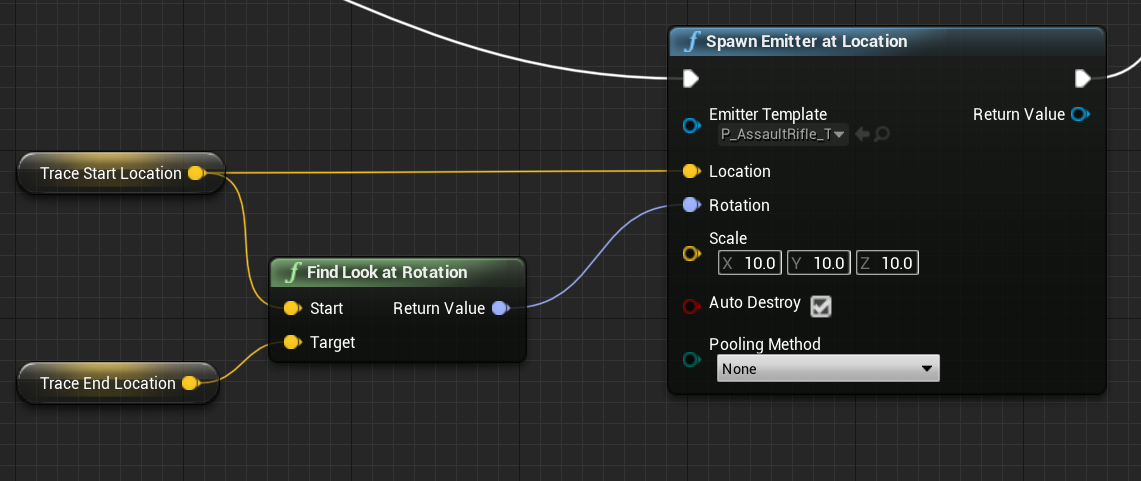 meager spade
@cedar finch where did you get that trail from
gleaming niche
you need to set the end point
which for that particle is "beamend" IIRC
it doesn't use rotation. it uses a particle vector paramater.
it might be "shockbeamend" for that matter, i forget.
opening one of my test projects to check.
shockbeamend
meager spade
@cedar finch you need to set the end point
gleaming niche
            if (Particle)
            {
                auto Scale = FMath::RandRange(Hitscan_TrailScale.X, Hitscan_TrailScale.Y);
                Particle->SetWorldScale3D(FVector(Scale, Scale, Scale));
                Particle->SetVectorParameter(Hitscan_TrailTargetParam, EndPoint);
}```^
gleaming niche
i really need to finish my plugin and release it.
would be so useful for so many people.
(i separated the vehicle stuff into a sub-plugin though)
i also have some engine changes i need to attempt to make a PR for, that implements al lthe missing physx stuff, that engines like Unity have.
(begin/end collision(touch), etc)
and actual friction events
so you can do like scraping. like when a sword slides along a surface, it scratches with proper friction.
zz nite.
cedar finch
Thank you guys! Works perfect now! 🙂
 high lotus
not sure if this is the correct channel, but I'm trying to make an achievement in steam based on lifetime account # of kills - has anybody done this with blueprints?
 gleaming vector
I built something similar to your inventory system @gleaming niche
i'm a bit swamped with client work, but eventually I'm going to put it on the marketpalce
maybe we can share notes
also, i do not recommend expanding the physx vehicle system, chaos vehicles are in 4.26
at this point it's probably best to just wait
because the underlying chaos vehicle sim is extendable
 rain sandal
excited for 4.26 chaos updates 😉
 vital steeple
are the chaos vehicles supposed to replicate and have network interp?
i know chaos has some replication goals for it in the roadmap
also the roadmap is confusing. it sounds like chaos will be done in 4.26 but ive also heard its one of the things theyre going to release in ue5
winged badger
its unlikely chaos will be done for another year at least
 queen flower
Anyone have the a link to a video or a breakdown explaining the multiplayer changes that came with 4.25? I had it working between 2 different IP addresses and now it's broken. Can't get the setting right. Used to only use dedicated server checkbox, but that is gone now.
Local split screen works. Client one hosts, client 2 sees the game and can join it. just don't know what I need so me and a friend can play the same game together. What settings do I need for him to see my hosted game?
 random verge
When an object has a replicated array of structs, does the entire array replicate each time a value of one of its elements is updated or is just the updated element(s) replicated?
bitter oriole
Only updated elements
random verge
oh thats awesome. thank you 🙂
random verge
ah that's even better if so
 versed bear
On a listen server, anyone know why in GameMode::PostLogin() my PlayerController->GetPawn() is null for the host but not for the client?
winged badger
on any server, unless you delay beginplay or custom spawn the controller deferred
well, for PostLogin even that doesn't matter
you can't have a Pawn at PostLogin, unless you overrode half the GameMode
client or server
after PostLogin, few native functions are called, then HandleStartingNewPlayer, which spawns default pawns by default
PostLogin also doesn't happen on clients, its a function on GameMode
versed bear
I know PostLogin doesn't happen on clients, but when a client logs in GetPawn works inside PostLogin, but when it's the host logging in GetPawn() is null
winged badger
on servers, PCs get instantiated, then call BeginPlay, then Posses a Pawn, so they don't have a Pawn on BeginPlay
on clients, the replicated Pawn reference gets set and OnRep called before BeginPlay, so they do
versed bear
ok, so I guess PostLogin isn't the best place for what I'm trying to do. I'll try moving my logic somewhere else, thanks
winged badger
HandleStartingNewPlayer is where GM by default calls RestartPlayer, which spawns the DefaultPawn
its also the best place to override any logic that has to do with start of the game and Pawns
if you don't call Parent/Super then you have to spawn the PlayerPawn manually
versed bear
oh nice, thanks for the suggestion, I'll look into it
winged badger
its also called from both PostLotin and HandleSeamlessTravelPlayer
so it works in both scenarios
gritty pelican
if the pawn is controlled by a player, then the owner will be the player. And if the pawn is not controlled by the player, will the owner be the server?
winged badger
the owner will be null, unless its explicitly set
gritty pelican
@winged badger why then for an uncontrolled pawn the function "IsLocallyControlled" returns the true?
on server side
chrome bay
It doesn't unless it has a controller
It probably has an AI controller if it's true and a player isn't controlling it.
winged badger
bool USolsticeObjectLibrary::IsLocallyControlled(AActor* ActorToQuery)
{
    if (!ActorToQuery)
    {
        return false;
    }

    AActor* TopOwner;

    for (TopOwner = ActorToQuery; TopOwner->GetOwner(); TopOwner = TopOwner->GetOwner())
    {

    }

    APlayerController* Controller = Cast<APlayerController>(TopOwner);
    return Controller && Controller->IsLocalPlayerController();
}
my answer to IsLocallyControlled question
static function, can just shove any Actor, or GetOwner() of any ActorComponent into it
gleaming niche
Anyone have the a link to a video or a breakdown explaining the multiplayer changes that came with 4.25? I had it working between 2 different IP addresses and now it's broken. Can't get the setting right. Used to only use dedicated server checkbox, but that is gone now.
@queen flower i had to revert one of the changes for me with my engine build, because it would never pass the URL options in editor.
well, without actually running standalone or whatever, i forget now. it caused great agony.
anotehr stupid change.
that was clearly not tested properly.
 wicked brook
@shut loom yes
thin stratus
@wicked brook Was a fleet just the servers with a specific build?
Iirc a DedicatedServer on GameLift gets an Init Call or so, in which it can prepare before allowing users to play.
If that Call contains info about the GameMode, you could start the map with the given GameMode (dynamically) and thus stick with one "fleet".
But it's been a while since I used GameLift.
I know that I couldn't do that with PlayFab, because PlayFab had no info when it got the allocate call, something like that at least.
wicked brook
well you really only need separate fleets if the game modes are for different maps.
if the map is the same then one fleet should be fine
in mine we have different maps so we had to use a fleet for each map
I have not tried it like that though
thin stratus
But why
Like, you can always do open <MapName>?game=<gamemode>
As long as your map supports the GameMode, that should work just fine.
 prisma vortex
any ideas on how to make nameable multiplayer servers? I have code to make a server but want people to be able to name it, similar to how wolfquest is as well as password protect it 👉 👈 After having named it I want to make a list of servers so people can join them if they know the password 😬
 regal storm
Am I correct in thinking that variables controlling animation / movement should be replicated inside the character blueprint, but NOT inside the animation blueprint? I've got movement speed changes happening over the network, but for whatever reason those same variables driving the animation don't seem to work 😦
Except for Jump, that works fine, but the client has a lot of jitter when jumping (when viewed from the server's perspective)
 kindred widget
@regal storm Animation should not be replicated. Animation should have absolutely NOTHING to do with the server. Each machine should handle any animation for the actors on it, even if they are replicated to the machine. The animation blueprint should be able to get variables without any network use. Your actors themselves should be doing the network stuff and the Animblueprint should just be getting variables and setting animations based on those variables.
In theory, this ends up with all players seeing exactly the same thing, since all clients get all the variables the same way which leads to the animblueprint doing nearly the exact same thing.
regal storm
Thank you! Yeah so right now the client can see the server perform everything, and everyone can see themselves perform everything, but clients can't see other clients animations. Must be missing something somewhere (note to self: Replicate from day 1, not after a system is built)
All of the variables used to trigger/impact animations are replicated in the Character BP, and the Anim BP pulls those and sets them locally to a separate duplicate set of variables for easier access throughout the Anim BP.
I guess I need to filter through everything I've done and check if there is one variable holding this all up
kindred widget
Typically most of this should be state based replication as far as I understand. So your clients should be Server RPCing to your server, setting that variable on the server version of that actor, and then that server version would replicated it back to everyone.
Crouch for example. One single RPC with a boolean input. Button pressed send rpc with true, button released, send RPC with false. Server gets RPC, sets that variable locally(on the server). Server replication happens, sends that variable back to all clients. Anim blueprint pulls the variable from the character and changes it's state based on that.
regal storm
From my understanding the Crouch / Uncrouch approach is already replicated in CharacterMovement?
kindred widget
Can be. It's just an example.
regal storm
Ahh, okay 🙂
I can't see anything totally wrong here, but perhaps there is
(Ignore the Branch issue in Crouch/Uncrouch)
kindred widget
The movement controls are a bit confusing. How come the server and clients aren't being called the same way?
regal storm
Ahh, hmm - I'm not sure what you mean? The client runs the event on the server when setting the variables, is that not correct?
kindred widget
Pretty much all of that should just be the local machine calling Add Movement Input. It's replicated automatically in character. So All clients will see all clients move.
regal storm
Ahh, yeah so the client does call the Add Movement Input, but the InputX/InputZ and Direction are being used in the Animation Blueprint, so my thought was they needed to be set by the server?
I guess the server runs it as well with my current setup, but I could change that so only the client runs Add Movement Input
kindred widget
You can get that kind of stuff in other ways besides extra rpcs. For example, most movement can be based on control rotation, or character facing mixed with character velocity.
regal storm
Ahh, so I should get that information in the Animation BP through other ways? Instead of keeping the replicated variable?
Would that not arrive at the same result either way?
Ahh, hmm a quick test just getting velocity did fix the issue. Means I'll have to rethink how I calculate a few things but that helps. Thank you!
kindred widget
It would, just that pretty much all information that you need for that stuff is already replicated and available.
 tranquil thunder
Using steams 480 app Id, how many players can you connect? I've been seeing 4, but we cant get past 2 for whatever reason
queen flower
Anyone know what play or multiplayer settings I need to have so a client can see my hosted game? LAN works, but non-LAN clients fail to see my hosted game.
I've tried variations of Open Level with Listen option, and Run as Client, and Run as Listen Server. No luck.
bitter oriole
Which online subsystem are you using ?
queen flower
Not sure what a subsystem is, but I've enabled advanced sessions plugin. I have the steam plug in but its disabled
bitter oriole
@queen flower You need a real (like, Steam) OSS to have online matchmaking.
Platforms don't perform the service for free
Steam and EGS are the only two doing it for "free" on PC AFAIK
Though EGS doesn't have a nice official plugin yet
GOG does, but you need your game on GOG first
queen flower
ok @bitter oriole so i should enable steam and try again? with what settings on the hosts end? what settings on the clients end?
and just for clarity, is standalone required for this to work?
queen flower
queen flower
I got the defaultengine.ini text added, and the steam popup in the bottom right is not appearing in standalone
ive enabled the plugin
I am logged into steam
I have restarted the project.
I followed this guys video:
https://youtu.be/XlqHG1egnn0

UE4 / Unreal Engine 4 Multiplayer Playlist:
In this collection of videos, we will cover setting up a project for both local and networked multiplayer projects.
This Video:
In this video, we get the project ready for all of our networked gameplay by adding the Steam Subsystem ...
Basically tells me where to put the steam default engine text and where to get the advanced sessions plugin
The video shows it working
 lament cloak
So I understand SteamNetDriver blocks direct IP connections. Is there a way to allow it to do both direct IP and Steam ID connections?
Use case is, we have dedicated servers that will start up from our fleet, we don't need to register them to a master server, because clients will be told which server to connect to. We could use IPNetDriver and that fixes that problem. But we also use Listen servers, having the NAT traversal built in with the SteamNetDriver makes things really nice for people wanting to host Listen servers.
 frozen brook
Hello guys
Pls how do I go about fixing jittering of client
On the clients screen, the player jitters but on the server it does not
meager spade
make sure Skeletal mesh is not set to replicated @frozen brook, ensure max walk speed is the same on client and server
 short burrow
I got through following this on youtube {Blueprint Multiplayer: | v4.11 Tutorial Series | Unreal Engine} but have two problems 1: able to join more them max players if joining several at close timing. 2: My Game settings no longer functions when it use to. Any ideas on ether problem?
short burrow
Solved problem # 2 my player save was Not getting set.
kindred widget
@frozen brook If you mean the client's own player character jitters on their own screen, but their character doesn't jitter on the server's screen, it's usually an issue with the client trying to move their character too much. In short, the client thinks it's slower or faster than the server thinks it is, or the client is making extra move calls on it's own character and the server is resetting it.
 timid moss
Does anyone know if theres some callback telling the server that the current actor just got replicated to the client?
 karmic briar
hey guys i have some questions.whats stuff should be add in the replication graph?what stuff that required to add?any examples?
chrome bay
ShooterGame has a full example of using rep graph
karmic briar
yeah i read the code of shootergame and i thought only the players and the projectiles they added..my quetsion like what's the general thing that should be add into the graph?i know this is different between games but im really clueless
what do you ususally add in repgraph for your game jambax?
🤔
chrome bay
tbh it's a pretty long topic, I followed a similar pattern to shootergame. It's not too difficult to make sense of once you've followed it through.
karmic briar
sorry if this a noob question im new to repgraph coding
any like example you can give
😅
chrome bay
Can't get more of an example than a working version 😄
karmic briar
hmmm can i know like my project is an rpg maybe examples you can think of on that ?
🤔
like what i can think of is things liek the players,world chest(like the one in fortnite),arrows projectile
pretty much actor that need to be network optimize
chrome bay
Well ShooterGame has all those things near enough, you just need to decide how each class should replicate and who too
Generally speaking InitGlobalActorClassSettings() is where you sort classes into a special TMap, that map links classes to an enum which determines it's "replication policy"
karmic briar
🤔
chrome bay
Then you override RouteAddNetworkActorToNodes(), figure out what replication policy the actor uses (based on it's class), and add it to the appropriate node(s)
karmic briar
is InitGlobalActorClassSettings() in the original repgraph.h file?
wanna see that code comment
i think i didnt use that fucntion
chrome bay
virtual void InitGlobalActorClassSettings();```How you setup that data is up to you though, the base rep graph is pretty barebones by design
karmic briar
ouh...okay yeah i definitely need to override that
😅
that fucntion is getting called before the actor get route to this right RouteAddNetworkActorToNodes(),
chrome bay
It get's called once when the rep graph is initialized
frozen brook
@meager spade it's working now...thanks man
karmic briar
ahhh okay
meager spade
what was the issue @frozen brook ?
karmic briar
imma redo the code a bit..thanks and imma re read the shootergame repgraph again
frozen brook
Jittering of client
meager spade
yes but what fixed it?
chrome bay
Yeah, go through it step-by-step. It's actually pretty simple once you get the idea
You lose per-actor relevancy etc. settings but it's worth it if you have huge actor counts or lots of connections
frozen brook
You said I should not replicate the mesh @meager spade
chrome bay
If you only have like a few players and a "normal" amount of actors, it's probably not worth it.
meager spade
yeah people click Replicate on the mesh cause they think they have too, but it breaks things
karmic briar
yeah my game is kinda depends on high player count thats why i need the repgraph to be optimize..
chrome bay
Bear in mind all rep graph does is (potentially) reduce server CPU overhead. Doesn't save any bandwidth or anything.
frozen brook
@meager spade at first I taught it was because I have a lot of things running through the server
Pls does anyone know anything about auto join team in team death match?
gusty raptor
Question about seamless travel: When i join a session (to lobby) the map reloads, as its the first time. anyone knows how to not reload the map?
 twin juniper
When you have steam dedicated server up and running how how do you change the name of it?
chrome bay
Just update the Host Settings you created it with
E.g.
HostSettings->Set(SETTING_DCID, m_serverName, EOnlineDataAdvertisementType::ViaOnlineService);
Then you want to get the active session, and call "UpdateSession" on it with those new settings
twin juniper
Ok thank you
chrome bay
Something like this:
    if( OnlineSub )
    {
        IOnlineSessionPtr Sessions = OnlineSub->GetSessionInterface();
        if( Sessions.IsValid() )
        {
            if( HostSettings.IsValid() )
            {
                if( FNamedOnlineSession* NamedSession = Sessions->GetNamedSession( GameSessionName ) )
                {
                    if( NamedSession->SessionInfo.IsValid() )
                    {
                        Sessions->UpdateSession( GameSessionName, *HostSettings );
                    }
                }
}```copy-pasta but you get the idea
 solar ivy
does game state object exist on client before its replicated? what's the best way to check game state has been replicated? i do it like this: in game mode OnPostLogin i call RPC on my player controller to tell client the login was successful. after receiving RPC on client i start checking on tick in my client's player controller if all important objects got replicated (game state and player state for now). i added game state replicated property on the controller and set it on server and wait for it to be replicated before executing further logic. is this a good way?
chrome bay
To answer the first Q: It doesn't exist until it's replicated
What I like to do is put a static delegate/event in my game state class, and broadcast it in the gamestates BeginPlay() function
{
    if (GetGameState())
    {
        DoSetup();
    }
    else
    {
        AMyGameState::OnAvailable.AddUObject(this, &DoSetup);
    }
}

void ASomeActor::DoSetup()
{

}```That sort of thing
Or alternatively just have a central "online events" class with a bunch of delegates instead of having them in specific classes
That can be quite handy
meager spade
or do it even hackier, and do a timer loop 😄
meager spade
you don't have much choice if you ONLY use BP
solar ivy
@chrome bay thanks, i'll explore in that way
regal storm
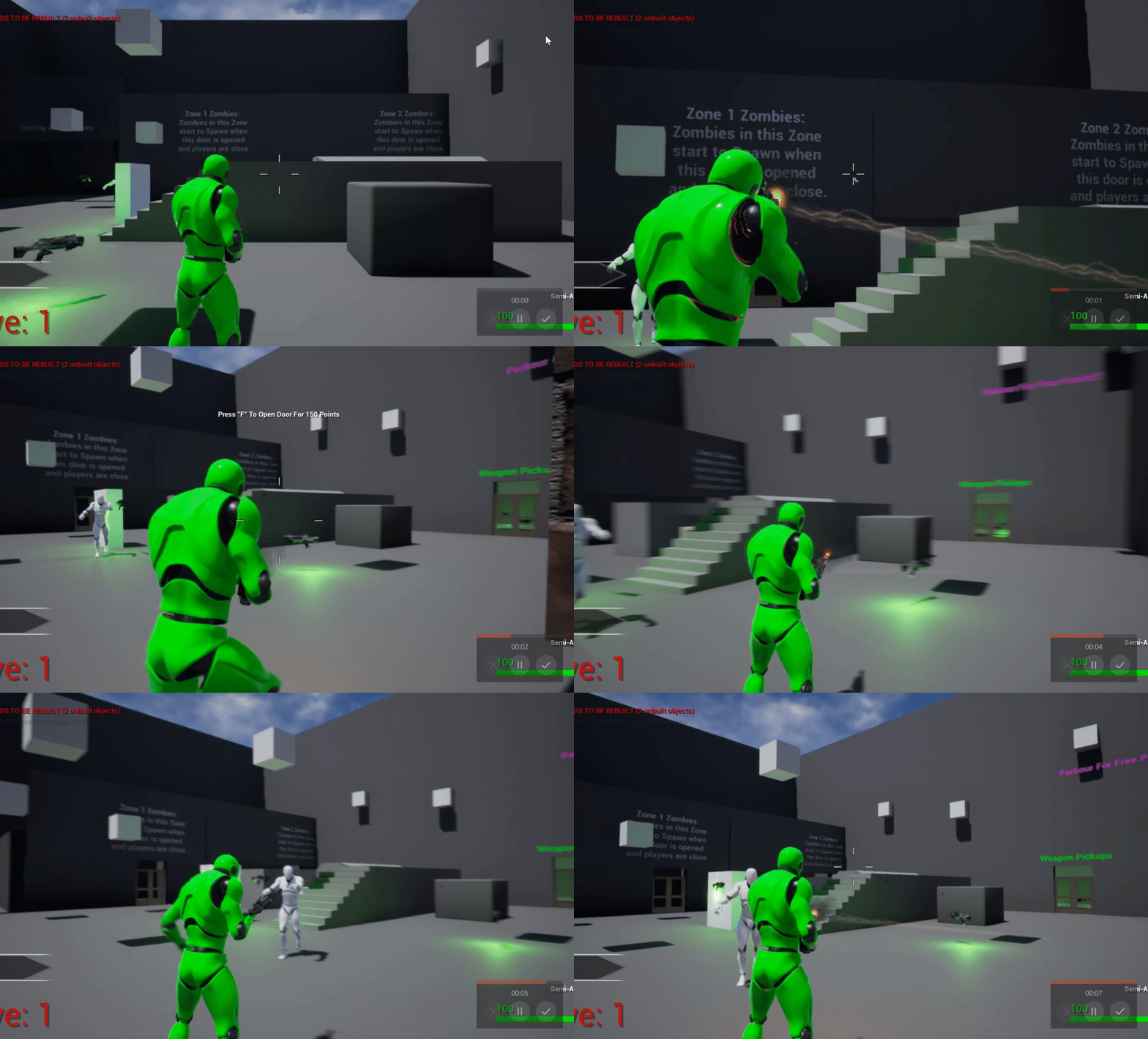
Hey all, wondering why everything here works except for the client can't see the changes to the server. The server and client can see their own changes, and the server can see the client change, but the client can't see the server change. Find it hard to explain these replication issues :D
(For reference: This is to sync up the control rotations which is used in my anim BP for head bone rotation)
meager spade
you don't need to do that tho
all that stuff is already available client and server
regal storm
That's what I thought, but then this in my anim BP doesn't work?


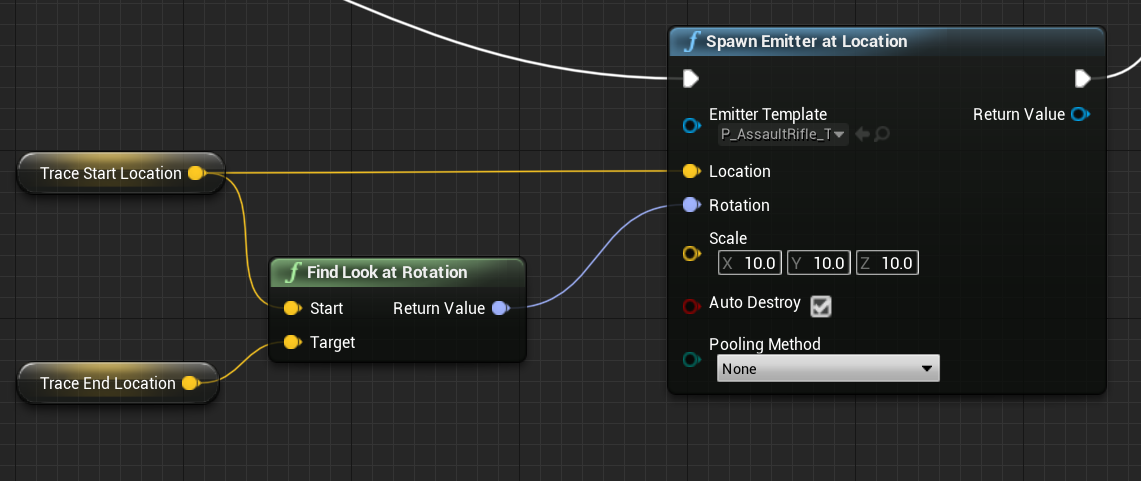
 regal storm
Ouch, that was a lot of hours wasted :D
Thank you, that works perfectly!
 potent rain
What udemy c++ course do you recommend on multiplayer?
I have one that is taught by Ben tristem and Sam pattuzzi but it seems as if it won't actually give me enough to understand and start doing multiplayer in unreal
What do you think?
kindred widget
I think that a lot of courses are a bit of a waste. But then I'm not really academic. Multiplayer for me was really easy once I understood the difference between an RPC and Replication, and learned the basic network system and how certain native actor types interact with each other. It's just a bit of reading. If you understand how to develop single player mechanics and systems, multiplayer is very easy to understand once you start grasping those three things.
meager spade
You also have to deal with things like Race Conditions
and stuff not being ready until its replicated
waxen socket
Speaking of racing... It would appear that getting the owner or controller of my pawn on the client's BeginPlay returns null. Is hacking this in with a delay node the best way to get that controller?
 chrome pulsar
@here is there a way for clients to get their own ping without using PlayerState's Ping property?
meager spade
@waxen socket that is hacky
i do it in OnRep_Controller (in C++)
but BP land doesn't have that luxuary
waxen socket
I see, yeah. Maybe I'll have to do it in C++ then.
meager spade
you can just do a timer hacker
 cloud oriole
Hi! I'm trying to get movement input replication working.
It's very laggy, I'm fairly certain that I'm doing something very wrong with how I'm making it
I play the game with these settings:
The server owner doesn't have any lag, but stuttering and noticable slowness is on every other client
I've looked on forums, but there seems to be no step-by-step way to fix this, only vague answers/suggestions
my setup for moving forward^
If you have any advice, please ping me! 🙂
bitter oriole
@cloud oriole Is the Pawn a Character ?
cloud oriole
Yes
bitter oriole
AFAIK you don't need to RPC the movement input then
It should handle it internally
twin sable
can tmaps be replicated yet?
UPROPERTY(ReplicatedUsing = OnRep_Resources)
    TMap<EResource, int> Resources;
 oak pond
hey Im wondering, is it even possible to perfectly replicate physics objects and ragdolls in unreal multiplayer? I know source engine does this flawlessly but I have no idea how to do it in unreal. have any unreal games achieved it?
oak pond
well from what Ive seen around the internet, its not really possible. anyone know if its any different for unreal 5?
itd be amazing if ue5 is more powerful for things like this
cus seriously how can an engine thats about 20 years old outdo unreal so much in terms of multiplayer physics
quite disappointing tbh
bitter oriole
@twin sable No
@oak pond No
And the reason Source outdoes UE is that Source uses Havok, and UE uses the faster but non-deterministic PhysX
bitter oriole
UE's Chaos may improve things in the coming years
oak pond
yeah Im looking forward to seeing how chaos is
I cant find anything about it thats not just to do with the destruction stuff, but I assume its used for everything right? do we know much about it?
bitter oriole
It's a work-in-progress physics engine by Epic with a focus on multiplayer and destruction
oak pond
oh thats good to hear
honestly thatll be a really good feature of the engine to have proper networked physics
oak pond
when it releasing again?
hoary lark
they're claiming it's both done and not done for 4.26 
cloud oriole
Hey, Stranger's advice worked! Thanks!
But now I have a new problem
I package my project, send it to some friends, but we cannot connect, even with the logmein hamachi program
 gilded vapor
Just wondering if anyone has any experience using Steams's test server (480), I was testing with a friend, (PA to NY) seemed a but laggy at times
Just wondering if that's related to the test server or his/mine internet connection
or if the test server is laggy
meager spade
test server?
that is just a p2p tunnel
if its listen server, it would be your connections
cedar finch
@gilded vapor I used to use it to test my game before I got my own App ID. I'm in the U.S.A and played with people from the UK and the Netherlands and we were fine. But on the other hand I played with a friend of mine who lives a mile down the street and we lagged like crazy. So I'd guess maybe it's just internet speeds.
gilded vapor
@meager spade thanks so its prolly just our crap internet. (It would go inbetween being perfect and jank, and I was testing on a no-ethernet laptop)
cedar finch
Yea that's probably the problem lol.
gilded vapor
@cedar finch Did getting your own AppID have any effect on performance?
cedar finch
I have no proof but it feels good me lol. I notice I can find my friends games quicker where as before I would sometimes not find their games or would have random peoples servers in my list for some reason lol.
I know it makes testing a dream come true. I don't have to reupload the entire project every time I want to test. Instead my friends only have to do 5mb update here 100mb update there. It only updates what you change. It's worth it if you do a lot of testing with friends
Especially if your friends are computer challenged and just want to play a game hahahahaha
gilded vapor
Oh cool, so you would say its worth getting a store page at least for testing purposes?
cedar finch
You don't even have to setup a store page lol. I've had my app id for about a year and have yet to setup the store page
gilded vapor
My friends didn't understand clicking the 'x' on the steam-page doesn't actually close the program
Oh awesome
Maybe a dumb question. how do you go about getting an AppId? I just did a quick google search without much luck
cedar finch
Oh you go to Steamworks website. Once you buy one it is a little weird to navigate and learn but they have tutorial videos and I just wrote down the steps to push updates so It's really easy for me to test. For example sometimes I forget to place playerstarts on my levels because I delete them while testing. So before I'd upload my game, go to test with friends and not spawn. Then I'd have to open up UE4 add the player starts, package, reupload my project, then wait for them to download, then test. It was a pain. Now I can just push a small 2mb update and they'll have playerstarts lol.
hoary lark
you start here https://partner.steamgames.com/
gilded vapor
Awesome thankyou so much
gilded vapor
bahaha
Named after the famous steam that runs through its historic Gastown brewpub and Burnaby Brewery. Steamworks proudly brews, distinct, delicious and award-winning craft beers.
gilded vapor
Thankyou for your help again you guys have all been greatttttt
hoary lark
gabe: "i want to buy your domain how much?" steamworks: "$1,000,000" gabe: "what no that's like an entire day's income"
cedar finch
Hahahahaha
 real wind
Is there something special I have to do in a mutiplayer context when initializing an object?
AALSCharacter::AALSCharacter(const FObjectInitializer &ObjectInitializer)
    : Super(ObjectInitializer)
{
    HeldObjectRoot = CreateDefaultSubobject<USceneComponent>(TEXT("HeldObjectRoot"));
    HeldObjectRoot->SetupAttachment(GetMesh());

    SkeletalMesh = CreateDefaultSubobject<USkeletalMeshComponent>(TEXT("SkeletalMesh"));
    SkeletalMesh->SetupAttachment(HeldObjectRoot);

    StaticMesh = CreateDefaultSubobject<UStaticMeshComponent>(TEXT("StaticMesh"));
    StaticMesh->SetupAttachment(HeldObjectRoot);

    AIControllerClass = AALSAIController::StaticClass();
}
This constructor appears to run on both client and server (I can make it produce logs) but then all of the class properties (HeldObjectRoot, SkeletealMesh, StaticMesh) are null and cause null pointer exceptions.
 fervent spoke
i'm trying to test multiplayer, and right now i'm having an issue where players who aren't the host (or all players in the case of dedicated server) can't move. they can turn their camera like normal clientside but it's not replicating.
i didn't make a custom controller, idk if that's necessary
fervent spoke
not having this problem in a fresh project
fervent spoke
more info: clients can still fire their gun and it will replicate, but their camera movements don't affect where the server thinks the gun is aiming
so specifically the clients can't move and their camera movements aren't being acknowledged by the server
winged badger
CMC usually handles the movement out of the box @fervent spoke
As long as you try to move via AddMovementInput in Pawn
Also PlayerControllers call ServerIpdateCamera function frequently
And where server thinks your Camera is is also the point from which it calculates distance based relevancy
You can get the updates camera position on server via GetPlayerViewPoint on the PC
You are also very likely get a warning in you output log with more details when something hoes wrong
fervent spoke
LogProperty:Warning: Native NetSerialize StructProperty /Script/Engine.CharacterMovementComponent:ServerMove.InAccel (ScriptStruct /Script/Engine.Vector_NetQuantize10) failed.
winged badger
that is odd
fervent spoke
i figured it out
winged badger
Like your Camera is null on that BP
fervent spoke
the values i used were too high
in the character movement component
for accel
i wanted instant accel so i just used a very large number
and it was apparently too large
lol
my camera rotations aren't replicating still though
but i can move
winged badger
You usually get net serialization vector warnings when you send a compressed vector with something like mouse projected to world while mouse is off screen
You dont need them to move
As long as that screen you posted happens client side
fervent spoke
the character model should rotate when the camera is turned
winged badger
Ah, that
Use GetPlayerViewPoint on server
To get camera forward
Then make rot from x if you have 3d rotation or from zx if its 2d
With camera forward being x and 0 0 1 going into z
fervent spoke
is this something i can't do in BPs
fervent spoke
even without the context checkbox ticked i don't see it
winged badger
You can manually replicate rotations as well
I am not 100% on the name tho
Bp functions can have different names then c++
You do need to pull it from GetController Cast to PlayerController ref tho
You mentioned you dont have custom PC and GetController returns a Controller not PC
fervent spoke
winged badger
Dont think thats it, and im on mobile not near a pc so cant check
Alternative is to send an unreliable server RPC to update rotation
fervent spoke
i'm not clear what you're telling me to do even if i had the node
winged badger
On tick or when it changes
And have a replicated rotator variable with skipowner, which sets the rotation onrep
With the node youd have the clirnt camera forward vector
And you can work out the rotation ftom there
fervent spoke
to do what though
winged badger
Set pawns rotation
fervent spoke
i already have the camera forward vector
and things rotating with the camera
it's jsut client side
for example if i use a listen server, the host's camera movements can be seen by the other clients
fervent spoke
yeah
winged badger
Only way for client to send data to server is a server RPC
In case of camera position and direction, engine already foes it under the hood
Im just not sure how exposed it is, was pretty sure that it is until now
fervent spoke
so were you saying to set a rotator variable to RepNotify, get the camera's rot, and then with the onRep change the camera angle to match this variable?
winged badger
Where other clients think your camera is is usually not important, as long as pawns rotation is correct
But yes
fervent spoke
well the server doesn't know where i'm aiming
winged badger
And i cant stress this enough - SkipOwner
winged badger
It the server starts correcting owning client on non predicted movement, youll end up with horrible jitter
fervent spoke
yeah
winged badger
If you havent already
There is a link to network compendium in pinned messages on this channel
Strongly tecommend giving that a read
fervent spoke
ite
how does the server tell the clients which character they should be rotating
e.g. client 1 rotates, the server gets told what its rotation is.. how does the server tell client 2 that it should be rotating character 1
fervent spoke
o nvm i got it
think i'm being dumb because it's 4:30am should go to sleep
thanks for the help @winged badger
winged badger
each client + server have their own instance of Character1
Unreal doesn't replicate pointers, as memory address would have no meaning, but rather each Actor is assigned a NetGUID
and each Actor that replicates has its own ActorChannel over which it replicates
meager spade
@winged badger GetPlayerViewPoint is not exposed, i did make PR for it to be exposed but they haven't even looked at it lol
winged badger
that figures
winged badger
kinda? its outright sloppy
frozen brook
Hello guys
How do I implement friendly fire
Like disable friendly fire in team deathmatch
bitter oriole
Just check the team of the weapon's owner on hit
meager spade
i made a filter struct
which checks lots of things (like can damage buildings, can damage AI, can damage friendly ai, etc)
and i run the hitresult through that and it spits out if it can apply damage
gusty raptor
Hi, so im trying to replicate my actors with skeletal mesh just using ReplicateMovement. it seems client is laggy updated from server, while characters aint.. any idea?
bitter oriole
"Replicate movement" is really "replicate transform", does not handle movement
meager spade
yeah there is no smoothing its just, actor is here, now here, now here etc
so it will be horrible
gilded vapor
I have an GameplayAbility that stuns the target. The ability itself (the attack that stuns) is locally predicted, the resulting stun effect however is set to server-initiated.
Is it okay to have the stun local-predicted?
I've read that its awkward to local-predict damage/stunning, does anyone have any experience if this is true?
I imagine that it would improve game smoothness when it predicts correctly (though it would look worse when predicts incorrectly)
meager spade
stun should only happen once the server confirms that stun can be applied
else player could get stunned in a fight for no reason
and that would be horrible
gleaming niche
he means predicting the stun of the other person, locally.
so you hit someone, and stun them, but you see them stunned before they actually are, assuming the server will accept it, so if you have 300 ping, there's no visual delay
and my take on that, sometimes it's okay. but in previous games I worked on many years ago, we had stuff like that, including playing the blood on the client side traces
and it ends up pissing people off, because they are sure their shots are hitting
when they really aren't
so we changed it so blood and stuff is dispatched from the confirmed damage, later, even with the ping delay, and everyone was happy
it's a balancing act really
non-consequential things are nice to predict, because it makes it smoother, but some things cause more confusion
gilded vapor
My current issue is that I have a guard ability that plays a specific block animation (based on the hitresult) and having any delay between the two is super awkward. (In really latent situations the player could stop guarding but than jump to the successful-block animation)
So I think that may cause more confusion in really latent situations?
meager spade
i know what he was on about
and i stated, stun should only be authorized by the server
gleaming niche
it didn't sound like it "else player could get stunned in a fight for no reason"
meager spade
especially if it stops the player being able to move/attack
gleaming niche
it sounded like you meant you could stun someone else
or be stunned, when you shouldn't
which is not even the case at all
gilded vapor
A successful block effectively stuns your character for about a quarter of a second
meager spade
yes, if it was predicted, player could be stunned when they were not actually stunned
gleaming niche
it's you hitting someone else, and locally making the OTHER player look like they are stunned
even if the message hasn't come through yet from the confirm
so it is "smooth"
not predicting yourself being stunned from someone else maybe hitting you
that make no sense
becuase if you're able to receive an event that would cause you to predict yourself being stunned by someone else
you would be receiving the confirm from the server
so therefore you should actually be stunned
ah okay
i missed that one line there
you're saying
when YOU block someone else
YOU get stunned?
i thought you were talking about hitting someone else, and stunning them
my bad.
gilded vapor
If you block an attack you get stunned, though ideally it should be smooth both ways
Maybe in magical fairly tail land I can predict the block on other targets, and have it server initiated on my own
gleaming niche
in my other game that is down now, we had that with knives
you can block
and we did predict that actually
meager spade
i just have a rule of thumb, anything that can alter gameplay and can cause confusion, should not be predicted. Like when i fire a weapon in my game, i show the muzzle fx, and the trail, all locally, but the actual hit confirmation (hit marker, impact, blood, etc) only happens on server confirmation (non predicted)
gleaming niche
however, it's different engine.
gilded vapor
woot woot GAS
meager spade
but i only have basic stun, ie stun grenades, that kinda thing
not blocking stun from melee attacks
gleaming niche
oh wait, no i am wrong. we didn't stun the person who bocks.
we stunned the person attacking
gilded vapor
Yeah I'm gonna test the local-prediction and see if its better/worse, its a little bit awkward to see a sword go through your character and than get staggered .2 seconds later
gleaming niche
if they hit a blocking player, THEY are stunned, not the player who blocks
gilded vapor
If you hit a blocking player the blocking player is stunned
gleaming niche
yeah you're doing the opposite.
gilded vapor
(though there will be deflects, so if you get deflected you get stunned)
So i actually need to handle both cases
gleaming niche
ours was more like.. for honor
if you block, you aren't stunned, you can counter.
the person hitting your knife is the one who gets stunned, because they were blocked, giving the defender the option to counter-attack.
gilded vapor
Our block is like in Sekiro where if you have a succesful block against a heavy attack you have a small "block animation" that prevents movement/abilities
If you deflect its the same jist where you get to counter-attack
gleaming niche
well either way i refer back to what i said before about it being a balancing act, i'd almost say just test it a lot, with various pings
determine how often it actually fails
if it seems too flakey to predict, then don't
if it ends up being reliable, go for it
you may still get the random case where it does fail, but if it's within an acceptable threshold
and if it only happens after like 1000 ping, then that's acceptable too
or hell even >500
meager spade
yeah i test with 300 ping
gleaming niche
action games are not really playable without prediction anything over 300 usualyl
meager spade
its like a good testing ground
gleaming niche
and anyone expecting them to be smooth is delusional 😉
gilded vapor
Would either of you know the average ping on a p2p system?
meager spade
depends on the host, and the distance from host to players
NAE to EU would be around 70-130 ping
for example
on a good connection
gleaming niche
that's kind of hard to judge. best is to just shoot for something reasonable that everyone knows
as a baseline.
like the 300
meager spade
300 is what i get playing with australians
gleaming niche
as your top end of "it will never be smooth after this, no matter what"
something kind of funny, with counter-strike
in the early betas, i think all the way up to 1.6 for that matter
everyones ping was artificially modified on the scoreboard
-10 or something
gilded vapor
Lol for what reason
gleaming niche
cuz people wre bitching about it, and so minh was annoyed, so he just artificially reduced it and said "optimized blah blah"
and everyone believed it
noone complained again
gilded vapor
That's amazing
gleaming niche
i did something similiar in another half-life mod at the time, with damage lol.
waxen socket
Good morning. Should pawns always be spawned on the server?
waxen socket
Thanks, Jambax. And in that case, the server owns the pawn?
waxen socket
Once it's possessed, who owns it?
chrome bay
By default the player possessing it IIRC
Since possession explicitly sets the owner to that controller
waxen socket
So then a RunOnOwningClient RPC would run on... the server?
chrome bay
It would run on the client who is the owner of that pawn
If a client doesn't own it, it would run on the Server.
waxen socket
So...
Spawn a controller on a client.
Spawn a pawn on the server
Possess the pawn.
Pawn RoOC now runs on the client?
chrome bay
You wouldn't spawn a controller on the client
waxen socket
Oh.
chrome bay
anything relevant to the network is spawned server-side - always.
If you spawn that on a client, it only exists on that client and nothing else will know about it
waxen socket
I see, but player controllers are at least owned by the client using them.
chrome bay
They're owned by them yeah, but the server is still the one who spawns them and has authority.
Ownership != Authority
They're two different concepts
waxen socket
Okay, I think that has confused me till now.
chrome bay
A connection has authority over an actor when:
- The actor was spawned on that connection.
- The actor has been "torn off" by the Server.
Ownership is explicitly set with SetOwner() (Server-Side). That determines who has permission to call Server RPC's on that actor, and who will receive client RPC's for it.
waxen socket
I see.
chrome bay
I expect that if you call a Server/Client RPC on an actor that you spawned client-side, it will probably execute on that client - but it's not a usual code path so I'm not sure.
waxen socket
And do you have similar feelings about RoOC as you do about Multicast?
chrome bay
Client funcs are okay, usually they're pretty specific
Multicast is okay btw 😄
But for states or very frequently repeating effects, I prefer vars
waxen socket
You've taught me to hate them.
waxen socket
Everyone else tells me to use them but I follow the way of Jambax.
chrome bay
Like say, a chat message. You wouldn't want to replicate a TArray of chat messages, so sending them via reliable multicast would make more sense.
waxen socket
So here in the eXi bible, it says "Un-possessing it will result in the Client no longer owning the Pawn."
So on unpossess, the server becomes the owner of the pawn again?
chrome bay
I actually think they don't have an owner once unpossessed
waxen socket
Oh. That's so sad.
chrome bay
So by default, nothing has an owner unless you spawn it with one.
chrome bay
But Possess/Unpossess makes calls to SetOwner() to explicitly set the owner to the controller
Or clear it in the case of unpossessing
chrome bay
😄
waxen socket
I'm struggling with some timing issues in Blueprints right now. My ship tries to access its player controller before it's possessed and it throws an error. I was going to try making a hacky "validity timer" but now I see I can override Possessed() in Blueprints so I'm gonna try that route.
chrome bay
That may work, I'm not entirely sure how/where those get called.
In CPP, the most reliable place I've found is AController::SetPawn();
chrome bay
Oh, yeah you know what it may well only happen on the Server.
Wouldn't surprise me
And since you can't override the existing OnReps in Blueprint... RIP.
Yeah, looks like those functions will only fire on the Server
waxen socket
Yeah, I just gave it a quick try. No luck.
chrome bay
This is one of those "basic networking shit in BP is a pain in the ass" moments.
But yeah you'll just need to check and cast the controller when you need to use it in the pawn to get around it
waxen socket
I suppose that's fine. I can do it in the spawning animation before I even give control to the player anyways so no big deal.
Actually, I think I got it working with OnPossess in the controller.
Nope... Ah well. Thanks again for your time today!
sterile shale
do i have to use ustructs when i make it a ufunction?
i got a snake game and im trying to send the servers location list to the clients real quick at begin play, but my tarray of locations is a TArrray<struct myvector> so itll be lightwieght lol it saves alittle data having a custom vector of just three variables and no mem functions,
grave notch
I use default movements for my character, and when i host multiplayer game, on all clients replications look perfect (movement + animations), but on server (host player) it looks like they in low fps or something like that (movements + even animations). Anyone know how it fix it?
I don't use any RCP functions
rose egret
how you guns implemented foot step sound in FPS multiplayer ?
gleaming niche
i made a footstep component, that just runs locally for everyone based on movement, since i didn't care about syncing with actual feet animation.
the timing makes it pretty close, just not perfectly synced.
 round mesa
hey guys, im having a problem with calling a RPC
 marble gazelle
Ok
round mesa
So i want to change the color of a pawn when it has less then 0 health, and right now when i call run on sever from the blueprint of the guy that died, it doesn't call the server (i need that so i can send a multicast to everyone to change that pawns color)
marble gazelle
you cant send a RPC to the server, if the actor is not your player char or controller
you also should never allow RPCs to the server for NPCS, the server should decide to set the color
round mesa
this is not from a NPC
rose egret
@gleaming niche I wanted to do the same but didnt know what to write exactly, since I have crouch, walk, run and what them to be heard by local client.
currently I am trying to use anim notify 🙂
round mesa
this is in the thirdpersoncharacter BP
i referred to it as pawn as that's what the other clients see (i think)
they don't get the full player controller, right?
marble gazelle
they don't get the player controller at all, just the owning connection
marble gazelle
If you are not the owning connection, you can't send an RPC to the server
round mesa
how do i tell if im the owning connection for a player
marble gazelle
Locally Controlled -> Owner
marble gazelle
But why do you need to send this to the server anyway?
The server has authority on life, he should know when its 0 and multicaste what ever you want
round mesa
that is my health check
oh
that makes sense
its my first time trying to do multiplayer. Its confusing man
marble gazelle
besides that, you don't need the multicast at all
just replicate the health and do on rep health a check if its 0 and set the color accordingly
round mesa
how do i check for overlap between a projecile and player on server side only then?
marble gazelle
you shouldn't, since you maybe want hit response simulated
just guard your functions with an authority check / is server
round mesa
so currently the projectile detects overlap with a player across all game instances and players, and calls the take damage function on that player ( on all clients and server instance of that player)
so i should put a authority check before the take damage function, so that health is only calculated on the server?
marble gazelle
well you can simulate it client side, but then you need to reconcile if the prediction was faulty
marble gazelle
👍🏻
 dull flame
would anyone be willing to help me with some server/client physics replication and desync issues?
i think i just need someone who understands it better than I do to help explain whats going wrong
dull flame
im trying to do the physics server side, and it all works fine, but im not sure how to sync the client's view to be what the server sees
how do i get the transform that the server think's is correct from the pawn BP of the client?
nevermind, i figured it out
i was just being stupid
queen flower
@dull flame what was the solution?
dull flame
@queen flower i was making everything way too complicated with multicast functions, and didnt realize that when setting the component to replicate, i think that automatically sets the client's transform to be what the server has? From there i just made all of my physics called on the server, and it would auto replicate down to clients
i think that was what's going on, but i could be wrong and just lucky
queen flower
im having basic level issues too with understanding what the types of replication are
dull flame
i can try and help, but i dont consider myself very good at ue4's networking
queen flower
like, 2 players can join the same game, but using the top down template, I cant seem to get the client to move.
dull flame
the client to move at all, or is it not moving on the server's screen
dull flame
are you using the steam subsystem stuff and all that?
queen flower
server moves fine for client and server
dull flame
k
queen flower
yea
dont think id be able to get 2 players into the same game without those subsystems
dull flame
idk i would try and debug by looking at if the client is even possessing a pawn in the first place
and then look at how your putting the input into said pawns
cause if it was a replication issue, the client would move around fine on its own screen, just not the server's
im pretty sure
dull flame
just one but i think you can use more
i just have one, and then move the host out of the way
dull flame
try to turn the auto input off on the player start
and make sure "auto possess player" is off in your pawn
i find that with networking things, whenever i try and do something pretty basic, the defaults tend to work for most things
i totally get the whole "im just gonna change a bunch of things and lose track of what i changed" cause i just finished doing that for 2 hrs lol
queen flower
lol I am just following mixed information online
dull flame
yeah i feel that
dull flame
?
queen flower
well, cant get movement to work still
but I didnt change anything beyond those player starts
dull flame
i would reset the player start to all defaults, ive gotten everything i need without changing them
queen flower
the topdown template handles movement a little differently