#multiplayer
1 messages · Page 558 of 1
 chrome bay
I'm not seeing any server functions in APawn
chrome bay
That's a client event
 unkempt tiger
oh, yes
chrome bay
It's called as part of OnRep_ReplicatedMovement()
unkempt tiger
for server->client replication for position and rotation
but, why is this implemented? what if I dont want it? :D
I thought I was gonna be the one implementing position and rotation replication
chrome bay
If you don't want it you can override the function and do nothing
The engine already has the functionality for replication position, rotation and velocity
You opt-in to it by checking "bReplicateMovement"
That's functionality of the base actor class
chrome bay
yep, and the server will no longer do so
unkempt tiger
Right! Thanks @chrome bay , this helped me
chrome bay
Should go without saying but just in case - it won't replicate movement unless the actor also replicates ofc.
And the "initial" location and rotation is always replicated (i.e, when a replicated actor is spawned)
 rose prawn
Hi people, I was profiling my game with Network Profiler. I want to know if the results are OK. But the problem is I have no idea what is the standart in terms of replication. This is my network profiler results. I've captured for 60 seconds. If any additional info needed, I'd love to share it. How can I properly read those values?
These are the actors, World Actor is physics simulated items on the map
 shrewd tinsel
hi everyone, how come i cant get gamestate on client?
get gamestate node returns null
chrome bay
takes time to replicate, might not have replicated when you look for it
e.g, begin play etc.
shrewd tinsel
not the issue
its almost like its not even initiated
cuz actors dont replicate either
chrome bay
throttled connection?
shrewd tinsel
how to check?
chrome bay
actor replication is "reliable", it should come down eventually
Use the Network Profiler
If it's that badly saturated it probably won't even run though
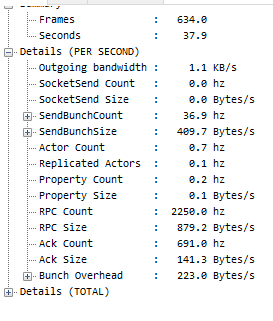 chrome bay
look at the graph view, easier to get a quick overview
I think there's a checkbox for "saturated frames" or something
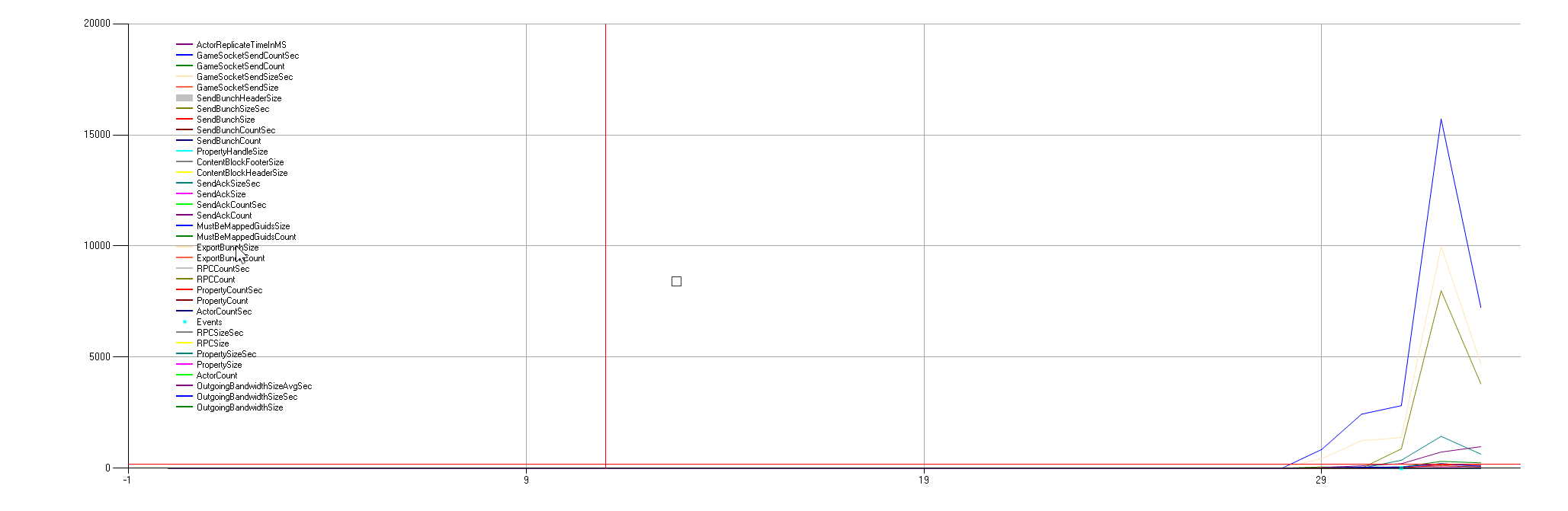 chrome bay
doesn't look too bad as far as I can tell
shrewd tinsel
alright thanks for helping rule this out
will be looking for my gamestate elsewhere 😄
unkempt tiger
how can I also view a graph like this lol
is this Network Profiler built in the editor?
 dark edge
@rose prawn How many clients is that?
rose prawn
@dark edge I started the game as dedicated game with one player
Max allowed player will be 4
dark edge
18 KB/s is pretty much nothing
rose prawn
Thanks for the answer Adriel, then there is nothing to worry!
 winged badger
@frozen brook instantiate it only on owning client
doesn't matter what widget it is
 midnight karma
How to spawn every player as a random character in multiplayer?
 meager spade
how can you read that sideways lol
 misty stump
@thin stratus could you expand on utilizing the movement component? I've been looking more at the CMC and noticed there is a function GetPackedAngles(). Would I want to do something similar like GetPackedMovementInput()? I need to get the lastmovementinputvector into the saved move queue so the server can use when it processes the move. Where/how should i add this variable or function to make sure the value gets to the right place for use in the physFunction?
 grizzled stirrup
@chrome bay Reading your great article on better burst counters, was confused about this line The counter will always replicate after a shot is fired even if we are no longer firing. It will eventually wrap of course, but that’s not a problem.
By wrap does that mean if the int32 gets over 2 billion shots (I believe an int32 has like 2 billion+ values), then it will go back to 0?
 polar wing
I fixed my super dumb issue with seamless travel. It was, in fact, a player controller issue as suspected. I basically just chased an error around a whole portion of my project only to realise the first guess was right. This is why you shouldn't code at 2 am on a Thursday.
chrome bay
@grizzled stirrup yeah exactly, since it's just incrementing constantly
But I'm using a byte for the counter, and it's not a problem - all you really want to know is whether the value changed or not
And usually the value won't do a complete (and perfect) wrap of 255 before it replicates
Unless you have some truly ridiculous weapon 😄
 pulsar bison
concept info:
dedicated server (like rust\ark\scum\deadsite) where people connect 50\60 in the same time is a different version of the game where arrive only replications, don't need all game right?
Co - op is a server code inside the full project ?
winged badger
you don't need some of the game
you can avoid packaging textures, materials, ticking bones and animations
you still have to run collisions, traces, game logic and replication
pulsar bison
Thanks @winged badger ^^
grizzled stirrup
@chrome bay interesting so it wraps automatically or should you set it back to 0? For example if it’s incremented to 256 would that automatically be read as 0?
chrome bay
Yeah it will just go back to zero
chrome bay
standard behaviour for integer overflow!
the main thing it's addressing is for semi-auto weapons
grizzled stirrup
Is there a reason ShooterGame uses an int32?
grizzled stirrup
Good to know that a uint8 is fine to use
chrome bay
ShooterGames' biggest problem is that it sets the counter back to zero as soon as you stop firing
So it doesn't work for semi-autos or anything
grizzled stirrup
Yeah I had issues before where a player spammed a semi weapon and started / stopped in the same frame
Nothing gets sent
chrome bay
yeah exactly
So you need a constantly incrementing counter
But you also wanna know when firing stops, so this was the best way I found
grizzled stirrup
But also had issues where they spammed a weapon with a slow fire rate and there were false start / stop fire reports going through
But I guess that can be fixed by only incrementing / decrementing if a shot definitely went off previously
I think your additional bool in your tut solves that problem
As the weapon knows if it was firing previously
chrome bay
yeah exactly
And it's packed into the byte
So you only get a counter of 127, but it's still more then enough
grizzled stirrup
Yeah easily
chrome bay
Heck even a nibble is probably enough for slow-fire weapons, but that's probably overkill
grizzled stirrup
And the only way it wouldn’t work is if you perfectly wrapped to the same number
Which is extremely unlikely
Great writeup thanks for doing it
chrome bay
More to come.. hopefully 😄
grizzled stirrup
What’s a nibble btw?
grizzled stirrup
Great more of these write ups are extremely welcome, there’s very little info online
Yeah I bet
I like how comprehensive it is
 final thicket
How would I know if a dedicated server is struggling with something like CPU usage or memory, would that show up on the UE4 log?
chrome bay
just have to profile it and see
final thicket
Any advice on doing that @chrome bay
chrome bay
Nothing specific but there is this page to get started: https://docs.unrealengine.com/en-US/Engine/Performance/index.html
But it's the same as profiling the rest of the game really
 frozen brook
pls does anyone know how to replicate anim montage?
meager spade
use a NetMulticast
or a replicated struct holding the montage info and use OnRep/RepNotify
frozen brook
Thanks man
But after executing ones, it does not execute again
On owning client
frozen brook
Yh on notify
meager spade
KISS, keep it simple stupid 😄
just replicate the montage
and use its RepNotify to play?
thing is
you will have issues tho
i recommend a small wrapper struct
that is how i did it
then i can flip a single bool in that struct to force it to play
even if its the same montage
meager spade
mines c++
let me show you in bp


we just flip that bool
and it will play the montage, even if its the same montage that played before.
ours is a lot more complicated, but this as simple as it gets
 timber crane
I need help with my project
I can't make a chat box for users to use
I am using Unreal Engine 4.24.3
I think
Please
I need someone to help me with this
 bitter oriole
You should explain your problem in more depth
timber crane
So I have a box where people can enter a username, and I want to make a chat box in my game
So people can chat
bitter oriole
So what is the issue ?
timber crane
I can't do it
I have tried almost everything
I have looked at Tutorials
And still I have not been able to do it
 fading birch
what specific issue are you having?
timber crane
I just couldn't get The player to send a message
Or have the username of the player next to the message
grizzled stirrup
Is it fine to call a Server RPC like a regular function on the Server?
Or should you always have an if statement calling the same logic locally as is in the RPC
 crimson orbit
I'm suddenly getting this error. Any ideas?
it's continuously flooding my log, even when not playing
 fleet raven
restart editor
 faint lintel
Hello,
I have a question about character movement mode, I created a Ladder and in order to climb the ladder, I need to change my character movement mode to Flying, since character movement mode can only be change through server, I am sending an RPC call from my client. But If there is lagg, then going on the ladder looks really bad
Any suggestions how I could change movement locally or simulate it?
meager spade
@grizzled stirrup a server rpc will run locally on the server if called by the server, tho i prefer to not do things like that tho
and have the RPC run the same non RPC function
 mortal zealot
So I've been trying to fix "strafe jumping" (like good ol' Quake) working for multiplayer for a good two full days straight now. It doesn't work, and I've narrowed the implementation down to only be a few lines in "CalcVelocity" in CharacterMovementComponent. I can't seem to find the problem... What happens is every time my character change direction it stutters, caused by network correction. It is barely noticeable in PIE (playing as client), but horrible in a packaged exe. Anyone care to point me in the right direction?
mortal zealot
Rubberducking here, but could it be that I never increase MaxSpeed, so when i change direction the strafe input makes the character exceed MaxSpeed, and thus gets corrected back to MaxSpeed?
 twin juniper
So I'm trying to get started with replication and I can't seem to figure out why I get far worse replication with like 4 times the latency when I'm playing on a more graphically intensive map. Like I can play on a map with one simple floor plane and everything works fine, but when I play on a map with a landscape and a bunch if objects in it, the replication barely works. I just dont undersatnd why the map im using has anything to do with replication.
grizzled stirrup
What is the best function to override on the PlayerController to get a call similar to BeginPlay after seamless traveling? PostSeamlessTravel(); and then call a client RPC ?
If I call the client RPC in the Game Mode InitSeamlessTravelPlayer() the client usually hasn't loaded in yet and doesn't call the RPC at all
Looks like PostSeamlessTravel() is also too early (meh a 1 second timer delay works..)
The class itself is replicated by default
You should still mark variables as replicated manually as no they don't get automatically replicated
frozen brook
Pls does anyone know an alternative to creating aimoffset
Because I dont have aimoffset asset to use
 wicked brook
@frozen brook what do you mean? There are free assets that you can use.
frozen brook
I have a different skeleton from the ue4 skeleton
If I retarget, the animations will be above the ground level
wicked brook
@frozen brook then you will need to make your own AO animations probably
twin juniper
@frozen brook You can procedurally bend the bones in the anim bp
You could look at als v4. I believe it uses some sort of procedural spine bending
 random nymph
Are there any guidelines to follow about good packet sizes when developing a multiplayer game?
Currently for our game the packet size hovers around 2500bits in then unreal insight when not many players in the game, how should I know if this is a good or bad?
winged badger
you'll see when you start stress testing
in my experience, the biggest bottleneck was evaluating actors for replication (servers CPU time), rather then actual bandwidth or packet size
random nymph
Do you have any example packet sizes that have been fine for you?
Or how is that 2500bits compared to your packet sizes?
random nymph
Okay
 soft fjord
Hey all, if you server travel during an active session to a new game mode, does the new game mode fire off OnPostLogin for all clients or do you need to get the playerlist another way?
 fossil spoke
PostLogin isnt called for Seamless travel
Only newly joining Players will trigger PostLogin.
soft fjord
That's what I thought, thanks.
frozen brook
@twin juniper @wicked brook Thanks for your reply
mortal zealot
Is there any known problems causing character movement to be choppy in packaged game with dedicated server, but not when playing in pie/standalone with dedicated server?
unkempt tiger
are replicated properties strictly server->client? If I want to pass player input from client to server, do I need to use an RPC?
mortal zealot
@unkempt tiger Yes, exactly!
You then need a way for that input information to reach all other clients as well, or they will not update the instigating client correctly (for things like animation, network prediction etc)
 red sand
When the player dies in match, how to respawn character of same class again?
unkempt tiger
Thanks @mortal zealot, nice to have some confirmation, I could really use some sanity atm
 novel topaz
Hi friends,I found that the order of initialization of GameState, PlayerState, PlayerController and pawn is totally a messed. It’s different under listen sever, dedicated server, PIE mode, level traveling. Is there any notifications when client states are fully ready (states are fully sync, pawns are possessed, etc) ?
meager spade
its not tho
GameMode spawns GameState
so you know GameState is after GameMode
PlayerController spawns PlayerState
so you know PlayerState is after PlayerController
i don't see the issue?
there is no difference between Dedicated/pie and listen server.
Server travel, yes, cause the controllers already exist but the gamemode and gamestate follow same pattern, playerstate is constructed at a different time, but always after the gamestate.
don't know why you think the orders are all messed up..
if you are relying on "Begin Play" to be in order, forget it. That is never guarenteed, cause Begin play does not get called till GameState dispatches BeginPlay. And you can NEVER trust that order.
Someone feel free to correct me if am wrong, wrote this from the top of my head 😄
 hoary lark
@mortal zealot possibly net saturation, you can try limiting framerate in the packaged game to see if it improves the issue
 rose egret
APlayerState::CopyProperties is called in server only or... ?
 lusty badger
I'm trying to host a game but I don't know what is "Key" in FOnlineSessionSettings set() function
Is It any kind of identifier? And if so, I can put whatever I want?
 faint dock
@faint lintel kinda hard to do you will need c++ check this for ref https://www.youtube.com/watch?v=DoZyH86n_gs

Higher playback speed recommended. It makes those moments of dead air where I am figuring out what the hell I wrote more palatable. Also the mumbling.
Table of Contents
2:12 Sprinting
26:14 Jetpacking
55:02 Gliding
1:26:02 Networking
This project: https://github.com/HarryPe...
 solar ivy
hi. if a replicated variable is set to "Expose on Spawn" will it replicate immediately on actor creation? so i can access it in Begin Play on a client. or should i still use Rep Notify to wait until it's replicated?
faint lintel
@faint dock thank you for your answer, I am doing my game in c++ anyway. I will have a look at this video, hope it helps 🙂
 shy steppe
Hey guys, how do you handle network bug fixing in your game especially if the game crashes in a certain situation?
winged badger
start it via VS, then make it crash and examine the callstack/locals
@solar ivy when actor is spawned, on server its not immediately evaluated for replication
so both expose on spawn variables, and those that you set synchronously after spawning it are all sent in the same bunch as the instructions to spawn the Actor to clients
on clients, replicated variables are set first, then OnReps are called, then PostNetInit, then BeginPlay
so yes, any replicated variable will have correct value on the client by the time BeginPlay is called
ExposeOnSpawn doesn't really matter here for replication, but it does set the variable before BeginPlay on Server as well, so you don't have to branch your logic (as much)
 proper ravine
hey! how do I correctly change a player controller's state to NAME_Spectating? Im currently just calling ChangeState(NAME_Spectating) on the server-side, but that doesn't work. Calling that and ClientGotoState at the same time works, it spawns the spectator and sets it, but then it immediately gets blanked out
solar ivy
@winged badger thanks a lot!
 clear sand
hey guys, how do I correctly check if dedicated server is running(or if its not - prevent client starting). Right now if dedicated server is not running, ue starts all clients anyway, and uses first client as listen server
 lavish cypress
Is there a way to handle Server RPC With Validation with less of a sledge hammer approach like a straight disconnect?
 plush wave
Is there a master list of all the types that are supported for replication? interested in some that are not supported by BPs (like uint16).
 tiny lance
How do i maintain the speed of my projectile bullets?
Currently when i fire my projectile, it "flies" fine, but when i run in the same direction as my projectile, it visibly slows down on my screen.
I've tried printing the relative velocity of my projectile and char to my screen, and it goes from 1000 to about 400 when i start running in the same direction.
I assume it's this drop in relative velocity that's causing the visible slowdown in my projectile's flying speed. How do i make it not slow down?
I'm thinking one possible way would be to do calculations in my projectile blueprint to ensure that the relative velocity stays the same?
But i'm hoping to eventually make it a networked multiplayer, so i'm guessing that this method wouldn't work?🤔
winged badger
i assume the game is a side-scroller
if your projectile is a separate actor, relative velocity between it and your character doesn't have any real meaning, its absolute velocity remains the same
grizzled stirrup
When getting a UserId, which is the best option of these two? (Or are both equally valid?)
FUniqueNetIdRepl UserId = LocalPlayer->GetPreferredUniqueNetId();

TSharedPtr<const FUniqueNetId> UserId = IdentityInterface->GetUniquePlayerId(0);
Both seem to work the same at least for use with Steam achievements, but the first LocalPlayer method is used in ShooterGame and the second IdentityInterface method is used in newer tutorials online
I should note that there is NOT split screen multiplayer in my game, would that rule out needing to use the first LocalPlayer option?
red sand
For clearing tags on respawn and setting IsDead to false and reinitialize attributes, is it good idea to use NetMulticast, Reliable function?
grizzled stirrup
Could just use OnRep for that
I use OnRep for pooled enemies which handles complete reinits
red sand
@grizzled stirrup can you OnRep functions?
sorry i'm kinda new to multiplayer stuff.
grizzled stirrup
Marking the bool with UPROPERTY(ReplicatedUsing = OnRep_IsDead)
And making a function called
UFUNCTION()
OnRep_IsDead();
When bIsDead is changed ont he server, OnRep_IsDead will be called automatically
red sand
can i run the logic in OnRep_IsDead, where I restore my attributes and stuff?
grizzled stirrup
Yes essentially the same as you'd do for the multicast
But now you don't need to run an RPC for every player
Just be careful for things like setting it true and false in a short timespan, it has to replicate so only the latest value will be replicated
red sand
Ahhh well it's called after 10 - 20 seconds after death
but what to do if I only wanna run logic when character respawns and not from the start
mortal zealot
Soo the reason for my stuttering/network correction problems seems to come from this change in code (in MovementComponent function CalcVelocity()). Somewhere the client and server gets different information. If I run without server my movement speed is capped much lower than if I run on server. As in if I run local I slowly accelerate and stop at around 100 units/sec, but if I run on server I accelerate faster, up to around 350 units/sec. Anyone see any obvious errors? It sounds like a deltatime problem, but I can't find where it is...
 proud pier
I am posting this here as well as it may be a more multiplayer related question than AR/VR, I hope this won't be considered spam ❤️ :
anyone had luck replicating AR Pawn camera movements ? My client strangely sees what they should (server's movements, and client's movements), but the server only sees it's local updates, and it's as if the client isn't actually changing transforms.
Does setting the camera component to replicate and the owning actor to replicate + replicate movement as well not suffice?
 vivid seal
any advice for lag compensation and shooting? i'm specifically concerned with getting an accurate camera transform at the time the client shot. I've got a system in place for rewinding hitboxes to the point they were at on the server, but right now i dont think my player's camera even does any movement on the server. I thought about having them pass the camera transform when shooting, but that seems prone to cheating.
maybe the camera is automatically being updated like movement when i change control rotation on the client, im just not sure
faint dock
@vivid seal dont bother going in to much detail they just gonna aimbot and hit every shoot anyways
just check for thinks like walls
 soft shell
@winged badger - Previously I asked you about variables being replicated when a object is spawned across the network and you noted the one caveat - "if a replicated variable is a reference to a replicated Actor, then it will be valid only if that Actor already replicated" - How does one handle this case? I for example have a replicated "other" actor that accessed by an event send to the spawned actor; unfortunately the spawning and that event occur before the "other" actor is replicated ? The server effectively spawns the actor and then sends the multi-cast event to it (which then, inside the spawned actor, accesses the "other" actor which isn't replicated yet)
winged badger
it doesn't matter which order you spawn them in
only way to somewhat control the order in which Actors replicate on start is via NetPriority
and that is susceptible to packet loss, so it can break
 crimson swan
Are "Max Acceleration", "Braking Deceleration Walking" replicated on the CMC? I thought the docs used to indicate which members were.
soft shell
Ok thanks, I'll just have to reorganise the flow at a higher level to prevent it from happening
soft shell
@winged badger Sorry for bothering you again, but do you know if I replicate an actor variable that doesn't exist on the remote client does the RepNotify event fire for it? My feeling is that it wouldn't (and it's not in my project), but just wanting some confirmation
unkempt tiger
if my struct has a linked list, can I just treat it as a normal TArray in my custom net serialize?
as in iterate its indexes with a for (uint8 i = 0; i < Num; ++i) loop etc?
mortal zealot
@soft shell What do you mean? If you have a RepNotify variable on actor A, that does NOT exist on actor B, and if you change it on A, that B will fire the RepNotify event locally?
If so, no. It has to be the SAME variable, meaning either a different instance of the actor holding it, or a child of that actor. The rep notify is like any other replicated variable, but when the value is CHANGED it automatically calls the RepNotify function. Meaning if the variable is changed on server, all clients would get the new replicated value, and call RepNotify. If you only change it on client, only that client will execute the ReepNotify event.
unkempt tiger
should player inputs be passed as reliable or unreliable RPCs? 
faint dock
unreliable
unkempt tiger
thought so
so immediately comes to mind if
what happens if a player presses W to move forward but it doesn't get sent?
so the immediate solution is of course, send the entire input state every X interval
unkempt tiger
what do you mean rolls back?
faint dock
the movement component on the server will teleport him where he should be
unkempt tiger
what if im not using the movement component
what if I'm rewriting movement from scratch?
(I dont like the movement component, it feels wonky)
faint dock
good luck making your own
unkempt tiger
hm yes
faint dock
the reliable buffer will overflow very fast if you use it for thinks like that
unkempt tiger
reliable or unreliable?
faint dock
there is a reason the cmc is 10k+ lines of code just use it
unkempt tiger
I plan using unreliable
 oak hill
Any good example on how to use ULocalMessage? I cannot figure out how it works
 waxen socket
Good morning.
Is it common to switch on authority directly after BeginOverlap in order to run overlap events only on the server? Any advice here would be great.
Cheers.
 tulip ferry
Hey guys! I've setup my dedicated server, and it shows in the steam server browser.
However, I am unable to find it to join as a client. Does anyone have any ideas what could be wrong?
I happen to use the advance sessions plugin.
grizzled stirrup
Is there some check possible that waits for all players to load the map (not just join) after seamless travel, before starting the match?
I have a 5 second delay which works fine but when a new PC loaded a map for the first time it took a bit longer than the other players and even the 5 seconds wasn't enough of a delay (he spawned in fine but missed a crucial step while loading which created the UI)
 thin stratus
Well you should just override the ReadyToStartMatch function in the GameMode
 tribal oxide
Shouldn't PlayerState persist between seamless travel? When I test it only one of the player's states persist...?
Seems like the host is unable to change a variable in the client's player state, which I assume would be possible because server authority? 🤔
winged badger
all of them persist on server
assuming its seamless travel with existing connection
tribal oxide
Guessing it might be another side-effect of trying to do MP testing via the editor
winged badger
seamless travel doesn't work in PIE
tribal oxide
It does for me, just the state doesn't seem to persist unless I use them wrongly
Need to set it to play as client, then you host the game via the standalone version that launches
If I host it via the PIE window - it won't work 😛
tribal oxide
Well the transition works, not sure about all the other stuff 😛
Still learning how all this stuff flows together
rose egret
@grizzled stirrup
maybe you can start with spectator or null pawn. then when all players loaded the map and everything is synced spawn the real pawns.
I start a countdown when the first player loads the map.
 novel tartan
A General question looking for general answers:
Which service do you guys use for your dedicated servers/cloud? And How did you set it up?
 charred condor
Hey all am working on a 4 player local multiplayer game and now with Covid play testing is a lot harder. I have tried using parsec which is laggy and steam remote play that does not give players game pad access...any other apps/ways people are testing local multiplayer that I can try?
charred condor
Actually fixed lag issue with parsec but anyone else have issues with it not detecting down on the analog sticks when remoting in
local and the host everything works fine so no idea how to fix this bug
grizzled stirrup
@thin stratus The problem with that is that the correct number of controllers had joined but one of them was still loading the map itself so a MatchState OnRep call was missed on that client only (all other clients got it fine). Probably fixable by just adding more of a delay before starting (5 seconds may be too short)
thin stratus
OnRep always need to be counter checked with BeginPlay.
OnRep can call before BeginPlay, which is obviously bad for some things
grizzled stirrup
Oh that's very interesting
How do you counter check?
By having an additional bool inside those OnRep functions to ensure they got called?
thin stratus
void Bla::BeginPlay()
{
    Super::BeginPlay();

    if(SomeCondition)
    {
        OnRep_SomeVar();
    }
}

void Bla::OnRep_SomeVar()
{
    if(HasActorBegunPlay() == false)
        return;
}
SomeCondition depends on the variable
grizzled stirrup
That is extremely useful thank you, I'll make sure all of my functions that happen before gameplay starts use checks like that
Though if SomeCondition is the OnRep property itself, it'd probably be correct as it'd rep down fine but not call the event
So additional bools are the only way I can think of
thin stratus
Additional Bools make no sense
grizzled stirrup
Unless there's custom logic that can determine if that particular OnRep call was made
thin stratus
You have to be able to check the OnRep value itself ot make sure it got replicated
grizzled stirrup
Oh so you mean that the OnRep value wouldn't even be correct on the clients? Interesting
thin stratus
It would be
grizzled stirrup
I thought it would be but the client just missed the OnRep function call as it was loading
thin stratus
Just saying that the Condition to check if OnRep needs to happen depends on the var
grizzled stirrup
Say for example the OnRep var is an enum MatchState
thin stratus
And for you issue, the late joining client that is still in the travel, they need to get the OnRep too
That should not be missed
And if so, then at least call BeginPlay to catch it
grizzled stirrup
Will do, I think the server sets the match state to WaitingToStart the second it gets the joining controller
So other clients will get the update there but the newly joining one might not
So I'll make sure any important OnRep logic happens later
After at least a few seconds
thin stratus
Yeah, so whatever the default value of the MatchState is
You can do MatchState != DefaultMatchState as a condition to call the OnRep on BeginPlay
grizzled stirrup
Great call thank you
I've been tearing my hair out over stuff sometimes happening and sometimes not
This'll help a lot
 grizzled bay
wondering if i should do a check like this if (GetWorld()->IsServer() || IsRunningDedicatedServer()) for everything i want to always run as server, or if there are times a if (HasAuthority()) would be better?
 lost inlet
the answer is kinda depends
around actors and replication, HasAuthority is probably what you're after in most situations. that will include running a listen or dedicated server
grizzled bay
thanks for the reply, are you able to give any examples where the first check would be preferred?
lost inlet
i usually wrap spawning clientside only effects in:
    if (!IsRunningDedicatedServer())
    {
        SpawnEffects();
    }
#endif```#if !UE_SERVER will compile stuff out in a dedicated server packaged build
though the if check is relevant for testing in editor
grizzled bay
ah cool
 limber yacht
My team is looking to do a multiplayer test. My boss is asking for 50 people in one session. At the moment we're just using the Steam OSS with the developer app ID. Will using the developer app ID cause any issues with number of players or session duration?
meager spade
you want to get a steam id
if you are looking for 50 people in a session then your game must be making progress, so why have you not got a steam app id?
 distant talon
i've been having some issues since i upgraded to engine version 4.24 with variables set to replicated sometimes just never replicating if someone joins late. This even happens with classes and variable containers i didnt write, for example sometimes the gamestate just never replicates if someone joins while there's a momenary heavy load (which obviously breaks the game since gamestate needs to be replicating eventually, my code doesnt mind if it's late but it needs to exist eventually!)
if i test the same situations in the same game code on 4.19 reliable replication and replicated variables always goes through eventually, even if it's a second late
anyone have a similar experience or a solution?
limber yacht
A week ago it was for 5 people. Clients ask for stuff and clients get stuff I guess. Doesn't matter. Money man's problem now.
 hybrid helm
Is there a way out of the box in UE to swap servers seamlessly if they run the same map?
Like a channel system i guess
winged badger
no
they don't have the same url, so you need a hard travel
@distant talon you sure you didn't make your GS non-relevant?
also, GS not replicating means clients would never call BeginPlay on the world
proper ravine
so I'm calling a multicast-rpc from an actor, the call to the function is behind a switch-has-authority->authority, and i can verify that the server, and only the server, seems to be calling the multicast
but the multicast is only running on the server, i checked through a print call. why would that be happening? i checked Replicates in the actor details but i don't even think that applies here?
thin stratus
The Actor has to be set to Replicate
proper ravine
It does? Either way, it still doesn't work when set to replicate. For my understanding though, I thought Replicates* just meant to replicate Actor spawns to clients - does it mean "attach this actor to replication in general" and w/o using it no RPCs will function correctly?
Maybe it's a hotreload problem one sec
thin stratus
It is required to allow any sortof replication
Even if you place the Actor into the scene, it will not be "connect" to each other
The Spawning on Clients is just a "side-effect"
proper ravine
ah, the docs describe it as "when enabled, it allows clients to be aware of actors spawned on the server" which is a little vague but I see why Replicates works the way it does
well it's set to Replicates now, and still doesn't multicast to the client. only getting "Server: Hello"
thin stratus
When are you multicasting this?
Or rather, what does this all originate from, function-wise
proper ravine
it's called at the end of a chain of events starting with a bind of OnNavigationFinished
and every step checks for authority to be true
thin stratus
Okay, so nothing on BeginPlay or so that could call before the Client even fully connected?
proper ravine
the game waits around for other stuff to spawn before it binds to the navigation system
that binding happens in Tick some time after the world has generated
thin stratus
Could you set an OnRep variable, just for testing, instead of using the Multicast?
And then print in the OnRep
Just to see if any replication works
proper ravine
yeah sure one sec ty
sorry had to figure out how to use repnotify
alright so i set a bool to repnotify and set it in the same place i was calling the multicast function, and printed a test message within the onrep function
still only calling on "Server:"
it does replicate if i call it straight from begin play though
what could i be doing in between that would stop a multicast being called on the server from actually multicasting?
proper ravine
okay so Switch Has Authority is breaking it. can you not do this? from a non-replicated event use has authority, and then call a multicast event if it's the server?
bitter oriole
Switch authority ensures you are running on the server
So the multicast o,ly runs on the server
If you want this to run on clients too, remove the switch that prevents it from doing so
proper ravine
i thought you had to make sure that a multicast event was only being called on the server?
and then it gets replicated out after by the engine
like, the call is only made by the server, the engine picks it up and runs it on clients. you're saying has authority will also block the contents of that RPC from firing on clients? how does calling a multicast RPC from a server RPC work differently then?
bitter oriole
@proper ravine A multicast called by the server will run on clients
That's kind of the entire point
If the contents of the multicast are server only, well, it's pointless to be a multicast in the first place
What you should do is move the auth switch to before calling the event
 gusty raptor
Hi, so when i use OpenLevel using 'listen' , my server just loads the correct map, however the client just loads the Lobby map (and seems to disconnect). Anyone knows why?
all clients should just 'follow' the server when using 'listen' right?
bitter oriole
You might try with ServerTravel instead of Openlevel
gusty raptor
tried that to, doing the same thing
distant talon
@winged badger The GS is set to always relevant and never dormant. There are clients that do act like they never beginplay sometimes. Its very annoying.
gusty raptor
Actually the client will start loading once i load the map on server, but it loads back the map... Any other idea @bitter oriole
winged badger
they do act like it or they don't exec BeginPlay?
read the OutputLog from both server and client @gusty raptor
bitter oriole
@gusty raptor Can be a lot of things really
gusty raptor
Right, will have a look into it
distant talon
In the heavy load test scenerio i have setup right now they do beginplay eventually, but after they do they never replicate certain variables
bitter oriole
Maybe the net load is just too high and there are too many vars to replicate
distant talon
Maybe, but other variables keep replicating. This works as expected in 4.19
with the same test scenerio
it chuggs a bit under the test but it always gets around to the replication eventually, instead of just breaking and forgetting half the actor
winged badger
there is no forgetting half the actor
its the same bunch all the actor's replicated variables arrive in, not one by one
distant talon
Thats what i thought, but that doesnt seem to be happening on this engine version, it's very frustrating. So for example there's a couple of actor references (to replicated actors) that need to get replicated, everything involved being always-relevant.
Sometimes rarely on a live build a client will connect, be receiving all other variable replications on the same actor properly, but the actors refs are invalid just for that one client
This can sometimes be the default pawn class playerstate reference by the way, which is another always relevant actor. (also also our own variables)
we arent modifying dormancy during play ourselves but this does make me think if one of the engine updates has something messing with dormancy. Going to try setting every actor that's having problems to never dormant
winged badger
for replicated Actor references not to be null, the referenced Actor also needs to have replicated already
when you join for the first time mid game, all the replicated Actors have to replicate over
if GameState replicates before them, when it does, the replicated references will be NULL
distant talon
Sure, but those references should stop being null eventually right? instead of never?
winged badger
they should when the NetGUID gets resolved
distant talon
Uh, im not sure how the netguid works. That might be whats breaking then, if their netguid never gets resolved for some reason? Any hints on what could cause that?
The instances we've seen of the bug in a live test have the replicated actors being replicated on the client. So the actor was created on the server and is visibly there on the client, the ref to it is null though, as if it had never been replicated.
winged badger
NetGUIDs are whats sent over the network, memory address would be meaningless
when an Actor replicates, its NetGUID is acknowledged, and replicated references to it are resolved
did you turn on replication graph by any chance?
gusty raptor
So it seems ServerTravel did work, however.. I want to change the gamemode.. anyone knows this is possible?
servertravel/Game/Maps/TestMap?game=/Game/Blueprints/GameModePlay.GameModePlay_C?listen
seems it wont load the correct gamemode
winged badger
gamemode argument is only required if its not the default gamemode for that level
and im pretty sure it takes a shortened version
distant talon
Ah i see, that makes sense (the netgui explanation), thanks. We do not have replication graph enabled.
maybe we should try it though...
Basically the project moved from 4.19 to 4.24 and we started having replication issues, so we setup mirror test scenerios in both on the versions right before and after we upgraded without making other changes, and we only have the issues in the 4.24 one. So repgraph wasnt even an option on the other side.
Right now in the heavy test scenerio there isnt a single playerstate that gets found by a "get all actors of class" with many actors connected, so in that case the playerstates are just never replicating even while the client pawns move around and interact as they normally would.
gusty raptor
@winged badger actually i'm in the same map, just want to change the gamemode basically
winged badger
that GM argument is too long iirc
look for some examples on the internet, i don't remember it off the top of my head
gusty raptor
Ive tried like every possible combination, still the gamemode wont change
seems like the behavior kinda changed some times over different engine versions though..
been trying it for hours 🤢
distant talon
I think i figured it out... this is a good one
So in 4.19 the root component of actors like gamestate and playerstate are null, which makes the GetNetPriority function not reduce priority with distance
but in 4.24 it seems like the root component is valid, which means the distance from the map center affects the net priority of AINFO actors
distant talon
Priority affects update rate though
and it seems like cranking the priority to something stupid is forcing them to replicate
winged badger
its not a solution though
distant talon
we have big maps so the distance must have been suppressing the update rate enough for them to just never replicate
winged badger
the replicated actors with short lifetime will take too long to panic enough to replicate while they still exist
distant talon
yeah...
winged badger
if you have actors cranked up to "something stupid" priority
distant talon
I can override the get net priority for ainfo actors at least and remove the distance dependence. Not a solution for other actors though.
winged badger
i generally don't like the recent AInfo changes
mostly the assumption that PlayerState should just be left on ZeroVector for its entire lifetime
i personally prefer to attach the PS to the Pawn
distant talon
I can see that being handy. Did anything else big change with the design of AInfos lately?
winged badger
aside from Pawn reference now inside the PS by default, and plenty of stuff changed to private, i don't think so
 marsh glen
Hi guys, I am having an issue with accessing the right variables when trading variables between two actors. Currently this is the area causing issues (image attached) as it appears to be confusing the calling actor's inventory list with the colliding actor's inventory list (the 0_base cast).
And assistance is appreciated
It is likely something VERY common and easy >.>
currently the interaction works except for the area having the added variable is the player's own and not the other
bitter oriole
@marsh glen Hard to say anything without knowing what's coming into that cast
marsh glen
I would say that it is possible the box is overlapping with the player, but it would still add to the other's inventory with that hypothesis
My other hypothesis is that the box is the other player's (for some reason)
gusty raptor
So i tried really all possible ways i found on google last 2 hours.. Tried on both OpenLevel or the 'servertravel' command..
Also i tried adding a class alias, like:
+GameModeClassAliases=(Name="ModePlay",GameMode=/Game/Blueprints/GameModePlay.GameModePlay_C)
and added the option ?game=ModePlay
Really, nothing works...
could anyone confirm it should work on 4.25 ?
bitter oriole
@marsh glen So what is actually your issue here ? You get overlapping actors, some of them match the correct class and some don't, is that the issue ?
marsh glen
When this event is called, the only actor that receives the information is the player calling the event
The pulled inventory list isn't that of the overlapped actor
bitter oriole
@gusty raptor Game mode is level-defined as far as I know, dunno if game mode overrides are still a thing
gusty raptor
hhm, so basically, i want to use the same level in my Lobby (as background) , so might be odd its not possible?
bitter oriole
@marsh glen Start by just logging, when this event is received, which actor ons "Box" and which one is the overlapping one in the loop
@gusty raptor Everything is possible, just need to look a bit more into it. What happens exactly right now ?
gusty raptor
@bitter oriole pretty detailed to explain, but ill give a try, as you guys seem the only option i have left 🙃
so first of all, updated to 4.25.3
marsh glen
I would be so much happier if my employer would just convert this all to C++ and stop forcing me to use blueprints 😑
Thanks for the help, I will try that
gusty raptor
@bitter oriole
- So ive set the default maps to 'MyTestMap' , ive also set a transition map, but dont really need it however
- Testing with two players on standalone game or in editor. In the lobby i use advanced sessions and on the client i join the server session. This will make the client reload the MyTestMap (dont even want that..), and when succeed i see the client be connected on the server.
- On the server i press the start game button, that actually fires the server travel to the same map, but that with the game mode option of choice:)
- Map seems to reload now, however the game mode was never changed
bitter oriole
I wouldn't change the transition map, to start with
gusty raptor
Okay, yeah dont even need it
bitter oriole
- Testing in editor for this is likely a terrible idea, use standalone only
- Connecting to a new server has to be a hard travel including reload, so of course your lobby map shouldn't be huge
As to the actual issue, someone here mentions that hardcoded paths are always tricky and using UPROPERTY is a much safer way : https://forums.unrealengine.com/development-discussion/c-gameplay-programming/100172-servertravel-seamlesstravel-new-gamemode
Unreal Engine Forums
For gameplay programmers writing C++ code.
gusty raptor
Right, so yeah, i was actually just adding a function to my gamemode in c++ and try that works, seems the same as u mention there ^
Also thanks for the second tip, my map is pretty huge...
thats sounds a little more complicated then..
bitter oriole
I mean it just sounds like you shouldn't try changing the game mode
Just put the lobby state inside it
gusty raptor
But i think i need to change it, I prefer to display some goodness in the background in lobby, and dont want to duplicate the entire map
bitter oriole
There is more thna one way to do this
But if you want player sto be on the main map while on the lobby, just put the lobby features in the normal game mode
gusty raptor
Hhm, okay that sounds as a possible solution, but.. why would it not be possible to e.g. have a shootergame changing gamemode from 'Deathmatch' to 'Battle Royale' on the same map??
its kinda weird i cant find a solution via google
however, * yeah so maybe changing gameplay modes might even be different than changing from lobby to gameplay?
😅
bitter oriole
It is possible
Just needs a full reload
But a lobby has no game going on
So it doesn't need its own game mode
It just needs something like a pre-match state
Which is in game mode t ostart with IIRC
gusty raptor
Okay so i guess ServerTravel has some stuff in c++ that can do the actual 'Full Reload' ? i think its pretty common to just change gamemodes on the same map..
actually since ive been searching for hours, i should just make a tutorial for this man.. omg
bitter oriole
No it is not common to change game mode on the same map
gusty raptor
anyhow, gonna go for that lobby state anyhow
hhm really, so okay 🙂
i kinda doubt to its common lol
bitter oriole
Feel free to doubt
UE4 doesn't support changing the game mode
It doesn't because it derives from the UT3 codebase which changes game mode by reloading the entire level
Which is common practice
winged badger
you could hack the gamemode replacement mid game though
but if you wanted to reset the level without reloading it and change the GM
not possible
would leave every actor on the level in invalid state
gusty raptor
so basically, i think changing gamemodes can only be done locally btw
bitter oriole
"Locally" ?
winged badger
as opposed to what? clients doing it?
bitter oriole
Clients don't even have the game mode on their machine
gusty raptor
well still ppl can change it, see on google 🙂
its only working with OpenLevel i think..
bitter oriole
Alright, I don't even know what we're talking about so i'll just leave with my advice to use states inside your game mode
gusty raptor
@bitter oriole yep, thanks man, i only wanted to mention, its still possible to change gamemodes (however i should not do it )
mostly on google they say:
FString URL = "/Game/Content/Maps/map_office?game=/Game/Blueprints/GameModes/TDMGM_BP.TDMGM_BP_C?listen"; GetWorld()->ServerTravel(URL);
bitter oriole
Yes it is possible to change the game mode
By reloading the entire level
Like I said multiple times
gusty raptor
i noticed, but i asked somehow, how to load the entire level? (as its already loaded)
seems its just not possible in blueprint btw
bitter oriole
If you travel on server you reset the level, disconnect all clients, reload the level and have the clients reconnect
Thats how travel works
If you do not want that, do not travel
TLDR : do not use game modes for a lobby state on the same level, it is not going to work
Unless you're fine with extensive engine changes in your own fork of Unreal Engine
Good luck !
gusty raptor
Thanks, Nah Im not about to build from source soon enough for this:)
@bitter oriole just to note, i actually managed to get it to work still, eeh lol
I mean, changing gamemodes without using states
Just a proof of concept Lol
So i use this command
and set this to false on both gamemodes
So yeah, really need a blog on this, never look 4 hours again
bitter oriole
proper ravine
im having a problem with multicasting that essentially boils down to this not working.
this blueprint is inside an actor that was placed in the world via the editor.
after tick, i check for network authority, and if we have it, then i call a multicast event.
this multicast event, however, appears to only being run on the server - not the clients as well
this is the only output after letting the game run long enough for the players to fully connect
this by the way only looks like it's happening inside this actor. doing a similar setup within ch_player for instance works fine
oh i'm a moron i think the actor in question was just too far away to maintain net relevancy
 shadow aurora
I know it's a longshot... But does anyone have a Git example of a smooth camera transition/possess between two pawns in multiplayer? For the life of me I cannot get this to work the way I want.
unkempt tiger
any way to force replication of replicated properties rather than waiting for the engine to do the replication?
i want some stuff sent as soon as possible
chrome bay
ForceNetUpdate
That will reset the last time properties were sent and ensure it is checked for updates that frame
Nothing is actually sent until the end of the frame though
unkempt tiger
Alright, thanks!
 halcyon abyss
Hey guys
I'm struggling with Seamless travel. It's unreliable, and I keep getting crashes caused by low level stuff.
I used to get a crash with some render target stuff, but that is not appearing anymore due to some UI changes that were made... So, basically, solved thanks to a design thing...
But now I'm getting this crash in FPhysScene_PhysX::MarkForPreSimKinematicUpdate(USkeletalMeshComponent* InSkelComp, ETeleportType InTeleport, bool bNeedsSkinning) when loading into a new map...
It happens every now and then...
Has anyone ever encountered this?
 bitter swift
I did some testing with clients on my project where everything seemed fine.
But when I tested the project after it was packaged to 2 computers, the client computer had some bugs.
My theory is this was an error I could only detect with a client that actually had moderate ping
Is there a way to test the project as if a client had a moderate ping from the editor?
maybe a console command or something to give the client some delay/ping
 empty matrix
Hello bro, how are you? Is it normal when a player who created a session and all players that exist in the multiplayer session, fall out of that multiplayer match?
vivid seal
are there any best practices for using event dispatchers in multiplayer? most of my combat system relies on events being broadcast and responded to (things like taking damage, a stat changing, a buff being applied, etc.) on the server, but I'm not sure what the best way to call these things on the client is aside from having something bind to every delegate and fire an owning client RPC to call that delegate again, then adding IsServer checks before every response to a delegate?
 peak star
Does the store version number in Android build settings have anything to do with crossplay? I am releasing my game on both google play store and steam, and want them to be able to crossplay on Wi-Fi lan
It already does this in my non distribution builds. Does distribution build require anything more to not block android copies of the game from.seeing and connecting to pc sessions of it?
And vice versa?
 worldly hollow
Would any of you guys know of any hidden gem-like resources multiplayer programming in unreal? C++ or BP idm. Doesn't have to be free either, would happily pay for a great course on it [already checked UDEMY].
Just really want to correctly learn how to program MP in Unreal. 🖥️ 
winged badger
@empty matrix what do you mean by "fall out"? if they fall through the floor, you most likely spawned an Actor with mismatched mobility settings for its components inside the floor or a PCS with some NaNs in transform. If they all end up in main menu, for that there can be multiple reasons. Read the logs, thoroughly, engine will have logged something useful.
@vivid seal never replicate the same thing twice because its seems simpler to wire the client up, it just seems easier and ends up in replication races. Generally OnRep will broadcast a delegate, and client will be wired in much the same way as the server.
@worldly hollow check pinned messages on this channel for Cedric's network compendium
vivid seal
what about situations where there's not necessarily a variable to replicate, but an action happening, for instance me dealing damage to someone else. client needs to display damage numbers on his ui, but there's not really a variable that would represent that unless i did some kind of OnRep LastDamageEventDealt
winged badger
if you're just displaying damage with it, and not making a statefull change, a MC/Client RPC is better then OnRep
replicating LastDamageEvent would require replicating a timestamp and syncing a network clock as well
vivid seal
yeah and if i dealt more than one damage event in a tick (aoe or something) you'd only get the most recent one i think too
or maybe not idk
winged badger
most games let the owning client have the auth over the damage and hits it makes, as the game feels more responsive that way
and server does a few sanity checks in Validate functions
vivid seal
i have client prediction over hit markers and such, but i'm not doing prediction of health values changing or bothering to calculate damage on the client right now
worldly hollow
@worldly hollow check pinned messages on this channel for Cedric's network compendium
@winged badger wow I didnt even think about that. my mistake. Thanks!
vivid seal
mostly because there may be some lag in damage buffs/debuffs being replicated so the client hasn't seen them yet but the server will take them into account
winged badger
as long as the thing is not crazy random
you can predict the damage client side
my weapons don't have random damage, they can crit, and client rolls the crit and RPCs it along with the rest of the hit package
vivid seal
i think right now i don't have any randomness but some may be introduced with buffs down the line, but yeah, could probably predict the damage and get away with it
thanks
winged badger
our game is isometric tactical co-op shooter, 8 players
so i can get away with some extra shenanigans
like never RPCing hits to simulated proxies, but just the firing states (bIsFiring, where the mouse is, AttackTarget if its not firing manually, FiringMode)
and letting simulated proxies just do their best guess locally what their weapons hit/miss
while, because of weapon spread and the like, it can happen that owning client missed and a simulated proxy instance of his hero hit, or vice versa
it doesn't bother me in the least, there are way too many bullets flying around for that to matter
@peak star unreal has its own version number, and by default, even a source and vanilla built versions of the same project for the same platform will not match
iirc there is a way to declare a version number manually in DefaultEngine.ini instead of letting Unreal generate one for you
@halcyon abyss SeamlessTravel is reliable, but it depends on you cleaning up/stopping stuff that will cause a crash in the level transitions
first thing i'd try with that error is freeze all animations from PreClientTravel override in PC, and then start them back up after seamless travel is done
i respawn instead of transition my Pawns, so never had a problem with animations crashing
but i do nuke the entire UI, apart from LoadingScreen, during seamless travel
halcyon abyss
Hey @winged badger thanks for replying. I actually wipe all my pawns out
And also nuke the ui except loading screen
winged badger
i don't recognize that function, i am guessing its doing prep for IK
halcyon abyss
The physx one you mean?
winged badger
yes
halcyon abyss
Mmh it seems like its doing stuff to prepare the skelmesh's phys asset
And kinematic in this case refers to bodies that don't simulate physics i think
winged badger
you do need to put some breakpoints and get it to crash with debugger attached
you don't even know what level its crashing on atm - departing, travel, arriving
and the potential fixes are different depending on the level responsible
departing would indicate you missed something in cleanup
travel that you persisted something with skeletal mesh
random nymph
How lods work on skeletal meshes on dedicated servers or are lods ignored?
 foggy hinge
Dedicated servers normally don't even load skeletal meshes.
random nymph
For us it does
bitter oriole
Dedis don't load skeletal meshes ?
Anyway I would expect LOD levels >0 to be ignored
winged badger
dedis don't tick them by default, but they load them iirc
random nymph
Okay
 void nest
Is there a way to update the controller / camera network relevancy location while controlling a completely local pawn which is a spectator cam. Problem right now is that when the player uses the spectator cam he can fly everywhere very fast, very far away from his character. But the network relevancy location is still based on the location of his character. What I'd like to do is when the player possesses his spectator cam, have the relevancy location update like every few seconds to the location of his spectator cam. How would I do this?
twin juniper
Is passing the damager class to the enemy viable in games like valorant? Like on line trace i check for interface i pass in takeDamage(DamageAmount,Damager);
soft shell
I've just been getting a bit deeper into networking and wondering if the "names" (ie. Actor->GetName() ) are replicated or just locally created as actors as spawned?
bitter oriole
IIRC the names are not replicated
chrome bay
yeah not replicated, unique per-connection usually (i.e not relevant to network at all)
soft shell
Thanks, the values looked fine in the object (reflected the network replication) but the objects had the same name on both clients so I was curious
chrome bay
It's probably purely coincidence most of the time (i.e. if stuff spanws in the same order). I think level-placed stuff that has been serialized has a "stable" name as they call it though.
bitter oriole
Yes
chrome bay
You can try using IsNameStableForNetworking() to figure that out I think also
winged badger
that returns bNetStartupActor for pre-placed Actors
those always have the same name, and can be uniquely identified by it
which makes then NetAddressable, even if they are not replicated
its very common to end up having PlayerCharacter_0 and PlayerCharacter_1 on both server and client, but not being the same Actor, PlayerCharacter_0 being the locally owned one
twin juniper
Is passing the damager class to the enemy viable in games like valorant? Like on line trace i check for interface i pass in takeDamage(DamageAmount,Damager); Is it good tho
unkempt tiger
is there a way to get the client ID for debugging purposes?
I want something printed only for a certain client
unkempt tiger
is the net emulation settings in the editor just for the server, or for each client as well?
random nymph
What is best way to keep MaxWalkSpeed of character movement component synchronized between client and server? We currently have update function that lerps the maxwalkspeed between values depending on if the character is sprinting, but this is causing stuttering every now and then
Setting the maxwalkspeed on the server only causes even more stutter
unkempt tiger
the max walk speed should be a constant that doesnt change often
are you changing it often?
random nymph
Yeah we change it pretty often. What should then be used to change the movement speed? We use the ability system and we have quite a lot of movement speed altering effects and also the sprint. Way we do it we have movement speed multiplier attribute and multiply the maxwalk speed with that on both client and server
unkempt tiger
I am not sure what's the best option, perhaps someone else who has more experience with the ability system / replicated character movement can help. I myself wrote movement from scratch to avoid exactly those issues
but I can give you general advice: instead of lerping max walk speed (which is replicated)
random nymph
Max walk speed is not replicated 🤔
unkempt tiger
send a reliable RPC that tells everyone involved to, on their own, lerp the max walk speed from value A to value B in X time
oh, right, well what I said still applies
random nymph
Our system pretty much does that
unkempt tiger
how is it performing the lerp @random nymph ?
(its likely not the issue, the issue is probably inherited from somewhere else)
random nymph
Both calculate the target speed from replicated values and then lerp towards that with const value * deltatime
random nymph
Cant currently. Not on computer
meager spade
@random nymph you did override GetMaxWalkSpeed function right?
halcyon abyss
@winged badger I actually attached the debugger to the packaged game, got the crash, and looked at the callstack and all. I also saved the dump. It is failing in this check assertion
meager spade
i mean GetMaxSpeed
empty matrix
@empty matrix what do you mean by "fall out"? if they fall through the floor, you most likely spawned an Actor with mismatched mobility settings for its components inside the floor or a PCS with some NaNs in transform. If they all end up in main menu, for that there can be multiple reasons. Read the logs, thoroughly, engine will have logged something useful.
@winged badger Basically he left the game
And go back to the menu
random nymph
@meager spade I haven't overridden anything. I'm just setting the MaxWalk speed variable directly. In what way does overriding help?
meager spade
attributes are replicated
so if you pull the Current Speed from the attribute set in GetMaxSpeed
it will keep server and client in sync
no need to do any additional RPCing
i never get correction issues
random nymph
That is basically what is happening. We have base movement speed of 500 and base replicated speed multiplier of 1 from the attribute. Then the multiplier changes let's say to 1.5 and it replicates to client -> both client and server lerp the speed from 500 to 750 in 1.0sec or whatever our const value happens to be at the moment
meager spade
when adjusting Speed
lerping is proplematic tho
that would be why you would get corrections
why lerp tho?
random nymph
We wanted some way to tune the rate of the speed change. Maybe better to change the acceleration value of the movement component?
meager spade
yup
random nymph
Okay I'll try that tomorrow. Thanks!
meager spade
that is how i do it
empty matrix
Good morning guys, I have a problem, I'll send a link to a video to explain better:
 rich ridge
It's jumping like hulk...
empty matrix
It's jumping like hulk...
@rich ridge Yes
Hahaha
It's jumping like hulk...
@rich ridge You undestand the error? The session is broken
rich ridge
I didn't understand the problem. You explain by words.
If you present both the windows at the same time I will be good to understand what exactly is the problem
empty matrix
It is basically this, if the player who created a session leaves it, all the other players that exist also left it
@rich ridge
rich ridge
@empty matrix it's because you current setup is around listen server and it's expected behavior
empty matrix
How do I solve this?
rich ridge
You can compare your scenario like, Google servers got crashed, so none of the users will be able to use Google search
So need to use dedicated server
empty matrix
How do I do this?
rich ridge
So how are u creating session
empty matrix
I'll send photo
rich ridge
@rich ridge You undestand the error? The session is broken
@empty matrix you only mentioned that your session is broken, means you are using session to join game, so how you and where and when you are creating session
empty matrix
I'll send photo
rich ridge
I think you should read this first @empty matrix
Its a must read for new people working on multiplayer game.
It explains the networking architecture of UE4
empty matrix
Okay, thx
rich ridge
And when, how and where to use what is explained with reason
rich ridge
There is a problem in your setup
empty matrix
Why?
rich ridge
The order of creation is below
- Game instance
- GameMode
- GameState
- PlayerController
- PlayerState
You are trying to access the PlayerController in game instance, there is a good chance that your player controller is not created
And servers don't have PlayerController.
empty matrix
Oh, how do i solve this?
rich ridge
Usually to create session on server just pass 0 in player ID
So please consider my suggestion and read above document which I shared
empty matrix
Ok... But how do I solve this?
rich ridge
Usually how I do is.
My GameMode creates the session in BeginPlay
And GameMode only exists on server , so there is no chance that my clients will be able to create session
empty matrix
So you don't create from the game instance?
rich ridge
You can create. But the game instance exist at both client and server. How do you differentiate the game instance of server.
empty matrix
Now I understand, so should I make the system of sessions within gamemode?
rich ridge
It's totally a design decision, there is nothing hard-coded rule for this
empty matrix
But how do you make the session system? In gamemode, and it works?
rich ridge
You have GameMode class, call create session on begin play that's it.
rich ridge
This will also do the job.
So you put the logic inside the game instance. And calling that logic from GameMode
empty matrix
I made it
rich ridge
Hmm it works no problem.
empty matrix
Yes
rich ridge
Are you working on your hobby project or company project
empty matrix
From hobby
rich ridge
If it's a hobby project, I won't go into deep and you can consider it a good start
Otherwise if it was a company project ,then I would to suggested you to look into OnlineSubsystem for managing sessions and it's state machine.
empty matrix
I said hobby, because I thought that if I said it was a company, you would say that I have to change the idea of a multiplayer game
rich ridge
No I wouldn't have said that.
rich ridge
No worries bro
empty matrix
Thanks
rich ridge
But still your problem is not solved
We only talked design related problems
You are on a right track, you need to know some fundamentals of Unreal Engine especially related to networking and multiplayer, that's it
empty matrix
Yes, but the question of the dedicated server .... The problem still remains
rich ridge
Working with dedicated server is very difficult for new people.
empty matrix
rich ridge
That bool flag won't do anything.
empty matrix
You can do something, and send the project. If I could I would be very grateful... (I know it is very inconvenient, but this is very complicated)
rich ridge
Usually how I work with dedicated server is I run server on localhost, totally outside of unreal editor
empty matrix
And now? What do I do?
rich ridge
If I do it for you won't learn anything
Just read the document which I just mentioned
empty matrix
I know, but I understand, after you do it, I study what you did and learn
rich ridge
Even I struggled a lot in my early days
And in my country the unreal engine is unknown. So it was damm hard for me to find a guy who knew Unreal

YouTube
Video Tutorial Series In this video series, Wes Bunn from Epic Games walks you through creating a networked game with Steam integration entirely through Blue...
There is huge difference in learning from solved problem and actually solving the problem. Both are totally different paradigm.
empty matrix
But please, do this for me ... My team wants to release this game by the end of the year, I don't want to get stuck in this problem...
 crystal crag
o.O
GamerDEV, I am coming into this conversation blind, but that is not the way to get help
I've read through that pdf. It's not super long. I would suggest you read through it. I did it a while back and it helped fill in some gaps
empty matrix
I know... But please, I need this help... Seriously, I will learn.
crystal crag
In a multiplayer environment, when it comes to asset mananager / async loading assets only when you need them, do any of you ever handle async loading within the character's begin play?
Example, I am loading ability classes for the player characters upon the game start up based off of game state data
But now I have the scenario where I have minions I am going to spawn, and I am wondering whether I should add async loading of the ability classes in their begin play
or if I should just stick all possible minion class types in the game state and load every minion's ability classes upfront
The latter is a much easier design to implement, but it doesn't seem very efficient
What if my spawners never spawn minion A due to some other external factors? Why load all of minion A's ability classes when they will never be used?
Not sure if that makes sense. Hopefully it does ><
empty matrix
@rich ridge Can you do that for me?
I will learn. But later...
https://www.youtube.com/playlist?list=PLZlv_N0_O1gYqSlbGQVKsRg6fpxWndZqZ
@rich ridge I've seen this entire series
YouTube
Video Tutorial Series In this video series, Wes Bunn from Epic Games walks you through creating a networked game with Steam integration entirely through Blue...
rich ridge
But please, do this for me ... My team wants to release this game by the end of the year, I don't want to get stuck in this problem...
@empty matrix don't worry everyone in your team will cause spill over. It is bound to happen in software development.
If spill over doesn't happen then it's a miracle which nobody has never seen
empty matrix
Please do this... I'm begging you... 😢
rich ridge
Sorry bro I don't have time and most importantly I don't encourage this
empty matrix
Come on...
rich ridge
Try it by yourself of you are stuck anywhere ask me I will help
 grand lodge
I need help, when I import skeleton to unreal engine 4, I get incorrect results.
rich ridge
@empty matrix bro don't get me wrong once you get hang of it and your fundamentals are clear, then it's piece of cake 🎂
grand lodge
@empty matrix what do i have to do for this?
rich ridge
@grand lodge did you paint your skeletal properly
grand lodge
@empty matrix yes I did it right
rich ridge
No clue bro.@grand lodge why don't you ask this question in animation channel. There people are more skilled.
empty matrix
Brother, please do this for me ... I don't even know where to start, please, I'll pay you, anything.
@rich ridge
Or teach me, for me to do
And I'm Brazilian, and that makes learning very difficult
rich ridge
@empty matrix https://www.youtube.com/playlist?list=PLZlv_N0_O1gYqSlbGQVKsRg6fpxWndZqZ official video from epic games itself
YouTube
Video Tutorial Series In this video series, Wes Bunn from Epic Games walks you through creating a networked game with Steam integration entirely through Blue...
I m from India where nobody cares about gaming. Still I learned UE4
empty matrix
I don't know any English, I'm using Google Translate, to talk to you
@rich ridge
@empty matrix https://www.youtube.com/playlist?list=PLZlv_N0_O1gYqSlbGQVKsRg6fpxWndZqZ official video from epic games itself
@rich ridge I've seen this whole series, it helped me, of course, but it didn't take away my doubts
YouTube
Video Tutorial Series In this video series, Wes Bunn from Epic Games walks you through creating a networked game with Steam integration entirely through Blue...
rich ridge
I totally forget, if you want working game project , then please try Shooter Demo
It is multiplayer
And it is available in epic launcher
empty matrix
Okay, I'll look over there
waxen socket
Good afternoon. I've learned a lot from this channel about when it's better to use an OnRep function rather than a multicast event. However, I think I may have found a use for multicast and I'd like some advice.
I want my enemies to flash the colour of the player who shot them on EventAnyDamage. This involves using a timeline to animate the flashing which takes place over half a second.
I could increment a RepNotify integer in order to replicate the flash. However, as the effect is cosmetic and nearly instantaneous and involves a timeline (which can not be fired without an event), I think this is a use case for a multicast event?
Any advice would be appreciated. Cheers.
rich ridge
@waxen socket multicast will call RPC for all connected players including enemy and your own team.
waxen socket
I understand that, yes.
rich ridge
You only want to do flash stuff on your enemy, so you need extra logic to differentiate on which team you want to do flash
And why do you want to incremental replicatable variable.
empty matrix
@rich ridge The Shooter Game is C++
waxen socket
Sorry. I think I wasn't clear. The effect should be seen on all clients. The game has a single, fixed camera.
rich ridge
@waxen socket just tell the client to play timeline thats it.
plush wave
Is COND_OwnerOnly what I want if I want a property on a player controller to only replicate between the local player and the server (not other players).
waxen socket
I understand that I could use a multicast. However, I could achieve the effect using an OnRep function as well by setting the associated property each time damage is taken. I'm seeking advice as to what would be the better technique as I've been generally steered away from multicasting on this channel.
empty matrix
@rich ridge The Shooter Game is C++
Come on... Man, I can't find anything to make a dedicated server, really, that you can't do that?
rich ridge
@empty matrix Your current approach is fine, and it works really well with listen server, you should proceed further with same setup
Building dedicated server is really complicated process for new comers
empty matrix
But man, this bug has to be removed ... Are you sure I'm doing it right?
rich ridge
See this is not bug, this is expected behavior
empty matrix
So, if it's complicated, why don't you help me understand?
But how do I get this out? I know I'm with a dedicated server, but it helps me...
rich ridge
I already told you if Google servers crashes , no one will be able to do Google search.
Similar the person who created session leaves, the player automatically gets disconnected
empty matrix
So, I don't want this behavior, how can I solve it in blueprint?
rich ridge
To solve this issue we have dedicated server, and our dedicated server never leaves
To build dedicated server you need c++ setup and c++ version of engine
empty matrix
You mean you can't solve this in a blueprint?
rich ridge
nobody can solve this in blueprint.
thats why i told you to solid your fundamentals, and then approach towards problem
even experienced people face problems while making dedicated servers.
@empty matrix
try this, this is completely blueprint project
empty matrix
I will try here. But bro... Thank you so much for your help, it brightened me up
rich ridge
thats the spirit, keep it up
@waxen socket How I use multicast is, if its a Event with or without data for all connected clients use multicast, if I have to update variable on particular client then use OnRep approach
waxen socket
So would you say that multicasts are particularly useful for cosmetic events that have no effect on the gameplay?
rich ridge
it can have effect on Gameplay, consider Storms in Fortnite, they can be multicasted, they are related to gameplay @waxen socket
empty matrix
@rich ridge Same problem with the listening server
rich ridge
Listen servers do have that problem, and only way to solve is dedicated server.
empty matrix
Okay
rich ridge
Please forget about listen server, just focus on other stuffs, since you are working locally listen server should not stop you making multiplayer game
waxen socket
Alright. I'll take a look at that. Thanks for your time.
 last grail
https://gyazo.com/4b19438905e337c1929efefec19a89ac Is this the proper way to do a sprint function?
 winged badger
thats a jittering recipe right there
dark edge
@last grail It's still hacky but you get way better mileage out of using RepNotify
@plush wave each client only sees their own player controller anyway
@waxen socket multicast for transient effects, rep notify for state.
Playing a sound for everyone, multicast.
Opening a door for everyone, RepNotify.
I use multicast for almost nothing.
 graceful shard
Is a Pawn's reference to PlayerState always its own? It seems that periodically polling Get PlayerState from one possessed pawn sometimes returns its posseser's playerstate and sometimes the other player's playerstate
meager spade
it is always its own
 subtle patio
Does anyone know if it's possible for a standalone built version of a game to connect to the server running in engine?
or the engine as a client to connect to a dedicated server with clients who have full built copies of a project
 unique jay
I'm looking for someone to do me the networking for my game...
dark edge
@unique jay How much money you got?
meager spade
plush wave
@dark edge right but this var needs to be sent to the server
Just doesn't need to be sent to other clients
Figured OwnerOnly fulfilled that role
 red musk


 floral crow
Client 2 crashes on second and subsequent runs on MyTMap.Contains(MyKey) call. It Always works on the first try
Setup: UE4.25.2, Multiplayer game, with 2 players, Run As Client, Use dedicated server, Run as separate process
Why can that be?
Client 2 crashes on second and subsequent runs on
MyTMap.Contains(MyKey)call
The crash happens at that line according to the Minidump
Definition of the TMap: UPROPERTY() TMap<int, uint32> TeamNumberToPlayersMask;
Call to the contains method: if(!TeamNumberToPlayersMask.Contains(TeamNumber))
meager spade
probably this is nullptr
oh it is 😄
sooo whatever object has this "Map" is nullptr on client2
 abstract pike
Can anyone explain a difference in RPC vs Replicated variables bandwidth usage to me?
I have the below network profiles that are both using the same data structure and are both running an update on a 0.1s loop. And yet the bandwidth for RPC is almost half the replicated variables. Why is this?
RPC Version:
(This is for 150 actors with movement components sending an efficient position structure)
fossil spoke
The RPCs could potentially being combined. Though dont take my word for that.
 raven anvil
Is it possible to update the steamworks SDK without compiling the engine from source, in UE4.24?
4.24 uses Steamworks v1.46 and I'd like to update to 1.49 if possible, but even after changing the numbers in Steamworks.build.cs to 1.49 and placing the sdk and redistributables, my log shows that Steam SDK 1.46 is being used
abstract pike
@fossil spoke I think there was just a problem with how one of the loops was running where even though the loop value was 0.1 it ran closer to every 0.2s hence half as much data 🤦
fossil spoke
That would do it lol
 fickle mist
Hi guys, just got a quick question not sure if this is the correct spot. I have been messing around with UE4 for a bit now and am somewhat familiar with it....but I have been thinking of something and can't find a answer online:
Is it possible to do instanced player housing for multiplayer? Thinking like runescape type upgradable housing w/ like trophies/showroom type of stuff. Idea is to have players spawn in their home/city to gear up/hang out with friends until they join a game in matchmaking.
If anyone has a doc link or can point me in the right direction that would be fantastic!
So personal but with ability to have others join the instance etc. Would be outside of the main game scene, but maybe linked? Was thinking maybe having a separate map load specifically with only their house in it and when they cue up to move to another map but not sure if that would work.
winged badger
@abstract pike i'd also say that the test scenario was flawed, nothing i am aware of could cause that
@fickle mist its a somewhat clumsy proposition as far as writing network code for it goes
the clients can't load that house from package, as there is no package
which means you'd need to replicate every single Actor, or make a data structure from which the clients can reverse engineer the hosts house
you will not find any docs for something so uncommon, for sure
 mortal kernel
Hey guys so I'm getting loads and loads of Accessed none trying to read error upon spawning the second character. as soon as he is in the world it stops immediatly... did I miss something out ?
thin stratus
Sounds like you are doing stuff on tick assuming it's valid
 dry turret
hey, does it matter if the server and client are running the same Game Instance? I'd like to make a few child classes for server use only, switchable with the appropriate command-line argument in order to control the name of the session that will be created, unless there is another solution that i'm missing
thin stratus
I don't think you would want two different game instance classes for this
What are you trying to accomplish?
dry turret
i need to be able to choose a name for the Steam session that's created in the GI
thin stratus
The name? You mean a custom servername?
dry turret
yep
dry turret
yeah i was thinking about the commandline, but what exactly would be the command?
thin stratus
Whatever you want
?ServerName=ILoveChocolate
You can get the options string in the gm
dry turret
I mean I think Steam session name and servername are 2 different things
thin stratus
And get the value of the key
Yeah
Sessionname has to be Game
You can't choose that
Only alternative is Party
Which is a different usecase
ServerName is your own custom thing
Or rather, for steam it's supported i guess
But in a generic sense it's a custom setting you have to pass along
dry turret
well it seems that the name displayed in the server slot widget comes from Server Name, not session
thin stratus
Yeah, you can do that in the GameMode and just pull the servername from the commandline argument
Which you can specify yourself
dry turret
i was hoping there was a way to override a custom variable in the GI with a commandline argument
thin stratus
You can also get the value in the GI, but not sure if that's a thing in blueprints
dry turret
GetServerName is showing up in the GI, yeah
alrighty then, I'll try the server name argument, thanks
uh nvm, that's for BP session only
looks like I need Parse Option instead
 loud mountain
Hey everyone I might have a couple of questions regarding multiplayer / networking.
Let’s say I work in an RTS with lots of units (up to 1000) and I already do some optimization by putting units in buckets which replicate at alternating frames. However If a unit goes far out of view, would it still be necessary to replicate it or could I ignore it until with it comes close to the player view / the player moves his camera closer to the unit?
TL;DR: can I ignore actors for replication and after some time just go back to replicate them without weird rubber banding etc.. from said actor?
I’m sorry for typos, I’m on mobile right now.
winged badger
with standard relevancy non relevant actors would be destroyed, then respawned when they become relevant again, unless they are loaded from package
i haven't worked with replication graph, having implemented custom optimizations in its place, but i assume it works the same way
loud mountain
Guess I’ll try and see, thank you
unkempt tiger
whats an easy way to print my ping in ms with c++?
 jolly siren
APlayerState::GetPing() * 4.f or APlayerState::GetExactPing()
unkempt tiger
Ah thanks, gonna look it up
 mellow tapir
Hi! I am a nontechnical founder working on a platform that simplifies planning location-based gaming events. We have a few recreation departments beta testing right now. I was wondering if there is anyone here who has created a game, matchmaking, or is just interested in chatting that would be willing to answer a few questions about matchmaking, IP licensing, and anything you have questions about from a game developers perspective.
jolly siren
Is there a proper way to destroy replicated actors that were placed on the map? We have some actors that are only used in certain gamemodes. But the following doesn't destroy them on the client sometimes because the Destroy gets called on the server before they have been initialized on the client.
void AFlagCaptureZone::BeginPlay() {
    Super::BeginPlay();

    CTFGameState = Cast<AFPSCTFGameState>(GetWorld()->GetGameState());

    // Destroy flag capture zones on other game modes
    if (HasAuthority()) {
        if (!CTFGameState) {
            Destroy(true);
            return;
        }
    }
}
Sublevels would be the proper way but we have a lot of maps/gamemodes so trying to not go that route
winged badger
as in loaded from package?
jolly siren
yes, actors that are placed on the map in editor
 earnest trench
I would think that if the actors are replicated correctly, once they're destroyed on the server they just wouldn't be replicated to the client
workaround would be to set them to invisible and move them out of reach but
jolly siren
Right, yeah I know I can workaround it but trying to figure out if there is a way to do this with destruction
These are actors that aren't created via replication
They exist in the map file already
earnest trench
NetLoadOnClient is what you probably want I believe
or rather, what you don't want lol if it's checked atm
earnest trench
I think that may be what is causing it. Just from referencing various threads about this type of case
Tear Off is another thing to look into; makes the client authority but since the client isn't connected at time of being called, no clue what it would do
floral crow
sooo whatever object has this "Map" is nullptr on client2
https://discordapp.com/channels/187217643009212416/221799385611239424/740336361940451409
@meager spade Sorry for the late response, but the thing is The object containing the Map as a UPROPERTY is only null on the external game instance, only on subsequent runs (never on the first one). What's the proper way of reporting this behavior? I feel like it is a bug related to the new "Run Under One Process" editor preference option
jolly siren
Setting NetLoadOnClient just caused the actor to not be created on the client even when it should be
I was hoping they would still be created via replication
So that didn't work
winged badger
each of your gamemodes has a gamestate 1:1 ?
 hazy siren
sublevels is probably less work than whatever you're going to come up with here
whatever logic you use to know what actors match which game mode, use editor scripting to use that same logic and move the existing actors into a sublevel
winged badger
using sublevels for something like this... yuck
it breaks the guaranteed order you have when you don't use them
hazy siren
I'm assuming what we're dealing with here is something like a base arena map and then you spawn in the flags for a CTF game mode or obstacles for a deathmatch game mode or whatever
winged badger
as in, my Sublevel Actors will exist by the time my HUD is instantiated... not anymore
hazy siren
sublevels make perfect sense for something like that
winged badger
yeah, only there is no guarantee any of the sublevel actors get instantiated before your spawned actors start calling BeginPlay anymore
and that is a complication that is just too pricey for what you get
hazy siren
well you're entitled to your opinions about what is complicated and what isn't
I'd say since the entire point is that these actors aren't always present there's not really any additional complication
winged badger
only when you actually need them
it largely depends on the existing code
but just introducing sublevels here might require a significant rewrite to entire network initialization
when there are other ways to get rid of them that don't carry such drawbacks
if they used sublevels from the start, sure, not a problem
hazy siren
the hypothetical drawback that may or may not exist
winged badger
for a game that is already released, its beyond dangerous
winged badger
its checking GameState there
so just marking Actor as NotReplicated on Authority and Destroying it on every machine on BeginPlay should do just fine
@jolly siren
jolly siren
Destroy will work on the client after setting it as notreplicated on the server at runtime?
I'll try that out. I'll also need to use a timer pattern to wait for the GS to replicate to the client
winged badger
it would work even if you didn't set it not replicated
floral crow
I'm pretty sure I tried that and it didn't work. Resorted to some TearReplication or similar method to abort replication completely
winged badger
@jolly siren GameState OnRep_MatchState is what calls BeginPlay on the client's World
unless you're using GameStateBase
floral crow
So I'm not using TearOff anymore nor destroying actors locally
jolly siren
ahh okay that's good news
winged badger
we do everything locally, spawn all Actors on a level from a seed, then lie to the engine to get them to behave like they were loaded from package