#multiplayer
1 messages · Page 557 of 1
 lethal depot
 plush wave
So how does passing an actor pointer to a replicated server function work?
Does the whole actor get serialized then sent over the network?
 bitter oriole
The actor has to be replicated, and the RPC matches your pointer with the server's
plush wave
Ok so if the actor is not replicated (it's only on the client) then you can't send it in an RPC
bitter oriole
Indeed
plush wave
I'm confused... can you not send an FTransform over an RPC?
 twin juniper
Hello guys, I am searching a good book, or anything that can make me learn multiplayer in UE4. Especially lag compensation, net sync, rpc etc...
bitter oriole
@plush wave Sure
plush wave
Thanks for confirming, must be doing something wrong on my end
 fleet viper
is it possible that actors are owned by the gamestate? I have an actor that should be able to multicast
 winged badger
all Actors can multicast
for some (GameMode, PlayerController) it doesn't make sense, and they do have to be replicated
Multicast = call a function across all data channels, while Server/Client RPCs require ownership to know over which single data channel they should be called
fleet viper
well but its not possible to call replicated events on actors that have no owners
@winged badger
 meager spade
but all actors can multicast
regardless of who they are owned by
Zlo is 100 percent correct tho
Server/Client RPC's need an owning connection (normally something which has a chain back to a player controller).
 feral tendon
Hey all!
How would you replicate interface based actors?
I have been searching for some time and UPROPERTY() is not allowed for actors defined as interfaces.
I have tried with TScriptInterface, but I am not sure if it is the right way.
Any advice?
 rich ridge
does ue4 replicates UPROPERTY(Replicated) UMyObject * Object;
meager spade
if your UObject is set to replicate, you overrode the correct replication function in UObect
then sure
rich ridge
so do i need to override ReplicateSubobjects
feral tendon
Any workaround for interfaces or how would you approach this.
I definitely want to keep the interface based class structure tho.
meager spade
in the actor that replicates the UObject yes
you also need to tell that UObject it can replicate
{
    return IsReplicated() || Super::IsSupportedForNetworking();
}``` inside your UObjectohh yess, thanks
meager spade
{
    bool WroteSomething = Super::ReplicateSubobjects(Channel, Bunch, RepFlags);
        WroteSomething |= Channel->ReplicateSubobject(MyUObjectPtr, *Bunch, *RepFlags);
    return WroteSomething;
}```something like that
rich ridge
yes i had same thoughts, just wanted to confirm thanks again
so when uobject replicates, when its initialized using NewObject<> or when its member fields are updated like MyObject->Status = 10?
rich ridge
this makes sense
 sterile plaza
Good morning. I have some more replication questions.
I can't seem to get an actor on my game state to replicate. Ints replicate just fine, but I'm not hitting the breakpoint in my actor's OnRep function.
Never had any issues replicating actors before and I have no idea what's different this time.
UPROPERTY(ReplicatedUsing = OnRep_Actor)
AActor* Actor;

// cpp
void AGameState::GetLifetimeReplicatedProps(TArray<FLifetimeProperty>& OutLifetimeProps) const
{
    Super::GetLifetimeReplicatedProps(OutLifetimeProps);

    DOREPLIFETIME(AGameState, Actor);
}

void AGameState::OnRep_Actor()
{
    int X = 0;
}```what else is needed?
winged badger
the Actor itself has to replicate, OnRep fires only when then NetGUID is resolved client side
also
there is an engine bug where if you only have one replicated property on a class, and its OnRep, it won't replicate
sterile plaza
Well, I also have an int and another actor for debug purposes.
also had this in BeginPlay on the server, forgot to include it
Actor = NewObject<Actor>();
sterile plaza
would this affect replication?
winged badger
and that Actor won't replicate, as vanilla engine Actor doesn't
you'd have to do Actor->SetReplicates(true); at very minimum after spawning it
sterile plaza
I originally was doing this with a uobject, since my class doesn't actually need to be in the level. It's a manager. But I'm having trouble finding definition documentation about actor vs uobject replication and since I'm having trouble, trying to reduce variables.
vanilla actor doesn't replicate, just because it doesn't call SetReplicates(true)?
winged badger
and it doesn't have bReplicates true by default
spawning manager Acots is suboptimal, too
they are easier to link up with everything if they are loaded from the Package
sterile plaza
sure, just trying to figure out how to replicate any object on the game state since that seems to be failing for anything I try other than basic types
winged badger
any UObject has to replicate in order for a poitner to it to be resolived
and Actor is a UObject here
yours doesn't
and UObjects don't replicate by default
sterile plaza
Maybe we should focus on my actual use case then? What do I need to do to a uobject to make it replicate? Is there more than calling SetReplicates(true) in the constructor?
winged badger
yes
manager is best as an Actor you have one instance of on the level
not as UObject
you really want them loaded from package (pre-placed on the level)
sterile plaza
oh right, there is no SetReplicates for uobjects
winged badger
as that guarantees they are already around by the time first objects start to replicate
sterile plaza
so this is just data about item instances that all clients need
it really doesn't need to be in the level at all
winged badger
then use a data asset
winged badger
it its static data that never changes
sterile plaza
this is stuff like weapon health that can change over time
winged badger
you can go with an Actor, or slap an ActorComponent on the GameState then
but on short, for your pointer replication
for pointer to an object to be resolved over network, object has to be NetAddressable
that means its either:
loaded from Package
spawned in runtime and Replicated
so if you were to assign a reference to an actor from the level to your Actor variable, it would replicate
sterile plaza
Oh. Are actors only replicated if they're in a world.
winged badger
or if you spawned the Actor that has bReplicates = true, or called SetReplicates(true) after its spawned
and do not spawn actors with NewObject
sterile plaza
I've probably never tried to NewObject an actor and had that replicate before.
I've only ever spawned them into the world like you suggested.
This is making more sense now.
I think I've probably added actors to the world, added replicating components to an actor that's already replicated, or replicated structs.
Thanks for walking me through it.
feral tendon
Hello!
I am having trouble replicating interface based actor.
As I have found that interfaces can't be replicated, I don't know what to do in this case.
There's a thread on reddit (https://www.reddit.com/r/unrealengine/comments/ey8mk6/can_unreal_replicate_c_uinterface/) that suggests to replicate the pointer to the actor instead, but I am not sure how to accomplish that.
sterile plaza
I'm not entirely sure what they mean, but perhaps they meant you could have:
UPROPERTY(Replicated)
Actor* InterfaceActor;
You would then have to cast obviously.
I can't say I've ever tried to replicate interfaced actors, so I don't have experience in this area, unfortunately.
feral tendon
Yep. This might be, but unfortunately then I would lose the possibility to call methods via interface without casting, without having to know which actor the interface based actor is tied to. I guess one way to do this is to create some sort of base actor class from interface and replicate that actor.
 lost inlet
Wait I'm completely confused here. If you replicate an actor that implements an interface you just cast to the interface
Replication is completely irrelevant here
sterile plaza
It seems like he wants the interface type to replicate as well, so he doesn't have to cast to the interface.
 wise zephyr
hey guys can someone help me as to why my client cannot call execute on server function in blueprint? please help i looked everywhere
i am working with replication for multiplayer
sterile plaza
What is the function on?
an actor?
Clients can call server function on actors they own. This generally means your own player controller.
If they call server functions on an actor they don't own, it's ignored.
wise zephyr
hey ray its on an actor that the player interacts with
i made a cube that changes size when it gets hit with a ray cast... a simple demo
the node that replicates on server doesnt get called when the raycast from player hits the cube
on client side
sterile plaza
You can see if you have authority by calling SwitchHasAuthority in blueprint. If you have authority, then you can call server RPCs.
wise zephyr
im going to take a screenshot of the blueprint
switch has authority pretty much does gives authority to the server
how do i update the server from a client interaction?
so clients call call run on server replication functions?
cant*
i have to set the owner for the client to get run on server to work
i dont know how to do that
lost inlet
for the client to call an RPC on an actor, the player needs ownership or the actor or you need to use an RPC on something the player actually owns (like their controller or pawn) to handle the interaction instead
wise zephyr
@lost inlet thanks man i have no idea how to set the owner can you please help me
i see there is a blueprint node set owner
but i dont know how to use it
lost inlet
i don't really do much network code in BP
wise zephyr
THIS IS DRIVING ME FUCKING NUTS
A quick tutorial to get you started on understanding the very basics of event replication within Unreal Engine 4's blueprint scripting system.
Please note that this is not intended to be a comprehensive explanation of how replication works, but rather a simple example to get ...
i followed this fucking tutorial and still same results
wise zephyr
ok so i got it to work if this is inside the player character class
works as expected
but doesnt work when its inside the other object
 sharp orchid
What is everyone's thoughts on capping server FPS? Do you guys feel it's best to cap it at 30,48, or 60fps or just let it run uncapped going as high as it can?
meager spade
@wise zephyr of course it wont
Server/Client RPC's need a owning connection
that Actor needs to be owned by a player
you can use the SetOwner node to set the owner btw
wise zephyr
i set the owner of the player same as the object still didnt work
meager spade
also dont ever use Get Player Character in multiplayer
we never use it, and have no reason to use it
wise zephyr
i saw it but i skipped it to tired to readddd i just want a simple example ugh
i googled everrrything so annoying
its as simple as this
this is all i want
i just want that one function to fire
to change the color of the cube
im going to have to read this tomorrow i guess
i been up since 5am
just trying to find a tutorial on this
all i want is for this to run
wise zephyr
but would that be the right owner?
I GOT IT WORK
OMFG
LMFAO
WHAT THE FUCK
NOPE
FALSE ALARM
custom event wasnt set to replicate on server
FUCK
still not working
FUCK FUCK FUCK!! I thought i got it to work!
please help me please help me please help me
im dying over here
OK
making progress
ok so for some reason only overlap events call the server replication
LOVE HOW THERE IS NO DOCUMENTATION ON SET OWNER
LOVE IT
 hazy siren
did you read the networking compendium yet?
 proud pier
Still struggling to get my Mac build or PIE to connect to my iOS build. I get the "Invalid Net ID" error. I know it's due to the package mismatch, and I've set the cvar to ignorepackagemismatch in my device profile settings, but it doesn't seem to have helped. Is there anything else I need to do to enable cross platform network connections?
Actually, it won't let me add that cvar to the Mac profiles in Device Profiles
It does nothing when I select it...
working with 4.25.1 from source
rich ridge
@proud pier I did searched the engine source code for the error message "Invalid Net ID", i can't find it
UE_LOG(LogRep, Error, TEXT("StartReplicating: Invalid Net GUID. Object may fail to replicate properties or handle RPCs. Object %s"), *Object->GetPathName()); I could only found this
proud pier
weird, I may have made that error up but I remember seeing it and being like, wow that's not very informative... anyway, here's what I'm getting now:
LogNet: Error: UEngine::BroadcastNetworkFailure: FailureType = PendingConnectionFailure, ErrorString = incompatible_unique_net_id, Driver = PendingNetDriver IpNetDriver_9 LogNet: Warning: Network Failure: PendingNetDriver[PendingConnectionFailure]: incompatible_unique_net_id LogNet: NetworkFailure: PendingConnectionFailure, Error: 'incompatible_unique_net_id
proud pier
Null
fleet viper
Server/Client RPC's need an owning connection (normally something which has a chain back to a player controller).
@meager spade
rich ridge
@proud pier
fleet viper
Which structure would you suggest for a global actor that acts as a manager?
fleet viper
I mean ownage and so on
meager spade
not true, Objects and Actor components can
they just need there owner path to go to a owning connection (player controller)
fleet viper
So a game state would be also possible?
fleet viper
Ok
fleet viper
I just don't like the idea of caching every type of that actor into the server controller
meager spade
UObjects can do RPC's just fine
if its owner is an actor
with a owning connection
rich ridge
so i guess its not documented
meager spade
correct, i have RPC's in my FireMode UObject
and they fire just fine
cause a ActorComponent is not an Actor
fleet viper
@meager spade so what you'd do for a manager would be to just cache all actors into the server player controller right?
meager spade
and you can have RPC's inside them 😄
cache what actors?
i don't know what you are doing or what you are trying to achieve
fleet viper
An actor that manages things replicated to everyone
meager spade
but what kinda things
fleet viper
Such as spawning new actors and holding values
meager spade
why do you need to do server/client rpcs with that?
fleet viper
When someone buys an ai from the actor the actor should spawn the ai
And also despawn if he sells the ai
rich ridge
@meager spade If UObjects can do RPC, then I can have URPCManager inside PlayerController, and I will set PlayerController as owner of RPCManager.
meager spade
seems strange
why not just make it an Actor Component?
tho i just keep my RPC's in the controller 😄
rich ridge
why not just make it an Actor Component?
@meager spade Yes correct
meager spade
@fleet viper you don't need server or client rpcs for that
your players controller, tells the Manager
🤷
inside the manager that is*
rich ridge
tho i just keep my RPC's in the controller 😄
@meager spade if you keep all RPCs in PC then don;t you think your PC is too much corwded
meager spade
nah
i have BasePlayerController for core stuff
and game player controller for in game stuff
rich ridge
i have BasePlayerController for core stuff
@meager spade got it SOLID principle.
fleet viper
@meager spade that is the problem I didn't use the controller in any way its just one call from the hud to the manager that tells it to spawn it
meager spade
then use it
the PC can send a server rpc to the manager to do stuff
like buy X, etc
meager spade
so HUD will get owning PLayerController, then do ServerBuyItem(Item, Quantity) etc
then that function will do Manager->BuyItem(blah, blah)
meager spade
that is the purpose of the player controller, tbh is to do functionality that requires server request
its the central point of your player
proud pier
@rich ridge so I'm not setting playerID ? is that the issue? I was told that incompatible_unique_net_id meant that the packages were mismatched
rich ridge
not sure, i just pointed you to the code where its throwing error, its upto you to investigate
are you trying to connect to dedicated server
proud pier
no it's just a self-hosted server
rich ridge
dedicated means UE4 server
proud pier
no
client as a server
The host opens a level with ?listen
and the clients are connecting directly via IP
not using sessions to connect, I know that will not work with the OSS Null over the internet
rich ridge
on iOS it is using iOSSubsystem, the listen server is using NULL subsystem
proud pier
I see, but even if I explicitly set the OSS to null in the config files?
does iOS just force you to run the iOSSubsystem?
proud pier
I think they added it recently to skip over meaningless bug reports in QA for fortnite
and I can't find documentation anywhere about how to overcome it
rich ridge
I can suggest one thing to debug. Why dont you log NetId type at both places and see if they are same
proud pier
Will give that try, thanks!
proud pier
good call
also here's the post I was referring to in case anyone else is in the same boat:
Unreal Engine Forums
After switching from 4.19 to 4.21 clients could not connect to dedicated server anymore.
I build UE4 from the source, rebuild dedicated server from the
Sorry for the troubles everyone, I wrote that to avoid our QA causing late night, last minute fires when we are trying to ship games. As you probably know, any commandline addition of the form
That being said, I'm curious, how do you get around the automatic calls to RegisterPlayer that would probably complain. Do you overload these functions? Do you not use the session interface to manage multiplayer sessions? Just want to understand the paths you are treading.
Most client/server relationships should be talking compatible OnlineSubsystems. For example, it makes little sense for a Steam client to join a non Steam server and not authenticate. A lot of that pipeline was written in the base engine implementation. APlayerState has one FUniqueNetId, which should be the one defined by DefaultPlatformSubsystem in your DefaultEngine.ini file.
so it's almost exclusively when you negate the sessions interface to connect
rich ridge
I have tried using direct IP connect and it used to work on NULL subsystem and without any extra effort (Android -> Remote-server), in your case i think its OSS mismatch.
proud pier
yep, sounds right
I'm gonna dig into the Collaborative Viewer example project file
It works as expected there...
That's why I'm so confused on this one, at any rate, thanks for the help
wise zephyr
WELP IM FUCKED LOL
Gonna have to buy some udemy courses

Udemy
Udemy is the world's largest destination for online courses. Discover an online course on Udemy.com and start learning a new skill today.
 floral crow
@floral crow That should work, as far as I can see. The AClientSimulationClock actor is also replicated right?
@chrome bay @winged badger Here's the code for the ClientSimulationClock.h
ClientSimulationClock.cpp
RTSPlayerController.cpp
RTSPlayerController.h
Please tell me I'm missing something silly, a specifier or something, because I'm loosing my mind 😢
 crude coral
is strange!!android client can't create session or join session if use UMG buttons and he can create/join session if i use android event input like volume up/down or android Back...etc..
i thought that because Android don't have onlinesubsystem on unreal 4 and if use OSS null that will work for google play services and ignore Anroid...and the solution i thought is to create OSS for android itself
because if i uncheck (enable google play support) in the project settings then the OSS null will work for Android because google play services not supported...but if i check (enable google play support) OSS null will work for google play services and ignore Android this time...that mean i need create OSS cpp class for android itself?
floral crow
I managed to solve it
Please tell me I'm missing something silly, a specifier or something, because I'm loosing my mind 😢
@floral crow Two dumb mistakes on my end: 1) I never added the Tick function to increase ClientSimulationTime by DeltaSeconds; 2) I was getting the warnings because I was creating a clock instance per client replicated to all, so the copy from player 2 was failing to have a rightful owner on Player 1's world. I marked the object as COND_OwnerOnly and the warning disappeared.
It was silly after all 🤦
 oak hill
It's possible to wrap a FFastArraySerializer struct in a TArray? Or to have other structs inside it? Or I need to have separated FFastArraySerializer structs? I need a sort of dynamic number of inventories
winged badger
wrap it in an actor component, instantiate as many as you need i think would be best
oak hill
@winged badger you mean to have an actor component for each FFastArraySerializer struct?
winged badger
its an option i would prefer to putting them into an array personally
oak hill
I think I'll give a try, at least I should be able to achieve the dynamic inventory that I need
By the way when I wrap the struct in a TArray I think it breaks. It doesn't trigger the replicated functions on the client anymore
Or I'm doing something wrong
winged badger
unless you do a fastarray inside a fastarray i wouldn't expect it to
thats what makes the actorcomponent approach simpler
oak hill
Thanks @winged badger , you're absolutely right. I'm only concerned about the overhead by having more actor components
 smoky ore
Hey guys, I am coding a multiplayer shooter in my freetime, would anyone know off the top of their head why a hitch like this may occur? I do the traces locally and then do a ServerRPC to validate all the things we did hit. Only happens for shotguns after the amount of bullets that can be fired is above 10.
feral tendon
HI! I have an actor and I want it to replicate collision, but I am not able to get this to work.
- the actor is set to replicate
SetReplicates(true);
- I have added the collision variable (I even added on_rep function to see if the collision variable value changes on clients and this method gets fired)
    UPROPERTY(Replicated, ReplicatedUsing = OnRep_Test)
    TEnumAsByte<ECollisionEnabled::Type> collisionTestVar;
- also added DOREPLIFETIME macro line for that variable for replication
void APickupableStone::GetLifetimeReplicatedProps(TArray<FLifetimeProperty>& OutLifetimeProps) const
{
    Super::GetLifetimeReplicatedProps(OutLifetimeProps);

    DOREPLIFETIME(APickupableStone, collisionTestVar);
        ...
- I update this collision value
if (Role == ROLE_Authority)
{
    collisionTestVar = ECollisionEnabled::NoCollision;

    CollisionSphereComponent->SetCollisionEnabled(collisionTestVar);
    StaticMeshComponent->SetCollisionEnabled(collisionTestVar);
}
Anyways it seems that collision is still not replicated on clients, not sure why.
Any idea what else to try?
smoky ore
what is your OnRep_Test?
feral tendon
God.. I am so dumb.. Uhm. After moving the following logic out of the ROLE_Authority block, it works!
    CollisionSphereComponent->SetCollisionEnabled(collisionTestVar);
    StaticMeshComponent->SetCollisionEnabled(collisionTestVar);
It makes sense to replicate the value and as the value is replicated, update the collision on each client based on the replicated value.
I guess I had to write it all down to make my brain work differently.. 😆
@smoky ore - Great remark. After updating the collision variable, update the components collision
void TestActor::OnRep_Test()
{
    CollisionSphereComponent->SetCollisionEnabled(collisionTestVar);
    StaticMeshComponent->SetCollisionEnabled(collisionTestVar);
    GEngine->AddOnScreenDebugMessage(-1, 5.f, FColor::Blue, TEXT("Collision changed on client aswell!"));
}
they replicate via the actor's channel
@winged badger thanks
smoky ore
@meager spade didnt effect it. its just this function is causing issues for whatever reason. I can comment out everything in this function and it still hitches for whatever reason
{
const auto GM = GetWorld() ? GetWorld()->GetAuthGameMode<AInfinityGameModeBase>() : nullptr;
const bool bIgnoreServerSideValidation = GM ? (GM && !GM->ShouldValidateClientSideHits()) : false;
for (auto& Hit : Hits)
{
if (bIgnoreServerSideValidation || ValidateFirearmHit(Hit))
{
ConfirmedFirearmHit(Hit);
}
}
MulticastSpawnFXForHits(Hits);
}``` errant vapor
are asset/persistent object references replicated using the entire asset path? eg should i be adding a one-character-long folder name and keep the asset names as short as possible to minimize bandwidth cost?
 lost juniper
How can I remove all momentum from a character when teleporting them to a new location?
meager spade
call StopMovementImmediately
on the CMC @lost juniper
{
    Velocity = FVector::ZeroVector;
    UpdateComponentVelocity();
}```it basically zeros the velocity
smoky ore
Follow up on my question: The issue was that I was sending in too much information in the struct. I trimmed it down and now there aren't any hitches (or at least noticable ones)
feral tendon
Hello. How to handle jittering when working with projectile movement component?
As I have read from this thread (https://forums.unrealengine.com/development-discussion/c-gameplay-programming/81178-projectile-replication-on-the-client-the-movement-is-choppy), it is suggested to simulate projectile movement on client side aswell.
What I currently do:
- I have an actor (throwable) with projectile movement component attached to character (movement component is set inactive until thrown)
- I have set the velocity variable replicated via rep_notify function
- if server throws the object
if (HasAuthority())
...
        Velocity = (OwnerForwardVector + FVector(0.f, 0.f, 1.f)) * 1000.f;
        MovementComponent->Velocity = Velocity;
        MovementComponent->Activate(true);
...
- if client throws object, it is notified via change of replicated velocity variable
void CustomThrowable::OnRep_MovementComponentVelocity()
{
    MovementComponent->Velocity = Velocity;
    MovementComponent->Activate(true);
}
Not sure if I am doing it right, but after throwing the object, the movement is still jittering.
Any idea?
 wicked brook
@feral tendon I used smooth sync plugin for projectile movement actors and it works damn well. Maybe try that if you have the plugin
 versed socket
Hey just wanted to call this out here (posted about it in #looking-for-talent ) -- if you know how to make VOIP work (particularly for Vivox), I'm willing to pay $100USD to have you sit and walk me through the process of getting it working.
feral tendon
@wicked brook Sounds good. I'll look into this.
Although it costs about 20 euros, it seems pretty good tool, but I am sure the problem could be solved without this tool. Thanks for the suggesion tho!
smoky ore
@feral tendon it doesnt appear you are setting MovementComponentVelocity on the server
 rose prawn
Is there any simple way to tell if player hosts the game? (BP)
Something like "is Client / is Host"
winged badger
in BP you have IsServer
in c++ its GetNetMode() != ENetMode::Client
@feral tendon that velocity assignment is super weird
rose prawn
Thank you Zlo!
wicked brook
@feral tendon No problem. It was free a while back so didnt know if you had it or not. Good Luck!
feral tendon
@smoky ore "it doesnt appear you are setting MovementComponentVelocity on the server"
- I am setting it on server in this part of code
if (HasAuthority())
...
        Velocity = (OwnerForwardVector + FVector(0.f, 0.f, 1.f)) * 1000.f;
        MovementComponent->Velocity = Velocity;
        ...
@winged badger "that velocity assignment is super weird"
- Thanks for the note. I am going to look into this. Any suggestions about that?
winged badger
i assume its a side scroller
as nothing else makes sense with that velocity assignment
but then again, if you are moving to the left side of your screen, that would cause projectile to effectively stay at the same point during its entire lifetime
smoky ore
right, but is velocity is tied to OnRep?
winged badger
its not, as you set it with authority only
feral tendon
It's a side scroller yep. If you refer to how the velocity is calculated, then yes, I agree - it's a bit sloppy, I agree.
But how would you replicate the location of the projectile without causing it to jitter as I understand it doesn't update the location for clients fast enough.
I added a multicast transform setter method in each Tick method call and only then I was able to have the projectile move without jittering (I know that mutlicasting here is terrible solution, but I just tested if that would work).
winged badger
client needs to know only 2 things to fully replicate the projectile path
its Origin and its Velocity
and those can't change
feral tendon
So I should not replicate movement itself, but those two values
winged badger
yep
feral tendon
Let me try that. Thanks for the tip 🙂
winged badger
jitter usually happens when server starts course correcting client side simulation
feral tendon
Yup. I had the same idea and also read it from this forum thread - https://forums.unrealengine.com/development-discussion/c-gameplay-programming/81178-projectile-replication-on-the-client-the-movement-is-choppy
 tribal solstice
I have a simple multiplayer setup where the server starts a listen server (open level, listen) and the other player connects via IP (console 'open IP'). I successfully connect with the client, and can confirm this server side. For some reason, I can't trigger events of any kind on the client from the server. I'm trying to do a simple print string and it doesn't work. In editor running two instances it works as expected, but once packaged it does not. Any ideas why this might be?
smoky ore
have you tried adjusting the net update rate? i am not sure if that would solve your issue
tribal solstice
I haven't tried that, not sure how to do that, I'll take a look
smoky ore
(this was at Kurik)
tribal solstice
ah! my bad
 waxen socket
Good evening. Who generally owns a pawn? They're generally spawned on the server so then does the server own them? Or is it that they're owned by the client whose player controller has possessed them?
 mystic pilot
As soon as they get a controller, the controller owns them.
See APawn::PossessBy():
{
SetOwner(NewController);
``` delicate zinc
Can I put Start and End Game in the Game State? or should I put it in game mode?
 misty stump
What's the best way to send the last input vector for the character to the server? I have a PhysFunction that relies on knowing the players current input vector but the server keeps net correcting because the authoritative version has zero values for the input vector. Someone suggested SetMoveFor but I'm not quite sure if that's right.
 thin stratus
If you use a Character with CMC, then only really by utilizing that movement component.
Or you allow client side authority on it
plush wave
Can volumes be replicated?
bitter oriole
Though of course, replicating its data or behavior is a different question entirely
plush wave
So the size of the volume is not necessary replicated by default?
oak hill
Hey guys, I'm looking into Online Beacons and I'd like to know if they can be used to create a sort of P2P connection between clients
Or are they intended to work by connecting the clients through the server?
 fossil spoke
@oak hill They can allow Replication between individual Clients.
Typically used for Parties/Lobbies as well as getting more detailed information from Servers before initiating an actual connection.
oak hill
Thanks @fossil spoke . So what I was wondering is if it's possible to have the clients connected as normal to the server and let one of the client become the beacon host to communicate directly with other clients, for example to manage a party
I'm not really sure how to manage parties XD
bitter oriole
@plush wave Most non-gameplay objects in UE4 don't replicate anything, but you can check in the source
fleet viper
why am i not able to retrieve the return value of a spawned ai when called by a multicast?
cause the ai also spawns on both sides so why am i only able to retrieve it by the server?
bitter oriole
RPCs can't return values, if that's your question
The calling code would have to block the entire game during as long as the ping time to get the result
fleet viper
@bitter oriole sorry that i didnt clarify im calling a multicasted event and the return value of the spawnAI node is returning null on client side
bitter oriole
Is the spawned object replicated ?
 grizzled stirrup
Has anyone ran into the issue when refreshing steam leaderboards, sometimes (25% chance) the data returned is garbage? (random numbers for ranks and secondary score data, numbers that should be 5 can be 59,448,184 and the name field is blank)
Is the data possibly coming back out of order and that huge number is actually representing a string or something?
 unkempt tiger
is it normal for the server to have a pawn's player controller be NULL?
bitter oriole
It's normal for any pawn to have a nullptr PC if it's not possessed
unkempt tiger
Oh, that makes sense
fleet viper
@bitter oriole yes
bitter oriole
Replicated objects need to be created on server
fleet viper
so what would a correct setup look like?
fleet viper
but if i spawn the object on the server the clients wouldnt be able to see it or am i wrong?
bitter oriole
If it's replicated, they will be replicated to clients once it is spawned on the server
fleet viper
but this doesnt solve it. to add the pawn to the collection i need to have that reference also on the server
bitter oriole
Only the server can create replicated objects
That's a hard rule
So don't even try creating them on client
fleet viper
yes but the client needs a reference to the spawned ai
bitter oriole
Then the client needs a replicated variable that holds a pointer to that spawned AI, set on the server after spawning
meager spade
you need a replication 101 😄
fleet viper
Parcour!
Jokes aside im actually not THAT bad at replication but im so confused with all of this haha
fleet viper
yep
fleet viper
i dont think you guys are understanding my setup i am spawning the ai on the server and with that reference i want to add this pointer to a array in my controller, so that whenever this ship gets selected the pc can check if he owns this ai
bitter oriole
I did understand that
But all of that should be entirely server-side
The array can then be replicated
And you're done
fleet viper
to add the ai to the array? in the pc
bitter oriole
Your game mode or PC should spawn the AI, server only, and then add it to a replicated array of AIs, server only again
The client can then simply check the replicated array
AI needs to be replicated for that to works, of course
Nothing needs to involve the client directly here
fleet viper
will transfer the logic into the pc one sec
meager spade
where was that logic?
cause you cant do server/client RPC's in an actor not owned by an owning connection btw
fleet viper
yeah about that..i now heard three different answers to that haha
meager spade
three different answers?
there is only one
you cant send server/client rpcs via an actor that is not owned by an owning connection
there is no if's or buts.
fleet viper
this is the current setup now the only thing that doesnt work is that the pointer doesnt get set on the client side too. i did replicate the array but still
the add ship to player function
thin stratus
Which pointer?
The Array?
Keep in mind, that the array replicating and the actor inside replicating are two different things
You can actually have the array replicate with a new entry and that entry is "null" until the actor instace also replicates (or the call to spawn it)
waxen socket
Good morning. I'd like some advice on whether to put certain properties in the game state or game mode.
The score visible in the HUD updates every time an enemy is destroyed so this should be recorded and accessed through the game state.
The gold is collected through the course of a match but only displayed on the game over screen as a total sum so this should be handled by the game mode.
The mission criteria are set at the beginning of a match and then achieved and expressed through sound effects and visual notifications throughout the course of a match so these should be set in the game mode, and kept track of during play by the game state.
The final results of high score, gold balance, and mission results should be retrieved by and saved to file by the game mode.
Does that sound correct? Any advice would be appreciated.
Cheers.
meager spade
GameState should hold the games state, Total Scores for teams, Total money for teams, etc
GameMode is the rules of the game, ie once Total Score == 100, then game is finished
waxen socket
Whether or not I need to share that information with all clients?
meager spade
just don't replicate it if you don't need other clients to see it
the property that is
server can still use GameState for internal tracking purposes
the criteria on the other hand
should be in GameMode
like GameState has how many gold was collected during the game, GameMode has the criteria for when the game should end (Collected enough gold, died, etc).
waxen socket
And where do I run the functions that check to see if the criteria has been met?
Say BP_Enemy runs EnemyDestroyed() which calls ScorePoint() on the game state. Is it there on the game state that I would check if the new total matches the needed score on the game mode?
meager spade
you could tell the GameMode to run its check via the ScorePoint function on the GameState
as the GameMode is server only, its fine
waxen socket
That's advisable to have that kind of communication? The game state calling functions on the game mode?
meager spade
i normally have a timer
on gamemode
checking the stuff
but either way works
that timer tick will check game criteria
most games do it, including fornite, even paragon did
waxen socket
Okay. Thanks for that advice. I think what was confusing me was that most documentation says that the game state is used for information that is meant to be shared with all clients. So to have properties in there that don't replicate seems counter to that idea.
meager spade
i mean, you can store them in GameMode, its your choice
its just i like to keep game state in the state
which is everything to do with the games State.
i know all Game related state stuff is there
waxen socket
That sounds wise.
Finally, at the end of the game when I have all the player controllers display their game over screens, I'll have them access the mission results, final score, and final gold through the game state. That sounds right?
meager spade
yes, normally you would ClientRPC the players telling them its over
winged badger
i RPC that stuff over
meager spade
and they display the results, game over screen, etc
winged badger
its actually a less indirect way of doing it, too
iterate over all controllers -> Client RPC -> from RPC call a function on HUD to display it
vs SetVar on GS -> OnRep access HUD (which is not direct access this time) -> show data
waxen socket
So then you're both saying the same thing, right? The game state would find out from the game mode that the game has finished, and then loop through all the controllers and tell them to display their game over screens while passing them the final results.
winged badger
no
winged badger
you need GameMode's GetNumPlayers
to loop through all controllers in BP
GetNumPlayers -> For (o to NumPlayers-1) -> GetPlayerController[Index] -> Cast to your PC -> Call RPC
its one of the few situations where i approve of using GetPlayerController[Index]
waxen socket
I see. Thank you. And do you agree with Kaos' suggestion that I could either use a timer to check if the criteria has been met or make a call from the game state to the game mode each time a point is scored in order to compare the current score/mission status against the total needed by the game mode?
winged badger
if i tracked it in GameState, i'd use an event dispatcher rather then a timer or direct call
but yeah, comes to pretty much the same thing
odds are you're going to need it for UI as well
waxen socket
Dispatchers are no more efficient in the then end than direct calls, eh? It's just a matter of style?
Cause if you bind an event then you need a reference to the class that has the dispatcher. The same way you'd need a reference to that class in order to make a call.
winged badger
you'll need UI to listen to it in order to display score in event driven mode
meager spade
UT4 example has ```/**
- DefaultTimer is called once per second and is useful for consistent timed events that don't require to be
- done every frame.
**/
void AUTGameMode::DefaultTimer()```
this checks like Game Time end
etc
waxen socket
Okay. I guess I just figured that only calling a function to update the score when a point is scored is better than running a timer but if that's how Epic does it then I guess that's how it should be done.
meager spade
well
if you also have a time limit
then you need some kinda timer
like if game lasts 10 minutes
so you might aswell check the score aswell in that timer
waxen socket
That seems reasonable, yeah.
Thank you both so much for your time today. I really appreciate it.
Cheers.
fleet viper
@thin stratus the pointer of the actor
 rose egret
if I call a server RPC with a UObject* argument pointing to an asset that is loaded on client but not the server.
what should happen to the value when server get the rpc ? should it be null or automatically loaded ?
 dry dove
Hello is that normal the link https://github.com/EpicGames/UnrealEngine
Is not working anymore to make dedicated server?
lost inlet
not sure what that has anything to do with a dedicated server, but to access the source on github you need to link your github account with your epic one
To connect your Github and Unreal Engine/Epic Games accounts: 1. Navigate to
your Connected Accounts page.
2. Click CONNECTunder GITHUB
pretty sure you can package a dedicated server with the launcher version though
dry dove
Hello Guys, i have a question, when i build my game, in the same exe i have my server and the client ?
is there a way to split them for more security ?
lost inlet
security through obscurity is kinda meh, but the "client" target (as opposed to "game") will strip out the listen server functionality
also you could make a game module that is only compiled into the server build
dry dove
ame module that is only compiled into the server : that is interesting !
do you have any doc or somthing to help me ?
because i had 2 points of view, making a server in go or c++, or using all features/framework from UE4 dedicated
lost inlet
if you created a new game module, you would add it to your server's Target.cs file
but not the client/game one
so with that, anything in the server module will only be compiled into the server build
dry dove
ok understood for compiling modules only for server
rich ridge
pretty sure you can package a dedicated server with the launcher version though
@lost inlet To build dedicated server you need source build.
lost inlet
still?
rich ridge
yes
lost inlet
we've used a source build forever so not a problem i've run into so 🤷♂️
rich ridge
me too
dry dove
Also another question, @rich ridge i've seen this methode from doc but this link is not available https://github.com/EpicGames/UnrealEngine
the one as you need to check [] [dedicated server]
lost inlet
like i said, you need to link your epic and github accounts
after you've linked them, that github repo will be accessible
dry dove
i didn't see that part ok thx
rich ridge
Unreal engine is a private repository
@dry dove after you link, you will see like this not 404
dry dove
ok it should take few minutes i think afeter linked
by this time, i have another question
in what case you recommand to make dedicated server from "scratch" and in what case to use UE4 dedicated server. I know from 0 it's longer and pain but faster, in the other hand UE4 dedicated server will be faster dev with more features but slower?
rich ridge
it totally depends on kind of game you are making. Its not like if you are making a game with UE4 you must build dedicated server.
If your game doesn't need dedicated server you don't need to build one
dry dove
yes i know thx, but let's say dedicated server ue4 is for multyplayers 2-150 ppl? if i go more i should make one from scratch ?
rich ridge
i don't understand what you mean by from scratch for dedicated server?
dry dove
i mean code it form 0, fresh start server development in golang or c++
rich ridge
wait wait wait..... whatever code you write for your game in C++, the same code will be your dedicated server
dry dove
yes in the case i use UE4 dedicated, but i want to make "my own server dedicated"
rich ridge
ohk, then it's a painful path.
dry dove
yeah but the difference in both is i can handle more ppl with my own dedicated?
rich ridge
a while ago few people were trying to make their dedicated server in Node.js, so never heard back from them about the progress.
dry dove
😆
rich ridge
any reason why u wanna make dedicated server in go.
dry dove
i made one 3years ago with QT++ i made many clients running but i had more important stuff to do
well i need to use this ue4 server to understand the weakness and strongest parts
i think you can dev very fast amazing things, but maybe laggy when many ppl will connect
rich ridge
actually ue4 doesn't give you a server, the UE4's dedicated server is actually a game with no rendering.
dry dove
yes i have dedicated servers using kubernetes
rich ridge
yes i have dedicated servers using kubernetes
@dry dove this is horizontal scaling
it has nothing to do with ue4 dedicated server
dry dove
in my server archi, also i can split things, custom lobby, and when dedicated server is up, i send ppl from custom lobby to ue4 dedicated server
rich ridge
for this need Epic already has a product called Epic Online services
dry dove
Ah nice with matchmaking and stuff i think?
I think they published what they did for fortnite ?
rich ridge

Epic Online Services
Scale your game and deliver the next-generation of connected and immersive social gaming experiences using our fully accessible and open service.
and its free of cost
dry dove
yes I think they published what they did for fortnite
rich ridge
not exactly, but to some extend it is what fortnite uses.
 next girder
dry dove
next girder
dry dove
Hello Zach
@rich ridge it should take couples hours to synchronize my acc epic with github
to see the private repository ?
rich ridge
i meant i could talk now
@next girder my bad, sorry
 silent frost
Hey, im making a multiplayer game where you can be this kind of ghost shirt. Its made of 3 meshes with transparent image-sequence textures, playing on them. Everything works when i test in the editor, but when i package the server and windowsnoeditor, and run it. Only one of the videos play. I'm fairly new to UE4, so any point in the right direction is appreciated. Could it be about building? or replication?
here its working in the editor. Should i try deleting some folders, so when it builds, it builds from scratch?
silent frost
i guess this is the problem:
[2020.07.26-20.12.32:519][ 0]LogMediaAssets: Error: Failed to validate media source arm2imageseq (img://../../../AdvancedSocialSystem/Content/simpleCharacters/MarkTholander/gif/gif2)
[2020.07.26-20.12.32:519][ 0]LogMediaAssets: Error: Failed to validate media source arm3mediaseq (img://../../../AdvancedSocialSystem/Content/simpleCharacters/MarkTholander/gif/gif3)
Okay, so it seems the images arent packaged into the build.
silent frost
okay, so i made the mistake of importing the images instead of just putting the in the folder. Don't know why it worked in the editor though. But it works packaged as well now. cheers.
 hardy ferry
Has anyone dealt with issues regarding replication of movement for the player?
Getting issues where the client is jittering like I'm not replicating the updated movement speed properly and it's rubber banding to catch up.
However, I'm no longer doing this.
Getting around this by trying to replicate character movement to the client, we'll see how this goes.
Compiling a build where I'm testing this fix. Just wondering if anyone else had encountered issues with client movement snapping and how you've solved it.
silent frost
i met a similar issue, but realized it was based on my running animation having a slight move farward and not only running in place.
hardy ferry
Was that based out of the default UE4 Animation basics, or custom?
silent frost
no never met the issue with the template characters, only characters i downloaded from mixamo
so it was custom
hardy ferry
Ah, fair enough
So for you the issue was purely related to the animation, nothing networking scripting wise?
this is my newest attempted fix.
Prior, I was just hooking the input directly into the movement code, but now I'm realizing it may need to be directly replicated?
But this approach feels wrong considering the CMC itself has networking built into the C++ code
silent frost
yes, fixing the animation fixed it. And i'm sorry, im quite new at ue4 so i can't really help you further. My blueprints was made for me by someone at fiverr. I can show you pictures if you want, but i don't understand them myself 🙂
feral tendon
I had jittering problem on client myself with projectile movement component and was able to solve it by replicating the origin and velocity variables of the projectile and not replicate movement itself, but I guess the problem is slightly different for you.
As Zlo mentioned - "jitter usually happens when server starts course correcting client side simulation"
 rough cobalt
why cant my plays see each other? i made sure that "only owner see" is disabled on the characters mesh
 soft girder
@rough cobalt make sure the mesh is relevant to non owners. make sure its not set to hidden and make sure visibility is checked. is the mesh part of the blueprint as a component? is it something your creating on construction or an event that is not being replicated?
attach it to something else. the camera is only relevant to owner and the mesh is unseeable. it may be passing that down to the attached children
the should both be attached to the root. alot of problems can occur if attachments are not on point
well i just checked. and i have a socket that the weapon gets attached to. the socket is attached to the camera so idk
i would like to see the entire right hand column with onl typed into the top
rough cobalt
what am i looking for when i type onl
soft girder
i wanna see it not typed sorry
soft girder
ya
im guessing the arms in the view are the same mesh
the way you have it now should work from what i see
i dont understand why you can see the sphere tho
that is weird
is it still not working with the new set up?
feral tendon
I suggest you to compare your setup with the template FPS project. Not sure why you have that problem tho.
soft girder
is the actor and all that replicated? replicates movement on?
well he can see the sphere
maybe its the model or the uv maps
feral tendon
switch the model maybe
 feral tendon
Add some random static mesh component with default cube and check if you can see it for both characters
rough cobalt
@feral tendon sorry for the ping, but yeah tried that and you still cant see the other player in the default fps project
rose egret
damn. BP inherited UPrimaryDataAsset is not supported for networking 😦
 fleet raven
what do you mean? sending references to those works just fine
rose egret
@fleet raven FNetGUIDCache::SupportsObject: ItemInfo_C /Game/BP/CoconutInfo.CoconutInfo NOT Supported.
ItemInfo is BP class inherited from UPrimaryDataAsset .
and /Game/BP/CoconutInfo.CoconutInfo is an instance of it. the instance is not net addressable like other assets
 chrome bay
Sounds like you've created an instance of it with NewObject - which yes won't be network supported.
You just reference the asset directly instead.
rose egret
no I didn't use NewObject it was just reference .
chrome bay
Ah wait a sec - you said BP class? I'm pretty sure data assets aren't meant to be blueprinted
They're not meant to have graphs or anything, just create a UDataAsset in the CB then tell it to use your data asset class.
rose egret
yea. they are not blueprintable someone said inherit from UPrimaryDataAsset instead
chrome bay
So the asset in the CB has a purple icon yah?
You didn't create a BP then reparent it or something?
rose egret
the bp class has blue icon but the instance created with misc->data asset is red
chrome bay
Yeah red sorry. So the thing you're trying to send via RPC is the "red" one?
rose egret
damn I guess its here :
bool UObject::IsNameStableForNetworking() const
{
    return HasAnyFlags(RF_WasLoaded | RF_DefaultSubObject) || IsNative() || IsDefaultSubobject();
}
yea
chrome bay
I'm 99.9% sure I've done this before
It should work fine, you can send DataTable references for ex, or really any asset reference at all should work.
rose egret
unbelievable. I moved the class and instances to another folder to take an screen shot and show you the colors now its working
what the bug
😆
💩
chrome bay
How odd...
rose egret
I was in trouble from yesterday just because of this.
meager spade
one was created by not using DataAsset function
chrome bay
ItemInfo does indeed looks suspicious
 chrome bay
Looks as though UPrimaryDataAsset is tagged as Blueprintable.. wierdly. I mean I guess it shouldn't matter, you can still replicate a BP subclass just fine too.
And I guess it's reasonable to want functions in them too.. I've certainly done that in CPP
rose egret
ohum I think I found the bug wait
found it .
If I change the BP class (adding removing variable ) all assets will not be net addressable anymore, until I change one of their properties and resave
😆
thats why moving them to another folder solved that.
feral tendon
Good morning!
Any idea how to effectively update animations in clients so there wouldn't be any delay?
I have delay (which doesn't occur all the time, but sometimes) on clients and as the animation delays, all logic in animation notify events gets delayed aswell.
I have 2 replicated booleans in my Character class, which are updated if some key is pressed:
    UPROPERTY(Replicated)
    bool IsLifting;

    UPROPERTY(Replicated)
    bool IsThrowing;
..and these booleans are set in the animation state machine:
void UTestAnimInstance::NativeUpdateAnimation(float DeltaSeconds)
{
    Super::NativeUpdateAnimation(DeltaSeconds);

...
        IsLifting = Character->IsLifting;
        IsThrowing = Character->IsThrowing;
...
Well you can't fix lag
Clients will always be delayed by it, nothing you can do about it
Locally-controlled characters tend to "predict" what they are going to do locally, instead of waiting for the server to tell them.
But that's something you have to build on a case-by-case basis
feral tendon
Some thread, which is kind of old, suggested to use ForceNetUpdate method - I tried it, but it did not help for my case.
https://forums.unrealengine.com/development-discussion/blueprint-visual-scripting/95543-what-s-the-best-way-to-implement-smooth-lagless-animation-replication?123134-What-s-the-Best-Way-to-Implement-Smooth-Lagless-Animation-Replication=
chrome bay
ForceNetUpdate just means it'll send an update for that actor ASAP
feral tendon
Yup.
chrome bay
But it won't fix any delays.
If the latency affects the local player, the way to workaround that would be to predict the actions.
feral tendon
client side prediction?
chrome bay
Yeah
But how you implement that is pretty much always specific to whatever it is you're doing
feral tendon
Okay. Thanks for the pointer. In my case, as the throw action is delayed on clients, the thrown object gets destroyed on server normally, but as the animation and all that delays the thrown object gets destroyed for the clients in the air. Not sure how to solve that YET, but I am trying to figure it out.
chrome bay
Yeah it's tricky to give any advice without seeing a bit more detail about the end goal
feral tendon
Currently the end goal is to throw an object at some specific actor in a curve.
-
I have implemented it with projectile movement component, which is set inactive until thrown
-
After thrown, the movement component is set active and velocity and origin point are replicated, so that the movement would be smooth for clients
-
After hit with specific target, the thrown object gets destroyed
-
SERVER: Object is thrown -> the object gets destroyed on contact with specific target
-
CLIENT: Object gets thrown with delay (because of the client animation delay problem) -> object was destroyed on server earlier (thrown actor object is replicated) -> object gets destroyed before it gets to the target
Not sure if that's better for you to give advice - let me know, if you need more info.
meager spade
you would need to start the animation on client, then you have two choices, Smoke and Mirrors or Client spawned Dummy Projectile
Client spawned projectile would spawn it locally, and tell the server to spawn it, this would require some work, not easy to do in just BP
feral tendon
Sounds interesting - thanks for the tip. I am going to try that.
I prefer working with c++ anyways, unless I need to prototype.
meager spade
also don't destroy it instantly
hide it, and set its lifespan to like 1 second or so
this will give clients a chance to catch up
feral tendon
Sounds good.
meager spade
synching with animation is a PITA
what you need to remember is, other clients wont see each other
so doesn't matter if they are not perfectly in sync
feral tendon
Yep. It seems a bit painful indeed to keep it in sync, glad I asked about it here.
Thanks again
lethal depot
let's say I have a 2 player only multiplayer game and I want to handle the input on both server and client for both players
(server owns one player, client owns another)
if I understand well I have to call a server rpc if the input is fired from the client, and I have to call a multicast rpc if it is fired from the server
so I would need the input function which calls the proper RPC, the 2 RPC functions, and an actual implementation function... which is 4 function + _Validate(), so five
is there an easier way doing this? 🤔
 weak wind
hello guys all good I'm having some problem with steam sdk, adjust to the version but when I go look for some files to finish do not think them
when I go on olinesubsystemsteamprivatepch.h only find olinesubsystemsteamprivate.h
 kindred widget
@lethal depot You would set up the input the same for both the server and client. Just do a server RPC for the input. This will work if it's called from the server or a client since a server RPC from the server will run on itself and a server RPC from a client will make a call to the server.
lethal depot
but what I want is to call the function on the client's copy of the the server's player
as well
kindred widget
There are generally two ways to make something happen on all clients. If it's just a once off thing I'd probably go with Multicasting. If it's a state based thing like making sure that a player is crouched or toggling one player's headlamp on or off, then you'd want to RPC to the server, set a variable, and then use the REPNotify function to update that state on all clients.
rich ridge
Anybody who played with NetworkPrediction, any major developments on this Plugin?
 desert lance
Ah, sorry! I always forget that this is the channel I am in when opening discord.
 livid holly
I'm having some conceptual questions regarding the implementation of turn timers in turn-based online multiplayer games. I believe the best practice is to have the server calculate the timer, and the client only shows the visual / animations for when turn is ending / etc.
but if the connection is not perfect (e.g. lag, pkt loss, etc.), won't that mean it's possible that the client ends up having fewer / more time to play than in the sever?
as in, let's say the server warns the client at time 0 that it's his turn to play, but the client might only receive this message a bit later (let's say 1s), then at the time up, the server warns the client. that his turn is over. If the delay is smaller at the end (maybe 0.5s), wouldn't it mean the client ended up having more time to play than in the server?
or these difference wouldn't be significant?
meager spade
well the server can use the players last ping
/2 add this to the turn time, to make it fairer
livid holly
hmmm does the server always have access to the client's ping? or do we have to send manually from the client
meager spade
PlayerState holds a rough ping
livid holly
that helps
I mean in the end maybe it won't matter as much
if the turn is around 3-4 minutes these small differences due to lag probably won't be significant anyway
 shy flicker
Hi everyone! I'm using the top camera project of ue4 and I'm starting to play with networking. The movement mechanic it's only available in the server. I've made this movement faction server and reliable but the client movement is laggy on the client itself. Any idea how can i fix this?
- rotation doesn't work
lost inlet
is the new push model networking actually documented somewhere or is it all in PushModel.h?
chrome bay
yeah that is the documentation
lost inlet
searching push model site:docs.unrealengine.com just comes up with a comment from ERepLayoutFlags
which is not what i'm after
errant vapor
so what should be teh default actor replication settings for stuff that's pushmodel based? ie will they work on an actor thats otherwise set to dormant?
 warped fjord
can I set an actor to be owned by a client?
can't set rpcs from nonclient owned actors 😦
fleet raven
the documentation for push model can be summarized as "don't bother enabling, it doesn't really do anything yet"
it's missing the most crucial feature of all which is entirely skipping objects with no marked changes
I tried it on 5000 objects that were all fully push enabled and it did literally nothing at all to the performance
errant vapor
i see its already enabled by default on native AActor properties
fleet raven
they have code set up to mark the properties as dirty, but the entire system is disabled an compiled out
errant vapor
ahh, alright
fleet raven
you can turn it on, rebuild the engine, [fix some compile errors,] and then notice it doesn't do much
errant vapor
it would be nice, i think, with an alternative replication system where objects kinda opted in for replication in a frame
livid holly
@warped fjord as far as I understand, you need the actor to be owned by the local player controller (or any of it's owned actors)
like when you spawn the actor, get the first local PC (which is the client connection PC) and make that the new actor's owner
maybe there is a more appropriate way to make the connection owns the actor but usually I just do it through the local PC (or it's pawn)
warped fjord
@livid holly but only at spawn and not after its spawned?
livid holly
there is a SetOwner function
i usually only do it at spawn, but I guess you could call SetOwner (on the server?)
kindred widget
You can Set the owner at spawn or after so long as it's done on the server version of the replicated actor.
warped fjord
It has to be done on that actor I don't own?
livid holly
on the actor you wish to own
kindred widget
Not sure I understand the question?
livid holly
that wants to send server rpcs
warped fjord
So I can't do it out of my player controller for example
livid holly
you can
kindred widget
You can, as long as you do it on the server version of the player controller so that it's changing the owner on the server version of the replicated actor.
warped fjord
Okay thx
Phew I thought I was smart doing stuff in an seperate actor only to realize I can't send rpcs from it
Without owning it of course xD
Even when it says it does that on every replicated event *derp
livid holly
ive done this mistake so many times
organizing my code i would do logic on a separate actor and forget about the ownership thing
one thing that's helpful is that even actor components owned by the local PC or the pawn counts, so you can do "replication logic" inside a component
warped fjord
hrm I do this on my player controller pawn but it still doesn't work on the other unit pawn
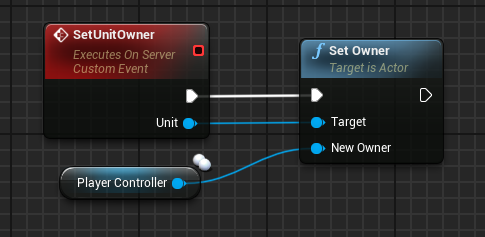
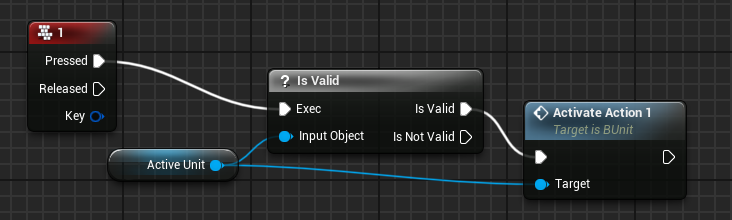
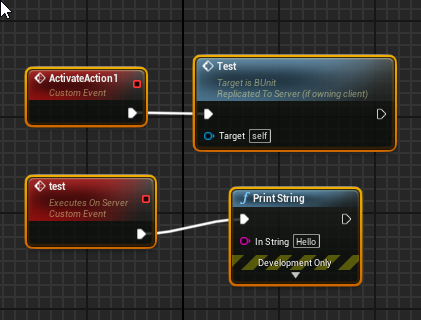


everything is replicated
owner name is right, but why isn't it executing on the server? T_T
the active unit is set and then I set the owner
warped fjord
Oh wait it could be that if they are placed in editor that you can't change them? I am clueless
warped fjord
Or maybe it's because it's possessed by an AIControllee
 candid swift
Anyone in here tried steam multiplayer?
bitter oriole
Define Steam multiplayer
candid swift
Unreal Engine Forums
Advanced Sessions Plugin
Updated 05/05/2020
Plugin now has two modules, one is AdvancedSessions and one is AdvancedSteamSessions, this will allow me to tie more Steam specific functions in without forcing the steam subsystem to be packaged out with projects that don't wan...
lost juniper
Asked this over in #-blueprint but I think it might be more Appropriate here. I'm a little confused about the camera functionality in Unreal. Is there a way to bind the camera to no particular controller (or all players)?
I'm having an issue where when player 1's pawn is deleted, the camera stops working (ie. deletes itself).
I have a suspicion that it has to do with that fact that it's bound to player controller 0
But I don't know of a workaround for this 😐
warped fjord
pawn controls more or less the cam, so if you dont have anything else you dont have a cam except if you assign one
bitter oriole
@candid swift That's sessions/matchmaking so multiplayer itself is unaffected
It works the same, except the initial connection doesn't use an IP address
warped fjord
yep AI controller takes away the ownership
warped fjord
damn, that makes things complicated
need AI controller to move it, but also need ownership to do stuff on it D:
so I got pawns on the map that the player can possess, but also give some commands..while they are controlled by an AIcontroller
should I just put an aicontroller on it if I need it and don't possess it with anything while not?
or does that create even more problems? 😄
livid holly
if the paws are AI owned then shouldn't their movement be dicated on the server anyway?
or you can refactor the code needed to move the ai to a component / actor owned by the local pc
winged badger
@warped fjord if you keep server auth movement, you can jut RPC the move commands via AIController you Own
you would have to set the thing to replicate for it though
or you could do it via the PlayerController
if you want the client predicted movement to work with AIController, then you're in for some extensive CMC override, which you have to do in c++
and not just CMC, its tightly coupled with the Character and PlayerController as well
you also have to make sure the Pawn you're controlling via AIController has the Role AutonomouseProxy
shy flicker
Hi everyone, I'm trying to replicate a simple move to location. The issue that I'm getting is that the client doesn't rotate at all. I could force the rotation on tick but I feel that it's absolutely unnecessary. Any idea how can i fix this?
 novel tartan
On a scale from 1 to 10, how fucked are you if you cant test multiplayer functionality with a dedicated server from home?
Currently looking for a solution because I can't open ports to host from home (what I used to do). I also cannot continue with my current project if I do not have a dedicated server that works on the internet to test with. I've heard that there's a way with a VPN to get around this but that has a price tag (all be it a little lower, not a lot of documentation about how to do it etc). I am also looking into cloud servers (some documentation) but they are quoted to be around 40-100$ a month and I am inexperienced with this option. I'd like to just be able to host it from home but it seems as though there's a type of double nat situation that makes it impossible to send information onto the net.
 abstract pike
Does anyone know of a way to have different tick rates for the client and server versions of a replicated actor ?
 shrewd tinsel
what to use instead of beginplay? its too early for me, is event possesed rpc to client a viable option?
plush wave
MyActor::MyActor() : Super()
{
  PrimaryActorTick.bCanEverTick = (GetLocalRole() == ROLE_Authority);
}
Will this make the actor only tick on the server?
Or should this code not be in the constructor?
Maybe in Begin play?
chrome bay
Definitely won't work in constructor
BeginPlay() should be fine, but you're better off using NetMode than Role.
Role can change
Also probably better to just override RegisterActorTickFunctions(); and check the NetMode there.
Then do bRegister &= !IsNetMode(NM_Client); and call Super.
plush wave
Ok so just to clarify override RegisterActorTickFunctions()
void MyActor::RegisterActorTickFunctions(bool bRegister) override
{
  bRegister &= !IsNetMode(NM_Client);
  Super::RegisterActorTickFunctions(bRegister);
}
That's pretty painless, thanks @chrome bay
I need to research Role more, didn't realize it can change at runtime...
chrome bay
Yep, Role isn't an indicator that it's on the Server either
Even if Role == Role_Authority
 polar wing
hmmm my workflow might be flawed, but I'm getting a bit annoyed with the basic uproject launcher being outdated when compared with the visual studio debug version (basically, the build from VS version vs launching the editor via the uproject). I need to debug my multiplayer project in standalone for the online subsystem stuff and whatnot, and that's easier when running the .uproject from cmd and then attaching VS to the host/client.
However, having to delete build files and then rebuild the uproject and regenerate VS files every time I make a small change is obviously not a great workflow 🤣 . Is there an easy way I'm completely oblivious to to get the uproject updated?
bitter oriole
What do you mean by " basic uproject launcher being outdated " ?
The editor launches the DevelopmentGameEditor build so compile that in VS and you'll be fine
No deletion of anything required
You also can just run standalone builds from VS for OSS stuff, just add -game to command line in your default Development build
polar wing
ahhh thanks! I knew I was being super dumb. First time I'm testing a new OSS, so I was googling around and the various "fixes" were making me jump through hoops.
polar wing
oh my goodness, I also found my issue. Seamless travel is the devil. I need to get a better understanding of its ways.
errant vapor
can i create custom replication behavior for an arbitrary uproperty type on a replicated actor/component?
 cinder steppe
does someone know why my characters are falling throu the map but pawns dont? it works offline or if the server spawns the map
cinder steppe
ok maybe a question thats easyer.
why is my BeginOverlap replicated by the server?
cinder steppe
ok, then why are all clients responding to the overlap even if only one of them triggered it?
bitter oriole
Overlap is a physics thing, it will happen on all clients and on the server
cinder steppe
thats not healthy xD
ok, then help me out on this last point
why does a function of a overlap react different depending if its a pawn or a character triggering it?
if i load a level with a pawn all is good.
but if i load a level with a character then the level is missing all collision
its as simple as it can get.
bitter oriole
It is healthy, UE4 replicates as little data as possible to avoid requiring immense volumes of network data, so all clients run the entire game on their own, and they just synchronize with eachother (using replication and RPCs). It's pretty much how you make network games. All physics stuff - including overlaps - happens everywhere at once.
cinder steppe
if a pawn1 triggers this function then the map is loaded an collision is there
pawn2 does not get the map loaded ( thats the plan, all good)
if character1 triggers this function then map is loaded but collision missing
character 2 does not get the map loaded ( still the plan for him atleast)
bitter oriole
Loading streaming levels in a multiplayer context will likely require the server alone to load the streaming level
cinder steppe
it works with the pawn
i also tryed run on owning client, but it still gets replicated to all clients ... :/
bitter oriole
Overlaps are not replicated
cinder steppe
i added a event
or is that invalid?
i just dont get it. why does it work with the pawn?
bitter oriole
My suggestion for you is to do a graph on a paper to decide what should happen on which machine, and draw how the RPCs and replicated data will go on
And of course add lots of logs to get more understanding of what happens
 wispy depot
Hello.
I'm doing unreal networking, there is an auto connect to server option when you start in editor with 2+ players. If I turn that off which class or module is handling this connectivity for finding and joining sessions in c++.
wispy depot
ok thanks for that too
That was where I was at, I'm kind of terrible making sense of the API, I know my server is already listening, I don't know how to find it's port. I don't know how to find the session name I don't know how to join it.
Figuring this out will probably make things a lot easier for me with other stuff as well.
bitter oriole
Which online platform are you working on ?
wispy depot
this is meant for LAN loopback i guess. PIE editor testing
bitter oriole
PIE does not support sessions, since the editor has its own auto-join system
You'll need to launch two standalone instances of your game to work with sessions
wispy depot
Ok and I am able to create join and manage sessions by creating the session, knowing the sessionname, and then searching for it I'm presuming. So how do I access things from OnlineSubsystem. Is it not part of UnrealNetwork.h? or gamemode or gamestatebase?
bitter oriole
No it's a different engine module with plugins for each platform
Overview of the various systems related to the online platform.
wispy depot
Alright thanks, cool I'm getting out of here, I had to replug my ethernet, pzlate lol. later
meager spade
is it Reliable or Unreliable that ignore relevancy on NetMulticasts?
 grim pelican
Does anyone know why a cable component attached to a pawn isn't visible to other players?
sterile plaza
Anyone here had luck trying to add replication to a subsystem?
Along with that, what's a good way to build a singleton system that replicates all its data to clients? Hanging something off the GameState makes sense, as the GameState is replicated to clients. But UObjects don't replicate. I could just do an FStruct, but I need functions for my system's API. I'm currently using an actor component on the game state, but that doesn't seem in line with what components should be used for.
meager spade
UObjects do replicate
you need to do it with C++ tho
but its lies that UObjects don't replicate
 crystal crag
So in this new project I am working on I just encountered the same problem I had with the last one... calling PlayMontage from the character in C++ does nothing. I have a slot in the anim BP, and I am playing a normal montage that isn't fancy. The PlayMontage call is occurring in the server. Do AnimMontages not auto play on all clients by default?
I thought that they did auto play on all clients if issued by the server
I just created a multicast function that uses the same code and now the montage plays... so I guess montages don't auto play on clients... which is not what I thought at all
I need to pull up the documentation because I could've sworn I even saw that listed there
 dark edge
@sterile plaza what's wrong wothbutblicing in Gamestate or Gamemode? By definition those are already Singleton's and everything has a reference to it.
 empty matrix
Guys, good night! How are you? I have a problem with the issue of delay on the server, it is giving 64 - 86ms of ping. How can I solve this?
dark edge
What is the actual ping?
lost inlet
unfortunately, i don't think we'll be able to change the speed of light and the conditions of the networking hardware between you and the server
empty matrix
Are you referring to me?
@lost inlet
crystal crag
Yes
empty matrix
Yes
@crystal crag Are you referring to me?
empty matrix
unfortunately, i don't think we'll be able to change the speed of light and the conditions of the networking hardware between you and the server
@lost inlet I did not understand...
lost inlet
when you send a packet to a remote server, that packet has to be electronically or optically transmitted between various networking equipment
and depending on how far away the server is and the quality of your ISP's routing, that can all change what ping you get
if the ping is unusually high for these conditions, then there could be a chance that the server's CPU is a bottleneck and causing a bit of latency but you can determine that by profiling
empty matrix
The point is that everything is stuck and lag ... For example I run any event and get that wonderful lag that nobody likes
meager spade
that is not a UE4 issue
lost inlet
well you were talking about 64-86ms of latency, which is fairly typical in a lot of parts of the world
meager spade
that is connection issue
empty matrix
if the ping is unusually high for these conditions, then there could be a chance that the server's CPU is a bottleneck and causing a bit of latency but you can determine that by profiling
@lost inlet I am using Steam Online Subsystem
lost inlet
the OSS is nothing to do with that
lost inlet
if "everything is stuck and lag[ging]" then that's another issue different from latency. you might have to clearer about what the actual issue is and possibly demonstrate it
 hoary lark
probably just doesn't have clientside prediction set up for something or something lol
meager spade
if everything is server authoritive then you will notice delays, which is why a lot of games do prediction, let client feel responsive, let server handle any issues.
empty matrix
if "everything is stuck and lag[ging]" then that's another issue different from latency. you might have to clearer about what the actual issue is and possibly demonstrate it
@lost inlet I will record a video here
crystal crag
Sometimes I don't understand this channel. Not trying to bash GamerDev but I don't understand how that question gets answered, yet my simple question of do animation montages not automatically play on all clients if issued by a server gets ignored.
empty matrix
@lost inlet Here is the link to the video: https://drive.google.com/file/d/1gk3hjpOjZUYvPbTUxyijMyOcQj2WJis-/view?usp=sharing
Google Drive
lost inlet
well that wasn't an answer really, and in this video it looks like key movement data isn't being replicated
also @crystal crag you shouldn't really assume that anything is replicated, it would be much better to use a multicast to play the montage on other clients
crystal crag
Yeah apparently I had misunderstanding. Not sure where I read they automatically played on clients.
meager spade
also its actually better to do it via a replicated property
we do it to ensure clients play the montage correctly
                // Those are static parameters, they are only set when the montage is played. They are not changed after that.
                OwnerChar->ReplicatedMontage.AnimMontage = MontageToPlay;
                OwnerChar->ReplicatedMontage.Payload = Payload;
                OwnerChar->ReplicatedMontage.TagsToRemoveOnMontageEnded = MontageTags.TagsToRemove;
                OwnerChar->ReplicatedMontage.bForcePlayBit = !static_cast<bool>(OwnerChar->ReplicatedMontage.bForcePlayBit);
                OwnerChar->ReplicatedMontage.bLocallyInitiated = bFromServerRPC;
                //Force a net update, we need this to go through.
OwnerChar->ForceNetUpdate();```like this for example
then the OnRep handles it for clients
and we do stuff like catch up etc
@crystal crag
empty matrix
well that wasn't an answer really, and in this video it looks like key movement data isn't being replicated
@lost inlet everything is replicated ...
hoary lark
99% of the time this kind of issue is either Net Saturation (try limiting your framerate to 30 and see if the issue goes away, or use stat net to watch for Saturation value greater than 0)... or you aren't properly replicating something somehow.
winged badger
depends, i saw fails when UAnimInstance* was sent as an RPC payload
and those don't replicate, unless you do crazy amount of custom work to make them
they aren't even net addressable
sterile plaza
@sterile plaza what's wrong wothbutblicing in Gamestate or Gamemode? By definition those are already Singleton's and everything has a reference to it.
@dark edge I'm fine putting it on the game state. But what do I use? If it's just a struct, then I can't have functions for my API. The only thing that would replicate on the game state is a component right? Do I have other options?
 red sand
Where should the leaderboard stuff be handled?
In GameMode or in GameState
chrome bay
Subsystem probably, unless you can guarantee you won't change map during leaderboard writes.
GameInstance (or a GI Subsystem preferably) is generally a safer way to interact with async online tasks.
Also note - only the server has GameMode access, clients only have GameState
@sterile plaza extending behaviour with components on the game state makes sense - I've done that for a bunch of stuff. You can replicate UObjects if you want to, but you have to use the actor to do it.
red sand
@chrome bay If it's confirmed that during the match the map won't be changed, where's the best place to store leaderboard stuff?
chrome bay
I still prefer a subsystem tbh
dark edge
@red sand if you're talking a leaderboard like the scoreboard in league of legends, put it in the game state
chrome bay
Keeps it away out of the mode-specific stuff
When you say leaderboard - are we talking online subsystem leaderboards or an in-game scoreboard?
dark edge
@chrome bay what's the approach to replicating stuff in a subsystem?
@chrome bay I think he's talking in game, like inside a match
chrome bay
Yeah you can't, that's why I'm wondering what we're talking about here
If it's a scoreboard, then all player states should keep track of their own score and stats - and clients should add and sort them in the leaderboard themselves.
dark edge
For something like pressing tab to see the KDA of everybody, each persons stats should exist in their player state, and the game state has an array of all player states by default
red sand
In-Game Scoreboard @chrome bay
chrome bay
Okay yeah, in which case each individual players' stats should go into their player state
And clients update their scoreboard UI from those
You can access all active player states from the Game State as Adriel says
dark edge
Ya, You would set it up like input on player controller shows a widget which is populated with data from the game state and it's array of player states.
chrome bay
yeah exactly
If you have teams or something, you might want to create something like "Team State" actors for your game (or just keep the team data in the game state, etc.)
Depends if your teams have a lot of data or not, might not be worth the overhead of another actor
dark edge
I suppose the only thing I'm not 100% sure of is where you would do the writing to game state. Would you do it in game state itself with a switch on authority or in the game mode?
chrome bay
Yeah I guess it depends, either is fine I think. If it's something like the scoring that's probably determined by the Game Mode anyway server-side, so in that case the Mode might update it.
chrome bay
If you want a view you need to use Play As Listen Server
Dedicated Servers in previous versions of UE would never generate a viewport either
If you saw a viewport for the server, then it was a listen server
 earnest trench
Interesting, I may have been misremembering then about back when I did PIE network learning. Thanks 👍
winged badger
you do have an option to go advanced play, uncheck single process, and choose which instance runs in PIE
others would run as standalone
 broken warren
Hello, I have a multiplayer and I want to have a mine that explodes when it sees a player with a tag (blue or red).how can i do that ??
PS sorry for my bad english
empty matrix
99% of the time this kind of issue is either Net Saturation (try limiting your framerate to 30 and see if the issue goes away, or use
stat netto watch for Saturation value greater than 0)... or you aren't properly replicating something somehow.
@hoary lark Okay, Stat Net? What is it?
winged badger
its a console command
@broken warren you do exactly the same thing you would in single player, then replicate the explosion (damage applied on server, multicast effects, hide and disable the actor destroying it after a few secodns rather then immediately)
reason for not destroying the actor immediately, is you don't want the destruction to replicate before the effects, and it might
winged badger
i won't be making the BP
broken warren
ok
winged badger
to do the part thats not relevant to multiplayer (explode when someone from another team enters)
you need a team interface on both players and mines
then OnBeginOverlap if OtherActor implements TeamInterface and its team ID is not the same as mine's team, go boom
broken warren
Thanks i`ll try it later
meager spade
you would 100 percent need to make a team system (even if its just a simple enum with two teams)
use this to determine.
rich ridge
Let's say in my moba game, 9 are ai controlled and 1 is real player. Since ai will exist on server, does it make sense include the aicontroller in the generic RPC logic.
broken warren
whats if I use two character ...if u are in red u get this character but if u are in blue u get this character
waxen socket
Good morning. Just checking: Player controllers are owned by their respective client, right?
If I only want to create a widget on the client side inside of a player controller, I can switch on authority and only create the widget on the "remote" side and that will stop the event from firing where it shouldn't?
empty matrix
Guys, good night! How are you? I have a problem with the issue of delay on the server, it is giving 64 - 86ms of ping. How can I solve this?
This is a link to a vídeo of the error: https://drive.google.com/file/d/1gk3hjpOjZUYvPbTUxyijMyOcQj2WJis-/view?usp=sharing

Google Drive
 neat folio
{
print("Hello Everyone!")
print("I am having an issue with my multiplayer system, I am using the Unreal Engeine 4 multiplayer system with the session nodes and every time i create a session it doesn't find work.")
print("I create a session, but when I search for it with a diffent game it doesn't find the index I created by making the game.")
print("If possible can someone tell me some things I can do to fix this.")
print("if needed ill send photos in 12 hours.")
}
I understand that a PlayerController does not replicate from server to client, but does it replicate from client to server?
As in, as far as inputs go
unkempt tiger
Oh, what sort of data is replicated?
Does the client just
Get a replicated instance of the player controller?
And that's it?
Well I do have another question, kind of unrelated
chrome bay
Yeah they get an instance of the controller, any properties on it marked as "Replicated" will then be rep'd too