#multiplayer
1 messages · Page 548 of 1
 fading birch
np ^^
 shy kelp
And the clients should open the servers ip? what i had before was that the clients can host a server if they want, but currently, i want a dedicated server.
so is the process for the clients to join a dedicated server the same as a listen server? @fading birch
fading birch
it's a bit different
but yeah
you just need the server IP
which for local testing is just 127.0.0.1
fading birch
nope
shy kelp
ok thank u!
fading birch
every instance of the game running has it's own game instance
is there a reason you need the server to call these endpoints specifically?
sure, but why do you need the server to do it specifically?
so you have 2 options. If it's not working through game mode, then your authentication to your webserver is borked somewhere otherwise your game server would be able to connect just fine.
You can create a game instance subsystem to manage your connection to your webserver then create endpoints on your webserver to actually update these things, you can verify they're correct on your game server before you send them out.
does your webserver that stores the inventory stuff require authentication?
and does your game server have that authentication?
and it's not showing the game server as connecting?
it may be this line:
UdpSocket = FUdpSocketBuilder("TestSocketListen").AsNonBlocking().Build();```since you have the function call to your SendUDP at the end of your ListenUDP function
it could just not be ready yet
well you can have it nonblocking
but I'd look into what that does exactly
there's probably a delegate you need to bind to or something
that triggers when it's done
 harsh lintel
is there a convenient way of calling c++ functions locally and on the server? I find myself having two functions with the same functionality some times only with different function specifiers (server/client)
fading birch
not really, that divide exists for a reason.
 twin juniper
I've been having an issue for the past week with the steam subsystem and when I try and host a lobby it gets automatically destroyed :(:( Im at a loss
fading birch
have you set a product ID for steam?
are you testing in stand alone and not PIE?
have you confirmed Steam works in your project?
twin juniper
I've set the id to 480
I am testing in the packaged version
Steam overlay works it just kicks me from the lobby
fading birch
is there an error message?
do you have a session created through steam?
i'm not 100% sure you can create a lobby with the 480 id
I've not worked that deeply with steam, at least not lobbies
fading birch
that seems like a steam block
like I said, i've not worked that deeply with steam so i'm not 100% sure
twin juniper
That's all cool dude, thank you very much for helping out here 🙂
 acoustic jewel
Continuing my dedicated server questions. I am making a CS sort of game, a player is creating a game using a map and a winning condition (deathmatch, CTF) and the others are joining. Can I implement that on a dedicated server using Steam sessions?
fading birch
You can, although you don't technically need to use steam sessions for that
you can just use a gamemode of that type (DeathMatchGameMode, CTFGameMode, etc) to set the rules of that particular game type
acoustic jewel
But can I create multiple games?
Host, let's say, 5 games on the same dedicated server
fading birch
no
fading birch
As far as I understand it, you use sessions to find servers that are hosting games. A server is only capable of hosting one session at a time and running only one game at a time. You generally have several different instances of servers running utilizing their own sessions. You use the subsystem's match making, in this case steam, to find sessions that match your query then the client joins the server it finds depending on your match making criteria
If you're using something like AWS Gamelift, you have to do it a bit differently if you're not using steam, but you don't really need to rely on sessions in that case as Gamelift handles matchmaking for you.
 karmic briar
hey guys so anyone here have action rpg inventory system can help me
i've been trying to find a way to when i equip specific weapon like sword or bow,it will play that swordman state or archery state
i tried 2 things that i know might be help 1.in the structure called InventoryItem i added an enum called WeaponState and in that its basicly for when i created a weapon for example sword i can set the enum state as swordsman.first method i tried is in the managercomponent of this inventorysolution in there are two funtions called equipitem and unequipitem there i basicly use macro that has reference to the inventoryitem structure and set the variable in both of those function.then in animbp i can get reference of that component and use it for various weapon state but that doesnt work
second method that i tried is i get the reference to the inventory item directly and use it in animbp but thats doesnt work either
i also asked in the arpgis forum for help as well and i tried this method https://forums.unrealengine.com/unreal-engine/marketplace/65774-action-rpg-inventory-system?p=1765112#post1765112 but thats doesnt work either or maybe what i tried in april by using this method is wrong
Unreal Engine Forums
Hello All,
I am happy to announce our first marketplace content.
Action RPG Inventory System - Marketplace Link (https://www.unrealengine.com/marketplace/arpg-inventory-system)
Supported Engine Versions: 4.13 - 4.24
Views: 1 Size: 200.6 KB ID: 1168237
Update Notes:
V1.1...
now im run out of ideas on what i can do
the other method that someone recommend is merging weapon component pack from marketplace into it but i dont want to buy something i can get it done myself
twin juniper
Hi guys, can someone help me a bit of replication problems, im a bit new so im not sure why its not working. I have a character with a controller, which can open up a shop widget. I want the shop to add grenades when button click. This works for the host, but not for any clients. They dont get any grenades when i press the button...
 normal jacinth
Hi 🙂 I have a very basic setup - a replicated ball rolling down a hill, using UE physics. However, the ball's position appears in different places based on client or server (I think the client's balls are lagging). Does anyone know how to resolve this?
@twin juniper have you seen this - http://cedric-neukirchen.net/Downloads/Compendium/UE4_Network_Compendium_by_Cedric_eXi_Neukirchen.pdf you need to create custom events and flag them as running on server and the multicast them
 thin stratus
@twin juniper You aren't following replication rules
While you have the Grenade Variable set to replicate, only the Server is more or less allowed to set it (minus prediction done on owning client).
Your UI is local only, so your button press will keep the call on the Client
Which means you never tell the Server to change the grenade count
And thus, no replication happens.
You need to perform a Server RPC (no in the Widget, but in the PlayerController)
 small storm
@thin stratus Ahhh yeah i was thinking it was something like that when i started printing debugs... What do you mean server RPC?? And how do i call that from the widget
 fringe marsh
Hi, can anyone help me? I'm trying to create a player HUD for multiplayer but I'm not entirely sure what blueprint I would make that in. I've made a main menu for players to join and host servers with different levels. If I create it in the level blueprint I'd need to make it for every level. So what would be the best place to create it in??
 meager spade
@normal jacinth replication and physics == bad time
there is no fixed timestep, projectile movement component kinda fakes it
maybe look into that code (but its C++ not blueprint)
 small marsh
@fringe marsh You can create at PlayerController
thin stratus
@small storm Read the document that was linked by DucatiSteve
fringe marsh
@small marsh at PlayerController? What do you mean by that?
small marsh
@fringe marsh You can use Widget instead of HUD
fringe marsh
@small marsh ohh, was that created in the widget blueprint of the HUD?
small marsh
@fringe marsh 1) Create common Widget
- You need your own PlayerController class
- in PlayerController create widget and add it to viewport
fringe marsh
Ohhh okay I think I get what you're saying. If I create my own PlayerController class, will it mess up other functions where I've already used the default controller?
small marsh
@fringe marsh the child class can do everything the same as the parent. problems are not expected)
@fringe marsh don't forget replace default PC
fringe marsh
@small marsh ahh okay, I've created it, but what kind of variable reference is the set HUD?
small marsh
@fringe marsh HUD only name, that holds GamePlayUI type. I created it for access this widget in future
fringe marsh
Okay I see, thank you! I'll give it a try and see if it works
 weary badge
are blueprints inside the Game Instance permanently loaded to memory, while the game is open ?
 fleet raven
yes
 jovial stream
How do I access variables from the server? I am trying to replicate the seed, number of rooms, and if it is using a random seed
meager spade
GameState
jovial stream
Alright thank you
@meager spade When I use a custom game state it breaks the game
I cannot control a player that joins a session
meager spade
then thats an issue with your game
using a custom game state does not break anything
small marsh
@jovial stream Where you put your logic ? GameMode?
jovial stream
It is in an actor
small marsh
@jovial stream Maybe GameMode is a better place to generate seed?
small marsh
++
small marsh
you can transfer through GameInstance or use as parameter when traveling to different level
jovial stream
ah alright
i'll try it out
And in the actor that generates the structure I should reference the game state?
small marsh
Actor onBeginPlay can acess GameState and get seed from it.
But first you need to put value to GameState. Perfect moment on GameMode creation
jovial stream
Alr
@small marsh when should I cast to the game state to set the variables, on begin play?
small marsh
@jovial stream Every time when you need to get/set your variables. To set do this at GameMode begin play
jovial stream
👌
small marsh
and don't forget set variables replicated
jovial stream
oh yeah that's probably a good idea
lol
@small marsh the variables aren't setting, am I doing something wrong?
fading birch
does that print string run?
jovial stream
yes
small marsh
@jovial stream You set seed at lobby or similar place, right? then create advance session to transfer seed data. But you try get variables in your lobby and when level changes variables again empty
jovial stream
yes
small marsh
open level -> creating new gameMode instance
and when New GameMode created you need do your operations
small storm
So im reading about replication and stuff, but im wondering if someone can explain with their own words, what functionallity should i put in the replicated character/pawn and what should i put in the player controller and why?
Is there a major difference in what stuff should go where?
fading birch
@small storm Something I would replicate on a pawn rather than controller is health. The pawn will die, the controller would just possess a new pawn on respawn.
Something I would replicate on a controller rather than pawn is a shoot function. The pawn may have it's own shoot function which is also replicated, but a generic shoot function on the controller would call shoot on that pawn.
small storm
Thanks
jovial stream
@small marsh how can I transfer over the data to the new gamemode that is being created?
small storm
And what does RPC stand for? I havent seen any docs so far actually saying what it is
fading birch
Remote Procedure Call
small storm
Aha
fading birch
It's on page 59 of this http://cedric-neukirchen.net/2017/02/14/multiplayer-network-compendium/
small storm
Yeah im here now
fading birch
Which is in the pins
fading birch
No
small storm
could you just skip that node and have the same effect?
fading birch
Technically yes you could call it in the player controller for example.
jovial stream
@small marsh THANK YOU SO MUCH IT WORKS NOW!!
small marsh
@jovial stream Nice)
 real cedar
Could someone help point me in the right direction for where to look.
My issue is when I play offline, the character loads just fine, when I play as a Client (doesn't matter if it's 1 or more players), spawns in with black screen. Rest of the HUD elements all load, but screen is black essentially.
UE 4.25.1
small marsh
Maybe troubles with camera?
real cedar
If I run 2 players, and play as listen server, it loads correctly for the server player, but client, it has the black screen with hud on. I can move around as the client and see it working fine on the server player.
small marsh
@real cedar u using default camera or on player join use SetViewTargetWithBlend?
real cedar
I'm using ALS V4 as well. They have their own camera manager
real cedar
@small marsh
small marsh
@real cedar Not familiar with that. Try to setup very basic level only with Players
shy kelp
Is there a way to set up an invisible barrier that only allows only certain people to go through, more specifically can you disable collision on a object only for specific people
and would this be done in the gamestate?
or player controller
 chrome bay
If you want to send some data between server and clients but not via regular game traffic, the solution is a socket right?
Provided you want to keep everything internal to unreal
I assume though, sending things like ptrs to objects and such isn't gonna work like that? Needs to be through the game?
Just putting out feelers to see if anyone has messed with this.
Oh actually, beacons would do. Duh
 floral crow
Quick question about the engine: A replicated component spawns on the client with the actor at the same time? or it arrives later?
As in: Actor set to replicate with component attached on the editor set to replicate spawns on server. Which of the following is true:
- The replicated copy spawns on the client with the component at the same time
or 2) The replicated copy of the actor spawns on the client and later on a different network message arrives with the replicated component
 signal lance
if the component is a part of the actor it will get created at the same time, doesn't matter if it's replicated or not in this case pretty sure
shy kelp
just so i know, PathToUE4Editor.exe PathToYouProject.uproject -server -log shortcut makes a dedicated server right?
 fast mason
hey
Hi there!
I'm looking for some guidance.. I used the TopDownCharacter as base for my project.. and recently started working on the multiplayer code..
the thing is, Simple Move Location is not replicated, it only works in the Server
I tried to enable the "replicate movement" in the controller, without success
any idea?
shy kelp
there are plenty of movement replication tutorials on youtube
its kind of a tedious process
i swear to god, this error is the bane of my existence
can someone tell me the meaning
i figured that out but i have another problem regarding that now
im trying to get the guildid stored in my playerstate, but this function isnt even firing. the cast seemed to be successful for playerstate as well
this is in the playercontroller btw
 wheat edge
pull of player state and check if its valid before getting guild id
 elfin vortex
Hey all, I am brainstorming for a contract which is a multi-user museum type experience. Does anyone here have industry experience getting Oculus quest p2p or other networking architecture working? I'd love to chat about a possible consultancy.
shy kelp
@wheat edge i got a false, but idk why
i did a breakpoint on the cast and it seemed to work
 lucid vault
Anyone know why SetOwner(nullptr) throws an error? I want to set the owner back to the server for an actor
wheat edge
Instead of using set BPPlayer state u should try get BpPlayer state first
shy kelp
@wheat edge i feel stupid now, but i still got to debug cuz that didnt solve my problem... thank u either ways!
fast mason
yeah, a kick tip, ctrl+drag variable is default to get, and alt+drag var is default to set
twin juniper
Somebody knows howto configurate network smoothing?
fast mason
@twin juniper what kind? in the controller class you have a few parameters..
I lied, in the Movement component*
twin juniper
@fast mason I've a lag at movement speed changes in client-server model, when client uses over 30 fps
yep, movement comp, needed to configurate, but I'm newbie and not fully understand how it works
wheat edge
If you walk around it should be smooth already by default
twin juniper
These parameters must be static, or it would be configurated for each client separately?
@wheat edge no, I use locomotion system with dynamic speed changes (for 30 fps it looks fine, without lags)
wheat edge
Lag happens constantly or only during speed change
twin juniper
@wheat edge only when changed)
wheat edge
Try bumping up the acceleration so velocity change happens in an instant
twin juniper
@wheat edge It looks, such client and server not synchronized at that moment
wheat edge
Yes but if acceleration is high enough, it should be only one frame of differences shouldnt be that noticeable
twin juniper
I understood that this bug happens at desyncing, but thinking that can fix it by network manipulations..
accel not helps enough..
shy kelp
@fast mason thx for the tip!
fast mason
🙂
shy kelp
onpostlogin is being executed before begin play. bug or intentional design?
in gamemode bp btw
fast mason
intentional, beginplay is executed once you are in the level
so the "postLogin" is executed between the Login and the BeginPlay
shy kelp
ok
fast mason
think about it like any MP game, some games for example before entering the map show you a EULA
shy kelp
ohhh
fast mason
you put your credentials, login, see the EULA, accept, game starts
shy kelp
im using it to gather stats from a webserver, is that good?
and using event logout to save for a last time
fast mason
yeah, it should be good, also you can identify the player who's doing the request
shy kelp
yes
fast mason
also, you will need a save from time to time, like when doing something relevant
for example, acquire a item
shy kelp
ye
fast mason
nice! me too, just getting involved, doing some RPG kinda game
haha I dont know if I reach that point, I'm just doing stuff slowly, right now trying to make work the TopDownController in multiplayer
maybe faking it with AIController is the solution, but idk if it's the "correct" way
seems messy
wheat edge
If you are not worried about collision, and you just netmulti to change the location of camera it should work
fast mason
uhm, i think collision its actually essential, isn't it? I don't expect character move into a building
at least not the ones without doors xD
wheat edge
Well if its a top down like look, for example warcraft 3/ starcraft camera style u wont need to worry about collision when moving around
The unit needs collison but not the camera movement
fast mason
oh, well, I tough about it.. I was expecting something more like lineage 2, so when I enter a building the camera collides with the ceiling, so I don't loose the player
 kindred widget
@fast mason Just to be clear about something, you're generally not supposed to replicate the controller anywhere other than the owning client and the server. Only one player controller should generally exist on each client. What are the trying to achieve that led you to wanting the controller replicated differently than it is?
shy kelp
if you want it to replicate different use the player pawn instead
fast mason
@kindred widget sorry, I am not replicating the controller, I know the controller is in charge of our local controls
twin juniper
Hi. Is anyway to update objects' variable ref on local machine from server?
Fore example. I've id=42332, which must be updated from server with new value 64573. And this local var not replicated. How to do this?
small storm
Whats the easiest way to add recoil when firing in a fps game, and having it replicate to multiplayer?
twin juniper
@small storm animation, but replicate it by var (because animbp not support rpc)
 rose egret
how do I get angular velocity of Character in remote clients ?
twin juniper
@rose egret not sure, but do you know about fundamenta?)
https://youtu.be/VhG6B6NM2bQ
https://docs.unrealengine.com/en-US/BlueprintAPI/Physics/GetPhysicsAngularVelocityinDegre-/index.html

This instructional video covers Rotation Angle and Angular Velocity and corresponds to Section 6.1 in OpenStax College Physics for AP® Courses.
Full course content for the AP® Physics Collection on openstax.org and is available as a self-guided course by Rice Online Learning...
Get Physics Angular Velocity in Degrees
call rpc funcion
with owned param
small storm
What do you mean animation. I'm a bit new so if youbjust say "animation" i dont even know where to start lol
twin juniper
@small storm so you've a big problem, bro.. start learn blender, or maya animation, then export in ue, then how to use animbp
it's a couple of info.. good luck and have fun)
additionally in old versions ue, devs can use camera animation sequences, in new not sure that this feature still in an life
but you can using cameraShaker..
try simple asset from marketplace, and view how it works..
rose egret
I need something like pPawn->GetVelocity(); there is lots of network behind it . and I don't want to write it from scratch myself.
twin juniper
@rose egret i never did this too.. know that if you will try, you must use unreliable rpc in tick event
small storm
Do you HAVE to use animations? cant you just add pitch to the camera controller or something similar?
twin juniper
@small storm its second way to do this, yes, you can.
something like tick->clamp(getX+(++diff));
small storm
Because im just prototyping gameplay, so i want the simplest way to just show the function
twin juniper
if you know enough blender or something else, its very simple
twin juniper
animation must be learned, so working with sequence or animmontage its a good way
small storm
The thing is, in multiplayer, what parts of the recoil needs to be replicated, and how 🤔
twin juniper
in mp only owned client must using recoil
its 100% client side logic
for other clients, its animation )))
via replicated variables
 foggy hinge
I would not make it client side. That's just going to open cheating.
small storm
Cause the recoil affects where the bullets go, its not just visual
twin juniper
use pattern and anticheat system.. its not for prototyping.
foggy hinge
I would suggest simulating it and then correcting based on what the server says it is at.
twin juniper
and requires C++ implementation skill
foggy hinge
It can be done in Blueprint just fine.
small storm
I think you are overcomplicating things...
twin juniper
@foggy hinge server can got and incorrect data and send this data via multicast..
foggy hinge
I would avoid using a multi cast, you can do the animation side of things using blend spaces.
twin juniper
okay, do it)
I never use this method, because I prototyped too
can you show how it works?)
I told about animation too..
but not understand what can stops the cheaters)
foggy hinge
So the theoretical layout would be something like this:
- Store the aim pitch as a float on the character. Make this a replicated variable.
- When the player shoots, both the server and client simulate modifying the aim pitch. If you need this to be random, make sure the randomness is deterministic.
- Client should have simulated so it is the same as the server, but if it isn't then correct the client. You can make this somewhat fuzzy so that you don't have to snap the camera. Another option is to interpolate the current camera orientation to the server correct orientation.
- In the character anim blueprint, use a blend space that blends the aiming animations (https://docs.unrealengine.com/en-US/Engine/Animation/AnimHowTo/AimOffset/index.html)
- Use the aim pitch float to adjust the aim offset blend space. On non owning clients, they'll have replicated the aim pitch, so they should work automatically.
- When calculating the camera and so forth, use the aim pitch value as the camera pitch.
twin juniper
UML mby..
It looks as specator logics)
twin juniper
Yep, it another way to try receiving actual data.. but again, replication used too
foggy hinge
The server already knows the gun is fired, so you don't need to replicate back and forth like that.
Client -> Simulate_Fire ---Replication--> Server -> Fire
Client can simulate everything from that point
small storm
Yeah i mean the shooting script is already in place and working, so i wouldnt worry about that
im just adding on the recoil bit
foggy hinge
Don't tell the server to add recoil.
There isn't a need to replicate that part
Because the server knows the player already fired the gun, so it should just add the recoil from that point forward
twin juniper
what're doing. backward sending data to owner which called the function?
foggy hinge
Follow the above structure I laid out edWin
twin juniper
@small storm https://discordapp.com/channels/187217643009212416/221799385611239424/721687264576667719
try this method..
you wrote half of its
small storm
i will try, im a bit noob so bare with me
foggy hinge
It depends on how you've done the gun firing logic.
small storm
What do you mean by "Simulate modifying the aim pitch"
twin juniper
@small storm glhf
foggy hinge
@small storm The client can do the same calculation as the server. For most players (non cheaters) this should provide a lag free experience. For cheaters, it will allow you to auto correct them or just completely ignore whatever the client says it is doing.
twin juniper
@small storm one logics, which calling on both sides
small storm
using the switch authority thingy or
small storm
Im just having a hard time converting your text into actual nodes
twin juniper
@small storm ask for @foggy hinge to write it for you)
small storm
hey im just trying to learn
twin juniper
I told what you can learn if you wanna to do it without correction method as told jammy
foggy hinge
@small storm https://docs.unrealengine.com/udk/Three/ReplicationHome.html , read the technical documents. A lot of the documents are still relevant as the replication model hasn't changed between UE3 and UE4. Some names are changed. For example PlayerReplicationInfo is now PlayerState.
twin juniper
but it not solve his problem in 5 minutes)) as he want
foggy hinge
Nothing is going to solve things in 5 minutes.
If you want to do things right, you have to learn how the underlying systems work.
twin juniper
@small storm you understand that you GET current pitch and SET it back to same actor?
it never be works
and try https://docs.unrealengine.com/en-US/Programming/Tutorials/FirstPersonShooter/index.html
after learning the networking system..
https://youtu.be/nH5r1QWJHOA
Learn how to implement mechanics for a First Person Shooter game.
 small storm
where do i get and set the same actor?
twin juniper
@small storm possibility on server..
 delicate basin
Hello! Anyone knows how to set rich presence through Uworks?
Steam documentation is awfull - setting right KEY and then applying VALUE, problem is finding the right one
 potent cradle
Has anyone been able to start a local dedicated steam server and have it visible in the internet servers tab? I can only see it in the LAN tab. Been searching, but haven't found a solution yet.
 dawn summit
Greetings. Can anyone explain how new multiplayer settings work in 4.25?
dawn summit
 steady musk
Seems like 'As Listen Server' is a Listen Server and 'As Client' is a Dedicated
dawn summit
i can play networked in Play offline too
and it's behave differently in PIE and standalone
so those new Net Mode settings is quite confusing
and it seems won't kill dedicated until you switch to pie
twin juniper
in the shooter game template in the commands it says setallowbots how do you execute that command?
steady musk
What is a proper place for functions that should be Multicasted for EVERY player? Like, I want to use 'global time dilation', Ive casted it to server and multicasted time dilation change but Im 95% sure that Ive picked a wrong place :/
kindred widget
How do people normally handle safely identifying players at login? For my use case I need to assign the player controller with an ID. I use this ID to know if the pawn that the controller is controlling can access certain things. My issue being that right now for testing this ID is randomly generated at controller beginplay on the server. How/where should I store this for saving the world and reloading the server so that the same player can join the same server and regain control of their character and access their same stuff? How do people usually handle connection IDs?
fast mason
are you thinking of use steam sdk in the future?
you would need to work with a GameSession, GameState and in case of steam sdk, work with the SteamID
I THINK
sorry, not sure of this.. but I do know, that games like ARK, work based on the SteamID
I finally accomplished the point and click multiplayer working on AI controlled pawns.. my only problem is when playing as client, the AI pawn looks like bouncing in itself while walking.. lol
kindred widget
I'm aware I could just use the SteamID, but I'm more interested in other ideas to integrate non steam login types.
fast mason
short demo of the "bouncing"
@kindred widget you would need to go more customized, like LoginProcess and relate user/pass into a DB with CharacterID I guess..
there's a series of tutorials based on this

In this video we take a look at the finished project and step through each of the features that will be covered in this series. We show our functional Main Menu and its options, a lobby where players can chat with one another and select their characters for the game, some serv...
I reduced the net update frequency to 60 and its good now.. idk if this the actual solution
well, not quite entirely but it reduced the bouncing nicely
kindred widget
Seems almost like server slightly correcting a client movement.
fast mason
yeah, i reduced it to 30 now, its almost flawless, but sometimes does a little bounce, and for a <1ms worries me
how was the way to emulate lag?
 fallen pawn
How do you launch the Network Profiler?
fast mason
no idea
I figured out the latency setup and also found out the client movement correction sucks for me
30ms and lot of bouncing
what would be the way to tell the server to only check location when I tell him
and avoid that instant correction
figured out its my camera following
lol
 gusty slate
Has anyone encountered issues before with RPCs not triggering when called from Keyboard Inputs?
They work sometimes, then don't work
 winged badger
@fast mason net pktlag=<number>
gusty slate
Marking the RPC as reliable seeme to fix it. Anyone has insight on this? I want to understand it better
winged badger
but if its overly correcting you, odds are one of your components replicates its location, likely capsule or the mesh
unrealiable RPC can fail wwhen network is saturated @gusty slate
and player input should always be reliable
but you seem to be sending way too many RPCs about
nothing on Tick should ever be Reliable as well, doesn't matter what it is
as a newer packet would reach the server/client anyways, before they had a chance to resend a failed one
fast mason
@winged badger thanks I changed it from project settings, works well! btw, what I am doing is following the AICharacter with my camera and setting relative location at tick where the AICharacter is, its whats making the bounce
not the actual latency
winged badger
where your AI is = where its capsule is?
gusty slate
Can you not attach the camera to your character?
winged badger
capsule doesn't get interpolated via CMC, the skeletal mesh does
fast mason
yeah, exactly and I changed the my capsule to non collision
oh
@gusty slate the thing is.. I have my own character which is invisible, and I'm following a spawned AICharacter "that belongs to me"..
so that way I can use the point and click functionality in multiplayer
I dont get how to fix it, even using the VInterp To does the bouncing
any helpful insight?
what would be the correct way to follow a player "smoothly" ?
fast mason
ok, its lag related because the character is moved server side and I'm following client side
i'll see how workaround
meager spade
yeah your going to have that
have a similar setup
we*
but out controlled pawn is autonomous
but requires a lot of c++ changes to achieve
fast mason
yeah, to be a fresh indie, I think lag compensantion is kinda complex
the most complicated part for me, is that AIController only works at server side.. so its harder to "fake" client-move
i dunno if I should abandon the point and click navigation in multiplayer..
twin juniper
Anyone mind helping me figure out how I can replicate this turn in place without it being so choppy? https://streamable.com/5qr81y

Here is a screenshot of how I've already tried to do it. If it comes in as remote I send it to the server which then sends it to the multicast. I'm still new to this and this seemed to work on something else but it just gives me a really choppy turn in place in this situation.
 buoyant wedge
Hello guys. The event dispatcher work for multiplayer? 🙂
winged badger
they are not and cannot be in any way networked if thats what you mean
but it works perfectly fine in the scope of each individdual machine
lucid vault
I have some multiplayer movement code with a turn in place system.
Other player's movement looks nice and smooth on other clients.
However, other player's (clients) movement looks choppy on the server.
Is anyone familiar with similar issues? Maybe a common mistake that I made when replicating my variables?
I would think that it should be the smoothest on the server
twin juniper
I have the exact same problem that i mentioned above. Wondering the same thing
fleet raven
it's not a problem, the character movement was designed to be like that
 hoary lark
Choppy as in animations updating at like 20 FPS?
Oh just saw bronzes stresmable, not what I was thinking of
 shadow aurora
Ok I have a question about spawning in actors on multiplayer in C++ and variable replication. I’m not at my computer right now, so I can’t share exact lines of code. But here is a rundown of the question:
Basically, each player in our game has the ability to spawn in a pet/sidekick that follows them around. They do this by pressing a key.
These sidekicks have their own individual values for their variables including but not limited to their species & nickname. These values have to be replicated to each player connected to the session.
So my question is, how can I create this actor & then set their variables after calling “SpawnActor?” I.e. do I need to set the variables in the function that calls SpawnActor? Or does that function need to call another client/netmulticast/server replicated function? The function that calls “SpawnActor” is a server replicated function. All of the variables are set to replicate. For some reason whenever I’ve tried this the client starts to desync from the host exactly when the variables are set. Commenting out those lines where the variables are being set causes the desync to stop.
Any help would be sooooo appreciated.
thin stratus
Theoretically you only need to make sure the SpawnActor is called on the Server and that the Variables are replicated.
 barren patrol
@shadow aurora you should do the spawning and setting variables all on server-side. did you set up the GetLifetimeReplicatedProps method so that the server will replicate the values?
its also fairly easy to do this all in blueprints.
 nimble basin
Hi all, what is the easiest path for setting up a Dedicated Server for steam? My game uses steam, and I have it working with lobbies. Do I need AWS? Does steam itself offer such a service? Pretty new to this..
That is, easiest path for an Indie Developer.
 bitter oriole
Steam doesn't host servers, so you need to find a provider to rent your dedicated servers
nimble basin
Is AWS the way to go? I am not so good at C++ yet. Ideally I find a provider and an integration that lets me use Blueprints.
bitter oriole
Whichever provider offers servers that are fast enough for your game
This isn't a code thing
It's a "go to website and buy instances" thing
There are two things here : the dedicated server software which is your game compiled as dedicated server, and the "hardware" which is what you rent
 chilly mason

Google Docs
1:Hosted BaaS Comparison
https://discord.me/baas,This Sheet:,https://bit.ly/2HO1JVn
✓✗,AcceleratXR (AXR),Amazon GameSparks,BrainCloud,ChilliConnect (Unity),Microsoft PlayFab (PF),Photon PUN,SmartFoxServer (SFS),XTR4L1F3,A...
have a look at this, some guy on another server has compiled it
nimble basin
I'm working on getting dedicated server working in my custom build now. I'm considering using AWS, but i'm not sure how to integrate.
Thank you, having a look..
bitter oriole
There is nothing to integrate
AWS sells you servers
You then upload your dedicated and start instances based on your playerbase
You'll then use sessions to search for available dedicated servers
nimble basin
Ok. I have a dedicated IP coming on Friday. I guess i will start testing at home, and worry about moving it to AWS or elsewhere once its working.
bitter oriole
Good call
nimble basin
Thanks for the tips
 ebon hearth
@nimble basin Tried looking at this guide? https://medium.com/swlh/building-and-hosting-an-unreal-engine-dedicated-server-with-aws-and-docker-75317780c567
Medium
Today I am going to walk you through the process of building and deploying your very own Unreal Engine 4 dedicated server running on…
It actually covers creating an AMI for AWS specifically
I've just had an odd issue where a packaged game client from WindowsNoEditor was trying to launch the Dedicated Server process from BP's.
As far as I'm aware, Is Dedicated Server should not be True unless I package for <Game>Server under the Package Targets menu
My only theory is that I built for Development Editor in VS first, then Development Server and then I built the Client inside UE4.
To build both Client/Dedicated Servers, do I really need to build Development Editor in VS, then package the client in UE, and then build Development Server in VS and then finally package the server in UE? Seems a little inefficient of a build process to me
chrome bay
You can just package in UE
no need to build in VS first
ofc you need to build dev editor to get the editor open in the first place
ebon hearth
Well that rules out my theory on why Is Dedicated Server returned true on a WindowsNoEditor client package
chrome bay
All that node does is check the current worlds' Net Mode
If that fails, it'll call IsRunningDedicatedServer from CoreMisc
ebon hearth
Ahhh, so I need a different way to check which binary is running, client or server
chrome bay
you can use #if UE_SERVER for server builds
But ofc that will be false in editor even if a dedicated server is running
IsRunningDedicatedServer() should handle that already though
TL;DR that node should be working ok
ebon hearth
I'm gonna need to test this again once my kid sleeps. Using her PC to test as I'm using Steam and therefore need 2 PC's
 worthy knot

So can anyone explain why this happens?
engine - 4.24
this only occurs in the clients, the line trace follows the correct location, but the projectile - No
nimble basin
@ebon hearth no I hadn't seen that guide yet. Thanks for sharing!
shadow aurora
Method you should do the spawning and setting variables all on server-side. did you set up the
GetLifetimeReplicatedPropsmethod so that the server will replicate the values?
@barren patrol YepGetLifetimeReplicatedPropsis setup. I just keep getting desync any time I set a variable in that server replicated function that spawns the actor.
winged badger
it also requires a Super call to be there
shadow aurora
Yep I've got that.
One thing I've noticed is that the OnRep functions for my variables aren't being called, and I'm not sure why...
void AMonster::GetLifetimeReplicatedProps(TArray< FLifetimeProperty >& OutLifetimeProps) const
{
Super::GetLifetimeReplicatedProps(OutLifetimeProps);
DOREPLIFETIME(AMonster, Health);
}
This isn't the full function, but this is what my GetLifetimeReplicatedProps looks like.
And this is the macro (I think that's the right word) above the Health property.
UPROPERTY(ReplicatedUsing = OnRep_Health)
 muted perch
gusty slate
muted perch
gusty slate
Hello,
Why do I see a check for Authority on server RPCs? 🤔
Doesn't a sever RPC always execute on server thus Authority is always true?
meager spade
where do you seethem?
shadow aurora
The health is being set server-side, and it seems to only replicate to the server. Here's a snapshot from the server/host.
And here's an image from the client:
meager spade
well pictures are all good
but what can we know from this? apart from your logic/code is bad?
shadow aurora
I've already shared out information about what is happening. Basically I have a function responsible for spawning in these two characters. It is a server RPC. That RPC spawns them in, and then calls a function inside their class that is also a server RPC. In this function, I am setting their health. The health variable is set to replicate, but for some reason it only replicates to the server. I even have checks inside the functions to make sure that the actors are being spawned/initialized by the server.
barren patrol
@shadow aurora what happens if you set the value outside of this spawning method?
try to separate the issue between general replication setup for the variable, and your RPC codepaths
try setting it only on client, and only on server (two different tests). with some good amount of delay after the spawn. what happens on each side?
meager spade
nothing replicates to the server
server replicates to clients
how are you getting the health for the enemies widgets ?
@shadow aurora
mark the Health property RepNotify and put a print string in it
and make sure the value is good
gusty slate
@meager spade I saw it on a template project from the Marketplace I was referencing
It does seem to be non-necessary as a server is always the authority
meager spade
its not needed
Server rpcs ONLYrun on server
client calling them gets ignored
well say ignored, it tells the server to run this function, client doesnt run it
 glacial shuttle
LogSteamShared: Steam SDK Loaded!
LogOnline: OSS: Creating online subsystem instance for: Steam
LogOnline: STEAM: Steam User is subscribed 1
LogOnline: STEAM: [AppId: 1308***] Client API initialized 1
LogOnline: STEAM: [AppId: 1308***] Game Server API initialized 1```
```[2020.06.15-20.15.57:048][707]LogModuleManager: Warning: ModuleManager: Module 'SocketsSteam' not found - its StaticallyLinkedModuleInitializers function is null.
[2020.06.15-20.15.57:048][707]LogSockets: Warning: Unable to load SocketSubsystem module Steam
[2020.06.15-20.15.57:048][707]LogNet: ReplicationDriverClass is null! Not using ReplicationDriver.
[2020.06.15-20.15.57:048][707]LogNetCore: DDoS detection status: detection enabled: 0 analytics enabled: 0
[2020.06.15-20.15.57:048][707]LogNet: Warning: Failed to init net driver ListenURL: /Game/Maps/LobbyLevel??listen: SteamSockets: setsockopt SO_BROADCAST failed (0)
[2020.06.15-20.15.57:048][707]LogNet: Error: UEngine::BroadcastNetworkFailure: FailureType = NetDriverListenFailure, ErrorString = SteamSockets: setsockopt SO_BROADCAST failed (0), Driver = GameNetDriver IpNetDriver_2147480296
[2020.06.15-20.15.57:048][707]LogNet: Warning: Network Failure: GameNetDriver[NetDriverListenFailure]: SteamSockets: setsockopt SO_BROADCAST failed (0)
[2020.06.15-20.15.57:048][707]LogNet: NetworkFailure: NetDriverListenFailure, Error: 'SteamSockets: setsockopt SO_BROADCAST failed (0)'```
I am getting this error in a packaged development build when I try to start a listen server, I am launching the game from steam. It works fine in standalone but packaged dev gives these errors. Any ideas?unless they have to be public, should i make most of my variables private?
 wheat magnet
@buoyant wedge answers to your question:
->https://answers.unrealengine.com/questions/895792/multiplayer-event-dispatcher.html?childToView=895838
->https://answers.unrealengine.com/questions/202526/view.html
shy kelp
If Im not mistaken, "C:\Program Files\Epic Games\UE_4.23\Engine\Binaries\Win64\UE4Editor.exe" "Yourprojectdirectory.uproject" -client -log is the directory for a quick launch for clients isnt it? Why is it just opening my project normally
twin juniper
Hey. Im trying to set the visibility of an item. How exactly would I get that to replicate? Here is what I've tried so far.
worthy knot
@twin juniper im not sure if you should be using switch has authority
Does anyone know if its possible to replicate render targets? is it a thing?
thin stratus
Not really, no
gusty slate
Hello :)
What would be the flow to execute something on the current player and all its versions on others clients and server?
For example if I want to ask the server to generate a random color for my player and then apply it on all versions of myself
Am I describing a Multicast?
kindred widget
Maybe. You could achieve it through a Multicast, sure. But if you want to make sure that all players would see that change at all times, such as after logging back in, or after being too far away when the multicast was called, you'd be better off making it a repnotify function. Change a vector with the colors and let the clients change the material parameters on repnotify.
 manic pine
A multicast will run a function on that actor on all computers where that actor is currently netrelevant
gusty slate
Yes I already have a replicated color variable as I have usage for it on other things. So a RepNotify executes when the variable is replicated? This means that I will have my implementation run every time that variable is changed
I see
I assume variables get Replicated when a new client is created or when the variable is changed
thin stratus
You wanna add "When the Variable is changed by the Server."
Cause that's the only direction that variable replication works
Server -> Client
gusty slate
Yes indeed
manic pine
And on the initial replication of the actor or when he becomes netrelevant again
gusty slate
I see. I am asking the server to generate the random color on BeginPlay if it is a local player and propagate it to all other versions, so I can see that a repnotify makes the multicast a bit redundant
manic pine
Mind that the repnotify is not fired(automatically) on the server
kindred widget
As far as I understand it. You change it on the server and the server has a setting for each actor called NetUpdateFrequency. This is how many times per second this actor should be checked for replication. If the variable was different than the last time netupdate was called, it'll send this new variable to all relevant clients and overwrite what they have. If they are repnotify it'll call a function after the new value is set. The notify also happens if the actor becomes relevant to a client for the first time.
manic pine
That approach wont work, you must check for authority, not localplayer
gusty slate
I guess authority means that the server version of the Pawn is the one calling the RPC?
And local player the controlling client is the one calling?
manic pine
Authority is who spawned it, generally the server yes
Data replicates from server to clients, not the other way around
gusty slate
I know, I meant the call to the RPC to generate the Color and apply it
manic pine
If you replicate the variable then you dont need any rpc
kindred widget
Are you doing this on beginplay or from a player's input?
gusty slate
Beginplay
I know what you mean raap, using a repnotify and executing this on the server
kindred widget
Blueprint?
kindred widget
On Beginplay, just use SwitchHasAuthority. Use the Authority side, and generate your random vector there and set it.
gusty slate
With a repnotify, it'll get applied on replication to all clients 👍
Thanks for the help guys
gusty slate
👍
kindred widget
And TestMAT is applied to the character skeletal mesh
Well, an instance of it is, but same thing.
gusty slate
Thank thank you, don't worry 🙂 I just don't have experience with MP yet, but the rest I am fine with
raap did mention that Repnotify doesn't get executed on the server?
kindred widget
It does in blueprint. It does not in C++ by default. In C++ you need to call the same notify function after you set the variable.
kindred widget
In blueprint, if you're working with a dedicated server, you might even check if it's running on the server. Since on a dedicated server you don't want to waste resources on setting a material color usually. If it's a listenserver, you can pretty much feel free to treat the server like any other client.
 hoary sandal
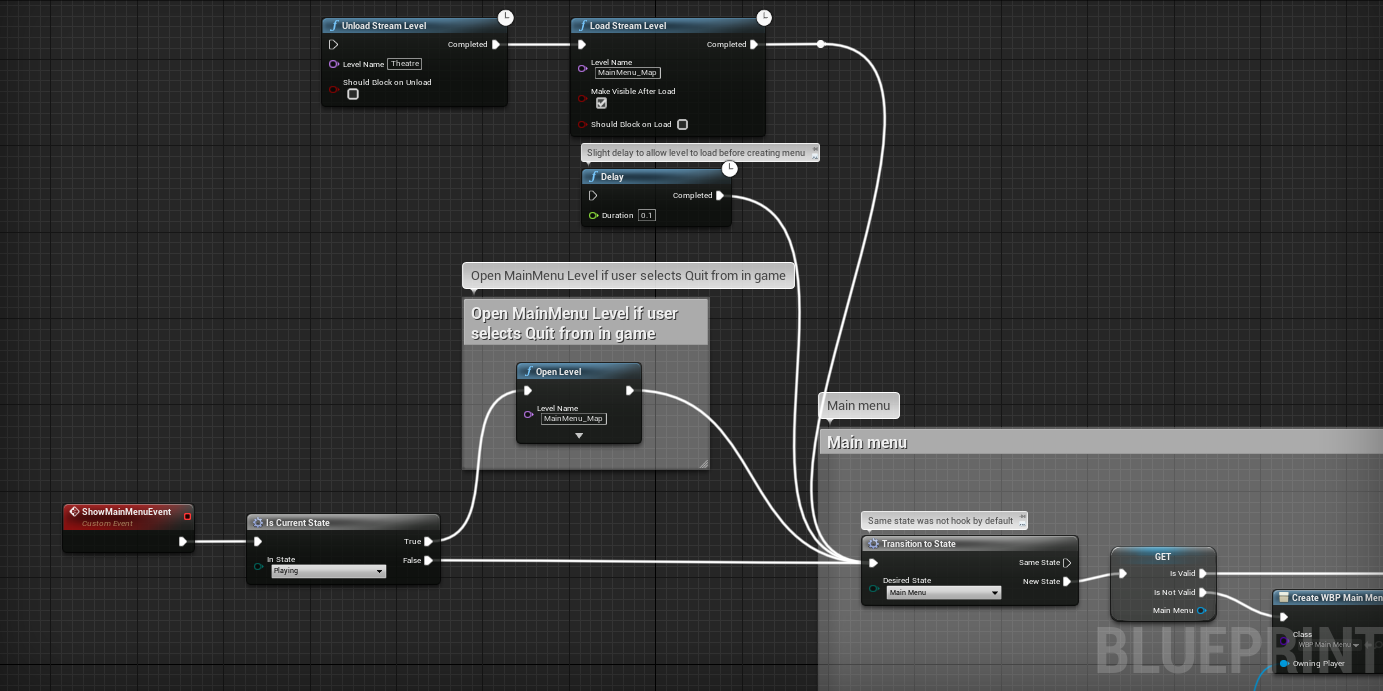
Hey guys can you use load stream level, to get a persistent level, I have my menu logic running through a gam instance and since there's no beging play in instances I'm using the level beging play, the problem starts when a client goes back to the menu, the open level is not a latent node so logic keep executing, so I need a way of checking if the level is completely loaded
 fringe marsh
Hii, anyone know how to create a widget for a specific player? I have a projectile that kills the player and does a few other things after that, which works fine on all clients, but when I add a widget to the end of the code, it creates it on all clients and not just the one killed.
meager spade
@gusty slate @manic pine just FYI, blueprint RepNotify fires on server, OnRep in C++ doesn't.
 brittle sedge
Because in C++ you have to call the OnRep function yourself while blueprints take care of this for you.
buoyant wedge
@wheat magnet thx for the reply 🙂
fading birch
@fringe marsh get a reference to the killed players controller and create the widget on that.
fringe marsh
@fading birch how do I get it for the killed player specifically? and do you create it in the playercontroller blueprint?
fading birch
It depends how you're handling death. If you have a health component you can create a delegate that fires when someone is killed and pass the controller there.
 grizzled stirrup
Why can't custom structs be passed by non const reference in an RPC?
Because the client couldn't feasibly pass a reference to the server as they'd have different addresses?
So a copy is best on an RPC?
If the thing being passed can't be const
fleet raven
? they can just fine
grizzled stirrup
I get a compile error if passing my custom struct as a non const & in a Server RPC
compiles if const or if not a reference
grizzled stirrup
Yeah but only over the network right?
In other cases it makes sense as it's on the same machine
So it's not copied
fleet raven
it's protecting you from writing code that doesn't actually work
grizzled stirrup
Because the server wouldn't have the memory address that is being passed in?
So a copy has to be made over the network?
fleet raven
because the server can't modify the struct that exists on the client side ...?
grizzled stirrup
Right 😄
Makes sense
Thanks!
If you had some cases where actors have to edit the results of say a damage struct sent over the net, would you send it as a non const copy and have them work on it directly, or do it const and have them create a new property of that type to make changes to?
For example a server RPC might take in a const FMyDamageType& DamageDealt
Would you change that to take in FMyDamageType DamageDealt or just create a newFMyDamageType FinalDamageType = DamageDealt in the function that needs to make changes?
fleet raven
why would a client ever tell the server how much damage should be done?
fleet raven
I'd just make a copy of the struct I guess
grizzled stirrup
So you'd pass in FMyDamageType rather than the const version?
thin stratus
I doubt it matters much, but I usually go for the const &
grizzled stirrup
And make a new copy later on if needing to change?
fleet raven
or rather have a new struct containing only the parameters actually relevant to be sent by the client
and use that to set up the full one
thin stratus
Even in a PVE game it sounds like more work to do it client authoritive :D
fleet raven
well, client authoritative will provide better experience if it is acceptable to use
grizzled stirrup
Client has to work out a lot of stuff that I don't want to replicate, server just needs to do some adjustments depending on the actor
fleet raven
you will never have a shot actually miss if the client has authority
 novel topaz
dose anyone know how to open multiple standalone game process ? I use seamless travel in multiplayer game, which not work in single process mode.
thin stratus
Yeah, I would most likely also do ClientAuth in my next coop game
Cause why not /shrug
SeamlessTravel doesn't work in PIE.
grizzled stirrup
Even at really high latency it still feels great for clients, I'd only consider server auth if cheating was any kind of a problem, using client auth movement too so no corrections
thin stratus
You can just launch multiple process and do it outside the editor
Yeah, I hope GAS doesn't force it on me
novel topaz
do u mean open multiple editor process ?
grizzled stirrup
Write a simple batch file to launch the .uproject file as a game
thin stratus
- you should not connect from one Editor to another
grizzled stirrup
Then click it a few times for a few clients
novel topaz
I'll give a try, thank you !
thin stratus
That's for listen server only though
grizzled stirrup
"C:\Program Files\Epic Games\UE_4.25\Engine\Binaries\Win64\UE4Editor.exe" "C:\YOURUPROJECTPATHHERE.uproject" -game -log
Nice easy batch file to save you the clicks if you do it constantly @novel topaz
grizzled stirrup
Damn I guess const references are unavoidable
You can't pass a TArray of a custom struct type into a server RPC without it being a const ref
I'll just make a copy at the other end
novel topaz
I have watched official multiplayer tutorial on YouTube, where can I find some advanced learning courses ? some suggestion please.
 waxen quartz
I have watched official multiplayer tutorial on YouTube, where can I find some advanced learning courses ? some suggestion please.
@novel topaz udemy has a pretty good one that goes over prediction
shy kelp
for a save system, should the client directly connect to the webserver and post its data and save bandwidth, or should the client replicate its variables to the gameserver to post its data for increased security?
 crude coral
hello guys
i need some help.. 🙂 i make multiplayer 3d android game with unreal 4 and now i am confused about dedicated server how will communicate with my game app in google play store ! i make account with google cloud then i create kubernetes cluster and instance of virtual machine with compute engine too and i activate Agones with Kubernetes then i add the Agones plugin inside my unreal Android game project..and i don't know how add my game server side inside google cloud system
NB : there is AWS amazon too but i choose to use google cloud services for my dedicated server
but there no tutorials about google cloud game servers so i am confused and i need some help guys
 tall cedar
Hi! What is the proper way to add multiplayer to the top down template? SimpleMoveToLocation obviously does not work on the client. I have seen several solution (mainly using a proxy), but they are all from 2014, so maybe there is better way now? Thank you!
Also, not sure if this is the right place to ask.
crude coral
Lulupard : i think you need make custom event run on multicast for your simple movetolocation event and call that multicast event on custom event run on server
tall cedar
@crude coral thank you, I'm going to go and try to figure out what that means 😄
 unkempt tiger
can I dynamically change the serverside owner of actors/components (without recreating them ofc) to allow different clients to send out client->server RPCs?
crude coral
hi guys.. that will help me a lot if you figure out how google cloud server, kubernetes + Agones working for host dedicated game server for the multiplayer android game
Agones have plugin for unreal possible you want to look at that so i send you the gihub link of that plugin : https://github.com/googleforgames/agones/tree/release-1.6.0/sdks/unreal the plugin version now is 1.6.0 i add it to my unreal android project game but i don't know how can this plugin will help me for integrate my dedicated game server with google cloud server😆

GitHub
Dedicated Game Server Hosting and Scaling for Multiplayer Games on Kubernetes - googleforgames/agones
 gilded vapor
Does anyone have any performance notes on manually polling anim-notifies vs using delegates?
Assuming you are using animations that always expected to fire the same notifies (IE different attack animations) how much faster is the manually polling vs delegate?
unkempt tiger
anyone know if interfaces can implement RPCs?
 gleaming vector
they can not vioxtar
they can define the RPC function, and the implementor of the interface must implement that function as an RPC
but they cannot define the RPC themselves
unkempt tiger
Odd, I was gonna bet it was possible, seeing as UInterfaces can generally offer their own default implementation in non-RPC functions
shame, this could have made my organizing a lot easier
crude coral
hi guys! for multiplayer android game i can build the dedicated server with VS win64 platforme solution ? or there other option for build dedicated game server for Android game?
 hearty atlas
If you are looking at kubernetes, you probably need a Linux dedicated build. There was a guide somewhere.. let me see if i can find it.
 plush wave
I'm slightly confused on how to create a FUniqueNetId from a string. Why is there no constructor to do this?
crude coral
@hearty atlas : thank you! but i can build for windows becaude i install docker desktop in my computer and i check hyperV in my windows system ..yes?
hearty atlas
kubernetes only supports Linux docker containers last i remember
crude coral
they say kubernetes can comunicate with docker desktop
@hearty atlas and i add plugin named Agones inside my plugins project is plugin for unreal
hearty atlas
ahh actually they added windows support to GKE a couple months ago... neat
crude coral
@hearty atlas and when i create cluster inside google cloud kubernetes i see it inside my docker desktop
yes Antihax
hearty atlas
you are prob better off reading the Agones docs.. there should be guides to help you set it up
Agones
Documentation and usage guides on how to develop and host dedicated game servers on top of Agones.
crude coral
for that i need some help for undrestand how if someone download my app (game) from google play store he can comunicate with the dedicated server inside kubenetes+Agones system!
@hearty atlas : i read them and i see all tutorials about that but i don't found any tutorials show how integrate the dedicated server of custom game with kubernetes and Agones😫
@hearty atlas : my game server is built and ready but i don't know what to do more for integrated it with the google cloud server system
hearty atlas
you would need to package it into a docker container, then build a kubernetes configuration around it.
crude coral
yes! and i do that with my desktop docker?
hearty atlas
https://github.com/googleforgames/agones/blob/release-1.6.0/examples/supertuxkart/Dockerfile this looks like a working example
yeah, you would need to make a Dockerfile that builds it, this one is heavily linux though... i have no experience with windows containers.
crude coral
or with gcloud shell inside my google cloud game server account?
hearty atlas
local docker, then push it to a repository that your k8s cluster can reach
crude coral
@hearty atlas :if i build dedicated server for Linux you can help me with that?🙂
hearty atlas
i wouldn't have time 😦
https://github.com/googleforgames/agones/blob/release-1.6.0/examples/supertuxkart this def looks like a good example to look at for what you want to do though
crude coral
@hearty atlas : i need to pay you for this service?
hearty atlas
no, i have a full time job and too many hobbies xD
that's kinda weird they have an example for everything except unreal
plush wave
Is there a generic way to get the FUniqueNetId from a string?
crude coral
@hearty atlas : Thank you so much for your time🙂
unkempt tiger
is there some kind of max number of RPCs per actor per net update limit?
(regular RPCs, not multicast ones)
 sand iris
DOREPLIFETIME_CONDITION(AHVS_Character, Auth_Token, COND_OwnerOnly);
Will the above DOREPLIFETIME condition only replicate the variable to the client, and to the server? I want the Auth_Token to be available only to the client and server but not other players/clients.
 fossil spoke
@sand iris Replicated variables can only be invoked to Replicate when the Server changes their value, so the Server will always have the most correct value.
COND_OwnerOnly will replicate the value change to the owning connection. In this case, yes it will only replicate the value to the Client that owns that Actor.
Clients that are simulating that Actor will not receive the value change.
sand iris
I see, thanks!
winged badger
also @sand iris , unlike BP, OnReps do not get called on server in c++
 somber glade
before joining a 1:1 peer MP session, my clients will choose a profile and set some other values (like an avatar) what's the best way to pass that information to the game mode on the host after they join?
fading birch
@somber glade use the player state.
or a sav file and have the client send that.
(the data that is)
somber glade
The profile information is currently managed in the game instance (since it normally should persist through level changes). should I use the controller on begin play when it joins the map to call to the playerstate, execute a server function and set the value there?
fading birch
well, you can store it in the game instance, but you can just store all that data in the player state, even when you're not connected, and just make sure you set it in your Copy Properties override.
and just have the client send it to the server once it connects.
somber glade
player state is wiped on each level load though isn't it?
fossil spoke
@somber glade Are you using C++ or Blueprint?
You can append "Options" to the OpenLevel function that will have those Options passed to the GameMode during Login.
UGameplayStatics::OpenLevel(GetWorld(), ServerAddressForConnection, true, FinalOptions);
So like FinalOptions might be a FString where it equals.
?SelectedCharacter=Mage
This string will be passed into AGameModeBase::Login
Which you can then choose to do stuff with.
somber glade
No, not that kind of avatar. Player will have various models, skins, etc unlocked, so those specific values need to be passed from the local player to the server
fossil spoke
... Thats exactly what this does.
?Hat=TopHat?SkinColor=White?TShirtSize=Small
Whatever you want.
somber glade
?SelectedCharacter=Mage sorry that didn't quite look like what I was describing.
I see okay, I haven't played with that options string yet.
fossil spoke
You can then parse these Options to get their values.
fleet raven
you can send whatever you want through there, even arbitrary data if you encode it
fossil spoke
You choose how to interpret it.
fleet raven
the url can be multiple MB I think
I remember seeing a comment where someone was complaining about too big fortnite join urls
fossil spoke
They must send all customization data through Options then...
somber glade
This project was previously set up with blueprints, it looks like the only login event is "onpostlogin". But the game mode doesn't have too much in it, so I can probably convert that to C++ if it isn't possible to expose that function
fossil spoke
OnPostLogin is the only login event exposed to Blueprint.
It shouldnt be difficult to override the AGameModeBase::Login function and expose it to blueprint through a BlueprintImplementableEvent
somber glade
Yeah, i'm just creating a child class of Gamemodebase right now
Other MP stuff I've done has had the player choose everything after joining the MP session (player name just came from their steam profile). I wasn't sure what the standard practice was for passing information like this to the server on join.
fossil spoke
We save out customization data to PlayerData on an external service. We get the Server to pull down that data (which is just JSON) when the Player joins (we hold them behind a loading screen until its correctly pulled down and verified by the Server).
The Player has "Loadouts", they just send the loadout index to the Server and the Server handles spawning them correctly with all their gear.
somber glade
We aren't going to have any central servers or anything in this. Just local player unlocks, and when deciding to play against a friend they'll be able to choose from what they've unlocked before joining.
fossil spoke
Fair enough, there is always the concern of cheating with locally held data like that.
somber glade
it's just models and skins. Won't really affect game play.
somber glade
If someone wants to try and hack the save to unlock everything, they can do that.
(
    UPlayer * NewPlayer,
    ENetRole InRemoteRole,
    const FString & Portal,
    const FString & Options,
    const FUniqueNetIdRepl & UniqueId,
    FString & ErrorMessage
) ``` the only thing I really need to pass on is the options right? just call the parent function, then call a BP implementable vent that would pass on those options?@somber glade sorry I got a bit caught up in what I was working on.
fleet raven
(and the client can see the message)
fading birch
player state is wiped on each level load though isn't it?
That's why I said use Copy Properties. That transfers the values over when you travel.
fleet raven
(only when using seamless travel)
fading birch
true
somber glade
Not getting into seamless travel here, this is a fairly basic peer to peer setup
fading birch
tbh seamless travel isn't super complicated
it's literally a bool
however, I believe when you connect to another server, it forces non seamless travel
fleet raven
assuming you haven't made anything custom that breaks it that is
fleet raven
if I enable it the game just crashes ✅
fading birch
since begin play doesn't necessarily get fired when you load in
somber glade
Well i got it overridden and successfully implemented. I'll have to work up a system to pass useful stuff through there, but it should work.
fossil spoke
@fleet raven What on earth did you change to break seamless travel?
fleet raven
something related to my custom network channel for brick replication
fleet raven
yes
fossil spoke
Right
fleet raven
somber glade
I had seamless travel crashing every time last year. put like 50 hours over 3 days with several people from the discord here trying to trouble shoot it and no one could figure out what was wrong and why it was crashing. Ended up giving up and making a "fake" lobby on the map for all the players to get together on.
fleet raven
that specific build is quite... cubic yes
player who made it used lots of boxy bricks
 bitter swift
Hello Unreals! As shown on this picture I'm having a strange replication issue. My guns fire projectiles just fine... But only after the server has peeked at a client. After that, the client fires optimally even if the server turns away again. Is this a known issue and is there a fix to it?
twin juniper
Someone used Photon as Networking in the past? Cant find a good documentation for using Photon Networking with UE4
bitter swift
Hello Unreals! As shown on this picture I'm having a strange replication issue. My guns fire projectiles just fine... But only after the server has peeked at a client. After that, the client fires optimally even if the server turns away again. Is this a known issue and is there a fix to it?
@bitter swift
I have found out what the issue is. It's because the Animation for the Character Mesh is not replicated properly. The Character is hanging the gun down by default when it's Idle and that is why the Server thinks the tip of the gun is elsewhere, because it does not recognize that the client is using an Aiming Animation. The server only recognizes this after it has looked at the client and confirmed it's animation.
winged badger
in case of dedicated server, the skeleton ticking is off by default
FPS games tend to require client authority for shooting as not to feel clunky and unresponsive
with client determining the hit, spawning its own projectile locally, and RPCing it to the server, which does some sanity checks that the client could had made that shot
fringe marsh
It depends how you're handling death. If you have a health component you can create a delegate that fires when someone is killed and pass the controller there.
@fading birch I have created a health variable in the player character and I created the death function in a bullet blueprint. Is a delegate another function?
chrome bay
Anybody know if actor components work on beacons?
 safe spade
Is there any reference that shows how big different variables are when replicated, or compares frotator vs fquat or regular vector vs netquantize vector?
fleet raven
yes, use network insights
it'll show you a graph like this for every packet
the vast majority of things that can be sent are fully marked up
safe spade
yes, in this case I'm thinking more ahead of time, planning/architecting a solution that might be difficult to change so knowing the sizes up-front might allow for a more efficient design
fleet raven
in that case no, you'll have to use intuition and look at the code
for example FVector -> 3x float -> 12 bytes
safe spade
do you know offhand rotator vs quat, or are they all just sent as quats due to how they are internally anyways?
or things like bool vs byte
fleet raven
bool is 1 bit, byte is 8 bit
rotator serializes as 3 bit flags + 16 bit data per component that is not 0
quat serializes as 3x float
safe spade
you should totally keep going and copy/paste it into a reference doc, or keep going and I'll copy/paste it to a reference and give you credit 🙂
fleet raven
enums serialize with however many bits are necessary to fit their max value
FVector_NetQuantize are weird because they decide how many bits to use dynamically so the size changes depending on the value
safe spade
this is all super useful info!
fleet raven
FVector_NetQuantizeNormal is 3x 16 bit, FVector_NetQuantize[xxx] will be 5 bit + 3 * log2(max value * [xxx] * 2)
safe spade
Long story short for me is trying to design replication for multiplayer VR. Each player has location and rotation, but also location and rotation for head and both hands. I THINK my plan is to have owner pawn do tracking and simulate appropriate movement and IK, as well as upload the more accurate tracking info to the server, which would then calculate the same movement and IK, then multicast lower-precision versions of that to all the clients (including owner). Then all the non-owner clients can simply accept those close-enough values (nobody will notice 1mm) and the owning-client can perform any drift corrections as needed.
safe spade
yeah me either
fleet raven
if VR movement doesn work exactly as the player expects it to, they will just get sick
so maybe need client authority there
safe spade
exactly, perhaps I explained it poorly, that's why I'm planning to let the client be semi-authoritative on their own movement and tracking
I'd still send the tracking info to server so it can check for cheating or invalid situations
but generally I'd like the owning client do their own thing
drift correction could possibly even done bizarro-style on the server instead of the client
fleet raven
could allow them to have full authority within some maximum reasonable bounds
i.e. no one with a headset can move 1 meter to the side in 0.05 seconds
safe spade
yeah, I'd normally never trust the client but in this case with VR I think it's (at least currently) more difficult to simulate input to cheat than it is to detect invalid or simulated inputs
but also my movement setup is much more restricted than, say, Echo VR
ie running around in your play space doesn't cause your character to move around in-game
fleet raven
you mean like the camera doesn't move either?
safe spade
camera does but not player, in Echo VR your tracking/head is player root so moving in real life moves your character beyond the limits of your character speeds and agility
in my version your player root is your character waist, limited by character speed and agility, and your character head is tracking
but... if your real-life head starts to move outside the bounds of your character (ie move farther than your character can IK lean) I actually offset tracking root in opposite direction so your camera can't extend past your character head in-game
surprisingly not sickening at all
it feels normal
fleet raven
interesting
safe spade
I think I have a small video let me check
fleet raven
I've not messed around much with vr controls myself
but the motion sickness stuff is definitely a real issue
like I can't use the non-teleport controls in hla, it makes me feel like I'm falling over instantly
safe spade
have you been able to try Echo VR on oculus?
fleet raven
nop haven't played that yet
safe spade
that zero-g control method works fairly well because you're controlling your free character movement with your real hand movements
so you're actively doing something that makes sense to your brain, not just pushing a joystick
anyways have to go do real work, will check out this replication sizes when I get back and see what I can come up with thanks!
 trim kindle
Is there a way how to make AddMovementInput work even with unpossessed player in multiplayer?
I have bunch of pawns which can be controlled directly by gamepad but do not actually belong to any player
The reason for that is player can control multiple pawns with gamepad at once
and possess is possible only for single pawn, so they can't be possessed
and doing RPC with player's input on every tick does not feel right for me. Maybe I am mistaken and it is not that performance heavy.
real cedar
I'm looking at starting to test my project with some friends, and I'm wondering what other people use for multiplayer testing. Do you just run it right off your computer and open up the ports, or do you use hosting services, or if there are even any free development services?
I have hosted it right off my computer and it has been more of a struggle it seems like to get it to actually work that way as I've only had 1 successful test out of a few attempts. I'm sure it was port forwarding issues.
 warped stream
I personally use (if your computer / network is strong enough) my personal or work computer, if I want to test the game. Although, mostly I let a friend host because I can feel the "delay" and stuff for myself
real cedar
That is a good idea too. I didn't think about letting them host for that reason.
With port forwarding then, did you need to constantly chance which ports were forwarded or is there a way to make the ports that the engine uses to static ones? @warped stream
warped stream
I don't know how unreal handles the ports. But maybe you can use a cmd parameter upon startup of the server.
If not, a tunneling service like hamachi should do the trick
real cedar
Oh ok. Yeah because I've opened up Resource Monitor to get me all the ports that the engine was using and it seemed like they change each time. I will check those out though. Thank you.
 echo rivet
In Character Actor. I am having problems with the replication of capsule Relative Location and VrOrgin scene where the camera is. Basically, it works fine offline but for some reason, I can not manage to replicate it.
 orchid pollen
how are your node connections so straight hah
echo rivet
@orchid pollen 😆 it is not the answer that I am looking for. And you are not the 1st person who did ask so, just check plugin on MP "Electronic Nodes"
plush wave
I'm confused on how to create a FUniqueNetIdRepl from a string?
 vernal light
Hello I am new here...I wanted to ask for a way to replicate my animations cause what ever I try ,the other player pawns on the screen copy locally the animation I play... let me send a video hold on
 final thicket
Does anyone know if you can, specifically not use an online subsystem while connecting to a server? Lets say that I have the steam online sub system but I'm connecting to a server that I know is not running that subsystem can I just disable it and go with the default just while connecting with that server?
Because I would like the Steam online sub system for logging into our matchmaking with playfab, and making a listen server lobby to matchup with players on your steam friends list, but when connecting to the playfab matchmaking server I would like to discard the OnlineSubSystem, so that there is no miss match when trying to connect to the server
final thicket
Well I don't really need any of the steam subsystem features on the server
People won't find it on a server list or anything, additionally I have been struggling to get it to work 🙂
 rich hare
ping me for an answer
when i use stat net in the debug command menu (`), is the in/out rate calculating the bandwidth per frame or per second?
 spark fossil
Does anyone have experience with using a listen server for more than a few players? I guess performance will vary wildly depending on the specifics, but has anyone used it for 20+ players?
 supple vapor
@final thicket i've been stuck with the same problem 🙂
i just want steam authentication and friend list and rest I have my own system
but its forcing me to use 'SteamNetDriver' and that prevents from opening level with 'ip address:port'
anyone has a work around?
rich hare
@supple vapor and @final thicket from my knowledge, an online subsystem is used as a middleware to find people around the world running the same game as you. from what it seems you want to use a separate subsystem other than steam for hosting servers. I use steam as well and you can add your own dedicated servers in the steamworks app page for your game
personally i have not used dedicated servers
you can add them under steamworks > app admin > gamename > application > dedicated servers
or in /apps/dedicatedservers/steamappid for the steamworks website url
supple vapor
it's a ploy by steam to force people to use their ecosystem 🙄
has nothing to do with 'security' like Steam is saying, they just don't want other services like amazon, gamesparks etc to work with theirs
i found a solution by scrolling above
apparently you can set OnlineSubSystem=Null which will mean your game uses the default ipnetDriver
but you can still directly access the steam OSS (not through interface) and get all the functions
solution was posted by - DevilsD - Matt Boatswain if anyone's curious
crude coral
Hello Guys
for android multiplayer game; google play store not support multiplayer game now and they have solution for the multiplayer with Kubernetes and Agones..i want ask if someone have idea how Kubernetes + Agones working and how integrate the dedicated server of the app there with google cloud server services..
 proven axle
I'm currently stuck with my multiplayer implementation for my game, I have replication 100% working, but only within a 100 km radius of the origin. I have multiplayer origin rebasing turned on, and I have my pawn request a new origin every 10 km. I utilize RebaseLocalOriginOntoZero and RebaseZeroOriginOntoLocal for my movement replication, which works great until I hit that 100 km wall. Clients and the listen server can both travel beyond that boundary, but clients don't recognize that the listen server can actually travel beyond it.
I can travel hundreds of km away, and my listen server knows the correct location of the client, but the client doesn't know the correct location of the server. If both fly back to the origin, the replication begins working again
I'm not needing HUGE levels, just around 400km radius or so, and hoping I can get the replication working for that
crude coral
Hello Guys
for android multiplayer game; google play store not support multiplayer game now and they have solution for the multiplayer with Kubernetes and Agones..i want ask if someone have idea how Kubernetes + Agones working and how integrate the dedicated server of the app there with google cloud server services..
chrome bay
@proven axle 400KM is insanely huge
physics starts to break down around 2km from origin.
Also bear in mind that the Server is always operating in zero-origin space
Only the clients are rebased
proven axle
Even with origin rebasing? I don't really plan to use physics anyways
crude coral
the character play coffin music on the main menu of my multiplayer android game
chrome bay
Origin rebasing will help but you will likely still need to update your internal movement calculation to doubles-precision.
But as I said, the Server doesn't benefit from origin rebasing
It's not really that useful in MP, aside from reducing visual glitchyness on the clients.
proven axle
Ok, I'll do that. But I'm not sure using double precision in just my movement component code will do the trick. The listen server hitting that literal wall feels like a hard limit in the engine code somewhere.
proven axle
Ah, so I can bump that up, but I will likely run into issues elsewhere
chrome bay
almost certainly yep
You'll need to scale things down pretty dramatically to have it working reliably
proven axle
It was my understanding that scaling everything down still had precision issues, but maybe not as bad?
chrome bay
The issue comes from multiplying small numbers by large ones, that's where the precision starts to breakdown - but unless the movement is particularly complicated moving to doubles won't help much
Scaling down doesn't really have precision issues AFAIK, but it depends how far you go
I certainly wouldn't be trying 400Km at 1uu = 1cm though.
crude coral
@chrome bay the dedicated server have the same problem with origin or no?
proven axle
I'll have to give that a try then. Thanks! Here's to hoping UE 5 uses double precision 🙏
chrome bay
I can pretty much guarantee UE5 won't use doubles
But yeah RE rebasing - the server would have to somehow handle two clients being on opposite ends of the world, which ofc it can't do.
400km = 40,000,000 unreal units
proven axle
Yeah, that's why I'm breaking up solar systems into separate levels, and requiring everyone playing co-op to travel at the same time. I just thought I could get away with those distances in a single map
crude coral
so how work with pubg?
chrome bay
Huge worlds and MP is not straightforward
crude coral
pubg is unreal game too
chrome bay
No idea how PUBG handles it.
shadow aurora
Would someone potentially be able to help me out with loading this class in the multiplayer mode for my game? I'm currently getting an EXCEPTION_ACCESS_VIOLATION whenever I attempt to access a TSubclassOf that I've set in the blueprint version of my class. UE4Editor_OnlineSubsystemUtils is mentioned in the crash summary so I'm thinking it's an issue with replication...
proven axle
So you think if I go with 1u=1m I should be good?
That should theoretically give me 1000 km to play with
pubg is only 8km x 8km
chrome bay
FYI @crude coral we have 4*4km maps (so 2km max from origin) and we started to see visual glitches around 1.5k from origin. 8x8 is probably doable. We're not using world composition though.
Just make sure the origin is in the middle of the map.. not the corner
Still not sure why UE creates landscapes like that.
crude coral
@chrome bay in the link you send it from unreal document they talking about solution : Implement some layer between clients and unreal dedicated servers which will transform shifted absolute positions from the clients and route them to the right dedicated server, which only holds part of the world where client is
chrome bay
Just remember that the Server has to have the entirety of the map loaded at once, so you can't go too crazy anyway
Yeah, so they're talking about having multiple servers manage one game - so a custom server architecture
proven axle
@crude coral You could look at a solution like this: https://improbable.io/multiplayer-networking

Improbable
Use our managed networking stack for real-time multiplayer games: create multiplayer games that push the boundaries of what game engines can do.
crude coral
@chrome bay so clients when try to play can find them self in the space without landscape?
chrome bay
Clients should be fine, it's the Server that's the problem child.
Server needs to keep the entire map loaded always.
Clients can just load the section they're in.
YOu need to manually handle origin rebasing everytime you send any info between Server and Client too, it doesn't do everything automatically (only movement)
Once you get the hang of it it's not too bad
But you will always run into precision issues in MP eventually, because the Server is always working in zero-origin space.
Also some advice - shift the origin by something like 50 meters all the time, it'll help you find rebasing issues faster.
crude coral
@chrome bay : ok ! i have question! you know how kubenetes + Agones (google cloud server services) work? is like AWS game lift services but is new from google
chrome bay
no idea
proven axle
Yeah my flight and code that handles firing my guns does the origin rebasing, and works within the world max bounds
chrome bay
@twin juniper not sure RE the question but FYI the network uses FNetBitWriter and FNetBitReader archives for net serialization
I think FArchive is an abstract type
@crude coral 8x8km map on android? That's brave..
Have you considered something easier :D?
crude coral
i make it with world composition and i delete my old single map because with my old map i found lot lag but now all work seamless and no lag
i test it with my phone and run good
@chrome bay my world composition map (more big) working more better than my old standard map (small)
@chrome bay and i make zipline system inside the map for the players not walking so much between locations🙂
chrome bay
@twin juniper what I mean is that the base FArchive will work but it is sub-typed quite a lot accross the engine for specific use-cases, the networking one is the FNetBitWriter/Reader
Just serializing a UObject pointer or an FName for example won't work without a package map and the network archive types.
You'll also need to use the specific network-connections' package map you are sending the data too, as they are unique per-client/connection.
gleaming vector
unreal engine creates a connection object
yes, it uses udp sockets, but has a higher level control structure (UNetConnection) to manage communication
crude coral
@proven axle : spatialos is for unreal pc multiplayer and not for unreal android multiplayer purpose
 halcyon totem
I heard a Unreal Teacher once say to stay away from multicast, you dont see multicast being used in high end games is this true?
 polar lotus
For some reason, the physics bodies of my gun are discombobulated on the client
it looks regular on the server
they are not supposed to independently simulate physics
Its supposed to look like this
 slate veldt
Hi all, having an issue with the client's set view target. It works initially, and then seconds later it seems to get overriden. The server doesn't correct this does it?
slate veldt
That's what I thought - however, taking a look through the c++ of how SetViewTargetWithBlend works, I've spotted that the Server actually calls a client RPC (reliable) to set the view target
{
....
if (PendingViewTarget.Target != NULL)
        {
            if (!PCOwner->IsPendingKillPending() && !PCOwner->IsLocalPlayerController() && GetNetMode() != NM_Client)
            {
                PCOwner->ClientSetViewTarget(NewTarget, TransitionParams);
            }
        }
....
}
Doesn't look like it's replicated or has any server correction though, it's literally just that RPC as far as I can tell
 cosmic trail
anyone know what a good target max bandwidth is for an online multiplayer game between 5v5 players? Not sure what to target, 50kbps? 100?
 late bluff
@slate veldt I had a similar problem with set view target. I could solve mine by telling the controller to not automatically manage the player camera, but unsure if that would help you.
slate veldt
Not really sure that'll be helpful in this particular situation.
I've just changed it so that the Server assigns the view target. It's behaving the exact same as before, it views the blend target, and then it changes to another view at (0,0,0) moments later
late bluff
That sounds identical to the issue I had. Then again, I've encountered different issues with the same effect before
 fossil veldt
Guys what is the most efficient way to send requests like respawning and vote kick to the server from the client? Would you just run on server RPC via the playercontroller and then cast to gamemode?
slate veldt
Yeah most likely!
fossil veldt
oh ok neat, ty
slate veldt
@late bluff I've figured out the problem. Due to my gameflow, I was having a player join, and on PostLogin of the game mode I was creating a spectator pawn for them at 0,0,0, but then settin their view target to the respawn style screen. Problem is, there is a bit of a race condition as to which gets there first, so the view target was being set first, and then the spectator pawn info was arriving second and taking view target priority.
I've reworked the flow, allowing the default pawn process to spawn a spectator pawn, moving the logic to tell the client to go to the "respawn style screen" onto the "OnRestartPlayer" K2 event.
This was how I should have set it up anyways really. However, it doesn't resolve the issue, but if I set a delay on the server before setting the new view target, it gives it time to set to the spectator pawn, and then the delayed set kicks in and sets it to thecorrect view.
I've got a custom "On Possessed" event on the Client, so I'll check there if the new pawn is a spectator pawn. If it is, then do the view target stuff again... Hopefully that will mean very minimal/no camera issue, but I'm sure I'll stumble into a problem
shadow aurora
I hate to keep beating a dead horse by asking, but I am really struggling with this for some reason. Does anyone know the best way to load a UClass/TSubClassOf at runtime inside a Server RPC? I just keep getting an access violation any time I try to do it, even though I know that it's pointing to the right class.
Essentially I need to swap the AI Controller of a pawn from it's default controller somewhere in this function
cosmic trail
you want to use a new class for the AI controller?
shadow aurora
Yep. Some quick background is that there are tamed and wild monsters in our game. Just want to be able to change their AI controller based on what their status is basically.
cosmic trail
why does it need to be an RPC..
shadow aurora
Doesn't necessarily have to be. I had done it that way in a different project and it seemed to work there... But all of a sudden in this new project I just keep getting an access violation
cosmic trail
though I seem to send subclass of just fine.. do you know where you're getting the access violation? Maybe it's not the RPC's fault?
is the class defined in C++? Can you hardcode the StaticClass() to see if there's somethign else failing?
shadow aurora
Hmm yeah I'll go ahead and try that
I'm specifically seeing the access violation when trying to call LoadSynchronous and the error log contains some stuff about OnlineSubsytemUtils so I figured it was somehow related to the RPC.
cosmic trail
code for RPC?
shadow aurora
if (GetLocalRole() == ROLE_Authority)
{
this->Sidekick->GetController()->UnPossess();
this->Sidekick->AIControllerClass = SidekickAIControllerClass.LoadSynchronous();
this->Sidekick->SpawnDefaultController();
}
Nothin too fancy
Like I said, had this exact function in another project and it worked perfectly :/
Yeah even using AAICSidekick::StaticClass() caused an access violation... Really not sure what to do here haha...
cosmic trail
I can give you a potential workaround..I don't usually pass like that so I'm not sure
oh hmm static class..
yeah not sure there then
I also change the default controller..I may have encountered this...which is why I do it during a deferred actor spawn....
but you said you've done it before dynamically...
so I'm not sure either..
shadow aurora
Hmmm I could definitely try to use a deferred actor spawn and see if that fixes it. Just so weird that it's specifically in this project. I've gone over the settings in both projects to double and triple check that they're the same and they are.
cosmic trail
Mine, I check whether I want to spawn an AI controlled or player controlled actor, and do it with a deferred spawn
I mean check where you 're getting the access violation?
what's null etc?
shadow aurora
Yeah I'm gonna try and dig in a bit deeper to see where it's going wrong
cosmic trail
so if it's an RPC problem though...you can take a look at thsi
https://www.reddit.com/r/unrealengine/comments/azz248/calling_a_netmulticast_function_to_change_the/

reddit
1 vote and 2 comments so far on Reddit
maybe bundle the Tsubclass of in a Uobject that has replication
and send that uobject over
very weird workaround
shadow aurora
Yeah I'm sure it'll take some weird workaround like that
cosmic trail
or if ur doing it server->client, can just follow the on-rep instructions in that post
shadow aurora
Tried that as well with the same result 😭
Something must be horribly wrong somewhere haha
cosmic trail
ok my thought is it's not the RPC just maybe that spawn default controller
I dont' quite remember why I had to do deferred spawn haha...but it must have been something weird like that otherwise I'd just set it directly
 edgy dagger
hello. some questions, what would be the major drawbacks if we build the server in development for real production players. (hosted on gamelift), vs having a shipping server build? and will the debug prints slow down the server because there is alot of them? and finally will i be able to pull logs from a shipping built server
 ocean geyser
@edgy dagger not sure how well this would translate to UE4 but i would do the shipping build without printing logs and debug messages and such. for example when looping through an array and doing a cout to print out the element it slows it down a TON compared to leaving the cout commented out
edgy dagger
@edgy dagger not sure how well this would translate to UE4 but i would do the shipping build without printing logs and debug messages and such. for example when looping through an array and doing a cout to print out the element it slows it down a TON compared to leaving the cout commented out
@ocean geyser for the shipping profile i think they removed the prints.
ocean geyser
they should, thats why im saying it would probably be the better route for a shipped game
edgy dagger
thanks @ocean geyser
supple vapor
@slate veldt for race conditions like that on possessed, there's a nifty (c++ only) function in controller called "Acknowledge Possession". It gets called on client after possession and when everything is loaded properly. It cleaned up my code a lot
somber glade
@supple vapor What exactly did you do with acknowledge possession? Does it get called after "on possess"? Currently to make sure my pawns are possessed before proceeding, when my gamemode tells a client controller to possess a pawn, it binds to an event "PossessedPawn" and "on possess" I have my controller call that event. When all controllers call that event, since it's a peer to peer racing game, I start the race logic after that.
fading birch
@somber glade it's called after OnPossess
somber glade
I'm looking it up now, does it trigger an event on the server/host? Or is it just an event that runs on the server without having to do an RPC?
fading birch
OnPossess calls ClientRestart which calls AcknowledgePossession
AcknowledgePossession runs on client and calls ServerAcknowledgePossession
somber glade
Acknowledge possession of pawn documentation is stellar
fading birch
source isn't much better: c /** Returns true if input should be frozen (whether UnFreeze timer is active) */ virtual void AcknowledgePossession(class APawn* P);
but source is how I found that info out
somber glade
hmm okay. I don't think that would really change anything for me.
supple vapor
@somber glade its called automatically by engine, you dont have to do anything
you just override and add your custom setup code
as to what it does, its the same thing as on possess but on possess is server-side only
acknowledge possession is client-side when possession is successful
fading birch
Then call the super.
somber glade
The only setup code I have is the bind that tells the gamemode that the pawn is possessed. All that really does it kick off the countdown for the race, since that takes time anyway I don't think it much matters if that's called onpossess or with acknowledgepossession