#multiplayer
1 messages · Page 546 of 1
 grizzled stirrup
 meager spade
but that is ok (i mean shooter game does it)
grizzled stirrup
So why would an explosion warrent RPCs to all clients when it has a short lifetime and can easily be set to false if not being destroyed?
I believe shootergame uses a bool for FX too on projectiles but I can't remember
meager spade
dunno
but i think of OnRep's as states, Multicast as one off things
Explosion is a one off thing that happens, it being exploded is a state
grizzled stirrup
That indeed makes sense
But I believe the cost of a multicast RPC is greater than an onrep bool
In terms of bandwidth
Looking for sources now
meager spade
i mean
grizzled stirrup
But if you had say 50 explosions going off at once
That's potentially 100s of RPCs
At once
grizzled stirrup
Ooo how
meager spade
its all done client side
Projectile is spawned, and shot
then the projectile is destroyed (server side), the clients call destroy
which plays the effects locally
i don't pool them tho
grizzled stirrup
Makes sense, nice solution
meager spade
and they are dirt cheap to instantiate
meager spade
but a projectile is cheap
grizzled stirrup
Yeah looking at shootergame they use bExploded
There's definitely a reason though I swear I read that Multicast RPCs are several times more expensive than just replicating a bool
And especially for cosmetic stuff they'd be more efficient
Well looking at recent discussions here on Discord it seems it doesn't really matter and yes you should prioritize state for OnRep and Multicast for one shots
I just wonder if there's a comparison on the cost if that OnRep bool bExploded does essentially exactly the same visual thing as a multicast RPC to all clients
 winged badger
it does, also when you enter net relevant range
explosives long gone go boom, looted chests play opening animations, dead enemies rise so you can watch them die
to avoid a multicast you need a timestamp and network synced clock, ontop of that boolean
 hoary lark
not really important to topic but FWIW last time I measured it for myself, creating a projectile actor cost around 500 microseconds to spawn, 200 to destroy... pooling it reduced it to something like 60 microseconds to spawn and 50 to destroy
relevant if you have MG42s in your game or something 😄
 unreal pine
When I call GetGameState on my PlayerState, it returns invalid. Am I doing it wrong?
meager spade
you calling it to early?
unreal pine
I'm calling it after the player is added to the game
to store their avatar in the game state
meager spade
server side or client side
unreal pine
Client
meager spade
too early
if its null, then GameState might not have replicated
by the time you access it
unreal pine
hoo boy it was a wombo-combo - it was too soon AND it looks like map variables don't replicate
so I'll probably have to make it a custom struct
grizzled stirrup
@winged badger so you'd recommend Multicast for any kind of oneshot events?
Just going off ShooterGame / UT for the examples which I know are getting long at the tooth
But I'm sure there is a reason they chose to use OnRep instead of Multicast in those situations
But maybe my perception of the cost of an RPC vs replicating properties is not as much as I thought
winged badger
multicasts have their purpose
grizzled stirrup
so in the case of a simple example, a gunshot muzzle flash and fire sound
I should rewrite the onrep int that increments per shot and instead use a multicast RPC for each shot?
 lunar root
(
    APlayerState * PlayerState
)``` Where does it have to be implemented? in the Old or in the New State ?@winged badger
grizzled stirrup
It is called in the old PS and the new PS is passed in
lunar root
Ty 🙂 Zlo mentioned it yesterday and i need it now 😛
grizzled stirrup
it's very very useful!
grizzled stirrup
void AMyPS::CopyProperties(APlayerState* PlayerState)
{
    Super::CopyProperties(PlayerState);

    AMyPS* PS = Cast<AMyPS>(PlayerState);
    if (PS)
    {
        PS->PlayerLevel = PlayerLevel;
        PS->EquippedSkin = EquippedSkin;
    }
}
if client knows its firing
grizzled stirrup
That's how I use it
winged badger
it can figure out how to do a flash and sound on its own
no point in multicasting or replicating anything then
winged badger
and you replicate the gameplay critical information
and infer the effects from there
grizzled stirrup
Right so to replicate that critical information (say with an on rep int being incremented for each shot or an unreliable multicast that doesn't pass anything but just says "hey im firing") what would you choose?
An on rep int "feels" more lightweight but I have noticed it's bad for fast firing weapons when you don't have a high enough net update rate
winged badger
depending on the type of the game
i replicate firing key down, attack target, firing mode, and where PC weapon trace is
let the clients figure out everything else themselves
grizzled stirrup
Right that makes sense
In my game it's a bit more important that they know exactly where the bullet landed
winged badger
and i don't care if one client sees a mis other a hit
grizzled stirrup
And how many shots were fired
Yeah in that case you can be lenient
So you use onrep for those events right?
winged badger
i don't, full simulation
winged badger
those are onreps
grizzled stirrup
yeah
I'm doing a similar thing but at the per shot level without multicasts
Considering moving that to use multicast instead
Since you'd guarantee every shot makes it through for the cosmetic side of things
But so far haven't needed to use Multicast at all in the game so I'm wary of rewriting things
while you said that OnRep has an overhead earlier, surely it is still less bandwidth than an RPC?
winged badger
its not
its that without timing
effects can get ducked if relevancy changes
OnREps don't come with a timestamp you can access
grizzled stirrup
but say you don't need timestamps, say for a bullet impact
I'm using an FVector_NetQuantize on rep as opposed to a fresh Multicast RPC with that vector sent
And it works great
the other players will see the current impact of the weapon at that location when it reps
Sure they might miss a few if it's a really fast firing weapon
It just feels nicer to know that there aren't constant RPCs going off and instead a nice single updating thing that will play FX if it has changed
That said if I move to Multicasts for each impact then you can see absolutely every shot and there wouldn't be timing issues
However I wonder if that comes with a greater cost or if I can just go ahead and not worry about it
Possibly the reason they don't use Multicasts in ShooterGame and UT is just because Multicasts weren't used as much as a new feature back then
I'll look in to simulating too with just a simple bIsFiring OnRep bool and have clients sim absolutely everything
The only issue I see with that is that most of my weapons are semi auto
So clients can click very fast and fire multiple shots
But other clients would only see one shot
 stoic acorn
how do you get the owner of a specific player? I'm trying to target someone other than the server
stoic acorn
I can't find any documentation on the Replication Condition dropdown
grizzled stirrup
Most are fairly self explanatory
None means it will replicate to all
Skip Owner means it will replicate to all but the player that owns the actor
etc.
stoic acorn
I was hoping there would be examples of each use.
I'm having some problems with My inventory system at the moment. Everything that ANY player picks up seems to go to the Server inventory.
stoic acorn
I'm storing the inventories in playerstate
meager spade
ok
each player state is unique to each player
you just need to make sure its replicated to owner
stoic acorn
that's what I thought, and it seemed logical for me to store the inventory there
meager spade
or none (will replicate to everyone)
stoic acorn
ah.. that's the bit I'm not getting.. how to replicate to owner?
meager spade
Owner Only..
stoic acorn
I'm storing it like this in the PlayerState
meager spade
looks confusing lol
stoic acorn
haha well I couldn't think of a more elegant way to check for each type of treasure
meager spade
yeah i would not have done it like that
stoic acorn
This is inside the Determine Treasure Picked up
stoic acorn
ah no.. so you can pickup many different types of treasure
meager spade
but why do they need to be stored in seperate arrays?
meager spade
yeah but its also more headache to maintain
stoic acorn
what I want to do is display how much of each treasure a player has picked up
stoic acorn
and also the sum total of the treasure value
ah, that would be better if I could do it in one array and be able to filter it later when displaying on each player's hud
meager spade
that's the idea
stoic acorn
but that's not my problem right now. This clunky system works for now
stoic acorn
ooh.. Enum
stoic acorn
good point
meager spade
i mean i don't fully understand your system
or what your game is about
what is "treasure"
just a normal actor
stoic acorn
children of a main Treasure Master class
stoic acorn
hmm. I'm not familiar with enums
meager spade
here let me show you
stoic acorn
so you reckon that would be a better system?

 stoic acorn
Ah, unique treasure count gives me how many different unique types of treasure I have in my map. At the moment I have 5 different types (1p, 2p, 5p, 10p, 100p)
stoic acorn
yeah. and when the treasure overlaps with the player collision it stores the treasure then destroys it
meager spade
so your system is kinda weird
for such case
you know what treasure you overlapped
and what type it was
stoic acorn
yeah
meager spade
so why all that stuff above?
stoic acorn
the unique treasure name
meager spade
player should get the treasure he overlapped with
and that treasure knows its value
stoic acorn
that's all because I have different arrays for each treasure type (which you've just informed me that I don't need)
stoic acorn
so we can get rid of all of that
the treasure tag was to allow me to quickly find which treasure was being overlapped
I'm a noob at this and was fully aware that as I was making this spaghetti code that there was probably a far more elegant way of doing it
meager spade
in c++ this would have been a lot cleaner 😄
stoic acorn
I just need to be able to pickup different types of treasure (that each have a value attached) and for the server to store it all for each individual player.
haha most likely but I'm an artist who doesn't know c++ from his elbow
meager spade
oops
hold on

so this will increment your existing items everytime the same item is added, or will make a new entry for a new type of pickup
your overlap just calls StoreItem and passes in the treasures type enum
stoic acorn
.. and this is on the PlayerState?
meager spade
yes
stoic acorn
ok, let me rebuild this and absorb what you just did


 stoic acorn
is PlayerCollecteTreasure a struct or something?
meager spade
kinda thing
yes
you can't replicate a Map
else that would have been even easier
stoic acorn
ok.. so you just did in 10 mins what has taken me many many nights of head banging on desk to get wrong 😄
maybe I should just stick to artwork
meager spade
well like i said i am not sure of your game or your setup
but this is the way i would approach it
stoic acorn
I have confidence in my game design. I just have no idea how to implement it
this is going to be a marathon
thank you very much for the pointer though.
lunar root
For some reason I cannot move after ServerTravel (seamless) any ideas?
The Target GM works fine when launching directly into it however I'm stuck in the air when traveling to it
The Target GM is an empty class which inherits from AGameMode, I commented everything out so it's literally empty
stoic acorn
@meager spade sorry to bother you again, what variable type is Player Treasure?
nevermind, the clue was in the picture. PlayerCollected struct
though I can't get mine to look like yours
aha
lunar root
Addition: I tested now a lot and i have not a single clue how to solve this usse
I dont even have an outliner since i cnat test traveling in PIE only in Standalone..
 nova ermine
Can someone help me with replicating this crouching mechanic?
When I change the capsule half height to a crouching position Im also trying to change the Z axis of the character mesh so that he doesn't clip into the ground
Aparently my blueprints are only working client side
So you can see yourself crouching properly
But other players clip into the ground
nova ermine
ok this is a huge bug
I fixed it by disabling Network Smoothing in the Character Movement Component
lunar root
Works with non-seamless-travel but ofc all my data is gone
when using seamless-travel I'm stuck and can't move
OH MY F*** GOD, the Server crashed in the background and neither the debugger nor the editor told me about it ...
= Cannot move
I'm so done lol
 swift kelp
I am following a tutorial and on one screen he has
and on the other...
I can only figure out how to play as both clients or both servers, how do I do what he did?
hoary lark
I think there's a bug in the window names, the 2nd client will say it's server when it's not 
swift kelp
thanks for letting me know
the pictures above were from ue4 v4.17
(so the course is very old)
swift kelp
I thought I had a solution for the issue above, but don't.
Do any of you have a solution for this issue?
 random nymph
Any way to use Steam OSS when testing in editor?
random nymph
Right clicking and launching doesn't work for me for some reason
 bitter oriole
Time to fix it
random nymph
Does it need the steam_appid.txt file when using the launch?
bitter oriole
Fix what
random nymph
Getting steam OSS working when right clicking uproject and selecting launch
bitter oriole
Does shift + tab show the Steam overlay
random nymph
No and I have a debug log that says it can't get the steam oss
Packaged build works fine
bitter oriole
Works fine here, so I don't know what to suggest.
random nymph
Yeah
 plain flume
Any ETA or info when Unreal Engine has Epic Online Services integration? It seems that only non-engine SDK is available now
bitter oriole
No ETA, try the communtiy plugin or wait for 4.26 to see if that brings it
plain flume
Oh. I missed the community one. Where would I find it?
bitter oriole
It's on the forums somewhere
plain flume
Thanks @bitter oriole
 warped stream
I think there's a bug in the window names, the 2nd client will say it's server when it's not
@hoary lark Can Confirm
 shrewd tinsel
from which class should i manage player spawning for an online game?
gamestate or gamemode
and why?
 unkempt tiger
any way of passing raw serialized data in an RPC?
 chrome bay
There's no easy way, but you can wrap a TSharedPtr<> to the data with a USTRUCT(), and create the data at each end
unkempt tiger
Oh, what do you mean create the data at each end?
chrome bay
Have a look at FGameplayEffectContextHandle
Basically inherently there is no way to send arbitrary binary data via RPC
But you can get around it by doing something like FGameplayEffectContextHandle, which is a wrapper struct that overrides NetSerialize() to create the data you need.
unkempt tiger
I'll look at FGameplayEffectContextHandle
Thanks!
btw
What are your thoughts about just a TArray of uint8's?
Oh, I guess thats not quite the same
chrome bay
I've done that before but it's not ideal
And some things can't be sent that way, like object pointers etc.
 median elbow
does anybody know of some documentation somewhere that will give some input on how to authenticate steam users for a dedicated server?
it seems that player count and a lot of other things will not work for steam "GameServer"s unless users are authenticated, which is not done for you by the online subsystem steam like it is for the lobby sessions
winged badger
you should do the discord search here @median elbow that topic does occasionally pop up
grizzled stirrup
If you have small enough levels is it fine to mark all characters and other important items as Always Relevant? Is relevancy more important in games like Fortnite that have much larger maps with lots of things that shouldn't replicate at distance?
To prevent potentially having to show or hide certain actors on the client depending on distance
median elbow
actually @winged badger its funny you just said that, i usually do that, and i actually did do that here too, i just wasn't sure exactly what to search for, although teh search has proven very useful in the past, i was planning on searching more but thought i'd just ask about it quick while i was doing some other things
winged badger
i think either vlad or cedric posted a full set of screens with BP example
it was a while ago
median elbow
awesome, i'll check for that, thanks
i'm not even 100% sure what to check for because if i make the search too specific i don't get anything, but if i do something like "steam dedicated server" i get a bunch of stuff thats just setting it up which i already have
anyway i'll keep searching, but if anybody does happen to know of documentation about this off the top of their head, that would be helpful
i do know that the dedicated server is a little more tricky, because the client is not connected to the server at the time the online subsystem would do the check
so you have to basically have the client connect to the server, THEN if the authentication fails kick them
but there's got to be another way, with beacons or something. i'd hate to have to write my own networking code just for this, it seems like something that plenty of people should already have come across and found an elegant solution for
winged badger
i'd go with something like "steam auth"
 cosmic marlin
Hi everyone. I created a simple create and join session mechanism . it is working fine on one level . But doesn't work on another one. Game mode setting are same for both. but the map( where it doesn't work) is insanely huge. Please help. Thanks in advance
median elbow
you were right @winged badger , vlad and cedric were talking about it earlier
i think i got all the information i really need. too bad ue doesn't already ahve something for this, so gotta do it manually, but it seems simple enough
 thin stratus
Quick question regarding C++ and Steam includes: I'm including these two:
#include "steam/isteammatchmaking.h"
#include "steam/matchmakingtypes.h"
and I get an ARRAY_COUNT macro problem, cause it's redefined in there.
What was the proper way to include steam related things, like the two headers above?
I could add this #define ARRAY_COUNT( array ) (sizeof(ArrayCountHelper(array)) - 1) after the includes, to get the standard behavior back.
But that doesn't remove the warnings.
 floral crow
Having an issue where in normal network conditions and in 99% of cases all of my enemies get unpooled correctly with an OnRep bool but when I set the network emulation to "Bad" where there's 5% packet loss, some enemies never become unpooled and visible on the client even though on the server they are shooting projectiles
@grizzled stirrup how do you do this? I googled ue4 network simulation setting and got to this https://docs.unrealengine.com/en-US/API/Runtime/Engine/Engine/FPacketSimulationSettings/index.html and https://forums.unrealengine.com/unreal-engine/feedback-for-epic/89660-network-latency-simulation-settings-no-longer-work , but no explained tutorial or guide on which are the possibilities and rules to follow...
Holds the packet simulation settings in one place
Unreal Engine Forums
Tell us how to improve Unreal Engine 4!
grizzled stirrup
@floral crow It is new to 4.25 you can find it in Editor Preferences by searching "net"
Very useful as before you had to enter different console commands for the same result
floral crow
Hmm My team won't update to 4.25 until late June as we are close to a deadline and Lead doesn't want to risk it. How can I achieve the Net simulation (even if it takes a lot of commands)
I'm tasked to find a fix as many network related bugs/crashes and it's 1000 times more complicated if I've no proper way to repro bad conditions
 kindred widget
It's only a risk if you don't back up the project.
grizzled stirrup
You can directly call the console commands which is all this feature is doing behind the scenes
Unreal Engine
Recently, I had an email conversation with a Gears of War fan about the differences in networking quality between each of the three games in the series. One thing that we can point to in terms of increasing the quality of the networking experience is our use of the Unreal Engi...
PktLag=0
PktLagVariance=0
PktLoss=0
PktOrder=0
PktDup=0
if you type in the console net pktlag = 100
You'll get 100 ms ping (can be called on just the server or just the client or both which would be 200ms ping effectively, make sure to debug the ping output to verify)
Also for reference, packet loss is the thing that causes the most obvious issues in many cases, the "Average" network setting in 4.25 sets that to 1% and the "Bad" network setting in 4.25 sets it to 5%
floral crow
Cool. thanks @grizzled stirrup these cl commands will totally do it
One more question: How can I send console commands to the server in a PIE session?
Currenlty I only know how to send them to clients (easy as opening the console in their window) but Idk if it's possible to open a console for the server (as there's no dedicated server window)
thin stratus
Strange. I get crashes when calling SteamAPI_Init() and similar in 4.22. in PIE. (I know Steam isn't supported in PIE, but it shouldn'T crash either).
Pretty sure I didn't have that issue before, but maybe I never used the SteamAPI on 4.22 and they fixed something later on.
blocking all of the code off with #if PLATFORM_WINDOWS && !WITH_EDITOR
Not sure if I'm missing something or if that was needed in 4.22
 odd iron
Hi Guys The Dedicated server is not showing in steam server browser .. just showing in LAN tab how..
and 2nd thing the client says -->
[2020.05.31-17.48.55:309][ 85]LogNet: Error: UEngine::BroadcastNetworkFailure: FailureType = OutdatedClient, ErrorString = The match you are trying to join is running an incompatible version of the game.  Please try upgrading your game version., Driver = PendingNetDriver IpNetDriver_0
[2020.05.31-17.48.55:310][ 85]LogNet: Warning: Network Failure: PendingNetDriver[OutdatedClient]: The match you are trying to join is running an incompatible version of the game.  Please try upgrading your game version.
Please if someone can explain to me the issue and how to fix it thanks ❤️
grizzled stirrup
@floral crow You can do it in the level blueprint with the "Execute Console Command" node
On event begin play
That will run on both client and server
There's probably a much nicer way using config files but this works for debugging
floral crow
I see. But there's no way to open a runtime console for the dedicated server?
to improve or worsen net conditions arbitrarily at runtime? And send other useful commands as well...
 fleet raven
you can always implement your own console window ✅
floral crow
https://forums.unrealengine.com/development-discussion/c-gameplay-programming/1427946-dedicated-server-and-console-commands-exec-cvars Is this still relevant? (Feb 2018)
A common method is to send the commands via the deferred command list.
Code:
GEngine->DeferredCommands.Add(TEXT("SomeCommand"));
Not sure what you mean by "RPC, you are already on the server?If you want to execute a command from a client on the dedicated server you need to send an RPC with the command.
Unreal Engine Forums
Can a dedicated server execute console commands at runtime (CVars and Exec UFUNCTIONs)? If so, how simple is that?
Im asking this before setting up a
you can always implement your own console window ✅
@fleet raven But I'd be missing on command autocompletion which is really helpful, mostly to discover new commands which are almost completely missing from the docs
fleet raven
could implement auto completion too
 dawn summit
@meager spade it seems like MovementMode is replicated
not sure exaclty how but there are 2 things in CMC
bNetworkMovementModeChanged
GetReplicatedMovementMode()
 fast mason
hey guys, I'm looking for some guidance..
been reading around the network scheme, and what would you think is the correct approach for supporting over 1 thousand users in UE4 dedicated servers?
should I go with my own TCP Server, Level Streaming (multiple dedicated servers) or how?
 rancid ledge
you can also use Agones
 twin juniper
Can someone help me? i'm trying to get into multiplayer, but when I go to play and set my players to 2 and then press play I get the second viewport, but instead of it spawning another character, it is just a camera that I can fly around. How would I fix this?
meager spade
need to have your pawn set in the game mode
and that game mode assigned to that level
twin juniper
https://streamable.com/ewqp88 I'm guessing I'm doing something wrong again. I'm trying to follow a tutorial and his characters dont really seem to be moving in unison. lol any idea what's going on here
 median elbow
In my player controller, the beginplay is running on both the owning client as well as the dedicated server. i know this is supposed to happen, but what kind of check can i do in blueprints to only run on the client in beginplay?
i tried hasauthority but realized that will always be false for the client. I could check if its the dedicated server, but then when its a listen server then it will run
is there like, "IsOwner" blueprint or something?
i could have beginplay call an RPC that only runs on the owning client, and so far i think thats the best way i've found, but it seems like there'd be a blueprint or something i can just check without doing an RPC
i could do this in c++ too if theres no blueprint for this
 scarlet cypress
Does someone know this bug? There are two huds (from clien and server) being displayed on top of each other. (It is only a problem when there are multiple players in the game)
The HUD events play local and dont get replicated.
 weary mortar
My running animation is playing faster in clients than in server... I'm really getiing nuts with it... anybody has any idea why does it happen?
I mean in autonomous proxies... because in listen server and in simulated proxies, it plays perfectly
weary mortar
I'm overriding the CMC to avoid server corrections... I checked that and it doesn't seem to be a problem, because maxwalkspeed looks fine.... but anyway I'll double check it, any other idea will also be appreciated
 copper grove
anyone ever ran on a game on aws vpc's?
im wondering if in essence, it works just like LAN
floral crow
Hey, I'm trying to write a notification system so that all in-game logic starts running only after GameMode considers that we're ready. I was thinking on a Multicast Delegate present on the GameState to be called by GameMode.
//MyGameState.h
DECLARE_DYNAMIC_MULTICAST_DELEGATE(FOnGameLoopStart);
...

UPROPERTY(BlueprintAssignable) FOnGameLoopStart OnGameLoopStart;
UFUNCTION(NetMulticast, Reliable) void Multicast_OnGameLoopStart();
What I don't like about this approach is that late-joining clients will never get the event call
That made me think that maybe a replicated property bGameLoopHasStarted with an OnRep method would be better. That way the state GameLoopHasStarted can be accessed infinitely instead of being a one-off.
My question is: The first time the value is set on the client does it also call OnRep_GameLoopHasStarted so a player joining late will properly trigger the initialization?
What if I want the server to also get notified, can it be done without writing a setter in C++? I understand that in Blueprints RepNotify runs on server as well, but that's not true in C++.
Any suggestions on how to implement this type of behavior?
swift kelp
back in UE 4.17 you could run client and server at the same time (watched a tutorial on this)
now it has changed where it looks like you can only run as one or the other.
Is there a way to do this like the old days?
If you leave that option unchecked, it explains just what I said. (ue 4.17)
unkempt tiger
does sending a large amount of data through an RPC necessarily mean a proportionally large packet? or does the engine take the liberty of splitting up chunks and putting them back together on the other side etc
Asking because in the real world large packets are more likely to get dropped in routing intersections
floral crow
back in UE 4.17 you could run client and server at the same time (watched a tutorial on this)
now it has changed where it looks like you can only run as one or the other.
Is there a way to do this like the old days?
@swift kelp Why do you need that? Does your game use a dedicated server or a listen-server
swift kelp
in the looman tutorial, he uses debug code (output only visible to the server due to server specific code) and normal client code. He shows the different action output on the two different screens. I can't follow along now (or at least no on some of his topics) if I can't run the editor the way it used to be able to be run.
 cosmic trail
Anyone have links to good articles on understanding the network profiler tool? Trying to debug why things are so choppy with just a few units firing at each other
 warm goblet
Noob question: I want to be able to play my game online (over the internet) with my co-workers across mobile (Android) and PC. We are currently using the Null session implementation which works over LAN PC to PC but I am struggling to get that working over the internet using something like Hamachi. I am about to go deep and debug that but I am wondering if there might be a simpler path. Can anyone advise?
So far going this route I am encountering issues such as the Null session impl relies on UDP broadcast traffic which I am not sure works on Hamachi. I also know that this feature isn't fully supported on every Android Wifi interface. I don't see a way to tell the Null impl to broadcast on a specific interface so I manually added a route forcing 255.255.255.255 over the Hamachi link, this will be a tricky workaround to scale to the team if it turns out to be a solution. I started looking at what it would take to just make my own session impl which I think I can do but that led to me to ask here if there is something that I can use already to do that.
I thought about steam for example but I don't think it works w/ Android. Also I don't think we want to sign our game up for steam yet and deal with any licesnsing implications there
@cosmic trail what kind of choppyness are you seeing?
cosmic trail
@warm goblet movement choppiness, lots of jumping around when there are about 5 units + their projectiles on the screen. And really just using basic character movement...maybe it's debug build mode?...just seems odd, frame rate doesn't drop, mostly around 38-40fps
warm goblet
The network profiler will be good at showing you what kind of information you are sending over the network and how much
The default setting that you have problably seen is that actors replicate at 100fps
which in your case will mean every frame, sync every actor
This can easily lead to a lot of data being sent even for simple stuff
The docs recommend tuning that down to like 10fps for important actors and 2-5 fps for less important ones
Also if you haven't checked "replicate movement" your actors will only get periodic location updates which can cause it to look choppy
cosmic trail
Hmm yeah. 6KB/sec is that a lot? I didn't think it was that much, not sure why it would start stuttering... it's as if it's skipping replication once the number of moving units being replicated goes to 5-6. It's fine with just a couple units on the screen and no projectiles..and the network profiling says that projectiles aren't really replicating as much as actor movement overall...And I turned priority high for the thing that was stuttering most, and it seemed to fix it..but I don't see why it should start cutting off replication with just 5-6 units updating movement. It should be like 100 units is what I expect before it starts throttling some...also this is on a local server...
warm goblet
I'm sure you are aware but replication channels (i.e. your connection w/ the server) have a target capacity
And replication prioritizes messages so that you don't go over that capacity
That capacity isn't the same as your link capacity (like its not going to be 100mbps or anything like that)
I don't know how to configure it but that sounds like what is happening here
replication messages are being dropped to maintain the channel capacity target
cosmic marlin
Hi everyone. I created a simple create and join session mechanism . it is working fine on one level . But doesn't work on another one. Game mode setting are same for both. but the map( where it doesn't work) is insanely huge. Please help. Thanks in advance
swift kelp
any reason why I may be getting that error?
C:\AID\UE4\UE_4.25\Engine\Binaries\Win64\UE4Editor.exe D:\APD\UE4\Lessons\GDTV\Multiplayer\PuzzlePlatforms\PuzzelPlatforms.uproject -server -log PORT=7777
and
C:\AID\UE4\UE_4.25\Engine\Binaries\Win64\UE4Editor.exe D:\APD\UE4\Lessons\GDTV\Multiplayer\PuzzlePlatforms\PuzzelPlatforms.uproject 0.0.0.0 -game -log PORT=7777
see anything I am doing wrong?
 barren patrol
is there a good way to implement an ACK on an unreliable RPC? should i just reply with another RPC?
im trying to replicate an input buffer from client to server. but i dont want to use "reliable UDP" on every single input. instead i want to resend ALL unacknowledged contents of the buffer
e.g. if my client sent inputs 1, send it to server, then queues up 2, 3. if my ACK comes back on 1 i will send 2,3. otherwise send 1,2,3 on next send frame
alternatively i could have a replicated property for the "ACKed" frame in the input buffer (like a uint8 or something) and listen for rep notify on that
i need to do this every tick (or at least every tick i have unsent inputs)
 next fable
Hey guys... I have a HUD where I"m trying to display my multiple players state. However when I step through the Game State Player Array, my Pawn Private variable is "out of scope". This HUD update is being called from GameModeBase HandleStartingNewPlayer.
warm goblet
@barren patrol Its common to include some information like that in a state object that is replicated back to the client
barren patrol
so, more like the second option? 🙂
warm goblet
Yea
barren patrol
cool, thanks!
warm goblet
One pattern I've done is save which move (input) caused the current state
so when the new state comes down via replication, you can replay inputs that you have buffered on the client since the one that is come down on top of that state
 fringe dove
I'm seeing actors with bOnlyRelevantToOwner get replicated to a demo replay (recorded on server, not client). Is that a bug? Shouldn't they not go into demo replays?
 plush wave
Anyone know how to set NativePlatformService?
chrome bay
Tick is using the item before you created it
 buoyant wedge
thx you
odd iron
@swift kelp I have same issue and server is not showing in steam server internet tab
are you sure the port is forwarded in your pc ?
in your router i mean
winged badger
from memory, server isn't visible to the machine thats hosting it
steam API limitation, not sure they ever went around fixing that
dawn summit
Greetings.
Noob question.
If i want to make user activated function RPC that needs to be run on client and server, do i need 4 methods to be added?
Action_MyFunc() //on key press
MyFunc() //call for Server_MyFunc_Implementation and MyFunc_Implementation
Server_MyFunc_Implementation() //server also calls for MyFunc_Implementation, not included validationm optional
MyFunc_Implementation() //actual stuff happens here```or i can skip the action one and run myFunc on key press?
shrewd tinsel
https://i.imgur.com/i6JNpJJ.png why this spawns only one client i dont get it
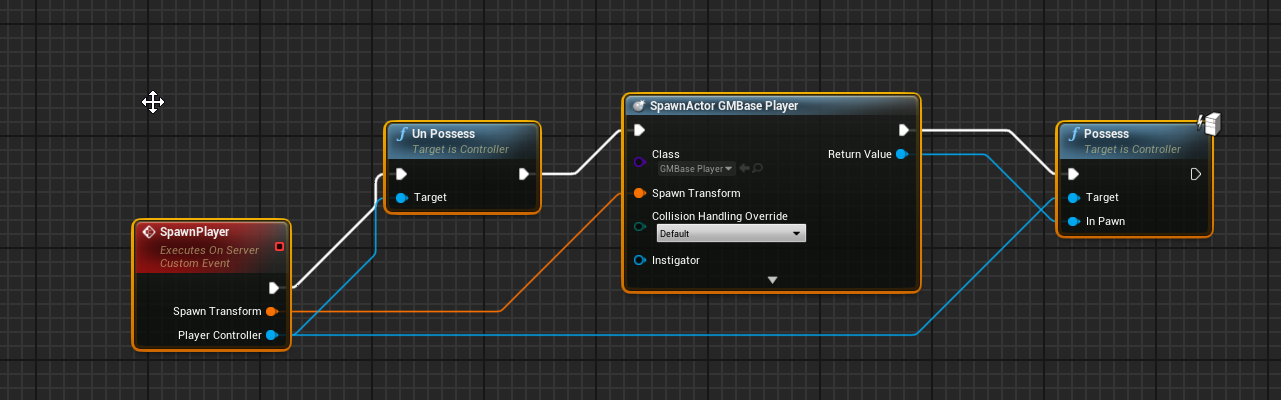


this is on gamemode
dawn summit
@shrewd tinsel how many you expect?
chrome bay
You can do it with two functions easily
dawn summit
@chrome bay me?
chrome bay
yeah
dawn summit
@chrome bay please tell 🙂
chrome bay
{
    if (!HasAuthority())
    {
        Server_DoSomething();
    }
    else
    {
        // Code
    }
}

void Server_DoSomething_Implementation()
{
    DoSomething();
}```No reason to call other functions
If you want the body to run server and client side just remove the else
dawn summit
where the part that runs on client and server?
chrome bay
If you want to run on both remove the else and put it there
Then it just becomes this:
{
    if (!HasAuthority())
    {
        Server_DoSomething();
    }

    // Code
}

void Server_DoSomething_Implementation()
{
    DoSomething();
}```It doesn't, because DoSomething() calls Server_DoSomething() if you're a client.
dawn summit
if you bind key to DoSomething it want be called on server
dawn summit
but
// Code
wont be
chrome bay
it will
dawn summit
how so?
 light monolith
Why is "Play sound at location" plays 3 times when i have 4 players in game? is there any fix to this? i tried spawning it only on the server but it plays only on the server
chrome bay
because Server_DoSomething_Implementation() is calling DoSomething()
chrome bay
No, because of !HasAuthority() check
dawn summit
but
// Code
is not ELSE
chrome bay
Think about it:
Client calls DoSomething()
Client calls Server_DoSomething()
Client runs // Code
Server receives Server_DoSomething(), calls DoSomething()
Server runs // Code
A listen server has authority because it's the Server, so it won't call Server_DoSomething();
If it did you'd end up in an infinite loop anyway
 rose egret
for a server spawned replicating actor, GetObjectName() or GetPathName() may return different value for each client. am I right ?
so how do I print their unique name (NetGUI maybe) in BP ?
chrome bay
NetGUID is different for every client
rose egret
oh u r right its generating different for each client 😦
dawn summit
{
    if (!HasAuthority())
    {
        Server_DoSomething();
    }

    // Code <- that part is not part of the check
}```You want some code to run on client and server yes?
So that's exactly what you want.
It's just the client telling the server to run the same function
dawn summit
yes...but when it runs on Listen server it tuns twice
chrome bay
No it won't
dawn summit
well, it does
rose egret
so how do I print the unique id of a replicating actor 😦
chrome bay
It just won't. The Server isn't running input for the clients, and it's the authority
So it won't call the function twice
I've got this exact setup in multiple places all over our game
dawn summit
Listen server runs inputs from clients...what are you talking about?
chrome bay
No it doesn't...
It can't
How can it get the input from a clients keyboard?
Unless the client is explicitly sending it?
dawn summit
listen server is just player playing and hosting
chrome bay
Yes
I give up
try it yourself and see
It's running its own input
So it will call DoSomething() once, for itself.
It will not call Server_DoSomething()
If it did, you would end up in an infinite loop of the functions calling each other
chrome bay
The weapons call StartFire(), if a client calls StartFire, then internally it calls Server_StartFire(), which just calls StartFire()
So it's basically like telling the Server an input key was pressed, sort of.
And it simulating the same thing
dawn summit
i did that and for some reason it just triggered event twice for my listen server, i did something wrong there
chrome bay
Yeah that's probably something else going on
dawn summit
@chrome bay sorry to poke again, do you know if AnimInstances exist/run on server?
winged badger
they do, dedicated server might not bother simulating bones tho
and if you're trying to send a UAnimInstance* over the RPC, think again, its not replicated
dawn summit
nope, i just checking
if (!MainAnimInstance)
and i was not sure if it exist on say dedicated server
chrome bay
yeah they do exist for sure, it's just as Zlo says they may not be doing anything
depends on the mesh settings
dawn summit
okay, i won't relate on their events then
i need some however, not sure how will i handle it ;_;
chrome bay
If you mean anim notifies then yeah you can't really rely on them anyway
Or at least, they won't be synchronised between clients/server etc.
dawn summit
yep...i've ported (partially) AdvancedLocomotionSystem to replicate, but i have some issues, like Mantle uses notify to teleport the capsule when it ends
moved some variables to character movement component so it can be predicted and compressed
but it was not the best place to start learning cpp and networking
Should be things like key pressed actions send as reliable?
before i implement bWantsToDoSomeStuff in CMC
dawn summit
@chrome bay yep, it seems i know why i had so many functions now...
i could trigger the event by the player itself, and by replicating a state, which should not trigger server replication again
oh...i just check if it's simulated proxy
copper grove
*EDIT fixed (Handle Starting new player / delete on post login is how you do it...)how do you handle clients entering a new map using seamless server travel
without it, you'd just call event post login and call it a day, but with it, i dont know what to call on gamemode to handle those players having travelled/spawn a new pawn
odd iron
Can someone send me the Config for Steam sometime working but just LAN one time showing me
LogSockets: Warning: Tried to bind address with protocol Steam to a socket with protocol IPv4
im using this config
 sleek current
Hey, is there a simple way to check whether or not we have an internet connection?
weary mortar
Hi all, I have an strange issue in my autonomous proxy client, but not in listen server.... the run animation sometimes accelerates and play faster in clients... any hint on what it could be related with?
winged badger
CMC updating the skeleton twice
meager spade
@weary mortar are you doing some funky stuff
like forcing a non autonomous to autonomou?
autonomous
weary mortar
@winged badger @meager spade thanks for the hint! I really appreciate it!
meager spade
you could try
GetMesh()->bOnlyAllowAutonomousTickPose = true;
see if that fixes it
weary mortar
I think I've found it... In my AnimBp I am setting "Root Motion Mode" to Root Motion from Everything
weary mortar
I think that it can be the issue.... I changed it to fix a weird animation long time ago from the market....
yeah... now I can understand why it is terrible 😄
weary mortar
so u suggest to use always montages instead animations?
weary mortar
yes, In my game I avoid using root motion
meager spade
when networking
weary mortar
ok, I will tattoo that to don't forget it... It drove me nuts for an entire week!!
😄
thanks for the hand, guys!! 🙂
meager spade
we had that issue before
so your not the only one 😄
then again we do crazy stuff
in our game 😄
weary mortar
hahahaha glad to hear that it was not an easy thing to find
meager spade
GetMesh()->bOnlyAllowAutonomousTickPose = true; < this here drove me nuts
weary mortar
ufff now I can breathe again... 😄
meager spade
its set in only one place, APawn::Possess()
and yeah, 2 days to track that bug down :/
lol
weary mortar
😄 yeah that sounds like a really pain!!
anyway thanks for always being there to help and hear our lamentations 😄
 light fog
Got a really weird problem, I have packaged my game and when i host a game on my pc, use servertravel and get all player controllers on a new game mode it doesnt work. But when i do the same thing on my laptop it works.
 silent phoenix
Does vehicle movement component have any equivalent to character movement ignore correction / client side movement authority? In c++ or blueprint?
 ivory lintel
Guys...if anyone can help me...
What the better way to setup a player name in multiplayer game using the ue4 framework
playerstate
???
ivory lintel
I wanna to use the player state from player state class...I expose the SetPlayerName as an ufunciion but don't work
any tip???
dawn summit
@ivory lintel check
AGameModeBase::ChangeName
ivory lintel
nice tks
lunar root
Hey, how can a wait for the PlayerState to replicate inside my UMG widget ?
I have the PlayerController, but it can happen that the PlayerState inside the PlayerController is still null
and I need to wait until its not longer null before rendering the UI
meager spade
pulse witha timer
tho
we wait till OnRep_PlayerState in the controller
and fire a delegate
which then updates our widgets
so widget binds to it if the PlayerState is null
and waits
simples 😄
lunar root
thats pretty much what i have
but this doesnt work for the server since the server doesnt call on_rep
winged badger
server doesn't need to wait for it to replicate
 fluid prawn
Question regarding netcode of rotation or translation in Local Space vs World Space. For replication do I need to convert any Local Space transformations to World space to achieve proper replication. I see in the engine code that Add Location Rotation and Add Relative Location Call the (root) Move Component Update which get converted to World Space anyway?
I am coding A plane movement Component from scratch so I'm applying rotations and forward vector acceleration in Local space so I am curious if I need to convert those rotations and locations from local to world?
winged badger
it doesn't matter, as long as you do same conversions on both sides
having said that, depending on coordinate space, local space vectors, typically having lower magnitude, might allow for better compression
fluid prawn
When you mean same conversions on both sides? And yes you're definitely right about the lower magnitude better to compact.
The reason I ask was since I am doing a Movement Component from Scratch I see actually on UE4 Low level movement component they move the root component as UpdatedComponent->MoveComponent(World Delta, World Rotation, hitflag ...)
winged badger
if you send a local space vector and client expects a local space vector
fluid prawn
ofcource
winged badger
doesn't take rocket science to transform it to world coordinates on the other side
fluid prawn
Yea just a Matrix transformation. It seems their Add Local Rotation and Relative convert it for you to world space
and pass that transform to MoveComponent anyway
When I get to that step
I'll let you know
I will be coding Client prediction from scratch on top of my movement component just more or less curious about how UE4 does it since they are AAA company and they obviously have alot more developers pushing code to it
winged badger
then look at their github for the new one
since CMC is hardcoded monolithic monstrosity that should never have existed
fluid prawn
Yea
I dug through the current one
its very messy
the replication code and Movement code should be seperate
currently they are in one class
however.. their movement code
is not bad
just the way they did net code was a bit sloppy
winged badger
until you try something non standard, like having client side movement with AIController
fluid prawn
not sloppy as in bad sloppy as in just how they put the classes together
winged badger
or anything really where the controller is not APlayerController and Pawn is not ACharacter
kaboom
to make it worse, it replicates via the Character directly
fluid prawn
yes
winged badger
and PC also has parts of its logic
fluid prawn
thats another thing
winged badger
see: TickActor
fluid prawn
that was odd
their player controller
"Is a connection"
and it has the net driver shit
which is wack
that still confuses me
winged badger
you have to override the roles manually, if you do this, or CMC will start doing shit like ticking your skeleton twice per frame
fluid prawn
I never dug into the net driver just as far as when the server needs to do net corrections
it's done on the PC
it seems
So I was told by some people that they are modularizing the net replication
for movement
one dude is currently working on it
it's a "plugin" but I am curious how exactly you Use it if you make your own movement component.
lunar root
server doesn't need to wait for it to replicate
@winged badger so basically I have to make an if statement if the PlayerState is already set otherwise bind to the delegate?
winged badger
that is pretty standard
chrome bay
CMC is a dinosaur. Thankfully it looks like they plan to replace it at some point.
No ETA though, and I doubt CMC will ever be removed entirely as too many games depend on it.
Wouldn't be surprised if UE5 still has it at launch.
stoic acorn
404
chrome bay
Need to be logged in to Github and have your account linked
lunar root
aight ty @winged badger
 polar wing
I can't even begin to explain the nonsense I had to get through to make my space project work with CMC
networking that stuff wasn't easy, but I found some hacky workarounds
 sullen umbra
hello guys, forgive me but I'm getting crazy.. I'm quite new to UE4, and I'm trying to make a simple LOCAL multiplayer minigolf like game in Unreal through blueprints. So, in my GameMode I set up a function to "getspawnpoints" according to playerstart class, and then another function to spawn players with their own playercontroller index according to the array created in the "getspawnpoints" function.
So now all the players are up and running at the same time, but I would like to implement a turn system so that I can enable player0 to act first, then player1, then player2, and so on. So I was thinking about creating custom events for turn begin, and turn end, but I'm stuck at this point. Can you redirect me to a comprehensible guide to do this, or can you tell me how to achieve this? I can provide GameMode BP if needed. Thanks a lot
lunar root
@sullen umbra in the GameState you have an array for PlayerStates
you could make an variable within the GameState which holds the index of the current player
So you can always access the PS by using GameState->Players[INDEX_OF_PLAYER]
and as soon the turn ends you just count up the index until reaching the end of the Players array, then set the variable to 0 again for the first player and repeat from there
sullen umbra
gonna try now, but this still looks like hieroglyphs to me 😭
stoic acorn
@sullen umbra This series of tutorials will help you get setup with this https://www.youtube.com/watch?v=JF3KFWF8hUs

UE4 / Unreal Engine 4 Multiplayer Playlist:
In this collection of videos, we will cover setting up a project for both local and networked multiplayer projects.
This Video:
In this video, we set up our project and get an understanding of what we will need to begin spawning our...
works perfectly for splitscreen local co-op
doesn't have to be splitscreen obvs
sullen umbra
@stoic acorn yes I followed up that tutorial, but the problem here is to set up a turn system to tell which player should act
actually my gamemode is the same as that tutorial
stoic acorn
so it would probably be set up in the same way as a turn based game. I bet there are a ton of tutorials like that
sullen umbra
I don't know.. I can only find rpg based games which are way more complex than the thing I'm trying to achieve.. that should be super simple in theory, but in practice I get lost
winged badger
gamemode decides which players turn it is
then it just informs the players of that
a client RPC to the client controller is appropriate here
do not multicast from gamemode 😄
 worldly raft
Can anyone help explain how to create a character selection at the start of the game like in ARK, Hurtwold and other types of multiplayer games?
 spark fossil
@worldly raft You can set up a blueprint for your character selection "booth" with a camera with a skeletal mesh component for the current character. Then create a set of character buttons in UMG which replaces the mesh with that character's mesh when clicked.
worldly raft
@spark fossil thanks for the advice 👍😊 any good documentation or tutorials that show steps to create this?
spark fossil
@worldly raft Np. I don't I'm afraid, but I have I did it that way in my game and it seems to work fine.
The blueprint actor is floating in the air but is set to not be visible to any other cameras.
lunar root
@worldly raft @spark fossil What I have done is creating a new Level (Hero Select Level), and do everything there. I spawned an Actor which holds a SkeletalMesh, as soon the player clicks on a button to select a character an RPC is send t othe server, the server then selects the character and send an RPC back to the client who then updates the SkeletelMesh of my previous Spawned actor to the new one
When the Selection is done I use seamless travel to persist the data to the new level and start from there
But this technique makes only sense when you dont have to swap in Mid-Game
spark fossil
@worldly raft Thanks, but all credit there goes to the marketplace asset creators 🙂 Nope, all different skeletons.
 jolly siren
My fix to the PIE window net mode bug in 4.25 made it into 4.25.1. Just letting people know who were having issues with it https://github.com/EpicGames/UnrealEngine/pull/6963
lunar root
@jolly siren still waiting for server travel in PIE -_-
spark fossil
@lunar root Sounds good. I've taken a similar approach with the RPC calls when switching hero or skin, but just kept it in the same map so no travel. That was maybe just laziness though on my part.
spark fossil
haha ouch
lunar root
It's supposed to be a oneliner, yeah.. no
I traveled to the new map and couldnt move the entire time
and was nearly crying
and randomly i realized, wait the server isnt running in the task manager
basically the server crashed after traveling, and since i have to test in standalone because the editor doesnt support server travel i didnt realize
spark fossil
painful 😦
sullen umbra
I give up, thanks anyway 😭
lunar root
@sullen umbra Okay dude listen
spark fossil
I feel your pain though. I just spent 3 days fixing bugs that weren't there in PIE
lunar root
You set a GameMode per Map
this GameMode initializes a GameState and PlayerStates
those are replicated to the clients, but can only be changed on the server side
Mean the client can read this information and process it, but not change it
Since you have an Array (a list) of PlayerStates you can just say, okay its the turn of the player with position 0 in the PlayerStates array
spark fossil
lunar root
when he is done you can just increase the so called index to 1
When player 1 is done increase it to 2 etc
and when you reach the limit of the array (lets say 5) you just resetz the counter to 0 again
also super useful: http://cedric-neukirchen.net/Downloads/Compendium/UE4_Network_Compendium_by_Cedric_eXi_Neukirchen.pdf
@spark fossil Didnt know about this, might have to look into it too, i feel like i know replication but sometimes i just sturggle with things like UMG etc
because it needs to wait for the PlayerState etc
spark fossil
Same, but this document comes in handy even just to look something up
Still use it all the time
lunar root
Yeah, dont do this
I guess, i heared @meager spade talking about it and just looked it up
dawn summit
I've seen people discussing CMC. Pain exist...
I hope there will be some brave man who will make new plugin with component that can be plugged in to any pawn
lunar root
Isnt this the NetworkPredictionPlugin?
idk anything bout it just heared it often when talking about CMC
chrome bay
yep
Isn't finished yet. no eta
Also don't expect it to be plug-and-play, will still be a lot of core work to do, and it's unlikely to be something you can use in BP.
dawn summit
to replace CMC it should be universal for cpp and bp
and cmc does more than just replication
chrome bay
It won't be, and it probably won't replace CMC
CMC will probably still exist alongside
dawn summit
AI navigation is handled by CMC
scarlet cypress
Does someone know this bug? There are two widgets being displayed on top of each other and one version is inactive. It is only a problem when there are multiple players in the game, like if the other player would create a second widget for you. But as you see the HUD events plays local and dont get replicated.
spark fossil
@scarlet cypress Try doing a check to make sure that the Actor is locally owned
What BP is that in the screenshot?
scarlet cypress
The PlayerCharacter
Thanks! This fixed it! I still dont understand why this bug occurred tho..
spark fossil
@scarlet cypress Glad it worked 🙂 It's because this will be ran for every player character in the level, so you'll get a hud widget for each one.
scarlet cypress
Okay, thats kind of wierd tho because it runs 1 time on each player but i gets 2 widgets for both...
spark fossil
but if it runs once for each player character, and you have 2 player characters in your level at the time you'll get 2 widgets on the player's screen right?
So you could either check that the playercharacter is locally controlled, as you did, or move the widget spawning code into the HUD or something.
meager spade
how do you actually kick someone from a steam lobby
 thick sand
Good Morning. Anyone in the mood today to help a fellow hobby dev? In specific, I am trying to control two pawns at once (a first person and 3rd person pawn). I have it working single player but everything gets messed up once I try to introduce multiplayer (and not just because of replication, something else is going on).
spark fossil
@thick sand How are you controlling the second pawn? Via commands to an AI I guess?
thick sand
@spark fossil Right now, I posses the thirdperson pawn with an AIController spawned by the first person. I then just control the pawn vie the firstperson pawn.
spark fossil
@thick sand Not sure if this is your issue, but the ai controlled pawn will always be server owned
so you would need to issue any commands via an rpc on the player controlled character or player controller or something else that the local player "owns"
The ai controlled pawn would be a simulated proxy for the client, so they can't really do anything with it directly
thick sand
@spark fossil That makes sense. Let me see if I can run a few tests.
@spark fossil Successful initial tests. Thanks! So I am calling a server RPC in the FPPawn which then calls the function on the thirdperson char
spark fossil
@thick sand Good stuff. Yeah that sounds right.
I tried various ways to get the client to spawn an AI as an Autonomous Proxy instead of Simulated Proxy, but couldn't figure out any non horrible way of doing it.
So it seems like you just have to relay the commands
thick sand
gotcha
thanks again. The first person pawn is actually going to be a VR pawn. Let's see what challenges I run into next 🙂
spark fossil
np - gl!
thick sand
ty vm
thick sand
@spark fossil One weird thing I am experiencing is that everything seems to work fine when running a multiplayer test (both dedicated and non dedicated checked) but when I try hosting the game on one comp and joining on another (via steam) the client somewhat jitters in place rather then moving. Any thoughts?
spark fossil
@thick sand Is it the AI character or the player controlled one?
thick sand
AI. The other one is just a static camera as of now
spark fossil
ah ok
So, you're taking an input from the player, calling a Server RPC on the Player character, which tells the AI character to move?
thick sand
VR Pawn takes the input, calls a RPC (server event) on itself which then calls an event on the AI pawn. That event I have attached to an authority switch. The authorized exec calls the Multicast version while the remote exec calls a server RPC . The multicast event is what adds the movement input to the pawn
spark fossil
afaik all of the AI pawn's movement etc. should be done on the server, and have it replicate via its movement component.
It will be a simulated proxy on the client so they won't be able to move it, but also I don't think the navmesh exists on the client (I could be wrong but I'm fairly sure on that)
As long as the Ai pawn is replicated and has a movement component, it should update itself on the client when you move it on the server
thick sand
ok, so therefore the movement should be done on the server rather then a multicast?
maybe its getting dbl input and conflicting??
its also a bit weird that this is not present when testing as a "dedicated server"
spark fossil
it could be that, but either way I would move it on the server and just let it replicate. If you use a behahavior tree instead too, it will have to be server only for that stuff.
There seems to be a lot of issues that are not picked up when playing in editor. EQS queries on the client seem to run fine until you deploy and test it on 2 different machines :/
thick sand
ok, thanks. Let me try
thick sand
@spark fossil I appreciate the help and hope its not a bother. I changed it to VRPawn (Server RPC) -> ThirdPersonPawn (run on server) -> add movement input. Unfortunately, its still jittery.... I've gotten to this point before and decided to start over since I wasn't sure what was going on.. ugh
third person char
spark fossil
@mellow dome It's no bother at all. Hm strange. Is it moving but jittery movement or is it just staying still and jittering a bit?
thick sand
First person (VR Pawn)
Its a bit hard to tell but it looks like its moving but not getting anywhere and just jittering
spark fossil
But it was moving when playing with 2 PIE windows?
I've never tried moving an ai like that tbh, without a navmesh
I thought you could only do that with a playercontroller
thick sand
I tried using a player controller and ran into issues as well. Everything seems to work fine in 2 PIE windows
when I "launch game" and then join the MP session, the client def tries to move but jitters
spark fossil
hm weird
You could use a navmesh and move it like a typical AI but it would be a bit of work to set up and I'm not sure how responsive it would be to the direct control
 foggy idol
How do I get the number of people spectating a player
thick sand
yeah, thanks for the help. It always seems like the projects I want to work on are slight fringe cases and that combined a lack of knowledge and it makes for a dangerous combination
spark fossil
@foggy idol You can use GameMode -> Get Num Spectators
@thick sand I know the feeling 🙂
foggy idol
I want to get the value for a specific player
I go into spectator mode by setting view target
I want to find out how many people are currently viewing
I don't mind if c++ is involved
 dry turret
i'm curious about the Get ServerWorldTime node - what happens when the server is left running for a long time? i just found that my map has been running for hours instead of ending after 10 minutes, i assume the value got too high or something. is there any way to reset it to 0?
foggy idol
So maybe do
if(IsLocallyControlled() || CurrentViewers.Contains(GetLocalFirstPlayerController()))
@thin stratus
Is current viewers an accessible array or do I have to make it and set it on my own
And how would i implement this
 oak thunder
Hello Guys, have anyone already created a video chat using UE for a multiplayer game app?
 shy kelp
Im replicated montages with root motion and getting up wonky results. I have a run on server custom event running a multicast, which as a repnotify triggering the montage. https://gyazo.com/ceb4111533516388ac7735b5cc105ea0
thick sand
@spark fossil It seems my pawn moves but really slowly. I would think its because of lag but it works fine when just controlling a single pawn. Maybe the extra pawn is too much? ugh, idk
foggy idol
Maybe you have too many RPC's in the character
 quartz anvil
@thick sand did you try to turn on "orient rotation to movement" in character?, also try to disable particle and try again. solution :https://forums.unrealengine.com/development-discussion/blueprint-visual-scripting/71123-multiplayer-3rd-person-and-terrible-stuttering
Unreal Engine Forums
Build powerful visual scripts without code.
light monolith
How do i test to see if the sound is playing for everyone on the server? On 1 computer
 restive flicker
Check on each client
light monolith
How do i check if the bullet firing sound is playing in another client if i have to click to fire in the current client tho?
spark fossil
@thick sand Hm weird. Guessing that's just where it's trying to move at one and then being brought back by the authority.
thick sand
@quartz anvil I just tried both on and off (was on) and still does a stutter step.
@spark fossil Thanks. That's kind of what I'm thinking as well but can't quite sort it out atm. Comparing it to a reg ThirdPerson pawn setup, it has 4 x as many RPC calls per sec (2k - 8k) .
spark fossil
@thick sand I don't think it would be too many RPC calls tbh. I've never tried moving an AI pawn with input rather than a BT/Navmesh, but I'm guessing there's some issue there. GL, hope you crack it.
 harsh lintel
I'm using SetActorRotation on the server, it is not reflected on the client tho
The client on the left calls the server RPC that updates the rotation and it isn't reflected, the client number 2 on the right does update the rotation
 twin storm
Hello everyone, I'm new to Unreal Engine development. I was hoping someone could provide me with some insight on to how a custom client side tcp connection of an online UE4 client might look like (specifically on an MMORPG). I know how to construct the TCPSocket and connection, my question is more so how to effectively process communications. As far as I know I have two options...
- Run a Network Layer on a separate thread and allow the game to queue commands to submit data to a server. Similarly, allow the Network layer to queue commands on the game thread to process packets/data that is sent to us from the server.
- Run the Network Layer on the same thread as the game and depend on Ticks() for processing data that the server sends to us. I'm not sure if the Tick system occurs often enough where this would be a good idea.
If I were to not run the network layer on a separate thread AND I was constantly listening for data from the server instead of only checking during Ticks... Wouldn't this cause the game to have lots of lag due to constantly processing something on the same thread?... or is this a trivial task for the game engine?
lunar root
@twin storm I doubt that I can help you there because this advanced stuff you are talking about, but maybe take a look at ReplicationGraph, it depends on ReplicationDriver and allows you to customize the replication logic
twin juniper
hello! i've here some blueprints for a door that i am attempting to replicate
the server can open and close it fine
it's also replicated fine (client sees it open and close in sync perfectly)
however
the client cannot interact with the door - ie cannot open or close it
does anyone have any pointers?
also dooropenclient node is set to reliable run on server
winged badger
you can't send an RPC thru an actor you don't own
exception being multicasts from server
all you get is "no owning connection..." warning in your output log with this
twin juniper
i see, thank you
what would be an alternative solution? i'm new to UE4
winged badger
sending an RPC with a door reference as input through your PlayerController, PlayerState, Pawn or other actor you do own as a client
twin juniper
ahhh ok so you reckon i should handle the input through the player controller?
 acoustic inlet
Anybody know why my Map data gets swallowed? Before calling the function the map has information, but when I add a breakpoint there's nothing in the Map value
Seems to disappear during the information transfer from client->server
Oh...
but why tho
 vivid seal
I was bummed when I found out about that. You can kinda cheat it by making an array of structs where each struct is a key value pair, but it’s obviously not as good as having a map.
shrewd tinsel
@acoustic inlet ue4 doesnt replicate maps ...
guys, what is the correct way to spawn a player in multiplayer game?
do i do it on gamemode? or on pawn?
or on player controller?
spawn actor from class > possess?
in blueprints
fluid prawn
Gamemode
game mode runs on the server
Last I recall you can use the game mode to get the PC's which are connections and possess w/e thing you're spawning that takes a player controller
chrome bay
The Gamemode is what usually handles pawn spawning yeah, but it depends on the game.
chrome bay
Same for splitscreen or online really
fluid prawn
I wonder how games that are competitive handle spawning
if its done server side
like I assume if you have high ping you might have a delay on your spawn versus someone who has lower ping
and thus create potentially a disadvantage
Unless you server and client time stamp
and compare them and then interp it or something
chrome bay
Well the pawns will always be spawned server-side. If you have additional latency to the Server and it takes you longer to receive the pawn there's not much that can be done about that.
fluid prawn
yeah
chrome bay
But that will affect the whole game too, not just pawn spawning/possession.
chrome bay
yeah, it's quite hard to build the systems to workaround/support that
Can be done, just usually very game-specific
chrome bay
Then everything will run in the cloud, and it'd be streamed
Would be great
Everything would be a single player game.
 small marsh
Hello, guys. I'm working on card multiplayer game. Can i ask some questions about logic and Game Framework(GameState, GameMode)?
bitter oriole
Asking questions is strictly forbidden here 😏
small marsh
i take this risk )
In my card game i need show to players different cards location. Gamemode has refs to all cards. Which classes must handle the logic of card distribution
bitter oriole
You should think about gameplay framework actors (pawn, game mode, player controller, game state, player state) in terms of where they are
gamestate/playerstate are basically just shared data, changed on server and replicated to everyone
game mode is server only
player controller is server + owning client
You could very well put your logic distribution in any of these classes, but you have to think about who should be responsible
If it's the server, then game mode would make the most sense
small marsh
Yes, in the current prototype of the logic, the game mode is responsible for the distribution of cards, but i need to make each player see the process differently: their cards face down, and the cards of the other players face up. I am replicating the cards themselves, but I am not replicating their movement because I need to display them differently for each player
bitter oriole
Seems like the right thing to do
You don't need to be replicating more than an identifier for each card anyway
small marsh
on first iteration of card distribution each player see different card movement(different locations) now i can't understand how i can change location of object for each player differently
bitter oriole
You could simply set the owner of each card actor as the player controller owning the card, and then in your animation code, check whether the owner is non-null, and a local player controller
If both things are true then the animation is for the owning player, if not, for a remote player
small marsh
Thank so much)
small marsh
small marsh
why can't an actor be replicated to other players?
bitter oriole
Actors can always be replicated to other players, but game mode in particular is not
By design
small marsh
I created cards in the game mode and they are visible to all players. Then I try to call an event on a card with a game mode, but it only works on the host
bitter oriole
Sounds like the card actor is not replicated
small marsh
even if it is visible to other players after creation? responsible for this is "net load on client" and "replication" is checked
Maybe there are replication conditions about which I do not know?
meager spade
you cant access GameMode
from any client
even for the cards
GameMode forces itself away
your cards should be in some other Manager you make yourself
which all players can access
meager spade
you can make your own
and place in the level
just based on AActor
but GameState can be accessed by any player
so might be better place
winged badger
separate actor does avoid clutter
small marsh
If I understand correctly, i just need to create objects in the scene and then get a link to them in GameMode. And when will I call the events of these objects, will replication work?
meager spade
as long as client doesn't access the game mode
small marsh
LevelBlueprint good place?
meager spade
for?
just make a Actor
Always relevant
replicated
place in level
and use that for your cards
GameMode can get that actor via GetAllActorsd
 woeful jacinth
Hello! I have a question about event tick for a race car controls and multiplayer! The controls are triggered in virtual reality so I have to use event tick to always check if an actor is overlapping or not.
when it comes to multiplayer, I want to make it so the server stays around 120 tics. I know that I will have to account for someone not running the game at 120 FPS. How would I go about making the server account for that player lagging/low fps, but still properly replicate their pawn movement to other players? Do I basically need to make it somewhat predict what the player will do or just store the players values from last tic and use those until the server receives updated values from the player?
chrome bay
players might extrapolate other players' movement locally, but you don't do it on the Server
You won't get client packets at a steady 120Hz rate anyway, even if they're running at 120FPS or higher.
woeful jacinth
Where would you suggest I look in terms of making the movement stable?
I'm good at self teaching, I just need a pointer in the direction I need to go
chrome bay
If you're using physics vehicles you've entered a world of hurt is all I can say
woeful jacinth
Still possible though I assume?
chrome bay
Negative
I mean, you can use them in multiplayer sure, but smoothing / interp is extremely difficult and usually game-specific
Thankfully since it's physics you don't need to do smoothing, all clients will be running the physics scene between updates anyway at whatever their framerate is
woeful jacinth
I could leave the physics calculating up to the client, varify through some prediction, and just replicate the pawn position and animations to other players maybe?
chrome bay
Server-Auth is basically not possible though, so what you tend to do is just fire an unreliable RPC to the Server each tick which contains the players current input and their latest physics state.
woeful jacinth
I could not train an AI to auth?
chrome bay
nope
You can add server-side checks for blatant cheating ofc
How advanced you go with that is up to you
woeful jacinth
Blatant cheating is my main concern
chrome bay
yeah I'd just protect against that, even if it's quite rudimentary
But generally with physics and networking you just have to lean towards trusting the client a lot more than you do with kinematic movement (aka characters)
woeful jacinth
ya, the physics I feel like I can smoke out through scripting
like when you see other players, you will only be seeing their pawn. Your client will have no awareness of their hovering or thrust power
Thank you!
chrome bay
It's a complex topic in all honesty, comes up here quite often - no one-size-fits-all solution though unfortunately!
woeful jacinth
Sadly not, thankfully I know it is a challenge
does not seem hard from what I am reading, just tedious and some complex thought
Getting 8 players stable will be fun lmao but doable
chrome bay
I've been doing the client-auth, server-verify approach for a while, it's quite simple to set that up. It doesn't look great on remote clients but is playable for my use case
woeful jacinth
That is what I'm looking at. I know I will have to check the client to make sure players are not running this tool that lets you teleport your HMD location
by literally hacking you play space. Will be the only real way players can get ahead. The server will just varify the values of their cars thrusters and hover calculations
I know for only 8 players, the event tick should be decent since it is used in a couple other 10+ player vr games to calculate movement with relative stability.
chrome bay
I've not done VR but I can also imagine that client-auth is the only way to go there, because it would be pretty jarring to be snapping constantly from corrections.
woeful jacinth
That is why I feel training a simple AI to watch values would be useful. Not really constantly correcting, but looking for areas that need correction without putting load on the clients. Say if I was to train it to look for a car rapidly changing values(a spin out or flip would generate these), I could have the AI flag that and set them back on the track. Or if they lagged and their values do not line up with where they should be by some margin, the AI could correct.
Kind looking for values that fall off the bell curve model
 void mantle
Hi all. Wanted to see if anyone was able to integrate a grpc plugin into ie4 4.25?
lunar root
Question from a new game dev here, when I do a Multiplayer game where exactly should I start? With the menu? Hero Selection? Game Mechanics? I feel really lost to the honest since everything goes hand und hand
And I don't rly have a clean way to go
lunar root
Ok didn't read it but I guess it's to read it now
woeful jacinth
I would start with your game mechanics. Make a base of everything. Base character. Base weapon. Base picked up item
That will explain the flow
lunar root
Aight ty
woeful jacinth
you should build your game mechanics accounting for what is in there
Also, limit use of event tick if you can help it lmao
on the characte/pawn
 novel siren
hey everyone. Got a question. I am working on an inventory and equipment system. The inventory system replicates correctly. The issue I have is on the equipping items. To equip items my system spawns the actor in (spawn actor by class). To get the spawn actor to work I have had to set every component to replicate. Then on a repnotify, I use attach to component to attach the actor to the correct component of the character. This is where the issue comes up. It appears the actor's transform is being edited so that it appears slightly rotated and far up and to the right of the character. Everything I read only says that attach to component has replication issue when the components of the actor being attached are replicated, but they have to be replicated for it to spawn. Any ideas/suggestions?
 brave solar
Is it not possible to bind an event dispatcher on a client from within an actor? I'm trying to bind an event dispatcher in my character blueprint when entering an actor's collision volume, and it works as it should on server, but it doesn't work at all on client. If I run the intended function directly on overlap it works, but not if I bind the event dispatcher on overlap and then call the function.
woeful jacinth
I am not too knowledgeable yet, but I was thinking the same thing while playing Pavlov. They have an issue with replicating objects held by other players.
I was thinking that you could basically not replicate the item equiped, but send a single from the server to all other clients to equip your replicated pawn with that item
novel siren
I have not had an issue with a repnotify before, the difference between now and before is I was not spawning the actor I was just moving it from the world to the character
twin storm
Can anyone tell me why when I use DECLARE_DYNAMIC_MULTICAST_DELEGATE_OneParam the function that runs via AddDynamic() does not register breakpoints in visual studio? (It does run because its logging msgs to console)
Nevermind, switching solution config to "DebugGame Editor" instead of "DevelopGame Editor" fixed it
harsh lintel
The client on the left calls a server RPC that changes the client's pawn rotation but the rotation doesn't change, the client #2 on the right does see the rotation of client 1 pawn change
Im just using SetActorRotation so idk why it doesn't work
 half cradle
hi, does anyone know a good tutorial on how to make ALSv4 replicatable?
light monolith
How can i do this?
I've got a system where a host start a server and players can join put i want this kind of lobby
But*
bitter oriole
Sessions
light monolith
When i create a session the host doesn't join it unless i open a new level tho?
bitter oriole
Sessions and levels are unrelated
light monolith
So do i have to make the host join the session when i create it?
I'm using advanced sessions plugin
bitter oriole
Being the host is also unrelated
Someone creates a session, people join it
Usually this is linked to levels and multiplayer, but it's fairly independent
light monolith
But when i create a session and check how many players are in the session it shows me 0
bitter oriole
You just need to display the players in the session before they join the same server
bitter oriole
That's a multiplayer concept
It's unrelated to sessions
Sessions, are just a way for people to share data before joining a server
A lobby would have players in the session, and outside the server
light monolith
So in the photo i just sent, they are not in the same server but in the same session?
bitter oriole
No idea, just telling you how I would implement it in UE4
light monolith
OK thanks I'll try and miss with it
unkempt tiger
anyone maybe has an idea why my TArray<FMyStruct> isn't replicating properly? While its .Num() is correct, the FMyStructs inside it contain default data (as if it was initialized by my default constructor) rather than the correct data, when sending from server to client
 spark leaf
Does anyone know if there are tutorials yet for the epic services p2p? I see its in beta and I want to try it out but It would be nice if there was a tutorial or sample project more than the chat program.