#multiplayer
1 messages · Page 544 of 1
 foggy hinge
 worthy knot
What do i say.. im sure UE4 is supposed to have all these simple features
foggy hinge
Well, it's more PhysX's problem of not being deterministic. And it's not really a simple feature.
worthy knot
If its not simple then how did it get replicated?
I have yet to try possesion of these physics pawns and much further testing
foggy hinge
You replicate the call to the force, that doesn't mean the physics simulation is the same on the server and client though.
worthy knot
Im not understanding, if the simulation isnt the same then how are they showing in the correct position?
server and client same as well
 chrome bay
They're replicating movement no?
Also in the editor both clients are running at identical framerate and sharing a lot of settings. Editor is never representative of a real-world environment
Add the force only client-side while the object is stationary on the Server. It will immediately desync.
Also that answerhub post is wrong
worthy knot
@foggy hinge It might, well im sure it might
 sweet mirage
Hi 🙂 I have a question about connections. My game uses a listen server, and can take max 4 people. Does that mean I should set 'Public Connections' to 4? Because when i test this, I can get 5 people into the game
chrome bay
@sweet mirage 3. The server doesn't class itself as a connection.
sweet mirage
even a listen server? the tooltip says it does
worthy knot
@chrome bay you mean the answer on that post is wrong?
sweet mirage
@chrome bay is this tooltip incorrect then?
chrome bay
@worthy knot Yep
I'm in the midst of writing an article on it so I can just link it everytime this question comes up
@sweet mirage I would guess so, In my experience a listen server doesn't count itself as a connection.
sweet mirage
ok great, that matches with my testing. thanks!
chrome bay
That is the advanced sessions plugin so not an official Epic thing, that probably explains it
sweet mirage
right
sweet mirage
OK I've just tested it with some friends, but we can get 5 ppl into the server, even with connections set to 3
can anyone think of why that isn't working?
I have Public Connections set to 3 and Private Connections set to 3, could that be it?
 brave solar
I'm rinterping something and it looks fine from the player clients perspective and it also looks correct from replicated clients' perspectives, which seems to indicate no problems with replication, but from the servers perspective the rotation always lags behind a bit, as if the rotation rate is slower. anyone know why this would happen?
sweet mirage
where does the rotation occur?
brave solar
animation blueprint
sweet mirage
i mean, which class, and is the rotation happening on the server?
brave solar
it's a character, the rotation is derived from already replicated variables from the CMC so it doesn't need to happen on the server
since it looks more or less identical on replicated clients and the player's perspective I'm guessing there's some nuance I'm missing here
works perfectly on dedicated server also
sweet mirage
i think i had exactly this issue, for a very long time
i solved it by moving the logic from the character to the player controller, and sending the variables to the server, and getting the server to do the rotation logic, and then replicate it out
brave solar
that's an option I guess, although I've made an effort not to override CMC
 rose egret
is it possible to replicate a pointer to UActorComponent of a replicated actor even if the component's bReplicates is false
if so how it would be addressed ? by NetGUID or full path ?
chrome bay
@rose egret only if it's a default component of the actor. If not then no you can't.
rose egret
@chrome bay
I am using CreateDefaultSubobject.
do you know how they will be addressed ? something like [ActorNetGUI][ComponentIndex] ?
I am currently sending hit data (things local client shot) by this struct.
struct FDezSingleHit { AActor* HitActor = nullptr; uint16 Damage = 0; //depending on actor type it could be the bone we hit (EBoneName), glass index, .. uint8 SubIndex = 0; };
I think if default component is addressed by 'ActorNetGUI, ComponentIndex' I could simply send a pointer to component instead of actor.
chrome bay
You can send a pointer to the component just fine so long as it's a default sub object
If it's a component that was created at runtime (via NewObject()) - then it must be replicated.
 unreal pine
looks like with a pure server, my client can only update as fast as the server's framerate - does that make sense? Also is there a way to disable the reduced FPS for background unreal processes?
 grizzled stirrup
Does bool bShouldAdvertise; have to be true even for private matches on newer engine versions in order to be able to accept a Steam invite or join via presence?
I swear having that as false still worked on older versions but as long as this can be true but still be private it should be fine
unreal pine
I think I needed it on in 4.23 - I just made an additional property called "invite only" and filter those out for standard matchmaking / server list
grizzled stirrup
Nice idea, can pass that in as a SETTING_CUSTOMSEARCHINT1 query param. Thanks!
I believe the reason advertisement has to be true is that there doesn't seem to be a way to join a Steam session directly from the invite callback
Rather you have to search for friend sessions via:
                FUniqueNetIdSteam InFriendId(SteamLobbyCallback->m_steamIDFriend);
                SessionInterface->FindFriendSession(0, InFriendId);
And if advertising is false it looks like of course nothing is found so the session is never joined
unreal pine
interesting
grizzled stirrup
There's also the case if the person you are joining has their steam profile set to private you actually can't join
But you still receive the invite
I wonder if there is a workaround for that as it seems strange to ask your users to unprivate their profiles to play
unreal pine
Maybe the invite could pass the session ID and try to join that rather than trying to join on a steam friend ID
I haven't seen that before though
grizzled stirrup
That's where I struggle to actually get the right info through to join, can't convert the data in a way that the JoinSession function likes
Try it out if you are developing on steam
have someone with a private game library invite someone else, they should get the invite but won't join
Have reproduced it on multiple games and plugins
According to a forum post by Valve this isn't intentional but it's been about 2 years since they said they'd fix
grizzled stirrup
Actually it appears this may have been fixed as long as bShouldAdvertise is true. As soon as the private inviting player invites another friend, he appears online and playing the game and the invite works
It's not possible to join via presence unless you have been invited by the inviting player at least once, that seems to trigger the switch from private blue "Online" even if playing a game to the regular green advertised online
 hearty flame
Guys I have a question, how can I pass a string (userId) created by my Node.js Loginserver to the game itself. After self research one of the solutions would be passing it to command line arguments, however i could test it only on cooked game/server and not in editor testing. Can I make this work somehow in editor?
unreal pine
@hearty flame idk if this will help, but I noticed it in editor prefs the other day
 hearty atlas
@hearty flame you can with standalone play mode, advanced mode will open options to let you set commandline arguments. The other option is environment variables; which is how I would pass things like that.
 soft shell
Is there a command line option to set the dedicated server name on steam? I swear I found it a while ago..
grizzled stirrup
Should you have the Steam Sockets plugin enabled by default if you intend to ship a game on Steam?
It seems like it's intended to be an upgrade from the previous net driver
 odd iron
Hello Guys .. Where Should i set the Health Bar Visibility in Multiplayer Game ?
I've Setted the Healthbar visible in PlayerController
and set it to OwningClient but showing just on Server not on Client ?
grizzled stirrup
@gleaming vector sorry for tagging, I saw you were working directly on the UE4 side of the 4.24 steam socket plugin before Epic rolled their own. Do you know if you should just enable it, replace the net driver stuff in the config and there'll automatically be benefits (such as the mentioned improved security and reliability)? Or if you don't need dedicated servers is there not much of a benefit compared to using the older default method without the sockets plugin?
 gleaming vector
uhm
so i almost always recommend using new technology
but, the Epic implementation is extremely seamless
so, yes, i recommend using epic's steam net sockets
grizzled stirrup
Ok thanks! Is it as simple as just enabling the plugin and changing the .ini and existing code will just work with the benefits of the new net driver?
gleaming vector
yeah
gleaming vector
steam's net driver has 3 socket implementations
IP, Steam p2p, and Steam Net Sockets
grizzled stirrup
So it's more the actual thing that is connecting the players, the NAT punchthrough etc.?
gleaming vector
yeah
grizzled stirrup
That's cool
I wonder if the new faster routing options work out of the box
Seems like an impressive ping reduction in many regions
Hard to know as the only real documentation is to just turn it on
So fingers crossed it enables that stuff!
gleaming vector
test it, your mileage may vary over IP sockets but it's better than p2p
grizzled stirrup
If it's better I'm sold!
I have also heard that many games on the p2p connections can drop out after long sessions so this "improved reliability" sounds like it could definitely bet an improvement. I'm sold on just ensuring that the latest and most recommended tech is being used
gleaming vector
there are some issues, but valve is extremely invested in fixing them
grizzled stirrup
Great to hear
Thanks for the help
I assume the improvements Valve make will mainly be on this system
Rather than on the p2p system
gleaming vector
my understanding is that p2p is deprecated and no new changes will be made
grizzled stirrup
Oh very interesting
So upgrading is definitely the way to go then
Great to know
When enabling the sockets plugin in the .ini
[/Script/Engine.GameEngine]
!NetDriverDefinitions=ClearArray
+NetDriverDefinitions=(DefName="GameNetDriver",DriverClassName="/Script/SteamSockets.SteamSocketsNetDriver",DriverClassNameFallback="/Script/SteamSockets.SteamNetSocketsNetDriver")
Is the !NetDriverDefinitions=ClearArray line necessary?
I'm not sure what ! does in the context of a config file
! - Removes a property; but you do not have to have an exact match, just the name of the property.
Hmm so it seems it is not necessary as long as you make sure to remove any previous NetDriverDefinitions from the .ini, correct?
 orchid pollen
how is replication of arrays handled, if i update a single element, does it replicate the entire array over?
 fleet raven
it will only send the changed element
note that if you insert something in the middle it will consider all slots after to be changed - it works on a per index basis
fleet raven
those are clumsy to set up and don't preserve the order of elements which makes them a non starter in most situations
 meager spade
they are fine for inventory/stuff you don't care for the order
and you get client side callbacks for each changed element
 next fable
Just downloaded 4.25. Now when I run multiple players they all assume the same NetMode: Offline, Listen Server, Client.
So confused... how does that work?
next fable
Anyone? How does one debug multiplayer without knowing which is a listen server and which is a client?
meager spade
its listen server unless you have the dedicated server ticked
and the windows that spawn tell you what it is
Server or client
so you want to select Play as Listen Server
and server will be the PIE player, clients will spawn additional windows
but i think they bugged the names in 4.25 o_0
cause yeah i see Server on client windows
fleet raven
the window titles are wrong, the second window is actually a client connected to the listen server
it works properly otherwise
 random nymph
Any idea why there is a huge amount of lag when testing in editor with 1 client and a dedicated server?
Npcs warp around etc. Performance fps wise is okay at least on the client and there isn't this kind of issues when the server is running on dedicated hardware. Is the local bandwith limited somehow when testing on editor?
 bitter oriole
Sounds like server performance is bad
 thin stratus
How does one get the freaking Server, Client1 , Client2 Window titles back in 4.25?
Is that a setting that makes them wrong or is that a bug? (How does that ship ffs?!)
Someone linked the function last time I mentioned this iirc.
random nymph
@bitter oriole but if the server is running on the same machine as the client wouldn't it also make the client run poorly by hogging all the performance?
And the separate dedicated hardware isn't any more powerful than the computers we use to test locally
And when running on dedicated hardware there isn't any problems
bitter oriole
Running client + server is twice as expensive as a single one
The editor is obviously much slower too
And when you don't have focus of an UE window the performance drops
Just check the server framerate I guess
bitter oriole
Same as clients, use the profiler
 edgy sedge
Does anyone here use Protobufs for networking in their UE4 game?
bitter oriole
Why would you use UE4 just to ditch one of the largest features ?
edgy sedge
Because one of the largest features is also by far the least flexible
bitter oriole
It is rather flexible, tbh, what is your current issue with it ?
edgy sedge
It's not an issue; it just isn't compatible with the model we're going for which is why we've been using protobufs 😛
I'm not aware of anyone who's implemented a custom server backend for it, though I'd be interested to know if they had
bitter oriole
Well like I said, using UE4 without the multiplayer model is a weird decision since you gut a lot of the engine's value, so I don't think it's that common
Basically forget about all UE4 multiplayer, act like your game is a single player game, and implement protobuf everywhere
edgy sedge
That's what we've done. I was just interested to see if anyone else out there is doing the same
odd iron
Hi Guys
Pickup an item
Destroy Picked Item
Guys Can you Advice me to something better than this please
When the game switches the between modes the picked item still freezing in the air wont destroy
 jolly merlin
@edgy sedge Are you guys using Infraworld runtime?
edgy sedge
I've not heard of it, what's that?
jolly merlin

GitHub
A solution that enables Unreal Engine 4 to work with Google gRPC services from either C++ or Blueprints. - vizor-games/InfraworldRuntime
edgy sedge
Oh, no we're not.
jolly merlin
Basically a runtime and a code generation tool to generate a UE4 plugin from a protobuf definition
edgy sedge
I've actually just finished making a glue code generator to generate glue code for UE4
From proto definitions
But in my experience the gRPC wire format isn't suitable for the kind of RPS games have
From a server perspective it's capable of handling loads, but the overhead bandwidth usage isn't great
jolly merlin
I wouldn't use it to replace ue4's replicication system, I would use it to hook up with metagame services
 chilly mason
@edgy sedge I'm using ue4 with flatbuffers, which I guess is kind of similar to protobuf
edgy sedge
That's an interesting choice, are you using it for networking or for storage?
chilly mason
networking
lockstep deterministic p2p
soon will also be using it for save games & replays too
 stoic acorn
I'm trying to create a treasure system in my game. So far I have created a Treasure_MASTER class with 'TreasureValue' & 'ThisCoinBelongsTo' variables, and several different tiers of treasure children which will be spawned around the level. I'm trying to store the treasure each player picks up in the GameInstance but I can't figure out how to pass the class and treasure value through to the G.Instance. Any thoughts?
This is the Treasure_Master BP
This is the GameInstance so far
 kindred widget
@stoic acorn First, I really have to ask about that cast to class node. What's that for? Why not just select the class on the GetActorOfClass? Seems odd and it's an unnecessary IsValid Check since you already know what actor class you're after. I also have to ask, why gameinstance? Seems like an odd place for this. Usually stuff like this is done in GameMode and then the gamemode would store it someplace like PlayerState, since it's concerning players.
stoic acorn
Thanks for answering Authaer. Everything I've read about where to store player score etc has suggested to use GameInstance as it's persistent for the entirety of the game session.
I'll give what you said about using GetActorOfClass instead. I thought I needed to cast to the TreasureMaster class as I need to retrieve those two variables 'TreasureValue' & 'ThisCoinBelongsTo'
kindred widget
@stoic acorn Casting only needs to happen when you have a parent reference and need to cast to a child class. Like how a lot of functionality returns an "Actor" reference. If you have an Actor child class that's an Apple, and you line trace to it, it'll give you an Actor reference for it. It's still an Apple, but it's being treated like an Actor. If you needed to retrieve variables from it or call a function you wrote in that class, you would cast to Apple. But in your case, you're telling your GetActorOfClass what to access directly. If.. for whatever reason you had to use the Class of Actor first, and then cast to your TreasureMaster, then you'd need that cast.
As for the GameInstance thing, it's all about preference I suppose. If it was me, I'd probably do that stuff in PlayerState and make a SaveGame file for level persistence.
stoic acorn
Ok, it's interesting reading everyone's different take on what should be used where and when.
i.e. It's all very confusing
In your opinion, what kind of things would you put in the GameInstance?
kindred widget
Simple variables that don't require specific map reference that need to persist through the game. Things like a player's name might be one small example.
bitter oriole
Probably not the player name really, since PlayerState already stores it
Stuff that persists throughout the game, like sessions, friend list, your save data
Things related to loading screens, etc
kindred widget
By player name, I meant more like a profile type. Some single player games use profiles to identify the user so that multiple people on the machine can play the same game and not accidentally overwrite each other's stuff. Less about gameplay related player name.
next fable
@meager spade , @fleet raven Thanks for the clarification. Yes all windows say Server or Client, which is confusing AF.
meager spade
yeah seems to be a bug
next fable
I felt like a missed a whole paradigm shift.
fleet raven
fix it like this
meager spade
if he has source build 😄
next fable
Yes I can, no I don't
meager spade
good old UE4
 near bison
Anyone here used SpatialOS before?
grizzled stirrup
Should you call SetReplicatingMovement(true); in the constructor or should you instead just set bReplicateMovement = true; if it's safe to not call the MARK_PROPERTY_DIRTY_FROM_NAME( macro that the SetReplicatingMovement calls?
meager spade
SetReplicatingMovement uses push model now?
 modern swift
hi all , may I know why the rotation only replicated to other client but not owning client? I have selected replicate movement and replicate in the playercharacter
that's the replication setup
 frank crystal
Hello is there a way to replicate position of actor smoothly instead of instant teleporting?
Then there is a latency there is a problem: then I send to server event to spawn projectile and constanly moving right. The projectile spawns half a meter to the left of pawn. Do not know how to fix this
For view of other clients I guess it is seen as normal. Projectile spawns at weapon position.
I would like to reset position of this client bullet and smmothly interpolate it's position towards server bullet.
 karmic briar
hey guys im working with cmc atm and i inherit from existing cmc when i compiled i get this error what does these mean
""
Module.CreationArtPlugin.cpp.obj : error LNK2001: unresolved external symbol "public: virtual void __cdecl UOWSCharacterMovementComponent::FSavedMove_OWS::Clear(void)" (?Clear@FSavedMove_OWS@UOWSCharacterMovementComponent@@UEAAXXZ)
1>Module.CreationArtPlugin.cpp.obj : error LNK2001: unresolved external symbol "public: virtual unsigned char __cdecl UOWSCharacterMovementComponent::FSavedMove_OWS::GetCompressedFlags(void)const " (?GetCompressedFlags@FSavedMove_OWS@UOWSCharacterMovementComponent@@UEBAEXZ)
1>Module.CreationArtPlugin.cpp.obj : error LNK2001: unresolved external symbol "public: virtual bool __cdecl UOWSCharacterMovementComponent::FSavedMove_OWS::CanCombineWith(class TSharedPtr<class FSavedMove_Character,0> const &,class ACharacter *,float)const " (?CanCombineWith@FSavedMove_OWS@UOWSCharacterMovementComponent@@UEBA_NAEBV?$TSharedPtr@VFSavedMove_Character@@$0A@@@PEAVACharacter@@M@Z)
1>Module.CreationArtPlugin.cpp.obj : error LNK2001: unresolved external symbol "public: virtual void __cdecl UOWSCharacterMovementComponent::FSavedMove_OWS::SetMoveFor(class ACharacter *,float,struct FVector const &,class FNetworkPredictionData_Client_Character &)" (?SetMoveFor@FSavedMove_OWS@UOWSCharacterMovementComponent@@UEAAXPEAVACharacter@@MAEBUFVector@@AEAVFNetworkPredictionData_Client_Character@@@Z)
1>Module.CreationArtPlugin.cpp.obj : error LNK2001: unresolved external symbol "public: virtual void __cdecl UOWSCharacterMovementComponent::FSavedMove_OWS::PrepMoveFor(class ACharacter *)" (?PrepMoveFor@FSavedMove_OWS@UOWSCharacterMovementComponent@@UEAAXPEAVACharacter@@@Z)
1>E:\OpenWorldStarterPlugin\Plugins\CreationArtPlugin\Binaries\Win64\UE4Editor-CreationArtPlugin.dll : fatal error LNK1120: 5 unresolved externals
 buoyant wedge
Hello guys. It's possible to transform a product configurator into a multiplayer experience where the host can change the configuration and all client can see that change?
I have set on multicast the variant and it's work. But when i press play the configurator make a camera actor for any player but I don't have control of it.
karmic briar
nvm figured it out need to replace fsavemove_ows with fsavedmove_uw
btw anyone can check if my implementation of cmc inheriting from existing one is correct?
the photo is in #cpp
soft shell
If I want to notice back UGC doing stuff on a dedicated server (i.e. generating a ton of warnings, BP errors, bad loops, etc.) how best is this accomplished? FBlueprintExceptionTracker isn't available in shipping builds
karmic briar
how can i add custom movement mode in cmc?
is there some fucntion i need to override if i need to create custom mode?
stoic acorn
How can I pass variables from a child Actor class to the GameMode when a character begins overlap of the child class actor??
I've been tearing my hair out for hours over this
edgy sedge
On the protobuf discussion earlier, I think the quote is "so preoccupied with whether or not they could, they didn’t stop to think if they should."
I definitely should not have done this.
stoic acorn
This is on my Character Class. Would this be a good way to set the treasure that a player has picked up? It grabs the Treasure Value variable from a Child Actor Class. If I send this data to the Game Mode for server checks could it be exploited?
 mystic hull
does anyone know how to make a server funcution
UFuncution(Server)
that can take arguments?
the documentation is awful
mystic hull
it cannot seem to work at all
when i remove the arguments , it compiles
anything else
mystic hull
yeah i did that
mystic hull
i did
mystic hull
SCharacter.cp
meager spade
const FString&
mystic hull
CoopGameInstance.cpp
i have a text renderer which is linked to this PlayerName variable
it works great on the server and cliens sees it, so it needs to be done by the server for the client
so that's why ServerChangeName(FSting Name) Is called
const FString&
@meager spade
shit , why did this work?
i replaced it in the character.cpp and .h and it worked
or atleast no cmpiler errors, but as thankful as i am, i really don't get why lol
karmic briar
anyone know how can i implement custom movement modes?
what fucntion do i need to implement?
mystic hull
he will answer you and he is extremely more expert than i am
but RepNotify is a variable that is replicated and you want a fun. to be done when this happens
this is done by adding UPROPERTY(ReplicatedUsing= fnname)
which when the variable changes, it does the fn
DOREPLIFETIME(AInteractableCube, CurrentOwner);
this just tells the server to replicate those at ever server update
meager spade
you can make your own property
bCollisionsDisabled
which you then call SetActorEnableCollisions
or somethng
or do a client RPC if it is only that client who should have the collisions disabled
 rotund onyx
Watching the Network Multiplayer Fundamentals video that's pinned here and I have some questions if anyone can help me understand this better.
I think I get the basic dynamic between client and server, but in the examples shown I couldn't follow at all why certain nodes were used or how they were being properly replicated. Like for the simple weapon firing stuff there were like 6 different events and I don't understand what that all was doing.
karmic briar
anyone can help me with my problem with cmc above?
 barren patrol
@rotund onyx do you have questions about specific nodes? otherwise, it sounds like you just need time to wrap your head around things. try to make some basic things, play with it, watch more tutorials. eventually you will grok it
rotund onyx
i guess its more when to use the authority checking
and how many layers I need for stuff
because the example in that stream looked really complex even though its just "basics"
barren patrol
multiplayer is extremely complex 🙂
when to use authority... it all depends on the type of game
generally speaking, use server authority whenever you don't want the player to be able to cheat. rule #1 of multiplayer is "never trust the client"!
 sand iris
do we still need to build the engine from source to build dedicated servers? or can I use the pre-compiled 4.25.0 version from the epic launcher?
 fossil spoke
@sand iris Please dont post the same message across multiple channels as well.
sand iris
sorry, I wasnt sure which channel was the best for this topic
I was asking cause I heard someone say you can use the precompiled version now but I just tried it and didnt work
barren patrol
thats wild - why wouldn't they support that in the normal editor/
sand iris
no idea, but it's been like that for years
rotund onyx
I guess its just with a lot of things while I try to learn this stuff. I know just enough to understand point A and point B, but not enough to know the proper way to get between them
like using the weapon example. Between pressing the fire button (point A) and the weapon firing (point B). I know that the input is from the client and the weapon firing is on the server, but I'm not really sure where the other logic lies, or even really how to organize stuff so it actually executes on the server
I thought that server side replication was a setting in actors and stuff, but from that stream I can see that that isnt true
I don't know how I should be setting stuff up, especially in a way that considers a dedicated server
karmic briar
anyone can help me with my problem with cmc above?
 fringe sinew
Does the Event OnPostLogin happen per level?
If I use seemless travel to get a controller to a map from another level, does it not trigger in that case?
fossil spoke
@fringe sinew PostLogin is only called for the first time a Player joins a Server.
It is not called for Seamless Travel Players.
If you are using C++ you can override HandleSeamlessTravelPlayer to do stuff on that Player for if they were Seamless Travelling.
GenericPlayerInitialization is called in both cases.
fringe sinew
Thanks for the help! : )
 keen swallow
Hey guys know of an Actor equivalent of APawn::IsLocallyControlled() ? Players roles all show up AUTHORITY with AUTOPROXY for GetRemoteRole so I'm looking for which actor is in control.
 slender dove
is there like a universally smart way to predict knockbacks in multiplayer
i'm using Launch to knock players away when they are hit, and the delay looks a little nasty when running server-only while running it on the client then server looks kind of jittery
i'm hoping i don't have to write some kind of really overwrought solution to interpolate and smooth it out
actually you know what the dodge roll i implemented with gameplay abilities isn't jittery at all despite being predicted so there's something else going on here
i'll check if implementing the melee attack as a predicted gameplay ability fixes it
fringe sinew
Is a new player state created during seemless travel or the same one from the previous level is carried forward?
keen swallow
nevermind folks, figured it out
fossil spoke
@fringe sinew The old one is carried across, if its the same as the one defined on the GameMode of the new Map. Property values are not retained, unless copied over in the CopyProperties function that gets called.
This function is available in C++ and Blueprint to make use of.
fringe sinew
Wow! This is exactly the info I wanted now if I remember correctly the handbook that eXi wrote has things written about the function too! : )
kindred widget
When dealing with inventory systems, how would you guys update the UI of a client based on an object in a server owned actor changing? To put it simply, I would like to create an array of items in an actor component named InventoryComponent. This inventorycomponent is replicated and it's Array of items is replicated to the actor's owner. So, basically only the component's on client owned actors would get replicated. This means that the server shouldn't really replicate anything from a server owned inventorycomponent to anywhere else. But I want multiple people to be able to access a container at a time. So if Player A takes something from a container, the UI would update for both Player A and Player B while they have the inventory open. This is easy if it's just Player A. They use their playercharacter's InventoryComponent to call an RPC to move an item. Server does the move and RPCs back to the inventory component's owning client that it was done and passes back the inventory or something. Do I need to create an odd system of references that I keep in containers that says which InventoryComponents are currently looking into them and then remove them from that Array when the player closes the container. That Array being held on the server. Then when the container's inventory changes it can use the array of references to call RPCs to the owners of the reference's clients to update their UI? I feel like I'm overcomplicating this somehow. But the only way I can think to simplify it is to just replicate all inventories to everyone. The inventories won't be large, but that just doesn't sound desirable.
thin stratus
You can always inherit from your inventory and handle things different in the child for containers
@kindred widget
In addition you can check if the Actor that the Component is on is locally controlled or not
And depending on that, choose a different type of RPC
That's for current changes only though, cause RPC alone won't work for hot joiners
chrome bay
Can the UI not just pull the information from the container? I find that in multiplayer especially, it's better to just have the UI polling the game for the latest state rather than trying to be event-driven.
thin stratus
Yeah, but not if two people look at a box UI
And player 1 moves stuff.
You need to notify the other players about the inventory change, otherwise it goes async
chrome bay
Yeah, I mean I would just have those containers replicating the inventory
chrome bay
Then have the UI tick and poll the container for it's current state
thin stratus
Can always make owner only repnotify
And then in the child of the inventory comp
Override the condition for containers
chrome bay
I would honestly just have the inventory replicated (assuming this is the inventory for a chest or something) - then when it's not being used just make the actor go dormant.
thin stratus
Right but why replicating the personal inventory of a player to everyone
chrome bay
Oh yeah, unless other players need to know about it just flag it with COND_OwnerOnly I guess
IDK maybe I'm missing something 😄
thin stratus
They use one and the same InventoryComponent for personal and container
One needs OwnerOnly, one needs for everyone
That's what I gathered. So a child comp of the InventoryComponent, for containers, that changes the COND, should be enough
And if it's about RPCs, check if locally controlled owner
chrome bay
Yeah that sounds like the way to me
kindred widget
Well, since I last talked to Jambax, I've decided I'm probably ditching the class based items in favor of a datatable that contains a struct where I can create items based on an ID and I'll just store that ID from the table for the replicated inventory instead of a TSubclassOf. So I might just try that with the replication conditions idea. I like the idea of the client being able to look at items quickly without RPCing to the server every single time someone opens a container.
chrome bay
Structs are fine but in some cases you can run into limitations, but it really depends what the inventory is meant to be. There's no issue of having the inventory replicated, but for idle containers that are scattered around the world I would just have them been dormant actors that return to being dormant when nobody is interacting with them.
And keeping the NetUpdateFrequency low, and just calling ForceNetUpdate() when the inventory changes server-side.
Although you can only control those things at the actor-level, not the component level.
kindred widget
Can the server change the NetUpdateFrequency at runtime?
Am I correct in assuming that NetUpdateFrequency is.. sort of like a tick for replicated variables, where it's the time difference between when it'll check if something needs to be replicated to a client?
chrome bay
It's how often the actor is considered to replicate in Hz
So 100 = 100 times a second
You might be able to change rep frequency at runtime with the legacy net driver but you can't with replication graph.
For something that doesn't need constant updates it's better to just set it really low then call ForceNetUpdate() when you change a replicated property, and that will make it replicate that frame.
net frequency is more about improving server CPU time for checking properties. It won't have any affect on bandwidth etc.
kindred widget
So, basically if an actor's NetUpdateFrequency is set to like.. 0.1 for once every ten seconds and the server changes the variable five times in that span of ten seconds, it would only replicate the current change once the ten second timer ran up? But calling ForceNetUpdate would cause it to replicate regardless of whether that timer was up?
Because if that's the case, I might just abuse that because it sounds like a perfect solution to what I'm after.
chrome bay
yeah
But dormancy is better again
Because when the actor is dormant, nothing replicates
But the actor isn't destroyed by the clients and the actor channel can be opened up again
The only downside of dormancy, is that waking an actor from dormancy re-sends all of it's replicated properties because it's treated by the replication system as a 'new' actor.
That includes properties marked with COND_Initial too
kindred widget
Actually one more general replication question. Does the server actually ever send a replication update if nothing ever changed in the variable on the server?
chrome bay
No
kindred widget
So no extra network traffic for things being replicated that aren't currently changing.
chrome bay
The actor will still be considered for replication, i.e. have it's properties checked, but it won't replicate any properties so long as it thinks the clients have acked all the latest values.
If an actor is going to spend 99.9% of it's game-time never being used by clients, I would use dormancy for it personally.
kindred widget
I'll definitely look into that here in a few hours and see if I can wrap my head around it. Learning C++ and networking stuff beyond simple RPCs and Replication all in one project. Mentally stretched a bit!
 winged badger
dormancy doesn't combine too well with relevancy
dormant actor will not update someone who entered net relevant range
chrome bay
ah yeah, that's true. I've only used it for things that aren't really relevant/visible to anyone when dormant
winged badger
there is a NetUpdateFrequency of 0,1 and ForceNetUpdate combination
chrome bay
Looks like it is
UPROPERTY(replicated, BlueprintReadOnly, Category=PlayerState) uint8 Ping;
chrome bay
/** Replicated compressed ping for this player (holds ping in msec divided by 4) */
code boi
winged badger
uint8 😄 they do expect everyone to have good internet these days
chrome bay
haha
bitter oriole
Or use ExactPing
winged badger
looks like, failed to see the comment
chrome bay
ExactPing is better yeah but it's CPP only
And it's also far from exact
but... shrug
bitter oriole
The definition of an exact ping would be weird
chrome bay
very true 😄
 shrewd tinsel
the ping of the reality?
chrome bay
I actually do wonder why they exposed the compressed value to BP and not the 'exact ping' value...
Seems more useful
winged badger
are they replicating exact ping for everyone?
chrome bay
Oh lol
DOREPLIFETIME_CONDITION( APlayerState, Ping, COND_SkipOwner );
Yeah... so it's only for other players. That makes sense.
I guess you would need a custom node after all
@twin juniper
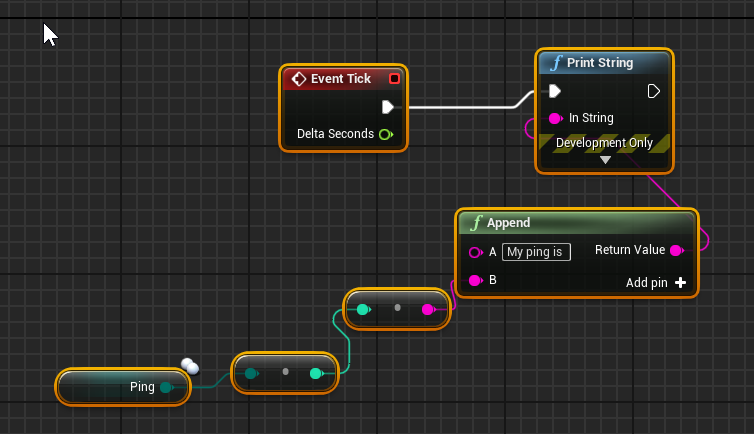 shrewd tinsel
ok so i better get it from gamestate over net from server?
chrome bay
Oh actually you know what
It would work
Because the client calculates their own ping. Doh.
winged badger
if i was them i would had put a getter function that returns a useful number adjusting for autonomous/simulated in the PS
chrome bay
@twin juniper no, that value is fine you can use it - but you need to multiply it by four to get the value in MS.
And it's not accurate
chrome bay
If you want a more accurate ping, you need to get ExactPing from CPP
Or an averaged ping from ExactPingV2
shrewd tinsel
exact ping gets me 2 pings?
chrome bay
ExactPing and ExactPingV2 are only available to owning player and server by the looks of it.
What do you mean 2 pings?
Ping is round trip time
shrewd tinsel
nah V2 is it a vector of 2?
chrome bay
V2 as in 'Version 2'
That's just what they called it, in their infinite variable naming wisdom.
chrome bay
It looks like they just have two values calculating ping in slightly different ways
the values are averages from recent frames to account for jitter etc.
winged badger
the entire thing seems lazy
shrewd tinsel
what if i take v1 and v2, add them and divide them?
winged badger
why would they not put a BPPure getter for the Ping in PS is beyond me
chrome bay
Yeah.. it looks like something they threw in years ago and abandoned
I mean Pawn.h still has a PawnStartFire(uint8 FireModeNum = 0); function...
winged badger
my fav is ShouldStartAtStartSpot sabotage in the GM
chrome bay
Oh man. I lost most of last week to that farce
So much awful code in the framework that's in desperate need of cleaning up 😦
winged badger
if you're BP only, there is no way you can get the player to respawn at different player start
just... awful
chrome bay
haha.. yeah that figures
 zinc garden
if you're BP only, there is no way you can get the player to respawn at different player start
@winged badger
You sure? Seems like that wouldn't be too much of a problem?
winged badger
you can teleport it afterwards
but you can't use the engine respawn code and get anything except the same player start over and over agian
zinc garden
Ah I see
You could make a custom player spawn actor, and then randomly move the player 1 spawn between them I suppose
UE4 multiplayer is so confusing. I'm trying to understand why the variable "Possessed Pawn" in the "On Possess" is null for clients.
And likewise why "Get Controlled Pawn" returns null for player controllers clientside.
karmic briar
hi i wanna know im trying to add custom movement mode for my custom cmc..how can i do it
what functions do i need to implement?
🤔
 unkempt tiger
can I set my actor to tick in different rates for the client/server?
For example have it tick at 20 times a second on the server and every render frame on the client?
zinc garden
I guess you could use Set Actor Tick Interval after a Has Authority switch
No idea how much issues it could cause though 😛
unkempt tiger
I tried doing that
However it seems that server tickrate is replicated somehow
and results in overriding the client tickrate as well..
zinc garden
Then I suppose they did that on purpose as anything else would cause too many problems
chrome bay
You can't do that no
But server and client will always be ticking at different rates anyway
zinc garden
So many systems are tied into the tick, like physics. Would be crazy different for the server and client in such things
chrome bay
In Editor, everything ticks at the same rate because editor
zinc garden
Use a delay node on tick serverside perhaps?
unkempt tiger
Ima make the server tick logic run only if enough accumulated time passed
that way I can control how often it ticks
chrome bay
If you want an actor to have a fixed tickrate use the 'Tick Interval' feature of the tick function
zinc garden
Delay with 0.05s will make it fire 20 times a second like you wanted
unkempt tiger
I want it to have a fixed tickrate, but different tickrates on server/client
chrome bay
That will determine how frequently tick is called, and with what delta time
But surely that will fall apart when a client or server can't meet that tick rate?
E.g, if a server is chugging and drops to 10 ticks briefly
chrome bay
Or during a loading hitch etc
unkempt tiger
This is for my snapshot interpolation btw
Which is working!
Only I found that the client ticks at the server's tick rate, which causes interpolation to work at 20 FPS instead of my real FPS
chrome bay
Well, that's not strictly true
The client will get network updates at a similar rate to the servers tick rate for sure
But only because the server is sending them at said rate
The client itself will be ticking independently
zinc garden
 chrome bay
BTW when testing MP, get this app, and test outside of editor
What works in editor almost definitely will fall apart in packaged and with some average network conditions being emulated
i.e. packet loss, lag, jitter etc etc.
unkempt tiger
Oh, isn't that what the editor can already do?
Here?
Or are those emulated conditions somehow incorrect to base real life scenarios off of?
chrome bay
Ah it can yeah, but I've found it sometimes doesn't work.. but it looks like they've redone it for 4.25
So maybe it's better now
unkempt tiger
Sweet, it does seem like my packet networking is being emulated correctly

First snapshot interpolation tests
every |___| packet you're seeing corresponds to 0.05 seconds worth of information that didn't arrive at the client and is being interpolated
this is without any bandwidth optimizations yet, so there is a LOT of interpolation due to engine throttling
 tulip ferry
Hey guys, I needed a bit of help. I've designed a placement system in MP. It basically allows clients to displace actors around in the world.
I am hiding the actor and disabling collisions when pickup starts and enabling them again when placement ends. This is done on the server via an rpc. However, after pickup starts, I've noticed that the actor I hide gets destroyed on the client only. Still seems fine on the server.
Is that common behavior? I'm not destroying my actor anywhere either on the client or the server, so I find this behavior really weird.
Any help would be greatly appreciated. Thanks
 bronze arch
guys want to be sure;
when a player leave the game during match, the controller will destroy on server right?
so the struct in array(will not update) when trying to validate it, does still will pass "is valid" node?
it checking to valid its available in game or just the variable?
anyone tried?
im adding the struct with "get player" when on post login event fired.
i wish i could try, still have to rework function that compiling fails 100+ 
 twin juniper
Hi, is dedicated server same as listen server in terms of setup, just console command ?listen
 dawn summit
Greetings. Noob question. Do i need additional include header to enable replication? I'm getting LINKer issues.
like
#include "Net/UnrealNetwork.h"``` quasi wyvern
when I quit the server, my client automatically returns to the main menu and searches/joins a new session on LAN as soon as one is available. the client finds the new server (which actually is the same- just restarted) but fails to join. is there anything i need to reset on the client side? or is there way to fully restart the game instance on the client side?
odd iron
Hi Friends Can someone tell me how can i make A health Bar Replicated for both server and client im trying since morning and i couldn't get any Solution
The problem im getting is The Widget is working perfectly but the Value just working on Server .. on Client showing empty bar 0 HP
....
i've tried to get HP Reference from Controller into the Widget nothing happend i've tried to feed the Widget from Controller or from character all showing 0 hp for client
winged badger
as long as your character has replicated health variable
you setup an event dispatcher to broadcast whenever that variable changes, be it from local set, or from onrep
you provide a widget a reference to that character
widget binds to OnHealthChanged, (which carries a payload of current health, and maximum health, if preferred that way)
and adjusts its progress bar/display in the event handler
also, widgets do not replicate in any way, shape or form
each machine has its own
and they don't have other player's PCs either
odd iron
So i should Do all the stuff into the Character BP
bronze arch
no one knows?
 graceful lynx
Anyone know how to force a NetGUID for actor and project? I have to keep two different distributins for a game for different platforms with code that cannot coexist but I want it to be cross platform specifically this error: "UPackageMapClient::SerializeNewActor Unable to read Archetype for NetGUID"
chrome bay
NetGUID's are generated at runtime
And they are unique for each client.
You can't force the engine to use one of your choosing
And if you want to make a cross-platform game, certain assets have to be identical.
winged badger
also, NetGUIDs aren't random, or arbitrary, or at least not entirely
last bit is the difference between a static and a dynamic actor, for example
kindred widget
@chrome bay Heyo. Just curious. I was playing around at least in blueprint with some of the settings you mentioned to me earlier. I asked about changing NetUpdateFrequency at runtime and you said something about changing rep frequency at runtime with the legacy net driver but not the replication graph? I just wanted to be sure I was considering the correct thing because I was messing around with some RPCs and setting the NetUpdateFrequency float variable. It seems to act exactly like Tick. Meaning it'll finish it's current timer before the next speed setting takes effect. I'm pretty sure this is the correct setting since I have an int being set on tick on the server and the client has a repnotify that only fires at the correct time of the Update frequency, but I just wanted to be sure about what you mentioned earlier. Simply changing this value at runtime isn't likely to cause any weirdness beyond simply changing how often variables are replicated to clients, right?
chrome bay
To be honest I don't know as it's not something I've ever done.
I'm not sure if it will even work at all
I do know that it won't work with rep graph because rep graph groups actors into priority buckets based on the class settings, you can't control individual actors' priorities and frequencies.
kindred widget
This is all I was doing. Besides the print in the repnotify printing the integer. Not sure what the RepGraph is?
chrome bay
If you don't know or if you're using BP it won't matter
You may also need to update Min Net Update Frequency
 jolly siren
Yes you can change net update frequency ar runtime. The engine does this with adaptive net update frequency.
kindred widget
Ah, I see. Went looking for the graph thing. I might look into that more for curiosity and learning but I doubt I'll need to go that far. Probably not planning on more than a dozen players max on a server at a time, if even half of that.
chrome bay
Ah yeah, it must work with OG replication driver then
Rep Graph is C++ hard mode only
And a somewhat different way of thinking about replication and relevancy so unless you need it it's probably not worth exploring.
kindred widget
Yeah, trying to learn C++ too. This 'small' project has been a rather deep dive. But yeah. Even if I don't use it, I'll probably still look into it. Learning never hurts! Well, beyond the occasional headache.
winged badger
you should be very comfortable with all aspects of net relevancy before diving into replication graph
or it just might hurt, more then occasional headache
bronze arch
I thought here have some experienced MP developers. im disappointed.

 steady briar
so im testing a listen server and the host sees the clients movement as jittery. almost like motion blur but i disabled that. ive seen a few things on the topic but i think terms have changed since those discussions and i cant seem to find a fix. any thoughts? AI using the same mesh/animations do not jitter
 unique basalt
Did anyone changed to ue4.25? How to launch server-client in editor? It is launching 2 servers or 2 clients now
hearty atlas
i'm not 100% but i had to do this https://puu.sh/FP9Ez/bfbac5dd89.png

the old Run Dedicated checkbox disappeared
hearty atlas
Ahh...
unique basalt
So i want it to be as it was before when you uncheck the Run Dedicated checkbox
hearty atlas
One of the options for net mode is "Listen server" that may be it
unique basalt
No, it launches 2 servers
hearty atlas
Server only
unique basalt
Okay, it just says "server", but it is actually a client
hearty atlas
yes, exactly
hearty atlas
i just set clients to 2, i get 1 server, 1 client.
 hoary lark
there's a bug in the window names now. 
@steady briar are you talking about how the server only ticks the client characters' animations at ~20 FPS? (easier to see if you record a video and slow it down)
steady briar
im not entirely sure what the problem is
@hoary lark if i use slomo .2 he seems to snap between locations
hoary lark
his animation snaps like cartoon frames or the entire actor(capsule) snaps between world locations?
steady briar
might even be rubberbanding a lil bit, not sure
the capsule does not move smoothly
seems to be the entire actor
hoary lark
ok. have you checked for net saturation, on each the client and the host (but mostly the client)?
steady briar
no, not entirely sure how. i did drop the net update frequency to lower numbers like 5 and 10 and it seems to be the same
i did see a post about editing the default settings to allow more bytes but i also read its not recommended
i dont need crazy precision, just close enough.
hoary lark
console stat net
and stats.maxpergroup 99 to see all the stats
look for Saturated, make sure it's always zero
oh, you don't have the skeletal mesh component being replicated do you?
it should be turned off IIRC, haven't seen it myself but think I see people in here do that quite often
steady briar
no the skeletal does not replicate
that NumSaturatedConnections seems to build up and cap at 1. "Saturated" seems to stay 0
this is just testing with the default ue4 settings, im not hosting this right now "for real" i guess
although it may be important, its not the default skeletal mesh that comes with the character class. so there may be something done in the base classes that i have not done to my skeletal mesh component
hoary lark
if you limit FPS to like 30 or 40, does it behave better?
t.maxfps
try limiting it on the client
steady briar
seems about the same, but the client always sees themself fine, its just the server sees the client to be jittery
hoary lark
and the saturated connections stat stayed at 1 on the host?
in the past these types of issues were frequently caused because the client was sending too much data to the server when they ran at high FPS... I know they have made a few changes to the net stack so I might become useless here
steady briar
shouldnt lowering the net update frequency kinda fix that though?
also im pretty much using default stuff so if its terribly be default... thats rough <_<
server and client see the AI move smoothly though
hoary lark
that might have no effect if it's one of the settings i'm thinking of. the CMC runs its own RPCs for input data. i'm a bit spotty on my knowledge of this stuff though
steady briar
CMC is complicated to me. i cant really look at it and figure it out. stuff gets passed around so much
hoary lark
was that stat log above on the server or the client BTW? did you check it on both the client and server? normally (for the issue I've seen) the client would show Saturated 1.0... sadly I don't know how to debug the NumSaturatedConnections stat
steady briar
i think the values were identical on each. hmm
was just running around a bit, server and client both 0 on saturated and the one that in my last image was .93, was all 0 this time
rotund onyx
I've got some questions on the Network Compendium. I'm trying to understand the concepts, but this stuff is complicated
In the part about the player controller they have this example
How does this work? Why can the Client-owned player controller call a server function in itself? Doesn't this violate "never trust the client"?
I don't understand how these server events work. Especially when it comes to input
I get that calling them on a replicated actor runs the event on the server. But when you mix in the player controller and do something like this I dont understand why it is allowed
fleet raven
you have to start somewhere
inputs only exist on the client side (obviously)
the server is not going to know you want to interact with stuff unless you tell it
fleet raven
this example is missing some logic for validating whether you're actually allowed to interact right now
why not? it's a replicated actor
you can also put this in the character
rotund onyx
but since it's owned by the client can't it be abused?
fleet raven
so, how else do you expect to inform the server that you wish to interact with something?
rotund onyx
I would have assumed like this, but the function being in some different actor
fleet raven
it doesn't matter which actor you put it in
either you have permission to call the rpc or you don't
rotund onyx
what gives something permission to call the rpc then?
fleet raven
owning the actor
rotund onyx
i feel like theres something i fundamentally dont understand here
fleet raven
this sends a command to the server
which causes this to be executed on the server side, at this point the client is no longer in control of anything
so, now you can put logic to ensure the client is allowed to do this, and abort if he isn't
rotund onyx
so does ownership only determine if you can even interact with a function at all?
fleet raven
in this context ownership decides whether you can send the rpc to the server or not
rotund onyx
Server_Interact in this case is an rpc right?
fleet raven
yes
rotund onyx
so if I wanted to send the server an input, the rpc could be in anything from the player controller down the chain
so the pawn being posessed too?
fleet raven
yes
rotund onyx
but not something in the environment?
fleet raven
only if you set a specific client to own that environment object, and then only he can send rpcs to it
rotund onyx
ahh ok
thanks so much for the help
how does one set ownership? I assume the owner has to relinquish control to something else, or it has to spawn that way?
fleet raven
there's just a set owner function that you call on the server side
you own some stuff by default like your player controller, player state, and pawn
rotund onyx
ye i read that in the compendium
ok at least that's easier than I expected
very cool, thanks again
stoic acorn
Is storing a player's treasure amount on the Character Class bad practice?
unkempt tiger
preferably you'd do that on the player state
now here's another questionable bad practice question
should I perform snapshot interpolation of other players for my high-paced online first person shooter game? even if it potentially increases render delay by an additional 200 ms? hoping the answer is "yes, and fix consequential problems with smart lag compensation!"
stoic acorn
I'm tempted to move the data as far away from the player as possible and store it in the GameMode
unkempt tiger
that temptation is understandable but you took it too far putting it in the gamemode
you basically have
gamemode <-> gamestate <-> playerstate <-> character <-> pawn <-> playercontroller
obviously pawn and player controller are out of the question
character's single responsibility is movement and animation, it shouldnt have anything gamemode related, what if you wana use it in another completely different gamemode where there's no such thing as a treasure?
if you want as far away as possible from the gamemode, but not the playerstate (why not?) then at least go for the game state
stoic acorn
ok, playerstate it is then. So this way I can store all the different tiers of treasure in separate arrays on the playerstate and the server then knows what each player has by default?
unkempt tiger
the different possible tiers of treasure - probably belong in the gamemode? I'm not 100% sure but I'd think so, unless theres another class somewhere that I'm not aware of
but what the player is actually carrying - the treasure count - that belongs in the playerstate, yes!
stoic acorn
ah.. I put the value of the treasure on each child treasure class
I want to keep a log of how much of each treasure the player has accumulated which should give me the total value
unkempt tiger
that kind of logic i'd put in the gamestate
stoic acorn
oh...
So what to store on the playerstate then?
If it's on the gamestate how to log for each player?
unkempt tiger
Basically only if you want other players to know what each other player is carrying
stoic acorn
ok.. so here's my core gameplay loop in a nutshell
Players enter an arena where they have to find gadgets to defend themselves and treasure as their loot prize. If they're captured by the opposition team they lose and don't get to keep anything. The last player alive gets to keep everything they find.
So I don't want all players to know what anyone else has until the booty reveal at the end
So I would need to store how much treasure each connected player has accumulated on the GameState?
unkempt tiger
player state
stoic acorn
ah so it would be playerstate then. righto
unkempt tiger
yes
stoic acorn
then for the reveal screen at the end the gamemode could gather all the info and multicast to all connected players?
If I wanted to keep the overall score over several rounds, would that change things?
unkempt tiger
optionally yes @stoic acorn, preferably load the final data on the gamestate and reveal it when needed
stoic acorn
I read that you'd want to put persistent data onto the GameInstance
unkempt tiger
dont know much about that yet
stoic acorn
it seems strange that the GameInstance would be the only one that would be persistent. I'd have thought that the GameMode would also be persistent

How do I use the GameInstance Object in Unreal Engine 4?
Source Files: https://github.com/MWadstein/wtf-hdi-files
I'm REALLY confused by all the different Blueprints tbh
trying to piece it all together is a spiderweb of utter confusion
Anyway, @unkempt tiger thanks for all the advice.
unkempt tiger
aye np
@stoic acorn it takes time to comprehend it all, definitely
always default to the UE4 docs at literally any question youve got
those kind of which Game related blueprint does what questions are actually well documented
stoic acorn
They do and I've also found Mathew Wadstein's short explanation videos very helpful. I'm actually an artist and have been for my reasonably long career. Learning BP is really testing me but I'm finding that small victories give me such a massive sense of satisfaction.
shrewd tinsel
@stoic acorn have you seen these things?

if i get player controller from pawn which is not locally controlled, ill get null reference right?
im just looking again at the pictures i just posted and it looks like ill get null reference if its not server or client
 warped stream
Yes
kindred widget
@shrewd tinsel PlayerControllers exist on the server and their owning client. So player 1's client cannot get access to player 2's controller. So if you have three players connected and get all player controllers. Server would return 3, each client would return one. If you're playing on a ListenServer, the server player can get controller references from other player's pawns. But the same action on a client to any other player(including the listenserver player's character) would return a null reference on the controller.
stoic acorn
@shrewd tinsel I have thanks. Referring to that a lot but sometimes some of the concepts don't quite sink in.
What I'm struggling with right now is.. I have a TreasureValue variable on my PickupTreasureMASTER. I set the default value for each PickupTreasure Child which stores the value of that treasure inside the actor. How to retrieve that value in my PlayerState to store in an array? I cannot figure out how to do that
zinc garden
Why did Epic screw up the multiplayer in UE4.25?
In the Play dropdown, there seems to be no setting I can pick where one player is listen server and the other is client
It's so weird
Number of players: 2
Net Mode: Play as listen server
Result: I get two windows with NetMode: Server
Or like, the second window behaves as if it were a client. But it doesn't print any client printstrings.
stoic acorn
@zinc garden there seems to be a bug with the text at the top of each window. Last version they'd show the correct info i.e. server, client etc. A lot of people have been asking about this in here lately (including me)
I have been doing a lot of debug printouts to determine which is my server and which are the clients. I bound my F key to print out "Hello I am (Server/Client)"
Even though the window titles are telling you otherwise, they will actually be Server, Client etc
 plush wave
Does OSS interface have a way to get a user's email associated with their account?
plush wave
Or get their actual username?
bitter oriole
Up to each OSS
I don't believe any os them implements something like that though
No one wants to leak emails to developers
plush wave
Right, make sense
Was more interested in getting the actual username instead of the "display name"
bitter oriole
You probably can't get that
The Steam client doesn't even let you see it AFAIK
(For example)
zinc garden
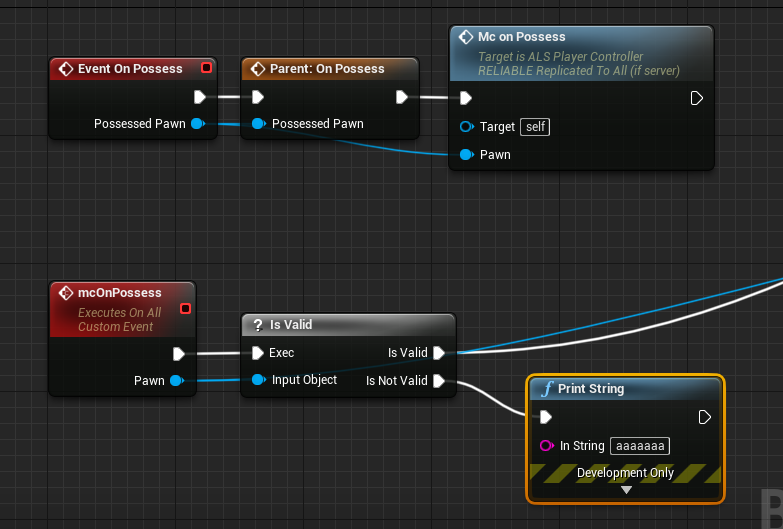


Possessed Pawn from Event On Possess always returns null for clients in the Player Controller.
 terse root
Trying to make a jetpack style jump but when I run with a couple of players only the server character moves accordingly and other clients try to fly but just jitter down to the ground.
Using CharacterMovement component -> AddForce() which i thought should replicate automatically since it is on the CharacterMovement component.
seen exact same problem asked a few times online but no good answers!
https://www.reddit.com/r/unrealengine/comments/a0o3zt/help_add_force_is_jittery_for_client_but_not/

reddit
1 vote and 9 comments so far on Reddit
shrewd tinsel
should i apply damage on gamemode?
@terse root you can check out this plugin https://www.unrealengine.com/marketplace/en-US/product/smooth-sync

Smooth Sync will Sync your transforms Smoothly across the network using Unreal's networking.
basicly you just put in SmoothSynch component and it does everything for you.
in terms of replicating actor transforms
terse root
thanks @shrewd tinsel but i am really interested as to why AddForce doesn't replicate as you would expect since it is on the CharacterMovement component which is supposed to handle replication automatically
feel like i am missing something obvious
chrome bay
Forces are done locally, they aren't part of the character movement prediction.
The only movement that works properly with character movement is jumping and normal movement from input. Nothing else is replicated or supported by prediction. If you want to add that you need to hop into C++, it's quite complicated.
shrewd tinsel
have you tried Launch Character @terse root ?
@chrome bay dude do you apply damage on gamemode or gamestate?
terse root
i didn't think CharacterMovement-> AddForce() actually did any SimulatePhysics so it would be replicated as the rest of the CharacterMovement move functions. I think its very confusing, UE need to do a deep dive on how it works.
also something is getting replicated because the server instance character moves correctly and other clients looking at this character see the server character moving correctly
worthy knot
Can someone explain why this is happening
Both the players are attached to the car ( multicasted)
the car is physics based
both players on client 2 screen seem fine, but the main char on client 1 screen seems to slowly go off the car as the velocity increases
chrome bay
@shrewd tinsel not sure what you mean, I don't route any damage through mode or state
worthy knot
@terse root exactly, UE needs to have some serious physics replication, its a VERY BASIC (necessary) thing to have
chrome bay
physics replication is anything but basic
That being said UE4 does do physics replication just fine. It doesn't do prediction and reconcile, that's the hard/unsolvable part that you have to workaround.
AddForce doesn't do any true physics that's right @terse root, but AddForce / AddImpulse doesn't go through the prediction system
At the very least, you should apply the force both on client and Server
worthy knot
@chrome bay can you tell whats happening in the car image i showed
client 1 having a hard time figuring out physics location of client 2?
chrome bay
I can't tell no, but you don't need to multicast attachment. Attachments are already replicated so long as you are using replicated movement.
So if you attach on the Server, it will attach on all clients automatically.
worthy knot
the attachment of server client isnt even the problem i think
but physics location prediction
chrome bay
Physics prediction isn't a thing
worthy knot
client prediction
chrome bay
For HLL we attach the characters and disable character movement, that's (mostly) all there is to it.
worthy knot
whats HLL?
chrome bay
game I work on
We have characters in physics vehicles. We don't use attachment replication, but the principle is the same
attach the character, then disable movement.
worthy knot
Let me check
 woeful ferry
Been trying to figure out why the multicast won't fire on client. The OnAttackResource event is on the server, but the MC only fires on the server and not the client.
chrome bay
Is the actor replicated and relevant?
Would be better to just replicate Crack Stage and set the material parameter from a Rep Notify.
woeful ferry
I'm stupid, thought it was on replicates... even the basic steps are easy to forget
And that is true! 🙂
chrome bay
As a rule of thumb anything state-based should be driven via replicated vars rather than multicasts.
worthy knot
@chrome bay Removed multicast from my attach event, and disabled character movement when it enters the car, yet the other client sticks out of the car on turns and velocity
woeful ferry
Yea, so when it becomes relevant to player they get the updated version of the crack stage
😛
chrome bay
Yep, or on late join etc.
worthy knot
@chrome bay you have a physics based vehicle too?
Still trying to figure out why the other client is falling out of the car
chrome bay
Yeah, I don't have that issue though so it must be something else
worthy knot
Ill show you my setup in some time
worthy knot
This is the attach BP
and this is the body the char gets attached to (since it doesnt recognize procedural mesh sockets ) I had to add a child SM body for the seats socket location
Its a raycast based vehicle ( not wheeled vehicle )
 stuck folio
Does anyone know if chaos works in multiplayer?
shrewd tinsel
why my Any Damage Received Instigator always the same on network?
shrewd tinsel
check if pawn is localy controlled
if yes set transform variable to current actor transform
make the variable replicate
if pawn is not locally controlled put a set actor transform node and set it to your replicated transform variable
@worthy knot
it will replicate some frames per second
if u want smooth replication u gotta interpolate
check out smooth sync plugin
it does exacly that
worthy knot
I have the smooth sync plugin
 solid hawk
i'm trying to make a leaderboard on my kart game, but i'm new to networking and i still haven't mastered blueprints, could you guys help me?
i followed the networking tutorial on UE channel
worthy knot
Even with that it gets desynced at times
shrewd tinsel
@solid hawk http://epicleaderboard.com/ have you seen this?
 worthy knot
I wanna know how to replicate the transform on server side then send the trans to client ( all that)
shrewd tinsel
its easy solution
solid hawk
i want to show the player position in real time
shrewd tinsel
@worthy knot i'd use smooth sync for that
solid hawk
does that work?
shrewd tinsel
@solid hawk i thought u want leaderboards
worthy knot
@shrewd tinsel I am using it, i dont think smooth sync is the deal for deterministic physics
shrewd tinsel
what do you mean
solid hawk
my english is not the best
shrewd tinsel
deterministic?
solid hawk
i want to get the players current position in the race
like this
but when i try it online
it gets screwed up
worthy knot
hoary lark
there is no such thing as deterministic physics in UE Physx
worthy knot
im not using PhysX for my vehicles

Client corrections now working, but they're delayed by ping / 2, so need to work out how to get around that, and make sure the blending is smooth too...
Simulating 500 Ms Ping here, so half a second (which is 5x more than anyone is really going to accept), and only sending up...
hearty atlas
are you using simulated network delay?
It could be you have packetloss emulation on also, it looks like snapback from prediction errors?
oh wait, you are rolling your own?
hoary lark
(that video is by Jambax from 2015)
hearty atlas
ahh xD
chrome bay
that physics example never worked btw
hoary lark
if you're not using physx then you're essentially doing kinematic movement akin to the Character Movement Component. if you want clientside prediction and reconciliation to the best level possible, "all you have to do" is recreate your own type of movement component with some tens of thousands of lines of code that handles your special vehicle movement. if you are OK with skipping clientside prediction (are OK with clients experiencing input lag equal to their ping) then everything gets much simpler, in a nutshell you just RPC your input commands to the server, the server runs it and moves the vehicle. or if you are OK with skipping server authority then things can be a bit simpler too as the client can just tell the server where they are and their current velocities
chrome bay
Prediction with physics is basically impossible. You need to be able to roll the entire scene forward and backward at will and restore states for the entire scene .This is fine when you have a handful of objects, not fine when you need a more general implementation.
worthy knot
Blue man Vehicle Physics | Client Side Prediction 2.1 | Physics Scene Update
chrome bay
I've seen that, and looked at the code, and it's unshippable.
fleet raven
they are adding a rewind system to chaos which skips resim of unaffected objects
chrome bay
^ yeah this is something I'm quite excited to see.
worthy knot
@chrome bay how? does it not work?
fleet raven
too bad chaos performance in general is 🚮 , so not sure how useful this will be
unkempt tiger
jambax, would you care to look at my code for my snapshot interpolation implementation?*
chrome bay
Sorry I've got my own network stuff to debug 😄
hearty atlas
i can't wait till i start playing with it 😄
unkempt tiger
🌞
worthy knot
@hoary lark So how would people go about making a MP racing game in UE4 without physx vehicles?
chrome bay
If you want to do client-controlled physics objects in a UE4 game right now, do client-auth and go hard on anti cheat.
Or, skip physics altogether and use kinematic movement.
I've done the latter and it's very difficult to get decent looking collision when you have anything other than a basic collision shape (which is why it works fine for characters, less so for vehicles)
Also by default, UE doesn't sweep all bodies for skeletal meshes when you move them through the scene so you have to enable that in source, and when you do performance is appalling.
"Proper" vehicle sims make life even harder because you need to synchronise the simulation state too. Stateless simulation is preferable.
worthy knot

In this video, we will calculate the force of the suspension and add it to the body of our car.
В данном видео мы расcчитаем силу подвески и приложим ее к кузову нашего автомобиля.
Im following this playlist for the car
you are saying it is impossible to use raycast vehicles in MP?
chrome bay
I'm saying it is impossible to do client prediction and rollback for anything using physics.
On a general scale
You can absolutely do player-controlled physics objects so long as you are prepared to submit to either client authority or server authority with masses of input lag.
hoary lark
and if you're building a non-physics (physx) system and can't implement the extra thousands of lines of code to set up networking state, prediction, reconciliation, then you essentially have the same limitations
chrome bay
Yep
hoary lark
which I think is where you are finding yourself
chrome bay
I went through the pain of doing kinematic/char-style movement for vehicles only to find it doesn't scale very well
Nor do you get decent collision response.
worthy knot
As of now, I have no choice but to use raycast vehicles, since physx vehicles dont offer freedom of surface detection and realistic suspension movement
chrome bay
It's very jarring to drive a vehicle around and not have it respond to collision from other objects in the way you would expect.
Yeah I don't use any Phys vehicles, my sim code is my own.
Wheeled / Tracked sims: https://www.youtube.com/watch?v=BUAZ0NTKc7k
worthy knot
and I am also using vertex deformation for collision impact, so it is forcing me to use raycast vehicles
chrome bay
Hovering sim: https://www.youtube.com/watch?v=hvfSWVsj078
Not particularly demonstrative of the sim itself but you get the idea
The point is resolving collision for something that isn't a simple capsule is damn hard, so it's best to just let the physics engine do that.
Also I hate to be that guy, but there's a bloody good chance an MP game won't be popular enough for people to even bother to cheat anyway 😄
And if it does, you probably have the resources to be able to deal with it at that point.
Not that I'm jaded by my experiences or anything...
worthy knot
Cheaters are there for every MP game
wether is DayZ or GTA 5
they dont leave a single one
hoary lark
keke
chrome bay
Yeah but compare DayZ / GTAV player counts to what you would expect to get
hoary lark
indeed they do exist for every game that has several million players
worthy knot
the player count is my deal, leave that upto me
im bothered about my vehicles right now
chrome bay
Do client auth, forget about rewind and replay
And implement some basic anti-cheat with server checks.
Until we see what Epic is going to do with Chaos rewind and the Network Prediction that's as good as it will get, unless you are making something like rocket league with simple vehicle sims and can afford to rewind/replay whole scene states.
worthy knot
I need to know more about this client/server authority side, it would be better if i PM you tomorrow
Right now my damn player attached is popping off on the other window of the client 🤣
hearty atlas
I doubt that will completely fix it, you would have to rewind the server also for all clients. The collisions would not match unless you rewind both states. That's going to be expensive to process.
chrome bay
Yeah exactly
It's an unsolvable paradox, everybody needs to constantly re-solve things that happened back in time.
hoary lark
that's the whole point. you have to accept some sacrifice in visual fidelity. this is the cost of the speed of light
hearty atlas
and if i am reading the code correctly, the server processes client moves in batch, so they will be out of sync without a large delay
chrome bay
This problem has existed since the 90's btw, nobody should feel bad about not solving it.
hoary lark
until we figure out how to augment rays of light to travel faster than light, this is our problem to accept
chrome bay
Pretty much!
hearty atlas
yeah, it's why they cheat and use client side physics for games where it is a problem
chrome bay
Even with client-auth you still get funkiness when dynamic objects collide with each other, but the hope is that your players have low enough latency that it's passable most of the time.
collision funkiness > input lag though
worthy knot
I definietly need a fix for this or ill be trapped in a big confusing circle wether to go back to PhysX vehicles without any important advanced features, or to use advanced raycast vehicles but screw up the client side physics, which will leave the online players freaking out and complaining about the game
they'll straight report the game
chrome bay
It doesn't really matter whether you choose to go the PhysX or custom route
The advantage of custom however is that it's easier to port later
hoary lark
the most basic reason why you can't perform clientside prediction/rewind/reconciliation with a system like physx is essentially because the simulation is "too complex" to figure out how to even do all the special networking work that is required, figuring out how to resimulate things in a deterministic way, etc... the only reason why you might not be able to perform it for a custom kinematic system would only be because the system is "too complex" to figure out how to do it all. it's the exact same problem. very basic character movement is like an order of magnitude simpler than a vehicle simulation (or even basic physics interactions), and happens to be within the realm of most people's minds to figure it out
worthy knot
What do you guys think this helps?
physics replication settings?
@chrome bay @hoary lark ?
chrome bay
That's just there for smoothing replicated physics objects
hoary lark
think all that will do is change the rates at which stuff updates, with an associated change in bandwidth cost. it doesn't change anything we've said. TBH it sounds like you have a fundamental lack of understanding of how clientside prediction (and server reconciliation) works and you might enjoy spending some time researching that in general for characters to better understand where you're going to be at with a vehicle
(ultimately I would 100% agree with Jambax that the best solution will be eventually to settle on client auth vehicles, figure out the problems you end up with from that and deal with them instead)
worthy knot
@hoary lark Yeah I dont know much about clientside prediction, or serverside reconciliation. I will look further into it, as for now, i will continue to work on my raycast vehicle and firstly try to figure out why the passenger on the second client was jittering out of the car even when attached ( now im not sure if that could be a part of client prediction or server reconciliation? )
 spare skiff
Any chance there is an event for: The player states of all connected players have been fully replicated across the network for the current game mode?
Currently I'm having all players delay 3 seconds after post login, but that's pretty gross.
If this event doesn't exist I'm thinking of implementing it by having a replicated int for NumPlayersInGame. Then have each client locally count the playerstates that come up for them client side via PS>BeginPlay, and when the count reaches NumPlayersInGame, they would report to the server that they have all PlayerStates via RPC. The server would increment local variable NumClientsWithAllPlayerStates by one, and when NumClientsWithAllPlayerStates = NumPlayersInGame it would DoOnce fire the OnPlayerStatesOfAllConnectedPlayersFullyReplicated.
Is there a better way?
terse root
Any advice on how to remove client jitter? Just trying to add simple vertical thrust to character movement component.
What is the correct way to do this please?
hearty atlas
You need to do it on the client also. That's prob not the way i would do it but i am still learning.
I would hope if you adjust the velocity of the player on the client, the server replicates it naturally and you can reproduce it for validation.
worthy knot
@terse root you need to multicast
terse root
everything is replicating fine it is just jittery
hearty atlas
hmm you also need to scale t hat per deltaseconds no?
meager spade
dont use Velocity
manipulating like that will cause corrections
even if you manage to get server and client to agree, its not the proper way to do it
and shy of some C++ root motion sources (which i use for such cases) its hard to do it smoothly
and you are also calling a RPC on tick (hope that is Unreliable)
 fervent yacht
I have to admit to being interested in your method though I'm pretty much on exactly that in a course now. Any resources for further learning are appreciated though, almost done with the course.
meager spade
well C++ has root motion sources in the CMC
fervent yacht
Ah got ya
Yeah been working outside of it lol, forgot about it 🙃
Makes life so much easier.
But like I said working with a course so removed to understand it base level.
 flint beacon
where is the best place to call UWorld::ServerTravel from? a party (with a shared session) will connect in a lobby and then travel to many other levels/maps. each of these maps will have there own GameMode. i assume i want to call it from GameInstance as it is the only thing thae persists across multiple server travel calls. am i way off here?
stoic acorn
Is there a good efficient way to filter picked up items into arrays or some other kind of structure? My primitive logic would create a bunch of logic gates (branches) to say does the thing you're picking up = Treasure Type 1 etc.. That doesn't seem that elegant though
warped stream
What are you trying to Filter?
 violet isle
if u had different categories of items you could probably do a map?
except i think nested containers are still not supported?
i would recommend trying to tie a gameplay tag to each treasure type tho
and then make arrays corresponding to each tag
instead of nested containers, u could just have a struct that contains the tag and the array
and if u wanna be S U P E R F A S T have a map that ties the tag to the struct
stoic acorn
@warped stream I'm thinking of filtering different types of treasure that have different values. I want to store how many of each type and display that integer on the player's HUD. I also want to display the sum Total value.
@violet isle That all sounds rather intriguing. I'll look into that way. I was thinking that by storing amount of each treasure type, I would be able to filter and extract the sum total of all collected treasure
violet isle
gameplay tags are nice cuz they can often work as almost an data-driven version of enums
and also they compare well
stoic acorn
I realise that I'll need to figure out a way for the server to pull out all the data for each player at the end of the round, but .. that's a problem for future me
@violet isle how would using tags differ from merely writing in some info about each treasure type's value?
so in my PlayerState BP I was considering, on pickup, cycling through all known treasure types and checking them against the Treasure child actor that has just been picked up.. When it finds a match it'll break the loop and addUnique to the relevant array.
Is this how you'd go about storing it correctly? I can't think how else I'd do it
violet isle
tags can be compared against eachother v easily
just to get it straight, are u trying to track counts of amt of each treasure players have?
 pine flint
what is the best way to save the game state on a dedicated server? ue4 save system or a database?
I want to save things like player inventories and player buildings. it would be 1 save per dedicated server instance but I want to back up the game state during gameplay in case of server crash
 tawny raven
@pine flint apologies for the ping but your best bet would more than likely be a database if you're wanting to save those types of things. That's all I know, never messed with any database systems yet 
also does anyone know if there is a proper way to even use Launch Character in multiplayer? I've tried unting and found like no way at all to do it this is what i'm currently doing
kindred widget
Not even sure what he specifically means by database, but savegame files work just fine for saving stuff like inventories and building locations.
@tawny raven Also. If you want to launch a character, just run the call on the server version of it.
tawny raven
so it does launch me, but then it doesn't use where my character is looking(as that's what i'm trying to do)
and yeah i had only thought of database 
kindred widget
Control rotation should work for something like that, if you're trying to create a Winston from Overwatch jump.
tawny raven
yeah something like that, if i were to be really specific about the mechanic; it'd be The Hidden's Pounce from The Hidden Source
and omg
that actually
worked wonders
why did i not think of that
thanks a million
 wheat edge
Hey if i set only owner no see as true , it seems that the character stops to animate and causes stuff that are attached to the character stop moving with the invisible character. Is there anyway to set owner no see and still allow character to continue to animate?
 long widget
Hey guys ! Is it possible to use the print string node to print something only on one specific client ? WHen a player press a key i would like to print something on that player's screen, how would you go about doing that ? (for debugging purpose)
 fast mason
@long widget pretty sure you are overcomplicating things, client side debugging is fairly simple
long widget
i mean, overcomplicating things is totally the kind of stuff i would do, but is it that hard to print stuff on a specific client ?
fast mason
Actually you have a multiplayer blueprint switch named “has authority”
So in your client code, put that switch and if it DOESNT have authority, run your debug code
long widget
yea i know about that one but it doesnt really work coz its gonna print it to all clients
ho
fast mason
Mm, maybe i didnt get fully what you are trying to do
long widget
well
i want that if a player press a key, something is printed on that ONE player screen
fast mason
Are we talking about a admin? Or any player? it is any, just making the print/debug available only in NON AUTHORITY branch is enough..
long widget
that , for exemple, will print on every player screen
any player. i want to use that kind of stuff to know some information about specific player controled characters
fast mason
Coz you are running it in server code
Between the pressed and the print, add the authority switch
long widget
ok let me try that
kindred widget
That happens because you're running them in the same process. If you want prints to be window specific, you need to uncheck that in the advanced settings.
fast mason
Thats another point!
long widget
omg xD let me try that as well
Yup... That did the trick ! Woaw i still have so much to learn
thank you both !
steady briar
so im not sure what i did... cuz i wasnt even working on this bp, but i have an AI that spawns an AI and for some reason its not working right. im not sure whats going on, like if its spawning and immediately destroying it. it says the reference to the spawned AI is null, but if i print its name on the original AI it seems to be there. it was working fine and then all of a sudden, nope
probably something stupid but if anyone has any thoughts lemme know
stoic acorn
@violet isle >>> just to get it straight, are u trying to track counts of amt of each treasure players have?
Two things really.
- like you said I want to track counts of the amount of each type of treasure to display on the player's HUD.
- I can derive each player's Total treasure value from the previous step.
 hard wraith
I am having a strange problem, I start a dedicated AWS server from my home pc, and everybody seems to be able to join, except me! I was able to Join twice in 3 hours, but 99% of times, my connection times out!
Does anyone have this problem? Any Suggestions?
 uncut fjord
quick question
If game state is replicated. Does it matter if I have a variable inside replicated or not?
thanks
winged badger
it does
uncut fjord
what does it mean that game state is replicated then? if I have to replicate variables manually? sorry if dumb question.... im starting to uderstand all this
winged badger
most of my replicated classes only have 1-4 replicated variables, out of 20+
because they don't need to replicate any more then that
uncut fjord
I guess i can not replicate variables from an actor, if its not replicated itself?
winged badger
you can, but they won't replicate
and for an ActorComponent to replicate variables, it needs to be replicated along with the owning Actor and the variable itself
uncut fjord
ok... thank you... apreciate it
quasi wyvern
i have a question regarding the event OnPostLogin - its output is a player controller reference but i am using my own player controller. how can i match these up?
 snow imp
What class is your controller derived from?