#multiplayer
1 messages · Page 541 of 1
 twin juniper
 bitter oriole
Rent a bunch of machines, watch the online player count in your matchmaking system, start new instances
twin juniper
i mean which is a good combination System to handle servers then?
 cyan current
It's like the Steam API but Epic
twin juniper
Ah, that explains it 🙂
bitter oriole
@twin juniper You can take a look at the cost of Gamelift, or AWS, or any other competitor
twin juniper
i am trying to do my project with aws gamelift right now
and its hard to setup and understand, i hoped epic did something like gamelift
bitter oriole
Well doing the kind of game you describe is for teams of 50 with a lot of experience
So yeah
cyan current
You'd have to sign a deal with them I guess if you want Epic to host servers for you
bitter oriole
Of course
Maybe not 50, but clearly not a small team
Think of the marketing budget alone
twin juniper
sure but just from the view of the technic behind a game
dont need a lot of developer normally
bitter oriole
Maybe only 15
twin juniper
also not that much
bitter oriole
If they're great
twin juniper
aws is not thaat complicated
So just for your information: i am using from Block Chop the Blueprint version inclusive docs
cyan current
Not even Blizzard can handle 100 players that great when they're in the same place, take that into consideration. Server crash 9/10 times judging from twitch streams
twin juniper
so i dont write everything in c++
Dont need 100 players on one server with gamelift
then i can split them but was just talking about 100 if i have only one server which is actually not a good idea
cyan current
I remember the Classic WoW launch, it took a good 5 minutes to be able to move cause there were so many players in the same area. You need to do a lot of optimization either way
bitter oriole
We had that conversation before but of course your game will likely never see 100 online players
No offense
 thin stratus
What's with the peer 2 peer part. i can't check out the docs, not at my pc atm
twin juniper
i dont want to have 100 at the same time on one server
using gamelift, i can split them so
bitter oriole
I'm talking "overall players for the entire gaùe"
twin juniper
why is that impossible for me?
cyan current
You mean this? @thin stratus
bitter oriole
Because 100 online players mean you are in the top 4% of all Steam games in terms of player count
Means 96% of all Steam games perform worse than your game
twin juniper
100 players are not that much to get
bitter oriole
Yes, it is
thin stratus
@cyan current yeah
bitter oriole
70 is top 5%
Well, 50 is 5%
If your game needs 50 online players total (meaning they are all in the same game, which probably sucks), it means you need to do better than 95% of all games
Just simple math
twin juniper
doesnt need but i am sure there will be
already have a community, but doesnt matter, just spamming the chat here 😮
Could that all be used by blueprints only?
bitter oriole
If you're already past 50,000 wishlists on Steam, cool, you're good to go
twin juniper
all = epic services like matchmaking, friends etc
bitter oriole
And no, it's not even properly integrated into UE4 C++ right now
twin juniper
Oh okay
you guess it would be able for blueprints later?
as official or plugin by an other developer?
bitter oriole
Probably a year or two from now there will be a Blueprint interface
bitter oriole
Not that much, it's just that people doing multiplayer don't care much for doing sessions in Blueprint
Multiplayer without C++ only takes you so far
bitter oriole
Programmers find Blueprints very stressful since you need the engine to work to even open them up, instead of source code you can read on your phone while on a train
twin juniper
ah okay, i can understand that view
Can i disable auto connect in UE4 Settings?
i thought it was in older versions there but i did not find a setting in 4.25
bitter oriole
Dunno what that is
twin juniper
normally if you set editor settings to 2 clients, Play as client and run a dedi in the background, they get automaticly connected to the server
which i dont want before they logged in 😄
bitter oriole
I wouldn't know about that. I'm a simple mortal, so I don't use dedicated servers.
 hybrid wren
HI there, I have an issue (again ... 🙂 ) I'm trying to spawn character on my multiplayer map. It start with everyone using spectator pawn while showing a lobby interface until all player has join a team. Once everybody joined a team, the host can start the game. So I'm iterating on a playerController array referenced in my GameMode, spawn an actor (Character) and possess it for each player controller of the array. Things is, only the host can move the character ... Do I need to do a RPC to possess in client side ?
 worthy apex
Hi guys, can I do NetMulticast of a standalone local coop game?
bitter oriole
No, this is for Net (online MP)
twin juniper
no one has an answer of my problem? 😮
thin stratus
@worthy apex No, there is also no need to. You have accesss to all PlayerController and Pawns, as well as PlayerStates.
And every other Actor in the game literally only exists once.
worthy apex
Alright thanks
 hoary lark
the "auto connect to server" option does, in fact, appear to have been vaporized lol
twin juniper
Gues so
I have a big weird bug in UE4, probably someone has an explanation about that
i have started my game in the editor as standalone. with a seperated server. 1 Player and NetMode set to Play Offline. i closed the server and started then the client. Why the OnPostLogin will be still called and isServer Function returns true??
 peak star
I am excited for Epic Online Services. This sounds like something that will solve my problems I had where I felt like I was either limited to using Steam OSS or rolling my own.
 silent phoenix
Sorry if this is a stupid question but if I had to use Steam OSS Advanced Sessions to get players to be able to connect to a dedicated server hosted on AWS will I be able to use EOS instead?
silent phoenix
I'm still new to all this but steam OSS was the only way I could get players onto my dedicated server and support proximity voice chat. I don't need to it for any of the other features and would rather not use it if i don't need to
twin juniper
i have changed from pie in external window to standalone and standalone loads even without a server a map which i have not setup in the settings. How could that be possible?
cyan current
EOS offers voice chat for free aswell @silent phoenix
 dry cloud
Do we know how EOS and steam will work together?
I hope for indies they don't have to end up managing two systems
twin juniper
anybody know why my gun isnt reloading just the hand is third person? acts like its not attached to hands
thin stratus
@dry cloud Well given you can't do Crossplatform with any of the default oss, I do think that eos would resolve that
At least last time i read about it, epic stated that eos woild exist ontop of the other oss, and communicate between them. Not sure that's all in/available
 deep flare
I'm following a tutorial course for making a survival type game in C++ with multiplayer included. I'm getting an exception thrown on the ReplicateSubobject() function call in my inventory class.
I noticed this in the output when trying to run it. Apparently the AK47 blueprint item doesn't support networking? Just wondering if anyone here might know some amplifying information on what specifically causes this. The Item class in this was based off of UObject (I assume to make it really generic) and doesn't seem to be able to use SetIsReplicatedByDefault()
[2020.05.13-19.57.26:447][413]LogNetPackageMap: Warning: FNetGUIDCache::SupportsObject: BP_Weapon_AK47_C /Game/StarterContent/Maps/UEDPIE_0_Minimal_Default.Minimal_Default:PersistentLevel.BP_SurvivalCharacter_C_0.BP_Weapon_AK47_C_1 NOT Supported.
[2020.05.13-19.57.26:447][413]LogOutputDevice: Warning:

Script Stack (0 frames):

Assertion failed: Object->IsSupportedForNetworking() [File:D:/Build/++UE4+Licensee/Sync/Engine/Source/Runtime/Engine/Private/PackageMapClient.cpp] [Line: 2466]

UE4Editor.exe has triggered a breakpoint.

The program '[12828] UE4Editor.exe' has exited with code 0 (0x0).
 barren warren
@deep flare you need to enable replication for classes that don't inherit from actor, any subclass of Actor should support replication pretty much out of the box
deep flare
I figured that might be the case, but I can't call any functions to set replication in this class. Or at least, I don't know how. It's based off of UObject.
The instructor implemented a lot of custom stuff that was supposed to let it replicate, but apparently I messed something up or it doesn't work in 4.25.
void UItem::MarkDirtyForReplication()
{
    // mark item for replication
    ++repKey;

    // mark inventory for replication
    if (owningInventory)
    {
        ++owningInventory->replicatedItemsKey;
    }
}```like that
 ionic mountain
I'm working on a Multiplayer BP project, so far so good. But I have an issue with the player Material for differentiating teams (Red vs. Blue.) But when I set the Materials on one character, it duplicates it for all characters. When I boot up the game in multiplayer on my PC my character is Red (how I have my team set) but when my Wife joins she is ALSO Red on my screen, even though she's set to the Blue team. However, on her screen we're both Blue. What am I missing?
This is how I'm setting the skins, it is being done through the Game Instance. Controlling Actor is the character I want the server to change (using "Self), the Model is the Skeletal Mesh (UE4 Mannequin) and the Body/Logo skins are as you'd imagine - Different color Material Instances for the UE4 Mannequin.
peak star
@twin juniper project settings > maps and modes : check all 4 map defaults: startup map, editor startup map, travel map, and server default map.
@ionic mountain what happens if you use a dynamic material instance instead?
ionic mountain
I'll check and let you know!
twin juniper
@peak star i did, there is not my map setted
peak star
@twin juniper launching in PIE always starts the game in whatever level you are currently editing. Launching other ways launches from the game startup level set in your project settings.
twin juniper
Yes but i have not set the map anywhere so i am wondering why the game is loading the map
ionic mountain
@peak star Still changes every material for that particular player.
 shut gyro
Is it good to now go all in on EOS instead of Steam?
bitter oriole
Depends if you are shipping on other platforms
shut gyro
Yea - Steam, Oculus and Playstation are my goals
Wonder what they are doing with Oculus 🤔
bitter oriole
PS likely won't allow EOS for now
 wet cliff
Hi there ! Is anyone "Ball replication" expert ? simple zero gravity ball over network. I think i have missed something relating to movement component.
peak star
@ionic mountain oh i thought the problem was it was changing every player to that material
ionic mountain
It works now, I had to use a repnotify to change the material, then pass the information along through an event. But yeah, it was changing ALL player materials locally to the color instead of the individual client/server actors.
 meager spade
gg glad ya got it sorted 😄
ionic mountain
With your help - Thanks!
meager spade
anytime 😄
 solemn glacier
Hi Guys! I'm using ClientTravel to connect players into a lobby, however if there is an error connecting to the lobby the game will kick back to the home screen, is there a way to get Unreal to stay on the current screen if the ClientTravel call fails?
 worldly raft
Hello, does anyone know a good, COMPLETE, tutorial for a multiplayer inventory system?
meager spade
well inventory systems come in all types, shapes and sizes
shut gyro
Has anyone used the SDK sample examples?
meager spade
so thats a bit of a broad question
shut gyro
talking to me? @meager spade
meager spade
no
worldly raft
@meager spade hello, yes that’s true. I should have been more specific. I would like to learn how to build a slot based, multiplayer inventory system that has drag and drop capabilities, hot bar, equipment slots and scope for crafting. All the tutorials I have found and followed only get so far, then just stop without completing the system 😩
 timid moss
Anyone know the differnce between Development server and Shipping server?
cyan current
https://docs.unrealengine.com/en-US/Programming/Development/BuildConfigurations/index.html @timid moss
Reference guide for solution and project build configurations.
 mild ingot
Can someone help me find out why my game isn't detecting Steam? @ me if you can
thin stratus
Hey all! Please check the recent #unreal-news. To make sure no EOS discussions and questions spam the #multiplayer channel, we've created #epic-online-services right below it.
So if you have Epic Online Services questions or discussions, please visit our new channel for it! Also please make sure to aid us mods a bit by redirecting users to the new channel!
 random nymph
@fossil spoke did you get the steam working? Turn out my solution didn't work after all
 fossil spoke
Im just testing a new fix soon, my local tests revealed that some Steam DLLs werent in the expected location when it was on GameLift.
They had to be moved into the <ProjectName>/Binaries/Win64/ folder with the Server executable.
Im uploading a build to GameLift now to test if it works.
random nymph
Okay
mild ingot
Wait, in what way is Steam not working for you? Because Steam's not working for me either, so maybe I can look at what you did?
I had to move Advanced Sessions to my Project folder and ever since then, the "Has Online Subsystem" node never works
Oh wait, I don't have Steam DLLs in that folder either
maybe that's why
random nymph
Not working on amazon gamelift when trying to use multiple processes
mild ingot
oh
But would not having the DLLs in <ProjectName>/Binaries/Win64/ cause it to not work?
Because they're not there
random nymph
Yes that is could cause it to not work at all
mild ingot
steam_api64.dll, right?
Found it, moved it, I'll give it a shot
@random nymph Ok, it still can't find Steam. Any more DLLs I might need? Or should I move the whole Steamworks folder? or?
random nymph
In WindowsServer\Engine\Binaries\ThirdParty\Steamworks\Steamv146\Win64 path I have steam_api64, steamclient64, tier0 and vstdlib_s64 dlls
And also those same dlls in the same folder as the server executable
mild ingot
should I copy all those to <ProjectName>/Binaries/Win64/
random nymph
Yes you can try
And I also have the steam_appid.txt in the same folder as the executable
mild ingot
Ok, in E:\Unreal Projects\MultiplayerTutorial\Binaries\ThirdParty\Steamworks\Steamv148\Win64 I only have steam_api64.dll. That might be a problem. I'll look in the Engine location
Ok, no, in the engine one I only have steam_api64.dll too
hmm
Ok I don't have those other 3 in Engine either, and it was working fine in Engine (except it wouldn't package), so idk what's wrong
@random nymph Want to help me troubleshoot this? It's alright if you don't, it's just you seem to know how to get this to work
random nymph
Honestly I don't know very well how to get it working 😄 I just started looking into steam implementation this week myself for the first time and part of it was done already by another person :/
mild ingot
Ok, It's just that nobody seems to know how to do this stuff here, even though it's a big server
bitter oriole
I don't believe any DLL copying is needed
Steam's working fine for me and I never needed any of that
mild ingot
yea, I copied those additional 3 and it still doesn't work
 winged badger
it used to be for one specific case around 4.12
bitter oriole
So what doesn't work ?
 cosmic marlin
is it possible to build a dedicated server without downloading ue4 from source?
bitter oriole
No
mild ingot
@bitter oriole Ok, the "Has Online Subsystem" node returned true when Steam was enabled when the Advanced Sessions plugin was in the Engine folder. However, since that would cause a crash on Build or Package, I had to copy it to my Project folder. Now I don't get a crash, but "Has Steam Subsystem" always returns false even if Steam is on
*Has Online Subsystem
mild ingot
It did, until I copied it into Project/Plugins
bitter oriole
Now - how did you package, devel or shipping ?
mild ingot
should I delete it from Engine?
bitter oriole
Now if you package from shipping, it's normal for Steam to not work
The game has to be launched from Steam for it to work
bitter oriole
Create your Steam page, upload binary, install game on Steam
Unless you put your steam_appid.txt file next to the executable
mild ingot
Which is easier
 rose egret
in terms of network is AActor->Destoy() light ? it just sends a destroy RPC to clients ?
bitter oriole
if you don't have your own Steam ID, put a steam_appid.txt file with '480' next to the executable in Project/binaries/ in packaged
mild ingot
ok
bitter oriole
Or just package in Development and have no problem at all
mild ingot
just the text 480?
bitter oriole
Or don't package at all
Just right click the uproject and press "launch" if you're just developing for now
bitter oriole
Wait
You mentioned packaging so I'm guessing you fully finished implementing Steam and it just doesn't work in shipping packaging
But if you are just starting,
Just right click the uproject and press "launch" if you're just developing for now
the appid thing is only useful for shipping package
mild ingot
The reason I packaged earlier is because it was crashing on "Build" and someone said that the error I got meant I had to Package it first
anyway, I launched, and it still doesn't detect Steam
bitter oriole
Did you set the OSS to Steam in .ini ?
bitter oriole
An overview of Online Subsystem Steam, including how to set up your project for distribution on Valve's Steam platform.
DefaultEngine
"Configuring your Application's Settings" is literally the only thing to do for Steam to be available
And having Steam running I guess
mild ingot
I think I've been through here before but I'll go through it again and report back when I'm done. Hopefully this is all I need to fix it
bitter oriole
+NetDriverDefinitions=(DefName="GameNetDriver",DriverClassName="OnlineSubsystemSteam.SteamNetDriver",DriverClassNameFallback="OnlineSubsystemUtils.IpNetDriver")

[OnlineSubsystem]
DefaultPlatformService=Steam

[OnlineSubsystemSteam]
bEnabled=true
SteamDevAppId=480

[/Script/OnlineSubsystemSteam.SteamNetDriver]
NetConnectionClassName="OnlineSubsystemSteam.SteamNetConnection"```This is 100% of Steam's setup on UE4
Unless for shipping package which has the appid file thing on top, if you want to play it outside Steam
mild ingot
"If you're compiling Unreal Engine 4 from source ," What does this mean
bitter oriole
If you don't know, it's not relevant
It's for people who get the engine source from github and compile it themselves
rose egret
if I change a replicated property and call a muticast at the same frame on server like following :
Actor->PendingSwitchWeapon = newWeaponIndex; Actor->MuticastSwitchWeapon(CurWeaponIndex, newWeaponIndex);
whats the execution order in clients ? first multicast is called then on_reps ?
I need the multicast to be executed before any OnRep_
mild ingot
ok
bitter oriole
@rose egret Undefined
rose egret
as far as I know replication and RPCs are sent in the same packet
bitter oriole
Nope
mild ingot
Which DefaultEngine.ini is it? I have 3
bitter oriole
Project one
mild ingot
no, in the project I have 3
bitter oriole
You have 3 DefaultEngine.ini files ?
mild ingot
one in Config, two in Saved
bitter oriole
Config
rose egret
@bitter oriole even on one actor ?
mild ingot
ok
bitter oriole
@rose egret Replication has variable rate so it might replicate half a second later for that particular variable ; the first RPC might be lost to packet loss and be re-sent, and thus arrive after the replicated variable.
Make zero assumption on multiplayer timings
The only sure thing, is that Reliable RPCs will have order preserved for a given actor
Anything else is unsafe
mild ingot
ok that stuff was missing from the DefaultEngine
rose egret
even if I do this :
Actor->PendingSwitchWeapon = newWeaponIndex; Actor->MuticastSwitchWeapon(CurWeaponIndex, newWeaponIndex); Actor->ForceNetUpdate();
bitter oriole
Yes
For the reason I just outlined
Reliable RPC might be lost and re-sent
Replication might be lost and re-sent
Make no assumptions
mild ingot
@bitter oriole Do I have to rebuild or something, or should it work straightaway once I add that to DefaultEngine
bitter oriole
No need to build anything
mild ingot
ok
bitter oriole
Right click uproject, launch
mild ingot
Still not working
bitter oriole
Alright, what's the log file ?
bitter oriole
Saved/log/project.log
mild ingot
ok
bitter oriole
pastebin
rose egret
so how do I implement my weapon switching. I already did it with OnRep only. it worked but I am not sure whether its stable. so though I could write a better design with muticast andOnRep_.
bitter oriole
The safe way is to not have any event or multicast
Just replicate the current weapon index
On tick for all clients, if index != current weapon, then switch
rose egret
thats my fellow currently:
OnSwitchWeapon:
get current weapon.
play arm lower animation.
when animation finshed get the new weapon and make it visible.
play raise animation.
mild ingot
@bitter oriole https://pastebin.com/t8gHfkJC

Pastebin
rose egret
btw I dont play animation on server its just Timer
bitter oriole
LogWindows: Failed to load '../../../Engine/Binaries/ThirdParty/Steamworks/Steamv139/Win64/steam_api64.dll' (GetLastError=126)
LogWindows: File '../../../Engine/Binaries/ThirdParty/Steamworks/Steamv139/Win64/steam_api64.dll' does not exist
LogOnline: Warning: STEAM: Steam SDK 1.39 libraries not present at ../../../Engine/Binaries/ThirdParty/Steamworks/Steamv139/Win64/ or failed to load!```Did you modify the DLLs in the engine ?
mild ingot
I don't think so? let me look
bitter oriole
Verify the engine in the launcher and then retry
mild ingot
Oh. It's Steamv148
how do I change that
should I change the folder name? Or somewhere else
bitter oriole
Change what ? Verify the engine to remove your changes, and retry.
mild ingot
@bitter oriole How do I tell it to look for SteamV148 instead of V139
bitter oriole
@mild ingot
Verify the engine in the launcher and then retry
You do not want or need Steam v148
Just use what's in the engine
mild ingot
But the version of Steamworks that I have is v148
bitter oriole
You do not need a particular version of Steamworks
mild ingot
But that bit of the log that you pulled said it is looking for v139 and I have 148
bitter oriole
Literally, you only need the ini change on a vanilla UE4, zero additional work needed, you do not need steamworks, you do not need to build anything
You have modified the DLLs to use another Steam
So verify the engine
mild ingot
Failed to load '../../../Engine/Binaries/ThirdParty/Steamworks/STEAMV139/Win64/steam_api64.dll'
bitter oriole
This is caused by you deleting this
mild ingot
I didn't delete it
It's just that it is '../../../Engine/Binaries/ThirdParty/Steamworks/Steamv148/Win64/steam_api64.dll'
and it's looking for '../../../Engine/Binaries/ThirdParty/Steamworks/Steamv139/Win64/steam_api64.dll'
bitter oriole
Which UE version do you use ?
bitter oriole
4.21 comes with 139
4.25 comes with 147
You have 148 because you put it there
So verify the engine to remove your changes
Last time I say this
cosmic marlin
@bitter oriole Can you explain the architecture of a game like Call of duty. There is a one master server and then when a match starts of player becomes a server. So is the master server(dedicated server) and when match starts player becomes a listen server? is this how it works?
bitter oriole
Sorry, I did not work on Call of Duty
cosmic marlin
@bitter oriole but are you familiar with architecture i just described?
rose egret
if I change the replicated properties in the same frame . is it guaranteed that either all changed properties of actor replicate to client or nothing at all ?
I dont want them to arrive from diffrent packet.
actor->PendingSwitchIndex = 1; actor->ArmState = EState::Switch;
bitter oriole
Nope, not guaranteed
rose egret
dude are you sure ?
bitter oriole
Yes I am very sure, dude
bitter oriole
It doesn't
You can use an Atomic USTRUCT if you want atomicity on multiple values
There, problem fixed
Out of the box, you don't want this
rose egret
so its possible that engine send a packet for updating some of the changed properties ? in some weird condition like congestion ?
bitter oriole
It's possible and a desired feature of the engine
rose egret
so what should I do . putting them in one UPROPERTY ?
bitter oriole
You can use an Atomic USTRUCT if you want atomicity on multiple values
rose egret
what the diffrence between atomic USTRUCT and normal USTRUCT. I should override netSerialize ?
bitter oriole
No need
Just mark it atomic
Normal ustruct will behave just like actors, replicating property by property
rose egret
🤔
mild ingot
Ok I think it worked now
bitter oriole
The UE4 doc is quite misleading on this whole setup, to be fair
To the best of my knowledge, you only need the DLL copying and stuff if you're building from source and you want the latest sdk
 plain current
Question 4 Pros:
I'm exp webDev 6+ years coding.
Totally new to gameDev though.
Roughly speaking, how hard is it to setup a multiplayer game?
so that the basicas are there, I can make a simple thing where both users can be on a cube and move around
or maybe, how long would that take, with lots of programming exp and 0 gameDev exp
and 0 UE exp
are we talking 10 hours? week? month!?
barren warren
Technically you can get that in about 30 seconds by using one of UE4s example projects
plain current
wow
hey Fin
making a single player and multi player game
what would you say is the difference
in complexity/difficulty level?
for some reason I have an impression that multiplayer in game dev is complex
I assume you just need a nice SDK or set of APIs
some sort of setup with listeners and triggers to stream from client to server
barren warren
It's certainly a big difference in mindset - Instead of just programming the game, you need to think from the perspective of 3 different processes at any one time (Is this on the server, is this the player, is this another player on a clients machine). There's a lot of subtleties there and gotchas. From a mindset perspective if you're good with being able to visualise data moving around multiple moving parts it should be easier to get into.
It's at least an order of magnitude more complex than a single player game of the same type.
A lot of replication and the underlying mechanisms of networked play get handled for you by UE4, so as a developer, at least initially, @plain current it's more about getting into that aforementioned mindset of moving data around to the right places.
 humble comet
Hey guys, when replicating custom struct with custom net serialize is there possibility to not replicate certain variables in all the struct?
 chrome bay
depends. You need some way to know if the value was serialized or not
otherwise the receiver won't be able to deserialize it properly.
humble comet
I was thinking if there is some UProperty meta which would mark to not replicate that struct member
chrome bay
No
Well
There is, but if you use NetSerialize() it doesn't matter what you put on the UPROPERTY
NetSerialize() doesn't use any of the default UPROPERTY() serialization path, it assumes you know what you're doing and need a custom approach.
If you want to serialize things conditionally, you need to add another 'bit' to signify whether it was serialized or not
E.g, snippet from my code:
if (bNeedsBounce)
{
    SerializeVector(Ar, PreBounceVelocity, VelocityQuantization);
}
else
{
    PreBounceVelocity = FVector::ZeroVector;
}```Thanks @chrome bay, seems like I will have to do it this way
chrome bay
NetSerialize() is only for very special cases where you think you can do a better job than the per-property serialization of the engine.
By default the engine will only send properties which have changed inside structs.
NetSerialize() doesn't have those benefits.
plain current
Thaks @barren warren for putting it in perspective
winged badger
FHitTestResult has excellent example of custom serialization
thin stratus
FHitResult or?
 fleet raven
you can also put UPROPERTY(NotReplicated) on struct members and get the same without a custom serializer
winged badger
yes, 🤦
 round hinge
tutorial for "text input window" ?
 real yacht
void ABasePlayer::ServerRotatePlayer_Implementation(const FRotator &Rotation)
{
    RightThumbstickRotation = Rotation;
    OnRep_PlayerRotation();
}

void ABasePlayer::OnRep_FootballPlayerRotation()
{

    SetActorRotation(RightThumbstickRotation);
}
And sometimes owning client doesnt rotate
but sometimes.. what can be a possible problem?
it rotates on all clients and server always, only on owning client sometimes NOT
if I rotate pawn 20 times, for example, 2 times doesn't apply rotation on owning client
what can be a problem?
 ember needle
hey all, how do you handle character HUDs when spectating in MP? I'm talking about the typical ammo / health / hits HUDs. I'm trying to understand how to make a clean design.
 ocean geyser
@ember needle are you trying to see the other players hud?
ember needle
yes
there are several ways to do that, i'm trying to understand what the best setup might be
I already have the spectating from the camera and all
but I need to show the HUDs
ocean geyser
you might be better off replicating those variables so when you spectate have it be able to access getter functions to get the values or have it fire off an event when those values change and use those values for the HUD?
ember needle
indeed these are replicated
sorry maybe i'm not asking the right question 🙂 HUDs are obviously local
so what is the correct approach: create a HUD on the spectated player and keep a reference to the character?
put the HUDs on the PC instead of the character?
and then have the PC know which player is being spectated?
ocean geyser
well you should have a pointer to the player that your spectating, so i would do a check in the HUD. if your dead and the player that your spectating (the variable) is valid (meaning your spectating someone) then change the HUD variables to equal that of the replicated variables of the spectated player
ember needle
ok so you'd first of all move all of the HUDs on the PC
if I'm understanding you correctly
right now they're on the character
ocean geyser
no, you would just do a branch on the widget that is your HUD in the areas that get/set the values to the HUD. so if your spectating then instead of displaying your own variables like health/ammo and such, get the variables from the spectated player and display those. see where im going?
ember needle
yes
the thing though is
you keep the same HUD but change the reference, where do you have this reference on, I'd imagine the PC?
the "SpectatedPlayer" variable
ocean geyser
depends on wherever is easiest for you. i would keep it probably in the player controller like you said
ember needle
yeah
ocean geyser
that way if you want you can have the server dictate who you can and cant spectate to prevent spectating enemys and such and keep that code out of the character
ember needle
thank you Cody
 tidal sail
(maybe I should try asking here - ) I'm having trouble with the level override gamemode not being set on the joining client (joining via open 127.0.0.1), but it IS being set on the host (via open 'level'?listen).
It's completely insane and I can't understand why it doesn't work. unreal ver 4.25
there's almost no code - we set up a very basic 'sync project test', and I noticed the custom gamemode casts on whoever the host is, but not whoever the client is
hybrid wren
HI there, I'm having an issue with spawning characters but I noticed that after the host traveled to my map, the match state is set to Aborted. Does somebody knows what can trigger this ? thanks
 quasi wyvern
can anybody help me to identify the plattform of a logged in? my current setup always returns the servers plattform...
 unkempt tiger
Hey
I am in some desperate need of help because I'm completely lost
I want to write a game from scratch (with my own custom player (not using the build in Character) etc)
And I need all the good stuff: prediction, lag compensation, tick based events (with clients sending inputs to the server that are registered in future ticks), to benefit from the fixed timestep nature of my game
I am unsure what UE4 gives me from the box (for example FNetworkPredictionInterface - what is it about, is it just for UCharacterMovementComponent?), if I should use whatever it is UE4 gives me from the box, and in case I shouldn't - what are the core building blocks of networking I should work with? Should I use RPCs for networking? Something else?
I would ask more specific questions if I weren't so darn lost - if anyone feels like they have some wisdom to share with me I'd grant them my blessings 🙇♂️
unkempt tiger
@copper grove did you reply to my question, or did you refer to your blueprint?
 copper grove
no sorry im actually deleting my question as i found out the error in the console log, didnt appear on screen
unkempt tiger
so i'll take that as a no :D
copper grove
first of all
start here
@unkempt tiger
there is no "right" answer to any of your questions
you could use a marketplace pack that has most of your needs, or build it from scratch
CMC has a lot of prediction built in (no expert though) but a lot of things you can not take for granted
youwill have to replicate variables, use RPC's
you could also check out the UE4 Content Examples
Network map
which has some examples of ue4 networking as well
its a long road, but luckily there are a lot of offical and non official videos out there
and lots of things written
unkempt tiger
Really appreciate it, just knowing there is no 'right' answer is a huge step forward in my case
I'm going to walk this long road and I will start with the .pdf you linked
But before that I was hoping you could answer a quick question about what you said, having to replicate variables
Is whatever UE4 calls 'variable replication' not in fact implemented via RPCs?
copper grove
2 separate things
twin juniper
Hi guys, Please why does this keep happening to me. I am using World composition and when I play in editor or when I package the game and connect to a dedicated server, this happens. The actors don't load on the server. Static meshes do but Actors dont.
copper grove
@unkempt tiger https://forums.unrealengine.com/development-discussion/c-gameplay-programming/111755-rpcs-versus-replication-and-onrep-events
Unreal Engine Forums
For gameplay programmers writing C++ code.
unkempt tiger
😍
I just started reading the first link you sent, and it looks just like what I was looking for
I was so caught up in my own mess I didn't even manage to Google properly
copper grove
if you look at the official ue4 networking videos they explain this stuff as well in a way you can learn how to use it
start with the shorter ones first, id recommend
and then in the content example as well the examples are very well laid out
unkempt tiger
Oh, oddly every networking video I've seen so far had to do with the built in replication
copper grove
which combine RPC's and replicated variables
there is built in replication for character movement component, thats about it
you have to do all the rest
unkempt tiger
Thanks a lot dude, really
I've been staring at a blank screen for 2 days now with drool pooling under me
(I'm really bad at kick starting this kind of stuff)
 cosmic trail
Anyone know how to replicate timers using GetWorld()->TimerManager()'s timers without replicating every tick?
Replicating the timer handle doesn't do anything, it's an invalid handle on the client, so I imagine the timers aren't actually being replicated themselves
cosmic trail
Gotcha thanks. I will set another variable to replicate and duplicate the timer work then on the OnRep. Thank you!
 unreal pine
I'm all of a sudden getting a lot of "No owning connection for actor" warnings. Haven't seen it before now - anyone know why they'd be popping up?
I think my RPCs aren't firing because the client-side version of the actor firing the RPC isn't found(?)
fossil spoke
In order for a RPC to occur, the Actor calling it needs to have an Owner Hierarchy that comes back to a "Net Owning Connection". That is typically a PlayerController.
unreal pine
So if the Controller doesn't exist (say for another player's pawn) an RPC that gets executed from a pawn won't fire on a separate client?
or would the owning connection be the local player's controller?
fossil spoke
Correct, a Simulated Pawn cannot call an RPC.
fossil spoke
A Autonomous Proxy Pawn can, because that implies its owned by the local player which has a Player Controller.
The level blueprint cant call RPCs.
For the same reason.
Its not owned by a PlayerController.
Also you would never want to call an RPC in the Level Blueprint.
Thats poor design
unreal pine
So what if I have an event, say a car driving by, that needs to happen at the same time all all clients. But it's only important for it to happen on that specific level. Should I build the RPC into the car actor and place the car into the level? Rather than calling a sequencer?
that car actor would then be owned by each client, and able to execute RPCs I guess
I still think that's something that should be server authoritative though. That's why I had it running on server only, and had the sequencer replicating
but knowing what I know now, I just can't have that event happen in the level BP
fossil spoke
Think about it in terms of sequence of events.
What triggers the event first?
Have the Server detect that trigger, then get the Server to call an RPC on ALL PlayerControllers, the PlayerControllers can then freely run the Sequence locally.
 fringe dove
is there a way to send RPCs only to something on the demo recording on the server? SetViewerOverride is only for demos being recorded on clients right?
unreal pine
So yea, I had it running as an "Execute on Server Only" RPC, but the client was still receiving a No Owning Connection for Actor
fossil spoke
Why is the Client calling an RPC to the Server?
unreal pine
the Level BP is calling the Server Only RPC
fossil spoke
It shouldnt be.
What actually causes the event to trigger?
Is it a Player action? Like a trigger overlap?
unreal pine
a timer
fossil spoke
...
fossil spoke
So the Server can do this fine then.
Have the Servers GameState start the Timer, then the Server can call an RPC on all PlayerControllers which initiates the sequence on the Clients.
unreal pine
So, would you recommend a custom GameState just for that level?
like inherited from my default game state
fossil spoke
Sure, or you could do it in the GameMode instead.
That might be a better option.
Since your most likely already going to have a custom GameMode for that Level?
Your other alternative is to create a unique Actor type that acts as a "Manager" for this event.
Then you can place that Actor in the level itself
unreal pine
I use the same game mode for most of my levels because I'd planned on having multiple options for GameMode at some point
But yeah, that makes sense
unreal pine
Yeah, that makes sense
fossil spoke
Make sure its set to Replicate and then place it in the level, it doesnt need any visuals.
Its just facilitating the RPC from the Servers end.
fossil spoke
Good luck 👍
 foggy idol
So when I start my game for a brief moment the client is at the world origin before he possess's his pawn
Is there anyway to fix this delay
Because it doesn't happen on the server
 dreamy peak
Whoa, I know Suckerbird Games!
foggy idol
Is there any function called on the player controller to notify that the client is ready ?
fossil spoke
@foggy idol The HUD is created immediately after the PlayerController has been properly initialized.
fossil spoke
The HUD is only created on Clients
fossil spoke
Yeah well you know the Client is ready when BeginPlay is called in your HUD class.
foggy idol
Thank you Soo much
Because there's a noticable delay for client spawn when the game starts
fossil spoke
AGameModeBase::GenericPlayerInitialization calls a Client RPC on the Player which creates the HUD. At that point that Player is "ready"
foggy idol
Ohhh
fossil spoke
AGameModeBase::InitializeHUDForPlayer(APlayerController* PC) is called.
Which calls APlayerController::ClientSetHUD(TSubclassOf<AHUD> HUDClass) which is a Client RPC.
That then spawns the HUD.
foggy idol
Broooooooo how do you know all of this
I would have been searching for a week with this knowledge
*without
fossil spoke
Its in the Engine Source code?
fossil spoke
Fair enough.
foggy idol
Guess I better start
fossil spoke
Its good to know how things flow, even if your only working with Blueprint.
fossil spoke
@random nymph We finally got ours working.
Steam working with the Client, while the Server is running with IPNetDriver
unreal pine
@dreamy peak omg we're so famous 😂
I'm still getting a lot of these warnings, and players are teleporting around a bit - I can't find what could be causing this.
I mean, two instances on my machine shouldn't have very bad ping, right?
random nymph
@fossil spoke did you get it working using multiple concurrent processes?
fossil spoke
We havent tested it rigorously but our default Build settings for GameLift always give us 4 concurrent instances, so i assume its working.
random nymph
Did you try joining multiple games simultaneously or did you check the logs if steam is initialized correctly for all processes?
fossil spoke
No not yet, i only got it working recently, we havent tried getting multiple sessions filled and tested.
random nymph
Okay
fossil spoke
Technically our Servers arent utilizing Steam though just FYI.
random nymph
Do you add any port rules as launch parameters to the process?
Yeah but you are still using steam online subsystem also in your server?
fossil spoke
Nope, we just open 7777-7781 + 27015 or whatevre the Steam port is.
Not exactly, it is enabled, but its not our default OSS
random nymph
But if clients are using steam online subsystem when running from steam and server is not, doesn't that mean that clients cannot join the server because the net id isn't equal?
fossil spoke
No because the Client isnt using Steam OSS as default either.
Ive changed all our code to access the Steam OSS by name.
random nymph
Didn't know that is possible
fossil spoke
So even though its enabled and works, its not the default OSS.
!NetDriverDefinitions=ClearArray
+NetDriverDefinitions=(DefName="GameNetDriver",DriverClassName="/Script/OnlineSubsystemUtils.IpNetDriver",DriverClassNameFallback="/Script/OnlineSubsystemUtils.IpNetDriver")
+NetDriverDefinitions=(DefName="GameNetDriver",DriverClassName="/Script/OnlineSubsystemSteam.SteamNetDriver",DriverClassNameFallback="/Script/OnlineSubsystemUtils.IpNetDriver")

[OnlineSubsystem]
DefaultPlatformService=Null
PollingIntervalInMs=20
bHasVoiceEnabled=false

[OnlineSubsystemSteam]
bEnabled=True
bUseSteamNetworking=False
SteamDevAppId=<REDACTED>
GameServerQueryPort=27015
bRelaunchInSteam=false
GameVersion=1.0.0.0
bVACEnabled=1
bAllowP2PPacketRelay=true
P2PConnectionTimeout=90

[/Script/OnlineSubsystemSteam.SteamNetDriver]
NetConnectionClassName="/Script/OnlineSubsystemSteam.SteamNetConnection"```Those are our settings.
IOnlineSubsystem* SteamOSS = IOnlineSubsystem::Get(FName("Steam"));
Im accessing what i can through the OSS itself.
random nymph
Okay. If it is done that way do we still have access to steam overlay etc?
fossil spoke
But regular platform features still work as well if called directly.
Yes if its launched from Steam.
random nymph
Okay, nice
fossil spoke
I was unsure if that would be the case as well, but turns out, it works fine.
Given this method, it also means that we could potentially support any Platform.
random nymph
Yeah. But there might still be some problems ahead if the steam OSS doesn't get initialized even if it is not used by default on server 🤔
random nymph
I don't know if for example storing player values to steam database becomes a problem. Haven't used that feature so I don't know if it is implemented on server or client
fossil spoke
We dont use Steam like that, so it could just be specific to this use case.
thin stratus
https://beta.playvalorant.com/en-us/news/game-updates/04-on-peeker-s-advantage-ranked/
Valorant (Riot Games FPS) is done in UE4. Nothing reeeaaally new in this article, but they talk a bit about peeker's advantage and mid running kills. Maybe interesting for someone.

New week, new us, new topics.
random nymph
Okay, and it might be that those things are handled through client anyways, needs investigating
timid moss
anyone know to join a steam session by IP?
thin stratus
@fossil spoke lol
fossil spoke
Heh
thin stratus
@timid moss If you have IP and Port, you need to actively ping the Server via the SteamAPI directly.
E.g. SteamMatchmakingServers()->PingServer(...)
The class you do this in needs to inherit from ISteamMatchmakingPingResponse so you get access to virtual void ServerResponded(gameserveritem_t& server) override; and virtual void ServerFailedToRespond() override; ,
which you can override then. When calling PingServer, you need to pass this along, so Steam can use the interface functions for callbacks.
Once you have that working, you'll receive the SteamID of the Server inside of the gameserveritem_t& server. With that you can call the usual ClientTravel code on the PlayerController, using steam.STEAMID:PORT.
fringe dove
I'm using this to get the demo recording spectator on the server during play, and then trying to send a client RPC to it:
APlayerController * USprawlFunctionLibrary::GetDemoRecordingSpectator(const UObject* WorldContextObject)
{
    UWorld* World = GEngine->GetWorldFromContextObject(WorldContextObject, EGetWorldErrorMode::LogAndReturnNull);
    if (World != nullptr)
    {
        UDemoNetDriver* DemoDriver = World->DemoNetDriver;
        if (DemoDriver != nullptr && DemoDriver->IsRecording())
        {
            return DemoDriver->SpectatorController;
        }
    }
    return nullptr;
}```

The rpc doesn't seem to get received by it during the recording or during the recording's playback. Is that the wrong way to use it? I'm just trying to send an RPC that will only get sent to the demo recording net driver, and then be played back during demo replayWhat if I'm just trying to test the game with my friends? Like I'm not putting it up on steam yet, I just added steam so me and my friends can see eachothers name. Before I added steam I wasa able to run the simple <open 192.168.....> and it worked. Is there something simple like that that can be done with steam ?
@thin stratus
thin stratus
No, Steam enforces you to connect via the SteamID. If you have Steam active, you can try to utilize the ServerList (SessionList) by Creating, Finding and Joining Sessions.
Might not always work properly if you have no custom AppID though.
timid moss
ok interesting thx. would this all be done in the sessions class?
thin stratus
GameSession? You could, but that's only available on the Server if you are ingame
So I would suggest putting it into the GameInstance or a Subsystem of that
fringe dove
figured out the issue...
void UDemoNetDriver::ProcessRemoteFunction(AActor* Actor, UFunction* Function, void* Parameters, FOutParmRec* OutParms, FFrame* Stack, UObject* SubObject)
{
[...]
    {
        if (IsRecording())
        {
            TUniquePtr<FScopedPacketManager> PacketManager(ConditionallyCreatePacketManager(*Actor->GetLevel()));

            if ((Function->FunctionFlags & FUNC_NetMulticast))
            {
                // Handle role swapping if this is a client-recorded replay.
                FScopedActorRoleSwap RoleSwap(Actor);

                InternalProcessRemoteFunction(Actor, SubObject, ClientConnections[0], Function, Parameters, OutParms, Stack, IsServer());
RPC won't go to the demo record spectator unless it is multicast
making it multicast worked (and presumably won't go to other players through the normal net driver, since they don't know about the replay recording spectator?)
timid moss
when I am tying to pass parameters intoHServerQuery PingServer( uint32 unIP, uint16 usPort, ISteamMatchmakingPingResponse *pRequestServersResponse ) I am having trouble with figuring out what to pass in for ISteamMatchmakingPingResponse *pRequestServersResponse
bitter oriole
The address of a ISteamMatchmakingPingResponse class member would work
timid moss
Currenty I have this. ISteamMatchmakingPingResponse* PingResponse; ISteamMatchmakingServers::PingServer(IP, Port, PingResponse); Im sorta confused why it's not working this is my first time trying this
bitter oriole
Well, what happens here is that PingServer will probably trigger a process that writes data to the ISteamMatchmakingPingResponse structure at the address in PingResponse
You did not set PingResponse to anything, so it will write to a random address
Likely causing a crash
timid moss
this is my upddated code rn ISteamMatchmakingPingResponse* PingResponse = ISteamMatchmakingPingResponse(); ISteamMatchmakingServers::PingServer(IP, Port, PingResponse);
still not working
bitter oriole
This won't even compile
timid moss
yeah
bitter oriole
What you should do is declare a PingResponse variable that survives after the call to PingServer, so probably a class member, and then pass its address to PingServer
And of course learning pointers would help
Though looking at the documentation, it might be even simpler
Sounds like just need to inherit ISteamMatchmakingPingResponse, pass this, and add the callback.
timid moss
I tried that.ISteamMatchmakingServers::PingServer(IP, Port, this); Neukichen suggested i do that. Still not compiling though
bitter oriole
The class needs to inherit ISteamMatchmakingPingResponse.
Or be a ISteamMatchmakingPingResponse though I don't believe that's likely
timid moss
I did that alreadyUNinjaGameGI : public UGameInstance, public ISteamMatchmakingPingResponse
bitter oriole
Cool, so what's the error now ?
timid moss
bitter oriole
Alright so first, actually compile C++ code to get errors
Build the solution, and read the Output window for errors
Nothing else than the Output window is useful
As to the error itself : PingServer is not a static method - meaning, you have to call it on a ISteamMatchmakingServers object.
Again, inheriting ISteamMatchmakingServers might solve it.
timid moss
Okay inheriting from ISteamMatchmakingServers solved the problem thanks for the help!
ember needle
all, from the PC I grab the OnPossess event:
I multicast it via the GS:
why does this not get multicasted to all clients? the print happens only on server.
ember needle
BTW is it normal that OnPossess is called only on server?
 tranquil yoke
Hey, i have have this problem, where in one of my projects, My CurrentAcceleration From Character Movement Component is 1500 or something like that, but same things on another project, it is Normalized , i mean it is in the range of 0 to 1
On Server , Local Character :- CharacterMovement->GetCurrentAcceleration = 1500 (In the range of 0 to 1500)
On Client , Remot Character (Copy of server ) :- CharacterMovement->GetCurrentAcceleartion = 1 (In the range of 0 to 1)
I think it is more of multiplayer question.
ember needle
Good to know about OnPossess. However, why does the multicast not work?
Ok it looks like the GS doesn't exist yet on clients. By using a rep variable on GS everything works.
 zealous spire
Hi, I'm trying to implement voice chat in ue4 between Android and Windows. It has to work without internet connexion (all users are on the same LAN, either on ethernet or Wifi, but the internet isn't reachable)
I have been looking fate and wide, but can't find anything that works.
What I've tried:
- Different UE4 versions (4.22, 4.24)
- the Advanced sessions plugin, but I just hit the following error: "LogVoiceEngine: Error: OSS: StartLocalVoiceProcessing(): Device is currently owned by another user" (This is a known UE4 bug since 4.18)
- The couchlearn tutorial (https://couchlearn.com/positional-voice-chat-using-blueprints-in-ue4/), but I also get the error "LogVoiceEngine: Error: OSS: StartLocalVoiceProcessing(): Device is currently owned by another user"
- The marketplace Voice chat system by Ezitna, but it's only advertised to work on windows.
Also, for context, I'm using the OnlineSubsystemNull so that my multiplayer implementation also works without internet connexion.
Any help would really be appreciated !
Voice Chat is a staple of modern multiplayer games. Many games include more open world aspects and the majority of players set their focus on having positional Voice Chat. As a result, this audio data is attenuated (lowered in volume) over distance. Contents hide 1 Is VOIPTalk...
 tawdry owl
 full sapphire
hello! did anyone experience this with 4.25 landscapes in split-screen? https://www.youtube.com/watch?v=hsYCFmOL88I&feature=youtu.be
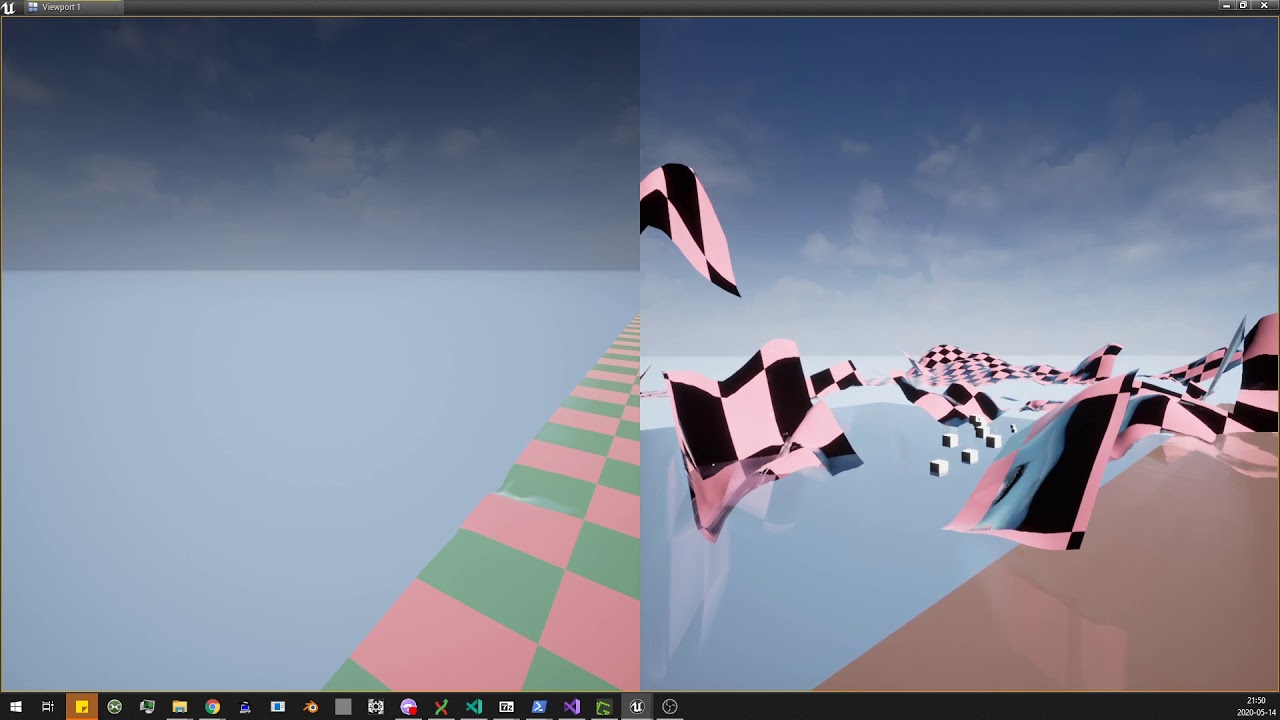
this was not a problem in 4.24
meager spade
@ember needle
that is in player controller right?
PlayerController can NOT multicast to other players as it does not exist on other players
its Server and Owning client only.
meaning multicast will only work between Server and Owning client
ember needle
Hey @meager spade yes, but I was explicitly multicasting from the GameState 🙂
ember needle
The issue is that the GameState does not exist yet on clients when the possess happens on server
meager spade
thats possible
ember needle
so I solved it with a replicated variable on PC
meager spade
in normal game (with proper latency)
it might exist
but it also depends when you possess you pawn or how
ember needle
indeed 🙂 but not taking that chance. My solution is pretty simple now... the possess happens when the gameplay GM creates the pawn, pretty standard
meager spade
i never trust anything to be ready in possessed/beginlay
well you can delay stuff (like we did)
ember needle
eheh and you're probably right, I also never do, but I missed that the GM might not be there
Yes, or also use a retriggerable delay on the cast (HORRIBLE)
meager spade
i don't use delay nodes, our delays are purely in the game mode
ie we make sure all players are ready connected, map is loaded for every player
before they then possess and drop into play
ember needle
I see
meager spade
we also have random generated map
meager spade
which is generated on clients using a seed
so server waits till all clients are ready, then it calls beginplay on all actors and sets the game as started 😄
ember needle
understood
that probably also takes care of the map being completely loaded before shown... right now i have the typical texture loading while already in game
not sure how to cleanly manage that
will see
 hybrid crown
Is there anyway (c++) to allow a client to set a (replicated) variable on server without passing by RPC ?
Like for visual thing.
hybrid crown
Thanks Stranger !
Just for my own knowledge, then, how Movement Component do ? he use RPC too ? i didn't see them in the code.
bitter oriole
RPC all the way
hybrid crown
Thanks 😉
zealous spire
Does anyone here uses the project launcher ? I'd like to launch my project on another windows machine in LAN from the editor
but the device manager does's see the other machine, and if I add it by IP, it says failed
hybrid crown
@zealous spire firewall ?
zealous spire
none, they're both plugged to a switch
hybrid crown
do you check the logs ?
barren warren
Has anyone had an issue with PIE where controllers would get duplicated on clients if you're doing server -> server travel to outside of the PIE session?
 jolly siren
Am I supposed to use the steamworks sdk that matches the one Unreal is using? https://partner.steamgames.com/downloads/list

Steamworks is a set of tools and services that help game developers and publishers build their games and get the most out of distributing on Steam.
Or can I use the lastest for the build server?
jolly siren
Okay, that's what I thought
I am getting the following on 4.25
May 15 09:09:38 Foo FPSGameServer.sh[19231]: [2020.05.15-16.09.38:566][  0]LogSteamShared: Warning: Steam Dedicated Server API failed to initialize.
May 15 09:09:38 Foo FPSGameServer.sh[19231]: [2020.05.15-16.09.38:566][  0]LogOnline: STEAM: [AppId: 0] Game Server API initialized 0
May 15 09:09:38 Foo FPSGameServer.sh[19231]: [2020.05.15-16.09.38:566][  0]LogOnline: Warning: STEAM: Failed to initialize Steam, this could be due to a Steam server and client running on the same machine. Try running with -NOSTEAM on the cmdline to disable.
May 15 09:09:38 Foo FPSGameServer.sh[19231]: [2020.05.15-16.09.38:566][  0]LogOnline: Display: STEAM: OnlineSubsystemSteam::Shutdown()
May 15 09:09:38 Foo FPSGameServer.sh[19231]: [2020.05.15-16.09.38:567][  0]LogOnline: Warning: STEAM: Steam API failed to initialize!
I generated the steamclient.so and put in LinuxServer/Binaries/Linux
So this is strange
And I tried generating steamclient.so from both the v147 sdk and the v148a sdk
Both give the same results
bitter oriole
I have no experience with Steam dedicated so I'm not sure what to suggest but it's more like Steam failed to start because of a soft error
Maybe the appid file, or something ?
jolly siren
This is a normal error that occurs when steamclient.so is missing or is the wrong version. But I have provided it and it is still occurring
unreal pine
There's a console command to debug display sever -> client corrections for actors. Anyone remember that command off the top of the dome?
unreal pine
Thank you
 ancient root
Hello has any here managed to get HTTP requests to another API running on gamelift ?
 terse prawn
This event is tied to "event any damage" any reason this wouldnt execute on clients even though its set to multicast?
 fallen lagoon
Hi all. I'm new to this chat. I was just wondering if there are any good references or documentation for good dedicated server-based session flow architecture. There's plenty of tutorials out there that will help get a dedicated server spun up and load into a specific level, but I'm looking for something with more specifics on what good lobby flow should look like.
Thanks in advance!
I'm also happy to jump into a voice channel if anyone is available to just have a quick chat about it.
 marble depot
yes, I did, although I cannot say with 100% certainty what fixed it. I recompiled my engine, project, updated the SDK and moved to a server running a full and up to date Ubuntu install instead of a CentOS partial image @jolly siren
foggy idol
How would I go about with fps spectating and having things like the other players HUD widget show up on the spectator screen ?
jolly siren
okay, thank you for the info shootie
 covert gorge
Hi! i hope someone can help me with one thing. I have sucessfully created a dedicated server build using advanced session (steam). If i execute the .exe directly, it works as expected (i have a custom Appid). But if i upload this server build to a steam dedicated server tool (with a different Appid, but associated to my main game), and execute from steams library, it doesnt work, does anyone knows why?
 karmic jacinth
Is it doable to make my own CharacterMovementComponent or is it too much hassle? I tried using it on the past and it felt like trying to do anything out of its scope quite painful. There are so much stuff in it that seems pretty useless for most use case.
I'm asking here because the issues I had was mostly linked to the networked aspect of it.
hoary lark
if your project has very unique movement, there's a chance you may need to. a good but still fairly simple networked character movement system will likely push at least 5000 lines of code all said and done (Epic's default one is obviously much more than that with all its generic functionality) so expect to set aside a couple months writing and tweaking it if you attempt to pave your own road
karmic jacinth
Ok, thanks @hoary lark for the complete answer. I was expecting this kind of answer unfortunately! I will decide later if I want to do the pact with the devil 😈 or do it on my own. 😉
I remember doing a jetpack system a while ago and for some reason it was doing all sorts of desync that I could not figure out (probably messed up the movement prediction) even though I was using the actual movement method to thrust the player upward.
unreal pine
Is it cool for me to throw videos in this channel?
jolly siren
If they are relevant to the discussion
unreal pine
I've been having issues with Client Side Movement Jitter, this was captured from the client instance (the player not jittering is the server)
I tried to reproduce this issue with a new character class using the same model and just a simple run animation - no jitter
unreal pine
So I removed the animation BP from my main character class, and just cycled the same animation on it. Still Jittering. I even reverted the networking options on the movement component
meager spade
the capsule looks smooth
your animation is jittering
(skeletal mesh)
check your skeletal mesh component
and ensure Replicates is false
unreal pine
I'm a dumbass
unreal pine
ok, and I'm still getting these errors when testing locally - Any suggestions on where to look?
it's causing the client to remain stationary on the server while moving on their local instance
foggy idol
So can anyone guide me on how to go about with spectating on death
foggy idol
Like how it works in Apex legends where you can see the players ui
unreal pine
Even with my AI disabled, I'll get these errors
meager spade
no
i mean
that only happens
if the CMC cant send to the player controller
or you have packet lag
what is your setup
unreal pine
I am using the CMC to move the pawn. As far as I know I'm not using an autonomous proxy
meager spade
just normal WASD movement
unreal pine
twin stick, but yeah pretty basic
meager spade
with the moving pawn possessed by the controller
or is the camera possessed by the controller
meager spade
cause in our twin stick game
unreal pine
I am using a viewTarget for the camera
meager spade
the controller possesses the camera
and we do hackery
plus our pawn is AI pawn
and moves on a navmesh, autonomous, locally
unreal pine
that's interesting
meager spade
but seems like yours is just standard
well them errors are caused by either packet lag
or the cmc fails to find the player controller
to send the saved moves and ack the saved moves
unreal pine
I doubt it's packet lag if I'm running both instances from my local machine
so I'm guessing I'm doing something wrong, like trying to call logic on a controller that doesn't exist
meager spade
well
the CMC is failing to route the saved moves
you c++?
i would be checking the ack saved moves in the controller
see if its actually being called
unreal pine
I'm using BP for my controller and character atm
meager spade
yeah its strange your getting them warnings
i mean i could understand under high ping
unreal pine
LogNet: Warning: UNetDriver::ProcessRemoteFunction: No owning connection for actor OneShotCharacter_C_2. Function GetRotationFromController will not be processed.
Wonder if this is related
terse prawn
This is executed from 'event any damage'
would there by any reason as to why the clients wouldn't execute this even though its a multicast?
foggy idol
Sooooooo......... 😅
foggy idol
Anyone have an idea of how I can go about with spectating on death
ember needle
when a character dies, you can spectate another player by using set view camera. you can start there. you’ll need to properly manage client huds and ensure that you switch also on the spectated player’s death.
“spectating on death” is rather generic. tps/fps will differ.
karmic jacinth
How can I set bReplicates to true (I'm inheriting from UActorComponent) ? I'm upgrading my project from 4.12 to 4.25 and this value is now private.
Oh wait, it's already set to 1!
I've got a question, can anim notify be used for gameplay or is it unreliable to do so?
 edgy sedge
would be better to use a timer or something, I'm not sure how anim notifys trigger if you're tabbed out
foggy idol
@ember needle what I'm trying to achieve is like in Apex legends where you can also see the other players HUD
 spring heath
Whats the best way to send the clients camera forward vector over network? I have set the camera and the spring arm to replicated, but still cannot see them turning in game. This is a pawn vehicle.
karmic jacinth
Is it me or is it much easier to debug networking issues in blueprint compared to cpp? I can actually select which instance I'm going to debug in step by step and I can easily print on screen and it tells me which instance printed what.
To the point where I'd want to just create BP event just to debug 😄
mild ingot
Ok, so I found the problem with my game, I just don't know how to fix it. I'm following the UE4 Blueprint Multiplayer tutorial, and for some reason my Join Session node won't join when I try to join as a Guest. Anyone know why?
thin stratus
@karmic jacinth https://mobile.twitter.com/joatski/status/1257751888658915328

Working on a multiplayer game in @UnrealEngine? Add UE4Editor-Engine!GPlayInEditorContextString to the VS watch window to quickly see whether you stopped on the server or a client at a breakpoint during Play in Editor #ue4 #ue4tips
Likes
111
 Twitter
Should help at least a bit
karmic jacinth
Oh cool!
mild ingot
Oh I can check that
jolly siren
Anyone that uses linux dedicated servers on 4.25 yet?
 raven moss
I know Kung Fu!
I made it to lecture 41 of the UE4 MP series on Udemy and now I can connect two computers on multiplayer!
I recommend this to anyone working with UE4 multiplayer or not - https://www.udemy.com/course/unrealengine-cpp/

Udemy
Unleash the power of C++ and Blueprint to develop Multiplayer Games with AI in this Epic Games-approved course.
It thoroughly explains the PlayerController, GameMode, GameState, Projectiles, Replication. Every serious thing you need to know about.
meager spade
good ol Tom Looman course
mild ingot
Is it any better than the free tutorial series given by the official UE4 channel?
meager spade
i should really speak to him about doing a course
On the Gameplay Ability System plugin, but proper networking
cyan current
Tom Looman my boi
mild ingot
Can someone please help me find out what the problem with my Join Sessions node is?
 spark fossil
@unreal pine I was having the same error message (Hit limit of 96 moves..) and getting laggy movement after upgrading from 4.23 to 4.24/4.25. Are you using GAS?
raven moss
When I set max players to 3 and hit play I can only see two being replicated. Has anyone run into this?
The 3rd player can't see the other two
Player 1 and 2 see each other move and see all 3, but player 3 doesn't move.
I have three player starts
Even start players 4, I only see 2 replicated players on the first two clients
 dull island
has anyone run into a problem with PawnPrivate being null in multiplayer on clients?
player states are supposed to have the currently controlled pawn replicated to them, so the player state can access the current pawn (because they don't have controllers)
but at least for PIE, it seems like PawnPrivate is always null
and putting breakpoints on APawn::SetPlayerState never fires (it might be optimized away, even in DebugGame)
like when I log from blueprints, this is what I get
LogBlueprintUserMessages: [C_SuperServiceRobot_C_0] Server: C_SuperServiceRobot has PS_SuperServiceRobot
LogBlueprintUserMessages: [C_SuperServiceRobot_C_1] Server: C_SuperServiceRobot1 has PS_SuperServiceRobot1
LogBlueprintUserMessages: [PS_SuperServiceRobot_C_0] Client 1: PS_SuperServiceRobot has
LogBlueprintUserMessages: [PS_SuperServiceRobot_C_1] Client 1: PS_SuperServiceRobot1 has
LogBlueprintUserMessages: [C_SuperServiceRobot_C_1] Client 1: C_SuperServiceRobot1 has PS_SuperServiceRobot
LogBlueprintUserMessages: [C_SuperServiceRobot_C_0] Client 1: C_SuperServiceRobot has PS_SuperServiceRobot1
LogBlueprintUserMessages: [PS_SuperServiceRobot_C_0] Server: PS_SuperServiceRobot has C_SuperServiceRobot
LogBlueprintUserMessages: [PS_SuperServiceRobot_C_1] Server: PS_SuperServiceRobot1 has C_SuperServiceRobot1
huh so weird
even OnRep_PlayerState doesn't get called
neverrrrmind
i was looking at the wrong base class
😛
ember needle
is there a solution for networked ragdolls, by which I mean the ability to recover from a ragdoll in a way that works in multiplayer? Since the mesh gets detached from the capsule while physics is applied, the position of the ragdoll may considerably vary in a MP environment
chrome bay
Well you have two options really. Either clamp the ragdolls XY position so that it stays relatively close to the capsule, or try to move the capsule to the ragdolls position when they recover.
ember needle
clamping would allow to stay in the same position... but moving the capsule would not, as the position would differ
All my tries of physical constraints though have been a disaster. I'm basically trying to make a "revive from friends" mechanism when someone is hit on the ground
 buoyant wedge
Hello guys
How can visualize a widget on all player (server client) after post login and remove them on the single user after he have select the class on wg?
 jovial cipher
does steam allow people on different branches to see the games in a server brower?
random nymph
Is there any good way to prevent cheating when using client rpc's?
I'm thinking about situation where the server tells client to increase a user's steam stat
buoyant wedge
why i cant switch the get default pawn class for controller with the restart player?
jolly siren
@random nymph Why would the client update their own steam stats?
random nymph
Then the server wouldn't need connection to steam
unreal pine
@spark fossil I'm not using GAS - been swatting away warnings and the occasional access nones, but this issue is currently the bane of my existence. Causing random teleporting and in most cases the client isn't moving, but appears to be on their screen.
spark fossil
@unreal pine Which engine version?
unreal pine
I'm on 4.23
spark fossil
Ah. I only started having those issues 4.24 onwards
unreal pine
Part of me was like "Maybe if I upgrade my engine, the bug will go away" but some of my plugins aren't supported on 4.25 yet
sounds like that's not the case based on your experience anyway
spark fossil
4.24+ seems to be a nightmare for network performance. For my project anyways
what are your network settings for the CMC?
update rate etc.
unreal pine
I actually just reverted 'em back to default to test if that might be the issue
unreal pine
Component-wise?
spark fossil
yeah
unreal pine
I have a couple components set to replicate (like a hitbox for damage)
But I'll turn off replicating and see if the server handles it properly without
spark fossil
try having only the top level bp replicating
unreal pine
some of this stuff I set up before I knew anything about networking so I was like "yep, you'll need to see that component on the other machine"
haha
spark fossil
I did exactly the same 🙂
unreal pine
KaosSpectrum helped me fix my character's jitter cause I was replicating the skelmesh
spark fossil
I think I did that too originally
try setting always relevant to true also if it's not already
on the top level character
and replicate movement=true. All the components replicated = false.
jolly siren
Is this only true for shipping builds?
And is it only required for windows dedicated servers that are shipped through steam?
raven moss
Is there a setting for max players allowed for networking?
Is the default 2?
If I just do the 3rd person template and connect that with multiplayer, I can only see a max of two players replicating.
buoyant wedge
No
You can have more player. In the editor you can try to set 3 or 4 and see if work.
raven moss
That works in PIE
barren warren
I believe the default for clients connected to a server is 16 - you need to change some settings in your gameini to increase it over that value
raven moss
Cool okay I packaged a build and I did see 3 instances connect across two computers
For one computer I do the:
open levelname?listen for the server
The other two connect via IP:
open IPADRESS
Both in the developer console
twin juniper
I am wondering if almost no one is familiar with Aws Gamelift, how people then realize multiple servers for a multiplayer game
How they do it?
Like for example an fortnite in a very small size, they have for each running game an own server
 stoic acorn
how do you have it that your New Editor windows keep their screen positions between each play?
stoic acorn
how do you get a variable in the gamemode BP from an actor placed in the level?
 marble gazelle
You mean how an actor can access an value of the gamemode?
I think there should be some sort of GetGamemode node or smth. BUT this is just not null on the server, on the clients there is no gamemode
There you could use the gamestate for example
stoic acorn
ah no I meant the other way around. I'm trying to trigger a player walking into a volume, and an effect to be controlled by the server to each client
marble gazelle
Ah
Well a gamemode is share between different levels so you can't just reference a specific actor, if this actor doesn't register itself at the gamemode.
Like in BeginPlay the actor could tell the GameMode "hey, its me"
But if you just want to do smth in a volume, you don't need the gamemode for it, just check if your actor has Authority (there is a IsServer node) and then do smth. You also could just load this actor on the server.
stoic acorn
ah. I was doing switch has authority, but every client was giving a positive on the server
marble gazelle
? well the server has auth on most entities
 lost inlet
@jolly siren those defines are for any packaged build
regardless of configuration (development, test or shipping)
jolly siren
And they are required? I see shootergame doesn't use them.
lost inlet
kinda if you want to use the spacewar app ID or whatever it defaults to
jolly siren
I'm having an issue where my linux dedicated servers won't initialize steam
lost inlet
that's probably a different issue, i would make sure the steam libraries are included in the correct directory (like libsteam_api.so, etc)
jolly siren
I regenerated steamclient.so and placed it in the correct location and it didn't help
jolly siren
Really? I've always used steamclient.so
Allar's Blog
This is the first step in a series of guides that will show you how to enable the OnlineSubsystemSteam module for your project. It does not cover session creation, session management, app id association, or anything specific to OnlineSubsystemSteam. These steps are the first p...
lost inlet
outdated information, plus this is how it's always been pretty much
jolly siren
libsteam_api.so is under Engine\Binaries\ThirdParty\Steamworks\Steamv147\x86_64-unknown-linux-gnu
According to the logs I pasted, it is loading steamclient.so
So I don't think it is outdated
I used this method from 4.2 - 4.19 without any issues
lost inlet
do you use the dedicated server redist on your server app ID?
jolly siren
Do you mean do I have a steam dedicated server app for the dedicated server?
lost inlet
i got the so's the wrong way round so steamclient.so is correct
but in your app for your server, you can add redists
and they add the steam SDK redist to the root directory of where the server is installed
might also help to state which version the engine you're on
jolly siren
I'm on 4.25
lost inlet
isn't steamworks busted in the 4.25.0 release?
i would strongly recommend not upgrading until at least hotfix 1
lost inlet
also it might fail to initialize with an AppId of 0, not sure
is there a steam_appid.txt alongside the executable?
jolly siren
I'm giving it an app id via SteamDevAppId
But it spits out that it is 0 in the logs
[S_API] SteamAPI_Init(): Loaded local 'steamclient.so' OK.
[2020.05.15-20.50.59:064][  0]LogSteamShared: Warning: Steam Dedicated Server API failed to initialize.
[2020.05.15-20.50.59:064][  0]LogOnline: STEAM: [AppId: 0] Game Server API initialized 0
[2020.05.15-20.50.59:064][  0]LogOnline: Warning: STEAM: Failed to initialize Steam, this could be due to a Steam server and client running on the same machine. Try running with -NOSTEAM on the cmdline to disable.
[2020.05.15-20.50.59:064][  0]LogOnline: Display: STEAM: OnlineSubsystemSteam::Shutdown()
[2020.05.15-20.50.59:065][  0]LogOnline: Warning: STEAM: Steam API failed to initialize!
ah that's 0 because it can't access SteamGameServerUtils()->GetAppID()
since it failed to init
jolly siren
okay, that makes sense
I'm using the app id of the game package, which I always have. Not a separate tool package for the dedicated server.
lost inlet
that's a lot of versions to skip
jolly siren
yeah I know
lost inlet
are you a licensee?
jolly siren
yeah
lost inlet
might be worth posting on UDN then rather than wasting more time on it
if it's loading steamclient.so but failing to initialize, that's probably something you don't want to waste too much time on
jolly siren
Right, yeah agreed
twin juniper
I am wondering if almost no one is familiar with Aws Gamelift, how people then realize multiple servers for a multiplayer game
How they do it?
Like for example an fortnite in a very small size, they have for each running game an own server
lost inlet
i'm not sure what you mean, they have APIs for allocating servers and that sort of thing
and they're backed by EC2 instances
pretty expensive way of hosting your game btw
barren warren
Does anyone know of a good chat solution for a cross server text chat system - looked into Vevox but their support and documentation is pretty terrible.
lost inlet
vivox is pretty much the industry standard at this point though
fossil spoke
Yep, its not that difficult to implement, but their docs are pretty rubbish.
lost inlet
maybe one of the many BaaS platforms may have this but i haven't found many viable alternatives to vivox
fleet raven
they don't have a self host option so that's already egg
lost inlet
that depends if that's in your requirements or not
because maybe you don't want to self-host
fleet raven
there is no reason for them to offer reliable service for free and it might stop working at any time
fleet raven
is it though
lost inlet
if it's text chat you're after you can always do what epic did and roll your own XMPP server
fleet raven
they have a free plan for up to 5000 users and then a crazy expensive "enterprise" plan
lost inlet
it's not crazy expensive but it is expensive
audiokinetic has a rival product but it's not as feature complete
twin juniper
Hello guys, I made a post in animation section but I think most of you can help me in this section (its about replication) :
Here is my post https://discordapp.com/channels/187217643009212416/221798806713401345/711333206510796863
thank you verry much ❤️
twin juniper
To deal with replication in AB, I tried to replicate them manually directly from the player blueprint (what I learned from internet and forums) and use the replicated variables with a cast in animation blueprint. But the thing is, as soon as the client has lag, it will delay the information to update and inevitably break the animation blueprint output.
If I'v a variable let say "isDoubleJump". And lets say I do a NET PktLag=300 for exemple. OBVIOUSLY my client will recieve the "IsDoubleJump" with some delay, while he will jump instantly. He would never see the animation transition that is using this variable.
So my question is how do you predict the information ?
I hope my question is understandable, I'm not asking for a tutorial, you can redirect me to any documentation, I'm self learning, but its a hard topic to find on internet. All the things I found were about simple RPC call
meager spade
prediction is hard without c++
you would have to modify the CMC and pass double jump as a saved move
or you have the local client set doublejump and then tell the server to set double jump.
all input should be client lead
 sharp pilot
Hi, I want to know if there is a simple tutorial to understand to make a dedicated server or some other alternative to make an online system without a person being the host
 queen flower
specifically, I would like this also, to explain the changes for 4.25. Used to have a checkbox for running a dedicated server.
twin juniper
@meager spade Thank you for this fast answer, there is any documentations where I can get all the basics CMC replicated variables ?
Because I dont understand why Devs would replicate Roll and Pitch vars but not Yaw 😐 And maybe get into this code and try to implement the "double jump" as you said
terse prawn
I've been looking everywhere for tutorials and guides to making multiplayer spawn system for teams and I am just baffled.
can anyone help point me in the right direction for team spawn points? or a team system in general?
meager spade
yaw is replicated
via ControlRotation
ControlRotation is replicated, well at least i thought it is
i have not had to replicate anything to get yaw in my animp
animbp
twin juniper
With this setup, server always return 0, maybe I'm doing it the wrong way 🧐
(for Yaw at least, others are working (and its working on the client side))
cyan current
You can also do this for aimoffsets in multiplayer
twin juniper
No, moving the head

 twin juniper
I'll check this
cyan current
looks nice 😄
meager spade
need to do more blending with curves