#multiplayer
1 messages · Page 539 of 1
 steel fox
steel fox
steel fox
I try to get the GameState as following: AChessState* const GameState = GetWorld() != NULL ? GetWorld()->GetGameState<AChessState>() : NULL;
But I continuously get nullptr with my actor
 chrome bay
It's probably not valid then. Based on what you said in the other channel, there's no garauntee the Game State will be available when your actor calls it's BeginPlay()
You have no idea what order the actors will arrive in, or when they will arrive. You have to code around that.
 woeful ferry
What would be the optimal way to replicate big arrays?
I get some huge packet losses when I start my game because I need to replicate an array of items that you can craft.
 slate portal
@woeful ferry don't quote me on this since i'm not a pro myself but, can't you just use some kind of string that holds tags/ids for which item a player can craft? the tag would be comma separated so it can be parsed later to get a list later, but at least the server doesn't have to handle passing through the arrays
 stoic acorn
@stoic acorn The multiplayer series, you mean the one from UE4 about lobbies?
@thin stratus - It was this series that I started following but gave up on (too many things not working properly) https://www.youtube.com/playlist?list=PLZlv_N0_O1gYqSlbGQVKsRg6fpxWndZqZ

YouTube
Video Tutorial Series In this video series, Wes Bunn from Epic Games walks you through creating a networked game with Steam integration entirely through Blue...
 thin stratus
Yeah, the tutorial isn't that good for beginners at all
 twin juniper
if i play as a client i cant run around with my player bud as a server i do why does this comes ?
slate portal
@thin stratus do you have any recommendation for good tutorials for beginners? aside from your amazing compendium of course
I'm worried that the tutorials i've been following teaches bad practices xD
I think the one in the documentation is doing a great job of explaining the concept though https://docs.unrealengine.com/en-US/Gameplay/Networking/Blueprints/index.html
Haven't seen the one with c++ though
The various aspects of multiplayer applied to Blueprints.
 copper grove
so im moving an AI, and this event only fires if he has authority, which he does and he does move.. but when i go to possess the pawn with my player controller he hasn't actually moved in the server and i snap back to the initial position (that I was before the move)
I assumed that if it has authority, its moving on the server, and if it moves on the server.. well... it moves for real
but when i run a print string, checking position, it only actually updates the position on the client
could this be because I'm spawning the AI from the pawn himself (which is a client)...?
copper grove
the pawn
is already spawned (on the server)
what im doing is unpossessing him
from my player controller
and giving him an AI
controller
to use AI movement
after that, he is repossessed with his player controller
and I have full control again
but the issue is that he hasn't moved...
so I have a pawn, full control, can walk move rotate etc... but he can click on a location.. and then he is possessed by AI and moves there, and the client sees that, but that movement isn't updated to the server
so when I regain posession, i snap back
to where i was before the move
I assumed AI always moved on the server...
 wooden sluice
Does anyone know if you can replicate blueprint interfaces?
I found an old entry in the unreal documentation that says you should be able to, but it's pretty out of date
 brave solar
is it a bad idea to replicate keyboard input values directly by just plugging them into an event run on the server? will it be unreliable?
 kindred widget
@wooden sluice Pretty sure they still work. Using a simple interface at the moment myself. I doubt they'd take away functionality like that.
@brave solar What do you mean by plugging them into an event ran on the server?
wooden sluice
@kindred widget I'm trying to find the "checkbox" to replicate the function, but don't see it, according to documentation it is in class settings for the interface, but I don't see any
brave solar
@kindred widget I mean an event run on server with a variable input
kindred widget
Ah. I haven't had a problem with them. I run most of mine like that. If they're critical I'll make them reliable.
brave solar
@kindred widget this is what I'm doing specifically https://i.imgur.com/kAi7sjy.png
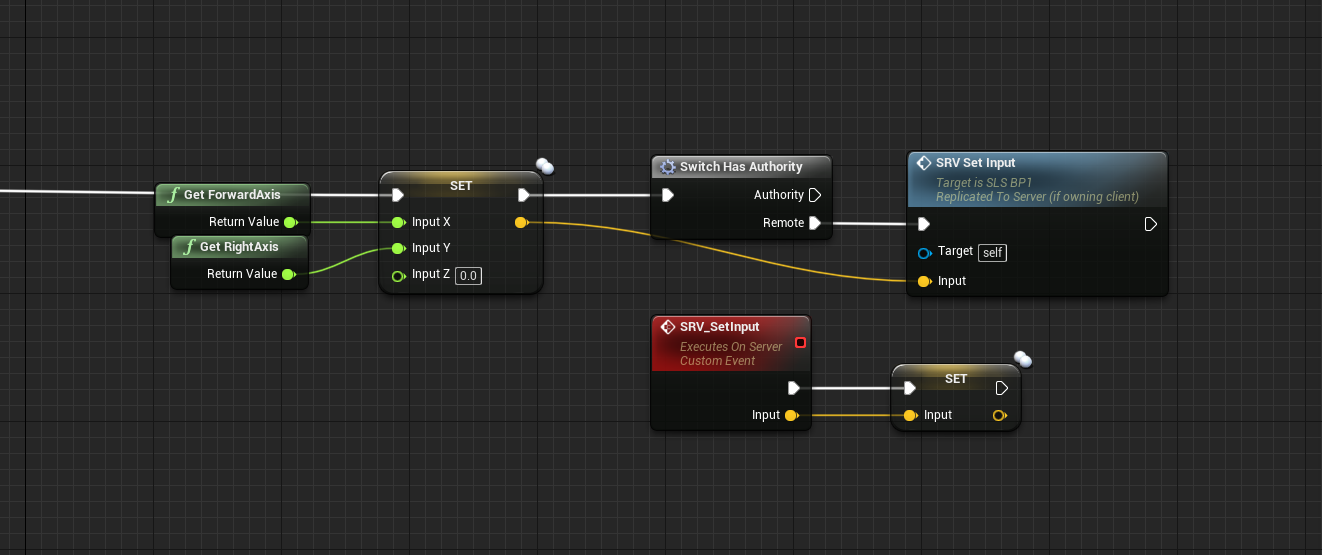
I haven't found another way of replicating movement precisely since everything in the CMC seems to be derived from velocity
copper grove
i eventually just sent the clients position to the server right before repossessing him
and that worked
 normal jacinth
Hi, is there a way to push messages from the server to the clients? I'm trying to launch a loading screen when the server changes level with server travel command, but whatever I try to replicate doesn't make it to the clients
so, only the server sees the loading screen
 rotund onyx
does anyone have any documentation or tutorials they can recommend on Multiplayer Origin Rebasing? It is apparently possible but with precious little information on it. Anything on how to design with it in mind, to as simple as how to even use it would be appreciated.
stoic acorn
I'm trying to control player spawning and failing miserably
 grizzled stirrup
I have an AI character that is pooled and unpooled frequently during the game, I manage the pooled state with an OnRep bool
Should I instead use a reliable multicast RPC when unpooling to ensure that all clients see the unpooled AI Character? (if it doesn't make it through the AI can be invisible to clients while still dealing damage)
I notice that the OnRep bool frequently doesn't trigger the OnRep event on the client
Say 3 out of 10 enemies won't call the OnRep event even though the bool changed, but when playing as the server everything is always perfect
grizzled stirrup
I call ForceNetUpdate() right after changing the bool too
 safe marsh
uh, does anyone know if it is possible to run a dedicated server from the editor (over WAN) and have packaged mobile builds connect to it?
 fleet raven
no
safe marsh
 chrome owl
Is it bad to use "Allow client side navigation" or is it OK to use in multiplayer games? Is there anything I should know? Can it be exploited or something?
 frozen salmon
hello guys i wanna make battle royale game with unreal so i wanna know is it free to use dedicated server ? if not then what companies does unreal use ? and their pricing ? please help me ❤️
frozen salmon
@solar stirrup i can't my internet isn't that good so i wanna know a company that give me a server even with limitations i don't care and i will pay later to have more server capacity but i wanna know what is the companies that unreal work with or i can use in unreal ?
 solar stirrup
Either rent your own dedicated server, or use services like Microsoft PlayFab
But no options are free
frozen salmon
@solar stirrup can i use any host company with unreal right ?
solar stirrup
any that supports your game's server binaries
frozen salmon
and someone told me about these companies that i can work with (Azure, AWS, GCP)
@solar stirrup how can i know if it supports or not ? (sorry for these beginner questions)
solar stirrup
eh pretty sure you can run dedicated servers on windows and linux anyway
so it shouldn't be a problem
grizzled stirrup
Sorry for a repeated question but is there any way to make sure an OnRep function gets reliably called? (using a bool at the moment and as far as I can see the client never changes it, but the OnRep function only calls about 50% of the time)
This is for an important spawn function that makes an enemy character visible and activates a lot of components on the client
Should this be a reliable Multicast RPC instead in this case?
 meager spade
there is no reliable way
if you change a bool from true to false, rapidly on the server
grizzled stirrup
It's staying true though which is the odd thing
meager spade
if it ends up false and client is already false, then it wont run.
grizzled stirrup
It's getting changed VERY rarely
basically when an enemy dies he gets pooled
And the bIsPooled always gets set to true on all clients
But not back to false
Reliably
Only on some % of the characters
I am only setting bIsPooled on the server and in one place
So I'm very confused as to why the OnRep function only calls on some but not all enemies
meager spade
well a OnRep will ALWAYS fire if server changes a value that is different to the simulated/autonomous's version
meager spade
like i said, if it happens to quick
grizzled stirrup
Good to know that you wouldn't need an RPC for this
meager spade
there could be a race condition
grizzled stirrup
Nah it happens once when the enemy is pooled and once when the enemy is unpooled
meager spade
ie client is still false, when server sets false
grizzled stirrup
Doesn't happen frequently
meager spade
but apart from that its reliable
grizzled stirrup
And like I say when I log the OnRep event, it consistently fires when false, but not when it's set to true
Thanks as long as it should eventually call then I'm doing something wrong
Because I can wait 30 seconds and it still doesn't fire
I've heard people use ints for race conditions (if it is that in this case somehow)
So odd numbers mean false and even numbers mean true or something
I might try that if the problem persists
meager spade
i never had a OnRep not fire
grizzled stirrup
Ok I must be doing something dumb here and somehow setting it on the client before it reps
meager spade
so like i said, its likely you are not fully changing every bool
grizzled stirrup
It is odd that it happens on some but not all though
The code is fairly simple
I'll go through it again
It reminds me a bit of how clients joining late would get some but not all player nametags (via OnRep function calls) before all replication channels were opened which was fixed by delaying the initial spawn. Doesn't seem to be the case here as they are spawned late enough after players have been in the game a while
steel fox
Is passing an actor reference from player controller to gamestate allowed?
 stray gull
my server travel is only partially working. it sends the server to the level but then on the client sends them to the level for about 0.2s and then the client returns to the main menu... no longer in the session
 plush wave
Can a server call a Server function?
Or is that only meant for client to server comm?
chrome bay
server can call them too yeah
plush wave
Ok cool 🙂
Can TWeakObjectPtr be replicated? Complier doesn't whine at me but I can't seem to get them to work...
chrome bay
yeah they can be, just replicates like any other pointer
plush wave
Trying to do this:
chrome bay
yeah that will work
the actors themselves will need to be replicated or net addressable as well ofc
plush wave
Interesting, the array seems to be empty on the client.
Ty for letting me know it should work 🙂
Hmm that variable has a "OWNER" condition on it
Shouldn't that replicate it for both the owner and the server?
chrome bay
It will replicate that property to the "owner" of that actor yeah
plush wave
Hmm guessing the player controller isn't owned by the client then... must be owned by the server
chrome bay
It is owned by the client
plush wave
Hmm. The variable is marked for owner and is replicated. I see the items in the array on the client, but an empty array on the server.
Must be something I'm missing here
chrome bay
Well that means the server didn't fill the array then
Replication is one way. Server->Client
If the client sets a replicated variable the server won't know about it.
Clients shouldn't really modify replicated vars anyway, unless you really know what you're doing.
plush wave
I see
If the client wants to do the same task to a group of actors, instead of calling that networked function 10 times, I was hoping I could just network the array, and then have one call on the server that loops through the array for all the tasks
chrome bay
no replication doesn't work that way
If you want the server to do something on the clients behalf you have to send a Server RPC, with the required info.
plush wave
So I'll always have to send the entire array, each time for each task? Would love to just send the array once, then do a bunch of tasks on it.
I guess I could just send it the array through an RPC lol
But yeah, what you are saying makes sense
Thanks for clearing it up in my head
chrome bay
Yeah, just send the array via RPC once then the server can do everything it needs to do on the array
You don't need a replicated var then either
Wouldn't need to be weak object ptrs' either
plush wave
Weak was just there incase the player selected an actor that was then destroyed 🤷♂️
Error: Replicated TArray parameters must be passed by const reference
So I guess I can't pass the array to the server and modify the actors on it?
Ah, misunderstood the error lol
chrome bay
yeah pass it as const TArray<>& Param
(Which you should do pretty much anywhere you send an array to a function anyway)
 rain coral
Widgets seem to survive ServerTravel. This leads to some inconvenience where the pointers to them are gone (GameState), but the widgets persist. Is this normal and is there a common way to deal with this?
chrome bay
Yep just kill them all pre-client travel
A good pattern is to manage all your widgets in the AHUD class, then have a cleanup function that runs when the HUD actor is destroyed.
rain coral
Ah thanks, PreClientTravel is a good fit yeah, but perhaps even better to remove them when the HUD is destroyed (granted that it gets destroyed during ServerTravel). Is there a specific reason to have it in the HUD class? I think I reconsidered it since every local player had a hud instance and I only needed the one
chrome bay
Oh it's up to you really, I've not done splitscreen so HUD made sense in that case
Certainly for per-player widgets anyway
rain coral
Ah okay. All in one screen here, super smash-style
chrome bay
But otherwise I just clean up the widgets when the hud is destroyed yeah
rain coral
Okay, sounds good!
twin juniper
If I have a UFUNCTION(Server, Reliable) with a TeleportTo inside an actor, and I call it from the GameState when a Player controller need to move that actor,why on client the actor do nothing?
 covert wyvern
Hey I posted something in #blueprint before regarding multiplayer (Around 14.18 CET) but figured out maybe I should post it here. Anyone got an idea what my problem was?
or maybe just an easier question because I think it could have something to do with this. Are there any issues with spawning objects with multiplayer that are common? It seems like even if I replicate the items, the spawned items seem to behave less with regards to the server
 raven moss
4.25 has session fixes. I wonder if it works better? Specifically around sessions and multiple computers seeing each other... Downloading...
Release notes for Unreal Engine 4.25
The good part
rain coral
Is it possible to test servertravel in the editor somehow? Cumbersome to make builds and verify by testing over Steam etc
steel fox
How can I give network authority to a client over some Actors in the scene?
chrome bay
The client would have to be made the owner of those actors (by the server)
steel fox
I need to do that from the Game mode and after that I can Call rpcs on that Actors,I'm right?there is a specific istruction for having authority?
 tender sinew
Why does CharacterMovementComponent::AddImpulse look so jittery on a client with 100 ping?
Simple controls using awsd look fine
 calm hound
@tender sinew - AddImpulse() is meant for a short bust of energy that pushes it into a single direction.
tender sinew
Yes, I know that
I have low friction set on the actor
and it slides
works perfectly on the server
but looks like shit on client
calm hound
yeah, the Movement Component stuff is really tricky. You have to have the Impulse applied on the client side, and that does all the legwork and the server validates
so Server/Client sound like they're fighting each other for predition data nd it's bouncing around
tender sinew
Well, I do apply it on both client and server
Might this be a bug in 4.24?
Cuz I've just tried using apply impulse in multiplayer on an older engine version and it works perfectly
Or maybe a weird bug in my codebase...
calm hound
it's not a bug, it's design
Movement Components rely heavily on client data that gets sent to the server, and the server updates
so calling it on both will cause conflicts. Client needs to call it
calm hound
server doesn't trust the client still, it runs the moves that the client records and then redoes them on its end, and then forces the client to update if the discrepancy is too big. But the client still runs it all locally to save bandwidth
tender sinew
I tried calling ApplyImpulse only on the client and the result is, as expected, rubberbanding on client, no movement on server
calm hound
so it sounds like ApplyImpulse is different from AddInput()
 narrow prairie
@tender sinew do the movement on the server and the "local client"
or the impulse in this case
tender sinew
I'm confused
If I run ApplyImpulse on both client and server, I get jittery teleportation on the client instead of smooth movement
If I run it only on the client, I get no movement, obviously
If I run it only on the server, I get the same result as in the first case
(but worse, alot worse)
I feel like something magical is trying to reset my actor's velocity on the client
narrow prairie
there is also a option inside the movement component.. allthough i havent tried these yet
tender sinew
First one of those creates huge desyncs due to the client movement component "resetting" its speed sometimes for some reason
The second one is not cheater-proof
narrow prairie
ye, its for short bursts, gotta enable and disable while moving quick
tender sinew
That wouldn't work for me
tender sinew
Nope
I have a heavy momentum focus in my project
So I need proper impulses with prediction
narrow prairie
fair enough, goes way beyond my knowledge 🙂
tender sinew
Same here 😦
Now I'm 100% sure that 4.24 is the issue here
I've tried upgrading the example project from an old version to 4.24 and surprise-surprise, the jitteryness is back
meager spade
everyone seems to have this "jittery" when using 4.24
impulses are garbo for prediction
RootMotionSources fTW
and they just been improved in 4.25
narrow prairie
@meager spade https://forums.unrealengine.com/development-discussion/blueprint-visual-scripting/1448027-multiplayer-client-and-server-lag
Unreal Engine Forums
I am following this multiplayer tutorial and when I joint the lobby I have a huge lag when I move right or left or backward... when I go straight everything work
ive allrdy posted it here a couple of times.
what is ur thought on this
t.MaxFPS 30 the lag stops.
for me however this doest work: [/Script/OnlineSubsystemUtils.IpNetDriver]
MaxNetTickRate=60
NetServerMaxTickRate=60
LanServerMaxTickRate=60
NetClientTicksPerSecond=60
bClampListenServerTickRates=true
tender sinew
RootMotionSources fTW
@meager spade Wait, those can be used for anything? For some reason, I thought they were used to sync up animations with the motion 🤔
What's a good place to get usage examples from?
stoic acorn
Is running the game under a single process generally seen as a no go when testing multiplayer?
 fossil spoke
 orchid pollen
is there a prefered way to get values that are 'Exposed on spawn' replicated? or do i just have to do it the old fasioned way?
I was under the impression things that were added on construction replicated by default, but apparently not in that way
stoic acorn
DevilsD I'm attempting to control the spawning of client characters and assigning a plugged in gamepad to each one. If I run in a single process each gamepad controls a unique character, if single process is unchecked, the first gamepad controls ALL characters
would be nice to know what the different modes do
 hazy siren
theres a project object to do something about selecting gamepads
oh hmm that's for multiple PIE sessions, never mind
frozen salmon
what is the best dedicated server hosts ? ( less pricing and most capacity)
and if there is a host company that provides free subscription with limited capacity and i can upgrade that capacity later
 high lotus
@frozen salmon really depends on what you want - you can host on amazon for lightweight stuff
i've run a dedicated host on a $50 windows tablet and it worked fine for 2 players on lan
frozen salmon
@frozen salmon i wanna make a mini battle royale game
 ocean phoenix
Guys, anyone know why the character is in flight state (IsFalling = true) on client, while on server it's standing on land? I've noticed that issue occured when MovementMode is set to "NavWalking" in CharacterMovementComponent. Tried to turn different checkboxes and tuned NavAgentRadius and NavAgentHeight in this component, but none of them helped.
meager spade
@tender sinew sorry was sleep, but check Ability System plugin, it has some tasks for root motion
but they are pretty simple
 ebon plover
Hello,
I am having an issue with the replication of the player rotation for roll events,
Here is rolls rotation on clients and server on roll events :
I did try "smooth sync" but it make the animation way more glichy
(I don't use controller Rotation Yaw)
kindred widget
@ebon plover Just curious, why aren't you using the controller rotation? Seems like you're trying to implement the same functionality when it's already there.
ebon plover
Change nothing
orchid pollen
is the cost of replicating a enum value the same as as uint8?
chrome bay
if it's enum class ESomeEnum : uint8 then yes
tender sinew
Is trying to make "instant" FRootMotionSources a bad idea? We're basically skipping the whole server-client mapping and synchronization of motion sources due to the RMS getting deleted right after being applied, can this cause any issues?
 foggy idol
Please how can I set the rotation of a spawned actor in c++
kindred widget
Looking for some best practice direction on something that I think is pretty common in shooters. I'm looking to create a pickup class. Think like enemies die and drop some ammo packs. And then I'm creating a scene component that I want to add to actors that'll query in a sphere to pick up the ammo packs. Mostly what I'm looking for is the least network impact way to implement this while still making it look decent on clients. Right now I'm just replicating the object and it's movement for the ammo drop which looks sort of like the packs explode out from the body and fall in a small arc to the ground. This looks okay, but I'm wondering if people do this with movement replication, or if I should be looking to simulate the ammo drops on the clients with a multicast that specifies identical parameters from the server so that they can fly similarly, then once they land and velocity is less than certain amount, sync them with the server's location? Normally I wouldn't bother optimizing, but I'd like to have quite a few of these objects.
 winged badger
small discrepancy at pickup location won't be a problem
imo client side checks are good enough, and the pointer to it when send via RPC will still be valid
just get server to validate pickup isn't on another end of the level
hazy siren
like so many things it depends on exactly what gameplay effect you want, like if you want the pickup to be / feel very precise and the player can "catch" it as it pops out of the enemy, then you need to spawn it asap and probably spawn it with some variables that you use to move it so client prediction is close or perfect
if the explode is just cosmetic and you cant actually pick it up until its on the ground, just multicast the spawn event (or maybe you can piggy back it with the enemy death?) and do all the explody bits purely client side
winged badger
multicasting spawn event isn't a good solution
it has to be netaddressable so it can be picked up
and for that it needs to be replicated, or you need to get into fullnamestablefornetworking area
hazy siren
thats the point, in the second option the trigger for the "explode" isn't replicating the actor
winged badger
and if you MC spawn event for a replicated actor
kindred widget
I don't know where my head has been that I wasn't considering that simple distance check on the server. That would be more than enough, then I can just use the simple multicast for the spawn.
winged badger
there is no guarantee which packet arrives first
hazy siren
I shouldn't have said spawn event that was using an unclear term
winged badger
they won't be in the same bunch
kindred widget
Learning too much lately, that I seem to be forgetting important small things.
hazy siren
in my experience with games with these kind of drops, the pickup is handled server side and it replicates the effect of the pickup, client side might predict / despawn the pickup
so in a high lag situation you run over the pickup, it despawns, some time passes, then you receive the effect
 ember needle
how do you guys approach bombs in multiplayer? I mean, physics are not replicated, and just replicating position looks really horrible.
so do you disable physics and compute the path beforehand with a spline or similar?
or do you interpolate location on client?
tender sinew
Not an expert, but shouldn't UProjectileMovementComponent take care of all this stuff for you?
ember needle
oh interesting
i didn't think that it did replicate movement, but IIRC it does do a fake physics
in which case it should match on all clients indeed
kindred widget
What is the difference in a multicast RPC for sending three separate inputs as integers vs sending a single Array of three integers, vs sending a single vector and flooring the floats from it as far as network performance?
chrome bay
Flooring the floats won't make a difference, it's still being sent as floats (32-bits each)
An array has additional overhead (the number of elements in the array)
kindred widget
So in general, just better to use three integer inputs?
chrome bay
yeah. usually best to just put them into a struct
Question is though why integers for inputs?
And do you need the full range of the integer?
kindred widget
Instead of sending a lot of vectors for directions, I was thinking about just doing the math to make static directions based on the amount of drops. But I still need to specify how many of each drop type. So if I had three drop types, and I wanted like 3 of the first type, 7 of the second and 1 of the last, I need to know that on all machines even if those machines will be doing the math to determine the vectors the pickups fly towards. Figured it was a lot less information to send.
 dry turret
is there any reason why destructible meshes don't work properly in packaged games? i can get one to fracture when damaged directly but the chunks won't move, and another destructible that's told by a player pawn to blow up won't do anything at all... everything works fine in PIE though
 north olive
Hey friends, I have a fighting game with requirements similar to mordhau. What is the recommended way to trigger an attack?
Right now I have a replicated boolean value, but I'm not convinced that is the smart way to go. Maybe a multicast?
 ocean geyser
@north olive replicated integer like a uint8 which has a range of 0-255 and increment it when you attack. before incrementing check if its equal to 255, if it is then set it to 0
north olive
🤔 Why would that be better than a boolean value?
 sullen kernel
Would having the server determine the collision overlap for a melee weapon in a multiplayer game be a good option? Or is it more common for the client to determine the overlap and then call a server RPC if it hit something?
ocean geyser
if using a bool you would be setting the replicated boolean to true when you first attack. then youd change it to false for the next attack, then true again for the next attack. one possible issue if its fast attacking is if the replicated boolean is set to true on one client and the attacking client does 2 attacks quickly and there is lag then the one client might not receive the replication from true to false and then to true again so he might miss the attacks. a replicated uint8 will change each time the player attacks so he will always see an attack even if he misses 1. i could be wrong here but this was just an off the top of the head thought. plus its cleaner in my opinion since its not a boolean going from just true to false. afaik thats how epic replicates shooting in the shooter example
@sullen kernel depends, for line traces for interaction i let the client perform the line trace, if it hits something then i send the hit result to the server, then have the server validate it, if its successful then i pickup the weapon. that way theres no bandwidth being taken up unless the client actually hits something with his line trace. if its overlap events then i would only do them on the server and disable them on the clients
north olive
@ocean geyser YES! Awesome advice. The answer occurred to me just after I asked! Latency could cause a boolean flag flip to be missed.
I might just make a struct that has a move/deltatime on it...
sullen kernel
@ocean geyser ok so that means playing all the attack animations on the server then. i was only wondering if the network delay would cause any issue since its more obvious if a melee attack doesnt register properly compared to a bullet
ocean geyser
the server playing the animations is for other clients. for example he should set the variable to replicate and skip the owner (the person owning the character with that replicated variable) so that he performs the attack and such on the client and figured out where he hit the other player like a hit to the head/arm/chest and such and then send that info to the server. the server should then replicate the variable so that others see that the client did an attack as well as see if the hit is actually a valid one (meaning he actually did hit the player such as checking the distance between the attacker and the person who got hit, just an example), if it is then apply damage based on where the client hit. that should allow for fast no network delayed gameplay
sullen kernel
@ocean geyser im currently using a replicated int variable similar to ShooterGames BurstCounter you mentioned. So you are saying that is probably best for the local client (the one who made the attack) to run the overlap code and then call a server RPC to say it hit something instead of the server itself determining if there was an overlap. Then the server just has to validate the data. yeah, that seems like a good idea. The other alternative would be that the server itself has to run the "swing" animations to see if an overlap occurred during the weapon swing.
ocean geyser
@sullen kernel id still use a line trace instead of going the overlap event route for a bullet (im assuming thats what your talking about?) and just spawn a projectile if you want effects like a tracer or something to be played and just use the line trace to determine where you hit, but yes. as ive been told, the client can aimbot anyways so you may as well get the hits from the client and just confirm the hit on the server because it would be alot more frustrating to shoot someone in the head and have the server say it missed. it might be better for an overlap event to check and see what location the overlap occured and see if that location(check on the server) is close to the person that got hit just incase theres lag and the server misses so to speak
sullen kernel
@ocean geyser sorry i was talking about a melee weapon like a baseball bat. for the guns i use a line trace
but yeah it sounds like youre saying the same idea could apply for melee weapons. the client who attacks plays the "swing bat" animation and handles the overlap. then it tells the server if it hits something and the server validates. i was deciding between that option or having the server play the "swing bat" animation itself and handling the overlap.
ocean geyser
sorry doing essay atm cant reply
sullen kernel
no problem Cody. not sure if my last message went through because i d/c. but i just mentioned the only negative that comes to mind for the "client handles the melee weapon overlap and tells the server it hit something" strategy is that it would be tough for the server to know if it hit something without playing the "swing bat" animation itself. the validation code seems like it would be pretty weak other than "the player is close to what he hit".
ocean geyser
@sullen kernel well you could check distance and rotation to see if the player is within X and then get a FOV style range to see if the attacking player is looking in the general direction of the person being attacked. kind of like a triangle shape where the point is coming from the attacker and make a V shape, then connect the top of the V with a line trace and see if it hits the actor, the length of the V will be based off of the servers distance between the 2 players so that as long as the rotation is fine then it should make a hit. you would have to account for other differences and such like if the player is directly above you and that sort of thing but thats just one thought to improve the is close enough to hit check
north olive
@sullen kernel I like my collision method for melee weapons, described here: https://twitter.com/kittyfoundasun/status/1252744922609758208


Physics limb hit melee detection WORKING!! 😭🤩
I know this looks lame, but it's actually kinda sick. ( Similar to how Mordhau does their hit detection )
In the end, not that hard, just had to find the right API.
#UE4 #gamedev #programming https://t.co/yz8DKB3JJs
 Twitter
so basically: OnHit -> Send Message to Server
normal jacinth
hi, when I create a Developer build the steam plugin (advanced sessions) seems to work, but when I do a Shipping build it does not (the steam pop-up doesn't appear and I can't see my friends list). Has anyone had this before?
is additional setup required for shipping builds to work with steam?
ocean geyser
@normal jacinth do you have the text file with the app id in it? in the shipping build?
normal jacinth
ah no I haven't done anything different to the development build
so the shipping build needs a text file?
ocean geyser
look at the development build and you should have a text file with the steam app id in it, make sure its in the shipping build as well. someone else had this issue and i think thats what resolved it
normal jacinth
hmm there's no text file in the dev build
i'm using 480 as the app ID in the config, could that be it? do I need my unique ID to get a shipping build to work?
ocean geyser
hmm, not sure what the issue is then
normal jacinth
ok thanks for your help anyway
 royal isle
Hey, is there a way I can make a reliable scoreboard while having the player state update frequency limiter on my replication graph? Cause atm the scoreboard breaks after ~30 player states because the client does not have a copy of all of them each frame. Do I have to write some sort of client-side cache mechanic or something?
 peak star
@royal isle when you update your scoreboard values, just don't clear any that you dont have data for. Use a heartbeat or a logout or disconnect event to trigger the player name be removed from the board instead of relying on whether the playerstate is present in each scoreboard update or not
Just an idea. I haven't tested it yet
Also dont make the scoreboard rely on Bind in UMG. Only update it using events or function calls
 sand crescent
Did anyone take the Reubens course if so can you help me
royal isle
@peak star This is a great idea actually thanks a lot!
stray gull
i need help replicating variables from widgets
i want the server too change a variable and then it be replicated to all the clients
ocean geyser
@stray gull i can lend a hand, whats your setup currently
stray gull
so currently i have a variable which is being held on the 'Lobby_Pawn'. this variable is set to 'Replicated'
when the server wants to change the 'map name' it runs a function in the Pawn which is set to 'Run On Server'
which changes the map name to whatever is inputted from the widget
on a text bind i have that variable from the pawn displaying.
and it only displays for the server
ocean geyser
have it fire an event instead of binding the text. also are you positive its replicating down to clients?
stray gull
no, when printing it would only print on server
ocean geyser
so the variable is replicated and being changed on the server but its not replicating down to the clients at all?
stray gull
well idk exactly. if it prints on both screens does that mean it is replicating
ocean geyser
not with debug messages like that, when testing in the editor it will always display on both the screens the text, it just means wherever you were printing the message was running (the server). if it was a client it states client:. can you show the code or bp?
ocean geyser
i dont think you can call RPC's from a widget, check the output log and see if it states any issues about ownership when the button is clicked
you may have to go from widget to pawn to server
stray gull
it doesnt say anything in the logs about ownership and doing widget to pawn to server also doesnt work
ocean geyser
then something else is wrong somewhere. try setting the replicated variable as an OnRep and see if it fires on the clients as well when the server changes it, that should tell you if its replicating down to the clients. also is the variable replicated on the widget or where?
ocean geyser
blueprint or c++
stray gull
blueprint
ocean geyser
save and restart editor? ive had issues with bindings in c++ and that resolved them
 lone prairie
There is a way to get dedicated servers to ignore version mismatches but I can't remember how.
I thought it was a command line argument but I havent found anything
 bitter oriole
Depends on your game
 cosmic marlin
I have two UE4 application one is for the server and other for the clients. I want the client in the client application to be able to see all the server created from server application and join them . How to do i connect both application and make them work in the above desribed way?. Thanks in Advance
bitter oriole
Sessions
cosmic marlin
@bitter oriole do you mind helping me with little details over DM?
cosmic marlin
i know about sessions but how do i connect two different application ?
bitter oriole
ClientTravel is usually what you use once you have found a server to join with sessions
cosmic marlin
Alright. thanks
twin juniper
Where do i activate the movement replication? I only found a "Component Replication" in the Details panel
twin juniper
is there a Blueprint node, to check if it is executed by the owner?
Like there is a "is Server" Node just for "is Owner"?
twin juniper
I tried with a custom event called for the owner which i call from the server. But i realized that the player blueprint is instantiated by the server.. how i can add an PlayerName Text over the player blueprint?
woeful ferry
Hello!
I have this problem in my gamestate that the event won't run on the server when I call it from client.
I have set the event to reliable
Any clues?
bitter oriole
Clients cannot RPC on gamestate
Only client-owned objects can have RPCs from client to server
By default that's player controller, I guess player state, and the currently possessed pawn
twin juniper
Someone can tell me why the SendMessageToAll Event dont get called for everyone?
The SendMessageToServer Event will be called once on the server but then its not spreading the message/Call of the event to all clients
well
what is this class ?
is this widget ?
dont use rpcs in widgets
if the actor is not owned by a client you cant call rpcs
Okay i thought that, i moved it to the GameInstance
So i call an RPC from a Widget (RPC Event is in GameInstance) and then it can be executed to the Server, or am i wrong here?
I think GameInstance is the best place to call RPC on Server, or is there a better place?
Ah okay i understand it. So i guess closely everything is owned by the server, so i thought calls to an Server can happen at every place, just spread them around with multicast is possible if its the server
bitter oriole
Game instance is not replicated at all AFAIK
So it's always client owned
On the local client only
bitter oriole
Game instance on client should never be affected by the server in any way
If you want to call RPCs on the server from a client, your prime choice is PlayerController
Second choice is Pawn, if possessed
And then PlayerState might work too
Other classes should not be allowed to RPCs
twin juniper
Okay
So the Problem i have actually is: The message is at the server and the server will execute an RPC Multicast call
but it didnt reach every player
printed out a Hello and in the window it tells me the prefix "Server: Hello" so it is executed by the server
bitter oriole
If this is a server to client, 'client' RPC, then GameState is the correct place
Though all replicated classes would work
GameInstance is not replicated
twin juniper
Ah okay
thats why
if no replication is there
multicast wont work
so i need to move it from GameInstance to an Replicated Blueprint
Good to know, thanks 🙂 ill try that out
if the actor is not available to client
then how would it reach
if you want everyplayer
you need an actor that is availiable to everyone
such as playerstates gamestates or such
Yes, you are right 🙂
Yep, that worked, now i did it in my Player Pawn
 terse prawn
Where would be the best place to store team scores?
I tried to store them in the gamemode but clients cant cast to the gamemode to get the info on it.
twin juniper
gamestate ?
well
gamemode is okay too
but you need to manually spread the data
its harder but better for obvious reasons
but no worries if you are not expecting to be used cheats
chrome bay
Game State makes total sense
terse prawn
I dont expect cheating to be a big issue.
chrome bay
Assuming all players need to know about it
I don't see how cheating makes a difference to where it goes
terse prawn
so the game state exists on the server as well as the clients?
twin juniper
yeah
terse prawn
ohhhhh
chrome bay
So if clients need to know about scores, that's the convenient place to put it
The same way you would put a players individual score in their player state so that all clients can read it
terse prawn
see ive never worked with game states so that would make more sense now
terse prawn
alright nice! I'll try that then Thank you!
and game state is found under "all classes" when making a new BP I assume>
?*
twin juniper
yup
chrome bay
Cheating isn't really relevant though, the Server is the only thing that should award points.
terse prawn
the server is the only one awwarding points.
points are placed around the map and the server tallies up each point and what team has it captured and awward points to the teams equal to the number of points captured
chrome bay
yeah, that seems fine
terse prawn
one more question, If the client is trying to get the scores of each team for the HUD or something they would just cast to the Game State right?
chrome bay
yep
GetWorld()->GetGameState();
Always check for null though, since it takes time for the actor to arrive on the client and the client may initialise and start ticking their HUD first
Same rules as any other actor really
terse prawn
ahh alright note taken
I apologise for the many questions but another one has arose lol
chrome bay
np's, what discord is for 🙂
terse prawn
lol ty
but the way I have the game setup is each capture point on the level when the game starts they cast to the game state now and then pass a reference of it's self to add to an array called "capture points" and then whenever its time to give points the game state gets all the points in its reference and checks what team has it captured and then give points to the team.
This entire thing only passes the references to the game state if its on the server and only adds scores on the server
would the client's capture points need to pass their references? or would that add un-needed duplicates?
chrome bay
Doesn't seem like the client needs to do it, since the Server is what tracks them.
terse prawn
alright. thank you!
chrome bay
BTW. To make it safe, I recommend the GameState also searches for those capture points when it starts play.
And adds them to the array if they aren't already there. It will prevent any race condition issue that way.
 oak token
I haven't done much in terms of multiplayer. I'd just like to ask, is client calling a run on server event that then does nothing but calls a multicast event with the logic in it a common pattern?
chrome bay
Not that common IMO
In reality clients shouldn't care that much (at all really) about talking to other clients.
terse prawn
So even though the capture points pass their references still have the game state do something like a "Get all actors of class"?
chrome bay
Yeah
Because otherwise if the point is "registered" before the gamestate is available, it'll never be registered. That's a common thing you need to do client-side.
Since actors are received in all sorts of orders
terse prawn
ahh alright
 serene meadow
did anyone manage to make steam overlay work in 4.25?
ember needle
all, on a server MP game I have a character that goes ragdoll when dead. After a while I disable the physics on the mesh, but on the server (and server only) at that moment the character just... flies away...
this is what I see with time dilation set to 0.1
but only on server
anyone has a clue on where i can start looking?
ember needle
it looks like a weird combination of set all bodies ... and visibility ownership. If I detach myself from the player, I can see the dead player....
foggy idol
@ember needle is your project bp only and does it have any latency issues because I'm also doing a first person shooter and I'm torn between using c++ or bp
terse prawn
agreed. I am currently working on a BP only MP game as well
tender sinew
@ember needle is your project bp only and does it have any latency issues because I'm also doing a first person shooter and I'm torn between using c++ or bp
@foggy idol Yes, BP-only projects cannot handle bad latency in multiplayer, and I don't think you can do anything about it without c++
(e.g. there's no pre-made client-side bullet spawn prediction, so with 100ms ping your clients will see their bullets fire almost half a second later than they've pressed the button)
 oak pond
hey is it me or does event on landed not replicate properly?
and is there any alternative I should use
ember needle
on landed is a local event.
terse prawn
I took a shot in the dark whe setting this up and I'm not 100% this is how it should be done.
When I launch with 2 players I click the host button and it loads the level and then the other instance no longer has any widgets on the screen
oak pond
oh so what can I use instead of on landed
 shy kelp
I'm currently making a save/load system from a server. I have managed to integrate the load system but I have some questions. How often should the server send requests to save everyone data to a database in a persistent-online-games? Is there way to send post requests on exit of application for the client?
 proud pier
I'm trying to create a new session (using AdvancedSessions plugin) but no matter what I try, it always tries to bind to port '0'. How can I change this? Setting "port=7777" under [URL] in DefaultEngine.ini does nothing
foggy idol
@tender sinew I am having problems with c++ mainly because I'm new to it and the networking process kind of differs from bp
I'm still struggling just to shoot a line trace and spawn effects in the right location on the client and server
And the shooter game code gives me brain damage everytime I open it
I wish there was a c++ tutorial for fps multiplayers
tender sinew
Coding in c++ is not a skill you can learn quickly
Especially network code
Especially one that is undocumented and does not state it's guarantees clearly
twin juniper
Assertion failed: IsValid() [File:D:\UE4Source\UE_4.24.1\Engine\Source\Runtime\Core\Public\Templates/SharedPointer.h] [Line: 851]
any idea why I might be getting this
this only happens on dedicated server
it fails to initialize the game and crashes for server
 split jasper
Im trying to set up Amazing Gamelift and I'm stuck at the start, I'm following the guide and it says type cmake -G "Visual Studio 15 2017 Win64" -DBUILD_FOR_UNREAL=1 .. so I do that and I get 'cmake' is not recognized as an internal or external command, operable program or batch file.
Any ideas?
 agile lotus
after updating from 4.21 to 4.22 I can no longer join sessions in PIE
 cosmic trail
What dedicated server OS is good to use in terms of: 1) Performance(Costs) 2)Maintenance(sys admin ease of use) 3)Uptime(less crashes) 4)debugging? Any particular versions of linux or windows that anyone has experience with or can recommend?
 plush lagoon
Question in order to control when a Player is spawned on the Server once they join a Server, its Handle Starting New Player that allows me to stop it from spawning the Default Pawn and such correct?
@cosmic trail Docker Containers.
This way you can just spin up your Server in the Cloud whenever you need too.
proud pier
is it possible to change the port used for new sessions/servers @ runtime?
cosmic trail
@plush lagoon https://docs.unrealengine.com/en-US/Gameplay/Framework/GameMode/index.html I use restart player override
Overview of the Game Mode and Game State
but yeah if u want to stop the pawn actually you have to it one back I think
thanks @plush lagoon I figure docker containers will be running windows? Unreal is probably more optimized for that platform?
plush lagoon
Medium
Today I am going to walk you through the process of building and deploying your very own Unreal Engine 4 dedicated server running on…
Follow that Tutorial, best way todo it. Great tutorial.
cosmic trail
Thanks a bunch bio
plush lagoon
np ^_^ I hope it helps, I got a nice system up/running with that
cosmic trail
neat. Going to try a test of windows vs. linux and see which costs more too 😄
What kind of game are you making?
plush lagoon
yo @cosmic trail your going to need a few things. What I ended up doing is creating a easy packageLinuxServer powershell script, and then a really quick tutorial.
* Once Linux Server has compiled, run `PackageLinuxServer.ps1` with Admin mode.  Then follow the Steps below.

* packer build -var-file="packer/variables.json" "packer/docker_instance.json"
* cd terraform/
* terraform plan -var-file="vars.tfvars" -out plan
* * **NOTE** If Error Preform Command Below!
* terraform init
* terraform apply plan

* To Destroy the Created Server:
* * **NOTE** Must be in the `terraform` folder to preform this command.
* * terraform destroy -var-file="vars.tfvars"


* Dependencies
* * Install Chocolatey
* * Run Command: choco install packer
* * Run Command: choco install terraform
basically it just uses wsl and tars up the LinuxDirectory
wsl tar -czf ./server/unreal-dedicated.tar.gz ../Binaries/Linux
XD i got it down to a science more or less LoL
cosmic trail
thanks Bio, that's super helpful
plush lagoon
Even automated it all for deployment and such :x just trying to get the damn game made now, and i'm making a Zombie FPS/TPS akin to L4D/Zombie Panic & COD:Zombies
cosmic trail
Ah nice, those are fun
 unreal bison
I posted in plugins too about this but it's multiplayer focused question so I figured I might ask here too.
Anyone had issues with the built in steam module with 4.25? It doesn't want to authenticate for me after upgrading to 4.25
 cedar finch
@unreal bison I wasn't able to connect or find games as well while using Steam. I was told that it is broke for now. Maybe Epic will fix it soon.
unreal bison
Hope so! I can't do much till its fixed!
cedar finch
I'm still staying on 4.23 lol It's been my favorite for a long while
unreal bison
I just hope my project will downgrade back to 4.24.3 since I forgot to do a backup 
peak star
Hey is there a way to assign gamepads to specific players?
Like give gamepad 4 to player 0 for example?
ember needle
Hello, I am experiencing a weird behavior and I wonder if this is a bug. Reporting it here though it relates to physics, because I've discussed in #legacy-physics and this appears only in MP.
So: I have a character that goes to ragdoll when killed, with a standard:
On the listening server, when physics get disabled, the character gets moved to position 0,0,0. You can see it here:
(the floor is 100 units above)
This works fine on every connected client. This behavior is only on listening server.
You can see that it really moves it to 0,0,0, the capsule position is irrelevant (see it here top right):
I think this is related to MP because if I set replicate movement to false, the character is not moved to 0,0,0.
chrome bay
It's not a bug. The character movement component moves the mesh back to the capsule position continuously as part of the smoothing. The same thing happens on clients.
normal jacinth
has anyone read into this, and converted it into blueprints? it looks quite important to do https://medium.com/@invicticide/accurately-syncing-unreals-network-clock-87a3f9262594
Medium
When implementing real-time network multiplayer in a game, one very important tool is a reliable network clock.
chrome bay
Not in Blueprints no
ember needle
@chrome bay as per my report, it does not go to the capsule.
the mesh get moved to 0,0,0, the capsule is not there (second screenshot)
If I disable the movement replication, the mesh stays where it was:
so only difference between ^ this and the mesh being moved to 0,0,0 is movement replication.
=> TL;DR: basically when I disable physics the character mesh is moved to position 0,0,0, only on the listening server (clients have the expected behavior).
normal jacinth
ok thanks 🙂 I'll shelve it for now
I have an interesting problem; when one of my clients moves into a region of the map with lots of visual detail, the listen-server's FPS drops massively (the client is fine though). Any thoughts on what I might be doing wrong?
bitter oriole
Profile it !
normal jacinth
is there documentation/a guide to profiling? I'm very new to this. I'm currently watching https://www.youtube.com/watch?v=EbXakIuZPFo

This in-depth presentation from Unreal Indie Dev Days 2019 outlines CPU and GPU-related overheads, identifying bottlenecks, and how to plan optimization strategies and pipelines early and as a team. Learn the tools and how to employ them to identify key performance problems as...
bitter oriole
An overview on the Profiler Tool used to monitor game performance.
stat startfile, stat stopfile in console, then load the result in profiler
You'd then find the thread (probably game) that has a high time outside CPU Stall, and investigate why
You can add your own profilign entries to profile your code once yoy've narrowed down which actor costs
chrome bay
@ember needle If you disable movement replication then clients aren't getting updates about the position anymore and won't bother moving or smoothing the mesh back to the capsule. Clients are still sending movement information to the Server however, which is still running the movement code.
ember needle
I understand that. but the mesh goes to 0,0,0.
there's no issue on clients, only on listen server.
chrome bay
I don't know then, you'll have to debug it
normal jacinth
thankyou @bitter oriole
ember needle
@chrome bay FYI this is what I had to do to solve it:
 soft shell
How would you handle UGC downloads prior to first player joining? I mean.. in a lobby when players are ready, they will have selected a UGC package with a level.. I want the server to get this information, download, install, etc. once players are ready and said "launch map" - ignore all the UGC stuff, what is the best method for passing the UGC ID (say "283865") to the server, and have it hold off players until loaded (or do players just connect and stall, whilst the server is doing the UGC work - i.e. how do I stop players joining until it's loaded the UGC) - thanks
ember needle
this is no different than having a I'm Ready button on clients, except that your "button" is the fact that they successfully downloaded a file.
 drowsy bobcat
Hey guys, anyone use steam sessions on the source build of 4.24.3?
soft shell
@ember needle - I'm assuming (in this example) that the clients have already downloaded the PAK, the server needs to know about it and download it.. how would the server know to do this (i.e. how does lobby or first player say to server to use UGC23894?) and how do players hold off joining (or do they?) until the server is running the UGC level
ember needle
I read the question the first time 🙂
You need to have an understanding of MP and lobbies. This is an intricate topic. My suggestion is that you start reading or learn from one of the existing packs in the marketplace, such as this one:
https://www.unrealengine.com/marketplace/en-US/product/lobby-chat-group-and-more

Multiplayer Lobby with MainMenu, Settings, Host/Find/Join Session, Lobby, Character Customization. Using SeamlessTravel (4.20+) for Steam and allows Listen- and DedicatedServers.
Hope this helps.
soft shell
I appreciate that it's a complex topic, I'll dig into that link you send but I'd rather not use existing packs (I'm using steam, and the AdvancedSessions plug already).. I've an fair idea of the most likely methods it would use but was wondering if anyone has any hints (or keywords) I could dig on.
terse prawn
Is there an event when a player disconnects?
chrome bay
@soft shell sounds like you want to look more towards the steam workshop stuff.
Servers would need to advertise the required workshop items required to play, then you'd need to build an in-engine system to download and apply them before attempting to join
You certainly couldn't join an in-progress session without having those DLC's, there's just no way.
But you could "connect" to a lobby through beacons to get the info you need.
We use beacons for our server queuing, not quite the same but a similar idea
 modern swift
hi all anyone try to use multiple dedicated server to read one USave object? , is it possible to ready by multiple dedicated server at the sametime?
terse prawn
I currently have a lobby system setup in my Online MP Project.
If the player sets their player name on the controller in the main menu and joins the lobby the name wont save between levels.
How would I save the player's entered name when joining the server?
 dawn summit
Greetings.
What's the proper way of adding Sprint to Character Component child class, modifying the Max Walk speed (afaik it's how UT does it)
or adding new custom movement mode?
 karmic briar

In this video I show the proper way to make movement abilities for your characters. This is done by creating a Custom CharacterMovementComponent.
We start from scratch with a third person BP project, but here is the completed project you can copy code from: https://drive.go...
@dawn summit should help you 🙂
dawn summit
yep, i've seen it, he uses UT code
karmic briar
hmmm maybe you could refer to this one https://www.ue4community.wiki/Legacy/Authoritative_Networked_Character_Movement
🤔
dawn summit
have not seen the second video, i'll watch it and will be back (55 mins ;_;)
karmic briar
oh wait i didnt understand the answer its the first one by modifying the max walk speed
bout the movement mode im not so sure maybe you could make a mode for sprinting and do a boolean to set it on or off
dawn summit
okay...and is it explained WHY in those videos?
i see why it will work, but i don't get why it is used
karmic briar
ahh no most of what i understand for movement by reading the code itself(cmc) or refer to other
dawn summit
yeah, CMC isweird, there are no UFUNCTIONS that are set as replicated
yet they are
i mean macroses like
UFUNCTION(Unreliable, Server, WithValidation)
they are routing them through the character
 swift topaz
What's the proper way to have a UActorComponent function called by a FFastArraySerializerItem's PostReplicatedAdd when the UActorComponent has the FFastArraySerializer implementation done inside it?
winged badger
you can either have a delegate in fastarray
or you can pass in the Owner during actor construction to the fastarray
in 2nd scenario i recommend non UPROPERTY TWeakObjectPtr for the Owner @swift topaz
any UPROPERTY Owner can get fucked by blueprint serialization, or replication if not marked NotReplicated
 waxen socket
Hello. If anyone here has advice on listen vs dedicated servers, I've posted a couple questions on the Unreal forums here: https://forums.unrealengine.com/development-discussion/blueprint-visual-scripting/1757560-advice-on-listen-and-dedicated-servers
Any help is appreciated. Thank you.
Unreal Engine Forums
Hello,
I'm building a cooperative four-player game. The plan is to eventually sell it on Steam.
I never intend to display a server list. I plan on only allowing joining locally and through friend invites via Steam. I've seen some warnings around that movement replication for...
swift topaz
@winged badger Attempting to make use of InArraySerializer within void PostReplicatedAdd(const struct FExampleArray& InArraySerializer) always gives me error c2027: use of undefined type 'FExampleArray'
winged badger
that should be your specific fastarray type @swift topaz
not the one you c/ped from the example in NetSerialization.h
swift topaz
Which is what I thought as well, that's why I have it named FExampleArray
struct FExampleArray : public FFastArraySerializer
{
    GENERATED_USTRUCT_BODY()

    UPROPERTY()
    TArray<FExampleItemEntry>    Items;    /** Step 3: You MUST have a TArray named Items of the struct you made in step 1. */

    bool NetDeltaSerialize(FNetDeltaSerializeInfo & DeltaParms)
    {
        return FFastArraySerializer::FastArrayDeltaSerialize<FExampleItemEntry, FExampleArray>(Items, DeltaParms, *this);
    }
};

template<>
struct TStructOpsTypeTraits< FExampleArray > : public TStructOpsTypeTraitsBase2< FExampleArray >
{
    enum
    {
        WithNetDeltaSerializer = true,
    };
};```and the item?
swift topaz
struct FExampleItemEntry : public FFastArraySerializerItem
{
    GENERATED_USTRUCT_BODY()

        // Your data:
    UPROPERTY()
        FString        Name;

    UPROPERTY()
        FString        Key;

    void PreReplicatedRemove(const struct FExampleArray& InArraySerializer)
    {
        Outputf(_T("Removed from Array"));

    }
    void PostReplicatedAdd(const struct FExampleArray& InArraySerializer)
    {
        Outputf(_T("Added to Array"));
        if (InArraySerializer.Items.Num > 0)
        {

        }
    }
    void PostReplicatedChange(const struct FExampleArray& InArraySerializer)
    {

    }
};```Crashes right on the if statement
Well, doesn't compile, I mean, not crashes. error C2027: use of undefined type 'FExampleArray'
If I remove the if statement, compiles just fine, but that just means I can't add anything that I could trigger from InArraySerializer.
winged badger
aside from obsolete generated macro
ah
move the implementations to .cpp
it will work then
your item is declared above the fastarray
compiler doesn't know what FExampleArray is except that its a struct when it hits that if
meager spade
you could forward declare it tho
winged badger
not to use it
meager spade
nope
swift topaz
I'm afraid I don't follow when you say "move the implementations to .cpp" I thought the PreReplicatedMove, postreplicatedadd and postreplicatedchange had to be implemented there.
winged badger
that if is also kinda bonkers
as in, not inside the header file
callbacks are per item
so post replicated add will always have that true
void FReplicatedModule::PostReplicatedAdd(const struct FModuleContainer& InArraySerializer)
{
    if (InArraySerializer.Owner.IsValid())
    {
        InArraySerializer.Owner->AddEquippedModule(*this);
    }
}
like this, in .cpp file going along with that header
and only the declaration in header, like you were doing a "normal class"
meager spade
Anyone here have experience with client rates/tick rates of client/server. We notice a idle client is sending around 5-6kb/s just standing still
with 8 clients, server ends up with around 60kb/s average out rate
twin juniper
any one able to help when i try to start host game, using steam as multiplyer subsystem it apears for split seccond then returns to main menu ??
https://www.youtube.com/watch?v=_-yal2ufWP8 i'm following this tutorial if that helps for people that folowed this and experienced issue like mine

Here we work on the Connected Player Widget Blueprint (individual player cards) that appears when the player connects to a lobby. The will allow us to display each player’s name, selected avatar and selected character inside our Lobby Menu. By the end, we test out to ensure ou...
also another one seems to be slight issues where avatar image is just white sqaure right and left button don't seem to change anyhtin
 midnight swan
Hi
Do some people know how to make Networking insights work. I can get Unreal Insights to work. Made a video how to do it here: https://www.youtube.com/watch?v=4ATwbLVmpc4

Basis guide - How to start Unreal insights.
-cpuprofilertrace
-loadtimetrace
Unreal docs.:
Unreal Insights Overview:
https://docs.unrealengine.com/en-US/Engine/Performance/UnrealInsights/Overview/index.html
Unreal Insights Reference:
https://docs.unrealengine.com/en-US/Engin...
 upbeat jungle
Is there a specific steam SDK thats needed for games to connect to the service? UE 4.24 uses steamv146. Is 148 required?
 cyan current
Has Role been changed to GetLocalRole now?
bitter oriole
Yes
cyan current
Thanks!
 steep cipher
@upbeat jungle what service?
 summer tide
How do you replicate an animation using blueprint only which is being played in AnimBP? Let's say I want to sit on a chair and I use a variable to toggle that. I use the variable in AnimBP to play the sitting animation. Currently if I multicast everything then it works. I couldn't get it to work combining rep-notify and multicast.
ember needle
what is the best way, after a travel, for a Gameplay PC wait for the pawn to be ready?
ember needle
@summer tide why combining rep-notify and multiply? you don't want multicast, otherwise players joining in would not see the player sitting down. You only need a repnotify variable. You can also trigger an animation montage in there instead of the AnimBP (your choice)
winged badger
@ember needle hard travel or seamless travel? In any case the game won't call BeginPlay on the World before the MatchState is set to InProgress in GameMode
ember needle
seamless. there's an interesting issue by which get player controller on pawn on listening server still has the reference to the PC of the lobby, on begin play.
twin juniper
Could someone send me a link where i can read what exactly a session is? I followed the Blueprint Multiplayer Tutorial from UE4' YT Channel and he is creating a session, joining session and find Sessions but didnt explain what it means. So am i able to create sessions and load different maps for each session?
winged badger
there is no issue, the LobbyPC is the one that loads the map
ember needle
yes i understand, what i mean is that begin play on pawn still has the lobby PC
so i need to treat some logic differently.
but ONLY on listening server
it was unexpected, at least for me.
winged badger
after it does, it calls NotifyLoadedWorld (local), then ServerNotifyLoadedWorld (server), which ends up calling HandleSeamlessTravelPlayer (swaps the PCs if different class), then HandleStartingNewPlayer (spawns the pawn)
ember needle
ok, nice.
winged badger
last 2 functions are in GameMode
and if you made an error overriding HandleSeamlessTravelPlayer, that would account from wrong PC on game map
not sure anything else would
having the GameMode wait until NumTravellingPlayers == 0 to allow match to be started is also practical
winged badger
no
twin juniper
For what are the Sessions made?
And where do they search for?
i mean i have not given a ip or port in the blueprint so how will he get the sessions?
bitter oriole
Sessions are meant to search for Steam friends or servers hosting games, etc
They'll give you the IP to join
twin juniper
What do you mean with "servers hosting games"?
foggy idol
so I have my camera attached to my characters head and whenever i do a line trace on the server it traces using the wrong camera rotation and i have no idea how to fix this

Pastebin
thats the weapon code
 upbeat crystal
never mind fixed the issue
foggy idol
whenever i shoot my weapon everything works fine but the rest of the game practically stops replicating
 jolly siren
That's quite the long trace
cyan current
@twin juniper https://en.wikipedia.org/wiki/Game_server
A game server (also sometimes referred to as a host) is a server which is the authoritative source of events in a multiplayer video game. The server transmits enough data about its internal state to allow its connected clients to maintain their own accurate version of the game...
 hybrid wren
HI there, I'm looking for a tutorial about gamemode that cover the basic of creation a team deatchmatch mode. Weirdly, I can't find a good one on Youtube, preferably in Blueprint as well. I'm currently using Advanced Session for the multiplayer. Anyone got this in a bookmark ? 🙂
 civic mirage
https://gyazo.com/94ede2996fb7c39a8fdd25a1b933163e can you help me please, client is jittering


 polar wing
are you using a pawn or a character?
civic mirage
actually its a character BP like the thirdplayercharacter
polar wing
oh then it should work fine across the network with basic movement. Do you use AddMovementInput in the BP?
if you use any other kind of movement method, it won't replicate properly. That particular method is fully predicted and hooked up in the character movement component.
civic mirage
mhh okay thanks, i only have the base movements like movefordward and moveright, i have set character speed too maybe it comes from that ?
polar wing
If you set the default movement speed value in the BP's details, that will be fine. If you set the movement speed during gameplay (inside the BP graph), you need to ensure you're doing a call to the server to let it know your movement speed changed.
Otherwise that might be what's causing your jittery movement (the server and client disagree on the actual movement speed).
civic mirage
yes i set it during gameplay :/ i will try to do that .. 😄
yes i think you are right
polar wing
awesome, let me know if it works! Starting out in multiplayer (mostly with movement stuff) can be super tricky due to some limitations in blueprints.
civic mirage
if i buy https://www.unrealengine.com/marketplace/en-US/product/smooth-sync smooth synbc will it work great ?

Smooth Sync will Sync your transforms Smoothly across the network using Unreal's networking.
yes simple things can be really hard hahah
 oak hill
Hi guys, there's some way to simulate many client connections on a dedicated server?
I've seen this in the documentation, seems like what I'm looking for but there's no real documentation :D
https://docs.unrealengine.com/en-US/API/Runtime/Engine/Engine/USimulatedClientNetConnection/index.html
A fake connection that will absorb traffic and auto ack every packet.
twin juniper
What is the basic Workflow to test your Game with Gamelift?
Do i need to build the server and the client every time i want to test things? Or can i use the editor directly?
oak hill
You can test directly on the editor
@twin juniper sorry, I missed the Gamelift part, don't know about that
polar wing
@civic mirage Never tried that smooth sync plugin. It sounds cool, but I'm curious if it opens up ways for client-side cheating. It's basically an all-encompassing transform-syncing plugin. Not sure if it plays well with other systems like the character movement component, but it technically should.
Would also be curious to hear if anyone has tried it!
civic mirage
Hmm iwill maybe try it, if dont work i can refund no ?
twin juniper
Someone know how i can realize a Racing Game Multiplayer? So that i have a Lobby where player will mainly go to and if they start a race they go with specified players to another level but people are still able to join the lobby level
bitter oriole
"How do I make an entire game" is not a question you can get easy answers to. The lobby part is very easy, MP racing is not
civic mirage
just bought it @polar wing i will tell you
twin juniper
i dont want to know how i can do a racing game. just want to know what i need to get players from one level to another
I mean if the server is on Level01, then normally all players are sync there. But if i openLevel for 2 players, then they are on 2 different versions of the level which are not synchronized
civic mirage
what the hell it work lol
polar wing
@civic mirage Great! Considering that it simply syncs the transforms, from what I can tell, it should make development a bit easier in blueprints for casual games (should technically compensate for "abilities"). I could be wrong, though, considering I haven't checked out the backend code. Just remember that you'll still need to replicate certain variables to get animations working across the network.
Let me know if changing the movement speed of the ball keeps it properly synced without jitter.
polar wing
Nice! Looks like a very nifty plugin for casual MP games. The only issue I can see arising is with cheating in competitive MP titles (client can spoof their transform or change their movement speed without consequence, which can be fixed by doing a bit of anti-cheat code).
twin juniper
so if i have a Server and a Client. How i can send 2 clients from the server to Level02 and all other players are still sync on Level01 (where the server is)?
bitter oriole
Servers only have one level, but you don't need a server for a lobby, sessions are enough.
civic mirage
yes but i dont know who would cheat i mean depends of the game, in shooters yes its annoying but in like puzzle game there is no need to
twin juniper
That means i can for example build all my racing tracks and the lobby on the same level and just move the players in the sessions?
And only the players in one session will be sync to each other in the same session?
For example: Player01 and Player02 are in the same session and they cant see the players Player03 and Player04 which are in the same level but not the same Session, correct?
polar wing
@civic mirage exactly, any kind of non-competitive MP game should work great with that system. Enjoy smoother development from here on haha!
civic mirage
 twin juniper
@bitter oriole
civic mirage
blu use servertravel ?
twin juniper
ServerTravel is only to move between servers AFAIK, but for example if i have everything on one server
bitter oriole
@twin juniper You haven't said what players on your lobby would be able to do.
twin juniper
Players in the Lobby are 3d characters and they can move around, chat etc
twin juniper
Ah okay
bitter oriole
Or you can drop the lobby idea until you do the actual hard part of a MP racing game
twin juniper
I mean to understand the Logic of Player Sessions: Only other Players in the same session will be synchronized right?
MP stands for?
twin juniper
so: Can i do 2 GameModes on one level? With Gamemode i dont mean 2 gamemode blueprints, just put everything in one gamemode blueprint
That i have splitted the level into 2 areas where i have racing and lobby in one
bitter oriole
No, you can't and you'll have to handle both modes in the same game mode
But this is trivial compared to MP racing
Which is hard
twin juniper
So what would you recommend me?
bitter oriole
Start trying to get your racing gameplay working
twin juniper
So i have done the lobby mechanic
so how i can now move an player with other players into a Race?
bitter oriole
Forget about the lobby that you can add two years down the road in development, and try getting racing working
twin juniper
Okay, and when i have it done, how do i connect them then?
bitter oriole
Well do that first lmao, we'll be in 2021 when it works
twin juniper
...
just want to know how i can just sync players in the same session
or will the sessions handle it automaticly?
bitter oriole
Replication I guess ?
twin juniper
yes
twin juniper
ah okay
bitter oriole
All the rest is up to you, line by line
Including the multiplayer vehicles that UE4 does not support
So start there
twin juniper
i know
i already got my car working
so basicly i can do everything in the same level, and then let the server handle which player is in which race and which player can see which other player etc
i guess it is possible to hide Actor for specified players
so i will do the matchmaking completly by my own
bitter oriole
Well if you have a working car in multiplayer already, it's all good I guess
twin juniper
yea but i still dont know how to handle 2 Multiplayer "GameModes" into One game
bitter oriole
Move the gameplay features to pawn
meager spade
does anyone know much about the tickrate/netrates/client rates
cause every config variable has "todo document"
which is great
fleet raven
there was recently a commit that added comments to all of these
see if you can find it on github
meager spade
ok cool
we are having issues with listen server
seems to be linked to framerates
where server has higher fps than clients
or clients have higher fps than server
thing is started happening when we optimized game code, before when listen server was running around 40-50fps everything was fine
since we optimized and can run listen server at 120 fps
we hit issues
fleet raven
what issues though
meager spade
clients autonomous movement is weird, sometimes they get pulled back or feels like your slowing down
twin juniper
@bitter oriole i still have no clue what i need to let a player play with a chosen set of other players a specified race
meager spade
simulated kinda teleports about
fleet raven
did you enable the anti speedhack?
twin juniper
move to a server or just create a game session for both etc.
fleet raven
they called it something weird
meager spade
anti speedhack?
fleet raven
time discrepancy something
meager spade
ill take a look
cant find that commit

looked at master branch
a lot is still todo
fleet raven
might be on other branch? try release-engine-staging
twin juniper
What happens if i open a level with ?listen after creating a session and i let players join that session.
Will the joined players automaticly moved into my level?
So i should be able to let players run on different instances of the world from the server, correct?
civic mirage
https://gyazo.com/7a37d929a91a22f3b0b369f38c9076ff can you help me please my client can't see the damages i tryed to replicate ...
 twin juniper
How can i hide the player character from player 2 for player 1? Because it is in the server and when i use SetHiddenInGame then it would hide it for both players
 naive locust
use a call to player 1 CLIENT (if invisibility is all you need, but hittesting is still needed on the server; depends on your game needs) to set player2 hidden
twin juniper
Ah so i send a rpc to the client and then he can execute setHiddenIngame and it will only hide for him?
Actually i dont know but RunOnOwningClient doesnt work for me
Get executed on the server
And the above here is still server call internal event and then broadcast to the owner of the playercontroller
But this will never get fired
looks like the playercontroller is owned by the server hmm
naive locust
so what you're saying is that printstring never fires?
twin juniper
yes
naive locust
wait
twin juniper
only if i set it to multicast
naive locust
are you doing local coop?
twin juniper
local coop?
civic mirage
lol
naive locust
yes, local coop, like couch coop vs lan or internet coop
twin juniper
ah yes
naive locust
ok, so that is why PC = 1
twin juniper
only 2 players to test some networking out
naive locust
but that is the question
if you are not preparing the game for local (all players on one machine, forget testing), then you should use PC = 0, not 1
that index means nothing in anything but local coop/multiplayer
twin juniper
😮 ?
i have a dedicated server seperated and 2 clients
so 0 is player 1 and 1 is player 2
naive locust
show me the documentation that says that please
 opaque bronze
you can code multiplayer with blueprints???
cyan current
Yes @opaque bronze
twin juniper
I dont have a documentation for that, i can just tell what i found out 😄
naive locust
no, you are inferencing
naive locust
i'm 99.9999% confident from reading the documentation, that player index means nothing unless you're doing local multiplayer
twin juniper
but i dont understand why
naive locust
you should always use 0 if NOT doing local multiplayer
civic mirage
https://gyazo.com/d170282c82c1c48c46b17f340554a3f8 how can i replicate applydamage ? 😦
 twin juniper
what exactly you mean with local multiplayer?
LAN?
i mean testing on the same machine with editor is local multiplayer too, or not?
naive locust
think of a game system where two players are playing in person, together, on the couch
no
naive locust
yes, sure
twin juniper
Omg
naive locust
or on one screen together
twin juniper
i thought it is for the network player which is connected to the server
naive locust
whatever the game dictates
unreal treats local multiplayer differently from lan/internet multiplayer
 spark fossil
@civic mirage You would need to make a Server RPC for ApplyDamage, and have your health variable replicated
naive locust
as far as the playercontroller index
and that makes sense
because
each input device is on the same machine, so the only way to differentiate them is by index
twin juniper
But when i have 2 players connected, how do i get the playercontroller for player 2 then for the server?
naive locust
think of the PC as just input
twin juniper
because index 0 will give me that from player 1 i guess
naive locust
no
civic mirage
thanks @spark fossil , so i need to RPC this too ? https://gyazo.com/905796b9e19c025c0ab827069ae1ffa1
 naive locust
if you're on the 'server' copy of the player's PC, then you will always use 0
civic mirage
https://gyazo.com/2957728126abde2d51099141453d50e3 am i good like this ?
 spark fossil
@civic mirage I'm not sure on the specifics for your project, but usually you should only be applying the damage on the server (by checking role == authority), then have your client's health replicated.
how is damage dealt in your game?
spark fossil
I would only apply damage on the server, but have the health replicated
so your client could call ServerApplyDamage, the server would update the client player's health value, which is then replicated back to them
civic mirage
so the function health replicated ?
spark fossil
the health variable
civic mirage
okay so i try that 😄
spark fossil
@civic mirage the pdf that @meager spade just posted is well worth a read if you haven't already.
civic mirage
thanks you i will read that
 barren warren
Just a quick query - what order of magnitude memory should I be expecting for a UE4 dedicated server process run in linux which is loading a 4x4 km map?
 buoyant wedge
Hello guys. I have problem to make i timer. On server work but is not replicate to all client. I have make a create widget on different position but client don't see. I have no idea how fix. Thx you guys 🙂
cyan current
Let me fire up my project and I'll show you how you can fix it @buoyant wedge 🙂
Sorry I misread your question, I got no clue about timers.
upbeat jungle
How do yall go about testing steam multiplayer for your builds? A friend? Another Steam account on another PC?
I dont have another PC to test with and sometimes my friends arent readily available for testing. Tryna find a way to test it myself.
 lucid moat
@upbeat jungle you can use the multiplayer settings to have multiple clients locally: https://i.imgur.com/eR75y2Y.png
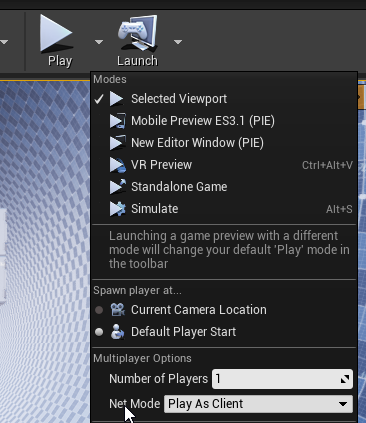
(or act as a client with dedicated server using settings in screenshot)
 vivid seal
anyone tried out the Multiplayer With Blueprints (AWS) plugin on the marketplace? It's mega expensive but apparently integrates AWS and a bunch of related systems into blueprints. Wondering if its actually worth the price.
lucid moat
But really makes sense to use 2 PCs to test in a more realistic scenario
Is there some way to make 4.25 networking (for rigidbody replication) as good as it was in 4.23?
in 4.23, it seemed fairly smooth: https://gyazo.com/c2f18c2c1dbf9caaa2fc69c0b5a0044d


but in 4.25 things are jittering all over https://gyazo.com/86c59cd2424064dc67c57b1f7d13e791
upbeat jungle
Yea, but the thing is, when i create a session, and click join when its built, it doesn't allow others to join. Idk if it was a SDK issue with Version 4.24 or not.
It works now with 4.25 but for whatever reason it wasnt before.
I have a strange suspicion that it was cause 4.24 was running steamworks V146 and the latest is V148.
barren warren
@vivid seal It depends on your experience with Gamelift, Lambda, DynamoDB etc... You can achieve a pretty lightweight solution using those technologies yourself if you're willing to put a little time in. From watching a couple of YouTube videos you'd have to shoehorn your processes into a few distinct styles (which wouldn't necessarily work for our use case). So you're kind of just trading off usability for ease of access to the technologies. Id say for most cases if you're planning on using all the above technologies it's probably worth it if you'd need to spend more than 20-30 hours of your own time setting it up yourself.
@lucid moat You could look at the following settings in DefaultEngine.ini ```[/Script/OnlineSubsystemUtils.IpNetDriver]
MaxClientRate=100000
MaxInternetClientRate=100000
[/Script/Engine.Player]
ConfiguredInternetSpeed=50000
ConfiguredLanSpeed=50000```
Had similar jittery movement and replication after a 4.21 -> 4.24 upgrade and that fixed it
terse prawn
I'm working on display names for my MP project and I set this up on the player controller and player character.
All the clients update with proper names but the server never updates their name.
any idea as to what might be happening?
barren warren
@terse prawn I may be thinking of something different but I believe that Text isn't replicatable by default, try casting to a string and sending that through those calls, and converting back to a string on SetText
terse prawn
@barren warren I just tried that and still no luck with it.
The 'Cast to PlayerChar' is failing
on the server, but not the clients
did another check and the server's character is 'invalid' but all the clients characters are valid. so the cast fails. what would cause this?
connecting this to an eventOnPossess fixes the failed cast but still wont update the server's name
summer tide
@ember needle The reason I used AnimBP so that I could use my upper body to do other things such as aim a gun or bow and arrow, etc.
plush lagoon
I'm having a slight problem when a User joins the Server I'm currently trying to force a Widget to be placed on screen from the player controller. When a Player joins the Server at the Starting new Player I get their player controller, and Trigger a Event there which is replicated too the Owning Client, then on the player controller of the Player I have it set to receive and add a Widget too the Viewport
Anyone have any ideas?
am I catching it too quick perhaps and I need to wait later in the cycle?
plush lagoon
what do you mean @winged badger ? could I have some context.
You mean the HUD in the Game Mode?
winged badger
i mean a HUD derived class, one you set in GameMode
HUD is instantiated by the PlayerController only locally, and fairly soon after the client receives it
so you don't have to manage timing, check for local player, or anything
you just put it on HUD BeginPlay, and call it a day
plush lagoon
So the Hud would have the Base Widget it would then Load onto the Player, is what your saying? And I would control a majority of the Switching/etc Between Widgets there?
winged badger
good practice to manage all widgets that are not world based (housed in WidgetComponent) from the HUD
and for HUD to be the only class referencing your UI
plush lagoon
oh no shit, thank you very much for telling me that.
🙂 Very kind of you ^_^
and much appreciated
terse prawn
Is event possessed ran only on the server?
plush lagoon
I've been adding them directly to ViewPort XD LoL
winged badger
@terse prawn yes
@plush lagoon advantage of that is easily managing the widgets
if you want widget to be gone from screen, but you don't want to have to re-instantiate it later, you just have HUD keep a pointer to it
terse prawn
so If I use a event possess to have to client execute an event on owning client I would have to do a multicast?
winged badger
that way GC can't collect it, and you can just do MyWidgetRef->AddToViewport at any time
that would probably crash you, multicasting from PCs doesn't normally end well
terse prawn
alright xD
I have a "run on owning client" event that tells the player to update all the player's nametags and I was wondering how I could tie that to a event possessed
winged badger
you shouldn't, BeginPlay is perfectly fine
and the PlayerName is replicated by default in the PlayerState
so it already exists on all clients
terse prawn
My issue is that some clients take longer to login before others do. so if one person joins and then executes the event then the other player joines it wont update the name of the new player because the event was already called on event begin play
twin juniper
How do i get the PlayerCharacter of an other player?
winged badger
you get the Pawn from PlayerStates in GameState's PlayerArray if done from clients
you can do GameMode->GetNumPlayers->For(0 to NumPlayers-1) GetPlayerPawn[Index] from server
both approaches will grab all player pawns, yours included
terse prawn
that I understand. its if one player joins first and executes the event it updates all the names on their end. but if another joines after the event has been called then the new player wont have a name on the first one because the player didnt exist when the event was called
the players character didnt exist*
twin juniper
Okay thx
terse prawn
the only way I know how to fix this is by putting a delay on the event, but I dont like that.
twin juniper
I cant send the Player Character Reference from the Server to a client
So what is the main way to identifie the clients?
like they are owning an ID (in which they are stored in the servers getPlayerCharacter or getPlayerController)
plush lagoon
ok question, I'm trying to Trigger a Event inside of a Gamemode from the Player Controller, utilizing a Reliable Replicated to Server Event. Now I have it being Triggered by a event from the HUD to the Player Controller, then being called from there. But I can't seem to get it to Trigger in the Gamemode
i'm having it pass the Self to know which player controller Triggered the Event.
winged badger
@terse prawn the PlayerState normally registers with GameState on its BeginPlay
its when it gets added to the PlayerArray there
if you are using c++ you can override those functions to do a little extra
if not, you can have all PlayerStates find the local HUD and let it know that its there, and the widget should be updated
@plush lagoon its the other way around, the event in the PC needs to be Server
this way you are accessing the GameMode on clients
plush lagoon
ok so Local PC -> Server PC -> Server GM? Correct?
twin juniper
What is the proper way to identify Players in a Multiplayer Game?
stoic acorn
I'm trying to figure out this stuff myself but I think Player Controller is the way to do it
 merry pebble
Hey I am trying to get my player count working. Its getting there, but for some reason it keeps saying it keeps getting nothing from the widget HUD referance....
This is the player character code...
jolly siren
Why are you using rpcs for either of those?
terse prawn
I have a widget component in the player character that is set to 'owner no see' and the owner can still see it. is there something I'm missing?
merry pebble
Cause I only want to use it for the client but I can take that off anyways lol
 queen flower
my understanding is that widgets are only seen by the controller/player
by default
but i think hes trying to replicate the player count
which is probably a value on his widget
and i have no idea how to do that so if anyone knows lol, would be great
 rotund sapphire
beginplay()->is locally controlled(true)->create widget()
playeramount can be any replicated integer, just hook up on the onrep instead. for updating this widget via RPCs smells like waste of resources
lucid moat
@barren warren that seems to have fixed it! Thanks very much 🙂
merry pebble
Imma try it lol @rotund sapphire
rotund sapphire
player character code.
it may better not doing this from character at all, but PC maybe, by using a component that you'll interact with.
merry pebble
yeah I tried a few different places
I fixed my gllitch
My issue was that my widget ref was null
rotund sapphire
hud is owned by PC so it makes sense using pc for interacting with it
rotund sapphire
get hud reference from pc
merry pebble
Ight
 vital steeple
is the multiplayer testing feature giving really strange results for others in 4.25?
i used to use PIE, 2 player, and switch between dedicated/listen server for testing, but now it opens one window in PIE, then another as if it were launching the standalone game then joining the session. it works fine but it takes ~30+ seconds to load. if i check the use one process feature under advanced it behaves liek it used to (launches two PIE windows) but causes lots of weird issues
raven moss
Did the multiplayer shoot tutorial in the learn section of the epic launcher get removed?
merry pebble
Mp Shootout?
 frank mesa
hello. I'm working on a multiplayer shooting game exactly on rocket launcher (weapon ) so I want to make the bullet of this weapon visible for the shooter and the other player it's working on the shooter side but I'm not sure how to make this bullet visible for the client any ideas for a solution?
cyan current
You can achieve this by making a **UFUNCTION(Server, Reliable, WithValidation) void ServerFire(); ** in your .h file and then make a role authority check inside your original Fire() in your .cpp with something like this: @frank mesa
And then somewhere in your .cpp, you can do this:
Change Role to GetLocalRole if you're on 4.25
frank mesa
ok thank you I'll try this
twin juniper
How do i identify a Player in the Network? I mean if i want send an RPC to 2 players
I dont found a GetPlayers in any Blueprint
solar stirrup
Use the player controllers on the server's side @twin juniper
twin juniper
Okay but how do i get the PlayerCharacter Pawn from the Controller?
solar stirrup
APlayerController::GetPawn()