#multiplayer
1 messages · Page 538 of 1
 bitter oriole
 raven moss
I'd have an easier time just using a C++ socket and it would connect the first time
It should work out of the box. If I used Photon I'm sure it wouldn't have a problem.
bitter oriole
It does work out of the box, but maybe you missed something. Feel free to use Photon if you want to.
So what did you try, how did it not work ?
raven moss
I can run two instances on the same computer and that works
But when I run on two computers in the same LAN, same network, they can't see each other's sessions.
 fading birch
Make sure your ports are being forwarded on you network too
raven moss
I did port forwarding on port 7777
raven moss
Yeah the session list was empty
bitter oriole
Which online subsystem did you use ?
raven moss
I downloaded the project from learn, the multiplayer shoot tutorial in UE 4.24.3
fading birch
@bitter oriole I've ran Into a few cases where it is even locally. Some routers by default block all ports, even on their internal network
bitter oriole
@raven moss So you didn't do anything particular like enabling the Steam subsystem
Did you make sure to try this outside the editor ?
raven moss
No I wanted to try basic LAN to start with
Yes I ran standalone builds too, built 64-bit Windows
I set the service to null and steam, no luck
bitter oriole
Alright, then it's weird that you couldn't see eachother. Null subsystem basically broadcasts a message and then other devices read it, it's pretty simple
Check the logs for more information
raven moss
I'm tempted to make a C++ socket on the same port and test that, for sanity sake
bitter oriole
open <ip> in console would be easier
raven moss
I looked at the logs stepped through the blueprints, and it's an empty session list
bitter oriole
Since you apparently have a matchmaking issue, not a multiplayer issue
If you can connect with the open command, at least you know it's just a session problem
raven moss
How does that work? What port and is it UDP or TCP?
bitter oriole
Just open the console in the client game and enter "open <host ip>"
You should connect right away
No ports required
raven moss
Does the system support tcp ipv6 or does it have to be ipv4?
bitter oriole
AFAIK UE4 supports IPV6, but normally on LAN you have IPV4 IPs
UE4 does not use TCP
Not for NULL OSS matchmaking or gameplay, anyway
raven moss
When I used ping I saw an IPV6 address so I was thinking if it was written in UE 4.9 days maybe it's not IPv6 compatible
 twin juniper
people, stop about networking, I asked about reducing server cpu time consumption
what))
bitter oriole
I answered your latest question, Alex ; feel free to ask more
raven moss
I'll go to the two computer setup and try open. Back in a minute.
Btw, thanks for your help. Glad there's some networking pros in here.
fading birch
If you have some funds lying around, i highly recommend you use this Udemy Course: https://www.udemy.com/course/unrealengine-cpp/
it gives a pretty good grasp of a multiplayer setup
twin juniper
@bitter oriole SpawnActor called on the client ?
Yes it is
fading birch
walks through the code and the bp setup
bitter oriole
@twin juniper Calling SpawnActor on a client, gives you a client-only actor. That's it.
raven moss
I've consumed a lot of Udemy training. I especially liked the UE4 Ben Tristem suite. It was really a good C++ primer.
And then they are remaking it with the Michael dude that does Blender tutorials too
twin juniper
@bitter oriole and, I know it.. but I asked about is it possible to processing non-replicated actor class, on client-server model without spawns actor on server
fading birch
he has some of it on YT if you wanted to preview it first
raven moss
Woah I logged in and Udemy price shot up to $104. We all know all the courses are $10 at least once a month
So scammy sometimes
bitter oriole
Yup
twin juniper
@bitter oriole client spawn actor with structure, but server processing only structure data, without meshes, skeletons, animations..
bitter oriole
No, this is not really a thing as far as I know. You need the meshes, animation etc on the server anyway.
fading birch
@raven moss yeah, i picked that course up for like $10
twin juniper
@bitter oriole ok, thx
fading birch
you can probably shoot him an e-mail and he can toss you a discount code.
he's fairly responsive.
bitter oriole
Or wait next week for the course to be back at normal price
fading birch
either or
twin juniper
So next.. How fix situation with packet lags for local players? If they called server-side function that creates the actor that using replication.
bitter oriole
How long ?
bitter oriole
Well, your game should play fine at 150 ping time, it's a bit high these days but still very common
Are you saying the ping is at 150 on LAN ?
 chrome bay
If Client A asks the Server to spawn a replicated actor, Client A won't see it until RTT + Server Processing Time
Nothing you can do to get around that.
We are bound by the physical laws of the universe that we occupy
bitter oriole
You can't wait for the server to respond, for your actions to have an effect
If you do, you need to do it smartly
This is why multiplayer is so hard
twin juniper
yep, if I know that item 100% will be created, why local char must wait this time?)
bitter oriole
Why indeed
chrome bay
because you don't know
bitter oriole
If you already know, then don't wait
Tell the server, and continue whatever you would do locally
If you do need to ask the server first, then you have to accept that the server might take 200ms to respond
raven moss
Hey @bitter oriole - I did that open command with the IPv4 address and it connected
So that means what was broken really was the match making eh?
bitter oriole
Basically UE4 has multiplayer (works fine here), and sessions (doesn't)
Sessions are a feature of the online subsystem
Most commons OSS on PC : Steam, NULL (default)
twin juniper
@bitter oriole okay, but actor has some data, and server must processing it... okay, I'll try thinking about it more..
bitter oriole
@twin juniper The response time needs to be considered in your design. It's normal and expected.
twin juniper
@bitter oriole I know that it woks fine, it fine works on high ping too, but sometimes something looks wrong
bitter oriole
@raven moss Make sure to work on the NULL OSS because the Steam OSS has higher demands - like two different logged in Steam accounts, and more setup.
You can fetch the current OSS from Blueprint or C++
If you're on a NULL and it doesn't work on LAN, then I'm not super sure what to suggest.
We have a recurring discussion here about Android to PC on NULL OSS not working, but that's probably phone-related
 tough totem
Hey, is there a way to save variables (server side) on one level and get it on a second level? What I know is Game Instance. But as I know it is only for clients.
bitter oriole
No, Game Instance exists on servers too
tough totem
ok thanks :D
 naive locust
@bitter oriole As to how to fix that, well... I don't know much about this. Maybe when sessions aren't found, get your local address IP and try to iterate from A.B.C.0 to A.B.C.255:
The problem with this is you can't guarantee that someone's home network is a class C network. But if it easy enough to just input a network address for testing and have it loop through to find a hit, why not just test, right?
I will say that I agree that it's more likely than not, but for example, mine isn't
bitter oriole
Yes, absolutely
 buoyant wedge
Hello guys. I need help to set a multy player start and random respawn at location. I don't understud in the game mode how ceck the player start if occupied or not and spawn only if the start is free. For now I have bug where at random player spawn on other character and the two characters can't move
naive locust
@buoyant wedge One way to do this: keep two arrays; one for the actual playerstarts available, and one for the playerstarts that are consumed. Each time a player is spawned at a playerstart, MOVE that one from from available array to consumed array. Depending on how your game works, you either put the player start back from consumed to array based on a timer. You can create a custom playerstart, and add a property in it for spawntime (the gametime). Then in the consumed array, you can continuously loop through checking each playerstart's spawntime, and if that time exceeds, then MOVE that one from consumed to available
You can run that scanner on Consumed to move on tick in gamemode (wont hurt one bit) or you can run it on a timer, like each second. again, just depends on your game
chrome bay
You can override FindPlayerStart to provide your own respawn point, and manage your own reservation system for them.
naive locust
@buoyant wedge Another way to do this would be use a custom playerstart as mentioned, put the time property on it as mentioned, and a bool that says consumed. Then you only need one array of playerstarts and do it like this: Spawn, then on that playerstart set isConsumed = true, and set the gametime. Run your loop through that array in tick or on a timer looking for where the isConsumed bool = true and gametime exceeds your given time to allow it to be available again, and set isConsumed = false.
@chrome bay is that random?
chrome bay
By default yeah
naive locust
never tried that
cool 🙂
i just like to make things harder for myself, i like punishment
shhhh don't tell anyone
chrome bay
There's a lot of stuff in the base game mode you can find regarding spawning etc. and override the behaviour.
naive locust
nice! i definitely don't have the seat time to match up with options 🙂
buoyant wedge
@naive locust sorry im really noob on array and ue4 😄
i think this is work but not change the spawner whrn is occupied
naive locust
Hi @buoyant wedge I cannot help you with specific implementation, I can only offer suggestions.
buoyant wedge
i have set a bool into my player start. so if ther is a character the bool is set to OCCUPIED
buoyant wedge
ok @naive locust . thx you for your suggestion 🙂
naive locust
perhaps you can do what Jambax suggested
 steady musk
Sup to everyone. Im trying to find more info about levels management in multiplayer (better on BP, but c++ will be good too)
Cant find anything really good
Also cant find how to move some players to the other level and the other stay on the first level
Will be glad if someone can tell me more or tell me where to find answers
 thin stratus
Also cant find how to move some players to the other level and the other stay on the first level
You won't find info on that cause that's not possible. @steady musk
In UE4, all Players that are on a Server are on the same level. The Server moves maps via "ServerTravel" and that takes all clients with the Server.
There is no partial move with UE4 servers alone.
steady musk
Hmm, ok so in this case only two ways of making such mechanic - making sublevels so everyone will be on the same map but in different places or using different servers, right?
 kindred widget
ARK does that, multiple servers that link up with a common ID and form clusters that players can travel between.
steady musk
I just trying to figure out how to make one important thing. Like, my players should be able to travel independently between different locations. So maybe some of you guys thought about it too? 😄
 gusty hull
if multiple replicated variables on a given component change at the same time, are they guaranteed to be received by the client simultaneously?
also, if so, in what order to the OnRep functions get called?
 peak star
@bitter oriole thanks I was thinking I might have to scan through the IP addresses until I hit a success. Is there any particular advantage to doing this via modifying the C++ of the NULL onlinesubsystem over just iterating attempts to open 123.456.78.1 open 123.456.78.2 open 123.456.78.3
and so on, in a Blueprint?
Also @bitter oriole This approach will give me trouble on an Android since the Androids all think their IP address is 127.0.0.1 when I try to fetch it, while PCs return their actual IP address.
peak star
I'm not sure but I think Tick Interval might be cpu tick not network tick
Not sure on Was recently rendered, but I think that's not replicated so each machine probably (not sure) returns whether that actor was recently rendered on THAT machine.
Sorry I don't know more
 narrow prairie
im trying to optimize, so i can have a bit more ai running around., everyone says in discord here that movement component is the cause.
peak star
Unrelated question: Is there a way to build a dedicated server version of your game to put up on an online hosting platform without having to download the source code version of the Unreal Engine?
@narrow prairie I see. I'm afraid I'm not qualified to help on that question, sorry :\
narrow prairie
i think u need to download source for dedicated server to build ur game upon
peak star
Argh, I hope there's another way.
narrow prairie
im also not qualified to answer ur question though 😛
peak star
Source code engine takes so long to compile 😦 Much faster after I killed Incredibuild, but still kind of an all-day project
Plus how do I make sure it's compatible with the engine version I'm using?
narrow prairie
agreed. also dedicated server is in most cases not even needed, and require specific types of games
peak star
for the clients I mean
Well when I try to host the game on Microsoft Azure for example, it won't run because I can't install DirectX onto Azure VMs, and they probably don't have a GPU that works with Unreal anyway, so I was thinking Dedicated servers don't render anything to screen so they wouldn't need DX right?
peak star
You don't, that's the point
I try to put my normal build for the game on there and it won't run because the normal game needs GPU and DX stuff
peak star
The VMs won't let me run it... at least I think that's the reason they won't let me.
I was fine putting the non-dedicated-server version of the game up there but I couldn't get it to work there
narrow prairie
personally i think there is a different reason, allthough i cant give u any advise on that
peak star
Hmm maybe it can be fixed without going dedicated then
narrow prairie
well, server /client model doesnt require hosting
so much easier to develop on and iterate
but the dedicated server isnt running anthying graphical
so my guess its running a wrong version
 civic mirage
https://gyazo.com/3e01c580cc2533195b2dd2fbef10afad hello guys, how can i attach my client on my vehicle please ?
 peak star
@civic mirage try reversing the inputs for the Target and Parent pins
Also there are two version s of the Attach To node that I know of. Maybe the other one will work if this one doesn't
civic mirage
hmm ill try thanks !
narrow prairie
Unreal Engine Forums
I am following this multiplayer tutorial and when I joint the lobby I have a huge lag when I move right or left or backward... when I go straight everything work
wow.. this solved most of my issues with lag :S
civic mirage
it works thanks you
 cerulean escarp
hey guys, I've got an issue where the player controlling a helicopter cannot see the change in rotation of it while controlling it, and any other clients on the server see it rotate and fly as intended without any desync issues. when the player who is controlling the helicopter unpossesses it, its position and rotation are the same just as all the other clients (I should note I am using a dedicated server)
I am also using SetActorRelativeRotation for the pitch controls because AddControllerPitchInput only worked on the client
 dawn summit
Greetings. Is there a UPNP support in ue4? To forward a port on the router automatically.
cerulean escarp
itch.io
UE4 - UPNP Plugin with Sample Project is code plugin to make you easy to add and delete UDP/TCP port mapping on network devices which are compatible with UPNP Protocal. It uses SocketSubsystem and H
it's a bit old though
dawn summit
yeah, seen it...
cerulean escarp
there's no native support if that's what you mean
dawn summit
but the issue it's a paid plugin
 fleet raven
many new routers come with upnp disabled now
I would like a combined upnp attempt / nat punch fallback plugin so I don't have to spend a long time making it myself 
but isn't a thing
raven moss
upnp didn't work when I have a router behind a router behind an xfinity router.
fleet raven
steam does both nat punch and full relay, but only works when your game is exclusive to steam, so useless
 stark flax
What downsides or issues might I run into using https instead of TCP connection, using webapps + db in place of traditional servers.
Other than delay.
 stray gull
when using Advanced sessions, when a player joins the game it gets his steam avatar from his player controller but it recieves this error. i dont know why because this function is running in the player controller.
it gets the connected players array from the gamemode
twin juniper
Hello, which arguments is for cook only client without server? My cook got bad error: ERROR: More than one Server target found. Specify which one to use with the -Server= option. I have double server target - it's neccssary for me.
 gritty pelican
What is the best value for Actor with Projectile? (bullet) NetUpdateFrequency = 2.0f?
 tranquil yoke
hey guys, I am new with multiplayer, can you please tell me how to see logs for server and client separetly, and how can i differentiate between which is which, thank you.
 versed bear
how do I open my game as a Dedicated Server? (Not from the editor) Is there a command line argument to open the game as a Dedicated Server?
fading birch
@versed bear yes there is 1 sec
you open it from the command line, it's roughly:
Then you add the full path to your Project
then you add -server, i recommend -log as well

A full example would be:
"C:\Program Files\Epic_Games\UE_4.24\Engine\Binaries\Win64\UE4Editor.exe" "F:\Game_Development\MyProject\MyProject.uproject" -server -log```quotes are important here as they let you have spaces in your file path
 brittle sedge
hey guys, I am new with multiplayer, can you please tell me how to see logs for server and client separetly, and how can i differentiate between which is which, thank you.
@tranquil yoke If you run 2 instances in standalone mode you get 2 logs in your Saved/Logs directory. You could log some random string on the server only for example to find out which log is for which.
fading birch
you can also use the above command and replace -server with -game
that's how I do the majority of my testing actually.
 stoic acorn
More noob questions from me. Just so I understand what to put into each Blueprint.
So you put all your logic for your game into GameMode, and trigger that logic in the GameState. Is this correct?
or.. would you put all the logic into the GameState?
fading birch
it depends entirely on what you're doing
 ebon plover
Game Mode is server stuff, game state is shared stuff
fading birch
Game State should be used to handle the state of the game
Game Mode should be used to handle stuff that needs to only execute on the server
stoic acorn
😄 yes I thought that might be the case, but what does that mean?
fading birch
whether that be in or outside of a match
ebon plover
that mean client can apply damage if the damaging code is in the game state
fading birch
a game is broken into different types of states
stoic acorn
ah.. so it's not simply a case of the logic of the game goes in one or the other.. it's split between the two
ebon plover
basicly clients can cheat
fading birch
damage is always run on the server
if you're using the built in damage ofc
Game Mode and Game State go hand in hand
basically your Game Mode controls your game state
stoic acorn
ok.. this is really helping, thanks
fading birch
the server should tell the game state when it's ending
sec i'm opening VS
there's something i'll paste that will make a bit more sense on what Game State actually does
ok
ebon plover
I tend to modifiy the game state only from the game mode to avoid cheating as posible
fading birch
so inside of AGameMode, basically the networking version of AGameModeBase
there exists this namespace: ```c
/** Possible state of the current match, where a match is all the gameplay that happens on a single map */
namespace MatchState
{
extern ENGINE_API const FName EnteringMap; // We are entering this map, actors are not yet ticking
extern ENGINE_API const FName WaitingToStart; // Actors are ticking, but the match has not yet started
extern ENGINE_API const FName InProgress; // Normal gameplay is occurring. Specific games will have their own state machine inside this state
extern ENGINE_API const FName WaitingPostMatch; // Match has ended so we aren't accepting new players, but actors are still ticking
extern ENGINE_API const FName LeavingMap; // We are transitioning out of the map to another location
extern ENGINE_API const FName Aborted; // Match has failed due to network issues or other problems, cannot continue
// If a game needs to add additional states, you may need to override HasMatchStarted and HasMatchEnded to deal with the new states
// Do not add any states before WaitingToStart or after WaitingPostMatch
}```
the Game State monitors those and executes certain functionality based on which state the game is in
the game mode is what actually changes that match state
most of this stuff is automatic unless you start overriding stuff
which can get a bit uhhh complicated xD
In our project we tend to use the Game State as a transition type piece. So we basically use it for countdowns for the match to start, the lobby to move to a new map, etc
the game mode is the one that actually executes those functions
but we use the game state to control it in a sense
tranquil yoke
@brittle sedge Thanks, it worked
My Character movement is not being replicated, can some one tell me what could be the issue.
i believe there is some variables that needs to be true or some intialisation.
fading birch
character movement should be replicated by default
@stoic acorn it's a little difficult to explain exactly what you're suppose to use the Game State for
the code doesn't even seem to have a clear indicator lol
we do run our chat through it though
¯_(ツ)_/¯
stoic acorn
Thanks for all the info man, I'm logging this chat as reference.
is wondering why he chose a multiplayer game for his first attempt
fading birch
Ehh sink or swim lol
stoic acorn
So if I get this right, you create the different states of your game inside AGameState, which you control with GameMode (to avoid cheating)?
fading birch
We actually went the other way
stoic acorn
OH?
fading birch
We have 1 game state
Many game modes
Basically we have a menu/lobby game mode
Then we have a match game mode
The menu doesnt care about the score of the match
The match doesnt care about stuff the menu does
So it made sense for us to separate them
The game state however shares a lot of functionality so we kept it as one
We use children of our match game mode for specific game types like free for all, team dm, etc
stoic acorn
When you say children of the Match GameMode, do you mean you just create separate GameModes that have extra layers of logic on top of the Match?
fading birch
no
children of them as in, our Match Game Mode is the parent class
so the child classes can call functions in the Match Game Mode
or just use the built in functionality we already have
like when to end the match
after a score is reached, etc
stoic acorn
ah.. that's an interesting concept. Cheers
In my game I have two teams, and players can switch sides midgame. So I want to have a set of rules that players have to adhere to depending on which team they are a part of.
I might adopt the same structure that you have with your GameModes
tranquil yoke
Guys i have done these variables replicated, and set the replication condition but when i run i get these issues.
and when i play client crashes , having this issue .
@fading birch yeah but it is not working, so my guess is , something is wrong with the setup
fading birch
not sure then sorry
tranquil yoke
Guys Movement is fixed , but it is too laggy, on client animation are not working.
but character is moving and it is jumping from one place to another.
Can some one guide me from here.
What could be the issue, one point is replication conditions are not working either, whenever i use replication condition, client does not work.
narrow prairie
Unreal Engine Forums
I am following this multiplayer tutorial and when I joint the lobby I have a huge lag when I move right or left or backward... when I go straight everything work
this solved my lag issues
chrome bay
Weird 'fix' 😄
I suggest adding this to defaultengine.ini instead:
MaxNetTickRate=60
NetServerMaxTickRate=60
LanServerMaxTickRate=60
NetClientTicksPerSecond=60
bClampListenServerTickRates=true```I can't see the lag when I play at 1 fps, problem solved, we have the best netcode now!
brittle sedge
For my game setting this was very important:
[/Script/OnlineSubsystemUtils.IpNetDriver]
MaxClientRate=100000
MaxInternetClientRate=100000
Without it Unreal limits the amount of data to be send to something like 3kb/s which was not enough for my game.
chrome bay
Well to be clear, it doesn't limit anything. The engine doesn't do any bandwidth control. It just considers the connection "saturated" after that limit.
Also 100000 seems like an insanely high number to put there
Highest I've ever seen is like 30K
kindred widget
@chrome bay Do you happen to know if there's a doc listing somewhere with at least most of the ini settings with at least small descriptors of what they do? Went looking, but all I'm finding are small "How to use ue4 INI files!"
chrome bay
not really no, there are an endless number of settings
narrow prairie
Weird 'fix' 😄
I suggest adding this to defaultengine.ini instead: (this aint working for me though)
chrome bay
maybe you have another issue. clamping your framerate to 30 FPS isn't really a fix for a network issue though.
narrow prairie
well, untill i know the fix, im jhappy with the result
chrome bay
@kindred widget All console commands and any UPROPERTY's with 'Config' meta can be tweaked via a config file somehow
You just have to go digging sometimes.
Soul - make a development build, enable verbose logging for some networking stuff then check the logs.
fleet raven
that bandwidth limit existing is not really sensible in the first place
narrow prairie
still im quite curious if that fix actually did something for him
fleet raven
you need as much bandwidth as you need to send, arbitrarily limiting it will only cause issues
tranquil yoke
Guys, can some one tell me how to set replication condition , I am having some issue regarding that.
chrome bay
CPP or BP?
tranquil yoke
CPP
bitter oriole
DOREPLIFETIME_CONDITION(class, member, cond)
 shy cape
please help a small fish
i gor gold in me
how can simply set up miltiplayer and host on my pc for 1 or 2 ppl to join me and just follow me
bitter oriole
"simple" and "multiplayer" are not things that go together
shy cape
i know, how can i get started? where or who can i hire? how much?
i cant post in that thread with talent
bitter oriole
Read the doc
kindred widget
@shy cape Just look up how to create and use sessions. If memory serves, there's even a long Epic Livetraining video on it.
bitter oriole
Study the samples
shy cape
Authaer, thank u so much, i didnt know how to ask google this, i will look into this, some promissing sources
no joke ty
couch learn useful af
kindred widget
@wind onyx Not sure if this'll help you, but this is what I did and it's working as intended. I'll be changing this later but the example still works. In my player character, it checks if this is the local version of the pawn. If it is, run a server event that spawns the weapon.
In the spawn weapon, which is ran on server, I'm setting the pawn as the owner of the weapon.
Left mouse button calls a client event in the weapon.
 wind onyx
@kindred widget thanks, it definitely helps, but why do we do nothing if locally controlled is false?
kindred widget
Nothing. I only wanted the client's version of that pawn to call that server event.
But that client event in the weapon eventually calls a server event that processes information and leads to a multicast that fires the projectiles.
wind onyx
ok so I definitely only want to client to also spawn their own weapons, but I'm noticing the "held weapon" is replicated since I'm pretty much doing the same thing already in code
could be that I'm not replicating the variable?
kindred widget
It's possible. I did it this way so that all clients would get a replicated version of the weapon. So for example if I attach it to the mesh on the server, it'll attach the same way on the clients. You could most likely get away with doing the same thing through multicast RPCs.
wind onyx
but if it's set to replicate, you should only need to do it on the server and it implicitly gets replicated to clients I think
steady musk
Hey guys. I see that World Composition is different for clients (like, people can be in different places of a huge map). Can I use Level Streaming just like that? I mean, place volumes or use BP to load level only for 1 player?
kindred widget
Exactly.
steady musk
Just tested with default Level Streaming Volume - it will load level for everyone. (Maybe I missed some settings but idk). Will try BP next
wind onyx
@kindred widget got the property replicated now in code and client gets the weapon reference, appreciate you helping out!
 fast arrow
hello, i've got a problem. i make multiplayer game and i try to spawn an actor on the server with replication on, but it doesnt replicate. But i've got another actor called turnManager, i spawn him at the beginig of the session and it's set to be replicated as well, but it replicated to other clients as intended. i just don't get it why turnmanage is replicated and i can find him on client side (by using get all actors of class), but the actor that i spawn late in the game - doesnt (and i can't find him) , though it is set to be replicated as well.
steady musk
Ok, BP wont do the trick either. Seems like only World Composition works that way :c
@fast arrow I had that problem when I forgot to check replication for static mesh in actor 😄
buoyant wedge
hello guys. the find player start now is working but i now have idea how set the tag RED TEAM and BLUE TEAM for select a type of player start when player choice the team. Any one can help me?
kindred widget
When installing Advanced Sessions plugin, what does it mean when it says to "Create a C++ blank file in the editor to allow it to package out the plugin"?
 stoic pebble
Hello, does anyone know a way to manually remove or add player states to the GameState PlayerArray? Im using different PlayerState Custom Blueprints in different levels. When the server travels from one to the other, the clients keeps the old PlayerStates in the PlayerArray and adds two new ones (since Im using a different PlayerStateBP). On the Server it only keeps its own old PlayerState for some reason.. This means when 2 Players are in a session, after travelling to a different level, the PlayerArray will have 3 PlayerStates on the Server and 4 on the Clients which I cant seem to remove.
 winged badger
i suspect you already did something else manually, as engine does not behave like you described
kindred widget
So, can Advanced Sessions not be added to a project later on? Because adding it to a project has seemed to corrupt assets that were using default engine session nodes. If I want to use it am I forced to start a fresh project, and if I do, does it even work correctly? Because I'm not a fan of the fact that it can somehow corrupt files it shouldn't have even touched.
fading birch
It shouldn't do that at all. We added 8t to our project awhile back with no issues.
 rain coral
If I want to use clientside prediction to spawn something that also gets spawned by the server, how can I recognize that a server instance corresponds to a client instance? For instance:
Spawn visible bullet on client -> wait -> server spawn actual bullet -> send to client -> client moves existing bullet to where the server version is <--- how do I know that a server instance corresponds to a local bullet? Send an ID along with the request?
kindred widget
@fading birch Do you mind if I ask how you guys installed it? Says to do it at the project level instead of engine. But the project level instructions also say to do some blank cpp file thing. If I don't open the specific corrupted files, I can seem to use the new blueprint nodes for the advanced sessions. Just very curious why it has affected those files. Thought I might have installed it wrong.
fading birch
The blank cpp thing is if your project is not a cpp project.
I don't know why it would corrupt any of your blueprints though, that's weird.
tranquil yoke
Hey one question, if method which is set run on server, is passing a struct as parameter, and struct is defined in some other .h do i need to do something with struct so the replication works ?
 meager spade
struct needs to be UPROPERTY
and all replicated stuff inside it needs to be UPROPERTY
 orchid pollen
are values replicated if they didnt change? in other words, is there any associated network traffic with replicated values if the value hasnt changed since?
just wondering whether it would be cheaper to simply do an rpc if the value doesnt change that often
bitter oriole
@orchid pollen No, there is not
To the contrary, there might not be updated, thoug hthe value has changed
Depending on relevancy, update frequency, congestion
Replication is a very optimized process
bitter oriole
RPCs can never consume less bandwidth AFAIK
chrome bay
Anything state-based should be a replicated var
RPC's are for one-shot events
Otherwise handling late-join etc. and maintaining synchronisation is essentially impossible.
If a player joins a session five minutes after it's begun, you don't want to have to track all the RPC's you sent before that to update them with the current game state.
tranquil yoke
@meager spade what if, struct is being used as local parameter for a method which is set to replicates on server ?
chrome bay
It's also generally not a great idea to flood your unreliable RPC buffer with updates that could be better managed by the engine through replicated vars anyway
Well that's how most MP games in UE4 should work anyway
Client should be sent the bare minimum amount of data they need to remain in sync - but for design purposes anything persistently state-based should be through replicated vars.
bitter oriole
@dull lance It's still not possible to have less usage through RPC, over time or not
chrome bay
Replicated properties are also guaranteed to be updated at some point, whereas unreliable RPC's aren't. You may need those RPC's for other things.
bitter oriole
Unless you, like, update once per second when the variable changes every frame
Then yeah, RPC is cheaper, but..... Replication can still do it
For the same data throughtput, replication is always cheaper or as cheap
If you want to update once per second, well, set update frequency to 1.0 and you have it through replication
Except it also works with late joining clients
peak star
@bitter oriole. Today I am planning to try scanning through IP addresses like you said the other day, but it couod take a long time and I want to determine a shortcut based on the router's local ip address. I noticed the deviced connected to the router have the same digits up until the last 3 acter the final dot
So if I can programmatically find out the local IP of the router the device is connected to, then I only have to check a maximum of 999 IP addresses
Do you know a way to query the local IP of the router the device is connected to?
fading birch
what are you trying to do?
 warm wolf
Just look for the Gateway
 ivory dome
https://gyazo.com/21be38a99d4bbd790d2b565f149f6947 https://gyazo.com/d5d00d689f25f6fa7ec9327a595c6e91 Why can't the client shoot??? 😢


Can anyone please help me
meager spade
why are you using a timeline?
also why are you using GetActorOfClass everytime you press fire?
and your Rifle is probably not "Owned" by the player
which means the RPC willnever fire.
so A: Store a reference to the rifle, stop keep calling GetActorOfClass. B: Set the owner of the weapon the player (use the SetOwner node on the weapon), C: Remove that timeline and use tick (or use timers), not a timeline.
then come back
@ivory dome ^]
peak star
@warm wolf how does one look for the gateway?
Can i make an http request or something?
 harsh lintel
.....................................................................................................................................................................................................
meager spade
That is not his my weapons work. All shooting is on client but my system is a complicated setup lol
peak star
Probably best to make the bang bangs happen client side as it's requesting the server to shoot for it, then have the server shoot and also do bang bangs for everyone except you.
If I understand this stuff correctly
meager spade
i don't even do that, but that is the approach most games take
all my shooting happens client side, the client sends the hit data (called Target Data), to the server, server does checks, etc, validates the fire rate, if weapon has ammo, yaw angle of the shot, max amount of targets has not been exceeded etc, then accepts the clients shot
thing is, server doesn't run any animations nor do i do any re-wind stuff
mine is a RPC per shot, but its fine
 safe spade
looking for some advice, asking here because I'm more worried about the replication and netcode aspects than the physics aspects... If you had a zero-g 6DOF character with an IK skeletal mesh, and you wanted it to collide with things, are there any specific implementations of that sort of thing which would be drastically easier or harder when it comes to networking?
like SetActorLocation w/sweep on skeletal mesh, or sweep on base cylinder that notifies collisions but doesnt block and then do manual code to detect blocking collision, or dont use SetActorLocation with sweep but use some other mechanism
civic mirage
hello, why my client cant see my server looking up/down please ? what do i have to replicate ?
 shy cape
hey
i must set up multiplayer simple, join me in my world thing, there i will show you an apple that you will want to bite.. only managed local, any advise where i can follow? i need multiplayer internet ability, then i mist add voice chat live any1 here can do it? for coin or acrylic paintings. if not please guide me...
meager spade
@shy cape then start learning by looking at tutorials, or make a request in #looking-for-talent. This is not the place to ask.
shy cape
Thats what i wonder, what system should be used, how to make a request in talent section?
meager spade
it tells you in the pins in that channel
 civic mirage
https://gyazo.com/d3396fa63e2933f29d5d9709c0e897ab tryed that but dont work :/
 meager spade
Control rotation is replicated no ?
I never replicate the pitch. I calculate it all client side
For things like aim offsets
civic mirage
i dont know but its not working, already 2 tutorials tested that doesnt work
meager spade
Well it also depends how your character is setup
 quartz panther
what is the simplest way to make a central server that stores all active dedicated servers, so when the player presses play or something the game first asks the central server to get the list of all active dedicated servers. i would like to avoid implementing steam ,amazon or similar online subsystem, and have my own. I'm more interested for the things i will have to do outside of ue4 as i think that i could find my way towards implementing the necessary functions within the ue4. i have functioning replication already and have tested game locally, but i cant find the good resource for making central game servers .
BTW this project I'm making is for learning purposes, so i don't really care if it is not cost efficient or whatever, i just want to learn this stuff.
meager spade
Google ue4 master server
civic mirage
i just have the third character controller not the first but mhhh
i can see the client moving
meager spade
So host sees client look up and down but clients don't see server do it ?
civic mirage
the server can see the client moving head up/down but client dont see the server
that it
meager spade
Where is your look up and down in the anim BP?
How are you working out the pitch in there .
civic mirage
its the basic one https://gyazo.com/627f736b2d9d74bda07f5ffa2ff35d6c
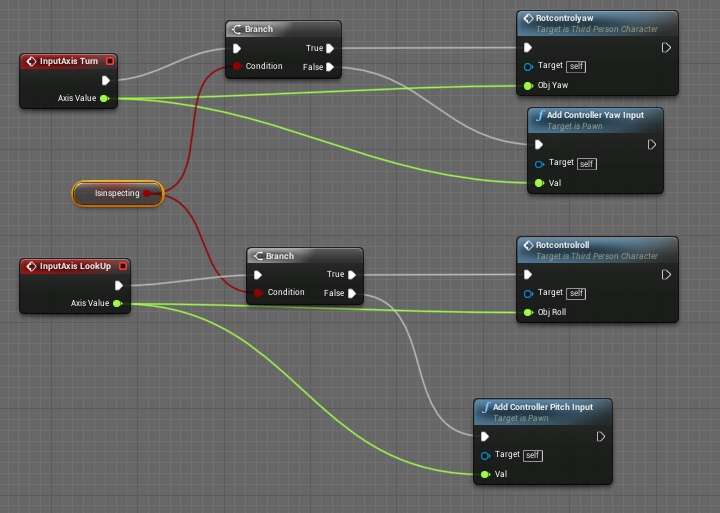
it just have a condition
meager spade
Damn you stuff Is hard to read why not name your variables properly
civic mirage
wow sorry, i'm gonna stop using gyazo bacause its clear for me, wait i do another screen
meager spade
It's not that
civic mirage
meager spade
It's the names are hard to read cause there is no spaces or fornatting
civic mirage
oh yes sorry
civic mirage
yep, but only when inspecting this object
meager spade
No your logic
civic mirage
what do you mean, how i did the BP ?
civic mirage
yep but the problem is not the object not rotating, its the client cant see the server moving head up or down
civic mirage
for example : i have a flashlight, and with client when i move up/down it doesnt mov up/down on server
i show you GIF
meager spade
I just saw you pick up something and rotate it
civic mirage
yes but that the inspect part not the pickup one haha 😄
i restart ue it just crashed rofl
xd
that happen when i minimise window sometimes
meager spade
Well pitch is normally done via an aim offset in animbp
Otherwise if you enable pitch in the comic the whole character will pivot
Cmc
So you need an aim offset like your holding a gun
Unless that is what your doing?
meager spade
That is how games do it
Same as yaw. In third person the character will just rotate and slide as it rotates when stationary
civic mirage
hmm i see if i can do that
meager spade
Which is why you do turn in place in animbp combined with an aimoffset
Aimoffset is what you want to do
civic mirage
thanks you man , i ping you if i get it worrk
meager spade
Cool there is lots of tutorials on aim offsets
civic mirage
hmm do i need an animation ?
i mean just to get the server look at pitch for server ? ?
civic mirage
hmm i see, i hope i can do the animations myself haha
meager spade
Well that's the hard bit :/
civic mirage
i try to do a lot myself haha
civic mirage
https://www.youtube.com/watch?v=AAd7g8tvheI hm just saw this tutorial you think its the good one ?

Today we take a look at how we can use the player's control rotation to affect the position of the characters weapon. Doing this will make the player's weapon/gun follow the player's camera at all times. Enjoy!
► Resources: https://www.virtushub.com/game-dev
Unreal Engine 4 ...
meager spade
Third person
civic mirage
this is the first
meager spade
Ah then yeah
meager spade
But you need to also handle the third person side as well what other players see of that player
Not sure if that cover that but it should
civic mirage
yeah, if it didnt work so just fuck the pitch lol
civic mirage
thanks i gonna take a look if it doesnt work
okay so it works for the server but not the client lol
 ocean geyser
@civic mirage part 37 - 37.2
https://www.youtube.com/watch?v=2bnQgFy8EpA

In this video we create an aim offset to use when we are aiming the rifle
peak star
Before I invest 3 days of extracting and compiling and building etc. into it, can anyone tell me if this solution for the Android-always-gets-127.0.0.1-as-its-own-ip-and-doesnt-work-with-sessions problem still works? It's been 5 years:
Unreal Engine Forums
For Android developers to discuss development and ask questions.
tranquil yoke
Hi Guys,
I have probelm, with replicating some variables.
On Listen Server, my client copy(dont remember the term) is not playing any animation , movement is replicating but not the variables for animation, what could be the issue.
But if use my server client, On the other client copy of my server client has animations, which means it is working that way, but some how , my client is not able to set the variables to server. does that mean i have missed a RPC call ?
tranquil yoke
My RPC function, which should tell server about client Animation Variable, is not working. What could be the issue ? anyone
Issue with the owner ship of the Copy of the client running on server,
How do i set it to Client player controller ?
No this is not issue, now i am confused, please help
twin juniper
Hey, if I cook client, it requires cooking server files? I didn't find any helpful documentation but I need understand this process. Why client cook need -Server target?
kindred widget
@tranquil yoke What are you trying to replicate for the animations. Which blueprint is it in and how are you trying to replicate it?
tranquil yoke
@kindred widget Hi, I have a demo, where i have used the AdvanceLocomotion 4 to do the animations, and it is running on ListenServer, only thing i want to replicate right is the movement, which is working fine.
But animation is dependent on some varibales, like HasMovementInput (bool) , IsMoving etc.
character is moving perfectly, But animation for Client On server is not working.
same logic works perfectly in the blueprint but not in C++.
kindred widget
You have these variables in the character?
tranquil yoke
Yes
kindred widget
And you're RPCing to the server to make the server set them which replicates them?
tranquil yoke
Yes, I have RPC call to the server, Let me show.
last line is the RPC call
all of these variables are replicated.
Even i remove the RPC call, my server Character runs perfectly on clients, because variables are being replicated.
But not the other way around.
can you guide me how should i debug this, What are the important steps to know , that it is setup correctly.
kindred widget
Well if your server is replicating to the clients fine, it's definitely a problem with the server RPC. I'm not that great with CPP, so all I can do is point you in the general direction. I'd check where your RPC is called from. Any RPC to the server should fail except the one owned by the client or the server version. I put my RPCs behind a "IsLocallyControlled" branch to avoid calling RPCs from anything but the client's version, server version was overwriting some of my variables at times. I'm not sure about the unreliable parameter on your RPC, it's not demonstrated like that but it may work. RPCs are unreliable by default unless specified to be reliable, might try taking that out. Maybe try some print checks on the other side of the RPC to make sure it's actually passing variables. Double check how you're setting them on the server side.
tranquil yoke
Code is inside IsLocallyControlled, I will remove the Unrelieable,
In CPP i am getting difficult to know which character belongs to server and which to client, how can i know that.
chrome bay
You can check Role, Net Mode and Controller to determine what is controlled by who. Just a piece of advice though, you shouldn't need all that information to be replicated in order for clients to display good animations. I can almost garauntee that will never hold up in a real-world environment.
It's also incredibly inefficient, where possible you want clients to be able to infer all the information they need to drive animations.
You don't want to be using up precious bandwidth for visual elements unless they are a) important to gameplay and can't be done client-side and b) aren't time-critical
That one RPC, per-player pawn, is a vector, two rotators, two bools and three floats. You're looking at 392 bits not including the RPC header each time that's called, and without any throttling.
tranquil yoke
@chrome bay I can play animations locally, how should i do it for server then.
chrome bay
If it's a dedicated server, you don't play animations.
If it's a listen server, they will play animations the same way clients will
But - animations on a listen server do not run at fixed intervals, you need a steady stream of packets from a client to see those animations because of the 'AutonomousTickPose' setting on the character mesh.
Characters do not move on the Server between client packets, they move in big steps and the mesh is interpolated to hide it. The animation is (by default) only ticked for those steps, it doesn't tick at the servers framerate because otherwise the animation notifies are out of sync with the movement.
If you're sending data like that via unreliable RPC's, you are also eating into the available unreliable RPC buffer for character movement, so it'll actually make the problem worse.
tranquil yoke
@chrome bay you need to go easy on me, I still dont understand that much terms right now.
So basically you want me to run animation on server for client , using the character Movement replication, But not via the RPC, if Character is moving doe something something like this ?
chrome bay
If you have to send extra data to the Server, I would at least hook it into CallServerMove in the Character Movement Component so that it's called at the same rate as movement updates. That way you benefit from the same throttling that CMC already does.
To be honest you're dealing with a complex topic so it doesn't really get more low level in terms of the explanation, multiplayer is complicated.
tranquil yoke
yes you are right.
chrome bay
But the TL;DR is that movement alone should get you 99% of the way towards all the information you need for the animation to update itself. ALS was not put together with multiplayer in mind, I'd advise looking at the Paragon content Epic uploaded to the store. Those character anims are world-class and all the locomotion is driven purely by the existing replicated movement information.
I'm no animation expert BTW, but multiplayer is my jam
tranquil yoke
@chrome bay but the same setup is working fine in blueprint, but not in C++? I get stuck , here.
kindred widget
Speaking of animation updates and such. Do you know of any way to get a player's pitch out of character movement? Right now I'm replicating a float, but that feels really odd to do since it should all be replicated in character movement. I get zeros when I try to get that on the server or other clients though.
tranquil yoke
@chrome bay Thanks for the information, I will try to debug this. using the same setup first, I need to understand what is happening here.
chrome bay
Pawns have a replicated and compressed 'RemoteViewPitch' you can use
You can use GetBaseAimRotation() to get that pitch
For the local player /server it'll use the control rotation because that's available - but for remote clients they will use the compressed pitch
@tranquil yoke I've not been following the full convo I'm afraid. While it probably works in BP I'd suggest packaging it and testing it against something like Clumsy first to simulate some real-world conditions as that will no doubt expose a lot of the flaws. https://jagt.github.io/clumsy/download.html
The way stuff works in CPP is pretty much the same as BP though, in terms of who can do what etc.
tranquil yoke
@chrome bay is there any Multiplayer documentation ?
chrome bay
This doc is a good overview: http://cedric-neukirchen.net/Downloads/Compendium/UE4_Network_Compendium_by_Cedric_eXi_Neukirchen.pdf
Otherwise outside of official stuff I'm not sure
ivory dome
https://gyazo.com/9b03f2a1a59310ff3871c56289d0092a https://gyazo.com/f942909a8ed5e487483f0fddfec6b525 Why isn't this working?

 kindred widget
@ivory dome Because no rifles exist on your server. Also, why are you just getting the owner and setting it as the same thing?
 kindred widget
Well, your first problem is that none of your rifles seem to exist on your server. You should be spawning these weapons on the server and either keeping up with them with multicasts to the clients, or replicating the variable to the clients so that they know what weapon they're using. Then you can set the owner to the server's version of the correct pawn, then you can call server RPCs from that weapon once it's owned correctly.
tranquil yoke
@chrome bay @kindred widget Thanks for the help
 foggy idol
So after implementing the sprinting system from the shooter game example
Not Everytime a player moves or sprints or aims he gets disconnected from the server
I've tested it with print events
The second I move I get re turned to the origin and the print events go from showing client and server to just the value I was printing
Please can anyone help me with this
naive locust
HOLY CRAP!!! We just built in our own lag correction system and its like butter
its like the client is right there next to you on your computer with zero lag
no stutter nonsense
naive locust
not right now, we're doing our final project, but i'd be happy to help tomorrow
foggy idol
Ok
 dark edge
@naive locust
So what's the elevator pitch for how your system works?
naive locust
i'll give you the short
so listen server / client setup. We treat client as a dumbterminal, just pushing input to the client. We have a 4 axis (rolls, yaws pitches and throttles) pawn that does nothing but fly. Playercontroller intercepts client input, we set a vec4 (xyzw) for those 4 axes like this:
so its one variable on the pc. we then take our cached pawn and call one input event on server to take our input. Now, there's lag there, right? so at the server side where the call is received by the client we have a little accounting system that accumulates how much time has passed since the last call (look at it like a ping), and we take that time and divide that by the server's world delta seconds to get the number of 'potential' frame opportunities missed by the client while the server itself was computing trajectory for its own pawn every frame. So with that new value of missed frames, we take the input multiplied by the throttle, world delta seconds, and the number of computed missed frame opportunities, and that would've been the accumulated throttle to be added to the speed of the client that was missed, and we add that to the speed of the client to be multicasted out. I mean, that's the very very short, but we also do it for rotations as well.
There is a lot more to the equation, but we already know how to take that and significantly improve on it
chrome bay
That's extrapolation btw not lag compensation
chrome bay
Lag compensation describes something else
lag compensation is normally used to describe rewinding something on the server. In a shooter for example, Player A shoots Player B. By the time the Server finds out about it the victim has moved, so it "rewinds" the victim by the shooters' latency to work out where the victim was client-side to see if the hit was valid
naive locust
so the reason why we did this is because we aren't using a character movement component because it didnt' do what we needed it to do and we didn't want to modify anything, so we are using raw input on a plane (to fly). So using traditional methods of call on server, and multicast out results for adding some offset, or setting a position, we found it to be very stiff and had stutter issues. So we came up with this solution that made all of that go away.
it literally is so smoooth its ridiculous and we are very happy. Thouth @chrome bay I don't understand how the term extrapolation fits here. could you elaborate? I got the part you described on lag compensation
chrome bay
Maybe extrapolation doesn't quite fit either, I'm not 100% sure I follow. The traditional method btw is the controlling client tells the server where it moved, then through replicated movement other clients are updated.
You can optionally replicate the clients' input along with movement too, so that those clients can "estimate" where the object will be for the next update between packets (which is the extrapolation part)
rain coral
Is there a specific thing about replicating arrays I'm missing? The team class is replicated, the array is replicated, the containing actor is set to replicate, have implemented GetLifetimeReplicatedProps. I don't get the OnRep for some reason.
chrome bay
@rain coral is ATeamManager relevant?
naive locust
@chrome bay there is a lot more that is happening, for example, when the server does its magic with closing the gap (what i called lag compensation), it does some work and then multicasts out the value of the result to clients, who then, in their tick, use Vinterpolation to smoothly update planes on the client side using the interp speed of 1
rain coral
@chrome bay Have set bAlwaysRelevant = true
chrome bay
Kk yeah should be then. Otherwise no shouldn't need to do anything special
Are you sure the TeamsArray is only being modified Server-Side?
civic mirage
https://gyazo.com/b22e2a24a40570bc7005780d0a3098dc how can i fix that please ?
chrome bay
Could be by some fluke it's being modified in the same way client-side and that's causing the OnRep to be skipped.
civic mirage
its the client
rain coral
@chrome bay Yeah verified that it only runs on the server
naive locust
@chrome bay going back to the mention of traditional method, we chose to have clients act as dumb terminals and just send the input in, and only apply some post server processing to make their view nice and smooth. I actually thought multiplayer client / auth server games were supposed to have clients act as dumb terminals and just supply their input to the server. We don't call the server through the input events, but instead the playercontroller's tick calls the server (it first checks if is local controller) and supplies that vec4 i showed, so we get away with one call per frame instead of four (one per axis)
civic mirage
https://gyazo.com/f11dfe4c7a7141fe86ed984db1f4f1b8 omg actually fixed it by disabling orient rotation to movement
 chrome bay
@naive locust Clients are still dumb terminals with the character movement system, but it's the prediction that makes the difference. You have to do client-side prediction otherwise you get input lag and end up with an unresponsive game. In UE4 clients (and characters) still treat information from the Server as authoritative.
ivory dome
My client can't see the shooting, only the server can. Am i supposed to make the startfire funciton multicast? https://gyazo.com/06b0fa82b44aeda27d4cf827ceb7978b
 peak star
I am down to 2 options for making my game able to play between 2 android devices over LAN: build the engine from source after fixing the bug that makes Androids get their own IP address as localhost, or set up a NAT punch through (I think thatnis what it is called) which would technically be going outside the LAN but should work
Maybe a 3rd option I'm searching for a previous version of the engine where the Androids function to get its own IP address is not broken
That would actually be the best one if any of you know of such a version of Unreal
Although, in looking up how NAT punchthrough works, I noticed something called UPNP which it says makes NAT punchthrough unnecessary if all the devices involved can do it. So maybe that's a 4th option. I don't think IPv6 is an option since I heard Androids don't do IPv6 yet.
I also heard of something called WiFi Direct but it doesn't sound like Unreal can do it without again, rebuilding from source (which I'd like to avoid since it takes about 3 days)
 oak pond
I have a weird bug, in a crawl event I use I reposition the mesh but even though this crawl event replicates fine, the mesh doesn't move on the other players screen I have no idea why
also when I attach the camera to the ragdoll, the clients camera goes extremely shakey and horrible but the server does it fine
I hate physics replication it just doesnt work
kindred widget
Having a little trouble testing server travelling. I have a transitionmap specified, game mode on all maps are set to UseSeamlessTravel=True, for testing I was just using a simple rpc to server on a controlled pawn to call the console command to server travel. Map name is correct, have even tried different map names. All that happens is I get about an eighth of a second pause and then gameplay resumes as normal with no travel. Do I need to call this somewhere else? Have I missed a checkbox somewhere?
 fallen pawn
Anyone know why steam works in my Development Build but not Shipping?
 tacit orbit
Hi, I have recently went through the Multiplayer Blueprint Tutorial which I have learned has some issues. I got everything working except getting the PlayerInfo data to pass to the ConnectedPlayer Widget. Did anyone ever figure out how to fix that?
dark edge
@naive locust You can just get the axis values on the tick and make the struct all in one shot.
naive locust
does input not run faster than tick?
bitter oriole
No
dark edge
@naive locust It runs either before or after. For continuous stuff I like doing it like this. Here's how my vehicle game does it.
I use a similar model to you. Input is continuously replicated around and every sim in every view is using the input, with physics replication tying it together.
It works great but this is with NO local prediction.
You can probably do some sort of half-ass prediction by applying the input locally immediately and setting up your physics replication settings to play nice with it, bit I haven't sorted that out yet. For a flying pawn in 3d space that accelerates smoothly it'd probably work great. Where things get squirrelly is with pawn vs pawn collisions and highly transient behavior
naive locust
I swear, i thought i read something that showed input ran at a fixed polling interval which was significantly faster than 60fps (what i use as a standard)
maybe i dreamt it
dark edge
Not sure but I'm pretty certain it's accumulated and the events fire per frame. So it might poll the mouse a million times but the end result is a sum.
naive locust
I mean, with a mouse input, i would be fairly confident that moving the mouse at lightning speed requires ridiculous input polling. I can easily test it when i'm done with my project. it wouldn't matter anyway with tick, you're absolutely right that i could just grab it in tick. I could make the 'stinky egg' argument that the input could change by the time tick got it (meaning, as tick is running, input is changing if what i thought was true), so setting the vec4 in input would get the absolute most recent inputs, but i wouldn't pull that bs
what's beaituful @dark edge is that we went further and made one server call for every single input per tick
so one call for 8 different axis / action mappings
dark edge
You might miss some stuff that way tho. You want actions to be reliable but axis not
Unless you run your own sort of buffering and acknowledging system
naive locust
why would you not want axis reliable?
its just a single call, the call is reliable
i just shoot all the values through the event
dark edge
Because if you lose a packet of throttle input it's no problem
You're sending them by the hundreds anyway
But if you lose the packet that said you shot then it's a big problem
naive locust
lets say i had broken up actions and axis so that we make two calls... one reliable, one not.. isn't one reliable call better than 2 calls?
dark edge
Reliable calls per frame are gonna turn into an explosion of missing and resent packets
naive locust
hmmmmm
dark edge
Basically use reliable for one-off stuff that has to go through, and unreliable for stuff that's continuous
Firing a shot should be reliable, sending steering input should not.
naive locust
you brought up a good question i have: do you have any doc links that show how reliable vs nonreliable calls are made?
right, i see what you're saying, absolutely
like, the internal workings of it, not surface level that 'o a reliable call will eventually make its way'
dark edge
Nah but I think there's a gdc talk about Rocket League that kinda covers it. The gist is that a reliable is acknowledged and if not acked it gets sent over and over.
naive locust
right, i was thinking in the packet, there is a request to call this delegate when received, or something like that
dark edge
Reliable is asking "do you copy" every time and unreliable is just spraying and praying.
dark edge
Ya basically. UDP vs UDP with some sort of ack layer.
naive locust
ah yea, we actually did that in distributed computing
we made a UDP system with TCP-like capabilities
this is why i love this place: this is collaboration right here 🙂 Thanks @dark edge
peak star
@oak pond I don't know how to fix your problem but the PhysX engine is nondeterministic and simulates differently each time and differently on each machine, so that's one problem. The other one is I heard trying replicating it is a good way to go insane. No ideas except maybe try turning off either location and velocity replication, or physics, for the affected pawn temporarily. It sounds like maybe the physics sim is telling it to do one thing and the replication is telling it to do another thing and they're fighting over who is right.
Now I have a question for myself: Does anyone have a good guide on how to make Unreal specifically do NAT punchthrough on the same LAN, or knows of a version of Unreal where Android does not suffer from the bug that makes it return 127.0.0.1 instead of it's actual private IP address?
oak pond
yeah I could literally see it flashing from the clients position to the servers
there must be some kind of fix, idk how big games do it
I love how almost all valve games just have almost flawlessly working multiplayer with tonnes of ragdolls as standard
peak star
Good question IDK. But I think if you let the server keep replicating it, it's going to keep flipping out
Either that or don't simluate on client, just replay/animate the movements the server simulates.
If you try to do both then you get two or more increasingly different versions of reality simulating against each other and nobody can decide who is right
oak pond
yeah replaying the movements sounds good, do you know how to set that up?
I'd rather have laggy accurate mp than non laggy inaccurate
dark edge
@oak pond first dig into the physics replication settings.
It's rather complex but basically there's a bunch of values you can adjust to determine how much error is allowable and how to deal with it.
oak pond
oh cool I don't think I saw that
dark edge
Start with getting a replicated cube to play nice when bouncing around, then graduate slowly to ragdolls.
oak pond
cubes seem very accurate, though I only spawned one I'll try with more
dark edge
And also remember you don't necessarily need to replicate everything. Who cares if a ragdoll finger is pointing in a slightly different direction as long as the torso and other important bodies are right.
oak pond
yeah I don't care about the specific pose, just location matters
 oak hill
Hi guys, there's some method to see only the removed/added/modified elements in a replicated TArray when it is received from a client?
peak star
Does anyone know of a version of Unreal Engine that does not have the bug on Android builds that makes them return their device's IP address as 127.0.0.1?
dark edge
@oak pond you can prolly get by with just replicating the torso physics around and let the rest fall where it may. If your joints are set up right with anglenlimits and stiffness it should end up similar.
 north olive
Hey friends. I am currently working on a casual multiplayer fighting game.
I would appreciate some advice on triggering attacks in my game.
Currently I have a boolean value that I replicate bIsAttacking.
bIsAttacking is read OnTick, and triggers my attack animation, and activates my hurtbox. Once my animation finishes, i have it set bIsAttacking to false.
Is this a good way to do this, or is there a better way to be triggering attack animations?
oak pond
yeah adriel I'm using a slightly edited default mannequin physics asset, as long as I can keep the pelvis bone at the accurate location that'd be great
I should probably ask - what's the best way to do that then?
shy cape
good eve cyberspace, while solving mystery with multiplayer found online subsystem plug in, to install got 4.24 client now need Uetopia patched engine, im downloading now, but have no idea how wtf to do after, please spell some guidance
dark edge
Do you have replicate physics turned on?
oak pond
yeah of course for everything
played around with some replication settings and it seems to help slightly but theres still lots of times where one player sees them fly off the map and it doesnt for the other player
dark edge
Start with applying an impulse on server only and checking that the result is being replicated out.
You need to go one tiny bit at a time.
oak pond
what do you mean just having a key push a ragdoll or something
I got some other stuff working with replication fine
dark edge
Or just a timer. You gotta be sure that it's following what the server says is happening. Begin play, wait 3 sec, punt the ragdoll on server only. If it doesn't budge on client then something's not set up right.
oak pond
ok Ill try that now
and now its refusing to do even THAT
telling me it needs to be simulating physics to do it but it IS
dark edge
How do you set simulating physics?
oak pond
I just have a ragdoll key and that works fine
dark edge
That's only setting it on the client unless you do it on a listen server in which case it's probably only sitting it on the server
I'm not 100% sure if simulating physics is replicated property but if it is, make sure that the component itself is replicated so when you change simulating physics on the server it also changes on the client
oak pond
yes it is Ive had all the ragdoll events working fine
just not accurate position
ok it seems for some reason I just need a LOT of force to budge this guy
dark edge
Force should be a pretty big number, it's in centinewtons
Also don't use force for launch, use impulse
Forces for continuous things like forces or thrusters or tires
oak pond
ok I set that up and it does launch it for both players, but the client is of course delayed
like half a second delay for the impulse
dark edge
Are you simulating latency?
oak pond
uuhh
what do you mean
oh not purposely that I know of
actually no cus when they run around its barely laggy
oh great now the physics cube is just flashing in and out of existence for the client
nice so this is just from literally standing on a physics cube https://gyazo.com/351f02c3af6b6c5a67c64017f0f04e4b
yes the player has some ragdoll body parts which I can see is likely not worth keeping
damn this is so limiting
dark edge
What exactly are you trying to have happen?
Network physics is like one of the hardest problems in game networking. You gotta make sure you really understand exactly what's going on to get good results.
oak pond
well it wasnt even this bad the other day
literally all I want is just accurate locations of ragdolls and other physics objects, I dont even care about exact pose but I cant have it flying off the map for one player and not the others
peak star
@north olive I heard Animation Montages are the way to go for fighting moves, but I don't know anything about them
dark edge
But is the overall movement to be physics or CMC driven? Cuz it looks like it's following the capsule.
peak star
when you simulate physics the physics simulated bodies do their own thing and leave the capsule behind
So if you want to just replicate the ragdoll's core location and no poses, then I guess just replicate the root bone's world location and update the clients ragdoll locations based on that. Maybe that will work?
oak pond
yeah I just make the capsule set its location to the mesh location
yeah that sounds ideal but how would I set that up?
peak star
not sure
But not setting capsule location because that does nothing to the simulated bodies except maybe provide a relative point from which the simulation started, but I wonder if it even does that
Set the physics asset location
oak pond
yeah I only did that for the camera
oak pond
yeah ik
peak star
But might not be able to override the physics either so I'm not sure if that will work
oak pond
literally all I can think of is "set world location mesh -> get world location mesh"
peak star
Here's a weird idea:
dark edge
When ragdolling what you need to do is turn off collision or the CMC on the capsule, and have it follow the ragdoll around. Which it sounds like you're doing already.
peak star
On server, simulate as normal.
on clients ONLY, add a Physics Handle, and have it update its position every tick to match the replicated world location of the server's ragdoll location
oak pond
yeah it is adriel
dark edge
You don't need a physics handle in this man.
peak star
that would make basically an invisible mouse smoothly drag the client's ragdoll around to be the same place as it is on the server
Like I said weird idea
oak pond
ok I guess I could try that if all else fails
peak star
Gotta go. I've been on break too long
oak pond
what I tried before was attaching the pelvis to capsule but of course then the ragdoll doesnt roll or fall off edges
peak star
you could dive into Unreal Tournament code and see how they do it
It's open source AFAIK
dark edge
Now there should be no attachment unless you somehow disable the CMC, and then shrink the capsule to basically be in the same place as the pelvis
peak star
But it's also C++ no blueprints forthe most part AFAIK
oak pond
oh nah I could not touch that
dark edge
There's no advantage to it, just moving the capsule client side to copy the location is fine.
dark edge
That's what you're already doing right?
You move the capsule to follow the pelvis around?
oak pond
yeah thats it but thats only so that the camera follows the ragdoll
doesnt affect position or anything of course
dark edge
Yeah so that part shouldn't be a problem. Although you should maybe disable it for now to make sure that you don't have some sort of character movement component fighting. What you got to do is you got to get it to where the client's pelvis ends up pretty much where the server says its pelvis is
oak pond
yeah thats the goal
dark edge
So start with just enabling the rag doll, punting it across the room, and seeing if it behaves the same. There's a way to visualize the location corrections. One second.
oak pond
yeah right now I let the ragdoll go loose and throw it up in the air, of course currently its not accurate
dark edge
P.netshowcorrections 1
harsh lintel
if I set an owner to an AI controlled pawn will it be valid?
fallen pawn
That's a lot of overhead to get essentially network ragdoll
You should try just making an actor out of your Phat asset, and replicating it first
wouldnt recommend replicating a Physics asset unless you are doing a game like Human Fall flat where the physics is super important to gameplay
And it's limited to like 4 players
 kindred geyser
is there a specific trick or function that i can use to wait for the player controller to initialise its data in the game mode? I'm finding that the player controller is spawned and then accessed a few execution threads prior to setting the data in the controller - but overriding GameMode functions naturally doesn't allow me to delay so I am just wondering if there's a system in place already for this? regards
I've overriden SpawDefaulPawnFor, but this still executes before the controller has the info
I'm setting game instance options in the player controller as he logs onto the server - so it's pulling saved data from the instance and applying it to the server as it spawns. But this is happening too late, and i need to try and set the values earlier but finding this not as straight forward to do as it sounds
Server: None is what needs to be Server: Australia, but the latter is fired just a tad too late
civic mirage
hey guys, i would need help, when i package try my game standalone, it is connected to steam, but when i build, it is not, it doesnt show overlay and its not connected
ocean geyser
@civic mirage make sure steam ID is set so bEnabled=true in the defaultEngine.ini should allow it to be created by default, also subsystem set to Steam
civic mirage
i already set it to true, i just added https://gyazo.com/40515b1c7bfba50ab3158f6416c1e0b6 the SteamAppId=480 because there was only SteamDevAppId=480 written, i gonna check if that work :V

still dont work when packaged ..
 midnight swan
How to make multiplayer with physics in UE4. Client-Side Prediction in Blueprint. anyone who has a guide for it? would be great if i could understand it and how to read Network profile. Everything is behind(lagging) in my game. have tried smooth sync doesn't quite work. have read some of the previous answers but have not found an answer. Can test it via stream.
civic mirage
okay so i had to set to shipping devellopement build and not the shipping one
@midnight swan have you tryed to change the ping extrapolation in project settings to like 1 to see if its better for you https://gyazo.com/4bb79972d5f79bfa8049859d22536d41 i dont know really what it does but it work for me
 midnight swan
@civic mirage thx, It is not in UE4.18 version. I've been thinking to updating. Too the new UE 4.25, when it's coming. Maybe it also helps a little, that had appeared a new physics engine in it
civic mirage
i have 4.23 @midnight swan
midnight swan
ok, Did you get steam to work? @civic mirage do use the plugin or via text file.
This update look nice UE4.25.: Networking Updates:
Networking Insights (Experimental). Unreal Insights now includes Networking Insights to visualize network gameplay data and identify performance bottlenecks or faulty code.
civic mirage
i did make it work by adding a text file in the shipping build with the app id 480
peak star
Soooo do i need a dedicated server in order to set up my own online subsystem or can it be p2p just using a listing server?
That lists the session thingies?
twin juniper
Hello guys,
I did something but i dont know if its something correct.
I replicated all player information like "speed, is in air, jump count etc..." from my "parent" bp player base and say to the server "replicate them to client".
From here, in my animation blueprint, i use replicated variables values to do animation transition.
Everything is looking ok but i dont know if this is the best methode to do
 hybrid crown
@twin juniper this is your animation blueprint i guess ?
 serene meadow
hey guys, i'm new to networking, but i want to know if it is possible to make the entire networking on blueprints or do i need to use c++?
bitter oriole
Bluprint's fine.
You'll need some C++ for sessions (inviting / joining people on Steam etc) but there are premade packages for that that just need compiling
serene meadow
@bitter oriole thanks for the help!
dawn summit
Greetings. Question. Is there a way to edit/replace Movement Component in Inherited from Character class? Or i have to rewrite character completely?
 nocturne cloak
Declare your constructor like this:
In the constructor:
AMyCharacter::AMyCharacter(const FObjectInitializer& ObjectInitializer)
    : Super(ObjectInitializer.SetDefaultSubobjectClass<UMyCustomCharacterMovementComponent>(ACharacter::CharacterMovementComponentName))
{
    //...
}
hi i need help
i just dont know how to connect my game with a server
i can do everything except multiplayer game launching
 ember iron
Have you seen the multiplayer shootout sample?
twin juniper
@hybrid crown yes it is
 rose egret
is that a good idea to use RootMotion for remote clients of a FPS game ?
 grizzled stirrup
Is GetWorld()->ServerTravel("?Restart"); only opening the same map as you are currently on and doing nothing else to reset the game?
stoic acorn
I can't seem to get PlayerStart tags to work in my graph. I'm calling a 'Get All Actors of Class with Tag' and the array is showing up a length of 0
Ah. Just read on a forum post that this is not how the Player Start tag works. If I put the tag under the Actor in the Details panel it seems to work
 sullen kernel
Does anyone know why the weapon class in ShooterGame calls ServerHandleFiring() in HandleFiring()? Because the server is notified when the fire button is pressed on the client in StartFire(). So both the server and client already set a timer to continuously call HandleFiring() until the fire button is released.
Basically when the player holds down the fire button both the server and client are already continuously calling HandleFire(). So why does HandleFire() need to call ServerHandleFire()?
    {
        // local client will notify server
        if (Role < ROLE_Authority)
        {
            ServerHandleFiring();
        }
Hmm.. that's interesting, I've been looking at the code. Basically if you are using a dedicated server setup (no host player), then HandleFiring() on the server only forces you to reload if you can't fire (and a reload is possible). It doesn't do anything itself to update the ammo. It's only when the local client who fired the shot runs HandleFiring() locally that new server RPC is made to update the ammo on the server side.
So basically, the player holds the fire button. Both the client and server set a timer for HandleFiring(). The (dedicated) server call is only really checking "if the player can't fire, can he reload?" but not updating the ammo. And it keeps checking "can he reload?" as long as the fire button is held down. It's only when the local player who fired runs HandleFiring() that the ServerHandleFiring() is called and the ammo is updated on the server side.
But if it was possible to play as the server (host player) then it would be updating the ammo and the extra call to ServerHandleFiring() would never happen. So that explains why the function is so noisy. It has to make a lot of extra checks if the player can also be the server.
 keen surge
Hi, I need some direction where to look... In our project multiplayer space shooter, based on unreal space shooter, coop players sometimes can't see each other, literally when player cross come imaginary line on floor it disappear, when return appear again... totally random. It's prototaype and probably not optimized well...so it's about relevancy, network overhead, or what can be?
 acoustic inlet
I seem to remember something like this, but I can't for the life of me remember where I found it
Is there a way to connect to another person's server via command line in the editor?
Like say I have a desktop running the game in editor and a laptop running the game in editor, is there way to like connect 192.168.0.123 or something and connect to the desktop's instance of the server?
acoustic inlet
Ah, thanks you!
twin juniper
uw
 silent phoenix
Can anyone help me understand this.
I have an inventory system that I wrote in c++ . It is currently inside an actor component. Both the reference to the component and the struct array are replicated
But a simple command from player controller can set array element of that replicated array
Am I missing something here? How do i secure it from client side changes
I originally had my inventory inside my playercontroller but i noticed this was happening there so I assumed it had something to do with ownership. I moved it to actor component thinking that would fix it but maybe i just dont understand what im doing lol
I'm worried about cheating. Does this only work because its being executed from code inside PC and player would never be able do it if the code isn't there?
hybrid crown
If a variable is mark as replicated @silent phoenix, then she cannot be modified by the client.
Only the server can applie modification, if the reference change, no worrie, it's only client side.
The best way to thing like this, is to do modification only on the server, and the client only display, so the client never can give any reference to an object.
silent phoenix
Thanks Aherys. If a try and spawn the weapon added this way it doesn't work.
I've dove head first in this journey from so some things still get past me. I have one more question before I head back to the lines.
I understand the concept of modifying memory to adjust values as a form of cheating and from what I understand that a client modifying a replicated variable will result in no real action in game. What other best practices should I be following to keep security in mind? Can I client somehow forge server functions?
raven moss
TravelFailure: LoadMapFailure, Reason for Failure: 'Failed to load package Shutting down PIE. Why is it the editor can't connect to an IP address? For some reason only the standalone build will connect to the session?
peak star
OK so I downloaded the source code for Unreal Engine so I can try the fix for Android to make it return the device's actual local IP address instead of 127.0.0.1
wish me luck
I have to alter the code for that part, apparently. Epic's code is broken as of 4.23 or so I'm told.
(but only for the android version)
If anyone knows an easier fix, I'm all ears
hybrid crown
I've dove head first in this journey from so some things still get past me. I have one more question before I head back to the lines.
I understand the concept of modifying memory to adjust values as a form of cheating and from what I understand that a client modifying a replicated variable will result in no real action in game. What other best practices should I be following to keep security in mind? Can I client somehow forge server functions?
@silent phoenix
Nope.
In fact, to be really honest, avoid cheating is an utopie, and a very few game success to avoid it. (And even... never for so long). Simply look to Rainbow Six Siege, Tarkov, Overwatch, CSGO.
You can in theory be at 100% protected, but it's a complexity who cannot be reach by a human, the fact is you need to think about all, and this is the base of security : you will always make a mistake. Nonetheless, don't do nothing too. The very first rule is : never trust the client, and if you should, then be care with what.
My player can teleport himself ? Yes / no ? is it something who will break the game over weeks ? or it's just gonna throw one party ?
etc etc...
chrome bay
You have to design things as if the client can do whatever they like. The trick is to make sure the client only has the bare minimum of data they need to play the game, and to make sure that they can't somehow fool the server into cheating on their behalf. Some things you simply can't protect against with game code, like reading positions of actors from memory and putting an overlay on screen to highlight them all. That sort of thing is the realm of anti-cheat software - but even that isn't foolproof and never will be.
And yes - clients can spoof packets and send invalid data through server functions. They can even use them to crash the server if you aren't careful.
 slate portal
Hey guys, so i followed this tutorial https://isaratech.com/ue4-network-multiplayer-in-blueprints-getting-started/
And added the code above so i can change the materials depending on which player it is on the PlayerController (I initially put them on the pawn bp but pawn is owned by the client only which means i should put this on the player controller, am i right)
I ran the game and i've confirmed that each pawn has the player ID, but it seems like only the server changes the material, not the others

Even though the network is a well covered subject in UE4 documentation, a small tutorial explaining how to get started with a really simple application is really missing. In this article, I propose you to implement a multiplayer small game over the network, and we will see how...
in the client, they only change themselves. how do i make it so in the clients other pawn's materials are change appropriately?
chrome bay
Why on earth does that tutorial tell you to send an RPC for pawn movement through the player controller :/
This is why I have trust issues.
slate portal
Oh boy xD what's the proper method?
chrome bay
Use the pawn. There's no need to create a dependency between your controller and pawn.
slate portal
Ahhh gotcha, should the spacebar event be in the player controller or the pawn though?
chrome bay
Pawn also. Pawns can already respond to input and the player 'owns' them automatically, so they can call RPC's
slate portal
So i'm assuming, the change material code should be in the pawn as well?
chrome bay
Yeah looks like it can be too
Urgh. That whole tutorial is nonsense
Begin Play & Delay Nodes = eww.
Player Controller Movement = eww.
slate portal
I gotta admit the delay node was a temporary eww that i put in xD
chrome bay
I can see why it won't work for other players anyway. Give the "Player ID" variable a Rep Notify function, and use that rep notify to change the colour of the material.
slate portal
so i moved the RPC to the pawn BP and changed the PlayerID to RepNotify instead of Replicated
chrome bay
Yeah that Server RPC won't work.
Move all the nodes after that Server RPC to 'change colour' into the Rep Notify function
And change the 'Select' node so that it uses indices 1-4 instead of 0-3
(0 is the default value, so you won't get the notify)
Alternately you can keep indices 0-3 and call the Rep Notify manually on BeginPlay too
slate portal
uhm i moved the code to beginplay and it worked properly xD
is it okay to do this though?
chrome bay
Where is the PlayerID variable set?
chrome bay
Ah yeah, you'll have a race condition there.
slate portal
it's just the tut's code with an added variable
chrome bay
You can't guarantee the player ID will be set by the time you receive those pawns.
This tutorial has annoyed me so much I'm gonna spend the day writing a new one
slate portal
Ahh i see, so i should be setting those variables after the pawn is all spawned in?
Hahaha, that would be great xD please share once you do
chrome bay
Well given it's a replicated var, you can assume that the Server can change it at anytime. If they do you want to be able to update.
So my advice is put the material colour code back into the Rep Notify, and also call the Rep Notify function manually on Begin Play.
(Just because of the 0 index)
slate portal
Ahhh i see, gotcha
chrome bay
But also yeah, it's very likely that some vars won't be up-to-date. You might receive pawns in different orders etc, even before controllers sometimes.
slate portal
by recieving pawns do you mean the spawning?
chrome bay
Yeah
Clients are told to spawn actors when they "receive" them - but they could receive them in any order
Also, relevancy. When an actor goes out of relevancy range it's destroyed completely, then re-created when it comes back.
Late-join clients etc too.
slate portal
Ahh, to handle that do i need to check which spawned pawn matches which controller and possess them in order then?
chrome bay
No that's no problem. Clients don't know about other controllers anyway
Actually for this particular case it might not be an issue re receiving stuff in different order
slate portal
ooh alright xD
chrome bay
But in general if a replicated var needs to change something, use a rep notify
chrome bay
np's
 karmic venture
Hey, trying wrap my head around the network stuff, where to call functions from etc.
In a case of a player can pick up a ball and throw said ball
the way i am currently achieving this outside networking is player character has a pickup function, inside that a pickup function is called on the ball actors class, which destroys itself when called
a static mesh component on the playercharacter changes to match the mesh of the ball you just picked up to make it look like its in the players hand
and when throwing it the playercharacter calls a throw function, that spawns an actor of the class the player 'picked up' and calls a throw function on the newly spawned ball actor, which in turn adds an impulse causing it to be 'thrown'
what i am trying to figure out now is whether playercharacter is the right place to call these functions from
because the action of picking up and throwing the ball will need to be done so all clients see that happening
and if i'm reading correctly, APawn which APlayerCharacter derives from is available on the server and ALL clients
I guess the question is am I in the right way of thinking here? And I have set the ball to replicate and replicate movement, I shouldn't need to do much more than have their internal Throw and Pickup events UFUNCTION(Server, Unreliable, WithValidation) right?
 steel fox
Hi, how can I get all player controllers in game mode and identify them?
 patent hemlock
Hey Just wondering if anyone has come across this little issue ( LogOnlineSession: Warning: STEAM: Cannot create session 'GameSession': session already exists ) get this when loading advanced steam sessions server.. I have check and i dont seem to have any other instances of the server open.. So got me a little stumped.. Cheers in advanced if anyone has an idea??
civic mirage
Hello, anyone know why my widget dont show in mmultiplayer please ? it work in editor but not real multiplayer
 idle flame
Hello, anyone know how would I set up an automatic system to start multiple ue4 game on a dedicated server like ovh ?
steel fox
So there isn't any specific function?I'll do an override
karmic venture
there might be, but this is the way suggested in the documentation i'm reading
ivory dome
for some reason my client shoots out of my hosts position and i think it has something to do with the way i get the camera, how would i make this work for multiplayer? https://gyazo.com/7e3e31c65bb9b8ef8c26e8712745ca0f

 buoyant wedge
Guys i have try the find player start and I add a tag red and Blu for divide the squad player start but if I use the get all actor of class with tag a error incoming. Any one can explain how use tag on player start override?
raven moss
Anyone testing multiplayer with two computers?
I'm finding that for clients they have to run standalone in order to properly load the map. Does anyone else have this problem?
brittle sedge
Yes PIE can't travel between levels. I always test in standalone with 2 instances on the same machine.
silent phoenix
@chrome bay Appreciate your reply last night thank you.
cerulean escarp
hey y'all what's the best way to disable collision between a player and a vehicle in multiplayer? I've got a physics helicopter that one person can possess, and the passengers can attach themselves on sockets within the helicopter. I've tried disabling collision through an RPC for the player but the helicopter still thinks it's colliding and does the usual flying around sporadically when two objects keep colliding. I have also checked to be absolutely sure nothing on the player has collision enabled when mounting the helicopter. any ideas?
kindred widget
@cerulean escarp That's a hard question to answer. If your components aren't replicated, you'll need to multicast all of your collision changes I think. It shouldn't matter if they're colliding on the client, it should just look incredibly weird and spaz out. but if your collision isn't changed on the server, then it'll actually move your objects. Might put some overlap or hit events in. If your collision actually is off, they shouldn't fire anywhere. If it isn't off, at least you'll know where.
cerulean escarp
I’ll give it a try and see if collision is still enabled, thank you!
fast arrow
Hello, i'm trying to launch a dedicated server for my project, but it crashes with errors. i cant figure it out what is wrong and how to fix it.
buoyant wedge
Any one have problem with steam socket? When I enable the game don't work
safe spade
If setting up some custom code to eventually replicate location and rotation, but never scale, is it better to keep location and rotation separate or is it reasonable to combine it into a transform or something?
a transform or other compound object would be easier to work with but since parts of it wont ever be used I want to be aware of any networking inefficiencies that could result
thin stratus
@fast arrow Can't see what it is exactly, cause you are missing symbols. But it's related to the Server trying to create a steam lobby.
Might be that you have Precense = true , which is not allowed?
acoustic inlet
Hey all, I'm having the strangest problem. I'm trying to test multiplayer functionality, and when I run open ip it connects to the other computer, the player spawns in the world for a split second, and then gets kicked out into their own world, any ideas?
It works fine when run on the same computer from different editors, but for some reason doesn't work across two different computers
thin stratus
You need to share your log files for anyone to be able to help
Are you trying this with two editor instances or standalone?
@acoustic inlet
acoustic inlet
two editor instances
This is the error
https://paste.scratchbook.ch/view/raw/4f1e6bbe
Oh wait
running net.ignoreNetworkChecsumMismatch 1 seemed to fix the issue
I'm assuming that's because I'm running two different instances of the editor
stoic acorn
Just spent the last few hours trying to figure out why my BP is getting stuck at a certain point. As a final frustrated effort I had a look inside Get Random Array Element to discover this.. Which muppet forgot to hook up the Input to Output?
patent hemlock
Hey Just wondering if anyone has come across this little issue ( LogOnlineSession: Warning: STEAM: Cannot create session 'GameSession': session already exists ) get this when loading advanced steam sessions server.. ue4 source version 4.24.3 I have check and i dont seem to have any other instances of the server open.. So got me a little stumped.. Cheers in advanced if anyone has an idea??
thin stratus
@acoustic inlet Yeah, theoretically you shouldn't use two editor instinces at all for that. If you need to play with another pc, you should start standalone or package
acoustic inlet
It should still work fine though for testing @thin stratus ? I don't want to package every time I want to do a multiplayer test
enabling the checksum checking ignore seemed to work and I haven't encountered any errors yet
thin stratus
I can't say that it should work fine. Editor works a lot different than standalone games. You can start standalone, then you don't need to package. But i would not play from within the editor.
- it's recommended to package every now and then, cause that's what you will ship eventually and which will represent the actual game. It can have bugs that pie doesnt have
acoustic inlet
Ah yeah, I run the host over standalone
thin stratus
And other way round
acoustic inlet
Haha yeah no kidding, I've definitely had some weird packaging only bugs
steel fox
TArray<int32> PiecesMapping = MyPlayerController->GetGameStatePiecesMapping();
I call this function from an actor on my player controller
but when I do that the game crash,why?
bitter oriole
Debug with VS
steel fox
How should I pass the player controller to actors from the player controller?"this" is not working with clients
I can't understand why but with this it pass a nullptr
bitter oriole
Player controllers are not replicated other than to the owning client
steel fox
So, I have to pass the player controller from the gamemode or gamestate or pawn or other things?
thin stratus
You can access the GameState directly though?
steel fox
Yes
thin stratus
So why do you need the playerController
bitter oriole
You can't pass the PC through RPCs other than to the ownling client, since it is not replicated
steel fox
The player need to have it's own pieces and contains some behaviors for them
thin stratus
You can move from Server to owning Client and back. You just can't access PCs of other clients.
There isn't much more to it
steel fox
I need to replicate some variables from the game state to all actors, should I use a broadcast from it?
bitter oriole
Just put the variables in game state and mark them replicated
 dusky yoke
Hey guys, could someone recommend me a good series or articles on networking? Basic » advanced
stoic acorn
I personally don't recommend the official Unreal Multiplayer ones.@dusky yoke
I can give you my reasons if you like..
steel fox
So, if I set a variable in the gamestate as replicated, after that I can just acess it from the actor by reference?
stoic acorn
What are the correct Play settings if I want to test a game on one PC?
steel fox
Standalone Game?
stoic acorn
I want to test with 3 players for instance, so I'd need 3 windows (1 for each player)
dusky yoke
@stoic acorn Would love that, I started watching their old official series where they made a champ select deathmatch, but I heard it wasn't made really well by others
Are there any particularly good series to watch?
steel fox
Dropdown the Play menu and set players (or game instance, I don't remember the name) to 3,then click on new window, you can check dedicated server too
stoic acorn
Well I started following the Blueprint Multiplayer: Tutorial series and got to a point, about 16 videos in, where things just weren't working.. The videos are structured in a way where he's following his own notes step by step and doesn't do much explaining about WHY he's doing things. So I didn't learn much from it. It was really difficult for me to find where the bugs were and checked through each step in each video a couple of times. The comments on the videos have people fixing his errors but even some of them are out of date. Also he missed a bunch of steps and in the end I gave up.
@steel fox Does that work properly? The docs suggest that using a Single Process is quicker for loading but can have issues. I really can't understand what all the other modes are for. Play Offline, Play As Listen Server, Play As Client, Play Standalone with Server. The documentation doesn't really help, I need example cases of how to use really..
@dusky yoke I'm learning a lot by picking Mathew Wadstein's videos https://www.youtube.com/channel/UCOVfF7PfLbRdVEm0hONTrNQ/videos (Not really a series as such)
This video by UE4 With Casey is also really good https://youtu.be/9IQT1y_Q2RY
I'm now going through Strigifo series (he's FAST but I find he explains things a bit better) https://youtu.be/3lN2eZIgAQ0

YouTube
This channel is dedicated to exploring Unreal Engine 4 and the Blueprint programming language that it uses. You can think of it as a companion to the API doc...
In this tutorial I try to explain how I view the basics of replicating in UE4.

UE4 / Unreal Engine 4 Multiplayer Playlist:
In this collection of videos, we will cover setting up a project for both local and networked multiplayer projects.
This Video:
In this video, we create a flexible player spawning system for local multiplayer games.
Links:
Udemy Ga...
stoic acorn
I also want to say that I'm not the best person to be giving you advice as all the pieces of the puzzle are not fitting together for me yet
If you find a good up to date series I'd love to know.
stoic acorn
I'm also digesting @thin stratus 's excellent Multiplayer Network Compendium http://cedric-neukirchen.net/2017/02/14/multiplayer-network-compendium/
thin stratus
@stoic acorn The multiplayer series, you mean the one from UE4 about lobbies?
 agile lotus
I'm using VOIPTalker for voice chat in my game but voice chat volume is super low
no matter how loud I set it in my game options
my mic threshold is set to -5
oak pond
ok so I got something really confusing, in one of my functions, one node just seems to refuse to replicate
kindred widget
Which one? What are you trying to do?
oak pond
just a sec Im getting the images
server is left client is right
this one node doesnt replicate whilst everything else in that function that its in replicates fine
everything before and after this node works fine
and this works for server
this makes no sense
bitter oriole
What do you mean by "replicate" ? Location does not typically replicate unless you opt into it
Either the graph executes on both server and client or you need to replicate the location
oak pond
but everything else that changes location does replicate
when the player stands back up it moves it back to where it should be and that works fine for both players
bitter oriole
Location replication is extremely complex
For Character, you have 20,000 lines of C++ in character movement component doing it
By default, location of actors does not replicate
oak pond
bloody hell
bitter oriole
Relative location of components does not replicate at all ever
oak pond
so how does all the other location scripts replicate fine
oh crap how else should I do it then
just use some alternative to relative location in the same way and itd work?
bitter oriole
The best way is to replicate data to your clients, and have clients update locations themselves smoothly based on that data
Replicating location or rotation directly never results in smooth gameplay
oak pond
its only to fix the offset when laying down though, now Im wondering if itd be better just to manually move it in the animation itself
glad it wasnt entirely my mistake here though
 plush wave
Is the net driver suppose to be uninitialized when playing from the editor?
rain coral
Is it conceivable that an array of actor references gets replicated only partially, instead of in one go, so that parts of the array comes up nullptr during the OnRep?
chrome bay
yeah
To clarify it's not that the array has partially replicated, it's that the objects it's referencing do not exist on the client at the time of replication (or the time the OnRep is called)
The engine will fixup those pointer values as the objects become valid, and I think it also re-calls the OnRep for the property. May need to test that yourself but I'm fairly sure that's the case.
rain coral
I see, thanks, sounds fine to me!