#multiplayer
1 messages · Page 534 of 1
 winged badger
winged badger
winged badger
that pointer can replicate before the object does
winged badger
and in that case, client won't be able to resolve a NetGUID until the object replicates
 crystal crag
Well I am just using NewObject to create the objects
I'm not actually "Spawning" anything
winged badger
doesn't matter how they are created in the slightest
crystal crag
oh
I must be missing something in what you are trying to tell me though. In the client, I can expand the child and see the same values that the server shows
so if the pointer was just replicated, then I wouldn't see the same values from the server right? The values match the server and are not default values just supplied from the default constructor
winged badger
    UPROPERTY(VisibleAnywhere, BlueprintReadOnly, Replicated)
    class URaevinInventorySlot* ItemSlot;
can you expand that?
crystal crag
Yes
winged badger
and i have no idea whatsoever whats going on in your debug code
crystal crag
Right
it is difficult to get inside my head lol
I appreciate the help
Ok so that image I just uploaded
if you click it, you can see I have expanded the array element at index 0, which is the parent object, and within that parent object the child uobject is also valid and matches that is set in the server
crystal crag
Maybe because you helped me build part of it ^^
crystal crag
I haven't written the logic in the server to populate that yet
I'm iteratively testing
winged badger
also, yikes @white discord background
crystal crag
but, the problem is, when I look at the array again after the OnREp_, the itemslotsets (the parent object), are still there, but the child object (ItemSlot) is nullptr
but then I inspect again on the server, and the item slot properties are all still there and valid
winged badger
missing some UPROPERTY ?
crystal crag
so they didn't get garage collected or anything
Well the ItemSlot wouldn't have ever been replicated if I was missing the UPROPERTY(Replicated) metadata
winged badger
client can and does GC independently
winged badger
so client had to keep a strong UPROPERTY poitner to keep the object alive
crystal crag
and unless the garbage collector is running at the 60 sec interval every single time I've tried the last 20 times, then something else is going on right?
winged badger
yeah, you donm't debug GC with a stopwatch
crystal crag
as soon as I see the OnRep_ fire, I call my controller (exec) method to print the array on the client and it always shows no item slots are valid
I thought the GC ran every 60 sec unless you overrode it?
winged badger
do you have an unbroken UPROPERTY chain referencing it?
crystal crag
I can double-check. Is there an easy way to inspect the items that get garbage collected when running under DebugEditor?
crystal crag
right
crystal crag
right, so that's where things don't really add up
The array is within a UActorComponent
the array is public and is marked as UPROPERTY(VisibleAnywhere, BlueprintReadOnly, ReplicatedUsing = OnRep_OnInventorySlotsChanged)
oh sorry the property is private, not public
UPROPERTY(ReplicatedUsing = OnRep_InventorySlotsChanged)
    TArray<URaevinInventorySlotSet*> InventorySlots = TArray<URaevinInventorySlotSet*>();
nothing touches this array outside of the one time I set it within the GetInventoryMethod, which in turn sets the array elements (pre-set in size to avoid re-sizing)
 meager spade
im confused at what the issue is
crystal crag
let me show you
winged badger
is it still of the same length
with slotset objects in it, just ItemSlots being null?
crystal crag
let me show a screenshot of the issue
meager spade
items not existing on the client side?
winged badger
approves
winged badger
it would also avoid replicating one UObject within another
which is a design i wouldn't touch with a 20 foot pole, really
crystal crag
ah ha
winged badger
so many breaking points and replication race potential
crystal crag
so the parent items are reset
meager spade
my slots are structs
crystal crag
for some reason
winged badger
it would be dead on arrival
meager spade
i dont even use UObjects for items yet 😄
crystal crag
I started reading on the UnrealEngine forums people swearing by the UObject when dealing with inventory systems, which is why I wanted to try this
winged badger
i did for buffs, but the object managing them is a fastarrayitem struct
not another UObject
 rich cradle
How do you check if a client is replaying moves?
I thought using if(bClientUpdating) in the tick function would work. But that is simply never true aparently
meager spade
something is borked then
crystal crag
so even though I am setting the array, after the OnRep_, I guess they reset
crystal crag
So weird though
winged badger
my best guess is BeginPlay
crystal crag
Super::InitializeComponent();

    const int32 TotalSlotCount = DefaultMaxInventorySize;
    for (int32 i = 0; i < TotalSlotCount; i++)
    {
        URaevinInventorySlotSet* InventorySlotSet = NewObject<URaevinInventorySlotSet>(this);
        if (InventorySlotSet)
        {
            const int32 ColumnNumber = i % RowWidth;
            const int32 RowNumber = (i / RowWidth);
            InventorySlotSet->SlotNumber = i;
            InventorySlotSet->IsPrimarySlot = false;
            InventorySlotSet->ColumnNumber = ColumnNumber;
            InventorySlotSet->RowNumber = RowNumber;
            InventorySlots.Add(InventorySlotSet);
        }
    }
runs right after replication callbacks
crystal crag
That's the only part that deals with the array before replication
winged badger
and im guessing, both on clients and server
crystal crag
Doesn't that only get called once?
meager spade
it gets called on server and client
crystal crag
There is a 5 second delay before the inventory logic kicks off
crystal crag
I am only doing it to simulate making a web service call
winged badger
you did leave one in the HUD in TRS tho 😛
crystal crag
I'm going to be returning the inventory from a web service and I don't have the service stood up yet
meager spade
possibly :/
winged badger
why isn't that InitializeComponent wrapped in authority check?
crystal crag
I thought it happened before any replication was done
crystal crag
lol. My plan changed a little bit in how the data was going to flow
so originally I was going to just take structures from the inventory actor and just iterate over the InventorySlots and set their properties
but now I'm just setting the array to be what is returned from the inventory system actor
also the server process was crashing at one point until I added that. Let me try to remove it and see what happens now.,
meager spade
@crystal crag https://www.thegames.dev/snaps/1UPuIFPH4o.mp4
this is done using FastArraySerializer
no uobject
is involved
 green delta
Are there any good resources to learn replication that has been proven so far? Many online tutorials are either incomplete, too old, horrendous quality or just use incorrect foundations.
I checked out the UE4 Network Compendium however i'd like to try out a project tutorial/template.
winged badger
the shooter game should be a decent project to poke around in
crystal crag
Yeah I need to look into FastArraySerializer
I stopped that when I decided I hated using structs for inventory systems
green delta
I tried and succeeded but the shooter game is very very simple. I mean, is it anything more than setting up events that replicate?? :/
winged badger
@crystal crag start by reading NetSerialization.h
much more
but you really need to get into that gradually
green delta
oof... if you got a recommendation to learn it, I'll take whatever
 tall pine
is there a good material on movement syncing? or do I just need to read player movement component?
winged badger
might be something pinned @tall pine
tall pine
maybe vehicle replication, thanks Zlo
winged badger
you'll never learn more then raw basics with tutorials @green delta
crystal crag
Ok
winged badger
only way to learn is by doing
crystal crag
so I removed the Init method
now when I call the client method after the OnRep fires off, the InventorySlots variable is empty on the client
green delta
@winged badger i understand. trial and error I guess 🙂
crystal crag
server still shows the items there, so that behavior is consistant
so it's like the client just ignores the setting of that variable. Like the OnRep_ fires off, but the variable never gets set
winged badger
just making the game "work" in network is relatively easy
getting it to feel responsive on clients... thats when it starts to get tricky
 cedar finch
I'm in some serious need of some help. I can't figure out how to properly optimize the shooting of weapons that contain penetration. It's just way too many RPC's being sent for each hit in a linetrace and it's bogging down the network. I've created a chart showing how I currently have my system setup and with some quick math you'll see it's way too much. Can anyone tell me a better way? https://i.gyazo.com/4e6d41c675d2b00f9296d16ec656045c.png

 young yoke
I'm trying to use Rama's Victory plugin to stream a sublevel, at runtime. It only occurs on the server, even though I'm using an authority switch to using a server-replicated event to load & save the level stream instance info, then an owning-client replicated event to "add to streaming levels". Using only blueprints, with non-source engine. Let me know if there is a better channel to post this, as there is some overlap with #editor-scripting and #blueprint
winged badger
@cedar finch you have a function that fires a shot
for each hit, it creates the minimal struct you need to replicate the hit data, usually no need to use entire FHitResult
then you put those in an array
and send a single RPC with const Tarray<FMyHitData>& argument
you unpack that and recreate the hits from there on the other side
can use the same logic for vanilla hits - it will just be only one element in the array
as well as shots that fire multiple projectiles
like, say, a shotgun
@young yoke Rama's stuff is mainly a collection of early unreal hacks
I have no idea what Victory plugin does, but i would not trust it too much, especially since it was made somewhere around 4.4 -- 4.6
young yoke
Hm, I have heard of others mentioning problem with the tool. It seems like there has been no reliable update for them. What do you recommend for level streaming on clients? Mine instantly logs them off after the stream level loads. It seems the best solution is to alter the source code, although I'd prefer to stay in blueprints
winged badger
well, check your output log, LogNet likes to output reasons for client disconnects there
altering the source code is definitely not something i'd do to get streaming levels working
adding a few custom c++ classes? probably, but i really dislike doing any networking in blueprints
it should work out of the box though
@young yoke
cedar finch
@winged badger Thanks for helping. So I'm not sure if this correct, but I created a custom struct with the info I need to replicate and then pass it as a reference to a RunOnServer event. That event then applies damage, gives points, dismembers, and plays impact FX. But it's super laggy so I'm guessing I did it totally wrong
https://i.gyazo.com/732ae59954c878413e9421b767ae2fd0.png
https://i.gyazo.com/e6206676dbcaa620801f28d07dc4fb08.png
https://i.gyazo.com/85a5348dbf99bd1376a138bdd70aaa19.png

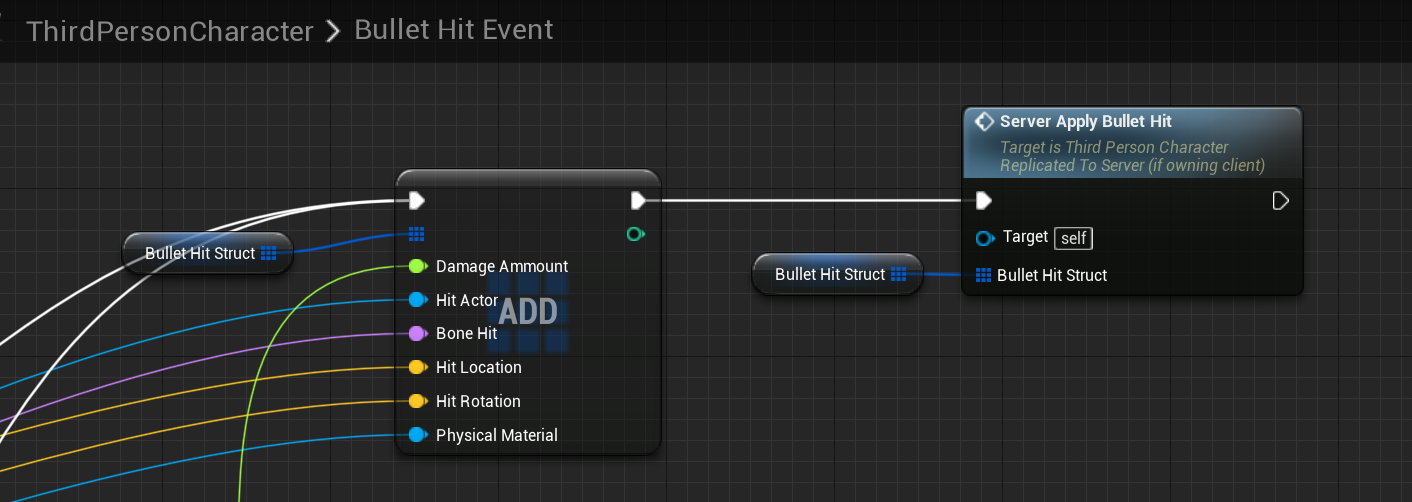
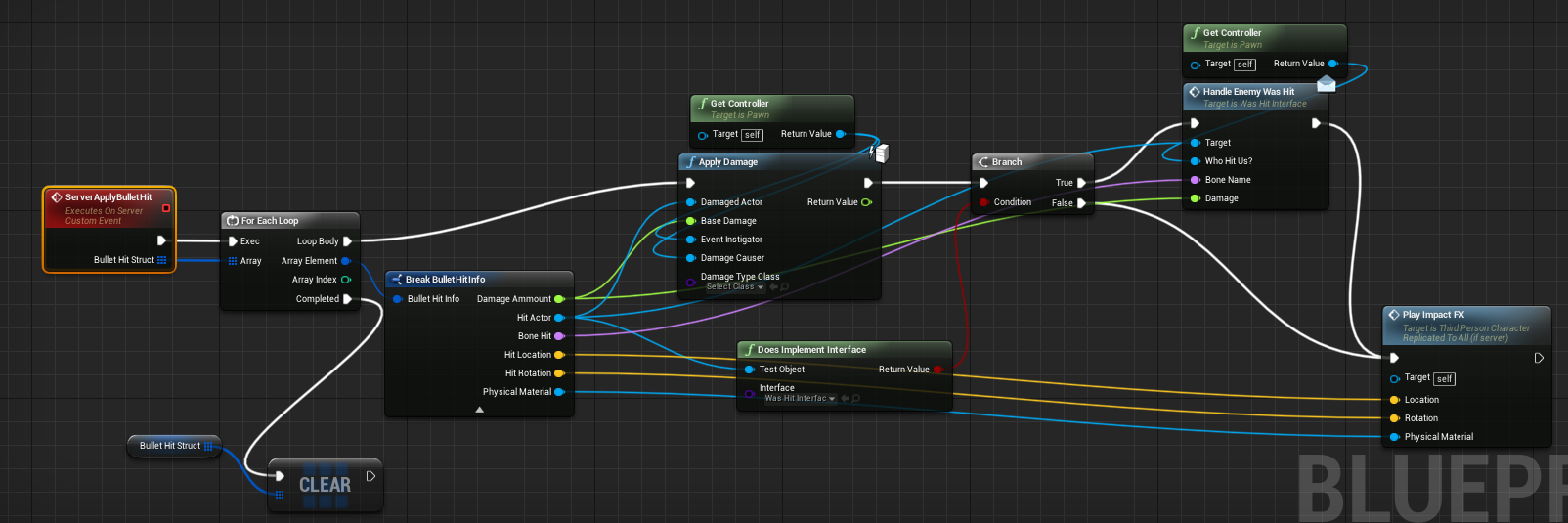
You can slap your forehead if you want lol. I just really want to learn the best way to handle this.
winged badger
that is still sending 1 RPC per hit
young yoke
[2020.04.05-03.28.33:405][370]LogNet: UNetConnection::Close: [UNetConnection] RemoteAddr: 127.0.0.1:7777, Name: IpConnection_0, Driver: GameNetDriver IpNetDriver_2, IsServer: NO, PC: BP_SI_RGM_PlayerController_C_0, Owner: BP_SI_RGM_PlayerController_C_0, UniqueId: NULL:UNSTOPPABLE-D21661CC415E3FDB1AC6EE860E8F4401, Channels: 137, Time: 2020.04.05-03.28.33
[2020.04.05-03.28.33:405][370]LogNet: UChannel::Close: Sending CloseBunch. ChIndex == 0. Name: [UChannel] ChIndex: 0, Closing: 0 [UNetConnection] RemoteAddr: 127.0.0.1:7777, Name: IpConnection_0, Driver: GameNetDriver IpNetDriver_2, IsServer: NO, PC: BP_SI_RGM_PlayerController_C_0, Owner: BP_SI_RGM_PlayerController_C_0, UniqueId: NULL:UNSTOPPABLE-D21661CC415E3FDB1AC6EE860E8F4401
[2020.04.05-03.28.33:405][370]LogNet: Warning: Network Failure: GameNetDriver**[ConnectionLost]: Your connection to the host has been lost.**
[2020.04.05-03.28.33:405][370]LogNet: NetworkFailure: ConnectionLost, Error: 'Your connection to the host has been lost.'
[2020.04.05-03.28.33:405][370]LogBlueprintUserMessages: [BP_SI_RGM_GameInstance_C_2] Client 1: Event Newtwork Error (type): Connection Lost
[2020.04.05-03.28.33:405][370]LogBlueprintUserMessages: [BP_SI_RGM_GameInstance_C_2] Client 1: Event Newtwork Error (is server?): false
[2020.04.05-03.28.33:406][370]LogBlueprintUserMessages: [BP_SI_RGM_PlayerController_C_0] Client 1: : DISABLED Cam fade in (should only have this event run once...) - Check function or macro called: PlayerController>EnableMovement_e
[2020.04.05-03.28.33:419][371]LogOnlineSession: Warning: OSS: No game present to leave for session (GameSession)
[2020.04.05-03.28.33:420][371]LogNet: NotifyAcceptingConnection accepted from: 127.0.0.1:55467
[2020.04.05-03.28.33:420][371]LogHandshake: SendRestartHandshakeRequest.
[2020.04.05-03.28.33:420][371]LogNet: NotifyAcceptingConnection accepted from: 127.0.0.1:55467
[2020.04.05-03.28.33:420][371]LogHandshake: SendRestartHandshakeRequest.
winged badger
instead of per shot
cedar finch
My linetrace isn't run on server though.
winged badger
linetrace is least of your problems
calling server RPC from inside the loop instead of having the loop prepare the payload, then calling it from Completed is a problem though
cedar finch
Ohhh I see. I swear I've rewrote this 100 times and I keep coming up with new ways to create the same problem
winged badger
also server has no need whatsoever to keep a member array of hits
it gets the payload as a function argument and resolves everything from there
i have a 2000 RPM penetrating weapon and its not causing me any trouble
i also don't give a shit about replicating the hits to other clients, btw
i let them simulate their best guess
cedar finch
That's my dream! 🙂 I want that and everyone tells me that but I haven't got that lightbulb moment yet on how to achieve it. So your saying I should take my array of hits and then send that to the Server, then let it do all the calculations and stuff? https://i.gyazo.com/8c41be4ab08ea19f948eb423e175e47b.png
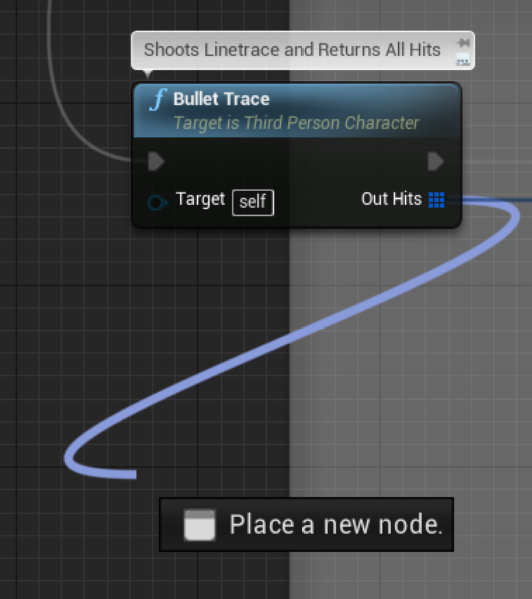 winged badger
also, if your damage is not random OR you don't need to display damage number on client immediately
there is no need to replicate the damage done
cedar finch
My damage is determined by whatever gun they are using
winged badger
server will have a fair idea what the damage is, especially if its not a random number
if your assault rifle does 40 damage always
there is no need to RPC that to server, its already aware
my weapons have a critical chance, critical multiplier and non-random damage
so only thing i replicate is a boolean if the client rolled a critical hit or not
server knows how to assemble the same damage number client calculated from there
cedar finch
So I need to replicate my weapon damage values?
young yoke
@winged badger So, I'm doing the level streaming on the GameState. Would like to know if there is a better place to do it. It's basically adding a suffix for SP/MP for any map which is chosen (they will each have SP/MP sublevels)
cedar finch
You're saying if I replicate them so the server knows what they are, then I won't have to constantly send that value to the server for every hit
winged badger
i haven't done any level streaming for almost 3 eyars now, so i know very little off the top of my head
one thing i can tell you is that server has to have the streaming level loaded if the client does
cedar finch
It will only set the damage value when I equip the weapon and then will know what damage to deal, unless I switch weapons, thus changing the damage to whatever the new weapon is. That makes sense
But did I do the correct thing by creating a custom struct with the info inside it? You just meant I didn't need to send the damage value correct?
winged badger
GameState is fine for it @young yoke unless it starts to clutter, then you might want to encapsulate the streaming logic in its own object
yeah, you need to send ONLY what server can't reconstruct on its own
nothing else
young yoke
*Update. That WORKED! 💪 *I'm starting to think I was using the wrong node. Was using "load level instance (by name)". Replacing with "Load Stream Level". A YT video helped me out...Thanks for the help, @winged badger
cedar finch
@winged badger So does this look right? Then I can run my calculations inside the server event? https://i.gyazo.com/b192357b5e0728070da0f5042c8cdabf.png
 winged badger
looks ok
won't work for multiple projectiles tho, as you'll filter the several pellets hitting the same actor tho
for that you'd need to adjust the logic a little
cedar finch
Oh I haven't got to the shotgun yet. I have a separate system for that. Here's what it looks like right now, before I try to fix it https://i.gyazo.com/01532ab6fc1b4347e975b17a0be2ae02.png
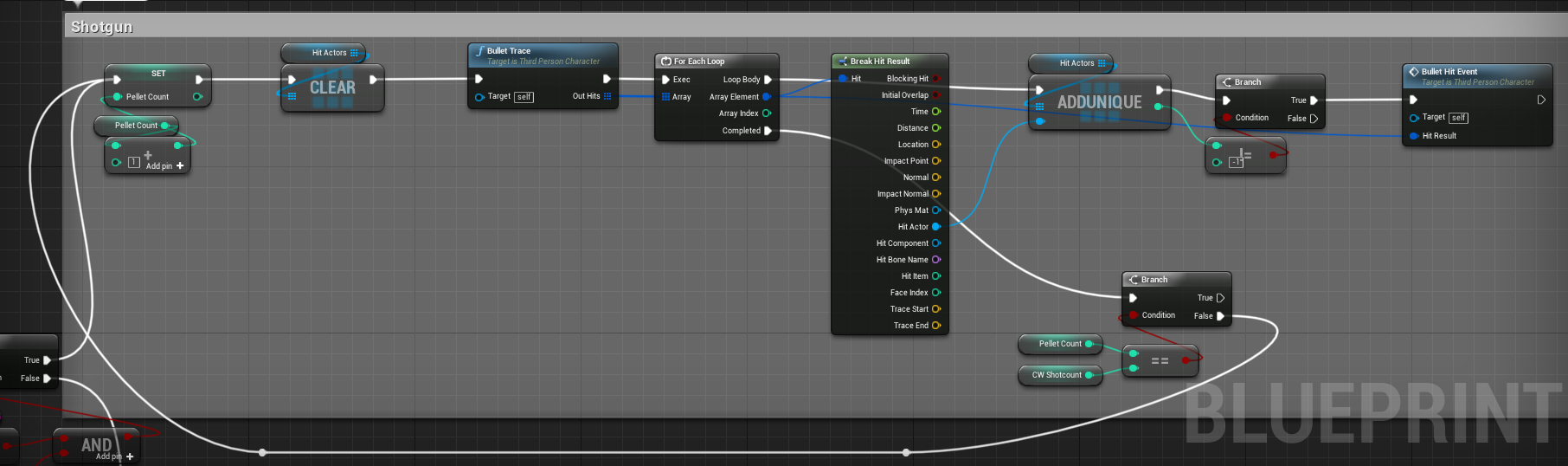 winged badger
you'd need 2 loops
to handle any number of projectiles that may or may not be piercing
first loop goes thru projectiles, second thru the hits of one projectile, and the innner loop clears that HitActors array
cedar finch
I don't think I follow. So i'm just firing this logic off in a manual loop the same number of times as that of my pellet count. Which is 8. Right now I just allow all weapons to penetrate. I haven't setup any condition yet but I can easily

Wouldn't that add all of the hits into the struct, then check if it has reached it's Pellet count yet, if not then run another trace, add those hits to the struct, then keep doing that until it returns true. Thus executing the Server Event where it can sort through all of the madness? lol
winged badger
im sure you'll enjoy tweaking that until you get it right 🙂
cedar finch
hahahahaha what's that supposed to mean?
winged badger
you have enough information to solve it
cedar finch
Ok. As long as i'm heading towards the right direction I'm happy. So basically now I just have to sort through all of this madness and see what happens
I really do appreciate you helping me.
winged badger
well, that mess of wires probably doesn't help
finds that tidies way to write a blueprint is doing it in c++ instead
😄
cedar finch
lol aint nobody got time for that
Well I still get the same results so I must have did it wrong once again https://i.gyazo.com/ddf1e9cb362aaf03f08e51f68976df09.png

Only two impact FX and bullet decals play for my shotgun, even though 8 bullet traces hit
winged badger
that, or you assumed the problem was in hit RPCs when it wasn't
batching them into one RPC is still a good diea tho
cedar finch
I think It's my crazy logic inside the one RPC that's the problem.

Is this still totally wrong?
I did have to send the damage variable because I calculate it based off of distance so the damage reduces the longer the hit is.
I'm still running a multicast RPC for each impact FX and bullet hit interface though aren't I? hmmmmmmm
I'm beginning to see the light
 rose egret
yo have to compress your BulletHitInfo as much as possible . which requires c++ though
use hash or enum instead of FName if possible.
FVector_NetQuantize instead of the generic FVector, ...
cedar finch
@winged badger I think the light bulb clicked. Now I believe it's running smooth https://i.gyazo.com/a47be59a58ab6431932fc7b5c7a9e1a3.png

I let the clients sort out their own hits and FX
 weak dawn
Is there a way I can make a actor relevant to all (everyone else in game) instead of a owner?
 oblique mountain
I have a multiplayer lan setup and a moving player (none human player, pawn class). Now if the player press W the player (client) moves forward and then again but this time on the server. Now I want the server to only replicate the movement for all other clients but not for the "original" client to avoid a rubber band effect. How can I do this and does this even make sense?
 bitter oriole
Replay & rollback
meager spade
@cedar finch you can save more by not multicasting the bullet hit info array, but just multicasting the the effects (not even sure why you are multicasting damage..)
bitter oriole
@oblique mountain Store the moves you made with timestamp, and when the server replicates the transform for a given timestamp - matching the last player input processed - reset to that transform, then replay all moves earlier than this timestamp, and discard these moves.
You need to replicate to the client, just smartly (^)
If you don't, in a matter of seconds you will have wildly different transforms and the game will become unplayable
You need to replicate, but with rollback/replay.
oblique mountain
Sounds complicated but I will try it. Thanks!
bitter oriole
Yes, it is complicated
That's only the short version here, and you should expect a solid month of work on this
You'll also need to reconcile framerate differences on the server, and smooth the remote clients
There is a nice Udemy tutorial that explains the basic concepts

Udemy
Created in collaboration with Epic Games. Use Unreal for online game dev in C++. Covers LAN, VPN, Steam and more.
oblique mountain
Ok just for now. Can I exclude the original client (the client that moves the player) form the replication?
After moving the player (client side) I use a custom event with replication "run on server" to set the new transform
bitter oriole
This won't work but sure, just disable "rep location" and add your own replicated transform that excludes the owner
And set the transform to it on replicate event
oblique mountain
And how can I exclude the owner?
 polar wing
@bitter oriole @oblique mountain That Udemy course saved my bacon back when I started my project. If you're writing your own movement system from scratch, the solution proposed in the KrazyKarts section is a winner. You'll just need to factor in your own cheat handling code and other important features if it's for PVP. With that in mind, I would recommend using the character movement component if you're starting out and you want to simulate humanoid movement.
One big tip from me if you followed that course: If you ever decide to switch over to the character movement component and plan on doing any kind of rotational modifications (not using the add pitch and yaw functions), keep in mind that the server isn't authoritative over the rotation of the character, only their location. This is a great-feeling implementation for shooters/action games as the camera never rubber-bands/snaps back to an authoritative rotation.
However, you'll see that the course solution forces the client back to the server's transform (location and rotation) due to the correct rotation being important for simulating the vehicle movement. As a result, move replaying in that context includes changes to the rotation. You'll need to modify the CMC to do the same if you want authoritative rotation. So, keep that in mind when implementing your solution.
@oblique mountain So, yeah, if you're starting out, use the built-in character movement component that comes included with the character class. It handles all of the local prediction (client feels like they're in complete control of their character). The pawn movement one isn't super useful unless you're doing your own thing.
However, there's a big caveat to this if you want to create your own cool multiplayer movement abilities (sprinting, dodging, wallrunning, etc): you need to do a bit of c++ to ensure it doesn't feel laggy and jumpy on the client when there's a tiny bit of latency/ping (>0ms).
I always recommend this video (one of the only ones online that teaches how to add custom abilities) to extend the character movement component in c++. If you're new to c++ and UE4, it might seem quite scary, but you can add a little UFunction flag called BlueprintImplementable above any of your custom functions that allows you to implement them in blueprints instead.
If you're comfortable following along with this video, you'll see there's an easy enough pattern to implementing new abilities in the character movement component. Once you've got a handle on how these things work, you can do the BlueprintImplementable approach for those custom methods if you feel better working in blueprints initially.

In this video I show the proper way to make movement abilities for your characters. This is done by creating a Custom CharacterMovementComponent.
We start from scratch with a third person BP project, but here is the completed project you can copy code from: https://drive.go...
This is coming from someone who tried making a multiplayer game in blueprints two years ago and learned the hard way that it isn't quite so simple hahaha.
 mild cobalt
Hi guys, To be able to join a room with friend from different country, i need to host my map online and run it from a online server like Amazon GameLift? Right?
At the end, the game will be running onto Android. So i think it won't work on Steam. Right?
 brazen sluice
Hello!
[/Script/Engine.Player] ConfiguredInternetSpeed=20000 ConfiguredLanSpeed=25000
This doesnt seem to change the max value, when I stat net I do not see higher speed?
 zenith yarrow
I am trying to implement the SocialParty using steam for our project, and was trying to use beacons for sending data up and down from invited player to partyleader for the joinability query, joinability response, join request, join approval. But was having issues creating sessionresult for fetching the connect string.
Basically I looked at APartyBeaconClient, RequestReservation(), and saw how it tried to get the connectURL using session search, where they pass the result to GetResolvedConnectString() and get the connect URL. So I tried creating a search result and try and pass that to the GetResolvedConnectString, problem happens when I try to create SessionInfo
Are beacons the right way to do this, or is there a better/easier approach that I missed ?
rose egret
how to stop a projectile movement component ?
oblique mountain
@polar wing Guess I need to watch the Udemy Course 😄 Thanks for your informative answer!
 ocean geyser
@zenith yarrow from what I've read yes. I started learning about beacons to use with my webapi last night and am struggling to get them working. have you had any luck
 stable kindle
How would one use the url for a beacon on a listenserver. Is it possible using steam
Would one be able to use the steamid to connect to a beacon for eg. or get the url
 shy apex
has anyone found success building a steam dedicated server with 4.24?
i cant get mine to show up in the internet tab
zenith yarrow
@ocean geyser I have used classes based on APartyBeaconClient and APartyBeaconHost, i found this link while looking for my issues, it maybe it will be helpful for you -> https://forums.unrealengine.com/community/community-content-tools-and-tutorials/1355434-onlinebeacons-tutorial-with-blueprint-access
Unreal Engine Forums
Hey everyone,
I noticed that this is covered very little in the official docs and around the web. You can find tidbits here and there, but not a full example that
ocean geyser
thats the tutorial i followed, i ended up with an error (one sec ill show it)
@zenith yarrow CreateNamedNetDriver failed to create driver from definition BeaconNetDriver in the log
polar wing
@oblique mountain Haha, glad to help! It'll save you weeks and plenty of headaches to get to grips with the slightly tricky stuff underpinning multiplayer movement in the engine. Thankfully, they're working on a better system! Still a way out, though, sadly 😢.
https://github.com/EpicGames/UnrealEngine/tree/cae4ef590cb470651784bff25112e1ec599f10dd/Engine/Plugins/Runtime/NetworkPrediction
zenith yarrow
@ocean geyser did you use the same settings in the defaultengine.ini ?, because that is meant for steam netdriver
ocean geyser
yes
tf just pasted it in there again and restarted the editor and it worked. did nothing but fail last night -_-
im more mad now than if it failed
zenith yarrow
@ocean geyser cool, cya gonna call it a night, hit me up if you get any issues with them, maybe i can help...
ocean geyser
will do, thank you
brazen sluice
Hello!
[/Script/Engine.Player] ConfiguredInternetSpeed=20000 ConfiguredLanSpeed=25000
This doesnt seem to change the max value, when I stat net I do not see higher speed?
 long willow
Im trying to replicate a variable driving the "contested" widget text visibility, do you guys see whats wrong here (if anything?)?
Please ping on reply ❤️
 twin juniper
try to learn @long willow instead of brute force, at least at this stage
long willow
?
I've watched some tutorial on this a month or so ago, and as I remembered it this should work
Or possibly that I dont need to multicast when using a replicated variable, but I tried that earlier as well and I didnt get it to work then either :l
twin juniper
try using "print string" to
debug your code
your first target is when something is not working
you need to find what is not working
then you can find a solution
long willow
Yeah well its the variable thats not updating on the client
You can see the print string in the video
Idk where else I would put print string
I will be going to bed now and continue tomorrow 🎈 I will still read any messages where Im pinged when Im back tomorrow
@twin juniper Unless you see whats up
long willow
break points?
You mean like custom events or?
You can see its reaching due to the strings being printed both on the client and the server
Thats what the true and false is (that you see in the video)
You can also see the print string node in the video when I go through the graph (right after the set variable node)
Anyways, I will be going to bed now and continue tomorrow 🎈 I will still read any messages where Im pinged when Im back tomorrow
Thanks for the help anyway
rich cradle
I have implemented a dash feature in my multiplayer game.
With high ping (e.g NetPktlag=150) the dash will sometimes not be triggered.
So the client will Launch forward and the server will correct it back. This only happens sometimes, and only under high ping. I am using FSavedMoves. Any suggestions on how to debug this?
brazen sluice
This graph seems to suggest I sent 4000 actors in one frame? Or Am I misreading it?
rich cradle
@uncut schooner were you answering me or someone else?
 uncut schooner
You, Is there any reason that the server is not stacking the commands but cutting it off after a certain time between frames
Then it will see it as hacking and reverse it ect
since the server didnt recive the command
rich cradle
Well, I do not know. I have been reading documentation and looking at examples for the past couple days. How do you change the frequency at which updates are sent? Seems like CMC also has custom code for determing that stuff. Or is there an ini file I can change or something?
uncut schooner
Im not too sure, how are you registering the dash? is it calculated server side or client?
Im assuming it uses server side calculation right?
rich cradle
I have a bool "bWantstoDash". Then in the "PerformMovement" function it just check if its true and runs the code for it, which is just a Launch
From all the examples I have seen this should be the correct way to implement it
uncut schooner
Ok
What I mean is
There are clients, you and your friends
Then there is the server
and it takes the input and does the function correct?
The server
rich cradle
yes
uncut schooner
Ok, then Im not sure what wrong, sorry
 rotund sapphire
JJG log when launch being executed, maybe it wont fire on server or not with same value
rich cradle
so just a log in perform movement if (GetNetMode == NM_DEDICATEDSERVER)
?
and then see if the server actually triggers that part of the code when I get the stutter
rotund sapphire
log both, so you can compare values, and enable timestaps for log (in editor setting) so you can see time index as well it may help to figure out issues
yes both client and sever must make the same move with same input values
rich cradle
There is only a single value that is actually replicated using the FSavedMoves and thats the bWantsToDash
rotund sapphire
i dont think savedmoves will be replicated, you must replicate your values on your own
rotund sapphire
bitmask, and very narrow to be fair
rich cradle
sure, uint8
rotund sapphire
that's the only thing you got on server, your launch velocity is probably 0 because you did not replicated manually
just drop an rpc to server, and send the value or calculate it on server by using some available inputs eg control rotation or something
rich cradle
Well it actually already does that. If no input is given the Launch will just use the forward vector. I have tested all values related to the Launch() and everything there is replicated and identical on server and client..always
i will debug it in 20min when I am back at my desk
rotund sapphire
I don't see saved moves be replicated, so that assumption is probably invalid which will confuse your results.
rich cradle
Well after looking at examples and UT they dont replicate values they send in flags anywhere else
UT uses the bitmask to store dashdirection for example
rotund sapphire
You can send an rpc to server with additional data, but it may be hazardous since clients can mess with netcode.
rich cradle
I "believe" the way it works is that the Client sends the FSavedMove to the server so the server can simulate what the client just did
rotund sapphire
Or just modify the current rpc's of character and send your own stuff at once.
Client sends the FSavedMove to the server
Can you point me a line of code that makes you beleive this is the case?
rich cradle
its in the doc, one sec
 sleek current
I have a projectile that spawns a grenade
{
    if (OtherActor != nullptr && StickyGrenadeBP != nullptr && StickyGrenadeBP->GetDefaultObject() != nullptr
        && StickyGrenadeBP->GetDefaultObject()->GetClass() != nullptr)
    {
        SpawnTransform.SetTranslation(Hit.ImpactPoint);

        AStickyGrenade* grenade = GetWorld()->SpawnActor<AStickyGrenade>(StickyGrenadeBP->GetDefaultObject()->GetClass(), SpawnTransform);

        if (grenade != nullptr)
        {
            grenade->AttachToActor(OtherActor, FAttachmentTransformRules::KeepWorldTransform);
        }
    }

    Destroy();
}```
But for some reason I spawn it twice while replicating stuff
Both projectile and grenade are set to replicate
I create the projectile only once per click
and yet it triggers on hit twice
anyone knows why?Andrzej, maybe onhit runs both on client and server both will spawn something for themselves
sleek current
How can I tell it to run only on server?
Can I create Server _implementation?
for this overrided method
rich cradle
jop boom
rotund sapphire
JJG,
Similar FSavedMove entries are combined together. The autonomous proxy sends a condensed version of their data to the server with a ServerMove RPC.
Sounds confusing, but in reality it will only send some bits and not the fsaved move. Just check code that is dealing with RPCs (they loop around character as cmc->char->cmc) and find out how exactly replication works, that probably helps you understand the issue better. My bet is on that something is not on server you think it is, because of a wrong assumption.
rich cradle
under high ping bwantsToDash will stay false
but be true on client
So client launches, server doesnt, client gets corrected back
Now I just need to figure out why this only happens sometimes
50ms ping it happens basically never
200ms ping it happens like 35% of the time
rotund sapphire
When you run PIE tests, for better simulation of the dedicated server just run it in a separate process.
Normally a server should tick on 30fps, but in pie tests you get it run on 120fps (in sync with game client) which is another potential source of confusions
rich cradle
You mean, untick this?
rotund sapphire
I think your character won't apply corrections because server data is excessive or late since 0 ping is very unrealistic anyways.
Yes untick that dude, and it will run you a separate process for server
rich cradle
alright
I am using NetPktLag=200 to test with higher ping, thats when these problems start occuring
rotund sapphire
You must execute that command both on client and server, individually.
Tho in pie tests it may gets applied to both, but not in separate process.
You may also want to try the app Clumsy its easy to use for artifical lags
rich cradle
alright, I will try out clumsy. I assume they have good documentation and I dont have to pull my hair out to get it to work?
rotund sapphire
its designed to be simple to use no braille on the buttons but almost there
rich cradle
alright, because my brain is smooth
brazen sluice
rotund sapphire
azukaar you can try putting your actor to lower priorty (eg 1.0), also set replication rate to a low value like 1.0 (both for min and max). Normally a networking shouldnt send out more than 10kb of data, so you probably have made changes to net settings. The changes may explain the spikes you have noticed.
brazen sluice
Isnt default priority 1.0 for Actor already ?
rotund sapphire
then go below, like 0.1 idk :)
brazen sluice
I did change to 20 recently to try and see if it helps, but yeah it didnt ^^
rotund sapphire
the point is that unreal will try maxing out net use, but you got more important actors like characters they should be higher prio. So your cuber actor can go behind everybody else, allowing them better chance to send some info instead.
brazen sluice
yeah but my issue is that the cube actors are taking FOREVER to load
like abnormal amount of time
rotund sapphire
if you're on default 10k limit then increase
brazen sluice
I had a prototype using websockets outside of UE and it was 10x faster to download chunks
Im on 20 rn
but I think it might not work
The way i set it
Becasue I dont see the network usage increase in the stat net panel
rotund sapphire
there are 2 or 3 categories with multiple values all need to be changed to get a clear path for higher load
brazen sluice
I only changed
[/Script/Engine.Player]
ConfiguredInternetSpeed=20000
ConfiguredLanSpeed=25000
Cant find any doc on what else to do tbh, only some forum posts here and there with rrandom values
meager spade
@brazen sluice ue4 also has a "max replication per frame"
if it spends to long going through actors
it will drop them
brazen sluice
hm
brazen sluice
Right
meager spade
Repgraph can over come this
by making buckets of what should be replicated
and is a lot faster than the traditional replication methods
cause for every actor it has to ask the actor for everything, including asking the actor who its relevant for
rotund sapphire
yes repgraph is good. but you'd still need to increase the 10k limitis tho if you want more data to be sent per seconds
brazen sluice
is
[/Script/Engine.Player]
ConfiguredInternetSpeed=20000
ConfiguredLanSpeed=25000
not enough?
meager spade
limit on net transfer, and time spent calculating who should be replicated
@brazen sluice there is other values
that need tweaking
rotund sapphire
check engine and game ini both
meager spade
ConfiguredInternetSpeed=20000
ConfiguredLanSpeed=25000

[/Script/OnlineSubsystemUtils.IpNetDriver]
MaxInternetClientRate=20000
MaxClientRate=25000```btw, Robert...I tested it with clumsy and the result was indentical to just using dedicated server single process
rotund sapphire
My bet is on that something is not on server you think it is, because of a wrong assumption.
rich cradle
Well if thats the case then its only the case about 30% of the time with a high ping...I have no idea what
rotund sapphire
i'd just log every values and make sure they match so the move can be made and will be made indeed
cmc has limitatons how ofter it will evaluate and send corrections, its a time limit of some sort
rotund sapphire
but anyways, maybe your move is being made but later and this will force the cmc to apply correction because move is out of phase perhaps.
I think he assume the saved moves will be sent to server
brazen sluice
@meager spade thanks IT SEEMS to help need to do more tests tho
One thing Im annoyed about, is that UE doesnt seem to download close actors first
meager spade
@brazen sluice i would also recommend Repgraph
brazen sluice
Where that would actually make a lot of sense
meager spade
for lots of actors
rich cradle
yeah I am setting bWantstoDash using saved moves
brazen sluice
it seems to pick up in-cull actor first tho, which is good
meager spade
@rich cradle and how high a ping are we talking ?
rich cradle
It works progressively less consistent the higher the ping is
at 150ms it doesnt work about 30% of the time?
rotund sapphire
azukaar in repgraph your can sort your actors in a certan way (eg by distance). this is not a default feature of engine tho
meager spade
thats pretty low
rich cradle
Sure, but I tested the same thing with UT (they have the dodge thingy) And there it literally always works
in fact the server is basically never even sending corrections
rotund sapphire
probably turned off :)
meager spade
thing is, if your SavedMove never arrives by the time you finish your dash
server will have it as false
that is all i can think off
rotund sapphire
ukaos when does character send saved moves to server?
rich cradle
UT has some system in their CMC replication for "isCriticalMove" but it would require me to implement a bunch of new functions and I dont know if that is the magic that fixes the issue
meager spade
i did dash, without the issues you have
rich cradle
but at least their dashes and impulses use this "critical move"
meager spade
i used RootMotion
rich cradle
oh, yeah I dont use root motion
rich cradle
yeah, I dont even know what that is, I googled at some point, didnt understand and then forgot about it
meager spade
its a good way of doing dashes
they fixed a few things with it aswell
basically it bypasses needing to do saved move stuff
and no corrections
rich cradle
so its client authoritive?
rich cradle
I thought client authoritive was a big no no
meager spade
runs on server aswell
            FRootMotionSource_ConstantForce* ConstantForce = new FRootMotionSource_ConstantForce();
            ConstantForce->InstanceName = ForceName;
            ConstantForce->AccumulateMode = bIsAdditive ? ERootMotionAccumulateMode::Additive : ERootMotionAccumulateMode::Override;
            ConstantForce->Priority = 5;
            ConstantForce->Force = WorldDirection * Strength;
            ConstantForce->Duration = Duration;
            ConstantForce->StrengthOverTime = StrengthOverTime;
            ConstantForce->FinishVelocityParams.Mode = FinishVelocityMode;
            ConstantForce->FinishVelocityParams.SetVelocity = FinishSetVelocity;
            ConstantForce->FinishVelocityParams.ClampVelocity = FinishClampVelocity;
MovementComponent->ApplyRootMotionSource(ConstantForce);``````okay...I will have to read the documentation
 spring ingot
It's a root motion extraction and reapplication as simple force, right?
Ah I see, it's a replacement for extraction. Emulates a root motion track.
meager spade
spring ingot
Yeah I gotcha. Basically slotting into the same system the "from montages only" works with, for replication
But not requiring sourcing off a montage or root motion track
meager spade
exactly
spring ingot
Very nice
spring ingot
Wonder if there's a good way to batch extract root motion tracks to curve tables for use with it
So you can perfectly match up basic locomotion foot placement without pinning/IK
meager spade
i use the rootmotion sources for my players to vault over stuff
cause we take control of the character during such actions
spring ingot
That's like step 1 in going from nice root locomotion to replication to "why are my feet sliding" questions
rich cradle
so, I could use that code above for example and just slot it in where my launch currently is.
So inside PerformMovement if (bWantstoDash)
do the root motion thingy and done?
rich cradle
huh okay..I am just asking because literally all examples I could find use savedMoves and I have never seen this stuff done with RootMotion
spring ingot
The best engine knowledge is kept in cargo cults. It's harder when the source is available, and in recent years engine makers talk more about really advanced stuff, but it's buried in a 2 hour livestream that got 50k views 3 years ago, and it's not widely known :P
 spring ingot
Beautiful
rich cradle
masterpiece
but seeing as how its blueprint I would expect there to be a cast somewhere
spring ingot
The fact there's a "movement mode" selection is the icing on the cake
So you can get Z axis involved with flying mode if you have a leaping attack, etc
Wonder if it resets movement mode after for you. Should check the code
meager spade
it does
spring ingot
Awesome
meager spade
only if you use the BP nodes in ability system
cause its not actually inside the root motion source
 spring ingot
Gotcha. So just wrap a copy if I do it from code. 👍
meager spade
i mean in the game i work on for my company, we don't use ability system, but i used logic out of these tasks
to do stuff where we take control of the character (like vaulting)
spring ingot
Oh? Overkill for your needs, or...?
meager spade
well before i joined, they started working on there own system
spring ingot
Ah, fair enough
meager spade
plus Ability System is a bit of a best
beast*
but i like playing with it, but getting the rest of the team to understand it was the main issue
like Effects and stuff
spring ingot
It needs a graph visualizer.
meager spade
we have a simpler buff system (say simple, i still struggle with it, but that is not my department) 😄
spring ingot
Not editor necessarily, but seeing how the pieces relate would probably help the more visually inclined
meager spade
i just poke @winged badger when i struggle with it 😄
spring ingot
lol
meager spade
he wrote the system, so he knows it well, i hardly touch buffs. normally left to other people 😄
spring ingot
I'm about to jump into GAS more deeply myself. Starting up a new project and also first more serious stab at Unreal. Tired of writing my own ability systems and rep graphs, and also tired of the-engine-that-shall-not-be-named.
rich cradle
Just remember...PUBG made money and that game was a technical turd
sleek current
CRY engine?
spring ingot
@sleek current Nah, the togetherness one.
@rich cradle Yes and no. PUBG did some clever stuff with origin shifting to solve a real problem in large map games
The same problem that Epic is still waffling on sharing how they solved in Fortnite >.>
rich cradle
you mean for floating point precision?
spring ingot
Yeah.
rich cradle
I thought the engine solved for that automagically. considering how many large scale games are running ue4
sleek current
By the way does anyone know why a delegate is not called on a client? It's server rpc method that calls it and the client for some reason had it not bounded while it is but only server sees it
spring ingot
It solves two things. Single player games, it origin shifts on world composition bounds. Multiplayer games, it origin shifts each client, but not the server.
If your server side is way off origin, things will still get weird.
rich cradle
well, thats dissapointing
meager spade
Origin shifting only applies after X map size right?
spring ingot
From what I've read it appears Epic solved the server side in Fortnite with some cleverness, that hasn't been shared
@meager spade Yeah it's adjustable, based on the map bounds setup or WORLD_MAX, iirc
meager spade
hmm
spring ingot
If you go search the engine code for worldoriginrebasing you'll find the adjustment spots. It's relatively simple, just translates client coordinates. The multiplayer version is uh, multiplayerworldoriginrebasing
This is in WorldComposition.cpp, and basically finds the centroid of all the clients to rebase to.
brazen sluice
BTW it seems like UE sometime only replicate my props (TArray) partially, even when set to Reliable the thing is if I run the Zlib decompress on partial data, it throws an exception and crash the program...
What would be the best approach?
- either (if any) a way to enforce non-granular updates
- or using validation hooks
 fleet viper
hey guys just learning and trying to understand unreals framework and replication...something i noticed was that the server is not able to retrieve the controller inside a pawn, but it shouldnt it be able to because the player controller exists also on the server and client? So both should be able to retrieve the controller. Here is the code:
and the output:
LogBlueprintUserMessages: [ThirdPersonCharacter_C_0] Server: false
LogBlueprintUserMessages: [ThirdPersonCharacter_C_0] Client 1: true
meager spade
i would not send big array via a RPC
@brazen sluice
also properties don't have a reliable 🤔
brazen sluice
Oh you're right my bad
There's no reliable on it
sorry
It's not THAT big it's way under the limit of UE's default settings
it's around a few hundreds items
meager spade
properties will replicate everything, everytime the actor is replicated (and thing have changed)
brazen sluice
weird
Im pretty sure my issue is related to network inconsistency because i dont have the issue with solo games
I still store the chunks Zlib'd in solo
in memory
fleet viper
@meager spade any tipps?
meager spade
@fleet viper is that on the character?
fleet viper
yep
brazen sluice
I think there's a misunderstanding
in your BP you have 2 logs
and you have 2 instances
so in total you have 4 scenarios
fleet viper
oh yes i should have mentioned that im using a listen server
brazen sluice
Like the server is also gonna test for remote pawn too
brazen sluice
oh okay
brazen sluice
I see
meager spade
@fleet viper also remember no other client can see the controller
only server and owning client
fleet viper
@meager spade so what you meant was i should put in a delay because the pawn is executing those lines before the controller has been assigned?
fleet viper
possesed node?
 fleet viper
ah okey
meager spade
at this point, you know its valid
meager spade
@fleet viper its late i just remember Posssessed is server only
and they didnt make a BP version for client
so the hackiest way is delay in begin play
a lot of people override OnRep_Controller on the pawn, and call a BP event
but its not default
fleet viper
ok good i just wondered
yesss finally this even fixed a bug that i was working six months on
 cunning shoal
hey guys... I'm having some struggles getting a bug fixed in my multiplayer spawn code and would be grateful for some assistance! I have a random spawn point picker that will try a random spawn point, do a trace to ensure nothing is blocking it, and then spawn the player if it's clear, otherwise it removes it from the list and tries another random - if all of them are blocked it's supposed to repeat after a delay. When I try this with 4 players in PIE - server spawns fine, and one of the clients (random) is able to spawn once the servers moves out of the single spawn point in my test map, however if that player moves out the other two clients dont even attempt to spawn anymore
near the center of the picture here you can see the Get Random Spawn Point, that's where i do most of this work
Here's inside that function: P1
P2:
and the last one:
 gleaming vector
ooooHHHH
@thin stratus ^^
and literally everyone else i talk to about networking stuff
PushModel has been pushed to git
for 4.26
also @meager spade ^^
ocean geyser
@gleaming vector question regarding beacons. i know you can do RPC's and such to/from client and server, but do replicated variables also work?
gleaming vector
they should work
ocean geyser
cool
gleaming vector
but only the authority can set the value
so whichever "end" is the authority for a beacon can replicate variable to the other end
ocean geyser
figured, wasnt sure if it was the same as normal replication or not since i only see talk about RPC's
gleaming vector
all a net beacon is is an object that sets up a netdriver, net connection, and actor channel
ocean geyser
roger, that answers my question thank you!
 shy kelp
umm i just made a inventory system, but for some reason when "client 1" picks up a item, it always pickups 5, but if the listen server or any additional clients picks it up, it pickups 1. Is this a glitch or something? i dont think i added anything that can force this to happen.
 fleet raven
? push model has been on github for a long time, it's also shipping in 4.25
though not enabled by default yet, so hopefully it works 
rose egret
Normal replication, ReplicationGraph, PushModel, .. UE4 network is a mess 😂
what happens to default actor properties like ReplicatedMovement with push Model ?
fleet raven
they are upgraded to push model
etc
networking performance in unreal is about to do a 📈
especially if you combine it with the replication graph
 thin stratus
@gleaming vector So tl;dr instead of checking the whole Object (all properties), we mark them dirty ourselves.
gleaming vector
yep
thin stratus
When I read "We can't know if the object is dirty", i had to laugh...
gleaming vector
honestly, this would probably easily break the 100 barrier
the dirty, dirty object
thin stratus
If only ue4 could make use of macros
gleaming vector
i feel like with some UHT codegen they could make the api a bit better
maybe go in a C# property direction with automatic getters/setters
 steep cipher
@shy apex no issues using dedicated server and 4.24 using this: https://eeldev.com/index.php/steamcore-dedicated-server/

DISCLAIMER I will not give support for issues related to firewall and/or not being able to see your server, as this is out of the scope of this plugin, the Plugin is made to give users the ability to use Steam API functionality in blueprints and is not a Steam Networking or Un...
long willow
Can someone explain why this happens?
https://docs.unrealengine.com/en-US/Gameplay/HowTo/Networking/ReplicateVariable/index.html
If I read this doc right, what should be happening is that I see the rep notify run on both the client on the server, once on each, not twice on the server
Guide for Replicating Variables in Multiplayer Games.
The code is running inside of an actor
These are my "Play" settings
( Please ping on reply ❤️ )
 fossil spoke
PushModel is certainly interesting. I can see people tripping over themselves with it though.
Im actually quite interested in making good use of it.
Even more interested to see how much of a difference it makes.
 chrome bay
Depends on the game I guess. Small games will probably notice zero difference
fossil spoke
For sure
chrome bay
Rep Graph was a huge improvement though
fossil spoke
Ive yet to use it. Is it reasonably stable now?
chrome bay
It still has some teething issues, but I think it's in a pretty good state now. It seems to have stopped trying to replicate dead actors at last
fossil spoke
We are planning to make use of it but arent ready yet. So perhaps by the time it comes around for it, it will have most of itself sorted out
chrome bay
The transition can be a bit difficult initially but it does make sense once it's all setup. ShooterGame's example of it is a good starting/reference point.
fossil spoke
Yeah we have an engineer thats used it before so we arent totally blind haha
 bleak raft
Hey ! Does anyone know how to properly configure the VOIP settings ? I'm using the default onlinesubsystem and I can't seem to find the right setting to have a clear voice without a lot of delay. I've tried looking up some info but I couldn't really find anything relevant on how to configure it.
 lilac surge
Is it okay to do multicast call on the object and immediately Destroy it?
I create and maintain it on server. Clients show only visual. Object is 'replicates' + 'replicate movement'.
For example, a bullet with actual mesh.
sleek current
Hey, I have a hud class that creates widgets like health widget for players. My problem is the widget is not updating the client hp values even tho the client is losing the hp
For some reason it only updates it on server
Any idea what I got wrong?
The widget has a logic GetOwningPlayer->CastToMyPlayerClass->GetCurrentHp->SetProgressBarPercentage
lilac surge
contain hp-value in YouPlayerState. Set that variable to Replicates. After that you can get that value from PlayerController -> PlayerState -> YouPlayerState
in general widgets know nothing about replication-stuff
 scarlet cypress
I have a few bugs with replicating variables, they should be easy to fix for a pro, if anyone wants, call me and ill do screensharing.. thanks! 🙂
chrome bay
@sleek current The widget is owned by the local player, not the player who has the widget above them.
So you're setting all the widgets to the local players' health.
You need to tell the widget which player it's responsible for and get the health from there.
chrome bay
Well it's up to you
sleek current
I tried just get owner of widget etc
chrome bay
It doesn't matter if it's a 3D widget or not. Widgets are always owned by the player who is looking at it, it's on their screen.
sleek current
thats it
chrome bay
You need to somehow tell the widget which player it's responsible for.
How you do that is up to you
sleek current
Could you give me an example of how I can approach that?
chrome bay
Well not really because it's specific to your game, but the simplest approach I guess is to have an "Assigned Player" variable in the widget blueprint.
When you setup the widget, you set the assigned player.
If it's done via a widget component, that should be easy - you can use the Widget Components owner.
If it's added via the HUD, then you'll have to find another way
chrome bay
I use a global delegate pattern usually. the HUD subcribes to a bunch of global delegates and creates and managed widgets accordingly.
Then when an object is received, like a new player state, or a new character, it broadcasts the delegate.
Since the HUD might be created late, you'll also need to check for existing objects when the HUD is first created.
lilac surge
@chrome bay any ideas about my question?
chrome bay
@lilac surge probably not a good idea
use TearOff to let clients clean objects up themselves.
I can't remember whether Destroy is processed like a reliable RPC or not, but my guess is that it isn't. The multicast would have to at least be reliable, which is generally not a good idea.
lilac surge
Thanks man. Haven't tried that before but looks like a good approach
chrome bay
Basically instead of calling destroy, tear the actor off, then let clients handle their own cleanup.
 odd iron
GoodDay Guys ..
i was wondering Which event begin first
BeginPlay or OnPostLogin ?
 lethal gate
twin juniper
lethal gate
twin juniper
@odd iron try print string to check mb
 karmic hamlet
Hello! I’m pretty new to multiplayer in UE4 and trying to setup a VR multiuser space on a Linux server. So far I’ve managed to create a dedicated server and connect with Windows clients by just adding the server IP after the .exe. But now I want to add VOIP and from what I have found I need to use the session system so I added the Advanced sessions plugin and made the server start a session at startup. So far so good, but when I try to find the session it doesn’t show up in the client. So sorry for the long intro, my question is how do I make the server visible to the clients with the session system (not using Steam)? Thanks in advance!
 stable frost

 grim pelican
I'm currently having an issue where a multicast event executes on the client after it completes on the server, is anyone familiar with this problem? Any help would be appreciated. If it helps, there's an anim montage playing on the Multicast
ocean geyser
@grim pelican well a multicast event gets triggered on the server so naturally it will fire on the server first just like with onrep events. can you explain what your trying to do and why this is a problem?
sleek current
I just added GetLifetimeReplicatedProps(TArray<FLifetimeProperty>& OutLifetimeProps) const to my player class to replicate its health and for some reason now on clients I cant move and my HUD is not drawing (its called in pawns beginplay()) do I need to check some booleans? replicates is set to true
twin juniper
Hi all! I've tried implementing this a few times but always end up with weird results... Doing multiplayer with 2 teams. I store each player's team in a replicated variable in their respective PlayerState. When spawning a player I want each client to spawn the player using the correct material (team colors) depending on that player's PlayerState. I also want to set the correct CollisionChannel (I use this to lessen the effect of friendly fire).
 river hazel
@sleek current are you calling Super::GetLifeTimeReplicatedProps?
sleek current
@river hazel Yes, I forgot about that. Thanks
polar wing
the amount of times I forget to add Super:: :*D
grim pelican
@grim pelican well a multicast event gets triggered on the server so naturally it will fire on the server first just like with onrep events. can you explain what your trying to do and why this is a problem?
@ocean geyser When the player picks up on object, I want an animation to play based on the weapon on all clients. It executes on the server, but it takes a few seconds for it to relay to the clients
oblique mountain
Just a general question. Is a dedicated server or a listen server better for a lan multiplayer game and what is easier to programm (blueprint only)?
twin juniper
well you wont be doing dedicated w/out cpp
so listen
there might be plugins maybe but idk
@oblique mountain
 wintry pawn
is there like stuff I need to handle when I try to test my build online with someone else if I use steam? Like I opened up the 7777 port. but the client can't seem to find any sessions? If that happens, my firewall is not properly set up?
cedar finch
So I just found out that my scoreboard is lagging my game really bad. I was passing values from the Gamemode-->PlayerController-->Scoreboard-->PlayerStatsWidget
I have about 10 variables I'm passing along. I simply call the UpdateScoreboard event that's inside my Gamemode and it clears out the scoreboard and it's children and retrieves all the new values for all of the players, then adds the scoreboard all of the child widgets back with the updated values. Obviously this must be wrong because when I shoot a really fast gun into a bunch of zombies it lags like crazy, but when I disconnect the scoreboard, there is no lag lol. So I've found my problem child. Should I store all of these scoreboard values somewhere like each players playerstate? Then I can somehow retrieve them and it not lag so much?
 kindred widget
I'm having a small issue learning some replication stuff. I have movement working fine. I understand how to replicate my own created variables, but I cannot seem to do the same with a CharacterMovement component's variables. Setting a variable only sets it in the one actor and it does not replicate. I'm unsure of how to handle setting variables in a component across all clients/server. The one in question is OrientRotationToMovement. It works fine when set as default, and it'll change on one client at a time based on input, but I can't change it at runtime for all of it's...copies?
meager spade
GameState should just hold the total
PlayerState should hold the players individual score
when a player gains score, he updates his local score, then tells the gamestate to update
you should on need 1 variable, which the UI should not be pulling on a bind, but via callback when the score updates.
@cedar finch
cedar finch
@meager spade Thanks. I think I understand, accept for the callback part. I know not to put it on a bind. So you mean that the gamestate should push the info to each players scoreboard?
meager spade
correct
your value should be rep notify
and fire a delegate that your scoreboard is bound too
(dispatcher i think in BP)
cedar finch
Thank you so much. That clears it up for me. 🙂
 fading birch
@fossil spoke do you happen to have the tutorial you used for Lambda? i've found a few, but they all seem to approach things in very different ways.
kindred widget
So, generally found my issue. Ended up with this. Is this generally the only way to handle input, chaining events to the server and then multicasting?
fossil spoke
@fading birch We didnt use a tutorial? Which part do you need help with?
fading birch
I think i got it figured out
I think the next issue i'll have is actually connecting to this from ue4.
oblique mountain
Can someone explain me what some good networking stats are? That I know if I have to reduce traffic
cedar finch
@meager spade So I'm struggling again with the scoreboard. Mainly because I have different widgets for each player. So I have a points widget for me, a smaller points widget for other players. So if 4 players were in the game, each player has their own points widget. When I earn points I set the value in playerstate. I can see my correct value but I can't figure out how to update the other players. Do I make each of my playerstate variables RepNotify and send a dispatcher? Or instead should I call an event that's in my gamestate and do some sort of logic in the gamestate where I have the array of all playerstates? I'm not sure what direction to go in or the flow of information.
 meager spade
all player states are replicated
so you just bind to there playerstate
and grab there score
cedar finch
That's where I'm struggling to wrap my head around. So I open the widget and in the construct I can get the owning player and his playerstate but that will only return my own points. I know how to bind and unbind the dispatch event. I just don't know how to match the players with their points and widget.

The widgets are all added separately to the screen as child widgets
kindred widget
Still wondering if the way I'm handling input is considered okay for the player's character. It works perfectly, but are there any general downsides to chaining events like that, or is it considered normal practice?
fading birch
@cedar finch the game state contains an array of player states, you could use that.
cedar finch
@fading birch I have it and am looking at it now, I just don't know how to match who's score belongs where. 😦
cedar finch
ok 🙂
fading birch
ok
so we use the game state to populate our scores
we do this through a custom function on the PlayerController
 fossil veldt
Yo, Since SendRate in UE4 is tied to tick how can I stop laggy as hell players from having an advantage / skipping when it comes to movement? I feel like interpolation only goes so far and you can notice the lack of resolution in peoples movements if they are playing on a toaster
 severe widget
(I'm not going to give my take on this despite being the one to redirect you - it's not something I'm super experienced in)
fading birch
basically for each client we loop through the player array of the game state then add we call our Scoreboard widget function to add each player. @cedar finch
fossil veldt
(I'm not going to give my take on this despite being the one to redirect you - it's not something I'm super experienced in)
@severe widget No worries
fading birch
Also in order to update it with new players that join or players that have left, we have a separate event on the PlayerController that is called when the player joins/leaves and updates the scoreboard.
cedar finch
@fading birch So do you create the widgets once then update the information in them or are you getting rid of them and creating them again each time?
fading birch
basically we have two widgets for our scoreboard
we have the WBP_Scoreboard and then WBP_ScoreboardPlayer
WBP_Scoreboard holds children
each child is a WBP_ScoreboardPlayer
so we just add/remove those as needed.
cedar finch
Mine is similar. I have a "YourPlayerScore" widget and a "OtherPlayerScore" widget. The way I did it before was by passing the info from gamemode to playercontroller to a hud widget, then creating the Two score widgets with those passed on variables. Basically pushing all of that info to the newly created widget. Then everytime I updated I cleared the score blueprints and created new ones with the updated values. It worked but if I shot a really fast full auto gun or a shotgun, it would lag lol.
fading birch
it's better to go the container -> children route imo
less chance of that happening
we update the scores via the gamemode though
through a OnScoreChanged delegate
which is ran through the gamemode
and we just add the score to the player state
we bind it in WBP_ScoreboardPlayer
cedar finch
So your gamemode sets the variables in your playerstate. Then in your playerController you run a custom event that gets your Gamestate and gets the array of playerstates, loops through them and creates the child widgets displaying the scores? @fading birch
fading birch
correct
i'm assuming you already have an add score system in place
as that can only be done via code
meager spade
why can it only be done via code?
fading birch
setting the score in the player state?
that's not exposed
you can get it just fine
but you're unable to set it via BP
cedar finch
Well my existing system is just storing the players points variable in their player controller. Since I was clearing and recreating the widgets everytime someone recieved points, It worked. But like I said that was like trying to force a square block through a tiny round hole when I called the addPoints event really fast
fading birch
you should just use the player state for that
you can easily create a function in cpp and expose it to BP
that just adds w/e score you want to the player state's score
cedar finch
I know but I don't want to use any cpp. It has to be 100% blueprint. 😦
fading birch
that's just shooting yourself in the foot
no project needs to be 100% blueprint
you could theoretically do it through BP, you'll just need to create a new variable, and replicate it's behavior exactly like the score in code works
cedar finch
I know. If it was my own personal project then I'd do it but I have my reasons for having to stick with blueprint
I also have other variables besides points that i want to use as well
fossil spoke
Does anyone know if the Steam SDK has a callback or the like that notifies if the Game (while its running) has a new version or update that needs to be downloaded?
fading birch
@cedar finch your best bet is just making your own variables through your BP PlayerState then
ocean geyser
@cedar finch then yell at whoever is making you do it in 100% blueprint
fading birch
Score is replicated using OnRep_Score in code
which you can easily duplicate that logic in BP
cedar finch
So everytime you add points it calls the onRep, then what? I'm trying to step through the flow of logic
fading birch
that's it
it doesn't do anything fancy
in fact it's literally:
void APlayerState::OnRep_Score()
{
}``` /** Player's current score. */
UPROPERTY(replicatedUsing=OnRep_Score, BlueprintReadOnly, Category=PlayerState)
float Score;```our code for it is just:
void ABasePlayerState::OnRep_Score()
{
    OnScoreChanged.Broadcast(Score);
    Super::OnRep_Score();
}```just telling the delegate to broadcast
which then updates the widget
cedar finch
Ok. I understand that part. I guess I'm still stuck at the part with the OtherPlayersWidgets, and how to receive that message with the correct points. You mentioned using the array of playerstates in the gamestate. When does that come into play?
meager spade
@fossil spoke that is weird, i just looked through the API
doesn't seem there is, you can get the current build id
maybe you could push the new build id to your server and just compare
fading birch
@cedar finch that comes into play on the player controller. We have a reference to the game state set in begin play. We just loop through the player array and grab the player names and their scores.
cedar finch
So once you've looped through the array and have their names and points, you create a widget for each of them somehow? Is that the part where you pass along the owner reference so that the widget you create will be tied to the person? Then the widgets can just receive the event dispatch messages when the points values change? For example me and you are playing the game together. I spawn into the game and my player controller creates two widgets, one for me, and one for you, when it created the widget for you how did it tie you to it so you can keep receiving updates to your widget?
fading birch
ok
meager spade
pawn has OnRep PlayerState, i actually use that to create the widget for the new player, but any system works
but you need c++
which sucks for BP only
fading birch
so the way our logic works:
1. Player Joins Game
2. The Player Controller grabs a reference to the Game State
3. The Player Controller loops through the Game State's Player Array
4. It adds a WBP_ScoreboardPlayer Widget to the WBP_Scoreboard as a child
5. The WBP_ScoreboardPlayer widget binds to the delegate OnScoreChanged
6. OnScoreChanged is called in the OnRep_Score function of the player state.
7. If a Player Joins/Leaves, the Controller calls the Add/Remove player event on the WBP_Scoreboard. This compares the PlayerState Variable of that event with the PlayerList array. If it finds a match, it removes it from the Child List of WBP_Scoreboard```Ok thanks. I believe I understand now. I'm going to attempt to set mine up now and see what happens
fading birch
Best of luck. Feel free to tag me with more questions.
cedar finch
Thanks for helping I really appreciate it.
cedar finch
@fading birch I believe I may have got it working. 🙂 I just want to thank you for your patience and for helping and explaining it to me. Thanks again
fading birch
Glad to hear. That's what this discord is all about mate.
cedar finch
All I had to do was the dispatcher for the Onrep points and then create the widgets using the gamestate array and its working perfect. I no longer have any lag spikes in the Network Profiler. 🙂
fading birch
That's great news.
 oak hill
Hi guys, does a code like this make sense in constructor?
{
    // Don't create skeletal mesh on dedicated server
    if (IsNetMode(NM_DedicatedServer)) return;

    WeaponMesh = CreateDefaultSubobject<USkeletalMeshComponent>(TEXT("WeaponMesh"));
    RootComponent = WeaponMesh;
}```So that dedicated server doesn't create unnecessary components
rose egret
I think u should use macro
oak hill
You mean "#if WITH_SERVER_CODE" ? @rose egret
rose egret
yes
oak hill
Ok, but does WITH_SERVER_CODE compile only for dedicated server or it's true even for listen server?
bitter oriole
Why wouldn't you want a root component on dedicated server ? Makes no sense
oak hill
Well, I really don't need the skeletal mesh for weapons in dedicated server. Same thing for audio components and sight meshes
So I was thinking that not having these components created in first place on dedicated server woud be an improvement
bitter oriole
You'll very likely need it
For example if bullets start from a socket
Right now you're optimizing nothing real, and making your code more compkex in the process
Optimize when it needed, where you know from profiling data it is needed
oak hill
I'm using a socket of course for bullets, but it's a fake socket on the character mesh, not on the weapon
This is an experiment, I could be wrong of course, but from profiling data I think I can have better performance by having less components possible to update on the server. That's the whole point
bitter oriole
Well, if you ran the CPU profiler and found this component to have costly updates...
oak hill
It's not that this component in particular is heavier than other components, it's that I'm trying to have an high number of players/ai and found that the average tick on the server is affected mainly by components update and the character movement component (which seems the major problem), so I'm trying to have the server doing less things
chrome bay
Animations don't (and usually shouldn't) run on the Server, so socket positions are likely not to be the same.
Servers are usually single-threaded, so it's a massive resource hog updating skeletal mesh animations server-side.
twin juniper
Hi,I'm trying to do my first fps multiplayer game;Is having two separate meshs,one with only arms and the other with full character,the best choice?
chrome bay
usually yeah. no different to single player in that regard
Wouldn't really recommend making a multiplayer FPS to start with.
twin juniper
I'll try;if I can't I'll do something easier
oblique mountain
Can someone explain me what some good networking stats are so that I know if my networking traffic is to high? its for a lan game but over Hamachi
oak hill
Animations don't (and usually shouldn't) run on the Server, so socket positions are likely not to be the same.
@chrome bay That's the default setting for EVisibilityBasedAnimTickOption on character mesh, which is setted on AlwaysTickPose. However, I cannot figure out a way to make correct hit calculations without setting it to AlwaysTickPoseAndRefreshBones, which makes bones update also on dedicated server. Maybe I missed something?
meager spade
don't have the server detect hits like that
i have the client send in what he hit, and server just does some verfification, but doesn't actually trace to detect what was hit
Unreal Engine Forums
So i currently have GAS implemented, and currently working on the weapon firing.
Now i know a lot of games, the weapon is fired on both client and server at
my logic is built the same as Fortnite
oak hill
Very interesting technique, but again, how can I detect if the player was hitted on the chest or the head with this method?
oak hill
you're right, but how can I verify that on server?
meager spade
you don't
that's the trade off
you have to have a little trust to the client in that regards
but you can also do some checks
like was shot with X range from top of pawn if so, its likely head, if its below X range of top, its likely chest
other option is Damage Zones which are fixed boxes and can be used as rough guides, but either way, its a tiny bit of trust off the client
oak hill
this is something I'll never thinked about, very interesting... thanks man, I'll definitely try this
kindred widget
I just wanted to ask again about people's opinion on player input. Now that I have a better understanding on the terminology. Right now, I have the client character making a reliable RPC to the server on button down. Then the server version of the character is making a reliable multicast RPC to all instances to set variables across all instances of the character. Is this generally considered okay? Is there something else I should be considering doing?
oak hill
@kindred widget Seems fine to me. Just do some server check if needed before the multicast, so that if the action isn't allowed in that particular moment the multicast isn't executed
bitter oriole
Unreliable RPC from client to server, regular replication from server to clients is the usual workflow
Problem with mutlicast is that late joiners will miss it
spring ingot
You also need to specify what 'input' means. If it means movement, unreliable is better. If it means 'request some important state change', you might want reliable. Depends on what behavior you want if there's lag or packet loss, as reliable means 'retry until successfully sent', and that can result in a delay before the state change. That may be better or worse than having to do the input again.
kindred widget
@spring ingot It was for setting variables in the player movement component. Mostly Orient Rotation To Movement between true and false. The short version is that I was trying to create a top down movement where WASD movement moves normally and the player rotates towards their velocity, but when right mouse is held down, it changes from OrientRotationToMovement from true to false, and sets UseControllerRotationYaw from false to true, which allows a tick function to rotate the character towards the controller's cursor smoothly with a bit of math and AddControllerYawInput. Releasing right mouse returns those bools back to their defaults so that the character no longer focuses the mouse position and will orient towards WASD movement again.. I did this because I can't seem to get variables of the movement component to replicate in any way on their own. I suppose I could create an extra variable and set it to change the component's variable on it's OnRep?
spring ingot
Sure, that'd be one way. But in that sort of case, for a state change you need to persist, reliable probably makes sense. Releasing a mouse button and potentially having the view get 'stuck' is worse than a delay in changing states due to resending replication data on lag/etc.
 gray scroll
My bots sometimes have unlimited health.... they seem to have the timer event running without clearing. Any idea why that may be? https://media.discordapp.net/attachments/450752027060863016/699680165516673124/unknown.png

the timer is replicated
and so are the HP variables

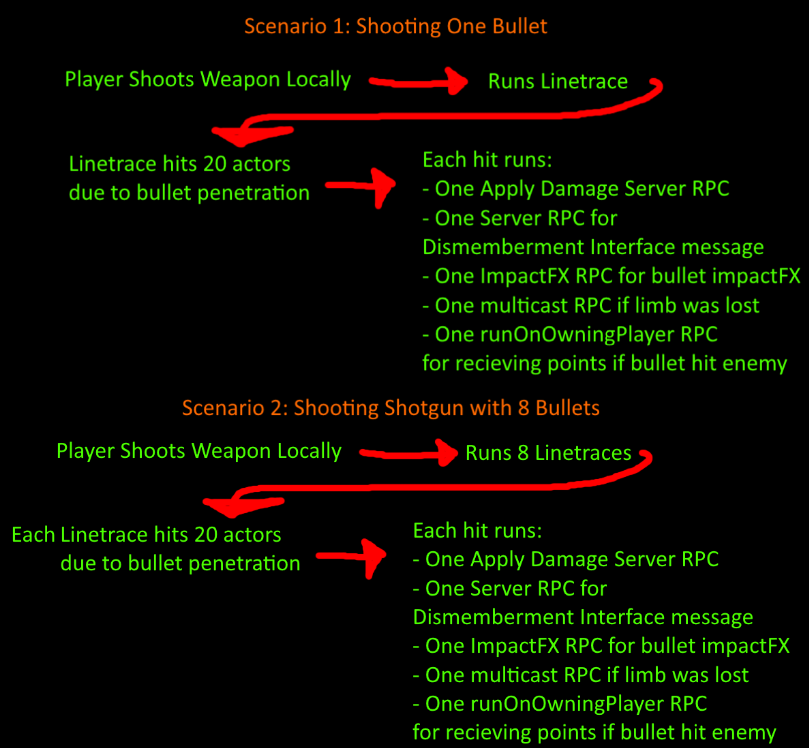
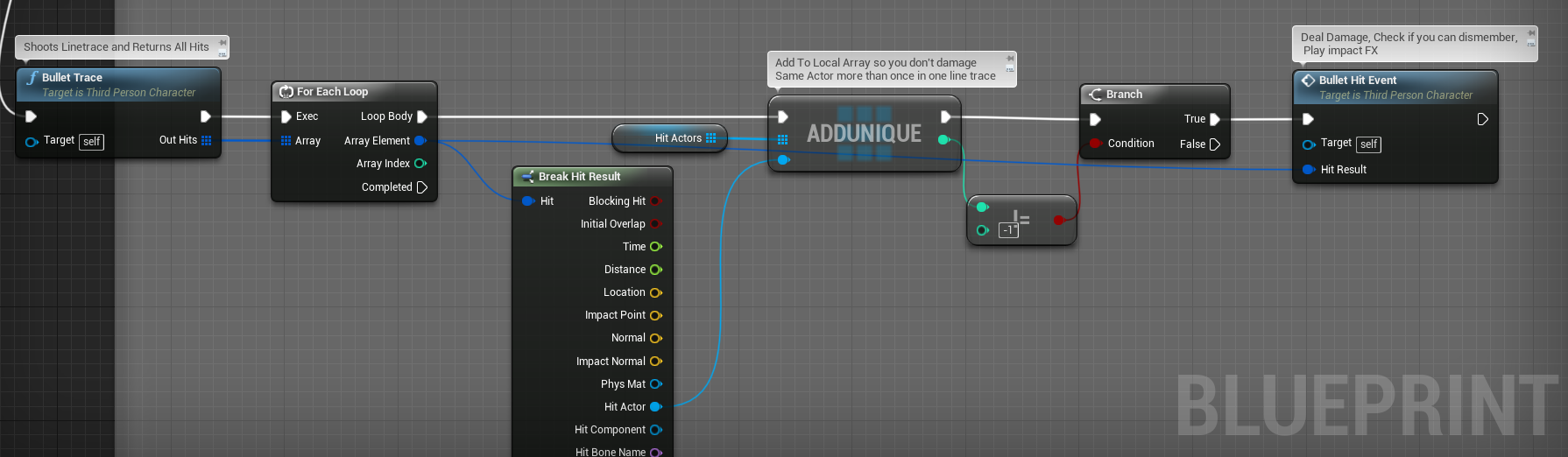
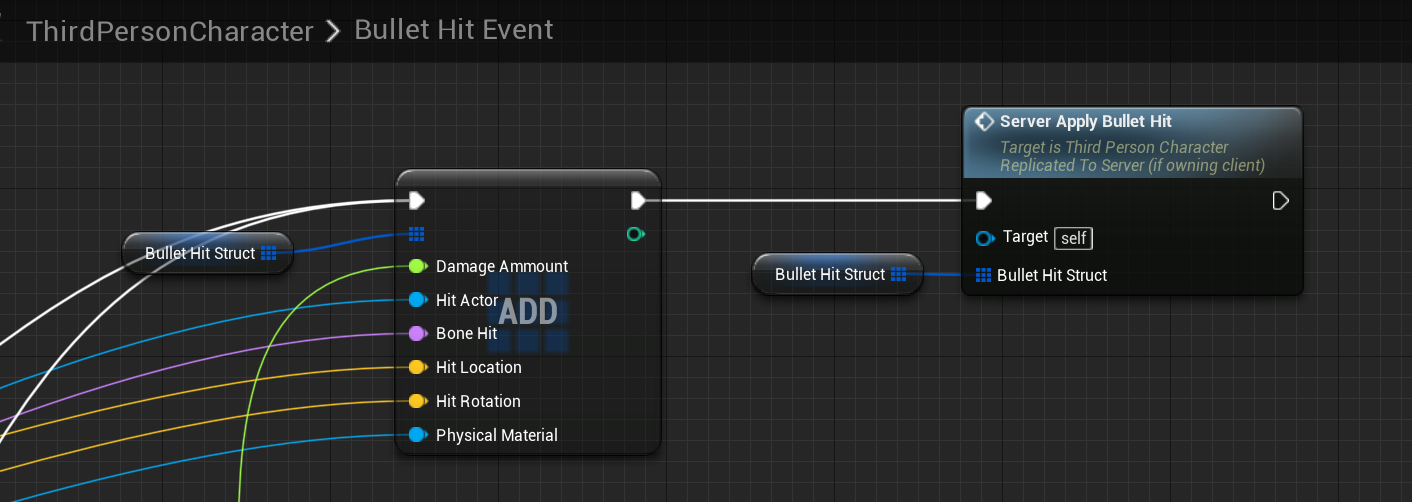
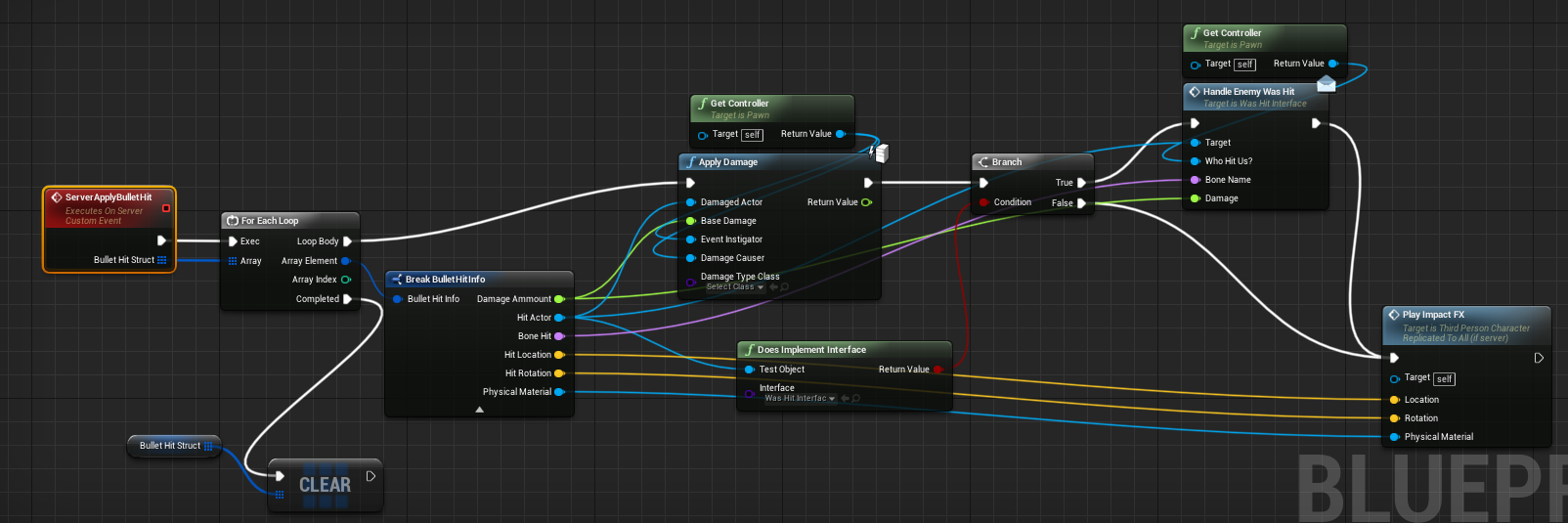
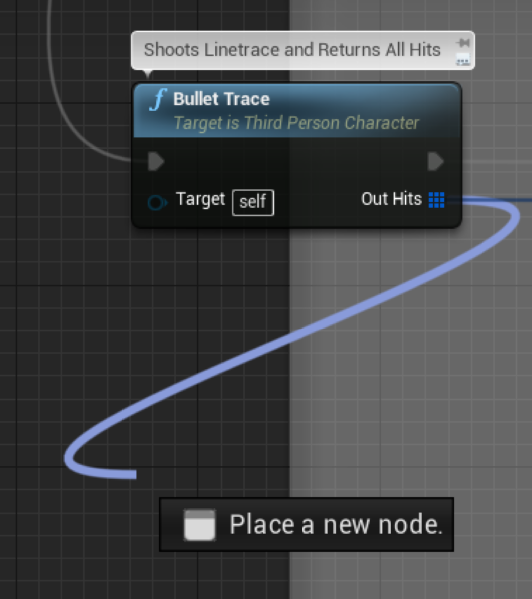
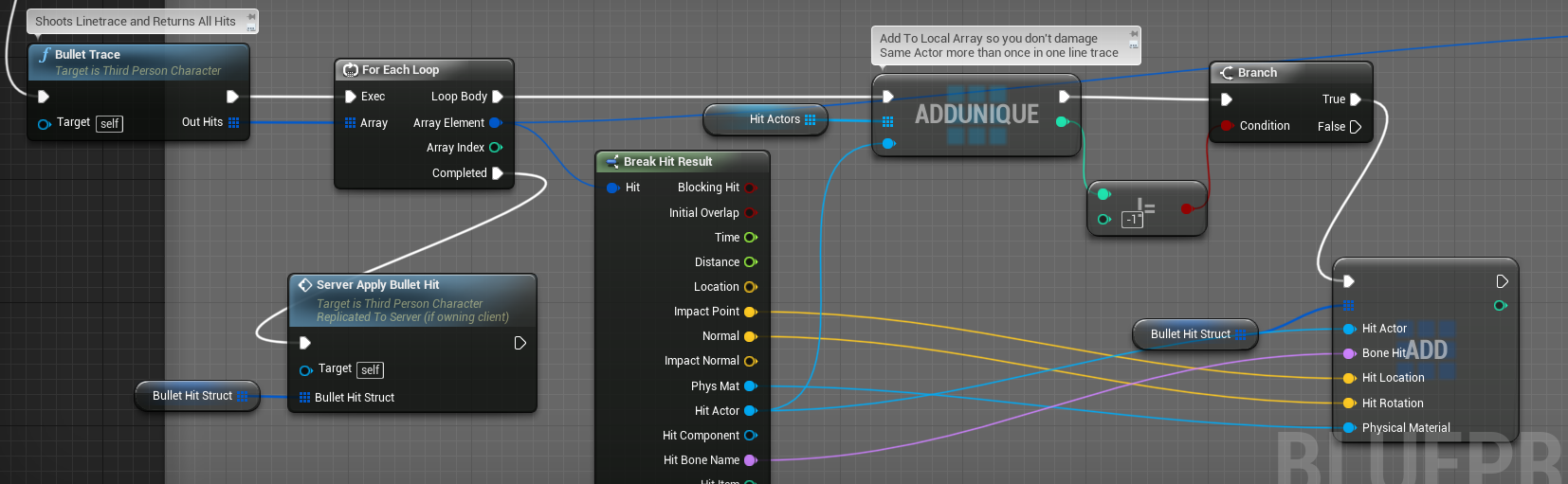
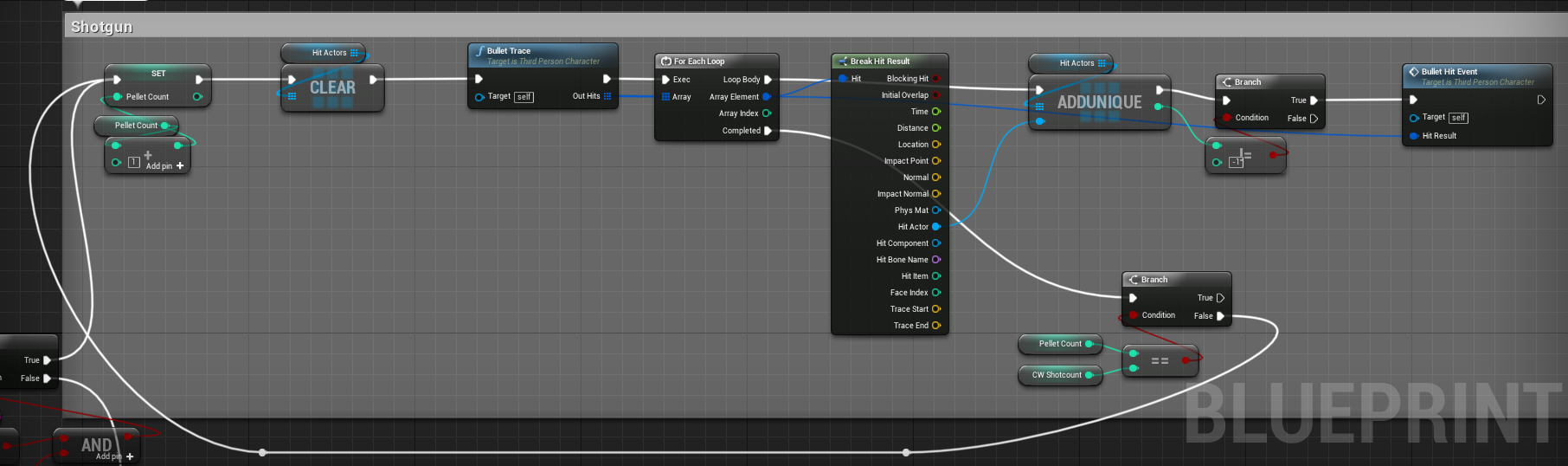
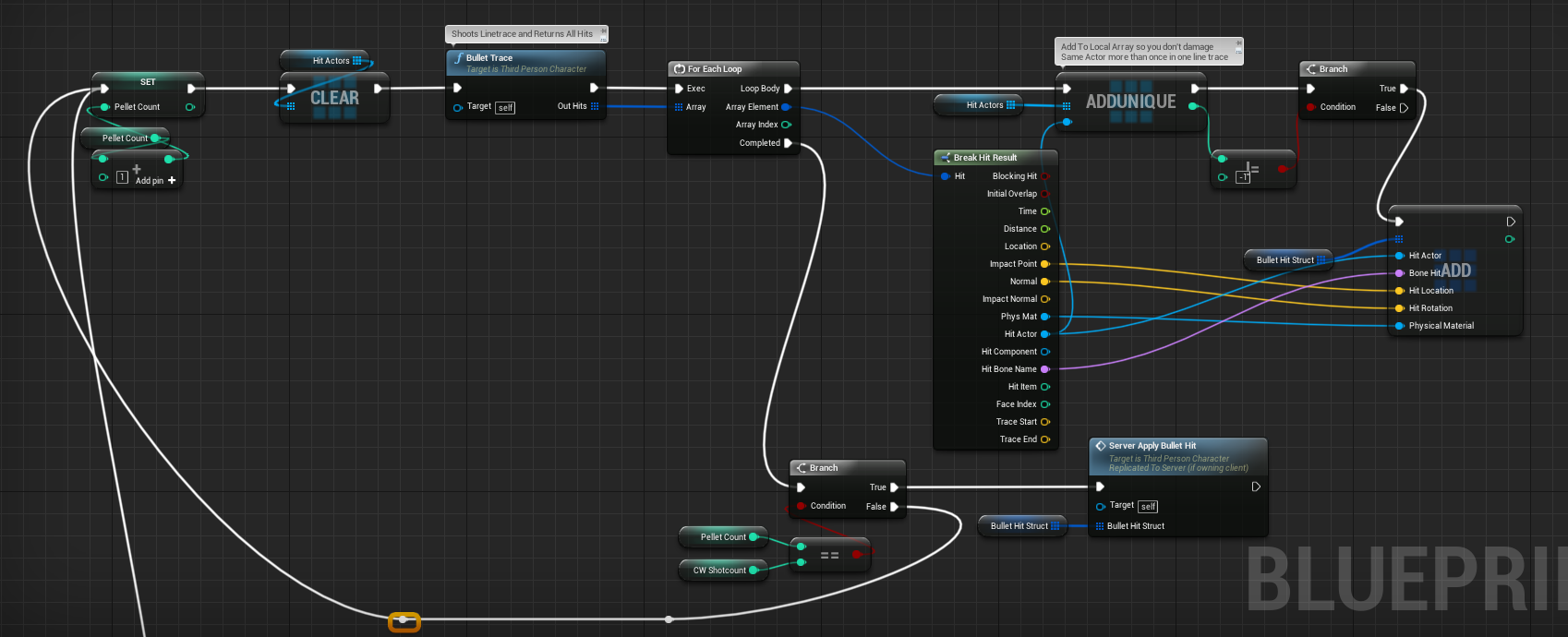
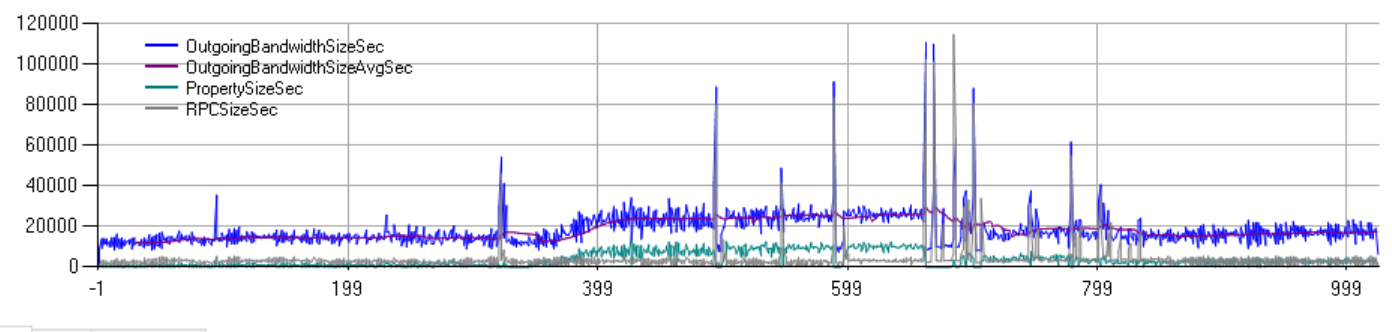
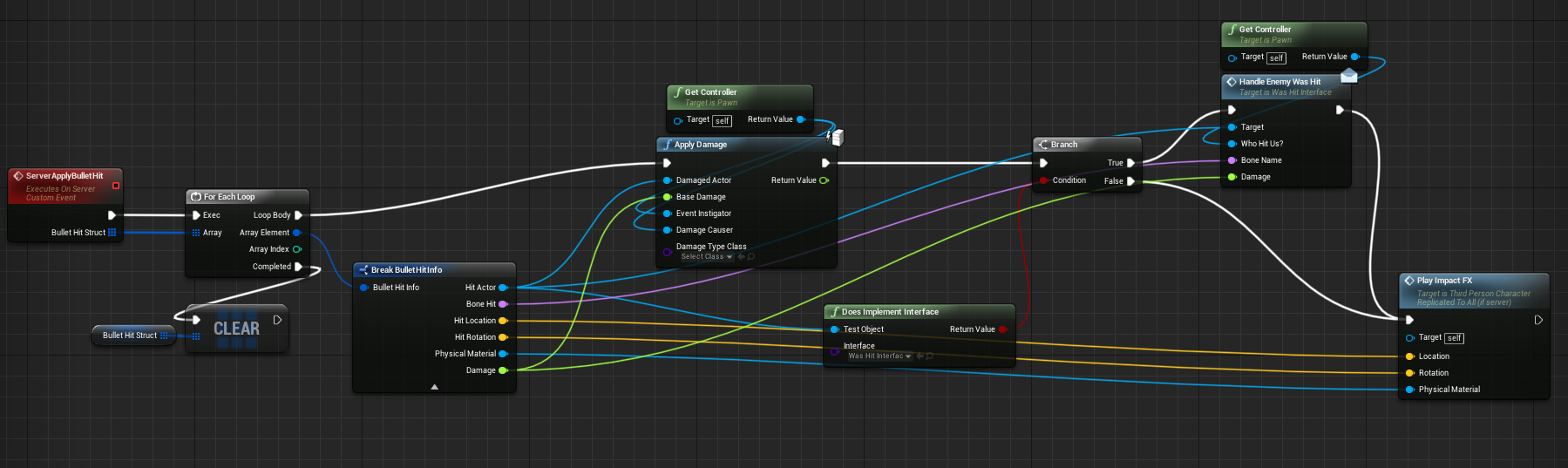
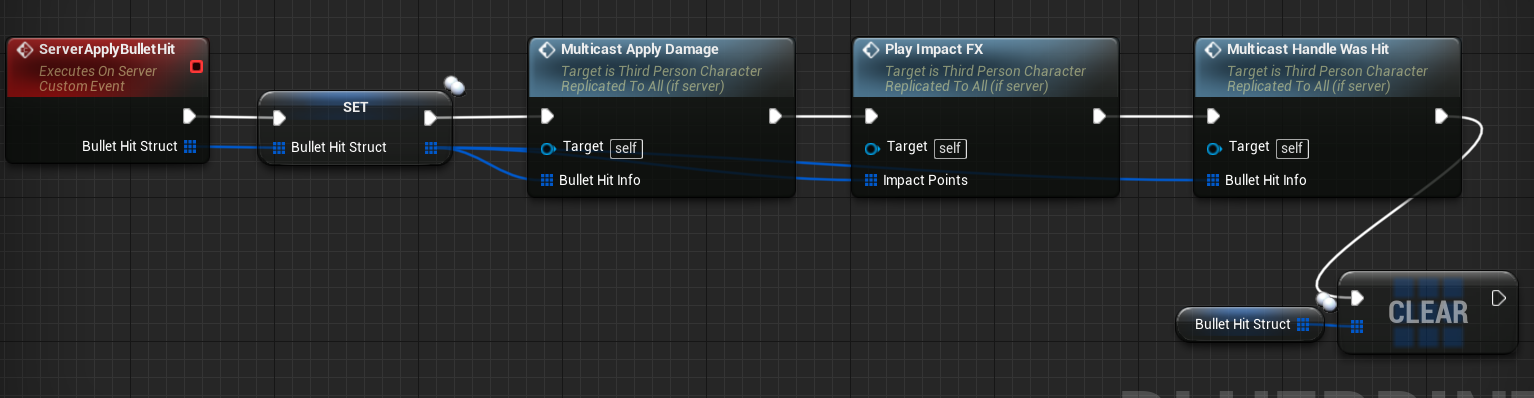


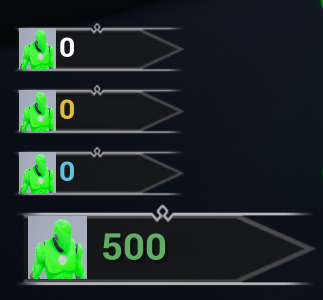


 viral raft
Anyone knows how to create smooth vehicle replication with BP?
Because right now my car is a bit jittery with multiplayer
gray scroll
Thanks @meager spade will probably have to clear timer on death as well
viral raft
I tried smoothsync plugin but somehow my car doesn't "drive" on other clients
viral raft
Because if a player possess to the car he can drive on his client fine. But other players see the car standing still. Once he leaves the car the car gets teleport to the exit location
viral raft
It happens always here like it seems
@gray scroll Do you still have your BP where it works? Any chance you could DM it?
Because my car always stands still :/
My planes work however
gray scroll
I do not 😩
tall pine
Hi guys,
I'm trying to fix a problem regards replication and the timing of it. So on my client, say when I get hit, I want to play the vfx immediately, and let the server sync the actual health. That's all good.
The problem here is that the vfx intensity is based on the amount of health I have left. Most of the time the server will sync the health before I play the vfx, so I get an accurate result.
However, sometimes the game lags, and as result, my vfx would be wrong. How can I fix this? How do I know that I have synced the health from the server or not?
 mystic patio
You're probably going to want to also update the health locally on the client when the hit occurs, and let the server handle the hit to make sure the health is correct using replication. That way, the client always has the updated health value ready to play the VFX.
tall pine
so I should update the currentHealth locally as well, and let it be corrected when the server sync on rep?
mystic patio
Yeah. I would run the same update-health function on all instances, server and client. (No need to write separate functions for that.) When the hit occurs, both the server and the local client run the necessary stuff, including updating health. It might be best for that health variable to be replicated to ensure the clients match what the server says is correct.
tall pine
right, i have event / var to rep the health, but I didn't update it on the client. I'll try out what you suggested.
mystic patio
You might want to consider making the health variable replicate using "RepNotify" so that every time the value is updated on clients*, they fire an OnRep function. You could maybe fire the VFX from that OnRep function if that makes sense for your setup. Just one idea.
*if using blueprint for this, the OnRep will also fire on the server.
tall pine
we want to have the vfx immediately on the hit, so OnRep may be too late in case of lag.
My question is this then: would the client would change the value of health that get set by the server, in case the on rep get called before the hit on client?
So something like:
Server: hit, set health, replicate health down to client
Client: onrep and set health, hit, set health locally
mystic patio
I think the flow of events there depends on which client we're talking about, and where the "hit" is initiated from. If the server is generating the hit, then the client won't know that the hit occurred until the server replicates it to that client anyway, so that delay is already built in. In this case, the client could update its health locally and maybe you wouldn't need the RepNotify approach.
tall pine
i do generate the hit on server
mystic patio
And I assume those hit events are replicating somehow? Through RepNotify or through RPC?
tall pine
repnotify
mystic patio
Beautiful. Yeah, then just handle it all from that hit event OnRep function. Every instance runs that, and uses it to update the health, fire VFX, etc.
Unless the server has info about the hit that the clients don't have, that affects the amount of remaining health?
tall pine
It's a bit like that, yeah, the code I inherit is something like this:
Say a missile is fired and reaches the target, then explodes and deals damage.
We replicate that event, so on the client, we create the explosion and deal damage aspect.
The damage call, however, is still called by the client
This is why initially I need to sync the health from the sever down
mystic patio
Seems like it should work! And your health variable is already replicating?
tall pine
yes, we have event to trigger health replication
mystic patio
Oh, but it's not a "replicated" variable? Either way, as long as the clients have the same value as the server when damage is taken, you should be fine.
tall pine
it couldn't be a replicated value because it's designed to be in this massive struct that I don't want to sync everything.
When I don't update the health locally, yes, I would know for sure the health is the same. But now to display the VFX correctly, I will update the health locally on the client, and I'm not sure if there is a case that the client would override the synced health value from the server.
mystic patio
Hm. So long as the client and server are running the same code in the same order, everything should remain synced. But I would doubt you could always rely on that.
tall pine
i guess if I update the health locally, I will need to stop syncing health from server
mystic patio
I think you might be overcomplicating it. Why not make a separate float variable called ReplicatedHealth or something, and use that as your synced health value. Then copy that synced value into your massive struct as needed. Let the engine do the health syncing for you.
tall pine
right, probably will have to go that way. Thank you for your help
mystic patio
Of course, hope I did!
 gritty surge
Has anyone here worked with FMessageEndPoint? I'm trying to create a general message system that works over the network, but the problem is that message end point only works with structs, and it doesn't recognize messages from child ustruct structs.
have you created a general message system? How would you go about it? thanks in advance!
 north sierra
Hi,
just a quick question.
Does someone know which subsystem i need to use to get a online multiplayer running on android?
I do know how to set it up and everything, I just tried using the create session and join session nodes of Unreal and subsystem NULL but I only got this working in the same wifi, if a person of a different location tries to find my session he cant.
thanks in advance
ocean geyser
question regarding the alobbybeaconstate class, i cannot find it when trying to create a class in UE4 nor do i see any information on actually setting it
https://docs.unrealengine.com/en-US/API/Plugins/Lobby/ALobbyBeaconState/index.html
Shared state of the game from the lobby perspective Duplicates much of the data in the traditional AGameState object for sharing with players connected via beacon only
 grave ermine
Should onlinesubsystemsteam be added in public or private dependencymodulenames in projectname.build.cs?
ocean geyser
i did public
 spark fossil
Hi all. Is anyone else having lag issues since switching to 4.24? My project was running fine until I switched from 4.23 to 4.24. Didn't change a single thing, and now the client character is taking much longer to load and is lagging / rubberbanding all over. This is running on a single machine, client and host PIE windows.
north sierra
@spark fossil Yes experienced myself. Does it only happen upon bumping into another character or all time? if all tiem check that only the actor is replicated not every component
spark fossil
@north sierra It's all the time. Will look into which components are replicated - thanks. I didn't change anything at all and it was working fine a few minutes ago, before switching engine versions. Is there some change in 4.24 effecting this do you know?
north sierra
Not 100% sure but when i switched i had to do this and it worked
spark fossil
@north sierra Will give it a try. Thank you 🙂
Looks like the only component I had replicating was the AbilitySystem, but even tried switching that off. Still lagging 😦
Was absolutely fine before switching engine version to 4.24
spark fossil
I just made a fresh third person template project and it seems fine on there
 thick sigil
Sup, Got a problem with steamSDK while testing my multiplayer game as a Space War project on steam. The host will see client with a small lag and movment will be "laggy". This happens only while im using steamSDK networking, meanwhile while hosting on ue 4 default networking system all the lag is gone and the client is moving smoothly. Can it be beacuse of im using SpaceWar APP ID and not my own APP ID? (My game is 100% c++ and only has TPP example and simple backend for networking)
spark fossil
@thick sigil Are you testing across multiple machines on steam?
thick sigil
yeah
spark fossil
How about for the default ue4 networking?
thick sigil
works nice, no lag.
spark fossil
but is that on multiple machines too?
thick sigil
yeah
spark fossil
is that just using Lan?
thick sigil
nah vpn on ue 4 network and internet on steam side.
spark fossil
ah, thought it might be an internet speed issue but nevermind
thick sigil
I was wondering if it can be because of spacewar example being limited.
spark fossil
I've never had lag using spacewar
thick sigil
Because i don't have my own app on steam right now, so maybe space war is just limited?
spark fossil
Could be. I use spacewar regularly though and never experienced any lag with it. Could have just been lucky though.
spark fossil
I went back and re-checked my 4.23 backup, and then converted it again from scratch to make sure nothing was changed. This was the result. Smooth in 4.23, lag and rubberbanding in 4.24.
spark fossil
Getting this in the output:
[2020.04.15-01.45.24:670][629]LogNetPlayerMovement: Warning: CreateSavedMove: Hit limit of 96 saved moves (timing out or very bad ping?)
meager spade
that is caused when your client doesnt send updates to the server
hence why your getting jittering
your client cant send his move to the server
spark fossil
I see. But why would this happen just by changing engine version? I've made no other changes. Seems odd.
None of this was happening before switching from 4.23 to 4.24. No changes were made other than the engine version.
This is all in PIE windows btw
tall pine
Can you see why CreateSavedMove get called so many times?
 frigid bluff
Anyone know why a Server RPC being called on the client doesn't run on the server? I have code that will execute if the remote role is < ROLE_Authority, if it is it will call a Server RPC that will call the function again. This creates a infinite loop, which I don't understand because it should only be called if it's not the server
The function is on a component that is created by the player controller in the constructor
tall pine
can you post your code?
chrome bay
@frigid bluff you're using remote role, so the server will call it indefinitely
Sounds to me like the Server is calling the RPC not the client
 woeful ferry
Hello,
When do I know when the Steam sockets plugin is activated? I can't seem to find much documentation on it, I followed the tutorial (https://docs.unrealengine.com/en-US/Gameplay/Networking/HowTo/SteamSockets/index.html).
Where can I find the "features"?
rose egret
does anyone know how much is NetCullDistance of PUBG characters ? I guess its way more than UE default value which is 150m. maybe more than 300m ?
given the assumption I'm designing a FPS Battle royal with outdoor environment and sniper rifles with 4x scope 🙂
meager spade
how many players you gonna have?
bitter oriole
Might as well disable cull distance if you're going to have long snipe ranges
rose egret
@meager spade 40+
kindred widget
I think I might be misunderstanding the documentation somewhere. I've created a simple actor and on begin play, I am calling a multicast custom event from the server. The event doesn't do anything but print Hello, but this only runs on the server? Actor is set to replicate. If I create a variable and set it to rep notify, and print hello in that function it runs on both clients and the server where the multicast event from the server just runs on the server?
 glad wharf
how is your actor spawned?
kindred widget
Placed in level.
glad wharf
I read that it needs to be always revelant when placed inside the level
try to see if it fixes the issue. Also, RPC need the actor to be owned by a client (not sure for multicast, but I think so)
kindred widget
Setting always relevant doesn't, but I think I realized what it is. Me not thinking things through clearly, again. RepNotify is likely sent to newly connected clients because the variable is different than what the client reports to the server. Where as the event ran on the server was already ran before the clients connected, since it was only ran on the server, it would have only been ran on the already connected clients.
glad wharf
aaaah yes indeed
rose egret
am I the only one who think UE4 replication can use bitset instead of writing index of changed properties ?
AFAIK replication is serialized as follow .
for(property : changedProperties) ar << property.index; ar << property.value;
so property indexes take more bits than my bool properties
😂
winged badger
and that multicast doesn't check if the Actor already exists on clients
@kindred widget
which it doesn't
if it arrives before the package that spawns the Actor, nothing happens
replicated variable, in comparison, is sent in the same package as instructions to spawn it
and its set, and its replication callback is called before the Actor calls BeginPlay on clients
 vestal egret
Hi, I just started using the NetworkProfiler.exe and trying to understand how it. As you can see on the top two lines there are two actors BP and BP_Block has the highest count. The wierd thing is they dont exist as actors or blueprints in my game. Does anyone here know if it group actors of similar names together like this? Its a little confusing..
spark fossil
@tall pine I can't find why CreateSavedMove is being called so much, but the error said that the ping was probably too high. I'm running PIE in 2 windows on the same machine though, so I'm not sure how latency is coming into it. It's got me bamboozled.
 empty axle
hello, is that variable in PlayerState:
FUniqueNetIdRepl UniqueId;
Always going to have SteamID/XboxLiveID/PSNID ? Or if not is there any other way to get player network id?
tall pine
@spark fossil : I assume that you can run network profile and find out what's taking up all the process?
spark fossil
@tall pine There was nothing immediately obvious from the network profiler, but It seems that the issue was being caused by some RPCs being called in the character class which were set as reliable. Switching to unreliable seems to fix the problem. Thanks for your assistance anyways 🙂