#multiplayer
1 messages · Page 529 of 1
 gaunt cliff
The issue that I don't understand
this is a widget blueprint, which is created within each client instance as I assume
meaning the code above, should run individually on each client
gaunt cliff
Yes, he hardcoded stuff, while he should've been made it scalable (the way i'm trying to do)
 meager spade
your "selectable" characters should be in like the GameState
the widget pulls these characters, and creates a entry for each one
allowing you select
so you would have a struct, called say PlayerableCharacters
and make an array on the GameState called AllPlayerableCharacter or something
simply set all the player characters, then the UI simply pulls from this (as Gamestate is replicated to all clients)
then you can do smart things like locking characters selected by other players, etc
doing it all in the Widget BP is going to be disgusting.
gaunt cliff
then you can do smart things like locking characters selected by other players, etc
@meager spade And you suggest doing that in the GameMode or GameState ?
gaunt cliff
Alright, i'll work out juust this part with the gamestate as you have suggested, and then i'll read that pdf, have been in my bookmarks and i was too lazy to read
Thank you so much for the help
gaunt cliff
Alrighty then, time to close this UE project, have dinner, take my meds and read the entire thing
Thanks a bunch mate
gaunt cliff
oh wow, page 9 clearly explained why i was having that issue
I was accessing "Characters" Array from GameMode (facepalm)
 bold heron
Hey guys, I'm having an issue rotating my player controller with a lock on system when in a dedicated server environment. My pawns are set to use controller yaw so I update the controllers rotation. This works perfectly without multiplayer but online it's not looking at the target at all. Any thoughts on why this might be the case?
 steep jay
Hi, I'm making a game using the Rolling template, but out of the box the client doesn't seem to be able to move. What would be the best solution to enable this? I'm thinking of making a server event for every input and making the input events call the server events, then calling the movement logic from the server event. But I'm not sure that this is the best way
 sly arch
@steep jay You might have to update your DefaultInput.ini or just add the inputs in the package settings
And to answer the other part of your question, im not really sure lol
steep jay
I'm not sure what you mean, the inputs are fine (i think)
sly arch
Oh, well nvm then lol
 cerulean escarp
what's the best way to spawn widgets for different players on a dedicated server? I'm having a very hard time spawning widgets for the right player from the actual character BP, and I assume there's a better place to spawn widgets from. where's the best place to handle all that widget spawning?
bold heron
servers can't have widgets. use a multicast on the player controller and spawn them on the clients
cerulean escarp
so do the create widget node from the player controller BP?
bold heron
yeah on the server call a client function.
cerulean escarp
I can't believe I didn't think to do that...
it makes so much more sense
thank you
bold heron
no problem
 rare gyro
So with the introduction of ReplicationGraph, has anyone benchmarked the limit of a single server instance in the terms of max players?
 crystal crag
Where did the Auto Connect to Server checkbox go?
I don't want the client automatically connected to the server when I click play. That used to be an option...
cerulean escarp
I don't see it either, Idk where it went
 half jewel
@rare gyro im interested in this as well. of corse it depends on the game, but what about a blank game with just a bunch of standard players connected?
is there a way to simulate a large number of players, without having to open a bunch of copies of the game? like a console only ue4 application sending/recieving data from the server acting like a full client?
crystal crag
I don't know why they would remove it. I want to simulate a real situation where the game is just a client that has yet to connect to a server
without having to launch the game outside of PIE
half jewel
@crystal crag you have to play around with the checkboxes to show it
dedicated server checkbox and single process checkbox unhides hidden options that are used regardless of their parent checkbox status
with these checkboxes checked i unlock the option
4.24.3
crystal crag
@half jewel but wait, before you didn't have to use a single process did you?
half jewel
i dint have single process no
u check it, to unlock the auto connect option, set the option to w/e you want then you can uncheck single process if you want
auto connect to server is still honored as stupid as it seems
theres another option that does that too with the window sizes, i forget the combination for that one 🤣
 mighty yoke
Where should menu management live? Like if you have several different menus the player can bring up/navigate between, with information about things like their own inventory and stats or other's players stats. You want to know if a menu is being displayed to cleanly switch between them right? So some kind of centralized menu manager is needed?
I was thinking playercontroller.
 bitter oriole
HUD class is perfect
 tardy orchid
@bitter oriole well I tried changing the variable on server but it didn't change at all and if I set the RPC to not be replicated or multicast or run on owning client, the (SomeoneIn) changed variable is only visible to the player that got in
@tardy orchid Ok so I read the network compedium and realised that I need to use the Event Possesed and now it works
 narrow prairie
question: if i fire a projectile, on server/client model. event hit does trigger: if i switch to dedicated server (checkmark) the event on hit is not beeing fired. anyone has a idea what that might be?
it spawns the projectile, i made a print string on event construct
 mighty rover
is there a way to check if the dedicated server is running, (i.e. hasn't quit/shutdown unexpectedly) from the client?
bitter oriole
If the server has quit or crashed or disconnected or... the client will be disconnected immediately
 scarlet cypress
How hard is it to make a multiplayer running on dedicated servers? I did already make a simple host/join multiplayer, and i mastered singleplayer development. Is multiplayer with a dedicated server much harder to make?
 thin stratus
Yes, No, Maybe.
DedicatedServer:
- Has to be build with source
- Has to be hosted somewhere ($$$)
- Is a lot more annoying if you want to use it with Steam
Despite that, it's more or less the same coding. You only need to filter graphical adjustments that usually the ListenServer also does.
Like hiding something or showing UI etc.
crystal crag
@half jewel ty that worked
 dark hazel
Hi all, we have a multiplayer project which is currently moving along nicely but only dev testing with steam.
Ideally we want to run this p2p with a master server list, I was wondering if there was such a solution out there already for this?.
We cam across an old python master server but that doesn't seem to work correctly when a client joins the session.
Any help, tips or tricks for this would be greatly appreciated.
Thanks
gaunt cliff
As the fella above me mentioned, any one know of a service to provide cossplay (PC and Mobile playing together on the same server)
 chrome bay
Have a look at Gamesparks, Playfab etc.
None are free though AFAIK. GS got bought out by amazon and the prices went through the roof.
 fleet raven
of course, amazon web scam can't have sensible pricing
dark hazel
Has anybody tried this and got it to work ? https://github.com/RyroNZ/UE4MasterServer
For me I can compile all fine, server hosts fine and shows on masterserver the client says the session joined but doesn't travel to the level at all, apart from that it seems to work, I'm still lookin into why this doesn't travel after JoinSession any ideas on this would be awesome

GitHub
This is a plugin for Unreal Engine 4 that adds server registration, deregistration etc with a master server. - RyroNZ/UE4MasterServer
It is an old project but still compiles upto the latest 4.23/4.34 ok and includes example, just doesnt join 😦
crystal crag
I'm getting this error everytime I try to switch to a different dedicated server:
[2020.03.21-17.17.25:765][430]LogWorld: Warning: SetActiveLevelCollection attempted to use an out of date NetDriver: GameNetDriver
Has anyone encountered this before?
I have a client, which upon start up it tries to find the first server, which is dedicated to letting the player select their character. Then I have a second dedicated server running the main game map. I connect to the first server just fine. I'm getting the error message above when I switch to the second server.
Do I have to first explicitly call a disconnect method from the server on the client before switching to the second dedicated server?
 karmic briar
hey guys i wanna ask does HUD replicate on the server or its only exist on the client
 pearl pollen
Is there a way for two RPCs sent one after another to ensure that they arrive at the client (or get processed by the client's code) in that particular order?
.
@karmic briar It's client-only
Or at least it should be. UI was never a server-side thing
 jolly siren
Order is already respected with reliable rpcs
pearl pollen
So it's ensured by the engine? 😄
jolly siren
yes, if you are using reliable
jolly siren
np
half jewel
no trouble with 4.24.3
you might have turned on the new 4.24 network simulation settings by accident ?
@lament cloak
well i guess turn the simulation on in this case to see if you can duplicate it in PIE 🤷♂️ could be a problem with how things are designed on your end
 hoary lark
@pearl pollen FYI I believe order is only preserved for reliable RPCs sent per a given actor. If you call two reliable RPCs from different actors the order may not be guaranteed
pearl pollen
Do different actor components within one actor still count as one actor?
@hoary lark
hoary lark
I don't know 😄 I would think so
bitter oriole
Ask questions directly
crystal crag
Hey no one answered my question from earlier so let me try asking it a different way
 cobalt whale
im just making a kind of battle royale game, but im not sure if i will efectivelly make a battle royal. the question was that, i want to do a skin system more or less like fortnite, and i tough i need a database, im right with that? and if yes or not, what do i need to do it?
crystal crag
if I am a client, already connected to a dedicated server, and I wish to switch to to a different dedicated server, do I first have to call destroy session before I call SessionInterface->JoinSession(...)?
cobalt whale
im just making a kind of battle royale game, but im not sure if i will efectivelly make a battle royal. the question was that, i want to do a skin system more or less like fortnite, and i tough i need a database, im right with that? and if yes or not, what do i need to do it?
@cobalt whale to simplify the question. how can i make a overwatch like looting crates, skins and thoose stuff. how can the game reconize if X person have that skin or have to buy it,
jolly siren
@crystal crag yes
cobalt whale
i just need a place where i can read many documentations or examples
like , an account system
 harsh lintel
Im using FRootMotionSource_ConstantForce but it's not a smooth movement on clients, is there something else I could use? Someone told me it was bugged
 normal garden
How would I go about spawning gun effects such as shooting and muzzle flash so other people can see it?
As in, would I do the effects on the client then on the server?
I'm not sure
 ocean geyser
@normal garden play the effect on client, make call to server telling it that your trying to shoot, the server toggles a onrep variable that plays the effects (or starts timer if doing full auto fire)
normal garden
@ocean geyser Thanks 🙂
karmic briar
hey guys so im asking on behalf on my friend from this stream he's trying to update chromium to the latest version but having problems(i cant remember what problem)
anyone have tried updating chromium to the latest ver?
https://www.youtube.com/watch?v=ofqQA6dvyVY

In this stream, we will start testing and refining the tutorial project. This is the final home stretch.
Join our Discord: https://discord.gg/2xbR5qT
Support us on Patreon: https://www.patreon.com/flopperam
Donate to our PayPal: https://www.paypal.me/flopperam
Sponsor us on ...
 forest kettle
@next fable GameInstance is one of the only thing that doesn't get destroyed when you travel to a new map. Try putting it in there or otherwise, you have to flag the PlayerState as persistant
@glass plaza This is interesting!
How do I flag it? Adding a tag? Is there any side effects to do that?
Thanks in advance
crystal crag
When I call DestroySession on the client, then CreateSession seems to automatically be getting called (I have a OnCreatedSession delegate that writes a UE_LOG)... is this normal?
What session is it creating? I would think I would be put into a disconnected state if I destroyed my session
crystal crag
and even though I call destroy session is seems that I am still connected to the dedicated server
 lunar root
Hey, does someone has experience with an FPS Game? I'm trying to seperate the FirstPerson mesh from the ThirdPerson mesh. It works so far but now I crossed the problem that I don't know where to attach my weapons too. Before I just attachted it to the single SkeletonMesh I had, but now I got two Meshes and either I attach it to the Arms (First Person), which results in a floating weapon for others since the arms have OnlyOwnerSee set to true, or I attach it to the Character (Third Person), and everyone sees the Weapon except the owner. I was thinking about duplicating the Actor somehow, but this seems more like a Hacky solution thats why I'm asking if some of you already found a solution for this and if my approach is the correct one.
 frank portal
@lunar root just create 2 weapon meshes like the character meshes and attach one to the 1P Character and the other one to the 3P Character and handle the visibility with OnlyOwnerSee etc.
crystal crag
Ok, so I just decided to switch to the second dedicated server within the create session completion callback. I get to the second dedicated server, but my character falls through the map and he disappears about 1.5-2s after his feet slip through the ground.
crystal crag
It's really hard to get replies in this channel. Let me try it a different way then. How do you properly as a client with a current session disconnect from a dedicated server? Apparently calling DestroySession from the client is not the way to go
lunar root
@frank portal aight thank you, Just wasnt Sure If this was the best solution or Just a workaround 👍
frank portal
@lunar root but dont duplicate the actor just use 1 actor with 2meshes
lunar root
OMG true, Idk I think I brainlagged, somehow I forgot that I can add multiple meshes to one actor insteadof cloning the actor. Thank you man!
 dark edge
What's the approach to syncing randomness? Like if I wanted bullet random spread to be identical between server and client.
 viscid escarp
Hello guys! Quick question: to make dedicated server work with steam i have to create a new App ID of type TOOL?
hoary lark
@dark edge whoever initiates the event locally generates a random seed, pass it along with the event. Everyone uses the same seed to generate a local random stream.
 rose prawn
Is it possible to replicate Procedural Mesh Component with blueprints?
 cunning shoal
Hello - Would it be a ridiculous idea to ask for help with multiplayer jitteriness when trying to do a line trace to figure out how close to a wall my character is, and then using add force to push them away? Works great on the host, clients it looks choppy
thin stratus
Mostly cause this kind of stuff should only happen on the Server.
Anything that comes from the client directly needs to go through the CMC to have the same timestamp.
 late bluff
Hello, when making a multiplayer RTS like environment with a free camera, are the players conventionally in spectate mode or possessing an invisible pawn?
forest kettle
Hi all,
How do you servertravel from one map to another? I can servertravel once to one Level1. When I try to do the exact same thing to travel to Level2 the game crashes (EXCEPTION_ACCESS_VIOLATION reading address 0x00000068)!
I have same GameMode on both Level with seamless enabled!
UE4.24.3 btw
 winged badger
usually its the travel map that crashes
and usually its a widget that should had been cleaned up
you'll have to do lot better then exception_access_violation tho
 graceful abyss
Hi, I have a problem with my multiplayer game as soon as there is more then 1 client apart from the server player.
https://answers.unrealengine.com/questions/950060/view.html
Does anyeone have a remote idea what could cause this?
 steep cipher
please include the entire crashlog
meager spade
its crashing when copying a property
struct property
but without knowing anymore, i cant tell you what Struct is broken
is this shipping?
have you tried using Debug Game?
graceful abyss
it's in a packaged game
steep cipher
seems to be an issue in BP_Common_Building_C
meager spade
yes packaged but what, Shipping, Debug or Development
steep cipher
BP_Common_PlayerController_C.ROOC_SpawnLocalBuilding
meager spade
yeah but doesn't point what struct is actually broken
but i would start looing as ytour SpawnLocalBuilding as it seems to be the thing that happened
steep cipher
yeah
graceful abyss
is the type of packaged game set in the project settings? I think it's at default. I'll check quickly. Just starting up the project
otherwise thankyou for the pointers so ffar
 graceful abyss
👍
meager spade
ensure debug files is enabled
when crash happens, you can get a minidump, which can be used to see exactly what happened at crash time (though that is not easy to do)
last time i saw this crash was: Struct with the same name in BP and C++ or corrupted blueprint
graceful abyss
Will do as you suggest and post the resulting log later. Will take a bit.
Again thankyou for all the pointers.
cobalt whale
anyone with database knowledge?
bitter oriole
Ask your questions
cobalt whale
i just want a system where the player login and register automatically with stem using the unique id. i know how to transfer data to my mysql database to the client , but if i want to take the data from the client taking the unique id from the onlinesub-system of steam i cant send it to the database
or just tell me what is more convenient for me, i just want to make an in game online shop
bitter oriole
Well, your client should never connect directly to a database
bitter oriole
Take a look at Steam's API for this stuff, IIRC you need to ask them for a key so that your server can authenticate players based on their id
And then you can directly talk to your DB on the server
cobalt whale
im taking example with darwin project, i want the same game opening
bitter oriole
No idea about that
cobalt whale
btw im using varest
 hollow breach
Anybody have idea about how to implement auto movement and attack system in unreal multiplayer game (MOBA or 3rd person). I tried using SimpleMoveToActor function but the movement is not happening on other connected players?
Basically I wanted to know how to achieve auto movements with player controller in Multiplayer environment..
graceful abyss
@meager spade If you have time to look, here are the logfiles from the crash on the debug game.
I will actually try to interpret them myself, too
meager spade
so
you have a struct looks like CPP_Building (inside Blueprint of it)
and you calling SetStruct
like setting struct properties
thing is the struct looks like its not the same
[2020.03.23-14.39.04:730][613]LogWindows: Error: [Callstack] 0x00007ff686651290 RTS_Heroes-Win64-DebugGame.exe!FDebug::CheckVerifyFailedImpl() []
[2020.03.23-14.39.04:730][613]LogWindows: Error: [Callstack] 0x00007ff6869cc207 RTS_Heroes-Win64-DebugGame.exe!UScriptStruct::CopyScriptStruct() []
[2020.03.23-14.39.04:730][613]LogWindows: Error: [Callstack] 0x00007ff688e82c00 RTS_Heroes-Win64-DebugGame.exe!UKismetSystemLibrary::Generic_SetStructurePropertyByName() []
[2020.03.23-14.39.04:730][613]LogWindows: Error: [Callstack] 0x00007ff689810ab8 RTS_Heroes-Win64-DebugGame.exe!UKismetSystemLibrary::execSetStructurePropertyByName() []```this here

crash is from here
do you have a SetCollisionProfileByName node?
in that bp by any chance
or any set struct node
meager spade
very likely aswell
tho that would throw an error
Commander is invalid
    BP_Common_Building_C /Game/Game/Maps/Map02/Lvl_Map02.Lvl_Map02:PersistentLevel.BP_Common_Building_C_2147481313
    Function /Game/Game/Common/Blueprints/Buildings/BP_Common_Building.BP_Common_Building_C:spawnAppearanceActor:0069
[2020.03.23-14.38.38:190][613]LogScript: Warning: Script call stack:
    Function /Game/Game/Common/Blueprints/Buildings/BP_Common_Building.BP_Common_Building_C:ReceiveBeginPlay
    Function /Game/Game/Common/Blueprints/Buildings/BP_Common_Building.BP_Common_Building_C:ExecuteUbergraph_BP_Common_Building
    Function /Game/Game/Common/Blueprints/Buildings/BP_Common_Building.BP_Common_Building_C:NR_Setup
    Function /Game/Game/Common/Blueprints/Buildings/BP_Common_Building.BP_Common_Building_C:ExecuteUbergraph_BP_Common_Building
    Function /Game/Game/Common/Blueprints/Buildings/BP_Common_Building.BP_Common_Building_C:Setup
Function /Game/Game/Common/Blueprints/Buildings/BP_Common_Building.BP_Common_Building_C:spawnAppearanceActor```so it does
then it crashes
graceful abyss
I had the problem in another blueprint that the commander was not fully replicated when the object was created and i needed to go into a waiting loop or even retrieve the commander in a different way to get it properly
meager spade
yeah replication race issues are a nightmare
you never know which actor is gonna rep first to the client
we handle that with first replication, we call a OnRep on clients, which fires a delegate, then we know that actor is there and ready
graceful abyss
Great, then I'll work on addressing this. Thanks again for the help.
forest kettle
you'll have to do lot better then exception_access_violation tho
@winged badger Cheers buddy
How can I explain better? What information you need? I'm traveling in the GameInstance. I also tried GameMode. Same problem 😦
forest kettle
Debug Symbols is a new thing to me! Is it a plugin in the editor or is a windows thing?
 solar stirrup
Is it possible to switch player controller at runtime?
half jewel
sounds like a nightmare, what you trying to do @solar stirrup ?
forest kettle
If you guys having same my problem then make sure you don't mix Base and regular (non-base) classes in your game mode. Here's my error message
LogGameState: Mixing AGameState with AGameModeBase is not compatible. Change AGameModeBase subclass to derive from AGameMode, or make both derive from Base
Best wishes
Hi all,
How do you servertravel from one map to another? I can servertravel once to one Level1. When I try to do the exact same thing to travel to Level2 the game crashes (EXCEPTION_ACCESS_VIOLATION reading address 0x00000068)!
I have same GameMode on both Level with seamless enabled!
UE4.24.3 btw
@forest kettle
solar stirrup
What does bNetForce do in AActor::Destroy(bNetForce, bShouldModifyLevel)?
 plain turtle
Hello Guys!! I am trying to replicate an Event Dispathcer from a Character_BP to a Widget. Locally ,it works perfect, but when I try it on the dedicated server mode it does not work , it seems that the widget does not recive the event dispatcher from the Character. Any suggestions? Thank you very much!
fleet raven
@solar stirrup allows destroying replicated actor on client side
solar stirrup
👌
plain turtle
Okay, I got it. I only had to create the Multicast and Run on Server Method before sending the Dispatcher! Depending if it was the authority or not
 weary mortar
Hi all I maybe have a simple question...but is driving me nuts
ocean geyser
ask away
weary mortar
How could I know from the GameMode of my game, the role of every single playercontroller?
ocean geyser
get a list of player controllers or store/remove player controllers that have passed through the post login function
sryt abbing in and out of game
weary mortar
but in the postlogin all player controllers seems to be Server
maybe am I getting them wrong?
weary mortar
yep... that's my problem... every playercontroller I get from there, is a ROLE_Authority
ocean geyser
well player controllers are only replicated between the server and the owning client
so you need them on the client?
weary mortar
I need to know from the GameMode when the player on the server, enters on some area of the map...
ocean geyser
how do you currently have it setup to detect a player?
weary mortar
So, I need to ask from GameMode (that runs in server) who from my players has the ROLE_Authority
ocean geyser
you can place down a box volume and detect (on the server) when a player enters(overlap event) the volume by casting the actor to your players actor/character, then call the function on the gamemode
weary mortar
yep I'm doing that way (very similar) but if a Client enters that volume, my GameMode is not able to identify him as a Client.... GM always thinks that the player entering is the server
ocean geyser
create a custom volume
actor
with a box volume, create an overlap event on that box volume
weary mortar
yes I'm doing that way, when someone overlaps, I modify a property on that player's GameInstance
I'm going to double-check if everything is setting up correctly 🙂
thanks for your time @ocean geyser I'll be back with answers on this 😄
ocean geyser
yea just custom actor with a box volume, create an overlap event on it that only fires on the server, when player enters it have the server do whatever you need to do (such as call a funciton on the game mode)
solar stirrup
Replicated subobjects still need to be set in GetLifetimeReplicatedProps right?
 toxic schooner
might not be the right place to ask, but can anyone help me with portforwarding?
I've portforwarded before on a wifi connected computer, but right now I'm trying to do it on a computer connected to a wifi extender
My local ip on the extender comp starts with 10.0.1. while other successfully portforwarded systems are 192
The static ip i set 10.0.1.31 wont port forward no matter what I do 😦
thin stratus
@solar stirrup Is your pc not listed on the router itself?
It must have given you an ip too
fleet raven

thin stratus
Big fingers hit the wrong username
solar stirrup

toxic schooner
so my wifi extenders have a 192 port but all devices are 10
so the 10.0.1.21 port should work but it doesnt
ip not port*
In my router settings I have IP: 10.0.1.21, then the destination and forward ports to the port i want
 harsh fossil
i can't join a session even if its lan
is there anynone familiar with sessions ?
 shadow folio
Is the BeginPlay() in GameModeBase the best place to start to look for actors spawned in the level upon startup? I am placing actors in the level and then looking for them in code to take different actions. Is there a better place to do this?
crystal crag
Is there anyone in here that will ever help me? Desperately trying to get past this problem. I created a brand new C++ project based off of the TP template. I have dumbed the project down to where I am simply having the client connect to the game server by finding its session. The server creates the session upon start up. The client joins and my character just falls through the map.
I've tried so many different approaches now. I'm at a complete loss as to what to do
 crimson patio
My AnimBP for character replicates look/aim fine, but I cannot find a simple way to get the Character's aim value from the Blueprint. I want to accomplish server side aim calculations so cannot use camera manager. What's best way to get aim (or at least pitch) value server side?
I can see how potentially using AnimBP values could work, but that seems wrong.
 twin minnow
hey guys, for some reason when I call GameSession->KickPlayer() on the server, it is not working in the sense that the player is still in the server level after calling OpenLevel. Is this normal?
crimson patio
I figured it out, here's solution incase anyone else wondering:
thin stratus
@twin juniper Not that I know off. Maybe the examples but everything is so fundamental that it should stay up-to-date
thin stratus
@twin minnow Kickplayer destroys pawn and controller. That should be enough
 polar wing
@crystal crag Try moving the character spawn location up a little bit (might be clipping through the floor and causing the issue, although the system usually accounts for that). You can also try changing the collision presets on your character's collision capsule.
crystal crag
@polar wing thank you! Finally someone at least is trying to help with something that should be simple. Sadly, I already tried that. Additonally, if I play in the editor and use a dedicated server (different processes), my character falls to the ground and stays there. In my project settings, I have the server start on the game map and I have the editor and game map set to an empty client level. Upon game start for the client, it calls find sessions and then joins the server session. This works and I don't see any errors in the server or client console. But on the client, my character falls a few feet, hits the ground, pauses for maybe .7s, then falls through the floor and disappears from the world all together
crystal crag
I'm going to create a new project again that targets 4.24.3 and try once more during my lunch today
 hardy flame
Hello Everyone, I'm in need of some help accessing every players save game on a multiplayer project.
I'm making a multiplayer game where every player has a save file with their own name. The name is set at launch if no save game is detected. The issue is I'm trying to implement a scoreboard, where I want to show, among other things, the name the player has set on their own save file and I'm having issues with that where or everyone gets the same name as the server or everyone gets the same name from their own local save game file. I've been at this for days and can't seem to figure out a way to replicate every players name to the scoreboard on everyone's game. It's driving me crazy. Here's what I have so far, have in mind that I've changed things around a lot
this is in the character blueprint
this is in the character blueprint
bitter oriole
Every player should send the save data to the server with a RPC ("run on server"), and the server can use the data when it receives it
hardy flame
this is also in the character blueprint
Upon creating the widget a child is added to a widget, PlayerInfo
I'm fairly new to this and would like to implement this in blueprints
what is currently happening is that everyone gets the same name as the server who hosts the game
I'm really scratching my head with this
I've implemented something similar with a chat following a youtube tutorial but cant seem to figure this out
with two computers, with two different steam accounts and save game files
bitter oriole
Just have every client (authority == false) send the save data on begin play
Probably better to do in player controller too
Reminder that replication only works from server to clients
bitter oriole
Just have every client (authority == false) send the save data on begin play
Every player should send the save data to the server with a RPC ("run on server")
Add a "run on server " method and call it from clients
And you're basically done
You might want to read up on all the tools you can use for multiplayer code here : https://docs.unrealengine.com/en-US/Gameplay/Networking/Blueprints/index.html
The various aspects of multiplayer applied to Blueprints.
It's quite short and really, outside of this page, there's nothing more to know about multiplayer
hardy flame
thank you so much man really
but about what you said about having every client authority == false and adding that run on server method how do I go about it? I mean where do I put that, in wich blueprint?
also do you think that the way i've structured this thing to do that is doable? or I'm too far off?
bitter oriole
It doesn't really matter, other than the Blueprint has to be client-owned, so PlayerController and Character are obvious choices
Client ownership is required for RPCs
And I don't think anything you've done is a problem, just think clearly (maybe on paper) about how the data should move around
Keep in mind that clients can only talk to the server with RPC, the server can talk to clients with variable replication or RPC but replication is almost always better
So you have two tools and the logic on top of it is up to you
By the way, the player's name is something that already exists in PlayerState.
So you can change that on server when you receive the client RPC and it will just work
hardy flame
Thank you so much for your time and patience
I will keep trying
to try and get all player names from save file I did this
which calls this
But everyone gets the same name as the server
And I can't figure out why
This first event, the GetNamesPls executes on the server, which loads and sets the player names from the save files, to the SavedPlayerName and Avatar vars and calls the ClientUpdate to create the wodget, which is set to Multicast
The event GetNamesPls is set to run on event BeginPlay
hardy flame
If anyone could see help me figure this thing out would be great because I'm really stuck on this
cobalt whale
should i use mysql as database for items in game?
cobalt whale
so doesent matter
you should not have SQL connections on the client
@meager spade
even with php?
meager spade
no thats on a server
cobalt whale
perfect 😄
cobalt whale
this is what i did
 stiff plank
So i am trying to follow this guide, https://wiki.unrealengine.com/Dedicated_Server_Guide_(Windows_%26_Linux), but when i try to build it in VS, i get these errors. Any1 have any idea what is going on here?
 unique kelp
I am spawning my players in a separate play area while all players connect, and once they have, I move them to spawn points (from the server, replicated automatically) yet for a few seconds after this relocation they seem to be accumulating and discarding moves that never get sent to the server. It probably has something to do with the channel getting saturated, since other reliable rpcs (shots, aiming direction, ... ) are sent fine, and movement ones are unreliable. However I'm at a loss as to why it would happen with me just manually moving the players from the server and fix itself after a few seconds (on live servers it's closer to a minute)
Any of this ring any bells for anyone?
unique kelp
I just tried another network profile and this one seems to have actually given me a ton more info, so never mind, i'm seeing a lot of client calls that dont need to be there
hardy flame
any tips on my issue guys? I'm really struggling
narrow prairie
question: when running the dedicated server and a client join, is it normal that another black screen pops up?
is that the server instance of the game
?
i can close it without the client dropping out, im a bit confused where it comes from
it says development next to it.
nvm..
i made some stupid settings inside project settings
ignore this guy here ^^
cobalt whale
im literally being mad
 fossil veldt
Yo what's the best way to tell everyone in the server to change their HUD, Would I just loop all PlayerController's in the server and run a switchHUD function OnOwningClient?
cobalt whale
just the server tell this to all client
bitter oriole
Use a replicated variable with the desired hud type in game state
In the HUD class, when the desiredhud type isn't the current one, change to the new hud type
 fading birch
When I have a group of clients on a dedicated server and execute ServerTravel seamlessly, I seem to still have a reference to the old controller in the other map (think Lobby Controller -> In Game Controller). The controller is pending kill, but it's still holding onto the objects and i'm concerned about memory issues. If i run obj gc it removes those references, so is UE just not doing it's garbage collection automatically or should I tell it to do so?
winged badger
its intended
in fact, NotifyWorldLoaded and ServerNotifyWorldLoaded are called on the instance of the lobby controller once you load the game map
before they are swapped
but the PC does have its own SeamlessTravelActor list, which is the list of Actors that will survive the seamless travel transition
you also have PreClientTravel, which is virtual, that is a good place to clean up before travel
(all the above mentioned functions are on the player controller)
fading birch
yeah i was overriding the HandleSeamlessTravelPlayer
in the game mode
but I can override that in our base controller class as well
winged badger
lobby controller is pending kill then
fading birch
yes
but it's still showing up in the object list
along with all of the widget references it holds too
winged badger
the Super call of HandleSeamlessTravelPlayer
is what swaps the controllers
so it will be gone in next GC pass, you literally marked it pending kill a microsecond ago
you can override PreClientTravel on lobby controller and null those widget references if it concerns you
fading birch
I've done that a slightly different way, but yeah
winged badger
but its only an issue if they arte causing problems in the travel or destination map
winged badger
then they get GCed along with the controller
fading birch
but one of our guys is a bit insane when it comes to managing memory
winged badger
on the next pass
fading birch
mmkay
and it shouldn't be a worry at all since it's pending kill as is
so while it's still stored in memory
it's not actually being used
winged badger
what i'd definitely not do
fading birch
it's just chilling
winged badger
is manually force GC to collect at that stage
as the game is still pretty busy constructing the world at that time
so, if you want to force get rid of them
PreClientTravel override on LobbyController is the place to do it
crystal crag
Ok, so I created a new UE 4.24.3 project using the third person player template. I have done nothing other than put the code to host the session and to join the session. Everything else is literally the default value given by the template. My character still joins, then falls through the map
both the server and the client start on the same map
I'm going to go insane
it should not be this hard
For all that is holy, please someone help me. I don't know why all of the sudden I can't get this to work. I am even referencing a project I built in 4.20 and it worked
ocean geyser
try modifying the Z axis of your actor on the server when it gets created/possessed?
crystal crag
Should I need to do that with the standard template though?
Just to make sure I'm being clear, I just went to new project, created a C++ TP project based off of the TP template, coded the session logic in the game instance, and fired up the dedicated server / client
I've changed nothing else
fading birch
I am using a dedicated server that seamlessly travels to a map and brings the clients. In the player state I have a replicated variable called username. This is sent to other clients using a NetMulticast function. However, there are times where it won't replicate properly, or send the incorrect values. We've managed to work around this by having a delay before that event is fired, but that's a temp fix for the moment.
Is there a way to basically have the server replicate this at a certain time or rather, in a way that doesn't garble the data?
ocean geyser
@crystal crag heres what i did to fix my issue of spawning in the ground/falling through the map. i overrode the PostLogin function to use my spawn points. do the same sort of thing but without the extra junk that i did, just increment your players actor up some and possess it in the PostLogin function, or look through GameModeBase to see how they did it and simply modify it from there if you dont want to have your own game mode or override one of the functions in there
void ASurvivalGameMode::PostLogin(APlayerController* NewPlayer)
{
    Super::PostLogin(NewPlayer);
        if (SpawnPoints.Num() == 0)
        SetSpawnPoints();

    if (ATheHousePlayerController * PController = Cast<ATheHousePlayerController>(NewPlayer))
    {
        UE_LOG(LogTemp, Warning, TEXT("CASTED PLAYER CONTROLLER"));

        ALobbySpawnPoint* SpawnPoint = GetValidSpawnPoint();
        if (SpawnPoint)
        {
            FVector Location = SpawnPoint->GetActorLocation();
            Location.Z += 100.0f;//move spawn point up 100 cm
            FRotator Rotation = SpawnPoint->GetActorRotation();
            FActorSpawnParameters SpawnParams;
            SpawnParams.bNoFail = true;
            SpawnParams.SpawnCollisionHandlingOverride = ESpawnActorCollisionHandlingMethod::AlwaysSpawn;

            SpawnPoint->SetUsed(true);
            if (DefaultPawnClass)
            {
                if (APawn * Pawn = GetWorld()->SpawnActor<APawn>(DefaultPawnClass, Location, Rotation, SpawnParams))
                {
                    PController->Possess(Pawn);
                }
            }
        }
    }
}
@ocean geyser Ok I'll give it a shot. Something still feels broken though. I never had to mess with game mode at the beginning of my other project and it worked right out the gate. Worth a shot though
winged badger
@fading birch there is a PlayerName(Private), depending on the version, in PlayerStates that the engine replicates for you
fading birch
@winged badger yeah I'll likely transition to that later. I got it working actually by looking at how that was implemented. Going with a rep notify fixed the issue.
We plan on replicating other things so this was more of a flow test run per say
 mossy hearth
I created a custom character movement component and assigned it to the character, but in blueprints when I click on the the new movement component i dont see any variables etc. anybody knows why this could happen?
 twin juniper
Someone has some experience in Amazon Game Lift for dynamic Game Server?
i am thinking about it and ill need such a system to start for my Racing Project dynamicly Servers when people wanna race
 bronze arch
Hello everyone, i had a trouble with Multiplayer dedicated server execution, Anyone have idea?
[2020.03.25-00.26.12:435][753]LogNet: NetworkFailure: ConnectionLost, Error: 'UIpNetDriver::TickDispatch: Socket->RecvFrom: 24 (SE_ENETRESET) from ***.***.***.*:63174'
[2020.03.25-00.26.12:437][753]LogNet: UNetConnection::Cleanup: Closing open connection. [UNetConnection] RemoteAddr: ***.***.***.***:63174, Name: IpConnection_114, Driver: GameNetDriver IpNetDriver_0, IsServer: YES, PC: MatchmkaingPlayerController_C_114, Owner: MatchmkaingPlayerController_C_114, UniqueId: Steam:***************
[2020.03.25-00.26.12:442][753]LogNet: UNetConnection::Cleanup: Closing open connection. [UNetConnection] RemoteAddr: **.***.***.***:65320, Name: IpConnection_113, Driver: GameNetDriver IpNetDriver_0, IsServer: YES, PC: MatchmkaingPlayerController_C_113, Owner: MatchmkaingPlayerController_C_113, UniqueId: Steam:***************
[2020.03.25-00.26.12:450][753]LogNet: NotifyAcceptingConnection accepted from: **.***.***.***:65320
[2020.03.25-00.26.12:451][753]LogNet: Invalid ConnectionlessHandler (0) or StatelessConnectComponent (0); can't accept connections.
[2020.03.25-00.26.12:769][763]LogNet: NotifyAcceptingConnection accepted from: ***.***.***.***:63174
[2020.03.25-00.26.12:770][763]LogNet: Invalid ConnectionlessHandler (0) or StatelessConnectComponent (0); can't accept connections.
..
..
..
looping..
@jolly siren guess you got same trouble in some ago. do you know how did you fix it?
jolly siren
Where did you see that I ran into this? can you link me to the message?
bronze arch
at linux channel i guess
hardy flame
Hello Everyone, I'm in need of some help accessing every players save game on a multiplayer project.
I'm making a multiplayer game where every player has a save file with their own name. The name is set at launch if no save game is detected. The issue is I'm trying to implement a scoreboard, where I want to show, among other things, the name the player has set on their own save file and I'm having issues with that where or everyone gets the same name as the server or everyone gets the same name from their own local save game file. I've been at this for days and can't seem to figure out a way to replicate every players name to the scoreboard on everyone's game. It's driving me crazy. Here's what I have so far, have in mind that I've changed things around a lot
this is in the character blueprint
bronze arch
hardy flame
this is also in the character blueprint
but this is happening, with two separate computers, steam accounts and save games
bronze arch
same for me too. it was first error that i saw on my game till 2-3 year
so rare as you said
but isn't same error in same file? you had error in send to, i had error in receive
jolly siren
yeah ours occurred for the 1st game when a new server was first allocated by the load balancer
 supple pelican
Hey guys i have a game thats using OSS NULL, and is hosting a session. FindSessions cant seem to find the session being hosted on another PC only if i try to FindSessions on a client that is running on the same pc the dedicated server it is found. Anyone have any idea what im missing? These are the current SessionSettings that we are using
            SessionSettings.bIsLANMatch = bIsLAN;
            SessionSettings.bUsesPresence = bIsPresence;
            SessionSettings.NumPublicConnections = MaxNumPlayers;
            SessionSettings.NumPrivateConnections = 0;
            SessionSettings.bAllowInvites = true;
            SessionSettings.bAllowJoinInProgress = true;
            SessionSettings.bShouldAdvertise = true;
            SessionSettings.bAllowJoinViaPresence = true;
            SessionSettings.bAllowJoinViaPresenceFriendsOnly = false;
 shy kelp
very new to the idea of replication. Why doesnt something simple like this work on the client? It only works on the server
havent really tried to meddle with multiplayer until now
cobalt whale
someone who can help me with php?
 fossil spoke
@cobalt whale Please use #lounge, PHP is outside the scope of this channel and this Discord Server.
cobalt whale
no problem ^^.
 next fable
Very confused about GameState and PlayerArray and behavior in a multiplayer session.
Here I have the Server window looping through GameState PlayerArray in a widget and printing player name and tag. I have a two player session joined. The tag is being populated in the PlayerState by the menu widget displayed.
Why is it printing 2 for the Server and 2 for the Client?
Why is the only one being set a Server one?
I thought PlayerArray is replicated across all clients.
I am basically trying to split the player array and drop in different buckets accoring to the tag.
How do I do this? I've been at this for days :-(
cobalt whale
why my project run as standalone game and doesent have server- client? where i can choose that?
instead of this
ocean geyser
where you click play click the down arrow and you will see options @cobalt whale
 vestal thistle
hello is anybody familiar with playfab matchmaking here? i was wondering if i set this up correctly
 odd plaza
hello is there any variable to determine actor is replicating and up to date?
on client side
I tried this but it seem only display true
even I walk away from it
 zenith yarrow
Has anybody has any issues with the check((SIZE_T)AckCount <= AckRecord.Count()) in FNetPacketNotify::UpdateInAckSeqAck(), where it crashes on debug game builds ?
@silent sigil You posted asking for help regarding the NetPacketNotify crash on 08/28/19, were you able to find the reason for it ?
 silent sigil
@zenith yarrow I was not, it just went away when I moved to 4.23
zenith yarrow
@silent sigil thanks, was constantly getting these while playing debug game builds, is the check removed in 4.23 ?
silent sigil
I don't know. It was specific to steam and level travel. Lot's of places a code change could have fixed that. I didn't have time to track it down. Trying to ship.
zenith yarrow
so are we, thanks for the help, appreciate it.
silent sigil
np
weary mortar
Hi all, maybe a dumb question... but any hint on how can I get the role of a PlayerPawn/PlayerController from the GameMode(server side)? when I ask for the PlayerController->GetLocalRole() always give me ROLE_Authority as result for everyone of the 4 players... Maybe because it is really taking the copy of the PlayerController in the server side....HEEEEELP 😄
zenith yarrow
@weary mortar GetRemoteRole() in aactor ?
weary mortar
I'm in a ListenServer, it always give me that it is a Client 😦
even for the Player in the Server
zenith yarrow
@silent sigil can you please tell me if you switch the engine first and then make changes or did you make the code changes first and then switched the engine ?
@weary mortar not sure you'll have to check, but, if you set a owner for the actor/pawn when spawning, to the pc of the player. You can also set the owner later i suppose, The remote role then should show up correctly for the pawn on the server.
weary mortar
ummmm I'll try something in that way @zenith yarrow thanks!
unique kelp
is this something i should be concerned about?
how does this even happen?
it's obviously not really Xs and Ys
but the numbers are different
twin juniper
@shy kelp Apply damage is executed on server, the small desktop icon in the top right of the node indicates its authority only
chrome bay
@weary mortar The role of the objects on the Server is ROLE_Authority, so that's the correct behaviour.
Player pawns and player controllers are spawned by the server and replicated to clients, therefore the server has authority over them.
bitter oriole
You want the remote role instead
weary mortar
@hollow nexus I have suspected that... 😦 but, How could I do to identify the pawn of the Server and the pawn of the Clients from the server?
weary mortar
IsLocallyControlled()!!!! DAMN IT!!! I've didn't tried that in this case!!!
@chrome bay ams I think u hitted the nail... let my try it !!
chrome bay
It'll return true on the Server for both the listen server player and also any AI controllers
But false for any clients
And on clients it'll only be true for the pawn they are possessing.
weary mortar
@bitter oriole thanks mate!, I've already tried that... but in any case, even in server, always returns ROLE_AutonomousProxy... in other words... Client 😦
@chrome bay really enlighted my issue!! I use IsLocallyControlled() many times, but in this case I absolutelly forgot about it... 😄
chrome bay
Yeah it's a pretty common func to use 🙂
weary mortar
for sure!! 😄
zenith yarrow
@silent sigil Thanks for the help erebus, got only the changes from this commit -> https://github.com/EpicGames/UnrealEngine/commit/1bb3d8fcb19aa44808a9a23d82c60d7c05564a38 , and the issue is solved for me.
 visual surge
Hi everybody, I have a question regarding Net Load On Client for replicated actors. In our game we have lots of actors that use this function (small decals) and when a player joins a match you can see each decal actor spawning one by one. I have a loading screen in place but OnPostLoadMap is called before all these actors are spawned. In the meantime the player can't move at all. Is there maybe a callback that will be fired when all net load actors are loaded?
cobalt whale
anybody know how to fix that? my game run only with stantalone , doesnt have any server / client
chrome bay
I mean, you have actually made the game multiplayer right?
chrome bay
I don't know what "Active Play Mode" is but you should just select how many clients to create, select whether to use a dedicated server or not and hit play. That's all there is to it
cobalt whale
is windows pie. with 2 clients. without dedicated server
chrome bay
yeah should work fine then
chrome bay
My guess is the dedicated server doesn't launch properly so the clients end up as standalone
Try without dedicated server
chrome bay
Have you changed something in the Advanced Settings?
cobalt whale
what i have to do?
you know what
i start from 0
i cant find any solution
hours of work wasted
 unborn cobalt
Is it possible to render preloaded level before and during travel (connection to server) in a way that player will not notice any background connection happening?
 molten topaz
hey guys, new to unreal here, my question is: Is it hard to make a game with over 4 players online? Meaning, Can I make an 8 player or 16 player game? Or would it just be really laggy, i don't know anything about multiplayer as I am new to game dev, but have experience in coding
cobalt whale
you can do a game with infinite ammount of player.
depending on the machine your are hosting your game
winged badger
you actually can't
battle royales have huge teams doing tons of optimization to run a 100
and machine hosting your game is either whatever dedicated server you leased, or average low end gaming PC
@molten topaz if you don't know anything about multiplayer, i'd keep it down to 4-8 if i were you
molten topaz
i would love doing an 8 player co-op game but i gotta learn the engine so maybe next year
winged badger
not that AI characters running around take about as much resources as a player
we have even a high end gaming PC struggle as a listen server with 200 AI running around, and that is after several optimization passes
if you don't know much about AI either, i'd keep it down to 4 players for start, that can be scaled up at a later time
 celest geyser
Got a question, what's the best way to 'tag' an actor as belonging to a certain player in either a Local- or Online Multiplayer scenario? Setting a variable on the actor that holds a reference to the owning actor? Or is there some native functionality for that?
(also applies to actors placed in the level, not spawned through code, since there you can specify an owner as far as I can see)
winged badger
SetOwner
if called on server, it will also allow the owner to send and receive RPCs through that actor
and you should definitely call it on server
OwnerPrivate is replicated out of the box
celest geyser
Ok, is that also a good approach for local multiplayer, couch-coop style?
Since I have multiple Player Controllers anyways, I just set that as the owner locally as well?
cobalt whale
how i have to replicate that?. that action need to be performed by the server and is required from a specific client
narrow prairie
@winged badger how did u manage to get 200 ai running around? what performance steps did u take?
meager spade
lots
we had to optimize, cmc calls, use NavWalking not Walking, reduce the number of scene components on the AI, use behaviour trees properly, (avoid the amount of MoveTo calls), etc
then there is other little tweaks to settings on the CMC
its not perfect, and we are still optimizing it even more @narrow prairie
narrow prairie
is that cmc c++?
meager spade
ofc
we had to do a lot of stuff
override stuff in the CMC (we have our own MonsterMovementComponent
narrow prairie
im rlly hitting limits allrdy with 10 ai running around, almost unplayable in multiplayer.
sadly i cannot code c++ yet to optimize these things
narrow prairie
i dont know how much more load it has when i has to render 2 clients
might also be that issue
gonna go check emediatly
tardy orchid
Hey everyone, does anyone know why my player state doesn't get carried over when I load a map? Doesn't work for both SP and MP. All I have created for the player state is a NickName string variable and when I load to a map it becomes the default value
meager spade
who said that?
meager spade
no
tardy orchid
oh
tardy orchid
oh
so what's the best way to carry over player state variables like level and Nickname
 tardy orchid
can u explain quickly how to do this or link a tutorial?:P
silent sigil
@zenith yarrow ty.
 half jewel
@meager spade before you reduced the amount of scene components on ai, did you check to see if use parent bounds checkbox helped with performance?
i never thought removing components could help performance, maybe moving these particle/sound components to runtime spawns is faster?
meager spade
i have that ticked aswell
all scene components still need to update there transform
thats what the bottle neck was
we were hitting 2ms updating child transforms on scene components
tardy orchid
@meager spade still doesn't work, what am I missing
and also when does this event get called
meager spade
when new player state is created, before old one is destroyed
when you open a new world
tardy orchid
oh
so it should work
it's identical, why not working tho
Yeah, it still becomes default when I log into multiplayer
I tried with multiple clients and when I get all the player states it shows them all named as default, so it doesn't get carried over for some reason
meager spade
might be a option in the controller somewhere
 rotund whale
is sending a map object over an RPC allowed?
I tried googling the answer but no results about this came up
bitter oriole
IIRC, no, it isn't supported
fleet raven
you could just try if it works
lunar root
Is there a way to replicate the movement more precise?
bitter oriole
Loaded question right there, multiplayer movement is an entire field of employment
lunar root
I've set a GlobalTimeDilation to 0.2 right now because I wanted to make an SlowMo effect, the thing is, when a player rotates it doesnt look smooth, it looks more like steps
bitter oriole
So, obviously you need to replicate time dilation everywhere first
I wouldn't have been surprised if global time dilation was replicated out of the box tbh
Not much sense doing it only on server, since it's going to drastically affect gameplay
Basically the most common problem with multiplayer movement is if the simulation doesn't happen 100% exactly the same everywhere
It's never 100%, but Character or any other implementation will correct all the time
It's impossible to do so if the game is behaving differently
lunar root
Okay, wait let me replicate it very quick
thought the server does this out of the box
lunar root
So two thing: No its not replicated by default
Second: If i set it on both sides its even worse since it looks like the replciation speed is also in SlowMo mode then
which results in even more "Stepping" issues
Whatever, thanks for helping, i do this someday later was just a bit messing around
bitter oriole
Well yeah, that makes sense
IIRC you can dilate other than with global time, though
There is a per-object one
lunar root
Yeah, the main idea was to make something like in Overwatch
Idk if you have ever played Overwatch but when the Game ends everything goes into slowmotion and it say Victory
well or defeat but u get the point
bitter oriole
Yeah definitely
I would expect the character class to support custom actor dilation
If it doesn't, it's going to be harder
lunar root
Another issue, Stranger are you familiar with C++ & Multiplayer? or u use mainly blueprints
bitter oriole
Mainly C++ really
lunar root
Ok, so you can help me here maybe
So Basically in the GameMode I call the function EndGame in every PlayerController (its a custom function for sure)
Its marked with UPROPERTY(Client, Reliable)
And the function is basically empty, its just defined right now
so when i play in editor, uncheck dedicated server and play with 2 players, as soon the function is called my engine crashes (access violation error)
however when the ded. server is running it works just fine
any ideas?
And VS only opens the generated (.gen) file when throwing this error
idk what to do lol
bitter oriole
Well, access violation is something you debug in VS
Close the editor, compile, start debugging and play in editor
There likely is a null pointer somewhere
bitter oriole
The call stack should help.
If you're not familiar with debugging C++ code, you'll have to learn real fast
lunar root
Yeah new to this kind of stuff, VS is still 'new' to me
bitter oriole
Call stack is the main tool for debugging, it's one of the windows avaialble while in debugger mode. basically the stack of where the code is
Usually your own code is somewhere inside the stack, so you can double click that and find out the parameters
fading birch
I use the call stack most often to check values, you can also step back through the function calls to find where it went wrong.
lunar root
So Basically my PlayerController is undefined
You don't know
how much time i could have saved if i knew sooner about the call stack
fading birch
well think about it this way
now that you do know
you'll save more time in the future
lunar root
^^
fading birch
wait until you figure out how to attach debuggers to a standalone UE4 window
lunar root
😮
`void ATFGameModeBase::EndGame(UTFTeam* Winner)
{
for(ATFPlayerControllerBase* Player : GetPlayers())
{
    Player->GameEnded(Winner);
}
}
TArray<ATFPlayerControllerBase*> ATFGameModeBase::GetPlayers()
{
TArray<ATFPlayerControllerBase*> Players;
for (FConstPlayerControllerIterator Iterator = GetWorld()->GetPlayerControllerIterator(); Iterator; ++Iterator)
{
    if (APlayerController* PC = Iterator->Get())
    {
        auto const TFPC = Cast<ATFPlayerControllerBase>(PC);
        if(TFPC)
            Players.Add(TFPC);
    }
}

return Players;
}`
In the EndGame
So Basically "Player is undefined" happens in the EndGame for-loop
but how can there be an undefined Player if I check for it before I add it onto the Players array?
bitter oriole
The reason you can set them is that TMap is supported for Blueprint
You can use them in singleplayer
They do not replicate however
 terse prawn
Both these variables are set to RepNotify and when the event is executed, it wont replicate across the server & clients
how can I get this to update across all clients & server?
meager spade
set it on the server?
clients cant replicate properties
so if that is done on the client, it will never replicate
terse prawn
would I use a run on server leading to a multicast?
meager spade
no multicast
 timid moss
Does anyone know a really good cheap database service I could use for storing game data?
supple pelican
I’m trying to findsession on my lan with OSS Null and my other PC (PC not hosting the server) can’t find it. PC hosting the dedicated server and running a client can find the session. My firewall is off on both PCs. Anyone have any ideas how to debug this
cunning shoal
hey guys, has anyone experienced issues moving to 4.24.3? i was on 4.23 and now when launching multiplayer PIE (2 players) the 2nd player gets pulled back after walking forward for a bit, almost as if there was massive packet delay, even though there's not.... my ammo system also stopped showing up correctly for the 2nd client
fading birch
@timid moss what kind of data?
@cunning shoal something sounds awry there. I didnt experience any issues like that when we moved. Did you go through the change lists for those versions to see if something broke your code?
cunning shoal
@fading birch i also just noticed that to the server, the client is walking as if they have extreme packet loss (very choppy) - this never happened before. I will have to double check the change list again for that
fading birch
That shouldn't happen in pie at all.
cunning shoal
I agree.... you know what, I'm actually missing images on my lobby menu too, starting think the conversion corrupted
meager spade
it can happen
timid moss
@fading birch you know. User stats. Abilities. Maybe even a profile picture. I know pictures can take up a lot of data so idk bout that yet
meager spade
i have monsters that just wander off screen on pie
when focus is lostr
but its visual
and only when focus is lost
and yeah happened since 4.24 never happened in 4.22 @cunning shoal
so you are not a lone
fading birch
@timid moss well my project uses a restful API I custom built and I just host it on Digital Ocean. As far as out of the box solutions? I didnt see any cheap ones when I was looking before I just decided to make it myself.
cunning shoal
@meager spade do you mean you had the same issues? or that your issue started on 4.24?
cunning shoal
yeah, I was on 4.23 with no issues coming from 4.22
looks like there were major updates for the Steam API
but PIE doesnt use that AFAIK
fading birch
It does not no
cunning shoal
Ok so I did a fresh conversion of 4.23.1 to 4.24.3 and confirming it does still have the same issues (all my player/character, and map images are white even when changing maps), and the teleport/jump back and client visual lag is still there. I think there's issues with this new version, I'm not doing anything special for the walking movements
fading birch
does the issue persist with 4.24?
cunning shoal
you mean 4.24.0? I'll have to see if i can install that one
fading birch
4.24.2 atm
might as well grab the hotfixes
is this a big project?
as in important things?
either way, i'd make a copy of it and switch engine version there
due to map version issues.
cunning shoal
its getting larger, have spent about 6 months on it
so doesnt look like i can choose 4.24.2 to install - 4.25.0 preview, and 4.21.2 are all im given around that range
cunning shoal
nope
fading birch
that's very strange
cunning shoal
I have 4.22.3, 4.23.1, and 4.24.3
fading birch
oh
it's 4.24.3 now
i haven't updated from 4.24.1 yet
none of the changes effected my project
tardy orchid
@meager spade can you point to a tutorial or documentation on how to use the EVENT copyproperties? I can't find any documentation
and I can't get it to work
 plush wave
So variables are are always "ensured" to reach the client. If that's the case, why are ensured RPC calls not recommended?
 glad wharf
If I spawn a staticmeshactor on server and just after set it to replicates, is it normal that it does not spawn on client? The flag must be set in the CDO ?
@tardy orchid I remember seeing something related in the Network Compendium
Slide 28 & 29
tardy orchid
@meager spade can you point to a tutorial or documentation on how to use the EVENT copyproperties? I can't find any documentation
@tardy orchid I got it working with slot saving but if you know why event copy properties doesn't work let me know
@tardy orchid I remember seeing something related in the Network Compendium
@glad wharf thanks, I'll check it out
glad wharf
I'm having an actor owned by a player pawn spawning an actor on the server, but the actor spawned on the server is not spawned on the client, any idea why? The Actor spawned is set to replicates, it's just a dummy child of StaticMeshActor with "Replicates" ticked
(you can think of a weapon actor owned by the pawn spawning a projectile)
 frigid bluff
if I place a actor into the world at design time, is that actor owned by the server or does it have no owner? I need to be able to make server auth calls on that actor but if it doesn't have a owner I can't do that.
bitter oriole
Level actors have no owner
You have to set the owner from the server to allow a remote player to interact
frigid bluff
so my best bet would be to just spawn them from the gamemode while the server is bringing the world up? Or should I just call SetOwner() after they've been spawned? IIRC, a actor that has no owner can't use the SetOwner() function
bitter oriole
@frigid bluff There is no need to spawn them in a particular way
Just call SetOwner with the target player, on the server before that player has to interact
Of course, if another player needs to, you'll have to do SetOwner again, etc
If this is the kind of object multiple players might interact with, you'll need to move the RPC to player controller or pawn instead
glad wharf
Do you know if Dedicated server in editor works with spawning? I have strange error message saying that my actor has no owning connection, therefore a Server RPC cannot be executed, but the RPC seems executed anyway (and the actor has the pawn as owner, so should have owning connection). However, spawning on the server from this actor does not replicate on client
frigid bluff
thanks mate @bitter oriole
twin juniper
Hey can someone point me to a tutorial on multiplayer nameplates using widgets, I have this simple set up though it doesn't work, the nameplate is only visible to the owner
glad wharf
In your PlayerState set your Nickname variable as RepNotify, and on notify get the pawn related to this player state and setup it's nameplate. It should work
(APlayerState already has a PlayerName variable but I don't think you can register to its repnotify Edit: PlayerName is deprecated)
actually you can override OnRep_PlayerName in APlayerState, it's virtual
and set it through SetPlayerName(...)
twin juniper
but the player state's nickname only changes when I'm renaming the player
so it won't get triggered when I'm spawning for example
glad wharf
Yes it should be. When your Player is spawned on the server, it will initialize the variables, PlayerName included
how does your player get its name the first time, when it is spawned?
twin juniper
I set the player state's name when the player controller logs in
glad wharf
using SetPlayerName on PlayerState?
twin juniper
yes
the player state's nickname only changes when the controller logs into the server
and at that time no characters are spawned
glad wharf
I would then grab it on BeginPlay on the spawned pawn in addition to the repnotify
plush wave
Actor attachment is replicated, yes?
bitter oriole
IIRC yes
twin juniper
I would then grab it on BeginPlay on the spawned pawn in addition to the repnotify
@glad wharf so that's basically what I'm doing already in the top photo, I'm setting up the nameplate on EVENT possesed
glad wharf
that's not exactly the same, you're firing a multicast from the server. If the pawn is not "replicatedly spawned" yet on other clients it won't work, but I may be wrong
I may be wrong but if I remember correctly, when the client receives the pawn, it already has its playercontroller/playerstate, so you can access its playerstart on begin play
(I mean, the autonomous will have its player controller, and the simulated only its playerstate)
twin juniper
well I mean
i'm confused a bit
but with the event possessed in multiplayer I can see my own nameplate but not others
glad wharf
here "I" is a listen server or a client?
glad wharf
basic test but if you put a default text in the nameplate, can you see it? Just to check that everything is ok with your UI setup
I mean, can you see it from other clients
glad wharf
In PlayerInfo?
glad wharf
Could be a race condition between your RPC and the replication of your playerstate's nickname variable. When the RPC is fired for other clients, their playerstate is still not replicated yet.
twin juniper
oh damn it works
instead of calling the multicast on POSSESSED I called it on begin play
I'm pretty sure you said smthg like that so sorry for not understanding:D
thanks anyway
glad wharf
np, I'm not sure myself that it will solve your problem 100% of the time
I suspect that to be 100% reliable, you would need to check in BeginPlay that its PlayerState actually received the PlayerName (using a flag in OnRep_NickName for instance), and if not, set a flag so that when OnRep_NickName is called, it will update the UI. Something like that.
so whichever is replicated first it will still work. Seems a bit ugly and there is surely a cleaner way but can't find it now :/
twin juniper
ok it doesn't fully work in an interesting way:D
Rob connected first and his perspective is in the photo on left
ehh this is becoming more confusing
glad wharf
oh but you cannot send the PlayerController over the network to a client not owning the pawn
did not see you're doing that
the PlayerController only exists on the server and the owning client
twin juniper
ik, but how should I solve this
glad wharf
see my last message before your screenshots
I guess you could send the PlayerName instead in the Multicast, even if it's kind of strange as it's bypassing the PlayerState role completely
 rain coral
I've been following this tut, and learned how to extend the FSavedMove struct to make the CharacterMovementComponent work with custom things that should be predicted. https://wiki.unrealengine.com/Authoritative_Networked_Character_Movement
Does anyone know if there is a similar approach for the ReplicatedMovement struct? Like, is it a good idea to put additional info from Server->Client in an extended version of the FRepMovement struct? So that all movement related properties are replicated in one go. If that is even possible.
twin juniper
yup it works, thanks again:DD
glad wharf
np, glad to help. Still, there should be a way to only use the PlayerState mechanism 🤔
 livid holly
how do you properly close a session after a match begins?
I'm having an issue, when a match begin the session is still being registered when doing FindSessions
and how do you properly destroy them? I'm just calling DestroySession on the server side, but the sessions are still appearing for FindSessions even after I leave the match
 muted perch
how do you make servers and have players connect to them from other internet connections. I know you have to portfoward, but as far as that goes i've failed to get other people connect to my game. I have a fully fledged template for a multiplayer game with a join and host server, but I can't get other people to connect to my game. How would I go about this?
 eternal anchor


 glad wharf
I'm having a hard time figurring out why a Spawned actor on server does not spawn on client... Has anyone an idea?
The setup is as follow: a controlled pawn owns a weapon. This weapon actor spawns another actor named Projectile (with replicates set to true). But Projectiles does not spawn on client.
I checked and the spawning occurs on server, code is called, the spawned Projectile is valid etc. Looking at it for hours now tried a lot of stuff but in the end nothing really works
if the pawn spawns the projectile, it works though
so if the pawn owns the weapon, the weapon should have a valid owning connection and the spawning should be replicated 🤔
Okay, the weapon was placed in the map and so it needed to be set to "always relevant" to properly replicate. (found this awesome wiki article: https://wiki.beyondunreal.com/Everything_you_ever_wanted_to_know_about_replication_(but_were_afraid_to_ask))
 weary cave
@muted perch https://aws.amazon.com/gamelift/

Amazon Web Services, Inc.
Dedication makes all the difference. Get best in-class dedicated game server hosting with Amazon GameLift.
muted perch
Thanks fam
 slate veldt
Dealing with a weird bug - my game locomotion is fine and works 98% of the time, but sometimes It'll become really jittery and will only work if I turn on Stat Net as soon as I disable Stat Net again the movement is jittery
As I said my game's movement mechanics are totally fine 98% of the time, but I've now stumbled into this weird engine issue 2 or 3 times over the past 2 weeks
4.24 for context
hoary lark
net saturation, when it's jittering try setting your max FPS to something like 60 and see if it goes smooth again. you can increase the bandwidth limits, set a framerate cap, or try finding and playing with the setting that limits net update rate (I can't remember what it's called but it's new in 4.22 or 4.23 IIRC) @slate veldt
try to contrive a special level or scenario where every game instance or test machine can run at a really high framerate to verify the problem (you can also look for Saturation in stat net but it won't help if having stat net open reduces the framerate enough that it no longer occurs lol)
slate veldt
Fair, I think the FPS is only at about 18 (I've got host + 3 clients open in a high fidelity project) but wonder if the CPU/replication cycles are going faster than the GPU... I'll have a check
EDIT: That's a lie, was 18 ms haha
You're correct, was saturation, set it down to 30 and it fixed it up
Right... Time to find all the unnecessary vars (fixing this project up from a previous dev - initially there was 300 rep vars on the player char alone 😢 )
Been optimizing but clearly not enough still
I should have just done it from scratch 😂
hoary lark
alright. this is kind of like a 50% diagnosis, you can also use the network profiler to watch the outgoing bandwidth to help confirm. if it is saturated it should be quite evident, the bandwidth graph would appear "capped". 300 rep vars is ... a lot, but i would also recommend seeking the solutions I mentioned, mostly the first and third ones (obviously nobody wants to limit actual rendering framerate)
slate veldt
I think I've chopped down half the vars already (like literally, they'd set default vars to replicate when they never change!)
Been stripping out almost the entire project bit by bit
hoary lark
at least as of 4.21 the default bandwidth for a project is barely more than a 56k modem... some of the defaults for UE are truly from a past age
slate veldt
Oh really? I swore the bandwidth was something like MB per second?
I remember reading like 10MB per second, but that sounds like it might have been the upper end of recommended before you have an issue
I'll check defaults and also what I'm on by average - thanks for giving me a hint to the issue though, I have no idea how many vars are still replicating but I'm slowly finding more hahaha
hoary lark
there's no way it's set to 10 MB/s... it might be set to 10 KB/s 😄
slate veldt
Yeah might have been that - It's been a while since I've had to look at this because normally when I'm working on Network stuff it's well optimized from the beginning
I'll try and sort this nightmare out so that I don't have to deal with it next week lmao
Oh Geez, just found 20 montage variables that are replicating 😬 Whhyyyyyyy
Lmao Oh my goodness
I just found there were some collapsed variable groups - found about another 80 variables that were replicating for no reason (I've actually removed half of them from existence too as I've overhauled their logic)
Where's blueprints from hell when you need it
 rich ridge
Need some words on my level design which is eventually be related to multiplayer
I have a level with some good amount of assets with high res textures and materials.
and I m thinking of having same level with low res textures and mobile optimized materials.
Will my dedicated server recognise these two different levels as one
I want to load something like PlayMap -> On PC/Consoles
PlayMapMobile -> On Android/iOS
And these two different levels have same layout.
Has anyone done anything like this
meager spade
why change the level?
why not optimize the level based on the device?
that's the idea, do you really think games produce 2 different maps, exactly the same, with different textures?
rich ridge
I have two different set of materials.
meager spade
and?
rich ridge
one for mobiles and PC
meager spade
there has to be a way to do that
rich ridge
I can use the actor and based on device type I can set the materials. But its not neat
The only neat way I can think of is to use two maps to abstract mobile stuffs from PC\Consoles
rich ridge
so what choice do I have?
and this is not my primary concern.
Sometimes ago @meager horizon commented that dedicated server doesn't connect if the maps are not of exact version on clients.
this is my main concern
meager spade
ofc it wont
well
"it can"
we had server run a different map
but it was the same name
just a old version where clients had new version 😄
rich ridge
Ok cool, so while packaging I had to be carefull
to remove mobile map from PC build and vice versa
rich ridge
i know that.
I m a big sucker for neat and clean stuff and now I m stuck with dirty approach 😓
Lets say I have asset path as Content/MapAssets and Content/MapAssetsMobile and if I inject some code in build script to refer assets path as per build type.
This should do
meager spade
you could make a DataAsset
Mobile/Normal
that all your assets pull there materials from
based on the loaded asset
but feels messy still
rich ridge
yeah still messy
slate veldt
Is there a quick way of telling how many replicated values an actor has, or what's causing saturation?
meager spade
net profiler
 meager horizon
@rich ridge oh, for me it connected but then the server would immediately segfault
If the maps differed slightly
I kind of expected there to be map versioning and my research shows the entire game executable is what is versioned
It will refuse connect if game client versions differ
rich ridge
So everytime we update a map, we need to update the dedicated server binary as well?
meager horizon
I think you have to change the executables VS_VERSIONINFO
from within project settings
But I havent looked too deeply into it
I don't plan to change the map without changes to the exe in the gold release
rich ridge
Hmm makes sense
slate veldt
@meager spade Didn't you used to have to make a source build of the engine for that tool? Is it included now?
meager horizon
Considering to build a Linux dedicated server binary you need to build from source id expect for most here that isn't an issue
half jewel
@slate veldt just go to Engine\Binaries\DotNET\NetworkProfiler.exe
its been included for a while now
cunning shoal
hey guys, anyone here experiencing server and client correction fighting upon upgrading to 4.24? (I'm on 4.24.3) I haven't tested a standalone build but using PIE with multiple players, causes my clients to jump back quite a bit and quite often - network simulation is disabled
I've seen this issue appear on the forum once in the 4.24 thread with no reply.... I'm not doing anything specialize with movement and have no issues on 4.23
cunning shoal
yes but I also need it to work in PIE, I do thousands of tests in there before building the game
half jewel
any [PacketSimulationSettings] in ini files ?
cunning shoal
not that I've added myself
i just figured something out though
i have a limit of 200 (the max you could set) for frames per second.... but in game i tried limiting the server to 60fps suddenly that issue stops happening on the client
why would the server's frame rate affect the client's movements? that seems silly
cunning shoal
i thought framerate was just for the graphics though, so the FPS affects the rate at which network updates are sent too? Isn't that the Tick rate?
fading birch
you can set that separately if you want.
hoary lark
very probably just talked about the same issue a couple pages up. net saturation.
if capping FPS magically fixes it and if you don't know yet how to use stat net and the profiler to check for it, that's my bet
like Kaos said, if your game is running at 1 million FPS, your character movement component will update itself 1 million times per second, and for the server to 100% recreate what every client is doing, it has to receive every single update
cunning shoal
Well I did run the net profiler when i was having those issues (with uncapped fps):
but compared to what i was seeing on the live training for optimization, my numbers were lower so i didnt expect that to be the issue
yes for sure, that makes sense. How would I go about solving it so that I can have an uncapped FPS for players with 144hz/240hz refresh rates to be able to host servers without issue?
hoary lark
increase the bandwidth limit (by default I think it's probably 10kbps hence why you're getting those super flat sections just below 10 kpbs) and/or turn on the network update rate limiter (this is not the right name for it, I told the guy earlier I that I couldn't remember the name too, what the heck is the darn name)
my project is still in 4.21 but I think these are still applicable for the first one (in DefaultEngine.ini) https://gyazo.com/50dad2fbb7c5f476a8c3965df88a9f38.png

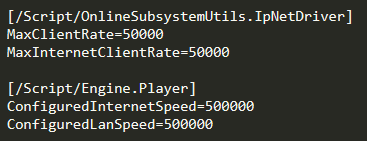
also lol I have an extra zero on the last two don't I. well that's ok, my game will probably never make it past alpha anyway 
cunning shoal
haha, hmmm interesting! thank you, I wasn't aware there was a bandwidth limit or rate limiter
hoary lark
upon searching in here it might be 15 kbps by default, my settings up there should change that to a more "modern" 50 kpbs (although if a game had a hundred players like fortnite it might be wiser to keep it low and optimize it in other ways to prevent net saturation, because if everyone is sending 50+ it's going to be a tsunami of data for the server)
we still haven't 100% confirmed this is your actual problem btw, but it's the usual culprit if reducing FPS a bit fixes it
cunning shoal
well if I'm doing the math right, @ 50kbps with a standard 10mbps internet connection.... and assuming the rule of 85% of upload bandwidth available - you should be able to sustain 170 connections with that in an ideal world
not that I need that many players, I'm aiming for a max of 32
right, makes sense - i'll give it a try and see 🙂 thanks
plush wave
I'm confused, do all RPCs need "WithValidation"?
hoary lark
it's only for server RPCs, someone else might know if you still need to use the specifier or not (you always need to define the _Validate function now, the WithValidation specifier only exists because originally it was optional)
plush wave
So the "WithValidate" specifier, and the _Validate are both optional?
meager spade
in later ue4 version yes
 chilly mason
what's a sound packet loss rate to simulate when testing the resilience of my netcode?
rate and timespan
by sound I mean sensible, something that could be expected with the worst of connections but not something like an unplugged ethernet cable
i.e. something that an application is expected to recover from
half jewel
bursts of packetloss which is common in some internet connections
you would need to toggle it on and off i imagine
@chilly mason i have a pfsense box that monitors my home connection, looks like today i had 3% packetloss lasting over 20 minutes.
just some data for you i guess 🤷♂️
fleet raven
I have seen a player hosted server with 30% loss before
needless to say, it did not work very well
chilly mason
@half jewel hey thanks! that's almost no packet loss
@fleet raven 30% pl over what timespan?
fleet raven
the entire time I was connected to it
fleet raven
idk what kind of caveman isp they were on
chilly mason
well... most isps here in the us suck compared to any of the european isps I've witnessed
meager spade
shouldn't a fast array serializer call OnChanged on client when a pointer is resolved?
cunning shoal
@hoary lark good call! your changes fixed the issue while running at 102fps!! thank you so much. Now to optimize my game so I'm not using all that bandwidth....
fading birch
@cunning shoal you can specify the net update rate per class iirc. So if you have something that doesnt need to be updated every frame, you could have it update once every 10 frames or adjust ot as needed.
cunning shoal
yep, I tried playing with that first but it didnt resolve the issue. That being said, I am applying lower rates now and trying to use dormancy as well to optimize the network traffic
biggest thing taking my bandwidth are physicals objects that players can push around... I have a rep notify variable attached to their location, and when the location vector changes it updates
so I think reducing network updates and using dormancy for that will help a lot
fading birch
are you using a dedicated server?
we have a similar mechanic in our game with elevators
and we found it ran a lot smoother if the server actually moved them and just sent the updated location to the client.
cunning shoal
hmmm well right now im using a listen server
and this is the rep event:
so the physics object is only setting the variable on the server side, but i suppose the physics simulation is done both client and server if i understand correctly (it's not the smoothest esp with lag)
twin minnow
hey @thin stratus sorry to bother you, but I saw your reply to my message about AGameSession::KickPlayer. It seems that this function is returning false when I call it in InitNewPlayer. I guess it is because the player controller has not fully initialized yet or something, but what would be the best way to kick incoming players from the server's AGameMode class. Right now, players have to pass an id value when calling OpenLevel and I want to try to kick out players who don't pass a valid id value. I have thought of using a timer function, but I'm not sure how long it will take for the player controller to fully initialize, if that is even the case.
thin stratus
PreLogin or Login
One of them passes the Options
Both have an ErrorMessage.
If you leave it empty, they will pass. If you set it to something, they will be denied.
twin minnow
thx
twin minnow
@thin stratus another stupid question, but if a player gets kicked by setting the ErrorMessage parameter in PreLogin, will that player ever get picked up/counted by GetNumPlayers? Again stupid question ik
thin stratus
Not sure, but don't think so
twin minnow
alright thx again
 royal isle
hey is there a way to check if a new client connection happened due to an absolute travel instead of a client connecting?
karmic briar
🤔
 solar ivy
hey, i have a question about a replication order. lets say i create a replicated weapon actor on the server. its owned and created by my character. then i immediately call a reliable rpc from server to an owning client and pass the weapon reference and some additional properties. is it possible that weapon creation on the client will happen after the rpc execution? so the reference to the weapon will be invalid on my client once rpc received. or will those events happen strictly in the order on my client?
karmic briar
🤔
twin minnow
i believe that by the time the rpc reaches your client, there is a chance that the weapon may not have replicated in time. You can use on rep notifies on the client to know for sure when the weapon has spawned and replicated to the client
bitter oriole
You should make no assumption about replication speed, not the order of replication and RPCs
Reliable RPCs have order guaranteed and that's it
twin minnow
@royal isle did you mean how to check if a new client connection is seamless or not? Because absolute has to do with the options passed when travelling
royal isle
I mean I need to check if a player connected normally on his own or reconnected due to a server travel
twin minnow
hey @thin stratus, is there a way to add a timeout for OpenLevel or stop a client/server travel midway? So for example, if a client is taking too long to connect to the server, I would rather not have the client continue to waste more time if possible.
 gritty pelican
If a player leaves the game, then his PlayerState is destroyed along with him? will PlayerState be removed from PlayersArray?
 rose egret
how big a listen server map could be ? whats the maximum size that UE4 can handle ?