#multiplayer
1 messages · Page 524 of 1
 drifting geode
can anyone please tell me why this will always display the cursor on client one in PIE, no matter on what client I activate it? Using it for pause menu.
 tall pine
@drifting geode : GetPlayerController with index 0 usually passes back the local controller, so yeah, it'll be whoever you activate it on
 thin stratus
Has anyone lately made a Dash/Dodge ability (using CMC) where you have full control over distance and duration?
Most implementations I know of are similar to Jumping, where you only apply a "Force", but there is little control over how this works.
I know how all the SavedMove stuff works, so that's not the problem.
I was thinking about adding a MovementMode for Dashing, in which I perform the dash movement as fast and far as I want to.
 chrome bay
That net prediction update is exciting.
 royal isle
Hey guys, I am getting a very weird bug when I am trying to join my steam dedicated server from my client NetworkFailure: PendingConnectionFailure, Error: 'incompatible_unique_net_id' and UniqueId: INVALID. Any ideas what could be happening?
 winged badger
mismatched builds
royal isle
as in the GameVersion variable steam has?
royal isle
well it is the only think that makes some sense so I will go double check
My coworker didn't call app_update on the server from the steamcmd, that's that I guess 😄
thanks
 foggy idol
I use a save game object in my game to load stuff like skins and names once the match starts
For the server it works fine
But for connected clients it causes a crash
Pls can someone help me
It gives me the exception_access_violation reading address 0x00000000
 hoary spear
Is it possible to replicate a widget object , or do i need to send the data to construct it on the clients ?
 rich ridge
UWidgets are not replicatable,
hoary spear
Thanks
foggy idol
What is NPE @rich ridge
 ripe sky
Has anyone followed the Unreal Engine blueprint multiplayer tutorial? Having some trouble and could use some help, been going at this for like 3 days now and can't find the fix to my problem.
or does anyone have the project file completed, can't seem to find it anywhere even though the video references it being saved somewhere.... its really frustrating
thin stratus
What do you peeps do if you need to send more info via the ServerMove and ClientAdjustment RPCs?
Throw the whole CMC out of the window?
rich ridge
@foggy idol BP is internally c++ codes. Just check what is failing
But y are using USaveObjects at first place to load stuffs like skins, etc
 fleet raven
edit the engine to add those additional arguments to the rpc 
I changed the flags to 32 bit for a start
foggy idol
Cus I didn't know how else to do it
Cus it's like lan
So the player selects a skin from the menu and it's saved there
Then loaded up before the match starts
But now I think I'm just going to save the info in a player state
@rich ridge
rich ridge
Becareful about the Playestate as it only exist at client side
It's better if your store them at Game mode level
 wise meteor
Hey wondering if someone could help me, I am currently getting a bad jitter when the player moves forward/backwards, left/right but not when rotating, tried hooking the character movement up to a multicast but it just made it worse
 ornate crescent
hi! question about how to implement inventory system for multiplayer.
i try to reduce the bandwitch so every item in my game is struct class so i need to create inventory system with for example 20 slots for each player
I think i create a TArray<ItemClass> Inventory;
but i have the problem/question the when i use a item from the inventory how i remove this from the array
because struct cant be null
so... any idea how to deal with this
 mighty yoke
You could have an item that represents "no item" and check against that as a simple solution
ornate crescent
yeah, thats is another idea
 silent phoenix
Can anyone shed some light on using a Modular Character vs skeletal meshes synced on master pose? I've been reading that sycing to master pose is not the right way to add clothing to a character but how big is the performance difference between the two?
 tribal solstice
@twin juniper if you're talking about just testing the game using the Steam OnlineSubsystem that works fine without Steamworks
I'm trying to setup an extremely basic multiplayer connection between Windows PC and an Android. I'm using 'Open Level' with 'listen' on PC and then executing console command 'open <IPADDRESS>' for the Android (client) and it does nothing. This works fine testing locally on the PC.
I'm a little confused about what ini settings to use for OnlineSubsystem for this setup (LAN? NULL?) and how to go about detecting the connection issue. If anyone has any info on this that would be amazing. Thank you.
And do I need to forward ports (7777) I can't find much info that connects all these dots.
tribal solstice
I can't even get this simple setup to work between PCs
No restricted ports on my router
ornate crescent
I found this link about the PlayerInventory in a multiplayer game ( https://www.reddit.com/r/unrealengine/comments/60l00q/where_should_i_store_udataasset/ ) i want to create a similar system but i dont know what is the best class for each type ```ItemDefinition - This is the core idea of what the "thing" is in your inventory, and would not have state. Ex of non-state: max durability
ItemInstance - This is one instance of a ItemDefinition in your inventory. It would reference it's parent definition by keeping an ID to relate it and would have state. Ex of state: current durability
ItemDatabase - This is the list of ItemDefinitions you have defined for your game
PlayerInventory - This is a list of ItemInstances that the player currently has
i think in this
ItemDefinition -> DataAsset
ItemInstance -> i don't know
ItemDatabase -> DataTable
PlayerInventory -> Array of ItemInstance
maybe ItemInstance can be a struct
 tacit sigil
Hi! quick Noob question. Can i pass info from one player controller to the other? and if so, how can i do it? I have working information in my lobby player controller that i need to somehow get passed over another player controller. I've tried casting both directions, nothing. It's like they're invisible to each other. Is it just not possible?'
winged badger
@ornate crescent BP or c++ project?
@tacit sigil clients only have an instance of their own PC
ornate crescent
@winged badger c++
winged badger
give NetSerialization.h a read then
i like FFastArraySerializer for stuff like inventory, since it has per item callbacks on client for add/remove/change
that would make your ItemInstance a FFastArraySerializerItem
that header has entire documentation, along with example of implementation in the comments
ornate crescent
yeah but frist i need to see what structure use.
My first idea is
DataAsset per each item, with all data.
DataBaseManager to give UniqueID for each item and load all info.
And the playerinventory with use this, the FastArraySerializer
winged badger
DataAsset for each item can get cluttery
ornate crescent
what maybe the best
winged badger
its advantages generally come into play when your data is not symmetrical, or when you don't want to load all the assets right away
typical use is weak asset pointers to textures, meshes... etc, then doing the loading only when they are requested using data asset functions
i also find both a DataTable and a DataAsset a little bit of an overkill for most scenarios
as long as your data is simple you can get by with only a DataTable
ornate crescent
i take a look to this post -> https://www.reddit.com/r/unrealengine/comments/60l00q/where_should_i_store_udataasset/
winged badger
if you're going DataAsset way, you can generally stick a FGUID in your item
ornate crescent
because for now i need a lot of differents items and only need the ID to load the info
and safe some others information like durability in ItemInstance
winged badger
and just grab all the DataAssets deriving from the same class to populate a list of all items
ornate crescent
yeah, i think in each item (DataAsset) have weak assset point for the icon and 3d model, because other iinformation are small, and when the player see other items in the world only read the Id of the item and search in the DBManager
and load all need about this item, but maybe can be a big problem
or maybe a good idea
winged badger
generally problem with DataTable referencing DataAssets like you described above
is that you would need a FDataTableRowHandle in each item
to identify its DT row
or an UDataTable* and an ID, which comes to the same thing
might as well reference the DataAsset directly then
ornate crescent
yeah... i need to see what is the best solution
winged badger
only scenario where you'd use that structure
is where all your Items are just one same class
ornate crescent
and any class where instantiate 1 time all DataAssets
ItemDatabase

Map[UniqueItemID, ItemDefinition]
DataAssets can't be instantiated
note that structure makes it awkward for items to employ custom logic per item
basically
DataTable + each Item is its own class
DataTable + DataAsset + single item class for all items
ornate crescent
the problem of DataTable if i need to create diferent datatable because armor and weapon class have different vars
i have a class FTableRowBase with this structure
    UPROPERTY(EditAnywhere, BlueprintReadOnly)
    int32 ID;

    UPROPERTY(EditAnywhere, BlueprintReadOnly)
    FDataTableRowHandle Item;

    UPROPERTY(EditAnywhere, BlueprintReadOnly)
    bool bDisabled;
there is an option of using 2 DataTables
if that is your only problem, its creating 50, 100+ data assets vs. another DT
i assume that bDIsabled is to prevent the game from using that entry completely
ornate crescent
my problem is think in possible problems with for example 100 characters with a lot of items
and i want to create a system like
Load item with ID XXX and see all that information
depends the item type show any type of information
and the server create the Item with the ID, and client can load all information about the item with the ID (and load the mesh for equipment)
tribal solstice
How can I diagnose why 'open <IPADDRESS>' is not working for me? I'm trying to run a game on two devices on my home network but they won't connect. It works fine if I run two instances on my PC.
All ports allowed on my router
 bronze arch
Try open ip:port
Sometime doesnt work for me too
Like if ur server listens 7777 port
Then try to "open 127.0.0.1:7777"
tribal solstice
@bronze arch thanks Noira. How do I select which port my server is using? Or is 7777 the Unreal default?
bronze arch
Yeah normally, are you not using -log while starting server?
If yes then you should find it while starting
bronze arch
Yeah like shortcut exe command, you need to add it command line while starting
tribal solstice
Okay awesome, and this just creates a log file?
bronze arch
If u built development server, then also saves log file at game directory/saved
tribal solstice
I'm running a listen server at the moment
bronze arch
Oh you re starting it from game
tribal solstice
Yeah, but it looks like your advice may have worked for me..
Testing on separate devices now
bronze arch
Well i never tried it but i remember that im using command line for listen server
Maybe it helps you
Mapname?listen -noRHI -log
No rhi for disable graphics
So you can use it like a server
tribal solstice
Oh very cool, thank you
damn... port number at end not helping on the Android device client
still can't connect
tribal solstice
I may have found the issue... does Unreal give the server a different IP then the one listed if I do 'ipconfig'?
tribal solstice
Are we supposed to have OnlineSubsystem=NULL? Or does that no longer apply?
 chilly mason
@twin vault I'm reading your rollback networking article, much nice many happy
 half jewel
is onrep reliable ?
tall pine
I thought that's what they use for events that already happened and want to replicate to a client when they join
Any good article on movement replication smoothing?
 hoary lark
onrep is reliable in the sense that clients will always eventually get some recent version of the variable. it is not reliable in that it is not guaranteed to update for every single change of the variable, especially if it is changing frequently e.g. every frame.
foggy idol
Aiit
thin stratus
Anyone did some MovementReplication with the CMC? Still not sure how to get more data over to the Server (or Client on correction) without changing source code.
@twin juniper UE4 doesn't have a build in way for that. You'd basically use UMG to create the UI and hook up the "LOGIN" button with sending some HTTP Request to your backend.
If you only use Blueprints then you'd need a Plugin to send those requests. And probably also one to hash the password properly.
It's not much different to any other login stuff, that's why you don't find a specific tutorial on it I guess.
fleet raven
without changing the engine your only way is adding some flags
you get 8 bits to do that
thin stratus
I actually think I found a way to not change the engine in the actual act of modifying it
Na I need more info, specially when sending corrections.
I'm overriding CallServerMove and replace the ServerMove(Old, Dual, etc.) with my own.
Still sort of duplicated code then, but at least I don't have to deal with the engine.
winged badger
always loved how if you want to override a function in CMC you have to c/p 300 lines of code then alter 1-2 of those
chrome bay
Here's hoping that all changes this year.
Even more annoying is how they moved all the RPC's to the character to reduce component RPC overhead
Guess it was an issue for Fortnite
thin stratus
I think that has been like this for a very long time or?
But yeah, just suffered through making these functions for us. Could probably leave them in the Component.
Is there an overhead for max 4 CMCs in the game? (4 players)
@tall pine
Wups
@chrome bay
Sorry GreenSequoia! Discord snapped back to the person my mouse was hovering
chrome bay
I doubt it to be honest... I can only imagine that overhead matters when dealing with a huge amount of them
They never did that in the UT days at least
thin stratus
Guess I can try. Would remove the amount of freaking code
Also, they have a Dual and a DualNoBase function
Yet both fall back to the Dual one
.>
chrome bay
Can't wait to see the back of CMC to be honest
I mean I doubt they'll ever fully kill it off because 99% of all UE4 projects would stop working but still
thin stratus
It would exist like Cascade I guess?
Thing is, I wouldn't even be mad if I would have a way to pass more data.
They must have changed the ServerMove etc. functions in Paragon for all the abilities
Or probably a fresh CMC >.>
 twilit marsh
I mean, they can just write a new CMC component and let is coexist
they are even planning to rewrite the CMC using the Network Prediction Plugin, I think
chrome bay
Yeah they're doing it atm. That'll be the new go-to
 twin juniper
Would someone be able to help me with a dedicated server issue? It's related to MacOS.
 meager spade
is excited for Net Prediction plugin
from what i heard CMC will remain, but we will have a new one specific for the Net Prediction Plugin. Might require some changes (ie not being based on ACharacter, but im happy if i can just base stuff on APawn and provide what stuff i want
fleet raven
new movement system yes pls
meager spade
yeah but ACharacter should not really exist
fleet raven
🚮 ACharacter and UCharacterMovementComponent
chrome bay
I'm super excited that they're exploring deeper physics integration too
Better support for custom physics vehicles and networking yes pls.
tall pine
What's the good way to do client prediction of movement on non-player actor?
I have a simple actor that will move around different set points, and i want to smooth out the replicate movement. What can i do in addition to running the code that move it on both server and client?
chrome bay
If all the actor is doing is moving between points I wouldn't bother replicating movement at all, just replicate the points (if they even change)
Use a timestamp to derive position
tall pine
The points are replicated. But the actor is using a timeline to move. Also, the points are pick randomly, so i don't know how to tie that into a unit
chrome bay
You can't really predict that
thin stratus
What I usually do is use a ProjectileMovementComponent.
You can set the InterpolatedComponent on that to be your mesh and then use that to move the actor around.
chrome bay
I'd start by using a replicated seed to generate the "random" points - since that way you can use a single value to get the same points.
chrome bay
To be honest for a general-use case that seems like the way to do it to me. Have an interpolated component and an authoritative one, and interpolate for smoothing. You can't really do "prediction" for something that isn't player controlled. Just run the movement client-side and smooth out the updates from the server.
thin stratus
You also don't need more if it's not player controlled.
You only need to interp the Transform Updates
Cause by default Epic sets them directly
If an update comes in 5 seconds later: SetActorLocation(NewLocation)
The ProjectileMovementComponent, iirc, interpolates that shite at least for the mehs then.
The ProjectileMovementComponent, iirc, interpolates that shite at least for the mehs then.
Simple Network Interpolation Code in the AActor would also not be the end of the world EPIC
Add a boolean to turn it on and off. Allow referencing the interpolated component by name (doing that already for PhysHandles iirc) and then peeps would have something to at least update some simple moving actors without them stuttering
tall pine
So there is an interpolated component that i can use?
Oh you mean use the ProjectileMovementComponent and set the component to the mesh of the actor.
@chrome bay : so what you mean is that run both the movement code on the client and server, and leverage the Interpolated component for smoothing?
half jewel
i learned that onreps do not fire if the client changes their own copy of the variable 🤔
thin stratus
Did they ever properly enable smoothing the Clients on the ListenServer?
tall pine
@thin stratus : is ProjectileMovementComponent heavy? I imagine not?
In my case I only have a couple actors so doing what you suggested is probably ok
 zealous saffron
@thin stratus I remember having issues with that, so maybe?
thin stratus
p.NetEnableListenServerSmoothing 0 literally has no impact, wtf.
Console says it's 0. Yet the code that uses that in the CMC still breakpoints and shows it being 1
I also don't get how that is even supposed to work. This calls SmoothCorrection and that only uses the Client Prediction Data.
Server shouldn't have access to that or?
chrome bay
@half jewel by default they are only called if the value has changed. If you want to call it no matter what, use REPNOTIFY_Always
E.g.:
DOREPLIFETIME_CONDITION_NOTIFY(###, ###, COND_None, REPNOTIFY_Always);
C++ only ofc
tall pine
To be honest for a general-use case that seems like the way to do it to me. Have an interpolated component and an authoritative one, and interpolate for smoothing. You can't really do "prediction" for something that isn't player controlled. Just run the movement client-side and smooth out the updates from the server.
@chrome bay : generally how do you do interpolation for the general-use case? I look at ProjectileMovementComponent and it seems overkill for what I want
mighty yoke
Is there an established best practice for storing local gameplay important values?
like character stats(strength health etc)
I was thinking that gets stored in the game instance so it persists across everything
but then what do you do if you want to enable multiplayer? I'm confused how to pass this information from client to server.
it's like
load save game -> store in game instance -> have access to stuff in single player -> join multiplayer game -> suddenly everyone has their own game instance so how do I move the important information to the server
Do I have this right?
thin stratus
Oh my goodness, are the Meshes on the ServerSide for Clients not ticking properly?
I think that the Smoothing actually works but the Mesh is ticking the Animation too slow/not often enough.
-_-
chrome bay
Yeah the mesh is ticked when you get an update from the client
Or rather when the Server processes the movement
So that anim notifies etc. are in sync
thin stratus
But that's terrible for the ListenServer
The Location etc. is smoothed, but the Run Animation is laggy as f*ck
hoary lark
@thin stratus this might help? (see my post) https://www.reddit.com/r/unrealengine/comments/a0n455/listen_server_host_sees_clients_jittering_fix/
reddit
7 votes and 4 comments so far on Reddit
the central paragraph iirc, but fixing this this way had some other implications, I can't recall yet
maybe related to ensuring anims are in sync (dT variation over time or something IIRC)
thin stratus
That's one of those cases where Epic doesn't fucking fix their shit cause they use DedicatedServers.
"If I don't see the issue, it might go away."
hoary lark
yeah
thin stratus
Imagine a coop game and the freaking Server sees everyone lagging their animation
Wtf
hoary lark
we're making a coop game so i can adopt the same mindset with the (i can't remember exactly what) ramifications from this fix so I get to adopt the same mindset, "i fixed it, it now works  "
"
(whoops, engrish fail, I just woke up  )
)
 nocturne token
Write a blog post with definitive solutions then ping me so I don’t have to do anything
thin stratus
There is no "definitive" solution.
thin stratus
Cause Epic only says "You could do that, but it might break half the project."
Yeah, I will let my Client decide if I will do that.
Changing the PossessedBy and commenting out the Tick pose works though
nocturne token
You can dooooo it
thin stratus
How about you do it? You are the hero of the peole after all :D
hoary lark
yeah it's been over a year since I found that so I don't know if anyone smorter has tackled the issue but ... probably not lmao
jUsT uSe DeDiCaTeD sErVeRs FoR eVeRyThInG
twin juniper
does anyone know if aws gamelift gives free server for testing?
tall pine
I'm still fuzzy on movement replication. Say I have a starting point that I set to the actor to initialize its location. Then I use a timeline to drive that actor location.
For smoothing movement replication, I should:
- Replicate the starting point
- Run the timeline code on both server & client
?
thin stratus
Are you using C++?
thin stratus
Not sure you can do much about this in BPs
If you don't want the location replication to lag, then you have to smoothly interp when the new location comes in
UE4 by default just sets the location
winged badger
i just replicate the target location and pointer to a replicated object that has the rest of the data to construct a splinecomponent locally
and move along the spline using keys
thin stratus
It really depends on what you want to do. If you can 100% guarantee that the movement is the same for everyone and won't change based on some server decision, then you don't have to replicate movement at all but just replicate the start and maybe some timestamp.
Timestamp can be used to check how long it took for the start to replicate, so you can offset the start for the clients
Will make it relatively synced. If the rest of the movement is not changed during the movement, then that's enough
zealous saffron
what about time drifting?
winged badger
thats what i do for my projectiles, since im breaking their physics on designer's request
keeping the horizontal speed of a "ballistic" shot constant
no matter the arc
tall pine
This is the current BP code to compute the new location.
In my game, there is a UFO that spawn at certain docks (they're just an actor spread through out the area). The UFO will start at one dock, and then move to the next.
For this code, should I just sync the UnitFlyToDock, StartFlyLocation, and DockLocation?
The dock can be pick randomly though (by the server), so there is no way to know for sure which dock the UFO will go to next
thin stratus
@zealous saffron You can always overlay the whole thing with movement replication, but then you run into the problem that if it does differ in location it will correct very abrupt
winged badger
@tall pine all you need to simulate that movement locally is a start and end loc
and a function that creates a path from the 2, that you run on each machine separately
and maybe a timestamp, like cedric said, that kidna depends on the game and the rest of your networking
if the path is in any way random, then you need to replicate the seed for those randoms as well
tall pine
oh i didn't think of it that way, ok, so I replicate the start / end location, and then abstract out a function to derive the position on both client and server. Do you still mark the movement replication on the actor?
winged badger
it gets way more complicated if you can, as a player, force the UFO to change course mid flight
no, you do not replicate movement
tall pine
no, the UFO won't be affected by the player
winged badger
as long as you account for the deltatime for moving along the path on each machine separately
it will be smooth and accurate
(moves by deltatime * speed distance each tick, or advances deltatime time along the spline curve)
tall pine
when you say a spline curve, are you talking about a curve asset?
that is pre-created?
Or do you somehow create a curve on the fly using the data?
winged badger
i do create a flight arc using the start, end and some data from the CDO
timeline is fine here as well
tall pine
Here is the case where the code use a timeline. So in this case, when the timeline update, I'll figure out the start and end location, sync that, and pass that into the function that does the movement right?
winged badger
that looks like it only moves vertically
tall pine
right
winged badger
and not really well
as it will always cover the whatever is in timeline curve distance, regardless of distance between docks
tall pine
in this case, the UFO just descend from the sky, so it's xy position stay the same on one dock
winged badger
if your timeline goes 0-1 you can lerp between start and end using timeline output as alpha, but that would lock you into making all the trips in same amount of time
tall pine
the code above is just for descending / ascending the UFO from the sky to the dock,
For moving between dock, we use the other code snippet that I posted a bit back
So it seems like in this case, the function is already there to update the actor position.
I will now sync UnitFlyToDock, UnitFlyToDockSpeed, StartFlyLocation, and DockLocation and run the ComputeNewLocation on both client and server
foggy idol
Ok so after doing some work I discovered that it was particular children of the character bp that were causing the crashes @rich ridge
chilly mason
does anyone know of a guide on which SIMD/SSE instructions are not deterministic?
I know some of them are, some of them ain't
e.g. load-hit-store is mentioned as a typical culprit
(only targeting win 10 x64)
 gray scroll
is there a way to get player name (steam name) in game instance?
twin juniper
Quick question on a server sided game loop
Is a player's position, direction, velocity updated every frame?
Then sent to all clients within range?
For instance:
void gameloop(){
 for(player* p : players){
   p->readpacket();
   p->update();
  }
  for(player* x : players){
    for(player* y : players){
      y->send(x->data);
    }
  }
  //do other server related things
}
Is that how a typical server sided game loop looks?
thin stratus
Every actor has different update rates. Not sure you can generalize it like that
meager spade
no
tall pine
@meager spade : Hi Kaos, can I ask for your help on smoothing out movement on the client? I have a non-player actor , a UFO, that move around between places. The player won't be able to affect this movement.
I've been reading up and asking questions here, but I'm still unsure what's the best way to go about syncing up the movement of the UFO between the server and the client.
 wind totem
I need help i want to make a connection like when payer start a game it randomly of 5 servers he can connect like on mobile games mmos they just connect randomly something like that in UE4 with BP
can it be done
also have AdvancedSessions
meager spade
@tall pine you need to send the location
and smooth over time
based on the next incoming update
using some interp
UCharacterMovementComp has a good smoothing
tall pine
So this is the function that update the location of the UFO. When you say send the location, do you mean the actor location? Or the final destination?
twin juniper
Does unreal's server framework use UDP or TCP?
meager spade
UDP iirc
tall pine
Hi,
So I replicate a BP actor and I disable starting with tick enable. After that, once I call a multicast even to show the actor, I set tick to enable. But on the client, the tick function doesn't get called. Is there something I'm missing?
tacit sigil
Hey guys! interesting issue. I'm not sure if this is an engine bug or something I'm doing wrong.
I added a temporary print string with a tick on the lobby "Handle New Player" node to see how many players were being registered in order to get accurate current players on my "Find Match" Widget Blueprint.
When running with 3 editor windows, it counts correctly and everything is great. But when I run the game in Standalone, the second client only ever registers one player(server). It never registers the first client. Any ideas?
I'm retrieving results using the "Get Current Players" setup.
silent phoenix
Does anyone have any recommendations where I could start learning how to write persistent dedicated server code // information about getting a project running on EC2 server?
twin juniper
What do yuo mean persistant dedicated server code?
silent phoenix
Well I've played around with steam networking, amazon gamelift and thats great and all but I want to create a server that is 24/7 and saves player information between plays and i'm having trouble getting started
half jewel
it sounds like you would want these ec2 instances to communicate with a central 24/7 server
woulnt that just be easier ? instead of storing the information on the ec2 instances that might be volitile
silent phoenix
Ah yes that does sound correct.
Still don't know where to start. At the lowest level do I just upload my server build to AWS and launch the server.exe file which will load the server default map and then then clients open level to that IP? Is it that simple?
rich ridge
@foggy idol it's cool that you figured out the crash issue, but whatever the way you are using to solve your problem is not cool. There is a better way of solving your problem which is clean. Make use of GameMode and it was designed for this purpose only and it is less error prone.
 velvet dune
i need sum help im working on a seting up a dedicated server files but when i run it on the same pc i play on it show on the list but when i run on another pc it dus not show on the list but i can join by doing open IP:port and no i do not have the find server or create server as lan
rich ridge
@velvet dune Which SubSystem are u using.
velvet dune
@rich ridge im useing Steam but i also tryed with launching both server and client with -nosteam
 void nest
When I enter "netprofile" in command line the command is not recognized. I used this command hundreds of times in the past, but suddenly it doesn't exist anymore? Did this change in latest engine versions?


 crude drum
hey
having issues replicating pawns orientation
so basically i have a custom pawn which consists of certain extra functionality derived from "Pawn"
this is completely in BP's
so i have checked all the replicating tags
but i am only able to see the server orientation correctly in clients
but not the other way round
winged badger
more replication rarely results in better networking
crude drum
i know but this is only for transformation like rotationg and stuf
winged badger
and clients need to RPC data to the server, the propertly replication only works server->client
crude drum
ok
but the problem being that i can see the correct orientation replicating from server to client
where if i see the roles for client and server on server
it shows auth and simulated for sever pawn
but auth and autonomous for client
auth->role_authority
meager spade
which is correct
crude drum
but then should it not replicate the transform if i have check replicated movement in pawn?
checked*
meager spade
it possibly does, but it won't be smooth
 proper olive
hey, I have a child actor component (a door bp) on a bp I've placed in the world in editor (a house bp)... everything has replicate checked, but only the server can see the doors. Clients can see through but not walk through them, any tips?
the child class is set in default settings for the component
proper olive
oh wow nvm, the actor itself wasn't replicating -.-
rich ridge
When I play my game within editor with run with dedicated server option selected the input doesn't work, even camera rotation which is bound to mouse movement doesn't work. Any ideas why it could be.
tall pine
how do you send the timestamp in BP?
where do you even get the timestamp? Is that in playerstate?
thin stratus
When the CMC ticks on Server and on Client and I compare Timestamps, shouldn't Server and Client on the same Timestamp have the same total TickTime?
So if the Client Ticks 2 times from TS1 (timestamp1) to TS3, and the Server ticks once from TS1 to TS3, should the TickTime of the Server be the sum of the two times of the client?
I would assume so, cause if not, then the Server would calculate a different move result, or?
 velvet parcel
So if I have a replicated blueprint object in the world and I want its variables to be replicated to all clients on the hud. What is the best method to send that info to all clients?
tall pine
what information do you want to display?
I think you just marked the property as Replicated, Simulate Only
velvet parcel
For example if it has an array on it and I update that array.
Or for example if I have a chat window and I want to store all of the chat data on that object to replicate to everyone
The only way I have been able to get this to work is have each persons hud constantly watch the array with an event tick waiting for something to change.
tall pine
you can do a on_rep instead then?
velvet parcel
on rep? You mean rep notify?
tall pine
that would call a function when that variable change, and you can update that HUD.
YEs
velvet parcel
I tried that and it seems to not replicate to everyones hud.
The only reliable method I can seem to find for this is to simply tell peoples hud to watch the variable or array.
tall pine
I think it should do that for all clients who has a net copy of that BP actor
I use that for my game to hide / show replicated actors and it works fine
velvet parcel
Yeah I dont know why its not being reliable. So like I do a rep notify. Then I need to send the new data to all clients
Maybe having everyones hud watch the variable or array is fine. Its not sending network trafic for simply watching a replicated variable
right?
tall pine
No, it shouldn't. I don't think you have to do anything extra once you put a property on rep notify.
Once it's replicated, it should call that function
velvet parcel
How do I call a function on every persons hud from a rep notify?
Is there a direct method?
tall pine
wait, you mean it's not per client? You want an event to be broadcasted to all clients?
Then you just do a multicast instead, from the server
velvet parcel
tried that as well.
tall pine
and it doesn't work?
velvet parcel
for some reason it simply does not run the event on all client huds
tall pine
so it runs on some client but not all?
velvet parcel
Its ticked reliable. It seems to only run on the server
tall pine
if a client hasn't got begin play called yet, then yeah, it won't run on that client
velvet parcel
this is for something like a chat window where players can talk like what we are doing now
tall pine
you can print out debug message, and look at the timestamp, and see if you do a multicast before the client's beginPlay was called
velvet parcel
multicast or rep notify does not seem to send the variable. Only method I can get working is for all clients to watch the variable
This is not a even that happens at the start
Its like for a chat window for example
I send text to a replicated array on the server located on this replicated blueprint
tall pine
sorry maybe someone else can help, I'm not sure why a server called multicast wouldn't work on all of your clients
The bp actor is owned by the server right?
velvet parcel
I agree, its very strange
Yep
And its replicated
If I tell all clients to watch and see if the array changes then everything works fine when I need to update
 rancid barn
Make sure the following is true:
-You have a replicated actor that is spawned by the server
-The server is calling your Multicast function
-Confirm the multicast function is being at least run on all clients by printing out a UE_LOG at the start of the function like "MyFunctionName triggered"
velvet parcel
All of those are true. if I do a print screen all clients will see the text message
rancid barn
Not the text message from the server, but your generic message?
velvet parcel
I can have multiple clients and have one of them do a "hellow world" to a print screen and that works fine. The complication comes in when I need to go one step further and get all clients to update a widget array on a vertical box for the chat message
that's where the problem begins.
rancid barn
It sounds like the function is being called properly on all of your clients, and the data (in this case I'm assuming some text or a text array) is being sent properly as well
if that is the case, the problem lies in your client-side code
velvet parcel
its just a string
or a lack of code. Basically I now need to call some kind of event on all player huds and tell them the string
Maybe I am just thinking about this wrong and the method where I tell all huds to watch a simple replicated variable and wait for it to change is fine
rancid barn
You could do it a few different ways, in this case the networked part of your code is done and all that's left is the client-side visualization. If your HUD has a C++ implementation you can create an UpdateText() function to do that in.
your method is probably fine for now
rancid barn
What you're doing now is fine, it gives a little less control than making your own Update() functions
but it doesn't seem like you need that control at the moment
velvet parcel
Alright, maybe that is just the easy method for now. Honestly I wont need more than this kind of control for the completed game
ok thanks for the help 😄
rancid barn
gl hf
velvet parcel
I am cooking up a neat little game atm and I want to show it off soonish
If replication is this easy then woot
If I multicast a non replicated variable does that mean I can have each client scoop up the data and then set it back to a default value to wait for it to be changed again with the same multicast?
tall pine
So if a replicated actor get net culled, and when it get replicated again, a rep-notify variable will be rep and triggers its on-rep function again?
 magic helm
nope only BeginPlay will fire again
half jewel
@velvet parcel hud is not a replicated actor and does not exist on the server
velvet parcel
understood
so that means the server will never be able to tell the hud anything it needs to do
half jewel
ye
try playercontroller with a multicast and that multicast accesses a function on hud
velvet parcel
so anything I do on the hud has to tunnel through the player controller basically
If its talking to the server
half jewel
yes, it needs to be on actors that exist on the server
i have a spaceship in warp, and the hud shows me its progress. if i hit the cancel button widget on the hud, it calls the CancelWarp() RPC on the spaceship Actor (not the hud) see the framework there ?
try to structure things that way so theres not a ton of "passthrew" or "helper" functions in the playercontroller just to call RPC's
on behaf of the hud
tall pine
@magic helm : hmm that's not what I see in my blueprint actor
I have a replicated UFO that flying around a certain area. If the player gets away too far from the UFO, it will get net culled.
So when I re-enter the zone, I have a on-rep boolean that tell me I need to play the intro on the UFO, and I see that the onrep of it gets called again everytime
half jewel
theres a ue4 content example that describes that problem in detail
Overview of the samples provided in the Network Features Content Example map.
https://docs.unrealengine.com/en-US/Resources/ContentExamples/Networking/2_4/index.html
this was epic games solution to that
An overview of the Network Features example level, example 2.4: Network Relevancy (Part 4 - Combination Solution).
magic helm
for some reason I thought you did a multicast thing, wasnt thinking you were using replicated variables even tho you said that. Sorry my bad. But yeah it can fire again
tall pine
ok no problem. Thanks @half jewel for the link! Now I learned something new
 naive ibex
Not sure if this should be in blueprints but its a multiplayer question so sorry if I have got it wrong. So my problem is that after I have spawned a projectile, I use a event actor begin overlap node to detect if the projectile has hit a pawn, though I want a widget to pop up for the pawn who shot the bullet, but I cant seem to get it working, I tried setting the player controller as the instigator but I still cant seem to figure out how to do it, it always shows for all the pawns. could anyone help me out?
 sleek jackal
So you basically want to just show it to the owner of the bullet aka the player who shot it?
naive ibex
Yeah exactly
sleek jackal
I think the problem is also on other clients the bullet is triggering the event hit so you should give the bullet an owner and then checking if the client is tze bullet owner when it hits anything
I think there is an owner system pre built in ue4
naive ibex
Oh right, I'll have a look. thanks
sleek jackal
You're welcome!
naive ibex
Sorry for more questions, but should I set the owner to self? or something else?
tall pine
@half jewel : so after reading through those links, it seems like the rep notify still get called everytime the actor become relevant again, but it take care of things such as open the chest. Wouldn't that still actually play the opening chest animation?
I guess the player would be so far from it that they don't see that animation played
silent phoenix
Hey all, continuing my journey of trying to setup dedicated server on ec2. Got a fresh ec2 setup, copied over my server build, but I get missing DLL files when loading there server. Is there a right way to add just what I need?
tall pine
How do I know when a replicated actor BeginPlay() has been called on the client?
The actor is non-player actor
And also, Multicast call doesn't execute on client if that client's BeginPlay hasn't been called yet?
 nimble basin
Anyone know what I would have to do to replicate a spectator pawn? It's all set to replicate in the properties, and I've attached a static mesh component to it with the hopes that other players can see a little spectator head flying around, but other players see it at the origin.
are spectator pawns able to replicate?
I have the spectator pawn class set to replicates, and replicates movement. is there more to it?
silent phoenix
is it possible that spectator paws are set not relevant?
 smoky dune
anyone got experience with SSL certificate on UE4 in VM?
having a trouble when im spawning a VM server because it wouldn't have certificate
nimble basin
@silent phoenix I also checked always relevant to be sure it was relevant.. still doesn't move around on other game instances.
tall pine
Is there a way to tell the server if a non-player actor has been replicated?
I'm thinking of doing on the client: BeginPlay -> PlayerController -> Server RPC
Server RPC -> Broadcast an event with the replicated actor pointer
Server: listen to this event from the PlayerController
Oh, in dedicated server there is no controller is there 😦 ?
silent phoenix
Green couldn't you call on rep at the end of your begin play? Any replicated actors would receive and anyone who is not currently relevant will receive when they are
as far as i understand that
tall pine
right, the problem is that when the actor becomes irrelevant and relevant again, onRep get called again
So my non-player actor functionality keep getting called every time I go out and in of the net relevancy zone
nimble basin
So there is no automatically replicated flying pawn or spectator pawn.. i have to set up all of the movement input replication myself?
silent phoenix
Could make it always relevant? Is there many instance?
nimble basin
i already check always relevant.. suprised that there is no replication even with that.
rich ridge
Does setting up input in PlayerController is different from setting up inside of Character
nimble basin
with the Default_Pawn (flying pawn) or Spectator_Pawn .. I've check the box to use the dafault bindings. i can fly around with the normal wasd controls in standalone or server, and even on clients. but when controlling on clients .. it isn't replicated. even with all possible replication boxes checked. i guess i was expecting it to be automatic like with other pawns when you set it to replicate..
do i really have to send the inputaxis bindings to the server and replicate manually..?
rich ridge
@nimble basin I guess no, I m also having the same problem
My Axis is not rotating if I play within editor with dedicated server option ckecked
tall pine
@silent phoenix : that's the last option. But I'm curious how do people run any function early in the replication cycle on the server and won't get out of sync with the client
rich ridge
I have setup my inputs in PC and my PlayerState is implementing GAS
tall pine
Cause it definitely take time to replicate the actor, and onRep will always get called when you go in and out of net relevancy
 agile beacon
Guys, someone save me PLEASE
Someone here integrated with the native Steamworks C++ API for dedicated servers?
I'm struggling to share player names and to make players show up in the server player list
How do I make my server report the steam users? 
crude drum
 steep cipher
@agile beacon you need to authenticate users for them to show up
agile beacon
And that's all? That I'm doing
EBeginAuthSessionResult TicketValidationResult = SteamLibrary->BeginAuthSession(TicketBuffer, TicketSize, ServiceId);
Maybe I'm doing it wrong and should be calling void EndAuthSession( CSteamID steamID ); @steep cipher ?
I'm calling EndAuthSession only when the player disconnects
steep cipher
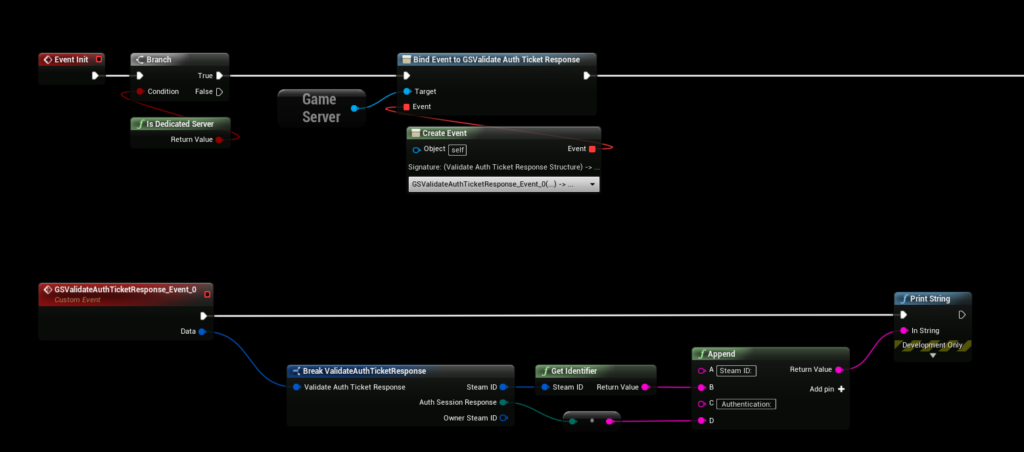
If you are hosting a multiplayer game (or single player), you might want to validate/authenticate the player. With SteamCore it’s very easy! Getting Started Begin by adding an event to the “GSValidate AUth Ticket Response” delegate in your Game Instance GameInstance Player Con...
agile beacon
The GetPersonaName is a tricky one
I'm trying to make players that never saw each other know each others name through that API
But it doesn't work as they don't have any binding to the server
steep cipher
that was for someone else 😄
agile beacon
Oh
BTW
I'm using the C++ SDK downloaded from the Steamworks website
Integrated directly with C++
The one that ships with UE is rather obsolete
I'm following this like a fucking textbook
steep cipher
ue 4.24 uses sdk 1.46 which is kinda up to date (kinda)
agile beacon
Still the relationship of players and servers never happens
That's actually quite recent, 4.22 was using 1.36
Newest is 1.48
Integrating with C++ is eaaaaaaasy tho
So it's no sweat
And calling functions from the native C++ API instead of the OnlineSubsystem, OOF, years ahead
steep cipher
not sure why this is relevant but ok
agile beacon
Have you achieved this result? Showing up the player list?
steep cipher
no I've never used that feature, but for player count to increase you have to authenticate the players so I figured you need to authenticate for them to show up
thin stratus
@agile beacon Using Subsystems has one simple reason: You only code this once, even if you release on other targets. If you only target pc and steam then it's of course fine to use the sdk directly
Otherwise, it's not at all years ahead :D
agile beacon
@thin stratus The OnlineSubsystem literally barely implements 60% of the Steam API ffs
thin stratus
Yeah but that's a different issue
With the recent crossplatform stuff going on it's also more desired to use a susbsystem that can be used for all others subsystem. Otherwise you can't do crossplatform. Epic's would be a nice release
agile beacon
If I'm utilizing 30% of all the online subsystems I would prefer to rely completely on a REST API backend.
tall pine
@thin stratus : is there a way to know when a non-player actor get replicated?
thin stratus
Usually BeginPlay
tall pine
right, but if you want to start something on the server early in the life cycle, it'll get out of sync really quickly or not even happen.
How do you wait until the replicated actor BeginPlay get called?
Cause multicast event doesn't get called on client until their BeginPlay get called right?
chrome bay
PostNetInit / PreNetReceive?
tall pine
And onRep keeps get called again and again if the client get in and out of net relevancy
Oh, I should look into that
chrome bay
Yeah that's because the actor is destroyed and re-created when going out of relevancy range
It's a "new" actor technically.
chrome bay
yeah both are
tall pine
so how do I inform the server that i"m done replicating?
chrome bay
PostNetInit is only called once when the actor is created from replication and initialized, I can't remember if before or after PreNetReceive
foggy idol
Somim having a wierd issue
foggy idol
When I test the game with 3 players on the same pc the first client doesn't replicate his movement
But the second does
chrome bay
But it's low-level and not something you can interfere with on the actor level
tall pine
ok here is the problem I'm facing. Say we have a door that got created on the server, and replicated to the client.
As part of begin play, we do some cool animation, sound, particle effect etc. to the door, and then open it.
Now, on the server it will do all that. But most of that stuff is missing on the client since the client isn't done replicating yet
How do you sync up these events from the server to the client?
I know I can do onRep to set the state to "Open" for the door once it becomes relevant on the client
chrome bay
Well, if you need multiple properties to arrive at the same time - they should be grouped together in a struct.
tall pine
but I will miss out all the effect, animation, etc. in the beginning
chrome bay
Put the effects etc in the OnRep instead of BeginPlay?
The OnRep will still fire when the object is initially received, so long as the replicated value is different to the class-default object.
foggy idol
That's what I do
chrome bay
Or, if you use REPNOTIFY_Always
tall pine
right, but the sequence will get played again when the actor become irrelevant / relevant again
right?
cause onRep get fired again
chrome bay
Yeah
tall pine
so that's not right then, since the intro should only happen once
and the door just stay open after that, not doing the whole intro sequence again
chrome bay
For an event that should only ever happen once, I would suggest an unreliable multicast then
 wise depot
does anybody know if any documentation exists at all for the "DTLS Network Packet Handler" plugin?
tall pine
right, that's the solution epic suggest, but multicast never get called on the client when it hasn't become relevant yet
chrome bay
Because BeginPlay() will also be called each time that actor enters/leaves relevancy range as well.
tall pine
hence my question of is there a way for the server to wait for the client to become relevant
chrome bay
The Server tells the client when the object is relevant by replicating it
But no there is no way to do that
Clients don't control relevancy
Server does
tall pine
so say on BeginPlay(), server call the StartIntro multicast
at that point, the client hasn't become relevant yet
chrome bay
Then the client will never receive it
tall pine
so StartIntro multicast will never be called on the client
right
so that's not what we want right? We want the client to experience the intro
chrome bay
The only other option I see here is you mark the door as always relevant
tall pine
right, that's the last option
I'm just trying to find if there is a way to not having to do that
chrome bay
Does the Client 'own' the door? I guess not if it's a level object
tall pine
how does other games do it? I mean there must be a game where the server wait for all the client actor to be replicated before it starts something
How do anything get played correctly in the beginning between server and client?
chrome bay
The alternative is that on the Server, you keep a list of clients which have received the door object. A client would need to tell the server when it receives a door (for example via the player controller) - and the server then checks to see if the client has already played the effect. If they haven't, send a client RPC back with the door reference to play the intro.
tall pine
Base on what we discuss, it seems that it will never happen
chrome bay
I've never seen that done to be honest.
tall pine
right, another option that I read is to use the player controller to make RPC from client to server
chrome bay
The "intro" will be delayed depending on how long it takes for the RPC to bounce off the server and back to the client, but there's not much you can do.
foggy idol
In my game I wait till the clients player state is valid
Cus there's always a delay I get before replication begins on the client
It works so far
tall pine
the door in this case is non-player actor though
foggy idol
But isn't fullprood
tall pine
so in my game, the player is already ready, but the door is not (on the client)
chrome bay
You can never guarantee replication order. Something might work 100 times then fail once.
It's completely unreliable
tall pine
right, i guess people just mark their object as always relevant?
cause that's the simplest solution
but not good in term of performance
chrome bay
For your specific case it's certainly the simplest solution. The alternative would be to let the server know when you receive the actor, then the server tells you whether to play the effect or not - but that's very game-specific, you'll have to route it via the player controller.
Always Relevant is only costly if the actor is changing replicated properties all the time.
For a few doors, it's nothing.
Only worry about performance when it becomes a problem
Alright here's another idea
tall pine
ok
chrome bay
Give each door a replicated ID
Each time a door replicates, check an array to see if that ID is in it. If it's not, play the effect. If it is, don't play the effect.
Then there's no latency with the effect and you don't need to bounce RPC's off the server to drive effects, it's still all handled client-side.
tall pine
so i probably will keep that array in gamestate or gamemode?
chrome bay
Probably something player-specific, like the controller.
You don't want to replicate the array
It's client-side only
So it doesn't matter how many times you receive the door, if it's ID is already in that array, you don't spawn the FX.
tall pine
that is really clever, I should try that tomorrow
Ok another question for you, thank you for the help Jamsh
I actually just realize I read many of your posts on forum while searching for this solution
chrome bay
lol yeah.. that figures
tall pine
Anyway, say you want to route a client RPC call via the player controller
So on the client, you get the local controller, then call a server RPC right?
Say I want to use the PlayerController to let the server know that a door is done replicating (just for example, I won't actually do that)
chrome bay
Yeah. If you only have one local player (i.e. not split-screen), you can just use the GetPlayerController node in BP.
tall pine
Ok, so I pass in the door-actor pointer to the RPC, but then on the server, what do I do with that?
Do I need to broadcast it via GameMode or something ?
chrome bay
No you can call a client RPC on the player controller. Are you doing this in C++ or BP?
tall pine
in BP
chrome bay
KK, so you call a "Run On Server" event on the clients' machine and pass a reference to the door.
tall pine
right
chrome bay
Then that event calls a "Run On Client" event on the servers' machine with the same door ref, which the client will receive.
The best approach to this though seems like the array based ID method to me. Keep an array of integers on the player controller (or some central object you can easily access) - then each time a door is received it checks that objects array to see if it's ID is already in there. If it isn't, play the effect and add it's ID - if it is, do nothing.
tall pine
right, I'll try that. I just want to know what people do with the client to server RPC
cause I call the server RPC on playercontroller, pass in the door ref, and then on the server RPC, I initially thought I can now tell the server about the door that just got replicated
but I don't know how
anyway, the array ID method is cleaner and sounds way better to me
chrome bay
Yeah I would do it that way
tall pine
ok thanks again for your help, i'll try that out tomorrow
chrome bay
np's
foggy idol
If your still on I was wondering if I could get some help
 gritty pelican
void OnSteamInventoryFullUpdate(SteamInventoryFullUpdate_t *Data);``` How to bind this correctly?What is not correct about it? (:
gritty pelican
USTRUCT(BlueprintType)
struct FSteamInventoryResult
{
    GENERATED_BODY()
    int32 Value;
    FSteamInventoryResult();
    FSteamInventoryResult(int32 InValue);
};

void ACPP_DesertPlayerController::OnSteamInventoryFullUpdate(SteamInventoryFullUpdate_t* Data)
{
    SteamInventoryFullUpdate.Broadcast(*Data); //FSteamInventoryResult
}``` How to convert SteamInventoryFullUpdate_t to my struct FSteamInventoryResult ?okay it workvoid ACPP_DesertPlayerController::OnSteamInventoryFullUpdate(SteamInventoryFullUpdate_t* Data) { SteamInventoryFullUpdate.Broadcast(Data->m_handle); }
 plush wave
Is FNetFastTArrayBaseState what I should be using for a fast networked large tarray of actors?
(order of the array does not matter)
void nest
Question, for randomly spawned items, which do not do anything on tick, which are replicated (as they need to disappear / change state when players interact with them (pick them up mainly) what would be the recommended net update frequency? Currently default it's 100 per second. This seems like WAY too much considering we have hundreds of these items in the world at once. Would something like 2 times per second be enough?
I'm not sure how often that actually is, because 2 times per second they are CONSIDERED for replication, does that mean that if there are bandwith issues and the consideration is not actually followed through to actual replication, this item could take more than 1 second to actually properly replicate? or does this mean that the item will definitely replicate within that 1 second, perhaps not more than 2 times during that second, but no less either?
There isn't really any clear documentation on this and since we are currently optimising our game this seems like a vital piece of information
So if anyone could shed some light on this it would be really helpful
winged badger
@void nest 1 of less, with ForceNetUpdate() when the state changes
fleet raven
0 with push model in 4.25 :D
winged badger
it takes time to evaluate actors for replication, you don't want to add to it without a good reason
void nest
So basically we should set the net update frequency to 1 and do a forcenetupdate when we change the state?
winged badger
probably 4.26 by the time that thing becomes stable enough to use @fleet raven 😄
fleet raven
:( does it not work yet?
winged badger
so
no need to constantly check if they need to replicate them
just force it once they do
void nest
ok, thanks! Makes sense 🙂
winged badger
i haven't tried using 4.25 yet
fleet raven
they already converted all of the default stuff that replicates on actors to push model
plush wave
Can FFastArraySerializerItem handle holding pointers? Will they be replicated properly?
chrome bay
yep
They can handle whatever, since you don't use the item directly. You create a struct that inherits from it.
struct FMyStruct : public FFastArraySerializerItem
{
    UPROPERTY() AActor* RepPointer;
}```Fast Array Replication doesn't preserve order, that's all.
rich ridge
@chrome bay does this mean that I can access the pointer which exists on remote client??
 meager horizon
is there a standardised way to do centralised authentication and player registration on UE4, a bit like an MMO does? Perhaps some off the shelf plugin or addon that everyone uses?
for my game i wanted to add centralised auth, and ive decided to roll my own as its a simple thing in my case, nothing like as complex as huge matchmaking servers etc.
but i was wondering if i missed some premade package somewhere that i may want to look into
chrome bay
@rich ridge no, not ever
The clients have copies of actors which are synchronised with replication.
They're not the same instance of the actor. You can't access the memory of another machine..
plush wave
Thank you @chrome bay
rich ridge
@chrome bay ok where that pointer is pointing, is it local to any client or dedicated server
 winter plover
if i replicate a TArray, will the entire thing be sent everytime changes are made to it, or does it only transmit the changes?
if my array grows very large, should I only transmit individual changes via remote calls?
chrome bay
@winter plover entire thing, unless you use FastArraySerializer
@rich ridge it points to your local copy of the object.
UE4's reflection system handles routing the pointers to the correct object
rich ridge
Got it thanks
winter plover
is FastArraySerializer reliable enough that I dont have to worry about inconsistency?
is there any downsides to it?
chrome bay
It doesn't preserver order
And any "items" in the array are fully serialized each time
thin stratus
Anyone with a bit of CMC knowledge online? Wondering how Epic deals with situations where a Client sends two moves:
- Walk - DeltaTime: 0.016
- Swim (or any other MovementMode != Walk) - DeltaTime: 0.016
And the Server misses the first Move (dropped for example) but executes the second Move. -
- Swim - DeltaTime: 0.032
I have that right now with my custom MovementMode and I wonder if this is my bad or if the CMC would suffer from this in general.
Problem is basically that the fake DeltaTime the Server calculates is based on the last ClientTimeStamp and the current ClientTimeStamp.
Which, if a move is missed, compensates for the missed move. But in this scenario I feel like it moves too far (cause higher DeltaTime)
fleet raven
client doesn't have authority over movement mode
so server move should result in that change regardless
thin stratus
But the client executes this locally first, before sending it to the Server
This will theoretically result in a correction
fleet raven
if the local mode changes, the client does a bunch of things to try to ensure the server receives these
like resending with ServerMoveDual
if all of these fail, you just get a correction, nothing can be done about it
thin stratus
Yeah so this is expected then
fleet raven
packet loss usually results in error
thin stratus
If the Walk Move moves the client e.g. 1 unit and the Swim move moves it 100 units. (so in total 101)
Then the Server would not get the 1 unit Walk Move but the Swim Move with doubled DeltaTIme, so it would move 200 units and if 200-101 > AllowDiff -> Correction
fleet raven
if we had a constant tick rate, it would be much simpler to handle these cases D:
server could just simulate 2 ticks with the same inputs (which are gonna be the same as the missed one in nearly all cases) and get the exact same transition as the client
thin stratus
But it doesn't do that by default
fleet raven
well it can't because it has no idea what the time step is supposed to be
thin stratus
Correct, it doesn't know when the client entered the movementMode
fleet raven
with the dynamic ticks, this could also just be your client lagging and having a very long frame
thin stratus
So I guess I have to send that info
naive ibex
Can’t seem to find a way to display a widget for one user only, can anyone help me?
fleet raven
create the widget on that client only
thin stratus
Yeah so either I accept that it could correct it if this happens or I try to fix it by passing the TimeStamp that the mode was changed in.
And then praying to math gods to figure out the rest
fleet raven
I'd leave it and call it a day, happens so rarely
and in like a year we get movement v2 from epic with all these problems solved
thin stratus
I'm testing on Net PktLag 200 (quite high, I know) with 0 package loss and it happens too often then
fleet raven
that's weird you shouldn't get artifacts with 0 loss
thin stratus
Client tries to re-send that missing WalkMove the whole time as an OldMove
And it only reaches the Server after the Swim move
And then is disregarded
Unless I have packageloss without setting the setting. It's in editor though
and in like a year we get movement v2 from epic with all these problems solved
Yeah that's by far too late. Project won't apply that change.
Hm, well I do notice now that old moves are only sent when I change movement mode.
It sends it as a new move but that doesn't reach the server.
How does the client manage the sending of old moves? Does it check the list of non-ack moves every frame to see if there is still an old one and send the most recent non-ack move again after some time?
Okay yeah it does something like that. Hmpf
Yeah that's by far too late. Project won't apply that change.
- I don't trust Epic in that. It might as well take 5 years or never make it.
fleet raven
oh no it's gonna be like niagara isn't it
thin stratus
"oh no it's gonna be like <enter random cool feature> isn't it"
Idk, I just don't bet on something to release in time. If they release it, cool, then we can use it.
But right now it's the CMC we have to deal with.
Can I see dropped packages in the NetProfiler?
fleet raven
I wonder if it's possible to convert the CMC to fixed tick rate
 hazy spear
Hey guys! Got a question:
Im trying to implement a Minimap into my project.
The way I am doing this is totally cheap and I am aware of that, please dont judge me.
Everything I want displayed on the Minimap has a sprite attached to it that I moved up quite a bit. For the character I also placed a SceneCapture Component that has a render target which I turned into a material which is being displayed in the widget
We can do this because the game happens on a flat plane and plays indoors.
But the issue is that our game is multiplayer! Yay
So the clients that spawn in latest control the material and the minimap
Anyone an idea how to find a workaround?
meager spade
in pie you will get issues
if you use the same render target
we create a transient rt for each client
hazy spear
Yeah I want every client to have their own minimap. But I think what happens is that the versions that are not possessed on one machine use the same render target
meager spade
and link the material to it
hazy spear
Sounds like this would fix it! How would I create that transient render target?
meager spade
Create Render Target node
feed that created RT into your scene capture
and set your material to use it
all of our minimap is local only (client side)
but we use UMG widgets for actual items/players
just use RT's for specific stuff
our map rt is snapshotted at begin play and stored (our levels are randomly generated)
 dawn nova
Hey guys, we are having some issues with our game server. We were able to get it online and running through Steam, and connect through our game. Now we can't, we haven't changed anything in the server querying code, and it shows up in the Steam server browser (now on port 7777 instead of 27016, it was 27016 before), but now we can't find it in game. Anyone have any ideas?
hazy spear
Well that would also be a good way of dong it. Certainly more thourough and not as cheap as my stab at it
How would I feed that into the material now?
meager spade
well i have a MapManager in the level
actor, which is not replicated
this handles all map related stuff
client/character doesn't care for it
but what you need to do
is grab the map widget
grab its material
create a instance dynamic of it, and set the rt
hazy spear
Okay Ill try that
silent phoenix
Hello, is game instance the only thing that persists between level load? I thought playercontroller did also but I'm having issues
twin juniper
does someone have an idea of why it might be giving this error
our dedicated server is working just fine without steam
also not using sessions atm cuz couldnt :/
but now when a client tries to join server with steam on it kicks out of the server
does enter without steam tho
thin stratus
If you use SeamlessTravel then a few more things persist. Paired with C++ you can persist even more.
But only Server SeamlessTravel connections. No hard travels. @silent phoenix
@twin juniper Client and Server need to have the same Subsystem.
twin juniper
they do but we couldnt figure out how to set server integrated with steam
silent phoenix
Thank you for @thin stratus @meager spade
twin juniper
so we work around it by not using steam system
thin stratus
@twin juniper You can't.
You need to have Steam enabled on both if you use it with the client.
twin juniper
do I have to use sessions ?
thin stratus
Sort of, otherwise you can't ping for the IP
Or rather
Other way round
You ping the IP for the SteamID
twin juniper
do we join the server like "open steamid" as well ?
thin stratus
Had the same shitty fight with UE4 when I noticed that Epic enforced having the same Subsystem
twin juniper
or is there another way
thin stratus
In the end you join via the Steamid of that server, yes
twin juniper
yeah I heard it wasnt an issue before
thin stratus
It wasn't an issue cause they basically ignored it
But it's not desired
Our crossplatform dreams died that day :D
twin juniper
how do I get steamid from IP
lol
documentation is not even close to being enough when it comes to dedicated servers
Its so frustrating
thin stratus
You'll need c++ for this most likely
twin juniper
so shoot
thin stratus
What I do is this:
- You need a Session for the Server. You can make your own "AGameSession" child and override "RegisterServer" in which you can create a Session for it.
void AHLGameSession::RegisterServer()
{
    Super::RegisterServer();

    if (IsRunningDedicatedServer())
    {
        // Register Server with Steam
        UE_LOG(LogTemp, Warning, TEXT("Trying to register Steam Server Session."));
        IOnlineSessionPtr SessionInterface = Online::GetSessionInterface();
        if (SessionInterface.IsValid())
        {
            CreateCompleteDedicatedServerSessionDelegateHandle = SessionInterface->AddOnCreateSessionCompleteDelegate_Handle(CreateDedicatedServerSessionCompleteDelegate);

            FOnlineSessionSettings Settings;
            Settings.NumPublicConnections = 8;
            Settings.bShouldAdvertise = true;
            Settings.bAllowJoinInProgress = false;
            Settings.bIsLANMatch = false;
            Settings.bUsesPresence = false;
            Settings.bAllowJoinViaPresence = false;
            Settings.bIsDedicated = true;
            Settings.bAntiCheatProtected = true;

            SessionInterface->CreateSession(0, GameSessionName, Settings);
        }
        else if (AHLGameMode * HLGM = GetWorld()->GetAuthGameMode<AHLGameMode>())
        {
            HLGM->OnSetupDedicatedServerFailed();
        }
    }
}
Whatever settings work for you
Callbacks and shit is up to you. Can't copy half the project :D
Then let's see where I had that steam pinging

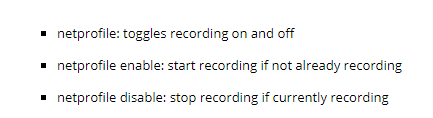
 thin stratus
Don't. It creates tons of issues :D
twin juniper
hahaha 😄
thin stratus
Been there
twin juniper
thanks for the tip yeah thought so
is there a way to prevent steam from masking the serve
like All i need from steam
is user information and nothing else
and the overlay
thin stratus
I think you need the session
Otherwise you can't ping it
#if PLATFORM_WINDOWS
void UHLPlayFabSubsystem::ServerResponded(gameserveritem_t& server)
{
    // Let's make sure we call this from the gamethread
    AsyncTask(ENamedThreads::GameThread, [=](){
        // We most likely will end up joining the match at this point
        // If we fail to connect then that's a whole nother story!
        //OnMatchJoined();

        CSteamID ServerID = server.m_steamID;
        FString ServerIDString = FString::Printf(TEXT("%llu"), ServerID.ConvertToUint64());
        // Get the teamID in case we are part of a team
        FString TeamID = "";
        if (FHLRankedProfile* CurrentProfile = RankedProfiles.Find(GetPlayerID()))
        {
            TeamID = CurrentProfile->TeamID;
        }

        // Join the Server
        JoinServer(ServerIDString, server.m_NetAdr.GetConnectionPort(), TeamID);
    });
}

void UHLPlayFabSubsystem::ServerFailedToRespond()
{
    UE_LOG(LogHLPlayFab, Error, TEXT("[%s] Failed to ping Server."), *GetNameSafe(this));

    OnMatchmakingFailed();
}
#endif // PLATFORM_WINDOWS
These were the calls backs from the steam ping
I handle this in a "Subsystem" but not OnlineSubsystem. It's one of those fancy 4.22 GameInstance subsystems
Cleaner code
thin stratus
#if PLATFORM_WINDOWS
void UHLPlayFabSubsystem::PingSteamServer(const FString& IP, const FString& Port)
{
    GEngine->AddOnScreenDebugMessage(-1, 10.f, FColor::Red, *FString::Printf(TEXT("[%s] Pinging Server with IP [%s] and Port [%s]."), *GetNameSafe(this), *IP, *Port));

    // Convert Port
    uint16 unPort = FCString::Atoi(*Port); // 27015;// +(FCString::Atoi(*Port) - 7777);
    // Convert IP
    uint32 Address = inet_addr(TCHAR_TO_UTF8(*IP));
    // https://stackoverflow.com/questions/21038120/how-to-reverse-byte-of-a-hexadecimal-number
    uint32 AddressHostOrder = ((Address & 0x000000FF) << 24) | ((Address & 0x0000FF00) << 8) | ((Address & 0x00FF0000) >> 8) | ((Address & 0xFF000000) >> 24);
    // Ping the Server
    CurrentServerQuery = SteamMatchmakingServers()->PingServer(AddressHostOrder, unPort, this);
}
#endif // PLATFORM_WINDOWS
That was the code I used to ping the server
You can see that the convert port part is a bit tricky :D
I got that code from someone here
Specially the AddressHostOrder shite
twin juniper
pain yeah
thin stratus
            /// CONTINUE WITH CONNECT PROCESS ///
            FString IP = MatchmakingServerDetails->IPV4Address;
            FString Port = "";
            for (int32 i = 0; i < MatchmakingServerDetails->Ports.Num(); i++)
            {
                const PlayFab::MultiplayerModels::FPort LocalPort = MatchmakingServerDetails->Ports[i];
                if (LocalPort.Name == "steam_udp")
                {
                    Port = FString::FromInt(MatchmakingServerDetails->Ports[i].Num);
                }
            }

#if PLATFORM_WINDOWS
            UE_LOG(LogHLPlayFab, Verbose, TEXT("[%s] ServerDetails [%s:%s]."), *GetNameSafe(this), *IP, *Port);
            // We need to ping the server so we can connect via steam ID
            PingSteamServer(IP, Port);
            return;
#endif // PLATFORM_WINDOWS
I guess gonna be working with steam again ugh
thin stratus
This was in the callback that the client got when a matchmaking game was found
twin juniper
so do I need to create the session via c++
twin juniper
Ive advanced sessions plugins
okay
even then
it wont allow me to join via raw ip
we are kind of scared
because its working
without steam
and when we enable steam only once
on the server
you cant get rid of that shit
buy a new server
couldnt find the registry
where it remembers it
ughh
thin stratus
All I can do is telling you what the solution would be
It works for us now
With steam on both
Class that issues the Ping request to steam has to inherit from this:
#if PLATFORM_WINDOWS
, public ISteamMatchmakingPingResponse
#endif // PLATFORM_WINDOWS
That gives you the already posted functions:
    /************************************************************************/
    /* ISteamMatchmakingPingResponse Interface                              */
    /************************************************************************/

#if PLATFORM_WINDOWS
    // Server has responded successfully and has updated data
    virtual void ServerResponded(gameserveritem_t& server) override;
    // Server failed to respond to the ping request
    virtual void ServerFailedToRespond() override;
#endif // PLATFORM_WINDOWS
So:
- Receive IP of Server, however you are doing this right now.
- Call "PingSteamServer" from aboves code, passing in IP and Port.
- The Class that calls
SteamMatchmakingServers()->PingServer(AddressHostOrder, unPort, this);has to inherit from the postedISteamMatchmakingPingResponse. - Implementing the two functions from that class will give you success and fail callbacks.
- In the success callback you can then connect via the steamid.
I should write a tutorial on my blog. But I have 0 time..
Ach and JoinServer does this:
void UHLPlayFabSubsystem::JoinServer(FString ServerIDString, uint16 Port, FString TeamID)
{
    AHLBasePlayerController* HLPC = Cast<AHLBasePlayerController>(GetWorld()->GetFirstPlayerController());
    FString Command = FString::Printf(TEXT("steam.%s:%d?%s=%s"), *ServerIDString, Port, *PLAYFAB_TEAM_ID, *TeamID);
    HLPC->ClientTravel(Command, ETravelType::TRAVEL_Absolute);
}
If you don't use it, maybe someone else (YES, I KNOW YOU ARE WATCHING!) will find it useful for the future.
 limber light
Hey guys, we are having some issues with our game server. We were able to get it online and running through Steam, and connect through our game. Now we can't, we haven't changed anything in the server querying code, and it shows up in the Steam server browser (now on port 7777 instead of 27016, it was 27016 before), but now we can't find it in game. Anyone have any ideas?
agile beacon
@thin stratus this is exactly the native C++ API, you can now see how more powerful it is. And changing the host which is difficult as Steam deals with them as a uint32 (each octet encoded in an integer), the port is a regular integer.
rich ridge
Just a nuub question. What is the order of creation of these things PlayerController , PlayerState, GameState, GameMode and GameInstance
The first which is created is GameInstance.
thin stratus
@agile beacon I'm very well aware of that :D you don't have to prove a point to me. OnlineSubsystems still make a lot more sense if you target more than just steam. And crossplatform would still not be possible with this.
agile beacon
I see then 🙂
Oh, hack you checked the Steamworks documentation as well? The thing is AMAZING
Look at that ping documentation https://partner.steamgames.com/doc/api/ISteamMatchmakingServers#PingServer
meager spade

 rich ridge
@meager spade Love You Man.
meager spade
so it goes GI -> World -> GameMode -> GameState, then Controller -> PlayerState
i prefer to keep controller seperate from the flow
cause GameMode can be server only with no controllers.
Dedicated Server*
rich ridge
Yeah I figured this out by putting logs in constructor.
So is there any callback for Controller for PlayerState got created.
virtual void InitPlayerState();```So PC is the one who creates and spawns the PlayerState correct?
plush wave
Do actors have to tick in order to replicate correctly?
 jolly siren
Does anyone know why an actor wouldn't replicate in a replay sometimes? I have bAlwaysRelevant set to true
bronze arch
@jolly siren do you recording on client side?
if yes, thats happen to me too. i do record on serverside.
jolly siren
yes, I record clientside
I've tried increasing demo.RecordHz, the net update frequency of the actor, etc.
bronze arch
you cant record on server side?
jolly siren
no, I can't change to that at this point
bronze arch
after game end you can download replay file to play on client
i see
im also looking person for integrate replay system so have no full info for that. hope someone can help you !
hoary lark
random long shot but Nonlin was talking about some bug with demonetdriver being unreliable just a few hours ago in cpp, in case you want to ping him and see if there's anything related between his problem and yours ...
plush wave
If I use COND_InitialOnly on a pointer to a class, does that keep other replicated variables within that pointer from replicating after initial?
winged badger
no
twin juniper
Quick question for on the dedicated server`s pc, we dont need the steam on right ?
in fact it needs to be shut ?
 vague turret
No, you need to run the dedicated server seperate from steam, it doesn not need an account to run
twin juniper
last time we tried steam dedicated server
we were unable to join for some reason
and we had it open
might it be the issue ?
steep cipher
using steam networking?
twin juniper
I wasnt using it at first
I am able to join by raw ip with nosteam
with steam on the client I got kicked cuz of mismatch of the subsystem
so I am giving sessions one more go
steep cipher
I wrote this article for my steam plugin, might be of some use: https://eeldev.com/index.php/steamcore-dedicated-server/

DISCLAIMER I will not give support for issues related to firewall and/or not being able to see your server, as this is out of the scope of this plugin, the Plugin is made to give users the ability to use Steam API functionality in blueprints and is not a Steam Networking or Un...
twin juniper
checking it
steep cipher
gives you an example of both steam networking and the traditional way
twin juniper
I think that is a gem
it really is
I was looking for a way to bypass steam network
but I will give steam one more go and it is gonna help
this article should be on google 😦
mind if I share it on some sites
with a link
It would help a lot of fellow devs
steep cipher
of course, no problem, glad if it's of any help
twin juniper
If we were to use traditional way
would we still have access to steamid and other user information ?
steep cipher
yes
twin juniper
perfect
tall pine
for replicated non-player actor, do they have a unique ID that I can use as an identifier?
Or do I create an ID on the server and just replicate it along with the actor?
twin juniper
do you mean like a playerstate ?
tall pine
no, like a way to identify a replicated actor
twin juniper
well their name is unique on the server Object1 Object2.. and so on
what is it you are trying to achieve exactly ?
tall pine
Say on the server, I create a UFO, that will get replicated down to the client
On the client, the UFO can become relevant / non-relevant as I go in and out of network culling range
I want a way to know that it's the same UFO
twin juniper
you could store all the ufos on an array and check its index
tall pine
cause everytime the client UFO become irrelevant and relevant again, a new UFO got created
but it must have some same properties as the server UFO
twin juniper
well why would it
tall pine
just curious if there is already a net ID or something like that
cause it get replicated?
twin juniper
their order would be same anyways
tall pine
what do you mean by their order?
twin juniper
yeah kind of
everytime there is a new ufo
just add it to your replicated array
add all your preconstructed ufos to that array as well
tall pine
there is no array. it's just a UFO actor
twin juniper
yeah make an array of actors
you can already compare same classes of object to each other
and it would still return false if its name mismatches
it would save you from getallactorsofclass all the time
say you have 10 ufos
you got out of range and the ufo you interacted with was on index 5
you could store it to check next time it becomes relevant
tall pine
store what? Its name?
tall pine
right, cause the pointer will be the same?
twin juniper
yeah it would be addressing the same object anyways
steep cipher
if you're unsure about if it's the same UFO, create a replicated variable that gets printed on begin play (begin play gets called when the actor becomes relevant again)
a variable of some sort that you can identify
tall pine
right, that's my initial thought, have some sort of ID that get replicated along with the UFO, and just use that
Just wonder if unreal already has something ready to use
thin stratus
@chrome bay Found an older post from you about NetSerialize.
The way you compressed and decompressed your floats, was that all working out?
Probably only works for -1 to 1 ratios
Hm, it's amazing how sensible the freaking CMC is to data send via ServerMove.
Sending a struct with 2 floats and one FVector_NetQuantizeNormal already causes tons of corrections. :<
 sleek current
How can I invoke an server function on actor without connection?
thin stratus
You theoretically can't.
sleek current
So if I have an component that has to do something for every client on actor like door or smth then how can i do that?
thin stratus
Perform the ServerRPC on an Actor that is owned by the Client
If, e.g., the Door is a Replicated Actor, then you can pass that Actor through the RPC and let the Server do the rest.
Or, even cleaner, use an Interface to interact with Actors. Use a LineTraces or similar in the Character to trace, e.g., the door and execute the Interface.
Perform the LineTrace on the Client for instant feedback and via RPC on the Server again.
Then you also prevent cheating if that matters.
sleek current
Will it allow me to change properties in those interactable actors?
Because for example I want to have a methods to disable this actor for every client and disable it only locally
thin stratus
That's up to you to code. You won't get around tunneling the RPC through an owned connection anyway
jolly siren
One thing I do see in my logs with this replay issue is the following
[2020.02.25-23.32.33:945][701]LogNet: Warning: UActorChannel::ProcessBunch: ReadContentBlockPayload failed to find/create ACTOR. RepObj: PistolPickup_BP_C /Game/Maps/UEDPIE_1_Stadium.Stadium:PersistentLevel.PistolPickup_BP_C_0, Channel: 38
For some reason my actor doesn't replicate sometimes in the replay
Has anyone seen this before?
 hard nymph
If I'm trying to do client side teleportation (using the movement component), how do I temporarily turn off server error checking/fixing?
hard nymph
I think I found a way around it
winged badger
the bunch clearly arrived on the client, i'd guess its an actor loaded from the package that got destroyed at some point client side
 ember gale
So I'm setting up a player controller and I notice that in a listen server scenario, I have two server player controllers and one client player controller. Which seems correct. Listen Server has the two player controllers and the client only has the local player controller. Though when I try to do a print string to see if I can get the client side connection to say "hello" I cannot for whatever reason.
So on event begin play, just do print string, nada on the client side.
What am I missing to understand the reason why it won't show?
jolly siren
@winged badger Do you know how to protect against that? I'm ending up with guns not replicating when I keep swapping with one of the ground in the replay
i.e. I think any shooter where you have weapon pickups. If I keep picking up and swapping the weapons for the one on the ground. The gun actor doesn't replicate sometimes in the replay
winged badger
are they destroyed at any point?
making sure each name is unique for the match might do it
jolly siren
yes, they are destroyed on the server
winged badger
with actors loaded from package Name translates into NetGUID
and if the Actor with that name is still in client's NetGUID cache
jolly siren
ah okay, how can I specify the names of the actors?
jolly siren
hmm yeah that didn't help
I tried
FActorSpawnParameters SpawnInfo;
SpawnInfo.SpawnCollisionHandlingOverride = ESpawnActorCollisionHandlingMethod::AlwaysSpawn;
const int32 random = FMath::RandRange(0, 10000000);
const FString Name = TEXT("Pickup_") + FString::FromInt(random);
SpawnInfo.Name = FName(*Name);
AGun* NewWeapon = GetWorld()->SpawnActor<AGun>(WeaponClass, SpawnInfo);