#multiplayer
1 messages · Page 523 of 1
 marble depot
also, for someone from outside of your network to be able to join your server you'll need to forward ports
 royal isle
Hey, what is the best way to make sure a player has the correct data from a backend server when he joins a game? Just have the game server send an HTTP request to the backend on each player login to populate that player's data?
 meager spade
some kinda REST validate the data, etc
royal isle
yeah I thought so, ty
marble depot
update again: i now have a windows server that doesn't have any errors - it doesn't complain about not having the steam client, it doesn't complain about anything. all messages report success in connecting to steam and everything else. problem is it still doesn't show up on the server list and i can't connect to it.... can't find anything on the internet either. the steam server list says "No internet games responded to the query.".
 swift aspen
Do anyone knows how to fix this error?
 plucky void
 tall pine
Did you check the log?
 gritty pelican
Has anyone implemented a Steam inventory? Please help me get a list of all purchased items (с++)
meager spade
@gritty pelican please stop posting the same question in multiple channels #old-rules
 cedar finch
@winged badger @thin stratus Hey guys the two problems I was working on last night, the weapon pickup and the player names. Well I fixed the weapon pickup. Still struggling with the player names though. It got a little crowded last night with everyone asking questions, I couldn't concentrate lol. Just wanted to let you guys know I did fix one of the two though.
 severe cedar
Hello again! Does anyone know if there's any event for when all players have finished a seamless travel from one player to another? I think you can check against traveling players on Game Mode but that value doesn't always seem to be accurate for me... Or, does anyone know how to tell how many expected players there should be? Is it something you need to save and pass around yourself before the travel? What about when booting straight into a Level from PIE with multiple clients?
 silent phoenix
Can anyone shed some light on calculating a structure bandwidth amount and limits? When should I be concerned about the amount of data in the struct that it would impact multiplayer performance?
For example. If you server holds your item data table and you want to efficiently transmit that struct to the player when they pick up an item what should I try and limit that struct size to
 hard nymph
Is replicating physics on a child component possible? I'm having some weird issues...
 hollow portal
servers dont show up (im using steam multiplayer and advanced sessions)
heres the bp for the widget
and heres the bp for the game instance
also this appears as well
hollow portal
nvm fixed it
cedar finch
Ok So the reason I'm struggling with replicating my player names above my head is because of the execution flow. Each client know's what their name is, the variable is in playerstate and they know what it is but sometimes they can't get that variable out to everyone else. How can I replicate this variable that's inside playerstate to my Character which has the widget component without having to put a manual delay? There has to be a way for my character to spawn, get possessed, then get his playerstate name, then tell everyone else what that name is, even players that haven't connected yet. Is this possible?
hard nymph
Is replicating physics on a child component possible? I'm having some weird issues...
Components that are programmatically spawned in the construction script... not sure if this changes anything
meager spade
@cedar finch PlayerName in PlayerState is replicated to everyone
royal isle
Hey, is PreReplication() called just once or with each replication frame?
meager spade
each replication
royal isle
yeah I feared as much, thanks
royal isle
I have, text me if you want @viscid escarp
 calm niche
Should restartplayer() restart local players?
 gray scroll
i have tried this:
gritty pelican
Hello, how i can kick player from server? c++
is there any function to kick?
AGameSession::KickPlayer(this);
Forcibly remove player from the server
I tried to do so, but I get an error
this - it is my controller
 timid moss
Does anyone know of any free cloud server hosting services?
I need one so that I can start my dedicated server instance so that me and my friend can play
And I want to do it in the cloud
 valid frigate
hey my dedicated game server only runs at 30 fps but should easily do more.
In the DefaultEngine.ini I have the following setting:
[/Script/Engine.Engine]
SmoothedFrameRateRange=(LowerBound=(Type=Inclusive,Value=22.000000),UpperBound=(Type=Exclusive,Value=120.000000))
bSmoothFrameRate=True
bUseFixedFrameRate=False
FixedFrameRate=120.000000
If I only start the server on my PC, I should actually have 120FPS because I have it on the client.
Any suggestions?
 meager nova
Anyone know what i would put to have my friends or anyone that has the game, auto connect when they launch the game?
cedar finch
@meager spade Yea I know that the playername inside playerstate is replicated but I'm struggling to figure out how to take that variable and set the text in my widget that is attached to my player character's head at the correct time. It's like when a player joins the game he needs to tell everyone in the game his name, but also needs to get everyone elses name and update their widgets as well so that he see's their names. I did a "hacky" way which kinda works using multicasts but only if players don't join really late into the game.
I'm using my own playername variable that I load from file, then set inside playerstate. So that loading of the file takes a small ammount of time while everything else is executing as well so I wind up with my playername widget being set to None sometimes because the playerstate variable wasn't set yet. Heavy Sigh.... It's just annoying and a mess for something that seems so easy and is a main part of just about every game. 😦
meager spade
Dunno our names are simple
Steam sets them on playerstste for us
Widget just pulls it
cedar finch
Yea the Steam names works fine. But I added an option in settings where players can set their own names kind of like PUBG. So I'm guessing the act of loading that from file and then setting the value inside playerstate is just taking a while. I just wanted to figure it out because if you don't use Steam your name is just long PC name which is no fun lol
So I also tried another way that doesn't use playerstate. I thought it may have a better flow of execution. So playercontroller loads the name, then passes that name to Gamemode, the Gamemode then spawns the character and calls a "RunOnServer" event inside the character bp that sets a "RepNotify" variable called playername. That OnRep function then sets the widget text above your head. The only way I get it to work is if I add a delay on the "RunOnServer" event inside my character before I set the playername variable. lol
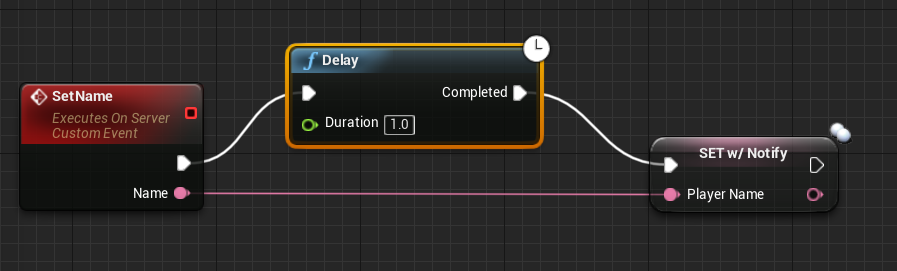
I've tried a million different ways and combinations but all of them are clunky and don't work 100% of the time.
 tacit sigil
Hey everyone. I have a question that will hopefully be easy to answer.
In my multiplayer lobby, I have an error that pops up when there are too many people on one team, and someone needs to switch over to the other empty team, making it to where everyone can NOT press "ready" until someone switches. The issue, I know is replication. one player isn't registering that another player has opted to join the other team and click ready. So when the other players still try to click ready, even though the other team is now occupied(which is being replicated properly), they still get an error that there is no one on the other team. yet, visually, there are. I hope this makes sense.
So, my question is, in order for me to reflect the boolean properly that a player has entered the right team, does this all get calculated and passed through the game mode? the player state? game state? player controller? I'm just not sure where to be passing it through so everyone in the lobby is getting the same info. Thank you guys for any guidance to this!
The error or confirmation that there's a player that has been readded is only reflecting on the player that added themselves to that team
 twin juniper
Is there any way to replicate "virtual joystick"? It always controls the server, i guess it is programmed for Player Index 0
cedar finch
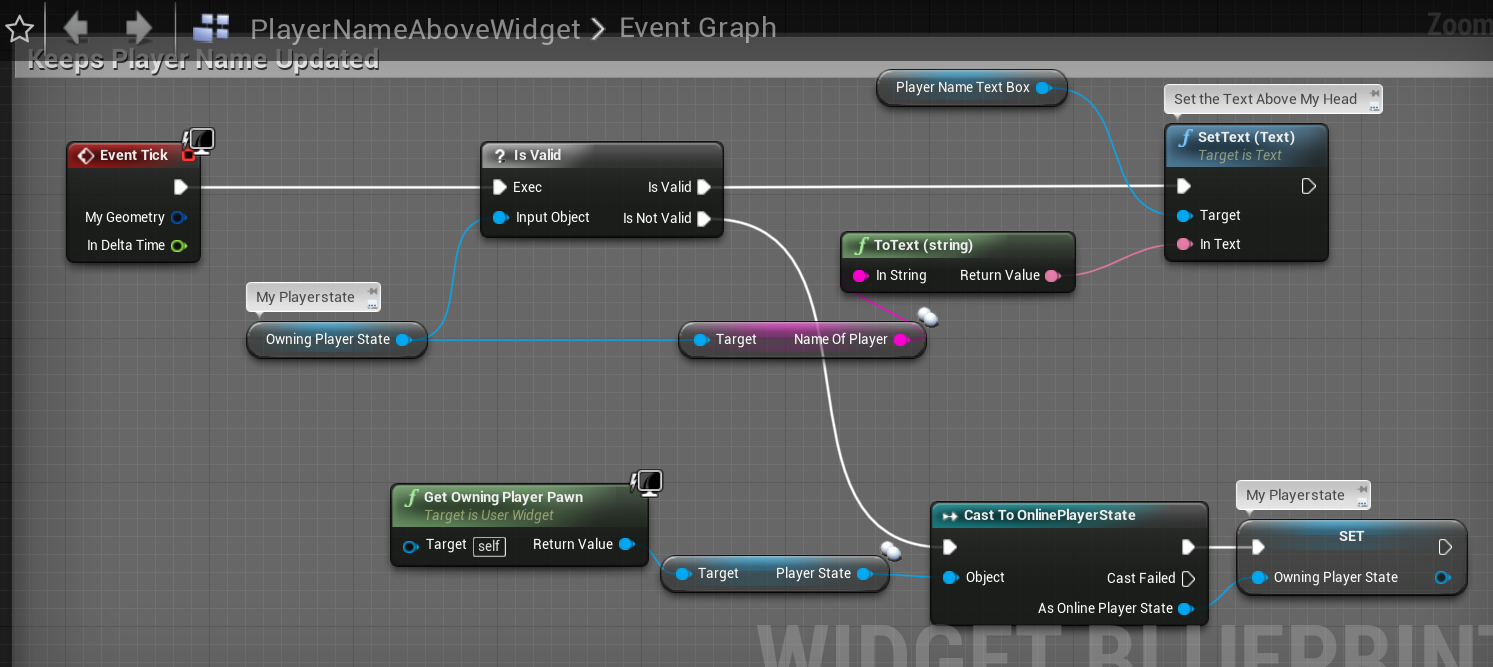
So I gave into the bad habits and just put my name logic on tick in my player name widget. So now it always has the correct name above my head for everyone to see. Is there any way to make this more optimized lol. I never use Tick but I got to the point where I wanted to throw my PC out the window so I just went with tick and said the heck with it.

technically it should just be setting the textbox above your head over and over and over. So it's not really using a lot of resources right? hahaha
Oh I could do this hahahaha https://i.gyazo.com/6cf61e1cc5978245a31b60403178f96d.png
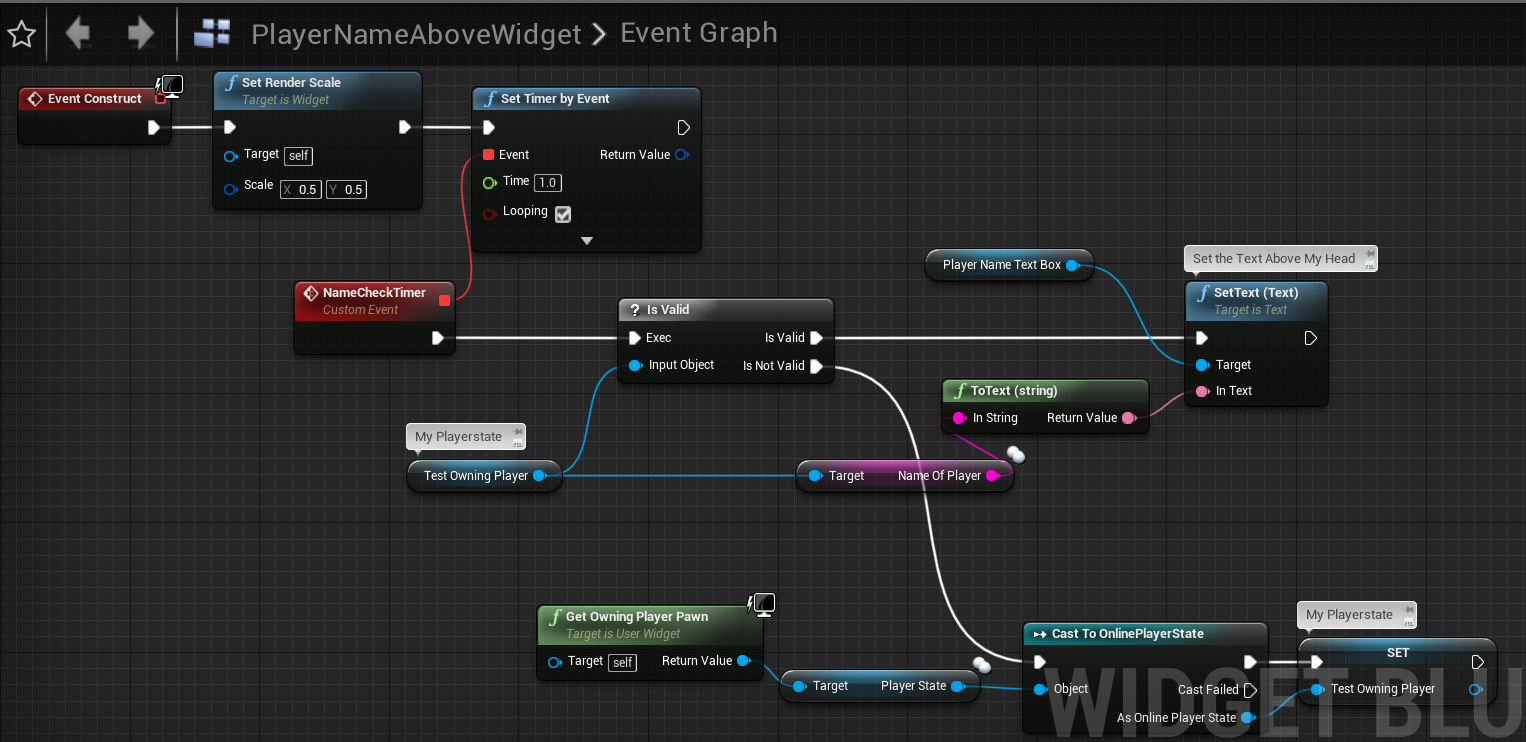
That should work 😉
 thin stratus
You could just move that logic into the widget and a binding
Despite that it's fine to bind/tick something like that. You can always come back later and optimize it.
Ah you are already doing it inside the widget
cedar finch
Yea I failed at trying to push and/or replicate the name to the widget effectively for late joining clients so I just did this lol. Now I never have to worry about when something executes and what happens if a player doesnt set his name correctly.
I setup repnotify one attempt and thought I had it but when I tested with net packet lag at 500 players names weren't working right lol.
Tick is never a go to for me but in this case I'll just save myself the headache and use it, or my timer
 bronze arch
Hello guys, these stats are good for a MOBA match game?
Tried 1v1 2 player rn. max 5v5 10p. one wave spawns total 30 actors minion. and have 24 static Tower Turret, Jungle monsters, inhibutors and guardians so totally 72 Actors replicated real time(except player actors).
Let me know if its need optimize
 winged badger
@bronze arch 72 replicated actors is easy for the network, however that looks like you went out of your way not doing property replication and RPCed everything instead
which might come around and bite you in the arse at some point
bronze arch
@winged badger you mean delet some rpcs and convert to replicated variables?
winged badger
that amount of RPCs suggests you are making heavy use of multicasts
anything stateful should be a replicated property
bronze arch
honestly im not use much multicasts but you said well. i will convert that multicast things to replicated variable. (fk my mind to do shurikens spawn is multicast rpc not variable replicated.)
I Though maybe it good for once time fire.
imma go with option 1
Thank you btw
winged badger
and replicate location for map actor
depends on if it should show on the map if not relevant largely
if not, there is no need to replicate anything
bronze arch
always need to show on the map. Because when a enemy approaches to our minion. it also shows enemy minimap icon. like lol game, but without fog version.
thats why i decided to make lighty actor for it.
instead using minion actor. because it cost much rpcs nonsensely long distances.
you see the results with this idea. almost %50-60 reduction to usage bandwidth
@winged badger do u know what is this?
server move no base counting so much at rpc
winged badger
CMC
bronze arch
but how. only player actors can move at longest distance from minions. or it still counting with no relevance? i dont see that actor in clients. how it can be count 
 chrome bay
That's one actor. Only the clients pawn calls ServerMoveNoBase
Or more accurately, the clients character
You're looking at the Clients network stats.
bronze arch
mean possesed character?
chrome bay
yup
 have another idea for reduce that?
bronze arch
have another idea for reduce that?
bronze arch
noooooo
chrome bay
You have to send the movement from the client to the server, that's how the prediction system works.
chrome bay
No
The more you reduce the tick rate, the worse the prediction gets
Then you start paying cost for corrections instead.
You pretty much have to absorb the cost of character movement.
You can throttle it, but that will result in reduced accuracy and higher perceived latency for other players
 chrome bay
Look at GameNetworkManager. It has a lot of properties there you can adjust
Personally however, I suggest leaving it alone.
If you only have a few client characters then the defaults are fine
bronze arch
you sure? @winged badger said that much rpcs bites my ass
chrome bay
Yeah but it's character movement. Few things are more important than decent, responsive movement.
If you want to reduce bandwidth use, lower the NetUpdateFrequency of all your actors which don't need to update every frame
The default of 100 is frankly ridiculous
winged badger
i saw going on 162 property replication and 27k RPCs per second there
chrome bay
27K RPC's a second I doubt it would run at all
 tropic fjord
Do you have your Minions currently based off of Character as well? Cuz changing that to Pawn would save costs @bronze arch
chrome bay
It won't save much network cost
Non-Locally Controlled characters have the same network cost as any other replicated actor
They still use ReplicatedMovement
They do however have considerably more performance cost
winged badger
it is possible the profiler counts server RPCs called from server as RPCs tho
chrome bay
Hmm shouldn't do.. it looks to me like Noira did a test for the client.
None of those RPC's get called during the servers movement path anyways though
BTW - a quick win is to set bUseClientSideCameraUpdates to false in PlayerCameraManager
That will kill that ServerUpdateCamera RPC
Why the hell it defaults to true I'll never know
bronze arch
ohhhhhhhhhhhhhhhh
YOU SAID WELL
LEME TRY IT
THANK YOU BOI
i tried destroy all cameras except owner character idk how it still count so
chrome bay
Honestly, fastest way to reduce bandwidth is to throttle the Net Update Frequency of any replicated actor.
And it stops the server chugging on actors which don't even have any changed properties
bronze arch
yeah i did set 20 max freq
chrome bay
KK
the default tickrate is 60
You could lower it if you want to
Won't help clients
But will help server somewhat
I use the following settings atm:
MaxNetTickRate=60
NetServerMaxTickRate=60
LanServerMaxTickRate=60
bClampListenServerTickRates=true```i see btw i dont see that option
chrome bay
You might have to create a C++ class. Not sure if it's exposed.
It is in 4.24 though
bUseClientSideCameraUpdates
It's in PlayerCameraManager not PlayerController
bronze arch
but i dont use PlayerCameraManager component in this game.. where it is
chrome bay
You need to create one
It's an actor
Then you set Player Camera Manager Class to that Blueprint in the Player Controller Blueprint.
bronze arch
okay leme try
found it
done le me try again to profile it
nice 
now im gonna delet these multirpcs and try tickrates
i didnt set these setting on my project config. so it using default value right?
Yikes
15000 rate wtf
 inland sun
Where can I look to fix a slight issue with replication of the line trace being fired from a FPS camera. The line trace is correct for the server but the clients just seem to aim down
Clients line trace shows normal but the server sees the line trace aiming downard at an angle
bronze arch
these settings fine guess, i cant find another setting from engine source.
(Writed on project config.)
gray scroll
i have an item spawned on server but when i attach it on a replicated event... it doesn' work... do i need to multicast it or run this attach on server?
inland sun
spawn and attach on client with multicast
bronze arch
@gray scroll if everyone want to see it attached to component. yes you need to fire from multicast
if only owned actor then send to owning
chrome bay
15000 is fine
bronze arch
@inland sun Camera movements only work on client. i tried it. doesnt work on server side so you should send camera location to server.(this makes can be cheating)
oh
what happen if i do lower it? increasing packet loss or lag?
inland sun
the line trace is fired by the client and uses the camera world lcoation and forward vector to set the start and end
bronze arch
nice. that should work on clients. but not same for serverside tho
inland sun
which is my issue, client sees the line trace go where aimed, server sees the clients trace hitting the ground in front of the client
chrome bay
It doesn't really do anything as such, the engine doesn't do any real traffic/congestion control. It will consider the connection as saturated when you exceed that value and it might try to work around it by sending properties less often etc.
Also depends on what net driver you use.
Replication Graph doesn't really pay any attention to it at all
bronze arch
yeah now nothing work when i set MaxClientRate=40 lol
only work umg things
imma leave it with default then
nice. reduces very well than before
everything works well and stable. skill,animation,damage etc..
btw except the server (filtering only clients)
it reduces to 3k RPC 
Guess something is wrong in serverside
Thank you anyways. i learned new infos  love you guys
 ripe sky
Where is the best tutorial to setup a multiplayer game with blueprints?
 ocean geyser
can you make a normal game with BP
ripe sky
yeah
ocean geyser
id recommend you learn c++ with UE4 before moving onto blueprint and multiplayer, that way you can atleast move your code to c++ in the future wherever performance is key. one project im helping with is made entirely in BP and i think its going to be a mess with populated servers so make sure to keep that in mind while exploring this area so you can choose what % you need in c++ and what % is fine in bp (like simple logic)
https://www.youtube.com/watch?v=_XyjMeAb3fw

In this video, we create our project and go through the process of importing the characters that we will be using for the series. We set up our folder structure and create some of assets that we will be working with throughout the series. We also do a little bit of animation r...
 long gale
strange. so i've got a grenade that i'm spawning (just a normal actor with a mesh as the root). in the constructor it sets simulate physics to false, enable gravity to false, and NoCollision for collision enabled. in BeginPlay, if HasAuthority I set replicates to true, and replicate Movement to true. then when a function gets called (on the server), i enable collision (query and physics), enable gravity and physics, and add an impulse to throw it.
the odd part here is if i have collision enabled in the constructor, the movement of the grenade on impulse is replicated to the clients. however if i set no collision in the constructor, and enable it before the impulse (on the server), the movement is no longer replicated on the client and only happens on the server.
anyone know why that would be the case?
(i want collision off on spawn because my player is holding it, and if it has collision it messes up movement)
hard nymph
Is there any way for an actor to allow character walking (CanBeBaseForCharacter?) whilst not setting the player location to a relative offset?
Context: I have actors with synced locations but aren't replicated, so when clients walk on them, they just have an offset from 0,0,0 to all other clients until they detach from the actor they're walking on, rather than just showing their world location/transform
 winter plover
@long gale You may want to write your own movement code for grenades, using the built-in physics will probably cause inaccuracies and issues
instead of switching collision on and off entirely, you could filter out your hitresults, and simply ignore any events that include the throwing player
long gale
"inaccuracies and issues" so is the built in physics just broken? or what do you mean by that
winter plover
they arent always entirely synced
using them for gameplay important stuff is a bad idea
winter plover
basically under bad circumstances the server version of where a physics object is and where it is on the client can wildly differ
because the current physics system is very sensitive to small inaccuracies in replication
if you wrote your own throwing curve, you could make it replicate much more accurately
long gale
wouldn't that just be the case if you're doing the physics on both client and server?
winter plover
so you are just freezing the object on the clientside until it gets updates?
long gale
not specifically, but the impulse is only fired on the server
i may not be familiar enough with how things work yet to say for sure.. but that would lead me to believe that the physics calcs happen solely on the server, and then movement replication takes place to reposition it on the clients
winter plover
replication doesnt always occur frequently enough to have it be entirely smooth on its own
long gale
that's fair
winter plover
clients will have to interpolate inbetween updates
the big advantage of writing your own throwing curve
you can basically exactly predict where a thrown object should be
because you are basically using much more simplified physics
long gale
i understand - then it's not a matter of relying on speedy internet, you can now move the grenade on the client side as well and have it reliable for positioning
winter plover
its much more preferable when it comes to gameplay relevant stuff
yea you only need to initially replicate where the grenade is thrown at what velocity
long gale
mhmm makes sense
winter plover
and then for any point of time in the future you can predict where it should go
(not including stuff like collisions with dynamic objects ofc)
long gale
right
winter plover
this is basically how any multiplayer game does grenades and projectiles now
long gale
wouldn't i have to write all the stuff if it hits an object then too and bounces off?
winter plover
yea pretty much
long gale
=_= that's painful
winter plover
physics arent really meant for gameplay stuff like in say halflife 2
it works okay for cosmetic things
winter plover
I think they were working on making a new physics system
havent been following what happened with that yet
long gale
so even things like gravity/jumping/regular movement?
do i just scratch all of that? how far does this go
winter plover
jumping and character movement isnt real physics either
those also use very simplified physics
winter plover
yea
long gale
cool
winter plover
they are made with replication in mind
 hoary lark
er, not that I've done this yet in my project (still on guns) but you could probably just use the projectilemovementcomponent for a basic grenade ...
 wary wyvern
Guys, what are may be the reason my UObject does not replicate?
I have it as UPROPERTY(Replicated)
I do replicate it using ReplicateSubObjects in outer Actor.
It has IsSupportedForNetworking() overwritten to true.
But this class was created with other outer and then I do rename() to change it's outer. May this be the reason?
winged badger
its better to have the Outer be the same Actor that is replicating the Object
 rich ridge
I m using SMeshWidget, do you think it will replicate, since it's Mesh and materials
winged badger
show me your replicatesuboibjects
bronze arch
@winged badger what if i use custom replication movement instead CMC?
bronze arch
yea
winged badger
not for players at least
but for minimap markers, the further they are less precise they need to be
bronze arch
nah there no problem for minimap
winged badger
so you can adjust update timers based on distance
bronze arch
im talkin about character movement
i saw smooth sync plugin at UE MP
tried and compared each other
winged badger
no idea what that is
bronze arch
same thing like CMC
guess
tried profiling to CMC and Smooth Sync
There lot to possibility more compression and rate, time things. i tried to make RPC rate 15. and seems no different than CMC in game movementing.(Because of smooth interpool and exterpoolation)
In the networking side, down RPC counts 1k per second instead 4-5k per second with CMC.
isn't it good?
hoary lark
it's good if you don't need anything that CMC provides over smoothsync?
bronze arch
just authorizing movement to client side. so servers no extra costing for checking player location and teleport things. its just opens for cheaters, but i dont see differences cheating with CMC. Tried speed hack with cheat engine and its work to cheating game with CMC. not correcting well. so you have to make anti cheat for it 
hoary lark
well, UE4 (any game engine I suppose) has always relied on the creators to define what is cheating and what isn't. simply using any kind of cheat in a rudimentary project, seeing that it does something, and concluding that the cheat works simply isn't a sensible way to approach the whole issue. have you defined every RPC validate function of your project with robust logic? I'm guessing not. Smoothsync looks great, its users should just ensure they understand what they're trading off for it and make sure that's acceptable for their needs. nothing is free, if it's too good to be true then it probably isn't true, everything has a cost, etc.
bronze arch
i am using default CMC Replication that gives from UE4. so i don't RPC validation for that. Authorized from server, enabled correcting or smth smth. but its still not work. Why ?
in every way game needs to anti-cheat for other things. not only movement hack. also animation speed hack (idk how did it work). i fired a animation from server and multicast'ed. damage is so fast. not like 2 per second, its like 0.01 per second to give damage. now i see everything will not authorizing from server.
(Also damage system works only server side. never replicated on clients.)
guess i have another idea to blocking that cheating without anti-cheat..?
that speed hack multipling game ticks only on client. so if u make variable for delta time both server and client, then u can compare per 10-15 second or 2 second (what u want to be crazy)
if client delta time is very bigger than server delta time, then they would to kick from server.
ofc it will different due to Frame rate Per Second.
also u cant block wallhack or graphical hacking with server authorizing. so, still need anti-cheat.
tropic fjord
Has anyone ever had issues with Replicating Instances on an InstancedStaticMeshComponent?
Got 2500 instances that get added on runtime (procedural generation), but they're not showing up. Kinda odd.
tropic fjord
Dove into source code. Seems there's no built-in support for replication of Instanced Static Meshes. Welp.
That sucks
 weak fog
Got a dedicated server build problem. Upon spinning up the GameMode, I get this:
[2020.02.17-18.29.55:730][397]LogWindows: Warning: CreateProc failed: The system cannot find the file specified. (0x00000002)```

Which then leads to an exception access violation. The only thing I can think of that's causing this is that we recently added a dev-only dependency (`UnrealEd`) and the GameMode does use that to determine the number of editor clients (if in editor mode, obv).

Our procedure here is to guard the method declaration, import, and definition with `#if WITH_EDITOR` blocks.

I am wondering if instead I should always DECLARE the definition, but simply have the definition conditionally return a default value if `!WITH_EDITOR`, basically. (I'm building a new server rn to test that).

My real question though: is there some way to get a proper stack trace here? I feel like I'm going crazy trying to deduce what could be the problem when surely some method had to be called to trigger the null pointer? Currently I am building the server as `Development Server`, but I do see the option for `Debug Server`, so maybe I will try thatYou can attach vs debugger to server process
weak fog
Sorry if this is a noob question, but is that simply some config? like it attaches additional debug info to your server logs etc
winged badger
you start visual studio
Debug>AttachToProcess>find your server process
and then cause it to crash
tropic fjord
I have a question. I have an unowned Actor that is running a function on the server. I then invoke a NetMulticast RPC. For some reason, that RPC is only run on the server, not on the clients... Anyone knows why this could happen?
winged badger
actor not replicated
tropic fjord
It is
winged badger
out of relevancy range
tropic fjord
When would that happen
weak fog
WhyOnlyServerblahblah is prefixed with Server: when you print?
weak fog
i would put a print on begin play and make sure that anything is EVER printed on clients
tropic fjord
No matter the amount of clients
weak fog
meaning that this thing might be server-only so it's replicating to nobody
tropic fjord
🙂
tried that already
This is why I'm confused. Gone through everything that seems reasonable and still broken xD
weak fog
that is def a weird one...
do you have other instances of the same concept, but working differently?
tropic fjord
I mean, this is just an Actor that is spawned on BeginPlay (from server), then having it do some stuff on server and want it to send some visual stuff to client based on the server action
Just made a similar actor from scratch and having it spawn on BeginPlay, same thing
weak fog
not sure if you're calling the multicast immediately, but it could be that they simply aren't replicated yet. could try putting a few seconds delay on the rpc
weak fog
yooo it worked? nice
even in editor with 0 ping, there is SOME time for replication i find
tropic fjord
Yeah
That was derp
The weird thing is
Print strings were working fine
It was just RPCs that needed the extra time
Oh nvm, I know why
the BeginPlay on Client is only called once it's replicated
weak fog
ah yeah, that makes sense
cedar finch
Would it be more optimized to replicate bullet impact FX through replicated variables? Or should I just leave them how I already have them setup which is using a Multicast? They are just for looks, but they do get called every time someone shoots their weapon.
 fleet raven
replicated variables are for state that lasts over time
not one-off events that immediately become irrelevant after
so these are best as unreliable multicast rpc
cedar finch
Ok thanks. That's what I thought and was taught. I was just double checking. Thanks
meager spade
OnReps (RepNotify) == States, Multicast Reliable == Things that has to be seen by people who are relevant, Multicast Unreliable == Things that doesn't matter if something is missed. Bullet FX for example, who cares if a client misses one muzzle flash?. Bullet impacts tho, might be a different matter.
@cedar finch
 thick sigil
Hi guys got a question about topdown template, i can only move as a host meanwhile client movment doesn't work at all. Is it a problem with playercontroller ?
cedar finch
Yea that's what I was thinking. Bullet impact FX could be important but maybe not for a coop shooter. IDK I guess it does depend on the game.
meager spade
you need to send the movement through the cmc
thick sigil
thanks
cedar finch
Well I thought I had my playernames figured out but it turns out that it's just setting everyones name to your name. So Client 1 see's everyones name as his. Client 2 see's everyones name as his name, and so on and so on. 😦 What am I missing? https://i.gyazo.com/4ccbf6395655295bd335bd58e17f31f8.png
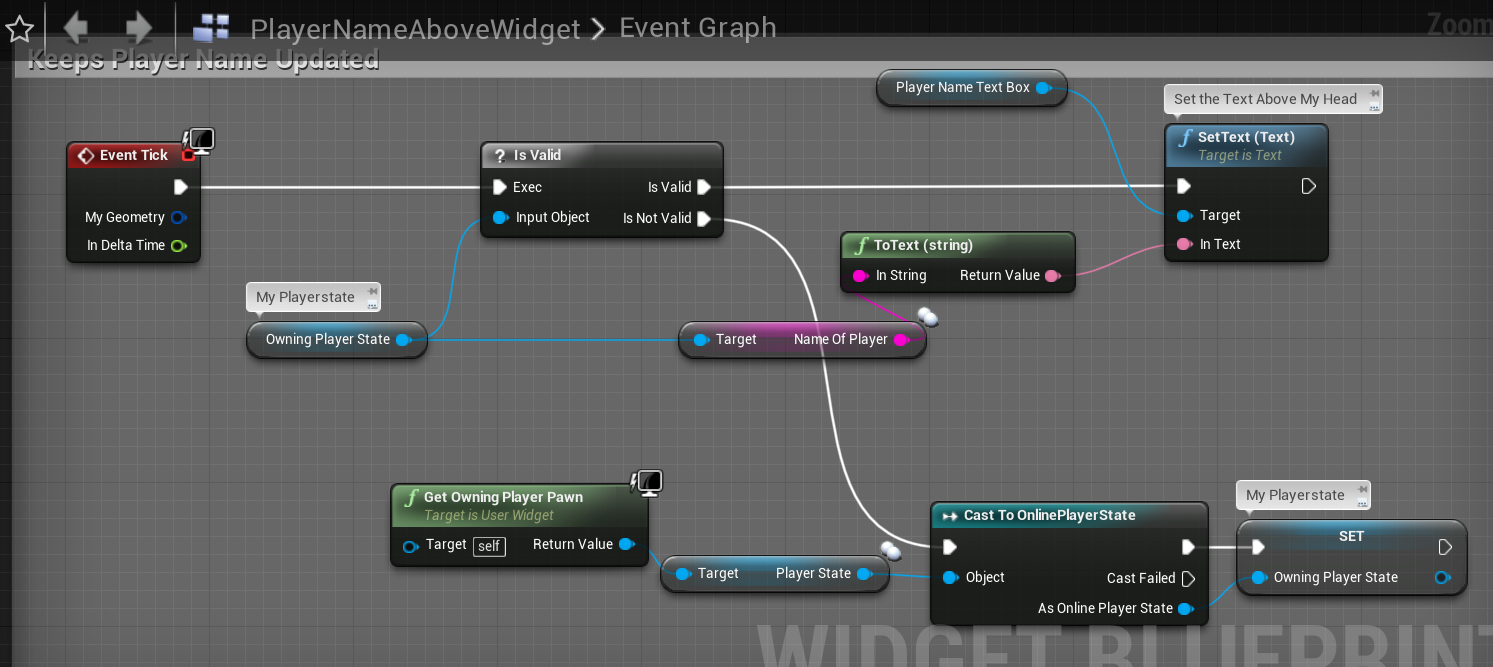
For example, if my name is Whippy, then everyone I see in-game has a name of Whippy. If another player is named Joe, then everyone he see's in the game is named Joe.
meager spade
heh
no clue how you are setting the PlayerName
but its normally set automatically
cedar finch
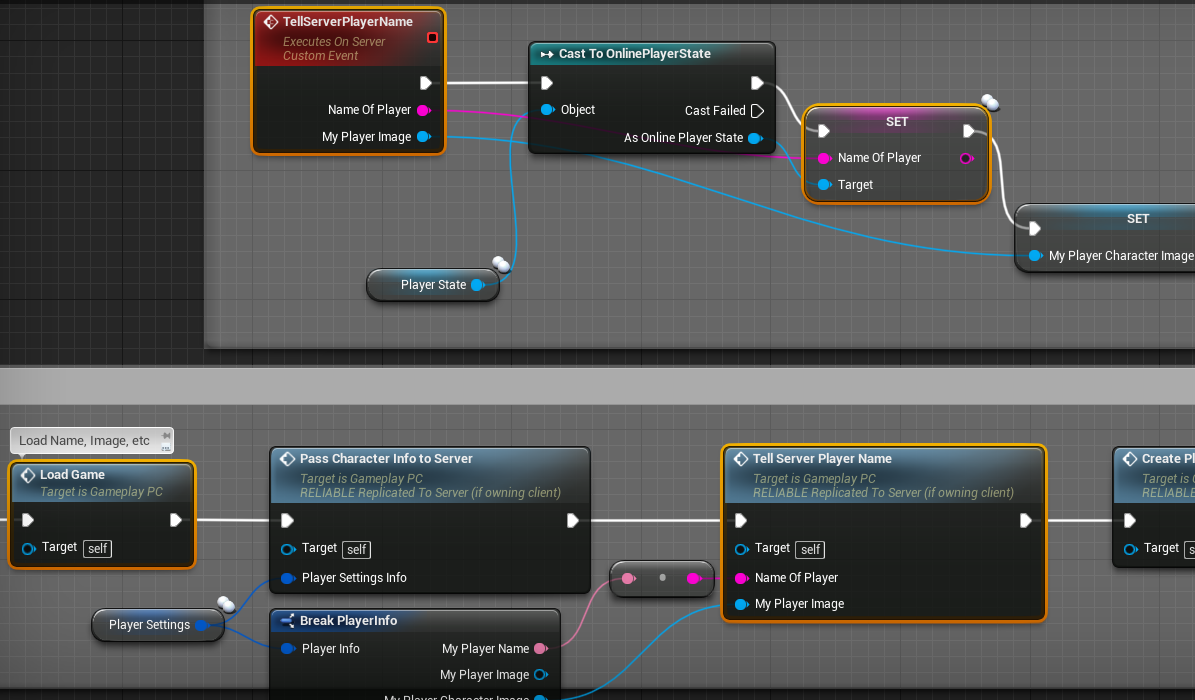
I load my custom name from file inside my playercontroller, Then I set it inside my playerstate https://i.gyazo.com/ecf87d2f3f08df54752ccb0696524eab.png
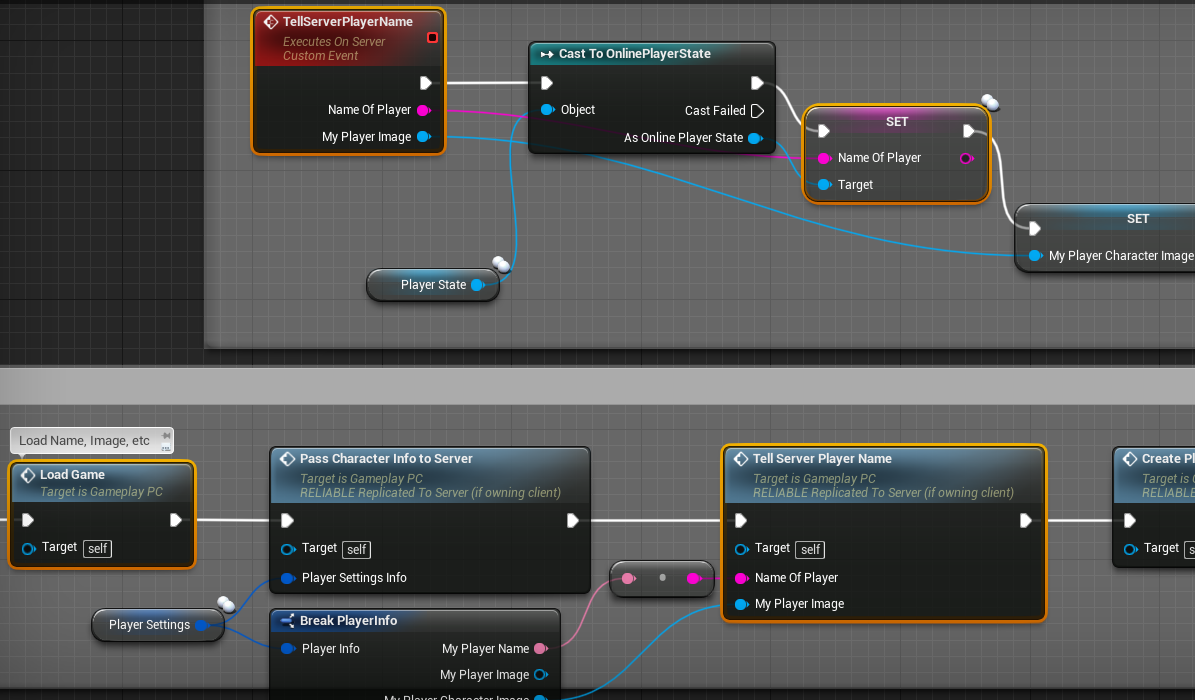
This image above is inside my playercontroller
 honest scarab
anyone know the best aws gamelift tutorial?
 nimble basin
Hi all, I am wondering what reasons there are to subclass gamemode, and gamestate, over gamemodebase, and gamestatebase for multiplayer considerations.
Anyone have any pointers there? Just wondering in general, when I would need to use the full classes rather then the base ones?
I've heard that you would use them for multiplayer reasons, but haven't heard why..
gritty pelican
PlayerState is created for each controller as soon as it enters the server?
 glossy wasp
The base class is barebones whereas the sub class has some features already fleshed out for you that operate like common MP style games with pre match / post match / grace periods / etc
meager spade
read the source code @gritty pelican
you would understand
PlayerState is created when the PlayerController is created.
cedar finch
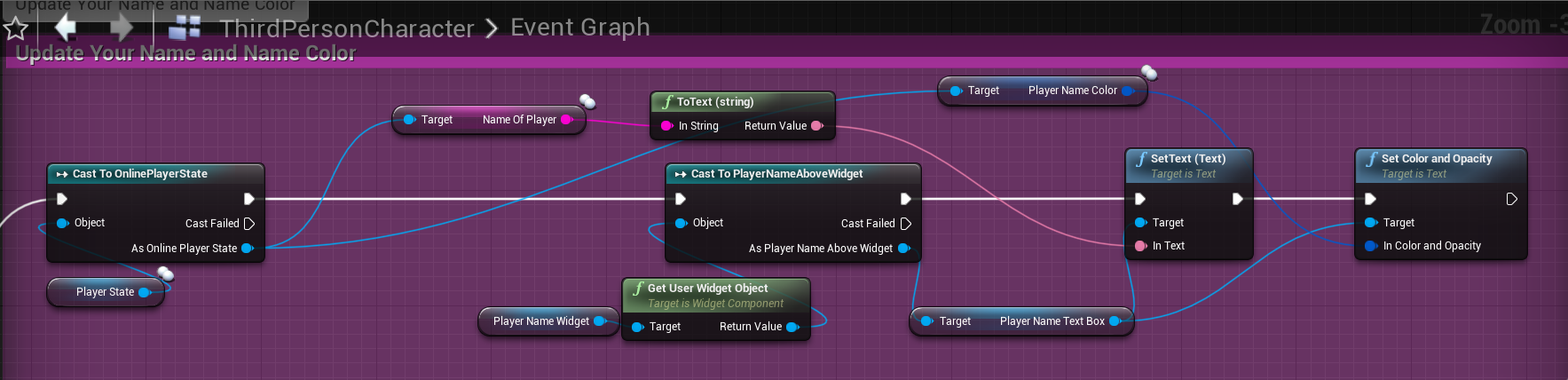
This may not be the best solution but hey, it works. https://i.gyazo.com/f4561b5cef82f7d0d04faa25926afe6c.png
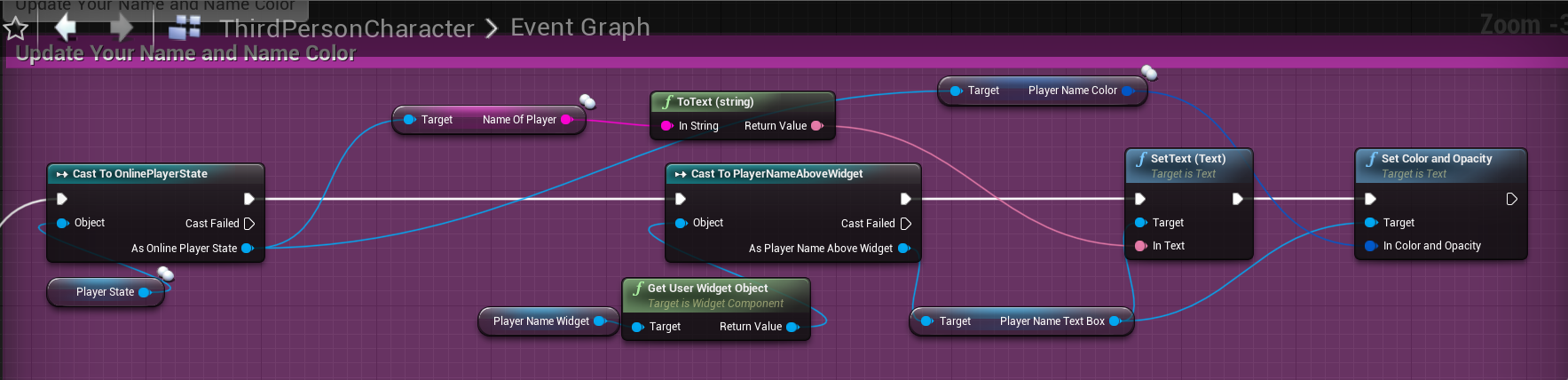
It runs on tick inside my character but I'm at the point where I just want it to work and this seems to do the trick
gritty pelican
@meager spade And if a player leaves the game, does his PlayerState remain in the game, and if he comes back, will he just get his old PlayerState?
nimble basin
Anybody have any recommendation on systems to use for cloud saves for MP? Just getting into it..
 weary zephyr
Hey everyone, wondering if anyone has experienced this issue and what you did to fix it. I have a project I've been working on which was on UE 4.22. I updated to 4.24 today, and now input doesn't work for clients in PiE mode - it works for the listen server host in a listen server, but not for any clients. The console key works, but none of my custom input keys
rich ridge
@weary zephyr try creating the same inputs again, but do make a copy before
weary zephyr
@rich ridge unfortunately that didn't fix it 😦 Thanks for the idea though
thin stratus
Put PrintStrings and/or break points in and check if they actually call.
Make sure the Input Nodes don't have errors or warnings.
Make sure the Input settings are still in your ProjectSettings.
weary zephyr
- did, not being called
- no warnings/errors
- they are
😦
It's almost as if the pawn isn't being posessed - even though that event flow seems to work fine, and the camera posession does work
these strings are never printed on a client (but are on a listen server host)
rich ridge
Are u using C++ as well.
weary zephyr
I have the C++ generated and built the editor though it, but haven't actually modified any code yet
rich ridge
If you are overriding SetupInput either in PC or Character, then BP won;t be triggered.
Please validate this.
weary zephyr
I haven't modified any code, so no, I wouldn't be
thin stratus
Are these events in any other BP of your project that is also spawned?
If so, they might be consuming the input?
weary zephyr
But also, it works fine as a listen server host, I would expect that to be broken there too?
thin stratus
Oh
Is the Pawn/Character still marked as Replicated?
Including the Character Movement Component?
weary zephyr
Yes, Replicate Movement is off though because I'm using Smooth Sync for that. None of these settings have changed during the upgrade
thin stratus
AlwaysRelevant is shite on a Pawn though. at least theoretically
Can you turn ReplicatedMovement on
And check if it works?
Cause that would lead me to your SmoothSync stuff being broken
weary zephyr
It still doesn't work with rep movement on - I think this problem would be before smooth sync was relevant either way, it's not actually hooking my inputs
weary zephyr
by single player you mean just as a listen server host with no connected clients?
That works yes, but any connected clients do not
thin stratus
Na I mean just a standalone game
Guess it doesn't matter too much if server works
Hm not sure then. I would suggest you take a step back, make a test GameMode and a test Character, setup movement in them and use the sort of "stock" version.
If that works then something is off with your setup
If not, then I would go towards thinking this is bugged
weary zephyr
it's just very odd considering it works perfectly fine in 4.22
I have a backup of the project in 4.22 that I can revert to, but still, I'd like to know why it's not working here 😛
thin stratus
Well as said, try to recreate it in a standard character
And see if that works first
weary zephyr
thanks for the help 🙂
meager spade
what would cause a clients speed to slow down when the host has a bit of a hitch?
also when the host has lag
 bitter oriole
Slow down in which way ?
meager spade
movement speed
feels like i have 100 movement speed not normal 400
only on client
bitter oriole
Is this using Character, or custom movement ?
meager spade
CMC
bitter oriole
Weird
meager spade
but its not conventional
our playercontroller possesses an observer, the playable character is just spawned, the CMC/Character and PlayerController has had functions overriden to use the "hero" rather than the possessed pawn, i mean it works, just this one issue
bitter oriole
Look closely at how you feed input from the PC to the hero
meager spade
its done via the PFC
our pawn moves on the navmesh (client side)
sends its velocity as input
thin stratus
Pretty sure that's not supported by the cmc
For local input it expects the pawn to be possessed, otherwise it won't be marked autonomous. And if that's not the case then you just have server authority movement without the client side part of saved moves etc.
meager spade
it works
thin stratus
Could be mistaken though. I only use NavWalking for AIs.
meager spade
i did some hackery to force the pawn to automonous
like it actually works, client side movement works, server corrects, etc
thin stratus
Yeah but NavWalking is for AIs or? It still doesn't use the expected Walking mode
meager spade
but this odd issue of speed which is rare, but happens
meager spade
i don't use navwalking, just we use pathfinding
ie click, player moves on via path generated
which sends acceleration to the CMC
cmc, sends to server, server sends to simulated
like this is 500ms packet lag on client
using pathfinding, ai move to and CMC for movement
thin stratus
Hm as far as I'm aware the cmc is made for two use cases:
- Player that uses Input and Walking
- AI that uses the PathFollowingComponent and NavWalking
meager spade
so the concept works (and its tested on multiplayer), just this weird issue of slow speeds
thin stratus
But the issue shows it's not working 😅
meager spade
right but its not all the time
like once in every 2 mins of gameplay
the player will just go slow
for a couple of seconds
then they will be fine again
and i am not sure what would even cause that
hmnm
this might be the cause, but i swear i fixed this
LogNetPlayerMovement: Warning: CreateSavedMove: Hit limit of 96 saved moves (timing out or very bad ping?)
ah thats cause i have 100 pktloss
chrome bay
hahaha
meager spade
thing is
it works fine apart from this random slow movement
i know its breaking engine design
but i overrode everything in the cmc, character and playercontroller to do with movement
thin stratus
I would just use an rpc to tell the server to move the pawn as an ai
meager spade
so it uses our hero rather than the possessed pawn
then you get delay
which is the reason
thin stratus
Which is not really important in an rts
meager spade
that is what we had originally
thin stratus
Fps or tps i would argue that you don't want the delay on a high ping but for a top down game where you control a unit via click i could live with that.
meager spade
oh its pretty bad, feels very unresponsive for players considering they can shoot and use skills instantly, but they cant move without waiting
thin stratus
But in the end up to you
I would still expect the cmc to not like what you are trying to do
If you marked it as autonomous you should be able to just call AddMovementInput on it and fake the input
meager spade
i mean apart from this very random slow speed (which doesn't happen all the time)
its working fine
 flint star
Hey I have trouble replicating door collisions.
Instead of using ReplicatedMovement, I have a float of "amount open" that is replicated and I rotate the door on server and client by this float.
In the end server and client have the door mesh in the same position
Server can move through normally
Client get's stuck in the doorframe as if the doormesh is still closed, but then moves trough, since he moves normally on the server.
It seem like client caches the collision and when I move the door mesh on client, it moves the mesh, but not the collision.
Is there a way to tell the client to not cache this collision and act as if client mesh is the authority or something? It will always be same on server and client, so I just need to disable this behaviour
 neon mango
Replay system isn't playing back things smoothly.
 modern swift
hi all, I dont understand why when I use dedicated server the ActorBeginOverlap event is not fire everytime ( I selected dedicated server and 2 players ) ,but when not using dedicated server (1 player as server, another 2 player as client) the ActorBeginOverlap working correctly everytime
is the collision behaviour is different when using dedicated server?
winged badger
@flint star collisions don't get cached
flint star
I'm not saying they are, I'm saying what is happening and asking if anyone knows what causes it and how to fix it
winged badger
how do you do door collision?
flint star
static mesh with simple collision
or maybe I don't understand the question? it's a normal collision
the door (actor and mesh component) is set to movable
rich ridge
enum ENetDormancy
{
    /** This actor can never go network dormant. */
    DORM_Never UMETA(DisplayName = "Never"),
    /** This actor can go dormant, but is not currently dormant. Game code will tell it when it go dormant. */
    DORM_Awake UMETA(DisplayName = "Awake"),
    /** This actor wants to go fully dormant for all connections. */
    DORM_DormantAll UMETA(DisplayName = "Dormant All"),
    /** This actor may want to go dormant for some connections, GetNetDormancy() will be called to find out which. */
    DORM_DormantPartial UMETA(DisplayName = "Dormant Partial"),
    /** This actor is initially dormant for all connection if it was placed in map. */
    DORM_Initial UMETA(DisplayName = "Initial"),

    DORM_MAX UMETA(Hidden),
};```Can anyone please explain this and why and when to use it for actors, the comments in code doesn't make sense to me.@rich ridge Network dormancy is an advanced network optimization construct. What it basically does is you mark actors as dormant or awake in regards to their replication status. An actor that is dormant will not send replication updates until "woken up" manually. For example, you might have an object on the map that can be interacted with by a player but otherwise it requires no replication updates. You can start the object as dormant so that it doesn't send any net updates until a player interacts with it in which point you wake it up. Overall it saves bandwidth and server cpu usage.
rich ridge
So how do someone make it awake manually. And how does it work in combination with ReplicationGraph?
royal isle
You set the dormancy state your self and then flush it with FlushNetDormancy() which also calls ForceNetUpdate() and yes it can be used with the rep graph
So from your code you would call this to wake your actor up when it makes sense
rich ridge
            if (IsOwnerActorAuthoritative())
            {
                // Those are static parameters, they are only set when the montage is played. They are not changed after that.
                RepAnimMontageInfo.AnimMontage = NewAnimMontage;
                RepAnimMontageInfo.ForcePlayBit = !bool(RepAnimMontageInfo.ForcePlayBit);

                // Update parameters that change during Montage life time.
                AnimMontage_UpdateReplicatedData();

                // Force net update on our avatar actor
                if (AbilityActorInfo->AvatarActor != nullptr)
                {
                    AbilityActorInfo->AvatarActor->ForceNetUpdate();
                }
}``` Something like thisMy server is deciding what to do instead of client
royal isle
Yeah in this case you are not setting any dormancy status. You are sending a forced replication update. If we say that your actor has a DORM_Initial so it won't replicate when spawned and you want to wake it up in this point you would, instead of calling ForceNetUpdate() set the dormancy with Actor->SetNetDormancy(DORM_Awake) and then Actor->FlushNetDormancy() which would also call ForceNetUpdate() for you
rich ridge
ohk this makes sense
Now my code is going to get more complex, need to mix GAS, RepGraph and now this
royal isle
well in the end your server will be the best around though xD. But if you are aiming for high player counts don't forget to optimize the player graphics as well
rich ridge
yeah
Lets say in MOBA game a enemy player is visible to me only if they are in contact with me or any of my team mate, so this kind of replication behavior can be achieved via Dormancy thing, correct?
@royal isle
winged badger
thats not what dormancy is for
rich ridge
😓
royal isle
Dormancy is meant for world objects like I explained. Visibility between actors is best sorted with a combination of NetCullDistance and the rep graph grid
winged badger
both relevancy and rep graph (mutually exclusive afaik) have a solution for that
rich ridge
Players are also world objects
royal isle
Yeah I meant other than the player. But since a MOBA game is normally a 5 v 5 you hardly need all of these optimizations. In a MOBA game there aren't any things that take a while to be gameplay relevant and hence could be sent into a dormant state since buffs for example can be attacked the minute they spawn. The only thing you could use dormancy for in a moba is if you have a big jungle boss that cannot be attacked until 15 minutes you can have that be dormant and then wake it up at 15 mins
But that's only useful if you want this boss to spawn before it can be attacked and not be interactable with in any way for that time
Dormancy is best suited for let's say a battle royale game where loot doesn't need to send replication updates until picked up. In fortnite they have trees as dormant until someone goes to chop them down I think
You dont want to change the dormancy state often
winged badger
we use dormancy for pre-placed enemies in sealed rooms
when the room opens, they stop being dormant
rich ridge
I get your point for MOBA 5vs5 too much optimization is not required, but I m building for mobile devices and in end gameplay the minions count increase, so that's y i want to optimize
winged badger
optimize only when you need to really
average mobile device has a better internet connection then an average desktop
rich ridge
@winged badger So I can avoid rep graph also for MOBA game
 mental geode
Hi simple question but when I run my game via new editor window and put my player count to higher then 1 it doesnt show me which are clients and what is the listen server
how do I get it to show in the toolbar on the top
at the moment it just shows this
instead of saying Client or listen server in it somewhere aswell
winged badger
you running single process?
 velvet dune
can anyone help me with online Name Tags?
gritty pelican
Hello. I try to save the player’s location when he disconnects from the server. During a shutdown (Endplay), its controller is no longer valid.
In the controller during Endplay, the pawn also invalid
twin juniper
Afaik that's why games have checkpoints and constant savestates, because you can't preemptively tell when a player will disconnected, so maybe just consistently update his location in a variable? @gritty pelican
gritty pelican
Then i'll have to record his location every second
twin juniper
Doesn't have to be every second if you don't mind it not being 100%
Accurate
I'd have to look at it again to see if I can come up with a better idea
gritty pelican
When a player leaves the game, his pawn is removed. This is a problem for me. Because my player can drive a car, and if he leaves the game, the car must remain on the server.
 green cedar
If I have a player controller setting a repnotify variable in it's controlled pawn, should I expect that repnotify/variable to fire in client instances? I'm only seeing the variable change in the server
 harsh lintel
player state is null client side, I could do what I want to do server side and replicate individually but I thought player state did replicate
green cedar
I figured it out (kind of). Looks like two different problems. First was how I was generating and pushing the parameter I was trying to change (material). The material instance generation I was trying to execute was only executing on the server prior to trying to replicate it as a variable, which does not work
Changed the way it works to set a repnotified struct that allows me to recreate the material accurately on all clients and then creating/setting the material in repnotify.
the other problem was that the repnotify methods somehow lost their association with the variables I had set. So I fixed that and now they replicate as expected
thin stratus
@harsh lintel PlayerStates are replicated
 echo geode
Hello, i am getting a warning about owning actor of a connection. I am possessing the pawn via playercontroller->posess looping though playerstate on overriding PostLogin member function on my GameMode. Can i change the owning of a actor? I think i am missing something after possessing to the pawn on client-side.
RPC's called via Actor blueprint, not via player controller. And it is already founded on the level before possessing by a player controller(may that be reason for the server is a own of this actor).
NewPlayer is a APlayerController pointer. That how I am posessing to pawn on PostLogin function in my GameMode
thin stratus
So you loop over the Characters that are already plcaed in your level?
Not sure what the PlayerState has to do with this.
echo geode
So you loop over the Characters that are already plcaed in your level?
@thin stratus Yes, I use PlayerState for getting game instance, game instance class has a property to hold lobby character selection.
thin stratus
Why do you need the PlayerState for the GameInstance?
echo geode
thin stratus
This is on the Server, cause you are in the GameMode, right?
You are getting the Server's GameInstance every time
Just get it from World.
You have no access to the Client's GameInstance on the Server.
thin stratus
For the functions that are cuasing your warning, when are you calling them?
You need to make sure that this only happens after you have the Ownership setup, so basically after possessing.
You can't do that on, e.g., BeginPlay of the Chef Pawn.
winged badger
he can client-side, the Owner and Controller would already have replicated by BeginPlay
echo geode
For the functions that are cuasing your warning, when are you calling them?
@thin stratus I am calling these functions into my blueprint,
winged badger
yikes
why would you send a packet to server each tick when its contents rarely, if ever, change?
echo geode
Yeah that is not a good idea
winged badger
also, that packet looks like something handled by CMC by default
echo geode
Actually not all of them, i am using a advanced locomotion system
and trying to integrate it to the multiplayer
Now I am getting GI class from the world @thin stratus
Can i change the own connection or the ownership of actor if a actor is already placed in level?
I think i'll use the AActor::SetOwner after possessing to the pawn
Because since that is actor is already placed in the level is owned by a server, and can't call my RPC though it
gritty pelican
Hi, how can I override the logout function. I need to disable the automatic destruction of the pawn when the player was disconnected.
 stable kindle
hey guys so while having a custom movement component based on the character movement component i keep sending my old moves before that one is acknowledged is that normal ? anything to mitigate it
@gritty pelican just use override the fuction in gamemode if i'm not mistaken
you'll need a custom game mode to begin with
gritty pelican
I tried, nothing works, the pawn always leaves.
stable kindle
are you calling super when you override logout ?
stable kindle
gimme a sec asking my colleague. We've done it in cpp though
gritty pelican
okay
 meager horizon
this may be a silly question, im about to find out if it is. How come, if i want to cook and package a dedicated server executable thats standalone, i need to use an editor built from git source, but inside any editor is the option to 'run a dedicated server' (see below). this being the case, if the normal editor packaged by epic has the capability to run a dedicated server why do we need to do the compilation from a separate source build? whats the rationale and whats missing from the editor as standard?
i guess to clarify what im asking is: whats technically missing from epic's editor as they bundle it?
is it some kind of library, some source #ifdef'd out, or what?
bitter oriole
My understanding is that they're different things
Dedicated server means you have no rendering or player input, which obviously is not true of the editor
meager horizon
yes, but both of those subsystems are technically modular
bitter oriole
So the "dedicated" option in the editor may work like a dedicated server, but it's not one, since you have the editor running with rendering and player input, which you do not want in the real thing
meager horizon
e.g. RHI
bitter oriole
Not much in UE4 is modular
Dedicated servers in UE4 might compile without RHI at all
This would require a custom build
And since everyone in need of dedicated servers has a large team and a fork of the engine, it doesn't matter
bitter oriole
You're not, but it's still completely crazy
meager horizon
i do plan to remain in control of what people do in online matches though
which is my reason for doing it and not just encouraging widescale use of listen servers by players
although technically over the past 24 hours my team has tripled, ive had offers of someone doing level design/environment art, and someone else doing tower component parts
bitter oriole
I get the intent, I just think it's not maintainable by small teams. You'll need paying for game servers for a decade and keeping them secure all that time, so personally that's a hard no, but well
meager horizon
yeah, i already have the infrastructure
maintenance and support might just kill me though
bitter oriole
And DDOS, and cheaters, and GDPR, and...
meager horizon
exactly
i bundle that under maintenance and support 😄
im going to leave my code set up in such a way that if it becomes too much of a drain i can go "right thats it, public dedi is no more, but im releasing patch X that enables listen servers for everyone"
in theory its only one extra configuration screen and some project settings
bitter oriole
And cheaters everywhere making the game unplayable
meager horizon
yeah listen servers are easier to cheat on
because theres no guarantee that the person running the server end has patched various glitches
could be a bunch of people who purposefully enjoy playing "version current-1"
bitter oriole
It's more like "no way to prevent the server from cheating trivially"
meager horizon
yeah that too
it has the net authority
but thats a given as soon as you open up listen servers
and the risk you take if you choose to join one
that happened to me the only time i played command and conquer online, the host had a billion tiberium
and a lopsided map
bitter oriole
Basically my advice here is to never do competitive games or matchmade games as an indie
chrome bay
+1
bitter oriole
It's just not something you can deliver with quality, long term
chrome bay
Hell I'm working on a live one and I wouldn't recommend it 😄
meager horizon
well i have the resource to provide one and only one dedicated server instance, that will host up to a maximum (unrealistically) of 100 players.
one of two things will happen on or near release
either (A) that server will constantly be a ghost town (likely)
chrome bay
One big problem already with that
meager horizon
or (B) the server will quickly be overwhelmed with more than 100 players fighting to get on it, and i wont have the funds to provision more and set up matchmaking
chrome bay
A lot of players who do buy the game won't be able to connect to it
Ping will be way to high based on geo location
bitter oriole
If your game being DOA is a likely scenario, then I wonder why you're shipping it 😛
meager horizon
yeah, that will probably happen
chrome bay
You have to setup multiple servers at different locations all around the world, otherwise it'll be unplayable for some.
meager horizon
well im a small indie with little to no marketing budget, a doa game is a possible and likely outcome every time
but it wont stop me releasing it
😄
i enjoy the challenge of releasing and making the games
and the achievement of finishing the process
bitter oriole
Well yeah,w e all do, but that's why competitive is dumb
It's extremely unlikely that your game will be played the way it's designed for
ever
meager horizon
it wont stop me making it
theres that tiny slim chance that i'd have the opportunity to make more of it, e.g. a third party taking interest in it like a publisher. but unless i try, i work on it, pitch it... i'd never know.
and if that doesnt happen it doesnt happen
meager horizon
like, with my last game i never imagined i'd be exhibiting it for free at a conference, and entered into game dev contests...
but that happened
bitter oriole
Anyway, good luck with your release
meager horizon
thanks, i'll definitely need it 😄
chrome bay
That's a different ball game though. To get a publisher involved, you pretty much have have to prove beyond all doubt that the game will shift copies by the tonne.
chrome bay
For publishers it's more about taking a game that would sell 10,000 copies on it's own, to selling 100,000 copies with their help. Everybody has to benefit.
bitter oriole
Hell, if you release without a publisher, why would you get one after the launch ? Publishers are for launching games
Anyway
meager horizon
i did try and approach publishers for my last game, read up on it and watched a ton of GDC talks, in the end, i came away with no publishing deal, but one of them worked with me as an authorised reseller
yeah, i'd want a publisher before launch
but i'd also want more to show them than what i have now
what i have now isnt even a vertical slice
after dealing with microsoft/xbox on my last game, i'd like to think i know what sort of thing they expect before i even approach them
bitter oriole
I'd contact a publisher when the game with 20K wishlists on Steam is 3 months from release
Or more, but you need the sales first
chrome bay
Tbh the quote I live by on all of this is the following:
"You're not special, you're game isn't special, and you'll never ship a hit"
meager horizon
TheJamsh words to live by
chrome bay
As soon as you accept it the sooner you can work out how to survive 😄
meager horizon
😄
chrome bay
Depressing reality but it helps keep you grounded
meager horizon
none of us do this because we expect to be the next notch, right?
ive been making games since i was 13... for reference im now 39. i'm not going to stop, or be discouraged because of failure 😄
bitter oriole
It's also important to recognize when your game won't sell even 100 copies
So that you can cut it short
And start doing something else
meager horizon
my last game only just sold 100 at christmas, 6 months after release and mostly due to steam winter sales
but i had projected sales figures
and i projected maybe a handful of sales, 50-100
i just projected them earlier
chrome bay
I'm literally making my side-project just because it's a game I want, and it's a fun engineering challenge - I know a handful of people that might play it, but will it shift by the thousands? Hugely doubt it.
meager horizon
my last game was my first ever attempt to release on steam, i'd read lots and expected a damp squib of a launch
especially with relation to my lackluster wishlist figures
@chrome bay exactly the same for me atm, this is a game i want to make, and ive found a handful of people who say it looks fun, a subset of those have played it and want to play it more. thats enough for me, ive brightened someones life for a bit
plus im already paying for a dedicated server for my other non-gamedev projects, it has tons of resources free, so im going to put this on it and see what happens
its literally a bare metal machine, none of this cloud hosting stuff. im too oldschool for my own good.
 rose egret
I would rather to listen and follow TheJamsh's Verses.
"You're not special, you're game isn't special, and you'll never ship a hit"
 crude drum
hey
everyone
so i wanna run everything on server
using rpc's
please remind me why it's bad
basically all the vr interactions
green cedar
delay.
crude drum
i do have a lot of var's
replicating them is gonna be a big headache
i am actually converting an existing single player architecture to multiplayer
crude drum
any advice
 empty axle
hello, is there some built-in functionality in ue4 that let's you create rejoin to the server easily or you have to do it yourself?
winged badger
if in doubt refactor or rewrite, go for rewrite
because you'll end up there anyways
crude drum

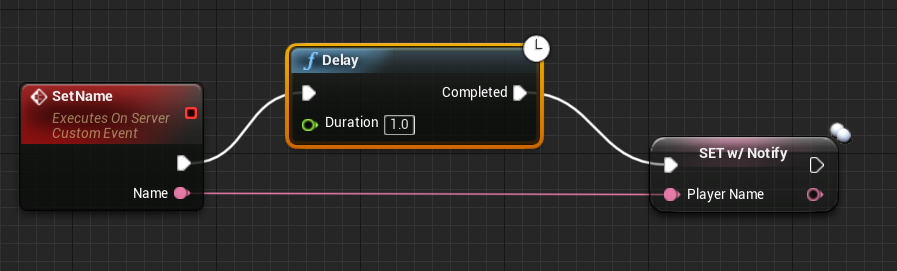
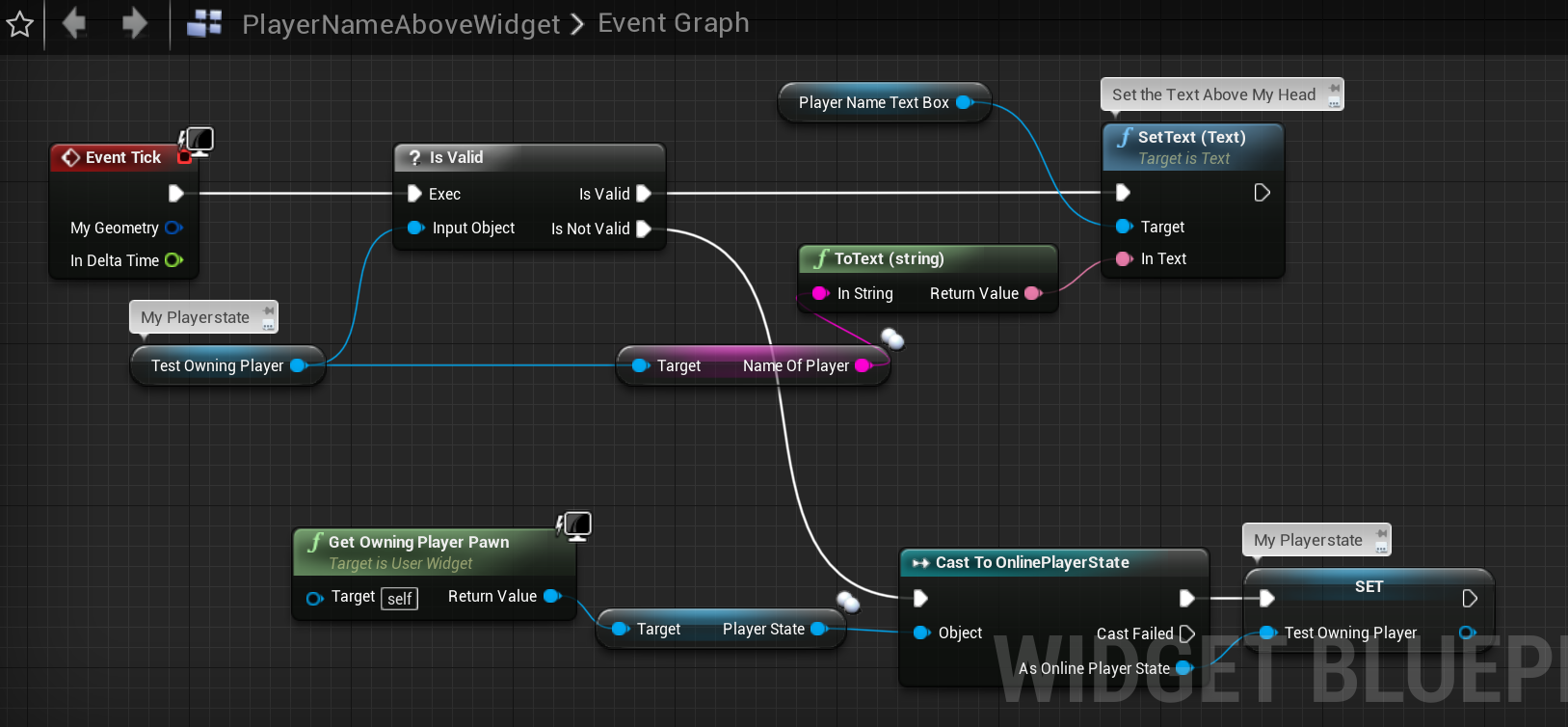
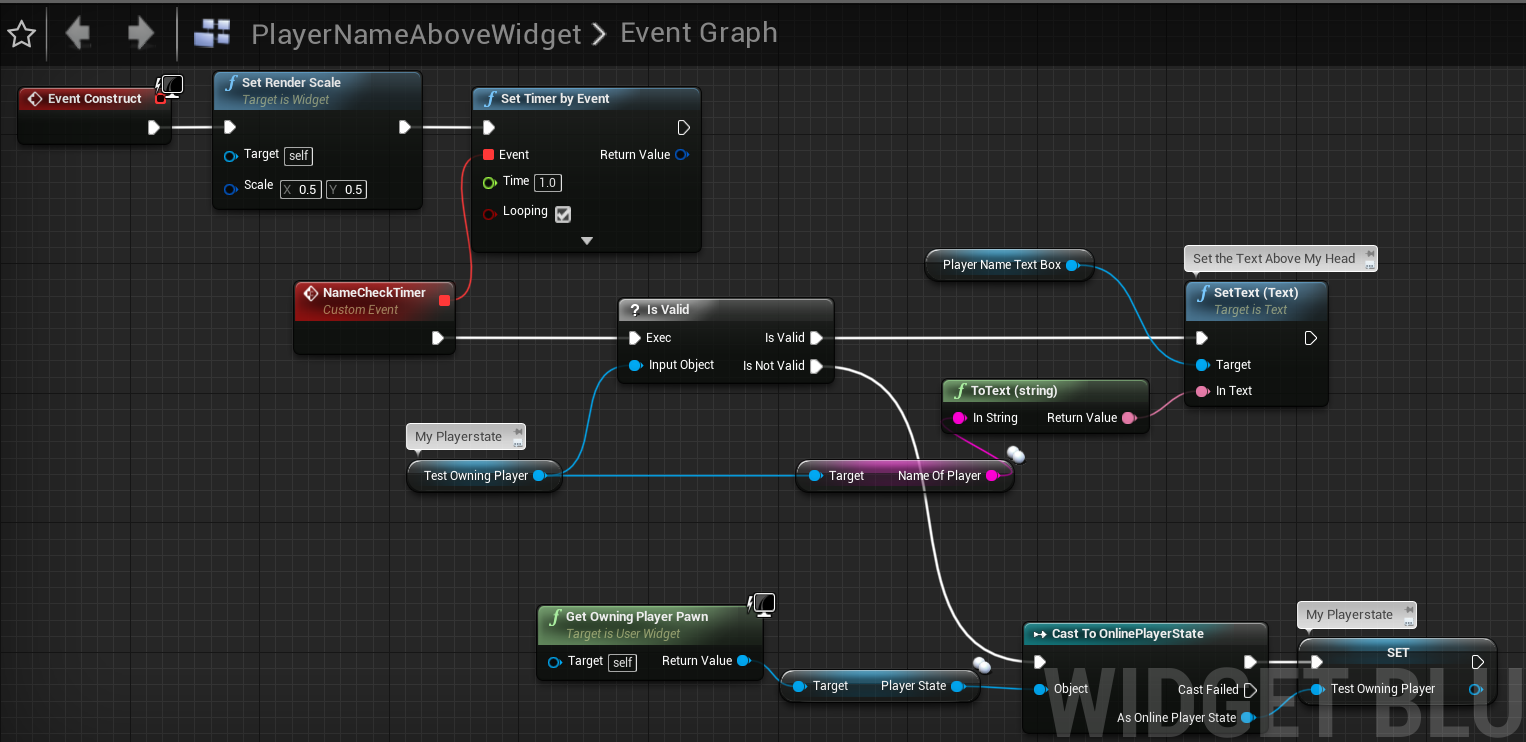
 earnest igloo
"i am actually converting an existing single player architecture to multiplayer" 😬
crude drum
i don't know if have the time to rewrite..gonna try replicating the var's
earnest igloo
What sort of game is it?
winged badger
worse, its VR from what i gathered
earnest igloo
😬
winged badger
you can't have a return ping worth of delay between moving the hand
and seeing it move
you'll give your players aneurism
crude drum
that's what makes it worse
earnest igloo
Is it competitive? Or could you get away with a big chunk of it being client-authoritative?
winged badger
blueprints or c++?
crude drum
it's a competitive training scenario with mechanical guns with interaction
mostly bp's
earnest igloo
Training scenario? So it's a private type thing? That potentially makes it somewhat easier than something that will be exposed to the nefarious public
crude drum
yes, i mean it will be used by handful people for training scenario with little to no gaming exp
earnest igloo
Oh right, ok so client authoritative probably is an option for you
For some bits at least
crude drum
yes, i figured same
as much replication as possible
rest rpc's
@earnest igloo thanks for the insight and i do welcome any moree
earnest igloo
Hmm I was thinking you could try getting away with just using what you have now and having all the clients tell the server what they've done, for it to broadcast back out. It probably wouldn't make for the cleanest code, but at least you wouldn't need to deal with latency to the server in mucking up your VR experience that way
What sorts of things can the player(s) do in the game?
crude drum
earnest igloo
Sure, you would indeed need to use client-server messages of some sort for it
But more like Player 1 telling the server what they've done and then the server broadcasting Player 1's actions to players 2, 3, 4 and 5
Player 1 to server: "I shot this thing"
Server to others: "Player 1 shot this thing"
(presuming you have shooting)
crude drum
yep it seems like a good enough way to go forward for now
might have to rewrite later
earnest igloo
Yeah I can't say whether or not it will work for your whole game, but it would be worth seeing how far you can get I think. How long will this be in development? I don't want to steer you in a direction that will be hard to maintain if you still have a long way to go. You might find for some things the code to report and broadcast events on a case-by-case basis becomes unwieldy and at that point you could consider other approaches
crude drum
i have a few weeks before i ship an alpha thereafter i would have some time to rewrite the stuff, i think this is a good approach, might not be the cleanest way to do things, but it'll get the work done for now..i hope 🤞
earnest igloo
Cool, sounds good 🙂
crude drum
thanks man..cheers!!
neon mango
Are there any settings I can tweak to make demo replays record/playback smoother?
 coarse furnace
Hello. Are we able to create a local multiplayer experience in split-screen just like we would be able to using a server-client architecture? Meaning having a server owning the game and each character having their own set of local actors that could be replicated or not?
I'm asking this because I'm cheating right now using 'Owner Only See' and collision channels with multiple instances of the same object to do per-player visibility/collision but then I needed to add a light to an actor and obviously I'm not able to use 'Owner Only See' so the light displays on both split-screens
coarse furnace
yeah I know but I would want to take advantage of the whole replication thing so each player can have their own stuff
winged badger
there is no replication, and using it would be more akin to "shooting yourself in the foot" then to "taking advantage of"
concept of ownership exists in any game, networked or not
coarse furnace
hmm... then how would you spawn a light that is visible in one player screen but not the other?
OwnerOnlySee visibility trick only works on meshes as far as I am aware. Due to deferred rendering I'm not that surprised that you have no such option on lights
 pure frigate
Figured you'd all be happy to hear that in 4.25, the network driver has been modified to use double precision for accumulated time
hoary lark
Unity makes it trivial to define camera "layers" but I think there is no such feature in UE4 @coarse furnace ... there is this, I have never used it, I don't know if it could be leveraged to do this at all or not. looks like a big "maybe but it's going to suck" https://docs.unrealengine.com/en-US/Engine/Composure/index.html
looks more like it's meant for greenscreening stuff, not sure if it'll let you add lights. might want to go over to #graphics or elsewhere
coarse furnace
@hoary lark oof, yeah I completely forgot about Composure stuff, thanks for pointing that out. It really looks like it's not meant for what I'm looking for indeed but who knows... I'll look into it. So far only deferred-rendered features seems to be problematic for splitscreen. Maybe I can avoid having per-player lighting features as much as possible and use some camera post-process tricks where necessary to fake a cheap light in case I really need it. It's too bad cause I was really looking forward to experiment with split-screen where players are not cooperating but rather have their own world and enemies, kinda like a race to complete the game.
It seems I can deal with making a world including interactive objects and enemies which are per player (it's a bit of a hassle to spawn an object once per player though but that's not that bad) but there's a high chance I'm bound to have an enemy or an object emitting some light at some point
fleet raven
@pure frigate are there plans to also change the world time to doubles completely? otherwise this seems like just addressing part of the symptoms and long running servers will still silently break in lots of places
the problem was that accumulating time by adding up all the delta times breaks at some point due to insufficient precision, which means anything else that tries to do this besides the net driver is still breaking just the same
for example... the "time discrepancy detection" (or anti-speedhack) still just stops working
pure frigate
Good question. I would ask that in the 4.25 preview forum thread once the previews start going out
rose egret
@fleet raven
isn't float enough for accumulating time in seconds ? I was also worried how long a UE4 server can live
fleet raven
no, it isn't
adding a few milliseconds to a few days doesn't change the value anymore
not enough precision to do that
chrome bay
Days is a hella-long time to leave a single world running tbf
fleet raven
not really
rose egret
I am not familiar with float that much. what is its maximum ? dose decimal matter?
fleet raven
not every game has a concept of matches or similar
imagine if you had to restart your minecraft server every day to have it not break
chrome bay
Oh yeah sure but that's not really UE's common game type I guess
fleet raven
(the anti-speedhack becomes a problem much earlier though, because it requires very high precision to do its thing)
rose egret
🤔
chrome bay
yeah makes sense
 polar wing
hot damn, I'm having some trouble with the UCharacterMovementComponent (if you had a dollar every time you heard that). It's a very weird and specific problem that required a solid rewrite of a few of the simulation functions. I'm not sure if I need to rewrite the networking stuff as well, or actually just slap an entirely new networking solution on top of it. Mostly works with prediction and whatnot, but I'm getting far too many minor corrections (a few major ones every now and then). Anyone here a profound expert in the inner workings of the component, by any chance?
marble depot
people, i need help. i asked this one more time before, but i am legitimately out of ideas and options as to what do to. tl;dr - my dedicated servers are suddenly not working anymore and no matter what I do, I can't get them to connect to steam. - I have been running dedicated servers for months without problems. one day they suddenly stopped connecting to steam without making any change whatsoever. they spam out:
[S_API FAIL] SteamAPI_Init() failed; SteamAPI_IsSteamRunning() failed.
[S_API FAIL] SteamAPI_Init() failed; unable to locate a running instance of Steam, or a local steamclient.so.
i did everything from compiling the engine and the project again, deleting precompiled binaries, compiling servers from old known-good and working commits, testing on multiple machines and OSs, etc. it is beyond my understanding what happened. the server of course has the steamclient.so in the Binaries folder where it's been for forever. windows servers don't even complain about this, they just print the usual prints that say everything's working fine. (including saying that they connect to Steam). i need your help, nothing makes them work. if you know anything related to this, please help me. thank you.
 gritty surge
@polar wing I'm no expert, but I found this video a while back that he does replication to a dash mechanic with the charactermovementcomponent. Maybe it will give you some ideas https://youtu.be/Of8SGBa3WvU

In this video I show the proper way to make movement abilities for your characters. This is done by creating a Custom CharacterMovementComponent.
We start from scratch with a third person BP project, but here is the completed project you can copy code from: https://drive.go...
royal isle
@marble depot for linux servers you need to include the steamclient.so file along with your executable the same way as you are including the steam dlls in your windows servers
You can get it from the steam sdk
marble depot
i wrote that in my message, I am of course including it there
royal isle
ah sorry. do you have it on the right place?
marble depot
no problem; i tried with different steamclient versions from different sources, they don't make a difference
yeah, in the Binaries folder, where the server binary resides as well
marble depot
tried that too, doesn't work
royal isle
Do you have the correct configs on your config files?
marble depot
yeah
royal isle
So it used to work in the past right?
marble depot
yep
royal isle
then what happened? engine update?
marble depot
absolutely nothing...no change to the server (machine) and no changes to the game server...one day it just stopped working
and from then on i couldn't get it working again
royal isle
hm, have you tried reinstalling your server in a new directory?
marble depot
you mean moving it? yeah, also tried it on different machines
also tried windows servers - no change except for the fact that they don't spam "can't find steamclient"
marble depot
i know, and that's why it's so frustrating
yeah, absolutely nothing
i'm the only one who's got access to that machine where the servers were hosted on and I didn't change anything. no power surges, no internet issues
royal isle
my only idea is if your file got corrupted somehow or linked in a weird way that's why I suggested installing your server in a new directory. Don't move the existing one just download it again in a brand new folder
marble depot
i recompiled countless servers from scratch and tested each one of them in different folders. it had no effect
royal isle
then I am out of ideas, sorry :/
marble depot
no problem, thanks for trying... but please, someone try to think about it, my game is basically worthless due to the lack of dedicated servers
mental geode
Can someone help me out. When I create a listen server through the editor my game runs fine but when I make a build and let a friend join my hosted game the second player freezes
I can then proceed to kill him and after thathe is killed (and the player is destroyed) he seem to be able to see me walking and everything
while before the screen is just frozen
I'm using the advancedsessions. Also when I invite the player and he joins it works fine its only when he joins himself
polar wing
@gritty surge Thanks! I also found that vid quite useful for a few things, but I'm afraid my problems run a bit deeper. I'll figure it out eventually, tho!
winged badger
@marble depot steam SDK went to 1.46 recently, sure you got the correct version?
marble depot
yeah, i tried with the latest steamclient too, has no effect
has there been some major change i'm not aware of?
marble depot
i don't think that would be the reason for this whole fiasco
winged badger
It wouldnt compile to start with
marble depot
yeah, exactly
winged badger
We had a crash on session start after we went to 4.24, we were still targeting 1.39 steam SDK
marble depot
i'm on 4.19
winged badger
Can you attach a debugger to the servr exec?
marble depot
the only way I see doing that would be to launch a windows server from visual studio
winged badger
If windows server has the same problem, it would give you something to work with
marble depot
yeah
winged badger
Maybe, sounds like youre into longshots
At this point its probably something stupid like appid being incorrect somehow
marble depot
i'm willing to do anything you guys suggest, i'm completely out of ideas
i thought about that, unfortunately it's correct everywhere
there is a thing though, i just remembered. when there are no servers running, the steam server list says There are no internet games listed on the master server that pass your filter settings., but when a server is running, but not working, it says No internet games responded to the query.
neon mango
FYI if anyone is doing Replay Demo's and they are not smooth you want to change demo.RecordHz and demo.MinRecordHz
marble depot
i can't seem to be able to launch a dedicated server from visual studio, so unfortunately no debugging info unless the server crashes
hmm...should I induce a crash after everything loads so I get a memory dump?
winged badger
find the line that prints your error
breakpoint
and go back through the callstack after you hit it
you can attach the debugger via debug->Attach to process
just a question if you have enough time to do it
 fleet fiber
question. if i blueprint a local co op game, can I use any of that for dedicated server stuff, or do i have to reinvent the wheel?
mental geode
You cant directly use it but you can reuse some of it @fleet fiber
fleet fiber
sounds promising, thanks for the heads up @mental geode
marble depot
@winged badger sorry, missed your messages. i'm gonna try to attach the debugger to the process, i know what line prints that error
oh, just realised that won't work. on windows it doesn't print the error, only on linux
winged badger
you're cursed
marble depot
i know, right
it's so frustrating to see the windows server pretend like everything's fine. it prints every single steam log perfectly. bWasSuccessful is 1. everything is how it should be. yet it doesn't work
winged badger
what does client print when connecting to it?
 viscid escarp
Hey guys! Someone know how UE4 pass "SteamGameServer_Init" parameter? Or better, how can i know what is this value?
tall pine
Hi guys,
So for MP, spawning actors generally should be on the server, but if I play a sound or particle effect, those should be executed on client only right?
I'm running dedicated server
velvet dune
anyone know the best way to do player name tags the setup i have shows your name over other players heads
 peak star
@velvet dune oh I had that problem a lot at first
velvet dune
any idea how to fix it @peak star ?
peak star
Well theres several ways the problem couldve happened
Does each pawn have only one nametag over its head or does it have a copy of everyone?
velvet dune
its one pawn with a Widget called NamePlate
peak star
So only one nameplate appears over each pawn. Okay good
So it is just showing the same name on everyone's nameplate?
velvet dune
yes
peak star
Then I suspect the problem is with how you are assigning the text to the nameplate widget component
Can you show me that part?
Screenshot of the widget blueprint graph where it happens
velvet dune
this is what it looks like in game each name that showing needs to be fliped
and this is the name plate
peak star
Okay two problems with your graph:
- I recommend not doing a load game operation every tick (bind functions for umg run every tick), but you can keep.it until you need to optimize the game
- Heres the main thing: you're getting the player name from the player controller
velvet dune
well even when i do it from the save file when i do it with my friend on a dedicated server i see my name over him
and he sees his name over me
peak star
Player controller does not exist on any device except the one the player is connecting from, and possibly the server
So by getting player controller 0 you are getting the name of whatever player is on the client that is running that graph, and youre doing it for ALL the pawns.
That is why you see your name on other people. You would see it on yourself too if you can see your own nameplate
To solve this problem you need to put the player name variable on the Playerstate instead
And in your umg function to get the nameplate text, access the owning pawn's playerstate and get the name string from there
This is because while playercontroller does NOT exist for other clients, playerstate DOES.
velvet dune
so like this
peak star
And you want to use owning playerpawn, NOT player pawn of 0 or playercontroller 0 because that will be the one belonging to whoever is on that computer
velvet dune
oh lol
peak star
That is the core of the problem :)
velvet dune
how do i put the name in player state tho?
peak star
Make a new playerstate blueprint class, in your game mode class you need to set the playerstate type to that one
And just put a string variable in the new playerstate class and call it something like platename or something
Playerstate base class actually has a player name var already built in but it is not properly exposed to blueprint or something so I make my own
Alternatively you can put the name on the pawn class youre using and replicate it but I am not sure if you want to do that because then the name will be gone when the pawn gets destroyed.
Oh wait I think the reason I wasnt using the built in playername variable on the base playerstate class was because there wasnt a blueprint node to set it, only one to get it
Because the online subsystem sets it or something like that
So like if youre on steam I think it sets it to the steam user name
 sly arch
Hello, does anyone know why my dedicated server, no one is able to connect to it? It loads my entry map which targets an open level blueprint to an ip but when you launch the game you get a black screen
 tribal solstice
I'm trying to connect an Android device and PC on Windows in a blank level. I'm using 'Open Level' with 'listen' on PC and having the Android execute the console command 'open <IPADDRESS>' with no luck. Do I have to do something with the online subsystem settings in a config file or anything?
 rare gyro
I'm getting Warning: Notification::ProcessReceivedAcks on a remote dedicated server, I'm assuming either the server or the client is dropping packets. How would I solve this?
 agile totem
hi, im creating a shooter game, but im having a hard time finding the other player's session and im not sure what im doing wrong. I've followed a lot of guides to the T and i don't know what the issue is. i can even find severs for games that aren't even my own, since its still called space wars in the steam overlay. are there any pit falls people normally get stuck into for this kind of thing or am i just not seeing something. also, the game i was trying to find was a friend's, who downloaded my exported project.
tribal solstice
@agile totem May be obvious, but are you sure you both had Steam open while running?
agile totem
@tribal solstice not sure, let me try again just to double check
@tribal solstice welp, cant try again he already went to bed. ill try that tomorrow, but thank you for the help.
tribal solstice
Sure, if that doesn't work message me and I'll try to run through the issues I've had
agile totem
ok ty. also, steam has to be open? even if you see the steam overlay?
tribal solstice
not 100% on that, but I don't think I get the Steam overlay unless I have it open
nimble basin
when a server is destroyed how can i send instructions to all clients to call end game, and load mainmenu map?
Or, how can i listen for server crash on client and recover that way? is there any notification mechanism?
thin stratus
UE4 handles this already
They get send back to the map they connected from, so usually the MainMenu
GameInstance has Travel and Network error events
nimble basin
Ok, for some reason in my game, clients just get a black screen. I'll check what's happening with the Network Error Event. Thanks
mental geode
Can someone help me out. When I create a listen server through the editor my game runs fine but when I make a build and let a friend join my hosted game the second player freezes (I put a print on the begin play and this is not triggered)
I can then proceed to kill him and after thathe is killed (and the player is destroyed) he seem to be able to see me walking and everything
while before the screen is just frozen
I'm using the advancedsessions. Also when I invite the player and he joins it works fine its only when he joins himself through the serverlist where he found my game and just joined through there)


 unique kelp
Any clue on why SteamFriends() would return nullptr on a linux server that can otherwise register with steam and have players connect ?
Looking at the server logs, I can see the individual connection attempts with the steamIDs of each player, but on the login request, I can see that every player has their userID as Steam:UNKNOWN, which I've tracked to FUniqueNetIDSteam::ToDebugString, where it tries to access that user's Friend Persona Name only if SteamFriends() returns a valid pointer, which right now it doesn't
peak star
@velvet dune okay then you can store that on a variable in a new playerstate class. Just make sure your gamemode is set to use that playerstate class and not the default one.
mental geode
I found the log file when starting my game and if I look from line 513 and onwards it gives me alot of warning: STEAM: Failed to parse setting from key mod value
can anyone help me out telling what this means
velvet dune
@peak star do I have to cast to the new playersfate?
peak star
@velvet dune yes you will need to do that, as the user name variable you create will only exist on your new child class of playerstate and not on the base class.
velvet dune
ok i broke something and i do not know what i cant pull steam name anymore for sum reason 🤦♂️
like is this correct for trying to pull steam name for the normal player state ?
mental geode
Does anyone have an idea what could be the issue if I can join my friend in a server but if I host a server he cant find it
 drifting geode
Hi can anyone tell me please how to set a variable I can use to drive the index for the get node (in red below) depending on which player you are (for use with dedicated server replication). It is part of something I want to replicate and can't figured it out, still a noob :S
Help would be greatly appreciated!
ocean geyser
@drifting geode the gamestate has an array of player states, check that out. another thing you could try is looping through all player controllers or character until their null but i wouldnt suggest that route
drifting geode
thanks @ocean geyser, not quite sure how player states would help, can you be a little more specific? Thanks for your reply though!
ocean geyser
@drifting geode nvm i misunderstood, what exactly are you trying to do?
drifting geode
@ocean geyser depending on the client I need to feed a different value into that index. I can't figure out how to create an integer variable that is set to 0 on client 1, to 1 on client 2, etc. I need to feed those integer values into that index to get the widget to work. (tried to manually put those values in there and it worked)
ocean geyser
@drifting geode
in your PostLogin function on the gamemode you have access to the player controller of the connecting client. what you can do is on
your player controller create a replicated variable (int32) and well name it "WidgetIndex", make a setter function for this so you can change it from the game mode on the server
in the gamemode(in that postlogin function) cast the passed in playercontroller to your player controller and set WidgetIndex to equal NumPlayers(its a variable on the game mode that tells you how many players are in the server). then in your construct widget do
GetPlayerController, then get WidgetIndex so you can use that in your Get
drifting geode
you are the best @ocean geyser, thanks a lot! I will give it a try in the evening when I'm home.
ocean geyser
@drifting geode goodluck, in post login i cant remember if NumPlayers will still be 0 when the PostLogin function runs so you may want to print it out to make sure its following along correctly with the amount of players in the server
drifting geode
yeah will do!
peak star
@velvet dune I dont actually know because I have only done LAN crossplay not Steam, but that looks like what I would try first yes. Not sure what hapoens if you haven't created or joined an online session via steam though. Might be blank?
velvet dune
@peak star well it might be because the newest steam update so i am downloading 4.24 because when i did the check for online subsystem it was not reading as steam even tho i was able to open steam overlay
i love to also make it so dus not need steam but i only know how to do steam style.
peak star
@velvet dune is your.ini file set up to use the steam online subsystem?
velvet dune
Yes I even use a plugin so I can manage it from inside the editor but of course makes me reload after changing settings. @peak star
peak star
Ok so I guess it is not that. My project will not work on steam probably because I set the online subsystem part of my ini file to NULL
velvet dune
Well I know you need to set it in the int and also enable the steam subsystem in plugins and because I use advanced sessions I know that works.
peak star
Hmm. Yeah I haven't tried advancedsessions yet. You're past my knowledge now, but i am pretty sure you want to get the name text from widget owning pawn's playerstate so I hope that gets you where you need to go, once you figure out the other pieces
velvet dune
Well when the updated one finished compiling I'm going to just start over and see if I can get basic part working first.
tall pine
Can dedicated server play sounds and particle effect?
 gleaming vector
has anyone ever recorded a replay and then had multiple clients in a server to view the replay?
 half jewel
@tall pine you have to use timers to time events based on sounds / particles. server has access to the sound and particle asset so you can create timers with their durations with no problem but the actual sound/particle wont play on dedi server.
tall pine
Oh that's useful to know. I'll try that out. Thanks
harsh lintel
Im using a Switch Has Authority on a End Play event of an actor but it's triggering on a client too
is that expected behavior if the client that seems to have authority is the owner of the actor
hoary lark
switch has authority will definitely only trigger on the host machine or dedicated server. are you using single process PIE and getting confused because of how it duplicates messages in both viewports?
harsh lintel
the string after the authority check prints from a client and the server, that is confusing
its a dedicated server PIE with 2 clients
unique kelp
@harsh lintel is this projectile being spawned on both sides, or is it replicated?
winter plover
@harsh lintel You can print "SERVER" or "CLIENT" in your debug string
to help differentiate between the two
and iirc the blueprint version even already does that
only other thing that I could think of otherwise, is the actor in question perhaps client spawned?
because clients have authority over actors that are spawned on their instance
thin stratus
@gleaming vector One of those things that someone, somewhere did and will never talk about it.
 devout edge
would it be a good idea to store game information (eg: items, monster stats) in a web database that you can access from Unreal via a REST API?
 maiden vine
Hi all. How can I get an array of characters in order from first player to last player joining the game? I was trying not to use the game mode On Post Login if possible.
Tried Get all player controllers and the game state's player array and they both are giving me order problems.
Example Client 1 might get them correct then Client 2 will scramble the order. any help thx.
Im trying to set a player index
ocean geyser
@maiden vine override PostLogin and use NumPlayers variable to set an integer on the players playercontroller and use that for order?
maiden vine
So is game mode the only way to see who connected in order?
I didnt want to add a game mode if not necessary
Kind of content only project
trying to call and get the info in my Scene Component.
Thx for answering. I have done it that way and it does work. I was looking to verify another way to do it
 rancid barn
There are probably some hacky ways on the playercontroller. You can have it add itself to the gamestate when it's initialized on the server, or use another overridable function like ReceivedPlayer(). I'm not sure the exact timings and order-reliability of this, but it would be the only way to keep track of any sort of connection order without gamemode
there's also the playerarray on game state, but again I'm not sure if that holds players in any reliable order relative to their connection times
maiden vine
thx for the reply I will keep trying and keep that in mind
gleaming vector
ooooh
neato, NetworkPrediction plugin got a minor status update
-Sorry for the lack of public updates. Development has been ongoing but mostly moved to a non public stream at the moment. The work being done revolves around:
    -Unreal Insights. We are implementing an Insights tool for debugging Network Prediction. This will replace the canvas/visual logger debugging in the plugin. It is very powerful. Hopefully v.1 will make it into main branch soon.
    -We are in the early phases of "new movement system" design. No ETA.
-We are investigating deeper integration with physics. No ETA.``` -We are in the early phases of "new movement system" design. No ETA.
-We are investigating deeper integration with physics. No ETA.
if these two work with fixed tick rates, 
timid moss
u mind sending a link to that?
 twilit marsh
I would also be interested in the source of this. Where are such news published?
fleet raven
royal isle
does this mean better overall network performance and less server CPU cycles?
fleet raven
no
it means it becomes much easier to have proper predicted movement/other simulations
...though the "new movement system" might be going at improving the performance aswell, I hope
tall pine
is it a good idea to always sync movement of an replicate actor?
This is what i have: I have an actor who got some initial transform location. Then as it ticks, it uses a float to derive its next location
Can I run the initial transform location on the client via multicast, and then just sync that float from the server moving forward?
 errant silo
hi, i'm getting back into ue4 and i read about 'multiplayer origin rebasing' and it sounds utterly improbable, so i figure i'll ask here - how would a server with 32bit coordinate system track multiple players across multiple levels with each user having their own origin?.. it's amazing if it actually works but seems too good to be true?
drifting geode
Hi got a blueprint question for you smart people. I'm trying to replicate my inventory and for some reason only client 1 detects mouse (button clicks and hover) in PIE. Other clients show cursor but the widget doesn't "see it" How can I fix this so I can use my inventory widget on all clients? Help is greatly appreciated!
hoary lark
origin rebasing as it currently exists is more about mitigating visual artifacts on the clients only. it would still have limits, once the math broke down even more the server would start doing weird things, they just don't go out that far
errant silo
i assume 'multiplayer origin rebasing' and 'world origin rebasing' aren't the same setting.
tacit sigil
Guys, what am I doing wrong? I've tried 20 different ways to retrieve the current players amount, and no matter what I do, I CANT get it to reflect to the match player entry. (eg: 1/4 players, 2/4 players, etc..) I created a struct called Fcurrentplayers, and when a player enters the lobby, it fires off in the lobby gamemode, and loads in the integer inside of the struct. When I do a print string, it correctly shows how many players are in the lobby, but once it leaves the lobby, the struct shows 0. why? what is another way?? I've tried so many different ways, and a 0 always gets returned to the match entry.
fleet raven
how are you trying to remove it?
also this isn't necessary, you can just get the number of players from the game state (it has an array of all player states)
tacit sigil
the player array ALWAYS returns a 1. no more, no less.
i've called the player array in every way but it only ever send 1. it's really strange
@fleet raven
fleet raven
well how are you trying to use it?
tacit sigil
how should i use it? clearly i'm using it incorrectly. But when i call it, i don't get anything different.
tall pine
Hi guys,
So for player movement replication, in order to smooth out the movement, I was told to simulate the movement update on the client as well.
Say I run a timeline to update the position of the actor, does that mean that I'll run this timeline on both the server and client?
And then the client movement will get updated with the server position along the way?
tacit sigil
the current players node shown is inside of my find match entry so it displays 1/4 or 2/4 players.
@fleet raven
fleet raven
not sure what you mean by find match entry
tacit sigil
@fleet raven , it's the bar with the all the match info that comes up when "find match" is pressed
fleet raven
variables are replicated from the game server to currently connected clients
not sure what you're trying to do there by using them in main menu widget
besides that, widgets themselves are not replicated either
tacit sigil
obviously i don't know what i'm doing. I've spent 3 days trying to display the current players in the lobby. Nothing works. I've tried through the gamestate, player state, and gamemodes. it only ever returns back with a 0 or 1.
It tough to find any decent documentation.
tall pine
Anyone can help me out with my question?