#multiplayer
1 messages · Page 520 of 1
 bitter oriole
 thin stratus
Aren't they swapped depending on who asks?
E.g. Server sees Role: ROLE_Authority and RemoteRole: ROLE_SimulatedProxy
And Client sees Role: ROLE_SimulatedProxy and RemoteRole: ROLE_Authority?
 chrome bay
Oh right yeah.. urgh I've forgotten how this works now
thin stratus
James. How dare you.
chrome bay
Because the pawns owner will use Role_AutonomousProxy but non-pawn owners will see SimulatedProxy, even though it's the same replicated var
So how they get around that... I am not sure
thin stratus
I guess I could scan the engine on how it's done
.>
I mean, we have it working with GAS Weapons just executing shizzle on the Pawn
But that f*cks up the EffectContext.
I would love to just not listen to Epic here :D
chrome bay
One thing I do know is that engine isn't happy if you try to turn off replicating Role or RemoteRole...
Although why anyone would ever do that... 😳 😳 😳 😳 😳
thin stratus
All I want is the weapon to have ROLE_AutonomousProxy.
Or at least try to get that. Cause then I can use the freaking GameplayAbilities from the Weapon.
And yes, I know, Epic blocks that for "reasons".
 twin juniper
@rich ridge so what would you recommend then?
I loved photon for unity, was the perfect plan for cloud hosting and only paid what you needed
Was based off ccu of the game
Which you could easily upgrade/downgrade from their website
Doesn’t seem like that exists in ue4
 rich ridge
@twin juniper photon doesn't give you flexibility to host dedicated server

DigitalOcean
Simple, predictable pricing on VMs and object storage at industry-leading price to performance ratios. VMs start at $5/month for 1GB RAM, 25GB SSD storage

Compare plans sizes and pricing to find the perfect match for your application's needs. Choose from a wide range of instance types.
 ivory flame
@rich ridge what do you think about Azure VMs?
 hollow stirrup
aws ec2 is also good
rich ridge
@ivory flame azure do offer free tier but it's costly
ivory flame
I mean, Im student now, and they give $100 as a gift on their platform, so pretty interesting)
rich ridge
@hollow stirrup AWS is also costly
hollow stirrup
you pay for what you get
rich ridge
@hollow stirrup it's same for digitalOcean and Linode as well
hollow stirrup
they all do the same thing, it's just what you want to use. We can have a circle jerk for days about which cloud host to use, it just comes down to your use case and what you need ¯_(ツ)_/¯
rich ridge
If you are son of Bill Gates or Jeff bezos please use AWS or AZURE I don't mind
hollow stirrup
AWS is nice because of the built in support it has for GameLift, so if that is something you plan on using AWS is probably the way to go.
rich ridge
Digital ocean gives you free bandwidth of 6 TB per instance
chrome bay
Let players hire servers, get community to pay for them 🧠
hollow stirrup
^
hollow stirrup
or like, don't make a fully multiplayer game as your first game when you are on a super tight indie budget and can't handle the cost of servers and marketing to get the player base to keep servers running
just a crazy idea there
chrome bay
I mean that's a given 😄
hollow stirrup
yeah but some people need to be told the obvious
rich ridge
Hosting on digital ocean or Linode can be managed
chrome bay
Getting enough players to give a crap and keeping the CCU hgih enough to make dedicated servers worthwhile, that's a bigger challenge than working out who to go with.
rich ridge
@chrome bay you never know about the game, they can become hit over night
hollow stirrup
yeah, but the chances of that happening are very low
chrome bay
I wouldn't put my money on that
rich ridge
When it happens you don't want to waste your time to re architect server
rich ridge
@quaint tendon you can hardly use it to test your game in AWS free tier
hollow stirrup
And if all you are doing is hosting a server executable you wouldn't really need to do much work to switch services .
if you are doing other things like running a web api, than yeah that would obviously take more work
rich ridge
@hollow stirrup how would you launch the instance
hollow stirrup
but you are not going to change host just because your game gets popular
what kind of question is that
 quaint tendon
@rich ridge how so? I test it every day, if we're talking 100 players on a completed product sure but for dev it's great.
chrome bay
Even if you do, it's not like you need to rebuild the Server to support it
rich ridge
Every cloud providers have their own APIs
hollow stirrup
exactly @chrome bay
chrome bay
Most 3rd-party services have their own backend systems for spooling up instances etc.
It's not really something you build into the game
rich ridge
See I m talking about backend
hollow stirrup
unless you are using GameLift, that shit is a bitch if you don't use aws
rich ridge
Your matchmaking service won't launch the instance for you
You have to write a service to do it
chrome bay
Unless you have 10'000's of players, you don't need matchmaking
hollow stirrup
A backend that just launches instances is just a program, it's not going to be built into the service
chrome bay
And if you have that, you can probably afford to do whatever
quaint tendon
There's matchmaking on gamelift, pretty simple actually.
rich ridge
@hollow stirrup to talk to AWS you need to speak amazon, to talk to azure to need to speak Microsoft.
chrome bay
IMO, people worry about this far too much before having a product that even needs it. Multiplayer-Only Indie in 2020 is a sad state of affairs.
rich ridge
Will you embed everything in backend
hollow stirrup
If you are worried about which platform to host your servers on and you don't have a playable game yet, I hate to break it to you but you are probably never going to have a playable game
rich ridge
@quaint tendon gamelift pricing which they put is only for 15 days, please check again.
quaint tendon
@rich ridge what?
hollow stirrup
Also, if you are not capable of doing your own research and being able to figure out what is best for you without the biased opinions of others, then again you are probably not going to make it far.
rich ridge
@quaint tendon they mentioned average run time of game in a month that is 365 hours
@hollow stirrup I m concerned about money that's it
chrome bay
^
quaint tendon
@rich ridge what does that have to do with free server?
rich ridge
I already told if you are son of Bill Gates please use AWS or azure
hollow stirrup
AWS isn't even expensive as far as cloud hosts go
rich ridge
Compare plans sizes and pricing to find the perfect match for your application's needs. Choose from a wide range of instance types.
Check this pricing
hollow stirrup
so if you are freaking out about AWS then just, as I've already said, stay away from multiplayer until you have released enough products to be able to foot a bill
rich ridge
Compare with AWS
quaint tendon
@rich ridge and then compare all the backend features you do get with AWS. The money is worth it for how much infrastructure you get.
quaint tendon
Obviously you are biased against AWS, but I have years working on it and it's easily the best in terms of value for what you get.
hollow stirrup
lol
 ancient moth
Hello ! There is a way to join a session without change map ?
rich ridge
@quaint tendon if you use gamelift you need to spawn fleets in advance
And you will be paying for it even it is idle
quaint tendon
Do you even script bro?
hollow stirrup
he can't even read pricing charts so I'd say no
rich ridge
@quaint tendonwhat do u mean
quaint tendon
You create scripts for handling fleet generation, it takes seconds
rich ridge
Fleet creation takes significant amount of time and it can't handle your realtime request
quaint tendon
5 minutes is significant time?
rich ridge
Not 5 minutes more??
hollow stirrup
 quaint tendon
On the free server it's 5-10, on a good server it's 5 or less.
rich ridge
No it's not I have tried it on C5
quaint tendon
Uh huh... I guess I'm just hallucinating 3 years of experience then.
rich ridge
Yes may be
quaint tendon
Are you an affiliate for Linode or something?
rich ridge
@hollow stirrup r u comparing spot prices?
thin stratus
I feel like talking someone out of the idea of renting servers for a game, that might never see the light of day or never gain enough players to support any of this, is harder than getting someone to quit smoking.
hollow stirrup
as someone who quit smoking, I agree with that statement
quaint tendon
which is why I recommend gamelift, you pay nothing and get a huge amount of infrastructure to start saving yourself literally years of upstart.
thin stratus
I recommend not doing a game that requires a playerbase to work
bitter oriole
^
thin stratus
Unless you have many to waste
bitter oriole
Completely concur with this advice
thin stratus
Then be my guest. I've coded that crap before :D
hollow stirrup
If you are going to make a multiplayer game you should have a playerbase before the game is out of development
and even then, most of the time multiplayer still isn't worth it
bitter oriole
95% of Steam games don't have a viable playerbase for multiplayer
You probably won't be the 5%
thin stratus
I mean don't get me wrong. Nothing would be cooler than having an online game with tons of players. But it just doesn't work that easily.
bitter oriole
Right now, the cutoff for the 10% most played games on Steam is 8 players
If you want more than 8 players, you need to be in the top 10%
The top 5% is like 40 players
That's not much at all either
Good luck being in the top 5% of Steam games
rich ridge
There are a lot of games which are doing great without steeam
bitter oriole
On PC, no there aren't
rich ridge
There are many other platforms like Android, iOS
quaint tendon
@thin stratus I agree with a lot of what you say, but would caveat that networking and replication is exponentially harder than attaining a playerbase. That's the real test, attracting players to a quality game isn't that hard in comparison
thin stratus
No it's wrong. I can code you all of that in a few days.
hollow stirrup
^
 celest mural
its almost as if.. whatever is your skill set.. appears easier to you.
hollow stirrup
Convincing someone to play your game is not easy
celest mural
hmm.. wonder why? haha
hollow stirrup
what a mystery
celest mural
Its easier for me than network coding.
quaint tendon
@bitter oriole So you've done it then?
bitter oriole
Done what, a multiplayer game ? Yes of course
celest mural
hehe. you guys. too funny. 😛
chrome bay
HLL was building it's community years before there was anything to play
quaint tendon
And that's why Chris Roberts took years developing his netcode, because it's so easy.
chrome bay
Many of it's initial players came from K/S back when KS was a viable option
bitter oriole
Being in the top 3% sales of the PC market is not easy at all, and that's what you need right now if you want say, 100 players worldwide for your entire game
This is a very hard problem
hollow stirrup
brb grabbing a tape measure
chrome bay
Without that community in place before launch, the game would have died on it's arse immediatelly
celest mural
@chrome bay definitely.
chrome bay
It takes years to get to that point
And you still need a solid product at the end of it.
celest mural
not necessarily.. i would say it takes. a year at least.
and yes.. you need a solid product
bitter oriole
The point isn't that netcode is literally easy, the point is that building a community large enough for multiplayer games is out of reach for most developers.
Just look at the data
 rocky totem
how do i tie online subsystems into a plugin so that i can package a class that talks to the system with it
celest mural
statistically its unlikely.
rocky totem
i know they have been moved to plugins. do i just include it in the uplugin file?
quaint tendon
@bitter oriole don't disagree, at all. But if you are doing anything other than out of the box replication it will be harder. UE4's physics replication is awful.
bitter oriole
I have done much more than out of the box replication, thank you
This is still way easier than getting sales
hollow stirrup
If you really want to build a multiplayer game, you are better off spending a year or two making a really solid portfolio and applying at a studio that makes multiplayer games
bitter oriole
I've also spent a year on multiplayer movement code, still easier than getting 10 online players for a full year
quaint tendon
Well I have a lineup of people trying to join my game so... be better at marketing.
rich ridge
@bitter oriole ohh is it that bad?
bitter oriole
@quaint tendon I'm sure I can be a lot better at marketing. How many copies did you sell ? I'd love to learn.
hollow stirrup
🍿
quaint tendon
I'm still alpha, working on vehicle physics and replication. Then player stat tracking, then it's open to the public.
bitter oriole
So zero ? Gotcha
rocky totem
thinking i should come back later when dad isn't arguing with the mailman
quaint tendon
You stated gaining players is difficult. I already have a list of 20+ people trying to join. You continually move the goalposts.
rocky totem
yo @hollow stirrup u sharing?
quaint tendon
There are ways you could easily attract 100+ players in one day.
Without even trying.
bitter oriole
And you're telling me to be better at marketing
The problem is that 100 players on launch day means you get to zero players in days
rich ridge
@bitter oriole is there any particular reason that you didn't target mobile platform?
quaint tendon
Right, but you stated it's difficult to attract players. Which it's not, at all.
chrome bay
never touching mobile again with a barge pole
quaint tendon
You know how much free advertisement you can get with a little research? You could be in front of 1000+ eyes in 1 day, for free.
bitter oriole
You're telling me this like I haven't shipped products for a decade
rich ridge
@quaint tendonhe is right
bitter oriole
The problem is that 100 sales translate to 2-3 players online at best
In the long run
100 players is nothing, especially free players
 bronze arch
my goal is 1000 player for one map 
hollow stirrup
bruh, you better say psych right now
bronze arch
after that screenshot
rocky totem
@chrome bay I have an actual question if you have a second. I'm trying to include a gameinstance class that uses an online subsystem into a packaged plugin. I know in the uplugin file you have a section for required plugins. do i need to add something to that or just include OnlineSubsystem as a public module
bronze arch
i did make 5000 player and saved it
chrome bay
@rocky totem IIRC that should be all you need to do
rocky totem
ok i don't need to do something like i did for niagara "Plugins": [ { "Name": "Niagara", "Enabled": true } ]
chrome bay
two secs
rocky totem
thanks
chrome bay
Hmm depends
Trial and error tbh...
I mean it needs to be in the Build.cs if you want to use any of that plugins classes in code.
rocky totem
ok thanks just wondering if i missed some documentation
chrome bay
As for the .uplugin requirement, I believe it's so the editor knows what other plugins to enable
Also it'll give you a really obscure error when you load up the game if you forget it
Something like "X Module could not be loaded"
chrome bay
As of 4.24.. I dunno. I had to redo all my includes to upgrade
 smoky dune
did they made any changes to includes on 4.24 jamsh?
rocky totem
i included "OnlineSubsystem"
rich ridge
What does IIRC means?
smoky dune
if i remember correctly*
rich ridge
Ohhh man, I thought it's some cool unreal engine term.
rocky totem
ok sorry for butting in @bitter oriole feel free to return to your verbal beatdown
chrome bay
lol
smoky dune
ikr
bitter oriole
@quaint tendon To give one last data point on multiplayer, PUBG got 50M copies on Steam, give or take a few 10M, and that only got a (somewhat massive) 1M peak concurrent player count. So if you want to sustain a 100 player community in your game at all times, which is a low but healthy amount, you've got to reach 5k copies sold, which is more than most indies do. Mordhau's 2M copies likewise translate to only 4000 players right now, which is half a percent of sales - so you'd need to make 20k copies for your 100 players if your game is more like Mordhau than PUBG.
So if your game only requires 10 online players at all time (in game, looking for match, idling on menu, total) you can get by with the 500 sales the average Steam game gets
That's also discounting all regions, ping issues, etc but let's ignore it
rocky totem
@chrome bay what did they change in 24 that broke all the includes?
chrome bay
Go F2P. According to some gamers that immediately means thousands of players. runs away
@rocky totem I'm not really sure, they changed the build system slightly I think - I couldn't use "legacy" flag because my include paths became too long apparently, so my only choice was to go through and update them all
People in #cpp may know more
rocky totem
ahh ok thanks
quaint tendon
@bitter oriole You make a lot of assumptions, incorrectly.
rocky totem
work still hasn't fixed my 24 build so i'm on 23
smoky dune
go mobile gacha games
quaint tendon
And move the goalposts/topic of conversation.
rocky totem
nahnahnah xil go all platforms free and then get 1 youtuber to claim they have million of players and that you can get free coins by using their link
bitter oriole
Well, let's end this discussion and block ourselves so that we don't spend pointless energy on this
quaint tendon
Or you could try not being so condescending
bitter oriole
There, no more arguing.
smoky dune
raid : shadw legends
bitter oriole
@rocky totem Give us the output log 😛
rocky totem
lol i was never crashing i'm just sick of looking at this #include <../../../Online/OnlineSubsystem/Source/Public/OnlineSubsystem.h>
smoky dune
im sure you can just use OnlineSubsystem/OnlineSubsystem.h
bitter oriole
Correct
rocky totem
ok thanks VAX screwed me on that one
bitter oriole
That and a Build.cs dependency
smoky dune
^
quaint tendon
@bitter oriole your primary datapoint is in regards to p2p, yet here we see the majority of revenue is via f2p.
https://www.statista.com/statistics/343101/mmo-games-revenue-f2p-p2p-region/
But go ahead, be a condescending know-it-all that is completely impervious to anything but your own beliefs.
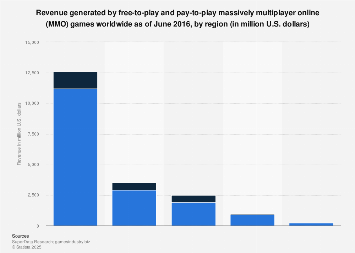
Statista
The statistic presents the revenue generated by free-to-play and pay-to-play massively multiplayer online games worldwide in 2016.
rocky totem
            new string[]
            {
                "Core",
                "Niagara",
                "UMG",
                "HeadMountedDisplay",
                "NavigationSystem",
                "InputCore",
                "OnlineSubsystem",
            }
);```that's the build file
dude he blocked you it's over plz either talk about multiplayer or move to another channel
quaint tendon
So he's wrong, blocks people and runs off. Classy gent.
hollow stirrup
bruh
rocky totem
no he just understands that you aren't going to agree and that maybe a channel for programming multiplayer isn't the correct place to fight this out
so you can leave or we can call cedric in here to deal with you
quaint tendon
Except I agreed with a lot of what he said, so that's not true.
hollow stirrup
Move on mate, it's really not worth it
smoky dune
having to make a thread to deal with networking is pain in the ass 😔
first time i really handles multithreading
bitter oriole
You don't really need that.
Unless you're going way too low level
What's your code like ?
rocky totem
wait so @bitter oriole did i miss something in my build.cs dependencies
smoky dune
im using FRunnable right now
bitter oriole
@rocky totem No, looks fine really - I thought you just had a code cleanliness issue, do you have a build issue ?
@smoky dune What are you doing that requires a thread ?
smoky dune
just pinging stuffs really, can't believe im still stuck on this, but now it's mostly optimizing performance rather than usability
rocky totem
when i switch to #include "OnlineSubsystem/OnlineSubsystem.h" I have a build issue
bitter oriole
Give us the log !
rocky totem
bruh
(5): fatal error C1083: Cannot open include file: 'OnlineSubsystem/OnlineSubsystem.h': No such file or directory
bitter oriole
That's in the output log window right, when you compile ?
rocky totem
yes
bitter oriole
@smoky dune If you're doing something like a simple socket, then yes you do need a thread here. You wouldn't with something like HTTP or replication, which is more commonly used. However, ping is something the engine does for you in some contexts - whatd do you want to ping ?
@rocky totem Dunn, then :/
rocky totem
ok wait i just go to "OnlineSubsystem.h" and it all checks out
smoky dune
a server, rather than connected session
 smoky dune
i tried Xeru's with OnlineSubsystem/OnlineSubsystem.h and i can't build on mine
bitter oriole
@smoky dune If you're already connected the ping is in PlayerState just for you already
bitter oriole
Right, think you'll need that thread then, sorry 😦
smoky dune
guess im on the right thread then
any tips on using sockets?
just realized FAsyncTask can sometimes run on GameThread so i've decided to wrap it inside a worker thread
bitter oriole
Create thread that start timer, send ping, wait for ping response, update ping value with timer, and do that in a loop basically. Sorry, I have to go, enough being a condescending ass on people for today 😛
Might come back later on
bitter oriole
Correct, you need a simpler timer
smoky dune
hum, i think i got some idea
i'll sleep now i guess, and continue tommorow
thanks for the help
👌
bitter oriole
Something like FDurationTimer
smoky dune
oh i never knew about it
bitter oriole
I'd look at the code but not on a PC, basically try finding one of the more basic timer types. Gameplay timers are much more specific
smoky dune
does thread has ticks?
bitter oriole
No
Just the one function that kills the thread when it exits
They're basically like another main() if you have c/cpp exp outside ue
smoky dune
otherwise i guess i can use FPlatformTime and use the delta time
rocky totem
how do i get the url of a uobject
also how would i go about getting the address of a dedicated server
bitter oriole
Usually you ignore it and let the Online subsystem handle it
rocky totem
ok i'm working on the delegates for the online subsystem
    if (!WorldMap.IsValid()) {
        UE_LOG(LogNeoCore, Error, TEXT("Could not load session because map not set"));
        return;
    }
    GetWorld()->ServerTravel(WorldMap->GetAddressURL())
}```I'm wondering if this is ok?
since i'm probably either using null or creating my own subsystem
WorldMap is a TAssetPtr<UWorld>
rocky totem
yeah i'm going to have to make my own for actual networked play but if i can get lan up and running that's fine for now
currently i have this
just as the default game instance class
when i do actually decide to create the real subsystem do you have any pointer. I'm thinking it logically makes the most sense to start with the IOnlineSession and IOnlineIdentity interfaces but i have never really even attempted it
bitter oriole
Never done anything like it. I just use the OSS for the current platform.
rocky totem
hmm ok how did you go about that
is it just IOnlineSubsystem::GetByPlatform() instead of just Get()
bitter oriole
Just Get, I have the platform hardcoded in config
rocky totem
and then you package a different config for each platform?
bitter oriole
Yeah
rocky totem
ok sounds good
i got all the replication done and felt great until i realized i have no way for clients to actaulyl connect to each other XD
bitter oriole
That's fine tbh
rocky totem
how would i allow players to connect from different systems without at least using nulloss
 thin vessel
Is possible to read PIE settings in C++? I specifically need to know the number of players selected in the Multiplayer Options category. I already have a #ifdef# setup to check if the game is actually running in editor.
rocky totem
let me specify the goal is to allow clients to connect to a dedicated server and i don't see how that is possible would some sort of oss
rocky totem
i'm aware but i could in theory run a dedicated server on the lan with null oss
otherwise i would actually have to create an oss
bitter oriole
Your server will only be reachable from LAN
rocky totem
which is fine for now. buys me time to go write the full one
bitter oriole
Playing from different systems will require your own OSS entirely, or Epic's EOS when that is finally available some year, providing it lives up to promises
rocky totem
so write my own or build a time machine
got it
time machine it is off to the year 2222
bitter oriole
Mostly, you'll need your own service, using some kind of server that you maintain for matchmaking, your own account database etc
(Or you could drop the cross platform part)
rocky totem
long story short it's not a game. It a plugin for the company to quickly create new projects with duplicate functionality without having to rewrite. We have the server hardware and databases that are being set up by the it team
i'm the lone guy just writing all the ue stuff
and tbh i'm sure like 90% of what i have written is crap but this is my first huge project so i'm just happy it works now
 rare gyro
Has anyone else had special collision issues, like invisible walls ONLY on built, Shipping config, standalone dedicated server? I'm thinking the issue is related to world composition.
rocky totem
ok so i'm reading through how steam handles login and tbh i'm entirely lost. is BLoggedOn() a function in some other library that's hidden for security purposes and i don't actually see where this would even request to log in
rocky totem
ok so when i launch two players from pie i have no problem with replication however when i try to launch an instance and then connect from a pie instance i supposedly connect but replication refuses to work
rocky totem
i figured it out
i forgot "?listen" on the server address
so i could connect... kinda
 winged badger
multiprocess PIE works alright
lets you run one instance of choice from the editor and you do get the blueprint debugger
rocky totem
what is the string for loading a dedicated server
rare gyro
I have a persistent world composition level that works fine in the editor's single process dedicated server and offline standalone mode. However, as soon as I package said level and try it on an actual server, the world composition sublevels positions seem to be ruined. As in they are intersecting with each other, and it is only happening on the dedicated server.
 narrow prairie
ive been wrecking my brain for a while now, im trying to do some multiplayer replication stuff. i have a spawn box with some enemies that spawns enemies in the game perfectly fine, now im trying to implement a drop item functionality. so far so good. u allrdy guess it on client i cannot spawn any items from the UI. it probality has something to do with ownership.
is there any ue god out here that can guide me in the right direction
bitter oriole
Not an UE god, but : you can't spawn replicated actors from clients
Has to happen on server
narrow prairie
i do get that. i allrdy have a event in place on player controller for spawning in item from inventory
bitter oriole
So how do you call it ?
winged badger
and what are you sending as RPC payload?
bitter oriole
If the box itself is what does the RPC, then you need the player to own the box.
 modern bone
@limber gyro i found the issue with my Multiplayer for steam
[/Script/Engine.GameEngine]
!NetDriverDefinitions=ClearArray
+NetDriverDefinitions=(DefName="GameNetDriver",DriverClassName="/Script/SteamSockets.SteamSocketsNetDriver",DriverClassNameFallback="/Script/SteamSockets.SteamNetSocketsNetDriver")
Forgot to add this line of coding xD
 limber gyro
see, there was something missing after all haha
modern bone
see i the big smarT 🤪
bitter oriole
UI can't RPC to the server, because the UI (probably, hopefully really) isn't replicated
Do all that stuff in player controller
winged badger
the RPC itself is in the PC
wonders why the UI is sending the PC reference to the PC
narrow prairie
i had that for ownership
winged badger
InventoryManagerRef, is that a replicated variable in the UI?
narrow prairie
lemme check
winged badger
as soon as that RPC lands on the PlayerController, the PC is Self
narrow prairie
yes it is
winged badger
no need to send a ref
your UI is not replicated, can't rely on it to replicate variables
you probably also have Accessed null trying to read property InventoryManagerRef in your MessageLog
narrow prairie
no i dont have that
i can not replicate it ofcourse see if that works still, but that doesnt solve my issue i cant spawn in an item
server works fine,
no null messages whatsoever
also no client -2 messages
narrow prairie
i made print string everywherte
winged badger
so something else broke
winged badger
whats the last printstring you get?
narrow prairie
only on client
the last print string i should receive is that actor spawn in level
from the spawn actor from class
narrow prairie
well it should, since its not happening on client
the rpc itself
ROS
thats why im so mindboggeled
winged badger
add pritns to both cast failed
narrow prairie
allright
indeed, it fails on cast master item
but what the heck
i even tried get my inventory manager from player controller directly and it still fails
not im confused as hell
i have to experiment...
ok i got it,. instead of the cast to master item i just got class directly
and it spawns in now
thx zlo
now i only have to set the item data on spawn in
winged badger
yeah, you do have a fail in your code if you expected that cast to work and it didn't
i suggest addressing it
rocky totem
i have two separate computer that both have my project loaded up. If i launch from my machine and host a listen server the session search on the pie on my machine can find it but the other computer can't find the session at all even though they are on the same network
narrow prairie
its still based on inheritance
i might have to completly go overboard with that idea
since its hard to manage lateron with more item
should go the datatable way
im still very noob so dont be harsh
winged badger
not sure you can connect to PIE instances
rocky totem
except the pie can connect just fine to the launched instance
i have 3 instances 1 on each of 2 machines so that i can see the output log and a third that I launched from editor
the pie can connect to the launched as long as they are on the same machine but they can't connect otherwise
winged badger
PIE has limitations, not really convinced it can connect to the other machine
rocky totem
ahh ok so if i launch from the other machine it should be ok?
rocky totem
how wouldi go about either leaving or rejoining a session
for example i load up a server, i join it and then i close the editor
however when i reopen and try to join it says i can't join a session twice but replication has stopped
 half gust
@limber gyro the link you sent did not work. Everything builds, but when I try to run everything exits. I had no errors in the 4.24 Version just cannot get anything to run.
limber gyro
the link i sent wasn't for steam and i only noticed after i sent it
half gust
I tried it without steam
limber gyro
are you trying to run the engine or a project?
an engine that runs without a project is just going to close when its done
 wanton cedar
What more optimized for MP to have the animation on the actor or the AnimBP? and whether or not to have Both actor and AnimBP calling the same animation from an Interface?
ivory flame
Does there exist a way of building dedicated server without fully building the source code for engine? Running server using command line seems to be a good solution, but the editor binaries are to heavy. Maybe there is a way to build some specific version of editor to run project Dedicated server on all projects?
 meager spade
no
 steady briar
is it dumb to have a stationary weapon like a mounted gun be a pawn and possess it?
ivory flame
Help needed...
I'm trying to build my project dedicated server, I used this instructions(https://wiki.unrealengine.com/Dedicated_Server_Guide_(Windows_%26_Linux)), everything works fine until I start my game ServerBinary file, it stops with this error:
LogWindows: Error: Couldn't find default curve compression settings under '[Animation.DefaultObjectSettings]'```
Full log attached here.I tried rebuilding everything, even redownloaded the UE source, still the same problem. I'm using latest release version of UE4 code
twin juniper
@ivory flame A quick glance shows that they actually change the path from
[Animation.DefaultObjectSettings] CurveCompressionSettings="/Engine/Animation/DefaultAnimCurveCompressionSettings"
to
[Animation.DefaultObjectSettings] CurveCompressionSettings="/Engine/Content/Animation/DefaultAnimCurveCompressionSettings"
Content !
ivory flame
So I need to fix it in config file?
twin juniper
Maybe they missed something 🙂 by the way I searched c:\Program Files\Epic Games\UE_4.24\Engine\Config\BaseEngine.ini In my case
so I would say, yes, update your ini settings with the correct path 🙂
I'm actually curious if this is the real fix, but in my day job I used to reverse engineer a lot, so I have a particular set of skills 😄
@ivory flame
ivory flame
[Animation.DefaultObjectSettings] CurveCompressionSettings="/Engine/Content/Animation/DefaultAnimCurveCompressionSettings"
@twin juniper But how did you find out where they moved it?)
twin juniper
@ivory flame I searched the source of unreal engine 4.24 on my drive for DefaultAnimCurveCompressionSettings file. And I found it in this location C:\Program Files\Epic Games\UE_4.24\Engine\Content\Animation\
@steady briar I don't see any problem per se...
steady briar
guess ill keep working on that then. having some issues but havent tried too much to fix it
twin juniper
@ivory flame I did a bit of more poking around about this
It appears that the file was moved at the file level, not through the correct way through the engine, but just as a drag-and-drop in the OS
this means that the file itself is in the Content extra folder, but the actual metadata from the uasset expect the original path that does not include Content
It seems to me that the correct change control policy was not properly followed in this particular case by the epic team... 🙂
Because the metadata points to the path that does not contain Content, I would probably just make a copy of this file in the parent folder and everything should fall into place nicely.
I apologize, but sometimes I have problems letting go, your particular problem made me wonder over and over again 😄
ivory flame
@twin juniper thanks! I'm compiling, if it fixes the problem, I'll let you know)
 meager horizon
if my game works fine with splitscreen locally and two controllers, is it generally safe to say it'll work fine with networking of two players too on separate machines? i'd just need to add some kind of matchmaking or lobby or something or some way to specify the host?
bitter oriole
No, it is not safe to say at all
Netplay is entirely different
With online play, you have two completely independent engines with no easy way to share data
And of course lag
ivory flame
Maybe they missed something 🙂 by the way I searched
c:\Program Files\Epic Games\UE_4.24\Engine\Config\BaseEngine.iniIn my case
@twin juniper updating BaseEngine.ini file, and rebuilding doesn't help(
twin juniper
I'm sorry to hear that! and I apologize if I sent you on the wild goose chase! 😦
How about if making a copy of that file in your equivalent of UE_4.24\Engine\Animation\ From UE_4.24\Engine\Content\Animation\
ivory flame
No, it's ok, I will continue to search the main cause of the problem
twin juniper
I don't think you need to rebuild anything you just copy that file from the Content subfolder up one folder to its parent @ivory flame
What do you have to lose at this point, right?
to UE_4.24\Engine\Animation\ from UE_4.24\Engine\Content\Animation\
can You also confirmed that DefaultAnimCurveCompressionSettings.uasset Can be indeed found in your case in the equivalent of UE_4.24\Engine\Content\Animation\ In your OS?
ivory flame
can You also confirmed that
DefaultAnimCurveCompressionSettings.uassetCan be indeed found in your case in the equivalent ofUE_4.24\Engine\Content\Animation\In your OS?
@twin juniper Yes it's there
twin juniper
Let's try and copy it to UE_4.24\Engine\Animation\, As a test, I guess
but I totally understand if you don't want to follow my well intended but Wrong ideas 🙂
Still brainstorming, I'm thinking what are the files attributes and permissions on DefaultAnimCurveCompressionSettings.uasset And its folder/s
twin juniper
darn it
ivory flame
Still brainstorming, I'm thinking what are the files attributes and permissions on
DefaultAnimCurveCompressionSettings.uassetAnd its folder/s
@twin juniper As I rebuild engine with changed ini file, I also tried creating content folder in content folder and moving Animation there, still noway(
Am I the only one who cant build Dedicated Server?
bitter oriole
Compile error -> give us the full log
ivory flame
Compile error -> give us the full log
@bitter oriole It does compile
but binary file founds error
Help needed...
I'm trying to build my project dedicated server, I used this instructions(https://wiki.unrealengine.com/Dedicated_Server_Guide_(Windows_%26_Linux)), everything works fine until I start my game ServerBinary file, it stops with this error:LogWindows: Error: Couldn't find default curve compression settings under '[Animation.DefaultObjectSettings]'``` Full log attached here.
@ivory flame here is log
Still brainstorming, I'm thinking what are the files attributes and permissions on
DefaultAnimCurveCompressionSettings.uassetAnd its folder/s
@twin juniper After I changed baseEngine.ini editor crashes at startup, so I guess it uses it and its fine
bitter oriole
To be clear, you should never edit BaseEngine
It's in the engine directory for a reason
Config changes should go in DefaultEngine in your project config folder
Did you make sure to package including engine content ?
twin juniper
@bitter oriole [Animation.DefaultObjectSettings] CurveCompressionSettings="/Engine/Content/Animation/DefaultAnimCurveCompressionSettings"
So you're saying the above should be added to DefaultEngine.ini, Which would act as an override? correct?
bitter oriole
Why would you be changing this, for starters ?
If you do want to change this particular setting, yes, of course this should be done in DefaultEngine.ini in your project
twin juniper
It's been a lengthy conversation about /Engine/Animation/DefaultAnimCurveCompressionSettings Default setting, whereas the actual uasset lives in /Engine/Content/Animation/DefaultAnimCurveCompressionSettings. That was one of the reasons I recommended changing that specific setting
bitter oriole
lmao
Please don't recommend changes to the engine - that's never correct
In this case, the path is entirely correct
So no change is needed
The problem likely comes from not packaging the asset in the first place
twin juniper
ah, I see
bitter oriole
So @ivory flame - did you check the "include engine content" option in packaging settings ?
twin juniper
and all this time I sent Davron in the wrong direction 😦
ivory flame
Did you make sure to package including engine content ?
@bitter oriole I didn't package it, I mean should I?
bitter oriole
You definitely need to include engine content, yes
Unless you've made sure to replace all engine content with your own somehow
ivory flame
I used this as a reference(https://wiki.unrealengine.com/Dedicated_Server_Guide_(Windows_%26_Linux)), and I can't understand what I'm doing wrong
here is the content of binary file, editor dll is here
bitter oriole
Show me your packaging options in project settings
ivory flame
bitter oriole
"Exclude editor content when cooking" might need to be unchecked here
meager horizon
@bitter oriole thanks - my current proof of concept is based on the simple driving template, with very few changes. is that set up for net play as standard do you know?
im currently trying to cut corners to not spend too long on a POC
the start locations are called "NetworkPlayerStartN" after all
bitter oriole
Driving as in physics vehicles ?
meager horizon
yup
bitter oriole
As far as I know, no multiplayer support
meager horizon
the simpler one without suspension
bitter oriole
Anything physics is barely possible to add multiplayer to in UE4
meager horizon
hmm
the actual game might have to do what i was planning then, which is to make a non-ue4 physics sim server side and feed constant corrections to moving objects client side
bitter oriole
You can do it, but only by trusting the client almost entirely (like most marketplace packs for this do), or running expensive and extremely complex checks on the server (like Fortnite does)
meager horizon
the player's pawn is built of 100+ independent but grouped objects that are affected by physics, and there can be lots of players
hmm, i bet you cant answer this but are fortnites server side ue4 dedicated server instances?
i was planning on avoiding them
meager horizon
scalability on the hardware i have available was a concern
how do you define a 'listen server'?
meager horizon
oh, basically being host in a multiplayer match?
bitter oriole
Yes
meager horizon
ok
my plan was to not have ue4 server side... i'd found some interesting lightweight 3d physics sims, i was going to control the pawn positions server side on a non-ue4 dedicated server, and connect my client games to it
and use prediction and interpolation to plot the positions of the objects on screen
bitter oriole
UE4 always have a server, it's either one player or a dedicated server
Unless you want to throw away all multiplayer code in UE4
meager horizon
yeah that was a thought that crossed my mind
the throwing away the multiplayer aspect i mean
bitter oriole
Well if you have a large engineering team with multiplayer experience, why not
meager horizon
but im still undecided, it smells of overengineering
i have a "me" with multiplayer experience.
😄
it would take aaaaaaaaaaages
bitter oriole
I mean, doing a simple multiplayer game in UE4 with everything built-in is hard enough as it is
Multiplayer physics in UE4 won't work until at least Chaos replacing PhysX, provided it does it well and works as advertised as a deterministic, replayable engine
meager horizon
i dont think theres much in my game that would need to be processed server side though
or rather it can be processed server side, but all that needs to go client side is object transforms
and all that needs to go in are input events
bitter oriole
The problem is that you will have wildly different simulations for identical input
Between clients and server
meager horizon
there will only be one server, my official server
and clones of, if i have the need and backing to do it later
bitter oriole
That's not the problem
The problem is that the same inputs on a player's machine and your server will behave differently
meager horizon
i'd turn physics off client side in ue4
so the client is only displaying what the server says to display
bitter oriole
That will result in absolutely horrible gameplay.
meager horizon
thats basically all most mmo style games do anyway (note: this isnt an mmo)
i just want strict server side control
meager horizon
why would it be unplayable?
bitter oriole
Because of latency
meager horizon
you'd get the same latency if you had a ue4 dedicated server
meager horizon
it'd only be as unplayable as e.g. rocket league, if done properly
bitter oriole
Rocket league doesn't have server-side physics
Physics have to be client side
That's the problem
meager horizon
well what i call physics only goes as far as what that game has.... except imagine if rocket league had 200+ balls in play
im not talking about simulating every object in a universe
meager horizon
in all honesty, the driving sim's physics are too complex.
for what i want, anyway
it just needs a turning/torsion force of turning corners, and collision forces of objects that hit each other
ivory flame
why would it be unplayable?
@meager horizon problem will be in movement prediction, because if you turn off physics on client, then you cannot predict where the car goes, then turn it, but now you have problem of predicting unpredictable physics)
bitter oriole
"'just"
meager horizon
yeah
i say "just" because lets be honest it can be simplified
ue4's physics are rooted pretty much in real world behaviour
theres more to it than there needs to be for cartoony car behaviour
bitter oriole
UE4 physics cannot be used in multiplayer with full client trust
meager horizon
yeah, but doing away with the ue4 physics in preference of something much simpler...
bitter oriole
Anyway, I don't have the time to explain all multiplayer here but here's my full comment : the way forward for a multiplayer driving game in UE4 is complete player authority - full client-side simulation with physics, with the player telling the server its latest transform and velocity. The server can then proceed to check for cheats if your game is competitive, before replicating the transform to other clients so that they can interpolate.
The other solution is to implement your own deterministic physics, which won't be really deterministic anyway because of variable framerate, but will work well enough that you can implement prediction/rollback&replay locally ; but this solution only works for extremely limited physics that driving game won't work with.
meager horizon
hmmmm.
bitter oriole
Fortnite does the first one, for what it's worth.
meager horizon
you do make a good point
and yes to implement my own deterministic physics it would need a fixed tick rate
that has its own host of problems
i think im going to go with what you suggest for now
i dont want to overengineer myself into a corner
thanks Stranger 👍
ivory flame
"Exclude editor content when cooking" might need to be unchecked here
@bitter oriole Still the same
bitter oriole
Alright
You're sure you reverted all changes to BaseEngine.ini ?
Is it still the exact same error ?
No overriding the setting we discussed earlier in DefaultEngine ?
If you can send me one of the manifest files in %USERPROFILE%\AppData\Roaming\Unreal Engine\AutomationTool\Logs\ we can check if the file was correctly packaged
ivory flame
You're sure you reverted all changes to BaseEngine.ini ?
@bitter oriole yes, sure
Is it still the exact same error ?
@bitter oriole yes
No overriding the setting we discussed earlier in DefaultEngine ?
@bitter oriole
ivory flame
Now automation tool fails when trying to package in Editor. Whereas build in VS compiles fine
If you can send me one of the manifest files in %USERPROFILE%\AppData\Roaming\Unreal Engine\AutomationTool\Logs\ we can check if the file was correctly packaged
@bitter oriole There is no my UE version logs regarding packaging
ivory flame
That 4.24 folder is empty ?
@bitter oriole No, but there are old logs(date of change is 2020.01.29), + this is not the engine I'm using, I'm using the engine compiled from release branch
bitter oriole
Okay, so on compiled engines the logs are elsewhere
ivory flame
Okay, so on compiled engines the logs are elsewhere
@bitter oriole You were right, I though that building server through VS and running the binary file in folder was ok to do, but that gives that strange error(for some reason). I managed to do it in editor by packaging the server target and it works without errors. Finally, this site (https://wiki.unrealengine.com/Dedicated_Server_Guide_(Windows_%26_Linux)) has mistake on building server binaries through VS(step 5), instead we need to package them through editor, otherwise as you said, there are libraries that are not fully loaded causing that error
Nevertheless. for now I still dont know how to build and run the dedicated server without Editor packaging
@bitter oriole and @twin juniper Big thank you for your help!)
 unique kelp
Very specific question, but anyone here got Steam + Gamelift with multiple processes per instance working? I would love some guidance, as there seems to be a few different guides that do vastly different things.
Worth mentioning that I'm using flexmatch, so I do get the IP:Port as part of the process, but I can't "open ip:port" to a steam server
I've seen the method where you ping that ip, but you can't use the game server port, instead using the Steam listen port, so the information about which process we want to connect to is lost there
am I way off here?
rocky totem
i'm trying to launch a uproject from the command line and i keep getting back a map not found error?
any ideas
winged badger
@twin juniper current/target pins in your lerp seem to be confused
you are also RPCing and multicasting what each machine can do locally without networking
worse yet, you're doing it reliable on Tick
there is never a reason to do a reliable RPC on Tick as if a RPC fails, a newer update arrives before whoever sent the failed one is notified it should resend
twin juniper
is there any other way to loop it?
winged badger
all each machine needs to know is CurrentClosestAI
they can all lerp to look at rotation independently without any networking
the CurrentClosestAI is a replicated Actor, they all have it
they all know where it is
and they all know where whatever you're rotating there is as well
so the look at rotation result and lerp will do the exact same thing
twin juniper
okay i have fixed the RPC and Multicast thing, unnecessary networking is done
but about ticking
how could i loop it otherwise?
 glossy wasp
Is it worth using ShooterGame as a starting point for a project or is there too much to it that its better to start from scratch
winged badger
you just set the ClosestAI reference
on Tick, you calculate look at rotation, then RInterpToConst (CurrentRotation, TargetRotation, DeltaTime, RotationSpeedInDegreesPerSec)
and set the ActorRotation to the result
(you might want to alter the rotators a little to ignore pitch)
twin juniper
Okay zlo, thanks
quaint tendon
Does anyone have replicated vehicle physics working? I heard the base vehiclemovement physics replication was broken in 4.20, looking for viable solutions.
winged badger
@glossy wasp depends on what you're aiming to learn
if you want to learn how to make a game from scratch, then you should do so
however if you're more interested in designing/implementing systems into something that already works, do that
glossy wasp
Does it strictly use the replication graphc (v4.24 of SG) or do the principles work for the previous way of doing replication
winged badger
i have no idea, last time i looked at shooter game it was age of 4.15
bronze arch
Hey guys, which way to better replicate actor location for MAP icon?
Replicate with variable vector
or Multicast RPC?
it seem with variable replication takes more byte than RPC
winged badger
its a replicated actor i take it?
bronze arch
ye
winged badger
then none of the above
bronze arch
settings
winged badger
no point in replicating information that clients already have
they know where that actor is
bronze arch
minions doesnt show on clients.
so thats why at minion begin play it spawning actor for add minimap icon
winged badger
instead
bronze arch
better than minion always revelant?
winged badger
make an ActorComponent
have it have stuff like Icon for the map, and functions to register to whatever is drawing the map
after you do that, any replicated actor with that component on it will just show up on map without any additional networking
and they can also have different icons to boot
bronze arch
then clients how does know minion location? its doesnt show client debug. like doesnt spawned at client yet because of net cull distances
bronze arch
thats why minions makes much bytes and rpc with enabled relevant.
for one thing
map icon
useless for me
winged badger
there is absolutely no need to network anything related to the map separately
you just show what's already there and already replicated
winged badger
to know what a minion is here, i'd have to be able to read your mind
bronze arch
so
winged badger
and ultimately, it doesn't matter
bronze arch
so you suggest to make always relevant on minion?
for just get location with replicated movement
no rpc sends for location because replicated movement already set locations
then only work on clients for map icon location
if i would disable relevant.
that bytes gone.
no there devil melee minion anymore
i dont want to enable relevant for map icon. for wasting bytes and cpu
ofc replicate movement too
so about my question.
With variable replication: makes 14kbytes
with rpc makes 16k bytes
when it seen that minion inside cull, it stops to work setlocation actor.
then it start on original minion actor because it seen. so no need to send location for map icon.
that what i am doing
about my question seem variable is better.
but i also want to see your suggestion. thats all
@thin stratus leme see ur idea too
thin stratus
Excuse me?
bronze arch
If you re not busy, can u read my words?
i think you re pro for multiplayer replication things
thin stratus
That's how I usually do it. No need to ping me. :P
bronze arch
oh okay xD
thin stratus
Currently working, so yeah no time.
bronze arch
well then later. Good works mate 
meager spade
server shouldn't care. When the actor becomes relevant, the map should grab all actors and update the icon, its how i do it. nothing in my minimap/map system is replicated
@bronze arch
bronze arch
but if u make small actor for updating icon on serverside to clients, then more save bandwith and performance from clients. instead of enable relevant to all actors. 
chrome bay
Make a component you can add to an actor which will create a "proxy" actor. Make that a lightweight replicated actor which is always relevant, and add whatever data to it you need.
That's what I do for HLL. We lower the update rates and throttle them pretty hard.
Can't afford to have everything that's relevant to the map relevant to the game all the time, since the map size is 2*4km
OT: This Discord update sucks.
bronze arch
OT: absolutely true
But that component can visible on client ? because actor will not spawn so how does will work that component inside minion?
chrome bay
The component spawns an actor that it manages the lifecycle of
It's just a convenient way to mark an object that it should show on the map
We can just add the component to the main actor (minion in your case), and specify a "data" class. The component doesn't need to be replicated.
celest mural
@chrome bay That is pretty hilarious.. we had the same problem with squad.
chrome bay
Haha, wouldn't be surprised if we share a lot of the same issues 😄
celest mural
i am almost certain
rocky totem
just confirming if i don't pacakge a build but just launch the project i only have access to the default mpa correct?
 hushed spire
I have a lobby where players seamless travel to after the game
The issue is i cant use one player start for it... i need to have n numbers of player starts
But then the angle where the player looks at the UI would differ
How can i solve this?
winged badger
you can make a custom player start with a camera attached to it
set the cameras to automanage for player index
and enable automanage camera for the PC @hushed spire
then you get to manually place where each player arrives, as well as what their camera shows when they do
hushed spire
Thanks @winged badger any idea how i could do this in VR?
winged badger
im unfamiliar with VR, this is a camera the unreal will force the view to before the pawn is possessed
bronze arch
Mission completed!
Before optimization:
after

i was right, no need to all relevant for one shit minimap icon
not worth for half bandwidth waste
limber gyro
Does any 1 know how the epic online services are coming along? any news on matchmaking and stuff like that? i want to get my hands on that
 ebon nimbus
Could anyone clarify the blueprint workflow of spawning an attached emitter, owned by a player character, that you want to keep track of?
 dusty brook
what is the event when an actor is being spawned by a player but in the other players?
ebon nimbus
@dusty brook could you clarify?
dusty brook
I mean, if I spawn a bullet actor, that is marked as replicated, how do i know this is a replicated actor in the other players instances?
well, i know because of the auth role, but i'm looking for the init event ...
i think i know the answer, probably because the RepOwner is itself
rocky totem
I'm trying to pacakage a plugin and i'm getting an error saying it can't find OnlineSessionInterface.h ideas?
dusty brook
you need to use the full path ,from base path
@rocky totem something like this:
https://forums.unrealengine.com/development-discussion/engine-source-github/1424451-having-trouble-linking-plugin-header-files-in-vs2017
Unreal Engine Forums
I'm trying to follow the steam dedicated server tutorial here: https://wiki.unrealengine.com/Dedicated_Server_Guide_(Windows_%26_Linux)
And I've got
limber gyro
Is there a way to make a replicated varaible "reliable"? i know they are by default but i need the players to not miss certain values
@dusty brook actors spawned by the server are replicated by default, so if you wanna make sure its being replicated just make a server rpc and call it wherever
 rancid barn
replicated variables are reliable. You can't make them any more reliable
 forest jungle
By any chance anyone knows how UE automatically detect other project/session in the same network?
I'm trying to run a multiplayer LAN game between a Desktop PC and a Laptop but UE can't see the laptop. It can see The session if it's another Desktop PC that's running the project.
limber gyro
@rancid barn yes but they dont always represent the server value depending on server conditions i think
rancid barn
It is liable to be delayed by ping, packet loss, etc. but it will keep trying to send the values to the clients
what problem are you having specifically?
limber gyro
im using a bool as hit registration and its not updating on certain hits
limber gyro
some times, but ive tested it on a 0.5s interval and it still misses updates
i havent tried doing it with an RPC, its gonna be my next step
rancid barn
yes, this would be the use-case for an RPC
if you have a gun that fire rapidly, and hits several times in one second, it will only register the hit once per update (assuming you reset the bool every update)
limber gyro
its not firing that fast i think
rancid barn
have the various changes on-hit like health, shields, whatever be done through replicated variables
and have the graphics be done via multicast or client-side (depending on the effect you want)
limber gyro
@rancid barn ive been thinking, even if i call an RPC wont it be exactly the same?
the varaible is gonna have to be replicated anyways or else the client wont see it
the functions that change the variable are always run in the server
so there should be no diference i think
nvm, turns out i was changing the var in the client and that was making it have wrong values
 tall pine
Hi everyone,
I'm trying to understand the difference between GameMode and GameState. I know GameMode only exists on the server, and it holds the rules of the game.
GameState are synced across all clients, and keep track of the the game state.
With that said, I'm struggling to identify which logic / function would go into GameMode, and what would go into GameState.
For example, if I program a MP racing game, where there are a bunch of cars racing across different checkpoint. If a car pass a checkpoint, should it call a function in GameMode to inform that it has passed the checkpoint, since we want the server to decide it?
Or should it set a flag in the player state array in GameState that it has passed that checkpoint, and only execute if we have authority?
 dark edge
I would run the logic on the Gamemode and have it write to the GameState to represent placement, etc.
GameState would hold the leaderboard, lap times, etc.
 honest scarab
Has anyone had issues where adding impulse on the client actor its super jittery?
winged badger
network interpolation is not designed to work with physics out of the box
tall pine
@dark edge : so game state should mostly be a data container about the match?
provide getter / setter function
winged badger
its not a data container, it services all the clients
tall pine
I mean it mostly used for holding information about the match, not making logical choices
winged badger
and most convenient way to do that is broadcasting OnSomethingChanged delegates
your player in 3rd spot overtakes the guy on 2nd, OnRaceLeadersChanged is broadcast with the new order array
tall pine
I see, so if I want to inform other player that I cross a checkpoint, in gamemode I'll call the function to set my state, then in GameState I'll call OnCheckpointPass(MyCar) ?
winged badger
your UI just needs to hook into it to update itself
as an example
and accessing GameState is pretty easy
tall pine
Where do you call OnRaceLeaderChanged() ? In GameState?
tall pine
ok got it. Thanks Zlo, I'll implement in that way
limber gyro
@honest scarab i sorta fixed that with position interpolation and setting bignoreclientmovementerrorcheckandcorrections AND bserverAcceptClientAuthoritativeposition to true
with a camera effect the slight jitter at the end is barely noticeable
@tall pine i currently have a function that checks all player states for death in the GameState, to see if theres a winning team
i call that function in the game mode.
 native axle
@rocky totem In your Project.Target.cs and ProjectEditor.Target.cs, add the line DefaultBuildSettings = BuildSettings.V2. This will make your build fail unless your headers are using the full path
smoky dune
hi, so i've been reading stuffs about how to deploy server, what does game image actually means in this context? do we just upload the binary of the server or do we have to also upload the content of it inside this image?
rich ridge
@smoky dune here image means the dedicated server binary only
You just upload the binary to server and run it. You can have multiple dedicated server running on actual server
You differentiate them using Port number.
smoky dune
so i don't need the content/ folder to be uploaded to the server @rich ridge ?
rich ridge
You need to upload the whole directory where your dedicated server binary is generated
It contains some additional contents as well
@smoky dune
Locally if your able to run dedicated server without any error then upload the whole directory of dedicated server
smoky dune
i think it's in the Binaries/Win64 ?
rich ridge
So r u able to run dedicated server locally
Ok so before uploading what you can do. Copy this folder to some other location outside of your project and then run
I hope you got my point of why I asked to copying to other location
smoky dune
yeah
hmm it says i need .uproject on it?
so far im only running the dedicated server via editor
rich ridge
Ohh you have to build it first
rich ridge
No it will only work with editor
smoky dune
ah
rich ridge
Without editor it won't
There is a very famous guide available for building dedicated Server
smoky dune
alright i'll try to follow it first
rich ridge
For this u need source version of engine
smoky dune
yeah i have one
rich ridge
Ok cool
smoky dune
thanks last_devil
 wet oriole
Hello Guys, I'm trying to get list of my player controllers after a seamless travel in PostSeamlessTravel but & i can find all APlayerController but I can just cast the server controller to my player controller class and other clients cast not working ! I don't know why other controllers cast fails! any idea how to fix this problem?
for (FConstPlayerControllerIterator Iterator = GetWorld()->GetPlayerControllerIterator(); Iterator; ++Iterator)
{
APlayerController* PlayerActor = Iterator->Get();
if (PlayerActor && PlayerActor->PlayerState && !MustSpectate(PlayerActor))
{
AMyPC_Game* PC = Cast<AMyPC_Game>(PlayerActor);
if (PC)
{
PCs.Add(PC);
}
}
}
bitter oriole
Player controllers are not replicated to remote clients, if that's what you're asking
They only exist on server & the owning client
wet oriole
I'm calling this on the server
PostSeamlessTravel is a function in game mode, so this function is called on the server, as i said i can see them as a player controller but not as my custom controller
bitter oriole
Check the actual type to see what the yare
wet oriole
they are the default PlayerController just server is my custom controller
winged badger
do it after HandleSeamlessTravelPlayer, and only if NumTravellingPlayers ==0
when PostSeamlessTravel is called the clients haven't loaded and notified server about it yet
wet oriole
yes you're right, I used the SwapPlayerControllers to store the player controllers and call my functions on the client
I'll try to check HandleSeamlessTravelPlayer too, thanks for your suggest
rich ridge
 tough gyro
spiffy
chrome bay
Push model probably won't be 100% useable in 4.25
The upgrade path isn't that hard, it's just tedious (deprecating public members and using Accessors to ensure we can sanely control when things are marked dirty).``` real yacht
@chrome bay where can i read more about push model?
chrome bay
AFAIK only that .h file that was linked
real yacht
oh, okay, thnx 🙂
chrome bay
I can't see it being that useful for most projects tbh
Only when you really need fine-grained control
real yacht
understand, just wanted to read more about that, use-cases etc
chrome bay
The only use-case I can see really is when you have an object being considered for replication quite often, but you know some properties don't need to be compared until you tell them too. Looks like more of a server CPU saving than anything.
I'm willing to bet it still doesn't stop things like Net Dormancy sending all unchanged and changed properties when you wake an actor up etc.
real yacht
yes in this .h file is example of struct with field
so basically you can force to update only one property
 stiff plank
Hey everyone, I followed this guide - https://wiki.unrealengine.com/Dedicated_Server_Guide_(Windows_%26_Linux)
and got it working!
However, when i made a third person project and actually joined as 2 clients on my local machine after running the server, I get some really hard stuttering every 2-3 seconds when just walking around. Where do I start for this problem? Thanks in advance for any consideration.
ancient moth
Hello ! There is a way to join a session without change map ?
 fluid prawn
Yo Question is StartNewPhysics(float DeltaTime, int32 Iterations) in the character CMC called on server and client?
 tidal venture
Hey anyone know how you limit the turning speed rate for the camera rotation (so people can't do crazy turning)? (for FPS)
twin juniper
I've already created a blueprint project and I've been studying replicating for two week. Now I want to deploy a dedicated server, should i remove everything and start from stratch, or is there any other ways to implement my project to server?
limber gyro
dedicated servers can only be deployed with source version of the engine
twin juniper
if i just copy my blueprint to new source project, it will work, right?
limber gyro
i think so
if its the file itself i think it might need converting but i am not sure
twin juniper
okay, thanks
 plush wave
Can someone help me understand what the difference is between this:
IOnlineSessionPtr Session = Online::GetSessionInterface();
And this:
IOnlineSubsystem* Subsystem = IOnlineSubsystem::Get();
IOnlineSessionPtr Session = Subsystem->GetSessionInterface();
Is one safer than the other?
plush wave
So Online:: is considered what then? Cause can't the online subsystem change? Sometimes it's steam, sometimes IP, sometimes XBox Live or PSN?
 twin vault
it will get NAME_None by default
you can feed your own subsystem
exactly as the bottom one
in that case it gets DefaultPlatformService
 gleaming vector
anyone go deep into replicating subobjects?
@chrome bay maybe?
I'm running into an issue
I have a subobject that has a boolean property
I'm replicating it, but it's an instanced subobject (UPROPERTY(Instanced, ...))
I set the value of it to true
the boolean
when I spawn the object on the server
it replicates down the instanced subobjects
but on the server, it sees the boolean as default true during construction
and the client does not
it just creates a bunch of simple constructed objects
server doesn't see the property as ever changing, so it doesn't replicate it
client never gets the authority value from the server
i think the bug here is that actors with instanced & replicated subobjects that are spawned by replication don't spawn with default values
they spawn freshly constructed
anyone do anything like this?
 gray scroll
im switching between game modes in host menu
for some reason... one specific game mode doesn't work in packaged builds
but works in PIE
any idea why?
chrome bay
I gave up on using Instanced with replicated subobjects, never could get it to work. Spawning stuff from data tables instead now.
Any Sub-Objects have to use the actor as the outer as well, can't have them within components etc. @gleaming vector
gleaming vector
yeah, im not putting them in components
interesting that you never got them to work
i wonder if it would be worth it to have a non-replicated set of "data" bits
and then a replicated set of "live, this is what we use" bits
also, I'm doing this to define vehicle seats for my vehicle system
 grizzled stirrup
Should you only call AActor::TearOff from the server? Seems there actually is a check in there already to prevent being called elsewhere actually
Same question for DetachFromControllerPendingDestroy() ShooterGame does a lot of these calls on both client and server but it looks like they'd be better called only on the server
gleaming vector
tear off silently exits on the client
it's safe to call
{
    const ENetMode NetMode = GetNetMode();

    if (NetMode == NM_ListenServer || NetMode == NM_DedicatedServer)
    {
        bTearOff = true;
        // MARK_PROPERTY_DIRTY_FROM_NAME(AActor, bTearOff, this);
        if (UNetDriver* NetDriver = GetNetDriver())
        {
            NetDriver->NotifyActorTearOff(this);
        }
    }
}```Is it preferable to call on both serer and client?
gleaming vector
it doesn't matter
grizzled stirrup
Just trying to better visualize where to put things
It won't do anything at all if ran on the client in this case right?
gleaming vector
👍🏽
winged badger
@gleaming vector whats the Object's Outer?
@chrome bay you can have replicated UObjects within components, you only get to enjoy the Unreal switching the Outer to the Actor when its replicated to clients
as for Replicating Instanced Subobjects, best guess is that you end up with 2 of them client side, as one will get instanced during Actor construction, the other replicated over... i am not really convinced Unreal knows to put it in the right place though - if its not assigned to the UProperty holding a reference to the instanced Subobject, the GC will leasurly collect the replicated one, and you'll end up with the local one, instanced on the client
ivory flame
Hi everyone! I want to implement custom webserver which will launch Dedicated server instances for Android client devices, clients will connect using open ***ip_address***, but this, as I understood, avoid sessions, so all code concerning sessions become not required. I wanted to ask is this way of connection to dedicated server by IP right? Or maybe I'm doing smth wrong? In sessions I see logining of players, which I will also do in my case.
 timid moss
You don't use sessions for this kind of setup? I thought you do
ivory flame
I mean, I never call Create Session, Find Session, Join Session etc.
gleaming vector
@winged badger the actor it's apart of
winged badger
Instanced always had a multitude of problems, doesn't behave the same on a default subobject and spawned at runtime, for one
you can make a simple test to see if you do have a replicated subobject or locally instanced one though
send a server RPC with a pointer to it as an argument, see if it comes out null on the server side
it is simpler option compared to digging through the NetGUID cache
 worthy apex
Hi everyone, anyone know how to use GetSeamlessTravelActorList() to carry forward player character?
winged badger
you override it to fetch the actors you want to persist
note: on a travel map that function runs again, they need to persist through the travel map as well
worthy apex
`void ACMenuPlayerController::GetSeamlessTravelActorList(bool bToEntry, TArray<class AActor*>& ActorList)
{
Super::GetSeamlessTravelActorList(bToEntry, ActorList);
if (bToEntry)
{
    AActor* P = GetPawn();

    ActorList.Add(P);
    UE_LOG(LogTemp, Warning, TEXT("To Entry %s"), *GetNameSafe(P));
}
else
{
    for (auto& A : ActorList)
    {
        UE_LOG(LogTemp, Warning, TEXT("ToLevel %s"), *GetNameSafe(A));

    }
}
}`
is this correct?
winged badger
use 3 backticks before and after the code block `
worthy apex
cuz bToEntry is never true for me
{
    Super::GetSeamlessTravelActorList(bToEntry, ActorList);

    if (bToEntry)
    {
        AActor* P = GetPawn();

        ActorList.Add(P);
        UE_LOG(LogTemp, Warning, TEXT("To Entry %s"), *GetNameSafe(P));
    }
    else
    {
        for (auto& A : ActorList)
        {
            UE_LOG(LogTemp, Warning, TEXT("ToLevel %s"), *GetNameSafe(A));

        }
    }
}```it should be true once, false the second time
and that assumes you have the same GameMode class on the transition map
worthy apex
I have an In-game game mode and a menu gamemode, both derived from a base game mode
winged badger
first time that runs, it runs on the PC/GameMode of the map you're travelling from
second time it runs on the PC/GameMode on the transition map
worthy apex
nvm i got it
timid moss
@ivory flame y don't u call create session on the server when it starts up? Then u could use sessions right?
 mighty rover
I have a blueprint actor that the dedicated server spawns for each player. In this blueprint, I have an event (run on owning client) that spawns a decal - with a lifespan of 0.05 - that is used as an accuracy circle that expands and contracts depending on the players accuracy for that specific round. 1) is there a way to show this decal only to the player who's controlling the object (because the object is replicated, it shows up on all clients)? and 2) is there a way to add a lifespan and/or set the size on a decal that is a subcomponent of this blueprint actor? I couldn't find a way to update/set the size of the decal if it's a subcomponent, so that's why I chose the spawn method then destroy it almost immediately over and over again, so it updates it properly on the ground when player is setting accuracy.
 pallid mesa
you can make that object to only be seen by the owner
if it's a subcomponent of your actor
The spawn method is extremely bad btw
mighty rover
@pallid mesa - I know, which is why i'm seeking other methods lol I can't achieve the effect I want with a decal as a subcomponent. I need to be able to update it's size at runtime
pallid mesa
you can absolutely do that with a decal and a bit of material magic
mighty rover
dude, if you can explain how, I owe you a beer lol
pallid mesa
1sec