#multiplayer
1 messages · Page 515 of 1
 distant wave
I looked at this forum post
Unreal Engine Forums
For gameplay programmers writing C++ code.
At some point, somebody says: "Once you've got that working you'll then fall down the rabbit hole of "why is only one particle effect appearing", and then the issue of trying to "replicate all the data to the client" (if you are making a multiplayer game)."
I have the same exact problem, other players only see one impact effect
and there should be 9
Btw, I have a for (int32 i = 1; i <= 9; i++)
and in there I do the vector random cone and the line tracing
 rocky totem
ok i'm working on putting the interface in
class NEOSCAPEEDITABLECORE_API IEditableCoreInteractionInterface
{
    GENERATED_BODY()

    // Add interface functions to this class. This is the class that will be inherited to implement this interface.
public:

    UFUNCTION(BlueprintCallable, Category = "InteractionInterface")
    void Interact(FNeoInteractionParams InteractionParams) {};

};```
i'm going to use the a struct to pass through the params needed for the interaction and according to the api this is the way it would be implemented in the interface
however when i put the following in AEditableObject i'm told there is nothing to override.
virtual void Interact(FNeoInteractionParams Params) override;```
i'm following this guide to ue interfaces: https://docs.unrealengine.com/en-US/Programming/UnrealArchitecture/Reference/Interfaces/index.html
Reference to creating and implementing interfaces.
 potent prairie
I've built all my interactables with an interface, its a good way to do it and easy to setup once you understand how interfaces work
rocky totem
i'm trying to figure out what exactly if anything i've done wrong or if VS is just being a pain
EditableCoreInteractionInterface.h(1): error : Class 'IEditableCoreInteractionInterface' must inherit UObject or a UObject-derived class
class NEOSCAPEEDITABLECORE_API IEditableCoreInteractionInterface
potent prairie
@rocky totem try putting public in front of it
public IEditableCoreInteractionInterface
rocky totem
i found it ty
 pseudo iris
what's the best way to do a deathmatch/last man standing game mode in unreal?
ah found the MP shootout tutorial, gonna just look in those files
I was following the first one but it didn't really follow what i needed
 cedar finch
Anyone else tried out the "Smooth Sync" plugin that's free for the month? It's pretty amazing so far. I was wondering what other people were using it for. I'm using for a lot of puzzle and traps. But thought about using it with my characters, IDK if that's possible yet but I'll find out lol.
I also have a multiplayer question. Is there a "rule of thumb" for when to use Multicast vs an OnRepNotify? Using an OnRep is cheaper but I as just curious if their was a good way of determining when to use one or the other.
 shut gyro
Alright guys, I have something that doesn't make sense. From the ShooterGame example there is a "ProxyNode" that the sounds use that determine if a sound is on a local object or a remote object - which means you should be able to do things differently from the sound cue itself.
For some reason, with upgrades that I have done - this has magically stopped working if I transition from the menu level into the game.
If I run the game directly from a specific level, I can hear the sounds of my weapons firing - using this proxy node implementation. But, if I transfer it is no bueno. Is anyone proficient enough in audio threads and multiplayer to help me understand what the crux of the issue could be?
I try to do it almost exactly how shootergame does it
 limber gyro
Spawn and posses keep chaning the same player when called from diferent clients, any clue?
changing''
 jovial cipher
Are the steam servers divided by regions?
I’ve been testing my multiplayer servers and apparently a guy from Europe can’t see an NA players server
limber gyro
nvm got it working LOL, just had a broken link
 hoary lark
@cedar finch The basic theory is something like this (anyone please correct me if I'm off):
Variables/OnRepNotify are "slow" - like UPS(tm), they will get there "sooner or later" in a batch update as cheaply as possible. if you update one variable several times quickly, the other end might only receive the last value. Variable changes are always reliable, eventually the other side will get updated. RPC's are sent immediately (less optimization), and are always sent, and you have a choice of whether it's reliable or "fire and forget"/unreliable.
Thinking about it you will end up with an ideology something like this:
Variables/OnRepNotify should be used to generally keep game states up-to-date for important things that don't strongly depend on previous or future values - health %, etc
Unreliable Multicast/RPC should be used for frequent events, things that don't depend on previous states - shooting bullets for visual FX or other non-crucial events
Reliable Multicast/RPC should be used for occasional events, changes that are dependent on previous events or strongly affect the game world - e.g. opening doors
limber gyro
show the code
cedar finch
@hoary lark Thanks that makes perfect sense. 🙂
limber gyro
im working on multiplayer too right now so i might be able to help
with the shotgun thing
distant wave
But long story short
Player presses LMB
Fire function is called
In the Fire function, at the beginning I am checking if Role is less then authority
If so I am calling a server function
That calls back my fire function
And moving on, for loop, VRandCone
Line trace
If it hit anything play impact fx
It is not related to seeds or streams
It does the same thing just by calling FMath::VRandCone
hoary lark
this won't be super helpful but, the way I did it is that the exact same code that spawns bullets on your own PC when you click is the exact same code that spawns bullets on every other computer when they get an RPC saying that you clicked
distant wave
Idk man I will try again, something must have went wrong
limber gyro
firrst of all i would try spawn like 3 or 4 line traces out of the loop to see if they replicate properly
distant wave
But I can t see the issue here
limber gyro
hardcoded angles and alll
distant wave
One of them replicates properly
Anyways I will go to sleep, so we ll talk tomorrow
Cya
cedar finch
I also have another quick question. Is there a better way of restarting a level in multiplayer? I just use this node but sometimes clients crash but only like 5% of the time. https://i.gyazo.com/30bf31a0f5bc5471a72337540e376643.png
 distant wave
Oh one more thing @limber gyro If I dont use VRandCone and I just add a vector with random values in range to the Shoot Trace end vector (which will have the direction of the muzzle forward vector) every loop then it works and it replicates properly
So something is wrong with VRandCone
@cedar finch I am not sure if it is what you want, I don t have much experience with server travel, but you could try server travelling to the same level
cedar finch
I'll look into it. I'm afraid that might mess up my player controllers but i'm not sure.
limber gyro
@distant wave could it be that the varaibles generated by the vrandcone are not being replicated and so instead of having a bunch of bullets ur just having them all in the same place? and it looks like its only 1 shot?
 cerulean escarp
so I've been working on my animations to get my player set up, and everything so far replicates perfectly except for my reload and grenade animations. I'm not sure if it's because they're blended or whatever, but they just don't replicate. I made sure the booleans that cause the animation change are replicated and they're being changed inside of my player BP. any ideas?
cedar finch
@cerulean escarp I would make sure you are playing the animation inside something that replicates to everyone. So either an OnRep or a multicast. That way whey you reload it will eventually show you reloading for everyone else
cerulean escarp
it should already be playing from inside a replicated object, the anim bp
everything else in the anim bp is replicating
 brave canopy
anyone know why after implementing the steam subsystem into my game, i can't use open level?
cerulean escarp
nvm fixed my issue, I must've made the wrong RPC type earlier when I tried doing an RPC
 twin juniper
@brave canopy I have been having issues with steam after upgrading to 4.24 from .23 What version are you using and are you using BP or C++
 gray scroll
I have play effects running on multicast. How can i make sure they play in sync with the server?
brave canopy
i'm using 4.24, bp, and i also upgraded from .23 to .24 as well
cerulean escarp
I don't believe you need that to run in multicast for it to work, but I'm not 100% sure. if you want to be sure it plays in sync the timer should do that if you run the timer on the server
@gray scroll
twin juniper
If we are both having issues after upgrading, I am going to make a basic project from scratch using 4.24 and see if that works then. I will let you know what I found
 rancid barn
I'm drawing a blank trying to conceptualize how to make a cheat-proof data flow for a 2 player dedicated server card game. It's easy and conveniant in a lot of ways to use replicated variables, but I can't think of a way to both use replicated variables and prevent cheating (for example, the opponent's hand should not only be visually face down but your client shouldn't have any data regarding those cards at all, except that they exist)
It would be nice if I could spawn (draw) a card on the server, replicating it's variables (name, attack, whatever) to it's owning client, and not replicate to the not-owning client. Is there any sort of concept along these lines in Unreal?
hoary lark
@rancid barn https://docs.unrealengine.com/en-US/Gameplay/Networking/Actors/Properties/Conditions/index.html
Detailed information about how to conditionally replicate Actor properties.
rancid barn
Thanks, I didn't know about those conditions. It looks like it might be tricky to, for example, not replicate to a non-owner while the card is face down, and then start replicating to the non-owner when the card is turned face up. All while always replicating to the owner
but there is probably a way if I start playing with it
jovial cipher
UNetDriver::ProcessRemoteFunction: No owning connection for actor Smoke_BP24. Function Stop Smoke Sv will not be processed.
Anyone know how to fix this message? I’m using blueprints, and I’m getting this on multiple actors. They are already placed on the level by default so none of them spawn
 ember slate
I can't find the logs at all when I run a dedicated linux game server, any idea?
This is all I am getting
cedar finch
In my game all players are flying around. If sombody gets too far away they disapear and nobody can see them even when they closer to the player again. Should I edit the Cull distance or something?
cedar finch
I'm sorry for asking so many questions. I'm just trying to learn and optimize my game. I have a linear game. Start location to finish location and by the time I get to the finish location I noticed I must be hitting network limits or something. Things stop replicating etc. So I'm trying to replace multicast with OnRep and other stuff. One thing I'm not sure about is, my whole game revolves around shooting physics objects with projectile weapons. So I'm replicating the location of those physics objects when they are shot and moved as well as the projectiles FX and Sound. I'm adding the impulse on Server then using Multicast to set the transform of the physics actor right now. It works fine I just didn't know if that would cause me to hit a limit later in the game?
rancid barn
You are multicasting the transform of a physics-enable actor every tick?
The correct structure would be to have the server, only, update the location of the actor and set "replicates movement" on the actor to true
 winged badger
that does get jittery
not sure what WhippyTrout is doing would survive under adverse network conditions either
rancid barn
Well yeah, good point, to keep things from not getting jittery you would have
client click button -> client RPC server to ShootGun() -> client locally SimulateShootGun()
winged badger
at very least not replicating the entire FTransform would help
as there is little point in sending Scale to clients all the time
FRotator can also be sent as FVector_NetQuantizeNormal which takes only half the bandwidth, if roll can be ignored
rancid barn
Yeah, I think the only general advice that can be given without more information is to try and remove all/most of the multicasts, lean into replicated variables, and do not do any network functions on tick
winged badger
trying to tie that in into custom FSavedMove in CMC would probably be better
would allow for prediction to work
also, game is linear
which means you can just "declare" part of the level you just finished inaccessible
and stop replicating it completely
basically split it into sections with ReplicationGraph, replicating at most 2 at a time (while transferring from one to the other)
 plush wave
Can someone help me understand origin rebasing a bit better?
When the server rebases, it does not replicate that info to clients right?
 unique kelp
I don't think the server does any rebasing
I think it's just the clients doing it, and then transforming the received positions from the server and the ones that we send to it
 thin stratus
Would be weird if only the client does it.
Imagine the difference in accurarcy resulting from that.
 bitter oriole
Here's the thing : you can't really benefit from rebasing in MP because you can't rebase for every player on the server
thin stratus
Rebasing is just a calculation though. If you keep track of each offset you should be able to do that for all clients.
bitter oriole
So you basically need per-actor rebasing
thin stratus
Why would you?
It's theoretically enough to say "Client1: Offset1" and whenever Client1 talks about Locations, you apply the Offset1 or unapply it.
bitter oriole
Imagine you have a moving platform that ticks on the server. Which coordinate system do you use ?
bitter oriole
I just don't see how it's possible to have rebasing work on servers, at all
thin stratus
But there are multiplayer games which do this, right?
bitter oriole
No idea
thin stratus
There should be UE4 titles, (maybe even PUBG?) that implemented it.
Or was it Squad?
bitter oriole
The idea sounds impossible to me entirely
If you rebase only on clients, you need to reconcile server transforms with client transforms. Okay, that sounds feasible (no idea if UE4 supports that)
bitter oriole
Sounds like the server has only one origin here
Which is by far the sanest approach
thin stratus
Yeah, but it works with the origins from the clients.
bitter oriole
But this approach also ensures replicated objects have to account for horrible accuracy
If all players are far from one another, you can't pick an origin that works well for everyone
So in reality, most developers would keep zero, or use the median if players tend to clump together
That, is, on the server side.
 chrome bay
We do origin rebasing in HLL but only on clients, you can't rebase the Server
bitter oriole
As a result, all data computed on the server that is replicated back to your client should be assumed to be less accurate than the client simulation
It's manageable, but it's not fun at all
chrome bay
According to Epic they don't use OR in multiplayer at all
unique kelp
That's what I thought, we do it only on clients also and it works fine
chrome bay
Seem to remember hearing that from our other programmer
thin stratus
Ah, that's why I can't hit sh*t in Fortnite!
bitter oriole
OR on servers just make no sense unless it's per-actor, which effectively works like using double instead of float
Which is probably something Epic can look at some day
chrome bay
Yeah, the whole OR system was designed for single player from the offset really I think.. wasn't really that well thought out for MP.
The only reason we did it in the first place is because animations start getting jittery at the edge of the map
unique kelp
We use it to avoid jittering of scope meshes in first person
chrome bay
Personally I'd rather have lived with the jittery animations 😄
unique kelp
I can't really think of many uses besides that
chrome bay
Yeah, think that was the same for us
But oh boy... what a nightmare it's been
Per-actor origin rebasing would be great if it was seamlessly handled in the background, and you didn't have to worry about what "space" everything was in when working with it
unique kelp
We're probably a long way from that though, but it would be great
bitter oriole
Per-actor rebasing is just a more complicated version of using double in FVector
chrome bay
Also physics is not happy when you suddenly yeet the world origin across the map
 fossil spoke
Physics yeeting.... Unheard of.
distant wave
@limber gyro Could be, however if that was the case, I think that the other players would see more impact effects but they wouldn t see the same pattern as the player that shot
cedar finch
@rancid barn @winged badger thanks for the suggestions. I'm not running anything on tick. I just add impulse to actors I shoot or melee, then run a multicast and set the transform. I know it sounds weird but it was the only way I could figure out how to make physics actors react properly to all players. I do replicate movement and it works fine. I just had trouble with clients not being able to add impulse when shooting or melee. This works I was just trying to optimize it.
 rain coral
Anyone knows why GetCharacterMovement()->GetMaxSpeed() returns 0 on clients and simulated proxies (but not on the server)? Shouldn't it at least know the default value that I've set up in the component?
winged badger
if you have the following: MyDerived_BP << MyBase_BP << MyNativeClass and the native class has a FFastArraySerializer member, with a pointer to Owner that is set inside the Owner's constructor - that Owner can end up being nullptr or a CDO of MyNativeClass when fastarray callbacks start firing
anyone has any idea whats that about?
never happens on BP derived from a c++ class, only on BP derived from BP derived from a c++ class
winged badger
i bypassed it by assigning the Owner in override of PreNetRecelive, that seems to work, still wondering why did i have to
 wooden grove
I have a UFUNCTION with NetMulticast where if I call this function through BP, the function executes on both the server and clients as expected, but if I call that function through C++ it only runs on the server. The function is defined as UFUNCTION(NetMulticast, Reliable, BlueprintCallable) void HandleLevelLoaded() and I'm calling this function the way it's declared (without _Implementation). Unsure that I'm aware of everything I should be checking. I've been able to achieve what I need in other areas of code, but unsure what the issue is here. The problem code lives in a class that extends ALevelScriptActor, if that somehow correlates with the issue.
winged badger
its not replicated, and can't be
the LevelACtor
every client loads the level on their own, and every client has a static delegate in FWorldDelegates it can subscribe to
also, if you are using SeamlessTravel, the incoming PC client side calls NotifyLoadedWorld, then ServerNotifyLoadedWorld, telling the server it loaded the level, after which server calls HandleSeamlessTravelPlayer and swaps the PCs if necessary
wooden grove
Ok got it, so the LevelActor has special treatment, similar to how the GameMode gets special treatment (thought not exactly the same treatment). I also totally forgot that NetMulticast still runs when called on a client, so I was being a bit cynical above...
Thanks!
distant wave
hey
anybody got any clue about this?
error : Replicated FVector parameters cannot be passed by non-const reference
winged badger
void MyRPC (const FVector& MyVe3ctor)l
distant wave
I have MyRPC (FVector& Location)
because I wanna modify it
in the function
so it will be like an output
winged badger
then send a RPC back (with const FVector&) with the return
from the original RPC
how do you figured the mofication would work?
that your gamethread would stop and wait for round trip of latency until server returns the value?
 bronze arch
why i am getting this error 
there have 30 players in lobby
Server full. how?
or there have limits for unreal multiplayer system?
hoary lark
Seems odd to send a replicated variable across the network via RPC too 😄 (Midsoft)
distant wave
Yeah, that is what I didn t understand. At first I thought I had a replicated variable with the same name as the parameter
@hoary lark I tried your method again
and it works for dedicated server
however on a listen server, the Client doesn t see the impact effects of the Server
@hoary lark If you want I can show you the code
hoary lark
Hastebin it or something and I might be able to look at it in a bit
distant wave
hoary lark
Oh yeah. Discord 😄 I just woke up lol
distant wave
xD
and also I suspect that the damage is applied more than once per hit. I think that the other client receives double line traces.
maybe the right way for your setup is to spawn projectiles, not line traces
hoary lark
Should work either way. At a glance it looks generally OK I'll take another look when I sit down at my computer later. Have you done any on screen logging on everyone's machines to see where methods are reaching to for each machine though?
distant wave
no i haven t
hoary lark
That might help you nail down where problems are starting. I'm sure there's a more professional way to do this but I just litter my code with debug messages "1", "2", "3" etc, run the game, and compare the output to what I'm expecting
distant wave
yeah, but I wonder why it wouldn t work on a listen server
I mean if you call a multicast from the server, it should affect everybody
right
hoary lark
Shot in the dark but Are you using single process only, have you tried without single process?
distant wave
wdym?
hoary lark
PIE simulate options, same place you choose dedicated or listen and number of players etc
distant wave
oh hold on
single process
you mean standalone
?
like launch two standalones?
can you be a little more specific? :))
hoary lark
 crude sparrow
Hi, I have a multiplayer game connecting on port 7777 as unreal has it by default and one of my clients who try to connect to the dedicated server can't because of Firewall, what exactly does he has to do in order to get it to connect to the server? Only enable port 7777 incoming on his firewall?
Thanks
hoary lark
This option, whatever your language may be :)
distant wave
@hoary lark Ok I will try tomorrow I gotta go now
I tried standalone
and it is the same thing
thanks again for ur time
hoary lark
Til tomorrow then lol  👍
👍
bronze arch
Guys when a player connecting to lobby map servers says "PreLogin failure: Server full." But here have only 30 players. Whats wrong?
Im only using UE4 dedicated server applcation. not 3rdparty
in google says there no limitation it depends server but i have 96GB ram 36 Core
and only using %5 ram and cpu. there no limit wt*
 worthy perch
Look in AGameSession::ApproveLogin
Something about Spectators or something.
bronze arch
I was using only blueprint, so can you explain more please ?@worthy perch
worthy perch
The important part is in AGameSession::AtCapacity, and it also has nothing to do with spectators.
And it pretty much just checks the value of MaxPlayers; in the GameSession. You sure you set that to the value you want?
If you really wanted to, there's some console variable to override the MaxPlayer count, if you wanted to test.
bronze arch
i dont using game session only opens lobbymap with shortcuts
and connecting to IP:Port
so idk how i can set maxplayers without creating game session
 rare gyro
why don't you use Sessions?
worthy perch
I think in the GameMode you can specify the GameSession class.
bronze arch
bcs its only lobby, there no communication between players to players. only to server
okay let me look gamemode
worthy perch
I don't think that's the right max players property.
worthy perch
I don't quite understand, but I think you should just make a GameSession class and set the value there.
Maybe get the session from your GameMode BP and try setting it there.
hoary lark
OT but man I have to say it, for someone who must have gone through the proper legal process to acquire the copyright of another company's old intellectual property you sure seem like you're a bit inexperienced... you're not getting yourself in trouble are you? you DO have the right to use LOCO?
hoary lark
not trying to police you just at least doing sanity check for your sake. carry on! ¯_(ツ)_/¯
worthy perch
What's LOCO?
hoary lark
maxplayers is a DefaultEngine.ini setting BTW, i don't know what the default is or anything
i sherlocked his twitter profiles and stuff, it's his game
bronze arch
there's no have problem man np
i will try
@hoary lark Where ? seem i didnt put maxplayer value in project defaultengine.ini
hoary lark
shit sorry it's probably defaultgame actually. give me a sec
was on my phone earlier when I found it. https://forums.unrealengine.com/development-discussion/engine-source-github/103735-max-players-online
[/Script/Engine.GameSession]
MaxPlayers=32```you know that i am not using game session but this setting will work?
or its creating session automatically when i started server.exe lobbymap shortcut?
hoary lark
that I don't know I'm afraid
hoary lark
@bronze arch also this message from our lord and savior exi if you want to try it instead https://i.gyazo.com/cc7320e83ee206b962d8226ae431b152.png, should be the same effect I think (again whether or not it does exactly what you need I don't know)

 bronze arch
Its not enough? 
hoary lark

hoary lark

bronze arch
then isn't happen any problem right? 
because there no have any communication p2p
only to servers so
not using any replicates in lobby map
hoary lark
i guess you'll find out 😄
bronze arch
Yeah needs to try it :D
worthy perch
Honestly, I thought that's how Overwatch did it since you're connected to some sort of chat in the MainMenu, but that might just be done via sockets.
 meager spade
when do you connect to a lobby of 1000 in overwatch?
i mean voice chat is the same as Fortnite
its done through a seperate system
overwatch is 6v6 tho..
worthy perch
Yeah, that makes more sense, of course.
bronze arch
by the way (want to sure) sockets isn't work like replication node?
mean a player steamid data sends to server and get back data from server. with socket or graph node in blueprint what will differences?
bitter oriole
Better question is how you'll get 1 000 players in the first place
 obtuse forum
Build it and they will play
bronze arch
When much players gang to play this game.
bitter oriole
1000 online players means you're in the top 1% most played PC games.
Better than 99% of commercial games
bronze arch
ehh thats also true but i want to take guarantee so :D
anyway i have one more idea for that limitation maybe, i will set 100 players in all lobby servers and make to check player counts. then they will connect 2nd lobby if 1st lobby is full
obtuse forum
Is anyone available for a few min to let me Screenshare my code.
Its 100% blueprints and Widgets and is clutter free and commented
Everything works but I want to make sure it is done the 'right' way before I continue
I have a lot of bouncing around between Gamemode, Gamestate, Playerstate, Playercontroller, Ect..
distant wave
@hoary lark I had some time to record the issue. Here you go: https://youtu.be/mvdJZk13hdI
Server - upper left corner
Client - lower right corner

Server - upper left corner
Client - lower right corner
hoary lark
@distant wave I think the issue is simply that the server isn't sending the multicast when it shoots? https://i.gyazo.com/703c661a5b412d57ccf4dd0bf8e63276.png (sorry for the terrible quick screenshot edit)
maybe the server call doesn't have to be controlled in role authority, gotta brush up on my RPC behavior
yeah just try removing the if role < role_authority, always call the server shotgun line trace from every machine
oh no wait
you might run into some issues with double running methods or infinite loops or something if you're not careful with it, just trying to go through it in my head.
hoary lark
@distant wave ok think of it this way: you should always call the ServerShotgunLineTrace method (when run on clients it will tell the server to execute the shot who in turn tells other clients - when run on the server it will execute the shot locally and tell other clients), and you should only immediately call the local LineTrace method on remote shooting clients for visuals
with that said - simply reverse your two method calls https://gyazo.com/0e4962c93858337401ed2b197528b5f0.png

(I think anyway, give it a test)
also BTW, I'm not sure what ShootTraceEnd actually is but I can't imagine why you would need it in your RPC. maybe the same for CameraDirection too
obtuse forum
for the "Destroy Session" node , can anything cause it to fail besides not being in a session ?
meager spade
@distant wave not even sure why you are asking the server to do the trace..
trace could be done locally, send server the hitresult, server can do some validation, etc, etc
works for games like fortnite, works in ShooterGame, etc
rocky totem
ahhhhh still can't replicate client to server or client to client
i gotta be close
Widget calls PC::Interact(EditableObject, Mesh) PC::Interact(EditableObject, Mesh) calls PC::Server_Interact(EditableObject, Mesh) which is UFUNCTION(Server, Reliable) PC::Server_Interact(EditableObject, Mesh) calls PC::Interact_Internal(EditableObject, Mesh) PC::Interact_Internal(EditableObject, Mesh) calls Execute_Interact(EditableObject, Mesh) that seem like the right steps
 cunning shoal
hey guys, I'm getting stuck with multiple camera line traces with multiplayer. I have an First Person and Third person camera i switch between using set active... and a line trace for my weapons that go from the camera's world location to the forward vector. This works great on the server side, on the client side only the third person camera work - the first person camera's line trace goes to the upper right of the screen instead of the crosshairs
pseudo iris
what's the best way to handle making a Death Match mode? do I do that in a Game Mode?
pseudo iris
I weant to count individual player kills and how to tell when a player wins etc
and how to start/restart matches
if anyone could heklp me with this please DM me
meager spade
gamestate should hold all the kills
gamemode defines the rules
the names are what they say, GameMode < Mode of the Game. Game State < State of the Game
Player State < State of a player in the game
so GameMode should define the rules, gamestate holds total kills, etc, GameMode can check GameState for X amount of kills, end the game, etc
 grand kestrel
Is it possible to do a root motion climbing system that doesn't suffer from desync issues with latency using CMC without unreasonable amount of work?
 timid moss
@grand kestrel What desync issues are you talking about? I'm interested because I will be making something similar soon
grand kestrel
Basically you play it on both from the physics loop if the conditions are right but it just desyncs during and after @timid moss There are options "Server Accept Client Authoritative Position" and "Ignore Client Movement Error Checks" that are meant to help but they don't do a whole lot. Still better to use one or the other during root motion. I didn't try calling an RPC instead of doing it in the CMC physics loop though, maybe it expects a delay
plush wave
Anyone have any luck with USocialParty? Not sure where to start.
It seems like it is an implementation of Beacons built by Epic?
 sleek current
How can I make my component to work separately for each client and for server?
winged badger
don't replicate it?
bitter oriole
Yeah, usually the other way around is the hard part
sleek current
I need the other one
since Im using a component that draws debug string and when Im not replicating it I see them on server/client still
worthy perch
Maybe just use the OwnerRole.
sleek current
And in which way should I use it?
bitter oriole
Just don't replicate it ?
winged badger
if it needs to do something only on local client, then its a good idea to check if its on local client before you execute the code
sleek current
what if every single thing this component does has to be like htat
do I make a check in every single function if it's local client?
winged badger
its either that or spawning the components at runtime, after checking if they are local
bitter oriole
Do you want this component to exist on server and client in the first place ?
sleek current
I just want it to exist separately for each player
like every player has its own instance
or other way
its like
interaction component
and every player can subscribe to it
but when one player subscribes to it so the component starts to check conditions for him
then it is shown for every single player that this objects component is subscribed to this player etc
bitter oriole
@sleek current Then just create it locally
sleek current
Which way?
bitter oriole
For example on begin play you can add a new component if the pawn is lcoally controlled
sleek current
dammit
But I want to make it easy for designers
the component has its own important variables
like didstance to player, angle, do they even matter etc
bitter oriole
Then keep it a regular component and check the role (or that the owner pawn is locally controlled) everywhere
obtuse forum
@twin juniper https://www.youtube.com/watch?v=xuCINI2sPKc
its kind of long , but i shows everything to get information to and from a database and unreal
I went from knowing 0% about API, webservers, Rest and all that to getting this to work
cunning shoal
hey can anyone help me with camera line tracing multiplayer issues? I have the ability for the player to switch from a third person camera to first person. Calculating my weapon's projectile line tracing works fine for the third person view on both client and server, but the first person view's trace only works correctly on the server
you can see here that the projectiles end up going to the side instead of the centre of the screen
obtuse forum
does the center of screen happen to be at 0,0,0 ?
cunning shoal
its dead centre, i just cropped the screenshot to focus in on the issue
Here is the line tracing calculation - when the player is in first person mode then "First Person View" is true - I disconnected the Aim Down Site part for now
the same view mode/code on the server-side works correctly, it goes right into the crosshair in the centre of the screen
timid moss
@grand kestrel would you be experiencing this desyc problem at all if you used scripted movement?
Instead of root motion movement
grand kestrel
Nope @timid moss
timid moss
Why? Why is it different?
And is using root motion that much better for climbing than scripted movement
grand kestrel
Root motion is an entirely separate thing in CMC
And yes, its better
I could come up with a solution without it
Just didn't make sense why it has tons of code dedicated to root motion support but it doesn't really work
timid moss
So using root motion with CMC is hard? You deal with it with a different approach? I'm still trying to decide whether to use root motion or scripting motion
grand kestrel
Dunno if I'd say hard, I just don't think it works well
You could use a FRootMotionSource, those work well
Apply force upwards until you're over the ledge (or a time has passed as fail safe, and possibly consider cancel on handleimpact), then apply force forwards
But you don't really need root motion source for that
timid moss
Can you combine scripted movement with root motion movement in CMC? Like for example can you have it so the player uses root motion movement when climbing but use a scripted movement when walking/running?
 dense grotto
is there a reasonable way to enforce the client to always use a dedicated server
grand kestrel
@timid moss Yes but the root motion when climbing desyncs
Thats exactly what I was doing
 drifting geode
Hi, can anyone tell me how to run this targeting component section on server? The is in viewport function always returns false since the server has no HUD. What do I do?
pseudo iris
@meager spade are you around? could you help me a bit more?
does anyone know anything about deathmatch multiplayer?
obtuse forum
@dense grotto If you use advanced sessions plugin , you can filter dedicated server only
 long gale
Kinda confused about setting up a dediated server (still new to unreal). tutorials are showing setting up a new project, switching to source build of the engine, then a bunch of other stuff. I already have a project that I'm working on and want to handle with a dedicated server, so my question is - can i use a single project for everything? or does the dedicated server have to be a completely separate project from the game itself
pseudo iris
How do I make it so when a player is killed, the score increases?
also arrghh why isn't the HUD working for the client
drifting geode
what is the point of components being replicatable if you cannot set authority on them??? Does anyone have a web link or something that explains component replication? I searched the web up and down and can't find anything
dense grotto
dedicated server is same build
@long gale until u need to ship a dedicated server u can use regular engine (not from source) and just click the dedicated server checkbox under play with 2 players in new editor windows and that should be fine for a while.
and if ur new (im still pretty new myself) id recommend going through tom loomans build a multiplayer unreal game with c++ course
long gale
@dense grotto thanks. the difficulty i'm having is getting people on different networks connected, without using the whole "build - add to steam - use steam stuff"
dense grotto
the null network works fine locally
long gale
right.. i bought that, i should really go through it first i guess lol
dense grotto
err the null OSS driver
pseudo iris
okay, I got all the variables needed replicated
dense grotto
yeah that course doesnt cover sessions or dedicated servers but it goes through replication really well
pseudo iris
How Would I increase the player's score?
long gale
@dense grotto hmm.. i understand the basic idea of replication at the moment, i'd really like to be able to tackle getting clients connected to a dedicated server remotely earlier on
dense grotto
i mean in his guide from pretty early on u use 2 clients connected
long gale
locally it's trivial though. i've already got that working
dense grotto
then uh building a dedicated server is pretty easy
its just compiling ue from source
then u have the dedicated server package available in targets after u make a target file
long gale
👍 will follow that train and see where i end up. thanks
pseudo iris
so if I get the dmaage causer as the parent actor of the gun actor, how do I tell when to give the damage causer a point if he kills?
obtuse forum
@long gale https://www.youtube.com/watch?v=xuCINI2sPKc

Download links :
Project
Ver 4.22
https://drive.google.com/file/d/1lZwNJ3xEMI11gE1BQOypZQCsg_AGDbiN/view?usp=sharing
It's a little different on how i spawn things but it's essentially the same
Ver 4.18
https://drive.google.com/file/d/1Fiuqta3sra-3rRJBEDXteOqcWGDeWSXd/view?u...
dense grotto
and if u want to build linux servers and know docker/kubernetes i have some stuff available for deployment
obtuse forum
not sure how usefull this is , but about an hour in it goes thru dedicated server stuff
long gale
@dense grotto oo i'd be very interested in that if you have anything to share
 wintry relic
So i need help
long gale
@obtuse forum thanks, i'll check it out
wintry relic
I Have a game for pc made whit unreal enigne
and i wanna ask
can you make it into a project?
long gale
@obtuse forum hmm that's not really the same thing as a dedicated game server. Nice to know blueprints can handle web communication like that though if I end up needing it
obtuse forum
@long gale at 1:10 in its all dedicated server stuff
long gale
keeps watching it
obtuse forum
also you can download project and examine it
dense grotto
@long gale everythings in here. i just build the linux dedicated server in packaging options to Docker/. i test locally with docker-compose up -d dedicated (docker-compose.yml is in the root folder
and if u use gcp i wrote all the commands to launch gameservers that work over steam https://github.com/clifton/CMDemo/blob/steam-subsystem/Docker/infra.sh
long gale
@dense grotto awesome, thanks 👍 i've used gcp/docker/kube quite a bit for other things. nice to see examples in this context
dense grotto
yeah took me a while to figure it all out
i have a trivial game with nothing in it but using production grade tools for the infra / scaling stuff
pseudo iris
I cast my Player Game State in the player controller, how do I access it to be able to increment the score?
I have it working the other way round -.-
when I kill someone, it gives the killed a point
how do I reverse this
long gale
@pseudo iris at the risk of the blind leading the blind, my understanding is that you'll need an event which is set as replicated - inside that event is where you handle incrementing score. to my understanding, if you simply update the score variable, it won't replicate
however i'm not certain as i haven't fiddled with that much
pseudo iris
I have it set to "run on owning client"
when I set it to "multicast" it updated for everyone
long gale
oh - so it's a matter of isolating each player's scores
pseudo iris
yeah
i did this but it's not showing the client's score now
did i do something wrong here?
as you can see i have the damage causer cast to the character
(the gameplayPC is the player controller)
i feel like i'm SO close to figuring this out
wait hang on
my player state variable isn't evne showing up in the client widget
pseudo iris
if someone can help please send me a message i'm going to bed
cedar finch
I'm trying to replicate a sound without using a multicast. My event runs on server and used to call a multicast event which played the sound. But I'm trying to reduce the ammount of multicast I use, so I created an OnRep variable and play the sound inside the OnRep function. My problem is that the client can't hear the sound now. Am I crazy or is my logic just wrong? Server-->>Set OnRep variable-->>Replicates to Everyone eventually correct?
Also people say Multicast are bad and I understand that but do they add up over time? I know not to put them in anything that loops or ticks but I was just curious if they slowly added up until something bad happened?
thin stratus
OnRep is actually kinda wrong to use here
It would cause the sound to play for players that join after all the stuff already happened. If you want to save on the Multicast, try to not required replication at all.
Also multicasts aren't "bad". Everything can be bad if used wrong.
meager spade
my rule of thumb is, OnRep should be for things that should happen for everyone regardless if they are relevant at the time, like the state of an object (Are they dead?)
Multicast is one time things that everyone should see/hear, etc, but only at that moment, late joiner or people not relevant at that time doesnt care about it
say i open a chest
Chest being open or close should be a OnRep notiffy, to say Chest is either open or closed
multicast would be chest opening particles and sound.
but @cedar finch that OnRep you are using for weapon simulation is fine
for game sounds, its the same thing as ShooterGame project
the SimulateFire
function we created the other day
 narrow prairie
@meager spade if the chest is beeing open on server the open state is replicated right? towards clients even after people join the game?
meager spade
right, so think of OnRep (RepNotify/ReplicatedUsing) as being something all clients should know about
all clients should know if the chest is Open or Closed
but Latejoiners (people who never saw the chest open) don't care for the opening effects/sounds)
narrow prairie
but the state of the actor is allrdy ran on server
meager spade
they just need to know if the chest is open/closed
narrow prairie
so why do u need a repnotify on the cgest?
winged badger
they should not see the chest opening if they suddenly run into net relevant range, either
winged badger
which you get if you misuse OnReps
meager spade
server opens it
narrow prairie
i have a replicated time line for example
meager spade
changes the mesh
narrow prairie
to open and close the chest
narrow prairie
thats beeing replicated properly towards clients
meager spade
cause you havent told me its open
narrow prairie
towards clients
meager spade
that is what OnRep/Repnotify is for
narrow prairie
i use repnotify for armor pieces
meager spade
honestly the best example is in the Content Examples project by Epic
so you can fully understate Multicast vs RepNotify/OnRep
Multicast should be one things that happen to all relevant clients at the time
narrow prairie
i was more debating about the open and close chest
meager spade
right and Content Examples has a chest and a full explenation
but basically
I open a chest as a client
narrow prairie
i open a chest as server
narrow prairie
so maybe thats why
narrow prairie
ye ok, seems im bypassing
meager spade
they still see it as closed
narrow prairie
that method by opening the chest on server
narrow prairie
but the actor is replicated
meager spade
clients will recieve the OnRep
narrow prairie
i dont get it lol
cedar finch
Well I didn't mean to spark an entire debate lol but thanks for clearing that up for me. 🙂
narrow prairie
well, i have a chest
i have input event on client that will do authority open chest
i tell chest its either open or closed and use a replicated timeline for opening and closing
and it seems that is working fine
without using rep notify
thats what im trying to udnerstand here
why do u need a rep notify if the actor is replicated
and the timeline
 narrow prairie
thus the state of the server chest is replicated towards clients
why do u even need a multicast?
meager spade
how would you tell the clients the chest is open?
meager spade
how?
narrow prairie
through run on serve4r
cedar finch
@narrow prairie What he's saying is that if you use a rep notify, then if a player joins in late or becomes net relavent again (don't quote me on the precise terminology) then that person will see the chest as open.
meager spade
@narrow prairie please try this
narrow prairie
i get that
winged badger
there are 2 sides to this
narrow prairie
but why is my timeline working
meager spade
cause its multicast
narrow prairie
no its not
meager spade
at the time, everyone is probably relevant
Timelines are replicated via multicast
maybe a property 🤷
meager spade
right but please try this
narrow prairie
the state of the timeline is replicated towards clients
winged badger
scenario 1: you multicast chest open - late joiners and players outside net relevant range will see it closed
scenario 2: you do everything with RepNotify - late joiners and players outside net relevant range will see and hear the chest opening, dead enemies will get back to life to play dying animations... etc (when they run into range)
meager spade
and away from players
then have one player open the chest
and have second play move to chest after its open
and see what happens
narrow prairie
i gotta test that
cedar finch
That's what I want to know. What kind of replication does the replication checkbox inside timelines use? I've seen it but was scared to use it lol
winged badger
timeline is actually an actor component
cedar finch
Ouch so If I used that on an extremely long timeline then it would probably lag the world wouldn't it
meager spade
oh its a replicated struct
so maybe late joiners will see the chest open again 🙂
ah no
narrow prairie
like,,\
meager spade
the OnRep handles that
{
    if (!TheTimeline.IsPlaying())
    {
        // make sure a final update call occurs on the client for the final position
        // FIXME: this is incomplete, we need to compare vs the last simulated position for firing events and such
        TheTimeline.SetPlaybackPosition(TheTimeline.GetPlaybackPosition(), false, true);
    }
}```So If I move an actor along a very long spline and try to replicate it using the timeline that would be a bad idea? https://i.gyazo.com/aa4b526e882320b0f75a2d7a1854b594.png
 meager spade
i mean it would work
but not sure what late joiners would see
i would set the relevancy really low
and test
meager spade
but like i said, rule of thumb is, Multicast should be for things that happen right there and then for all clients
OnRep/Repnotify should be the state
cedar finch
I gotcha. Thank you for clearing that up It really did help me understand the difference. There's a lot of bad information out there on the web, especially YouTube lol
Now I understand why on my spaceship level things stop replicating properly when players get far away from each other
On another note. Have you guys used the "Smooth Sync" plugin that's free for the month? I've been playing with it and was curious if I still had to do any replicated events or if I can simply let the plugin do it's thing.
 vale ermine
So I have ran a server on aws and spatialos so far but I have not on a VPS yet. Is is there a cheap vps I can do testing on? If so, what would be a good vps provider to run my server on. Is there any links you can provide me with setting up a server on a VPS?
 pliant quest
hey y'all,
I'm working on a battle-royale style game and I can't make heads or tails of blueprints. Everytime I think I understand it, a test ruins it 😂. Can someone provide a simple explanation and/or recommended flow of calls between client and server? Thanks!
 smoky summit
Does anyone have advice on what engine I should use for a multiplayer 2d game?
I've been looking at unity and unreal mostly.
vale ermine
unreal problem for me is finding the cheapest testing solution.
In unreal 4.24 we got some 2d performance boots so that made me happy.
smoky summit
Oh that's good to hear.
 keen thorn
Hi anyone here experienced with Gamelift for ue4? I wonder if an instance can run multiple server processes?
 rich ridge
@keen thorn yes they can, in fleet settings you can specify the process count.
wintry relic
can you make an unreal engine game into a project?
rich ridge
you can do anything with UE4 if you are not selling UE4 as a product, not using UE4 assets with other engines. Please read EULA for more
sleek current
How can I make my draw debug string method to draw for each player its own strings
I tried this
SubscribedPlayer->Role == ROLE_SimulatedProxy
its on an actor component
meager spade
so what do you want
sleek current
each client
to have its own
values
its like checking
what is certain player angle to an object
etc
and I want it to be separately for each player
right now its for each
I mean
for one
meager spade
right
sleek current
and other see its vlaues
meager spade
the object should send a client rpc
to everyone who is looking at it
then all clients will see it but with there values
normally via the Player Controller
meager spade
it would have to be on the playercontroller or character the RPC
 opaque mist
hello i got a multiplayer setup with a Dedicated Server all work fine i can not work out how make ui so my friends just have to put url or ip?
with text box and button
distant wave
@hoary lark Still doesn t work, now the player that shoots cannot see his impact effects
and also
                if (Role < ROLE_Authority)
                {
                    ShotgunLineTrace(RandomSeed, AimDirection, MuzzleLocation, CameraDirection, ShootTraceEnd);
                }

                if (MyOwnerPawn->IsLocallyControlled())
                {
                    ShotgunLineTrace(RandomSeed, AimDirection, MuzzleLocation, CameraDirection, ShootTraceEnd);
                }
                else
                {
                    ServerShotgunLineTrace(RandomSeed, AimDirection, MuzzleLocation, CameraDirection, ShootTraceEnd);
                }
I tried this
so the local player can also see his impact fx
but now the pattern is different as you can see in that image
should I just use projectiles instead of line traces?
how do you have it set up?
@hoary lark take a look at this
void ABASEShotgun::MulticastShotgunLineTrace_Implementation(int32 RandomSeed, const FVector& AimDirection, const FVector& MuzzleLocation, const FVector& CameraDirection, const FVector& ShootTraceEnd)
{
    APawn* OwnerPawn = Cast<APawn>(GetOwner());

    if (OwnerPawn && OwnerPawn->IsLocallyControlled())
        return;

    ShotgunLineTrace(RandomSeed, AimDirection, MuzzleLocation, CameraDirection, ShootTraceEnd);
}
there is the problem
but if I delete the is locally controlled check
then I will have double line traces problems when shot from the server
distant wave
@hoary lark Fixed it
I ended up removing the IsLocallyControlled check above (in the multicast function)
and then
in the Fire function (fired when LMB is pressed)
instead of this
I have this
                if (Role == ROLE_Authority || !MyOwnerPawn->IsLocallyControlled())
                {
                    MulticastShotgunLineTrace(RandomSeed, AimDirection, MuzzleLocation, CameraDirection, ShootTraceEnd);
                }
because a Multicast fired from the server executes on everybody, but I wouldn t want it to be executed twice on myself
however my code looks like this

and a multicast called from the client would execute on the invoking client
and a client also asks the server to fire for him
so the invoking client would have double line traces
not sure if the Role==ROLE_Authority does anything
actually it does something
if it wouldn't be there, the server wouldn t be able to shoot
so he either needs to be the server or it shouldn t be locally controlled, because the server would shoot for him anyways
@hoary lark Will the seeds still work with this setup?
 jolly siren
@distant wave Don't spam ping people like that.
hoary lark
 No harm no foul... Lol
hoary lark
i started some heavy refactoring on my code last time i was working on it so it's broken now and i can't remember which of the 40 odd revisions was working for an example... and it's a lot more complex anyway ... but my basic method is how you had it before. I don't know why just changing that one thing didn't work. the last snippet you posted doesn't send the server what seed to use so there's no way for the server and other clients to be in sync
also, what Kaos said the other day is worth considering -- i.e send the server your hit results -- because the solution we're creating so far won't work in cases where the target has moved much on the server unless we also implement rewinding on the server. I would only worry about that after you've got this working good though because what you're doing now lets you broadcast all of the effects properly, especially for shotguns, IMO we don't want to RPC dozens of pellet impact points across the network. I still have yet to go that far with mine, been working on my AI for months 😩
vale ermine
Anyone have a cheap testing solution for ue multiplayer. I want to make a login server using mysql. I want the login server to manage spinning up servers for zones on different ports for each zone. I would like to be able to travel between zones using portals in each zone. Is this possible to test on a fairly cheap vps?
digitalocean has some good deals. Would that be a good start and what should I go with the $20 package 4gb ram 2 core 80gb storage?
distant wave
@hoary lark @jolly siren sorry for pinging, didn t do it on purpose
winged badger
says he as he pings them 😄
 fleet raven

hoary lark

distant wave
Lol
 hoary sandal
ok guys I have a little bit of confusion when it comes to RPCs in objects in the world, I have this gate that has a trigger volume, when it overlaps it check for an inventory piece, the little icon you see on screen, when I comes to opening the door doesn't work, The actor is set to replicate and the RPC is running on server
winged badger
don't see your second condition of that AND
hoary sandal
 winged badger
code never reaches the RPC
hoary sandal
yeah I know but how owns the actors already in the level that's the server right?
winged badger
so im wondering if you have the inventory (key) and if you do does your server know that?
also, overlaps happen on client and server
so if you managed to get past that branch server would open the gate on its own, and then client would RPC it to open the gate
meaning the RPC is really not necessary here
just check authority from the overlap event
hoary lark
yeah you need to back up a step I think. something that happens in the game world should (almost always) only happen on the server and get broadcasted to clients. so make sure the whole unlock gate code only runs on the server like zlo said, and also make sure the server knows the client actually has the key, however you're picking it up

 hoary lark
did you get the door to open on the server? does it open regardless of whether the server or the client opens it with their key? if so that's one step right
next would be to make your door actor replicate its movement somehow
(I guess you COULD multicast the event to move it locally and hope clients stay in sync, there are pro and cons to both ways)
hoary sandal
Server-> Server pickup-> Door Opens
Server-> Client pickup-> Door Close
Client-> Client pickup-> Door Close
Client->Server pickup-> Door Close
@hoary lark
this is the only time it opens
I'm going to show the the logic for adding the object to the inventory

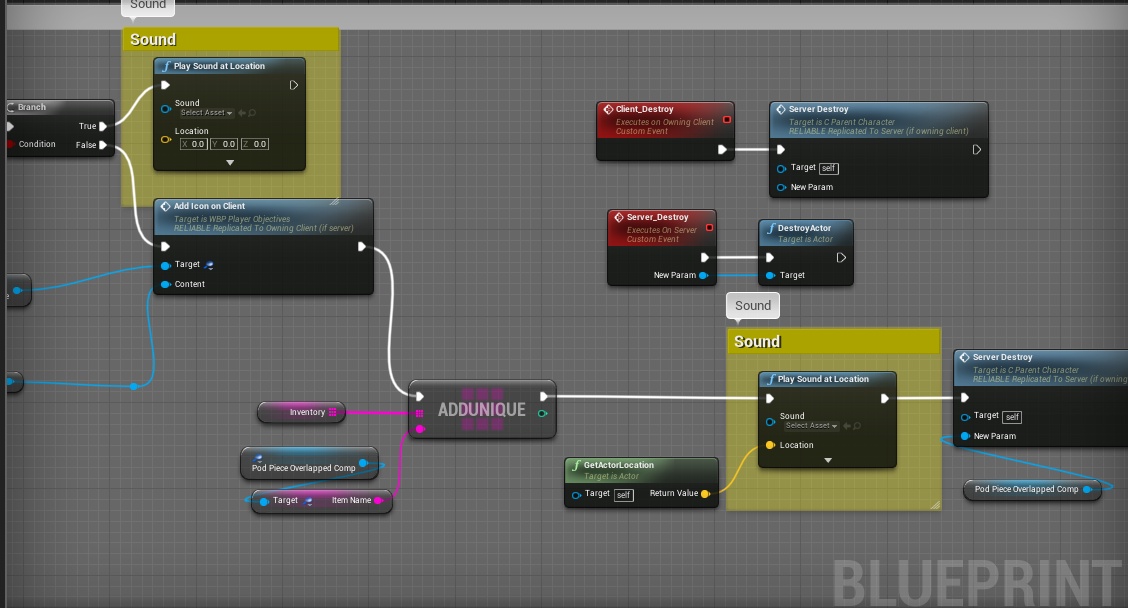 twin juniper
When getting subsytemSteam to work on the Source version of the engine the documentation says to edit the "OnlineSubsystemSteamPrivatePCH.h" I don't see it where it says it should be. The doc is for 4.22 and I am using 4.24, did something change?
shut gyro
Does anyone know how to use custom steam session keys when searching with queries? I keep getting WARNING: STEAM unable to set search parameter ALLOW_BROADCASTER"
narrow prairie
dont u need a steam api id for that to work though?:
shut gyro
So you are saying I can't use the SpaceWar api ID for that?
Because that is what I am using for testing
narrow prairie
i dont think that works no
since it uses that ID for everyone
u need a steam id to query results
from what ive saw in epic video
im not sure, maybe someone else can take a peak and have a better answer
i can be totally wrong
 spiral estuary
I got a question about the joining process between client and server
If i wanted to check to see if the client joining a server has some data(Does client have XYZ mods installed?), where would that best be added?
I've been looking a little in the GameSession and it looks best there, but i'm wanting to make sure there is not a more convenient place to do it
It also looks like i could do it in the game mode under PreLogin, 🤷♂️
gray scroll
Im spawning players via world outliner.... does get player pawn always return none for clients if i use world outliner to spawn a player?
meager spade
you really shouldnt use GetPlayerPawn in multiplayer
and what do you mean use world outline to spawn a player?
gray scroll
@meager spade i didn't want to make a custom spawner for lobby so i was wondering if i can just spawn everyone using world settings
should i be using a custom spawner for lobby as well?
spiral estuary
If your trying to spawn characters I'd do it in the game mode. Check their player state if they need a specific pawn or something based on their selection or some data.
I'd also probably make them spawn as spectators or as custom pawn that meets your needs
Until their spawned pawn is ready
 peak star
Has anyone here tried the Smooth Sync plugin from UE marketplace? What did you like and not like about it when usi g it for your particular project, and why?
 thin monolith
I gave it a spin trying to solve a physics-objects-spazzing-out issue and it actually seemed like it made them perhaps slightly more stable
Beyond that it worked quite well at least for that small test
It seems really simple to use though, basically turn off replicate movement and add the smooth sync component, so worth checking out :)
 upper raptor
Anyone tried smooth sync on car racing game? I tried both smooth sync and replicate movement but my cars are still sometimes moving fine and sometimes teleporting around the track. Its frustrating
 gaunt steeple
Hello, I was trying to choose a Hosting service like AWS Gamelift or Spatial OS, for a session based game with 20-25 players and 100+ AI.
Can you give me as suggestion,
I've Spatial OS is collaborating with Epic and has a lots of features but is there any major drawbacks?
bitter oriole
The cost of SpatialOS is a common problem
One game pointed to it as the reason it failed, which is quite something
Do your own math on how much your game will cost to host
gaunt steeple
is it that high compared to Gamelift?
and is there any other Hosting service you'd like to recommend for an Indie
bitter oriole
I would never recommend any hosting for indies, because I would recommend indies stay the fuck away from hosting
gaunt steeple
LOL, but what if someone tries to do a small multiplayer game, isn't there any service that can help?
bitter oriole
No hosting at all, using listen servers instead
Here's your small multiplayer, free of charge
gaunt steeple
on LANs?
bitter oriole
No, everywhere
gaunt steeple
oh thanks
bitter oriole
Of course that doesn't work for competitive games, or games with say more than 6 players
But you said "small" so
gaunt steeple
yes and the cost is high for say 15-20 players
bitter oriole
If you need 20 players than yeah you need to use dedicated servers and pay for hosting
Start with Amazon servers and do the math on your costs
gaunt steeple
Thanks for the suggestions,
I thought Spatial OS doesn't cost much than AWS and it might have some other issue, Which is why I was a bit confused on choosing
bitter oriole
If you're confused it's probably not a great idea to try doing this kind of game
unique kelp
What exactly is the point of the steam_appid.txt file? the steam online subsystem only ever seems to write to it and delete it
gaunt steeple
I guess you're right,
I am planning to do a lots of research on it though before doing it
bitter oriole
Multiplayer with large (>5) player counts is a terrible choice for small companies at every level - your game is dead on day 1 if it only sells the average a Steam game sells, you need to pay for servers for as long as people play it even when the game makes 0 money at all anymore, you'll need anti-cheat software if you have competitive gameplay, you need to update your servers all the time, even your player database might be subject to heavy regulation in Europe
gaunt steeple
Yes I've already considered those, and trying to calculate how much will I have to pay and the maximum risk factors,
and that's why I was searching if there's a way out,
unique kelp
Does the steam_appid.txt file need to be generated on the dedicated server?
ember slate
If I wanna store a certain ID for each player, should I do it on the player state or the player controller?
unique kelp
If other players will be able to see each other's IDs, playerstate is probably your best bet
otherwise, I don't think it will make a big difference
spiral estuary
Eh multiplayer games with 5> player counts are sometimes hidden successes or at least have a small dedicated community around them that lasts for years (artimes bridge simulator) that keep supporting the game. That being said. Don't plan to make money if you do a multiplayer indie solo dev game without funding.
Do it for yourself
And your friends
bitter oriole
It's still important to note that a multiplayer-only game is something that has a higher chance of being dead on arrival
Games that need 20 players, even with 30m matches and worldwide matchmaking, are going to need more players that most small indies get
unique kelp
Does anyone know if the launch params specified in a fleet creation in gamelift are passed to the ue4 executable, or is it a gamelift process specific thing
Could I use it to specify "-nosteam" for instance?
 olive geyser
Noob question, but how do I get the player that is currently possessing my character?
rich ridge
@gaunt steeple Please explore Linode and DigitalOcean, they are as good as Amazon, Azure and much cheaper than them, They only lack the framework to ease the Game Server integration. You need to build that solution.
olive geyser
So when compiling, the get controller returns an error, as the target is a pawn.
chrome bay
Characters are Pawns
If you're calling that from inside the Character BP it'll be fine
olive geyser
Oh, that makes sense.
rocky totem
So at the first breakpoint you can see that InParams has a value just fine, however when the program gets to the second breakpoint on line 90 InParams is NULL. Any idea's why?
this only occurs if the client calls and the execution calls server_Interact
meager spade
@rocky totem don't post the same question in multiple channels
and inparams will be empty on that break point
you need to step in once
but dont forget the object HAS to exist on both server and client
ah well according to your locals
it is def your object doesnt exist on the server
you create it on the client and send a RPC to the server with the pointer, can't be resolved pointer is null.
not sure why your using UObject for Params
 odd scaffold
Hello, I looked up a tutorial on how to set up a gamelift server (https://www.youtube.com/watch?v=2I8JDeMGkgc), but the plugin from the amazon states that it supports UE 4.21 but no mention of 4.22 or higher (preferably 4.24).
Has anyone tried to set up the gamelift in 4.22 or higher and if you did, is it the same process as the older versions?
rocky totem
i'm using UObject because i can't smart cast with UStruct
and someone recommended i use uobjects
rocky totem
what should i be using to pass params around
cunning shoal
anyone here have experience with switching cameras and multiplayer? I could really use some help with what I think is either a bug or replication issue
winged badger
yeah, i wouldn't replicate a UObject just so it carries parameters for a function
and struct can static_cast just fine
rocky totem
ok someone was telling me last week that using UStructs was doomed to fail unless i wrote my own rtti
winged badger
you need to manually replicate UObjects, and you can't replicate it client->server
so if client instantiates it, there is no way to send it to server
whatsoever
and even if you have only server->client flow, you now need to handle replication races
as in your RPC arrives before the UObject replicated, and you're basically fucked
rocky totem
ahh but i wouldn't have to worry about that with ustructs because...
winged badger
they would get serialized automatically and sent along with the RPC
there are very specific cases when UObject replication is okay
but having them sent via RPCs is not among them
rocky totem
ok thanks
pseudo iris
can someone help me with adding kill scores in multiplayer? I have a gun child actor on the player and idk how to make it register what player gets the point
 long bolt
@pseudo iris currently which actor knows about the kill? the gun?
pseudo iris

i posted images last night


@long bolt
the apply damage is on the gun actor
and now the player's score in the playerstate is not appearing for the client
rich ridge
@odd scaffold The tricky part is to build the binaries using Visual studio 2019, as Amazon doesnot update its cmake to be compatible with VS2019, if you build with VS2017, then UE4.24 can't be used with built binaries as it will throw linking error
So I ended up with testing Linux version
long bolt
@pseudo iris I assume all these screenshots are from your character?
pseudo iris
this isn't working for the client (this is the widget), it's picking up the Game State but not the Player State
rich ridge
and it worked with 4.23, so it will definately work with 4.24
pseudo iris
the apply damage is from my gun parent @long bolt
odd scaffold
@odd scaffold The tricky part is to build the binaries using Visual studio 2019, as Amazon doesnot update its cmake to be compatible with VS2019, if you build with VS2017, then UE4.24 can't be used with built binaries as it will throw linking error
@rich ridge Is it working on 4.23?
rich ridge
I compiled for Linux and it worked
odd scaffold
With 4.24?
rocky totem
hmmm what's wrong with this
bitter oriole
You can't use cast here
rich ridge
At that time I was just evaluating the platform
bitter oriole
You can't casts instances of structures, to start with
odd scaffold
Ok, thanks. I thought to do it for windows because it is less hassle, but I guess it is worth learning how to do it on linux since it is also cheaper
bitter oriole
And UE4 doesn't have RTTI
long bolt
@pseudo iris it's hard for me to tell what's going on here bc it's not clear which screenshots belong to what classes, but generally if your killCount var is on your PlayerState, and it's set to replicated, you should be able to just set the value on the server when your gun registers a kill
rocky totem
stranger how do i handle passing params around for replication then
i can't use uobjects i can't use structs so what is the best option
bitter oriole
What are you trying to do ?
rocky totem
pass a set of parameters to my player controlers interact function so i can send it up to the server and modify objects that the character doesn't own
bitter oriole
Why not use regular parameters ?
rocky totem
because the interface has a single interact function. However the same object can be interacted with in different ways and not all of those ways apply to it's sibling classes and it feels wasteful to make a new interface for each type
bitter oriole
The real waste is using a structure for networking if you don't use every single structure member every time
rocky totem
that's why i had it set up to subclass so it would only contain the parts needed for that interaction
bitter oriole
Yeah, you can't do that
rocky totem
then i could let the object determine the right course of action depending on the structure type
bitter oriole
Just write different RPC methods for different needs
It's cleaner and more optimized
rocky totem
it's more optimized to have a bunch of different interact functions that modify the same object in different ways but don't all apply to ever object type that can be interacted with instead of finding some way to minimize the number of duplicate functions and just pass a list of parameters
bitter oriole
If you use a structure for a RPC parameter, the entire structure will be copied
So that's wasteful if you aren't using every single struct member
That is something you don't want, at all
And it doesn't work because you can't cast child classes like that in C++
Casts are not conversions, they can't convert an object.
Casts are compiler hints for when you're manipulating pointers to class instances, which is not the case here (not can it be)
TLDR : keep it simple and use regular parameter with different methods for different needs
rocky totem
... alright makes sense
rocky totem
that's really a bummer i thought i had come up with a clever solution
pseudo iris
where do I set the player to get their score increase? on their blueprint or on the state, etc? @long bolt
found that the cast is failing to get the Player Game State for the client @long bolt
pseudo iris
i still need help with this if anyone can help
obtuse forum
Does a "Set member in Struct" trigger a RepNotify?
peak star
@pseudo iris i put player scores in their playerstate
pseudo iris
i do too but it doesn't cast to the client
peak star
I think you can set which plauerstate all the players use, per game mode, in the game mode settings
What do you mean?
You mean it doesnt replicate?
peak star
You dont have to multicast to the specific client
Just set the score variable to be replicated
pseudo iris
i did
peak star
And then it should automatically update tge same variable on the client's version of the playerstate
which has the score variable in it
How do you know it isn't replicating to the playerstate on the client machine? Do you have a text umg widget or something that displays the score?
pseudo iris
yeah
peak star
How do you update the text for that widget?
Whatever you do to update that text needs to reference the correct player's playerstate to get the score value
pseudo iris
event construct, then cast to it
peak star
Ah then it will only set the text once, when the widget is first created in game
You can make it update every tick by binding the text
winged badger
that is insanely expensive
winged badger
a UI for an average MOBA game eats about 8ms game time if bound with UMG binding functions
pseudo iris
all I want to do is make sure the client gets my player state
winged badger
i have no idea why would you cache a pointer to self in a blueprint
pseudo iris
what?
pseudo iris
do I do this in PlayerController or the character itself?
winged badger
what are you trying to do from where?
pseudo iris
this is it
pseudo iris
idk what the solution is
winged badger
problem is that most/all of the time the PC will call BeginPlay before PlayerState Actor replicates
a semi-reliable fix for it is increase PlayerState's NetPriority to 4
more proper one is to do that cast and cache player state logic on server
replicate it
and use RepNotify
what PlayerStateClientServer is, i have no idea
pseudo iris
yeah I tried to do the cast as a custom event
forgot about it
i'm just so confused
winged badger
so
game begins
server starts replicating actors to clients
the high net priority go first
PlayerControllers and Pawns
pseudo iris
right
winged badger
they will replicate and call BeginPlay before any of NetPriority 1 Actors replicate
unless packets arrive on client out of order
pseudo iris
I've never cached in UE before
I've been trying to see how the multiplayer shooter example does it
pseudo iris
wrong chat lol
rocky totem
what have i done? even when this is called from the server i don't hit 107 - 110 ever
 lost inlet
i'm not sure what you're doing here exactly but the server is ROLE_Authority and that _Internal function probably gets inlined
peak star
@winged badger i know binding umg widgets is expensive. Just trying to help get a simple thing working for @pseudo iris
Then can make it more efficient later
cerulean escarp
is the in editor dedicated server not able to be seen by advanced sessions? I have my setup working but when I search for servers the dedicated server that launches along side my two clients doesn't show up
however when I host a server with the isDedicated bool set to true and then refresh the server list on the other client it shows up
cerulean escarp
nvm I had some code that was ruining everything I got it working now
cunning shoal
looking further into my situation with the networking issue regarding line traces using the first person camera..... i did an on-tick print of the location and rotation of the camera from both server and client perspectives..... it looks like there is a discrepancy between server and client:
location is very slightly off as well.... and i wasn't moving during this screen capture, so not sure what that is about
I have tried running my events on the client, on the server, and both but still can't get it to work on the client
lost inlet
it won't be fully accurate because of how it's sent over the network
for rotation this is usually good enough
cunning shoal
@lost inlet right, but my line traces go off to the side and down from the crosshair in my first person camera, but on the server are fine
keen thorn
@rich ridge Thanks for your answer 😄 Do you know if this means it will spawn all processes at the same time or is there a way to control when each process spawns in the same instance\
rich ridge
It will spawn all at the same time and it connect players based on their port number request
And gamelift don't offer really fine control on what to do
 vivid seal
i know this isn't super specific, but does anyone have anything they could point me towards in regards to client prediction of cooldowns and cast bars? i'm having trouble wrapping my head around how to manage everything with server corrections and cancelling casts and all the complicated edge cases.
keen thorn
@rich ridge thanks alot, hmm i guess I will have to somehow make custom logic to populate these servers, because our servers are really light and is kinda waste to run 1 server per instance...
rich ridge
@keen thorn if you want to write your own logic then why use gamelift at first place
It's way too costly
rich ridge
Gamelift is not scalable
keen thorn
i thought it auto scale based on user activity
instead of renting fixed amount of servers
rich ridge
If you have a realtime demand, then you can't scale gamelift realtime
The thing is you need to have some pool of gamelift fleet which you need to tell to Amazon in advance
Once a threshold is reached it will spawn more fleets
And fleet creation takes significant amount of time
rich ridge
So in a way I don't consider the gamelift to be scalable
keen thorn
do you know of other cost efficient solutions?
rich ridge
Linode or digitalOcean
They are as good as Amazon or azure they only lack some sort of framework to ease dedicated server integration
I have already evaluated gamelift and I decided not to go with gamelift
keen thorn
do you have a rough estimate of how many players I can support with lets say 100usd/month?
rich ridge
Let's assume your game becomes famous and you have huge audiences do you want to spend your profits on hosting?
keen thorn
for digital ocean
gamelift seemed ok
our main problem is actually ue4 dedicated servers eat much RAM by default
200mb
we dont have budget to develope our own dedicated server atm
rich ridge

DigitalOcean
Simple, predictable pricing on VMs and object storage at industry-leading price to performance ratios. VMs start at $5/month for 1GB RAM, 25GB SSD storage
Just see your selft how cheap it is
And I m able to create and boot an instance withinn a minute
And they do have data center across the globe
keen thorn
hm
thanks for your help
Let me calculate a bit
didnt see their memory optimized solutions
rich ridge
Here at digitalOcean you need to pay for network charges
And the gamelift pricing which they mentioned is for 15 days
Not 30 days
Amazon is tricking you
keen thorn
gamelift has spot pricing which seems very promising tho
rich ridge
Even I considered the spot instance, but they terminate too frequent
And I don't want to have that experience
keen thorn
assuming they dont terminate, they are more cost efficient i believe?
keen thorn
i see
rich ridge
I will suggest Linode or digitalOcean
keen thorn
thanks for your suggestion. When you tested spot how often do you remember they used to terminate?
rich ridge
I didn't face any termination
keen thorn
cus our games are really short, so its not that bad if a few drops

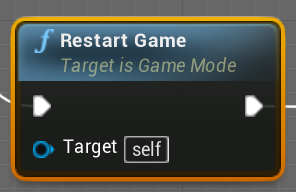

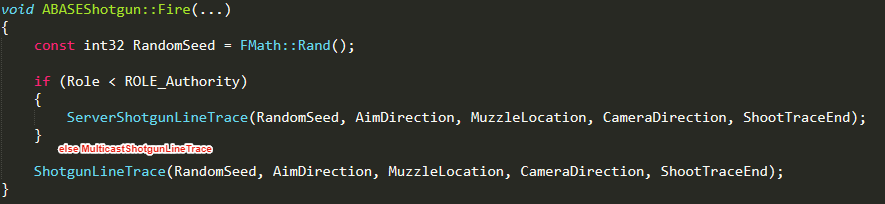




 rich ridge
But still I don't trust these numbers
keen thorn
I guess we will give it a go because we are really short on time and just need to somehow launch this for our customer
rich ridge
There is also a probability that you designed your system by focusing spot instance and when you request Amazon for spot instance then they may not have any spot instance at that moment
keen thorn
we have cheap customers who wont pay for stable solutions 😦
they get what they pay for 😄
rich ridge
@keen thorn ok
keen thorn
thanks alot for your advice, was very helpful
rich ridge
One last suggestion
Don't tightly couple your cloud service with game
Make it loosely coupled
keen thorn
thanks, it is currently quite loosely coupled, we can already run it and play on any cloud. Only problem now is to find most cost efficient alternative for the customer
rich ridge
Cool
Let the customer decide what he wants
You show him the figures and consequences of each cloud
keen thorn
ye