#multiplayer
1 messages · Page 513 of 1
 cedar finch
@polar lotus Make sure your movement speed is set correctly on all your players. I had a jitter issue where I accidentally was setting walking speed locally somewhere so it was a tad bit out of sync and caused the jitter. Your issue however kinda looks like an animation blending issue but I'm not sure why it would only show up for clients.
 weak fog
Anyone know if it's possible to get this value in BP (or C++ even)?
I'm trying to set up my local testing environment to be as close as possible to production, so I'd like to substitute "number of players needed to start the game" (which we get from an API on production) with this number when in local dev
 winged badger
possible, yes... how would require quite abit of digging
 still path
@fossil spoke yes I am. That is how I originally had it but I found that jumping still caused rubber banding problems. I'll double back and take another look. Thank you!
winged badger
i'd start by looking at editor menu customization stream to figure out what that menu binds to and then how to access it from there @weak fog
weak fog
is stream a technical term here, or do you mean they did a livestream on this topic?
winged badger
there is a livestream on it
you can also try #editor-scripting
best chance to find someone who knows how to access it off the top of his/her head
weak fog
ahh okay. tyvm!
 harsh lintel
I'm calling GetController of an AI character in a server RPC but returns null
winged badger
that is a weird setup
harsh lintel
seems to be valid on BeginPlay
winged badger
that implies you are directly accessing an AIController from a client
harsh lintel
Hmm
what if i make a function in the character that uses the controller, idk if that would make a difference
harsh lintel
can't quite find anything on how to access an AI controller
winged badger
Cast<AAIController>(Pawn->GetController()) pretty much
winged badger
it won't work client side, since those aren't replicated by default
harsh lintel
im doing it in a server rpc
winged badger
you should really paste the code and explain what you're doing exactly
harsh lintel
        //AController *ControllerActor = AICharacterForMovement->GetController();
        //AAIController *AIController = Cast<AAIController>(ControllerActor);
        //if (!AIController)
        //{
        //    EndAbility(CurrentSpecHandle, CurrentActorInfo, CurrentActivationInfo, true, true);
        //    return;
        //}
        //
        //AIController->MoveToLocation(HitResult.ImpactPoint);
This is the server rpc
This might be a question for #gameplay-ability-system, I just remembered that AICharacterForMovement was null until I replicated it, maybe even if it's a server rpc it's not doing it with server data
winged badger
since i have no idea what AICharacterForMovement is there, that code snippet doesn't give me any information
harsh lintel
        const AMXM_BaseCharacter *MXMCharacter = Cast<AMXM_BaseCharacter>(TempAbilityInstigator);
        if (!MXMCharacter)
        {
            EndAbility(CurrentSpecHandle, CurrentActorInfo, CurrentActivationInfo, true, true);
            return;
        }

        AMXM_AICharacterForMovement *AICharacterForMovement = MXMCharacter->AICharacterForMovement;
        if (!AICharacterForMovement)
        {
            EndAbility(CurrentSpecHandle, CurrentActorInfo, CurrentActivationInfo, true, true);
            return;
        }
        UPROPERTY(Replicates, BlueprintReadOnly)
    const AActor* TempAbilityInstigator;
nothing thats called Temp should ever be const
but unless you paste the entire RPC i can't help you
harsh lintel
oh snap let me remove all the comments lol
 dapper hatch
@rich ridge I have working on it with a game instance and it kinda works cause my variable "Player Name" survives the level switch but now I have another problem 😕 When I apply the name to the character, it doesn't apply it to the right person... Instead of applying the name to the server (the one that has modify the "Player Name" in the menu, it applies it to the client... its like if it doesn't know which one to to give it to... But how could I define to wich person to give it to? This is what I have done:


 winged badger
that TempAbilityInstigator is pretty suspicious
put a breakpoint in it, see what's what
harsh lintel
alright
 vivid seal
@plush lagoon the way I handle scale and character movement variables is by having a RepNotify for each of them called like “ScaleModifier” or “MaxWalkSpeedModifier” and in the RepNotify set the scale or walk speed or whatever to a constant default multiplied by the new replicated modified
Modifier*
I’m doing an RPG so buffs can shrink players by affecting the scale modifier stat for example, which gets set on server and replicated and then everyone separately sets their own
harsh lintel
it's most likely a GAS plugin issue, I explained more details there
 plush lagoon
ahhh
thank you so much @vivid seal ^_^
Yea, i'm doing the same sht but i'm doing it based off stats and various modifiers to increase/decrease the scale depending on what your doing.
 twin juniper
Is this correct replication for "dedicated server"?
 polar lotus
@dapper hatch I have a C++ base class for everything so I just do this
@dapper hatch DUDE IT WORKES
WORKED
THANK YOU SO MUCH
cedar finch
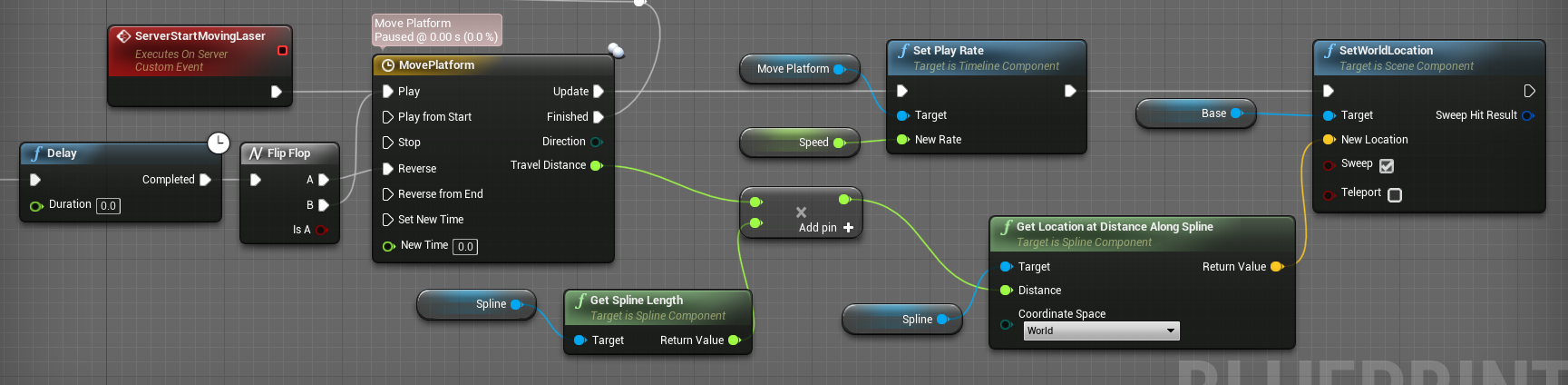
I'm still struggling to figure out replication on setting an actors location along a spline. So I was told to use interpolation but It still looks laggy on clients. If I set my timeline to replicate and run the event onServer will that work and be optimized? https://i.gyazo.com/c7e539137ee83bf2a6f49e371373e7d3.png
 dapper hatch
@polar lotus your welcome 🙂
polar lotus
Who owns my gun actors if they are spawned in by the server
cedar finch
So to clear my question up; Is using a replicated timeline more optimal compared to using an RPC or a repNofity variable?
 tropic snow
[2019.12.27-09.01.04:005][ 94]LogOnlineSession: Warning: STEAM: Session (GameSession) already exists, can't join twice .... how to destroy sessions properly? placed destroyed sessions every where...
 ebon nimbus
Is there any additional steps to deal with in regards to the ChoosePlayerStart function inside of the gamemode class, when it comes to multiplayer spawning? The player team numbers are aligned with the spawn tags but no luck
 rich ridge
@dapper hatch if you want to maintain names for respective characters then you need to store inside of map
Instead of single playerName variable
cedar finch
What's the best way to replicate "attachToComponent" ? Do I need to do that on server or can I just run it inside a multicast or what?
dapper hatch
@rich ridge How would I do that?
rich ridge
@dapper hatch if you know Java it's same as that of HashMap<Key,Value>
In blueprints you can set variable type as Map
And one more thing as others pointed out yesterday that we can retain values using PlayerState by calling function CopyProperties from PlayerController, please consider that option too for retaining values after level is switched.
twin juniper
I want to start making a multiplayer game is how reliable are older tutorials?
rich ridge
Learn how to work with Maps in Blueprints.
@dapper hatch
@twin juniper older tutorial are good, the concept for multiplayer game has not changed
rich ridge
But you might enconter fee compilation errors because of the classes getting removed or moved to other location
In case classes got removed they got replaced with better classes
@twin juniper UE4 documentation is highly rich in information and the people also has good number of wiki pages in different aspects of multiplayer games
You just need to exploit Google to get your results
twin juniper
thank you.
dapper hatch
@rich ridge How do I use the thing "Copy Property" in my player state?
is it a node?
@winged badger
vivid seal
asked this in cpp channel but think it might be more appropriate here
hey i have a few dumb questions:
are TSets replicated? when I google the first result from Epic's docs says "Like TMap, TSet is not replicated" but when i click the link it doesn't actually say that anywhere.
second, if they are replicated, will using .Add() a duplicate element to the set (therefore overwriting a key with an identical key) cause things like RepNotify to trigger or will it be treated as if nothing changed at all?
 thin stratus
 chrome bay
Sets and Maps are indeed not replicated
Array is the only container type that supports replication
 gray scroll
im setting my timer inside game state on authority... then calling a server event inside game mode which calls an owning client event in player controller to create a widget. When i cast to game state and get the timers value on client it comes back as -1... any idea why?
the variable is set to replicate
chrome bay
Because the timer doesn't exist on the client, timers are local only, they aren't replicated
The handle is just a number to identify that timer on the local game instance
winged badger
in most cases, if the purpose of a timer is to create a widget when its done, you don't need it running on authority, but local only
especially in case of dedicated servers
chrome bay
That is also true, seems like a backwards way of doing something. Client should be managing the state of their HUD locally.
gray scroll
No the timer needs to display on the hud
So like match starts in 5,4,3,2,1 countdown
@winged badger @chrome bay
chrome bay
Doesn't matter, the client should still decide to show it or not
And usually in that case you just replicate an int for the countdown
Or reuse the same int32 as the match timer
winged badger
for that, the clients just need the information that timer started
they can count down 5 seconds on their own
chrome bay
Which is also what MatchState is for
winged badger
not easy to hook into that from BP though
chrome bay
Hmm yeah true
gray scroll
Dang
So i see two solutions... get just the starting value and then countdown on clients
Or create another timer on 0.5 secs and then replicate that value to clients
winged badger
there is no guarantee any corrections to the timer will be any more accurate then your initial "CountdownStarted" replication
given that, its best to let clients count down on their own, that way the 5 seconds will actually last 5 seconds, and won't be affected by any spikes in latency
gray scroll
Ok makes sense thanks
 grizzled tide
hi. there is something that i cannot understand
can you set the port when you host a gem in runtime?
because if you cant
how does STUN works?
i mean, with stun i can get a open port, but how can i use it if when i host a game with openlevel i cant set the port?
 jolly siren
FURL has a port property
You can include it in the options for openlevel
Assuming you are talking about listen servers
 ember slate
How am I supposed to join a game server if the game server and the client are using steam? Is there a specific way or just OpenLevel would work?
ember slate
So dedicated servers that are using Steam by default creates sessions? Or do I need to create the session first on the servers@jolly siren
This whole sessions thing is so irrelevant to me cause I have my own match making
And I already know the IP and Port of the server I should connect to
jolly siren
you can use openlevel then
ember slate
It just kicks me, not sure if the client refuses to continue or the server kicks me
jolly siren
Look at the logs
 fleet raven
does the server have the port open?
ember slate
Yes, and when I have steam disabled on clients, it works fine
fleet raven
why enable steam then if you're not using it?
jolly siren
Same question ^
ember slate
Well in future I will enable authorization etc and steam id will be used in game
fleet raven
then just connect through steam too and you get automatic nat punch etc
grizzled tide
@jolly siren i checked FURL. I tried to pass it Using UnetDriver. But Unetdriver is null when i get it from GEngine. if i try to create a new oone with NewObj ir returns null again. So the main question is . how can ir host a listen server using Unedriver?
 sturdy saddle
Is there any option to check for like max change in client to server
currently i have dash move, it works fine on server, but when I try multiplayer clients are being kicked back I think its some anticheat feature
grizzled tide
i had to create a UIpNetDriver
fleet raven
why are you manually creating a net driver
the engine creates it automatically when you travel to a level with ?listen flag
grizzled tide
because i need to listen a specific port set on runtime
@fleet raven because Turn
stun
fleet raven
you can set the net driver class you would like it to spawn in the config
fleet raven
that's the default
I meant more like you'd be able to derive it and do any custom things you need in there rather than making hacks like spawning it manually
grizzled tide
yes i know
but
before extend it to make my custom unedriver
i need to know to to use it to host and join games
grizzled tide
@fleet raven thank you!
 dim parrot
im working on an open world multiplayer game that will be running dedicated servers i am wanting to know how to do individual saves per server so when a player joins a new server they have to make a new character like ARK and Conan does is there a way to do this in blueprints or would i need to use a database like sqlite
grizzled tide
i would use a nosql database
in any case if each dedicated server is going to have their own savefiles i dont know whats the problem
if i create a custom unetdriver hw i add it to my config?
-NetDriverDefinitions=(DefName="GameNetDriver",DriverClassName="MobileNetDriver",DriverClassNameFallback="/Script/OnlineSubsystemUtils.IpNetDriver")
this is not working
[/Script/Engine.Engine]
!NetDriverDefinitions=ClearArray
+NetDriverDefinitions=(DefName="GameNetDriver",DriverClassName="OnlineSubsystemMobile.MobileNetDriver",DriverClassNameFallback="/Script/OnlineSubsystemUtils.IpNetDriver")
[/Script/OnlineSubsystemMobile.MobileNetDriver]
NetConnectionClassName="MobileNetDriver"
grizzled tide
CastleVersus is the name of the project
 fossil spoke
Anyone know of any examples of restoring an Actor Channel to an Actor thats been Torn Off?
 gleaming vector
you can't
the channel for an actor that has been closed and disposed of
you'd have to create a new actor channel for it, which would end up creating that actor anew on the client
gleaming vector
no problem
make it dormant if you plan on opening the channel back up
that's the point of net dormancy
fossil spoke
Yeah i was going to do that anyway.
Is there a function that gets called when dormancy changes?
gleaming vector
I believe so, but I can't recall it off the top of my head
and I'm currently deep in editor graph code
fossil spoke
Ill have a dig.
gleaming vector
silly Epic went and refactored everything related to node context menus
fossil spoke
I tend to stay well away from all the Editor nonsense 😛
fossil spoke
I really hate tools programming lol
grizzled tide
@gleaming vector hi. Do you know how yo add a new UIpNetDriver?
grizzled tide
Yes
gleaming vector
you can create a new type, and then change out which class the engine instantiates
that's done in the engine.ini
fossil spoke
^^
gleaming vector
if it's not recognizing the new class, are you sure you set up your script path correctly?
put that in ``` ```
so it formats it correctly in discord
back tick
`
above the tab button on us keyboards
also the ~ button
and then 3 a the end
grizzled tide
I'm I'm muy phone
gleaming vector
``` like this ```
grizzled tide
Muy phone
gleaming vector
shows up
like this
grizzled tide
 gleaming vector
ha, sure
that works
so
your first section is where you define your drivers
second section is where you define your channel classes
you haven't overriden your driver
but you did override the channel
er
NetConnection not channel
NetConnection is not the driver
they are two different classes
gleaming vector
OnlineSubsystemSteam has an example of overriding the driver
gleaming vector
i am not sure your question
overriding the NetDriver/NetConnection and the like is very advanced networking
I know a few things in there but I usually just go by example
grizzled tide
I created a new class that extended UInetDriver .but i can't find a way that the game use it instead of default UIpNetDriver
gleaming vector
it's the in the first section of the ini that you linked
you change the ipnetdriver to your classname
grizzled tide
I'm going yo try
 distant wave
Hey could anyone give me a better understanding of Random Seeds in multiplayer? I wanna make a shotgun. From what I saw on the web, a random seed with a random stream, basically makes sure that every client gets the same random values when shoots. (also the shotgun should use a VRandCone).
Is this right?
winged badger
it is, its not necessary for every game type though
distant wave
And if so, shouldn't seed be set somewhere in a game state or game mode?
winged badger
and if you desync at any time
you'll remain desynced permanently
ah, no
should be contained within each weapon
distant wave
But if every player generates a different seed, then how would it be right?
winged badger
otherwise out-of-order packages become more of a problem
server generates seeds within each actor that requires one and replicates it
distant wave
If you set the seed in a weapon class (shotgun) belonging to Player 1 and then Player 2 also sets his own seed, they would get different values
winged badger
but they would still be synced
1 seed per shotgun
created by the server and replicated
distant wave
Would you be able to give me a code example?
 half jewel
use seedstream
distant wave
I never used seeds before
winged badger
i don't have one at hand, i decided against syncing spread in my game
i have client authority for hits, validated by the server
health is synced across all clients
but hits are not replicated for simulated proxies
half jewel
nvm if the shotgun entity ever becomes unrelevant for clients seedstream would desync
winged badger
they have just enough information to do a fairly good guess of what the players are actually doing
and simulate that
distant wave
Alright, then the Seed should be a replicated int. And on begin play of the gun I check for authorithy and if authority I set a random seed?
Or I set the seed on every shot
winged badger
i would do it as part of the spawn algorithm
winged badger
no, there is not
distant wave
And it should be replicated
winged badger
again, packet loss is problematic
distant wave
Alright thanks a lot! Happy new year!
winged badger
if your client doesn't get one shot worth of package
or if it becomes non-relevant
or if its a late joiner
seed will be correct, but it will be sampling a wrong element from a random stream from then on
you can't sync random streams after the fact
a random stream with same seed results in exact same sequence of numbers
but once you lose where in that sequence are you, there is no way to sync it back
 hoary lark
@distant wave I pass the clients randseed int value in my start firing rpc (or shot fired rpc for single shot weapons)
winged badger
that saves bandwidth only if you roll several randoms per shot
winged badger
it is a better solution then trying one time seed replication
as that will desync sooner or later
distant wave
How do you netsynch it?
@hoary lark And I still have to set the seed only if Role == ROLE_Authority?
hoary lark
Whoever starts the event first has to set the seed somehow
distant wave
My fire function looks like this
If the role is less then authority, it calls a Server RPC (which calls the Fire function) and after I close the if statement
I do the firing logic
So I just set the seed to something random there
In the firing logic
Right? @hoary lark
distant wave
Nah everything related to firing is in that function
hoary lark
You're ok with input delay then? If so then yes but I'm thinking you might want to change this after you experience it...
distant wave
There is no input delay
winged badger
If the client doesn't have hit authority, there is a delay
distant wave
Look have you ever looked at the ShooterGame fire function?
That is how I have it set up
@winged badger At least no visible delay
winged badger
visible or not depends on the latency
distant wave
As soon as the Fire function is called it checks if you are a client and if yes, then it calls the server rpc
winged badger
if its over 50ms, its visible
distant wave
Basically the client tells the server to fire for him
Anyways
We were talking about seeds =)))))
Thanks for the help everybody!
half jewel
i figured it out
just use a seedstream seeded with a replicated burst counter value
you only need to replicate the burstcounter value and works when things go out of relevancy range too
where can i upload stuff? i have a test project you can run
half jewel
forgot to mention that the client shoots locally too
hoary lark
Sorry I'm tied up with NYE. If the client shoots first locally, then the client has to generate and pass the random seed to use for the event up to the server. (And if you're only telling the server to shoot for you only, there will obviously be a delay, Zlo is right but maybe the way you have it set up is different than we're interpreting)
half jewel
it does not look at the project
no seed is sent to the server, both just have initial value and use burstcounter to generate the seed
hoary lark
On my phone rn sadly, but sounds like it'll be a pretty useless solution tbh
half jewel
the client shoots, calls fireweapon, and moves burst counter up then asks server to shoot
server's shoot moves burst counter up, since its a repnotify (ignored by owner), server and remote clients fireweapon
fireweapon takes burstcounter to generate a seedstream and does a loop x10 to fire shotgun pellets
the result is the same pellets hitting the same spot on everyones screen
burstcounter is a replicated byte
hoary lark
Sooo basically he's just passing the seed except he reduces it to 256 possible values? I've thought of doing that too I guess
half jewel
256 different patterns for shotgun blasts sounds good to me
or make it an int32 who cares a few extra bytes
you generate a seed based on how many times the weapon has shot in its lifetime
thats the "burstcounter" mechanic used in shootergame
you dont pass anything, you just simply tell the server i shot, you urself up burstcounter by one, and since server will up burstcounter too it is naturally replicated. in the repnotify everyone knows to take that integer to generate their own seed, which is the same everytime cause of how seedstream works to do the randomization of the shotgun pellets
hoary lark
Yeah that's great until you use it in the real world
 meager spade
honestly a seed just needs to be created and synched per shot, in fortnite they don't even seed the shots
half jewel
sync it with burstcounter ?
meager spade
no, passed in with the rpc
half jewel
but burstcounter is a replicated value
meager spade
you are still sending a rpc
hoary lark
Same difference then if it's replicated
meager spade
to the server, might aswell send it with the actual shot
where it can be used at the correct time
properties don't replicate the same time
also he said server shoots in shooter game
that is wrong
Shootergame is client side shot
validated on the server
server doesn't do any traces
distant wave
@half jewel Link is no longer valid
hoary lark
you probably wouldn't want the solution in that project anyway for a serious project if it was what I think it was. it might have been reliable over LAN games
in my solution I generate a seed with the StartShoot event and pass it to the server, that seed makes a RandomStream that will be used for the shoot event (e.g. a 3-round burst) - that stream is then (locally only) used to generate a new random seed and random stream for each bullet that the gun fires. if everything is equal on client and server, this allows for muzzle spread and projectile damage, bounce, and penetration effects to be randomized identically. if something varies, e.g. a bullet hits something on the server but not on the client, the "desync" will not propogate to the next bullet
 winter zenith
Networking/GameMode question. When a player connects I want to reach out to an external service for some authorization/data-fetching concerns. Ideally I was thinking about implementing this in GameMode's PreLogin/Login but that doesn't look like a good place to perform an async call (or a sync call and block the execution). I was wondering if there's a obvious good place to do this sort of work? Thanks!
 mellow cipher
@chrome bay Update on that steam lobby ping thing, it wasn't working for me because it takes the game like 5-10 seconds to initialize the ping stuff. Hosting/searching before then breaks it
 median marten
Yo. If my component does not have any replicated variables but have server and multicast functions, do I have to set setreplicates to true?
winter zenith
@median marten yes, you need replication enabled on that actor in order to use RPCs
vivid seal
Is there some documentation somewhere that talks about how TArrays are replicated? Does changing one value cause the server to send the whole array? Does setting an element of something (an object or struct) container in an array cause any replication? RepNotify?
Working out how to manage replication of Buffs and Debuffs on actors but scare of using just RPCs because of the potential for non-relevant actors to see incorrect buffs after becoming relevant.
 bitter oriole
Not the whole array is replicated.
Changing a value inside the array will trigger a replication
Changing a value on a UObject (actor, component...) stored through a pointer in the array will not, the object itself should replicate instead
vivid seal
Yeah that one didn’t make sense now that I’m rereading my question lol
So basically I should be good to go as long as what I need to trigger RepNotifies is adding or removing from the array?
Last question, I know you can get a variables old value by setting a parameter in OnRep of a reference to the variable type, is there a way I can do something similar with a RepNotify from an array that will give me what was added or removed? I’m assuming I can get the entire array and compare to current array to see which element changed but that seems kinda clumsy.
bitter oriole
Oh, I didn't know about that.
I'm guessing it should work the same with the array and will indeed giver you the whole thing
vivid seal
Someone on this discord mentioned it and I’ve found a grand total of two other mentions of it on google, but supposedly yeah
Unreal Engine Forums
For gameplay programmers writing C++ code.
bitter oriole
What I'd do in this case - if you have an array of buffs to replicate and show on the screen with a text notification and/or animation - would be to have two arrays : the replicated one that the game code changes and use, and a display one that stores a structure with the buff itself and the display details
So you'd compare both on tick and add, remove or update the display array
vivid seal
Currently all the display details I would need are contained within the buff actors themselves (icon, name, description, duration) and the UI receives a dispatcher when I add or remove a buff, and then it reshuffles the displayed buffs to accommodate. I just need to make sure that delegate (which I was calling from OnRep on the clients) is being called correctly.
distant wave
@hoary lark You generate the seed event and pass it to the server. How do you pass it to the server? With a server RPC?
half jewel
u wil all be delt with. i wil become they and all snilvering snuckatashers will be showb their demise.
hoary lark
@distant wave yeah, with the same rpc that starts the shoot event
 robust wind
Hey everyone, I got a big problem after packaging the game it returns an error at startup.
It says something like:
LowLevelError (line 1429)
Async loading of event graph, cicle in involved.
Anyone knows what that could be?
 faint lintel
Can someone please tell me when overlapping with a box collision component in multiplayer (works in single player), why is it possible to get an overlapping actor player controller in blueprints but not in c++.
In C++ I tried to bind overlap methods to delegates two different ways
InteractionArea->OnComponentBeginOverlap.AddDynamic(this, &AInteractiveActorBase::BeginOverlap);


TScriptDelegate<FWeakObjectPtr> OnComponentBeginOverlap;
OnComponentBeginOverlap.BindUFunction(this, "BeginOverlap");
InteractionArea->OnComponentBeginOverlap.Add(OnComponentBeginOverlap);
Could this have something to do with how overlap methods are bound to delegates (ComponentBeginOverlap, OnComponentEndOverlap)?
Overlap methods use UFUNCTION macro.
Code and Blueprint done as in picture.
meager spade
cause playercontrollers only exist for the owning player and server
so if that was ran on a another client it would be nullptr, but i don't see that happening here
i think its not using your player controller class
so the cast fails
 south flare
anyone know if there is a fix for this? https://forums.unrealengine.com/development-discussion/c-gameplay-programming/125708-what-does-actorchannelfailure-mean
Unreal Engine Forums
For gameplay programmers writing C++ code.
I am working with a replicated actor that has been set as a child actor of another replicated actor via the ChildActorComponent, the child actor component is also set to replicate
Whenever I launch a client in standalone mode, I get the following error on the server Server connection received: ActorChannelFailure [UChannel] ChIndex: 0, Closing: 0 [UNetConnection] RemoteAddr: 127.0.0.1:64569, Name: IpConnection_0, Driver: GameNetDriver IpNetDriver_0, IsServer: YES, PC: bp_playercontroller_01_C_0, Owner: bp_playercontroller_01_C_0, UniqueId: NULL:DESKTOP-PSBIJ6E-D38C3FD046E99DE0220164B8798344F9
When this happens, my child actors are not replicating properly to the clients
but it works fine in PIE
 tribal plover
looking for some assistance on updating a percentage bar for a base unit.
tribal plover
trying to use set percentage
i have done it before and got it working for players.. now just trying to get it working for base units
so it decreases the health correctly. and the variables are replicated just not decreasing the actual percentage bar
fossil spoke
@tribal plover SetPercentage is in a range 0-1
So just divide the current value by the max value.
 keen gale
@tribal plover setpercent is from the base blueprint and others derive from it?
tribal plover
yes sir the second picture. I was just debugging to show it was getting changed in code.
"In Memory"
keen gale
could it be that derived classes are not calling parent implementation that updates the percent?
tribal plover
It could be but i tested that I believe
keen gale
I'd check event ticks for derived classes, they should have parent's tick called
 steady cape
For some reasons, when I'm trying to set color for my mesh by multicast, this doesn't work. It works without it, but only shows color on owning machine
distant wave
Hey @hoary lark
I was thinking about the random seed thing
Wouldn't it be best if I set the random value in the Game Mode and on Post Login I cast to the player class and set the player s seed to the random seed generated in the game mode on begin play. This way all players would have the same seed. It wouldn't be possible to desync, right?
 pallid stone
Whats the opposite of startsession that opens the session back up for new people to join?
 obtuse forum
update session?
steady cape
Ok, I got it. The issue is - clients can't get their controllers. And the question - why? Controllers supposed to be accessible by server and owning client. That's weird
Very weird
pallid stone
I'll try that, cheers
 random nymph
So anyone implemented gamelift flexmatch to their project?
steady cape
Well, I found out that pawn have special var "Player State", which gives ps without pc, but all colors are still available only on server or owning client
hoary lark
@distant wave you can set the start of the stream however, whenever you like, and if everything is perfect that is a clever solution. the problem is that all it takes for streams to diverge is one event being missed on client vs server.
- if your game is using StartShoot / StopShoot events, what if the client holds down the mouse button for 3.02 seconds and shoots 73 bullets out of his minigun and the server thinks he held it down for 3.01 seconds and shot 72 bullets?
- if anything is using unreliable RPCs, what if a packet gets dropped?
- if using reliable RPCs, do we REALLY want to rely on it for the entire duration of a game (it's probably safe TBH but... I don't know, feels risky nonetheless. it can just take one bad ruined experience for a player to ruin a whole session, like the CS:GO hitbox issues they had/have had for years)
distant wave
No I wasn t talking about the stream
I was talking about the seed which is a static const int32
I was wondering how will the streams be synced if the players use different seeds
@hoary lark
hoary lark
the concept is that you need to start a new stream for a given process any time there is a chance that the state of the process could have diverged. every time you start a new stream, you need to use a new seed (or else the randomization pattern will be the same every time). whoever initiates the process must also generate and share the seed for it.
if you're building a lockstep game like an RTS, where everything has to be 100% totally repeatable, you can set one seed at the start and ... run with it
FPS games usually aren't built like that obviously as it requires everything to be reliable RPCs or TCP, usually causing frequent game hangups, etc
winged badger
i think HoJo's system has a good bang for buck
if it desyncs, it will be limited to a single burst as worst-case scenario
if your desyncs, it will last the entire game @distant wave
and all your late joiners are desynced by default
hoary lark
good point too
the way I made mine it wouldn't even be desync'd during a burst (worst that could happen would be the example above where a server shoots a different number of bullets than a client if it doesn't receive the stopshoot due to ping or something), but if bandwidth proved to be a bit tight you could redesign it to sync some kind of seed less often somehow I'm sure
winged badger
it is just 4 bytes extra
per RPC
not the first place i'd be saving the bandwidth on
i did see a guy on this channel, was obsessing about saving few bytes on one replication
hoary lark
could even pack it down to a short for a measly 65536 unique randomizations 
winged badger
meanwhile, he was replicating FVector TargetLocation on Tick, instead of just replicating pointer to Target once
point being miniscule savings are what you do after your game hits alpha
before they just get in the way
 bold dune
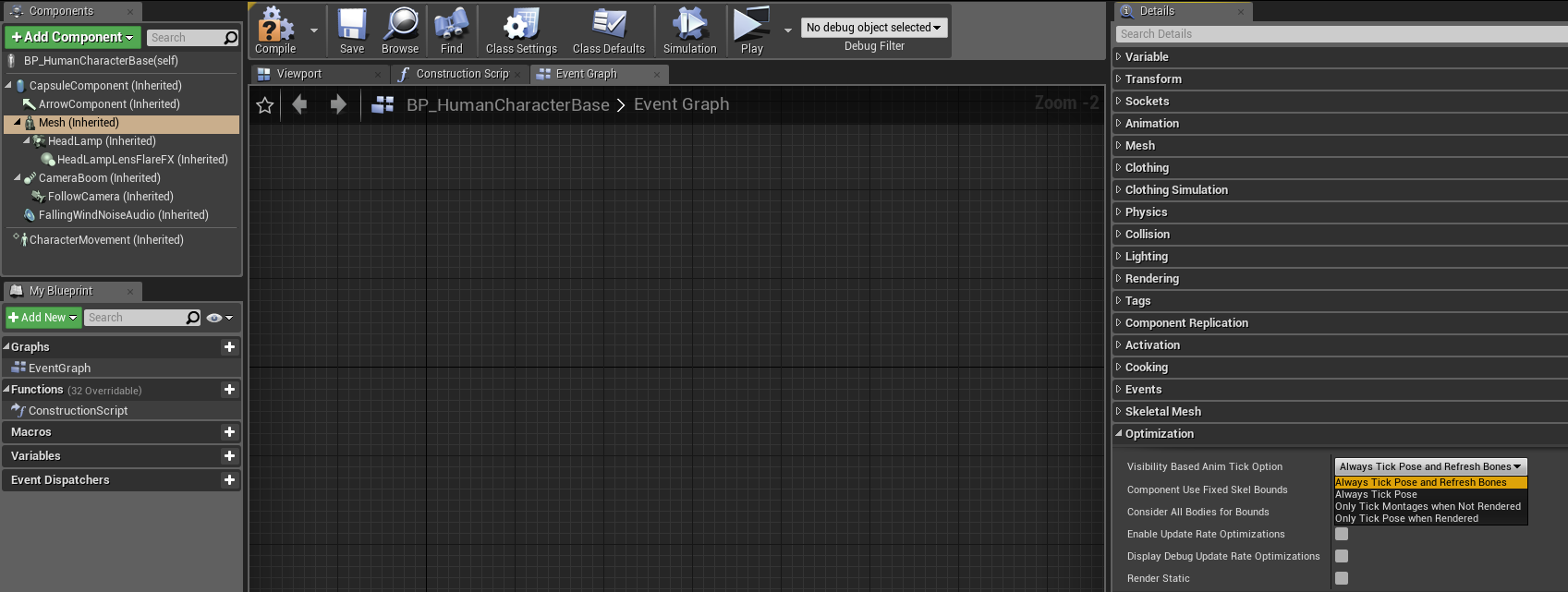
I need animations to play on a dedicated server, but they don't seem to be. Is there any known way to do this simply? I need an attached object to move with the montage as there are traces associated with its position. The notifies do fire on the server, but it doesn't seem like any actual animation data (skeletal) is being processed.
 shut gyro
Does anyone know if there is a way to create duplicate game sessions in STEAM? One on a lobby beacon, and one for the actual game. I want to have a beacon for a persistent party, Lobby Beacon and host game session.
bold dune
Holy crap I'm at a loss on this one.
hoary lark
never done this myself but first google result for "unreal dedicated server animations" suggests to ensure this Optimization variable is set @bold dune https://i.gyazo.com/f78889038c83f95990fef62c6b62fd5c.png

 pseudo iris
I wanna do some Battle Royale type stuff, like tracking number of players left/determining the winner and setting the safe zone
where would I do this? in a game mode, level blueprint etc?
 peak star
@pseudo iris those all sound like things that only the server should be able to change, so it should probably live in the game mode yes, since Game Mode only exists on server. However you also probably want all clients to be able to read that info for their HUD so you also need to update the Gamestate which replicates to all clients.
Level blueprint makes less sense because levels thenselves dont replicate afaik, only the actors in them and specially designated functions do.
pseudo iris
is there documentation or tutorial you'd recommend to look into this
peak star
Plus you might want to use the same levle for different game types than battle royale
Hmm have you read the Unreal documentation online for what they call the Gameplay Framework?
pseudo iris
it's more of a last-man standing deathmatch
with a small zone that opens when like two people are left
peak star
That tells you what each part is meant to don(gamemode, gamestate, gameinstance, etc)
The way I would set it up is to put all the rules in The game mode, have the game state be the thing that triggers and replicates level-wide information and events to clients, and then for things that happen on each specific level, have the level blueprint register event dispatchers fromthe gamestate and have the gamestate trigger those events since it receives the updates of when there are only two players left.
Thats very similar to how I implemented a sudden death mechanism where certain maps remove most of the cover when there is one minute remaining so the last minute of the game forces a frenzy of battle instead of more hide and seek.
pseudo iris
Core systems, such as game rules, player input and controls, cameras, and user interfaces.
is this it?
I've got this for the safe zone so far
peak star
Yes. Espexially read the sections titled Game Flow Overview and Game Mode and Game State
pseudo iris
in its blueprint
peak star
That should work fine - but make sure Is Safe variable is replicated so that when the server changes it, it will sync to all the clients for that same pawn on each client machine
pseudo iris
how do I check that?
do I want every object that interacts with the player to "replicate"
peak star
Just click the variable and in the details panel on The side of the blueprint editor window tick the "is replicated" checkbox
Not necessarily
pseudo iris
just the variable?
peak star
Yeah just the variable. Replicate on a variable means that whenever the server changes it that variable on that actor, then it will update that variable on the same actor on all the client machines too, if they are in range for it to consider it a relevant update
pseudo iris
when I do this, both the server and the clients activate
peak star
Which actor does the blueprint belong to?
pseudo iris
when one of the FPS characters goes into the box it activates for both the client
peak star
Okay but which actor is the variable inside of?
Is it in a pawn or the level blueprint or something else?
pseudo iris
That's the plan
peak star
Good. So if we have two players, Anna amd Brea, and the server machine sets it's copy of Anna to have Is Safe = true, then if Is Safe is replicating, then it should also tell all the Clients' machines that are running the game, to update their copy of Anna to set Is Safe = true also
Meanwhile Brea is set to Is Safe= false on the server because she left the safe zone
So every client's copy of Brea should also set Is Safe to false
So then for all machines, each machine's Anna is safe and each machine's Brea is not safe
(Each machine has only those two pawns in this example)
But even if some clients are not up to date, then the clients should not be the ones to destroy any pawns. It should only be the server who gets to do that
So maybe you dont really need to replixate isSafe
pseudo iris
right, and that'd be handled by the server, right?
peak star
The server is the only machine who needs to know
pseudo iris
*game mode
peak star
Yes. You can technically do that functionality from anything thatnia running on the server but the Game Mode is probably the most "correct" place to instigate level-wide gameplay events which rely only on the game rules, since the game mode lives on the server and doesnt exist anywhere else.
I did most of my logic in GameState but now that I want to add more possible gameplay modes I find my gamestate class is getting really big and scattered and hard to maintain because it has all these branches going everywhere depending on whether they are doing a free for all or team game or other way of playing.
So game mode is for the server to make decisions about starting, scoring, and ending games, gamestate is for communicating that stuff to all the participants.
Gameinstance is for keeping track of settings and other stuff on each individual machine (it cannot communicate with the network). Gameinstance is not an actor so it is not destroyed when a level is unloaded.
So gamemode is server only
Gamestate is for everyone
And gameinstance is private to each machine
Game mode can boss the gamestate around though so that is probably the right way to do things
pseudo iris
i see
peak star
Now that i understand what youre trying to do a little better...
Then I think you dont habe to go through the gamemode and its rules to cause this effect
Because the safety zone effect is not about which game mode youre playing but which level youre playing on
pseudo iris
would I wanna put like, a time limit counter variable in game mode
peak star
What youre doing should work fine on the level blueprint
Yeah time limit should live on the game mode or the game state.
pseudo iris
right
bc what I wanted to do was have multiple zone areas
and activate a random one
peak star
So when it comes time to activate a safe zone, you will need the gamestate to trigger a reliable multicast event. Then this event runs on the gamestates of all the other machines on the network pf the game, and you can pass a parameter to them to tell them which safe zone is activated. Then the server and the clients will all acticate the same safe zone.
peak star
When everybody outsidd the safe zone gets killed, it is because the server checks who the server has marked safe in the server's level blueprint. So when you run that logic you must either do it from the game mode or pass it through an Authority switch or isServer branch first to prevent clients from killing things that only the server should decide to kill
That way client machines only kill pawns that the server told them are dead (Because pawns replicate)
This is only important because a client might be lagged and think its copynof the same pawn is outside the sage zone and kill it, onlynto find out a 10th of a second later that the server says that pawn made it inside the safe zone just in time and should not be dead after all
Network multiplayer makes everything 10 times more complicated. Splitscreen multiplayer only 3 times more complicated :)
Because on splitscreen you have multiple players but only one machine and only one copy of each actor and level to think about
But in network multiplayer you have to think about each copy of each actor on each machine.
pseudo iris
that makes sense
seems like if you're making a game with online you basically have to do all of blueprints from the ground up to be replicated
peak star
You dont have to network every actor but you habe to think about how it fits in with everything and when you should enforce the server's version of reality on everyone else
Yes thats right
If you try to retrofit it, it is about the same effort as building it again from the ground up
Unless you have way more stuff that doesnt need to be networked than that does need it
Like visual effects and menu widgets etc
Those tend not to care whats going on except in the local computer
pseudo iris
if it was single player would it still work?
peak star
Yeah thats the nice thing
pseudo iris
right
peak star
If you blueprint something for multiplayer, then run it as single player, then everything behaves as the one single cpmputer being the server
So if it works on the server in multiplayer, it will work in single player
"Listen server" means the comouter is both the server and a client
Dedicated server is a little different since it doesnt participate as a player itself. Therefore doesnt need graphics or sounds to be played on its end
It just runs the game mode and the level and waits for players to connect as it is running its stuff.
But it doesn't join as a player. It is safe to guess you are using a listen server approach
pseudo iris
i'm, uh, not sure what i'm ujsing honestly
peak star
So single player is the same as listen server
pseudo iris
i think I might restart the project and do it while looking at that framework page
peak star
Ok
pseudo iris
I really appreciate your help though 🙂
peak star
Really you can do almost everything that should affect all players globally, from the Gamestate
and yes if something should happen to the level you can do it in the level blueprint.
For my sudden death timer making the walls disappear, my server gamestate calls reliable multicast to all the clients' gamestates. From there they call an event dispatcher I created named SuddenDeath
In the Beginplay of level blueprints that have a sudden death mechanism, they grab the GameState and register that event dispatcher to a custom event in the same level blueprint
That event is what makes the walls disappear
In that way, everyone's walls begin disappearing at the same time.
Additionally I use a timeline to move the walls because timeline nodes replicate so eveb if there is lag, the walls stay in sync and end their disappearing motionat the same time.
Your situation is slightly simpler because you arent moving anything over time just turning force fields on/off
When your timer goes off you can just loop through every pawn on the server's game mode and if they arent marked Safe then kill them.
Very simple!
And since it is the game mode you dont have to check anything or replicate anything.
When the replixated pawns are killed they will disappear on the clients upon the next network relplication (which happens several times per second but not nearly as fads as your framerate)
If you want a special effect to hapoen when they die you can put it in the pawn's Apply Damage event handler (happens only in server) or in their Destruct event (happens on all machines)
pseudo iris
ahhh
pseudo iris
so I decided to start from scratch, and start with making the fps character shoot with multicast
but its not shooting up or down
only directly forward
it's also not calling for the client
nvm fixed it
distant wave
Sorry for the late reply @winged badger @hoary lark
Last time zlo said: i did see a guy on this channel, was obsessing about saving few bytes on one replication
It is important to save as much as possible because you can't spend so much money on ONE dedicated server
So it is better to make the game better, not spend more money on servers
 worthy perch
I could be wrong, but I don't think netbandwidth is particularly expensive.
distant wave
I adds up to the price, and you would also want nice specs if your game requires them
And it isn t expensive for one server
But you need more
Anyways, Zlo or HoJo said that my method for seeds wouldn't be good for late joiners because they could desync. How would they desync if they have the same seed? It doesn't matter when they join. If the seed is set on Begin Play of the game mode, it means that it will stick on the server until a new map is opened. Only then it would change. On Post Login is called for every player joining the game, so I don't see how they desync
Maybe I got the concept wrong, but all the players getting the same set of random values (stream) would only work if they have the same seed, otherwise what is the point?
Also @hoary lark said: the concept is that you need to start a new stream for a given process any time there is a chance that the state of the process could have diverged. every time you start a new stream, you need to use a new seed (or else the randomization pattern will be the same every time). whoever initiates the process must also generate and share the seed for it.

What you says only makes sense IF let's say: Player A shoots his shotgun and generates a seed of 12345 for example and then player B shoots his shotgun and also gets the seed 12345. This way they would have the same pattern each and everytime thsy shoot.
But if Player A shoots and generates a different seed than player B
Then using streams and seeds would make no sense would it?
And I got another question
If that is the case (where they both generate the same seed) how would I do that? In C++ a static const only changes once and shares its value with all of instances of the class. Would I have to generate the seed if there is authority?
This is what I don't understand. How to make them get the same seed. The only method I think would work is with game modes.
Anyways, this is how it makes sense to me, if I am mistaken please tell me.
Thank you for your time!
hoary lark
On first quick read my suspicion is that you don't know how random streams work in general (or you're just misapplying your knowledge somehow). I'll be at my pc a bit later
hoary lark
@distant wave an FRandomStream is an object which generates a sequence of random numbers. You always create a stream using a seed value. The seed value sets the sequence, it is like a DNA, you can clone streams by using the same seed, or use a different seed and get a totally different stream. Creating two FRandomStreams with the same seed means they will generate the exact same sequence of numbers.
all you can do with an FRandomStream is pull out the next number. As long as every player starts the stream at the same time, and all pull out the exact same quantity of numbers for each event in the game, they will all continue to pull out the same numbers.
however if anybody ever pulls out a different quantity of numbers, e.g. if one client misses receipt of any events for any reason, they will no longer be in sync.
winged badger
and all your late joiners would not be in sync by default, as others would had used the seed to pull next number N times by then, and the late joiner would be pulling its very first
 heavy marlin
hey does anyone here use a simple login system for their game to uniquely identify someone for early testing, before you can use the steam or epic API?
 clear cave
Hello everyone
I'm trying to implement replicated function, but I'm getting an error that there is missing module
I've already included "OnlineSubsystem" module, but it seems like RPC functions need another module
can someone help?
hoary lark
No modules are required to make an rpc function and online subsystems are for including features like steam integration. You're getting something mixed up
hoary lark
They happen when you don't define the methods you need to define too
distant wave
You forgot to write WithValidation
clear cave
yeah but I defined it in cpp
hoary lark
You're making a server rpc, it needs a validate method and the implementation method in your cpp file, do you have a guide to follow?
Oh good call from midsoft
distant wave
It is Server, Reliable, WithValidation
clear cave
okay
hoary lark
Though I have some vague memory of someone saying that is no longer required in 424? Maybe a fake memory
distant wave
@hoary lark Well yes, it makes sense, but for that to happen when Player 1 shoots and generates a seed of 12345 for example, all the other players must generate the same seed right?
clear cave
btw I did as you've suggested
distant wave
@clear cave sometimes, it happens that when I define the ServerRPC_Validate in C++, I accidentally define it as a void and not as a bool, Idk if that is the case
But it is worth checking
distant wave
No no
I said sometimes i forget it is a bool
And i get errors
Don t think it is your case
Show us your cpp
hoary lark
@distant wave sorry for "what" to happen are you thinking of?
distant wave
Sometimes, it happens that instead of
bool AClass::ServerRPC_Validate()
I write void AClass...
clear cave
ah no it's not the case
distant wave
You didn t write _Implememtation
clear cave
wut?
distant wave
ReadyStatius_Implementation
void AMainPlayerState::ReadyStatus_Implememtation(bool bIsReady)
clear cave
no 😦
distant wave
What
clear cave
error
distant wave
Can you show me the cpp
clear cave
distant wave
Also you did keep the WithValidation in the h file right?
hoary lark
Probably just missing validate too
distant wave
Yea
clear cave
distant wave
In the cpp
clear cave
ReadyStatus_Implementation_Validate?
hoary lark
Argument
distant wave
@hoary lark I replied earlier to your last message: @HoJo Well yes, it makes sense, but for that to happen when Player 1 shoots and generates a seed of 12345 for example, all the other players must generate the same seed right?
clear cave
like with _Implementaion and _Validate?
hoary lark
Please go read the docs it's all in that https://docs.unrealengine.com/en-US/Gameplay/Networking/Actors/RPCs/index.html
Designating function replication across the network
clear cave
Okay
distant wave
For server function the validation thing is kinda like an anticheat
If it returns false it disconnnects the client that called it
hoary lark
Afraid I'm not sure what you're asking though. In my last message I gave an example how two Rand streams can go out of sync... Has nothing to do with generating seeds on different machines...
clear cave
oh man thank you
actually I'm so stupid
I was following https://docs.unrealengine.com/en-US/Gameplay/Networking/Actors/RPCs/index.html this guide
Designating function replication across the network
distant wave
I mean that if Player A generates seed 12345, player B must also have seed 12345 this is how they get the same pattern @hoary lark
Right
?
distant wave
Np
clear cave
Actually I could make all this stuff in BP without any problems
just I wanted to make it in C++
hoary lark
Yeah That statement is correct @distant wave
distant wave
Alright
So then how will it happen
How will all the players get the seed from the player that shot his shotgun?
hoary lark
Via an int or short or byte number passed to the server and down to other clients in shoot RPCs
distant wave
And set their seed to that player s seed
hoary lark
Everyone creates a random stream object for the shoot event to use for its duration using that seed
distant wave
Yes
Wait
Well yes
They create a random stream object
And when you do that you need to pass in a seed as an argument
But they will pass their own seed
Idk man a code example would be extremely useful @hoary lark
hoary lark
they will pass in the seed they were told to use
hoary lark
The person who initiates an event picks the seed to use. It can be randomly generated or an incrementing int, doesn't matter as long as it keeps changing to get different random number streams
steady cape
Ok, I almost solved my problem (thanks for the help, guys), but there's an issue with the server. If I run game in listen-server mode, from server perspective it works fine, but from client's perspective pawn, that server possessed in, looks not painted, and others looks fine. I don't know, I tried to fix that but it doesn't work
P.S: Stop ignoring me!
hoary lark
So basically the shooting client will pick the seed. They have to do this because they are going to shoot before the server does
hoary lark
Unfortunately I'm in North America and I have a very busy day tomorrow but tomorrow night might be able to 😄
Just to try once more before sleep though: Sequence of events is:
Player shoots. They randomly generate a seed. They use it to create a random stream. They use that stream to create muzzle spread.
They RPC "Shoot with seed 12345" to the server. The server shoots and also generates a random stream with the same seed and uses that stream to create muzzle spread.
The server multicasts "Shoot with seed 12345" and all clients (except the owner) do the same thing, create a random stream with that seed and use it to create muzzle spread with the shooting
distant wave
Ah ok my fire function looks like this:
void AClass::Fire()
{
     if (Role < ROLE_Authority)
     {
            ServerFire();
     }

     // Fire code: line trace, damage etc.
}

void AClass::ServerFire_Implementation()
{
     Fire();
}

bool AClass::ServerFire_Validate()
{
     return true;
}
@hoary lark
I guess I generate the seed and stuff in that "//Fire code"
Then I make a Server RPC with an int32 parameter and I call it after I generate the seed and the parameter will be the seed I created which is a static const int32 replicated
The server rpc calls a multicastrpc with a parameter int32 and will input that seed
Am I right @hoary lark
Also it should be a replicated static const int32 right?
meager spade
is this a dedicated server?
if so ensure you have animations turned on if your tracing using the player 😄
 unique kelp
I'm late to the party, but I believe the shootergame example does the whole random seed propagation you are talking about @distant wave
So it might be a good reference if you run into trouble
meager spade
so does UT4
unique kelp
Hasn't that project been dead for a few years already? Has anyone tried to run it on newer engine versions?
Seems like it would be a great reference for a lot of things
distant wave
Alright thanks
obtuse forum
can a mobile game host a session and a windows game join that session ?
I can host on windows and join on mobile, but I can't join on windows when mobile hosts
hoary lark
@distant wave yeah you pretty much have it except the seed has no need of being static const (well it could be const I guess but it really doesn't matter, it's just a number that gets passed across via RPC and immediately used to create a random stream and that's it)
hoary lark
And the seed isn't a replicated variable. It's just a local variable
That gets passed across the network and used for this "event" in this function only. It has a life time of approximately 80ms (more or less depending on ping lol)
hoary lark
I'll try to whip up example pseudocode in a few hours
 silent phoenix
Hello everyone,
There is so much conflicting information online about would composition & multiplayer origin rebasing online on a dedicated server. The docs say it is not supported but make no mention of the multiplayer rebase option in project settings. There are conflicting information about if this button will actually allow you to run a PUBG sized map and fix float precision. Has anyone got this working or is it something you need to know c++ to get working?
distant wave
@hoary lark Thanks a lot for your help!
hoary lark
@distant wave I haven't doublechecked these much but
https://gist.github.com/HomerJohnston/ddcb21b3a272eb9fa3135e3b0ba9d927 and
https://gist.github.com/HomerJohnston/3c5b3e22e7322844fb8be8a8d9020096
hoary lark
No worries
 potent prairie
is there a way to change the fog/sun light/etc on individual clients? Like if a player enters a building, you can disable the fog just for that one player and not the rest that are connected?
distant wave
Usually to do stuff just for individual players you need to check if IsLocallyControlled
distant wave
Ah nice
potent prairie
had to grab the fog actor from the character on beginplay, not sure if thats the best way to do it though
 magic helm
Depends, how many of that character type is gonna be in the level?
potent prairie
shouldnt be much, game will only have 4 players max
begin play will run on every player instance each time a player joins right? So i probably shouldnt do that on begin play
 robust rain
Is there a way to disable rotation replication in the default character setup while keeping the movement replication?
peak star
@obtuse forum i have hosted on LG ThinQ V30 android smartphone and joined successfully over wifi (no online subsystem) from windows 8.1 PC
obtuse forum
@peak star thanks, ill try again tomorrow.
polar lotus
Can anyone help me with this annoying issue
jolly siren
@polar lotus Just ask you question, instead of asking to ask.
polar lotus
Ok
My gun will not properly attach to my player
for some reason, sometimes only the sphere component attaches
meager spade
..
twin juniper
@polar lotus What's the code you used to attach the weapon? and where do you call This function? attaching is as simple as
WEAPONRIGHT->AttachToComponent(GetMesh(), FAttachmentTransformRules::SnapToTargetIncludingScale, "WEAPONRIGHT");
polar lotus
BlueprintUE
the event is actually an interface
My weapon does thos
this
WeaponOwnerBoundsOverlapped is supposed to represent the weapon that the player is overlapping and can pick up
 drifting geode
Hi can anyone please tell me why this fails on client and succeds on server and how to make it not fail on client.
This is an AI BP btw.
ebon nimbus
show what calls it
or where it's called
Is the ChoosePlayerStart function the appropriate place to setup match round spawning? I'm getting legitimate data when giving the player a player start, but it doesnt actually work when in multiplayer
drifting geode
ebon nimbus
double check to make sure that the event play is being called on the server. If you're unsure, then you could always make an event within that BP, to execute on the server and just call it within your sequence
drifting geode
Thanks for helping oput Herbie
the other parts of the sequence replicate only that cast fails
ebon nimbus
im guessing thats due to them being components of a replicated actor
but thats just a guess i dont have enough context to tell.
drifting geode
it's part of the dynamic combat system plugin, I'm trying to replicate this and am almost done but can't figure this out
ebon nimbus
ah, im unfamiliar with that. Im guessing the variable you're setting isnt part of the system?
but something you made?
drifting geode
it is part of the system but It wasn't made with replication in mind I guess
 vale ermine
Any Spatialos pros here?
twin juniper
@vale ermine They have an office here in Guangzhou, I met a couple of them, but I'm not one 😉
vale ermine
That is awesome! I have tried thier example project and got everything working. I am just wondering if it is developed enough to use for a release.
twin juniper
Yes it's being heavily used here in China
NetEase / Nostos is the most recent example I can think of
vale ermine
Spatialos is the only cross server communication solution I have found. I need to host many dedicated servers for different maps and have the players on each map be able to interact with each other if they are on the same map but different servers. That way I can scale the player load better per map.
twin juniper
I browsed some of their documentation and training videos, seems like a good solution. As far as I know it's being heavily used and extensively developed, but again, this is secondhand information I got from people working in Improbable office here
vale ermine
Currently, they are on 4.22 release and I need them to update to 4.24. 4.24 got some paper2d improvements I need to scale better using paper2d.
twin juniper
Yes, their branch is a bit behind Epic main branch, but they should update regularly
vale ermine
I could make the changes myself. I might just do that.
twin juniper
A side comment on a tangent, It's unexpected to me to see there is absolutely no indie development here in China. It's only big companies with mobile or multiplayer development, no PC single player and no indie development.
vale ermine
They know what sells.
 dawn nova
What's the best way to display a player list? Update it constantly on Tick? Is there some kind of OnRep I can bind to instead? My use case is in the pre game lobby I want to display the list of players in the lobby
worthy perch
Maybe just PlayerState's BeginPlay
faint lintel
I have a small problem with the following.
I have a lever with 2 animations.
I could use a Statemachine to control the state of the lever, but that seems a bit like an overkill.
My current problem is that not all the players see the lever being pulled.
If I use NetMulticast and host player pulls the lever then all players see it happening but when a client pulls it, the server doesn't see it.
Any suggestions how to solve this replication problem?
 grizzled stirrup
Anyone noticing some strange issues in 4.24.1 where the listen server host / default PIE characters has a very different collision response compared to playing as a client?
Other players and enemies act as if they have no collision (to certain channels such as other pawns, various objects and linetraces) but only if playing as the server host, any clients or playing in PIE with the dedicated server tickbox checked works as it did before
grizzled stirrup
Strangely if I move near the origin it all seems to work fine again
100K units isn't too far from the origin is it? That's where the collision went all wrong when playing as the server host
Maybe it was just a strange fluke and I just need to keep all my meshes close to the origin if possible
ebon nimbus
Having an issue with player spawn, specifically players not going to their assigned spawn.
Player 0, on team 0, getting assigned team0(blue) spawn: https://gyazo.com/70db5cea3d296505d91d60d1735c3d9b

Player 1, on team 1, getting assigned team1(red) spawn: https://gyazo.com/3e063645d7a3253a3474f451f246b6fb

character actor being created at that spawn location, then possessed by the player:

spiderman meme https://gyazo.com/fae2d1e4a1ff19caa81c4deefce54e3c


 odd iron
Hey Guys Anyone here in this chat xD
From my home i have 2 pcs with different steam accounts When im create Server i can see it and join normal ...
When im sending the game to my friends they Cant find my server and i cant see their servers
 earnest igloo
What address is your server advertising?
Its internet address (the one of your router), or its local address?
earnest igloo
I'm not all that familiar with Steam sessions. Surely there's still an address involved somewhere
odd iron
Im trying to figure the Issue i've opened Ports tried to Recreate the codes samething
earnest igloo
Hmmm
How is it that you create your server?
Do you have to pass an address or port at all?
ebon nimbus
I have this issue with friends that have very restricted internet settings
odd iron
@ebon nimbus In Other Game like human fall flat or Satisfactory i can create session normally
@earnest igloo Im using Advanced Session
ebon nimbus
Well thats cool, those are fully developed games that have handled connection issues.
odd iron
This is the problem 😛
my game still in 0.0.0.0.0.0.0.0.0.0.1 Alpha Stage
but i need to fix this issue to Step on next level
ebon nimbus
Then dont throw anecdotal evidence when people are trying to help. How many people have you tested? Have they all experienced this issue?
odd iron
Sorry i havent got what you mean exactly here " Then dont throw anecdotal evidence when people are trying to help " and my friends are 3 tried to create Session and me tried to create session no one could found
earnest igloo
You're all behind routers I presume?
odd iron
Yes Everyone using Router true
But different countries
now i asked them to try to join each other
 steady aspen
Are you and your friends using the same download region on steam @odd iron ?
odd iron
No is that Effect ?
steady aspen
If not try that
odd iron
i was thinking about it but i said its for download xD
steady aspen
That was the issue for me and some other guys I've talked to. This is only when using Spacewar ofc
odd iron
And when you Get your Game ID its will change right ?
odd iron
Ok Cool
steady aspen
I believe so
odd iron
i will check now thanks for info
steady aspen
Np. Hope it works
odd iron
now its showing 1/-1 slots Server without name Xd
steady aspen
Could you send a screenshot of your code ?
odd iron
Sure
This one for Finding the session
This one creating session
This one for joining
ah when they joining to 1/-1 server its redirect them to mainmenu for somehow
shut gyro
Is there a way to have multiple sessions active at once - a party session for a party system, lobby session for lobby and separate game session?
Unreal Engine only seems to support "PartySession" and "GameSession"
steady aspen
@odd iron Could you send a picture of the server list?
steady aspen
ingame
steady aspen
What do you mean with 1/-1 server?
odd iron
Not Advanced one ?
steady aspen
No. Maybe that could be it?
odd iron
Can Found the session from other region the players ?
i will check it
@steady aspen Nope
not working
This is the Code
steady aspen
Is the host and join server called from the same widget blueprint?
odd iron
Join session in Steam_instance
i mean in instance i call it Steam_inst
ah no sorry i have it in Serverlist Child
Server = Blueprint Session Result
steady aspen
Try having the join and host session code in the same blueprint like the gameinstance or something
odd iron
The host in game instance
but the problem in find session its not finding the servers i think join session will not fix it
since its working in LAN and in Steam with local connection
i will try to create session normal
btw do i need to install some API in game content Binaries/win64 because i just have steam_appid.txt and shipping.exe there nothing else
maybe something missing or
steady aspen
I dont see why it wont work if you have the same download region and the code looks right
odd iron
tomorrow i will try again with my 2nd pc and i will connect it to my phone internet not home wifi
and i will see if its will find it
drifting geode
can somebody tell me how to replicate AI Controller BPS by any chance? I don't know how to pass this along to Client.
it returns "none" on client
fossil spoke
You cant, AIControllers only exist on the Server
drifting geode
but how do I pass the info to the client :S
fossil spoke
Through the Pawn it possesses?
What info do you want on the AIController that the Client needs to know?
drifting geode
stop all movement including montages
fossil spoke
Call that on the Server...
fossil spoke
Are you using BehaviorTrees?
drifting geode
yep
fossil spoke
Well you should be calling a function that tells your AI to stop moving through the behaviour tree instead
In which case asking how to stop a Pawn from moving would belong in the #gameplay-ai channel
fossil spoke
👍
drifting geode
🥳
fossil spoke
No
You could combine those variables into a Struct and replicate the Struct instead.
That might be a workaround for you.
 median elbow
I've set up my game so that i can dynamically level stream but i'm having issues with the levels replicating to clients
in c++, i'm calling AddStreamingLevel on the client (after the server has added the level)
but i believe my problem is that the server does not get a message from the client that it has loaded the level. so the level is loaded on the client, i can see it and everything, but the server does not replicate any actors in that level to the client
does anybody know what i might be missing?
i came across this:
but i'm not using the AddLevel method of the UWorld object, i'm using AddStreamingLevel
is there a message i can have the client send to the server to say it has loaded that level?
 north sierra
Hey folks,
quick question, hope sbdy can help.
I am playing around with mp at the moment to test some things.
Well so currently I tested everything locally and all players got replicated, but once i start using steam subsystem to launch an djoin a session it is not working anymore.
Is there anything I am missing?
I am also certain that the server I join in with a second machine is the same as the one i created (checked it via server name)
pseudo iris
can anyone help with replicating firing? I posted stuff in blueprint but no one's respondigng
if anyone has experience with online fps stuff please discord message me
 granite jolt
@median elbow You should be keeping a reference to your dynamic level streaming object so you can add it to the list of StreamingLevels on all the clients when you need to.
pseudo iris
does anyone know how to make an online character get hurt by a line trace?
like it's not affecting the player at all, but it will affect other actors
median elbow
thanks @granite jolt
i'm actually doing that
the level loads fine and i can see it on the client
its just that no actors in the room replicates
and i get these warning, like FNetGUIDCache::SupportsObject and something about addinstancedcomponent and stuff
the entry level stream works, where the player starts, and everything replicates fine there
its just a problem when i jump through a portal to another level stream (level is streamed and loaded before going through the portal), then nothing replicates
i think it might have to do with relevancy
dawn nova
Is Presence required for starting listen servers through Steam?
pseudo iris
anyone?
pseudo iris
i'm gonna move on from this because I have a basic line trace that works. i'll come back later
how do i make it so when a player dies they become a spectator?
 foggy idol
Is it possible to set control rotation on the client side through blueprints
drifting geode
Hi can anyone tell me why the first client always breaks in PIE???
not only is the camera offse but I also can't control the character
this is BP replication btw
foggy idol
@pseudo iris I just use a set view target with blend node
And @pseudo iris I can help with the line traces
pseudo iris
I've been trying to make it so I have a separate child actor fires line traces
so I can have multiple weapons easier
but idk how to make it replicate right
foggy idol
Yeah
That's the same as my setup
Lemme just load up unreal so I can send screenshots
pseudo iris
that's similar to what I have
foggy idol
ok so i use a custom event replicated to owning client because the weapon is owned by the player
and i plug in the values start , end and actors to ignore
pseudo iris
what actors do you plug into the start?
can I see what you have on the player end please?
pseudo iris
foggy idol
and the trace start and end is just a pure function that i use to save time
pseudo iris
i have it firing but I cant get it to rotate
foggy idol
do you use an interface between the weapon and the player ?
pseudo iris
no
foggy idol
i do
foggy idol
after failing multiple times i looked through some shooter examples and found that an interface is almost always necessary
pseudo iris
what did you do for the interface?
this is what i looks like on the child gun that the player actually uses
foggy idol
i made an interface that has the functions. Fire and reload
in my setup the i dont touch the child blueprints unless i want to make a custom weapon or add stuff
in my interface fire has only one variable which is a bool to tell the weapon weather if to start firing or not
pseudo iris
the gun parent's eventgraph looks like this
could I see how you did it please?
I was following a tutorial but it wasn't for online MP
foggy idol
those are the functions i use in the player to tell the weapon to start firing and to stop
the target pin is for the weapon
pseudo iris
so how could I modify my code to work like this
foggy idol
that's how i call it
well first you would have to make an interface
between your main weapon BP and the character
pseudo iris
in the interface?
foggy idol
both run on server
no
in the character BP
one to the weapon to start firing and one to tell it to stop
pseudo iris
done
foggy idol
the gun parent
pseudo iris
do I want object or class reference
pseudo iris
ahh ok
foggy idol
now set the input up like this in your character bp
 cunning shoal
hey guys... question on audio lag with multiplayer. Right now I have an interface that is implemented on my character for doing a line trace to the ground, detecting surface type and playing the correct audio "landing" sound when jumping. This is triggered via the animation blueprint when the landing animation touches the ground. Problem is when i introduce lag the client hears the landing far after it visually happens
Any idea's on how to play it locally right away, but have other clients hear it when the server gets it?
foggy idol
current weapon is a reference to the weapon your character is currently holding or carrying
pseudo iris
do I wanna call this action?
foggy idol
i call the line trace from within the weapon
pseudo iris
how do you get the camera though
foggy idol
because my character already has lots of code in it
i set the owner of the weapon to the character
pseudo iris
like so?
foggy idol
so i just use this
nope
the input action fire should be connected directly to the is valid nodes
and the server stop firing and server start firing are the events that should be at the other end of the is valid nodes
in the screenshot main character bp refers to your player BP
pseudo iris
what's server start fire on your end?
foggy idol
lemme screenshot the whole setup
pseudo iris
what about switching authority tho