#multiplayer
1 messages · Page 512 of 1
 twin juniper
but I also tried Third person template
The client MS should be the same as the one int he server
 dawn nova
Now, for my issue: I have a child class of playerstate where I override OnRep PlayerName and UpdatePing to broadcast an event when they are called. This works fine until another player joins. My name changes to "Player" for me after another player joins and UpdatePing apparently isn't being called for other players than myself. Anyone know how to fix this or why this happens?
@twin juniper try looking up that option to check client prediction vs actual server location
dawn nova
That is probably the case if you are having rubberbanding
twin juniper
but did u put the codes on player owned entities?
I will look it up, thx
why dont u do switch and see what doesn't fire
dawn nova
The issue is that UpdatePing does not fire for other PlayerStates than myself
twin juniper
where is updateping located?
dawn nova
And when another player joins my own playerstate's playername changes to Player
This is for my issue though, nothing to do with your thing just so you know
twin juniper
yea i know
dawn nova
UpdatePing is from PlayerState
twin juniper
is player state like playercontroller? which retained through levels?
dawn nova
PlayerState is playerinfo that is shared between server and client
Holds playername, ping, etc
twin juniper
each player have their own playerstate i suppose?
dawn nova
Yes, there is an array of PlayerStates in GameState
Each pawn also has a playerstate variable associated with it
twin juniper
for me, i had a problem where my event only fired by server because it was outside player owned blueprint (Gameinstance, Player controller, Player character)
im not sure about playerinfo
dawn nova
I know about that, the issue is that the UpdatePing method does not get called on PlayerState that is not your own
I am asking if there is an alternative method I should be using
twin juniper
first of all, i think u know more than me. if the problem is update ping not being fired by client, then shouldn't you find out why, because i suppose in theory, you should be able to fire method and inform the server to do the same
dawn nova
I am asking everyone in here, the issue is UpdatePing does not get called on client for other PlayerStates than your own
And OnRep PlayerName correctly displays my Steam name at first, but then updates to Player for myself when another player joins the game
 fleet bear
making an auto matchmaking set up for my project. It works.
I have a question about how to call a ready up function before a player joins a session
I'd like to use UDP, but I see this requires using ip addresses and sockets. I am worried about network security. I do not want people finding out other users ip addresses. What is the approach I should look into?
fleet bear
looking to do the following
[client] Loop x times for session with required criteria
[client] Not found, then host
[client becomes server]Broadcast session update changes
[client] On find servers check criteria and add valid to list
[client] Every x seconds check list validity
[client] On non valid remove from list and keep searching till new valid fills spot in list
[client] Every x seconds send join requests
[server] receive join request, reserve slot
[server] not received join request from client in x seconds, reopen slot
[server] On server criteria populated send ready up request
[server] On all response join all to session
Pick characters and map
[server] Server travel
[server] Start match
[server] on decline or not receive response, back to wait for criteria
 steady cape
Hello, guys.
I have a problem with replicating timer. The code creating timer on both server and client and passes event on server with Multicast flag.
Spoiler, it doesn't work
and I don't know how
(Blue line shows time remaining)
 meager spade
not sure why you are multicasting
that looks so messy
each player has 2 bombs right?
when you use a bomb, after X time you get another bomb right?
you could do that same logic much more simpler
steady cape
Well, I can additionally explain every node to you:
On BeginPlay I check wherether bombs amount is already at max value, if not - creating a timer (which writes in variable) and defines what it does when finished
After defining (since timer is created on both server and client) there are SwitchHasAuthority node, which blocks signals from client (this is done due to bombs duplicating without it) and continues to Multicast event
And Multicast adds bomb, checks what amount of bombs we have, and, if it's not enough, creates timer once again
steady cape
To set variables
meager spade
why does every client needs to know?
no it doesnt work like that

take this for example
Client uses bomb, calls BombUsed
this is a Server RPC to the server to start a cooldown on the bomb
after X time, the bomb count is incremented
this is replicated back to the client
no multicast needed
Replicated variables dont need to be multicast
steady cape
Hm... ok
I tried to disabled Multicast
Yes, variables sets even through it's server
(for some reasons, it doesn't work with ReceiveDamage)
meager spade
?
steady cape
But, the issue is - the timer still does not replicates
steady cape
steady cape
So, you say I have to record remaining time value every second it exists?
*not second - frame
meager spade
the client would run his own timer
meager spade
multicast is to all clients
steady cape
And....
meager spade
you dont need to do that
why does ALL clients need a timer for one clients bomb cooldown?
meager spade
you dont even need to do that
multicast should rarely be used
i wouldnt even use a timer on the server
i would have a replicated bombcooldowntime remaining variable
which decrements every tick
and is replicated
no need for multicast
client can use that aswell
steady cape
I think this is fucked-up solution
meager spade
what is?
steady cape
your's
meager spade
its how epic does it with gameplay abilities
they use on Fortnite etc
so how is it fucked up?>
steady cape
'cause it runs every fram... ugh, whatever
meager spade
and?
steady cape
Ok, I'll try do that way
meager spade
honestly if you don't believe me, look at the source code for any game that does cooldowns
and you can make your system so simple
let me show you

bombs and CurrentBombCooldownTime are replicated
from the server
 ocean geyser
may as well do kind of what const suggested, just have a single bool replicated OnRep variable on the bomb and a float thats for the timer thats for the widget. when the bomb is created or triggered to go off the timer counts down on the client for your widget as well as on the server so they should be pretty close to one another depending on latency, then when the bool gets triggered at the end of the timer (on server) make it explode via the onrep event/function and destroy the actor. started typing this before he posted his example, he knows what he doing so learn from it. also havent read exactly what your trying to do so the above what i said may not apply
meager spade
i mean thats quick and dirty, could be optimized
meager spade
ofc, thats the downside
which is why clients should really run there own timer.
you can decrement the bomb count locally
aswell
steady cape
I think this isn't how it's done
Whatever, not really much loss
since initial timer is only for debbugging
meager spade
well you could make it so client runs its own cooldown timer
depends how much you can trust the client
we do our timers predicted
meaning client runs his own own cooldown timer, and sets his own bomb count
steady cape
Yeh, I understand you
meager spade
then tells the server, to do the same
steady cape
I mean, again, this doesn't matter if not working initially
And I did this init only to check if it works
Thank
s
meager spade
i would decrement the bomb count locally to reduce the lag of the bomb count updating
so before you tell server to decrement a bomb, decrement it locally
steady cape
I will remember this
I don't need it now due to the fact that it is like "test" project, but I think that might come in handy one day, so thank you
meager spade
np, hopefully you understand rpc's and replication a bit better

this is good to read
so you can understand a bit more
steady cape
Yeah, thank you, that'll help me, I'm sure. Just will ignore the fact that my browser says it doesn't exists
dawn nova
I have a child class of playerstate in C++ where I override OnRep PlayerName and UpdatePing to broadcast an event to my UMG UI when they are called. This works fine until another player joins. My name changes to "Player" for me after another player joins and UpdatePing apparently isn't being called for other players than myself. Anyone know how to fix this or why this happens?
 hoary lark
@twin juniper https://www.reddit.com/r/unrealengine/comments/a0n455/listen_server_host_sees_clients_jittering_fix/ this probably discusses your isssue

reddit
Hello, I wanted to post this because it seems like no one has really addressed this issue from what I've googled. I posted on the UE answer hub a...
twin juniper
@hoary lark 💯
 distant wave
Hey
So after doing some more testing
I realised that only the server can see the particle effects spawned when a projectile hits something
The server can see the particle fx spawned by the bullet he shot and can also see the particle fx spawned by the bullet a client shot
However the client cannot see his particle fx
Or the server particle fx
Nor some other client's particle fx
The bullet is replicated
This is some of the code
PlayImpactEffects() is a function that basically spawns the particle effects
There was no need to also show you that
I have a repnotify struct that contains a physical surface and a vector that represents the impact point of the bullet
Also that txt file contains bullet code
Anyways
The onrep function for that struct calls the play impact effects function
And on bullet hit i set that struct values to the right values
hoary lark
did you see the long-ish message i wrote when you were here last time? right after your final message on monday
distant wave
I don t think so
Oh
Probably i saw it
You were saying something about when i spawn the bullet
hoary lark
just making sure
distant wave
Alright
I think there is a problem with the projectile it shouldn t act like that
The rpcs do not work
That code should work properly
What is wrong with it
hoary lark
was telling you that you're doing this all kind of weird (i don't want to say "wrong" even though i would consider it wrong) and i very very generally explained how you should handle bullets
or at least how i think most games do
distant wave
It is how Fortnite handles this kind of replication
Only that they handle if for line trace guns
I also tried multicast and it just doesn t do anything
I thought i was doing something wrong, so i looked at exi s network compendium
hoary lark
for a linetrace weapon, the impact is analagous to the bullet...
distant wave
When the bullet hits something it creates a sphere trace
That is how I return the physical surface
The owner of the bullet was the gun
Then i set it to the player
I thought that was the issue
But it isn t
Basically i check a line trace impact even though that line trace is fired when the bullet hits something
Why would you consider it wrong?
hoary lark
wait, what? after the projectile hits something you run another trace to see what it hit?
i don't think you read my final messages from monday
distant wave
Yes I showed you in the txt
GetWorld()->SweepSingleByChannel(ProjectileHit, GetActorLocation(), Hit.ImpactPoint, FQuat::Identity, COLLISION_WEAPON, FCollisionShape::MakeSphere(3.5f), QueryParams)
I am doing this because I need to also return a physical material
Because the object hit event does not return it only a trace does
I found you last messages
The thing is that I don t understand what is wrong with my code
Shouldn't it work fine?
I don t want to do this stuff inside the weapon
I wanna do it inside the bullet
hoary lark
well, hmm.
- no you should not have to do a second spherical trace to find out what objects are nearby the point of impact to find out what physical material the bullet might have hit, think about it... that'd be ridiculous and completely negate the point of having a collision impact event in the first place. figure out why you can't get it from the initial impact.
- you wouldn't do all of this in weapon. all of my suggestions before were about where and how you should handle bullet spawning to make this easier on yourself. the bullet class should still handle all of the FX it makes.
- if you want to keep doing things "your way" then the first obvious issue I see is that you don't RPC the FX down from the server to all clients I think
distant wave
- There is no other way of returning the physical material
I thought about it
And yes I have bullet drop
So this is why I am not using line tracing for this particular weapon
It is a sniper
2....
- Why?
I tried multicast
That doesn t work either
hoary lark
what do you mean "returning" the physical material? what calls OnProjectileHit? why can't you just read the impacted physical material from Hit?
my game doesn't use line tracing either
were you multicasting from client or something??
distant wave
Because when an object hits something you cannot return the physical material
Neither can the line trace IF you do not set the bReturnPhysicalMaterial to true in the query parameters
But I created a sphere trace basically
A bit larger than the actual bullet collision
And so when it hits something it can also return a physical mat
So i can play different effects based on that
The OnProjectileHit is basically OnHit.AddDynamic and I add that function
But don t worry
That has nothing to do with it
I also tried just spawning a basic effect without the line trace and all that on hit
And it doesn t work
Only for the server
Very strange
I am starting to think it is a bug or something
I also tried adding a multicast function which should play the effects on both server and client
Still works just for the server
Only the server sees the effects
The bullet is replicated and all that
It s like the RPC s don t work in the event hit
Long story short:
When the projectile hits something, a sphere trace is created around that bullet which will hit the same object as the bullet hit, but also return the physical material of it. Then, I set the struct containing a physical mat and a vector to the right values. The struct is rep notify. The on rep function plays the impact effects.
hoary lark
@distant wave I'm sorry it's been a year since I built my projectile system. are you using Projectile Movement Component? if so, have you tried using its OnProjectileStop event instead?
and were you calling the multicast on the server?
 dapper hatch
anyone can help me real quick? Im trying to do this, but its only doing it to the server. (I want it to happen to all players)

Is there a way of getting a reference to all the players?
or something like that
 earnest igloo
@dapper hatch You're only using player controller 0 there. Do you want to set the view target for all player controllers, or happen on all clients?
earnest igloo
Should all the players end up using the same camera? You're trying to sync everyone's view?
dapper hatch
kinda of
its for the main menu
before they connect to the same lobby
@earnest igloo
earnest igloo
Hmm ok, so it's kinda like "look at the menu"?
@dapper hatch Where is it triggered from? Your GameMode?
dapper hatch
level blueprint
earnest igloo
Whoops forgot to switch a couple of connections, will re-do
dapper hatch
Is there a way of making the camera switch to this one when the game starts
cause its only the menu
basically I just want to set the camera to this one when the game starts (before even joining any multiplayer session)
earnest igloo
Ok my last attempt was bung, sorry. This is better:
But as to your question...
"When the game starts" and "before even joining any multiplayer session" combine to make things easier
As there will only be one player
And therefore one (local) player controller
dapper hatch
yea
earnest igloo
How about making a super simple Pawn that only contains a camera?
Then stick it in your level where you want it and tell it to auto-possess Player 0?
earnest igloo
One moment, will screenshot it for you
dapper hatch
thx mate rly appreciate it 🙂
earnest igloo
You could do this in your level BP's BeginPlay with a camera in the level too, but I'm a fan of not putting stuff into the level BP unless I have to
So I made a new Pawn class. All it has in it is a camera, I haven't done anything else to it at all
I just made it using the normal BP class maker from the content browser, and selected Pawn as the parent class
earnest igloo
Then I put it into the level where I wanted it and set it to Auto Possess Player Player 0
Oh nice
I'll just leave this here for reference for anyone else then 🙂
distant wave
@hoary lark Hey! Yes, I am using projectile movement component and no I haven't tried that. I am going to try it asap. Thanks!
 gritty pelican
GetLifetimeReplicatedProps(TArray< FLifetimeProperty > & OutLifetimeProps) const
Is this required for replicated variables? I want only the server and controller of the player to know about my variable.
 half jewel
yea @gritty pelican
inside that headerless function you do Super::GetLifetimeReplicatedProps(TArray< FLifetimeProperty > & OutLifetimeProps) const
and then your next line for server&controller of player replication you do DOREPLIFETIME_CONDITION(AObjectNameHere, PropertyNameHere, COND_OwnerOnly);
 gusty raptor
Hi so I noticed that physx now replicates , is it new in 4.24?
gritty pelican
@half jewel thanks
 gray scroll
On server... pawn's possession gets called first then load settings... on dedicated server... load settings get called first then onposession. Why is that?
gritty pelican
@gray scroll You need to divide the functionality into the begin play.
make "SwitchHasAutrhority"
OnPossess called on the server.
gray scroll
sorry... this even beginplay is in player controller
this should always get called before character possession inside character
@gritty pelican
gritty pelican
Try to remove the "Default Pawn" from YourGameMode
and in your controller you can make
Event Begin Play -> Switch Has Authority
On Remote you can load your local settings
gritty pelican
on Authority you can SpawnActor (Character) and make possess
gray scroll
default pawn was my pawn so it was called right away
gritty pelican
not at all 🙂
 grizzled tide
Hi
im trying to send a Tarray as binary

im using a Tarray<int32> and always returns empty on read
twin juniper
I am trying figure out how many players I can squeeze into a multiplayer game or scene. Is there an approximate range of players UE4 can handle before performance takes any type of hit? And what are the biggest factors limiting the number?
hoary lark
the engine has very little to do with that kind of question. it's "simply" a matter of how complex your game is, what hardware it will be ran on, and how good your skills are at optimizing both netcode/bandwidth and server CPU load. maybe look up games made with UE4 and see what's been done with it already?
dawn nova
just to give you an idea there were battle royales made with UE4 (fortnite, PUBG), just mentioning because of the enormous player counts (~100 players)
ReplicationGraph is the way to go to make your game as network efficient as possible when you need it imo
 gleaming vector
@grizzled tide uh, my advice is don't do it that way
you want to use a NetSerialize function
take a look at NetSerialize.h in the engine
there is a big comment about how to use NetSerialize functions and TStructOpsTypeTraits
but that will give you the control you are looking for to push arbitrary bytes into a FArchive
@twin juniper the answer to your question is long, complicated, and very messy
you will start to see serious performance issues with most ways of doing replication at around 60 players
grizzled tide
@gleaming vector i changed the code to this
uint8* DataPtr = (uint8*)Data;
FBufferReader Ar(DataPtr, Size , false);
FReplicationBodyMessage repDataList;
Ar << repDataList;
GetWorld()->GetGameState<AMainGameState>()->ProcessReplication(repDataList.content);
and it worked
gleaming vector
ok
I don't recommend that honestly
since you are forcing the data through the GameState's actor channel
and in a weird way
what are you trying to do?
grizzled tide
just for the record
gleaming vector
because, if you are trying to do arbitrary binary data where you control the packet structure... you can also create your own Data Channel and form packets that way
grizzled tide
Binaryreader doesnt work with tarrays inside of structs
@gleaming vector im making a mobile game with pvp 1 vs1
because i cant use sessions and use replication
for what i have investigated
i crated a custom way to comunicate two players
gleaming vector
ok
grizzled tide
so i have anodejs server that acts a relay
grizzled tide
so i have a CLient-server PLayer and a client player, and im sending data between those two using a nodejs server
gleaming vector
also, you can use the unreal engine network stack with mobile
but it's a bit more work than what you did
hey, if it works, it works
grizzled tide
Theclientserver gather every certain time a list of replicated actors and send them to the other client
so that is an array of structs that contains data of actors that need to be updated, like the position of projectiles
gleaming vector
yeah
grizzled tide
@gleaming vector i read about netserialze but honestly didnt go deep because for now its working ok, but mi game is simple so maybe i will have to look after
but i dontk know what is unreal engine network stack
gleaming vector
unreal engine's network stack is everything replication related
from forming data into creating channels and pushing data through those channels into sockets
there are many ways to gain access to different parts of the stack... from NetSerialize on the top level to NetChannels on the driver level, to writing your own Socket layer at the base layer
you can change out many of those things
grizzled tide
i was using sockets at first but i was unable to make ip connection between mobiles because nat
i checked nat punching ICE, Stun , etc
but it doesnt work
grizzled tide
then i tried to make use of replication investigating about how work Unetdriver to connect them directly
but i couldnt find info about how customize it
i checl ActorChannels and that stuff
but i coulldn find a way of use them
meager spade
i mean you could just run a ue4 server
but then again
depends how your game works
ue4 server on its own is really small
grizzled tide
Run a server for a 1vs1 game
meager spade
so you were making a relay between them
not sure why direct connection doesnt work, then again, you would need to get the ip address of the person you want to play against
grizzled tide
it doesnt work because nat
grizzled tide
nat punching doesnt work with mobile data internet btw
meager spade
then you conect using a id, bit like steam, but steam probably doesnt work on mobile
i know something like google subsystem or ios subsystem
should work
grizzled tide
they dont
meager spade
so your saying all these games on mobile that use UE4, don't work?
grizzled tide
google subsystem doesnt have realtiem mutliplayer
thos subsystem work for things like achievements and Inapp and those stuff
but they dont have implementation for multiplayer
gleaming vector
i remember epic giving a talk about mobile networking with fortnite
and it was particularly difficult
so i'm not surprised innerchild is having issues
grizzled tide
yes is complex
gleaming vector
ipv6 now please 😛
grizzled tide
but implement a dedicated server for a 1vs1 game is overkill
i would have to create a server instance per each match
i was investigating and i found this
Interface to send and receive data between users, and related networking functionality.
but i didnt understand how to implement the sdk
 rich ridge
@grizzled tide have you explored Nakama server
It's does support real-time gameplay
And one instance of Nakama server is not 1 vs 1
Heroic Labs builds Nakama - an open-source social and realtime server for games and apps. It includes a large set of services for users, data storage, and realtime client/server communication; as well as specialized APIs like realtime multiplayer, groups/guilds, and chat.
steady cape
For some reasons, removing widget works fine on clients, but breaks when we're talking about listen-client
hoary lark
If you're controlling UI widgets across the network you're doing things wrong anyway TBH
steady cape
Oh, I have an idea
No, I don't have any
Even trough I done all logic in my controller (ALL LOGIC), it still doesn't remove
Ok, any other ideas?
distant wave
Maybe check if it is locally controlled before removing the widget
And also for future projects, when we are talking about multiplayer it is best to create widgets inside HUDs
steady cape
@distant wave Gee thanks, man
How couldn't I thought about HUD
Now this stuff works
grizzled tide
@rich ridge yes i checked. I passed because it doesn't resolve the replicación problema and there Is donde comenta about shady termas of use
 timid moss
Hi guys. Long story short my router basicly is messed up and i cant have my friends open my public IP to join my game. Only people in my lan can do this. i heard someone say once that you can use a VPN to fix this but how?
and whats a good VPN to do this with?
 low lily
Hello guys i started with multiplayer and changed some things in Mannequin character (I changed max walk speed to 150 and added control to run od left shift) but when i turn on te multiplayer the Client 2 is just walking even if press left shift , but the client 1 is perfectly running and walking.
Can somebody tell me whats wrong?
 wicked brook
pretty sure you need to set up events to run on server and client so that the server tells the clients like hey i want to sprint
meager spade
that screenshot shows nothing
steady cape
Well, you should create two Custom events, on toolbar choose "Run on server" "Reliable = true"
meager spade
but yeah, your just changing the clients speed
wicked brook
@low lily you dont have any server events
meager spade
server doesnt automatically know
steady cape
And assign button on that
meager spade
meager spade
sprint is best with a bool or maybe a flip flop, but either way
server needs to know the player is sprinting
low lily
thanks guys i will try it and tell you the results
meager spade
the client rpc is completly not needed
wicked brook
Where, on mine?
low lily
@wicked brook what type of input is movement?
steady cape
@low lily Like this
low lily
i make that in tps or in multiplayer?
steady cape
I think that'd be easier for the first time
low lily
okay
steady cape
Well, that's what I like programming for - you can do same stuff like in at least 3 ways
meager spade
my way also sets it locally first, so you don't get delay
so it feels responsive
i personally do my sprinting via the CMC in c++
predicted
i mean either way those are all crude examples, and not something i would do
i would handle cases where you cant sprint
steady cape
I think he got it, you can leave him alone now)
 sturdy moat
Hey all, I'm kinda stuck with making the server list work across all devices, can't find a way to make a game hosted on a windows pc appear on an android, does anyone know what i'm missing? (I'm using FreeAdvancedSession plugin)
Connecting directly with the IP works
steady cape
I'm not a pro, but I think it's up to lack of Online Subsystem. Correct me if it's wrong
low lily
@steady cape what is the real name of an action "Set Speed Server" (from your ss)
steady cape
Set Speed
low lily
thanks
sturdy moat
@steady cape is the online subsystem set in the EngineDefault.ini ? I did google out some things pointing to that but adding it didn't work
[OnlineSubsystem]
DefaultPlatformService=NULL
Actually, you have to add any subsystem if you want to make such a list without direct connection
sturdy moat
you mean that i need to use some sort of host that keeps the list of the games?
steady cape
Your DefaultPlatformService=NULL pointing out that you don't have any
No, I mean, if you wish to create some sort of matchmaking, you should use any subsystem
steady cape
Like you said, direct IP connection worked
low lily
whats the problem?
steady cape
@low lily, you picked event that attached to CharacterMovement component. You need to create Custom events instead
Look
Don't leave
low lily
okay
steady cape
You need to tap right mouse button on your blueprint
Type in field "Add Custom Event"
And press enter
 karmic briar
It said u need a target tho in those nodes
meager spade
also the multicast is completely not needed
low lily
but i have added custom event like that
meager spade
http://www.interkaos.com/grabs/UE4Editor-Win64-DebugGame_PlqdIqnOLx.png < this is what he should be doing
 low lily
im using 4.22.3 version tho
steady cape
That doesn't matter
low lily
ok
meager spade
@low lily can you replicate my graph?
low lily
i will try now
low lily
what have you missed

 meager spade
again, why the multicast?
sturdy moat
@steady cape It appears that the list is working when the using the same OS, but when hosting on different OS's it doesn't work..
steady cape
When I did it without multicast, it was flickering
@sturdy moat, then I don't know. Again, I'm not that pro
sturdy moat
it's okay i'll research more, should find the answer thanks anyway!
meager spade
thing is
thats 2 rpc's just for a sprint :/
also you have no way to check if the player is sprinting
in things like animgraph, etc
 fleet raven
TIL you can click the little thing to change the type rather than mousing all the way over to the right
so many hidden tricks
fleet raven
yes
meager spade
yeah
i showed someone you can arrange arrays
they didnt even know that
if you right click
you can switch to array/single
just dont do it twice
 fleet raven

 ✅
✅
meager spade
might actually report that bug, not sure if its been reported
@fleet raven im lazy, any hidden tip/trick that speeds up things is handy
fleet raven
nice
meager spade
thing is if you try to change it back
by right clicking a second time, boom
not sure if thats a recent thing
fleet raven
that sprint is very sketchy
meager spade
why?
fleet raven
what if movement has to reconcile after changing the speed manually?
your rpc could also arrive out of order with the other move inputs
fleet raven
I wonder if the new movement system they're making will be more extensible
meager spade
the crash seems to be related to the FProperty change they did
not sure if its fully fleshed out yet lol
fleet raven
using master branch? 
meager spade
yeah
fleet raven
y
meager spade
cause why not lol
fleet raven
unstable
meager spade
yeah but its not a production game
plus i wanted some 4.25 fixes
which is only in master for GAS
if i get my project to a working stable state, then ill stick to a release branch
gusty raptor
Hi, so i was curious about this bool, it must be new ?
anyone knows when its been added?
 rotund sapphire
[0168.37][305]LogNetTraffic: Error: ReceivedNextBunch: Reliable bunch before channel was fully open. ChSequence: 548, OpenPacketId.First: -1, OpenPacketId.Last: -1, bPartial: 0, Actor: None [UChannel] ChIndex: 15, Closing: 0 [UNetConnection] RemoteAddr: 127.0.0.1:7777, Name: IpConnection_0, Driver: GameNetDriver IpNetDriver_1, IsServer: NO, PC: PlayerCont
roller_C_0, Owner: PlayerController_C_0, UniqueId: NULL:DAMOKS-PC-6B4A2379497E71AE2C256D87ED44755C
[0168.37][305]LogNetTraffic: Error: UChannel::ReceivedRawBunch: Bunch.IsError() after ReceivedNextBunch 1
Just keep getting these lovely messages in 4.22 when player gets destroyed, and sometimes actors (even the pawn spawned and possessed on server) will not replicate to owning client, so autonomous has a static camera looking forward and don't see his pawn anywhere, cannot move etc (obviously). Remotes and server does see his pawn. Same goes for weapons and all kinds of dynamically created actors. I believe the problem might be related to owning client illegally holding references to actors such as the weapon and pawn might, therefore client start using an old pawn thinking he is the same thing (tho he is already being destroyed). Is there any known workaround for this type of issue?
 sleek current
Hey, how can I get a certain client camera location?
hoary lark
Re the earlier conversation about sprinting... As Zeblote (and Kaos) mentioned, sadly it's impossible to "properly" implement features like sprinting in BP. You have to use CPP and FSavedMoves to actually do it the best way
@gusty raptor from a very simple Google search it's been around since at least 2017 but I don't know what it does
rotund sapphire
I think you can use the custom moves in cmc to implement the sprint, tho it's not ideal since there is a nice walking logic in cmc already better to be utilized.
Also bps are terrible for this task, just put out there.
 jolly siren
Does anyone know how to setup our project for efficient steam updates? Currently they take ages even for tiny updates. I have our paks chunked but that isn't helping.
rotund sapphire
Could it be the chunks are always unique (eg compression and encryption makes them very different files) and steam has no choice but to update all of them?
jolly siren
It's possible. Is there anyway to see what steam is actually doing?
I looked for some logs but couldn't find much that was showing what it was doing during the update
jolly siren
I have not, I'll check those out
rotund sapphire
you can also try this seems to be undocumented on that api page but its in the exe somewhere you can get the complete cmd list i guess
 slender yarrow
I have finally been able to get my project working on AWS but now im having this weird problem with my ADS mechanics. You can seen especially at 14 seconds and on the ADS movement is extremely choppy and unsmooth. What could be the cause of this? Its totally fine in the editor and when i run as a standalone game. but now that the server is running on AWS this problem comes up 😡 . Picture is the code for my ADS
https://drive.google.com/file/d/1kt6ZM6O9zLHlq-Vk25xRviPCLigFdmo4/view?usp=sharing

Google Drive
and maybe a question above all this: What is the proper way to do ADS aiming like this? I had this set up through event tick in c++ at one point and it was also rubberbanding.
 placid narwhal
@slender yarrow Is the timeline triggering multiple times ( maybe put a DoOnce in front of it and clear it on finished )
slender yarrow
i want it triggering multiple times though. Its simulating a tick for that lerp going into SetRelativeTransform
hoary lark
Was there any big reason behind having the server control whether you're aiming or not? Doesn't that seem a bit odd? What about having the client tell the server they are aiming and then having the server broadcast the change if you need to for animations, ignore the server's broadcast on the owning client
I don't know how timelines work but would this spawn multiple timelines fighting each other?
slender yarrow
re-look at that event in the picture
Client
which is why this whole thing is strange
 thin stratus
Why is the server telling the client to start ads?
That already introduces a delay/lag
Client should do that stuff locally, based on an input. There should be no rpc between that
You can additionally tell the server that you are doing ads, for spread calculation or whatever you do then
 fossil stratus
Hey there,
I have a matchmaking system that works via a listen server. My gameplay is currently based on a dedicated server. How can I search for local dedicated servers or connect to them via bp?
Started the clients before via batchfiles with the ip of the server.
or can i switch over from listen to dedicated server, like searching and connecting to a host and when entering the game switching to the dedicated server?
 bitter oriole
Hard to understand what you're asking here. Listen server is another player like you hosting the game.
Dedicated server is something you run on your own server for players to connect to
fossil stratus
Yeah I know my Gameplay is currently set up for dedicated servers
I followed along the Blueprint Multiplayer Playlist from Unreal Engine,
there they set up a host and find game so a listen server.
Now I need to change my client server relationship so that it would work properly on a listen server or find a way to search and find my dedicated server.
I'm normally a 3d Character Artist so i use blueprints for the whole project. 😄
bitter oriole
Okay, but it's not clear what you're asking here. From the point of view of a client, playing on a dedicated vs listen server shouds not change much stuff.
Same for sessions etc
fossil stratus
this is how the client joins the server how could i get my dedicated server into the blueprint session result (blue one)
currently have it set up like that but it doesnt find my dedicated server 😦
and at that point is there a better way to start up dedicated servers? I'm always doing it via a batchfile, like building the server or so..
steady cape
Ok, guys, my widget doesn't work, but I really don't want to mess with it now, so'll do that later. Now my very last question is - how to replicate sounds and particles over network. I've tried to google, but only thing I found was about replicating all this things on pawn, e.g. remote-authority actor, and I need to replicate it on authority only actor (bomb, if you wish so)
fossil stratus
Do sb has n idea why there is a preview server showing up instead of the 3rd client? This happens when I test in new editor window as listen server
hoary lark
because that's your server host in a new editor window?
do you know what a "listen server" is?
hoary lark
(I don't know why it wouldn't be spawning your player, I don't think you provided enough info for anyone to help figure that out)
 polar lotus
How can I use make the ReplicationGraph plugin use the BasicRepGraph in it's plugin source folder as the RepGraph
sturdy moat
Hey all, I already asked this, but maybe there's someone online who can help with this...
I'm having trouble with getting the game list with find sessions. The problem is when i host LAN on android devices the sessions come up like they should, but when i host using android(client) and windows(server), the app suddenly can't find any hosted sessions. Did anybody encounter this problem? (Direct connect with an IP works)
I'm at a point where googling became too annoying...
polar lotus
why does my character do this whenever i'm not the server
https://gyazo.com/e8c98e842e0d7c2be14e507f7f11f57c
he jitters a lot
He's still doing the correct animation but he jitters when not server
 rare gyro
@polar lotus I've experienced the same issue when trying to implement pitch offset for turn in place. Didn't find a fix, but the jittering only happens in editor/standalone.
@polar lotus Also, check out ShooterGame's ReplicationGraph implementation, iirc a little bit of it is out of date with 4.23-4.24, but you can patch it up and try it out.
hoary lark
usually happens because the server and client are "fighting" over variable values. you're calculating it locally on the client but the server is calculating and overriding the client too.
polar lotus
I want to use the BasicReplicationGraph that's already In the RepGraph's source folder
How do I do that?
 full elbow
anyone have any resources they can direct me to for STUN/TURN/ICE implementations?
twin juniper
I am replicated my movement and character, it works in keyboard but my virtual joystick controls only player 1 even in the both screens, any idea why?
slender yarrow
@thin stratus So I converted my ADS system to run directly on the client from the Right Mouse input. And the rubberbanding is still happening 😵
hoary lark
That wasn't your only problem though, you were also initiating multiple timelines setting your ADS alpha. Maybe you'll find out more to fix still but those were the two big "?" to start IIRC
thin stratus
It's also possible they are still doing things wrong. :P
steady cape
Now I'm having a fucking rage quit. I DUG into ContentExamples, found a bluepring in which particle was replicating good, and my bomb DONE THE SAME WAY. AND PARTICLES STILL NOT REPLICATING
 gusty slate
Hello,
Let's say that I don't want to use DataTables and I need to store an Array of Global data structs, like for example Weather types and information about them. Where should I store that Array variable if it is server only? And where if it can be fetched by Clients?
steady cape
I think it's better to store it in a GameState
gusty slate
Hmm wouldn't a GameMode be better then? GameState is both client and server side?
steady cape
It kinda depends wherether you want to show clients info from there or not
If no - use GameMode
gusty slate
I see
What if it is information the client might need? In the example of Weather type definitions
Each client might need that information for their AI for example
steady cape
If clients might need this - use GameState
GameModes exists only serverside, meaning that any variables can't be passed to clients
gusty slate
I see. But I can make accessor functions?
I actually started getting myself familiar with networking in UE but the project fell through, so I'm out of touch 😛
steady cape
I guess, you maybe can retrieve data from GameMode via RPC, but I think that isn't comfortable. I think it's just better to define that variable in GameState and just pull info whenever you want without server-client transmisson intending
gusty slate
Alright, thanks for the tips 👍
 raven viper
@gusty slate Why would you skip on DataTables that could be easily be accessed anywhere, and instead go with a hardcoded version?
gusty slate
I wouldn't call it hardcoded.
But there are specific use cases where I simply rather have the key to each data be a class or an enum
It's much more convenient to code with that, whether it's functions, structure of other data or simply for longevity if at a certain time I need to change the name of the key
raven viper
You could easily create wrapper functions that automatically generate your data tables with row names that match your keys, so you can easily fetch or update given keys. Data tables can be modified runtime, so that's not an issue here
gusty slate
You mean create datatables at runtime? Doesn't that defy the point?
raven viper
You can create them runtime as well yes, I have a use-case in the project I'm working on at the moment, where I create data tables "runtime", but I meant modify. AKA you can swap around keys etc.
gusty slate
I meant that for predefined data, it defies the point to create them at runtime
because the data would have to be somewhere else already
raven viper
Can you please elaborate what kind of data are you storing there, and where are you using them? I'm pretty sure I don't get what you want to achieve here
gusty slate
I've been through quite a bit of usecases, I'll give you an example of a weapon slot. I rather fill that variable with the weapon's class and have a Data structure where the Key is the Class rather than an ID
raven viper
So for instance, you have a TMap<AMyWeapon, FMyWeaponData> WeaponData; to get the data for a given weapon instead of looking for an ID or a Name in a DataTable?
gusty slate
Yes
I find it more convenient and not only for retrieving the data
But any other entity that needs to hold that information or function that has it as a parameter
I can simply use the class as a key type
raven viper
That's valid, as long as it's a managable length. There is a reason why MMOs resort to databases for items/spells/etc
gusty slate
Indeed yes
raven viper
I wouldn't be manually typing in even 30 items/weapons etc, when I could just grab them from anything else, and push them into a DT
Welp in that case:
GameMode for server only
GameState if clients need it
If it's not gameplay sensitive, GameState will do just fine
gusty slate
Thanks.
What do you mean manually typing?
raven viper
I mean pushing the plus button next to the map in an editor to set up the variables 😄
gusty slate
Yeah. I know that databases of any real length use integers as primary keys because it's really heaps faster. And the structure of databases, in this case datatables is much better for data entry
But it's so nice to have that convenience of custom types to retrieve data
raven viper
Right now I'm working on a presentation project, where there are actors on the level, consisting of 30-40 somewhat components, and these components need to swap meshes and materials (only some meshes, only some material indexes) so designer-wise it would be a pain in the a** to manually enter the data, so I made a small little tool, that grabs singular instances from the level of said actors, and fills up the whole DataTable with the meshes, materials and their indices, the default material sets and mesh pairs, etc, instead of manually setting stuff up.
gusty slate
That's quite different than having items and having no other choice than entering descriptions/names/other data
hehe
raven viper
Yeah but you know how it is with programming. If it takes longer than 5 minutes, automate it.
gusty slate
Indeed yeah
It would be nice to have those combinations have an enum for example as a key don't you think? And whenever you need a certain combination, you use a dropown enum instead of requiring an integer ID
raven viper
Yeah at least we got row indices now 😄
gusty slate
xD
raven viper
Good 'ol days of grinding FNames through a DT to find what you need.
Also quick question, people here are smart and there's no exact topic for this question.
I want my project to start in a pure black screen, and fade in, because I'm swapping pawns around. Having a 0.00001s camera fade at the start into pure black still flashes, and since I'm swapping pawns around, I can't just set the pawn camera exposure to a given value. Any ideas?
gusty slate
You can use UMG
A UI panel (Widget) that has a black image that fades its opacity
@raven viper
raven viper
It's not just desktop but VR as well so sadly that ain't gonna work.
gusty slate
I have no experience with VR. And this might be ugly, but could it work with literally a matte black object literaly in the face of the camera?
Anyway, good luck 🙂
raven viper
SetManualCameraFade seems to do the job as opposed to REALLY QUICK fade out, so I'm gonna stick with this for now and will see later if I can come up with a better solution
 desert glacier
Hi
I want To open map on the server no on client ? How make ?
?
@everyone
By what method ?
hoary lark

 trim skiff
I am trying to set up a player's nickname in game that will be displayed in the UI. However, no matter what I do, the player name remains at its default "Desktop something" name. So far I tried putting the name in my PlayerState, but when the player joins, the game displays the default name instead of the custom one.
APlayerState.h:
    UFUNCTION(BlueprintCallable)
    virtual void SetPlayerName(const FString& S) override;

    UFUNCTION(BlueprintCallable, Server, Reliable, WithValidation)
    virtual void SetName(const FString& NewName);
APlayerState.cpp:
void ASPlayerState::SetPlayerName(const FString& S)
{
    if (Role < ROLE_Authority)
    {
        SetName(S);
    }
    Super::SetPlayerName(S);
}

void ASPlayerState::SetName_Implementation(const FString& NewName)
{
    SetPlayerName(NewName);
}

bool ASPlayerState::SetName_Validate(const FString& NewName)
{
    return true;
}
I then need to store it somehow somewhere so that every server I join, it will receive that name, but I am not sure how to do it. Any help?
 worthy perch
Have you already looked into to Online subsystems?
trim skiff
I've tried to avoid subsystems for now.
raven viper
@trim skiff where are you getting the custom name from? Player inputs it before joining a server?
raven viper
Alright. When your player joins the server, he will be created a new player controller, a new player state, etc. That means you can't put it in there, because you will be assigned a brand new one.
However there is one magical class: GameInstance.
Your game instance is a single-created, persistent, non-replicated class, that gets created when you start the game and destroys when you close the game. This means, it's a perfect place to store variables, that you are inputting on one end, and want to keep whatever happens.
In the menu, get the player name, save it in the game instance. When the player joins a server, make that player pass it's name from it's own game instance to the server, where the server sets the variable in the PlayerState, so that it can be replicated later to all
trim skiff
I am storing it in the GameInstance currently, yes.
However, from the looks of it, it seems like I am not sending it from the GameInstance to the Server properly.
raven viper
You use CPP, so I'm gonna make this easy for ya 😄
I have a same setup where players pick a name and a color, then join a server, and it get's shown in UMG
I'm using the player pawn/character to pass the variables, so this code is from my PlayerPawn BeginPlay:
if (IsLocallyControlled()) {
  GI = Cast<UVRGameInstance>(GetWorld()->GetGameInstance());
  if (GI) {
    Server_SendPlayerInfo(GI->PlayerName, GI->PlayerColor);
  }
  else {
    UE_LOG(LogTemp, Warning, TEXT("Cannot cast to GameInstance"));
  }
}
The Server_SendPlayerInfo is naturally a RunOnServer event (Reliable), which just sets two replicated variables inside the PlayerPawn:
void ADesktopChar::Server_SendPlayerInfo_Implementation(FName inPlayerName, FLinearColor inPlayerColor)
{
  PlayerName = inPlayerName;
  PlayerColor = inPlayerColor;
  Multi_UpdatePlayerInfo();
}
And Multi_UpdatePlayerInfo is a multicast reliable event, that sets the TextRenderComponent to the PlayerName variable, and the TextRenderColor to the PlayerColor variable.
Better yet you can move the top code to a Possessed event to make sure the controller of the player actually owns the pawn already, and can access the variables needed
trim skiff
So you have extended your gameinstance.
raven viper
I just added 2 variables in it, nothing else
When I press join in the menu, it saves the two variables then starts the session join
It's just pretty much:
Save Vars in Instance -> When Joined tell Server about the new vars (via param) -> Server updates vars with the params -> Multicast does whatever you want to do.
twin juniper
How can I replicate "virtual joystick"?
 queen onyx
@twin juniper why would you do that?
twin juniper
My project is mobile and when I activate touch interface it controls only server even in the client's tab
Keyboard controls are replicated and working well but when I try to rotate and move with virtual joystick, server moves
queen onyx
This is because SVirtualJoystick always uses 0 as the controller ID
But this issue is only in the Editor because the other tab has a different ID
On different devices 0 is always the local player @twin juniper
twin juniper
So, when I export the game problem will be solved. I think I can add "editor only" controls to test my game
Thanks @queen onyx you're awesome
queen onyx
What is your current setup?
desert glacier
Not of code
queen onyx
You would check from your menu if you're the Server (Role == ROLE_Authority) and if you are you would open the level with ?listen and on the client you would open the ip
In Blueprints this would be the Has Authority switch, in c++ you would do if (Role == ROLE_Authority) @desert glacier
desert glacier
I want that when I open a level at the server, that this level is not as open at the client
desert glacier
In the player character BP
queen onyx
with an OpenLevel node?
desert glacier
Yes
queen onyx
so do this
queen onyx
What do you mean?
desert glacier
It don't works
I already tried this method but it does not work
give me another method please
@everyone
It is very important for me
queen onyx
@desert glacier what isnt working?
 dull lake
I setup a line trace based firing system with a crosshair which worked great in first person until I had to do a add local rotation to the camera to fix a different issue i was having. The line trace is using the camera's location as a start point. On the server it works fine but on clients it doesn't. Anybody got suggestions to get the crosshair and linetrace in sync again?
desert glacier
Put à screen
Your custom Event must to be run on server with an switch has autority node
You will try @dull lake
queen onyx
@desert glacier I think i see your problem
Try creating a custom event and set it to server
hoary lark
your first problem is that you can't do what you want to do. unreal isn't made for it. sorry. your second problem is that you keep attempting to ping everyone, please stop that, it is disabled on this server so it does nothing and if it did work it would be !!!EXTREMELY!!! rude
i'm not sure if there are any workarounds, for example it might be possible to additively load a map on a client without loading it on the server... but I have not tried and don't know.
queen onyx
What are you trying to do?
hoary lark
he's trying to have the server and clients on different levels
desert glacier
so how did epic games do with fortnite?
hoary lark
ok, now i'm confused
queen onyx
I have no idea what he is trying to do. He asked how to run code only on server and you can do that with role checks
desert glacier
By example, the server is in menu and the clients are in game
queen onyx
You mean like a lobby system?
desert glacier
With an switch has autority node, there is nothing, it don't works
dull lake
Thanks was having a brain fart.
desert glacier
@dull lake it works ?
queen onyx
In fortnite the dedicated server cant be in a menu?!
I still dont know what you're trying to do?
desert glacier
He can
queen onyx
?
dull lake
Yes it just feels weird having an axis binding always calling a server thing but different headache for a different day.
queen onyx
Why should the dedicated server be in a menu? It is dedicated and running standalone there is no player controlling it
desert glacier
for example server leaves the session by leaving the menu but it does not affect other players
desert glacier
in my game, it's a player create a session and the others join his session
bitter oriole
No dedicated server there at all then
queen onyx
Then it isnt a dedicated server
hoary lark
does fortnite even do listen servers?
queen onyx
no
bitter oriole
Nope
queen onyx
Like I said dedicated servers
desert glacier
My game is not server dedicated
hoary lark
part of me wonders if you're trying to implement "Host Migration"
queen onyx
Then you cant leave with your server and let the clients still be there @desert glacier
hoary lark
but I still don't know 😄
with Host Migration, the host (server) can quit and one of the other clients will take over as the host. does that sound like what you want? lol
bitter oriole
It's quite simple :
- listen = one player hosts, everyone is kicked if his network goes down or he exits the level or game
- dedi = a dedicated server you own hosts, sessions would be created by the dedi when it starts and player would find it
hoary lark
I don't know 😄 I don't think Unreal has Host Migration built-in as a feature, you'd have to completely make it yourself.
bitter oriole
Host migration from a hosting player to another is not really a serious idea
Any other solution will be easier
desert glacier
I don't want a dedicated server
queen onyx
I still dont know what you're trying to do?
bitter oriole
Then one player hosts, and everyone is kicked if his network goes down or he exits the level or game
End of story
queen onyx
Why would you need host migration for your MENU?
hoary lark
english clearly is not his first language. he was making the example if the host left to the menu, how could other clients keep playing. he wants host migration. we've gotten this far 😄
desert glacier
In watch dogs 2 game, there is host migration
bitter oriole
It's also not an UE4 game
queen onyx
@hoary lark ok
desert glacier
@bitter oriole i know
bitter oriole
You can't add host migration to UE4 with listen servers.
I mean, maybe you can but this is something you'll spend 3 years on with your custom fork of UE4.
hoary lark
unfortunately the real answer to your question @desert glacier is that, if you have to ask how to do this, you are not ready to attempt it. this isn't something you will be able to create in a few days. if it is absolutely critical to your game... look around at other engines first
bitter oriole
The engine's design actively prevents this from working - non-hosting players don't have the information required to actually move to a server state.
hoary lark
(I think) Unity has it but Unity is missing just about everything else so 🤪
bitter oriole
If you need Fortnite-like gameplay you also need Fortnite-like design.
Which is dedicated servers
desert glacier
So i Will try dedicated server if possible
hoary lark
if you have a dedicated server then any player can join/leave the game without interrupting it. the only time the game dies is when the server dies
desert glacier
But with a dedicated server, how create an session ?
queen onyx
If you have a save system you could make a simple host migration.
- before the server leaves after pressing the leave button the world gets saved to all clients
- one client gets chosen as a new hoster and host the new listen server with the latest save
- the other clients join the new host
desert glacier
With a save game ?
queen onyx
SaveGame only handles the actual saving to disk, you would need to make a system that collects all your games vars (location, etc...) and restores them
queen onyx
When the server leaves a new host gets chosen which creates a new listen server with the latest save and the other clients connect to it
desert glacier
how to choose a new host ?
queen onyx
For example the playercontroller with the highest id or serverplayercontroller id (0) + 1
desert glacier
I don't understand
queen onyx
You need to do many thing by your own for example letting the other clients know what ip the new hosting player has
queen onyx
What do you mean by "activate"
desert glacier
checked the dedicated server box
hoary lark
a dedicated server is a separate EXE you run... if you wanted you could probably code your game to execute it for you
desert glacier
Ok i Will try
queen onyx
If you check the dedicated server box in the PIE options there is a "invisible" server and both windows are clients
desert glacier
Ok OK i know
 potent prairie
You also need to use the source version from github to compile the dedicated server as well
 cedar finch
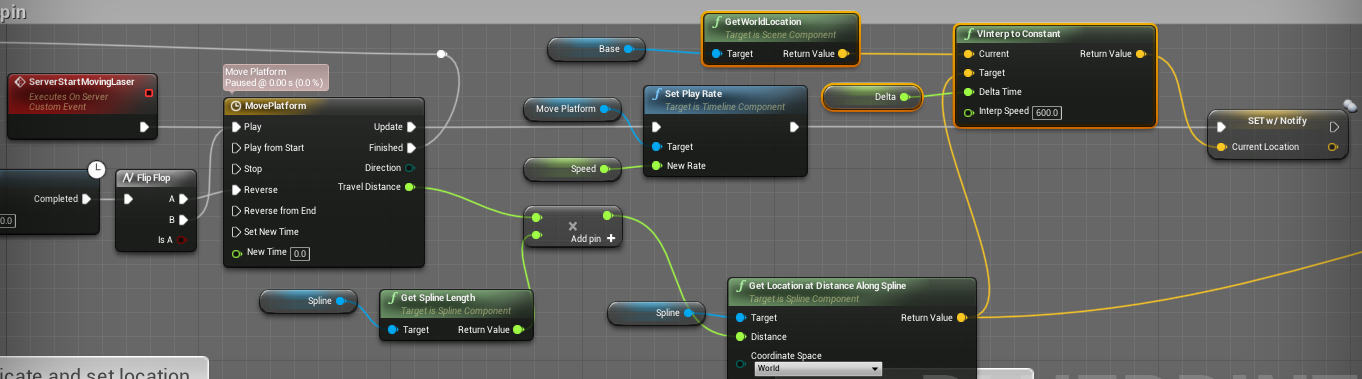
What's the most optimal way to replicate an actor that moves and spins? I have spinning blades traps I want to be able to move around
fleet raven
like a sawblade?
the best solution of course is to not replicate the spinning
if it's just round then every client can just spin a mesh on it by itself
cedar finch
Yea I figured the spinning wouldn't need to replicate unless I make a slow spinning one where players have to time it just right to get through it. But really I just wanna know how to make them move and replicate in an optimized way. I tried moving them through a timeline and a spline by setting the location in a rpc but it lagged so I changed it to set the location in a repnotify variable and it's a little better but it still lags sometimes
fleet raven
if you want it to be smooth you gotta interpolate the position on the client
hoary lark
One possibility: If the position can be represented in a "deterministic" way, like a position percentage with looped predetermined movement, I would just simulate it on both client and server (don't replicate movement) and I would occasionally RPC the current position to the client. The client could probably smoothly interpolate the difference, like if your ping suddenly reduced by 50 then the client could slow down or speed up their simulation slightly until client time matched the last received server time. If any of that makes sense lol
I might be reinventing the wheel depending on what you're working with
cedar finch
Yeah I'm just moving things in a set, predetermined path. It doesnt change or anything. For example I have a few lasers in a hallway that move back and forth and players have to time it right to get through. I also have spinning blades traps that do the same. Thanks for the suggestions. I'll look into it and try it out. I'm not sure exactly how interpolation is setup but I'll read about it.
 mellow cipher
https://docs.unrealengine.com/en-US/Gameplay/Networking/HowTo/SteamSockets/index.html
Has anyone tried to get ping from lobbies using this? It's still returning 9999 for me
How to enable the Steam network protocol layer for Unreal 4 projects.
 chrome bay
You can't get ping from lobbies natively, you have to manually do an icmp echo to the IP address
Even then, it won't necessarily match the ping you get in-game, but it's usually indicative enough.
cedar finch
So I'm not sure if adding in this Interpolation node will help with my network replication optimization. Will this make it's movement look smoother for clients? https://i.gyazo.com/c18b49f0a45aa6d3d63e28671c312178.png
https://i.gyazo.com/ae79e7e4805300659c5c600ca75c9358.png
 mellow cipher
@chrome bay how can you echo it if it's a steamid address?
Other functionality, including ping calculation, is provided through existing network interfaces in UE4.Based on that I thought it had native implementation
chrome bay
In our case we use the HostAddr from FOnlineSessionInfoSteam - but we had to modify the engine to give us a way to return that more easily
That contains the IP and port
We modified the base OSS to have an extra method TSharedPtr<class FInternetAddr> GetSessionHostAddress(const FOnlineSessionInfo& SessionInfo) - then override that again in the Steam OSS.
That way the game-side stays platform agnostic
mellow cipher
Thanks for the info
rich ridge
@chrome bay is there a way that I can get ping of every client
chrome bay
In the game the ping is already available from the player state
That's that players ping to the Server
rich ridge
Ok that's enough for my requirement
Thanks
Does AnimNotify run on server or client. If only on client can we make them execute on server
I have few events that gets triggered from AnimNotify and then they trigger another GameplayAbility. Since gameplay ability are granted by server only it makes sense to run the AnimNotify on server itself
chrome bay
Not unless you're running animations on the server
Which usually you don't because it's a huge performance concern
Either way anim notifies are entirely local, and are called when the animation is played.
rich ridge
@chrome bay so how do I call the ability when AnimNotify runs locally and it doesn't have authority
chrome bay
I'm not really familiar with GAS but my understanding is you execute the ability on the client, then that client tells the Server what they did and the server either verifies or rejects it - that is all automatic.
So it shouldn't matter
rich ridge
I need to validate this
chrome bay
Well that's how it's supposed to work, because that's the basis of prediction
rich ridge
Prediction is entirely something else, I m activating the ability on AnimNotify
chrome bay
Yeah and the activation should be called on the client that owns that object
So you shouldn't need to run animations on the server
Even if you did, the animations wouldn't be in sync anyway - so what the client sees and what actually happens would be entirely disconnected
rich ridge
I m not running animation on server, I was just curious that I could get only AnimNotify event on server that's it
chrome bay
You will get anim notifies on the server if the server is running animations, otherwise you won't.
rich ridge
Ok
chrome bay
However, since most servers are single-threaded and can't cull things it is generally not a good idea to do so
rich ridge
I understand your point
dapper hatch
Hi everyone I really need help... I have been trying to fix my issue for now 2 days and a half and can't really find something that helps... 😕. So I am trying to get the players name when they type the name they want in a text box (in the menu) But whenever I change level, It's like if the variable has restarted or somethings like this... Because the variable is not the name that they have set in the menu... https://gyazo.com/545616994b8753cd3fb6646c62da8bb3


When I press "T", the variable "name" is set to nothing..
rich ridge
@dapper hatch you should have these information in player state which can survive the level restart and retain your vairable and it's value
dapper hatch
How can I store this "name" variable in the player state?
rich ridge
Extends player state class and add the variable in player state class
And make sure you set this player state in game mode
Your problem is whenever you open a level you spawn a character that is your create new, it doesn't know about your old character and it's values
You need to retain them
So player state or game instance will work in your case
But to be precise player state is best place to store
Like you added name in character class likewise add name in player state class
dapper hatch
hum.. I'l give it a try. I haven't really played with gamemode and player state..
But thx mate 🙂
i'l try
But would this work even if when i change level I change gamemode too?
rich ridge
Explanations of the basic gameplay elements, Actors and Objects.
In game mode you can specify which player state to refer
So changing game mode should not be a problem
dapper hatch
Hum... How do I extend the player state class tho?
rich ridge
Create new class and make it's super class to UPlayerState
In create class wizard search for player state
 dapper hatch
Ok
And then to set the name that my player has entered in the menu, to the name of the player in the player state would this work?

@rich ridge
dapper hatch
facts
ive tried and it didnt work tho.. I rly dont know why. everything looks completely fine.
its like if the variable that I have set in the player state doesnt survive when I change map
Even tho I have changed the player state to this one on both map
rich ridge
Have you set the player state in game mode
dapper hatch
yes
rich ridge
Let me open my UE4
rich ridge
@dapper hatch r u there
I was wrong partially.
The player state is used to retain data of players who need to respawn after they die, example MOBA games, when a hero dies he will re spawn with already gained attributes, so we store those attributes in player state.
The problem with player state is that once you do Local or server Travel (in simple words open new level ) the data inside of player state is cleared
And the GameState also behaves in the same manner. So GameState and PlayerState are out of scope.
So we are left with GameMode and GameInstance.
If the game happens to be single player use GameMode
if the its multiplayer use GameInstance.
since gamemode exists at server in case of multiplayer games, but game instance exists at client side.
I apologize for wrong information earlier.
Please extend GameInstance and do the same things
 winged badger
@rich ridge you can just use CopyProperties on the PS to persist the data you need
doesn't even matter if PS is of a different class on the start/end level
server-side, the new PS after travel will still have the data
then you just rely on normal replication to propagate it to clients
winged badger
no
 noble oxide
it will copy properties you provide there
winged badger
it will copy what you tell it to copy
you have pointers to both old and new PS available
rich ridge
@winged badger so it forms a linked list as I keep opening the new levels
rich ridge
Just now u said i have both old and new PS
winged badger
yes, as function parameters
winged badger
and then the old PS is explicitly destroyed
the PS doesn't have a pointer to old PS
the CopyProperties function has APlayerState* OldPS and APlayerState* NewPS in arguments
as it is called at the time when both still exist
winged badger
its not a linked list at all
rich ridge
But it's a node of Linked list correct
Having old pointer which behaves as next or previous
rich ridge
2 pointers to PS right
winged badger
yes, and they are not linked in any way
find the APlayerState::CopyProperties
and the function that calls it
rich ridge
If it's pointer to PS then it exhibits the properties of linked list
Though it's not being used as linked list that is different mayyer
Matter
winged badger
i'd c/p you the code at this time, but i am migrating to another PC so i am not fully set up
it has nothing to do with linked list
rich ridge
I get it
winged badger
a function called from PC swaps the playerstates
if has access to old PS as its still PC->PS at the time its called
it creates a new PS
then calls copy properties sending pointers to both PC->PS and NewlyCreatedPS
as arguments
rich ridge
Ohh now I got it.
winged badger
and then it destroys the old one
rich ridge
I was thinking that PS pointer is present inside of PS
You are correct it's not linked list at all
 faint lintel
Hello,
Sorry to interrupt with another topic but I have a quick question about something.
I am having trouble getting a player PlayerController.
I have made sure that my playercontroller is assigned in my GameMode and the world is using my GameMode.
I also tested with putting a breakpoint on a character movement, to look with debugging if the playercontroller is assigned and it is.
Also I am controlling my character through PlayerController so it wouldnt even move if it was an incorrect one or not assigned.
Scenario I have trouble with is the following:
I have another object which has overlap methods in and I am trying to get OtherActor's(my game character) playercontroller, but it is returned as NULL.
Now what is strange is that if I test the same thing with 1 player, so a single player game, then it works I get the correct playercontroller.
When I do it with more than 1 player it tells me the playercontroller is NULL although I know it is not.
Does anyone happen to know what might cause this?
My C++ code for getting the PlayerController inside onOverlapBegin:
AC_Barni* PlayerCharacter = Cast<AC_Barni>(OtherActor); <---- my game character.
if (PlayerCharacter)
{
AGamePlayerController* GamePlayerController = Cast<AGamePlayerController>(PlayerCharacter->Controller);
.....
}
I have also tried this, but it returns null
AGamePlayerController* GamePlayerController = Cast<AGamePlayerController>(PlayerCharacter->GetController();
winged badger
it is null
PC only exists on owning client and server
you don't have PCs for other players on clients
raven viper
eXi's compendium neatly outlines what classes exist, how, and where.
faint lintel
But then I am testing with 2 players where one is host and other is client, they both have their own PCs, so when I run into a triggerbox, I should be able to get that PC or am I missing something
winged badger
overlaps run on all machines
faint lintel
ah damng
winged badger
that includes both clients
faint lintel
I tottaly forgot that
thank you!
but still.. if it runs on all clients I should still be able to get it
winged badger
when client 1 overlaps on client 2's machine, no
faint lintel
I mean if I set a break point into the overlap method, then each time i break it is with a specific character
so first time i get it it is player 1 and second time it is player 2 or visa versa?
winged badger
you should not be accessing PCs from any code that runs on every machine
controller is not there to hold states that are replicated to everyone
faint lintel
okey, thank you
faint lintel
can someone please link me a reference or explain priefly why is overlap method called on all players not on the one that is actually overlapping a triggerbox.
winged badger
whatever actor has that OnOverlapBegin implemented
exists on all machines
whenever something triggers the overlap, code executes
it doesn't care if its a player that has PC on that machine or not
 plush lagoon
having some issues with replication of scaling of avatars across all clients on a server
I have a game mode which is cycling through all of the player controllers, getting their character and then increasing the size of it depending on what they are doing
for some reason, i cannot get it to replicate across all clients
like they do not grow in scale
hoary lark
well, how are you doing it? assume game mode runs on server, sets a replicated "scale" variable on the pawn, clients adjust their scale on repnotify...
fleet bear
what should handle spawning players in multiplayer? I've always had the player controller do it automatically on load, but should the game mode be doing this or something?
@plush lagoon lol hey bud
plush lagoon
@fleet bear gamemode should spawn them, and you should spawn the character or pawn and then possess it to the player controller
fleet bear
thanks
polar lotus
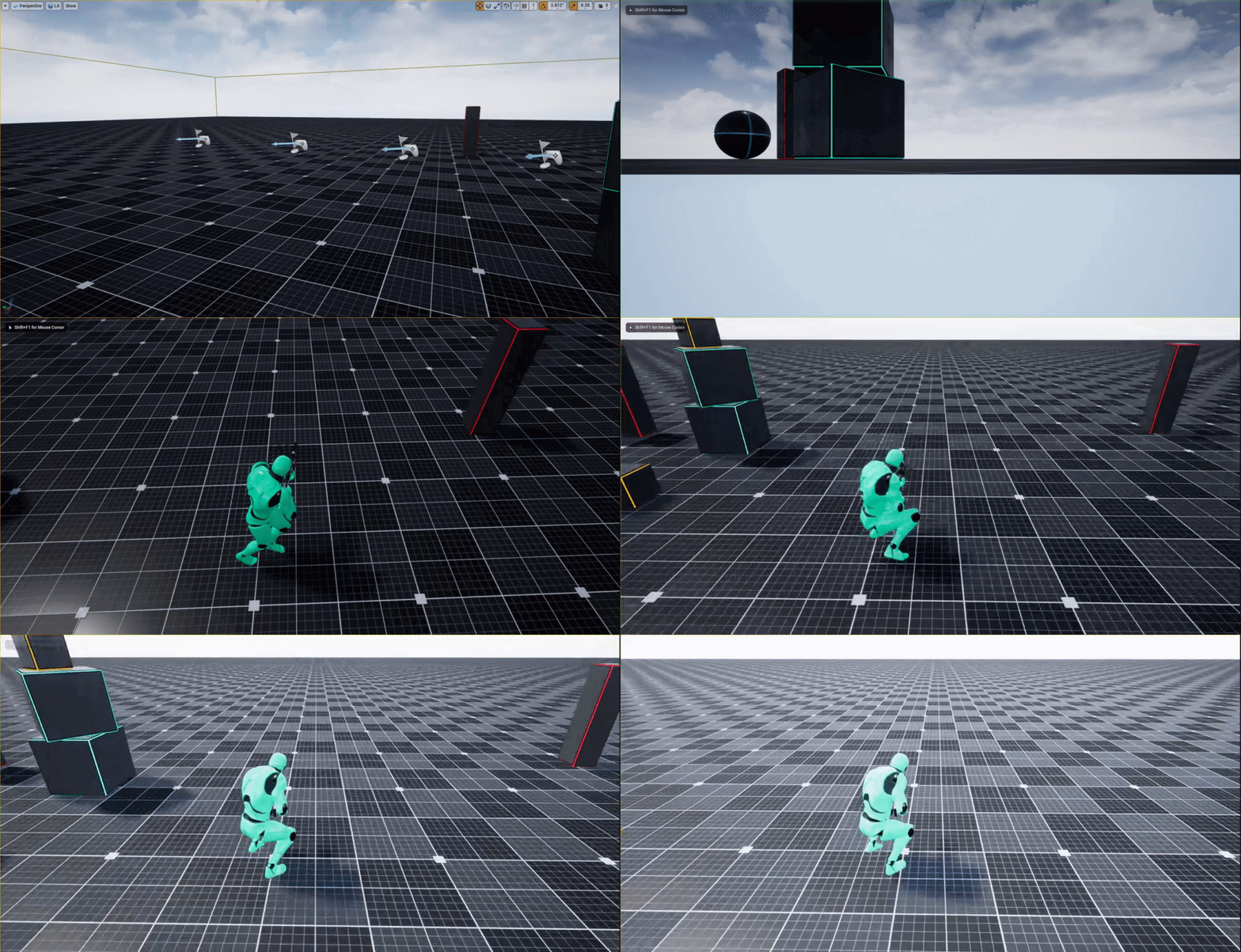
Guys I have the same problem even when packaged
My character jitters whenever he's not walking sideways. When I'm on a listen server and I am the authority then this does not happen but it does for all the other clients
And it's even weirder when I package the game
Sometimes the client can't see the jitter but other people can
And sometimes vice versa
dapper hatch
@polar lotus I had the same issue a couple weeks ago... This fixed my issue. At least try it.
If this doesn't work, then it might be that your movement is not replicated right.


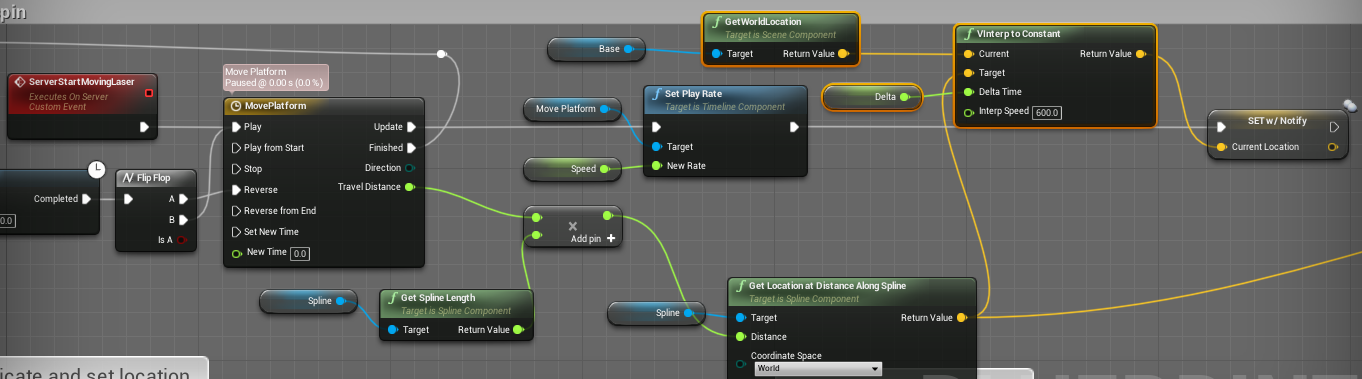
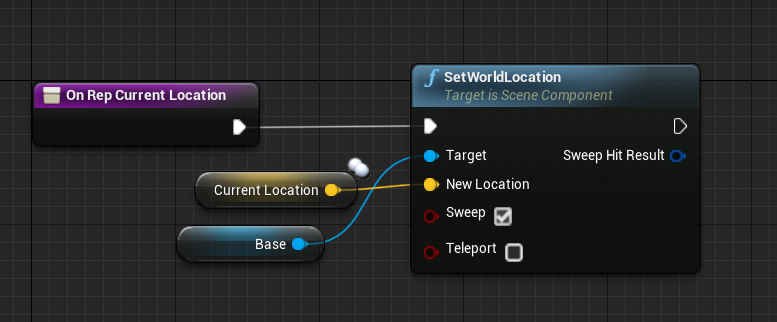 hoary lark
(You can just set that setting in the movement component instead of using the BP if you so desired 😄 )
 still path
Hello everyone. I am currently screwing around with networking (mostly working) but I am noticing that jumping (on client) will sometimes cause rubber-banding. When watching from the servers perspective I can see that the character will fail to jump from time to time yhus causing the rubber-banding. I do have the server RCP set to reliable and am not sure what is causing this / how to get around it. Any tips would be useful. Please note that I am working in BluePrints only as my experience with C++ is limited at best.
 fossil spoke
@still path Are you using the normal Character that comes with UE4?