#multiplayer
1 messages · Page 509 of 1
 smoky ore
 fluid flower
and are you searching for dedicated servers, or player hosted sessions?
smoky ore
player hosted
fluid flower
ok and how do you create the sessions?
smoky ore
via this. (private games aren't in yet, I'm just trying to get public ones working and to be found)
and that is in a widget
in a previous project, i had the game instance create the session via an event in it, though I don't know if that makes a difference or not.
fluid flower
and I assume LAN = false?
smoky ore
yup
fluid flower
and you have a valid appid or using the test one etc?
player hosted sessions worked quite easily for us
smoky ore
I'm using the test one, 480 (spacewars), that being said, i decided to just for safety sakes turn the Creating Session thing from the widget to the Game Instance like how my old project handles it.
i dont see how this should effect it though (im gonna be shocked if it somehow does)
 main owl
Am developing in VR and want to test replication but only have 1 headset, have been replication testing using my PC pawns but that way I can't test the VR Pawn, anyone else creating VR multiplayer content that has a good way to test replication with only 1 headset?
 desert glacier
Hello,What is the way to open a level at the server but nothing happens to clients?
 twin juniper
if you open a level, its unloading the other was open
the ideal is doesnt open levels at server if you dont want transitions
instead streaming sublevels
 gray scroll
On character possessed... im calling this event: on server... owner is fine but on clients... owner is none. How do I replicate owner on client?
twin juniper
that self is which class?
gray scroll
character
twin juniper
probably that class isnt being replicated to client
gray scroll
and its replicated obv
 winged badger
funny thing
    UPROPERTY(ReplicatedUsing=OnRep_Owner)
    AActor* Owner;
your Owner should be available client side by the time the Actor calls BeginPlay
gray scroll
@winged badger i fixed it...
called a set owner in that event
replicated to owning client
twin juniper
so owner isnt avaliable for construction script?
winged badger
construction script, no
twin juniper
ugly
winged badger
it runs on clients before the replication
 cyan temple
anyone know why after creating a session (steam multiplayer) and joining it with a client the host spawns as the correct player pawn and the client spawns as spectator pawn even though the default pawn in the gamemode is the right one?
gray scroll
@winged badger so does my solution make sense? or something seems wrong?
winged badger
on server its
normal spawn -> set variables => spawns actor, runs construction script, calls beginplay, sets variables
deferred spawn -> set variables -> finish spawn => spawns actor, sets variables, runs construction script, calls beginplay
on client its always
spawns actor, runs construction script, sets replicated variables, calls replication callbacks, calls postnetinit, calls beginplay
the owner is replicated on AActor
it should be there on all clients, how are you checking it?
gray scroll
doing get owner inside weapon on beginplay
keep in mind....
i m calling it on possessed (character) which is called on server only
so maybe the owner doesnt get set for clients because all the logic is done on server only
twin juniper
the spawn actor should run only in the server, if it will be replicated
gray scroll
yea so for some reason its owner is none until i replicate it to owning client
the set owner
its weird
twin juniper
use the has autorithy before the spawn, see if it isnt being executed in the client too
theres a chance the client is spawning it too
winged badger
with ExposedOnSpawn pin
Owner has to be available on both server and client before BeginPlay
unless the K2_SpawnActor node is broken
you can easily test it, add an ExposedOnSpawn integer, or whatever, when spawning enter 47, and it will be 47 on server and clients on BeginPlay
twin juniper
replicated actors even with different names from server/client version still linked ?
desert glacier
even when I stream a level it's the same thing that reproduces
winged badger
replicated actors are identified with NetGUID, not the name
desert glacier
open a level at the server but not at the clients
twin juniper
the clients are really connected?
desert glacier
Yes
twin juniper
let me test here what happens
desert glacier
no, when I open a level by the server, there is also a level that opens with clients
twin juniper
from where you re calling the Open level?
desert glacier
after clicking a pause menu button
twin juniper
show how
desert glacier
What ?
twin juniper
you need that event being executed in server
if you calling directly from widget wont work
desert glacier
Yes only server
twin juniper
what you want?
twin juniper
i dont know what you need
desert glacier
I want to open a level at the server, but when I do it it also affects the clients, but I do not want that, I want that when I open a level at the server than at the clients, no level opens
twin juniper
thats not possible
 red pollen
Why do you want that?
twin juniper
the connected clients will always got the level from the server
winged badger
if server goes somewhere solo, clients go to main menu
twin juniper
the persistent level must be the same from client
desert glacier
why when the server goes back to the main menu that the action does not happen in other players
winged badger
because you don't have a main menu level or you didn't wait for their connections to time out
twin juniper
or because the level still open at the server,
the persistent current level is always open
you cannot run the engine without a level open
desert glacier
in fact I can just do it with a widget, but I have a system that displays the number of players in the session and I want that when a player returns to the menu that he is no longer considered in the session
 gritty lodge
Does anyone know how to make a level streamed level load on a dedicated server (so that it gets the collision?) All my characters get loaded into a "base" level and then all the connected clients load the map to play on, which works as P2P, but once moving to dedicated server, the server doesn't know the collision so the characters just fall through the map on the first server update. Thanks.
 toxic flint
so, i'm just about at the point now where I start buying multiplayer minimaps from the marketplace just to see how they do it...day two and i'm at the "flip random switches" stage of the development process...
I know! It's not a bug, it's a feature! Only one client gets a minimap, working as intended!!
my work is done here..Out the window the computer goes...
winged badger
i told you, there is no need to network a minimap in any way
it should work locally, unconcerned with network and replication
all the information you need is already available client side
toxic flint
Im not, I'm running all through the client side of Auth.. still only one client controls the minimap
winged badger
yeah, your character i assume is not a place to make widgets from
toxic flint
interesting
winged badger
that BeginPlay runs on clients for every Character
simulated or autonomous
funny thing is you actually probably have each client controlling its own minimap, its just that you have as many minimaps as you have characters
stacked ontop of one another
toxic flint
I had a is locally controll branch in there, that should have prevented that right?
toxic flint
sorry, listening quitely now 😛
winged badger
HUD is created locally only, one per player controller
it helps avoid wires getting crossed with widgets, like the situation you have there
toxic flint
Ok, let me look into the Hud derived Class, thanks
winged badger
its designed to manage the widgets
it can reference player controller and controller pawn directly
with GetOwningPlayerController and GetOwningPlayerPawn
btw, IsLocallyControlled check would probably work, but using HUD is just good practice, especially for multiplayer
 narrow prairie
i have on the game mode, post login a event inside player controller - executing on owning client that created the hud for the player controller. There is a really good tutorial from wes (epic games) that explains that stuff really well. https://www.youtube.com/watch?v=abmzWUWxy1U tutorial is a bit outdated but explains a few concepts really well regarding game mode, player controllers, character and widgets

In this video we take a look at the finished project and step through each of the features that will be covered in this series. We show our functional Main M...
winged badger
you can just run that from HUD BeginPlay instead of sending the RPC though
as right after post login, GameMode will call InitailizeHUD on the PC, which is a reliable client RPC under the hood
and PC then creates the HUD
clients don't really need to know the controller ID for anything, either
narrow prairie
its a debug..\
i just showed him an alternative way of doing it
i builded my game on this foundation
my bad i guess
winged badger
its not that terrible, its just one RPC you could do without
narrow prairie
blame wes
toxic flint
That was one of the first blueprint tutorials I followed; guess it couldn't hurt to go back and take another look.
winged badger
wes does okay presenting what unreal can do
but he is also an absolute terror when presenting how a well structured code should look
as his presentations are basically a collection of cheap hacks that scale terribly
narrow prairie
i only started a year ago. i dont have that much knowledge yet. thought i gave a share. but i had to choose a foundation one day. srry for my input
winged badger
don't be sorry, just be mindful that the video tutorials can usually be vastly improved upon 😄
input is usually a good thing
narrow prairie
i thought there was a reason he did it like this
winged badger
he did
narrow prairie
he said something about 2 players controllers
1 was on server
and 1 was on local client
winged badger
doing it proper would take twice as much time to record
as it results in more initial work, and far less pain down the road
which is okay when you're doing a 2 hour video, or a very tiny game i guess
when you do a larger project every early shortcut you take will come around to bite you in the arse
toxic flint
Ok, so I set up a HUD BP and use that BeginPlay and same result. The HUD info was a good pointer, thanks for that.
Thats in the HUD BP
winged badger
connect getowningplayercontroller to owningplayer pin
always good to have that ref
toxic flint
Done, no dice..
winged badger
you did disconnect the widget creation from the character, right?
(that wasn't going to help here, its just good practice to get used to)
toxic flint
loil, I was going to mentioned that because of my "issue" yesterday... Yes, confrimed that disabling the Hud begin play disables the hud
winged badger
that widget is centered on the player?
toxic flint
Oh, is a ScenecaptureComponent parented to the player, ya
I imagine I will move to 2d map at somepoint but really need to get a grasp on this.
toxic flint
alright, thanks for the help
 hollow arch
Hello, i search complète « formation » on c++ for multi on dedicated servor, i dont find, any links please ? :p
toxic flint
Are the player indexs a different random ordered every time you call GetGameState>GetPlayerArray? I guess that would make since if it's recreating the array everytime you call it; not sure why I just assumed it wasn't...
winged badger
they are not
but there is no guarantee of order on any of the GS instances @toxic flint
toxic flint
But I can assume that the index ids are sequential right? ie. 0,1,2... not 0,4,9...
winged badger
they are, but they are filled in order packets telling the clients to spawn a replicated PlayerState arrive
toxic flint
While debuging Im seeing instances where with two clients they both fail for index 1, has me scratching my head a little.. Ill figure it out with more debug.. just strange
winged badger
odds are it will not be identical order on all clients
 fleet raven
keep in mind it can take a while for player states to arrive
you can have a character before the state
because that makes perfect sense
toxic flint
Sorry, Sometimes fail for index 1... it's seeminly random...perhaps race condition
winged badger
odds are you will have a character before the PS
as PS has a default NetPriority of 1, same as just any vanilla Actor
while pawns have 3
fleet raven
swapping that would still not guarantee order
winged badger
it would unless there is some packet loss
fleet raven
if the packets containing the first object are lost
winged badger
but you can't guarantee they won't be
fleet raven
or arriving out of order
as they come on separate channels there actually is no ordering between them
winged badger
is this still related to your minimap @toxic flint
toxic flint
Ya trying to follow the Pawns
winged badger
imo, best way to do that is to slap a UMinimapComponent on it, that registers itself with AMinimapManager locally
toxic flint
I'll have to look that up
winged badger
then you don't care about order of replication, when the Actor replicates, its MinimapComponent runs BeginPlay, which finds AMinimapManager (or UMinimapManager component on your say, GameState)
and registers with it
that way the Manager always has a full list of Actors that should be marked on a minimap
and its network independent
fleet raven
unless your object replicates before the game state
winged badger
it still won't call BeginPlay before the GameState
so its cool 😄
as OnRep_MatchState in the GS is what calls DispatchBeginPlay on the World
on clients
and in case of AMinimapManager actor, its placed on the level, so its loaded before any Actors are spawned, or call BeginPlay
fleet raven
that's not a thing when using game state base
toxic flint
Still trying to look up UComponent..lol
fleet raven
I wonder how it works then
winged badger
true, i would strongly recommend against GameStateBase in a multiplayer game
just because you don't have control over BeginPlay on clients
fleet raven
I guess in OnRep_ReplicatedHasBegunPlay
idk, GameState has all that unnecessary stuff in it
winged badger
entire core framework is weird unless you're making UT
fleet raven
lol what is this relic
fleet raven
that doesn't seem to exist
winged badger
its in PC
fleet raven
there's only AutoManageActiveCameraTarget
winged badger
it aggressively keeps setting the VIewTarget on your StartSpot/AutoManage Camera for PC index
ends up calling SetViewTarget 7-8 times
when you start the game with it enabled
fleet raven

winged badger
found that out the hard way, trying to manually set the view target on NotifyLoadedWorld after seamless travel
with that enabled
fleet raven
sometimes it feels like your game is held up by an extremely fragile layer of ancient runes that no one has explored in the past 2 decades
winged badger
and the runes are weird
travel from Map A with PC A to Map B with PC B, NofityLoadedWorld is called on PC A, controllers are only swapped when the ServerNotifyLoadedWorld executes (called right after)
it does make sense, but it also feels so inelegant
fleet raven
how about the absolutely insane process of non-seamless server travel
winged badger
and for us the life is good, when someone is stuck with BP only... yikes
    /** Return true if FindPlayerStart should use the StartSpot stored on Player instead of calling ChoosePlayerStart */
    virtual bool ShouldSpawnAtStartSpot(AController* Player);
this is one of the more bizzare gamemode functions
fleet raven

oh
is this why once someone joined the server and picked one of the player starts, they always respawn at the same one now until the map changes..
winged badger
yes
fleet raven
lmao so unnecessary
winged badger
and you can't override it in BP
fleet raven
well yeah can't have too many bp overrides
that would ruin the performance
since optimizing the 90s vm that spends 90% of the time in overhead is not allowed
winged badger
well, this one at least deserved a EditDefaultsOnly boolean that can be ANDed with return of that
fleet raven
someone should make a PR with faster blueprints
winged badger
last time they went for that and improved nativization, we lost default implementation for blueprint events on interfaces 😦
winged badger
@knotty crown on server Pawn calls BeginPlay before its possessed, so the controller is null at that point
on client, the construction takes another route, so the Controller variable (what GetController returns) will have replicated before BeginPlay is called
so its valid there
fleet raven
and the clients don't see the controller of the other client
winged badger
with blueprints, only variables set via ExposeOnSpawn will get set before BeginPlay
(on server)
 knotty crown
OK, do you know where could I read more about this topic?
winged badger
ActorConstruction.cpp? 😦
knotty crown
OK
winged badger
basically
knotty crown
Is there an event that is called on the server after a pawn has been possesed?
knotty crown
Is OnPossessed C++ only? I can't find it in the blueprint menu
fleet raven
is there one on the client side that I missed
fleet raven
I think we made a huge mess of trying to track the pawn changing for updating the hud
winged badger
but not from BP
i usually go for the SetPawn override in the controller
its easiest place to handle Pawn changes, also by far the most convenient with listen servers
as its directly tied with the PS and HUD
fleet raven
ah wait that wasn't it, it was linking up remote pawns and their player states
winged badger
you do have OnRep_PlayerState in Pawn iirc
fleet raven
yeah it's not a thing in bp though
winged badger
nope, most people end up sending a Client RPC because none of the callbacks are exposed to BP client side
fleet raven
the rpc could arrive before the actual object 
winged badger
i think the most robust way in BP is putting a replicated variable of Pawn's type into the PS, and use the OnRep
it is redundant, but you do get the callback from it
the PS doesn't have OnRep_PawnPrivate
fleet raven
the way you can't easily scroll through bp like you can with code always seems to result in big mess building up in corners no one sees
winged badger
as it relies on Pawn to inject the dependency
toxic flint
ok, I'm going to go back to basic training (re-review the docs/tutorials) , because I have a serious misunderstanding of all of it..I really do appreciate all your help granted most of what was mentioned is Greek to me atm even after looking it up. 😛
This is what did me in btw..
Pressing m on each client added the hud to that client...still controlled by one of them
winged badger
you really shouldn't use statics to GetPlayerController
when you have easy relative path to do it
toxic flint
Im not sure what that means
winged badger
i assume that is Pawn, so its controller is GetController
toxic flint
That is getcontroller, is owningplayer
winged badger
GetPlayerController[index] is a static function
and its often misused in spectacular ways
usually resulting in wires crossed, especially if you use it on dedicated server
or in the RPC event
while on clients (not split screen) there is only 1 controller
toxic flint
Ok, but wont the fact that the hud shows up on the correct screen but controlled by the wrong players but odd
winged badger
so GetPlayerController[0] has only one controller to return
on dedicated server, that is the controller of the first player that logged in
how is it controlled?
@fleet raven yeah, i never do any networking in BP because its such a disjointed mess
toxic flint
That last test was on the characterBP.. Press "W" on client 1 map shows up on client 1, controlled by client 1 (rotation/location). Switch to client 2, press "w", map shows up on client 2, controlled by client 1 (rotation/Location).. All other things aside, I cant understand how that is happening
winged badger
and that bit where you set a replicated variable locally, then watch its OnRep fire locally bugs me to no end
controlled as in
pawn is in center, and map moves and rotates with it?
toxic flint
Is the last test, "W"? the Texture target or the Scenecapture is a CanvusRenderTarget, that is used in the Minimap material
toxic flint
I honestly have no idea
winged badger
you wrote it
winged badger
yes
toxic flint
That is being set on CreateFPSHudWidget>AddtoViewPort
FPSHUD is UMG WidgetBlueprint
The minimap is an image within that umg that points to the Minimap material
winged badger
wait, you have a single RT asset, and you're testing in single process PIE?
toxic flint
I have single RT target, that was one of me first thoughts yesterday
that it had to do with that
I was starting to look into dynamic RT creation
What is Single process PIE?
Oh I see yes
Was turning it of/on throughout testing, but for no is single process
toxic flint
they are..
yep...I really wish I would have mentioned that twice now...
Yep, I'm a idiot...
So save to say I can start looking at the RT angle again?
Honestly, I'm really happy if that is the problem, it would mean I'm not as incompetent as I thought I was; I mean still fairly incompetent , but salvageable. 🙂
winged badger
you have the ability to connect 2 standalone games yet?
toxic flint
Ya, thats the interesting part.. It works..better
still wrong pawn controller... but each client controls the others map
That I can probably solve
Is it worth addressing the RT issue then?
Yep, hooked up the HUD widget back up and it ~works with standalones...Just need to address the wrong pawn controller now.. I hope
winged badger
you should probably go and CreateRenderTarget2D per SceneCapture2D, cache it, then draw on it
and have the widget find the RT Texture by accessing it via GetOwningPlayerPawn
most elegant way is likely to make a custom SceneCapture2D, then have it create its own RT
toxic flint
I was trying something like that I think, just couldn't get it to work; wasn;t able to apply the RT to the component
Right now, 4 clients: one client controls 3 m,aps, 1 client controls the other.. Close 3 client controller, all three clients work properly...that made me laugh
*Close the client controlling the three and all three remaining work perfectly
toxic flint
ok, i'll focus on that then
winged badger
but not being able to test proper is not great
derive from scenecapture2d
have it create a RT if owner is locally controlled
on BeginPlay
toxic flint
I know what deriving is but what is it in terms of blueprints? creating a child BP?
winged badger
and then just access the texture from the widget with GetOwningPlayerPawn->GetComponentByClass<customscenecapture>->MinimapRT
you create a BP based on SceneCapture2D
then you get a SceneCapture2D component you can add your own logic to
toxic flint
Alright, I'll dig in on that.. thanks again
 subtle patio
When running a dedicated server and trying to create an advanced session, I'm getting this log
afaik I'm only trying to create the session once
anybody run into this error?
though.. the server is on the steam list..
doesn't show up in my server browser though
 mighty schooner
In 4.24 preview 4 below code always return null in Client. Is it a bug or did Epic change way to access GameState class in client? I call this inside my custom player controller class after 10 seconds. GameState variable in World.h itself is null.
const ACustomGameState* MyGameState = GetWorld->GetGameState<ACustomGameState>();
 bitter oriole
Should be GetWorld()
Provided that was a typo, check that the game state class is properly set
 outer radish
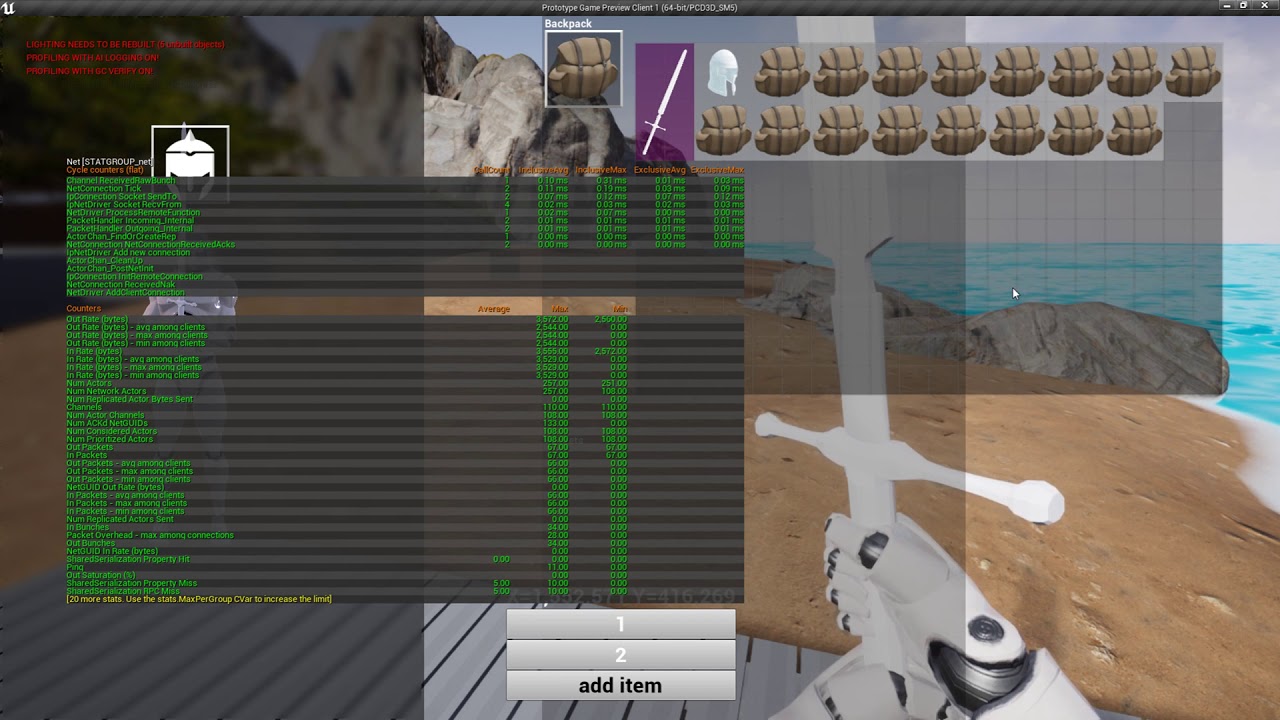
Hi folks, having an issue with RPCs. If I send through too much data then server gets stuck on a loop, and all other RPCs no longer work. Here's a video: https://www.youtube.com/watch?v=6cfHDWsS0H0&feature=youtu.be
At first I add items slowly, then ramp it up, then finally just spam add them which is when it breaks. Any ideas? I could of course send less data and I will, but ~50kb kinda low isn't it? That's like 10 players moving around in terms of data
 rich ridge
Does anyone ever tried to connect to dedicated server via python pawn
Or python player controller
mighty schooner
@bitter oriole that was a typo. It is setup properly because I have some functions there printing to the log when game starts.
mighty schooner
Just put a log inside BeginPlay of my custom game state and its never called on client but it is called on server. 😕
mighty schooner
Both are there
winged badger
did you override the MatchState logic in GameMode?
winged badger
does anything on client call BeginPlay?
mighty schooner
In begin play only log is there
And it does print for server but client nothing/
mighty schooner
Lemme check. I'll put log inside their BeginPlay and see. One minute
My custom game state is extended from AGameState and not AGameStateBase
winged badger
most common causes are
mighty schooner
I put a log inside PlayerController and PlayerCharacter BeginPlay and they only print when its dedicated server and not client. 😕
winged badger
missing Super in BeginPlay or GetLifetimeReplicatedProps (first won't call BP BeginPlay, and will ensure on newer versions, second won't replicate the MatchState, and OnRep_MatchState calls DispatchBeginPlay on client's world)
and if none of your Actors are calling BeginPlay on client, then you broke the GameState's RepLayout
or MatchState transition logic in the GameMode
 uncut oracle
Does someone know the class that deserializes the network packets that the client receive from the dedicated server?
winged badger
each class has its own implementation of NetSerialize
@mighty schooner good news is that there are very few places where you can break BeginPlay on client
mighty schooner
But I've not overriden any of the GameState functions except BeginPlay and I called Super inside it. For GameMode also not overriden anny parent functions.
winged badger
added any replicated variables to GameState?
mighty schooner
Lemme try with default game state and see if player controller/character begin play is called in clients
Yes and its included inside GetLifetimeReplicatedProps with DOREPLIFETIME
winged badger
and that function has Super call too?
mighty schooner
Yup
I switched to the default game state and still log gets called only in dedicated server
I'm using ReplicationGraph in my project. Could that be an issue?
@winged badger Yup it was ReplicationGraph. Uncommented it from DefaultEngine.ini and now all begin play in client works.
First time using ReplicationGraph. When I enable it none of begin play in clients gets called and I have this warning spamming my log LogReplicationGraph: Warning: No Replication Lists were returned for connection
mighty schooner
Yay got it working. Was missing implementation of some functions in my custom ReplicationGraph. Thank you @winged badger 🙂
 worthy perch
Because of the new Steam Hot Seat feature, have any of you guys decided to support that feature -- implementing local coop?
smoky ore
Update on my problem: moving the creating/joining session to GameInstance fixed it
twin juniper
Hi i have a probleme with createing a Listen Server ?
Error Code :
[2019.12.09-14.47.12:150][499]LogTemp: Display: ParseSettings for GameNetDriver
[2019.12.09-14.47.12:152][499]LogTemp: Display: ParseSettings for IpNetDriver_0
[2019.12.09-14.47.12:153][499]LogTemp: Display: ParseSettings for GameNetDriver
[2019.12.09-14.47.12:156][499]LogNet: ReplicationDriverClass is null! Not using ReplicationDriver.
[2019.12.09-14.47.12:156][499]LogInit: SteamSockets: Socket queue 131072 / 131072
[2019.12.09-14.47.12:157][499]LogNet: Warning: Failed to init net driver ListenURL: /Game/Maps/Developement/Devmap?listen: SteamSockets: binding to port 7777 failed (0)
[2019.12.09-14.47.12:158][499]LogNet: Warning: Network Failure: GameNetDriver[NetDriverListenFailure]: SteamSockets: binding to port 7777 failed (0)
[2019.12.09-14.47.12:158][499]LogNet: NetworkFailure: NetDriverListenFailure, Error: 'SteamSockets: binding to port 7777 failed (0)'
[2019.12.09-14.47.12:159][499]LogWorld: Failed to listen: SteamSockets: binding to port 7777 failed (0)
winged badger
New: Changed DOREPLIFETIME implementations to use a struct for its parameters, and exposed a new macro called DOREPLIFETIME_WITH_PARAMS to encompass older functionality.
not looking forward to upgrading
worthy perch
So instead of ClassName, PropertyName, it's... and what's WithParams?
knotty crown
Does unreal have built in functionality for Client Side Prediction (and/or) Server Side Lag Compensation, or do deveolpers have to impement these themselves?
knotty crown
Yes to both server side lag compenstation and client side prediction, or just one?
 river hazel
I would just say no to both of these
If you use character movement component and you have a client that is lagging
They will see everyone else's "old" positions and actions
And they will move "later" on everyone else's screen
Theres nothing that looks at how much they are lagging tries to account for it
And tries*
bitter oriole
Yes to client side prediction @knotty crown
knotty crown
@bitter oriole Do you know where the documentation for it is?
river hazel
There is simulation between server side ticks but that's not there to compensate for latency, it's more about tick rate...and you say humanoid character...but it's just character movement component you mean right?
bitter oriole
CharacterMovementComponent handles movement logic for the associated Character owner.
knotty crown
Ahh, its in the character component documentaton
river hazel
Theres nothing stopping you from having any other kind of character, the collision shape for movement is locked to being a capsule though:)
knotty crown
OK
So there is no built in way for the server to rewind time when checking for a hit on a networked character?
bitter oriole
It's worse than that, the physics engine doesn't have support for it
knotty crown
So you just need to implement your own ghost objects to lag behind each character on the server
bitter oriole
Something like that yeah
knotty crown
ok, thanks for all the info @bitter oriole and @river hazel !
 grizzled warren
Noob here, is it better to create multiplayer functionality before making the game.
Or can I make a single player game and just add another player easily?
bitter oriole
You definitely can't add multiplayer easily
You also probably shouldn't start with multiplayer immediately before you kn ow the game is any good
 meager spade
UT4 stores points
not a ghost object
but the last X amount of positions
the player was
check it out @knotty crown
 split drum
@outer radish my understanding is, by default, you can only send 2 RPC per net update. You can up this with net.MaxRPCPerNetUpdate. You can also try upping the max server and client bandwidth
grizzled warren
Hmm I see. Then I'll add it once I know the game is fun
knotty crown
Thanks! @meager spade
grizzled warren
Thanks @bitter oriole
river hazel
You will most likely have to rework a lot of your game if you dont consider how multiplayer games work as you build the game though
Something as simple as picking up an object becomes hell in multiplayer
bitter oriole
Yeah, that's exactly what I hinted at earlier. It has to start early in production.
Just, you know, don't spend too much time getting multiplayer perfect before you know the game is about.
outer radish
@split drum thank you I will look into it 😌
subtle patio
Hey gang, still getting an error from my "create advanced session" call on a dedicated server's begin play
LogOnlineSession: Warning: STEAM: Cannot create session 'GameSession': session already exists.
Do I need to run a destroy session before hand? or check the server authority? I thought that was what "Is dedicated server" did?
toxic flint
Just a quick share for anyone who might have been following my issue and anyone else trying to set up multiplayer minimaps; this is what my final blueprint looked like (in HUD_BP). I did try the ScenecaptureBP method that was suggested but wasn't able to get it to work.
open to suggestions/improvement tips
Also, one of the key aspects that took a little digging to find (but now I see the ref everywhere of course) is that you have to convert the Texture sample in the map material BP to a parameter, then you can Set Parameter Value.
Also, Thanks to everyone who helped me on this; extremely helpful.
subtle patio
Right so Cannot create session was being called because I spelled the map, which I was trying to open after the session was created, incorrectly.. rofl
Server still not showing on the server list :<
 keen thorn
Hi, has anyone here tried to create their own server backend for their ue4 games? like using nakama or similar libraries?
We are working on a server solution that can run at max 50mb per instance. UE4's built in server solution always runs at at least 200mb per instance, which is too much for us since we depend heavily on scalability of instances.
currently looking for similar projects, would appreciate if anyone could shine some light 🙂
twin juniper
Hi i have a probleme with createing a Listen Server ?
Error Code :
[2019.12.09-14.47.12:150][499]LogTemp: Display: ParseSettings for GameNetDriver
[2019.12.09-14.47.12:152][499]LogTemp: Display: ParseSettings for IpNetDriver_0
[2019.12.09-14.47.12:153][499]LogTemp: Display: ParseSettings for GameNetDriver
[2019.12.09-14.47.12:156][499]LogNet: ReplicationDriverClass is null! Not using ReplicationDriver.
[2019.12.09-14.47.12:156][499]LogInit: SteamSockets: Socket queue 131072 / 131072
[2019.12.09-14.47.12:157][499]LogNet: Warning: Failed to init net driver ListenURL: /Game/Maps/Developement/Devmap?listen: SteamSockets: binding to port 7777 failed (0)
[2019.12.09-14.47.12:158][499]LogNet: Warning: Network Failure: GameNetDriver[NetDriverListenFailure]: SteamSockets: binding to port 7777 failed (0)
[2019.12.09-14.47.12:158][499]LogNet: NetworkFailure: NetDriverListenFailure, Error: 'SteamSockets: binding to port 7777 failed (0)'
[2019.12.09-14.47.12:159][499]LogWorld: Failed to listen: SteamSockets: binding to port 7777 failed (0)
 exotic axle
Do you have something else bound to port 7777?
I also searched up that error on the unreal forums, there's an outdated post on it: https://forums.unrealengine.com/development-discussion/blueprint-visual-scripting/56551-steam-failed-to-bind-to-port-7777
Unreal Engine Forums
Build powerful visual scripts without code.
Dunno if that's even relevant. Also, I saw someone who was able to isolate the problem down to Steam on their computer, so try either running on a computer that doesn't have Steam or maybe just close Steam and see if anything is there causing it.
 royal isle
@keen thorn I tried it once but left it in favour of the Replication Graph when that came out. Unreal has a socket library that lets you make both UDP and TCP sockets. What I was doing was that I created a TCP and UDP sender and receiver for my unreal actors and then a UDP and TCP sender receiver on a node js server for them to communicate. After that it was the wild west. I had to come up with my own protocol for connecting and disconnecting and then you need to completely rewrite any gameplay (and other) calculation in your own server so that it does its own collision detection and stuff. You can look into the NetDriver classes that do wrap the socket library and also the UNetConnection, UChannel, UActorChannel and FObjectReplicator so that you can somewhat understand how actors communicate with the server deep down in unreal's own networking system. Once you have a solid communication system established you can be as creative as you want with what you need your network engine to support.
 potent prairie
got a tough issue. When 1 client enters a swimming volume, its Movement Mode is set to swimming and he can swim. That's working correctly. However, when a 2nd client connects, the server spawns this second client with movement mode Swimming instead of walking. I'm not sure why/how this is being set to Swimming for additional clients that connect?
red pollen
Where do you set the mode to swimming?
potent prairie
on the character when he enters the swimming volume. I'm setting it with a server event and then doing a client event that also sets it. So it works correctly for the most part when players are in the game running around. The bug is ONLY when a new client connects, he's set to swimming for some reason. The other players are fine
potent prairie
I wish it was that simple to fix but it isnt. I tried setting it to Walking on spawn on both server and client and still doesnt fix it
I just can't figure out why new connecting clients are being set to swimming on spawn
its weird
currently connected clients arent affected by it and can swim and all that fine
winged badger
BeginPlay - SetMovementMode
potent prairie
yep doesnt fix it
winged badger
breakpoint it, wait for that line to change the movement mode, then set a data breakpoint
so you see what changes it afterwards
potent prairie
is a data breakpoint different than a regular F9 breakpoint?
winged badger
yeah, you need to find a variable in Locals/Autos/Watch window
then right click and Break when this value changes
potent prairie
okay thanks Ill give this a try
winged badger
its limited to 8 bytes members, but its an enum so you should be fine there
potent prairie
wheres the Locals/Autos/Watch window
winged badger
debug>window>locals is what i usually go for
those are 3 different windows, either works
potent prairie
okay thank you, I found an even more serious problem, looks like my begin play is running each time a character spawns for each character in the world. Ouch
so ill get to fixing this and see if it solves the swimming problem
red pollen
Bit of a weird one, but I've been working on destroying sessions for the game today, and I've found a bug I can't seem to squash. It occurs when the host of a server (still in the lobby), quits. The session is destroyed successfully and everything works, clients are removed etc. But when that same player goes to host another server, other clients can find this hosted server but can't join. The flow hits the Join Session node, but this node just fails. Anybody had this before?
potent prairie
@winged badger so I'm not using c++ for this swimming thing, how can I check this in blueprint?
spent like 20 min looking for the Locals in the editor lol
winged badger
easiest way it to override characters beginplay in BP, and set movement mode to walking
then put a breakpoint there, and once it changes to walking
put a data breakpoint
potent prairie
okay
winged badger
shit, that was a spectacular brain misfire
potent prairie
okay so nevermind, even connected players are getting their movement mode messed up. So when a player enters the swimming volume, all other players get set to Swimming the next time they jump.
winged badger
not override BeginPlay in BP, but in c++
so you can easily access the CMC from where the BeginPlay breakpoint hits
potent prairie
its worse than that now, connected players are affected as well. i just didnt realize it because i wasnt jumping around with the clients
but once i jumpo they start swimming in mid air
even if they arent near the volume
its as if the swimming volume on the Overlap is affecting all clients which shouldnt be the case. never seen this before
winged badger
can be done if overlap event accesses GetPlayerCharacter[0] and executes locally
potent prairie
nah im using interfaces and all that, doing it correctly but im gonna remake it very simple style and see what happens. Maybe the water actor volume got messed up
yeah i dunno it must be the way im doing the overlap event. It's affecting all connected clients when one player enters/leaves the volume
Unreal Engine Forums
Build powerful visual scripts without code.
this guy talking about a similar issue, but didnt find a working solution
 tropic snow
Anyone know why client to client bullets dont register sometimes. While in server its perfect..
 ocean geyser
@tropic snow is the client properly trigging the server RPC? is the line trace/projectile spawning possibly missing on the server?
tropic snow
hmm how can i see if the line trace is spawning on the server? I find that when I shoot as the server... everything works fine. When I shoot client to client if I shoot on the arms no damage is done. Has to be dead center of the body when client to client.
ocean geyser
try this real quick. test with 3 clients (not dedicated) and have the 2 clients shoot each other and see if it hits properly
tropic snow
i've tested this with 2 clients not sure if 3 clients will make a difference but I'll try... (not dedicated)
ocean geyser
if it works fine then i think i know whats wrong
tropic snow
yeah still the same issue..
some times i shoot in the leg and it does not register...
has to be spot on mid body to register
ocean geyser
in your server RPC, draw a debug line so you can see exactly where it goes
another way which i would recommend due to peoples suggestions on here and my own implementations, do it on the client. perform a line trace on the client and send the HitResult to the server. have the server check and make sure it is a possible hit (like not shooting through a giant rock lol), if it is then use the HitResult that the client sent to the server to do what you want.
ocean geyser
try this, go to your characters blueprint
one sec trying to find it
click your mesh and go down to optimizations and see what it is set to. set it to what is shown in the screenshot
tropic snow
didnt work probably because it's shooting from a sphere as oppose to the gun...
might have to tweak things.
ocean geyser
i would just go from client to server then, it will be very accurate that way as well
tropic snow
thanks guys!
ocean geyser
also when you tested with 3 clients, was it dedicated?
tropic snow
at least now I know the problem.
no
it was
non
just the sphere its shooting from
doesnt rotate
or um yaw
ocean geyser
ah, so the rotation is just on the client and not the server then
ocean geyser
its honestly probably not worth replicating as it would just be one more thing thats networked if it doesnt need to be. you could create a socket on the weapon and use that as your starting location and rotation
is your line trace a multicast event?
ocean geyser
fair enough. i would go the client route then. perform line trace on client, send the result to the server (checking can just be done later), use the result that the client sent to do whatever it is you want it to do
tropic snow
👌
ocean geyser
in the future just do checks on the server such as making sure the clients starting point of the line trace and the end point where it impacted are within X distance from the servers same line trace (perform from the servers interpretation of your position and the same end point that the client sent in in the line trace result)
 lyric mural
Hey, Im new to replication. I am trying to get my characters pitch replicated, but it is only casting to the server and not the other clients for some reason?
 hollow token
@lyric mural i am new as well, but i think you need to multicast and set the function as reliable?? i think currently you have it set to run on server only??
lyric mural
It is multi casting and reliable, that is what the event is calling
toxic flint
What are you trying to do?
lyric mural
Get pitch to replicate https://gyazo.com/145ae8d2cc9eba73e32a1d612afa8927
toxic flint
@lyric mural have you seen this thread? https://answers.unrealengine.com/questions/45916/aimoffset-not-replicating.html Not sure if it will help, sorry new myself
 lone vapor
the event is multi-cast, but is the variable replicated?
toxic flint
@lone vapor I think that's exactly what the thread is suggesting as well
lyric mural
thanks for that link, didnt see that when I was looking it up. And the look up/down rate? No
I will try that, thanks
lone vapor
There's a heap of tutorials available, just search "ue4 actor pitch replication"
 worldly hollow
Currently completing a course on C++ multiplayer but this particular part wasn't really explained more just stated 'we need this for it to replicate"
What is the difference between :
which is set on the player character
vs
which is set on the weapon
What is the importance of that void GetLifetimeReplicateProps
worthy perch
I believe that's just to specify what properties to replicate (and how/when to replicate them).
worldly hollow
@worthy perch but i havent set anything in that void GetLifetimeReplicateProps (thats called a method right?), all i set is so it replicates right? but i thought "SetReplicates(true)" which is on the weapon actor already does that?
worthy perch
I don't quite understand what you wrote, but you typically just specify the replicated properties you want to replicate (which is a little bit redundant).
In your picture, you are replicating a property called SelectedWeapon on your ASRCharacter.
SetReplicates just means that the actor replicates.
GetLifetimeReplicateProps is for the actor's properties.
worldly hollow
you say "you are replicating a property called SelectedWeapon on your ASRCharacter." but i thought since SELECTED WEAPON is my weapon actor that inside it i set "replicates(true"). therefore I wouldnt have to do the first bit
worthy perch
Nope. And GetLifetimeReplicateProps is effectively useless if the actor isn't set to replicate.
worldly hollow
But GetLifetimeReplicateProps wouldnt work unless the setreplicates was true
on the other actor
worthy perch
Just mark your Actor to replicate, and add the UPROPERTY(Replicate)'d properties in the GetLifetimeReplicateProps.
worldly hollow
Yeah I understand that it needs to happen. I'm just trying to figure out why.
 stray tide
i'm build aws-sdk-cpp for gamelift client sdk. But i ended error:
[----------] 1 test from HttpClientTest
[ RUN ] HttpClientTest.TestNullResponse
D:\Sources\aws-sdk-cpp\aws-cpp-sdk-core-tests\http\HttpClientTest.cpp(31): error : Expected equality of these values: [ D:\Sources\aws-sdk-cpp\build\aws-cpp-sdk-core-tests\aws-cpp-sdk-core-tests.vcxproj]
nullptr
Which is: 8-byte object <00-00 00-00 00-00 00-00>
response
Which is: 00000236562629B8
[ FAILED ] HttpClientTest.TestNullResponse (713 ms)
[----------] 1 test from HttpClientTest (713 ms total)
does anyone can help me?
 thin stratus
@stray tide You might want to go to the GameLift forums with this, at least in addition.
gritty lodge
Does anyone know how to get the server to load a level streamed level? Basically, I want the server to load the level, and all the clients are loading the level at the same time. Once they are all loaded, I can start the match.
The problem I have currently is, I can load the levels on all the clients, but since the level is never loaded on the server, the collision isn't there and the first update from the server has all the characters fall through the ground.
Some of the tooltips in the engine seem to imply this is possible, but nothing comes up on Google. Is this not the way to do it, I find it hard to believe no one else has had this issue before. Thanks.
Or perhaps, if this isn't possible, I could try to figure out a way to have the collision geometry all be in the base level and have the loaded level only be art?
stray tide
It's sovled @thin stratus. It's just error from my ISP. I just disconnect from internet and it fixed.
worldly hollow
How come in Actors, in order to use the GetLifetimeReplicateProps method, I need to place this in the header file
But in Uobjects like Components I dont ?
bitter oriole
You don't need this AFAIK
I mean I never used that
GetLifetimeReplicateProps will be declared once you have replicating properties
worldly hollow
Im getting this : error C2509: 'GetLifetimeReplicatedProps': member function not declared in 'ASRGun'
When I dont
But when I put it in the header its all good
bitter oriole
Any Replicated UPROPERTY in ASRGun ?
worldly hollow
Just this
bitter oriole
I know I never needed to declare this method
worldly hollow
Yeah even in the course im taking. he [lecturer] doesnt either. But i have to it seems 🤔
and Im copying him line for line
i thought it was a version issue
bitter oriole
You really don't. If you have to, chances are it doesn't work either
No version from 4.18 to 4.24 needs it at least
worldly hollow
Hmm thats weird. : /
bitter oriole
Do you include UnrealNet.h in the cpp too ?
royal isle
Hey. With 4.24, the DependentActorList variable of the FGlobalActorReplicationInfo class is made private and the new getter returns a const reference to it so I cannot call non const methods like Add() or PrepareForWrite() and there is no setter. What am I missing?
worldly hollow
#include "UnrealNetwork.h" yes
but for components I dont have to declare it.
which i thought would have been the opposite
bitter oriole
Wait a sec
worldly hollow
k 👍
worldly hollow

hope that works
also hope this is what u meant : P
Its kinda messy. still tryna rap my head around MP C++
worldly hollow
when i comment out the delcaration of GetLifetimeReplicatedProps it gives me that error
in the editor
bitter oriole
Solution -> Build or something
worldly hollow
I get this:
bitter oriole
Okay
Apparently it's a bug
You need at least UPROPERTY(Replicated) (not ReplicatedUsing) for the thing to generate
Sounds like bug-report material to me if confirmed
worldly hollow
Ah damn
bitter oriole
That might explain your components working fine
worldly hollow
yeah ok . Thanks for the info! Was annoyingly confused haha
is that just for V4.23 or for most recent versions?
bitter oriole
I never had the issue myself because i almost don't use ReplicatedUsing, and I'm guessing few people have it, so I don't know at all.
worldly hollow
awh man really , why not exactly?
cuz the guy Im watching seems to like using it
bitter oriole
Mostly I just rarely need events on changes of values
 sick lintel
<- gamedev student here, just about to pull out the last remnants of his hair. I'm currently the project lead on a student project, and I cannot for the life of me, figure out why when I use the "Create Session" node, it acts like it does, but it doesn't appear to be creating any session. (Or it's creating on and then destroying it) My fellow student who set this up originally used the "Blueprint Multiplayer tutorial series" and when following the tutorial, it works. It creates a session, then we are able to join the session, with both LAN and Steam (online subsystem steam is enabled)
However, when adapting his blueprints to integrate into our project, it appears to immediately destroy the session after creating it, and it follows the exec pin from "On Success" to Open Level (with listen)
I've installed the advanced sessions plugin and from the "On Success Pin" I've added the "Get Session State" node and it immediately returns "No Session"
This is a copy of the verbose logfile from a few minutes ago
Also of note: I'm a vfx guy, with only a rudimentary understanding of programming, but I'm stuck trying to get this to work, because the other students on the team seem to have lost interest in the project. (And their grade, apparently!)
keen thorn
@royal isle thanks alot for sharing! Can I ask why did you decide to use nodejs, and what made you switch back to ue4 using Replication Graph? Our issue currently is that each server instance eat too much RAM, so we decided to create our own server. Not sure if it was the same issues that made you decide to use nodejs.
royal isle
@keen thorn I wanted high player counts and rep graph provided that is all
 hoary lark
you want to run dedicated servers for an Unreal game on < 50 MB RAM? ... 
keen thorn
@hoary lark Yes, because currently ue4 server is single session. Meaning each instance will reload the whole base code all over again, which is too costly when scaling up number of instances. It would be different if the common code was to only load once and only allocate additional resources for new sessions data. Since this is not the case so we are building server side ourselves. Lucky for us we are not making realtime based games with physics/collisions.
@royal isle Cool, I'm very interested in rep graph also, can you shine some light or share some good docs for how to implement rep graph? thanks in advance 😄
 slender yarrow
@sick lintel You have to make a custom GameSession and have the GameMode create a session when the dedicated server goes live
c++ GameSession*
sick lintel
Even though it’s a listen server?
 undone vapor
hi. Does anyone know how to get the local player's camera location ignoring crouching?
So if the player is crouching then I want to get their standing camera location still
sick lintel
Can you just get the camera location when they are crouching and add the difference of their standing height?
*i.e., if their standing height is 92, and their crouching height is 50, then get the camera location and add 42? (just spitballing)
undone vapor
That's not working, for some reason it's off by 22 units
AFPSCharacter* DefaultCharacter = GetClass()->GetDefaultObject<AFPSCharacter>();
if (DefaultCharacter)
{
    FVector foo = GetPlayerController()->PlayerCameraManager->GetCameraLocation();
    foo.Z += (DefaultCharacter->BaseEyeHeight - BaseEyeHeight);

    GEngine->AddOnScreenDebugMessage(-1, .1f, FColor::Cyan, FString::Printf(TEXT("foo: %s"), *foo.ToString()));
}
 soft relic
anyone knows how to do android multiplayer? I know replication and everything works the same but how will I connect it to something like Steam and how is it called?
undone vapor
Does anyone know how to get the camera location of a non local client?
toxic flint
Do you already have the character instance of the client? (not sure if that's the correct term for unreal, new and used to a different engine)
@undone vapor Something like this maybe?
Assuming you already have the character
undone vapor
That would work if I had a first person camera component
toxic flint
What camera are you using?, drag off on the character pin and type in your component name
undone vapor
I'm not using a camera component; similar to shooter game
toxic flint
ah, not familiar with that tutorial; you might need someone more experienced then me then. I'll slip back into the shadows again 😛
slender yarrow
Im still having problems with CharacterMovement. Movement is heavily rubberbanding on dedicated server in packaged and standalone game. This is my forum post with a vid and a little more info: https://forums.unrealengine.com/development-discussion/c-gameplay-programming/1694462-unexplainable-undying-seemingly-invincible-character-lag-jitter
Unreal Engine Forums
Ill start you off with this
https://www.youtube.com/watch?v=Wqqej8LKqhk
What you see in that video Is 2 Clients running as standalone games on a dedicated server with Use Single Process unchecked
That, AND the packaged game with the packaged server, are the only time this ...
Id be willing to pay someone well versed in this department for their time. if they can help me solve this.
red pollen
@slender yarrow Im just gunnah have a guess, even though I have no clue it may spark some conversation.
It looks like the FPS is low, to the point where the character is moving too fast for it to be smooth.
Could this be the case?
Unreal Engine Forums
Talk about Level Design, Static Meshes, Physics, and more.
slender yarrow
well i tell ya what
i just turned of framerate smoothing. And it does seem better
dont know why I never considered that
Yeah I acutally think this was it!
thanks 
hoary lark
I was so busy last week, but did you ever confirm for sure that saturation wasn't just hitting 1 in Stat Net? changing your framerate might be avoiding the actual problem. you said you adjusted your bandwidth settings, does the net profiler show more than 9.9kbps now?
slender yarrow
no just 8.1 kbps
and ive cranked all NetDriver settings up anyway
this is with 2 characters running in PIE
hoary lark
well at least it looks like it'll go above 10 now there anyway. might be all clear then
slender yarrow
yeah. I appreciate the help
gray scroll
im setting active pawn variable from controller inside my character on possessed and then calling an event inside my controller which checks if active pawn is valid. Active pawn is none on clients but works fine on server... why would that be
inside spawn widget... activate pawn is none
im calling spawn widgets right after setting the active pawn too
 harsh lintel
I would set replication of "Active Pawn" to RepNotify, and do what you want to do with it inside the RepNotify function @gray scroll
gray scroll
@harsh lintel smart
but i fixed it 🙂 added the setting of active pawn inside the owning client event
harsh lintel
yep that works too
exotic axle
How do I allow multiple players to possess a single pawn? For example, I have a tank. I want a driver player and a gunner player. There's no player models they're all just part of the tank.
red pollen
You'd probably have to separate the tank into several moving parts, and create pawns out of each one.
exotic axle
Grrrr that's gonna be pretty difficult because they're all 1 mesh
I'm guessing there's no way to do multi possession then?
slender yarrow
well it appears changing the FPS did NOT fix the rubberbanding. It looked like it did for a second. I made a new character in this same project and the movement of the character is very smooth. Im so lost....
could attached components cause a character to stutter and rubberband?
 jolly siren
@exotic axle Why do you need them both to possess it? Have the controllers handle the inputs and just set their viewtargets to what you want
rich ridge
@slender yarrow so when dedicated server goes live, the game mode creates session.
Then the clients connects to dedicated server via open IP of ServerTravel.
Then after the clients are connected to dedicated server then they search for session on the dedicated server and then join it.
Is that correct flow?
Please help.
worthy perch
I think the flow is:
Server creates session.
Clients find session and join it.
slender yarrow
^
rich ridge
So what if I m using matchmaking
My matchmaking will match players and then spin up a dedicated server and return the IP,and then all the players have to Travel to that server.
Right?
 half jewel
usually you contain the players in a lobby that waits for the server to spin up, but yea that's how it should be
otherwise any player can join that server by say someone on the server leaking the ip to someone. only players of that lobbyid can join etc etc
rich ridge
@half jewel if I m not wrong, it should be like this.
-
After matchmaking my players are in a lobby( some kind of map local to each client). And each client gets some kind of token which tells the client to join specific session.
-
After server is spinned up, the client will search for session with the given token.
-
And after that my players will start playing and killing each others.
gritty lodge
Does anyone know how to get the server to load a level streamed level? Basically, I want the server to load the level, and all the clients are loading the level at the same time. Once they are all loaded, I can start the match.
The problem I have currently is, I can load the levels on all the clients, but since the level is never loaded on the server, the collision isn't there and the first update from the server has all the characters fall through the ground.
Some of the tooltips in the engine seem to imply this is possible, but nothing comes up on Google. Is this not the way to do it, I find it hard to believe no one else has had this issue before. Thanks.
Or perhaps, if this isn't possible, I could try to figure out a way to have the collision geometry all be in the base level and have the loaded level only be art?
rich ridge
@gritty lodge actually you can define the server level in maps and modes option present in project settings
 viscid bronze
I have built a multiplayer project that uses Steam Subsystem. I packaged a shipping build for my friend to use. However, I can't open Steam overlay, even though I can when I run it from the editor in Standalone Game. Is this supposed to happen?
worldly hollow
I assume you have steam open and running ?
worldly hollow
Just double-checking what you're saying: Steam overlay works in standalone but not in packaged build?
bitter oriole
This is typical of shipping builds using Steam that were not started from Steam
You need to either start from Steam, or add your appid file in the executable folder
viscid bronze
then it should be fine
would it impact any of the multiplayer functionality? its just a blueprint multiplayer system
bitter oriole
Dunno, but I guess so
viscid bronze
ok
rich ridge
Hi guys any idea why find session returns 0 result
I have 3 dedicated servers running, one on cloud, one within editor and one inside terminal
all 3 are hosting session.
[OnlineSubsystem] DefaultPlatformService=Null
I have searched everywhere on Google, everyone has problem setting up multiplayer without Steam
worthy perch
You're just using the Null subsystem?
Then don't you need to manage the sessions and handle queries with some sort of server?
bitter oriole
@rich ridge I mean, the Null subsystem is obviously unable to work outside local networks
This is why people use Steam
"Null" means "nothing"
bitter oriole
Well, then you need your own Steam
bitter oriole
I mean, the decision to use Steam or not is a business one
If you're selling your game on Steam you probably want to use Steam very much
Most PC games do sell on Steam
bitter oriole
Not really no
If you somehow get another game store to drive sales to your game, then you'd either use that platform's online infrastructure, or build you own
Though not selling on Steam is death to most games, if we're honest
bitter oriole
Epic has indeed committed to having their own infrastructure, some day, at an unannounced time
Nothing available yet
rich ridge
GDC2020
bitter oriole
Think 2021, imho
rich ridge
what if my game is available on android ios, can i still use steam
bitter oriole
No, you need to use the Play Store infrastructure, and the App Store infrastructure
Or your own service
rich ridge
so steam covers all the platform
bitter oriole
No, Steam is PC only
rich ridge
so this is useless for me
bitter oriole
I don't know anything about your game, so maybe 🙂
rich ridge
my target is Android and iOS
bitter oriole
Why are you asking about Steam if you're not even doing a PC game ? Check the Android online susbystem and the iOS online susbsytem.
rich ridge
this makes sense
bitter oriole
As far as I know they don't provide matchmaking though
rich ridge
Gamesparks
bitter oriole
The Gamesparks plugin for UE4 is dead so I wouldn't be too hopeful
rich ridge
what
bitter oriole
4.18 only
But feel free to try
If I can offer a suggestion, it seems like you don't have much experience with this stuff, so you might want to build something a bit simpler first 🙂
rich ridge
yeah
@bitter oriole ServerTravel and open IP is working fine for me. So what i can do is AWS FlexMatchMaking , then use AWS Lambda functions to spin up a dedicated server and return the IP to the clients, then do travel
bitter oriole
Then try that
rich ridge
so what suggestion u were about to give?
I have worked on really huge system which handles 100M + users.
so scalibility is not a problem to me
bitter oriole
That's great news, I hope things work well for you.
bitter oriole
Yep, that's my advice
viscid bronze
I have a project that is Blueprint Multiplayer. It will be able to find each other's sessions in PIE, but it could not when I attempted to connect with a friend online. I also did not put in Subsystem Steam plugins at time of build. Could that be the reason?
rich ridge
@viscid bronze yes that's it
It only works for LAN
And still epic games didn't document it anywhere
It is meant to break your head untill you bleed.
viscid bronze
Its just the 2 tickboxes in Advanced Sessions Plugin right
I cannot believe this is a third party plugin
rich ridge
Bro it won't work
It was working for me locally, so I thought it will online as well, so I went ahead and deployed my Linux Dedicated server to cloud
bitter oriole
You need to use an actual online service for matchmaking on the Internet.
rich ridge
And I couldn't find session
viscid bronze
@bitter oriole but this is Blueprint Multiplayer
the Unreal youtube channel one
I thought it would work?
rich ridge
Bro it won't work
bitter oriole
It will work if you use an online service. Like Steam.
rich ridge
@bitter oriole if you carefully explore plugins folder and then online folder there are many online services, I wonder what they are for.
viscid bronze
He put it on 2 different computers though
https://www.youtube.com/watch?v=abmzWUWxy1U&list=PLZlv_N0_O1gYqSlbGQVKsRg6fpxWndZqZ&index=2&t=105s
In this video we take a look at the finished project and step through each of the features that will be covered in this series. We show our functional Main M...
bitter oriole
The NULL online subsystem is basically a sample for your own service.
And a LAN version for until you ship
viscid bronze
@rich ridge well fuck
is there a tutorial that is for multiplayer that works online
rich ridge
@bitter oriole is PSN exclusive to PlayStation
bitter oriole
Obviously
viscid bronze
@bitter oriole so I cannot send a copy of my game in Shipping Build to my friend, have him run steam in the background and play online?
it is listen server btw
viscid bronze
Online Subsystem Steam?
bitter oriole
Yes
viscid bronze
okay
bitter oriole
One thing that looks unclear here is, UE4 is a game engine. It doesn't know who your friends are, whether you're banned for cheating, whether you have your console mutiplayer subscription up to date. It doesn't know that stuff because well, you don't log-in to XBox or PSN or Steam when you start an UE4 game.
The online platforms selling your game know this stuff - Steam, PSN, Switch, XBox, GOG, Epic Games Store, etc
All UE4 can do is provide less-or-more easy integration
Being a PC-centric engine with Steam as a monopoly, Steam has always been supported out of the box
GOG has a limited online subsystem available as a plugin too
I'm guessing every console build of the engine has a specific plugin too 🙂
rich ridge
whats is GOG?
 clear cave
Hello, can someone help me with steam?
rich ridge
post your question, someone will definatey help
clear cave
look at the question, please: https://answers.unrealengine.com/questions/938792/run-steam-on-game-launch.html
clear cave
Thank you, I will try it.
viscid bronze
@rich ridge another online PC game platform like Steam
but less popular
clear cave
@bitter oriole it will only work with project that has been built?
rich ridge
@clear cave it is while packaging game i think
clear cave
@rich ridge Okay, it means I cannot test it without packaging the project, yes?
bitter oriole
How else would you test it ?
rich ridge
no
clear cave
okay
thank you
@bitter oriole If you've used this command, will the game wait until steam fully runs? Or the game will run and steam also in the background?
bitter oriole
I never used it because I want people to be able to run without Steam
But it should start Steam, ask it to start the game, and exit
So it will run the installed game in Steam
bitter oriole
So ibviously you need the game installed through Steam to test this
clear cave
actually not. I tested it works well. Just the problem is that if you won't run steam you will not able to find online servers or host a game.
viscid bronze
a question:
if I run my packaged game from 2 different folders one the same PC and it works does it mean it will run over the internet
clear cave
nope
rich ridge
nope
rich ridge
playfab also offers to spin off your dedicated server
clear cave
is it free?
rich ridge
in a month only 20 hours
but gamelift offers free tier with 4-core and 2GB RAM instance
for 1 year
clear cave
have you used them? what about documentations?
rich ridge
nope
I m exploring all the possible providers
I have made up my mind on Linode
they are cheap
clear cave
Steam has a good docs with UE4 but you have to pay ~100$ to get your own ID
now you can use 1 free ID that made Valve for a game Spacewar
rich ridge
i don;t like steam which shares my revenue
rich ridge
I would rather build my own solution and host it
split drum
Just to add to a conversation above, it is definitely possible to use NULL subsystem online and play with friends using a dedicated server build. I'm currently doing it for my weekly playtests. Obviously there are no matchmaking features included, just direct connection to the server
bitter oriole
If you do not use the online subsystem, you don't need the online subsystem to work online
Makes sense 😛
split drum
haha when you put it like that.. but the way I skimmed the conversation it seemed like people were saying it wasn't possible at all to play across the internet without a service like steam
bitter oriole
No, it is absolutely possible and you're right to add this here
What's not possible is using the online subsystem features with Null, online
split drum
makes sense, thanks for clarifying
rich ridge
@bitter oriole @split drum I m able to join the dedicated server via IP address, I wanted to do the session way.
 sleek current
Hey, how can I for each client draw it's own debugstring?
ocean geyser
it usually says server: message, client: message, client 2: message and such doesnt it depending on the source?
sleek current
No, I mean to only show drawdebugstring on a certain client that overlapped with object
On client 2 I see the drawdebugstring from client1
ocean geyser
ah. i dont think you can with drawdebugstring
sleek current
I mean there is a way for sure but I don't know how to go with that
Either do a change inside engine or just play with replication stuff
 edgy kernel
hey guys, i am still learning unreal and i know its too early to start doing networking. but
i am doing this multiplayer pirate game where u sail a ship and fight other players. like skull and bones for example
and i wonder how can i do the waves. because i want them all to be in sync. so when a player fires a cannon towards another player who is above a wave. the hit detection does not miss or bug
sleek current
That's a lot of math and it's really hard to replicate the sea/waves in terms of performance
That's too high imo, start with just the pirates meele fihting if so
edgy kernel
I wont do a melee combat its all on sea
 steady briar
u kinda gotta build ur project with multiplayer in mind, its not easy to go back and throw networking into it. stuff like cannons is easy. movement is probably not too difficult but probably 95% of your time will be spent figuring out water math
winged badger
syncing the server time on clients between client/server via RPCs, letting that number drive the waves, giving the client hit authority, and when server RPCing hits, adding additional info to get the server side validation accurate enough @edgy kernel
and movement generally ends up being the worst part of it by far
most accurate time sync algorithm assumes travel time for packet to reach server is half the ping
you can't have server correcting ship movement because waves are 30ms out of sync, and they often will be
edgy kernel
What if i pre processes the waves for the next 10 seconds and the client will have timeline of the waves. And all they need to do is get their current position by thier local time.
The only downside i can think of is that players may use cheat to predict the waves. But i guess the can just do that by themselves just by looking.
This way i wont have to worry about them being out of sync. Dince the next 10 seconds would be already been buffered
winged badger
same problem, syncing times
except replicating the waves is very inefficient
or timelines
should be just dependent on gametime and a random seed, if you don't want predictable, server generates and replicates a seed
edgy kernel
from what i know, and i dont know if this is really true. it is ok to be out of sync for a couple of milliseconds. i read that even in shooter games. the server may be processing frame 40 while player a is 39 and player b may be still 38
harsh lintel
I have a server rpc that spawns an actor, after spawning it on the server, I'm calling a client rpc with that actor as a parameter, the actor doesn't seem to be valid tho inside the client rpc
 plain topaz
I have an interesting question...I have a menu set up that lets a player cycle through character avatars. Is there a way I can change a DIFFERENT player's avatar with that menu?
winged badger
ofc you can, easiest way is misusing GetPlayerController/Character[0]
@harsh lintel stash the newly spawned Actor in a variable, and use its OnRep
winged badger
RPC arrives before the package that spawns the Actor
having the Actor register with whatever has a reference to it also works
on client-side BeginPlay, just needs a replicated pointer to the interested object
set the same frame in which it is spawned
harsh lintel
yeah I thought about using BeginPlay, wanted alternatives
winged badger
Spatial allows for distributing an instance of the game over multiple dedicated servers, and is not free
don't know about the other two
also, if you need free servers, you should not be making a MMO
edgy kernel
maybe he need free servers for practice, learning or just developing
winged badger
the problem with MMOs is they are not the best learning project, as the scope is overwhelming
and to develop them you really need serious money
 normal vault
^MMOs can be developed cheaply, so long as you got a LOT of time on your hands.
And that time allotment is, traditionally, more than most of us can afford. 😛
Which brings me to the point of my being here. Working on a "mmo" of sorts (kind of, but really... not really) And I'm trying to figure out something. I'm currently using python FLASK backend and REST CRUD/JSON as the API middleman, and I'm trying to theorize a way to create simple instancing (Which, with multiplayer... is never simple) and I've come up with an idea, but wanted to see if anyone could chime in and give me a rundown on whether it is, or is not, a good idea.
So, the site propagates API based dynamic URLs, as one would hope, and I was thinking I could run a run command on the server via flask to create instances that are tied to that particular URL path, call all the level specifics via API, and then execute unique instances for players to connect to as a result. The concept seems simple enough. The purpose is to provide a "guild space" for players, where they, as a team, have access to material editors, storage space, and the like. Now... what makes this even more interesting (Pain in the ass, more-like) is connection is steam based. So I'm thinking this will be a complete hell for each server spinup. But, I'm not sure. Anyone have any thoughts, or?
 south flower
Hi anyone have ever tried using \Engine\Binaries\DotNET\NetworkProfiler.exe ?
I tried to open .nprof file using it but nothing happens
 hushed spire
if we have a repnotify variable with no functionality inside the event
is that the same thing as just a regular replicated variable
toxic flint
So just read the proper multiplayer sprinting isn't possible with just Blueprints. Someone tell me it isn't true...
lyric mural
Im replicating my character and Im a noob.. What does it mean if it is properly casting the the server but client 2 is not seeing what client 3 does properly?
I have everything on a switch has authority to multi cast and server event
rich ridge
@hushed spire repNotify is a kind of callback that this variable's value has been changed, so if you want to update any other components then get this new value and update it. For example health of the hero , if he receives a damage then update the health on UMG
@toxic flint just try to tweak the MovementComponentInput present inside character class
toxic flint
@rich ridge Are you saying there is a way? What I have now works great right up until I simulate latency then the warping begins on start/stop sprint.
rich ridge
It you want your character to be sprinting then tweak few settings there and see if it fits into your requirements
There is no good way or bad of doing things, if it works then it works
toxic flint
Alright, I'll read up up it. Thanks
 vivid seal
Any way to Add Movement Input to a player from the server (in addition to the normal movement input from the client)?
rich ridge
@vivid seal this is server authotitive movement https://wiki.unrealengine.com/Creating_a_movement_component_for_pawn
vivid seal
@winged badger fear effects that force the player to run in a set direction. More of a temporary override of the players input, but obviously if I just tell the client to do it it’s possible to cheat
winged badger
can't add input on 2 different machines, input is local only
vivid seal
Any way to force character to run in a direction that’s server-authoritative?
Aside from repossessing
winged badger
and if you were to hack it, FSavedMove in CMC would go badly out of sync
vivid seal
I’ll check out that link btw thanks
rich ridge
@vivid seal at your server if you arrive at condition when your pawn needs to move in certain direction set a flag, then in your override input function don't process input from user if flag is true.
winged badger
that is the easy part though
vivid seal
Yeah I’m setting the direction and override variables on server, but the client is still the one using those variables to determine input
Basically, the system I have for it works totally fine, but the client can just cheat and change his local variable and the server won’t even notice because Add Movement Input is done client side
rich ridge
@vivid seal that flag should be owned by server
Or it should exists in GameMode
@vivid seal I m not certain AddMovementInput is handled at client side
winged badger
it is
rich ridge
Usually I handle all the inputs via PlayerController
winged badger
you can override the _Validate functions in the CMC @vivid seal
kick the cheating client out of the game
vivid seal
Any way to do that in BP? Assuming no and that I’ll need to learn C++ to mess with CMC in any meaningful way 😦
winged badger
no way to do it in BP
rich ridge
@winged badger then he will have to build a system to detect cheating
vivid seal
I mean conceptually if I could override that stuff I would just add a few more flags to check that are my custom booleans (that the client is already checking) just to make sure the client didn’t bypass them. But if it can’t be done in BP I’m probably shit out of luck.
winged badger
problem with server side movement here is, for AIMove you'd need to possess the character with AIController and have a NavMesh
SimpleMoveTo was dodgy last time i tried it, but it has been a while
moving the character over Spline, or AddImpulse or some such will clash with the CMC
well, Spline not so much, but it will break animations