#multiplayer
1 messages · Page 508 of 1
 winged badger
 quiet wyvern
Hey im trying to run my dedicated server on a linux box how do i make this work?
Warning: STEAM: Failed to initialize Steam, this could be due to a Steam server and client running on the same machine. Try running with -NOSTEAM on the cmdline to disable.
I dont have a AppID yet, so im using the temp Dev one
 timid moss
if im running a game with a dedicated server, how do i reload the map?
quiet wyvern
on the ds just call openlevel
wait nvm
this how im doing it
the delay is there to show scores but its 0.1 now while im in testing
i had to destroy all actors cause it was causing a crash for some reason
 rich ridge
Hi all,
Anybody have any idea in which order the below mentioned things are created
- World
- Game mode
- GameState
- Player controller
- GameInstance
 lost inlet
educated guess would be 5, 1, 2, 3, 4
but a player controller won't exist until a player connects
and each player on the server has one
lost inlet
pretty sure the game instance is a part of the engine initialisation
rich ridge
But GameInstance only exists at client side
lost inlet
you have the source code, you can look it up
a server can have a game instance
and as i guessed, game instance is a part of the engine init
rich ridge
@lost inlet cool bro
rich ridge
@thin stratus I was reading your compendium very seriously with word to word and deep meaning.
I have a questions.
First you mentioned APlayerState class should have information like name, score, ping ,ECT which other players can see.
The next you explain the APawn class which is actually a character or hero which a player is controlling. Here you said to have information like health, Mana ,etc.
So my main question is player health and Mana is visible to other players as well whether they are enemy or same team. So why have u suggested to put player health or Mana inside APawn class.
@thin stratus is this because of design or just a practice which you find it to be more practical
 thin stratus
That's actually just a designchoice per game.
Properties should be relative to the class that use them.
So generally the Pawn has its own Health data.
winged badger
and the health/mana are the properties of the Pawn
thin stratus
But if you have some weird setup where it makes sense to persists the data between switching pawns, then you could place it into the PlayerState.
But generally speaking, Health/Mana is a "PawnState" thing
rich ridge
@winged badger they also represent the player state to other players
thin stratus
No, they represent the pawn's state
winged badger
there are 2 easy ways to display them to other players with them being on Pawn
a WidgetComponent on a Pawn being one, PlayerState not having any trouble accessing its controller's possessed Pawn being the other
 thick sleet
Can someone please help, I need to efficiently replicate float variable, that is computed from input on locally controlled pawn to other clients.
Intention was to let client set value of variable first locally, send value to server, set the variable and from server would be value replicated to other clients with replication condition "Simulated Only".
However, even locally controlled pawn with role Autonomous Proxy will get and set replicated value from server.
If value is sent from client to server via RPC and there multicast from server, where setting of value is skipped if pawn is locally controlled, everything works as expected.
Am I missing something?
 fleet viper
Hey there ive got an really annoying bug in my customization system. Ive got a datatable which stores the skin and the materials per faction/row. I load them via a custom function and voila based on the selected faction it will return the mesh and the materials which i then plug into my cpp function. This cpp function changes two variables replicated with OnRep. The OnRep function then sets the mesh and the materials to my char. Somehow this doesnt work? Any ideas? (btw will provide screenshots etc. if you need them)
winged badger
@fleet viper i suspect your clients know what faction they belong to and could find the correct row on their own without additional replication
then just load the mesh/set material independently
@thick sleet i assume you concluded that owning client gets replication from server because its OnRep fires and you're doing this in blueprints
in BP, OnRep is better described as a setter then replication callback (client sets its own replicated variable locally, and the OnRep still fires)
 jolly siren
is the rpc doc page forwarding to chinese for anyone else?
Designating function replication across the network
fleet viper
@winged badger I actually found the error, when i cast to my soldier on client side it will fail because my get controlled pawn node returns null for some reason
winged badger
you should also not have any game logic in the widgets ^^
fleet viper
i know i know haha
im now trying to setup up a node in cpp which replaces the casting and just calls from the pc the change skin function
but uhh yeah im getting weird errors
winged badger
@jolly siren not for me
i guess you're special 😄
i am pretty sure you replicated faction ID somewhere already
not related to the mesh/material
if you have, there is no need to replicate the information again
fleet viper
i acutally did exactly what you are suggesting
note the "the cpp way"
@winged badger
but i cant cast to soldier on client side
winged badger
i have no clue what the relation between soldier and BP_Soldier is
the logic should definitely not be inside a widget
fleet viper
ill explain it a bit
winged badger
and you can do without the cast, especially if you only have a single skeletal mesh
fleet viper
I have to use casts
i mean there is no other way of changing the skeletal mesh of my char
fleet viper
yeah and still i have to get reference to my pawn
winged badger
yeah, that part should also not go through the UI directly
fleet viper
yeah ik but ill leave it since this part works fine
another thing is my cpp function in the player controller
winged badger
so if you decide to change controllers you can no longer adjust the characters visuals? 😄
fleet viper
controllers wont change
winged badger
or if you decide to have AI controller run the same Pawns
fleet viper
its a battlefieldish game
quiet wyvern
is this using too much bandwidth to sync two pawns plus a bunch of ai actors?
fleet viper
@winged badger do you know why vs is not recognizing the declaration of those?
quiet wyvern
also why does my ping in playerstate show like 10 but here its showing 50?
winged badger
you can close the error window and forget that it exists when working with unreal @fleet viper
fleet viper
you mean the msb3075 error?
winged badger
the default intellisense is not all that accurate, it has problems figuring out the autogenerated code
winged badger
only the output log is relevant
fleet viper
well it says 1 succesfull one failed
and when i start my editor the function is not there
lol hate it
@winged badger ideas?
winged badger
oh sure, let me consult my crystal ball
fleet viper
just thought that you might know this bug
fleet viper
here you have it:
1>------ Build started: Project: UE4, Configuration: BuiltWithUnrealBuildTool Win32 ------
2>------ Build started: Project: FPSTemplate, Configuration: Development_Editor x64 ------
2> Couldn't parse '))' in UnrealBuildTool.ConfigFileSection of F:\Unicorn Seven Conquest\FPSTemplate\FPSTemplate\Config\DefaultEngine.ini
2> Compiling game modules for hot reload
2> Parsing headers for FPSTemplateEditor
2> Running UnrealHeaderTool "F:\Unicorn Seven Conquest\FPSTemplate\FPSTemplate\FPSTemplate.uproject" "F:\Unicorn Seven Conquest\FPSTemplate\FPSTemplate\Intermediate\Build\Win64\FPSTemplateEditor\Development\FPSTemplateEditor.uhtmanifest" -LogCmds="loginit warning, logexit warning, logdatabase error" -Unattended -WarningsAsErrors -installed
2> F:/Unicorn Seven Conquest/FPSTemplate/FPSTemplate/Source/FPSTemplate/Player/BasePlayerController.h(253) : LogCompile: Error: Replicated TArray parameters must be passed by const reference
2> UnrealHeaderTool failed for target 'FPSTemplateEditor' (platform: Win64, module info: F:\Unicorn Seven Conquest\FPSTemplate\FPSTemplate\Intermediate\Build\Win64\FPSTemplateEditor\Development\FPSTemplateEditor.uhtmanifest).
2>C:\Program Files (x86)\MSBuild\Microsoft.Cpp\v4.0\V140\Microsoft.MakeFile.Targets(41,5): error MSB3075: The command "F:\UE_4.19\Engine\Build\BatchFiles\Build.bat FPSTemplateEditor Win64 Development "F:\Unicorn Seven Conquest\FPSTemplate\FPSTemplate\FPSTemplate.uproject" -WaitMutex -FromMsBuild" exited with code 5. Please verify that you have sufficient rights to run this command.
========== Build: 1 succeeded, 1 failed, 0 up-to-date, 0 skipped ==========
you can ignore the hot reload its the same when not using hot reload
@winged badger
fleet viper
you mean i have to make them const?
winged badger
what's "them"?
fleet viper
the functions
2> F:/Unicorn Seven Conquest/FPSTemplate/FPSTemplate/Source/FPSTemplate/Player/BasePlayerController.h(253) : LogCompile: Error: Replicated TArray parameters must be passed by const reference
winged badger
Error: Replicated TArray parameters must be passed by const reference
find me a replicated TArray parameter in your code
fleet viper
this is line 253: void ServerPCSetSkin(USkeletalMesh* Skin, const TArray<UMaterialInterface*>Materials);
fleet viper
that one of the function const TArray<UMaterialInterface*>Materials
winged badger
and it has to be passed by const reference
fleet viper
ohhh
thats the function that is used in bp and calls the replicated function declared in line 253:
void ABasePlayerController::PCSetSkin(USkeletalMesh * Skin, const TArray<UMaterialInterface*> Materials)
{
if (GetNetMode() == NM_Client)
{
ServerPCSetSkin(Skin, Materials);
return;
}
ASoldier * Soldier = Cast<ASoldier>(GetPawn());
if (Soldier)
{
    Soldier->ChangeSkin(Skin, Materials);
}
}
fleet viper
so i should do: Soldier->ChangeSkin(Skin, const Materials);
winged badger
sigh
void ServerPCSetSkin(USkeletalMesh* Skin, const TArray<UMaterialInterface*>& Materials);
fleet viper
um ok
winged badger
now its a const reference
fleet viper
i clearly need to learn more about cpp
winged badger
which means a reference to the array is passed as a parameter instead of a copy of the entire array
fleet viper
ok
jolly siren
Does anyone know if Fortnite replays are clientside or serverside?
 lofty wing
[QUESTION] Is it possible to have (via blueprints) one game communicate to another game on ports or in some way to transfer variables/data?
Not same game, nor multiple views to play the game. I'm asking closer to more an interface between two games. Kind of like an uplink without save slots and more active. Perhaps save slots work just fine and can be loaded at junctures. (This is more an intellectual curiosity than anything material at the moment).
 meager spade
@jolly siren i was wondering the same thing
lost inlet
clientside
i remember asking about them at unreal fest a year and a half ago when we were working on it ourselves
jolly siren
ahh okay awesome, I am working on optimizing ours. We were using a demo.RecordHz of 100 but I'm lowering that down
Thank you sswires 🙂
 grand kestrel
They do a lot of server validation
But basically they decided it was too expensive doing server side
jolly siren
That makes sense
grand kestrel
I don't really see how you can get adequate server side validation tbh
Enough to catch the hackers who do minor adjustments in particular
jolly siren
@lost inlet Does this only work for server side replays? I have modified demo net driver to remove the check to see if it is a multicast, but it still doesn't write the client rpcs to my replay here https://github.com/EpicGames/UnrealTournament/blob/clean-master/UnrealTournament/Source/UnrealTournament/Private/UTGameplayStatics.cpp#L81
Since DemoNetDriver doesn't exist on the server
Sorry forgot to include the link to what I was talking about
grand kestrel
I never liked the way they did their sound stuff
Right concept possibly? But an absolute mess
lost inlet
that UDN ticket does mention an issue we had, you have to override CallRemoteFunction in your demo PC
{
    // on the server, record server->client RPCs into the resulting demo
    UNetDriver* NetDriver = GetWorld()->DemoNetDriver;
    if (NetDriver && !NetDriver->ServerConnection)
    {
        NetDriver->ProcessRemoteFunction(this, Function, Parameters, OutParms, Stack, nullptr);
        return true;
    }

    return false;
}```like this
so if you call UFUNCTION(Client) on your demo spectator controller then it gets recorded into the replay
jolly siren
Right, but won't that only work for server-side replays?
lost inlet
yes but a clientside demo should record what your local PC receives should it not?
just noticed that UDN link literally has me replying to it lol
lost inlet
we used serverside demos so this was a useful solution to us, i've not really tried implementing clientside demos but i always thought it would just playback almost as you witnessed it
which would mean it would record client RPC functions that your player controller received
i would need to look at how clientside demo playback is usually handled if it spawns a fake demo spectator controller or something
jolly siren
okay, yeah I wasn't sure if you were using serverside or clientside
It might only be client rpcs on the playercontroller that aren't working
I'll have to test
lost inlet
i just tried it with the local file streamer and it seems to be acting like a serverside demo
and no RPCs fired, so would have to look at it further
jolly siren
okay, yeah that is what I'm seeing too
The problem with the UT fix is that the DemoNetDriver doesn't exist on the server. So I don't know how to manually write a rpc to the demo like they do
lost inlet
probably more demonetdriver hackarounds, i'd suggest making a UDN ticket since you have access. i'd be interested to know myself even though we don't support clientside demos that readily
jolly siren
Yeah I can do that. I wonder if they just rely on replication for Fortnite instead of any rpcs for things like this that need to be recorded. I'll see if they will share some details on what they are doing.
lost inlet
event based stuff like notifications and chat does make more sense being sent to the PC though, i imagine a workaround is redirecting any local RPC calls to the demonetdriver kinda like it is for server side
quiet wyvern
Why is my playerstate ping = ping / 4?
 sharp pagoda
jolly siren
sharp pagoda
jolly siren
It's on the playerstate
It's compressed to save on bandwidth
I just realized they added ExactPingV2 too
interesting
jolly siren
@lost inlet In case you are interested, I received a good answer 🙂 https://udn.unrealengine.com/questions/541713/view.html
lost inlet
yeah kinda looks like what i would expect, you would need to forward the RPC to the demo spectator that your client has in the demonetdriver
jolly siren
Awesome, yeah that makes sense
quiet wyvern
What kind of values are good for a character/projectile NetUpdateFrequency?
 soft relic
why does my rts pawn not replicate a variable that I change from an event that is set to run on the server?
can you run server events and replicate from a pawn actor in general?
meager spade
yes
as long as that pawn has a controller
or some owning connection
usually set via SetOwner
soft relic
isnt a controller inheried by default from the game mode?
soft relic
why does this not give me the same length the server does if i put a print string of the length inside the server event?
 ebon bramble
so it seems like UE4 automatically handles NetRelevancy and the server knows to stop giving clients information about an actor when teh client is too far away from that actor.
however, mindblowly, the client keeps the actor 'alive' and ticking , even when its not receiving updates about it from the server
 red pollen
Anybody link me in the right direction to having a widget created on all clients on a listen server?
That would be greatly helpful 😄 😄 😄
Also, from inside a widget, can I cast to the game state and grab say, a team score to display?
ebon bramble
how can i, on the client, destroy actors that arent net relevant ? or disable them or something. like they are completely irrelevant anyways...
red pollen
Or do I have to go through some other means?
 digital barn
has anyone bulk packaged the Paragon characters with no weapons on the UE4 skeleton?
 twin juniper
Question about ping.
If server packets are sent every 100ms,
But server has ping of 280ms, does that make total ping 380ms?
rich ridge
@lost inlet u were right about the game instance being the first to get created, then world and then game mode.
I cross checked by putting logs in the respective constructors.
I don't know how game mode should behave, but I encountered weired thing with my Linux Dedicated server.
My game mode is printing log twice. The log is present inside constructor.
Is this correct behavior?
@thin stratus do you any thoughts on this?
@digital barn what is your requirements.
And how it is related to networking and multiplayer.
 smoky dune
how do you guys check latency to a server and show it in game usually?
 tidal moss
ping it somehow i would imagine no? i'm dumb
smoky dune
been using unreal's ICMPping for a while and it's giving me slowdown when it's pinging, so im wondering whether it's async or not
lost inlet
The log from the constructor will be called on CDO construction and the actual instance
rich ridge
@lost inlet so it means my setup is correct nothing to worry then
thin stratus
@smoky dune You mean upfront, before connecting?
smoky dune
yeah like in server browser situation
currently im calling ICMPping to all discoverable server on the game
but it's hitting the game thread quite considerably for some reason
i got like 5-10ms increase on frametime pinging like 5 server
thin stratus
Which Subsystem?
smoky dune
let me check
FIcmpEcho @thin stratus in Icmp.h
i feel like it should be async already but it's hitting my game thread
thin stratus
No, I mean, what Subsystem are you using to discover the hosted Servers?
Steam for example
Or your own stuff?
smoky dune
oh, we used modified one
we have system that tracks active server on backend, then proceed to ping them on the server browser
rich ridge
@smoky dune why don't you write a service a which keep tracks of active server and writes their state on DB, then expose an API for client to query active servers.
@smoky dune or let your dedicated server write their state to common DB
rich ridge
@smoky dune who you elaborate?
 woeful ferry
Hi!
I'm doing some possession for my game. This function fires on both client and server, however.. my vehicle only gets possessed on server and not on client.
But both client and server have the same references.
 bitter oriole
The function needs to fire only on server
woeful ferry
This fires from player controller.
And now it only runs on server and still don't fire on the client side.
woeful ferry
Yes, now I'm doing that aswell and still just fires on server side with the right references
The top ones are the clients player controller, which don't work.
woeful ferry
The server is the servers player controller
doing listen server
This is what it looks like when both client and host are controlling vehicles
This is the function
I think I've solved it
 hollow oriole
Hey everyone, I wanted to create an online mobile (Android and iOS) shooter game, but I don't know anything about unreal engine's networking, like matchmaking or etc.
Do I need to use frameworks like node js or there is a native solution?
rich ridge
@hollow oriole you don't need any backend solution for playing multiplayer game.
You will only need backend for matchmaking, inventory and user management.
You could use Gamespark, playfab
hollow oriole
@rich ridge thanks for the tips, what about ai? Do I need to process them locally or on server side?
rich ridge
AI will be handled inside the engine
And u may need to host dedicated server , you could choose between gamelift, azure or playfab, google cloud if you don't intent to have listen server
rich ridge
@woeful ferry how did you solve this.
woeful ferry
My colleague had froze the vehicle when no one is in it and didn't replicate that function.
So it worked what I had, that's why I was confused.
rich ridge
Ok
woeful ferry
So now I disabled that function and the vehicle works 100% 🙂
 plain flume
Is something changed in 4.23? I recall you could not do any server RPCs if Actor didn't have a Owner. Now it doesn't matter at all. Weird.
plain flume
Hmm.. But my actor is just a actor placed in level. Who owns it then? GetOwner() returns null
thin stratus
No one, but the BeginPlay calls for the Server and a ServerRPC on the Server becomes a normal event.
thin stratus
Whenever you spawn it without specifying a player as its owner for example.
bitter oriole
Locally owned means owned by PlayerController, PlayerState, or the player Pawn
Anything else isn't RPC capable
Actors owned by actors owned by one of these classes will be RPC capable too
thin stratus
bitter oriole
Basically your Actor needs to be owned by the local PlayerController, ultimately, through any chain of owners
For RPC
thin stratus
Server and Client RPCable*. A Multicast should work either way.
twin juniper
theres some database which works easily with blueprints?
bitter oriole
Yeah I did mean "RPC from client" here
thin stratus
No idea. You'll need a plugin either way. So check what plugins exist and combine that with what database you wanna use.
HTTP Request stuff is probably a good start.
@twin juniper
plain flume
Aah yeah. I undestand the basics of how it works and that chain needs to end to PlayerController. was not sure why it ended there when there was no owner, but now it makes sense
twin juniper
i would like to use mongo
thin stratus
Well, you are calling a ServerRPC on BeginPlay. So can't be too sure you 100% got the basics :D @plain flume
twin juniper
but i was looking the c++ driver implementation and its hell
bitter oriole
How to use a database in your game : have a Web server talking to it, send HTTP requests to your Web server
Easiest, safest way
plain flume
@thin stratus Yeah. Well maybe not then :/..
but for my defence, I only called it in BeginPlay to test my hypothesis 😄
and when it failed I came to ask advice from you guys 🤓
bitter oriole
Half the multiplayer knowledge in UE4 is knowing what's called on client, or server, or both
plain flume
One more question. I asked it here before, but didn't get answer. If I change the dormancy setting of the actor from class defaults, it still replicates even if I set it to Dormant All. Any idea why it doesn't affect anything? I tried to do a huge delays between replication events to test that if it needs some downtime to go dormant, but after delays replication starts again. This happens for example for the ghost in content examples
the right ghost still drops even if it said that Dormant All or dormant initial
 humble comet
Guys after implementing this https://wiki.unrealengine.com/Authoritative_Networked_Character_Movement launch character is not working on client, has someone experienced this before??
humble comet
@twin juniper yeah, youre right, somehow it got imprinted in my memory that launch character had rpc calls inside it, but after looking inside code, it just changes velocity on the server and cmc sends locations to client
 crimson fiber
c'mon can't believe it's still a thing
ChangeMap(Server)
works on same machine (different processes)
crashes on different PCs (on client)
 fleet raven
does this different pc have a crappy internet connection?
crimson fiber
no way
winged badger
seamless travel, widget components that crash on travel map?
crimson fiber
nope seamless is off
winged badger
sorry, didn't read the assert, just went to most common crash cause 😦
fleet raven
use a shipping build with assertions disabled 
crimson fiber
hmm
fleet raven
who knows what it will do then
maybe corrupt random memory and crash in totally unpredictable ways 5 seconds later
crimson fiber
awesome 😄
fleet raven
I got this error two times in crash reports from players, both were having a garbage internet connection when it happened
no idea of the actual cause
twin juniper
i have that event, where at client im receiving success and at server im receiving failure
but i thought why its being called at server at all?
if its marked as "executes on owning client"
twin juniper
ye
winged badger
that one is both client and a host tho
server*
it will "receive" any client RPCs meant for its controller - they are just normal function calls then
twin juniper
theres way i can evade the false event?
winged badger
its a boolean you are sending as payload, no?
twin juniper
hmm, i guess check has authority can be enough
 fluid flower
hey all, in order to get steam dedicated servers working I added GlobalDefinitions to my target.cs file, which works great. But now I get the following error when using launcher version.
 slender yarrow
does anyone know why 1 characters movement would be choppy and another one's smooth if theyre both using the standard CharacterMovement component?
https://www.youtube.com/watch?v=Wqqej8LKqhk

Wish I could say this was a video about FIXING whats in the title but sadly its the opposite. I have tried almost everything possible between Blueprints and ...
if you see that first characters movement, it is just not satisfactory for an FPS game. It become very hard to target and shoot the character when its moving like that
Ive had one hell of a time trying to fix/smooth this out over the past few months and im at a standstill now
like im wondering what movement system theyre using for Fortnite or any other UE4 multiplayer game that is smooth
lost inlet
for LOD levels < 2, we ended up disabling bNetworkSkipProxyPredictionOnNetUpdate for jitter that wasn't too dissimilar to that example
slender yarrow
looks like that was disabled by default on this character
 hoary lark
net isn't saturated is it?
grand kestrel
@slender yarrow they are using CMC lol. You've likely added movement code in blueprint which is a huge no no
slender yarrow
well the basic walking youre seeing is just InputAxis into the AddMovementInput node and nothing else. And that still doesnt explain how the 2nd character which is 100% blueprints is smoother.
hoary lark
Net isn't saturated is it?
Stat Net, look for Out Saturation % on that client, and Saturated 0/1 on the server and client
 void nest
When I use the get ping in ms node it returns for example (75 ms) this should be a 0.08 s delay? However, with this amount of ping the responsiveness feels more than a second delay? Why is this? Does the ping node not work properly?
slender yarrow
@hoary lark how do you check that?
hoary lark
that's what I said... Stat Net
twin juniper
theres some tutorial arround how to make a staged project connect to a listen server?
i tryed with dedicated server, someone here said its only work if i build from source the engine
i tryed with client, doing the open using localhost or my own router address
it doesnt connect
it just open another listenserver instance
 hoary sandal
Hi guys I'm trying to open doors through a button I seem to be having issues with the input on the client
The server is able to do the behaviour with no problem, the door are automatic unless the players chooses to override the behaviour by pressing the button
this is how I handle the input https://gyazo.com/1b994121e700bb860fadde69cfbbae66

the overlapped actor variables get populated from the character itself https://gyazo.com/e0af10a23663d4b7897f7eab24a490cb

Gyazo
and lastly here's the button https://gyazo.com/9614dc83c9b4cecf9a59b01bfc3a6329
 timid moss
@slender yarrow try openng the console in game and type "p.NetShowCorrections 1" It shows when the character gets teleported back in the correct place from the server using red capsules when it happens. If there are no red capsules then you know its not a problem with the character movement component, but if there are red capsules when the jitter happens then you know theres a problem with the character movement component
 knotty crown
I'm having trouble with an error that is being logged by the engine...
I'm trying to make a networked player, however it says "accessed none" when refering to my pawn, even though this code should only be executing on the client
slender yarrow
@timid moss I didnt see any red capsules. This choppiness only happens when 'Use Single Process' is unchecked (and in packaged project). Its all very smooth when Single Prccess is checked
@knotty crown Its running that on all remote clients
try Is locally controlled as well
or just do an isValid check on get controlled pawn
knotty crown
I tried that and it worked, but I didn't know if it was a good/proformant solution 🙂
Thanks
timid moss
@slender yarrow maybe just to verrify that itss a problem on the clients scrreen test what it looks like from the servers prospective (use listen server to view what it looks like)
slender yarrow
I guess the Clients movement looks kina jittery from the Listen servers view yeah
timid moss
ok thats good news (i would think). because that means that its not a networking problem i think
which makes it simpler
 potent prairie
@hoary sandal your player might not be at index 0 of get player controller, which is why you shouldnt use that in multiplayer games
hoary sandal
@potent prairie the index is for local multiplayer only
potent prairie
what exactly happens when the player presses the button?
it opens on server but not client side?
hoary sandal
yeap
slender yarrow
Do a multicast and make sure the timeline is checked for replicated
oh its running from an overlap
hoary sandal
I already did and it works but they are not sync, also you cannot replicate timelines
oh nevermind you had to get inside to do it derp XD
potent prairie
I made a door awhile ago for multiplayer, let me see what I did brb
knotty crown
Does anyone know if "is valid" uses up a lot of proformance? Is it okay to use it on every input of every player controller in a 64 player game, or will that be bad?
slender yarrow
yeah then only problem with the axis stuff is its basically an event tick
so its checking every frame
knotty crown
yeah "is valid" will be a problem, or axis input will be a problem, or both?
slender yarrow
if you have multiple characters using the same PC i think its better to just put the axis and controls in each character
so they have their own control and input nodes
knotty crown
no, it's intended to be internet multiplayer, so there should only be 1 player character on each PC
slender yarrow
it will also allow you to do custom key bindings for each character
potent prairie
isvalid is just a quick macro, you can double click it and look. it wont cause any performance issues
slender yarrow
yeah i guess its just using the IsValid bool. It shoulkdnt be too bad
smoky dune
@rich ridge iirc when i was pinging i got a spike in gameframe caused by UDPReader when i was prolifing
sorry for late reply,, just woke up
knotty crown
OK, @potent prairie and @slender yarrow, Thanks for the help!
potent prairie
@hoary sandal yeah im running the timeline for my door after a multicast event and it shows it for all clients in sync
timid moss
btw if you care about performance i wouldn't use a timeline. ive heard they are expensive
potent prairie
cant see them being bad for a a door though
timid moss
idk how bad they r, but i just use lerps just incase
hoary sandal
@potent prairie multicast and replicated timeline https://gyazo.com/1ef5ceae199cd90b0d789d3ac664fab1
it's out of sync
potent prairie
@timid moss yeah lerp is probably better. You should show him how to set up a simple lerp for a door, maybe itll fix his sync issues
timid moss
i cant imagine it would be that slow that it would be out of sync. but i can't atm give any help. I'm working on a school project😅
 ocean geyser
just use OnRep and open/close the door based on whether or not the door is open. its simple enough to run a loop on the clients to rotate the door
hoary lark
@slender yarrow No... Stat net is a console command. Google these things  however the profiler there does clearly suggest saturation. You might like to read this thread. My post is in it below
https://www.reddit.com/r/unrealengine/comments/a0n455/listen_server_host_sees_clients_jittering_fix/

reddit
Hello, I wanted to post this because it seems like no one has really addressed this issue from what I've googled. I posted on the UE answer hub a...
slender yarrow
does that information you posted apply to dedicated serv as well?
hoary lark
The net saturation issue is born on the remote client, so yeah
There is a new setting in 4.23 that limits the replication frame rate... I think it defaults to 120... But default bandwidth is still 10kbps I think (notice your out is 9.9)
slender yarrow
i wonder why the defaults are so low
hoary lark
my guess, they were set and remained untouched since like 2004
slender yarrow
well regrettably. Changing those settings didnt fix the jitter
one thing i noticed. When using PIE the output is around 7kb/s. Chars are smooth. When Single Process is unchecked and running as standalone game, output is like 3KB/s. i wonder if this has something to do with it
and why would it be lower
hoary lark
darn 😦 well, the output will vary based on your framerate, though usually standalone is running faster with more bandwidth usage
slender yarrow
yeah its LESS for some reason
 pure hemlock
Hi, there. How to reduce the CPU useage of every PlayerControl on the dedicated server? I tested it, a PlayerControl have much more CPU useage than an AIControl.
They use the same pawn, but there is a huge performance cost in every one PlayerControl, I don't know why. Does dedicated server need all these high cost things?
rich ridge
@smoky dune r u pinging on gamethread.
If you ask me to solve this problem, I will have a socket connection and I will listen for ping event from my backend server.
So you backend has to get the list clients asking for ping information and then send the ping info after 5 seconds.
smoky dune
yeah i think im pinging on gamethread, not sure whether switching it on another thread would work, i should try
hmm yeah that'll probably work
rich ridge
@smoky dune network call on gamethread will effect
smoky dune
is making a new thread on blueprint function implementation ok?
rich ridge
@smoky dune sorry but I purely code in c++
rich ridge
@smoky dune this should work by the way, thread in c++ or blueprint doesn't matter, if creating thread in BP is allowed
smoky dune
oh that's great, i'll look for a way on threading in ue4 then, i think it's using FAsync?
 upper moat
Is there a tutorial or a page on how to set up a priver dedicated server for my own game
bitter oriole
Build the dedicated server, rent a VPS, put it on it ?
 ivory portal
I've got a weird problem, the event OnSetMatchState with new state "WaitingToStart" is fired before everyone has joined the map ;-/ this doesn't happen in the other maps, anyone got an idea where I can look?\
upper moat
@bitter oriole I know i can rent but i dont have any money to rent and i need it to be online for tommorow
bitter oriole
Dedicated servers cost money 🤷
Keep it on your own computer if you can't rent one ?
bitter oriole
What ?
upper moat
i typed dedicated server VPS and it showed me google VPS
can i use that one
or the Amazone Web Services one it seas its free
bitter oriole
AWS is nowhere near free
I don't believe there are free VPS, at all, especially for the kind of power UE4 games need
upper moat
i mean there should be a 48h trile
bitter oriole
Just put it on your own machine if you only need a game that works for 48h
bitter oriole
Have you tried googling "UE4 dedicated server" ?
upper moat
yep and it only some outdated tutorials and dedicated server host (not free)
ivory portal
We use AWS Gamelift
bitter oriole
The software will be the same.
ivory portal
Has a free tier (not a lot)
bitter oriole
How your server is hosted has no relation with how you compile it :/
Take the first result and follow it
twin juniper
maybe https://docs.unrealengine.com/en-US/Gameplay/Networking/Server/index.html helps? @upper moat
An overview of the role of the server in multiplayer.
i.e. : `
Dedicated Server
UE4Editor.exe ProjectName MapName -server -game -log
Client
UE4Editor.exe ProjectName ServerIP -game`
upper moat
https://www.youtube.com/watch?v=iMNjp5L7_oA is this one ok
Enjoy the videos and music you love, upload original content, and share it all with friends, family, and the world on YouTube.
bitter oriole
The first result on google for "UE4 dedicated server" should work
upper moat
thats why there was nothing i need to link the github to ue4
i would have had this done 2months ago but but i left it to bee
 tribal shard
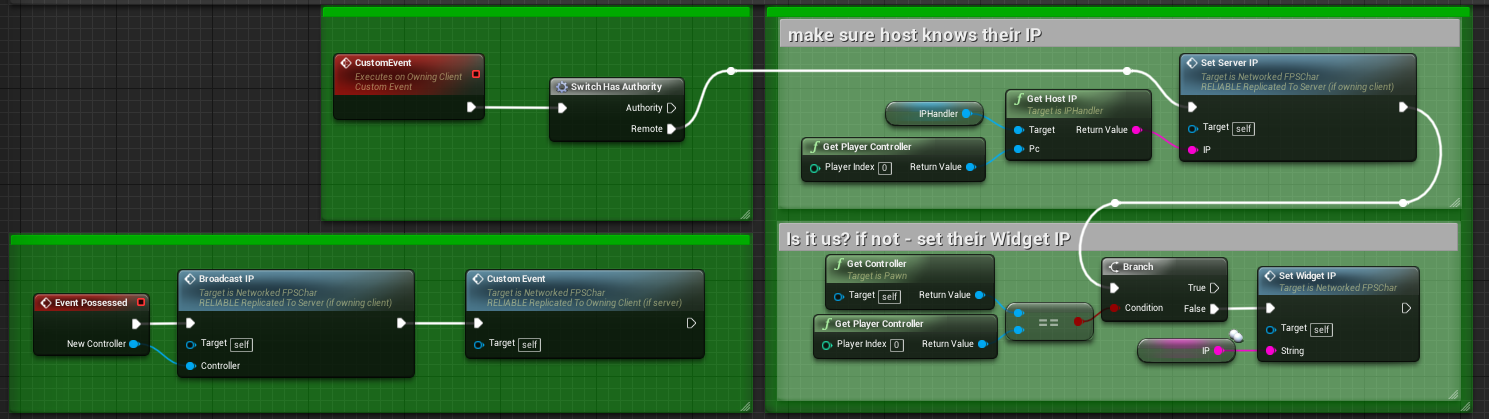
Hey everyone, I built a Widget that displays a players IP address to the other players (as Text widget)
This works great, but I ultimately want the widget to open a web browser to a HTTP server that each of the players has running (so it uses their IP address in the URL)
I.e. when a player joins the game, each player he sees is visually represented by a web browser widget where the website is running on their PCs respectively
I figured this wouldn't be an issue, as showing their IP addresses in the widget already works, so I just added a Web Browser widget and call Load URL on it with the IP address - but it only works for the host
That is, the URL is loaded correctly for the host's pawn only, for all other pawns it shows the initial URL
Anyone have an idea why that is? Full code here: https://blueprintue.com/blueprint/73wdsljq/
rich ridge
@tribal shard https://docs.unrealengine.com/en-US/Engine/UMG/UserGuide/WidgetTypeReference/WebBrowser/index.html
Overview of using the Web Browser widget to create in-game web browsing functionality.
Unreal Engine Forums
For announcing the release of new products, or showing off your completed work.
tribal shard
@rich ridge I've seen the docs
rich ridge
@tribal shard so what is the problem?
tribal shard
That is, the URL is loaded correctly for the host's pawn only, for all other pawns it shows the initial URL
tribal shard
I am not, I just need each client to call Load URL
rich ridge
Have you tried to harcodre the URL each client differently
Then see whether all clients are loading the URL or not
You can debug this way.
@tribal shard for example client 1 -> load YouTube.
Client 2 load epicgames.com and so on
If it loads then somei is wrong with your setup not with widgets
tribal shard
On Url Changed gives me this output for 3 clients, with the initial URL being Github:
LogBlueprintUserMessages: [UIVideo_C_1] Server: https://github.com/
LogBlueprintUserMessages: [UIVideo_C_2] Server: https://github.com/
LogBlueprintUserMessages: [UIVideo_C_0] Server: http://127.0.0.1:8070/
LogBlueprintUserMessages: [UIVideo_C_2] Client -2: http://127.0.0.1:8070/
LogBlueprintUserMessages: [UIVideo_C_1] Client -2: https://github.com/
LogBlueprintUserMessages: [UIVideo_C_0] Client -2: https://github.com/
LogBlueprintUserMessages: [UIVideo_C_1] Client -2: http://127.0.0.1:8070/
LogBlueprintUserMessages: [UIVideo_C_0] Client -2: https://github.com/
LogBlueprintUserMessages: [UIVideo_C_2] Client -2: https://github.com/
With no initial URL set:
LogBlueprintUserMessages: [UIVideo_C_2] Client -2: http://127.0.0.1:8070/
LogBlueprintUserMessages: [UIVideo_C_1] Client -2: http://127.0.0.1:8070/
Which makes sense, as it loads the URL only for the server pawn
I just don't understand why that is, because if I use a text widget and use setText to display the IP, it shows the correct IP for every single client (on all clients), not only for the server
rich ridge
@tribal shard for server the URL is GitHub . For other clients it's your local server, is your local server running up.
@tribal shard can you hardcore the YouTube or good working URL and check visually.
tribal shard
@rich ridge either URL loads just fine, thats not the issue, the problem is that it should be loading http://127.0.0.1:8070/ for all pawns, not just the server pawn
rich ridge
@tribal shard u r using listen sever
tribal shard
yes
rich ridge
It's just a guess, I think once a client is connected to dedicated server, it's whole networking is connected to host. And when client is trying to point to it's local it's opening server's local.
Someone really experienced like exi would be able to prove my guess is wright or wrong.
tribal shard
but why does it work with the text widget and not when I call Load URL with the very same string?
rich ridge
Once a client is connected to dedicated server it uses a netdriver and it drives all network trffic
@tribal shard yes I get it, when u try to load the URL it's using the same netdriver
I m only guessing
You can get the ip of clients
@thin stratus can you help us here.
@lost inlet you can also help.
This is getting very interesting
lost inlet
you shouldn't demand that someone help you
rich ridge
@lost inlet ok will keep that in mind, sorry for bothering
@tribal shard try to load localhost before clients join the session
thin stratus
@tribal shard You are not by any chance expecting the Widget to actively replicate or?
rich ridge
@thin stratus It's just a guess, I think once a client is connected to dedicated server, it's whole networking is connected to host. And when client is trying to point to it's local it's opening server's local.
Is this valid
thin stratus
No idea tbh
That chunk here calls for all clients, not only the owning one
Given this is a Pawn you call it in
In addition you then further down use "GetController"
Which isn't valid for pawns on BeginPlay
You need to use the PossessedEvent in BPs and perform a ClientRPC to make sure you are on the owning client @tribal shard
jolly siren
Can you combine replication conditions? Like COND_InitialOnly and COND_SimulatedOnly ?
tribal shard
ill try, thanks
Like this? Sorry, I'm really new to UE
https://i.imgur.com/sIGBQSs.png
 hollow bridge
Hi guys, what will be the best way to spawn a falling object, simulate physics causes replication issues obviously
meager spade
you dont need to replicate to server from the possessed, possessed is server only
 sand dock
Is there a "correct" way to check if a "open level" (to a remote ip hosting a dedicated server) failed, via blueprints?
 cosmic star
So I've been trying to wrap my head around this: I have an inventory that is only going to be changed by the server and when it's changed I want to let other parts know it changed. Naturally I created a dynamic multicast delegate and added an array parameter with the changed inventory slots.
However: If called on the server, it doesn't reach the client at all.
Now I could remove the array parameter from the delegate and call the delegate like normal and on the client I then call the delegate in an OnRep function. This seems very hacky to me. Is there a better solution to let server and clients know which inventory slots changed?
meager spade
sounds like you want a fastarrayserializer
cosmic star
a) Is there any documentation about it?
b) It came to my mind that I (maybe) could call a multicast function with the appropriate params which then in turn calls the delegate. Since it's from the server, it should get to all clients as well.
Oh, I might add, that the array used in the multicast delegate is just a TArray<int32>
 worthy perch
TArrays replicate fine.
You can check NetSerialization.h for how to implement FFastyArraySerializer. It's pretty straight-forward actually.
You also may want to reconsider restructuring whatever it is that requires you to multicast an array like that.
Though, FFastSerializer will do stuff to the order of the array, and if it's for an array of ints, maybe you don't want that.
 viscid bronze
Hello. I need some help with my melee damage system. I have this system where when MeleeButton is pressed, it will damage all players in a certain area around you. Why is it not working? I have found that it appears that RadialDamage does not hit anything within its radius, even when up against another player.
In the player blueprint is this, for receiving RadialDamage
 void orbit
Hey. This might be a bit stupid but what is the best way to handle stuff like tracking number of players on a Team
I used to do a simple addition/subtraction but that looks prone to breaking and not representing true playercount
rich ridge
@void orbit GameMode will held the two lists Team A and Team B
Just get the length of the lists
void orbit
Can lists ever end up with length<0 ?
 mellow copper
I'm trying to wrap my head around how that would look.. And what the uses of all this negative memory are...
so no, you will get an out of bounds error when trying to access index -1
rich ridge
@void orbit it is always >= 0
void orbit
hey, someone has to ask the stupid questions right? @mellow copper :D
Thanks a lot @rich ridge
mellow copper
@void orbit No worries, we've all been there. I really enjoyed the thought experiment though 😉
cosmic star
@worthy perch Is's simply a thing I need to do, since items in the inventory can apply gameplay effects and visual representations to the player and just refreshing the whole array would mean that these effects get removed and re-applied, possibly skewing the end results. But thanks for pointing me to the header.
worthy perch
If you do choose to use FFastArraySerializer, the client can receive a callback for what was changed from the array -- add, remove, change.
cosmic star
Meaning, I'd implement FFastArraySerializer for my inventory array and when the client gets the replicated array I can inspect which items changed?
winged badger
callback happens on the item that changed
cosmic star
One callback for every item changed in the array?
winged badger
it has 3 callbacks - PostReplicatedAdd, PostReplicatedChange and PreReplicatedRemove
those are functions on the FFastArraySerializerItem
which is a struct that has to wrap whatever you're replicating via FFastArraySerializer
and a callback is called on the Item instance itself
cosmic star
Got it. According to the documentation inside NetSerialization.h I have to use the custom array that inherits fromFFastArraySerializer instead of a plain TArray<FMyType>, right?
 grizzled stirrup
If you’d like to support both solo and online play for each mode with two different buttons, should you still create a private session for the solo option or can I safely just directly open the map and have it function the same way knowing that StartSession and other session based calls made by the GM will not be valid?
This is in the context of using steam listen servers to host the sessions
 nocturne berry
i'm having a very weird problem where i cannot move the character but i can rotate him, this happens when the character respawns after he dies.
I am using the built in Restart Player in game mode.
I printed all the variables and checked if the character is correctly possessed and everything is normal, i can even call input buttons from within this character blueprint. Though if i open the command prompt and write ShowDebug AbilitySystem it shows on the top that the character is Simulated and not Locally Controlled, although if i check the character he is locally controlled.
This is happening very rarely and only on the internet, never happened if playing locally.
Any idea what might be the problem?
nocturne berry
but the character is always repawning on the player start
how can i know if it is penetrating or not?
and why would it say Simulated and not locally controlled?
the weird thing is that sometimes if i keep it for a couple of minutes it turns back to locally controlled and then i can move again
hollow bridge
Hi guys, what will be the best way to spawn a falling object, simulate physics causes replication issues obviously
twin juniper
This channel makes me nervous!! 😎 💪
Love what's beeing talked here! Smart stuff and tech going on here!
Have been searching for results around on this Discord about ANDROID MULTIPLAYER.. but can't get a simple and clear picture/way to go/strategy to succesfully develop
Am finishing a offline ADVENTURE 3D GAME for android in UNREAL 4.23.. And i see around the project many cool ideas that could be added.. that would make it veeery cool.. if i added more stuff related to MMOs (or massive consistent worlds)
I will throw just a big number to see more clearly the current state of the tech on the mobile arena. For example 10.000 players.
If i wish to create a New version of my offline game.. into a CONSISTENT WORLD targeting android devices for 10.000player x server
Is it technological possible with mobile devices or are we still years away from it?
So far the only viable way to achieve this numbers i see is using SpatialOS? Is it correct? But is it really possible for android at current state? Are there better option more targeting Android maybe? Thanks to share some light? 🤔 🙏
 plucky skiff
@viscid bronze have you checked that your CharacterMesh is blocking Visibility channel?
viscid bronze
@plucky skiff its fine, I fixed it by adding another channel called MeleeAttack
twin juniper
@twin juniper depends of how much events ur game has to send through network and process at the server
if your server computes collision and effects of gameplay, no chance, 200 players would kill the fps and network
Thanks 🙏 i want to prioritize 10.000players over the game
Then as the years progress and mobile phones become MORE POWERFUL then start adding more game features
Want to start from scratch
like with simple cubes
most massive games like runecape, has the capacity of 2000 players at one server
And building all the way up with 10.000 in mind
Oki got yoy
but it just send events
not compute collision
So maybe is better to target 2000
At this moment in time
Oki got you
i would reccomend you target the server to maximum 100 players
fleet raven
generally people capable of building a mmo that handles 10000 players do not ask questions like this
twin juniper
Whats your thoufhts about SpatialOS is the way to go?
its useless for gameplay purposes has more than 20 players in ur screen
so you doesnt has to literally hold all players in the same server
@zeblote but as you have expirienced also i guess.. tech is pushing us to use less and less staff to be aible to achibe bigger and bigger games
Maube soon will be possible
it is possible, but unless you have a miracle game design
its useless
But yes i got a idea of the current state
Still a bit on the futere
if players look more than 20 players at same time in the same place
them will get confused
and for gameplay its not viable
Have you check roblox?
I was pretty impressed
It seemed pretty large stuff going on there
unless ure literally do a design about spam mechanics and unclear targets/objectives
fleet raven
roblox has 5-10 players per server
twin juniper
@fleet raven are uou sure?
fleet raven
it's not a mmo
fleet raven
they do have like 100000 server instances though
fleet raven
roblox is a billion dollar project
twin juniper
its about 100$ / 500- 1000 players
montly
Its not that bad
more expensive if ur game is competitive and have high server update
Mmm.. interesting tech
fleet raven
fitting 1000 players on $100 worth of server will be difficult
fleet raven
spatialos is what you use when you have a big investment to put to waste
twin juniper
I was thinking in the long run 3D adventure game for mobile phones 10.000 players x servers (the ultimate goal in some years) but start building towards the direction
With the current tech
What i think its appealing from SpatialOS is the Scalability
It's solved
Just imagining upgrading hardwares has to be a nightmare
Was thinking maybe start getting my feet wet with spatial OS next 2 years.. waiting to more powerful phones.. and then trying to achieve big numbers
I haven't heard much competition to SpatialOS any ideas were to watch? 🙏
ocean geyser
unless your going to be a massive large income title, i would forget spatialOS for now, its just so expensive, awesome, but expensive
bitter oriole
It's also not exactly proven as a software.
ocean geyser
can get a general idea here. plus ^, its a risk
https://improbable.io/pricing

Improbable
Understand the details of our free and paid tiers including example game costs...
twin juniper
But you pay as you use thats pretty attractive
bitter oriole
Like every similar service
Even AWS is cheaper
But do the math on the player count, price of your game and average play time
bitter oriole
No commercial game can run from your house
twin juniper
😂
bitter oriole
And I don't know anything about your game so
Personally I would never even attempt a live game, but hey
ocean geyser
player hosted ftw
twin juniper
innovate and create a torrent like network, where all ur clients are also servers
die after some days of logic issues
ocean geyser
like pied piper (if you get the reference)
twin juniper
BitcoinStyle (blochchain)
Users ming the game
How did Notch took from SCRATCH minecraft? Anybody heard what hardware did he started with?
Could not be fancy at the early days
fleet raven
minecraft uses player hosted servers..
twin juniper
From day one?
Let me recap
Minecraft if i dont remember wrong.. you had to pay 20$ to get online.. (notch was hosting)
How exactly players hosted the game?
twin juniper
What about the UnrealOnline services with all the Fortnite fresh cash.. will we see anything soon or not? 
Have been waiting since September
Could this be a GameChanger to the current status quo? 😎 💪
We are already december
Is it around the corner?
thin stratus
What about the UnrealOnline services with all the Fortnite fresh cash.. will we see anything soon or not?
No one here can answer that for you.
bitter oriole
It's very unlikely to release in a usable state before 2021
 ember slate
Yo, how to specify the maximum number of players in a game in the game mode?
bitter oriole
It took a decade for Steam
twin juniper
Maybe i understood him wrong on GDC but i undeestood like we will get more or less SPATIALOS servers services for free.. right? Was that the promise? I felt like.. 🤯 😎 spoiled! 🥳
jolly siren
How can I switch which player controller the local player is using?
When the local player dies I want to switch them to a different playercontroller
bitter oriole
@twin juniper No, not at all
Epic is not going to offer hosting
At best, in some time, we'll get cross-platform matchmaking services
 split drum
@ember slate You set MaxPlayers in the GameSession, not GameMode
bitter oriole
@jolly siren Generally speaking you can't.
The idea of player controller is that, well, it's literally the player
As far as the code goes
jolly siren
ahh okay makes sense 🙂
ember slate
@split drum That sounds kinda odd tbh but okay
split drum
🤷♂️
twin juniper
@bitter oriole ooohh.. what a Anticlimax! 😅
Am setting up SpatialOS
And having a slightly problem when downloading the LINUX CROSS-COMPILATION TOOLCHAIN
By some reason unreal websites does not work to download it again.
By anychance somebody has a copy on their pc handy to share?
🙏 it sucks to not beeing able to install it. 😅 am thinking the version v13

Build game worlds where everything matters
ocean geyser
even after everyone recommended against using that for your project lol
 desert glacier
how open level for the host Without the open for client ?
red pollen
I'm pretty sure @desert glacier
If you're using a listen server
You can Open Level on the host, and the others won't follow
Might be wrong though
desert glacier
just with a command who has for text listen server ?
 surreal laurel
for others to follow you need to call servertravel
twin juniper
@ocean geyser 😂 dude whats the alternative? Server in my home?
ocean geyser
nah man, make a waterproof rig and run it off of your local colleges wifi
desert glacier
a server travel and open level text ?
ocean geyser
you might want to consider exposing a c++ function to blueprint that simply takes in the map name. ive had issues trying to do server travel with blueprint in the past
so the server travel is done via c++
red pollen
Server travel via blueprint works fine by me, however that's not what he is asking
@desert glacier , use the Open Level Blueprint
Not console command to run servertravel
ocean geyser
oh derp, didnt scroll up. sorry
desert glacier
with a open level ? not console command ?
twin juniper
@ocean geyser jijijiji 😂 your are killing me dude!
red pollen
console command = all players
open level = only client that runs
desert glacier
i will like only on the server not client
red pollen
Are you running dedi or listen?
ocean geyser
i feel like there was someone who was asking the exact same question about 3 or so weeks ago on doing this
red pollen
What's the purpose? Why would you want a server to be on a map while players aren't?
hoary lark
I know it's been said in here at least once by generally very knowledgeable people that it isn't possible... But I've never personally verified or tried
split drum
@red pollen my (limited) understanding is the server could be hosting a game mode, like a come-and-go deathmatch. The player / client may open the game to a main menu map and set various options. When the client clicks 'connect to server' somewhere they use 'open level' to connect to the dedicated server and join the game
red pollen
Oh yes, of course. This has been done lots, so the dedicated server is running a play map and then the client connects to it. I see.
Hard to test on UE4 though without packaging every time.
split drum
well, you can set the editor default map to the 'play map' or the 'menu map' for testing purposes
ocean geyser
@red pollen is this relevant to you? this is how i test dedicated outside the editor with multiple clients on the same machine to make sure its functional without packaging
https://www.youtube.com/watch?v=_XW9oI36kTE
Enjoy the videos and music you love, upload original content, and share it all with friends, family, and the world on YouTube.
red pollen
I don't need this, my game uses listen servers, but I'll still check this out. Thanks.
My query at the minute is with name plates. I've got the name plate to show when you look at a player, but the positioning is always too low or too high, and it changes when I move closer / further away, if anybody knows about this let me know 😄
split drum
Not sure of why you would use the approach in that video, if you want to fire up the dedicated server with independent clients you can turn off 'single process' then launch using 'Play->Standalone Game'
red pollen
Okay... Ryland, can you explain your situation?
Like I said earlier, if you use server travel, all connected clients are teleported to the new map
What context? Why would a listen server be on a map that it's client isn't?
ocean geyser
@split drum its just very quick for me to launch 1 batch file for the server and X amount for however many clients i need and test
desert glacier
No just for server , Nothing for the clients
winged badger
you move the listen server host on another map by itself and all the clients get booted to main menu immediately
ocean geyser
can you state the reason for this so someone can suggest a workaround
desert glacier
Nothing for the clients,same the server goes
ocean geyser
whats the purpose behind what you are trying to do is what im asking. why must you have the server go to a separate level
desert glacier
for go to MAIN MENU
when it quit game by the menu of pause
when it quit game by the menu of pause
ocean geyser
if your just trying to have the server open the main menu while ingame then your better off adding your main menu widget to the viewport and enabling things such as your mouse cursor so the player can navigate the menu and reversing that when he closes it
if your just trying to have the server open the main menu while ingame then your better off adding your main menu widget to the viewport and enabling things such as your mouse cursor so the player can navigate the menu and reversing that when he closes it
desert glacier
i have a system for number player
when a player quit a session ,he is Always account in the player of the session
 opal bay
Probably a better place for my question:
Hey folks, anyone managed to get a dedicated server build running on linux (and built from linux, not cross-compiled?)
bitter oriole
Building from Linux is not supported officially
Epic recommends cross-compiling because it results in a more controlled environment
If you're familiar with Linux and the compilation process on Windows it should work out with minimal changes
potent prairie
I build my linux servers on my PC, you just have to download the toolchain epic provides and its pretty easy
opal bay
If you're familiar with Linux and the compilation process on Windows it should work out with minimal changes
I thought so too. And I'm really close. But haven't quite managed it yet
My built code complains about not having cooked data, and my BuildRunCook fails looking for the "plugin" that is my Server target
bitter oriole
What's the log like ?
 cedar finch
I need some help with optimizing my replication of a moving actor along a spline. So below is how I currently have it setup, but it's lagging the clients to death. How can I replicate this more efficiently? https://gyazo.com/afc8d01f5f265b817d877bf938bbecd5
 opal bay
@bitter oriole The line that seems most relevant is:
LogInit: Warning: Incompatible or missing module: MyTestServer
It prints that twice and then subsequent lines are modules shutting down
And in the file log, eventually a "cook failed" line
I have made progress, though, it was complaining about other modules before
Not quite sure how I fixed that. May've been additions to the uproject file
grizzled stirrup
If you want the player to be able to play modes offline, is it better to use UGameplayStatics::OpenLevel() or GetWorld()->ServerTravel() when traveling to the offline level?
Or do you need an active session for ServerTravel to work?
Or should I just create a regular session as with the online version of the mode, but have the max players set to 1 and have it not be advertised?
Probably easiest to avoid duplicating code
winged badger
Server travel will just send a ClientRPC to all connected controllers to move
and the url to move to
 steep cliff
Imagine what you could build if there were no limits...
cedar finch
So recently I've started to notice replicated things not working while testing "In-Editor" things such as sounds not playing and stuff. They play in standalone and packaged. I was wondering if I was doing something wrong? Someone told me I needed to increase the Default Max bandwidth of 50KBs. Is that something I need to do?
worthy perch
Open the netprofiler, see if you're net saturated.
cedar finch
I've never used it before. Do I just type netprofile in console when playing in editor?
worthy perch
You can use stat net for the in engine one or netprofile enable for the more indepth one.
https://docs.unrealengine.com/en-US/Gameplay/Tools/NetworkProfiler/index.html
cedar finch
Ok thanks. I may have to research it a bit.
cedar finch
@worthy perch Thank you so much! I ran the netprofile tool and found that I was calling an RPC inside of a timeline that never ended. It was replicating an actors location as it moved thus eating up the bandwidth because i had a bunch of them in the level. I got rid of it and now I'm good 🙂
rich ridge
Hi all, I want to update my Discovery to all.
I installed Linux Subsystem in Windows 10 and after that in bash I can execute my Linux Dedicated server. Sow what it means is that we can test your Linux Dedicated server inside windows only.
I hope this helps to all.
Is there a way to exclude the content from sever builds. Are those contents really need for server builds.
 worldly hollow
Hey guys,
Im pretty new to multiplayer in unreal. But I love MP games so I want to learn how to go about creating MP games.
I just have a question regarding, idk, workflow. When you have a particular feature in mind, e.g. a leap mechanic (in an MP game), u press hold down a key, you leap (with animation + particle effects).
do you FIRST code it in the most basic way possible to test the feature/mechanic out (so not replicated) and if your logic is sound and everything works THEN begin to convert everything that needs to be replicated?
Or
you, from the very beginning, have all the necessary values/events set to replicated ?
i am following a course on udemy and he seemed to make the feature work only client side, then once thats done and functions correctly, he'd make everything replicated and test the replicated version out
rich ridge
@worldly hollow According to me it depends person to person and his grasp on the framework. There is no good way or bad way, If someone is extremely experienced with replication and networking then he may directly start with all the logics regardless of whether he is client or server and for him it may work on first run. Its totally how much you are cmfrtable.
Since you are learning, its good if you setup first for client and then server. This will help you understand how system works and make you more familiar for UE
worldly hollow
@rich ridge thanks for the advice! Yeah I think I'll do the setup first in client. This way I also see step-by-step what happens when certain variables/events are not replicated. Might help for troubleshooting later on : )
hoary sandal
guys I'm learning about actor ownership and RPC events, this button is driving me crazy, so essentially what happens is that you get to the trigger sphere component, and you can press E and it will send a interface message to activate, the problem is the event doesn't pass the has authority node but when I change things around and I put the even at the end of the overlap it works, why is this behaviour happening ?

this one works

in this one the client cannot trigger it
 gritty lodge
Does anyone know a method for generating collision on a server while the players use a level streamed level? Is there a way to tell the server to load the same level the players are on so that the collision matches?
winged badger
@hoary sandal stop and think for a second about where (on which machines) the overlap code executes
hoary sandal
@winged badger probably it gets handle by the server that's why it has authority
winged badger
there can be thousands of collisions happening each frame
not really possible to replicate
so collisions happen on every machine, independently
= that OnOverlap event gets executed by your server and by each of your clients
hoary sandal
@winged badger while that's a good point I don't think is the case, you can see in this clip that the client is sending the information to the server and they both get the same https://gyazo.com/7e0dd3eea5561d4a02f5bb7f8b1b1a6e
it has to be something like the actor owner, this is an actor placed in the level which if I'm not mistaking those belong to the server, I'm sending an interface call from my player controller to this actor
 royal isle
Hey, I am having a really weird bug where some player state variables persist after a non-seamless travel and also whenever a player disconnects and reconnects on the server. Any idea why that might be?
rich ridge
I m getting NULL for Local player on dedicated server.
ULocalPlayer* const Player = GameInstance->GetFirstGamePlayer();
if (Player == NULL) {
UE_LOG(LogTLPServer, Error, TEXT("LOCAL PLAYER IS NULL"));
return;
}
but i case of listen server its not null
the reason being, dedicated server don't have any player at all. So its NULL
So how to I get the GetUniqueNetId for creating the game session on server
royal isle
@rich ridge just put 0 in the CreateSession call, it will then use the overload that takes in a player number rather than a unique Id
rich ridge
@royal isle yeah that's what I was thinking, thanks for help
@royal isle Yes it worked
@royal isle Yes it will persist the player state whenever a player disconnects and reconnects on the server
royal isle
So I need to reset it manually?
rich ridge
/** PlayerStates of players who have disconnected from the server (saved in case they reconnect) /
UPROPERTY()
TArray<class APlayerState> InactivePlayerArray;
From GameMode
/** Time a playerstate will stick around in an inactive state after a player logout */
UPROPERTY(EditAnywhere, Category=GameMode)
float InactivePlayerStateLifeSpan;
Override this method in your game mode
/** Handles when a player is disconnected, before the session does /
virtual void HandleDisconnect(UWorld InWorld, UNetDriver* NetDriver);
royal isle
Thanks a lot @rich ridge
rich ridge
😎
rich ridge
@fleet raven so if I m not using LAN, then I need to do open 123.123.234.87:8080
fleet raven
that's one way
rich ridge
What's another way
I haven't worked on multiplayer aspect of UE4, so I don't have much idea on this region
rich ridge
is there any callback for void APlayerController::ClientTravel(const FString& URL, ETravelType TravelType, bool bSeamless, FGuid MapPackageGuid)
I know that GameInstance receives a notification just before travel starts
 trim geyser
Theres a GameModePostLoginEvent you can subscribe to
rich ridge
But this will only run on GameMode
what about clients
@trim geyser I already have this setup
or the server sends broadcast to client that travel is successful
trim geyser
One way though not the best would be to subscribe to worlds being created
One way though not the best would be to subscribe to worlds being created
you can check if your client/server by GetAuthGameMode()
rich ridge
so basically engine doesnot provide any callback right now
trim geyser
It probably does somewhere ya just have to find it
fleet raven
pretty sure theres a PreClientTravel delegate somewhere
trim geyser
I think he wants one when the clients join
rich ridge
I want client to get notified
fleet raven
? ClientTravel is a client sided function
rich ridge
that travel is successfull or fail
fleet raven
? ClientTravel is a client sided function
rich ridge
yes
fleet raven
to know if it failed you have the network error and travel error methods
on game instance
rich ridge
ok yeah that's what i was looking for
fleet raven
if it fails, it will run those and then immediately travel to the main menu/default map
so in your callback you should save that an error happened and then check for it when initializing your main menu ui
rich ridge
yes this makes sense
can u please explain other way of connecting to dedicated server other then open IP
can u please explain other way of connecting to dedicated server other then open IP
ocean geyser
onlinesessions
rich ridge
@ocean geyser how
ocean geyser
tf if i know
fleet raven
sessions are part of the online subsystem framework
ocean geyser
i do player hosted in here, but it should give you an idea
keep in mind i had 0 clue what i was doing during this
rich ridge
ok checking
ok checking
@ocean geyser u r doing travel, right.
@ocean geyser u r doing travel, right.
@ocean geyser u r doing travel, right.
so how it is different than mine void APlayerController::ClientTravel(const FString& URL, ETravelType TravelType, bool bSeamless, FGuid MapPackageGuid)
ocean geyser
@rich ridge man discord took a crap on me, none of my mesages sent and couldnt even load it. readup on what the online subsystem does, this allows for you to do things such as register your session online and have other clients find it and such without having to already know the IP address and such and connect manually that way. its still using server/client travel, but its sort of handled automatically (not really but im not sure how to explain it) so the client/player does not have to do everything themselves manually to join a specific server. this allows for server browsers/lists and such or automatic joining when a valid session is found
 full elbow
anyone ever come up with a way to handle client side AI navigation for a top down point + click style game?
 subtle patio
Are arrays replicated in order? I'm getting different orders between server and clients
 fossil spoke
There is no guarantee that the Array will replicate in the same order no
subtle patio
well that explains my issue
so in order to identify specific objects or simulate an order - a replicated ID needs to be stored on the element class?
or something to that effect?
fossil spoke
Yeah you would need some method to identify elements on either side to be able to rebuild the Array correctly.
subtle patio
@fossil spoke you've saved me a headache - thanks#
knotty crown
I get this output from "Get Controller" It does not return anything on the server, is there any way to get a pawn's controller on the server?
I know that some sort of player controller exists on the server, and thats what I'm trying to get, but I want to be able to get the one that is specific to the pawn that calls it, instead of a hard coded player index
 spice skiff
dedicated server is headless. what are you trying to do?
knotty crown
I'm trying to have the pawn that dies call an event on the gamemode to respawn it.
gritty lodge
How do you load a level on a server (for collision) that is being level streamed on clients? Or how do you replicate the level streamed level's collision on the server?
spice skiff
@knotty crown when i set up respawn on my multiplayer shooter i tried using gamemode also initially, but found out that clients cannot send information to gamemode. I ended up sorting death and respawn in the character blueprint
@knotty crown only thing i used gamemode for was the timer of the match and and blocking others to join match if in progress and waiting for all players to join before starting.
knotty crown
OK, but I don't want the clients to be sending info to the server asking for a respawn, I want the server to dictate when the clients respawn. The dedicated server should have all of the information to handle respawning of clients without having to ask them for any data right?
spice skiff
@knotty crown the server can receive information when client dies, can be checked in player character or controller, then you can run server rpc's in character blueprint or controller no need to send to gamemode for server replication
knotty crown
Sorry, I'm not sure I understand you. Are you saying that the client should tell the server when he dies? I'm not sure if that is what you are saying, but if it is then I disagree, I don't think the client should have to send any info to the server when they die, I think that the server should be the one telling the client that they have died.
ocean geyser
^
red pollen
Hello there. I'm having some trouble getting a part of my game to work. I'm having a lobby, and then when the host clicks the start match, each player is transported to the level / map. What I need to know is how can I tell when all players have successfully loaded into the map, have been spawned and have had their player controllers assigned etc.
I'm trying to allow everybody to spawn and have their hud added to viewport etc, and then have a countdown in the gamemode start to tick for when the game should commence.
Has anybody got this to work? Currently, the listen server client spawns in, gets the countdown and the game begins for them, but all other players just don't get the countdown on their hud widget, it's like they aren't loaded in before the game starts.
Also, when do players get added to the Player Array? I'm trying to run a foreach loop on this array, but it's almost like when I'm calling it, it's empty, as no players have been added to the array
The player array being in the game state, and I've been getting a reference to it in my game mode on the begin play node.
knotty crown


There is an event called "Event Handle Starting New Player"
I'm really really new to all this, but I think that that event will be called each time a player connects to the server
Maybe you could use it to count how many players connect?
red pollen
Yeah, I'm using that node to spawn players.
Thing is, even though I could see how many players did connect, I'd not be able to tell how many players there were still connecting.
gritty lodge
The problem is people leaving the match before it starts?
You have described two separate problems.
red pollen
The problem is general game flow. I want all the players to spawn in, and then I want a countdown to occur on their HUD.
gritty lodge
On Starting New Player, create or posses pawn, add their pc to array, check if array length = match size to see when they are all in, either set a small delay for them to load or query the PCs to make sure they are initialized, then start countdown
red pollen
How do I get "match size"?
gritty lodge
Just set it, either dynamically or static as a variable
red pollen
Where do I pass that from? My game instance, when I go to move the clients from the lobby to the game?
gritty lodge
Yea, you can do it a bunch of ways, and some subsystems will have their own implementation
winged badger
@red pollen if you are using seamless travel, which you absolutely should, when your NumTravellingPlayers hits 0 (HandleStartingNewPlayer is good place to check) they all loaded the map
red pollen
Oh @winged badger really? There's a variable for that? Hahaha thanks man I'll check it out.
winged badger
its updated just before, in HandleSeamlessTravelPlayer
basically, client loads the map on its end, then calls the Server RPC called ServerNotifyLoadedWorld (or something very similar to it)
when that RPC lands, server calls HandleSeamlessTravelPlayer, and updates the travelling player count
also creates a new PC for the client if its class is not the same as in lobby, then calls OnSwapPlayerControllers, then HandleStartingNewPlayer
red pollen
Brilliant, thanks man. I'll bare this in mind and I'll get back to you.
winged badger
if you don't let GameMode change match state to MatchStarted before they all loaded, BeginPlay won't be called on any Actor in the world
until they are all ready
or at least loaded, as it usually takes few seconds for the initial network sync (good cure is a few second timer after last player loads)
timid moss
Hey I have my dedicated server ready to go and my game as well. I am having trouble trying to figure out how to get people from other wifis to join my server. Currently my brothers on our same wifi can join my game but when i try with someone outside of my wifi it doesn't connect for them. I set up a static IP Address with port 7777 open.
gritty lodge
Depends on the need of your game, you can read about the differences here: https://docs.unrealengine.com/en-US/Gameplay/Framework/GameMode/index.html
Overview of the Game Mode and Game State
winged badger
@timid moss - did you set up port forwarding as well?
timid moss
yes i did
let me make sure i understand. I am supposed to choose a ip within my ip range right?
twin juniper
The port forwarding tester is a utility used to identify your external IP address and detect open ports on your connection. This tool is useful for finding out if your port forwarding is setup correctly or if your server applications are being blocked by a firewall.
check here
use current IP and enter the port number
if its not open, probably some setting is wrong
im having the same problem
in my case just port 80 seems open
winged badger
your router should be forwarding the port 7777 traffic to the IP of your server
static IP address on your local LAN isn't that
twin juniper
its kinda hard, myip for example is from the ISP not from my router
and since i cant change the ISP router open ports
my machine ip is restricted to the ISP local network
not having a really internet ip
twin juniper
so the only way for share my computer access is via a VPN
use hamachi brian
if you want share just with ur friend
if you really want share it internet wide, and you have a connection issue like mine with ISP
you will need call to ur ISP and require them open the port for you
in their router, which affect all connected clients of the ISP
its a really ugly problem
timid moss
im openning a port right now for UE4. Is this the right external port range?
twin juniper
yes
timid moss
you also need to specify it on your firewall right?
timid moss
quick question. When connecting to your ue4 server instance using the in game console, what is the command? Is it open [private IP] or open [public IP]
im kind of new to joining ips
rich ridge
@ocean geyser yeah man, even I have facing the same issue with discord. I couldn't even login to Android app or desktop client.
So i m using matchmaking service, so creating session and search for session is pretty much useless.
Correct me if I m wrong, the matchmaking service with match my players say 10 and then the players will get an IP and Port, then all will travel there, isn't it right approach. So need of someone hosting session and client to search for session.
I will be hosting pool of dedicated servers and integrating it with matchmaking service so during matchmaking if the pool lesser number of dedicated servers running then it will spawn few more servers and using kubernetes it will scale.
 gentle lion
@timid moss i have the same question myself does someone have an answer to this? Also how does that work with ports, would it be [private IP]:port# or [public IP]:port# ?
 knotty ore
Okay so you have some basic understanding of networks. In order to access the system internally you will use your private IP address and port. This is a LAN connection. In your router you need to make a port forward from your Public IP address to the Private IP of your server and the port. So something like: 45.21.27.49:7777 -> 192.168.1.15:7777. Technically speaking some Router and some ISPs will allow traffic to leave and come back. However not ALL, so the best thing you can use is: http://ping.eu and use the port checker. It tells you your public IP as well for convenience. :)
Easy to use web-based service.
@gentle lion @timid moss
rich ridge
@knotty ore Lets assume I m hosting my dedicated server on cloud inside an instance and the IP of my instance is 172.121.52.32, so open 172.121.52.32:7777 will work
worthy perch
Usually those cloud providers have some security groups settings where you can specify the range of ports you want to open.
rich ridge
lets assume I have set the range properly will open IP work?
worthy perch
Open Level and put the IP:port in that, yeah, I think so. I can't really remember.
Though, I recommend Client Travel.
rich ridge
ok
worthy perch
But you should look into the Subsystem stuff, if you haven't already.
Even with Subsystems, let's say Steam, you can still connect through IP:port as I've seen others do. It appears to be somewhat cumbersome to get that address for the server/session, but people do do it.
knotty ore
most cloud providers give u a simple firewall
otherwise if its a windows host they usually assign the IP to the Network card on the server.
so then you would use Windows Firewall or another software based firewall.
rich ridge
so when we create instance on cloud, we get the IP of that instance, is that IP enough to connect?
knotty ore
this is just a test setup tho. never run real official servers without firewalls with country blocking, DDoS protection, etc.
well and making sure the port is open on the OS firewall yeah
it all comes down to what OS its running. Linux, windows, etc.
rich ridge
its Ubuntu 19.10
timid moss
@knotty ore so i should use my computer's ip when connecting? Or should i use the public router ip?
knotty ore
then u may need to configure the firewall in thr iptables
if your local to the server then LAN
yoru friends use your WAN (or public)
timid moss
Yea. What if I'm playing with friend in another state. So i guess i wouldn't give them my computer's ip? It would be the router's ip? And then some how it will magically find its way to my computer's ip ?
knotty ore
it wont magically find you. lol it will hop from one router to another.
its literally like putting in someones address on gps and driving there
just.... a shit load faster and back and forth a million times. 😂
and yeah you would use your routers IP
gentle lion
Dariniuns, so in that example, the port# is what directs the wifi router to contact that specific computer (the server)?
rich ridge
@knotty ore I have uploaded my server build (1.5 GB ) to cloud server, when I m running it is throws refusing to run with the root privileges
any idea how to solve it
it seems to be UE4 issue not with Ubuntu 19.10
rich ridge
I have solved this issue, The issue was by default user created was root user with all previleges. UE4 doesn't run in root mode. So created new simple user and it worked.
@timid moss So I happen to do open IP:7777, IP -> address of my cloud instance and it was connecting. I tried the ClientTravel from PlayerController, it also works.
I hope this helps.
 gusty skiff
You can tell me or read something, how the work with a multi-dedicated server is organized (the whole snag is precisely that the world is generated and there is no common map, etc.).
The world can be a maximum of just over 20km
and in fact, each dedicated server can provide physics / collision for players who are in this volume.
And I’m interested (I re-read all kinds of docks on the Internet), in UE4 there is an opportunity to transfer a player from one world of Dedicated Server (DS) to another with an indication of IP and port.
And as I understand it, if some player escapes beyond this volume, I have to stupidly transfer to another DS so that he can process it, and when he comes to the first one to transfer it to the first one, we get scaling, etc. (the same song if we have more than the N-number of players in one location, on one DS).
I’m trying to understand how it all works, the above described is how I now understand it all!
But I don’t understand how it all works autonomously, i.e. there must be a Master Server (MS) that knows about all DS with their ports and addresses (if he does not have enough DS, then he must be able to start/close them).
When a player connects to the game, you need to contact MS to check on the DB that this login/password is real (to get some data from the BP, by type of position in the world, etc.) after MS, by location, it will determine which DS is most suitable and will send him a connection address, so the player enters the world. Well, then as described above ...
If I'm wrong somewhere or something I don’t understand, explain
bitter oriole
There's nothing in UE4 to handle any of that
And the practical maximum size is way lower than 20km
You'll have horrible physics issues after "only" a few km
If you want to have multiple servers to handle parts of maps in UE4, you'll have to re-connect with a loading screen on the player side, and there's no built-in way to have game state synced between servers
gusty skiff
@bitter oriole that is, there’s no way to seamlessly transition between dedicated servers?
bitter oriole
Nope
Not built-in at least
Sea of Thieves does pretty much what you describe so it's technically possible, but you'll need to modify the engine
gusty skiff
sadness
rich ridge
@gusty skiff you don't need to modify the engine for this, if you want to select the appropriate level for your player.
You just need to build a master server which keep tracks of the player stats and selects the best possible dedicated server
gusty skiff
@rich ridge that is, I correctly suggested?
bitter oriole
This only will let you "connetc to the right server for your level"
Not "move from a server to another when you're near the edge of a map"
You do need to modify the engine for that part, again
rich ridge
@bitter oriole if you serialize your game state and player state and pass it to next server and your next sever is able to handle the serialized game state and player state, you don't need to modify engine
red pollen
If someone could answer that, feel like this chat is more active
And the sequence plays on all clients so it is kindah a multiplayer question xD
I've found it, cheers 😄
red pollen
I'm a little confused with how to set up my respawn function. Everywhere online is pointing towards grabbing the gamemode from the player controller and dealing with it from in there, but I know from eXi's compendium that the client doesn't have access to the server's gamemode, and so this just doesn't work (as I've seen. My listen server possesses all new pawns that are spawned, even when passing a client's player controller.)
Anybody managed to get a working respawn system going, without getting the gamemode from the player controller?
 smoky ore
because the server should be the one spawning the pawns, not the client. (at least if im reading your question right)
red pollen
Well, I tried having the function to spawn players in the gamemode, but how do I request my player be respawned? I can't have access to the gamemode through the player controller, right?
smoky ore
Through a Server RPC. and in the implementation function, you can get the gamemode there
red pollen
Didn't think I could grab the gamemode from my player controller as it's server side
That's where I'm struggling really
So I run an event in my player controller as server?
smoky ore
personally, what I did for my shooter
{
    Super::OnCharacterKilled(Victim, KillingDamage, DamageEvent, EventInstigator, DamageCauser);

    auto KillerPS = EventInstigator ? EventInstigator->GetPlayerState<AScavengersPlayerState>() : nullptr;
    if (KillerPS)
    {
        if (KillerPS->GetMatchStats().Kills >= ScoreNeededToWin)
        {
            // Winner, inform everyone.
            WinningPlayerState = KillerPS;
            SetMatchState(MatchState::RoundWon);
        }
    }

    auto Controller = Cast<AScavengersPlayerController>(Victim->GetController());
    if (Controller)
    {
        Controller->QueueRespawnDelay(2.25f);
    }
}```

when the gamemode recieves an event of a character killed (on the server), it tells the controller to queue a respawn after 2.25 secondswhich looks like this
{
    GetWorldTimerManager().SetTimer(TimerHandle_DelayRespawn, this, &AScavengersPlayerController::OnQueueRespawnDelayFinished, Delay);
}

void AScavengersPlayerController::OnQueueRespawnDelayFinished()
{
    GetWorldTimerManager().ClearTimer(TimerHandle_DelayRespawn);
    RespawnPlayer();
}

void AScavengersPlayerController::RespawnPlayer()
{
    if (GetPawn())
    {
        return;
    }

    auto GM = GetWorld()->GetAuthGameMode<AScavengersGameModeBase>();
    if (GM)
    {
        AActor* PlayerStart = GM->ChoosePlayerStart(this);
        if (PlayerStart)
        {
            GM->RestartPlayerAtPlayerStart(this, PlayerStart);
        }
    }
}
this is the basic idea of how you should respawn your character
red pollen
Yeah so you're getting the gamemode from the player controller but I'm sure in eXi's compendium it says this isn't possible.
It just must work
Is the RestartPlayerAtPlayerStart an in-built function?
red pollen
I'm no good at c++, I use blueprints, so it's hard to read, but how can the player controller be on the server?
fluid flower
does anyone know how to change this server name? ( session name shows up fine, but in the steam browser it shows these numbers )
smoky ore
I've been wanting to ask this question for a while now as I am working on a server browser for a personal project. When people try to look for servers, it stays stuck looking for servers (like, a good 1-2 minutes) for a while before saying "no servers found". This tells me it might be finding it (or rather something), but I'm not exactly sure how to troubleshoot this problem as I've never experienced it. (I am using the "listen" option when I open the map, so i know i am acting as a listen server).
fluid flower
are you using steam?