#multiplayer
1 messages · Page 505 of 1
 silent phoenix
So I think what I would do there is send a handle hit message to the hit actor. On that actor i would call handle hit server off that message.
 digital barn
could you explain more
silent phoenix
As an example.
On my player when you press the interact key it sends a message to the highlighted interactable.
Assuming the highlighter actor is using the interface it will receive the message and execute the code

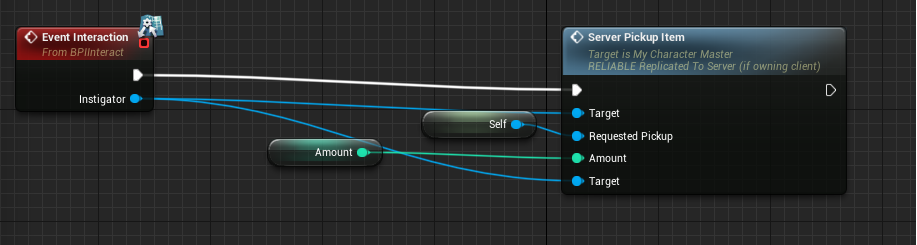
So I would send the message to the hit actor and then on event handle hit execute the code you need
but i've only started this journey 3 months ago so maybe someone else can be a better help 🙂
 twin juniper
Do we need to port forward for multiplayer sessions in UE4?
At least for testing?
Creating a lobby, other dev cant connect despite having the same package
twin juniper
@low helm Damn, no way to NOT need to port forward?
 low helm
I didn't need to do it at all, it depends on the settings of your router I assume, and/or your firewall
low helm
try going straight into the modem for a bit if you don't want to try port forward
Does anyone know how the server updates a client's position to compare NET CULL DISTANCE to?
I have a possessed replicated pawn moving around but when I enter a new area, the Server doesn't net load the actors in that area, it's like it doesn't think I'm there.
twin juniper
TCP and UDP?
 zealous saffron
@twin juniper yes, you will need to have port forwarding enabled on your router for that port.
 polar bridge
anyone know if UProjectileMovementComponent has built in lag compensation?
digital barn
anyone familiar with Client-Server Replication and got a few minutes?
 hazy brook
hi anyone here know the basic concept of external chat server if i wanna build one using tcp socket plugin or any tcp/ip plugin in marketplace how can i get a master server to talk to client
the message from my client ie ue4 client through chat widget and the message get send to the master server and broadcast to other player
 fleet raven
 what is this? is it possible to use this in the engine to handle nat punch? https://dev.epicgames.com/docs/services/INT/Interfaces/P2P/index.html
 lament gull
Do I need to individually store all item variables in an online database to prevent any sort of hacking? Like if I have a data table in ue4 of all swords with their damage/speed variables, is that exploitable then?
 delicate zinc
Quick question, I have done some replicating aim offset math on the player to the animation bp and it works but the client is laggy. I'm going to convert the video to a gif so I can show what is happening

 tribal plover
has anyone got names to display for other players from steam? it keeps replicating my name to all actors?
 thin stratus
If they use steam then you dont need to do anything
 crimson fiber
feels stupid... my ClientTravel doesn't work... game finds session, I join it but next :
[2019.11.18-08.32.23:945][  5]LogOnlineSession: OSS: Join session: traveling to 192.168.0.6:0
[2019.11.18-08.32.23:946][  5]LogBlueprintUserMessages: [MainMenu_C_0] session joined
[2019.11.18-08.32.23:960][  5]LogNet: Browse: 192.168.0.6:0//Game/RiotMaps/MainMenu
...
[2019.11.18-08.32.23:976][  6]LogNet: Warning: Incoming ip address doesn't match expected server address: Actual: 0.0.0.0:0 Expected: 192.168.0.6:0
both games launched as listen servers, one of them creates session, other should join
crimson fiber
if one of the process starts another map with ?listen shit works...
key bug? Same map ignore? wat
 gritty lodge
Does anyone know why converting Geometry to Mesh makes any collision settings not work on server? It works as Geometry, but the second I convert to Static Mesh, I can walk through it.
 hoary sandal
@thin stratus My team is creating a multiplayer game, but we are running into the following issues.
We didn't want to try steam this time around, since it will required to have steam open on the background as well as the same download region to find sessions( let me know if there's a way around this )
So we tried with the default session that come with the engine, the problem is that we cannot connect to each other unless we port forward 7777, this is also not ideal because most people are not going to bother to open the port to play our game.
Are there any more solutions that I'm missing, the final goal is to be able to find sessions with just a click and no set up for the final user
Thanks in advance
thin stratus
Well, first off, why do I get pinged for this directly? :D
An second, Steam does NAT Punch Through for you, so you don't have to open ports.
If you aren't using Steam, you have to implement this yourself.
The NULL Subsystem does not support online sessions by default (or at all).
hoary sandal
sorry for ping 😓 what do you mean by the NULL subsystem ?
thin stratus
So we tried with the default session that come with the engine
SubsystemNULL is the default subsystem of the engine if you aren't using any custom one like Steam.
hoary sandal
ok so you mean in this node I have here the find sessions one doesn't do anything https://gyazo.com/549669e7985a0d46f60d36f5f8ba2cad

this is my first dive into the multiplayer system
and that blueprint is from the multiplayer shootout project 👆
twin juniper
@hoary sandal Essentially. UE4 is an engine, not a service provider on it's own so without using another service like Steam, there is no way to have NAT Punch through just UE4 on it's own
It's like I said before the options are:
Local, Port Forward OR use a another service
hoary sandal
so this find sessions nodes are just for lan ?
twin juniper
No
LAN implies no outside connections. UE4s is built for outside connections unless you have LAN only enabled
The reason why no outside connections can be made is an issue of the HOST not the session
This is usually circumvented by Port Forwarding, using a Dedicated server or using a 3rd Party, trusted, service such as Steam.
Remember the old days when you all had to be on Hamachi to play a game together?
Same thing, it's the exact same issue
 south ether
So I have a simple setup, where a client calls a server function on the pawn, which then makes the server move the pawn forward. It shows movement fine on the server, and on other connected clients - However, the calling/owning client never sees the pawn move, it just remains stationary. It must be replicating okay because the other clients see it move, but I'm not sure why theres only one client not updating
Any suggestions? It feels like something obvious
 lapis breach
i thought movement was replicated without any additional work
south ether
Yeah, I was goofing around with custom physics stuff, but all the movement is really just updating the position, which should work the same right?
lapis breach
they are 2 separate systems
character movement is defo replicated by default
i feel like there may be a checkbox for it
south ether
Right, yeah, but I think it must be working because all the other clients are seeing it?
and I turned on all the replicating variables just to check and it didnt seem to make a difference
lapis breach
do you have a screen shot
is it replicated from client to server?
but not the other way?
south ether
Well, the client just calls the server function, the server is the one to actually move it, which is why the other clients see it updating fine i assume
lapis breach
there are multiple versions of that pawn though right
a server version and a client version
lapis breach
are you multicasting it down to other clients after
south ether
No, because it wasn't executing a function on the client locally, I was just having the server change its position and replicate it out I thought
lapis breach
think of every client as a set of twins
one twin lives on server, one on client in two different parralel universes
you have to give them the same instuctions to have them do the same thing
if that makes any sense
south ether
Wouldn't that mean that I have to call a local client version and a server version at the same time to get it to change everything to all clients? Doesnt that defeat the point of authoritative server updates?
Sorry, I guess I'm just fairly confused
lapis breach
you would check against the server to ensure the values are what is expected then yu make a call from the server to execute the validated call
have you read the network compendium by eXi?
south ether
yessir, its quite a tome
 meager spade
anyone know the config settings for the IP driver?
like the different settings or where to find them
twin juniper

i am trying to make is to the actor is destroyed for all clietns when left click
but it only destorys for the clients clicking
not for others?
 orchid ledge
I make android mobile as a host and try to connect another android client the join to the session is successful but the client did not load the host map nothing happens
Any tips how to fix it
twin juniper
I'm having an issue whereby, the following works correctly and replicates if SetCanInteract is called by an authority but no by another client
Essentially, I want SetCanInteract to be called by any client to change on the server, to then replicate across all other clients
(Uploading video)
Any idea how I can fix this? It's driving me crazy
I've tried it as Client, Server and NetMulticast
 bitter oriole
@twin juniper haven't looked at your code, but you can't call RPCs on any given actor from more than one client
It has to be the owner
Other clients can't RPC
twin juniper
So in this case how can I correctly change and replicate the canInteract variable across to all clients when any client changes it?
Just do it without an RPC?
bitter oriole
Replicating is not the problem - only the owner client can RPC the server, so there is no way for all clients to change anything on the same actor
If you need every player to be able to change the state of a shared object, you need to use a player-owned actor (player state or PC or pawn) to do a RPC and then do the change on server
twin juniper
So, if I expose those methods and move them to the Pawn/Character that is directly responsible for changing it, it should be fine?
Or well, convert them to regular methods, then have an RPC on the character/pawn that calls the regular method?
bitter oriole
Yes
Basically the constraint is that you can only RPC on owned actors, and RPC is the only client-to-server channel
twin juniper
And replicated variables can only be changed/replicated properly from an RPC?
bitter oriole
No
But they can only be changed from the server
Replication is server to client (all clients, some clients, one client, depending ons ettings)
RPC is owning client to server, and server to clients (again dep on settings)
twin juniper
Gotcha, so in this case I want a Server RPC from the Player Character to call a method that changes the state of the replicated property on the server, so it is replicated to all Clients?
bitter oriole
Yeah
bitter oriole
Basically all networking in UE4 is pretty much about managing RPCs and/or replication
twin juniper
See I assumed that at any point I change a replicated variable it's automagically shared across all clients and the server
bitter oriole
That's almost it, except it's only the server replicating.
The automagical part is correct 🙂
twin juniper
And once it's changed on the server, it automatically propagates to all clients
Sweet okay
bitter oriole
Basically in 95% of scenarios, you have RPC from client to server, and rep the other way around.
twin juniper
That being said, might be better to change these things on the GameMode and/or state vs the character? As that will merge functionality of the character into something that doesn't pertain to it
So the GameMode/State has the RPC? Or does it NEED to be a controller?
bitter oriole
You can't RPC on GM/GMS.
twin juniper
Damn
twin juniper
You can do GetAuthGameMode() though and work from there?
bitter oriole
Nope, it will return nullptr on clients
twin juniper
Shit
bitter oriole
Like I said, the object literally doesn't exist on client. GameState is there to broadcast the game state to players through replication
twin juniper
Could I change ownership of the Interactable to the player interacting? And have it work that way? I feel it's really clunky to have replication done through player controller/character
twin juniper
I think that'd make more sense. Im used to Js where I can module off everything so large cpp and h files make me antsy
bitter oriole
I have the two approaches in my game - some objects are permanently owned by a player (carrying it, etc), while some others actually are "mass interactive" with every player. The latter have a simple RPC in pawn
This constraint is a result of optimization (every owned actor has its very own comms channel with the server and you don't want 5000 of these) and security (defaulting to every actor being able to change the state is terrible for anti-cheating)
In my experience it's a minor annoyance when you just need a simple "tunnel" actor
I did find one case where it was a massive pain because I was releasing control of an actor - and the RPC - in the middle of a complex scripted sequence
But basically, work around it
twin juniper
Okay, that's fair
In this case I have a series of objects that can be interacted with by a player or a non-entity AI
I think I can just give ownership of the actor to the interacting player, or in the AI's case; the server
And then RPC on the actor itself?
bitter oriole
Yeah
digital barn

Does anyone have an idea of whats going wrong here? "HandleHit" is a function inside a BPI interface that holds montages for my AI and it doesnt seem to be replicating. ive flipped this around a few different ways but cant seem to get the client to be able to see the montages
 chrome bay
Can't read it

 viscid bronze
I am using this line of code to make my character launch into the air and hover there. However it only works on the server, it doesnt work on the client at all. Is there something I forgot to do here
digital barn
you need a multicast and a run on server event i believe
viscid bronze
sorry i don't really know how to do that could you explain
ive done this, doesnt work
@digital barn
digital barn
make another event called launch player server
replicate on server
call the launch player server from the input
and call the LaunchPlayer multicast from the launchplayerserver
im not an expert on replication by any means but i think that should work
chrome bay
Multicast can only be called from the Server
To use LaunchCharacter you should call it on the characters owning client and send an RPC for the server to do the same if possible.
Calling on just the Server is enough, it just won't be predicted.
viscid bronze
this seems to have worked
thanks!
digital barn
np
chrome bay
You shouldn't need that Multicast
digital barn
thought so
chrome bay
Replicated Movement should handle it
chrome bay
(assuming you're using a character and replicating movement)
Anything is cheaper than a reliable multicast 🙂
viscid bronze
kay ill try
i'm just adding abilities to the TPS template
digital barn
@chrome bay you have any ideas about my issue?
chrome bay
It's kinda hard to work out what's going on
But one weird part is you have a Multicast event, which then does an authority check (which will always fail unless it's the Server) that then tries to call a Server function if a client.
digital barn
i had it set up the same as my inputs
but someone else told me to change it to this way
.
chrome bay
I'm not sure, it's hard to know really without knowing the full context
digital barn
could i dm you about it?
chrome bay
Sure feel free
 rain coral
When creating an OnRep C++ function, is there a way to get that OnRep in blueprints as well, without making a separate BlueprintNativeEvent and call it manually?
chrome bay
You can make the OnRep a native event itself
But just be sure to add the call to parent function in BP
Probs easier to just have an optional BP-Implementable event you call manually, that way BP scripts can't cock things up.. figure that'd be horrible to debug
rain coral
I see, okay thanks! Yeah, I agree
 steady briar
so whats a good way to make a character rotate and look about the same for the client and others that see it? right now, other clients see the character rotate the way i want, but the character rotating doesnt. other things i tried involved a lot of jittering.
twin juniper
@bitter oriole , tried setting the owner, did not work.
Do I have to really do something like
Inside the "Player->OnInteractComplete()" do something like... "InteractingActor->SetCanInteract()"?
Nah, that didn't work either
Q.Q
rain coral
Suddenly DOREPLIFETIME is undefined ;/ I struggle to figure this out. I've done this fine in many other classes. Am I overlooking something dead simple?
thin stratus
Probably missing some Online include?
UnrealNetwork or so?
Can't recall which header included what
rain coral
The includes seem to match pretty closely with other classes where it's fine, apart from a few of my own .h files here and there
But no explicit online include though
But thanks, UnrealNetwork did the trick 🤔 wonder why the others didn't need it though
twin juniper
UnrealNetwork.h, for some reason it seems to auto include at times
 worthy perch
Probably because of unity builds.
If you turn it off, you'll probably need to include UnrealNetwork in the other places too.
twin juniper
Anyone able to help me with my issue above? Im having trouble calling an RPC from an owned actor
worthy perch
Does that compile?
You might need to implement the _Validate.
twin juniper
Nah, I purposely disabled the validate because there's no real need for one
It does compile yeah
 hushed anvil
Hello, when I try to join my LAN-hosted game on the same computer while Steam isn't running, it works, but if Steam's running I cannot join it. Is that okay or something I should fix?
bitter oriole
@twin juniper SetOwner needs to be done on server-side prior to RPC
twin juniper
Aha, so I should do that on the controller?
Would you be free to call to help me fix this? It's driving me fucking crazy, haha
twin juniper
No worries, I appreciate help nevertheless, and I have been but just cant seem to crack it
 cunning shoal
hey, is anyone able to assist with the best way to play player-specific sounds over multiplayer? I'm having some trouble understanding the "correct" way to do it and documentation seems almost non existent
south ether
Okay, so why would ONLY the position transform for a pawn not be updating on ONLY the owned client? A function runs on the server and updates the position every tick (using setactorlocation). Every other client will see the movement EXCEPT the owning one. I figured out how to get it to work - by making sure that the root staticmesh component is set to replicate as well, it updates on the owned client fine. However, turning it off again, it goes back to replicating to everyone except the owned client.
So weird
twin juniper
Does anyone have any pointers on setting up VOIP with the default UE4 networking system?
 fluid flower
how far did you get solaris?
twin juniper
I have no idea where to start, so... nowhere
@south ether the ReplicatedMovement property of actors only replicates to non-owners or to actors simulating physics I think
 supple basalt
@twin juniper @fluid flower wasn't it working out of the box for null, steam, psn, xboxlive? Check the .ini(s)
@hushed anvil your second game instance will revert to null subsystem because you can't have two instances logged to the same steam account. you either somehow make a dedicated server that logs with anonymous or you somehow hack a listen server to log with a anonymous account (i did this some time ago with a unity game so i could dev with listen server and client on the same pc haha)
meager spade
what is the config setting to stop saturation issues
basically clients are getting jitters on high pawn counts
supple basalt
@meager spade also use the network profiler to narrow down the problem..
meager spade
i know what it is, i have 400 pawns in the level
and they send there movement input every tick via a replicated property
that is it
so clients can move them smoothly
just a FVector_NetQuantize10
supple basalt
A lot of pawns.. AI?
supple basalt
Do you need exact position for every 'bird'? Does it matter to gameplay?
twin juniper
yeah that many replicated pawns is going to cause issues period unless you mess with net update rates and stuff
worthy perch
Kaos, maybe the new NetTickUpdateRate (or w/e)?
meager spade
where is that
worthy perch
4.23
New: Introduced MaxNetTickRate, which defaults to 120, to limit how often the net connection ticks. This helps very high framerate clients to replicate without overloading their connections or wasting excessive amounts of bandwidth. MaxNetTickRate is configurable in .ini files by adding "MaxNetTickRate=120" (or your own value) to the "[/Script/OnlineSubsystemUtils.IpNetDriver]" section.
i can kinda skip the replication if the force applied is within X threshold
is that Engine or Game
searches the code
Engine, cool
worthy perch
I'm not really sure if it's what you want, though. If you're running a dedicatedserver, the server already has a MaxTickRate -- this is only for clients replicating up to the server.
supple basalt
If the boids movement is "deterministic", maybe you can sync only the system's primary inputs / data and derive the rest of the movement for each pawn from there on the clients? Maybe do corrections rarely?
supple basalt
It is replicated for each "bird", right?
meager spade
yes each "boid" is unique
has its own influences
adjusts its position etc
based on cohesion, attraction, spacing, etc
twin juniper
After working on a replication issue for ages, one of the issues was I wasn't "passing authority" back to the client?
Whatever it was, even calling empty client methods afterwards seemed to fix it.
supple basalt
This can't scale well. I know that unreal does behaviour trees and AI on the server only, but in this corner case, I would move each boid simulation to the clients also. I would try to simulate only the boids system as a whole (position, direction, speed, etc) on the server and replicate only this small data to the clients. The rest of the stuff can be calculated / derived on the clients for each boid. But it depends on a lot of things.. how much determinism do you actually need :D @meager spade
P.S.: Think of it like lockstep "determinism", maybe with corrections from time to time for certain pawns IF they are needed. If I understood the problem correctly, this is the only way to really scale this without destroying the bandwidth.
meager spade
the simulation is on the client
well actually the calculations are server side, but the movement input is simulated on clients
basically server calculates the "input vector"
this input vector is applied to the movement component
then the clients recieve this vector, and apply it to there movement component
issue is
im getting crap like this
like teleporting on client side
really don't want to use CMC
altho this would work perfect probably
twin juniper
cmc?
twin juniper
really you just don't want 400 things replicating to the client every frame
meager spade
no issues, even on replication
yeah i don't have time to make a fancy system
only got 3 days left
hence looking for a quick hacky fix
twin juniper
can the client affect their movement?
meager spade
no
worthy perch
Do you want the AI on the clients to completely ignore the server's transform?
Or do you want the AI to smooth between the positions?
meager spade
just need them to smooth
twin juniper
seems like you don't need to replicate it if the client can't affect it at all
meager spade
if i don't replicate they move choppy
on clients
as there is no smoothing
oh when you say clients can affect them, yes they can
meager spade
but only server side
twin juniper
ok, so the client can move around or whatever and these things flock around them or something?
meager spade
yes
worthy perch
I think you have to write your own smoothing stuff. It shouldn't be too hard if you have some examples, at least.
meager spade
i mean its smooth
supple basalt
Well, you'll have to optimize this by hand probably, no quick hackish fix heh
 worthy perch
So you're just fully net saturated? You could probably just increase the max bandwidth caps or see if that helps.
meager spade
yeah i mean its a lan game anyway

this is what i do when i recieve the replicated steering
from the server
twin juniper
if you just want to get it done, yeah, increase the bandwidth cap
supple basalt
I don't think this will ever work ok with so many pawns.. what does the network profiler say about bandwidth used?
 split drum
even on LAN the bandwidth caps are pretty low
split drum
My config which solved a somewhat similar issue with masses of characters replicating movement:
[/Script/Engine.Player]
ConfiguredInternetSpeed=100000
ConfiguredLanSpeed=500000

[/Script/OnlineSubsystemUtils.IpNetDriver]
MaxClientRate=500000
MaxInternetClientRate=500000
NetServerMaxTickRate=30
LanServerMaxTickRate=30
MaxNetTickRate=30

[/Script/Engine.GameNetworkManager]
TotalNetBandwidth=10000000
MaxDynamicBandwidth=500000
MinDynamicBandwidth=5000
yeah i don't have masses of time
split drum
try my config, i've replicated hundreds of actors with CMC without network issues
i run into rendering issues but bandwidth is fine
supple basalt
Well I guess with an agressive network lod'ing it could be solved, as long as it is good enough for the gameplay.. nice.
 split drum
haha, i'm wondering how high we can take the ip net driver on bandwidth without other issues appearing
worthy perch
64kB/s for 400 is really low.
split drum
i have a gigabit connection at home so i'm wondering, is bandwidth a real limitation for multiplayer games these days?
split drum
yea.. latency seems like more of an issue than throughput these days
worthy perch
Latency and spotty connections.
supple basalt
If you had dedicated servers in AWS / whatever and pay insane amounts for bandwidth, you would optimize every little crap like this by hand.
I guess for a LAN game it is ok :)))
split drum
yea, even then though, bandwidth isn't all that expensive. Not like a game should be saturating a gigabit connection
meager spade
yeah its fine
worthy perch
Is net bandwidth on cloud servers really that expensive?
meager spade
its a lan game, and i only have 3 days left
worthy perch
Oh, this is for the Jam?
supple basalt
@split drum @worthy perch very expensive. We ran some simulations with the help of some aws solution architects last year and I think 1 / 3 of the costs were bandwidth uploads?
meager spade
i mean i wouldnt be sending the changes unless they were significant and doing a lot more optimizations
but i really don't have time to iron that out
supple basalt
1 / 3 of the bill.. i looked up the documents :P still, a lot
split drum
hmm, i guess you were doing a ton of uploads. I'm also an AWS architect from a past life and most of the time you see big charges like that on ingress into AWS from on-prem servers
supple basalt
@meager spade yea, it was only for the sake of discussion. You should keep it simple always :D
split drum
at one point we were moving about 30TB of data into AWS every day and it did add up
but they had a pretty big budget for the project so it wasn't an issue heh
supple basalt
@split drum it was a port and the network code was crappy, didn't manage to optimize it as we had to do dedicated servers with aws gamelift and gamesparks as the backend. And the gameplay code sucked, wasn't unreal.
That's pretty cool of you haha, I was only a dev on that (multiplayer and cloud). Nice stuff you were doing there :> 30 TB is a lotttt
split drum
yea, interval data reads add up. A different client my colleagues were at was ingesting about 10x that per day
anyway, glad the settings helped. If anyone ends up having tips on how to optimize the gamethread with over 200 actors with CMC on screen i'd like to hear tips. I've done most of the usual Mesh optimizations
the server is fine, doesn't even go over 1% utilization, it is on the client-side. I'm not too worried about it because the odds of 200 people even playing my game seems pretty low but i'm interesting in solving the issue for my curiosity
supple basalt
Haha.. what kind of game is that? Can you really get 200 players in the same spot?
split drum
it is for a team deathmatch game i'm making. i've only done limited testing, as I don't have that many individual play testers, but I am aiming to have 200 players in one location. There will probably be other bottlenecks which emerge but right now the bottleneck is mesh and CMC related on the gamethread
supple basalt
Is the engine on release? Also the game, did you try it on release / shipping?
split drum
it is not, but i don't know how to profile if i package it with release
supple basalt
You should probably finish the game (beta) and after that fix scaling issues.. at work we use PIX and Razor, but probably this isn't an option here :D maybe a win profiler? Didn't do much unreal profiling, only proprietary engines so i'm afraid i can't help except general advice.
split drum
all good, it probably won't ever be an issue anyway but it would be cool if they could further optimize CMC in the engine or expose some more options to improve performance
 timid moss
wait. how were you able to get 200 payers with CMC? fortnight doesnt even have that
meager spade
never in the same place either
split drum
tbh idk exactly how. i have no other actors in my test map, so no need for replication graphs. I just have 200 running around in random directions using CMC
meager spade
they can get 100 in the same place, but not truly in the same place
and they handle offscreen stuff for the local players
they did a lot of optimizations
to get 100 players with 50,000 replicated actors
split drum
Well, they have other concerns as well. I have no dynamic lighting in my performance map, and only a 'floor' the actors are running on
shadows were a problem for me so I had to get rid of all dynamic lighting. It does seem like you have have 200 actors with CMC though if you don't have anything else
meager spade
boring game tho 😄
timid moss
i just never knew that was actuly possible lol
 thin pendant
Hey all, anyone have any experience with Epic Online Services? I am trying to run the sample project "Simple Framework" and when I try to login in with my Epic account in the running sample it tells me: [EOS SDK] Logging In as User Id: frostyfitzi
[EOS SDK] Login Complete - User ID: NULL
[EOS SDK] Login Failed - Error Code: EOS_InvalidParameters
meager spade
@thin pendant just a heads up, rule 7 in #old-rules 🙂
but if its any consolation, i had the same issue with EOS
literally the exact same
in my limited time of 30mins playing with it
thin pendant
@meager spade Ah sorry forgot to delete this one. Meant to post in cpp, then decided to search for EOS, and it ended up putting me in this channel, then I posted it lol
Yea not sure whats the issue with it
also not quite sure that if it really matters or not. really want to see if I can just get some data to the dev portal
meager spade
i really do want to spend some time with it
just not enough hours in the day atm
and the game i am working on uses steam
thin pendant
yea. I am starting fresh so I feel like it would be good to try for EOS
I'll post if I figure anything useful out
 winged badger
i don't expect it to be fully usable for at least 2 more years
meager spade
and the fact there is no UE4 system for it
which means its either being worked on internally, or they haven't done it yet
but would suprise me if they don't make it easy to use inside their own engine.
 somber glade
Dealing with a 3D widget situation in VR. I want to spawn a 3D widget that notifies the players of a location. The challenge of course is that unlike a 2D game, where this notice might appear on their personal HUD, this needs to appear in the world and since it's a widget, I need it to rotate and face the player so that they can actually see it. Can I handle this with a multicast spawn? Spawn the widget holder on multicast, then have the widget holder get the player controller (which should be unique to each person running that code) and get their controlled pawn and set that as the owner to rotate to? After that I can have it rotate on tick to make sure it's always facing the player so that they can see it.
other than the initial spawn location, I don't think the server needs to be driving the rotation or even be responsible for the widget itself.
 vital steeple
Anyone else know why a third controller input isnt detected until you click on the game window a second time? works fine in PIE. :/
somber glade
@winged badger yes. For VR games we have to make widgets in the world for that kind of stuff. So for any pop up or anything like that I have an actor that spawns and holds the widget
I've already made it so that they can be seen through the walls.
winged badger
then you don't need the multicast, or networking
other then server spawning the actor when required
somber glade
But I need to handle a situation where 1 widget is going to need to rotate and face like 3 different users at once
somber glade
Just let the client run their own code on the actor?
winged badger
on each instance, it finds the local player pawn, caches it and keeps orienting the widget towards it
vital steeple
you can make a widget scren space or make a material that makes the text always face players
winged badger
ofc
somber glade
Ok that makes sense
winged badger
you can just hook the caching in BeginPlay, if not server
and orientation on tick, also if not server
i assume its dedi
somber glade
Begin play will run on all the clients when it's spawned right?
somber glade
Right now listen but there is a team working on a dedicated server. It's a bit of a mess. Thankfully I'm out of it in a couple more weeks
winged badger
you can just set it server side in a variable after spawning it
and that too will be available by the time client side BeginPlay is called
somber glade
Yeah it's something I can set on spawn so I can expose that. It won't need to be changed after spawning.
winged badger
never have server controlling client side UI in any way
somber glade
I don't think I do. It's just more annoying in VR because of having everything in the world
winged badger
same principle applies, all widgets are local
steady briar
if im trying to rotate a character and have it look the same for the owner and other clients, should i be trying to rotate the controller or the actor? and will i need to make 2 functions, one on server for others to see, one on client for the owner? only example i really see involves multicast on axis input and that seems weird
gritty lodge
Does anyone know the best way to wait for something to exist. Just set a repeating timer? Ex: Servers creates pawn > gives to player > pawn loads all its components > server wants to edit component settings
winged badger
thats not the way to do it
server creates pawn -> edits replicated variables that are the component settings -> pawn spawns on client and if required executes OnRep_ for those variables
gritty lodge
oh yea, that is actually how I did it originally, got confused by some debugging code
winged badger
when replicated actor is created on client
it spawns, gets all replicated variables set, then calls OnReps, then PostNetInit, then BeginPlay
so any replicated variable that is set in the same Tick as the actor is spawned on server will already had replicated and its replication callbacks will had executed before BeginPlay is called on client
note: on server, SpawnActor will call BeginPlay right away, unless the spawn is deferred
so if you want to set some variables to be available on BeginPlay server-side you have to use either ExposeOnSpawn variables, or deferred spawning in c++
on clients, all replicated variables will be ready before BeginPlay either way
 stiff plank
I have been following this guide, https://wiki.unrealengine.com/index.php?title=Dedicated_Server_Guide_(Windows_%26_Linux). But I am having trouble generating the server files. Can any1 help me trouble shoot this?
viscid bronze
This is the sprint button for my character, both in air and on ground. However, this only works on the server, how do I fix it?
 silent birch
Please help me to replicate my animated offset
For it to be well replicated, it must be done in the animation Blueprint or in the Blueprint of the character?
gritty lodge
How do you make level streamed levels have server side collision? The clients all detect the streamed levels collision but a split second later the server lets you through it.
 buoyant wedge
Hello guys. I have problem with the steam online session if a session is full with advanced session e only BP.
I set manually the current player on the session after post login. If post login player are more than server slot, the last player will be disconnect. My problem is, when I try to return only the last player on the main menu... All player and the server return on main menu. I have try to set the open level on game instance and don't work, I have try to set open level on player controller and Don t work. All return on the main menu.
Any suggest?
viscid bronze
is there a better way to make this function happen? it is for a gameplay ability
 timber anchor
@viscid bronze Why are you making a sprint event? i mean if you replicate the variables that the Animation acquired everyone will now that is actually running
viscid bronze
@timber anchor sry newbie here, what's a spirit event?
timber anchor
What are you actually trying to Achieve is that server and client knows that someone is running
Right?
viscid bronze
it is basically a sprint function yeah
viscid bronze
yes
timber anchor
Ok so
Inside your ThirdPersonCharacter or whatever Pawn are you using
Do something like this
viscid bronze
alright am listening
timber anchor
This is a real basic way
Hardcoding the value
Then inside the animation blueprint
viscid bronze
actually my function is way complicated than that
because it needs to use the same button
for in air dash and on ground run
timber anchor
Ok
viscid bronze
timber anchor
Ok that make sense
But still i would set up different animations
Changing only when it's in Air
and When is actually pressing that key
viscid bronze
no the animations are fine i set it up
timber anchor
Ok and are they replicated?
viscid bronze
I kinda just want to know
that part with like custom events
anyway i can simplify that
because if i have to make 2 custom events for every ability that seems a little cluttered
unless it is indeed necessary
timber anchor
Well, probably the most simple way
is the way you've done that
Because in this case i assume that the server will be one of the player right?
(The host i mean)
viscid bronze
yes
timber anchor
So yeah don't worry about it
Things change when you actually have a dedicated server
viscid bronze
alright sure I'm just using listen server from Blueprint Multiplayer tutorial
thanks for your time then @timber anchor
buoyant wedge
@timber anchor any idea for my problem? 🙂
timber anchor
@buoyant wedge Are you testing it with only one pc? probably it could be the problem? since you're setting it manually
But i didn't understand properly
buoyant wedge
Yes I have try with only pc in the editor. You think I need to test online with other pc?
timber anchor
Guys i'm searching for someone that actually help me to build a dedicated server for my game, the game has a Backend system so it's not just about hosting a random match.
It's a FPS Arena, but right now i've just made the game with normal replication.
rain coral
Am I supposed to manually check for 'Is dedicated server' before every BP node that deals with user interface and audio etc? In order to not get nullrefs
bitter oriole
You probably should just not create the UI on dedi
Since it's not going to be displayed.
rain coral
I guess I haven't decoupled the UI stuff entirely from the game mode blueprints, but I probably should. Then I could simply not spawn it, probably
rain coral
Right, yeah I gotta fix that
 woeful ferry
When I start the game in editor, my event begin play on server fires twice.
Is there any way around this?
Only when I have client connected ofc.
rain coral
@woeful ferry Begin Play on which blueprint? If it's a pawn or player controller etc, it should fire twice, once for each of them, right?
meager spade
BeginPlay is fired on all copies of that object
if its replicated, that is server and clients
3 clients and one server == begin play being called 4 times (one for each)
stiff plank
I have been following this guide, https://wiki.unrealengine.com/index.php?title=Dedicated_Server_Guide_(Windows_%26_Linux). But I am having trouble generating the server files. any1 have any suggestions on what to do or where to go for help?
woeful ferry
@rain coral It fires twice in player controller
even when they're not connected to each other
But if I build it, it doesn't do it
thin stratus
@stiff plank Which point on that guide do you have trouble with exactly?
cunning shoal
Has anyone had trouble with using SpawnActor and then Possess in multiplayer? I've had it working but it's broken several times on me and the only way I can end up fixing it is by putting delays in between different parts of the spawn function. What's happening right now is if I host a server and a client joins - the host is stuck at 0,0,0 (it spawns the character but refuses to possess it)... if it's just the host (no clients) then it works fine
thin stratus
Delays are 100% not needed for something like this.
Has anyone had trouble with using SpawnActor and then Possess in multiplayer?
There should be no trouble if properly used.
Where are you spawning the Pawn?
cunning shoal
the get random spawn points searches all the available spawn point actors and gets their locations - does a box trace to ensure nothing is blocking it, and then spawns - if it is being blocked then it tries again until it finds one
I have dev messages tell me when it cant find one
winged badger
that still doesn't mean you didn't possess host's pawn with the clients controller
for example
cunning shoal
I have it setup so I come from a lobby where it uses a different player controller as shown here
winged badger
use HandleStartingNewPlayer, its what its for
thin stratus
OnSwapPlayerControllers is a SeamlessTravel function. You should not spawn Actors here to posses.
Do that via the HandleStartingNewPlayer or whatever its called.
Furtehr why is that a ServerRPC and a ReplicatedController Array?
winged badger
the common call for all player spawning
thin stratus
Man this looks like you used Epic's Video Tutorial
cunning shoal
I did, and heavily modified it
thin stratus
It's utter garbage in terms of knowledge.
thin stratus
They do a shit ton completely wrong
Gamemode only exists on the server. Replicated Arrays and RPCs make no sense
rain coral
@woeful ferry It fires twice even when there's only one player controller (the server), or is the client in the game in any way?
The server has a server version of each player controller at least, when it has been spawned, so in that case it should fire twice on the server. Otherwise, could it be a local second player controller on the server?
thin stratus
And the Controllers only exist for server and the owning client, not for everyone.
stiff plank
@thin stratus I am stuck on step 5. After I run VS as Development Server, the files do not generate.
cunning shoal
so right now I have two events, one for new players (OnPostLogin) and the one you see above for players that came from the lobby (OnSwapPlayerControllers) - should I replace both with HandleStartingNewPlayer? Or just the former
winged badger
all of them
thin stratus
PostLogin and the other one both call the HandleStartingNewPlayers, so you have a common call
 pastel thunder
hey guys, are you learnt blueprint from internet????
winged badger
its PostLogin->GenericPlayerInitialization (not BP exposed) ->HandleStartingNewPlayer
thin stratus
@stiff plank Did you create the Server.Target file properly?
winged badger
or HandleSeamlessTravelPlayer->OnSwapPlayerControllers->GenericPlayerInitialization->HandleStartingNewPlayer
depending how you got there
thin stratus
There is also functions you can override in the GameMode
That call for Spawning Pawns
Or even for finding SpawnPoints
Which is a good thing to do
winged badger
Find/ChoosePlayerStart
cunning shoal
ahh ok thank you guys... I will have to do some re-coding for these RPC's/Variables and spawn events.... I greatly appreciate your help!
winged badger
and do note that HandleStartingNewPlayer is BlueprintNativeEvent
thin stratus
Do yourself a favor and look into my Compendium (pinned to this channel)
winged badger
calls RestartPlayer by default
thin stratus
And don't watch their online tutorial for lobbys
winged badger
and needs a parent call if you need it to do it
stiff plank
@thin stratus I believe I created it properly. Can i send the file text to you in a dm and maybe you can spot the mistake?
cunning shoal
are there any good tutorials or resources you would recommend? I've done a ton of research but sometimes it's difficult to know if someone actually knows what they are doing
thin stratus
The file is not long, you can post it here with three ` infront and behind the code.
@woeful ferry
Oops
@stiff plank
stiff plank
Ok 1 sec.
thin stratus
How does that even happen, I selected the person with arrow keys. Olsson is not even lsited there. DISCORD PLEASE
stiff plank
Lol
cunning shoal
I was using the PostLogin and OnSwapPlayerControllers to determine if the player had been an existing player in the lobby or if they joined mid-game (I spawn them as a spectator that is not allowed to play until the round is over). Is there a way to determine that using the StartingNewPlayer event?
I thought I could create a variable for the 2 events and then read that on the StartingNew event, but the game mode could be storing many players at once as they join so it wouldn't know which controller is assigned to that spawn type
winged badger
depends on how you hanble MAtchState
stiff plank
using System.Collections.Generic;

public class test418ServerTarget : TargetRules
{
    public test418ServerTarget(TargetInfo Target)
    {
        Type = TargetType.Server;
    }

    //
    // TargetRules interface.
    //
    public override void SetupBinaries(
        TargetInfo Target,
        ref List<UEBuildBinaryConfiguration> OutBuildBinaryConfigurations,
        ref List<string> OutExtraModuleNames
        )
    {
        base.SetupBinaries(Target, ref OutBuildBinaryConfigurations, ref OutExtraModuleNames);
        OutExtraModuleNames.Add("test418");
    }

    public override bool GetSupportedPlatforms(ref List<UnrealTargetPlatform> OutPlatforms)
    {
        // It is valid for only server platforms
        return UnrealBuildTool.UnrealBuildTool.GetAllServerPlatforms(ref OutPlatforms, false);
    }

    public override List<UnrealTargetPlatform> GUBP_GetPlatforms_MonolithicOnly(UnrealTargetPlatform HostPlatform)
    {
        if (HostPlatform == UnrealTargetPlatform.Mac)
        {
            return new List<UnrealTargetPlatform>();
        }
        return new List<UnrealTargetPlatform> { HostPlatform, UnrealTargetPlatform.Win32, UnrealTargetPlatform.Linux };
    }

    public override List<UnrealTargetConfiguration> GUBP_GetConfigs_MonolithicOnly(UnrealTargetPlatform HostPlatform, UnrealTargetPlatform Platform)
    {
        return new List<UnrealTargetConfiguration> { UnrealTargetConfiguration.Development };
    }
}```@thin stratus my project name is test418
sorry for the block
cunning shoal
@winged badger by match state do you mean Game State? I have a different game mode applied to Lobby vs actual Game Play
winged badger
no i mean MatchState of the GameMode
if its waiting for all players to load before it transitions to MAtchStarted
you can easily tell if its a ho0tjoin or not
stiff plank
@thin stratus
i also tried ```// Copyright 1998-2017 Epic Games, Inc. All Rights Reserved.
using UnrealBuildTool;
using System.Collections.Generic;
[SupportedPlatforms(UnrealPlatformClass.Server)]
public class test418GameServerTarget : TargetRules // Change this line as shown previously
{
public test418ServerTarget(TargetInfo Target) : base(Target) // Change this line as shown previously
{
Type = TargetType.Server;
ExtraModuleNames.Add("test418"); // Change this line as shown previously
}
}```
winged badger
the comment implies old.... 1998-2017
cunning shoal
I see. This is the general flow of the game:
-Players join the lobby (at anytime while the server is still in the lobby)
-Once the host is ready and everyone has selected a character the host clicks start game
-Everyone loads to the mission map/game mode and spawns as a character (they can spawn right away, it's not dependant on all players being there instantly)
-if a new player joins they spawn as a spectator and are not allowed to re-spawn as a player
so if i set the match state in the lobby, I don't see how it would carry over to the mission map / game mode
stiff plank
@thin stratus I am using 4.18. Although I will be doing it again on 4.21.
winged badger
the game map has separate GameMode?
winged badger
then you can flag them as spectators in PostLogin
as the SeamlessTravel players won't call that function
cunning shoal
ah ok, so I will just create an array maybe that matches up with the index of the player controllers array i have already and have a bool signify if they are an existing player
winged badger
pretty sure PC has a member to flag it as spectator already
so you just set it on PostLogin
cunning shoal
just checked, looks like player state has "is spectator" but no way to set it from what I can see in blueprints
player controller itself doesn't have one either
winged badger
    /** Returns true if NewPlayerController may only join the server as a spectator. */
    UFUNCTION(BlueprintNativeEvent, Category=Game)
    bool MustSpectate(APlayerController* NewPlayerController) const;

    /** Return whether Viewer is allowed to spectate from the point of view of ViewTarget. */
    UFUNCTION(BlueprintNativeEvent, Category=Game)
    bool CanSpectate(APlayerController* Viewer, APlayerState* ViewTarget);
that gives you plenty of freedom
as you can voerride those in BP
cunning shoal
ahh ok, so i can add that as c++ and then use those nodes in blueprints to set if they user is a spectator?
*the
winged badger
no, BP can override what those functions do directly
a.k.a. BlueprintNativeEvent
if you don't it will execute its default implementation in c++
cunning shoal
ahh ok so overriding it in game mode
sorry, I hadn't touched overriding yet in BP!
thin stratus
The Spectate stuff is a bit weird in UE4. I had to override a few functions to make this work properly.
Specially since they aren't setting or using the bools properly
winged badger
entire GameMode is more then a bit weird
cunning shoal
yeah, I built my own spectator pawn
basically a character without a model and different collision channel
also.. just found your thread on the forums explaining what's wrong with that multiplayer tutorial lol
winged badger
yeah, i wouldn't let the spectators hog resources by using CMC
cunning shoal
@winged badger you mean a character with no mesh/animations bp adds a lot of overhead?
I trimmed out all the code, animations, meshes, attachments etc.
winged badger
CharacterMovementComponent is the worst resource hog in the engine, probably
cunning shoal
how would you even go about making an actual "spectator" though
are there more overridable functions that you can do this with?
also for your recommendation on overriding the MustSpectate function - i can't call it in blueprints it gives an error when i drag it out saying it's not marked as callable in blueprints
meager spade
spectator pawn
its a special class
with special movement component
and you don't call that function
the gamemode does
cunning shoal
ohhhh, I'll look into that class - thanks! Ah ok so, that function is run automatically by the game mode, and in that over-ridden function you have the logic to determine if the user should spectate?
digital barn
https://gyazo.com/4ce6f9ddf79a1bb45164c11d81bbaf33
anyone got an idea of whats going wrong here? "HandleHit" is a function inside my BPI, this function holds anim montages for my AI however these montages only play on the server end. even if the client is the one attacking the AI

i know i should only need the multicast because AI is already owned by server
but that doesnt work either
meager spade
@cunning shoal yes
cunning shoal
looks like must spectate code runs before onpostlogin
it's not picking up the bool i set
nvm i just used my own variable rather than the overridden one
thanks for your help guys, I really do appreciate it
 quaint tendon
Anyone know how to do region/country detection? Need to detect continent for assigning player to servers.
twin juniper
u would need to request the players IP or something of the sort
then line it up to which server to use
or it could be manaul
 jolly siren
Does anyone know how Overwatch handles Pharah's rockets? I know they have a fake projectile clientside for prediction. But that would lead to cases where an enemy is directly in front of you and moving quickly side to side and the clientside rocket hits them but the serverside rocket doesn't. Do they respect this hit that happened clientside only and apply damage or does the rocket fly through the enemy and only where it explodes on the server is replicated?
zealous saffron
no idea but @jolly siren they might get into it here?
https://www.youtube.com/watch?v=W3aieHjyNvw

In this 2017 GDC session, Blizzard's Timothy Ford explains how Overwatch uses the Entity Component System (ECS) architecture to create a rich variety of laye...
it at least gets into how they do abilities @jolly siren
jolly siren
yeah they mention it briefly here but, nothing in detail

He just says that they do predict the rockets
 indigo brook
Noob multiplayer question, how should I go about making a PvE 6 friends v 1 npc game. Should I use Steam multiplayer?
supple basalt
@jolly siren I don't play Overwatch but I watched some gameplay in slomo on youtube. I think they have a very short firing animation (50-100 ms) before actually spawning the rocket for prediction purposes. If you connection's latency doesn't jitter much and your ping is pretty small, your clientside rocket may spawn the exact moment it is also spawned on the server in real time (client notifies it when it started the firing animation). This may reduce the chances of that happening by a lot with good internet conditions..
winged badger
its easier to roll back if you let it through your obstructing other player then if you actually let it explode
firing animations not being of same length client and server side can effectively neutralize a little bit of lag, too
jolly siren
So the client has a 100ms firing animation, but sends the rpc to fire the rocket on the server before this animation. And the server doesn't have an animation so it immediately spawns?
winged badger
or has a shorter one
there was some GDC talk, i think it was Halo
that explained that approach in detail
supple basalt
@jolly siren yea, i saw this in another paper / presentation years back. But this also relies on other stuff too (lag compensation, rollbacks, reconciliation, maybe player being trusted in certain cases).
@winged badger YES. That is exactly what i was talking about. Glad I'm not the only one haha
jolly siren
okay, currently our rocket fires on input instead of based on the animation. But that is an interesting concept
What do you think is the best option for handling the explosion and damage itself? Because there will still be disagreements between the client prediction rocket and the server side.
winged badger
apparently, the only approach that players didn't notice or mind was skills "activating faster" on server
and simulated proxies
i wouldn't trust a client with an AoE attack
supple basalt
Yea. That presentation was amazing and influenced a lot about how I think about multiplayer. Even "simple" mechanics are not really simple to implement under bad internet conditions. Of course, if you are not doing a competitive shooter.. :D
winged badger

In this 2011 GDC session, Bungie's David Aldridge discusses the programming that drove Halo: Reach's online networking. Register for GDC: http://ubm.io/2gk5K...
fairly sure thats the one
yeah, it is
jolly siren
okay, so if you don't trust the client. Then the clientside projectile doesn't have collision? And instead you would only show the replicated explosion and apply damage based on that?
supple basalt
Can confirm. And only 12k views, what a shame.
winged badger
would the client really notice if the rocket penetrated the other player for 20ms before exploding?
silent birch
For it to be well replicated it must be done in the animation Blueprint or in the Blueprint of the character?
winged badger
It as the killer clown?
silent birch
when I do it in the Blueprint animation, if for example a player looks elsewhere another player sees him looking elsewhere
winged badger
AnimationBlueprints aren't replicated
silent birch
So how make?
jolly siren
Probably not. But a player could be strafing quickly in front of them. And then the clientside projectile would go through the enemy and wouldn't explode until it hit something on the server which could be far beyond that player.
winged badger
no networking compensation algorithm works for 200ms+ ping
supple basalt
@jolly siren pretty much yeah. But you can explode it client side if it actually reached a collision. If it is sync'ed and reached something static, no chance of a rollback for it. For dynamics, probably you should wait for the server.
winged badger
you can kill half of that with different animation lengths, essentially fire at the exact same moment on server and client
still leaves you with 100ms here where client is just guessing before server informs it what really happened
supple basalt
I would play effects like blood / rubble client side always like in cs go.. if it mispredicts, not much harm done.
jolly siren
This is a large explosion from a rocket. So it looks really bad when it happens clientside with no damage being applied
supple basalt
Yep. You should wait for that.
winged badger
yeah, i figure it would be difficult not to break immersion completely if you have to roll that back
silent birch
But how make this?
jolly siren
okay cool, even with that though the explosion could look like it was right next to the enemies feet to the shooting client. But on the server the enemy is further away. Thus causing partial damage instead of killing them.
winged badger
if the owning client doesn't have good depth perception while shooting a rocket, that helps
supple basalt
If you are under really bad networking conditions, it may look bad no matter what you do, especially with a lot of packet loss.
silent birch
How to replicate it as it should?
supple basalt
Watch the video posted by Zlo, it is one of the best things ever posted on the topic. Also imho you should probably focus on finishing the game first before doing a lot of hand optimized stuff for networking because they are a nightmare 😫
jolly siren
Thanks for the talk guys 👍
supple basalt
@silent birch Not for you, sorry..
silent birch
OK sorry
 hoary lark
is "delaying the clientside shot" discussed in that video if I watch it? that does not seem like an intelligent solution to anything at all to me. the server and client could shoot the projectile from vastly different locations if you do that (if the client is moving of course) unless you apply prediction on the server side. [edit: fixed "i just woke up" english]
silent birch
How can I make that the server is the player 1 and that on his head there is a widget that specifies it, and for the client 1 is player 2, client 2 is player 3, client 3 is player 4
?
 plucky sleet
Is it possible to debug log to screen only on the single client? Using GEngine->AddOnScreenDebugMessage outputs on all clients. I have also attempted to use PlayerController::ClientMessage but nothing appears on screen. I'm wondering if there is some initial setup I am missing in this regards.
silent birch
Please help me create a server name system, on all videos on YouTube that talks about the name server. He uses all the create advanced session whereas I use the create session. So please help, if possible for that even make the code into a video
meager spade
first time it to all clients including a late joiner for the first time
its the initial replication of that object to a player
regardless when
 brazen glacier
Why does setting in console Net PktLag=500 result in only around 128 compressed ping read from the replicated player state "Ping" variable? Shouldn't it be the same number?
 peak star
@silent birch That depends on whether the clients players get to set their names, and if they get to do it before joining the server or after.
On GameMode : PostLogin, you get the new player that just connected, and call and RPC requesting them to send their name up to the server.
Then, on the client side you fetch the name variable and send an RPC back up to the server, including two parameters: the name you want everyone to see you having, and which player you are (maybe 2nd one not necessary, depending on how you do it)
Then on server side again, you use which player called that naming RPC to find out which playerstate to change the name on, then use the name parameter that came in to set it.
Then on your widget above the player's head, you bind it to their playerstate's name variable, or custom variable you use for their name, whichever one you set in that last RPC I mentioned.
Make sure this variable is replicated, and then I think it SHOULD show up correctly on all clients.
The reason for all the round trips is because the server has to notice you log in before you send it your name, or else you could send it your name before you're done logging in and it will miss.
Short version:
Server: Hi, thanks for joining. What's your name?
client: My name is @silent birch, thanks for asking.
server: okay, @silent birch, I just put your name in your playerstate so it will replicate to the widget over your head for all the clients in the game, so they will know your name is @silent birch.
brazen glacier
^ Variables bound in widgets run on tick. Instead, for something that doesn't need updates every frame like Name which will be set once, just call an event to set it.
peak star
@brazen glacier yes, that's even better.
The thing that makes this more complicated than you think it would be, is that the name is owned by the client, but it depends on telling the server to tell everyone else what the name is
But once you realize that, you can figure out how to make it happen
brazen glacier
Best way to change a player's name is to use the ChangeName bp-exposed function in Game Mode Base which sets the replicated PlayerName variable in PlayerState.
A lot of people don't know about the function because it's well hidden, no clue why. It's not in the overridable list in game mode blueprints nor in the game mode documentation...
 lost inlet
it's not named that well
could be fixed easily by calling it "Change Player Name"
the playerstate function it calls is more sanely named
peak star
Dood. I didn't know about that. Thanks! I was settling for my own custom playerstate variable (I called it UserHandle) but this seems much better.
silent phoenix
Hey team,
If i have a spline mesh that may end up extending for very long distances would I be better to split that up into multiple splines for performance or would keeping one actor be better regardless of size?
and is there anything else i could do to improve multiplayer performance of spline meshes that are modified at runtime and could potentially be very long
silent birch
No it is the creator of the session who must put the name of the session. Another question, how to put their name in a state
In player state?
How is the state of play going to record it?
thin stratus
If you use Steam or another supperted OnlineSubsystem, it will pull the name automatically.
If you don't, then you need to work with RPCs and ChangeName or use C++.
For the SessionServername, that only works with the AdvancedSessionPlugin or C++, the default Nodes can't do that.
silent birch
OK
Do you know how to invite a person to play with you on steam, so that he plays with you it is obliged that he is also the same game?
If I want to know the name of a player and put it in a text we do not use the node server name?
 flint rose
What's a good way to separate multiplayer code? Just create another CPP file? Like if I have a Class.cpp, have a ClassNetworking.cpp?
And put all the RPC functionality in there?
bitter oriole
Well, if you truly want to separate the multiplayer code, you can do that yes
In practice the multiplayer code is quite often tightly coupled to the rest
bitter oriole
That's pretty acceptable tbh, anything below 1000 lines is still fairly readable. I usually just put comment blocks between public methods, internal stuff and networking
flint rose
With the way it's going, it'll be over that in no time. lol
Created a combat component that's responsible for a lot.
bitter oriole
Yeah, I get the feeling. I'd look into splitting the functionality before splitting the cpp, though
flint rose
Well, it's too late for that now lol
I've already gone and done the thing
It just has a lot of callbacks, events, delegates, etc.
And RPC's.
supple basalt
If Epic can cram 10k lines in CMC, you can too.. :)) On a serious note, don't separate.
flint rose
But why?
supple basalt
Answered above: networking code is tightly coupled with gameplay usually
flint rose
This doesn't make it less tightly coupled.
So I'm confused on the reasoning behind it.,
bitter oriole
If you're feeling okay with separating, just do it 🙂
Personally I feel like I never change anything on a MP component that doesn't have MP changes tied to it
So I wouldn't
supple basalt
Engine code can be less tightly coupled and more modular, but gameplay code is a bigger hassle for best software practices.
Of course you shouldn't let files balloon to that many lines but it is ok to keep rpc's and whatever related to MP with normal gameplay code.
flint rose
I guess I could use editor folds.
supple basalt
Hmm, in our current game we have something like 6000 lines in PlayerCharacter, with a lot of additional components to better manage it in other files (modularity). Most of the "interface" code that decides what rpc's to send and where, authority, etc. it is in there. It is also the rpc "nexus" of the game. Most player components don't have anything related to MP, they are replicated indirectly usually.
flint rose
Yikes, that's a lot of lines.
I would straight reject a PR at work if I saw a file that big. lol.
supple basalt
Yes, but this is almost in beta and done. And it works. It is a professional project, not indie (where I work). It is the best way of doing things? Don't know, it was our first project using unreal.
We did a lot of ports, even famous ones so I saw a lot of code. They always have some big ass files, no matter how "famous" is the company. You can't always work on reducing technical debt.
supple basalt
:)))))))
flint rose
Don't worry, I've already alerted the police.
supple basalt
Holy f***.. our AI guy has done an awesome job then. It looks great (: we never had something like this haha.
flint rose
Have a gander, this gave me much joy to scroll through these. https://blueprintsfromhell.tumblr.com/
#ReasonsWhyIPreferCPP
 supple basalt
Haha thanks, didn't know that one, I'll share at work today for the laughs 👍 we have a few of those in some UI BPs though.. :)))
supple basalt
Hah. Almost everything we do is in CPPs, and even some UI core code is there, but we don't try to avoid them. And still almost all the game is in code because it is easier for us. Depends on the devs I guess.
woeful ferry
Hi!
After leaving a session in my game I cannot join, find, and create a session again. The only way to fix this is to restart the game. Anyone know what causing it?
I destroy the session.
woeful ferry
Sorry, I was wrong. When the host leaves I can't create a new session
brazen glacier
@flint rose I've struggled with your question as well. My ultimate solution was to modularize everything by putting 100% of its code in its own class, outside of the base classes like character. I use a few generic events dispatched from the base classes, for example when camera perspective is changed. All the other classes bind to the delegates when needed, often on begin play and idly staying that way until destroyed. I have 1 State enum on the character which many of the modular classes check as well.
There are many objects in my multiplayer game which can be spawned by a player and used by any player, and this approach works for that.
flint rose
I don't think it really matters too much as long as your consistent.
brazen glacier
You may also consider heavy use of setting ownership. It's not necessary, but it's a tool which may help. If you do, you could set ownership by an interacting player at the beginning of the same function call or event, then unset it when finished, allowing them to act authoritatively. If you want to be super safe, you can set an IsOwned bool which only allow 1 player at a time to access.
flint rose
Sounds unsecure.
brazen glacier
It only "matters" in the sense that it'll be much easier to work with a better architecture down the road. For example, one benefit of doing it entirely modularly is being able to abstract more functionality to parent classes as everything will be outside of the base classes to work with.
It's not any more unsecure than any other method, such as calling RPCs through the player controller. Security entirely boils down to how you design your server checks: not the path you get to them.
 summer crescent
Hi all, I've been confused over ue4 multiplayer for a long time now. I have read a lot in this channel, I use Cedric's network compendium as a reference (great doc BTW) , and I distrust Epic's tutorials and templates...
So I'm going the slow painful but satisfying way of building my own test from scratch hoping to finally understand this.
Unfortunately I'm using Unreal's Collab Viewer template as a base (I know, I know, but I need something to get started) which is not working correctly and I'm hoping to understand why it's not working and fix it....
So this brings me to my first question. The template spawns the pawn from the player controller Begin Play event, and I was wondering if that's the best practice, from what I have read until now I believe this should be done on a custom event in the player controller triggered from the game mode BP on the OnPostLogin event?
 graceful cave
@summer crescent there really isnt a best way to do it
spawning from post login is probably better but it all depends on what you wanna do
in my case beginplay in the controller just brings up a menu for the player
and doesnt spawn any pawns
viscid bronze
@graceful cave can you help me with a thing:
I have a blueprint class with several Child blueprints. The base blueprint serves the movement, but I put my firing function (spawn sound, particle effects, and draw raycast) in the child blueprint Blue.
If the players use different child blueprints only the one with the Blue blueprint sees the raycast and effects, but if both players have the same Blue blueprint the firing function actuates on the player that is not actually pressing anything.
viscid bronze
kay ill hive a screenshot hold on
 plain lagoon
does anyone know some resources/tutorials about creating and joining to a listen server over the internet? (not using steamworks)
bitter oriole
Well, the biggest problem here will be knowing what to join
If you're not using Steam for matchmaking, what do you plan to use ?
plain lagoon
just direct IP for now
will be for a school project, so i wouldnt really need matchmaking
i've read that the client hosting the listen server will either need to port forward or nat-punchthrough
but i couldn't find anything about how to do either of those without the player hosting the server manually port forwarding their router
plain lagoon
you could also do something with NAT-punchthrough, from what i've read
but i can't find anything on how to go about doing that
supple basalt
If you GOOGLE nat punch, the first thing that it says is that you need a 3rd party service to help with that
graceful cave
first thing you should do is make sure the actor is set to replicate
then put a print node after the fire multicast to make sure all clients get there
how do other clients determine the value of IsReloading?
viscid bronze
its set to false by default but there is a custom event for reloading too
does this count as replicated (this is in Blue child class)
graceful cave
put print nodes down the exec chain to see how far it gets after the multicast
viscid bronze
kay i tested it
it seems that all the strings are printing both from the server and the client
yet on the one that doesnt have that class selected, there is no raycast or particle or sound
summer crescent
@satan spawning on BeginPlay won't execute twice? Once in the server and once in the cliente? wouldn't that end up with two pawns on the client side (the replicated one that was spawn on the server) plus a "local" one?
viscid bronze
here
graceful cave
@summer crescent only the server should spawn the pawn, you can plug IsServer into a branch if youre using bp or GetWorld()->IsServer() if c++
viscid bronze
i have another blueprint that is called WeaponBase
it also contains the weapon model that spawns in a socket of the mesh
graceful cave
@viscid bronze every client runs begin play, theyre setting EquippedWeapon to an actor they spawned themselves
look at my response to bochi for a solution lol
summer crescent
@graceful cave it's a BP project
graceful cave
then just use an IsServer branch before spawning the pawn and the client wont spawn it locally
viscid bronze
kay done this
still doesnt work tho
graceful cave
what blueprint is this running on?
if Blue is a WeaponBase, you shouldnt need to spawn a WeaponBase because Blue should be able handle the firing effects itself
viscid bronze
no Blue is a Child Blueprint to another Base Blueprint called 0_Base
But WeaponBase is another blueprint
and the sfx and raycasting of firing are handled there
graceful cave
so what blueprint are the input events and this begin play event on?
viscid bronze
this is in Blue
Child Blueprint
graceful cave
what is the main purpose of 0_base and WeaponBase?
viscid bronze
0_Base houses all the movement stuff
WeaponBase has the Fire and Reload function
Fire function has Spawn Sound, raycast and Spawn Particle Effect
viscid bronze
yes
graceful cave
is that your character?
viscid bronze
general input of WASD Space and Shift
um i just clicked create child blueprint class on 0_Base to create Blue
graceful cave
its hard to figure out the true problem because the structure is a bit disorganized
typically input should be handled on the playercontroller or on the pawn
but in the case of a weapon firing, you should only multicast the effects and let the server handle reloading/cooldowns/etc
supple basalt
Why do people even use blueprints this much, I don't understand.. isn't it hell to actually do anything in multiplayer? You have the Shooter example with everything implemented, a really good example that just works (after you convert it from Slate to UMG hehe)
graceful cave
so let the server spawn the weapon, and have client input tell the server you fired and let the server call the firing functionality on the weapon on its end
then have that call a multicast where only the effects are called and nothing else
viscid bronze
alright okay
i'll try to figure out how to do that
do i have to change anything in the Weapon Base tho
viscid bronze
alright
graceful cave
but it should be fire input -> call server -> server handles all weapon functionality -> server multicasts weapon effects
viscid bronze
okay
i dont have much experience with this but ill try
this can be done on a listen server right
graceful cave
yeah
mp is pretty weird to learn but once you get a full understanding of how everything works its really easy
viscid bronze
alright good thanks
 novel citrus
Hi Guys , I am in a process of creating a Multiplayer Game for Mobile IOS and android.
But Iam not sure what subsystem should be used as the game will be working on internet.
Can some one please guide me in a direction ?
Thank you
 inner hedge
Quick question, Is there any goto way to restrict actor visibility to certain teams?
For example: Actor A is seen only by members of the Blue team..
Would Only Owner See work? Would need to make an entire team owner tho? or a team proxy object that's used as intermediary?
supple basalt
@inner hedge override IsNetRelevantFor
inner hedge
On the object that needs to be invisible?
supple basalt
@inner hedge yep
inner hedge
aight, cheers! :)
supple basalt
Don't forget to call the old Super in case it is in the same team to do the old network culling / whatever. If you really want it relevant no matter what, return true always if in the same team, false otherwise.
inner hedge
So,
    const AActor * RealViewer,
    const AActor * ViewTarget,
    const FVector & SrcLocation
Realviewer will be the team member, Viewtarget will be the invisiobject and srclocation the invisiobject's location?
Viewtarget is the Actor being used as the point of view for the RealViewer
Bit confusing..
supple basalt
Hmm, it is pretty confusing in the docs. Can't remember exactly how it went and I'm not at PC to search the codebase.
inner hedge
Awesome, thanks @supple basalt! :)
supple basalt
@inner hedge Update: Got back to my workstation. I put a breakpoint to see exactly how it works. So with 3 players, on the server it tries to check each pair of RealViewer (PlayerControllerN) and ViewTarget(PlayerCharacterN) with the "this" actor (the invisible)
inner hedge
ah right, makes sense :)
so, controller and character, why couldn't they just say that.. ffs :p
supple basalt
If the "this" actor with the override is a Pawn that is currently possessed, the ViewTarget and the "this" pointer may be the same on some checks.
inner hedge
Aight, cheers mate! :)
supple basalt
Yea.. those docs 😬 you are welcome :)
viscid bronze
if I wanted the server to assign a weapon (spawn actor and set equipped weapon variable) to every player of a certain class how do i do that
viscid bronze
yes
but also when they switch characters (switch child class), it will update everyone to have correct weapons
@silent birch
steady briar
is it possible to have a RepNotify variable in C++, but have the OnRep in bp?
viscid bronze
@silent birch yes
and also when one of them switches characters it will give that client a suitable weapon too
silent birch
You only have to do in the Army Blueprint at the beginning of the game he equips the character, so in the Blueprint of the character you place a weapon on the ground
viscid bronze
army blueprint? what's that? main blueprint to all child blueprints?
@silent birch
silent birch
Yes main Blueprint
viscid bronze
alright
viscid bronze
hold on
silent birch
OK
viscid bronze
But i kinda imagine it like this
On server, loop start
gets blueprint (child) class of all players
spawn actor (Weapon blueprint) for that player (in the location of his hands)
sets it as Equipped Weapon variable of that player
Loop End
Loop until all players have been cycled thru
Kind of like this @silent birch but in the loop
or sth i dont really know if it is possible
or where i should put the code (GM? PlayerController?)
viscid bronze
do you mean putting the code in the screenshot in the character's blueprint?
silent birch
Try
viscid bronze
kay put it in the child class, it worked
viscid bronze
kay but a random guns floating in the air everytime i switch away from that character class
silent birch
It is normal that you detach a weapon from a socket must simulate the physics of the weapon
viscid bronze
alright kay i'll try that
kay so i am setting equippedweapon as a variable in the base class
how do i access that from the child class
zealous saffron
access it where though?
viscid bronze
in the child class
it is a character blueprint class
and the base class handles all the movement
the child class handles weapons and stuff
zealous saffron
fuck if I know with BPs, sorry. Also probably would be better to ask in #blueprint
it'd be the same as accessing it in the parent.
it's an inherited class (child class)
viscid bronze
yes but its not showing in the variables panel
viscid bronze
alright ill try in blueprint
thx anyways
zealous saffron
sorry I couldn't help, hope you resolve it.
silent birch
Show me @viscid bronze
viscid bronze
alright
@silent birch setup in 0_Base
Not visible in Blue (EquippedWeapon_0) is not
silent birch
At right not left
viscid bronze
silent birch
Check expose on spawn
silent birch
To show that you are spawn your weapon
viscid bronze
EquippedWeapon is still not showing in child blueprint
hoary sandal
Hi guys I'm trying to set up a system so depending of how many players there are you always get a different material


what am I doing wrong here?
viscid bronze
@silent birch nvm it was there all along
just had to right click to get it due to it not showing on the left side panel
silent birch
I don't understand, show me
viscid bronze
already closed the editor cuz im sleeping but
basically on here
https://media.discordapp.net/attachments/221799385611239424/646778218325737485/unknown.png


it did not show
but when you right click on the blueprint window and search "EquippedWeapon" it does come u[
up
silent birch
OK
viscid bronze
sry for wasting your time and thx
quaint tendon
Is there a hardcap on how far thrusters can move on a dedicated server?
quaint tendon
@silent birch At 210km(server side) the pawn can not move any further even after origin shift. Remove the thruster and calc speed with offset the pawn can go past 210km.
Seems as though there's a hardcap on thrusters. WORLD_MAX has no effect.
graceful cave
what is a thruster? what is 210km?
graceful cave
well id assume its part of your game but thats too specific for a generic question
it implies we know what thrusters are and what they do
graceful cave
first time ive seen that i guess
that said the position might not be using a standard FVector and might be quantized for networking
 karmic briar
Have anyone here use significance manager before?i wanna ask what the acceptable range to make other player not significance anymore ie reduce the player movement and stuff
I've watched mazymods video on how that works and the core functionality but what other things u guys use it to minimize the load on server rn on my game using replication graph i can max out 50 "player"(using bots) and wanna try to hit 60-100 players mark
If possible wanna try to get somewhere in that range
 umbral loom
sry if this is asked a lot but if trying to get Steam integration working with Advanced Sessions are two steam accounts / two pc's to test it (or a vm) required? If i launch 2 clients (or 1 client 1 server) via New Editor Window the server host shows up in the other ones list, but if I package and launch the .exe twice the server doesn't show up in the list (Cause I'm running the same steam accnt for both execs?)
jolly siren
@umbral loom yes two machines (or vm) are necessary
umbral loom
thanks @jolly siren
jolly siren
Np
steady briar
so i have a C++ variable that has a RepNotify. in that RepNotify i call a BP event on the character, that function calls a multicast. is there too many extra steps there? <_<
winged badger
why would you call a multicast from a c++ replication callback?
its the same as non-networked function call
unlike blueprints, c++ OnReps do not fire on server
steady briar
im lost already
winged badger
so when your OnRep fires
your execution is on client
always on client, with c++
you call BPImplentable, you're still on client
you Multicast from client, why?
winged badger
now remove the multicast, and it will still work as intended
will be a lot cleaner tho
steady briar
without multicast it doesnt work though
winged badger
if clients Multicast, thing executes only on that client
steady briar
    bool IsInCombat = false;

    UFUNCTION(Server, Unreliable, Category = "Combat")
virtual void OnRep_IsInCombat();```i know this is ugly but... its what i got. now im trying to fix it up
{
    IsInCombat = true;
    GetWorld()->GetTimerManager().SetTimer(CombatTimerHandle, this, &AServerProjectCharacter::EndCombatNotify, CombatTimer, false);
}

void AServerProjectCharacter::EndCombatNotify()
{
    IsInCombat = false;
}

void AServerProjectCharacter::OnRep_IsInCombat_Implementation()
{
    CombatModeChange(IsInCombat);
    UE_LOG(LogTemp, Error, TEXT("IsInCombat? = %s"), IsInCombat ? TEXT("True") : TEXT("False"));
}```CombatNotify and EndCombatNotify are what change the bool, its hooked in to where damage is applied
winged badger
yikes
steady briar
never did i say i was any good at this <_<
but i also dont know how to do a lot in C++ so i tried to get the end result to bp
winged badger
i never saw anyone add Server to an OnRep
steady briar
really cuz its like the only examples i found
winged badger
you do know that this basically does the following
1 - server sets new combat mode
2 - its replicated to (probably all) clients, OnReps are called
3 - all clients but the owner fail to execute OnRep, and add a "No owning connection for... " warning to your log
4 - owning client sends a message to server telling the server that the server changed the combat mode
5 - server gets the message after a full ping worth of delay and then multicasts notifying all clients