#multiplayer
1 messages · Page 503 of 1
 silent birch
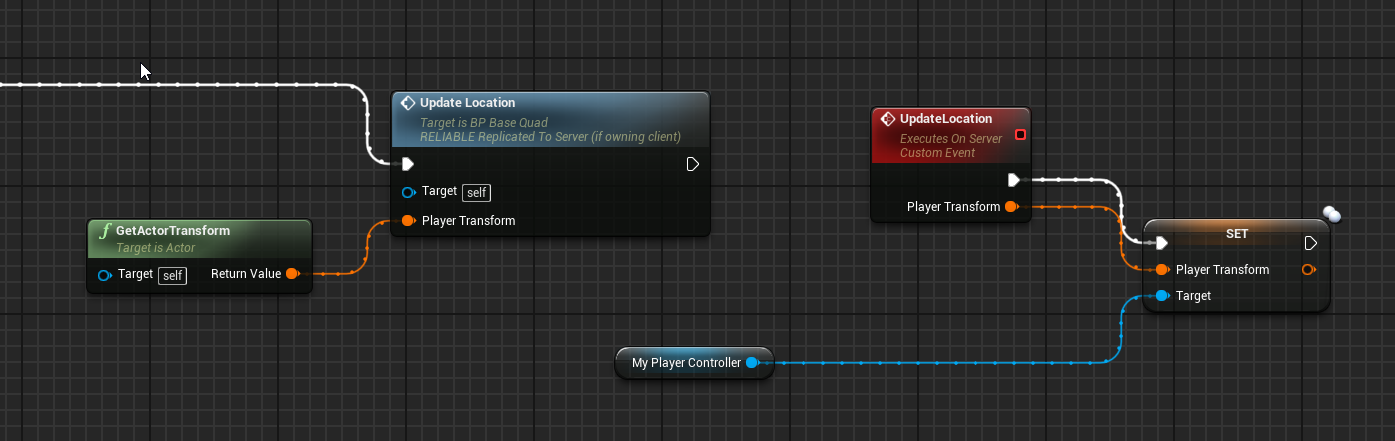
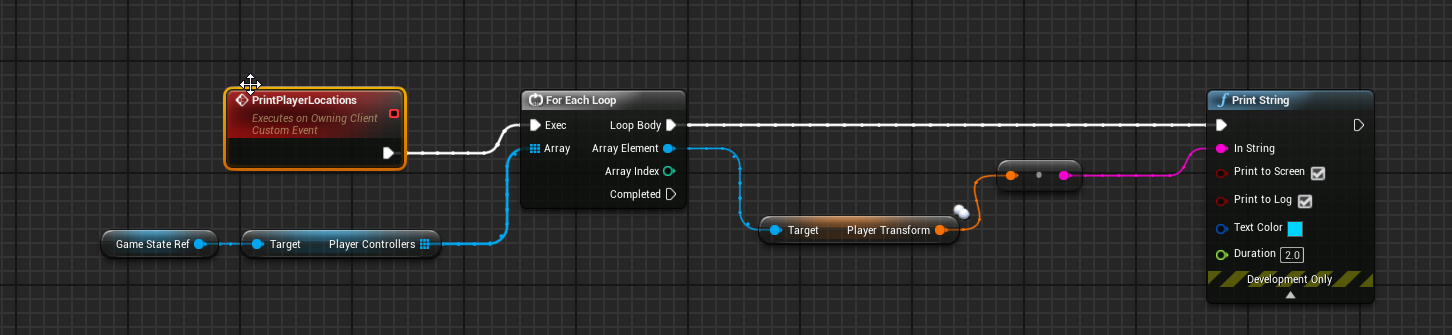
 kindred widget
@shrewd tinsel What is it returning?
 shrewd tinsel
zeros
kindred widget
That is odd. What happens if you set those transforms as defaults? Does it still zero out?
shrewd tinsel
what do you mean set to defaults?


is storing playerposition variable in player controller good idea?
it should be replicated across all machines, this variable, right?
kindred widget
@shrewd tinsel I meant if you set the variable default to something other than zeros in the player controller blueprint, does it overwrite it back to zero when you try printing it, or does it give you that default? Just asking if your variable is updating.
shrewd tinsel
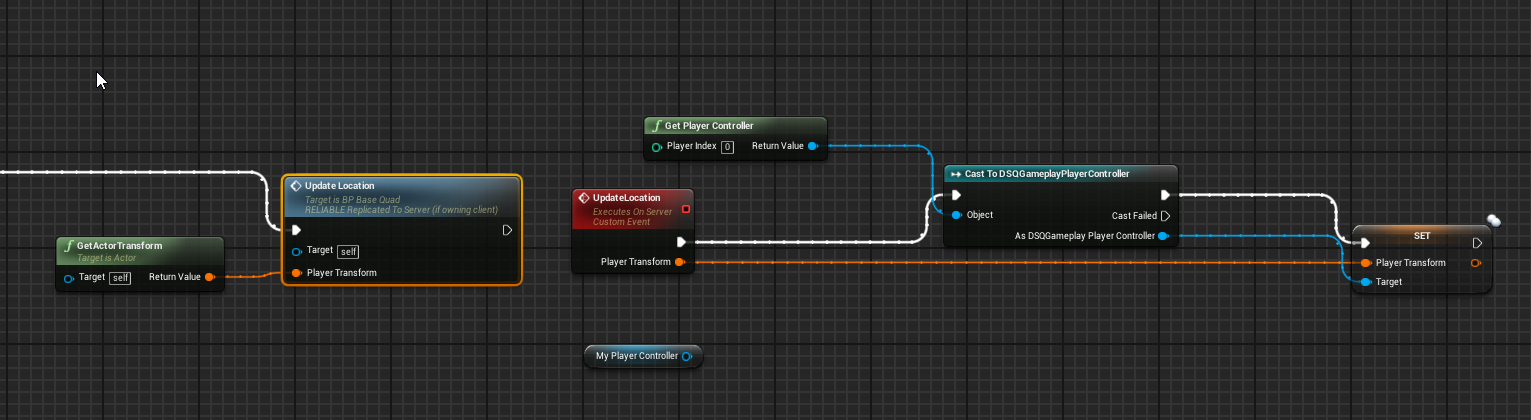
check it
if i put like 999 999 999 in loc or rot in transform, it still reads 0 on server
so the server doesn't get the UpdateLocation event

if i set default transform in player controller to 555 555 and so on, it never gets updated
 grizzled stirrup
If you have several categories of perks / upgrades that players could potentially have (Defensive category / Offensive category / Movement catgegory etc.), would it be better to split them into several smaller structs (each upgrade is a uint8), or one struct with all the upgrades inside?
I'm leaning towards several smaller structs just to make it easier to categorize and apply them at different times
silent birch
I could not solve my problem
 meager spade
@shrewd tinsel don't use GetPlayerController
PlayerController 0 on server might not be who you think
silent birch
Yeah, do I have to make my system that prevents a player from taking another player's weapon in the character's BP?
I can not disable the weapon's collision box
But I can only destroy it when I want
 tribal plover
have a pretty hard question...
The mouse will rotate but then smoothly goes back to center of screen and snaps back... anyone had this issue?
maybe because the actor rotation is being sent back to the owner as well.. so it gets it twice an thats why you jitter..
any way to ignore your own rotation that the server sends?
 winged badger
blueprints have repnotify condition, one is SkipOwner
DOREPNOTIFYCONDITION(class, name, COND_SKIPOWNER) in c++
winged badger
it applies to replication in general
condition
its right below not-replicated/replicated/repnotify
tribal plover
I think the big issue is that when moving the mouse (rotate) it snaps back to center of screen.
Have had multi people try to help but did not know either.
tribal plover
hmm noone
 little fulcrum
hey, how can i disable console commands in a development build because i dont want there to be cheaters in-game using commands
 lost inlet
well you wouldn't ship a development build
shrewd tinsel
how does one make an actor visible to player but invisible or non existant for everyone else?
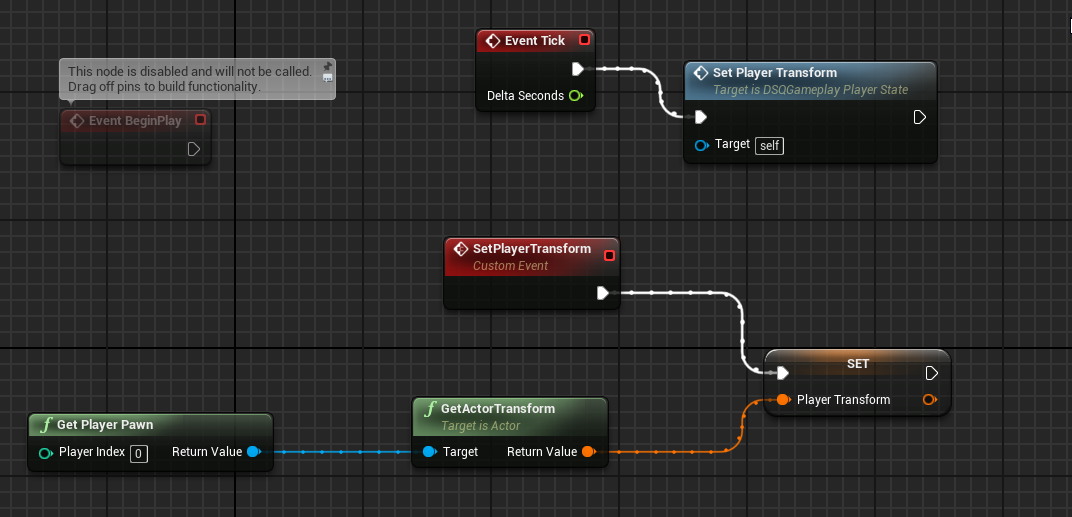
how come does player transform value is the same for all clients?
this is a graph from playerstate
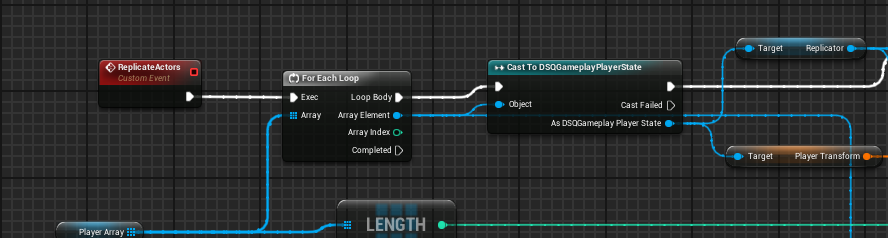
thats how im getting it
silent birch
You can not make your visibility code without replicating it and he certainly does not see it anymore
@shrewd tinsel
Or you uncheck this node
shrewd tinsel
and it will disappear?
shrewd tinsel
thanks
silent birch
That's good?
shrewd tinsel
do you know how can i send variable from client to server?
silent birch
I do not really understand what you mean
shrewd tinsel
i want to update player locations for all players on server
how do i get all players locations on their local machines
silent birch
Their location in the game or in the real world?
silent birch
I can only help you find the rental of all players (well I will try)
In my opinion to locate all the players you cast to your actor and you call the node get world location
shrewd tinsel
it doesnt work like that
ive tried everything
going to try again fresh start once again
silent birch
OK
meager spade
@shrewd tinsel you have to send a server rpc
only server can replicate stuff. client has to tell the server if he wants something to replicate/affect others in the world.
say like Health for example. Client can adjust his replicated Health property but it will only adjust for him, other players won't see the health change. But if the server adjusted the client's health, then that will replicate to all players.
@shrewd tinsel if you want the server to move all players, you can loop through the player states located inside GameState, grab the controller. From here you can access the pawn to get the location, or send a Client RPC asking the client to do something
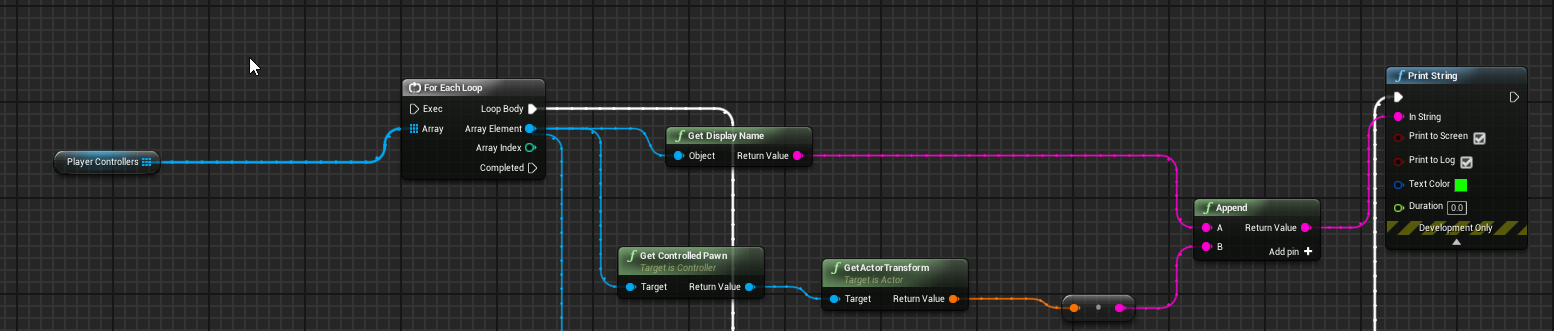 shrewd tinsel
players connected
meager spade
your own array?
meager spade
ok
shrewd tinsel
arrayofplayers also exist
meager spade
but remember controllers won't have a valid world position
unless you explicitly set controller to be attached to pawn
but i can see your getting the controlled pawn
which is good
shrewd tinsel
im getting a controlled pawn and its transform, but it reads it from the servers version of the pawn, not the real clients transofrm
meager spade
ofc it would
server has a copy of all pawns
when you move locally, you need to tell the server your new position
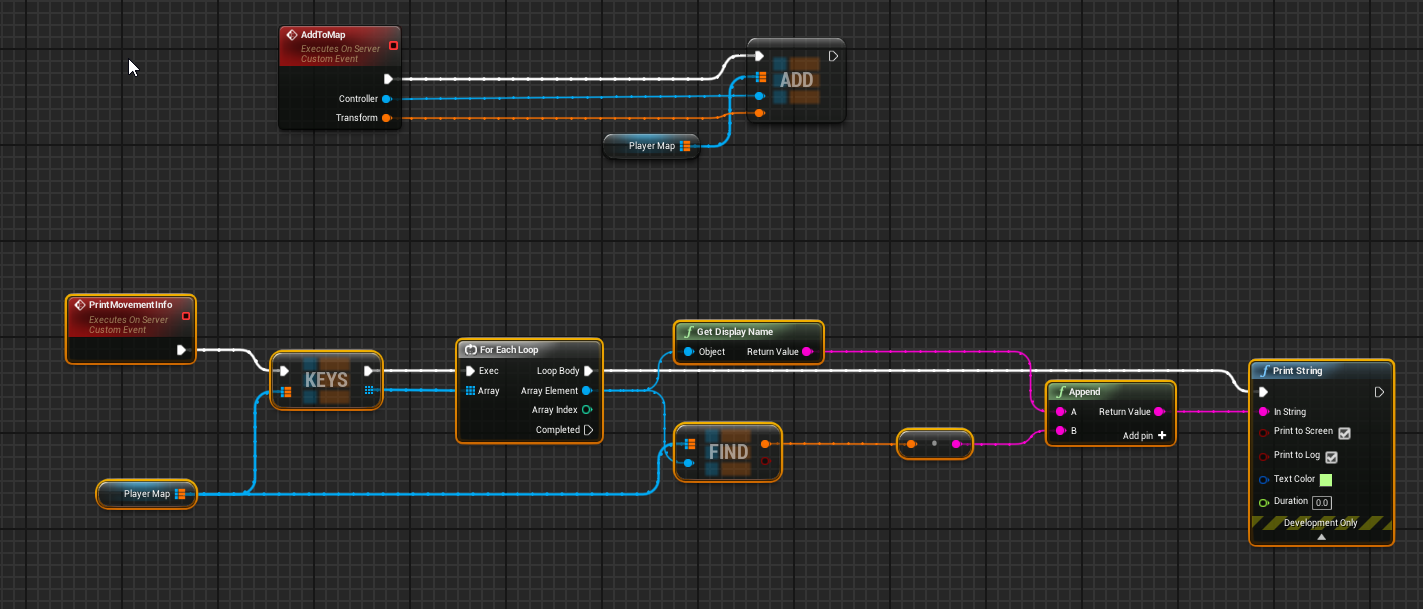 meager spade
so the server can move his actor
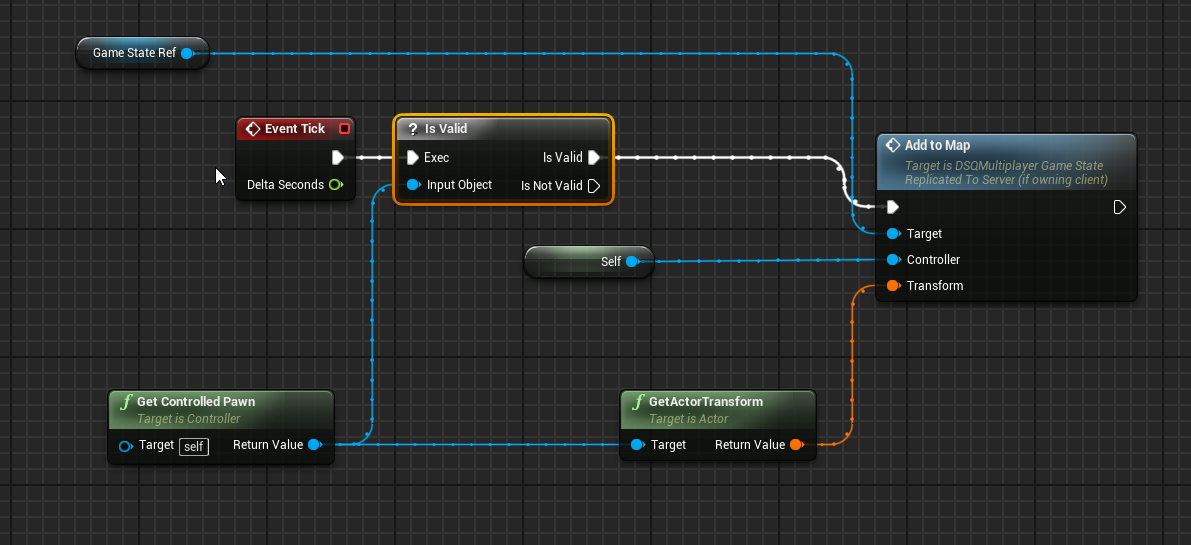 meager spade
that seems very dangerous
shrewd tinsel
im just trying to get to read clients location, its as simple as it can be
meager spade
yeah but that map is bad, map can only have one unique key
shrewd tinsel
but all the controllers ar adding themselves to it
meager spade
right, but only the first time its called
unless i am missing something with how BP version works over c++
shrewd tinsel
if u add a new key and it exists it replaces key
meager spade
i think we should go back to basics
Explain to me, what are you trying to do, how does your "player" move, what is your end goal
shrewd tinsel
its a physics pawn, i want to replicate its movement through the server
i can get all players transforms and lerp them or smt like that
meager spade
so client moves locally, tells the server his new location, server interpolates the location from its current location to the one it just recieved from the local player
right?
shrewd tinsel
i'd say players submit their transforms to server, then clients take the transforms and apply them to 'replicant' actors that represent the pawns in the server
meager spade
yes so clients "simulate" the other pawns movement
silent birch
For example, if a player leaves the session, how will I do so that there is a message that is displayed to the players who stayed in the session but not to the players who left the session?
shrewd tinsel
yeah
meager spade
bp only right?
shrewd tinsel
yes im a bp pleb
but it is possible and quite simple i think
it just doesnt click for me somewhere
 twin juniper
Let the servers world version be the truth because you can never trust the client's local world. I just want to point that out. It is dangerous to directly trust the client. The whole engine replication system is written with this in mind
shrewd tinsel
@twin juniper im aware of the cheating and i don't care right now about that
meager spade
cause it might be easier just to have a struct
which is replicated
on the other pawns
we check for Simulated
and use the details from that struct
to interpolate
that is how the built in movement component works
shrewd tinsel
can you expand on 'check for simulated', why check?
meager spade
so on tick
on the player pawn (the physics actor)
we branch on IsSimulated or not
Simulated is the version of the pawn "other clients" have
so, owning client is Autonomous Proxy, other clients are "Simulated proxy"
 meager spade
thats authority
dang and simulated proxy is not exposed to bp
well that is stupid.
well we can work around that
using IsLocallyControlled
shrewd tinsel
what is the struct made of?
meager spade
well for now it can just be the transform
shrewd tinsel
right
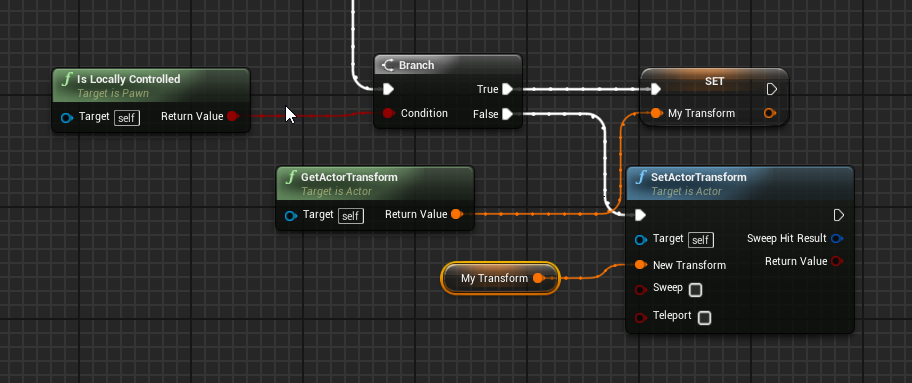
 shrewd tinsel
im going to try implement this


 shrewd tinsel
it works only on server
shrewd tinsel
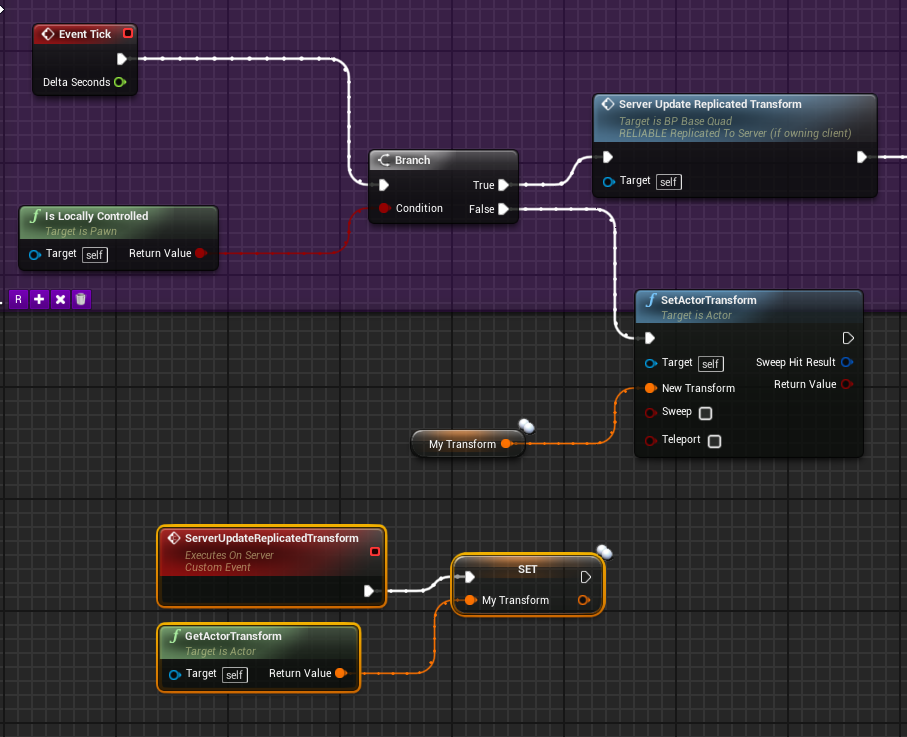 meager spade
show me my transform property
shrewd tinsel
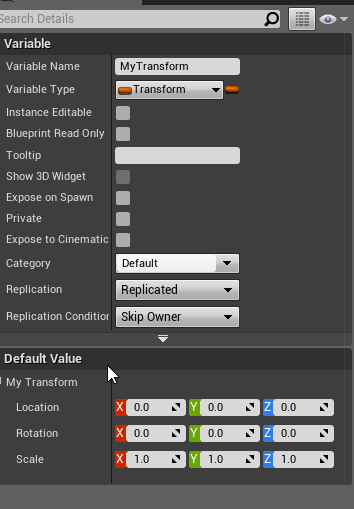 shrewd tinsel
 meager spade
what is yellow?
shrewd tinsel
the print result of the transform
meager spade
yes but where from
shrewd tinsel
sec

 meager spade
so much simpler 😄
shrewd tinsel
perfection is in simplicity
silent birch
How to use this node
 pastel thunder
@meager spade In the Multiplayer games like PubgMobile, should I program our server to control things that happening... Like make a safe zone and after 5mint start zone shrink and make redzone... ???
 white mason
Hello, so anyone know why game is slowed on dedicated server, only on 2+ players?
 peak star
Could be many reasons. Does it have this same problem with everthing the same except being a listen server? Or only on dedicated?
 thorny jay
Yo, if I call a server function to generate an actor on server, how do I get the actor's pointer on client?
 chrome bay
The actor should be replicated, then you can access it somehow.
If you want it set to a specific property you'll need a replicated pointer to the actor, then set that on the server to the replicated actor.
thorny jay
This is what im doing. the NewSpwanedFlagActor is a replicated pointer. But it always nullptr on client
peak star
@white mason does it have the same problem on listen server?
chrome bay
@thorny jay First of all don't do C-style casts, you don't need to and they're "dangerous"
 ocean geyser
is it framerate lag or network lag? is this when you test on the same pc with 2+ clients or separate pc's?
chrome bay
Second, 'NewSpawnedFlagActor' would have to be a replicated property
And you can't garauntee that it will be valid by the time the client gets that RPC anyway
So you need to use an OnRep callback.
Also use *GetNameSafe(SomeUObject) to print an objects name in a log message, with %s
thorny jay
it works now... the C-style is fine I think. I forgot to check "Component replicates"
chrome bay
You don't need the C-Style, SpawnActor is a template and already casts to the required type
What you've done there won't work anyawy
Even if NewSpawnedFlagActor is replicated, there's no garauntee it'll be valid before the RPC is called.
So sometimes it might work, other times it might not
thorny jay
it has a timer to validate the pointer
chrome bay
Which runs once, and still might not be valid
ocean geyser
hence the template. if you do end up needing to do a separate cast for some reason, use cast like so. but as Jamsh said you dont need to cast when using spawn actor
if (ARFlagActor* Actor = Cast<ARFlagActor>(castfrom))
{
    //whatever here
}
it runs until the pointer replicated
chrome bay
The timer is non-looping
Oh nvm
Still.. gross
OnRep callbacks are the way to do it
ocean geyser
also what about having the actor being replicated with an OnRep? so once it goes from nullptr to a valid pointer the clients will get a notification telling them that the actor is good to go?
would that work
chrome bay
Better yet, why not just call GetFlagWidgetObject()->etc. from the BeginPlay of the flag actor
No point calling it from somewhere else
thorny jay
Yea, I should use OnRep. thx
w8 I cant. I need this only running on the client who called the server function
ocean geyser
still use onrep but with owner only condition for replication?
DOREPLIFETIME_CONDITION(class, variable, COND_OwnerOnly);
hopefully that works for you
thorny jay
😋
white mason
@ocean geyser yeah i test on same pc 2 clients
@peak star yes, listenserver is also affected. 2+ players and their walking and animations are slower, but not looking around ( so i assume it's not hardware lag)
ocean geyser
do you have something thats just sending a crap ton of network traffic around? would that even affect it if your testing on the same pc?
 glad wharf
It could also simply be your computer struggling with simulating 2+ instances of the game at the same time. You should use the profiler to identify the performance bottleneck.
Also if you can try with 2 different pcs and check if the behavior persists, it could help
white mason
I don't know if it'll help, but I'll paste it in here.
first one, on one client dedicated server (all good) and second one bad on 2 clients
white mason
idk what's going on
ocean geyser
test with another PC like Saltiel said
white mason
Okay
 unreal pine
I want to make a "Steam Advanced Sessions" server invite only - with these settings I'm not able to invite someone through the steam overlay. Am I doing it wrong?
I tried also messing around with "Allow Join Via Presence Friends Only", and have the same problem
I figure I can make an Extra Setting for it, but it seemed almost like those options are to handle that interaction
unreal pine

I'm using Extra Setting for it, I'll report back but it should be robust enough to handle the "Invite Only" stuff I wanted 🙂
 foggy idol
HELPPP
So my clients won't update unless I close the window both in editor and at runtime
The first picture is after I left the window
Before I left the timer was frozen on 2 secs
But while I'm not interacting with the window everything works fine
Please anyone help me this thing is driving me mad
 timid moss
where is the best place to identify what team your player is on?
 dark edge
@timid moss PlayerState
peak star
@foggy idol thats pretty weird. Are you using a source build of the engine?
foggy idol
@peak star downloaded straight from the launcher
 thin stratus
Quick question about Subobject replication: Can UObjects have RPCs if they are replicated through an AActor?
chrome bay
They can
You just gotta do this (two secs)
Override these two funcs:
{
    check(GetOuter() != nullptr);
    return GetOuter()->GetFunctionCallspace(Function, Stack);
}

bool UST_InventorySlot::CallRemoteFunction(UFunction* Function, void* Parms, struct FOutParmRec* OutParms, FFrame* Stack)
{
    check(!HasAnyFlags(RF_ClassDefaultObject));

    AActor* Owner = GetOwningActor();
    UNetDriver* NetDriver = Owner->GetNetDriver();
    if (NetDriver)
    {
        NetDriver->ProcessRemoteFunction(Owner, Function, Parms, OutParms, Stack, this);
        return true;
    }

    return false;
}```Awesome, thanks! (:
chrome bay
urgh
How do I bind to Steam Callbacks on the Game Thread?
Currently they're being executed on the online thread, I guess because the Steam OSS is executing them.
Well actually, it is bound on the game thread, but it's being called by the online thread
thin stratus
@chrome bay No idea, I usually wrap whatever callback comes in into AsyncTask function, specifying GameThread
chrome bay
Yeah I can't in this case, it's just a generic callback from Steam 😦
UserStatsUnloaded_t
thin stratus
Yeah but the function you bind to that
Can call another function on the gamethread
By using AsyncTask
chrome bay
Ah yeah, that's what I need to do
Dammit.. how straightforward is that?
Do I have to create a full async task type and push that into the async tasks for the OSS?
chrome bay
haha
thin stratus
#if PLATFORM_WINDOWS && !UE_SERVER
void UHLPlayFabSubsystem::OnPurchaseResponse(MicroTxnAuthorizationResponse_t* pParam)
{
    bool bAuthorized = pParam->m_bAuthorized & 1;

    AsyncTask(ENamedThreads::GameThread, [=]()
    {
        if (bAuthorized)
        {
            ConfirmRMItemPurchase();
        }
        else
        {
            HandlePurchaseRMItemFailed(false);
        }
    });
}
#endif // PLATFORM_WINDOWS && !UE_SERVER
Not saying this is perfect or good, but that works.
chrome bay
ah perfect, thanks! I'll give it a shot
pastel thunder
@thin stratus Steam is a Server right????
chrome bay
That did it - cheers Cedric!
thin stratus
@pastel thunder Wat
@chrome bay Awesome!
pastel thunder
@thin stratus Am I worng?
chrome bay
Steam isn't a server it's just a service provider
It doesn't actually host and run your game servers
thin stratus
It's a very vague question
pastel thunder
So, why most of YouTube tutorial says that "STEAM MULTIPLAYER"
grizzled stirrup
@pastel thunder Steam multiplayer typically means the process of hosting and joining other games with Steam players- the players themselves actually host the games, but you find and connect to games via the Steam online subsystem
peak star
@foggy idol what's your operating system? Is this running on a laptop?
 rich ridge
Is it possible to connect to UE4 dedicated server not from actual UE4 game but from other service and this connection should be treated as a player has connected to UE4 dedicated server.
 fleet raven
for what purpose?
rich ridge
It's basically a socket connection.
I have a problem where I want to spawn some invisible actors or players which don't have enough significance on damaging other heroes but they play crucial role. So I was thinking that I will have a python script which will handle all these stuffs
fleet raven
sounds like the proper way to do it is not that but just spawning bots on the server
rich ridge
My invisible players are depending on other external factors and sometimes those external factors are expensive to calculate and I don't want to flood my UE4 dedicated server with network packets
Just think I have a central repository of actions whose state depends on external factors but all the actual players are going to get affected by these
I don't want to link my central repo with dedicated server
If something is wrong with repo I will only fix repo. If I integrate repo with server then I have to patch server also.
I m trying to separate things
foggy idol
@peak star I use Windows 10 and yeah I'm on a PC. Regular laptop with 8GB ram and intel i5
peak star
Hm i dont know. I jave had that problem too before but I domt remember how I fixed it. Maybe there is a project setting for whether it runs in background or while windownis suspended?
 ancient root
Any one here exprienced with AWSGameLift ?
foggy idol
@peak star thanks
rich ridge
@ancient root I have recently built my dedicated server for Gamelift Linux
ancient root
Can you have multiple instances of the same fleet ?
rich ridge
yes
ancient root
It wont let me or some reason weh n itry to assigned for than 1 instance
to a fleet so i can have multiple sessions
it just tells me to fuck off with no explanation
rich ridge
It should let you create multiple fleets. Then there is no point of scaling without multiple fleets
ancient root
Yeah im doing that, but i want my users I say i want its a must
i want my users to host their own game sessiosn with a password
foggy idol
But it works fine at runtime between 2 pc's so I think it's just a. Glitch or something
@peak star
ancient root
@rich ridge Hey so, how can i let my user shost multiple sessions
rich ridge
@ancient root Modify Engine
ancient root
What ?
rich ridge
its 1 is to 1 mapping
 humble zealot
Trying to run a dedicated server
Theres no errors or warnings
just doesnt load past [2019.11.11-16.44.07:695][ 0]LogWorld: Bringing World /Game/Loch/Loch.Loch up for play (max tick rate 30) at 2019.11.11-16.44.07 [2019.11.11-16.44.07:811][ 0]LogWorld: Bringing up level for play took: 0.998997 [2019.11.11-16.44.07:812][ 0]LogGameMode: Display: Match State Changed from EnteringMap to WaitingToStart [2019.11.11-16.44.07:882][ 0]LogGameState: Match State Changed from EnteringMap to WaitingToStart [2019.11.11-16.44.07:882][ 0]LogLoad: Took 7.176369 seconds to LoadMap(/Game/Loch/Loch) [2019.11.11-16.44.07:883][ 0]LogLoad: (Engine Initialization) Total time: 9.68 seconds
grizzled stirrup
If you need to send text from one client to all other clients, is FString the best text format to use?
Sent as const FString&
Looks like it's the case: Note that you should not store FNames on disk or serialize them over the network. They are guaranteed to be unique only within the local process (not even on the same machine). When persisting or serializing FName fields, convert them from and to FString instead.
chrome bay
You can actually send FNames directly, they just get sent as FString apart from a few specific cases like NAME_None etc.
peak star
@foggy idol yes try it on other machines. Mayne something is wronf with your PC or Windows and not with the game
grizzled stirrup
So they would be the same cost as an FString in terms of bandwidth regardless?
Will always send as FString explicitly in that case just to remind myself. Thanks for answering
 shy apex
hey quick question, can you store a session result and join it later?
like you click on a session, it stores the session result, then you join another session. can you join the previous session from the stored result?
grizzled stirrup
Should a text chat message RPC be unreliable?
Is there a high chance it'll still make it through?
Or should unreliable only be used in cases where you are frequently firing off RPCs that don't have to make it through (in cases like is done with the CharacterMovementComponent)?
fleet raven
it absolutely should be reliable
imagine sending a message and it just drops it
your users would be like 
reliable should be your default, and unreliable used only in situations where it truly doesn't matter if it's dropped ( say because you're going to send another rpc with a newer value soon™ anyway)
 worthy perch
On that note, when do you crash from reliable RPCs failing?
I vaguely remember that you get some buffer overflow when maybe too many reliable RPCs fail?
fleet raven
you will never crash from sending too many rpcs
you will, however, disconnect the client if you queue like 250 of them in the same actor
worthy perch
Alright, disconnect the client, that's correct. Thanks.
winged badger
the RPCs sent on Tick should never be reliable
if one fails more current one will land before the sender has any idea the previous one failed
 balmy kindle
Hey guys, i have a dedicated server setup. Where do i call "Interaction" Widgets on Level Objects? On the Object itself, or on the HUD Class?
winged badger
what does "call Widgets" mean there? 😄
grizzled stirrup
Thanks Zeblote, reliable it is!
balmy kindle
For example, i have a Object in the Level where when you overlap the trigger you see a text "activate". Do i create the widget for the triggering actor in the Object itself, or better have it in the Pawn Class, HUD or else?
winged badger
depends on your interaction system
what type of server and even that its a multiplayer game don't really affect the choice
if you are doing some kind of on-tick trace (isometric camera for example) your controller will have information of what's under your mouse at any given time
but even then i'd go widget component on the interactable actor
since if the HUD were to move a widget at a hittest location it would look weird
never the pawn class though
you could spawn a widget component on the object when it overlaps to save yourself the need to have more then one of them
but that is a slightly more complicated setup
as in, interactable actors have a class of Widget required to display them
HUD has an actual widget component on itself
balmy kindle
The widget is called on overlapping a trigger box, the interaction system is shooting a line trace in the BasePlayer Class what is calling a server function inside the PlayerController what is then going to a BP Interface which is implemented in several Objects. That works really well. But the widgets behavior with the IsLocallyControlled Node is giving me a hard time 😅
winged badger
and it attaches it to the interactable actor, instantiates the userwidgetobject and initializes it correctly when widget is required
balmy kindle
Hm, nice idea with the widget spawing on the Object instead on the caller
winged badger
do not mix networking and widgets
server doesn't need to tell your clients if they should see the interactable or not
client code should be able to figure it out on its own
its why i told you that it doesn't even matter if its a MP game for this
if and when the player presses the interact button the server can then do a check if the player is in fact able to interact with the object
balmy kindle
okok.. so i have to change some variables in the PlayerClass to figure out if they can see a widget or not?
ah ok
will try some stuff^^ thanks :9
🙂
winged badger
for just showing the widgets, local only
 polar bridge
Net PktLag = 1000 should work in PIE yeah?
winged badger
it will be one sided
polar bridge
trying with shootergame but doesn't seem to have any effect
winged badger
unless you enter it in both consoles
polar bridge
i did
winged badger
but it does work in PIE
polar bridge
weird...doesn't seem to do anything in shootergame, when i move my character he moves instantly
on other client
winged badger
CMC should simulate the movement
try something that actually happens only after RPC lands on the other side to test it
polar bridge
ah, kk
winged badger
simulated proxy should have the lag noticable
when it starts moving
autonomous shouldn't
polar bridge
kk, will play around with it a bit. trying to create a bullet hell shooter with slow moving projectiles and one of my main concerns is lag, so trying to nail down what they do to compensate for it
silent birch
Can you teach me more about travel server?
 quaint tendon
Complicated issue; origin shift in MP with dedicated server works properly with player input calling the origin shift. Distance checks on tick in character BP or in level BP cause second player character to teleport all over the map. What kind of event should autonomously call the origin shift so the players not performing the shift don't glitch out? Tried putting it on a timer without distance checks.
 flint rose
In my game state, I'm trying to listen for the event "AnyDamage" but it's not firing. I'm calling TakeDamage on an actor.
            int32 DamageToTake = GetCharacter()->Strength + DamageActor->Strength;
            OtherCharacter->Health -= DamageToTake;
            FDamageEvent DamageEvent;
            float DamageTaken = OtherCharacter->TakeDamage(DamageToTake, DamageEvent, Character->GetController(), GetCharacter());
            UAISense_Damage::ReportDamageEvent(this, OtherCharacter, GetCharacter(), DamageTaken, OtherCharacter->GetActorLocation(), DamageActor->GetActorLocation());
 harsh lintel
I have a server rpc that executes once per object in an array, I want to execute a function when every object in the array is done with the server rpc, how can I achieve this?
winged badger
that sounds awfully weird
easier to do one RPC and send the entire array through it
ocean geyser
not sure if im understanding you quite right and that sounds like a crap ton of network traffic that should be avoided if possible, but why not have a for loop that executes your server RPC and then at the end of the loop simply execute the function you want? otherwise if the array is replicated then have a single multicast to perform your operations on the client instead of the server doing something and then trickling down to clients
more info would be helpful here
wait duh, im rereading what you said now. like Zlo said, pass the array to the server and have the server perform everything instead of making an rpc call for each element in your array
meager spade
sending a rpc for every element in the array is waste
you also do know, once the arrayh is modified, if you have it replicated, you can just use OnRep_SomeArray if it doesnt need to be instant on the clients.
ocean geyser
man are you typin a book or somethin lol
harsh lintel
The object array is an array of controllers
After a timer is over, every client will send and set a variable through a server rpc with a parameter
It's hard to explain 😄
Since I don't really know how to ask this
winged badger
controllers don't normally replicate
ocean geyser
the server has access to the controllers, is there a reason its not just being monitored on the server? plus what Zlo said is another implication
winged badger
sending 1 RPC at a time will create a mess, whatever is being sent
harsh lintel
What's being sent is the "selected character" class, how else would the client let the server know this
ocean geyser
like what character the client wants to be so the server can make them possess it?
winged badger
that is hardly an array of controllers
harsh lintel
Yes the class so the character is spawned and possesed
winged badger
you put in a delegate/event dispatcher into the PlayerControllers, firing when the pawn class is set
you hook into it from GameMode, at the time you spawn the controllers
you make a say TMap<APlayerController*, TSubclassOf<APawn>> in the GM
and populate it
as the RPCs come in
each PC has a single RPC, setting only its own character class
it runs a set function, that calls the event dispatcher
once all controllers report in (GM is aware of number of players)
you spawn the characters and progress the MatchState to Started
much more elegant to do the setup on a lobby map, then just server travel, btw
harsh lintel
So the event dispatcher basically just checks that every controller has a set pawn every time it's called, and if so it proceeds to the function I wanted?
winged badger
event dispatcher doesn't check anything
it has payload, APlayerController*, TSubclassOf<APawn>
when the RPC with subclass arrives, PC just calls the dispatcher plugging Self into APlayerController* and class that arrived into class pin
GameMode in its Handler caches the information and then checks if every player set its class
harsh lintel
Right my bad, I've completely forgot about dispatchers, that really helps thanks a lot
dark edge
@flint rose I'm pretty sure event any damage only fires on whatever actor was damaged.
rich ridge
@silent birch this link will help you in server travel
silent birch
I go try @rich ridge
rich ridge
@silent birch try this link
https://wiki.unrealengine.com/How_To_Use_Sessions_In_C++
It has how to host session, join session and how to travel
silent birch
OK thanks
In this link where do not even talk about travel servers @rich ridge
That's the good code?
@rich ridge
rich ridge
@silent birch bro just read carefully it's there. Server travel is there. Just read carefully. I can't help more than this. I can only give you abstract knowledge.
silent birch
In the link name I also saw travel but clicking I did not find server travel
@rich ridge
rich ridge
@silent birch learn or quit
silent birch
I have a problem with my game, when I create a session and I try to join it it works well on the same computer, but when it's on different computers (1 computer per player) when I search the session I can not find it
Why?
thin stratus
Are the pcs in the same network?
foggy idol
@silent birch check your Network adapters on each of sometimes windows creates a virtual adapter
Especially if you previously tested the game by running two instances on the same computer
thin stratus
I never had that
thin stratus
It's way more likely that he hasn't setup the game for online multiplayer
foggy idol
It nearly drove me mad
After spending 3 months setting it up one day it just stopped
It was a true break my PC moment
thin stratus
Right, let's check the basics first. If we can't solve it we can check for stuff like virtual adapters
silent birch
I do not understand, how does that a virtual adapter?
thin stratus
Ignore it for now. Are the pcs in a different network?
silent birch
Connected to the same WiFi?
thin stratus
Then they are in the same network. Do you use any subsystem, like steam?
silent birch
Yes a subsystem but for steam
thin stratus
So you are trying a LAN setup while having steam?
 silver lotus
@silent birch you need to remember that ServerTravel DOES NOT work in PIE
I haven't followed the convo - I just saw that picture and want to make you aware of that limitation
silent birch
Not my game I do not use steam @thin stratus
silver lotus
@thin stratus ServerTravel doesn't work as far as I'm aware
Care to elaborate? Because you could actually help me with my own problems
silent birch
What is PIE? @silver lotus
silver lotus
It's the editor play window 🙂
thin stratus
@silent birch you have to answer these questions properly....
- Are both computers in the same network or over the internet?
- Are you using a subsystem for your game?
Your answers are too vague
silver lotus
@silent birch Have you enabled your sessions to be LAN Enabled?
thin stratus
@silver lotus ServerTravel can be SeamlessTravel if the Gamemode is setup for it
silver lotus
Ah
silver lotus
Yes
thin stratus
But the seamless version does not
silent birch
I do not understand the first question, the network so the WiFi @thin stratus
thin stratus
@silent birch The two pcs that you want to play with, are they connected over the internet or do you have them both at home
silver lotus
Also while I have the chance - @thin stratus Thank you for the work you've done to teach networking. It helped me a lot 🙂
thin stratus
Cheers, glad it helps (:
silent birch
In my game players can activate LAN and disable it as well @silver lotus
silver lotus
Okay, cool. So do you have the OnlineSubSystem set to NULL?
silent birch
I have it's both at home @thin stratus
thin stratus
Half sure this is the same problem i have. If it's in the same network and using lan, then it might just be the router
silent birch
I tried by unblocking LAN @silver lotus
thin stratus
Mine doesn't forward rhe 255.255.255.255 broadcast
silver lotus
@silent birch are you trying to use Steam?
thin stratus
So it can't find the sessions
silver lotus
If you're trying to use Steam - You can't use the same computer, or the same steam account from what I remember
thin stratus
Nathan would need to check the logs on the client that searches
silent birch
No steam @silver lotus
silver lotus
Okay cool. So definitely check the logs
thin stratus
Not sure if that prints by default though
silent birch
Yeah he does not find the sessions @thin stratus
silver lotus
If it's an error it will
silver lotus
Can you send me a screenshot of your "Create Session" and "Find Session" nodes please @silent birch
Ah okay
thin stratus
The router doesn't forward the network broadcast
So the other pc never gets the call
silver lotus
Makes sense.
thin stratus
Sessions in lan work pretty different than online
silver lotus
But lets just confirm the nodes are configured properly 🙂
silent birch
OK @silver lotus
silver lotus
It could be simply that they arent looking for the same session criteria
silent birch
Sorry if i send photos instead of screenshots, my connection is constantly slow so my computer can not open discord
silver lotus
All good mate, as long as we can see the properties 🙂
silver lotus
Hey @thin stratus you might know more than me - are the arguments such as "listen" case sensitive..?
Sidenote.. @silent birch you can actually use the Open Level node
instead of Execute Console Command
🙂
silent birch
Yes, but that also works
silver lotus
It does, I'm just sharing information with you 🙂
Do you have the FIND SESSIONS node?
silent birch
silver lotus
Alright..
Can you throw a Print String node on the On Failure please?
Doesnt matter what it says - Just need to know if it's failing
silent birch
OK
silver lotus
If it's failing - It's likely to be printing to the log file
thin stratus
@silver lotus don't think so
@silent birch can you please install discord on your pc and use something like sharex to make screenshots?
It's rude to give us these barely readable phone images
silver lotus
@thin stratus He has really terrible internet
silent birch
I discord on my PC but with my discord connection to trouble opening on my pc
thin stratus
The phone images aren't the solution though
silent birch
Sorry
silver lotus
no need to apologise mate
silent birch
OK
Thanks
I tried on one computer the version of my game package and the other pc the version in the engine and the print string is not played but we also did not find the session @silver lotus
silent birch
Please explain me too the server
foggy idol
Wow
I can't see anything wrong in particular
Have you tried hosting and joining in the editor
@silent birch
silent birch
Yeah I tried but on different computers it does not work, it only works when I test on the editor with two windows open @foggy idol
 gritty lodge
What is the best way to spawn pawns that will be possessed by players in multiplayer? Like in a Diablo 3 type game, where the players can join into a level streamed world at different times. The "server" has to create the networked pawn and then give it to the player controller? Is it possible to do this in a way that works with Listen and Dedicated servers at the same time? For example: if the game had PvE mode that was listen and PvP that was dedicated.
thin stratus
@foggy idol @silent birch Hosting INSIDE of the Editor across two PCs shouldn't work.
You need to start the game standalone.
Either by going into your project folder, rightclicking the UPROJECT file and clicking "Launch Game".
Or by just packaging it, although packaging of course takes longer but should be tested regulary anyway.
@gritty lodge Well, yeah, the GameMode class has lots of overrides for handling Pawn spawning.
You can set the default one to none and then handle what class they get via these functions.
This might need c++ though as some stuff can be passed easier from connection client to server this way
silent birch
OK @thin stratus
Even trying with the game already (in package) it does not work @thin stratus
thin stratus
Yeah, so if this is all true for you:
- Packaged
- LAN
- No Steam
- Two Different PCs
Then you need to locate the logs of the client and check what happens there.
I have the same issue but for me it's the router blocking the search.
thin stratus
In the Saved/Logs folder
silent birch
OK
I will try to see
@thin stratus
Please can you tell me more about the travel server? @thin stratus
thin stratus
What about it?
 bitter oriole
Which part of the process is not working ? What's your code / BP like, how do you expect it to work and how does it work instead ?
silent birch
I tried this code in the game instance, the level Blueprint, the BP of the character
bitter oriole
Isn't there a server travel Blueprint node instead of a clunky console command ?
silent birch
Node Open level?
bitter oriole
Probably not that, no ?
silent birch
Yes, but So which node?
bitter oriole
No idea, I don't do BP. So what did you check more than "doesn't work" ? You called the event ? Did it fire ?
silent birch
I don't understand
 naive crater
Nathan is your gamemode setup so that you can do seamless travel?
thin stratus
You are not giving enough info for us to help. You are also not investing enough time into debugging yourself.
silent birch
To the more we talk about it, I have to go thank you anyway
bitter oriole
🤷
silent birch
Online @naive crater
thin stratus
What you do is equal to saying "My lightbulb is broken." and when you are asked you just show a random switch on the wall.
bitter oriole
You need to invest more of yourself into this @silent birch - we can't guide you into building a complete game, you'll need to spend hours working on it yourself to understand what happens
naive crater
@silent birch in your gamemode itself do you have this
silent birch
I spend a lot of time on it but for the server travel I can not
OK thanks I go Try @naive crater
naive crater
Is this how you all handle your events? I'm reworking my code to be a bit more responsive for clients and am open to better workflows.
https://cdn.discordapp.com/attachments/190147382564880384/643766349788610572/unknown.png oops image didn't post properly 😄

 hushed anvil
Hey, I'm trying to develop a multiplayer game, and it works pretty well, but for some reason, sometimes I need to launch the game three times to connect to a game (I've tested it only by LAN connection, on the same computer), meaning that if I launch the game twice, I host the game on one client, but the other client can't connect, but if I launch another client, it can connect to the host.
Can anyone help? Thanks!
grizzled stirrup
If you had to send a player name and a color over the network for a chat message, would you be better off sending a APlayerState* rather than an FString and aFLinearColor since both the name and team num could easily be found on the server from the PS pointer?
chrome bay
defo
grizzled stirrup
Thanks!!
chrome bay
FLinearColor is 4 floats, so 128 bits
grizzled stirrup
I'm still kind of amazed how light pointers are yet give so many options
 tribal shard
Is it possible to make a component (that is part of my FirstPersonCharacter) only visible to other players?
grizzled stirrup
The beauty of replication I suppose 🙂
chrome bay
whereas a UObject pointer will resolve to a net GUID, which is 32 bits IIRC
naive crater
like a third person mesh @tribal shard ?
if so just use the "Owner no see" flag on it
winged badger
@grizzled stirrup first thing you ask yourself before replicating data to client is "do i have that data already on that client?"
tribal shard
that did the trick, thank you @naive crater :)
naive crater
Awesome 🙂
worthy perch
True, unless you needed truly random colors, you could just send over a color-id.
Which, if you don't have many color options, could be super small.
grizzled stirrup
Yep so in the case of the PS, yes I do, I just need the ref to know WHICH PS I need!
So much easier
The reason I have the PS on the client is because of the GS player array right?
grizzled stirrup
Oh just because it's replicated
winged badger
yep
grizzled stirrup
So by sending a PS pointer A to the client, he knows which of his local replicated PS's to use
And not use B or C
winged badger
PlayerState isn't some abstract object
grizzled stirrup
So it's really just sending an address
winged badger
its an Actor
grizzled stirrup
True so it's sitting in the world like a pawn right?
winged badger
it is
grizzled stirrup
Really cool, slowly getting the hang of this stuff
winged badger
i tend to attach mine to the Pawns
lets me query the location from PS*
and its easier to find which one is which in the outliner
grizzled stirrup
That's a damn good idea
I really didn't expect PS's to exist in the world before this
Thanks
winged badger
has some side benefits, attaching
like having a widget component that takes information from the PS on the PS actor, instead of the Pawn
 hasty crane
Hey guys, question
LET'S SAY I want to make a game. It's multiplayer fps shooter with AI as enemy. So I have to run server simulation. And I want servers to be up to 32 players.
Should I make it using dedicated server?
How would I handle that? Let's say 10000 people want to play at the same time. Do I host 313 servers? I'm wondering how someone that has made a game on his own would manage that.
Or maybe stay with player being both client and server?
worthy perch
In your case, you pretty much have to use dedicated servers.
winged badger
i don't think a 32 player co-op FPS can ever work
not even if you have a full team just developing the AI
bitter oriole
@hasty crane Other concerns aside, 32 players -> dedicated
hasty crane
Okay I didn't say that very clear.
Idea is: players stuck on station with AI Aliens hunting them down. They have to survive while waiting for extract.
But that's not a question
Question is about servers. Ok so I would need to use dedicated servers (as I thought). But how the hell do I manage that? If let's say 10000 players want to play at the same time, do I buy 313 servers for them???
bitter oriole
You need 313 game servers running
Maybe on 313 virtual private servers, or on less than that depending on performance
Maybe you can get 157 VPSs fast enough to run two instances
Impossible to say without developing the game 🙂
Also you likely won't get 10 000 players on your game - or 1 000, and probably not even 100
hasty crane
Yeh but I'm considering best/worst case scenario. Even if it's 1k somehow. Still managing 32 servers by hand? (or less but with few game servers running). It seems... a lot
bitter oriole
Just to give some context, 3000 peak players is best-seller territory, so you're unlikely to hit that - don't base your entire system on that assumption
You probably don't want to hand-run these servers still
So you'll have to have some kind of management service to spin up or down instances, update them, etc.
hasty crane
So there are services for this?
Cus that's my question. Hand-running all this. I just gave random numbers as examples
bitter oriole
I mean, obviously you wouldn't hand-run it if you have 100 servers. You can run your single development server during development, and you'll naturally get experience doing that and slowly automate it
Running a network service like that isn't something you get tutorials for
It's going to depend on your financial investment, update frequency, actual player count
winged badger
also, you should count on being able to run 150 pawns (players, aliens) at the same time, max, probably not even that
bitter oriole
There are some services to help on this, but if you're doing that kind of work, you really should look into owning it because you need the skill to support and fix issues in real time
hasty crane
Alright I get it
Stay away from multiplayer games that are bigger than 4 player coop or sth xD
winged badger
its not that
its the sheer number of CMCs running around
it does create a hard cap on what you can run at the same time
hasty crane
I'm talking about overall mp game making
I said earlier I would like to use 32 PLAYER MAX dedicated servers 🙂
But now, seems like it has to be a job for experienced team, not single indie dev'
bitter oriole
As far as I'm concerned, personally, I would and do definitely stay away from anything bigger than 4P coop, it gets into nightmarish territory very fast
For what it's worth I worked on a PVP shooter with dedicated servers back in UE3 days and built some infrastructure for it, it's not exactly impossible
It's just that tasks tend to add up real fast
Even with automation, you're still looking at maintaining a matchmaking system, safe and up-to-date server stacks, you need to keep your servers updated, etc.
Still, technically it's all feasable
I'd worry more about the business side 😛
winged badger
besides you can scale it up later
provided you get some funding/helpers
for prototype, co-op shooter with 8 players can even use listen servers
well, for production too, as cheaters are not as much of an issue in co-op games
 toxic geyser
hey guys im using socketio plugin for a multiplayer project and wanted to make 2 players see each other in a scene but i have no idea on how to do it.
can someone give me a little guide?Thx.
bitter oriole
@toxic geyser You should look into the multiplayer documentation for UE4
toxic geyser
i did and i was completely lost
and my main issue is idk if ue4 doc will work with this plugin im using
bitter oriole
Multiplayer is quite complicated, yes
And if you want to use socketio for multiplayer, you do need to rewrite half the engine
WHich is why I'm wondering why you'd use it for multiplayer
toxic geyser
well long story short i didnt decide on what should be used
also thank you for your help !
bitter oriole
I mean, UE4 has multiplayer out of the box
No plugin required
So try using that ?
toxic geyser
well our server programmer has not worked with ue4 before as i had not worked with ue4 multiplayer section so he suggested that we should go with socketio as it is fast or smth
so thats how it started
bitter oriole
UE4 multiplayer is sockets (that socketio provide) + some hundreds thousand lines of additional features
If you think you can make a better multiplayer support inside UE4 than it currently has, go ahead
bitter oriole
Basically try following multiplayer tutorials and see how it goes
toxic geyser
will definitely do it
quaint tendon
How to increase max level size on dedicated server? Seems hardcoded to 20km even with origin shifting
harsh lintel
I have a server rpc which is a listener of a delegate, im broadcasting the delegate in a client rpc but the listener doesn't seem to go off, am I doing something wrong?
the listener is added to the delegate on the server, maybe I need to replicate the delegate?
ocean geyser
@silent birch i think you can execute a console command for server traveling in BP. are you trying to server travel in blueprint?
silent birch
Okay, try the replicate @Wuuhie#1150
silent birch
Yes, go from one level to another @ocean geyser
ocean geyser
you should be able to use the execute console command node with
"ServerTravel/Game/Levels/Game/ThirdPersonExampleMap"
it says you need a transition map set? idk hopefully this puts you on the right path
humble zealot
Could anyone help me with servers. When I run a server, I can't see it. Ports arent open. it only works with the command open 127.0.0.1:7777
flint rose
I'm trying to get the game mode in a widget BP but it's returning null.
fleet raven
does your world actually use a BaseGameMode_BP ?
fleet raven
a spawned widget has a valid world context, so there's no reason for it to not work
silent birch
My server code travel must be done in the game mode?
fleet raven
the bp debugger is sometimes wrong
silent birch
Answer me
flint rose
It should say server.
silent birch
Me @flint rose?
flint rose
I'm referring to my question @silent birch
flint rose
No worries.
silent birch
OK thanks
fleet raven
well, are you running it on the server?
i.e. is the title of the PIE window "server"
flint rose
The event is made to replicate on the server
fleet raven
RPC can't be used on widgets, they're not replicated actors
flint rose
I see. So I'll have to move functionality to something like the owned actor
 spare glade
@pallid stone
whos gamestate hmm
gamestate exist on the server and all clients
and theres 1
each player has a playerstate tho
that is always replicated
gamestate contains an array of all player states
 pallid stone
Right ok, I thought it was like a player controller where the server has a copy of all player controllers, and the clients have a copy of their player controllers and all other player controllers
spare glade
yeah
Gamemode Server only events and storage
Gamestate Public Server Events and Storage
Playerstate Public Player events and Storage
Player Controller, Owning Players Events and Storage
 sharp hornet
The GameMode/GameState multiplayer split is for confusing historical reasons
sharp hornet
servertravel is a really weird function, execute console command probably doesn't get deep enough for it to work
silent birch
So how make?
spare glade
Just get https://forums.unrealengine.com/community/community-content-tools-and-tutorials/41043-advanced-sessions-plugin
to have alot more stuff exposed if u want
Unreal Engine Forums
Advanced Sessions Plugin
Message to users 09/08/2017
I'd like to note that the original intent of this plugin was to shore up blueprint support for sessions
servertravel /Game/
thats the console command
make sure its lowercase
and the /Game/ is the location directory
so like /Game/Maps/Arena as example, after game goes out from content
silent birch
How?
spare glade
spare glade
wut
silent birch
What?
spare glade
what do you mean left
long as in ur gamemode you have servertravel ticked on class defaults you should be fine
silent birch
spare glade
oh thats just stuff from video
i was in the middle of building
so i had to look up unreal multiplayer series and just screenshot that
but its just a switch to determine which map to open
 astral fossil
hey, i'm trying to move a ball in straight line replicating smoothly. On the very beginning the movement is smooth, then it starts to get jerky, what could be the reason for that?
This is the replication configuration
thats with or without UseAdaptiveNetUpdateFrequency
I put large numbers on update frequency to check if that was the issue, but still has a jerky movement (and the pawn is moving smoothly).
I'm moving the ball with a SetWorldLocation, I imagine that its better to use some movement component, but I want to understand whats happenning first.
I used the networkProfiler and that corroborated the update frequency drops
quaint tendon
why isn't replicate movement checked?
astral fossil
I tested both with and without movement checked and it didn't made a difference
I'm guessing this movement is of physics simulation (add impulse and stuff)
I just tested this ball on an empty map and works fine, no jerk
so I think the problem arises because of other data being transfered, what I don't understand is why the ball drops the frequency being the highest net priority on the project
the pawn has 4 and didn't show that behavior
quaint tendon
I was having similar issues with rotation. My rotation quant is on short, left min net update freq and net priority to default. Movement is replicated, is simulating physics.
Do you have a thruster? How is it rotating? Whatever is causing the rotation should be replicated.
astral fossil
(ignore the first node being disconnected, i'm trying other stuff)
but this would be called on server and replicated
The translation and rotation are replicated correctly, but the update frequency drops
quaint tendon
Oof, adding rotation like that is no bueno
astral fossil
i know its not the best implementation, I rather simulate physics and set linear/angular velocity once
its more an issue of understanding why hehe
quaint tendon
Myriad of issues, trying to add rotation via the server will create conflicts with the ping and the rotation lerp. Ugly.
You are supplanting the physics and completely circumventing any rational use of player input.
astral fossil
hmm, i didn't understand that second line, can you explain?
just to give you the context, this ball will just hover on a line segment and return to initial point. If it overlaps a pawn, a sound is emitted and thats it.
I'm trying this now
(jerky still)
quaint tendon
Because you are forcing the rotation you are completely ignoring the physics calculations so the movement is not physics based while adding input. Then the server is trying to update the movement based on the physics but you are supplanting it causing a paradoxical rotation/movement calculation. It's not the same system calculating the transform when you force the rotation.
astral fossil
@meager spade agreed
meager spade
you don't want to "replicate" the actor per say
but have the local client "simulate" what should happen
astral fossil
@quaint tendon when i was adding local rotation there was no physics involved
it was not simulating
meager spade
like player 1 kicks the ball, you tell the server where the ball was kicked, server tells all clients, ball was kicked here, all clients run the simulation itself locally
astral fossil
so, in an empty level, it seems to work fine til where I watched
quaint tendon
Make sure no camera lag
astral fossil
with my pawns, a few moments after begin play it starts to drop update rate
can I send a small video?
meager spade
you sure you are not just flooding the server with rpc's?
quaint tendon
I would recommend setting it up to use physics, I tried doing what you are doing kind of and abandoned it. With physics is way smoother.
astral fossil
i'm trying to make a 4 sec video but now the is miss behaving hehe
quaint tendon
no probs, I'll check it out later
astral fossil
i know in the beginning its not smooth as I said before, that was before using linear and angular velocity to move
 astral fossil
but I'm already XD
actually now im thinking of not replicating and just leave each client with a ball by it self
meager spade
have the client simulate the ball
have the server just tell the client's what forces/direction etc
and voila
astral fossil
good idea, thanks 🙂
dark edge
@astral fossil Replicated physics isn't that hard for something like a ball.
flint rose
When is the appropriate time when I am able to retrieve the game state?
silent birch
The end match
flint rose
Well, that would make it very difficult to use it to display the list of users in a widget so they can ready up.
silent birch
Want to display a scoreboard?
flint rose
Basically, I'm trying to initialize a widget with all the currently connected players and display who is ready to start the match
silent birch
So it can happen at the beginning of the game
flint rose
Correct.
silent birch
That's good?
flint rose
Well, I'm getting a null GameState.
So it's not able to retrieve player state information
silent birch
You do not know how to use the game state?
flint rose
Get Game State returns null
 zealous saffron
Can you post a screenshot of where you try to access it?
Gamestate should be valid after creation for the entirety of that game.
flint rose
silent birch
How do you know if a player is ready?
flint rose
It's in their Player State.
zealous saffron
Yeah, someone familiar with BP specifics might be able to help you better than I can.
Where is this widget created @flint rose
flint rose
In HandleStartingNewPlayer_Implementation
silent birch
The player is ready when he executes that action?
flint rose
No.
This is just initializing the data to get ready to display when they decide to press the ready button
GameMode::HandleStartingNewPlayer_Implementation
silent birch
OK
zealous saffron
Where is it stored?
flint rose
Where is what stored?
zealous saffron
The widget, who owns it the playercontroller?
flint rose
The player controller
zealous saffron
Probably being fired before the gamestate is being created on the client.
flint rose
I've tried adding a delay as well.
zealous saffron
Thats odd.
Personally I would add a function in my derrived gamestate that returns these values. Store the widget in the HUD class and initialize the component's values in the PC's BeginPlay(). Then use on_rep events to update it. When the playerstates ready variable changes.
flint rose
BeginPlay is only called once StartMatch has been called.
zealous saffron
Oh right
flint rose
Yeah, unfortunately there's not exactly an event OnGameStateInitialized or something
zealous saffron
Probably your issue is the same
As this

Stack Overflow
I have an Editor Widget and inside of it I created a blueprint for some button click event.
Unfortunately, when I use the "Get game state" node (or any similar), it always returns null.
I underst...
GameState is returning null because you are accessing it inside the UI
flint rose
That's in reference to an Editor Widget.
I've already gone through that. 😦
Describes Editor Utility Widgets, and how to create them.
Get Game State in regular widgets don't need a world context object since the game is actually running. It's not meant purely for Editor.
flint rose
Well, I'm going to go to bed. Will try to conquer this tomorrow. Thanks for your time guys.
silent birch
Please help me with the travel server @zealous saffron
zealous saffron
Read the documentation
zealous saffron
If it was C++ I would help, I don't use BPs
Call ServerTravel in the gamemode when your match ends
silent birch
How to call the server travel, I want that when the server goes from one level to another that it does not affect the clients
 rose egret
how do I build for Development Client , or Debuggame Client ?
should I create an other target.cs file?
naive crater
@silent birch i do it in my gamestate like this
silent birch
And it work?
naive crater
Thats the way i do it in a game that i have released already. Never had any problems with server traveling itself.
 wise depot
Hey has anybody used playfab cloudscript with unreal engine on here? I'm having trouble getting function arguments to send through correctly
twin juniper
Anyone able to help me, https://gyazo.com/8cdfcc32a6d3bd5c2c9ec901a9d168e3


The server can teleport sucsefully
but client gets set back like the server is denieing the teleport
u can see on the client he gets teleported fort like half a second then sent back
any thought on how to fix this
 brazen glacier
Hey guys. What's smaller to send across the network: an enum or a name? What are their sizes?
 real yacht
FNames are not generally compressed, so when you are using them as parameters to RPCs, keep in mind that they will generally send the string each call. This can be a lot of overhead.
bitter oriole
Aren't FNames internally an int ?
real yacht
this is copy-paste from UE onlin doc.
brazen glacier
I thought names were intended for network, as they're essentially the most stripped-down version of user input text. can you link the doc?
bitter oriole
Okay, interesting.
real yacht
how can FName be an int?
ancient root
Hello any one VR networking ? Im having this weird issue where my left hand has 2 meshes
brazen glacier
ty. https://docs.unrealengine.com/en-US/Gameplay/Networking/Actors/ReplicationPerformance/index.html
Some tips for optimizing the performance and bandwidth usage of Actor replication.
bitter oriole
@real yacht FNames are stored as hashes internally
real yacht
thnx
 viscid bronze
Hello, I am using the Join Session blueprint function to join a Listen server in my project. I use player count as 2 and no dedicated server when simulating in Unreal Engine. There are 8 Player Starts on the map.
When one player hosts the game, he spawns in with his character blueprint, mesh and movement and all. But when a player joins the game, he spawns as a first person spectator like camera. Any debugs?
ancient root
How are you spawning them ?
viscid bronze
player starts placed on the map
ancient root
In any case go to gamemode and override the onPostLogin and handle your logic there what to spawn
make sure the default class is set right and if you dont want to use it define your own variable for which to spawn
and make sure there is 0 characters in the map to begin with
Because to me it sounds like there is a character in the map already, as it adds up 4 x 2 = 8
oh and on the GameMode run if dedicated server, if not then just call the parent function
viscid bronze
there is a character in the map already, but that's the host player, and it is his own listen server
ancient root
Delete it
the map must have 0 characters
all should be spawned
Through GameMode BP
This should offer you some insight
viscid bronze
yes it is empty
but the client player still spawns as weird camera
all these are player starts
ancient root
Okay good now just do the thing i said above with the gamemode and you will be good
I on the otehr hand are having a much simpler issue I cant fix
grizzled stirrup
Does ACharacter::Restart only get called on the owning local client or on ALL client machines?
viscid bronze
is testing multiplayer listen server by simulating with 2 players with PIE (not standalone game) the same as actually doing it on 2 computers
grizzled stirrup
@viscid bronze It's good enough to test but it's of course better to always test frequently on the real thing
Especially with real latency and conditions
But generally things should happen the same way in PIE mp as they do in the real thing (in terms of making sure gameplay code is working)
glad wharf
afaik, PIE does not handle well session code and server travels
bitter oriole
It doesn't handle sessions at all
grizzled stirrup
Yeah doing sessions and seamless travel needs to be done with by playing standalone (which can easily be done with the PIE standalone button or unchecking "Use Single Process")
I kind of treat that as counting as PIE and actual packaged builds as not PIE
Of course if doing custom session stuff for a specific platform then the only way is to test with 2 computers on that platform
viscid bronze
so my create session and join session blueprint wont work when using in editor testing?
bitter oriole
Nope
 quaint viper
Hello,
I have short question. Which Online Subsystem would you use for online shooter or do you think is the best
worthy perch
That's entirely a business decision, isn't it? Either way, the answer is Steam.
quaint viper
Well at the moment I still use steam for testing, but they are only test server.
bitter oriole
It's entirely a business decision
And I mean, there is basically one OSS on PC that's available
Two if you count the GOG-supplied variant that you can use if you sell the game there, not that it does as much stuff
brazen glacier
It is good practice to pass object refs into RPCs, or is that too taxing on net traffic?
The other option, as I see it, is to use Set Owner with callbacks, which could get messy when 2 players are trying to access the same object.
It's just a pointer, so it shouldn't be a problem, I think?
worthy perch
It's only 4 bytes.
worthy perch
Should still be 4bytes. You can net profile it.
silent birch
What is the name of your game? Sold on which site? @naive crater
ancient root
Do no BP actors replicated ?
twin juniper
How do I spawn a player character pawn and possess it? I've created a loggedoutpawn which is simply a static camera and a login screen is added to the viewport, after logging in I want to spawn a character with a set of variables which comes from a text file on the server's machine and control it. Is this possible?
twin juniper
i think ive got i
flint rose
@ancient root , they should if you mark them as replicated
ancient root
I had to mark them through a EditorUtility actor because you cant edit on instance
Also can UActorComponetns have replicated variables
Because i have a comp inheriting from ActorComponent
and GetLifetimeReplicatedProps throws out a compile error
@flint rose thanks
flint rose
What's the compile error?
ancient root
SE_ThirdpersonTableController.cpp(264): error C3861: 'DOREPLIFETIME': identifier not found
Oh its because bReplicates is not teh correct variable to set right ? needs to be componentReplicates
nvm
bReplicates is correct in c++
@flint rose Yeah i was wrong bReplicates is indeed correct
grizzled stirrup
To apply the correct player skins and emotes, is it better to have the PS apply the skins to the characters via an On_Rep call when the skin for each character initially replicates down, or have each character get its skin from the PS on respawn (via Restart() so all clients see each others skins correctly)
Basically the question is: PS->SetSkinOnCharacter() vs Character->GetSkinFromPS()
I assume both work but I'm leaning towards the second option because it means there's less chance of it failing (PS might not have a character spawned in yet to set a skin on whereas a character will almost always have a PS to get a skin from)
ancient root
Nvm fixed
flint rose
Can I see the line?
gritty lodge
Does anyone know how to "force" a spawned pawn to replicate before it is given commands? In my game I spawn pawns for all the players, have them possess the pawns, but they won't appear on each others clients until they begin moving.
zealous saffron
why are you spawning the pawns manually and then manually having PCs possess them?
gritty lodge
Compared to what?
zealous saffron
@gritty lodge the normal handling of spawning pawns.
so why do you need to have them spawn first then manually possess them?
do you have different pawn classes?
Do you want to view them before possessing (ie like selecting a character)?
flint rose
Is there an event that gets broadcasted after the game state has been replicated to the client? I'm trying to display a widget that shows all the connected players
zealous saffron
nope