#multiplayer
1 messages · Page 499 of 1
 rich ridge
@river estuary there has to be some options in project or editor settings to execute a script when game starts
 dark edge
just put the batch file next to the project and run it from explorer, you'd have it working by now
You can rig all sorts of stuff up in the editor but it's good for testing to be able to launch it standalone anyway
 river estuary
@dark edge I'm trying to get a working environment, not just running it one time. And when I'm working, I don't want to switch to explorer and run a file every time I want to test things.. I want the console to show every time I Play in the editor. Chill, btw.
@rich ridge cool I'll try to look it up, thanks
rich ridge
@river estuary there is a option to execute a python script when editor starts, not sure about game start
@river estuary remember to enable all python plugins first
river estuary
@rich ridge can you point me in the direction on where that option is? the settings are quite big in UE4
river estuary
mm I did, just that. Let me try again
rich ridge
At the moment I m office no access to UE4
 gleaming kestrel
Is it possible to let the user choose a portnr then start a server+client or clientonly game: during runtime? Or is starting up with commandline parameters the only 'good' way to do it?
gleaming kestrel
I build a level, then start it with "F:\Unreal4\MyProject\WindowsNoEditor\MyProject.exe ?listen -server -port=9000" (for a server+client)
or "F:\Unreal4\MyProject\WindowsNoEditor\MyProject.exe 127.0.0.1 -port=9000" (for client only)
is it possible to set the portnr in a hud, then click a button to start a client+server or clientonly?
dark edge
@gleaming kestrel Yes, you can do all that ingame
gleaming kestrel
Is there a class for that?
I am a bit puzzled by all the possible locations for such a class
river estuary
@rich ridge Not really. I found in the docs there's a plugin I need to enable though, "Editor Scripting Utilities". I enabled it, and instead of restart I'm now updating UE4. I'll check it once it's up though, thank you!
dark edge
rich ridge
@river estuary try this
GEngine->Exex(NULL, TEXT("py your file path to python script"))
@gleaming kestrel you can also use the above GEngine command to launch server
Just replace the text content with your path and add your port number which you got from UMG
river estuary
Doesn't seem to work. The result:
there are also no relevant messages in the Output Log. What am I missing?
nvm, it seems to be a client side function. Weird.
 thin stratus
@river estuary Why are you setting the controller iD?
That's a splitscreen/local multiplayer thing
These IDs aren't worth anything in an online/lan multiplayer setup
river estuary
yeah I just realized that. I was looking for some way to uniquely identify a player, on both the client and the server (where only the server will decide what it is).
I'll just create a variable like that though
btw, is there a way to create session on the server side, and when clients look for sessions, the server will together enough people for a full session?
e.g. assuming a session if 4 users, only when there are 4 (matching) users that are waiting in queue, a session will be opened with all 4 users
 unique kelp
The player state already has a unique Id , doesnt it?
The id used by the network to uniquely identify a player.
I might have misunderstood you though
river estuary
No it actually seems good, I was just looking at the PlayerController rather than the PlayerState. thanks!
What with the note in the link to the docs you pasted btw? I'm not entirely sure what it means.
unique kelp
I think it probably means that reading it wont really be all that comprehensible, but it is guaranteed to be unique
you could map that to increasing indices somewhere and use that translation
river estuary
cool thanks
Is there an event for a client, for when another client joined a session? like post login on game mode, but for client? or should I create an RPC event on the GameState and call it from OnPostLogin ?
river estuary
I'm a bit confused now. GameState::PlayerArray seems to hold a list of players, even before I joined the session. How come? what is that?
thin stratus
It's just an Array of PlayerStates
 compact osprey
hi all , i've seen steam session ping 9999 . There is a plugin who fix this problem. Is it the only way to fix this problem ?
thin stratus
You'd need to ping the other player to get their ping
And iirc that's not done by default
Steams masterserver can't know the ping between two players
thin stratus
Not a BP thing
I also don't know what the exact way to do this is
There are some AnswerHUB posts that were trying that
river estuary
@thin stratus yeah, but it has data in it.. I'm printing the length of it, and it's 3 (when starting with 3 players in the editor).
Again though, it's before I created or joined a session.. how come? what does that mean?
thin stratus
That has nothing to do with Sessions
And the editor is connecting all players be default
compact osprey
Unreal Engine Forums
Plugins to Download and Install. (All of them have tutorial how to Install and Use.)
Victory Plugin - (We will use the to get the Local IP Address)
do you know it @thin stratus ?
thin stratus
:P I already said: "I also don't know what the exact way to do this is"
compact osprey
sorry , i would to say if have already seen this plugin or no 🙂
thin stratus
You only have a few options
Fix it yourself
Or follow a tutorial that works
I did neither
And I usually don't use any third party plugins
compact osprey
thank you for your help !
river estuary
@thin stratus how is connection made without the editor? (I'm still not sure how to run the client/server outside of the editor to check that)
And I'm a bit confused about the architecture. Is UE4 server meant to be as a "lobby server" - where all users will connect to it, and then find individual sessions to play? Or as a session server, where only few people will join it and play together?
If it's the first - how come I can get all the players? it can be a huge list..
If it's the second - what's with the create/join/find session?
this is confusing :S
thin stratus
Okay, first of all, try to see Sessions and UE4 as two separate things
You can play multiplayer games with UE4 without ever doing anything related to sessions.
A Session is just bundled information about an online match.
Like, how many players are in it, what map, what servername etc.
A Session is usually registered to a MasterServer, that is also not related to UE4.
Steam for example gives you such as MasterServer.
If you use "CreateSession", you will create a session and register it with, e.g. the steam master server, bound to your appid.
Other players can find these sessions
and join them
Joining a Session does not mean that you join the actual server
It only means that your id and everything is now saved to be part of that session
e.g. player count is increased etc.
If you open the c++ code of the join session node you'll see that you only join the actual server after you joined the session
The session holds the connection information too
river estuary
so outside of the editor - connecting to the server will actually happen after joining the session? is there even a node to connect to the server? how is that going on?
thin stratus
Right so, let's get back at seeing it as two indipendent things
UE4 without any form of session for now
river estuary
and regarding the architecture - can we talk about a real world example, like fortnite?
thin stratus
Fortnite is pretty complex example
UE4 has two types of Servers, Dedicated and Listen.
Dedicated is basically a headless server that you would host on some outside pc
Like a CounterStrike or Minecraft Server
Or the Fortnite server
Listen is a player hosting a match
So they are basically server and client at once
river estuary
yeah ok that confirm what I know about that then, cool
thin stratus
Yeah, so connecting outside of the Editor, without the use of Sessions, is only available via direct IP connection
There is no direct node for this, but you can use the ExecuteConsoleCommand node
river estuary
ok, and how is that then? Is there a "Connect to" node I'm not aware of?
thin stratus
and use open followed by the ip
eg. open 127.0.0.1
Default Port is 7777
DedicatedServers are listining by default
ListenServers have to start the process by opening a level and specifying "listen" as an option
river estuary
I'm still missing some parts here. What about league of legends for an example? (I actually played it so it's even better than fortnite)
Using ListenServer is clear to me btw, it seems simple. It's the use of dedicated server for mmo games that I'm confused about, and the various roles in those architectures (lobby, queue, individual sessions, etc)
thin stratus
Right, UE4's DedicatedServers are NOT made for MMOs.
Just to get that out of the way
This is an Engine that was primarely build for games like Unreal Tournament.
Means a Server exists for one match and then shuts down
MMOs need to utilize a custom server or at least some third party system
river estuary
I am aware of that, but I thought along the way they made changes so it is possible (and not too painful) to create an mmo with UE4.
thin stratus
They made changes to more or less get 100 players onto one server
Nothing related to MMOs
That was only to get Fortnite working with 100 players
river estuary
and I am sure I'll need some extra server, and I'm just not sure where the UE4 server will fit in that architecture
thin stratus
Well what are you trying to make?
river estuary
it's more like a game of league of legends. In relevance of architecture
lots of players, lots of sessions, although each session is a maximum of 10 players (probably less in my case)
You login, you have a "lobby". You queue for games. Once the server find a game, you're together with other players and then you start your session/match.
thin stratus
Right
river estuary
I'm not even sure it qualify as mmo to be honest
thin stratus
That needs the following parts:
- A backend to store player related data (e.g. ELO/Rank)
- A matchmaking service that matches players based on rules (e.g. same ELO/Rank)
- A service that manages starting up DedicatedServers for a match and providing players with the connection information
river estuary
what's ELO?
river estuary
never played ranked if that's relevant?
ok I think I understand most of it.
So UE4 comes in with:
(1) The dedicated server that the matchmaking service will launch once it finds enough people, and it will tell the client to connect to it
(2) The client. Can the entire client be in UE4? From the point of login, up to the point of playing the game? In the same project? Or do I need separate projects or something like that?
 marsh shadow
Hey soooo I get this when I try to connect to a server through pie
TravelFailure: LoadMapFailure, Reason for Failure: 'Failed to load package '/Game/Maps/UEDPIE_0_BaseMovement''. Shutting down PIE.
Any ideas why it's trying to load that and not the actual map
Which is just BaseMovement
thin stratus
@river estuary Depends on how you want to design it
You can put the login stuff into UE4 with some upfront widget
It's not like LoL though
In LoL, the client is some lightweight desktop application that starts the actual LoL game.
In UE4 you most likely have your client and game in one
You can make UE4 only be the game and code your client in some other programming framework
But well, lots of work
river estuary
mm I guess it's more like dota then?
but overall I think I get it. Thank a lot for all the help and explanations!
marsh shadow
soooo you can't connect to diffrent engines using pie it seems
:|
or my project is dirty
thin stratus
@marsh shadow Well, PIE to PIE is a nogo
 meager spade
what is the best checks for Authority but not listen server
 bitter oriole
Authority and netmode != listen 😛
meager spade
thats what i did
might make my own little wrappers
so take this snippet for example
{
    if (HasAuthority())
    {
        ClientForceUpdateQuickBar();
        return;
    }

    if (AKaosPlayerState* PS = GetKaosPlayerState())
    {
        PS->GetQuickBar()->RefreshQuickBar();
    }
}```i mean that works well for dedicated server, but listen server would not get his quickbar updated
but how about if the Listen Server wanted to update another clients quickbar
and not his own
 young thunder
Hey, I got a quick question: I have always done my montages via server calling multicast. If I understand it correctly you only want to have information that is shared with all in the multicast (like animations) but keep important data in the server (like damage). What do I do, however, If i need to execute something after the montage's blend out or interrupt?
bitter oriole
@meager spade I'm also doing listen and I didn't need any of this stuff yet
meager spade
i kinda wanted mine to work with or without listen server
bitter oriole
Listen server should have HasAuthority return true
meager spade
so people have a choice and it still works
bitter oriole
I think the reason you have this issue is mixing UI with network
UI related stuff should not have anything remotely MP related imho
meager spade
it doesnt
but the server can request client to refresh his quickbar
(update items in there)
bitter oriole
It probably should not
meager spade
when the quickbar slots change on the server
i mean technically i don't need it
but its more of a "just in case feature"
bitter oriole
Replication is the correct way for this
Also doesn't need any authority / client check
 winged badger
FFastArraySerializer ^
meager spade
yeah thats how i have done it
this is my very rough prototype
using FastArraySerializer
on a dedicated server
winged badger
Stranger is correct in that ClientForceUpdateUI is completely unnecessary though
in any scenario
meager spade
yeah tbh it is
winged badger
you can just ForceNetUpdate a replicated item the UI is displaying and have the replication callback take it from there
meager spade
the rep callbacks from the FAS, handles it anyway
winged badger
if you really want to force an update
meager spade
even clearing the entire inventory
should clear out the hotbar
thats my next test
 timid moss
Hi guys. how can I make my character's spine rotate where your looking (up and down) and everyone else sees it?
dark edge
@timid moss make sure you're replicating whatever is driving the rotation (probably just the control rotation) and do the animation the same everywhere. So you're not replicating the actual spine angle, but what is DRIVING the spine angle.
In the simplest case for a shooter, the capsule would follow the ControlRotation's yaw, and spine would follow the pitch.
timid moss
ok. I have this right now. am i on the right track?
dark edge
Ya. Whether or not you use pitch alone or pitch and yaw depends on your setup.
timid moss
ok cool. So then sould this just automatically be seen on all clients? I just never really work with animation or blueprints much at all so im pretty bad at it lol
dark edge
Yeah it should be.
Self isn't a controller tho. You need to go from the animation to the pawn to the controller.
timid moss
alright why wont this work. im feeling stupid
oh
alright i went from pawn to controller so i have the controller reference now plugged into it but i don't get why im gettng this warning
dark edge
Self isn't a pawn either lol.
That should work. I'd do it in the other graph and stash the rotation, then use it in the anim graph
timid moss
ok
dark edge
Typically you wanna do all your math on the event graph, then use variables set there on the anim graph.
timid moss
gotchya
dark edge
Anyone here know why the simulated and autonomous versions of my pawn would replicate out their physics state at different rates?
Red box is replicated position.
timid moss
not an expert at physics knowledge in ue4 but all i know is that replicating physics is NOT easy. It doesn't look the same between clients by default. So you need to basically do work to make them sync properly.
dark edge
Yeah I've been digging into it for a long time now. I'm just wondering why its replicating at different rates. Note the red box on the 2 views.
timid moss
ill look again
dark edge
Both are server authoritative so I can't think of why they would look different.
timid moss
yeah thats strange
hmm
oh so then it looks like you should have a pretty good synced up system if it would just replicate at the same rates
right?
maybe check the netupdatefrequency on them?
dark edge
Yeah locked at 60 for testing, priority 5 rather than default 3. There's no other real actors in the scene so idk what it'd be
timid moss
maybe try testing with a listening server. See if they still don't replicate at the same rates. That should help narrow down the problem a bit
dark edge
It appears to have something to do with the way I'm doing wheels. They SHOULD be locally simulated only but I'll have to dig into it.
Without wheels it's smooth sailing.
 modest yoke
What's the best way to have a spectating client share the same list of relevant actors as it's view target using the replication graph? With the legacy method I simply proxied my IsNetRelevantFor call through my view target when spectating which worked perfectly.
timid moss
thats a really cool looking game btw!
dark edge
Thanks. Oh FFS, I had replicate movement turned on for the wheels
That was the problem. Turned it off and its smooth as silk
timid moss
oooooooooooooooooooooooooo
dark edge
This thing is hard to design because you constantly gotta keep in mind what's local and what's server authoritative. Most of the state is local, the only server authoritative things are control variables(Throttle, Steering, Etc) and the movement of the body. Everything else is extrapolated from that.
timid moss
So is settin up networked physics hard? I might need it for my game in the future
dark edge
Depends on how in depth you wanna go.
What's your plan?
Also depends on your gameplay speed. Prediction is really hard so I haven't even bothered with it yet.
timid moss
dang. idk i dont have a plan. was thinking about using it for throwing items and interacting with physics objects just to make the game more fun. but i wouldn't know what i would be gettin gmyself into
dark edge
Why TF is attach parent a movement property?
timid moss
???
dark edge
If you check replicate movement that replicates the attach parent.
Makes sense actually
dark edge
Anyone know why ReplicateMovement would be sending so many packets if the actors aren't moving relative to parent?
Here's the numbers by class.
the wheels and engine are attached to the vehicle, and the vehicle is the only physics body. I can't imagine what it'd be sending unless it's constantly updating worldposition even though it's attached?
 crisp sable
I'm trying to wrap my head around replicated actors in c++
Consider a replicated actor class, "MyCharacter".
When we spawn one of these actors in a world, does the code
void MyCharacter::Tick(float DeltaTime)
{
}
run on the server AND the client?
So basically there's TWO instance classes of this actor. One exist on the server and one on the client, and they each run their own 'Tick' function.
What happens when we spawn 2 of these actors in a world. Does that mean there are
2 Instance Classes of "MyCharacter" on the server
2 Instance Classes of "MyCharacter" on the client
How do I determine which of these instance classes I'm currently executing in..
To determine if it's running on server, should I check
if ( Role == ROLE_Authority && RemoteRole == Role_SimulatedProxy )
{
// this is server code
}
 wise depot
is there a way to check if you are connected to a server without using the session status?
unique kelp
@crisp sable yes, there's one instance on the server and a replicated instance on the client, as long as that actor is replicating. The one that your machine is controlling gets the role of autonomous proxy, and other players get the role of simulated proxy
crisp sable
so the best way to check if a code is being run on the client
void MyCharacter::Tick( float DeltaTime)
{
if ( Role != ROLE_Authority && RemoteRole == Role_SimulatedProxy )
{
// this is client code
}
else
{
// this is server code
}
}
unique kelp
No
there is role reversal
when inspecting from the client, an actor's Role can be Role_SimulatedProxy, and the same actor has the variable Role set to Role_Authority on the server
you should probably read up on this
The various aspects of replicating Actor objects.
crisp sable
so what would be the best way to check if I'm currently in the client instance
im used to the source engine where I could just use
#ifdef CLIENT_DLL
Unreal doesn't have a similar definition?
unique kelp
that's for conditional compilation, not flow control
reading the link I pasted is the best course to learn about this
crisp sable
i've read it over and it still doesn't make it obvious how I can determine if code is being run strictly on the client
I guess there's this bit that says
Then the client would see it as this:
Role == ROLE_SimulatedProxy
RemoteRole == ROLE_Authority
Does that mean that replicated actors have those variables set on the client instance
I guess I'll test it out
unique kelp
there's also netmode if you really just want a blanket check for server/any client
crisp sable
ah thanks,i ll look into that
unique kelp
Get the network mode (dedicated server, client, standalone, etc) for this actor.
will give you one of these
The network mode the game is currently running.
crisp sable
cool, yea, that looks like it should do the trick
 jolly siren
extern ENGINE_API const FName WaitingPostMatch; // Match has ended so we aren't accepting new players, but actors are still ticking
Does anyone know where this "we aren't accepting new players" code is?
I can't seem to find anything that doesn't accept new players when the match is over
 peak star
When I run splitscreen, all but the last (highest ID) player have blank screens. Any ideas why?
(This is the case whether it is 2 or 4 players)
unique kelp
@jolly siren AGameMode::EndMatch() -----> SetMatchState(WaitingPostMatch) -----> OnMatchStateSet() -----> HandleMatchHasEnded() ------> AGameSession::HandleMatchHasEnded -----> UOnlineEngineInterface::Get()->EndSession() which probably won't let anyone else connect.
would be my guess, I haven't tested this, just reading through the source
 wary wyvern
Guys, Is it possible to run automated test with dedicated server?
 ruby ferry
Is it possible to makes a Niagara System replicates to true? Can't find it anywhere
With a normal particle system I just have to spawn it on server and it's done
meager spade
you just spawn it on the server and it replicates? last time i remembered that doesnt replicate. even for normal particles
jolly siren
Thank you @unique kelp, that looks correct 🙂
 fallen oracle
Hi!
Yesterday we tried to play my game with 5 of us.. And one person could not join. map loaded, character created then it kinda got stuck. nothing moved, could not control anything.
Strange thing is, it works for 4 people, only one person has this problem. Tried changing the server, then one other had this problem. The 2 PC-s that had the same problem was on the same network, other 3 was from the internet.
Strange thing is, it was working some weeks ago, and havent really touched anything
kinda baffled, dont know where to look, what to check
winged badger
start with find/choose player start functions in gamemode
dark edge
@fallen oracle where is the server in this setup?
fallen oracle
on my local pc, portforwarded
remote players can join without problem, player within the same network cannot
but if i use the local ip when joining, it works fine
dark edge
So joining from the same local network works if you use the local, but not if you use your external IP?
For multiplayer testing, anyone here know how to not have framerate drops on focus loss? I'm launching the client twice with a dedicated server also running.
Not PIE, seperate processes
crisp sable
Suppose I have two replicated actors
ACharacter
AWeapon
Inside of ACharacter, I have a pointer to a weapon that he can hold.
`class ACharacter
{
public:
AWeapon* heldWeapon;
}`
And inside my ACharacter.cpp, I have a function
// this only gets called on the server void ACharacter:AttachWeaponToPlayer( AWeapon* weaponToHold ) { heldWeapon = weaponToHold; }
How do I make the 'client instance' of ACharacter's 'heldWeapon' pointer point to the
client instance of 'AWeapon' that was attached to the player in the server function
ACharacter:AttachWeaponToPlayer
Do I need to use an RPC to pass the 'AWeapon' pointer to the 'ACharacter' client
crisp sable
oh sorry, will do
meager spade
i hope you have a UPROPERTY wrapped around that AWeapon
meager spade
no that wont fix it
but its bad to have UObject pointers not wrapped with UPROPERTY
GarbageCollector requires
meager spade
so you have multiple choices
i personally would go with replicating Weapon property
with a OnRep callback on the client
UPROPERTY(ReplicatedUsing = OnRep_HeldWeapon)
AWeapon* HeldWeapon;

UFUNCTION()
void OnRep_HeldWeapon()
what this does, is when HeldWeapon changes, it will call OnRep_HeldWeapon on the client
HeldWeapon will replicate the value to the client
crisp sable
oooh sweet! I'll try that
meager spade
you have to do nothing more, than set HeldWeapon on the server
crisp sable
cheers! thanks mate!
meager spade
also make sure you put it in ReplicatedProps
this in your cpp file:
void ASomeCharacter::GetLifetimeReplicatedProps(TArray<FLifetimeProperty>& OutLifetimeProps) const
{
    Super::GetLifetimeReplicatedProps(OutLifetimeProps);

    DOREPLIFETIME(ASomeCharacter, HeldWeapon);
}```this will register the property as replicated
you will need to include "UnrealNetwork.h" in your cpp file or it will complain
crisp sable
cheers! I have that function already. I'll add the DOREPLIFETIME bit
meager spade
so when the HeldWeapon is set, the OnRep will be called on clients. But be warned it will replicate to all clients. If you want owner only
DOREPLIFETIME_CONDITION(ASomeCharacter, HeldWeapon, COND_OwnerOnly);
but i don't think you would want that
crisp sable
ah , yea, cuz I want other clients to see that he's holding the weapon as well
meager spade
well that wont stop other clients seeing the weapon
the Weapon should be replicated
crisp sable
ah
meager spade
just spent 3 days working on the inventory system, and finally got round to getting the weapons equipped/unequipped 😄
meager spade
little side project i am working on, don't get much time lol
crisp sable
should the body be empty?
meager spade
yes
crisp sable
ah
meager spade
i have this for example
{
    if (!bEquipped)
    {
        ToggleVisibility(false);
    }
    else
    {
        ToggleVisibility(true);
    }
}```which toggles the weapon visibility on clients when bEquipped is either true or false
crisp sable
ahh
meager spade
so i can hide weapons when they are not equipped/show them when they are
crisp sable
works!! Thanks so much for your help mate~!
Are you selling you're weapon switching package on the marketplace?
I'd love to buy it
😃
dark edge
Is using OnRep for setup as much as possible the best way to make things robust and support late joining?
I feel like it is, but I'm not sure.
 cedar finch
How do I replicate physics actors? I want to melee some chairs and have them all replicate their movement and location.
I think I have the melee replicating but not the player "bumping" it replicated
dark edge
@cedar finch Set Replicates, Replicate Movement, and Replicate Physics to Autonomous Proxies should get you started
cedar finch
I did the first two. Where do i set the Replicate Physics to Autonomouse proxies?
dark edge
That's a property of the physics body so whatever the collision is
cedar finch
It's checked
 waxen quartz
since only actors replicate, in my pawn movement component (not character movement component), which is an UObject not an AActor, do I use RPCs at all?
for example, how do I replicate gravity, which is handled every tick in my pawn movement component?
cedar finch
@dark edge I believe I got it. 🙂 Thank you so much
 novel citrus
Hey guys i am using sockets to recieve data from a udp port. I am having this error where socketsubsytem is null, inside a packaged build.
can someOne please help
dark edge
@waxen quartz The answer is it depends, but presumably your movementcomponent is updating the Actor's transform, which should be replicated assuming you have replicate movement turned on
crisp sable
Is 'ACharacter' look direction replicated by default?
I know that the 'position' and 'rotation' are replicated but I need to find out the vector another player is looking ( ie. I need his pitch as well as yaw)
In most cases, the player's rotation has it's pitched zeroed out...
wary wyvern
Guys, is it possible to connect to PIE dedicated server from PIE client? I need to check some conditions on player connection
 grizzled stirrup
@wary wyvern Unchecking "use single process" and checking "use dedicated server" seems to be the closest you can get to the real thing in PIE
That'll launch a visible server window that logs as usual and also connect a client in another window
If you create a steam session that moves the host to a lobby map where other players and friends can join, is it a good idea to do a non seamless ServerTravel when actually traveling from the lobby to the gameplay map in order to ensure all data is fresh (PostLogin would get called on the gameplay map, new PlayerStates would be created etc.?) Assuming you can travel to multiple maps / modes from the lobby and don't want to persist anything. Are there any downsides to this approach? I would then travel seamlessly when travelling from map to map within a specific mode, just not for the lobby.
From the docs, one of the conditions for NOT using seamless travel: When you want to end a multiplayer game, and start a new one. Moving from the lobby to start a new multiplayer game seems like it could meet this criteria
gleaming kestrel
On the 'Create Session' and 'Find Session' nodes: does ticking the 'Use LAN' option make it ONLY work on LAN?
wise depot
is there a function other than logout to use to clean things up for when a player actually leaves a server? logout seems to get called before every travel which is a bit useless tbh
 frosty hazel
Hey there, quick question: I'm trying to set up an end-game event in the game mode that's fired when there's one remaining player (this is a small, 4-player, elimination-based project in Blueprints). This event should cause "you lose" and "you win" screens to appear on the server and all 3 clients (I'm not using a dedicated server). However, when trying to create the widgets on the clients I'm getting a "Only local controllers can be assigned to widgets"
I assume that this is because the Game-Mode, being handled by the server, is calling this function on the server's version of the client controllers - not the actual client controllers.
Does anyone have a suggestion for how to do this without making a giant mess? I'm sure this just comes down to a lack on knowledge on my part. Thanks.
grizzled stirrup
I would do a for loop on all player controllers in the GM and run a Client RPC to handle creating / showing the widget stuff
frosty hazel
Client RPC as in a custom event set to "Run on owning client"? Would you place this event in the game mode or the controller?
grizzled stirrup
Yes! In the controller
This will mean that the client runs it locally rather than on the server
frosty hazel
Okay, thanks a bunch - I will try that and then get back to you. I though I did that earlier, but I'm kinda iffy on the approach I took. I may have been a bit addled when I tried troubleshooting this yesterday
grizzled stirrup
A more advanced way to do it which you can try out later is have your HUD or PC subscribe to the GameMode state delegates, so basically when various stages of the game happen (starting / end of round / ending game), there'll be a replicated state variable available on each local client which allows them to act on the state (via an OnRep function) and means you don't have to call functions directly from the GM
frosty hazel
So like an enum containing stage names set to RepNotify?
grizzled stirrup
Yes the default GameMode class has this set up, not sure how much of it is exposed to BPs
But it's a namespace that you can extend to handle more states
You would pass the state when changed to the GameState
And that would replicate down the current state
The HUD or PC would then bind to the GameState broadcast delegate
frosty hazel
Okay, I'll see if I can't find that in the documentation. Thanks a bunch 😄
That worked flawlessly! Thanks again @grizzled stirrup
grizzled stirrup
Np 🙂
waxen quartz
@dark edge thanks, I have movement replication on but it's only being replicated on the server it's not happening on the client. I have to multicast it back or something.
grizzled stirrup
When you join a friends session in Steam via the "Join Game" button on the friends list, what function is called in response? The SessionInterface->OnJoinSessionCompleteDelegates delegate? Trying to join a session but although an invite goes through and join buttons are available, nothing happens when accepting / joining, probably because you have to manually ClientTravel to that session
winged badger
steam should have a callback in its API
grizzled stirrup
It looks like the ISteamFriends::GameLobbyJoinRequested_t callback is what i'm looking for, but it's a struct, not sure how to bind it
Is there any documentation on how you actually bind to it from your GI?
It looks like this in OnlineAsyncTaskManagerSteam is what I'm looking for:
/** Delegate registered with Steam to trigger when a user attempts JIP (via Steam client) or accepts an invite request (via Steam client) to a lobby session */
    STEAM_CALLBACK(FOnlineAsyncTaskManagerSteam, OnLobbyInviteAccepted, GameLobbyJoinRequested_t, OnLobbyInviteAcceptedCallback);
Though it seems to be a function not a delegate so I can't .AddDynamic or .AddUObject from it
Any ideas on how to actually subscribe / bind to it in my GameInstance?
winged badger
i might as soon as intellisense wakes up
grizzled stirrup
Thank you so much
winged badger
the way it looks is that it is a binding macro
but i can't find the STEAM_CALLBACK definition
grizzled stirrup
That looks to be defined in steam_api.h at line 218
 upbeat raven
So I'm calling Stop Movement Immediately on a projectile in the projectile movement component. It's stopping on the server, but not on the client. Replicates is set to true and I have all of the components set to replicate including the movement component. Does anyone know what could be causing this?
winged badger
it stops, replicates last position, still have velocity on client, server doesn't send any more updates because its location didn't change
client does whatever it wants
upbeat raven
@winged badger But shouldn't it replicate zeroing out that velocity if I have the everything set to replicate?
winged badger
it seems that it doesn't
if you have the information on client to simulate when it should stop, you should do it that way
upbeat raven
Yeah, I'll do it that way I suppose. It just seems like something that should be take care of under the hood in the movement component. Thanks for the help.
grizzled stirrup
How can you call SessionInterface->JoinSession() using the information given to you from a Steam callback called when joining in progress? The callback gives you a struct that has 2 CSteamID structs, but I can't find an address or info to give to a FOnlineSessionSearchResult for JoinSession to correctly work.
grizzled stirrup
So it looks like you can make a FUniqueNetIdSteam from the callback->m_steamIDFriend however when I include the OnlineSubsystemSteamTypes.h include it always hit me with the cannot access protected member error
thin stratus
OnlineSubsystemSteamTypes.h is private
For joining a session you first have to get the session
So if you have some csteamid you should try to find the session of that
And then join it
grizzled stirrup
Thanks, it compiles now after including the private folder as well as PublicDefinitions.Add("ONLINESUBSYSTEMSTEAM_PACKAGE=1"); in the build.cs
Regarding finding the session of the csteamid, should I be running something like SessionInterface->FindFriendSession() in order to find and then join the session he is in?
thin stratus
Yus
grizzled stirrup
Thank you
There is so little info about this process online, I've spent 2 days piecing together scraps from answerhub posts and other forums
Any reason why
SessionInterface->OnFindSessionsCompleteDelegates.AddUObject(this, &UMyGI::OnFindSessionsComplete); binds perfectly but
SessionInterface->OnFindFriendSessionCompleteDelegates.AddUObject(this, &UMyGI::OnFindFriendSessionsComplete); fails to compile and bind due to error left of '.AddUObject' must have class / struct / union?
 fleet raven
the second one is apparently an array of delegates
grizzled stirrup
It seems it's a DEFINE_ONLINE_PLAYER_DELEGATE_TWO_PARAM instead of a DEFINE_ONLINE_DELEGATE_TWO_PARAM like the other one
Any idea on how to bind to it correctly?
fleet raven
use [0] I guess? no idea, I don't use this system myself
grizzled stirrup
Doesn't seem to compile still unfortunately, thanks for the help though!
Maybe I wrote it incorrectly SessionInterface->OnFindFriendSessionCompleteDelegates[0].AddUObject(this, &UMyGI::OnFindFriendSessionsComplete);
fleet raven
strange
grizzled stirrup
This stuff is so dense and without examples past setting up a single session that I feel you need to be an engineer at Epic / Valve to fully understand what is going on
You'd think there'd be some official docs for handling common steam callbacks + some kind of example project / code
Hmm so it appears even though it is marked TWO_PARAM it actually needs a third param at the start that's an int
At least it compiled that way, lets see if it actually works
thin stratus
Yeah it needs the LocalUserNum I assume
grizzled stirrup
And it needs to be bound with the array index too ...CompleteDelegates[0].AddUObject(this,...
I guess it's so that each local user if playing split screen could hypothetically each find their own unique friend sessions?
So in the case of [0] I assume it's only being bound for the first local player (aka the only player that matters in non splitscreen games)
thin stratus
No idea what you are doing there
You usually call AddOnFindFriendSessionCompleteDelegate_Handle
grizzled stirrup
I had been doing the other binds using the AddUObject as shown in the Ben tristem udemy course for MP but I am guessing that is not the right approach
Thank you I will look into how to do it that way
thin stratus
Header
FDelegateHandle OnFindFriendSessionsCompletedDelegateHandle;
FOnFindFriendSessionCompleteDelegate OnFindFriendSessionCompleteDelegate;
void OnFindFriendSessionsCompleteCallback(int32 LocalPlayerNum, bool bWasSuccessful, const TArray<FOnlineSessionSearchResult>& SearchResults);
CPP
OnFindFriendSessionCompleteDelegate = FOnFindFriendSessionCompleteDelegate::CreateUObject(this, &ThisClass::OnFindFriendSessionsCompleteCallback);
OnFindFriendSessionsCompletedDelegateHandle = Sessions->AddOnFindFriendSessionCompleteDelegate_Handle(0, OnFindFriendSessionCompleteDelegate);
grizzled stirrup
Thanks so much for this you are a lifesaver
thin stratus
Make sure to clear the handle again in the callback
grizzled stirrup
Will do thanks!
compact osprey
hi, i would like to know what is your logic for respawn a player in multi ? Respawn Player by his PlayerController is a good way to do this ? Or Gamemode does this ? Gamestate ?
 lucid vault
Hey quick question. When I have a simple FPS template and the client disables replicate movement on his pawn, why does his speed increase despite being set to the same speed as the server?
I want to disable replicate movement at times and have the client determine his own position and send that to the server
But disabling replicatemovement causes this speed glitch that seems impossible to fix
meager spade
why are you disabling replication of movement?
lucid vault
Because
Sometimes
I want the client to control his player movement and send it to the server
Let me explain exactly what I am trying to accomplish
A cube actor has physics and replicate movement turned on (default FPS template)
Both players can push the cube around
However, with high ping pushing the cube is choppy
So
If there is a single player that is near to a cube actor
I want him to locally simulate physics on the cube actor and send the cubes position to the server
That way it will be smooth for him pushing the cube
Here is the issue. When the cube's replication get's turned off and physics is locally simulated, the client pushes around the cube super fast for some reason
I assume that is because he isn't colliding with the cube on the server so he isn't getting slowed down?
That is the core issue that I figured I could solve by having the player locally control his position, but maybe there is another solution this problem of the cube being pushed around fast by clients when locally simulated?
grizzled stirrup
Thanks again Exi it is working great finally
Funnily enough the strange array AddUObject binding also worked
So good to know that it can be done either way
Should SessionName be unique per Steam user?
In terms of each player that wants to host their own lobby
If so would it be worth setting the SessionName to a players steam ID or something similar?
According to this answer by Moss it can be called "Game" for all: https://answers.unrealengine.com/questions/323457/view.html
bitter oriole
Did you use an RPC, does the client own this actor ?
 silent birch
How @bitter oriole?
bitter oriole
How what ?
silent birch
Which actor's priority?
cedar finch
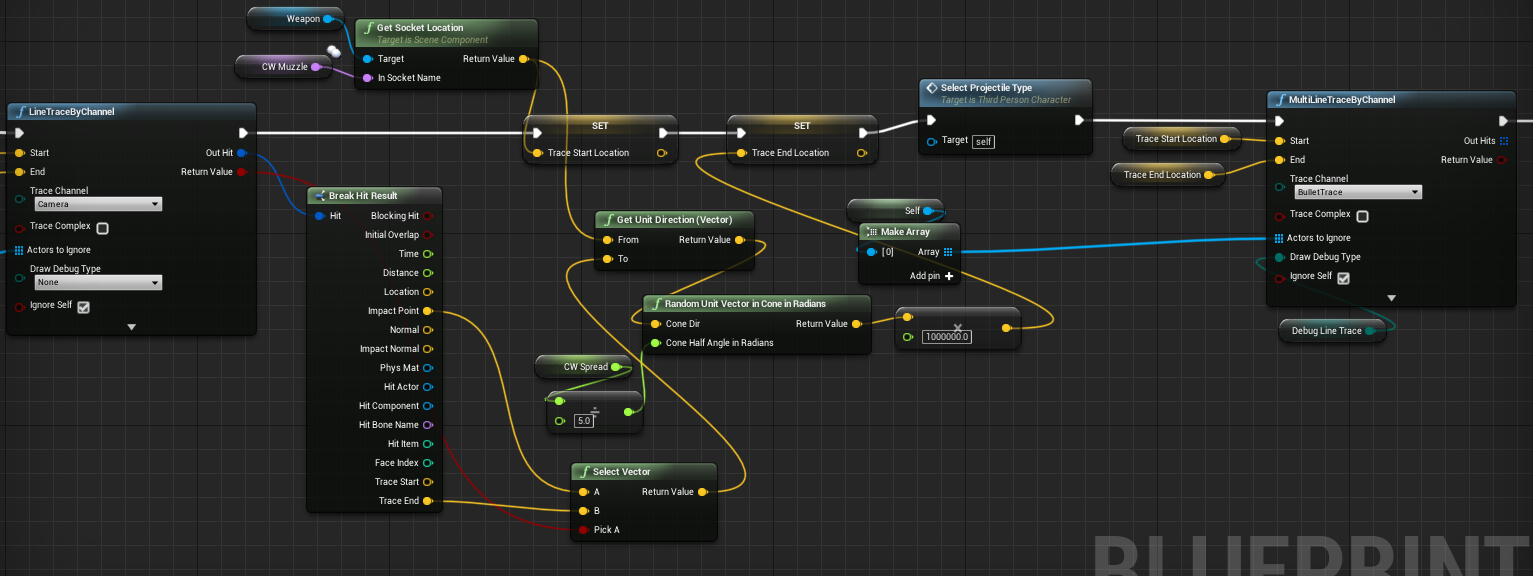
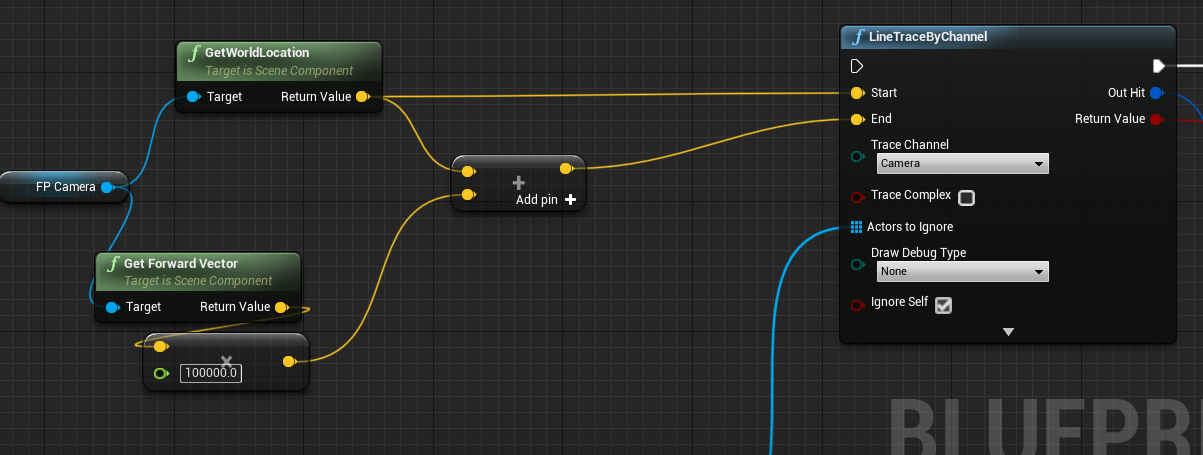
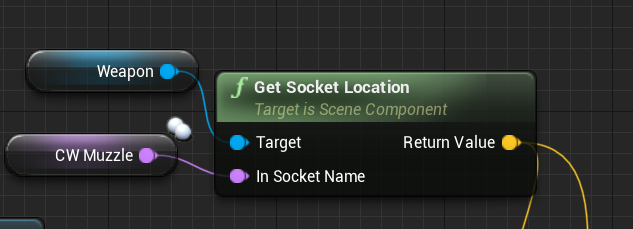
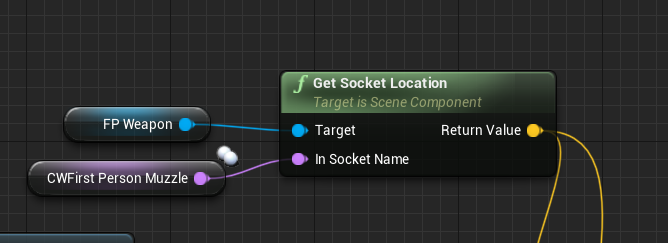
Hey guys. I'm having an issue where shooting projectile weapons as a Client doesn't trace where my First Person Camera is looking. It just shoots the projectile straight. If I use my ThirdPerson Camera in my trace it works fine. Is there a setting in the First Person Camera I need to change? https://i.gyazo.com/f6d665da45f436b6f49bfe9882ae2629.gif
https://i.gyazo.com/3adbff8626aef8e3cea5237e0c698045.png

 silent birch
You want to be able to control the camera first person when I am armed?
cedar finch
I want the projectile to fire from my weapon muzzle towards where my camera is looking. But for some reason it isn't. It shoots it straight in front of me no matter what. Even when I'm looking up.
cedar finch
I get it from my weapon data table along with the other weapon variables.
meager spade
right but for the trace
you are getting the forward vector of the pawn tho
i mean camera
which is straight line, not from the muzzle of the gun
cedar finch
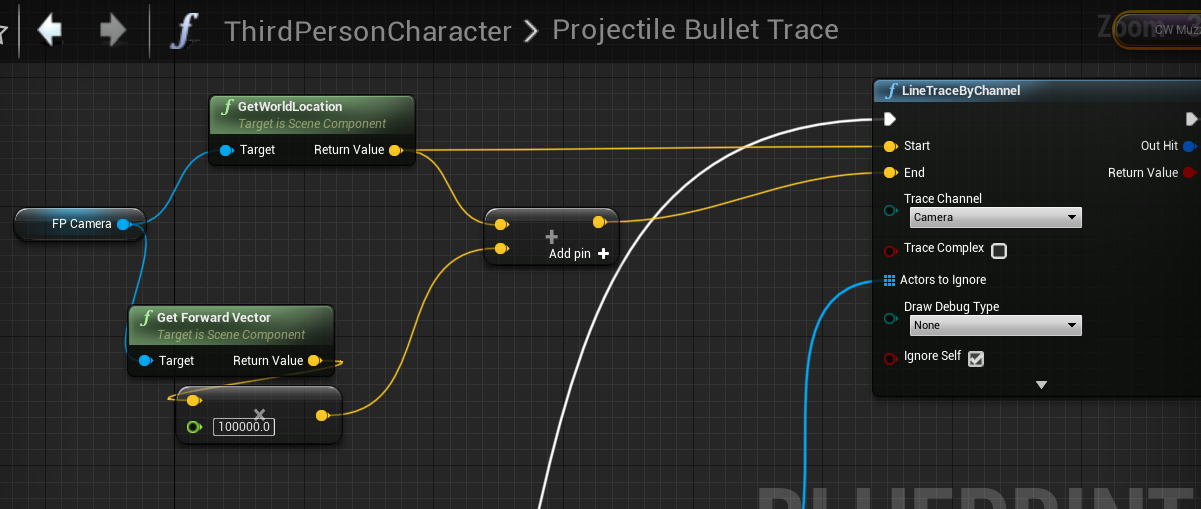
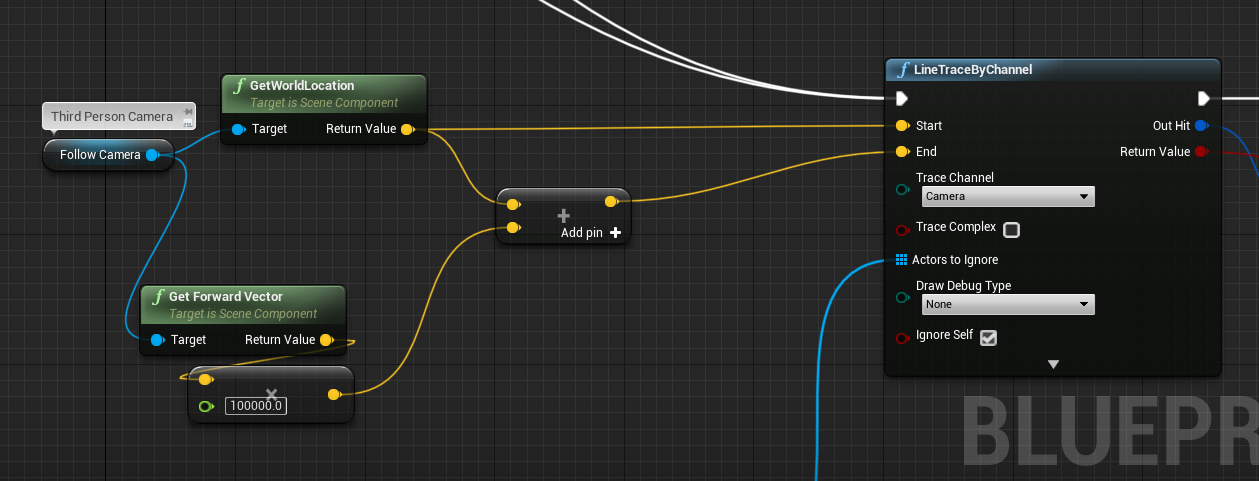
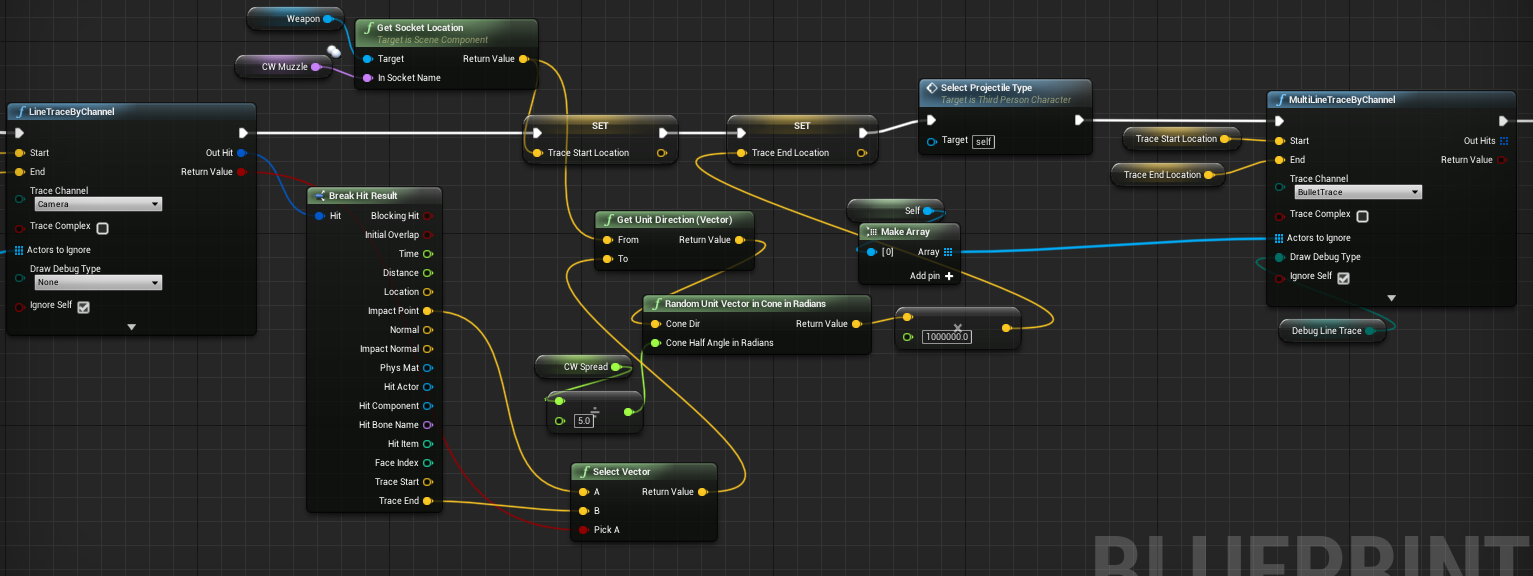
No I'm doing two traces. One from my camera to where i'm looking. Then the second from the muzzle to where the first hit
cedar finch
I'm doing the same logic as I did for my third person camera but it doesn't work on clients for the first person. See here is my third persond https://i.gyazo.com/089e06b9b868ba3e33a436a2dcc2add1.png

Then this is my first person https://i.gyazo.com/d9716cb94634138ef871a1f96202f7d4.png


 cedar finch
That's how mine is setup
meager spade
not test but should give you an idea what you need to do
with the normalized ?
i dont see that

 meager spade
still dont see where you normalize tho
cedar finch
I'm trying to read your's I'm not used to those jagged lines
cedar finch
Oh no problem
meager spade
would C++ code help? 😄 this is my old routine (pending a re-write cause i don't like it)
but in a nutshell
you need to do CamHitLocation - MuzzleLocation, normalize it then add whatever range you want to it
this will make it fire from the muzzle towards to the location of the hit
cedar finch
But it already does fire from the muzzle. 😦 I did it your way as well and it still only works on the server. Clients don't shoot where the camera is facing
meager spade
so its clients specific?
cedar finch
Yea. Server works perfect
cedar finch
I know lol
meager spade
print string the camera location
see if they match the server
my shots are produced on the client
and sent to the server
cedar finch
So for my hitscan weapons I do the shots on the client but for the projectile I spawn them on the server and do the trace. But that doesn't explain why it works for third person camera but not first person camera.
Well I did a ton of extra camera manager stuff to forcefully get where I'm looking so now it seems to work. Still don't know why it was being a butt. Oh well. At least it works now
 agile lotus
Hey is there a way to make sure setActorTickGroup is sending to clients?
Had an issue with beam particles lagging behind the crosshair (fps project)
setting the tick group to PostUpdateWork fixed it on listen server
but it still lags behind when client tries to use the weapon
agile lotus
NVM
was setting the endpoint of the beam as a multicast for some reason
i unreplicated that portion and it works fine
I can show our setup if anyone else runs into that issue
dark edge
Is BeginPlay called on a late join?
I'm guessing its called on the client when they join.
lucid vault
Does anyone have experience with net pktlag ?
ping should be round trip, but I think that setting that variable is 1 way not roundtrip
Just want to confirm
dark edge
Yeah it's only outgoing from where set i think
I test by setting on begin play for a controller and it'll set both ways
 polar bridge
i saw a post on the UE4 blog about cross platform capabilities, is that something that's still planned for the end of the year? would be amazing to build a cross-platform game 😄
lucid vault
not sure why you wouldn't be able to
waxen quartz
are multicasts called on the listen server's client?
as in would that client, in addition to having ROLE_Authority, also receive multicasts?
polar bridge
I guess a better question would be, is there a built-in subsystem that handles it?
dark edge
@waxen quartz Multicasts run everywhere
You trigger a multicast on the server, it runs everywhere
waxen quartz
thanks!
 trim kindle
What would you choose to replicate healths of 300 actors? I think it will be waste of server cpu power if I make that replicated var rather than use RPC on change
fleet raven
if you send rpc on change only, you'd have to use reliable ones or resend them manually or something, and new players joining wouldn't have the values
trim kindle
You are right, totally forgot about reliable. No joining is fine because I don't plan to support that anyways.
Still there is a question whether it would not be better to use reliable rpcs instead of rep var
bitter oriole
Can your game have join-in-progress ?
I'd strongly advocate for replication, myself
Replication can have a variable rate, unrelated to the rate of actual changes (so one change of health every tick won't trigger as many replication events)
RPC don't
trim kindle
No join in progress, however it,s true that if I would animate it or change frequently I would end up with it being more expensive than RPC
I will stick with rep var, thanks
grizzled stirrup
Any ideas on why when using the null subsystem I can have 2 clients join a session but when testing over steam, once the first client joins a session, the second client no longer can find or join it?
winged badger
is the LAN checkbox involved in any way?
because it kinda doesn't work, best left off, LAN or not
grizzled stirrup
I believe all the LAN bools are false, I'll double check
bIsLANMatch = false
Also bUsesPresence = true, bShouldAdvertise = true and bAllowJoinViaPresence = true
I'm thinking possibly for some reason steam is treating it as an in progress session as soon as the first client joins
Will set the join in progress bool to true in order to test
grizzled stirrup
Ok looks like setting bAllowJoinInProgress = true fixes the issue but means players searching via quickplay may join an in progress session which isn't intended, is it possible to perhaps set that bool to false when the game begins? Ideally it should work set to false as the lobby map shouldn't be counted as in progress since StartSession() only gets called on when traveling to the gameplay map
I guess I can call SessionInterface->UpdateSession() with new settings that have bAllowJoinInProgress = false once the session actually starts
grizzled stirrup
So you call that UpdateSession() function when actually starting gameplay or is steam working for you as intended? bAllowJoinInProgress = false but multiple players can join the lobby?
meager spade
so when you set AllowJoinInProgress, you are allowing players to join
once our game starts, we set it to false meaning the session is now locked, and no one can join that session
it also gets filtered out of the session finder
players can only join in the "lobby" per say, which is where you can set up your character, etc. as soon as everyone readies up, and the host clicks start, we disable join in progress
also steam wont allow people to join if MaxLobbyMembers == MaxValue
automatically
grizzled stirrup
@meager spade Perfect thank you very much
You set it to false via UpdateSession() right? Seems to be working now
Also when you move from the lobby to the gameplay map, do you do a non seamless travel in that case where you might have a different GM / PS / PC etc. on the map you are moving to?
In the case where you might do 10 seamless travels during the gameplay loop but want to make sure PostLogin and other initializing calls are freshly run on the very first transition from lobby -> gameplay map I'm thinking it might be a good idea to do a non seamless travel there
Actually coming to think of it, you probably can't seamless travel between two different GameModes, right?
grizzled stirrup
And you do seamlessly travel from lobby -> gameplay map?
grizzled stirrup
Interesting! Maybe I can init the players in the lobby then and seamless travel to the gameplay map
meager spade
connecting to lobby is always a hard travel
once in the lobby, we can server travel between maps
grizzled stirrup
I use seamless for any further traveling after the initial lobby -> gameplay travel, are there any downsides to also hard travelling from lobby -> gameplay?
Just potential issues with clients following along?
meager spade
no idea, never tried
but i don't think it would make sense
when you can just server travel and bring clients to new map
grizzled stirrup
I just had a lot of mode specific stuff being called in PostLogin etc. which doesn't get called after the first hard travel
I guess I can move that out of there and do it elsewhere or in the lobby map
I think there's an event fired after seamless travel too
Stuff like initializing the players team / weapons / score / upgrades ONCE in a survival based game- any subsequent seamless travels don't need to init that stuff and can just carry it over
PostLogin was a nice place to do that, but the lobby gives options to play many different gamemodes, so it wouldn't fit to have it there
meager spade
void ARTS_GameMode::PostSeamlessTravel()
{
    OnTravelCompletedServer();
    Super::PostSeamlessTravel();
}```we do this
grizzled stirrup
I suppose it's just as easy to check in that function if the survival level is the first one and if so, init stuff
meager spade
after seamless travel
grizzled stirrup
Thanks! I'll use that too
grizzled stirrup
There'd still be fresh pawns spawned in my case
So can do per pawn / client inits there
grizzled stirrup
Yep you are right plenty of time to do fresh inits there. I guess I was just worried about irrelevant stuff coming across via seamless travel from the lobby to the completely different mode / set of actors needed for that mode
but I suppose as long as you don't set anything in CopyProperties() in the PlayerState, nothing else should really persist
grizzled stirrup
I guess I'd be worried about this stuff coming over (this is from the docs listing the actors that persist via seamless travel) All Controllers that have a valid PlayerState (server only) All PlayerControllers (server only) All local PlayerControllers (server and client) if I wanted completely different / fresh PCs for a specific mode
Interesting I haven't looked into UWorks
Any notable things you use it for?
The general create / join / find sessions seems to be nice and simple to set up once those extremely underdocumented Steam callbacks were set up
I'm trying to keep it as simple as possible just for sanity and extendability
meager spade
it just makes things simple
like we can do this
    {
        MatchMaking->SetLobbyData(CurrentLobbyID, "Joinable", "False");
        MatchMaking->SetLobbyJoinable(CurrentLobbyID, false);
}```and voila, lobby is not joinable
etc
grizzled stirrup
Ahh that is very nice thank you I will check it out
Also I'm a bit confused with lobbyID's / session names etc. it seems from tutorials that you never really specify a unique name when creating a session, just a hardcoded one like FName("Game") for SessionName or FName("ServerName") for the server settings key
Most examples I have seen use global static fnames in these cases, so all sessions are created with the same names. Maybe there are things under the hood that are creating a special ID?
meager spade
so when a player joins a lobby
we do this ``` SetPlayerSteamID();
LobbyInfo = InLobbyInfo;
bIsHosting = false;
AsyncTask(ENamedThreads::GameThread,
    [this]() { OnPreJoinLobby(); });

JoinLobbyDelegate.BindUFunction(this, "HandleJoinLobby");
MatchMaking->JoinLobbyMinimal(JoinLobbyDelegate, LobbyInfo.LobbyID);

UKismetSystemLibrary::ExecuteConsoleCommand(this, FString::Printf(TEXT("open steam.%s"), *LobbyInfo.LobbyOwnerIDString), UGameplayStatics::GetPlayerController(this, 0));

AsyncTask(ENamedThreads::GameThread,
    [this]() { OnPostJoinLobby(); });```
So the host sets the client lobby ID which I assume is created under the hood and unique?
meager spade
uworks just makes it simple 😄
grizzled stirrup
Not the same as the global static SessionName that I often see?
Nice yeah I think I'll use it
Much less headache and at a higher level
meager spade
so this is out CreateLobby function
    {
        CreateLobbyDelegate.BindUFunction(this, "HandleLobbyCreated");
        MatchMaking->CreateLobbyMinimal(CreateLobbyDelegate, EUWorksLobbyType::Public, MaxLobbyMembers);
}```and the delegate gets called
    if (bSuccessful)
    {
        CurrentLobbyID = LobbySteamID;
        SetupPreGameLobby();
        MatchMaking->SetLobbyMemberData(CurrentLobbyID, "Name", PlayerName.ToString());

        AsyncTask(ENamedThreads::GameThread,
            [this]() { OnLobbyCreated(CurrentLobbyID); });

}```and does this
SetupPreGameLobby does some settings
but
HandleLobbyCreated(bool bSuccessful, EUWorksResult Result, FUWorksSteamID LobbySteamID) returns the LobbySteamID
which means we don't have to handle creating the id's etc
UWorks does the magic for us
grizzled stirrup
CreateLobby would be similar to SessionInterface->CreateSession(0, SessionName, SessionSettings); right?
ahh nice I haven't been creating any ids manually
I mean separate lobbies seem to work
But I don't understand how
Thanks I'm going to buy UWorks and have a look
Does it handle Steam callbacks too?
Like joining in progress / acting on invites etc.?
meager spade
yes
meager spade
can get any info aswell
including clan stuff etc
avatar image of the player
etc
grizzled stirrup
Nice it sounds perfect
grizzled stirrup
I'm doing an absolute barebones example to learn from (hosting / finding / joining / joining in progress / via invite) using the generic null subsystem functions other than the join in progress/ invite steam callback and it's only about 450 lines, not sure if I'm missing a big chunk of logic though
Trying to understand a bit more how things work in general with sessions
But it's based on the code from that ben tristem course so I assume a lot is wrong / missing stuff
meager spade
yeah i mean honestly if you are doing that, i would be encapsulating it to a plugin
which you can reuse
not hardcoding it to a game
i mean UWorks is quite some $$$ but if you see how much code is in there, its worth it 😄
grizzled stirrup
At this point I want a clean simple and direct working multiplayer solution for my project, I have tried plugins and they work great but extending them can be difficult without understanding how they work
Making my own plugin would be cool but a lot more work and generally takes more work / extra code to make it nice and generic and cover edge cases
The way I see it is that if I have the core session functionality working in only a few hundred lines and I don't need much more than that, I may as well just work with it and clean it up
meager spade
not really, you just need to expose the functionality out to your own games GameInstance
that is literally where all our steam stuff is handled
grizzled stirrup
It does require forced inheritance though right
So say in the offchance I want to port this game in the future
You'd be tied to the Steam GI
Or would you instead have a multiplatform session plugin?
That'd cover callbacks from different platforms all in one class?
winged badger
not sure about IOS 😄
grizzled stirrup
But have session code be as generic as possible
meager spade
this is why i cant waith for Epics implementation to work
as it works across all platforms 😄
wait*
grizzled stirrup
That'll be amazing
grizzled stirrup
So if you had an epic account you could play crossplatform and only have to code the session stuff once
meager spade
but the Interface decides where to route stuff too
so your gameinstance does SomeInterface->JoinLobby, SomeInterface being a pointer to the correct interface for the device you are on
kinda thing
grizzled stirrup
Ah nice so it would indeed be generic
Yeah in that case it makes sense to pull it away from the game GI
and do that work in a plugin
Looking at the ben tristem course code (which is extremely simple / doesn't handle joining in progress /callbacks etc.), if you only really need to get from a main menu to a lobby / find an open session, is there much more that you'd need to be doing with UWorks for a case like it? https://github.com/UnrealMultiplayer/3_Steam_Multiplayer/blob/master/UnrealProject/PuzzlePlatforms/Source/PuzzlePlatforms/PuzzlePlatformsGameInstance.cpp

GitHub
Connect your games P2P over steam. This game introduces Unreal's Online Sub-System (OSS) and shows you how to use it with the Steamworks API. By the end of the section, you will be able to ...
winged badger
UWorks has one... unexpected design decision
none of the callbacks fire on main thread
grizzled stirrup
Is that not the case with steam too though?
You have to do the async wrapper at least for STEAM_CALLBACK_MANUAL or it'll crash
winged badger
which was a little bit inconvenient, when Kaos gave it a BlueprintImplementableEvent for handler
and then the assert failed IsOnGameThread()s started
meager spade
😛
had to wrap them
[this]() { OnLobbyCreated(CurrentLobbyID); });```to stop the assert
grizzled stirrup
I have seen that in many cases with steam stuff I don't think it's UWorks specific
meager spade
yeah so just be careful when doing stuff on the gamethread from a Steam/UWorks callback
grizzled stirrup
Will do thanks! My only current hesitation to use UWorks is that I'll lack some of the understanding if I need to extend / fix something (especially when upgrading the engine) and also that if it's working simply now (450 lines in the GI, no extra classes), why add extra plugins on top of my project that could potentially complicate stuff (love keeping it clean and simple and UWorks seems like a behemoth with a lot of functionality)
I will be buying it regardless as it seems like great reference to correctly hook up the callbacks
 steady aspen
I'll try here. Hey guys. Does anyone have an easy method for replicating playerState variables from main menu to lobby? For example: Set character type to wizard in menu. How could I tell the server and everyone I selected wizard in the menu before I joined the session?
Thanks in advance!
grizzled stirrup
@steady aspen have a look into seamless travel and the CopyProperties() function in APlayerState
steady aspen
Sorry I forgot. This should be in blueprints if possible
grizzled stirrup
Not sure if it's exposed to BP but it's the way you'd normally persist data over levels
If you want a sneaky hack around it you could store each players character type in their local Game Instance before traveling then fetch and send that type up to the server when they join the new map
This is not the correct way to do things though, would only consider it if you couldn't call CopyProperties in BP
Or last solution: set the character type when they join the game (have a selection UI before they spawn in)
steady aspen
Thanks. I will look into it @grizzled stirrup Me an my partner came to conclusion that it migh be easiest to have the selection in the lobby, as you said. So thanks!
 balmy kindle
Did anyone here looked into Zeuz? https://www.unrealengine.com/marketplace/en-US/slug/d83aaf9080134e10b28c2e7216c63828

The multiplayer engine for all outlets. Made by game devs for game devs, taking away the pain of multiplayer backend developing.
would be interesting to hear from ppl who actually used it
grizzled stirrup
@lament cloak Yeah there is a direct correlation with bandwidth consumption and frame rate unfortunately
I actually limit the fps to 60 while in menus and while spawning is happening
Then uncap it after that
I have had many instances where invites don't go through or spawning doesn't happen if a client or host has 200+ FPS
A quick tip: try doing this
PlayerCameraManager->bUserClientSideCameraUpdates = false
Sends an RPC on tick and doesn't do anything if you don't need it
Not sure if it's still broken in 4.23 but it greatly reduced my bandwidth consumption if disabled with no other difference
Credit to erebel for finding that one
Yeah it's weird probably a mix of the CMC sending stuff all the time along with other factors
Was like an 8000kb/s difference per client haha
Or more actually
grizzled stirrup
What is the "Ping" in EOnlineDataAdvertisementType::ViaOnlineServiceAndPing signifying?
If you are setting session settings only for steam is it best to set it as EOnlineDataAdvertisementType::ViaOnlineService ?
meager spade
Ping is like the ping of the host
grizzled stirrup
So you'd show the ping AND the name of the service?
meager spade
so say im advertising and my ping is 90 to a receiving client
then it can filter based on that ping
so games over X amount of ping wont show
grizzled stirrup
Ok got it, and if it's only set to the second option ViaOnlineService I assume that means only the name of the server or something?
meager spade
or it will return the details if its ever pingged
🤷
i need to actually look
maybe im a bit lost on it
grizzled stirrup
Cool np there's a lot of questions with this session stuff!
meager spade
just been finishing of the basics for my quickbar logic lol
it does predicted item switch
but with high lag causes a slight flashing
as the item changes
but hey 🤷
lol
grizzled stirrup
Nice laggy inventory changing can feel very sluggish
meager spade
inventory isnt sluggish
it attempts to activate the slot
on the client
tells the server, hey i activated this slot
server goes, nah you ended up on this slot lol
but yeah
it works well
client has responsive inventory
with server ensuring the correct item is equipped for that slot
grizzled stirrup
Nice sounds great! have to look into something similar soon
meager spade
around 2k lines of code, but that is the inventory and fastarray serializer
then the quickbar
and its only just the quick bar that is working lol
i still need to do the ammo inventory and stuff
grizzled stirrup
damn, added to the "nice to have" list after hearing that 😄
meager spade
but my game is like you pick up items and they go in your quickbar, if they are usable/equipable items
max of 6 allowed, things like ammo, etc go to a seperate inventory
but you can only have 6 items max in your "slots"
you can drop the item from the slot and pick a new one up
grizzled stirrup
Sounds nice and flexible
Final question: is there a difference when binding to session callbacks such as OnCreateSessionComplete to use
SessionInterface->OnCreateSessionCompleteDelegates.AddUObject(this, &UMyGI::OnCreateMySessionCompleted);
over the other method that can be seen in some tutorials like the eXi one as so?
/* Delegate called when session created */
FOnCreateSessionCompleteDelegate OnCreateSessionCompleteDelegate;

/** Handles to registered delegates for creating/starting a session */
FDelegateHandle OnCreateSessionCompleteDelegateHandle;

(in the .cpp)
/** Bind function for CREATING a Session */
OnCreateSessionCompleteDelegate = FOnCreateSessionCompleteDelegate::CreateUObject(this, &UNWGameInstance::OnCreateSessionComplete);
The first method feels a lot simpler (+ does seem to work the same way) and doesn't require manually clearing the delegate handle after it fires the callback but I see the second one used in more "official" cases and of course eXi knows his stuff so there must be a reason
 smoky quartz
hey guys, just wondering if anyone has tried to implement multiplayer on a mobile platform here? kind of struggling to find any information on it online, I'm trying to have a 2 player connection through either local network or bluetooth if thats supported. any points in the right direction would be a big help thx
cedar finch
I replicated my physics actors and all is good. But for some reason when clients touch physics actors the clients movement from then on is "stuttering" instead of being smooth. What do I do to fix this?
balmy kindle
Hey guys, i have a weird minimap issue. As soon as i test with more players, every client has the minimap from the last client an not his own... So, for example 3 Players, and all players can only see the minimap from client 3... I test with inside the editor with the dedicated server option^^
upbeat raven
So, I'm calling ServerTravel through a function I've exposed in blueprints, but the Clients aren't following along. Does anyone know what I might be doing wrong here?
balmy kindle
Is the in Editor option for playing on dedicated server really "accurate" for testing, or is it better to test on a real dedicated server?
 royal isle
Short answer: It is a lot better to test on a real dedicated server
waxen quartz
Does anyone know if I can do repnotifies with structs? I changed the class type of a variable that was calling the repnotify function just fine with a UStruct I made and the repnotify isn't calling anymore.
 valid cliff
so the docs mention this about multicast RPCs: "For now, we have a simple throttling mechanism for multicast events: a multicast function will not replicate more than twice in a given Actor's network update period."
what exactly is an actor's network update period, and am I SOL with multicast RPCs if I want to update faster than this?
winged badger
NetUpdateFrequency is how many updates can Actor do each second
and if you're relying on many frequent multicasts, especially if reliable, your network will never work right
jolly siren
That is for unreliable multicasts only
And you can use ForceNetUpdate if you need more than that to go out
But you obviously don't want to flood multicasts
grizzled stirrup
When calling CreateSession() and you need to provide a TSharedPtr<const FUniqueNetId> as a UserId, should you store it in the .h and define it once when the GI calls Init() or create it freshly each time it is needed ? Also which of these places is the best to source it?
// Option A (requires Online.h to be included to get the interface)
OnlineSub->GetIdentityInterface()->GetUniquePlayerId(0);

// Option B
PlayerState->UniqueId->GetUniqueNetId();

// Option C
LocalPlayers[0]->GetPreferredUniqueNetId().GetUniqueNetId();
You are talking about HostingPlayerId?
It doesn't do anything with it
If you are using the steam subsystem
bool FOnlineSessionSteam::CreateSession(const FUniqueNetId& HostingPlayerId, FName SessionName, const FOnlineSessionSettings& NewSessionSettings)
{
    // @todo: use proper HostingPlayerId
    return CreateSession(0, SessionName, NewSessionSettings);
}
@jolly siren Yep using steam so it's fine to just have a UserId of 0 for any session joining / creating etc.? That makes life much easier thank you very much!
About the SessionName, it seems this is often defined as a constant FName like FName("Game") in the constructor (according to this answer by Moss: https://answers.unrealengine.com/questions/323457/online-sessions-gamesessionname.html), is this something that changes at all or can I specify that constant FName for all create / join session functions?
Just seems a bit strange that all sessions would then have the same SessionName but that's the way I have seen it done in a few instances
 twin juniper
umm how can i check if a client is still holding the button when an event fires
I couldnt do it and also tried with client event to check it
I have a sliding mechanism and it needs to check if player is still holding while under obstacles
grizzled stirrup
I set a client bool locally on pressed / released so you can have a few bools for example bIsHoldingFire or bIsHoldingAim
twin juniper
so it knows if it should continue crouching or stand up when obstacle is passed
oh
well that is one way of doing it yeah
but
why tho
why executing it in client and returning a value doesnt do the same thing
that confuses me
is it because of the lag between executions
grizzled stirrup
Probably because the server doesn't know about the client holding bool
twin juniper
yeah but is overlap events handled by the server ?
doesnt it execute on all
like end overlap for example
grizzled stirrup
It should happen on the server yeah!
twin juniper
well
when I call tick or other events
to debug stuff
such as printing
it shows up as Server : DEBUG Client : Debug
so it does execute on the client as well right ?
or is it just replicating it
instead of locally executing
server calling those for clients
well anyways bool is fine i gues
thanks
grizzled stirrup
It should execute once on both the server and client
balmy kindle
My minimap rendertarget sends the same footage to all clients.. how to prevent that? Every client has his own scene capture component, and i use material instance for getting the footage^^
meager spade
you are testing in PIE right?
if so, they will share the same "render target"
you need to create unique render targets for each client
and assign that to the material instance
balmy kindle
Is there a way to create rendertargets in runtime? Or do you mean it would probably work when testing on a real server?
meager spade
it would be ok on individual clients
but in PIE
it will share the same rendertarget
i did a work around
where i created a render target
and assigned it to the material instance texture
jolly siren
@grizzled stirrup yes, it's fine to pass 0 for the userid
balmy kindle
@meager spade Thank you, i will try to do that 🙂
meager spade
you can create RT's at runtime in BP and C++
grizzled stirrup
Thanks erebel! Looking through their implementation as you showed it seems they have it in a TODO state in any case they receive a UserId and instead just call the second overload and pass in 0
Regarding the SessionName variable that is defined in the GI for most session examples, does it not matter that this variable will be the same name for every player / session? Or is this more used for cases like "TDM", "FREE FOR ALL" etc. where you'd want to search for particular gamemode sessions?
cedar finch
So I'm replicating my physics actors such as a bookcase. When you touch a physics actor you "push" it and it makes you "jitter" which is normal. My issue is when "clients" touch them and begin "jittering" , when the stop touching it they still "jitter" Even just running around on flat ground they "jitter". Ideas on what would cause that?
 rich dune
Hey, I currently try to create a session in UE 4.23 and with this setup it failes "Invalid Player Controller" and no session is created. The same setup worked fine in older projects in older UE4 versions.
Anyone knows how to fix this?
 modern swift
Hi guys, I got this error after I spawn some actor on server
why there is a error message in ensureMsgf?
meager spade
cause out of VS it will print that to the output log
but running in Visual Studio will make it hit there
modern swift
that mean I am not test bug with VS , will not hit that break point and it is not a bug for the game
silent birch
When the client pulls on the server the server has no damage
But when the server pulls the client the customer to damage
silent birch
cedar finch
I have a key I want to spawn in one of four locations. What's an easy way to spawn it at one of those locations and also replicate? What BP should I put the logic in?
silent birch
Level Blueprint
 green mirage
What resource would you recommend that I read that could help me handle scale replication desync between client and server?
 summer rivet
Hello smart people. along with the question above does anyone have any "this is the proper way to handle networking in a shooter game with ~30 people with high rate of fire weapons" documents or reference material. It does not have to be UE4 focused just wanting to see the "best practice" or "proper" ways of handing this stuff. Assume you are a noob who created his first shooter using UE4 templates, then after a few hours you realized you know nothing about networking or dedicated servers so you figured that all out and got it working, now you are trying to implement a chain gun with say 30 rounds per second worth of damage and it's just not working well because you need to..... fill in the blank here type stuff 🙂
fleet raven
anyone know what this is about and whether it is important? nothing appears to actually break
winged badger
that server or client log?
waxen quartz
@green mirage what do you mean scale replication desync
peak star
@summer rivet I wonder that myself but I think if I were to try such a project I would look through unreal tournament 2004's minigun code (for trace hit) and biorifle code (for projectiles)
Maybe even unreal 1's stinger weapon
Quake 2 had that rapid fire phaser too I forgot the name
Is q2 open source?
waxen quartz
@summer rivet it depends on how your chain gun works, if the spray is more than cosmetic, how you're detecting hits, etc
@peak star idk if it's supposed to be open source but it's up on github
 hoary lark
also varies if you're making a coop game or a competitive game. this is probably a good article for competition type stuff. https://www.gamasutra.com/blogs/NeemaTeymory/20160906/280377/Why_Making_Multiplayer_Games_is_Hard_Lag_Compensating_Weapons_in_MechWarrior_Online.php as for rates of fire... you can either RPC each bullet shot or you can have a rep'd variable or reliable RPC of whether the player/weapon is firing or not. if you do one of the latter methods, the server doesn't need to pass any bullet info over the network, clients just spawn fake FX locally. server only replicates gameplay hit results.
in my 4-player coop I have low-RPM weapons and I RPC each bullet shot. if I ever add an uzi, I'll probably switch that weapon to use a replicated bIsFiring
waxen quartz
@hoary lark definitely use the variable if he's gonna have 30 people with miniguns worst case scenario you're using 30*30 RPCs a second if you do RPC per bullet
Especially since it's easily predictable if the firing rate is constant
hoary lark
the faster the weapon shoots, the more forgiving "errors" can feel. it won't matter if they only see that character shoot 43 bullets when he actually shot 46. if you can implement the shoot behavior into some FSavedMoves system then it might be possible to actually make it quite accurate, aside obviously from packet loss
waxen quartz
Yea but isn't that unnecessary overhead compared to a single rep variable?
silent birch
When the client pulls on the server the server has no damage
But when the server pulls the client the customer to damage
hoary lark
not necessarily, the FSavedMoves has a few "open" bits to store arbitrary flag-style data, if those aren't already being used by other mechanics in one's game. all depends on one's priorities
other care may need to be taken to mitigate the risks of a lost "stop firing" packet with this method or some other methods
for which reason alone a reliable RPC might almost always be best
lest you find yourself developing a recreation of Rainbow Six Vegas 2  (where the gun sounds never stop sometimes)
waxen quartz
@hoary lark sorry I'm confused. Are you talking about adding a firing state to FSavedMoves?
I understood it as calling an RPC per shot but idk how you would make that into saved moves
hoary lark
yes, treating "mouse1 clicked" the same way as "w is pressed", as just another user input... shoving the shooting input through the character movement component, into the character, and finally into their gun on server and other clients (ugly but ... just illustrating that there is more than one way to skin a cat)
waxen quartz
Yeah I agree, that's what I meant in the beginning if it didn't come across as that
hoary lark
in my game I discovered that the user input being passed across the network from the char move component is a Vector3 and the Y component is always left as 0... so I ham-fisted one of my other game's analog character inputs into it lol. works great 😄
 brittle karma
how it's possible to make an object from an Interface?
i mean something like this :
IOnlineSubsystem* Subsystem = IOnlineSubsystem::Get();
i thought we use interface to implement pure functions in child class
silent birch
I don't understand @brittle karma
brittle karma
i mean can we use interface like this IOnlineSubsystem* Subsystem
@silent birch in languages like java we only use interface for implementing all the methods , now i cant understand what does it mean to use the interface like this
 worthy perch
"Interfaces" in this case are just through inheritence.
silent birch
So you make Java not Blueprint? @brittle karma
I have a problem, When the client pulls on the server the server has no damage
But when the server pulls the client the customer to damage
 stoic ore
there are no "interfaces" in c++ interfaces are just classes with only pure virtual functions which force derived classes to implement definition
 solar stirrup
It's a concept introduced to UE4 using its reflection system, kinda works like C# interfaces
bitter oriole
@brittle karma You can't make an object from an interface because an interface is virtual.
It needs to have the actual behaviour implemented in a sub object, so the base type is unusable
You need to get an object of the underlying type, and then you can treat it as the interface without worrying about it
IOnlineSubsystem::Get() does that - it returns an object that is an actual, non-virtual, online subsystem
And you just don't need to know which
brittle karma
@bitter oriole Aha, got it. very useful thanks!
stoic ore
@solar stirrup that's not entirely correct. You are talking about UInterfaces, but inside UE source they use the concept of an interface like you use it in c++ which is only bunch of pure virtual functions inside a class only the prefix I shows any kind of connection to an interface like you know it from c#
solar stirrup
Yeah I know that
What I meant is that UE4's interfaces are an attempt at C# like interfaces even tho the underlying stuff is just classes with pure virtual functions
stoic ore
but he talked about IOnlineSubsystem which is an c++ interface so it has nothing to do with the UInterface
 trim harbor
this is purely a steam question: when creating a leaderboard through the steam API, is it impossible to give the leaderboard a community name to make it publicly visible? so, can only manually created leaderboard ever be publicly visible?
 gritty pelican
Need help with saving. Is there any alternative to MySQL?
bitter oriole
Alternative for what ?
grizzled stirrup
How can you call filter found sessions by the GameMode that is being played?
Would you specify a different SessionName per mode? (Edit looks like I can use SessionSettings.Set() / SessionSettings.Get() for this)
gritty pelican
@bitter oriole I want the player accounts to be saved in the database.
bitter oriole
Then what's wrong with MySQL ? Solid choice
silent birch
@gritty pelican what's SQL?
bitter oriole
Google it
bitter oriole
No
silent birch
Why?
bitter oriole
Because you can google it, find out by yourself, without using my time, and cutting the discussion here for something you don't need Uneal user's help for.
silent birch
OK sorry @bitter oriole
So if it concerns the Blueprint can you help me? @bitter oriole
silent birch
SQL) Structured Query LANGUAGE)
I have a problem, When the client pulls on the server the server has no damage
But when the server pulls the client the customer to damage
gritty pelican
What save system do games for multiplayer use?
I have dedicated servers running, and I wanted to save the game so that the player could load his save on any server
 bronze arch
@silent birch "run on server" reliable always will work on server side. so no need to check if is it server or not.
(moved topic from #blueprint )
bitter oriole
@gritty pelican Depends if you want to support an always-online type game, or a regular solo + MP game
But again, what's wrong with MySQL ?
silent birch
OK @bitter oriole
gritty pelican
I can not configure MySQL
I thought maybe there are ready-made solutions for this
silent birch
Soon more Wi-Fi
bitter oriole
@gritty pelican There is no such thing as ready made MMO infrastructure
It will take months of work
This is why people will usually advice to stay away from such games, usually made by 500 people over half a decade
gritty pelican
Fortunately, I have already done a lot. I just have to save
bitter oriole
Just the easiest part !
gritty pelican
I find it difficult to get data from MySQL. I tried through Json but it is not that
bitter oriole
You need a server software that protects the daztabase, queries it, and talks to your dedicated game servers + game clients through JSON for example
So a UE4 client game, UE4 dedi server, DB server in a random language, DB software, and a protocol between clients and the DB server
Have fun
gritty pelican
I only need between the server and the database.
A dedicated server is already there. The server is running.
bitter oriole
So you need a DB server now
And your clients probably need to talk to the DB server too - for getting data on their accoutn before loading a game, etc
So the DB server needs to be there to ensure security / login etc
Databases are not meant for direct access
green mirage
@waxen quartz What I mean is the client sees the scale of a mesh differently than the server. I have it shrink over time.
bronze arch
@thin stratus i did possession in server gamemode but still doesnt work 
but the first possession is work
weird
bronze arch
well. i did on clean project and still not work. even first possession. the controller doesnt follow to spawned pawn.
,

summer rivet
@waxen quartz and @hoary lark thanks for the info. I kinda wandered off to do other stuff and didnt see any replies. This is mainly an exercise in doing it right as I assumed I wouldnt want to send 30 variable updates a second or tell the server from the client to fire 30 times a second if I had a choice. I've been playing Warframe and some of the weapons are decent ROF and the game "feels" good when fighting in terms of reaction speeds and impact so I wanted to make sure when doing networking in UE4 that the correct concept is being used. Simulating a single fire from a player is simple until you want to simulate 30 fires a second lol
gritty pelican
@bitter oriole i use steam
bitter oriole
What does that have to do with any of it ?
Steam doesn't host your server or database
gritty pelican
I want to say that the client does not need to connect to the database, as the server will receive the user number in Steam
grizzled stirrup
When a client disconnects from a session do they have to destroy the session even though they aren't the host?
It looks like they do from a few examples online, so does this mean each client has their own local version of a session they join that must be destroyed before they try to host their own session / join another etc.?
Well looks like the opposite is true from the docs: The game session is created and owned by the game mode, AGameModeBase, and also only exists on the server when running an online game.
That means when clients leave they shouldn't have to destroy anything and can freely host a new session...
twin juniper
Hello all, any help appreciated. I am trying to spawn in 3 player controlled pawns (3 is my arbitrary choice). To do this I am using 'Event on Post Login'. I have this BP in the game mode
I have 3 'player start' objects in the world with tags 0, 1 and 2. As you can see I fill them into an array on begin play. My weird delay thing at the start is just to desync the logic that fires when each player logs in so the 'num players' variable does not change while a logic loop is in progress.
The problem is that rather than spawn 3 pawns this spawns 2. I'm simulating 3 players and not using 'dedicated server'. Usually the server always works and lets me control a pawn and client 2 has a pawn in control, but client 1 does not. Also once or twice no pawns spawn at all. Am I missing something huge here?
I would like to understand more and to spawn arbitrary fixed numbers of players
thin stratus
Delays are still shitty and not needed here
- wth is that controller name. Please name your classes better so we have it easier to help you
What you are doing there is probably better placed in the ChoosePlayerStart function override
twin juniper
I don't even need that cast and deleted it
Better just use a variable in the game mode itself
waxen quartz
Quick question, does anyone with experience know how frequent packet loss occurs in a real setting? Obviously it varies, but is, for example, simulating with 50% packet loss an extreme case or is it actually likely in some cases?
grizzled stirrup
@thin stratus super quick question: would you set a FName property to be NAME_GameSession in the constructor of a GI for passing in to any session related functions expecting a SessionName parameter? ( using steam)
grizzled stirrup
Oh so I just pass that in instead of defining my own?
thin stratus
Yop
grizzled stirrup
Thanks!
Your doc for setting up sessions was extremely helpful
thank you for making it
thin stratus
The cpp one on wiki?
grizzled stirrup
Yes!
grizzled stirrup
Any major things that should be changed?