#multiplayer
1 messages · Page 498 of 1
 clear salmon
and i say add item
make it server, then have it manipulate the inventory at an index, and then execute the client part
theres doesnt seem to be a delay
now second
If i do Add Item Server, then Call a client function and pass the index
the array isnt updated right away?
that seems a bit of a design flaw no?
making games have extra delay?
 meager spade
if you want to ensure it works
pass the array in the client call
and use that
no delayu
meager spade
depends how you are replicating the variable
 dark edge
Is making heavy use of ControlRotation good practice? I used to hate it but I'm liking it more and more.
 novel citrus
Hey guys , can anyone help me how to listen to a port using UDP
 ancient root
Hello, has any one built the dedicated server exe and binaries for 4.23 ?
 lapis breach
yeah i have
you need a source version of the engine
this is the way forward
@ancient root
ancient root
Yes, I know that much. However, the I've followed all the steps and the dlls dont appear for the dedicated server
I've done it in the past as well, about a month ago did it for 4.19 and worked fine
but on 4.23 its not working
 topaz agate
Since my question got buried a little while ago I hope y’all don’t mind me asking again, my event on post login fires on PIE but not on standalone game, I’m using steam advanced sessions plugin. How can I fix that?
ancient root
Strange they should fire, i have them in my 4.19 server and they work fine
 thin stratus
@topaz agate Are you by any chance traveling to the map?
lapis breach
@ancient root i feel like i had to do some extra jiggling to get the dedicated server target .exe to be spit out
ill have a dig about in my engine code and see if i can remember what i did
ancient root
Cool thank you :). I Think im nearly there now im actually getting errors which is good
errors part of my code not just binaries
lapis breach
sick
ancient root
For some reason SetActorLabel is now all of a sudden an error when building the server
ancient root
but works fine when building editor
lapis breach
oh errors while building the project?
ancient root
While building the server but ofcourse... it makes sense
Becasue theSetActorLabel is within a macro for EditrOnly
soo .... yeah this build im doing now will fail but then ill encapsulate it
 winged badger
@clear salmon documentation for FFastArraySerializer is in comments in NetSerialization.h
its capable of per-item callback when something is added/removed/changed
 white mason
Hello, so my socket is not animating hand movement Any thoughts?
It's animating root, not things it is attached to
dark edge
The bone moves the socket, not the other way around.
 fathom aspen
What would be the best way to implement a timer in a multiplayer game?
With a widget showing the time remaining...
 buoyant crag
I'm not an expert, but today I've learned something about "Set Timer" (Event or Function). it is a blueprint, not a widget, but I think you can mix between them.
It might be used for something else, but you can give it a shot
fathom aspen
Yeah SetTimer is a function that works on Timer Handles, i'm talking about widget blueprints
buoyant crag
also, if you want to check the time remaining, there are a few options for that as well if you'll search "time" as for blueprints
can't you just set the text to it?
Create a new bind
buoyant crag
I see. wellp, good luck, sorry bud
fathom aspen
Thanks man for the help though....really appreciate it 🙂
buoyant crag
👍
topaz agate
Thanks for getting back to me, I think I might be traveling to the map, though I’m following a tutorial so I’m not sure. I’ll have to check
winged badger
if you are travelling
as in seamless travelling
then players aren't logging into the game anymore
that happens only on first connection
in that case, HandleSeamlessTravelPlayer will get called @topaz agate
instead
they converge (on BP side) with HandleStartingNewPlayer call
fathom aspen
Any function I create in GameState...if I don't specify where it runs(by default)
Where does it run?
meager spade
whoever calls it
GameState is replicated, so functions can be called on server or client
 quaint tendon
Has anyone worked with Gamelift? Need help getting a fleet to leave "Pending" state on failed activation. Need to SSH in to see logs but server stays in Pending so can't remote in with SSH.
A UE4 plugin is causing the build to fail on fleet activation and need to get in to the server to debug.
 fossil spoke
@quaint tendon As far as im aware as soon as you push a build to GameLift you pretty much have to wait for it to Activate successfully or let it Error out.
You can use GameLiftLocal to help test your integration.
 grand kestrel
Just double checking, there is no difference in replication cost when using an FVector instead of an FVector2D if only 2 axis ever changes?
 tough gyro
does the engine handle syncing animations between clients?
for example, if a player moves forward on client A does client B see the same sequence of forward movement anims as other clients?
just wondering about hit registration 🤔
 bitter oriole
Not at all
Animation is just animation
It's usually driven by the movement component, which is replicated
I wouldn't trust animation to behave the same though, since multiplayer movement always differs between clients
 tough scaffold
Good morning everyone, I'm dealing with a weird problem with my multiplayer game where the player is unable to control their character after a server travel in c++.
Through debug messages I know that the controller still has the pawn. To bind controlls I am just doing the 'BindAction' and 'BindAxis' in SetupInputComponent() (I am calling the super and all that.). I cannot tell exactly, but it's as if the keybinds are not bound?
I have set them up in editor of course as well.
winged badger
try binding in PCs inputcomponent and just call the pawns function to handle it from there
 median marten
hi,
which is more optimal? To replicate 10 ints, or to replicate 1 struct containing 10 ints?
 high current

A FREE networked tracked and n-wheel code plugin for use with multiwheeled vehicles and tanks.
Squad devs released this, has anyone looked into it yet?
tough gyro
@bitter oriole so what about the physics assets for skeletons?
don't games usually trace weapon projectiles against the phat?
 steady aspen
Hey guys. We just tested our game and the client is stuttering when moving like the movement isnt replicated correct. What is the correct way to set up multiplayer movement?
 dry zodiac
Hello everyone!, I faced many weird bug on multiplayer. All info in this post. Could u please help me? I stucked! 😦
https://forums.unrealengine.com/development-discussion/blueprint-visual-scripting/1674435-multiplayer-stuttering-bug-lag-on-steam-test-_-video-included-i-tried-everything-please-help
Unreal Engine Forums
Hello guys,
I am trying to implement multiplayer to my project but I saw some weird really annoying stuttering on Steam test as you can see in the video. I have
meager spade
do you have a recording of this "stutter"
also have you checked to see if its rewind issue
lots of things can cause "stutter" but without seeing i cant even guess
dry zodiac
Yes I recorded. You can see in that post and this link;
https://drive.google.com/file/d/10bUENA6dgpYA4GAQTvtA9BafgVM-t_9q/view

Google Drive
I don't know how can I check this a rewind issue. 😦
I tried lots of things as you can see in my post. But IDK what you are talkin about.
bitter oriole
@tough gyro They do, and hit registry in MP is not an easy topic
Most games trust the shooting client to a larger extent
bitter oriole
The typical modern approach is, roll back the online state to (current time - shooter lag time), check for the shooter's firing trace with a bit of tolerance, and decide if the hit is confirmed
Not sure how easy it is with UE, though
The drawback of this is also that well, the player getting shot might be behind a wall already, and still gets shot
But you can't have actual real sync, anyway
Where to compromise is the real question and most games compromise that way
tough gyro
cheers
steady aspen
Sorry I should have uploaded a clip from the beginning. Here it is @meager spade
meager spade
thats correction
can you put a print string in your players tick
printing Max Walk Speed from the movement component
and show the values
meager spade
package a debug build
steady aspen
Ah ok
dry zodiac
Every movement speed is 600 on every side.
 ocean geyser
question on what im doing wrong. i have an object, i pick it up by hiding it and removing collision. this works fine except for JIP players. i setup an onrep event which i thought would solve this but i must be missunderstanding something. heres some code
im calling inInventory from the server and its working fine for clients in the server, but not for JIP clients, they still see the object and have collision(the kind where the client thinks an object is there but isnt so its jittery but you can walk through it)
header:
UPROPERTY(ReplicatedUsing = OnRep_Pickedup)
        bool ObjectPickedUp;

.cpp:
void APickup::OnRep_Pickedup(bool PickedUp)
{
    this->SetActorHiddenInGame(PickedUp);
    this->SetActorEnableCollision(!PickedUp);
}

void APickup::InInventory(bool In)
{
    if (Role == ROLE_Authority)
    {
        ObjectPickedUp = In;
        OnRep_Pickedup(In);
    }
}
 vale ermine
So I'm trying to figure out the best solution for my current issue. I am making a 2.5d game with players represented as flipbooks with 360 camera rotation. The issue is that when each client is replicated everything works fine but the camera rotation will be different for each client. This does not work out because every client will have different rotations and the flipbook for each client needs to rotate based on the camera rotation of the client that is viewing them. My thought for a solution would be that each client would spawn pawns to represent other clients and work with that. I could then set the rotation of the pawns for every client correctly for clients viewing other clients on screen.
dark edge
The flipbook needs to be set locally
So don't replicate the flipbook state and set it locally on each machine.
vale ermine
I'll try that thx
 hoary lark
@dry zodiac read this entire thing https://www.reddit.com/r/unrealengine/comments/a0n455/listen_server_host_sees_clients_jittering_fix/

reddit
Hello, I wanted to post this because it seems like no one has really addressed this issue from what I've googled. I posted on the UE answer hub a...
dry zodiac
I am reading right now
hoary lark
@dry zodiac this is your problem (most likely) https://i.gyazo.com/3b16543cb542acf2f23f4320c07aca5f.png
 dry zodiac
@hoary lark oh okay, how can I fix this? I even dont know meaning of this 😦
hoary lark
just read the link first 🙂
dry zodiac
oh okay sorry 🙂
hoary lark
np
dry zodiac
I added these default engine.ini and defaultgame.ini codes. But there is no change.
Also I saw these but I cant find in project. Btw project is bp only :)
''ACharacter: override PossessedBy() and comment out Mesh()->bOnlyAllowAutonomousTickPose = true UCharacterMovementComponent: override MoveAutonomous() and comment out the call to TickCharacterPose()''
@hoary lark so what should I do? 😦
hoary lark
unfortuntately i don't have time right now to get into anything but just to see if I'm right: use the console commands to limit your game's framerate to something normal like 100 on both client and server and see if jittering goes away
dry zodiac
@hoary lark I tried already manipulate frame rate and ping. Thanks for your time 🙂
dry zodiac
Btw I am testing this via different modems different locations. And there is no bug. Also I cant see the out saturation. I think problem is happening on same modem. :/
topaz agate
so the handle starting player event doesn't seem to fire either, i have this as the scripthttps://media.discordapp.net/attachments/221799385611239424/633822430850449409/unknown.png I'm not sure if I'm using seamless travel, I think I am
 high current
@ocean geyser correct me if I am wrong, but you dont need to call the OnRep function if you are setting the variable, you just need to modify the variable on authority...
 slender yarrow
im trying to pass a character value from the server into a Client Event, but for some reason the value is coming up Null. What could cause this? Strange thing is, This client event worked at one point and the value was not coming up null.
ocean geyser
@high current ive had issues with the functions not being called so i call them out of habit, ill give it another try since upgrading to 4.23
high current
if the onrep function isnt calling, it is either A
the variable change was not with authority
or B, the variable change was the same
afaik
slender yarrow
my problem was actor relevancy distance
 gritty pelican
Hello
I have problem with dedicated server
I can’t find server
But in steam server browser server is available
Find session result =0
 modest yoke
How would you go about making team member pawns always relevant for a connection via the replication graph?
I do something like this in my overidden GatherActorListsForConnection:
                if (PS->Team)
                {
                    for (auto& TeamMemberPawn: PS->Team->TeamMemberPawns)
                    {
                        if (Params.ConnectionManager.ActorInfoMap.Find(TeamMemberPawn) == nullptr)
                        {
                            UE_LOG(LogGASReplicationGraph, Verbose, TEXT("Setting connection team member pawn cull distance to 0. %s"), *TeamMemberPawn->GetName());
                            FConnectionReplicationActorInfo& ConnectionActorInfo = Params.ConnectionManager.ActorInfoMap.FindOrAdd(TeamMemberPawn);
                            ConnectionActorInfo.CullDistanceSquared = 0.f;
                        }

                        ReplicationActorList.ConditionalAdd(TeamMemberPawn);
                    }
}```However, I get strange behavior since the pawns also exist in the global GridSpatialization2D node. Essentially when I leave relevancy distance, the team member reference is destroyed on the connection and a new one is immediately replicated because of my logic above.
gritty pelican
#include "ABYSS_GameSession.h"
#include "Online.h"

void AABYSS_GameSession::RegisterServer()
{
    UE_LOG(LogTemp, Warning, TEXT("==========REGISTER STEAM DEDICATED SERVER==========="));
    IOnlineSubsystem* const OnlineSub = IOnlineSubsystem::Get();

    if (OnlineSub)
    {
        IOnlineSessionPtr Sessions = OnlineSub->GetSessionInterface();
        if (Sessions.IsValid())
        {
            FOnlineSessionSettings SessionSettings;
            SessionSettings.bIsLANMatch = false;
            SessionSettings.bIsDedicated = true;
            SessionSettings.bUsesPresence = false;
            SessionSettings.NumPublicConnections = 50;
            SessionSettings.NumPrivateConnections = 0;
            SessionSettings.bAllowInvites = true;
            SessionSettings.bAllowJoinInProgress = true;
            SessionSettings.bShouldAdvertise = true;
            SessionSettings.bAllowJoinViaPresence = false;
            SessionSettings.bAllowJoinViaPresenceFriendsOnly = false;
            SessionSettings.Set(SETTING_MAPNAME, FString("L_GeneralOpenWorld"), EOnlineDataAdvertisementType::ViaOnlineService);

            // Set the delegate to the Handle of the SessionInterface
            //OnCreateSessionCompleteDelegateHandle = Sessions->AddOnCreateSessionCompleteDelegate_Handle(OnCreateSessionCompleteDelegate);

            // Our delegate should get called when this is complete (doesn't need to be successful!)
            Sessions->CreateSession(0, SessionName, SessionSettings);
        }
    }
}```I did a server registration in GameSession
installed in the gamemod
will a dedicated server automatically create a session after the level opens?
Or I should have a separate level where the session will be created first, and then the level with the listen parameter will open
clear salmon
ReplicatedUsing, and OnRep_X does
OnRep automatelly fire?
or do i need to still call it
fossil spoke
@clear salmon You need to call it for the Server, if you want the Server to run the code contained within the OnRep_.... function.
OnRep_.... is called automatically on remote Clients.
clear salmon
ServerModifyHealth is defined with the server tage
I just want the OnRep function to update the nameplate
So i have it correct
i call OnRep_Health for example in a server function
and it fires on all the clients
although its not firing
Err not updating correctly
clear salmon
Nvm I'm dumb its cause I forgot to set the component to replicate
 final thicket
If I set the owner like this with a listen server and one client should the server not have access to both player controllers?
The thing is the server cant find the player controller for the client
winged badger
that is odd, try doing it from HandleStartingNewPlayer instead
final thicket
It seems it can now find it but I was not doing any seamless travel as far as I could tell
winged badger
unreal also has a few fails here and there with setting the owner
i prefer to be explicit, call SetOwner() on the object
winged badger
AController::SetPawn(), except on latest version
will clear the owner on the old pawn, but won't set it on a new one
final thicket
Well I will see if this solves my other problems, thanks for your help but it did feel a bit pedantic to make me move room 😮
final thicket
I just got them out to test the cpp code 😮
winged badger
also, there are quite a few people who frequent both multiplayer and cpp
but its better to ask here for multiplayer in any case
 river estuary
hi guys, is there a way to exclude BP and files from client build?
After all, client files can sometimes be quite large, and there's no reason to make a dedicated server .exe unnecessarily large due to client files..
winged badger
BPs aren't packed inside the binaries
but you can have a separate cook configuration for dedicated server
vale ermine
How do I rotate another clients component without it replicating. I would like it to only rotate on the client that changed it.
winged badger
as long as component normally doesn't replicate its rotation
you just call SetRotation locally
vale ermine
That what I been using but it seems to be replicating.
 edgy valve
Update on my project xD @stiff eagle

Update on a person project that i have been working on my days off =D
 stiff eagle
@edgy valve - Hey! Looking really nice.
edgy valve
I'm just trying to figure out a problem that i've having with the game slowing down
that is affecting the gameplay as the movement system starts to get choppy
river estuary
@winged badger They are inside .pak files I'm assuming? I still want them out. and I think the most important files are assets, like mesh. They are probably the bigger files.
And what cook configuration are you talking about? I know about the project launcher, but I didn't find anything specific on excluding files in there?
 fleet raven
just package a dedicated server specifically
it will already exclude all the bulk data it doesn't need
river estuary
Oh cool I didn't know it does that automatically. Awesome!
 timid moss
Hey guys. I heard that fortnight only plays their animations on the clients. I'm wondering how that is done. Because I don't know of any RPC that only runs on all clients and not the server. I guess you could do a multicast RPC and do a check for if the role isn't ROLE_Authority, so is that how it's done?
winged badger
Animations have play on dedicated server checkbox
Or anim BPs, dont know off the top of my head
timid moss
Thx!
meager spade
the montages etc are played on the server
the animblueprint runs on the server
its just the bones dont get manipulated on server
that is the most expensive part
timid moss
Ok so then animations do run on the server? Its just it doesn't modify the bone transforms then?
if you check that checkbox
meager spade
not sure what checkbox you are on about
timid moss
Zlo said that there is a checkbox that is either on the animation or the anim BP called something like "play on dedicated server"
so i meant uncheck the checkbox not check
 solar stirrup
If I want to replicate a static mesh component, I just have to do UPROPERTY(Replicated) right?
winged badger
also @solar stirrup there is no point replicating a component on the actor's CDO unless its supposed to send RPCs and/or has replicated properties
solar stirrup
alrighty thanks
 silent sigil
Looking for anyone else who is making a multiplayer game with voice, preferably with open mic who is seeing this error message in their logging
[2019.10.17-08.36.08:624][ 66]LogAudio: Warning: Replaying a procedural sound 'Synth' without stopping the previous instance. Only one sound instance per procedural sound wave is supported.
I would expect it to happen on level travel as the new level is loading in. I also would expect it to result in a temporary drop in voip until the voip talker stops and starts again.
Just looking for anyone who has also seen this.
you may also see this in your logging
[2019.10.17-02.20.44:217][208]LogTemp: Warning: Voice packet buffer filled to capacity of 23 packets; packet dropped.
river estuary
Is there a built in matchmaking service (such as steam) that I can use to match players without a lobby? e.g. If a match needs 4 people, players will wait in queue and if there are 4 matching people I'll match them together to a single session
silent sigil
So, there is an issue with multiplayer voice and the new audio engine.
I'm going to give a brief rundown of the situation, so people can know to avoid it.
These are the instructions for enabling the new audio engine.
Unreal Engine Forums
Discuss and get help with the new Audio Engine, sound design, third-party tools/middleware, and share what you're working on!
If you do this, and you are a multiplayer game with voice, and you don't use push to talk.
Your audio post travel is going to break.
If you have a mic threshold set to some level where it will stop transmitting when the user stops making noise. It will EVENTUALLY recover. provided the user stops talking for long enough
If you are like me, and have a threshold set to 0. It is permanently broken after level travel.
The current solution. Don't use the new audio engine.
dry zodiac
Hello again, sorry for reasking but I really need help with this stuttering problem in the link. Characters are stuttering during movement on Steam multiplayer.
https://forums.unrealengine.com/development-discussion/blueprint-visual-scripting/1674435-multiplayer-stuttering-bug-lag-on-steam-test-_-video-included-i-tried-everything-please-help
Unreal Engine Forums
Hello guys,
I am trying to implement multiplayer to my project but I saw some weird really annoying stuttering on Steam test as you can see in the video. I have
modest yoke
What's the best way to have a spectating client share the same list of relevant actors as it's view target using the replication graph? With the legacy method I simply proxied my IsNetRelevantFor call through my view target when spectating which worked perfectly.
 fluid flower
@silent sigil thanks for the headsup, I've been having issues with voice chat as well, mainly the volume is SUPERR low, have you had to deal with that at all?
 peak star
@dry zodiac are your pawns based on characterpawn class?
That is the only pawn class I have found that has network smoothing and prediction built in, which is something you need for smooth movement on objects that don't have predefined moves when the latency is much slower than your framerate(which is true almost always over the internet)
You can program yournown smoothing and prediction if using other classes but theyndont come with it built in
thin stratus
Quick note here: Epic is actually working on a generic prediction plugin.
peak star
I read your forum post. Sounds like you are using characterpawn subclass. Next thing to check is whether you are calling any reliable RPCs every Tick. Doing that could saturate the network I imagine
@thin stratus oh my goodness i want it
thin stratus
peak star
I mean it isn't complicated to make your own as far as I have read, but it seems tricky to make sure it is working correctly.
thin stratus
If you don't know what you are doing, it takes a good chunk of your time setting it up
And there are a lot of things you will do wrong at the start
peak star
Yeah and it would be first time for me
dry zodiac
Hello guys, @thin stratus with this plugin, can I fix my problems? Also I ready you pdf about replication, I just want to thank you and nice to e-meet you 🙂
dry zodiac
@peak star My project is a default unreal template, because of this, there is nothing on tick, also there isnt any code 😦
@thin stratus so is there any other solution to my problem? I tried many things but nothing change 😦
peak star
@dry zodiac have you tried running it from a different physical location? You might have bad network equipment
I mean the listen server
fleet raven
the prediction plugin is going to be epic
dry zodiac
Yes I tried 3 different locations.
peak star
@Zeblote#0001 no pun intended
fleet raven

dry zodiac
Oh np. We are all stumped for that point 😄
Yes only on Steam. I cant simulate this bug on local
I mean in project.
peak star
I dont know how onlinesubsystems or advancedsessions plugin works but i wonder if it could have anything to do with the advancedsessions plugin
dry zodiac
I also tried default unreal engine session nodes. problem is still happening
 hot robin
if something is checked for replication the actor who is replicating is always "controlled" by the host right?
hoary lark
@dry zodiac hey did you manage to gain an understanding of what "saturation" means yesterday? Did you try using something like t.maxfps 20 on both machines to see if it smoothed out movement and reduced saturation back to 0?
dry zodiac
hey changing fps or ping doesnt change the saturation value. Otherwise I realized that saturation is 100% on LAN, 0% on Steam. But still there is problem both steam on LAN
bitter oriole
@hot robin No
Replication being activated simply allows the flow from "replicated" variables from host to client
And it allows RPC calls from one to another, in both directions
Control is up to you
hoary lark
afraid I don't have an answer for you then, @dry zodiac . What I will say is that in a basic, default, template project, what happens is that if it's running at 456 FPS, the player machines will try to package and send 456 control input packets per second. this ends up being more bytes/second than either the network settings (ini files) or your actual network can handle, causing the saturation stat to go above 0 (usually straight to 100 because in networking, it's either "too many" packets or not). once the network is saturated, the client basically stops sending packets for short periods of time and you get jerky movement somewhere else. here's a video I took of my project, the first half is with the moving client running at 300+ FPS, then I capped FPS to 30 halfway through. note that it looks more or less identical to what you're seeing. again i don't have "the answer" for you but this might help you understand what is probably happening so hopefully you can find the solution to your specific case https://www.youtube.com/watch?v=rty2VS62wlQ
dark edge
Any of you guys had success with multiplayer physics driven pawn movement?
vale ermine
Anyone know how I can fix building Boost.Build engine? It fails when running the msbuild in cmd for the aws plugin.
hoary lark
physics based movement can be a pretty complicated task, and I think it might have some pitfalls for competitive games too. I would only even consider it for casual or cooperative games that really needed it (like if the primary game mechanic involved rolling balls around on difficult surfaces or something)
dark edge
Yeah it's fundamentally the primary game mechanic of my prototype. I'm making progress, just curious if anyone here has actually got it to work.
bitter oriole
@dark edge Multiplayer physics for pawn in UE4 is... tough
I have that, but with custom physics all the way, not any shred of UE physics in it
The choice you have is
- completely client-driven movement that allows for free cheating but also allows real engine physics (Fortnite does that, with lots of checks on top),
- custom physics in your own code, no "simulate physics" ever, allows for actual security but may suck visually
slender yarrow
im running a simulated ded server in the editor. And every player past the very 1st one that logs in is throwing the error: "No owning connection for actor MyFPSChar1_C_1. Function RecoilCooldown will not be processed."
does anyone know the cause for this?
bitter oriole
Yes
It means you called a Server RPC from a client on an non-client-owned actor, which is not possible, so the function call has been dropped
slender yarrow
how do I guarantee that an actor has an owner then. Im spawning these actors from the GameMode and using "Possess" then passing the controller from "Event Handle New Player" into Possess
is this method correct?
bitter oriole
It's unrelated to ownership
When spawning, set the player you want the ability to call RPC as owner
slender yarrow
so the Owner input on the SpawnActor function?
cuase im also passing the Handle new player controller into that
dark edge
@bitter oriole You ever tried fiddling with the physics error correction system?
bitter oriole
I have never tried using physics, period
I wanted server authoritative gameplay
PhysX is simply not able to bring that
dark edge
What I'm going for is running the physics on both ends with periodic corrections. That's what the built in system does, and you can actually get it pretty smooth. The problem lies in transient behavior like sudden impacts.
A flight sim would be easy peasy.
bitter oriole
A flight sim would use custom physics
Any day of the week
Look, the basic problem is that throwing the same object in the same direction with the same speed, twice, will result in two different outputs with PhysX
So you can't have any meaningful interaction, because every hit is going to result in extremely different results, like you found out
This issue self-multiplies - colliding with another player that was half a millimeter off will make the simulation even more different, etc.
If you're sure you need the actual engine physics and not a much, much simpler custom-made imitation - just simulate everything on the controlling player and send the output to the other players
peak star
...which allows cheating but works and looks good
dark edge
Do any of you guys know if forces/torques are in the corrected state payload?
I'm thinking not but not 100% sure
vale ermine
anyone know why i would get this error when building aws plugin? when running msbuild ALL_BUILD.vcxproj /p:Configuration=Release
it fails here at the boost.build
dark edge
You guys know any way to show the authoritative state for motion replication?
IDK what to call it, whatever the server's version of the state is
I found p.netshowcorrections which shows when it does a snap, but I'd like to see what the server is sending over in real time
winged badger
its all logged
but if you do log lognet veryverbose
the performance will drop to crap and you'll be able to see it all
hoary lark
server-side, what you're looking at should be the authoritative state but it might be getting nudged around a bit by the client... client-side, depending on your game's settings (INI file stuff), typically I don't think the server sends anything back. those corrections are when the server sends something back. otherwise the server is accepting the client's positions as OK and reasonably in-line with its own results? the INI files have some settings to vary how much leeway the client has to be wrong and allow the server to accept it, I don't recall what it defaults to or what you have setup obviously
I might be slightly off as I've only learned about this stuff in one limited context/setup specific to my one game project (only been in UE for a year)
dark edge
U know any way to do debug draws based off it? Looks like for character component it shows a trail of capsules but for physics it just shows a vector when it snaps. Not very helpful for non-snap corrections.
hoary lark
(what I described might only hold water if you set in Game INI ClientAuthorativePosition=true and set MAXPOSITIONERRORSQUARED=xxx, which might not be default settings, I'm not sure)
vale ermine
so the error I was getting earlier was because I didn't have cmd environment variable set. sigh took me 2 days just to build the gamelift plugin.
river estuary
Rookie here: I created 2 different maps (ServerMap and ClientMap), and set them as default for game / server in project settings. But when I start the game in the editor with 2 players and a dedicated servers, it seems everyone are starting at the same map.
What am I missing here?
 jade patrol
when the client connects to server it will always load the server map ( and when run on editor it will connect to the server first thing)
hoary lark
no
 twin juniper
lel
In a listen setup, how can i change the map or anything i want in a the session with the host pc?
before the game starts
thin stratus
First map is opened with OpenLevel <mapname>?listen in BP.
After hosting, maps are changed via ServerTravel <mapname> (that's a console command in BP iirc)
river estuary
@jade patrol mm that's not really what the tooltip on the property says. but ok, what about the server then? what map will it loads?
I'm starting to get the feeling UE4 works in a way where the server and client should always be on the same map; if that's the case though,
how should I separate the logic?
I thought about creating different levels -> different game mode -> different controllers, and that made sense.
But if it'son the same map - a gamemode has only one player controller class property.
And although I can do the checks on a single player controller - it doesn't sound right to me, using the same player controller for server and client options.. or is it and I'm just not used to it?
twin juniper
@thin stratus thanks. but how about the choose team, choose character, gamemode
thin stratus
ServerTravel is supposed to be seamless
That allows carrying over data via OnSwapPlayerControllers in the GameMode
There you can save chosen Team and Character in your PlayerController, ServerSide.
GameMode just has to be somewhat choosable and then saved as a shortcode/alias
You can set these up in your Map&Modes in your Project Settings
When calling ServerTravel <mapname> you can add ?game=<shortcode> to specify a new gamemode
twin juniper
idk but thanks again.
dry zodiac
@hoary lark hello again, I just saw ReceivedRawBunch value on stat.net screen changing from 1ms to 4 ms during this stuttering. IDK why but I just get this point currently 😦
 dusky breach
Hey guys, I've been working on an Inventory / Item Pickup system for a while now and I've been on this site before asking for help and was given a few ideas, I've been trying those ideas and branching off if needed but I still can't seem to get my system to work right. At this point I think I'd prefer if someone could message me on Discord and see if they can help me with a little more attention as, I know I am doing something wrong but I am still too new with Multiplayer Replication to figure it out on my own. Thanks!
winged badger
bp or c++?
dusky breach
Bp
winged badger
yikes 😦
dusky breach
You're a C++ guy? lol
winged badger
bp networking is missing 3/4s of available tools
dusky breach
Oh, gotcha
Seems kind of redundant to allow players to build a networking system in blueprints then lol
meager spade
i mean it has stuff
but very basioc
just enough to get some kinda mp up and running
vale ermine
isn't action rpg inventory set up for multiplayer already? https://www.unrealengine.com/marketplace/en-US/slug/arpg-inventory-system

The Action RPG Inventory System is a multiplayer supported inventory management system featuring equip-able and usable items. It can be used in single-player and multiplayer projects, regardless of your game theme and UI design.
@dusky breach
dark edge
@river estuary you seperate the logic out by running certain things on the server or client only. Some classes only exist on one or the other. Read this.
 karmic briar
hey guys wanna ask anyone here have experience wit varest plugin?or in general have experience with https request stuff..
i wanna use varest to prototype my game login/registeration/mysql database and stuff and in the future i wanna use what i've learned making this using asp.netcore which im currently learning atm
does anyone have use varest to create such systems before(i know it already been done but i have no experience using this plugin and i have general knowledge of sql and https stuff) i wanna learn
 sharp orchid
If anyone is up the joyous fun that is websockets and UE4 I'd give my left arm to get a little help to a problem we're going through right now as our websocket connection is dying in UE right after application data, we get through hellos, cert, and key exchange, then we send data and it sends an encrypted alert that appears to be a close message (warning severity doesn't have a 0, 1, or 255 - but I suppose this could also be corrupted data?)
Node can connect to the service just fine. First, I noticed they were using different TLS versions so I changed the UE stuff to use 1.2 like node does but still no dice
ocean geyser
question. lets say i have a dedicated server, a player1 is playing in that server and they pickup an item and the item gets hidden and collision removed. then player2 joins the server and they still see the item that was just picked up/hidden with collision removed. how would i go about solving this? i created on onrep event that runs on the server, when a player picks up an item the bool value changes for that item and it gets hidden and collisions removed. this works fine but a JIP player still sees the picked up item. i thought onrep events would be fired for JIP players to?
//header
UPROPERTY(ReplicatedUsing = OnRep_Pickedup)
    bool ObjectPickedUp;

UFUNCTION()
    void OnRep_Pickedup(bool PickedUp);

//CPP
void APickups::OnRep_Pickedup(bool PickedUp)
{
    this->SetActorHiddenInGame(PickedUp);
    this->SetActorEnableCollision(!PickedUp);
}

void APickups::InInventory(bool In)
{
    if (Role == ROLE_Authority)
    {
        ObjectPickedUp = In;
        OnRep_Pickedup(In);
    }
}
might sound stupid but you have ObjectPickedUp in GetLifetimeReplicatedProps?
meager spade
your on rep is wrong
aswell
{
    this->SetActorHiddenInGame(ObjectPickedUp);
    this->SetActorEnableCollision(!ObjectPickedUp);
}```{
if (Role == ROLE_Authority)
{
ObjectPickedUp = In;
OnRep_Pickedup();
}
}```will fix your problem
@ocean geyser
ocean geyser
that i never even thought of, thank you giving it a try now
meager spade
so
void OnRep_Pickedup(bool PickedUp); < PickedUp will be the OLD value on the clients.
which would be false.
ocean geyser
it wasnt using the replicated var so it was different on JIP clients then correct?
meager spade
OnRep parameter is the OLD value.
void OnRep_Pickedup(bool PreviousPickedUp); is valid,but note its the previous not new value.
ocean geyser
tested with the same result
meager spade
then something else is causing the issue
ocean geyser
ill have to go through each calling function and test to see :/ meh
meager spade
least we fixed one bug
ocean geyser
thank you for that
meager spade
i had a issue where i was setting the actor to hidden in begin play
when a late joiner entered, it would unhide the mesh, then hide it as the OnRep fired before the beginplay did
ocean geyser
how long did that take you to figure out?
meager spade
relevancy issue?
is the bool different on the new client? if the are both True or both False, it wont call OnRep as nothing has changed
ocean geyser
the bool is being set to false in the constructor, i printed it out in begin play so its showing false in begin play for the JIP client. when a player picks up the item the bool is set to true so the variable should be changing for the JIP client
ocean geyser
yes
header
UENUM(BlueprintType)
enum class EPickupType : uint8
{
    EWater UMETA(DisplayName = "Water"),
    EFood UMETA(DisplayName = "Food"),
    EHealth UMETA(DisplayName = "Health")
};

UCLASS()
class SURVIVAL_API APickups : public AActor
{
    GENERATED_BODY()

public:
    // Sets default values for this actor's properties
    APickups();

protected:
    UPROPERTY(EditAnywhere)
        class UStaticMeshComponent* MeshComp;

    UPROPERTY(EditAnywhere)
        float IncreaseAmount;

    UPROPERTY(EditAnywhere, Category = "Enums")
        EPickupType PickupType;

    UPROPERTY(ReplicatedUsing = OnRep_Pickedup)
        bool ObjectPickedUp;

    UFUNCTION()
        void OnRep_Pickedup();

protected:
    // Called when the game starts or when spawned
    virtual void BeginPlay() override;

public:
    void UseItem(class ASurvivalCharacter* Player);
    void InInventory(bool Picked);
};
cpp
APickups::APickups()
{
    MeshComp = CreateDefaultSubobject<UStaticMeshComponent>("StaticMeshComponent");
    RootComponent = MeshComp;

    IncreaseAmount = 30.0f;
    ObjectPickedUp = false;
}

// Called when the game starts or when spawned
void APickups::BeginPlay()
{
    Super::BeginPlay();
    if (Role == ROLE_Authority)
        SetReplicates(true);
    UE_LOG(LogTemp, Warning, TEXT("ObjectPickedup Val: %d"), ObjectPickedUp);
}

void APickups::GetLifetimeReplicatedProps(TArray< FLifetimeProperty >& OutLifetimeProps) const
{
    Super::GetLifetimeReplicatedProps(OutLifetimeProps);

    DOREPLIFETIME(APickups, ObjectPickedUp);
}

void APickups::UseItem(ASurvivalCharacter* Player)
{
    if (Role == ROLE_Authority)
    {
        if (PickupType == EPickupType::EFood)
        {
            UE_LOG(LogTemp, Warning, TEXT("ADDING HUNGER"));
            Player->PlayerStatComp->AddHunger(IncreaseAmount);
        }
        else if (PickupType == EPickupType::EWater)
        {
            UE_LOG(LogTemp, Warning, TEXT("ADDING THIRST"));
            Player->PlayerStatComp->AddThirst(IncreaseAmount);
        }
        else if (PickupType == EPickupType::EHealth)
        {
            UE_LOG(LogTemp, Warning, TEXT("ADDING Health"));
            Player->PlayerStatComp->AddHealth(IncreaseAmount);
        }
        Destroy();
    }
}

void APickups::OnRep_Pickedup()
{
    this->SetActorHiddenInGame(ObjectPickedUp);
    this->SetActorEnableCollision(!ObjectPickedUp);
    UE_LOG(LogTemp, Warning, TEXT("RUNNIKNG ONREP"));
}

void APickups::InInventory(bool In)
{
    if (Role == ROLE_Authority)
    {
        ObjectPickedUp = In;
        OnRep_Pickedup();
    }
}
pickup gets used by calling InInventory(true) from the server
winged badger
whats the issue, didn't read from start?
ocean geyser
dedicated server with player1 connected. player1 picks up one of the pickups which the server adds the pickup to an array and calls InInventory(true) on the pickup(the class above). this hides and removes collision for the actor/pickup. when player2 joins the server (after player1 has picked up the item) he still sees the actor/pickup and he can walk through it (with the jittery collision you get when the server has collision disabled but a client doesnt on an object)
works fine except for JIP players
ocean geyser
thats what i assumed but its like it never gets called on the JIP client
winged badger
i am not sure if that SetReplicates in BeginPlay can screw it up
ocean geyser
...testing, i see your point
winged badger
breakpoint BeginPlay before you join in progress
see what locals says
replicated variables should be set by then, and OnReps called
ocean geyser
i printed out the var in beginplay which shows the bool is still false. ill check and see
 thin stratus
Are you trying to start DebugGame?
winged badger
go for DebugGameEditor
ocean geyser
debuggameeditor just launches the editor with VS debugging. yes i tried debuggame
winged badger
and also visit the docs for setting up VS for unreal to find out how to make the TargetBuild dropdown large enough so you can actually see which one is selected
ocean geyser
i can read it when using the drop down
thin stratus
DebugGame won' work without cooking first
ocean geyser
ah
winged badger
yep, and you won't be able to debug through the engine code with DebugGame that easy
just your own
ocean geyser
at the start of begin play
https://gyazo.com/81ec835dfa641735be321ffea2929f06
 winged badger
that is beyond weird
name is wrong
mesh component is wrong
increase amount is wrong
winged badger
whats the inheritance here, from that c++ base?
ocean geyser
AActor
ocean geyser
yes
ill actually try remaking the blueprint real quick and see. just derrived a BP class from this CPP class, set its mesh and thats all
at the end of begin play it gives the correct results
https://gyazo.com/5b54378a3390b7ee033ed3188013875b
 ocean geyser
each object shows false for ObjectPickedUp
yes
ah i was timed out of the server, one sec
yep shows false
heres JIP client
heres first client that picked up med kit
winged badger
whats the replication section of that actor's class defaults look like?
 winged badger
its not
ocean geyser
yea cause the onrep still does not seem to be running on the JIP clients log either
wait
winged badger
override IsNetRelevantFor
just call super
and breakpoint it before adding another client
winged badger
the question is why NetRelevancy fails now
ocean geyser
to piss me off probably
winged badger
well, when you hit a breakpoint
you can step into the Super
and see wtf is going on there
it will execute server side
ocean geyser
if the function is a const do i do const in the super?
nvm
sooo when i launched the game in debug in VS, the netrelevancy function kept hitting its break point non stop, when i joined the server it never hits its break point
@winged badger sorry for taking a bit
https://gyazo.com/73f2957dd4796e24673ffa4b6efe0d20
 winged badger
its return Super::IsNetRelevantFor;, btw, but it doesn't matter for this excercise
so it never hit after you joined the other client?
are you using replication graphs in any way?
ocean geyser
yep
no
this is pretty much a bare project aside from some line traces and these objects
it just has me at a complete loss why its not relevant
winged badger
that function also checks for bAlwaysRelevant
ocean geyser
magic
bool APickups::IsNetRelevantFor(const AActor* RealViewer, const AActor* ViewTarget, const FVector& SrcLocation) const
{
    if (bAlwaysRelevant) return true;
    return Super::IsNetRelevantFor(RealViewer, ViewTarget, SrcLocation);
}
what kind of score?
ocean geyser
damnit
winged badger
and OwnedBy the RealViewer or is ViewTarget
that sort of stuff
you did close the editor before compiling?
ocean geyser
once since i had an issue compiling, then i reopened the editor and compiled again
winged badger
you compile with editor open?
ocean geyser
yes
winged badger
thats a no-no, live++ can't handle altering headers and constructors
and hot reload is just shit
 silent birch
I tried two methods but it does not work
ocean geyser
it shouldnt madder in this case i think. im not testing in the editor i launch the server and clients separately unless VS compiles differently with the editor open?
silent birch
silent birch
First méthod
winged badger
if you're using hot reload, it might just be the cause of all this
ocean geyser
understood.
whats wrong with the above? whats it doing wrong
winged badger
and it was almost certainly the cause of that broken BP on BeginPlay
silent birch
ocean geyser
-_- works now
silent birch
winged badger
next step: enable live coding in editor preferences if you're on 4.22 or later
after that you can recompile from the editor if you don't alter headers or constructors safely
silent birch
I wait your help
winged badger
and if you recompile after modifying the header or constructor it will break spectacularly, so at least it won't have the appearance that its working
ocean geyser
just enabled. so i compile from the editor if i dont alter headers and such, if i do alter them then i compile from VS or do i still close editor and recompile?
winged badger
if you alter them
close editor, compile, restart editor
you can recompile while running the editor from VS with live coding
ocean geyser
if your trying to compare the players scores to get the highest do what you were doing. on the server loop through the array of players, have variables, one for highestscore(set to 0) and one variable for the player with highest score. in the loop get the players score and check and see if its greater than the highestscore variable. if it is then set highestscore to equal that score and set the player variable to equal the player in the loop. then simply return the player or the score or however you want to do it
thank you for the help Zlo
winged badger
its not that bad, btw, you usually have a fairly good idea about what variables and functions you need
you add empty functions ahead of time
and then you just alter the functions live coding
ocean geyser
makes sense. ive just never really compiled and tested without the editor open before so this is going to be a change of workflow for sure
winged badger
hot reload is terrible, as you just saw
silent birch
@ocean geyser but how?
winged badger
it has been known to permanently corrupt blueprints, even if rarely
silent birch
@ocean geyser normally I speak french
ocean geyser
its pretty much what you showed in your first screenshot
winged badger
the first function you pasted is good, provided HighestScore is initialized to appropriately low value
silent birch
And repaired my mistake
ocean geyser
a function that simply loops through the players, compares their scores for the highest score and returns it
what Zlo said, set it to 0 initially
winged badger
the class isn't the same
first attempt you're getting all actors of class BP_CharacterWit....
in other attempts you're casting to URIEL
ocean geyser
what about getting the array from the gamestate and casting them to whatever class the players are that hold the scores?
silent birch
So at the get player character that will link to the cast what index should I put?
ocean geyser
the index of the for loop
you have an array of all the players starting from 0 - X players. so you start at 0 and work till the end of the array so 0, 1, 2, 3 and so on
silent birch
@ocean geyser I don't understand
ocean geyser
ill show an example, one sec
ocean geyser


do you see?
silent birch
Yes
ocean geyser
you have 1 variable(2 if you want to store the players character that has the highest score) called HighestScore. loop through all your players(in this case im just using get all actors of a class for my third person characters), get their score, check and see if their score is greater than your HighestScore variables value, if it is then set your HighestScore to their score and repeat
do you understand it enough so i can delete the blueprint from my project?
silent birch
This method works even if the score is limitless?
ocean geyser
it will go up to whatever the max value of an int64 can hold
ocean geyser
then it will work the same but just within a smaller range of numbers
silent birch
OK
 trim kindle
Hey guys, I am thinking about implementing some client side behavior using synced server time to save bandwidth. Server will send me when some specific interpolation should end and I will simulate it on client without sending all loc and rot from server. This idea seems nice on paper, however I am getting a bit worried when it comes to some edge cases. Example of the edge case is when server pauses it's game or just it's window is moved (so game is stuck for a few seconds) - then client will be able to get ahead of server with his server time. What would you suggest?
silent birch
This code must be done in the character's Blueprint or even in a gamestate? @[GH] Cody#9273
ocean geyser
i would put it in the gamemode
its only suppose to run on the server anyhow
@trim kindle couldnt you trigger something every X seconds to keep the clients and server from getting out of sync? like resync with the server
silent birch
@ocean geyser OK thanks
trim kindle
Yes, that's something I have on my mind but then I would need to do resync every eg 2secs. So there would be still a way to get ahead two seconds
on client
winged badger
if you're changing game speed
you should replicate that in GameState
along with ForceNetUpdate call immediately after its set
if the game "gets stuck" for a bit
silent birch
@winged badgerme?
winged badger
client won't get ahead of the server, as the game is not paused
you'll just have a 3 second DeltaTime that frame
on server
ocean geyser
@silent birch hes talking to Skylonxe
silent birch
I'm sorry
trim kindle
That's how it is supposed to work. But print your game time and hold/drag your viewport for a few seconds. Result is very weird, game was not playing for whole time of dragging but delta time is only about 0.2sec.
winged badger
with PIE you'll get some odd results
in any case
best network time sync currently on the table
is client RPCing the Server, sending its GetWorldTimeSeconds
trim kindle
I could use RealSeconds which work fine but I would have to drop DeltaTime of every tick function, what is not desirable, heh.
winged badger
server handling the RPC by RPCing the client back, sending it the timestamp client sent and its own
trim kindle
Exactly, that's what I implemented today and why I noticed this issue with client getting ahead server
when server window is dragged
I will try separate process, It can be just PIE going crazy, good point
winged badger
you assume the ping is the same both ways and calculate delta
afterwards, all the servers time dilations should be timestamped
trim kindle
Yes, I used this article as reference: https://medium.com/@invicticide/accurately-syncing-unreals-network-clock-87a3f9262594
Medium
When implementing real-time network multiplayer in a game, one very important tool is a reliable network clock.
winged badger
and RPCed
so the client can recalculate the delta
"so the server send me a RPC it slowed down the time to half speed 400ms ago, which means im now 200ms ahead"
silent birch
Do what you want to do is that when the server or the client puts the game in pause that it does it at everyone? @Skylonxe#2830
winged badger
and you adjust the Delta by that number
you can do it with replicated variable, but it might break if listen server host player starts hitting time dilation buttons like crazy, and apparently thats not so rare
i do not advise using time dilation as part of the gameplay mechanics in MP, if you can avoid it as it will require a massive amount of custom correction code
and if you're using blueprints, you are already starting with your dominant hand tied behind your back, so to speak
trim kindle
Yeah, I don't. I plan to use 1.0 time dilation all the time without any pause or change. I am just afraid of what can happen if client will get ahead of server because of asymetric ping or some lower level effects like dragging window and effectively stucking whole game time on the server
winged badger
im fairly sure that's editor
trim kindle
Sounds promising, I am going to test it
winged badger
it gets more complex in scenarios
where you want owning client to react immediately to players input
and have server correct it later, if its out of hand
a.k.a. network prediction
trim kindle
But it seems possible that moving game window stucks it's game time counter but next deltaTime will be still gathered from lower level editor system which was not stuck by dragging the window
winged badger
not sure that it will
just move the editor out of focus when game is running
see what happens
print deltatime on tick while dragging, or print hello every 1 second
compare it to real time
trim kindle
Nah, it's not caused by editor
I cooked the game and launched it directly without the editor
I was dragging app window for 10 seconds
winged badger
you can't really do anything about it
as if your server freezes
it won't be able to notify the clients either
best you can do is let the player choose which display and not provide a draggable game window
trim kindle
yes, there is probably nothing I can do :( . I just find it weird, that game time delta does not register that. I was under the opinion that it's just diffing time.
winged badger
you can't use keepalives - since it would break a far more common cause for those to fail
network connection drop
trim kindle
I think it could be possible to modify engine to take that window dragging delta in account. If real seconds work then it could be possible to change game time delta calc in UWorld::Tick()
But I am not sure whether I want to go that way
winged badger
im fairly sure you don't
trim kindle
hehe
winged badger
any engine modification is something you have to maintain forever
trim kindle
Yeah, that's nothing new for me. I will stick with vanilla for this project and try to come up with some regular resync or something like that. I could probably track difference between real and game time on server and if it changes then I prompt clients to resync.
Does it sound reasonable?
My original intention with all this was calculating pathfinding on server together with destination arrival time, sending that to client, so it would be able to move along the path locally while still arriving at about some time as server (server could send destination loc/rot on arrival to destination - just for verification).
winged badger
AIController will refuse to cooperate for simulated proxies
trim kindle
not with AIControllers or pawns
winged badger
well, its PathFollowingComponent
winged badger
might as well build a USplineComponent
with pathpoints
gives you far better options for precise control
trim kindle
but it's not fixed path. It's actual pathfinding on nav mesh. Very lightweight version of character and it's movement
without the need to replicate loc and rot constantly
winged badger
if your pathing is server auth
you can just rebuild the spline when the path updates
you can also do pathing client side, you just have to enable the client side navmesh in navigation/project settings
trim kindle
yep, that's something I would like to play with too. Even short nav mesh paths tend to have many path points, so it can get bandwidth - expensive very quickly
winged badger
needless to say, replicating a path frequently for even a moderate number of agents would be death
even if you pack the vectors
trim kindle
very glad to hear that before I actually properly implemented it
winged badger
pathfinding update is roughly every second
15 points, times 50 agents, times 12 bytes for a vector.... comes to about 6kB/s per client
trim kindle
now I will just need to come up with something what will ensure that path will be almost same on client and server and that character moving along this path will arrive at about same time
winged badger
using compressed vectors
ocean geyser
im having the same issue again Zlo lol. i removed everything and rewrote it pretty much the exact same, rebuilt without editor and tried several things and am having the same issue again. the codes the same, just onrep is not runnin on the JIP clients again. never had any of these issues on 4.22, just 4.23 so far
winged badger
with 8 players, that would clog the low grade ADSN connection of a listen server host
completely
trim kindle
Yeah, thank you for pointing me into better direction. I will see what I can achieve with client-side pathing
winged badger
FFastArraySerializer might be able to do it
but i wouldn't be so cavalier with my bandwidth right from the start
holding an array of paths for all agents, and changing/replicating to clients only if/when there are significant changes
its capable of per item callback client side for add/remove/change
the entire documentation is in NetSerialization.h header
trim kindle
I will check that. I heard about it before. I am afraid that if some path changes then probably big portion of it is different.
I am targeting about 300 moving actors, so I am trying to come up with some savy solution
winged badger
300 is problematic, it will probably break crowd avoidance simulations
and it will cause significant repathing too often to replicate
trim kindle
yeah, that will be challenge, however I have no problem with toggling off whole char-char collision, so I am not that worried about it.
winged badger
without crowd avoidance it becomes much simpler
trim kindle
yep, I have been looking at flow field, however I found path generated by it to be unnatural
slender yarrow
cause youre running it on the server only?
steady aspen
But its replicating so its supposed to show it to everyone, right?
slender yarrow
youd have to multicast or rep notify the visibility
nothing in that picture indicates its replicating
steady aspen
The component is replicating
slender yarrow
you have to either rep notify Spot light, or Multicast InteractServer
slender yarrow
you might not need the extra event. If event interact is being called on the server from whever its called
so i have a question for anyone
steady aspen
Thanks that was it. Had to execute the interact from server
slender yarrow
👌
trim kindle
@winged badger I found out why game time does not update when dragging window, lol
Unlike real time, it's clamed to max frame time
it is configurable in world settings
I set it to high value for test and not it shows proper DeltaTime after dragging the window
slender yarrow
Im getting this warning on a dedicated server: CreateSavedMove: Hit limit of 96 saved moves (timing out or very bad ping?)
And as a result characters in the server are desyncing all over the place just from simple WASD movements. Any ideas on what could be causing this.
I will say this only happens when I launch the game as a stand alone game with an actual simulated server (so no desync when launched in PIE) AND when there is more than 1 person logged into the server.
Really lost on this one
karmic briar
hey guys wanna ask anyone here have experience wit varest plugin?or in general have experience with https request stuff..
i wanna use varest to prototype my game login/registeration/mysql database and stuff and in the future i wanna use what i've learned making this using asp.netcore which im currently learning atm
does anyone have use varest to create such systems before(i know it already been done but i have no experience using this plugin and i have general knowledge of sql and https stuff) i wanna learn
dark edge
OH FFS
Protip: When you're testing some replication stuff and you set the net update frequency to like 3
Don't forget to set it back to a good value, or you'll be wondering WTF is going on and why your stuff is all choppy
 glad sedge
How do I specify AICOntrollers having a specific Playerstate?
dark edge
No local prediction (yes i know thats the hard part) but got physics movement working pretty smooth with 500ms ping
winged badger
@dark edge you had 500ms one way or 250ms each way?
@glad sedge in theory bWantsPlayerState = true should be enough
if not look at APlayerController::PostInitializeComponents and override your AAIController to do something similar
the AI PlayerStates should havd bIsBot = true
@slender yarrow im fairly sure a large difference between dedi and client FPS would contribute to it
dark edge
@winged badger 250 each way
dark edge
More like KSP with guns is the idea but I basically had to start from scratch again to figure out how to architect it. I think I might forget even trying to do prediction, or at least kick it down the road a bunch.
dark edge
@winged badger This is kinda more the style I'm going for.
solar stirrup
I'm working on a multiplayer level editor
What would be the best way to replicate the placing/deletion of a room?
rooms are mere actors
dark edge
do the placing on the server
glad sedge
AI PlayerStates should havd bIsBot = true Ah - cheers
 ruby ferry
Hi everyone!
I'm working a Blueprint Respawn system.
I want to make the logic in the Gamemode Blueprint since I want to make the respawn logic different from gamemode to gamemode.
I have a system that only works if a player dies if there isn't another player who is waiting to be respawn.
PlayerDead* is called by the player blueprint (server side)
This how it is called (this is on the player blueprint)
solar stirrup
@dark edge i feel dumb lmao, yeah that should work
ruby ferry
Would a system where I store Player Controler with the time of death in Float works or is there a more easier way?
ocean geyser
im having an issue with objects not being relevant to join in progress clients. for example its a dedicated server, player1 is connected and pickups an item, there is an onrep event when the item gets picked up that runs which hides and disables collision on the item. this works fine, but when player2 connects after this has happened to an item, the item is still visible to player2 eventhough its suppose to be hidden. if i check always relevant on the item then it works for join in progress clients. the onrep event does not fire for the JIP client but it fires for all connected clients. this is seeming to be an issue im having with 4.23 that i didnt have on 4.22
ive done nearly everything i can think of including what Zlo helped me with yesterday which seemed to resolve the issue yesterday, but now im having it again after i rewrote it which pretty much the same code
 zealous saffron
Something related to the above. its related to join in progress clients not getting an up to date version of the current game state's values, should I try forcing an update upon joining. My match/round data is stored in UStructs so I suppose I could one time send over that data when a client joins? I have tried everything but forcefully setting the values from the server.
It works fine if a client joins prior to the match starting.
ocean geyser
what Zlo told me to try that initially fixed it was to close UE4 editor and then compile. may be worth giving it a try and see if it solves your issue
zealous saffron
But if a client connects after that it is stuck with the default values.
That wouldnt fix it
ocean geyser
it was related to hot reload screwing up
zealous saffron
I am running on 4.19 atm
Should update the version once I get to the next stable build going.
I narrowed it down awhile ago to the vanilla gamemode's creation of game state if I remember correctly.
On phone so I dont have access to my notes or code. Wondering if anyone encountered a problem like above with a fix.
Going to probably manually force an update on joining. Hopefully will resolve the issue.
steady aspen
Hey guys. Any idea why this only replicates when spawned from client but not replicated when spawned from server?
 dusty sleet
@steady aspen try this and see what it does
steady aspen
Thanks but that didnt work @dusty sleet
Its just executing on the server when server is pressing 1
dusty sleet
personally i dont spawn particles that way.
I usually create a blank actor. Mark it all replicated
create a blank particle in it
set the time to live and particle as a available on spawn variable
then create children of that for each effect
and then have the server spawn the actor like any other
steady aspen
I remade it in another project and it works perfect. I havent changed any settings. What could cause this then?
Found it this works in pawn actor but not in player controller
Still dont know why
zealous saffron
Player Controllers don't exist outside the owning client and server
So a multicast would only call the server and the owning client
dusty sleet
^ and should include more of the bp when asking in the future.. like the name and type would help.
zealous saffron
Or inculde the problem and not the solution that doesnt work. (Include it but only after explaining what you are doing).
 frigid ledge
hello
zealous saffron
Because you could be be using the idiom "barking up the wrong tree" so to speak with implementing or creating your solution.
steady aspen
Ok. Thank you guys! Will come with more info next time
 shut gyro
Hey all, I am getting an error regarding a server function call in a standalone game on one machine. This problem does not occur in a packaged build
LogNet:Warning: Closing connection. Can't send function 'Server_SendHoverMove on CDHoverReplicator_0': Reliable buffer overflow. FieldCache->FieldNetIndex: 32 Max 103. Ch MaxPacket: 512.
This does not occur when playing in the editor either
I looked up some posts and people said that the max Reliable buffer that can be sent is 256 kb / ms by default. Is there a way to increase this?
silent birch
Hi I already made the code to find the first but not the last so how?
And when the client pulls on the server nothing happens with his gun
Why?
shut gyro
Is there an updaterate variable for UObjects?
silent birch
Me?
 fossil stratus
Hey guys I'm a game dev student from germany currently developing a unreal engine multiplayer shooter with my team.
Testing our project localy with the listen and dedicated server and replication works fine.
Sure we would need some matchmaking and steamsupport one day but first of all how much work is still to do for playing the packaged game on 2 different pc's for presentation?
We are also thinking about using spatial and the project is all blueprint. ( I'm a character artist and I need to do all the engine work aswell because our programmer jumped off. I would work with blueprints for as most as I can bc I have no clue of actually writing c++)
I would love to find somewhere here who could take my fear and tell me what steps there are to do.
Hope you all getting a good start into the week 🙂
ocean geyser
@fossil stratus if you have it setup already where your replication and such works fine you can easily test on 2 separate PC's. are you trying to test on a dedicated or just with 1 player hosting and 1 player connecting as a client?
fossil stratus
@ocean geyser I would prefer dedicated but whatever works best in the end
but how do i tell them to connect?
ocean geyser
will they both be on the same LAN?
fossil stratus
yes
ocean geyser
so you can run them with extensions via command prompt for example with extensions such as this. i actually have a video example of this but it requires UE4 to be installed on the PC hosting the dedicated server. if you want to launch the game as the server, give the extension -server when launching. then for the 2 clients you should be able to launch the game, open the console and type "open IPADDRESS" with IPADDRESS being the IP of the dedicated server machine
for example i have a batch file for hosting dedicated servers for testing real quick
"C:\Program Files\Epic Games\UE_4.23\Engine\Binaries\Win64\UE4Editor.exe" "C:\Users\USERNAME\Documents\Unreal Projects\Survival\Survival.uproject" ThirdPersonExampleMap -server -log -nosteam
and if i want to connect to it all i do is open up the game and type in "open 10.0.0.X" to connect to the dedicated server. X being ip of the server
a batch file to connect to the server easily is
"C:\Program Files\Epic Games\UE_4.23\Engine\Binaries\Win64\UE4Editor.exe" "C:\Users\USERNAME\Documents\Unreal Projects\Survival\Survival.uproject" 10.0.0.X -game -ResX=800 -ResY=900 -WinX=0 -WinY=20 -log -nosteam
you should be able to use the path to the games .exe instead on the machine that is running the packaged copy, same with hosting i think if neither have the editor/project on them
fossil stratus
okay thanks a lot first I m searching for this answer a long time 😄 that sounds great so with on the 2 clients you mean for example 2 client pc s and one dedicated or 1 pc as client and dedicated and the other as client?
the batch files will be so usefull thanks 🙂
Because all we need would be to demonstrate our multiplayer with 2 or up to 4 local machines and the rest of the multiplayer features would only come if we get published but in that case we would also get some more coding power
We were already thinking about making the whole project into a pc splitscreen shooter ( which would suck ) just because we didnt knew how to get it runnin 😄
ocean geyser
you can host a dedicated server and run a client that connects to the dedicated server on the same machine so that way you only need to use 2 pc's for your demonstration, so pc1 can host the dedicated server and also be a client, pc2 can just be a client that connects to pc1. is that what you were asking?
fossil stratus
yes thank you that would be great, in that case we can use the presentation desktop as a client and a laptop or so to run the server and the other client 🙂
ocean geyser
that would be good. yea give the batch files a try, it can make your life alot easier to test quickly with since just a few double clicks are required and your able to test lol
fossil stratus
yeah that would also be great for presentation thank you a lot I have some vision meetings and our pitch next week so I'm a bit busy but I will try this till the end of the week can I add you on discord so I can write you directly when I need some help? 🙂
ocean geyser
well goodluck to ya man. sure thing
ocean geyser
nope, just some idiot who found use in google lol
vale ermine
finally got a gamelift server running. woot
fossil spoke
👍
 rich ridge
@vale ermine if you want to host in gamelift where do we need to put dedicated server binaru
I tried it asks to put inside some folder
And how much time does it takes to activate a fleet
 unique kelp
Part of the upload process is telling the fleet where the binary is
usually in YourGameName/Binaries/[Win64|Linux]/YourGameNameServer[.exe]
and for me, fleets activate in around 30 minutes
dark edge
Is triggering as much as possible by RepNotify good design? I'm paranoid of bugs with late connections.
rich ridge
@unique kelp what if I m hosting my server for moba game and as soon as a match is found I can't wait for 30 mins
unique kelp
well you wouldn't launch a fleet when you need to start a game
you launch a game session on an existing fleet
that is pretty much instant
rich ridge
But one fleet can't handle all the sessions
And one session has 10 players playing together
unique kelp
But you can have many fleets and start sessions on free-ish ones
you need to estimate how many players you will have
and plan accordingly
rich ridge
So in case I m having spot instance, then what should be the strategy?
unique kelp
ah, can't help you with spot instances, but they're generally not recommended for a released game
because of the whole "you can lose your server at any point if amazon needs it"
silent birch
Do you know how can I do that when all the players leave the session before the timer is at 0 that the last players who still wins and have posted a widget like you win
rich ridge
@unique kelp what if I use some sort of snapshot to activate the fleet, will it again take 30 mins
silent birch
?
unique kelp
I've never used spot instances, but I would have to assume that the heaviest part of creating a fleet is uploading the build to the machine and validating it
i dont think that will change with a snapshot
or if it is even possible
you might be better off posting herre
 rich ridge
Cool
silent birch
So me?
river estuary
@dark edge just started and looks great. I'll continue, thanks!
rich ridge
@silent birch let game mode have those things
silent birch
How make?
rich ridge
@silent birch since game mode Rus on server it knows all the connected players and u can keep track which player left last
silent birch
No I just want if for example we are at 6 in the session and 4 leave the session so that whoever is staying is won
 stoic ore
@silent birch this is just was LAST_DEVIL said. You have a game mode which holds the information required to tell which player won the game. And btw. we can't make your game, you asked like everything of your current game here, if you sell your game will we all get some money of it?
silent birch
No
I did not say he's doing me the right code that he's answering me
And I did not ask everything here
rich ridge
@silent birch here we can only give you abstract stuff, rest of the things you have to implement
silent birch
I know
silent birch
OK thanks
 upper moat
hi i need to setup a dedicated server using VaRest or something for my game any good tutorials
thin stratus
Don't think so. Why exactly do you need that?
You can probabl watch generic Rest call tutorials
And then apply that to whatever you need
upper moat
okt thx
i need some way to set up a dedicated server for FFA mobile game
that im makin
stoic ore
@silent birch I don't know what you mean with this->
NATHANToday at 11:00
No
I did not say he's doing me the right code that he's answering me
And I did not ask everything here
But not only in this channel but in all channels here you asked like everything of your current game, it's like the community here did more of your game than yourself, that's what I said. You have to make some tutorials or learn by reading the documentation instead of asking major stuff like your whole reloading and pickup system.
rich ridge
@all does anyone have idea when c5 instance will be available for gamelift, or c5 instances are available for use but have not been documented.
c5 instances are more powerful and cheap
unique kelp
How often does the engine check for net relevancy? it seems that when an actor becomes relevant, it comes through immediately, but it takes a few seconds to disappear on clients when made irrelevant
rich ridge
So I finally managed to run the gamelift server
I can also see few plugins get loaded which I believe should not be there for server
So is there a way to black list them from server build
I can manually go to each plugin and blacklist them.
Is there any better approach
I have my dedicated server on Linux
twin juniper
Dedicated log get's open when running the server, And closes after 5 secs, After is done doing the text
trim kindle
Is it possible for Unreliable RPC to be fired twice if it was called only once?
Or can I rely that it may or may not be called but it won't be called twice
vale ermine
I am using the free tier of aws and I have a question about instances limit. If I try to start another fleet it says that I reached my limit for the amount of Instances I can have. Is an instance related to the name used when running the aws gamelift upload-build --name? My goal is to have 2 instances. One will be starting map1 then instance 2 would be map2. I would create one session for each Instance and I want to transfer between them using a portal in the game. Is this how I would hand it? aws gamelift upload-build --name Map1 and aws gamelift upload-build --name Map2. That way each is its own instance and I can create a fleet for each instance on the free tier. It says in Amazon GameLift service limits that I have 20 fleet alocation I can use so I don't know why it would say I reached my limit of instances for that region. Maybe it is because I was using the same name and not Map1 and Map2.
meager spade
@silent birch can you keep to channel topic please, not sure who you talking to but it seems personal.
silent birch
OK
rich ridge
@@silent birch how old r u?
 jolly siren
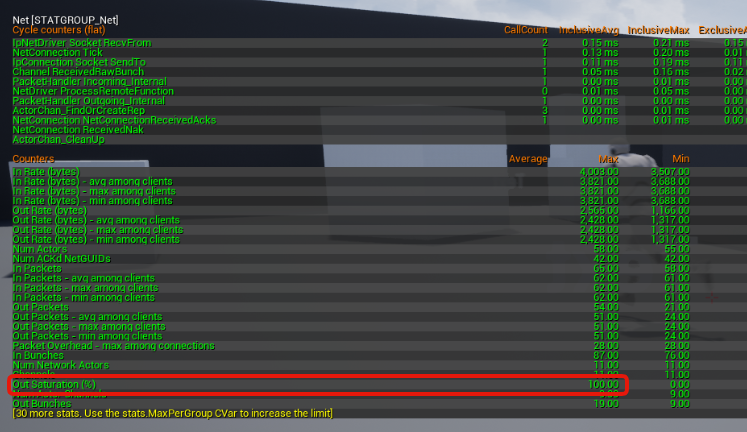 rich ridge
@vale ermine I guess in free tier only one instance is allowed that is c4, and only one fleet runs on that instance
vale ermine
That makes it very difficult to tests moving from back and forth between sessions and instances.
silent birch
What kind of session are you talking about? Online @vale ermine
vale ermine
On Amazon gamelift server, I need 2 maps. I need one instance to be the starting map1 and I want a portal in Map1 that I walk into and it takes me to Map2 that is on another instance. I only want one session per instance and I want to be able to travel back and forth between those sessions using a portal in game.
silent birch
That's a programming? UE4
rich ridge
@vale ermine why don't u use some sort of matchmaking service
If it is not related to multiplayer then you could use cloud functions
I believe it's next to impossible to maintain two different sessions for same client
A quick question , r u going to host dedicated server with same game mode or different game modes
vale ermine
Hmm that makes me think. I am new to this so excuse me if I am talking nonsense.
I need the sessions to be dedicated as in never go down.
So from what I understand is that there is the default server map.
rich ridge
If you want some thing which never goes down then gamelift is not a good choice
I think you want a backend for your game
Not a dedicated server
So what do you mean by your portal??
Is it the UI inventory
vale ermine
well have you ever played ragnarok online they have portals you walk through and it takes you to the next map they have like 100+ maps you can travel between.
rich ridge
Ok... I got it it's like fortnite and you want something like traveling in bus before I land to an island
Before the battle royale
I believe epic games a nice talk during an event in GDC
On the same topi
topic
@vale ermine read this https://forums.unrealengine.com/community/general-discussion/84523-few-questions-about-paragon-lobby-and-game
Unreal Engine Forums
General discussion about the game industry and the Unreal Engine community.
vale ermine
so lets say I have one session running and it loads the default server map. I can have the server change maps for that session? Lets say I package 20 levels with my game server. On that session I can only have one map loaded at a time. So my thought is to have one game instance running and have my server start 1 session for each map and have the server instance load the correct map for each session. Then I want the player to be able to travel to different sessions depending on what map they are going to based on the portals they walk through in game.
rich ridge
one server runs only one map at a time
if there is a possiblity that player can walk to any portals and select any map, then you do need multiple dedicated server
vale ermine
ok that is what I was trying to understand
rich ridge
and the dedicated server which is hosting your portal that should map the player to exact next dedicated server which is running the same map which player walked into
that you have to figure out
vale ermine
so I have to make a server instance for every map and then start a session on each server instance and figure out a way to travel in-between server instances.
The thing is with the free tier I believe we can have one instance per region. So I will start there and see if I can get two instances running so I can test traveling between them.
rich ridge
or else why don't you explore level streaming
its really a bad idea to have server instances for every levels
I think level streaming will do it for you
vale ermine
I understand it is but I need the load separate for each map.
meager spade
why?
vale ermine
Because of the amount of ai's i need to run on each map
rich ridge
@meager spade do you have any suggestions?
@vale ermine you only stream the level when player walks through the portal which leads to that particular map
meager spade
Well not really, there are only two things that can be done, Hard travel to a new server or stream a level.
either will have there challenges
vale ermine
yea I want to hard travel to a new server
meager spade
there is a lot of complications to handle with that though
vale ermine
you guys helped me get the direction I want thank you
meager spade
so gl 😄
vale ermine
thank you 🙂
rich ridge
don't thank
just help me some other day when I need help
@meager spade what all complictions we can have for hard travel?
meager spade
if you have party and your the leader, you would have to ensure party members don't hard travel with you unless that is desired.
rich ridge
Lets talk in MOBA perspective
rich ridge
and what if i m not leader
vale ermine
yea keeping all the data synced is going to be a pain
rich ridge
just random matchmaking
meager spade
i am sure Borderlands 3 has seperate servers when you travel to new areas
either that or it probably just is a new map
as the whole party comes with you, but it feels like its a new server 🤷
rich ridge
makes sense
meager spade
actually it's not
its a new map
Borderlands 3 doesnt have dedicated servers
its a listen server setup
i remember being party leader and quitting the game, and everyone in my party got shoved back to main menu
so yeah its just a map change with all party members
rich ridge
ohk
thin stratus
BL3 is 100% listenserver
BL always has been like this
A zone is one map. Traveling to a new zone is a simple ServerTravel
Leader always takes the party with them
unique kelp
Why is the RelevantTimeout set to 5 seconds by default? I want some actors to disappear for certain connections, and it should be pretty much instant, but this timeout makes it not be. Is there any specific reason for this?
This is for an actor channel, btw. This flow controls when a channel is closed
unique kelp
For anyone wondering, it's best not to touch that variable, since when actors spawn in, this might also cause them to wrongly be closed
rich ridge
@unique kelp I think replication graph will give you more control over when to make actor appear or dissapear
unique kelp
Will it? isn't it more like an automated space partitioning?
rich ridge
Replication graph is not automated. You have to define which actors to replicate, which actors make sense to replicate to whom. You have to define all those lists
unique kelp
I'll look into it, but I'm not sure it will give me the fine grained control I want
thanks
rich ridge
If you want really fined grained control, then rep graph is your destination
 manic pine
Hmm, shouldn't bOnlyRelevantToOwner go up the chain when finding owner?
Until finding controller
rich ridge
@manic pine I didn't understand you.
manic pine
With bOnlyRelevantToOwner on the object is replicating if owned directly by the PC, but not if owned by e.g. PlayerState(which in turn is owned by PC)... Is this working as intended?
Variable replication on the other hand, with COND_OwnerOnly, traverse the owner chain
I'd have imagined bOnlyRelevantToOwner would work the same way
river estuary
I understand there is no UMG in dedicated server.
How can one create some sort of panel for information?
rich ridge
@manic pine I will try today and check behavior
@river estuary u can host panel information in player controller
river estuary
@dark edge well imagine a dedicated server console, where you can see information about a game.
I'm not really sure to be honest, is that something I shouldn't do? should I just rely on players and logs?
dark edge
It doesnt look like much but this has been a right bastard to get working in a multiplayer setting. Haven't dared try with wheels/tires yet but the runtime construction and physics works. 250ms ping.
river estuary
@rich ridge "host" the information? and display it where?
rich ridge
@river estuary display in umg on client
dark edge
@river estuary Oh, no idea about that. Youll need some way to interface with some sort of external database or something. Never messed with that
river estuary
@rich ridge yeah but I'm talking about information that shouldn't be available to clients
rich ridge
@river estuary what kind of information u are talking about
@river estuary dedicated servers only gives authority
dark edge
@river estuary Something like a Minecraft Server Control Panel is gonna be really hard, but doable.
river estuary
@rich ridge some client side that shouldn't be available to all (or even in the UI) such as ammo, health, inventory, ping, and possibly some generated info (npc locations, ammo, strength, etc).
@dark edge I'm not too familiar with Minecraft server specifically, but yeah same idea. Some control panel for the server.
Although right now I'm just looking to display information rather than actually control things.
and right now I'm just trying to understand where one can create such a thing, since dedicated servers have no UI at all?
rich ridge
@river estuary u need some sort of pub-sub architecture
dark edge
@river estuary Yeah It'll be doable but really involved. Start here maybe.
https://docs.unrealengine.com/en-US/Engine/Editor/ScriptingAndAutomation/WebControl/index.html
Work with your Unreal Engine Project remotely from a web client.
river estuary
@dark edge Is there anyway to do it within the dedicated server? After all it is a running program. Why would I want to connect to it remotely, and not just do it on the program it self?
rich ridge
@river estuary your dedicated severs will publish the ammo or health change and your server control panel will subscribe to those changes
river estuary
@rich ridge isn't that how replication works, sort of? ..
What about having some sort of "special admin client" ? Is that doable?
dark edge
@dark edge You can probably already do much of what you're asking. Have you messed with the dedicated server console? You'll prolly just need to make some custom console commands.
rich ridge
@river estuary in that case you have engine source code , modify it , modify the game mode
river estuary
That is:
(1) Can I distinguish clients permission level in the server? I'm guessing I can do it using external service, but is there another way?
(2) can I replicate specific variable/RPCs to a single specific client?
@rich ridge I have it, I prefer not to go down that road now. I will if I have to though.
@dark edge I couldn't see/find any dedicated server console. Where is that?
dark edge
Have you built a dedicated server and ran it?
river estuary
sort of. I just ran it in editor. Are you talking about .exe it self then?
dark edge
You can do something like this
"C:\Program Files\Epic Games\UE_4.20\Engine\Binaries\Win64\UE4Editor.exe" "%CD%\ShotInTheDark.uproject" TestMap -server -log -nosteam
to fire up a project as a dedicated server without cooking
river estuary
Is there anyway to launch the console from the editor without a command line? When I'm pressing "Play" ?
dark edge
Maybe if you hit standalone but its not that hard, just make a batch file
thats literally all i have in my server launching file
rich ridge
@river estuary a python script will do
river estuary
and how do I run that python script/batch file on the "Play" button?