#multiplayer
1 messages · Page 497 of 1
 dark edge
If you want you can send me it and I'll take a peek
 upbeat raven
I'm simulating character movement on the client and the movement is really jerky. It seems like it isn't smoothing properly. Does anyone know how to fix this?
 winged badger
common causes are
- you have replicated scene/primitive components that have no reason being replicated, and they are causing the jitter
- you are manually replicating custom movement to owner outside the CMC
- you are sending a load of reliable RPCs (possibly on Tick) and have murdered your bandwidth
(there is never a reason to send a reliable RPC on Tick, as the more current update would arrive on Client/Sever way before the failed one is resent)
upbeat raven
I don't think I have any RPCs on Tick. I used the profiler and things looked ok to me compared to other stats I've seen (granted I'm new to network replication).
winged badger
there is also a scenario where you attached the camera to the capsule
upbeat raven
I was replicating the capsule and the camera though which probably shouldn't be the case.
Could that cause it?
upbeat raven
Ah that would do it.
It's a first person game so the camera is attached to the capsule
Thanks! I was thinking I was going to dig through the C++ and dig up some smoothing bools and functions.
 exotic axle
I'm testing multiplayer for a game with tanks. I replicated all the movement for the tank, and when I input move, my log is showing that the throttle is up, but AddForce doesn't seem to be working properly. On my screen I see barely visible micro movements (even though throttle is showing full) and my vehicle is constantly rubberbanding back (also tiny movements). Is there something I'm missing here?
I'm guessing that the AddForce is calling on the client, but shouldn't that work and then replicate my movement to the server and then propagate?
 worthy perch
Replication only happens from server to client(s).
exotic axle
Oh it's a 1 way street?
worthy perch
You can RPC values to the server from the client.
But replication is one way, yeah.
exotic axle
So... instead what I should do is on input, trigger function on server, add force on server, and then let replication handle the resulting movement?
Wouldn't that result in input lag?
worthy perch
I've never done anything related to replicated vehicles, but I have heard it is very hard.
exotic axle
Oh dear
Well it's just an actor
Pawn*
So why is that so different from replicated characters...etc?
 fleet raven
the character comes with 15000 lines of c++ to handle networked movement
for vehicles... you are on your own
fleet raven
to do this properly you need to implement client side prediction and reconciliation
or you can give up and make the vehicle client authoritative, like they did in fortnite
exotic axle
Well, if the vehicle is slow enough it'll probably still work without prediction etc
fleet raven
quite possibly
exotic axle
But that's unfortunate there's no default code for vehicle movement replication
Anyway I guess the thing that's wrong with my code is I shouldn't be doing physics at all on the client
 grand kestrel
Those 15,000 lines of code aren't simple either, a lot of brain power went into it
Yet not enough thankfully they're fixing it
fleet raven

 zinc garden
After 12 more updates dedicated to architects and live tv
Hmm, for some reason I'm getting wildly different results depending if I play using "Use Single Instance" vs not using that vs starting up a dedicated server and connecting via external shortcuts rather than starting in editor...
It's all very confusing.
So many tutorials about replication with actors, but none that go into detail about stuff like how to run different code in the gameinstance depending on if it's a dedicated server or not
dark edge
@exotic axle Tanks are slow enough that you can just have the physics happening on server and replicate down to client
@zinc garden Why would your code be drastically different on dedicated vs listen?
zinc garden
You tell me. 😛 That's what I'm trying to figure out
But like, I have some widgets that I create in the GameInstance so that they will persist between levels etc, but I only want to create them when it's not a dedicated server of course
And same with stuff like loading and applying graphics settings
winged badger
a simple branch with NOT IsDedicatedServer
will solve that
but if you're using a singleton pattern (not the unreal version with world context)
it breaks single process PIE
(if you're using BP only, you're not using the singleton pattern)
zinc garden
Okay, yeah it seems to not work properly in single process
 thin stratus
Eww Widgets in GameInstance to persist levelchanges?
What widgets are we talking about?
zinc garden
Stuff like a "beta" banner in the top rright corner
 compact osprey
Hi, I'm trying to update a Pbar ( values come from a Pawn) from Player controller . update works perfectly with clients but not with the listen server . I don't understand why , it's a player controller problem because of the listen server ?
zinc garden
brb gotta take cat to vet
compact osprey
this Pbar doesn't need to be replicate to other clients ... It's for the owning player
 zealous saffron
Pbar? If it doesnt need to be replicated to other clients just set the replication condition to COND_OwnerOnly
compact osprey
Progress Bar sorry who is in a umg
zealous saffron
Is it running on everything but the local listen server's client?
compact osprey
yes , Pbar is updated by the Player controller for all clients , but not for the listen server
I tried COND_OwnerOnly and doesn't working :/
zealous saffron
Post the code if possible. Probably either setting it in the wrong place or using an incorrect netrole check if you're setting it there.
Be back in a bit.
compact osprey
I
ParentGolf is My ParentPawn Class
I set my Player Controller Ref at the event begin play of my BP_Parent Golf
winged badger
@compact osprey listen server is a server
it doesn't get its values via replication
you likely incorrectly used HasAuthority switch, or IsServer Branch instead of IsLocallyControlled/IsLocalController
compact osprey
Normaly this value is not replicated , i tried what @zealous saffron said me before
thin stratus
What is BP_ParentGolf?
compact osprey
My Default Pawn Class
thin stratus
- BeginPlay is too early.
- BeginPlay calls on everyone (Server and other Clients)
- Any usage of GetPlayerController(0) outside a 100% secure local environment is bad and most likely will cause bugs
 compact osprey
yes , I ask if my Player is currently pressed left mouse button
winged badger
@thin stratus funny enough, BeginPlay is too early for server only
client will have replicated the Controller variable by the time it calls BeginPlay
thin stratus
Is that 100% given?
winged badger
(assuming it was possessed in the same tick it was spawnewd in)
thin stratus
Cause after all you call Possess post SpawnActor
winged badger
yeah, one bunch is received for an initial actor
spawns it, sets replicated variables, calls OnReps, calls PostNetInit and that calls DispatchBeginPlay
thin stratus
Right, so you wouldn't notice if you aren't testing clients :D
winged badger
if you use deferred spawn, then possessed the Pawn before you finished spawning
it would work the same on server, and BeginPlay wouldn't be too early
fun quirks with unreal network construction 😄
NetDriver doesn't evaluate actors for replication real time, it does wait for gamethread to finish its tick as far as i understand it
so anything set the frame the actor was spawned in on server, will be ready by the time beginplay is called on client
 twin juniper
there anyway to pool/cache replicated actors on the client?
compact osprey
I don't understand why it doesn't work ...
twin juniper
ive noticed alot of these "actor pool" plugins dont have any replication support, is it just not possible ?
winged badger
iirc it would be possible, but would require alterations to DataChannel.cpp and World.h/cpp
instead of spawning an Actor when you receive instructions to do so
you'd have to find a pooled Actor matching the class, and then adjust it to match
thin stratus
Pooling with replicated Actors should work fine
Replicated Components on the other hand are a not go >.>
winged badger
if you bench a replicated Actor that exists both on server and client
sure, you could just reuse it
twin juniper
it gets more complex if i want said pooled actors to work that do indeed have replicated components?
winged badger
not if they are on the CDO
twin juniper
my actor does construct all of its replicated components in cdo, thanks for the datachannel tip @winged badger
winged badger
i really wouldn't go there
that is a scenario where client would have prespawned Actors
to use instead of spawning new ones that come over replication
twin juniper
i dont know how else to stop these micro hitches that occur when a bunch of actors come into net relevancy range, they are things that another player owns..
maybe theres a way to spawn actors that enter net relevancy range slower then all at the same tick they get in range?
twin juniper
all the same type of actor
winged badger
you might be able to set them dormant and keep them relevant, maybe
this is just guessing now
prevent them from being destroyed
also actors from the package behave differently there
zealous saffron
So did you get it resolved @compact osprey ?
compact osprey
unfortunetly no , I try to understang what is my mistake @zealous saffron
 brave solar
I'm experiencing some frustrating behaviour with acceleration, I need to get rotation from acceleration for some things, which works fine, but when running into walls it sets the wrong rotation value on client
the acceleration gets stuck on whatever angle the wall is
 edgy valve
Hey guys could anyone help me with a few questions ?
i'm a bit confuse where i should allocate the logic for a multiplayer game
what i mean by that is, i'm not sure what i should be writing on the player controller, what i should be writing on level blueprint , etc...
and the second question is, i have a turn based system that suppose to happen only on the server
but at some point i need a player to change a variable on the server
i couldn't find a way to do it
Run on Server makes the logic run on the player controller who is triggering the event
Which i'm trying to do is, when i player want to finish the round he could be able to send that info to the server, and at the end of a player turn time if he is doing some action the server should wait he finish the action before start the next round
But i don't see how can a client change a variable of a code that is running on the server
 fringe dove
nice, you guys see this? https://www.reddit.com/r/Fighters/comments/dfcj9q/ggpo_is_now_open_source_via_tony_cannon_on_twitter/

reddit
Posted in r/Fighters by u/poke133 • 187 points and 42 comments
 twin vault
spent $ not long ago on it 🤦
fleet raven
people saw, but it's pretty irrelevant for unreal
twin vault
why unrelevant
fleet raven
would require crazy effort to actually make use of it in unreal + being unable to use half the gameplay framework
twin vault
ye thats true
fleet raven
this kills 99% of unreal games immediately
twin vault
but that goes for any p2p lockstep solution
if theres one good thing about lockstep tho is writing exactly 0 multiplayer code and it just works
 fathom aspen
Anyone knows a good source that can teach me FastTArrayReplication?
fathom aspen
Yeah I ended up heading there....didn't expect they would explain things there
Thanks man
winged badger
Its not uncommon
fathom aspen
I think they don't do it for the basic object types
winged badger
Especially for network/GAS relates systems
fathom aspen
Yeah makes sense
 lost inlet
if you were working on a networked fighting game or RTS, you would probably design it from the ground-up to support those concepts
but yeah, it's gonna be hard to implement those requirements after the fact
 bitter oriole
We had the debate on cpp earlier, yeah
Essentially if this speaks to you well... you probably don't want using UE4 in the first place
 solar stirrup
Is there a release date for Epic's new prediction system?
 silent birch
Why when the client pulls on the server he does not have any health points, whereas when the server pulls the client he has less health points
?
solar stirrup
We're currently reworking our internal planning and I figured we'd wait for epic's new system for a specific part of the game that would entirely benefit from it
fleet raven
there is no release date
but you can follow its development on github
they even have a roadmap file in it
solar stirrup
Oooooh
fleet raven
(for the prediction plugin)
solar stirrup
May I have a link please
fleet raven
uhh let me find it
solar stirrup
I'll put it as my homepage haha
fleet raven
silent birch
Who can help me?
solar stirrup
Ty
lost inlet
oh that's cool
it'll be nice to have a more generalised approach to prediction, i was used to that coming from the source engine
fleet raven
there's a long way to go with that thing though
and then re-writing the character movement on top of it
solar stirrup
Eh we've somewhat got time
fleet raven
there only seems to be one guy working on it from the commits
solar stirrup
They'll have it finished before I would doing it solo lmao
fleet raven
that's likely
silent birch
When the server pulls on the client the customer has less life but when Lee client pulls on the server the ball goes out but the server n no damage
So?
silent birch
Projectile
bitter oriole
Fires ?
silent birch
Yes
bitter oriole
Are you a French speaker ? "pulls" in English means moving an object toward yourself
silent birch
It shoots but the server 'no damage
bitter oriole
Sounds like the client doesn't properly fired the server RPC you need here
silent birch
I speak French
I did that when we draw a sound is played and this sound is also played
bitter oriole
Multiplayer mechanics in UE4 are simple : you basically need client-to-server RPCs, and server-to-client replication
Think clearly about how it should work, maybe make a graph on paper
silent birch
I did it
bitter oriole
"thing fails to work on server when called from client" looks like no RPC, RPC called from non-client owned actor
Check your log too
silent birch
And?
bitter oriole
And what ?
silent birch
How make?
bitter oriole
How make what ? I told you the two most probable reasons and one thing to check
silent birch
Multicast I tried
bitter oriole
There is no scenario where a NetMulticast RPC called from a client would run on the server
silent birch
So run owning client?
bitter oriole
Look at the tables here : https://docs.unrealengine.com/en-US/Gameplay/Networking/Actors/RPCs/index.html
Designating function replication across the network
Skip the C++ part
silent birch
OK
bitter oriole
From "Requirements and Caveats" to "Validation"
That's all you ever need to know about RPC
Like I said, it's a simple thing
The hard part is making your own game with it
silent birch
I try
 meager spade
eh?
silent birch
How Compared the score of the players online?
meager spade
that is entirely down to how you have made your system
 soft relic
Anyone knows if the approach to connecting a host from windows and clients from the oculus quest changes from when connecting 2 pcs or is the process the same?
fringe dove
@fleet raven not too irrelevant, I'll be using it
not for everything, but I do have a use for it
fleet raven
interesting
soft relic
I mean, do I just use the find sessions, join etc and they find each other like it does on 2 pcs
 tropic snow
Why does AddActorWorldLocation cause the Client to jitter?
Is Get Control Rotation replicated?
 slender yarrow
@tropic snow everything that isnt Add Movement Input is NOT replicated properly by the engine
so the add and set actor location nodes are not replicated and will cause jitter
dark edge
Is the delay bigger if you give the client a really big pktlag? It's probably a round trip to the server per shot somewhere
 strong sail
Can anyone help? In my multiplayer game is someone joins and if their vive controller is turned off, it spins on floor. Anyway to check if controller is turned off
 wind furnace
hey guys can someone help me. in my splitscreen game i have each player with a HUD however the values are only bound to the first player
wind furnace
so what would i use instead
winged badger
second player is [1]
and there is a good chance you can bind the HUD without using statics at all
if its reading information from pawn or playerstate
or controller
wind furnace
it is at the moment
winged badger
it can just access the one corresponding to it with GetOwningPlayerController, GetOwningPlayerPawn
and such
wind furnace
ok. so how should i go about changing it because currently both players are the same
would i just go through and change everytime i refrenced getplayercontroler-
thin stratus
- Create your UI inside the PlayerController class and pass "self" as the OwningPlayer of the Widget you create.
- Use "GetOwningPlayer" to access this PlayerController.
- Profit.
And yes, you usually only use "GetPlayerController" if you are 100% singleplayer, or if you need to loop over all local players
Same goes from GetPlayerPawn and GetPlayerCharacter
:P Try to not use them at all
wind furnace
if i use this string would it be possible to cast to the game mode and use the index refecrence
or would it just be easier to replace everything with get owningplayer
thin stratus
You 100% want to make sure you pass the correct player as the owner
And use GetOwningPlayer
That is the desired solution and should be followed
Focus and such things will all break otherwise if you don't do that from the start
wind furnace
ok thanks heaps! i used get player character alot so it will keep me busy
thin stratus
Anyone here played around with UE4 + Linux + Steam + DedicatedServer + Docker?
I have some trouble getting the Docker Container to properly open the ports for Steam.
Whatever methods there are to open ports, they seem to have no effect.
The Server runs fine on a DigitalOceanDroplet, so the code and package itself should be fine.
 hot robin
If i save something in Single or Multiplayer like the Change of a Display Name for the Charakter and save that into a savegame and dissconnect and connect again and the save for the name is local.. how does the replication of such variable work to only target the player and name the target charakter and not everyone else ? or is the Charakter componment who is client target and replicates to other clients always as himself as the target if the target in the blueprint is just the UE4 manneqiun for example?
i know its spagetti text 🙈
thin stratus
@waxen imp How likely can I annoy you once more about Linux + UE4 :D
 waxen imp
@thin stratus that combo is one of my favourite discussion topics, so very likely. 😀
thin stratus
Right, it's in combination with Docker though.
I basically have to use Docker to upload our Servers to the backend.
And while I just found out that the SDK literally blocks the game process instead of implementing a callback for when the server is needed, I still have an issue locally with my docker container:
- It has internet, but it seems to fail connections to Steam.
Now I tried openeing ports via Docker File (EXPOSE) and stuff, but it doesn't change.
I'm not sure if there is some hidden secret or whatever but I know my servers can't be reached cause of my provider.
YET I can at least create a session with my linux laptop.
SO the Docker Container should be able to do that
So something there fails connection
waxen imp
The EXPOSE Dockerfile directive is only the first half of what's needed to actually expose container ports on the host, since it just marks the ports (or port ranges) as being exposable. The second half is specifying the mapping to bind those ports to specific ports on the host when the container starts. The way you do that depends on how the container is being started, but for local testing you can just specify the appropriate flags to the docker run command.
Here's how you do it with docker run: https://docs.docker.com/engine/reference/commandline/run/#publish-or-expose-port--p---expose
thin stratus
Right, I know the container on the backend has that with -p
And I also started the container with docker run -p 7777:7777 -p 27015:27015 <image>
That might be wrong though but that's what I saw when googling
7777 being the ue4 server, 27015 being steam
waxen imp
Are those TCP ports or UDP ports?
thin stratus

I honestly don't know so I did both for the Dockerfile and for what the backend does
I think I also did it with -p once where I specified tcp and udp on its own
Ignore the 30000->7777 that's playfab's doing
That picture is from the backend now, and that end might actually work (if I fix this blocking call I found out about)
So just to have a starting base. On my local Docker i have NO container active.
I have a build that was created with this dockerfile:
FROM ubuntu:latest

EXPOSE 27015/tcp
EXPOSE 27015/udp
EXPOSE 7777/tcp
EXPOSE 7777/udp

RUN useradd -ms /bin/bash linuxserver

WORKDIR /home/linuxserver

COPY /LinuxServer /LinuxServer

RUN chown -R linuxserver:linuxserver /LinuxServer
RUN chmod 755 /LinuxServer

USER linuxserver

ENTRYPOINT ["/bin/bash", "/LinuxServer/HoverloopServer.sh"]```And now I would really love to know how to run a container from that image that does indeed allow proper communication with steam via 27015
waxen imp
If the port mappings are all specified correctly then it could potentially be a firewall issue. I know Azure locks things down pretty tight by default if you don't add security exceptions to unblock ports.
thin stratus
Ignore the PlayFab/Azure part for now
This is just my local one
My LinuxLaptop has no issues at least creating the session with steam.
It's not pingable via 27015, but the session creation works.
The docker however fails with the session already
(same packaged server)
waxen imp
So running the dedicated server directly on the host system works fine, just not when running inside a container?
thin stratus
Yes.
- Linux Laptop -> 27015 Ping Fails | Session Creation works
- Linux Container on Windows PC -> 27015 Ping not tested | Session Creation fails (shows connection timeout to steam)
waxen imp
Hmmm, okay, that's interesting.
thin stratus
That's basically what makes me think it's a port issue
Cause I know it's able to use apt-get and stuff to download
So it has internet
waxen imp
Do you know the exact docker run command you used to start the container?
thin stratus
Sure, atm I do: https://i.imgur.com/Y9S32CM.png

Could be wrong, it's not like I know wtf I'm doing
waxen imp
Could you run docker port <CONTAINER_ID> and paste the output here please?
The ID is what's listed by docker ps.
thin stratus
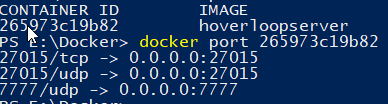 waxen imp
That all looks fine. I'm not sure what's going on then.
thin stratus
Alright, I'll ignore it then for now and double check that the PlayFab stuff works.
Have to fix some code and reupload everything first, so that might be a thing for tomorrow.
Thanks for the help! (:
waxen imp
No worries, sorry I couldn't resolve it for you. The only other thing I can think of is to check that nothing else is hogging that port on the host system, which you can do by opening Resource Monitor and clicking on the "Network" tab, then looking in the list under "Listening Ports".
thin stratus
Nope seems to be clean
wind furnace
hey guys how would i go about respawning the player once it has been destroyed
wind furnace
ill try that now thanks
exotic axle
Do UFUNCTIONs that have been marked as Server RPCs execute on the client as well?
 gritty pelican
How To use World Composition?
in multiplayer
my player sees a loaded level, but falls through it
meager spade
@exotic axle how would that make sense?
exotic axle
So they don't?
meager spade
i really don't get what you are trying to ask
exotic axle
I have a UFUNCTION. It's marked as a Server RPC. When I call it, do the contents of the function get executed on the client as well?
exotic axle
Ok
meager spade
 exotic axle
So if I have movement code in the server RPC function, I should also call a separate function that's not an RPC on the client as well?
Or else the clients wouldn't see the actor moving?
meager spade
you would have to multicast it to all simulated clients
exotic axle
Well it says netmulticast only runs on invoking client though
exotic axle
But I'm starting from the client though?
meager spade
Client -> Server RPC -> Server -> Multicast
you would move locally
and tell the server where you are moving
server then tells other clients where you are moving
meager spade
so
exotic axle
So basically 2 UFUNCTIONs, 1 server, 1 netmulticast
They both call the same code
And then that same code is also called by the initial cleint
meager spade
Client -> ApplyMovement -> LocalSetLocation -> ServerSetLocation -> MulticastLocation
exotic axle
Well, it's a physics AddForce call, so I'm trying to call that on the server as well
meager spade
so when you AddForce, simply pass in the same values to a Server RPC, then server will multicast them values to other clients. Be warned networkd physics is a pain!
exotic axle
For some reason if I try to AddForce on client without doing anything to server, the server just pulls it back and the client doesn't move at all.
So I'm doing it via RPCs. I just AddForce on server RPC, but it's a little bit choppy even on local.
I'm guessing if I also do AddForce on my invoking client as well, it would be less choppy
Other clients will also see the choppiness on my vehicle though
meager spade
like i said replicating physics is a pain
not sure if there are any guides/videos on it
exotic axle
That's one of the annoying things with unreal is that it's been there for a while so anything I look up on the Internet is bound to be dated
dark edge
@exotic axle look at the replication and replicate movement to autonomous proxy settings
If it's gameplay important you'll need to tweak the physics replication and error correction settings in the project settings
Replicated physics is doable but a royal pain in the ass.
exotic axle
I'm ok with replicating positions as well
But I would like my things to interact with the world
dark edge
Dig into the settings like error per position and hard snap etc.
exotic axle
Can I do as Kaos was saying earlier: just have the client run the physics, but everyone else just gets the location?
dark edge
I THINK the approach is to apply forces client and server side but I'm not 100% sure.
The problem is what the other people see between replicated positions. The interpolation and extrapolation.
exotic axle
Yeah I thought Unreal does interpolation automatically but it doesn't seem to
dark edge
It does, dig into those settings like I said.
exotic axle
Ok thanks
dark edge
I don't remember exactly where they are but look at the physics tab in settings.
You'll see all the error and latency correction stuff.
thin stratus
@waxen imp Just a small notice: Got the PlayFab/Azure upload to report the same Steam Connection Failure. -_-
It's past midnight here though so I'll rather tackle that tomorrow.
wind furnace
cant get my characters to respawn
wind furnace
sorry so when my charcaters health reaches 0 ive got it set up so that the actor is destroyed but i cant seem to get it to respawn
its a splitscreen multiplayer btw
this is where the player dies
dark edge
Calling restart player should spawn it's default pawn. You can also just manually spawn a pawn and possess it.
Why are you doing all that logic 3 different times?
exotic axle
I ended up implementing basic vehicle physics movement using a combination of RPCs and the movement replication.
On input, AddForce on client, call server RPC to AddForce on server, and also turn on movement replication to correct error.
I thought this would be jitter-y, but it turns out the error corrections are pretty small so problems only really manifests in a few edge cases where physics is breaking anyway.
I have a new problem though. I tried to be lazy and just use the movement replication stuff for the turret on my vehicle, and it's only working 1 way. When my client A is also a server, and I turn the turret, I can see it turn in the other instances. However, if a non-server client turns the turret, nothing happens. Does anyone know why this is?
dark edge
Turret angle should be driven by a value that is being replicated from the server and also set locally on the owning client
exotic axle
I thought that would be covered under movement replication of the main actor?
dark edge
No, thats just the movement of the root component of the actor
exotic axle
Gotcha
dark edge
How is the turret moving, is it a static mesh?
exotic axle
Yes
So is there any way to get the movement of the subcomponent replicated for free?
Or it needs to be RPC calls?
dark edge
Just have the subcomponent driven by a value that is replicated
exotic axle
Hmm that's not so easy because I have gyrostabilization going on :/
It's not doable but I was hoping there'd be an easier way I guess
Not undoable*
dark edge
You have a "desired aim vector" right?
exotic axle
Oh yeah I can replicate that then
Just odd that there's no other way?
Coming from an unity background, seems like something like this would be included
dark edge
There's "Component Replicates" but IDK if it can do component local transform
dark edge
I think the approach is to replicate whatever the basic data is and derive the rest
exotic axle
Yeah that would be simplest
dark edge
so replicate AimDirection or AimPoint and everything else should be derived from that
exotic axle
I have an FVector for firing solution I can just save as a class var and replicate
dark edge
That will prolly work. Depends on how high frequency it is
Might want to replicate whatever is driving that Fvector, or whatever the most basic input is
dark edge
At the very basic you have a desired impact point or aim vector right?
 timid moss
u guys are twins.
exotic axle
At the point where I execute the firing solution, yes
timid moss
thought someone was just talking to themself on this channel 😅
dark edge
Fixed
timid moss
i laughed
 fervent yacht
And rubber duck makes that absolutely normal.
exotic axle
Ugh why is unreal replication full of C++ macros
timid moss
just be glad your not dealing with the gamelay ability system lol
well i mean there actually everywhere it seems
exotic axle
Hmm the FVector replication is not quite working
Not sure why
Do I need to call a server RPC for executing the firing solution as well as calling it on the client?
timid moss
i dont know your setup but if you want anything to actually happen in your game it needs to be done on the server
exotic axle
I think it is done on the server
I do it on the client, and then I call a server function that calls the same code basically
exotic axle
Yeah unfortunately it's not communicating
Client sees the movement correctly
Other clients don't
exotic axle
Actually, if I start a client as a server too, it broadcasts it just fine it seems
They see no movement
Player A turns turret, Player B sees no movement
Unless Player A is also server
timid moss
ok. for that you shuold look into the character movement component
thats how you handle smooth movement for characters
its hard at first though ill say that
fervent yacht
For vehicles I hear that's much more difficult.
exotic axle
    FiringSolution = ...;
    ExecuteFiringSolution();
    Server_ExecuteFiringSolution();


// UFUNCTION (Server, Reliable)
void UTankAimingComponent::Server_ExecuteFiringSolution_Implementation()
{

    ExecuteFiringSolution();
}

void UTankAimingComponent::ExecuteFiringSolution()
{
    // code that actually moves turret
}
I'm not sure if they are, could be confusing them with another person.
exotic axle
Vehicles yes
fervent yacht
I believe before though one of the main people that seem informed here mentioned the predictive problems, and that in Fortnite they wound up making the vehicles client authoritive... Which seems pretty drastic so I assume not gonna be an easy solve.
exotic axle
FiringSolution is a replicated var but it seems like it's not replicating
timid moss
are you trying to change that variable on the client so that it "replicates" to the server? because that doesn't work.
exotic axle
Yeah
timid moss
only way that can happen is with a server RPC
that can work
and that should change the variable on the server which should replicate that varible to all clients (unless you have a certain replication condition)
exotic axle
I managed to get a very poorly performing version of it running
I think the reason it keeps freaking out is because I try to change rotations of 2 different components (in the same structure) in the same frame
timid moss
yeah that sounds complicated
exotic axle
It's supposed to do this:
https://streamable.com/658pe
 exotic axle
Woohoo I got it working now.
My problem:
Simplified Hierarchy:
Tank
- Turret
-- Gimbal Camera
What the code did every physics frame:
- Find out where I was aiming towards with my mouse/controller
- Calculate firing solution
- Move actual turret towards firing solution at max allowable speed
- Reverse gimbal camera by the amount the turret moved
Step 4 is necessary because the gimbal camera turns with the turret since it's the child of the turret.
It looked like this in code:
    float DeltaRotation = ...; // step 2
    float TurretRotation = OwningTank->TurretComponent->RelativeRotation.Yaw + DeltaRotation;

    // steps 3-4
    OwningTank->TurretComponent->SetRelativeRotation(FRotator(0, TurretRotation, 0));
    OwningTank->GimbalComponent->AddRelativeRotation(FRotator(0, -DeltaRotation, 0));
This works fine in singleplayer, but when I put steps 3-4 in a server RPC, it just doesn't move other than jitter around.
I think the problem with this is that when the code is actually called on the server, I'm assuming that SetRelativeRotation and AddRelativeRotation are still operating under the same transforms as they would be in local, but some time has already passed. Add in interp and all that and voila, problems.
Solution is this:
    // pre calculate the amount to reverse on local
    FRotator GimbalCompensation = OwningTank->GimbalComponent->RelativeRotation - FRotator(0, DeltaRotation, 0);

    // then pass into the server RPC
    OwningTank->TurretComponent->SetRelativeRotation(FRotator(0, TurretRotation, 0));
    OwningTank->GimbalComponent->SetRelativeRotation(GimbalCompensation);
Summary: don't use SetRelativeRotation and AddRelativeRotation on the server and expect a predictable result. Calculate both in the same place, and then make sure to use one or the other, not both on the server RPC.
timid moss
glad you got it working!
 potent prairie
is there a way to lower skylight intensity just for one player instead of the entire server?
exotic axle
Thanks for your help @timid moss and @dark edge
timid moss
😅
dark edge
@potent prairie Just set it to 1 value if you're the special player and another value if you're everyone else
I'm not sure if intensity is a replicated value but if it is you should be able to exclude a certain player if you want
 opal moss
Does RepNotify(or normal replicated variables) replicate variables to users who connect late? If not how do you make sure all clients get those variables when they connect?
 gloomy sedge
Can anyone explain how i can get my Tank Turret to rotate to the cameras rotation within a dedicated server?
 hybrid peak
Hey everyone. I am a bit new here, and was hoping to have a small discussion with someone who is educated on networking in both blueprint and cpp. No special knowledge necessary, but I am honestly starting to fail to see the point of blueprint language 😂
meager spade
@opal moss replicated properties change on late joiners to the servers version (and OnRep is called if its a RepNotify)
dark edge
@gloomy sedge Camera rotation should drive some replicated variable. It's a good idea to boil your control down to a minimum set of replicated variables and derive everything else from them.
dark edge
@hybrid peak What are you trying to figure out?
gloomy sedge
So after tinkering for literal hours over to last two days, I still can't figure out how to replicate the tanks rotation. I want the Tank's rotations to be controlled by A/D, and acceleration controlled by W/S.
 cerulean escarp
Are you doing it in blueprints or C++ @gloomy sedge
Nvm
First of all, did you make sure the tank is set to replicate?
And if that’s true, change the RPC from execute on server to multicast
Also not sure if that’s the true “correct” way of doing it ^^
winged badger
@gloomy sedge GetPlayerViewPoint from the PC to get the camera Position and Direction server side, make a rotator from Direction, set it on server instance on the tank (RepNotify, SkipOwner) and OnRep SetActorRotation on the tank
locally you'll need to match the tank's rotation to camera separately
without prediction code its extremely bad idea to replicate rotation directly back to the owner, as it will cause significant jitter
slender yarrow
So im spawning character from a GameMode using OnPostLogin follow by spawn actor, where I pass the PC from PostLogin into 'Owner' on spawn actor. When I simulate a dedicated server with multiple players the first one has a proper owner but any subsequent players are showing blanks as owners. Any ideas on what could be causing this? I feel like its the spawn actor node if anything 😕
 rich ridge
Hi anybody knows how to build Gamelift using visual studio 2019
winged badger
@slender yarrow HandleStartingNewPlayer is the place you want to override spawning logic, not PostLogin
as for ownership, only place you'll get the accurate info is the dedi itself
as the PCs are replicated to owning client only, so if any client tries to access an owner of the pawn thats not its own, it will read null
slender yarrow
yeah when i print on the server its blank. Its strange. It didnt use to be like this either. It just stopped working one day lol
YEP the Handle worked. Thanks 👍
exotic axle
@gloomy sedge are you setting your tank actor to replicate movement? Also, you might want the turn code to execute locally as well.
I was working on something similar to you last night. My stuff's in C++ but most of it looks similar. Basically I did:
- on input, calculate changes
- apply changes on client
- apply changes on server
- let unreal do its builtin interpolation thing
slender yarrow
@gritty pelican hate to say it, but your kind of on your own with that. Best anyone will say is follow the wiki tutorial and theres 1 or 2 good YT tuts. Start with those and post micro problems here
gritty pelican
@slender yarrow okay
how i can set max players count?
Is everything right when the server starts?
slender yarrow
i think you would normally set that in the GameSession class
or when you create a session basically
gritty pelican
Do I need to create a session?
I thought that the server itself will create a session at startup
slender yarrow
No i dont believe it does. You have to make your Own session class in c++ and override RegisterServer()
then set that as default Session class in your GameMode
silent birch
Who can help me for the server name?
slender yarrow
@gritty pelican this is what mine looks like
gritty pelican
@slender yarrow can you send code?
slender yarrow
gritty pelican
Is it suitable for steam?
worthy perch
eXi has a wiki on it. Old, but works.
slender yarrow
im not sure actually. This was for a server not using steam.
gritty pelican
can I somehow predefine the name of the server through the start parameter ??
slender yarrow
i was trying to figure that out myself
silent birch
You can help me?
slender yarrow
you have to be able to acess the session class somehow to do that
tbh now that I think of it. I think its missing some lines needed for a steam server. The session has to be posted to their subsystem somehow
😕
worthy perch
That should be good enough regardless of the subsystem you're using. I'm pretty sure.
And I'm pretty sure you're using SessionName wrongly. And the UserID you're passing in is 0, which may act weirdly depending on the OSS.
slender yarrow
if you go further on that function. theres literally notes that say the userid is useless
because a server is registering the session
only matters if a PC is doing it
worthy perch
Alright, that's pretty weird...
// @todo: use proper HostingPlayerId
return CreateSession(0, SessionName, NewSessionSettings);
hold them all on in an array. compare the elements and then 'Swap' elements if a lower score is above a higher score
worthy perch
But, still, the SessionName is not actually for the "name" of the session. It's really more for the "type" of the session.
These things:
#define GameSessionName NAME_GameSession
#define PartySessionName NAME_PartySession
#define GamePort NAME_GamePort
#define BeaconPort NAME_BeaconPort
yes its suppose an identifier for the game type. Like TDM CTF type names
gritty pelican
But if I run several servers on the same machine. I will need to change the ports, the name at server startup
slender yarrow
that code i sent you is very basic. I got it from a forum post and i never modified it myself. Its just the starting template for a session
yes the port info would have to be sent to steam everytime a server instance is ran
slender yarrow
gritty pelican
thx
slender yarrow
I feel like ive come full circle BACK to not understanding replication again. How would a UI (Scoreboard specifically) get information from player state?
Im setting variables on the player state on the server, but Im not able to access them on a UI cause thats all client sided
gritty pelican
@slender yarrow I store all replicated player variables in the controller
slender yarrow
im trying to go the player state/game state route
Oh i just have to set it on sever and client in the actual playerstate
😑
 rose egret
is it possible to replicate a static array?
Im writing some code for player's backpack. if I use TArray<X>, when ever he picks an item up all the array is replicated.
another solution I had was specifying all the slots by UPROPERTY which looks dirty.
which one is better?
``
struct FBackbackSlots
{
UPROPERTY()
TArray<AActor*> Items;
};
struct FBackbackSlots
{
UPROPERTY()
AActor* BackpackItems[24];
};
struct FBackbackSlots
{
UPROPERTY()
AActor* Slot0;
UPROPERTY()
AActor* Slot1;
UPROPERTY()
AActor* Slot2;
UPROPERTY()
AActor* Slot3;
UPROPERTY()
AActor* Slot4;
UPROPERTY()
AActor* Slot5;
UPROPERTY()
AActor* Slot6;
//...
UPROPERTY()
AActor* Slot23;
};
``
worthy perch
I don't really know what you meant by static.
But you probably want FFastArraySerializer.
rose egret
there is a problem with FFastArraySerializer afaik. its not ordered in clients
worthy perch
You can send a small int for index.
rose egret
🤔
worthy perch
Though, I'm not sure if this: if I use TArray<X>, when ever he picks an item up all the array is replicate is true.
I think the new consensus is that only the changed element/s are replicated.
rose egret
I heard that all the elements are replicated when u add/change/remove ,...
if it doesn't replicate all elements so why we have that FFastArraySerializer
worthy perch
It's slightly different, and perhaps the NetDeltaChange stuff was added for arrays later.
 crimson fiber
I wonder how you guys test party lobbies with Steam on a dev machine. Do you use VM? Or send builds to other PC? Or maybe walkaround Steam at all?
 waxen quartz
Does anyone know if listen servers work for consoles (xbone PS4 switch) or if there are issues (e.g port/nat related) to using them?
crimson fiber
@thin stratus quite a sweaty debugging it must be 😄
hot robin
@waxen quartz I dont think so back in PS3 Days im 100% sure the CoD Servers were always listen server ^^
Where are the Settings for Animation replication because the FPS of the animations for sprinting seem more choppy then on Dedicated ? 🙂
winged badger
UAnimInstances are not supported for networking
gritty pelican
Is it possible? Make streaming levels in multiplayer
hot robin
i want to check something with JIP (Join in Progress) is there a way to "join" in later via the editor ? or do i now have to make a system to "join" later to test?
i guess i have to disable auto connect and make a join function right?
 hoary lark
@hot robin for some reason the animations are only executed at like 30 fps on the listen server host, is that your first problem?
If so this link discusses it https://www.reddit.com/r/unrealengine/comments/a0n455/listen_server_host_sees_clients_jittering_fix/
 graceful cave
i know that deferred spawning an actor and setting replicated variables prior to spawning it serverside will ensure that those values are known by clients when they run beginplay (even triggering OnRep before beginplay) but is it possible if some packets are lost that beginplay will run before some values arrive? or will the client wait to spawn the actor?
 dire mist
hello guys. why the controller is not displayed in other players? after throwing in multicast?
but others variables like actor and string float etc is ok
graceful cave
@dire mist player controllers only exist on the server and owning client
use player states if other clients need the information
hot robin
@hoary lark Thanks for the info
Is the Level Blueprint replicating from host to clients or is it that every client gets their own instance of the level+bp?
winged badger
ALevelScriptActor is also not supported for networking
hot robin
so if the level blueprint manages a clock + sun position it is always clientside?
hot robin
so a level blueprint could only be used for some logic?
ooh 🤔
the problem is that the sun position is controlled by the time of day
winged badger
only thing i use level blueprint for is tell GI to open main menu on mainmenulevel
on BeginPlay
they generally scale terribly
and can't be open without loading the level first
which makes them appropriate for single player games with small-ish linear levels i guess
but its not hard to do the logic somewhere else, in a more reusable way even then
dark edge
Put something global like time of day in the Gamestate
 wheat eagle
Sometimes when a server executes the server travel command, the clients from the server load the default game map, while the server successfully opens the map it server travels to. How can I fix it?
winged badger
you can just do all the logic in SunActor
it kinda belongs in it anyways
you got everyone connected before you server travel?
winged badger
this is a hard travel?
dark edge
@winged badger yeah if time only affects the sun system. If it's something where it affects many things it should be in a central location.
winged badger
Manager objects are useful, but i didn't get a feeling there are many systems involved
wheat eagle
what's hard travel supposed to mean? All I do is "servertravel /Game/Maps/{themap}" inside an execute command console function
winged badger
is it seamless or not?
wheat eagle
I have "use seamless travel" set as true on the gamemode class so I guess yes
winged badger
and your testing scenario?
wheat eagle
what do you mean by "testing scenario"?
winged badger
dedicated, listen server, packaged build, PIE?
wheat eagle
oh, it happens on packaged
winged badger
Lan, Internet, steam, other service?
wheat eagle
It never happened on Editor, it always happend on packaged. The server is a dedicated one and I am using steam subsystem
winged badger
and all clients "own" the game?
wheat eagle
yes, each client has its standalone
connected through internet to the dedicated server
wheat eagle
it always says on steam whenever I open the game (through steam library) that I'm playing that game, if this answers your question.
silent birch
Hi
meager spade
@silent birch is there any reason to post "Hi" in two channels and nothing more?
silent birch
No
winged badger
there is a function in the PC, that notifies the PC about travel starting
PreClientTravel or something like that
i'd go override it and add soem logging into it, make sure the clients that failed to connect received the right URL for start @wheat eagle
    /**
     * Called when the local player is about to travel to a new map or IP address.  Provides subclass with an opportunity
     * to perform cleanup or other tasks prior to the travel.
     */
    virtual void PreClientTravel(const FString& PendingURL, ETravelType TravelType, bool bIsSeamlessTravel);
its virtual and it won't affect anything else
so just log the incoming parameters
(on the APlayerController)
wheat eagle
just one problem, I've done the horrible thing of having my player controller on blueprint. Can I access it through bp or have a way around it?
winged badger
just make a c++ class inheriting from APlayerController
and reparent your PC to it
winged badger
if C derives from A, and B derives from A, you can reparent C to B without any adverse sideeffects
wheat eagle
I don't really understand what do you mean by "logging". Like executing the connect command with the PendingURL as parameter?
winged badger
UE_LOG
odds are you won't be able to inspect what happened on any given client in real time
so you want the information written in the logs
after a player fails to connect to correct map, he or she closes the application, and sends you the most recent log from Saved/Logs folder
wheat eagle
oh it's just for debugging, got it
silent birch
Why is a widget not displayed at the customer?
meager spade
@silent birch How do we know why? You ask a question, you say nothing more, do not show what you are trying to do etc. We are not mind readers, no one is going to say "Oh i know why your widget is not displaying" with you just asking that question. You do the same thing over and over. People will try to help if they have more information on your issue.
silent birch
I'm just trying to compare the score of the players in an online game and if your score is the best you have a you win that appears and if you do not have the best score that your score is the 2nd or 3rd you lost
meager spade
i would advise against using GetPlayerCharacter
silent birch
How make?
meager spade
you are using GetPlayerCharacter to compare values
you should store the scores in the player state
at end of timer, go through all player states, get the score then one with best score is winner
very simple
silent birch
How?
silent birch
How to store the player's scores by creating the score variable in the character's Blueprint? As I did
meager spade
you would store them in PlayerState
that is the purpose of it
to store the state of the player
(How many kills, etc)
silent birch
So the score variable create in the gamestate?
silent birch
OK
I try
And then the function that adds a score can I create in the Blueprint of the character?
silent birch
And so how to compare the scores?
dark edge
@silent birch Think about it. What exactly are you trying to do, figure out which player had the highest score?
dark edge
The Gamestate has an array with all the Playerstates in it.
So from game State you can get access to all the player States
hoary lark
I think you need to close your project, walk away from it for a few weeks, and go build several tutorial projects. You might also, unfortunately, need to study up more on English, if you think having it as a second language is making it difficult for you to follow advice and tutorials (I think this might be hindering you)
 spring pasture
Hey guys just after some advice on how you would implement a directional roll in multiplayer. I currently have all the animations working so it really is just replicating the movement of the roll that I'm after advice on.
I would like the movement to be done using a timeline or timer. so applied over multiple frames rather then in one frame, if that makes sence 😂
Currently I've tried the following
SetActorLocation - results in different distances on client and server + jittery movement
Add Impulse - same as above
Launch Character - this works pretty well, but i feel like launch character wasn't intended to be used this way - so feels hacky
Add Movement Input - also works - but idn feels hacky again 😂
How ive set the blueprints up
dark edge
@spring pasture Have you tried just forcing movement input for a split second and temporarily ulling the speed?
Upping*
@spring pasture Just re-read your post. I'd use addmovement or another way to basically make a Dodge a fast forced walk.
spring pasture
thanks dude , so stick with the add movement input method?
was just wondering if it was correct and if anyone had a better method
dark edge
You can have the dash disable wasd movement input, set a new speed, add movement from a timeline, then return to normal operation.
silent birch
Can you just tell me at the server the widget is not displayed?
dark edge
You can probably do something with custom movement modes but it'd be Overkill IMO. A dash is fundamentally a forced walk and not something strange like ledge climbing or flying.
spring pasture
alright mate thanks for the advice 🙂
hoary lark
unless your dash is as simple as literally holding a movement key down... if you want to do it right you're probably going to have to actually learn how to add new movement abilities to the character movement with FSavedMoves etc... otherwise eventually you're going to run into issues
this page outlines the "naive" solutions and their problems. it, unfortunately, gets very complicated and I think it needs CPP to do it all the "correct" way. https://docs.unrealengine.com/en-US/Gameplay/Networking/CharacterMovementComponent/index.html
spring pasture
Alright thanks dude, ill start having a look into it, never touched on it before so could be intresting. Im also doing a wall climb later down the line so may be helpfull for that also
hoary lark
it's been about a year since I did it for our game, it took me a solid few weeks to get it all figured out (but I wasn't/am not super experienced with UE either)
spring pasture
ahh a few weeks doesn't sound all that bad 👀 😂
winged badger
basically, the idea is you expand FSavedMove a little
but CMC is a very messy monster
and yeah, it requires c++
meager spade
3
worthy perch
What would happen if you just went with the root motion approach?
I haven't tried any of it, but I had planned to do root motion + FSavedMove.
winged badger
it should still work, i've never read the code for root motion tho
spring pasture
hmm when i tried root motion , i remember it only working in the forward direction. But i didnt try to hard to solve it or find a work around
i've barely done any c++ in unreal so that could be intresting haha
worthy perch
Well, if you do try it, tell us the results. :P
But, from my limited understanding, even if you implemented FSavedMove to include dodging, you would still have to deal with the actual dodge movement.
Assuming this is still at least remotely correct, it should be quite easy. I guess you could just copy + paste everything:
https://wiki.unrealengine.com/Authoritative_Networked_Character_Movement
hoary lark
in a simplified sense, the "only" reason you have to go through all the Saved Moves implementation is so that the server/client can handle packet loss, corrections, and rewinding/replaying character movements with all that entails (undoing/redoing cooldowns etc)
e.g. my game has jetpacks, so I had to implement it so that if the server corrected the client they would get their jetpack fuel back, lest they find themselves "corrected" back to the start of a jump over a canyon with "uncorrected" amounts of fuel 
worthy perch
Did you follow the wiki, if so, is it still up to date?
hoary lark
I think it is still fairly relevant, definitely worth reading although I can't say if it'll work exactly as-written... like I said though it's been a year so I can't remember all the hassles I ran into.
I think it's 90-100% still current though
fathom aspen
Guys how would I retrieve data from one player state to another one?
dark edge
I'd do it through the Gamestate which has both references.
fathom aspen
You mean using the PlayerArray?
dark edge
Ya player array is an array of all the player states
What exactly are you trying to do?
 glad sedge
How does ownership apply to an actor that's not belonging to any specific player?
For example a soccer ball in FIFA.
 wise reef
Implemented Replication Graph and have a few other questions. If anyone is familiar with the system please let me know. (Tag me if possible so I can find your response 🙂 )
twin juniper
anyone here using steam with their projects in 4.23? I have built my game using blueprints but trying to use CPP to utilize networking with steam. I am using the Wiki (https://wiki.unrealengine.com/How_To_Use_Sessions_In_C%2B%2B) it talks about changing the include from EngineMinimal.h to Engine.h but my version states CoreMinimal.h ... would I just change it to core.h?
rose egret
guys can someone tell me how do I implement FPS Spectator its seems so hard> do u have any example ?
how u did it?
 rare cloud
@rose egret IIRC the FPS project have a good example
rose egret
@rare cloud u mean ShooterGame? it doesn't have any FPS spectator as far I know
rare cloud
yeah Shooter Game
Documentation for the C++ example game project ShooterGame
When the first player joins the game, the warm up stage begins. This is a short period, marked by a countdown timer, that gives other players a chance to join. During this period, the players are in spectator mode allowing them to fly around the map. When the countdown timer expires, StartMatch() is called to restart all of the players and spawn their Pawns.
oh that spectator is too easy. I mean a complete one like other games have.
rare cloud
spectator mode is simply a flying camera
rose egret
I want to spectate a player, see his moving, reloading, etc
currently I have a actor derived from ACharchter which handle all the stuff (movement, firing, reloading,..) for both the local client and remote clients
but now I have to implement FSP spectator and dunno what to do
rose egret
🤔
rare cloud
rose egret
these two files have nothing special they are just empty derived class.
it seems I have to implement all of it in the character class;
rare cloud
@rose egret you should search how UTSpectatorCamera is used inside the PlayerController
 buoyant crag
Hey there, for some reason, when I use "Use controller rotation yaw", I get a weird flickering movement result, any way I can fix it? thanks!
worthy perch
Think you have to set OrientRotationToMovement to either true or false.
 dusky breach
Anyone free to answers some questions about Blueprint Multiplayer Replication?
winged badger
 dusky breach
I searched through that and even spoke with eXi but I still can't seem to figure out my issue and eXi suggested I come here to chat with people
winged badger
then ask a specific question 🙂
dusky breach
Okay lol, I have an inventory system that I setup and a container system, The container is an actor in the world and the Inventory system is an actor component on each character, when I pick up items from the container how do i replicate the action throughout the entire system so that all clients see the action?
The setup I have right now is the players container widget has a few buttons on it, when the player pushes a button it tells the players inventory component to send an RPC to the server to remove the items from the container but it doesnt update on the other clients
winged badger
you send a server RPC through the component on the character, sending whatever you picked up through it as in input
dusky breach
I got that as well, but the other clients dont see the action until they try to take the items out of the container as well and they just dont get any items but the items are in the container unless they close and reopen their widgets
winged badger
the items are in a replicated array i assume
it should have onrep
it should call an event dispatcher from onrep
dusky breach
OH! So use the RepNotify instead of Replicated?
winged badger
and your open widgets should as soon as they are open bind an event to that dispatcher
that makes them regenerate the content
dusky breach
Ah! Okay, I'll give that a shot! Thank you!
winged badger
your problem is not replication itself, just notifying the UI that it happened and it should refresh
dusky breach
Alright
compact osprey
hi , how can i find what settings are inclued to " extra Settings" ? Any doc link or something like that ?
dusky breach
Extra Settings are declared by you. Typically you create your own settings. It can be anything.
dusky breach
Exactly
compact osprey
yes , thank you 😉
dusky breach
You can add a variation of those settings
dusky breach
Yea! Typically what I do is I create a widget (Server Host Menu) where I have a large variation of settings (that I made up) like: Resource Gather Rate, Resource Gather Amount and so on and I just add or modify them where/when needed and I usually set them when I click the "Create Session" button on my menu so that the Game knows what to put those settings at.
Then when my players harvest resources it checks with the GameState to find out what those values are
 sharp arrow
can someone help me please this for some reason isnt replicating for the client so when the ivnentory loads the items in the server appear without any problem but for the client they dont load because is saying that this is not valid
that component is on my character
dark edge
@sharp arrow is the inventory component spawned at runtime or already added to the actor in editor?
dark edge
Then it should always exist.
Do a quick check that all 3 of those references are valid
dusky breach
Are you adding items to the character via the server? or are you adding items to an actor in the world via server at runtime?
sharp arrow
server
until certain part the rference is valid when it gets to this point it become snto valid
dusky breach
Is that Inventory Manager Component on a replicated character or on an actor placed in the world?
sharp arrow
a character spawnign through a player start
dusky breach
And you are attempting to add items to its inventory via server call, correct?
sharp arrow
yeah it going though here that is relaiable
dusky breach
If you are attempting to refresh the players inventory, try replicating it via Owning Client rather than server and see if you still have issues
Calling the Function to refresh Via Server Replication is only going to work if the current player IS the server.
You can also try the Multicast
Try something like this as well
sharp arrow
that wont work
wheat eagle
Hello, I am having a problem regarding server travelling. Sometimes, when the (dedicated) server executes this process, all clients connected fail the seamless travel and are sent to the default game map. This is what seems to cause the problem (found in a client's log) LogNet: Warning: Network Failure: GameNetDriver[FailureReceived]: Outgoing reliable buffer overflow. By the looks of it, it seems to be that I'm overflowing the clients with RPCs. Is there a way to drop all packets during the server travel so this doesn't happen?
dark edge
@sharp arrow All inventory handling should be done on server, with the client only informing of actions like dropping or equipping
If the inventory component is replicated and its inventory items are replicated, clients should be able to poll their local inventory and see what they have
winged badger
@wheat eagle marking everything reliable doesn't make your network perform better
clients have no business sending reliable RPCs to server, except for user input, and no RPC sent on Tick should ever be reliable
dark edge
@sharp arrow This works on my project.
Calling InitializeInventory from the server. The client should have nothing to do with it. The only thing the client should ever do with Inventory is to read data, and request item equipping/dropping/moving etc.
winged badger
you should not have a single inventory related RPC except for user input @sharp arrow
dark edge
@winged badger Also worth mentioning that you should not have axis values reliable. Something like "Open the door" should be reliable but not the direction you're pointing. By the time it gets error corrected you're pointing in another direction anyway
winged badger
it applies on all RPCs on Tick
if you're sending a RPC on Tick, a more current RPC will land on the other side before the client/server (depending on who sent it) figures out a RPC failed and needs to be resent
so you're basically just clogging a reliable buffer in order to resend an RPC that will at best, be ignored because it has an old timestamp
 topaz agate
Using steam advanced sessions plugin, and I’m testing in standalone, and it doesn’t seem that my event on post login is firing like it is in PIE any ideas why?
 worthy wasp
Question - does OnlineBeaconClient class support RPC events with passed args? I've done a few PING/PONG examples successfully - but the first time that i try passing args through RPC events (BeaconClient class) i'm crashing on the SERVER end - not the client.... and its in my NetMulticast event thats top of the callstack on the crash.... nothing different from a ping/pong minus the args passed now.
 wintry dock
I'm trying draw a gun model on a character that is visible for everyone but the person that the gun model is on. How would one go about this?
 wintry dock
Wow, didn't know it was so simple, thanks a ton @meager spade
 vale ermine
Am I doing client movement correctly? On input I check authority then run a custom event on server. That event checks to see if it is a valid place to move then calls a custom event to move the character on client.
 fossil spoke
For the most part sure.
You do need to make sure the Server knows you want to move.
You can also make the Client run the movement code along side the Server, if the Replicated result that came down from the Server was to different to what the Client calculated, you can then move the Client back to that Authoritative location.
This way your not waiting round trip time before your Client actually moves
vale ermine
Ok cool thanks for that tip
 upbeat basin
I would like to set a boolean of playerState of another player from local player for a specific occasion. I have problems with this due to either because I try to do it from widget (I tried to call run on server event of player state from widget) or because since I'm not the owner of that PlayerState over the network I can't modify it. What can be the problem and is there any recommendation for this kind of things?
thin stratus
Ehm, anyone did PlayFab + Windows Server? Getting request failed, libcurl error: 60 (SSL peer certificate or SSH remote key was not OK) and I'm kinda sure that's due to a missing certificate on the fresh windows server instance.
Buuuuut, I don't really know what cert to look for
@upbeat basin You can always only move from Client to Server on a Client owned Actor. If you need to modify a boolean of ClientB's PlayerState as ClientA, then you first have to call an RPC on a ClientA owned Actor (e.g. PlayerController). The Server can then modify the boolean.
 main spindle
@thin stratus I just wanna thank you for writing the network compendium, it saves me a ton of headaches
thin stratus
No biggie, glad it helps!
 real yacht


 thin stratus
Iirc, yes
 ruby meteor
How can I get the timestamps of a RPC? I need to know how long a RPC from the server to the client took, so I can adjust the value I send (how long something has been running already) accordingly
worthy wasp
a simple passed arg of FDateTime ? compare the 2 from sent (remote client) to serverRPC
 plucky jasper
I had a look at https://wiki.unrealengine.com/Authoritative_Networked_Character_Movement - though Im having an issue where check(PawnOwner->Role < ROLE_Authority); crashes the editor if run as a listen server - I am guessing that this check is meant to make sure that the server doesnt actually execute the FNetworkPredictionData_Client* UMyCharacterMovement::GetPredictionData_Client() ?
If so anyone who might be able and willing to help me out on how to potentially fix ?
plucky jasper
Oh wait.. lol yeh .. no nvm.. Im not really sure why that line is actually there then ?
thin stratus
To make you realize that you are accessing it on the server :P
Here is what Epic does, feel free to swap it out
// Should only be called on client or listen server (for remote clients) in network games
checkSlow(CharacterOwner != NULL);
checkSlow(CharacterOwner->Role < ROLE_Authority || (CharacterOwner->GetRemoteRole() == ROLE_AutonomousProxy && GetNetMode() == NM_ListenServer));
checkSlow(GetNetMode() == NM_Client || GetNetMode() == NM_ListenServer);
thanks man
thin stratus
That would allow it on the ListenServer
main spindle
Hey guys
What's the best way to get the enemies playerstate (peer to peer server so one is techanically server)
I used this, but it gave me true both times so I would just get both of them set resulting in only one of them working
tried with both player id and name but neither worked either
Is there an easy function or reference to get the other players playerstate?
(just two players ever)
and this is inside of the PlayerState ofc
thin stratus
@main spindle (: Let's see if you can figure it out with this info:
int MyPlayerStateIndex = PlayerArray.Find(MyPlayerState);
int OtherPlayerStateIndex = 1 - MyPlayerStateIndex;
PlayerState* OtherPlayerState = PlayerArray[OtherPlayerStateIndex];
oh truck the index is the actual index of the playerarray?
thin stratus
Nope, that's a new variable
The trick is the second line
PlayerArray.Find(MyPlayerState); returns the index (0 or 1) of MyPlayerState in PlayerArray
MyPlayerState being the one of the player you are currently calling this on
brave solar
I'm trying to rotate an actor with set actor rotation, and it works fine locally and on high fps, but on replicated actors on low fps it stutters a lot. only really visible around 40 fps and below - anyone know what causes this?
thin stratus
You need to smooth stuff like this
Don't just set rotation to a new value
Take the old one and interp to the new one
brave solar
I am using a rinterp actually
main spindle
so if I do (in blueprints since I don't do C++) playerarray.get(1 -playerarray.find(MyplayerState)) I will get the enemy playerstate?
thin stratus
If you always only have 2 players and they are properly replicated and entered into the PlayerArray already, then yes
thin stratus
They are by default, but it can of course be that a connecting player's playerState takes a bit to replicated before it's available on the other player
thin stratus
The idea behind the code is that the local PlayerState can be in [0] or [1] of the PlayerArray.
If you "find" out which of the two it's in, you can invert it to get the other PlayerState.
If it's in [1], then 1 - 1 = 0.
If it's in [0], then 1 - 0 = 1.
main spindle
I do this, and the client and the server returns a 1 and a 0... is this cuz they are replicated and executed on both clients?
thin stratus
Internet in the office is shite atm. Do you mean both are calling it twice?
thin stratus
Where do you call it?
thin stratus
On BeginPlay?
main spindle
yes, after a 4 second delay
thin stratus
Right, ignoring the fact that you should never use delays :D, this is expected behavior.
main spindle
With the player array.find(self)
thin stratus
BeginPlay calls on all instances.
The Server has a PlayerState of himself and the Client. And the Client has a PlayerState of the Server and himself.
So that calls 4 times
main spindle
ok that makes sense then, let me try if this works
I use so many delays cuz of how the multiplayer is working
thin stratus
The other thing is, it can totally be that both return 0 for the find of their own
main spindle
I know it's bad but I don't know how to substitute
thin stratus
Cause PlayerArray isn't actually replicated
The PlayerArrays add themself into it
So the order isn't synced
main spindle
Oh I see
thin stratus
The client most likely has their own PlayerState at 0
And the server too
Rest depends on what replicated faster
Ah now your image loaded
Yea that would be the expected result (the 0,1 0,1)
main spindle
okay now then I am guessing that I got something else wrong since it didn't fix my initial problem
so the solution I had in the beginning probably worked, this is just 10x neater
and I learned a lot so thanks for that
But for real what would you say is a good substitute for delays? Cuz I use a lot of them and I know they are bad, they are needed to let shit happen elsewhere before triggering
And I am making a card game so I don't see it as horrible and game breaking having them there
But I know it's bad practice
thin stratus
Number one rule is to only execute code related to an actor if you know it's available.
The usual entry point for that is BeginPlay of the Actor.
Now if you need to wait if two actors are initialized it gets a bit tricky
Let's say you want to make sure that both PlayerStates are available before doing this stuff you just did.
Then your best bet is to still use BeginPlay, but to utilize a Timer and a check on the PlayerCount.
First off, you put all that stuff into a function or an event.
Second you check if the Length of PlayerArray is == 2
If yes, you continue
If not you set a timer for like 1 second and call the event/function again.
That's still a delay, but at least it queries until everything is ready.
main spindle
yeah there's no risk of players lagging and the request falling into the void
thin stratus
Another way is to just add some general timers to your game. e.g. if the game actively starts you can add 3 second countdown to make sure verything is replicated
You can also, if it's only two players, make your own PlayerArray in the GameState
and make it a repNotify
That way you can check whenever the array changes
And execute the code if length == 2
That way you are querying that often
 cunning shoal
anyone have a good solution for multiple gamemodes per map? E.g. a Deathmatch and Capture the Flag mode but using one level/map for it. It seems the server travel in blueprints does not support passing options, and change level does not work properly for multiplayer
thin stratus
You have to fill it by hand , but you can easily just do that on BeginPlay of each playerState, limiting it to server @main spindle
cunning shoal
It doesn't seem possible to select the game mode used when switching maps
thin stratus
e.g. GetGameState->Cast->GetCustomPlayerArray->Add(self) @main spindle
And in teh OnRep you can then check if length == 2 and after that loop over it and tell each player the enemy or so
@cunning shoal You specify a gamemode via shortcode when switchting levels
Shortcodes can be setup in your Maps&Modes settings
They are passed as ?game=<shortcode>
e.g. ?game=DM
cunning shoal
those work with server travel though?
thin stratus
Yop
cunning shoal
"game mode class aliases"?
looking in maps and modes I don't see a "shortcode" option
cunning shoal
haha no worries- thank you... everything I've found so far says it either can't be done or you need to dive into c++
cunning shoal
so if I have a gameplayDM and a gameplayCTF game mode, i add them into that array, and then using the server travel command just append the name? such as: "mycustommap?game=DM"
thin stratus
Yes
cunning shoal
that's so simple... haha, thank you so much! I'm going to give it a try
main spindle
alright well, now I know I have succesfullt gotten the enemy state, but the server can't retreive my custom made replicated variables from the clients
I have set integers for the amount of resources they have gathered, and the client can get the servers just fine, but not the other way around
dark edge
@main spindle Is server or client setting the integers?
winged badger
you do know replication works only server => client, right?
main spindle
🤦🏼 yes I do I'm an idiot thanks guys
 red musk
Hi everyone, I am building a game that can be multiplayer at times and single player at other times. Since multiplayer is the more complex case, I've been building it using dedicated server. If I want it to work identically but under single player circumstances, what is the right structure to look into? Is listen server appropriate even if no other players would ever connect to it (single player) to maintain the server/client way its implemented? Or is there a different structure
meager spade
single player would be listen server
regardless
well technically it will be Standalone
but the single player will have authority etc
red musk
And Standalone will still work for things like RPC calls?
even if they're all internal and "single player"?
meager spade
rpcs will just run like normal functions
red musk
Neato neato
Anything to booting it up in standalone, or is it as simple as Open Level with no parameters?
 drifting turtle
How to save player data\variables in steam multiplayer?
meager spade
just open the level
just be careful of multicast in blueprints
can result in two times something happening
red musk
Normally my multicasted stuff is all behind Is Dedicated Server checks to differentiate server / client and prevent things from happening twice
Any advice on how to structure those checks now?
To reproduce the correct single player experience?
Obviously its context specific, but any high level pointers would be appreciate 😄
drifting turtle
How to save player data\variables in steam multiplayer?
 clear salmon
I have a replicated array of FStruct, for equpping gear. I modify the array, but this change isn't seen on the client side, is there any reason as this may be.
if i set the Client_EquipGear to client, and reliable
the change isnt replicated
h
What am i missing ?
Do the replicated variables also need to be manually updated on the client as well
Or am i not understanding correctly
that replicated variables changed/modified on the server are not propagated to the client
meager spade
no
clear salmon
lets say the array isn't replicated in time
meager spade
if its replicated but RPCs and Replicated properties don't happen the same time
clear salmon
is there a way to fix that
clear salmon
fast array serializer?
meager spade
a special array
which has callbacks when the array replicates
which client can handle stuff
fathom aspen
It's hard to implement though
meager spade
still issue is the index
could just rep the index
owner only
after the array
and use OnRep_Index
meager spade
its the same regardless off bp/c++