#multiplayer
1 messages · Page 494 of 1
 grizzled stirrup
This would be the first character that has been spawned in the world. Typically you don't want this, you'd cast to a particular character that you got through a trace hit result or other method
 twin juniper
how would you cast through a widget though? as in how do I get a reference back to the owner who created that widget?
grizzled stirrup
Widget has getters for owner and owning character I believe
GetOwningPlayerPawn()
twin juniper
would I cast using that as a reference?
i've also learned that you must create the widget in the player controller to avoid duplicate widgets spawning on other players screens
 fervent yacht
Weird, on the system default I could swear they all showed up minimum 4 on my system
Just a slotted storage space that's minimum given.
Though I may be talking about it from a different perspective, not raw storage but minimum compiler allocation.
 stable flicker
Hey guys I got a problem and I can't find answer anywhere for it. So I got a shop in my mobile game. The usual stuff. I want users to be able to make IAP but its sadly just not working. I have everything setup properly within the engine, submitted to play store, setup correct test profile etc. The main issue is that it doesn't get initialized. Here are two screenshots


 silent birch
Do you know that for example in a game at the end of a timer or time at the player who has the highest score wins and A widget is displayed as you win and in the rest you lose
Please help me
 tropic moat
Anyone here with PlayFab's multiplayer servers experience? I made a simple windows server, just basic integration and everything works locally ( both with and without docker ) but once i upload to the service I get TooManyServerRestarts. Just the ability to extract unreal logs would be great 
 thin stratus
it's really easy to connect to the instances
There should be a connect button on the right in the website
Download the key from there and just use your windows Remote Desktop shizzle
tropic moat
i found that, managed to connect
thin stratus
Then you can access it
thin stratus
Well they should be htere if you had a dev server up
thin stratus
I mean just hte default logs that you have with UE4 if you package dev
The Server is only copied onto the virtual machine
The folders are a bit hidden but you can find the stuff you uploaded just fine
And there should be a Saved/Logs folder then
tropic moat
hm that's weird those gsdk logs are empty and there are no unreal logs at all
like it never run
i found both the zip and extracted assets, nothing there
hm, what instance type should i use ? maybe unreal just dies on start
i went with Standard_A2_v2 (2 cores)
thin stratus
Depends on your game
tropic moat
and windows build
thin stratus
The smallest one is most likely not working
tropic moat
for now it's just empty project with gsdk
thin stratus
Hm
Then the smallest one is okay if you leave it at 1 server per machine
Or maybe 2
But your best bet is to boot up a normal Azure Machine
So one that is not directly PlayFab
Choose one that is listed on PlayFab as a container
Put your servers onto it
Let it run for an hour
And check the performance in the azure profiler
ANd if you see that it takes, idk, 50% CPU to run one server, then you know you can probably not run a second and need to upgrad it to run multiple ones
But if there are no logs
And this isa dev server
Then the reason is most likely that you specified the launch path wrong
tropic moat
weird it says too many restarts
i tested the zip locally with docker and settings are almost the same
and it worked, maybe i missed something
👀
just tried running it on the VM and got
thin stratus
This is an empty server
It has literally 0 stuff installed
It can't run UE4 unless you install the requirements that ship with it
tropic moat
yeah, i got hopeful for a second
but the local docker setup was designed to test this kind of thing
so you are right
tropic moat
by the way did you manage to run linux builds ?
looks like my server never complets PendingHeartbeat
 split gust
that's the Visual C++ redist that is missing
tropic moat
yeah, but that was on a clean VM made just for looking up files
what cedric said makes sense
i think i'm just missing something stupid 
thin stratus
by the way did you manage to run linux builds ?
Haven't tested it yet. Only recently got the GSDK compiled for UE4 Linux.
@tropic moat
tropic moat
ah, by the way what did you do with curl library ?
gsdk runs global init function for curl but http plugin does it as well
i just don't run the one in gsdk, perhaps this is why things fall apart on the server for me
twin juniper
hello guys,
it is possible to cast player controller to AiController? I'm trying to access the move to location function. The OP here mentioned that he has able to do it. https://forums.unrealengine.com/development-discussion/blueprint-visual-scripting/21610-accurate-alternative-for-simple-move-to-location
I wonder if anyone can enlighten me here thanks.
Unreal Engine Forums
Build powerful visual scripts without code.
tropic moat
APlayerController -> AController -> AActor
AAiController -> AController -> AActor
so no, you can't
thin stratus
@tropic moat I haven't tested it yet. I just got it to compile and set up Steam.
Until now I only tested it on my Laptop cause my Docker Container is cut off the internet
I still have to upload the image to PlayFab and test if that even works
tropic moat
you mean windows and linux ? or just linux ?
windows would have the same curl dependency
thin stratus
Linux, we aren't using Windows if possible
The GSDK is compiled against/with UE4 for Linux.
tropic moat
ah, i wanted to start with windows because it's simpler
uploading linux build is more involved ( didn't try it yet )
i see
thin stratus
Well yeah, given the fact that the Linux GSDK doesn't work with UE4 out of the box.
At least if you use the default Linux compiled library.
tropic moat
i just copied gsdk into a separate module and compiled
it may be the source of my issues but it also compiled for linux
thin stratus
I build the Windows and Linux solution of the GSDK( out side of UE4).
And then added the .so and .lib files via Build.cs
And that doesn't work for Linux
tropic moat
ah
thin stratus
Windows compiles fine. Linux can't find the symbols
So someone compiled the GSDK with UE4 for Linux for me.
tropic moat
hm
thin stratus
@waxen imp was so nice of helping out here. You can read about it in #linux. There should also still be the link to the 4.22 version of the linux library
twin juniper
Thanks @tropic moat , i'll stop chasing that path 👌
 solar stirrup
quick sanity check for myself, player controllers can have RPCs right?
 winged badger
multicasts arent great in them, but otherwise yes
 glad sedge
If an actor isn't owned by anyone, will that impact server / client sync?
winged badger
just won't be able to send Server/Client RPCs
glad sedge
hmm yeah that'd be an issue
If it's a general actor, can the server itself own it?
er.. like a hockey puck in NHL -
winged badger
there is no reason to send server or client RPCs through a hockey puck
glad sedge
So if it's an overlap, doesn't that take place on the client?
 compact osprey
hi , I'm currently prototyping multi game and I would like to know if I understood exactly how Game State and Player State work. The Player state stores value like Player Name, his Current score , his weapon class . The player State sends info to Game state for example like when the player Score and the game state knows exactly all Players Scores... It's means that HUD is only on client side, the player HUD takes info to Game state to update the scoreboard ?
winged badger
player state doesn't send any information to gamestate
GS only has an array of pointers to PSs
glad sedge
Hmm I always thoguht overlap was on client only. Hrmm
winged badger
which are replicated
for that you'd want the HUD to take that array, hook up in each of the PS OnScoreChanged delegates
well, you'd want to HUD to create a widget, that takes that array, and hoohs up into OnScoreChanged delegates
then in response to scores changing alters the scoreboard
compact osprey
there is something that I don't understand, The player Scores , so his update his Score var in PS right ?
winged badger
you make a custom PS
then you have a Score, a SetScore function and OnScoreChanged delegate there
if you're using blueprints, think event dispatcher rather then delegate
whenever you change score, you call SetScore, which broadcasts/calls the delegate/event dispatcher
when the score replicates, the OnRep function also broadcasts/calls the delegate/event dispatcher
your widget, created by the HUD, the scoreboard
iterates over the GS PlayerArray, casts them to your custom PS type and then binds a function/event to OnScoreChanged (which has an input/payload of the same type the score is, say integer, and a pointer to the PlayerState, or a PlayerName)
then whenever your score changes on any PS, a function/event executes inside the widget that has the information about which player is involved and what the new score is
from there its easy to update the UI
gets a little bit more complicated when players can log in/out mid game, as you have to take into account PlayerArray changing, but not by much
in that case you'd want a delegate/dispatcher to fire from GS that the widget also listens to, and in response re-generate the entire scoreboard, rebinding everything in the process
compact osprey
ok , i can't say that I've already all understand , it's easier for me with visual support but :
- I create Custom PS
- Inside I create 2 functions SetScore And OnScoreChanged
compact osprey
dispatch event sorry
- When score changed , I call SetScore in PS who calls OnScoreChange Dispatcher Event
-When the score is replicated , TheOneRep ( Repnotify you mean? ) says to the HUD to update himself ?
winged badger
the setting is called RepNotify, the function generated is still called OnRep
and if you are doing this from Blueprints you don't even have to call the dispatcher from SetScore, as OnRep will fire on the Server as well
compact osprey
Ok !
 bright perch
I think it's fine @stable flicker ,try to check the is consumable
stable flicker
@bright perch the product should be non consumable though as its a one time purchase only. I did try the consumable option with a different product and it didn't also work.
could anyone provide me a checklist to see if I have infact done the necessary procedure for IAP to work properly please? would greatly appreciate it
 twin sable
if I replicate a struct, but dont add UPROPERTY() to one of the variables. I know it wont be replicated but does unreal network a default value, or does nothing get sent and the client constructs it with a default value
twin sable
awesome, thanks
 chrome bay
Has anybody found that Inviting players to a dedicated server you're currently in in Steam doesn't get received by the invitee?
Steam says it's sent, but invitee never receives it. Also can't seem to send an invite to a server unless I'm using the old Steam UI, the friends UI doesn't give the option at all
When not in a game, the invites come through fine
thin stratus
Only DedicatedServer?
Each Session has a setting for allowing Join by Invite. Maybe your DedicatedServer session has that off.
@chrome bay
chrome bay
oooo good idea
I'll check that
Gah, apparently it's true
based on shootergame so figured it would be
Do you have dedicated server invites working via Steam?
I can invite to lobbies but not dedicated.. really odd
 high current
Do you do your lobbies with just having players in one map, or with the beacons thing (just curious, not really related to your question lol)
chrome bay
the lobby project was just for testing so it's just players in a map, normal session workflow
thin stratus
@chrome bay DedicatedServers and ListenServers are using different systems though.
So I assume the sessions are different
(the way they are saved on steam)
We have Steam on DedicatedServers, but these are instanced, so no invite allowed anyway.
 cedar finch
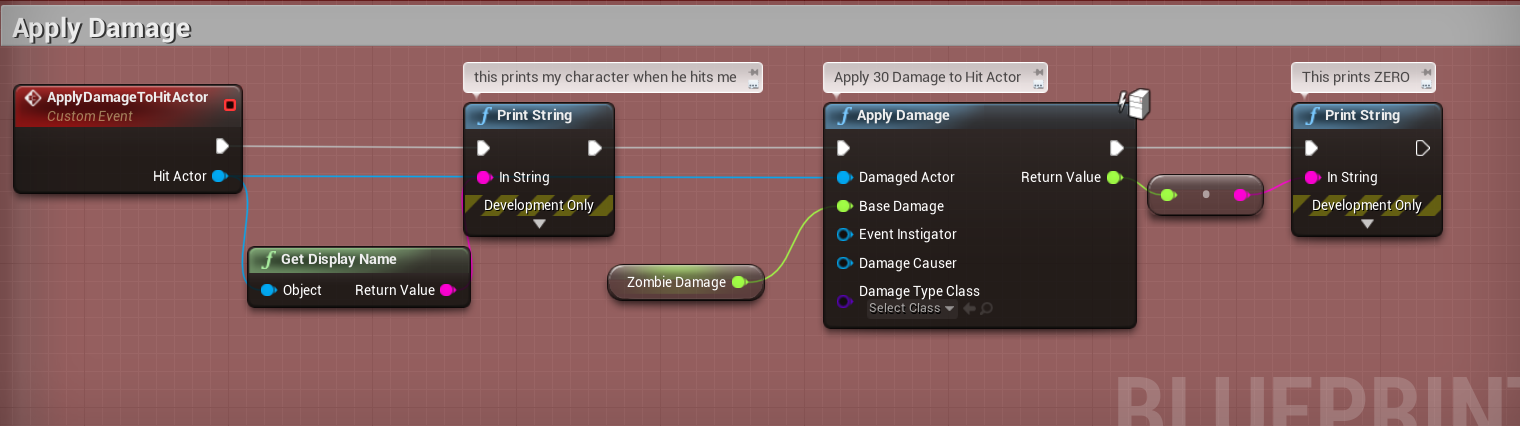
So I have a strange question/issue. It involves multiplayer and AI so I'm not sure which place to ask but, I have an enemy zombie that attacks with a trace and uses the "ApplyDamage" node to damage the hit actor. It works fine and all is replicated even on dedicated server. BUT if I change the zombies "idle/walk/run" blendspace to different anims, the zombies "Apply Damgage" node does not execute. I also notice that I only prints "Client" when it runs where as when the original blendspace was connected it printed "Server" and "Client"
How can a blendspace affect ApplyDamage?
 grizzled tide
hello
im trying to make a game multiplayer for mobile with client-server/client model
i made it work and connects android/ios each other but only with the lan ip. When i try to connect them using internet ip address i get a timeout
i removed firewall from my router and open ports 7000-10000 and nothing happens
i have spend the whole day so i was wondering if someone was able to make this work
winged badger
@cedar finch dedi not running the animation can
cedar finch
@winged badger The animation is running and the hit actor is detected. It just doesn't execute the ApplyDamage or it just applies zero damage. It doesn't work when I play in editor with dedicated server checked. But it does work when I use my other blendspaces and anims. https://i.gyazo.com/a0b5a5b01bdb45f2bb02bf666c493ad8.png
 winged badger
tried a breakpoint?
cedar finch
So basically i have two blendspaces. "Blendspace_1" and "Blendspace_2". Blendspace_1 works perfect. I can play in editor, dedicated, non-dedicated, standalone, you name it, it works. Blendspace_2 on the other hand works fine in non-dedicated, play in editor, and Standalone dedicated but DOES NOT work in dedicated play in editor.
winged badger
i don't remember where the setting is for run on dedi
but if its in animation asset
and it isn't checked
...
 meager spade
its under skeletal mesh
cedar finch
so there is a setting in the actual animation? That would explain the wierd stuff
meager spade
visibility based search for that
cedar finch
Wait. I'm confused. So these are animations I imported and are using the same skeleton as the other animations that do work. So where do I search? In the new anims?
meager spade
no
in your actors skeletal mesh
the component

change that bottom drop down
Always tick pose and refresh bones
cedar finch
🙂 Thank you so much. That made it work! Awesome! But can you explain why that works? My mind is blown.
@meager spade @winged badger Thank you guys so much I would have never figured that out.
meager spade
cause server doesnt move bones
to save on performance
nor does it really run animations
as it doesnt need to generally
cedar finch
But the bones were moving and I was getting hits from the enemies trace it just didn't apply damage. And my other blendpace did. I'm missing the explanation aint I?
 gray scroll
Is there a way to trigger an event on all clients once some one joins the game?
I am trying to replicate a widget when anyone joins the game
https://cdn.discordapp.com/attachments/221799385611239424/628236048430006272/image1.jpg
https://cdn.discordapp.com/attachments/221799385611239424/628236048430006273/image0.jpg


It works on tick but doesn’t work on posession rep notify
grizzled tide
@gray scroll gamemode is unaccessible from clients so what i did was to store every player after postlogin. Then if i need to send a message to all of them is to loop the array and send thr message/call function. Other option(not tezted by myself) is that
Gamestate is shared amongg players and gamemode.you could write the event there and subscribe with it
chrome bay
@thin stratus When you say instanced, you mean multiple instances on one machine? Or something else?
I'm not sure why you couldn't invite someone to an instance sharing a machine with another as you join via ip/port
thin stratus
Ours are quickmatch and ranked servers
We only invite to listenservers and parties
But i know (iirc) that steam simply handles them different in the backend. It might be that the session that the client joins is simply not part of the Lobby/presence stuff
Or it's a bug 😅
@chrome bay
chrome bay
ah okay haha, yeah as in game servers vs lobbies
Unfortunately I can't find a game with dedi servers that I own to actually test this with sigh
thin stratus
Cs go?
thin stratus
Don't think so
chrome bay
free to play phew
thin stratus
But that's valve flagship in that regard i would guess
twin sable
if you set a replicated variable to something it already is, it wont replicate the same information again right? Can the engine tell the information hasnt actually changed? or is this something I should prevent myself
 real yacht
chrome bay
real yacht
chrome bay
@twin sable the engine will detect the changes
real yacht
every time when player wants to attack, im playing montage locally
isAttacking is repNotify, and condition is Simulated_Only
and when isAttacking (onRep) function is called, i'm playing montage on other clients
twin sable
@chrome bay so i should test if the new variable is the same as the old one first? and only set it if its different
real yacht
this works, but sometime there is packet loss
chrome bay
You don't have to do anything
The engine won't send a property if it matches the last acked property
real yacht
and i think that i have packet loss because this Server Set Is Attacking is called on input
chrome bay
@real yacht variable replication is lossy, you're not guaranteed to receive all the changes to make to a variable, only it's resulting state
You won't have any packet loss in editor
Unless you've explicitly enabled the setting
chrome bay
You need a different approach
real yacht
yes, and i need advice, because i want to play attack montage
on other clients
and there is 6-7 different montages
real yacht
why that is going to be better?
chrome bay
If a bool changes from 0->1->0, you can easily lose that
real yacht
yes
chrome bay
If a variable changes from 0->1->2, and keeps going, you won't lose it
because you will receive the final state and know that it has been changed
real yacht
okay, that is good aproach
chrome bay
a byte should be enough
real yacht
but i have another problem this bool
is telling to animation blueprint
in which blending phase is
so i'm using this for blending
and yes, i can blend pose with integer
twin sable
@chrome bay do you know if when I'm replicating a struct, and I delete the struct and remake it with the same variables if this will be re replicated, or if the system will understand the struct is the same as last replicated?
chrome bay
It will know it's the same
You can't really "delete" it anyway since it's a property, it'll just have it's values cleared
twin sable
yeah you're right
real yacht
@chrome bay what will be approach with byte?
and how can i later use that byte to blend poses?
chrome bay
Blueprint Structs aren't the same as C++ structs anyway IIRC, so they might behave differently - but in native UE4 only the properties of a struct which have changed are replicated by default
A byte is just an int with a smaller range
255 values should be more than enough for a counter that doesn't replicate very often
real yacht
yes, but every time when i attack, i will increment counter
chrome bay
It'll wrap back around to zero
All you do is detect the change, the value doesn't matter
Using a counter just ensures that the change in value replicates
chrome bay
That won't work in a real scenario anyway
You'll have jitter and variable lag, you can't drive animations or time-critical stuff from networking like that
Well, you can, but it won't be seamless
real yacht
okay, so on value change of that counter, i can set isAttacking (not replicated) to be true or false
something liek that
like that
chrome bay
I guess so
real yacht
okay, thnx
thin stratus
What's a straight forward way of checking on a client if we are connect to a dedicated server?
(instead of a listen server)
If there is none, I would just put it into the GameState as a boolean and set it on InitGameState in the GameMode
chrome bay
Hmm.. I actually don't know if there is a default way is there?
Without checking the session settings maybe?
thin stratus
Most likely not connect sessionwise
I guess a rep boolean in the gamestate it is
Just need it for a different UI
 shy nymph
is there anyone here already having some experience developing on stadia? would love to know if just developing a dedicated server will still work on stadia
chrome bay
I thought the whole point of stadia was that you don't need the servers? Game just runs locally
If anything you probably want more of a split-screen like affair I guess
 rose egret
@chrome bay . in native UE4 only the properties of a struct which have changed are replicated by default.
seriously?
rose egret
if my native struct has 20 UPROPERTY and one of them changes UE4 will replicate only the changed property.
that will save my life.
I dunno who told me it sends the whole struct
😂
chrome bay
The engine stores an FRepLayout for the struct and compares the properties one-by-one, then packs them up
So it doesn't send the whole struct, unless you're sending it via RPC or something
If it's via normal variable replication, only the changed property is sent. That's true to C++ structs at least, I don't know if BP structs have special handling because they're an abomination
rose egret
thanks alot now I should go back and change my codes
chrome bay
Is you use a custom NetSerialize function it will send whatever the serialize function does - you lose the per-property replication
But if you're doing that you should know what you're doing and why anyway
twin sable
is it possible to set how often something replicates? I've seen "min net update frequency" but I cant see how it works
chrome bay
NetUpdateFrequency yeah
If it's set to 1, the whole actor will be considered for replication only once a second
You can't control how often individual properties are considered
 fleet raven
worth noting that the property replication is very sketchy
it can replicate things out of order and result in the client temporarily seeing a completely nonsensical state that never existed on the server
very fun to debug...
shy nymph
@chrome bay well yes the game runs locally in there network and for multiplayer communication wouldn't need to leave their respective network but for a multiplayer game you would still need a server for central communication right?
*their network
thin stratus
@shy nymph Not sure what you actualy problem here is
shy nymph
I'm working on a multiplayer shooter using unreal's internal replication and dedicated servers with amazon web services atm where you upload the dedicated server files in order to to start instances for server sessions and to handle communications between players
i would like for this project to go stadia and am wondering how multiplayer would work at all
thin stratus
Right, and Stadia, if they don't have instance based server stuff, would only get the Client
Which then connects to the outside server
Is stadia even proven to be a good match for something like this?
I can't imagine playing a streamed game that has outside network connection
That must be slow af
So if they don't allow hosting the dedicated servers on their internal network, then you'd host them outside
shy nymph
okay that i do understand, but didn't they say that multiplayer would be revolutionary since all communication would happen internally in their network so communications between clients would be way faster
thin stratus
Yeah ListenServer based I'm pretty sure it's gonna be fast
Cause all Clients are hosted in the same network
And those connecting to each other is obviously more a LAN scenario
shy nymph
yes okay but then most code im currently working on should just be fine since then in unreal instead of a dedicated server it would just be a listen server (a player) acting as "has authority" right?
thin stratus
If your game doesn't need dedicated servers, yeah
shy nymph
not exclusively no
thin stratus
But since you are working with AWS instances, I would guess there is a reason you don't use ListenServers
shy nymph
well yea since the shooter is supposed to be competetive and i dont want an individual to be the server, historically not working well together ^^
but thanks this helped a lot to sort this out in my mind^^
just the question remains how matchmaking would work but i guess this will be like a subsystem find other instances of the game winthin the network
 ivory portal
Is there also a server match start tim,e?
thin stratus
@ivory portal "Also"? And what should that time do?
ivory portal
Give the time when Start Match has been called
But I solved it by saving the world time when start match is called and substracting that
(From the Server World Gametime)
But I have noticed, I thought begin-play would only start when Start Match has been called? But it seems Begin-play is already called before that
 echo snow
hello
i am using advanced steam sessions to create a matchmaking system.
when one client creates a session, the movement of the players who joined are rubberbanding
this issue does not happen in the regular 2 player PIE
if anyone has experience, please help
thin stratus
Well PIE is not really a test scenario :P
Do you have the same issue when simulating lag in PIE?
thin stratus
You can simulate it though
echo snow
how does that work
i just tested it in standalone
its significantly better but still laggy
thin stratus
Well is it only the Client rubberbanding for the server?
Cause that is I think a year long existing bug
fleet raven
it isn't a bug they did it on purpose
thin stratus
Well I know there is a boolean for that in the CMC
But I don't really see the need to do this on purpose
Why would you want the clients to not interpolate visually on the server?
fleet raven
because you might be relying on the state of animations etc for various gameplay purposes
so they explicitly tick the character animations only when receiving a network update, for the exact delta it is advancing the movement
thin stratus
// Smooth on listen server for local view of remote clients. We may receive updates at a rate different than our own tick rate.
if (CharacterMovementCVars::NetEnableListenServerSmoothing && !bNetworkSmoothingComplete && IsNetMode(NM_ListenServer))
{
    SmoothClientPosition(DeltaTime);
}
that isn't everything though
that moves the visual mesh a little
the animation will still tick manually with this enabled
so it looks like ass
thin stratus
Yeah, either way, it should be an option
Not a forced thing
I noticed this in hoverloop too that clients look like ass on listen servers without* it
fleet raven
this option is on by default though
thin stratus
Yeah, it's not solving it
Idk where they do it wrong, but something is wrong with it
Otherwise it would be "Won't fix" and not "backlogged"
So at some point they admitted it's not intended
fleet raven
backlogged just means "we don't care about this" doesn't it
thin stratus
They do have a Won#t Fix tag though
fleet raven
they backlog everything not relevant for fortnite and then never touch it again
thin stratus
That usually has a message at the top explaining why
fleet raven
you can remove this to make the animation smooth on the server
theoretically? haven't tried it
thin stratus
It might be that it is actually smoothing
But the interpolation time is way too quick
NetworkSimulatedSmoothLocationTime = 0.100f;
NetworkSimulatedSmoothRotationTime = 0.050f;
ListenServerNetworkSimulatedSmoothLocationTime = 0.040f;
ListenServerNetworkSimulatedSmoothRotationTime = 0.033f;
On another note, GameMode calls InitGame before the GameState exists. fml
chrome bay
In theory the transform of the mesh would be interpolated, just the anims will look pretty blocky
fleet raven
could have the game pretend to be a listen server but it actually starts a dedicated server under the hood 
chrome bay
Steam would like a chat
fleet raven
only problem is it doubles the ram usage..
thin stratus
@ivory portal
void AGameMode::HandleMatchIsWaitingToStart()
{
    if (GameSession != nullptr)
    {
        GameSession->HandleMatchIsWaitingToStart();
    }

    // Calls begin play on actors, unless we're about to transition to match start

    if (!ReadyToStartMatch())
    {
        GetWorldSettings()->NotifyBeginPlay();
    }
}
GameMode calls BeginPlay before ready to start is true
To answer that question from earlier
chrome bay
Steam won't let you host and join a dedi server on the same machine either. Sux
thin stratus
That I doubt though
If you use the actual Tools stuff from Steam
You should be able to start both
Just not if you use some packaged server outside of Steam
Cause I recall being able to host CS servers while joining them
(I do have a linux laptop next to me for the Server build though :P)
chrome bay
Ah maybe it's an Unreal thing then.. everytime I've tried to join a packaged dedi server on the same machine it just cries about it
thin stratus
It usually deactivates Steam on one of the two
For the Server you have to add the library to the binaries folder so it doesn't need steam installed
But that still causes issues when hosting it on the same pc
 velvet parcel
If you are doing day and night cycles for a multiplayer open world game does it make sense to avoid having a replicated directional sunlight rotating slowly at all times?
Or does it not really matter?
thin stratus
I would, if at all, replicate an int every now and then to keep the cycle in synced
velvet parcel
I am leaning toward 24 hours being about 120 minutes
thin stratus
Right, that's 7200 seconds
So just increment an integer
And keep it synced
Clients and server can do the rest on their own
echo snow
@thin stratus is there any fixes for that?
twin juniper
Replicate a time value like in Minecraft
Then create an event in the OnRep and bind every object which need to reacts to time
thin stratus
Yeah basically that ^
You can limit it to replicating the time every 10 seconds
Or so
Cause it doesn't need a per second replication if you just increment it on the client too
@echo snow Not sure tbh
velvet parcel
I might also replicate things like sun color and weather effects too. But all of that is probably not that crazy
Could probably do a repnotify for every moment the timer updates then have all clients rotate the sun locally
thin stratus
You really just want an int for this
And based on the int calculate the rotation of it
Additional info like color or so is either based on the int too or replicate as settings once
velvet parcel
kk thanks
What is the most optimal way to update the int? I am thinking a delay on an event tick basically
 jade patrol
hey guys, is it possible to create ue4 server for html5 build?
thin stratus
@velvet parcel BeginPlay of GameState, start a Timer called "DefaultTimer" that loops every second.
In that, update a non-replicated integer.
Further, have a Replicated integer that is RepNotify
In the DefaultTimer, filter for Server, check if the int % 10 equals 9 and if yes, set the replicated int with the normal one
That should keep everything in sync every 10 seconds
Ah and in the repnotify set the non replicated int with the replicated one of course
 thick patrol
i have a question about dedicated servers how can i get the server build to ALSO create a custom config file for what map, server name, player cap and other server specific stuff
so i can set the session info in BP
 fathom aspen
Guys what's the best way to tell the clients about a timer that exists on the GameMode?
Should I use GameState?
thick patrol
anyone?
 jolly siren
@fathom aspen yes
fathom aspen
How exactly, that's what I can't figure it out
high current
I am guessing that you want the time to be synced between clients and the server?
fathom aspen
Yes
high current
the game state should already have a synchronized time variable, no?
It could be only in UT tho, last time I used that it was in UT and not UE4
high current
So there is a synchronized time variable or there isnt
I should boot up the editor and see for myself...
winged badger
the GameMode creates and has a reference to the GS
winged badger
its not great, better to send a RPC with your timestamp server replies to, sending your timestamp and its own timestamp back, and assume half of the difference between your current timestamp and the one you originally sent to server is travel time server->client
then store the difference between server timestamp and your current timestamp - half the difference between your original timestamp and current timestamp as your offset from the server time
and just call GetWorldTimeSeconds() and add that offset every time you need the server time after that
after that you can go crazy on timestamps over RPCs, get better sync
thick patrol
😦
 topaz agate
I'm working on a turn based project, and was wondering how I could have each player have turns with different things they are able to do through blueprints, could I assign each player a different player controller?
thick patrol
i think thats what you use the int thats on get player controller
 royal isle
@topaz agate each player would play through their player controller but the controllers themselves are not replicated over the network so you would need to keep track of the moves they made in that turn and replicate them to all other players through other classes like a player state or just by outright calling RPCs from your controller as multicasts
thick patrol
have a question about dedicated servers how can i get the server build to ALSO create a custom config file for what map, server name, player cap and other server specific stuff
so i can set the session info in BP
IE custom ini file
 worthy wasp
Hey all - digging through engine source and trying to find the event that a Steam account gets an invite - What i've found so far is FOnSessionInviteReceivedDelegate (OnlineSessionInterface.h) and the Delegate: DEFINE_ONLINE_DELEGATE_FOUR_PARAM(OnSessionInviteReceived, const FUniqueNetId& /*UserId*/, const FUniqueNetId& /*FromId*/, const FString& /*AppId*/, const FOnlineSessionSearchResult& /*InviteResult*/);
When I add these to my game instance (I hope appropriately) - i'm not getting the delegate to fire... but the invite clearly comes through my remote (receiving) clent from IOnlineSession::SendSessionInviteToFriend()
HEADER
    /* Delegates for receiving a party invite*/
    FOnSessionInviteReceivedDelegate OnSessionInviteReceived_Delegate;
    FDelegateHandle OnSessionInviteReceived_Handle;

    void OnSessionInviteReceived(const FUniqueNetId& UserId, const FUniqueNetId& FromId, const FString& AppId, const FOnlineSessionSearchResult& InviteResult);


SOURCE
     (CONSTRUCTOR)
    OnSessionInviteReceived_Delegate = FOnSessionInviteReceivedDelegate::CreateUObject(this, &UOBT_GameInstance::OnSessionInviteReceived);

    (INIT)
    OnSessionInviteReceived_Handle = Sessions->AddOnSessionInviteReceivedDelegate_Handle(OnSessionInviteReceived_Delegate);


void UOBT_GameInstance::OnSessionInviteReceived(const FUniqueNetId& UserId, const FUniqueNetId& FromId, const FString& AppId, const FOnlineSessionSearchResult& InviteResult)
{
    GEngine->AddOnScreenDebugMessage(-1, 10.f, FColor::Purple, FString::Printf(TEXT("OnSessionInviteReceived - CPP CODE EXECUTED DELEGATE!!!")) );

}```i've done ALOT of digging on this and have found some mixed results with information - from the fact that "FOnSessionInviteReceivedDelegate sits idle - never truly fires in Steam Backend" to using a macro: STEAM_CALLBACK_MANUAL(UOBT_GameInstance, OnLobbyInviteReceived, LobbyInvite_t, OnLobbyInviteReceivedCallback); Which i cant get to work for the life of me.... Alot of those params of that macro are in private folders in Engine source - but its within the modules that i've already added to the project.... OnlineSubsystemUtils is where i dig up most of their references
 plain flume
In multiplayer there is only one replicated GameState, right
thin stratus
Yes
@worthy wasp You are on the right track though
For the invite it is indeed the STEAM_CALLBACK_MANUAL
worthy wasp
@thin stratus exii cant get it to compile... the LobbyInvite_t is in a private file in the OnlineSubsystemSteam .... and i dont know how to get it to compile right.... all modules are included to my knowledge
Unfortunately laying in bed so i wont get to this till tomorrow.... i dont know how steam party plugin can access private files and i cant get the same files in a project source files.
thin stratus
The Party Plugin on the Marketplace includes the Private path of the Steam Subsystem Plugin.
Cause otherwise you run into that exact issue of not being able to access the private types header.
worthy wasp
Right... so i should just be able to include OnlineSubsystemSteam module in build.cs right?
thin stratus
It's more about that specific path
worthy wasp
Oy vey.... so the ONLY way to get this... is via plugin?
I cant pull this same sution off in source?
thin stratus
No, you should be able to do that some stuff in the build.cs of your project
Build.cs has a PrivateIncludePaths array
You need to add the Engine directory to that private folder of the steam subsystem to it
worthy wasp
I tried.... i cant get the private include path.... ooof lemme go fire up my pc while ur here
Ill be just a minute....
ok i'm here - one sec while i pull up project
ok so in SteamParty example project - they use in the build.cs:
        var EngineDir = Path.GetFullPath(BuildConfiguration.RelativeEnginePath);
        PrivateIncludePaths.AddRange(
            new string[] {
                            Path.Combine(EngineDir, @"Plugins\Online\OnlineSubsystemSteam\Source\Private")
                        });
this errors out for me in my build.cs (dont know why) about Path variable not being valid.... i can compile it real quick 1 sec
worthy wasp
doh you may have caught me
❤
using UnrealBuildTool;
using System.IO;
lemme put htose into my build.cs lol
thin stratus
UBT should be there already
worthy wasp
error CS0122: 'UnrealBuildTool.BuildConfiguration' is inaccessible due to its protection level
thin stratus
Yeah try Target
worthy wasp
well it didnt error out immediately - going strong still
❤
baam - lemem try that macro now ❤
thin stratus
Please make sure you always go to the GameThread from Steam Callbacks
I often see users try to open up a UMG widget from the callback directly
worthy wasp
no i was deifnitely going to do a blueprint assignable delegate fired from the callback
thin stratus
I didn't check where the callback exactly comes from
But I have the hard feeling it comes from a thread other than gameThread
If you don't move the call over to the gameThread it might crash on an assert
worthy wasp
heres what your talkin about - jus tcame across this: https://pastebin.com/C5dsuVnX

i do have a compile error - i gotta hunt down these delegates in SteamParty -find out where theyre defined... because i dont see them in the engine: OnLobbyInviteReceived
LobbyInvite_t - is defined in ISteamMatchmaking.h ....
& pulls up in OnlineSessionAsyncLobbySteam.h as well - though i dont see any traces of it in here.... probably jus tpicking up on the LobbyInvite text
thin stratus
Yop
thin stratus
@twin kite Hey, I sadly have to annoy you once more
Currently trying out to ping a Steam Dedicated Server that runs on my laptop and given the IP that Steam Response and the 27015 default port, it always fails to ping.
Does the Session need some specific settings? Are they any other ports than 7777 and 27015 UDC/TCP to open?
The Server does NOT show up in ServerLists (which is kinda wanted) but it does allow connecting via steamid if I type it by hand
I do wonder why it's not showing up in the ServerList though
The LogOnline shows a proper response from CreateSession and connecting works too
chrome bay
I have that exact issue also.. can only join a server hosted on the same network via console
Never did work out how to get it so show in the server list
thin stratus
Not sure if it has to be the same network
I can join via open steam.12345678987654321:7777
But not showing the list
chrome bay
Yeah same here
thin stratus
And now I run into the annoying issue that it doesn't respond to pings
chrome bay
All my PC's are linked via the same network switch
thin stratus
Yeah here too though, the Steam ServerList should show it though
defines in the target.cs are done as well as the Steamworks page is setup
sigh
            FOnlineSessionSettings Settings;
            Settings.NumPublicConnections = 8;
            Settings.bShouldAdvertise = true;
            Settings.bAllowJoinInProgress = false;
            Settings.bIsLANMatch = false;
            Settings.bUsesPresence = false;
            Settings.bAllowJoinViaPresence = false;
            Settings.bIsDedicated = true;
            Settings.bAntiCheatProtected = true;
Tried starting the session later, but even that doesn't make it show up
chrome bay
yeah it's really odd. I can see servers on other networks (aka not in my house) just fine - but never can see them here 😦
Only dedicated too.. lobbies work just fine
thin stratus
So if you host outside ot your network, you can see them in the serverlist?
Can others see your hosted server?
chrome bay
I'm not sure if others can see tbh, never checked that. But yeah I can the "real" game servers, just never my test ones that I spool up locally
thin stratus
maybe the 27015 port is closed then
chrome bay
I thought that also but it's open as far as I can tell
thin stratus
Yeah, windows or linux?
chrome bay
Winsauce
thin stratus
hmpf
Funny thing is
If the server is off, steam reports that the master server has no listings
split gust
Currently trying out to ping a Steam Dedicated Server that runs on my laptop and given the IP that Steam Response and the 27015 default port, it always fails to ping.
likely lack of "hairpinning" on your router
most routers don't do that at all, or by default
thin stratus
If the server is on, steam reports no servers on the master server responded
So the server is listed but doesn't respond to the ping >.>
chrome bay
Do you get the ServerRules back from the Server when finding sessions?
thin stratus
I'm just talking about the server browser of steam itself
chrome bay
Ahhh roger
thin stratus
Haven't tested in game cause they shouldn't be in there anyway
chrome bay
NAT Loopback.. maybe that's my issue
split gust
In network computing, hairpinning (or NAT loopback) describes a communication between two hosts behind the same NAT device using their mapped endpoint. Because not all NAT devices support this communication configuration, applications must be aware of it.
Hairpinning is where...
chrome bay
Still, the fact you can connect directly means it might not be
chrome bay
Ah I'm not, I'm connecting via the "Steam" ID, which I think resolves to a public facing IP
split gust
ah
gray scroll
Make sure your steam is not open
split gust
well I'm not sure what Steam does in that case
gray scroll
Otherwise you wont find local games
split gust
true!
gray scroll
@chrome bay
chrome bay
If Steam isn't open I can't use it to find sessions 😄
thin stratus
It's a relatively simple setup:
- Linux Steam Server on Laptop
- Steam on Windows Desktop
Master Server does indeed recognize that a Server is registered, but that Server (Linux) isn't responding to a ping.
For TheJamsh it's a Windows Server, but same issue (I guess).
gray scroll
Oh i thought you were testing locally
thin stratus
Connecting directly via SteamID of that Server works.
Server and Client (or Steam PC) are in the same network.
split gust
maybe it's the "discovery" packets that can't reach the Steam servers when they tried to get the server info?
chrome bay
@gray scroll I am testing locally but across different PC's and Steam accounts etc.
thin stratus
Guess custom for both of us
480 is just the spacewar one you can use if you have no own app
chrome bay
Custom yep
gray scroll
Hmm interesting
chrome bay
It's a live game, it's just for testing stuff periodically that I can't test on one machine
Life would be much easier for me if we supported listen servers but yolo
gray scroll
Trust me... listen servers are a pain in terms of bandwidth 😂
Do you see the session in the list... or you don’t see the sessions at all?
thin stratus
Only tested with Server List of Steam (not ingame) i don't see the server in the list, but the response of the search differs for when the server is active or not.
So I would guess the server register properly
I guess I have to move this server onto some linux server I can open the ports on manually
.<
 twin kite
@thin stratus It just might be because of the fact that your server doesn't advertise (not listed on the Steam master server)
but not sure, our servers are listed in the server list and we can in fact ping them
thin stratus
I would have guessed the same, but it is advertised cause the Server dialog of Steam has a different response for when it's on
The only thing I can try is putting the server onto an azure machine and open the ports there too.
Cuase idk if the ports here are closed by Unitymedia
.>
(Firewall and Router have them opened)
You speak german, right?
https://i.imgur.com/3ORbfHN.png
That translate to "On the master-server are no Internet games listed that match your filter settings."
 split gust
there might be a different port for reporting server info (and ping)
and for connecting
thin stratus
https://i.imgur.com/3KmKthQ.png
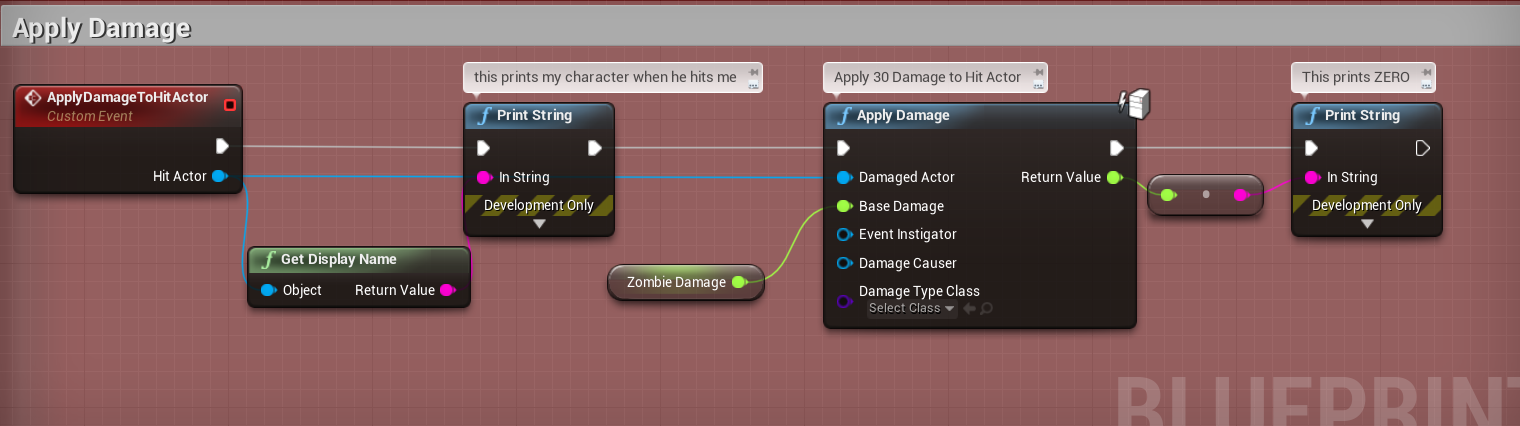
And that is when the server is on and translates to "No internet games responded to your search."





sigh why can't this be more straight forward.
twin kite
Hmm, I don't have much time to help currently. Feel free to send me a DM and I'll get back to you later.
thin stratus
I actively doubt anyone can really help, cause there is no real error to work on.
This can ahve a thousand reasons
Gonna have to go through possible causes 1 by 1 -_-
split gust
are you using a single socket for your server? aka sharing your server socket for clients with the socket for the steam master servers?
this looks like a good place to make things fail 🙂
chrome bay
My guess is, while the steam will be registered with steams master servers, you might still not be able to get a rules files back from it or ping it
Steam sucks like that, all the actual server details are retrieved from the server itself.. not the master servers
thin stratus
No that's not the issue
Steam has a Ping Function that works just fine (iUltimateLP shared that stuff)
And that gives you the steam id you wanna connect to based on the ip you pinged
That's the stuff i need cause our backend only gives me the ip of the server
BUT, as long as the server doesn't show up in the list, I probably can't ping it
Cause that's most likely the same process
And as of right now, I blame my network
So I'm uploading it to an external server now, open the ports there and try again
split gust
just for the extra datapoint of info it's probably worth trying
chrome bay
Yeah that's what I mean, the server won't show in the server list unless it can retrieve the ServerRules for it from the server directly (since that's not stored by Steam - Steam only master server only has the ip address and nothing else)
chrome bay
So it might be registered, but the client probably still can't ping or communicate with the server directly
thin stratus
That's even what the API says
The Server has to answer the 27015 ping I assume
Cause that's the one they want to have open
split gust
that does point to either the server uses a different UDP socket/port for the master server reporting, and so you should check if that one is forwarded correctly too
thin stratus
Would be a lot easier if the would split this
Ping for Ping
And GetData from MasterServer
split gust
or it shares the UDP socket with the client connection and the code needs to split correctly the packets received
thin stratus
But they probably keep the masterServer db light
split gust
the typical dedicated server protocols
thin stratus
UE4 has 7777 udp
chrome bay
Yeah they do, by default you can advertise some stuff on the master server directly, but it's really limited and UE doesn't use that method
split gust
just use the same UDP packet for server info and for ping
thin stratus
And Steam has 27015 UDP and TCP
split gust
aka, the server response time to the info request is used to determine the ping
chrome bay
UE uses the ServerRules method, which means clients have to ping servers directly for server info
thin stratus
This is also part of the broken ping for listen servers
We all remember the 9999 ping
Cause the response from the master server doesn't include a ping in UE4
So you would have to ping them all manually
chrome bay
The issue we found is while you can get ping for a dedicated server it's massively out of whack because it's ping to the master server, not the server you're actually connecting to
thin stratus
Yeah you have to manually ping from the client
chrome bay
I can sort of see why, but it's a pain in the ass nonetheless
Also not sure if this helps anyone, in HLL we had issues for months with servers not being visible to players sporadically
We had to send out query packets in bursts rather than all in one go like UE4 does by default
thin stratus
have some class inherit from public ISteamMatchmakingPingResponse
Override virtual void ServerResponded(gameserveritem_t& server) override; and virtual void ServerFailedToRespond() override;
And then call SteamMatchmakingServers()->PingServer
chrome bay
It makes the search process longer for the user, but it was the only way to fix it we found
thin stratus
Yeah
chrome bay
I wonder why we didn't use that...
thin stratus
well I only got told about that from Ultimate
split gust
yeah you shouldn't send too many queries at the same time
chrome bay
Well that's just what steam / UE4 does by default
split gust
some user routers will just "crash" or stop working if you flood their UDP Nat translation table 😛
chrome bay
In peak times so many players would be requesting info from servers, that servers would just stop responding
And the ServerRules would timeout
Could replicate it quite reliably for some folks by spamming the refresh until they stopped appearing 😄
I thought it might have been DDOS protection at first
thin stratus
AHHHHHHHHHHHHHHH
Refusing to run with the root privileges.
chrome bay
Lawl
thin stratus
I just want to test this, Epic stop annoying me
split gust
fixing it in that order isn't hard 😛
thin stratus
Right
It shows up when hosting on digital ocean
So it's the port I would guess
Now let's try pinging it
Right that works too now
Okay at least I can be sure that this part works
 icy zephyr
Does anyone know how the OSS authentication work? I'm pretty loss after "TriggerOnLoginCompleteDelegates" I was expecting it to maybe set the UniqueNetId for the local player.. but seemingly nothing happens afterwards. I get the gist that building logic for the OSS doesn't require you to interact with your specific implementation of a custom OSS everything seems to happen in the backend. The login process seems a bit vague though.
high current
Is there any way that I can make like a global game text chat thing, purely using the steam subsystem, and not relying on stuff like firebase and so on
echo snow
i want to a boolen isRanked to my settings, i am not sure how to do that and i couldnt find any documentation
this is the steam advanced sessions plugin, help please
 glad maple
sorry to jump into the middle of some other issues but I have a hopefully quick question - in a rule set in a game mod/plugin (which only executes/is loaded on the server), I want to execute something on a client of a player that just died (specifically to close all open menus). What is the cleanest way to do that? Best idea I have is to have an unrelated blueprint which is set to replicate; have the server call an event in that BP, and then send a client event from that BP to itself... I don't know if that will work, but I feel I could do better. (Being just a mod I can't easy create instanced playercontrollers and suchlike)
high current
Does that event on the client already exist, or do you need to create it
glad maple
there's a function in the HUD I want to call, but it's a function proper, not a RPC (I think)
so I figured I needed to create a custom RPC/event to bounce it to the client (but I can't make that in the rule set because it doesn't execute on client)
I'm dealing with game code that isn't mine so I am making some assumptions (C++ source is closed)
high current
Well if you have authority over the client, you can just execute that function on the owning client(as you wont have access to the hud)
winged badger
you can't send a client RPC unless the object is owned by the PC
but i am guessing you already have the information that player died somewhere
so there is likely no need to send a RPC informing it of that again
glad maple
if I call a multicast event from/in the rule set, it only seems to execute on the server, but that's based on what's going in the output log in a UE4 test session (with dedicated server) so I don't say that with 100% confidence
one thing I don't have control over is the event I'm picking up to say the player is dead - seems that maybe some stuff is destroyed by this point which may also be throwing me off course
winged badger
if i was making it, the Pawn itself would be broadcasting a delegate upon death
client and server side
glad maple
there are many things I would like to change about this setup, but I'm just modding a plugin so the only hooks I seem to have are game mode overrides and game rules (attached to a specific map)
and also hooks in whatever I put into that map
I'm currently experimenting with a magic rock (just because) which I'm sending events to from the game rule BP
in the hope I can use this to bounce stuff to the client
what I can say with 100% confidence is that I hate making game mods in this game
winged badger
is the pawn destroyed on death?
glad maple
I think so
the game controller not, I think
the stupid thing is that it automatically goes to spectate when you die, but normally it's an unlimited spawn mode. They made it so that dedicated servers stop you spectating unless you're an admin, which is different to listen server and SP behaviour
so I have to fake what it normally does and close the deployment window that appears if you die on a server but are not an admin
I'm explaining poorly. Basically I can just about get my head round normal replication but this is doing my head in
I think I might have it working now - called a multicast event in my magic rock (found by doing a get all actors of class ...) with a playercontroller as parameter. The event logic is: If playercontroller = (get current playercontroller) then close windows
I'll wager there is a cleaner way to do this...
that was a couple of days of my life right there
high current
Doesn't if you have authority imply that the you need ownership over said actor, or that might not be clear to some people
glad maple
to be honest, not sure. I am struggling a bit with this stuff when not applied to straightforward copies of the same actor etc
however I seem to have a working solution, which I'll post for posterity
high current
I was more asking Zlo, as he corrected my response
Does Squad have mutators
like Unreal Tournament does
I am assuming you are modding Squad
glad maple
apols. Here is the server side call in a Game Rules BP
here is the client side event 'code'
I expect this can be critiqued hard, but it works and I'm done
yes it's Squad. They don't seem to do mutators. So far only modding seems to be by way of plugins which must contain a map, because the only hook is game modes and game rule sets which are specifiable by maps
I don't like that but I think it's a temporary situation and they're working on more flexible modding
the necessity to have game mode mods tied to specific maps is pretty horrible in fact
if anyone here is involved with Squad dev I'll let them explain the ins and outs
I got the impression that their custom UE4 editor was 'the way Epic think it should be done', though that might only be broad brush concept rather than these details
moving everything into a plugin (from a normal content directory) breaks so much f***ing stuff, I have shed tears getting everything working, but that's not something for here. In conclusion, got it working, but for the love of Jesus please someone make this easier for relative noobs at MP coding like me.
winged badger
shrugs
i am not a fan of networking in blueprints at all
your options are very limited, code is usually an unreadable mess
glad maple
I mostly do level design so blueprints are usually sufficient/appropriate for what I do. I've ventured into C++ in UE4 (had to extend some navmesh abandonware code) but frankly, having spent a while fixing obscure packaging errors, I don't relish spending more time fixing obscure C++ compile errors
though I take that on board and maybe I'll have to change my approach for heavier modding stuff
thin stratus
We usually tear off the pawn and handle any form of death stuff on the torn off function
Visual death stuff that is
glad maple
that makes a lot of sense
thin stratus
That only entails things that don't need to know why someone died
If you need to display a kill message ,then it's probably an rpc
glad maple
what I wanted to do would be sorted with a server configuration option to allow randoms to spectate on permadeath (not available)
so everything I did was hacky to start with, and my interest in doing MP coding in this area was poorly motivated to begin with
I am grateful to everyone for their input, allowing me to move on at last
fathom aspen
Guys. Can I call a NetMulticast from GameState?
I guess I can't because it's a server-owned actor, right?
glad maple
that's pretty much the problem I had (see above if you can bear)
my solution was to create a dummy actor in a level I could call a multicast on to do the client stuff I wanted - I suspect you can do better
that is, you can't do a multicast to the same actor but you can do it to others that are on both server and client (I think) - but I am ready to be corrected on that
fathom aspen
What I know is that it's replicated for clients so you can replicate variables that live in GameState to the clients
But I wanna know what kind of RPCs I can call in GameState
glad maple
ah sorry I misread it as game mode
fathom aspen
All good 👍🏻
So for future reference. For those wondering, in GameState you can call NetMulticast rpc because it's called from the server, while you can't call Server rpcs because they are called from the client
Not sure about Client rpcs though, but I guess they can be called as Multicast can be called (correct me if i'm wrong)
 fluid flower
NetMulticast can only be called by server.
Server RPC can only be called from client owned actors ( so not gamestate )
Client RPC can only be called from server.
meager spade
ClientRPC can be called from client but it will activate locally, server can call a ServerRPC. http://www.interkaos.com/grabs/firefox_6OH67MVDkF.png

 grizzled stirrup
While you can't replicate a TMap can you send it to the server via an RPC?
If not is the best option to break the map into two arrays before sending?
icy zephyr
👀 Anyone know the process behind "TriggerOnLoginCompleteDelegates" where it gets passed a new FUniqueNetId. Is this being set in the player state or local player? Or should I be adding it to a FUserOnlineAccount?
grizzled stirrup
To answer my question, you cannot use TMaps in a server RPC so you have to create two separate arrays and send those instead (which seems to make the map kind of pointless in my case as I create it and then have to convert it back one function later)
silent birch
In my game I also did that when the life of the character is 0 which makes actor destroyed and 10 seconds after the same actor disappears but it works only at the server not at the client I even tried the custom event but nothing.
The score is added to the one who was hit by the ball while the score must be added to the one who shot
thin stratus
@grizzled stirrup Correct, TMaps can't be send over the net at all.
winged badger
they can, manually
transform them into something that can be sent, then reassamble the map when it arrives
thin stratus
So they can't :P
If you have to move them into a different structure you arent activel replicating the tmap
Why does epic actually not implement this?
high current
I remember being able to replicate TMaps in Unreal Tournament (but I might be mistaken)
but there they are actually hidden in the engine and still in beta
is there an actual reason behind why they are not yet replicatable, as I cant think of one
winged badger
up until recently (4,21 i think)
just trying to replicate a TMap ended up calling a function with some weird log text and log category Fatal
chrome bay
I doubt TMap replication would ever be the most efficient way to do something anyway. Might be the path of least resistance but honestly, may as well just use a struct.
Can't really see it working out unless they send the whole Map in one go, or rebuild it each time.
high current
Does shooter game have example usage of network beacons?
TMaps are logical for blueprinting IMO, but nothing much past that
As I concept I meant, maps are easy to understand and grasp
chrome bay
Well TMap certainly has plenty of use-cases in C++, it's just the nature of the container makes it hard to replicate efficiently IMO.
And no, ShooterGame has no example of beacons. AFAIK there isn't an Epic example of those at all, outside of UT
And that is dependent upon their custom backend so yolo
silent birch
In my game I also did that when the life of the character is 0 which makes actor destroyed and 10 seconds after the same actor disappears but it works only at the server not at the client I even tried the custom event but nothing.
 frank copper
for replication better create a structure with key and value and use a TArray. If you need to search by the key or value, either use FindByPredicate, or you can implement an == overload in the struct and use FindByKey. Even better use a FFastArraySerializer. Obviously you need some C++ to do this, but you can get rid of TMap if you need replication. and keep some logic from it
silent birch
I do not understand
 zealous saffron
can you share the code?
silent birch
There I can not
But my is a thing of the kind in the blueprint level event tick cast to player if the lives are at 0 destroy actor then Spawn actor from class then possessed
@zealous saffron you can't help me?
zealous saffron
I don't use BPs, sorry man.
Wouldn't use BP for networking either
works well if you have a game that heavily relies on scripted events and or interactable objects, but that's about as far as I would willingly use blueprints.
zealous saffron
it should replicate provided you're doing it on the server and your character/pawn is set to replicate. I assume you're setting its lifespan rather than outright destroying it? (either way should work).
nope
I don't.
silent birch
I destroy the actor
grizzled stirrup
@chrome bay in the usecase of using a TMap after a shotgun blast to calculate a list of HitActors and corresponding DamageAmounts to deal to each actor, is there even a point in using a map instead of two side by side arrays? (assuming the client has to convert the map into two arrays eventually to send via a ServerRPC to deal damage)
It made my function arguments a bit simpler for the 2 functions inbetween the calculation of the map and the RPC, however it is creating a bit of wasteful data having to convert them to arrays on each shot when they could just be arrays to start with, right?
thin stratus
Why would you even use a TMap for that
grizzled stirrup
I had thought it's better practice if making two properties that have to be linked
Making side by side arrays seems more hacky
thin stratus
Also why would the client send a ServerRPC to deal dmg?
grizzled stirrup
Because the client calculates damage in my game clientside
thin stratus
Right, that obviously makes things more complicated
Usually the only RPC in the whole process of the player damaging another one is located at the start of input.
E.g. FireWeaponPressed
All the rest should happen on the server anyway
And at that point you don't need to send any RPCs with TMaps or Arrays of course
If you however need to do that, then use a TArray with a custom Struct
grizzled stirrup
Thanks so a struct with 2 arrays inside?
thin stratus
Why the 2 arrays
grizzled stirrup
ActorsToDamage(AActor) / DamageAmounts(Float)
A shotgun blast fires 16 pellets
Multiple pellets can hit the same actor
zealous saffron
dependent on how you set up dealing damage, it's more efficient to use client side traces if you are using traces (for say a some sort of gun).
grizzled stirrup
So I don't want to be sending redundant data twice
thin stratus
Then sum up the damage beforehand
grizzled stirrup
Which is why the array only stores the actors hit and if they are hit multiple times, that damage index is increased
It is
thin stratus
The struct has "ActorToDamage" and "Damage"
And the array has the struct
Each array entry descibes Actor and Damage in form of a struct
grizzled stirrup
But then you have to send multiple RPCs if 2+ actors get hit in the same shot
thin stratus
You send one RPC with the data of who you hit
grizzled stirrup
Yep but if you hit say 8 actors in one shotgun blast, that's 8 RPCs
thin stratus
No
grizzled stirrup
Isn't it more efficeint to send one
zealous saffron
Client -> Server Handles Dmg -> Calls multicast event that checks to see how it should handle the event.
thin stratus
That's one RPC with an array of size 8
thin stratus
They don't do the normal damage stuff
If it's client authoritive
So just focus on the data they want to send
grizzled stirrup
They want to send the actors they hit and the damage they did to each actor specifically as they calculate a lot of stuff locally depending on items and upgrades they have
The damage is not server authoriative
It's a PVE game
thin stratus
Thing is, even if it's PVE, doing it client authoritive goes against the way UE4 works
And makes things harder
But anyway
chrome bay
Yeah. Even in PVE, I would still do it server-side
thin stratus
TArray<FDamageInfo>
zealous saffron
^
thin stratus
FDamageInfo has ActorToDamage and DamageToDeal
grizzled stirrup
Ahh good idea I can put the actor to damage in the struct
zealous saffron
regardless if it's a listen or dedicated server it should go to the server.
grizzled stirrup
I have a struct already that is being sent with the type of damage, if it was a crit etc.
thin stratus
Yeah one entry in the Array should describe all damage etc. done to that one actor
chrome bay
Generally speaking, it's also just a lot more efficient to do it that way
thin stratus
And per actor you have one entry
It certainly is
The Client Authoritive way is def shit
Not because of cheating
chrome bay
All the client cares about is how much health an has, and replicating that is one float or int32 per actor
thin stratus
You can still simulate all the damage stuff locally
chrome bay
All the client has to tell the server is when and where they fired from
You also have to deal with race conditions, like when two players shoot a character at the same time etc.
thin stratus
Yeah not in PVE though :D
chrome bay
Client-auth makes it much harder to attribute kills, etc.
grizzled stirrup
The server still actually confirms the damage etc.
The client just says what he hit
But yeah I get ideally you do all that on the server
thin stratus
Yeah that's still wrong :D
But yeah if you need to do it the way of sending the data to the server
Then just make it an array of struct
And that struct holds data about a specific hit enemy
thin stratus
Yeah 2 arrays is really not needed :D
chrome bay
Sending what they think they hit isn't necessarily bad.. sometimes necessary, like if you want to do lag comp etc.. But yeah, if the client controls how much damage is dealt - bad times.
grizzled stirrup
Nah not doing lag comp at all
And if they cheat, they cheat
It's mainly playing with friends against AI
chrome bay
I simulate all damage locally for UI/FX, but ultimately it's all estimated - server is ya boi doing the damage
grizzled stirrup
The problem with the shotgun approach is that you'd probably get a completely different result to what the client saw he hit on his screen and what the server hits
UNLESS
you do full blown lag comp
chrome bay
You still would even without a shotgun
zealous saffron
You run into issues of high and low ping advantages in either route
grizzled stirrup
Since it's not PvP at all, I am favoring the experience of the player over true fairness
I get that it's not the correct approach
But you can trust the client a lot more when it doesn't matter if he can cheat or not
zealous saffron
if it's not spawning a physical projectile and performing just a trace, perform the trace on the client, send the hitresult to the server.
grizzled stirrup
I'll try sending only the hit actors to the server and letting it handle the rest but I believe there was a reason I kept it clientside
For projectile weapons I do indeed spawn the projectile on the server etc
And that handles damage
chrome bay
For a projectile weapon, there's not much you can do unless you want to do prediction for those too - but that's not so easy
zealous saffron
Damage Calcs shouldn't be client, the trace(s) itself should be clientside.
chrome bay
For hitscan, send the hit result to the server
If the actor the client hit is "roughly" where the client thinks it was, accept it
If not, rejecto
It's up to you how you verify whether the client hit is allowed or not
zealous saffron
current game I'm working on it spawns a physical projectile which is run on the server and simulated to clients.
grizzled stirrup
Oh yeah I kind of remember: if I send 16 hit results to the server via one RPC it gets quite heavy. Doing those calculations on the client filters out everything so you only end up sending max 2-3 hit actors / damage structs
chrome bay
16 Hits is a lot of data
grizzled stirrup
Yep and some of my shotguns have 24 pellets+
chrome bay
And I grauntee you aren't using 80% of what an FHitResult contains
zealous saffron
are you using hitboxes?
chrome bay
Send the actor and a quantized location
zealous saffron
@grizzled stirrup
chrome bay
That's more than enough
grizzled stirrup
I then replicate a centralized FVector_NetQuantize
So the remote clients can retrace the shot
With FX
Using that vector as the impact point
chrome bay
Yep, not much different to what shootergame does
My advice would be to not send any damage values to the server
Just send an array of actors and quantized actor locations, and num shots which hit each actor
struct { Actor, Loc, NumHits; }
Let the server do the rest
9/10 times most pellets will hit the same actor anyway
grizzled stirrup
Would this be purely to prevent cheating instead of sending struct {Actor, DamageDealt}; ? Considering there won't be verification on the server, he would just deal damage x NumHits in that case
chrome bay
The point is the server should be what decides how much damage is dealt to something
And you can very very easily do some basic anti-cheat with just that information alone
Rule of thumb, if players can cheat, they will
And UE4, unfortunately, makes it very easy to cheat
In fact, you can skip NumHits entirely
Send the seed that you use to generate the shotgun blast
have it resimulate each shot
grizzled stirrup
I do a delay before each shot is evaulated however which complicates things
And that'd mean lag comp would be needed on the server
chrome bay
You're making this hard for yourself 😄
grizzled stirrup
Basically on the client- takes shot, calculates damage at that instant, then sends to the server after a delay (Delay - Ping)
Why you ask?
chrome bay
Why delay?
grizzled stirrup
It feels much better for damage to have a subconcious delay even in single player. Yes that could be delayed AFTER the server deals the damage but that comes with other issues
I could calculate damage right away on the server BUT even then the server would be a bit out of sync
So it would hit slightly different areas
Then that means lag comp which is a whole can of worms I don't want to get into
Alternatively let the client handle it and accept that people will cheat
chrome bay
I don't necessarily agree that a bullet hitting something and damaging it later feels better, but maybe you're going for something specific
grizzled stirrup
Which for a PVE game is fine I think
And yeah it's purely just choice in this case
As gunshot start sound / impact sound / hitmarker sound all happening at once clashes
It's nice to get the feeling of fake bullet time
chrome bay
Yeah but you can work around the sound overlap without needing to delay actual gameplay
grizzled stirrup
But that means delaying the UI notification / score etc. too
It feels easier to delay the damage event from the server which triggers it all
chrome bay
I just don't know why you would, I've never seen any other game have an issue with that
grizzled stirrup
True it's just choice after playing around with a few options. Anyway bottom line if I wanted to do my backwards way, I should favor a single struct instead of a tmap with ActorsToDamge and DamageAmounts, correct?
chrome bay
IMO yeah
grizzled stirrup
And if I ever did need to send two arrays side by side over the net, there's no real benefit to making them a map first (for cleanliness) and converting back to two arrays before the RPC?
Thanks for the help, I understand my approach is confusing / wrong in many ways
I am just going for the feeling of a single player game while still being able to enjoy it with friends
so the effects of lag etc. are minimized: clientside movement and damage calculation. Everything still happens on the server but the client provides the input, so a cheaters paradises but a good experience for the client
zealous saffron
pretty much
you can do some basic checks on the hit that the server is receiving
grizzled stirrup
yep even like the shootergame bounding box approach
But the way I see it, why even bother if there are a million ways a potential cheater could get around it
May as well let them
 worthy perch
Are arrays sent over the net always in order? I recall reading that order may not be preserved, but that may just be for FFastArraySerializer.
grizzled stirrup
Yep it's not going to impact anyone else unless your friend is a crazy cheater!
chrome bay
@worthy perch the latter
zealous saffron
well it won't screw over other players
chrome bay
Always in order, unless you use the special Serializer
zealous saffron
just the enemies
grizzled stirrup
Yep and I mean if you are cheating at a PvE game, it's like cheating in a singleplayer game 😄
grizzled stirrup
Yeah my projectiles are serverside but they are noticeably laggy on the client under higher pings
As in the interp
I have to play with the settings more I think
Might do something like UT where they spawn a fake clientside one that matches the position of the server one over time
zealous saffron
I will probably need to adjust my code later on when I get to network performance, I would really only worry about the setup for RPC calls now and performance later (aside from factoring in RPC calls).
grizzled stirrup
Yep I remember my initial prototype like 3 years ago had 24+ server RPCs sending hit results with multicast RPCs being called right after per shot 😄
For the shotgun
A single RPC with 2-3 minimal structs per shot is certainly an improvement
zealous saffron
anyone have any success in creating a physics based movement component that runs smoothly online? I know Rama did one awhile back.
zealous saffron
damnit
chrome bay
server-auth is an unsolvable problem
zealous saffron
that's what I've found so far 😐
zealous saffron
back to kinematic based buoyancy then
chrome bay
Fortnite uses client-auth, and it's the most popular game in the world, so I wouldn't worry about it 😄
zealous saffron
eh, I don't think this 4v4 age of sail game is going to get many hackers.
grizzled stirrup
I love that fortnite does client-auth there, so basically the CMC switches to the state where it accepts updates from the client and interpolates proxies on other machines to that location, then when the CMC exits flying state for example, it switches back to server auth?
chrome bay
CMC is all server-auth all the time
but the vehicles are all client-auth
They go in hard on the anti-cheat, but naturally they don't give away any details on that (for obvious reasons)
zealous saffron
will probably look into again when I overhaul movement and inherit from pawn instead of character so I can have horizontal collision capsules working that will actually affect movement.
grizzled stirrup
Yep it seems like the dream combo
I wonder in cases like using a launchpad and taking extreme fast turns
That would seem to be client auth too
Just because I've never experienced a correction
chrome bay
I did kinematic for ages with my hovertanks, but the trouble I kept running into with collision resolution just wasn't worth the hassle
Also had to patch the engine to support moving a skeletal mesh and sweeping using all it's bodies not just the root
Which got expensive realllll fast
zealous saffron
why not use a generic capsule or shape component to encompass it?
rather than every body
chrome bay
Wasn't a good enough approximation
zealous saffron
ah
chrome bay
Especially when you have a wheeled vehicle which is in contact with the ground etc.
My vehicles can be enormous too, and have a wide variety of shapes
Box/Capsule just doesn't cut unfortunately
zealous saffron
I suppose ships are easier considering all you have to have is a capsule encompassing it.
chrome bay
I want to revisit the semi-kinematic approach when chaos is more fleshed out
Yeah that and characters 😄
grizzled stirrup
Can't wait for the prediction plugin when it gets finished up
Will have some fun trying to make a very basic CMC
zealous saffron
what plugin?
chrome bay
Prediction plugin will be useful. They are planning to make a new character movement based on that if it goes well