#multiplayer
1 messages · Page 492 of 1
 thin stratus
 trim skiff
OpenLevel does indeed allow IP connections (I mean, it worked so far). The ?listen parameter does the trick so far I managed to notice.
thin stratus
The ?listen part is for the Server though
We are talking Client connection
That one doesn't specific ?listen
trim skiff
And that is for the host. Clients use the way you described previously?
thin stratus
But it can specific the ?name=<name> stuff
Technically yes
Easy enough to test
Start up two player, modify the thing to pass ?name=ASDASDASDASDASD
And check if the name of the player is what you randomly passed
trim skiff
Yes, indeed. Thank you for your time.
thin stratus
No biggie
 high current
Don't be afraid to @ me for stuff like that, so I can edit the msg or something
As Arman didn't seem to have a subsystem like steam, that is why I suggested GI, soz
thin stratus
All good, I'm also not always right with my answers :P
 royal isle
Hey, the IRVOAvoidanceInterface is only meant for AI stuff, right?
high current
Afaik yes
royal isle
Alright so I guess I can get away without implementing it for my Movement Component then if I don't need it to work for AI
 buoyant hazel
hey does anyone know any good places to learn how to make a match making system like in ow
 clear salmon
Hey guys
I am trying to connect my client computer to my server which is hosting a map, i have port forward enabled on that port i am using and my internal ip address, however i keep getting an error LogHandshake: IncomingConnectionless: Error reading handshake packet. Does anyone know a fix to this, or what may be causing the error
 red musk
Anyone know why some of my cheats don't work with dedicated server? Specifically the console command ToggleDebugCamera
 modest yoke
I'm currently using Open Level to connect to my dedicated server, however due to the size of the map, the client locks up for about 5 seconds before it finishes traveling. Now I've heard that level streaming is intended to solve this, but I don't understand how I would go about setting this up to work on the initial travel to the dedicated server. Does anyone know how to do this or have examples/documentation they could share? Everything I've read about level streaming is for single player.
 twin juniper
is there a way to limit an actor's tick rate? i have a problem where if a client has something other than 30 fps, other clients see it moving with lag (my servers run on 30 ticks). if i cap the client's frame rate at 30 fps, everything smooth.
 glad wharf
You can set the tick frequency, not sure if you can cap it...
twin juniper
i tried doing that, but it doesn't seem to be what i need
glad wharf
however you can cap the network tick rate, which may help in solving your problem
well in fact no, forget that it's stupid x)
twin juniper
i basically need to somehow make it only send a maximum of 30 updates per second, to be in sync with the server
glad wharf
if it's a problem of capping the sending of the update, then MaxTickRate (network) will do the trick. But for capping the internal update of the client, I'm not sure if it's possible
twin juniper
could you explain why it would be a bad idea to use MaxTickRate? and also how to use it? i can't find anything on the internet about it
glad wharf
Basically you have multiple configuration variable (in DefaultEngine.ini and DefaultGame.ini, you can look for them in BaseGame and BaseEngine.ini) allowing to set network rate etc. Iirc MaxTickRate allows you to cap the network tick frequency
twin juniper
oh, so you mean the server's tick rate?
glad wharf
I don't say it's a bad idea to use it, but related to your problem I'm not sure
no no
network update tickrate
but you make me doubt now x)
twin juniper
😄
glad wharf
I found "NetClientTicksPerSecond=200" in BaseEngine.ini, but not sure it's that because 200 seems high like hell
In BaseGame.ini you've got MAXCLIENTUPDATEINTERVAL=0.25f maybe could be helpful...
well indeed I may have been confused between ServerMaxTickRate and ClientRate
(one is about ticking and the other is about bandwidth)
twin juniper
hmm
glad wharf
NetClientTicksPerSecond is cited here https://docs.unrealengine.com/en-US/Gameplay/Networking/Actors/ReplicationPerformance/index.html but not much explanations
Some tips for optimizing the performance and bandwidth usage of Actor replication.
twin juniper
maybe limiting the data it receives isn't the right approach then
but honestly i can't really see any other way to make this sync happen
 modern swift
hi all I tried to put and actor on a map, when I click play only client execute beginplay , not sure dedicated server not fire beginplay, but I can see the actor on the server
 winged badger
that usually happens when someone overrides the GameMode's methods for starting a match and makes a mistake doing it
 bronze arch
Hey guys, i have a trouble about listening
Problem is: It stops receiving data 30-40 minutes after receiving data from listening. or broadcast?
Listening works, FRunnableThread also works.
But cant get datas in blueprint delegate after 30-40 mins.
Did one of you have this problem?
it can be stucked on garbage collection?
cause i did add UPROPERTY node
winged badger
GC doesn't collect non UObjects
bronze arch
oh good to know then
winged badger
tried to put a breakpoint there after it stops?
bronze arch
nah im not trying on editor. its on dedicated server
im also did checking about which is work
winged badger
you can run one locally on your machine and connect to it
winged badger
did you compress any timestamps?
bronze arch
i did add print node on blueprint receive node. it doesnt work only here.
ye have timestapms
it receiving per 2 sec
winged badger
did you serialize them so they take less then 32 bits?
bronze arch
yes uint8
winged badger
losing float precision in the process
that might be your problem
its just a guess
but a normal dedicated server requires a restart every 2 or so days
because it loses float precision on its running time
bronze arch
but other things is work... Well you meaning its not possible to fix ?
except restarting
winged badger
you can test it by not compressing the timestamps
see if it breaks
but again, this is me guessing with very low degree of certainty
bronze arch
hmm you know who is have a very good experince for this?
its really important for me cause making MOBA game
winged badger
you are making some custom networking there
so, i don't know
my guess is that by compressing the timestamp you lowered the time the dedi can keep running without a restart from 2 days to 30 minutes
and without a breakpoint after it stops working to see what's actually going on
guess is the best anyone can really make
bronze arch
okay, thanks for info!
winged badger
you can run a dedi build locally on your machine
connect to it
wait for it to break
and see whats going on there
you can try to send the timestamp as a full float
see if that fixes it
aside from that i don't have any ideas
bronze arch
i will try about breakpoint (never tried but well)
modern swift
hi guys, if I put an actor on the map and call RPG invoked from client, the actors only should set own by that client's playercontroller or owned by server's player controller?
 meager spade
@modern swift that did not make much sense
i am assuming calling a client rpc on a actor placed in the world, would just be like a normal function call via the local player controller
unless its "owned" by something all actors placed on the map are owned by the local player but someone might correct me
modern swift
that mean call in local player make more sense?
 topaz agate
following the 4.11 multiplayer tutorial and was wondering if now you can search by server name through BP?
thin stratus
@topaz agate No. You can only get all Sessions and then filter them on the client.
(If you don't use a Plugin)
topaz agate
Alright. Thanks for the response.
 slender yarrow
anyone know about a Socket Location's Yaw value not updating on client?
im moving a muzzle socket on a gun using the camera controller and the socket location is not being updated on yaw
 clever prism
hey guys, I'm looking to convert a small prototype into a multiplayer prototype
does anyone have any good tutorials on this? things to keep in mind etc.
blueprint preferred
 fleet raven
what's the best way to disconnect a player with a custom message that I can read after they arrived back in the main menu?
currently disconnecting them results in it displaying a ConnectionLost error message so that's very egg when they were actually removed for a reason
 hollow stirrup
The good way of doing it would be to have a state machine in your game instance that can handle returning a player to the main menu.
The easy way of doing it would be to just call AGameSession::KickPlayer()
@fleet raven
 void orbit
Hit a small hitch. How do I hide a component for its owner only?
e.g. in a multiplyer game, I want to hide my own 3P mesh but not other players'
Right now I am casting to the pawn itself once on beginplay, is there a more efficient way of achieving this?
I'm also asking because this method spits out an error
nvm. looks like I needed a "IsValid" check
 finite pumice
Anyone have any idea why a project on Steam would work on local network but not over the internet?
I followed all of the steps from Here: https://wiki.unrealengine.com/Steam,_Using_the_Steam_SDK_During_Development
And I installed Advanced Sessions.
In development builds this works fine, can easily join and play together, however after I ship the build and put in my proper AppID only local play works.
I have gone to multiple webpages trying to find a solution but still nothing is working.
winged badger
@fleet raven HandleNetworkError in GI gives an enemeration for reason
Not sure if its adequate, and the thing fires on server as well
thin stratus
@fleet raven I would assume you mean something like kicking them?
The HandleTravelNetwork error that Zlo mentioned would only show the predefined ones iirc.
What I did (and that's been a while and I don't know if UE4 has a build-in feature for it), is sending a simple ClientRPC with a message.
That messages gets then stored in a queue and then I disconnect the player locally.
Once they are back in the menu I get the queue and display the messages in them to the screen.
Despite that, if you really just want to kick/ban, then the AGameSession class has virtual functions for that
It also has a function called "ReturnToMainMenuHost()"
Actually :D
PlayerController seems to have: ClientReturnToMainMenuWithTextReason
Reliable ClientRPC (virtual)
void APlayerController::ClientReturnToMainMenuWithTextReason_Implementation(const FText& ReturnReason)
{
    if (UGameInstance* const GameInstance = GetGameInstance())
    {
        GameInstance->ReturnToMainMenu();
    }
    else
    {
        UWorld* const World = GetWorld();
        GEngine->HandleDisconnect(World, World->GetNetDriver());
    }
}
ReturnReason seems unused, but that should do it
winged badger
@thin stratus you know if there is an Actor callback after it lands on a new level following SeamlessTravel?
winged badger
i don't want to use GI for persisting an Object with data i need to transfer between levels, i'd rather just persist an Actor
problem is, it will not call BeginPlay on arrival
thin stratus
Yeah so you probably know about the GetSeamlessTravelActorList function in GameMode and PC?
 covert gorge
I am trying to use advanced session with steam, but when i add "DynamicallyLoadedModuleNames.Add("OnlineSubsystemSteam");" in build.cs it says:
1>UnrealBuildTool : error : Module rules for 'Barco' should not be dependent on modules which are also dynamically loaded: OnlineSubsystemSteam
winged badger
yeah, its how im persisting it
covert gorge
Does anyone know how to fix that error?
winged badger
you have a module that is dependent on the OSS Steam that is not your main game module?
covert gorge
i dont think so
thin stratus
@winged badger Right, so the World calls that and then actually checks which of them are important and which should be kept.
That would be here
+-
Somewhere in there, if it exists, should be the call for that
winged badger
and if you move it to PublicDependancyModuleNames?
thin stratus
@winged badger https://docs.unrealengine.com/en-US/Programming/UnrealArchitecture/Actors/ActorLifecycle/index.html
What actually happens when an Actor is loaded or spawned, and eventually dies.
"Load from Disk" 4. (covers seamless travel carry over)
Not 100% sure though
winged badger
hoped you already did something like that
i'll figure it out, its just its not really a convenient to test scenario
as i need a VS debugger and seamless travel at the same time
fleet raven
that's interesting, so disconnecting a player doesn't immediately terminate the connection? otherwise there would be a chance for the reliable rpc to fail
winged badger
it looks like that RPC is what does the disconnecting
thin stratus
@winged badger It's relatively easy to just hit "LaunchGame" on the UPROJECT file and then attach VS directly to the instance
winged badger
VS is slightly unstable attached
thin stratus
Oh, right, well I haven't had issues but if it's not working for you then that sucks
winged badger
it does, just crashes here and there
i'll probably go with that until i get it somewhat working
then cook and just launch DebugGame
 rich ridge
@winged badger by default there are some breakpoints in the code that gets triggered
Just look for your break point
winged badger
i am well aware how to use breakpoints
this is inconvenient because it can't be tested in editor
rich ridge
I m able to test the breakpoints for the editor
 golden aurora
Hi, I can't use Hamachi or Radmin VPN or another software to my friend join my session?
modern swift
anyone know how to get a playercontroller from an actor?
meager spade
actors dont have a player controller
pawn is the lowest class with a playercontroller
modern swift
that mean actor can not call rpc from client to server, as it cant get playercontroller's connection
modern swift
how can I set owner to actor
meager spade
SetOwner
modern swift
new owner need to set something
meager spade
cause your doing it too early, i assume in beginplay on that actor
modern swift
yes, let me try to delay some second
clever prism
hey guys, I'm looking to convert a small prototype into a multiplayer prototype
does anyone have any good tutorials on this? things to keep in mind etc.
blueprint preferred
modern swift
it works finally friends
meager spade
@clever prism converting single player to multiplayer is not easy, well it might require changing a lot of things. It's always best to begin with multiplayer in mind
clever prism
it's a small prototype though, so there isn't much to convert
it's like 1 class and 2 components
modern swift
btw is it possible to know when playercontroller completed create, them I dont need to use delay
clever prism
I just wanted it to work first before switching over to working on MP
thin stratus
@modern swift BeginPlay of the Controller or things like PostLogin in the GameMode
modern swift
is it possible to set one actor have multiple owner, as I want all client can call RPC to server and do something one that actor
*on that actor
clever prism
isn't that the whole point of replication?
high current
 clever prism
@high current thanks I was looking for something like that
meager spade
@modern swift you cant have multiples owners on an object
what you might want to do is, have the RPC's on the player controller of the interacting player
or something
 tall drum
Good evening
I am have some issue with replication
I am making a Shoot em up game, like realm of the mad god for example
On server, I can fire where I want under the green cursor
However, on client, it always fire on a specific location
I make a multicast event, replicate variable ... I am running out of solution
as you can see on the right window, the green mouse cursor is located on the left however, when my character fire, it do on the middle of the map for unknow reason

blueprint version :
input for shooting
event replicate is located in topDownController
part1
part2
I think my problem is the get hit result under cursor by channel
is there a way to replicate this node ?
winged badger
so
your Projectile_Fired RPC
when it executes
where do you think GetHitResultsUnderCursorByChannel executes @tall drum ?
tall drum
under my green cursor
winged badger
it executes on server
looking for the server's cursor
and since its window is out of focus if you're testing in multi-window PIE
you always get to fire at 0,0,0
tall drum
Interesting
I guess I had to set up the cursor only on the client side ?
winged badger
server generally had no idea where client's cursor is
now for server authoritative hits
you would want to grab the ProjectMouseScreenPositionToWorld or something like that
and send the resulting vector as an input on the RPC
tall drum
exactly
tall drum
So, I should only render on the server side the projectile (spawn actor) ?
winged badger
for the skeleton scenario it doesn't matter
if you're doing hitscan
you don't need to spawn actors really
you can just send a trace doing damage when it hits
and spawn a particle emitter or two to look like bullets
much cheaper
you spawn actors only if you want the bullet to travel there at some speed
tall drum
Interesting, I never used hit scan
yeah
thank you for your help
i'll try to fix that now
I changed the logic as you said
However, I didn't make it much cheaper for now
So I only spawn projectile on server side now and let the cursor without replication
Client is firing in void space despite the replicate variable
Why it does ? 🤔
winged badger
as an input to the RPC
you can't set a replicated variable on client and expect it to replicate to server
it works only server -> client
tall drum
oh, I didn't know that
How I can do client -> server ? 🤔
character are replicated
TopDownCharacter
 cyan bane
Is anyone else experiencing client packet loss with 4.23? My server is sending information and my client is receiving about half of what is sent.
*Only in editor, packaged builds work fine
tall drum
🤦
I am sorry @winged badger I didn't understand you correctly
It works perfectly now ! thank you so much
winged badger
@cyan bane you have a NetPcktLoss set in your config file maybe?
cyan bane
It's set to 0
It works fine in packaged builds, so im not sure what the deal is
It also works fine in 4.20
winged badger
multi process PIE?
 ocean geyser
question, i have a FRotator in my anim blueprint that is set to replicate as it controls the rotation of the characters spine for looking up/down, the problem is it is not visible on the clients. i can see the client looking up/down on the server, but the clients cant see other clients or the server looking up/down
 worthy perch
AnimBPs don't replicate.
ocean geyser
rats, ill just make it on the character then, thank you
cyan bane
@winged badger what do you mean multiprocess pie?
winged badger
you go to options for play
and uncheck single process
that starts one instance in editor, other in standalone
cyan bane
I'll try that, thanks!
winged badger
you can even pick which one is in editor (listenserver, client)
cyan bane
That helps a tiny bit
Not sure why it'd be fine in 4.20 and not ok in 4.23. Was just trying to update the engine version of my game.
winged badger
if you have no packet loss in mutli process
its not the editor, specifically
got anything static involved?
a true singleton, or static delegates?
cyan bane
I think the issue is easy to replicate too. Just make a map with a bunch of replicated physics objects and you'll see a ton of jitter on the client side.
winged badger
tmaps don't replicate
4.21/4.22 novelty is you don't crash while trying to replicate them anymore
cyan bane
No i meant a map in the editor
winged badger
ah
cyan bane
Another one of my projects is a multiplayer game called "Avalanche" where you'd supposed to dodge falling objects while climbing a hill, except in the editor on the client side the objects jitter so much it's unplayable.
Hard to test things when it's that bad.
cyan bane
Oh I know, in my other game I wrote my own interpolation networking code that fixes all the issues with jitter.
But the jitter doesn't exist in packaged builds of my "Avalanche" game
ocean geyser
question, whats a better way of replicating movement for animation? im trying to setup my characters to have the ability to look up/down by rotating the spine and everything is working, but its very stuttery due to what im assuming is the replication (delays from the server to client). what is a way i can go about doing better so its smooth on the client and still replicated for other clients to see
void AShooterCharacterBase::Tick(float DeltaTime)
{
    Super::Tick(DeltaTime);
    if (Role == ROLE_Authority)
    {
        FRotator Rot = FRotator::ZeroRotator;

        float Pitch = GetControlRotation().Pitch;
        float One = 360 - Pitch;
        float Two = Pitch * -1;
        float Val = 0.0f;
        if (One > 180)
        {
            Val = One;
            Val /= 3;
            Rot.Roll = Val;
            FMath::ClampAngle(Val, -90, 90);
            SpineRotation = Rot;
        }
        else
        {
            Val = Two;
            Val /= 3;
            Rot.Roll = Val;
            FMath::ClampAngle(Val, -90, 90);
            SpineRotation = Rot;
        }
    }
}
you'd probably be better off with aim offset on your animation
ocean geyser
ill give that a shot thank you
winged badger
also
not sure if server is aware of client's control rotation
there is a function to normalize a rotator as well, forcing all angles between -180 and 180
high current
by default the server is aware of only yaw and roll, not pitch iirc
worthy perch
Where does Yaw and Roll replicate from? I remember briefly trying to find it, but couldn't.
buoyant hazel
hey does anyone know how i could make a match making system like in overwatch like with ranks and such
like does anyone have any good resources i dont know where to start tbhg
tbh*
high current
Usually using RepNotify functions
as these are cosmetic changes, you replicate the necessary info for that decal spawn, like the transform where you want the decal to be at
and then run the spawner inside the OnRep function
 foggy idol
Oh
So like I can set a veriable called decal to repnotify
Then once it's called I spawn it with my replicated values
winged badger
you usually want to run a simulation on the client, if possible
it doesn't matter if some decals while you're firing at 300+ rpm are slightly off
you won't notice, let alone the players
but replicating 300 decal coordinates a minute you'll notice
@foggy idol
so you provide client with enough information to make a reasonably good guess as to where bullet hit
and just slap a decal on that
winged badger
decals are cosmetics, they are not gameplay critical
they don't have to be accurate, just immersive
foggy idol
Cus I currently use a multicast event to spawn it since I'm using a projectile that was spawned on the server
But its not spawning at all on the client
winged badger
if you have replicated server spawned projectiles that fly around
you do not replicate decals in any way shape or form
as the bullet exists on client
foggy idol
But they still don't work
winged badger
and client can do its own overlap/onhit
without any multicasts
or replication
and spawn a decal
foggy idol
So I try doing it normally ?
winged badger
if the bullets are replicated
you already have the information on the client about when and where they hit
foggy idol
Oh
winged badger
by having the bullets position and speed
foggy idol
Ok
winged badger
wasting bandwidth sending that data again is not recommended
foggy idol
I'll have to implement this later cus it's 1:26 am here and I haven't slept
winged badger
basically
foggy idol
But thank you for the info
winged badger
when you need some information on client
ask yourself if you can pull it out/interpolate out of information you already have
before you consider replication or RPCs
foggy idol
Ohh
red musk
Hey everyone, I am sending an RPC from the Server's playercontroller to the owning Client's while the server (game mode) is paused - the RPC correctly fires, but none of the values that get passed in are valid
Anyone know how to solve that?
 silent creek
If you unpause then it replicates correctly?
because pausing the game mode for a server seems a bit weird to me since its a multiplayer game
modern swift
Hi guys, may I know if 1 player created a session let other players to join, the host player will become server? If the host player disconnected, other players in that session will also disconnect?
If not using steam the game session not work for internet?
 twin vault
- yes, 2. yes, 3. If you dont use steam, you can use another platform, or connect directly using IP+Port, altough for this players will need to manually open ports, (or you find a way to open it automatically)
@modern swift
thin stratus
@twin vault Steam isn't "opening" them either. So instead of "a way to open it automatically" you use NAT punchthrough
high current
Does steam bother with UPnP first anymore
Or does it go straight for nat punchtrough
winged badger
with sockets the punchthrough is pretty simple
thin stratus
Anyone implemented Steam Party Beacons lately?
I have a rough understanding via Devero's Party System. That one still utilizes the GameInstance and I wonder if that could now be offloaded into a GI Subsystem
winged badger
there is very little difference between using GI or GI Subsystem
GI keeps it alive, its just as much a singleton
thin stratus
Organization wise I would prefer the subsystem
Right okay
Welp, then off to the lands of pain called "Steam Party Beacons" I am
high current
what's the steam party beacons thing

Easily Create and manage Player Parties for your Steam game. With the Steam Beacons Plugin, parties can be made without loading into a lobby map and can be done from the Main Menu.
this?
thin stratus
Yeah that utilizes it
So no this is not "Steam Party Beacons", but this creates/uses them
high current
So as I understand it, party beacons is a system where you don't use a lobby map, but connect between steam friends with direct p2p?
thin stratus
More or less. The whole thing basically removes the level part of the connection.
You still have some actors that replicate (like PartyState and PartyPlayerState) but despite that, there is no other replication by default going on.
Doesn't have to be Steam
Doesn't even have to be for Parties
But beacons are what you use for Steam Parties
@high current
high current
ah, got it, will research
 ivory portal
I'm currently playing with the network profiler tool but where can I find incoming packages? It seems I can only see outgoing data but incoming is also quite important no? Your upload stays the same when the server player total increases but the download will increase no?
ivory portal
I'm now doing it by just profiling the server
 unborn nimbus
Is it worth using preprocessor macros to remove Server/Client code?
so for instance
#if IsServer
    MyServerOnlyFunction();
#endif
Yea I know it's just an example
meager spade
and yes removing only server functions from a client build is good
unborn nimbus
ok thanks
meager spade
same as removing client only stuff from a server build
thats only true for dedicated servers tho
listenserver is different as anyone can be the server
 steady aspen
Guys how can I create a widget and show it on everyones viewport? Can't seem to find a good answer
winged badger
you can create a widget on every machine separately, then show it on each viewport individually
 echo pond
hey, does anyone know how detour avoidance work in MP? will it only work on server, or also on client. I understand that AI location is replicated to client, but what if I wanted player to also take advantage of the avoidance system?
winged badger
client doesn't get to implement avoidance on its own
unless you specifically turn it on, client won't even have a navmesh
server doing avoidance and replication movement is all you need
echo pond
so you'd suggest sending corrections to player character as it moves?
winged badger
avoidance works only with AI movement/pathfinding
echo pond
my attempt was to add pathfinding to player controller, set a goal based on where player clicks and let CMC compute velocity along with avoidance
winged badger
pathfollowing component will check if the controller is AIController on at least half a dozen different places
echo pond
eugh
winged badger
and if it isn't will do nothing
if you want to control your player in RTS mode
put an AIController on it
use PC to tell it what to do
and use GameMode::HandleStartingNewPlayer to override spawning
so that you can construct the entire object graph you'll need
the setup usually comes with PC possessing a Pawn with a Camera on it it can move with WASD
echo pond
hm, I will check it out, thanks
winged badger
if you do this for a multiplayer game
do not forget to replicate AIController at least to owner
and set your owners manually
echo pond
I'm thinking it might be just easier to code simple collision avoidance via tracing
to nudge player's steering
winged badger
you can query a path (as long as you have client side navmeshes enabled)
and you can try to move from pathpoint to pathpoint there
using simulated input
but that thing is trickier to do then i just made it sound
echo pond
sounds pretty tricky to me :)
I think we will not be very content with using AIController, but you might be right, querying path is a good start
winged badger
i went thru most combinations of that
all, probably
went with AIController in the end
 west mason
so, uhm
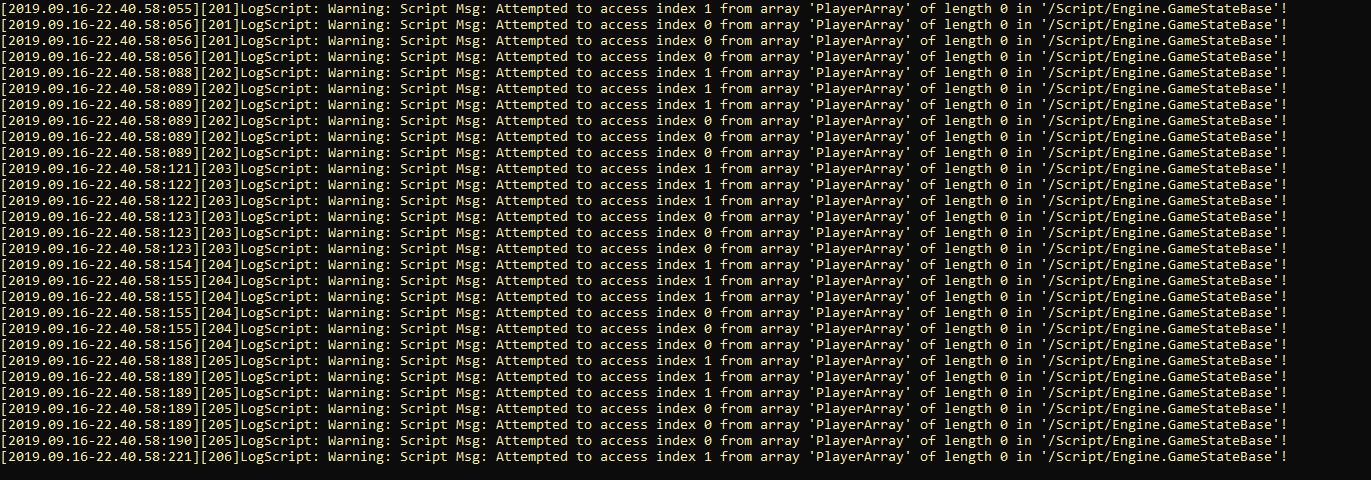


i have not changed nor forked GameStateBase in any way
but as long as the dedicated server is empty, i get this
winged badger
that doesn't mean you're not accessing the PlayerArray
west mason
by how the warning is written, i thought the GameStateBase was accessing it?
or that may be just my code accessing it from somewhere else?
winged badger
it could be
also
its trying to access index 0 and index 1
which would be very very weird for an engine function to do on its own
west mason
True that
winged badger
the PlayerArray is in GameStateBase
so i'd start with a project wide search for "GetGameState"
 sweet swift
Hi everyone
I have a question regarding hosting my project online for my friends and I to play together online, and i should mention that LAN won't work as we are not all in the same location
Basically, can someone please point me in the right direction of how i can go about doing this?(cheaply)
silent creek
@sweet swift you can try listen server
sweet swift
so there is no built-in server function in UE4 where i can quickly set something up and share it online?
i'm new to hosting and know nothing about it
silent creek
Creating a listen server is very easy, all you have to do is open a server in listen mode, you can do it using ?listen when using OpenLevel node in blueprint
sweet swift
so in that scenario, my pc would be the server?
 grand kestrel
What was the exact CMC function that forces a movement replication update? I can't remember what it was called
silent creek
@sweet swift yes
sweet swift
@silent creek thank you
now, if i wanted to step up from that, what's the next level of hosting?
grand kestrel
Nevermind found it
silent creek
@sweet swift In UE4 you do either ListenServer or DedicatedServer
sweet swift
alright, so I would need to pay for a hosted server somewhere. Can you recommend a good place to start?
silent creek
I only know amazon and azure but you can google more for more results that suits your need.
sweet swift
Alright, thank you. I'll start with the listen server 🙂
silent creek
No problem. ListenServer is a good start
rich ridge
@sweet swift you can explore Linode
It's cheap and is has data centers across all continents
thin stratus
Hm, question: If you invite a player to a party, do you only need to have the beacon up and running or also the party session?
Cause if you invite them directly and not via a Server(Party)List, does it need any information from the session itself?
thin stratus
Hm, only the GameViewportClient has a delegate to when a new local player is added?
I guess I could listen to the PostLogin of the MainMenu to get notified when a LocalPlayer's PlayerController is added.
Annoying
high current
Does the steam subsystem support nat punchtrough?
I guess it does but are there any gotchas with that?
high current
Ah and, does everyone here use Uworks? or do you folks implement steamworks yourselves
 chrome bay
IIRC the UWorks OSS is no more fleshed out than the native engine one.
It exposes a lot of other steam functionality but not via the OSS interface, which is kind of a pain if you're doing anything cross-platform.
 rose egret
how do I create a widget right after connecting to the server finished. I did it in BeginPlay of PC and had some delay, client could see the world for a few frames
high current
Alright, so we are gearing up to make a co op game on listen servers that has to be integrated with steam and steam friends. In this case would you recommend we just use the native implementation of SW?
 wise depot
anyone with linux server & steam experience around?
My linux server in debugGame is working fine, but shipping gets
[S_API FAIL] SteamAPI_Init() failed; SteamAPI_IsSteamRunning() failed.
@wise depot I don't know much about steam with linux but you can try this (https://github.com/ValveSoftware/steam-for-linux/issues/33#issuecomment-11573465)

GitHub
Some games don't run and throw this message at startup: [S_API FAIL] SteamAPI_Init() failed; SteamAPI_IsSteamRunning() failed. [S_API FAIL] SteamAPI_Init() failed; unable to locate a runnin...
wise depot
will take a look, thanks
 blazing haven
Hello guys , i have a prob.
So my gamestate when the game will begin , will transform Player array in an array of my own class
But then in a blueprint i try to get the value of every items on this array , except the variable of the playerstates in the new array are different for every player
Each of the player have a random number name , but they are not the same for each players
(I don't know if it's clear)
winged badger
Thats normal for PIE
Do not replicate your playerarray btw
Clients are perfectly capable of doing it themselves
winged badger
In pie all my players are called DESKTOP-random number
winged badger
Looks like you made a widget for same PS twice
blazing haven
Yeah but it's not supposed to
It gives it the same player state
but in theory it's the second index
winged badger
Its not supposed to be or isnt,
?
I can imagine few ways to accidentally do that
blazing haven
It redirect the player state on the right place in the widget
I want my Index 0 and index 1 to be 2 different things on this array
As a better solution , i should try to get all my player states differently
 lost inlet
if you have a hard referenced asset as a replicated variable, when a client receives this would it force a sync load of that asset or does it just not get set at all?
winged badger
good question, we talking soft pointer?
lost inlet
hard reference means a hard pointer
lost inlet
right because there's a rare bug in the game that would indicate otherwise
winged badger
hmmm, the blueprint VM should load it
lost inlet
this is not a blueprint actor
winged badger
not sure if a c++ class would without being told to
lost inlet
and it's not a UClass, it's a UDataAsset-derived type
winged badger
you're weighting if you should OnRep load it yourself?
lost inlet
UPROPERTY(Replicated)
UMyDataAsset* DataAsset;
when DataAsset is replicated to clients, is this asset loaded?
winged badger
it should be packaged for clients as well
lost inlet
it has an OnRep, if it's set to nullptr then the OnRep will never fire because the value hasn't changed from the default
winged badger
relevancy issue?
lost inlet
it's an always relevant actor
winged badger
i can think of one way to check, and its not pretty
digging through the NetGUID lookup table
lost inlet
i don't think i could teach QA how to do that
lost inlet
exceptionally rare
winged badger
ouch\
lost inlet
it breaks a pretty important UI element, the team/class selection screen
winged badger
you can detect it programatically?
lost inlet
those UI elements register important delegates to refresh the screen when certain data is replicated
winged badger
im guessing you can
put in a check
when if happens you get minidumps then
they might just provide the information to solve this
since the DataAsset is replicated, i am assuming its dynamically set on server
you can also just put hard poitners to array of them in say GI
and they can't not be loaded then
but that is a hack
not a solution
lost inlet
it's a team actor, which has a faction asset as well as a "squad layout" asset which determines the available classes
almost all assets (including these) are loaded through the asset manager on join and it sends an acknowledgement to the server which is needed to remove the loading screen
but i think there's a certain order of things happening where this breaks
winged badger
do you have any potential for replication race? dependency between 2 replicated objects?
lost inlet
these assets don't depend on each other, no circular dependency
winged badger
exceptionally rare might just mean packet got lost and had to be resent
but it threw your construction schema off the rails
is the team actor loaded from the package?
lost inlet
team actor is dynamic, and exists on the client just fine. this assets just don't seem to be loaded
winged badger
any chance it breaks because it lands client side before playerstate or pawn?
or after
if its a replication race that is on average 2-3 hours work with debugger to nail down
i can shoot random questions like this all night
lost inlet
it's not really dependent on that, i do wonder if it should send a soft reference because the asset manager should end up loading the asset anyway
lost inlet
will an asset have a NetGUID because it's a stably named object
winged badger
only if its loaded from a package
iirc even UClass* tend to go as path the first time around
worthy perch
What is the general opinion towards root motion in a multiplayer game?
Let's say in the case of a dodge mechanic?
worthy perch
My mistake. I meant Montages with rootmotion.
worthy perch
I haven't tried them out with rootmotion. I was afraid that the player, when dodging (rootmotion), would some times snap/jitter.
meager spade
i have never experienced that
high current
the obvi problem with animations is their timing
it mismatches slightly from client to client
and so if you have your animation do root motion, the location of the character will obviously mismatch as well, so prediction/error tolerance needs to take this into account
 teal python
I'm having an interesting problem related to multiplayer. I've created a dedicated server setup using a source version 4.22.3. The dedicated server boots fine and I am able to connect to it from the editor and run around the server map with nearly a stock ThirdPersonCharacter. Running two clients and a dedicated server from the editor on localhost also works just fine. The problem is when I connect to the dedicated server from my package build, I can no longer move my character. I can connect and spawn the character just fine with multiple peers, but none of us can move at all. I've checked the game mode world overrides and set my character and it's movement component to both replicate. Am I missing something crucial? (thanks in advance for your consideration).
winged badger
what kind of movement are we talking about?
rose egret
is there any option for bandwidth simulation in UE4.
NetPkt** are great but they are just delay and not act as real internet.
in other words if I use NetPktLag=1000 it just has one seconds delay but all the packets are queued without any delay
winged badger
you can run it on client separately iirc
 shrewd frigate
Hello, this is obviously a stupid question but I just want be sure of why it happens. I have an AI character and at intervals I call a function MoveCharacter() to Change his location using AAIController::MoveTo(). When I run this in dedicated server mode with 2 clients, I can see the AI Character moving to the same location on the two clients. Is this meant to happen when I did not mark the MoveCharacter() function as replicated?
meager spade
if the server moves then it will update the clients
cause the ai character is simulated to all clients (as it is owned/run by the server)
this is handled in the character movement component
shrewd frigate
Ohh.. Thanks for the clarification.💯
 real yacht
i have one question
my pawn uses CharacterMovement Component
and i'm moving my pawn like this, and everything is okay
except that
there is difference between server and client (owning) position
how can i decrease that diff? because it look like there is small stuttering when my pawn is running around
thin stratus
Your PAWN uses CharacterMovementComponent?
That doesn't work iirc
Or do you use a Character?
@real yacht
real yacht
yes, my pawn uses CMC
i mean
its not PAWN
its Character
my mistak
@thin stratus
thin stratus
Which player sees the stuttering?
real yacht
owning client
i have 2 clients, and when i move for example client 1, i see small stutter
and when i print difference between server and owning client location
there is small difference
thin stratus
Well there will always be a small difference, specially because they are differently timed.
real yacht
understand
thin stratus
As long as the character isn't actively jittering it should be fine
If you only see it in the numbers, then ignore it
thin stratus
I'm not even sure what difference we are talking about
If Server and Client are too far apart, Server will correct the Client.
You can't just print location difference
You have to also check if it's the same timestamp
real yacht
how can i get timestamp?
thin stratus
That's more or less c++
real yacht
okay
thin stratus
As said, if you aren't seeing lags and corrections, ignore it
If you do see them then you probably did something wrong coding-wise. The CMC works by default
shrewd frigate
A quick question: If for example I move an AI character on the server only by checking if the role is Authority, will it increase the performance of the game on the device its been played on?
Like... will the clients have any advantage in terms of performance?
twin juniper
Hi, i was wondering if anyone had an idea on how to create a widget with a sphere collision on a character when he collision another character but only the character who run to the other see the widget
teal python
@winged badger WASD and Space. ThirdPerson Character pawn.
@twin juniper all actors have two properties you can check in the editor: owner no see and only owner see. You can set these via blueprint. Keep in mind Widgets are client-specific.
twin juniper
But the sphere i attached to my character overlap himself with the character
west mason
https://wiki.unrealengine.com/Authoritative_Networked_Character_Movement
is this still relevant on how to correctly implement networked sprints and dashes?
thin stratus
Yes
twin juniper
umm
does anyone use PlayFab for Unreal
I couldnt find any discussion online so if there are people using it
I would like to have a bit of insight of your thoughts
 buoyant vortex
Anyone knows if there is any event called when an actor becomes relevant on the client (assuming it was relevant once, became irrelevant, and relevant back again)?
glad wharf
@buoyant vortex this page of the doc explains how to do it https://docs.unrealengine.com/en-US/Resources/ContentExamples/Networking/2_4/index.html
An overview of the Network Features example level, example 2.4: Network Relevancy (Part 4 - Combination Solution).
(so it seems there is no event)
high current
what is your specific case dechichi
 obtuse dirge
Is there a workaround for server travel not working in PIE?
buoyant vortex
@high current I have a server only object pool. Currently, when returning an object to the pool, I call NetDriver::NotifyActorDestroyed(this) so it destroys the actor on the client, but not on the server. When getting an object to the pool I set it to replicate, so it spawns on the server again.
Right now that works, but I was trying out options that hides the object in the client and make it network irrelevant, and then shows it up again by making it relevant. But I've been running into some problems while trying to spawn the client positions (without resorting to multicasts for now), and figure I could try to work around that If I could new (in the client) when the actor became relevant.
But also possible that I'm just looking at how problem wrongily.
meager spade
@buoyant vortex why not just move the actor off screen, mark it dormant and be done with it?>
when it is unpooled just make it un-dormant, and teleport it where it needs to be
buoyant vortex
Right now the "destroy" action is triggered on the server, so I imagine if I make it dormant and teleport it on the server the position won't replicate, so I would have to rely on a reliable multicast to teleport it on the client as well, and then make it dormant?
meager spade
teleport before it goes dormant
buoyant vortex
I'll try that tomorrow
 fringe dove
does steam reveal clients's IP addresses even if you don't call AcceptP2PSessionWithUser for an incoming steam p2p session?
and if so, why does unreal seem to accept every session, even when running as a client? shouldn't it only accept the session with the server?
teal python
I'm trying to package my dedicated server to work with a packaged client so I can play test online with friends who don't have UE4. Is there a specific Visual Studio build configuration of the dedicated server I need to compile in order for it to communicate with the package client properly? Does the client build configuration need to be compiled before or after the dedicated server?
thin stratus
Doesn't matter
Download Source of you Engine
Setup the Server Target file
Use the UnrealFrontend to create client and server
(it's located in the Binaries folder of the source engine once you've built it)
worthy perch
Yup, for the most part.
There is IsValidLowLevel/Fast but I have no idea when those are rightfully applicable.
real yacht
thnx
 fluid flower
Hey all, I noticed that when a session is full, steam does not show it anymore. Has anyone found a way to still show all sessions, full or not?
 slim falcon
When you search for session you have a bool show full sessions or something like this
shrewd frigate
Whats the best means of saving a players data in an online multiplayer game?
high current
depends on your subsystem
shrewd frigate
I'm using Amazon Gamelift for matchmaking and I am targeting android devices.
high current
As usually the subsystem would provide you with the option to save stuff, like cloud saving and so on. But I am not familiar with Gamelift, hopefully someone else is
 rocky totem
Hello there, I’m working on a project where the goal is to get two different players into the same level. One controls a VRCharacter (Pawn actually) that’s has one set of abilities. The second is a pc player on the system that the headset is connected to. How on earth do I separate the characters so they can move independently
shrewd frigate
@high current Thanks for the help. I'm reading up on Firebase.
high current
Xeru I am guessing that currently they both control the same actor?
 copper grove
so Q3 ends september 30 and Epic Online Services (based on their trello board) says matchmaking will be available in Q3, anyone have any relevant info or updates on it?
 fervent yacht
^^^ Though I'm pretty sure most programmers can understand lol.
thin stratus
I would assume the EOS will become somewhat ready throughout next year
rocky totem
No I actually want them to control separate actors entirely
@high current I know I can’t give them different player controllers but I assumed it was possible to somehow create two different characters classes and add them to the world
winged badger
Youll have to override most of the gamemode
And i dont think bleuprints are an option
You have to make it work with 2 different types of PC
Something unreal will fight you on
All entry points into a game start with gamemode destroying your controller if its not of a type defined on it, and serving you with a new one of compliant class
You can find an example of switching a PC in HandleSeamlessTravelPlayer function on the GameMode
@rocky totem
rocky totem
The plan was to just use one pc class and two different character classes
winged badger
Not a good plan, as that PC will be a nightmare
rocky totem
How so. It’s nothing complex and the two characters should do fundamentally different things so the input logic would be moved off the pc and consumed by the character instead
winged badger
At least function overrides in GM are contained 8n couple dozen lines at most
This is not a hotseat gamevi take it?
rocky totem
No
rocky totem
The characters are both on 1 system. Basically the vr player can place objects and the cpu player has to walk around and find them
winged badger
GM overrides m8ght be a PITA, but that is way easier to maintain
There is nothing preventing you to run different PCs, except default GM being written for games like UT
rocky totem
Why is two separate character classes going to be harder to maintain
winged badger
2 separate characters with 2 different PCs
Allow for much more options to structure your code
rocky totem
Ok makes sense so what do I really need to override
winged badger
The entry points, any functions that handle player joining and spawn a PC for them
Only in gamemode
Id also store a hud class in my pc classes
Si each pc can run its own instead if spawning one in gamemode
Well class defined in gm
Gm is not huge, but if you go down this path youll probably have ti read the whole thing, and get a sense of what calls what
rocky totem
Ok why can’t they just use 1 pc
Is there some rule against putting input functionality directly in the character classes
winged badger
you can, but it will probably grow into a mess
it always looks simpler then it inevitably ends up being
at first
rocky totem
Ok
Lastly how on earth would I override so that the player with vr input uses the vr pc and the pc input uses the pcpc
winged badger
you do use c++?
 rich leaf
A team I’m working with is having an issue with getting network replication to work. We have the FPS Character create a weapon of type BaseWeapon, but it only fires on the server and not the client. The client also says it has 0 ammo, when the server says it has 12. We set bReplicates = true everywhere, and it doesn't seem to make a difference. How can we get a spawned actor to replicate to the client? Any suggestions would be appreciated. Thanks.
rocky totem
I understand what I’m reading just haven’t actually done it before
winged badger
i recommend reading the the gamemode then, especially Login/PostLogin, HandleSeamlessTravelPlayer, GenericPlayerInitialization
rocky totem
Did u replicate the fire function on the gun?
Zlo is trying to do 2 players on the same machine a bad idea?
winged badger
if your weapon is a standalone Actor, setting it to replicate, having the magazine replicated is sufficient
if you want the clients to actually be able to use it to fire, using RPCs inside the weapon, you'll also have to SetOwner on weapon (server side), either a PC or a ControlledPawn
its doable, and simpler in many ways
as there is no network, just 2 local players then
i only worked on a game with local MP for a short while, and i did not setup its infrastructure
so i don't have many insights
rich leaf
Ok I’ll check those suggestions thank you @winged badger & @rocky totem 😀
winged badger
P.S. weapon needs to be spawned on server
if you spawn a separate instance on client, that might explain it failing to replicate
(server only) @rich leaf
this kind of local MP, might have some performance issue, as you'd need a PC capable of running VR and normal display at the same time
and that is a significant load for an average user
rich leaf
Not using VR in this project.
Thank you again though
rocky totem
Yeah this has a specific function
Just needed a push in the correct direction
Now I’m trying to figure out now that I see how spawning is handled I need to figure out how to determine whether the player I’m controlling for is pc or vr
rocky totem
Yeah that’s what I’m seeing
It looks like everything just leads back to spawnplayercontroller (which is depricated) so I should override it to change to spawnplayercontroller common and pass in whichever class I want based on a Boolean saved in the player state
rocky totem
Here’s my general steps. 1) create 2 player controller and character classes (1 for vr and 1 for pc). 2) create a child of agamemode base that stores another uclass for the vr pc. 3)override all functions that lead to spawnplayercontroller and instead check against the player state if the character is vr to determine which controller is passed to spawnplayercontrollercommon. Only question this leaves is how do I make sure that I check which input method the player is using
All that but change ps for localplayer
winged badger
i think thats tied to LocalPlayer as well
rocky totem
Hmm I was looking and can’t find it
I’ll reread
All I can see is potentially the viewstate and array for stereoview states but not idea where/when these get set
rocky totem
Ok I think I have enough info to attempt this
 unique kelp
Dumb question, and I assume the answer is yes. Can I connect to a Dedicated server running on linux from a windows client?
silent creek
yes
foggy idol
I just wanna say thanks to anyone that's ever helped me
worthy perch
I gtg to sleep, but I wanted to ask in case I forget.
Style question, do you guys wrap your functions in if (Role == ROLE_Authority) or do you do it inside the function?
meager spade
so you man before you call the function or during the function call?
it all depends on the situation
thin stratus
I place this inside of the function
But it depends on the function. If the function is never supposed to call on clients, then inside
If it's a case by case situation, around the function call
 wintry pawn
anyone done that? I was wondering about an online persistant world. Which doesn't have to be in ue4 "just" the clients have to observe the world? Like for example the server simulation has a stone. and it needs to be hit 10k times. and the clients can hit it and tell the server they wanna hit it.
this scaled to a world. would you still do all that in the ue4 server or just make a simulation in nodejs or any other thing?
and more importantly how would I even approach writing such a server?
old mmo's I can see how each instance is just a serverclient but separate from all other instances. but what if I want the progress of everyone count towards a common goal while still having it controlled?
client -> serverclient -> abstracted world server ?
so basically have the dedicated server instance keep the clients in check but get important info from the main world server where all the states reside?
 leaden dragon
Hello! is there a friendly soul in here that can guide/help me to do so i can host a game server where other players can join 🙂
 hasty orbit
Hello I have a problem I can not compile in C ++
does this show me a warning that one would have an idea?
LogSlate: Warning: Legacy localized fallback font '../../../Engine/Content/Slate/Fonts/DroidSansFallback.ttf' was requested. Font: '../../../Engine/Content/Slate/Fonts/DroidSansFallback.ttf', Character: 'Ǹ (U+01f8)'
Legacy localized fallback fonts were deprecated in 4.22 and will be removed in a future version!
Please update your composite fonts to use localized sub-font families: https://docs.unrealengine.com/en-US/Engine/UMG/UserGuide/Fonts/Overview
Details the Font Face and Font assets, along with covering the Font Editors various features.
I did not understand why there is a link
twin juniper
hi guys, i wanted to know if it was possible to integrate MySql without plugin
 vapid egret
Unreal tcp client?
 dark garnet
It's udp
lost inlet
also a bad idea: connecting to a mysql server directly
bonus bad idea: actually using mysql
dark garnet
Lol
 wheat eagle
Dear unreal slackers,
I have a problem! I have an actor placed inside the level and I am calling an event inside the actor via a player controller. The event that's correctly executed on the client then calls an event on the server, which will not be executed! I am testing this on 1 client+dedicated server. How can I solve this problem?
this is the functionality inside the actor
I only get "Hello1" as prints
 fossil spoke
Probably because the Actor has no NetOwningConnection. The PlayerController should be the one making the RPCs.
wheat eagle
Sorry if I am asking stupid questions, but could you pls tell me in more detail how I should do this?
winged badger
 wild linden
I have a multiplayer game where there are multiple objectives that need to be completed in sequence. I need to track these objectives and their states. The number of objectives per map is not fixed. Does anyone have any tips for where they managed that? GameMode, GameState?
 limber wagon
@wild linden In general, the rules are in the GameMode (first team to 20 kills wins), while GameState is used to track values of the rules that were defined in the GameMode (team 1 has 9 kills, team 2 has 10 kills)
At least that's the way I've gone about it
wild linden
Thank you, that really helps
I assume trying to do it that way helps with replication
limber wagon
GameMode only lives on the server, you'll get a nullptr if you try to access it from a client iirc, whereas GameState is replicated
 sudden geyser
i ve added a wall run but it only works on the server not on the client please help
twin juniper
I need some help. I packaged my game with the steam multiplayer. When I tested it out with 2 other computers with different Steam accounts they could not find a server. Please Help!
silent creek
@twin juniper when you make session are you setting the public connection to more than 0?
twin juniper
What do you mean?
silent creek
silent creek
by new editor window you mean standalone?
blazing haven
Hello guys , since 2 weeks i'm stuck on a bug , and i think it's because i don't know enough the networking principe in unreal yet. So if you can just tell me if my logic is valid or if there are other better method ,i would be grateful.
I have a widget with buttons , and each buttons has the player informations contain in the player state . So i get all player state in my gamestate , and then in my widget recover the array.
real yacht
does anyone have experience with FlexMatch and Rule Set writing, i have few questions?
unique kelp
Anyone familiar with AWS GameLift Spot instances? Are disconnections common?
unique kelp
I suppose it's possible
Amazon only specifies :"spot instances may be interrupted by AWS with a two-minute notification when AWS needs the capacity back"
unique kelp
I see
It's just I'm planning a global deployment for my company, and the costs are unbelievably high
fossil spoke
Build for Linux
unique kelp
Guess that's just the way, I'll have to test more and see if we can cut back on resources
fossil spoke
Much cheaper
thin stratus
Welp, even with Linux, if you create a game that requires instanced servers, it's gonna be $$$
fossil spoke
Yeah not really any way around it unless you roll your own solution and find your own hardware
thin stratus
It's the last thing I would advice anyone to create. The chances to hit player numbers like RocketLeague, Overwatch, or similar (def not Fortnite) is low
unique kelp
so what's the alternative if you want high-ish player count per server?
p2p seems like it wouldnt suffice
thin stratus
P2P (or rather ListenServer) vs DedicatedServer has less to do with high-ish player count.
It's more about cheating or not.
If you have a competitive game, where the authority shouldn't be able to cheat, you need DedicatedServers.
Of course, 100 players on a Server would also require a dedicatedServer, as that might need a lot of optimization
thin stratus
Yeah you need some money on the bank to get games like these started
If you are unknown you are most likely also required to release the game for free
Otherwise you'll never get the players in
And then you need microtransactions and before they start hitting, you need to keep the servers running.
unique kelp
Yeah that's already the plan
thin stratus
It's a mess and I would never create something like this. Would rather stay singleplayer or couch coop
And that comes from a multiplayer loving person :D
unique kelp
It's why they asked me to do this estimation, I'm doing a singleplayer project myself at home 🙂
thin stratus
Good choice
fossil spoke
Your other option is to go more traditional with a Server Browser and only host as many "Official" servers as you can muster, allowing players to then rent servers from server providers.
thin stratus
Or host their own, similar to Minecraft or original Counter Strike
But that really only works if you have no quickplay/competitive stuff
unique kelp
We'd rather avoid that, and have the process as simple as possible for newer players
fossil spoke
Depends heavily on the game as well.
unique kelp
plus we want to make sure only our servers read from our DBs and so on
so we're kind of fucked in that regard
fossil spoke
Same here lol
thin stratus
Despite GameLift
fossil spoke
👍
wise depot
how do i check if a player controller belongs to a remote player or not in a p2p session?
IsLocalPlayerController returns true for all controllers on host
 bitter oriole
There's isLocalPlayer or something
wise depot
do you mean IsLocalPlayerController ?
because that doesn't work
i don't see any other IsLocalPlayer related things in the controller or playerstate
bitter oriole
It's weird that it returns true
I'm pretty sure I use it myself
In any case you might use the remote role
Though I'm not sure how that'd work, given the whole AutonomousProxy situation
I would guess Autonomous for remote, Simulated for local, but since PC never actually exists as SimulatedProxy...
wise depot
surely the host would have role_Authority on all of them?
bitter oriole
I did say the remote role, not the role.
bitter oriole
If all else fails, UWorld has a "get first local PC" thing IIRC
So you can compare the PC against that one
wise depot
that sounds so dirty
bitter oriole
It is @wise depot
IsLocalPlayerController should work really
Are you testing in PIE, by any chance ?
That's one of the many things that would be broken in PIE multiplayer
rose egret
its so weird. MyPlayerController::Tick(float delta) not getting called on dedicated server. why?
bitter oriole
Tick disabled, parent tick not called from child override ?
winged badger
missing Super::BeginPlay is also a good candidate
buoyant vortex
It looks like we can't do Seamless travel if we're changing servers. Is that accurate? If so anyone in that cases would you resort to just showing a loading screen?
winged badger
as in physically changing servers? no you can't
not even a different instance on the same physical machine would allow for that
 shy nymph
hey everyone, i have a child blueprint (a gun in my player character) that i would like to run code "Execute on server" but it doesn't run, any ideas?
i have a basic custom blueprint event that just prints a string set to "Execute on server" but it never executes
buoyant vortex
@winged badger Yes, it's physically changing servers. Would you say in this case the go to way would be just having a loading screen? Or trying level streaming could help on that? We were hoping to hold on the previous level while the new connection is setup and the new level is loaded, but it seems non seamless client travel locks the Game Thread pretty badly, which means currently the transition is not smooth at all
shy nymph
follow up: or if i dont replicate the component at all it does run the code, but on the client even though its "execute on server" whats going on here
rocky totem
super random question why is replication cull distance squared a field if we only care about the flat distance
 merry pebble
Hey, would SQL work best or storing Player Info? Like username, password for login and whatnot?
Also like level and stats
???
 sand smelt
Anyone here ever had a overlapping collision bit of a blueprint make a client stutter while passing through it? (Replication) As a character.
Unless the mesh/box component is set to no collision at all the client character does this weird stuttering thing while walking through it
Switching to no collision at runtime doesn't seem to fix it
Disabled it before hand in editor does tho
Context: it a door BP which contains a mesh for the frame, a mesh for the door which moves via lerp at runtime and some overlapping box components for the triggers
The mesh for the door has blocking collision, but on client after its moved, when the character passes through that space where the blocking door mesh was, its movement stutters, but only on client side
Fixed:
Turned out to be that the client still had collision enabled and the server was tryin to correct. was suppose to be calling the interaction on the server then multicasting down not calling on the server twice
royal isle
@rocky totem I believe it is because it works in a square-shaped area rather than a distance line
rocky totem
So is the number we enter the area of the square centered at the actor? Or is the number at the side length of a square centered at the actor?
royal isle
The actor is the center of the area and the cull distance defines the area around it
 keen thorn
hi all, anyone know if using ue4 pkt lag/loss etc is enough for testing real world scenarios or will I need other tools for this
 gray scroll
Inside Game Mode... i m spawning my character and passing in their steam name to them. Inside the player pawn onpossessed.... i m running SetName on Server then SetRepNotify PlayerName variable. The issue I am having is that late joiners don't see other players names unless those other players respawn. How do I fix this replication issue?
thin stratus
You don't need to pass steamnames
They are already fetched into PlayerName if the Steam Subsystem is running
@gray scroll
 small temple
has ue4 always had physics replication built in or is that new?
bitter oriole
It doesn't have it and can't
Unless you're specifically testing some very new Chaos stuff ?
small temple
no, i just mean it replicates the movement of simulating bodies
not in any accurate way, but i thought it didn't even do that before
bitter oriole
If you tick "replicate movement" or whatever that's called yes
small temple
yeah
bitter oriole
Except horrifically wrongly
And yes it always did that
It's just horrifically broken for real games
Try it over the net with 100 ping
small temple
is it really horrifically fucked in the sense that rotation doesn't replicate properly and things go completely in the wrong direction or is that just a bug on my end?
and i mean they literally go in the wrong direction
bitter oriole
There's no way it can work yes
Especially if you have physics enabled on the client too
Then it's random
small temple
dude, there's no way it's this fucked
bitter oriole
There's no way it can work, at all, it doesn't make sense 🙂
small temple
i have it set up right now so it doesn't replicate movement back to the client
only to other clients
and my pawns just end up in totally different places
bitter oriole
That's fully expected
PhysX is not deterministic
There's no way you can run the same simulation on two identical computers and have the same results
small temple
yeah i get that but i would expect this to just replicate location and rotation then
instead of being totally fucking broken lol
bitter oriole
The really short version here is that network physics in UE4 are basically impossible
Short version, but really, that's about it
small temple
well i guess i can just force it to ignore the physics and replicate the pawn normally
bitter oriole
You really shouldn't be using physics at all if you have multiplayer
Like basically forget it's a thing
small temple
it's okay, i'm doing client-authoritative multiplayer
no interactions between player pawns
don't care about cheating
bitter oriole
In this case, you just need your own movement component
"replicate movement" is useless for movement
But you won't have physics issues at least
small temple
i do, and my own replication code, but i wrote it because i didn't know what i was doing
if i can just use the built-in replication code, i would rather do that
bitter oriole
Can't
The built-in replication code doesn't support movement, other than the character class
small temple
i just need it to replicate position and rotation
bitter oriole
So objects teleporting once a second to their latest position and standing still until the next update is enough ?
Because that's what "replicate movement" does
small temple
for now, yeah
bitter oriole
That's all it will ever do
It will do it for all clients, too, AFAIK
Realistically, you're going to need a whole lot of smoothing everywhere on every remote client
And a RPC to call the server with the new transform and velocities
(so that you actually can smooth)
small temple
i'll cross that bridge when i get there 🙂
i'm just cleaning up code for now
the player interaction in this game is so barebones i could literally hide other players in multiplayer and it would still work
so it's not really a priority
but thanks for the advice, at least i know what's wrong now
thin stratus
Has anyone here implemented "PingServer" of the SteamAPI?
@twin kite Any chance you posted this: https://forums.unrealengine.com/development-discussion/c-gameplay-programming/1483622-connect-to-steam-dedicated-server-via-raw-ip?p=1627795#post1627795
small temple
ahh, i just remembered why i did my own replication code, i'm dumb 🙃
thin stratus
Overview of the Online Beacon system
There is a lot of stuff that goes into this to get it working with steam though
So much that I usually let my clients just buy Devero's pack
worthy perch
Devero is W3 Studios?
thin stratus
Yeah
worthy perch
Cool, I might actually give beacons a try then. Though... I really just don't want to play with network stuff anymore. 😦
 twin kite
@thin stratus Yes, I did!
thin stratus
Do you still have that code somewhere?
It's kinda straight forward I think but well
twin kite
yea it's still running in our game
thin stratus
Actually only wondering how I go from FString IP to the uint32
twin kite
it's a host order IP address
imagine 127.0.0.1
it would be equal to 0x7f000001
does that make sense for you
twin kite
correct 255.255.255.255 would be 0xffffffff
let me search our 10k lines game instance real quick
thin stratus
Yeah I get that, just not sure how to convert it to fit into a uint32
twin kite
k so you got all callbacks hooked already
thin stratus
Yeah I'm in a GameInstance Subsystem which inherets from that Response interface
Not doing anything with the functions but they are overriden
So I could pass "this"
SteamMatchmakingServers()->PingServer(SomeIp, SomePort, this);
twin kite
    uint16 Port = 27015 + (FCString::Atoi(*PortString) - 7777);

    uint32 Address = inet_addr(TCHAR_TO_UTF8(*IPString));

    // https://stackoverflow.com/questions/21038120/how-to-reverse-byte-of-a-hexadecimal-number
    uint32 AddressHostOrder = ((Address & 0x000000FF) << 24) | ((Address & 0x0000FF00) << 8) | ((Address & 0x00FF0000) >> 8) | ((Address & 0xFF000000) >> 24);

    SteamMatchmakingServers()->PingServer(AddressHostOrder, Port, this);
Yeah def would not have figured that out in the next 5 minutes haha
twin kite
the port calculation is probably not needed for you
we are doing that for gamelift matchmaking servers where the ports increase by one
thin stratus
Yeah Azure somehow starts them all with the same port but different ips
I think they launch selfcontained images on one server
So basically the opposite of how GameLift does it
So I would just have 7777 all the time
twin kite
yea gamelift is pretty expensive too I wouldn't have worked with it personally but our company does so I was implementing the whole system
thin stratus
Well don't let me get started on "wouldn't have worked with it personally"
It's clientwork :D
twin kite
exactly
thin stratus
Right so the port can be a direct Atoi
ACtually the ip address code is super straight forward
twin kite
void UShooterGameInstance::ServerResponded(gameserveritem_t& server)
{
    CSteamID ServerID = server.m_steamID;
    FString ServerIDString = FString::Printf(TEXT("%llu"), ServerID.ConvertToUint64());

    UE_LOG(LogShooterGameInstance, Log, TEXT("Pinged the server %s about his steam ID: %s"), UTF8_TO_TCHAR(server.m_NetAdr.GetConnectionAddressString()), *ServerIDString);

    APlayerController * const PlayerController = Cast<APlayerController>(GetFirstLocalPlayerController());

    FString Command = FString::Printf(TEXT("open steam.%s:%d?playerid=%s?playersessionid=%s"), *ServerIDString, server.m_NetAdr.GetConnectionPort(), *MatchedPlayerSession.PlayerID, *MatchedPlayerSession.PlayerSessionID);
this is what you need to connect to the server
thin stratus
I just always expect UE4 to have something somewhere
twin kite
ignore the ?playerid and ?playersessionid
thin stratus
Can I give you a cool tip for this?
ULocalPlayer has this: FString ULocalPlayer::GetGameLoginOptions() const
FString UHLLocalPlayer::GetGameLoginOptions() const
{
    if (PFSubsystem.IsValid())
    {
        const FString PlayerID = PFSubsystem->GetPlayerID();
        return FString::Printf(TEXT("?%s=%s"), *PLAYFAB_PLAYER_ID, *PlayerID);
    }
    return FString("");
}
That is called when you travel. So you don't have to pass that shit in every connection line
twin kite
cool but I think we need to have it passed every connection not sure
I'd probably rather not touch that again it breaks super easily 😄
thin stratus
Yeah sure, but for the future you have something new to look into hehe
Thanks for the code. I'll quickly implement it. Can't try it out until I have the linux server build and uploaded >.>
twin kite
ha yea you'll never learn out with UE I'm on a task for a year now to build a stable modding system for our game