#multiplayer
1 messages · Page 491 of 1
 chrome bay
And I was using angular velocity as well, which has an equally small tolerance and is much more sensitive
The key is to make sure the simulation has identical input on both client and server all the time
If it doesn't, you'll get more and more divergence
If you're seeing a lot of corrections then somewhere something isn't being combined nicely, or information required for the simulation isn't available in the right order
If you're changing max speed really regularly, it should probably be sent as part of the move input rather than separately
 fluid prawn
The reason last time we discussed I remember you said my Errors were pretty large So I spent some time thinking about it and the solution i proposed in my head is that because my Accel is tied to Frame rate. I thought maybe ue4 was buffering client moves at different rates so when i sent it to the server to do a Error calculation a change in fps would cause the calculation to have larger errors.
ah ok
chrome bay
having accel tied to framerate is almost definitely going to cause you problems
fluid prawn
Well I have a Max accel
that is capped
but the value I decide apply of that max accel varies
so that is sent over the wire
chrome bay
Or if your interpolating the max speed over time for example, that's just never going to work
as client and server will never be able to match that unless they're simulating with identical deltas, which they almost never will be
fluid prawn
yea
I am calculating acceleration by taking a dot product with intended direction (WASD key and look direction) which is the intended "acceleration" I want to go. this projection of this vector is the velocity to be applied on the next tick
looks like this
CurrentSpeed = FVector::DotProduct(WishDirection, Velocity/3.4)*3.4;
    //UE_LOG(LogTemp, Warning, TEXT("Current Speed DP: %f"), CurrentSpeed);

    AddSpeed = WishSpeed - CurrentSpeed;
    if (AddSpeed <= 0.f)
        return;

    //TODO Delta?

    AccelerationSpeed = DynamicAcceleration * DeltaTime * WishSpeed;

    if (AccelerationSpeed > AddSpeed)
        AccelerationSpeed = AddSpeed;

    NewVelocity.X += AccelerationSpeed * WishDirection.X;
    NewVelocity.Y += AccelerationSpeed * WishDirection.Y;
    NewVelocity.Z += AccelerationSpeed * WishDirection.Z;

    // Accel to be applied Per Frame
    Acceleration = (NewVelocity / DeltaTime);
then you clamp that to input and send it on its way to the server
ignore the 3.4 scaling
chrome bay
Is the client actually simulating with that input though?
fluid prawn
that is just for UE4 units
yes
it is
that code is run in CalcVelocity
PerformMovement --Calls->CalcVelocity
 unique kelp
The hitboxes for my character on the server seem to be offset from the ones the clients see. They are attached using sockets to the mesh, but it doesnt seem to simply be a timing disparity from the animations
chrome bay
Servers don't play animations by default
unique kelp
I know
chrome bay
and even if they did they wouldn't be syncronised
unique kelp
:/
but the synchronisation doesnt seem to be an issue here
it is a constant offset throughout the animation
chrome bay
Introduce lag and packet loss and you will certainly get timing disparities
chrome bay
Well the client has to predict the move as well
if it's running in calc velocity then it will be
fluid prawn
ah okay
chrome bay
But I highly doubt you want to be changing acceleration in that function though
fluid prawn
oh?
chrome bay
then again, it already does, so who knows
fluid prawn
well its a bit deeper i have a separate function called apply Accel and in calc velocity im checking if im in the air or on ground and apply that accel differently but all of those are nested inside the calc velocity function anyway
unique kelp
Thanks @chrome bay I will test with those conditions when implementing lag compensation. For now this issue was with a mesh change that takes place depending on the skin the player chose, I was not updating that on the server side
chrome bay
@unique kelp if you want to be able to shoot certain hit-boxes, really you're only option is to let the client decide which box they hit - but do some sanity checking on the server to make sure they aren't blatantly cheating
Syncing anims and bone states for hit detection isn't really feasible
unique kelp
I wanted to avoid that if possible, but I guess the more authoritative the server is, the worse the experience is for the clients (latency wise)
fluid prawn
I wonder if it's an input issue. Because In the Netcode I changed my Velocity in The MoveAutonomous Function otherwise I could not get my character to move I would just get ported back and jitter in the same spot.
unique kelp
anyway, thanks!
chrome bay
I really don't know, character movement isn't the easiest thing to deal with even when it's right in front of you
But I'm working atm anyway 😉
fluid prawn
ha
I will investigate further
I'll look into what you mentioned earlier
about input
 thin stratus
Fire: Our actual work.
Typing: Answering other peoples problems on Discord.
http://giphygifs.s3.amazonaws.com/media/13HgwGsXF0aiGY/giphy.gif
fluid prawn
^ XD
chrome bay
I feel personally attacked
thin stratus
Yeah, RP'ing the Main Tank
fluid prawn
@thin stratus Basically I'm investigating how I can reduce my net correction errors when sending different Accel Values per frame based on a calculation I'm doing with the dot product between (Look Direction) and my intended Acceleration direction (WASD) over the network
thin stratus
So, Input Acceleration?
thin stratus
As in?
fluid prawn
well for example you have a Max Accel. And the Dot Product between your Look Direction and the intended Acceleration will be a projection of the current velocity vector this is added to your velocity on the next tick. So hypothetically if I look in the correct direction at the optimal angle i would get max accel on that frame to be applied.
this is what im trying to send over the wire
so accel per frame varies based on current speed and the angle your looking for the next strafe jumps. You reach an angular asymptote at higher speeds because the next angle you need to apply accel on that frame gets so large you can't get any more speed.
But the calculation should not matter so much what matters is just that the change in Accel per frame causes issues (At least that's what I suspect)
Looks like this

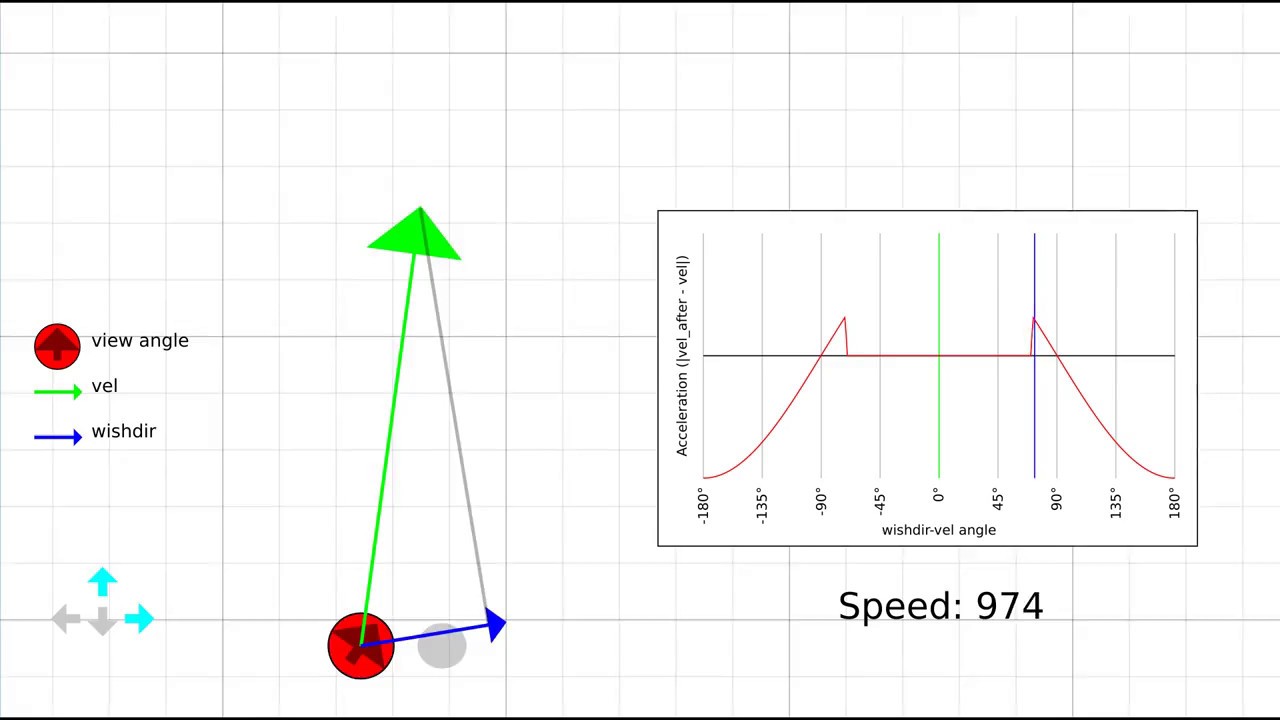
In this video I explain what strafe jumping is, a bit about the maths behind it, and an exploration of why this is such a difficult skill to master. Custom m...
that's a visual if your interested
See I have a dumpster fire too
I'm gonna hit the hay tho just in case you respond Cedric and I don't reply, Have a great night guys
 indigo robin
@winged badger actually isnt PlayMontage replicated on Characters ?
theres a lot of montage specific replication code
thin stratus
I wonder, can I run Steam on a DedicatedServer while having the IpNetDriver for connections?
Or does this Driver define the UniqueNetId?
 winged badger
there was a discussion about that a week or two ago @thin stratus
and it was a few pages long
thin stratus
Who was taking part in that?
winged badger
i don't remember
but i do remember IPNetDriver being mentioned by name
so might be good enough for a search
thin stratus
@twin juniper Quick question: You wrote a couple weeks ago that you use DedicatedServer via direct IP connection while having your game on steam.
Are you actively using the SteamSubsystem on either (Dedi or Client)?
 steep slate
I'm looking for some references about how modern AAA games handle shooting in multiplayer. Anyone got some tips or decent articles?
 gentle lion
@steep slate Are you planning on using the Gameplay Ability System? If not you should at first definetly look into that
unique kelp
Isn't GAS for shooting a bit overkill?
last time I looked at it, it seemed to have quite a bit of setup overhead, it's what always put me off
gentle lion
In the AAA game Fortnite they use abilities for shooting
steep slate
Interesting, do they have shooting using gas in some video?
gentle lion
I heard though for rapid fire shooting, they don't use a gameplay ability for every shot because that would obviously be way too much bandwidth. Instead the time between holding down rapid fire and releasing is an ability itself
chrome bay
They do not
GAS wasn't designed with shooters in mind, but it's definitely useable for them
@meager spade probably is the most knowledgeable on it atm I think
Been working on a GAS-powered shooter for a while
Probably only worth using GAS if you want other features from it too though
Recent thread on it, with Epic engineer comments: https://forums.unrealengine.com/development-discussion/c-gameplay-programming/1660211-gameplay-abilities-and-weapon-firing
steep slate
We do use similar approach with sending fire press and release
But anyway I've heard that CS go uses some player position rewind system
chrome bay
Yeah, I do the same
unique kelp
Lag compensation?
chrome bay
But really, you only need it if your objects are moving at high velocity or if you're working on a super twitchy shooter
steep slate
How did you approach that?
chrome bay
The high-level overview is create a small circular buffer of transforms for objects on the server, keep overwriting into that buffer.
When the client thinks they hit a target, tell the server. Server rolls back the object you hit based on the clients ping up to a maximum (120ms in my case currently), then checks to see if they were roughly in the same place (within some tolerance)
If yes, hit is verified, if not hit is skipped
steep slate
But how do you handle animations then? Hands/legs might be in different places
steep slate
Hmm interesting
chrome bay
You have to trust the client somewhat
Just make sure they don't get 50 headshots in a row or something, but that's more the job of anti-cheat
chrome bay
np's
chrome bay
I think so
since we just modify the control rotation for recoil
or muzzle drift etc - that's in HLL at least
steep slate
HLL?
chrome bay
Ah, sorry - game I'm working on atm
steep slate
Ok 😉
chrome bay
But yeh, it's an MP shooter - and IIRC we just do muzzle drift by modifying the control rotation
Which is ok since client sends that to the server as part of character movement anyway
And if clients start doing mem-hacking we're kinda fucked anyway 😄
steep slate
I also wanted to ask how do you approach interaction with actors? I"m locally sending raycast, getting id sending it to the server and server loops over actor map then calling that actor that match the id
chrome bay
Just sent the pointer
UE4 already handles that behind the scenes
I'd be amazed if the ID's matched anyway
steep slate
They do. Made singleton that generates thread safe id's
chrome bay
Why not just use the engines functionality for that?
steep slate
That's why I'm asking
chrome bay
You can replicate pointers to actors without any extra work
So long as it's net addressable it'll be resolved to the right actor, or null if not
Anything pre-placed in a level or spawned server-side and replicated is net addressable
steep slate
Hmm, I wonder how's that works. Since pointer is just an memory address. Does that mean that somehow those get same memory address. Or there is complex serialization behind that?
chrome bay
There's serialization behind it, objects are mapped to network ID's per connection via UE4's reflection system
They don't get the same address, they just point to the local instance of that object
steep slate
Now I wonder if I save some badwitch just sending my actor id
chrome bay
almost definitely not
Since the net GUID is just an ID anyway
and I doubt your singleton will work when you have the process running on two different machines and have actors being spawned dynamically
Would work in editor in a single-process, but not anywhere else
steep slate
It does work. Tested dedicated server on gamelift multiple times
chrome bay
either way, I would advise not doing it
UE4 has a very good networking system already
steep slate
Ok, thanks for explanation
 twin juniper
@thin stratus i actually dont use the steam subsystem anymore. i had only initially used it to test the possibility of adding achievements to my game. now i'm trying to just dev content and might implement all that achievement / voice stuff later if i get a bigger team on it. i literally just have a linux server hosting the game, and direct connect to that IP from the client via a execute console command: open <ip address> node on the client win64 binary. it has always worked for me.
 unreal pine
Is this the right place to talk about Steam API stuff too? I can't figure out how to get users to connect to a listen server when they join a lobby.
Is there a way to figure out who's the "host" of the lobby, and have everyone join their IP?
twin juniper
since i have a ded server, i had always just used my server IP. can't you simply store the IP of all the clients in that case, and then connect to the one marked as host?
 shut gyro
I am trying to spawn a separate pawn object on a client that can't be seen on other clients' screens. I also want to possess this pawn from the client's perspective. I am having trouble on doing that ATM as the possess call only exists on the server. How can I go about doing this
twin juniper
Mikhail you can do stuff like that by using RPCs and setting the "replicated" flag on or off for the object.
twin juniper
@shut gyro have you considered disabling visibility and turning off collisions for all other clients?
shut gyro
I haven’t. Would spawning on the server and then setting SetOnlyOwnerSee to true with collisions off be a good solution? Before, I was only spawning on the client
thin stratus
@twin juniper Na, that's the main issue.
If you use Steam for Client, you have to use Steam for the Dedicated.
otherwise you get a NetId mismatch cause "NULL" != "Steam" UniqueNetId of course.
And if you use Steam you can't get Ip Connection working, it just doesn't connect as it wants steamId
twin juniper
What I do is I host the game on steam, so it's on the steam site. and then in the code I just have everything all hardcoded to my ded server ip.
thin stratus
Yeah no, we have cloud server instances
They are created and removed dynamically
The IP is never static
twin juniper
for my game its always the same IP cuz its on a digital ocean droplet that is always-on.
might be different for you.
thin stratus
Yeah different for us
twin juniper
i c
thin stratus
We matchmake players, that asks the server service to return a new server
That gives you Ip and port of the new isntance
but you can't connect to that
One idea would be putting steam on the dedi server and registering the session with steam
Then asking steam for the steamID via IP (think there is an api call)
twin juniper
hmm.. did you do obvious stuff like double checking the firewall rules for the server instance and stuff like that..?
thin stratus
and then using that to connect
Yeah they are open, I can connect to it if it's not using steam
But then you get kicked cause of hte mismatch
twin juniper
ok
thin stratus
It's fine, we gotta go custom subsystem then anway
We also have xbox in the mix later
So even if both are steam, it won't work for xbox then
twin juniper
my plan with regional support was to eventually have several always on servers in different locations, like one in europe,one in west us one in east. and then people just connect. as far as dynamic server spawn stuff that's a bit complex for me :X i'm kinda not a great programmer lol
learning unity though. fun and teaching me.
thin stratus
Yeah hehe we have ranked matches with matchmaking so that's not a thing
Yours will work fine
thin stratus
Def, hoped for a shortcut haha
 copper grove
anyone using Vivox? and can point to documentation how to set it up, the ue4 one is full of dead links, especially on how to generate access tokens
its kinda hilarious, like step 1 enabled the plugin, step 2 setup the login but doesnt tell you how, step 3 connect to voice, also doesnt tell you how
winged badger
so documented like UE? 😄
 jolly siren
Would adding a function to our custom PC that is only called on the server require both a client and server update?
In terms of version mismatch. Or could we hotfix the server with this change?
i.e. what changes cause incompatibility? Simply changing anything in a replicated object?
 meager spade
if the client will never call it
then no
it will be fine
we have patched "server only" stuff and left clients alone
jolly siren
okay that's what I thought. Just wasn't sure if changing a replicated object would cause a mismatch
 timber anchor
Guys i just created a brand new project and made everything from scratch
I just created 2 Animation blueprints one for running in different directions and one for jumping
But they are not replicated over the network, how can i exactly replicate them? i remember that the default one was replicated automatically
meager spade
they are not replicated
you dont replicate them
you replicate the info they need from the character
timber anchor
U're right
@meager spade But wait, if for example, i press 5 and i dance, even if i do a multicast event client won't see that
Ok im just dumb, custom events we're not set up properly
 spare ridge
Hi guys is there some up-to-date instruction how to create and host an dedicated mp server?
(no STeam, no Amazon xxx)
spare ridge
All tuts I found are like 3-5 years old
 ripe wasp
hi devs, how would i make a multiplayer sever for our unreal engine 4 game?
spare ridge
Plzz
meager spade
@ripe wasp you need to build the dedicated server using source code version of the engine
 shrewd frigate
@spare ridge I think those old tutorials are not too different from what you have to do.
 young thunder
quick question. How can i get "replicated from client - executes on server" custom event? or this an old way how it's written?

 north swan
hiho guys.
does anyone know if there's a resource that shows the basics of interpolating movement on the client? projectile and AI-movement is kind of choppy on my clients. C++ resources much preferred
meager spade
custom ai movement component?
north swan
currently I'm using a standard ACharacter
with its standard movement component
and I can't find a AI Movement Component you're talking about, sorry.
you mean creating a subclass of CharacterMovementComponent?
meager spade
no if your using standard character class
the movement component is already interpolated
sometimes in PIE it can look choppy
but there is interpolation settings you can experiment with
north swan
okay thanks for your time and help mate 🙂
young thunder
thanks
spare ridge
@meager spade what about rolling ball template. It's laging like hell on client. How to fix?
meager spade
not familar with that template, let me open it up
it seems it just applies physics to the pawn
replicating physics is not an easy task
 foggy idol
Can anyone help me with respawning
meager spade
state your problem not just ask if someone can help
copper grove
are you guys excited for epic online services? cant wait to have 1 unified sdk for all platforms (mobile, pc, console)
unreal pine
Steam Advanced Sessions question:
Anyone have an idear on why my "Find Sessions Advanced" node always returns 0?
I have it create an Advanced session if 0 servers are found, and just has it join the first one if it does find a server. If I run 2 instances of the game, It'll just create servers on both of them.
(This has been tested locally, and over steam on multiple machines)
Could it be an issue with my engine ini? Steam overlay pops up, but I must be missing something
meager spade
you cant run multiple instances of the same game on the same pc with steam
oh nvm missed that bit
is your steam id correct/
did you turn on the net debugs? did you check all data to ensure it valid/sane?
north swan
Hi guys, I'm currently looking into diablo-esque movement of an ACharacter in a multiplayer setting.
If I want to move the character on a navmesh, it needs to be controlled by an AIController.
Now how would I process move-commands from my APlayerController?
This is what I do now:
1.: Spawn Character
2.: Spawn AIController
3.: Character is being possessed by AIController
4.: Save Reference of Character in PlayerController
how would I request movement from the PlayerController now?
unreal pine
did you turn on the net debugs? did you check all data to ensure it valid/sane?
@meager spade what does this bit mean? Check all data? and which net debugs? I have the log on, and it clearly says it found 0 servers
@north swan I could be wrong, but I'm fairly certain there was a click to move template by default in Unreal Engine
Maybe check out the top-down template
north swan
top down template doesn't work over the network
unfortunately
the function it uses works for me, but it seems wonky
like it's not using the movementcomponent of the character or something
because "GetCharacterMovement()->bOrientRotationToMovement = true;" had no effect then
topdown template is using
UAIBlueprintHelperLibrary::SimpleMoveToLocation();
 hoary lark
I've never done it but my first guess would be to look into setting the owning connection for your character to the player's connection, and then using your player controller to push commands to the ai controller which actually handles the unit
north swan
I'll try that, thanks
hoary lark
It sounds like it should be a common enough use case there should be some Google results with the right keywords...
unreal pine
SessionInfo: HostIP: INVALID SteamP2P: 76561197980XXXXXX:7777 Type: Lobby session SessionId: Lobby[0x1860000079E9EDF]
Normal for HostIP to be INVALID for a listen server?
north swan
thanks @hoary lark, that worked!
the missing piece was
playerChar->SetOwner(playerController);
just as you said.
 cyan bane
Is ShooterGame not out for 4.23 yet? Or is it just me that can't download it
 blazing haven
Hello , how do you get the specific controller associated to a character? I want to make a spacial chat , where the player check the position of other characters and keep in track the controller of each one
When i try to get the player controller , each of my character seem to use the same , i don't get the value of the player controller attributed by the game
winged badger
its because player controllers don't replicate
so each clients only has their own, not the same one
blazing haven
Oh
It will be a prob for my chat system , i don't know how i will handle that . Thanks for the info!
 glad wharf
Usually it's PlayerState you use to replicate info about every player on each client
blazing haven
Yeah i will probably use that
 upbeat hound
just a question, if I'm in an execution path after hasAuthority, it means I'm on the server, right? So it's useless to call "Run on server" event in that path, right?
If so, is there a problem to replicate an array of structs (inventory)?
The struct is {Class of an Actor class (not the object itself, just class), a texture2D, and an int}
Come to think of it, it might be stupid to have that texture2D there.. maybe I should make a map somewhere and replicate the keys pointing to images.. but anyway, why isn't the array replicating?
winged badger
@upbeat hound client's Role == ROLE_Authority will return true for locally spawned Actors
and it doesn't send the entire texture over the internet
first time around it will send a path to it, after which NetGUID is created
(as in asset path)
upbeat hound
I seee... so I do need a run on server
winged badger
as for why isn't it replicating - the Actor doesn't replicate, or the Array is not set to replicate, or you made a custom c++ Struct without any UPROPERTY specifiers
if Array is on an ActorComponent, it might not be replicated
upbeat hound
I'm using blueprints, and I triple checked the replicate status
Actually the contents of the struct are a subclass of some class (child of actor)
winged badger
less likely, but NetRelevancy can also cause it
upbeat hound
but anyway, I just made a test array that has only integers, and it also didn't replicate..
I suspect it's because I relied on hasAuthority to check I'm on the server.. let me try to call run on server event
winged badger
to claim something doesn't replicate, you need to make sure it was Set on Server first
upbeat hound
ok I just checked, I did run it with "run on server" execution path
Where can I check NetRelevency?
Class defaults.. found it
Always Relevant, right?
winged badger
to see if Relevancy is causing problems you tick AlwaysRelevant
upbeat hound
Ok
winged badger
but best not leave it like that
its useful for debugging, less so for a final product
winged badger
is the array set server-side?
 fierce grove
for multiplayer should I do all Health and damage math in PlayerState ?
winged badger
that depends on a lot of things, generally no
as the health is a pawn attribute
and its also replicated to everyone
fierce grove
but In a game where I switch pawn ... having a consistant UI is hard :/
so I can update the value in playerstate and update the UI based on PLayer State info
winged badger
that is usually done using Separation of Concerns techniques
your game model shouldn't have any references to the UI
only the HUD derived class should
fierce grove
yes of course
winged badger
all your UI should have a pointer to the object they are supposed to display
and a SetContext function, that takes a pointer of that type as input
your SetContext initializes the Widget to the new Context, and also Binds all required delegates
fierce grove
ok ok I see
winged badger
instead of usual ExposeOnSpawn -> Construct you do ExposeOnSpawn -> Construct ->SetContext
then all you need to do is have your PC inform the HUD that it possessed a new Pawn, and HUD calls the SetContext on the Widget displaying it with the pointer to new Pawn
fierce grove
oh that's what I'm doing already
it's just that I want to keep my health of my previous pawn displayed
winged badger
note that Blueprints really suck when it comes to client-side possession callbacks
fierce grove
so I do all health math in Pawn already - update playerstate HEALTH variable and the UI is just displaying that health variable
winged badger
displaying health via PS makes sense only when it comes to stuff like PartyWidget
as in you iterate over the GS PlayerArray to gather all objects you should be displaying
fierce grove
yeah
winged badger
but PS is also aware of what the PossessedPawn is
upbeat hound
@winged badger I was so stupid Q.Q As you said, the problem was with the array not being initialized in the server 😮
Now I have to debug why the first addition doesn't work, but then laters additions do 😄
Thank you very much!
upbeat hound
Hmm
Inside my inventory Actor (that also contains the actual array), I have a variable "OwningPlayerRef" that has a reference to the carrying player controller
Now, for some reason, when I access it on Client, it works well. When I access it from the listen-server, it says Error accessing None
I set it just after I spawn the inventory of each player on the server
Any idea why would that happen?
(preparing screenshots, in the meanwhile, I welcome suggestions 😄 )
So pickablesInventory is spawned on server, and is set to variable "inventory" in the ClientPlayerController
And after itemsList is updated, it appears to replicate via RepNotify, but doesn't work for the listen-server:
listen-server claims that OwningChar variable is None.
Why is that 😮
To test, I tried to print OwningChar in BeginPlay
The result:
Here it looks like Client is the one with the error.. but when testing in game play, when the listen-server character acquires the item, the error comes
does the "client" on the listen-server print Client or Server? o.o
foggy idol
So I try to respawn my character and it works but once packaged the respawning works then if done again other players can't see the respawned player then it works well again and so on
 errant rover
Hello, I have a multicast function (in my actor) like this:
UFUNCTION(NetMulticast, Reliable)
void MulticastSetActivated(bool value);
When I call it from the server Tick(...) function, my server and clients receive the "MulticastSetActivated" call. When I call it from a physics "OnOverlapBegin", only the server receives it. Is it normal?
jolly siren
Does anyone understand how this is possible?
Why isn't my role == ROLE_Authority within a function called from a server rpc?
It's almost like server rpc validate functions are ran on the calling client, which would be a bad surprise
winged badger
that doesn't look like a function body of a server RPC
winged badger
does it hit twice?
running _Validate both client and server side wouldn't be too much of a stretch, just odd
jolly siren
The server validate function is hit once. And role is ROLE_Authority within it, which is good because it would make no sense for these to run on the client
But I still don't understand why the role is ROLE_AutonomousProxy in the pc function
winged badger
that is weird, you aren't calling a _Validate directly by any chance?
jolly siren
No I'm not
I think it might be an issue with my static singleton. Debugging something now.
winged badger
ouch
if you're using anything static there
you can't test in single process PIE
or weird stuff happens
because the client and server in single process share the singleton instance
it will work just fine packaged or in multi-process
winged badger
my first brush with single process PIE and static delegates was... interesting, to say the least
jolly siren
haha yeah it's not the easiest thing to see right away. A lot of weird symptoms
meager spade
pie does some off stuff
jolly siren
Thanks for the help guys
 vestal thistle
Hey guys, does anybody know if a 12 player game will need a dedicated server to run efficiently?
Or would a p2p connection be sufficient?
meager spade
UE4 doesnt have p2p
it has a ListenServer type setup, where one player is host
and the issue is not will ListenServer be okay for 12 players, its how effecient the networking is and the game, you don't want to bog the host down to 30fps when everyone else is 60fps
vestal thistle
Hmmm.....
@meager spade is there any suggestion that you'd have to hosting a multiplayer game? I'm looking at dedicated, but damn it costs a lot of money and resources to get that up and running.
 grizzled stirrup
To destroy a replicated actor on both client and server, is it enough to call SetLifeSpan() on the server, or should the client call it too?
 still condor
as long as it's actually replicated (and not torn off or something), yeah.
grizzled stirrup
Thanks!!
 digital delta
Hello i'm having a problem with my dedicated server. When i execute the server it show up on steam internet tab but no one can connect to it. For the connection i just used the advanced sessions join session on a foreach after i find a session
does anyone have an idea where the problem might be
because the server is working properly i just can seem to connect to it
 ivory portal
Hey guys, how do you increase the server max player limit 😕
The logs tell me that prelogin stops players at 16 but I can't find the place where this 16 is defined
I do see a GameSessionSettings has a maxPlayer variable
ivory portal
Found it, you can change it through ini files
thin stratus
@ivory portal You can simply pass it via ?MaxPlayers=100
Either when opening the map (ListenServer) or when starting the dedicated server via shortcut
 vital steeple
@upbeat hound I usually just check IsServer? And then run logic immediately after changing variables, then tuck the same logic into the OnRep function (assuming you want to run the same stuff on server and client after the var changes)
It's not optimal but it's reliable.
glad wharf
@digital delta did you check firewall permissions on your dedicated server host? Do you have logs?
digital delta
i got it to work by disabling steam and connecting via ip address
but the find sessions node does't seem to work
ivory portal
Ah, is that another way? Now it just works with the ini file but good to know if i need a more dynamic way
chrome bay
You can set the max players in the game session anytime you like
upbeat hound
@vital steeple Thanks! I ended up doing the same.. not with isServer, but run on server.. etc. I look into isServer, thanks for the suggestion!!
thin stratus
@digital delta Any logs?
As of 4.21 you kinda need to have the same Subsystem on Server and Client.
digital delta
the logs don't have anything i've already checked it is like it didn't even try to connect
vital steeple
I think run on server is just a macro that uses isServer? For the if, so it's the exact same thing just prepackaged for you. 🙂 So you already have a solid solution.
Unless you mean the rpc
I'm not near my computer right now so I can't check
I guess that's situational. Id have to see what you were doing. If it's logic that's already running on client and server, id just use a break with isServer
 visual turret
Hey
I want to use procedural mesh in multiplayer
What should I do?
Thanks in advance
digital delta
so on my main menu map when the game starts i check if it's dedicated server and if it is i create an advanced session and open my map with the listen option
and then on the client i have a widget that calls a function on the player controller that looks for sessions and the problem is that the session it finds is always null but i can connect to the server if i use my public ip address
at the moment i disabled the steam subsystem so i could see if the problem was related to it but it was not
grizzled stirrup
For pickups that appear to have physics simulations like in Fortnite (they burst out of a chest and can fall down hills) do you think this is done with replicated movement or the same impulse / simulation is run on both client and server and will probably line up?
I'd imagine if it's replicated movement it could get a bit expensive with potentially tens of individual pickups moving at once sometimes (when a player is eliminated they drop all of their loot)
 grand kestrel
@grizzled stirrup Do they teleport if you walk into them and bump them around? Replicate movement will teleport
grizzled stirrup
I don't think you can bump them around in Fortnite
They can only fall with gravity
And in most cases they only "simulate" for a second after they fall out of a chest
grand kestrel
Because any minor (even 0.0000001) difference in position means a vastly different direction vector when you walk into them
Ahh
Then they might be using replicate movement, or possibly just as likely, they merely sync the chest opening and have non-rng directions
grizzled stirrup
Nice yeah it probably wouldn't matter too much if a pickup is in a slightly different position on different clients
And I actually think the pickups don't collide with players at all, so the sim would probably run identically on server / client
grand kestrel
Certainly a possibility
grizzled stirrup
At the end of the day, even if the pickup appeared to be in two different locations and both players tried to pick it up at once, only one would succeed
So it's probably fine to do locally
Thanks!
grand kestrel
Btw
If you try to do it this way, before updating the transform via replication or w/e, you should log any difference in position so you can know if it does end up in different positions, but also its fine if it does, because you can discover how much error is acceptable and account for that in the pickup request
Or you can just check on tick if velocity < x and then do the check, send it via rpc or something
grizzled stirrup
Good idea!
grizzled stirrup
I think in the case of my game it doesn't matter so much as the players won't know the difference in most cases and the impulse I'm planning on adding is tiny so it'd land just outside the chest
So even if it deviates, as long as both players see the pickup around the chest, it'll be fine
As they do a clientside trace to then get the server to try and pick it up
grand kestrel
For my game I want 0 possibility of chest loot rolling down hills/off cliffs so I'll just have it follow an animated path or something 😄
With a trace so it sits on the ground
grizzled stirrup
Makes sense!
Out of curiosity, do you use a simple USphereComponent or something that is the root to handle the actual physical sim and have the pickup mesh itself have no collision?
grand kestrel
I hate using capsules/spheres for physics assets
They roll endlessly
Almost always a box
grizzled stirrup
Ah good idea
So you'd do it on a box rather than the mesh itself?
As in you'd set the box to simulate physics / add impulse to the box
And the mesh is purely visual / no collisions
grand kestrel
It's up to you
If you have say, a shirt, and you simulate physics on it, it can flop around the ground
If you used a box it wouldn't do that
grizzled stirrup
Yeah I'm going for very basic collision / sim here
Just flops out of the chest really
Just more movement than spawning instantly outside of the chest
grand kestrel
I didn't have a box root though
grizzled stirrup
Want to keep it cheap and simple where possible
grand kestrel
You can just have a box collider under the physic asset root bone
And have the mesh be the root
grizzled stirrup
My loot is static mesh
I guess I could have the static mesh with simple collision be the root either
But the clean box seems simpler / cheaper
grizzled stirrup
Thanks for the help!
grand kestrel
Sure
 high current
Ok, can confirm, Ill be working on a co op game for the rest of the academic year, it is required to
support drop in networked co op
so yey, I get to ask dumb questions here all year
 worthy perch
That's a pretty cool assignment.
 magic helm
Are you gonna have the player drop from the sky when they join? And when they drop out they ascend to the heavens?
 clear salmon
If you have a function labeled as Server, and WithValidation do i need a HasAuthority Check in the function
or will that function only run on the server regardless
meager spade
it will only run on the server
 crude summit
hey all, having a hard time tracking down info on this. we're looking to give clients authority on movement and shooting for our pawns, as cheating is not a concern we'd like to avoid any lag induced weirdness (particularly visually) in those areas. Does anybody have any resources on how we could accomplish this? we're new to multiplayer but as far as i understand the movement replication settings on the pawn give the server authority on movement, please correct me if i'm wrong!
meager spade
Characters are already predicted
client moves and tells server, but doesnt wait for server
server will rewind him if he doesnt agree (rubber banding)
as for shooting weapon, if you dont care for cheating
just have client shoot, and rpc to the server every shot with who you hit
or just have the client tell server he is shooting
client and server shoot , but only server hits counts
but client gets no delay between shooting
hoary lark
Something you can do if you're experiencing occasional hiccups is loosen up the server correction threshold settings - gives the client a little more control over its position, without losing the benefits of having server authority. I went through the same thought process as you and wanted to client auth originally, but I eventually figured out how to customize the character movement component enough to actually do server rewinding properly with my game's unique movements and it was worth the effort to do it right
I'm doing what Kaos suggested for weapons. Client shoots "fake" bullets locally for FX and RPCs the shot to the server, which spawns the real bullet on the server and multicasts it for FX to all other clients
have been very happy with it so far but I'm only ankle deep in my project
(I also pass a seed value in the RPC so the shooting client and the server can generate the same randomizations like bullet bouncing)
meager spade
i do mine kinda different
client shoots, gives the target data to the server
so basically i kinda trust the client to an extent
but the server does do sanity checks
like checks the ROF etc
to ensure the client is firing faster than what he should, etc
 fossil spoke
UFUNCTION(Server) Will only ever run on the Server...
You already know the context in that case.
Your Blueprint code you use the SwitchHasAuthority node to verify the context in which its being called.
blazing haven
Hello , i'm trying to get all of my personal playerstate actor , i used the player array but it gives me All playerstate and i would like to get all of them except the one i'm actually one , do you have any idea how i could do that?
 spiral saffron
Why if I create an Actor not relevant to owner (via IsNetRelevantFor) it's local role on client machine is Authority, not None?
@blazing haven are you getting them on client or on server? If first, the easiest way is to compare theirs PCs with yours PC0 (or get PlayerState from PC0 and compare with those in array)
crude summit
@meager spade sorry mate, had to run out for an emergency. We're not inheriting from character because it didn't make a lot of sense for a space game. I guess we could snoop into how character is doing it?
blazing haven
@spiral saffron I can get it from any playerstate
spiral saffron
@blazing haven just check PlayerStates controllers on client. If it is null, it is remote
blazing haven
Okey , thanks!
winged badger
that is a pretty inefficient way of doign it
chrome bay
Also, you only have one player state...
So getting the local controller or pawn then getting the player state from there is the best way
high current
Why cant I find a link to the new prediction plugin...
high current
thanks
It is still a reference point, right now I am compiling research on why Unreal Engine is a good choice for this project...
useless stuff required by the uni, despite the whole team knowing we will pick unreal
grizzled stirrup
If you had a chest that was replicated and had 3 replicated properties, is it best practice to call TearOff() on server immediately after that chest has been opened as there'd never be fresh information being replicated down from the chest?
Would calling TearOff essentially make that chest no longer cost any bandwidth and exist as a regular actor in the world?
chrome bay
Yeah, the client would have to manage it's lifetime though
Destroying it would be the responsibility of the clients etc.
grizzled stirrup
Makes sense, so if not destroying on the server and the actor shouldn't persist indefinitely, the client should SetLifeSpan() when TornOff() is called
Thanks!
thin stratus
Yop, we do the same with dead pawns
 crude sparrow
Hi since sending a material reference over the network is not possible how do you guys do to update new materials on clients? I need to change completely the material and can't keep the same one with only changing values
chrome bay
You can send a material reference over the network if it's an asset
Otherwise, you need to send the parameters that control what material is used instead
crude sparrow
how do I do that when I tried I got this response
LogNetPackageMap: Warning: FNetGUIDCache::SupportsObject: MaterialInstanceDynamic /Engine/Transient.MaterialInstanceDynamic_101 NOT Supported.
chrome bay
You can't used a material instance dynamic because it's created locally
You can use a material instance or a material that is in the content browser
crude sparrow
Ho I see thanks!
 unborn mural
Is there a way for me to replace a BP variable with a uproperty without having to go through every BP and manually change it? Assuming same variable signature and type, of course.
winged badger
you mean move it into c++ @unborn mural
?
as all BP variables are already UPROPERTYs
 kind star

Hey guys, I've recently received an update from an artist to my project and it works fine in standalone. However when using a dedicated server I'm getting all sorts of wierd problems. This is the most common, its like the character isn't connected to the server properly and when it receives move commands the server is fighting it
It was working before the artists update. From source control it looks like he's only touched environment-related objects (static meshes etc.) and nothing in the player blueprints or game modes or game states
Could anyone provide any guidance how to troubleshoot this? I can revert back to the previous commit but it would be a lot of work down the drain
thin stratus
You should roll back first and check if it's really working
If it is, you can always go back to the newest
And after that, you can check what files got changed. You say they only touched meshes etc. ,if you are 100% sure then I would suggest looking at collision
@kind star
kind star
Yeah I'm out of ideas so I am rolling back now to try and figure out what's going on
But in general for this type of behaviour, it looks like the client thinks it can walk, but the server is correcting it to stay in-place. Is there any steps I can take to see things like how the connection is, is the pawn possessed properly etc.
Or are there any settings which can be toggled that stop pawns from moving?
meager spade
looks like it might be linked to the floor base
kind star
What do you mean the floor base?
 cedar finch
So I use seamless travel and servertravel in order to travel from my Lobby level to my Game level and vice versa. My issue is I do the same for singleplayer as well which doesn't allow people to fully test the game 'in-editor'. So I was wondering if I change the way Singleplayer loads in can I get it working 'in-editor'? Do I still need to create a session? Can I simply use "Open Level"? How can I determine when to seamless travel and when to just open the level for singleplayer? I'm using the same lobby widget to start the game so I have to be able to determine if it's singleplayer or multiplayer.
thin stratus
You can just expose a "IsPlayingInEditor" function (c++)
And use that to either ServerTravel or OpenLevel
Or you check for being Standalone or not
cedar finch
I made a boolean inside of my Game Instance called "isSingleplayer?" and when I lauch the lobby I set it based on if I clicked singleplayer or multiplayer. Then in the Lobby widget where you start the game I just get the game instance and check with a branch to see if the boolean is true or false. Then either servertravel or open level. Seems like it's working. Does this sound right? https://i.gyazo.com/5340e5f1ce9e09fa306b5958125a422a.png
 thin stratus
Fine too I guess
cedar finch
The only reason I'm doing this is because my product Failed submission to the marketplace because Epic couldn't test it 'in-editor'. They said it worked fine in standalone but not 'in-editor' So I figured I'd get singleplayer working in-editor so people wont blast me with bad reviews saying, "It's broken I can't get to the game level". You know what I mean?
@thin stratus You can't use server travel and seamless travel 'in-editor' correct? I'm not crazy?
thin stratus
Correct
cedar finch
Ok that's what I thought. Thanks
thin stratus
People might do that anyway, but you can explain it afterwards.
It's sadly peeps who have 0 idea about coding or UE4 that buy the UE4 Marketplace kits
cedar finch
Yea that's what I'm afraid of. I'm going to get a ton of hate mail, bad reviews, and questions on why they can't host a multiplayer game 'in-editor'
thin stratus
Put a warning into the main menu of your product /shrug
Or just write it into the description
winged badger
@thin stratus i am happy with those, as long as they don't start screaming "Why isn't this working?" here
cedar finch
@winged badger Hahahahaha gotum.
@thin stratus That's a good idea. I'll do that right now.Thanks
thin stratus
I basically stopped caring.
For those who need every sale on the marketplace it's probably an issue
But I rarely even look at that
cedar finch
Do you think this is too much info? https://i.gyazo.com/daf1c0994963ab5738a52e239caff2ba.png

 clever token
No, but I think that if you have a boolean (Online or Local), 2 buttons look better
 fringe dove
what's the right way to get the non-local APlayerStates? (right now looking in AGameState::PlayerArray)
I can iterate local controllers and try and filter out the local ones, but is there a built in way?
thin stratus
Depends on the situation
You can grab it from the owned Pawn of a player
Other than that, I guess the PlayerArray is the best way
@cedar finch I would write: "Due to a limitation of UE4 regarding SeamlessTravel, traveling from Lobby to Match only works outside of PIE."
Keeping it technical. The note is not for them to understand, but more for you to be on the secure end.
I would also make sure that image (fullHD) makes it into the image rotation of the marketplace.
In addition: Do yourself a favor and clean up the UI. It doesn't have to look bad :P
 placid sigil
Hi Guys, i have one question.. why Event PostLogin is called Before the LogNet: Join succeeded?
i have exactly same problem of this guy... https://answers.unrealengine.com/questions/741973/server-and-client-unsync-ed-on-postlogin.html?sort=oldest
i can build workaround to fix .. but its not good solution.. anyone have some tips?
winged badger
i do kinda get why is he confused, but not why he has a problem
GameMode only works out of the box if you are making a game like UT
mine is almost completely overriden, and i called Super twice
not to mention that that guy called a function to initialize widgets on PC from GameMode, instead of letting the HUD handle it
(PostLogin calls GenericPlayerInitialization, which calls ClientInitializeHUD, iirc, which is a Reliable Client RPC that delivers the HUD class set in GM to the client)
as for RespawnPlayer, that is iirc called from PlayerRestart, which is called from HandleStartingNewPlayer
HandleStartingNewPlayer usually being the function you want to override when doing custom spawning of players
high current
iirc it also only fires on non posessed pawns
clear salmon
Can a client trigger a function that has the Server Keyword if not how does a Client place a bomb or increase health such as in the Multiplater Compendium?
 normal ermine
if i'm making a ready system (inside the gameplay map already) where everyone has to press a key for the match to starts, sorta transitioning between warmup and actual gameplay and then someone connects to the game halfway through and gets put inside the match, skipping the ready stuff altogether
should i do these things in the game mode or game state?
upbeat hound
So after been working on my 2-4 online multiplayer game entirely in blueprints, I have read some rumours about the performance efficiency or feasibility of publishing a multiplayer game made in blueprints, so I want to make sure..
Can I publish an online multiplayer game entirely in blueprints?
 wide gust
@clear salmon if the actor in the client has role = autonomous proxy, then yes, it can do RPC to the server
local player controller always has autonomous proxy role, and so does the pawn that it possess
clear salmon
So for example say i want to modify health but prevent cheating, so i have a server function that will modify the health value, it is set to replicated but i can't get that to show up in the health bar on the other client
wide gust
maybe the one who call that function does not have net authority (role = server / autonomous proxy) so unreal ignores the function call
it's a good idea to use the HasAuthority check to know whether the caller has the authority to do RPC
clear salmon
I want sleep but feel so close to fixing this
wide gust
now who is the caller ? is it the bomb? the bomb is most likely a simulated proxy actor, it shouldn't directly call the RPC
if the Bomb calls the Server_ReduceHealth() function in the pawn it hits, then it will do nothing
clear salmon
So the example i have is i have a character class, with a health component
wide gust
the Bomb should've call Pawn.ReduceHealth() , and then Pawn.ReduceHealth() calls Pawn.Server_ReduceHealth
twin juniper
Hi ! GameplayCues work perfectly in single player mode, but don't execute properly over multiplayer
No breakpoints are hit
Any idea what might be causing that ?
spare ridge
Hi guys. Can somebody look into this topic and help: https://forums.unrealengine.com/development-discussion/c-gameplay-programming/1656522-lag-when-doing-physics-server-side-rolling-template ???
Unreal Engine Forums
I generated the c++ rolling ball template. Set "Number of Players" = 2 and opened in new Windows with "Play". As I move he ball on Server
chrome bay
TLDR: Physics and multiplayer don't work well. You need to give the client authority.
spare ridge
@chrome bay don't understand. Still it has to be synced
chrome bay
It will
but you have to tell the server what the balls transform is, not the other way around
Currently the server and client are fighting each other.
Prediction and reconcile for physics objects is not supported. Characters are the only things that do it in the engine by default. Everything else needs it's own solution.
There are a lot of topics on the subject
chrome bay
No idea
grizzled stirrup
I've been trying all day to fix this crash after seamless travel: Failed to validate ObjectLookup map in UPackageMap. Object '/Game/BP_MyChest' was not in the NetGUIDLookup map with with value '53'. I spawn many chests at the start of a round and the first round seamless travel succeeds to the second, but the second to the third hard crashes with that error
Any ideas on why it may be crashing here? the only way I can prevent is is by not spawning any chests so it does seem to be linked to the chests themselves. Looking online it looks like it could possibly be garbage collection related
Though I can't mark the chests with UPROPERTY as they are just spawned in a for loop
winged badger
they are replicated?
grizzled stirrup
Yes
I had them tearing off after opening but I turned that off
So they just should be regular replicated actors
They don't need to persist in seamless travel or anything
winged badger
there are cases where unreal explodes if you reuse the names
for dynamically spawned objects
even if the old instance isn't around anymore
grizzled stirrup
Interesting that sounds like it could be it alright! Should I maybe loop over and destroy all chests before seamless traveling?
winged badger
they are not part of the package
and they are not marked for persistence
they should be destroyed on their own
but your ObjectLookup map seems to be surviving the seamless travel
so no harm in trying
grizzled stirrup
I am opening the same map again in seamless
winged badger
that, or giving them names manually
grizzled stirrup
Ok thanks
winged badger
as in
grizzled stirrup
Do you know what function to call to assign a unique name?
winged badger
FActorSpawnParameters SpawnInfo;
SpawnInfo.Name = somename;
the name conflict tends to wreck the clients only
grizzled stirrup
I'm testing single process as client
In PIE essentially
But it did work fine before with my older chests
In 4.22
winged badger
you can't really test seamless travel in PIE tho
grizzled stirrup
Single process dedicated server seems to work as intended
As in it did before
But crashes now
Sorry NOT single process
So it's not really PIE
winged badger
what did you change about them since?
grizzled stirrup
Upgraded to 4.23 AND remade the class 😄
So lots that could have gone wrong
But the class is very similar so I probably am just missing something stupid
winged badger
upgrades can have interesting sideeffects
we had to manually recreate one controller (well, Kaos did), after it got corrupted during a version upgrade
grizzled stirrup
Is there anywhere to track these kind of gotchas per version?
winged badger
it had a PathfollowingComponent override in a constructor
when the component got changed, kaboom, everything in it (pathfollowing, brain... etc. components) were all null in the BP class
winged badger
no, comes as a complete surprise
nope, we just changed its class
new BPs were fine
grizzled stirrup
Very strange
winged badger
but no amount of trying to reserialize existing BP worked
grizzled stirrup
Was it just the BP that needed to be recreated or the whole C++ class?
grizzled stirrup
Have noticed a few oddities with BP not updating
winged badger
the base class has over 1k lines
grizzled stirrup
Which is why I'm enjoying keeping BPs data only
Worst case I have to fill in some defaults again
winged badger
yeah, i have designers on the team, not an option
grizzled stirrup
Def not an option for all, or even a wise option
Just nice if you don't mind the extra code
Ok trying the naming thing now
Destroying all didn't work
Extending time before / after travel didn't work
Not destroying the loot spawner after it had spawned things didn't work
winged badger
best guess, the NetGUID map still has the values from previous travel
then you spawn something that had the same name
and kaboom
grizzled stirrup
Yep sounds like it as I basically open the same map and spawn the same classes again
grizzled stirrup
@winged badger I added unique names which log out fine (MYCHEST10, MYCHEST11 etc.. ) but when I hover over any of the spawned actors in the world outliner I get the usual BP_MyBP.C_0 , BP_MyBP.C_1 etc., should I be doing anything more than this to correctly set the ID?
FActorSpawnParameters SpawnParams;
FString UniqueName = FString(TEXT("MYCHEST")) + FString::FromInt(UniqueLevelID) + FString::FromInt(i);
UE_LOG(LogTemp, Error, TEXT("Name = %s"), *UniqueName);
SpawnParams.Name = FName(*UniqueName);
Crashes still when this is applied
Also when destroying the chests before travel they do indeed leave the world outliner, so it's strange that it'd clash again on the next level
It's also very strange that the first to second level seamless travel does NOT crash even though the same amount of chests are being spawned with the same names
It's not until the 3rd seamless level opens (which does the same as the first and second) that it crashes
thin stratus
What's the difference between the first two travels and the third one?
thin stratus
Always a different Level?
thin stratus
Always traveling to the same level?
grizzled stirrup
Yes just for testing purposes, worked fine before
With my old chest spawner / 4.22
I just upgraded to 4.23 and remade the chest class
thin stratus
I wonder, why are you naming the chests again?
grizzled stirrup
Because of the crash error and as Zlo suggested
One sec
Failed to validate ObjectLookup map in UPackageMap. Object '/Game/BP_MyChest' was not in the NetGUIDLookup map with with value '53'
This crashes my game after the seamless travel on the THIRD level
First and second open fine
If I remove the chest spawner, it's fine
thin stratus
With and without giving them unique names by hand?
grizzled stirrup
With and without
Also with and without destroying them before travel, and the spawner etc.
It's really strange
But I'm not convinced I'm actually giving them unique names since the world outliner shows the same name
It only logs the unique name
But even so it shouldn't clash right? It never did before
thin stratus
Technically not
Does this happen with preplaced Chests?
So basically if you don't spawn them runtime
grizzled stirrup
I don't think so, will test again now
winged badger
name collision was the best guess at the time
thin stratus
Yeah
grizzled stirrup
Am I giving it the right name though? I feel I'm not
winged badger
i have come to expect a landmine or two from each new unreal version
grizzled stirrup
Since world outliner has the same names when hovering
thin stratus
The test that fails is this one:
checkf(!It.Value().Object.IsValid() || NetGUIDLookup.FindRef(It.Value().Object) == It.Key() || It.Value().ReadOnlyTimestamp != 0, ....);
grizzled stirrup
Yeah thats it
thin stratus
So this passes if either the Object is invalid OR if the NetGUIDLookup contains the object (and the value is equal to the ObjectLoopup key) OR if the ReadOnlyTimestamp is != 0.
Not sure which of the last two is failing though.
grizzled stirrup
Pre placed does NOT crash
thin stratus
Did you try hooking VS to the running instance?
grizzled stirrup
So it's only dynamically spawned ones
Yes is there some info I can share that'll help there?
thin stratus
I would technically be interested what of the above is failing
winged badger
what are their owner and outer when they spawn?
grizzled stirrup
The owner should be a spawner BP
I do destroy that BP after it spawns everything but I have disabled that logic
thin stratus
Well check when it crashes and breaks in VS
Check what the owner and outer actually are
grizzled stirrup
Should I be setting a breakpoint to when they spawn to inspect this stuff?
Or wait till it crashes
thin stratus
Maybe both
grizzled stirrup
Ok trying now
thin stratus
Can never hurt
Debugging is basically about gathering as much information about what SHOULD be and what actually is.
And then from there you can try to understand why it's different
And hopefully fix it
grizzled stirrup
Got it!
When it crashes it says in VS that the Engine.pdb is not loaded
Should I install debug symbols from the launcher?
Or maybe it's because I was debugging the editor and not the instance
I'll try to hook in
Assertion failed: !It.Value().Object.IsValid() || NetGUIDLookup.FindRef(It.Value().Object) == It.Key() || It.Value().ReadOnlyTimestamp != 0 [File:D:/Build/++UE4/Sync/Engine/Source/Runtime/Engine/Private/PackageMapClient.cpp] [Line: 2298] Failed to validate ObjectLookup map in UPackageMap. Object '/Game/BP_Chest' was not in the NetGUIDLookup map with with value '47'. UE4Editor.exe has triggered a breakpoint.
That's showing in the output log but I'm not hooking in to the right process, will keep trying
Is the correct way to attach to this separate process to launch the editor normally, then hit Ctrl+Shift+P in VS when the game has been launched as a separate process and find it there, then attach?
I can't seem to see the correct process, any UE4 processes I attach to never hit the breakpoint
Hmm interestingly it seems that playing standalone does not crash on the third travel, only playing as a dedicated client in PIE that does not use a single process. Even though it did work fine before in 4.22 maybe it's just a quirk with the editor that has changed. I'll profile on steam now with separate players to verify
upbeat hound
Sorry to post this again, but I got no answer because most of you guys were probably asleep.
"So after been working on my 2-4 online multiplayer game entirely in blueprints, I have read some rumours about the performance inefficiency or feasibility of publishing a multiplayer game made in blueprints, so I want to make sure..
Can I publish an online multiplayer game entirely in blueprints?"
Note: So far, I'm having no problems/limitations with functionality
winged badger
you can, and you might just not be noticing the limitations if you didn't try c++
grizzled stirrup
@upbeat hound Some small things like OnRep conditions aren't exposed to BP too as far as I know
Should be fine to make a basic MP game
Ok just tested my above issue on real separate computers and Steam and it crashes with the same error on the THIRD seamless travel
winged badger
people have published and sold BP only multiplayer games in the past
upbeat hound
@winged badger What kind of limitations are we talking about? Performance? and are they huge? (huge as to really limit the sale of the game?)
It's not that I don't code c++, but I don't want to redo the whole game in c++ now, and I'm not sure which parts are "expensive" and should be done in c++ instead of BP.
@grizzled stirrup Oh, OnRep conditions seem to be exposed though. or do you mean there is a menu for them but they just don't work?
winged badger
you probably won't manage more then 8-16 players in BP
upbeat hound
in a single match?
winged badger
because you don't have access to any of the network optimization techniques
upbeat hound
or server-wide
winged badger
on server instance
upbeat hound
Oh..
I don't know how this works, but my game would have 4 players at most in a match.
A dedicated server would serve more than one match? or an instance would be created for each match?
upbeat hound
Oh, so it would be okay in my case
winged badger
but that doesn't mean one physical machine can't run multiple instances
upbeat hound
I see.. then I might get away with all blueprints
winged badger
i hate doing networking on BP
upbeat hound
If I do want to get access to network optimizations, I would need to create "new project" in c++, then copy all blueprints to it, and continue making logic stuff with c++?
winged badger
its unreadable and messy
upbeat hound
Well.. it can be a bit messy, and there has been many moments where I said "ahh, now I understand what's going on" then turned out I didn't
but now... maaaaaybe I did xD
Anyway, if no other limitations are there than readability and limiting to 8 players at a match, I'll go ahead with BP
 surreal laurel
Is there a way to implement RPC calls in the subsystems that were introduced in 4.22?
upbeat hound
Thank you very much for the input! @winged badger @grizzled stirrup
grizzled stirrup
Np!
@thin stratus @winged badger Apologies for the tags, I really appreciate the help / advice and this issue has me completely confused. Would it help my problem from earlier to know that after the first successful seamless travel I get these warnings in log?
LogNet: Warning: UActorChannel::ProcessBunch: SerializeNewActor failed to find/spawn actor. Actor: None, Channel: 4 LogNet: Warning: UActorChannel::ProcessBunch: SerializeNewActor failed to find/spawn actor. Actor: None, Channel: 6
Then will crash when trying to travel to the next level
I can only get the breakpoint to hit on the spawner to inspect the chest BP when I'm just playing DebugGame as the listen server host (I guess because the server handles the spawning), I'll see what the values of owner / outer are there
Ok so on the server it says the spawned chest's Owner is NULL (should a replicated spawned actor always have an owner?)
The outer (I think I'm looking at the right one in the autos list- OuterPrivate ) is: Name="PersistentLevel"
Setting the owner to be the spawner still crashes the game as before on the client. Edit The only way I can get it to work like it did before is if I spawn the spawners themselves via the GameMode rather than hand placing spawners around the world, so the issue appears to be that replicated actors being dynamically spawned from hand placed blueprints can crash the game after seamless travel: workaround- spawn those hand placed blueprints instead from the GM. Edit 2 Ok after 2 long days it looks like it's an engine bug in 4.23, submitted repro
 lost inlet
@surreal laurel subsystems aren't supposed to be replicated, is there a particular usecase you're after?
surreal laurel
@lost inlet I've got external streams of data(eye tracking, heart rate, etc) for each client that will connect to the server. I want the server and other clients to be able to access these streams. Subsystems seemed like the cleanest way to implement that. Another option I've been messing with is ActorComponents on the PlayerState.
 gleaming vector
if it's just a raw stream fo data, you can just create your own Network Channel
and push packets directly
there is little documentation on that though
you'll have to read code and understand how to do it yourself
 bold heron
Si I'm encountering a strange problem . I 'm running a dedicated server that has a voxel terrain on it. The terrain has client side foliage set up using Hierarchical Instanced Static Meshes components. At specific places (Where objects are placed) I want to remove the foliage meshes. So I get those locations and set a radius and call a server side function that then multicasts the function to all clients through the voxel generator, that clients and server shares. The function runs some of the time but not all the time. This leaves some areas where trees are sticking through structures. The code base is fairly simple too:
UFUNCTION(BlueprintCallable, Server, WithValidation, Unreliable, Category = "Voxels")
void Server_RemoveFoliageInRadius(FVector WorldLocation, float radius);

UFUNCTION(BlueprintCallable, NetMulticast, Unreliable, WithValidation, Category = "Voxels")
void RemoveFoliageInRadius(FVector WorldLocation, float RadiusUnits);

void AVoxelGenerator::Server_RemoveFoliageInRadius_Implementation(FVector WorldLocation, float radius)
{
    RemoveFoliageInRadius(WorldLocation, radius);
}

void AVoxelGenerator::RemoveFoliageInRadius_Implementation(FVector WorldLocation, float RadiusUnits)
{
    FString _NetModeName = GetNetMode() == ENetMode::NM_DedicatedServer ? "DedicatedServer" : "Client";
    for (auto FoliageComponent : Foliage)
    {
        if (IsValid(FoliageComponent))
        {
            TArray<int32> instances = FoliageComponent->GetInstancesOverlappingSphere(WorldLocation, RadiusUnits);
            UE_LOG(LogTemp, Log, TEXT("[VoxelGenerator] [%s] Removing %d %s's"),*_NetModeName, instances.Num(), *FoliageComponent->GetStaticMesh()->GetName());
            FoliageComponent->RemoveInstances(instances);
        }
    }
    UE_LOG(LogTemp, Log, TEXT("[VoxelGenerator] --------"));
}
My output logs have:
LogTemp: [RDiscoverableAsset] Blacksmith_Outside_C_0 Location: X=441.461 Y=-9369.674 Z=-170.232 Prop radius: 661.802246
LogTemp: [VoxelGenerator] [DedicatedServer] Removing 8 SM_RW_SQM1's
...
LogTemp: [VoxelGenerator] --------
LogTemp: [RDiscoverableAsset] BP_Church_C_0 Location: X=1394.214 Y=-5407.988 Z=-231.060 Prop radius: 1051.781738
LogTemp: [VoxelGenerator] [DedicatedServer] Removing 9 SM_RW_SQM1's
...
LogTemp: [VoxelGenerator] --------
LogTemp: [RDiscoverableAsset] BP_GuardHouse_C_0 Location: X=453.623 Y=-7527.771 Z=-207.509 Prop radius: 549.464355
LogTemp: [VoxelGenerator] [DedicatedServer] Removing 2 SM_RW_SQM1's
...
LogTemp: [VoxelGenerator] [DedicatedServer] Removing 0 SM_RW_Cover_DeadBranchC's
LogTemp: [VoxelGenerator] --------
LogTemp: [RDiscoverableAsset] BP_SmallStore_01_C_0 Location: X=2173.187 Y=-8176.061 Z=-177.696 Prop radius: 925.582214
LogTemp: [VoxelGenerator] [DedicatedServer] Removing 3 SM_RW_SQM1's
...
LogTemp: [VoxelGenerator] --------
LogTemp: [VoxelGenerator] [Client] Removing 8 SM_RW_SQM1's
...
LogTemp: [VoxelGenerator] --------
LogTemp: [VoxelGenerator] [Client] Removing 9 SM_RW_SQM1's
...
LogTemp: [VoxelGenerator] --------
4 dedicated server calls, 2 client calls. Then nothing all on the same object. Thoughts on what could be happening?
 worthy wasp
"The function runs some of the time but not all the time" - This would be because you declared the NMC/Server RPCs as UnReliable
I can only assume you are running +4 PIE sessions/players given the above statement? @bold heron
Question yall - I'm trying to "Component->SetCollisionEnabled(ECollisionEnabled::NoCollision,)" on an actor that my player owns. This is done on Server, and i've even tried the local funct to set it as client. Server shows that its disabled - but the client still shows it enabled - and collisions happen (albeit locally obviously)..... I cant seem to get this to change for the client. Thoughts?
bold heron
@worthy wasp 1 actually just it's 4 locations. I though unreliable was just you could not guarantee the order they would be received in
by the way, reliable does fix it. Thanks 👍
worthy wasp
hopefully you understand the difference - REliable ensures that the RPC goes across the wire and is delivered. Unreliable is the opposite - it goes if it can. This is best for things like Explosions, sound etc.... things that arent Gamechanger values/variables to the game mode.
bold heron
yeah just a little gunshy after dealing with reliable buffer overflows in the past 🙂
always good to update that knowledge, thanks
 queen flower
anyone know why my joining player is spawning without a character?
I followed this tutorial:
https://www.youtube.com/playlist?list=PLwmGmCVti_dDl8CMa_91FdwgZ0W010d5v

YouTube
this guy does it well but starts off with making the tutorial about local multiplayer/split screen sorta deal, then transitions into adding 2 more levels for a menu and a level for the joiner and host to meet in.
or maybe someone can link me to a proven blueprint tutorial for setting up network multiplayer, because this guy bounced around a bit. I might have missed somehting but ive been through it twice.
twin juniper
what would cause a replicated actor spawned by a dedicated server to have role == authority on both client & server???
fossil spoke
If for some reason it had TearOff() called on it. It would then obviously not be able to replicate.
 twilit sage
@queen flower on event begin play in the controller have it spawn a character and possess it. See if that works
Do a get all actors of class and choose a player start to get the transform
Also check and see if your game mode has a default pawn class selected
queen flower
Thanks @twilit sage
Wll try things tomorrow.
Maybe you could see how the tutorial assigned the player index in the 2nd video. Doesn't make sense to me.
twilit sage
If I have time I'll have a watch
queen flower
There's a for each loop and and he minuses 1 each time from an integer variable with a value of 4. It seemed like he was setting up for local split screen play and then skipped stuff for networking multiplayer.
winged badger
just override AGameMode::HandleStartingNewPlayer @queen flower
do not call Super/Parent
and you can implement any spawning logic you need
do not spawn pawns from controller's BeginPlay, that is an awful place for it
 real yacht
Default max walking speed for CharacterMovement is 600, and when i set 360.. Movement is little glitchy... what can be a problem?
and new speed 360 is on server and clients
twilit sage
An awful place maybe, but it'll work until a better solution is learned
winged badger
HandleStartingNewPlayer override is that better solution
works for BP as well as c++
Login as well as SeamlessTravel
default implementation just calls AGameMode::RestartPlayer
so its easy to do without it, and implement custom logic
it works well for "complex" spawn scenarios as well, like PC sends messages to AIController, which possesses PlayerPawn, while PC possesses CameraPawn you can move around with WASD...
as you can construct the entire object graph and set the required references on each object
fossil spoke
Defs override HandleStartingNewPlayer if you need custom spawning.
RestartPlayer is another good one as Zlo has already explained.
real yacht
and when i set speed >= 600 everything works fine
winged badger
little glitchy can mean 50 different things
also
on server, on client, both, just for the owning client?
if everyone sees every character "glitchy", including the listen server host, its not even a network issue
meager spade
how are you setting the speed?
if your adjusting it at runtime, it needs to be on server and client
real yacht
im seting speed on server and client
i'm printing speed, and same value is on server and client
thin stratus
On which one do you see it choppy?
real yacht
on owning client
thin stratus
And this is just using a normal character with characterMovementComponent?
real yacht
yep
and when max walk speed is <600 (default value)
on owning client is little choppy
and on other is smooth movement because of interpolation
and if i set speed >=600
everything works fine..
thin stratus
There is no active reason for this to cause issues tbh
real yacht
i know :/
thin stratus
If you can recreate it in a new project, submit a bug report + repro steps
real yacht
i will try to investigate more
is something in my project or this is something strange
but thnx guys
just to be sure, when i print maxwalk speed, same value should be on Client: and on Server:
right?
chrome bay
yep
 strong sail
Anyone know what's wrong trying to replicate movement. so far the client can see the host move but the host can't see the client move.
winged badger
@strong sail literally everything
from use of GetPlayerController[0], to use of TIck
to not using a MovementComponent
thin stratus
Well that's updating the VR controllers I assume
You wouldn't use the CMC for that.
And using Tick for that is technically fine too, the CMC does the same.
It's not-reliable at least
winged badger
it does, but that non auth gated GetPlayerController[0]
thin stratus
Correct, that's weird
But despite that being shitty, do you see why it's not working? :D
Technically the check is similar to IsLocallyControlled, even if wrong.
winged badger
yeah, not sending variables thru the RPCs doesn't help much either
thin stratus
LeftLoc and LeftRot are used though
 rose egret
it seems that PlayerStates are respawned for after seamless travel. although GM->PLayerStateClass is the same for all levels.
is there anyway to prevent that. I have lots of data on it replicated to clients
strong sail
@winged badger How would i go about solving this pretty new too it all
crude sparrow
HI, I'm trying to debug my multiplayer game and when I play in the main viewport and eject from the player controller I don't know if I end up seeing the server world as spectator or if I'm seeing a new client replication? If I use dedicated server will it be the same world I end up in?




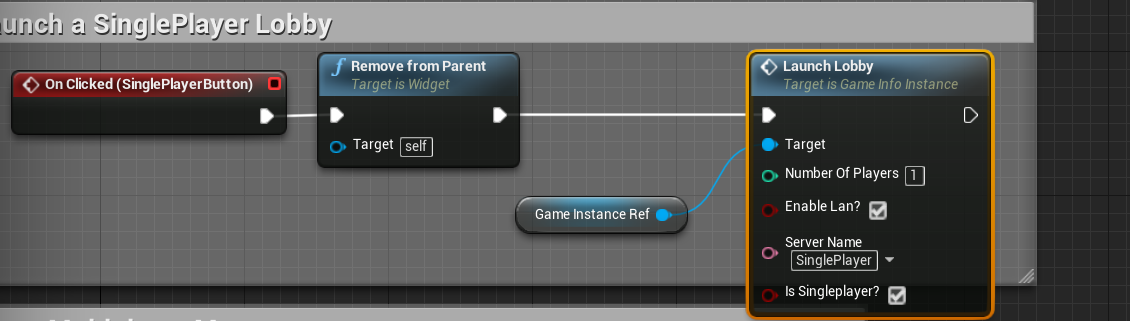
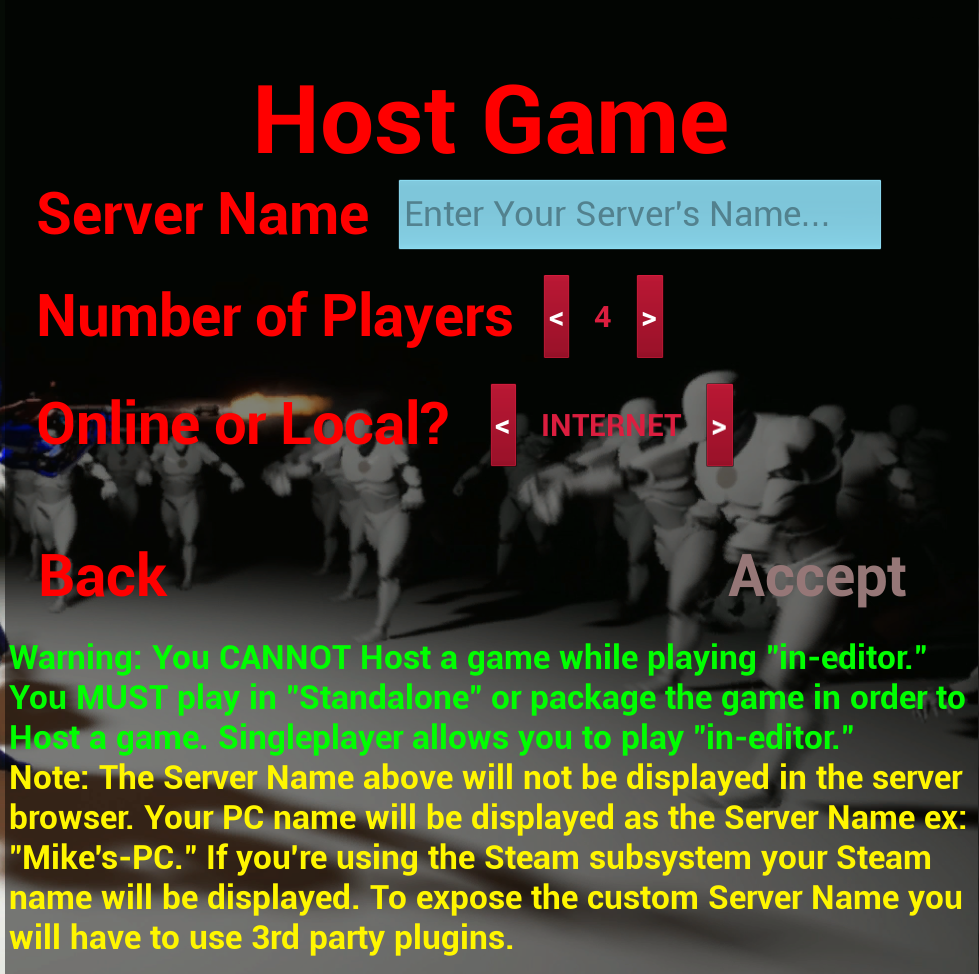
 crude sparrow
Ho thanks I didn't know that, and what would auto do?
crude sparrow
ok thanks I was just curious
 tame tundra
Hello!
How can I get pointer on the current AGameSession on server?
AGameModeBase::GameSession
shrewd frigate
Can someone point me to a good tutorial or PDF on replication with a dedicated server? Any can help. Thanks. 🙂
 royal isle
Hey, if I want to make a rideable horse for my multiplayer game do I have to write my own movement component for it? Cause I don't want it to derive from character but from pawn
 bitter oriole
In this case yes
And it's not going to be easy
Most people would try to derive from Character first
royal isle
so if I make a character child and just replace the default capsule somehow would that do it?
Well with a quick google search this is not possible as the default movement component is only meant to work with capsules
so I guess I will try and write my own movement component based off of the unreal one
With a quick look I believe I can write a child of PawnMovementComponent that also implements INetworkPredictionInterface for my networked horse movement component.
 void acorn
hi, I try to test simple lobby on local network no dedi, find session return 0 session, somehting to setup ? do no see explaination on docs ...
 quartz panther
So I started to work on a multiplayer FPS prototype.
Now i have the problem where replication between clients and server to client works bot not client to server as you can see in the video (Upper left window is the server )
 merry hemlock
@quartz panther Did you read the Network compendium?
shrewd frigate
Can someone point me to a good tutorial or PDF on replication with a dedicated server? Any can help. Thanks. 🙂
 trim skiff
Is it possible to modify a Player State value (in my case, Player Name) through UI so that its value remains that way across all levels?
In other words, I am trying to set the value of Player Name (in Player State) through an UI widget, but I'd like the value to remain the way it is, but I can't access the Player State from the UI. Is there an alternative way to it?
worthy perch
You can always get the GameState and get the PlayerStates off that.
high current
Look into the Game Instance class
Ideally, you would want to change the player name on the GameInstance from the UI, and then the player state fetches it on init from there
the Game Instance class persists between level loads, hence why I suggest it
keep in mind that it is also not a replicated actor
trim skiff
"Ideally, you would want to change the player name on the GameInstance from the UI, and then the player state fetches it on init from there"
That was my initial idea, but wouldn't the server try to get client's game instance when he joins? And wouldn't that be a null?
trim skiff
EDIT: As weird as it is, I managed to do it (I guess). I added a variable to the Game Instance and named it "Nick" (short for nickname).
Then, in the PlayerState class, I get its value and set the PlayerState's default Player Name value to Nick's one. So yeah, this seems to have worked, even though I didn't expect it to.
Cheers for the help. ❤
thin stratus
That looks really wrong though.
If you setup Multiplayer correctly, then SeamlessTravel would be enabled and would take care of moving the PlayerName around. No need for GameInstance and def no need for the stuff you do in your screenshot
If that's the BeginPlay of the PlayerState then you are currently setting each player's name multiple times instead of properly retrieving the name and then setting it ( this would require RPCs cause the Server has to set the name and the server doesn't know about the Nick variable in the GameInstance of a client)
In addition you marked "Nick" replicated which is wrong as the GameInstance is not replicated
@trim skiff
 tough gyro
are there any "networking best practises" that lists common patterns for replicating whatever stuff? 🤔
sort of like the network compendium
trim skiff
@thin stratus Yes, I am aware of the fact that Game Instance doesn't get actually replicated..
Since Player State gets destroyed when switching to another level or server, I was unable to find a way to set the name through UI in the menu level and then persist that name across all levels no matter whether the player is the server or client.
thin stratus
Right, but what MrTapa described is in fact not "ideal".
The GameInstance isn't needed here.
PlayerStates, when using SeamlessTravel, are already passing over the Name
trim skiff
Will the player state remain passed through the levels even when I switch to a level with a different game mode in it (that uses the same PlayerState class type)?
Also, what if I disconnect (destroy a session) from the server?
thin stratus
The PlayerState doesn't remain. It passes the info over to the next one when performing a ServerTravel that is Seamless.
That does not include connecting and hosting, as well as disconnecting.
That only includes traveling with the Server while being connected.
trim skiff
So, that way, the Player Name will be lost once you disconnect from a server and are back to the menu.
Thanks.
thin stratus
Persisting PlayerNames aren't meant to be passed around like this anyway.
You usually have a Subsystem (Like Steam) or backend that saves the name.
The connection part also usually passes the PlayerName to the Server.
trim skiff
I was thinking of something like the old 1.6 prior to having Steam. Its player names were there no matter whether you disconnect or join.
Though, that clearly ain't built using UE4.
thin stratus
Right, that PlayerName, for the local player, would be a saved in a savegame.
So whenever you are not connected, it's just a savegame that stores it.
That one you can always ready locally and fill the name back in.
For the Online Part UE4 should technically pass an assigned name to the Server.
Given you are using the PlayerName variable of the PlayerState and not something custom.
After the connection, the the GameModes should always be setup to SeamlessTravel.
That way this information persists between mapchanges.
For diconnecting and reconnecting players, UE4 has inactive PlayerStates. If you have a DC, you have a few minutes to reconnect, however not sure if that works out of the box if you don't have a subsystem with a uniuqeID that identifies the player.
This entails stats like kills etc. too though.
When disconnecting to the mainmenu, you can use the savegame again.
trim skiff
Ah, I see. To recap it generally:
So I would basically get the name from the savegame while local in menu, and set the Player Name. Then, through SeamlessTravel, that would persist until I disconnect. When I disconnect and get returned to the menu, I load the savegame to get the name again and fill the Player Name again?
Have I missed something huge?
thin stratus
No, that's technically how it works. The only part that I'm not sure about is the automatic passing of the name to the server.
You aren't using any ServerLists or?
Cause without Steam you are probably bound to direct IP connections
trim skiff
Yes, no Steam and I am dealing with IP connections.
thin stratus
then you should be able to do open <ipaddress>?name=<playerName>
You are probably using the ExecuteConsoleCommand node or the OpenLevel node (don't remember if OpenLevel allows ip connections)
So you just have to format the connection string accordingly
And passing in the PlayerName from the PlayerState to <playerName>
The rest should be done by UE4